Over the years we have come to rely on our smartphones for nearly everything – be it work, leisure, or entertainment. So when your phone randomly shuts off, it can get really annoying really quick if you don’t have any alternatives. Luckily, not all hope is lost and you may not actually need to replace your device. In this article, we bring you the top 12 ways to fix the ‘Android phone keeps turning off’ issue.Read Also:Microsoft 365 Copilot integrated into Word, Excel, PowerPoint and Teams
Restart your phone
Restarting your phone should be the first step in fixing minor issues with your smartphone. A simple restart resolves any software-related background glitches that may have prevented your smartphone from functioning correctly. To restart your smartphone, press and hold the side key for a few seconds and select ‘Restart’ from the power options. Newer smartphones that use the side key to trigger the voice assistant require pressing and holding the side key and Volume Up key simultaneously to access the power options.
Reboot your phone in Safe Mode
Rebooting your phone in Safe Mode disables all third-party apps. Press and hold the power off icon in the power menu to reveal the Safe Mode option. If your phone works fine in Safe Mode, it means that one of the third-party apps is at fault. Delete the apps that you installed right before this issue surfaced on your phone. Once that’s done, reboot your smartphone normally. The issue should be fixed. If you’re experiencing the issue in Safe Mode as well, move on to other fixes.
Make sure your phone is charged
Your Android smartphone shuts off when its battery has been depleted. If it won’t start back up, you need to plug it into a charger. It is possible to miss low-battery reminders when you’re not paying attention to your phone. If you don’t plug your phone into your charger in time, it will shut down within a few minutes. Even when the phone is locked, the background tasks demand battery usage. This leads to the phone shutting off after the battery has been fully drained.
Check if your phone is scheduled to turn off
Most Android phones can be scheduled to turn themselves off at a particular time. If you notice that your smartphone shuts down at a certain time every day, chances are you scheduled that power-off time and probably forgot about it. To turn off ‘Scheduled On/Off’ go to Settings>Additional Settings>Schedule power on/off and turn the toggle bar off.
Check your phone’s storage
If you’re about to reach your phone’s maximum storage potential, you may have already noticed a drop in performance. At times this could also lead to the phone shutting down randomly because the RAM cannot handle all the tasks thrown at it. It is a good idea to have a breathing space of 20-30% in your phone’s storage. Go to Settings>Battery and device care>Storage to manage your smartphone’s storage. This is where you’ll see the breakdown of your phone’s internal memory and get an idea of which apps consume the most space on your phone. To free up space, delete all duplicate files on your phone and uninstall unused apps.
Check your phone’s battery health
Older smartphones lose a significant portion of their battery capacity with time. In most cases this means reduced power backup, but if the battery health has rapidly declined it could lead to random shut-offs as well. To check your phone’s battery health, go to Settings>Battery>Battery Health and see the maximum capacity of your phone’s battery.
Check your phone’s battery status
If your phone’s battery has a workable capacity, it could be suffering from some other issues. To check your phone’s battery status, launch the Phone app and dial *#0228#. This will bring up detailed information about your battery. This code may vary for different smartphones. Look up the dial code for your smartphone manufacturer beforehand.
Check if the power button is stuck
Maybe you have been looking at it the wrong way. Maybe the cause of your phone’s weird behaviour is hardware-related and has nothing to do with the software at all. Sometimes the power button gets stuck in its cutout and constantly pushes inwards, leading to the phone shutting down. Check if that is the case with your phone, and try to pull the button out with a small pair of tongs. Do not apply too much pressure, if you’re not able to restore the button, take your phone to a professional repair shop. Maybe the power button isn’t stuck but it is the phone’s protecting cover that is pressing it inwards, leading to the phone getting shut down. Take off the phone case and see if the problem still persists.
Check if the battery is loose
Smartphone batteries are known to swell up over time. Once they increase in size, you can see the back panel protrude a little bit. This can also lead to the connections inside the phone becoming loose, which may cause the battery to disconnect from the device. To verify this, shake your phone and give it a few jerks. If it turns off, it means that the battery is loose. Take your phone to a professional repair centre and get the battery replaced.
Update your phone’s OS
If the issue is bug-related, chances are that your phone’s manufacturer fixed it with a quick update. Go to Settings>Software Update>Download and Install to check for new updates. If there is a pending update, download and install it on your device.
Perform a scan for viruses
It is possible that a virus or malware is causing your phone to shut down at random intervals. Install a good anti-virus app on your phone and perform a deep scan of your device. Let the anti-virus app find the source of the virus. Once you know which files are compromised, delete them from your phone.
Factory Reset your smartphone
This is a last-ditch effort to restore normal functioning in your smartphone. If you’ve had no luck trying the above-mentioned fixes, it is time to restore your smartphone to its factory settings. To perform a factory reset, go to Settings>General Management>Reset>Factory Data Reset. Make sure you back up all the data on your smartphone before resetting it to its factory settings as this step will wipe all its data.
Frequently asked questions
Why does my Android phone suddenly turn off?
Your Android phone abruptly turns off when its battery has been completely drained.
What does it mean if your phone keeps turning off by itself?
If you haven’t scheduled a power-off time for your phone, then random shutoffs could be a battery-related issue. Check your phone’s battery health to know more.
How do you fix a phone that keeps turning off by itself?
These are the top 12 ways to fix the ‘Android phone keeps turning off’ issue. If the problem still persists after trying all the fixes mentioned in this list, you should take your phone to a repair centre for further diagnosis. If your phone is quite old, you would need to replace it. Here is our list of the top smartphones with good cameras you can buy in 2023.For the latest gadget and tech news, and gadget reviews, follow us on Twitter, Facebook and Instagram. For newest tech & gadget videos subscribe to our YouTube Channel. You can also stay up to date using the Gadget Bridge Android App. You can find the latest car and bike news here.
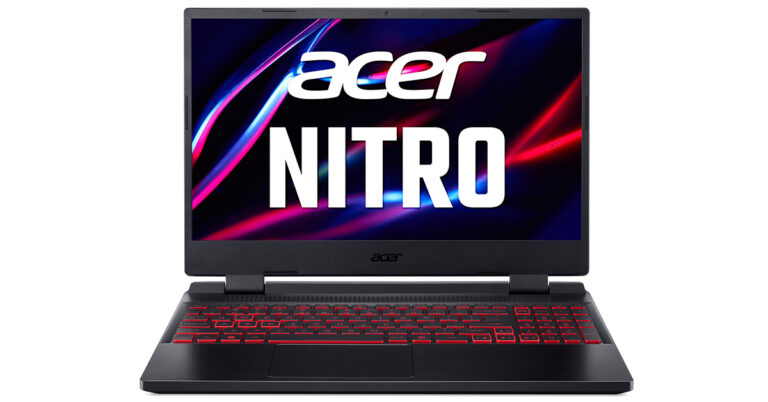
Acer has been launching a lot of laptops in India and the latest to enter the market is Acer Nitro 5 (2023) laptop. The laptop offers all the resources required to defeat the online rivalry thanks to the Intel Killer E2600 Ethernet Controller and Wi-Fi 6E connectivity. Many peripherals can be plugged into the ports on the device, including HDMI 2.1 and the most recent USB 3.2 standard with Gen 1 and Gen 2 compatibility.
Acer Nitro 5 (2023): Tech Specs
This is the ideal companion for users who are constantly on the go thanks to its 57.5 Wh 4-cell Li-ion battery and up to 8 hours of uptime. Gamers can enjoy smooth, tear-free gameplay at maximum speed thanks to AMD FreeSync. Thin, high-performance laptops with new Max-Q technology are quicker and more effective than ever.
Read Also:Acer adds Nitro 7 and Nitro 5 gaming notebooks to its product line-up
Acer Nitro 5 (2023) has maximum performance and massive storage for a fluid and seamless gameplay experience with up to 2×16 GB of DDR5 system memory. Low latency gaming on the Wi-Fi 6E, smooth HD streaming video, and uninterruptible audio and video chats are all provided by the Killer Ethernet E2600. Users can plug in a variety of peripherals thanks to the complete range of ports, which include HDMI 2.1 and the most recent USB 3.2 standard with Gen1 and Gen2 support.
The most recent AMD Ryzen 7000 series on the market gives creators and gamers access to the strength of the most powerful performance in a single chip. This most recent Nitro 5 version offers game-changing speed with up to 8 cores, 16 threads, and boost clocks of up to 4.55GHz.
Better audio gives you a competitive edge and a more immersive experience with dual 2W speakers on the Acer Nitro 5 (2023). Customers can hear opponents clearly and with pinpoint accuracy thanks to DTS:X Ultra’s ability to deliver noises in a 3D spatial soundscape.
With dual-fan cooling, dual-intakes (top and bottom), and a quad-exhaust port design, the newly improved chassis in the Acer Nitro 5 (2023), it has a few additional tricks up its sleeve. Open the NitroSense utility software to gain additional control over fan speeds, lighting, and other factors.
With AMD FreeSync maintaining those frames tight and in sync, everything appears better in QHD. A fluid, uninterrupted, and unmatched gaming experience is guaranteed by the 165Hz refresh rate and 3ms reaction time.
“The Acer Nitro 5 (2023) have an unrivalled reputation for offering cutting-edge technology and intense gaming at affordable prices. As gaming has been in the spotlight for the past several years, we are proud and thrilled to introduce the latest Nitro 5 laptop to our Indian gamers. It features the latest AMD Ryzen 7000 processors which is a gaming powerhouse with high performance. With the latest sleek and refined chassis this robust laptop packs a punch giving the users a seamless gaming experience” said Sudhir Goel, Chief Business Officer, Acer India.
Read Also:Acer Nitro 5 Spin Review: Extreme gaming at minimal weight
According to Microsoft’s latest announcement, major changes will be made to how Windows controls which programmes open particular files by default and how users can add programmes to their Start menu on the taskbar or desktop. When developers wish to modify how Windows 11 reacts to particular links and file types, the tech giant will create a new deep link “universal resource identifier” (URI) that enables them to direct users to the appropriate menu item in the Settings menu.
“We want to ensure that people are in control of what gets pinned to their Desktop, their Start menu and their Taskbar as well as to be able to control their default applications such as their default browser through consistent, clear and trustworthy Windows provided system dialogues and settings,” said Microsoft rep in a recent blog post.
Read Also:How to move Windows and other taskbar icons from middle to left side
Over that, the business announced that it will introduce a new public API that will display a prompt asking you to allow programmes permission before they appear on those interface elements, giving users more choice over which apps are pinned to their desktop, start menu, and taskbar.
The company also added, “We will soon introduce a new publicly available API that will enable apps to pin either primary or secondary tiles to the Taskbar”.
Read also:Windows 11 launched: Here are the top 5 features
The IT juggernaut was reacting to the cumbersome app-switching process. For instance, if a user wants to switch from Edge to Chrome as the default browser, they must individually select Chrome as the default for each corresponding file and link type in addition to setting Chrome as the default browser overall.
Microsoft may have done this to provide consumers with more precise control over apps, but the complicated process irritated users.
For the latest gadget and tech news, and gadget reviews, follow us on Twitter, Facebook and Instagram. For newest tech & gadget videos subscribe to our YouTube Channel. You can also stay up to date using the Gadget Bridge Android App. You can find the latest car and bike news here.
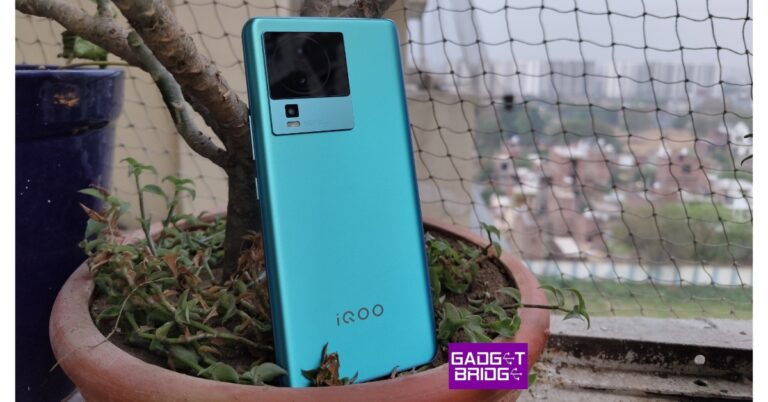
iQoo Neo 7 5G debuted in India a little while back. Since then, we have been making daily use of this. The smartphone has a MediaTek Dimensity 8200 Processor, which also supports 120W fast charging and a 120Hz AMOLED display. All of these features are available for less than Rs 30,000. The phone is a successor to the iQoo Neo 6, which in our testing had excellent performance for the price and was a reliable gaming phone. Let’s see how the iQoo Neo 7 5G performed in this review.
iQoo Neo 7 5G Review: Design and Display
From a distance, it appears to have a glass back, but it actually has a plastic one. The body is composed of plastic, however, the plastic is of excellent quality. It has a matte finish, so it is not a fingerprint magnet. We played with the Frost blue shade with a shimmer finish. It changes colours with the sunlight as you move. It has a camera module in a square form and the NEO logo at the camera island’s base.The power button is located just below the volume rocker on the right of the frame. We had no issues using the fingerprint scanner, which is built-in and works quite well. The two buttons are made of plastic as well. At the bottom, there is a stereo speaker grille and a Type-C port. An IR emitter is also located on top.Let’s now discuss the display. A 6.78-inch full-HD+ AMOLED screen with a 1,080 x 2,400-pixel resolution and a refresh rate of 120 Hz is featured on the gadget. The capacitive touch display is promised to have a pixel density of 388ppi, a 1,200Hz quick touch sampling rate, a 300Hz touch sampling rate, and a peak brightness of 1,300 nits. The screen’s aspect ratio is 20:9, and its screen-to-body ratio is 93.11 per cent.The performance of the screen for watching media is excellent. It supports Widevine L1, and HDR 10, too, even on Netflix. We watched a lot of content and YouTube videos, and overall, the experience was excellent, largely due to the stereo speakers. Even with loudness at 70%, we were surprised by how much louder the speakers were than we had anticipated.
iQoo Neo 7 5G Review: Performance and Cameras
The most recent MediaTek Dimensity 8200 chipset is included in the iQoo Neo 7 5G. It has 256GB of UFS 3.1 storage and up to 12GB of LPDDR5 Memory. 8GB of RAM and 128GB of storage are included in the base model.In our daily use, we watched YouTube videos and utilised it for social media, and other things without ever experiencing any lag. While the animations are quite smooth, the phone is fairly quick and snappy. As we all know iQoo Neo is a gaming-centric range and this model has gaming features like Call of Duty’s 90FPS gaming mode, which is really good. Moreover, it contains a motion control function that lets you play the game using motion. The entire gameplay is smooth and enjoyable. Now, it does get a little heated, which is completely natural when you play video games for a lengthy period of time, but it includes a vapour-cooling chamber that controls the thermals.Geekbench 6 CPU Benchmark result for iQoo Neo 7 5GSingle-core score: 1214Multi-core score: 3486The smartphone comes pre-installed with Funtouch OS 13, which is based on Android 13. The firm promises the next two Android upgrades and three years’ worth of security patches.Yes, there is some bloatware included, however, it is simple to remove the pre-installed apps if they are not needed. The CPU is responsible for the incredibly smooth UI experience. Hardly anything or any jitters were noted by us. Basically, the phone is highly optimised.This has an incredible battery life. When completely charged, the endurance lasted longer than a day. Over that, this phone’s 120W charging is lightning quick.Although it doesn’t focus particularly on photography, this smartphone has three back cameras, including a 64-megapixel Samsung Gw3 main sensor with OIS (f/1.79 aperture). In addition, there is a 2-megapixel depth sensor with an f/2.4 aperture and a 2-megapixel macro sensor. Moreover, a 16-megapixel selfie camera is included.When it comes to details, colour, and sharpness levels, the primary sensor performs excellently. Most of the time, the colour balance is good, but occasionally, the sky’s colours appear overly boosted and artificial. Even if the colours occasionally appear too saturated, the contrast is kept strong. When you pixel peep, it’s clear that the phone’s sharpness levels are likewise quite good.Unfortunately, the phone lacks an ultra-wide-angle camera. The close-up pictures have nice colours and good details. The dedicated macro camera is failing once again, and the picture is not fantastic. There is a lot of noise, middling details, and somewhat washed-out colours. Also, the portrait photos appear a little too saturated, and the quality is inconsistent. In short, the colour is slightly more enhanced, and the portraits have quite artificial skin tones. The edge detection is really accurate.There is a respectable quantity of detail and an adequate level of sharpness under indoor lighting situations. But, in really low light conditions, you may notice noise beginning to appear; in these cases, you must switch to night mode, which enhances the quality. The OIS helps the night mode function fairly effectively with little noise and good details.The 16-megapixel camera does a decent job with selfies, so let’s move on. We found the way it creates skin tones to be pleasing, and the sharpness and detail levels are excellent. It also has a respectable dynamic range. Although edge recognition isn’t perfect, the portrait selfie option on the phone performs a solid job once more.The phone can record films in 4K at 60 frames per second, but there is no stabilisation available, thus the footage is wobbly. It is categorically not advised for moving videos. The phone also gives users the choice of recording videos in 1080p 60fps or 4K 30fps. Almost all formats offer good-quality shots with sharpness and colours.
Verdict
This smartphone has good battery life. The fact that the device doesn’t become too heated makes it very good. The gaming on this one, though, is quite fluid. Also, the segment’s primary camera does a good job, so unless you’re looking for incredibly natural colours, you won’t have any complaints. For those seeking a smartphone with nearly flagship-level performance, this is a great option.
It’s impossible to deny how reliant society has become on modern-day mobiles in 2023. We use them to speak to people on WhatsApp, post high-quality images on social media, order in food using an app, and even for streaming Hollywood movies. Another commonly explored option on a smartphone device of today is gaming, with mobile gaming experiencing notable growth right now.
Despite mobile gaming’s rise up the entertainment ranks, not everyone is regularly dabbling in mobile gaming products. For some, the simplicity of the games compared to products available on console machines makes it an unappealing proposal. Additionally, some people don’t like the idea of using what essentially is a communication tool as a gaming device. Although these views are somewhat understandable, there are millions of people who are now opening themselves up to mobile gaming. If you’re a gamer who is yet to be convinced by the overall gaming package on offer through a smartphone device, then let’s take a look at a few reasons why mobile gaming might actually be worth another shot.
People crave convenience these days and mobile gaming fits the bill
We particularly needy human beings have become accustomed to receiving things in an instant in the modern world. Additionally, our attention spans have become shorter given the emergence of short-form video content and social media sites like TikTok. As such, a convenient gaming opportunity stands out, with people enjoying the instant access mobile gaming offers. For example, mobile games can be played anywhere as long as a user has a solid and reliable internet connection. In comparison, console and PC gaming can only be sampled indoors and require far more dedication than mobile gaming does. With that in mind, mobile gaming is therefore a viable gaming opportunity for people who perhaps don’t have the desire to invest hours of their lives into a console gaming product. People crave convenience in the modern world and mobile gaming is arguably the most convenient gaming service around.
From console products to slot games like Avalon, there is something for everyone
In 2023, the stereotypical image of a gamer has changed somewhat. Gone are the days when gaming was associated with teenage audiences, instead being replaced by a wider target audience given the diverse nature of gaming in the modern world. When assessing the biggest and best mobile gaming opportunities, there is something for everyone out there, with console products, such as PUBG Mobile, now shining on mobile, alongside slot games like Avalon, a release by Microgaming that features 20 paylines, 12 free spins and a twist in the bonus round. Whether you own an android device or an Apple phone, the games are getting bigger and better. In terms of graphics and all-round sophistication, mobile titles lag behind most PC and console options, but for a mini gaming experience that can provide entertainment as and when it suits a gamer, mobile games are much better these days.
Another reason why mobile gaming is most definitely worth sampling still is due to the selection of gaming smartphones that have led to a dramatically improved mobile gaming experience on the whole. Despite many regular devices sufficing, certain games require a more powerful device to elevate them. With that in mind, phone manufacturers have been producing a massive range of gaming phones that come fully packed with a selection of features that are geared towards gaming, such as better battery life, triggers, vibrations, sophisticated cooling systems, and a range of immense display features. Invest in a gaming phone and you’ll notice the difference, too.
March 20 is recognised by the United Nations as the International Day of Happiness. Since 2013, the UN has celebrated this day to mark the importance of happiness in everyone’s lives. As a part of the International Day of Happiness, United Nations encourages policies that take into account the aspirations and general happiness of people around the world. This year’s year theme for International Day of happiness is ‘Be Mindful. Be Grateful. Be Kind.’ In this article, we bring you the top wellbeing apps and gadgets to maintain mindfulness and overall physical fitness.Read Also:How to install mSpy on target Android in 2023?
International Day of Happiness: Wellbeing Apps
Headspace
You may have already heard of Headspace. This mindfulness and meditation app helps you relax and guides you through your meditation session, breathing exercises, and more, wherever you are. Headspace has an enormous library of soothing ambient sounds for meditation and sleeping. It even helps you with your breathwork during guided meditation. If you’re on the go, you can carry out a quick 3-minute meditation session with Headspace. While it is primarily a meditation app, Headspace also has cardio workout plans.
Calm – Sleep, Meditate, Relax
Calm helps you integrate meditation and breathing exercises into your schedule with its quick, easy sessions. The app contains an extensive collection of soothing sounds, relaxation music, sleep stories, breathwork, and stretching exercises to help you relax and centre yourself. You can program your own sessions and choose the duration that suits your routine the best. Calm also has specialised programs for beginners to help them along in their journey.
Simple Habit: Meditation
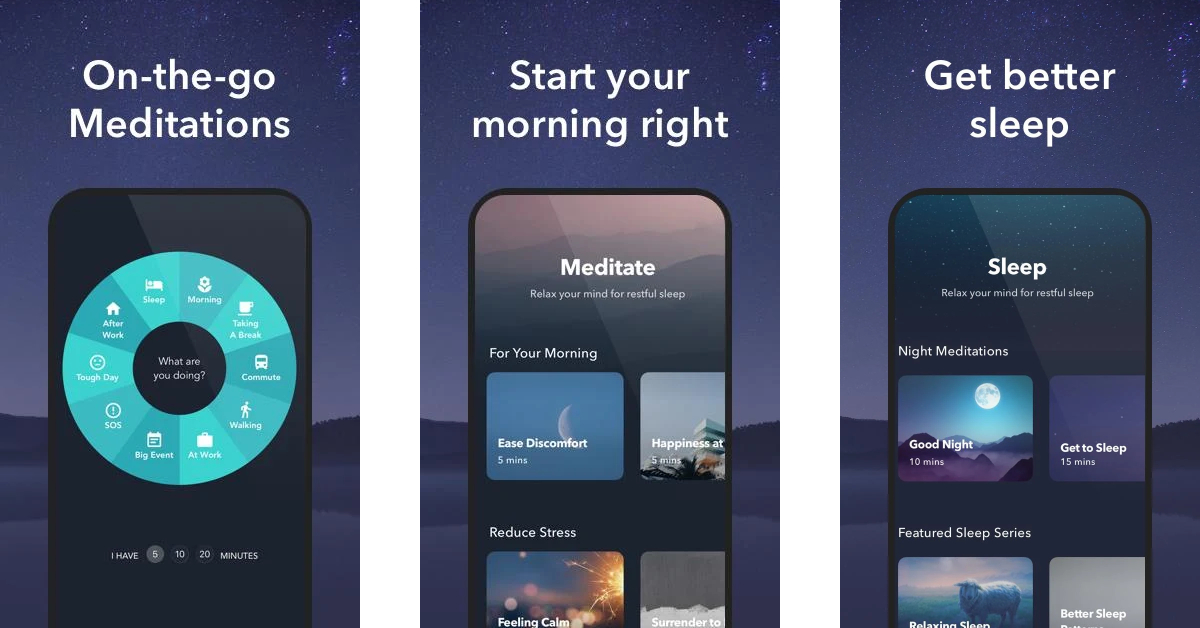
Simple Habit is a wellness app that offers guided meditation sessions, sleep therapy, and coaching by world-renowned experts. Simple Habit brings you guided mediation sessions from experts at Google and former monks. A premium subscription to Simple Habit allows you to access meditation sessions offline. You will also find tons of motivational talks on this app. Simple Habit also has an On-the-Go feature that helps you quickly calm your anxiety with a quick mindfulness session.
Serenity: Guided Meditation
Serenity offers a free 7-day audio course to help you learn all the skills needed to integrate mindful meditation into your routine. Serenity’s quick meditation sessions help you relieve stress and anxiety after a long day. One of the better parts of using Serenity is that it doesn’t require you to sign up or log in to use its services. While there are no subscription plans, some content is locked behind a paywall and demands a one-time purchase to be used.
International Day of Happiness: Wellbeing Gadgets
beatXP Bolt Deep Tissue Massage Gun
Price: Rs 1,699This deep-tissue massage gun offers relief from muscle aches and stress across the body. The beatXP deep tissue massage gun comes with 4 pro-grade attachments that cover all areas of the body from the neck, spine, and shoulders to joints, palms, feet, and soles. If you work a desk job that requires long hours of sitting on your chair, this massage gun will come in handy and take care of any muscle tightness or soreness.
OnePlus Nord Watch
Price: Rs 4,999OnePlus Nord Watch has everything you want from a fitness tracker and comes at a very affordable price. The smartwatch comes with an activity tracker, heart rate monitor, stress monitor, SpO2 monitor, and sleep tracker. It is designed to track up to 105 workout routines which include walking, running, climbing, cycling, and even sports like cricket, football, badminton, and more. OnePlus Nord Watch also gives you a detailed breakdown of your sleeping pattern. You can even practice breathing exercises using this smartwatch.
HidrateSpark Pro Smart Water Bottle
Price: Rs 10,999Hydration is important. To make sure you hydrate at constant intervals, this smart water bottle lights up to remind you to drink water. The HidrateSpark Pro has an LED smart sensor puck at the bottom that glows to remind you to drink water. The bottle also tracks your water intake by syncing with the HidrateSpark app. The app can also be used to customise the colours of the puck and set up interesting patterns.
Omrom Digital Blood Pressure Monitor
Price: Rs 1,849While smartwatches make excellent health trackers, blood pressure monitoring is one key health function which is missing from most smart wearables. Keeping regular tabs on your blood pressure gives you a good idea of your overall health. The Omrom Digital Blood Pressure Monitor is an efficient device that gives accurate readings of your blood pressure levels. This device uses IntelliSense technology for comfortable inflation of the armband. You don’t need to set the pressure beforehand. This product also comes with a 3-year warranty.Read Also:Sony WH-CH720N headphones with up to 50 hours of battery life launched in India
March 20 is internationally observed as World Oral Health Day and serves to raise awareness about oral health and the importance of oral and dental hygiene. This year’s Oral Health Day theme is ‘Be Proud of Your Mouth’, which has been rolling on since 2020 and will conclude this year. Now that World Oral Health Day is just around the corner, we thought we’d bring you the top gadgets that help you maintain dental and oral health.Read Also:Best Ways To Install Fonts On an Android Smartphone
Oral B Pro Expert Electric Toothbrush
Price: Rs 889Oral B Pro Expert is one of the best entry-level electric toothbrushes you can buy right now. The toothbrush is pretty easy to use. Attaching the brush head to the body is an easy exercise, one that will not require much practice. Once attached, apply some toothpaste on the bristles and turn the toothbrush on. Place the brush head on one tooth at a time and slowly make your way across your teeth. Typically, you should be covering one quadrant of your mouth in 30 seconds. The toothbrush comes with a helpful timer that buzzes after 2 minutes, letting you know that the recommended amount of time for brushing your teeth is over. Oral B Pro Expert comes with a 2-year warranty.
AGARO Water Flosser
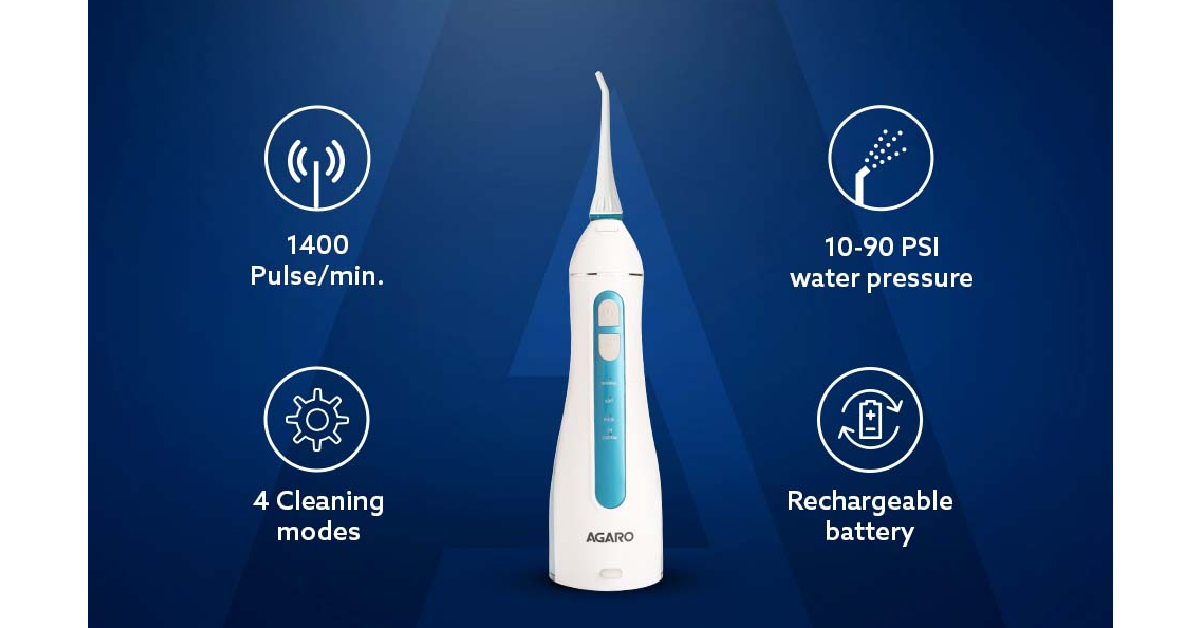
Price: Rs 1,499Your dentist is right, flossing is important. No matter how much you put it off, dental hygiene is incomplete without regularly flossing your teeth. If regular flossing takes much of your time, you will find a water flosser to be a total game changer. The AGARO water flosser offers a water pressure range of 10-90 PSI which is more than enough to thoroughly clean the crevices between your teeth. There are 4 cleaning modes on offer – soft, normal, pulse, and custom. The 200ml water tank may need refilling a few times before you are done flossing your teeth. This is an excellent gadget for kids who have trouble using dental floss because of their braces.
Philips Sonicare 4300
Price: Rs 3,869Philips Sonicare 4300 may be slightly expensive, but it is also one of the best electric toothbrushes in the game. This device is capable of removing up to 7x more plaque than a regular toothbrush. With 62,000 brush head movements per minute, you don’t have to worry about a thorough cleaning. The smart brush replacement indicator lets you know when you need to replace the brush head. The quad-pacer notifies you when the ideal brushing time is up. Philips Sonicare 4300 offers an average battery life of 14 days and comes with a charging dock inside the box. Read our review here.
AGARO Teeth Whitening Kit
Price: Rs 2,230Regular coffee drinkers will attest that brushing your teeth twice a day doesn’t do much to reduce the coffee stains on your teeth. Luckily, the fix is simple. AGARO’s teeth whitening kit claims to whiten your teeth within 7 days if used daily for 10 minutes. The teeth whitening kit comes with 28 strips and a 24 blue LED light device. Using the kit is pretty simple, all you have to do is apply the strip on your teeth and fix the light device on top of it. The rechargeable battery onboard is good for 100 minutes of cordless use.
Colgate ProClinical 150
Price: Rs 899The Colgate ProClinical 150 electric toothbrush provides excellent tooth cleaning at 20,000 strokes per minute. The bristles on this electric toothbrush are infused with charcoal which is helpful in fighting harmful bacteria. One of the better aspects of Colgate ProClinical is the ease of use. The toothbrush comes with two alkaline AAA batteries that are easy to replace. The brush head is easy to remove and can be easily removed. The two-minute timer tells you when the time is up and the quadrant pacer lets you know when to switch sides.
HealthandYoga Tongue Cleaner
Price: Rs 174The best tools are often the most simple ones. The old reliable tongue cleaner may seem too obvious for this list, but it is also one of the most important fixtures of any dental kit. This tongue cleaner by HealthandYoga is made out of pure stainless steel and has sturdy handles that will last you a long time. Easy on the tongue, this tongue cleaner smoothly scrapes your tongue and removes the layers of dirt that may have deposited on it. This is an essential product if you’re to fix bad breath.Read Also:Nokia C12 launched in India at Rs 5,999
Conclusion
These are the top gadgets that help you maintain dental and oral health. Since it’s World Oral Health Day, we’d like to know how you go about maintaining your oral and dental hygiene? Is there a product in this list that you’d like to pick up and incorporate into your daily regimen? Let us know in the comments!For the latest gadget and tech news, and gadget reviews, follow us on Twitter, Facebook and Instagram. For newest tech & gadget videos subscribe to our YouTube Channel. You can also stay up to date using the Gadget Bridge Android App. You can find the latest car and bike news here.
Daily Amazon brings a fresh quiz for its customers with exciting rewards on its platform. The Amazon quiz can be played every day from 12 AM to 11:59. 19 March 2023 Amazon Quiz has gone live on its platform and the e-commerce platform Amazon is today giving you a chance to win Rs 1,250 Amazon Pay Balance.To participate all you need to do is log in to your Amazon app on your device and give answers. Daily a new set of questions are presented to the participants which gives them a chance to win exciting prizes. The questionnaire consists of five easy questions that are usually based on general knowledge and current affairs. You can submit the correct answers and can win an Amazon Pay Balance of up to Rs 50,000. It should be noted that the quiz is not accessible on the web platform instead you have to participate only through the dedicated app.Amazon Quiz Today Prize – Rs 1,250 Amazon Pay BalanceQuiz Date – 19 March 2023Daily Timing – 12 AM to 11:59 PMWinner Announcement – Today 12 PM
Amazon Quiz Answers Today 19 March 2023
Question 1: As of March 2023, which film is the highest-grossing Hindi film of all time?Answer: PathaanQuestion 2: What limited-edition variant of Realme 10 Pro 5G comes in a two-tone pattern of black and red?
Answer: Coca-Cola
Question 3: Which Hungarian diplomat, currently serving as President of the 77th United Nations General Assembly, visited India?Answer: Csaba KorosiQuestion 4: This animal is a symbol of which Tirthankara of Jainism?Answer: FourthQuestion 5: This species of deer has the largest range in which continent?
Answer: Europe
How To Play Amazon Quiz
Only app users are eligible to play the Amazon quiz every morning from 12 AM to 11:59 PM. The quiz is not available on the desktop. For those who are unaware of how to play the Amazon quiz below are the steps, you can follow to take the quiz.
Firstly download the Amazon app from Google Play Store or App Store
Now fill in the required information through the Sign Up option.
You need to log in to the Amazon app and scroll down on the home screen to find the Amazon Quiz banner.
Tap on the Amazon Quiz banner and tap on the Start button to start the Quiz.
Now you will get 5 questions and you need to answer them correctly. One wrong answer will eliminate you from the Quiz.
After answering all the questions correctly you are now eligible for a Lucky Draw.
The winner’s name will be announced today at 12 PM.
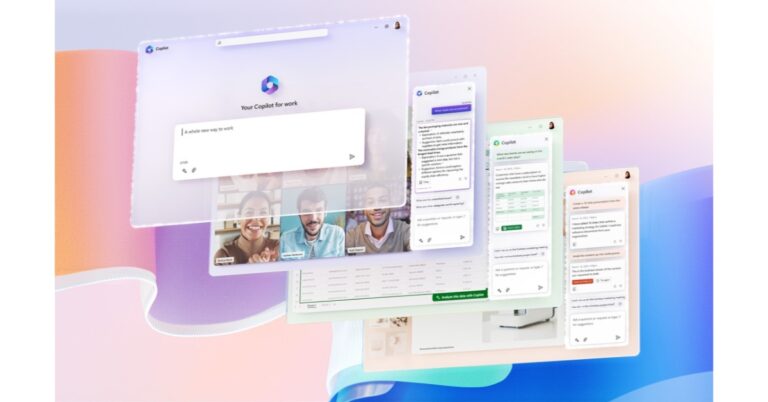
Microsoft has launched Microsoft 365 Copilot, a productivity tool powered by AI. According to the company, the latest AI tool uses your data from the Microsoft Graph, including your calendar, emails, chats, documents, meetings, and more, as well as the Microsoft 365 apps to generate content. The AI-backed feature has the capability to draft an email, documents, presentations and more. It has been integrated across all its productivity apps like Word, excel and more.While announcing Microsoft 365 Copilot the company said, “Today, we announced Microsoft 365 Copilot—your copilot for work. Copilot combines the power of large language models (LLMs) with your data in the Microsoft Graph—your calendar, emails, chats, documents, meetings, and more—and the Microsoft 365 apps to turn your words into the most powerful productivity tool on the planet. And it does so within our existing commitments to data security and privacy in the enterprise.”
Microsoft 365 Copilot has been integrated into Word, Excel, PowerPoint, Outlook, Teams, and more—to unleash creativity, unlock productivity, and uplevel skills according to the company. Copilot in Word can create a first draft and add content to existing documents, summarize text, and rewrite sections or the entire document to make it more concise. It is also said that the tool will improve writing with suggestions that strengthen your arguments or smooth inconsistencies. Whereas Copilot in Excel lets you ask questions about your data set in natural language. Then it will reveal correlations, propose what-if scenarios, and suggest new formulas based on your questions. It will help in providing models based on the questions that allow you to examine your data without changing it.Also Read:iQoo Z7 5G Indian pricing revealed ahead of March 21 launchCopilot in PowerPoint lets you make presentations from your ideas. It will help you transform existing written documents into decks complete with speaker notes and sources or start a new presentation from a simple prompt or outline. You can shorten a long presentation, and use natural language commands to change layouts, format text, and precisely schedule animations.Copilot in Outlook works in your inbox and messages, therefore, helping in saving more time for communicating. According to the company using other emails or content that you already have access to from throughout Microsoft 365, you can respond to an existing email with a straightforward prompt or turn hasty notes into clear, professional replies. Toggles can be used to adjust the tone or length of your note.Copilot in Teams said to get up to speed on the conversation, organize key discussion points, and summarize key actions. Without interrupting any discussion chat allows you to seek answers to a particular question or catch up on anything you may have missed. It can help you with generating meeting agendas based on chat history, choosing the appropriate people for follow-ups, and scheduling the next check-in.
For the latest gadget and tech news, and gadget reviews, follow us on Twitter, Facebook and Instagram. For newest tech & gadget videos subscribe to our YouTube Channel. You can also stay up to date using the Gadget Bridge Android App. You can find the latest car and bike news here.
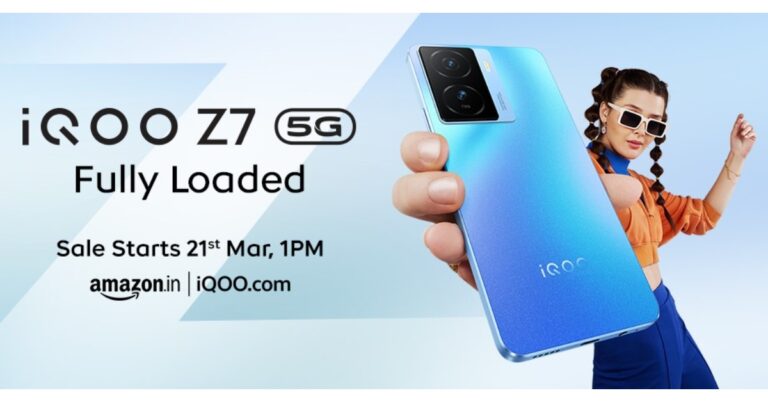
iQoo is all set to announce a brand-new smartphone in the Indian market. The company is expanding its Z-series with the launch of iQoo Z7 5G. The launch is set to take place on March 21. The company has confirmed that the upcoming phone will be powered by Media Dimensity 920 SoC. The phone will feature an AMOLED display, a 64MP camera and 44W fast charging support. Not just that the company has also confirmed the pricing, variant and bank offers on the phone along with key features. The smartphone will be available for purchase at a starting price of Rs 17,499.
iQoo Z7 5G price in India and offer details
iQoo Z7 5G India launch is scheduled for March 21 at 12 noon. The device is scheduled to go on sale on the same day via Amazon at 1 PM in the country. Interestingly the company has also revealed the pricing of the phone ahead of the official release.
Get ready to slay, stream, shoot & repeat with the #iQOOZ7 5G, powered by the MediaTek Dimensity 920 & Segment’s Brightest AMOLED display* making it a #FullyLoaded smartphone for a #FullyLoadedYou at just ₹17,499*. 💯📱
As we said earlier the company has revealed the variants and the bank offers on the phone. The iQoo Z7 5G has been confirmed to be available in two different configurations of 6GB RAM with 128GB storage and 8GB RAM with 128GB storage. They will be priced at Rs 18,999 and Rs 19,999 respectively. Exclusive bank offers include a Rs 1500 instant discount on select debit and cards as well as EMI transactions. When the bank offer is applied the price of the phones will come down to Rs 17,499 and Rs 18,499 respectively.Also Read:Poco X5 Pro 5G Review: It will serve you welliQoo will also offer no-cost EMI for up to 6 months and free colour earphones. The device will be available in Norway blue and Pacific night colour options.Moreover, the phone will include an in-display fingerprint sensor. It is confirmed to include a 6.38-inch full HD AMOLED display with a peak brightness of 1300 nits. The screen will also support a 90Hz refresh rate and 360Hz of touch sampling rate.There will be a 64MP camera onboard that will support OIS. The phone will also run Funtouch OS 13-based Android 13 out of the box. iQoo is promising to provide two years of Android updates and three years of monthly security patches. Lastly, the device will come with 44W flash charge support that is claimed to charge the battery (capacity unspecified) from 1 to 50 percent in just 25 minutes. The company has also revealed that the smartphone will be powered by MediaTek Dimensity 920 processor. It is said to provide 27 percent better performance than the other devices in this segment. The handset will also include some dedicated gaming features like motion control and ultra game mode. In addition to this, the iQoo phone will have a 7.8mm slim design.
For the latest gadget and tech news, and gadget reviews, follow us on Twitter, Facebook and Instagram. For newest tech & gadget videos subscribe to our YouTube Channel. You can also stay up to date using the Gadget Bridge Android App. You can find the latest car and bike news here.



 Restarting your phone should be the first step in fixing minor issues with your smartphone. A simple restart resolves any software-related background glitches that may have prevented your smartphone from functioning correctly. To restart your smartphone, press and hold the side key for a few seconds and select ‘Restart’ from the power options. Newer smartphones that use the side key to trigger the voice assistant require pressing and holding the side key and Volume Up key simultaneously to access the power options.
 Rebooting your phone in Safe Mode disables all third-party apps. Press and hold the power off icon in the power menu to reveal the Safe Mode option. If your phone works fine in Safe Mode, it means that one of the third-party apps is at fault. Delete the apps that you installed right before this issue surfaced on your phone. Once that’s done, reboot your smartphone normally. The issue should be fixed. If you’re experiencing the issue in Safe Mode as well, move on to other fixes.
 Your Android smartphone shuts off when its battery has been depleted. If it won’t start back up, you need to plug it into a charger. It is possible to miss low-battery reminders when you’re not paying attention to your phone. If you don’t plug your phone into your charger in time, it will shut down within a few minutes. Even when the phone is locked, the background tasks demand battery usage. This leads to the phone shutting off after the battery has been fully drained.
 Most Android phones can be scheduled to turn themselves off at a particular time. If you notice that your smartphone shuts down at a certain time every day, chances are you scheduled that power-off time and probably forgot about it. To turn off ‘Scheduled On/Off’ go to Settings>Additional Settings>Schedule power on/off and turn the toggle bar off.
 If you’re about to reach your phone’s maximum storage potential, you may have already noticed a drop in performance. At times this could also lead to the phone shutting down randomly because the RAM cannot handle all the tasks thrown at it. It is a good idea to have a breathing space of 20-30% in your phone’s storage. Go to Settings>Battery and device care>Storage to manage your smartphone’s storage. This is where you’ll see the breakdown of your phone’s internal memory and get an idea of which apps consume the most space on your phone. To free up space, delete all duplicate files on your phone and uninstall unused apps.
 Older smartphones lose a significant portion of their battery capacity with time. In most cases this means reduced power backup, but if the battery health has rapidly declined it could lead to random shut-offs as well. To check your phone’s battery health, go to Settings>Battery>Battery Health and see the maximum capacity of your phone’s battery.
 If the issue is bug-related, chances are that your phone’s manufacturer fixed it with a quick update. Go to Settings>Software Update>Download and Install to check for new updates. If there is a pending update, download and install it on your device.
 It is possible that a virus or malware is causing your phone to shut down at random intervals. Install a good anti-virus app on your phone and perform a deep scan of your device. Let the anti-virus app find the source of the virus. Once you know which files are compromised, delete them from your phone.
 This is a last-ditch effort to restore normal functioning in your smartphone. If you’ve had no luck trying the above-mentioned fixes, it is time to restore your smartphone to its factory settings. To perform a factory reset, go to Settings>General Management>Reset>Factory Data Reset. Make sure you back up all the data on your smartphone before resetting it to its factory settings as this step will wipe all its data.
 With dual-fan cooling, dual-intakes (top and bottom), and a quad-exhaust port design, the newly improved chassis in the Acer Nitro 5 (2023), it has a few additional tricks up its sleeve. Open the NitroSense utility software to gain additional control over fan speeds, lighting, and other factors.
With AMD FreeSync maintaining those frames tight and in sync, everything appears better in QHD. A fluid, uninterrupted, and unmatched gaming experience is guaranteed by the 165Hz refresh rate and 3ms reaction time.
“The Acer Nitro 5 (2023) have an unrivalled reputation for offering cutting-edge technology and intense gaming at affordable prices. As gaming has been in the spotlight for the past several years, we are proud and thrilled to introduce the latest Nitro 5 laptop to our Indian gamers. It features the latest AMD Ryzen 7000 processors which is a gaming powerhouse with high performance. With the latest sleek and refined chassis this robust laptop packs a punch giving the users a seamless gaming experience” said Sudhir Goel, Chief Business Officer,
With dual-fan cooling, dual-intakes (top and bottom), and a quad-exhaust port design, the newly improved chassis in the Acer Nitro 5 (2023), it has a few additional tricks up its sleeve. Open the NitroSense utility software to gain additional control over fan speeds, lighting, and other factors.
With AMD FreeSync maintaining those frames tight and in sync, everything appears better in QHD. A fluid, uninterrupted, and unmatched gaming experience is guaranteed by the 165Hz refresh rate and 3ms reaction time.
“The Acer Nitro 5 (2023) have an unrivalled reputation for offering cutting-edge technology and intense gaming at affordable prices. As gaming has been in the spotlight for the past several years, we are proud and thrilled to introduce the latest Nitro 5 laptop to our Indian gamers. It features the latest AMD Ryzen 7000 processors which is a gaming powerhouse with high performance. With the latest sleek and refined chassis this robust laptop packs a punch giving the users a seamless gaming experience” said Sudhir Goel, Chief Business Officer, 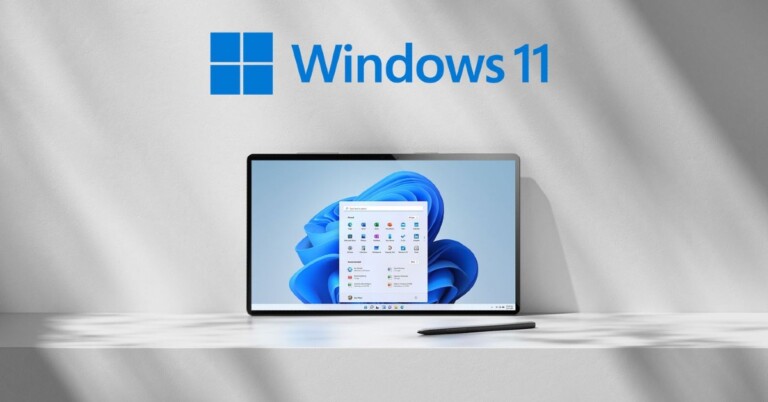
 The company also added, “We will soon introduce a new publicly available API that will enable apps to pin either primary or secondary tiles to