Amazon Quiz Answers Today 26 September 2022: Participate to win Rs 1,000 Amazon Pay Balance

26 September 2022 Amazon Quiz has gone live on its mobile app platform. Customers from different parts of the country are participating in the daily quiz. The daily quiz is conducted by the company brings an opportunity for the customers to win exciting prizes. The quiz begins from 12 AM to 11:59 PM. In today’s quiz participants have a chance to win Rs 1,000 Amazon Pay Balance by answering all the questions correctly. Every day Amazon brings a fresh set of questions for its customers that contains five easy questions. Amazon quiz brings an opportunity for its customers to win Amazon Pay Balance ranging from Rs 1,000 to Rs 50,000. which consists of five questions related to general knowledge and current affairs. The participants need to answer all the questions correctly and their names will be selected for a lucky draw. The winner will be announced at the end of the month. One wrong answer could eliminate you from the quiz. If you manage to answer all the questions correctly you can stand a chance to win Rs 1,000 Amazon Pay Balance today. Only app users are eligible to participate in the Quiz. Check Out 26 September 2022 Amazon Quiz Answers. Amazon Quiz Today Prize – Rs 1,000 Amazon Pay Balance Quiz Date – 26 September 2022 Daily Timing – 12 AM to 11:59 PM Winner Announcement – Today at 12 PM

Amazon Quiz Answers Today 26 September 2022

Question 1: Manchester United has signed Brazilian defensive midfielder Casemiro from which club? Answer: Real Madrid Question 2: Which former world heavyweight boxing champion is starring in the movie ‘Liger’? Answer: Mike Tyson Question 3: India’s first 3D printed Cornea has been recently developed by a research team based in which city? Answer: Hyderabad Question 4: Name this type of pasta Answer: Tortellini Question 5: Contrary to popular belief, Tom Hanks has not voiced this character throughout the Toy Story series. Who stepped in for him at times? Answer: Jim Hanks

How To Play Amazon Quiz

Only app users are eligible to play the Amazon quiz every morning from 12 AM to 11:59 PM. The quiz is not available on the desktop. For those who are unaware of how to play the Amazon quiz below are the steps, you can follow to take the quiz.
  • Firstly download the Amazon app from Google Play Store or App Store
  • Now fill in the required information through the Sign Up option.
  • You need to log in to the Amazon app and scroll down on the home screen to find the Amazon Quiz banner.
  • Tap on the Amazon Quiz banner and tap on the Start button to start the Quiz.
  • Now you will get 5 questions and you need to answer them correctly. One wrong answer will eliminate you from the Quiz.
  • After answering all the questions correctly you are now eligible for a Lucky Draw.
  • The winner’s name will be announced today at 12 PM.
For the latest gadget and tech news, and gadget reviews, follow us on TwitterFacebook and Instagram. For newest tech & gadget videos subscribe to our YouTube Channel. You can also stay up to date using the Gadget Bridge Android App. You can find the latest car and bike news here.

Vivo T1x Review: Should you buy it?

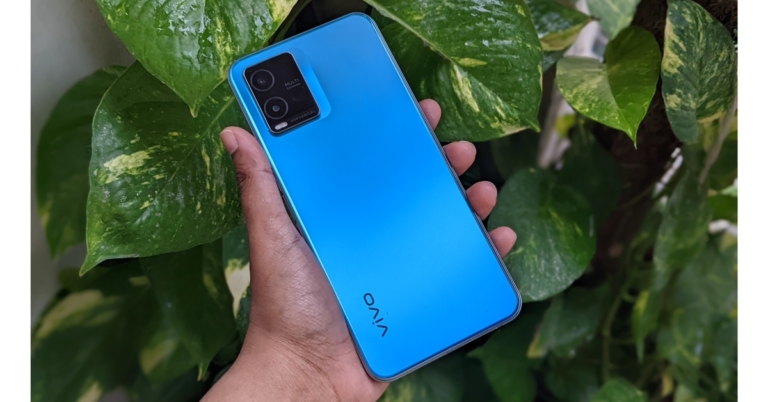
The Vivo T1x is the newest addition to Vivo’s T-Series of smartphones, which have always offered excellent value for the money spent on them. The smartphone competes with the Redmi Note 11 series and has a design that is quite similar to the iQoo Z6. It is intended for online-only users and is priced somewhere in the inexpensive range, approximately Rs 12,000.  We’ve been using this phone for a while, so trust us when we say that it feels as nice as it looks. Let’s find out what else the phone has to offer in this review. Just a glimpse, the smartphone is powered by a Qualcomm Snapdragon 680 SoC and boasts an FHD display with a 90Hz refresh rate, among other features. So let’s check it out. 

Vivo T1x Review: Design and display

The Vivo T1x is quite slim and svelte in appearance. The polycarbonate and glass used to form the back panel, which has a pretty excellent finish and is composed of plastic, seem quite nice. Furthermore, it hardly ever attracts fingerprints—aside from a few smudges—and generally remains spotless. Although the camera bump is definitely not subtle, we were able to rest our fingers on it with ease, and there is a Vivo logo at the bottom. Vivo T1x Review: Design and display The sides are quite thin, and it has a lovely flat shape that gives your hand a great grip. The volume rockers and power button, which also serves as fingerprint sensor, are located on the right. A single down-firing speaker, a USB Type C port, a microphone, and a 3.5mm headphone connector are all located at the bottom.  Vivo T1x Review: Design and display Then a SIM tray with space for two dedicated micoSD cards and nano SIM cards is located on top. A selfie camera is housed in a teardrop notch on the display. The side bezels are thin with a noticeably thick chin. Overall, we would say that the build and design give you the impression of using a high-end smartphone. Vivo T1x Review: Design and display The Vivo T1x’s front features a 6.58-inch full-HD+ LCD screen with a resolution of 1,080 by 2,408 pixels. The display has a 90Hz refresh rate, a 90.6 percent screen-to-body ratio, and a 96 percent NTSC colour gamut coverage. The contrast and overall saturation levels are rather outstanding, and the screen looks lovely. Thanks to the full HD quality, the fonts and icons are also apparent. While the display is adequate for casual media viewing, it is not bright enough for use outside in the sun. However, you do have support for 90Hz refresh rates, which makes a significant impact, especially when you are browsing through social media.  Review of Vivo T1x By offering a 90Hz refresh rate, which looks fluid but has little to no influence on your battery life, the whole display experience is improved. You can still use a smart switch, though, where the refresh rate adjusts based on the type of video being displayed. If you want to conserve battery life, maintain it at 60Hz. The T1x is a highly enjoyable, clear, crisp, and bright device for watching videos and movies on. It does have Widevine L1 certification, enabling full-resolution streaming from services like Netflix and Amazon Prime. The single speaker that fires downward is loud and clear enough. However, it would have been fantastic if it had twin speakers. On the other hand, despite being incredibly secure, the side-mounted fingerprint scanner is not the fastest. It takes a moment or two for it to recognise you before unlocking. Although it became quicker as I began to use it more frequently, you may also utilise face unlock.  Although not the safest, it is really quick. Faceunlock can be challenging in dimly lit areas where it is less effective; thus, we advise using the fingerprint scanner instead, which is far more dependable.

Vivo T1X Review: Performance and camera

With FuntouchOS, the Vivo T1x runs the most recent version of Android 11, which has a few small tricks up its sleeve but still looks and feels quite similar to pure Android. We genuinely adore how responsive, slick, and simple to use it is. Even the basic gesture controls function well. The main drawback, though, is how bloatware-heavy it is; it feels like half of the Play Store is included. The good news is that you can remove any apps you no longer use. Review of Vivo T1x When it comes to performance, the Vivo T1x is driven by a Qualcomm Snapdragon 680 SoC, which has an octa-core 6nm architecture and is paired with an Adreno GPU 610. The phone can also support up to 6GB of LPDDR4x RAM. The Vivo T1x supports UFS 2.2 onboard storage up to 128GB, and a microSD card with a maximum capacity of 1TB may be loaded through a dedicated slot.  As a result of the additional built-in storage, the RAM may be raised to 8GB, which was beneficial for multitasking and kept the most frequently used apps in memory, which is incredibly helpful. We were quite pleased with the overall user experience and found no speed slowdown. We played COD, and it was a fairly enjoyable experience overall. We played for more than 30 minutes without experiencing any lag. It’s also important to note that this phone has full-layer cooling technology, which keeps it from overheating and improves gaming performance. Regarding the battery, we have a 5,000mah battery that, depending on usage, can easily last you a day to a day and a half. There is now an 18W charger included, and a full charge takes roughly three hours. Additionally, there is no possibility of overcharging or overheating the phone because the device has a VEG (Vivo Energy Guardian) charging feature that automatically stops charging when the smartphone is fully charged. Review of Vivo T1x The Vivo T1x includes two rear cameras, one with a 2-megapixel secondary sensor and an f/2.4 aperture and the other with a 50-megapixel primary sensor. It features an f/1.8 aperture 8-megapixel front camera for selfies and video calls. Let’s start with the main camera, which is actually rather decent. In well-lit conditions, the 50-megapixel primary sensor produces clear, bright, and sharp photos. With true colours, you get a dynamic range that is astounding. We tried a few times, and it didn’t let us down. While we won’t say they are perfect, some of them were taken at night and are still rather good.
Review of Vivo T1x
Macro
If you utilise the 2-megapixel macro in well-lit environments, it should work fine. When there is good illumination, the front camera is very clear and performs admirably. Additionally, you can use bokeh blur to create portrait shots. Edge detection can be hit or miss, depending on the situation.
Review of Vivo T1x
Portrait
As for the videos, you may capture a full HD movie at 60 frames per second. If you don’t hold the camera steady, the footage can be a little shaky, but overall, the quality is excellent.

Verdict 

Numerous features about the Vivo T1x are excellent. With a Snapdragon 680 SoC and effective cooling, it is a reliable performer. A full HD display with a refresh rate of 90Hz is included. Additionally, it incorporates VEG technology for secure charging. The phone’s cameras are also being used cautiously by the gadget. Although the images are fairly outstanding, the HDR performance is not exactly the best. With these features, the smartphone manages to stand out from the competition for a starting price of Rs. 11,999.  For the latest gadget and tech news, and gadget reviews, follow us on TwitterFacebook and Instagram. For newest tech & gadget videos subscribe to our YouTube Channel. You can also stay up to date using the Gadget Bridge Android App. You can find the latest car and bike news here.

How to play Online Games Using Your Smartphone Safely

Mobile phone penetration has hit unprecedented levels during the last few years, with current figures in the United States indicating that 82.2% of the population uses a smartphone. This phenomenon has created an opportunity for businesses to reach a much larger audience. The gambling industry has moved aggressively to increase and dominate the growing market share. With the increase in the number of online casinos came the need to differentiate themselves so as to appeal to a loyal clientele. Every credible casino offered a casino bonus of one form or another. However, as the industry becomes more and more mainstream, online casino operators are faced with playing in a safe online environment that will guarantee the security of their funds and data.

Tips on Playing Safely on your Mobile Phone

Here are a few measures that a gambler can take to play safely on their mobile phones:

1.    Ensure the online casino website is licensed

A licensed website will confirm that the online casino is carrying out legal activities. This information is found at the website’s footer, or in a section called ‘Licensing’. A licensed website has its numbers generator periodically audited to ensure RTP (return to player) percentages are fair, offering games that are not rigged. When registering an account on a licensed casino website, the player should expect all payment information to be handled securely to avoid abuse. The player should also be assured that all complaints or queries will be quickly responded to with helpful feedback.

2.    Look out for Two-Factor Authentication

Laws governing online gaming activities have made it mandatory for all iGaming websites to make use of two-factor authentication. This system requires the user to prove they are the authorised owners of the account by presenting two different authentication factors.  The options could include a fingerprint or face ID, a password, or a one-time code from the OTP token. Gamers are protected from identity and payment fraud, while the company avoids expensive lawsuits from people whose personal data was leaked. Logging in from a new mobile phone will also prompt for proof of identification.

3.    Secure Payment Options

To keep clients’ data confidential and away from the reach of hackers, casino websites need to implement a few security protocols. SSL (Secure Socket Layer) is a data protection measure that keeps the gamer’s information safe. It is mandatory for all genuine sites as it prevents scammers from carrying out phishing attacks. These protocols not only help the casino build trust with their customers and comply with regulations, it also helps gamers to identify genuine gambling sites. The HTTPS letters at the beginning of the URL will guide the gambler to access a connection that is secure.

4.    Keep your Playing Device Secure

In the search for a legitimate gambling site, the mobile phone is prone to malware. The virus that has made its way into the phone application may obtain sensitive passwords or hack your bank account. Ensure that an antivirus is installed and continuously updated.

Conclusion

As much as the onus falls on the casino operator to guarantee safe transactions, the gambler should also play their part. Approach all sites cautiously and ensure all safety protocols items are checked. For the latest gadget and tech news, and gadget reviews, follow us on TwitterFacebook and Instagram. For newest tech & gadget videos subscribe to our YouTube Channel. You can also stay up to date using the Gadget Bridge Android App. You can find the latest car and bike news here.

How To Play With No Verification Technologies?

Many times, punters at online casinos get tired of the lengthy registration process while trying out a new gambling platform. Customers are in fact, a bit hesitant to share any personal information regarding their identity since most of them prefer to stay discreet while gambling online. From a gambler’s point of view, this issue is quite understandable since financial details are also being shared. Over 45% of people gamble in the UK each month. In  2020, there were 24 million adult punters in the UK and almost half of them preferred online betting. Thus, customers wanting to evade the registration process are a majority since the documentation process can be extensive and bears a risk of revealing the punter. Basically, if you want to play without registration, you can simply google a list of operators providing this service – like this list of no-verification betting sites on NonStopCasino.org. Or, you can simply read on to learn which options are available for you, and make a choice yourself.

Ways to Gamble Online Without Verification

Among the most common ways to play without registration are:
  • Using no account casinos
  • Playing with no-deposit bonuses
  • Playing free demo games
  • Playing at the casinos supporting crypto
Let’s take a closer look at each of these methods.

No-Account Casinos

No account casinos basically do not require a verification process mandated for the punters. The Pay N Play variants are highly preferred when it comes to gambling platforms that allow withdrawals without a proper signup process. A simple hassle-free money deposition process is enough for placing bets. It is definitely an easy and convenient method and is powered by Trustly, a payment gateway that enables secure and swift transactions without a security check on the identification details. However, a major con of no-account casinos is that it has limited availability and is not offered to UK punters. Irrespective of the instant payout process, these platforms lack lucrative bonus deals for gamblers which is a drawback.

Playing With No-Deposit Bonuses

For luring new punters, online casinos often provide lucrative offers. Casinos now provide free spins to new customers without a depository requirement, unlike the traditional 1st deposit bonuses. No deposit bonuses do not require a mandatory sign-up process, including identity verification, which is usually mandated. These free spins help punters explore the casino a bit and understand the games before actually investing in one. This method requires no credit card or financial details unless one feels the urge to feed in. Punters have access to all no deposit slot games which require no deposits or verification. Besides, no-deposit bonuses are often offered by providers that are not on GamStop, so even self-excluded gamblers can enjoy them. On the other hand, the bonus spins offered are much lesser than those that are offered on making a deposit. Thus, punters lose out on the actual benefit in order to avoid the KYC process.

Playing Demo Games

The demo games offered at online casinos are usually free for new punters. These games help gamblers get familiar with the games and get a hang of them. Demo games require no verification or deposit. These games are available at offshore casino platforms in Curacao, Malta, Gibraltar, and Kahnawake since the UK-based casinos do not allow underage gambling and require a verification process. Almost 16% of British gamblers are between 16-24 years of age followed by 29.8% between the 35-44 years of age group. Even during the Covid-19 crisis, the global market for casinos had an estimated value of $123.4 billion in 2020 which is projected to surpass $153.2 billion by 2026. The CAGR would stand at 3.7% over the entire analysis term. However, there are a very limited number of casinos offering demo games to their customers.

Playing at Crypto Casinos

Cryptocurrencies in online casinos have had rapid growth over the years. These casinos assure gamblers of not disclosing their identities and skipping the entire KYC procedure for gambling. This adds up to the privacy practices of casino operators. Most crypto casinos are popular on Bitcoins that require no verification or registration, although it takes time to choose a proper crypto casino brand to play at. Mostly, due to the fact that it is extremely rare for a crypto casino to offer convenient payment methods like bank transfers, credit/debit cards, e-wallets, etc. Cryptocurrency would undergo positive growth in the next few years with eSports viewership expected to reach $646 million by 2023. Another feature of these casinos that customers are inclined towards is the instant yet easy withdrawal process where one can cash out within seconds. On the other hand, gamblers are often advised against playing at crypto casinos because of the limitations of payments are flexible in cryptocurrency casinos. Punters across the globe have access to such casinos without the imposition of restrictions. They mostly hold the status of international gambling platforms.

Conclusion

On average, UK punters spend $2.60 per week on gambling and the Gross Gambling Yield in 2020 stood at 5.89 pounds. Thus, punters look forward to trying out various types of casinos which offer minimum verification and KYC procedures. 29.3% of adult gamblers in the UK gamble every month and have seen the largest annual increase in the number of gamblers. It went up to 4.2% between 2019-2020. However, a punter must always gamble on a licensed, secured platform with 128-bit SSL Encryption in order to be safe and free from fraudulence. All the above-mentioned ways will help a gambler choose the appropriate hassle-free gambling experience on no-account casinos across the globe. For the latest gadget and tech news, and gadget reviews, follow us on TwitterFacebook and Instagram. For newest tech & gadget videos subscribe to our YouTube Channel. You can also stay up to date using the Gadget Bridge Android App. You can find the latest car and bike news here.
How to find out forgotten Wi-Fi password on an Android smartphone

0
WiFi passwords are hard to remember because you use them only once to connect to a network. Your smartphone remembers the WiFi network it is connected to, and pair with it automatically whenever it is in reach. While this works smoothly for the most part, you can easily forget your WiFi password if you don’t type it in regularly. This can be a problem when you need to share the password with someone else. In this article, we show you how to find out a forgotten WiFi password on an Android smartphone. Read Also: Sony WH-1000XM5 review: The sound speaks for itself

Here’s how you can find out a forgotten WiFi password on any Android smartphone

Step 1: Go to Settings and select ‘Connections’. Step 1: Go to Settings and select ‘Connections’. Step 2: Select WiFi and tap on the gear icon next to the WiFi network you’re connected to. Step 2: Select WiFi and tap on the gear icon next to the WiFi network you’re connected to. Step 3: From the bottom menu select ‘QR Code’ and take a screenshot or select ‘Save as image’. Step 3: From the bottom menu select ‘QR Code’ and take a screenshot or select ‘Save as image’. Step 4: Download a QR code scanner app and load the screenshot to read it.  Step 4: Download a QR code scanner app and load the screenshot to read it.  Step 5: You will be able to see the WiFi password. Look for it right after the WiFi network name and WPA security tag.  Step 5: You will be able to see the WiFi password. Look for it right after the WiFi network name and WPA security tag. 

How to find out a forgotten WiFi password on a Google Pixel smartphone

Finding out the WiFi network’s password is way easier on a Google Pixel smartphone. Just follow these simple steps.  Step 1: Go to Settings and select ‘Network and Internet’. Step 1: Go to Settings and select ‘Network and Internet’. Step 2: Tap on Internet and select the WiFi network you’re connected to. Step 2: Tap on Internet and select the WiFi network you’re connected to. find forgotten wifi password android Step 3: Select Share and type in the pin or scan your fingerprint for verification. Step 3: Select Share and type in the pin or scan your fingerprint for verification. find forgotten wifi password android Step 4: The WiFi password will be displayed just below the QR Code. Step 4: The WiFi password will be displayed just below the QR Code. find forgotten wifi password android Read Also: Nothing Ear (stick) teased: Here’s the first look

Conclusion

This is how you can find out a forgotten WiFi password on an Android smartphone. You can also share your WiFi network and password to any device using the QR code. Simply use the other device to scan the QR Code and it will automatically connect to the WiFi network. Read our detailed guide here.
For the latest gadget and tech news, and gadget reviews, follow us on TwitterFacebook and Instagram. For newest tech & gadget videos subscribe to our YouTube Channel. You can also stay up to date using the Gadget Bridge Android App. You can find the latest car and bike news here.

Noise announces festive discounts and new product launches

0
Connected lifestyle tech brand Noise has announced fresh festive discounts across Flipkart, Amazon, and Myntra. These discounts will be a part of the Big Billion Days, Great Indian Festival, and Big Fashion Festival. Noise is offering discounts of up to 50-70% on its range of smartwatches, with prices dropping as low as Rs 699 for its range of audio products. Noise has also lined up new product releases for the festive season. Read Also: Nothing Ear (stick) teased: Here’s the first look

Noise lines up a new range of smartwatches and earbuds for release

Noise lines up a new range of smartwatches and earbuds for release
Noise VS204
Noise will be expanding its impressive audio portfolio with the launch of Noise Buds VS204 and Noise Buds VS304. These earbuds offer portability and a decent audio experience at an affordable price. The Noise Buds VS204 offer 50 hours of playtime and Environmental Sound Reduction (ESRTM) for a superior calling experience. Meanwhile, the Noise Earbuds VS305 come with 35 hours of playtime and sport a half-ear Bluetooth headset design. Both earbuds feature Noise’ Instacharge technology.
Noise lines up a new range of smartwatches and earbuds for release
Noise Evolve 3
Noise will also be expanding its smartwatch portfolio with the launch of Noise Core 2 Buzz, Noise Evolve 3, and Noise Caliber 2. This new range of smartwatches comes equipped with Noise Health Suite, which helps you monitor your vitals accurately. The Noise Health Suite can track your SPO2 levels, heart rate, sleeping and breathing patterns, and activity levels. The watches offer greater customisation with over 150 watch faces being made available to users. On top of that, they also offer Bluetooth calling for a seamless experience. While the Noise Buds are available on all online platforms, the Noise smartwatches can only be bought from Flipkart. Apart from new product releases, Noise is also offering heavy festive discounts on its range of products. Here are some of the offers you can avail right now. 
Product Name Platform Marked Down Price
Noise Buds VS102 Flipkart Rs 799
Noise Buds VS202 Flipkart Rs 999
Noise Air Buds Mini Flipkart Rs 899 Rs 999
Noise Nerve Flipkart Rs 699
Noise Buds VS201 Amazon Rs 799
Noise Buds VS104 Amazon Rs 999
Noise Buds VS402 Amazon Rs 1299
Noise Buds VS103 Myntra Rs 799
Noise Bare Buds Myntra Rs 999 Rs 1099
 
For the latest gadget and tech news, and gadget reviews, follow us on TwitterFacebook and Instagram. For newest tech & gadget videos subscribe to our YouTube Channel. You can also stay up to date using the Gadget Bridge Android App. You can find the latest car and bike news here.

What Is USB OTG? 5 great ways to use It on Android devices

When talking about transferring data between your Android device and external storage, you may have heard the word OTG being thrown around. Data transfer on PCs is as easy as it gets, simply by using a USB drive. But can you plug and play a USB drive to your smartphone? Most people would say no. Well, not really. With USB On-To-Go (Go) you can directly plug in a USB drive to your smartphone without needing a PC as a buffer. In this article, we explain what USB OTG is and 5 of its best uses on Android devices.  Read Also: Oppo Enco Buds 2 Review: Does not miss a beat!

What is USB OTG?

USB On-The-Go allows you to directly plug in a USB drive to your smartphone and read the data on it. This is made possible by an OTG cable that plugs into the USB Type-C or Type-B port on your smartphone and has a USB Type-A port at the other end. In order to make use of this feature, your smartphone must come with USB OTG connectivity. Perform a simple Google search if your smartphone supports USB OTG or look for the specification on the box it came in.

How to use USB OTG on Android devices

How to use USB OTG on Android devices You’re probably wondering how you can use an OTG on your Android device. Since the OTG cable offers to connect any USB device to your smartphone, the possibilities are endless. Here are the 5 best ways to use a USB OTG on your Android device.

Connect a Pendrive or an External hard drive

Connect a Pendrive or an External hard drive Perhaps the most common use of a USB OTG is directly transferring data between external storage and your smartphone without using a PC. Simply connect the USB drive or External drive to the USB end of the OTG cable to access the contents of the external storage on your smartphone. The external storage devices need to be in FAT32 or exFAT file format in order to be compatible with your smartphone. If you keep your movies and music stored in external storage, you can play them directly on your smartphone without needing to transfer them first.

Connect a keyboard to your Android device

Connect a keyboard to your Android device Modern smartphones and tablets can do just about anything, but if you need to type a document, you’d still prefer a physical keyboard. This is because on-screen keyboards, while extremely useful, aren’t designed for typing a large volume of text. Using an OTG cable you can simply connect an external physical keyboard to your Android device and start typing away. The plug-n-play functionality makes it that easy.

Connect a video game controller

Connect a video game controller With Android games getting with every passing year, more people want to play them using their console controller. With an OTG cable, this becomes an easy enough task. Xbox controllers have native Android support, so connecting one to your smartphone and tablet is a matter of plug-n-play. For PlayStation controllers, you may have to root your Android devices for basic connectivity. 

Connect a printer

Connect a printer. what is usb otg Ever wanted to quickly print a document but did not have access to a PC or laptop? With USB OTG connectivity, you can directly plug your printer into your Android device and easily print out any document. To print out a document, you’ll need to switch the USB mode on your smartphone or tablet from mass storage to ‘PTP’ or ‘MTP’ mode. Some printers may not offer plug-n-play functionality, so you will have to download their necessary drivers before using them.

Connect a microphone to your Android device

Connect a microphone to your Android device. what is usb otg Yes, most headphones come with an in-built microphone. But it is common knowledge that the quality of audio they record is barely passable for a phone call, let alone a professional recording. If you’re a podcaster or YouTuber and need to record audio on the go, you can easily carry out the task on your smartphone. Simply connect your microphone to the OTG cable and plug it into your Android device. The quality of audio recorded by microphones connected through a USB port compared to those connected through the 3.5mm jack is between night and day.  Read Also: Here’s how you can get Dynamic Island on your Android smartphone

Conclusion

These are the 5 best ways you can use USB OTG on your Android device. Apart from these functionalities, there’s a lot more you can do with a USB OTG connection. Some people even use a USB OTG to reverse charge a smartphone or connect to the internet via an ethernet cable. If you’re a DSLR user, you can connect your camera directly to your Android device and transfer photos, much like any other mass storage device. 
For the latest gadget and tech news, and gadget reviews, follow us on TwitterFacebook and Instagram. For newest tech & gadget videos subscribe to our YouTube Channel. You can also stay up to date using the Gadget Bridge Android App. You can find the latest car and bike news here.

The Rise of Language Apps

Due to the rise of certain technologies and their distribution across vast swathes of the population learning a new language has never been easier. Whether on a smartphone, tablet, your humble PC, or smart-enabled TV, these can all now be empowered with an app to help teach you a new language in record time.

The Rise of Language Learning as a Business Model

Being able to teach someone a new language could always be an income earner. Be it one on one lessons, extracurricular classes, or a series of books with accompanying audio. However, with the advent of smartphones and other portable computing devices, the idea of language learning is a billion-dollar industry truly began to emerge. In 2021, language learning apps generated 8.21 billion USD, a 32 % increase over the previous year. Despite the above stat, questions have been asked as to the viability of the business model. These questions tend to look at how quickly a product can be profitable or go public. These are valid questions given the current competition in the marketplace but tend to ignore the role future technologies and current technologies will have on the industry. If it wasn’t for the proliferation of mobile devices like smartphones or tablets this discussion would not be happening right now.

Tech Driving the Industry

One of the great advantages of learning a new language via the app is the increased language learning speed at which that language can be learned. This has been driven by adopting successful teaching methods with the convenience of your smartphone being a learning tool as well as a communication device. In the recent past, machine learning and artificial intelligence have presented better ways to improve how a new language can be learned, in particular, natural language processing (NLP). NLP can be defined as a branch of computer science and the study of artificial intelligence that looks to further how computers can better understand both the written and spoken word. This is done so that computers can understand language as humans do, or at the very least communicate with humans in a human language rather than a programming or machine language. NLP was not the revolutionary technology for language apps at the start. In fact, in many ways language apps were behind the curve in adopting NLP as a potential technology to boost growth. This is in part due to NLP’s teething problems. These problems included English-centric development, issues concerning accents and different dialects, difficulty in detecting emotion and tone, and the differences between listening to and reading a specific language. To overcome these problems NLP needed a vast amount of fine-tuning. For both computer scientists and linguists, an uphill battle was looking to be on the horizon to see if NLP could be a revolutionary technology. Luckily, some in those fields saw the potential NLP could have and began working towards that.

NLP Gets a Boost

It was not just academia that saw potential in the technology but massive corporations. Google and Facebook have spent millions of dollars in overcoming the hurdles mentioned above. It is not just those tech giants but Elon Musk’s OpenAI has also made great strides in helping others realize NLP’s potential. With regards to OpenAI, their newly released GPT-3 technology is capable of language multi-tasking, meaning it can translate text, extract text, and communicate with a human to a high degree of accuracy. Google has also released LAMDA which is a conversational artificial intelligence capable of talking to humans on a nearly endless number of topics.

Conclusion

The advancements made in the last few years regarding NLP have done much to overcome the issues faced roughly five years ago. Work still needs to be done but NLP is maturing to the point that it can effectively be used within language apps to further the app’s ability to allow a user to learn a new language. For the latest gadget and tech news, and gadget reviews, follow us on TwitterFacebook and Instagram. For newest tech & gadget videos subscribe to our YouTube Channel. You can also stay up to date using the Gadget Bridge Android App. You can find the latest car and bike news here.

How to Get Free Unlimited iCloud Storage on iPhone and iPad?

0
A lot of Apple users may not know this, but there is a way you can get free unlimited iCloud storage on your iPhone and iPad. Apple offers a standard 5GB of free iCloud storage to all iOS users. While it comes in handy to maintain necessary backups, 5GB of storage isn’t enough if you go beyond moderate use. At this point, you have to look for other backup options like Google Drive and Dropbox. However, there is a neat little trick that gives you unlimited iCloud storage on your Apple device. There are a couple of caveats though – you can only access it when you’ve consumed your allocated 5GB storage, and the unlimited storage is temporary. Nonetheless, it comes in quite handy when you don’t have any other place to store your data. In this article, we will show you how to get free unlimited iCloud storage on iPhone and iPad. Read Also: Nothing Ear (stick) teased: Here’s the first look

Here’s how you can get free unlimited iCloud storage on iPhone and iPad

Step 1: Go to Settings and select ‘General’. Step 1: Go to Settings and select ‘General’. Step 2: Scroll down and select ‘Transfer or Reset iPhone’. Step 2: Scroll down and select ‘Transfer or Reset iPhone’. Step 3: Under the ‘Prepare for new iPhone’ select ‘Get Started’. Step 3: Under the ‘Prepare for new iPhone’ select ‘Get Started’. Step 4: You will get a notification message informing you that you are eligible to use as much free iCloud storage as you need to move apps and data to your new iPhone. Tap on ‘Continue’. Step 4: You will get a notification message. How to Get Free Unlimited iCloud Storage on iPhone and iPad? Step 5: Tap on ‘Done’ to finish the process.  Step 5: Tap on ‘Done’ to finish the process. How to Get Free Unlimited iCloud Storage on iPhone and iPad? Apple provides this temporary storage to users who want to switch to another Apple device but their data exceeds the 5GB limit. You can use this unlimited storage for 21 days, after which you get additional 21 days to restore the data on your new device. After that period, Apple permanently deletes all the data you backed up temporarily.  Read Also: OnePlus 10R 5G Prime Blue Edition debut in India

Conclusion

This is how you can get free unlimited iCloud storage on iPhone and iPad. While it may be temporary, it can come in handy in times of emergency when you need to quickly back up your data. In order to restore your backed-up data to your new device simply go to ‘Apps & Data screen’ and select ‘Restore from iCloud Backup’. Tap on the most recent backup to restore all your data on your new device.
For the latest gadget and tech news, and gadget reviews, follow us on TwitterFacebook and Instagram. For newest tech & gadget videos subscribe to our YouTube Channel. You can also stay up to date using the Gadget Bridge Android App. You can find the latest car and bike news here.

Philips Airfryer XL Connected with Alexa support launched in India

The Philips Airfryer XL Connected was just released by Philips Domestic Appliances in the Indian market today. It allows one to track, control, and monitor from any smartphone or tablet with a wide variety of recipes to pick from. The device is Amazon Alexa compatible and comes with 7 preset functionality. The Airfryer also has dishwasher-safe removable parts and has a capacity of 6.2 litres. Philips Airfryer XL Connected price The new Philips Airfryer XL connected comes with Rapid Air technology for healthy frying. It is Amazon Alexa enabled. Customers may now fry their preferred snacks with 90% less fat thanks to this innovative low-fat fryer. The Airfryer has a touch screen, 7 pre-set options, and functions like keep warm, fry, bake, grill, roast, and even reheat. The variety of foods that consumers may now cook to perfection includes frozen snacks, fresh fries, pork, fish, chicken, drumsticks, cake, and grilled vegetables. The new Philips Airfryer XL connected, which is easy to use and clean and was created for everyday cooking, can prepare meals and snacks for the entire family. The 6.2L pan and 1.2Kg capacity basket allow you to prepare up to 5 pieces of food for your family and guests at once. Consumers now expect personalised experiences through connectivity and voice control, making this trend the new norm. The Philips Airfryer XL Connected and NutriU App aim to improve the cooking experience through intelligent content recommendation, simplicity, and accessibility. Additionally compatible with Amazon Alexa, the new Philips Airfryer XL Connected makes cooking even smarter. The NutriU App from Philips Domestic Appliances gives consumers the ideal culinary partner, directing them step-by-step through the cooking process and when to engage with the food. Beginners and experts alike may use the app to start cooking, change the temperature, and watch the process from a distance, making the most of their Philips Airfryer. Users can research dishes by cuisine, prep time, meal type, and more using a resource of more than 100 recipes. Additionally, once users have registered an account, they may upload their own recipes and receive recommendations based on their interests and tastes. The app’s recipe recommendations are updated based on user behaviour. The MRP of the Philips Airfryer XL Connected is just Rs 17,995. Only the Philips Domestic Appliances estore offers it. You may combine the Airfryer with the NutriU App by downloading it from the Apple Store or Google Play Store. For the latest gadget and tech news, and gadget reviews, follow us on TwitterFacebook and Instagram. For newest tech & gadget videos subscribe to our YouTube Channel. You can also stay up to date using the Gadget Bridge Android App. You can find the latest car and bike news here.