Top 4 Ways to clear Outlook cache in Windows 10 or 11

0
If you ever come across a weird glitch or error in Outlook, one of the first things you should do to resolve it is clear the app’s cache. On an Android phone, this is a very easy task that doesn’t take more than a few seconds. However, the same cannot be said about a Windows PC. Users often struggle to find the ‘clear cache’ option on their Windows devices. So, without further ado, let’s take a look at the top 4 ways to clear Outlook’s cache on a Windows 10 or 11 PC or laptop. Read Also: Best 3 Ways to Compare Two Folders in Windows 10 or 11? (2024)

What does clearing Outlook’s cache do?

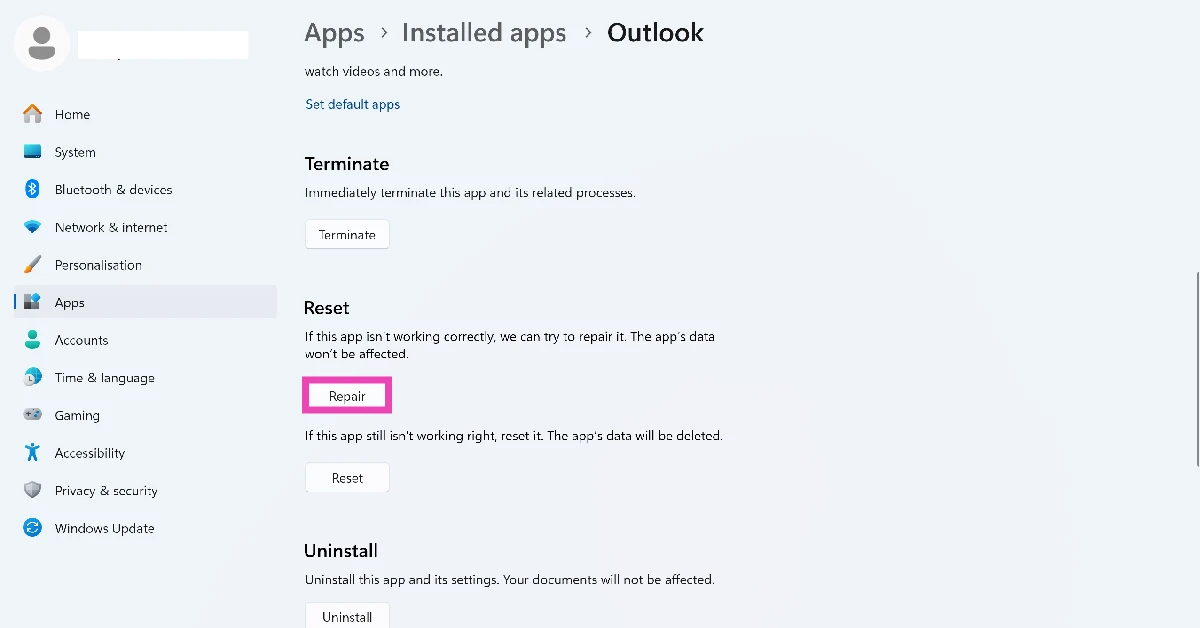
If you’re worried that clearing Outlook’s cache will delete the app’s data and remove all your emails and contacts, you can rest easy. Clearing the cached memory does not interfere with the app’s data. All your emails and contacts will remain intact. A cache is a temporary memory that stores the files which are accessed the most by an app. For example, Outlook may store prompt suggestions, search history, and other commonly used files. It is not uncommon for these files to get corrupted and lead to weird malfunctions within the app. Sometimes, the cache becomes very large and causes the app to slow down instead of speeding it up. In these cases, deleting the files in the cache becomes necessary. If deleting the cache files resolves the issues you are facing with Outlook, you can try repairing the app. Go to Settings>Apps, hit the ellipses next to Outlook and select Advanced Options. Scroll down and select Repair. You can also try logging out and logging back in to get rid of any temporary account-related issues.

Clear Outlook’s cache in Windows 10 or 11

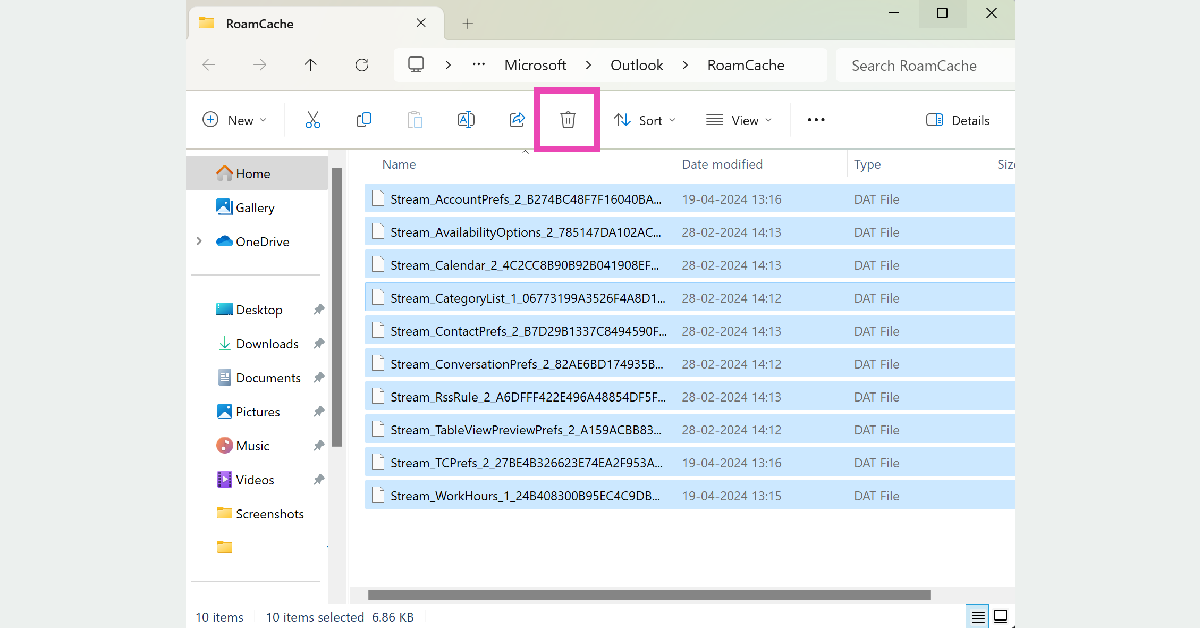
Step 1: Press Windows Key + R to launch the Run box. Step 2: Paste the following command and hit Enter:

%localappdata%\Microsoft\Outlook\RoamCache
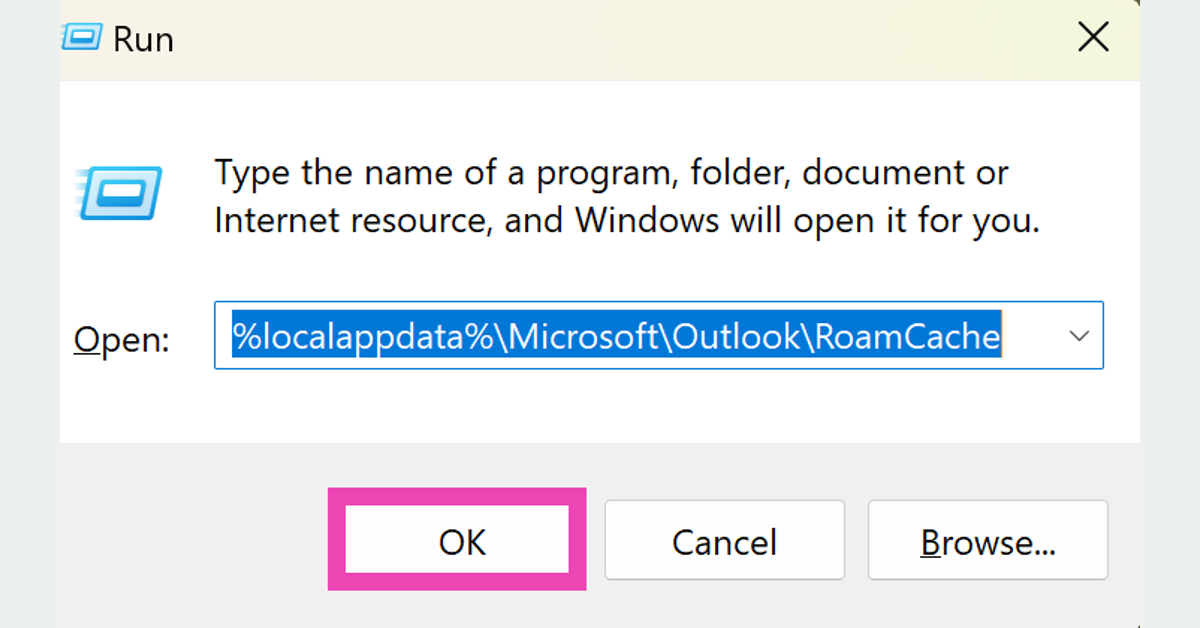
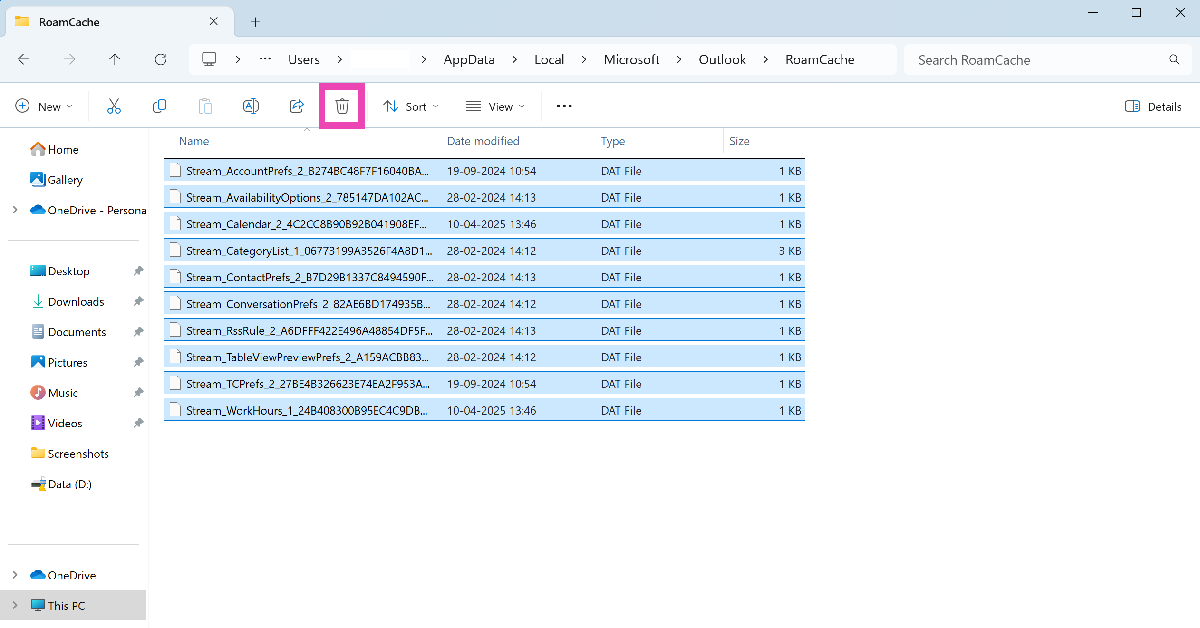
Step 2: Paste the following command and hit Enter: %localappdata%\Microsoft\Outlook\RoamCache Step 3: In the folder that appears on the screen, select all the files and delete them. Step 3: In the folder that appears on the screen, select all the files and delete them. Microsoft Outlook’s cache will be cleared.
Clear Auto-Complete Cache in Outlook (classic)

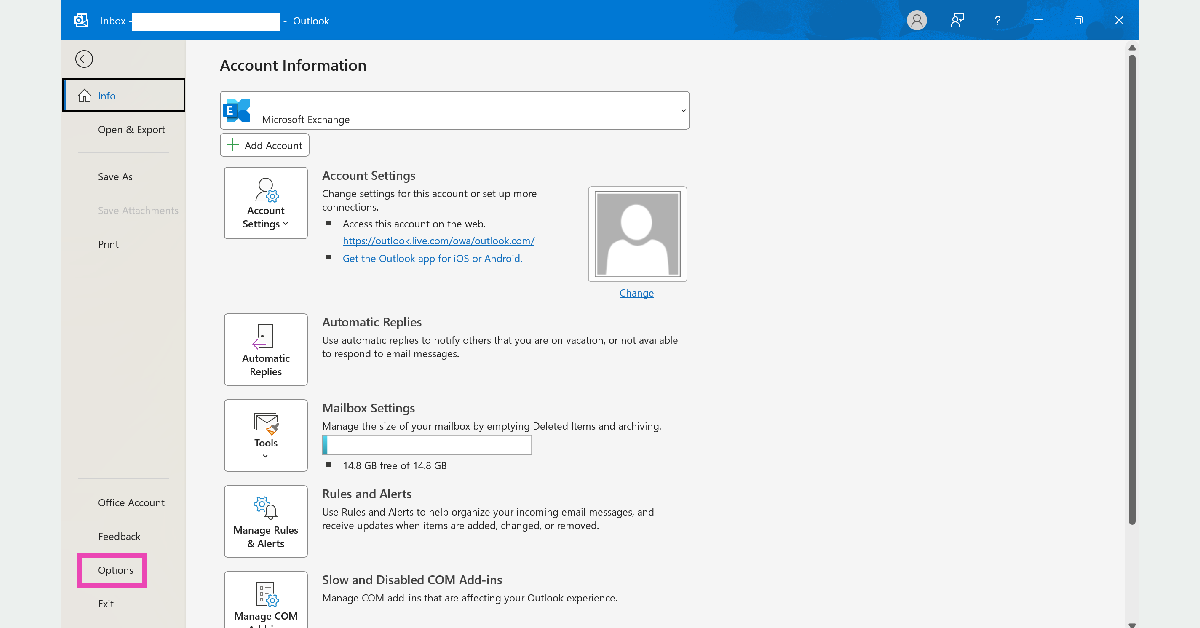
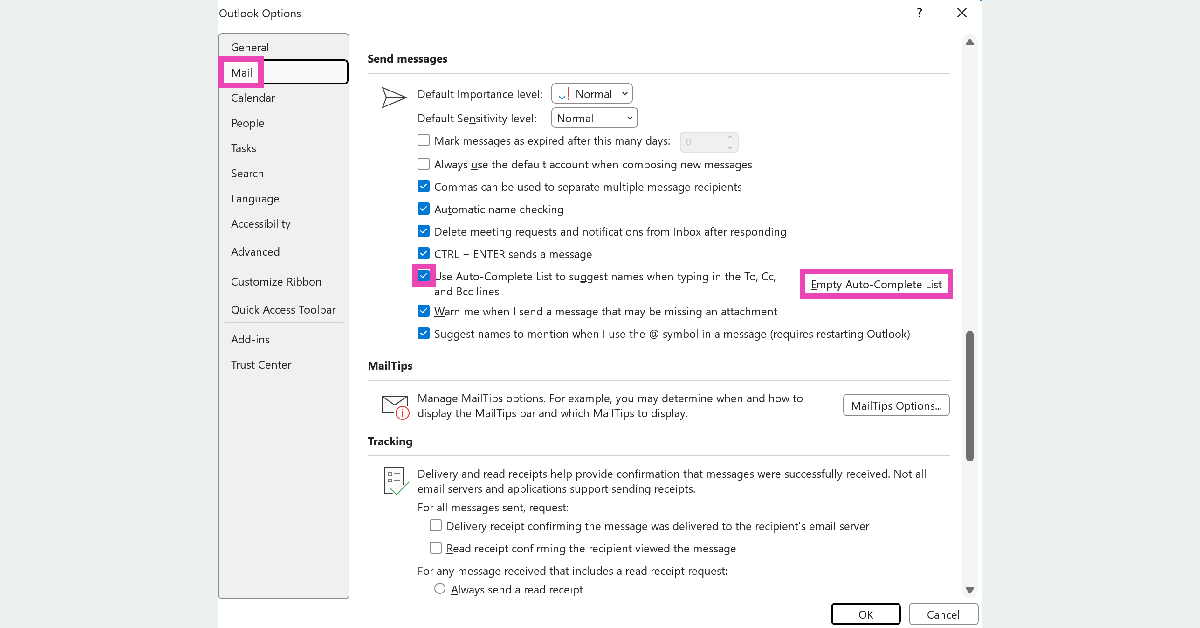
Step 1: Launch Outlook (classic) on your Windows PC or laptop. Step 2: In the File tab, click on Options. Step 2: In the File tab, click on Options. Top 2 Ways to clear Outlook cache in Windows 10 or 11 (2024) Step 3: Switch to the Mail tab. Step 4: Deselect ‘Use Auto-Complete List to suggest names while typing in the To, Cc, and Bcc lines’. Click on Empty Auto-Complete List as well. Step 4: Deselect ‘Use Auto-Complete List to suggest names while typing in the To, Cc, and Bcc lines’. Click on Empty Auto-Complete List as well. Top 2 Ways to clear Outlook cache in Windows 10 or 11 (2024) Step 5: Hit OK.
Clear Outlook (classic)’s cache from Account Settings

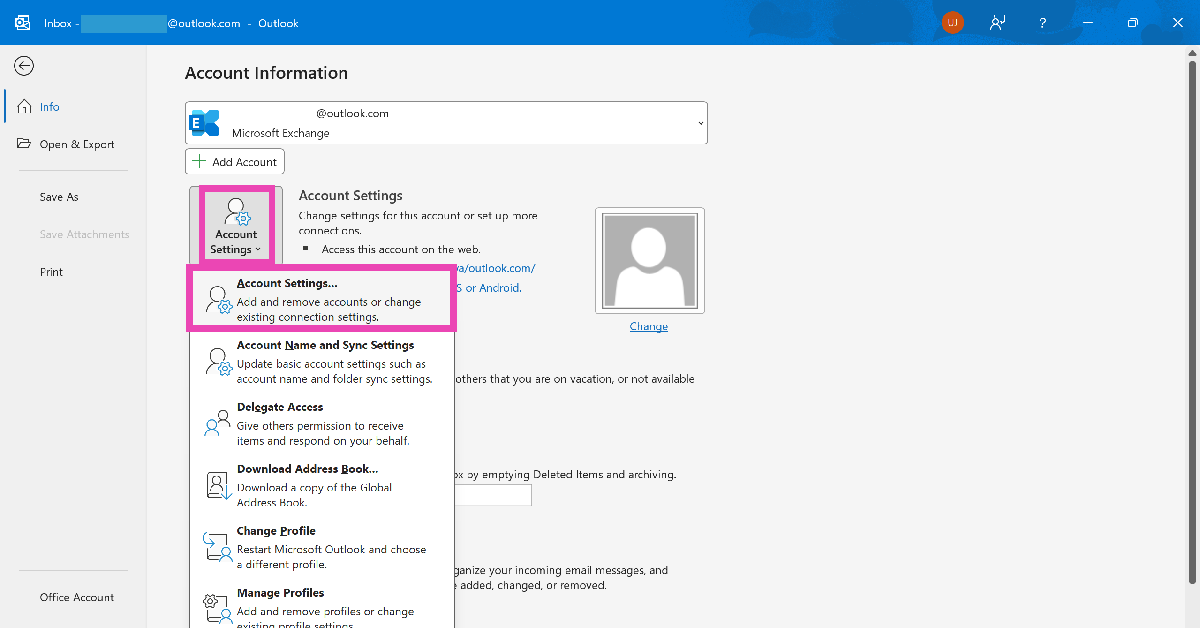
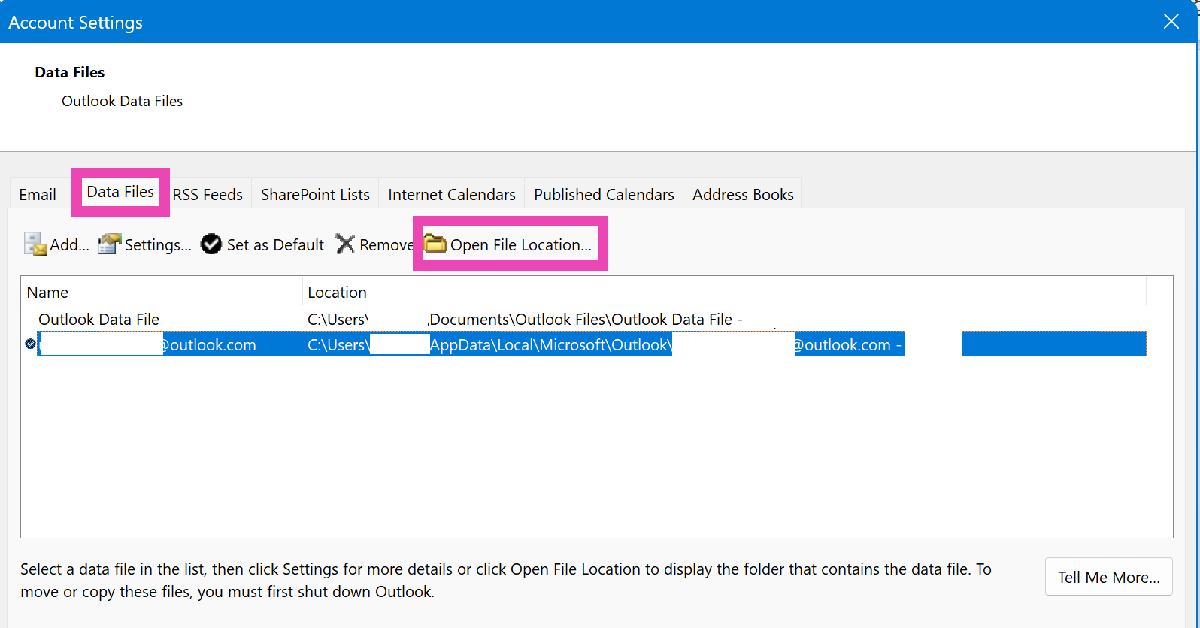
Step 1: Launch the Outlook (classic) app on your Windows PC. Step 2: Go to File and select Account Settings. Step 2: Go to File and select Account Settings. Step 3: Click on Account Settings in the drop-down menu. Step 4: Go to the Data Files tab and select your account. Step 5: Click on Open File Location. Step 5: Click on Open File Location. Step 6: Open the RoamCache folder. Step 6: Open the RoamCache folder. Top 4 Ways to clear Outlook cache in Windows 10 or 11 Step 7: Close Outlook and delete all the files in the RoamCache folder.
Clear Outlook (new)’s cache

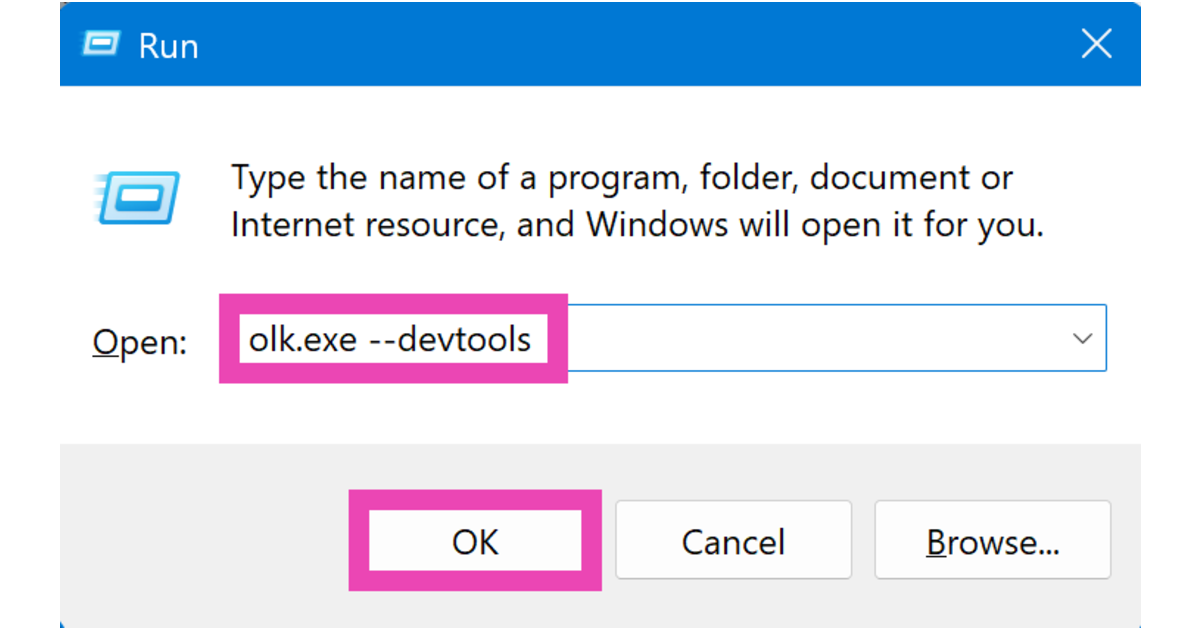
Step 1: Press Windows + R to launch the Run box. Step 2: Type the following command and hit Enter:

olk.exe –devtools

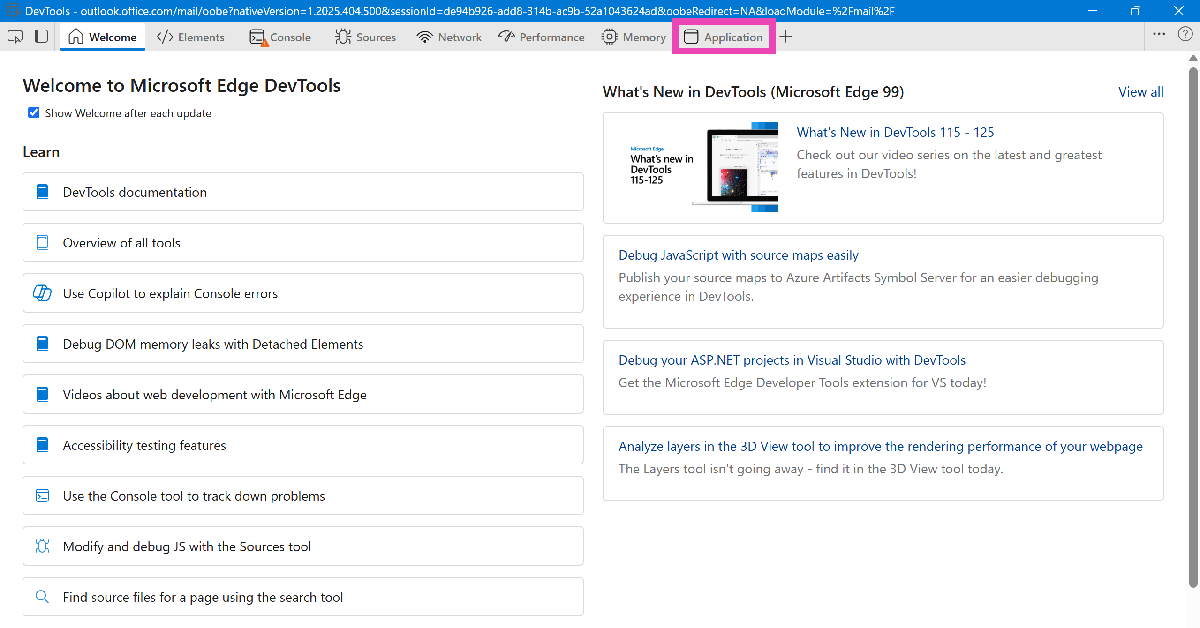
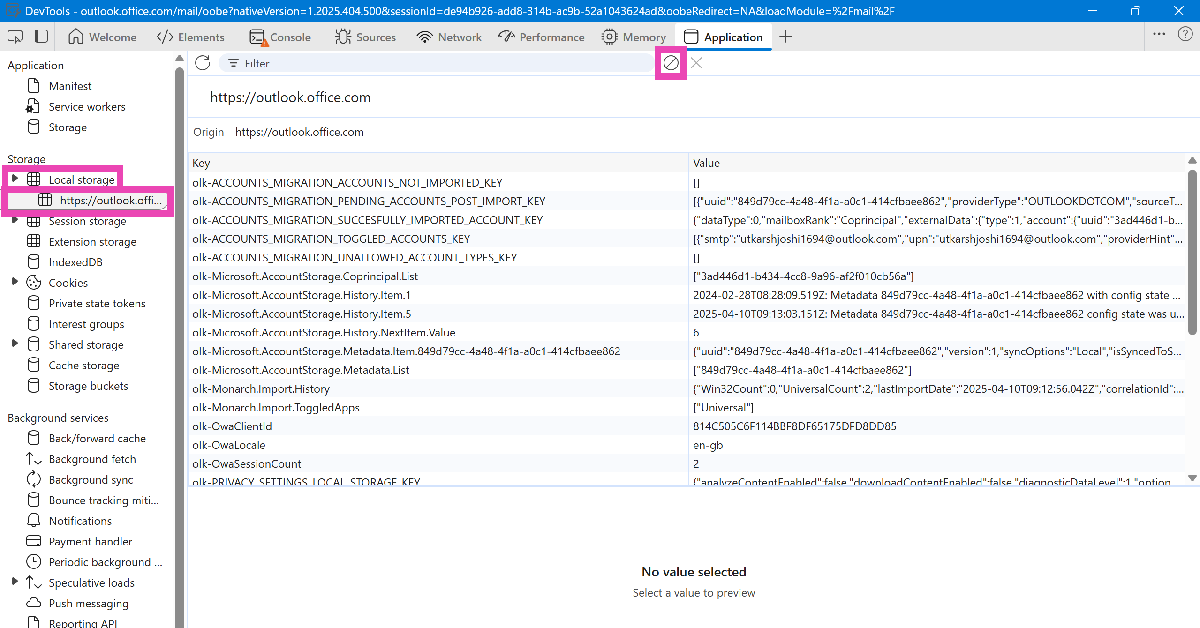
Step 2: Type the following command and hit Enter: Top 4 Ways to clear Outlook cache in Windows 10 or 11 olk.exe --devtools Step 3: Go to the Applications tab in the DevTools window. Step 3: Go to the Applications tab in the DevTools window. Top 4 Ways to clear Outlook cache in Windows 10 or 11 Step 4: Expand the Local Storage category from the sidebar and select Outlook. Step 4: Expand the Local Storage category from the sidebar and select Outlook. Top 4 Ways to clear Outlook cache in Windows 10 or 11 Step 5: Hit Clear. Step 6: Expand the Cookies category from the sidebar and select Outlook. Hit Clear.
Bonus Tip: Reset Outlook’s data

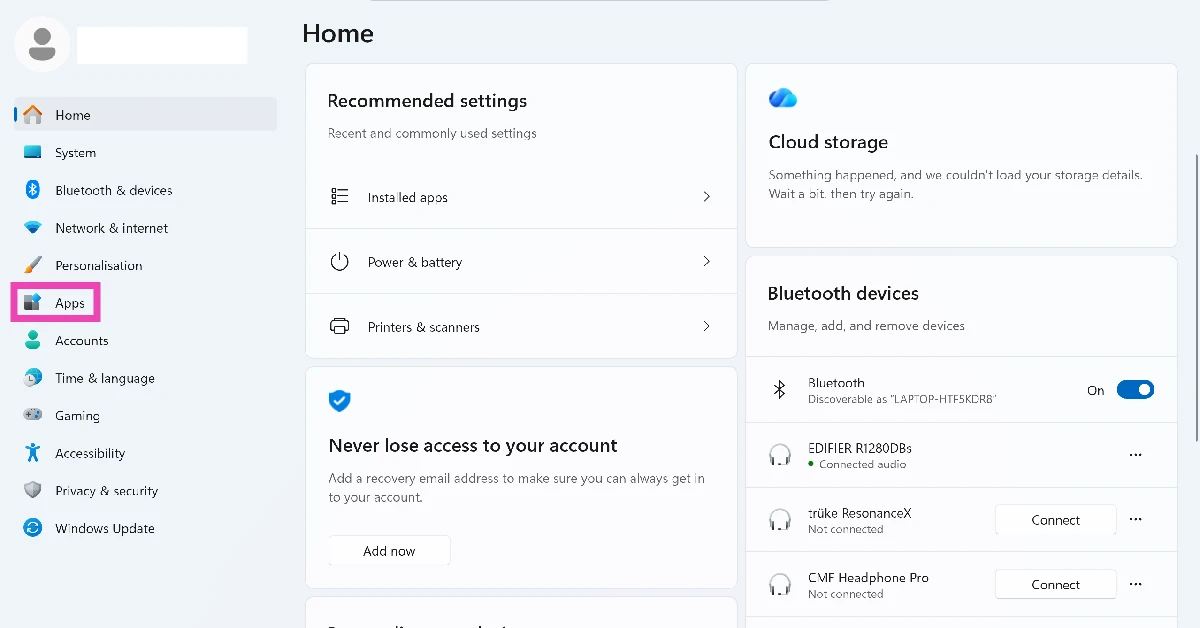
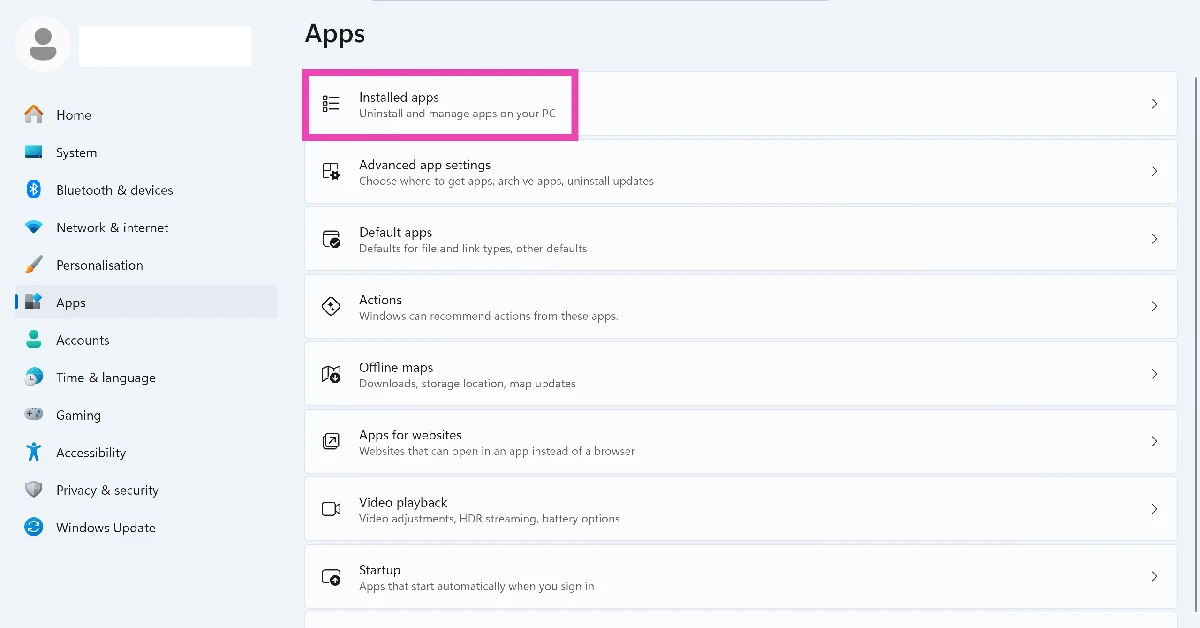
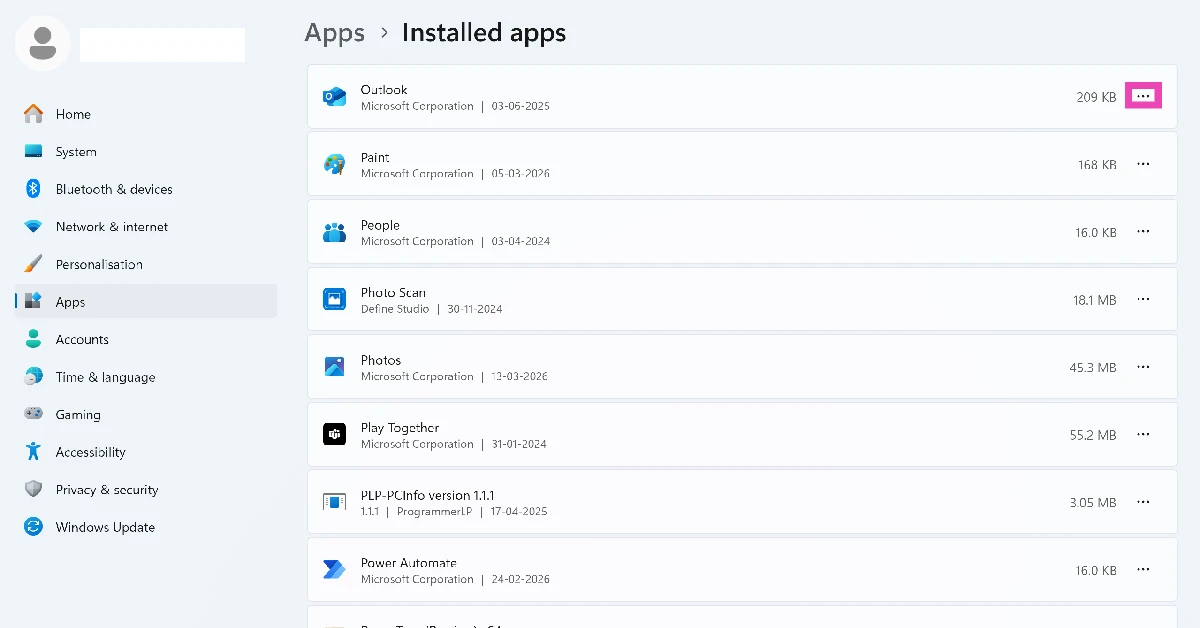
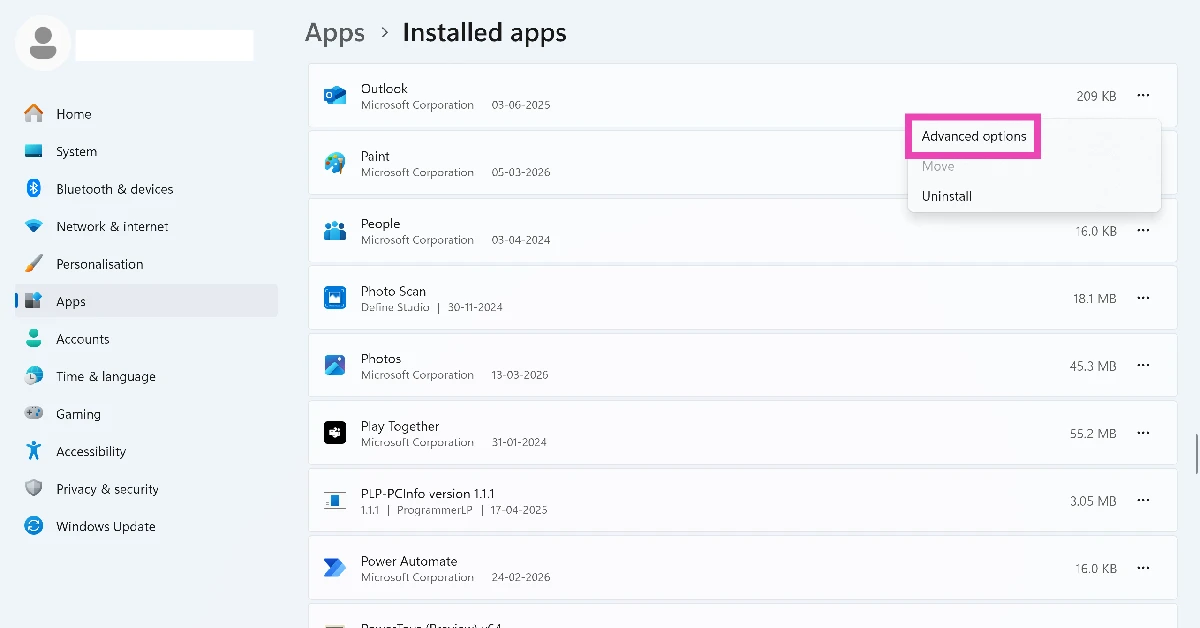
Step 1: Go to Settings and select Apps from the sidebar. Step 1: Go to Settings and select Apps from the sidebar. Step 2: Click on Installed apps. Step 2: Click on Installed apps. Step 3: Hit the ellipses next to Outlook. Step 3: Hit the ellipses next to Outlook. Step 4: Go to Advanced options. Step 4: Go to Advanced options. Step 5: Scroll down and hit Reset. Step 5: Scroll down and hit Reset.
Frequently Asked Questions (FAQs)

How do I clear Outlook’s cache on my Windows PC?

Press Windows Key + R, enter %localappdata%\Microsoft\Outlook\RoamCache, and delete all the files in the folder that appears on the screen.

How do I delete Outlook’s Auto-Complete cache?

Launch Outlook, go to File>Options>Mail, and deselect the ‘Use Auto-Complete List to suggest names while typing in the To, Cc, and Bcc lines’ option.

How do I clear Outlook’s app data?

Go to Settings>Apps>Installed apps, hit the ellipses next to Outlook and select Advanced Options. Hit Reset to clear its data.

How do I clear Outlook (new)’s cache?

Press Windows + R and enter olk.exe –devtools in the Run box. Go to Applications>Local Storage, select Outlook, and hit ‘Clear’.

How do I clear Outlook’s cache from account settings?

Launch Outlook (classic) and go to File>Account Settings>Data Files>Open Storage Location>RoamCache and clear the contents of the folder. Read Also: Amazon Music introduces Maestro, a new playlist generator powered by AI

Final Thoughts

These are the top 4 ways to clear Outlook’s cache on a Windows 10 or 11 PC or laptop. Once the cache has been cleared, Outlook will rebuild it for faster functioning. It is recommended that you delete the cache every couple of weeks to make sure corrupted files do not cause weird glitches in the app. Check out this article to learn how to clear Steam’s download cache.

Best 3 Ways to Compare Two Folders in Windows 10 or 11? (2024)

0
Keeping your PC organised can be a gargantuan task if you deal with a large volume of files on a regular basis. While this isn’t a big deal, it can throw a wrench in things while you’re trying to back up your data. While creating a backup, it is important to note that you don’t copy duplicate files. An unorganised drive often contains several duplicates. In this situation, you can quickly compare the contents of two folders before adding them to your backup. Today, we bring you the top 3 ways to compare two folders in your Windows 10 or 11 PC or laptop.  Read Also: New Google Maps and Search updates coming for sustainable travel

Which method should you use?

There are three ways you can go about comparing two folders on your PC or laptop. Each method has its own advantages. Using Properties: This is the easiest way to compare two folders, but it does not give a lot of details about them. You will also need to manually scan the attributes you are looking for. Using this method, you can compare the date of creation, size, contents, and location of the two folders. Using Command Prompt: This method gives you a list of files that are unique in each folder. If a file is present in both folders, you can sort them by date of creation using this method. Using WinMerge: Perhaps the most thorough way of comparing any two (or three) folders, WinMerge highlights the unique files in the two folders and lists their date of creation. Results that are highlighted in grey are present in only one of the two folders. The identical files are left unhighlighted.

Compare two folders in Windows 10/11 using Properties

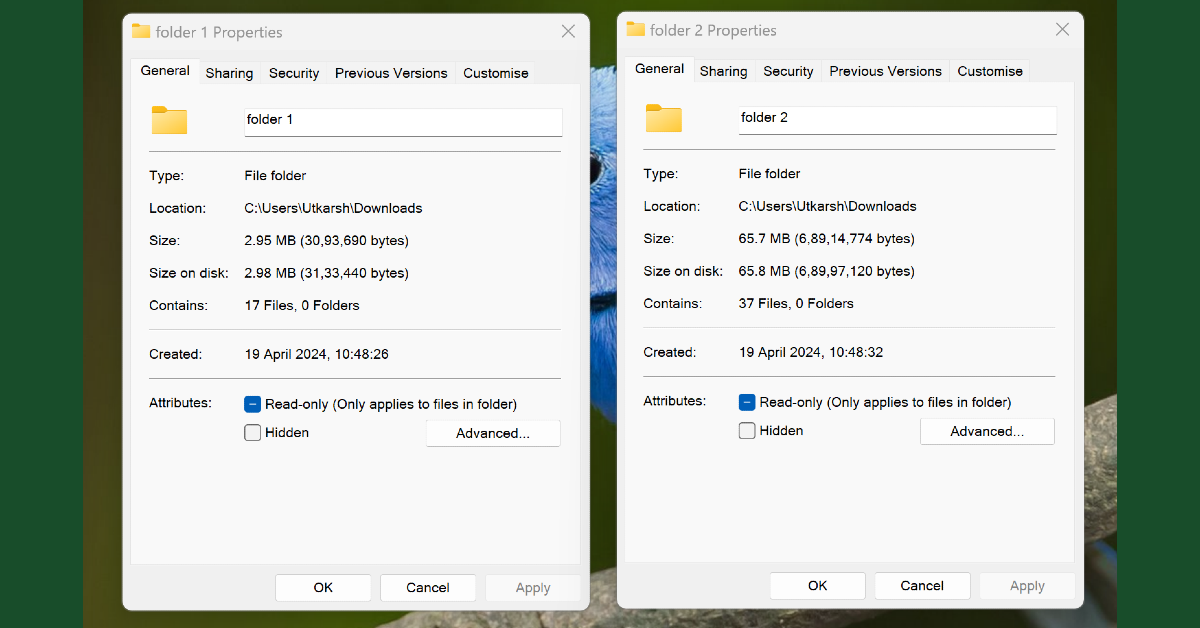
Compare two folders in Windows 10/11 using Properties The easiest way to compare two folders in Windows 10/11 is by viewing their properties. Right-click a folder and select ‘Properties’ from the menu. Now, go to the location of the second folder, right-click on it, and select ‘Properties’ again. Place the two boxes side by side to compare the attributes of the two folders.

Use Command Prompt to compare two folders in Windows 10/11

Top 7 Ways to Run Command Prompt as an Administrator in Windows 11 Step 1: Right-click on the first folder and select Copy as path. Step 2: Launch Notepad and paste the path. Step 3: Right-click on the second folder and select Copy as path. Step 4: Paste the path in Notepad. Step 5: Launch Command Prompt as administrator and type robocopy. Hit Enter. Step 6: Paste the two folder paths separated by a space and followed by /L /NJH /NJS /NP /NS. Hit Enter.

Use WinMerge to compare two folders in Windows 10/11

Use WinMerge to compare two folders in Windows 10/11 WinMerge is a great third-party open-source tool to compare two folders on your Windows PC or laptop. As the name suggests, WinMerge lets you merge the contents of two discrete folders. You can also use this tool to compare up to three folders. Here’s how. Step 1: Download and install WinMerge from its official website. Step 2: Click on File and select Open. Step 3: In the ‘1st file or folder’ field, click on Browse and select the folder you wish to compare. Step 4: Repeat Step 3 for the second and third folders as well. Step 5: Click the check box for Read-only under every folder. Step 6: Type *.* in the Folder: Filter field. Step 7: Hit Compare.

Frequently Asked Questions (FAQs)

How do I compare two folders in Windows 10/11?

Launch WinMerge on your PC, go to File>Open, enter the locations of the two folders in their respective fields, select ‘Read-only’, and hit ‘Compare’.

How many folders can I compare using WinMerge?

You can compare up to 3 folders using WinMerge.

How do I compare two folders using Command Prompt?

Copy the paths of the two folders and paste them into Notepad. Launch Command Prompt and enter ‘robocopy’. Paste the two file paths in Command Prompt, and add /L /NJH /NJS /NP /NS next to them. Hit enter to compare the folders. Read Also: Acer Launches AI-Powered Predator Helios Gaming Laptops In India

Conclusion

These are the top 3 ways to compare any three folders on Windows 10 or 11. If you know any other way to carry out this task, let us know in the comments! While you’re here, read this article to learn all the different ways to take a screenshot on your Windows 11 PC or laptop.

Acer Launches AI-Powered Predator Helios Gaming Laptops In India

Key Highlights
  • Equipped with 14th-gen Intel Core HX processors and NVIDIA GeForce RTX 4080 graphics for top-tier performance.
  • Features AI-driven enhancements like noise reduction and Purified View for an immersive gaming and communication experience.
  • Stylish design with customizable RGB lighting and advanced security features for both aesthetics and protection.
Acer has unveiled its latest innovations, the Predator Helios 16 and Predator Helios Neo gaming laptops, marking the company’s first foray into AI-enabled gaming technology. Starting at ₹149,999, these laptops blend cutting-edge hardware with advanced AI functionalities to cater to both gamers and professionals.

Unmatched Performance and Innovation

The Predator Helios series is powered by the 14th-generation Intel Core HX processors and features up to NVIDIA GeForce RTX 4080 graphics cards. This combination delivers exceptional computational power and graphics performance, making these laptops ideal for demanding gaming and creative tasks. Read Also: Acer Predator Helios 16 gaming laptop with up to 13th Gen Intel

Enhanced Gaming Experience with AI Technology

A standout feature of the new Predator series is its AI integration, which enhances the gaming experience with several innovative functionalities:
  • AI-Assisted Noise Reduction: Leveraging a third microphone, the laptops ensure crystal-clear communication by filtering out background noise.
  • Purified View: An AI-driven webcam enhances video calls with background blur, eye contact improvements, and automatic framing, making it perfect for both professional and personal interactions.
  • Nvidia DLSS 3.5: This technology boosts rendering speeds and image quality, enabling more immersive and realistic gaming environments.

Design and Aesthetics

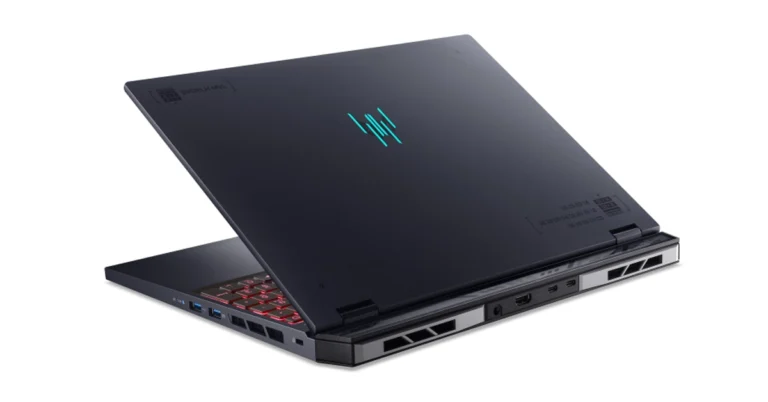
The Predator Helios 16 introduces a visually striking 7-zone RGB Infinity Mirror, adding to the aesthetic appeal with dynamic lighting effects. The laptops also feature a customizable RGB lighting system, including a dynamic Predator logo, adding a touch of personalization and style. Sudhir Goel, Chief Business Officer at Acer India, expressed enthusiasm about the launch, stating, “Introducing the AI-ready Predator Helios series represents a significant step in our commitment to high-performance gaming. These laptops are not just about power but also about elevating user experience through innovative AI capabilities.” Read Also: Acer Predator Helios Neo 16 with 13th Gen Intel Core i5 and i7 CPUs

Security and Connectivity

Acer has also prioritized security and connectivity:
  • Advanced Security: The laptops are equipped with Firmware TPM, BIOS passwords, HDD passwords, and a Kensington lock slot to ensure data security.
  • Enhanced Connectivity: Features such as Killer DoubleShot Pro, USB Type-C with Thunderbolt 4, and Wi-Fi 7 ensure high-speed connectivity and data transfer capabilities.

Pricing and Availability

The Predator Helios 16 is priced at Rs 199,999, while the Predator Helios Neo starts at Rs 149,999. Both models are now available across Acer exclusive stores, its online store, and major retailers like Amazon, Croma, Flipkart, Vijay Sales, as well as other multi-brand outlets.

WhatsApp introduced new chat filters to keep chats organised

Key Highlights
  • WhatsApp is rolling out new chat filters.
  • Users will be able to find messages faster with the new chat filters.
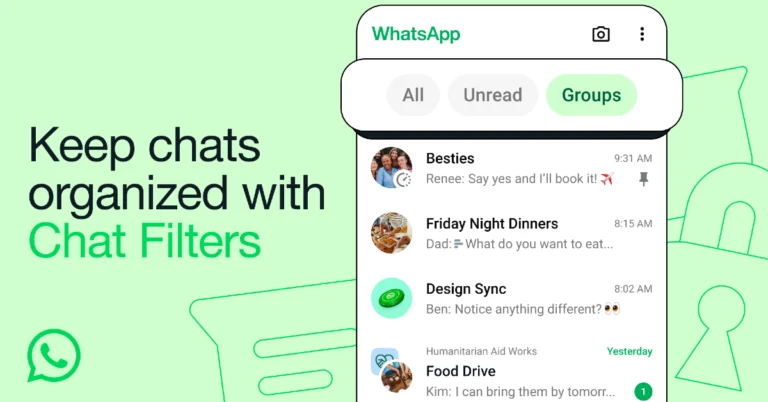
  • The chat list will display a selection of three filters: All, Unread, and Groups options at the top.
New Chat Filters are being released by WhatsApp to help with message organisation. As per the instant messaging app, it should be easy to find the relevant chat on WhatsApp quickly and smoothly without having to browse through the complete chat list. WhatsApp users can now quickly identify the important chats thanks to the latest upgrade which introduces new chat filters to avoid making you go through your entire inbox for that reason. All WhatsApp users are expected to receive the Chat Filters in the upcoming weeks as they roll out. WhatsApp, owned by Meta, published a blog post announcing the release of Chat Filters which said, “Opening WhatsApp and finding the right conversation should feel quick, seamless, and simple. As people increasingly do more on WhatsApp, it’s more important than ever before to be able to get to your messages fast. That’s why today we’re launching new Chat Filters so you can do that without having to scroll through your full inbox.” WhatsApp’s Chat Filters function provides three filters- All, Unread, and Groups choices to make message browsing more effective. The chat list will have them at the top. Also Read: New Google Maps and Search updates coming for sustainable travel All: The default view of all your messages. Unread: You may see which conversations you need to catch up on or respond to by using the Unread option. To help you prioritise your responses, it displays messages that you have either marked as unread or not opened. Groups: That being said, the Groups tab will compile all of your group chats into one location, which will make it simpler to locate your preferred ones—be they related to organising your upcoming trip or discussing your monthly family dinner. Additionally, this will display Communities’ subgroups. Also Read: Amazon Music introduced Maestro, a new playlist generator powered by AI “We believe filters will make it easier for people to stay organized and find their most important conversations and help navigate through messages more efficiently. We’ll continue to build more options to help you focus on what matters most. These are starting to roll out to users today, and will be available to everyone in the coming weeks,” the company stated.

Garena Free Fire Redeem Codes Today 19 April 2024: Here is how to claim them

Garena Free Fire is a battle royale game with regular awards and tournaments to keep players interested. If you play Garena Free Fire, you should be aware of the redeem codes that are released on a daily basis. However, because the battle royale game is banned in India, players from other countries can use the Free Fire Redeem codes daily. If you’re unfamiliar with the Garena Free Fire redeem codes or don’t know how to get them, we’ve put together a step-by-step guide to help you redeem them. Check out Garena Free Fire Redeem Codes for 19 April 2024. The Free Fire redeem codes are a great way to get free stuff. These are 12-digit codes that contain alphabets and numbers, as well as an expiration date and time. Because the Garena FF redeem codes cannot be used more than once, you should hurry to the redemption page to claim your free reward before someone else does. To get a free reward, all you have to do is go to reward.ff.garena.com/en, which is the official redemption page. Also, keep an eye on this space for daily updates on Garena Free Fire redemption codes and rewards. Also Read: Sennheiser Accentum Plus wireless headphones with Hybrid Adaptive Noise Cancellation launched

Garena Free Fire Redeem Codes Today 19 April 2024

X4R9K3F7W6V8PZBJ G8W3R6K9F4VZ7PBJ P2K7F9W4R8V3P0BJ W6F3R9K7W2V80PBJ C8F3W6R9K7V2PDBJ B5W8F4R7K9V3PBDJ C4R7GEDRT5GHE563 D9F2W6R7V3K80PBJ X5R8F3W9K7V82PBJ N3R6F9W7K2V8PCBJ D9F2K7R4W8VX6PBJ H5R8K9F3W7V20PBJ Q3F6W8K4R9V07PBJ M7R4F9W2K8V3PB8J L8W3F6R9V2K7P8BJ

How to Get Free Fire Redeem Codes for Garena on 19 April 2024?

  • Visit the Garena Free Fire game’s official website at reward.ff.garena.com.
  • Use your Facebook, Google, VK, Apple ID, Huawei ID, or Twitter account to log in.
  • You’ll be taken to a valid redemption code (s)
  • Copy and paste the 12-digit redemption code into the text box.
  • On the screen, a dialogue box will appear.
  • ‘Ok’ should be selected.
For the latest gadget and tech news, and gadget reviews, follow us on TwitterFacebook and Instagram. For newest tech & gadget videos subscribe to our YouTube Channel. You can also stay up to date using the Gadget Bridge Android App. You can find the latest car and bike news here.

Amazon Music introduced Maestro, a new playlist generator powered by AI

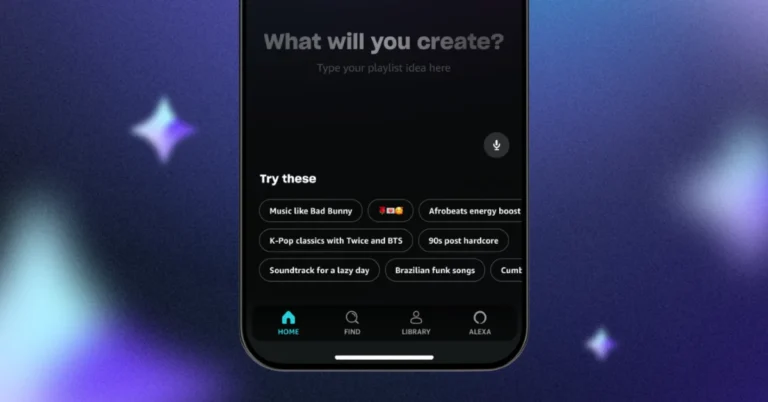
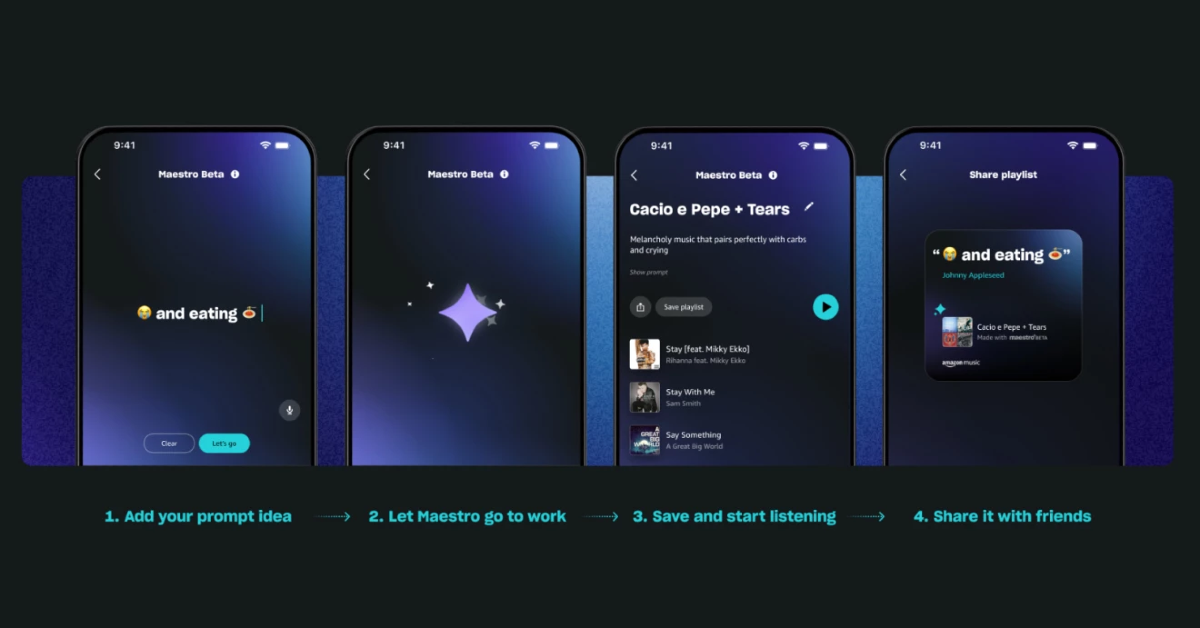
Spotify launched a tool under beta version last week that allows users to create custom playlists using artificial intelligence (AI). Following Spotify, Amazon Music has also released Maestro, an AI-powered playlist creator. Amazon Music unveiled a tool Maestro driven by artificial intelligence (AI) that can make playlists in response to text commands. The feature is similar to Spotify’s new AI Playlist feature in beta. Currently in beta testing, the company via blog post said, “Today, Amazon Music announces a new feature that uses AI technology to make it easier and way more fun to build playlists you want, when you want. Meet Maestro: An AI playlist generator that helps you create any playlist you can think of—plus all the ones you can’t. This feature is rolling out in beta to a small number of U.S. customers on all tiers of Amazon Music.” You can choose from a list of suggested prompts, or you can go with something short (or lengthy), and utilise emojis, emotions, activities, or sounds. With Maestro’s emoji knowledge, users can type a string of emojis into a prompt and the AI will still generate an appropriate playlist. You can save it, share it with friends to listen to, and they can create their own to share back. Also Read: New Google Maps and Search updates coming for sustainable travel Amazon Music is rolling out Maestro to a limited number of American users of Free, Prime, and Unlimited Amazon Music in beta via iOS and Android mobile apps. While Prime members and ad-supported customers can listen to 30-second playlist previews before saving, Amazon Music Unlimited users can listen to their playlists instantly and store them for later. “We plan to expand access to more customers over time,” the company said. How to use Maestro in Amazon Music? Also Read: Noise introduced Sound Master speaker with 360° audio technology in India

How to use Maestro in Amazon Music?

  • Download the latest version of the Amazon Music mobile app
  • Customers who are in the beta will see Maestro either on their home screen or when they tap the plus sign where they usually create a new playlist
  • Talk or type your playlist idea
  • Tap “Let’s go!” to stream your playlist
  • Save and share with friends

New Google Maps and Search updates coming for sustainable travel

Google Maps users can locate alternatives to driving and flying thanks to new capabilities added to Maps and Search. With new updates to features in GoogleMaps and Search users will be able to find public transit and walking routes, see alternatives to air travel and better understand the estimated emissions of flights. The blog post said, “When it comes to travelling and commuting, we want people to have the right information to make more sustainable choices. With new updates to features in Maps and Search, you can find convenient public transit and walking routes, see alternatives to air travel and better understand the estimated emissions of flights.” Google Maps has introduced a function that, if travel times are comparable and practical, shows public transit or walking suggestions next to driving routes. According to the company, in the upcoming weeks, this will be accessible in more than fifteen global locations, including Amsterdam, Barcelona, London, Montreal, Paris, Rome, and Sydney. Also Read: Vivo T3x 5G with Snapdragon 6 Gen 1 SoC launched in India Additionally, Google Maps is adding support for buses and expanding a feature in Search that aids in finding information on long-distance train routes. Users will be able to easily view schedules, ticket costs, and links to complete your booking. As of now long-distance bus routes in 15 countries and trains in 38 nations can use this service. According to Google in the coming months, users will also be able to see train route suggestions when using Google Flights, so it’s easy to find the more sustainable option no matter where you begin your search. Also Read: Noise introduced Sound Master speaker with 360° audio technology in India Moreover, Using Google Flights users can already filter by lower-emitting choices and view anticipated emissions for almost every flight in the search results. “These estimates are powered by the Travel Impact Model (TIM), a methodology we published in 2022 for predicting per-passenger flight emissions. To make this information even more accessible, TIM estimates are now also available through a developer API that allows any app or website to display flight emissions, as well as a Google Sheets add-on and a calculator on the TIM website,” the company stated.

Nothing Unveils Ear and Ear (a) Earbuds With Cutting-Edge ChatGPT Integrations

Key Highlights
  • Nothing launches two new earbuds with premium sound and a distinctive new yellow design.
  • Advanced ChatGPT integration offers direct AI access via simple pinch gestures.
  • Enhanced audio streaming, superior noise cancellation, and longer battery life are key features.
In a significant expansion of its audio product line, Nothing announced the launch of two innovative wireless earbuds, the Nothing Ear and Nothing Ear (a), during its Q1 Community Update in Tokyo, Japan. These launches are complemented by the introduction of industry-first ChatGPT integrations, enhancing the functionality of its audio and smartphone offerings.

Revolutionizing Audio with Nothing Ear and Nothing Ear (a)

Nothing’s latest products, developed through three years of meticulous design and engineering refinement, are poised to redefine the audio experience for both audiophiles and casual listeners. The new lineup includes the Nothing Ear, designed with high-fidelity sound quality in mind, and the Nothing Ear (a), targeted at users seeking a versatile daily audio solution. In simplifying its product range, Nothing shifts focus from mere numbers to the actual user experience and product quality. Carl Pei, CEO and Co-Founder of Nothing, emphasized the integration of ChatGPT technology as a transformative step for the company, signaling ongoing innovations and a commitment to user feedback. Read Also: Nothing Phone (2a) Review: Ticks all the right boxes

Technical Superiority and Design Excellence

The Nothing Ear preserves the brand’s signature transparent design while introducing enhancements like a custom 11 mm dynamic driver and improved airflow mechanics for clearer sound. It supports high-resolution audio codecs like LHDC 5.0 and LDAC, providing a superior listening experience. The earbuds also feature advanced noise-cancelling capabilities, including Smart ANC and Adaptive ANC, which adjust cancellation levels based on environmental noise, providing up to 45 dB of noise reduction. On the other hand, Nothing Ear (a) offers a playful, visually striking design in a new yellow color, symbolizing transparency and purity. It also boasts improved bass performance and is Hi-Res Audio Certified, ensuring a crisp, detailed audio output. Both models include enhanced battery life, fast charging capabilities, and Clear Voice Technology for clearer calls. The intuitive pinch controls facilitate easy switching between tracks and noise cancellation modes.

Seamless Integration with ChatGPT

A major highlight of Nothing’s announcement is the integration of ChatGPT into both its earbuds and smartphone operating systems. This feature allows users to interact directly with ChatGPT through a simple pinch gesture, enabling instant access to information and functionalities. This integration is part of Nothing’s broader strategy to leverage AI to enhance user experiences across its device ecosystem. Read Also: Nothing rolls out latest OS update, brings discreet call recording for Nothing Phone 2a

Availability and Pricing

The Nothing Ear is priced at INR 11,999, with sales beginning on April 29, while the Nothing Ear (a) is set at INR 7,999, available from April 22. Both products will be offered at discounted launch prices on Flipkart, alongside availability at Croma and Vijay Sales. In conclusion, Nothing’s latest product launches and ChatGPT integrations mark a significant step in its mission to blend cutting-edge technology with user-centric design, setting new standards in the consumer technology space.

Noise introduced Sound Master speaker with 360° audio technology in India

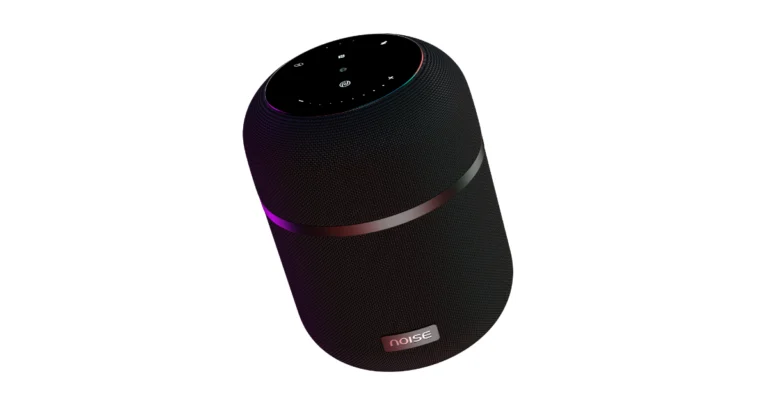
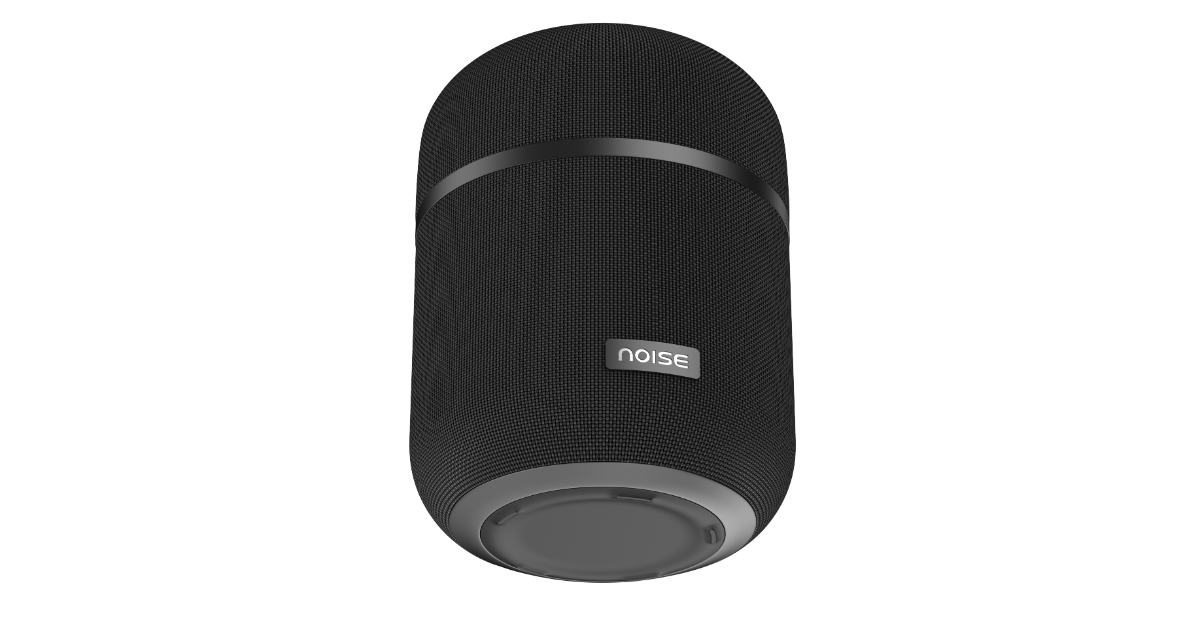
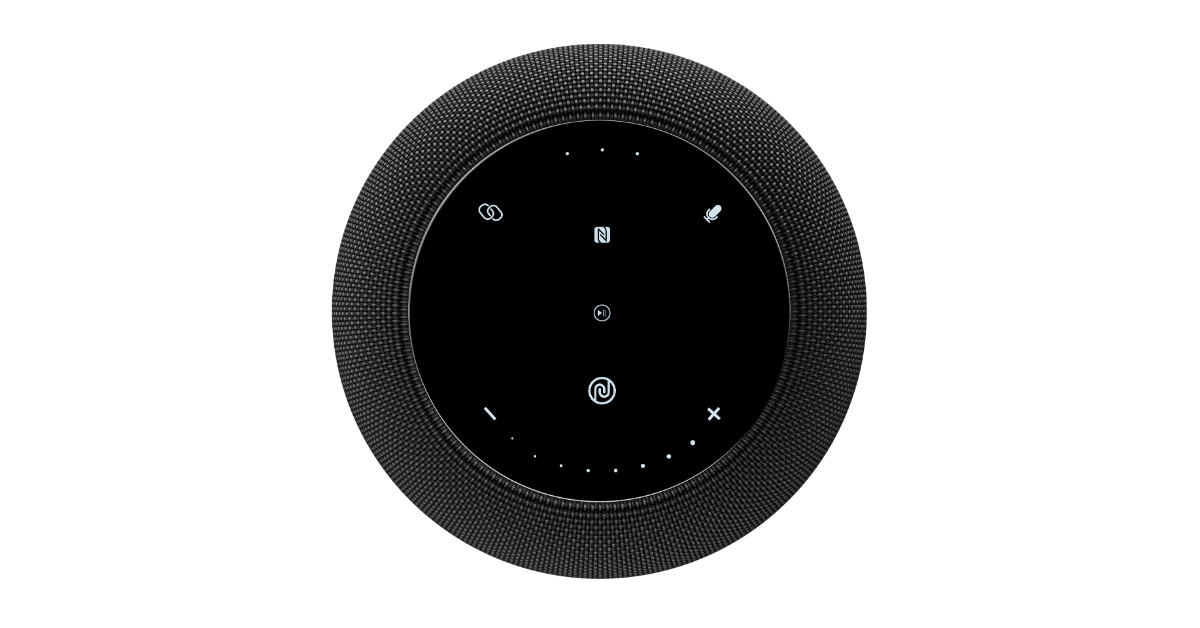
With the introduction of Sound Master, a premium speaker, Noise has entered the home audio industry. The audio device offers a 360° audio deep bass experience. The Noise Sound Master offers 100-watt high-octane bass. It also comes with eight treble radiators, four bass radiators, and a subwoofer support. Sound Master’s superior fabric mesh finish adds a touch of refinement and beauty to its overall design complementing any environment, making Sound Master a perfect blend of style and functionality. Noise introduced Sound Master speaker with 360° audio technology in India Sound Master has intuitive touch controls that make track skipping, volume changes, and music library navigation simple. It also allows users to take calls straight through the speaker thanks to a built-in microphone. True Wireless Stereo (TWS) connectivity is available on the audio device. For big parties or movie evenings, pairing two Sound Master speakers together produces a larger soundstage. Sound Master promises to bring music to life with rich details and deep bass thanks to its 100-watt high-octane bass. A subwoofer, four bass radiators, and eight treble radiators work together to provide this potent performance. Sound Master’s 360° audio technology raises the standard by uniformly distributing sound across the room. Also Read: Vivo T3x 5G with Snapdragon 6 Gen 1 SoC launched in India The Noise Sound Master features Bluetooth 5.3 technology, so you can connect to your devices with the speaker and experience no lag. Moreover, NFC technology enables instant connection by only tapping your NFC-capable device. According to the company, the audio device has a long-lasting 12,000 mAh battery that can run the device for up to 12 hours straight on a single charge. This makes it ideal for long parties or marathon sessions of personal listening. In terms of pricing Noise Sound Master will be available for purchase via the company’s official website at Rs 9,999. Noise introduced Sound Master speaker with 360° audio technology in India Amit Khatri , Co-founder of Noise said, “We have constantly been on a mission to redefine consumers’ journeys with meaningful innovation that not just resonates with them seamlessly but also fulfils their rising lifestyle needs. Sound Master signifies this commitment and is a step towards levelling the bar of audio experience. The amalgamation of defined audio solutions and striking aesthetics will certainly bring a fresh experience for the ones looking to add a premium home audio product.”

Vivo T3x 5G with Snapdragon 6 Gen 1 SoC launched in India

Key Highlights
  • The Vivo T3x 5G has a full-HD+ screen with a refresh rate of 120 Hz.
  • The phone features an IP64-rated construction.
  • It comes pre-installed with Android 14.
  • A 6,000mAh battery can be charged at 44W quickly.
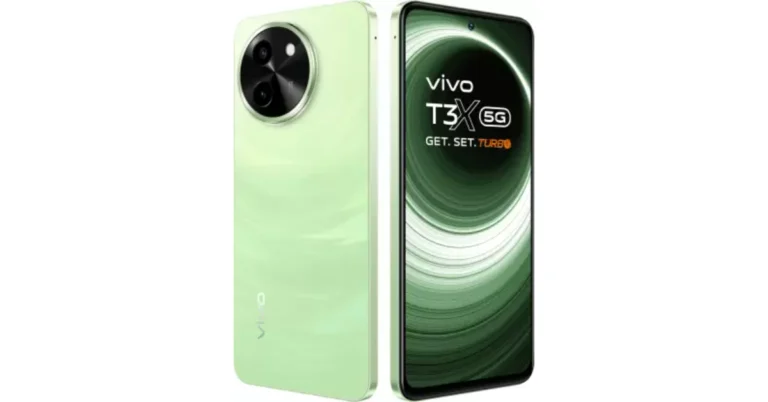
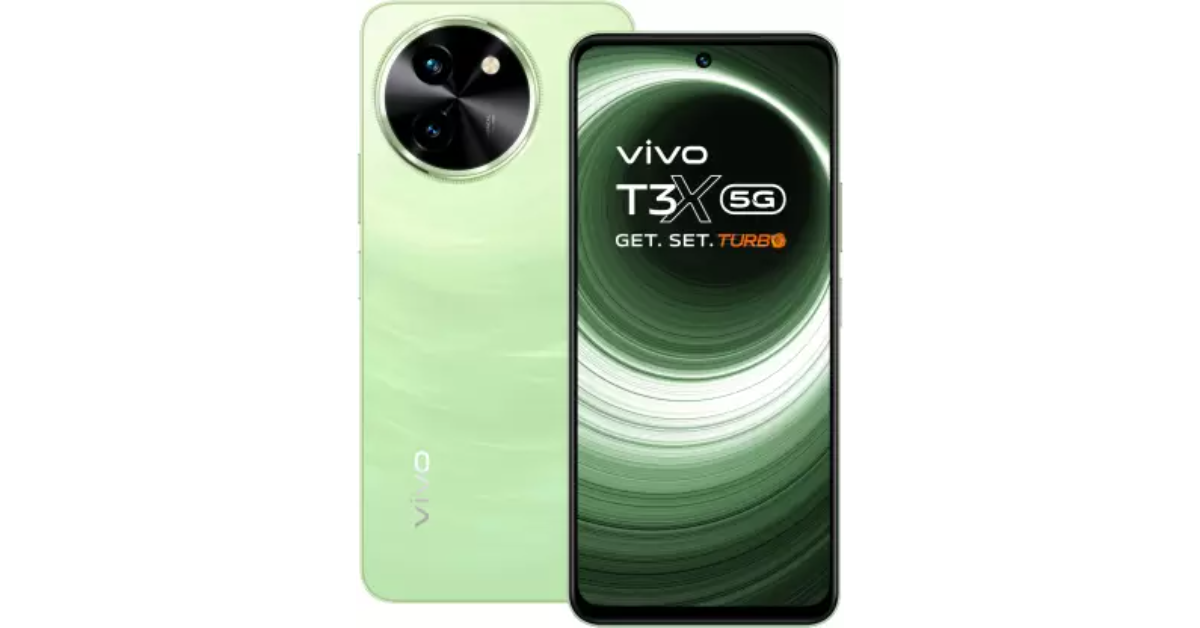
The Chinese smartphone brand Vivo has introduced a brand new phone – Vivo T3x 5G in India. The T3x runs on Funtouch OS 14 with Android 14 out of the box. The handset is capable of 44W fast charging and boasts a 6,000mAh battery. In addition to this, it is powered by the Snapdragon 6 Gen 1 SoC. The phone features a 120Hz full-HD+ display.

Vivo T3x 5G price in India, sale details

Vivo T3x 5G has debuted in India with a price tag of Rs 13,499 for the 6GB RAM with 128GB storage option. There is another 8GB RAM with a 128GB storage option which comes with a price tag of Rs 16,499. The device will be available in two colourways- Celestial Green and Crimson Bliss. Vivo is discounting purchases made using HDFC bank and SBI cards by up to Rs 1,500. The phone can be purchased via Vivo e-store, Flipkart and offline stores in the country. Vivo T3x 5G price in India, sale details

Vivo T3x 5G specifications

Vivo T3x 5G comes equipped with a 4nm-based Snapdragon 6 Gen 1 SoC, and up to 8GB of LPDDR4X RAM. The built-in RAM can be increased to 8GB using the extended RAM 3.0 capability. Up to 1TB of microSD card expansion is possible for the inbuilt storage. The phone is powered by Funtouch OS 14, which is based on Android 14. The new Vivo smartphone features a 6.72-inch full-HD LCD with 1,080×2,408 pixels of resolution. The display supports a refresh rate of 120Hz. It also comes with 1000 nits of peak brightness and 393 ppi pixel density. Also Read: Asus Zenbook DUO dual screen laptop launched in India The dual rear camera setup on the Vivo T3x 5G contains a 50-megapixel primary sensor with an f/1.8 aperture and a 2-megapixel secondary sensor with an f/2.4 aperture. It features an 8-megapixel sensor with an f/2.05 aperture for selfies and video calls. Vivo T3x 5G has 5G, Wi-Fi, Bluetooth 5.1, GPS, OTG, Beidu, Glonass, and a USB Type-C connector as its connectivity options. There are several sensors on board, such as a side-mounted fingerprint sensor, a proximity sensor, a gyroscope, an e-compass, an accelerometer, an ambient light sensor, and a colour temperature sensor. A 6,000mAh battery with 44W fast charging powers the phone. Additionally, the smartphone has IP64 water and dust protection. There are two stereo speakers on it.

Garena Free Fire Redeem Codes Today 18 April 2024: Here is how to claim them

Garena Free Fire is a battle royale game with regular awards and tournaments to keep players interested. If you play Garena Free Fire, you should be aware of the redeem codes that are released on a daily basis. However, because the battle royale game is banned in India, players from other countries can use the Free Fire Redeem codes daily. If you’re unfamiliar with the Garena Free Fire redeem codes or don’t know how to get them, we’ve put together a step-by-step guide to help you redeem them. Check out Garena Free Fire Redeem Codes for 18 April 2024. The Free Fire redeem codes are a great way to get free stuff. These are 12-digit codes that contain alphabets and numbers, as well as an expiration date and time. Because the Garena FF redeem codes cannot be used more than once, you should hurry to the redemption page to claim your free reward before someone else does. To get a free reward, all you have to do is go to reward.ff.garena.com/en, which is the official redemption page. Also, keep an eye on this space for daily updates on Garena Free Fire redemption codes and rewards. Also Read: Sennheiser Accentum Plus wireless headphones with Hybrid Adaptive Noise Cancellation launched

Garena Free Fire Redeem Codes Today 18 April 2024

L2KJ7H6G5FD4S3AW U2I3O4P5L6K7J8H9 FV1P9C4J7H5F3SBM FQ8K2M3G7L4X1Y6E FT6X7K3L8OS1F9ZN FU6L2D8I7J9R4E0Y Z2X3C4V5B6N7M8L9 P2QWS3ED5R4FTG6Y FB1Z6U8N9A7O5TRS FF4W2Q7D1E6Y8BNX W4X0Y6Z2A8B3C9 D5E1F7G3H9I4J0 K6L2M8N4O0P5Q1 U4V0W6X2Y8Z3A9 B1C7D3E9F5G0H6 I2J8K4L0M6N1O7

How to Get Free Fire Redeem Codes for Garena on 18 April 2024?

  • Visit the Garena Free Fire game’s official website at reward.ff.garena.com.
  • Use your Facebook, Google, VK, Apple ID, Huawei ID, or Twitter account to log in.
  • You’ll be taken to a valid redemption code (s)
  • Copy and paste the 12-digit redemption code into the text box.
  • On the screen, a dialogue box will appear.
  • ‘Ok’ should be selected.
For the latest gadget and tech news, and gadget reviews, follow us on TwitterFacebook and Instagram. For newest tech & gadget videos subscribe to our YouTube Channel. You can also stay up to date using the Gadget Bridge Android App. You can find the latest car and bike news here.

Best Thesis Writing Service for Students

Do you need a high-quality & well-reputable thesis writing service? Want your paper to be written fast? If so, you would better be introduced to Thesisgeek writing company. This is an incredible thesis writing service that has already assisted thousands of students in reaching their study goals. Most of them received top scores, and scholarships, and got a degree. If you want to delegate your thesis writing routine to professionals, Thesisgeek is an ideal platform for you to do it. Find out more about it in this article – Thesisgeek.com: Fail-proof thesis writing service.

Online Reputation

The first thing you should do before ordering a custom thesis is to surf the net and try to find any feedback about a specific company. For instance, you may have a look at online forums like Sitejabber or Trustpilot. If it comes to Sitejabber, you may find there are 60 positive reviews from Thesisgeek previous customers. Each of them rated the company with 5 out of 5 possible stars. It is a very cool result that makes Thesisgeek ranked 148th among other essay-writing sites on the forum.

Affordable prices

The pricing policy of Thesisgeek offers a wide variety of advantageous opportunities. You may order proofreading of 100 words for $3.32, editing of 100 words for $3.90, and writing of 100 words for $5.85. These prices are not the lowest ones in the market. However, all of them are affordable for every student. So even if you are on a tight budget, you can order a custom thesis from Thesisgeek. The high quality of your paper is worth investing finances in.

System of bonuses

The good news about Thesisgeek is that you can save lots of bucks if you become a loyal customer. It means that you need to order all your papers frequently from this company and get a bonus for it – a solid discount. How to get a discount? For each dollar you spend on the platform you earn 1 point. The more points you collect, the bigger the discount will be. To be more precise, if you collect 750 points, you will get 5% off. Suppose you earn 1500 points, your discount will be 10%. When you have 3000 points, you will get 15% off. Isn´t that tempting?

100% unique papers

All the theses crafted by Thesisgeek writers are written from scratch. It means that every single time a student orders a paper, the writer will conduct individual research and brainstorm unique ideas. So your custom thesis will easily pass such plagiarism checkers as Turnitin or Copyscape. Besides, you may ask for a plagiarism report each time you order a custom paper from Thesisgeek.

High-quality theses

It is worth mentioning that Thesisgeek not only crafts 100% genuine papers but the quality of each of them is high. You will not find any errors or typos there, even if you try because there are zero of them. Your custom thesis is promised to be extremely written well for you to receive the highest scores for it. As it was mentioned above, the writers conduct thorough research and bring the most valuable thoughts. Your professor will notice it & give you the highest scores, for sure.

60-day warranty

If you need guarantees, Thesisgeek gives you those guarantees. To be more precise, you have a 60-day grace period during which you may ask for a revision or receive all the money back if you dislike the quality of your paper. However, it must not happen. Statistics say that 98% of all the customers who have ever used Thesisgeek service were satisfied with the quality of their theses.

Team of experts

Thesisgeek team consists of a huge pool of professional writers, editors, & proofreaders. The hiring process is very strict: each of the candidates has to pass several complicated & witty tests to prove their knowledge in a specific study field, knowledge of English, and the presence of outstanding writing skills. Very few candidates pass all of these tests (only 2%). So if you are hesitant about whether your paper will be written by experts, you would better stop panicking and entrust your custom thesis to Thesisgeek writers.

Free revisions

All the revisions that you might be asked by your professor to do are free. You do not have to pay each time your paper is revised and you may ask for a revision an unlimited number of times. So if you cooperate with Thesisgeek, you will save a lot of money.

Confidentiality

Your data is safe & secure plus it remains confidential. No third party will get to know about the fact that you used Thesisgeek writing services. The company cares about its reputation and never sells your data to any similar company.

On-time delivery

The Thesisgeek team always delivers your custom papers on time. If you need your paper to be written ASAP, you may ask customer support to do it within 3 or fewer hours. Finally, you will receive it within the mentioned time frame. Whatever your due date is, you will receive the thesis on time.

24/7 customer support

So you have decided to buy a thesis from Thesisgeek? If so, you will only need to contact the customer support department. There is a live chat opportunity to contact them and specify the requirements. It will take you only a few minutes to place the order. The customer support is very polite & friendly. You will always get a prompt reply from them &premium-class assistance. Would you like to place the order right now?

Samsung Launches Advanced AI TVs In India: Neo QLED 8K, Neo QLED 4K, And OLED

0
Key Highlights
  • Samsung introduces the world’s first glare-free OLED TV, enhancing visibility and color accuracy under any lighting conditions.
  • The new Neo QLED 8K features the advanced NQ8 AI Gen3 processor, dramatically improving neural processing for an unprecedented viewing experience.
  • The 2024 TV lineup integrates AI-driven solutions across all models, offering features like AI Upscaling Pro, AI Motion Enhancer Pro, and personalized smart home connectivity.
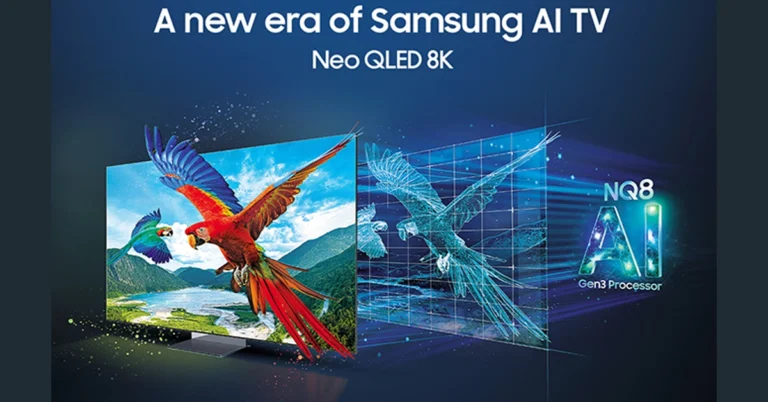
Samsung has introduced a groundbreaking lineup of AI TVs in India, featuring the Neo QLED 8K, Neo QLED 4K, and the world’s first glare-free OLED TV. This launch took place at the ‘Unbox & Discover’ event at the Samsung Opera House in Bengaluru on April 17, 2024.

Breakthrough Technology and Enhanced Viewing Experience

Neo QLED 8K: Samsung‘s flagship Neo QLED 8K TV, equipped with the NQ8 AI Gen3 processor, stands at the forefront of television technology. This processor includes a Neural Processing Unit (NPU) that offers an eight-fold increase in neural network capacity — from 64 to 512. It enhances picture quality, ensuring ultra-crisp details regardless of the input source. The TV also features AI Picture Technology for superior clarity, AI Upscaling Pro to match the 8K display, and AI Motion Enhancer Pro for smooth motion in fast-paced scenes. Neo QLED 4K: Powered by the NQ4 AI Gen2 Processor, the 2024 Neo QLED 4K models deliver stunning 4K visuals. They come with technologies such as Real Depth Enhancer Pro for enhanced contrast and Quantum Matrix Technology, ensuring that each scene is displayed with impeccable detail. These TVs also support Dolby Atmos for an immersive audio experience and are the first to boast a Pantone Validated display for exceptional color accuracy. OLED TVs: Samsung has unveiled the first glare-free OLED TV, eliminating reflections while maintaining vibrant colors and deep blacks under any lighting conditions. Like the Neo QLED 4K, the OLED TVs are powered by the NQ4 AI Gen2 Processor and feature advanced technologies like OLED HDR Pro and Motion Xcelerator 144Hz for superior gaming performance. Samsung AI TVs Read Also: MediaTek and Samsung launched World’s First Wi-Fi 6 8K TV

A Smart Ecosystem and Personalized Experience

These new Samsung TVs are designed to instantly connect with a smart ecosystem upon setup, integrating seamlessly with both Samsung devices and third-party IoT devices. Features such as Smart Mobile Connect turn smartphones into universal remotes for a connected home experience. Samsung has also introduced localized Smart Experiences for Indian consumers, including Cloud Gaming Service, Samsung Education Hub, and Smart Yoga, all enhanced with AI capabilities to provide interactive and immersive experiences.

Exclusive Offers and Pricing

To celebrate the launch, Samsung is offering pre-order bonuses like free soundbars, The Freestyle projector, and the Music Frame, along with up to 20% cashback. Pricing starts at INR 319990 for the Neo QLED 8K, INR 139990 for the Neo QLED 4K, and INR 164990 for the OLED models. This launch underscores Samsung’s commitment to innovating home entertainment with AI technology, aiming to enhance the consumer lifestyle and reinforce its market leadership in India.

Garena Free Fire Redeem Codes Today 17 April 2024: Here is how to claim them

Garena Free Fire is a battle royale game with regular awards and tournaments to keep players interested. If you play Garena Free Fire, you should be aware of the redeem codes that are released on a daily basis. However, because the battle royale game is banned in India, players from other countries can use the Free Fire Redeem codes daily. If you’re unfamiliar with the Garena Free Fire redeem codes or don’t know how to get them, we’ve put together a step-by-step guide to help you redeem them. Check out Garena Free Fire Redeem Codes for 17 April 2024. The Free Fire redeem codes are a great way to get free stuff. These are 12-digit codes that contain alphabets and numbers, as well as an expiration date and time. Because the Garena FF redeem codes cannot be used more than once, you should hurry to the redemption page to claim your free reward before someone else does. To get a free reward, all you have to do is go to reward.ff.garena.com/en, which is the official redemption page. Also, keep an eye on this space for daily updates on Garena Free Fire redemption codes and rewards. Also Read: Sennheiser Accentum Plus wireless headphones with Hybrid Adaptive Noise Cancellation launched

Garena Free Fire Redeem Codes Today 17 April 2024

FFZ9B1O3QL6Q8M5K FF4S7R9H2WF0DQ1P FI8EQ5Y3N1TF6Q4A FFX6DI2F3B7L8K9R FFD9W4Z1Q0O5DU3N FFL5D9Q81T7G2N0E FFW8P4K1I7F3HY6S FN4Y8Q6U5EDD61B3 FA1P0HX2K9D7L34J FT3O823G5V1M43I2 FFB2M0A5U9O18R7F FFE6C8G3X18N4S9H FFU2V5T78J0I4Y3W FFS5V8M1DDJ2P6A4 FH7DDR0T3F6DC2G9

How to Get Free Fire Redeem Codes for Garena on 17 April 2024?

  • Visit the Garena Free Fire game’s official website at reward.ff.garena.com.
  • Use your Facebook, Google, VK, Apple ID, Huawei ID, or Twitter account to log in.
  • You’ll be taken to a valid redemption code (s)
  • Copy and paste the 12-digit redemption code into the text box.
  • On the screen, a dialogue box will appear.
  • ‘Ok’ should be selected.
For the latest gadget and tech news, and gadget reviews, follow us on TwitterFacebook and Instagram. For newest tech & gadget videos subscribe to our YouTube Channel. You can also stay up to date using the Gadget Bridge Android App. You can find the latest car and bike news here.

Top 5 Ways to Find Hidden Apps on Android

0
Most Android smartphones have a nifty hidden folder that lets you keep your personal apps away from prying eyes. This feature can be found in security and privacy settings on your device. While hiding apps is easy, figuring out how to access the hidden folder can be tricky if you did not pay attention to the setup wizard earlier. Today, we bring you the top 5 ways to find and access the hidden apps on your Android smartphone. Read Also: LG 2024 AC lineup with Energy Manager launched in India

Does stock Android OS have a hidden folder?

Android devices have had a hidden folder for years. One UI, MIUI, OxygenOS, and other Android skins have their own unique ways to hide and encrypt apps. This is why it is surprising that stock Android OS is trailing behind when it comes to privacy features. If you own a Google Pixel smartphone, your options are limited to using third-party app lockers and hidden folders. This may not seem like a big deal to some, but third-party app lockers are not as optimised as the native hidden folder. Using a third-party launcher for the sole purpose of hiding apps seems a bit excessive as well. On top of that, some launchers are laced with ads on their interface, which ruins the entire experience.

Find hidden apps on a Samsung phone (One UI)

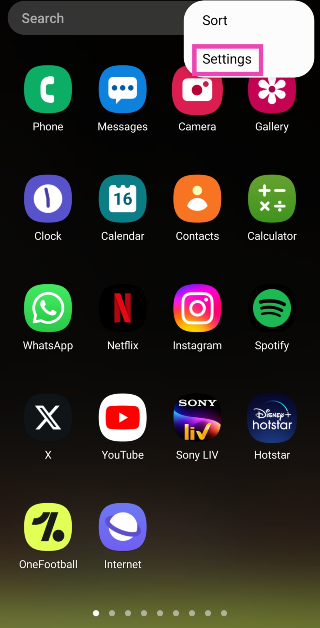
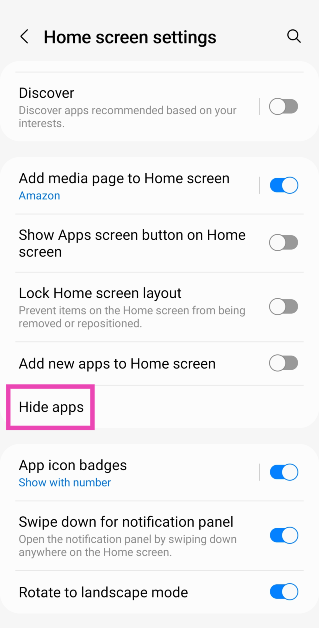
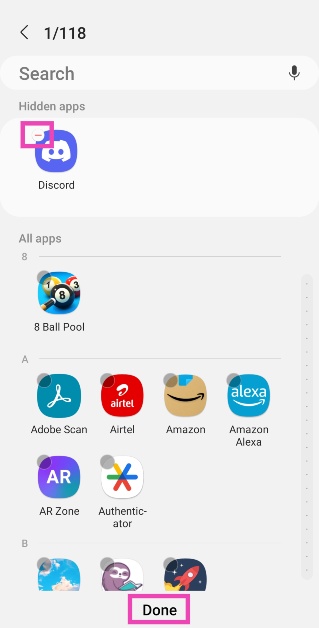
Samsung smartphones do not have a dedicated hidden folder. You will need to unhide the app to access it again. Here’s how. Step 1: Go to the app drawer and tap the ellipses at the top right corner of the screen. Step 2: Tap on Settings. Here are the top 4 ways to find & access hidden apps on your Android smartphone. Step 3: Go to Hide apps. Step 3: Go to Hide apps. Here are the top 4 ways to find & access hidden apps on your Android smartphone. Step 4: Tap the minus sign on the app that you want to unhide. Step 4: Tap the minus sign on the app that you want to unhide. Here are the top 4 ways to find & access hidden apps on your Android smartphone. Step 5: Hit Done. The app can now be accessed from the app drawer.

Find hidden apps on a Xiaomi phone (MIUI and HyperOS)

Xiaomi 14 review: Design and Display Depending on the OS, Xiaomi phones offer different ways to access the hidden apps folder. The new HyperOS from Xiaomi lets you view the hidden apps folder by swiping two fingers in opposite directions on the home screen. On Xiaomi phones running MIUI, you can find this folder by swiping right twice on the first panel of the app drawer. Xiaomi allows users to protect the hidden folder with a password or biometric lock.

Find hidden apps on a Vivo or iQOO phone (Funtouch OS)

performance Finding hidden apps on a Vivo/iQOO phone is pretty easy. Swipe up on the home screen using two fingers to view the hidden folder. To access the apps, you will need to provide your ‘privacy password’.

Find hidden apps on OnePlus and Oppo phones (OxygenOS and ColorOS)

display The hidden apps on OnePlus and Oppo smartphones can be accessed by entering the secret code in the dialer. This secret code is set up by the user at the time of using the app hiding feature for the first time. OnePlus and Oppo phones require the code to start and end with the # sign.

Find hidden apps on a Motorola smartphone

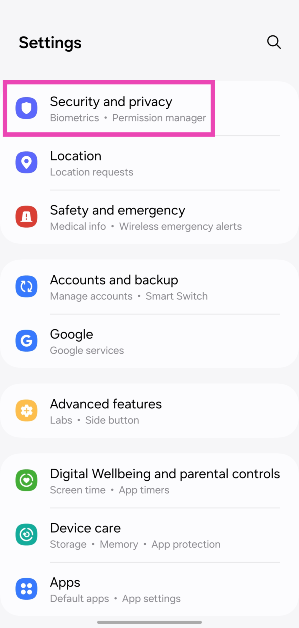
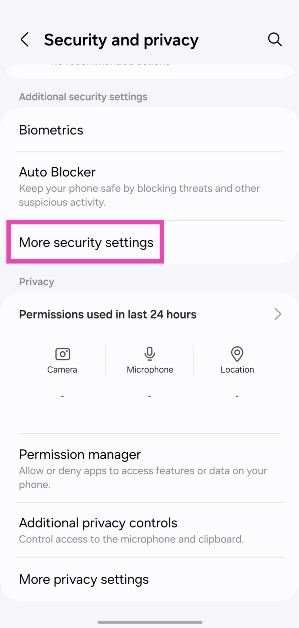
Moto G57 Power Review: Design and Display Motorola phones have a ‘Secure Folder’ that can be used to hide apps. You can access it by going to Settings>Security and privacy>More security and privacy and selecting ‘Secure folder’. Once you’ve verified yourself, you can access the apps in the folder. This folder appears in the app drawer, but you can make it invisible by enabling ‘Stealth mode’.
Frequently Asked Questions (FAQs)

How do I hide apps on a Google Pixel smartphone?

Since stock Android OS does not have a native feature to hide apps, you will need to rely on third-party launchers and tools (like Nova Launcher and Microsoft Launcher) to hide apps on your Google Pixel smartphone.

Do the hidden apps show up on the apps list in settings?

Apps that are stored in the smartphone’s native hidden folder do not show up in the apps list in device settings.

How do I access the hidden apps on a OnePlus smartphone?

To find the hidden apps on a OnePlus or Oppo smartphone, launch the dialer and enter the secret code. Read Also: iQOO Z9 5G Review: The complete package?

Conclusion

These are the top 5 ways to find and access hidden apps on your Android smartphone. When an app is stored in a hidden folder, its notifications are blocked automatically. Some Android OEMs hide the app from the app switcher panel as well.

Asus Zenbook DUO dual screen laptop launched in India

0
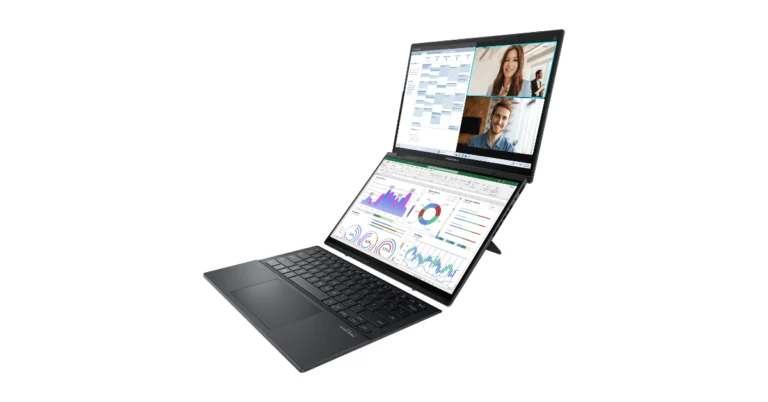
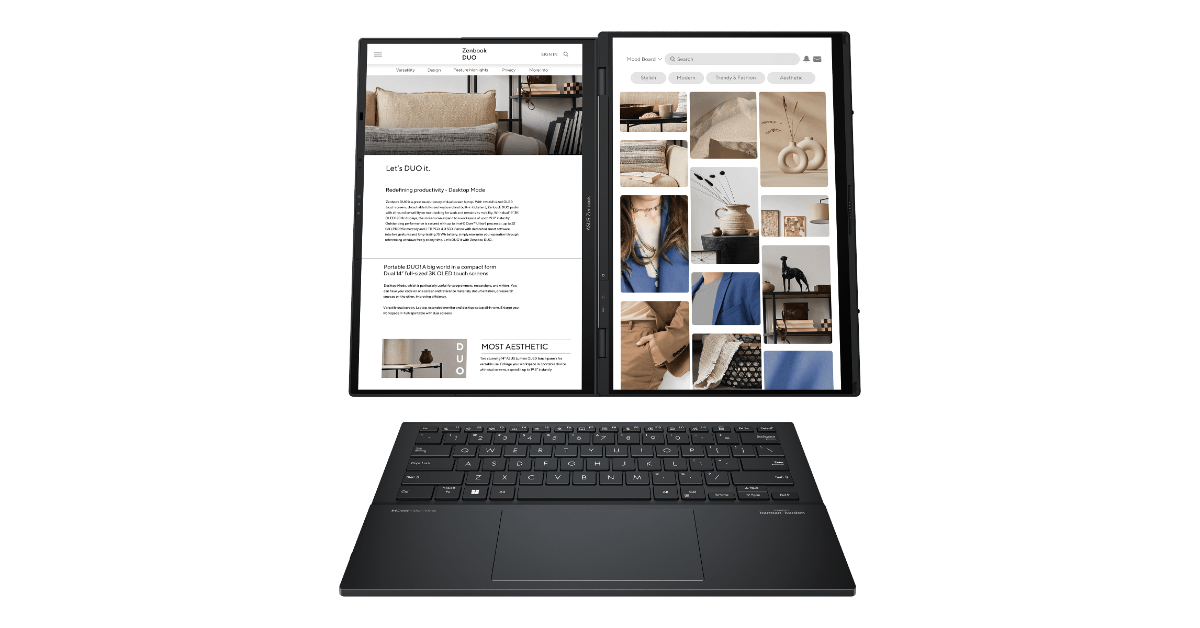
Taiwanese tech giant Asus today announced the launch of its new dual-screen laptop- Zenbook DUO in India. As the name suggests it comes with a dual-screen OLED design ideal for content creators, professionals and entertainment. It comes with up to an Intel Core Ultra 9 Processor, Advanced Cooling and Intel Evo certification. There are Harman-Kardon speakers with Dolby Atmos support.

Asus Zenbook DUO specifications

With its dual 14-inch FHD+ OLED touchscreen displays, the ASUS Zenbook DUO enhances productivity with multi-screen functionality. The screen offers a 16:10 aspect ratio, a 0.2ms reaction time and a 60Hz refresh rate. It guarantees vivid, lifelike colours with a 100% DCI-P3 colour gamut and an amazing 1,000,000:1 contrast ratio. The display supports 500-nits peak brightness, Dolby Vision Display HDR True Black 500 certification, and Pantone validation. While SGS Eye Care Display technology, certified by TUV Rheinland, prioritises eye comfort, Corning Gorilla Glass protection guarantees durability. Also Read: OnePlus 11 5G price in India dropped: Price details Easy gestures are supported by its OLED touch screen, including a six-finger swipe to summon the virtual keyboard and a three-finger tap to activate the virtual touchpad. App Switcher, App Navigator, Microphone Switcher, Control Centre, Sharing Mode, Brightness, and Motion Wallpaper are among the redesigned ScreenXpert features that put convenience at your fingertips. Asus Zenbook Duo price in India, sale details Its built-in double-hinged kickstand enables several use modes, including dual-screen, sharing, laptop, and desktop modes. Also, there is a detachable, backlit full-size keyboard and touchpad with Bluetooth connectivity. With its sleek all-metal design, weighing just 1.35 kg (1.65kg with a keyboard) and measuring 14.6mm thin, it combines portability with durability, meeting MIL-STD 810H military standards. The Asus Zenbook DUO is available in Intel Core Ultra 9 Processor 185H/ Intel Core Ultra 7 Processor 155H/Intel Core Ultra 5 Processor 125H options. Its advanced cooling system ensures effective heat dissipation by allowing the CPU and GPU to run at up to 35W combined TDP. Also, it is Intel Evo certified which is backed by up to 32GB of 7467MHz LPDDR5X RAM and a 1TB M.2 NVMe PCIe 4.0 SSD. It also includes MS Office 2021 and a 3-month membership to Adobe Creative Cloud, which improves productivity and creativity right out of the box. Multiple connectivity choices are available, including two Thunderbolt 4 USB Type-C ports, USB 3.2 Gen 1 (Type-A), HDMI 2.1, and a 3.5mm combo audio jack. With the included pogo pins, the detachable keyboard securely fastens to the DUO for clamshell operation. For wireless connectivity, there is Bluetooth 5.3, Wi-Fi 6E, and ASUS Smart Connect. It provides the user with improved usefulness thanks to USB-PD rapid charging over Type-C and stylus input using the ASUS Pen 2.0 stylus on both screens. Also Read: LG 2024 AC lineup with Energy Manager launched in India The ASUS Zenbook DUO has stereo speakers with Dolby Atmos compatibility and Harman-Kardon sound. The Audio Booster enhances audio performance while the Smart AMP technology guarantees 350% louder output without distortion. There is ASUS AiSense Noise Cancelling Technology which offers two-way noise cancellation.

Asus Zenbook Duo price in India, sale details

Asus Zenbook Duo has been launched in India at a starting price of Rs 1,59,990(Intel Core Ultra 5 Processor 125H) and Rs 1,99,990 (Intel Core Ultra 7 Processor 155H). The laptop with Intel Core Ultra 9 Processor 185H comes in two variants priced at Rs 2,19,990 and Rs 2,39,990. The new Zenbook DUO will be available for sale on the e-commerce platforms, Amazon and Flipkart starting today.

LG 2024 AC lineup with Energy Manager launched in India

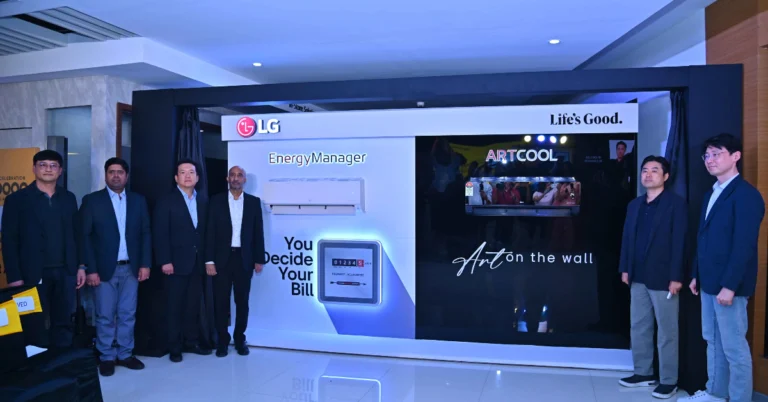
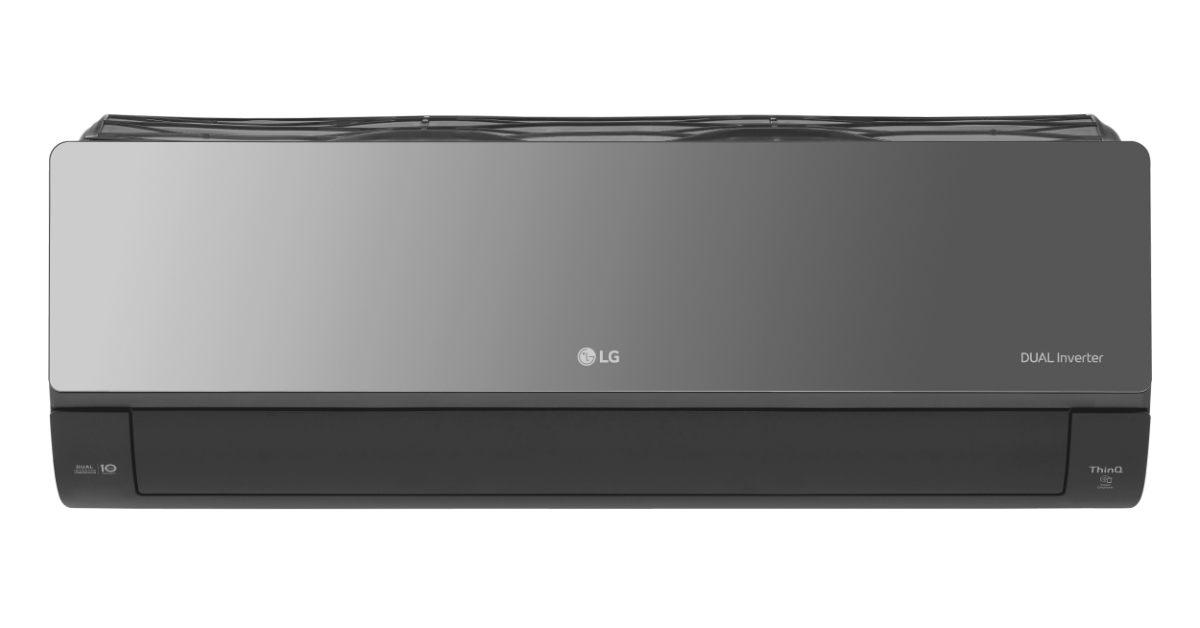
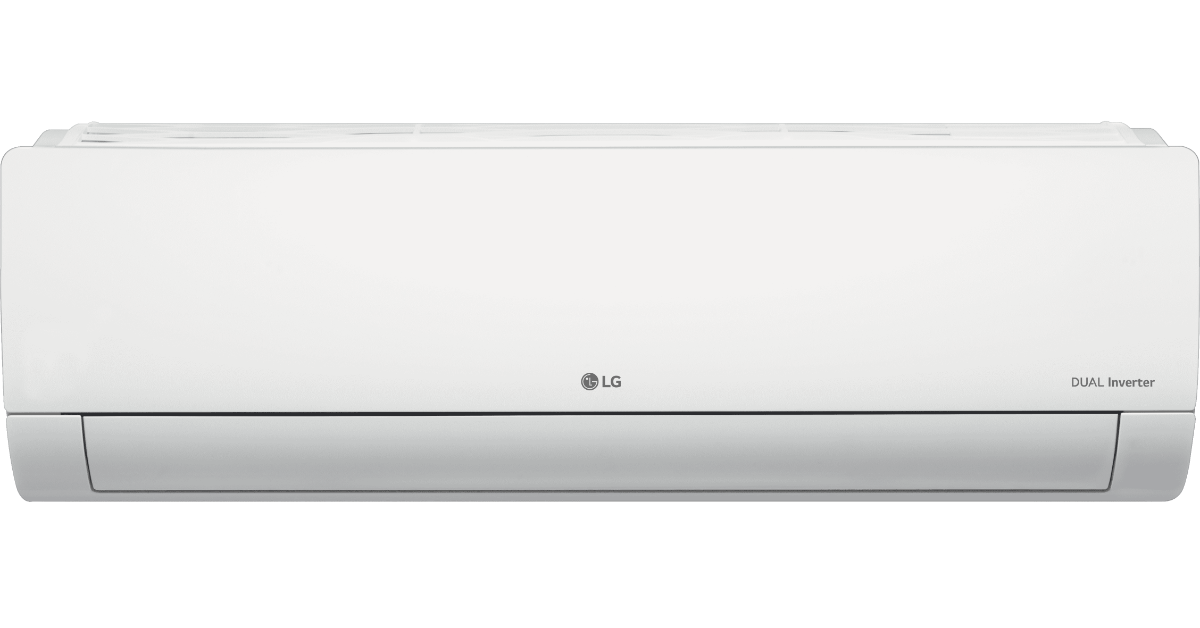
LG Electronics India announced the launch of India’s first energy manager AC. The latest 2024 LG AC lineup includes a total of 77 new models. The new range’s standout feature, the Energy Manager, allows consumers to customize cooling options while preserving energy efficiency levels. While announcing the 2024 LG AC lineup the company said it had record-breaking sales in Q1 by introducing its flagship feature range, which includes the Energy Manager and ArtCool Air Conditioners. This milestone comes alongside the order-based achievement of 1 Million ACs in a record time in 2024. LG 2024 AC lineup with Energy Manager launched in India LG Electronics 77 new AC models are said to overcome obstacles like operating costs and energy efficiency. LG presents the AC Series ArtCool with a Black Mirror Finish, a new addition to the line that will add style to any area. With the release of the Energy Manager feature, LG has made a major advancement in its dedication to sustainability and consumer empowerment. Using Wi-Fi connectivity, this innovative feature lets customers set their preferred periods of compressor usage to easily minimise energy consumption and maximise efficiency. With Energy Manager, consumers have more control over their energy usage, leading to significant savings on electricity bills without compromising on comfort. Apart from Energy Manager and the Art Cool Black Mirror Finish series LG also introduced several other key features across its lineup, each designed to elevate the air conditioning experience. Diet Mode maintains ideal cooling efficiency and airflow while maintaining optimal cooling efficiency, and airflow and reduces power consumption by an impressive 81%. The feature manages electricity expenses while ensuring a comfortable indoor environment. Also Read: Xiaomi Smarter Living 2024: New vacuum cleaner, earphones and tablet arriving With Him Clean, maintaining clean and sanitary indoor air is simple. By automatically removing microorganisms from the air conditioner’s interior, this feature gives users peace of mind and hassle-free maintenance. Gold Fin+ coating, which provides defence against factors that cause corrosion and humidity. As per LG with enhanced corrosion resistance, the new Gold Fin+ feature prolongs the lifespan of the air conditioner, ensuring reliable performance and peace of mind for consumers. LG 2024 AC lineup with Energy Manager launched in India With the addition of Low Gas Detection and Foul Smell Detection in 2024, LG ThinQ Care becomes even more intelligent. These additions enable the air conditioner to proactively detect and address potential issues, providing users with enhanced convenience and peace of mind. Also Read: OnePlus 11 5G price in India dropped: Price details

Pricing and availability

The LG 2024 air conditioner lineup offers customers several options to suit their preferences and budget, with prices ranging from Rs 35,000 to Rs 60,000. The air conditioners will be sold on retail and e-commerce sites such as Flipkart, Amazon, LG.com, and LG retail locations. Furthermore, to commemorate the introduction of the 2024 lineup and the unprecedented sales accomplishment, LG is providing a variety of incentives, such as cashback offers, financing options for consumers, and same-day installation services.

iQOO Z9 5G Review: The complete package?

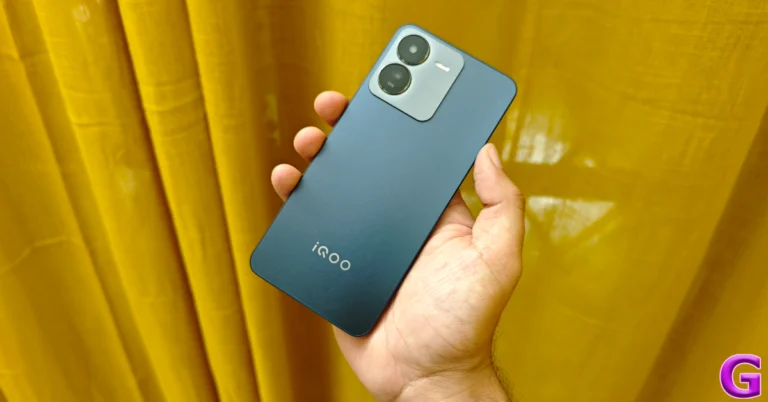
iQOO’s latest budget offering punches well above its weight. Launched last month, the iQOO Z9 5G is currently priced at Rs 20,000. The successor to last year’s iQOO Z7 5G (our review here), the Z9 is powered by the MediaTek Dimensity 7200 SoC. This chipset is a brilliant addition to a smartphone in this price bracket. While iQOO smartphones are known to be powerhouses, the Z9’s AMOLED display and 64MP primary shooter hold a lot of promise as well. So, the question remains – is this smartphone the complete package under Rs 20,000? We’ve been using it for the last week to find the answer. Here is our review of the iQOO Z9 5G. Read Also: OnePlus 11 5G price in India dropped: Price details

iQOO Z9 5G Review: Design and Display

Here’s what you get inside the iQOO Z9 5G retail box.
  • Smartphone
  • 44W power adapter
  • USB Type-A to Type-C cable
  • Clear plastic case
  • Warranty Card
  • Quick Start Guide
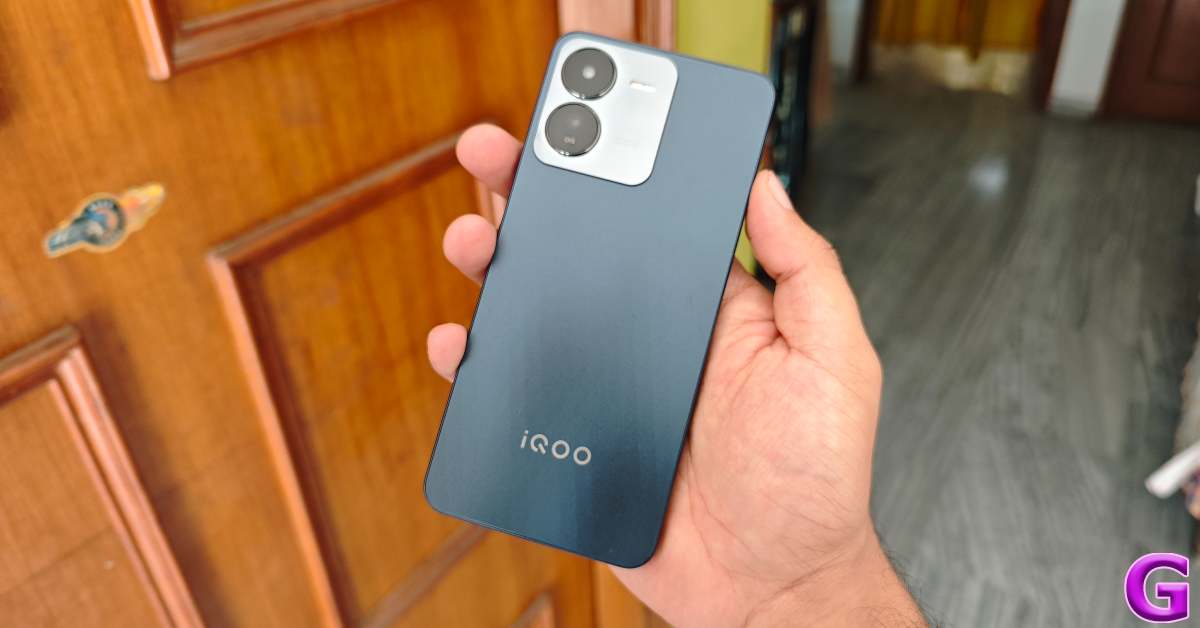
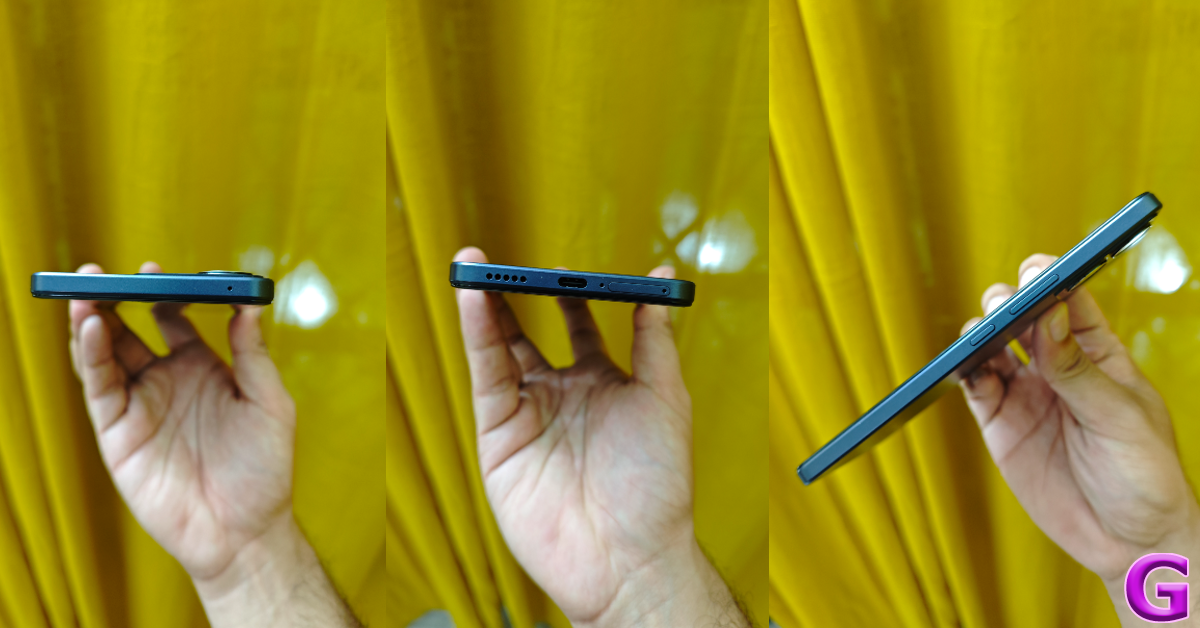
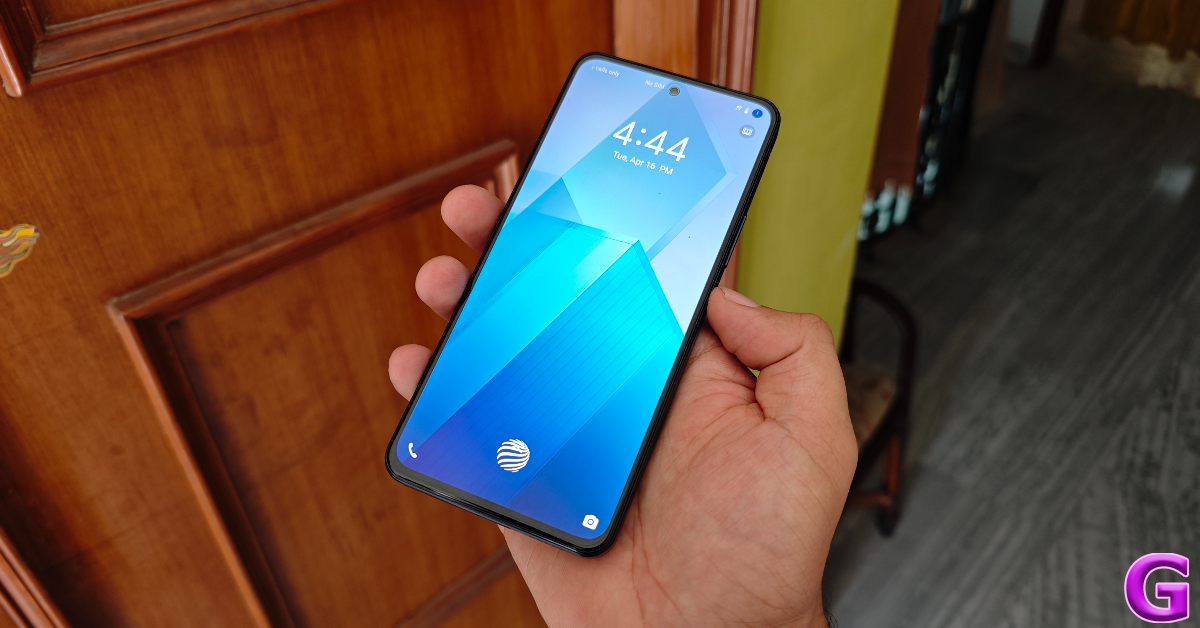
There are two colour variants on offer – Brushed Green and Graphene Blue. The smartphone has a sleek form factor and a plastic build. The flat back panel gets a matte finish and a two-step island up top for the camera array. The flat plastic frame is curved around the corners. The Z9 offers a decent grip, despite its flat rails and back panel. iQOO Z9 5G Review: Design and Display The volume rocker keys and the side button are placed on the right edge of the frame. The bottom edge houses the hybrid SIM slot, primary microphone, USB Type-C port, and the primary speaker grille. The secondary microphone is present on the top of the device. The earpiece also acts as a secondary speaker. Unlike the Z7, the Z9 does not have a 3.5mm headphone jack. deisgn One of the highlights of this smartphone is its 6.67-inch AMOLED display. It offers a maximum refresh rate of 120Hz which is simply amazing for a smartphone in this price category. It can reach a peak brightness of 1,800 nits. We did not face any legibility issues while using the smartphone under direct sunlight. The bezels surrounding the display are thin but get ever so slightly thicker around the chin. iQOO Z9 5G Review: Design and Display We used the iQOO Z9 5G as our primary media-viewing device during the review period. This included watching live sports on Disney+ Hotstar, catching live streams on Twitch, binging videos on YouTube, and viewing movies on Netflix. The AMOLED display did justice to the content and we were satisfied with the detail-packed pictures and vivid visuals on the screen. The output from the stereo speaker wasn’t as full as we would have liked, but it can reach a high volume level. design Like last year’s Z7, the Z9 has an IP54 rating for dust and water resistance. The smartphone can survive minor water splashes. The protection for the display has been upgraded to Dragontrail Star 2 Plus. The Z7 rocked Schott Xensation glass protection.

iQOO Z7 5G: Performance and Cameras

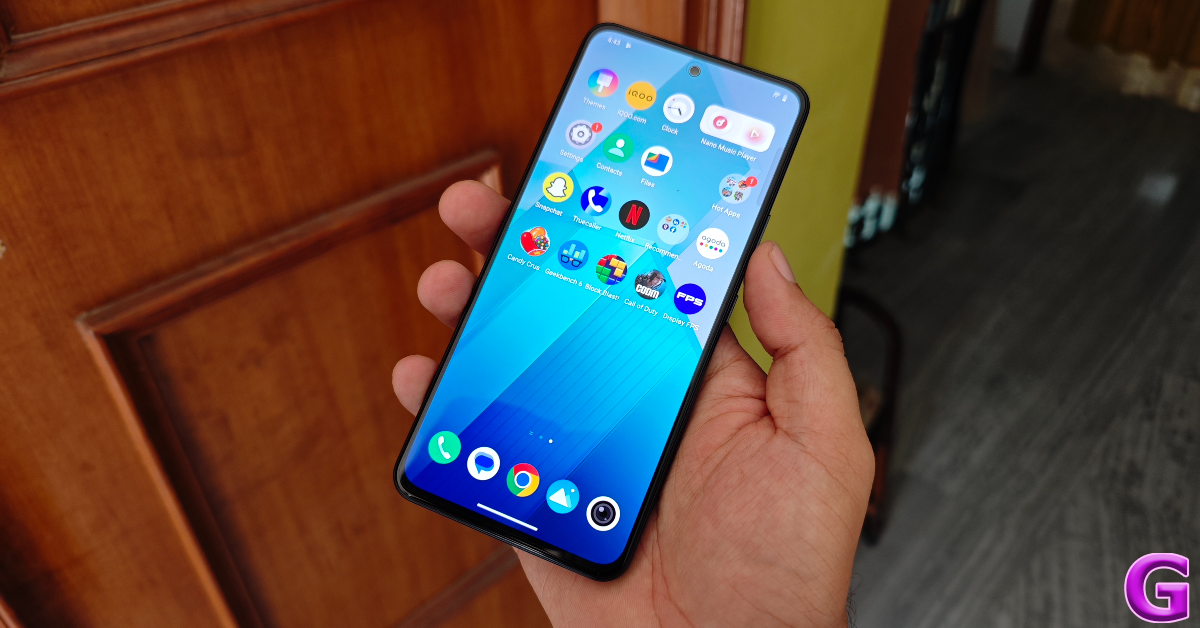
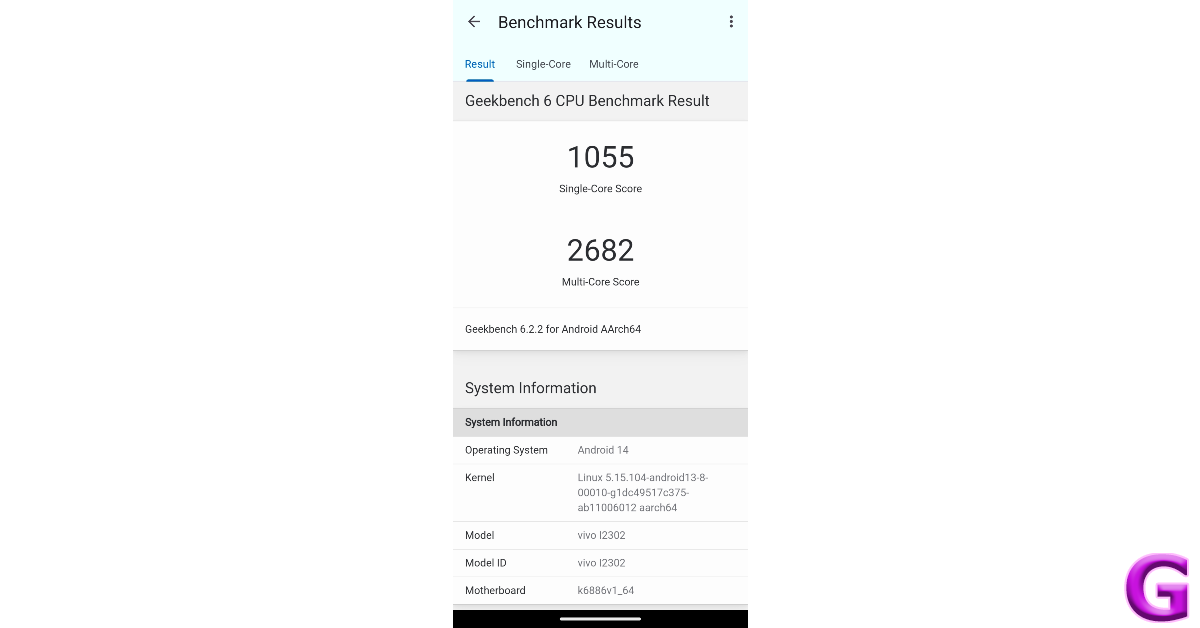
The MediaTek Dimensity 7200 SoC is a great processor to have on a smartphone priced under Rs 20,000. The Pro variant of iQOO Z7 (our review here), which was one of our favourite midrange smartphones of 2023, also rocked this chipset under its hood. The recently launched Nothing Phone (2a) (our review here) carries the Pro variant of this chipset. On the Geekbench 6 app, the iQOO Z9 5G scored 1,055 points in the single-core test and 2,682 points in the multicore test. In comparison, the Z7 Pro scored 1,196 and 2,657 points respectively. iQOO Z7 5G: Performance and Cameras The Z9 5G handles everyday tasks like video calling, emailing, navigation, web browsing, and media streaming with ease. Jitters and lags are very uncommon on this device. The touch response is good but the haptics are a little blunt. Even though the device has an LPDDR4X RAM, it is surprisingly good at multitasking. Like all iQOO smartphones, the Z9 5G does not disappoint while gaming. For a smartphone priced under Rs 20,000, the gaming performance here is above average. Frame drops and stutters are uncommon while playing titles like Call of Duty Mobile and BGMI in average graphics. In low graphic settings, we were able to play COD Mobile at 120fps. The back panel gets slightly warm after 40 minutes of gaming. Once you hit the 1-hour mark, throttling issues due to overheating become more prevalent. OS duties on the iQOO Z9 5G are handled by Funtouch 14. There is a fair amount of bloatware on the device, including the infamous ‘Hot Apps’ and ‘Hot Games’ ads masquerading as folders in the app drawer. Thankfully, they can be easily removed from the device. On top of the bloatware, the notification spam that Funtouch OS generates is also very dampening to the overall software experience. On the bright side, the personalisation options for the lock screen, AOD, and home screen are stacked and diverse. performance The Z9 5G is equipped with a 5,000 mAh battery. The smartphone can easily last an entire day on a full charge. During the review period, our daily tasks on the iQOO Z9 5G included video calling, social media browsing, instant messaging, media streaming, and even a bit of gaming. With more conservative usage, you can push this smartphone’s battery life to one and a half days. The 44W power adapter provided in the box can fully charge the smartphone in just over an hour. iQOO Z7 5G: Performance and Cameras The rear camera array of the Z9 5G comprises a 50MP primary shooter and a 2MP depth sensor. The lack of an ultrawide camera in this array is a sore miss. Nevertheless, the primary lens produces a good performance on this device. iQOO Z7 5G: Performance and Cameras In daylight conditions, the 50MP wide camera captures detailed and sharp images with vibrant colours. The images are balanced and not overprocessed or unnecessarily boosted. We were happy with the dynamic range in the images as well. In our time with the smartphone, it did justice to the scene in front of it. cameras In limited lighting, this camera does a good job of letting in enough light to properly expose the subject and take bright shots. Turning on the Night Mode reduces the amount of grain on the images and adds a brightening effect. The colours assigned to the subject are accurate as well. cameras iqoo z9 review Portrait shots taken with the iQOO Z9 5G are well-focused. The smartphone does a good job of separating the subject from the background. It applies a background blur to the images as well, but we would have liked this effect to be more pronounced and intense.
Portrait
Portrait Shots: 1x vs 2x
The front-facing 16MP camera takes good selfies. The smartphone does not brighten the skin tone in the processing phase. However, the skin texture feels a little smoothened in the final results. The resolution for video recordings is still limited to 1080p for the front camera. The rear camera can record 4K videos at 30fps. Read Also: Top 3 Ways to Lock Apps in iPhone (2024)

Verdict

For a smartphone priced at Rs 20,000, the iQOO Z9 5G produces an exemplary performance across the board. The 120Hz AMOLED panel is great for users who prioritise a great media-watching experience over everything else. The MediaTek Dimensity 7200 SoC pulls its weight while running games like COD Mobile and BGMI. We were pleased to see that the smartphone can run COD at 120fps. The 50MP primary camera delivers a good performance as well. The lack of an ultrawide camera is disappointing, but the Z9 5G is still one of the best smartphones in its price bracket.

iQOO Z9 5G: Pros

  • Great 120Hz AMOLED display
  • Good gaming performance
  • Affordable

iQOO Z9 5G: Cons

  • No ultrawide camera
  • Contains bloatware

OnePlus 11 5G price in India dropped: Price details

Key Highlights
  • OnePlus 11 5G price has been revised in India.
  • The device is powered by a Qualcomm Snapdragon processor.
  • It has a 10-bit LTPO 3.0 AMOLED display.
  • The smartphone comes with a 5,000mAh battery that supports SuperVOOC fast charging.
The OnePlus 11 5G launched in India last year is now less expensive across the nation. The predecessor of the OnePlus 12 5G has received a price cut. It is equipped with a 100W SuperVOOC quick charging feature and is powered by the Qualcomm Snapdragon 8 Gen 2 SoC. OxygenOS 13 is pre-installed on top of Android 13 on the device. In February 2023, the OnePlus 11 5G was introduced in India. In the nation, the model’s price has now dropped. It is currently listed at a reduced price of Rs 51,999 on the company’s official website in the country. The device was launched in India at Rs 56,999. Eternal Green and Titan Black are the two colour options for the smartphone. Besides the price cut the buyers can receive an additional instant discount of Rs. 3,000 if the transaction is made through ICICI, HDFC Bank, or OneCard credit cards. The price can be further reduced by an extra Rs 5,000 exchange incentive. No-cost EMI option for a maximum of 12 months is also available to buyers. Also Read: Nothing Ear and Nothing Ear A images leaked online, pricing tipped

OnePlus 11 5G specifications

The OnePlus 11 5G’s 6.7-inch Samsung LTPO 3.0 AMOLED display features a resolution of 1,440 x 3,216 pixels. The display has a 20.1:9 aspect ratio and a 120Hz adjustable refresh rate. At a maximum brightness of 1300 nits and a resolution of 525 ppi, the panel is capable of supporting always-on displays. The screen supports Dolby Vision and HDR codecs. The phone has Android 13.0 running on it in addition to ColorOS 13.0. The handset includes an octa-core 4nm Snapdragon 8 Gen 2 SoC with an Adreno 740 GPU and up to 16GB of LPDDR5x RAM with up to 2456GB of UFS4.0 storage. Also Read: Xiaomi Smarter Living 2024: New vacuum cleaner, earphones and tablet arriving The OnePlus 11 5G (Review)comes with a triple rear camera setup that includes Sony’s optical image stabilisation (OIS) sensor with a 50-megapixel resolution (f/1.8 aperture), a 32-megapixel portrait sensor, the camera unit has a 48-megapixel Sony IMX58 ultra wide-angle sensor (f/2.2 aperture and 115-degree field of view). The device’s front features a 16-megapixel sensor (f/2.4 aperture) for selfies and video calls. The OnePlus 11 5G has a 5,000mAh dual-cell battery. There is support for 100W SuperVOOC charging. The display includes a fingerprint reader as well. It has two speakers and supports Dolby Atmos.

Haier India Unveils S800QT QLED Series In Multiple Sizes

0
Key Highlights
  • The S800QT series features a stunning 4K QLED display and Dolby Vision Atmos for an unparalleled visual and audio experience.
  • Enhanced gaming with 120Hz DLG technology, 2GB RAM, and low latency ensures a smooth and immersive gaming experience.
  • Integrates seamlessly with Google, offering hands-free voice control and personalized content recommendations.
Haier Appliances India has introduced its newest innovation in home entertainment, the S800QT QLED Series. With advanced features like Dolby Vision Atmos and powered by Google, this series is poised to transform how consumers experience their favorite content.

A Blend of Technology and Design

Available in four sizes (75-inch, 65-inch, 55-inch, and 43-inch), the Haier S800QT series boasts a 4K QLED display, offering vivid colors and detailed visuals that bring content to life. Price starting at Rs 38,990, these TVs are accessible through both online and offline channels, making them a versatile choice for a broad audience. The series embodies Haier’s commitment to combining stylish design with cutting-edge technology. The elegant metal body not only enhances the aesthetic appeal but also complements any modern living space. Read Also: Haier launched four new Android LED TVs in India

Immersive Viewing and Audio Experience

Dolby Vision Atmos is one of the standout features of the S800QT series, providing an immersive audio-visual experience that captures every detail in stunning clarity. Whether you’re watching a blockbuster movie or streaming a live sports event, the technology ensures a captivating viewing session.

Gaming and More

The series is also a boon for gamers, thanks to its low latency and high refresh rates. With 120Hz DLG technology and 2GB of RAM, it ensures smooth and responsive gameplay, making it ideal for fast-paced action games.

Smart Features Powered by Google

With Google integration, the S800QT series offers a vast range of apps and streaming services at your fingertips. Personalized recommendations based on viewing habits enhance the user experience, providing content that caters to personal preferences without extensive searches. Read Also: Haier 65-inch OLED Pro TV with 120Hz refresh rate launched in India

Effortless Control

Hands-free voice control with far-field technology adds a layer of convenience, allowing users to change settings, search content, and more with simple voice commands.

Enhanced Picture Quality

The series also features MEMC (Motion Estimation, Motion Compensation), which provides exceptional clarity and detail, enhancing the overall viewing experience. The inclusion of micro-dimming technology further refines picture quality, ensuring deep contrasts and vibrant colors.

Top 4 Ways to Lock Apps in iPhone

0
Every iPhone user should know how to lock apps on their device. Not only does it preserve your personal data while handing over your device to someone else, but it also makes sure your financial and private apps remain secure in case you lose your iPhone. Apps like WhatsApp have this feature baked into them. For those who don’t, use these 4 methods. Read Also: Xiaomi Smarter Living 2024: New vacuum cleaner, earphones and tablet arriving

Which method should you use?

There are a few ways you can go about locking apps on your iPhone, but not every method is suited to your needs. There is only one native way to protect your apps using Face ID, but it only works for selected apps. You can use it to lock WhatsApp, but other messengers may not be covered by it. If you’re handing your iPhone to someone else and don’t want them accessing the contents of your device, you can use Guided Access. Guided Access pins one app to the screen and requires a Passcode/Face ID/Touch ID to go back to the home screen. There are a few third-party app lockers available for iOS, but we do not recommend using them. Some of these tools only work after the iPhone has been jailbroken. Not only is this a security risk, but it also voids your device’s warranty. Other apps may push malware and invasive ads on your device, which is not a good tradeoff to make.

How to lock apps using Face ID

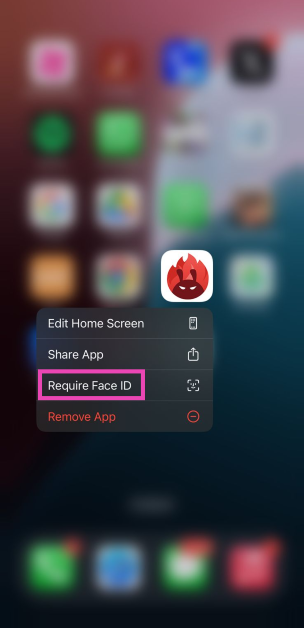
Step 1: Tap and hold the app you want to lock. Step 2: Select Require Face ID from the pop-up menu.
Step 2: Select Require Face ID from the popup menu. Step 3: Confirm your selection in the pop-up box.
How to lock apps in iPhone using your Passcode

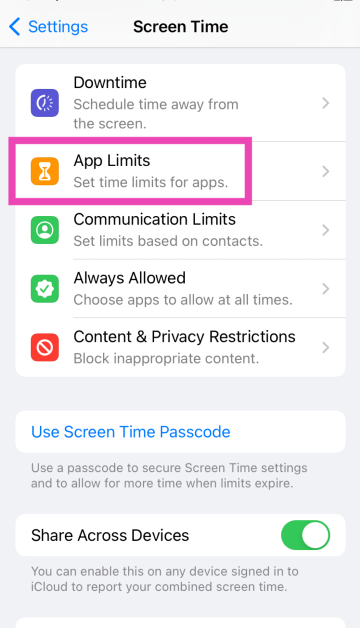
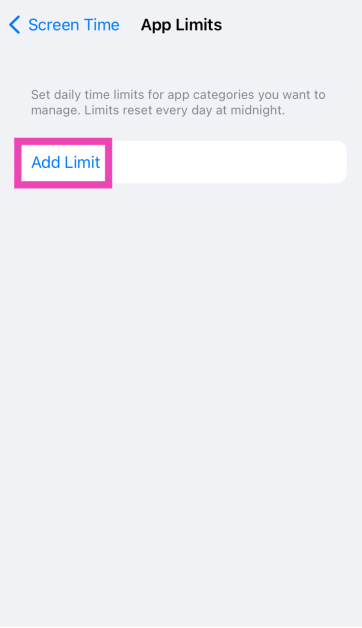
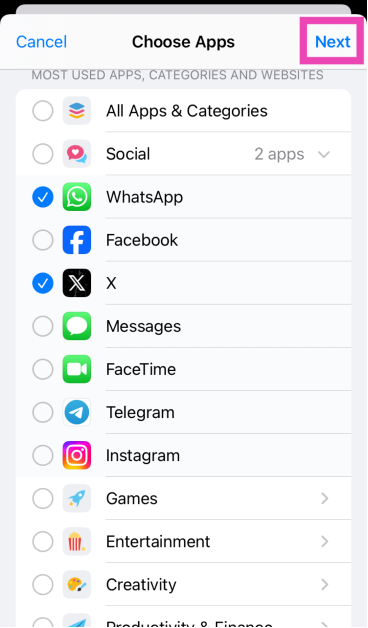
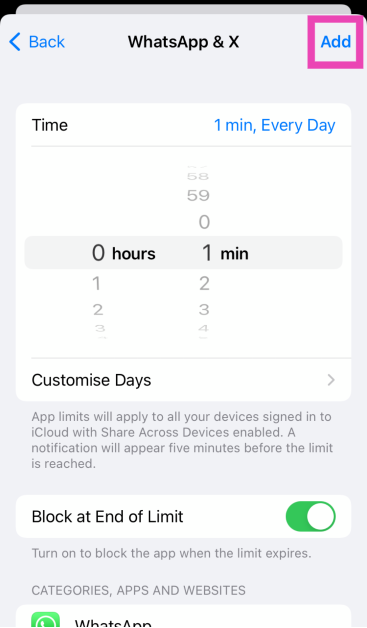
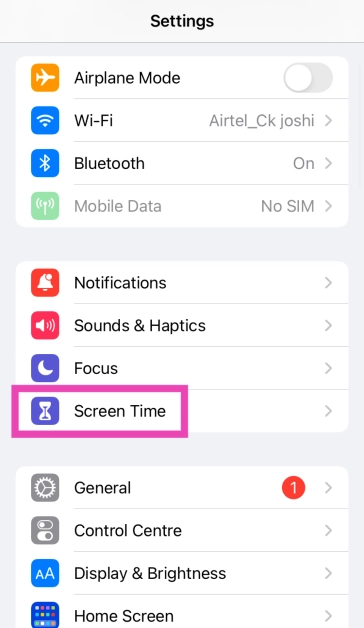
Step 1: Go to Settings and select Screen Time. Step 1: Go to Settings and select Screen Time. Step 2: Tap on Use Screen Time Passcode and set up a unique passcode to lock your apps. Step 3: Tap on App Limits. Step 3: Tap on App Limits. Step 4: Select Add Limit. Step 4: Select Add Limit. Step 5: Select the apps you wish to lock. Go through the categories to view the apps. Step 5: Select the apps you wish to lock. Go through the categories to view the apps. Step 6: Hit Next. Step 7: Set the timer to 1 minute and tap on Add at the top right corner of the screen. Step 7: Set the timer to 1 minute and tap on Add at the top right corner of the screen. Top 3 Ways to Lock Apps in iPhone and ios (2024) Your selected apps will be locked after 1 minute of activity. Once the activity limit is breached, you can unlock the app for periods of 15 minutes, an hour, or an entire day. The app will not ask you for the passcode within the selected usage window.

How to lock apps from settings

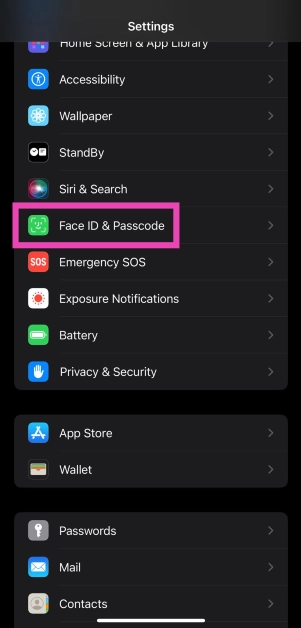
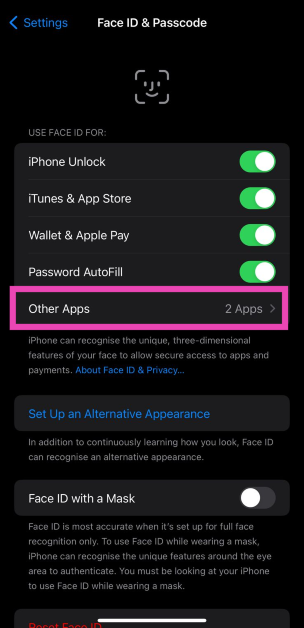
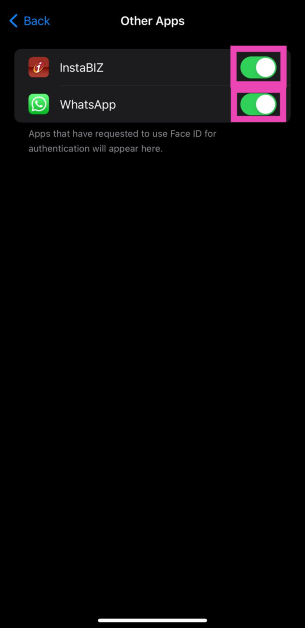
A better way to lock apps on your iPhone is by using Face ID. This method is available for selected apps only. Here’s how you can use it. Step 1: Go to Settings and select Face ID & Passcode. Step 1: Go to Settings and select Face ID & Passcode. Top 3 Ways to Lock Apps in iPhone and ios (2024) Step 2: In the ‘Use Face ID for’ section, select Other Apps. Step 2: In the ‘Use Face ID for’ section, select Other Apps. Top 3 Ways to Lock Apps in iPhone and ios (2024) Step 3: Turn on the toggle switch for the app you want to lock using Face ID. Step 3: Turn on the toggle switch for the app you want to lock using Face ID. Top 3 Ways to Lock Apps in iPhone and ios (2024)

How to lock apps using Guided Access

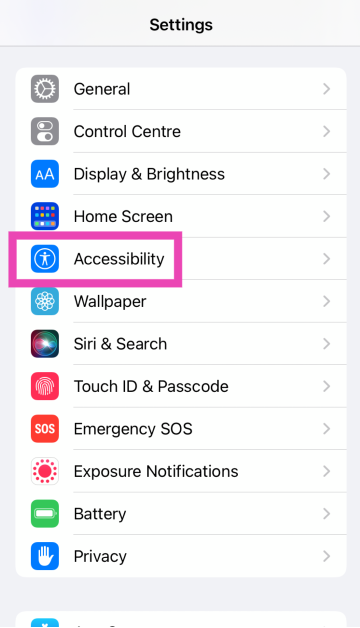
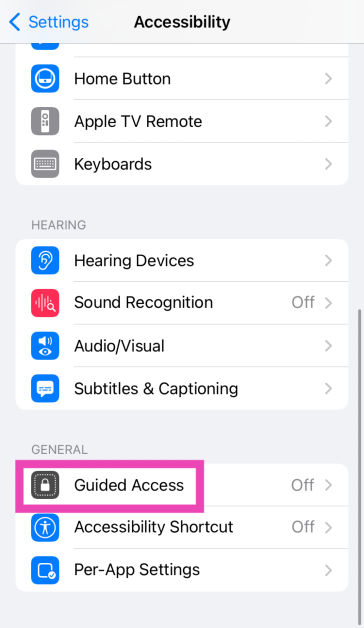
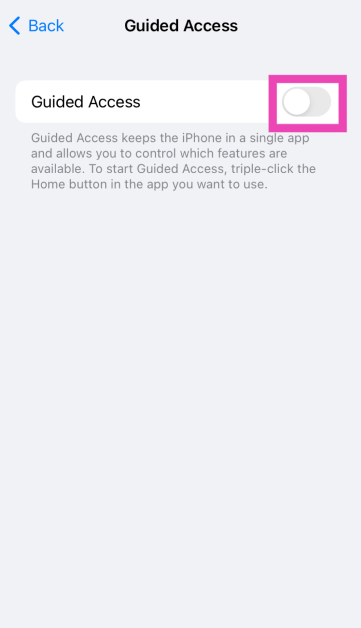
Step 1: Go to Settings and select Accessibility. Step 2: Tap on Accessibility. 6 simple ways to disable touch screen on Android and iPhone stop accidental touch Step 2: Tap on Guided Access. Step 3: Scroll down and select Guided Access. 6 simple ways to disable touch screen on Android and iPhone stop accidental touch Step 3: Turn on its toggle switch. Tap on Passcode Settings. Step 4: Turn on the toggle switch for Guided Access. 6 simple ways to disable touch screen on Android and iPhone stop accidental touch Step 4: Tap on Set Guided Access Passcode and set up a passcode. You can also choose to use Face ID/Touch ID. Step 5: Launch an app and triple-press the home button/side key to enable Guided Access. To leave the current app, you will need to enter the Passcode/Touch ID/Face ID.

Frequently Asked Questions (FAQs)

How do I lock an app on my iPhone? Long-press the app on the home screen and select ‘Require Face ID’ to lock it. Confirm your selection in the pop-up box. How do I hide an app on my iPhone? Long-press the app’s icon on the home page, tap on ‘Require Face ID’, and select ‘Hide and Require Face ID’.

How do I lock my iPhone apps using Face ID?

Go to Settings>Face ID and passcode>Other Apps and turn on the toggle switch for the app you want to lock.

How do I lock a note on my iPhone?

Go to Settings>Notes>Password and set up a password or use Touch ID/Face ID/Passcode. Launch the Notes app on your iPhone and select the note you wish to lock. Hit the ellipses and select ‘Lock’.

How do I pin an app to the iPhone’s screen?

You can use Guided Access to pin an app to the screen of your iPhone. Once enabled, you will need to provide your Passcode/Face ID/Touch ID to go back to the home screen. Read Also: Top 3 Ways to Lock Apps on Android (2024)

Final Thoughts

These are the top 4 ways to lock or password-protect apps on an iPhone. To add an extra layer of security, turn on two-factor authentication for your social media and messaging apps. If you know any other way to lock apps on your device, let us know in the comments!

Xiaomi Smarter Living 2024: New vacuum cleaner, earphones and tablet arriving

The Xiaomi Smarter Living 2024 event is almost here; it will happen in India on April 23. The products haven’t been confirmed yet, though. The firm has teased the release of four new items expected to be home appliances and personal technology products. According to a previous report, Xiaomi is preparing to introduce a self-cleaning vacuum cleaner, new TWS earphones with active noise cancellation (ANC), and a new Redmi Pad model in India. Nevertheless, no information regarding the anticipated devices was disclosed by the source. Xiaomi will host the Smarter Living 2024 event soon in India. The upcoming tech event will be held on April 23 during which it will be launching four new items, but there was also mystery around the announcement. The company has also created a dedicated microsite that previews its upcoming products. Rumour has it that the upcoming releases will consist of a tablet, a robot vacuum cleaner/mop, true wireless (TWS) earbuds, and a hairdryer. But detailed information is still hard to come by, which makes fans more eager. Also Read: Nothing Ear and Nothing Ear A images leaked online, pricing tipped

Xiaomi Smarter Living 2024: What to expect?

The Redmi Pad Pro which was released in China recently is likely to be part of Xiaomi’s upcoming product portfolio. It features a 12.1-inch 2.5K LCD. The tablet runs on HyperOS and is powered by Snapdragon 7s Gen 2 SoC. The device features an 8-megapixel front and rear cameras. The price of 6GB RAM with 128GB storage option costs CNY 1,499, or approximately Rs 17,300. The Redmi Pad SE, which debuted in Europe in August 2023 is speculated to be coming to India. The device features an 11-inch full-HD+ LCD screen with 1900 x 1200 pixels of resolution. The tab runs on MIUI Pad 14, an Android 13-based OS. Under the hood, there is a Qualcomm Snapdragon 680 SoC, along with up to 8GB of LPDDR4X RAM and 128GB of eMMC 5.1 storage. It has an 8,000mAh battery that supports 10W wired USB Type-C charging. The tablet’s price there starts at EUR 199 about Rs 18,000 for the 4GB RAM with 128GB variant. Also Read: Samsung Moves Back into the Top Position Beating Apple: IDC Report Redmi Buds 5 Pro are thought to be the most likely TWS earbuds. The TWS is expected to come with 12.4mm dynamic drivers. The earbuds are likely to have up to 46dB of ANC assistance. Additionally, these are said to provide 38 hours of total battery life on a single charge.

Garena Free Fire Redeem Codes Today 16 April 2024: Here is how to claim them

Garena Free Fire is a battle royale game with regular awards and tournaments to keep players interested. If you play Garena Free Fire, you should be aware of the redeem codes that are released on a daily basis. However, because the battle royale game is banned in India, players from other countries can use the Free Fire Redeem codes daily. If you’re unfamiliar with the Garena Free Fire redeem codes or don’t know how to get them, we’ve put together a step-by-step guide to help you redeem them. Check out Garena Free Fire Redeem Codes for 16 April 2024. The Free Fire redeem codes are a great way to get free stuff. These are 12-digit codes that contain alphabets and numbers, as well as an expiration date and time. Because the Garena FF redeem codes cannot be used more than once, you should hurry to the redemption page to claim your free reward before someone else does. To get a free reward, all you have to do is go to reward.ff.garena.com/en, which is the official redemption page. Also, keep an eye on this space for daily updates on Garena Free Fire redemption codes and rewards. Also Read: Sennheiser Accentum Plus wireless headphones with Hybrid Adaptive Noise Cancellation launched

Garena Free Fire Redeem Codes Today 16 April 2024

S0T6U2V8W4X9Y5 Z1A7B3C9D5E0F6 G2H8I4J0K6L1M7 N3O9P5Q1R7S2T8 X7Y3Z9A5B1C6D2 E8F4G0H6I2J7K3 L9M5N1O7P3Q8R4 P3Q9R5S1T7U2V8 W4X0Y6Z2A8B3C9 D5E1F7G3H9I4J0 K6L2M8N4O0P5Q1 U4V0W6X2Y8Z3A9 B1C7D3E9F5G0H6 I2J8K4L0M6N1O7

How to Get Free Fire Redeem Codes for Garena on 16 April 2024?

  • Visit the Garena Free Fire game’s official website at reward.ff.garena.com.
  • Use your Facebook, Google, VK, Apple ID, Huawei ID, or Twitter account to log in.
  • You’ll be taken to a valid redemption code (s)
  • Copy and paste the 12-digit redemption code into the text box.
  • On the screen, a dialogue box will appear.
  • ‘Ok’ should be selected.
For the latest gadget and tech news, and gadget reviews, follow us on TwitterFacebook and Instagram. For newest tech & gadget videos subscribe to our YouTube Channel. You can also stay up to date using the Gadget Bridge Android App. You can find the latest car and bike news here.

Top 3 Ways to Lock Apps on Android (2024)

0
While buying a new smartphone, it is very important to consider its privacy features. Over the years, almost every major Android OEM has incorporated an app locker into its OS. You no longer need a third-party app locker to keep your personal documents and financial apps safe. If you want to password-protect the personal apps on your Android smartphone, it is a good idea to keep them locked. Here are three ways to go about it. Read Also: Nothing Ear and Nothing Ear A images leaked online, pricing tipped

Does the stock Android OS have an app locker?

Even though an app locker is a basic feature in every major Android smartphone, it is not present in stock Android OS. This means Google Pixel users do not have a native way of password-protecting their apps. However, if you’re a Samsung, OnePlus, Xiaomi, or Oppo user, you don’t need to worry about this problem. Even manufacturers like Nothing and Motorola that rely mostly on stock Android OS for their smartphones have a custom app locker baked into their devices. So, where does this leave Pixel users? While there is always an option to download a third-party app locker, the truth is that they aren’t very good. Most app lockers deplete the battery quickly and push intrusive ads on the device. A better workaround is using a ‘guest profile’ on your Pixel and limiting the apps that the guest can access on it. While handing your phone to someone else, quickly make the switch to the guest profile to protect your personal apps.

Lock apps on a Samsung smartphone (One UI)

Step 1: Go to Settings and select Security and privacy. Step 1: Go to Settings and select Security and privacy. Step 2: Tap on More security settings. Step 2: Tap on More security settings. Step 3: Select Secure Folder. Step 3: Select Secure Folder. Step 4: Tap on Continue and sign in using your Samsung account. Step 5: Grant Secure Folder the necessary permissions. Step 6: Set up a locking mechanism – fingerprint, PIN, or password. Hit Next. Step 7: Hit the plus icon to add an app. Step 7: Hit the plus icon to add an app. Step 8: Once an app has been selected, hit Add. Step 8: Once an app has been selected, hit Add. Step 9: Tap the ellipses again and select Lock and exit. Step 9: Tap the ellipses again and select Lock and exit.

Lock apps on a Xiaomi smartphone (MIUI/HyperOS)

Step 1: Go to Settings and select Apps. Step 1: Go to Settings and select Apps. Step 2: Tap on App lock. Step 2: Tap on App lock. Step 3: Set up a PIN, fingerprint, or password. Step 4: Turn on the toggle switch for the app you want to lock. Step 4: Turn on the toggle switch for the app you want to lock.

Lock apps on a OnePlus/Oppo smartphone (OxygenOS/ColorOS)

Step 1: Go to Settings and select Security and privacy. Step 1: Go to Settings and select Security and privacy. Step 2: Scroll down and tap on App Lock. Step 2: Scroll down and tap on App Lock. Step 3: Turn on the toggle switch for App Lock and set up a password. Step 3: Turn on the toggle switch for App Lock and set up a password. Step 4: Turn on the toggle switch for the app you want to lock. Step 4: Turn on the toggle switch for the app you want to lock.

Frequently Asked Questions (FAQs)

How do I password-protect my apps on Android?

Every Android OEM has a different method of locking apps with a password. You will typically find this option in the ‘Security and privacy’ section in device settings.

How do I lock apps on a Xiaomi smartphone?

Go to Settings>Apps>App Lock, set up a password, and turn on the toggle switch for the app you want to lock.

Can I use the Secure Folder without a Samsung account?

Currently, there is no way to use the Secure Folder without a Samsung account. Read Also: How to Download a Video On WhatsApp for PC? (2024)

Conclusion

This is how you can lock apps on any Android smartphone. You can also use third-party apps for this task, but that requires giving the home launcher permission to the app. If you know any other ways to password-protect your apps on Android, let us know in the comments!

Nothing Ear and Nothing Ear A images leaked online, pricing tipped

The OnePlus co-founder Carl Pei’s UK-based tech venture has officially confirmed the introduction of its next iteration of Nothing Earbuds- Nothing Ear and Nothing Ear A. A few days before their formal release, purported images of Nothing Earbuds together with their costs and features made their way online. According to leaks, the devices will come with active noise cancellation (ANC) of up to 45 dB. In terms of design, the audio device will have a semi-transparent structure along with IP54 certification. Also Read: Samsung Moves Back into the Top Position Beating Apple: IDC Report It is confirmed that Nothing Ear and Nothing Ear A will debut on April 18. Ahead of the official launch images, specifics, and costs for Nothing Ear and Ear A have been tipped by Ishan Agarwal. The Nothing Ear A is expected to cost EUR 99, or about Rs 8,000. On the contrary, it is anticipated that the Nothing Ear will cost EUR 149, or around Rs 13,000, at launch. “Hopefully it won’t go above ₹9,999,” the tipster said in its X post. Nothing Ear (2) was launched in India at a price tag of Rs 9,999. The truly wireless stereo earphones come in two colours- White and Black. 
Nothing Ear and Nothing Ear A images leaked online, pricing tipped
Image Courtesy: Ishan Agarwal/X
Based on the images, it appears that the new earphones will have a semi-transparent design, just like their predecessors. Both the casing as well the stem will be semi-transparent.  The Nothing Ear is displayed in black and white colourways. Whereas Nothing Ear A is featured in black, white, and yellow hues. The renderings display shows the company’s logo Nothing etched on the stem. Additionally, they appear to use identical red and white dots to denote the left and right sides. The Nothing Ear A is claimed to provide dual connections and up to 45dB ANC. They are tipped to come with up to eight hours of battery life with ANC turned off. The earbuds are said to have dual connections and up to 45dB ANC. Also Read: Google Pixel 8a renders leaked, 4 colour options expected Before the announcement, Nothing shared a teaser on its social media account, X which triggered talks on the release of the Nothing phone 3 or more accurately, Nothing Ear. A leaping frog is seen in the short video which is going to be the face of its mascot for Nothing TWS. Note that Nothing has used a Ladybug for Ear (1) and an Atlas Beetle for the Ear (2) as their mascots.