Vivo Y200 renders, design, specs and features are doing rounds on the web. The launch date for the said phone was not known but today it now has a launch date. The Chinese smartphone brand today announced that Vivo Y200 will make its India debut on October 23. The device’s colour option and design renders were leaked recently.Vivo today officially announced that its upcoming phone Vivo Y200 is set for a launch in India on October 23. The device is a predecessor of the Y100 that was launched last year. The company has not yet revealed the specs or its pricing. But the teaser image suggests the phone to arrive in two shades.Also Read: Best Flip Phones in India (2023) to buy this festive season Vivo Y200 is likely to come with a price tag of Rs 24,000 for the 8GB RAM with 128GB storage option.According to a report the Vivo Y200 is likely to come in two colour options of Desert Gold and Jungle Green. As we mentioned earlier the leaked design renders of the phone suggest an Aura Light feature which is basically a small ring light. Along with this, there is a dual rear camera setup and an LED flashlight.The alleged phone is said to have rounded corners and flat edges. The leaked renders also suggest a volume rocker and power button on the right side of the frame. Coming to the front, the panel has a punch-hole camera placed at the top centre.Previously the handset was rumoured to come with a 6.67-inch full-HD+ AMOLED display with 2,400 x 1,080 pixels of resolution. The upcoming phone may also include a Qualcomm Snapdragon 4 Gen 1 SoC and operate on Funtouch OS with Android 13 on top.In addition to this speculations also suggests a 64-megapixel primary sensor with OIS and a secondary 2-megapixel sensor. For selfies, it may also include a 16-megapixel front-facing camera.Moreover, the upcoming phone is likely to pack a 4,800mAh battery with 44W wired fast charging support.
For the latest gadget and tech news, and gadget reviews, follow us on Twitter, Facebook and Instagram. For newest tech & gadget videos subscribe to our YouTube Channel. You can also stay up to date using the Gadget Bridge Android App. You can find the latest car and bike news here.
Are you looking for a smartphone with a more compact form factor? Then you should look for Flip Phones, which are essentially foldable, and do come with that capability. When opened, they expand into a full-sized display and fold to fit in your pocket. As of now, the majority of the brands, including Samsung, Motorola, Xiaomi, Oppo, Vivo, and Tecno have foldable devices and soon, OnePlus, are jumping on board. Note that Apple the company behind the iPhone, the king of smartphones, has yet to enter the foldable phone market. So if you are looking to buy a new foldable phone here is a list of Flip Phones available in India.The festive sale is live on all the e-commerce platforms including Amazon and Flipkart in the country. Smartphone brands like Xiaomi, Vivo, Samsung, and Oppo are also hosting their individual sales on their platform. So this is the best time to buy a Flip Phone in India. If you are looking for one then here is a list of Flip Phones in India you can look out for this festive season.
In This Article
Samsung Galaxy Z Flip 5
Samsung Galaxy Z Flip 5 (Review)is the first Flip phone on the list which you can absolutely go for without giving a second thought. It features a 6.7-inch FHD+ Dynamic AMOLED 2X Infinity Flex Display and a 3.4-inch Super AMOLED cover screen. The primary panel supports a 120Hz refresh rate and the external display has a refresh rate of 60Hz. The device comes with an IPX8 grade for water resistance.This Flip phone comes with a dual rear camera unit with a 12-megapixel ultra-wide main sensor and a 12-megapixel wide-angle camera. The Galaxy Z Flip 5 boasts a 10-megapixel selfie camera on the front of the folding display for selfies.In addition to this, the phone boasts a 3,700mAh battery that supports 25W quick charging.The new Flex Window offers a variety of both old and new capabilities and is now 3.78 times bigger than the previous iteration. It offers greater customization choices, including informative and graphical clocks that can match the face design of a user’s Galaxy Watch 6 series, as well as stylish frames. The device runs on OneUI 5.1.1 on top of Android 13.Samsung Galaxy Z Flip 5 is available in two different configurations 8GB RAM with 256GB storage and 8GB RAM with 512GB storage. The price of both variants in India is set at Rs 99,999 and Rs 109,999, respectively.
Oppo Find N3 Flip
Oppo Find N3 Flip features a 6.80-inch AMOLED primary display with a dynamic refresh rate that ranges between 1Hz to 120Hz. There is a 3.26-inch cover display vertically positioned. The device is powered by an octa-core MediaTek Dimensity 9200 SoC along with 256GB of UFS 4.0 internal storage and 12GB of LPDDR5X RAM. The device comes with colorOS 13 out of the box. The company is promising 4 years of major OS updates and 5 years of security patches.For photos and videos, there is a triple rear camera that includes a 32-megapixel telephoto sensor, an 8-megapixel ultra-wide-angle sensor, and a 50-megapixel Sony IMX890 main lens with OIS feature. The Flip Phone also sports a 32-megapixel front camera for taking selfies and making video calls.It packs a 4,300mAh battery with 44W supervooc wired charging support.The Oppo Find N3 Flip comes in a single 12GB RAM with 256GB storage option priced at Rs 94,999.
Tecno Phantom V Flip
Tecno Phantom V Flip features a 6.9-inch LTPO AMOLED primary screen with a 144Hz refresh rate. There is a 1.32-inch outer display. The device is powered by MediaTek Dimensity 8050 with 8GB RAM and 256GB storage. For photos and videos, the device includes a 64-megapixel primary camera and a 13-megapixel ultrawide camera. For selfies, it includes a 32-megapixel front-facing shooter.The Flip Phone by Tecno boasts a 4,000mAh battery that comes with 45W fast charging support. Also, this device is not IP-certified.The device comes with a price tag of Rs 49,999.
Motorola Razr 40 and Motorola Razr 40 Ultra
Motorola Razr 40, and Motorola Razr 40 Ultra features 6.9-inch foldable pOLED screens with a refresh rate of 165Hz. The Motorola Razr 40 Ultra model has a larger 1.5-inch cover display whereas the Razr 40 has a 3.6-inch pOLED outer screen. Both the devices are IP52 rated.The Motorola Razr 40 and Motorola Razr 40 Ultra are powered by Snapdragon 7 Gen 1 and Snapdragon 8+ Gen 1 processors respectively.The Motorola Razr 40 features a 64-megapixel primary sensor and a 12-megapixel ultra wide-angle camera. Whereas Razr 40 Ultra includes a 13-megapixel secondary ultra-wide-angle camera and a 12-megapixel primary sensor. However both the devices sport a 32-megapixel front-facing camera for selfies.There is a 3,800mAh and a 4,200mAh battery on the Motorola Razr 40 and Motorola Razr 40 Ultra, respectively.The Motorola Razr 40 Ultra comes with a price tag of Rs 89,999 for the 8GB RAM with 256GB storage model. On the other hand, Razr 40 price is set at Rs 59,999. For the latest gadget and tech news, and gadget reviews, follow us on Twitter, Facebook and Instagram. For newest tech & gadget videos subscribe to our YouTube Channel. You can also stay up to date using the Gadget Bridge Android App. You can find the latest car and bike news here.
A new player in the consumer tech world, Nothing has garnered a lot of praise and popularity with its smartphone and TWS releases. After launching the second iteration of the Nothing Phone this summer (our review here), the brand has come out with a fresh line of products under a new banner. CMF (Colour, Material, Finish) by Nothing ditches the brand’s iconic transparent design philosophy for a minimal and polished aesthetic. The subsidiary brand’s catalogue comprises affordable products meant for the average consumer. Consider it Nothing’s very own ‘Nord’, if you will. Eager to gauge CMF’s ambitions, we got our hands on its recently released Watch Pro and Buds Pro. Nothing fans expecting a transparent wearable may have to wait some more for a flagship release, but this smartwatch is certainly no pushover. We have been using the CMF Watch Pro for the last 10 days, here is our in-depth review.Read Also:Top 3 ways to clear app cache on Android
In This Article
CMF Watch Pro review: Design and Display
Nothing’s novel approach to unboxing has been carried forward to its subsidiary brand as well. The CMF Watch Pro ships inside a sleek, squarish cardboard box which has three visible cutouts jutting out of the bottom end. Flipping open the package, you will find the smartwatch, the silicone watch strap, a magnetic clip charger, and a user guide inside.As far as looks go, the CMF Watch Pro looks like your average smartwatch. The square dial houses a 1.96-inch AMOLED display that can reach a peak brightness of 600+ nits. This display has a resolution of 410 x 502p and a pixel density of 332ppi. The touch response offered by this AMOLED display is very satisfying. We like that it isn’t super sensitive to light touches.Encasing this display is an aluminium alloy shell that is surprisingly light. The Watch Pro weighs just 47g with the silicone strap. The right edge of the aluminium frame houses the side key and the speaker grille. The dial’s underside houses the accelerometer, heart rate & blood oxygen saturation sensor, magnetic pin slots for charging, and a microphone. The entire shell has a matte finish, which feels quite premium and polished.Always On DisplayThe pin buckle silicone strap wraps snugly around the wrist, using the pin buckle mechanism to seal the fit. Once you fasten the buckle, the strap goes under the slit. We’ve struggled with this kind of fit in the past, especially while wearing the watch to bed, but the CMF Watch Pro is able to pull it off quite well. Wearing the watch for days on end, we did not experience any major discomfort. The watch is rated IP68 for dust and water resistance, which means it is dust and water resistant. However, it is not meant for swimming.
CMF Watch Pro review: Performance
Pairing the CMF Watch Pro to your smartwatch is a seamless process. The watch dial displays a QR code that directs you to the CMF Watch app download page. You can also install the app from the Google Play Store or App Store.Readings from the heart rate monitor and SpO2 sensor are consistent with medical-grade equipment. The Watch Pro routinely measures maximum, minimum, and resting heart rate throughout the day, accurately plotting it on a graph. You can view your daily, weekly, monthly, and yearly graphs on the CMF Watch app. The same goes for blood oxygen measurement. You can also set up low/high heart rate and low blood oxygen level alerts. The watch also gauges your stress level every thirty minutes. We cannot speak to the accuracy of the stress reading as CMF does not divulge its formula for assigning the score.Sport and fitness tracking on the Watch Pro is near impeccable, apart from one small issue. The watch does not auto-detect your workouts. We went on a few hikes and runs, and while the watch updated the daily step count, the numbers did not reflect as a part of an exercise. On the bright side, the Watch Pro has in-built GPS support, which means you can leave your phone at home and the watch will still be able to track your run on a map.The Watch Pro can track over 100 sports, exercises, and workout routines. This includes exercises like pilates, CrossFit, & strength training and leisure activities like Zumba, ballet, street dance, skating, kite flying, and more. The watch can accommodate up to 36 exercise and workout routines at one time. These exercises can be selected from the ‘Usual sports’ section in the CMF Watch app.Things take an interesting turn on the OS front as we finally get to see what makes this watch a Nothing product. The Watch Pro’s user interface is influenced by Nothing OS 2.0. Nothing’s black and orange colour palette dominates the look of the OS. The app grid is greyed out and the watch faces have a distinct ‘Nothingness’ to them. The dot matrix font further stamps Nothing’s personality on the device. You can’t customise the watch faces, which is probably something that the brand restricts on purpose so as to not throw off the aesthetic it has carefully curated.This minimality in design scores brownie points from us for several reasons. Firstly, a distinct look and personality is something that not a lot of devices can boast about, especially at a time when uniformity is taking over every smart device. The watches that do break the norm go towards the direction of simulating a smartphone experience for the wrist. This is where the CMF Watch Pro does justice to the genre. It keeps things simple and nails to perfection the things it sets out to do.Lastly, the battery life on this watch is nothing short of amazing. The 340mAh battery unit can power the smartwatch for 13 days, as claimed by Nothing. With the Always On Display turned on at all times, the CMF Watch Pro lasted 10 days during the review period. The watch has a cool Wrist Detection feature that turns off AOD and 24-hour heart rate and SpO2 tracking as soon as you take it off your wrist. This can push the battery life closer to its claimed range.Read Also:Top 10 Ways to Fix YouTube App Crashing or Not Working On Android
Conclusion
The CMF Watch Pro is undoubtedly a Nothing product through and through even though it doesn’t get the brand’s signature transparent design. For an average consumer who wants a finished product over a range of customisations, the Watch Pro is an excellent choice. It does a splendid job of health & fitness tracking and has great app support for smartphones. We would have liked to see features like automatic workout detection and customised watch faces, but their absence is certainly not a dealbreaker. At Rs 4,499 the CMF Watch Pro is one of the best smartwatches in its segment.
OnePlus Open is set to launch in India on October 19. But ahead of the official announcement the price of the OnePlus Open for India has leaked. In addition to this, the key specs of the foldable phone include the camera and display specifications. The device is likely to come with a triple rear camera setup. In addition to this, there will be a 2K resolution display. Keep reading to know more about the phone pricing and specs.According to a tipster, OnePlus Open is likely to be priced in India at Rs 1,39,999. The foldable phone is claimed to go on sale in India from October 27.Also Read:Apple India announces festive sale ahead of Diwali with up to Rs 10,000 savings on Apple productsOn the other hand, a Chinese tipster has shared the key specs of OnePlus Open. He took to Weibo to share the camera and display specs of the phone. According to him the foldable will be featuring a BOE panel with a 2K resolution. In addition to this, it may support a refresh rate of 120Hz and 1440Hz PWM dimming. The display will come with a peak brightness of 2,800 nits.Furthermore, the Chinese tipster has also shared that the OnePlus Open could include a triple rear camera setup. The camera module may include a 48-megapixel dual-layer transistor outsole primary lens. Moreover, it may also include a secondary 64-megapixel periscope lens with 3x optical zoom or 6x lossless zoom and a tertiary 48-megapixel ultrawide lens. TheThe foldable phone is said to come with OxygenOS 13 out of the box. The OnePlus Open is also claimed to support 67W fast charging however it might not get support for wireless charging. The device may ship with a 100W charger.OnePlus Open is confirmed to be available in a black colour option. The device will come with a volume rocker and a power button on the right side of the frame. Moreover, an Alert Slider on the left edge.According to leaks, the foldable may feature a 7.82-inch OLED primary display with 2,440×2,268 pixels of resolution. On the other hand, there could be a 6.31-inch OLED outer display with 1,116 x 2,484 pixels of resolution. Both the screen may support a refresh rate of 120Hz. The phone is expected to be powered by an octa-core Qualcomm Snapdragon 8 Gen 2 SoC along with 16GB of RAM and up to 1TB of storage. The upcoming device is expected to sport a 4,805mAh battery.
For the latest gadget and tech news, and gadget reviews, follow us on Twitter, Facebook and Instagram. For newest tech & gadget videos subscribe to our YouTube Channel. You can also stay up to date using the Gadget Bridge Android App. You can find the latest car and bike news here.
One of the easiest ways of freeing up the storage space on your iPhone is by clearing the cache of all the apps and web browsers you use. Offloading an app helps as well. The apps on your iPhone can add massively to the cache and occupy a significant portion of the storage space over a period of time. Wiping out the cached memory of all the apps can take some time since you will need to go through every app individually. But, it is a very easy process. In this article, we bring you the top 4 ways to clear app and browser cache on iOS.Read Also:Demystified: What Happens When You Remove or Block a Follower on Instagram?
In This Article
Clear app cache on iOS
Step 1: Go to Settings and select the app for which you want to clear the cache.Step 2: Scroll down and select ‘Background App Refresh’.Step 3: Go back to the home page close and re-launch the app.The cache of the app will be cleared as soon as it is launched.
Offload an app on iOS
Step 1: Go to Settings and select General.Step 2: Tap on iPhone Storage.Step 3: Select the app for which you want to clear the cache.Step 4: Tap on Offload App.Step 5:Confirm your selection in the popup box.
Clear Safari’s app cache on iOS
Step 1: Go to Settings and select Safari.Step 2: Tap on Clear History and Website Data.Step 3:Confirm your selection in the popup box.
Clear Google Chrome’s app cache on iOS
Step 1:Launch the Google Chrome app on your iPhone.Step 2: Tap the ellipses at the bottom right corner of the screen.Step 3: Tap on Clear Browsing Data.Step 4: Set a Time Range. Make sure you select Cached Images and Files as one of the items you want to delete.Step 5: Hit Clear Browsing Data.
Frequently Asked Questions (FAQs)
What is the difference between Offloading an app and clearing its cache?
Offloading an app and clearing its cache are great ways to free up storage space on your device. Clearing an app’s cache deletes all the temporary files it has stored on your device. Offloading an app uninstalls it from your iPhone but retains its data in case you install it again.
What does cache mean?
A cache is a set of temporary files that an app or website stores on your device for instant access. This keeps it from downloading those files every time you visit the app or webpage.
How often should I clear the app cache on my iPhone?
If you haven’t used an app in a long time, you should clear its cache. Typically, you should clear the cache of every app once every two to three weeks.Read Also:Top 5 Gaming Mouse Under Rs 1,000 for Counter-Strike 2
Apple Festive Sale in India has begun and the company is offering exciting deals across its product portfolio ahead of Diwali. Apple iPhones, iPads, MacBooks and AirPods will be up on the official Apple Stores with good offers and discounts. In addition to this, the Cupertino-based company will also provide No-cost EMI for three or six months from leading banks.While announcing the Apple Festive Sale in India the tech firm said, “Get ready to celebrate this festive season with Apple. Exciting offers are coming your way on 15 October.”Apple will be offering up to Rs 10,000 off to those making payments using HDFC Bank credit cards. There will be discounts of up to Rs 5,000 on the latest iPhone 15 and iPhone 15 Plus models. In contrast, HDFC card owners can get an instant discount of Rs 6,000 on purchasing iPhone 15 Pro and iPhone 15 Pro Max.Also Read:Poco M6 Pro 5G Review: One of the best affordable 5G smartphonesThe last year’s iPhone 14 and iPhone 14 Plus will bring you a discount of Rs 4,000 if the transaction is made through an HDFC Bank card. Likewise, there will be discounts of Rs 10,000 on MacBooks including MacBook Air M2 13-inch and 15-inch models, MacBook Pro 13-inch, 14-inch, and 16-inch models, and Mac Studio.The HDFC Bank card holders can receive a discount of up to 2,000 in addition to 3-6 months of no-cost EMI on the purchase of Apple HomePod and AirPods Pro. Moreover, buyers can also get an additional subscription to Apple Music for 6 months.However, there are great deals on Amazon and Flipkart on iPhones but there are some perks of purchasing Apple products from the Apple Store. Buyers can get six months of Apple Music for free when they buy an iPhone, AirPods, or HomePod. In addition to this, shoppers will also get a chance to personalise their iPad, AirPods, AirTag, Apple Pencil (2nd gen), or AirTag Air for free. They can get engraved emojis, names, or numbers on their devices. Choose from Hindi, Bengali, Marathi, Tamil, Kannada, Gujarati, Telugu, and English.Apart from this, you can choose to pay in low monthly instalments with EMI. As a part of its festive sale, Apple will provide No-cost EMI offers for three or six months through leading banks in the country.On the website, the company says, “Exchange your current eligible device with Apple Trade-In, and get instant credit towards your new purchase.”Apple is also offering great trade-in deals to its customers during the sale. Customers can easily trade any qualified smartphone through Apple Trade in for instant credit toward a new iPhone where people can exchange their devices for up to Rs 67,800. Note that the offer cannot be combined with Apple Store for Education or Corporate Employee Purchase Plan pricing. To entice more customers.How Apple Trade In works:
Click here to evaluate the worth of the phone which you want to exchange.
Then select your new device and then answer a few questions to get your estimated trade-in value. You can use that value as instant credit to save on your new iPhone.
Apple will also provide doorstep pickup and delivery. Just exchange your smartphone when we deliver your new iPhone.
Delivery options
As mentioned earlier Apple is also offering doorstep delivery as well as pickup options to choose from. Express Delivery is available on in-stock items. In this option, your product will automatically ship as it becomes available. A signature may be required at the time of delivery. For prepaid orders, the courier will issue a One one-time password to the phone number provided at the time of checkout. The second option is Scheduled Delivery. However, this option is only applicable for specific PIN codes; you can choose a scheduled delivery method for each item on your order.
Apple is also offering a 3-month subscription to Apple TV+ and Apple Arcade for free on the purchase of Apple products.
Besides this Apple is also organising festive events at its retail locations in Mumbai as well as at Delhi.
From October 19 to November 14, Apple BKC is hosting “Light Up Mumbai” a series of free talks and workshops to spark the creativity of customers this festive season. Interested customers can sign up and learn from leading artists from the worlds of music, film, design and beyond and get creative on iPhone.
Session lineup at Apple BKC for October 2023:
Thursday, October 19
Talk: KING
Timing: 7:30 pm–9:00 pm
Join rap sensation KING at the Apple BKC where he’ll share the stories behind his music and upcoming album New Life.
Thursday, October 26
Talk: Behind Bollywood with Vikramaditya Motwane
Timing: 7:30 pm–9:00 pm
Filmmaker Vikramaditya Motwane will share screenings of his incredible back catalogue and the stories behind them — focusing on the role played by technology including the iPhone.
Tuesday, October 31
Workshop: Find Your Voice with NaadSadhana on iPhone
Timing: 7:30 pm–9:00 pm
Music-making app NaadSadhana creator Sandeep Ranade shares the thinking behind its collaborative design.
For the latest gadget and tech news, and gadget reviews, follow us on Twitter, Facebook and Instagram. For newest tech & gadget videos subscribe to our YouTube Channel. You can also stay up to date using the Gadget Bridge Android App. You can find the latest car and bike news here.
Garena Free Fire is a battle royale game with regular awards and tournaments to keep players interested. If you play Garena Free Fire, you should be aware of the redeem codes that are released on a daily basis. However, because the battle royale game is banned in India, players from other countries can use the Free Fire Redeem codes daily. If you’re unfamiliar with the Garena Free Fire redeem codes or don’t know how to get them, we’ve put together a step-by-step guide to help you redeem them. Check out Garena Free Fire Redeem Codes for 16 October 2023.The Free Fire redeem codes are a great way to get free stuff. These are 12-digit codes that contain alphabets and numbers, as well as an expiration date and time. Because the Garena FF redeem codes cannot be used more than once, you should hurry to the redemption page to claim your free reward before someone else does. To get a free reward, all you have to do is go to reward.ff.garena.com/en, which is the official redemption page. Also, keep an eye on this space for daily updates on Garena Free Fire redemption codes and rewards.
In This Article
Garena Free Fire Redeem Codes Today 16 October2023
If you use a lot of apps on your phone, its cached data can occupy a significant portion of your device’s memory over a period of time. An app’s cache serves an important purpose in its smooth and swift functioning. Every app reaches its cached memory to pull out the frequently used items instead of downloading them all over again. Over a period of time, these items can become outdated and therefore useless. It is recommended that you clear your phone’s cache every few weeks. In this article, we bring you the top 4 ways to clear the app cache on your Android phone.Read Also:Top 4 Ways to Automatically Forward Text Messages to Another Phone or PC
In This Article
What happens when you clear an app’s cache? How often should you clear it?
An app’s cache stores temporary information that can be immediately presented to the phone whenever you launch it. This makes the app load faster. Things are app layout, thumbnails, search history, and other kinds of information are stored in the cache. When you clear an app’s cache, this data gets deleted from your phone’s memory. When you launch an app after clearing its cache, it will take slightly longer to load.
Over a period of time, an app’s cache can get bulky. Collectively, the caches of several apps can occupy a significant part of your phone’s storage. At this point, the space that the cache occupies on the ROM can slow down the device. Therefore, it is advised that you delete the cache of your most used apps whenever you notice sluggishness on your phone.
Sometimes, clearing an app’s cache can help with fixing its functional issues. Remember when we said that a cache stores temporary files related to the app layout, thumbnails, search queries, and more? These temporary files are known to get corrupted. For example, if an app just changed its layout, yet your phone reaches to the cache for the old one, it may throw up some error. Clearing the temporary memory can help with that.
Clear app cache on Android
Step 1: Go to Settings and select Apps.Step 2:Select the app for which you want to clear the cache.Step 3: Tap on Storage.Step 4: Select Clear cache.
Clear browser cache on Android
Step 1: Launch the Google Chrome browser app on your smartphone.Step 2: Tap the ellipses at the top right corner of the screen and select History.Step 3: Select Clear Browsing Data.Step 5: Check the boxes next to Cached images and files.Step 6: Tap on Clear data.
Clear the cache using in-app settings
Some apps have the option to clear the cache integrated into their settings menu. Snapchat is one example. Here’s how you can clear its cache.
Step 1: Launch the app and head over to its Settings.
Step 2: Scroll down and look for the Clear Cache option. Select it.
Step 3:Confirm your selection in the popup box.
Clear the cache of all the apps at once using a third-party app
Step 1:Install the 1Tap Cleaner app on your Android phone.Step 2:Launch the app and give it the necessary permissions.Step 3: Tap on Cache Cleaner.Step 4: Select if you want to clear the memory of apps with large cache or all apps at once. Hit the broom icon.Step 5: Tap the checkbox for the apps up for cache clearing.Step 6: Give 1Tap Cleaner full control of your phone by turning on its toggle switch in Accessibility settings. This will 1Tap Cleaner to individually go through every app and clear its cache.Step 7: Once the necessary accessibility permission has been given, 1Tap Cleaner will automatically go through every app in App Settings and clear its cache.
Frequently Asked Questions (FAQs)
What does cache mean on Android?
A cache is a collection of the most frequently used files that an app locally stores on your device for quick and smooth functioning. For example – a web browser may store the banner images from a website you visit frequently, making the webpage load faster every time you visit it.
What does clearing the cache do on Android?
Clearing the cache on your phone frees up much-needed storage space and gets rid of old files that may be prone to corruption.
These are the top 4 ways to clear the app cache on your Android phone. While there are no native ways to clear the cache of all apps at once, third-party apps like 1Tap Cleaner make it possible to carry out that task. If you know another way of clearing the app cache on your phone, let us know in the comments!
There is nothing more annoying than YouTube going down while you’re enjoying watching videos from your favourite content creators. Sometimes, these issues may not even be network-related. Users often report that the YouTube app on their smartphones crashes seemingly at random. There are multiple things that can cause this malfunction. In this article, we bring you the top 12 ways to fix the ‘YouTube app crashing or not working’ issue on Android.Read Also:Samsung Galaxy A05s India launch set for October 18, specs revealed
In This Article
Reasons why YouTube might be crashing on your phone
App crashes are not uncommon on Android phones. They can happen due to a variety of reasons, some of which are listed below.
Insufficient storage: If your phone’s internal storage is filled to the brim, it will struggle with opening apps. There needs to be some breathing space in the internal storage for the apps to work smoothly on your phone.
Poor network: The YouTube app requires strong internet connectivity to stream videos without any hiccups. If there’s trouble with the network, the app will struggle to load the videos, often leading to unexpected crashes.
Outdated app: Older app versions of YouTube are riddled with bugs that can cause it to crash. Make sure you’re using the updated version at all times to bypass this issue.
Software glitches: Your phone’s OS can sometimes glitch in weird ways and cause apps to crash unexpectedly. A quick restart typically fixes this.
Other third-party apps: Modded apps and third-party clients for YouTube can interfere with the functioning of the main app, causing it to crash.
Force Stop the YouTube app
Step 1: Go to Settings and select Apps.Step 2: Select YouTube.Step 3: Tap on the Force Stop option at the bottom of the screen and confirm your selection in the following dialogue box.
Clear YouTube Cache
Step 1: Go to Settings and select Apps.Step 2: Select YouTube.Step 3: Tap on Storage.Step 4: Select Clear cache from the bottom toolbar.
Give YouTube the necessary permissions
Step 1: Go to Settings and select Apps.Step 2: Select YouTube.Step 3: Tap on Permissions.Step 4:Sanction the necessary permission.
Check your phone’s storage
If your phone’s storage is close to full, it may lead to unexpected app crashes. Here’s how you can clear your phone’s storage to make more room.Step 1: Go to Settings and select Battery and device care.Step 2: Tap on Storage.Step 3: Tap the category from which you want to delete certain files.Step 4: Long press a file to select it. Hit the Delete icon at the bottom to remove it and clear up space.
Restart your smartphone
A quick restart can sort out most of the background issues with your device. If the YouTube app on your phone keeps crashing randomly, try rebooting your phone. Press and hold the side key to access the power menu, then hit Restart. If pressing the side key triggers the voice assistant, press and hold the side key and volume up key together to access the power menu.
Reset Google Play Services
Step 1: Go to Settings and select Apps.Step 2: Tap on Google Play Services.Step 3: Select Storage.Step 4: Tap on Manage Storage.Step 5: Select Clear all data.
Disable your VPN service
Oftentimes, VPNs can interfere with the general functioning of YouTube and cause it to unexpectedly crash. If your VPN service is turned on, disable it for a while and check if the issue springs up again. To disable the VPN, launch the VPN app and hit the Disconnect button.
Uninstall and Reinstall the YouTube app
Sometimes, removing the YouTube app from your device and then reinstalling it can fix minor background issues causing it to crash. To uninstall YouTube from your device, long press its icon in the app drawer and hit Uninstall. Go to Google Play Store, search for YouTube, and tap on Install to reinstall it on your device.
Update the YouTube app
If you’re using an older version of YouTube it may be the culprit behind random crashes. Old versions of apps are known to be riddled with bugs that are usually creased out in later updates. To update the YouTube app on your device, go to the Google Play Store, search for YouTube, and hit Update.
Open YouTube in the mobile web browser
If the YouTube app keeps crashing on your phone, you can always watch videos on its website instead. App-related issues can be bypassed by opening YouTube in Google Chrome and searching for the video you want to watch. If you want to easily access the website, you can pin its browser shortcut on your phone’s home screen.
Check if YouTube is down
YouTube’s servers being down can lead to inadvertent crashes. Go to Downdetector.in and search for YouTube to check if this is the case. If you notice a spike in recent user reports, it means that YouTube is experiencing a server outage. The only thing you can do in this situation is wait for Google to restore its servers.
Update your phone’s OS
Step 1: Connect your phone to a WiFi network and plug in its charger.Step 2: Go to Settings and select Software update.Step 3: Tap on Download and Install. Your smartphone will check for any new updates.Step 4: If an update is available, tap on Install Now. You can also schedule the update for a later time.
Frequently Asked Questions (FAQs)
Why does the YouTube app keep crashing on my Android phone?
There could be multiple reasons behind this problem. YouTube is known to crash due to bugs in the app, lack of storage space, corrupted cache, and other network-related issues.
How do I keep the YouTube app from crashing on my Android phone?
To prevent the YouTube app from crashing on your Android phone, force stop and restart it, clear its cache, disable your VPN, and restart your device.
How do I check if YouTube is down?
To check if YouTube is experiencing a server outage, go to DownDetector.in and search for YouTube.
Why does YoluTube stop playing when I exit the app?
These are the top 12 ways to fix the ‘YouTube app crashing or not working’ issue on Android. If the above fixes didn’t work for you, try performing a factory reset of your device. Make sure your personal data is backed up as a complete reset of the device will erase all data on it. If you found this article helpful, let us know in the comments!
Step 1:Launch the Instagram app and tap your profile picture at the bottom right corner of the screen.Step 2: Tap on the Followers section of your profile.Step 3: Hit the Remove button next to the follower you want to remove.
What happens when you remove a follower on Instagram?
Once you remove a follower on Instagram, they will no longer be able to view your posts, Stories, or Reels in their feed. If your profile is set to private, they will lose access to all the content you have uploaded on Instagram. If you have a public profile, they will be able to view and interact with your content. Non-followers can send you DMs on Instagram, but they show up in the ‘Requests’ folder.
How to block someone on Instagram?
Step 1:Launch the Instagram app and hit the search icon at the bottom of the screen.Step 2: Search the handle of the Instagram profile you want to block.Step 3: Once you land on their profile, tap the ellipses at the top right corner of the screen and hit Block.
What happens when you block someone on Instagram?
Blocking someone is a hard measure that makes sure they lose access to your profile and are not able to interact with your content in any capacity. Blocked users will also not be able to send your direct messages on Instagram. If someone reposts your content on their Story, your blocked users will not be able to see it. Instagram does not notify the user when you block them on the platform. If you think blocking is a hard measure, Instagram also allows you to ‘Restrict’ users. Once you restrict a user, their comments on your posts are put on a buffer until you flag them. Until then, only the restricted user will be able to see their comment on your profile. Instagram does not send read receipts of DMs to restricted users.
Frequently Asked Questions (FAQs)
Does Instagram notify the other person when you remove them as a follower?
No, users do not get notified when they are removed as a follower by someone else.
When you remove a follower can they still see your posts?
Non-followers can view your posts and stories if your profile is public. To limit access to your profile, either post exclusively for close friends or make your profile private.
How do I remove followers in bulk?
To remove multiple followers in bulk, simply head over to the ‘follower’ section on your Instagram profile and hit ‘Remove’ next to every profile while scrolling down.Read Also:Vivo V29 Pro Review: The complete camera smartphone?
Conclusion
This is what happens when you remove a follower or block someone on Instagram. There are certain third-party apps that claim to let you know whether you have been blocked by someone on Instagram. These apps are usually malicious and push malware on your device under the disguise of being a useful tool. There is no way to know for sure whether someone has blocked you on Instagram. Here are some pointers that can help you determine whether you have been blocked by a particular user.For the latest gadget and tech news, and gadget reviews, follow us on Twitter, Facebook and Instagram. For newest tech & gadget videos subscribe to our YouTube Channel. You can also stay up to date using the Gadget Bridge Android App. You can find the latest car and bike news here.
Launched for the public last month, the new Counter-Strike 2 builds upon the legacy of CS:GO and brings its own special flair to the gameplay. Users can play Counter-Strike 2 by simply updating CS:GO on Steam. The 5th iteration in the Counter-Strike series, CS2 is already gaining wide popularity among the gaming audience. If you plan on playing the game for the first time, it will be much more enjoyable with a dedicated gaming mouse. In this article, we bring you the top 5 gaming mouse under Rs 1,000 for Counter-Strike 2.Read Also:Vivo V29 Pro Review: The Complete Camera Smartphone?
In This Article
Razer DeathAdder Essential Wired Gaming Mouse
Price: Rs 998 on AmazonThe Razer DeathAdder Essential wired gaming mouse is available for Rs 998 on Amazon right now, making it an amazing deal. This gaming mouse has a powerful 6,400 dpi optical sensor that facilitates fast movement and super quick swipes. The 5 hyper response buttons on this mouse can be programmed to suit your style of play. These buttons have been lab-tested for up to 10 million clicks. The DeathAdder also has a very ergonomic design, making it ideal for long gaming sessions.
Cosmic Byte Spectrum RGB
Price: Rs 649 on AmazonCosmic Byte Spectrum is the best ‘honeycomb’ design mouse you can buy for under Rs 1,000. The honeycomb design makes the mouse lightweight and easy to control in intense gameplay. The DPI level of this mouse can be set anywhere between 200-12800 using the accompanying software. This software can be used to customise the RGB lighting on the mouse as well. With a maximum tracking speed of 60IPS and 20G acceleration, the Cosmic Byte Spectrum RGB is a great choice for a gaming mouse under Rs 1,000 for Counter-Strike 2.
Ant Esports GM600
Price: Rs 429 on AmazonThe Ant Esports GM600 has 6 adjustable DPI levels – 800, 1600, 2400, 3200, 4800, and 7200. There are 14 customisable RGB backlights. Users can change the intensity and speed of these backlights using the accompanying software. There are 7 programmable buttons on this mouse. Its ergonomic design and convenient thumb rest immensely help in maintaining a good grip and cutting down on fatigue.
Zebronics Transformer M
Price: Rs 299 on AmazonThe Zebronics Transformer M is one of the most popular and affordable gaming mice out there. It gets a 3200 DPI sensor with adjustable DPI levels (1000, 1600, 2400, 3200), 6 programmable buttons, dedicated forward and backwards buttons, a braided cable, and RGB lighting that supports 7 colours. The efficient sensor on this mouse can track on most surfaces. The device is entirely plug-and-play.
Redgear A-20 Wired Gaming Mouse
Price: 229 on AmazonPriced at just Rs 229, the Redgear A-20 is one of the cheapest gaming mice you can buy right now. This mouse gets a 4800 DPI sensor, adjustable DPI levels, 7 programmable buttons, durable switches, and 16.8 million colour customisation options for the RGB through the companion software. The 1.8m braided cable attached to the mouse is durable and efficient. The design of the Redgear A-20 is ergonomic and meant for prolonged gaming sessions.Read Also:JioBharat B1 4G phone with JioPay launched in India
Garena Free Fire is a battle royale game with regular awards and tournaments to keep players interested. If you play Garena Free Fire, you should be aware of the redeem codes that are released on a daily basis. However, because the battle royale game is banned in India, players from other countries can use the Free Fire Redeem codes daily. If you’re unfamiliar with the Garena Free Fire redeem codes or don’t know how to get them, we’ve put together a step-by-step guide to help you redeem them. Check out Garena Free Fire Redeem Codes for 14 October 2023.The Free Fire redeem codes are a great way to get free stuff. These are 12-digit codes that contain alphabets and numbers, as well as an expiration date and time. Because the Garena FF redeem codes cannot be used more than once, you should hurry to the redemption page to claim your free reward before someone else does. To get a free reward, all you have to do is go to reward.ff.garena.com/en, which is the official redemption page. Also, keep an eye on this space for daily updates on Garena Free Fire redemption codes and rewards.
In This Article
Garena Free Fire Redeem Codes Today 14 October2023
Checking your phone for new messages while you’re at work can hamper your productivity if you get sucked into checking other apps as well. There is a simple fix to this problem – forward all your texts to your PC or work mobile. There are several ways you can go about it. Some messaging apps, like Google Messages, offer multi-device support. You can also use a dedicated SMS forwarding app to accomplish this task. In this article, we bring you the top 4 ways to automatically forward text messages to another phone number or PC.Read Also:OnePlus Open India launch to take place on October 19
In This Article
Forward your text messages to another device by pairing it with Google Messages
Step 1:Launch the Google Messages app on your smartphone.Step 2: Tap the profile icon at the top right corner of the screen.Step 3: Tap on Device pairing.Step 4: Now go to https://messages.google.com/web/ on your secondary device.Step 5: Select the QR code scanner option on the Google Messages app.The two devices will be paired together. You will be able to receive all text messages on your PC or secondary mobile.
Use the Link to Windows app to automatically forward text messages to your PC
Step 1: Swipe down from the status bar and tap on the Link to Windows tile.Step 2: Open the Phone Link app on your Windows PC and log into your Microsoft Account.Step 3: Use the QR Code to pair your smartphone to your PC.Step 4: Give the Link to Windows app the necessary permissions.Step 5: Click on the Messages tab in the Phone Link app on your PC to access all your messages.
Automatically forward messages to another phone or mobile number using IFTTT
Step 1:Install the IFTTT app on your phone.Step 2:Login using your preferred account and switch to the Explore tab.Step 3: Search for SMS forwarding and select the applet created by IFTTT.Step 4: Tap on Connect.Step 5: Enter the phone number to which you want to forward your text messages.Step 6: Hit Done.
Use the SMS Forwarder app to automatically forward texts to another number or email
Step 1:Install the SMS Forwarder app on your Android smartphone.Step 2:Launch the app and hit the plus icon at the bottom of the screen.Step 3: Tap on Incoming SMS.Step 4: Enter the email or phone number to which you want to forward the text messages.Step 5: Hit Save at the top right corner of the screen.To make sure the app works as intended, allow it to run in the background and deactivate battery optimisation for it.
Frequently Asked Questions (FAQs)
Is it possible to forward all my text messages to another phone number?
You can forward your text messages to another device or phone number by using the IFTTT app. If you don’t wanna sign up for the IFTTT app, the SMS Forwarder app can accomplish the same task.
How do I access the text messages on my phone on my PC?
Use the Link to Windows app on your phone to access your text messages, calls, photos, apps, and more on your PC.
Can I use my Google Messages account on two devices?
Samsung is all set to announce a new entry-level smartphone in the Indian market. The company has officially confirmed that the Samsung Galaxy A05s will debut in the country on October 18. Even before the official announcement the specs and design of the upcoming phone recently surfaced online. The device CAD renders were also leaked in the past. The company has confirmed that the phone will sport a 50-megapixel triple rear camera setupSamsung Galaxy A05s launch in India is set for October 18. Rumours and leaks of the forthcoming device are already doing rounds on the internet. However, the teasers have revealed the design of the phone but the company has also revealed the key specs and the colour options of the device.As per the company, Samsung Galaxy A05s will be available in three refreshing colours – light green, light violet and black. It is said to feature a refined build and finish and will carry forward Samsung’s signature Galaxy design.It has been revealed that the Samsung Galaxy A05s will be highlighted with a massive 6.7-inch FHD+ display for an immersive viewing experience. The bezels on the sides are slim while the chin is noticeable. For taking pictures and videos the handset will come with a triple rear camera set up positioned vertically at the left corner along with a circular LED flash unit. The camera system will include a 50-megapixel primary shooter that is said to offer vivid and rich pictures, even in low light conditions. The camera module will also include a 2-megapixel depth sensor and another 2-megapixel macro lens. The details about the selfie camera have not been disclosed but the teaser image reveals a centre-aligned waterdrop notch.Also Read:Google Pixel 8 Series first sale in India begins: Pricing and offer details insideThe Samsung Galaxy A05s is confirmed to be powered by a Qualcomm Snapdragon 680 processor built on 6nm process technology offering better multitasking between the apps.Recently the phone was spotted at Google Play Console listing with codename a05ssnndxx. The listing suggests an octa-core Qualcomm Snapdragon 680 SoC paired with an Adreno 610 GPU along with 6GB of RAM. Galaxy A05s may include a full-HD+ display with 1080 x 2400 pixels of resolution. It is likely to pack a 4,000mAh battery with 25W fast charging support. Android 13-based OneUI 5.1 will be shipped out of the box. Moreover, the device is speculated to sport a side-mounted fingerprint sensor.
For the latest gadget and tech news, and gadget reviews, follow us on Twitter, Facebook and Instagram. For newest tech & gadget videos subscribe to our YouTube Channel. You can also stay up to date using the Gadget Bridge Android App. You can find the latest car and bike news here.
Western Digital a popular name in manufacturing Flash and HDD franchises has announced massive discounts on its SSDs and SD cards during the ongoing festive sales in India. WD storage devices will be available at discounted rates on e-commerce platforms, Amazon and Flipkart.Amazon Great Indian Sale and Flipkart Big Billion Days Sale in on and Western Digital is offering good bargains to its customers. As per the company buyers at Amazon and Flipkart can get enjoy discounts of up to 75% on SanDisk SSDs, SanDisk 128GB & above memory cards, and Pendrives.During the Sale, SanDisk 1TB and 2TB Extreme Portable SSDs are getting massive discounts. The SSDs 1TB will be available for as low as Rs 7,199 down from Rs 32,000. On the other hand, its 2TB variant will now come at Rs 11,299, which was initially selling at Rs 55,000. It is compatible with PCs, Mac Computers, Smartphones, and tablets. The SSD comes with IP65 water and dust resistance and up to 3 meters of drop protection.Also Read:JioBharat B1 4G phone with JioPay launched in IndiaThe Western Digital 5TB My Passport hard drive offers automatic backup and comes with all necessary cables it is formatted for Windows 10+ to deliver plug-and-play storage out of the box. During the Amazon Great Indian Sale and Flipkart Big Billion Days Sale, the device will not sell at its original price of Rs 20,00 but will be available at Rs 10,499. The storage device comes with USB 3.0 with Automatic Backup. It is 256 Bit AES Hardware Encryption and Password Protection. The hard drive works with Windows and Mac, External HDD-Black.WD 1.5TB Elements Hard Drive will be selling at Rs 4,999 instead of its original price of Rs 5,600. The storage device has USB 3.0 with high-capacity storage and fast data transfer rates, universal connectivity and massive capacity. This device is compatible with Windows PCs and Windows PCs. However, it is not encrypted nor password-protected
For the latest gadget and tech news, and gadget reviews, follow us on Twitter, Facebook and Instagram. For newest tech & gadget videos subscribe to our YouTube Channel. You can also stay up to date using the Gadget Bridge Android App. You can find the latest car and bike news here.
After launching the V27 Pro in March, Vivo has swiftly refreshed its camera-centric midrange series with a new offering. Launched earlier this month, the Vivo V29 Pro gets a key upgrade to its camera module and some minor tweaks to the design. We reviewed the Vivo V27 Pro earlier this year and were quite happy with the camera performance that it delivered. What we like about the new V29 Pro is that it ditches the gimmicky 2MP macro sensor for a more useful 12MP telephoto lens. As of now, both smartphones are priced at Rs 39,999 (8GB RAM + 256GB storage). With the festive season right around the corner, expect some lucrative deals on these smartphones in the coming weeks. But for now, let’s take a good look at how the Vivo V29 Pro performed in our review.Read Also:Oppo Find N3 Flip with an Alert Slider debuts in India
In This Article
Vivo V29 Pro review: Design and Display
The unboxing experience of the Vivo V29 Pro is similar to its predecessor. Inside the retail box, you get the smartphone, a clear plastic case, a power adapter, a USB Type-C charging cable, a SIM ejector tool, a quick start guide, and a warranty booklet.Vivo likes to experiment with the back panels on its midrange V Series. The V27 Pro featured a matte finish glass back that could change its colour when exposed to UV light. While some may dismiss colour-changing back panels as a gimmick, we quite like the splash of personality they bring to the devices. The new V29 Pro employs what Vivo calls ‘3D Particle Technology’ to produce an effect that resembles snowy mountain peaks on the back panel. While it may sound dramatic, it looks quite tasteful. It gives off the appearance of a sandstone texture, but it is entirely glossy. No matte finish for the V29 Pro.The rectangular camera module gets a few key design tweaks as well. The Aura light is now wider and more refined. It is placed below the ultrawide lens. A new telephoto lens also finds its way into this camera module, making the smartphone’s camera setup very well-rounded. The LED flash sits above the telephoto lens.The metal frame around the smartphone houses the volume rocker and power key on its left edge. The SIM tray, primary microphone, USB charging port, and speaker grille are positioned on the bottom edge. The left side of the frame is left buttonless and the top edge gets a secondary microphone and ‘Professional Portrait’ lettering.The 6.78-inch curved AMOLED display on the V29 Pro is the same size as its predecessor but gets a small bump in resolution. The 2800 x 1260p FHD+ panel has a maximum refresh rate of 120Hz. To conserve the battery life, the refresh rate can be dialled down to 60Hz. The smartphone also has a ‘Smart Switch’ feature for adaptive refresh rate. The selfie camera is housed in a punch-hole cutout at the top of the display.The touch response offered by the curved AMOLED display on the V29 Pro is quite smooth, even though it is a step behind the flagship displays. Flicking through apps and navigating the phone using swipe gestures is a seamless experience. We streamed HD content on this smartphone across different OTT apps. The performance was very similar to the V27 Pro. The images produced on the screen were detailed, crispy, and packed with a lot of vibrant colours. The only letdown is the single speaker grille, which produces a tinny output that is devoid of any significant low end. A stereo speaker setup would have massively elevated the content-watching experience.
Vivo V29 Pro Review: Performance and Cameras
The V29 Pro retains the MediaTek Dimensity 8200 SoC and gets rid of the 128GB base variant. The smartphone is available with a fixed 256GB storage capacity with 2 RAM options – 8GB and 12GB. The higher RAM variant is priced at Rs 42,999 – the same as its V27 Pro counterpart. We used the 12GB RAM variant of the Vivo V29 Pro for this review.Even though there are no changes to the chipset, the smartphone performs marginally better on the Geekbench 6 test. It scored 1,179 points on the single-core test and 3,394 points on the multi-core test. In comparison, Vivo V27 Pro scored 1,151 and 3,099 points respectively. The smartphone handles everyday tasks like web browsing, instant messaging, video calling, and media playback with the utmost ease. While using the V29 Pro for a week, we never felt that the phone was struggling to keep up with the tasks we threw at it.Even tried a fair bit of gaming on the smartphone. Its Ultra Large Vapor Chamber Bionic Cooling System facilitates fluid dissipation of heat and ensures that the internal temperature of the smartphone is kept in check during intense gaming sessions. We played Call of Duty Mobile and eFootball 2024 on this smartphone. During our review period, the Vivo V29 Pro did not present any major issues. There were no significant frame drops or stutters during gameplay.OS duties on the Vivo V29 Pro are handled by Android 13 skinned with Funtouch 13. The significant bloatware on the device robs it of a clean look. The constant notifications from Vivo’s app market and browser are nothing but spam. We’d suggest getting rid of all the bloatware apps on the device before you begin using it. Bloatware issues aside, Funtouch OS offers all the essential features you expect on an Android phone. We like the personalisation options for the lock screen that the OS has to offer. The dynamic effects for the fingerprint scanner, charging animation, and other functions are also quite fun.Moving on, Vivo has also updated the battery specs on the V29 Pro. While it carries forward the 4,600 mAh battery pack, it now supports 80W fast charging. The power brick supplied in the retail box can charge the smartphone to 50% in under 20 minutes. It took us only 40 minutes to charge the phone from 15% to 100%. The 4,600 mAh battery pack is good enough to last an entire day on moderate to heavy usage.Vivo’s V Series is known for its exemplary camera performance, and the V29 Pro is no different. As we mentioned earlier, the smartphone’s camera module gets a key upgrade in the form of a 12MP telephoto lens. The 50MP primary camera and the 8MP ultrawide lens have been carried forward from the V27 Pro.Indoor ShotThe 50MP primary shooter produces brilliant results in outdoor lighting. The images taken with this camera are very vibrant and have a good dynamic range without coming across as overprocessed. In limited lighting conditions, the sensor lets in ample light to capture all the essential details and the night mode efficiently creases all the grain from the images. The image processing, again, is on point when rendering pictures taken at night.The V29 Pro also features a brighter, more refined ‘Aura light’. What felt like a gimmick on the V27 Pro now finds some purpose on the V29 Pro. For starters, you can control its warmth from the camera app (1,800K to 4,500K), depending on the kind of shot you want. The light can go from a warm red tone to a cool yellowish-white. In dimly lit conditions, the Aura light does make a difference while taking portrait shots. We’re excited to see how Vivo further develops it in future generations of the smartphone.Indoor Ultrawide ShotPictures taken from the 8MP ultrawide lens are still a bit soft, but it is quite decent overall. The colours seem a little washed when compared to the primary lens, but it is something you expect from the ultrawide shooters in this price range. On the bright side, this lens takes well-lit shots in limited lighting, which is where other ultrawide sensors often seem to fail. Suffice it to say, you will keep returning to this lens for wide-angle shots. The new 12MP telephoto lens is a stark improvement over the 2MP macro lens. Its performance is still akin to a lot of entry-level telephoto shooters but it still finds a lot of use compared to the macro lens.1x vs 2x vs 6x zoomPortrait ModeVivo V29 Pro has an India-exclusive ‘Wedding’ portrait effect which brings out the vividness in colour and shoots up the contrast between the subject and the background. This effect is ideal when you’re in a colourful environment. The normal portrait mode takes good shots, effectively separating the subject from the background and applying an appropriate amount of blur. The 50MP selfie camera tends to struggle with capturing accurate skin tones but takes good-quality images. This selfie camera can record 4K videos at 30 and 60fps, much like the main sensor.Read Also:Google is replacing passwords with passkeys default login
Conclusion
The Vivo V29 Pro is one of the best camera-focused smartphones you can buy right now. The changes that Vivo has made to the camera module have paid off quite well. The refreshed Aura light serves its purpose by taking great portrait shots in limited lighting. We also like that you can control its colour temperature from the camera app. The new 12MP telephoto lens is a massive improvement over the 2MP macro sensor. The curved AMOLED display is a delight to use but the lack of a stereo speaker is a bit of a letdown.
Reliance Jio has unnoticed introduced the JioBharat B1 series in India. The device replaces the JioBharat V2 and K1 Karbonn. It comes with a 2,000mAh battery and a 2.4-inch display. It is a basic feature phone with an alphanumeric keypad with multi-lingual support. The handset supports 4G connectivity. As of now, the telco has presented a single phone but it may bring more mobile phones to the series.
In This Article
JioBharat B1 price in India and sale details
Reliance has introduced JioBharat B1 in a single variant priced at Rs 1,299. The phone is made available in a lone black colour option. It can be purchased via the company’s official website as well as via Amazon in the country.
JioBharat B1 specifications and features
Starting with the design JioBharat B1 sports a shiny and matte finish. The back panel has the company’s log while the rear camera is sitting inside a rectangular module which also has a speaker grille. It has a single nano SIM slot. The mobile phone has a 2.4-inch rectangular QVGA display. It runs on Threadx RTOS. The device comes with a 0.05GB of RAM. While the internal storage can be expanded up to 128GB using a microSD card. There is a provision of Bluetooth, Wi-Fi, and USB. Additionally, the phone includes 4G connectivity.JioBharat B1 has a 2,000mAh battery that is touted to provide up to 343 hours of standby time. The mobile phone comes pre-loaded with JioCinema and JioSaavn.The device includes a rear camera setup and the resolution of the lens is unspecified. It has a 3.5mm headphone jack. The 4G phone has an alphanumeric keypad that is said to support 23 languages, including several regional Indian dialects. Not just that it comes loaded with JioPay, which allows users to make UPI payments.
For the latest gadget and tech news, and gadget reviews, follow us on Twitter, Facebook and Instagram. For newest tech & gadget videos subscribe to our YouTube Channel. You can also stay up to date using the Gadget Bridge Android App. You can find the latest car and bike news here.
The option to hide apps on your smartphone is offered by every major Android-based OS these days. For a lot of users, this is an essential feature that helps them keep their financial and personal apps away from prying eyes. Hiding an app also ensures that your personal files are secure in case your phone falls into malicious hands. In this article, we bring you the top 4 ways to hide apps on an Android smartphone.Read Also:How to Sync Apps between Android devices automatically?
In This Article
Hide apps on a Samsung smartphone
Step 1: Go to Settings and select Home screen.Step 2: Select Hide apps on Home and Apps screens.Step 3: Select the app you want to hide and hit Done.
Hide apps on a Vivo or iQOO smartphone
Step 1: Go to Settings and select Security.Step 2: Scroll down and select Privacy & app encryption.Step 3: Enter your privacy password.Step 4: Tap on App hiding.Step 5: Turn on the toggle switch for the apps you want to hide.Step 6: Turn on the toggle switch for View hidden apps to easily access them by swiping up with two fingers on the home screen.
Hide apps on a Xiaomi or Redmi smartphone
Step 1: Go to Settings and select Apps.Step 2: Select App lock.Step 3: Set up a password or enter the pre-existing password.Step 4: Switch to the Hidden Apps tab.Step 5: Turn on the toggle switch for the apps you want to hide.
Use a third-party app to hide apps on Android
Step 1:Install the HideU: Calculator Lock app on your Android smartphone.Step 2: Set up a 4-digit PIN. Hit the = sign when you’re done.Step 3: Tap on Hide apps.Step 4:Select the app you want to hide.Step 5: Make HideU your default home screen app.Your phone’s home screen will no longer display the selected apps.
Frequently Asked Questions (FAQs)
How do I access hidden apps on Android?
Every Android skin has its own way of letting you access hidden apps. MIUI and Funtouch OS let you view hidden apps by swiping sideways and upwards on the home screen with two fingers respectively. On Samsung devices, you need to unhide the apps to access them again.
What are some good third-party app hiders for Android?
HideU: Calculator Lock, App Hider, and Private Zone are some of the best third-party app hiders for Android.
Some days back OnePlus confirmed the India launch of its upcoming foldable. The company has now confirmed that the OnePlus Open will make its debut in the country on October 19 which is next week. The company has not revealed the specs nor the design of its foldable, but it has been teasing the upcoming device through teasers. Also, the specs details and features of the OnePlus Open have been doing the rounds on the web for a long. Multiple reports have also surfaced on the internet sharing some glimpses of the device.OnePlus has officially confirmed that its first foldable OnePlus Open will launch in India on October 19. The same day its sister company Oppo will also hold a global launch of the Oppo N3 Fold and Oppo N2 Flip.The OnePlus Open India launch event will take place in Mumbai, India. As per the media invite the event is set to begin at 7.30 PM.
As we said earlier the company has not revealed the specs and features of its foldable. But the official teaser gives us a glimpse of the device. The teasers show the phone slightly opened. Based on the teaser, we should expect the phone will be available in black, with further colour options available. Moreover, an Alert Slider on the left edge can also be seen. Moreover, there are volume rocker and a power button on the right side of the frame.Leaked images also suggest a circular rear camera module on the upper side of the back panel at the centre. The device is likely to come with rounded corners and a lychee-like leather finish.OnePlus Open is likely to sport a 7.82-inch OLED primary display with 2,440×2,268 pixels of resolution. On the other hand, there could be a 6.31-inch OLED outer display with 1,116 x 2,484 pixels of resolution. Both the screen may support a refresh rate of 120Hz. The device is expected to be powered by an octa-core Qualcomm Snapdragon 8 Gen 2 SoC along with 16GB of RAM and up to 1TB of storage.The foldable phone is speculated to feature a circular camera module with three camera sensors arranged inside it. The camera system consists of a 48-megapixel primary lens, a secondary 48-megapixel sensor, and a 64-megapixel telephoto sensor with 3x optical zoom. It might also include a 32-megapixel or a 20-megapixel front-facing camera.The device may also include a 4,805mAh battery with support for 100W wired fast charging.
For the latest gadget and tech news, and gadget reviews, follow us on Twitter, Facebook and Instagram. For newest tech & gadget videos subscribe to our YouTube Channel. You can also stay up to date using the Gadget Bridge Android App. You can find the latest car and bike news here.
Garena Free Fire is a battle royale game with regular awards and tournaments to keep players interested. If you play Garena Free Fire, you should be aware of the redeem codes that are released on a daily basis. However, because the battle royale game is banned in India, players from other countries can use the Free Fire Redeem codes daily. If you’re unfamiliar with the Garena Free Fire redeem codes or don’t know how to get them, we’ve put together a step-by-step guide to help you redeem them. Check out Garena Free Fire Redeem Codes for 13 October 2023.The Free Fire redeem codes are a great way to get free stuff. These are 12-digit codes that contain alphabets and numbers, as well as an expiration date and time. Because the Garena FF redeem codes cannot be used more than once, you should hurry to the redemption page to claim your free reward before someone else does. To get a free reward, all you have to do is go to reward.ff.garena.com/en, which is the official redemption page. Also, keep an eye on this space for daily updates on Garena Free Fire redemption codes and rewards.
In This Article
Garena Free Fire Redeem Codes Today 13 October2023
updating…
How to Get Free Fire Redeem Codes for Garena on 13 October2023?
Oppo Find N3 Flip has finally arrived in India. The device is currently up for pre-order in the country. It has a vertically positioned cover screen and a circular-shaped camera module. There is an alert slider as well on the phone. The device will take on its rivals Samsung and Motorola who have already launched their clamshell design phone in India.
In This Article
Oppo Find N3 Flip price in India and availability
The Oppo Find N3 Flip price in India is set at Rs 94,999 for the 12GB RAM with 256GB storage option. The flip phone come in two colour Sleek Black and Cream Gold. To recall the foldable device was made available in three colour options of Mirror Night, Mist Rose, and Moonlight Muse.The device is scheduled to go on sale on October 22. It can be purchased via the company’s official online store and Flipkart starting at 6 PM. The pre-order window has also opened.Also Read:Google Pixel 8 Series first sale in India begins: Pricing and offer details insideThere will be up to Rs 12,000 cashback on SBI cards, ICICI Bank cards and more. Up to 12 months, no no-cost EMI options are available. Oppo customers can upgrade to the new Flip Phone with an exchange bonus of up to Rs 8,000. Also, there is a one-time screen replacement offer on the handset along with Oppo Premium Services.The buyers will also get to enjoy a 3-month trial of YouTube Premium and 6 6-month free trial of Google One.
Oppo Find N3 Flip features and specs
Oppo Find N3 Flip’s primary display features an AMOLED 6.80-inch screen with 1,080×2,520 pixels of resolution. There is support for a dynamic refresh rate that ranges between 1Hz to 120Hz. The clamshell-style foldable phone has an additional 3.26-inch cover display, akin to its predecessor, and is vertically positioned with 382×720 pixels of resolution. The cover screen supports over 40 native cover screen apps. In addition to this, there is an alert slider on the side. An octa-core MediaTek Dimensity 9200 SoC powers the phone along with 256GB of UFS 4.0 internal storage and 12GB of LPDDR5X RAM. The device comes with colorOS 13 out of the box. The company is promising 4 years of major OS updates and 5 years of security patches.The Find N3 Flip sports triple rear cameras arranged inside a circular module which sits beside the cover screen. The camera system consists of a 32-megapixel telephoto sensor, an 8-megapixel ultra-wide-angle sensor, and a 50-megapixel Sony IMX890 main lens with OIS feature. The smartphone further features a 32-megapixel front camera for taking selfies and making video calls.Also Read:Samsung Galaxy Z Flip 5 Review: Flip it good!The Oppo Find N3 Flip is fuelled by a 4,300mAh battery with 44W supervooc wired charging support. To unlock the device the Find N3 Flip has a side-mounted fingerprint scanner. A gravity sensor, gyroscope, compass and an ambient light sensor are also available on the phone. The Oppo Find N3 Flip has 5G, Wi-Fi, Bluetooth, and NFC connectivity options.
For the latest gadget and tech news, and gadget reviews, follow us on Twitter, Facebook and Instagram. For newest tech & gadget videos subscribe to our YouTube Channel. You can also stay up to date using the Gadget Bridge Android App. You can find the latest car and bike news here.
Google has started to ask its users to start setting up passkeys on their devices for secure login across its products. This move will eliminate the need to remember tricky and difficult passwords for logging into Google Services. Hence the logins will become much easier, secure and faster as they will require a fingerprint, face scan, or PIN.You no longer need to remember or establish a tricky password with alphanumeric and unique characters to secure your online accounts. Google is completely removing the complicated password system as it has finally implemented passkeys across all its services. According to the company, Google Passkeys are more secure and 40 percent faster than traditional passwords. So now when you log in to your accounts online you will be asked to create and use passkeys, simplifying your future sign-ins. You also have the option to “Skip password when possible” option toggled on in your Google Account settings.Passkey requires a fingerprint, face scan or PIN to unlock your device. As per the tech giant, it relies on a type of cryptography which is more secure.“But while they’re a big step forward, we know that new technologies take time to catch on — so passwords may be around for a little while. That’s why people will still be given the option to use a password to sign in and may opt out of passkeys by turning off “Skip password when possible.” Google noted in its blog post.As per the company even if you use a strong password with special characters, numbers and alphabets they are now phishing resistant in contrast to Google Passkeys.
What is a passkey?
A passkey is a FIDO credential that is stored on your computer or phone and is used to sign in on online accounts. As per the company logging in is more secure thanks to the passkey. It makes use of public key cryptography, and proof of possession is only shown to your online account when you unlock your phone. It uses biometrics such as a fingerprint or face scan, or a screen lock PIN, to securely log you into your accounts across the web. Passkeys take care of securely completing authentication with a service on your behalf, so you don’t have to remember passwords for sign-in. For the latest gadget and tech news, and gadget reviews, follow us on Twitter, Facebook and Instagram. For newest tech & gadget videos subscribe to our YouTube Channel. You can also stay up to date using the Gadget Bridge Android App. You can find the latest car and bike news here.
Earlier this year, Google introduced the feature to automatically sync apps between two Android devices. This comes in quite handy if you use multiple phones or tablets for work and recreation. Any app you download on one device will be installed on the other as well. You can select which devices on which you want the apps to automatically sync. The only condition is that you need to be logged into the same Google account on both devices. So, without further ado, here is how you can sync apps between Android devices automatically.Read Also:Top 3 Ways to Update Apps on Android Phone or Tablet Manually
In This Article
Sync apps between Android devices
Step 1: Launch the Google Play Store app on the Android device from which you want to sync your apps.Step 2: Tap your profile picture at the top right corner of the screen.Step 3: Select Manage apps and device.Step 4: Tap on Sync apps to devices.Step 5:Select the device to which you want to sync your installed apps. Any apps you install on your current device will also be installed on the selected device.
Frequently Asked Questions (FAQs)
Does auto-sync install all my older apps on the device?
No. Once you turn on syncing between two Android devices, only the apps that you install after the feature is enabled will be synced to the other device.
Can I manually install an app on another device?
If you are logged into the same Google account on both devices, you can remotely install a particular app on any one of them. Simply go to the app’s Play Store page and hit the arrow next to the Install button. Select the device on which you want to install the app.
Google Pixel 8 Series debuted in India last week. The new smartphone series by the tech giant includes two models Pixel 8 and Pixel 8 Pro. They both feature the iconic Pixel design. Under the hood, there is a Tensor G3 processor by Google. They run on the Android 14 operating system.
In This Article
Google Pixel 8, Pixel 8 Pro price in India, sale details
Pixel 8 price in India and colour options
8GB RAM with 128GB storage: Rs 75,999
8GB RAM with 128GB storage: Rs 82,999
Colour options: Hazel, Obsidian and Rose
Pixel 8 Pro price in India
12GB RAM with 128GB storage: Rs 1,06,999
Colour options: Bay, Obsidian and Porcelain
Both devices are not available on Flipkart in the country. There will be an instant discount of up to Rs 8,000 on ICICI, Kotak Mahindra, and Axis Bank card transactions on Pixel 8. Rs 3,000 off can be availed in exchange for an old phone. There will be up to Rs 9,000 discount on select bank cards on the purchase of the Pro variant along with Rs 4,000 exchange discount.Pixel 8
Pixel 8 Series specifications
The Pixel 8 comes with a 6.2-inch FHD+ Actua display with 1080 x 2400 pixels of resolution. The OLED screen has an Adaptive refresh rate ranging between 60Hz and 120Hz and supports 2,000 nits of peak brightness.Also Read:New Pixel 8, Pixel 8 Pro unleashed: Price in India, availability detailsWhereas the Pixel 8 Pro is highlighted with a 6.7-inch Super Actua display with 1344 x 2992 resolution. It supports an Adaptive refresh rate ranging from 1Hz to 120Hz and 20:9 aspect The LTPO OLED features a peak brightness of 2,400 nits. The front panel is protected with Corning Gorilla Glass Victus 2. There is a temperature sensor on the back of the Pro model.Both smartphones are powered by Google Tensor G3 SoC with Titan M2 security coprocessor. They run on Android 14 with Pixel-exclusive features onboard. For photos and videos, the Pixel 8 Series includes a similar 10.5-megapixel Dual PD sensor on the front panel for taking selfies. The selfie camera on the Pixel 8 has a fixed focus while the Pixel 8 Pro has an autofocus.Pixel 8 ProThe Pixel 8 and Pixel 8 Pro have a primary 50MP Octa PD sensor with f/1.68 aperture. The secondary camera on the vanilla variant is a 12 MP ultrawide camera with an auto-focus. Whereas the pro variant comes with a 48 MP Quad PD ultrawide camera with autofocus. The Pro’s camera system also includes a third 48 MP Quad PD telephoto lens with 5x optical zoom.The Google Pixel 8 boasts a 4,485mAh battery with 24W wired and 12W wireless fast charging support. On the other hand the Pixel 8 Pro sports a 4,950mAh battery.
For the latest gadget and tech news, and gadget reviews, follow us on Twitter, Facebook and Instagram. For newest tech & gadget videos subscribe to our YouTube Channel. You can also stay up to date using the Gadget Bridge Android App. You can find the latest car and bike news here.
Reddit is one of the biggest content-aggregating websites in the world. The platform has millions of niche communities called ‘subreddits’ that generate discourse about the subject they are based on. One of the most underrated features of Reddit is the ability to download videos directly to your device. Users who are new to the platform or have just started using the official smartphone app may not be aware of this feature. In this article, we bring you the top 5 ways to download Reddit videos on your smartphone with sound.Read Also:Oppo Find N3 Flip expected to launch at this pricing
In This Article
Download Reddit videos on your phone from the official app
Step 1:Launch the official Reddit app on your smartphone.Step 2:Open the video you want to download.Step 3: Hit the Share icon.Step 4: Tap on Download.
Another way to download Reddit videos on your phone
Step 1:Launch the official Reddit app on your smartphone.Step 2:Open the video you want to download.Step 3: Tap the ellipses at the top right corner of the screen.Step 4: Select Download.
Use a third-party tool
Step 1:Launch the official Reddit app on your smartphone.Step 2:Open the video you want to download.Step 3: Hit the Share icon.Step 4: Tap on Copy Link.Step 5:Launch your preferred web browser on your smartphone.Step 6: Go to https://savemp4.red/.Step 7: Paste the link in the website’s address box and hit Go.Step 8: Tap the ellipses in the video player and hit Download.
Use the u/SaveVideo bot
Reddit’s native download option may not always work on every video. If you don’t want to use a third-party online tool or app to download the video on your device, you can use a Reddit bot instead. Simply go to the video post and comment u/SaveVideo. The bot will respond to your comment with a downloadable link to the video. If you don’t receive a comment with the link right away, wait for some time as the bot may be flooded with requests. You can also check if someone else in the comments has summoned the bot. In that case, you can simply download the video using the link in the commenter’s reply thread.
Use a third-party app
If the Reddit video you’re trying to download is posted on another platform (like Gfycat), you will need a third-party app to download it on your device. Here’s how.Step 1:Download the Video Downloader for Reddit app from the Google Play Store.Step 2: Launch the app and paste the link to the video.Step 3: Hit the Download button.The Reddit video will be saved on your device.
Frequently Asked Questions (FAQs)
Does the official Reddit app let you download videos with sound?
Yes, you can download videos from Reddit by tapping the ellipses or share icon and selecting ‘Download’.
Why can’t I hear any sound on Reddit videos?
Most videos on Reddit are muted by default. To play sound on a video, tap the speaker icon at the bottom right corner of the screen.
I don’t see the download button on Reddit. How do I download a video to my device?
If you are unable to access Reddit’s native download feature, simply paste the video link to a third-party tool or app like savemp4.red. The video will be downloaded to your device. You can also comment u/SaveVideo on the post and the bot will respond to your comment with a downloadable link to the video.Read Also:Great India Festival: Best camera smartphone deals under Rs 20,000 on Amazon


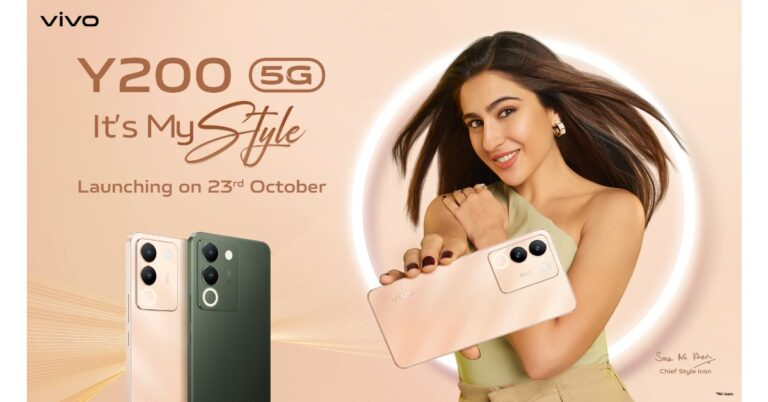
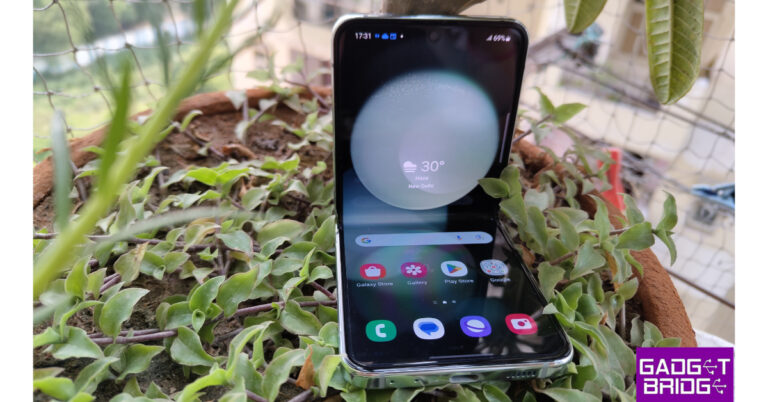
 Samsung Galaxy Z Flip 5 (Review)is the first Flip phone on the list which you can absolutely go for without giving a second thought. It features a 6.7-inch FHD+ Dynamic AMOLED 2X Infinity Flex Display and a 3.4-inch Super AMOLED cover screen. The primary panel supports a 120Hz refresh rate and the external display has a refresh rate of 60Hz. The device comes with an IPX8 grade for water resistance.
This Flip phone comes with a dual rear camera unit with a 12-megapixel ultra-wide main sensor and a 12-megapixel wide-angle camera. The Galaxy Z Flip 5 boasts a 10-megapixel selfie camera on the front of the folding display for selfies.
In addition to this, the phone boasts a 3,700mAh battery that supports 25W quick charging.
Samsung Galaxy Z Flip 5 (Review)is the first Flip phone on the list which you can absolutely go for without giving a second thought. It features a 6.7-inch FHD+ Dynamic AMOLED 2X Infinity Flex Display and a 3.4-inch Super AMOLED cover screen. The primary panel supports a 120Hz refresh rate and the external display has a refresh rate of 60Hz. The device comes with an IPX8 grade for water resistance.
This Flip phone comes with a dual rear camera unit with a 12-megapixel ultra-wide main sensor and a 12-megapixel wide-angle camera. The Galaxy Z Flip 5 boasts a 10-megapixel selfie camera on the front of the folding display for selfies.
In addition to this, the phone boasts a 3,700mAh battery that supports 25W quick charging.
 The new Flex Window offers a variety of both old and new capabilities and is now 3.78 times bigger than the previous iteration. It offers greater customization choices, including informative and graphical clocks that can match the face design of a user’s Galaxy Watch 6 series, as well as stylish frames. The device runs on OneUI 5.1.1 on top of Android 13.
Samsung Galaxy Z Flip 5 is available in two different configurations 8GB RAM with 256GB storage and 8GB RAM with 512GB storage. The price of both variants in India is set at Rs 99,999 and Rs 109,999, respectively.
The new Flex Window offers a variety of both old and new capabilities and is now 3.78 times bigger than the previous iteration. It offers greater customization choices, including informative and graphical clocks that can match the face design of a user’s Galaxy Watch 6 series, as well as stylish frames. The device runs on OneUI 5.1.1 on top of Android 13.
Samsung Galaxy Z Flip 5 is available in two different configurations 8GB RAM with 256GB storage and 8GB RAM with 512GB storage. The price of both variants in India is set at Rs 99,999 and Rs 109,999, respectively.
 Oppo Find N3 Flip features a 6.80-inch AMOLED primary display with a dynamic refresh rate that ranges between 1Hz to 120Hz. There is a 3.26-inch cover display vertically positioned. The device is powered by an octa-core MediaTek Dimensity 9200 SoC along with 256GB of UFS 4.0 internal storage and 12GB of LPDDR5X RAM. The device comes with colorOS 13 out of the box. The company is promising 4 years of major OS updates and 5 years of security patches.
For photos and videos, there is a triple rear camera that includes a 32-megapixel telephoto sensor, an 8-megapixel ultra-wide-angle sensor, and a 50-megapixel Sony IMX890 main lens with OIS feature. The Flip Phone also sports a 32-megapixel front camera for taking selfies and making video calls.
It packs a 4,300mAh battery with 44W supervooc wired charging support.
The Oppo Find N3 Flip comes in a single 12GB RAM with 256GB storage option priced at Rs 94,999.
Oppo Find N3 Flip features a 6.80-inch AMOLED primary display with a dynamic refresh rate that ranges between 1Hz to 120Hz. There is a 3.26-inch cover display vertically positioned. The device is powered by an octa-core MediaTek Dimensity 9200 SoC along with 256GB of UFS 4.0 internal storage and 12GB of LPDDR5X RAM. The device comes with colorOS 13 out of the box. The company is promising 4 years of major OS updates and 5 years of security patches.
For photos and videos, there is a triple rear camera that includes a 32-megapixel telephoto sensor, an 8-megapixel ultra-wide-angle sensor, and a 50-megapixel Sony IMX890 main lens with OIS feature. The Flip Phone also sports a 32-megapixel front camera for taking selfies and making video calls.
It packs a 4,300mAh battery with 44W supervooc wired charging support.
The Oppo Find N3 Flip comes in a single 12GB RAM with 256GB storage option priced at Rs 94,999.
 Tecno Phantom V Flip features a 6.9-inch LTPO AMOLED primary screen with a 144Hz refresh rate. There is a 1.32-inch outer display. The device is powered by MediaTek Dimensity 8050 with 8GB RAM and 256GB storage. For photos and videos, the device includes a 64-megapixel primary camera and a 13-megapixel ultrawide camera. For selfies, it includes a 32-megapixel front-facing shooter.
The Flip Phone by Tecno boasts a 4,000mAh battery that comes with 45W fast charging support. Also, this device is not IP-certified.
The device comes with a price tag of Rs 49,999.
Tecno Phantom V Flip features a 6.9-inch LTPO AMOLED primary screen with a 144Hz refresh rate. There is a 1.32-inch outer display. The device is powered by MediaTek Dimensity 8050 with 8GB RAM and 256GB storage. For photos and videos, the device includes a 64-megapixel primary camera and a 13-megapixel ultrawide camera. For selfies, it includes a 32-megapixel front-facing shooter.
The Flip Phone by Tecno boasts a 4,000mAh battery that comes with 45W fast charging support. Also, this device is not IP-certified.
The device comes with a price tag of Rs 49,999.
 Samsung Galaxy Z Flip 5 (Review)is the first Flip phone on the list which you can absolutely go for without giving a second thought. It features a 6.7-inch FHD+ Dynamic AMOLED 2X Infinity Flex Display and a 3.4-inch Super AMOLED cover screen. The primary panel supports a 120Hz refresh rate and the external display has a refresh rate of 60Hz. The device comes with an IPX8 grade for water resistance.
This Flip phone comes with a dual rear camera unit with a 12-megapixel ultra-wide main sensor and a 12-megapixel wide-angle camera. The Galaxy Z Flip 5 boasts a 10-megapixel selfie camera on the front of the folding display for selfies.
In addition to this, the phone boasts a 3,700mAh battery that supports 25W quick charging.
Samsung Galaxy Z Flip 5 (Review)is the first Flip phone on the list which you can absolutely go for without giving a second thought. It features a 6.7-inch FHD+ Dynamic AMOLED 2X Infinity Flex Display and a 3.4-inch Super AMOLED cover screen. The primary panel supports a 120Hz refresh rate and the external display has a refresh rate of 60Hz. The device comes with an IPX8 grade for water resistance.
This Flip phone comes with a dual rear camera unit with a 12-megapixel ultra-wide main sensor and a 12-megapixel wide-angle camera. The Galaxy Z Flip 5 boasts a 10-megapixel selfie camera on the front of the folding display for selfies.
In addition to this, the phone boasts a 3,700mAh battery that supports 25W quick charging.
 The new Flex Window offers a variety of both old and new capabilities and is now 3.78 times bigger than the previous iteration. It offers greater customization choices, including informative and graphical clocks that can match the face design of a user’s Galaxy Watch 6 series, as well as stylish frames. The device runs on OneUI 5.1.1 on top of Android 13.
Samsung Galaxy Z Flip 5 is available in two different configurations 8GB RAM with 256GB storage and 8GB RAM with 512GB storage. The price of both variants in India is set at Rs 99,999 and Rs 109,999, respectively.
The new Flex Window offers a variety of both old and new capabilities and is now 3.78 times bigger than the previous iteration. It offers greater customization choices, including informative and graphical clocks that can match the face design of a user’s Galaxy Watch 6 series, as well as stylish frames. The device runs on OneUI 5.1.1 on top of Android 13.
Samsung Galaxy Z Flip 5 is available in two different configurations 8GB RAM with 256GB storage and 8GB RAM with 512GB storage. The price of both variants in India is set at Rs 99,999 and Rs 109,999, respectively.
 Oppo Find N3 Flip features a 6.80-inch AMOLED primary display with a dynamic refresh rate that ranges between 1Hz to 120Hz. There is a 3.26-inch cover display vertically positioned. The device is powered by an octa-core MediaTek Dimensity 9200 SoC along with 256GB of UFS 4.0 internal storage and 12GB of LPDDR5X RAM. The device comes with colorOS 13 out of the box. The company is promising 4 years of major OS updates and 5 years of security patches.
For photos and videos, there is a triple rear camera that includes a 32-megapixel telephoto sensor, an 8-megapixel ultra-wide-angle sensor, and a 50-megapixel Sony IMX890 main lens with OIS feature. The Flip Phone also sports a 32-megapixel front camera for taking selfies and making video calls.
It packs a 4,300mAh battery with 44W supervooc wired charging support.
The Oppo Find N3 Flip comes in a single 12GB RAM with 256GB storage option priced at Rs 94,999.
Oppo Find N3 Flip features a 6.80-inch AMOLED primary display with a dynamic refresh rate that ranges between 1Hz to 120Hz. There is a 3.26-inch cover display vertically positioned. The device is powered by an octa-core MediaTek Dimensity 9200 SoC along with 256GB of UFS 4.0 internal storage and 12GB of LPDDR5X RAM. The device comes with colorOS 13 out of the box. The company is promising 4 years of major OS updates and 5 years of security patches.
For photos and videos, there is a triple rear camera that includes a 32-megapixel telephoto sensor, an 8-megapixel ultra-wide-angle sensor, and a 50-megapixel Sony IMX890 main lens with OIS feature. The Flip Phone also sports a 32-megapixel front camera for taking selfies and making video calls.
It packs a 4,300mAh battery with 44W supervooc wired charging support.
The Oppo Find N3 Flip comes in a single 12GB RAM with 256GB storage option priced at Rs 94,999.
 Tecno Phantom V Flip features a 6.9-inch LTPO AMOLED primary screen with a 144Hz refresh rate. There is a 1.32-inch outer display. The device is powered by MediaTek Dimensity 8050 with 8GB RAM and 256GB storage. For photos and videos, the device includes a 64-megapixel primary camera and a 13-megapixel ultrawide camera. For selfies, it includes a 32-megapixel front-facing shooter.
The Flip Phone by Tecno boasts a 4,000mAh battery that comes with 45W fast charging support. Also, this device is not IP-certified.
The device comes with a price tag of Rs 49,999.
Tecno Phantom V Flip features a 6.9-inch LTPO AMOLED primary screen with a 144Hz refresh rate. There is a 1.32-inch outer display. The device is powered by MediaTek Dimensity 8050 with 8GB RAM and 256GB storage. For photos and videos, the device includes a 64-megapixel primary camera and a 13-megapixel ultrawide camera. For selfies, it includes a 32-megapixel front-facing shooter.
The Flip Phone by Tecno boasts a 4,000mAh battery that comes with 45W fast charging support. Also, this device is not IP-certified.
The device comes with a price tag of Rs 49,999.
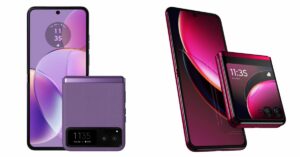 Motorola Razr 40, and Motorola Razr 40 Ultra features 6.9-inch foldable pOLED screens with a refresh rate of 165Hz. The Motorola Razr 40 Ultra model has a larger 1.5-inch cover display whereas the Razr 40 has a 3.6-inch pOLED outer screen. Both the devices are IP52 rated.
The Motorola Razr 40 and Motorola Razr 40 Ultra are powered by Snapdragon 7 Gen 1 and Snapdragon 8+ Gen 1 processors respectively.
The Motorola Razr 40 features a 64-megapixel primary sensor and a 12-megapixel ultra wide-angle camera. Whereas Razr 40 Ultra includes a 13-megapixel secondary ultra-wide-angle camera and a 12-megapixel primary sensor. However both the devices sport a 32-megapixel front-facing camera for selfies.
There is a 3,800mAh and a 4,200mAh battery on the Motorola Razr 40 and Motorola Razr 40 Ultra, respectively.
The Motorola Razr 40 Ultra comes with a price tag of Rs 89,999 for the 8GB RAM with 256GB storage model. On the other hand, Razr 40 price is set at Rs 59,999.
For the latest gadget and tech news, and gadget reviews, follow us on Twitter, Facebook and Instagram. For newest tech & gadget videos subscribe to our YouTube Channel. You can also stay up to date using the Gadget Bridge Android App. You can find the latest car and bike news here.
Motorola Razr 40, and Motorola Razr 40 Ultra features 6.9-inch foldable pOLED screens with a refresh rate of 165Hz. The Motorola Razr 40 Ultra model has a larger 1.5-inch cover display whereas the Razr 40 has a 3.6-inch pOLED outer screen. Both the devices are IP52 rated.
The Motorola Razr 40 and Motorola Razr 40 Ultra are powered by Snapdragon 7 Gen 1 and Snapdragon 8+ Gen 1 processors respectively.
The Motorola Razr 40 features a 64-megapixel primary sensor and a 12-megapixel ultra wide-angle camera. Whereas Razr 40 Ultra includes a 13-megapixel secondary ultra-wide-angle camera and a 12-megapixel primary sensor. However both the devices sport a 32-megapixel front-facing camera for selfies.
There is a 3,800mAh and a 4,200mAh battery on the Motorola Razr 40 and Motorola Razr 40 Ultra, respectively.
The Motorola Razr 40 Ultra comes with a price tag of Rs 89,999 for the 8GB RAM with 256GB storage model. On the other hand, Razr 40 price is set at Rs 59,999.
For the latest gadget and tech news, and gadget reviews, follow us on Twitter, Facebook and Instagram. For newest tech & gadget videos subscribe to our YouTube Channel. You can also stay up to date using the Gadget Bridge Android App. You can find the latest car and bike news here. 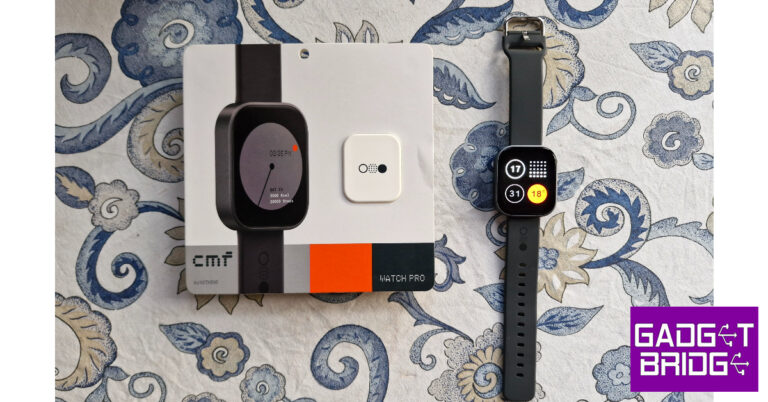
 As far as looks go, the CMF Watch Pro looks like your average smartwatch. The square dial houses a 1.96-inch AMOLED display that can reach a peak brightness of 600+ nits. This display has a resolution of 410 x 502p and a pixel density of 332ppi. The touch response offered by this AMOLED display is very satisfying. We like that it isn’t super sensitive to light touches.
Encasing this display is an aluminium alloy shell that is surprisingly light. The Watch Pro weighs just 47g with the silicone strap. The right edge of the aluminium frame houses the side key and the speaker grille. The dial’s underside houses the accelerometer, heart rate & blood oxygen saturation sensor, magnetic pin slots for charging, and a microphone. The entire shell has a matte finish, which feels quite premium and polished.
As far as looks go, the CMF Watch Pro looks like your average smartwatch. The square dial houses a 1.96-inch AMOLED display that can reach a peak brightness of 600+ nits. This display has a resolution of 410 x 502p and a pixel density of 332ppi. The touch response offered by this AMOLED display is very satisfying. We like that it isn’t super sensitive to light touches.
Encasing this display is an aluminium alloy shell that is surprisingly light. The Watch Pro weighs just 47g with the silicone strap. The right edge of the aluminium frame houses the side key and the speaker grille. The dial’s underside houses the accelerometer, heart rate & blood oxygen saturation sensor, magnetic pin slots for charging, and a microphone. The entire shell has a matte finish, which feels quite premium and polished.
 Sport and fitness tracking on the Watch Pro is near impeccable, apart from one small issue. The watch does not auto-detect your workouts. We went on a few hikes and runs, and while the watch updated the daily step count, the numbers did not reflect as a part of an exercise. On the bright side, the Watch Pro has in-built GPS support, which means you can leave your phone at home and the watch will still be able to track your run on a map.
 Things take an interesting turn on the OS front as we finally get to see what makes this watch a Nothing product. The Watch Pro’s user interface is influenced by Nothing OS 2.0. Nothing’s black and orange colour palette dominates the look of the OS. The app grid is greyed out and the watch faces have a distinct ‘Nothingness’ to them. The dot matrix font further stamps Nothing’s personality on the device. You can’t customise the watch faces, which is probably something that the brand restricts on purpose so as to not throw off the aesthetic it has carefully curated.
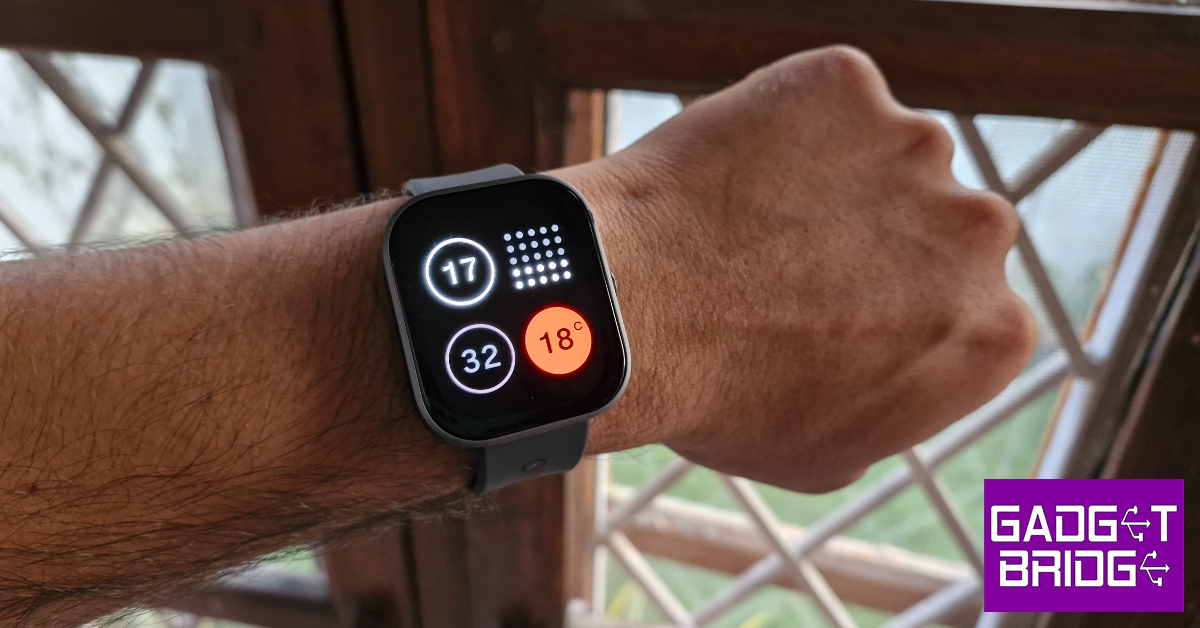 As far as looks go, the CMF Watch Pro looks like your average smartwatch. The square dial houses a 1.96-inch AMOLED display that can reach a peak brightness of 600+ nits. This display has a resolution of 410 x 502p and a pixel density of 332ppi. The touch response offered by this AMOLED display is very satisfying. We like that it isn’t super sensitive to light touches.
Encasing this display is an aluminium alloy shell that is surprisingly light. The Watch Pro weighs just 47g with the silicone strap. The right edge of the aluminium frame houses the side key and the speaker grille. The dial’s underside houses the accelerometer, heart rate & blood oxygen saturation sensor, magnetic pin slots for charging, and a microphone. The entire shell has a matte finish, which feels quite premium and polished.
As far as looks go, the CMF Watch Pro looks like your average smartwatch. The square dial houses a 1.96-inch AMOLED display that can reach a peak brightness of 600+ nits. This display has a resolution of 410 x 502p and a pixel density of 332ppi. The touch response offered by this AMOLED display is very satisfying. We like that it isn’t super sensitive to light touches.
Encasing this display is an aluminium alloy shell that is surprisingly light. The Watch Pro weighs just 47g with the silicone strap. The right edge of the aluminium frame houses the side key and the speaker grille. The dial’s underside houses the accelerometer, heart rate & blood oxygen saturation sensor, magnetic pin slots for charging, and a microphone. The entire shell has a matte finish, which feels quite premium and polished.
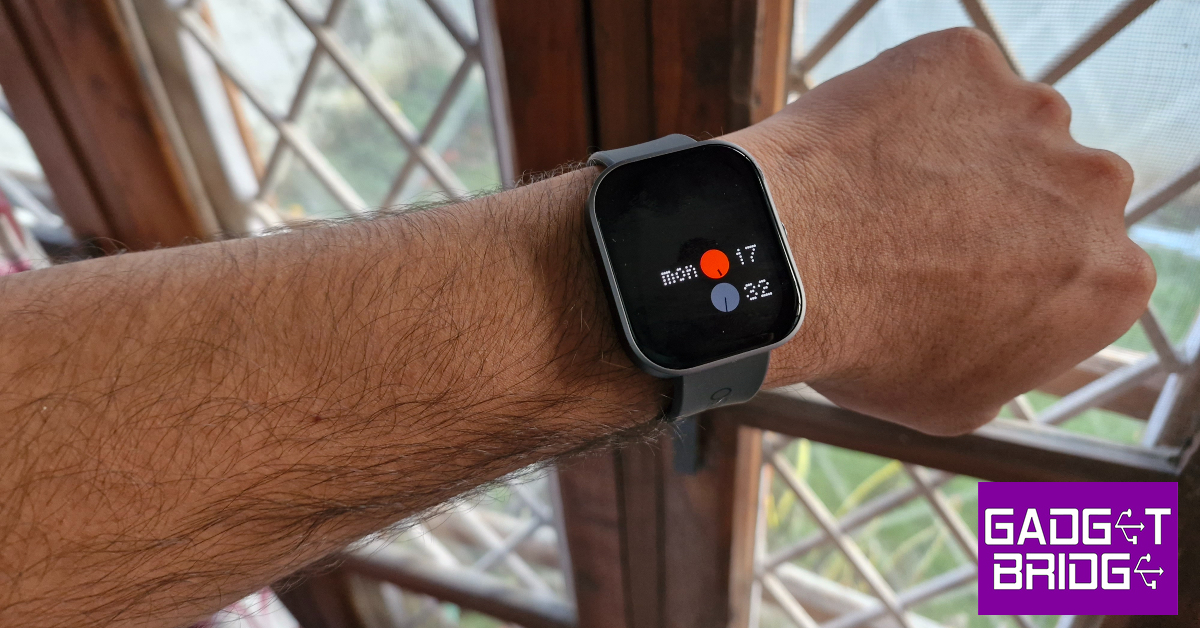
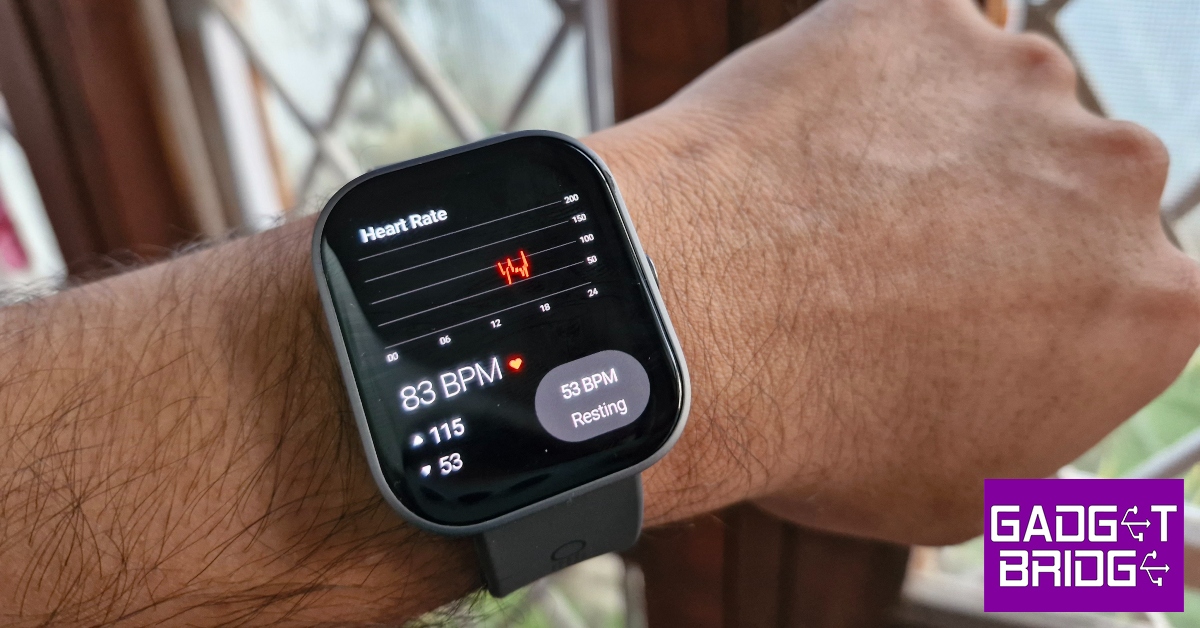 Readings from the heart rate monitor and SpO2 sensor are consistent with medical-grade equipment. The Watch Pro routinely measures maximum, minimum, and resting heart rate throughout the day, accurately plotting it on a graph. You can view your daily, weekly, monthly, and yearly graphs on the CMF Watch app. The same goes for blood oxygen measurement. You can also set up low/high heart rate and low blood oxygen level alerts. The watch also gauges your stress level every thirty minutes. We cannot speak to the accuracy of the stress reading as CMF does not divulge its formula for assigning the score.
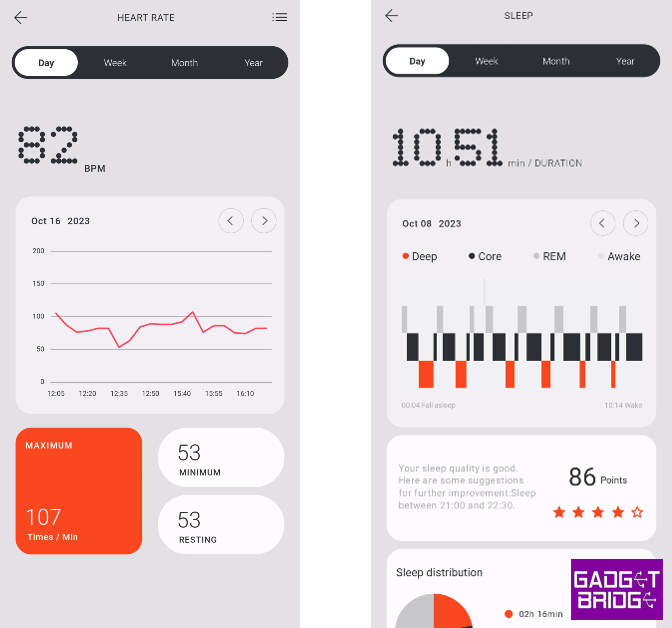 Sport and fitness tracking on the Watch Pro is near impeccable, apart from one small issue. The watch does not auto-detect your workouts. We went on a few hikes and runs, and while the watch updated the daily step count, the numbers did not reflect as a part of an exercise. On the bright side, the Watch Pro has in-built GPS support, which means you can leave your phone at home and the watch will still be able to track your run on a map.
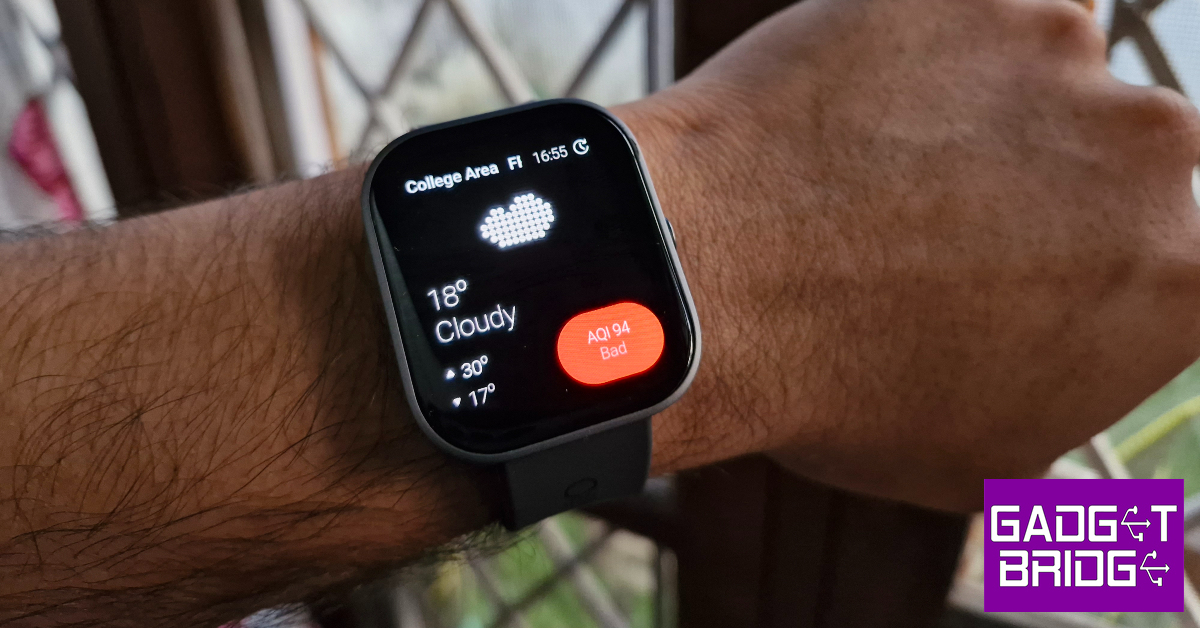 The Watch Pro can track over 100 sports, exercises, and workout routines. This includes exercises like pilates, CrossFit, & strength training and leisure activities like Zumba, ballet, street dance, skating, kite flying, and more. The watch can accommodate up to 36 exercise and workout routines at one time. These exercises can be selected from the ‘Usual sports’ section in the CMF Watch app.
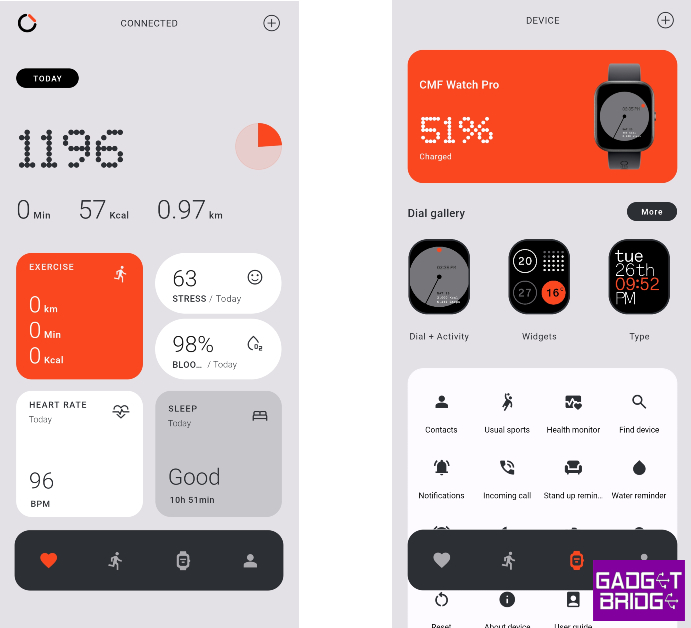 Things take an interesting turn on the OS front as we finally get to see what makes this watch a Nothing product. The Watch Pro’s user interface is influenced by Nothing OS 2.0. Nothing’s black and orange colour palette dominates the look of the OS. The app grid is greyed out and the watch faces have a distinct ‘Nothingness’ to them. The dot matrix font further stamps Nothing’s personality on the device. You can’t customise the watch faces, which is probably something that the brand restricts on purpose so as to not throw off the aesthetic it has carefully curated.
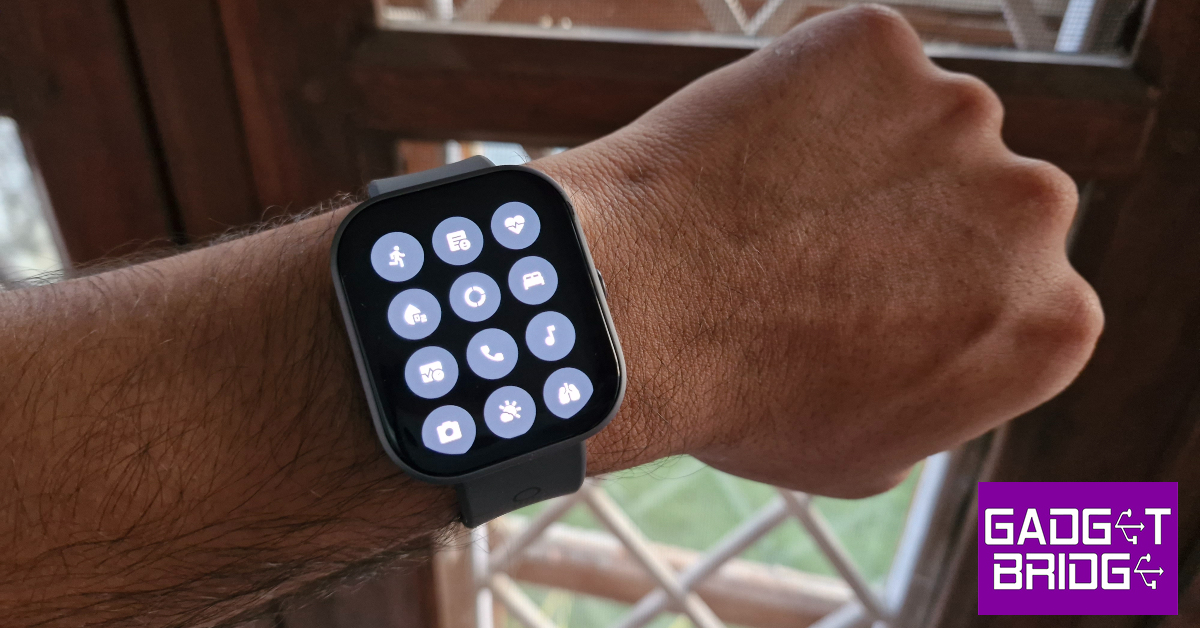 This minimality in design scores brownie points from us for several reasons. Firstly, a distinct look and personality is something that not a lot of devices can boast about, especially at a time when uniformity is taking over every smart device. The watches that do break the norm go towards the direction of simulating a smartphone experience for the wrist. This is where the CMF Watch Pro does justice to the genre. It keeps things simple and nails to perfection the things it sets out to do.
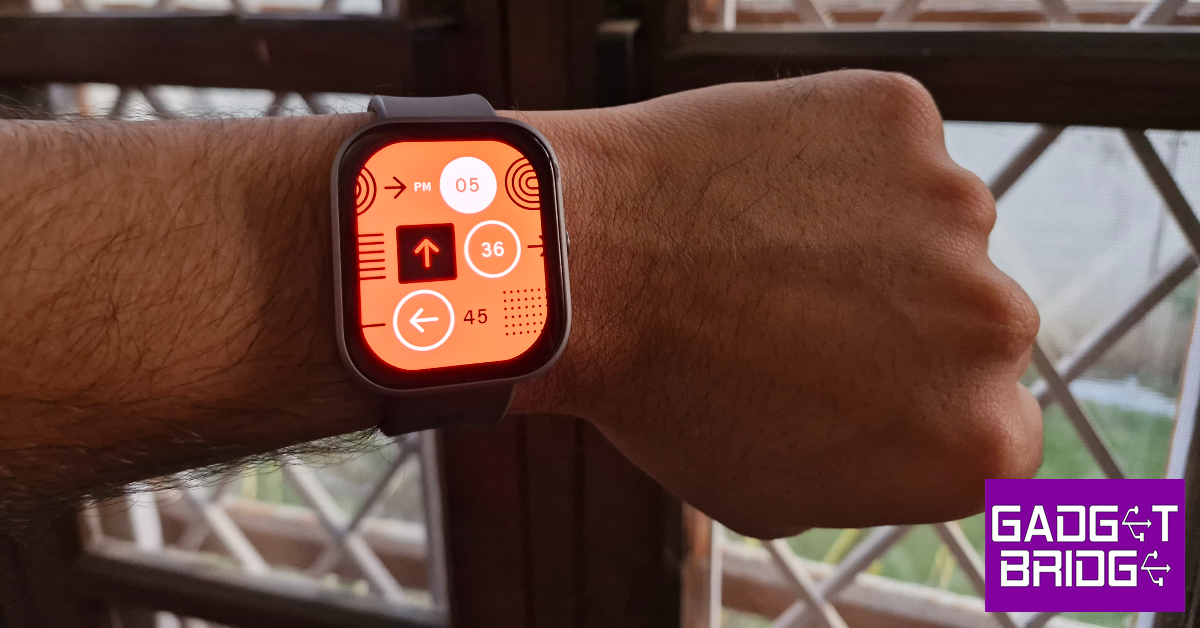 Lastly, the battery life on this watch is nothing short of amazing. The 340mAh battery unit can power the smartwatch for 13 days, as claimed by Nothing. With the Always On Display turned on at all times, the CMF Watch Pro lasted 10 days during the review period. The watch has a cool Wrist Detection feature that turns off AOD and 24-hour heart rate and SpO2 tracking as soon as you take it off your wrist. This can push the battery life closer to its claimed range.
Read Also: Top 10 Ways to Fix YouTube App Crashing or Not Working On Android
Lastly, the battery life on this watch is nothing short of amazing. The 340mAh battery unit can power the smartwatch for 13 days, as claimed by Nothing. With the Always On Display turned on at all times, the CMF Watch Pro lasted 10 days during the review period. The watch has a cool Wrist Detection feature that turns off AOD and 24-hour heart rate and SpO2 tracking as soon as you take it off your wrist. This can push the battery life closer to its claimed range.
Read Also: Top 10 Ways to Fix YouTube App Crashing or Not Working On Android
 Step 2: Scroll down and select ‘Background App Refresh’.
 Step 3: Go back to the home page close and re-launch the app.
The cache of the app will be cleared as soon as it is launched.
Step 3: Go back to the home page close and re-launch the app.
The cache of the app will be cleared as soon as it is launched.
 Step 2: Tap on iPhone Storage.
 Step 4: Tap on Offload App.
 Step 5: Confirm your selection in the popup box.
 Step 2: Tap on Clear History and Website Data.
 Step 5: Hit Clear Browsing Data.
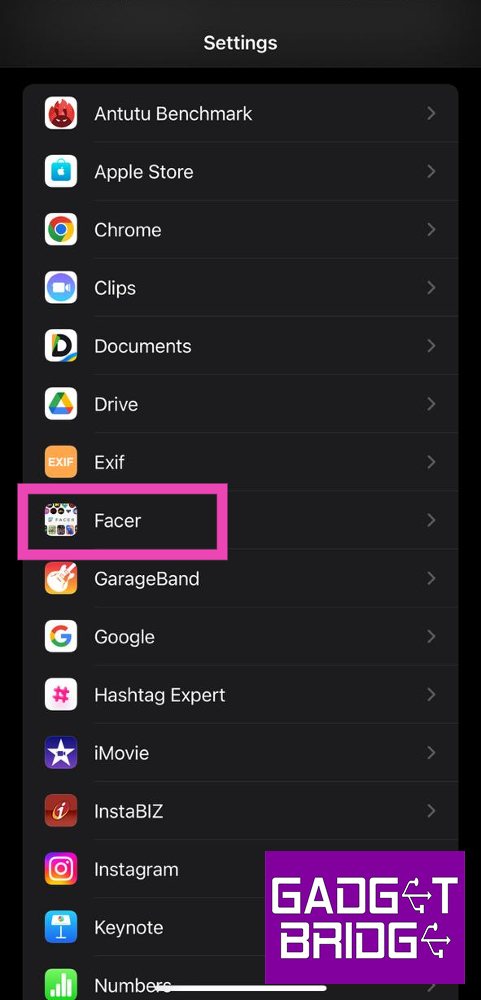 Step 2: Scroll down and select ‘Background App Refresh’.
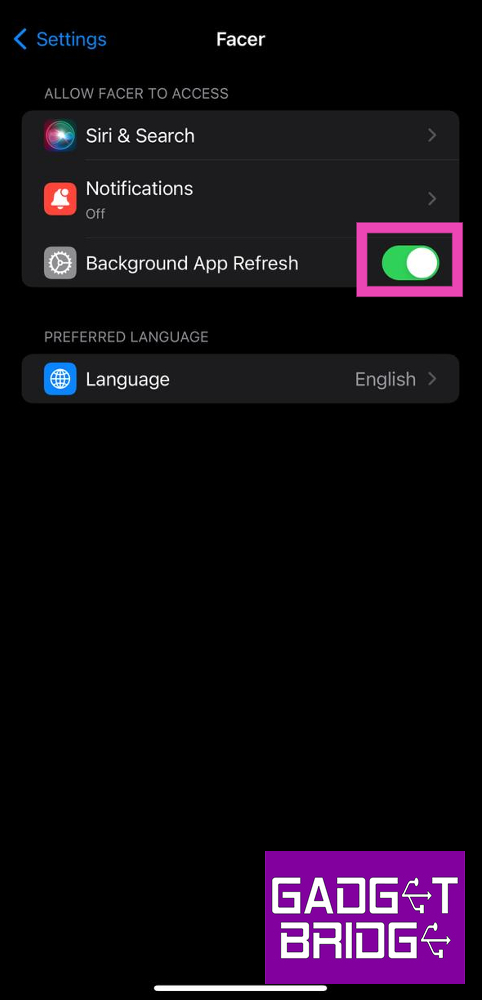 Step 3: Go back to the home page close and re-launch the app.
The cache of the app will be cleared as soon as it is launched.
Step 3: Go back to the home page close and re-launch the app.
The cache of the app will be cleared as soon as it is launched.
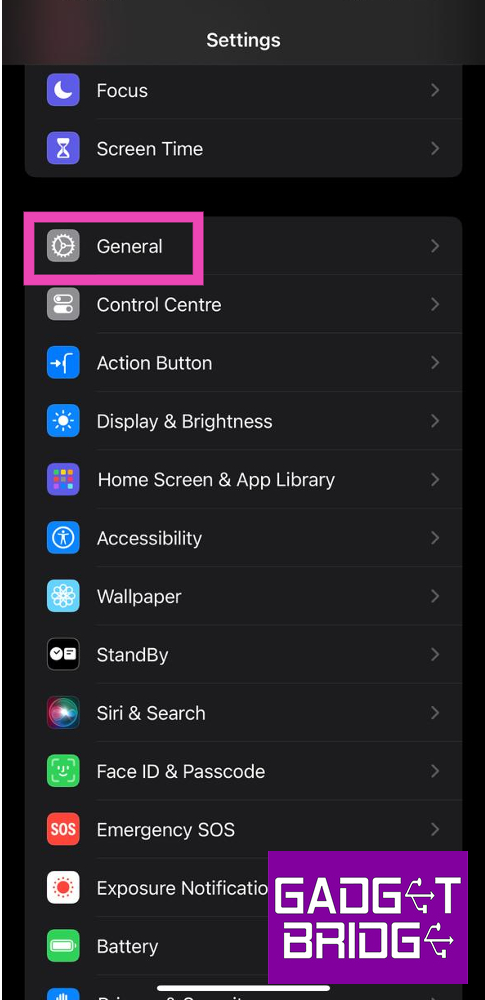 Step 2: Tap on iPhone Storage.
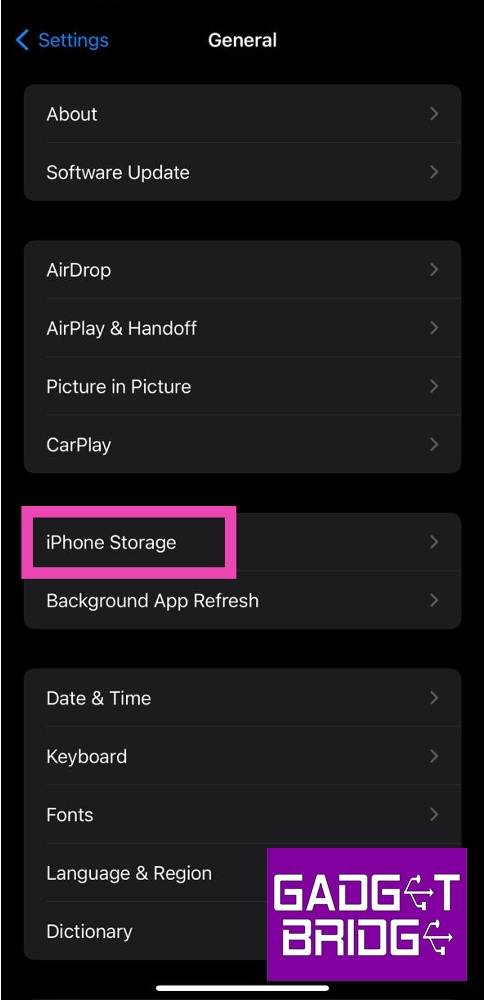 Step 3: Select the app for which you want to clear the cache.
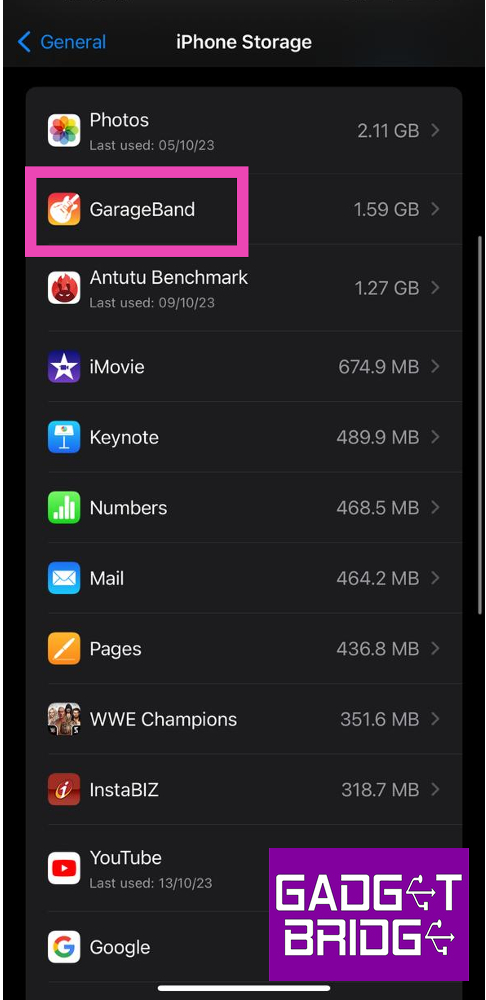 Step 4: Tap on Offload App.
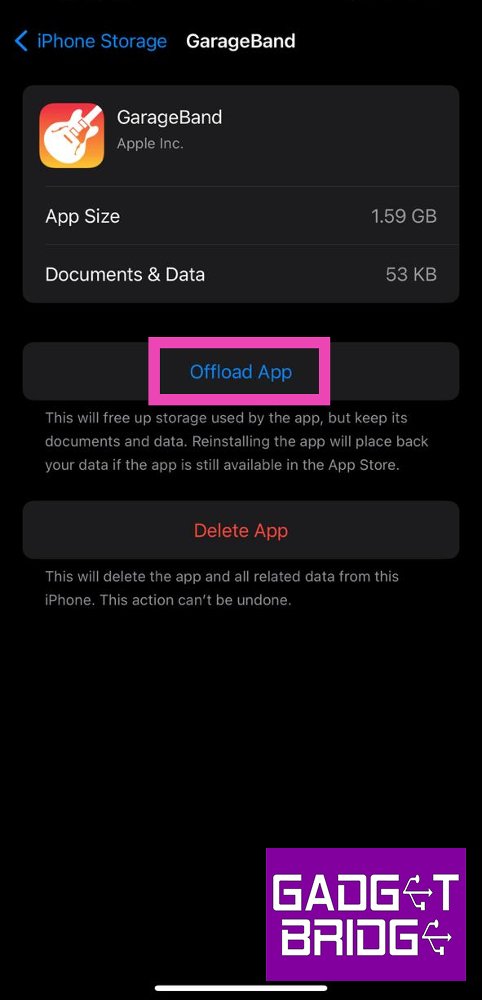 Step 5: Confirm your selection in the popup box.
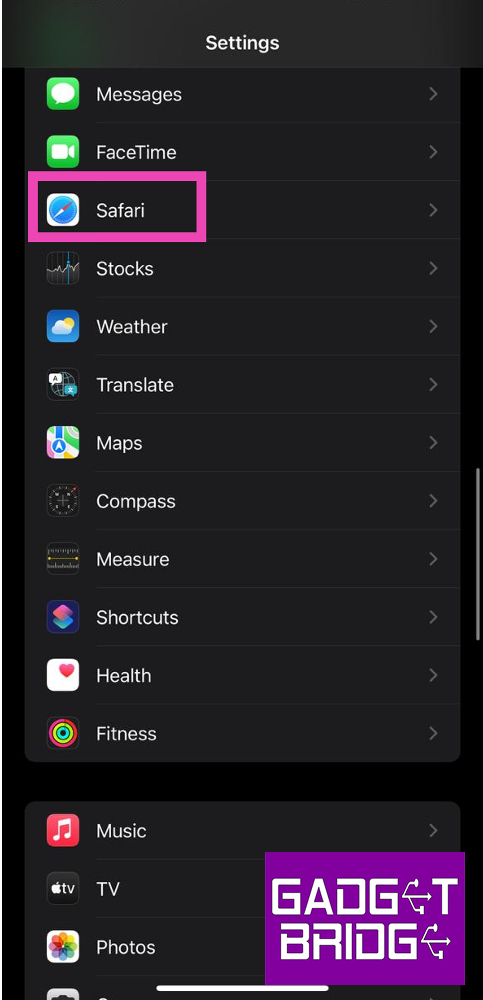 Step 2: Tap on Clear History and Website Data.
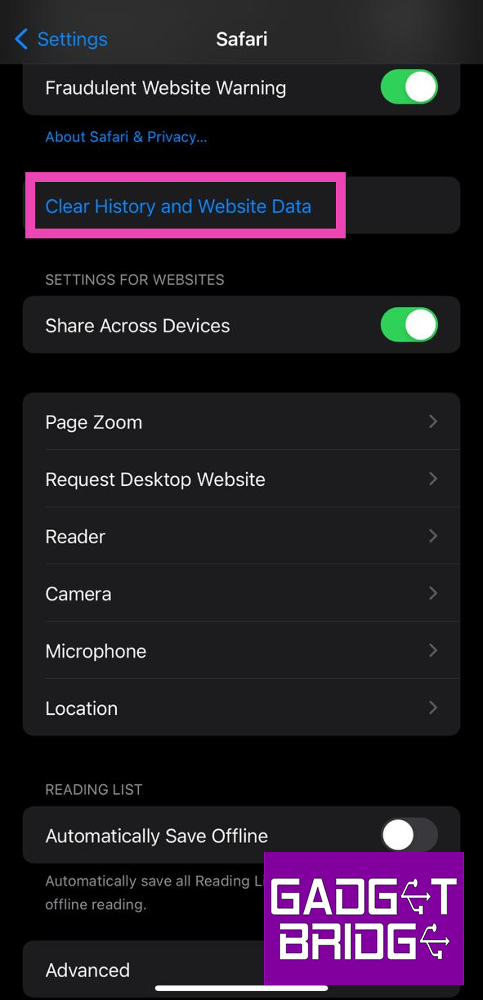 Step 3: Confirm your selection in the popup box.
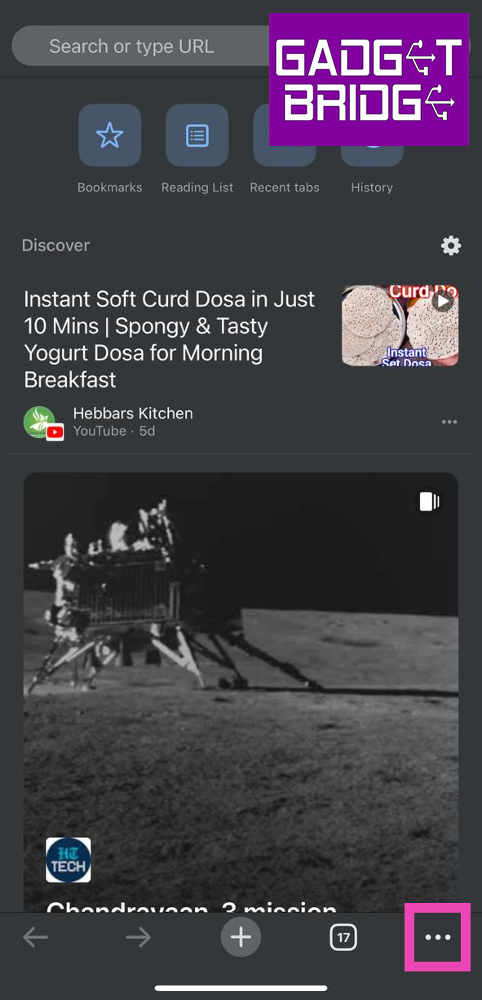 Step 3: Tap on Clear Browsing Data.
Step 4: Set a Time Range. Make sure you select Cached Images and Files as one of the items you want to delete.
Step 3: Tap on Clear Browsing Data.
Step 4: Set a Time Range. Make sure you select Cached Images and Files as one of the items you want to delete.
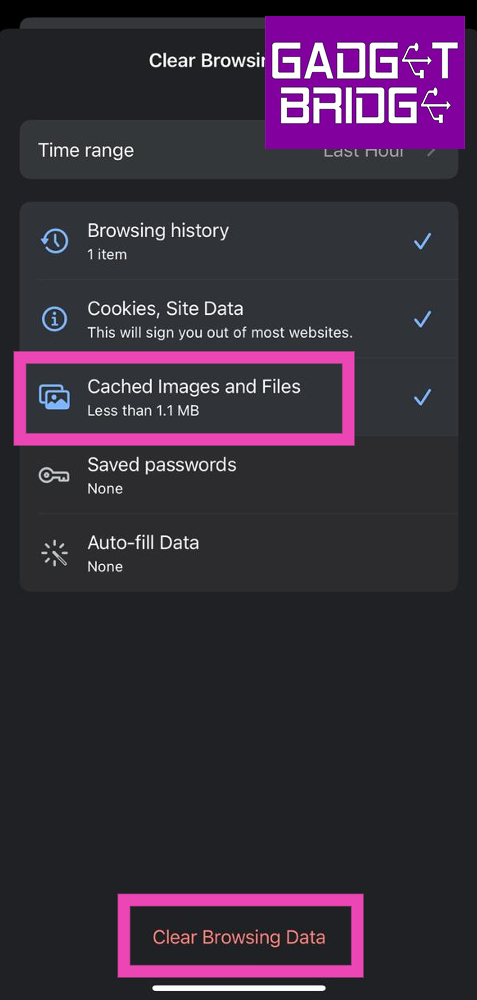 Step 5: Hit Clear Browsing Data.


 Step 2: Select the app for which you want to clear the cache.
 Step 2: Scroll down and look for the Clear Cache option. Select it.
 Step 3: Confirm your selection in the popup box.

 Step 6: Give 1Tap Cleaner full control of your phone by turning on its toggle switch in Accessibility settings. This will 1Tap Cleaner to individually go through every app and clear its cache.
 Step 7: Once the necessary accessibility permission has been given, 1Tap Cleaner will automatically go through every app in App Settings and clear its cache.
 Step 2: Select the app for which you want to clear the cache.
 Step 3: Tap on Storage.
 Step 4: Select Clear cache.
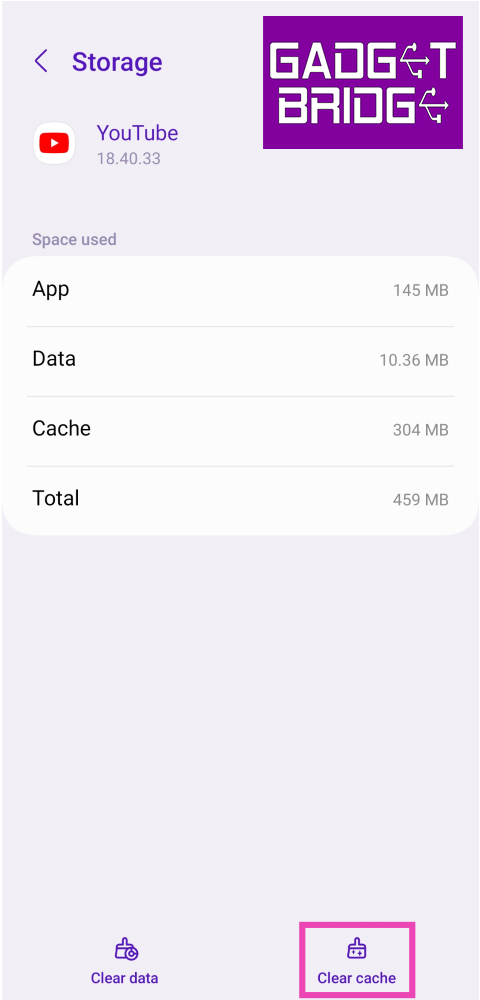
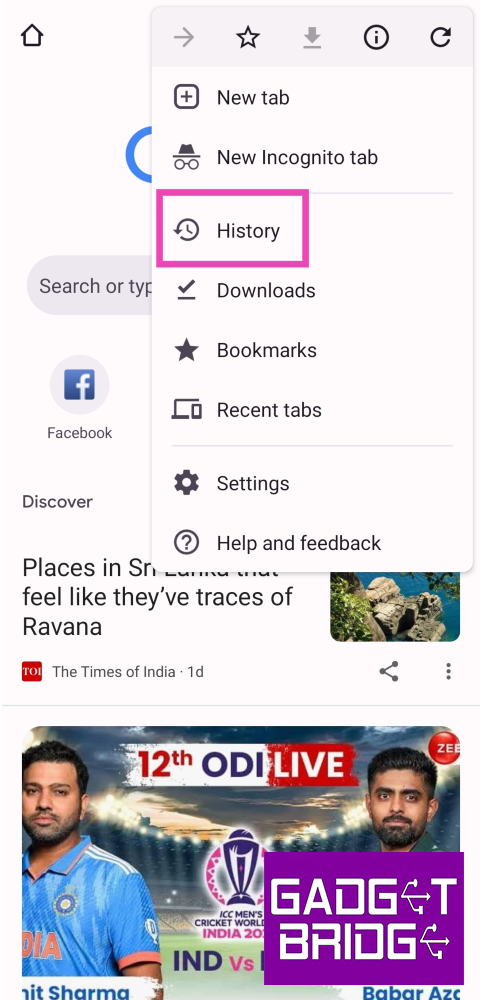 Step 3: Select Clear Browsing Data.
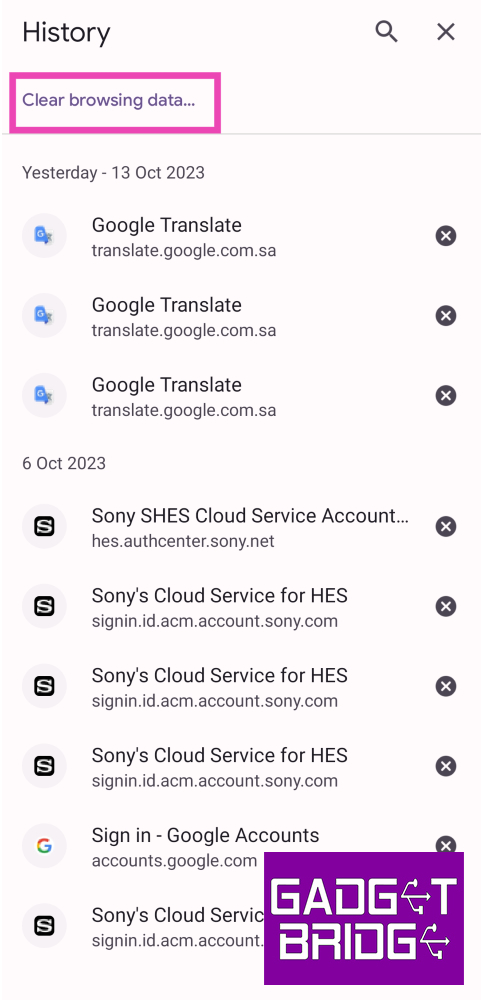 Step 5: Check the boxes next to Cached images and files.
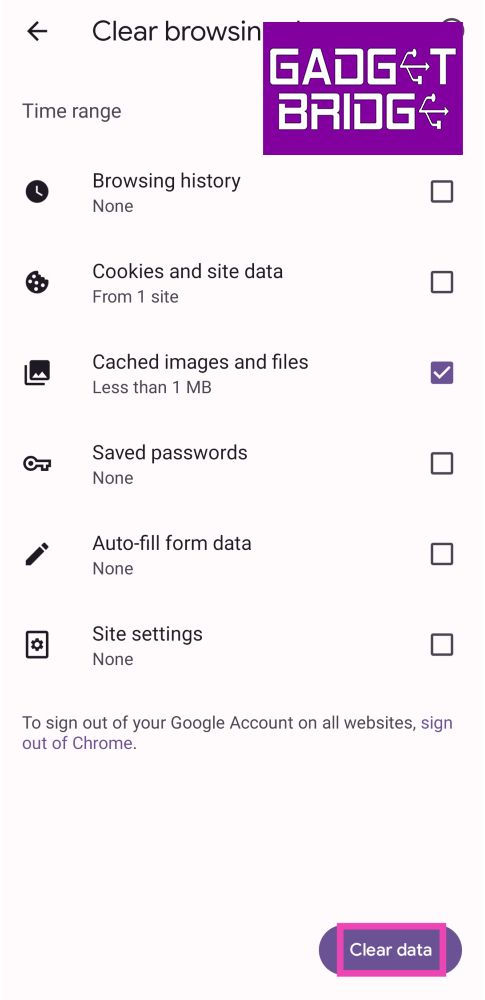 Step 6: Tap on Clear data.
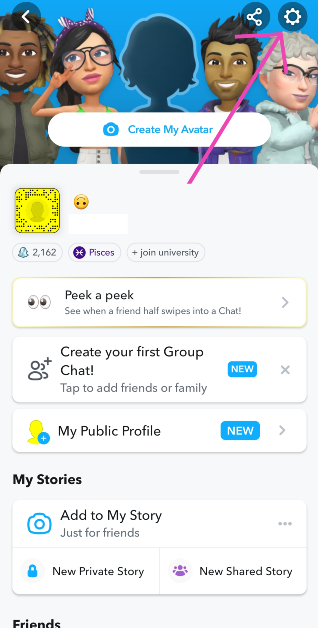 Step 2: Scroll down and look for the Clear Cache option. Select it.
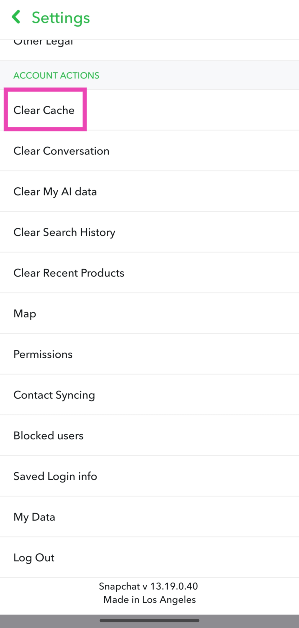 Step 3: Confirm your selection in the popup box.
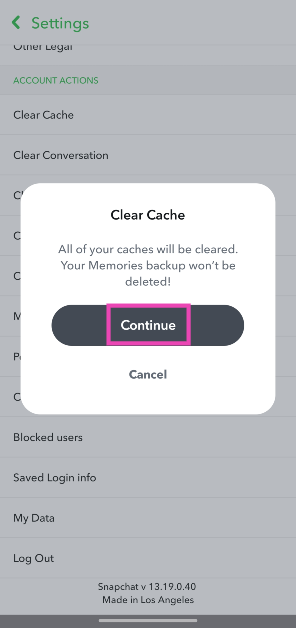
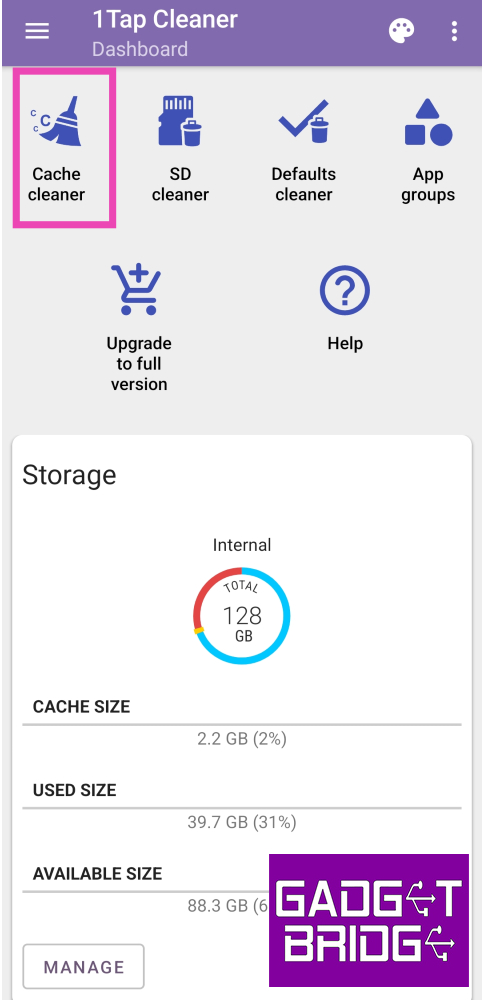 Step 4: Select if you want to clear the memory of apps with large cache or all apps at once. Hit the broom icon.
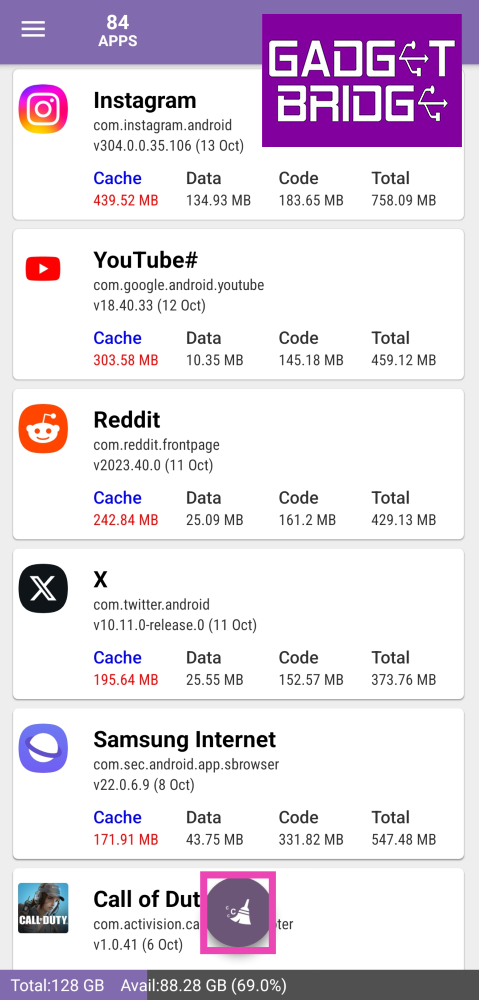 Step 5: Tap the checkbox for the apps up for cache clearing.
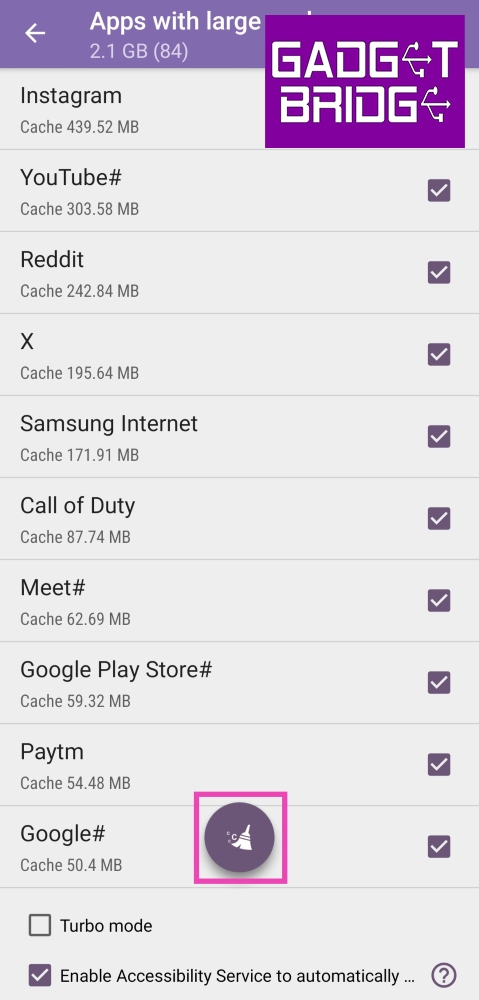 Step 6: Give 1Tap Cleaner full control of your phone by turning on its toggle switch in Accessibility settings. This will 1Tap Cleaner to individually go through every app and clear its cache.
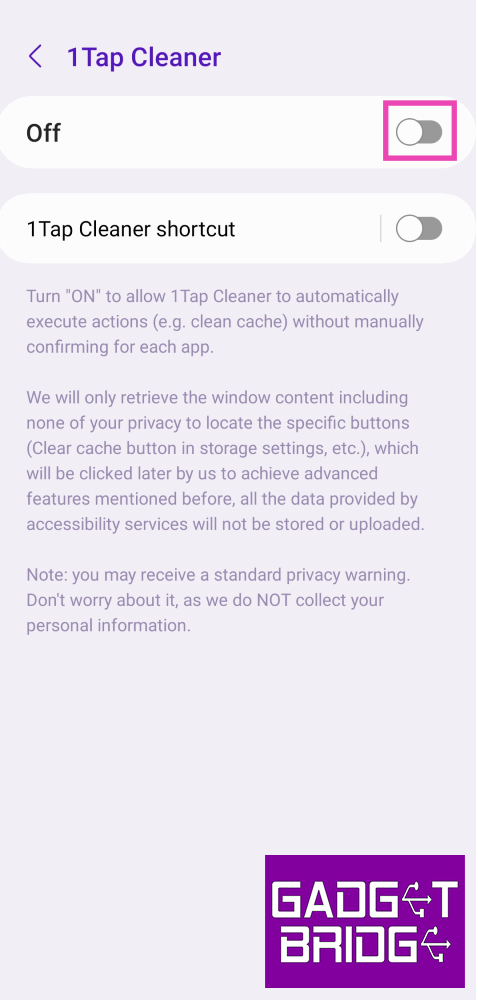 Step 7: Once the necessary accessibility permission has been given, 1Tap Cleaner will automatically go through every app in App Settings and clear its cache.
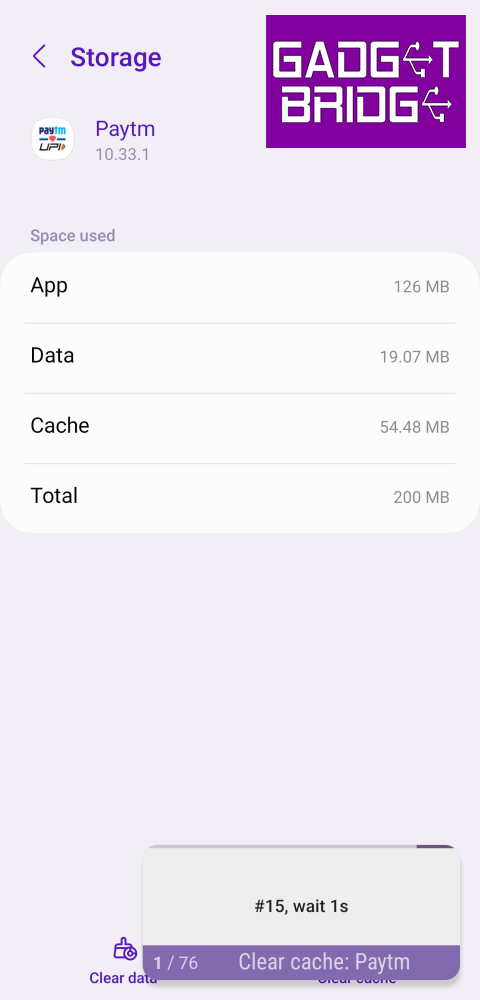
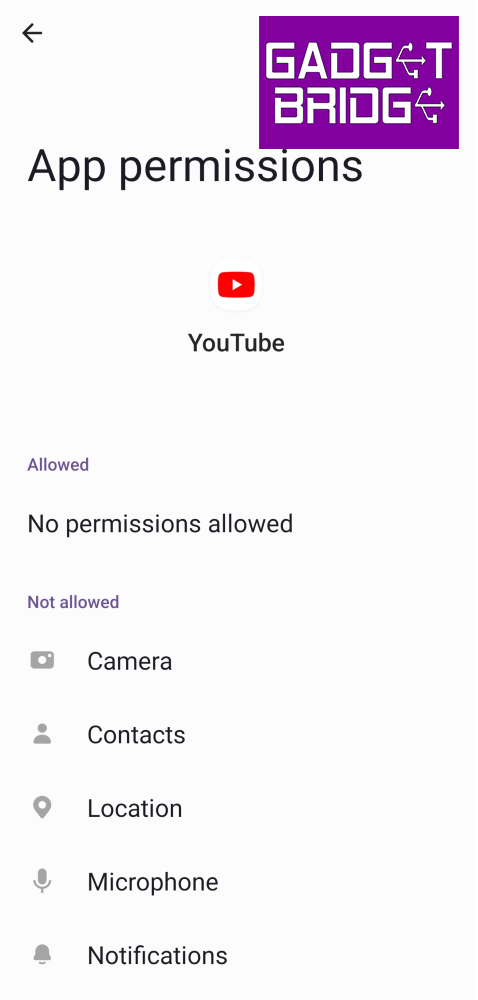
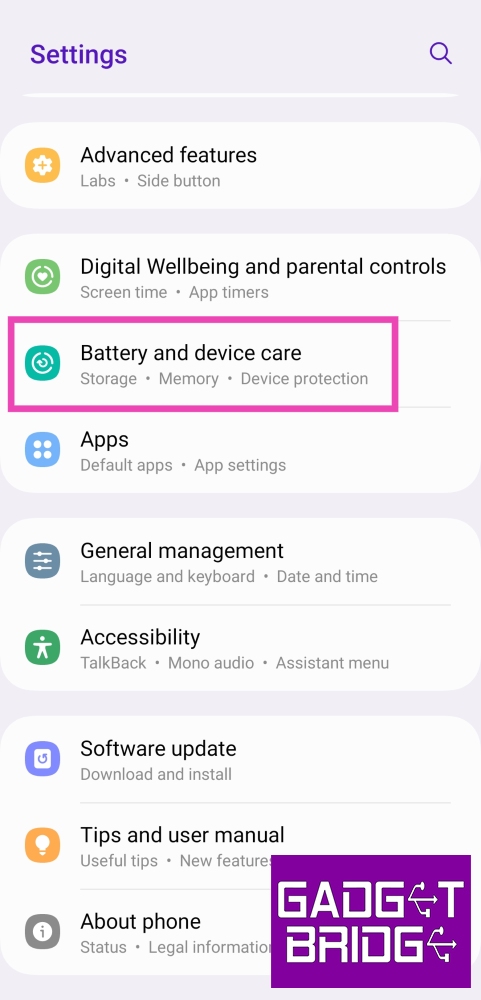 Step 2: Tap on Storage.
Step 3: Tap the category from which you want to delete certain files.
Step 2: Tap on Storage.
Step 3: Tap the category from which you want to delete certain files.
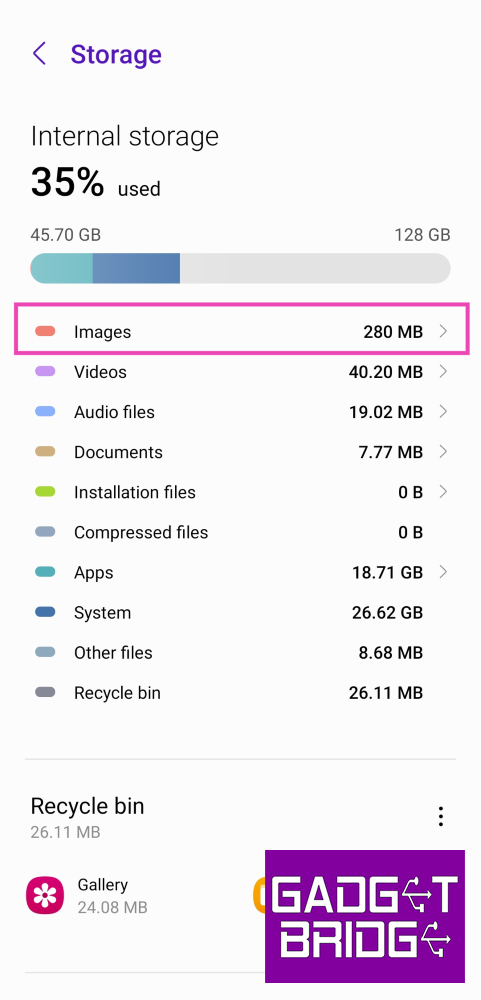 Step 4: Long press a file to select it. Hit the Delete icon at the bottom to remove it and clear up space.
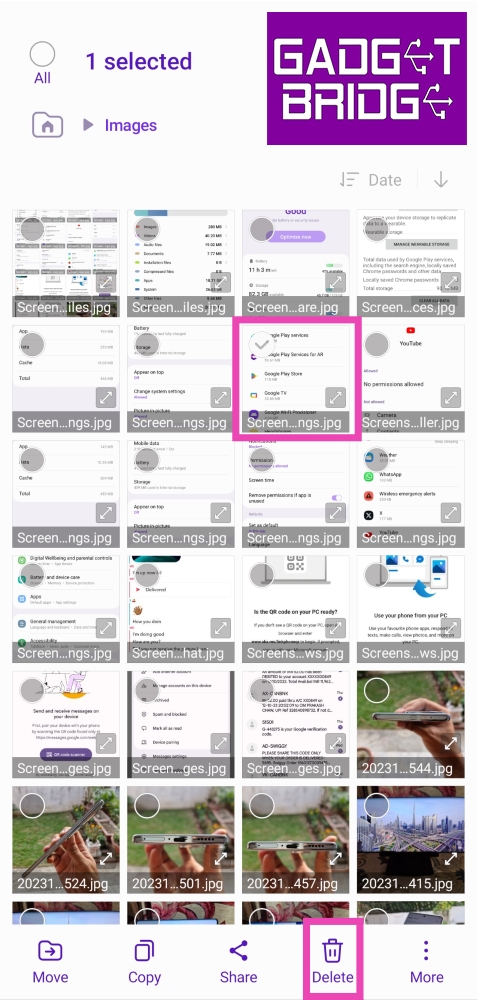
 A quick restart can sort out most of the background issues with your device. If the YouTube app on your phone keeps crashing randomly, try rebooting your phone. Press and hold the side key to access the power menu, then hit Restart. If pressing the side key triggers the voice assistant, press and hold the side key and volume up key together to access the power menu.
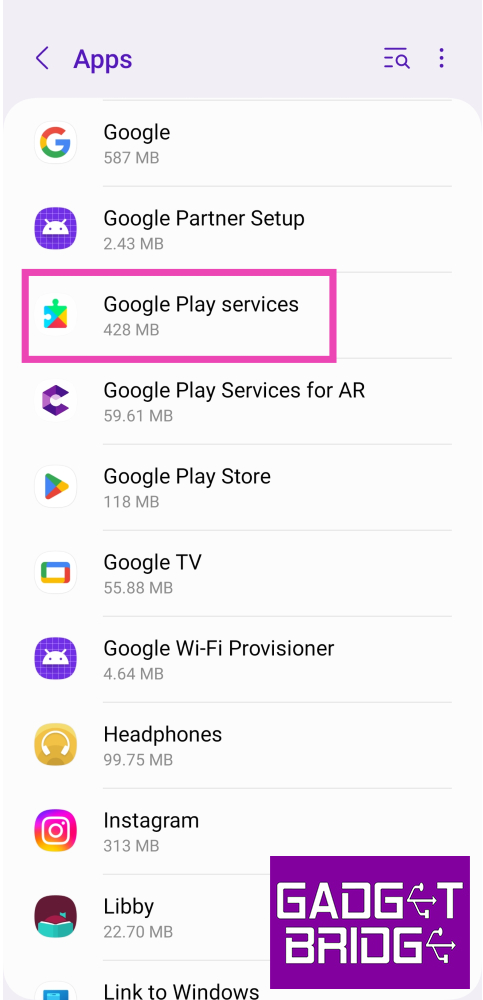 Step 3: Select Storage.
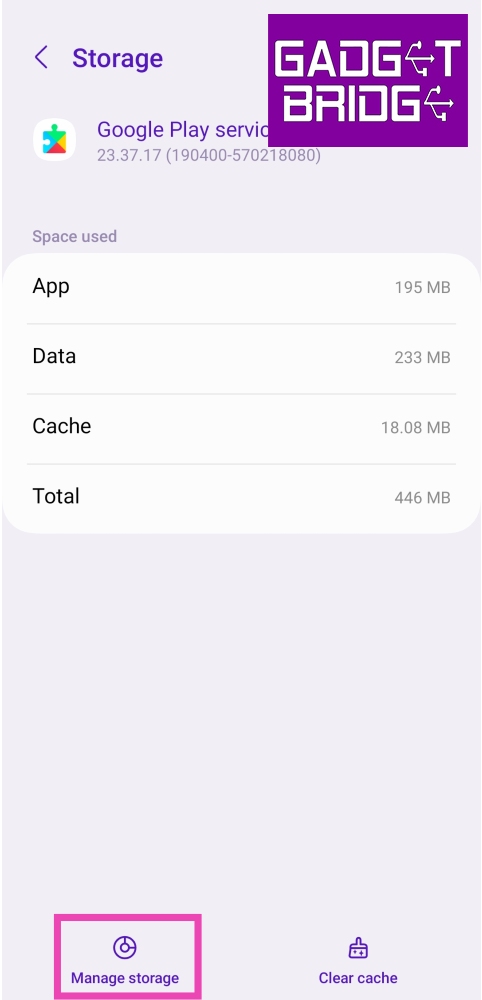 Step 5: Select Clear all data.
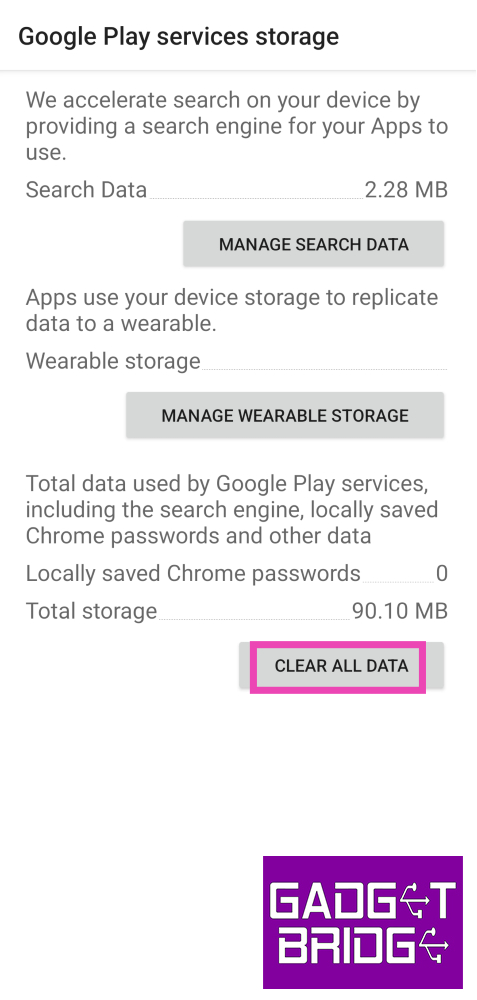
 Oftentimes, VPNs can interfere with the general functioning of YouTube and cause it to unexpectedly crash. If your VPN service is turned on, disable it for a while and check if the issue springs up again. To disable the VPN, launch the VPN app and hit the Disconnect button.
 Sometimes, removing the YouTube app from your device and then reinstalling it can fix minor background issues causing it to crash. To uninstall YouTube from your device, long press its icon in the app drawer and hit Uninstall. Go to Google Play Store, search for YouTube, and tap on Install to reinstall it on your device.
 If you’re using an older version of YouTube it may be the culprit behind random crashes. Old versions of apps are known to be riddled with bugs that are usually creased out in later updates. To update the YouTube app on your device, go to the Google Play Store, search for YouTube, and hit Update.
 If the YouTube app keeps crashing on your phone, you can always watch videos on its website instead. App-related issues can be bypassed by opening YouTube in Google Chrome and searching for the video you want to watch. If you want to easily access the website, you can pin its browser shortcut on your phone’s home screen.
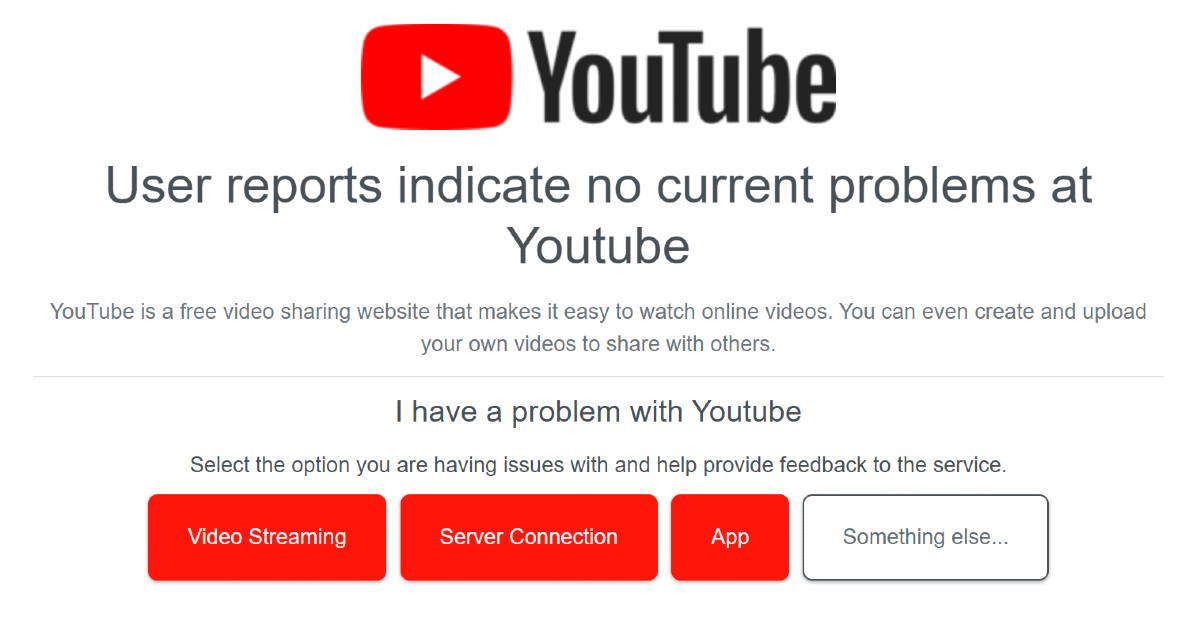 YouTube’s servers being down can lead to inadvertent crashes. Go to Downdetector.in and search for YouTube to check if this is the case. If you notice a spike in recent user reports, it means that YouTube is experiencing a server outage. The only thing you can do in this situation is wait for Google to restore its servers.
 Step 3: Tap on Download and Install. Your smartphone will check for any new updates.
 Step 4: If an update is available, tap on Install Now. You can also schedule the update for a later time.

 Step 2: Tap on the Followers section of your profile.
 Step 3: Hit the Remove button next to the follower you want to remove.

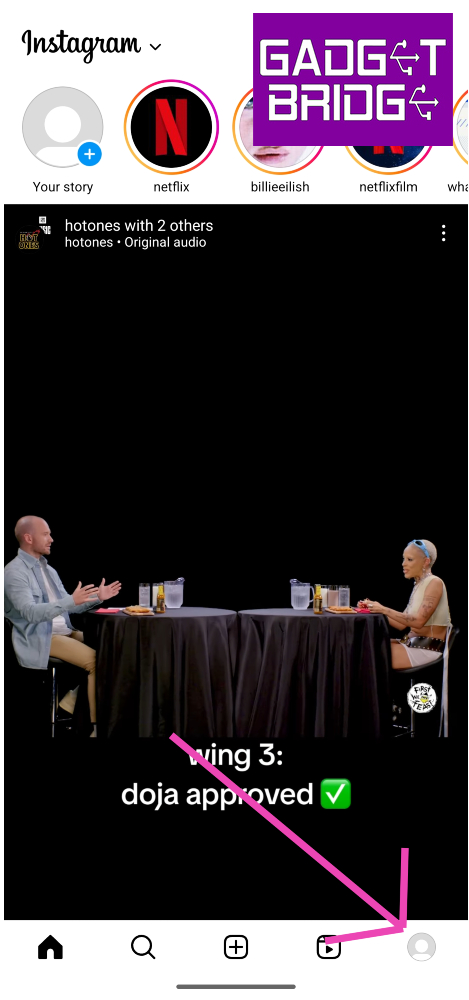 Step 2: Tap on the Followers section of your profile.
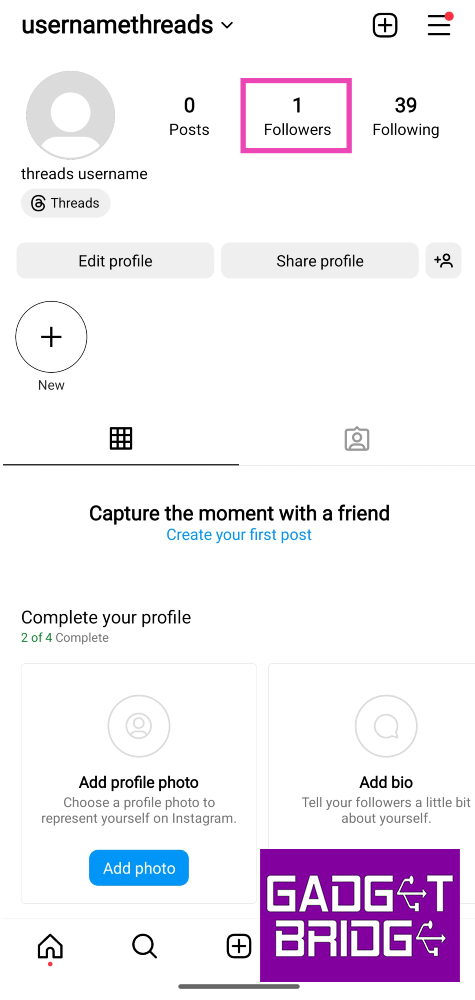 Step 3: Hit the Remove button next to the follower you want to remove.
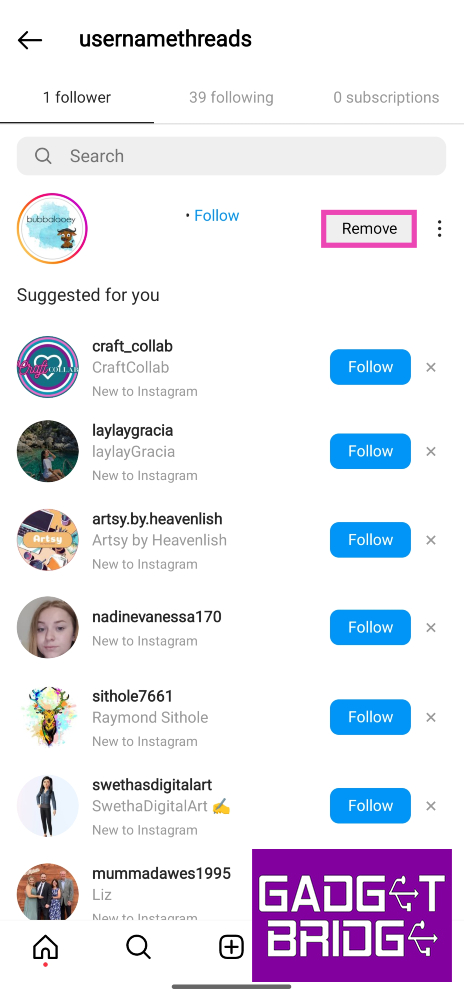
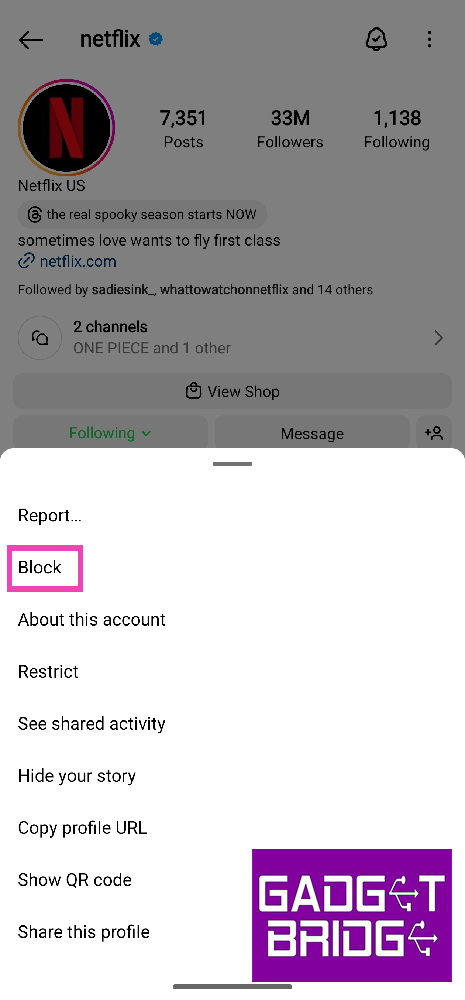
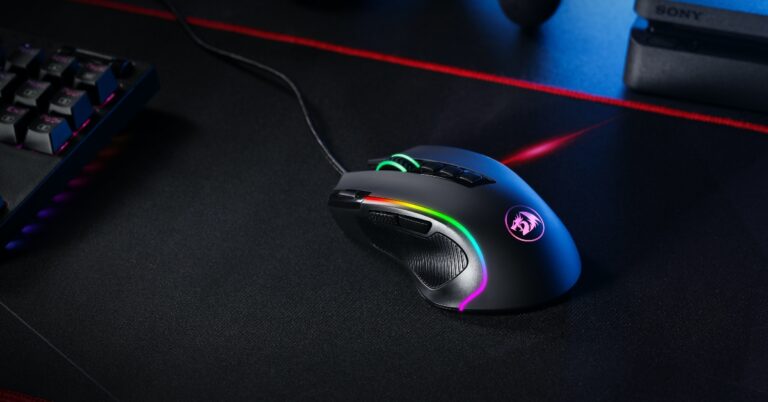
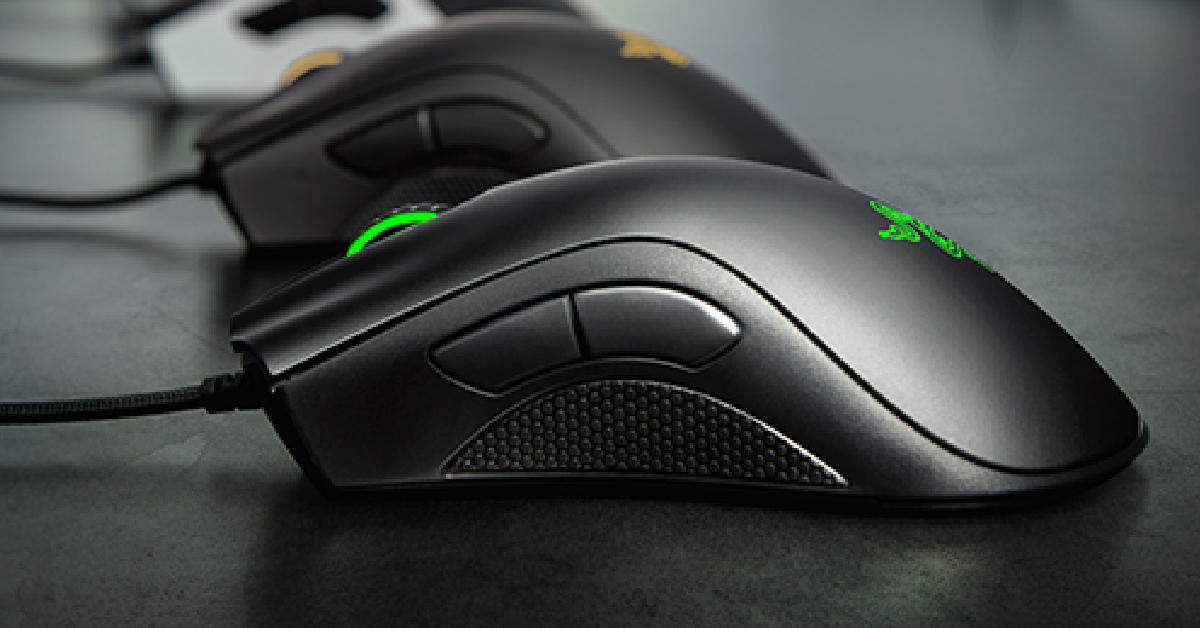 The Razer DeathAdder Essential wired gaming mouse is available for Rs 998 on Amazon right now, making it an amazing deal. This gaming mouse has a powerful 6,400 dpi optical sensor that facilitates fast movement and super quick swipes. The 5 hyper response buttons on this mouse can be programmed to suit your style of play. These buttons have been lab-tested for up to 10 million clicks. The DeathAdder also has a very ergonomic design, making it ideal for long gaming sessions.
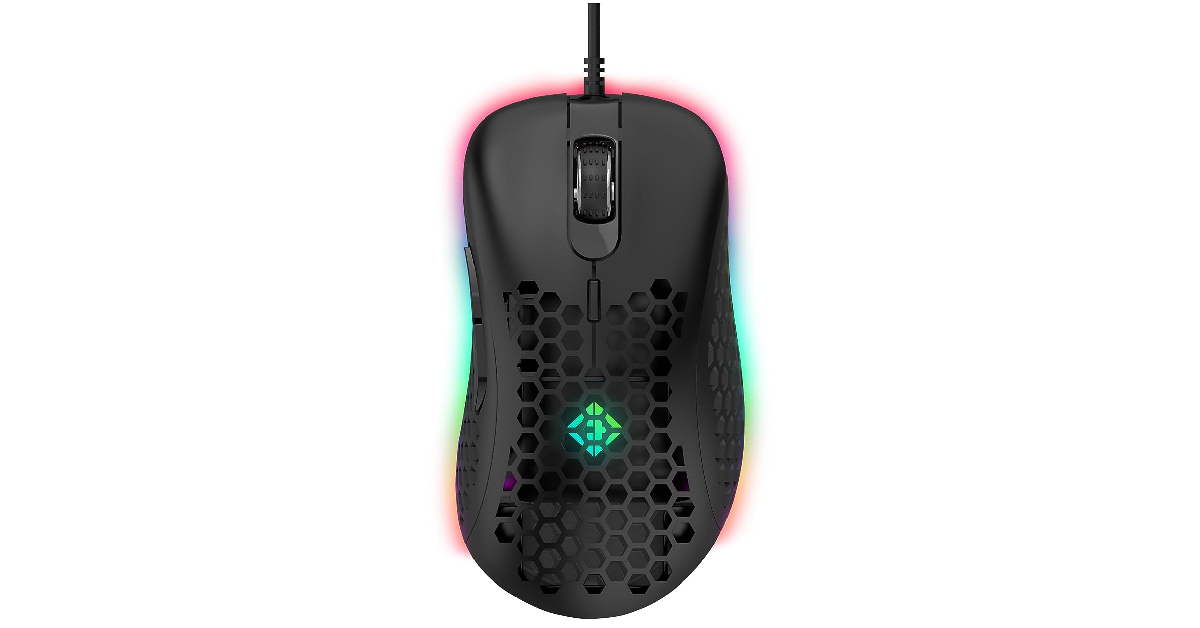 Cosmic Byte Spectrum is the best ‘honeycomb’ design mouse you can buy for under Rs 1,000. The honeycomb design makes the mouse lightweight and easy to control in intense gameplay. The DPI level of this mouse can be set anywhere between 200-12800 using the accompanying software. This software can be used to customise the RGB lighting on the mouse as well. With a maximum tracking speed of 60IPS and 20G acceleration, the Cosmic Byte Spectrum RGB is a great choice for a gaming mouse under Rs 1,000 for Counter-Strike 2.
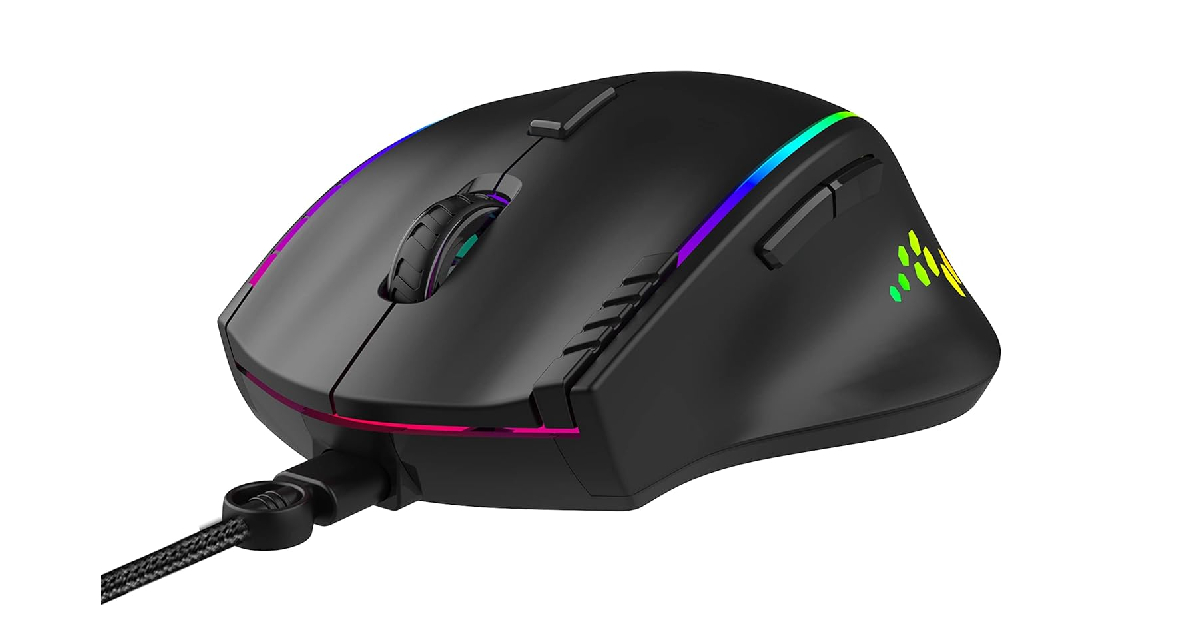 The Ant Esports GM600 has 6 adjustable DPI levels – 800, 1600, 2400, 3200, 4800, and 7200. There are 14 customisable RGB backlights. Users can change the intensity and speed of these backlights using the accompanying software. There are 7 programmable buttons on this mouse. Its ergonomic design and convenient thumb rest immensely help in maintaining a good grip and cutting down on fatigue.
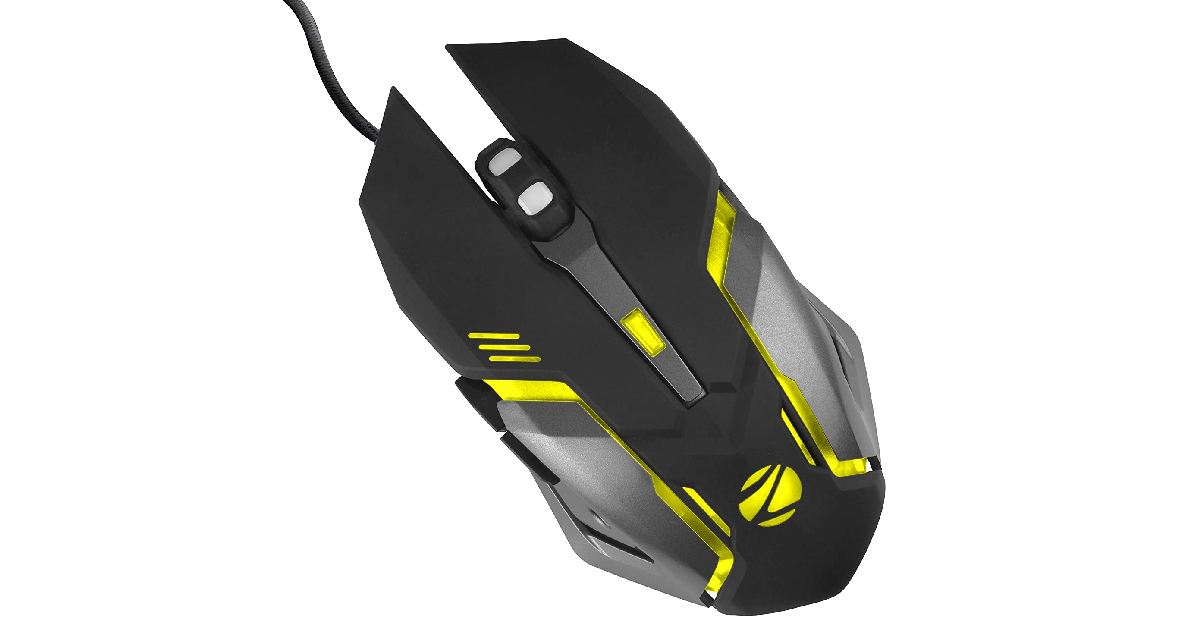 The Zebronics Transformer M is one of the most popular and affordable gaming mice out there. It gets a 3200 DPI sensor with adjustable DPI levels (1000, 1600, 2400, 3200), 6 programmable buttons, dedicated forward and backwards buttons, a braided cable, and RGB lighting that supports 7 colours. The efficient sensor on this mouse can track on most surfaces. The device is entirely plug-and-play.
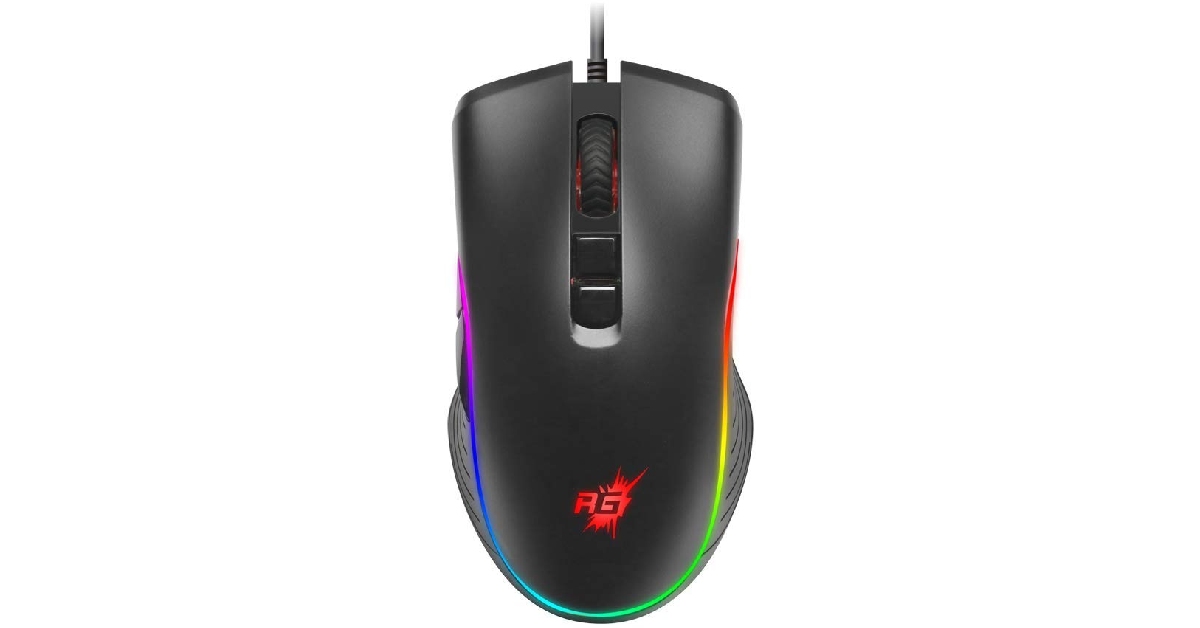 Priced at just Rs 229, the Redgear A-20 is one of the cheapest gaming mice you can buy right now. This mouse gets a 4800 DPI sensor, adjustable DPI levels, 7 programmable buttons, durable switches, and 16.8 million colour customisation options for the RGB through the companion software. The 1.8m braided cable attached to the mouse is durable and efficient. The design of the Redgear A-20 is ergonomic and meant for prolonged gaming sessions.
Read Also: JioBharat B1 4G phone with JioPay launched in India
Priced at just Rs 229, the Redgear A-20 is one of the cheapest gaming mice you can buy right now. This mouse gets a 4800 DPI sensor, adjustable DPI levels, 7 programmable buttons, durable switches, and 16.8 million colour customisation options for the RGB through the companion software. The 1.8m braided cable attached to the mouse is durable and efficient. The design of the Redgear A-20 is ergonomic and meant for prolonged gaming sessions.
Read Also: JioBharat B1 4G phone with JioPay launched in India

 Step 6: Hit Done.
 Step 3: Tap on Incoming SMS.
 Step 4: Enter the email or phone number to which you want to forward the text messages.
 Step 5: Hit Save at the top right corner of the screen.
To make sure the app works as intended, allow it to run in the background and deactivate battery optimisation for it.
Step 5: Hit Save at the top right corner of the screen.
To make sure the app works as intended, allow it to run in the background and deactivate battery optimisation for it.
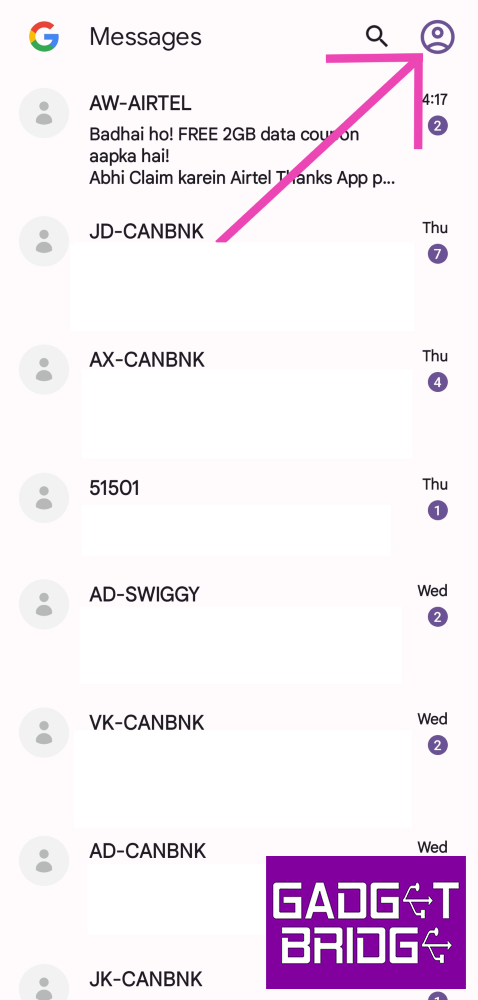 Step 3: Tap on Device pairing.
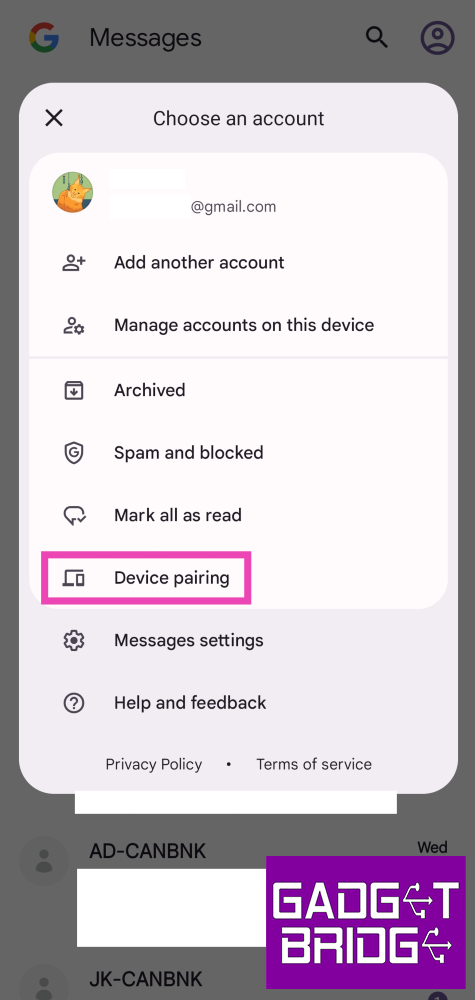 Step 4: Now go to https://messages.google.com/web/ on your secondary device.
Step 5: Select the QR code scanner option on the Google Messages app.
Step 4: Now go to https://messages.google.com/web/ on your secondary device.
Step 5: Select the QR code scanner option on the Google Messages app.
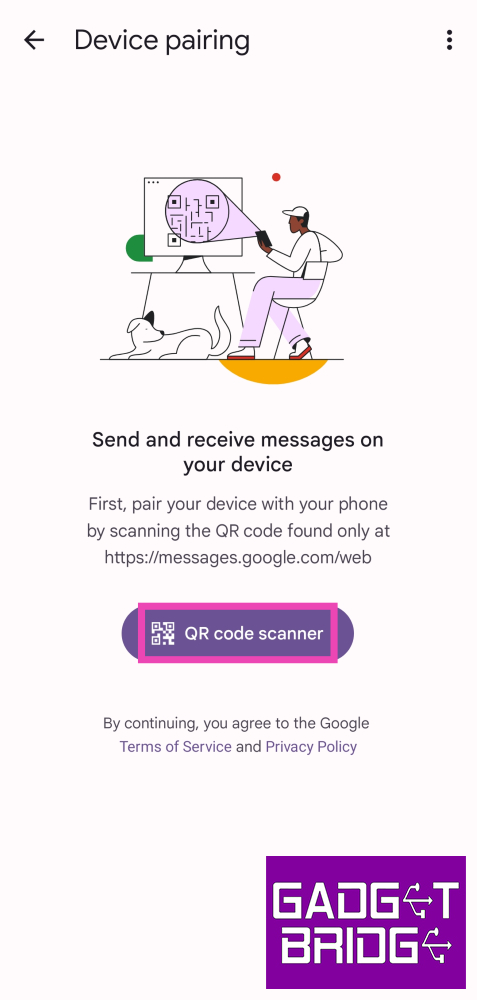 The two devices will be paired together. You will be able to receive all text messages on your PC or secondary mobile.
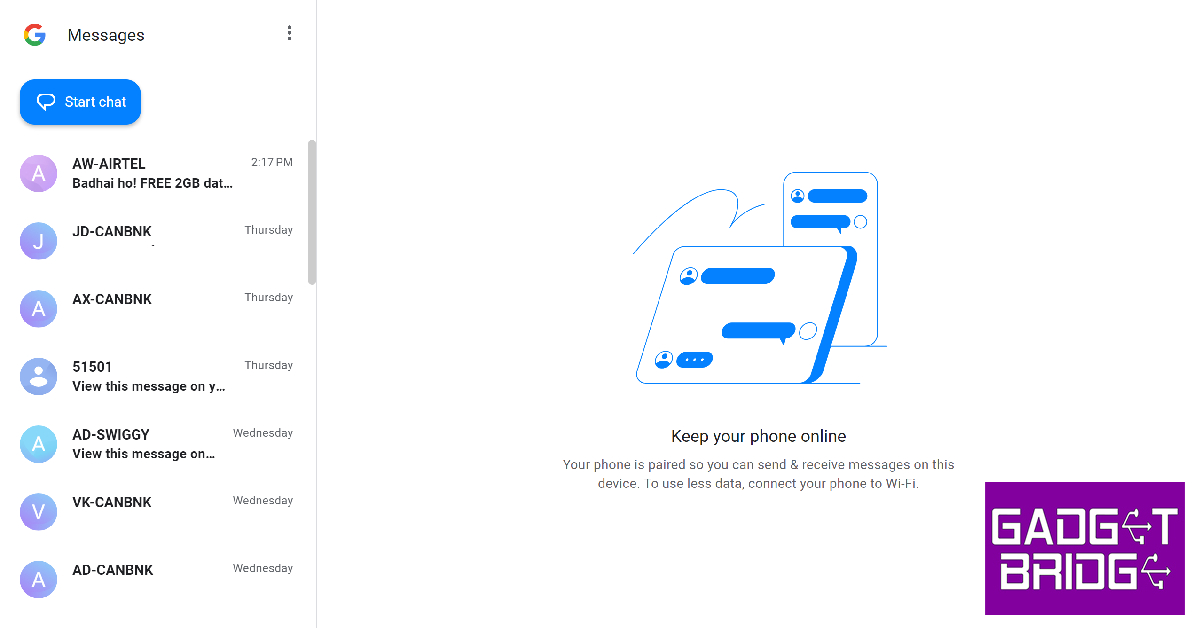
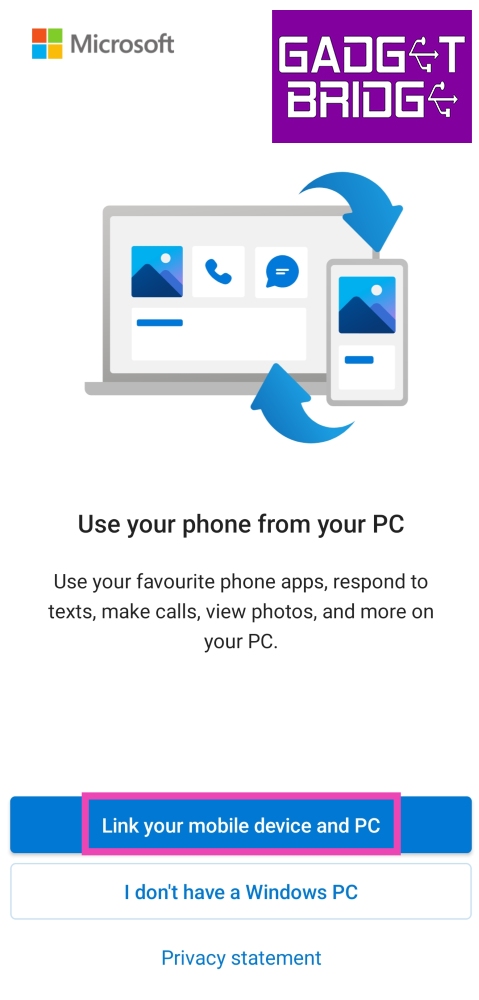 Step 2: Open the Phone Link app on your Windows PC and log into your Microsoft Account.
Step 3: Use the QR Code to pair your smartphone to your PC.
Step 2: Open the Phone Link app on your Windows PC and log into your Microsoft Account.
Step 3: Use the QR Code to pair your smartphone to your PC.
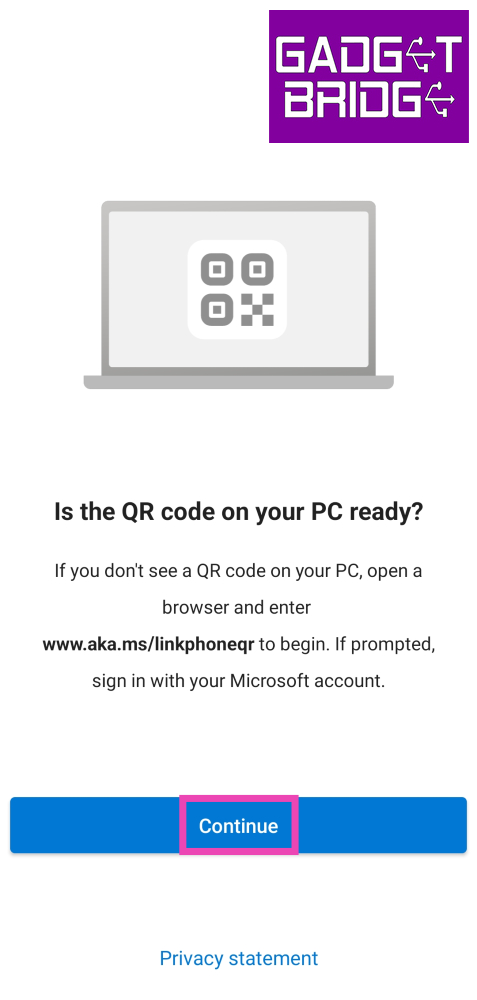 Step 4: Give the Link to Windows app the necessary permissions.
Step 5: Click on the Messages tab in the Phone Link app on your PC to access all your messages.
Step 4: Give the Link to Windows app the necessary permissions.
Step 5: Click on the Messages tab in the Phone Link app on your PC to access all your messages.
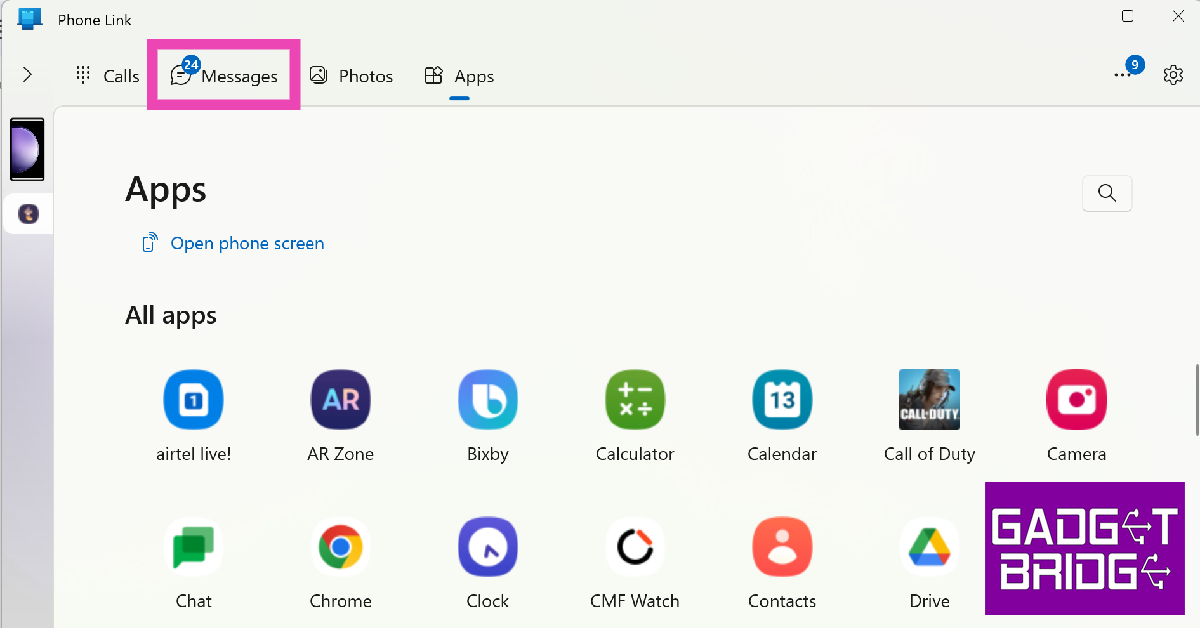
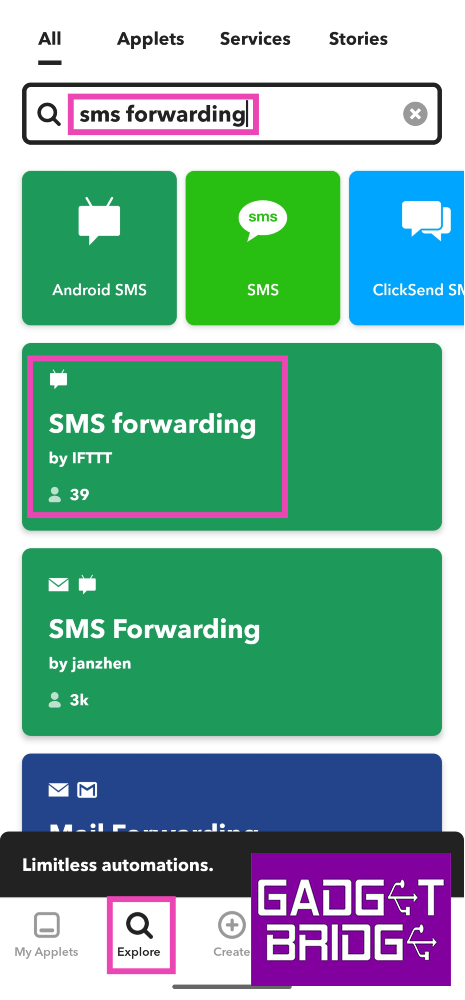 Step 4: Tap on Connect.
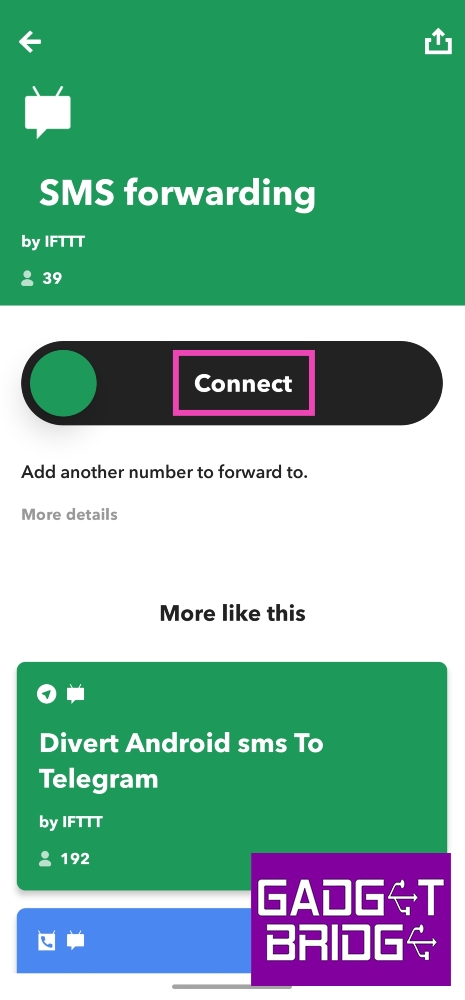 Step 5: Enter the phone number to which you want to forward your text messages.
 Step 6: Hit Done.
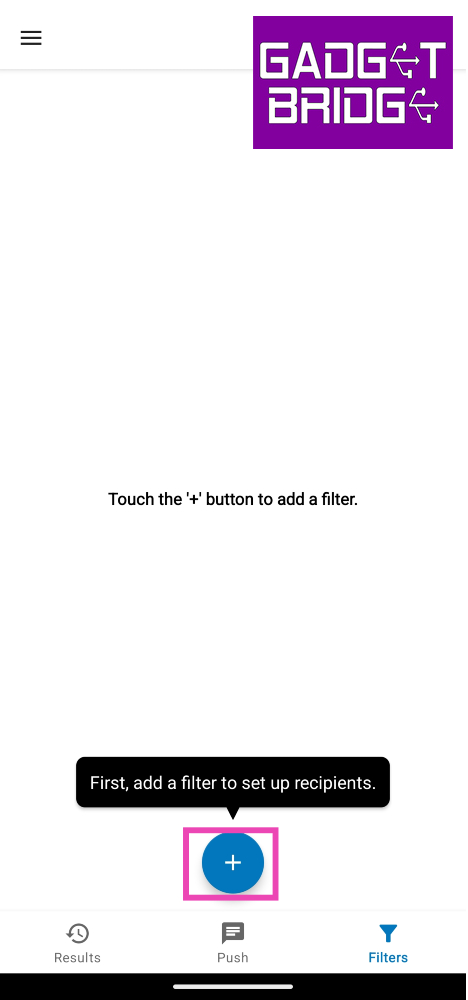 Step 3: Tap on Incoming SMS.
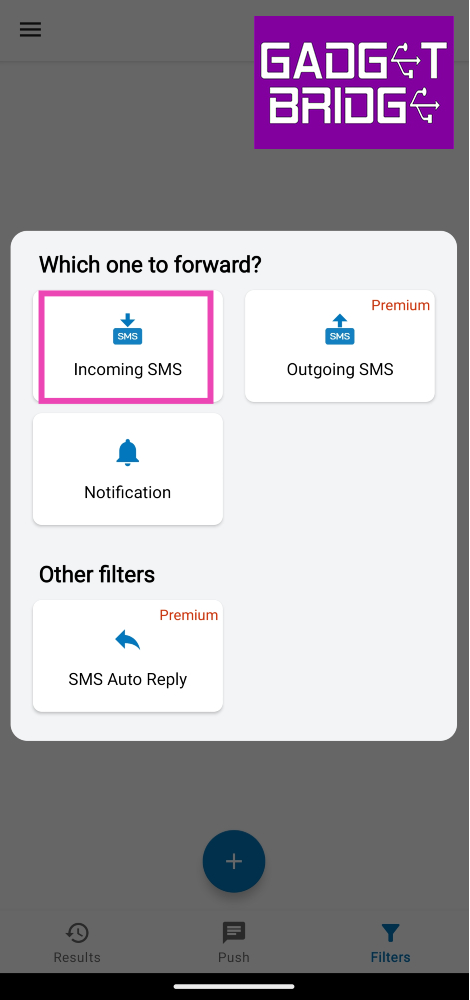 Step 4: Enter the email or phone number to which you want to forward the text messages.
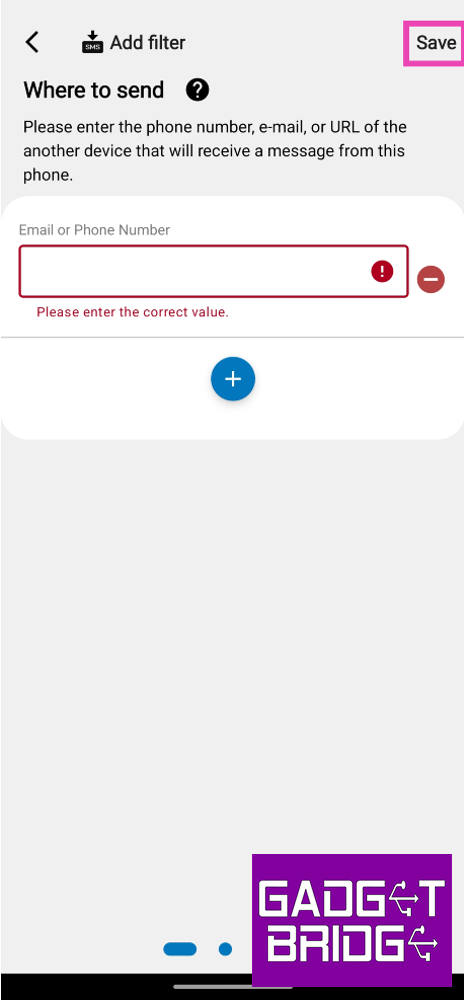 Step 5: Hit Save at the top right corner of the screen.
To make sure the app works as intended, allow it to run in the background and deactivate battery optimisation for it.
Step 5: Hit Save at the top right corner of the screen.
To make sure the app works as intended, allow it to run in the background and deactivate battery optimisation for it.
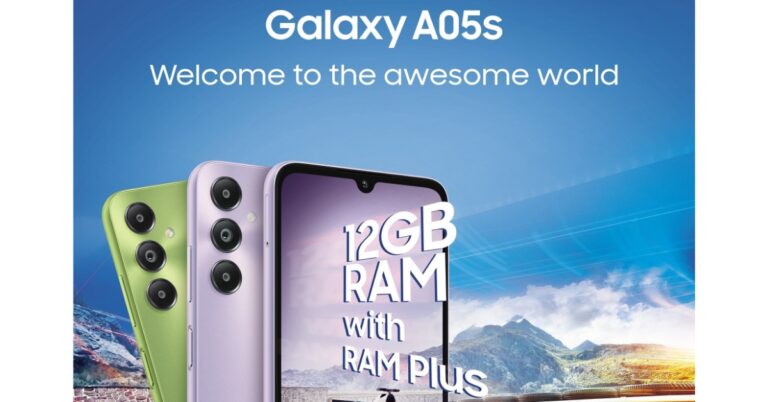
 As per the company, Samsung Galaxy A05s will be available in three refreshing colours – light green, light violet and black. It is said to feature a refined build and finish and will carry forward Samsung’s signature Galaxy design.
It has been revealed that the Samsung Galaxy A05s will be highlighted with a massive 6.7-inch FHD+ display for an immersive viewing experience. The bezels on the sides are slim while the chin is noticeable. For taking pictures and videos the handset will come with a triple rear camera set up positioned vertically at the left corner along with a circular LED flash unit. The camera system will include a 50-megapixel primary shooter that is said to offer vivid and rich pictures, even in low light conditions. The camera module will also include a 2-megapixel depth sensor and another 2-megapixel macro lens. The details about the selfie camera have not been disclosed but the teaser image reveals a centre-aligned waterdrop notch.
Also Read: Google Pixel 8 Series first sale in India begins: Pricing and offer details inside
The Samsung Galaxy A05s is confirmed to be powered by a Qualcomm Snapdragon 680 processor built on 6nm process technology offering better multitasking between the apps.
Recently the phone was spotted at Google Play Console listing with codename a05ssnndxx. The listing suggests an octa-core Qualcomm Snapdragon 680 SoC paired with an Adreno 610 GPU along with 6GB of RAM. Galaxy A05s may include a full-HD+ display with 1080 x 2400 pixels of resolution. It is likely to pack a 4,000mAh battery with 25W fast charging support. Android 13-based OneUI 5.1 will be shipped out of the box. Moreover, the device is speculated to sport a side-mounted fingerprint sensor.
For the latest gadget and tech news, and gadget reviews, follow us on Twitter, Facebook and Instagram. For newest tech & gadget videos subscribe to our YouTube Channel. You can also stay up to date using the Gadget Bridge Android App. You can find the latest car and bike news here.
As per the company, Samsung Galaxy A05s will be available in three refreshing colours – light green, light violet and black. It is said to feature a refined build and finish and will carry forward Samsung’s signature Galaxy design.
It has been revealed that the Samsung Galaxy A05s will be highlighted with a massive 6.7-inch FHD+ display for an immersive viewing experience. The bezels on the sides are slim while the chin is noticeable. For taking pictures and videos the handset will come with a triple rear camera set up positioned vertically at the left corner along with a circular LED flash unit. The camera system will include a 50-megapixel primary shooter that is said to offer vivid and rich pictures, even in low light conditions. The camera module will also include a 2-megapixel depth sensor and another 2-megapixel macro lens. The details about the selfie camera have not been disclosed but the teaser image reveals a centre-aligned waterdrop notch.
Also Read: Google Pixel 8 Series first sale in India begins: Pricing and offer details inside
The Samsung Galaxy A05s is confirmed to be powered by a Qualcomm Snapdragon 680 processor built on 6nm process technology offering better multitasking between the apps.
Recently the phone was spotted at Google Play Console listing with codename a05ssnndxx. The listing suggests an octa-core Qualcomm Snapdragon 680 SoC paired with an Adreno 610 GPU along with 6GB of RAM. Galaxy A05s may include a full-HD+ display with 1080 x 2400 pixels of resolution. It is likely to pack a 4,000mAh battery with 25W fast charging support. Android 13-based OneUI 5.1 will be shipped out of the box. Moreover, the device is speculated to sport a side-mounted fingerprint sensor.
For the latest gadget and tech news, and gadget reviews, follow us on Twitter, Facebook and Instagram. For newest tech & gadget videos subscribe to our YouTube Channel. You can also stay up to date using the Gadget Bridge Android App. You can find the latest car and bike news here. 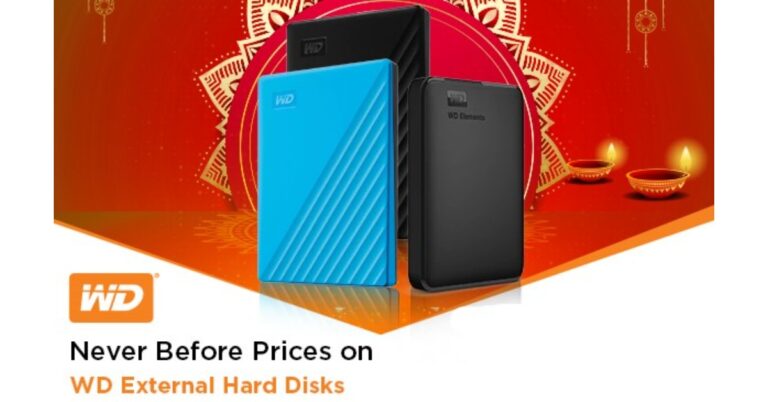
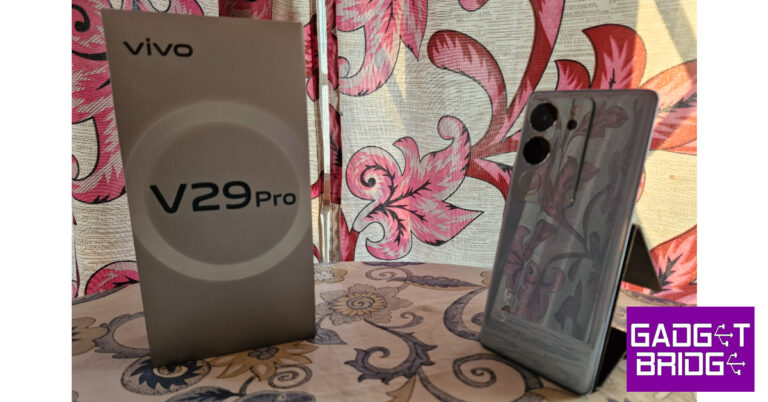
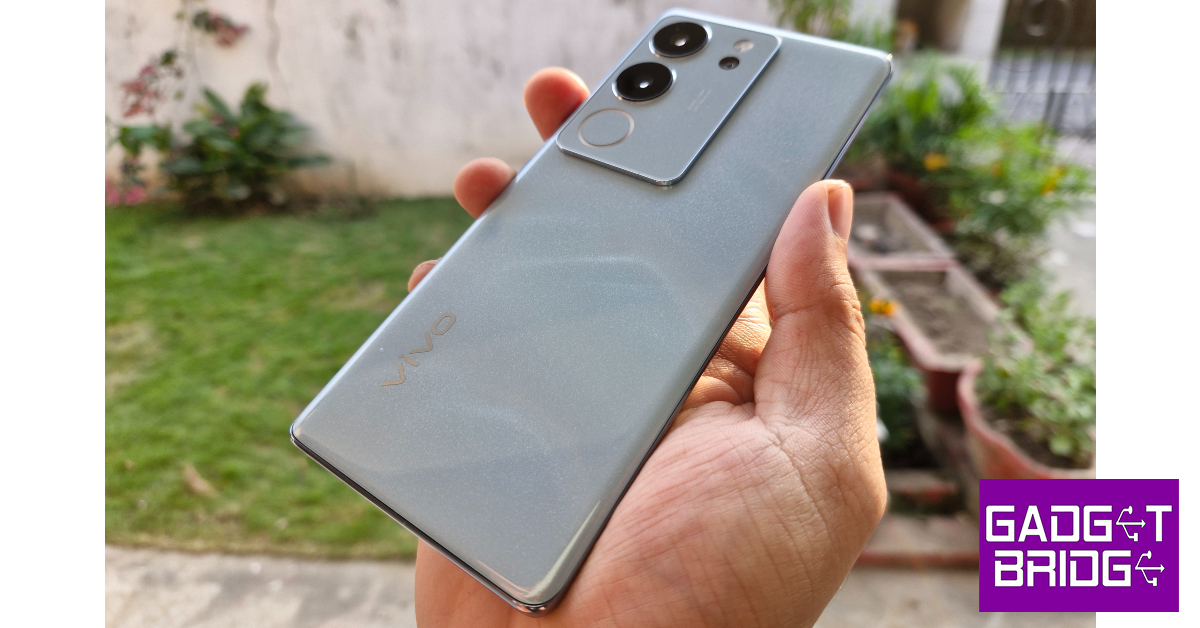 Vivo likes to experiment with the back panels on its midrange V Series. The V27 Pro featured a matte finish glass back that could change its colour when exposed to UV light. While some may dismiss colour-changing back panels as a gimmick, we quite like the splash of personality they bring to the devices. The new V29 Pro employs what Vivo calls ‘3D Particle Technology’ to produce an effect that resembles snowy mountain peaks on the back panel. While it may sound dramatic, it looks quite tasteful. It gives off the appearance of a sandstone texture, but it is entirely glossy. No matte finish for the V29 Pro.
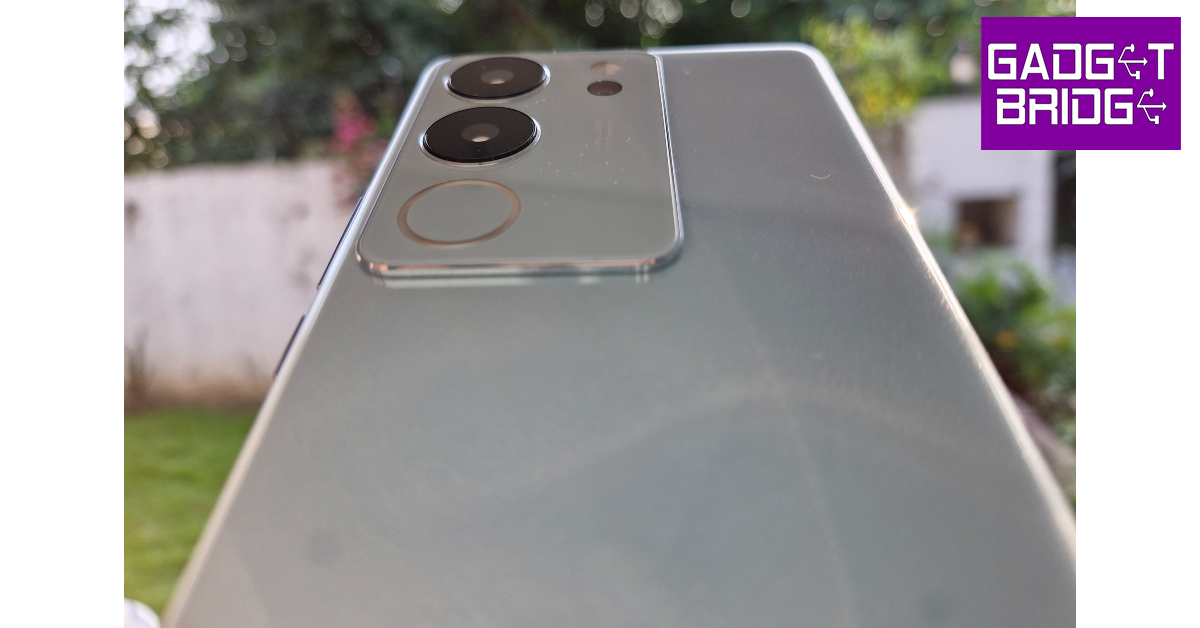 The rectangular camera module gets a few key design tweaks as well. The Aura light is now wider and more refined. It is placed below the ultrawide lens. A new telephoto lens also finds its way into this camera module, making the smartphone’s camera setup very well-rounded. The LED flash sits above the telephoto lens.
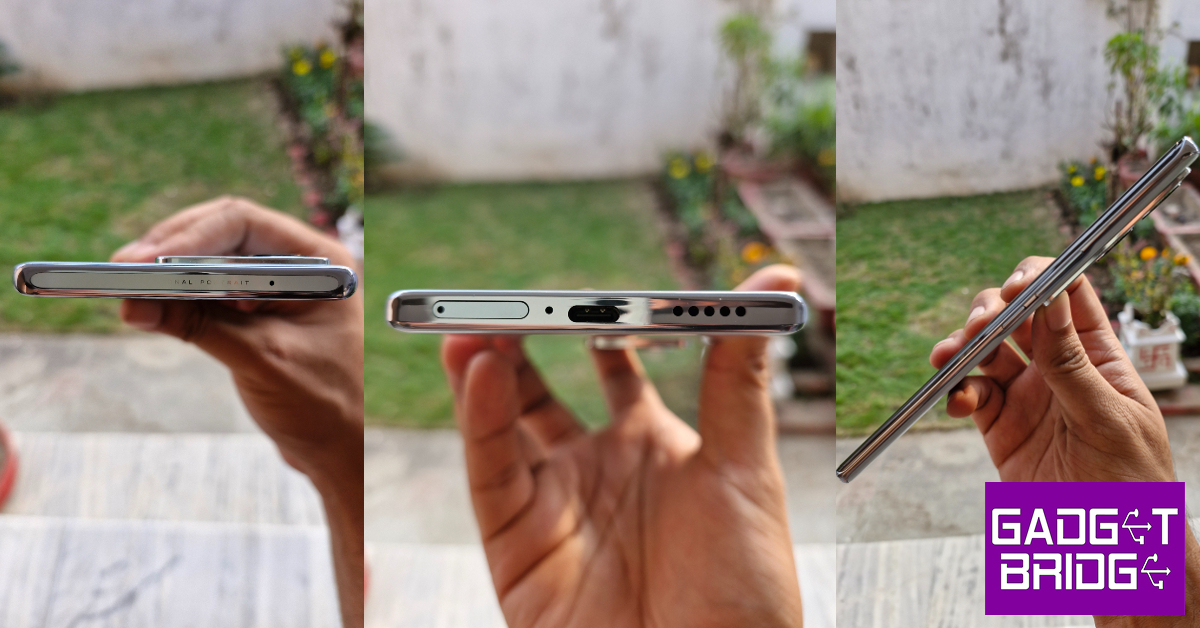 The metal frame around the smartphone houses the volume rocker and power key on its left edge. The SIM tray, primary microphone, USB charging port, and speaker grille are positioned on the bottom edge. The left side of the frame is left buttonless and the top edge gets a secondary microphone and ‘Professional Portrait’ lettering.
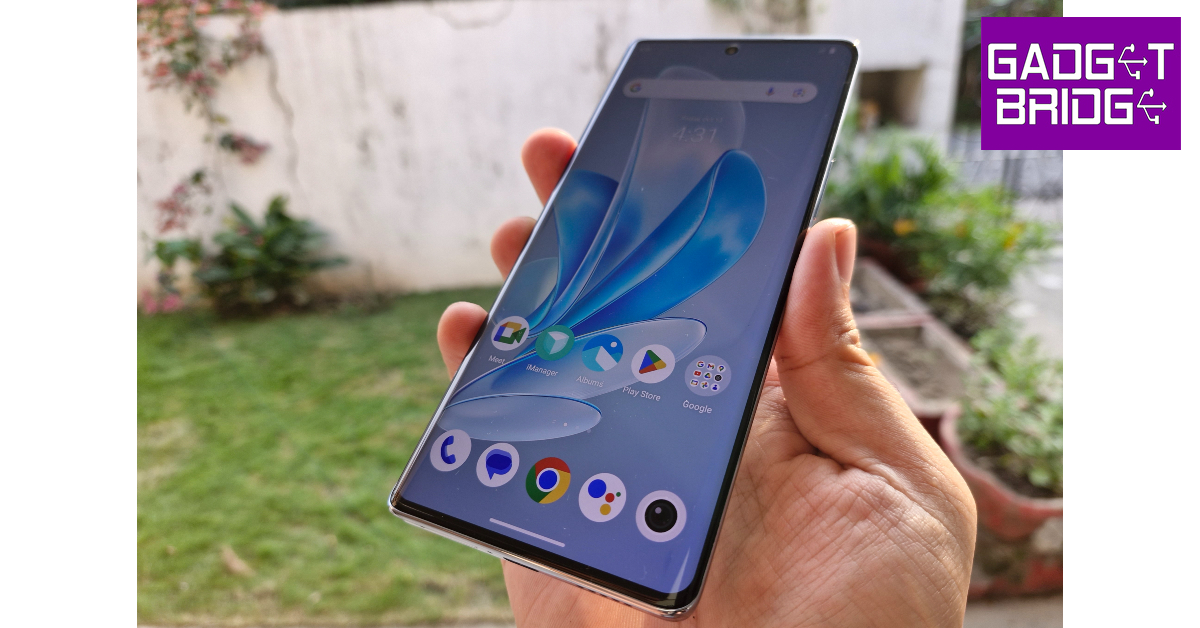 The 6.78-inch curved AMOLED display on the V29 Pro is the same size as its predecessor but gets a small bump in resolution. The 2800 x 1260p FHD+ panel has a maximum refresh rate of 120Hz. To conserve the battery life, the refresh rate can be dialled down to 60Hz. The smartphone also has a ‘Smart Switch’ feature for adaptive refresh rate. The selfie camera is housed in a punch-hole cutout at the top of the display.
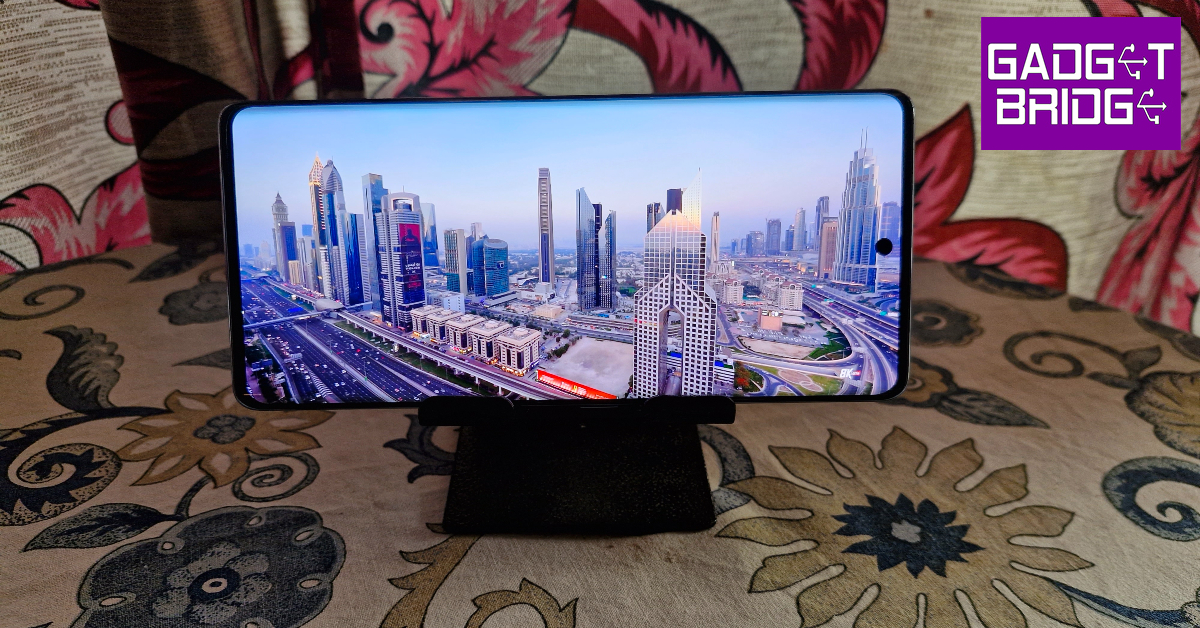 The touch response offered by the curved AMOLED display on the V29 Pro is quite smooth, even though it is a step behind the flagship displays. Flicking through apps and navigating the phone using swipe gestures is a seamless experience. We streamed HD content on this smartphone across different OTT apps. The performance was very similar to the V27 Pro. The images produced on the screen were detailed, crispy, and packed with a lot of vibrant colours. The only letdown is the single speaker grille, which produces a tinny output that is devoid of any significant low end. A stereo speaker setup would have massively elevated the content-watching experience.
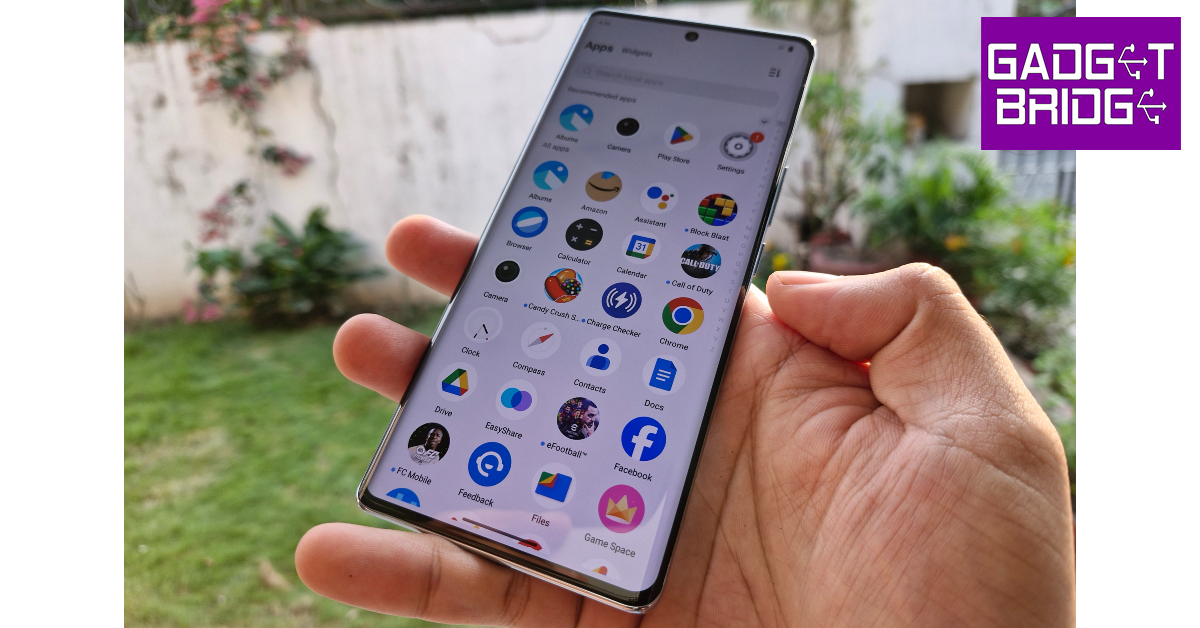 Even though there are no changes to the chipset, the smartphone performs marginally better on the Geekbench 6 test. It scored 1,179 points on the single-core test and 3,394 points on the multi-core test. In comparison, Vivo V27 Pro scored 1,151 and 3,099 points respectively. The smartphone handles everyday tasks like web browsing, instant messaging, video calling, and media playback with the utmost ease. While using the V29 Pro for a week, we never felt that the phone was struggling to keep up with the tasks we threw at it.
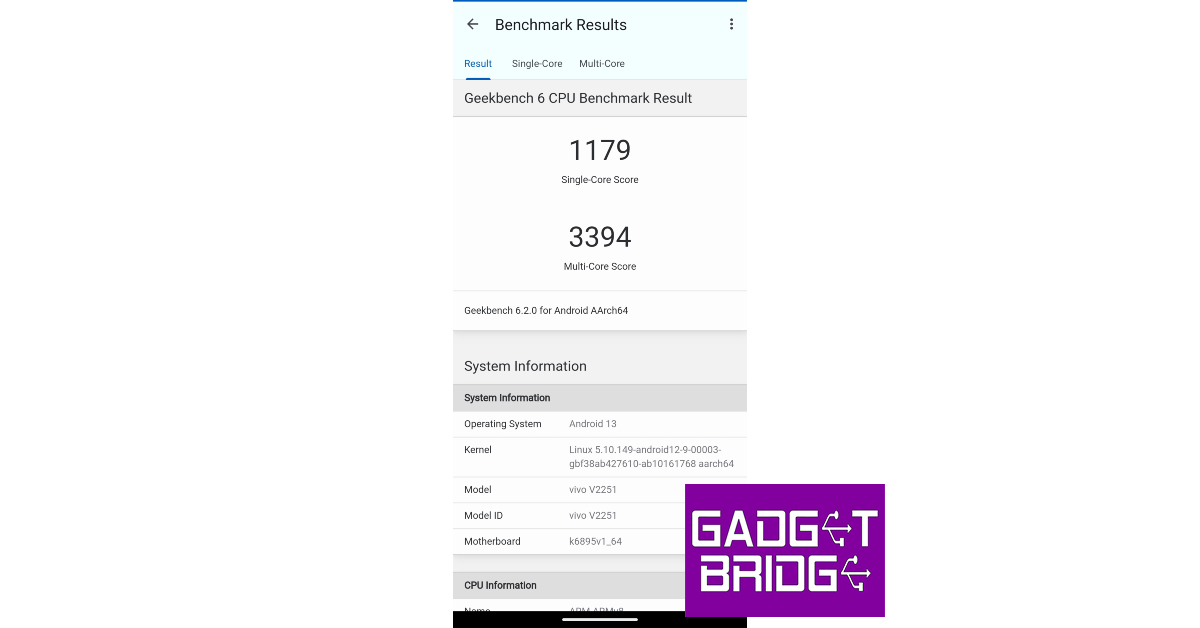 Even tried a fair bit of gaming on the smartphone. Its Ultra Large Vapor Chamber Bionic Cooling System facilitates fluid dissipation of heat and ensures that the internal temperature of the smartphone is kept in check during intense gaming sessions. We played Call of Duty Mobile and eFootball 2024 on this smartphone. During our review period, the Vivo V29 Pro did not present any major issues. There were no significant frame drops or stutters during gameplay.
OS duties on the Vivo V29 Pro are handled by Android 13 skinned with Funtouch 13. The significant bloatware on the device robs it of a clean look. The constant notifications from Vivo’s app market and browser are nothing but spam. We’d suggest getting rid of all the bloatware apps on the device before you begin using it. Bloatware issues aside, Funtouch OS offers all the essential features you expect on an Android phone. We like the personalisation options for the lock screen that the OS has to offer. The dynamic effects for the fingerprint scanner, charging animation, and other functions are also quite fun.
Moving on, Vivo has also updated the battery specs on the V29 Pro. While it carries forward the 4,600 mAh battery pack, it now supports 80W fast charging. The power brick supplied in the retail box can charge the smartphone to 50% in under 20 minutes. It took us only 40 minutes to charge the phone from 15% to 100%. The 4,600 mAh battery pack is good enough to last an entire day on moderate to heavy usage.
Even tried a fair bit of gaming on the smartphone. Its Ultra Large Vapor Chamber Bionic Cooling System facilitates fluid dissipation of heat and ensures that the internal temperature of the smartphone is kept in check during intense gaming sessions. We played Call of Duty Mobile and eFootball 2024 on this smartphone. During our review period, the Vivo V29 Pro did not present any major issues. There were no significant frame drops or stutters during gameplay.
OS duties on the Vivo V29 Pro are handled by Android 13 skinned with Funtouch 13. The significant bloatware on the device robs it of a clean look. The constant notifications from Vivo’s app market and browser are nothing but spam. We’d suggest getting rid of all the bloatware apps on the device before you begin using it. Bloatware issues aside, Funtouch OS offers all the essential features you expect on an Android phone. We like the personalisation options for the lock screen that the OS has to offer. The dynamic effects for the fingerprint scanner, charging animation, and other functions are also quite fun.
Moving on, Vivo has also updated the battery specs on the V29 Pro. While it carries forward the 4,600 mAh battery pack, it now supports 80W fast charging. The power brick supplied in the retail box can charge the smartphone to 50% in under 20 minutes. It took us only 40 minutes to charge the phone from 15% to 100%. The 4,600 mAh battery pack is good enough to last an entire day on moderate to heavy usage.
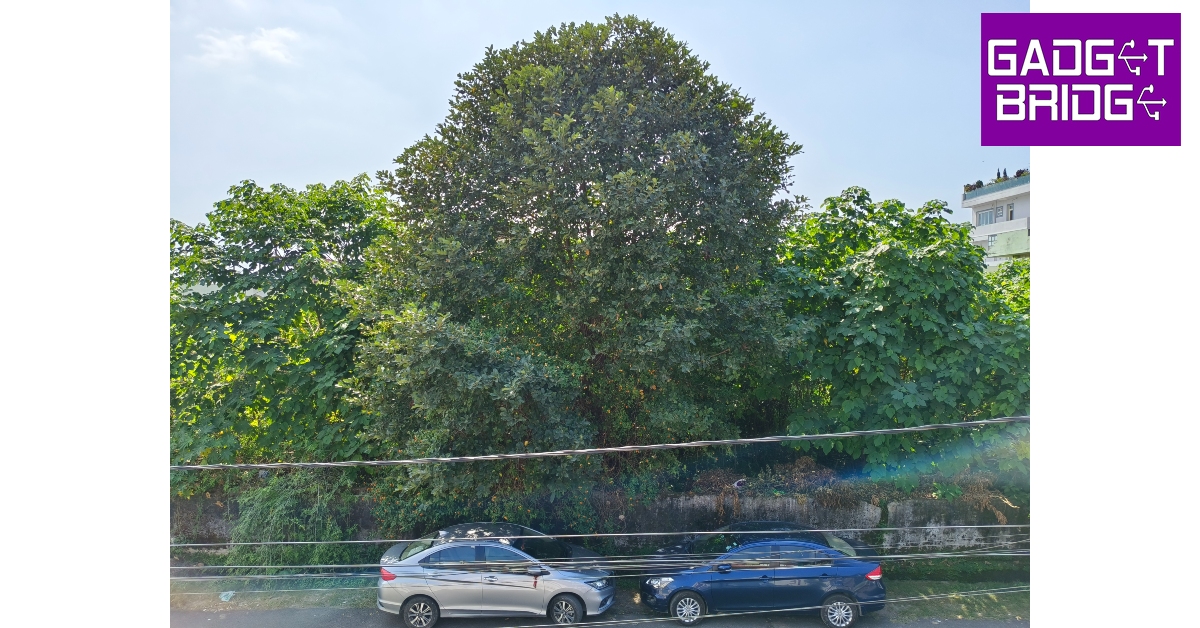 Vivo’s V Series is known for its exemplary camera performance, and the V29 Pro is no different. As we mentioned earlier, the smartphone’s camera module gets a key upgrade in the form of a 12MP telephoto lens. The 50MP primary camera and the 8MP ultrawide lens have been carried forward from the V27 Pro.
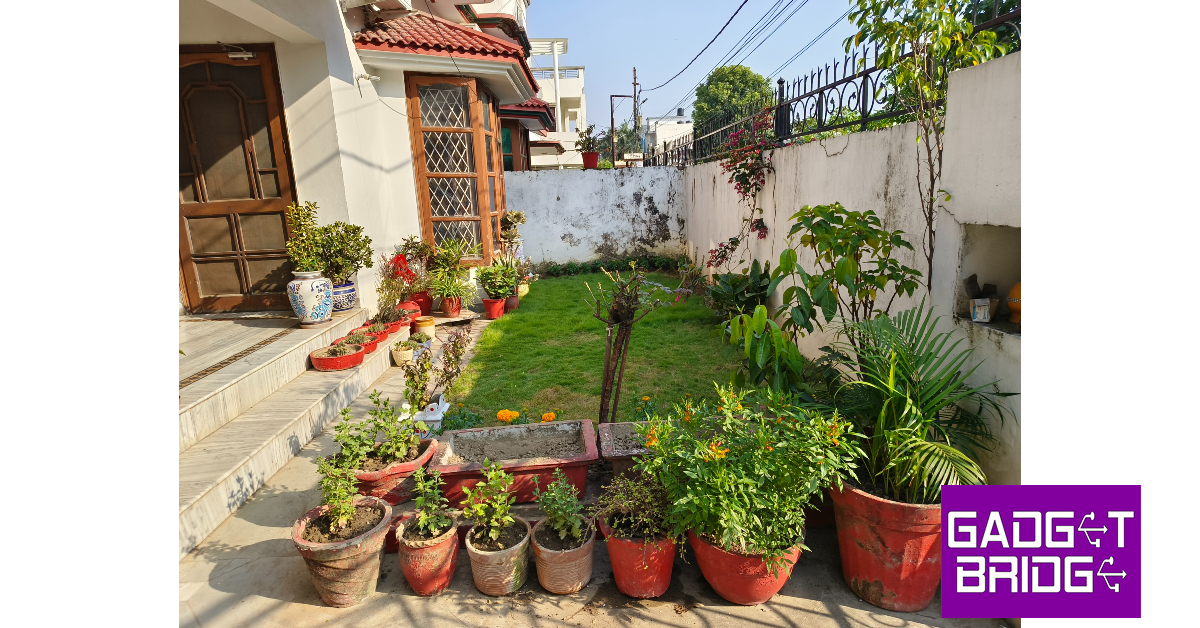

 The V29 Pro also features a brighter, more refined ‘Aura light’. What felt like a gimmick on the V27 Pro now finds some purpose on the V29 Pro. For starters, you can control its warmth from the camera app (1,800K to 4,500K), depending on the kind of shot you want. The light can go from a warm red tone to a cool yellowish-white. In dimly lit conditions, the Aura light does make a difference while taking portrait shots. We’re excited to see how Vivo further develops it in future generations of the smartphone.

 Pictures taken from the 8MP ultrawide lens are still a bit soft, but it is quite decent overall. The colours seem a little washed when compared to the primary lens, but it is something you expect from the ultrawide shooters in this price range. On the bright side, this lens takes well-lit shots in limited lighting, which is where other ultrawide sensors often seem to fail. Suffice it to say, you will keep returning to this lens for wide-angle shots. The new 12MP telephoto lens is a stark improvement over the 2MP macro lens. Its performance is still akin to a lot of entry-level telephoto shooters but it still finds a lot of use compared to the macro lens.
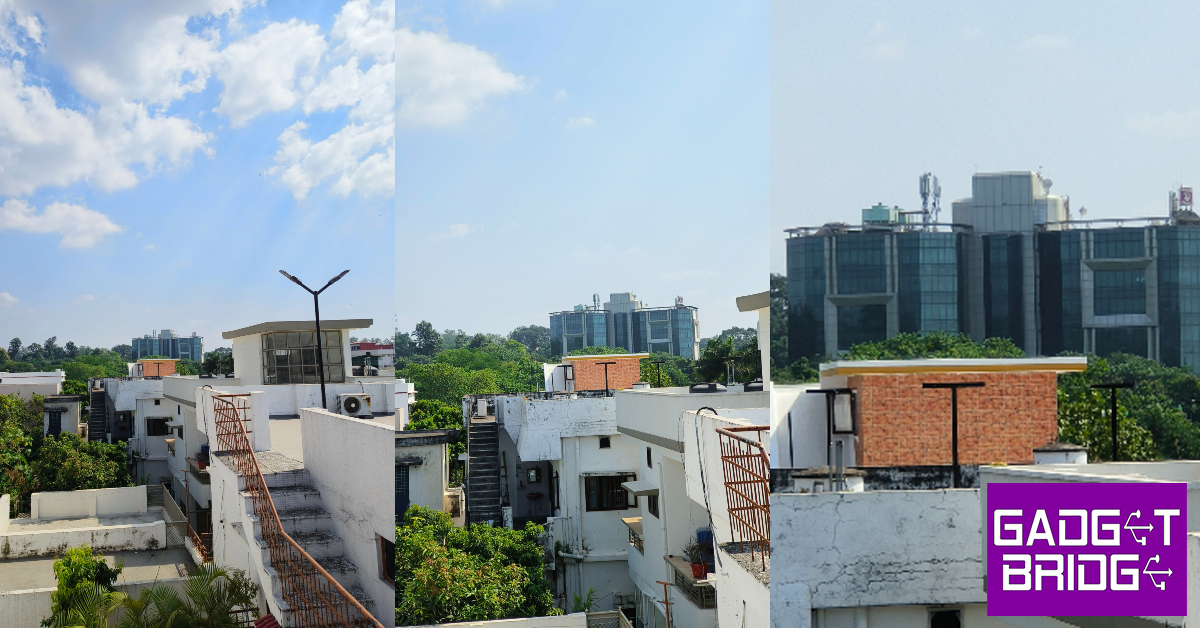

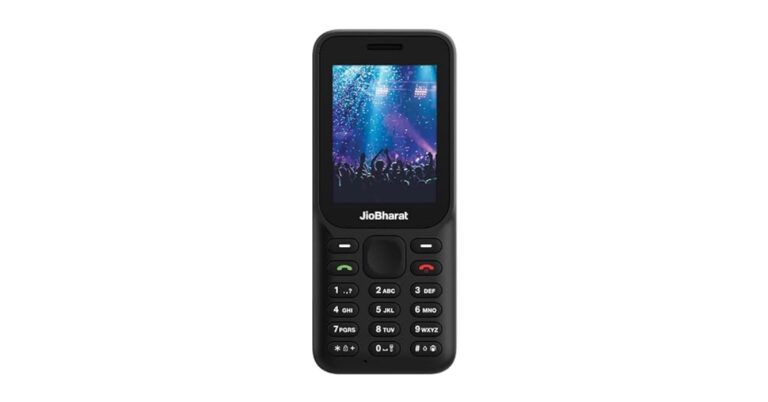
 JioBharat B1 has a 2,000mAh battery that is touted to provide up to 343 hours of standby time. The mobile phone comes pre-loaded with JioCinema and JioSaavn.
The device includes a rear camera setup and the resolution of the lens is unspecified. It has a 3.5mm headphone jack. The 4G phone has an alphanumeric keypad that is said to support 23 languages, including several regional Indian dialects. Not just that it comes loaded with JioPay, which allows users to make UPI payments.
For the latest gadget and tech news, and gadget reviews, follow us on Twitter, Facebook and Instagram. For newest tech & gadget videos subscribe to our YouTube Channel. You can also stay up to date using the Gadget Bridge Android App. You can find the latest car and bike news here.
JioBharat B1 has a 2,000mAh battery that is touted to provide up to 343 hours of standby time. The mobile phone comes pre-loaded with JioCinema and JioSaavn.
The device includes a rear camera setup and the resolution of the lens is unspecified. It has a 3.5mm headphone jack. The 4G phone has an alphanumeric keypad that is said to support 23 languages, including several regional Indian dialects. Not just that it comes loaded with JioPay, which allows users to make UPI payments.
For the latest gadget and tech news, and gadget reviews, follow us on Twitter, Facebook and Instagram. For newest tech & gadget videos subscribe to our YouTube Channel. You can also stay up to date using the Gadget Bridge Android App. You can find the latest car and bike news here. 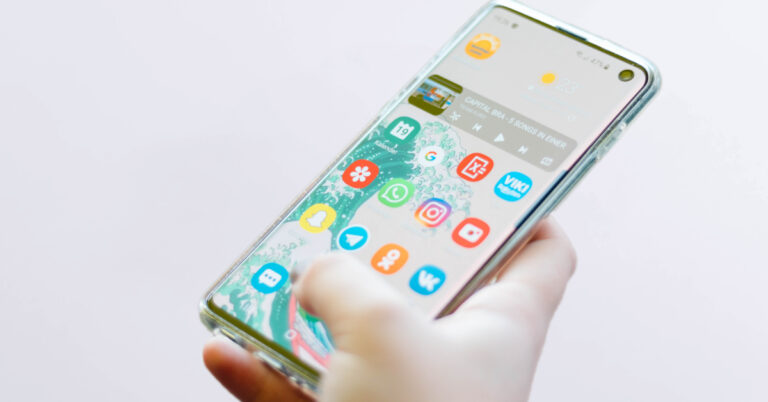
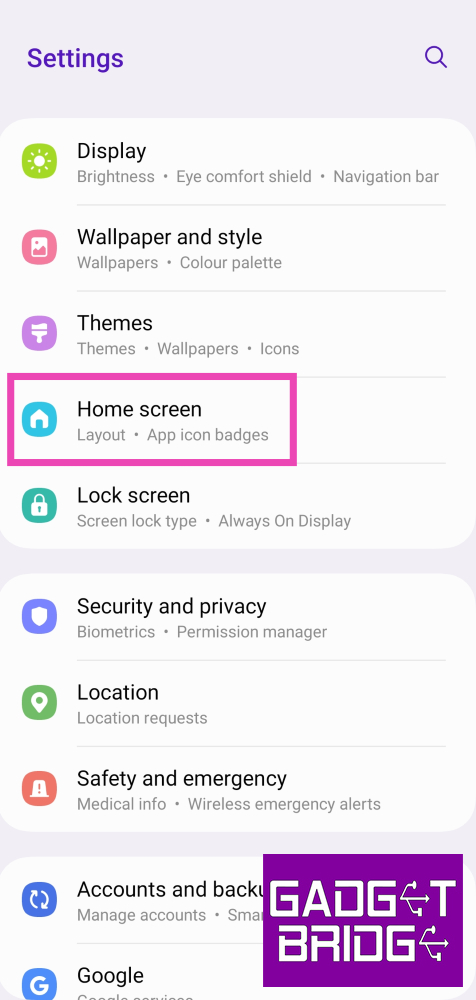 Step 2:
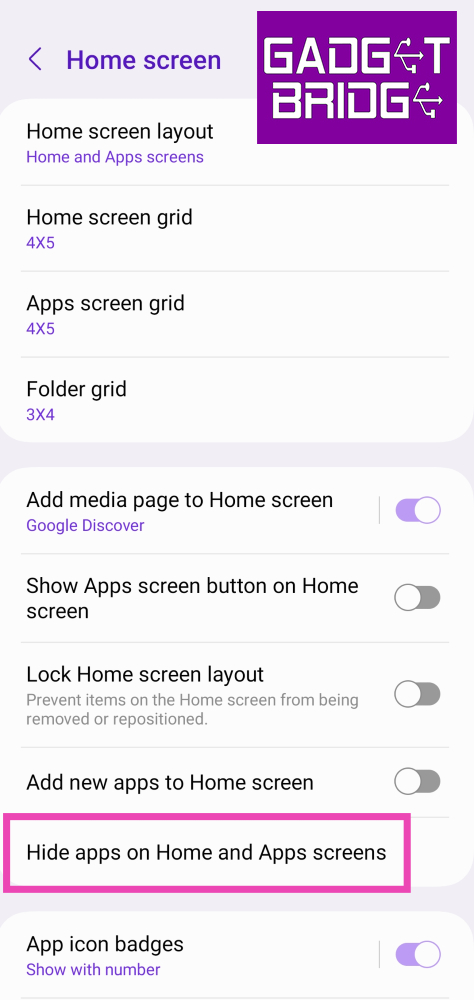 Step 3: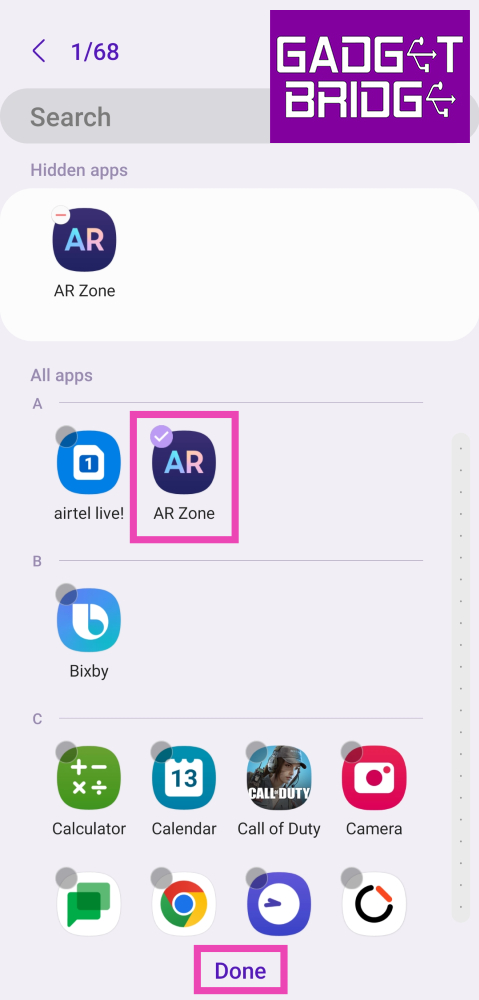
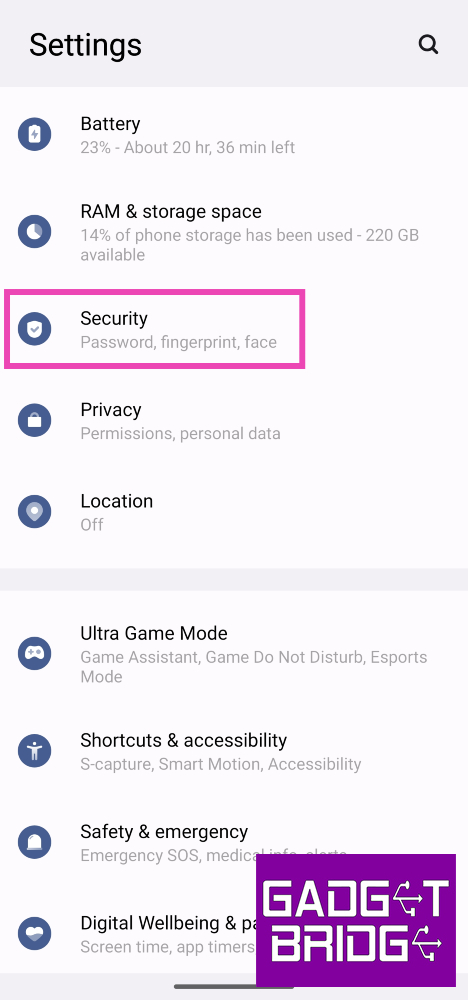 Step 2:
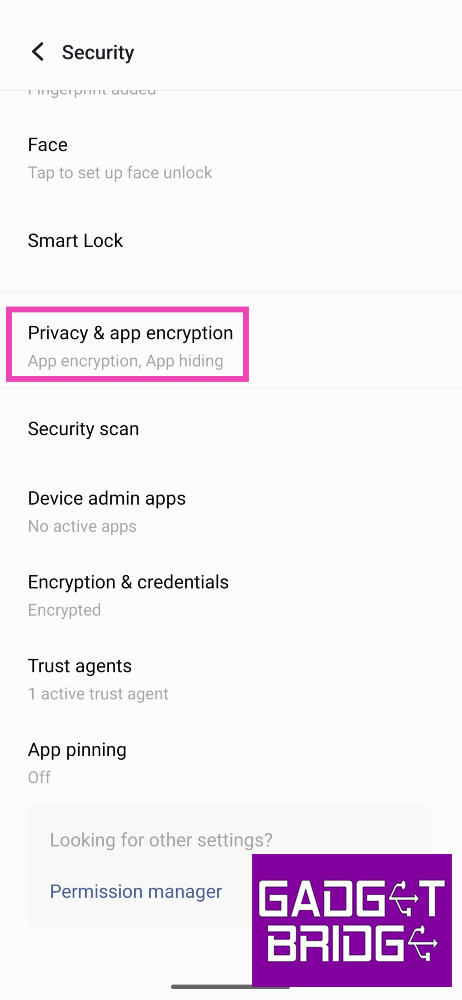 Step 3:
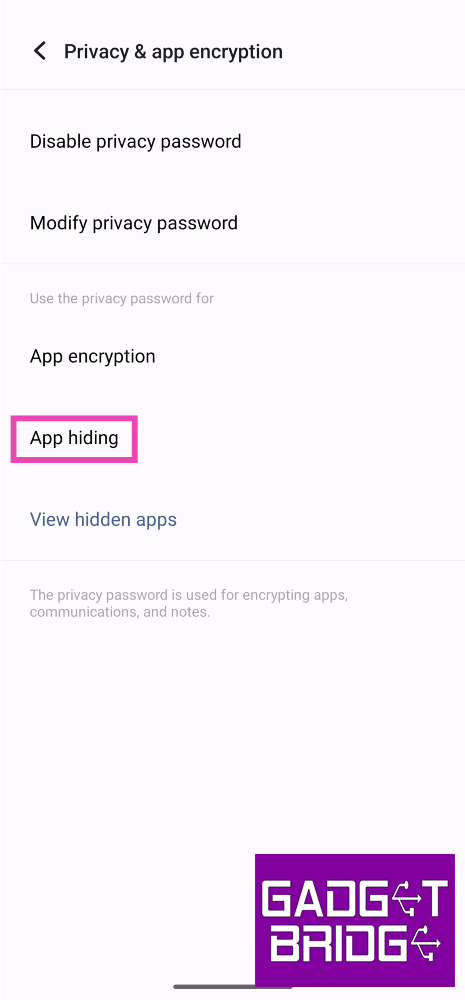 Step 5:
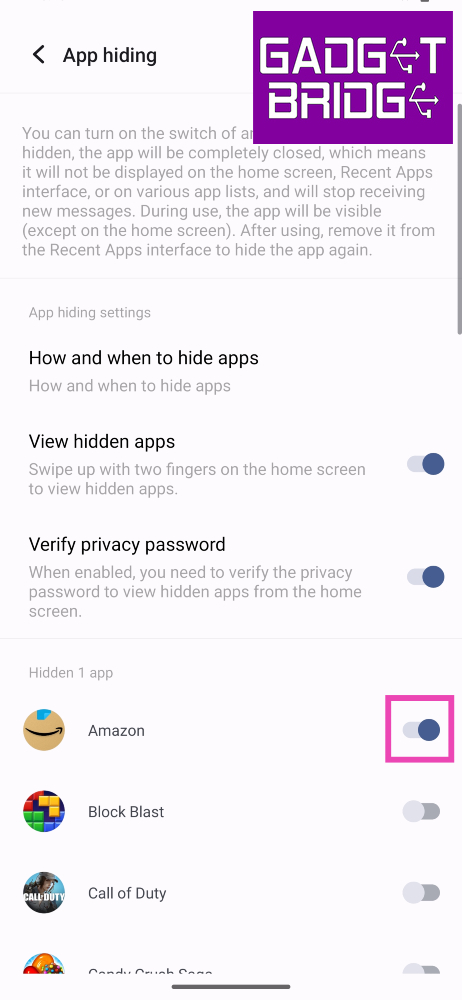 Step 6:
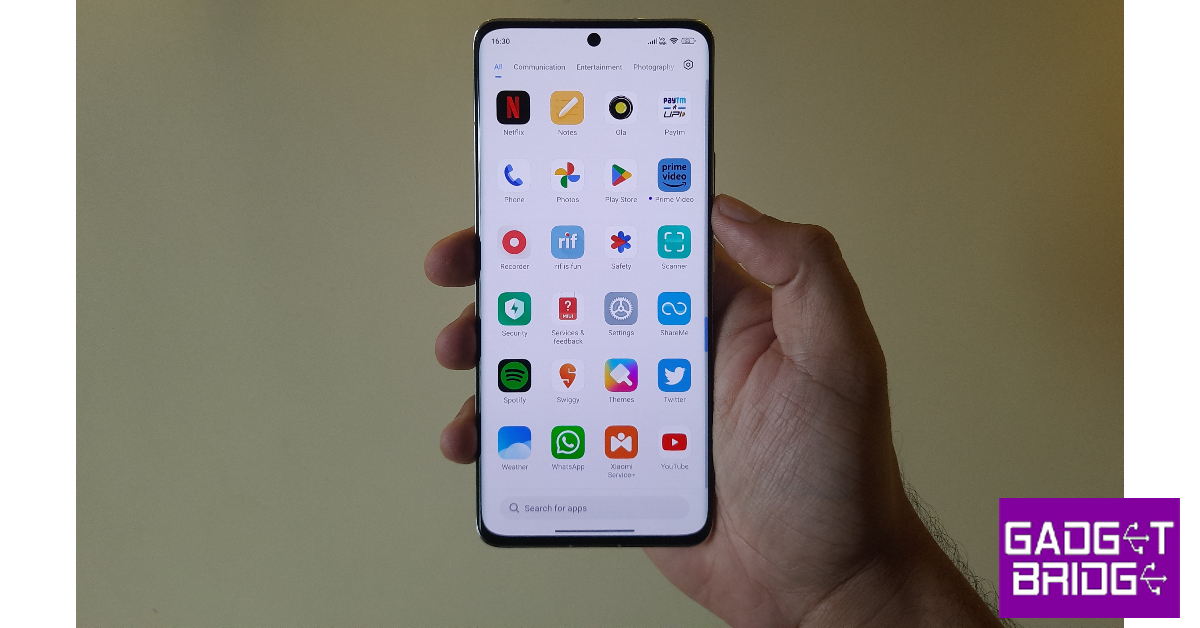 Step 1:
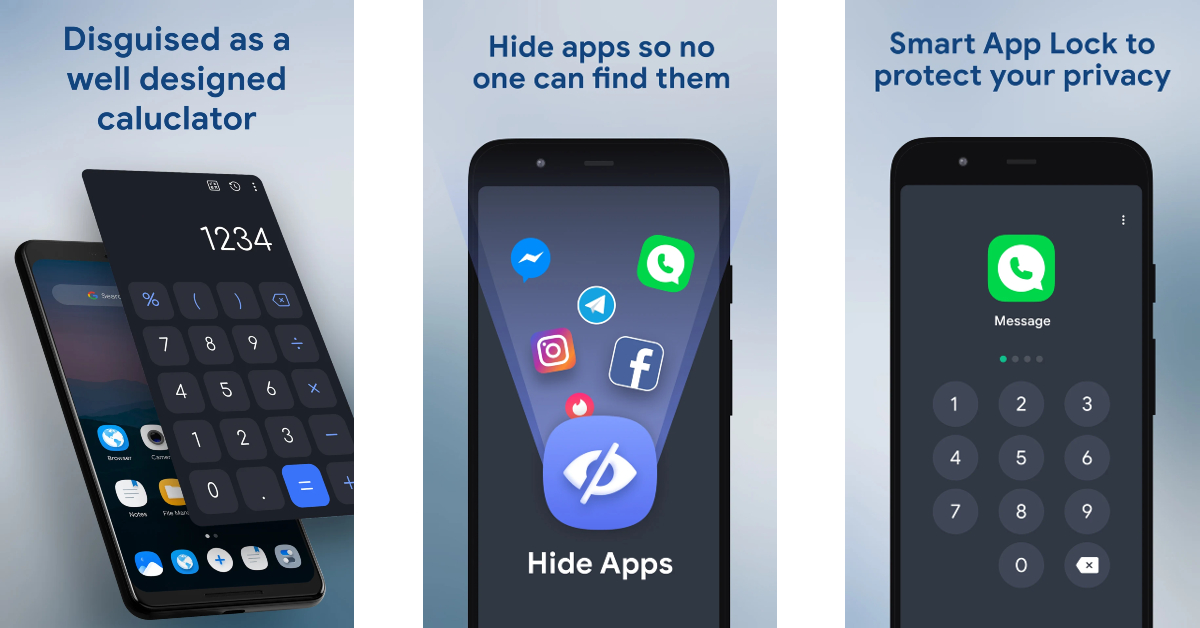 Step 1: Install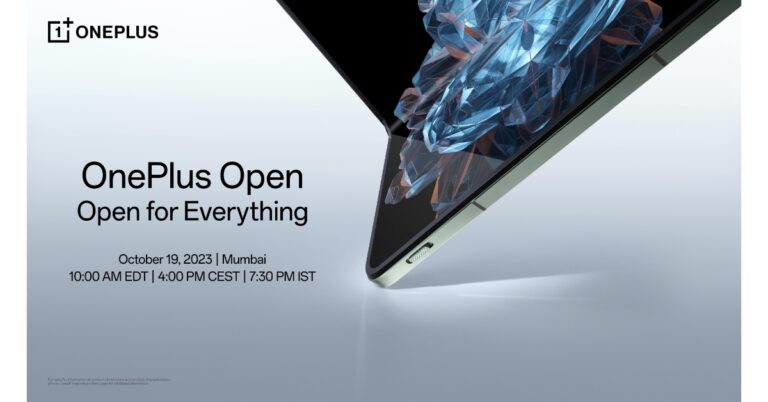

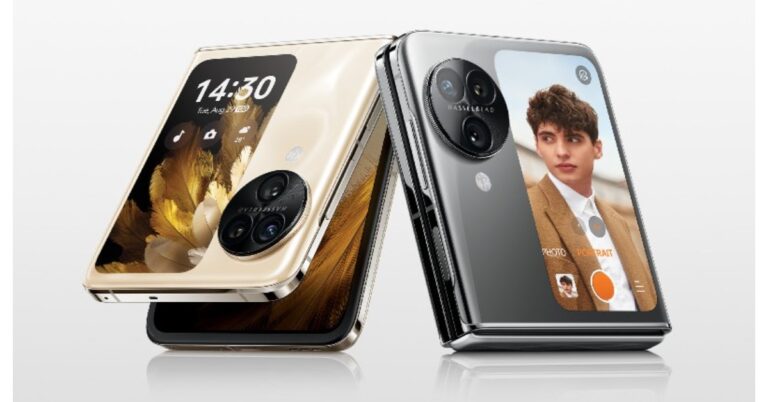
 The Find N3 Flip sports triple rear cameras arranged inside a circular module which sits beside the cover screen. The camera system consists of a 32-megapixel telephoto sensor, an 8-megapixel ultra-wide-angle sensor, and a 50-megapixel Sony IMX890 main lens with OIS feature. The smartphone further features a 32-megapixel front camera for taking selfies and making video calls.
Also Read: Samsung Galaxy Z Flip 5 Review: Flip it good!
The Oppo Find N3 Flip is fuelled by a 4,300mAh battery with 44W supervooc wired charging support. To unlock the device the Find N3 Flip has a side-mounted fingerprint scanner. A gravity sensor, gyroscope, compass and an ambient light sensor are also available on the phone. The Oppo Find N3 Flip has 5G, Wi-Fi, Bluetooth, and NFC connectivity options.
For the latest gadget and tech news, and gadget reviews, follow us on Twitter, Facebook and Instagram. For newest tech & gadget videos subscribe to our YouTube Channel. You can also stay up to date using the Gadget Bridge Android App. You can find the latest car and bike news here.
The Find N3 Flip sports triple rear cameras arranged inside a circular module which sits beside the cover screen. The camera system consists of a 32-megapixel telephoto sensor, an 8-megapixel ultra-wide-angle sensor, and a 50-megapixel Sony IMX890 main lens with OIS feature. The smartphone further features a 32-megapixel front camera for taking selfies and making video calls.
Also Read: Samsung Galaxy Z Flip 5 Review: Flip it good!
The Oppo Find N3 Flip is fuelled by a 4,300mAh battery with 44W supervooc wired charging support. To unlock the device the Find N3 Flip has a side-mounted fingerprint scanner. A gravity sensor, gyroscope, compass and an ambient light sensor are also available on the phone. The Oppo Find N3 Flip has 5G, Wi-Fi, Bluetooth, and NFC connectivity options.
For the latest gadget and tech news, and gadget reviews, follow us on Twitter, Facebook and Instagram. For newest tech & gadget videos subscribe to our YouTube Channel. You can also stay up to date using the Gadget Bridge Android App. You can find the latest car and bike news here.  The device is scheduled to go on sale on October 22. It can be purchased via the company’s official online store and Flipkart starting at 6 PM. The pre-order window has also opened.
Also Read: Google Pixel 8 Series first sale in India begins: Pricing and offer details inside
There will be up to Rs 12,000 cashback on SBI cards, ICICI Bank cards and more. Up to 12 months, no no-cost EMI options are available. Oppo customers can upgrade to the new Flip Phone with an exchange bonus of up to Rs 8,000. Also, there is a one-time screen replacement offer on the handset along with Oppo Premium Services.
The buyers will also get to enjoy a 3-month trial of YouTube Premium and 6 6-month free trial of Google One.
The device is scheduled to go on sale on October 22. It can be purchased via the company’s official online store and Flipkart starting at 6 PM. The pre-order window has also opened.
Also Read: Google Pixel 8 Series first sale in India begins: Pricing and offer details inside
There will be up to Rs 12,000 cashback on SBI cards, ICICI Bank cards and more. Up to 12 months, no no-cost EMI options are available. Oppo customers can upgrade to the new Flip Phone with an exchange bonus of up to Rs 8,000. Also, there is a one-time screen replacement offer on the handset along with Oppo Premium Services.
The buyers will also get to enjoy a 3-month trial of YouTube Premium and 6 6-month free trial of Google One.

 “But while they’re a big step forward, we know that new technologies take time to catch on — so passwords may be around for a little while. That’s why people will still be given the option to use a password to sign in and may opt out of passkeys by turning off “Skip password when possible.” Google noted in its blog post.
As per the company even if you use a strong password with special characters, numbers and alphabets they are now phishing resistant in contrast to Google Passkeys.
“But while they’re a big step forward, we know that new technologies take time to catch on — so passwords may be around for a little while. That’s why people will still be given the option to use a password to sign in and may opt out of passkeys by turning off “Skip password when possible.” Google noted in its blog post.
As per the company even if you use a strong password with special characters, numbers and alphabets they are now phishing resistant in contrast to Google Passkeys.
 Step 3: Select Manage apps and device.
 Step 4: Tap on Sync apps to devices.
 Step 3: Select Manage apps and device.
 Step 4: Tap on Sync apps to devices.
 Step 5: Select the device to which you want to sync your installed apps. Any apps you install on your current device will also be installed on the selected device.



 Step 4: Tap on Download.


 Step 8: Tap the ellipses in the video player and hit Download.

 Step 4: Tap on Download.
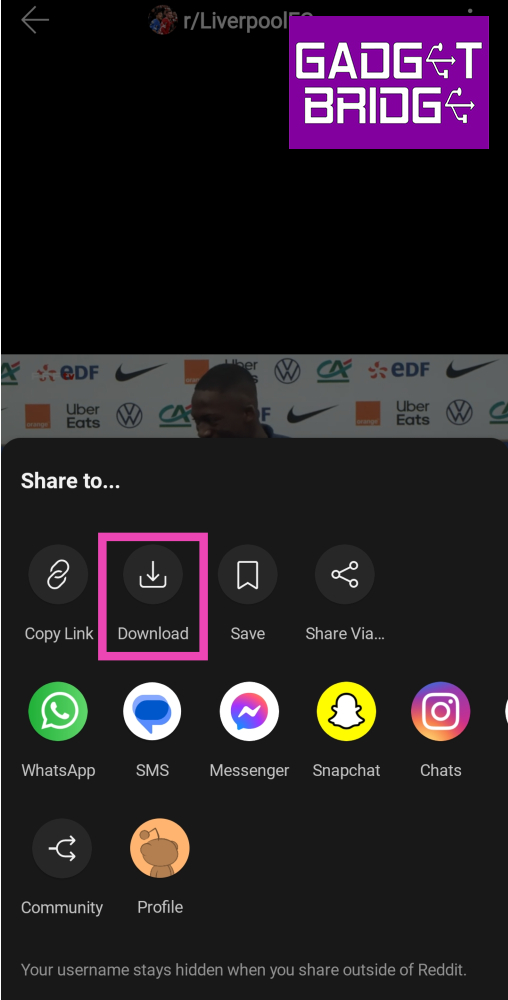
 Step 4: Select Download.
 Step 5: Launch your preferred web browser on your smartphone.
Step 6: Go to https://savemp4.red/.
Step 7: Paste the link in the website’s address box and hit Go.
Step 5: Launch your preferred web browser on your smartphone.
Step 6: Go to https://savemp4.red/.
Step 7: Paste the link in the website’s address box and hit Go.
 Step 8: Tap the ellipses in the video player and hit Download.
 The Reddit video will be saved on your device.