Garena Free Fire Redeem Codes Today 2 June 2023: Here is how to claim them

Garena Free Fire is a battle royale game with regular awards and tournaments to keep players interested. If you play Garena Free Fire, you should be aware of the redeem codes that are released on a daily basis. However, because the battle royale game is banned in India, players from other countries can use the Free Fire Redeem codes daily. If you’re unfamiliar with the Garena Free Fire redeem codes or don’t know how to get them, we’ve put together a step-by-step guide to help you redeem them. Check out Garena Free Fire Redeem Codes for 2 June 2023.

The Free Fire redeem codes are a great way to get free stuff. These are 12-digit codes that contain alphabets and numbers, as well as an expiration date and time. Because the Garena FF redeem codes cannot be used more than once, you should hurry to the redemption page to claim your free reward before someone else does. To get a free reward, all you have to do is go to reward.ff.garena.com/en, which is the official redemption page. Also, keep an eye on this space for daily updates on Garena Free Fire redemption codes and rewards.

Garena Free Fire Redeem Codes Today 2 June 2023

FFAC2YXE6RF2

FAGTFQRDE1XCF

FFCMCPSBN9CU

BR43FMAPYEZZ

FFCMCPSJ99S3

XZJZE25WEFJJ

V427K98RUCHZ

HNC95435FAGJ

6KWMFJVMQQYG

FFCMCPSUYUY7E

MCPW3D28VZD6

EYH2W3XK8UPG

MCPW2D1U3XA3

NPYFATT3HGSQ

FFCMCPSGC9XZ

MCPW2D2WKWF2

ZZZ76NT3PDSH

FFCMCPSEN5MX

How to Get Free Fire Redeem Codes for Garena on 2 June 2023?

  • Visit the Garena Free Fire game’s official website at reward.ff.garena.com.
  • Use your Facebook, Google, VK, Apple ID, Huawei ID, or Twitter account to log in.
  • You’ll be taken to a valid redemption code (s)
  • Copy and paste the 12-digit redemption code into the text box.
  • On the screen, a dialogue box will appear.
  • ‘Ok’ should be selected.

For the latest gadget and tech news, and gadget reviews, follow us on TwitterFacebook and Instagram. For newest tech & gadget videos subscribe to our YouTube Channel. You can also stay up to date using the Gadget Bridge Android App. You can find the latest car and bike news here.

Amazon Quiz Answers Today 2 June 2023: Participate to win Rs 500

2 June 2023 Amazon Quiz has gone live. Customers from different parts of the country are participating in the daily quiz. The quiz begins from 12 AM to 11:59 PM. Those participating in the quiz can win exciting prizes by answering all the questions correctly. Today participants have a chance to win a Rs 500 Amazon Pay Balance.

Amazon quiz brings an opportunity for its customers to win Amazon Pay Balance ranging from Rs 1,000 to Rs 50,000. The Quiz can be played from 12 AM to 11:59 PM. The e-commerce platform brings a fresh quiz on a daily basis which consists of five questions related to general knowledge and current affairs. The participants need to answer all the questions correctly and their names will be selected for a lucky draw. The winner will be announced at the end of the month.

One wrong answer could eliminate you from the quiz. If you manage to answer all the questions correctly you can stand a chance to win a Rs 500 Amazon Pay Balance today. Only app users are eligible to participate in the Quiz. Check Out 2 June 2023 Amazon Quiz Answers.

Amazon Quiz Today Prize – Rs 500 Amazon Pay Balance

Quiz Date – 2 June 2023

Daily Timing – 12 AM to 11:59 PM

Winner Announcement – Today 12 PM

Amazon Quiz Answers Today 2 June 2023

Question 1: The first AIIMS in North-East India was opened in which city?

Answer: Guwahati

Question 2: FIFA has removed which country from hosting the men’s U-17 World Cup 2023?

Answer: Peru

Question 3: Which cricketer’s son recently made his IPL debut for Mumbai Indians in IPL 2023?

Answer: Sachin Tendulkar

Question 4: In Greek Mythology, which god created this animal?

Answer: Poseidon

Question 5: This palace was built by which ruler?

Answer: Maharaja Sawai Pratap Singh

How To Play Amazon Quiz

Only app users are eligible to play the Amazon quiz every morning from 12 AM to 11:59 PM. The quiz is not available on the desktop. For those who are unaware of how to play the Amazon quiz below are the steps, you can follow to take the quiz.

  • Firstly download the Amazon app from Google Play Store or App Store
  • Now fill in the required information through the Sign Up option.
  • You need to log in to the Amazon app and scroll down on the home screen to find the Amazon Quiz banner.
  • Tap on the Amazon Quiz banner and tap on the Start button to start the Quiz.
  • Now you will get 5 questions and you need to answer them correctly. One wrong answer will eliminate you from the Quiz.
  • After answering all the questions correctly you are now eligible for a Lucky Draw.
  • The winner’s name will be announced today at 12 PM.

For the latest gadget and tech news, and gadget reviews, follow us on Twitter, Facebook and Instagram. For newest tech & gadget videos subscribe to our YouTube Channel. You can also stay up to date using the Gadget Bridge Android App. You can find the latest car and bike news here.

Becoming Acquainted with the Social Media Technology: What It Is, How It Works, and What It Can Do for You

Social media platforms like Facebook, Twitter, Instagram, and LinkedIn are used by billions of people around the world to connect with friends, family, and colleagues, share content, and stay up to date on news and events. However, what precisely is social media and how does it operate? In this article, we’ll investigate the innovation behind virtual entertainment, including its set of experiences, key highlights, and possible advantages and dangers.

What Is Virtual Entertainment?

Web- and mobile-based technologies that enable individuals and organizations to create, share, and interact with user-generated content are collectively referred to as “social media.” Profiles, status updates, news feeds, messaging, and commenting are all common features on social media platforms. Multimedia content like photos, videos, and live streaming may also be included.

Since its inception, social media has undergone significant change, with frequently new features and platforms being added. From personal networking and communication to marketing and advertising, political activism, and even online shopping, social media is used for a wide range of purposes today.

The majority of social media platforms are free to use, though some charge for premium features. One of the benefits of social media is the ability to connect with distant relatives and friends. Businesses can also use it to advertise their goods or services. Additionally, you can find a variety of popular games like excalibur unleashed try demo on social media and spend some free time with a chance to get a big win. Social media can also be a great way to learn new things and keep up with current events.

The History of Social Media

Although social media as we know it today is a relatively new phenomenon, its beginnings can be found in the early days of the internet. Six Degrees, the first social media site, was launched in 1997 and allowed users to connect with friends and create profiles. Other early virtual entertainment stages included Friendster, MySpace, and LinkedIn, which was sent off in 2003 and zeroed in on proficient systems administration.

The ascent of virtual entertainment truly took off with the send-off of Facebook in 2004, which immediately became one of the most famous person-to-person communication locales on the planet. From that point forward, online entertainment has proceeded to develop and advance, with new stages like Instagram, Twitter, and Snapchat acquiring enormous followings.

Key Features of Social Media

While each social media platform’s specific features vary, the majority of sites share a few key characteristics. These are some:

– Profiles: Most social media platforms let users make a profile with basic information like their name, photo, and bio, as well as more information like where they live, what they like to do, and what kind of education they have.

– News sources: Virtual entertainment clients are commonly given a news channel that presentations content from different clients and pages that they follow. News feeds may be curated using an algorithm based on the preferences and actions of users.

– Updating the status: Through status updates, which can include text, images, videos, or links, users can share updates, thoughts, and opinions with their followers.

– Texting: Most web-based entertainment stages incorporate informing highlights that permit clients to speak with one another secretly.

– Sharing: Users can share photos, videos, links, and other multimedia content with their followers through social media platforms.

– Involvement: Through features like commenting, liking, and sharing, social media platforms encourage users to engage with one another and interact with one another.

The Advantages of Social Media

Social media has the potential to provide individuals and businesses alike with numerous advantages. The following are some possible advantages of social media:

– Expanded network: Online entertainment permits people to associate with companions, family, and partners from everywhere the world, paying little heed to geological area.

– Socializing: Virtual entertainment stages can be utilized for proficient systems administration, permitting people to associate with expected businesses, coaches, and partners.

– Advertising and marketing: Social media can be an effective marketing and advertising tool that gives businesses a low-cost way to reach a large audience.

– News and data: Because it provides real-time updates on current events and breaking news, social media is a crucial source of news and information for many people.

– Civic participation: People can use social media to get involved in politics and the community by connecting with others who share their values and advocating for causes they care about.

The Dangers of Social Media

While there are many advantages to using social media, there are also some potential dangers and disadvantages. The following are some of the potential dangers of social media:

– Cyberbullying and incitement: Individuals can be tormented, badgered, or scared using online entertainment, especially weak populaces like youngsters and teens.

– Concerns for privacy: Users’ personal information is collected in large quantities by social media platforms, which can be used for targeted advertising and are susceptible to hacking and data breaches.

– Enslavement: Virtual entertainment can be habit-forming, prompting enthusiastic use and adverse consequences on psychological wellness and prosperity.

– False information and deception: False information and propaganda can be disseminated through social media, causing polarization and confusion.

Conclusion

Online entertainment is a strong and complex innovation that has changed the manner in which we impart, associate, and draw in with our general surroundings. It has many advantages, but it also has some potential dangers and disadvantages that need to be carefully considered. We can make educated choices regarding how to utilize this potent tool in a manner that maximizes its benefits and minimizes its risks by comprehending the technology behind social media and its potential effects.

For the latest gadget and tech news, and gadget reviews, follow us on TwitterFacebook and Instagram. For newest tech & gadget videos subscribe to our YouTube Channel. You can also stay up to date using the Gadget Bridge Android App. You can find the latest car and bike news here.

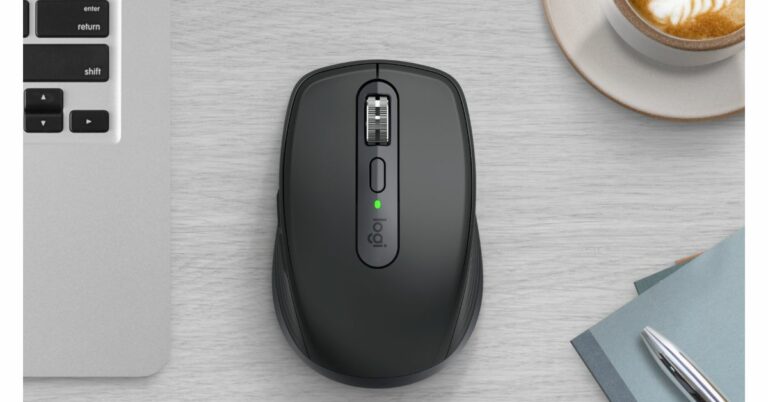
Logitech announced MX Keys S Combo, MX Keys S, and MX Anywhere 3S with new software

Logitech has announced the launch of a new keyboard and mouse in India. Logitech MX Keys S Combo, MX Keys S, and MX Anywhere 3S were all introduced by the company. In addition to this, all the devices have been updated with Smart Actions, a new feature in Logi Options+.

Pricing and availability

The cost of the MX Keys S Combo is Rs 22,995. For Rs 13,295 the MX Keys S is available in graphite and grey. The cost of the MX Anywhere 3S is Rs 9,225. The Logi Options+ app is available for download for free at logi.com/optionsplus.

Logitech announced MX Keys S Combo, MX Keys S, and MX Anywhere 3S with new software

Smart Actions

Logi Options+ App now has smart actions feature that enables users to avoid repeated actions by automating multiple tasks with a single keystroke so you can streamline your workflow with macros. In addition to this, it also offers predefined customizable Smart Actions to help automate common tasks to get more done.

MX Keys S Combo

The new MX Keys S keyboard, MX Master 3S mouse, and MX palm rest are included in the MX Keys S Combo. This duo enables quick and precise operations, perfect for experts focused on high levels of creativity and maximum production. The keyboard comes with intelligent backlighting and programmable keys. The 8K DPI sensor, which tracks on all surfaces—including glass—complements the mouse’s silent clicks and quick scrolling.

MX Keys S

The MX Keys S features a wireless illuminated keyboard with curved keys. It offers a superior low-profile typing experience. This keyboard offers fast, fluid, and Perfect Stroke typing in a cosy design. Smart illumination is built-in, and the backlighting senses when hands are about to reach the keyboard to illuminate it. It can adjust automatically based on the lighting situation in the room, which can now be customised in the Logi Options+ app. The MX buttons S, which come in two colours—Graphite and Pale Gray—offer an enhanced keyboard layout with three new buttons for maximum efficiency and teamwork: talk to text, mute/unmute the microphone, and emoji.

MX Anywhere 3S

The MX Anywhere 3S is a wireless mouse which is perfect for expert users looking for performance, portability, and comfort. Additionally, Logitech Quiet Click technology is included making clicking quieter than its predecessor (MX Anywhere 3). MX Anywhere 3S features an 8,000 DPI optical sensor that tracks on virtually any surface, including glass, as you move it to varied workspaces around the home or office.

For the latest gadget and tech news, and gadget reviews, follow us on TwitterFacebook and Instagram. For newest tech & gadget videos subscribe to our YouTube Channel. You can also stay up to date using the Gadget Bridge Android App. You can find the latest car and bike news here.

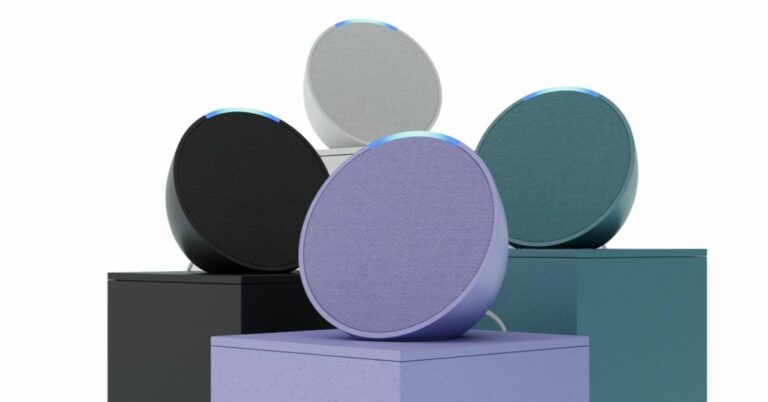
Amazon Echo Pop now available in India for Rs 4,999

Amazon Echo Pop was introduced in India on Thursday. The device is the latest addition to the Echo family and is basically a drum-shaped smart speaker that comes with a new semi-sphere form factor. A Z2 Neural Edge processor powers the Echo Pop and includes Alexa built-in.

Amazon Echo Pop price in India and sale details

The price of the Amazon Echo Pop is set at Rs 4,999 in India. This smart speaker will be available in Green, Purple, in addition to White and Black colour options. It can now be purchased via Amazon.in as well as Croma, Reliance Digital, Poorvika and Amazon devices kiosks across India.

Amazon Echo Pop price in India and sale details
Echo Pop

Amazon Echo Pop specifications

The Echo Pop has an innovative semi-sphere design with a custom-designed 1.95-inch front-facing directional speaker. Since it is an Echo product, Alexa is already included. Customers can just ask Alexa to play songs from Amazon Prime Music, Hungama, Spotify, JioSaavan, Apple Music, and others (some apps might need a subscription). By connecting Echo Pop via Bluetooth to the phone, customers can also stream their favourite music. It can be used to read audiobooks, track the record of a favourite sports team, control smart lights and plugs, or reorder household essentials.

The Amazon Echo Pop has eero Built-in and an Amazon AZ2 Neural Edge processor, allowing it to extend the coverage of an existing eero wifi network by up to 1,000 square feet. Users will have access to thousands of compatible devices from top Indian manufacturers like Wipro, Syska, Xiaomi, and many others, including smart lights and other electrical appliances. Simply say “Alexa, turn on the AC” or “Alexa, dim the living room lights.” In order to enjoy a genuinely ambient experience, consumers can also extend the experience to non-smart products using smart plugs, which can be purchased separately.

Kids can study and have fun with Echo Pop without using a screen. Kids can develop abilities like curiosity and communication by interacting with Alexa. In addition, parents may access thousands of Alexa skills for children and ask Alexa to play bedtime stories, nursery rhymes, games, quizzes, amusing facts, and English lessons. Simply ask Alexa, “Alexa, why is the sky blue?” or say “Alexa, open 1-2-3 Math” to begin.

For the latest gadget and tech news, and gadget reviews, follow us on TwitterFacebook and Instagram. For newest tech & gadget videos subscribe to our YouTube Channel. You can also stay up to date using the Gadget Bridge Android App. You can find the latest car and bike news here.

Asmi Jain from Indore wins the Apple Swift Student Challenge for creating a healthcare app

Apple revealed the names of the three winners of the Apple Swift Student Challenge just before WWDC23. This challenge for a healthcare app was won by a 20-year-old Indore girl out of three. Using Apple’s Swift coding language, Madhya Pradesh resident Asmi Jain developed an app to assist her friend’s uncle who underwent brain surgery. She will now be present at the WWDC23 both virtually and physically.

All the participants use coding to share their passions with the world on a wide range of subjects, including healthcare, sports, entertainment, and the environment. Asmi Jain, Yemi Agesin, and Marta Michelle Caliendo are three first-time winners of the Apple Swift Student Challenge.

winners of Apple Swift Student Challenge

Asmi Jain, a 20-year-old student at Medi-Caps University in Indore, India found out that her friend’s uncle needed brain surgery. As a result, he was left with eye misalignment and facial paralysis. Jain sprung into action, designing her winning playground to track a user’s eye movements as they try to follow a ball moving around the screen.

Though it was inspired by her friend’s uncle, Jain hopes that people with a variety of eye illnesses and injuries will be able to use the playground to help strengthen their eye muscles.

“It was important for me to create an app playground that could positively impact the lives of people like him,” says Jain. “My next goal is to get feedback and make sure it’s effective and user-friendly, and then release it on the App Store. Ultimately, I want to expand it so that it helps strengthen all of the muscles in the face, and I hope it can one day serve as a therapy tool that people like my friend’s uncle can use at their own pace.”

In addition, Jain’s aspiration to use coding to address issues in the healthcare sector springs from many years spent volunteering to help those around her. She recently set up a forum at her university with the help of a few other students so that their classmates had a support system for working through tough coding problems.

“When you feel as though you’re part of something bigger, it motivates you and drives you to do better. Coding lets me create things that help my friends and my community. And it gives me a sense of independence that is very empowering,” she further added.

Every year before its annual conference WWDC Apple challenges students worldwide to build an original software playground using the Swift coding language. This year’s World Wide Developers Conference (WWDC) 2023 will begin on June 5 and go until June 9.

The challenge winners will be among those present both physically and virtually when WWDC23 begins on June 5 to view the keynote, events, laboratories, and activities made available to the world’s Apple developers this year. According to the company this year instead of awarding 350 winners as in previous years, Apple upped the number to 375.

For the latest gadget and tech news, and gadget reviews, follow us on TwitterFacebook and Instagram. For newest tech & gadget videos subscribe to our YouTube Channel. You can also stay up to date using the Gadget Bridge Android App. You can find the latest car and bike news here.
Nothing Phone 2 display and software information revealed, will be the most sustainable smartphones on the market

The global launch of Nothing Phone 2 is set for July. The next smartphone from Carl Pei’s Nothing has been slowly getting its specifications out there. The company previously disclosed information about the battery and chipset, but the display size and other specifications have now been confirmed. The forthcoming phone will be the replacement for the Nothing Phone 1, which was introduced last July and was the first phone ever made by the firm.

According to a Tweet, the Nothing Phone 2’s screen size will be 0.15-inch larger than its predecessor. The device is likely to feature a 6.7-inch display. Note that the Nothing Phone 1 featured a 6.55-inch FHD+ display. Additionally, the firm also revealed that it will provide the Nothing Phone 2 with 3 years of Android updates and 4 years of security patches.

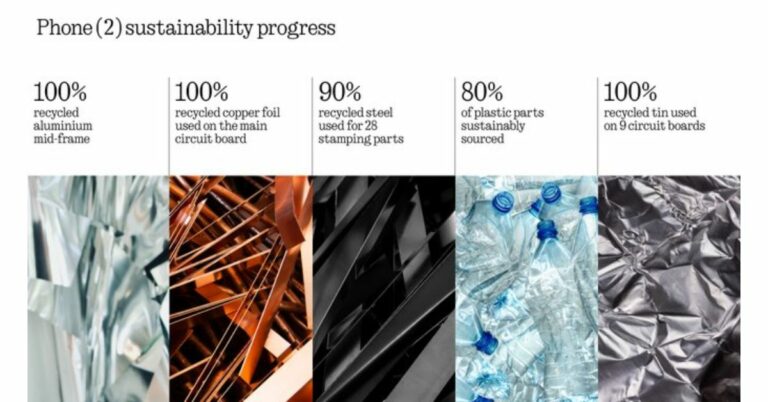
Nothing has also confirmed that despite increasing the phone size and battery capacity of Phone (1), Phone (2) boasts an SGS-certified carbon footprint of 53.45kg, which is 8.6% lower than that of Phone (1).

Also Read: Nothing Phone 2 global launch set for July, more specs revealed

According to Nothing, the Phone (2) has been designed to be one of the most sustainable smartphones on the market, with an emphasis on recycled and biobased components, renewable energy, and product lifespan.

Pei earlier revealed that the Nothing Phone 2 will have a 4,700mAh battery, which is 200mAh more than the 4,500mAh battery of the Phone 1. He also confirmed the phone will launch in July. The octa-core Qualcomm Snapdragon 8+ Gen 1 SoC will power the upcoming phone which is a significant leap from the Phone 1’s Qualcomm Snapdragon 778G+.

The information on the India launch and the exact launch date is yet to be confirmed. However, the company also did confirm that for the first time, the company will make its debut in the US market with the launch of Nothing Phone 2.

The phone was also spotted listed on the BIS certification site with model number AIN065 hinting at the imminent launch in India. According to the listing the upcoming phone is likely to feature a FHD+ AMOLED display with a refresh rate of 120Hz. The smartphone may also include a 5,000mAh battery with 67W fast charging support. The BIS listing also revealed that the Phone 2 will house a Snapdragon 8+ Gen 1 SoC with up to 12GB RAM and up to 256GB storage.

For the latest gadget and tech news, and gadget reviews, follow us on TwitterFacebook and Instagram. For newest tech & gadget videos subscribe to our YouTube Channel. You can also stay up to date using the Gadget Bridge Android App. You can find the latest car and bike news here.

Garena Free Fire Redeem Codes Today 1 June 2023: Here is how to claim them

Garena Free Fire is a battle royale game with regular awards and tournaments to keep players interested. If you play Garena Free Fire, you should be aware of the redeem codes that are released on a daily basis. However, because the battle royale game is banned in India, players from other countries can use the Free Fire Redeem codes daily. If you’re unfamiliar with the Garena Free Fire redeem codes or don’t know how to get them, we’ve put together a step-by-step guide to help you redeem them. Check out Garena Free Fire Redeem Codes for 1 June 2023.

The Free Fire redeem codes are a great way to get free stuff. These are 12-digit codes that contain alphabets and numbers, as well as an expiration date and time. Because the Garena FF redeem codes cannot be used more than once, you should hurry to the redemption page to claim your free reward before someone else does. To get a free reward, all you have to do is go to reward.ff.garena.com/en, which is the official redemption page. Also, keep an eye on this space for daily updates on Garena Free Fire redemption codes and rewards.

Garena Free Fire Redeem Codes Today 1 June 2023

  • FKO9I8UYHGR5JK6
  • FOLYHIUYD5TRSFE
  • FB4NJKITGUYTVBS
  • FFSERE5GR5JTYUT
  • F678KATRQD2X3V
  • FYGHJSI8EYTGTBN
  • FGJKIVUYTA4QEDC
  • F2V3B4RJTGBUGBN
  • FSRKITJHNYGVTYH
  • FB4NHRJUF7TRFDS
  • FVBWNEJ456YNMH
  • FNMWKEI4U5HGTB
  • FFNJUDYTGEBNJGU

How to Get Free Fire Redeem Codes for Garena on 1 June 2023?

  • Visit the Garena Free Fire game’s official website at reward.ff.garena.com.
  • Use your Facebook, Google, VK, Apple ID, Huawei ID, or Twitter account to log in.
  • You’ll be taken to a valid redemption code (s)
  • Copy and paste the 12-digit redemption code into the text box.
  • On the screen, a dialogue box will appear.
  • ‘Ok’ should be selected.

For the latest gadget and tech news, and gadget reviews, follow us on TwitterFacebook and Instagram. For newest tech & gadget videos subscribe to our YouTube Channel. You can also stay up to date using the Gadget Bridge Android App. You can find the latest car and bike news here.
Amazon Quiz Answers Today 1 June 2023: Participate to win Rs 2,500 Amazon Pay Balance

1 June 2023 Amazon Quiz has gone live on its mobile app platform. Customers from different parts of the country are participating in the daily quiz. The daily quiz is conducted by the company brings an opportunity for the customers to win exciting prizes. The quiz begins from 12 AM to 11:59 PM. In today’s quiz participants have a chance to win Rs 2,500 Amazon Pay Balance by answering all the questions correctly.

Every day Amazon brings a fresh set of questions for its customers that contains five easy questions. Amazon quiz brings an opportunity for its customers to win Amazon Pay Balance ranging from Rs 1,000 to Rs 50,000. which consists of five questions related to general knowledge and current affairs.

The participants need to answer all the questions correctly and their names will be selected for a lucky draw. The winner will be announced at the end of the month. One wrong answer could eliminate you from the quiz. If you manage to answer all the questions correctly you can stand a chance to win Rs 1,000 Amazon Pay Balance today. Only app users are eligible to participate in the Quiz. Check Out 1 June 2023 Amazon Quiz Answers.

Amazon Quiz Today Prize – Rs 2,500 Amazon Pay Balance

Quiz Date – 1 June 2023

Daily Timing – 12 AM to 11:59 PM

Winner Announcement – Today at 12 PM

Amazon Quiz Answers Today 1 June 2023

Question 1: Chief Minister of Telangana K Chandrasekhar Rao inaugurated whose 125 feet tall statue in April 2023?

Answer: BR Ambedkar

Question 2: In 2023, who has broken the record of taking the most hat-tricks in T20 cricket?

Answer: Rashid Khan

Question 3: Since May 2023, Lachhman Das Mittal is India’s _______ billionaire.

Answer: Oldest

Question 4: This bird is the mascot of which North American City’s baseball team?

Answer: Toronto

Question 5: Where is the oldest operating brewery of this drink located?

Answer: Germany

How To Play Amazon Quiz

Only app users are eligible to play the Amazon quiz every morning from 12 AM to 11:59 PM. The quiz is not available on the desktop. For those who are unaware of how to play the Amazon quiz below are the steps, you can follow to take the quiz.

  • Firstly download the Amazon app from Google Play Store or App Store
  • Now fill in the required information through the Sign Up option.
  • You need to log in to the Amazon app and scroll down on the home screen to find the Amazon Quiz banner.
  • Tap on the Amazon Quiz banner and tap on the Start button to start the Quiz.
  • Now you will get 5 questions and you need to answer them correctly. One wrong answer will eliminate you from the Quiz.
  • After answering all the questions correctly you are now eligible for a Lucky Draw.
  • The winner’s name will be announced today at 12 PM.

For the latest gadget and tech news, and gadget reviews, follow us on Twitter, Facebook and Instagram. For newest tech & gadget videos subscribe to our YouTube Channel. You can also stay up to date using the Gadget Bridge Android App. You can find the latest car and bike news here.

8 Best Ways to Fix the ‘Invalid SIM Card’ Error on Android (2024)

0

Troubleshooting your Android smartphone is not a difficult task, but sometimes the most basic problems can be the trickiest to fix. Your Android smartphone displays the ‘Invalid SIM card’ error when there’s no SIM inside it. It can get confusing when you receive that error message even after inserting a SIM. In this article, we bring you the 8 best ways to fix the ‘Invalid SIM card’ error on an Android smartphone.

Read Also: 5 best camera smartphones under Rs 50,000 (May 2023)

Restart your smartphone

Restarting your smartphone is the first step you should take upon encountering any SIM-related problem. A simple restart stops all the background processes and refreshes the mobile connection on your device. To restart your Android smartphone, press and hold the side key and select ‘Power off’ from the power options. If long pressing the side key triggers the Google Assistant on your device, simply press and hold the side key and volume up key to access power options.

Toggle Airplane Mode

airplane mode

Switching your phone to Airplane Mode turns off the cellular network on your device. Once you turn off Airplane Mode, your device starts receiving network signals again. Turning off the Airplane and then turning it back on refreshes the network on your device. It can come in handy when your phone displays the ‘Invalid SIM card’ error. If it doesn’t work, move on to other fixes.

Manually select a network operator 

Most of the time, your smartphone is connected to your SIM’s network carrier. Most service providers tie up with other carriers to increase their coverage in a region. This means that even though you may be using the SIM card of a specific service provider, your phone may be utilising the network of another carrier. This is a smooth process that your smartphone carries out automatically. But on some occasions, it may cause some issues. Here’s how you can switch back to your network operator.

Step 1: Go to Settings and select Connections.

Step 1: Go to Settings and select Connections. 6 Best Ways to Fix the ‘Invalid SIM Card’ Error on Android

Step 2: Select Mobile Networks.

Step 2: Select ‘Mobile Networks’. 6 Best Ways to Fix the ‘Invalid SIM Card’ Error on Android

Step 3: Tap on Network Operators.

Step 3: Tap on ‘Network Operators’. 6 Best Ways to Fix the ‘Invalid SIM Card’ Error on Android

Step 4: Turn off the toggle bar for Select automatically.

Step 4: Turn off the toggle bar for ‘Select automatically’. 6 Best Ways to Fix the ‘Invalid SIM Card’ Error on Android

Step 5: Your phone will scan available operators near you. Choose your service provider from the list.

Step 5: Your phone will scan available operators near you. Choose your service provider from the list. 6 Best Ways to Fix the ‘Invalid SIM Card’ Error on Android

Reinsert your SIM card

Through SMS service

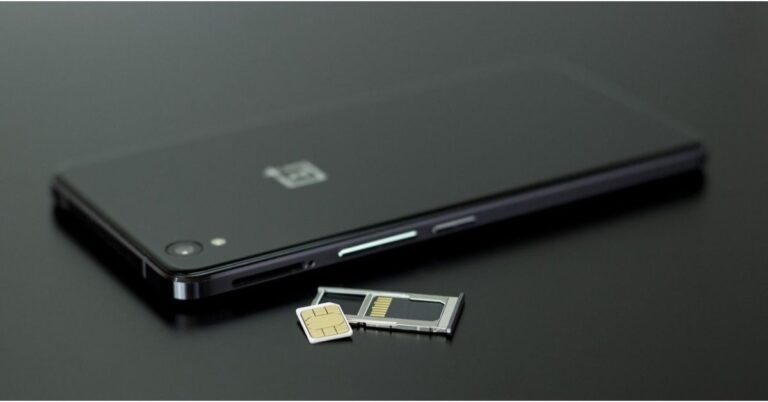
If you recently dropped your phone, the impact may have caused the SIM card to change its position slightly. Your smartphone may not be able to read it anymore, thus displaying the ‘Invalid SIM card’ error. To fix this, simply take out the SIM card from your phone and place it in its correct position again. Use the SIM ejector in the retail box to pop out the SIM tray. Make sure there is no dust on the SIM card or the slot. Push the tray back in and restart your device.

Contact the network provider

If the problem isn’t resolved after cleaning and reinserting the SIM card, it might be time to contact the network provider. Call the customer care helpline using another phone and register your complaint with a customer executive. If the problem is related to the network coverage or infrastructure in your area, the network provider will try to fix it. If that is not the case, move on to other fixes.

Buy a new SIM card

If your smartphone fails to read the SIM card even after it has been reinserted, there may be something wrong with the SIM card. This is a very common issue that surfaces after years of use. Even though the SIM card is not subject to any wear, it can still become outdated. Go to your network carrier’s nearest support centre and request a replacement. You will be charged a very nominal fee for the new SIM card.

Reset Network Settings

If none of the fixes mentioned in this list were helpful, your last resort is resetting the network settings on your device. Your phone will forget all established WiFi and Bluetooth connections and you will need to carry out the pairing process again. You will also lose your custom settings, as all the network settings will be set to default. Here’s how you can go about it.

Step 1: Go to Settings and select General Management.

Step 1: Go to Settings, scroll down and select General management.

Step 2: Scroll down and select Reset.

Step 2: Tap on ‘Reset.’ Android Connected To WiFi But No Internet

Step 3: Tap on Reset Network Settings.

Step 3: Tap on ‘Reset Network Settings’. Android Connected To WiFi But No Internet

Step 4: Select Reset Settings.

Step 4: Select ‘Reset Settings’.

Step 5: Enter your PIN to confirm your selection.

Update your phone’s OS

Step 1: Connect your phone to a WiFi network and plug in its charger.

Step 2: Go to Settings and select Software update.

Step 2: Scroll down and select Software Update. 8 Best Ways to Fix the ‘Invalid SIM Card’ Error on Android (2024)

Step 3: Tap on Download and Install. Your smartphone will check for any new updates.

Step 3: Tap on ‘Download and Install’. 8 Best Ways to Fix the ‘Invalid SIM Card’ Error on Android (2024)

Step 4: If an update is available, tap on Install Now. You can also schedule the update for a later time.

Step 4: Select ‘Install now’. Best Ways to Update Your Phone OS: iPhone and Android 8 Best Ways to Fix the ‘Invalid SIM Card’ Error on Android (2024)

Frequently Asked Questions

How do you fix an invalid SIM card on Android?

To fix an invalid SIM card, simply pop out the SIM tray and reinsert the card into your device. Perform a quick restart and check if you are still getting the error message.

Why does my phone say that my SIM card is invalid?

When your smartphone is not able to correctly read the SIM card, it displays the ‘Invalid SIM card’ message. To fix this, reinsert the SIM card into your device and make sure it is not a loose fit.

Why is my phone not getting any network signal?

If you are not getting any network signal on your Android smartphone, go to Settings>Connections>Mobile Network>Network Operator and manually select a network operator.

Read Also: Best 6 Ways to Unlock Your Android Device?

Conclusion 

These are the 8 best ways to fix the ‘Invalid SIM card’ error on your Android smartphone. Most of the time, when you get the ‘Invalid SIM’ error, it is because the SIM card is placed in the wrong position. Always keep a SIM ejector tool handy for these situations. If your SIM card is faulty, you will need to present your verification documents to the network provider in order to receive a replacement SIM card.

New Google TV models from Acer announced in India

Indkal Technologies has introduced a new lineup of Acer Google TVs with QLED & OLED in India. The firm has introduced the O, H, G, I, V, and W lineups, with the O series serving as the group’s flagship model.

While announcing the new range of Google TVs from Acer the company said, “Indkal Technologies, today announced the launch of the new Google TV lineup from Acer in India through a mega event in New Delhi where it revealed a wide product range across screen sizes, display technologies, and price segments. Among the products announced, the flagship O series with an OLED display and a 60-watt speaker system with large woofers really caught the eye. The OLEDs will be launched in two sizes, a 55-inch, and a 65-inch variant.”

The O series of OLED TVs comes in two sizes, a 55-inch, and a 65-inch variant. The TVs include a 60-watt speaker system with large woofers. On the other hand, the V Series is available in a 32-inch entry QLED variant along with the regular 43-inch, 50-inch, and 55-inch variants.

The I and G series comes in 32-inch and 40-inch variants with MEMC, Dolby Atmos and Vision, and UHD Upscaling. In addition to this, they are offered with 16 GB internal memory on both models. The I series now features a new audio system with 30-watt speakers in its 32-inch and 40-inch versions, as well as 36-watt and 40-watt speakers in its UHD models, which come in sizes 43-inch, 50-inch, 55-inch, 65-inch, and 75-inch.

The well-known H series comes with a 76-watt speaker system with better bass and treble and a more immersive audio setup. The W series of premium QLEDs, which feature the exclusive Anti-Glare Display, Wallpaper Design, Aural Sound, and Motion Sensors, is now also compatible with Google TV.

All of the new Acer Google TV models include Dolby Atmos as a significant value enhancement to all UHD versions across all six series, along with dual-band WiFi, 2-way Bluetooth 5.0, HDMI 2.1 connectors, and USB 3.0.

According to Indkal the I series going online for sale across channels on June 6.

For the latest gadget and tech news, and gadget reviews, follow us on TwitterFacebook and Instagram. For newest tech & gadget videos subscribe to our YouTube Channel. You can also stay up to date using the Gadget Bridge Android App. You can find the latest car and bike news here.

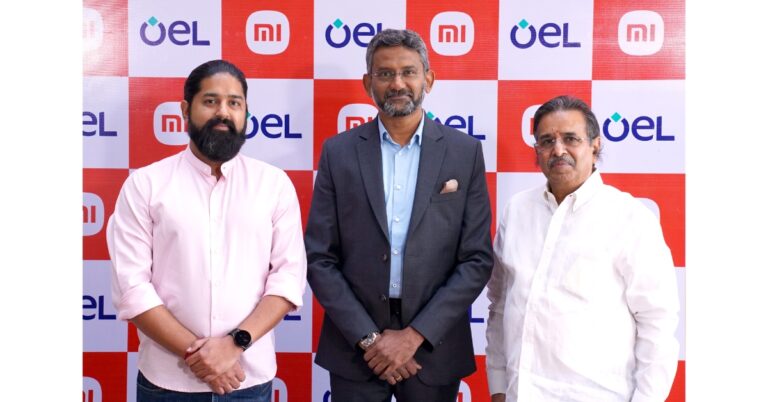
Xiaomi ranked 29th on Boston Consulting’s 50 Most Innovative Companies List

0

Xiaomi has moved up two spots from the previous year to be rated 29th on Boston Consulting Group’s (BCG) list of the “50 Most Innovative Companies of 2023.”
Xiaomi claims that the accreditation is an acknowledgement that the firm prioritises innovation, devotes resources and personnel to it, and tries to turn resources into outcomes.

In addition to this Xiaomi’s research and development (R&D) expenses increased by 17.7% in the first quarter of this year compared to the same period last year, totalling RMB4.1 billion. About 16,500 people worked in R&D as of March 31, 2023, which was more than 50% of Xiaomi‘s workforce. As of March 31, 2023, the company’s R&D activities have resulted in more than 32,000 patents being issued globally. Moreover, over RMB20 billion is expected to be invested in R&D overall in 2023.

In addition to embracing technical change, Xiaomi has also embraced artificial intelligence (AI). Over 1,200 people work in the AI industry, and a team based on the AI Lab Foundation Model was formally founded in April. It will keep growing user scenarios relating to AI, making the most of technological developments, and looking into collaboration prospects.

Based on a survey of more than 1000 worldwide innovation executives conducted in December 2022 and January 2023, BCG’s ranking of the Most Innovative Companies is derived. Four categories—global mindshare, industry peer opinion, industry disruption, and value creation—are used in the poll to evaluate a company’s performance.

The BCG list of the Most Innovative Companies is based on a poll of more than 1000 global innovation professionals that was performed in December 2022 and January 2023. The survey uses four criteria to assess a company’s performance: global mindshare, industry peer opinion, industry disruption, and value creation.

BCG has published an annual report on innovation every year since 2003. Amazon, Alphabet, Microsoft, Siemens, Pfizer, SpaceX, Nike, IBM, and more companies are also on the 2023 list.

Xiaomi claims that 2023 will be crucial to the company’s continued growth. The company will keep up its unyielding pursuit of technological advancement and dedication to ensuring that everyone in the globe has access to improved technologies while putting a strong emphasis on high-quality development.

For the latest gadget and tech news, and gadget reviews, follow us on TwitterFacebook and Instagram. For newest tech & gadget videos subscribe to our YouTube Channel. You can also stay up to date using the Gadget Bridge Android App. You can find the latest car and bike news here.

6 Best Ways to Sync an Android Device to Your PC

0

If you want to remotely use your smartphone using your PC, your options are very limited. There is no native Android interface that lets you send/receive messages or make calls using your PC. However, Microsoft’s Phone Link is able to bridge this gap in functionality. Some Android smartphone manufacturers like Samsung have their own connectivity apps for PC. In this article, we bring you the 6 best ways to sync an Android device to your Windows PC.

Read Also: Samsung Galaxy M14 5G review: Brilliant in the budget segment

Use Microsoft Phone Link

While there are a lot of third-party tools to manage your smartphone from your PC, the closest thing you’ve got to a native interface is Microsoft’s Phone Link. Using Phone Link you can sync your phone’s messages and notifications with your PC. The interface allows you to respond to texts, make & receive calls, browse the gallery, and a lot of other stuff. Here’s how you can sync your Android device with a PC using Microsoft Phone Link.

Step 1: Download and install the ‘Link to Windows’ app on your Android smartphone.

Step 2: Go to your PC settings and select ‘Phone’.

Step 3: Click on ‘Add a phone’ and choose whether you want to pair your phone manually or with a QR code.

Step 3: Choose whether you want to pair your smartphone manually or by using a QR code. Connecting via a QR code will be quicker.

Step 4: Launch the Link to Windows app on your smartphone and select ‘Link your Phone and PC’.

Step 4: On your smartphone, launch the Link to Windows app and select ‘Link phone and PC’.

Step 5: Select ‘Continue’ and scan the QR Code on your PC.

Step 5: Select ‘Continue’ and scan the QR code on your PC from your smartphone. 

Step 6: Select ‘Try another way’ to link your phone manually.

Step 6: To pair manually, tap on ‘Link manually’ on your PC and tap on ‘Try another way’ on your smartphone.

Step 7: Sign in using your Microsoft account.

Step 8: Click on ‘Create PIN code’ on your PC to generate a PIN for manual linking.

Step 8: On your PC, click on Create PIN code.

Step 9: Enter the PIN on your smartphone.

Step 9: Enter the PIN code in the Link to Windows app on your smartphone.

Step 10: Give the app the necessary permissions to function.

Step 10: Give the necessary permission to the Link to Windows app on your smartphone and hit ‘Done’ once you’re finished. 6 Best Ways to Sync an Android Device to Your PC

Step 11: Use the sidebar on the Phone Link on your PC to connect your phone and computer via Bluetooth.

Step 12: Use the sidebar on the Phone Link app to connect your smartphone and PC via Bluetooth. Once connected, you will be able to make and receive calls from your PC. 6 Best Ways to Sync an Android Device to Your PC

You will now be able to send and receive calls and messages while accessing your phone’s personal data on your PC.

Use Samsung Flow 

Samsung users can use the Samsung Flow app to sync their devices to a PC. You can find the Flow app on Microsoft Store. Here’s how you can link your Samsung device to your PC using Flow.

Step 1: Install Samsung Flow on your smartphone and PC and hit ‘Start’.

Step 1: Install Samsung Flow on your smartphone and PC and hit ‘Start’. 6 Best Ways to Sync an Android Device to Your PC

Step 2: Select your Samsung device.

Step 2: Select your Samsung device. 6 Best Ways to Sync an Android Device to Your PC

Step 3: Launch the Flow app on your Samsung device.

Step 4: Confirm the pass key to sync your phone with your PC.

Step 4: Confirm the pass key to sync your phone with your PC. 6 Best Ways to Sync an Android Device to Your PC

Step 5: Pair your PC and smartphone via Bluetooth or WiFi to complete the syncing process.

Once the two devices are linked you can view your phone’s notifications on your PC, send and respond to messages, share mobile internet, sync the clipboard, and do a lot of other stuff.

Use a third-party tool

PushBullet

There are plenty of third-party tools like Pushbullet, Coolmuster, and AirDroid that let you sync your phone with your PC. These apps are generally reliable and do a good job of syncing messages and notifications. The process to set up these tools is mostly similar. First, you need to install the PC and Android clients on the respective devices. Make sure your PC and smartphone are on the same network. Once that is done, you will need to create a profile on the application and then link your device via a QR code.

Use OneDrive or Google Drive to sync files

Google Drive offline mode is now available to access files without internet

If you want to sync the personal data on your smartphone to your PC, there is no better way of going about it that using a cloud storage service. Upon signing up for Google Drive, you get up to 15GB of free storage, which is optimum to create a backup of all the essential files on your device. You can sign into Google Drive using your PC to access those files. You can also use Google Drive to create an online backup of your WhatsApp conversations and media.

Use Google Calendar to sync calendar entries

google calendar

Most Android smartphones have Google’s app suite preinstalled in them. Google Calendar is one of those apps. You can use Google Calendar to sync your calendar entries across multiple devices. All you need to do to access the entries on your PC is sign into Google Calendar using the same Google Account that you use on your smartphone.

Use Sync for Chrome

Google TV update released: Improves GTV UI loading time at startup, Live tab loading speed and more

For a lot of people, syncing the passwords to different web services is more important than syncing media and calendar entries. Luckily, Google Chrome is able to achieve this with ease. The only prerequisite is that you must be using the same Google Account for Chrome on all devices. To begin syncing, launch Chrome on your smartphone, go to Settings, and turn on Sync. Once that is done, you will be able to access your saved passwords, browsing history, bookmarks, and more across multiple devices.

Frequently Asked Questions

How do I sync files between Android and Windows?

You can use Microsoft Phone Link to sync files, messages, calls, and more between Android and Windows. To access the media on your device across multiple devices, back up your data on Google Drive or OneDrive.

How do I sync photos from Android to PC automatically?

To sync your photos from Android to PC use the Microsoft Photos app to import all the images from your phone to your PC. You can also use Microsoft Phone Link on your PC to view the contents of your phone’s gallery at any given time.

How do I sync my passwords from Android to PC?

To sync passwords, bookmarks, and web history from your phone to your Windows PC and access them across multiple devices, launch the Chrome app and go to Settings>Sync.

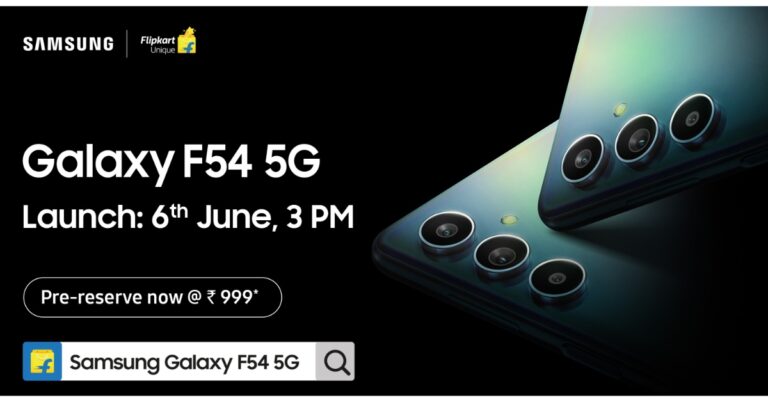
Read Also: Samsung Galaxy F54 5G confirmed to launch in India on June 6

Conclusion 

These are the 6 best ways you can sync your Android device to your Windows PC. Out of all these methods, we would suggest using Microsoft Phone Link as it is as close to a native method as it gets. You can also use Phone Link to sync your iPhone messages to your PC.

For the latest gadget and tech news, and gadget reviews, follow us on Twitter, Facebook and Instagram. For newest tech & gadget videos subscribe to our YouTube Channel. You can also stay up to date using the Gadget Bridge Android App. You can find the latest car and bike news here.
Thomson announced a new lineup of television and washing machines in India

Thomson has introduced an all-new FA series TVs with Realtek processor, Google TVs with 4k display and the latest series of semi-automatic washing machines in India. Additionally, SPPL, the official brand licensee of THOMSON in India, announces a new investment of Rs 200 crore for its cutting-edge wash plant.

Avneet Singh Marwah, CEO, Super Plastronics Pvt. Ltd. Exclusive Brand Licensee of Thomson in India, said, “We are extremely grateful to our loyal customers for making THOMSON a great success yet again in the Indian market. With our new investment of INR 200 cr towards the wash plant and our collaboration with Flipkart, we are confident to strengthen our presence in the category further. We are always very enthused to offer new products with the best of technology to our customers and THOMSON has a huge lineup of 25 models that we plan to launch in the rest of the year.”

Thomson FA series TVs

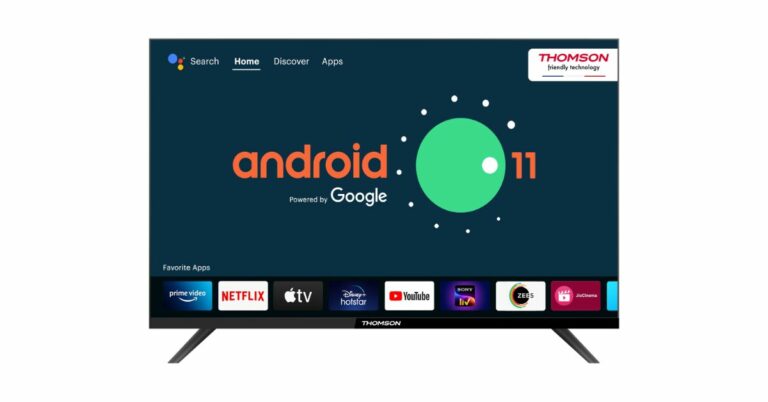
The new FA series TVs runs on Android 11 and is powered by a Realtek processor. The television series features a bezel-less design and comes in three different screen sizes 32, 40 and 42 inches. The Thomson TVs have 30W speakers and Dolby Digital. In addition, there is built-in Netflix, more than 6,000 apps and games Like Netflix, Prime Video, Disney+ Hotstar, Apple TV, Voot, Zee5, Sony LIV, and Google Play Store with 500,000 TV shows.

Thomson FA series TVs

The price of the FA series TV starts at Rs 10,499 for the 32-inch model. The price of the 40 and 42-inch variants is set at Rs 15,999 and Rs 16,999 respectively.

Thomson Thomson Google TVs


Thomson Google TVs

Whereas the Thomson Google TVs with 4k displays are available in 43-inch and 50-inch screen sizes. The devices also have a bezel-less design and come with Dolby Vision HDR 10+, Dolby Atmos, and Dolby Digital Plus support. In addition, there are 40W Dolby Audio Stereo Box Speakers supported by DTS TrueSurround. Moreover, they include 2GB RAM, 16GB ROM, and Dual Band (2.4 + 5 )GHz. These TVs are priced at Rs 22,999 for the 43-inch model and at Rs 27,999 for the 50-inch variant.

Thomson semi-automatic top-load washing machines

Thomson semi-automatic top-load washing machines

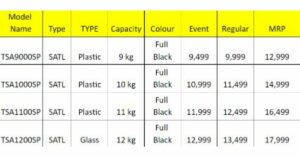
Besides this Thomson has also introduced a new range of semi-automatic top load washing machines series available in 9 Kg, 10 kg, 11 kg and 12 kg respectively. These machines are affordably priced. Prices are listed below:

Thomson semi-automatic top-load washing machines


For the latest gadget and tech news, and gadget reviews, follow us on TwitterFacebook and Instagram. For newest tech & gadget videos subscribe to our YouTube Channel. You can also stay up to date using the Gadget Bridge Android App. You can find the latest car and bike news here.

Best Ways to Turn Facebook Chat On or Off on Android

0

Messaging on Facebook started out as a section of the social media website and has now become one of the biggest standalone messenger apps in the world. Unline WhatsApp, you don’t need to share your phone number with someone to add them on Messenger. If you’re overwhelmed by the messages your receive on the Messenger app, you can choose to turn it off and disable the notifications. In this article, we bring you the best ways to turn Facebook chat on or off on Android.

Read Also: Samsung Galaxy F54 5G confirmed to launch in India on June 6

Use Facebook Messenger

Step 1: Launch the Messenger app on your Android smartphone.

Step 2: Tap the hamburger menu at the top left corner of the screen.

Step 2: Tap the hamburger menu at the top left corner of the screen.

Step 3: Tap the gear icon for settings.

Step 3: Tap the gear icon for settings.

Step 4: Select ‘Active Status’.

Step 4: Select ‘Active Status’.

Step 5: Turn off the toggle bars for ‘Show when you’re active’ and ‘Show when you’re active together’.

Step 5: Turn off the toggle bars for ‘Show when you’re active’ and ‘Show when you’re active together’.

Use the Facebook app

Instagram and Facebook

Step 1: Launch the Facebook app on your Android smartphone.

Step 2: Tap the hamburger menu icon at the top right corner of the screen.

Step 3: Go to the apps section and select ‘Messenger’.

Step 4: Tap the gear icon to access settings.

Step 5: Select ‘’On’ or ‘Off’ to enable or disable Facebook Chat.

Turn off notifications for Messenger

Step 1: Launch the Messenger app on your device.

Step 2: Tap the hamburger icon on the top left corner of the screen.

Step 2: Tap the hamburger menu at the top left corner of the screen. Best Ways to Turn Facebook Chat On or Off on Android

Step 3: Tap the gear icon.

Step 3: Tap the gear icon for settings. Best Ways to Turn Facebook Chat On or Off on Android

Step 4: Select ‘Notification and Sounds’.

Step 4: Select ‘Notification and Sounds’. Best Ways to Turn Facebook Chat On or Off on Android

Step 5: Turn off the toggle bar for ‘On’.

Step 5: Turn off the toggle bar for ‘On’. Best Ways to Turn Facebook Chat On or Off on Android

Frequently Asked Questions

What does ‘Turn off chat’ mean on Facebook?

When you turn off chat on Facebook, it means that your friends and contacts won’t be able to see whether you are online or not. You can still send and receive messages when the chat is turned off.

Can I disable Facebook chat?

Facebook chat can be disabled from the Facebook or Messenger app. The easiest way to go about it is by launching the Messenger app, going to Settings, and turning off the toggle bar for ‘Active Status’.

How do you know if someone has turned off chat for Facebook?

If someone is actively posting on Facebook but their Messenger profile says they are offline, it means they have turned off chat for Facebook.

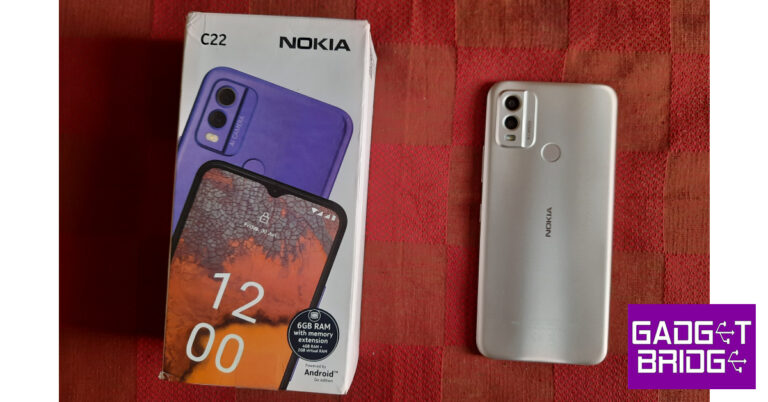
Read Also: Nokia C22 Review: Should you buy this budget smartphone for Rs 7,999?

Conclusion

These are the best ways you can turn Facebook chat On or Off on your Android smartphone. There is another way you can turn off notifications for the Messenger app. Simply go to app settings on your Android smartphone, select Messenger, and turn off notifications.

For the latest gadget and tech news, and gadget reviews, follow us on Twitter, Facebook and Instagram. For newest tech & gadget videos subscribe to our YouTube Channel. You can also stay up to date using the Gadget Bridge Android App. You can find the latest car and bike news here.

5 best camera smartphones under Rs 50,000

The cameras on smartphones have significantly improved, upping the ante in the photography world. Check out the following best camera smartphones under Rs 50,000 price category in India if you’re looking for a compact phone with outstanding camera capabilities.

Samsung Galaxy S21 FE 5G

5 best camera smartphones under Rs 50,000 (May 2023)

Samsung Galaxy S21 FE 5G is one of our favourite camera smartphones we would definitely recommend it. Not only its rear camera, but the selfies taken on it are also even better, sharp and more detailed than any other flagship smartphone. It comes with a 12-megapixel primary sensor with an f/1.8 wide-angle lens, a 12-megapixel ultra-wide sensor, and an 8-megapixel telephoto sensor making up the triple rear camera setup on the Galaxy S21 FE 5G. For selfies and video calls, the gadget also includes a 32-megapixel front camera with an f/2.2 aperture.

Price starts at Rs 35,999

Buy via Amazon

Also Read: 5 Best premium smartphones to buy in India in 2023

OnePlus 11R 5G

5 best camera smartphones under Rs 50,000 (May 2023)

This is another recommendation by us, OnePlus 11R 5G. The OnePlus 11R has three back cameras, one of which has a 50MP Sony IMX890 primary sensor. Together with other capabilities, it contains a 4 cm macro camera with a 120-degree ultra-wide lens and an 8 Megapixel ultra wide-angle sensor. The device lacks optical zooming capabilities but has a 10x digital zoom. The OnePlus 11R’s rear camera is shake-free and supports both electronic and optical image stabilisation, allowing it to record videos in 4K quality at 30 frames per second. The 16MP front camera is located in a notch at the top of the display.

Price starts at Rs 39,999

Buy via Amazon

Vivo V27 Pro 5G

5 best camera smartphones under Rs 50,000 (May 2023)

Vivo V27 Pro 5G is more than just a camera focussed phone. The device not only impressed us in the camera department but in terms of performance and design. The phones feature a triple rear camera setup that includes a 50MP Sony IMX766V custom primary rear sensor with OIS stabilisation along with an 8MP wide-angle, and a 2MP macro sensor. According to the company, there is a new Night Portrait with Aura Light feature for clicking natural, high-quality studio-like Night Portraits. In addition to this, there is a natural, high-quality studio-like Night Portraits. This feature is exclusively made for Indian weddings and consists of three different LUTs ((Look up Tables)- Prosecco, Neo-Retro and Pastels that work with both rear and front cameras. Upfront there is a 50-megapixel selfie camera with advanced eye autofocus.

Price starts at Rs 37,999

Buy via Flipkart

Also Read: 5 Best Photography smartphones in India: Ditch the DSLR

Oppo Reno 8 Pro

5 best camera smartphones under Rs 50,000 (May 2023)

Oppo’s Reno series is quite popular for its camera performance. The Reno 8 Pro has three rear cameras, each with a 50-megapixel Sony IMX766 sensor with an f/1.8 aperture. There is a 2-megapixel macro camera with an f/2.4 lens, an 8-megapixel sensor paired with an f/2.2 ultra-wide aperture with a 112-degree field of view. Oppo has additionally integrated the MariSilicon X NPU with the camera to enhance overall performance in both bright and dim light.

Price starts at Rs 45,999

Buy via Flipkart

Samsung Galaxy Z Flip 3

5 best camera smartphones under Rs 50,000 (May 2023)

Samsung Galaxy Z Flip 3 is a clamshell-like foldable phone which is an ideal choice for vloggers looking for a compact phone with better optics. Samsung Galaxy Z Flip 3 is highlighted with a dual rear camera setup that includes a 12-megapixel primary sensor with an f/1.8 aperture and a 12-megapixel wide-angle lens. In terms of selfies, there is a 10-megapixel sensor on the front having an f/2.4 aperture.

Price starts at 45,999

Buy via Flipkart

For the latest gadget and tech news, and gadget reviews, follow us on TwitterFacebook and Instagram. For newest tech & gadget videos subscribe to our YouTube Channel. You can also stay up to date using the Gadget Bridge Android App. You can find the latest car and bike news here.
Best 7 Ways to Unlock Your Android Device (2024)

1

If you keep your old Android devices with you, it is suggested that you power them up from time to time and charge them whenever necessary. If you haven’t used the device in a long time, it is possible that you may have forgotten its password. Luckily, there are still some ways you can gain access to the device. In this article, we bring you the best 7 ways to unlock your Android device without a password.

Read Also: Nokia C22 Review: Should you buy this budget smartphone for Rs 7,999?

Unlock your Android phone using your Google Account

Older Android versions used to have a ‘Forgot Pattern/Password’ option that lets you sign in using your Google Account in case you forgot your phone’s password. Newer Android versions no longer have this feature, but if your device runs on Android 4.4 or older, you can use your Google Account to get access to your smartphone. All you have to do is enter the wrong PIN/password/pattern multiple times and then tap on ‘Forgot Password’. You will be given multiple options to log in. Choose ‘Google Account’.

Unlock your Android phone using Google’s Find My Device

To use Find My Device to unlock your smartphone, you’ll need to activate the service and make it a device admin app. Go to Settings>Google to turn on Find My Device. Then, go to Settings>Biometrics and Security>Other security settings>Device admin apps and enable FMS. When that’s done, follow these steps to unlock your Android device.

Step 1: Go to https://www.google.com/android/find and select your Android phone from the left panel.

Step 2: Select Secure Device.

Step 2: Select Secure Device from the left panel. You can also set up a recovery message if you want.

Step 3: Find my device will lock your smartphone’s screen.

Step 3: Find my device will lock your smartphone’s screen. how to unlock samsung phone without password

Step 4: Follow the on-screen instructions to set up a new temporary password to unlock your device. 

Step 5: Once your phone is unlocked, disable the temporary password from settings.

Unlock your Samsung device using Find My Mobile

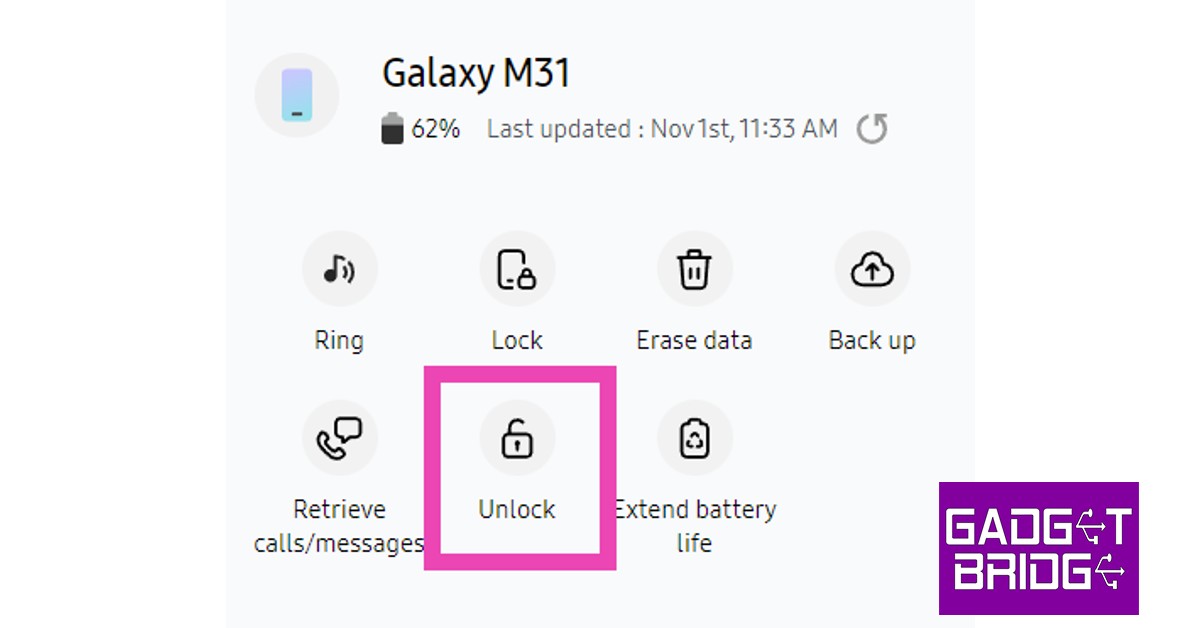
Samsung devices have their own tracking feature called ‘Find My Mobile’. Like Google’s Find My Device, you can use Find My Mobile to unlock your phone without entering your password. Before you begin, you will need to activate this feature from Settings>Samsung Account>Find My Mobile. Turn on the toggle bar for Remote Unlock. Once that’s done, follow these steps.

Step 1: Go to https://findmymobile.samsung.com/ and sign in using your Samsung Account.

Step 2: Select your Samsung device from the left panel.

Step 2: Select your Samsung smartphone from the left panel.

Step 3: Click on the Unlock icon on the right panel. Re-enter your Samsung Account password to unlock your device.

Click on the ‘Unlock’ icon on the right panel.

Once you unlock your Samsung device using this method, all the lock screen info will be deleted from it. This includes passwords, PIN, and biometric data.

Factory reset your smartphone in recovery mode

Another way to unlock your Android phone without a password is by performing a factory reset in recovery mode. Along with clearing the data on your device, a factory reset also deletes lock screen information. Here’s how you can go about it.

Step 1: Turn off your phone using the side key.

Step 2: Long press the Power Key and Volume Up button until the recovery screen appears.

Step 3: Select wipe data/factory reset. Use the Volume Up and Down keys to navigate and the power button to make a selection.

Step 4: Confirm your selection.

Your smartphone will reboot after performing a factory reset. Once it restarts, you will not need a password to unlock it.

Unlock your phone using ADB commands

You can also unlock your phone using Android Debug Bridge (ADB). Before you proceed, you will need to install the SDK toolkit on your PC. Download it from the official Android website here. Once that is done, enable USB debugging from the developer options on your phone. This article will help. Now, follow these steps.

Step 1: Connect your smartphone to your PC using a USB cable.

Step 2: Launch Command Prompt in the ADB installation path.

Step 3: Type this command: adb shell rm /data/system/gesture.key 

Step 4: Hit Enter.

Step 5: Wait for the process to finish and restart your phone.

Use a third-party tool

Phone management tools like Droidkit can also be used to unlock your Android device without needing a password. The only downside is that you will lose all your data on the device. Here’s how you can go about it.

Step 1: Install DroidKit on your computer.

Step 2: Connect your phone to your computer using a USB cable and launch DroidKit.

Step 3: Click on Screen Unlocker.

Start DroidKit on Your Device. how to unlock a locked android phone without losing data

Step 4: Select Start.

Connect Your Phone. how to unlock a locked android phone without losing data

Step 5: Follow the onscreen instructions for password removal.

Start Unlocking the Phone. how to unlock a locked android phone without losing data

Step 6: Hit Complete when the process is over.

Phone Unlock Process Completed

Use Extend Unlock

Extend Unlock keeps your device unlocked when it’s in your pocket, in the vicinity of trusted devices, or in locations specified by you beforehand. Here’s how you can turn it on.

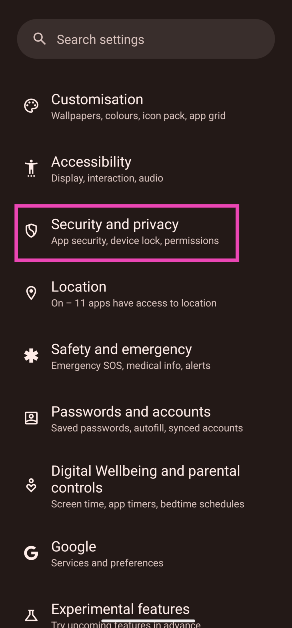
Step 1: Go to Settings and select Security and privacy.

Step 1: Go to Settings and select Security and privacy.

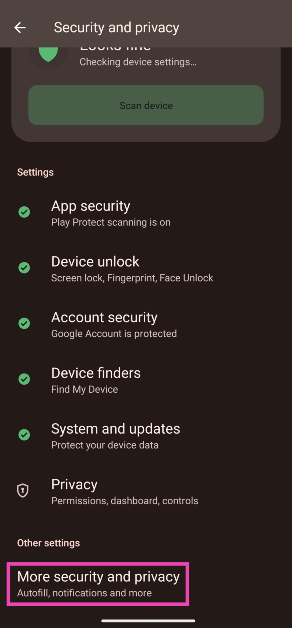
Step 2: Tap on More security and privacy.

Step 2: Tap on More security and privacy.

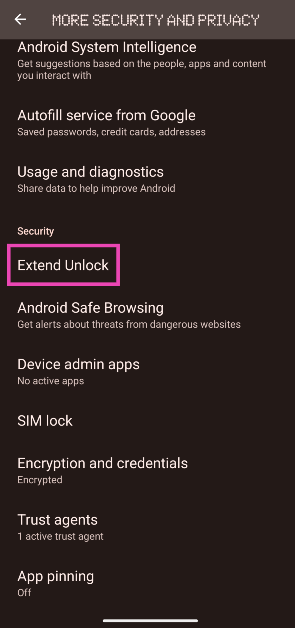
Step 3: Select Extend unlock.

Step 3: Select Extend unlock.

Step 4: Enter your phone’s PIN.

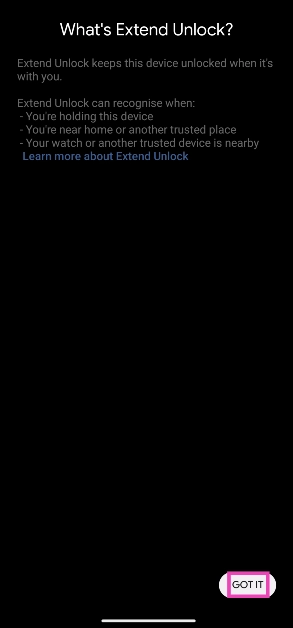
Step 5: Read the terms and tap on Got it.

Step 5: Read the terms and tap on Got it. Best 7 Ways to Unlock Your Android Device (2024)

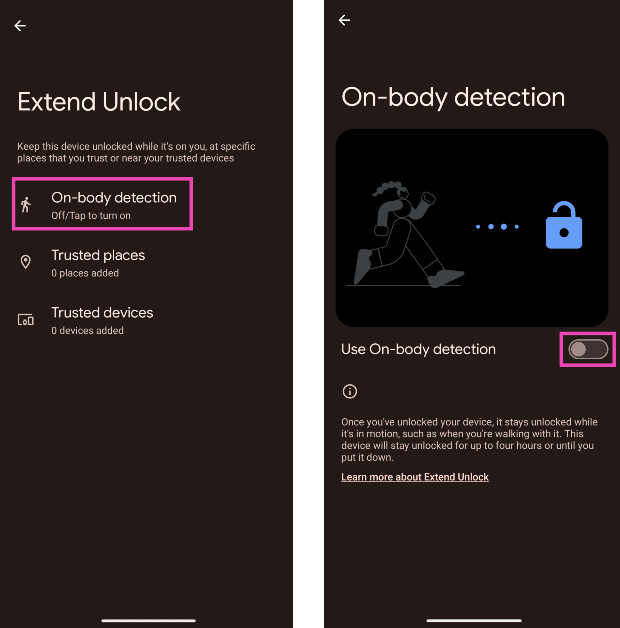
Step 6: Tap on On-body detection and turn on its toggle switch.

Step 6: Tap on On-body detection and turn on its toggle switch. Best 7 Ways to Unlock Your Android Device (2024)

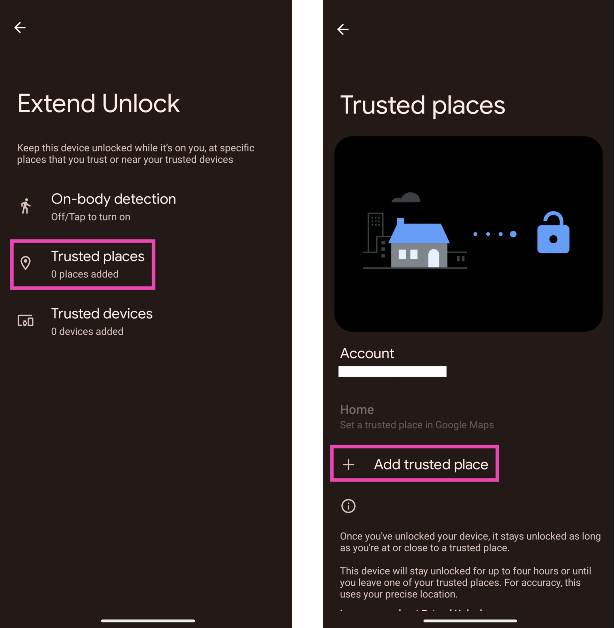
Step 7: Tap on Trusted places and enter your home or work location.

Step 7: Tap on Trusted places and enter your home or work location. Best 7 Ways to Unlock Your Android Device (2024)

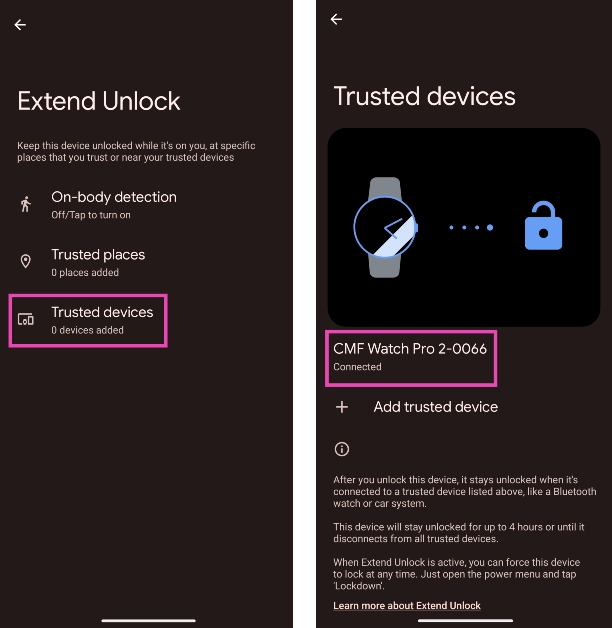
Step 8: Tap on Trusted devices and add your smartwatch or car system.

Step 8: Tap on Trusted devices and add your smartwatch or car system.  Best 7 Ways to Unlock Your Android Device (2024)

Frequently Asked Questions (FAQs)

Is it possible to unlock a locked Android phone without a password?

You can use Google’s Find My Device service to unlock your phone without a password. Resetting a device to its factory settings using recovery mode can also give you access to it without a password.

How do I unlock my phone without the power button? 

If the power button on your phone isn’t working, you can unlock it using Face ID or by scanning your fingerprint.

How do I unlock a smartphone without losing data?

To unlock a smartphone without losing data, use Google’s Find My Device or bypass the lock screen using ADB commands.

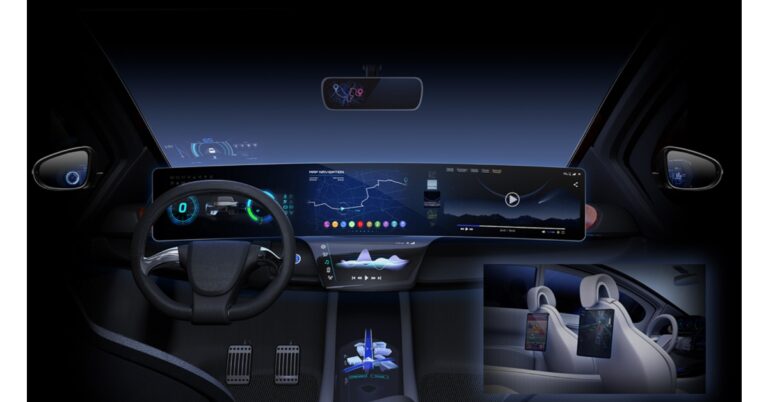
Read Also: MediaTek Dimensity Auto: MediaTek partners with NVIDIA, to bring its tech to cars

Conclusion 

These are the best 7 ways to unlock your Android device without a password. To change your lock screen password go to Settings>Lock Screen>Screen Lock Type. If you have any other questions, let us know in the comments!

Samsung Galaxy M14 5G review: Brilliant in the budget segment

In India, Samsung recently upgraded its M-Series with the release of the Galaxy M14 5G. It was given to us for review and has since served as our everyday driver. The smartphone is a replacement for the M13 5G and is under the inexpensive category. The Exynos 1330 SoC powers the phone. Additionally, it has a triple camera configuration on the back and a huge 6,000mAh battery. Furthermore, it supports 13 5G bands. Let’s see how the device performs in this Samsung Galaxy M14 5G review.

Samsung Galaxy M14 5G review: Design and display

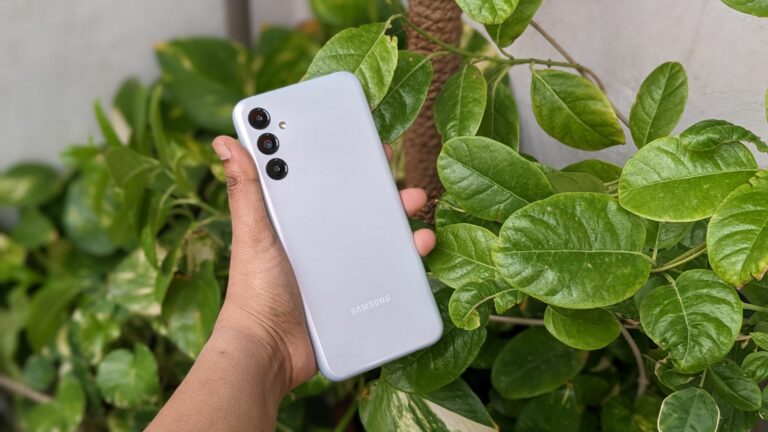
The M-Series lineup from Samsung is quite popular. The Galaxy M14 5G from Samsung is a thin, light handset that weighs just 202g and is 9.4mm thick. It feels light despite having a sizable 6,000mAh battery. This device has a good design and finish. The structure doesn’t feel flimsy, since the body is constructed of polycarbonate. It comes in a variety of colours and has a glossy finish. The Galaxy M14 5G’s icy silver shade is the colour option we got over for this review.

Samsung Galaxy M14 5G review: Design and display

Samsung Galaxy M14 5G boasts a curved shape and the same camera positioning as the company’s smartphones in the mid-range and premium price categories. One can immediately see how strikingly similar the camera module is to the Samsung Galaxy S23 5G by simply looking at it. Although the rear panel has a glossy finish, as we previously mentioned, it nevertheless does a fantastic job at concealing smudges and fingerprints.

Samsung Galaxy M14 5G review: Design and display

The right side of the device sports a side-mounted fingerprint sensor that also functions as a power button and a volume rocker with good tactile feedback. The side frames are softly curved. The fingerprint sensor works quickly and effectively. It has a Type C port, a speaker vent, a microphone, and an audio jack at the bottom. On the left frame, a dedicated microSD card slot and two nano SIM slots are provided.

Samsung Galaxy M14 5G review: Design and display

Corning Gorilla Glass 5 is used to protect the front, which has a flat profile. The 6.6-inch Full HD+ PLS LCD screen of the Galaxy M14 5G has a resolution of 2,408 x 1,080 pixels. It has a refresh rate of 90Hz. However, this is a well-designed LCD screen for its budget. Of course, the display isn’t as fantastic as what you might expect from an AMOLED display. We had no trouble using the phone indoors in terms of brightness.

Samsung Galaxy M14 5G review: Design and display

Although Samsung Galaxy M14 5G is not the brightest outside, you should be able to get by with full brightness. Even though it’s an LCD panel, the colours look vivid. The viewing angles are likewise rather good. The majority of your scrolling will feel responsive and fluid thanks to the 90Hz refresh rate.

The mobile supports HD video playback and Widevine L1 for watching videos. The viewing experience is decent; the pictures are clear and the single bottom-firing speaker on the Samsung Galaxy M14 5G works adequately to let you enjoy your favourite shows or films.

Samsung Galaxy M14 5G review: Performance and Cameras

When it comes to performance, the Galaxy M14 5G is driven by the Samsung Exynos 1330 manufactured using 5nm technology and comes integrated with Mali G68 GPU for graphics. The phone is available with either 4GB RAM and 128GB of storage, or 6GB RAM and 128GB of storage. It comes pre-installed with One UI 5, which is built on top of Android 13. Due to the inclusion of two generations of OS updates and four years of security patches, the Samsung Galaxy M14 5G is a solid purchase for the future.

The processor in the chipset is now incredibly energy-efficient. Additionally, even with heavy loads, this phone does not overheat. It can more readily manage daily chores including messaging, web browsing, and social networking. In our opinion app opening isn’t the fastest but still effective.

Geekbench 6 CPU Benchmark Result:

  • Single-Core Score: 921
  • Multi-Core Score: 2056

Even casual gamers ought to be able to use the Galaxy M14 5G to play a variety of games. In our opinion, Asphalt 9 Legends performed admirably. It worked wonderfully, and that too for extended periods of time without heating much.

In spite of the fact that the bloatware issue is not ideal at all, software performance is now good. Since the majority of programmes can be deleted, this is somewhat acceptable. The software is in line with higher-end smartphones.

review of Samsung Galaxy M14 5G
primary/portrait

A 50-megapixel primary sensor with an f/1.8 aperture is part of the triple rear camera system found on the Samsung Galaxy M14 5G. Additionally, it has a 2-megapixel depth sensor and a 2-megapixel macro sensor. The phone has a 13-megapixel front-facing camera for selfies and video calls.

review of Samsung Galaxy M14 5G
Portraits

The Galaxy M14 5G’s photography performance is excellent. The primary sensor’s images are detailed and rich. The photos and colours come out with accurate calibration. Even while taking pictures of people, the dynamic range is accurate. However, for the most part, the Galaxy M14 5G does not fall short when it comes to HDR photography. ccasionally in challenging settings, the phone does suffer while taking pictures against the light.

review of Samsung Galaxy M14 5G
primary/macro

Skin tones are handled quite well by the Galaxy M14 5G, which also provides a detailed output. The images are sharp enough but not overly so. Selfies are also good. However, there are some edge detection concerns with portrait selfies, but overall, the results are quite good.

Even with a good amount of ambient artificial light, images taken at night have less noise and better quality. In terms of videography, the video output is likewise quite satisfactory. The inclusion of video stabilisation in the Samsung Galaxy M14 5G at this price is, in our opinion, quite good.


The smartphone’s 6,000mAh battery supports 25W rapid charging, and this level of endurance has not recently been seen on any other phone. The phone may still last up to two days on a single charge when used heavily, including when playing a lot of games and utilising the camera in addition to usual tasks. We are confident that this phone can easily last three days on a charge when used lightly to moderately.

Verdict

Samsung Galaxy M14 5G keeps users connected everywhere they go with amazing battery life and dependable 5G support. The Exynos processor guarantees fluid gameplay when streaming movies or playing games! Additionally, the camera quality is above average and it won’t let you down in dimly illuminated conditions. For shoppers on a tight budget, its effective price of less than Rs 14,000 makes it an outstanding deal.
Look no further than the Samsung Galaxy M14 5G if you want a phone that won’t break your bank and still has all the capabilities of recent higher versions.

Samsung Galaxy M14 5G Pros

  • Above-average camera performance
  • Stable videos
  • Budget-friendly
  • Long-lasting battery life

Samsung Galaxy M14 5G Cons

  • LCD display
  • Bloatware

For the latest gadget and tech news, and gadget reviews, follow us on TwitterFacebook and Instagram. For newest tech & gadget videos subscribe to our YouTube Channel. You can also stay up to date using the Gadget Bridge Android App. You can find the latest car and bike news here.

Garena Free Fire Redeem Codes Today 31 May 2023: Here is how to claim them

Garena Free Fire is a battle royale game with regular awards and tournaments to keep players interested. If you play Garena Free Fire, you should be aware of the redeem codes that are released on a daily basis. However, because the battle royale game is banned in India, players from other countries can use the Free Fire Redeem codes daily. If you’re unfamiliar with the Garena Free Fire redeem codes or don’t know how to get them, we’ve put together a step-by-step guide to help you redeem them. Check out Garena Free Fire Redeem Codes for 31 May 2023.

The Free Fire redeem codes are a great way to get free stuff. These are 12-digit codes that contain alphabets and numbers, as well as an expiration date and time. Because the Garena FF redeem codes cannot be used more than once, you should hurry to the redemption page to claim your free reward before someone else does. To get a free reward, all you have to do is go to reward.ff.garena.com/en, which is the official redemption page. Also, keep an eye on this space for daily updates on Garena Free Fire redemption codes and rewards.

Garena Free Fire Redeem Codes Today 31 May 2023

  • FUJTKYLUPJO09HI
  • FKFDSIU7Y6Q5RE
  • FD12CV34BRM8G
  • FJBUYVTCFRXVZB
  • FDRTGF67JY89LO
  • F09IPOLNHSFA34
  • FJY7GUJMGYI4KTU
  • FYTGCFXCVDBNRJ
  • FMK5T6M7YUJHOI
  • FYJHDRG5RQ23ED
  • FS45ZEFRTJH0Y78
  • FK98OK0I9OLKHG
  • FRFVXZAQRE2DS3
  • FBKLOVICUYDTGF
  • FERB5NMT6Y0H8T7
  • FXC4VRBTNHGJUV
  • FSHJIERTJ67NHM

How to Get Free Fire Redeem Codes for Garena on 31 May 2023?

  • Visit the Garena Free Fire game’s official website at reward.ff.garena.com.
  • Use your Facebook, Google, VK, Apple ID, Huawei ID, or Twitter account to log in.
  • You’ll be taken to a valid redemption code (s)
  • Copy and paste the 12-digit redemption code into the text box.
  • On the screen, a dialogue box will appear.
  • ‘Ok’ should be selected.

For the latest gadget and tech news, and gadget reviews, follow us on TwitterFacebook and Instagram. For newest tech & gadget videos subscribe to our YouTube Channel. You can also stay up to date using the Gadget Bridge Android App. You can find the latest car and bike news here.

Amazon Quiz Answers Today 31 May 2023: Participate to win Rs 5,000

31 May 2023 Amazon Quiz has gone live. Customers from different parts of the country are participating in the daily quiz. The quiz begins from 12 AM to 11:59 PM. Those participating in the quiz can win exciting prizes by answering all the questions correctly. Today participants have a chance to win a Rs 5,000 Amazon Pay Balance.

Amazon quiz brings an opportunity for its customers to win Amazon Pay Balance ranging from Rs 1,000 to Rs 50,000. The Quiz can be played from 12 AM to 11:59 PM. The e-commerce platform brings a fresh quiz on a daily basis which consists of five questions related to general knowledge and current affairs. The participants need to answer all the questions correctly and their names will be selected for a lucky draw. The winner will be announced at the end of the month.

One wrong answer could eliminate you from the quiz. If you manage to answer all the questions correctly you can stand a chance to win a Rs 5,000 Amazon Pay Balance today. Only app users are eligible to participate in the Quiz. Check Out 31 May 2023 Amazon Quiz Answers.

Amazon Quiz Today Prize – Rs 5,000 Amazon Pay Balance

Quiz Date – 31 May 2023

Daily Timing – 12 AM to 11:59 PM

Winner Announcement – Today 12 PM

Amazon Quiz Answers Today 31 May 2023

Question 1: Which country has shut down its last three nuclear power plants in April 2023?

Answer: Germany

Question 2: In 2023, which Delhi Capitals player became the fastest batsman to score 6000 runs in IPL?

Answer: David Warner

Question 3: Nandini Gupta, who has been crowned as Femina Miss India 2023, belongs to which state?

Answer: Rajasthan

Question 4: Where is the oldest tree of this fruit found in India?

Answer: East Khandesh

Question 5: This animal represents which direction in China?

Answer: West

How To Play Amazon Quiz

Only app users are eligible to play the Amazon quiz every morning from 12 AM to 11:59 PM. The quiz is not available on the desktop. For those who are unaware of how to play the Amazon quiz below are the steps, you can follow to take the quiz.

  • Firstly download the Amazon app from Google Play Store or App Store
  • Now fill in the required information through the Sign Up option.
  • You need to log in to the Amazon app and scroll down on the home screen to find the Amazon Quiz banner.
  • Tap on the Amazon Quiz banner and tap on the Start button to start the Quiz.
  • Now you will get 5 questions and you need to answer them correctly. One wrong answer will eliminate you from the Quiz.
  • After answering all the questions correctly you are now eligible for a Lucky Draw.
  • The winner’s name will be announced today at 12 PM.

For the latest gadget and tech news, and gadget reviews, follow us on Twitter, Facebook and Instagram. For newest tech & gadget videos subscribe to our YouTube Channel. You can also stay up to date using the Gadget Bridge Android App. You can find the latest car and bike news here.

Exploring the Advantages of Cloud-based Product Lifecycle Management (PLM)

In today’s rapidly evolving business landscape, organizations across industries are embracing digital transformation to gain a competitive edge. One crucial aspect of this transformation is the adoption of cloud-based solutions, including Product Lifecycle Management (PLM) systems. Traditional PLM systems have often been limited by on-premises infrastructure, resulting in scalability challenges, high costs, and restricted accessibility. However, migrating PLM to the cloud offers numerous benefits that can revolutionize the way businesses manage their product lifecycles. Among these, 3DEXPERIENCE cloud plm has gained significant recognition for its comprehensive set of tools and capabilities. Built on the foundation of the 3DEXPERIENCE platform, this cloud-based PLM solution offers numerous advantages that empower organizations to streamline their product development workflows, enhance collaboration, and drive innovation. In this article, we will delve into the reasons why having your PLM in the cloud can be a game-changer.

Enhanced Collaboration and Accessibility:

Cloud-based PLM solutions provide a centralized platform accessible to teams and stakeholders worldwide, breaking down geographical barriers. With real-time collaboration features, team members can work on projects simultaneously, improving productivity and reducing time-to-market. Additionally, the cloud enables secure access to PLM data from anywhere, anytime, using various devices, ensuring seamless collaboration across dispersed teams and remote workers.

Scalability and Flexibility:

Cloud-based PLM eliminates the need for costly hardware investments and infrastructure maintenance. Organizations can scale their PLM capabilities up or down according to their specific needs, without worrying about provisioning new servers or hardware upgrades. The cloud offers virtually unlimited storage and computing power, empowering businesses to handle growing product data volumes, accommodate new users, and quickly adapt to changing market demands.

Cost Reduction and Operational Efficiency:

By migrating PLM to the cloud, businesses can significantly reduce upfront expenses associated with hardware, infrastructure, and IT support. Cloud-based PLM solutions typically follow a subscription-based pricing model, allowing organizations to pay for what they use. Moreover, cloud providers handle system maintenance, updates, and backups, minimizing the burden on internal IT teams. This results in improved operational efficiency and cost savings that can be redirected towards other strategic initiatives.

Improved Data Security and Compliance:

Cloud-based PLM systems offer advanced security measures to protect valuable intellectual property and sensitive product data. Reputable cloud providers implement robust encryption protocols, multi-factor authentication, and rigorous access controls, ensuring data confidentiality and integrity. Additionally, cloud platforms often comply with stringent industry standards and regulations, relieving organizations of compliance burdens and reducing the risk of data breaches.

Streamlined Integration and Interoperability:

Cloud-based PLM solutions offer seamless integration capabilities with other enterprise systems, such as ERP (Enterprise Resource Planning), CRM (Customer Relationship Management), and CAD (Computer-Aided Design). This integration enables streamlined data exchange, automated workflows, and synchronized processes across different departments. By eliminating data silos and enhancing interoperability, businesses can achieve end-to-end visibility, reduce errors, and accelerate product development cycles.

Continuous Innovation and Upgrades:

Cloud-based PLM systems benefit from regular updates and enhancements delivered by cloud providers. These upgrades often include new features, improved functionalities, and performance optimizations. Unlike traditional on-premises PLM, where upgrades may require significant downtime and effort, cloud-based solutions ensure seamless and non-disruptive updates, enabling organizations to leverage the latest innovations without interrupting their operations.

Disaster Recovery and Business Continuity:

One of the critical advantages of cloud-based PLM is the built-in disaster recovery capabilities offered by reputable cloud providers. By replicating data across multiple data centres in geographically diverse locations, organizations can safeguard their PLM data against potential disasters, hardware failures, or human errors. In case of any disruption, businesses can quickly recover their data and resume operations, minimizing downtime and ensuring business continuity.

Upgrades and System Maintenance

Seamless Upgrades: Cloud PLM providers handle system upgrades and updates, ensuring that organizations have access to the latest features and functionalities without any disruptions. These upgrades are typically performed in the background, eliminating the need for manual updates and minimizing downtime.

Reduced Maintenance Burden: With cloud-based PLM, organizations can offload the burden of system maintenance and support to the service provider. This allows internal IT teams to focus on more strategic initiatives rather than spending time on routine maintenance tasks.

Integration and Collaboration Ecosystem

Integration with Existing Systems: Cloud PLM platforms offer robust integration capabilities, enabling seamless connections with other enterprise systems such as ERP (Enterprise Resource Planning), CRM (Customer Relationship Management), and CAD (Computer-Aided Design) tools. This integration streamlines workflows, eliminates data silos, and provides a holistic view of the product lifecycle.

Third-Party Collaboration: Cloud PLM solutions often provide integration with external partners, suppliers, and customers, enabling a collaborative ecosystem. This allows for seamless sharing of product data, specifications, and requirements, fostering stronger relationships and faster time-to-market.

Conclusion:

As businesses strive to stay ahead in today’s competitive landscape, migrating Product Lifecycle Management (PLM) to the cloud has become a necessity rather than a luxury.

For the latest gadget and tech news, and gadget reviews, follow us on TwitterFacebook and Instagram. For the newest tech & gadget videos subscribe to our YouTube Channel. You can also stay up to date using the Gadget Bridge Android App. You can find the latest car and bike news here.

Samsung Galaxy F54 5G confirmed to launch in India on June 6

After revising its A-Series in India, Samsung is all set to bring another new smartphone under its F-Series. The company recently launched Samsung Galaxy A14 and today it has confirmed that the Samsung Galaxy F54 5G is coming to India. The upcoming phone is set for a release on June 6 with pre-reservations starting from today. An octa-core Exynos chipset is anticipated to power the phone. It is most likely powered by a 6,000mAh battery with 25W fast charging.

Samsung has today announced to launch Galaxy F54 5G in India on June 6. According to the company, the device will be the most premium F series smartphone launched by Samsung in India and is expected to revolutionise the photography experience.
Pre-reserve for Galaxy F54 5G has commenced today on Flipkart and Samsung.com, allowing customers to secure their device ahead of the official launch. Consumers can pre-reserve the device by paying a token amount of Rs 999 and enjoy benefits of Rs 2000 during Pre-order.

Samsung Galaxy F54 5G features

Teasers suggest a greenish-blue colour variant for the F54. Additionally, the phone will be featuring a triple rear camera setup with each sensor aligned vertically and separately at the top left corner of the back panel. There is an LED flash as well.

The Samsung Galaxy F54 5G is said to feature ‘Nightography’ from the flagship series which is claimed to help consumers shoot brighter and sharper photos and videos in low-light conditions with exceptional clarity. The company has revealed that the camera setup will include a 108-megapixel primary rear camera sensor with optical image stabilisation (OIS) support. In addition to this the Astrolapse feature, which was recently introduced with the Flagship Galaxy S23 Series, will be available on Galaxy F54 5G. This feature enables users to shoot the star trails and the mesmerizing beauty of the night sky.
The selfie camera on the upcoming smartphone will ensure well-lit selfies in low-light conditions.

“Galaxy F54 5G comes with groundbreaking camera capabilities, which allow consumers to capture selfies and videos in any lighting condition.”

Additionally, there will be a Single Take (Monster Shot 2.0) feature that powers the AI Engines behind the camera & allows consumers to capture up to 4 videos & 4 photos in a single shot. It will also include Fun Mode, which has 16 different inbuilt lens effects.

For the latest gadget and tech news, and gadget reviews, follow us on TwitterFacebook and Instagram. For newest tech & gadget videos subscribe to our YouTube Channel. You can also stay up to date using the Gadget Bridge Android App. You can find the latest car and bike news here.

Nokia C22 Review: Should you buy this budget smartphone for Rs 7,999?

Nokia strengthened its entry-level smartphone portfolio in India by launching the C22 earlier this month. At the price of Rs 7,999, Nokia C22 may be considered ‘entry-level’ but the smartphone manufacturer has more affordable options as well. Nokia C12 was launched back in March at a very affordable price of Rs 5,999. You can read our review here. While the C22 may still be an affordable smartphone, we expected it to put up a better performance than the C12. We got our hands on the smartphone earlier this month and used it as our primary driver for two weeks. Here is our Nokia C22 review.

Read Also: 5 Best budget smartphones to buy under Rs 8,000

Nokia C22 review: Design and Display

Inside the Nokia C22 retail box, you get the smartphone, a clear plastic case, a 10W charger, a USB Type-C cable, a SIM ejector tool, a quick start guide, and a product & safety info booklet. The clear plastic case is a nice addition, as the more affordable Nokia C12 did not come with one.

Nokia C22 review: Design and Display

Nokia C22 does not bring any radical changes to the design. If you’re familiar with Nokia smartphones under Rs 10,000, you wouldn’t find anything new here. Nokia’s C series sticks to the tried and tested formula without trying anything flashy. The plastic back has a textured finish, similar to the C21. The rectangular camera island on the back panel has a two-step design. A fingerprint scanner is housed right below the camera unit, at the centre of the panel. The Nokia branding can be found right in the middle. What we like here is the quality of the materials used. While the back panel and frame are made entirely out of plastic, the smartphone itself has a decent in-hand feel.

The volume rocker keys and power button are placed on the right edge of the frame. The hybrid SIM card slot makes is positioned on the left edge. You can use this slot to fix a memory card as well. The top part of the frame houses the 3.5mm headphone jack. At the bottom, you will find the microphone, USB Type-C port, and the speaker. It’s nice to see Nokia finally make the switch to Type-C charging in this segment. The more affordable C12 still retains the Type-B charging port.

Moving on, the Nokia C22 has a massive 6.5-inch IPS LCD display. It is a good display for content consumption but does not make a mark in other aspects. The bezels around the display get thicker along the chin but this is the kind of layout you’re going to get in a Rs 15,000 smartphone as well. The selfie camera is housed in a waterdrop notch up top.

We played YouTube videos on this device and it performed really well. The images produced on the screen were bright and legible. We were also pleased with the level of detail this 720 x 1600p panel was able to relay. If your biggest priority on a smartphone is watching content across different platforms, you won’t be disappointed with this smartphone.

Nokia C22 review: Design and Display

However, the touch response provided by Nokia C22 leaves a lot to be desired. We realise that there’s not a lot to expect at this price point, but the C22 feels like it’s always a step behind when you’re scrolling on it. The poor haptic feedback further accentuates this problem. There’s a constant lag when you’re switching between apps, but the processor is mostly to blame for that (more on that later).

Nokia C22 review: Performance and Cameras

Nokia C22 is available in two RAM variants. The base variant priced at Rs 7,999 gets 2GB RAM with 64GB storage while the 4GB RAM variant fetches Rs 8,499. The C22 is powered by the Unisoc SC9863A SoC, which is the same chipset found on last year’s C21. Handling the OS duties is Android 12 Go Edition.

Nokia C22 review: Performance and Cameras

The choice to put Unisoc SC9863A as the processor on this smartphone really surprises us. There are more affordable Nokia phones out there that use the exact same chipset. To put it simply, this processor does not stand up to the task. Especially for a smartphone that is priced at Rs 8,000. Even in general use, the performance was not up to par.

It shouldn’t come as a surprise but the apps take longer to load here than your average budget smartphone. But what we didn’t expect was that minimising and switching between apps would present lags and stutters as well. While it doesn’t struggle to manage the active tasks, a smoother browsing experience would have been nice. 

We used the C22 to watch videos, send and receive messages on WhatsApp, and browse social media. The smartphone handled it pretty after taking some time to load the apps. We also played COD Mobile on this device, and while it wasn’t entirely unplayable, we did experience frequent frame drops. On Geekbench 6, Nokia C22 scored 193 points in the single-core test and 796 points in the multi-core test.

Nokia C22 review: Performance and Cameras

Nokia C22 comes with Android 13 Go Edition. For those that aren’t familiar, the ‘Go Edition’ is a lite version on Android and is meant for entry-level devices. The idea is to strip the OS down to its essential features to improve the speed of smartphones that don’t have powerful processors. Even though the OS is supposed to be minimal, there are a lot of bloatware apps to be found here.

Nokia C22 review: Performance and Cameras

There’s a massive 5,000 mAh battery unit on this smartphone. Nokia claims a 3-day battery life on the C22. While you can certainly extend the battery life to three days with minimal usage, the C22 lasted a day and a half for us. We used the smartphone primarily for watching video content, browsing social media, and communicating on WhatsApp. It takes over two hours to fully charge the battery using the 10W charger.

Nokia C22 features a dual camera unit consisting of a 13MP primary shooter and a 2MP macro lens. Up front, you get an 8MP selfie camera. The camera performance is pretty standard for an entry-level smartphone. The 13MP camera performs decently in outdoor conditions when there’s plenty of natural light. The colours are a little undersaturated and but the level of detail the sensor can capture is satisfactory. The 2MP macro camera fails to impress at all. We didn’t get the detailed close-ups we were looking for.

Nokia C22 review: Performance and Cameras

Macro lens

The camera app comes with a portrait mode as well. This is one of the highlights of this camera. Shots taken in portrait mode put a good amount of focus on the subject. The smartphone struggles a bit with edge separation, but you’re not gonna get any better portrait shots in this price range. The 8MP selfie camera performs decently as well. While it is not capable of capturing finer details like hair strands or skin texture, it does not mess with the skin tone.

Nokia C22 review: Performance and Cameras
Portrait Mode

Read Also: Best 6 Ways to Take Screenshots and Share Them on Android

Verdict

Nokia C22 is a decent smartphone to watch video content on. The size and brightness of the display are impressive, and you don’t have to worry about reaching for the charger every couple of hours. However, the smartphone could have used a better chip to boost its performance. The C22 fails to load apps quickly and multitasking on this smartphone can prove to be an uphill battle at times. If you’re upgrading from a feature phone and want a device with a big display, the C22 is a decent purchase. But if you’re looking for a performance-oriented smartphone, you should explore other options.

Nokia C22 review: Pros

  • Fingerprint scanner
  • Type-C charging
  • Battery life
  • Good display

Nokia C22 review: Cons

  • Slow performance

For the latest gadget and tech news, and gadget reviews, follow us on Twitter, Facebook and Instagram. For newest tech & gadget videos subscribe to our YouTube Channel. You can also stay up to date using the Gadget Bridge Android App. You can find the latest car and bike news here.

MediaTek Dimensity Auto: MediaTek partners with NVIDIA, to bring its tech to cars

Taiwanese fabless semiconductor company MediaTek has announced to foray into Automotive Industry. The company has partnered with Nvidia in order to supply a full range of in-vehicle AI cabin solutions for the upcoming generation of software-defined vehicles. With this alliance, the company is said to create and deliver the most compelling solutions for state-of-the-art connected cars by making use of the strengths of each company’s automotive product portfolio.

By working together, MediaTek will develop automotive SoCs integrating a new NVIDIA GPU chiplet with NVIDIA AI and graphics IP. Chiplets are connected by an ultra-fast and coherent chiplet interconnect technology.

A whole range of AI cabin and cockpit operations with cutting-edge graphics, AI, safety, and security features will be delivered by MediaTek’s smart cabin solutions running NVIDIA DRIVE OS, DRIVE IX, CUDA, and TensorRT software technologies.

In addition to this MediaTek will work with NVIDIA to provide automotive solutions that is said to surpass the sector’s expanding needs and demands, opening up a sizable market for both businesses. According to Gartner, the total addressable market for infotainment and instrument cluster SoCs used within vehicles will reach $12 billion in 2023.

Making use of NVIDIA’s core expertise in AI, cloud, graphics technology and software, and pairing with NVIDIA ADAS solutions, MediaTek can enhance the capabilities of its comprehensive Dimensity Auto platform, which leverages the company’s expertise in mobile computing, high-speed connectivity, entertainment and extensive Android ecosystem, to deliver an all-around smarter in-vehicle experience.

Rick Tsai, Vice Chairman and CEO of MediaTek said, “NVIDIA is a world-renowned pioneer and industry leader in AI and computing. With this partnership, our collaborative vision is to provide a global one-stop shop for the automotive industry, designing the next generation of intelligent, always-connected vehicles. Through this special collaboration with NVIDIA, we will together be able to offer a truly unique platform for the compute-intensive, software-defined vehicle of the future.”

Jensen Huang, founder and CEO of NVIDIA stated, “AI and accelerated computing are fueling the transformation of the entire auto industry. The combination of MediaTek’s industry-leading SoC and NVIDIA’s GPU and AI software technologies will enable new user experiences, enhanced safety and new connected services for all vehicle segments, from luxury to mainstream.”

For the latest gadget and tech news, and gadget reviews, follow us on TwitterFacebook and Instagram. For newest tech & gadget videos subscribe to our YouTube Channel. You can also stay up to date using the Gadget Bridge Android App. You can find the latest car and bike news here.

Xiaomi has partnered with Optiemus Electronics Limited (OEL) to produce audio products in India

Xiaomi India will now manufacture audio devices in India for that it has partnered with Optiemus Electronics Limited (OEL) to strengthen its ‘Make in India’ journey. The company claims that this partnership is the first step in a bigger AIoT strategy that will start with the localization of wireless audio products.

Muralikrishnan B, President, of Xiaomi India said, “This partnership with Optiemus Electronics Limited marks a major milestone in our efforts to accelerate our localization of products and components to bring out high-quality devices that will be ‘Made in India,’ at honest pricing. We are committed to forging more such collaborations for a wider range of categories, across our product line-up.”

As a result of this collaboration, Xiaomi has started producing its first audio product in Noida at the OEL facility. Additionally, Xiaomi has strengthened its commitment to India by growing operations and forming manufacturing alliances with domestic leaders in the sector, all while promoting economic growth and creating job opportunities. Over the next two years, the company wants to bring 50% more domestic value to the smartphone market.

Also Read: Acer Aspire 5 (2023) with 13th Gen Intel Core CPU launched in India

The collaboration highlights Xiaomi’s commitment to creating top-notch goods, aiding in the expansion of domestic manufacturing in India and supporting its initiatives to democratise technology for the masses. With a focus on bringing innovation to life for everyone, Xiaomi India hopes to further strengthen its position as a major player in the Indian electronics market by bringing the latest technology at fair prices to the Indian market.

Commenting on the association, Nitesh Gupta, Director, Optiemus Electronics Limited said, “We are happy to partner with Xiaomi India and contribute to their vision of localisation. Xiaomi is one of the leading players in the Indian electronics ecosystem and is known for its path-breaking technology, so this partnership is a significant testimony to Optiemus Electronics’ expertise and growing capabilities. We look forward to delivering great value through state-of-the-art infrastructure to manufacture Xiaomi products.”

For the latest gadget and tech news, and gadget reviews, follow us on TwitterFacebook and Instagram. For newest tech & gadget videos subscribe to our YouTube Channel. You can also stay up to date using the Gadget Bridge Android App. You can find the latest car and bike news here.