10 best apps to download first in Samsung Galaxy Fold 4

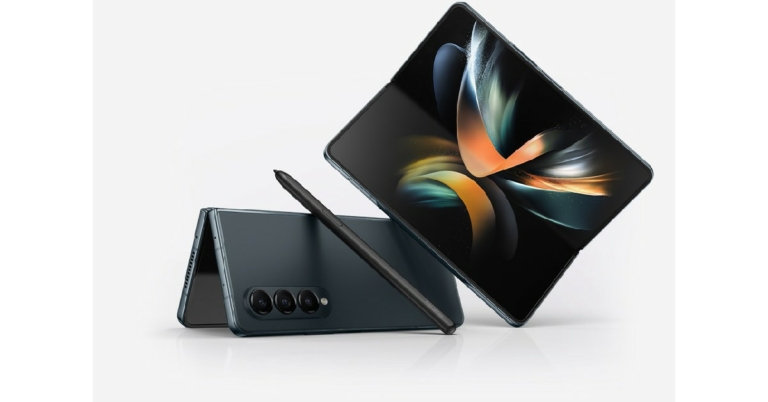
The Samsung Galaxy Fold 4 was unveiled in India last week. Samsung has finessed the foldable smartphone and updated it with the powerful Snapdragon 8+ Gen 1 SoC processor. Currently, the Samsung Galaxy Fold 4 is available at a price of Rs 1,54,999 for the 12GB RAM + 256GB storage variant, and Rs 1,64,999 for the 12GB RAM + 512GB storage variant. In this article, we list the 10 best apps to download first in Samsung Galaxy Fold 4. Read Also: Vivo V25 Pro with colour-changing rear and 120Hz 3D Curved display launched in India

Clip Studio Paint

Clip Studio Paint You would be missing out if you don’t use the incredible screen size and the S-Pen to doodle on your Galaxy Fold 4. Clip Studio Paint works seamlessly with your Fold 4 and is suited for amateurs and pros alike. The app uses the pressure sensitivity of the S-Pen to render realistic strokes on the screen. Drawing on your Fold 4 will be a totally novel experience on your Fold 4.

Samsung Notes

Samsung Notes There are a ton of note-taking apps out there, but the native Samsung Notes app works best on the Samsung Galaxy Fold 4. Designed to get the most out of both panels of the screen, the Samsung Notes app is perfect for taking notes and even scribbling with your S-Pen. You can also take quick notes while the screen is off and it’ll get saved in the Notes app.

Relay (Reddit client)

Relay (Reddit client) While Reddit has an official app, its features are severely restricted for the Samsung Galaxy Fold 4. With Relay, you can utilize your Fold’s screen by opening multiple panels at once and browsing the Reddit feed and opening individual posts all at once. Once you’ve used Relay on your device, you will never go back to the official app.

Microsoft Outlook

Microsoft Outlook Working with Samsung on the foldable form factor, Microsoft has done a great job of tweaking its major apps to get the most out of your Samsung Galaxy Fold 4. The dual-pane mode in your device works well with Outlook, and you will be able to read individual mails on one panel while browsing your inbox on the other.

Kindle

Kindle With a display that matches that of a Kindle, your Samsung Galaxy Fold 4 is an incredible reading device. With a folding screen, you can even hold it like a book. The Kindle app can be directly synced with your Kindle device and you can read all the books saved in your library on the Galaxy Fold 4. The display isn’t too harsh on the eyes either, making sure you can read for hours.

Spotify

Spotify Spotify may just be your regular music streaming app, but its design and layout for the Galaxy Fold 4 put it above its competition in every regard. Using Spotify, you can control the mini player on the left panel while browsing artists, albums, and playlists on the right panel. Most music players are yet to adapt their design for foldable phones but Spotify is way ahead of the curve.

Niagara Launcher

Niagara Launcher A massive screen like that of the Galaxy Fold 4 makes it virtually impossible to browse your smartphone with one hand. This may even be a dealbreaker for some. However, with Niagara Launcher you can use your Fold 4 in its fully unfolded form with only one hand. Its list-like pattern makes it easy to access apps on your phone. You can reach every app without even having to open the app drawer. Reading and responding to notifications right from your home screen is also made possible with the Niagara Launcher.

Asphalt 9: Legends

Asphalt 9: Legends. Samsung Galaxy Fold 4 best apps Asphalt 9 is one of the best games that you can play on your Galaxy Fold 4. The game utilises the entirety of the unfolded screen and brings an immersive gaming experience right on your smartphone. The realistic graphics and different racing modes make it all the more fun. On top of that, you can even play Asphalt using your Xbox Controller on the Xbox Game Pass app.

Microsoft Remote Desktop

Microsoft Remote Desktop. Samsung Galaxy Fold 4 best apps You’d be wasting the remarkable screen size on the Galaxy Fold 4 if you don’t use the Microsoft Remote Desktop app even once. The Remote Desktop app creates a virtual desktop on your Galaxy Fold 4, and you can remotely access your PC using your smartphone. Using the Remote Desktop app, you can be productive wherever you are. There aren’t many smartphones that utilise this app as well as the Samsung Galaxy Fold 4.

Todoist

Todoist. Samsung Galaxy Fold 4 best apps Todoist is one of the best planner apps you can use on your Samsung Galaxy Fold 4. Simple yet powerful, Todoist lets you add tasks, integrate other tools and apps on your phone, and visualise the priority levels of the tasks ahead of you. Todoist also syncs across multiple devices, so you can use it on your phone and your desktop without worrying about losing any of the changes you’ve made. Read Also: Moto Tab G62 with 7,700mAh battery, quad speakers launched in India These are the 10 best apps you can use on your Samsung Galaxy Fold 4. If you think we missed out on any app, let us know in the comments!
For the latest gadget and tech news, and gadget reviews, follow us on TwitterFacebook and Instagram. For newest tech & gadget videos subscribe to our YouTube Channel. You can also stay up to date using the Gadget Bridge Android App. You can find the latest car and bike news here.
Infinix Hot 12 with 6,000mAh battery launched in India

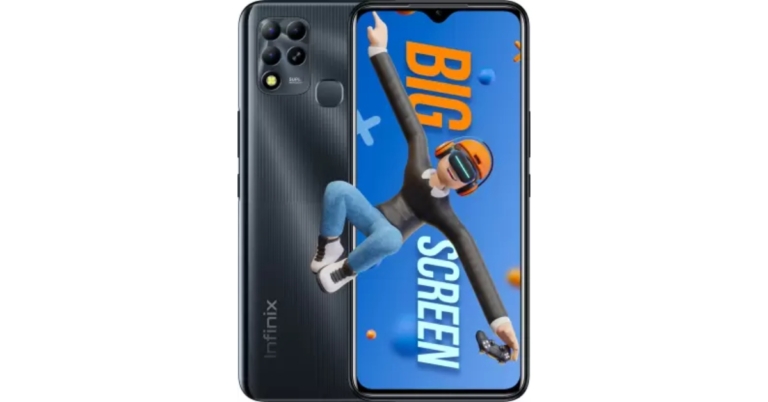
The Chinese smartphone brand Infinix has introduced a new budget smartphone in the Indian market. The company has launched Infinix Hot 12 which is powered by MediaTek Helio G37 SoC. The device features a 90Hz HD+ display and packs a 6,000mAh battery. In addition to this, there is a triple-camera arrangement with a 50-megapixel sensor. It should be mentioned that the Indian version of the Infinix Hot 12 differs from the one that was released globally in April.

Infinix Hot 12 price in India, sale details

Infinix Hot 12 will be available in India in a single 4GB RAM with 64GB storage model. This model will cost Rs 9,499 and will be offered in Exploratory Blue, Polar Black, Purple, and Turquoise Cyan colour selection. The device will be available for purchase via Flipkart in the country.

Infinix Hot 12 specifications

Infinix Hot 12 has been launched in India with a 6.82-inch HD+ IPS LCD display having 720×1,612 pixels of resolution. The screen also has a refresh rate of 90Hz and a 180Hz touch sampling rate. Moreover, the display offers 460 nits of brightness and comes with an Eye Care mode. An octa-core MediaTek Helio G37 SoC and 4GB of LPDDRx RAM power the phone. The phone has an Extended RAM function that enables it to use up to 3GB of internal storage space as RAM. The 64GB of internal storage on the Infinix Hot 12 can be expanded by a microSD card to up to 256GB using a dedicated slot. The triple-back camera system on the Infinix Hot 12 consists of a 50-megapixel primary sensor with an f/1.6 aperture. A 2-megapixel depth sensor and an AI camera are also included. The smartphone has an 8-megapixel sensor with an f/2.0 aperture for selfies and video calls. The back camera has a quad-LED flash, while the front camera has a dual LED flash. A 6,000mAh battery within the phone allows 18W rapid charging. 4G LTE, Wi-Fi, Bluetooth 5.0, GPS/A-GPS, and USB Type-C are all available forms of connectivity. An accelerometer, ambient light sensor, magnetometer, and proximity sensor are among the onboard sensors. A fingerprint sensor positioned on the back is also present. Dual stereo speakers with DTS are included with the phone. For the latest gadget and tech news, and gadget reviews, follow us on TwitterFacebook and Instagram. For newest tech & gadget videos subscribe to our YouTube Channel. You can also stay up to date using the Gadget Bridge Android App. You can find the latest car and bike news here.

Garena Free Fire Redeem Codes Today 18 August 2022: Here is how to claim them

Garena Free Fire is a battle royale game with regular awards and tournaments to keep players interested. If you play Garena Free Fire, you should be aware of the redeem codes that are released on a daily basis. However, because the battle royale game is banned in India, players from other countries can use the Free Fire Redeem codes daily. If you’re unfamiliar with the Garena Free Fire redeem codes or don’t know how to get them, we’ve put together a step-by-step guide to help you redeem them. Check out Garena Free Fire Redeem Codes for August 18. The Free Fire redeem codes are a great way to get free stuff. These are 12-digit codes that contain alphabets and numbers, as well as an expiration date and time. Because the Garena FF redeem codes cannot be used more than once, you should hurry to the redemption page to claim your free reward before someone else does. To get a free reward, all you have to do is go to reward.ff.garena.com/en, which is the official redemption page. Also, keep an eye on this space for daily updates on Garena Free Fire redemption codes and rewards.

Garena Free Fire Redeem Codes Today 18 August 2022

HTY3-RIFG-OR3F FBJY-RY56-MLOT FJO9-4TAS-D3FT YXY3-EGTL-HGJX ST5K-JCRF-VBHT S5JT-UGVJ-Y5Y4 X99T-K56X-DJ4X FF11-NJN5-YS3E FF9M-J31C-XKRG FBJY-RY56-MLOT FJO9-4TAS-D3FT PQR3-BKUI-7LT7 FSDR-FKUI-YVGR FBTU-6BFY-TBT7 FBJU-T6RF-T1RT FBTU-6JKI-E8E7 FLU8-HG8R-BHT4 FIIF-GI8E-O49F FV5B NJ45 IT8U F4N5 K6LY OU9I FH2G YFDH E34G F7YG T1BE 456Y FJBH VFS4 TY23 F87G YF3D GE6B F5J6 YUH7 6GVT

How to Get Free Fire Redeem Codes for Garena on August 18?

  • Visit the Garena Free Fire game’s official website at reward.ff.garena.com.
  • Use your Facebook, Google, VK, Apple ID, Huawei ID, or Twitter account to log in.
  • You’ll be taken to a valid redemption code (s)
  • Copy and paste the 12-digit redemption code into the text box.
  • On the screen, a dialogue box will appear.
  • ‘Ok’ should be selected.
For the latest gadget and tech news, and gadget reviews, follow us on TwitterFacebook and Instagram. For newest tech & gadget videos subscribe to our YouTube Channel. You can also stay up to date using the Gadget Bridge Android App. You can find the latest car and bike news here.

Amazon Quiz Answers Today 18 August 2022: Participate to win Rs 500

18 August 2022 Amazon Quiz has gone live on its platform. The quiz timings are 12 AM to 11:59 PM. The Amazon App users can participate in the quiz daily and all they have to do is submit correct answers to the questions asked on the e-commerce platform. Today’s participants can get a chance to win Rs 500 Amazon Pay Balance. By participating in the Amazon Quiz the participants can win Amazon Pay Balance ranging from Rs 1,000 to Rs 50,000 every day while sitting at home. To win the participants must answer five questions correctly that are based on current events and general knowledge. One wrong answer can eliminate you from the quiz. The results will be announced at the end of the month. Today’s question will let you win Rs 500 Amazon Pay Balance. Check below for today’s Amazon quiz answers. Amazon Quiz Today Prize – Rs 500 Amazon Pay Balance Quiz Date – 18 August 2022 Daily Timing – 12 AM to 11:59 PM Winner Announcement – Today 12 PM

Amazon Quiz Answers Today 18 August 2022

Question 1: Who among these Sri Lankan bowlers has taken 21 wickets in his first 2 Test matches?

Answer: Prabath Jayasuriya

Question 2: In the movie ‘DC League of Super- Pets’ , who gives the voice for Krypto- Superman’s dog?

Answer: Dwayne Johnson

Question 3: The closure of which company’s copper smelter plant at Thoothukudi, Tamil Nadu has resulted in an INR 14,749 crore loss to the economy?

Answer: Vedanta

Question 4: The boy in the center of this picture is affected by which genetic disorder?

Answer: Down’s Syndrome

Question 5: What are the 3 protruding elements on this equipment held by the woman called?

Answer: Fins

How To Play Amazon Quiz

Only app users are eligible to play the Amazon quiz every morning from 12 AM to 11:59 PM. The quiz is not available on the desktop. For those who are unaware of how to play the Amazon quiz below are the steps, you can follow to take the quiz.
  • Firstly download the Amazon app from Google Play Store or App Store
  • Now fill in the required information through the Sign Up option.
  • You need to log in to the Amazon app and scroll down on the home screen to find the Amazon Quiz banner.
  • Tap on the Amazon Quiz banner and tap on the Start button to start the Quiz.
  • Now you will get 5 questions and you need to answer them correctly. One wrong answer will eliminate you from the Quiz.
  • After answering all the questions correctly you are now eligible for a Lucky Draw.
  • The winner’s name will be announced today at 12 PM.
For the latest gadget and tech news, and gadget reviews, follow us on TwitterFacebook and Instagram. For newest tech & gadget videos subscribe to our YouTube Channel. You can also stay up to date using the Gadget Bridge Android App. You can find the latest car and bike news here.
Meta rolls out Add your sticker on Reels: Here’s how to use the Add Yours sticker

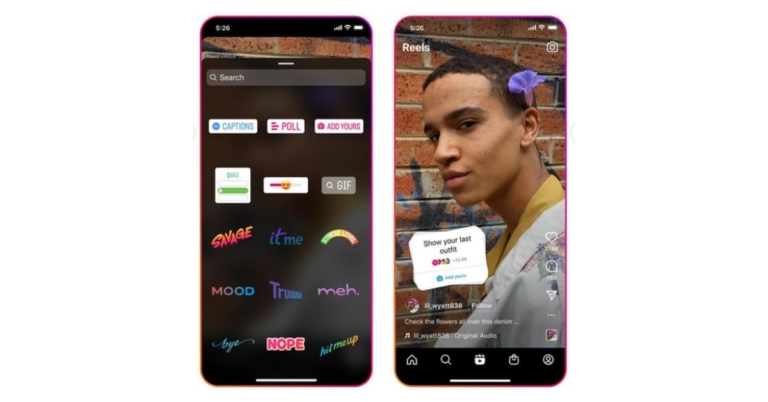
Instagram has updated its Sticker feature for Stories. The option for Stickers for Instagram and Facebook Reels has recently been added by the company. The business published an Instagram post announcing the feature. In addition to this, Meta has also announced a few more tolls for content creators. Meta has revealed that Instagram Reels can now be cross-posted to Facebook. Moreover, Facebook Reels now have “Stars,” and reels are now automatically created on the video and photo sharing website. Creator studio insights are now available too Reels can now have an “Add Yours” sticker added to them. This will enable creators to route visitors from Reels to the relevant web page. The sticker enables users to reply to other users’ Reels on a particular topic or in response to a request. You could share a Reel with an Add Yours prompt, for instance, asking people to submit films of their dogs.

Here’s how to use the Add Yours sticker:

  • To access the sticker page after recording your clips or uploading them from your camera roll, hit the sticker symbol.
  • Publish your reel, write your prompt, and select the Add Yours sticker.
  • When responding with their own reel that displays your prompt, users can tap on the bottom portion of the Add Yours sticker on your reel.
Additionally, Instagram CEO Adam Mosserie revealed that users would now be able to cross-post Instagram Reels to Facebook. Users have long been able to simultaneously publish Stories and photographs on both platforms using the Instagram cross-posting capability. Reels now have the same ability expanded to them. When the “Share to Facebook” option is enabled on Instagram, the Reel will be posted on both Meta-owned platforms. Additionally, users will have access to Facebook Reels analytics that weren’t previously available. To better understand how their Reels are performing on Facebook, content creators will have improved insights. It now includes reach, average watch time, total view time, and other metrics. Moreover, Facebook Stars is now accessible to all qualified creators. On their Facebook Reels, viewers may send these stars to content producers, who will then earn payment from Facebook of $0.01 which translates to Rs. 0.80 for each star they receive. In Creator Studio, under Stars stats, creators can view their overall number of stars. Users can now use the Reels Remix feature to record next to an existing Reel to make their own. Also now using the Stories that people have already posted, Facebook can now automatically construct Reels. For the latest gadget and tech news, and gadget reviews, follow us on TwitterFacebook and Instagram. For newest tech & gadget videos subscribe to our YouTube Channel. You can also stay up to date using the Gadget Bridge Android App. You can find the latest car and bike news here.
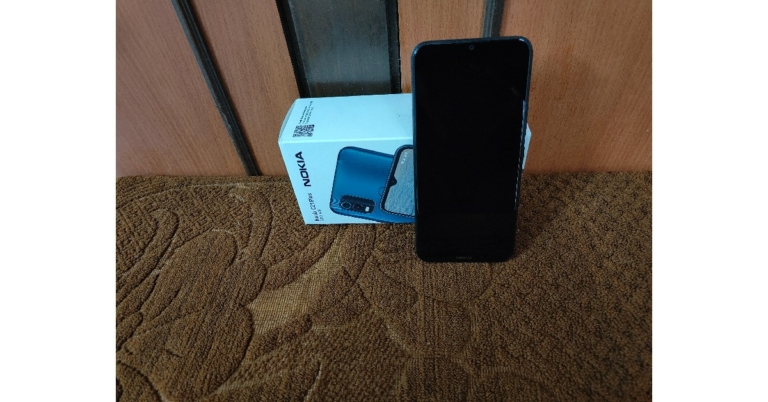
Nokia C21 Plus review: The Ideal Budget Smartphone to Watch Content On

At a time when major flagship releases dominate all the headlines, the budget smartphone category is constantly changing with newer phones offering impressive specs at very competitive and affordable rates. Nokia’s latest offering, the Nokia C21 Plus is no exception. Priced at just Rs 10,299, the Nokia C21 Plus may be a quiet release but it holds the potential for being widely popular among first-time smartphone buyers. We used the Nokia C21 Plus for over a week and put it through a series of tests. So without further ado, here is our comprehensive Nokia C21 Plus review. Read Also: Micromax In 2C review: A decent budget buy

Nokia C21 Plus review: Design and Display

Nokia C21 Plus review: Design and Display Right off the bat, the Nokia C21 Plus is not a small phone by any means. With dimensions of 164.8 x 75.9 x 8.6 mm and a screen size of 6.52–inches, it certainly makes its presence felt. It weighs 191g, which is slightly on the heavier side, but you will eventually get used to it and it won’t be a big issue. The C21 Plus has an aluminium frame and a textured plastic back. The textured back panel provides a bit of a grip while holding the phone, but it may be a deal-breaker for those who were looking for a more ‘premium’ feel. The 13MP + 2MP dual camera unit is placed in a rectangular section on the top-right part of the back panel and actually goes quite well along with it. The fingerprint sensor is placed right below the camera unit, at the centre of the panel. Nokia C21 Plus review: Design and Display The micro USB charging port placed at the bottom of the phone is a bit of a letdown, given that Nokia’s competition in the segment has already upgraded to Type-C charging. For some buyers, these little things may amount to swaying their decision. The headphone jack is placed at the top left part of the phone, which is a good thing.  The SIM and memory card tray is placed along the left side of the phone, while the volume rocker and lock key find their way on the right. The speaker has been housed in the back panel and is something that many buyers will not like. It is quite common for the sound to get muffled when you’re holding the phone and the speaker gets pressed/hidden against your palm or fingers. Moving on to the positives, the IPS LCD display with 720×1,600p resolution provides a pleasing viewing experience. For those looking to upgrade to a smartphone primarily to watch video content, the C21 Plus would be a good choice. We streamed HD content on YouTube, Netflix, and Hotstar, which the C21 Plus handled with ease and provided good quality images throughout. The speaker, when not pressed against any surface, also provides a decent sound to go along with the video content. the IPS LCD display with 720x1,600p resolution provides a pleasing viewing experience The touchscreen is a bit prone to smudges while using the phone. We found ourselves wiping the fingerprints from the screen quite often, so our suggestion is to keep a micro-fibre cloth handy. When it comes to touch receptivity, the experience while scrolling wasn’t as smooth as we would have liked, but that is to be expected with most budget smartphones these days. A higher refresh rate would have been ideal, but we realise its too much to ask of a smartphone in this category. The screen brightness was not an issue at all, as the screen adapted well to bright outdoor conditions.

Nokia C21 Plus review: Performance and Cameras

The Nokia C21 Plus is powered by the Unisoc SC9863A chipset, which delivers a satisfactory performance. We didn’t experience any lag or a decline in speed even while using multiple apps or streaming HD content. For our review, we used the 4GB RAM + 64GB memory model, and it showcased fast boot time, smooth app switching, and decent speeds even while performing background tasks. The fingerprint sensor and face unlock work surprisingly fast, something we didn’t expect from a smartphone in this price segment. We also put the C21 Plus through the gaming test, and while it handled games like Candy Crush, Subway Surfers, and Clash Royale with ease, it struggled with first-person shooter games that demand a higher spec GPU and CPU. On the test bench, it scored 127 on the Single-core score and 476 on the Multi-core score during the Geekbench 5 test. Geekbench 5 test Nokia claims a 3-day battery backup for the C21 Plus. However, under rigorous use of about 5-6 hours of screentime a day, the C21 Plus lasted almost a day and a half. While this is lower than what Nokia claims, it is still pretty good given the performance that the smartphone delivers. However, the USB micro-B charging port isn’t ideal for fast charging, and it took the C21 Plus several hours to fully charge. Even though the battery may last for more than a day, you will still want to put it on charge every night given how long it takes to charge. Coming to the software, the C21 Plus runs on Android 11 Go Edition, which is specially designed by Google for smartphones in this category. The pre-loaded Google apps come with the ‘Go’ branding, and they’re lighter versions of the original apps designed to run smoothly on budget smartphones and also take up less storage. The software is identical to Android 11 for the most part, except for a few changes like fewer options in the notification slider. The security features have not been watered down. Nokia has also promised 2 years of quarterly security updates with C21 Plus. Even though the Android 11 Go Edition is minimal and clean, the C21 Plus comes with bloatware apps like LinkedIn, Facebook Lite, Moj, Solitaire and more. These apps can be deleted right away and you can free up some much-needed storage space. Moving to the cameras, the rear camera unit consists of a 13MP primary lens and a 5MP depth lens and an LED flash. The 5MP selfie camera at the front is notched at the centre of the screen, and quite surprisingly, comes with an LED flash as well. The front and rear cameras can both record 1080p videos at 30 frames per second.
Performance and Cameras
Outdoor shot
Outdoor shots taken from the Nokia C21 Plus felt a little overexposed and slightly falling behind in achieving the ideal colour balance. However, once the picture is saved in the galley, you can auto-adjust its colours and the results are much better. There is an HDR option as well. The C21 Plus also allows pictures to be taken in Portrait and Panorama modes. There is an option to take timelapse videos as well.
Performance and Cameras
Portrait Mode
Indoors, the colour balance was much better, and photos taken in portrait mode came out quite well, providing decent background blur. The selfie camera comes with a ‘Beautify’ feature which is a skin smoothening effect that looks pretty glossy and takes away any sharpness from the resulting image. Overall, for the price of Rs 10,299, the camera unit of the C21 Plus is not the worst one we’ve seen in this segment. In fact, it is very decent. If you’re looking for better-performing cameras you will have to look beyond this price segment. Read Also: Redmi Buds 3 Lite review: Great performance for the price, are they a worthy buy?
Verdict
After using the Nokia C21 Plus for a week, we were quite pleased with its performance, and it definitely punches above its weight in certain aspects. If you’re looking to upgrade from a feature phone and your primary priority is to binge video content, then you don’t need to look beyond the Nokia C21 Plus. We felt that Nokia could’ve made some smarter choices with the placement of the speaker unit and providing Type-C charging, but at Rs 10,299, the Nokia C21 Plus is more than a bargain.

Pros

  • Battery Life
  • Display
  • Performance

Cons

  • Speaker placement
  • Lacking Type-C charging
For the latest gadget and tech news, and gadget reviews, follow us on TwitterFacebook and Instagram. For newest tech & gadget videos subscribe to our YouTube Channel. You can also stay up to date using the Gadget Bridge Android App. You can find the latest car and bike news here.

Moto Tab G62 with 7,700mAh battery, quad speakers launched in India

Motorola today announced the launch of its new tablet in the Indian market. Moto Tab G62 has arrived in the country and features an LCD screen with 2K+ resolution. The display is TUV Rheinland certified and also the Qualcomm Snapdragon 680 SoC powers the tablet.

Moto Tab G62 price in India, sale details

The Moto Tab G62 comes in two variants, one with Wi-fi and one with LTE connectivity. The price of the Moto Tab G62 is Rs 15,999 for the Wi-Fi-only model. Whereas the price of the LTE model has been set at Rs 17,999. The sale of the Moto Tab G62 (Wifi only) will begin at 12 PM on August 17, 2022 on Flipkart. Moto Tab G62 price in India Pre-orders for the Moto Tab G62 LTE will begin at 12 PM on August 17, 2022, and sales will begin at 12 PM on August 22, 2022, on Flipkart.

Moto Tab G62 specifications

Talking about the specification Moto Tab G62 features a 10.61-inch IPS LCD screen with a 2K+ resolution. The display comes with 2,000×1,200 pixels of resolution, and TUV Rheinland blue light emission certification along with a 16:10 aspect ratio. The tablet operates on Android 12 and Qualcomm Snapdragon 680 SoC, 4GB of LPDDR4X RAM, and 64GB of internal storage power the device. With the use of a microSD card, the internal memory capacity may be increased to 1TB. Moto Tab G62 specifications Additionally, it receives an IP52 grade for water and dust resistance. The Tab G62 has an 8-megapixel autofocus back camera. The rear sensor can capture 1080p videos at 30 frames per second. Whereas the 8-megapixel fixed-focus selfie camera up front can capture 1080p videos at 30 frames per second. Motorola’s new tablet features a 7700 mAh battery and a 20W rapid charger allowing the consumers to stream up to 12 hours on a single charge. The tablet comes with an immersive audio experience with quad speakers with Dolby Atmos. It has Bluetooth v5.1, dual-band Wi-Fi, a USB Type-C port, and a 3.5mm headphone jack for communication. Additionally, GPS/A-GPS and GLONASS are included. Accelerometer, ambient light sensor, hall sensor, gyroscope, and face unlock are all included with the tablet. For the latest gadget and tech news, and gadget reviews, follow us on TwitterFacebook and Instagram. For newest tech & gadget videos subscribe to our YouTube Channel. You can also stay up to date using the Gadget Bridge Android App. You can find the latest car and bike news here.

Vivo V25 Pro with colour-changing rear and 120Hz 3D Curved display launched in India

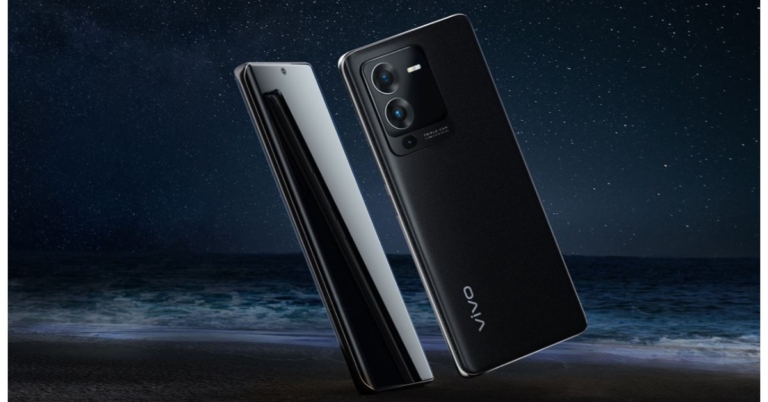
Vivo V25 Pro has officially made its debut in the Indian market today. The key highlights of the smartphone include a 120Hz 3D Curved Full HD+ AMOLED display and a 64MP triple rear camera setup. The device is powered by MediaTek Dimensity 1300 SoC and runs on Funtouch OS 12. In addition to this, the handset supports a 66W FlashCharge tech.

Vivo V25 Pro price in India, sale details

The base model of the Vivo V25 Pro, which comes with 8GB of RAM and 128GB of internal storage, is priced at Rs 35,999. Priced at Rs 39,999, the top-tier model includes 12GB of RAM and 256GB of internal storage. The device will be offered in two colour options of Pure Black and Sailing Blue. Vivo V25 Pro price in India, sale details Beginning on August 25, the smartphone will be sold through Flipkart, Vivo’s online store, and other retail channels. Customers who pre-book the gadget will also be eligible for an additional exchange incentive of up to Rs 3,000 and a flat discount of Rs 3,500 (applicable on HDFC Bank credit/debit cards and EMI transactions).

Vivo V25 Pro specifications

The Vivo V25 Pro has a 6.56-inch FHD+ 3D Curved AMOLED screen that offers a touch sampling rate of 300Hz and a high refresh rate of 120Hz for an enhanced viewing and browsing experience. To offer an immersive viewing experience, it also supports 100% DCI-P3 broad colour gamut and 6,000,000:1 ultra high contrast level. Additionally, it has SGS Low Blue Light Certification, Netflix HDR Certification, and HDR 10+ Certification. Vivo V25 Pro specifications Additionally, the unique Colour Changing Fluorite AG Glass technology used in the vivo V25 Pro allows the device’s rear panel to change colour. When exposed to sunshine or UV light, the photochromic molecular structures in the smartphone back panel start to rapidly alter, changing the colour of the phone’s back panel. The V25 Pro’s colour is changed from light sky blue to deep ocean blue in the Sailing Blue edition. The device is powered by Funtouch OS 12. The MediaTek Dimensity 1300 SoC, along with up to 12GB of RAM, powers the smartphone. The chipset offers LPDDR4X RAM, quick UFS 3.1 storage, and extended RAM 3.0, which offers 8 GB of additional virtual RAM. The Vivo V25 Pro has a triple rear camera configuration for optics. A 64-megapixel sensor with an f/1.89 aperture and optical image stabilisation makes up the main camera. Additionally, there is a 2-megapixel macro lens with an f/2.4 aperture and an 8-megapixel wide-angle lens. The 32-megapixel selfie camera on the front of the Vivo V25 Pro has Eye Autofocus and an f/2.45 aperture. The smartphone has a USB Type-C port, dual-band Wi-Fi 2.4GHz and 5GHz, Bluetooth v5.2, GPS, and other connectivity features. Accelerometer, ambient light, proximity, e-compass, and gyroscope are some of the onboard sensors. The 4830mAh battery of the Vivo V25 Pro has a 66W FlashCharge and Smart Charging Engine technology, which minimises heat production and battery degeneration when charging, protecting and increasing the battery’s overall life and health. For the latest gadget and tech news, and gadget reviews, follow us on TwitterFacebook and Instagram. For newest tech & gadget videos subscribe to our YouTube Channel. You can also stay up to date using the Gadget Bridge Android App. You can find the latest car and bike news here.

Top 10 YouTube Channels to watch for the daily news in USA

The Internet has broken down the barriers to communication and has radically altered how we consume information. While this has been a net positive, since people are more connected now than ever, it has also led to rampant misinformation because of virtually no gatekeeping on the Internet. The Internet has also changed how news is produced and packaged for an audience that is constantly being confronted with an ever-changing news feed. In this article, we bring you the top 10 YouTube channels to watch for the daily news in USA. Read Also: 48 ‘tracking’ apps that you need to uninstall right now

PBS NewsHour

PBS NewsHour PBS NewsHour is a public media news organisation with a nightly hour-long television news broadcast. The broadcast is also streamed live on YouTube and later uploaded in its entirety. The PBS NewsHour is known for its deliberate pace which allows for more in-depth analysis and deeper detail in the story package. The PBS NewsHour is streamed every day on YouTube at 6 pm Eastern Time.

C-Span

C-Span If you’re interested in watching parliamentary proceedings and keeping a close eye on every news coming out of DC, C-Span is a great channel to watch. The coverage of Washington carried out by C-Span isn’t matched by any other media outlet. Created by the television cable industry as a non-profit public service, C-Span broadcasts many proceedings of the US federal government as well as other public affairs programming.

Associated Press

Associated Press Associated Press (commonly known as AP) is a non-profit cooperative agency that sources and produces news for over 1,300 newspapers and broadcasters. Associated Press’ reporting is factual and cuts down on any fluff. Its YouTube channel is an excellent resource for news stories across all beats, be it politics, entertainment, sports, or culture.

NowThis News

NowThis News NowThis News produces content exclusively for social media. With short news videos lasting from anywhere between 30 seconds to 2 minutes, NowThis News provides a very condensed version of the current news stories and makes them easy to consume. NowThis News is hugely popular because its format matches what most social media platforms try to push – something that can be easily viewed in a short duration of time. Even though the news coverage may not be in-depth, NowThis News is a good place to dive into the major news stories.

Democracy Now!

Democracy Now! Democracy Now! is one of the largest independent daily news broadcasts in the US. Relying entirely on audience funding, Democracy Now! is able to keep its editorial independence out of the reach of corporate and government interests. The hour-long daily news broadcast is hosted by award-winning journalists Amy Goodman and Juan Gonzalez. Apart from bringing the daily news, Democracy Now! also does thorough in-depth interviews, covering all the diverse voices and viewpoints that usually get sidelined by the large media houses.

VICE News

VICE News VICE initially started on YouTube and still does most of its reporting there. Vice rose to fame with its riveting short documentaries from across the world, covering what was usually ignored by major media houses but appealed majorly to the audiences online. What still makes Vice interesting is its fresh take on ground reporting which does not follow the traditional tropes, and often becomes gonzo-like.

Breaking Points

Breaking Points Hosted by former The Hill journalists, Krystal Ball and Saagar Enjeti, Breaking Points is a YouTube-exclusive daily news show that covers news stories from both ends of the political spectrum. Although the channel is fairly new, it’s grown in popularity within a short duration, with over 800k subscribers only after a year of formation.

David Pakman Show

David Pakman Show. daily news youtube channels Hosted by David Pakman, the David Pakman Show covers all the pressing issues and major stories dominating the news cycle. At a time when YouTube channels are overridden by commentary, David Pakman does a great job of presenting well-rounded news stories in a balanced manner. While the YouTube channel is constantly updated with free content, you can also subscribe to David Pakman’s Patreon.

The Hill

The Hill. daily news youtube channels The Hill provides thorough coverage of policy-related news and does an in-depth analysis of stories coming out of DC. In 2020, The Hill was the largest independent political news site in the US. If you’re interested in the inner workings of the government, you cannot leave THe Hill out of your media diet.

CBS News

CBS News. daily news youtube channels CBS News is one of the most watched commercial news channels in the US. CBS News’ YouTube channel posts a lot of daily USA-centred content that will keep you updated on the daily news cycle, making sure you don’t miss out on anything. CBS is also home to award-winning broadcasts like 60 Minutes, Face the Nation, and CBS Evening News with Norah O’Donnell. Read Also: How to delete instagram account permanently? (2022) These are the top 10 YouTube channels to watch for the daily news in USA. If you think we missed out on a channel that deserves to be on the list, let us know in the comments!
For the latest gadget and tech news, and gadget reviews, follow us on TwitterFacebook and Instagram. For newest tech & gadget videos subscribe to our YouTube Channel. You can also stay up to date using the Gadget Bridge Android App. You can find the latest car and bike news here.

Instagram and Facebook are tracking you on websites you visited via their platforms

Due largely to the massive amount of their data collection, social media sites have received some negative criticism recently. The stakes have now been raised by Meta, the parent corporation of Instagram and Facebook. According to a recent article, a former Google developer has discovered that Meta can track everything you do. It circumvents tracking restrictions to track you using apps like Instagram’s in-app browser. As per a report by The Conversation, in addition to monitoring your every move on its apps, Meta allegedly has found a means to track your every action on external websites that you browse via its apps.  According to the article, Facebook, Instagram, and any other website you may link over to from either of these applications are all compatible with Meta’s proprietary in-app browser. Felix Krause, a former Google engineer and privacy researcher, has now found that this proprietary browser has additional programme code embedded in it. Instagram and Facebook inserted up to 18 lines of code to web pages browsed using Meta’s in-app browsers, according to a programme created by Krause. This “code injection” makes it possible to track users and bypasses any privacy settings that browsers like Chrome and Safari may have. It enables Meta to gather private user data, such as “every button and link clicked, text selections, screenshots, and any form inputs, like passwords, addresses, and credit card details.” Pcm.js, a script that aggregates a user’s browsing activities, is the “code” referred to in the case. According to Meta, the script is only inserted if users have provided their agreement, and any data collected is exclusively used for advertising. Reportedly Meta has exercised due diligence by notifying users of its plans to acquire a wider variety of data. It didn’t go so far as to explain the entire ramifications of doing so, though. In a broader sense, anyone may consent to tracking, but “informed” consent means complete understanding of all potential repercussions. Furthermore, visitors were not expressly informed in this instance that a code injection could be used to track their activities on other websites.

Why is Meta acting in this way?

The amount of information Meta may get by inserting a tracking code into external websites accessed via the Instagram and Facebook apps is of enormous value. At the same time, Meta’s economic model is in jeopardy, and recent events may help explain why this is the case in the first place. It all comes down to the reality that the browsers owned by Apple (which owns the Safari browser), Google (which owns Chrome), and Firefox intentionally impose limitations on Meta’s capacity to gather data. All apps housed on the Apple app store must obtain the users’ explicit consent to track and gather their data across apps controlled by other firms when they are updated to iOS 14.5 last year. Meta has stated in the open that just one iPhone alert is costing its Facebook business $10 billion annually. Additionally, a default setting in Apple’s Safari web browser prevents the use of any third-party “cookies.” These are tiny pieces of tracking code that website’s place on your device and use to record information about your visit to the website. Third-party cookies will eventually be phased out by Google as well. For the purpose of preventing alleged cross-page tracking, Firefox has announced “complete cookie protection.” “In other words, Meta is being flanked by browsers introducing restrictions on extensive user data tracking. Its response was to create its own browser that circumvents these restrictions,” the report noted.

The tracking issue should be resolved if you follow the below-mentioned steps

The simplest solution to stop Meta from tracking your outside actions via its in-app browser is to just stop using it. Instead, make sure you open websites in a reliable browser of your choice, such Safari, Chrome, or Firefox. If you are unable to locate this screen option, manually copy the web address and paste it into a reputable browser. Another choice is to use a browser to view social media websites. Consequently, visit the websites by entering their URL into the search box of your dependable browser rather than using the Instagram or Facebook apps. The tracking issue should be resolved as a result. For the latest gadget and tech news, and gadget reviews, follow us on TwitterFacebook and Instagram. For newest tech & gadget videos subscribe to our YouTube Channel. You can also stay up to date using the Gadget Bridge Android App. You can find the latest car and bike news here.