Garena Free Fire is a battle royale game with regular awards and tournaments to keep players interested. If you play Garena Free Fire, you should be aware of the redeem codes that are released on a daily basis. However, because the battle royale game is banned in India, players from other countries can use the Free Fire Redeem codes daily. If you’re unfamiliar with the Garena Free Fire redeem codes or don’t know how to get them, we’ve put together a step-by-step guide to help you redeem them. Check out Garena Free Fire Redeem Codes for May 4.The Free Fire redeem codes are a great way to get free stuff. These are 12-digit codes that contain alphabets and numbers, as well as an expiration date and time. Because the Garena FF redeem codes cannot be used more than once, you should hurry to the redemption page to claim your free reward before someone else does. To get a free reward, all you have to do is go to reward.ff.garena.com/en, which is the official redemption page. Also, keep an eye on this space for daily updates on Garena Free Fire redemption codes and rewards.
In This Article
Garena Free Fire Redeem Codes Today 4 May 2022
B6IY CTNH 4PV3
FB6H NJ1K DI8U
22NS M7UG SZM7
FJKI 8U7Y 6TRF
FIH8 FS76 F5TR
TSAF Q7B4 N56M
FUOJ NB7V C6SR
F3TE FCXR SFEG
DM7Z 79JE A896
4PVB SRG9 ETBF
Q4QU 4GQG E5KD
TFF9 VNU6 UD9J
MQJW NBVH YAQM
WCME RVCM USZ9
9BYD PUM5 WK6Z
TUJ9 Z4G8 Y7D4
6YOU 9JN8 7V6Y
CT5D RFEV RB45
FFGB VIXS AI24
FBNJ I87Y 6TGH
FTRF VBHJ FI87
NTJY KHIB 87V6
MHM5 D8ZQ ZP22
X99T K56X DJ4X
SARG 886A V5GR
JBIV 87D6 S5WR
M67Y L6OJ N8BU
How to Get Free Fire Redeem Codes for Garena on May 4?
Have you participated in the Amazon Quiz today? If not then participate in the 4 May 2022 Amazon Quiz as it has already gone live on the app. The daily quiz can be played from 12 AM to 11:59 every day on the mobile app platform. Today e-commerce is giving the chance to win Rs 15,000 Amazon Pay Balance.Every day Amazon brings a fresh quiz for its customers. By participating in the quiz the participants can win an Amazon Pay Balance of up to Rs 50,000. The quiz can only be played on the mobile app as it is not available for the desktop platform. The quiz contains five easy questions and you have to answer all the questions correctly. The participants will then be shortlisted for a lucky draw to select a winner. Whereas the results are declared at the end of the month. Check out today’s Amazon quiz answers to win Rs 15,000.Amazon Quiz Today Prize – Rs 15,000 Amazon Pay BalanceQuiz Date – 4 May 2022Daily Timing – 12 AM to 11:59 PMWinner Announcement – Today 12 PM
In This Article
Amazon Quiz Answers Today 4 May 2022
Question 1: Which of these badminton players recently won the Swiss Open women’s singles title?Answer: PV SindhuQuestion 2: By virtue of the Best Picture triumph of ‘CODA’ which became the first streaming service to win a Best Picture Oscar?Answer: AppleQuestion 3: Airtel recently completed the acquisition of a 4.7% stake in Indus Towers from which group?Answer: VodafoneQuestion 4: This is the flag of which country?Answer: CroatiaQuestion 5: This famous playwright was known as ‘The Bard of _____’. Fill in the blanksAnswer: Avon
How To Play Amazon Quiz
Only app users are eligible to play the Amazon quiz every morning from 12 AM to 11:59 PM. The quiz is not available on the desktop. For those who are unaware of how to play the Amazon quiz below are the steps, you can follow to take the quiz.
Firstly download the Amazon app from Google Play Store or App Store
Now fill in the required information through the Sign Up option.
You need to log in to the Amazon app and scroll down on the home screen to find the Amazon Quiz banner.
Tap on the Amazon Quiz banner and tap on the Start button to start the Quiz.
Now you will get 5 questions and you need to answer them correctly. One wrong answer will eliminate you from the Quiz.
When it’s the age of Instagram Reels and Stories, the need for video editing tools and apps escalates automatically. At times, the video that you shot may contain some extra frames that are of no use to you and hence need to be eradicated. Now, whether you are a master at video editing or a newbie, there certainly arise situations in which you need your final results as quick as possible. Maybe you need to make a post which has a time-bound to it or upload a reel on your friend’s birthday to tell them how much they mean to you. To tackle all such situations, we present to you the five ways to trim a video super-quick on Android in 2023. Your desired video results will be ready in no time and within just a few clicks.
In This Article
Trimming A Video From The In-Built Gallery App
Step 1: Go to the Gallery app on your Android device and load the video you want to trim.Step 2: At the bottom of the video, click on the Edit (pencil) icon.Step 3: Now to trim your video to a shorter length, drag the trim handles from both ends to adjust the duration accordingly. Step 4: Click on the Save button at the bottom once you make your changes. That’s it!In this way, you can successfully trim your video right from the Gallery of your Android smartphone, without the hassles of downloading any third-party apps for the same. However, in case the Gallery of your Android device does not allow you to trim a video’s length, there’s no need to worry as there are plenty of other options available for you. Read also:How To Download Instagram Reels On Android (2022)?
Using Google Photos To Trim A Video
Google Photos app also allows you to trim a video, amongst the other range of editing features that it provides. If you don’t already have it installed on your device, you can download it from the Play Store.Step 1: Open Google Photos, tap on the video of which you want to trim the length and tap on the Edit button in the centre at the bottom of your screen.Step 2: In the next window that appears, tap and drag the trim handles to adjust the length and duration of the video according to your requirements. Step 3: Tap on the Save copy button at the bottom right corner of the interface. That’s it!A copy of your newly trimmed video will get saved onto your device. Moreover, Google Photos also provides you with other tools to export a frame of your video, mute, crop, adjust or stabilize it. Read also:How To Find Out Who Has Viewed Your Instagram Profile (2022)?
Using Third-Party Apps To Trim A Video
Besides your built-in Gallery app and the Google Photos app on your device, if you prefer, you can also download other third-party apps for editing your videos. These apps provide you with access to a wide range of tools and features that you can use for enhancing your videos. One good suggestion that we recommend is Inshot. Through Inshot, you can crop, adjust, add motion, animation, text and filter effects to your videos, add masks, borders, reverse play and colour grade them. And you get to use all these features for absolutely free. It also offers more premium packages of tools but for a small fee. Download from here.
Trim a video on WhatsApp
Instead of using your phone’s native video editor or a third-party app, you can directly trim a video on WhatsApp right before sending it to someone. Here’s how.
Step 1: Open the video in your phone’s gallery and select WhatsApp in sharing options. You can choose to send the video to a contract/group or upload it as a Story.
Step 2: Once the video is selected, an editing/preview window will appear on the screen.
Step 3: Use the slider at the top to trim the video. Tap and drag the slider from both ends to adjust the video’s length. You will also be able to see the size of the trimmed video.
Step 4: Hit the green icon at the bottom to send the video to a contact or upload it as a story.
Use Kinemaster
Step1:Download the Kinemaster app on your Android phone.
Step 2: Launch the app and tap on Create.
Step 3: Select Create New to start a new project.
Step 4: Switch to the Video tab and select the video file from your device.
Step 5: Tap on the slider at the bottom.
Step 6:Drag the slider from both ends to trim the video.
Step 7: Tap on Trim/Split for more trimming and cutting options.
Step 8: Tap on Split to make a cut at a particular frame. You can also choose whether you want to trim all parts of the video from the right or the left side of a chosen frame.
Step 9: Tap on the Export icon at the top right corner of the screen once you’re done.
Step 10: Tap on Save as video.
The video file will be saved on your device.
Frequently Asked Questions (FAQs)
How do I trim a video on my Android phone?
Open the video on the Gallery app and hit the Edit button at the bottom. Use the two drag handles to trim the video and then hit Save.
How do I trim a video on WhatsApp?
Share the video to a WhatsApp contact/group or as a Story and use the editing video to trim it before sending. Use the slider at the top to edit out the undesired parts of the video from the beginning and the end.
Which are the best third-party apps for video editing?
Canva, Kinemaster, and InShot are some of the best video editors for Android.
Samsung India today announced the Fab Grab Fest, the country’s largest summer festival. From May 1 to 8, 2022, consumers can take advantage of unprecedented offers and cashbacks on a wide range of Samsung Digital Appliances, as well as Galaxy smartphones, tablets, laptops, accessories, and wearables.These amazing deals will be available on Samsung.com and at Samsung Exclusive Stores all over the country. Customers can save up to 60% on Samsung TVs, including the flagship Neo QLED TVs and Crystal 4K UHD TVs, and up to 57 percent on Samsung Digital Appliances. The Samsung WindFree ACs, Twin Cooling Plus Double Door Refrigerators, Curd Maestro Double Door Refrigerators, and AI Ecobubble Washing Machines will be available during the Fab Grab Fest. Customers can also save up to Rs 4,500 when they buy these products for the first time on the Samsung Shop App.The Samsung Galaxy Book2 laptop will be discounted by up to 16%. While smartphones, tablets, wearables, and accessories, including the flagship Galaxy S22, Galaxy S20 FE 5G, Galaxy M32, Galaxy F22, and the recently launched Galaxy M53 5G and Galaxy M33 5G, will be available at up to 50% off, plus other perks.Samsung has also partnered with leading banks – HDFC Bank, ICICI Bank, and SBI – to offer customers up to 20% cashback on purchases made on Samsung.com and Samsung Exclusive Stores this summer. Both credit and debit cards are accepted for cashback.Samsung will also host back-to-back Live Commerce events on Samsung Live from May 3-6, 2022, a first-of-its-kind live video interactive shopping experience available only on Samsung.com. Customers who purchase during the Samsung Live events will not only receive additional limited-time offers but they will also be entered to win exciting gifts and vouchers.Customers who shop on Samsung.com can expect superfast delivery of Samsung products to their homes in as little as 2-3 days across the country’s 16,000 PIN codes. As per the company, consumers can also get special deals on purchases across Samsung’s Experience Stores and Samsung Shop App during the Fab Grab Fest, in addition to the above offers. Customers who buy a Galaxy M53, M33, or F23 will receive a free Travel Adaptor, mobile covers at Rs 999 with Galaxy S21 FE 5G, Galaxy Buds Live at Rs 999 with Galaxy Flip3, and 50% off on covers with Galaxy S22. Galaxy Buds2 is available for Rs 999 with the Galaxy Book2.First-time customers can save up to Rs 4,500 on Samsung’s Neo QLED TVs, Crystal 4K UHD TVs, WindFree ACs, Twin Cooling Plus Double Door Refrigerators, Curd Maestro Double Door Refrigerators, and AI Eco bubble Washing Machines when purchasing through the Samsung Shop App.
For the latest gadget and tech news, and gadget reviews, follow us on Twitter, Facebook and Instagram. For newest tech & gadget videos subscribe to our YouTube Channel. You can also stay up to date using the Gadget Bridge Android App. You can find the latest car and bike news here.
Who would have thought that one-day playing games on watches would also be possible, no? Just the idea of it makes us realise how far we have come in terms of technological development and in such a short span of time. Numerous games are supported by the range of Apple smartwatches today. On this point, one may think that the scope or variety offered of the supported games must be limited. But hey, let us tell you. From the simplest of games like Flappy Bird to the most complex ones like Chess, from sports and adventure to the arcade genre, you can play anything you want on your wrist. Here are our choices for the top 10 best free Apple Watch games of 2022, that you can download and play right away and absolutely for free!
In This Article
Infinity Loop
The first on our list of the top 10 best free Apple Watch games of 2022 is Infinity Loop. Being one of the most interesting ones available for your Apple smartwatch, the game challenges you to form an infinity loop by rotating the pieces of the puzzle. Just like finding order in chaos, you have to connect all the lines and corners to make perfect connections. The game not only aims at clearing your mind and giving you stress relief and a relaxed time but also helps in improving your logical abilities.Download from here.
Dare the Monkey: Go Bananas!
When you will first meet Dare, your little monkey friend, you’ll surely fall for its cuteness. Small in size but big courage at heart, the monkey runs, climbs, jumps and rolls along his way, risking his life while defeating enemies and traps. But to reach his end goal via traversing through the increasingly tricky worlds, Dare the little monkey needs your help. Download from here.
Pong for Apple Watch
The third on our list of the must-play 10 best free Apple Watch games in 2022 comes a popular one. A game which needs no introduction, Pong for Apple Watch brings the fun of playing pong right on your wrist. You get intuitive controls by turning the digital crown. There are three difficulty levels and can also be played in multiplayer mode. Download from here.Read also: How To Download Minecraft 1.18.31 On Android?
Bubblegum Hero
Next comes the game Bubblegum Hero. It is a simple yet extremely addictive game. All you have to do is just tap and hold the screen to blow a bubble. You have to release it when the bubble becomes of the same size as indicated by the dotted line. But you have to be careful not to release the bubble too soon or too late, as the bubble will pop and the game will be over. Download from here.
Chess
Who would have thought that one could also play chess from a smartwatch? The game can be played not just against the computer but also against other players around the world. The multiplayer mode is available for WatchOS 7 onwards. Hence, all the brainiacs are in for a treat. Download from here.
Vegas Bowling Lite
On number sixth in our list of the top 10 best free Apple Watch games to play in 2022 is Vegas Bowling Lite. Your outdoor bowling plans may get cancelled. But when bowling becomes accessible to you right on your wrist, you never have to miss your chance at having fun in the bowling alley.Download from here.
Elevate Brain Training
This game available for Apple Watch trains the brain to improve focus, memory, communication and cognitive skills. Each person is provided with a personalized program that adjusts over time to maximise results. You get provided with 40+ brain training games to improve your critical cognitive skills, performance tracking, personalized workouts, a workout calendar and much more. Download from here.Read also: 12 Best New Minecraft Seeds For Players To Explore (2022)
Octopuz
Eighth on our list of the 10 best Apple Watch games to play in 2022 is another brain game you can try your hands on. You get to exercise your brain cells alongside having some fun. You get shown a pattern on the screen of your smartwatch which you have to replicate within a limited amount of time. Through this exercise, not only does your intellectual memory gets sharpened but the muscle memory of your fingers also is enhanced.Download from here.
Par 72 Golf Watch
Next up on our list comes one for all the golf lovers. This game brings a golf course onto your wrist with the highlight being its graphics. Not only will you enjoy a green golf course but also will get an option to play courses based in mountains, deserts and seaside environments. Download from here.
Jellyfish Tap
The final item on our list of the top 10 best free Apple Watch games to play in 2022 is Jellyfish Tap. It is the smartwatch version of the popular game flappy bird. It is a huge and addictive package of fun and excitement wrapped with a coat of simplicity. All you have to do is tap and jump your way ahead as a jellyfish!Download from here.So those were our top picks for the 10 best free Apple Watch games of 2022. In case we missed out on your favourites, do let us know in the comments section below. For the latest gadget and tech news, and gadget reviews, follow us on Twitter, Facebook and Instagram. For newest tech & gadget videos subscribe to our YouTube Channel. You can also stay up to date using the Gadget Bridge Android App. You can find the latestcar and bike news here.
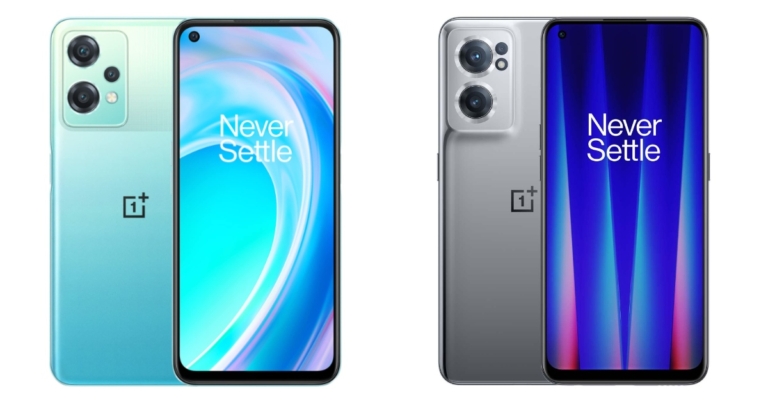
Recently the OnePlus Nord CE 2 Lite 5G debuted in the Indian market. The smartphone is priced under Rs 20,000. It comes with all the latest features including the OS. As the name suggests the device is a toned-down variant of the OnePlus Nord CE 2 5G which is priced below Rs 25,000. As a result, we’ve compared the two smartphones to help you decide which OnePlus phone is right for you.
In This Article
OnePlus Nord CE 2 Lite 5G Vs OnePlus Nord CE 2 5G
Display
OnePlus Nord CE 2 Lite: 6.59-inch full-HD+ displayOnePlus Nord CE 2 5G: 6.43-inch Full-HD+ Fluid AMOLED display
OnePlus Nord CE 2 Lite: The triple rear camera setup on the Nord CE 2 Lite 5G includes a 64-megapixel primary sensor with an f/1.7 aperture. A 2-megapixel camera and a 2-megapixel depth sensor with an aperture of f/2.4 round out the camera setup.OnePlus Nord CE 2 5G: Triple rear camera set up that includes a 64-megapixel main camera with 0.7-micrometre pixel size and an f/1.7 aperture lens, an 8-megapixel ultra-wide-angle camera with a 119-degree field of view and an f/2.2 aperture lens. Both cameras have electronic image stabilisation (EIS) also there is a 2-megapixel macro camera with an f/2.4 aperture
Selfie camera
OnePlus Nord CE 2 Lite: A 16-megapixel Sony IMX471 sensor with an f/2.0 apertureOnePlus Nord CE 2 5G: A 16-megapixel Sony IMX471 selfie camera with an f/2.4 apertureRAM and storageOnePlus Nord CE 2 Lite: 6GB RAM with 128GB storage and 8GB RAM with 128GB storageOnePlus Nord CE 2 5G: 6GB RAM with 128GB storage and 8GB RAM with 128GB storage
Battery
OnePlus Nord CE 2 Lite: 5,000mAh batteryOnePlus Nord CE 2 5G: 4,500mAh battery
Operating system
OnePlus Nord CE 2 Lite: Android 12 with OxygenOS 12.1 on topOnePlus Nord CE 2 5G: Android 11, with OxygenOS 11 on top
However, both smartphones have a 120Hz display, but the most expensive one, the Nord 2 CE 5G, has an AMOLED display, which makes a significant difference. The cameras on the OnePlus Nord CE 2G are also superior to the Lite version, but the selfie cameras on both handsets are identical. The OnePlus Nord CE 2 Lite has a larger and faster-charging battery than the OnePlus Nord CE 2 Lite. The Nord CE 2 is also equipped with the latest Android 12 operating system, as well as OxygenOS 12.1 on top. If you’re on a tight budget, the OnePlus Nord CE 2 Lite is a better option because it has a larger battery and the latest OS than the OnePlus Nord CE 2.
For the latest gadget and tech news, and gadget reviews, follow us on Twitter, Facebook and Instagram. For newest tech & gadget videos subscribe to our YouTube Channel. You can also stay up to date using the Gadget Bridge Android App. You can find the latest car and bike news here.
Garena Free Fire is a battle royale game with regular awards and tournaments to keep players interested. If you play Garena Free Fire, you should be aware of the redeem codes that are released on a daily basis. However, because the battle royale game is banned in India, players from other countries can use the Free Fire Redeem codes daily. If you’re unfamiliar with the Garena Free Fire redeem codes or don’t know how to get them, we’ve put together a step-by-step guide to help you redeem them. Check out Garena Free Fire Redeem Codes for May 2.The Free Fire redeem codes are a great way to get free stuff. These are 12-digit codes that contain alphabets and numbers, as well as an expiration date and time. Because the Garena FF redeem codes cannot be used more than once, you should hurry to the redemption page to claim your free reward before someone else does. To get a free reward, all you have to do is go to reward.ff.garena.com/en, which is the official redemption page. Also, keep an eye on this space for daily updates on Garena Free Fire redemption codes and rewards.
In This Article
Garena Free Fire Redeem Codes Today 2 May 2022
F3F6 GMK5 LOQ8
Y2BF 3JU7 GQOR
87TG Q254 ED12
3IJJ KIF8 YHO8
F6N5 4A3Q 2F34
5UT6 5RAQ IG23
45B6 Y987 FY9E
H56J 7OU8 FD65
FRQF 2GHJ 34I7
6S5A QS1D FQTS
54AF QG8H URF6
DT85 GHU6 RFHY
How to Get Free Fire Redeem Codes for Garena on May 2?
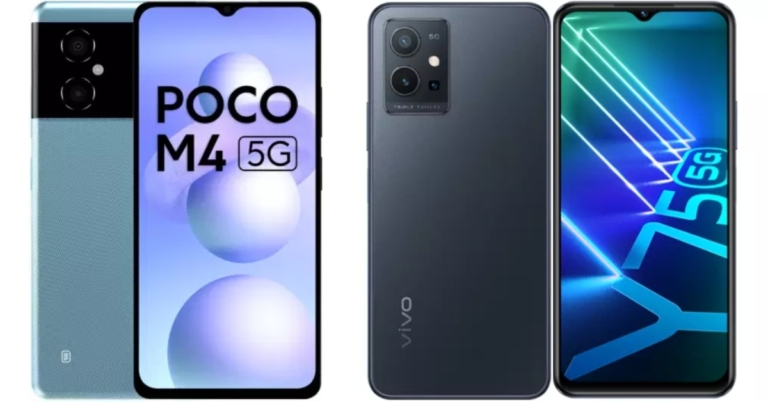
The Poco M4 5G was recently released in India. The smartphone is equipped with a dual rear camera setup and is powered by the MediaTek Dimensity 700 SoC. The smartphone’s specifications are similar to those of the Vivo Y75, which was released earlier this year. Both smartphones are Chinese smartphone manufacturers’ 5G-ready devices. If you’re considering upgrading to a 5G smartphone, check out our comparison of the Poco M4 5G Vs Vivo Y75 5G.
Poco M4 5G: Dual rear camera setup with a 50-megapixel primary sensor with an f/1.8 aperture. A 2-megapixel portrait camera with an f/2.4 aperture is included.Vivo Y75 5G: A triple rear camera arrangement consisting of a 50-megapixel main camera with an f/1.8 aperture. Furthermore, there is a 2-megapixel macro camera with an f/2.0 aperture lens and a 2-megapixel depth sensor with f/2.0 aperture.
Selfie camera
Poco M4 5G: 8-megapixel sensor on the front with an f/2.45 apertureVivo Y75 5G: 16-megapixel front-facing camera
RAM and storage
Poco M4 5G: 4GB RAM with 64GB storage and 6GB RAM with 128GB storageVivo Y75 5G: 8GB RAM with a 128GB storage
Battery
Poco M4 5G: 5,000mAh batteryVivo Y75 5G: 5,000mAh battery
Operating system
Poco M4 5G: Android 12 with Xiaomi’s MIUI 13 skin on topVivo Y75 5G: Funtouch OS 12 on top of Android 12
There are no significant differences between the two phones based on the specification sheet. The display is identical, and the processor and battery are identical on both devices. The only notable difference is the presence of cameras.Poco has a dual-camera setup that lacks a macro sensor, but the other sensors are similar to those found on the Vivo Y75 5G. The Vivo Y75 5G has a better selfie camera than the Poco. When it comes to price, Poco offers everything at a significantly lower cost. So, if cameras aren’t an issue for you, the Poco M4 5G is the way to go.
For the latest gadget and tech news, and gadget reviews, follow us on Twitter, Facebook and Instagram. For newest tech & gadget videos subscribe to our YouTube Channel. You can also stay up to date using the Gadget Bridge Android App. You can find the latest car and bike news here.
Daily Amazon brings a fresh quiz for its customers with exciting rewards on its platform. The Amazon quiz can be played every day from 12 AM to 11:59. 2 May 2022 Amazon Quiz has gone live on its platform and the e-commerce platform Amazon is today giving you a chance to win Rs 5,000 Amazon Pay Balance.To participate all you need to do is log in to your Amazon app on your device and give answers. Daily a new set of questions are presented to the participants which gives them a chance to win exciting prizes. The questionnaire consists of five easy questions that are usually based on general knowledge and current affairs. You can submit the correct answers and can win an Amazon Pay Balance of up to Rs 50,000. It should be noted that the quiz is not accessible on the web platform instead you have to participate only through the dedicated app.Amazon Quiz Today Prize – Rs 5,000 Amazon Pay BalanceQuiz Date – 2 May 2022Daily Timing – 12 AM to 11:59 PMWinner Announcement – Today 12 PM
In This Article
Amazon Quiz Answers Today 2 May 2022
Question 1: Who among these Indian badminton players recently reached the Men’s Singles Final of the Swiss Open?
Answer: HS Prannoy
Question 2: Which famous actor known for playing an iconic role from DC Comics, features in the Marvel movie ‘Thor: Love and Thunder’?
Answer: Christian Bale
Question 3: Russia recently revealed that it used a ______ missile in Ukraine called Kinzhal. Fill in the blanks
Answer: Hypersonic
Question 4: The flag of which country can be seen in this visual?
Answer: Tunisia
Question 5: Which of these was the first book to be published featuring this iconic character in the central role?
Answer: Tintin in the Land of the Soviets
How To Play Amazon Quiz
Only app users are eligible to play the Amazon quiz every morning from 12 AM to 11:59 PM. The quiz is not available on the desktop. For those who are unaware of how to play the Amazon quiz below are the steps, you can follow to take the quiz.
Firstly download the Amazon app from Google Play Store or App Store
Now fill in the required information through the Sign Up option.
You need to log in to the Amazon app and scroll down on the home screen to find the Amazon Quiz banner.
Tap on the Amazon Quiz banner and tap on the Start button to start the Quiz.
Now you will get 5 questions and you need to answer them correctly. One wrong answer will eliminate you from the Quiz.
After answering all the questions correctly you are now eligible for a Lucky Draw.
The winner’s name will be announced today at 12 PM.
Reels have taken over social media platforms to such an extent today that one begins to feel life itself is one big reel. Scrolling has become hard to stop since tons of content keeps surfacing every day on Instagram. Now amongst the various videos and reels that you come across, there may be a few which may seem quite useful. Instagram recently added the option to download a Reel and save it in your phone’s storage. Earlier, you could only save a Reel within the app. So, let’s take a look at all the easy methods to download Instagram Reels on Android in 2024. Read also:How To Find Out Who Has Viewed Your Instagram Profile (2022)?
In This Article
Download Reels directly from Instagram (no third-party app required)
Step 1:Launch the Instagram app on your phone and play the Reel you wish to download.
Step 2: Hit the Share icon at the bottom right section of the screen.
Step 3: Hit the Download button at the bottom of the screen.
The Reel will be downloaded to your device. You can find it in the Instagram folder in your phone’s gallery.
Download Instagram Reels by uploading them as your story
Step 1:Launch the Instagram app and play the Reel you wish to download.
Step 2: Tap the Share icon.
Step 3: Select Add reel to your story.
Step 4: Tap the ellipses (three dots) at the top right corner of the screen.
Step 5: Tap on Save.
Step 6: Go back and ditch the Story.
The Instagram Reel will be downloaded to your Android Phone’s gallery.
Download Instagram Reels Through Screen Recording
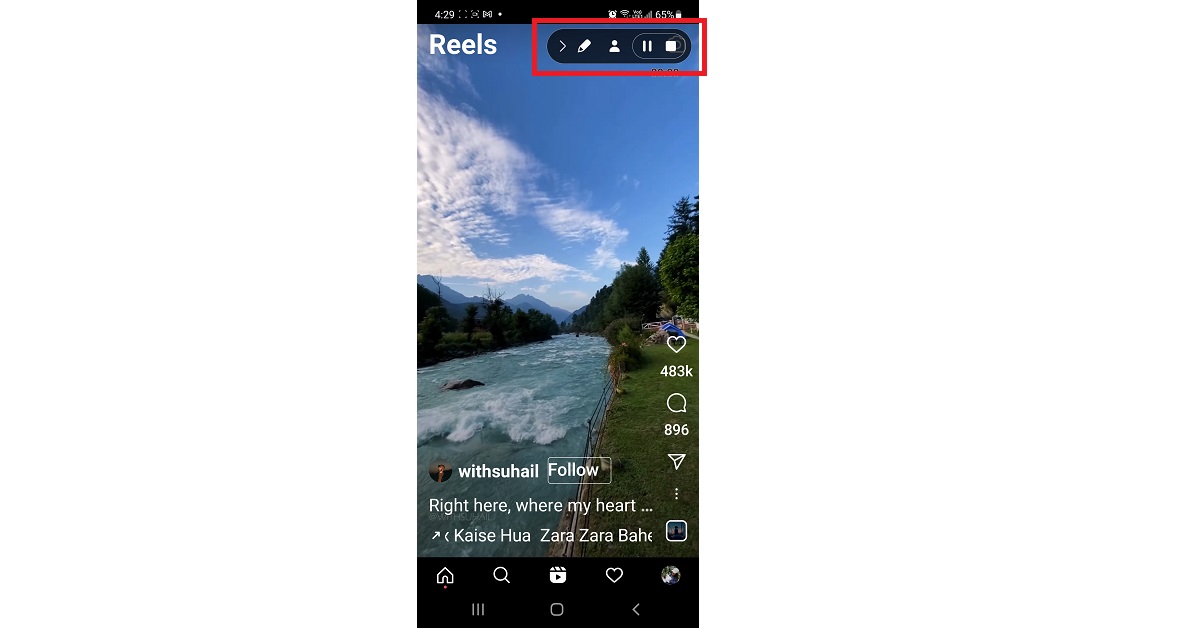
Downloading Instagram Reels on Android can be a little tricky, no doubt. One of the ways you can use to do the same is through screen recording. Yes, there might not be an actual ‘Download’ option available for Reels on Instagram. However, if you come across a certain reel which you think is really important and you might need offline access to it in the future, then screen recording is the way to go. The latest Android smartphones like those within the Samsung Galaxy S series and the Galaxy Note series do offer the screen recording feature. All you need to do is just follow the steps given below. A note to be made here is that some of the steps may work on only selective Android devices. Step 1: Swipe down twice from the top of your Android device screen to open the Quick Settings panel and tap on the Screen Record icon.Step 2: Select the appropriate sound settings within the pop-up that appears next and click on the Start recording button. The recording will begin after the countdown, which you can choose to skip as well. Step 3: Open the Instagram app and play the reel you want to record. Step 4: To stop the recording, swipe down from the top of your screen and again press the Screen Recorder icon. You can also press the Pause or the Stop button on the black bar in the top right corner of your screen. That’s it!Read also: Instagram is expanding Enhanced Tags from Feeds to Reels
Using Third-Party Apps
In case your Android smartphone is not equipped with the screen recording feature, there’s no need to worry. There are plenty of third-party apps available which you can get help from. These not only allow you to download reels but also stories, photos and videos as well. Below are some good options which you can try:
If you don’t want to download a third-party app on your phone, you can use an online tool to accomplish the task. Here’s how you can download an Instagram Reel on your Android device using the Savefrom website.
Step 1:Launch the Instagram app on your Android phone and play the Reel you want to download.
Step 2: Tap on the arrowhead icon and select Copy Link.
Step 3: Go to Savefrom.net and select Instagram Downloader from the top menu.
Step 4:Paste the Reel URL in the box and hit Download.
Step 5: Click on the mp4 icon.
The Instagram Reel will be saved on your device.
Frequently Asked Questions (FAQs)
How can I download Reels on my phone without using a third-party app?
There is a native way of downloading Reels on your Android phone from the Instagram app itself. Simply play the Reel you want to download, then tap the ‘Share’ icon and select ‘Download’.
How do I download a Reel as an mp3?
To download an Instagram Reel as an mp3, copy its link and paste it to an online downloader like Savefrom.net. Select your preferred download format as mp3. You will be able to extract the Reel’s audio from the file.
Which are some of the best apps to download Instagram Reels on my phone?
These are the top 5 ways you can download Instagram reels on your Android device anytime you want. If you know of any other ways or means to do the same, we would be delighted to hear about it. Do write to us in the comments section below.




 Step 2:
 Step 3:
 Step 4:
 Step 1:
  Step 2:
  Step 3:
 Step 4: Hit the green icon at the bottom to send the video to a contact or upload it as a story.
 Step 3: Select Create New to start a new project.
 Step 4: Switch to the Video tab and select the video file from your device.
 Step 5: Tap on the slider at the bottom.
Step 6: Drag the slider from both ends to trim the video.
Step 7: Tap on Trim/Split for more trimming and cutting options.
Step 5: Tap on the slider at the bottom.
Step 6: Drag the slider from both ends to trim the video.
Step 7: Tap on Trim/Split for more trimming and cutting options.
 Step 8: Tap on Split to make a cut at a particular frame. You can also choose whether you want to trim all parts of the video from the right or the left side of a chosen frame.
 Step 9: Tap on the Export icon at the top right corner of the screen once you’re done.
 Step 10: Tap on Save as video.
 The video file will be saved on your device.







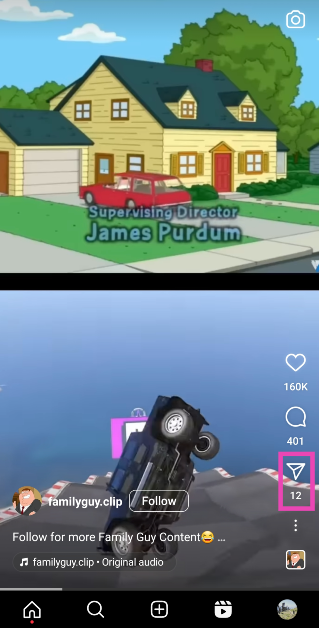 Step 3: Hit the Download button at the bottom of the screen.
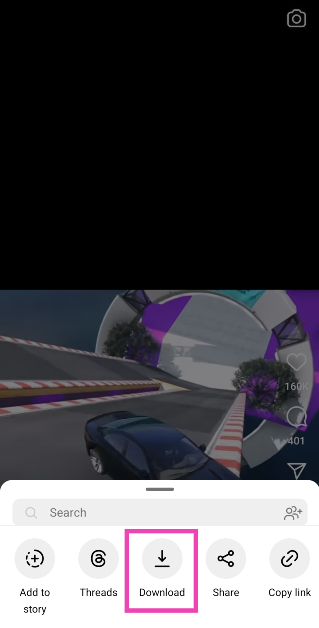 The Reel will be downloaded to your device. You can find it in the Instagram folder in your phone’s gallery.
 Step 3: Select Add reel to your story.
 Step 4: Tap the ellipses (three dots) at the top right corner of the screen.
 Step 5: Tap on Save.
 Step 6: Go back and ditch the Story.
The Instagram Reel will be downloaded to your Android Phone’s gallery.
Step 6: Go back and ditch the Story.
The Instagram Reel will be downloaded to your Android Phone’s gallery.
 Step 1:
  Step 2:
  Step 3:
  Step 4:
 Step 3: Go to
  Step 4: Paste the Reel URL in the box and hit Download.
 Step 5: Click on the mp4 icon.
 The Instagram Reel will be saved on your device.