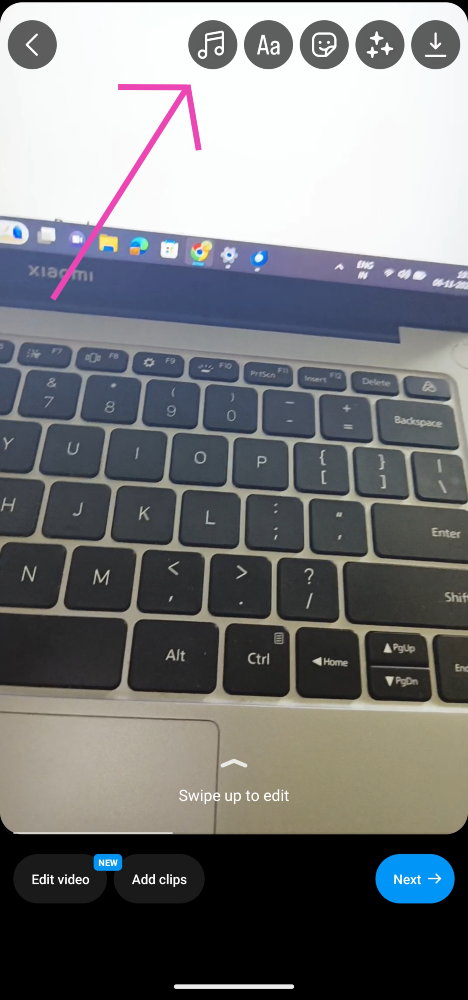
Micromax In Note 2 with MediaTek Helio G95 SoC launched in India

The Micromax In Note 2 has finally arrived in India. The device is a successor of In Note 1, which was announced in India in 2020. The smartphone includes 30W rapid charging technology and an AMOLED display. The smartphone also features a fingerprint sensor on the side and is powered by MediaTek Helio G95 SoC Read on to know the specification of the handset.

Micromax In Note 2 price on India and availability details

The Micromax In Note 2 has been launched in a single 4GB RAM with a 64GB storage variant in India. The price of the phone is set at Rs 13,490. The device is available in two colours: black and brown. It will be available for purchase on Flipkart and via the company’s official website beginning at 12 p.m. on January 30. For a limited time, the Micromax In Note 2 will be offered at a reduced price of Rs. 12,490, as an introductory offer. Micromax In Note 2 price on India and availability details

Micromax In Note 2 tech specs

The Micromax In Note 2 has a 6.43-inch full-HD+ AMOLED display offering 1,080×2,400 pixels of resolution. The screen comes with a 20:9 aspect ratio and 550 nits of peak brightness. A Gorilla Glass shield protects the display as well. The smartphone operates on Android 11 and it is powered by MediaTek Helio G95 SoC and 4GB of RAM with 64GB of internal storage. It can be expanded through a microSD card to up to 256GB. The phone also sports a side-mounted fingerprint sensor. Micromax In Note 2 price on India and availability details Furthermore, the phone features a quad back camera configuration, emphasised by a 48-megapixel main sensor, for photography. In addition to this, there is a 5-megapixel ultra-wide lens, a 2-megapixel macro sensor and a 2-megapixel depth sensor. The Micromax In Note 2 has a 16-megapixel selfie camera sensor on the front for selfies and video calling. Micromax has included a 5,000mAh battery with 30W fast charging capabilities. As per the company, with a compatible charger, the battery will be charged to 50 percent in 25 minutes. Connectivity options include 4G LTE, Wi-Fi 802.11ac, Bluetooth v5.0, GPS/ A-GPS, USB Type-C, and a 3.5mm headphone port. For the latest gadget and tech news, and gadget reviews, follow us on TwitterFacebook and Instagram. For newest tech & gadget videos subscribe to our YouTube Channel. You can also stay up to date using the Gadget Bridge Android App. You can find the latest car and bike news here.

AOC introduced three new 144Hz G2 series gaming monitors in India

AOC India has announced the launch of new G2 series gaming monitors in the Indian market. The new range of gaming monitors includes 3 models 24G2U/BK, 24G2E5, and G2490VX. These displays are for professional gamers looking for a diverse gaming experience. All the AOC G2 Series gaming monitors feature VA and IPS display with HDR mode, Adaptive-Sync Anti-tearing Technology, 144Hz refresh rate, 1ms reaction time. The AOC has introduced new models to its G2 Gaming Series. The AOC 24G2U/BK, 24G2E5 and G2490VX are priced at Rs 28,990, Rs 22,990 and Rs 21,990 respectively. During the current Republic Day Sale, monitors will be offered at low rates in all major online and offline businesses.

AOC 24G2U/BK gaming monitor

The AOC 24G2U/BK gaming monitor has a 23.8-inch IPS display that provides 178/178-degree viewing angles. It has AMD FreeSync Premium, a 144Hz frame rate, and a 1ms reaction time, and it improves colour and clarity for various gaming genres. It also has an HDR mode, which converts non-HDR video into HDR-like graphics using three separate approaches. This model includes an adjustable stand that lets you tilt, twist, swivel, and alter the height for a more comfortable and ergonomic viewing experience.

AOC 24G2E5 gaming monitor

AOC 24G2E5 gaming monitor also features a 23.8-inch IPS display. It has a Dial Point feature that is specifically built for first-person shooting (FPS) with AMD FreeSync. It features a 1ms reaction time, which decreases blurring or ghosting. This model also has an HDR mode, which converts non-HDR video into HDR-like graphics using three separate algorithms. It has four filtering modes: reading, online surfing, multimedia, and office.

AOC G2490VX gaming monitor

G2490VX 23.8-inch display with VA panel offers Full HD 1920 x 1080 resolution. This VA panel gaming monitor has handy features such as a 144Hz refresh rate, a 1ms response time, and Adaptive-Sync Anti-Tearing technology. It also has an HDR mode, which converts non-HDR video into HDR-like graphics using three separate approaches. The HDR mode assures HDR visuals while watching a standard quality video by improving RGBCMY colour (through better saturation and range), increasing dynamic contrast for clarity and image sharpness. This also has Flicker-free technology for a more pleasant gaming experience. The AOC flicker-free technology employs a DC (Direct Current) lighting system to deliver a more pleasant and healthy viewing experience, reducing the impacts of eye fatigue during working hours. For the latest gadget and tech news, and gadget reviews, follow us on TwitterFacebook and Instagram. For newest tech & gadget videos subscribe to our YouTube Channel. You can also stay up to date using the Gadget Bridge Android App. You can find the latest car and bike news here.

Redmi Note 11S India launch announced to take place on February 9

Xiaomi, the Chinese smartphone manufacturer, appears to be on a launch binge since the start of the new year. Following the Xiaomi 11i HyperCharge 5G, Xiaomi 11i 5G and Xiaomi 11T Pro launch the company is preparing to launch a new smartphone under its Redmi sub-brand. As announced by the company, the Redmi Note 11S India launch is set for February 9. The official Redmi India account on Twitter tweeted a teaser to herald the smartphone’s debut. Recently, the phone was identified on a variety of certification websites. The Redmi Note 11S has been circulating for quite some time. The company began teasing the Redmi Note 11S’s arrival in the nation earlier this month. As per the launch teasers, the device will come with a quad rear camera configuration. In addition to this, the renderings suggested that the phone will include a hole-punch camera in the centre of the front. Redmi Note 11S price in India The latest teaser as released by the company suggests a quad rear camera arrangement with a 108-megapixel main sensor on the back of the Redmi Note 11S. The teaser also implies that the upcoming Redmi phone would have a 4G connection and may not feature 5G capabilities. Xiaomi has not revealed many details regarding the smartphone, however, depending on the country, the Redmi Note 11S is believed to be powered by a MediaTek SoC and include a 108-megapixel Samsung HM2 camera or a 64-megapixel OmniVision OV6480 as the primary camera. An 8-megapixel Sony IMX355 ultra-wide camera and a 2-megapixel OV02A macro camera will also be included in the future device. As previously said, the phone was discovered on multiple certification websites. At the same time, the gadget received BIS certification, indicating an impending introduction. The model number of the phone was 220111TSI. A smartphone with the model number 2201117SG was also spotted on the NTBC certification authority website, which also listed the Redmi Note 11S. On the EEC certification page, another smartphone with the model numbers 2201117TG, 2201117TY, and 2201117SY was discovered. For the latest gadget and tech news, and gadget reviews, follow us on TwitterFacebook and Instagram. For newest tech & gadget videos subscribe to our YouTube Channel. You can also stay up to date using the Gadget Bridge Android App. You can find the latest car and bike news here.
25 January 2022 Amazon Quiz today answers: Answer to win Rs 25,000 Amazon Pay Balance

25 January 2022 Amazon Quiz has gone live on its mobile app platform. Customers from different parts of the country are participating in the daily quiz. The daily quiz is conducted by the company brings an opportunity for the customers to win exciting prizes. The quiz begins from 12 AM to 11:59 PM. In today’s quiz participants have a chance to win Rs 25,000 Amazon Pay Balance by answering all the questions correctly. Every day Amazon brings a fresh set of questions for its customers that contains five easy questions. Amazon quiz brings an opportunity for its customers to win Amazon Pay Balance ranging from Rs 1,000 to Rs 50,000. which consists of five questions related to general knowledge and current affairs. The participants need to answer all the questions correctly and their names will be selected for a lucky draw. The winner will be announced at the end of the month. One wrong answer could eliminate you from the quiz. If you manage to answer all the questions correctly you can stand a chance to win Rs 25,000 Amazon Pay Balance today. Only app users are eligible to participate in the Quiz. Check Out 25 January 2022 Amazon Quiz Answers.

25 January 2022 Amazon Quiz Answers

Question 1: Former world leader F.W. de Klerk, who died Thursday at age 85, shared the 1993 Nobel Peace Prize with which other person?

Answer: Nelson Mandela

Question 2: A Guinness World Record for the largest orchestra was set by which country’s National System of Youth and Children’s Orchestra “El Sistema”?

Answer: Venezuela

Question 3: Which word has become Collins Dictionary’s word of the year for 2021?

Answer: NFT

Question 4: In which city would you find this clock?

Answer: Kolkata

Question 5: This tower exists in which Mediterranean city?

Answer: Istanbul For the latest gadget and tech news, and gadget reviews, follow us on TwitterFacebook and Instagram. For newest tech & gadget videos subscribe to our YouTube Channel. You can also stay up to date using the Gadget Bridge Android App. You can find the latest car and bike news here.

Samsung Galaxy S22 series pre-order begins, European pricing also leaked ahead of the launch

The Samsung Galaxy S22 series is set to launch next month as the company prepares to showcase its flagship smartphones for 2022. Samsung has also started teasing the device’s release and now it has begun taking pre-orders for the upcoming Galaxy S22 smartphone series ahead of the Galaxy Unpacked event in February. Not just that, the price details of the upcoming flagship has been leaked. The South Korean company plans to unveil the Samsung Galaxy S22, Galaxy S22+, and Galaxy S22 Ultra. Samsung has begun accepting pre-orders for the next Galaxy S22 smartphone series, ahead of the handsets’ release. Customers in the United States may already pre-order the next Samsung flagship smartphone and the next Galaxy Tab S8 even before they went official. According to Samsung’s website, consumers who pre-order the smartphone will receive $50 which translates to Rs 7,000 be used to purchase other things on the company’s website. According to a report by the Verge, Roland Quandt a credible leaker has revealed potential European price details for the forthcoming Samsung Galaxy S22 series. As per the leaks, the vanilla S22 price will start at 849€ which translates to Rs 71,644, the S22 Plus at 1,049€ (Rs 88521), and the basic S22 Ultra at 1,249€ (Rs 1,05,375). While all of the base versions in the series appear to feature 8GB of RAM and 128GB of storage. The regular S22 and S22 Plus have a higher-priced option with 8GB of RAM and 128GB of storage, while the S22 Ultra has two further tiers with 12GB of RAM and either 256GB or 512GB of storage. Samsung appears to have retained the prices from the previous S21 series, with the only exception being an identically priced S22 Ultra model with supposedly smaller RAM than its S21 predecessor. In terms of specifications depending on the location, the Samsung Galaxy S22 series is expected to be powered by a Snapdragon 8 Gen 1 or an Exynos 2200 processor. The handsets are believed to have up to 12GB of RAM and 512GB of storage, with the high-end Samsung Galaxy S22 Ultra, rumoured to include a built-in S Pen. The date of the forthcoming Galaxy Unpacked event has not been officially revealed by Samsung, but reports claim it will take place on February 8. For the latest gadget and tech news, and gadget reviews, follow us on TwitterFacebook and Instagram. For newest tech & gadget videos subscribe to our YouTube Channel. You can also stay up to date using the Gadget Bridge Android App. You can find the latest car and bike news here.

Vivo Y21A budget smartphone with 5,000mAh battery launched in India

Vivo Y21A has officially launched in India. The device is the latest addition by the company to its popular Y-Series lineup. Last week the company also introduced Vivo Y21e in the country and now its successor has arrived in the market. The phone is powered by MediaTek Helio P22 SoC. The phone also comes equipped with a 5,000mAh battery and dual camera set up on its back.

Vivo Y21A price in India and availability

The Vivo Y21A is already featured on Vivo India’s official website, but no pricing or availability information has been provided. But as per the listing, this budget offering will be available in only a single 4GB RAM with a 64GB storage option. We will update you on this after the information is received. The smartphone will come in two colour options Diamond Glow and Midnight Blue. Vivo Y21A price in India

Vivo Y21A specifications

The Vivo Y21A is powered by Android 11 with Funtouch OS 11.1 on top. Under the hood, there is an octa-core MediaTek Helio P22 SoC, 4GB of RAM, and 64GB of internal storage. The device can also expand the RAM by 1GB by using free inbuilt storage. While the internal storage can be expanded using a microSD card. The budget handset features a 6.51-inch HD+ display with 720×1,600 pixels of resolution and a 20:9 aspect ratio. The Vivo Y21A has two rear cameras: a 13-megapixel main camera with an f/2.2 aperture lens and a 2-megapixel macro camera with an f/2.4 aperture. The smartphone has an 8-megapixel front-facing camera with an f/2.0 aperture lens. In terms of connectivity, the Vivo Y21A supports 4G LTE, Wi-Fi, Bluetooth 5, and GPS. An accelerometer, ambient light sensor, proximity sensor, e-compass, and virtual gyroscope are among the sensor options on the phone. The smartphone is powered by a 5,000mAh battery and supports 18W charging through USB Type-C. For the latest gadget and tech news, and gadget reviews, follow us on TwitterFacebook and Instagram. For newest tech & gadget videos subscribe to our YouTube Channel. You can also stay up to date using the Gadget Bridge Android App. You can find the latest car and bike news here.

How Automotive Robots Define the Auto Industry’s Future

Collaborative robots are transforming the manufacturing industry in the 21st century. Robots are a popular choice for manufacturing companies because of their flexibility and ease of use. The vehicle industry is one such industry that robots have revolutionized. Robots are a middle ground between human work and traditional machines. Learn in this article the benefits they bring and how they give an edge to businesses and make them more efficient.

What are Collaborative Robots in Automotive Manufacturing?

Robots are computer-controlled machines that perform specific tasks in a factory environment. Collaborative Robots (Cobots) are operable by human beings in a work cell, and they resemble human motion with their articulated arms and hands. Collaborative robots design lets them work alongside humans in the workplace using sensors and safety protocols and work without posing a threat. Automotive robots perform tasks considered dangerous for humans. The latest robots use a suite of special sensors to navigate the factory and communicate with their human counterparts. The most impressive thing about automotive robots is that they can detect humans and stop or slow down instantly when they sense movement. Thus, they are much safer than traditional industrial robots that move very fast and don’t always know if they are in the path of humans.

How Collaborative robots Work in automotive manufacturing?

The automobile manufacturing industry integrates robots in almost every aspect of an automobile’s manufacture. Auto companies worldwide use collaborative automotive robots for many tasks like welding, painting, and assembly. Automotive robots play a crucial role in the development of autonomous cars. These robots help in many ways within each stage of vehicle production—from designing and machining prototypes to assembling.

Welding

In welding, robots eliminate human error and increase quality by completing precise welds in a highly productive manner. The automotive robots accomplish these tasks by using cameras that provide visual inspection and sophisticated scanning technology that eliminates the possibility of a missed spot on the part that needs welding. As such, the combination allows the robot to use precise movements to mimic those made by an experienced welder with years of experience.

Painting

Robots now play a more significant role in painting tasks. Moreover, instead of having workers stand for long hours and work with harmful solvents to paint car parts, robots spray paint onto the parts at high speed. As a result, they produce better quality work while allowing the workers to focus on other tasks. Automotive robots paint all kinds of automobiles and perform other tasks of the process, including sanding, buffing, and polishing. The tasks are dangerous to humans, but robots accomplish them faster without endangering workers’ lives.

Quality Inspection

Automotive robots are already playing a role in quality inspection thus, eliminating human error by detecting defects more efficiently than humans. In addition, advances in technology have made it possible for robots to perform their duties with precision. For example, infrared cameras can detect defects that are invisible to the human eye. These cameras send data on defects directly to a computer or mobile device. And when combined with machine learning software, this data can be used to teach robots how to detect different types of defects in the future.

Assembly

The assembly of cars or other vehicles typically involves attaching parts and components. Assembly is one step in a production line, and its tasks are organized by the type of vehicle or the part being worked on. The tools and machinery used for assembly are highly specialized, with some designed for specific tasks such as car doors, windshields, and several other tasks.

Benefits of Automotive Robots in Car Manufacturing

The use of automotive robots has been increasing in the manufacturing of vehicles in recent times. Here are some benefits of using industrial robots in car manufacturing.

Efficiency

Automotive robots increase efficiency in car manufacturing processes by performing multiple tasks at the same time. The application of such robots has helped major car companies in boosting efficiency.

Quality

Automotive Robots help improve the quality of vehicles by reducing opportunities for human errors. Robots detect and repair defects on car parts and help manufacturers ensure their customers receive high-quality products.

Safety

Automotive robots enhance safety when working around heavy machinery or other dangerous environments. The robot’s programming has increased awareness of potential threats that may prove fatal to humans, such as moving parts or molten metal.

Handle difficult and complex tasks

Robots eliminate repetitive stress injuries due to performing the same task repeatedly, which is a common problem in manufacturing facilities that use human labor. In addition, they handle more complex tasks than humans can and allow the employees to focus on specific tasks that need urgent attention. There are robots for lifting both heavy and small components, hence the flexibility to work with different types of machinery and perform various tasks. Robots are strong and can lift heavy objects without hurting their back or hurting themselves in any way. If a human worker manually picks up each object and places it onto the conveyor belt, he would need several weeks to complete one task.

The Future of Automotive Robots

The auto industry is undergoing rapid changes. As the popularity of autonomous driving increases and the world becomes increasingly digitized, auto manufacturers are facing some challenges. There are many exciting happenings in the world of robotics, particularly in the automotive industry. As a result, there’s a lot on the horizon for vehicle automation, from self-driving cars to robot valets. Many are investing in new technologies to meet customer demands, including artificial intelligence (AI), machine learning (ML), computer vision, and deep learning. With the increasing demand for vehicles and the growing number of accidents, future robots will efficiently produce safer cars.

Final Submission

In the auto industry, robots help in different aspects of the manufacturing process. They play a crucial role in final assembly, working alongside human workers to produce car parts. They also prepare and paint vehicle bodies and weld pieces together. Collaborative robots, also known as Cobots, are semi-autonomous, interactive robots designed to work side-by-side with human workers. Employing robots in automotive manufacturing is the best way to move the industry forward. As expected, the future robots would be social and appealing to humans. Industrial robots apply throughout the world in the manufacturing of automobiles. Such robots can perform a variety of tasks, including welding, painting, riveting, and assembling.  Automotive robots can be programmed to continuously handle a wide variety of tasks for extended periods without getting tired or fatigued. In addition to this, these robots can be easily supervised by an employee when necessary because they have built-in safety and warning devices. For the latest gadget and tech news, and gadget reviews, follow us on TwitterFacebook and Instagram. For newest tech & gadget videos subscribe to our YouTube Channel. You can also stay up to date using the Gadget Bridge Android App. You can find the latest car and bike news here.
24 January 2022 Amazon Quiz today answers: Answer to win Rs 20,000 Amazon Pay Balance

24 January 2022 Amazon Quiz has gone live. Customers from different parts of the country are participating in the daily quiz. The quiz begins from 12 AM to 11:59 PM. Those participating in the quiz can win exciting prizes by answering all the questions correctly. Today participants have a chance to win Rs 20,000 Amazon Pay Balance. Amazon quiz brings an opportunity for its customers to win Amazon Pay Balance ranging from Rs 1,000 to Rs 50,000. The Quiz can be played from 12 AM to 11:59 PM. The e-commerce platform brings a fresh quiz on a daily basis which consists of five questions related to general knowledge and current affairs. The participants need to answer all the questions correctly and their names will be selected for a lucky draw. The winner will be announced at the end of the month. One wrong answer could eliminate you from the quiz. If you manage to answer all the questions correctly you can stand a chance to win Rs 20,000 Amazon Pay Balance today. Only app users are eligible to participate in the Quiz. Check Out 24 January 2022 Amazon Quiz Answers.

24 January 2022 Amazon Quiz Answers

Question 1: In November 2021 more than 500 people in Egypt were attacked by which creatures during a period of heavy rain and flooding?

Answer: Scorpions

Question 2: The Kangxiwar Martyrs’ Cemetery is the highest cemetery located in which country?

Answer: China

Question 3: Which driver won the inaugural Qatar Grand Prix 2021?

Answer: Lewis Hamilton

Question 4: This is a sculpture made by which famous artist?

Answer: Pablo Picasso

Question 5: A shoe company that shares its name with this animal, was founded in which country?

Answer: Germany For the latest gadget and tech news, and gadget reviews, follow us on Twitter, Facebook and Instagram. For newest tech & gadget videos subscribe to our YouTube Channel. You can also stay up to date using the Gadget Bridge Android App. You can find the latest car and bike news here.

Top 5 ways to take screenshots in restricted apps (2024)

Screenshots are like evidence for every person right now. They act as the ultimate proof. Not just evidence, but many of us use the feature to capture photos from paid photo editing apps and much more. However, with advancing technology, the restriction over the same increases. A lot of apps now have started to restrict the permission to take screenshots. Yet, whenever there is a restriction, there is also a loophole (jugaad), so here are some of the ways to take screenshots in restricted apps or the ones that don’t allow it. Read Also: CES 2024: AMD Ryzen 8000G desktop processor with dedicated AI neural processing unit announced

Use Google Assistant to take screenshots in restricted apps

Most apps take the standard approach to blocking screenshots on their platforms — blocking the screenshot key combinations. So, the only thing you need to do is avoid these combinations to take a screenshot. The easiest way to go about this is by asking your phone’s voice assistant to take a screenshot. Simply say “Hey Google, take a screenshot”, and the job will be done.

Use scrcpy to take screenshots in restricted apps

Step 10: Confirm USB debugging on the window that pops up in your phone. Screen copy or ‘scrcpy‘ is a great tool for mirroring your phone’s display on your PC. If you have exhausted all options for taking a screenshot on your smartphone, you can take a screenshot of the app after mirroring it on your PC. Use the PrtScn key or the Snipping Tool to take a screenshot on your Windows PC. The best thing about using this option is that you can directly transfer the screenshot to your phone right away. Read this article to learn how to use scrcpy.

Use AZ Screen Recorder to take screenshots if an app doesn’t allow it

Another way to take screenshots on restricted apps is through AZ Recorder is a wonderful screen recording software that can also be used to take screenshots. The nicest part about this app is that it is completely free, with fewer annoying advertisements and no time limits. This screen recorder tool can also be used to take screenshots in password-protected apps. Follow the steps below to do so: Step 1: From the Play Store, download and install the AZ Screen Recorder. Step 2: Open AZ Screen Recorder and grant it the rights it needs. Step 3: On your screen, you’ll now see a floating button with numerous alternatives. Best ways to take a screenshot if the app does not allow Step 4: Open the Restricted app where the screenshot will be taken. Step 5: Select the Settings icon that looks like a toolbox from the floating button on your screen. Step 6: Select the Screenshot option from the drop-down menu and shut the drop-down menu. Step 7: A second floating button, a left-hand camera icon, will appear on your screen. Best ways to take a screenshot if the app does not allow Step 8: Tap the Allow button after clicking the Camera icon. It will take a screenshot and save it to your gallery. After tapping on the floating window that appears, you can preview/edit the screenshot. Read Also: How to take a screenshot in Google Chrome incognito mode

Taking a picture of your screen on a different phone

While the above two methods might not be compatible with iOS as they are with Android. Here’s a way you can take screenshots of a restricted app from Android and iOS. As long as you have a spare phone, this is arguably the simplest way to take a screenshot of a restricted app. Simply take a screenshot of the screen you wish to capture. To secure any important data from prying eyes, remember to erase the photo from the other phone.

Take a screenshot in Google Chrome’s Incognito Mode

Google Chrome has an experimental feature that lets you take a screenshot in its incognito mode. To enable this feature type chrome://flags in the address flag and hit Enter. Search for ‘Incognito’ and enable the ‘Incognito screenshot’ feature. Read Also: 4 Ways To Set an Animated GIF as a Wallpaper (2024)

Frequently Asked Questions (FAQs)

How do I take a screenshot in an app that doesn’t allow it?

To take a screenshot in a restricted app, cast your phone’s display to your PC using scrcpy and take a screenshot. You can also ask Google Assistant to take a screenshot.

Why can’t I take a screenshot on Netflix?

Netflix and other streaming platforms do not allow users to take screenshots or record the screen within the app because it is in direct violation of their copyright laws.

How do I take a screenshot in Chrome’s incognito mode?

To take a screenshot in incognito mode on Chrome, go to chrome://flags and turn on the ‘Incognito Screenshot’ feature.

Conclusion

So, these were some of the ways one can take a screenshot of those restricted apps. Some apps like PayTM do not allow you to take a screenshot by default, but let the user change their preference from app settings. You will find this feature on most financial apps but not streaming platforms.

Best 4 ways to add background music to WhatsApp Status

Nowadays, uploading statuses has become a sign of creativity. The more innovative you get, the more followers you have. Thus, it has become quite necessary to add your tunes to your WhatsApp status as well. Today we bring you some of the best ways to add background music to your WhatsApp status. Follow the below hacks and you will be able to add your favourite tunes in no time to your WhatsApp statuses.

Manually via the phone speaker

This is the most straightforward method to add music to your WhatsApp status. You can do this without involving any third-party editing software. Follow the steps below: Step 1: Use any music app on your phone to play the music of your choice. Step 2: Go to the status option on your WhatsApp app while the music is playing. Step 3: Now hold the capture button for a long time to record a video while music plays in the background. This will include the current music on your phone on your WhatsApp status video, which you can quickly share with your friends and family. Read Also :3 brilliant methods to view someone’s WhatsApp status without letting them know

Using a video-editing app

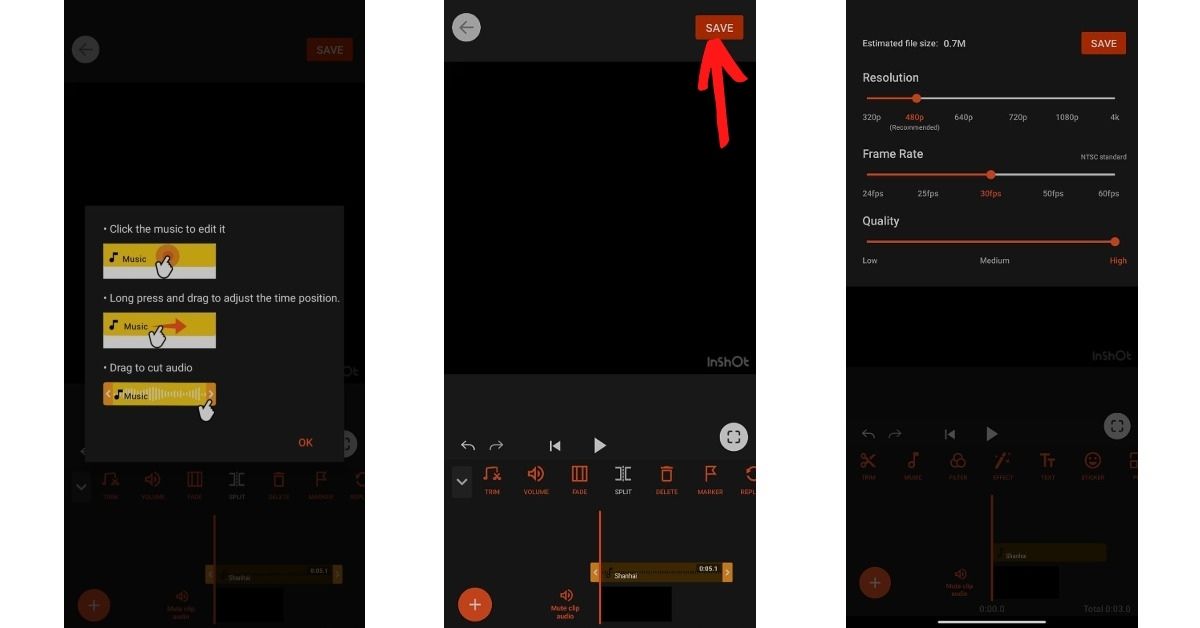
InShot Video Editor (download the app from here) is a popular video editing programme on Android smartphones. It provides the proper number of capabilities for creating bespoke videos and does so quickly. To use this software to add music to your WhatsApp statuses, follow these steps: Step 1: Record the status video on your phone. It might be anything you want to share with your pals. We’ll add the tune separately, so don’t bother about playing the music in this one. Step 2: Once you’ve finished recording the video, go to the InShot Video Editor app and import it. Best 3 ways to add background music to WhatsApp Status Step 3: Select the proper music volume level after deciding on the song you wish to use. It would be wise to mute the original video volume at this point because it might add unwanted noise. Then Save it. Best 3 ways to add background music to WhatsApp Status Step 4: Open WhatsApp, go to your profile and add the video you just generated to your status. It’s best to watch the video before sharing it and only share it if everything appears to be in order. Best 3 ways to add background music to WhatsApp Status

Youcut app

YouCut is a free app (download the app from here) that you can download and install on your phone. You can follow these steps to add music to WhatsApp status: Step 1: Open the app and go to the bottom of the screen to the Plus button. Step 2: Now choose the video to which you wish to add music as background music. You can also combine several photographs and videos into a single clip. Tap the Music option on the editing screen. Best 3 ways to add background music to WhatsApp Status Step 3: From the many options available, to add music from your local gallery, go to the My Music tab and find the song you want. Step 4: You will find some featured tracks by the YouCut app within the ‘Featured’ section. To mute the video’s audio, click on the video clip from the bottom and drag the volume to the lowest setting. Step 5: Also, enable the Fade in and Fade Out buttons by clicking on the music clip from the button. This will add a fading effect to the video’s beginning and end. Best 3 ways to add background music to WhatsApp Status Step 6: Tap the Save button in the top right corner of the screen once you’ve completed editing. After that, choose the video quality (High) and push the Compress button. That is all there is to it. Your video is now complete with background music, and you can share it on WhatsApp.

Use Instagram

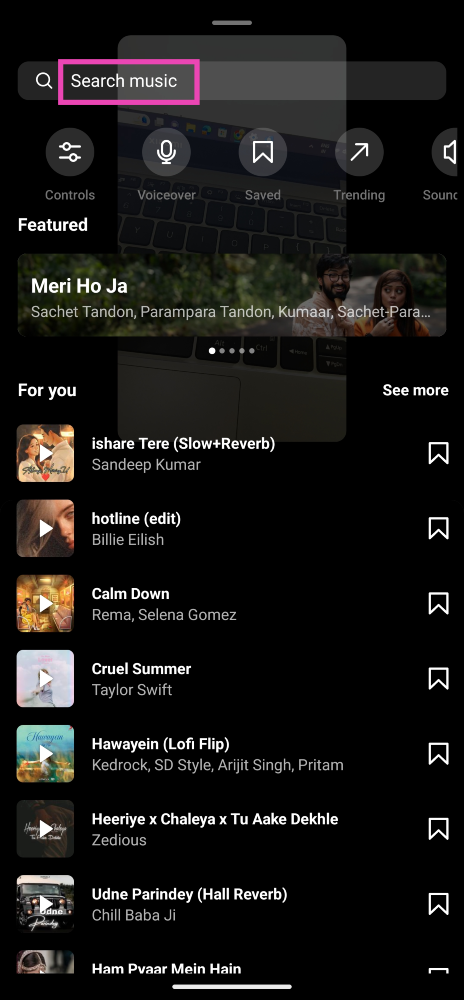
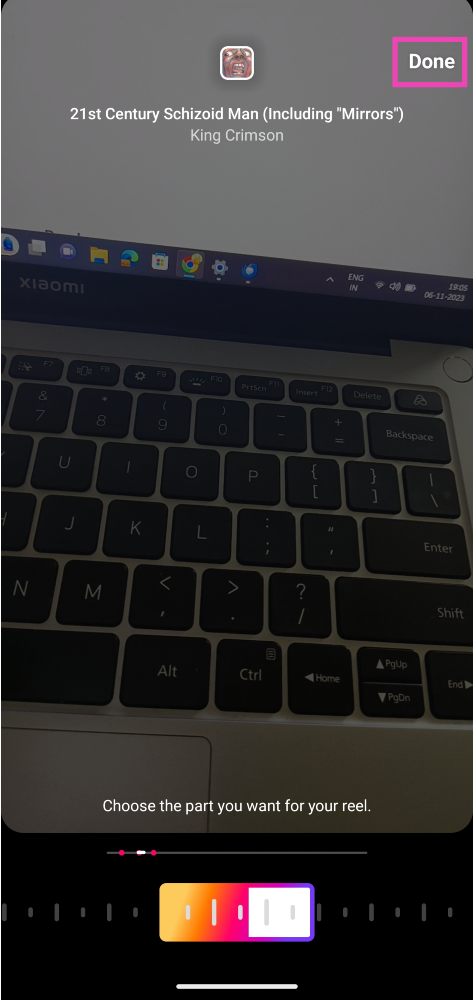
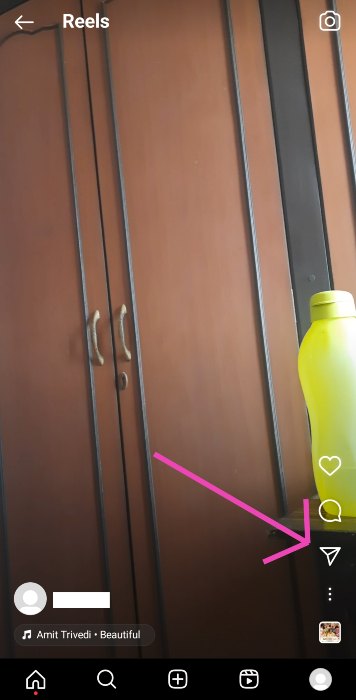
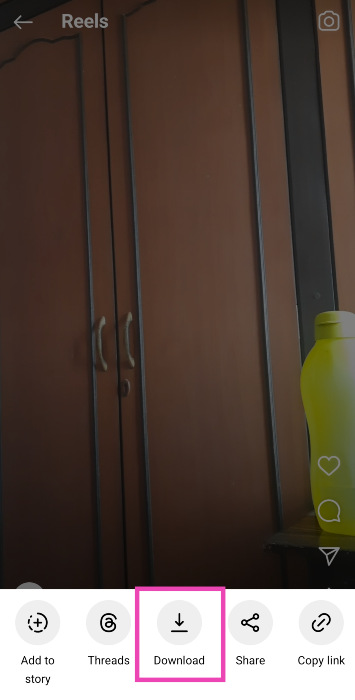
If you don’t wanna go through the trouble of using a dedicated video editing app to add background music to your WhatsApp Status, you can simply use Instagram instead. The only catch is that you will need to post the update as a Reel on Instagram in order to download it on your device. Instagram does not let you download a Reel with background music unless it has been posted to your profile. Here’s how you can go about it. Step 1: Record the WhatsApp status on your phone. Step 2: Launch the Instagram app, switch over to the ‘Create’ page and go to the Reels tab. Step 3: Upload the video from your device’s gallery. Step 4: Hit the music note icon at the top of the editing page. Step 2: Hit the music note icon at the top of the editing page. Step 5: Tap the search bar and enter the name of the song that you want to use on your Reel. Step 3: Tap the search bar and enter the name of the song that you want to use on your Reel. Step 6: Use the seek bar to select the portion of the song that you want as background music for your Reel. Step 4: Use the seek bar to select the portion of the song that you want as background music for your Reel. Step 7: Hit Done and post the Reel to your profile. Step 8: Open the Reel and tap the Share arrow. Step 8: Open the Reel and tap the Share arrow. Step 9: Select Download. Step 9: Select Download. Go to the ‘Instagram’ folder on your device’s gallery app to access the video.
Frequently Asked Questions (FAQs)

How do I add background music to my WhatsApp status update?

Simply play the music of your choice on your device and shoot a video from the ‘status’ tab on WhatsApp. The recorded video for the status update will incorporate the background music.

How do I add background music to a picture for WhatsApp status?

Use a third-party editing app like YouCut or Canva to add background music to a picture.

What is the time limit for videos on WhatsApp status?

You can post 30-second videos as your WhatsApp status. Anything longer than 30 seconds needs to be trimmed. Read Also: Top 3 Ways to Open Facebook Desktop Website on any Phone

Conclusion

Now that you have so many tricks up your sleeve, power up your creative instincts and let’s start uploading the best WhatsApp statuses with your favourite background music. If you’ve got any other method that you’d like to share with us, let us know in the comments!