Festival season is approaching in India and like always, Samsung has grabbed the opportunity to unveil exciting offers for Indian customers. Tablets are now becoming very important as they provide work and entertainment on the go. Due to the global pandemic, the workforce has been shifted to digital means mostly. With so many exciting offers, users can grab these tablets with an affordable price tag.As part of the festival, the tabs listed for the offer are Galaxy Tab S7+, Galaxy Tab S7 FE, Galaxy Tab S6 Lite, Galaxy Tab A7 and Galaxy Tab A7 Lite. Samsung is also giving some bank offers up to Rs 10,000 applicable on credit cards and EMI. One can avail the debit card offers on HDFC, Amazon and ICICI cards as well. Along with bank and cashback offers, customers can go for exciting bundle offers too. These include up to Rs 10,000 off on keyboard cover, Galaxy Buds Live at Rs 1,999 and Book Cover at Rs 999. Below are offers available on Samsung Tablets.
Galaxy Tab S7+
This is the best Samsung Galaxy tab that the company offers with a long-lasting battery, S pen, support for the keyboard cover, and sharp 12.4-inch display. With fast and smooth performance, the tablet is available to its customer for Rs 54,999 on Flipkart.Read Also: TCL launches new lineup of affordable Alcatel Tablets
Galaxy Tab S7 FE
A fast device with an affordable price as compared to Samsung’s flagship. Ideal for students as well as people who love to consume multimedia. It comes with a big 12.4-inch big display and dual speaker with the support of Dolby Atmos. Along with that, the tab comes with a redesigned S-Pen and the optional Keyboard Cover. The tablet is available on Samsung.com, Amazon.in and select Samsung retail outlets with a price tag of Rs 34,999.
Galaxy Tab A7
A slim and affordable tablet ideal for students to work on with a large 10.4-inch screen where official and college work can be done swiftly. The Samsung Galaxy tab sports Dolby Atmos quad-speakers improving the multimedia experience as well. Optional accessories include redesigned S-Pen and the keyboard cover. The Wi-Fi version will be available at as low as Rs 14,499 and will retail on Amazon.in, Samsung.com and Flipkart.comRead Also: Lenovo has launched a new Yoga tablet series in India
Mobile phones have always been superior in multitasking and portability as compared to desktops. One can take away his/her entertainment anywhere they wish with these portable smart devices. YouTube introduced picture in picture mode from Android 8.0 Oreo. This feature allows you to continue to play video while using any other application. There are some issues with PiP as well. Here are how to Fix YouTube PiP not working.The feature converts into a small floating window and continues to play. There are 2 checks a user should confirm to use this feature. First, your Android smartphone should run 8.0 Oreo or above. And secondly, one must have a YouTube Premium/Red subscription(if not in the USA, as the feature is available to everyone in the USA without a subscription). Also, make sure that the applications are up to date.
Enable PIP
This is the first step one should check to use this feature. Often it happens that the feature gets switched off by default. The picture in picture mode might be switched on in the application but not from the system setting. Here is how you can do it.Step 1 – Hold the application icon to discover settings.Step 2 – Tap on the App info.Step 3 – Head to Advance.Step 4 – In the option, you will find Picture in Picture mode, tap on that and toggle on the option.After following this step double-check by heading Settings>General>Picture-in-picture in the YouTube application to make sure this option is switched on.Read Also: WhatsApp to roll out PIP feature for WhatsApp Web
Clear Cache
There might be an issue of bad cache which might have caused this problem. Clearing this catch will solve this issue. Here is how you can do it.Step 1 – Hold the application icon to discover settings.Step 2 – Tap on the App info.Step 3 – Had to Storage and Cache.Step 4 – Press Clear Cache.Read Also: WhatsApp rolls out PiP mode to all Android usersFollowing these steps will surely fix YouTube PiP (Picture in Picture) not Working on Android. Also if the user doesn’t have a premium subscription and still wants to enjoy the PIP feature. he/she must consider using a VPN and setting it to the USA.
For the latest gadget and tech news, and gadget reviews, follow us on Twitter, Facebook and Instagram. For newest tech & gadget videos subscribe to our YouTube Channel. You can also stay up to date using the Gadget Bridge Android App. You can find the latest car and bike news here.
With the beginning of the festive season in India, Apple will be giving special festive offers on its iPhones. The deals will be offered from October 7 and will run till November 4 or till the stock lasts. With the purchase of the iPhone 12 and iPhone 12 Mini, the company will be giving AirPods for free to each buyer.
Apple festive offer on iPhone 12 and iPhone 12 Mini
The latest offer has already been listed on the company’s official online store in the country. Since the sale is scheduled to begin on October 7, the offer banner is not accessible. It should be noted that the price of Apple AirPods starts at Rs 14,000 in India when purchased separately. As a result, if you purchase an iPhone 12 or iPhone 12 Mini, you will be eligible for the deal that combines the iPhone 12 or iPhone 12 Mini with Apple AirPods.But here is the catch, both the Apple iPhone 12 and the iPhone 12 Mini will be sold at their original MRPs. Also, you are free to choose any of the models of AirPods, but in the end, the final decision on what offer will be applied to what model will be made by Apple only.The revised price of the Apple iPhone 12 starts at Rs 65,900, whereas the price of the iPhone 12 Mini begins at Rs 59,900. There will be no discounts on these devices. Instead, one can choose any of the AirPods models that include AirPods without a charging case, AirPods with a charging case, or AirPods Pro. The final value will be decided by Apple when you have decided what combination you will go for. More details will be revealed when the deal goes live in a few days time.The Apple AirPods with a charging case come at Rs 18,900, whereas without the charging case, the price is cut down to Rs 14,900. The AirPods Pro are originally priced at Rs 24,900. Like we mentioned above, Apple will decide the final value of the combination you choose. Similarly, it will decide how much of a discount will be applied to it at the time of check out. One can also ask for engraving to personalise their AirPods case, which is absolutely free.So now you must be wondering what the point of this offer is if Apple is not offering any discount on these products. The point is, if you choose to go with the first combination, which is the iPhone 12/iPhone 12 Mini with AirPods without the charging case, you will definitely save Rs 14,900. Likewise, when you combine your iPhone with AirPods with a charging case, it will let you save at least Rs 18,900, the same as the offer on the AirPods Pro. Also, the invoice value will decide whether the discount will be applied fully or partially. But if you are looking to buy only the iPhone, then we would suggest you look somewhere else. More deals and discounts will be available during the Amazon Great India Festival Sale and the Flipkart Big Billion Days Sale, which will begin on October 3. Here you might get extra discounts on various bank debit and credit cards.
For the latest gadget and tech news, and gadget reviews, follow us on Twitter, Facebook and Instagram. For newest tech & gadget videos subscribe to our YouTube Channel. You can also stay up to date using the Gadget Bridge Android App. You can find the latest car and bike news here.
There are times when you want to use paid apps on Android smartphones but want to try them out first before buying. There are many ways you can do that. You can use third-party app stores, which allow you to use these paid apps for free. We have mentioned some of the third-party app stores here, for your convenience along with some other methods that can help you.Read Also:How to block YouTube Ads on Android TV forever?
Google Coupons
Occasionally, Google provides coupons to users regularly. You may also use these coupons to purchase the paid apps. Although the amount of the coupons is not too much, still you will be able to buy some cheaper paid apps using them. This is a good way to pick up apps for free, which otherwise could cost a bomb.
Google Opinion Rewards
Google Opinion Rewards is a rewards-based app that gives you money in the form of Google Play balance/credits for filling out surveys. The amount you get depends on the number of questions you answered in the survey. This is a method which many users around the world employ to buy apps for free.Once installed, the app will automatically notify you whenever a suitable survey is available for you. As you answer the surveys, you keep earning Google Play credits, which can be redeemed when buying paid apps on the Google Play Store. So yes, you can use this app to download paid apps and games for free on your Android smartphone.If you want to, you can keep earning small credits regularly. Soon, you’ll have enough credits to buy your favourite apps using the credits you accumulated over a period of time.
Google Play Points
Google Play Points is a great way to accumulate points that can later be redeemed to buy paid apps. If you make a lot of purchases on the Play Store or buy in-app items using Google Play, there is no reason why you should miss out on Google Play Points. These points are credited to your profile. Over a period of time, you can collect enough points to buy a paid app for free.
Download from: Google Opinion Rewards
Add apps to your Play Store wishlist
If you want someone else to buy you an app, simply put it on your wishlist and share it with them. If you have a lot of followers on social media, you can share your wishlist with them as well. To add a paid app to your wish list, go to its page in the Google Play Store, hit the ellipses at the top right corner of the screen, and select ‘Add to wishlist’.
Read also: PUBG Mobile Game: Search for Easter Eggs in the Blazing Treasure Event to get premium crate coupon for free
Aptoide App Store
Aptoide is a third-party app bazaar that competes directly with Google Play and other app stores. By using it, you may be able to install paid apps on your Android smartphones for free. All the user needs to do is to install the Aptoide app store and find the paid apps you want to use/try and install. There are plenty of apps that can be installed for free from the Aptoide app store.The apps uploaded on the Aptoide app store are safe and are checked by a couple of developers, these include some big-ticket antivirus companies too (for extra safety). This is also mentioned on their website – after which you can decide whether or not to download the apps.Download from: Aptoide
Blackmart Alpha
Blackmart Alpha is another third-party app store that offers paid apps on Android smartphones and devices for free. For this, you don’t need to pay any money. It has a simple UI and can be used for trying the paid apps before purchasing them.Additionally, you may categorise apps here as well. It sorts between the free and the paid apps. The best feature of this software store is that you may also access apps that are unavailable in your region. It was very popular amongst PUBG: Mobile players when the game was banned in India.Download from: Blackmart AlphaDisclaimer / Note: We at Gadget Bridge, don’t support piracy in any form/manner. Please use these listed app stores at your own risk.
App Sales
AppSales is not an app store, instead, it tells its users about the apps that are now available for free. But, you may use it to view and install newly released apps and games with a great discount on Google Play Store.Those who are watching for discounts on specific apps can add them to their watchlist to keep an eye on their prices. Overall, it’s also a great app to stay updated about the latest app discounts on the Google Play Store. Additionally, you might also see the app pricing history for comparison. Download from: AppSales
Frequently Asked Questions (FAQs)
How do I download paid apps for free on Android?
If you don’t want to download modded apps, you can accumulate Google Opinion Rewards and Play Points to purchase paid apps for free.
How do I add an app to my wishlist?
Go to the app’s page on the Play Store, hit the ellipses at the top right corner of the screen, and select ‘Add to wishlist’.
This is how you can get paid apps for free on Android. Accumulating Play Store credit can take a lot of time, especially if the app costs a lot. However, if you make a habit of taking surveys, it will prove to be quite lucrative in the long run.
Disclaimer: We do not recommend downloading cracked or modded APKs as it is illegal. Most cracked apps and games are altered and may contain suspicious malware or adware, which can attack your mobile after gaining access. They may even attack through viruses or send your private data to unknown servers without prior notice.
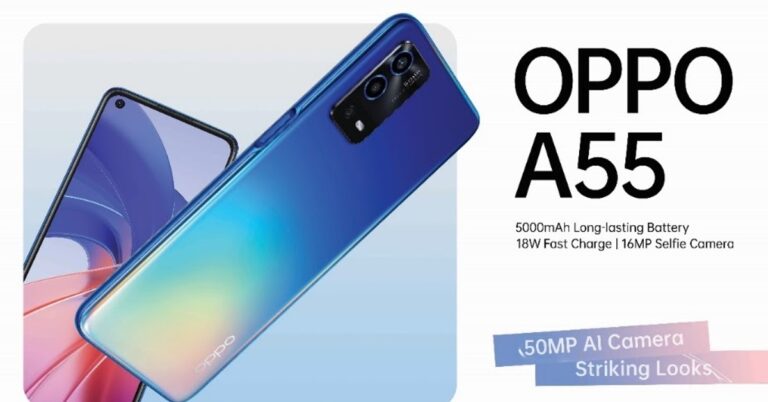
The company launched its new Oppo A55 today in India. The newly launched device is the successor of Oppo A54, which was launched by the company earlier this year. There are lots of updates in the new launch like a new 6.5-inch IPS LCD display that has HD+ resolution, top left corner punch hole camera, Mediatek G35 SoC, 50 MP triple camera setup. Other features include 6GB of RAM, a 5,000mAh battery and a 16MP selfie camera.
Price and availability
The OPPO A55 4GB RAM + 64GB storage model is priced at Rs 15,490. On the other hand, the higher specced 6GB RAM model with 128GB of internal storage retails for Rs 17,490. The smartphone is listed on OPPO India’s website for pre-order. The device will go on sale in India via Amazon and OPPO website.Read Also: Oppo 5G smartphone with Snapdragon 855 processor
Specification and features
The Oppo A55 comes with a 6.5-inch IPS LCD display that has HD+ 720 x 1,600 pixels resolution. The screen has a standard 60Hz refresh rate, a 120Hz touch sampling rate, and the brightness goes up to 550 nits. Powering Oppo A55 is Mediatek Helio G35. The base variant of the device packs up to 4GB of RAM and 64GB of internal storage. The storage can further be expanded via a microSD card.A55 comes with ColorOS 11.1 out of the box, which is based on Android 11. In the optics department, the device features a triple camera setup that consists of a 50MP primary main camera, a 2MP depth sensor and a 2MP macro lens. The front of the smartphone sports a 16MP punch hole camera on the top left corner for selfies and video calls.Read Also: Oppo Watch review: For the everyday power userYou can expect a full day battery with a big 5000mAh battery that supports 18W fast charging. Further, the device supports a dual sim, Wi-Fi 802.11 b/g/n/ac, Bluetooth 5.0, GPS, a long lost 3.5mm headphone jack, and a USB Type-C port. Oppo has placed a side-mounted fingerprint sensor for security. With that one can also use the AI face unlock feature.
For the latest gadget and tech news, and gadget reviews, follow us on Twitter, Facebook and Instagram. For newest tech & gadget videos subscribe to our YouTube Channel. You can also stay up to date using the Gadget Bridge Android App. You can find the latest car and bike news here.
Google Docs is an important tool in the Google ecosystem that can be used for drafting and collaborating on documents. But, giving everyone an option to edit the document doesn’t always work out. The best solution to counter this problem is converting the file into PDF format. This will secure the privacy of data and prevent it from getting copied very easily. Converting the file to PDF will help you avoid high file size limits on email attachments as well. There are basically four methods using which you can convert or save your Google Docs file in PDF format.Read Also:Top 4 Ways to Format a USB Drive to FAT32 on Windows 10 and 11 (2024)
Save a Google Docs file as a PDF
Step 1 – Open Google Docs on your browser.Step 2 – Open the document you want to convert into PDF.Step 3 – Go to Files.Step 4 – Hower over the Download option to discover multiple options.Step 5 – Select the PDF Document option from the list.Step 6 – The PDF file with its name will be downloaded to your system.Read Also: Google Drive offline mode is now available to access files
Use the Print command
Step 1 – Open Google docs on your browser.Step 2 – Open the document you want to convert into PDF.Step 3 – Go to Files.Step 4 – Select the Print option, one can press Ctrl+P directly as well.Step 5 – Select Save as PDF in the Destination column. If you want to save it at a different location select another location from the drop-down and save directly to any cloud service available.
Email the doc file as a PDF
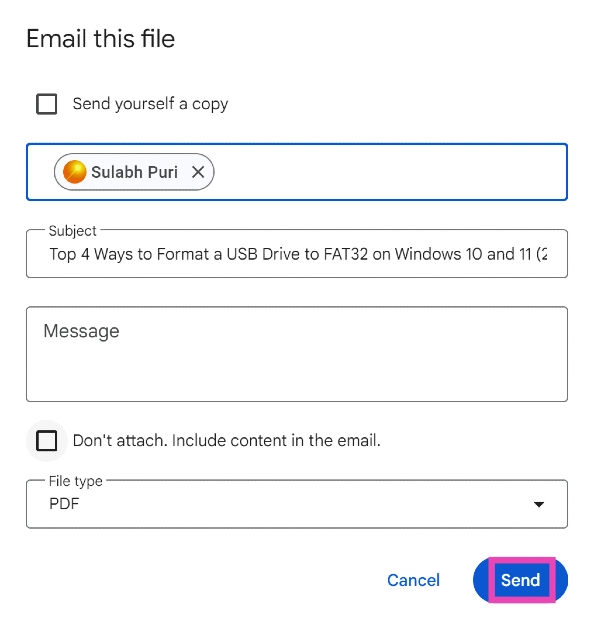
Need to quickly share a Google Doc with someone as a PDF? Simply email it to them. Here’s how.
Step 1: Open the Doc and hit File.
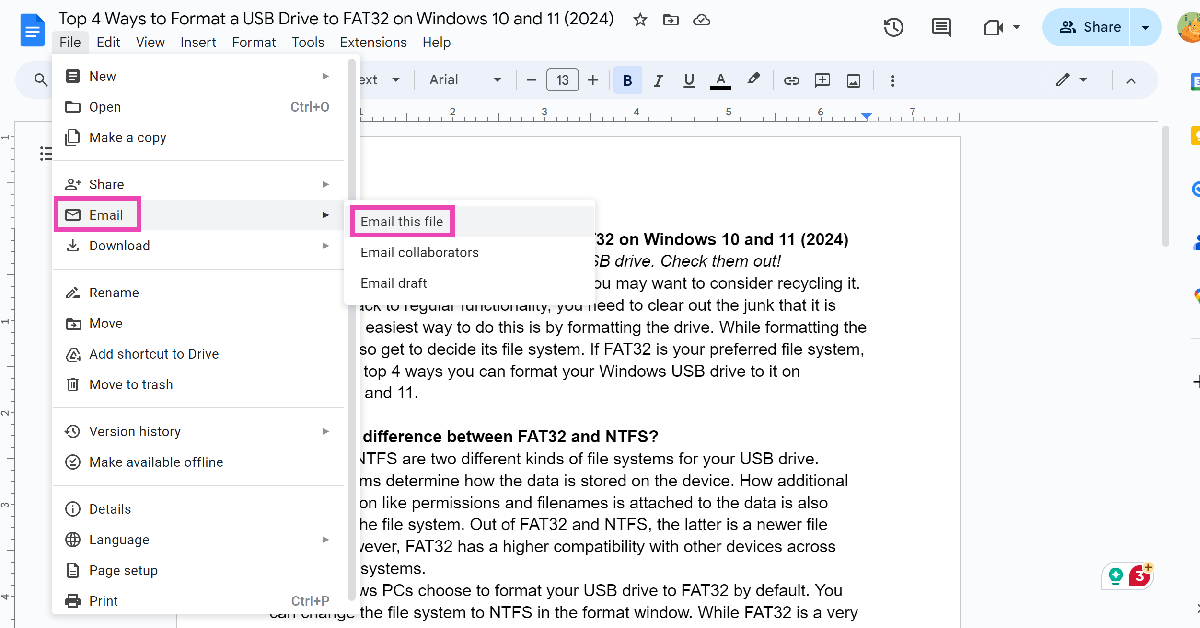
Step 2: Go to Email>Email this file.
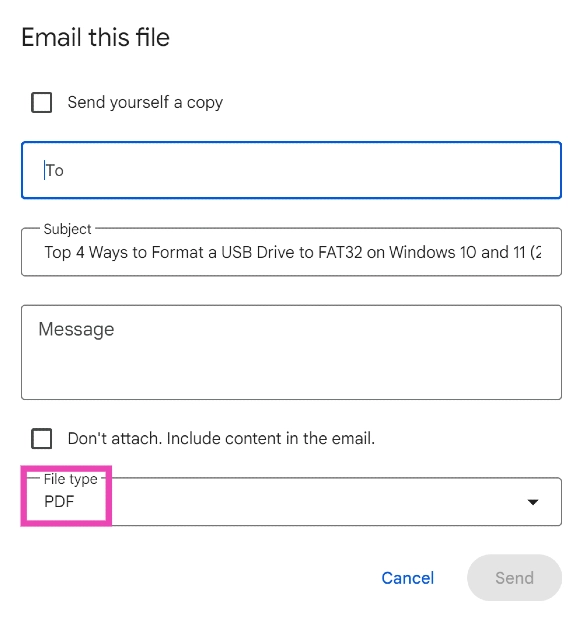
Step 3: Click on File type and select PDF.
Step 4: Enter the email address of the recipient in the ‘To‘ field.
Step 5: Hit Send. You can also choose to save yourself a copy.
Use a third-party tool
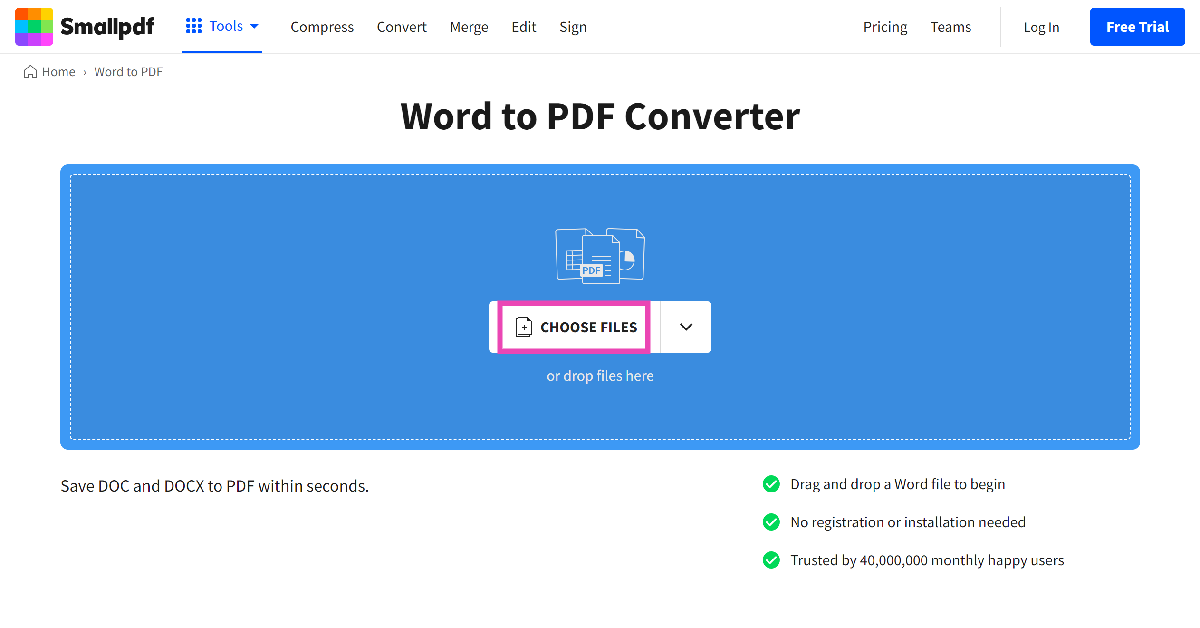
Step 1: Go to https://smallpdf.com/word-to-pdf and select Choose Files.
Step 2:Upload the docx file from your PC’s storage.
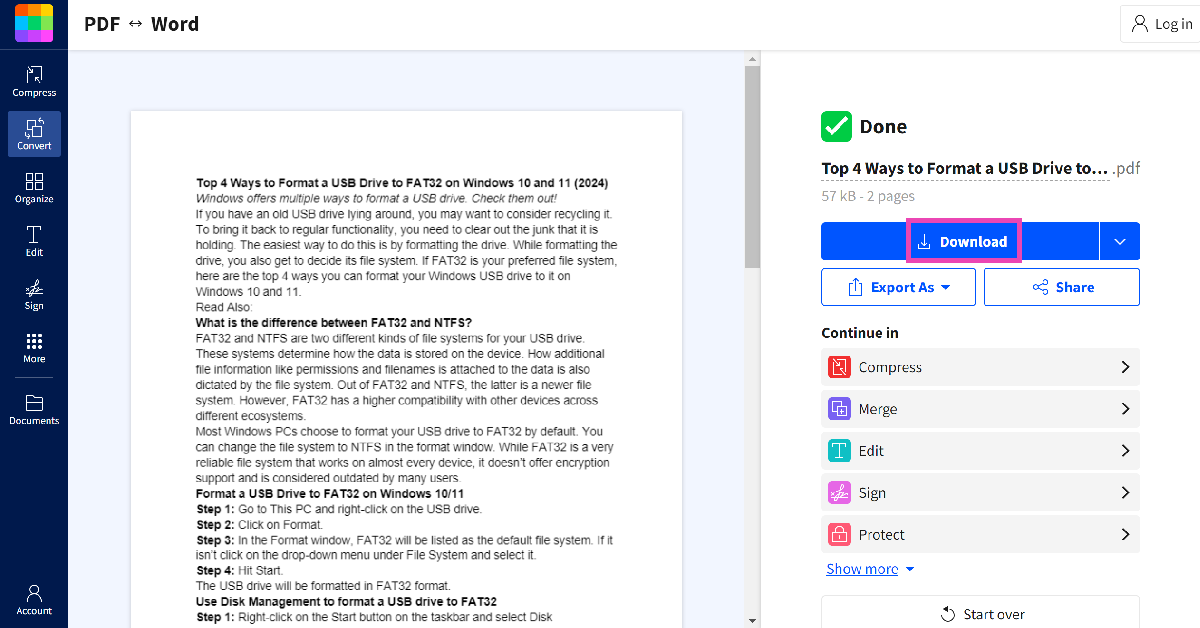
Step 3: The docx file will be converted to PDF. Hit Download to store it on your PC.
Frequently Asked Questions (FAQs)
How do I save a Google Doc as a PDF?
Open the doc, go to File>Download and select PDF Document.
How do I email a Google Doc to someone as a PDF?
Open the doc, select File>Email>Email this file, and select PDF in the file type section. Enter the recipient’s email address and hit ‘Send’.
By following these steps, one can easily download any file in PDF from Google Docs directly. Also if someone wants to do this on any iOS or Android device, following the second method will help on those platforms as well. Alternatively, select the Export option from the setting, which will also do the job.
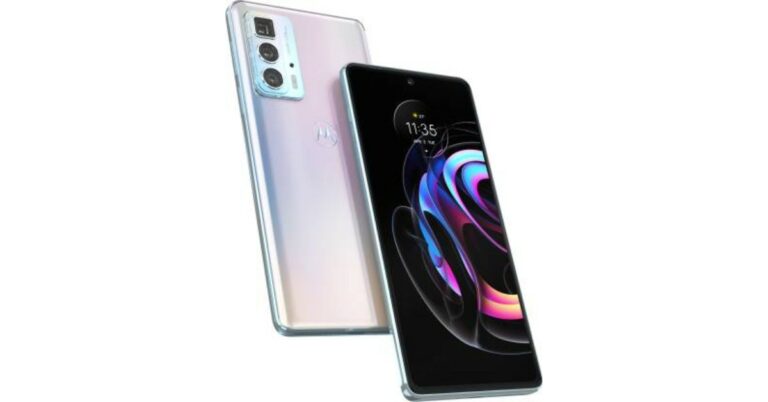
Motorola Edge 20 Pro has officially launched in India today. The device is the company’s latest premium device to launch in the country that completes the Edge 20 Series. The lineup already includes the vanilla Edge 20 and Edge 20 Fusion. The device features a 144Hz AMOLED display. It is powered by Snapdragon 870 SoC and comes with triple rear cameras. Read on to know its price in India and availability details
Motorola Edge 20 Pro price in India and availability details
Motorola Edge 20 Pro will be available in a single 8GB RAM with 128GB of storage option. The price of the smartphone has been set at Rs 36,000 that will go against the likes of devices being offered in a similar price range by Xiaomi, OnePlus and Samsung. Motorola Edge 20 Pro will go on pre-orders from October 3 onwards via Flipkart in the country. The buyers can pre-book the phone at an effective price of just Rs 35,499 using the additional Big Billion Days offer of 10% discount (up to Rs 1500) on AXIS & ICICI Bank Credit & Debit Cards.
Motorola Edge 20 Pro specs and features
Motorola Edge 20 Pro comes with a metal glass build. It features a 6.7-inch full HD+ Max Vision AMOLED display having 1080×2400 pixels of resolution and a 20:9 aspect ratio. The screen supports 144Hz of refresh rate and 576Hz touch latency, DCI-P3 colour, HDR10+. The display is protected with 2.5D Corning Gorilla Glass 5. The device runs on My UX on top of Android 11 and is powered by octa-core Qualcomm Snapdragon 870 SoC with Adreno 650 GPU for graphics. The phone will be offered with 8GB of LPDDR5 RAM and 128GB of UFS 3.1 storage. In terms of the camera department, Motorola Edge 20 Pro is highlighted with a triple rear camera set up that includes a 108MP primary sensor with an f/1.9 aperture. It further includes a 16MP ultra-wide-angle lens with a macro sensor and an 8MP periscope shaped telephoto lens with f/3.4 aperture offering 50x superzoom and 5x macro vision. The phone also includes a 32MP selfies camera with an f/2.25 aperture on the front. The Edge 20 Pro supports 11 5G network bands, WiFi 6, NFC, Carrier Aggregation and MIMO technology along with Bluetooth v5.1, GPS/A-GPS and USB type C port. The sensors on the phone include a side-mounted fingerprint sensor, accelerometer, ambient light, gyroscope, magnetometer and a proximity sensor.There is a 4,500mAh battery on board with 30W fast charging tech that is claimed to fill up 9 hours of power in just 10 minutes.
For the latest gadget and tech news, and gadget reviews, follow us on Twitter, Facebook and Instagram. For newest tech & gadget videos subscribe to our YouTube Channel. You can also stay up to date using the Gadget Bridge Android App. You can find the latest car and bike news here.
Is Apple student discount available in India? Yes, Apple’s ‘Back to School’ offer gives discounts and other benefits to high school and university students, their parents and teachers at registered institutions. The offer programme is available only for a limited time period every year by UNiDAYS Apple India. Today, we are bringing you how you can avail Apple student discount in India 2022.
Apple says that customers may add these offers to the ‘Higher Education’ institution as well. Currently, there is only one place that you may visit to avail these offers, Apple Store Online, in India (at the moment).
List of products applicable for the offer
The Apple Student Discount is only available on MacBook Air, MacBook Pro, iMac, iMac Pro, Mac Pro, Mac Mini, Pro Display XDR, iPad Pro, iPad Air, iPad, and iPad Mini versions. You cannot claim the offer on other products like the iPhone, Apple Watch, AirPods, Apple TV, or any other accessories. The discounted price offered on the selected range of products is as follows:
MacBook Air – Starting at Rs 83,691
MacBook Pro – Starting at Rs 1,10,691
iMac – Starting at Rs 89,910
iMac Pro – Starting at Rs 4,18,410
Mac Pro – Starting at Rs 4,49,910
Mac Mini – Starting at Rs 67,410
Pro Display XDR – Starting at Rs 4,04,910
iPad Pro – Starting at Rs 68,305
iPad Air – Starting at Rs 50,783
iPad – Starting at Rs 28,106
iPad Mini – Starting at Rs 33,155
Read also: YouTube Premium and Music’s 3 months subscription is being given to students for free
How to avail the offer by students
Buyers must provide information like student ID and college or institution address for further verification. Parents or teachers shopping for Apple products for their wards and students too have to provide all the related details to Apple authorities.
The verification process can be completed through UNiDAYS after one enrols for the offer. If facing any problem, you can verify it through an acceptance letter issued from University. UNiDAYS is a free app that connects you with exclusive discounts from top brands – only for students.
The Process – how to avail Apple student discount in India:
Now follow the process by clicking continue. You will be asked to create an account after which you will be asked to add documents. When you are accepted by UNiDAYS apple India, you are eligible for student discounts.
Read also: Apple’s new AirPods earbuds likely to launch in May: Leak
After verification by UNiDAYS, Apple India will mark the account’s purchase eligible for the ‘Back to School’ programme, and then consumers can avail any of the discounts or get a free pair of AirPods, whichever they find more suitable.
The free AirPods being offered under this scheme come with wired charging. Buyers can upgrade to an AirPods with wireless charging by paying an extra amount of Rs 4,000, or to AirPods Pro for Rs 10,000. The original cost of AirPods, AirPods with Wireless Charging, and AirPods Pro are Rs 14,900, Rs 18,900, and Rs 24,900 respectively.
Other bundled offers
All products purchased via Apple Education Store India will come with a free one-year Apple TV+ subscription. Students can also avail the offer of Apple Music at a discounted monthly rate. The Apple Music Student Plan now includes free access to Apple TV+.
You can also avail Apple student discount in India 2022. The Apple Student Discount offer is a great way for students to save money while buying premium products like Mac and iPad. What do you think about Apple’s discounts for students? Can they be lowered? Do let us know in the comments section below.
For the latest gadget and tech news, and gadget reviews, follow us on Twitter, Facebook and Instagram. For newest tech & gadget videos subscribe to our YouTube Channel. You can also stay up to date using the Gadget Bridge Android App. You can find the latest car and bike news here.
As the festive season is approaching most of you would have already started preparing for it. It’s that time of the year when most of the companies offer their best deals and discounts on electronics products including Television. So here are our recommendations that you can consider if you are planning to replace your old television with brand new Smart TV.
Redmi Smart TV Series
Xiaomi will be hosting Diwali with Mi from October 3 and will run till October 10. The company will be putting up most of its products including Smart TVs on sale during the period. Redmi Smart TV 32-inch (80 cm) & 43-inch (180 cm) will be getting huge discounts. On purchase of these televisions, customers will enjoy benefits worth Rs 1,500 on 32-inch and Rs 2,000 on 43-inch making the newly launched models available at a special price of Rs 14,499 and Rs 23,999, respectively. The early access to the sale will begin from October 2 via Mi.com, Mi Home, Amazon.in and across all Mi Stores.
Infinix X1 Android TV
Flipkart’s Big Billion Days Sale is starting from October 3 and will run till October 10. During the sale, Infinix will be offering up to Rs 4,000 discounts on its Android TVs. The 32-inch, 42-inch and 43-inch models of Infinix X1 Android TV will be available on Flipkart at an offer price of Rs 11,999, Rs 21,999 and Rs 18,999 respectively. The original selling price of these televisions is Rs 15,999, Rs 22,999 and Rs 24,999 respectively.
Blaupunkt Cybersound range
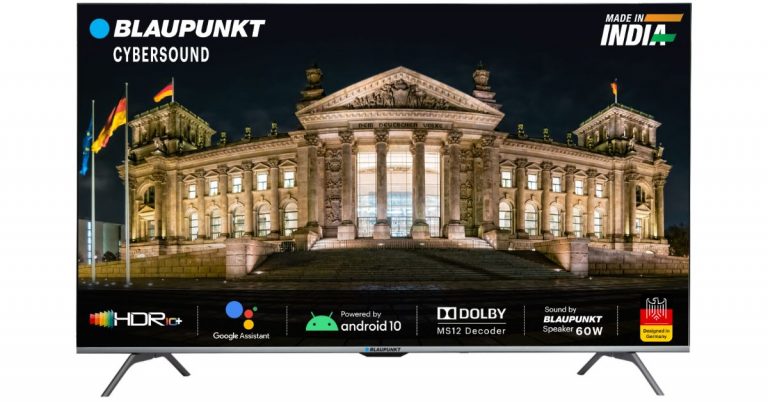
Blaupunkt is another brand that will be offering its Cybersound range of Smart TVs on discounts during Flipkart’s Big Billion Days Sale. The 32-inch model will be offered at its best buy price of Rs 12,999. The 42-inch Full-HD TV will be available at Rs 20,999 whereas the 43-inch Ultra-HD Smart TV will come at Rs 28,999. The 50-inch Ultra-HD from the Blaupunkt Cybersound range will be up for sale at Rs 34,499. The 55-inch Ultra-HD and 65-inch Ultra-HD Smart TVs will be offered for Rs 39,999 and Rs 55,999 in the country. Besides this, the buyers will get a 10% instant discount on Axis Bank and ICICI cards and No cost EMI on all major banks. There will be exchange discounts of up to Rs Rs 11,000, 5% cashback on Flipkart axis bank credit cards. In addition to this, the customers can get Google Nest Hub at just Rs 4,999 and Google Home Mini at just Rs 1,499 on the purchase of Blaupunkt TV.
For the latest gadget and tech news, and gadget reviews, follow us on Twitter, Facebook and Instagram. For newest tech & gadget videos subscribe to our YouTube Channel. You can also stay up to date using the Gadget Bridge Android App. You can find the latest car and bike news here.
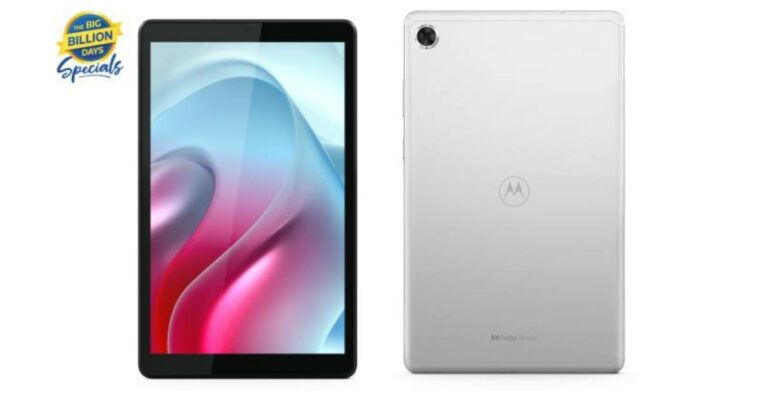
The Lenovo owned company Motorola has re-entered the tablet segment in India with the announcement of its latest product. The company has officially launched Moto Tab G20 in India and this is the Company’s first tablet to come in a long time. The device runs on Android 11 and is powered by MediaTek Helio P22T SOC. The Motorola Tab features a dedicated Google space for Kids and Entertainment. In addition to this, it carries a 5,100mAH battery and includes Dolby Audio
Presenting the all-new #mototabg20 that packs remarkable features to help you experience #PureLearningPureFun at just ₹10,999. What’s more? Get an additional ₹1,000 off by exchanging your old device! Pre-order starts 2nd Oct, 12 PM on @Flipkart. https://t.co/0Qqq1DXdFR
Moto Tab G20 price in India has been set at Rs 10,999. The Tab is already listed on Flipkart and the pre-orders will begin from October 2 at 12 at midnight. The tab will be accessible for Flipkart Plus customers on October 2 and for all customers starting October 3. The Motorola Tablet will come in a single grey colour option. There will be an additional 1,000 off on Exchange and 10 percent discounts on ICICI Bank and Axis Bank Cardholders. As the tablet has been smartly priced it will compete against the likes of Apple and Samsung tablets that are quite popular in the market. Its affordable pricing makes it easier for those who cannot afford to buy a premium tablet-like of Samsung and Apple plus it is a good option for the parents who are looking for tabs for their kids but with limited features for their online classes.
Moto Tab G20 specifications and features
Moto Tab G20 offers ad-free, bloatware-free, Near-Stock Android 11. It features an 8-inch IPS LCD display with TDDI tech. The Motorola Tab is powered by octa-core MediaTek Helio P22T SOC with a 2.3 GHz clock speed. The device will come with 3GB of RAM and 32GB of in-built storage. The tab also offers an Entertainment Space from Google and curated content for kids with Google Kids Space. The tablet is apt for online classes, playing games, enjoying your favourite videos or even connecting with friends via social media. In terms of optics, Moto Tab G20 features a single 5-megapixel rear camera sensor. While on the front there is a 2-megapixel sensor for selfies and video calling. The audio has been enhanced by Dolby Atmos. The Tab is fuelled by a 5,100mAh battery along with a USB Type C port for charging.
For the latest gadget and tech news, and gadget reviews, follow us on Twitter, Facebook and Instagram. For newest tech & gadget videos subscribe to our YouTube Channel. You can also stay up to date using the Gadget Bridge Android App. You can find the latest car and bike news here.




 Step 2 –
 Read Also: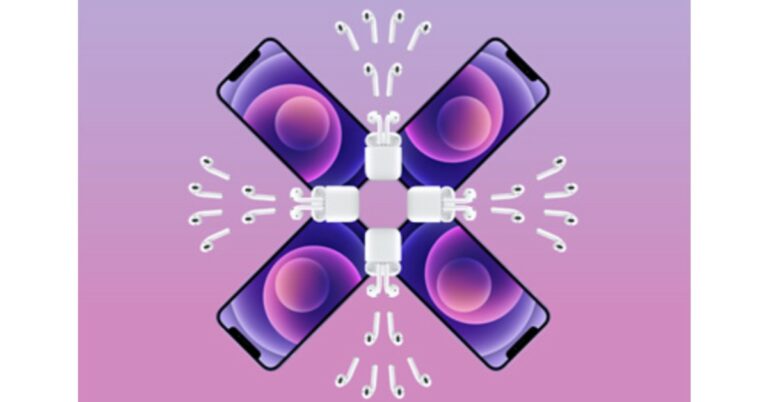



 Google Play Points is a great way to accumulate points that can later be redeemed to buy paid apps. If you make a lot of purchases on the Play Store or buy in-app items using Google Play, there is no reason why you should miss out on Google Play Points. These points are credited to your profile. Over a period of time, you can collect enough points to buy a paid app for free.
Download from
Google Play Points is a great way to accumulate points that can later be redeemed to buy paid apps. If you make a lot of purchases on the Play Store or buy in-app items using Google Play, there is no reason why you should miss out on Google Play Points. These points are credited to your profile. Over a period of time, you can collect enough points to buy a paid app for free.
Download from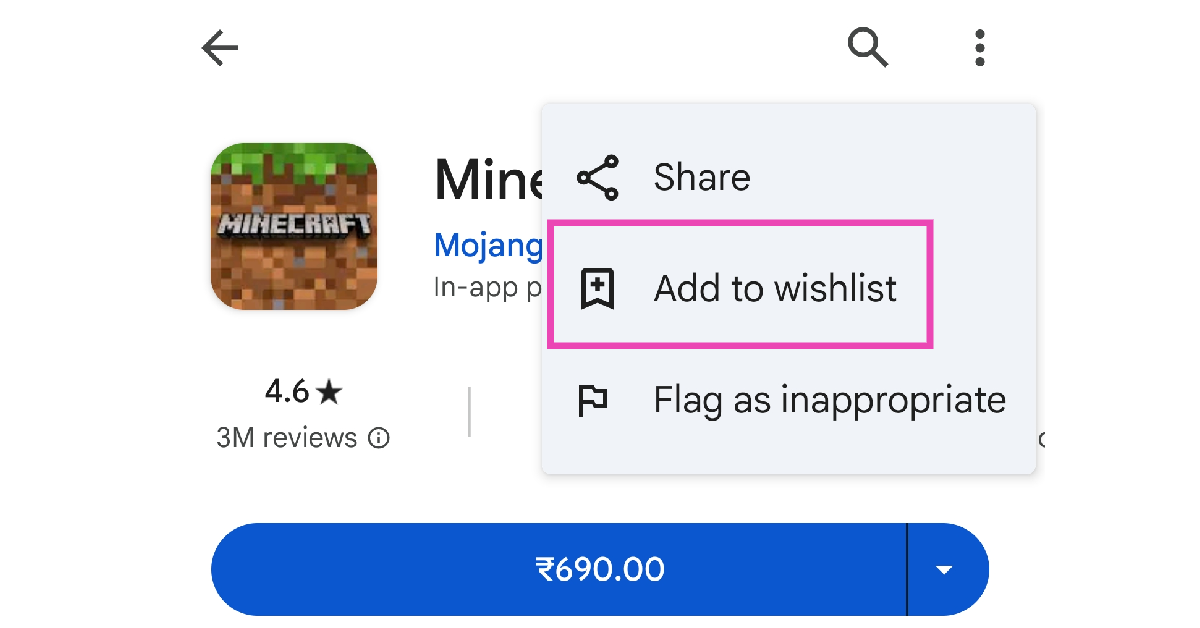 If you want someone else to buy you an app, simply put it on your wishlist and share it with them. If you have a lot of followers on social media, you can share your wishlist with them as well. To add a paid app to your wish list, go to its page in the Google Play Store, hit the ellipses at the top right corner of the screen, and select ‘Add to wishlist’.
Read also:
If you want someone else to buy you an app, simply put it on your wishlist and share it with them. If you have a lot of followers on social media, you can share your wishlist with them as well. To add a paid app to your wish list, go to its page in the Google Play Store, hit the ellipses at the top right corner of the screen, and select ‘Add to wishlist’.
Read also: 



 Step 4 –
  Step 6 –
  Read Also:
  Step 5 –
 Step 3: Click on File type and select PDF.
 Step 4: Enter the email address of the recipient in the ‘To‘ field.
Step 5: Hit Send. You can also choose to save yourself a copy.
Step 4: Enter the email address of the recipient in the ‘To‘ field.
Step 5: Hit Send. You can also choose to save yourself a copy.
 Step 2: Upload the docx file from your PC’s storage.
Step 3: The docx file will be converted to PDF. Hit Download to store it on your PC.
Step 2: Upload the docx file from your PC’s storage.
Step 3: The docx file will be converted to PDF. Hit Download to store it on your PC.



 The Apple Student Discount is only available on MacBook Air, MacBook Pro, iMac, iMac Pro, Mac Pro, Mac Mini, Pro Display XDR, iPad Pro, iPad Air, iPad, and iPad Mini versions. You cannot claim the offer on other products like the iPhone, Apple Watch, AirPods, Apple TV, or any other accessories. The discounted price offered on the selected range of products is as follows:
MacBook Air – Starting at Rs 83,691
MacBook Pro – Starting at Rs 1,10,691
iMac – Starting at Rs 89,910
iMac Pro – Starting at Rs 4,18,410
Mac Pro – Starting at Rs 4,49,910
Mac Mini – Starting at Rs 67,410
Pro Display XDR – Starting at Rs 4,04,910
iPad Pro – Starting at Rs 68,305
iPad Air – Starting at Rs 50,783
iPad – Starting at Rs 28,106
iPad Mini – Starting at Rs 33,155
Read also:
The Apple Student Discount is only available on MacBook Air, MacBook Pro, iMac, iMac Pro, Mac Pro, Mac Mini, Pro Display XDR, iPad Pro, iPad Air, iPad, and iPad Mini versions. You cannot claim the offer on other products like the iPhone, Apple Watch, AirPods, Apple TV, or any other accessories. The discounted price offered on the selected range of products is as follows:
MacBook Air – Starting at Rs 83,691
MacBook Pro – Starting at Rs 1,10,691
iMac – Starting at Rs 89,910
iMac Pro – Starting at Rs 4,18,410
Mac Pro – Starting at Rs 4,49,910
Mac Mini – Starting at Rs 67,410
Pro Display XDR – Starting at Rs 4,04,910
iPad Pro – Starting at Rs 68,305
iPad Air – Starting at Rs 50,783
iPad – Starting at Rs 28,106
iPad Mini – Starting at Rs 33,155
Read also:  Buyers must provide information like student ID and college or institution address for further verification. Parents or teachers shopping for
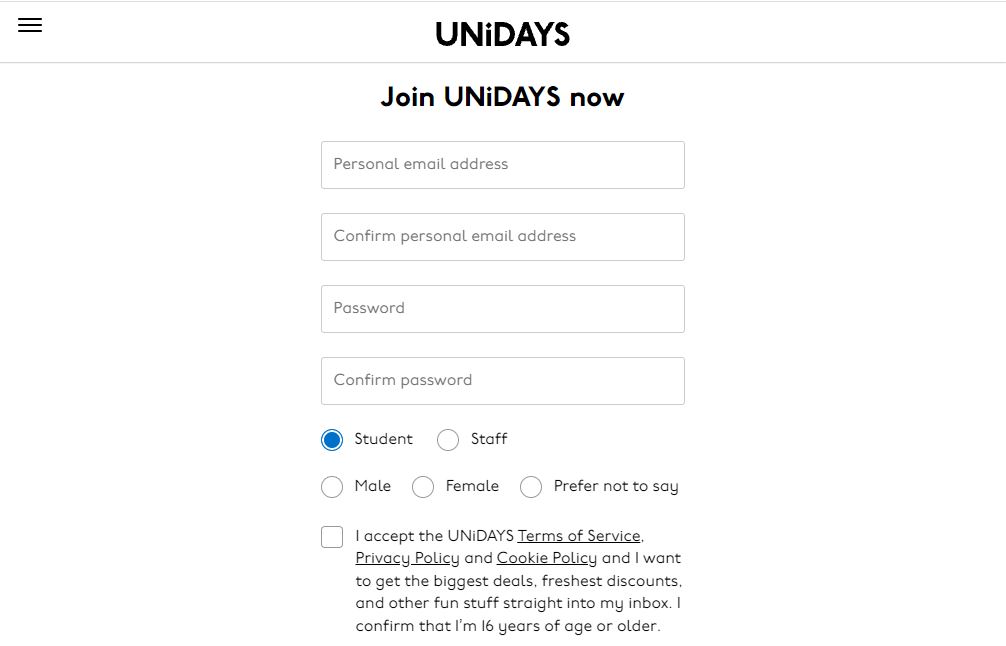 Now follow the process by clicking continue. You will be asked to create an account after which you will be asked to add documents. When you are accepted by UNiDAYS apple India, you are eligible for student discounts.
Read also:
Now follow the process by clicking continue. You will be asked to create an account after which you will be asked to add documents. When you are accepted by UNiDAYS apple India, you are eligible for student discounts.
Read also: