The e-commerce website Flipkart is hosting Daily Trivia Quiz. Every day it brings a bunch of new questions for its users. By answering them correctly you can win exciting prizes. The questionnaire is based on questions related to general knowledge. Also, the users can win free vouchers and super coins, among other offers via the daily quiz. April 26 Flipkart Daily Trivia Quiz Answers has already gone live on its platform.
The participant should be at least 18 years old and should have a valid login ID. The Quiz is available on the mobile platform and not the web version. E-commerce conducts the quiz on daily basis and goes live at 12:00 AM IST and runs till 11:59 PM IST. The winners are announced within 15 days from the date of participation that can be viewed under the Gems/Rewards section in the app.
How to participate in the Flipkart Daily Trivia Quiz
To participate download the Flipkart app on your phone. Then open the Flipkart app then head to Game Zone. Now click on the Daily Trivia Banner or search for Daily Trivia. Enter the game and answer all 5 questions with correct answers.
April 26 Flipkart Daily Trivia Quiz Answers
Question 1: Identify this former Sri Lankan cricketer who is currently the coach of Rajasthan Royals.
Answer: Kumar Sangakara
Question 2: Which team won the IPL Trophy in the 2012 and 2014 seasons?
Answer: Kolkata Knight Riders
Question 3: Which team won the IPL Trophy in the 2012 and 2014 seasons?
Answer: Delhi Capitals
Question 4: Virat Kohli scored 4 centuries in which IPL season?
Answer: 2016
Question 5:Who among these holds the record for the Best Batting Strike Rate in IPL?
Answer: Andre Russell
The e-commerce website Amazon continues to keep its customers entertained and in high spirits through their daily quizzes. April 26 Amazon Quiz has gone live now in its mobile app platform. The daily quiz contest conducted by the company brings an opportunity for the consumers to win exciting prizes. In today’s quiz, you can win the Rs 10,000 Amazon Pay Balance by answering all the questions correctly.
Every day Amazon brings a fresh set of questions for its customers that contains five easy questions based on general knowledge and current affairs. The quiz can be played on the Amazon app from 8 AM to 12 noon. You have to answer all the questions correctly; one wrong answer can make you eliminate from the quiz. By answering all the questions correctly, you will be shortlisted for a lucky draw. The results for the lucky draw will be announced at the end of the month. By participating in the quiz, you can win free products ranging from smartphones, other gadgets and Amazon Pay balance. Check out today’s quiz questions and answers to win April 26 Amazon Quiz: Today you can win Rs 10,000 Amazon Pay Balance.
April 26 Amazon Quiz Answers
Question 1: Easter, confectioners in which country often make chocolate likenesses of the rabbit-sized marsupial- the Bilby?
The answer is- Australia
Question 2: Pandit Ravi Shankar was born on April 7th, in which city known as a pilgrimage spot?
The answer is- Varanasi
Question 3: Amid COVID-19 concerns, which tournament usually the first Masters 1000 event of the ATP season was postponed?
The answer is- Indian Wells
Question 4:Which is this animal, that one may encounter on the way to Mount Everest?
The answer is- Yak
Question 5: This is a memorial dedicated to which great leader?
The answer is- Martin Luther King Jnr
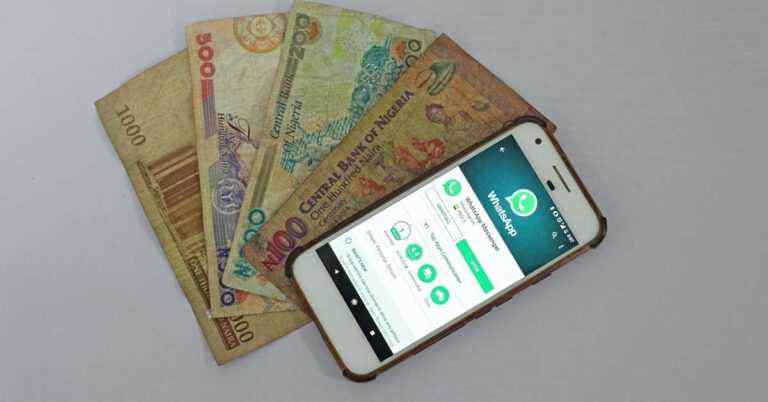
WhatsApp is not just a popular cross-platform centralized messaging and voice-over-IP service. It can be used as a medium to send or receive money. The Payment feature of WhatsApp offers a secure and convenient way to transfer to or receive money from your contacts.
How can you set up an account for WhatsApp Payments?
To set up, an account for WhatsApp Payments, follow these steps.
Launch the WhatsApp application on your Android or iOS device.
On an Android device, click the three dots located in the top-right corner. On an iOS device, tap the gear icon to open the Settings.
Go to Payments > Add New Payment method. You will be prompted with a pop-up. Here you need to accept the Terms and Privacy Policy regarding the Payments feature of WhatsApp.
Here you need to accept the Terms and Privacy Policy
Once you tap the Accept ad Continue button, you will see a list of banks on your screen. Choose the bank that through which you want to make the payments. You need to ensure that your bank account must be linked to the same number as your WhatsApp account.
Once you tap the Accept ad Continue button, you will see a list of banks on your screen.
You will receive an SMS for verification after which you can go ahead to set up a UPI PIN.
How can you send money using WhatsApp Payments?
To make payment to a WhatsApp contact, follow these steps.
Launch the WhatsApp application and choose the contact to whom you wish to transfer the money.
Open the chat of the desired contact and choose the payment option.
If the recipient does not use WhatsApp Payment, you can still send the money using his/her UPI ID.
Type the amount that you wish to transfer and your UPI PIN.
As soon as the UPI PIN is validated, the amount will be transferred to the recipient’s bank account.
How can you receive money using WhatsApp Payments?
There are two methods to receive money using WhatsApp Payments.
If the sender is using the WhatsApp Payment method, then the amount will automatically be sent to your bank account.
If the sender does not use the WhatsApp Payment method, you will be required to furnish him/her with your UPI ID. This ID will be used by the sender to send money using other payment platforms. Once you receive the money, you will get a notification from WhatsApp.
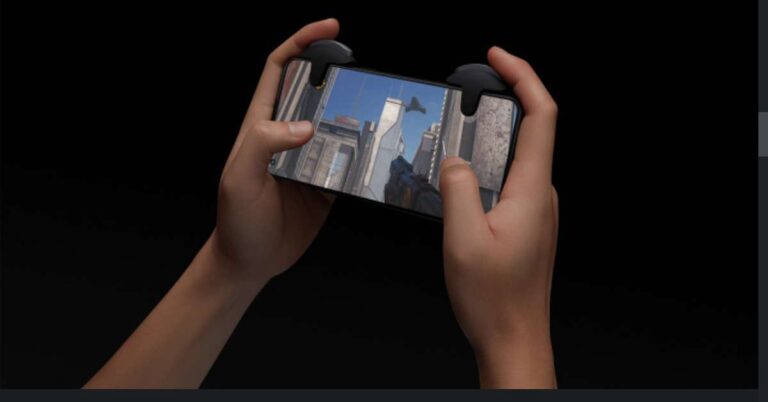
OnePlus had revealed the Gaming Triggers with the announcement of the OncePlus 9 series smartphones in March 2021. Now, they are available for purchase. They come under the class of gaming accessories that enhance your controls while gaming.
According to Pete Lau, co-founder and CEO of OnePlus, “We designed the OnePlus gaming triggers to be solid, responsive, pleasingly “clicky,” and, yes, beautiful. We also made sure they work with many other phones—because the best product design is one that leaves you free to make your own choices.”
Why did OnePlus release the Gaming Triggers?
Smartphone gaming has become quite popular due to its portability and connected experience. Unlike PC or console gaming, mobile gaming requires only one gear i.e. a smartphone. Since companies nowadays bringing high-performance gaming smartphones at affordable prices, the community of smartphone gaming is continuously evolving.
Advanced connectivity features like 5G and Wi-Fi 6 have unlocked new possibilities in multiplayer mobile gaming. Moreover, powerful chips and advanced GPUs have enabled several players to join gameplay simultaneously. The Gaming Trigger by OnePlus will offer handy controls to enhance the gaming experience as well as performance.
What are the features of the OnePlus Gaming Triggers?
The OnePlus Gaming Triggers are ergonomically designed for handy controls while playing battle royale games including Call of Duty: Mobile, Fortnite, Battlelands Royale, and PUBG. They have the following features.
Compatible with almost all Android and iOS smartphones
The OnePlus gaming triggers are designed such that they fit almost all kinds of Android and iOS smartphone. The functions of the triggers are compatible with Android as well as iOS games. They get attached firmly to the smartphone body of maximum thickness of up to 11.5 millimetres. You can clamp the triggers on either side of your smartphone for comfortable control.
Built quality is premium and durable
The triggers consist of silicone pads that do not easily wear out. So, you can get indulge in serious gaming action without degradation in grip and performance. The material used for designing the triggers is of high quality so that it does not impact the body of the smartphone including the display. However, it can get easily and firmly attached to smartphones having a screen protector. The alloy design of the triggers feels easy on fingers suitable for marathon gaming sessions.
What are the features of the OnePlus Gaming Triggers?
Accurate and fast response
The OnePlus Gaming Triggers use capacitive conduction to interact with the screen proving fast and accurate responses. The triggers enable you to make take multiple actions quickly thereby giving you an edge over other players. The OnePlus Gaming Triggers utilise the efficiency of Omron switches that are installed on professional gaming mice.
Asus has officially announced to launch its new series of smartphones, names Zenfone 8. This smartphone series will succeed the Zenfone 7 series that was launched in 2020. The launch is set to take place on May 12, 2021. The countdown for the launch event is live on the official website of Asus (https://www.asus.com/event/ZenFone8/).
What are the expected models in the Asus Zenfone 8 Series?
The official website of Asus does not reveal the smartphone models in the Zenfone 8 Series. It only emphasises the slogan “Big on Performance. Compact in Size”. However, there have been rumours regarding the upcoming models in the Asus Zenfone 8 Series. Moreover, certain specifications of the Asus Zenfone 8 Series smartphones were leaked on the internet.
The company is expected to release three models under the Asus Zenfone 8 Series. They are rumoured to be Zenfone 8, Zenfone 8 Pro, and Zenfone 8 Mini. The Zenfone will be the baseline model in the series. The Zenfone Pro is expected to come packed with premium features. The Zenfone 8 Mini may be a compact smartphone with a powerful processor.
What are the expected features of the Asus Zenfone 8 and the Zenfone 8 Pro?
The expected features of the Asus Zenfone 8 and the Zenfone 8 Pro are as follows.
Design
The Asus Zenfone 8 may have a different camera setup as compared to the Zenfone 6. The Zenfone 6 was equipped with a Flip camera that could serve the purpose of both the primary camera well as the selfie camera. However, the upcoming Zenfone 8 might not feature a Flip camera. Instead, it is likely to feature a punch hole on the display to accommodate the selfie camera. The smartphone may include a 64MP camera setup with a telephoto lens and an ultra-wide-angle lens.
The launch is set to take place on May 12, 2021.
Performance
Asus may not use the MEMC chip that is found in the Asus ROG 5 smartphone. Instead, the Zaenfone 8 and Zenfone 8 Pro may run the powerful Qualcomm Snapdragon 888 processor. The Asus Zenfone 8 may feature a 6.67-inch 1080p AMOLED display with a refresh rate of 120Hz. The Zenfone 8 Pro will come packed with a superior display offering a refresh rate of 144Hz.
The smartphone is expected to give a tough competition to other budget-range gaming smartphones with high refresh rates. The smartphone may offer 8GB of RAM that would enable gaming and multitasking. The Zenfone 8 Pro may have up to 16GB of RAM that would surely suit high-end gamers and streamers. The Asus Zenfone 8 Series will run an Android 11 operating system out of the box.
What are the expected specifications of the Asus Zenfone 8 Mini?
The Watch Party feature of the Amazon Prime Video allows you to watch your favourite movies and TV shows with your friends. You may add up to 100 friends without the requirement of any additional app or plugin. It must be noted that Watch Parties are supported on all web browsers except Apple’s Safari.
How can you start a watch party?
To start a Watch Party on Amazon Prime Video, follow these steps.
Open a browser and go to the Prime Video website (https://www.primevideo.com/). You may also use the Prime Video desktop or mobile application.
Log into the website or the app using your Amazon Prime account.
Ask your friends to log into the Prime video.
Search for a movie or a TV show that you wish to watch with your friends.
Go to the main page of the movie or the TV show that you searched. Here you can find multiple options like Play, add to watchlist, and download.
Go to the main page of the movie or the TV show that you searched.
Click the Watch Party button located under the Add to watch list button.
You will be redirected to Amazon’s website where you’ll be required to sign.
Once you sign in to the website, you may create a username for yourself to chat. You may go through the Watch Party to get the maximum out of the feature.
Click the Create Watch Party button. Your movie or the TV show will begin.
Click the Create Watch Party button.
Now you may invite up to 100 friends to the watch party. You just need to share the link provided on the right part of the screen.
In the Watch Party details section, you can see all the users that have joined you.
You just need to share the link provided on the right part of the screen.
The Chat button located on the top-right of the screen allows you and your friends to communicate among yourselves. To send a message in the middle of the movie or a TV show, just type your message in the field given at the bottom and click SEND.
The Chat button located on the top-right of the screen allows you and your friends to communicate among yourselves.
What is the significance of the Watch Party during the ongoing COVID-19 pandemic?
The Watch Party feature of the Amazon Prime Video is essentially useful during the ongoing COVID-19 pandemic. To contain the infection, cinema halls are either shut down or are operating with limited staff and audience. The Watch Part ensures that the thrill of watching movies or TV shows with friends is not compromised. Now, you can watch along with your friends and chat without coming in contact with anyone.
For the latest gadget and tech news, and gadget reviews, follow us on Twitter, Facebook and Instagram. For newest tech & gadget videos subscribe to our YouTube Channel. You can also stay up to date with the Gadget Bridge Android App.
The entry-level segment of the smartphone market is very competitive. One among the latest entrants in this segment is the Moto E7 Power, priced at Rs 7,499. What are its pros and cons and should you buy the smartphone? Find out in our Moto E7 Power review:
Moto E7 Power design and display
Let’s begin by talking about the look and feel of the Moto E7 Power smartphone. The device comes with a plastic body and has a sturdy built. The handset is available in Tahiti Blue and Coral Red colour options and we got the former one for review. Moto E7 Power houses the camera module, fingerprint sensor and the speaker on its back panel. The camera module has dual rear lenses and the LED flash, and the fingerprint scanner is embedded below the Moto icon.
The right edge of the device has the volume rocker keys, the Power and the Google Assistant button sandwiched on it while the left edge has the SIM tray. The 3.5mm headphone jack is placed on the top, while the Type-C charging port and the microphone are at the bottom. The plastic body is not something everyone would like, but at this price point, one can’t really complain. The one-hand usage on the handset can be difficult at times.
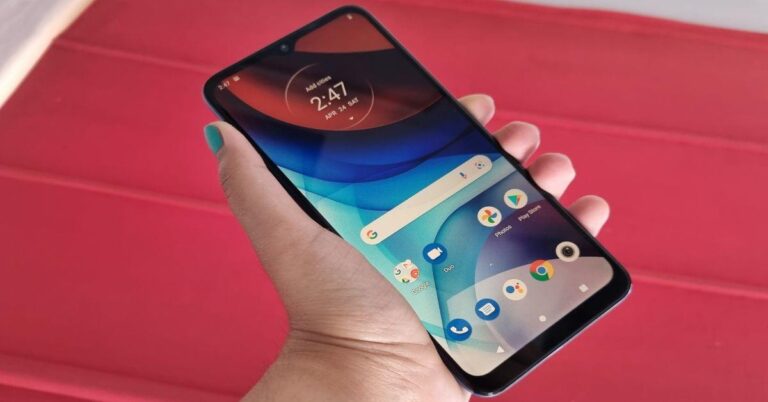
Flip over, and you will see the 6.5-inch display of the device that is outlined by not-very-thin bezels and an even broader chin. The selfie camera is placed in a waterdrop-shaped notch on the top of the screen, right below the earpiece.
Coming to the 6.5-inch HD+ IPS panel of the smartphone, it is protected with a layer of Panda Glass. The images projected on the screen were sharp and clear, and the colours were accurate and vibrant. They even remained consistent at different viewing angles. The display was adequately bright, and one has the option of scheduling Night Light on it. The only real problem with the display was the sunlight readability. We think that could have been better on Moto E7 Power.
To conclude, we would say that even though there is nothing out of the ordinary about the design of the Moto E7 Power, there are no major cons too. The display was decent as well, and mostly did a good job.
Moto E7 Power performance and cameras
Before we begin talking about the performance of Moto E7 Power, let’s quickly discuss the rest of the specifications of the smartphone. The device is powered by the MediaTek Helio G25 octa-core processor clubbed with up to 4GB of RAM and 64GB of onboard storage. The base variant of the handset has 2GB RAM and 32GB internal storage. Besides this, the smartphone can also hold a microSD card of up to 1TB. For imaging duties, there are 13MP and 2MP dual sensors on the back, and a 5MP selfie camera on the front panel. The smartphone packs a 5,000mAh battery and it ships Android 10 out-of-the-box.
One among the best aspects of the Moto E7 Power smartphone is its software. The handset has stock Android, and almost comes without any bloatware. The only extra pre-installed app was Facebook, and even that could be uninstalled. We were surprised that the company hadn’t even added the Moto Support app to the device. While some may appreciate the stock version of Android, others may miss the gestures and actions that other phones with customizations support.
However, we should add here that it isn’t like Moto E7 Power doesn’t support any of these. One can find a few of them in the Settings of the device. These include ‘Jump to camera’, ‘Lift to check phone’, ‘Three finger screenshot’, etc. The only downside of the software is that Android 10 is slightly dated now, so we hope the device gets the Android 11 update soon.
The smartphone managed the basic everyday tasks, but it did stutter a bit at times, particularly when we tried multitasking. However, one should keep in mind that it is a budget smartphone and it’s not fair to expect its performance to be flawless. We tried playing a few games on the device as well. While we could play the light ones like Temple Run 2 and Alto’s Odyssey smoothly, the smartphone wasn’t at its best with graphic-hungry ones like Asphalt 9: Legends.
The 5,000mAh battery of the device is also among its best aspects. Even with heavy usage involving social media, gaming, watching videos on YouTube and Netflix, and a few long phone calls, the battery lasted more than a day. We found this to be quite impressive.
Now, let’s talk about the cameras of the smartphone. The 13MP primary camera of the device does a decent job in well-lit areas, particularly outdoors. The images were sharp and clear, however, the colour reproduction could have been better. We noticed that they were duller than they were in real. But that, of course, can be fixed with a little bit of editing. The real problem was the camera’s performance in dimly-lit areas.
The device struggled to focus and there was noise visible in the images taken. The 2MP lens was also just average. We clicked some Bokeh and Macro shots, but the quality of the images dropped as compared to the primary camera. The 5MP selfie camera also did a decent job, but we would be editing our selfies taken from Moto E7 Power before we upload them on social media. We weren’t too happy with the camera of the device, but then, it is an entry-level smartphone, so we can’t expect too much.
Verdict
Moto E7 Power comes at a starting price of Rs 7,499, and at this cost, it is a decent buy. It does have its pros and cons, though. The lack of bloatware and the lasting battery life are clearly the biggest pros of the smartphone. The design was good and the display was average, but the performance and cameras could be better. As far as your usage isn’t heavy and the camera isn’t too important to you, you would not be disappointed with this budget buy.
Pros
COVID-19 cases have been rising at an unprecedented rate for the past few weeks in India. Due to a rapid increase in the number of COVID-19 patients, there has been an intermittent shortage of medical resources. The Indian government is constantly working with states and health department to fill the gap between medical demands and their availability.
Why does Twitter want to add new features to the platform?
Social media has played a crucial role since the outbreak of the COVID-19 pandemic to address issues and spread awareness. People have been extensively using Twitter to delegate information regarding the availability of beds, oxygen cylinders, and other medical facilities in various hospitals. This helps the patients and their families to quickly know which hospital they need to reach without wasting time on searching.
According to Twitter, “All across the country, people are using Twitter to find the latest information and access to resources right now. As this people’s movement unfolds, we wanted to remind you of some of the features that could help you find what you’re looking for faster”.
What are the advanced features has Twitter added to the platform?
Twitter has added the following features to help COVID-19 patients get quick assistance and medical help.
Advanced Search to find tweets from a particular during a period
The Advanced features added by Twitter will enable the users to use filters to find tweets and hashtags related to the resource they are seeking. For instance, if a user is looking for a vacant bed in a hospital. He can use the advanced search option to find the tweets related to the vacant beds during a specific period and related hashtags.
According to Twitter, “Advanced Search https://twitter.com/search-advanced can help you filter for fields like a specific hashtag, time period, or Tweets from a particular account”.
Advanced Search to find tweets from a particular during a period
Advanced Search to find tweets close to their location
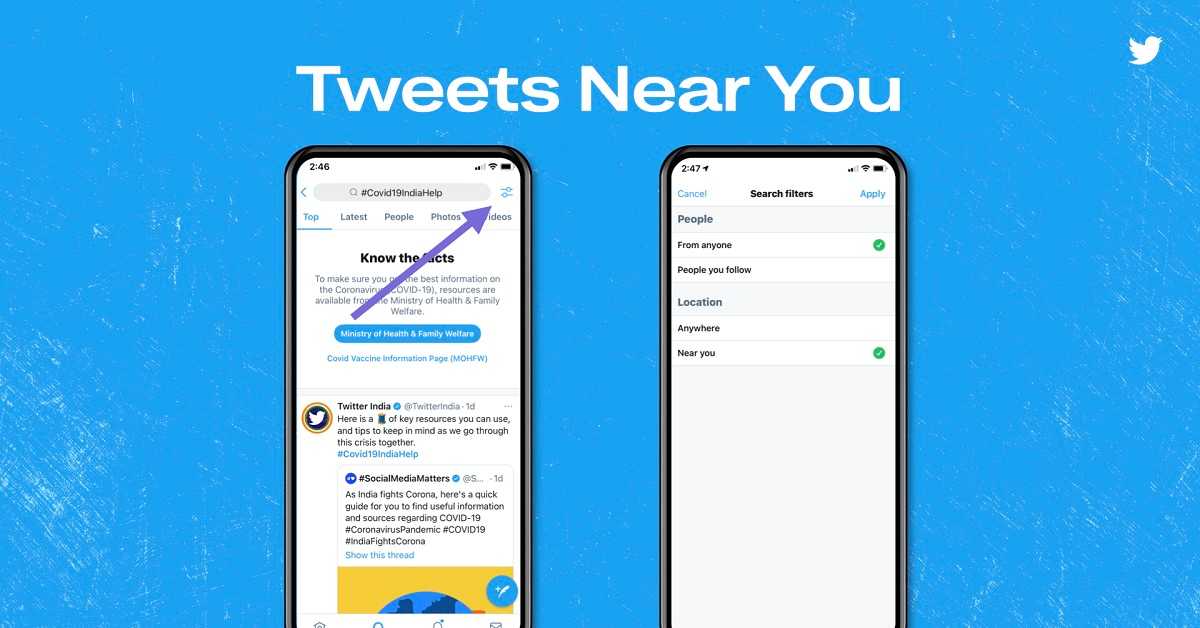
Twitter has also added a feature that will allow users to find tweets posted near to their location. You can get the tweets based on proximity in the search bar. Simply, turn the “Near you” toggle on placed under the Location option. However, this feature works only when the location of your device is enabled.
According to Twitter, “If you’d like to see Tweets that are close to your current location, type in a relevant hashtag in the search bar, tap the toggle button on the top right, and turn on ‘Near you’ under ‘Location’. You’ll have to turn on location settings for this to work”.
Advanced Search to find tweets close to their location
Advanced Search to find the most recent tweets
Since the availability of beds and oxygen cylinders changes frequently, the older tweets become obsolete. The advanced feature enables the user to filter the tweets based on the time they were posted. Users can get the most recent tweets by clicking the Sparkle button located on the top right corner of their timeline.
Advanced Search to find the most recent tweets
The advancement of Twitter will surely help the COVID-19 patients and their family get appropriate information so that they can get medical assistance as quickly as possible.
For the latest gadget and tech news, and gadget reviews, follow us on Twitter, Facebook and Instagram. For newest tech & gadget videos subscribe to our YouTube Channel. You can also stay up to date with the Gadget Bridge Android App.
To fight the ongoing COVID-19 pandemic, wearing a face mask and enhancing our immunity are the best ways to stay protected from the infection. The rising number of COVID-19 patients have again made everything conscious about their health and fitness. To avoid the chain reaction of a health issue, you need to proactively monitor your heart rate and Blood Oxygen Saturation (SpO2). Here are the best smartwatches that tell you about your SPO2, so that you can avoid potential health problems.
OnePlus Smart Band
The OnePlus band comes with a dedicated optical oxygen sensor to accurately measure Blood Oxygen Saturation (SpO2). The device provides constant sleep monitoring of SpO2 so that you may analyse your health at all times. With an on-demand daytime check, you can be aware of the potential health issues and take proactive measures. The band also measures your sleep pattern in real-time along with heart rate monitoring. With 13 dedicated exercise modes, you can stay active and enhance your immunity.
OnePlus Smart Band
Price: ₹ 2,499
Buy on Amazon
OPPO Smart Band Style
The OPPO Smart Band Style is a stylish smart band that dynamically measures your SPO2 levels during the day as well as at night. With a real-time heart rate monitoring system you can get an instant reading of your health. The 2.79cm full-colour AMOLED screen clearly displays the metrics with high contrast. The screen is covered with scratch-resistant glass so that you can freely work out. You can get details regarding your physical activities like calories burned, activity duration, and the number of steps.
OPPO Smart Band Style
Price ₹ 2,799
Buy on Amazon
Amazfit Bip U
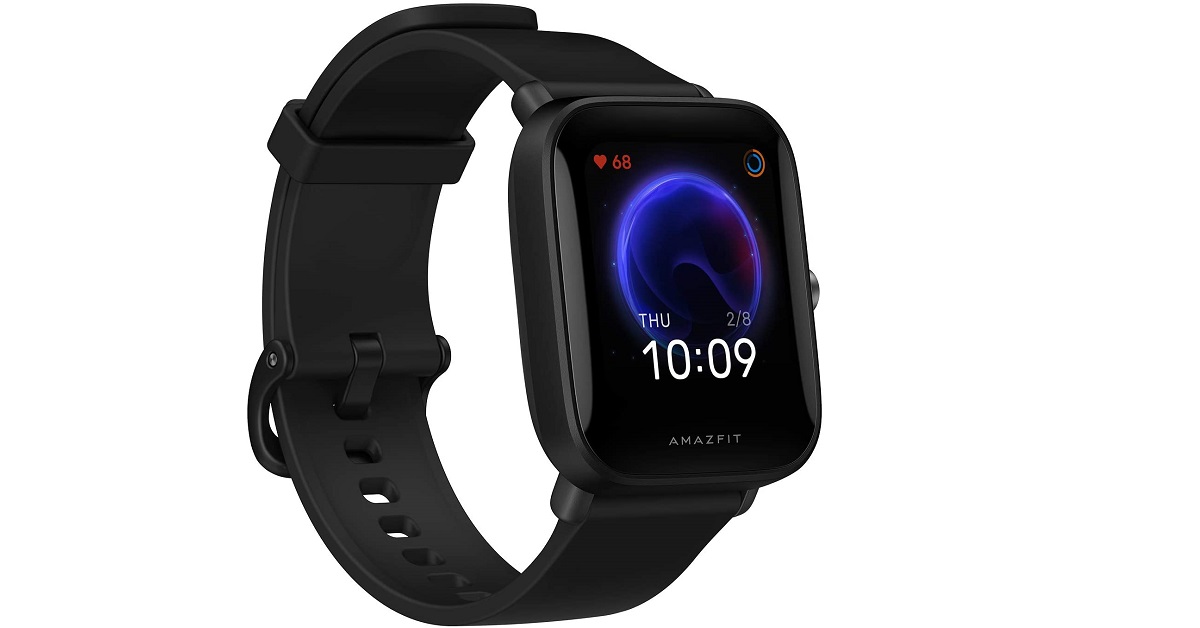
The Amazfit Bip U helps you measure your blood-oxygen saturation on the go. This allows you to keep a track of your physical state after intensive workouts. The BioTrackerTM PPG biological optical sensor ensures 24/7 heart rate monitoring. The smartwatch accurately monitors your sleep pattern, afternoon naps to help you maintain a healthy sleeping habit. Moreover, the PAITM Health Assessment System uses algorithms to tell you heart rate data and activity duration. The device offers a battery backup of 9 days on a single charge.
Amazfit Bip U
Price: ₹ 3,999
Buy on Amazon
Noise ColorFit Pro 3
The Noise ColorFit Pro offers several features to track your health. It comes with a smart SPO2 sensor to accurately measure your blood oxygen saturation. The sleep monitoring system tells the pattern of your REM sleep cycles. With auto-sports recognition, you can track the calories burned by physical activities like running and cycling. The waterproof design ensures that you can wear the smartwatch even while swimming. The device is integrated with the Noisefit application to offer a detailed progress report. With it, you also get workout videos to help you achieve your health targets.
Noise ColorFit Pro 3
Price: ₹ 4,499
Buy on Amazon
HONOR Band 5
The HONOR Band 5 comes with an advanced SPO2 sensor helping you adapt to your workouts. The smartwatch provides real-time monitoring of your sleep patterns with 200 personalised sleep quality assessments. The TruSeen 3.0 heart rate monitor uses Machine Learning algorithms to measure your heart rate round the clock. The device comes with an AMOLED display with up to 45 characters and colour coded text. It is water-resistant up to 50 meters so that you never shy away from swimming.
HONOR Band 5
Price: ₹2,699
Buy on Amazon
For the latest gadget and tech news, and gadget reviews, follow us on Twitter, Facebook and Instagram. For newest tech & gadget videos subscribe to our YouTube Channel. You can also stay up to date with the Gadget Bridge Android App.
The e-commerce website Flipkart is hosting Daily Trivia Quiz. Every day it brings a bunch of new questions for its users. By answering them correctly you can win exciting prizes. The questionnaire is based on questions related to general knowledge. Also, the users can win free vouchers and super coins, among other offers via the daily quiz. April 24 Flipkart Daily Trivia Quiz Answers has already gone live on its platform.
The participant should be at least 18 years old and should have a valid login ID. The Quiz is available on the mobile platform and not the web version. E-commerce conducts the quiz on daily basis and goes live at 12:00 AM IST and runs till 11:59 PM IST. The winners are announced within 15 days from the date of participation that can be viewed under the Gems/Rewards section in the app.
How to participate in the Flipkart Daily Trivia Quiz
To participate download the Flipkart app on your phone. Then open the Flipkart app then head to Game Zone. Now click on the Daily Trivia Banner or search for Daily Trivia. Enter the game and answer all 5 questions with correct answers.
April 24 Flipkart Daily Trivia Quiz Answers
Question 1: Which of these players has not won an IPL trophy as the captain of their team?
Answer: Virat Kohli
Question 2: Identify this RCB player who recently scored his maiden IPL century against Rajasthan Royals?
Answer : Devdutt Padikka
Question 3:Who was the first cricketer to be sold at the IPL 2021 auction?
Answer: Steve Smith
Question 4: Which bowler delivered the most maiden overs in the IPL 2020 season?
Answer: Trent Boult
Question 5: Rahul Tewatia played for which team before joining Rajasthan Royals in the 2020 season?
Answer: Delhi Capitals












 Flip over, and you will see the 6.5-inch display of the device that is outlined by not-very-thin bezels and an even broader chin. The selfie camera is placed in a waterdrop-shaped notch on the top of the screen, right below the earpiece.
Coming to the 6.5-inch HD+ IPS panel of the
Flip over, and you will see the 6.5-inch display of the device that is outlined by not-very-thin bezels and an even broader chin. The selfie camera is placed in a waterdrop-shaped notch on the top of the screen, right below the earpiece.
Coming to the 6.5-inch HD+ IPS panel of the  To conclude, we would say that even though there is nothing out of the ordinary about the design of the Moto E7 Power, there are no major cons too. The display was decent as well, and mostly did a good job.
 One among the best aspects of the Moto E7 Power smartphone is its software. The handset has stock Android, and almost comes without any bloatware. The only extra pre-installed app was Facebook, and even that could be uninstalled. We were surprised that the company hadn’t even added the Moto Support
  The 5,000mAh battery of the device is also among its best aspects. Even with heavy usage involving social media, gaming, watching videos on
  The device struggled to focus and there was noise visible in the images taken. The 2MP lens was also just average. We clicked some Bokeh and Macro shots, but the quality of the images dropped as compared to the primary