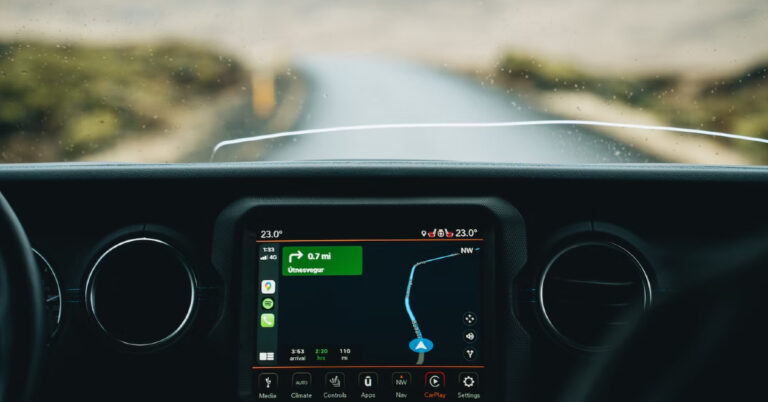
Apple CarPlay and Android Auto have completely changed how our smartphones interact with our cars. Both interfaces allow users to access the contents of their smartphone on the infotainment system of the car. Enabling hands-free usage, they are significantly safer as well. In this article, we show you how to link your Toyota car with your smartphone using Apple CarPlay and Android Auto.Read Also:Here is what the less expensive Moto Razr might cost in the US
How to link your Toyota Car with Apple CarPlay
Step 1: Make sure the car is either parked or stationary. Turn on the LCD monitor on the dashboard.Step 2: Connect your Apple smartphone to the LCD monitor using a lightning cable.Step 3: Press the Menu button on the LCD monitor and tap on ‘Apps’.Step 4: Select Apple CarPlay.Step 5: Give the necessary permission on your iPhone.You will now be able to use your iPhone’s apps on your car’s touchscreen infotainment system.
How to link your Toyota Car with Android Auto
Step 1: Download and install the Android Auto app on your smartphone.Step 2: Grant the necessary permissions to the Android Auto app.Step 3: Make sure the car is either parked or stationary. Turn on the LCD monitor on the dashboard.Step 4: Connect your Android smartphone to the infotainment system using a USB Type-C data cable.Step 5: Press the Menu button on the LCD display and select Apps.Step 6: Tap on Android Auto.You will now be able to use your Android smartphone’s apps on your car’s infotainment system.
Frequently Asked Questions (FAQs)
Can I use Android Auto and Apple CarPlay together?
While, your car may offer support for both, Android Auto and Apple CarPlay, you can only use one application at a time.
How do I connect my Toyota to AppleCar Play?
Connect your iPhone to the infotainment system using a lightning cable and tap the CarPlay logo on the LCD screen on the dashboard.
This is how you can link your Toyota car to your smartphone using Android Auto and Apple CarPlay. Once you’re smartphone is connected to your car, you will be able to use some of the apps on the dashboard interface. While most navigation and music streaming apps are optimised for Android Auto and Apple CarPlay, the same cannot be said about Instant Messaging apps. It is only recently that Android Auto started supporting WhatsApp calls. Other IMs are unsurprisingly absent on the platform.For the latest gadget and tech news, and gadget reviews, follow us on Twitter, Facebook and Instagram. For newest tech & gadget videos subscribe to our YouTube Channel. You can also stay up to date using the Gadget Bridge Android App. You can find the latest car and bike news here.
Samsung has opened the doors to its Digital Service Center, a comprehensive platform that is claimed to offer customers personalised product-related customer assistance. According to the company, this service offers self-help content organised by category, DIY videos, innovative symptom-based support, and repair assistance.“At Samsung, we have always believed in catering to the evolving needs of customers. The Digital Service Center is a step towards simplifying post-purchase services and providing personalized support to our consumers. We understand that to fully empower consumers, they need to be offered easy access to a digitalized ecosystem. The platform boasts easy navigation for consumers and also provides them access to product-specific DIY videos, helping them resolve their queries with ease,” said Mr. Sunil Cutinha, Vice President, Customer Service, Samsung India.Customers will be able to find solutions to a variety of product-related problems through the DIY videos, such as how to install your Samsung semi-automatic washing machine, how to set up the Freestyle projector, or how to use the auto restart feature in Samsung Galaxy smartphones.The Samsung Digital Service Center can be accessed by going to the support menu on https://www.samsung.com/in or directly logging on to www.samsungdigitalservicecenter.comAfter logging into their Samsung account, customers can receive customised support based on their needs from the Digital Service Centre. It includes a simplified user navigation process, quick access to self-help content organised by category, DIY videos tailored to particular categories, a mobile app experience, and model-specific repair and spare part prices all on one page.Additionally, customers can use the Digital Service Centre to schedule callback requests for remote and visual support, obtain software updates, locate a service centre, track repairs, get information about service costs, book appointments for priority service at service centres, and get pick-up and drop-off service.Customers of Samsung have access to a number of additional digital service alternatives through the Digital Service Centre, which enables them to address their problems without leaving their homes. Customers have access to a variety of support options, including WhatsApp Support, Remote Support, technical support through the call centre, and DIY videos on the Samsung website and YouTube.Samsung also operates a ‘Smart Touch Call’ service that reduces wait time for customers when they call Samsung’s Customer Care to resolve their queries. Customers have the choice to switch to a synchronized voice and screen interface instead of a traditional call center experience. Smart Touch Call is a user-friendly service that allows callers to engage with the system and captures their demands.
For the latest gadget and tech news, and gadget reviews, follow us on Twitter, Facebook and Instagram. For newest tech & gadget videos subscribe to our YouTube Channel. You can also stay up to date using the Gadget Bridge Android App. You can find the latest car and bike news here.
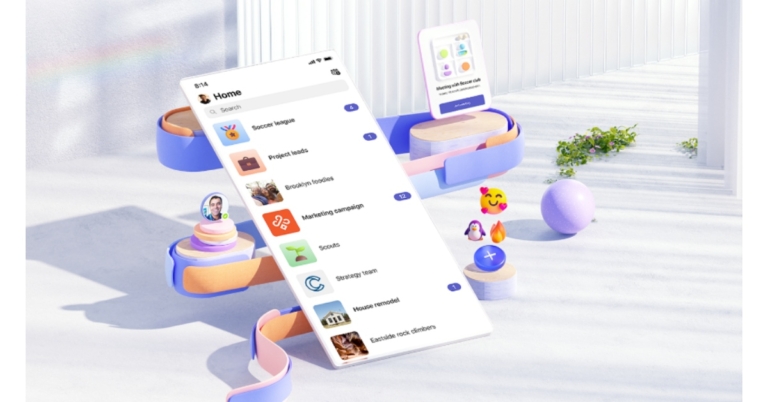
Microsoft Teams is a great app to take virtual meetings. For those on the go, Microsoft Teams is available on Android and iOS mobile platforms. While the app works fine for the most part, it is not impervious to minor glitches and issues. If you’re taking a meeting on your phone and don’t have access to any other devices, you need quick fixes that can get the app running normally in no time. In this article, we bring you the top 9 ways to fix the ‘Microsoft Teams app not working’ problem on Android.Read Also:How to Set Up a VPN on Android and iPhone?
Disable Data Saver
Microsoft Teams has an in-app data saver that limits app usability after a certain amount of data is consumed. Disable the data saver to return to normal functioning. Here’s how.Step 1: Launch the Microsoft Teams app on your Android smartphone and tap the profile icon at the top right corner of the screen.Step 2: Select Settings.Step 3: Select Data and Storage.Step 4: Tap on Reduce Data Usage and select Never from the list of options.
Clear the cache
There are two ways you can go about clearing the app cache of Microsoft Teams. There’s a very handy option to clear temporary files within the app. You can also go the more conventional route and clear the cache from the app settings on your phone. Here’s how you can clear Microsoft Teams’ cache from the app itself.Step 1: Launch the Microsoft Teams app and tap the profile icon at the top right corner of the screen.Step 2: Select Settings.Step 3: Tap on Data and Storage.Step 4: Select Clear temporary files.
Grant the necessary permissions to the app
If you haven’t used the Microsoft Teams app on your Android phone for a long time, its permissions may have been automatically revoked. Here’s how you can grant the Teams app the necessary permissions again.Step 1: Go to Settings and select Apps.Step 2: Scroll down and select Microsoft Teams.Step 3: Tap Permissions.Step 4: Allow Teams access to the necessary permissions.
Sign out and Sign back in
If you’re having trouble with your Microsoft Teams account, signing out and then signing back in can fix any temporary issues. Simply tap the profile icon at the top right corner of the screen and go to settings. Scroll all the way down and select ‘Sign out’. Once you’re signed out, sign back in using your Microsoft account credentials.
Reset Database
Step 1: Launch the Microsoft Teams app on your Android smartphone and tap the profile icon at the top right corner of the screen.Step 2: Select Settings.Step 3: Select Data and Storage.Step 4: Select Reset Database.
Update the app
An older version of the Microsoft Teams app may contain bugs that have already been weeded out in the new update. To update the Teams app, simply launch the Google Play Store on your device and search for Microsoft Teams. Open the app page and select the ‘Update’ option. Once the app has been updated, the background errors will be fixed.
Check your internet connection
It is possible that the issue may not lie with the Microsoft Teams app but with your internet connection. To confirm if this is the case, open the web browser and load a web page. If the web page fails to load, the issue lies with the connection. You can also try sending a message on an instant messaging app to double-check the status of your internet connection. To fix this issue, toggle the airplane mode on and off. A quick refresh of the network typically fixes any temporary issues.
Restart your smartphone
On some occasions, a software glitch may cause the Microsoft Teams app on your phone to malfunction. A quick restart of your smartphone will take care of this. Press the side key along with the volume-up key to access the power menu. Hit ‘Restart’ to reboot your phone.
Delete the Microsoft Authenticator app
This may sound weird, but if you aren’t able to sign into the Microsoft Teams app on your Android smartphone, deleting the Microsoft Authenticator app may help. While the exact reason behind this fix is not known yet, certain users have observed that removing the Microsoft Authenticator app from their devices solved any issues they were facing while logging in. It is possible that the Authenticator app interferes with the login process even if you don’t have two-factor authentication enabled for Microsoft Teams. If you’re facing trouble logging in with your registered account, trying out this fix can’t hurt.
Frequently Asked Questions (FAQs)
Why is the Microsoft Teams app not working on Android?
If the Microsoft Teams app is not working on your phone, try disabling its data saver and clearing the app cache. If the issue still persists, you may want to update the app.
Why is the Teams app not opening?
If you’re unable to open or run the Microsoft Teams app on your phone, check if the app is experiencing a server outage. Visit the Down Detector website to check if other users are experiencing the issue as well.
These are the top 9 ways to fix the ‘Microsoft Teams app not working’ problem on an Android phone. If you are still facing the problem after trying all these fixes, it is possible that the issue lies on Microsoft’s end. Visit the Down Detector website to check if other users are facing a similar outage as well.
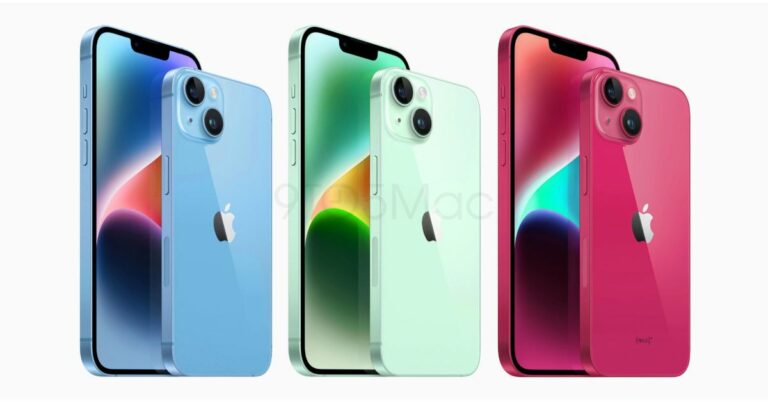
Recently the colour options of the upcoming iPhone 15 series were We are now hearing information on the devices’ batteries. According to reports, all of the batteries in the iPhone 15 series will be much bigger. In September of this year, Apple is anticipated to introduce four new models in the upcoming iPhone 15 series: the iPhone 15, iPhone 15 Plus, iPhone 15 Pro, and iPhone 15 Pro Max.According to a Chinese website IT Home, the information was provided by a Foxconn employee that specifies the precise battery sizes for each of the four new models iPhone 15, iPhone 15 Plus, iPhone 15 Pro, and iPhone 15 Pro Max. As per the report, the iPhone 15 will have a roughly 18% larger battery, it appears that the Pro Max will experience a 12% battery gain. It is important to note that the iPhone 15 Pro series will employ the new A17 bionic chip, which uses TSMC’s 3nm process technology and can boost performance while consuming 35% less power than Apple’s existing 5nm process technology.If the information is correct, the battery capacity of this year’s iPhone 15 series has significantly increased compared to the previous generation, reaching as high as 350-600mAh. This is the precise capacity:iPhone 15: 3877mAh (iPhone 14: 3279mAh)iPhone 15 Plus: 4912mAh (iPhone 14 Plus: 4325mAh)iPhone 15 Pro: 3650mAh (iPhone 14 Pro: 3200mAh)iPhone 15 Pro Max: 4852mAh (iPhone 14 Pro Max: 4323mAh)According to a Weibo user cited in a 9to5Mac story, the iPhone 15 Pro will be available in a new “crimson” shade. The new colour option is still quite deep even though it may be a little lighter than the Deep Purple of the iPhone 14 Pro.There will reportedly be a new green colour option for the iPhone 15 and iPhone 15 Plus. The article also features original renderings of the iPhone 15 and iPhone 15 Plus in fresh red, green, and light blue hues.A titanium frame is rumoured to be included with the Pro variants. The iPhone models for this year are anticipated to come with 48-megapixel cameras and USB Type-C ports for charging.The iPhone 15 series is anticipated to be released by Apple in September. The iPhone 15 series would typically sell for $925 (approximately Rs 76,300), according to a prior leak. For the latest gadget and tech news, and gadget reviews, follow us on Twitter, Facebook and Instagram. For newest tech & gadget videos subscribe to our YouTube Channel. You can also stay up to date using the Gadget Bridge Android App. You can find the latest car and bike news here.
A good gaming mouse makes all the difference in those tense, tight-pocket situations in FPS games. While buying a mouse, you have got to take different aspects and specs into consideration. While a high DPI sensor is ideal, the weight distribution and tracking speed of the mouse matter a lot as well. If you’re thinking of updating your gaming rig, here are our top picks for the best gaming mice you can buy for under $100. (2023)Read Also:How to Set Up a VPN on Android and iPhone?
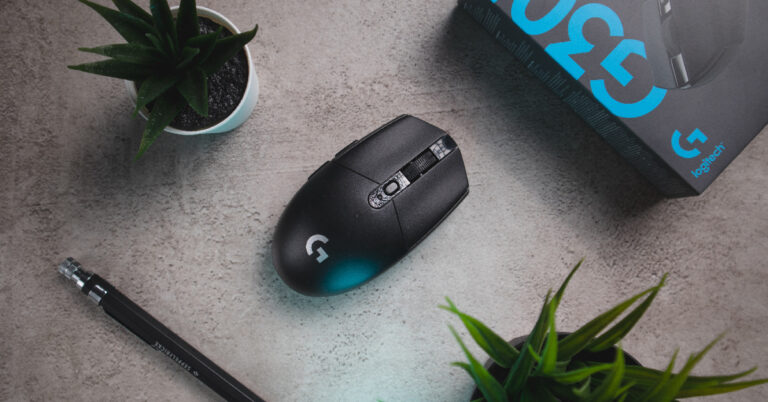
Logitech G305 Lightspeed
Price: $39.97 on AmazonIf you’re on a tight budget and looking for a no-nonsense mouse that does not compromise on performance, the Logitech G305 Lightspeed is a rock-solid deal. Priced just under $40, this gaming mouse sports a 12,000 DPI sensor and a precision of 400 IPS. The G305 Lightspeed weighs just 99g, making it ultra-manoeuvrable. It is also one of the cheapest wireless mice you can buy right now. There is a slot for the USB receiver in the body of the mouse, adding to its portability. The G305 Lightspeed offers 250 hours of gameplay on a single AA battery.
Logitech G502 Hero
Price: $42.55 on AmazonOne of the budget-friendly options from Logitech’s G502 series, the G502 Hero gets the all-important Hero 25K optical sensor. The sensitivity on this mouse can be adjusted from 100 – 25,600 DPI. There are 11 buttons on this mouse that can be customised using Logitech’s G Hub app. One of the more impressive things about this mouse is the weight customisation on offer. There are 5 additional weights on this thing that can be taken out individually to tune the device’s weight according to your need.
Razer DeathAdder V2 X Hyperspeed
Price: $59.99 on Razer.comSpecialising in gaming accessories and products, Razer’s influence in the PC peripherals segment is unmatched. The DeathAdder V2 X Hyperspeed gaming mouse is another solid yet affordable product from Razer. It sports an ergonomic design that is ideal for long gaming sessions. You can pair this mouse with your PC using the 2.4GHz wireless receiver or a simple Bluetooth connection. The DeathAdder V2 X Hyperspeed gets a 14,000 DPI sensor with a precision of 300 IPS. There are 7 programmable buttons on the mouse and Razer promises a switch lifecycle of 60 million clicks.
Razer DeathAdder V3
Price: $69.99 on Razer.comA step up from the V3, the DeathAdder V3 gets the Focus Pro 30K Optical Sensor. With a maximum acceleration of 30G, this mouse can track at a speed of 750 IPS. The wired connection ensures that there isn’t any latency in mouse actions. Weighing just 59g, this mouse is ideal for quick gestures and actions in tense gaming situations. Razer claims a switch lifecycle of 90 million clicks on the DeathAdder V3.
Asus ROG III Gladius
Price: $89.99 on Asus.comAsus’ ROG line of products is too good to be left out when it comes to gaming peripherals. The ROG III Gladius is a spec-laden gaming mouse that offers as good a performance as any mouse in this list. It gets a 19,000 DPI sensor with a 1% deviation (specially tuned to 26,000 DPI). The mouse can track at a speed of 400 IPS and has a 1000Hz polling rate. The 100% PTFE feet on this mouse are ideal for gliding. You can save up to 5 profiles on this mouse with the help of Armoury Crate software.
SteelSeries Rival 3
Price: $23.90 on AmazonIf you’re just getting started with gaming, you probably don’t want to splurge a lot on a gaming mouse. Priced at just $23.90, the SteelSeries Rival 3 offers good performance without making a dent in your wallet. This mouse has an 8500 CPI sensor and tracks at 300 IPS with a maximum acceleration of 35G. The ergonomic design of this mouse ensures that the user doesn’t feel any fatigue even after long gaming sessions.Read Also:Top 3 Ways to Use Your Android Smartphone as a TV Remote
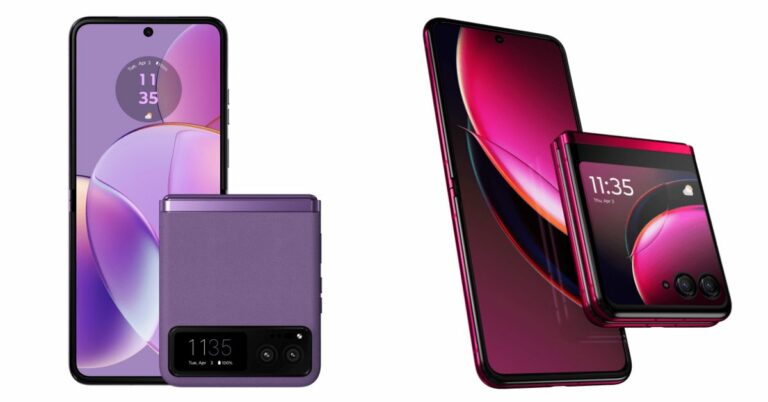
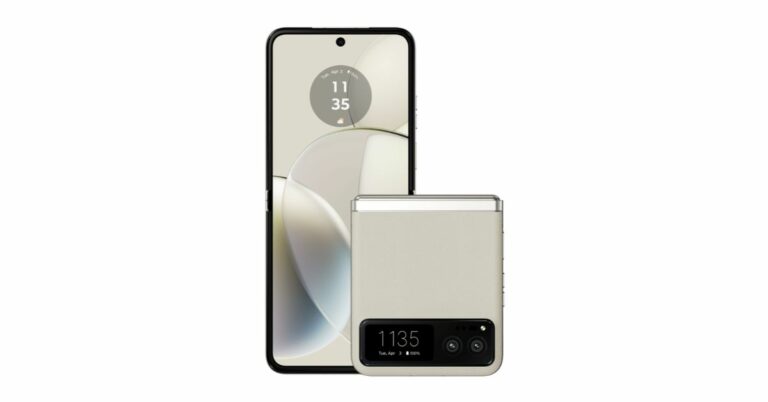
Motorola Razr 40 Ultra and Razr 40 have debuted in India recently. They already launched in the USA by the name Moto Razr+ and Razr last month. However, the more affordable Razr was not made available in the USA at that time instead the company said that the device will be available in the coming months after June. Although Motorola withheld the pricing, it did state that the phone would be less expensive than the Razr. But the phone has debuted in India and the India pricing indicated as to what to anticipate for the regular variant in the US.The company did not provide US pricing for the Moto Razr at the time of launch last month but it did reveal the pricing of the Razr+ which is $999. Now that both the devices have launched in India the Indian pricing hints at how much the standard Razr will be priced in the US.Also Read:Motorola Razr 40, Motorola Razr 40 Ultra launched in India, price starts at Rs 59,999The Razr 40 and Razr 40 Ultra, as they are known outside of the US have debuted in India with a price tag of Rs 59,999 ($732) and Rs 89,999 ($1,098) respectively. Note that the US price of the Razr Plus is $999, which is less expensive than the Indian price of $1,098. Given that the regular model costs about $732 in India reportedly it might see a $699 or $649 price tag in the US.Also Read:Motorola Razr 40 Vs Razr 40 Ultra: Which one to buy?
Motorola Razr 40 specifications
Motorola Razr 40 features a 6.9-inch foldable pOLED display with a 144Hz refresh rate and a 1.5-inch display on the outside. The Razr 40 has a Corning Gorilla Glass Victus on an external display and is IP52 rated. The device runs on Android 13 out of the box. Under the hood, there is a Snapdragon 7 Gen 1 SoC with up to 8GB RAM and 256GB storage.For the photos and videos, Razr 40 includes a dual rear camera setup that includes a 64-megapixel primary sensor and a 12-megapixel ultra-wide lens. For selfies, it includes a 32-megapixel camera on the inside. The device is fuelled by a 4,200mAh battery with 30W fast charging
For the latest gadget and tech news, and gadget reviews, follow us on Twitter, Facebook and Instagram. For newest tech & gadget videos subscribe to our YouTube Channel. You can also stay up to date using the Gadget Bridge Android App. You can find the latest car and bike news here.
Motorola Razr 40 Ultra and Razr 40 have officially debuted in India. Both smartphones look identical but there are some major differences between the two. If you were confused about which one to buy here is our step-by-step comparison of Motorola Razr 40 Vs Razr 40 Ultra to help you understand which one you should buy.
Motorola Razr 40: Snapdragon 7 Gen 1 SoCMotorola Razr 40 Ultra: Snapdragon 8+ Gen 1 SoC
Rear camera(s)
Motorola Razr 40: It has a 64-megapixel primary sensor and a 12-megapixel ultra wide-angle camera.Motorola Razr 40 Ultra: There is a 13-megapixel secondary ultra-wide-angle camera and a 12-megapixel primary sensor.
The cover screen is the primary distinction between the Motorola Razr 40 Ultra and the Motorola Razr 40. The cover screen on the Razr 40 Ultra is larger. The Razr 40 Ultra has a bigger cover screen. However, they both have the same pOLED displays but ultra support a higher refresh rate. But when it comes to optics, Razr 40 surpasses its more senior sibling. Instead of the Ultra variant’s 12-megapixel primary sensor, it includes a 64-megapixel primary sensor.The Motorola Razr 40 and Motorola Razr 40 Ultra have batteries with capacities of 3,800mAh and 4,200mAh, respectively. The first model charges at 33W while the other device can be charged at 30W and also enables 8W wireless charging.The Motorola Razr 40 is much less expensive than the Ultra model in terms of price. There is a price difference of Rs 30,000. Therefore, in our opinion, the Razr 40 offers good value. The Razr Ultra is a good option if you want a larger screen.
For the latest gadget and tech news, and gadget reviews, follow us on Twitter, Facebook and Instagram. For newest tech & gadget videos subscribe to our YouTube Channel. You can also stay up to date using the Gadget Bridge Android App. You can find the latest car and bike news here.
After being banned for nearly ten months, Battleground Mobile India, aka BGMI, is officially available again in India. BGMI fans are looking for ways to improve their game experience and one such method is the usage of redemption codes, which offers a variety of rewards and advantages using BGMI redeem codes players can gain access to new skins, outfits, loot crates, weapons and free UC and diamonds.As mentioned earlier, these codes give users the chance to earn unique rewards and gain extra benefits while playing the game. This includes GUN SKINS (M4, AKM, M416, AWM, M24, UZI, KAR98K), free character voucher, Andy, Carlo, Sara, Victor character for free, free Anna Character on completing the mission and UC or Royal Pass Discount. So here we have gathered a list of the most recent BGMI redeem codes as of 5 July 2023. Also, redeem these codes asap as these are only valid for a limited duration.
BGMI Redeem Codes for 5 July 2023
LEVKIN1QPCZ
GPHZDBTFZM24U
KARZBZYTR
TQIZBZ76F
BMTFZBZQNC
FENKYYU5ATPD
SD14G84FCC
SIWEST4YLXR
BDNKUPRMF4
BOBR3IBMTO
VETREL2IMHX
ZADROT5QLHP
How to get free Redeem Codes for BGMI on 5 July 2023?
Launch BGMI on your device.
Then select the Redeem Code option from the main menu.
Next, click on the Redeem code tab.
A new window will open, requesting the redemption code.
Now enter your BGMI code.
Confirm and click on the “Redeem” tab.
If your redeem code is valid then you will get a message confirming that your rewards were successfully redeemed.
Garena Free Fire is a battle royale game with regular awards and tournaments to keep players interested. If you play Garena Free Fire, you should be aware of the redeem codes that are released on a daily basis. However, because the battle royale game is banned in India, players from other countries can use the Free Fire Redeem codes daily. If you’re unfamiliar with the Garena Free Fire redeem codes or don’t know how to get them, we’ve put together a step-by-step guide to help you redeem them. Check out Garena Free Fire Redeem Codes for 5 July 2023.The Free Fire redeem codes are a great way to get free stuff. These are 12-digit codes that contain alphabets and numbers, as well as an expiration date and time. Because the Garena FF redeem codes cannot be used more than once, you should hurry to the redemption page to claim your free reward before someone else does. To get a free reward, all you have to do is go to reward.ff.garena.com/en, which is the official redemption page. Also, keep an eye on this space for daily updates on Garena Free Fire redemption codes and rewards.
Imagine you have just authored an extensive research paper, and you want to make it available on your website for easy access and sharing. You’ve saved it as a PDF file, but you’re wondering if there’s a more web-friendly format that would make your content more visible and accessible.
If you’re in a similar spot, then PDF to HTML conversion is something you can really benefit from. So, can a PDF be saved as HTML at all? Absolutely! Without further ado, let’s examine the shortcomings of PDF in the web space, some reasons you should use HTML instead, and walk you through the process of turning PDF to editable HTML.
Let’s begin!
The issues of using PDFs in the digital space
The Adobe-invented Portable File Format has long been a popular choice since it is compatible with any device, keeps the original layout and formatting of your documents intact, and is pretty much the gold standard when it comes to file archival work. However, not all is sunshine and roses when it comes to using the format in the online space.
Four issues in particular immediately stick out as soon as you decide to upload a PDF:
Hard to find online. The text within a PDF file is not as easily crawled by search engine bots, so the file might end up getting buried in the search results or not get indexed at all
Difficult to edit. Updating or editing content within a PDF file can be challenging and time-consuming without the use of specialized editing software
Large file size. PDFs and especially image-rich PDFs tend to take a lot of space, which translates to slower loading speeds for the end user
Shunned by social media. If your research paper needs to end up on Facebook, Twitter, or another social network, you’ll be out of luck since they don’t support PDFs natively
This is where HTML steps in to save the day.
What is HTML and why use it over PDF?
HyperText Markup Language, or HTML for short, is a collection of scripts that your browser is trained to read in order to display the content for the end user. While this means that your final work might not always turn out exactly the way you intended due to missing fonts or other errors, it is still the superior format when it comes to uploading content to the web.
For one, HTML documents are easier for search engines to index and access than PDFs, leading to much better visibility. HTML is also highly interactive and it’s not uncommon to see web pages with multiple clickable hyperlinks, buttons, and other elements. And of course, sharing your work on social media is as simple as copying and pasting a link (provided you’ve previously uploaded the content on some website).
The HTML format offers several other advantages as well, such as:
Optimized for SEO. HTML allows you to optimize your content with metadata, keywords, and other SEO best practices, improving its online presence
Easier content management. Editing and updating HTML content is significantly easier than working with PDF files, allowing for more efficient maintenance
Built-in responsiveness. HTML dynamically scales to fit the native resolution of your device, be it a phone, tablet, or a Mac/PC. This ensures a consistent look & feel across the board as opposed to the clunky static nature of PDFs
Faster loading times. HTML doesn’t embed images like PDFs do. Instead, it saves them in a separate folder from where the content is stored, leading to improved page loading times compared to uploading an image-rich PDF as is
When to use a PDF to HTML converter
Perhaps the main reason you may consider going down the PDF to HTML route is when you need it for web applications, such as SEO optimization or web design where a greater range of user-friendly options are required compared to what your typical PDF can offer.
With HTML, your readers will also have a much easier time navigating around the content since it supports quality-of-life features like links and quick navigation buttons.
Some scenarios where you might want to turn PDF to HTML include:
Publishing online documentation, manuals, or guides that need to be easily navigated and updated
Sharing research papers, journals, or educational resources intended for a wide audience
Making legal or government documents more accessible and user-friendly for the general public
Ensuring your content is compatible with various devices and platforms, including mobile devices and screen readers
Turning things like brochures and restaurant menus into interactive website pages that your visitors can quickly skim over instead of downloading large PDF files
How to convert PDF to HTML
There are a lot of tools on the market for you to choose from, but most of the free solutions online often don’t work properly or require you to pay upfront to use them. PDF Extra, on the other hand, is an affordable Adobe Acrobat alternative that offers you just about all the tools you need to create and edit PDFs at the office or on the go.
Laser-focused on simplicity, the app was built from the start to be used by just about anyone, regardless of their level of expertise. This extends to PDF Extra’s PDF to HTML converter, which is incredibly simple and intuitive. The resulting file will imitate your PDF’s original layout and formatting as closely as possible to save you lots of tedious HTML editing work.
Here is how to export PDF to HTML:
Download and install PDF Extra.
Run the app and click on “More” → “Convert to HTML”.
Open the file that you want to convert.
Wait for PDF Extra to export your document as HTML.
Click “Open Containing Folder” to view your new file.
That’s it – you can now easily share your research paper anywhere you want!
Final words
While PDFs will probably still have their place in the business world 50 years from now, they are not that great at turning a piece of content into an exciting and interactive read. So, if you’re looking to supercharge your digital content, think about switching from PDF to HTML. With HTML, creating and updating your content becomes a breeze, not to mention all the SEO benefits that come with it, such as improved discoverability and responsive design.
Time to make some history. Download PDF Extra for free, grab that stash of valuable PDFs, and share your insights for all the world to see!
For the latest gadget and tech news, and gadget reviews, follow us on Twitter, Facebook and Instagram. For newest tech & gadget videos subscribe to our YouTube Channel. You can also stay up to date using the Gadget Bridge Android App. You can find the latest car and bike news here.


 Step 1: Make sure the car is either parked or stationary. Turn on the LCD monitor on the dashboard.
Step 2: Connect your Apple smartphone to the LCD monitor using a lightning cable.
Step 3: Press the Menu button on the LCD monitor and tap on ‘Apps’.
Step 4: Select Apple CarPlay.
Step 5: Give the necessary permission on your iPhone.
You will now be able to use your iPhone’s apps on your car’s touchscreen infotainment system.
Step 1: Make sure the car is either parked or stationary. Turn on the LCD monitor on the dashboard.
Step 2: Connect your Apple smartphone to the LCD monitor using a lightning cable.
Step 3: Press the Menu button on the LCD monitor and tap on ‘Apps’.
Step 4: Select Apple CarPlay.
Step 5: Give the necessary permission on your iPhone.
You will now be able to use your iPhone’s apps on your car’s touchscreen infotainment system.
 Step 1: Download and install the Android Auto app on your smartphone.
Step 2: Grant the necessary permissions to the Android Auto app.
Step 3: Make sure the car is either parked or stationary. Turn on the LCD monitor on the dashboard.
Step 4: Connect your Android smartphone to the infotainment system using a USB Type-C data cable.
Step 5: Press the Menu button on the LCD display and select Apps.
Step 6: Tap on Android Auto.
You will now be able to use your Android smartphone’s apps on your car’s infotainment system.
Step 1: Download and install the Android Auto app on your smartphone.
Step 2: Grant the necessary permissions to the Android Auto app.
Step 3: Make sure the car is either parked or stationary. Turn on the LCD monitor on the dashboard.
Step 4: Connect your Android smartphone to the infotainment system using a USB Type-C data cable.
Step 5: Press the Menu button on the LCD display and select Apps.
Step 6: Tap on Android Auto.
You will now be able to use your Android smartphone’s apps on your car’s infotainment system.
 Step 2:
 Step 3:
 Step 4:

 Step 2:
 Step 3:
 Step 4:

 It is possible that the issue may not lie with the Microsoft Teams app but with your internet connection. To confirm if this is the case, open the web browser and load a web page. If the web page fails to load, the issue lies with the connection. You can also try sending a message on an instant messaging app to double-check the status of your internet connection. To fix this issue, toggle the airplane mode on and off. A quick refresh of the network typically fixes any temporary issues.
 On some occasions, a software glitch may cause the Microsoft Teams app on your phone to malfunction. A quick restart of your smartphone will take care of this. Press the side key along with the volume-up key to access the power menu. Hit ‘Restart’ to reboot your phone.


 Also Read: