Amazon Quiz Answers Today 17 June 2023: Participate to win Rs 2,500

17 June 2023 Amazon Quiz has gone live on its platform. The quiz timings are 12 AM to 11:59 PM. The Amazon App users can participate in the quiz daily and all they have to do is submit correct answers to the questions asked on the e-commerce platform. Today’s participants can get a chance to win Rs 2,500 Amazon Pay Balance. By participating in the Amazon Quiz the participants can win Amazon Pay Balance ranging from Rs 1,000 to Rs 50,000 every day while sitting at home. To win the participants must answer five questions correctly that are based on current events and general knowledge. One wrong answer can eliminate you from the quiz. The results will be announced at the end of the month. Today’s question will let you win Rs 2,500 Amazon Pay Balance. Check below for today’s Amazon quiz answers. Amazon Quiz Today Prize – Rs 2,500 Amazon Pay Balance Quiz Date – 17 June 2023 Daily Timing – 12 AM to 11:59 PM Winner Announcement – Today 12 PM

Amazon Quiz Answers Today 17 June 2023

Question 1:Who recently beat Novak Djokovic in the semi-finals of the Dubai Tennis Championships? Answer: Daniil Medvedev Question 2: Which movie got the most number of Oscar nominations in 2023? Answer: Everything Everywhere All at Once Question 3: In the novel, ‘Moby Dick’, what animal is ‘Moby Dick’? Answer: Sperm Whale Question 4: Which of these movies is about Ray Kroc, who was responsible for the growth of this company into a giant? Answer: The Founder Question 5: In which of these countries is this famous automaker headquartered? Answer: Italy

How To Play Amazon Quiz

Only app users are eligible to play the Amazon quiz every morning from 12 AM to 11:59 PM. The quiz is not available on the desktop. For those who are unaware of how to play the Amazon quiz below are the steps, you can follow to take the quiz.
  • Firstly download the Amazon app from Google Play Store or App Store
  • Now fill in the required information through the Sign Up option.
  • You need to log in to the Amazon app and scroll down on the home screen to find the Amazon Quiz banner.
  • Tap on the Amazon Quiz banner and tap on the Start button to start the Quiz.
  • Now you will get 5 questions and you need to answer them correctly. One wrong answer will eliminate you from the Quiz.
  • After answering all the questions correctly you are now eligible for a Lucky Draw.
  • The winner’s name will be announced today at 12 PM.
For the latest gadget and tech news, and gadget reviews, follow us on TwitterFacebook and Instagram. For newest tech & gadget videos subscribe to our YouTube Channel. You can also stay up to date using the Gadget Bridge Android App. You can find the latest car and bike news here.

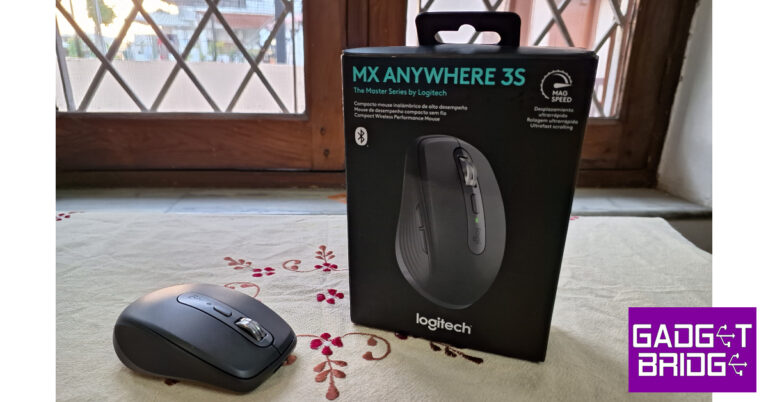
Logitech MX Anywhere 3S Review: Takes you ‘anywhere’ you want

Launched earlier this month, Logitech MX Anywhere 3S comes with minor but important upgrades over its predecessor. The portable mouse gets a new tracking sensor, quieter clicks, and a very useful software upgrade. It retains all the good aspects of the MX Anywhere 3 (review), like the ergonomic shape and design, compact size, and multi-device connectivity. In true ‘Anywhere’ fashion, this mouse is portable enough to use on the go and can track on almost any surface (believe us, we tried). We spent a week with the Logitech MX Anywhere 3S, here is our comprehensive review of the mouse. Read Also: Logitech M240 Silent Bluetooth Mouse launched in India

Logitech MX Anywhere 3S review: Design

While unboxing the Logitech MX Anywhere 3S, you will notice the recycled materials used in its packaging. You won’t find any plastic packaging inside the box. The mouse itself is made out of 78% post-consumer recycled plastic (for the Graphite model). Logitech’s commitment towards eco-friendly consumption is consistent across all of its products. Inside the box, you get the mouse, a USB Type-C cable, and a product safety guide. The USB receiver is missing from the box, you’ll be relying on your device’s Bluetooth connection to pair the mouse. However, if you have a Logitech receiver lying around, it will work perfectly fine with this mouse. Logitech MX Anywhere 3S review: Design Logitech has not made any radical changes to the design of the MX Anywhere 3S. We don’t mind this too much as the compact pebble-shaped design works for us. Talking about the dimensions, the mouse is 1.3 inches long, 2.5 inches wide, and 3.9 inches tall. It is a perfect fit for small to medium-sized hands. If you’ve got large hands, you’ll be relying on your desk to rest a portion of your palm. This shouldn’t be a concern as we didn’t find using the mouse for long hours to be tiring. The sides of the mouse have a rubber texture that provides an enhanced grip. Its compact form factor makes it an ideal travel mouse, fitting inside backpacks and pockets with absolute ease. The USB Type-C port for charging is hidden at the front. The mouse retains the Magspeed scroll wheel with the shift button right below it. An LED notification and ‘logi’ branding complete the centre cutout on the mouse. On the left side, you’ll find two additional buttons to go ‘back’ and ‘forward’. All of these buttons can be customised using the Logitech Options+ app. The power switch and the pairing/switch key are housed at the bottom of the mouse along with the new 8,000 DPI sensor. Logitech MX Anywhere 3S review: Design Apart from the new sensor, Logitech has also introduced quiet clicks on the MX Anywhere 3S. If you’re conscious of the sound that your mouse makes in a quiet environment (like a library), you don’t have to worry about it on the new Anywhere 3S. The clicks still have the same feel to them, but their sound barely reaches your ears. The mouse is ambidextrous, but we found it a better fit for right-handed use.

Logitech MX Anywhere 3S: Performance

We used the Logitech MX Anywhere 3S on a couple of Windows laptops and Android smartphones. Connecting the mouse to Windows devices was a total breeze. As soon you flick the power switch at the bottom of the mouse, its pairing notification pops up on the laptop. Once connected, you can pair the mouse to two other devices using the pairing button at the bottom. The transition between different devices is seamless, although you do have to lift the mouse to press the switch key. Logitech MX Anywhere 3S: Performance As we mentioned earlier, the Logitech MX Anywhere 3S gets an upgraded 8K DPI sensor. This sensor makes all the difference on the mouse. The tracking capability of this device is unmatched. For a truly wireless experience, your mouse shouldn’t just be restricted to the mousepad on your desk. We put the MX Anywhere 3S to the test by tracking it on wooden desks, plastic chair handles, marble countertops, and even on different fabrics. The mouse crushed it on every single one of these surfaces. Pushing the 8K DPI to its limit, we tracked the mouse on a glass surface and were pleased with how well it adapted. It only took us very light gestures on the mouse to cover a 15-inch display. Logitech MX Anywhere 3S: Performance The Magspeed scroll wheel is a breeze to work with as well. In hyper fast scroll mode, it can scroll up to 1,000 lines per second. If your work involves working with spreadsheets, this scroll wheel will be a massive boost in productivity. The ratchet mode is ideal for general scrolling while browsing web pages and reading articles. The shift button right below the scroll wheel can be used to toggle between the two modes. Our personal highlight while using this mouse was the Logi Options+ software. This application allows you to customise every button on the mouse however you like. You can also assign mouse gestures to any button. There are plenty of options to choose from. We personally liked the options for gesture-based page navigation and audio control. You can also assign each button different functions for different apps as well. We suggest spending some time on this application and figuring out which configuration works best for you. Logitech MX Anywhere 3S: Performance The Options+ Flow feature was a total game-changer for us. Once it has been enabled, you can use your mouse to seamlessly transfer files between the connected devices. If you’re wondering, yes it works between Windows and macOS as well. The only condition is that all devices should be connected to the same network. Logitech MX Anywhere 3S offers a battery life of 70 days. We didn’t use the mouse long enough to test this claim, but in our week of use its battery level dropped by just 8%. With USB Type-C charging, the mouse can last up to 3 hours off a 1-minute charge. Read Also: 5 Reasons to Buy Hollyland Lark M1: Your Perfect Wireless Microphone Solution

Verdict

Logitech MX Anywhere 3S is certainly one of the best travel mice you can buy right now. The price tag of Rs 9,225 doesn’t warrant an upgrade over the MX Anywhere 3, but if this is your first Logitech purchase, we’d strongly suggest going for it. True to its name, this ultra-portable mouse can be taken anywhere you go. The 8K DPI sensor works like a charm and the Logi Options+ app further accentuates this performance. A USB receiver would have been a nice addition to the package, especially when you’re paying upwards of Rs 9,000 for a mouse. That being said, the multi-connection feature will leave no room for any complaint. Read Also: LG introduces a new 2023 lineup of LG Gram Series in India

Logitech MX Anywhere 3S: Pros

  • Portable size that’s ideal for travelling
  • Ergonomic design that doesn’t tire your hand
  • Logi Options+ application offers great features
  • Sensational 8K DPI sensor can track on almost any surface

Logitech MX Anywhere 3S: Cons

  • USB receiver isn’t included in the box
  • Bit pricey
For the latest gadget and tech news, and gadget reviews, follow us on Twitter, Facebook and Instagram. For newest tech & gadget videos subscribe to our YouTube Channel. You can also stay up to date using the Gadget Bridge Android App. You can find the latest car and bike news here.

Spark Go 2023 and Spark 10 now available in a leather-finish edition

Tecno today has launched e new edition of Spark Go 2023 and Spark 10 in India. Both phones will now be available in a leather-like finish which has a uniquely striking magic skin orange. Speaking about introducing the premium leather finish variant of SPARK GO 2023 and SPARK 10, Arijeet Talapatra, CEO, TECNO Mobile stated, “We at TECNO aim to elevate the user experience by combining cutting-edge technology with exquisite design elements. The brand recognizes the growing demand for high-quality smartphones that offer both style and substance. By incorporating premium materials, sleek finishes, and attention to detail, TECNO Mobile is committed to delivering smartphones that exude elegance and sophistication. With the launch of leather finish editions of SPARK GO 2023 and SPARK 10 we are bullish about redefining and further disrupting the smartphone segment in both sub-8K and sub-12K segment.”
Spark Go 2023 and Spark 10 now available in a leather-finish edition
Spark Go 2023
The Tecno Spark Go 2023’s leather finish will retail in India at Rs 7,999. The device was launched in Nebula Purple, Endless Black, and Uyuni Blue colour variant priced at Rs 6,999. Whereas the price of the Tecno Spark 10 leather finish variant will come with a price tag of Rs 11,699. Besides this, the Meta Black, Meta Blue, and Meta White colour variants of the phone will be available at Rs 12,999.

Tecno Spark Go 2023 specifications

Tecno Spark Go 2023 comes with a 6.56-inch HD+ IPS screen with a resolution of 720×1,612 pixels. The display has a screen-to-body ratio of 90%, a 120Hz touch sampling rate, and a peak brightness of 480 nits. The aspect ratio of the screen is 20:9. The phone’s construction is splash-resistant to IPX2 standards. The device is powered by quad-core MediaTek Helio A22 SoC. Additionally, the phone has a Memory Fusion virtual RAM capability that boosts the RAM by 3GB, giving it a total of 7GB. Up to 64GB of onboard storage is available, and a separate microSD card slot allows for up to 256GB of additional storage. The phone has HiOS 12.0 on top of Android 12. The Spark Go 2023 comes with a 10W charger and boasts a 5,000mAh battery. The Tecno Spark Go 2023 sports two rear cameras, one with a 13-megapixel primary sensor and an  f/1.85 lens, the other with an AI lens. A 5-megapixel selfie camera sensor and a front-facing LED flash are located at the front of the device for selfies and video chat. For the latest gadget and tech news, and gadget reviews, follow us on TwitterFacebook and Instagram. For newest tech & gadget videos subscribe to our YouTube Channel. You can also stay up to date using the Gadget Bridge Android App. You can find the latest car and bike news here.

WhatsApp Feature: WhatsApp Testing Multi-Account Feature For Android beta

In a few months, we came across lots of news related to the popular chatting app WhatsApp. In order to make its app more user-friendly the company keeps updating the app or seen testing new features on its platforms. Recently the app rolled out a screen-sharing feature similar to Zoom and Google Meet for video calls on the beta version of the Android app. In a recent development, the company is now working on another new feature allowing WhatsApp accounts to be accessed from one device. The multi-Account feature For Android Beta users is under development and is not available for users yet. WABetaInfo which keeps tracking WhatsApp’s recent development has shared that WhatsApp is working on this feature. The publisher suggests that the new update is rolling out through the WhatsApp Business beta for Android 2.23.13.5 update, which is available on the Google Play Store. Note that this WhatsApp Multi-Account feature has been discovered in the business version of the app that allows accessing multiple WhatsApp accounts from the same device.     
WhatsApp Multi-Account Feature
Image courtesy: Wabetainfo
As per the report, the WhatsApp Multi-Account Feature is compatible with WhatsApp Messenger. To prove this, the publisher has also shared some screenshots of the feature. The app will include a menu that will let users choose which account they want to log into. One can easily switch to an additional account anytime you want since when you initially set up an additional account, it will be saved on your device until you want to log out of the account. Using this Multi-Account feature on WhatsApp people will be able to manage their social interactions, work-related chats, and personal conversations within a single app thanks to the integration of the multi-account capability. WABetaInfo stated, “This separation ensures that users can maintain privacy, efficiently manage notifications, and switch between different accounts without the need of using parallel apps. In our opinion, it will also simplify the management of multiple accounts across different devices. Instead of having to install and configure WhatsApp separately on each device, users can access and switch between their various accounts using a single app on their main device.” Until now there is no evidence to suggest that Multi-Account Feature on WhatsApp is only available to businesses. However, the WhatsApp Multi-Account feature will be accessible to everyone in the future. A future upgrade of the app will include the multi-account feature, which is currently being developed and will be made available to beta testers. For the latest gadget and tech news, and gadget reviews, follow us on TwitterFacebook and Instagram. For newest tech & gadget videos subscribe to our YouTube Channel. You can also stay up to date using the Gadget Bridge Android App. You can find the latest car and bike news here.
4 Working Methods to Silence WhatsApp Calls from Unknown Numbers

Call scam operations are at an all-time high and have made their way to WhatsApp as well. Even if you’re aware of the ongoing scams, constantly receiving calls from unknown numbers can amount to be a nuisance. Luckily, WhatsApp has been quick to act in this regard and introduced a handy call-silencing feature on the platform. In this article, we bring you 4 ways to easily silence or block WhatsApp calls from unknown numbers. Read Also: 5 Reasons to Buy Hollyland Lark M1: Your Perfect Wireless Microphone Solution

Silence WhatsApp calls from unknown numbers using app settings

Step 1: Launch WhatsApp and tap the ellipses (three dots) at the top right corner of the screen. Step 2: Select ‘Settings’. Step 2: Tap on Settings. Step 3: Tap on ‘Privacy’. Step 3: Tap on ‘Privacy’. 4 Working Methods to Silence WhatsApp Calls from Unknown Numbers Step 4: Scroll down and select calls. Step 4: Scroll down and select calls. 4 Working Methods to Silence WhatsApp Calls from Unknown Numbers Step 5: Turn on the toggle switch for ‘Silence unknown callers’. Step 5: Turn on the toggle switch for ‘Silence unknown callers’. 4 Working Methods to Silence WhatsApp Calls from Unknown Numbers

Block the unknown caller

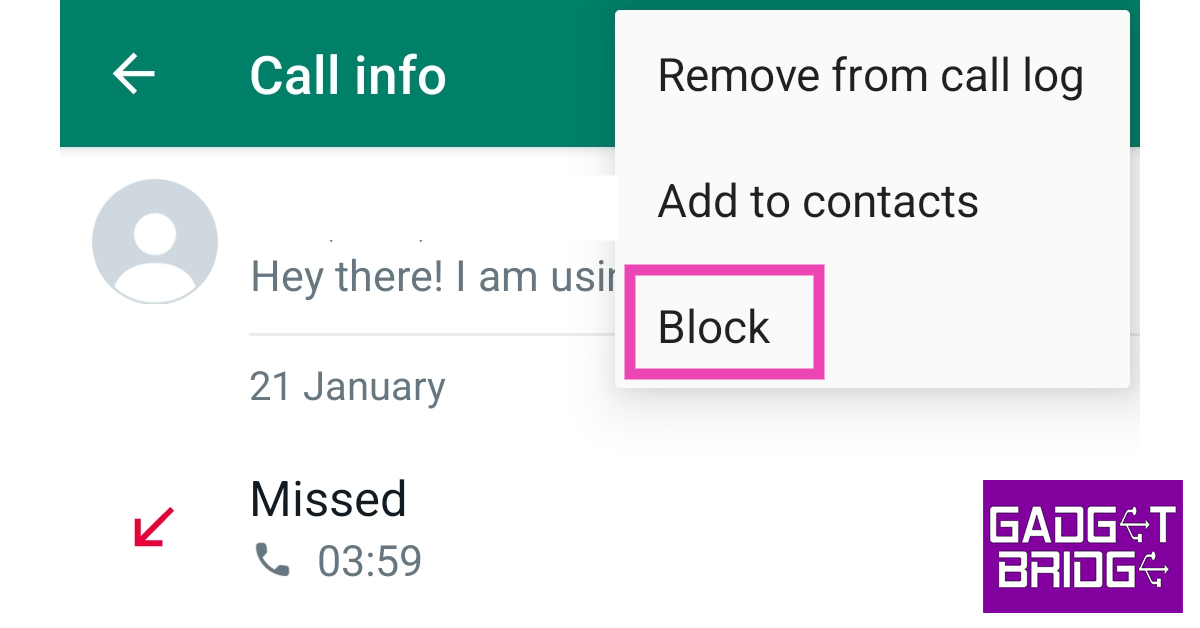
Block the unknown caller. 4 Working Methods to Silence WhatsApp Calls from Unknown Numbers If you’re constantly receiving calls from one unknown number, blocking the caller will prevent them from contacting you. Once the number has been blocked, you will not receive any calls or messages from them. When a caller is blocked, their missed call notifications do not appear on the calls tab in WhatsApp. Tap on the unknown number in your call log and select ‘Block’ from the list of options.

Disable notifications for WhatsApp to silence calls from unknown numbers

Turning off WhatsApp notifications will silence all callers, but it is a viable step you can take. All the calls that you have missed will show up in the Calls tab once you open the app. Here’s how you can disable WhatsApp notifications. Step 1: Go to Settings and select Apps. Step 2: Scroll down and select Apps. how to fix whatsapp not sending messages Step 2: Scroll down and select WhatsApp. Step 3: Select WhatsApp. how to fix whatsapp not sending messages Step 3: Tap on ‘Notifications’. Step 3: Tap on ‘Notifications’. 4 Working Methods to Silence WhatsApp Calls from Unknown Numbers Step 4: Turn off the toggle switch for ‘Allow notifications’. Step 4: Turn off the toggle switch for ‘Allow notifications’. 4 Working Methods to Silence WhatsApp Calls from Unknown Numbers

Use a third-party app

Use a third-party app. 4 Working Methods to Silence WhatsApp Calls from Unknown Numbers While you may not find the need for a third-party app to block calls when WhatsApp now has a native call-silencing feature, apps like WhatsBlock offer added features that are too good to pass up. Apart from blocking calls from unknown numbers on WhatsApp, you can use WhatsBlock to filter calls within a certain time period. You can also set the frequency of calls for the contacts in your blacklist. This means that the contacts in your blacklist can only call you a certain number of times.

Frequently Asked Questions

How do I turn off WhatsApp calls?

To stop receiving WhatsApp call notifications, go to Settings>Apps>WhatsApp and silence notifications.

How do I silence WhatsApp calls from unknown numbers?

To silence WhatsApp calls from unknown numbers, go to WhatsApp>Settings>Privacy>Calls and turn on the toggle switch for ‘Silence unknown callers’.

How can I stop WhatsApp calls without blocking them?

To stop WhatsApp calls without hard blocking a contact, either disable WhatsApp notifications or use a third-party call blocker like WhatsBlock. Read Also: Take advantage of the price reductions, since these devices are now cheaper in India

Conclusion

These are the 4 best ways to easily silence WhatsApp calls from unknown numbers. The native feature to silence unknown callers on WhatsApp is still being rolled out in phases. Update WhatsApp on your smartphone and check if you are one of the early recipients. If you still don’t have access to that feature, using a third-party call blocker is your best bet. For the latest gadget and tech news, and gadget reviews, follow us on Twitter, Facebook and Instagram. For newest tech & gadget videos subscribe to our YouTube Channel. You can also stay up to date using the Gadget Bridge Android App. You can find the latest car and bike news here.

How To Get In-App Purchases on Android For Free?

Almost every major gaming title these days employs the ‘pay to play’ strategy and puts essential items and features behind a paywall. If you don’t wanna splurge extra money on gift boxes and premium features, it may take you more time to get through the game. You may also miss out on some cool stuff along the way. While there are certain ways you can avoid spending money on an Android game or app, we will preface this by saying that none of them is legal. If found guilty, you may lose your account on the app for good. If you’re fine with taking that risk, here is how you can get in-app purchases on Android for free. Read Also: 5 Reasons to Buy Hollyland Lark M1: Your Perfect Wireless Microphone Solution

Get free In-App Purchases on Android with Lucky Patcher

Get free In-App Purchases on Android with Lucky Patcher Lucky Patcher is one of the most popular third-party apps used to modify games in order to get in-app purchases for free. This app does not work for multiplayer online games as it would require hacking into the game’s servers. While Lucky Patcher may work on certain apps on a non-rooted phone, its functionality will be extremely limited. Root your device to get the most out of Lucky Patcher. Lastly, it goes without saying that getting in-app purchases for free using a third-party app is illegal and violates Google’s TOS. If you’re okay with that, here’s how you can use Lucky Patcher to get free in-app purchases. Step 1: Download and install Lucky Patcher on your Android device from the official website. Step 2: You may get a notification to update the app. Tap on ‘Update’ in the popup box. Step 3: Scroll down and select your desired app. If the subheading says ‘in-app purchases found’, it means Lucky Patcher can access the purchases for free. Step 4: Tap the app and select ‘Menu of Patches’. Step 5: Select the check box for ‘Support patch for Inapp emulation’ and hit Apply. This patch will let you bypass the payment option in your selected game or app. Step 6: If your selected app supports a Custom Patch, tap on it and apply it to the app. Once applied, launch the app to use it. Step 7: Install Multi-patch if you see an option for it. A multi-patch takes care of purchases as well as licensing. This means you will be able to use all the premium features for free without paying for a subscription. Step 8: For some apps, you may need to select ‘APK without Licence Verification’. This option lets you use paid apps for free. Step 9: Tap the ellipses at the top left corner of the screen and select ‘Download custom patches’ to download all the patches available for your selected app. While this may take care of all the paid purchases, downloading more patches than you require can lead to frequent crashes. We’d suggest manually going through the patches and downloading the ones you need. Step 10: Launch the app and click on a paid purchase. You will be able to use it for free.

Use Lucky Patcher on a non-rooted Android phone

Use Lucky Patcher on a non-rooted Android phone For non-rooted Android devices, Lucky Patcher creates a modified version of the APK that bypasses the payment process for in-app purchases. This may not work for every app, but it’s worth a shot if you don’t want to root your phone. Here’s how you can go about it. Step 1: Launch the Lucky Patcher app and update it if you see the option in the side menu. Step 2: Select your desired app. If the subheading says ‘InApp purchases found’, you will be able to get around the payment process. Step 3: Select ‘Menu of Patches’. Step 4: Select ‘APK rebuild for InApp and LVL emulation. If you don’t see this option for the app, you will not be able to bypass the payment procedure. Your only option now is to root your device. Step 5: Select ‘Rebuild the App’. Step 6: Tap on ‘Go to File’. Step 7: Select ‘Uninstall and Install’. Step 8: In the popup box, tap ‘Yes’. This will remove the original version of the app from your device and install the modified version. Step 9: Once the modified version of the app has been installed, launch the app to use the paid features for free.

Frequently Asked Questions

How to get paid apps for free?

To use a paid app for free, you can either download a modded version from a third-party app store or use Lucky Patcher to bypass the payment procedure.

Is it okay to download paid apps for free?

Downloading modded versions of paid apps is illegal and violates Google’s Terms of Service. If found in violation of the rules, your account from the app may be terminated.

How to unlock in-app purchases for free?

Using apps like Freedom and Lucky Patcher, you can bypass the payment procedure for in-app purchases. These apps create special patches for the bypass or completely modify the app’s APK. Read Also: How to develop a SaaS product: 6 steps

Conclusion 

This is how you can get in-app purchases for free on Android. Apart from Lucky Patcher, you can use apps like XModGames, Freedom, and Leo PlayCard to unlock paid purchases. Since these apps aren’t strictly legal, you will have to download them from third-party marketplaces and turn off Google Play Protect before installing them on your device. For the latest gadget and tech news, and gadget reviews, follow us on Twitter, Facebook and Instagram. For newest tech & gadget videos subscribe to our YouTube Channel. You can also stay up to date using the Gadget Bridge Android App. You can find the latest car and bike news here.

Logitech M240 Silent Bluetooth Mouse launched in India

The debut of the M240 Silent Bluetooth Mouse in India has been announced by the Swiss company Logitech, which is well-known for producing computer accessories and gadgets. The Logitech Mouse is a quick-pair, plug-and-play wireless mouse that frees up desk space for better, more efficient work. M240 Silent connects in seconds with a reliable pair-and-play Bluetooth connection—no dongle or port required. The mouse features ultra-quiet clicks with 90% less click noise. Logitech M240 Silent Bluetooth Mouse launched in India The Logitech M240 Silent Bluetooth Mouse is a small, portable mouse, which comes in graphite, off-white, and rose colour options. It comes with a sculpted, contoured shape that mimics your hand’s natural curve, you may continue to be productive longer. You may take the wireless, portable mouse anywhere you work because it is small and easily fits in a bag with your laptop. M240 Silent is made to be equally cosy for users who are right- and left-handed. All Logitech products are certified carbon neutral. Plus, the plastic parts include post-consumer recycled (PCR) plastic – 48% for graphite and 37% for off-white and rose. Logitech M240 Silent Bluetooth Mouse launched in India The Logitech M240 easily connects to a computer or tablet using Bluetooth technology and has a wireless range of up to 33 feet. No dongle or connection is needed. Works with Windows, macOS, ChromeOS, Linux, and Android. The mouse incorporates SilentTouch Technology, which minimises clicking noises by 90% while maintaining the comfortable clicking sensation you’re used to. As a result, you hear almost nothing but feel every single click. With auto sleep, the Logitech wireless mouse has a battery life of 18 months, allowing you to go longer between battery changes. Given that there is already one AA battery installed. Controlled line-by-line scrolling makes it simpler to navigate. It offers smooth and precise cursor control on practically any surface.

Logitech M240 Silent Bluetooth Mouse Pricing and Availability

The price of the Logitech M240 Silent Bluetooth Mouse has been set at Rs 1,595. The wireless mouse is available for purchase via the company’s official website in the country. The device is offered in three colour options of Graphite, Rose and off-white colour. For the latest gadget and tech news, and gadget reviews, follow us on TwitterFacebook and Instagram. For newest tech & gadget videos subscribe to our YouTube Channel. You can also stay up to date using the Gadget Bridge Android App. You can find the latest car and bike news here.

BGMI redeem codes for 16 June 2023, claim and receive rewards and benefits

After being banned for nearly ten months, Battleground Mobile India, aka BGMI, is officially available again in India. BGMI fans are looking for ways to improve their game experience and one such method is the usage of redemption codes, which offers a variety of rewards and advantages using BGMI redeem codes players can gain access to new skins, outfits, loot crates, weapons and free UC and diamonds. As mentioned earlier, these codes give users the chance to earn unique rewards and gain extra benefits while playing the game. This includes GUN SKINS (M4, AKM, M416, AWM, M24, UZI, KAR98K), free character voucher, Andy, Carlo, Sara, Victor character for free, free Anna Character on completing the mission and UC or Royal Pass Discount. So here we have gathered a list of the most recent BGMI redeem codes as of 16 June 2023. Also, redeem these codes asap as these are only valid for a limited duration.

BGMI Redeem Codes for 16 June 2023

UKUZBZGWF – Free Outfit TIFZBHZK4A – Free Outfit RNUZBZ9QQ – AKM Glacier Skin PGHZDBTFZ95U – M416 Skin GPHZDBTFZM24U – UMP9 Skin KARZBZYTR – Free Outfit JJCZCDZJ9U – Golden Pan R89FPLM9S – Companion BMTFZBZQNC – Free Drifter Set SD14G84FCC – Free Skin for KAR98 Sniper Gun RNUZBZ9QQ – AKM Glacier Skin BMTCZBZMFS – Pretty in Pink set and Pretty in Pink Headpiece 5FG10D33 – Outfit For Free TQIZBz76F – 3 Free Motorcycle

How to get free Redeem Codes for BGMI on 16 June 2023?

  • Launch BGMI on your device.
  • Then select the Redeem Code option from the main menu.
  • Next, click on the Redeem code tab.
  • A new window will open, requesting the redemption code.
  • Now enter your BGMI code.
  • Confirm and click on the “Redeem” tab.
  • If your redeem code is valid then you will get a message confirming that your rewards were successfully redeemed.
(Note that these codes are case-sensitive, so be sure to type them correctly to prevent any errors.) For the latest gadget and tech news, and gadget reviews, follow us on TwitterFacebook and Instagram. For newest tech & gadget videos subscribe to our YouTube Channel. You can also stay up to date using the Gadget Bridge Android App. You can find the latest car and bike news here.

Garena Free Fire Redeem Codes Today 16 June 2023: Here is how to claim them

Garena Free Fire is a battle royale game with regular awards and tournaments to keep players interested. If you play Garena Free Fire, you should be aware of the redeem codes that are released on a daily basis. However, because the battle royale game is banned in India, players from other countries can use the Free Fire Redeem codes daily. If you’re unfamiliar with the Garena Free Fire redeem codes or don’t know how to get them, we’ve put together a step-by-step guide to help you redeem them. Check out Garena Free Fire Redeem Codes for 16 June 2023. The Free Fire redeem codes are a great way to get free stuff. These are 12-digit codes that contain alphabets and numbers, as well as an expiration date and time. Because the Garena FF redeem codes cannot be used more than once, you should hurry to the redemption page to claim your free reward before someone else does. To get a free reward, all you have to do is go to reward.ff.garena.com/en, which is the official redemption page. Also, keep an eye on this space for daily updates on Garena Free Fire redemption codes and rewards.

Garena Free Fire Redeem Codes Today 16 June 2023

V427K98RUCHZ B3G7A22TWDR7X 6KWMFJVMQQYG FFCMCPSJ99S3 MCPW3D28VZD6 ZZZ76NT3PDSH XZJZE25WEFJJ 4ST1ZTBE2RP9 FFCMCPSUYUY7E EYH2W3XK8UPG UVX9PYZV54AC 3IBBMSL7AK8G J3ZKQ57Z2P2P GCNVA2PDRGRZ

How to Get Free Fire Redeem Codes for Garena on 16 June 2023?

  • Visit the Garena Free Fire game’s official website at reward.ff.garena.com.
  • Use your Facebook, Google, VK, Apple ID, Huawei ID, or Twitter account to log in.
  • You’ll be taken to a valid redemption code (s)
  • Copy and paste the 12-digit redemption code into the text box.
  • On the screen, a dialogue box will appear.
  • ‘Ok’ should be selected.
For the latest gadget and tech news, and gadget reviews, follow us on TwitterFacebook and Instagram. For newest tech & gadget videos subscribe to our YouTube Channel. You can also stay up to date using the Gadget Bridge Android App. You can find the latest car and bike news here.

Amazon Quiz Answers Today 16 June 2023: Participate to win Rs 5,000

16 June 2023 Amazon Quiz has gone live on its platform. The quiz timings are 12 AM to 11:59 PM. The Amazon App users can participate in the quiz daily and all they have to do is submit correct answers to the questions asked on the e-commerce platform. Today’s participants can get a chance to win Rs 5,000 Amazon Pay Balance. By participating in the Amazon Quiz the participants can win Amazon Pay Balance ranging from Rs 1,000 to Rs 50,000 every day while sitting at home. To win the participants must answer five questions correctly that are based on current events and general knowledge. One wrong answer can eliminate you from the quiz. The results will be announced at the end of the month. Today’s question will let you win Rs 5,000 Amazon Pay Balance. Check below for today’s Amazon quiz answers. Amazon Quiz Today Prize – Rs 5,000 Amazon Pay Balance Quiz Date – 16 June 2023 Daily Timing – 12 AM to 11:59 PM Winner Announcement – Today 12 PM

Amazon Quiz Answers Today 16 June 2023

Question 1: Which ground hosted the first match of the Women’s Premier League?

Answer: DY Patil Stadium

Question 2: Which actor makes his directorial debut with Creed III?

Answer: Michael B Jordan

Question 3: The first Republic Day parade in India was held in which year?

Answer: 1950

Question 4: This is the logo of which company?

Answer: Starbucks

Question 5: This is part of the East Side Gallery on the former wall in which city?

Answer: Berlin

How To Play Amazon Quiz

Only app users are eligible to play the Amazon quiz every morning from 12 AM to 11:59 PM. The quiz is not available on the desktop. For those who are unaware of how to play the Amazon quiz below are the steps, you can follow to take the quiz.
  • Firstly download the Amazon app from Google Play Store or App Store
  • Now fill in the required information through the Sign Up option.
  • You need to log in to the Amazon app and scroll down on the home screen to find the Amazon Quiz banner.
  • Tap on the Amazon Quiz banner and tap on the Start button to start the Quiz.
  • Now you will get 5 questions and you need to answer them correctly. One wrong answer will eliminate you from the Quiz.
  • After answering all the questions correctly you are now eligible for a Lucky Draw.
  • The winner’s name will be announced today at 12 PM.
For the latest gadget and tech news, and gadget reviews, follow us on Twitter, Facebook and Instagram. For newest tech & gadget videos subscribe to our YouTube Channel. You can also stay up to date using the Gadget Bridge Android App. You can find the latest car and bike news here.