

In the single-core and multi-core tests of Geekbench 5, the Nothing Phone 2 managed to earn 1253 and 3833 points, respectively. The description states that the smartphone will have 12GB of RAM and run Nothing OS 1.5 over Android 13. The company hasn’t said when or where the Nothing Phone 2 will be on sale, although the device’s model number AIN065 was previously found listed on the BIS certification website, suggesting that India will be the device’s first market. The listing indicates that the forthcoming phone would probably include a 120Hz refresh rate FHD+ AMOLED display. Additionally, a 5,000mAh battery with 67W fast charging support may be included in the smartphone. The Phone 2 will include a Snapdragon 8+ Gen 1 SoC with up to 12GB RAM and up to 256GB storage, according to the BIS listing. Also Read: Nothing Phone 1 Review: A statement piece Although the launch date for the Nothing Phone 2 hasn’t been announced, our sources indicate that it will probably go on sale between June and July. Nothing made its debut on July 12; hence, the upcoming launch is anticipated to take place in July. At MWC 2023 in Barcelona, the company’s CEO stated that the Phone 2 will be powered by a Snapdragon 8 Series chipset. However, by accidentally publishing the information on LinkedIn, Alex Katouzian, Qualcomm’s SVP and GM of the Mobile, Compute, and XR business unit, revealed that the device will be powered by a Snapdragon 8+ Gen1 processor. Later, that post was taken down. In addition, the device probably runs Nothing OS, which is based on Android 13. A 50-megapixel primary camera with OIS capability could potentially be included. For the latest gadget and tech news, and gadget reviews, follow us on Twitter, Facebook and Instagram. For newest tech & gadget videos subscribe to our YouTube Channel. You can also stay up to date using the Gadget Bridge Android App. You can find the latest car and bike news here.There has been a lot of discussion ever since we announced that Phone (2) will have a Snapdragon 8 Series chipset. Well here's some news – it’s going to be the premium-tier powerhouse Snapdragon 8+ Gen 1. A clear upgrade from Phone (1). Let’s talk about the key differences👇 pic.twitter.com/l5NwCxDAVa
— Carl Pei (@getpeid) May 18, 2023
Nothing Phone 2 confirmed to be powered by Snapdragon 8+ Gen 1 SoC
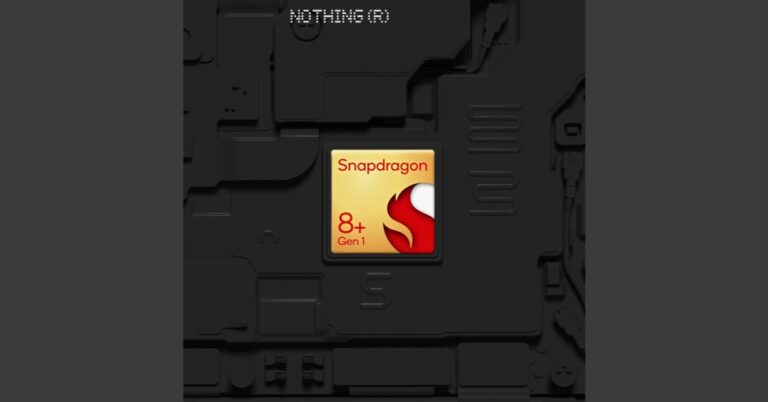
Nothing Phone 2 is confirmed to launch this summer of 2023. What chipset will be installed inside the Phone 2 has been officially disclosed by CEO Carl Pei. Prior to the formal announcement, the company’s CEO at the MWC 2023 in Barcelona announced that the Nothing Phone 1’s successor will include a Snapdragon 8 series SoC but withheld any other information regarding the SoC.
In the most recent development, Nothing CEO Carl Pei confirmed on Twitter that the Snapdragon 8+ Gen 1 SoC will power the Nothing Phone 2. The confirmation follows the phone’s listing on Geekbench with the Qualcomm Snapdragon CPU dubbed Taro, which is thought to be Snapdragon 8+ Gen 1 processor. The CPU runs at 3.0GHz, with four efficiency cores running at 1.8GHz and three performance cores running at 2.5GHz.
Sony WH-CH520 Review: A needed upgrade that brings helpful features
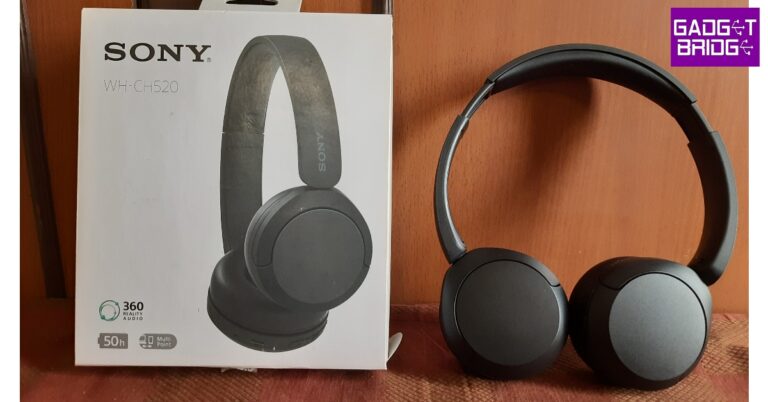
Launched in April at a price of Rs 4,490, Sony WH-CH520 is the successor to the popular WH-CH510. Sony’s reputation in the headphone market precedes the products it puts out. The premium Sony WH-100XM5 (review) is unanimously agreed to be one of the best-sounding headphones, facing very little competition – if any – in its price segment. However, things aren’t the same in the budget category, where Sony locks horns with high-value products from boAt, JBL, Sennheiser, and the like. While WH-CH510 may have enjoyed a fair bit of success in this category, they were by no means the outright best. Sony’s latest in the CH500 series aims to build on the performance while also offering some new features like Multipoint connectivity, DSEE, 360 Reality Audio, and Sony Headphones app support. We spent a week with these wireless headphones to see where they land. Here is our in-depth Sony WH-CH520 review.
Read Also: Redmi A2 and Redmi A2+ launching in India today: How to watch the Livestream
 The WH-CH520 doesn’t stray too far from its predecessor in terms of styling. It still rocks the on-ear design and doesn’t have an excessive clamping force. There’s optimum foam padding on the earcups and headband. The headphones are made out of plastic, but the quality of the material is quite nice here. It can withstand rugged, outdoor use. The matte finish on the plastic body is also a nice touch, as it elevates the feel of the headphones. You don’t have to worry about the earcups and headband attracting any fingerprints or smudges either.
The earcups are capable of swivelling inwards, making the headphones easier to pack in your luggage while travelling. The Sony logo is branded on either side of the headband, right above the earcups. The right earcup houses the three control buttons, a USB port, and the only microphone on this pair of headphones. The control buttons are clicky but could have been a bit firmer. It takes a while to get familiar with their arrangement before you can instantly reach for the button you want. There is no 3.5mm jack on the headphones which means you’re completely dependent on the battery.
While you can’t ask for anything more in terms of design, if you’re not fond of on-ear headphones, Sony WH-CH520 won’t change your mind in any way. The fit and the clamping may be comfortable, but the constant force exerted on the earlobes while wearing these headphones can get too overbearing. After an hour of use, we had to take off these headphones for a bit before using them again. Since these headphones don’t fully go over your ears, there is very little passive noise cancellation.
Before we move on to the sound quality, let’s talk about the different features on offer. As we mentioned earlier, Sony WH-CH520 replace the WH-CH510 which had been on the market for four years. This update brings some much-needed features to Sony’s entry in this price category. The biggest of them all is multi-point pairing. Connecting your headset to multiple devices is something that is only possible with a wireless connection. But surprisingly, this feature is often missing on budget wireless headphones.
Sony WH-CH520 can connect to two devices at once. Pairing them with your PC and smartphone at the same time means you’re never going to miss a call while you’re gaming or watching a movie. However, if you’re playing media on one of the devices, it doesn’t automatically pause it if you play something on the other device. We also noticed some audio stuttering while watching videos on YouTube on PC with the multi-point connection turned on. Thankfully, the Sony app (more on that later) offers an option to stabilise the connection, but it comes at the cost of compromising audio quality.
Another important function that has been included in WH-CH520 is app support. To unlock the full potential of these headphones, you need to link them to the Sony Headphones Connect app. This app has a bunch of sound profiles and equaliser presets you can use to tune the audio output according to your liking. Sony’s Digital Sound Enhancement Engine (DSEE) can also be turned on from the Headphones Connect app. DSEE upscales the audio for compressed files on your device. If you primarily stream music on Spotify, Apple Music, YouTube, or many major platforms, you won’t find much use for this feature. But if you have a digital library of music in compressed format, DSEE works like a charm to enhance the sound quality.
Sony’s 360 Reality Audio, like Dolby Atmos and Spatial Audio, offers an immersive listening experience. To use this format, you will need to take pictures of your ears and upload them in the app for optimisation and tuning purposes. Currently, there are not a lot of apps that support this format, so this feature may be a hit or miss for you.
Let’s talk about the most vital aspect of the performance – the sound quality. Sony WH-CH520 delivers a punchy, texture-rich audio output with the signature Sony sound. The bass isn’t tuned too high, giving other frequencies optimum representation in the mix. If you want, you can opt for a more bass-oriented output in the Sony Headphones Connect app.
We played a bunch of genres on the WH-CH520 and they delivered a decent performance. While the soundstage is certainly not category-defining, there is very little to complain about here. The headphones manage to relay the glossiness of hyper-pop songs pretty well. The intricacies of bass notes were also very well handled. The thumping delivery of rock music was also very good. However, the high-end frequency response leaves a little more to be desired. The vocals and guitars sound as they should, but the cymbal hits sometimes tend to get lost in the mix.
Overall, we were happy with the audio performance that we got on the Sony WH-CH520. There is a single microphone on these headphones, which surprisingly performs pretty well on calls. It is able to extract the caller’s voice from the surrounding noise and relay it to the receiver with minimal loss in quality. We’d suggest these headphones if you work from home and have to attend a lot of meetings during work hours.
The 50-hour battery life on offer here is the cherry on the cake. With no headphone jack available, a good battery backup was necessary on these headphones. On our tests, the headphones lasted between 40-50 hours depending on the average volume level. It takes 3 hours to fully charge these headphones.
Read Also: Asus introduces a new lineup of ROG and TUF gaming laptops in India
The WH-CH520 doesn’t stray too far from its predecessor in terms of styling. It still rocks the on-ear design and doesn’t have an excessive clamping force. There’s optimum foam padding on the earcups and headband. The headphones are made out of plastic, but the quality of the material is quite nice here. It can withstand rugged, outdoor use. The matte finish on the plastic body is also a nice touch, as it elevates the feel of the headphones. You don’t have to worry about the earcups and headband attracting any fingerprints or smudges either.
The earcups are capable of swivelling inwards, making the headphones easier to pack in your luggage while travelling. The Sony logo is branded on either side of the headband, right above the earcups. The right earcup houses the three control buttons, a USB port, and the only microphone on this pair of headphones. The control buttons are clicky but could have been a bit firmer. It takes a while to get familiar with their arrangement before you can instantly reach for the button you want. There is no 3.5mm jack on the headphones which means you’re completely dependent on the battery.
While you can’t ask for anything more in terms of design, if you’re not fond of on-ear headphones, Sony WH-CH520 won’t change your mind in any way. The fit and the clamping may be comfortable, but the constant force exerted on the earlobes while wearing these headphones can get too overbearing. After an hour of use, we had to take off these headphones for a bit before using them again. Since these headphones don’t fully go over your ears, there is very little passive noise cancellation.
Before we move on to the sound quality, let’s talk about the different features on offer. As we mentioned earlier, Sony WH-CH520 replace the WH-CH510 which had been on the market for four years. This update brings some much-needed features to Sony’s entry in this price category. The biggest of them all is multi-point pairing. Connecting your headset to multiple devices is something that is only possible with a wireless connection. But surprisingly, this feature is often missing on budget wireless headphones.
Sony WH-CH520 can connect to two devices at once. Pairing them with your PC and smartphone at the same time means you’re never going to miss a call while you’re gaming or watching a movie. However, if you’re playing media on one of the devices, it doesn’t automatically pause it if you play something on the other device. We also noticed some audio stuttering while watching videos on YouTube on PC with the multi-point connection turned on. Thankfully, the Sony app (more on that later) offers an option to stabilise the connection, but it comes at the cost of compromising audio quality.
Another important function that has been included in WH-CH520 is app support. To unlock the full potential of these headphones, you need to link them to the Sony Headphones Connect app. This app has a bunch of sound profiles and equaliser presets you can use to tune the audio output according to your liking. Sony’s Digital Sound Enhancement Engine (DSEE) can also be turned on from the Headphones Connect app. DSEE upscales the audio for compressed files on your device. If you primarily stream music on Spotify, Apple Music, YouTube, or many major platforms, you won’t find much use for this feature. But if you have a digital library of music in compressed format, DSEE works like a charm to enhance the sound quality.
Sony’s 360 Reality Audio, like Dolby Atmos and Spatial Audio, offers an immersive listening experience. To use this format, you will need to take pictures of your ears and upload them in the app for optimisation and tuning purposes. Currently, there are not a lot of apps that support this format, so this feature may be a hit or miss for you.
Let’s talk about the most vital aspect of the performance – the sound quality. Sony WH-CH520 delivers a punchy, texture-rich audio output with the signature Sony sound. The bass isn’t tuned too high, giving other frequencies optimum representation in the mix. If you want, you can opt for a more bass-oriented output in the Sony Headphones Connect app.
We played a bunch of genres on the WH-CH520 and they delivered a decent performance. While the soundstage is certainly not category-defining, there is very little to complain about here. The headphones manage to relay the glossiness of hyper-pop songs pretty well. The intricacies of bass notes were also very well handled. The thumping delivery of rock music was also very good. However, the high-end frequency response leaves a little more to be desired. The vocals and guitars sound as they should, but the cymbal hits sometimes tend to get lost in the mix.
Overall, we were happy with the audio performance that we got on the Sony WH-CH520. There is a single microphone on these headphones, which surprisingly performs pretty well on calls. It is able to extract the caller’s voice from the surrounding noise and relay it to the receiver with minimal loss in quality. We’d suggest these headphones if you work from home and have to attend a lot of meetings during work hours.
The 50-hour battery life on offer here is the cherry on the cake. With no headphone jack available, a good battery backup was necessary on these headphones. On our tests, the headphones lasted between 40-50 hours depending on the average volume level. It takes 3 hours to fully charge these headphones.
Read Also: Asus introduces a new lineup of ROG and TUF gaming laptops in India
Sony WH-CH520 review: Design
Sony WH-CH520 ships within a compact square box. Inside, you will find the headphones, a USB Type-A to Type-C cable, and a reference guide. There is no hard case or soft carry pouch for the headphones inside the box.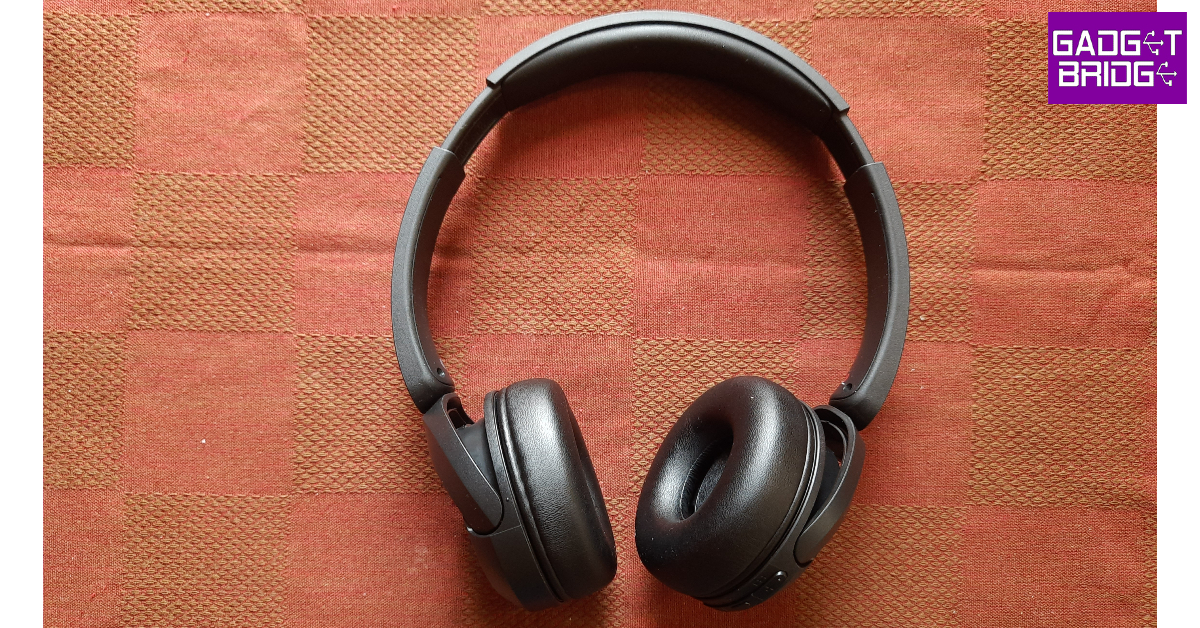 The WH-CH520 doesn’t stray too far from its predecessor in terms of styling. It still rocks the on-ear design and doesn’t have an excessive clamping force. There’s optimum foam padding on the earcups and headband. The headphones are made out of plastic, but the quality of the material is quite nice here. It can withstand rugged, outdoor use. The matte finish on the plastic body is also a nice touch, as it elevates the feel of the headphones. You don’t have to worry about the earcups and headband attracting any fingerprints or smudges either.
 The earcups are capable of swivelling inwards, making the headphones easier to pack in your luggage while travelling. The Sony logo is branded on either side of the headband, right above the earcups. The right earcup houses the three control buttons, a USB port, and the only microphone on this pair of headphones. The control buttons are clicky but could have been a bit firmer. It takes a while to get familiar with their arrangement before you can instantly reach for the button you want. There is no 3.5mm jack on the headphones which means you’re completely dependent on the battery.
 While you can’t ask for anything more in terms of design, if you’re not fond of on-ear headphones, Sony WH-CH520 won’t change your mind in any way. The fit and the clamping may be comfortable, but the constant force exerted on the earlobes while wearing these headphones can get too overbearing. After an hour of use, we had to take off these headphones for a bit before using them again. Since these headphones don’t fully go over your ears, there is very little passive noise cancellation.
Sony WH-CH520 review: Performance
Sony WH-CH520 deliver audio output through powerful 30mm dynamic drivers. The headphones come with Bluetooth 5.2 support and have an effective range of 10m. There is no LDAC support, you get the standard SBC and AAC codecs to play with. Pairing the Bluetooth to your device takes very little time. Perhaps the only hangup here is that you need to press the power button for 7 seconds to enable pairing mode. If the headphones are already connected to a device, they will be unpaired before entering pairing mode. Before we move on to the sound quality, let’s talk about the different features on offer. As we mentioned earlier, Sony WH-CH520 replace the WH-CH510 which had been on the market for four years. This update brings some much-needed features to Sony’s entry in this price category. The biggest of them all is multi-point pairing. Connecting your headset to multiple devices is something that is only possible with a wireless connection. But surprisingly, this feature is often missing on budget wireless headphones.
Sony WH-CH520 can connect to two devices at once. Pairing them with your PC and smartphone at the same time means you’re never going to miss a call while you’re gaming or watching a movie. However, if you’re playing media on one of the devices, it doesn’t automatically pause it if you play something on the other device. We also noticed some audio stuttering while watching videos on YouTube on PC with the multi-point connection turned on. Thankfully, the Sony app (more on that later) offers an option to stabilise the connection, but it comes at the cost of compromising audio quality.
Before we move on to the sound quality, let’s talk about the different features on offer. As we mentioned earlier, Sony WH-CH520 replace the WH-CH510 which had been on the market for four years. This update brings some much-needed features to Sony’s entry in this price category. The biggest of them all is multi-point pairing. Connecting your headset to multiple devices is something that is only possible with a wireless connection. But surprisingly, this feature is often missing on budget wireless headphones.
Sony WH-CH520 can connect to two devices at once. Pairing them with your PC and smartphone at the same time means you’re never going to miss a call while you’re gaming or watching a movie. However, if you’re playing media on one of the devices, it doesn’t automatically pause it if you play something on the other device. We also noticed some audio stuttering while watching videos on YouTube on PC with the multi-point connection turned on. Thankfully, the Sony app (more on that later) offers an option to stabilise the connection, but it comes at the cost of compromising audio quality.
 Another important function that has been included in WH-CH520 is app support. To unlock the full potential of these headphones, you need to link them to the Sony Headphones Connect app. This app has a bunch of sound profiles and equaliser presets you can use to tune the audio output according to your liking. Sony’s Digital Sound Enhancement Engine (DSEE) can also be turned on from the Headphones Connect app. DSEE upscales the audio for compressed files on your device. If you primarily stream music on Spotify, Apple Music, YouTube, or many major platforms, you won’t find much use for this feature. But if you have a digital library of music in compressed format, DSEE works like a charm to enhance the sound quality.
Sony’s 360 Reality Audio, like Dolby Atmos and Spatial Audio, offers an immersive listening experience. To use this format, you will need to take pictures of your ears and upload them in the app for optimisation and tuning purposes. Currently, there are not a lot of apps that support this format, so this feature may be a hit or miss for you.
Another important function that has been included in WH-CH520 is app support. To unlock the full potential of these headphones, you need to link them to the Sony Headphones Connect app. This app has a bunch of sound profiles and equaliser presets you can use to tune the audio output according to your liking. Sony’s Digital Sound Enhancement Engine (DSEE) can also be turned on from the Headphones Connect app. DSEE upscales the audio for compressed files on your device. If you primarily stream music on Spotify, Apple Music, YouTube, or many major platforms, you won’t find much use for this feature. But if you have a digital library of music in compressed format, DSEE works like a charm to enhance the sound quality.
Sony’s 360 Reality Audio, like Dolby Atmos and Spatial Audio, offers an immersive listening experience. To use this format, you will need to take pictures of your ears and upload them in the app for optimisation and tuning purposes. Currently, there are not a lot of apps that support this format, so this feature may be a hit or miss for you.
 Let’s talk about the most vital aspect of the performance – the sound quality. Sony WH-CH520 delivers a punchy, texture-rich audio output with the signature Sony sound. The bass isn’t tuned too high, giving other frequencies optimum representation in the mix. If you want, you can opt for a more bass-oriented output in the Sony Headphones Connect app.
We played a bunch of genres on the WH-CH520 and they delivered a decent performance. While the soundstage is certainly not category-defining, there is very little to complain about here. The headphones manage to relay the glossiness of hyper-pop songs pretty well. The intricacies of bass notes were also very well handled. The thumping delivery of rock music was also very good. However, the high-end frequency response leaves a little more to be desired. The vocals and guitars sound as they should, but the cymbal hits sometimes tend to get lost in the mix.
Let’s talk about the most vital aspect of the performance – the sound quality. Sony WH-CH520 delivers a punchy, texture-rich audio output with the signature Sony sound. The bass isn’t tuned too high, giving other frequencies optimum representation in the mix. If you want, you can opt for a more bass-oriented output in the Sony Headphones Connect app.
We played a bunch of genres on the WH-CH520 and they delivered a decent performance. While the soundstage is certainly not category-defining, there is very little to complain about here. The headphones manage to relay the glossiness of hyper-pop songs pretty well. The intricacies of bass notes were also very well handled. The thumping delivery of rock music was also very good. However, the high-end frequency response leaves a little more to be desired. The vocals and guitars sound as they should, but the cymbal hits sometimes tend to get lost in the mix.
 Overall, we were happy with the audio performance that we got on the Sony WH-CH520. There is a single microphone on these headphones, which surprisingly performs pretty well on calls. It is able to extract the caller’s voice from the surrounding noise and relay it to the receiver with minimal loss in quality. We’d suggest these headphones if you work from home and have to attend a lot of meetings during work hours.
The 50-hour battery life on offer here is the cherry on the cake. With no headphone jack available, a good battery backup was necessary on these headphones. On our tests, the headphones lasted between 40-50 hours depending on the average volume level. It takes 3 hours to fully charge these headphones.
Read Also: Asus introduces a new lineup of ROG and TUF gaming laptops in India
Overall, we were happy with the audio performance that we got on the Sony WH-CH520. There is a single microphone on these headphones, which surprisingly performs pretty well on calls. It is able to extract the caller’s voice from the surrounding noise and relay it to the receiver with minimal loss in quality. We’d suggest these headphones if you work from home and have to attend a lot of meetings during work hours.
The 50-hour battery life on offer here is the cherry on the cake. With no headphone jack available, a good battery backup was necessary on these headphones. On our tests, the headphones lasted between 40-50 hours depending on the average volume level. It takes 3 hours to fully charge these headphones.
Read Also: Asus introduces a new lineup of ROG and TUF gaming laptops in India
Verdict
At Rs 4,490, Sony WH-CH520 offers tremendous value for money. Multi-point pairing and app support are welcome features on these headphones. We’d recommend these headphones to folks that work from home and are looking for a pair of headphones that can connect to their PC and smartphone at once while also offering a good calling experience. Music enthusiasts will enjoy Sony’s signature sound on offer here. If you’re tired of the bass-heavy output offered by most budget headphones, Sony WH-CH520 offer a nice respite.Sony WH-CH520: Pros
- Good audio output
- Muti-point connectivity
- App support
Sony WH-CH520: Cons
- On-ear design can exert a fair bit of pressure on the earlobes
- No headphone jack
Redmi A2 and Redmi A2+ with 5,000mAh battery launched in India
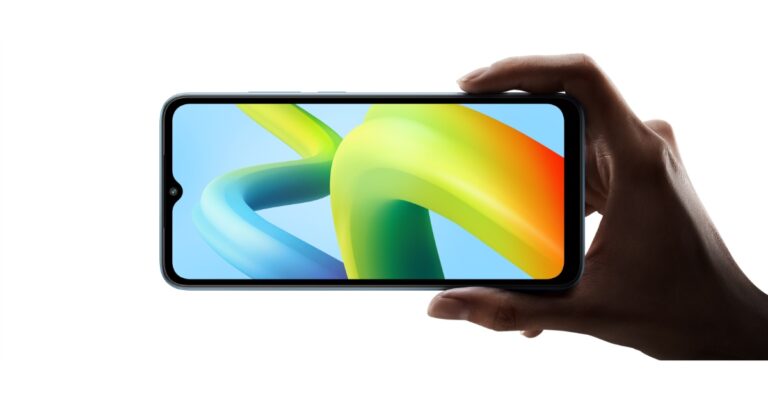
Redmi A2 and Redmi A2+ have officially made their debut in the Indian market today. The newly launched Redmi smartphones share a lot of similarities. Both smartphones are powered by MediaTek Helio G36 SoC. In addition to this, they house a 5,000mAh battery and a 6.52-inch HD+ LCD screen. There is a dual rear camera setup on both devices.
 Both the Redmi phones will come in three different colour options of Black, Light Green, and Light Blue. They are scheduled to go on sale from May 23 at 12 noon via Amazon.in, Mi.com, Mi Home and all retail partners. ICICI bank card holders can also avail an additional instant discount of up to Rs 500 on the purchase of these devices.
 For the photos and videos both the phones includes a dual rear camera setup, including an 8-megapixel primary sensor along with a QVGA camera. The devices also features a 5-megapixel selfie sensor.
In addition to this, the smartphones packs a 5,000mAh with 10W fast charging support. The Redmi A2+ also come with a fingerprint scanner to unlock the phone. In terms of connectivity, the Redmi smartphone also includes a Dual-SIM, 4G, 2.4GHz Wi-Fi, Bluetooth 5.0, GPS, Glonass, Galileo, a 3.5mm audio jack, a USB type-C port and in-built FM radio app for entertainment.
For the photos and videos both the phones includes a dual rear camera setup, including an 8-megapixel primary sensor along with a QVGA camera. The devices also features a 5-megapixel selfie sensor.
In addition to this, the smartphones packs a 5,000mAh with 10W fast charging support. The Redmi A2+ also come with a fingerprint scanner to unlock the phone. In terms of connectivity, the Redmi smartphone also includes a Dual-SIM, 4G, 2.4GHz Wi-Fi, Bluetooth 5.0, GPS, Glonass, Galileo, a 3.5mm audio jack, a USB type-C port and in-built FM radio app for entertainment.
 Commenting on the launch, Anuj Sharma, Chief Marketing Officer, Xiaomi India, said, “As a brand, we have always worked towards our vision of innovation for all with a strong aim to empower the youth of the nation. Today’s launch is one of the many efforts by Xiaomi to fuel the smooth transition for our consumers as they move towards adopting the latest technologies. The all-new Redmi A2 series is packed with meaningful features and we are optimistic that value-conscious consumers, who want to upgrade to newer tech, will find the best solutions in our latest offerings at an honest price. Building on the success of Redmi A1 series and backed by Redmi’s quality, we are confident of an equally successful inning for Redmi A2 series. These smartphones are yet another offering from our side to further strengthen our resolve of a progressive Digital India.”
For the latest gadget and tech news, and gadget reviews, follow us on Twitter, Facebook and Instagram. For newest tech & gadget videos subscribe to our YouTube Channel. You can also stay up to date using the Gadget Bridge Android App. You can find the latest car and bike news here.
Commenting on the launch, Anuj Sharma, Chief Marketing Officer, Xiaomi India, said, “As a brand, we have always worked towards our vision of innovation for all with a strong aim to empower the youth of the nation. Today’s launch is one of the many efforts by Xiaomi to fuel the smooth transition for our consumers as they move towards adopting the latest technologies. The all-new Redmi A2 series is packed with meaningful features and we are optimistic that value-conscious consumers, who want to upgrade to newer tech, will find the best solutions in our latest offerings at an honest price. Building on the success of Redmi A1 series and backed by Redmi’s quality, we are confident of an equally successful inning for Redmi A2 series. These smartphones are yet another offering from our side to further strengthen our resolve of a progressive Digital India.”
For the latest gadget and tech news, and gadget reviews, follow us on Twitter, Facebook and Instagram. For newest tech & gadget videos subscribe to our YouTube Channel. You can also stay up to date using the Gadget Bridge Android App. You can find the latest car and bike news here.
Redmi A2, Redmi A2+ price in India sale details
The price of the Redmi A2 starts at Rs 5,999 for the 2GB RAM with 32GB storage option. Whereas the 2GB RAM with 64GB storage model will be available with a price tag of Rs 6,499. There is another 4GB RAM with 64GB storage option that will sell at Rs 7,499. The Redmi A2+ price in India has been set at Rs 8,499 for the single 4GB RAM with 64GB storage option. Both the Redmi phones will come in three different colour options of Black, Light Green, and Light Blue. They are scheduled to go on sale from May 23 at 12 noon via Amazon.in, Mi.com, Mi Home and all retail partners. ICICI bank card holders can also avail an additional instant discount of up to Rs 500 on the purchase of these devices.
Redmi A2, Redmi A2+ specifications
As mentioned earlier Redmi A2, and Redmi A2+ have a lot in common. They both have a 6.52-inch HD+ LCD display with 1600 x 720 pixels. The screen will have a waterdrop-style notch housing a selfie camera and an aspect ratio of 20:9. The new line-up features a 120Hz touch sampling rate. The devices run on Android 13 out of the box. Under the hood, there is MediaTek Helio G36 SoC paired with up to 4GB of RAM (3GB virtual RAM option) and up to 64GB of storage that can be extended via microSD card to 512GB. For the photos and videos both the phones includes a dual rear camera setup, including an 8-megapixel primary sensor along with a QVGA camera. The devices also features a 5-megapixel selfie sensor.
In addition to this, the smartphones packs a 5,000mAh with 10W fast charging support. The Redmi A2+ also come with a fingerprint scanner to unlock the phone. In terms of connectivity, the Redmi smartphone also includes a Dual-SIM, 4G, 2.4GHz Wi-Fi, Bluetooth 5.0, GPS, Glonass, Galileo, a 3.5mm audio jack, a USB type-C port and in-built FM radio app for entertainment.
For the photos and videos both the phones includes a dual rear camera setup, including an 8-megapixel primary sensor along with a QVGA camera. The devices also features a 5-megapixel selfie sensor.
In addition to this, the smartphones packs a 5,000mAh with 10W fast charging support. The Redmi A2+ also come with a fingerprint scanner to unlock the phone. In terms of connectivity, the Redmi smartphone also includes a Dual-SIM, 4G, 2.4GHz Wi-Fi, Bluetooth 5.0, GPS, Glonass, Galileo, a 3.5mm audio jack, a USB type-C port and in-built FM radio app for entertainment.
 Commenting on the launch, Anuj Sharma, Chief Marketing Officer, Xiaomi India, said, “As a brand, we have always worked towards our vision of innovation for all with a strong aim to empower the youth of the nation. Today’s launch is one of the many efforts by Xiaomi to fuel the smooth transition for our consumers as they move towards adopting the latest technologies. The all-new Redmi A2 series is packed with meaningful features and we are optimistic that value-conscious consumers, who want to upgrade to newer tech, will find the best solutions in our latest offerings at an honest price. Building on the success of Redmi A1 series and backed by Redmi’s quality, we are confident of an equally successful inning for Redmi A2 series. These smartphones are yet another offering from our side to further strengthen our resolve of a progressive Digital India.”
For the latest gadget and tech news, and gadget reviews, follow us on Twitter, Facebook and Instagram. For newest tech & gadget videos subscribe to our YouTube Channel. You can also stay up to date using the Gadget Bridge Android App. You can find the latest car and bike news here.
Commenting on the launch, Anuj Sharma, Chief Marketing Officer, Xiaomi India, said, “As a brand, we have always worked towards our vision of innovation for all with a strong aim to empower the youth of the nation. Today’s launch is one of the many efforts by Xiaomi to fuel the smooth transition for our consumers as they move towards adopting the latest technologies. The all-new Redmi A2 series is packed with meaningful features and we are optimistic that value-conscious consumers, who want to upgrade to newer tech, will find the best solutions in our latest offerings at an honest price. Building on the success of Redmi A1 series and backed by Redmi’s quality, we are confident of an equally successful inning for Redmi A2 series. These smartphones are yet another offering from our side to further strengthen our resolve of a progressive Digital India.”
For the latest gadget and tech news, and gadget reviews, follow us on Twitter, Facebook and Instagram. For newest tech & gadget videos subscribe to our YouTube Channel. You can also stay up to date using the Gadget Bridge Android App. You can find the latest car and bike news here. Top 4 ways To Set An Emergency Contact On Your Android Or iPhone

Your smartphone is a very useful tool in cases of emergency. Pressing the side key three times triggers the emergency helpline of your locality, even when your phone is locked. Apple’s newest iPhone comes with an Emergency SOS feature that can connect to the nearest satellite when you are out of network coverage. Most devices also let you select multiple people as emergency contacts so the first responders can use your phone to contact them without having to unlock it. In this article, we bring you the top 4 ways to set an emergency contact on an Android device or an iPhone.
Read Also: Asus introduced a new lineup of ROG and TUF gaming laptops in India
Step 2: Tap ‘Emergency Contacts’.
Step 3: Tap on the pencil icon on the right side of the screen.
Step 4: Tap on ‘Add member’.
Step 5: Select a person from your phonebook as an emergency contact.
Step 6: Hit ‘Save’.
Once the emergency contact is saved, it can be contacted without unlocking your phone. To make a call to your emergency contact, the responders will have to hit the ‘Emergency call’ button on the lock screen.
Step 2: Tap on ‘Contact information’. Typically, this feature is used to display your alternate phone number or email address on the lock screen so you can be contacted in case you lose your phone. You can also use it to put emergency contact info on the screen.
Step 3: Add the phone number of your emergency contact in the popup box.
Step 4: Hit ‘Done’. The contact will show up on your lock screen.
Step 3: Select ‘Medical ID’.
Step 4: Tap on ‘Edit’ at the top right corner of the screen.
Step 5: Select ‘Add emergency contact’.
Step 6: Scroll through your contacts and select one to be your emergency contact.
Step 7: Select how they are related to you.
Step 8: Hit ‘Done’.
Set an emergency contact on your Android smartphone
Step 1: Go to Settings and select ‘Safety and emergency’. Step 2: Tap ‘Emergency Contacts’.
 Step 3: Tap on the pencil icon on the right side of the screen.
 Step 4: Tap on ‘Add member’.
 Step 5: Select a person from your phonebook as an emergency contact.
Step 6: Hit ‘Save’.
Step 5: Select a person from your phonebook as an emergency contact.
Step 6: Hit ‘Save’.
 Once the emergency contact is saved, it can be contacted without unlocking your phone. To make a call to your emergency contact, the responders will have to hit the ‘Emergency call’ button on the lock screen.

Add an emergency contact to your Android phone’s lock screen
Sometimes adding an emergency contact can prove to be futile if the responders cannot locate it on your lock screen in time of need. To make the contact more accessible, here is how you can add it to your phone’s lock screen. Step 1: Go to Settings and select ‘Lock screen’. Step 2: Tap on ‘Contact information’. Typically, this feature is used to display your alternate phone number or email address on the lock screen so you can be contacted in case you lose your phone. You can also use it to put emergency contact info on the screen.
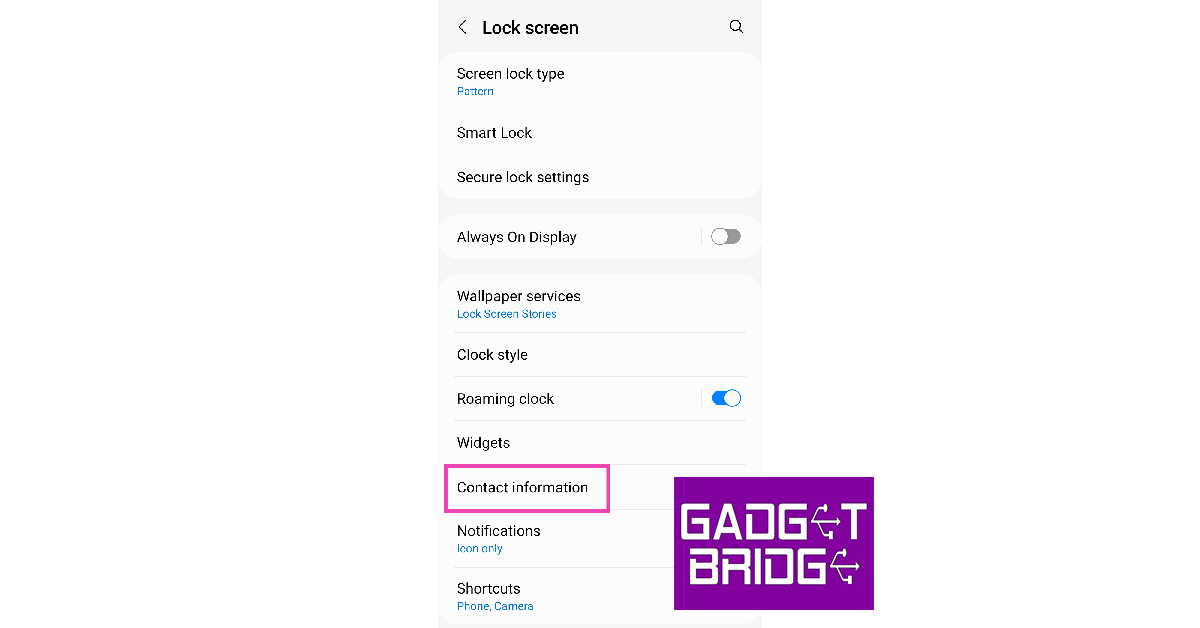 Step 3: Add the phone number of your emergency contact in the popup box.
 Step 4: Hit ‘Done’. The contact will show up on your lock screen.

Use this trick if your phone does not have an Emergency Contact feature
If you’re using an old version of Android then it probably does not have the feature to set up an emergency contact. There is one workaround to this problem but it comes at the cost of sacrificing your lock screen. To set up an emergency contact, go to the Notes app on your device and enter all the information on a new document. Now, take a screenshot of this document and set it as your lock screen wallpaper. Make sure that the contact info isn’t hidden by any of the widgets on the screen. This may diminish the aesthetic of your device, but it will come in extremely clutch in case of emergency.Set an emergency contact on your iPhone
Step 1: Launch the Health app on your iPhone. Step 2: Tap on your profile icon at the top right corner of the screen. Step 3: Select ‘Medical ID’.
 Step 4: Tap on ‘Edit’ at the top right corner of the screen.
Step 5: Select ‘Add emergency contact’.
Step 4: Tap on ‘Edit’ at the top right corner of the screen.
Step 5: Select ‘Add emergency contact’.
 Step 6: Scroll through your contacts and select one to be your emergency contact.
Step 7: Select how they are related to you.
Step 8: Hit ‘Done’.
Step 6: Scroll through your contacts and select one to be your emergency contact.
Step 7: Select how they are related to you.
Step 8: Hit ‘Done’.
Frequently Asked Questions
How do I select an emergency contact on Android?
To select an emergency contact on Android, go to Settings>Safety and Emergency and select ‘Emergency Contact’.How do I set an emergency contact on an iPhone?
To set an emergency contact on an iPhone, go to the Health app, tap your profile icon, and select Medical ID. Scroll down and select ‘Add emergency contact’.How do I dial an emergency contact?
Your emergency contact can be called without needing to unlock your phone. All one needs to do is select the ‘emergency’ icon on the lock screen. Read Also: Diablo 4: Editions, Pre-Orders, Bonuses & Everything You Need To KnowConclusion
This is how you can set an emergency contact on Android and an iPhone. If you own an iPhone you can also set an emergency contact from your list of contacts. Simply tap the ‘i’ icon on your recent calls tab or the address book and select the option to set the person as an emergency contact. For the latest gadget and tech news, and gadget reviews, follow us on Twitter, Facebook and Instagram. For newest tech & gadget videos subscribe to our YouTube Channel. You can also stay up to date using the Gadget Bridge Android App. You can find the latest car and bike news here.Acer Predator Helios Neo 16 with 13th Gen Intel Core i5 and i7 CPUs launched in India
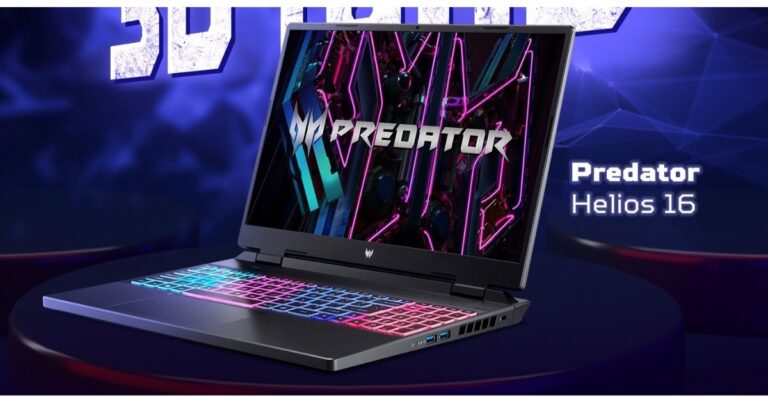
Acer today expanded its Predator Helios lineup with the launch of Acer Predator Helios Neo 16 with 13th Gen Intel Core i5 and i7 processors, as well as NVIDIA GeForce RTX 4050 and 4060 series GPUs. The devices are ideal for gamers and creators. Both laptops offer a 16-inch Acer ComfyView LED-backlit TFT LCD display. They include 5th Gen AeroBlade 3D fans, heat pipes, and liquid metal thermal grease to handle thermals
 The Acer Predator Helios Neo 16 laptops also have NVIDIA GeForce RTX 4050 and 4060 series GPUs and 13th Gen Intel Core i5 and i7 processors. Both models have a cutting-edge cooling system with 5th Gen AeroBlade 3D fans, heat pipes, and liquid metal thermal grease to guarantee uninterrupted performance even during prolonged gaming sessions without any heat-related difficulties.
Also Read: ASUS Zenbook 14 (OLED) 2023 Review: Premium and works like a charm
The updated PredatorSense 4.0 utility app and the new RGB backlit keyboard allow users of the Acer Predator Helios Neo 16 to quickly switch between several operating modes. Ethernet, Intel Killer Wi-Fi 6 AX1650, and Intel Killer E2600 are all available. Additionally, it has two USB Type-C ports that support Thunderbolt 4 and may be utilised for charging, G-SYNC, and DisplayPort.
The Acer Predator Helios Neo 16 laptops also have NVIDIA GeForce RTX 4050 and 4060 series GPUs and 13th Gen Intel Core i5 and i7 processors. Both models have a cutting-edge cooling system with 5th Gen AeroBlade 3D fans, heat pipes, and liquid metal thermal grease to guarantee uninterrupted performance even during prolonged gaming sessions without any heat-related difficulties.
Also Read: ASUS Zenbook 14 (OLED) 2023 Review: Premium and works like a charm
The updated PredatorSense 4.0 utility app and the new RGB backlit keyboard allow users of the Acer Predator Helios Neo 16 to quickly switch between several operating modes. Ethernet, Intel Killer Wi-Fi 6 AX1650, and Intel Killer E2600 are all available. Additionally, it has two USB Type-C ports that support Thunderbolt 4 and may be utilised for charging, G-SYNC, and DisplayPort.
Acer Predator Helios Neo 16 features
The Acer Predator Helios Neo 16 comes in two variants featuring a 16-inch IPS display with a WQXGA resolution of 2560 x 1600 and 1920 x 1200, and high-brightness levels of 500 and 400 nits. The screen supports a 165Hz refresh rate and the panel comes with NVIDIA G-SYNC and 100% Advanced Optimus technology. Additionally, the Acer ComfyView LED-backlit TFT LCD technology ensures clear visibility even in well-lit environments. The Acer Predator Helios Neo 16 laptops also have NVIDIA GeForce RTX 4050 and 4060 series GPUs and 13th Gen Intel Core i5 and i7 processors. Both models have a cutting-edge cooling system with 5th Gen AeroBlade 3D fans, heat pipes, and liquid metal thermal grease to guarantee uninterrupted performance even during prolonged gaming sessions without any heat-related difficulties.
Also Read: ASUS Zenbook 14 (OLED) 2023 Review: Premium and works like a charm
The updated PredatorSense 4.0 utility app and the new RGB backlit keyboard allow users of the Acer Predator Helios Neo 16 to quickly switch between several operating modes. Ethernet, Intel Killer Wi-Fi 6 AX1650, and Intel Killer E2600 are all available. Additionally, it has two USB Type-C ports that support Thunderbolt 4 and may be utilised for charging, G-SYNC, and DisplayPort.
The Acer Predator Helios Neo 16 laptops also have NVIDIA GeForce RTX 4050 and 4060 series GPUs and 13th Gen Intel Core i5 and i7 processors. Both models have a cutting-edge cooling system with 5th Gen AeroBlade 3D fans, heat pipes, and liquid metal thermal grease to guarantee uninterrupted performance even during prolonged gaming sessions without any heat-related difficulties.
Also Read: ASUS Zenbook 14 (OLED) 2023 Review: Premium and works like a charm
The updated PredatorSense 4.0 utility app and the new RGB backlit keyboard allow users of the Acer Predator Helios Neo 16 to quickly switch between several operating modes. Ethernet, Intel Killer Wi-Fi 6 AX1650, and Intel Killer E2600 are all available. Additionally, it has two USB Type-C ports that support Thunderbolt 4 and may be utilised for charging, G-SYNC, and DisplayPort.
Acer Predator Helios Neo 16 price and availability
The Acer Predator Helios Neo 16 price starts at Rs 109990. The device will be available for purchase via all Acer Exclusive Stores, Acer online store, Croma, Vijay Sales, Flipkart, and Amazon. For the latest gadget and tech news, and gadget reviews, follow us on Twitter, Facebook and Instagram. For newest tech & gadget videos subscribe to our YouTube Channel. You can also stay up to date using the Gadget Bridge Android App. You can find the latest car and bike news here.ASUS Zenbook 14 (OLED) 2023 Review: Premium and works like a charm
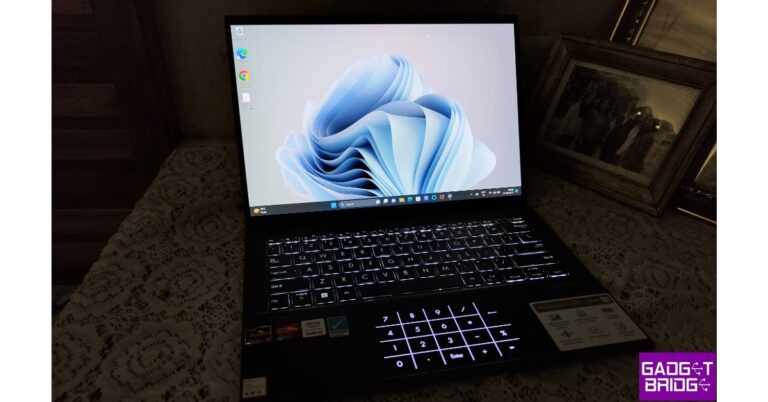
Zenbook is Asus’s most premium range of laptop series. The notebooks in this category are extremely portable, have military-grade construction, and amazing displays. For more than a week, we have been testing the brand-new ASUS Zenbook 14 (OLED) 2023 laptop. It has an all-metal chassis and is a light laptop. A large 14-inch OLED panel and a full-sized keyboard are also present. Let’s find out how the ASUS Zenbook 14 (OLED) 2023 performed in this review.
 The laptop is comfortable to hold and is neither too light nor too hefty. The laptop’s lid, however, is a magnet for dust and fingerprints and is difficult to clean due to its matte appearance.
 On the right side, it contains a microSD card reader, two USB Type-C ports (USB 3.2 Gen 2), a 3.5mm combo audio socket, and HDMI 2.1. While a Type-A USB 3.2 Gen 2 port is located on the left side.
Also Read: Samsung Galaxy Book 3 Pro 360 review: Out of the Galaxy performance
For ventilation, there are a few vents on the left and a grill at the bottom. Large rubber feet are also provided here.
A few stickers referring to the laptop’s CPU, graphics card, Alexa built-in, and Pantone certification are visible when the lid is opened. The laptop can turn 180 degrees completely and it has a Lay-flat ErgoLift hinge. In fact, this method enables the laptop to maintain cooling.
A fingerprint sensor is integrated into the power button. Our model lacks a touch screen and convertible features, which its elder brother has. The sides have thin bezels. A 1080p Full HD webcam on the top bezel enables Windows Hello. Asus Zenbook is inscribed on the chin, too.
The laptop has a 2,280×1,800 pixel resolution 2.8K OLED HDR NanoEdge Display. You get a taller display with extra screen space because it has a 16:10 aspect ratio. It has thin bezels on all sides. The device has a screen-to-body ratio of 90%. The screen is more delicate on the eyes because it has low blue light and is certified flicker-free. If you use the display outside, there shouldn’t be any issues because it offers a peak brightness of 600 nits. The sRGB colour gamut is 100%, making the colours exceptionally vibrant.
While supporting a 90Hz refresh rate and having a 0.2 ms response time, scrolling in particular appears to be buttery smooth. When viewing 4K HDR videos or simply browsing the internet, this display looks amazing. Additionally, the viewing angles are excellent, and everything is quite fluid.
ASUS Zenbook 14 (OLED) 2023 comes with a backlit keyboard. The tactile feel and travel distance are good. Even though the keys appear little, their bigger size makes typing easy. Its 19.05 mm key pitch, 0.2 mm key-cap dish, and long 1.4 mm key travel are all present. Numpad functionality is provided on the trackpad rather than the main keyboard.
As a result, the trackpad serves as a numpad. The extreme upper right corner features an on/off button that, when pressed for a second, turns on or off the Numpad. The top left corner has controls for the brightness and the calculator. The fingerprint scanner is integrated into the power button. The trackpad’s glass surface is smooth to the touch and doesn’t easily pick up fingerprints.
Additionally, the MyAsus dashboard is included, which is a very nice way to view all the diagnostics. The AMD chipsets have superior graphics performance and are more energy-efficient. This laptop is excellent for use at work or for daily use. It runs fast, responds quickly, and does everything with ease.
Even with 40 tabs running in the background, the laptop did not feel sluggish at all. Although the laptop is capable of multitasking, neither video editing nor gaming are its primary objectives. But, light gaming is fine because of the GPU. Throughout all of the jobs, the laptop didn’t get hot at all. As the laptop’s thermals are excellent.
The bottom-firing speakers used here get really loud, and the output is undistorted even while listening to bass-heavy soundtracks. The speakers’ output is crisp, clear, and well-balanced thanks to Dolby Atmos support.
Additionally, the mic quality is excellent, and the webcam performs better than the one found on the majority of laptops. Wi-Fi 6E and Bluetooth 5 are available for connectivity.
Battery-wise, the ASUS Zenbook 14 (OLED) offers a 75Wh battery and a 65W USB-C PD charger. Web browsing, media consumption, document editing, and other activities may all be done for roughly 10 to 12 hours on a single charge thanks to the excellent battery life. Actually, during the testing period, this served as our full-fledged everyday workstation.
The laptop may be fully charged with the supplied charger in 1 hour and 30 minutes.
On the right side, it contains a microSD card reader, two USB Type-C ports (USB 3.2 Gen 2), a 3.5mm combo audio socket, and HDMI 2.1. While a Type-A USB 3.2 Gen 2 port is located on the left side.
Also Read: Samsung Galaxy Book 3 Pro 360 review: Out of the Galaxy performance
For ventilation, there are a few vents on the left and a grill at the bottom. Large rubber feet are also provided here.
A few stickers referring to the laptop’s CPU, graphics card, Alexa built-in, and Pantone certification are visible when the lid is opened. The laptop can turn 180 degrees completely and it has a Lay-flat ErgoLift hinge. In fact, this method enables the laptop to maintain cooling.
A fingerprint sensor is integrated into the power button. Our model lacks a touch screen and convertible features, which its elder brother has. The sides have thin bezels. A 1080p Full HD webcam on the top bezel enables Windows Hello. Asus Zenbook is inscribed on the chin, too.
The laptop has a 2,280×1,800 pixel resolution 2.8K OLED HDR NanoEdge Display. You get a taller display with extra screen space because it has a 16:10 aspect ratio. It has thin bezels on all sides. The device has a screen-to-body ratio of 90%. The screen is more delicate on the eyes because it has low blue light and is certified flicker-free. If you use the display outside, there shouldn’t be any issues because it offers a peak brightness of 600 nits. The sRGB colour gamut is 100%, making the colours exceptionally vibrant.
While supporting a 90Hz refresh rate and having a 0.2 ms response time, scrolling in particular appears to be buttery smooth. When viewing 4K HDR videos or simply browsing the internet, this display looks amazing. Additionally, the viewing angles are excellent, and everything is quite fluid.
ASUS Zenbook 14 (OLED) 2023 comes with a backlit keyboard. The tactile feel and travel distance are good. Even though the keys appear little, their bigger size makes typing easy. Its 19.05 mm key pitch, 0.2 mm key-cap dish, and long 1.4 mm key travel are all present. Numpad functionality is provided on the trackpad rather than the main keyboard.
As a result, the trackpad serves as a numpad. The extreme upper right corner features an on/off button that, when pressed for a second, turns on or off the Numpad. The top left corner has controls for the brightness and the calculator. The fingerprint scanner is integrated into the power button. The trackpad’s glass surface is smooth to the touch and doesn’t easily pick up fingerprints.
Additionally, the MyAsus dashboard is included, which is a very nice way to view all the diagnostics. The AMD chipsets have superior graphics performance and are more energy-efficient. This laptop is excellent for use at work or for daily use. It runs fast, responds quickly, and does everything with ease.
Even with 40 tabs running in the background, the laptop did not feel sluggish at all. Although the laptop is capable of multitasking, neither video editing nor gaming are its primary objectives. But, light gaming is fine because of the GPU. Throughout all of the jobs, the laptop didn’t get hot at all. As the laptop’s thermals are excellent.
The bottom-firing speakers used here get really loud, and the output is undistorted even while listening to bass-heavy soundtracks. The speakers’ output is crisp, clear, and well-balanced thanks to Dolby Atmos support.
Additionally, the mic quality is excellent, and the webcam performs better than the one found on the majority of laptops. Wi-Fi 6E and Bluetooth 5 are available for connectivity.
Battery-wise, the ASUS Zenbook 14 (OLED) offers a 75Wh battery and a 65W USB-C PD charger. Web browsing, media consumption, document editing, and other activities may all be done for roughly 10 to 12 hours on a single charge thanks to the excellent battery life. Actually, during the testing period, this served as our full-fledged everyday workstation.
The laptop may be fully charged with the supplied charger in 1 hour and 30 minutes.
ASUS Zenbook 14 (OLED) 2023 review: Design and display
The ASUS Zenbook 14 (OLED) 2023 laptop weighs only 1.39 kg and is only 16.9 mm thick. The chassis is made entirely of metal and is finished in Jade black. It has an “A” Arrow logo and yes A stands for Asus. The small device looks sleek and sophisticated thanks to the Asus Zenbook branding at the bottom. The laptop is comfortable to hold and is neither too light nor too hefty. The laptop’s lid, however, is a magnet for dust and fingerprints and is difficult to clean due to its matte appearance.
 On the right side, it contains a microSD card reader, two USB Type-C ports (USB 3.2 Gen 2), a 3.5mm combo audio socket, and HDMI 2.1. While a Type-A USB 3.2 Gen 2 port is located on the left side.
Also Read: Samsung Galaxy Book 3 Pro 360 review: Out of the Galaxy performance
For ventilation, there are a few vents on the left and a grill at the bottom. Large rubber feet are also provided here.
On the right side, it contains a microSD card reader, two USB Type-C ports (USB 3.2 Gen 2), a 3.5mm combo audio socket, and HDMI 2.1. While a Type-A USB 3.2 Gen 2 port is located on the left side.
Also Read: Samsung Galaxy Book 3 Pro 360 review: Out of the Galaxy performance
For ventilation, there are a few vents on the left and a grill at the bottom. Large rubber feet are also provided here.
 A few stickers referring to the laptop’s CPU, graphics card, Alexa built-in, and Pantone certification are visible when the lid is opened. The laptop can turn 180 degrees completely and it has a Lay-flat ErgoLift hinge. In fact, this method enables the laptop to maintain cooling.
A fingerprint sensor is integrated into the power button. Our model lacks a touch screen and convertible features, which its elder brother has. The sides have thin bezels. A 1080p Full HD webcam on the top bezel enables Windows Hello. Asus Zenbook is inscribed on the chin, too.
A few stickers referring to the laptop’s CPU, graphics card, Alexa built-in, and Pantone certification are visible when the lid is opened. The laptop can turn 180 degrees completely and it has a Lay-flat ErgoLift hinge. In fact, this method enables the laptop to maintain cooling.
A fingerprint sensor is integrated into the power button. Our model lacks a touch screen and convertible features, which its elder brother has. The sides have thin bezels. A 1080p Full HD webcam on the top bezel enables Windows Hello. Asus Zenbook is inscribed on the chin, too.
 The laptop has a 2,280×1,800 pixel resolution 2.8K OLED HDR NanoEdge Display. You get a taller display with extra screen space because it has a 16:10 aspect ratio. It has thin bezels on all sides. The device has a screen-to-body ratio of 90%. The screen is more delicate on the eyes because it has low blue light and is certified flicker-free. If you use the display outside, there shouldn’t be any issues because it offers a peak brightness of 600 nits. The sRGB colour gamut is 100%, making the colours exceptionally vibrant.
 While supporting a 90Hz refresh rate and having a 0.2 ms response time, scrolling in particular appears to be buttery smooth. When viewing 4K HDR videos or simply browsing the internet, this display looks amazing. Additionally, the viewing angles are excellent, and everything is quite fluid.
 ASUS Zenbook 14 (OLED) 2023 comes with a backlit keyboard. The tactile feel and travel distance are good. Even though the keys appear little, their bigger size makes typing easy. Its 19.05 mm key pitch, 0.2 mm key-cap dish, and long 1.4 mm key travel are all present. Numpad functionality is provided on the trackpad rather than the main keyboard.
As a result, the trackpad serves as a numpad. The extreme upper right corner features an on/off button that, when pressed for a second, turns on or off the Numpad. The top left corner has controls for the brightness and the calculator. The fingerprint scanner is integrated into the power button. The trackpad’s glass surface is smooth to the touch and doesn’t easily pick up fingerprints.
ASUS Zenbook 14 (OLED) 2023 comes with a backlit keyboard. The tactile feel and travel distance are good. Even though the keys appear little, their bigger size makes typing easy. Its 19.05 mm key pitch, 0.2 mm key-cap dish, and long 1.4 mm key travel are all present. Numpad functionality is provided on the trackpad rather than the main keyboard.
As a result, the trackpad serves as a numpad. The extreme upper right corner features an on/off button that, when pressed for a second, turns on or off the Numpad. The top left corner has controls for the brightness and the calculator. The fingerprint scanner is integrated into the power button. The trackpad’s glass surface is smooth to the touch and doesn’t easily pick up fingerprints.
ASUS Zenbook 14 (OLED) 2023 review: Performance
AMD Ryzen 5 7530U Mobile Processor (6 cores, 12 threads, 16 MB cache, up to 4.3 GHz maximum boost) is housed inside. For excellent performance, you get AMD Radeon graphics, 16GB DDR5 RAM, and a 1TB M.2 NVMe PCIe 3.0 SSD. You receive Windows 11 out of the box along with a lifetime licence for Microsoft Office. Additionally, you receive several useful Asus apps as well as third-party apps like Alexa and McAfee. Additionally, the MyAsus dashboard is included, which is a very nice way to view all the diagnostics. The AMD chipsets have superior graphics performance and are more energy-efficient. This laptop is excellent for use at work or for daily use. It runs fast, responds quickly, and does everything with ease.
Even with 40 tabs running in the background, the laptop did not feel sluggish at all. Although the laptop is capable of multitasking, neither video editing nor gaming are its primary objectives. But, light gaming is fine because of the GPU. Throughout all of the jobs, the laptop didn’t get hot at all. As the laptop’s thermals are excellent.
The bottom-firing speakers used here get really loud, and the output is undistorted even while listening to bass-heavy soundtracks. The speakers’ output is crisp, clear, and well-balanced thanks to Dolby Atmos support.
Additionally, the MyAsus dashboard is included, which is a very nice way to view all the diagnostics. The AMD chipsets have superior graphics performance and are more energy-efficient. This laptop is excellent for use at work or for daily use. It runs fast, responds quickly, and does everything with ease.
Even with 40 tabs running in the background, the laptop did not feel sluggish at all. Although the laptop is capable of multitasking, neither video editing nor gaming are its primary objectives. But, light gaming is fine because of the GPU. Throughout all of the jobs, the laptop didn’t get hot at all. As the laptop’s thermals are excellent.
The bottom-firing speakers used here get really loud, and the output is undistorted even while listening to bass-heavy soundtracks. The speakers’ output is crisp, clear, and well-balanced thanks to Dolby Atmos support.
 Additionally, the mic quality is excellent, and the webcam performs better than the one found on the majority of laptops. Wi-Fi 6E and Bluetooth 5 are available for connectivity.
Battery-wise, the ASUS Zenbook 14 (OLED) offers a 75Wh battery and a 65W USB-C PD charger. Web browsing, media consumption, document editing, and other activities may all be done for roughly 10 to 12 hours on a single charge thanks to the excellent battery life. Actually, during the testing period, this served as our full-fledged everyday workstation.
The laptop may be fully charged with the supplied charger in 1 hour and 30 minutes.
Additionally, the mic quality is excellent, and the webcam performs better than the one found on the majority of laptops. Wi-Fi 6E and Bluetooth 5 are available for connectivity.
Battery-wise, the ASUS Zenbook 14 (OLED) offers a 75Wh battery and a 65W USB-C PD charger. Web browsing, media consumption, document editing, and other activities may all be done for roughly 10 to 12 hours on a single charge thanks to the excellent battery life. Actually, during the testing period, this served as our full-fledged everyday workstation.
The laptop may be fully charged with the supplied charger in 1 hour and 30 minutes.
Verdict
The ASUS Zenbook 14 (OLED) is a high-end business laptop with excellent specifications. The Zenbook 14 OLED laptop is for anyone who wants a portable workstation but may not need a second screen or a convertible form factor (Review) or desires a keyboard with a comfy big palm rest. The notebook has a clean, premium design and sturdy construction. The device is ideal for watching movies and listening to music because it has a top-notch OLED display and bottom-firing speakers that support Dolby Atmos. This laptop makes for a great typing experience. With 16 GB of RAM, an AMD Ryzen 7000 Series processor, and AMD Radeon graphics, you can easily do all of your work and play duties. The most recent WiFi 6E provides you with smooth and quick connectivity, and the speedy PCIe 3.0 x4 SSD launches and loads apps more quickly. It performs wonderfully, which is something you wouldn’t anticipate from a laptop this little and light. It contains every feature you could want in such a little package. ASUS Zenbook 14 (OLED) Pros- Lightweight and sturdy
- Smooth and responsive
- Excellent OLED display
- Long-lasting battery life
- Fingerprint magnet
- Now meant for 4K video editing and high-end gaming
Redmi A2 and Redmi A2+ launching in India today: How to watch the Livestream

Redmi is all set to launch two new smartphones in the Indian market today. Redmi A2 and Redmi A2+ will be making their debut here. Both devices have been teased several times, therefore, revealing their key specification about them in advance of their release. In addition to this, the phones already made their global debut in March this year ahead of India’s launch. The smartphones will pack a 5,000mah battery.
Redmi A2 and A2+ are arriving in India today. The company will be hosting an event to unveil both products. The event will be live-streamed at 11 AM IST via YouTube channel. In addition to this, it will also go live on all its social media channels including Twitter.
Redmi A2, Redmi A2+ specifications expected
Prior to coming to India both Redmi A2 and A2+ were launched globally in March this year. The smartphone shares a lot of similarities including a 6.52-inch HD+ LCD display with 1600 x 720 pixels. The screen will have a waterdrop-style notch housing a selfie camera and an aspect ratio of 20:9. The devices are likely to run on Android 12 (Go edition) out of the box and will be powered by a MediaTek Helio G36 SoC paired with up to 3GB of LPDDR4x RAM and up to 32GB of eMMC 5.1 onboard storage. In terms of optics, there will be a dual rear camera setup, including an 8-megapixel primary sensor along with a QVGA camera. The devices will also comprise of a 5-megapixel selfie sensor. In addition to this, the handsets could also boast a 5,000mAh with 10W fast charging support. The Redmi A2+ is likely to come with a fingerprint scanner to unlock the phone. In terms of connectivity, the Redmi smartphone may also include a Dual-SIM, 4G, 2.4GHz Wi-Fi, Bluetooth 5.0, GPS, Glonass, Galileo, a 3.5mm audio jack, and a USB type-C port.Redmi A2, Redmi A2+ price and availability
The pricing of both Redmi A2, and A2+ has not been revealed yet. But in Europe, the phones were made available in 2GB RAM with 32GB storage and 3GB RAM with 32GB storage option. There they come in Black, Light Green, and Light Blue colour options. For the latest gadget and tech news, and gadget reviews, follow us on Twitter, Facebook and Instagram. For newest tech & gadget videos subscribe to our YouTube Channel. You can also stay up to date using the Gadget Bridge Android App. You can find the latest car and bike news here.Garena Free Fire Redeem Codes Today 19 May 2023: Here is how to claim them

Garena Free Fire is a battle royale game with regular awards and tournaments to keep players interested. If you play Garena Free Fire, you should be aware of the redeem codes that are released on a daily basis. However, because the battle royale game is banned in India, players from other countries can use the Free Fire Redeem codes daily. If you’re unfamiliar with the Garena Free Fire redeem codes or don’t know how to get them, we’ve put together a step-by-step guide to help you redeem them. Check out Garena Free Fire Redeem Codes for 19 May 2023.
The Free Fire redeem codes are a great way to get free stuff. These are 12-digit codes that contain alphabets and numbers, as well as an expiration date and time. Because the Garena FF redeem codes cannot be used more than once, you should hurry to the redemption page to claim your free reward before someone else does. To get a free reward, all you have to do is go to reward.ff.garena.com/en, which is the official redemption page. Also, keep an eye on this space for daily updates on Garena Free Fire redemption codes and rewards.
Garena Free Fire Redeem Codes Today 19 May 2023
- FYHUJKIOIUYZT5A
- FEQRD1F2VGHY34R
- FTFGCVBXZNHSJUI
- F3YTG4FV5BT6NGM
- FVYFEGB4NFGJHYV
- FCBHNJMAKIU8YTG
- FG3VB45NT6MJYKH
- FIBUYVHJRO6YHTH
- F3TJYJFHTYB7FTY
- FFV4R5BTNGJIUVYT
- FDGEB4NR5JMT6KI
- FHKBOIVUCYDTWF
How to Get Free Fire Redeem Codes for Garena on 19 May 2023?
- Visit the Garena Free Fire game’s official website at reward.ff.garena.com.
- Use your Facebook, Google, VK, Apple ID, Huawei ID, or Twitter account to log in.
- You’ll be taken to a valid redemption code (s)
- Copy and paste the 12-digit redemption code into the text box.
- On the screen, a dialogue box will appear.
- ‘Ok’ should be selected.
Amazon Quiz Answers Today 19 May 2023: Participate to win Rs 5,000

Have you participated in the Amazon Quiz today? If not then participate in the 19 May 2023 Amazon Quiz as it has already gone live on the app. The daily quiz can be played from 12 AM to 11:59 every day on the mobile app platform. Today e-commerce is giving the chance to win Rs 5,000 Amazon Pay Balance.
Every day Amazon brings a fresh quiz for its customers. By participating in the quiz the participants can win an Amazon Pay Balance of up to Rs 50,000. The quiz can only be played on the mobile app as it is not available for the desktop platform. The quiz contains five easy questions and you have to answer all the questions correctly. The participants will then be shortlisted for a lucky draw to select a winner. Whereas the results are declared at the end of the month. Check out today’s Amazon quiz answers to win Rs 5,000.
Amazon Quiz Today Prize – Rs 5,000 Amazon Pay Balance
Quiz Date – 19 May 2023
Daily Timing – 12 AM to 11:59 PM
Winner Announcement – Today 12 PM
Amazon Quiz Answers Today 19 May 2023
Question 1: Apart from being Vice President, Shri Jagdeep Dhankar is also the Chairman of which of the following? Answer: Rajya Sabha Question 2: As of January 2023, who holds the record for the fastest double hundred in one-day internationals? Answer: Ishan Kishan Question 3: Letitia Wright plays which important female character in the Marvel Cinematic Universe? Answer: Shuri Question 4: This dish is a feature of which cuisine? Answer: Italian Question 5: This breed of owl was the pet of which fictional character in J K Rowling’s Wizarding World? Answer: Harry PotterHow To Play Amazon Quiz
Only app users are eligible to play the Amazon quiz every morning from 12 AM to 11:59 PM. The quiz is not available on the desktop. For those who are unaware of how to play the Amazon quiz below are the steps, you can follow to take the quiz.- Firstly download the Amazon app from Google Play Store or App Store
- Now fill in the required information through the Sign Up option.
- You need to log in to the Amazon app and scroll down on the home screen to find the Amazon Quiz banner.
- Tap on the Amazon Quiz banner and tap on the Start button to start the Quiz.
- Now you will get 5 questions and you need to answer them correctly. One wrong answer will eliminate you from the Quiz.
- After answering all the questions correctly you are now eligible for a Lucky Draw.
- The winner’s name will be announced today at 12 PM.
Asus introduced a new lineup of ROG and TUF gaming laptops in India
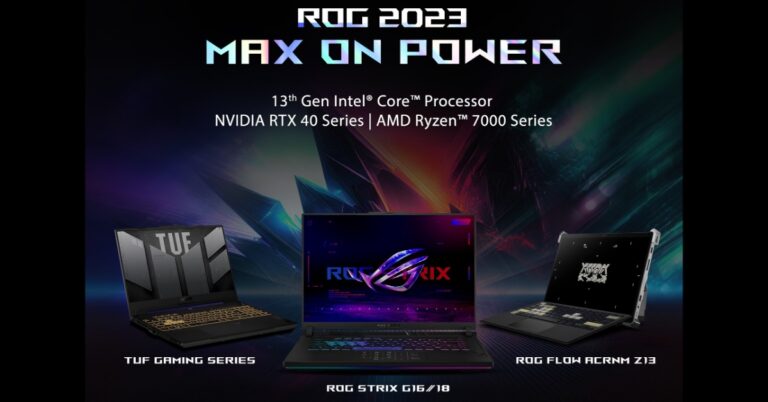
Asus ROG has announced the launch of five new models to its ROG and TUF portfolio that includes Flow Z13 ACRONYM Edition, TUF A16 Advantage Edition, Zephyrus G16, and Strix G16/18. The TUF lineup has been refreshed with Nvidia RTX 4000 series GPUs.
For the latest gadget and tech news, and gadget reviews, follow us on Twitter, Facebook and Instagram. For newest tech & gadget videos subscribe to our YouTube Channel. You can also stay up to date using the Gadget Bridge Android App. You can find the latest car and bike news here.
ROG Strix G16 and G18
The ROG Strix G16 and G18 feature new 16-inch and 18-inch screens. It has the most latest Intel 13th Gen Core Processors based on Intel 7 process (10nm) and features Intel new hybrid architecture with Performance and Efficiency Cores. They come integrated with the latest NVIDIA RTX 40 series of laptop graphics. The Scar has artistic Aura Sync embellishments as usual. The ROG’s Intelligent Cooling Ecosystem on the 2023 Strix G 16/18 runs quietly and comfortably.Flow Z13 Acronym
The new Flow Z13 from ROG and ACRONYM are powered by an Intel Core i9-13900H processor and NVIDIA GeForce RTX 4070 Laptop GPU. Flow Z13 ACRONYM come with a fully detachable full-sized keyboard and USB-C power delivery. It has a 170-degree kickstand adjustment that allows it to be used in a landscape position like a regular laptop. The kickstand can also be positioned in portrait mode. The ROG Intelligent Cooling Ecosystem helps the Z13 ACRONYM run efficiently. It also offers a variety of input options and an XG Mobile external GPU to increase graphics performance. The touch screen display features Pantone Validation, Dolby Vision, and a 16:10 aspect ratio. It also comes with a 165Hz refresh rate screen, DCI-P3 100%, and 3ms response time with Adaptive Sync.ROG Zephyrus G16
The ROG Zephyrus G16 boasts an Intel Core i9 13900H CPU and up to an NVIDIA GeForce RTX 4060 Laptop GPU with a MUX Switch and NVIDIA Advanced Optimus. The device features a 16-inch QHD+ 240Hz Nebula Display and 90Wh battery. They come with a versatile 180° ErgoLift hinge. There is a six-speaker setup powered by Dolby Atmos and our 3D Mic Array.TUF A16 Advantage Edition
The Asus TUF A16 Advantage Edition comes with the latest AMD Ryzen 9 7940HS Mobile Processor with AMD Smart Access Graphics and AMD Dynamic Switchable Graphics. The gaming laptop features a 90% screen-to-body ratio, and Full HD resolution panel, 165Hz refresh rate with 100% sRGB coverage. Along with up to seven heat pipes and two 84-blade fans with ARC Flow designs, it also has four exhaust valves to effectively remove heat from the system. The device boasts a 90Whrs battery.ROG Flow X13
The Asus ROG Flow X13 has been updated with he latest 4nm Ryzen™ 9 7940HS CPU with Phoenix architecture. Optional XG Mobile eGPU boosts graphics on demand with up to an NVIDIA RTX 4090 mobile GPU. The laptop features a High-resolution QHD+ panel with a high 165Hz refresh rate. The display has a scratch-resistant Gorilla Glass DXC touchscreen with MPP 2.0 pen support and is touch-enabled as well. The X13 includes four distinct viewing modes and a 360-degree hinge.ROG Flow Z13
The ROG Flow Z13 features a QHD+ 165Hz ROG Nebula display panel with 500 nits of peak brightness and a 16:10 aspect ratio touchscreen with Gorilla Glass 5 protection. The laptop is powered with up to a 14-core Intel Core i9-13900H CPU and up to a GeForce RTX 4060 Laptop GPU.TUF A15/17
The Asus TUF A15/17 features a 15 and 17-inch display and is powered by AMD Ryzen R9 7940HS Processor with Radeon Graphics (8 cores/16 threads) and with up to NVIDIA RTX 4060 graphics at 140W max TGP. One can keep up with a QHD 165Hz or an FHD 144Hz panel using adaptive sync. Additionally, it has a MUX Switch with support for NVIDIA Advanced Optimus, which can lower latency. The Asus TUF A15/17 has two 84-blade Arc Flow Fans that ensure up to 13% greater airflow. Additionally, the 90Whrs battery, when coupled with the energy-efficient AMD processor, allows for up to 12.5 hours of online browsing and up to 12 hours of movie playback.Pricing and availability
| Model | Starting Price (INR) | Platforms |
| ROG TUF F15 | INR 1,15,990 | Online: ASUS e-shop/ Flipkart/Amazon Brand Store: ASUS Exclusive Stores/ ROG Stores Multi-Brand Retailers: Croma/Vijay Sales/Reliance Digital & all ASUS authorized dealers |
| ROG TUF A15 | INR 1,05,990 | Online: ASUS e-shop/ Flipkart/Amazon Brand Store: ASUS Exclusive Stores/ ROG Stores Multi-Brand Retailers: Croma/Vijay Sales/Reliance Digital & all ASUS authorized dealers |
| ROG TUF A17 | INR 1,34,990 | Online: ASUS e-shop/ Flipkart/Amazon Brand Store: ASUS Exclusive Stores/ ROG Stores Multi-Brand Retailers: Croma/Vijay Sales/Reliance Digital & all ASUS authorized dealers |
| ROG TUF Gaming A16 Advantage Edition | INR 1,39,990 | Online: ASUS e-shop/ Flipkart/Amazon Brand Store: ASUS Exclusive Stores/ ROG Stores Multi-Brand Retailers: Croma/Vijay Sales/Reliance Digital & all ASUS authorized dealers |
| ROG Strix G18 | INR 1,69,990 | Online: ASUS e-shop/ Flipkart/Amazon Brand Store: ASUS Exclusive Stores/ ROG Stores Multi-Brand Retailers: Croma/Vijay Sales/Reliance Digital & all ASUS authorized dealers |
| ROG Strix G16 | INR 1,44,990 | Online: ASUS e-shop/ Flipkart/Amazon Brand Store: ASUS Exclusive Stores/ ROG Stores Multi-Brand Retailers: Croma/Vijay Sales/Reliance Digital & all ASUS authorized dealers |
| ROG Strix G17 | INR 1,59,990 | Online: ASUS e-shop/ Flipkart/Amazon Brand Store: ASUS Exclusive Stores/ ROG Stores Multi-Brand Retailers: Croma/Vijay Sales/Reliance Digital & all ASUS authorized dealers |
| ROG Flow X13 | INR 1,74,990 | Online: ASUS e-shop/ Flipkart/Amazon Brand Store: ASUS Exclusive Stores/ ROG Stores Multi-Brand Retailers: Croma/Vijay Sales/Reliance Digital & all ASUS authorized dealers |
| ROG Flow Z13 | INR 2,09,990 | Online: ASUS e-shop/ Flipkart/Amazon Brand Store: ASUS Exclusive Stores/ ROG Stores Multi-Brand Retailers: Croma/Vijay Sales/Reliance Digital & all ASUS authorized dealers |
| ROG Flow Z13 ACRONYM | INR 284990 | Online: ASUS e-shop/ Flipkart/Amazon Brand Store: ASUS Exclusive Stores/ ROG Stores Multi-Brand Retailers: Croma/Vijay Sales/Reliance Digital & all ASUS authorized dealers |
| ROG Zephyrus G14 | INR 1,49,990 | Online: ASUS e-shop/ Flipkart/Amazon Brand Store: ASUS Exclusive Stores/ ROG Stores Multi-Brand Retailers: Croma/Vijay Sales/Reliance Digital & all ASUS authorized dealers |
| ROG Zephyrus G16 | INR 1,69,990 | Online: ASUS e-shop/ Flipkart/Amazon Brand Store: ASUS Exclusive Stores/ ROG Stores Multi-Brand Retailers: Croma/Vijay Sales/Reliance Digital & all ASUS authorized dealers |
| ROG XG Mobile – RTX 4090-16GB | INR 201,990 | Online: ASUS e-shop/ Flipkart/Amazon Brand Store: ASUS Exclusive Stores/ ROG Stores Multi-Brand Retailers: Croma/Vijay Sales/Reliance Digital & all ASUS authorized dealers |