

 The latest Samsung air purifiers, models AX46 and AX32, have a one-button control that, according to the firm, removes 99.97% of nano-sized particles, ultrafine dust, bacteria, and allergies. They also effortlessly eliminate potentially harmful volatile organic compounds (VOCs), such as formaldehyde, ensuring that consumers breathe clean air. The consumer can remotely control the air purifier using the SmartThings App. Additionally, you can quickly turn the air purifier on and off with the SmartThings App, which saves electricity. Customers can use their smartphones to check the air quality and manage other air purifier features wherever they are.
The newest air purifiers use cutting-edge filtration technologies, such as front air intake and three-way air flow, to answer consumers’ worries about poor-quality room air that contains gases, dust, chemicals, and various aromas. Easy air intake is a goal of the front air intake’s design. A Power Fan uses its 3-Way Air Flow to quickly disseminate the clean air once it has been purified in several directions.
In order to get rid of ultrafine dust, the new range also has a multi-layered high-efficiency purification system. In this system, bigger dust particles are removed by a washable pre-filter, hazardous gases are subsequently eliminated by an activated carbon deodorization filter, and the remaining ultrafine dust is captured by a dust-collecting filter up to 99.97% of the time.
The AX46 model comes with a Laser PM 1.0 sensor and a Numeric Easy View Display. The sensor detects gaseous pollutants and continuously analyses the quality of the air. Users can view the results on the display, which features a 4-colour indication and displays the level of PM 1.0/2.5/10 pollutants as well as the overall air quality level. Customers may now control their SmartThings from anywhere at any time thanks to connectivity.
Samsung’s AX46 and AX32 air purifiers will be available at a starting price of Rs 12,990 and Rs 32,990 respectively. They will be available for purchase in Beige and Grey colours on Samsung.com, at Samsung exclusive stores, and at top consumer electronics retailers in the country. Customers may also take advantage of simple, no-cost easy EMIs and appealing cashback.
For the latest gadget and tech news, and gadget reviews, follow us on Twitter, Facebook and Instagram. For newest tech & gadget videos subscribe to our YouTube Channel. You can also stay up to date using the Gadget Bridge Android App. You can find the latest car and bike news here.
The latest Samsung air purifiers, models AX46 and AX32, have a one-button control that, according to the firm, removes 99.97% of nano-sized particles, ultrafine dust, bacteria, and allergies. They also effortlessly eliminate potentially harmful volatile organic compounds (VOCs), such as formaldehyde, ensuring that consumers breathe clean air. The consumer can remotely control the air purifier using the SmartThings App. Additionally, you can quickly turn the air purifier on and off with the SmartThings App, which saves electricity. Customers can use their smartphones to check the air quality and manage other air purifier features wherever they are.
The newest air purifiers use cutting-edge filtration technologies, such as front air intake and three-way air flow, to answer consumers’ worries about poor-quality room air that contains gases, dust, chemicals, and various aromas. Easy air intake is a goal of the front air intake’s design. A Power Fan uses its 3-Way Air Flow to quickly disseminate the clean air once it has been purified in several directions.
In order to get rid of ultrafine dust, the new range also has a multi-layered high-efficiency purification system. In this system, bigger dust particles are removed by a washable pre-filter, hazardous gases are subsequently eliminated by an activated carbon deodorization filter, and the remaining ultrafine dust is captured by a dust-collecting filter up to 99.97% of the time.
The AX46 model comes with a Laser PM 1.0 sensor and a Numeric Easy View Display. The sensor detects gaseous pollutants and continuously analyses the quality of the air. Users can view the results on the display, which features a 4-colour indication and displays the level of PM 1.0/2.5/10 pollutants as well as the overall air quality level. Customers may now control their SmartThings from anywhere at any time thanks to connectivity.
Samsung’s AX46 and AX32 air purifiers will be available at a starting price of Rs 12,990 and Rs 32,990 respectively. They will be available for purchase in Beige and Grey colours on Samsung.com, at Samsung exclusive stores, and at top consumer electronics retailers in the country. Customers may also take advantage of simple, no-cost easy EMIs and appealing cashback.
For the latest gadget and tech news, and gadget reviews, follow us on Twitter, Facebook and Instagram. For newest tech & gadget videos subscribe to our YouTube Channel. You can also stay up to date using the Gadget Bridge Android App. You can find the latest car and bike news here. Samsung’s AX46 and AX32 IoT-enabled air purifiers launched in India

In order to offer clean air regardless of the surroundings or room air conditions, Samsung has announced the debut of its newest range of powerful Internet of Things (IoT) connected air purifiers. They come in two models AX46 and AX32. The new models come in a larger range of sizes, up to 645 square feet, making them the ideal option for master bedrooms, gyms, hospital rooms, and other large places. The Samsung Air Purifiers have a Multi-Layer High-Efficiency Purification System that can remove even ultrafine dust.
 The latest Samsung air purifiers, models AX46 and AX32, have a one-button control that, according to the firm, removes 99.97% of nano-sized particles, ultrafine dust, bacteria, and allergies. They also effortlessly eliminate potentially harmful volatile organic compounds (VOCs), such as formaldehyde, ensuring that consumers breathe clean air. The consumer can remotely control the air purifier using the SmartThings App. Additionally, you can quickly turn the air purifier on and off with the SmartThings App, which saves electricity. Customers can use their smartphones to check the air quality and manage other air purifier features wherever they are.
The newest air purifiers use cutting-edge filtration technologies, such as front air intake and three-way air flow, to answer consumers’ worries about poor-quality room air that contains gases, dust, chemicals, and various aromas. Easy air intake is a goal of the front air intake’s design. A Power Fan uses its 3-Way Air Flow to quickly disseminate the clean air once it has been purified in several directions.
In order to get rid of ultrafine dust, the new range also has a multi-layered high-efficiency purification system. In this system, bigger dust particles are removed by a washable pre-filter, hazardous gases are subsequently eliminated by an activated carbon deodorization filter, and the remaining ultrafine dust is captured by a dust-collecting filter up to 99.97% of the time.
The AX46 model comes with a Laser PM 1.0 sensor and a Numeric Easy View Display. The sensor detects gaseous pollutants and continuously analyses the quality of the air. Users can view the results on the display, which features a 4-colour indication and displays the level of PM 1.0/2.5/10 pollutants as well as the overall air quality level. Customers may now control their SmartThings from anywhere at any time thanks to connectivity.
Samsung’s AX46 and AX32 air purifiers will be available at a starting price of Rs 12,990 and Rs 32,990 respectively. They will be available for purchase in Beige and Grey colours on Samsung.com, at Samsung exclusive stores, and at top consumer electronics retailers in the country. Customers may also take advantage of simple, no-cost easy EMIs and appealing cashback.
For the latest gadget and tech news, and gadget reviews, follow us on Twitter, Facebook and Instagram. For newest tech & gadget videos subscribe to our YouTube Channel. You can also stay up to date using the Gadget Bridge Android App. You can find the latest car and bike news here.
The latest Samsung air purifiers, models AX46 and AX32, have a one-button control that, according to the firm, removes 99.97% of nano-sized particles, ultrafine dust, bacteria, and allergies. They also effortlessly eliminate potentially harmful volatile organic compounds (VOCs), such as formaldehyde, ensuring that consumers breathe clean air. The consumer can remotely control the air purifier using the SmartThings App. Additionally, you can quickly turn the air purifier on and off with the SmartThings App, which saves electricity. Customers can use their smartphones to check the air quality and manage other air purifier features wherever they are.
The newest air purifiers use cutting-edge filtration technologies, such as front air intake and three-way air flow, to answer consumers’ worries about poor-quality room air that contains gases, dust, chemicals, and various aromas. Easy air intake is a goal of the front air intake’s design. A Power Fan uses its 3-Way Air Flow to quickly disseminate the clean air once it has been purified in several directions.
In order to get rid of ultrafine dust, the new range also has a multi-layered high-efficiency purification system. In this system, bigger dust particles are removed by a washable pre-filter, hazardous gases are subsequently eliminated by an activated carbon deodorization filter, and the remaining ultrafine dust is captured by a dust-collecting filter up to 99.97% of the time.
The AX46 model comes with a Laser PM 1.0 sensor and a Numeric Easy View Display. The sensor detects gaseous pollutants and continuously analyses the quality of the air. Users can view the results on the display, which features a 4-colour indication and displays the level of PM 1.0/2.5/10 pollutants as well as the overall air quality level. Customers may now control their SmartThings from anywhere at any time thanks to connectivity.
Samsung’s AX46 and AX32 air purifiers will be available at a starting price of Rs 12,990 and Rs 32,990 respectively. They will be available for purchase in Beige and Grey colours on Samsung.com, at Samsung exclusive stores, and at top consumer electronics retailers in the country. Customers may also take advantage of simple, no-cost easy EMIs and appealing cashback.
For the latest gadget and tech news, and gadget reviews, follow us on Twitter, Facebook and Instagram. For newest tech & gadget videos subscribe to our YouTube Channel. You can also stay up to date using the Gadget Bridge Android App. You can find the latest car and bike news here.
The latest Samsung air purifiers, models AX46 and AX32, have a one-button control that, according to the firm, removes 99.97% of nano-sized particles, ultrafine dust, bacteria, and allergies. They also effortlessly eliminate potentially harmful volatile organic compounds (VOCs), such as formaldehyde, ensuring that consumers breathe clean air. The consumer can remotely control the air purifier using the SmartThings App. Additionally, you can quickly turn the air purifier on and off with the SmartThings App, which saves electricity. Customers can use their smartphones to check the air quality and manage other air purifier features wherever they are.
The newest air purifiers use cutting-edge filtration technologies, such as front air intake and three-way air flow, to answer consumers’ worries about poor-quality room air that contains gases, dust, chemicals, and various aromas. Easy air intake is a goal of the front air intake’s design. A Power Fan uses its 3-Way Air Flow to quickly disseminate the clean air once it has been purified in several directions.
In order to get rid of ultrafine dust, the new range also has a multi-layered high-efficiency purification system. In this system, bigger dust particles are removed by a washable pre-filter, hazardous gases are subsequently eliminated by an activated carbon deodorization filter, and the remaining ultrafine dust is captured by a dust-collecting filter up to 99.97% of the time.
The AX46 model comes with a Laser PM 1.0 sensor and a Numeric Easy View Display. The sensor detects gaseous pollutants and continuously analyses the quality of the air. Users can view the results on the display, which features a 4-colour indication and displays the level of PM 1.0/2.5/10 pollutants as well as the overall air quality level. Customers may now control their SmartThings from anywhere at any time thanks to connectivity.
Samsung’s AX46 and AX32 air purifiers will be available at a starting price of Rs 12,990 and Rs 32,990 respectively. They will be available for purchase in Beige and Grey colours on Samsung.com, at Samsung exclusive stores, and at top consumer electronics retailers in the country. Customers may also take advantage of simple, no-cost easy EMIs and appealing cashback.
For the latest gadget and tech news, and gadget reviews, follow us on Twitter, Facebook and Instagram. For newest tech & gadget videos subscribe to our YouTube Channel. You can also stay up to date using the Gadget Bridge Android App. You can find the latest car and bike news here. How to save an Instagram Reel and view it later?

Any Instagram user will tell you, there’s always some great Reel that they saw once but haven’t been able to find it since. Typically lasting for 15-60 seconds, it is common to flick through Reels without noticing the name of the handle that posted it. If you want to revisit a great Reel, always save it for later. Once you save a Reel, Instagram pins it in the saved folder on your profile for later viewing. In this article, we show you how to save an Instagram Reel and view it later.
Read Also: Which iPhone Models Support Dual SIM?
 Step 3: Tap on ‘Save’.
The Instagram Reel will be saved on your profile.
Step 3: Tap on ‘Saved’.
Step 4: Select ‘All posts.’
You will find your saved Reel in the folder.
Step 2: Open the app and set it up. It will require access to your gallery and a few other permissions.
Step 3: Go to Instagram and open the Reel you want to download.
Step 4: Click on the three dots at the bottom right and copy the link to the Reel.
Step 5: Open the ‘Video Downloader for Instagram’ app and it will automatically start the download.
Step 6: The Reel will be downloaded and saved to your phone gallery.
You can also click “Share” on the Instagram Reel and choose ‘Video Downloader for Instagram’. The video will be automatically downloaded on your phone.
Read Also: How to fix ‘Free Fire MAX keeps downloading expansion packs’?
Step 3: Tap on ‘Save’.
The Instagram Reel will be saved on your profile.
Step 3: Tap on ‘Saved’.
Step 4: Select ‘All posts.’
You will find your saved Reel in the folder.
Step 2: Open the app and set it up. It will require access to your gallery and a few other permissions.
Step 3: Go to Instagram and open the Reel you want to download.
Step 4: Click on the three dots at the bottom right and copy the link to the Reel.
Step 5: Open the ‘Video Downloader for Instagram’ app and it will automatically start the download.
Step 6: The Reel will be downloaded and saved to your phone gallery.
You can also click “Share” on the Instagram Reel and choose ‘Video Downloader for Instagram’. The video will be automatically downloaded on your phone.
Read Also: How to fix ‘Free Fire MAX keeps downloading expansion packs’?
How to save an Instagram Reel
Step 1: Open the Reel you want to save. Step 2: Click on the ellipses (three dots) at the bottom right corner of the screen. Step 3: Tap on ‘Save’.
 The Instagram Reel will be saved on your profile.
How to access a saved Instagram Reel
Step 1: Open the Instagram app and go to your profile. Step 2: Tap on the hamburger menu at the top right corner of the screen. Step 3: Tap on ‘Saved’.
 Step 4: Select ‘All posts.’
 You will find your saved Reel in the folder.
Bonus Tip
How to download an Instagram Reel on your device?
Step 1: Install ‘Video Downloader For Instagram’ from Google Play Store to your Android device. Step 2: Open the app and set it up. It will require access to your gallery and a few other permissions.
Step 3: Go to Instagram and open the Reel you want to download.
Step 4: Click on the three dots at the bottom right and copy the link to the Reel.
Step 2: Open the app and set it up. It will require access to your gallery and a few other permissions.
Step 3: Go to Instagram and open the Reel you want to download.
Step 4: Click on the three dots at the bottom right and copy the link to the Reel.
 Step 5: Open the ‘Video Downloader for Instagram’ app and it will automatically start the download.
 Step 6: The Reel will be downloaded and saved to your phone gallery.
 You can also click “Share” on the Instagram Reel and choose ‘Video Downloader for Instagram’. The video will be automatically downloaded on your phone.
Read Also: How to fix ‘Free Fire MAX keeps downloading expansion packs’?
You can also click “Share” on the Instagram Reel and choose ‘Video Downloader for Instagram’. The video will be automatically downloaded on your phone.
Read Also: How to fix ‘Free Fire MAX keeps downloading expansion packs’?
Conclusion
This is how you can save an Instagram Reel on your profile and view it later. There is no native function to download a Reel directly on your device. You will need to use a third-party app for that. You can also use ‘Video Downloader for Instagram’ to download IGTV videos and Instagram Stories on your phone.
For the latest gadget and tech news, and gadget reviews, follow us on Twitter, Facebook and Instagram. For newest tech & gadget videos subscribe to our YouTube Channel. You can also stay up to date using the Gadget Bridge Android App. You can find the latest car and bike news here.
Garena Free Fire Redeem Codes Today 4 November 2022: Here is how to claim them

Garena Free Fire is a battle royale game with regular awards and tournaments to keep players interested. If you play Garena Free Fire, you should be aware of the redeem codes that are released on a daily basis. However, because the battle royale game is banned in India, players from other countries can use the Free Fire Redeem codes daily. If you’re unfamiliar with the Garena Free Fire redeem codes or don’t know how to get them, we’ve put together a step-by-step guide to help you redeem them. Check out Garena Free Fire Redeem Codes for November 4.
The Free Fire redeem codes are a great way to get free stuff. These are 12-digit codes that contain alphabets and numbers, as well as an expiration date and time. Because the Garena FF redeem codes cannot be used more than once, you should hurry to the redemption page to claim your free reward before someone else does. To get a free reward, all you have to do is go to reward.ff.garena.com/en, which is the official redemption page. Also, keep an eye on this space for daily updates on Garena Free Fire redemption codes and rewards.
Garena Free Fire Redeem Codes Today 4 November 2022
Updating Soon..How to Get Free Fire Redeem Codes for Garena on November 4?
- Visit the Garena Free Fire game’s official website at reward.ff.garena.com.
- Use your Facebook, Google, VK, Apple ID, Huawei ID, or Twitter account to log in.
- You’ll be taken to a valid redemption code (s)
- Copy and paste the 12-digit redemption code into the text box.
- On the screen, a dialogue box will appear.
- ‘Ok’ should be selected.
Amazon Quiz Answers Today 4 November 2022: Participate to win Rs 500

4 November 2022 Amazon Quiz has gone live on its mobile app platform. The quiz can be played from 12 AM to 11:59. All you need to do is just answer five easy questions that the e-commerce website puts before you. Today you can stand a chance to win Rs 500 Amazon Pay Balance.
Every day Amazon posts a new questionnaire that consists of five simple questions about general knowledge and current events. To enter a lucky draw, participants must correctly answer the questions. One incorrect answer will result in your elimination from the quiz. Each month, only one person will be declared the winner and the results will be announced at the end of the month. Amazon customers who submit correct answers can win an Amazon Pay Balance worth up to Rs 50,000. To ensure that you answer all five questions correctly, Gadget Bridge updates all of the correct answers on a daily basis. Take a look at today’s answers:
Amazon Quiz Today Prize – Rs 500 Amazon Pay Balance
Quiz Date – 4 November 2022
Daily Timing – 12 AM to 11:59 PM
Winner Announcement – Today 12 PM
Amazon Quiz Answers Today 4 November 2022
Question 1: Rukmini Banerji, CEO of Pratham Education Foundation, has been awarded which highest education accolade in 2021?
Answer: Yidan PrizeQuestion 2: Indian Navy’s indigenous stealth guided-missile destroyer ‘Mormugao’ is named after a port in which state?
Answer: GoaQuestion 3: Sabah Al Khaled Al Hamad Al Sabah has been appointed the new Prime Minister of which country?
Answer: KuwaitQuestion 4: Name this animal that is endemic to the Democratic Republic of Congo and is referred to as a ‘zebra giraffe.’
Answer: OkapiQuestion 5: In which of these countries is this the national animal?
Answer: IndiaHow To Play Amazon Quiz
Only app users are eligible to play the Amazon quiz every morning from 12 AM to 11:59 PM. The quiz is not available on the desktop. For those who are unaware of how to play the Amazon quiz below are the steps, you can follow to take the quiz.- Firstly download the Amazon app from Google Play Store or App Store
- Now fill in the required information through the Sign Up option.
- You need to log in to the Amazon app and scroll down on the home screen to find the Amazon Quiz banner.
- Tap on the Amazon Quiz banner and tap on the Start button to start the Quiz.
- Now you will get 5 questions and you need to answer them correctly. One wrong answer will eliminate you from the Quiz.
- After answering all the questions correctly you are now eligible for a Lucky Draw.
- The winner’s name will be announced today at 12 PM.
BenQ introduces the EH620, the world’s first smart projector powered by Windows, in India
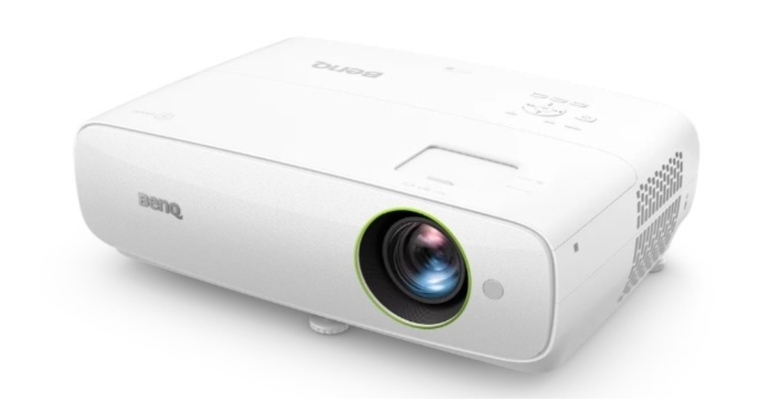
The first smart window projector in the world, the EH620, was unveiled by BenQ. The projector is powered by the most recent Intel Processor 4000 Series CPU. The device offers a 150-inch Full HD 1080p big screen. The projector is a guard against most cybersecurity attacks. The new smart projector also allows video conferencing and wireless screen sharing for the modern workplace. It provides all-in-one window features along with 3rd party control system compatibility.
Users can start cloud-based meetings and video conferencing right away on a 150-inch Full HD 1080p big screen by just logging in to a network account from the EH620. In order to facilitate unrestricted collaboration, the EH620 can host any Windows programme, including web browsers and conferencing tools, and may download business programmes from the Microsoft Store.
 The BenQ EH620 offers enterprise identity services like single sign-on, multi-factor authentication, and conditional access. These services are strengthened by network security features like AES 128-bit encryption, WPA2 wireless protection, and Intel Secure Boot, which guard against malware threats and most cybersecurity attacks.
The company claims that the BenQ EH620 has received certification from Onward Security Corporation and has passed the Black Box Test security assessment without having any flaws in its operating system, network services, wireless, password management, denial of service, or hardware. This certification ensures that the smart projector is completely secure.
Along with associated gadgets like smart boards or smartboards and various cameras, the projector is perfect for simple system integration with Windows-based ecosystems. With auto keystone, auto picture mode, and auto sound mode for its powerful 5Wx2 audio system, the EH620 makes setting up meetings simpler.
As per the company, the market operating price for BenQ’s EH620 is Rs 95,000, and it will be sold at top IT and consumer electronics retailers all across India. The business provides a 2-year onsite warranty as a total piece of mind.
Speaking on the occasion Mr. Rajeev Singh, Managing Director, BenQ India, said, “EH620 is our innovative addition to the projectors segment that provides unique offerings facilitating seamless video conferencing and wireless screen sharing for the modern workplace. The new smart projector provides a meaningful all-in-one windows feature to commence meetings for the future by 3rd party control system compatibility. We intend to further strengthen and empower the industry with the launch of cutting-edge corporate solutions that will greatly improve operational efficiencies of businesses and reduce downtime, by improving workplace efficiencies.”
For the latest gadget and tech news, and gadget reviews, follow us on Twitter, Facebook and Instagram. For newest tech & gadget videos subscribe to our YouTube Channel. You can also stay up to date using the Gadget Bridge Android App. You can find the latest car and bike news here.
The BenQ EH620 offers enterprise identity services like single sign-on, multi-factor authentication, and conditional access. These services are strengthened by network security features like AES 128-bit encryption, WPA2 wireless protection, and Intel Secure Boot, which guard against malware threats and most cybersecurity attacks.
The company claims that the BenQ EH620 has received certification from Onward Security Corporation and has passed the Black Box Test security assessment without having any flaws in its operating system, network services, wireless, password management, denial of service, or hardware. This certification ensures that the smart projector is completely secure.
Along with associated gadgets like smart boards or smartboards and various cameras, the projector is perfect for simple system integration with Windows-based ecosystems. With auto keystone, auto picture mode, and auto sound mode for its powerful 5Wx2 audio system, the EH620 makes setting up meetings simpler.
As per the company, the market operating price for BenQ’s EH620 is Rs 95,000, and it will be sold at top IT and consumer electronics retailers all across India. The business provides a 2-year onsite warranty as a total piece of mind.
Speaking on the occasion Mr. Rajeev Singh, Managing Director, BenQ India, said, “EH620 is our innovative addition to the projectors segment that provides unique offerings facilitating seamless video conferencing and wireless screen sharing for the modern workplace. The new smart projector provides a meaningful all-in-one windows feature to commence meetings for the future by 3rd party control system compatibility. We intend to further strengthen and empower the industry with the launch of cutting-edge corporate solutions that will greatly improve operational efficiencies of businesses and reduce downtime, by improving workplace efficiencies.”
For the latest gadget and tech news, and gadget reviews, follow us on Twitter, Facebook and Instagram. For newest tech & gadget videos subscribe to our YouTube Channel. You can also stay up to date using the Gadget Bridge Android App. You can find the latest car and bike news here.
 The BenQ EH620 offers enterprise identity services like single sign-on, multi-factor authentication, and conditional access. These services are strengthened by network security features like AES 128-bit encryption, WPA2 wireless protection, and Intel Secure Boot, which guard against malware threats and most cybersecurity attacks.
The company claims that the BenQ EH620 has received certification from Onward Security Corporation and has passed the Black Box Test security assessment without having any flaws in its operating system, network services, wireless, password management, denial of service, or hardware. This certification ensures that the smart projector is completely secure.
Along with associated gadgets like smart boards or smartboards and various cameras, the projector is perfect for simple system integration with Windows-based ecosystems. With auto keystone, auto picture mode, and auto sound mode for its powerful 5Wx2 audio system, the EH620 makes setting up meetings simpler.
As per the company, the market operating price for BenQ’s EH620 is Rs 95,000, and it will be sold at top IT and consumer electronics retailers all across India. The business provides a 2-year onsite warranty as a total piece of mind.
Speaking on the occasion Mr. Rajeev Singh, Managing Director, BenQ India, said, “EH620 is our innovative addition to the projectors segment that provides unique offerings facilitating seamless video conferencing and wireless screen sharing for the modern workplace. The new smart projector provides a meaningful all-in-one windows feature to commence meetings for the future by 3rd party control system compatibility. We intend to further strengthen and empower the industry with the launch of cutting-edge corporate solutions that will greatly improve operational efficiencies of businesses and reduce downtime, by improving workplace efficiencies.”
For the latest gadget and tech news, and gadget reviews, follow us on Twitter, Facebook and Instagram. For newest tech & gadget videos subscribe to our YouTube Channel. You can also stay up to date using the Gadget Bridge Android App. You can find the latest car and bike news here.
The BenQ EH620 offers enterprise identity services like single sign-on, multi-factor authentication, and conditional access. These services are strengthened by network security features like AES 128-bit encryption, WPA2 wireless protection, and Intel Secure Boot, which guard against malware threats and most cybersecurity attacks.
The company claims that the BenQ EH620 has received certification from Onward Security Corporation and has passed the Black Box Test security assessment without having any flaws in its operating system, network services, wireless, password management, denial of service, or hardware. This certification ensures that the smart projector is completely secure.
Along with associated gadgets like smart boards or smartboards and various cameras, the projector is perfect for simple system integration with Windows-based ecosystems. With auto keystone, auto picture mode, and auto sound mode for its powerful 5Wx2 audio system, the EH620 makes setting up meetings simpler.
As per the company, the market operating price for BenQ’s EH620 is Rs 95,000, and it will be sold at top IT and consumer electronics retailers all across India. The business provides a 2-year onsite warranty as a total piece of mind.
Speaking on the occasion Mr. Rajeev Singh, Managing Director, BenQ India, said, “EH620 is our innovative addition to the projectors segment that provides unique offerings facilitating seamless video conferencing and wireless screen sharing for the modern workplace. The new smart projector provides a meaningful all-in-one windows feature to commence meetings for the future by 3rd party control system compatibility. We intend to further strengthen and empower the industry with the launch of cutting-edge corporate solutions that will greatly improve operational efficiencies of businesses and reduce downtime, by improving workplace efficiencies.”
For the latest gadget and tech news, and gadget reviews, follow us on Twitter, Facebook and Instagram. For newest tech & gadget videos subscribe to our YouTube Channel. You can also stay up to date using the Gadget Bridge Android App. You can find the latest car and bike news here. Portronics Harmonics Z5 wireless neckband earphones with 14.2mm dynamic drivers launched in India
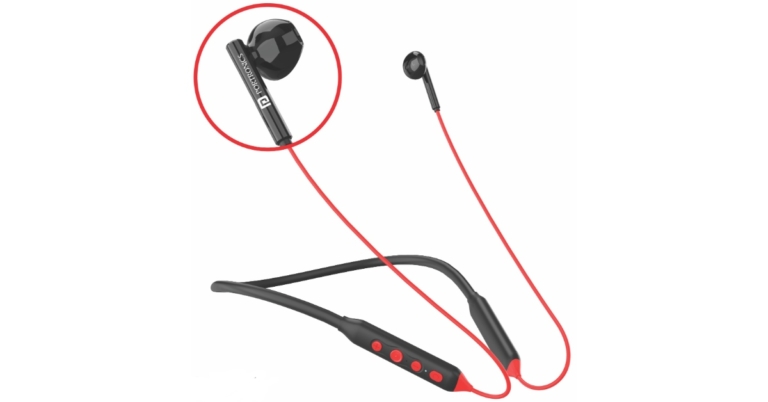
Another wireless neckband, the Harmonics Z5, is released by Portronics. The Portronics Harmonics Z5, a step up from the earlier models, offers a distinctive combination of characteristics. The Portronics Harmonics Z5 wireless neckband earphones features 14.2mm, dynamic drivers, with Dual EQ Modes. They offer 33 hours of playback time on a single charge and the most recent USB-C port for quicker charging.
The Harmonics Z5 features brand-new, distinctive earbuds that provide improved comfort for all-day use. For improved grip and comfort, it comes with free in-ear soft and skin-friendly silicone attachments that fit snugly. The earbuds feature huge 14.2mm dynamic drivers as well. The drivers produce flawless, detailed sounds with powerful bass for an engaging listening experience. Your experiences with music, movies, and phoning will never be the same again.
 The Harmonics Z5 boasts a longer working range, quicker pairing, lower latency, and improved energy conservation for longer battery life thanks to its use of the most recent Bluetooth V5.2 chip. A single charge of the inbuilt 250mAh battery now provides a better 33 hours of playback time. Therefore, if you use the Harmonics Z5 for an average of 3 hours every day, you might only need to recharge it twice a month. There is also a quick charging USB-C port that can quickly charge your neckband to end your charging problems. If you’re in a rush, a quick 10-minute charge will give you an incredible 10 hours of playback, which is practically a full day’s worth of nonstop pleasure.
In addition, Portronics has given the Harmonics Z5 Dual EQ Modes that can be operated via quick action buttons. The Bass mode and Music mode of the EQ can be changed with just a click on the control panel. You won’t need to touch your smartphone while working, exercising, or travelling thanks to additional buttons that also provide track changing, call answering and volume controls.
The Portronics Harmonics Z5 will be offered in the market at a discounted price of INR 849 Rs 2,499, coupled with a 12-month guarantee period, and will be offered in four stylish colours: Black, Blue, Red, and Purple. The company’s main website Portronics.com, Amazon.in, Flipkart.com, and other top online and offline retailers all sell these Neckband Earphones.
For the latest gadget and tech news, and gadget reviews, follow us on Twitter, Facebook and Instagram. For newest tech & gadget videos subscribe to our YouTube Channel. You can also stay up to date using the Gadget Bridge Android App. You can find the latest car and bike news here.
The Harmonics Z5 boasts a longer working range, quicker pairing, lower latency, and improved energy conservation for longer battery life thanks to its use of the most recent Bluetooth V5.2 chip. A single charge of the inbuilt 250mAh battery now provides a better 33 hours of playback time. Therefore, if you use the Harmonics Z5 for an average of 3 hours every day, you might only need to recharge it twice a month. There is also a quick charging USB-C port that can quickly charge your neckband to end your charging problems. If you’re in a rush, a quick 10-minute charge will give you an incredible 10 hours of playback, which is practically a full day’s worth of nonstop pleasure.
In addition, Portronics has given the Harmonics Z5 Dual EQ Modes that can be operated via quick action buttons. The Bass mode and Music mode of the EQ can be changed with just a click on the control panel. You won’t need to touch your smartphone while working, exercising, or travelling thanks to additional buttons that also provide track changing, call answering and volume controls.
The Portronics Harmonics Z5 will be offered in the market at a discounted price of INR 849 Rs 2,499, coupled with a 12-month guarantee period, and will be offered in four stylish colours: Black, Blue, Red, and Purple. The company’s main website Portronics.com, Amazon.in, Flipkart.com, and other top online and offline retailers all sell these Neckband Earphones.
For the latest gadget and tech news, and gadget reviews, follow us on Twitter, Facebook and Instagram. For newest tech & gadget videos subscribe to our YouTube Channel. You can also stay up to date using the Gadget Bridge Android App. You can find the latest car and bike news here.
 The Harmonics Z5 boasts a longer working range, quicker pairing, lower latency, and improved energy conservation for longer battery life thanks to its use of the most recent Bluetooth V5.2 chip. A single charge of the inbuilt 250mAh battery now provides a better 33 hours of playback time. Therefore, if you use the Harmonics Z5 for an average of 3 hours every day, you might only need to recharge it twice a month. There is also a quick charging USB-C port that can quickly charge your neckband to end your charging problems. If you’re in a rush, a quick 10-minute charge will give you an incredible 10 hours of playback, which is practically a full day’s worth of nonstop pleasure.
In addition, Portronics has given the Harmonics Z5 Dual EQ Modes that can be operated via quick action buttons. The Bass mode and Music mode of the EQ can be changed with just a click on the control panel. You won’t need to touch your smartphone while working, exercising, or travelling thanks to additional buttons that also provide track changing, call answering and volume controls.
The Portronics Harmonics Z5 will be offered in the market at a discounted price of INR 849 Rs 2,499, coupled with a 12-month guarantee period, and will be offered in four stylish colours: Black, Blue, Red, and Purple. The company’s main website Portronics.com, Amazon.in, Flipkart.com, and other top online and offline retailers all sell these Neckband Earphones.
For the latest gadget and tech news, and gadget reviews, follow us on Twitter, Facebook and Instagram. For newest tech & gadget videos subscribe to our YouTube Channel. You can also stay up to date using the Gadget Bridge Android App. You can find the latest car and bike news here.
The Harmonics Z5 boasts a longer working range, quicker pairing, lower latency, and improved energy conservation for longer battery life thanks to its use of the most recent Bluetooth V5.2 chip. A single charge of the inbuilt 250mAh battery now provides a better 33 hours of playback time. Therefore, if you use the Harmonics Z5 for an average of 3 hours every day, you might only need to recharge it twice a month. There is also a quick charging USB-C port that can quickly charge your neckband to end your charging problems. If you’re in a rush, a quick 10-minute charge will give you an incredible 10 hours of playback, which is practically a full day’s worth of nonstop pleasure.
In addition, Portronics has given the Harmonics Z5 Dual EQ Modes that can be operated via quick action buttons. The Bass mode and Music mode of the EQ can be changed with just a click on the control panel. You won’t need to touch your smartphone while working, exercising, or travelling thanks to additional buttons that also provide track changing, call answering and volume controls.
The Portronics Harmonics Z5 will be offered in the market at a discounted price of INR 849 Rs 2,499, coupled with a 12-month guarantee period, and will be offered in four stylish colours: Black, Blue, Red, and Purple. The company’s main website Portronics.com, Amazon.in, Flipkart.com, and other top online and offline retailers all sell these Neckband Earphones.
For the latest gadget and tech news, and gadget reviews, follow us on Twitter, Facebook and Instagram. For newest tech & gadget videos subscribe to our YouTube Channel. You can also stay up to date using the Gadget Bridge Android App. You can find the latest car and bike news here. Which iPhone Models Support Dual SIM?
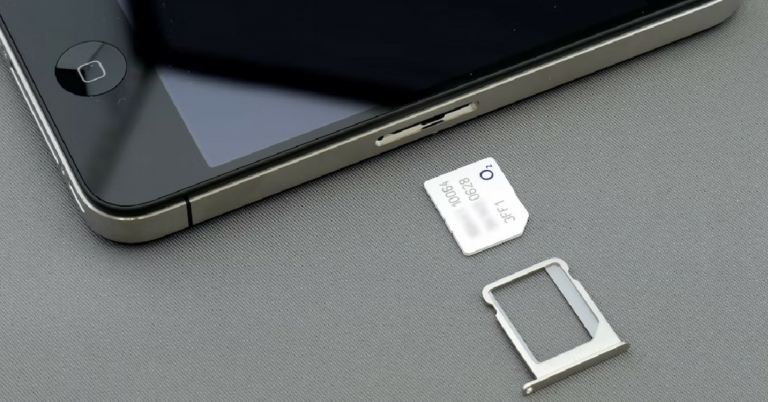
Dual SIM support is something that is non-negotiable for a lot of smartphone users. Having the ability to use two SIMs in the same smartphone lets you manage personal and work-related affairs on the same device. For people who don’t have access to WiFi, packet data plans from two service providers can help a lot. Every modern Android smartphone comes with two physical nano SIM slots, but the same cannot be said for iPhones. In this article, we bring you an extensive list of all the iPhone models that support dual SIM, including the form in which they are supported.
Read Also: Philips TAS2505B Portable Bluetooth wireless speaker launched in India
Only the iPhones manufactured in mainland China support two physical nano SIMs. This is because mainland China does not allow e-SIM usage yet. Here is the list of iPhones that support physical dual nano SIMs.
These iPhone models support a physical nano-SIM as well as an e-SIM.
The iPhone 14 series has completely ditched physical SIM slots in the US, but it still comes with nano-SIM support in India. Users can also opt for an e-SIM alongside it.
iPhone models that support physical dual nano SIMs
 Only the iPhones manufactured in mainland China support two physical nano SIMs. This is because mainland China does not allow e-SIM usage yet. Here is the list of iPhones that support physical dual nano SIMs.
- iPhone 13
- iPhone 13 Pro
- iPhone 13 Pro Max
- iPhone 12
- iPhone 12 Pro
- iPhone 12 Pro Max
- iPhone 11
- iPhone 11 Pro
- iPhone 11 Pro Max
- iPhone XS Max
- iPhone XR
iPhone models that support a physical nano-SIM and an e-SIM
 These iPhone models support a physical nano-SIM as well as an e-SIM.
- iPhone 12
- iPhone 12 Pro
- iPhone 12 Pro Max
- iPhone 11
- iPhone 11 Pro
- iPhone 11 Pro Max
- iPhone XS
- iPhone XS Max
- iPhone XR
- iPhone SE (2nd Generation)
- iPhone SE (3rd Generation)
iPhone models that support two e-SIMs as well as one physical SIM and an e-SIM
 The iPhone 14 series has completely ditched physical SIM slots in the US, but it still comes with nano-SIM support in India. Users can also opt for an e-SIM alongside it.
- iPhone 14
- iPhone 14 Pro
- iPhone 14 Pro Max
- iPhone 13
- iPhone 13 Pro
- iPhone 13 Pro Max
- iPhone 13 mini
Conclusion
These are all the iPhone models that support dual SIM. It is entirely possible that Apple may drop the physical SIM slot for future iPhones in India as well. With major network service providers already offering an e-SIM service, it is not long before the SIM card slot becomes a thing of the past.
For the latest gadget and tech news, and gadget reviews, follow us on Twitter, Facebook and Instagram. For newest tech & gadget videos subscribe to our YouTube Channel. You can also stay up to date using the Gadget Bridge Android App. You can find the latest car and bike news here.
How to fix ‘Free Fire MAX keeps downloading expansion packs’?

Garena Free Fire MAX is one of the most played battle royale games in the world today. One of the ways that Garena keeps the app size low on the Google Play Store is by stripping it off of resources like maps, modes, outfits, characters, and more. These resources are later added to the game using extension packs. Once you start the game on your device, it will auto-download an extension pack with the updated features. Often times users report that Free Fire MAX keeps on downloading the same extension pack over and over again. This can get pretty annoying as it takes up a lot of mobile data. In this article, we show you how to fix the ‘Free Fire MAX keeps downloading extension packs’ issue on your smartphone.
Read Also: Philips TAS2505B Portable Bluetooth wireless speaker launched in India
Step 2: Select the Free Fire MAX app.
Step 3: Tap on ‘App permissions’ and turn the toggle bar off for ‘Remove permissions and free up space.’
Smartphones with limited storage capacity auto delete the Free Fire Max expansion pack. Here’s how you can disable it.
Step 1: Go to Settings and select ‘Battery and Device Care.’
Step 2: Tap on the ellipses (three dots) at the top right corner of the screen.
Step 3: Select ‘Storage Booster’.
Step 4: Scroll down and turn the toggle bar off for ‘Auto delete unnecessary data.’
Here’s how you can keep Free Fire MAX from auto-downloading extension packs
Step 1: Go to Settings and select Apps. Step 2: Select the Free Fire MAX app.
 Step 3: Tap on ‘App permissions’ and turn the toggle bar off for ‘Remove permissions and free up space.’
 Smartphones with limited storage capacity auto delete the Free Fire Max expansion pack. Here’s how you can disable it.
Step 1: Go to Settings and select ‘Battery and Device Care.’
Smartphones with limited storage capacity auto delete the Free Fire Max expansion pack. Here’s how you can disable it.
Step 1: Go to Settings and select ‘Battery and Device Care.’
 Step 2: Tap on the ellipses (three dots) at the top right corner of the screen.
 Step 3: Select ‘Storage Booster’.
 Step 4: Scroll down and turn the toggle bar off for ‘Auto delete unnecessary data.’

Bonus Tip
How to Get Free Fire Redeem Codes for Garena on November 3?
- Visit the Garena Free Fire game’s official website at reward.ff.garena.com.
- Use your Facebook, Google, VK, Apple ID, Huawei ID, or Twitter account to log in.
- You’ll be taken to a valid redemption code (s)
- Copy and paste the 12-digit redemption code into the text box.
- On the screen, a dialogue box will appear.
- ‘Ok’ should be selected.
Conclusion
This is how you can fix the ‘Free Fire MAX keeps downloading extension packs’ issue on your smartphone. If you’re looking for more Battle Royale and First Person Shooter games to play, check out our lists here and here.
For the latest gadget and tech news, and gadget reviews, follow us on Twitter, Facebook and Instagram. For newest tech & gadget videos subscribe to our YouTube Channel. You can also stay up to date using the Gadget Bridge Android App. You can find the latest car and bike news here.
Canon EOS R6 Mark II and RF135mm f/1.8L IS USM launched in India
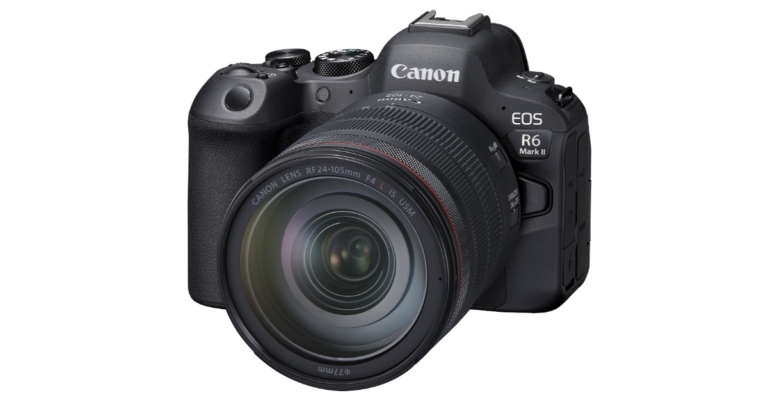
The Canon EOS R6 Mark II and RF135mm f/1.8L IS USM are two new products that Canon has just added to its portfolio. With features including 6K 60p RAW video external recording, Canon Log 3, High Frame Rate Full HD 180p recording, and focus breathing correction, the EOS R6 Mark II meets the needs of video producers and content creators looking for cutting-edge video capabilities in a small mirrorless camera body. The EOS R6 Mark II offers up to 40 fps with AF/AE tracking for still photography.
The focus breathing correction feature, which lessens unintended changes in the angle of vision during focus shifts, is first supported by the EOS R6 Mark II. This enhances current capabilities like AF speed modification by giving users more control over focus transitions, which are essential for expression.
The newly created 24.2-megapixel full-frame image sensor for the EOS R6 Mark II uses improved sharpness processing to produce a sense of visual resolution. Up to 102,400 ISOs can be used at native speed.
HDR PQ HEIF recording and In-Body IS are features of the EOS R6 Mark II. The EOS R6 Mark II records 6K RAW externally through HDMI for video that maintains excellent quality even after extensive post-processing. While Full HD proxy data is simultaneously recorded to one of the two SD card slots for convenient editing. In addition to Canon Log 3 and HDR PQ video, it is internally capable of producing high-definition 4K 60p video oversampled from 6K, as well as High Frame Rate video up to Full HD 180p. Unlimited continuous recording in 4K 30p is now feasible because of enhanced heat management.
The EOS R6 Mark II is the first EOS camera to offer AF/AE tracked continuous still shooting speeds that exceed 30 fps thanks to its 40 fps continuous shooting capabilities in electronic shutter mode. With AF/AE tracking, mechanical shutter continuous shooting is possible at up to 12 fps.
Users utilising the EOS R6 Mark II in conjunction with the Cinema EOS system have access to an alternative Quick Control screen that looks similar to those on Cinema EOS cameras.
In addition to the current zebra display, the EOS R6 Mark II has the common false colour feature seen in the Cinema EOS system, which makes it simpler to adjust exposure even in challenging circumstances.
The UVC (USB Video Class) and UAC (USB Audio Class) protocols are supported by the EOS R6 MARK II. This makes it possible to deliver high-quality Full HD 30p video and audio to a Windows/Mac OS computer in real-time. This makes it the perfect choice for livestreams, remote meetings, and computer-based video recordings. With plug and play on both Windows and Mac OS, live streamers and video producers can now fully utilise a full-frame camera and high-quality lenses.
The deep learning-based technology can now detect additional subjects thanks to the EOS R6 Mark II, including horses, trains, and aeroplanes. For Eye Detection AF in photo or video mode, users can choose between right and left eye priority. They can choose the subjects to be detected with more freedom. Users can now automatically identify many topic types in a single frame by using the new “Auto subject detection” mode.
The EOS R6 Mark II has two SD card slots for added dependability and is made of dust- and water-resistant material to support shooting outside. With the LP-E6NH battery, which was built for power efficiency, it can take up to 760 pictures on a single charge.
EOS R6 Mark II Body will be available with a price tag of Rs 243,995 in India. Whereas EOS R6 Mark II + RF24-105mm f/4L IS USM will be available with a price tag of Rs 343 995 and EOS R6 Mark II + RF24-105mm f/4-7.1 IS STM at Rs 271 995. Lastly, the price of the RF135mm f/1.8L IS USM is set at Rs 219 995.
For the latest gadget and tech news, and gadget reviews, follow us on Twitter, Facebook and Instagram. For newest tech & gadget videos subscribe to our YouTube Channel. You can also stay up to date using the Gadget Bridge Android App. You can find the latest car and bike news here.
What is the AR Zone app on Samsung phones and how to use it?
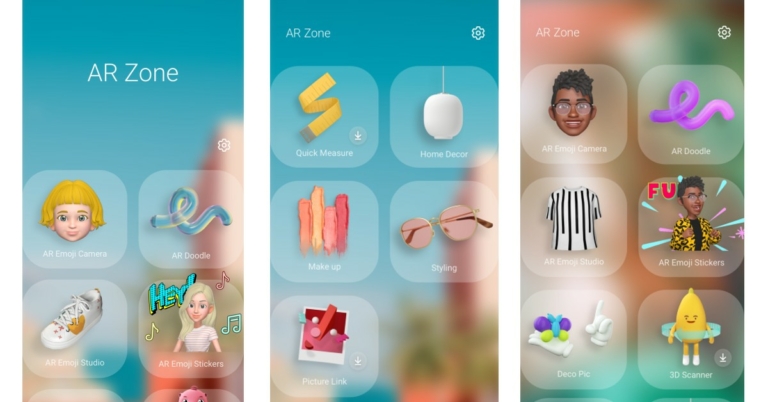
If you just got your hands on a Samsung smartphone, you’re probably wondering what the AR Zone app is and what it does. The AR Zone is Samsung’s native app that uses Augmented Reality to create a customised emoji for the user. This emoji can be used as a sticker or as a filter on your images. While its functionality may be limited, it is still pretty fun to use. In this article, we show you how to use the AR Zone app on a Samsung phone to create an animated emoji for yourself.
Read Also: Finalists for Doodle for Google 2022 revealed
Step 3: Choose an animated avatar for yourself. You can also create a custom avatar by scanning your face using the front camera or uploading an image to create an avatar that resembles you.
Step 4: Customise your animated avatar further by choosing features like hairstyle, hair colour, eyebrows, facial hair, and a lot more. The more time you spend on the editor the more accurate your avatar will look.
Step 5: Tap on ‘Next’ once you’re done. The app will create custom stickers based on your avatar.
You can use your avatar as a filter in your selfies. Simply tap on the ‘AR Emoji Camera’ icon in the AR Zone app. You can also access the Emoji Camera by opening the camera app and selecting AR Zone from the ‘More’ section. You can now use your avatar as a filter for your selfies. You can also choose another face to put on as a ‘mask’ in your selfies.
Once you create an AR Emoji, Samsung automatically creates some stickers for you. You can access these stickers on your keypad while texting. AR Emoji Stickers only work on platforms that support them. If you try to send them on WhatsApp, they will get sent as images.
Go to AR Emoji Studio within the AR Zone app to use your animated avatar in different settings. You can set the AR Emoji as a call background, or use it to record a dance move and then put it up as the lock screen background. If you own a Samsung smartwatch, the AR Emoji can also serve as the watch face. The possibilities are endless.
Read Also: How to Fix “Location Not Available” on iPhone?
How to use the AR Zone app
The AR Zone is similar to Apple’s Memoji or Snapchat’s Bitmoji. You can make an animated avatar of yourself and use it in various places. The more time you spend editing your AR emoji, the closer it will resemble you.Here’s how you can create an AR emoji
Step 1: Select the Samsung folder from the app drawer and open the ‘AR Zone’ app. Step 2: Tap on AR Emoji Studio to create an animated avatar of yourself. Step 3: Choose an animated avatar for yourself. You can also create a custom avatar by scanning your face using the front camera or uploading an image to create an avatar that resembles you.
 Step 4: Customise your animated avatar further by choosing features like hairstyle, hair colour, eyebrows, facial hair, and a lot more. The more time you spend on the editor the more accurate your avatar will look.
 Step 5: Tap on ‘Next’ once you’re done. The app will create custom stickers based on your avatar.
Quick Measure
If your Samsung smartphone has a Depth Vision camera, the AR Zone app will come with a ‘Quick Measure’ feature. This can be used to measure the size and dimensions of the objects around you, simply by scanning them with your camera. The measurements recorded by Quick Measure are pretty accurate, and it comes in handy when you can’t find a measuring tape. All you need to do is point your camera at an object and Quick Measure will give you its dimensions.Deco Pic
The ‘Deco Pic’ function in the AR Zone app lets you take images with various filters, stickers, frames, stamps, and animated gifs. This is very similar to what Snapchat does. However, you won’t find AR Zone’s filters to be as interactive and diverse as the ones on Snapchat.What to do with your animated avatar?
Now that you’ve created your animated avatar, you can use it in a bunch of places. Here are some things you can do with your custom avatar.AR Emoji Camera
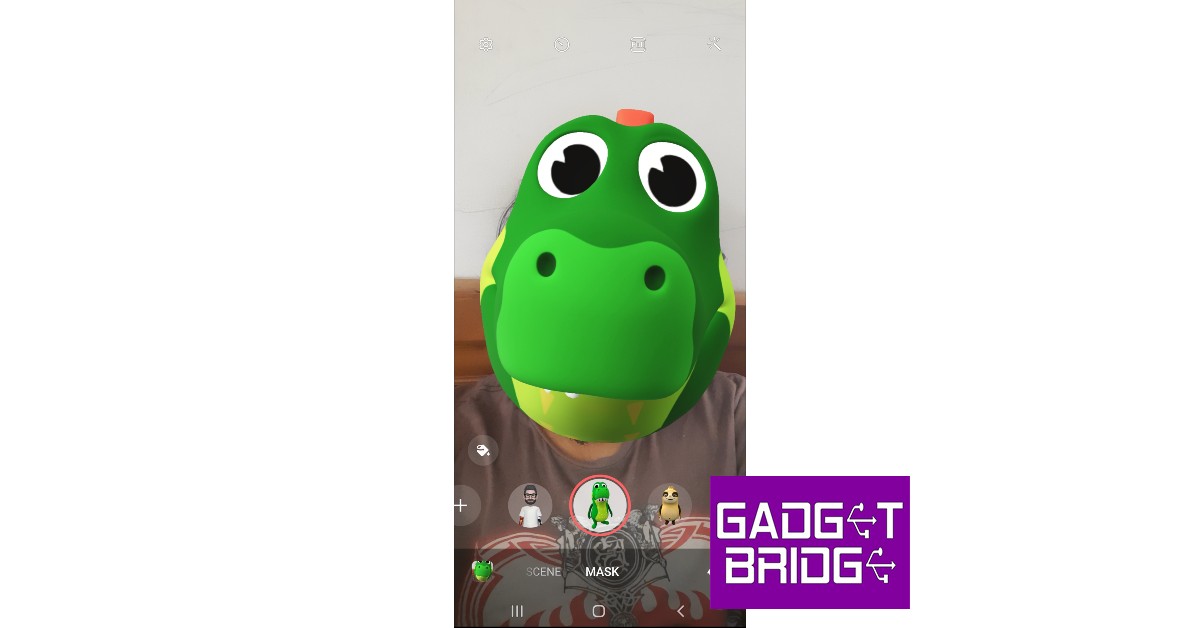 You can use your avatar as a filter in your selfies. Simply tap on the ‘AR Emoji Camera’ icon in the AR Zone app. You can also access the Emoji Camera by opening the camera app and selecting AR Zone from the ‘More’ section. You can now use your avatar as a filter for your selfies. You can also choose another face to put on as a ‘mask’ in your selfies.
AR Doodle
As the name suggests, AR Doodle lets you doodle on top of your images. You can doodle on the screen before taking a picture and the camera will follow you around along with the doodle you just made. You can choose from a range of brushes, colours, and animated effects to create a doodle.AR Emoji Stickers
 Once you create an AR Emoji, Samsung automatically creates some stickers for you. You can access these stickers on your keypad while texting. AR Emoji Stickers only work on platforms that support them. If you try to send them on WhatsApp, they will get sent as images.
Make your AR Emoji your call background, watch face, or lock screen
 Go to AR Emoji Studio within the AR Zone app to use your animated avatar in different settings. You can set the AR Emoji as a call background, or use it to record a dance move and then put it up as the lock screen background. If you own a Samsung smartwatch, the AR Emoji can also serve as the watch face. The possibilities are endless.
Read Also: How to Fix “Location Not Available” on iPhone?
Go to AR Emoji Studio within the AR Zone app to use your animated avatar in different settings. You can set the AR Emoji as a call background, or use it to record a dance move and then put it up as the lock screen background. If you own a Samsung smartwatch, the AR Emoji can also serve as the watch face. The possibilities are endless.
Read Also: How to Fix “Location Not Available” on iPhone?
Conclusion
This is how you can use the AR Zone app on your Samsung phone. While it may not be fully tapping into the potential of AR, it is still a fun app to use. With future updates, the AR Zone app is bound to get better and will hopefully incorporate a lot of other AR-related features. If you don’t find any use for the AR Zone app, you can hide it from the Apps screen, but it cannot be uninstalled since it is a native Samsung app.
For the latest gadget and tech news, and gadget reviews, follow us on Twitter, Facebook and Instagram. For newest tech & gadget videos subscribe to our YouTube Channel. You can also stay up to date using the Gadget Bridge Android App. You can find the latest car and bike news here.