How to get the most out of Samsung Galaxy Z Flip 4’s cover screen

It’s been more than a month since the Samsung Galaxy Z Flip 4 launched in the market. We just played around with this smartphone recently. You can read our in-depth review of the foldable phone here. If you got your hands on the Samsung Galaxy Flip 4, you’re probably enthused about the 1.9-inch cover screen display. This compact display is a very convenient way to check your notifications, auto respond to messages, play songs, and do much more without opening up your phone. You can even take a picture from the rear cameras with the help of the cover screen display!  While the cover display is a handy little feature, it has its limitations. Unlike its peer Moto Razr, Galaxy Flip’s cover display doesn’t let you use apps or type out text messages. At best, you can pin some widgets like the alarm, weather, Spotify, and step count, but you can’t really access the app drawer. This may be a dealbreaker for some buyers. Luckily, with the CoverScreen OS app, you can unlock the full potential of your Samsung Galaxy Flip 4’s cover screen.  Read Also: Here’s how you can get Dynamic Island on your Android smartphone

Here’s how you can use the CoverScreen OS app to get the most out of your Samsung Galaxy Flip 4’s cover screen

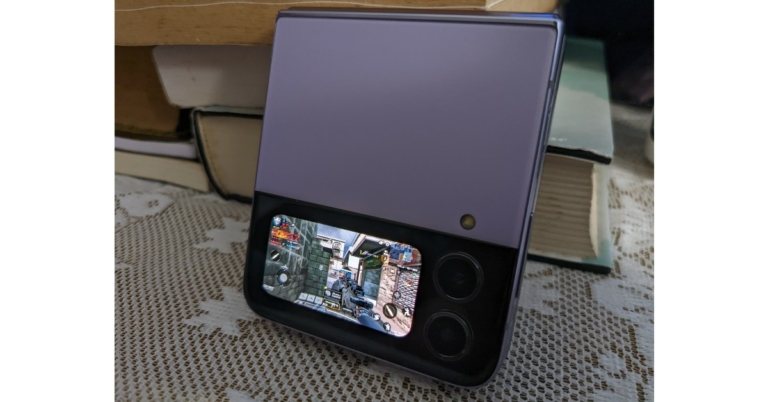
Firstly, follow these steps to set up the CoverScreen OS app on your phone.  Step 1: Download and Install the CoverScreen OS app from Google Play Store. Step 2: Grant the required permissions (Appear on top, Accessibility Service, and Notification access). Grant the required permissions (Appear on top, Accessibility Service, and Notification access). coverscreen os Step 3: Go through what the basic swiping gestures can do. Now that you’ve set up the CoverScreen OS, fold your phone and double-tap the cover screen. When the display comes to life, a single tap on the stand-by screen will give you access to the app drawer. Now you can use any app on the cover screen display. You can even open WhatsApp and respond to messages.  Need to quickly watch a YouTube video? Now you can do it on the cover screen. Need to quickly watch a YouTube video? Now you can do it on the cover screen. But there’s more. You’re probably wondering how much you can push the boundaries of the cover display’s functionality. Well, with the CoverScreen OS app, you can even play games like Call of Duty, Asphalt, and Garena Free Fire Max on your Galaxy Flip’s cover display. Granted, the experience won’t be as enthralling, but it’s an amazing feat. While this is a great way to utilise your Flip’s cover screen, the app still has its limitations. Since the app is still in its beta phase, there are some minor hiccups in functionality. Most gestures register, and many apps are properly integrated with the display. One of the main reasons why some users like using the cover display is that it keeps them from using their phone all the time, but with the CoverScreen OS app, your cover display becomes the phone, which could easily bump up your screen time.  Read Also: Logitech MX Master 3S Review: Delivers with every click!

Conclusion

This is how you can get the most out of your Samsung Galaxy Flip 4’s cover screen. If you’ve ever wondered whether you can play games, watch videos, and send texts from your Galaxy Flip’s cover display, it is now possible with the CoverDisplay OS app.
For the latest gadget and tech news, and gadget reviews, follow us on TwitterFacebook and Instagram. For newest tech & gadget videos subscribe to our YouTube Channel. You can also stay up to date using the Gadget Bridge Android App. You can find the latest car and bike news here.

Google Pixel 7, Pixel 7 Pro pre-orders to open on October 6, available via Flipkart

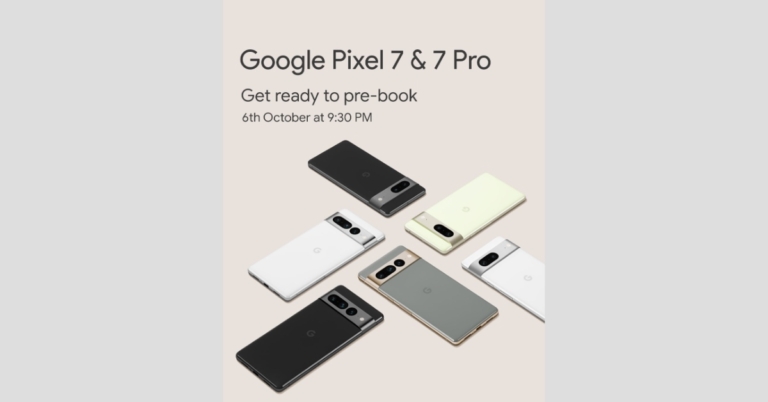
Google has officially confirmed that pre-orders for its next flagship Pixel 7 series would open in India on October 6. It is the same day the firm would hold its “Made by Google” event to introduce the Pixel 7 and Pixel 7 Pro. The Pixel 7 series will arrive with the newest Google Tensor G2 SoC, which has already been verified. Google took to Twitter to announce that Flipkart will begin accepting pre-orders for the Pixel 7 and Pixel 7 Pro in India on October 6. The sale will begin at 9:30 PM on the same day the phone gets launched. The price and first selling date, however, are still unknown. To recall, Google Pixel 3 and Pixel 3XL were the last high-end smartphones to officially debut in India before these. Following the release of the Pixel 4a in the country a few years ago, the firm has since been introducing models in the A series. Most recently, the company unveiled the Pixel 6a. Google may price the Pixel 7 line of smartphones at roughly the same level as the Pixel 6 portfolio. These rumours have been confirmed by a stolen Amazon listing that showed a $599 basic Pixel 7 model that translates to Rs 50,000. If these rumours are accurate, the Pixel 7 Pro could cost as much as $899 which converts to Rs 75,000. Furthermore, the company has also teased that both its upcoming flagship phones will be available in Obsidian, Snow, and Hazel for the Pixel 7 Pro, and Lemongrass instead of Hazel for the Pixel 7. Along with the Nest range of smart home goods, the Pixel 7 and Pixel 7 Pro smartphones, the company will also debut the Google Pixel Watch. The Google Tensor G2 CPU will also be used to power the Pixel 7 series, which has already been confirmed. Additionally, these smartphones will come pre-installed with Android 13. According to the website, the new OS would give images, movies, security, and speech recognition personalised capabilities. Numerous publications have speculated that the base model Pixel 7 would have a 6.3-inch full-HD+ OLED screen with a refresh rate of 90Hz. The Pixel 7 Pro, however, is anticipated to include a 6.7-inch QHD+ OLED screen with a 120Hz refresh rate. Additionally, these devices might receive the Titan M security processor and up to 12GB of RAM. For the latest gadget and tech news, and gadget reviews, follow us on TwitterFacebook and Instagram. For newest tech & gadget videos subscribe to our YouTube Channel. You can also stay up to date using the Gadget Bridge Android App. You can find the latest car and bike news here.

Garena Free Fire Redeem Codes Today 3 October 2022: Here is how to claim them

Garena Free Fire is a battle royale game with regular awards and tournaments to keep players interested. If you play Garena Free Fire, you should be aware of the redeem codes that are released on a daily basis. However, because the battle royale game is banned in India, players from other countries can use the Free Fire Redeem codes daily. If you’re unfamiliar with the Garena Free Fire redeem codes or don’t know how to get them, we’ve put together a step-by-step guide to help you redeem them. Check out Garena Free Fire Redeem Codes for October 3. The Free Fire redeem codes are a great way to get free stuff. These are 12-digit codes that contain alphabets and numbers, as well as an expiration date and time. Because the Garena FF redeem codes cannot be used more than once, you should hurry to the redemption page to claim your free reward before someone else does. To get a free reward, all you have to do is go to reward.ff.garena.com/en, which is the official redemption page. Also, keep an eye on this space for daily updates on Garena Free Fire redemption codes and rewards.

Garena Free Fire Redeem Codes Today 3 October 2022

WHYGN3J29VZU ID9S3QJKAFHX JIMYLVT46V2Z ERTYHJNBVCDS F10IUJHGVCDSE F7UIJHBGFDFR FXCVBNMKDSXC FOKMJNBVCXSD EDXXDSZSSDFG HDFHDNBHNDJL VFGVJMCKDMHN NDJDFBGJFJFK FDRDSASERTYH FU816OUYTRDVB FHBVCDFQWERT FMKI88YTGFD8 KLLPDJHDDBJD FFTQT5IRMCNX FF7WSMOCN44Z FFA9UVHX4H7D FFAOES11YL2D FFX6OC2IIVYU

How to Get Free Fire Redeem Codes for Garena on October 3?

  • Visit the Garena Free Fire game’s official website at reward.ff.garena.com.
  • Use your Facebook, Google, VK, Apple ID, Huawei ID, or Twitter account to log in.
  • You’ll be taken to a valid redemption code (s)
  • Copy and paste the 12-digit redemption code into the text box.
  • On the screen, a dialogue box will appear.
  • ‘Ok’ should be selected.
For the latest gadget and tech news, and gadget reviews, follow us on TwitterFacebook and Instagram. For newest tech & gadget videos subscribe to our YouTube Channel. You can also stay up to date using the Gadget Bridge Android App. You can find the latest car and bike news here.
Amazon Quiz Answers Today 3 October 2022: Participate to win Rs 500

3 October 2022 Amazon Quiz has gone live on its platform. The quiz timings are 12 AM to 11:59 PM. The Amazon App users can participate in the quiz daily and all they have to do is submit correct answers to the questions asked on the e-commerce platform. Today’s participants can get a chance to win Rs 500 Amazon Pay Balance. Amazon brings a fresh questionnaire that contains 5 questions daily. These questions are based on current affairs and general knowledge. The quiz can be played from 8 AM to 11:59 PM and the contestants need to answer correctly to enter into a lucky draw. Only one person is declared as a winner and the results will be announced at the end of every month. And to make sure that you give correct answers to all the 5 questions Gadget Bridge everyday updates all the answers to the Amazon Quiz. Do check out 3 October 2022 Amazon Quiz Answers to win a Rs 500 Amazon pay Balance. Amazon Quiz Today Prize – Rs 500 Amazon Pay Balance Quiz Date – 3 October 2022 Daily Timing – 12 AM to 11:59 PM Winner Announcement – Today 12 PM

Amazon Quiz Answers Today 3 October 2022

Question 1: Which company launched the world’s first foldable PC – ThinkPad X1 Fold? Answer: Lenovo Question 2: Which state got its 2nd railway station after 100 years with the commissioning of a new facility at Shokhuvi? Answer: Nagaland Question 3: The 36th edition of the National Games of India took place in which state? Answer: Gujarat Question 4: Which early 18th century poet coined the name of this weight? Answer: Joseph Addison Question 5: What is the largest event for this sport in the world? Answer: Tour de France

How To Play Amazon Quiz

Only app users are eligible to play the Amazon quiz every morning from 12 AM to 11:59 PM. The quiz is not available on the desktop. For those who are unaware of how to play the Amazon quiz below are the steps, you can follow to take the quiz.
  • Firstly download the Amazon app from Google Play Store or App Store
  • Now fill in the required information through the Sign Up option.
  • You need to log in to the Amazon app and scroll down on the home screen to find the Amazon Quiz banner.
  • Tap on the Amazon Quiz banner and tap on the Start button to start the Quiz.
  • Now you will get 5 questions and you need to answer them correctly. One wrong answer will eliminate you from the Quiz.
  • After answering all the questions correctly you are now eligible for a Lucky Draw.
  • The winner’s name will be announced today at 12 PM.
For the latest gadget and tech news, and gadget reviews, follow us on TwitterFacebook and Instagram. For newest tech & gadget videos subscribe to our YouTube Channel. You can also stay up to date using the Gadget Bridge Android App. You can find the latest car and bike news here.

7 Best solitaire apps for Android

These days people get bored within a very short period. After doing work for the whole day or after studying for the whole day, people just want something to relax their minds. No doubt, games are the best solutions to relax someone’s mind. Card games are the best option in this regard. Everyone likes card games, no matter what their age is because these games are so interesting. If you guys are finding those apps where you can play card games or solitaire easily and amazingly, you are in the right place. Here are the best solitaire apps for your android.

Solitaire Bliss

2019 saw the release of Solitaire Bliss, which has since grown to rank among the top applications with a 4.7 rating from 26K users. With over 1 million downloads, it is clearly quite popular. What is ideal? Downloading it is cost-free. You did hear correctly. More than 28 different Solitaire variations are available to play for free. You have a wide range of alternatives when you dive into the realm of solitaire, including Klondike, Freecell, Pyramid, Tripeaks, Scorpion Solitaire, and many others. Solitaire bliss is one of those amazing apps where you can play card games on your android. If you have not downloaded this app yet, you should download it right now because of its multiple features. Some of its amazing features are here:
  • It provides a lot of hints and undo’s, which can help you while playing it.
  • Beautiful card designs and backgrounds are present in it which makes it more attractive.
  • It provides personal records and many languages.
  • Moreover, you can also play it without any internet connection.
You can also play this solitaire game on the browser, just by doing a login. Before playing, you have to look at the rules and instructions so you can play in a better way.

Triple Dot Solitaire:

The excellent brain training games that Triple dot studios are best known for making include a unique form of solitaire. You can download this app for free and play it easily. Triple dot Solitaire is a popular solitaire game, as seen by the app’s 4.8 /5 rating from 190K+ users and 10M+ downloads on Google Play. Its gorgeous graphics and incredible animations, which are a delight for the eyes and your aesthetics, are what make it so popular with people. Card and table customization, challenges on a daily basis to stay competitive, limitless undo and hint choices, classic and vegas scoring formats, and detailed player data are among its other unique features. With all of these options, you may play solitaire the way you want to and enjoy an interruption-free solitaire experience.

MobilityWare Solitaire:

MobilityWare Solitaire is one of the best apps to play solitaire card games. You should definitely download it to have a better experience of playing card games. Placing every card in the deck into the foundations in the right order and with the same suit is the main objective of the card game solitaire. Moving from ace to king, starting with the ace. This app has numerous features which make it the choice of so many people for playing solitaire. It has beautiful backgrounds and card styles. It gives you instructions while playing the game which is very helpful.

Flick Solitaire

Flick Solitaire is the ideal Solitaire app designed for fans like you if you enjoy art and the game of solitaire. The flick is distinct from other Solitaire apps, therefore you won’t find anything like it. Outstanding card and background designs in this game appeal to artists and art enthusiasts. The relaxing music effects enhance the utopia that the wonderful card designs create and offer an intuitive experience. By imagining the touch experience as if you were playing the game in the real world by flipping cards, the game has the ideal modern touch. It is available in a number of variations, including Pyramid, Spider, and Elevens Solitaire. It would be difficult to resist Flick Solitaire’s attraction once you started playing. So, try it at your own risk(wink!).

Microsoft solitaire collection

This app includes all Solitaire games from previous Windows versions. Microsoft has created the Microsoft Solitaire Collection software, which is a gold mine for fans of the card game. With more than 5 million downloads, this app’s straightforward gameplay and rules provide card players with the ideal dose of nostalgia. It transports you to the early days of Solitaire when everything was just begun. To compete with the new Solitaire apps created on contemporary lines, Microsoft has added new capabilities while maintaining the outdated look and feel. It offers five game types, daily challenges with prizes and badges, and several mood-appropriate themes. You can start the game from where you have left it. This is the best solitaire app for Android.

Green Felt

Green Felt,  which was created in 2005, has been entertaining lovers of Solitaire for almost 20 years, and it is still popular, with over 20,000 visitors every day. This is not surprising because this game includes many uncommon Solitaire variations that only a few other apps offer, such as Forty Thieves, Deal With It, Spider (Two Suit), Canfield, Maze, Flower Garden, and many more. In order to test your Solitaire skills, Green Felt has prepared everything for you. Its features are amazing. For example, you can pause the game and check high scores. If you don’t know how to play, don’t worry just read out the rules and you will be able to play it

Solitaired

With more than 500 variations, Solitaired is a treasure trove of the card game, including classic and challenging versions that dive deeply into the Solitaire universe. Solitaire is the version that loads the fastest and has a lot of features that make it popular. There is a lot in one app for you, including limitless undo choices, several difficulty settings, a save game option, and entertaining animations. You should definitely try this app to play solitaire.

Conclusion

If you were wondering, which solitaire app was best for Android? By reading this article, I hope you would have definitely found your answer. For the latest gadget and tech news, and gadget reviews, follow us on TwitterFacebook and Instagram. For newest tech & gadget videos subscribe to our YouTube Channel. You can also stay up to date using the Gadget Bridge Android App. You can find the latest car and bike news here.

5G services in India to release today: Everything you should know

Today on October 1, Prime Minister Narendra Modi is scheduled to introduce 5G telecom services in India. The release of the 5G services will take place today at the India Mobile Congress trade event. The three major Indian telecom companies, Reliance Jio, Vodafone Idea (Vi), and Airtel, will present their plans. Prime Minister Narendra Modi will introduce 5G telecom services in India today at the India Mobile Congress in New Delhi. It was revealed on Friday that Delhi’s Indira Gandhi International Airport has become the nation’s first airport to support 5G technology. Reliance Jio, Vodafone Idea (Vi), and Airtel, the three largest Indian telecom operators, will unveil their plans today; however, Vodafone Idea has not yet revealed its 5G plans. To recall, the four main bidders in the Indian 5G spectrum auction were Reliance Jio, Airtel, Vi, and Adani Group. During this auction, bids of Rs. 1.50 lakh crore were submitted to the Department of Telecom (DoT). Reliance Jio won the highest bid, bringing in almost Rs 1.5 lakh crore. Analysts believe Jio will have a major advantage over its rivals because it was the only applicant to obtain spectrum in the highly sought-after 700 Mhz bands. It will roll out Jio 5G in a number of key areas by Diwali in the approaching two months, including the megacities of Delhi, Mumbai, Kolkata, and Chennai. Then, each month, it plans to steadily increase the Jio 5G footprint. By December 2023, the business is anticipated to have a 5G network available over the entire country. Bharti Airtel and Nokia announced a collaboration to build a 5G radio access network (RAN). Bharti Airtel purchased spectrum valued at Rs. 43,084 crore in the recently concluded auction. In addition to Nokia, Bharti Airtel has contracts in place with Ericsson and Samsung for the rollout of its 5G network. The Sunil Mittal-led business has added 19,867.8 MHZ of spectrum in the 900 MHz, 1800 MHz, 2100 MHz, 3300 MHz, and 26 GHz bands to its spectrum holdings. The telecom company claims that if Airtel chooses multiple partners, it would be able to introduce 5G services with extremely high speeds, minimal latency, and significant data processing power. In India, 13 major cities: Delhi, Mumbai, Pune, Gurugram, Bengaluru, Ahmedabad, Chandigarh, Kolkata, Chennai, Lucknow and Gandhinagar and Jamnagar will be the main cities in India where the 5G rollout will first be implemented. The general consensus is that 5G will outperform 4G. To give you an idea of what to expect when 5G launches, if you currently receive 100Mbps on a 4G network, you will be able to access speeds of up to 1Gbps on a 5G network. You’ll be able to watch movies, music, and other content considerably more quickly and without any buffering. Additionally, there is the matter of cost. It’s possible that JIO and Airtel’s 5G plans may cost more than 4G ones. 5G will work well for you if you enjoy streaming music and watching a lot of video content on your devices. For the latest gadget and tech news, and gadget reviews, follow us on TwitterFacebook and Instagram. For newest tech & gadget videos subscribe to our YouTube Channel. You can also stay up to date using the Gadget Bridge Android App. You can find the latest car and bike news here.

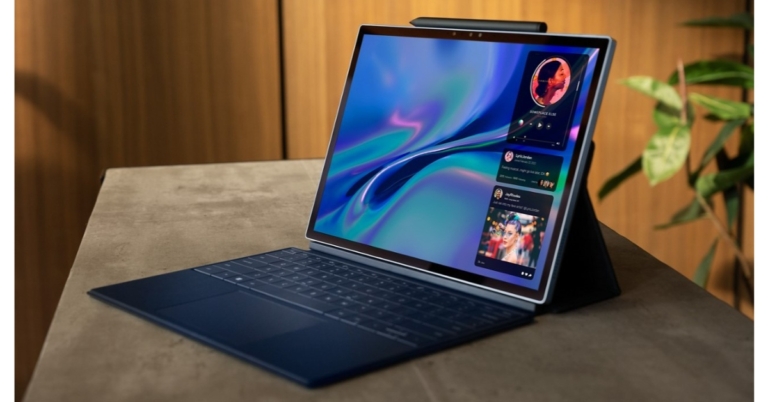
Dell XPS 13 2-in-1 laptop with magnetic XPS Folio case and a stylus launched in India

The new XPS 13 2-in-1 was announced by Dell Technologies. The device has a 13-inch ultra-thin detachable design with built-in WiFi and is powered by 12th Gen Intel Core Processors. Customers who purchase the new XPS 13 also get a keyboard case and a stylus. The Dell XPS 13 2-in-1 comes with a resolution 4K 11MP rear camera and a 1080p 5MP webcam.

Dell XPS 13 2-in-1 specifications

The new XPS 13 has been completely redesigned and comes with a magnetic XPS folio case, a pen, and a tablet form factor. It transforms the device into a full laptop with three angle adjustments (100°, 112.5°, and 125°) when it is attached. A huge keypad and a zero-lattice, edge-to-edge keyboard that is quick, effective, and smooth with each keystroke further improve the experience. The 13-inch IPS panel of the Dell XPS 13 2-in-1 has a 3K resolution and supports Eyesafe technology. A 4K 11 MP camera on the rear and a 1080p 5 MP camera on the front are both included in the XPS 13 2-in-1. You can choose between an Intel Core i5-1230U or a Core i7-1250U processor for the Dell XPS 13 2-in-1 notebook. 6GB of RAM and 1TB of PCIe NVMe SSD storage are combined with the CPUs. Also running on the 2-in-1 laptop is Windows 11. Dell XPS 13 2-in-1 specifications The new XPS 13 comes with a magnetic XPS Folio case, a stylus, and a tablet form factor. The folio for Dell’s new XPS tablet weighs only 560 grams, making it less than 3 pounds in weight. The XPS Stylus helps people express their creativity through a natural writing and inking experience thanks to its precise pressure sensitivity and tilt capability. A built-in Tile function on the XPS Stylus also helps ring, notify, and locate the pen on a map when misplaced, taking into account human tendencies. It also features a reversible pen, Bluetooth connectivity, two programmable buttons, and a versatile stylus that can be used by both right- and left-handed people. Dell XPS 13 2-in-1 price in India The XPS 13 2-in-1 is equipped with a 4K 11MP world-facing camera and a 1080p 5MP webcam to deliver the best possible visual experience. These cameras enable the user to do it all on a single multipurpose device, whether it’s a conference call, webchat with pals, content editing, or just documenting exceptional moments. The device is also covered by a Premium Support warranty that offers Accidental Damage Protection and Advanced Exchange.

Dell XPS 13 2-in-1 price in India

The starting price for the Dell XPS 13 2-in-1 laptop in India for the Intel Core i5 model is Rs 1,39,990. Whereas the price for the Core i7 model is Rs 1,64,990. Starting on September 29, 2022, customers can purchase the new XPS 13 2-in-1 on Dell.com and at a few DES (Dell Exclusive Stores). For the latest gadget and tech news, and gadget reviews, follow us on TwitterFacebook and Instagram. For newest tech & gadget videos subscribe to our YouTube Channel. You can also stay up to date using the Gadget Bridge Android App. You can find the latest car and bike news here.

How to Delete Contacts in Bulk From Android smartphone? (Full Guide 2022)

0
Even though adding and removing contacts on your smartphone is fairly easy, managing them can be quite a task. If you’ve been using your phone for a long time, it may have some contacts that are no longer available and some that you never even used once. Once you get down to managing your contact list, removing contacts manually can turn out to be a cumbersome task. In this article, we show you how to delete contacts in bulk from an Android smartphone.  Read Also: Fitbit Inspire 3, Versa 4, and Sense 2 now available in India

How to delete contacts one at a time on an Android smartphone

Step 1: Go to Contacts and select the contact you want to remove. On some smartphones, you will need to press the ‘i’ icon to access the full details of the contact. Step 1: Go to Contacts and select the contact you want to delete. On some smartphones, you will need to press the ‘i’ icon to access the full details of the contact. Step 2: Tap on ‘More’ and select ‘Delete’. Step 2: Tap on ‘More’ and select ‘Delete’. The contact will be deleted from your Android smartphone

Delete multiple contacts at once on an Android Smartphone

Step 1: Go to contacts and long press the contact you want to remove. A small tick will appear on the contact icon and you will be able to select multiple contacts. Step 1: Go to contacts and long press the contact you want to delete. A small tick will appear on the contact icon and you will be able to select multiple contacts. Step 2: Select the contacts you want to remove by pressing on them. Step 3: In order to select all contacts tap the ‘All’ option at the top right corner of the screen. Step 3: In order to select all contacts tap the ‘All’ option at the top right corner of the screen. Step 4: Select ‘Delete’ from the bottom menu. Step 4: Select ‘Delete’ from the bottom menu. The contacts you selected will be deleted from your Android smartphone. 

Bulk delete contacts from your Android smartphone

Most Android phones only allow you to remove singular or multiple contacts at once. While this is useful in most scenarios, it can turn into a long process when you’ve got hundreds of contacts to sort through. In order to bulk delete hundreds of contacts at once, you will need to use a third-party app like Easy Contacts Cleaner.  Step 1: Download and install the Easy Contacts Cleaner app from Google Play Store. Step 2: Give the app permission to access your contacts.  Step 3: Now you can sort through duplicate contacts, contacts with no name or phone, and unused contacts and easily delete them. Step 3: Now you can sort through duplicate contacts, contacts with no name or phone, and unused contacts and easily delete them. Step 4: To delete unused contacts simply click on the category and tap the ellipses to select all contacts. Then press delete. All your unused contacts will be deleted.  Step 4: To delete unused contacts simply click on the category and tap the ellipses to select all contacts. Then press delete. All your unused contacts will be deleted.  Step 5: You can also delete accounts based on the storage location and the apps they belong to. Simply click on ‘Accounts’ and delete the contacts you want. Step 5: You can also delete accounts based on the storage location and the apps they belong to. Simply click on ‘Accounts’ and delete the contacts you want. Read also: 4 Simple Methods To Remove or Replace any Image Background On Android

Conclusion and final words

This is how you can delete contacts in bulk on your Android smartphone. If you want to merge or remove duplicate contacts from your device, read our instructional guide here. Before removing contacts, it is a good idea to back them up to your Google Account. Deleted contacts can be easily restored once you’ve created a backup.
For the latest gadget and tech news, and gadget reviews, follow us on TwitterFacebook and Instagram. For newest tech & gadget videos subscribe to our YouTube Channel. You can also stay up to date using the Gadget Bridge Android App. You can find the latest car and bike news here.

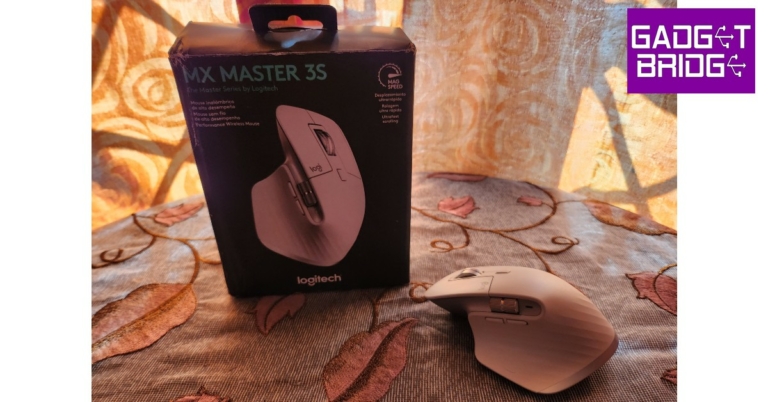
Logitech MX Master 3S Review: Delivers with every click!
Released in 2019, the Logitech MX Master 3 is regarded by many as the best productivity mouse on the market. When Logitech came out with the MX Master 3S we were left wondering how it could possibly improve on the already impeccable Master 3. Not to mention the hefty price tag that comes along with it. So, at Rs 10,995 is it worth a buy? Is it a big enough upgrade for MX Master 3 users to make the switch? When we got our hands on the Logitech MX Master 3S we were more than keen to find out. After using it for just over a week, we may have some answers for you. Read our Logitech MX Master 3S review to find out. Read Also: Blaupunkt 55-inch Smart Google TV (55QD7020) Review: Super imagery with superb sound

Logitech MX Master 3S review: Design

Inside the box, the Logitech MX Master 3S comes with a mouse and a USB receiver. The packaging is minimal with no plastic covering inside the box, keeping things eco-friendly. Logitech claims it has a 25% reduction in packaging carbon footprint compared to the previous version and uses 100% FSC-certified paper in packaging. The mouse is made out of Post Consumer Recycled plastic, making it a more sustainable product than its predecessor. The design of the Logitech MX Master 3S remains unchanged from its previous avatar. It sports a clean, minimal look, and an ergonomic design that is carved out for maximum comfort. The bulky size of the mouse may make it challenging to use for people with smaller hands, but for people who often find regular mice too small to work with, this device will prove to be the perfect fit. Logitech MX Master 3S review: Design The ridge at the left side of the mouse acts as a cushion for the thumb and comes with a gesture control button. Along this side, you’ll also find the horizontal scroll wheel and back/forward buttons housed with an LED light. On top, you get your regular click buttons, the vertical scroll wheel, and a mode switch button. The power button, DPI sensor, and pairing/switch key are located at the bottom of the mouse. logitech All buttons are seamlessly integrated into the body of the mouse. There are no loose fittings on this mouse, which isn’t the case with other devices on the market. The rubber finish across the body provides a decent grip, and the curvy design allows for greater comfort and minimal weariness upon extended use.  A lot of attention has been paid to accessibility, with every button on the mouse easily reachable and serving a specified purpose. Our only minor issue is with the motion gesture button hidden under the thumb rest. While it comes in handy, we had to move our thumb in an unnatural position every time we wanted to use it.  Logitech MX Master 3S review: Design One of the more notable upgrades in the Logitech MX Master 3S is its ‘quiet click’ experience which may gather mixed responses from its users. The clicks on the MX Master 3S are 90% quieter than the previous version, making it more suitable for the workplace, but mechanical enthusiasts will certainly miss the satisfactory audible sound that came with every click. The tactile feedback on every button is still excellent. mouse There is, however, bad news for left-handed people. This device is in no way meant for ambidextrous use, and there are no left-handed options in the lineup. You will either have to switch to your right hand or look out for other left-handed products. Portability is also an issue, with the MX Master 3S, as the device weighs 141g and there is no section to store the USB receiver. If you often find yourself working on the go, you may want to consider some more portable options.

Logitech MX Master 3S review: Performance

When you’re following a device like MX Master 3, which is already regarded as the best in its class, you have your work cut out for you. We’re happy to report that the MX Master 3S puts up a performance that not only matches but exceeds its predecessor’s. A big chunk of credit for that goes to the updated 8,000 DPI sensor, which is double the one found on the previous version. Logitech MX Master 3S review: Performance You can adjust the DPI level from Logitech’s Options Plus software, as the mouse runs on 1000 DPI by default. A higher DPI setting comes in handy for multi-monitor setups and high-resolution displays. The idea is to cover the maximum area on the screen without moving the mouse too much.  One of the better parts about having a high DPI sensor is that the mouse can effectively track on any surface without a mousepad. We used it on wooden desks, glass table tops, plastic patio furniture, and even on beds. There was no drop in performance on any surface and the motions were smooth as silk. Connectivity was no issue for this device, as all you need to do is plug in the USB receiver to your PC, switch on the mouse and you’re good to go. With Bluetooth connectivity, you can use the Logitech MX Master 3S on 3 devices at once. Once you’ve connected to multiple devices, you can switch between them using the pairing key at the bottom or by enabling the Flow feature on the Logitech Options Plus software.  We preferred the latter option as it seamlessly switched the control from one device to another as soon as the pointer reached the edge of the display. Manually clicking the switch key at the bottom of the mouse can hinder the smooth experience. It would’ve been a lot better if the switch key was placed in a more accessible position.  Logitech MX Master 3S review: Performance Moving on, the scrolling experience on the Logitech MX Master 3S is an absolute delight. There are 2 scrolling modes that can be switched using the button on the top panel of the mouse. The standard Ratchet mode provides nice feedback with every line scroll. The Free Spin mode is something Excel users will use a lot. It can be activated using the switch button at the centre and turns the scroller into a frictionless wheel that you can flick effortlessly. Need to scroll down to the very bottom of your Spreadsheet? Now you can do it with just one flick of the scroll. It is that easy. Another helpful feature of the MX Master 3S is the side scroll wheel. It allows you to navigate sideways on your screen, something that Spreadsheet users will enjoy too. The two additional buttons on the left panel can switch back and forwards between windows and web pages.  The horizontal scroll and navigation buttons were particularly helpful while using the mouse on a tablet. Going through images and scrolling the app drawer became incredibly easy with the horizontal scroll, while the navigation buttons were helpful in going back and forward within an app without needing to use the pointer to hit the back button. The external buttons can also be customised to assign different functions for different apps using the Logitech Options Plus software. For instance, you can use the horizontal scroller to switch between tabs in a web browser and increase the brush size in Adobe Photoshop. The back/forward buttons can be used as undo/redo keys or customised to adjust the volume.  The Logitech MX Master 3S is designed while keeping your workstation in mind. Its functionality benefits people who need a device that can keep up with their creative needs, be it photo editing on PhotoShop or making a PowerPoint presentation. Even relatively boring tasks like managing a Spreadsheet become super easy and fun with the Master 3S. However, it is not a device you want to use during your gaming sessions. Its polling rate and click latency won’t cut it for serious gamers who are willing to spend on an expensive mouse. The Logitech MX Master 3S does not pretend to be a gaming mouse at all and caters to a different demographic altogether. Moving to the battery life, Logitech has equipped the MX Master 3S with a 500mAh battery that can last up to 70 days on a full charge. Since we only used it for just over a week, we can’t back up the claim, but the previous version comes with the same battery and lasts around that range under moderate use. Users can expect the MX Master 3S to achieve a similar result. Three minutes of charge powers the mouse for a full day of use, which is quite impressive. You can even use the mouse while charging. Read Also: Apple iPhone 14 Pro review: The Game Changer

Verdict

While we have only good things to say about the Logitech MX Master 3S, at Rs 10,995 is it a worthy buy? The answer is a resounding yes. The Master 3S will raise your benchmark for a typical mouse. The range of functionality offered by the Master 3S is unparalleled and it doesn’t come at the cost of practicality. However, if you are already using the Logitech MX Master 3, Rs 10,995 may be a bit steep for an upgrade. 

Pros

Can connect to three devices Superior scrolling experience Accessible buttons and enhanced functionality  Comfortable design that is easy on the palm

Cons

Not meant for left-handers Portability is an issue
For the latest gadget and tech news, and gadget reviews, follow us on TwitterFacebook and Instagram. For newest tech & gadget videos subscribe to our YouTube Channel. You can also stay up to date using the Gadget Bridge Android App. You can find the latest car and bike news here.

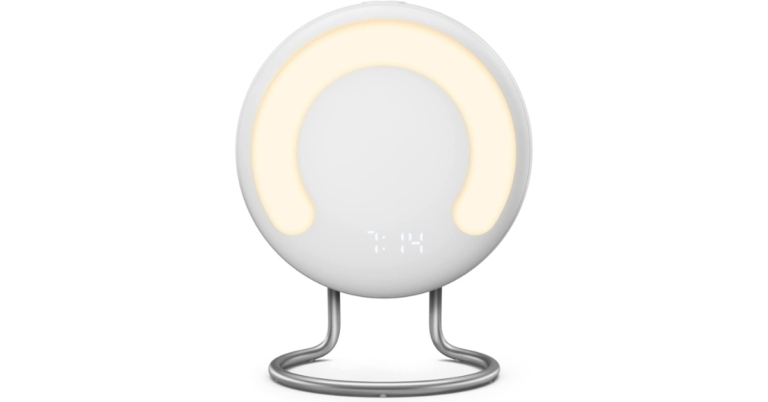
Amazon announced the launch of first-ever bedside sleep tracker Halo Rise

Halo Rise is a brand-new, multifunctional bedside tracker from Amazon designed to help you get better sleep. Utilising in-built sensor technology, Halo Rise quietly performs background processing to deliver extremely accurate insights and individualised sleep analysis. Halo Rise is a small, multipurpose design that fits on your nightstand. The gadget has a digital clock, a wake-up light made of a semicircle of strong 300 lux LEDs, a small alarm speaker, environmental sensors, and buttons to operate features. These options include dimming the light for reading, initiating a simulation of the sunset, and delaying your alarm. Halo Rise is also accredited as Climate Pledge Friendly since its packaging is 100% recyclable and its aluminium is 100% recycled. Halo Rise uses machine learning and contactless, low-energy sensor technology to precisely track your breathing and movement patterns throughout the night to track your various stages of sleep. The clinical gold standard for sleep analysis, overnight polysomnography, was used to develop and validate the sleep algorithm that is used. When you get into bed, Halo Rise uses potent ambient technology that is constantly on to begin your sleep session automatically without the need for buttons to be pressed or batteries to be charged. You’ll get a thorough sleep report when you wake up, which will include a graph indicating how much time you spent in each sleep phase (REM, light, and deep sleep), as well as a sleep score and details on your sleeping environment. Throughout the night, built-in environmental sensors monitor the temperature, humidity, and light levels in your room. It combines with the Amazon Halo app, which offers suggestions for improving the sleeping environment in the room based on scientific research. The smart alarm monitors your sleep cycles and wakes you at the perfect time for getting up, helping you to start the day feeling refreshed and alert. In the morning, a wake-up light simulates the colours and progressive brightening of sunrise to create a natural and peaceful wake experience. Halo Rise integrates with Alexa even better, making it simpler to review your sleep insights and customise your sleeping environment. Use a compatible Echo device to ask Alexa how you slept, connect Alexa to the Halo Rise smart alarm to wake up to your favourite music, or pair Halo Rise with another voice-activated smart lighting. Additionally, you may incorporate Halo Rise into a unique Alexa Routine. For instance, Alexa can start a calming meditation as soon as you walk into bed, dimmer the lights in the room, and turn off the TV. Additionally, you may ask Alexa to get your sleep data on the Echo Show, with the device’s display displaying the sleep report from the previous night. Customers in the United States will be able to purchase Halo Rise for $139.99. It includes a six-month membership to Halo, giving you access to even more features that promote your health and well-being. Later this year, Halo Rise will begin to be shipped. For the latest gadget and tech news, and gadget reviews, follow us on TwitterFacebook and Instagram. For newest tech & gadget videos subscribe to our YouTube Channel. You can also stay up to date using the Gadget Bridge Android App. You can find the latest car and bike news here.