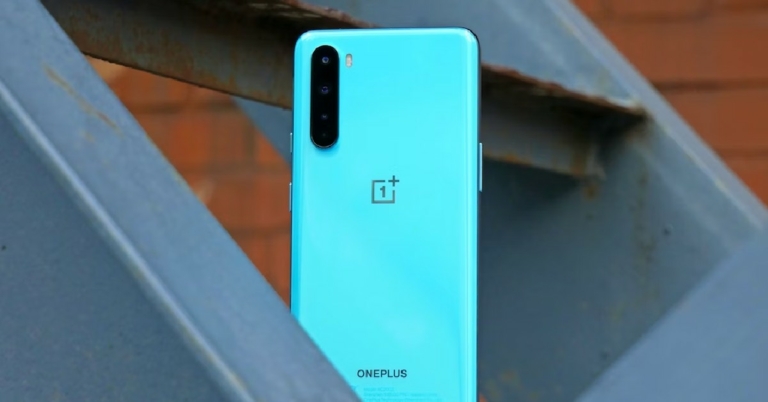
How to fix the Camera issue on OnePlus 8, 9, and 10 series?

It is not unusual for your phone’s camera to stop working at times. It may show a black screen when you open the camera app, or it may refuse to open at all. Sometimes the pictures taken by the camera are out of focus and ridiculously blurry to the point that you can’t make out anything. If you experience any of these issues, there are some steps you can take to restore the camera to normalcy. In this article, we show you how to fix the camera issue on your OnePlus 8, 9, or 10 series. Read Also: OnePlus 10R 5G Prime Blue colour option coming to India soon

Update the camera app

Step 1: Go to the Google Play Store. Step 2: Tap on your profile and select ‘Manage apps and device’. Step 2: Tap on your profile and select ‘Manage apps and device’. Step 3: Tap on ‘Updates available’ and check if there’s a pending update for your Camera. Step 3: Tap on ‘Updates available’ and check if there’s a pending update for your Camera. Step 4: Tap on the download option next to the update. Restart the camera app once it is updated.

Force Stop and relaunch the camera app

A proper reboot of the camera app can iron out any background glitches and restore normal behaviour. To force stop the Camera app on your OnePlus device, go to Settings>Apps>App management>Camera>Force Stop. Once the Camera app has been stopped, go to the app drawer and relaunch it.

Clear Camera app data and cache

OnePlus 10 Pro Review: Is it the right investment? oneplus camera bug If the issue persists after you’ve rebooted the Camera app, try clearing the Camera app data and cache. Simply press and hold the Camera app icon and select App Information. Select ‘Storage Usage’ and clear app data and cache from there. Clearing the storage resets the camera settings. If the issue was related to the settings being altered, it will be fixed. Clearing the cache deletes any temporary files that may be corrupted, thereby preventing the camera app from working.

Remove camera permission from other apps

Sometimes certain apps that have access to your phone’s camera can malfunction and keep it from working. In this case, you need to remove camera permission from those apps and see if the issue is resolved. You can either remove camera permission from all apps at once or do it one by one to see which app is responsible for the malfunction. To remove camera access, go to Settings>Apps & Notifications. Click on Apps and then select Camera. This section will contain the list of all the apps that have access to the camera. Click on an app to remove its camera permission.

Clean your camera lens

Wipe the camera lens with a clean microfiber cloth. Make sure the lens isn’t obstructed by the phone cover or screen guard. Open the camera again and see if it’s working normally.

Restart your phone in Safe Mode

OnePlus 9RT review. oneplus camera bug Third-party apps on your device can interfere with the functioning of some system apps. Trying to figure out the culprit in this scenario can be a tricky task. However, if you want to know for sure that your phone’s Camera app is malfunctioning because of a recently installed third-party app, reboot your device in Safe Mode. All third-party apps are disabled in Safe Mode. If the camera app is still malfunctioning in Safe Mode, it means these issues aren’t caused by any third-party app. To reboot your OnePlus phone in Safe Mode, press and hold the side key to reveal the power options. Then, tap and hold the ‘Power Off’ icon until the option to reboot your phone in Safe Mode appears.

Update your phone’s OS

Bug-related issues are generally patched with a quick update. If there are any pending OS updates for your device, they may have the fix to the issue you are facing. It is important that you keep your phone updated at all times. Not only does it ensure smooth functioning, but it also keeps your phone secure. To update your OnePlus smartphone, go to Settings>About Phone and tap on ‘OxygenOS’.

Restore factory settings

This should be the last option you consider for fixing your OnePlus 8, 9, or 10’s camera. Restoring a phone to its factory settings clears it of all its data and resets all the system settings. Essentially, it restores your phone to the settings it was in when you took it out of the box. In order to perform factory settings reset go to Settings>System>Reset Options>Erase All Data>Factory Reset.

Frequently Asked Questions

Why is my OnePlus camera not working?

Your OnePlus camera may malfunction because of some glitch or a corrupted file in its cache. To fix this issue, clear the Camera app’s cache and restart your smartphone.

How do I reset my OnePlus camera app?

To reset your OnePlus smartphone’s camera app, go to Settings>Apps>App Management>Camera>Storage and select ‘Clear data’. Go to the previous window and force stop the app. Relaunch the app again from the app drawer.

Why is my OnePlus camera taking blurry pictures?

If your OnePlus smartphone’s camera is taking blurry pictures, update the camera app. Also, make sure that the camera lens is clean before taking a picture. Read Also: iQoo Z6 Lite 5G with Snapdragon 4 Gen 1 SoC debuts in India

Conclusion

This is how you can fix the camera issue on your OnePlus 8, 9, and 10 series. If the problem still persists with the camera after you’ve tried all the above fixes, there may be a hardware-related issue. Take your phone to the service centre for further diagnosis. 
For the latest gadget and tech news, and gadget reviews, follow us on TwitterFacebook and Instagram. For newest tech & gadget videos subscribe to our YouTube Channel. You can also stay up to date with the Gadget Bridge Android App.

Amazon Great Indian Festival (GIF) 2022 to kick off on September 23: Deals and discounts

The Amazon Great Indian Festival (GIF) 2022, an event hosted by Amazon.in, will begin on September 23, 2022, with Prime members receiving early access. Customers can take advantage of never-before-seen discounts on the broadest variety of goods from thousands of Small and Medium Businesses (SMBs). Along with leading Indian and international brands across categories, GIF 2022 will also feature products from Amazon sellers under a number of different initiatives, including Amazon Launchpad, Amazon Saheli, and Amazon Karigar. The e-commerce platform will also offer massive discounts on electronic products and smartphones during the sale period with companies like Apple, Samsung, Xiaomi, Vivo participating in the sale event. Customers will enjoy more than 2000 new product launches and exciting offers from brands like Samsung, iQOO, LG, Xiaomi, Redmi, Tecno, BoAt, Biba, PUMA, Fastrack, Prestige, L’Oreal, Colgate, Aashirvaad and many more across categories like groceries, fashion and beauty, smartphones, large appliances & TVs, consumer electronics, and more. Customers can immediately contact experts throughout the Great Indian Festival who will demonstrate products, reveal top offers, respond to live consumer questions and provide limited-time specials. For the purpose of assisting customers in making an informed buying decision, Amazon hopes to collaborate with more than 150 influencers to produce 600 live streams. Additionally, it offers customers LIVE-only discounts on our live streams. During the Great Indian Festival, customers can win prizes worth up to INR 7,500. All consumers have to do is access a selection of holiday specials that may be redeemed on purchases made during the Great Indian Festival on Amazon.in, pay bills, recharge their phones, add money to their Amazon Pay account, or send money to someone else using Amazon Pay. A user would also receive INR 50 back upon completing their first Amazon Pay transaction for things like recharges and bill payments. Additionally, customers who apply for the Amazon Pay ICICI Bank credit card can receive rewards of up to INR 2,500 as a welcome offer, and those who activate Amazon Pay Later can receive flat INR 150 back along with an instant credit of up to INR 60,000. These incentives are intended to make festival shopping simple and rewarding. While individuals who are in the gifting mode can benefit from up to 10% back on purchasing Amazon Pay Gift Cards, those who join up for Amazon Pay UPI can receive 10% back up to INR 50. During the festive season, Amazon Business customers may save up to 28% more with a GST invoice and 40% more with bulk discounts on a variety of products from leading brands like ABC, including laptops, desktops and monitors, TVs, appliances, vacuum cleaners, etc. Business clients will be able to save an additional 10% through business-exclusive deals on more than 8000 products, in addition to regular Amazon.in incentives including deals, bank offers, and coupons. To take advantage of the discounts, register for Amazon Business for free. When purchasing your tickets for flights, trains, buses, and movies during the Great Indian Festival, take advantage of a number of great incentives and benefits. Plan ahead up to a year in advance to avoid last-minute ticket costs and receive discounts of up to 20% on flights. You can say goodbye to unnecessary payment gateway fees when booking your train trips thanks to Amazon, which charges nothing more for any railway ticket purchases. Additionally, throughout the holiday season, people who want to go see the biggest movies of the year in theatres can save up to 25% on their movie ticket purchases. For the latest gadget and tech news, and gadget reviews, follow us on TwitterFacebook and Instagram. For newest tech & gadget videos subscribe to our YouTube Channel. You can also stay up to date using the Gadget Bridge Android App. You can find the latest car and bike news here.

How to fix booting issue on Samsung Galaxy M Series smartphone? (2023)

If your phone is having trouble successfully booting up, there could be a few reasons behind it. The issue may be related to a corrupted app or faulty firmware. It is common for Samsung smartphones to get stuck on the Samsung logo while turning on. Luckily, there are a few easy fixes to this issue, and you can save yourself a trip to the repair centre. In this article, we show you how to fix the booting issue on Samsung Galaxy M Series smartphones. Read Also: Best Apps to download on your new iPhone 14 Pro and 14 Pro Max

Perform a hard reboot

Perform a hard reboot Press the Volume Down + Power Key for about 7 seconds. Your smartphone should restart within this time. This is a cursory fix and should work if the problem is minor. If your phone comes with a removable battery pack, take the battery out and put it back in. Then restart your phone. Make sure your phone has enough charge. If this method doesn’t work, move on to the following fixes. 

Charge your phone

  Wireless Charging. samsung galaxy unable to restart If your phone died due to a battery drain, it won’t fully restart until it is charged first. If there’s some leftover charge on the device, it may get stuck on the Samsung logo in the process of booting up. To fix this, connect your phone to the charger and let it boost its battery for a while. Restart your phone after a few minutes.

Reboot your phone in Safe Mode

Reboot your phone in Safe Mode Rebooting your phone in Safe Mode helps determine whether the issue is app related. Only the native Samsung apps are functional in Safe Mode. To reboot your phone in Safe Mode, turn it off using the Power key. Then turn it back on, and as soon as the Sasmung logo appears, press the Volume Down key until ‘Safe Mode’ appears at the bottom of the screen. If your phone boots successfully in Safe Mode, then the issue is app related. Delete any recent you have downloaded and reboot your phone in normal mode to see if it works.

Perform a factory reset

A factory reset will restore your smartphone to its default settings and get rid of any corrupted data that may be causing trouble. Once you perform a factory reset all the data on your device will be erased. But how do you go about factory resetting your phone when it is stuck on the Samsung logo? First, you’ll need to put the phone in recovery mode. First, press the volume down button and side key until your phone shuts off. Then press both the volume keys together. After a few seconds, your phone will enter in recovery mode. Use the volume keys to wipe data/factory reset and press the side key to select. Confirm your selection in the following window.

Wipe cache partition

If you don’t want to lose your data by performing a factory reset, you can try wiping cache partition instead. It is common for a smartphone to get stuck while booting due to a corrupted cache memory. To sort this issue, follow the steps mentioned above to put your phone in recovery mode and use the volume keys to navigate down to ‘wipe cache partition’. Press the side key to select this option.

Use Odin to Flash Samsung Galaxy Stock Firmware

You will require a Windows PC and a USB Cable for this process. Step 1: Firstly, you need to download the official firmware for your Galaxy smartphone. Search Google for your smartphone’s official firmware and it will return appropriate results. Download the file specific to your region. Here are the links for a few Samsung Galaxy M Series smartphones for India: Samsung Galaxy M21, Samsung Galaxy M31, Samsung Galaxy M51. Step 2: Next, click on the firmware ZIP file and extract all of them. The following 5 five files will be downloaded to your PC: AP, BL, CP, CSC_, HOME_CSC_. Step 3: Now you need to download all the necessary drivers for your Samsung smartphone on your PC. You can download it from Samsung’s website here. Step 4: Download the latest version of the Odin software on your PC. Step 5: Switch your smartphone to Download Mode. Different smartphones have different key combinations to activate Download Mode, so you will have to use Google again for the specific combination for your smartphone. Here are some of the popular combinations:
  • Home + Volume Down + Power Key long press. (For older smartphones)
  • Volume Up + Volume Down + Power Key long press. (This should work for most Galaxy M Series smartphones)
  • Volume Down + Bixby + Power Key long press. (For smartphones with a Bixby button)
Step 6: Once your smartphone has entered Download Mode, connect it to your PC using a USB cable.  Step 7: This is the key part of the entire process. Open the Odin software and click on the ‘BL’ button. Choose the ‘BL’ file that you extracted earlier in Step 2. Do the same for BL and CP. In the CSC box, select the HOME_CSC_ file and NOT the CSC_ file, or will lose all your data. Leave the Userdata box empty. odin Step 8: Click on Start. The flashing process can take up to 15 minutes. Once finished, your phone will undergo a successful reboot.

Frequently Asked Questions

What causes Samsung boot loop?

Your Samsung Galaxy M Series smartphone may be stuck on the booting screen due to a corrupt file plaguing the memory, an app gone rogue, or a malware attack.

How do I fix the booting issue on my Samsung Galaxy M series smartphone?

To fix the booting problem on your Samsung smartphone, connect the device to an external charger and force restart it. If this doesn’t work, you will need to enter recovery mode and wipe cache partition or perform a factory reset. You may also need to flash your smartphone’s firmware.

Is boot loop a serious problem?

If a boot loop is caused by a faulty app or corrupted file, it can be fixed with a factory reset. However, if it caused due to a hardware malfunction, it can be tricky to fix. Read Also: Famous Non GamStop Software Providers

Conclusion

This is how you can fix the booting issue on your Samsung Galaxy M Series smartphone. If the issue still persists after flashing the Samsung firmware, take your phone to the Samsung Service Centre for further diagnosis by a trained professional. 
For the latest gadget and tech news, and gadget reviews, follow us on TwitterFacebook and Instagram. For newest tech & gadget videos subscribe to our YouTube Channel. You can also stay up to date using the Gadget Bridge Android App. You can find the latest car and bike news here.

Flipkart Big Billion Days 2022 to begin from September 23: Offer details inside

The Big Billion Days, Flipkart’s signature event, is back for its ninth iteration which will run from September 23 until September 30, 2022. Discounts on electronic accessories or products including computers, smartphones, smartwatches, and others will be available during the sale. The Flipkart Big Billion Days 2022 will bring exciting offerings going live on the Flipkart app, with innovation, impact, and inclusivity at its core. This will include a gamification experience via “Coupon Rain,” giving users the chance to play with their friends and family and featuring rewards that will make the holiday season extra special. As per the company this year, consumers have the opportunity to pre-book their purchases from categories including Beauty, General Merchandise, Home, Electronics, and Lifestyle by making a nominal advance payment of Rs 1. Through interactive shows and other products with rewards tied to commerce, Flipkart will improve consumers’ entertainment experiences on the Video Commerce platform. Customers will also have access to a tempting range of distinctive goods this year under the ‘TBBDSpecials’, which feature firsts for the industry and aim to make consumers’ shopping experiences unforgettable. Customers will witness 130 “Special Edition” collectables from 90+ brands in a variety of categories, adding 10,000+ new products to the selection. In addition, Flipkart now offers open box deliveries for high-value items like electronics and smartphones. The consumer must only accept delivery of their item if it is in an undamaged state since as part of the Open Box Delivery process, the Flipkart wishmaster (delivery partner) will open the product in front of the customer at the moment of delivery. This is a customer-focused strategy that aims to increase customer trust. In India, Open Box Delivery is now available for a few brands in a few PIN codes. Flipkart has released numerous programmes for sellers, as well as a number of firsts for the sector in strategic policy changes aimed at fostering the development of a democratic seller environment. Leading banks will provide clients with a more reasonable shopping experience this year along with improved credit accessibility. While these institutions are providing an immediate 10% discount. Paytm, is providing 10% guaranteed discounts on Debit Cards, Credit Cards, and EMI transactions. Additionally, the financing partner will provide clients with a credit of up to Rs. 1 lakh through Flipkart Pay Later, which can be returned the next month or in convenient EMIs. Additionally, customers may combine the Flipkart Pay Later cap with any other prepaid third-party choices and promotions that are offered at the time of checkout. For owners of EMI cards from Bajaj Finserv, there is also a No-Cost EMI facility available. Through these alliances, Flipkart hopes to give qualified consumers all over India more affordable options and access to the 250 million+ product offers available on its site. According to the website, discounts of up to 80% are available on a variety of televisions, computers, printers, monitors, and more. Every day at 12 a.m., 8 a.m., and 4 p.m. during the Flipkart Big Billion Day 2022 Sale, there will be “Crazy Deals.” Early Bird Special discounts will be available during “Rush Hours.”  For the latest gadget and tech news, and gadget reviews, follow us on TwitterFacebook and Instagram. For newest tech & gadget videos subscribe to our YouTube Channel. You can also stay up to date using the Gadget Bridge Android App. You can find the latest car and bike news here.

Google Pixel 6a Review: Arguably the best mid-range smartphone you can buy

The recently launched Google Pixel 6a finds itself in a unique position where it’s battling low-cost flagship alternatives like the iPhone SE, Samsung Galaxy A73, and the OnePlus 10T and also value-for-money smartphones like the Reno8 Pro. Over the years, Google Pixel’s A-series has carved out a niche audience for itself, offering features that you’d typically get in a flagship while making compromises on some fronts to keep the price down.  The decision-making in this regard is quite balanced, with Google knowing exactly which features are non-negotiable for the consumers and where it can hold back a few things as the distinguishing factor for the flagship. With this in mind, we took a close look at the Google Pixel 6a, using it for almost a week and putting it through different tests. So, how did it fare? Read our in-depth review of the Google Pixel 6a to find out. Read Also: Vivo V25 Pro Review: A good camera-centric smartphone

Google Pixel 6a review: Design and Display

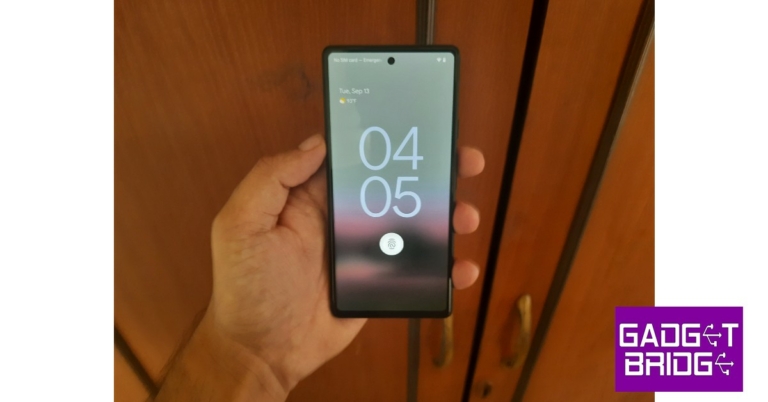
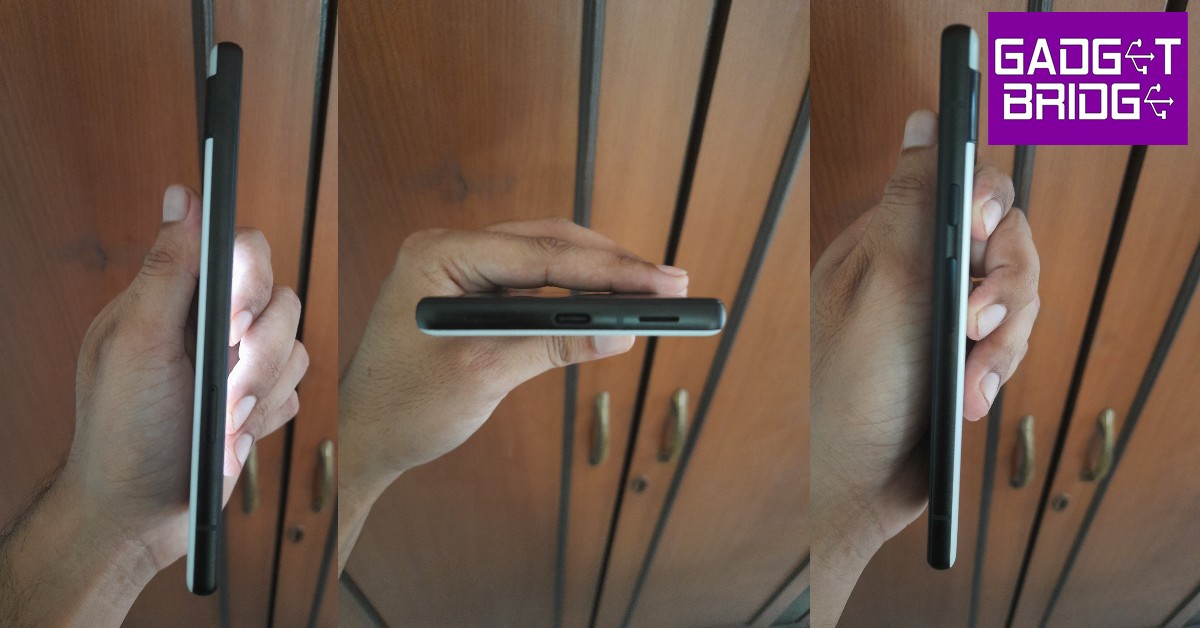
The Google Pixel 6a comes in a compact white box which contains the handset, charging cable, an OTG adapter, a SIM ejector tool, and some reading material in a supplementary box with Google Tensor branding. Right off the bat, you’ll notice there is no charger inside the box, which is one of the few corners Google has cut to keep the price down. It is a pretty disappointing trend that slowly seems to be seeping into the mid-range category of smartphones as well.  Google Pixel 6a review: Design and Display Moving on, the smartphone is pretty compact, with dimensions of 152.2 x 71.8 x 8.9 mm (5.99 x 2.83 x 0.35 in). It gets a Gorilla Glass 3 front protection and a back that Google describes as a ‘3D thermoformed composite back’. It looks like plastic, feels like plastic – and no points for guessing – it is plastic. This is a stark departure from the Gorilla Glass 6 back on the other flagships.  Holding everything together is an alloy frame with a matte finish on top. While it is evident that Google has gone for some low-cost materials, the phone itself feels quite nice to hold, as the matte finished frame provides a nice contrasting texture to the glossy back. Google Pixel 6a review: Design and Display The Pixel 6a looks more or less the same as its flagship counterpart, receiving the signature Pixel design. The camera band at the back houses the dual lens setup along with the dual-LED flash. The band itself separates the two colour tones and slightly protrudes outwards (but not as much as Pixel 6). We used the chalk colour variant, and the section above the camera band was a deeper, greyish colour.  While the glossy back has a tendency to attract fingerprints, they were barely noticeable in the Chalk variant. On the front, the 6.1-inch OLED display houses the selfie camera in a punch-hole cutout and is surrounded by very thin bezels. The phone is rated IP67 for dust and water resistance. On the right side, you’ll find the power button and the volume rocker keys. The charging port along with the primary speaker makes its way to the bottom, and the secondary speaker goes on top. On the bottom left side lies the solitary SIM tray.  Google Pixel 6a review: Design and Display One strange thing we noticed here was the placement of the power button above the volume rocker. Usually while handling the volume, the natural reflex is to go for the topmost button. We had to correct ourselves quite a bit before we got used to the new arrangement.  Moving to the 6.1-inch OLED HDR display, the primary concern that most people have is the refresh rate being capped at 60Hz. For the price of Rs 43,999, a 60Hz display seems to be an unreasonable tradeoff on paper, but after using the phone we did not have any complaints.  The touch response is exceptionally fluid, and the overall scrolling experience is smoother than you expect it to be, with Google’s superior haptic feedback taking it to another level. Google has paid great attention to detail and made sound choices on where to provide the appropriate haptic triggers so that it doesn’t get annoying.  One thing we liked was the little vibration that triggers upon flicking through apps on the app manager window. It is features like this that make compact smartphones attractive to buyers and Google has nailed it with the Pixel 6a.  If you’re concerned about what effect the 60Hz refresh rate will have on the gaming performance, keep reading further as we will address it in detail later on in the review. The display is bright enough to be legible in outdoor surroundings during the daytime. Indoors, we had to adjust the brightness level a bit higher than what is typically required on other smartphones, but we can’t complain much about that.  The OLED display produces deep contrasting colours which aren’t overly saturated. We binged content on YouTube and watched ‘Lost in Translation’ on Pixel 6a, and the phone’s display did justice to the subtleties presented by the colour palate, the overall experience being quite enjoyable.  The 83% screen-to-body ratio is good enough to provide a distraction-free visual experience. The dual speakers produce a decent audio output, although a slight distortion was noticeable at maximum volume. The Pixel 6a sports a new improved in-display fingerprint sensor, which still isn’t as fast as its peers, but matches the base expectations we had for it. Earlier in July, a security flaw let anyone unlock the Pixel 6a with their fingerprint, but Google quickly patched it with an update. 

Google Pixel 6a review: Performance and Cameras

The Google Pixel 6a is available in a single storage and RAM configuration of 128GB + 6GB. It does not offer expandable storage, with no memory card slot present. The phone is powered by Google’s Tensor chipset which also features on the flagship offering. Seeing the success that the iPhone SE enjoyed with the presence of the A15 Bionic chipset, excluding the Tensor processor on the 6a would have been a massive miss from Google. Compared to its other Android counterparts in this bracket, the Tensor chipset outperforms the Exynos 1280 and matches the Snapdragon 778G in performance. We ran the Geekbench 5 test on the Pixel 6a and it had an impressive single core score of 1,044 points, outperforming the likes of Samsung Galaxy S21+ and S21 Ultra. The multi-core test saw the Pixel 6a scoring 2637 points. You can see the results in the picture below. Geekbench 5 test Switching between multiple apps is a breeze. Even with half a dozen apps running in the background, none of them required reloading. The apps load at a lightning-fast speed and, coupled with fluid scrolling, the overall phone browsing experience is as good as it gets.  The Pixel 6a comes with the Android 12 OS, which you can now upgrade to Android 13. The MaterialYou theme has been further expanded with the Android 13 update, giving you greater control over how your phone looks. The Pixel 6a offers a few unique features too, like Live Transcribe and Magic Eraser, the latter being a fun photo editing tool. We used Magic Eraser quite a bit and it does well to hide small unwanted objects from your pictures, but still struggles to do an effective job of getting rid of the wires and electric poles. The battery performance of the Pixel 6a is quite disappointing and leaves a lot more to be desired. Firstly, charging the device to 100% can take quite a bit of time. We know that Pixels don’t work efficiently with every power adapter, but we tried a few different ones and the charging speed still failed to impress. The only time we could charge it in one go was when we plugged it in overnight.  During the day when you need to take your phone everywhere you go, keeping your phone on charge for more than an hour can be impractical at times, especially if you only plug in your phone when it’s totally drained of battery. The battery performance, on the other hand, is quite satisfactory, and on a day of moderate usage, we were still left with almost 30% charge. Finally, we put the Pixel 6a to the gaming test and played Garena Free Fire Max, Apex Legends, and Call of Duty Mobile on it. After an hour of playing Free Fire Max, there was no significant overheating, and we could’ve easily gone further. But more graphically demanding games like Apex Legends and Call of Duty Mobile really tested the limits of the Pixel 6s, and it heated up after 30-minute sessions.  That is still a decent performance and one that won’t deter any gaming fans from buying the smartphone. The 60Hz display holds up well too, as we didn’t experience any frame drops, and the overall touch response was quite satisfactory. The on-display controls are receptive to even the lightest touches, and the 60Hz refresh rate does not diminish the gaming experience in any way.  While the gaming performance may be a mixed bag, the camera unit on the Google Pixel 6s is easily one of the best we’ve seen in the mid-range category. We tested the camera in different conditions, both outdoors and indoors, and it amazed us every single time. The camera unit undergoes one change from the Pixel 5a – the 16MP ultrawide lens has been replaced with a 12MP lens. But the latter gets a bigger sensor which lets in more light, resulting in better pictures. The 12MP primary shooter remains the same. Google Pixel 6a review: Performance and Cameras Google Pixel 6a review: Performance and Cameras
Google Pixel 6a review: Performance and Cameras
Ultrawide lens
In bright outdoor conditions, the Pixel 6a took vibrant images, with the colours neatly balanced without any oversaturation. The pictures we took outside managed to capture the sky efficiently, without letting the foreground get washed out. Every minute detail was recorded impeccably in the pictures, with major credit for that going to the Tensor processor which pulls its weight in the image processing. Even the ultrawide lens did not drop any colour level, and you can easily use either lens interchangeably.  Google Pixel 6a review: Performance and Cameras
Google Pixel 6a review: Performance and Cameras
Portrait Mode
inddoor shot Indoors, the camera was able to capture sharp images, given there was ample natural light coming in. The quality depreciates a little if the light source is restricted. Portrait mode works fine as well, with the camera being able to incorporate the entire subject without blurring the edges.
indoor ultrawide
Ultrawide shot indoors
Photography at night does not present any hurdles either, as the night mode handles the low-light conditions extremely well, smoothening any grain from the images and lighting up the subject without making it look too unnatural. Pictures of the night sky came out way better than expected, even though the camera takes some time to click the pictures and then some more to process the image.
night mode
Regular mode vs Night mode
The 8MP selfie camera records a good amount of detail and retains the texture in your selfies. The processor turns up the contrast in the resulting images, but other than that, the camera works pretty well. You can record 1080p videos at 30fps from the selfie camera. For 4k videos, you will have to use the rear camera which can record at both 30 and 60fps. Read Also: Mivi Fort S24 mini soundbar review: A good inexpensive audio attachment for your TV

Verdict

At Rs 43,000, the Google Pixel 6a is possibly the best phone you can buy in the price bracket. For casual users that want their smartphone to have a good camera and unique looks, the Pixel 6a is a no-brainer. Google has made some tradeoffs that bring down the cost of the phone, but they all work out well, in our opinion. The only downside would be the battery, which takes a long time to charge. But it can easily last a day, so if you’re someone that charges their phone overnight, it won’t be a significant issue.

Pros

  • Brilliant camera unit
  • Great value for the price
  • Signature Pixel look
  • Flagship Tensor chipset

Cons

  • No fast charging 
For the latest gadget and tech news, and gadget reviews, follow us on TwitterFacebook and Instagram. For newest tech & gadget videos subscribe to our YouTube Channel. You can also stay up to date using the Gadget Bridge Android App. You can find the latest car and bike news here.

Amazon Quiz Answers Today 14 September 2022: Participate to win Rs 1,250

14 September 2022 Amazon Quiz has gone live on its platform. The quiz timings are 12 AM to 11:59 PM. The Amazon App users can participate in the quiz daily and all they have to do is submit correct answers to the questions asked on the e-commerce platform. Today’s participants can get a chance to win Rs 1,250 Amazon Pay Balance. By participating in the Amazon Quiz the participants can win Amazon Pay Balance ranging from Rs 1,000 to Rs 50,000 every day while sitting at home. To win the participants must answer five questions correctly that are based on current events and general knowledge. One wrong answer can eliminate you from the quiz. The results will be announced at the end of the month. Today’s question will let you win Rs 1,250 Amazon Pay Balance. Check below for today’s Amazon quiz answers. Amazon Quiz Today Prize – Rs 1,250 Amazon Pay Balance Quiz Date – 14 September 2022 Daily Timing – 12 AM to 11:59 PM Winner Announcement – Today 12 PM

Amazon Quiz Answers Today 14 September 2022

Question 1: To whom did Serena Williams lose her last match at the US Open?

Answer: Ajla Tomljanovic

Question 2: Robert Aramayo plays which important role in the series ‘The Lord of the Rings: The Rings of Power’?

Answer: Elrond

Question 3: In the 45th Reliance AGM, Mukesh Ambani announced plans to build the world’s largest carbon fibre plant in which state?

Answer: Gujarat

Question 4: This is the wreckage of which famous ship?

Answer: Titanic

Question 5: Which of these famous people was born in this country?

Answer: Mother Teresa

How To Play Amazon Quiz

Only app users are eligible to play the Amazon quiz every morning from 12 AM to 11:59 PM. The quiz is not available on the desktop. For those who are unaware of how to play the Amazon quiz below are the steps, you can follow to take the quiz.
  • Firstly download the Amazon app from Google Play Store or App Store
  • Now fill in the required information through the Sign Up option.
  • You need to log in to the Amazon app and scroll down on the home screen to find the Amazon Quiz banner.
  • Tap on the Amazon Quiz banner and tap on the Start button to start the Quiz.
  • Now you will get 5 questions and you need to answer them correctly. One wrong answer will eliminate you from the Quiz.
  • After answering all the questions correctly you are now eligible for a Lucky Draw.
  • The winner’s name will be announced today at 12 PM.
For the latest gadget and tech news, and gadget reviews, follow us on TwitterFacebook and Instagram. For newest tech & gadget videos subscribe to our YouTube Channel. You can also stay up to date using the Gadget Bridge Android App. You can find the latest car and bike news here.

OnePlus 10R 5G Prime Blue colour option coming to India soon

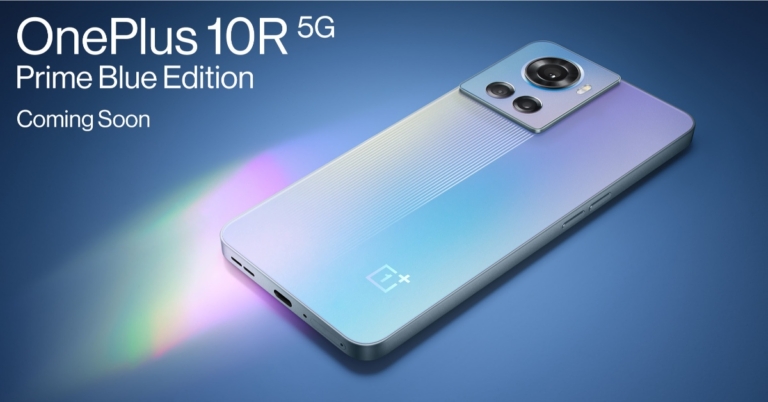
OnePlus 10R 5G Prime Blue colour option will be available in India soon. The third colour variant of the smartphone has been teased by the company. The introduction of the Prime Blue Edition also serves as a celebration of OnePlus’ long-standing relationship with Amazon and the significant influence that relationship has played in the company’s development. Customers who purchase the brand-new OnePlus 10R Prime Blue on Amazon will also receive a complimentary 3-month Amazon Prime membership as an added bonus. Speaking on the announcement Navnit Nakra, India CEO and Head of India Region, OnePlus India, said, “The success of OnePlus in India is the result of our unwavering bond with our community and partners. This festive season, we want to offer something valuable for our community with the launch of the OnePlus 10R Prime Blue Edition. The special Prime Edition has been crafted with the seamless integration of leading hardware and software at a truly affordable price point, making it even more accessible to the OnePlus community and users in India. To celebrate our successful partnership with Amazon, the special OnePlus 10R Prime Blue Edition will be exclusively available on Amazon.in, and we look forward to many more years of such fruitful collaborations to bring the best of premium technology to our users” OnePlus 10R 5G Prime Blue price in India The company has not yet revealed the availability details but the OnePlus 10R 5G Prime Blue was teased on an Amazon microsite. The smartphone is probably going to be introduced in India during the Amazon Great Indian Festival 2022 Sale, which is set to begin on September 23. The company claims that the OnePlus 10R Prime Blue Edition will feature an advanced 3D Passive Cooling System. Moreover, it will come with a 6.7-inch Fluid AMOLED display with a 120 Hz refresh rate, and an advanced 3D Passive Cooling System, which together enables the phone to run even the most graphically demanding games smoothly while maintaining frame rates and power consumption. As per the company, the OnePlus 10R Prime Blue Edition rear triple camera system includes a 50 MP Sony IMX766 primary camera, an 8 MP ultra-wide camera with a 119° field of view, a 2 MP macro camera, and electronic image stabilisation (OIS), completes the flagship experience by enabling users to capture the spirit of the holiday season with stunning photography. Notably, the OnePlus 10R 5G model was introduced earlier this year in two variants, a standard variant featuring 80W SuperVOOC charging whereas the Endurance Edition comes with 150W SuperVOOC fast charging. The 80W model is already available in Forest Green and Sierra Black colours whereas the 150W model comes in a single Sierra Black. For the latest gadget and tech news, and gadget reviews, follow us on TwitterFacebook and Instagram. For newest tech & gadget videos subscribe to our YouTube Channel. You can also stay up to date using the Gadget Bridge Android App. You can find the latest car and bike news here.

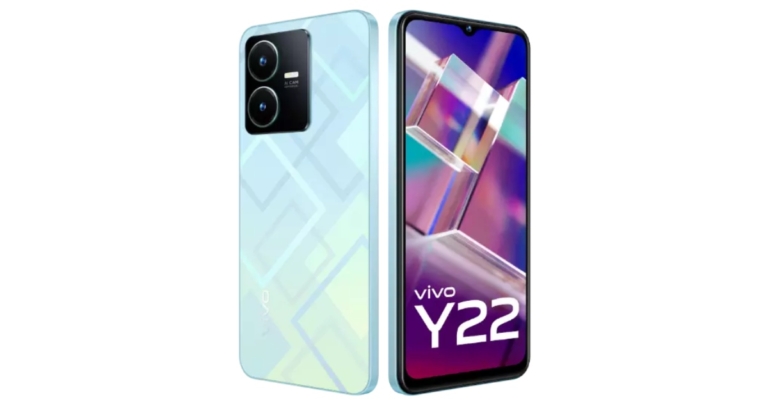
Vivo Y22 powered by MediaTek Helio G70 SoC launched in India

The Vivo Y22 was introduced in India recently. It is driven by a MediaTek Helio G70 SoC and features a 6.55-inch LCD screen with HD+ resolution. It comes with a 5,000mAh battery with fast charging capabilities, In addition to this, the smartphone is equipped with 50MP Super Night Camera.

Vivo V22 price in India, sale details

The 4GB RAM and 64GB internal storage edition of the Vivo Y22 is priced at Rs. 14,499 in India. There is another 6GB of RAM with 128GB of internal storage that will be introduced later on. Two colour variants for the smartphone are now offered for purchase on the business website: Metaverse Green and Starlit Blue. Vivo V22 price in India, sale details Customers can also take advantage of the company’s exchange promotion for its most recent phone. There will be up to Rs 1,000 cashback when the phone is purchased through offline stores using SBI card. When purchased online the company will be providing a flat 750 instant discount with HDFC bank and EMI transactions.

Vivo Y22 specifications

Vivo Y22 has a 6.55-inch HD+ LCD screen with 720×1,612 pixels of resolution. The screen has an 89.67% screen-to-body ratio, covers 70% of the NTSC colour gamut and has a maximum brightness of 530 nits. The phone includes a 2.5D plastic rear panel and is water- and dust-resistant to IP54 standards. The device utilises Funtouch OS 12 based on Android 12 out of the box. The MediaTek Helio G70 SoC, along with up to 6GB of RAM and up to 128GB of internal storage, powers the device. The phone’s internal storage can be increased with a microSD card by up to 1TB. For photos and videos, Vivo Y22 has dual rear cameras consisting of a 50-megapixel main sensor with f/1.8 aperture and a 2-megapixel bokeh sensor with an f/2.4 aperture. It has an 8-megapixel front-facing selfie camera with an f/2.0 aperture. The Vivo Y22 has dual-band Wi-Fi, Bluetooth v5.0, GPS, NFC, FM radio, OTG support and a USB Type C port for connectivity. For further security, it has a side-mounted fingerprint scanner. Combining a 5000 mAh battery with Vivo Energy Guardian (VEG), which further optimises the phone’s total power usage and boosts battery performance, and 18W flash charging ensures quick and efficient performance. For the latest gadget and tech news, and gadget reviews, follow us on TwitterFacebook and Instagram. For newest tech & gadget videos subscribe to our YouTube Channel. You can also stay up to date using the Gadget Bridge Android App. You can find the latest car and bike news here.

Garena Free Fire Redeem Codes Today 13 September 2022: Here is how to claim them

Garena Free Fire is a battle royale game with regular awards and tournaments to keep players interested. If you play Garena Free Fire, you should be aware of the redeem codes that are released on a daily basis. However, because the battle royale game is banned in India, players from other countries can use the Free Fire Redeem codes daily. If you’re unfamiliar with the Garena Free Fire redeem codes or don’t know how to get them, we’ve put together a step-by-step guide to help you redeem them. Check out Garena Free Fire Redeem Codes for September 13. The Free Fire redeem codes are a great way to get free stuff. These are 12-digit codes that contain alphabets and numbers, as well as an expiration date and time. Because the Garena FF redeem codes cannot be used more than once, you should hurry to the redemption page to claim your free reward before someone else does. To get a free reward, all you have to do is go to reward.ff.garena.com/en, which is the official redemption page. Also, keep an eye on this space for daily updates on Garena Free Fire redemption codes and rewards.

Garena Free Fire Redeem Codes Today 13 September 2022

  • ET5W-G345-T6YH
  • RGY1-TG4F-VBE4
  • G5B6-NY3M-KU8H
  • DCV3-BH4E-JRFI
  • Y9H8-7GY6-FT8D
  • FQX1-FT2Q-S3WS
  • GEF8-B4N5-M6YK
  • OB98-7FD6-E5TR
  • JI56-Y9HI-8UBJ
  • FY87-HYBT-VGFC
  • VXSB-EN4K-56I9
  • Y8H7-B6V5-C4XS
  • 3EAW-QSD2-CV3G
  • TER5-F43E-SWAS
  • WEYVGQC3CT8Q
  • GCNVA2PDRGRZ
  • JHGR-KIU7-HG45
  • UOJ8-7B6F-5DRE
  • J3ZKQ57Z2P2P
  • B3G7A22TWDR7X
  • 3IBBMSL7AK8G
  • 8F3QZKNTLWBZ
  • BG4N-EJ4K-5L6O
  • SARG886AV5GR
  • FF7MUY4ME6SC
  • FJK8-SL6W-Q203
  • 9ER8-FG7H-BYU4
  • JVK9-DS2W-QJ2U
  • Y54E-RF3G-BE4E
  • JON9-8B7V-FY6D
  • F6C5-X4SA-3QWE
  • 2DF3-GHRT-UG76
  • F4G5-TYH9-KJU7
  • 4VRB-5TJK-GY6H
  • 5FD4-SQED-2FV3
  • B4J5-TIY8-H765
  • DR8S-F2VB-N4J5
  • KTIY-8H76-B8V5
  • CDRS-F5EV-456I
  • FH3R-NF1B-VD8S
  • A52E-Q12Q-6E3D
  • SCX4-VB21-HD85
  • EY64-5RF3-GB7D
  • GD8H-JEUI-84I7
  • 6TRG-FBH4-NJCK
  • IX8S-765Y-4QE2
  • FV9B-F8HJ-V9UI
  • 87YD-G2TE-B4RJ
  • G6VT-5RSF-AV7W
  • FV5S-GW7T-5TR4
  • 5TYO-1H9J-I8NU
  • F3U4-756T-GB8C
  • NE4I-5I6Y-KH7M
  • B7LV-O6DS-I876
  • 5QRE-2DC3-V4BR
  • HTJG-IHB8-7V6C
  • X5SA-4QER-2D3F

How to Get Free Fire Redeem Codes for Garena on September 13?

  • Visit the Garena Free Fire game’s official website at reward.ff.garena.com.
  • Use your Facebook, Google, VK, Apple ID, Huawei ID, or Twitter account to log in.
  • You’ll be taken to a valid redemption code (s)
  • Copy and paste the 12-digit redemption code into the text box.
  • On the screen, a dialogue box will appear.
  • ‘Ok’ should be selected.
For the latest gadget and tech news, and gadget reviews, follow us on TwitterFacebook and Instagram. For newest tech & gadget videos subscribe to our YouTube Channel. You can also stay up to date using the Gadget Bridge Android App. You can find the latest car and bike news here.

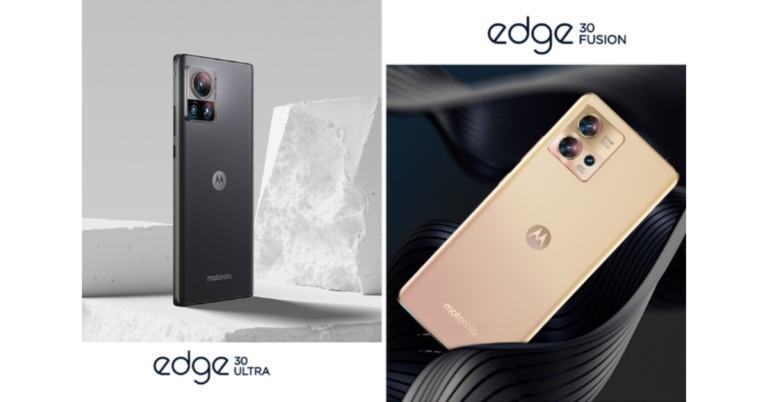
Motorola Edge 30 Ultra and Motorola Edge 30 Fusion released in India

Lenovo-owned smartphone manufacturer Motorola today officially announced the release of its two new smartphones under its Edge series. The Motorola Edge 30 Ultra and Motorola Edge 30 Fusion are two new premium devices from the company. The devices are powered by Snapdragon 8+ Gen 1 SoC and Snapdragon 888+ SoC respectively. Both of them support high-resolution cameras as well as fast charging.

Motorola Edge 30 Ultra price in India and specifications

The cost of the 8GB RAM with 128GB storage Motorola Edge 30 Ultra in India is fixed at Rs 59,999. Interstellar Black and Starlight White colour variants will be offered for purchase. During the Flipkart Big Billion Days Sale 2022, Motorola is exclusively offering the smartphone at a price of Rs 54,999. Motorola Edge 30 Ultra price in India and specifications Motorola Edge 30 Ultra has a 6.67-inch full-HD+ pOLED curved display with a 144Hz refresh rate. With a peak brightness of 1250 nits, it supports HDR10+ and the DCI-P3 colour space. Edge Lighting, a feature that was specifically built for this device’s edges, illuminates in various patterns to alert you to notifications and incoming calls. Both the front and back of the display are protected by Corning Gorilla Glass 5. Motorola Edge 30 Ultra operates on Android 12-based My UX skin. Along with four years of security updates, Motorola is providing three years of OS upgrades. The smartphone has an 8GB LPDDR5 SoC and a Qualcomm Snapdragon 8+ Gen 1 SoC as its processor. The device has 128GB UFS 3.1 internal storage with Host-Aware Performance Booster 2. The Motorola Edge 30 Ultra features a 1/1.22-inch 200-megapixel Samsung sensor with 0.64-micron pixels(OIS). There is a 50-megapixel Samsung secondary sensor paired with an f/2.2 ultra-wide angle lens. The camera employs Quad Pixel Technology, has a 114-degree field of view, and Macro Vision to take macro pictures. A third 12-megapixel Sony sensor is combined with a telephoto lens with an f/1.6 aperture that provides a 2x zoom and may be used to take portrait photos. A 60-megapixel sensor with Quad Pixel Technology is provided on the front for taking selfies. The Motorola Edge 30 Ultra has a 4,610mAh battery with 125W TurboPower wired charging. The phone further includes up to 50W wireless charging, and 10W wireless power sharing. The phone is IP52 certified for dust and water protection. The phone has 5G (13 Bands), 4G LTE, Wi-Fi 6E, Bluetooth v5.2, GPS/AGPS, NFC, DisplayPort 1.4, and a USB Type-C connector as connectivity options. The device further includes a compass, gyroscope, accelerometer, proximity, ambient light, ambient light, Face Unlock, and an under-display fingerprint sensor for security.

Motorola Edge 30 Fusion price in India and specifications

On the other hand, the cost of the 8GB RAM with 128GB storage Motorola Edge 30 Fusion in India is fixed at Rs 42,999. It will be sold in the colour selections Cosmic Grey and Solar Gold. During the Flipkart Big Billion Days Sale, Motorola is exclusively launching the smartphone at a price of Rs 39,999. Motorola Edge 30 Fusion price in India and specifications Motorola Edge 30 Fusion has a 6.55-inch full-HD+ curved Endless Edge pOLED display with a 144Hz refresh rate. Additionally, the screen supports HDR10+ and has a maximum brightness of 1,100 nits. It runs Android 12 with the My UX user interface. A Snapdragon 888+ SoC and 8GB of LPDDR5 RAM power the smartphone. A 128GB of UFS 3.1 internal storage is also included. The 50-megapixel primary sensor with Quad Pixel Technology, optical image stabilisation (OIS), and Omni-directional PDAF is the star of the triple rear camera system on the Motorola Edge 30 Fusion. A 13-megapixel sensor and an ultra-wide angle lens with an f/2.2 aperture and a 120-degree field of view are also included. A macro vision camera is also added. A 32-megapixel sensor with Quad Pixel Technology and an f/2.45 aperture lens are located on the front of the device. A 4,400mAh battery within the device supports 68W TurboPower quick charging. The phone has a 4,400mAh battery and supports 68W TurboPower quick charging. The smartphone has Wi-Fi 6E, 5G, 4G LTE, Bluetooth v5.2, NFC, and a USB Type-C connector as connectivity options. It supports face unlock technology and has a fingerprint sensor embedded in the display.  For the latest gadget and tech news, and gadget reviews, follow us on TwitterFacebook and Instagram. For newest tech & gadget videos subscribe to our YouTube Channel. You can also stay up to date using the Gadget Bridge Android App. You can find the latest car and bike news here.