Job search in India? Finding a new job is easier with these top 7 job websites

Job searching can be a tedious process that involves jumping through several hoops in a severe test of patience. Luckily, there are a bunch of popular job portals out there that make job searching easier and more effective. Now you can browse through job listings within the comfort of your own home and find opportunities that are aligned with your skills and interest. In this article, we bring you the top 7 job websites that make job searching in India easier. Read Also: How To Fix Error SIM Not Provisioned MM#2? Try these 6 simple methods

Naukri.com

Naukri.com With over 5 lakh recruiters hiring on the platform, Naukri.com is one of India’s biggest job search websites. Launched in 1997, Naukri.com operates primarily in India and the Middle East. Once you’ve set up your profile, Naukri.com sends you personalised job recommendations which you can easily apply to. You can even look up job listings based on your location, field of work, or salary on offer. On top of that, Naukri.com also allows recruiters to look at your profile and get in touch with you regarding job opportunities. Naukri.com also offers insights into your profile performance, search appearances, and recruiter options, making it easy to review your profile and make changes accordingly. 

LinkedIn

LinkedIn LinkedIn is more than just a job portal. While LinkedIn does offer a highly efficient job finder, you can also set up your profile and form connections with people from your industry or field of work. LinkedIn is also an excellent platform for following business news, keeping up with industry trends, and accessing more information about recruiters and job listings. Applying for jobs is easy and just a matter of a few clicks, once you’ve uploaded your resume to your profile. LinkedIn also offers a premium subscription service that gives you access to exclusive tools. 

Shine.com

Shine.com Shine.com was founded in 2008 by HT Media and has quickly grown into one of India’s largest job portals. Shine.com also has a print presence, with Shine Jobs serving as a Tuesday supplement of Hindustan Times. Shine.com attracts the leading companies on its platform, with over 3 lakh latest job offerings. Its advanced ‘2-way matching’ technology helps you find the jobs you’re looking for. You can also view recruiter actions on your profile and update it accordingly to get more exposure to opportunities that match your skills. 

Jobs For Her

Jobs For Her As the name suggests, Jobs For Her is a job search platform exclusively for women, helping in forming connections and advancing career goals. If you’re currently on hiatus and looking to restart your career, Jobs For Her would be an ideal place to start your job search. Founded in 2015, Jobs For Her already has 2.2 million registered users and over 7500 active recruiters on its platform.

Indeed.com

Indeed.com. top job websites in india Indeed.com is one of the biggest job search websites in the world, and its highly optimised search tool makes it appealing to millions of users. You can search for job listings based on location, job profile, company and salary offered. Applying for jobs is just a matter of a few clicks when you’ve filled out your ‘Indeed resume’. Indeed also offers you a helpful log of the jobs you’ve applied for along with the application status. You can even follow up with the recruiter and connect with them directly using the portal’s messenger. Indeed also allows user reviews for companies on the platform, so you always have an idea of the kind of environment you’ll be presented with upon selection.

Hirect

Hirect. top job websites in india If you’re looking for fast, effective, and direct communication with recruiters without the added steps of going through HR and third parties, Hirect is the ideal job-seeking platform for you. Hirect catalyses your job search by bypassing any buffer process and getting you directly in touch with your employer. Its advanced algorithm ensures that you receive listings that are aligned with your skills and preferences. For best results and speedier communication, use Hirect’s mobile app.

Times Jobs

Times Jobs. top job websites in india Founded by Times Group, Times Jobs is somewhat of a decent portal in India and the Middle East to find low to mid-level jobs, even odd jobs at times. Once you’ve signed up on the portal, you will receive job recommendations based on your qualifications. Browsing job offers is an easy task, as Times Jobs displays company ratings and employee reviews, salary offered, and detailed job profiles. You can also access industry insights and helpful tips that will enable you to do well in the job market.  Read Also: How To Recover Permanently Deleted Files On Windows? These are our picks for the top 7 job search websites in India. If you’ve found success with a particular job portal and would like to recommend it to other job seekers, share your experience in the comments!
For the latest gadget and tech news, and gadget reviews, follow us on TwitterFacebook and Instagram. For newest tech & gadget videos subscribe to our YouTube Channel. You can also stay up to date using the Gadget Bridge Android App. You can find the latest car and bike news here.

Apple iPhone 14 launch event: What to expect from the Apple event today

Today is the scheduled launch day for the iPhone 14. The highly anticipated iPhone 14 series, rumoured to consist of four models (iPhone 14, iPhone 14 Pro, iPhone 14 Max, and iPhone 14 Pro Max) is expected to be unveiled at today’s Apple Event. The business might possibly release the Watch Series 8 smartwatch and AirPods Pro 2.

iPhone 14 launch event: How to watch Apple Event Live.

Today is the scheduled date for Apple’s Far Out event. At 10 am PDT, or 10:30 pm IST, the Apple Event will officially begin. The iPhone 14 launch event will take place online and will be broadcast live on the website and the official YouTube channel of the corporation. While Apple TV customers can view it via the app, one can also watch the event via Apple’s event page.  Alternatively, you can watch on our website since we have integrated the URL below.

What to Expect from today’s Far Out event?

The iPhone 14 series, which consists of the iPhone 14, iPhone 14 Pro, iPhone 14 Max, and iPhone 14 Pro Max, is anticipated to be unveiled by Apple at the event today. Every year, Apple simultaneously releases new iPhone models and other products, and this year may be no different. Tonight, the company is also anticipated to introduce the Apple Watch Series 8, Watch Pro, and AirPods Pro 2. Reportedly the new devices will see some significant changes on the new models over their last predecessors. Apple has decided to stop producing the Mini version of the iPhone 14 given the popularity of the iPhone SE. The iPhone Mini had amassed a devoted user following over the previous two years who preferred the smartphone’s small size, but Apple did not consider its existence to be profitable. In addition to this Apple will no longer sell the iPhone Mini, which made its debut alongside the iPhone 12 series. The upcoming iPhones will have speedier chips. The A15 Bionic chipset is thought to be present in the iPhone 14 and iPhone 14 Max, while the A16 Bionic chipset will be present in the Pro variants. Two Apple phones will have 6.1-inch displays, while two will have 6.7-inch displays. The iPhone 14 Pro and iPhone 14 Pro Max are expected to sport a much-enhanced camera and a modified notch. The iPhone 14 and iPhone 14 Max are rumoured to get minor design modifications. The devices are said to have a similar design, while the iPhone 14 Pro and iPhone 14 Pro Max. Previous reports suggested that Phone 14 Pro models would have two cutouts a pill-shaped and a hole punch that come together to form a single notch. The camera and microphone privacy indications are displayed in the notch. The upcoming iPhone 14 Pro variants are rumoured to contain a bigger camera module with a 48MP main camera, a 12MP ultrawide camera, and a 12MP telephoto camera as its focus points. The iPhone 14 series is also anticipated to offer 30W wired charging. The Apple Watch Series 8 will likely receive a similar makeover and a handful of additional capabilities. While also anticipating that the standard watch would resemble the Watch Series 7. The Apple Watch Pro edition is expected to feature a fresh look. The business also intends to release a redesigned Apple Watch SE with a speedier chip. A new Red colour option for the Apple Watch Series 8 is anticipated. Like the smartwatches of the previous generation, the new smartwatch series is rumoured to come in 41mm and 45mm sizes. Along with a 47mm flat display, the Watch Pro is anticipated to get the satellite connection feature. Body-temperature sensors and women’s health features will be available on Apple’s newest Series 8 Apple Watches. A larger display, a robust titanium shell, improved fitness monitoring features, and longer battery life will also be included. Additionally, watchOS 9 and iOS 16 for iPhones are anticipated announcements from Apple. On the other hand, according to reports, the Apple AirPods Pro 2 won’t get a design makeover. However, the in-ear design of the earbuds could be kept in order to provide active noise cancellation. The Charging case is likely to get MagSafe wireless charging support in a form factor that is significantly smaller. Moreover, the device is anticipated to integrate USB Type-C charging capabilities too. For the latest gadget and tech news, and gadget reviews, follow us on TwitterFacebook and Instagram. For newest tech & gadget videos subscribe to our YouTube Channel. You can also stay up to date using the Gadget Bridge Android App. You can find the latest car and bike news here.

Amazon Quiz Answers Today 7 September 2022: Participate to win Rs 5,000

Have you participated in the Amazon Quiz today? If not then participate in the 7 September 2022 Amazon Quiz as it has already gone live on the app. The daily quiz can be played from 12 AM to 11:59 every day on the mobile app platform. Today e-commerce is giving the chance to win Rs 5,000 Amazon Pay Balance. Every day Amazon brings a fresh quiz for its customers. By participating in the quiz the participants can win an Amazon Pay Balance of up to Rs 50,000. The quiz can only be played on the mobile app as it is not available for the desktop platform. The quiz contains five easy questions and you have to answer all the questions correctly. The participants will then be shortlisted for a lucky draw to select a winner. Whereas the results are declared at the end of the month. Check out today’s Amazon quiz answers to win Rs 5,000. Amazon Quiz Today Prize – Rs 5,000 Amazon Pay Balance Quiz Date – 7 September 2022 Daily Timing – 12 AM to 11:59 PM Winner Announcement – Today 12 PM

Amazon Quiz Answers Today 7 September 2022

Question 1: What is the name of the government’s new model for the sustainable development of the Ganga? Answer: Arth Ganga Question 2: Which of these teams qualified for the 2022 Asia Cup and is in the same group as India and Pakistan? Answer: Hong Kong Question 3: Blonde’ is an upcoming biopic about Marilyn Monroe. Who is playing the role of Marilyn Monroe in the movie? Answer: Ana De Armas Question 4: This is a lego depiction of characters from which famous television show? Answer: The Big Bang Theory Question 5: This is a view of Queenstown in which country? Answer: New Zealand

How To Play Amazon Quiz

Only app users are eligible to play the Amazon quiz every morning from 12 AM to 11:59 PM. The quiz is not available on the desktop. For those who are unaware of how to play the Amazon quiz below are the steps, you can follow to take the quiz.
  • Firstly download the Amazon app from Google Play Store or App Store
  • Now fill in the required information through the Sign Up option.
  • You need to log in to the Amazon app and scroll down on the home screen to find the Amazon Quiz banner.
  • Tap on the Amazon Quiz banner and tap on the Start button to start the Quiz.
  • Now you will get 5 questions and you need to answer them correctly. One wrong answer will eliminate you from the Quiz.
  • After answering all the questions correctly you are now eligible for a Lucky Draw.
  • The winner’s name will be announced today at 12 PM.
For the latest gadget and tech news, and gadget reviews, follow us on TwitterFacebook and Instagram. For newest tech & gadget videos subscribe to our YouTube Channel. You can also stay up to date using the Gadget Bridge Android App. You can find the latest car and bike news here.

Best YouTube Editing Software for Windows, Mac and Mobile Devices [2022 Round-Up]

YouTube is one of the most popular streaming and video-sharing platforms that you would find quite impressive and unique in many ways. One of the most visited services, it hosts a wide range of content that spans across multiple genres. What if you are searching for the best editing software for YouTube in 2022 that you would be looking to explore? Let us check out a few popular video editors for YouTube that can come much handy and let you edit YouTube videos with ease.

Best YouTube Editing software for Windows

Beginning our discussion with the best YouTube editing software for Windows, let us check out a few prime options that can prove to be handy.

Filmora Video Editor

filmora As a powerful option to assist you in creating wonderful YouTube videos, Filmora video editor is quite impressive and a captivating tool that can handle a wide range of video editing tasks. Simply drag and drop feature makes it a perfect choice for beginners to get started, and the built-in features like Split Screen, Motion Tracking, Auto Reframe, and Green Screen on Filmora video editor make it stand apart from the competition. The video effects from Boris FX Continuum and NewBlue FX should make it a great addition, along with a rich library of effects in Filmstock. The new add-ons can provide you full-fledged professional video effects and enhance your creativity levels & production value. Moreover, the feature- Speed ramping lets you change the speed of your video in tune with the keyframes. This can go a long way in helping you in creating unique cinematic effects. The professional speed effects on Filmora include Montage, Hero moment, Bullet Time, Jumper, and Flash in. Filmora can be the best choice for YouTube creators and editors who are just starting out and do not have any video editing skills. With Instant Mode in Filmora, you can simply add media and it takes care of all the tasks involved. In addition, the speech-to-text function allows transcribing voice to subtitles directly, which saves much time.

Sony Vegas Pro

sony-vegas If you are a Windows user looking for one of the advanced video editing tools, Sony Vegas Pro can be a good option. The interface of the tool is not much intuitive, and that can be a concern for beginners. However, you would find Sony Vegas Pro comes with plenty of advanced video editing options. The multi-cam video editing on the tool should further make it the right one for YouTube videos. The features such as Auto White Balance and Masking tools help you make creative videos. The less modern look on the video editor for Windows may make it less suited when compared to the effects and options on Filmora. The tool has several advanced features, but understanding them and figuring out each of them takes some time.

Adobe Premier Pro

premiere-pro Adobe Premier Pro is one of the excellent options for helping you in terms of an advanced YouTube video editing tool. Known to be the industry’s standard option, Adobe Premier Pro is used by professional filmmakers for creating and editing their videos. Thus, it might not be a good choice for quick and simple edits. You would find it a little harder and tougher choice for the on-the-go edits, especially without any editing skills. The improved mercury engine for playing your videos would make it stand apart from the rest. The latest and advanced video editing options available on the tool would make it truly wonderful. But, the expensive price tag can perhaps make it a little disappointing for the YouTubers who may not be able to afford it.

The best YouTube editing software for Mac

Moving on to Mac, we will handpick a few good YouTube editing software options available on Mac.

iMovie

imovie iMovie has been one of the prime options for YouTube editing software on Mac and iOS devices. The fact that it is free for the Mac systems makes it one of the most popular video editors ever. You can have a few basic video editing features, and that may not make it the right option for those of you looking for advanced YouTube video editing. The free video editing software can even fix a shaky video perfectly enough. iMovie is available only for Mac and iOS users, and that can make it a little limited in terms of its application. If you are on Windows, you will be left out. Moreover, it also lacks support for a few formats.

Final Cut Pro

fcp Final Cut Pro is a professional YouTube video editor for Mac users. The high-end video editing capabilities on the tool would make it stand apart from the rest. It is known explicitly for nonlinear and non-destructive video editing. The latest version even supports 4K and 5K recordings on your Mac. The video editor definitely comes with an advanced set of features. Still, the only shortcoming is that it is available only on Mac devices and is not supported on Windows.

The best YouTube editing software for Android & iOS

Having gone through the best YouTube video editing tools for Windows and Mac devices, let us check out the best options available on smartphones.

Filmora Go

filmora-go Filmora Go is a suitable solution for both Android and iOS devices alike, making it a complete solution for your YouTube video editing efforts. Designed to make video editing excellently easy everywhere and anywhere, FilmoraGo should definitely make it a truly powerful choice ever. It offers you a very simplified process wherein you can shoot, edit, share and do everything on a single app. The transitions available on FilmoraGo would make it easy to edit your YouTube videos on the move. A good range of tools, multiplatform compatibility, and storage options are a few features that would make it stand apart from the rest of the tools in its genre.

The Concluding Thoughts

If you are a YouTuber and looking to attract viewers to your channel, there are a host of advanced YouTube video editing software that have been known to bring you the best possible performance excellence. The list of tools that we have outlined in this compilation should prove to be extremely impressive in the long run. Check them out and find which of them meets your needs. The way that Filmora Video Editor helps you in engaging in a host of advanced options in handling your imagination should definitely make the tool stand apart from the rest. You can analyze and find it for yourself. For the latest gadget and tech news, and gadget reviews, follow us on TwitterFacebook and Instagram. For newest tech & gadget videos subscribe to our YouTube Channel. You can also stay up to date using the Gadget Bridge Android App. You can find the latest car and bike news here.

How to Recover Deleted or Missing WhatsApp Messages?

Here are some of the best ways in which you can recover deleted or missing WhatsApp messages (some of them are advanced ways, so read carefully). We’ll also cover how to set up an advanced WhatsApp backup plan to ensure you never lose any of your WhatsApp messages again.

WhatsApp Chat Backups and how to set them up

To recover deleted WhatsApp messages the most important thing is to have your Chat Backup turned on only then you can actually retrieve the messages. To turn the backup on, tap the Settings tab. It’s on the bottom bar of the iPhone app. On Android, open the three-dot menu at the top-right and choose Settings. chat back on iphone From there, head to Chats > Chat backup. Here (under Auto Backup on iOS and Back up to Google Drive on Android), the app offers several backup frequencies (along with the option to encrypt your WhatsApp backups): Daily/ Weekly/ Monthly/ Off WhatsApp on android devices makes a local backup every night, but this doesn’t help if you have lost your device, so backing up to the cloud is important and useful. Over that, WhatsApp deletes older backup files as you create new ones. The iPhone app only keeps the latest backup file, while the Android version keeps “up to the last seven days’ worth” of backup files. Keep that in mind as you choose the right backup frequency for your needs.  Read Also: How can you bring back recently deleted images on Instagram? Choosing auto-backups will make it easier for you to recover WhatsApp messages soon after deleting them. On the other hand, weekly auto-backups will allow you to go further back in time to recover deleted WhatsApp messages, costing you your recent messages.

How to Recover Archived Chats in WhatsApp

At times the chat simply gets archived and all of it is still there on your WhatsApp and nothing has been deleted, to understand what the difference is and how to retrieve the chat or unarchive are listed below.  Archiving is like hiding chats. Nothing gets deleted and would be accessible to you. All you need to do is unarchive them, whereas deleting chat would erase its contents and make them no longer accessible to you.  For iPhone users, unarchiving their chats is easy. One way is to shake the device to undo and this will recover the archived chat. But there are other ways to do this as well.  Undo Archive

Follow these steps to unarchive a WhatsApp chat on any iPhone:

  1. The first thing to do is scroll up in the chat list (users can swipe from top to bottom) till the Archived Chats appear. archive on iphone
  2. Now you have to tap on it. Next, swipe from right to left on the chat you want to restore.
  3. Lastly, hit the Unarchive button that appears on the screen.

To unarchive a chat on Android (follow the steps below)

  1. Scroll to the top of the chat list and tap Archived chats.
  2. Press and hold on the chat you want to recover.archiving on android
  3. Tap the unarchive icon at the top-right, which looks like a box with an upward-facing arrow.  Tap the unarchive icon at the top-right

Read Also: WhatsApp now lets users view status updates in chat lists

How to Recover Deleted WhatsApp Messages

Once you have made a backup, recovering chats from them is simple, all you need to do is uninstall and then reinstall WhatsApp on your device.  When you reinstall the app, a message would appear on your screen asking you if you wish to restore your message history from the backup file. To initiate the restore, tap on Restore and with this everything saved in your last backup would be retrieved. Make sure you do it as the message appears, as you can’t restore the backup file later. The next method works for both Android and Apple devices but with a limitation and that being, it will only work as long as you have a backup. 

How to Recover Deleted Media on WhatsApp

Restoring your backup file allows you to retrieve any deleted media from your chats.  On Android, you can simply open a file explorer app and navigate to /WhatsApp/Media. From there, simply browse through the folders until you find the deleted photos you want to recover.  On iPhone, you should have a backup copy of images saved to your device if you have the Save to Camera Roll option enabled at Settings > Chats in WhatsApp. Read also: How to block or unblock someone on WhatsApp?

How to Recover Older Deleted Chats in WhatsApp

Please note: That the below strategy will work with Android devices only as Android lets its users access to the local backup files. If you are an iPhone user, the method of “restore from an iPhone backup” is what you will get. Here are the steps to restore old WhatsApp chats on Android:
  1. Open a file explorer app (if you do not have, then download from PlayStore) on your Android device.
  2. Navigate to /WhatsApp/Databases.
  3. Rename msgstore.db.crypt12 to msgstore-latest.db.crypt12.
  4. Rename msgstore-YYYY-MM-DD.1.db.crypt12 to msgstore.db.crypt12.
  5. Uninstall WhatsApp.
  6. If Google Drive backups are enabled, open Google Drive, slide out the left menu, tap Backups, and delete the WhatsApp backup file.
  7. Reinstall WhatsApp.
  8. When prompted, restore from the backup file.

To retrieve WhatsApp messages deleted sometime between two backups, simply do the following:

  1. Rename msgstore.db.crypt12 to msgstore-latest.db.crypt12. This changes the latest backup file, since you’re about to give an older backup its name in order to restore it.
  2. Next, rename the msgstore-YYYY-MM-DD.1.db.crypt12 file that you want to restore to msgstore.db.crypt12.
After this, uninstall WhatsApp. If you’ve enabled Google Drive cloud backups, open the Google Drive app, slide out the left menu, and select Backups. You’ll see a WhatsApp backup file with your phone number in it. Tap the three-dot Menu to the right of this and choose Delete backup to erase it. Doing this prevents WhatsApp from using the backup file in Google Drive instead of the local file you want to restore. Now, reinstall WhatsApp from the Play Store. During the setup process, you’ll be prompted to restore from the backup file you’ve just tweaked—it will show as X days old instead of the most recent backup file. Confirm restoration from this file. That’s all you have to do in order to retrieve deleted WhatsApp messages from older backups. Once you’ve restored those messages, feel free to start using WhatsApp as normal again. For the latest gadget and tech news, and gadget reviews, follow us on TwitterFacebook and Instagram. For newest tech & gadget videos subscribe to our YouTube Channel. You can also stay up to date using the Gadget Bridge Android App. You can find the latest car and bike news here.

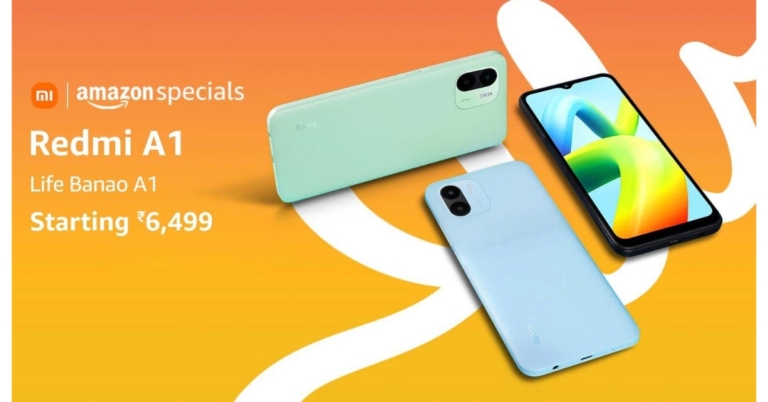
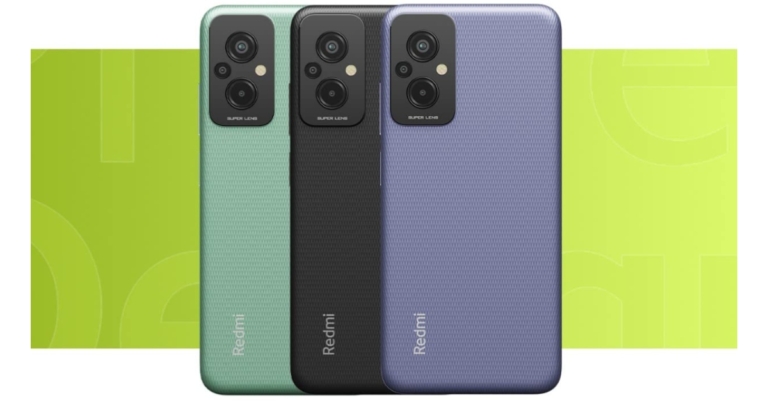
Redmi A1 launched in India at Rs 6,499: Price and Specs details

Xiaomi’s sub-brand Redmi today announced the launch of a new budget smartphone in the Indian market today. This budget smartphone is priced under 10K and has been introduced along with Redmi 11 Prime series. The new phone is powered by MediaTek Helio A22 SoC. It packs a 5,000mAh battery and runs on Android 11 out of the box. The device also features a dual rear camera set-up.

Redmi A1 price in India and sale details

Redmi A1 has been launched in India with a price tag of Rs 6,499 for the single 2GB RAM with 32GB of internal storage. It is available in the colours Classic Black, Light Green, and Light Blue. Starting on September 9 at 4 pm IST, the device will be sold in the nation through Amazon, Mi.com, Mi Home stores, and Xiaomi’s retail partners. The Redmi 11 Prime 4G, on the other hand, has just been released in India, and the 4GB RAM with 64GB storage version will set you back Rs 12,999. The cost of the 6GB RAM with 128GB storage option is Rs 14,999, however. Contrarily, the Redmi 11 Prime 5G has been released in two separate variations, including 4GB RAM with 64GB of internal storage and 6GB RAM with 128GB of storage. The cost of the 4GB model is Rs 13,999, while the 6GB version will cost Rs 15,999.

Redmi A1 specifications

Redmi A1 has an HD+ 6.5-inch screen with a waterdrop notch. It runs on Android 12 with MIUI 13 on top. The MediaTek Helio A22 SoC, which has eight cores and 2GB of RAM, powers the phone. It offers 32GB of internal storage which can be expanded up to 512GB using a microSD card. The Redmi A1 supports over 20 Indian languages in addition like Hindi, Tamil, Telugu, Kannada, Malayalam, Bengali and more, so you can have your phone in the language that you prefer. The Redmi A1’s dual rear camera system, powered by AI, has an 8-megapixel primary sensor. The phone has a front-facing 5-megapixel selfie camera sensor for selfies and video calls. The Redmi A1 sports a 5,000mAh battery and comes with a 10W charger. The device comes with speakers on the top. Centring energies around the emotional connection with radio, the device comes with a pre-installed FM Radio app.  For the latest gadget and tech news, and gadget reviews, follow us on TwitterFacebook and Instagram. For newest tech & gadget videos subscribe to our YouTube Channel. You can also stay up to date using the Gadget Bridge Android App. You can find the latest car and bike news here.

How to Block or Unblock Someone on Telegram? (2022)

With 700 million monthly active users, Telegram is one of the most popular instant messengers in the world. Telegram grew in popularity due to its unique features like a group limit of 200,000 members, the ability to send attachments up to 2GB in size, and customisable bots for groups. If you use public Telegram groups, there is always a risk of receiving spam or inappropriate messages in your DMs. Luckily, blocking someone on Telegram is a very easy process. In this article, we show you how to block or unblock someone on Telegram. Read Also: Boat Storm Pro Call smartwatch launched in India

How to block someone on Telegram

Step 1: Open the Telegram app and go to the chat thread of the contact you want to block. Step 2: Click on their profile at the top of the screen. Step 2: Click on their profile at the top of the screen. Step 3: Click on the ellipses at the top right corner of the screen. Step 3: Click on the ellipses at the top right corner of the screen. Step 4: Select ‘Block user’ and confirm it in the following dialogue box.  Step 4: Select ‘Block user’ and confirm it in the following dialogue box.  The contact will be added to your block list. If you do not have a chat thread with the user, go to Settings>Privacy and Security>Blocked users and manually add them to the block list from your contacts.

How to unblock someone on Telegram

Step 1: Open the Telegram app and tap the hamburger menu at the top-right corner of the screen. Step 2: Select Settings. Step 2: Select Settings. how to unblock someone on telegram Step 3: Scroll down and select ‘Privacy and Security’. Step 3: Scroll down and select ‘Privacy and Security’. how to unblock someone on telegram Step 4: Tap on ‘Blocked users’. Step 4: Tap on ‘Blocked users’. Step 5: Click on the ellipses next to the profile of the contact you want to unblock and select ‘Unblock user’. Step 5: Click on the ellipses next to the profile of the contact you want to unblock and select ‘Unblock user’. The user will be removed from your block list. You can also directly unblock a user by clicking on their profile from the chat thread and selecting ‘Unblock’. Read Also: How To Recover Permanently Deleted Files On Windows?

Frequently Asked Questions

What happens when I block someone on Telegram?

Blocking someone on Telegram removes the access they have to your profile. This means they won’t be able to send you messages, pictures, documents, and videos, and they will not be able to view your profile picture. Any message they send will not be delivered to you.

Does Telegram notify the user when you block them?

No, Telegram does not notify a user when they get blocked. They just won’t be able to see your profile picture and their messages will not be delivered to you.

Will a blocked user be able to see my messages in a Telegram group?

Yes, blocked users can see the messages you send in a Telegram group, but they won’t be able to send you direct messages.
For the latest gadget and tech news, and gadget reviews, follow us on TwitterFacebook and Instagram. For newest tech & gadget videos subscribe to our YouTube Channel. You can also stay up to date using the Gadget Bridge Android App. You can find the latest car and bike news here.

Smartphone Comparison: Poco M5 Vs Poco M4 5G

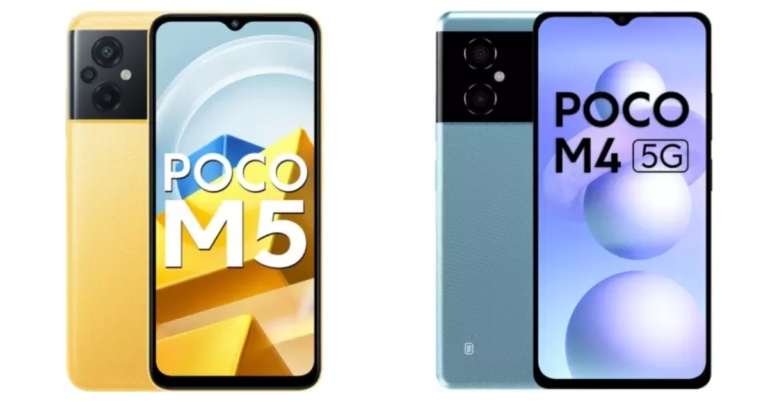
In India, the Poco M4 5G was released about six months ago, and the Poco M5 has just been unveiled. The recently released phone is the M4’s successor, but the only thing that sets them apart is 5G connectivity. Despite some significant upgrades, both phones have a majority of the same functions. As a result, we’ve chosen to compare the two phones Poco M5 Vs Poco M4 5G in order to determine which one you ought to choose.

Display

Poco M5: 6.58-inch full-HD+ IPS LCD screen Poco M4 5G: 6.58-inch full-HD+ LCD screen

Processor

Poco M5: MediaTek Helio G99 SoC Poco M4 5G: MediaTek Dimensity 700 SoC

Rear camera(s)

Poco M5: A triple-back camera configuration consisting of a 50-megapixel primary sensor, a 2-megapixel macro camera, and a 2-megapixel depth sensor Poco M4 5G: Dual rear camera setup with a 50-megapixel primary sensor with an f/1.8 aperture. A 2-megapixel portrait camera with an f/2.4 aperture is included

Selfie camera

Poco M5: An 8-megapixel selfie camera Poco M4 5G: 8-megapixel sensor on the front with an f/2.45 aperture

RAM and storage

Poco M5: 4GB of RAM and 64GB of storage/6GB RAM with 128GB storage Poco M4 5G: 4GB RAM with 64GB storage and 6GB RAM with 128GB storage

Battery

Poco M5: 5,000mAh battery Poco M4 5G: 5,000mAh battery

Operating system

Poco M5: Android 12-based MIUI custom skin Poco M4 5G: Android 12 with Xiaomi’s MIUI 13 skin on top

Starting Price

Poco M5: Rs 12,499 Poco M4 5G: Rs 12,999

Our Take

In terms of design, both smartphones are pretty similar from the front as well as from the back. The smartphone comes with the usual side-mounted fingerprint scanner. Also, there is an LCD screen on both devices with a 90Hz refresh rate with the DynamicSwitch feature. The Poco M5 is powered by MediaTek Helio G99 SoC with up to 6GB RAM with 128GB storage. Whereas Poco M4 5G comes equipped with MediaTek Dimensity 700 SoC paired with up to 6GB RAM with 128GB storage. Poco M5 has a triple rear camera set up whereas the Poco M4 comes with a dual-camera setup that lacks a macro sensor, but the primary sensor is the same on both handsets. Even the selfie camera is the same on both phones. The only notable difference is the presence of 5G connectivity on the Poco M4. When it comes to price, Poco offers everything at better pricing. So, if cameras aren’t an issue for you, the Poco M4 5G is the way to go. For the latest gadget and tech news, and gadget reviews, follow us on TwitterFacebook and Instagram. For newest tech & gadget videos subscribe to our YouTube Channel. You can also stay up to date using the Gadget Bridge Android App. You can find the latest car and bike news here.

How To Fix Error SIM Not Provisioned MM#2? Try these 6 simple methods

Stones, that’s what smartphones are if they can’t do what they were made to do and that is not being able to make calls, send messages, or use the internet. One of the most common reasons is SIM card issues. Particularly, you may be receiving a “SIM not provisioned” error. This guide will provide simple troubleshooting solutions for this error to get your phone working quickly and the “SIM not provisioned MM#2” will evaporate.

What Does “SIM Not Provisioned” Mean?

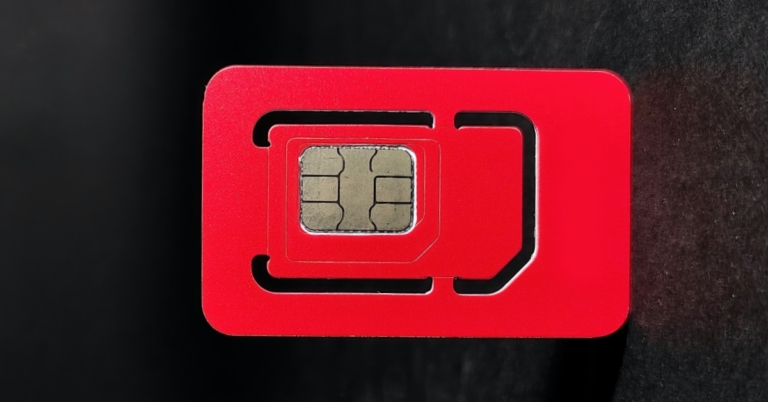
A SIM card contains specific data necessary to identify your cell phone account. To simply state, this data helps mobile providers differentiate your cell phone from others and enables you to make calls, send messages, or use the internet. To understand what the “SIM not provisioned MM#2” error means, we should first define the term “provision.” It refers to the act of supplying or providing something, such as information or service. The “SIM not provisioned MM#2” message means that your SIM card is no longer sharing information with your mobile provider.

Here are 6 Ways to Fix “SIM Not Provisioned” Errors

Try these tricks to re-enable your SIM card and put an end to the “SIM not provisioned” errors on your device.

1. Enable and Disable Airplane Mode

Breaking the ice with the simplest of all potential “SIM not provisioned MM2” errors is to disable all connectivity on the smartphone or tablet. This is easily done thanks to Airplane Mode, a method that can be executed with a simple tap. Enabling Airplane Mode disables connections to mobile internet and basic cellular networks and by disabling Airplane Mode, we try to re-establish a fresh connection to overcome the SIM not provisioned error. To put your Android device into Airplane Mode:
  1. Swipe down from the top of the screen with two fingersSwipe down from the top of the screen with two fingers - SIM not provisioned MM#2
  2. In the Quick Settings screen, tap Airplane ModeIn the Quick Settings screen, tap Airplane Mode
  3. Wait for the change (just a few seconds)Wait for the change (just a few seconds)
  4. When you’re ready to undo, simply repeat steps 1-2
To put Apple iOS devices into Airplane Mode:  Airplane Mode - SIM not provisioned MM#2
  1. Open settings and the very first option to appear would be Airplane Mode.
  2. Tap the Airplane Mode switch to turn it on or off.
  3. Airplane Mode can also be turned on/off from the Control Center.
By doing this a fresh connection should be made with the network provider, if the SIM is working properly, the “SIM not provisioned MM2” error should no longer appear.  Read Also: 5 Easy Ways To Fix ‘Unable To Answer Calls’ On Any Android Smartphone

2. Restart your phone  

restarting your device This might not sound high-tech or even a solution but simply turning off your phone can overcome the SIM not provisioned fault. Do the usual steps to restart the phone and wait a few moments, and you’ll see that the error message no longer appears, and your SIM card is activated.

3. Correctly Insert the SIM Card  

Another method to eliminate SIM not provisioned MM#2 error is this one. There’s a chance that there is no issue with the SIM card’s activation or the network, and that it might simply be an ill-fitting SIM. This might be due to problems with the shape of the SIM itself or a badly designed SIM card slot.  inserting sim
  • To check if the SIM is correctly placed:
  • switch off your phone, 
  • then find the SIM card: If you have an older or cheaper phone, find the SIM card by opening the back panel. 
  • In older phones or even in some new ones you may need to remove the battery to access the SIM card slot but with flagship phones or those without removable batteries, the SIM card slot is usually at the side of the handset.
  • You’ll need a small SIM eject tool to open it. Look for a small hole along the side of your phone and push the tool in to eject the SIM. 
Read Also: 7 ways to fix apps not working on mobile data on Android mobile Note: Be sure to remove the SIM card and not the microSD storage card. Removing the SIM card can be tricky. You may need to use tweezers, or jimmy it out from underneath if a removable battery is involved. With the SIM card removed, give it a blow, and perhaps a quick dust with a lint-free cloth.   Replace the cleaned SIM card, taking care to position it as instructed. There is usually a sticker next to the SIM card slot, or an engraving illustrating the SIM’s correct orientation.  Replace the SIM card in your phone, and power it up again. The “SIM not provisioned” error should no longer appear. If it does, place the SIM in another phone.

4. Activate Your SIM Card

Activate Your SIM Card In most cases, a SIM card will be activated automatically within 24 hours of being inserted into a new phone. If this doesn’t happen, three options are usually available to enable Activision:
  1. Call an automated number provided by your SIM company
  2. Send an SMS
  3. Log onto the activation page on the carrier’s website 
All these options are quick and straightforward but depend on whether the carrier supports them. In most cases, your SIM should be activated, and the “SIM not provisioned” error is solved.

5. Contact Your Carrier or Network Provider 

Contact Your Carrier or Network Provider - SIM not provisioned MM#2 If the SIM doesn’t activate, it’s time to make a call(from another device) to your carrier or network. Explain to them the error message and the steps you’ve taken. As noted above, there may be an issue with the activation server, which would prevent your SIM card from activating. This would cause the “SIM not provisioned” error message Your carrier will typically keep you on the line while they investigate the issue. If it is a problem with the activation server, there may be some delay in getting the SIM activated. On the plus side, you’ll have a reason for the error and a possible date for resolution.

6. Get a New SIM Card 

New SIM Card Still stuck here? Let’s try something else because it might be time to request for a new SIM card, maybe even an eSIM, if your phone supports it.  You could call your network provider for this, but you’ll probably find it’s quicker to head to a local phone shop or visit a franchise outlet.  They’ll be able to run diagnostics on the SIM card and hopefully, resolve the “SIM not provisioned MM2” error. Don’t worry or get disappointed if they repeat some of the steps you’ve already attempted as this is part of the diagnostic process. If it means you need a new SIM card, this shouldn’t be a problem and a new SIM card can be easily obtained.  and if you’re here hopefully something worked and the “SIM Not Provisioned MM2” error is fixed! Note that this error will only affect mobile devices that use SIM cards. As long as the SIM is compatible, and fits into the slot, these fixes will work. By this point, you should understand why your phone is displaying the “SIM not provisioned MM 2” error message. Remember, you have five options to fix this error:
  1. Update Carrier Services
  2. Toggle Airplane Mode
  3. Restart your phone
  4. Check the SIM is correctly seated
  5. Correctly activate your SIM
  6. Contact your carrier for help
  7. Get a new SIM card
If none of these things are working, then you’ll need to contact your carrier/network provider to ask for a replacement card. Once you’ve got everything sorted, your SIM card should work without a problem. Unfortunately, new SIM card errors are appearing all the time, but it doesn’t take long for the internet to rally together and start providing at-home solutions. If you find yourself experiencing SIM issues, it’s always worth conducting a quick online search to see if someone has found a solution or a workaround. For the latest gadget and tech news and gadget reviews, follow us on Twitter, Facebook and Instagram. For the newest tech & gadget videos subscribe to our YouTube Channel. You can also stay up to date using the Gadget Bridge Android App. You can find the latest car and bike news here.


Redmi 11 Prime 4G with 5,000mAh battery launched in India

Redmi 11 Prime 4G has debuted alongside the 5G variant of the smartphone in India today. The device comes with a triple rear camera setup and a 5,000mAh battery. The smartphone is powered by a MediaTek Helio G99 SoC. In addition to this, the phone is IP52 rated for dust and water resistance and has a 90Hz refresh rate display.

Redmi 11 Prime 4G price in India and sale details

The Redmi 11 Prime 4G has been launched in India with a price tag of Rs 12,999 for the 4GB RAM with 64GB storage option. Whereas the price of 6GB RAM with 128GB storage option is set at Rs 14,999. The Redmi’s new smartphone will be available for purchase from September 9 in the country at 12 noon via Amazon, Mi.com, Mi Home, and offline stores in the country.

Redmi 11 Prime 4G specifications

The 6.58-inch full-HD+ IPS display with 1,080×2,400 pixels of resolution. The screen has a maximum brightness of 400 nits and covers 70% of the NTSC colour space. The screen has an aspect ratio of 20.7:9 and comes with a refresh rate of up to 90 Hz, and a touch sampling rate of up to 240 Hz. Moreover, a Corning Gorilla Glass 3 panel guards the display. Redmi 11 Prime 4G runs on Android 12 with MIUI and is powered by MediaTek Helio G99 SoC with Mali-G57 MC2 GPU. The phone offers up to 6GB of LPDDR4x RAM and has an internal storage capacity of up to 128GB UFS 2.2, which can be increased by a microSD card to 512GB using a dedicated slot. A 50-megapixel primary sensor with f/1.8 aperture, a 2-megapixel macro camera, and a 2-megapixel portrait sensor make up the Redmi Prime 4G’s triple rear camera system. There is an 8-megapixel front-facing sensor with an f/2.0 aperture for taking selfies. A 5,000mAh battery that supports 18W fast charging and 5W reverse charging is also included with the Redmi 11 Prime 4G. The included charger provides quick charging up to 22.5W. A proximity sensor, e-compass, ambient light sensor, and accelerometer are among the sensors on board. The phone also features an IP52 construction. The device has a variety of connectivity options, including Bluetooth v5.1, GPS/AGPS, Glonass, Galileo, BeiDou, IR Blaster, USB OTG, Wi-Fi 802.11 a/b/g/n/ac, USB Type-C, and a headphone jack. For the latest gadget and tech news, and gadget reviews, follow us on TwitterFacebook and Instagram. For newest tech & gadget videos subscribe to our YouTube Channel. You can also stay up to date using the Gadget Bridge Android App. You can find the latest car and bike news here.