Interviewed: Tete-e-tete with Sanjoy Bhattacharya from ViewSonic India

ViewSonic is a brand that has made house in India for decades and the company has grown immensely. They are makers of monitors and projectors, and many households and businesses use their products for everyday needs. We caught up with Sanjoy Bhattacharya, Director of Sales & Marketing, IT Business, ViewSonic India and this is what he told us about the business.

Can you elaborate on the revolution of touchscreen display solutions and how ViewSonic contributes to this trend in India?

Touchscreens have evolved significantly, enhancing the use of contemporary displays. The screens have become thinner and are now even bendable.  Display units are now more relaxed and more accessible due to technological advancements. Earlier, the touchscreens were resistive, but with capacitive touchscreens, responsiveness has improved, and multi-touch actions like swiping and pinching have now become feasible.

Touchscreen aesthetics were enhanced by the direct integration of touch layers into displays using in-cell and on-cell technologies, which resulted in thinner, higher-quality devices. Gesture recognition provides intuitiveness by enabling recognition and reaction to particular hand gestures. Flexible and foldable screens have added to the effectiveness and versatility of the display units. Additionally, force touch technology was introduced by detecting pressure differences, giving users a more refined touch experience.

ViewSonic’s touchscreen monitors are meticulously crafted to integrate seamlessly into various workflows. Featuring a compact form factor and a sleek design for effortless integration, these monitors are ideal for conveying point-of-sale information and signage with efficiency and style.

Read Also: ViewSonic introduced new X1 and X2 LED projectors in India The gaming industry in India has been evolving rapidly. How does ViewSonic perceive this evolution, and what strategies is the company adopting to cater to the gaming market’s changing needs?

India’s gaming industry is growing rapidly, driven by youth gaming passion, widespread gadget availability, and greater internet access. India is becoming an established force in the global gaming scene, particularly in terms of monitors.

ViewSonic as a brand has introduced a series of gaming monitors across a wide price range to meet the requirements of its customers. We have also worked towards achieving industry standard certifications including Blur Buster and Blur Buster 2.0 to provide a seamless and immersive gaming experience to the gamers. From professionals to beginners, we offer gaming solutions for everyone. Furthermore, our gaming monitors boast advanced technologies and features including higher refresh rates, stunning visuals and lag-free response time to ensure a seamless gaming environment.

Additionally, our commitment to enhancing its market presence and meeting diverse consumer needs is evident in its recent overhaul of the channel policy, extensive partner network, and range of display solution offerings. As a brand, we place importance on cultivating strong and efficient relationships with our channel partners to foster growth and expand our influence. Introducing seven Regional Importer and Distributor (RID) positions across different regions, collaboration with National Distributors (ND), and partnerships with over 7,000 T3 partners highlight our dedication to maximizing reach.

ViewSonic is emphasizing the “ONE CABLE SOLUTION.” Could you explain what this entails and how it benefits consumers and businesses in India?

ViewSonic has introduced the ONE CABLE SOLUTION, which has been our focus in recent years. Our single cable solutions offer a clutter-free working environment to enhance the workflow. Supported by Type-C charging and data transfer, the cable is an ideal solution for user-friendly connectivity, streamlining the process, and simplifying data transfer.

A Single Cable Solution in monitors, often utilising technologies like USB Type-C, streamlines connectivity for consumers and businesses. This innovative approach simplifies setup by enabling multiple functions through a solitary cable, reducing clutter and providing a user-friendly experience. The convenience of seamlessly connecting and disconnecting devices, coupled with charging capabilities, enhances productivity for users who frequently switch between devices. Businesses benefit from a more organized and efficient workspace, and the future-proof nature of USB Type-C ensures adaptability to evolving connectivity needs, contributing to cost savings and improved user experience and cluster-free workspace.

The monitor business is experiencing exponential growth with disruptions in channel policies, marketing, and new product launches. What are ViewSonic’s key strategies in this regard, and how do they differentiate the brand in the Indian market?

ViewSonic provides an ideal display solution that integrates with high resolution, fast refresh rates for smoother motion, and adaptive sync technologies like G-Sync or FreeSync to reduce screen tearing in gaming. HDR enhances contrast and colour vibrancy, while wide colour gamuts ensure accurate and rich colour reproduction. Ergonomic designs with adjustable stands cater to user comfort, and connectivity options like USB-C offer versatility in device compatibility. Advanced features like In-Plane Switching (IPS) panels contribute to wider viewing angles and better colour accuracy.

ViewSonic’s broad partner network, upgraded channel policy, and wide range of display solutions demonstrate the brand’s dedication to expanding its market share and satisfying a variety of consumer needs. ViewSonic’s product segmentation approach is designed to meet certain customer needs, demonstrating the company’s commitment to serving a wide range of customers.

ViewSonic offers a 3 + 2 years warranty to ensure the quality of its goods, giving customers and channel partners assurance. The ViewSonic partner website offers proof of the brand’s sophisticated channel coordination, highlighting the creation of a wide network. With more than 235 service facilities, 20,572 pin codes are accessible.

ViewSonic is leading the gaming display monitor industry with advanced technologies and certifications like Blur Busters 2.0, higher and refresh rates. How do these features enhance the gaming experience, and what sets ViewSonic apart from competitors in this segment?

Blur Busters 2.0 lowers motion blur to ensure crisper images, while higher refresh rates 180Hz and 240Hz offer more fluid motion transitions and less input lag, which improve responsiveness. A more realistic and aesthetically stimulating gaming experience with fast IP IPS offers better image quality, advancements in technology are continually improving IPS performance and HDR 10 enhancing the visual experience of the displays. It increases contrast, brightness, and colour depth, and provides a more vivid and lifelike image that supports a wide colour gamut. These specs produce a sophisticated gaming environment that provides accurate images, quick responses, and an all-around enhanced visual quality for a fantastic gaming experience.

ViewSonic expanded its product line due to recognizing an enormous potential for growth in the gaming monitor market, notably with the launch of the XG2431 (Elite) and VX28 (OMNI Gaming) series. The 180Hz refresh rate, quick 0.5ms response time, FAST IPS technology, Blur Buster 2.0 certification, HDR 10 support, and ergonomic design make these monitors. makes them stand out and guarantee a fantastic gaming experience.

This year, ViewSonic plans to provide a variety of premium yet affordable gaming displays in addition to its current offering. These monitors will stand out from the competition with their amazing refresh rates, top-tier specifications, and cutting-edge features. This strategic focus on the gaming market highlights ViewSonic’s commitment to providing cutting-edge display solutions and a commitment to addressing consumer needs and keeping balance in a competitive market.

Read Also: ViewSonic ELITE XG270Q Gaming Monitor with 165Hz refresh rate It’s mentioned that ViewSonic has monitor solutions for gamers at all levels, from beginners to professional Esport gamers. Could you provide some examples of these tailored solutions and their unique features?

ViewSonic provides an extensive range of monitors designed to cater to the various needs of gamers, from beginners to professionals. Gamers, from beginners to professionals. The Omni and Elite series are meticulously designed based on customer preferences and usage.

Elite Design Elements are equipped with the latest, top-of-the technology and features to ensure an amazing gaming experience for gamers such as ambient RGB lighting which is intended for professional gamers and elevates the gaming experience, smooth gameplay with NVIDIA G-Sync which eliminates screen tearing minimizes stuttering, contracting visuals from DisplayHDR and optimal luminance, equipped with 240Hz refresh rate with dynamic visuals, experience and rendered in incredible clarity and details with 4K ultra HD IPS panel.

On the other side, OMNI VX gaming is an allrounder for entertainment and works with AMD FreeSync experience fluid gaming also eliminates screen tearing, 0.5 Ms (MPRT) response time, along high refresh rate. A perfect work and game play monitor with great comfort with stylish and minimalist design with ergonomics, tilt, swivel and height adjustable to improve viewing angle

ViewSonic has achieved significant growth in the PC monitor segment in India. What can you tell us about the brand’s contribution and expansion plans in the display technology space, especially considering the goal of gaining higher market share across India and segments in 2023?

India is projected to experience a compound Annual Growth Rate (CAGR) of 15-20% in the PC business from 2023 to 2030, indicating a significant move toward digital commerce. ViewSonic carefully aligns its employment and distribution capacities in response to this trend to take advantage of the significant potential in the business-to-business market. The rapid expansion of startups in the business world and the adoption of a new education policy that strongly emphasises digital and audio-visual learning are two reasons for this strategic decision.

ViewSonic partner portal and more than 235 service locations spanning 20,572 pin codes all across India, ViewSonic has made significant investments in channel connections. Adding seven new regional importers and distributor (RID) brands allows for substantial market penetration.

The primary driver has been positioned. ViewSonic is perfectly positioned to fulfil the rising demand for digital solutions in India’s evolving business. Successful onboarding of 7,200 partners. ViewSonic also focuses on releasing new models in various categories and price ranges to diversify its portfolio and satisfy consumer expectations.
Apple introduced M3, M3 Pro, and M3 Max most powerful chipsets for the new MacBook Pro and iMac

Key Highlights
  • The M3, M3 Pro, and M3 Max are the first to be built on a 3nm chip for MacBook Pro and iMac.
  • The latest CPUs are said to be faster and more efficient.
  • The CPU performance cores and efficiency cores are 30 per cent and 50 per cent faster than those in M1.
  • Ray tracing and mesh shading come to Mac for the first time.
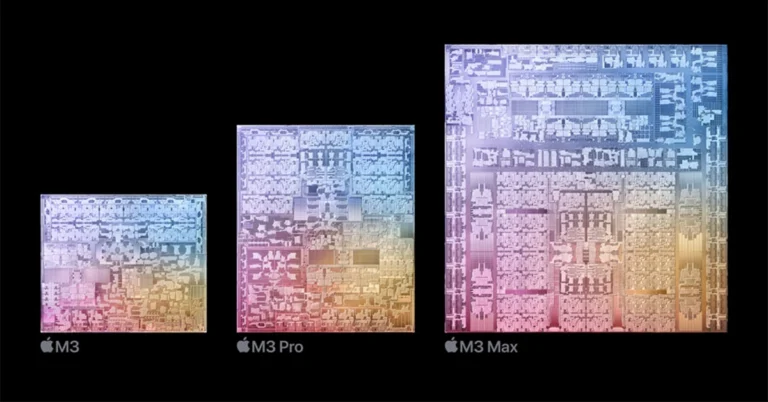
Apple’s latest PC processors M3, M3 Pro, and M3 Max have finally made their debut at today’s Apple Event Scary Fast. The advanced chipsets are the industry’s first to use 3nm process tech designed for a personal computer. This process allows more transistors to be crammed inside a smaller area hence speed and efficiency are improved. The M3 series of CPUs also brings improvements and new features to the recently released MacBook Pro and iMac. Apple’s family of chips has just got bigger as the company has brought not one but three PC chipsets at once- M3, M3 Pro, and M3 Max. The latest CPUs are said to be faster and more efficient. M3 has an 8-core CPU, with four performance cores and four efficiency cores, that is up to 35 per cent faster than before with support for up to 24GB of unified memory. Whereas, M3 Pro has a 12-core CPU consisting of six performance cores and six efficiency cores, offering single-threaded performance that is up to 30 per cent faster than M1 Pro. M3 Max’s 16-core CPU comes with 12 performance cores and four efficiency cores, which is up to 80 per cent faster than M1 Max. Also read: Samsung Galaxy Z Flip 5 Retro limited edition launched: Details inside The CPU performance cores and efficiency cores are 30 per cent and 50 per cent faster than those in M1, respectively. While the Neural Engine is 60 per cent faster than the Neural Engine in comparison to the M1 family of processors. Apple introduced M3, M3 Pro, and M3 Max most powerful chipsets for the new MacBook Pro and iMac Apple’s latest processors come integrated with the newest technology, specifically Dynamic Caching, and introduce hardware-accelerated ray tracing and mesh shading to Mac for the first time. They now have up to 2.5 times faster rendering speed than M1 chipsets. Ray tracing enables more accurate shadows and reflections, creating deeply immersive environments for game developers. Moreover, they are now supported by the new media engine AVI decode resulting in more efficient and high-quality video experiences from streaming services. The latest GPU for the M3, M3 Pro, and M3 Max chips features Dynamic Caching that allows local memory usage in real time so that only the exact amount of memory is required to do easy tasks. This is said to majorly increase performance for the most demanding pro apps and games. The GPU also allows hardware-accelerated mesh shading on the Mac, increasing geometry processing efficiency and capabilities for more visually complex scenes in graphics-intensive games and apps. M3 features 25 billion transistors and has a 10-core GPU that is 65 per cent faster than the previous generation. M3 Pro includes 37 billion transistors and an 18-core GPU that is 40 percent faster than M1 Pro supporting unified memory goes up to 36GB. With the M3 Pro on the new MacBook Pro tasks like stitching together and manipulating enormous panoramic photos in Adobe Photoshop are faster than before. M3 Max features up to 92 billion transistors with a 40-core GPU that is up to 50 per cent faster than M1 Max. It comes with support for up to 128GB of unified memory. The chipset has two ProRes engines that make video post-production work on even the highest-resolution content fast and fluid All the chipsets in the M3 family support up to 128GB of memory for better performance. Also, they support the most popular video codecs, including H.264, HEVC, ProRes, and ProRes RAW thanks to the advanced media engine that supports AV1 decoding. Apple’s latest processors M3, M3 Pro, and M3 Max will make the new MacBook Pro and iMac more energy efficient therefore helping in delivering the longest battery life ever in a Mac — up to 22 hours.

Garena Free Fire Redeem Codes Today 31 October 2023: Here is how to claim them

Garena Free Fire is a battle royale game with regular awards and tournaments to keep players interested. If you play Garena Free Fire, you should be aware of the redeem codes that are released on a daily basis. However, because the battle royale game is banned in India, players from other countries can use the Free Fire Redeem codes daily. If you’re unfamiliar with the Garena Free Fire redeem codes or don’t know how to get them, we’ve put together a step-by-step guide to help you redeem them. Check out Garena Free Fire Redeem Codes for 31 October 2023. The Free Fire redeem codes are a great way to get free stuff. These are 12-digit codes that contain alphabets and numbers, as well as an expiration date and time. Because the Garena FF redeem codes cannot be used more than once, you should hurry to the redemption page to claim your free reward before someone else does. To get a free reward, all you have to do is go to reward.ff.garena.com/en, which is the official redemption page. Also, keep an eye on this space for daily updates on Garena Free Fire redemption codes and rewards.

Garena Free Fire Redeem Codes Today 31 October 2023

X99TK56XDJ4X FF10GCGXRNHY FF11WFNPP956 YXY3EGTLHGJX FF1164XNJZ2V MCPTFNXZF4TA ZRJAPH294KV5 FF11DAKX4WHV FF10617KGUF9

How to Get Free Fire Redeem Codes for Garena on 31 October 2023?

  • Visit the Garena Free Fire game’s official website at reward.ff.garena.com.
  • Use your Facebook, Google, VK, Apple ID, Huawei ID, or Twitter account to log in.
  • You’ll be taken to a valid redemption code (s)
  • Copy and paste the 12-digit redemption code into the text box.
  • On the screen, a dialogue box will appear.
  • ‘Ok’ should be selected.
For the latest gadget and tech news, and gadget reviews, follow us on TwitterFacebook and Instagram. For newest tech & gadget videos subscribe to our YouTube Channel. You can also stay up to date using the Gadget Bridge Android App. You can find the latest car and bike news here.

iPhone 15 Pro Max: A Revolution in Mobile Gaming

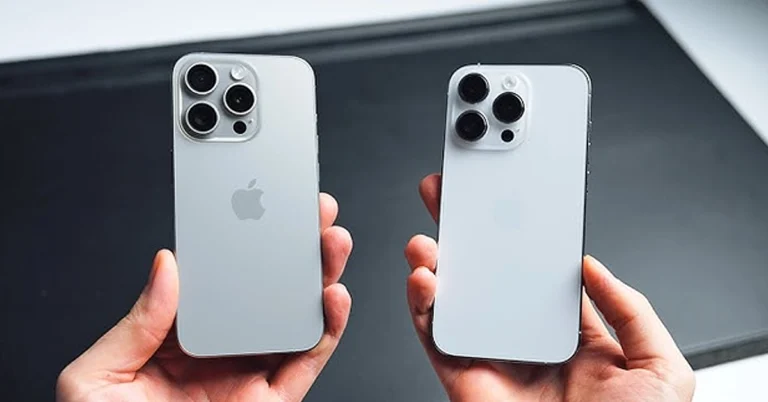
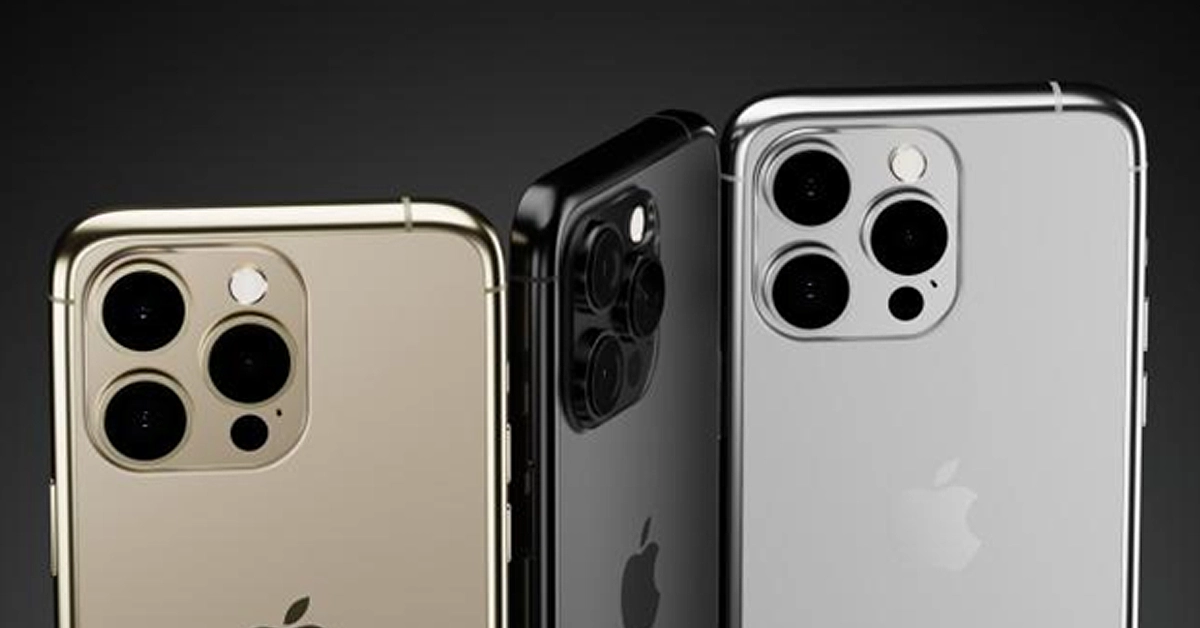
In the ever-evolving world of mobile technology, Apple has once again taken a giant leap forward with its latest flagship lineup, the iPhone 15 Pro Max. This groundbreaking device, powered by the A17 Pro Bionic processor, promises to revolutionize the mobile gaming experience like never before. With native support for console-quality gaming and an array of impressive hardware upgrades, Apple’s new offering is poised to leave an indelible mark on the gaming industry. It’s not just about gaming, though. The iPhone 15 Pro Max is a great way to try out new mobile apps. These apps offer a seamless and optimized gaming experience, making it an excellent choice for playing mobile iGaming with fast withdrawals and high cashouts. Whether you’re into high-stakes poker, thrilling slots, or classic table games, this phone’s capabilities ensure a top-tier mobile gaming experience. But what features make the iPhone 15 Pro poised as the world’s first true gaming smartphone?
  • The triple-A Game changer
  • A-17 pro chip
  • The Game Catalog Conundrum
  • The perfect size of the iPhone 15

The Triple-A Game Changer

Apple’s iPhone 15 Pro and Pro Max are set to change the game, quite literally. Unlike any other Android manufacturer with less powerful phones like the Tecno Camon, Apple is boldly stepping into the realm of true mobile gaming. No more watered-down versions or cloud gaming; the iPhone 15 Pro series boasts the capability to run triple-A (AAA) video games natively. These are the premium titles that video game publishers traditionally associate with gaming consoles like the PS5, Xbox Series X, or high-end PCs. This development is garnering excitement even from unlikely sources, a prospect that even our Editor-in-Chief, Aleksandra Andrishak, is excited about. In fact, she is just waiting for her order to be delivered. She was among the millions of people who preordered the iPhone 15 pro and here’s why:

The Power of iOS A17 Pro Chip

The heart of this gaming revolution lies in the A17 Pro chip, exclusively available in the iPhone 15 Pro and Pro Max. This 3nm chip, with an astounding 19 billion transistors, packs a serious punch. Apple estimates a 10% performance gain compared to its predecessor, the A16 Bionic chip, while the GPU receives a 20% boost with an additional core. Moreover, hardware ray tracing acceleration and Metal FX scaling technology promise to optimize the gaming experience. In terms of raw power, the iPhone 15 Pro rivals, if not surpasses, the PS4. Upcoming AAA games like Assassin’s Creed: Mirage are expected to run smoothly at 30 FPS in 1080p, although some graphical compromises may be necessary. These specs are madly insane for a phone! Storage capacity, however, remains a concern, as large game files may strain the 128 GB version.

The Perfect Size

Critics argue that the 6.1-inch screen of the iPhone 15 Pro might not do justice to intricate games like Assassin’s Creed: Mirage. Yet, the iPhone 15 Pro Max, with its 6.7-inch OLED panel, offers a more immersive mobile gaming experience. The perfect size also makes it easier to chat and seek tips from fellow enthusiasts.

The Game Catalog Conundrum

While it’s exciting to contemplate playing console-quality games on an iPhone, there are hurdles to overcome. Most games, including Assassin’s Creed: Mirage, Resident Evil Village, and Death Stranding, are ports not initially designed for the mobile. You can now download and update your favourite games on the app store on the home screen. If you can’t find them, update the app manually. Apple’s move into this space not only shakes up the gaming industry but also solidifies mobile gaming as a dominant force in the gaming world. It’s a great way to try out new mobile players and explore the endless possibilities that the future of mobile gaming holds.

Availability and Pricing

The iPhone 15 Pro Max hit the market on September 22, with Apple receiving millions of pre-orders even before the release date. If you haven’t made your order, then you should order it online from the Apple store or other trusted dealers. To avoid getting scammed, you can call Apple’s customer care number to seek help on how you can get it. The base model starts at $999, while the Pro Max 256GB black titanium version begins at $1,199. If you want a more vibrant super case, you can order the rose, gold or silver mobile versions. This pricing places these devices within reach of serious gamers and tech enthusiasts alike, making the future of gaming more accessible than ever before. And unlike Android phones, you do not have to worry about transferring your contacts and other files because iCloud got you covered. iPhone 15 However, pricing may deter some gamers from choosing the iPhone over traditional platforms. Why pay full price for a game on your iPhone when you can get it cheaper on a console with over 1 TB storage or PC. Apple might need to explore solutions like offering exclusive games through Apple Arcade+ or a Pro subscription.

Controls and Accessories

Although in-game controls on a touchscreen can be challenging to use since virtual buttons might clutter the screen, Apple has a solution. You can buy Bluetooth controller support and other Apple’s range of MFI accessories to ensure a seamless gaming experience. These accessories offer a solution to those who think that the iPhone 15s screen is way too small for onscreen controls. And yes, these hands-on controls and accessories improve your gaming experience.

Is the iPhone 15 the future of mobile gaming?

Yes, I know at this point I should stop bombarding you with superlatives, but this is the future unfolding. A while back, not even in my wildest dreams did I think gaming smartphones would be this powerful. However, with the iPhone 15, I can be able to play real console games on the phone. Apple’s bold move into console-quality gaming on mobile devices signifies a significant step forward for the gaming industry. This shift aligns with the growing trend of mobile gaming, which has become a dominant force in the gaming world. Gamers worldwide are buzzing with excitement over the prospect of playing high-end titles on their iPhones.

Other selling points

The USB C charging port and improved battery capacity Just like the Mac and iPad, Apple finally caved into pressure and resorted to including a USB C charging port. With a 3,274mAh / 12.70Wh battery, the iPhone 15 Pro outperforms the 14 Pro’s 3,200mAh battery, providing extended gaming sessions and more hours of online gaming, listening or downloading your favourite music on iTunes and live gameplay for avid gamers. An improved display The iPhone 15 and 15 Plus feature the same OLED Super Retina XDR display as last year’s models, but with an improved design and enhancements in brightness, reaching up to 1000 nits for typical max brightness and 1600 nits for peak HDR brightness, surpassing last year’s levels of 800 and 1200 nits, respectively.

Conclusion

The iPhone 15 Pro Max is poised to redefine mobile gaming by bringing console-quality experiences to the palm of your hand. With its A17 Pro chip and which promises to support AAA games, Apple is pushing the boundaries of what a smartphone can do. While challenges like game adaptation and pricing remain, the gaming community eagerly awaits the iPhone’s transformation into a gaming powerhouse. Even our Editor-in-Chief, Aleksandra Andrishak, can’t wait to try out new mobile gaming and see if the iPhone will win her over to Team Apple. It’s a revolution in mobile gaming, and since its release date, orders have been skyrocketing day by day.

Telegram rolls out new features: Replies 2.0, Account Colours, and more

0
Key Highlights
  • Users can now quote specific parts of a message in their replies.
  • Premium subscribers get the option to change the colour of their name, messages, and links in group chats.
  • Update the Telegram app on your device to use these new features.
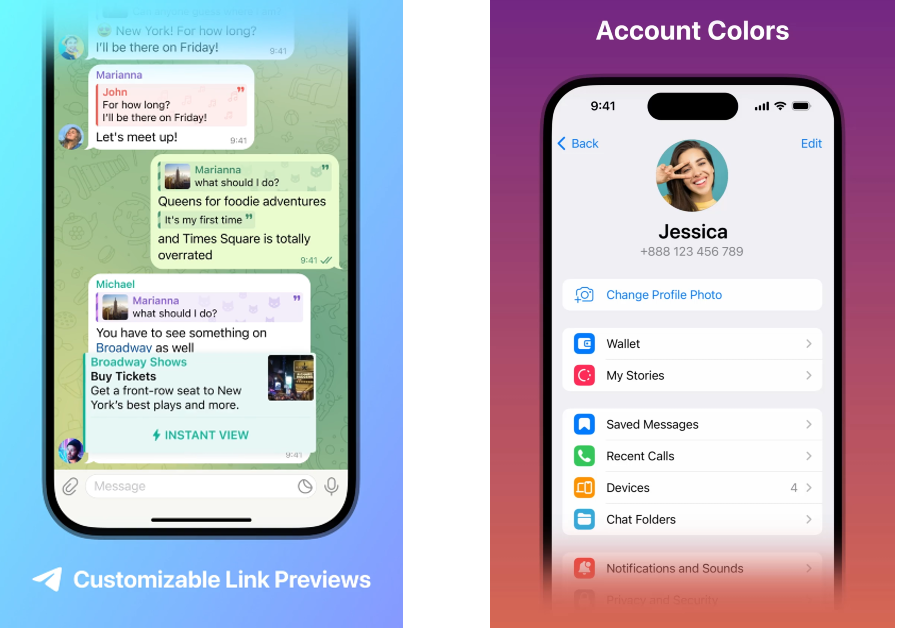
IM platform Telegram has always been a step ahead when it comes to experimental features and customisation options. In its latest update, Telegram has added new features like replies 2.0, account colours, quote formatting, adjustable link previews, and more. The messaging app currently boasts over 800 million monthly active users, making it one of the most popular IMs around. Read Also: Everything that we know about today’s Apple Event “Scary Fast” and how to watch it?

Telegram brings new features like quote replies, story improvements, and adjustable links

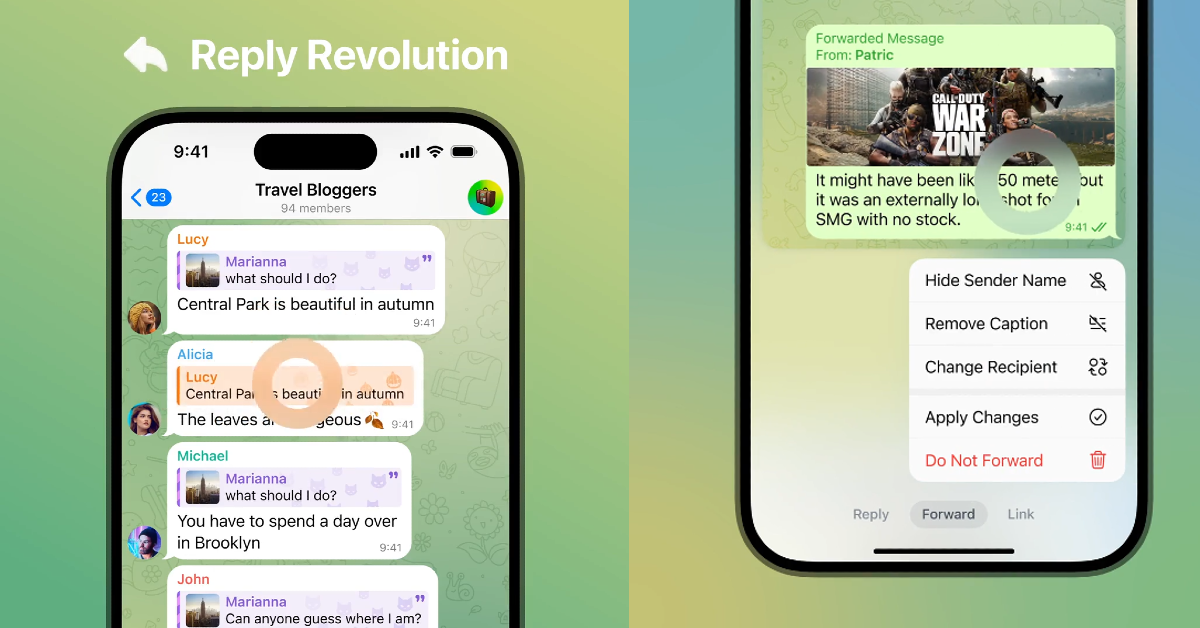
Dubbed ‘Replies 2.0’, the new reply function on Telegram lets you quote a specific part of the message while responding to it. Users can quote any part of a text with a simple ‘tap and drag’ gesture. Another significant feature in the ‘Replies 2.0’ package is the option to respond privately to a text that is sent to a group. Users can also choose to respond to a group text in another group. Telegram brings quote replies, story improvements, and adjustable links in new update Finessing its editing options, Telegram has added the quote formatting to the texts on the platform. Users can choose to add multiple quotes to any text, bringing clarity and flair to their responses. New tabs have been added to the menu, letting users access settings while replying, forwarding, or including links in messages. On top of that, users can also choose whether they want the link preview to be displayed before or after their message. The size of the media sent on the app can also be changed. The new update also brings a series of customisations for Telegram Premium subscribers. Users can now change the colour of their name, replies, links, and replies. The message background can now be changed as well. Channels boosted to Level 5 or higher can also access these settings. Finally, Telegram has also added support for Story playback gestures. Pressing and holding the screen while dragging right and left can now control the video playback. The front flash for selfies now gets multiple colour temperature options. The tutorial for these gestures can be accessed from the app as well. Read Also: How to acquire information about the Hindu heritage and know more using Google Search?

Conclusion

Telegram has always pushed the envelope when it comes to experimental features and giving users more control over the app. While most mainstream messaging apps play it safe, Telegram’s cutting-edge features are a big pull to draw new users. To access these new features, update the Telegram app using the Google Play Store or the App Store.

Lava Probuds 22 Review: An impressive soundstage for the price

The disappearance of the headphone jack from flagship and midrange smartphones has created a huge demand for affordable wireless earbuds. If you don’t want to splurge on premium TWS products, there are plenty of budget offerings that can get the job done. More recently, entry-level wireless earbuds have seen a great rise in popularity as they have massively upped their audio game. If you’re looking for a pair of earbuds under Rs 2,000 you no longer have to settle for a boxy output with barely any detail. Lava is one of the tech outfits that have consistently put out good TWS products over the last few years. We’ve been using its latest release, the Probuds 22 for the last few days. Here is our in-depth Lava Probuds 22 TWS review. Read Also: How to acquire information about the Hindu heritage and know more using Google Search?

Lava Probuds 22 review: Design

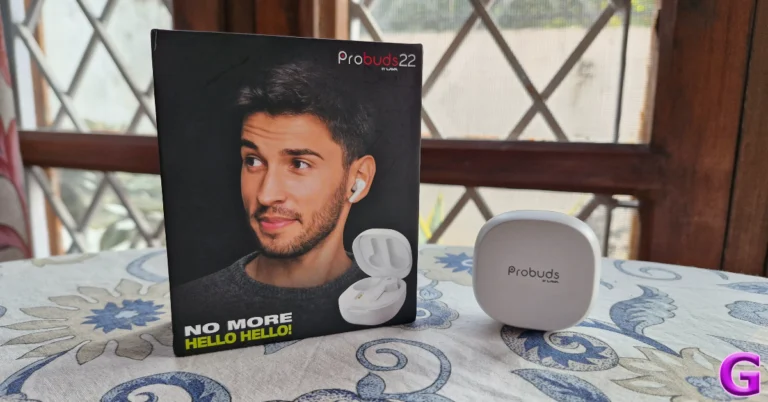
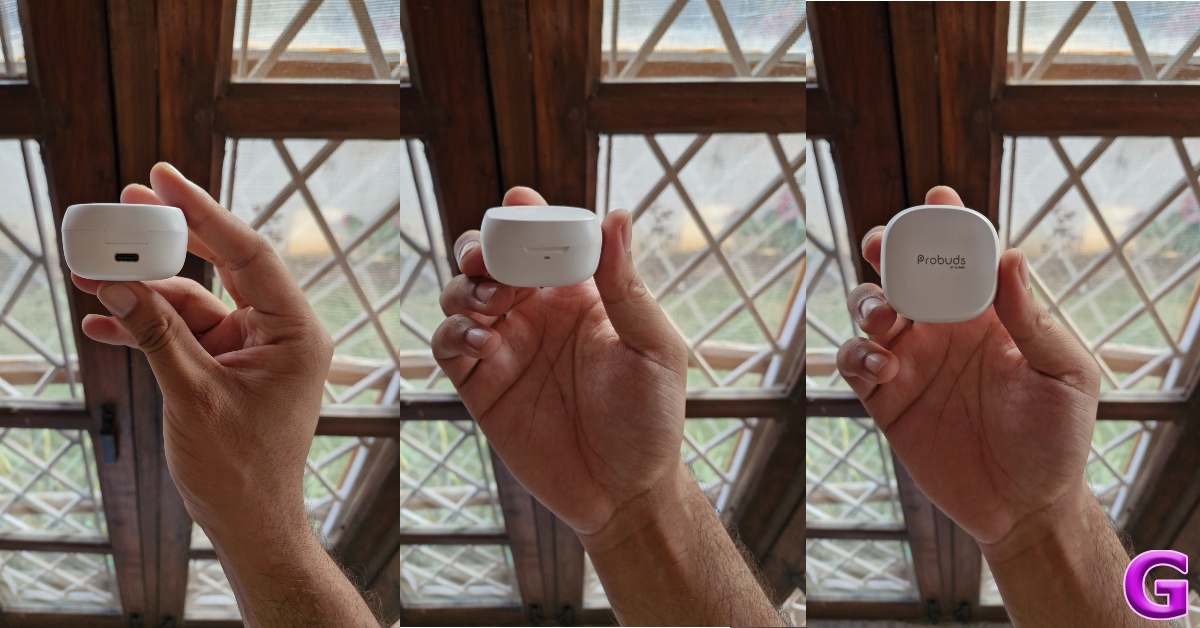
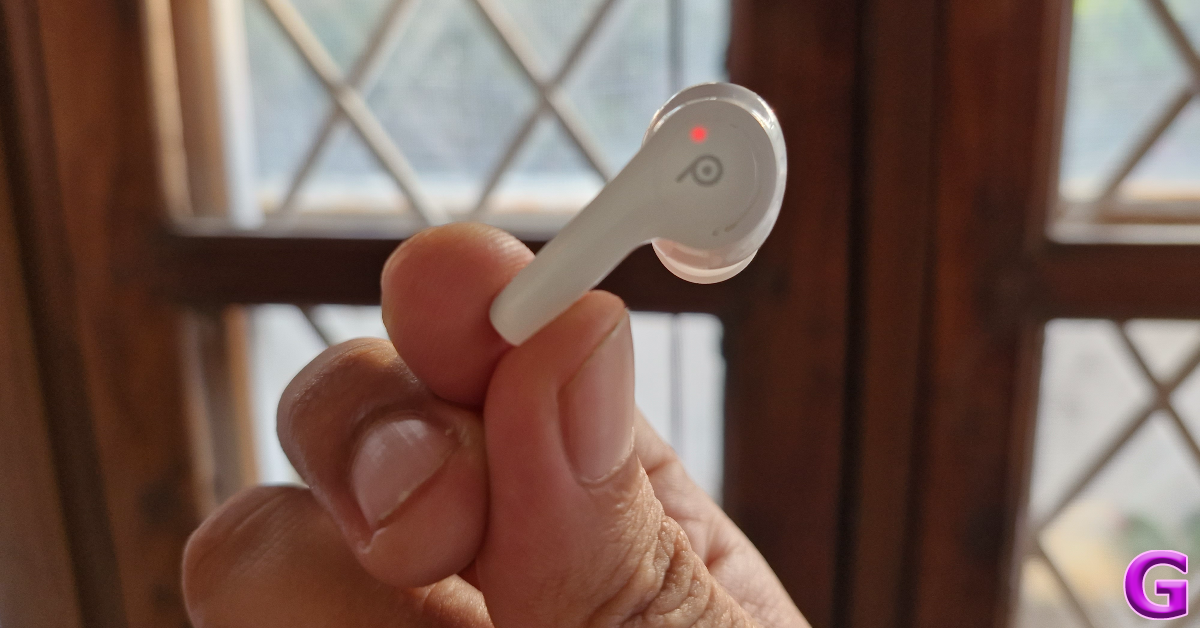
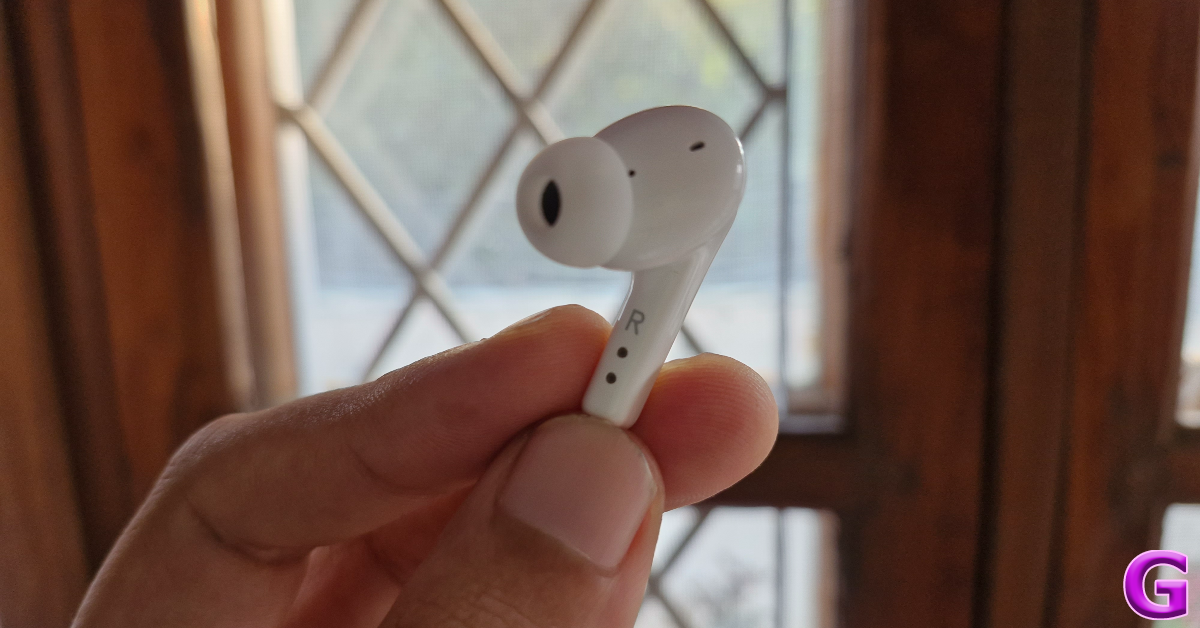
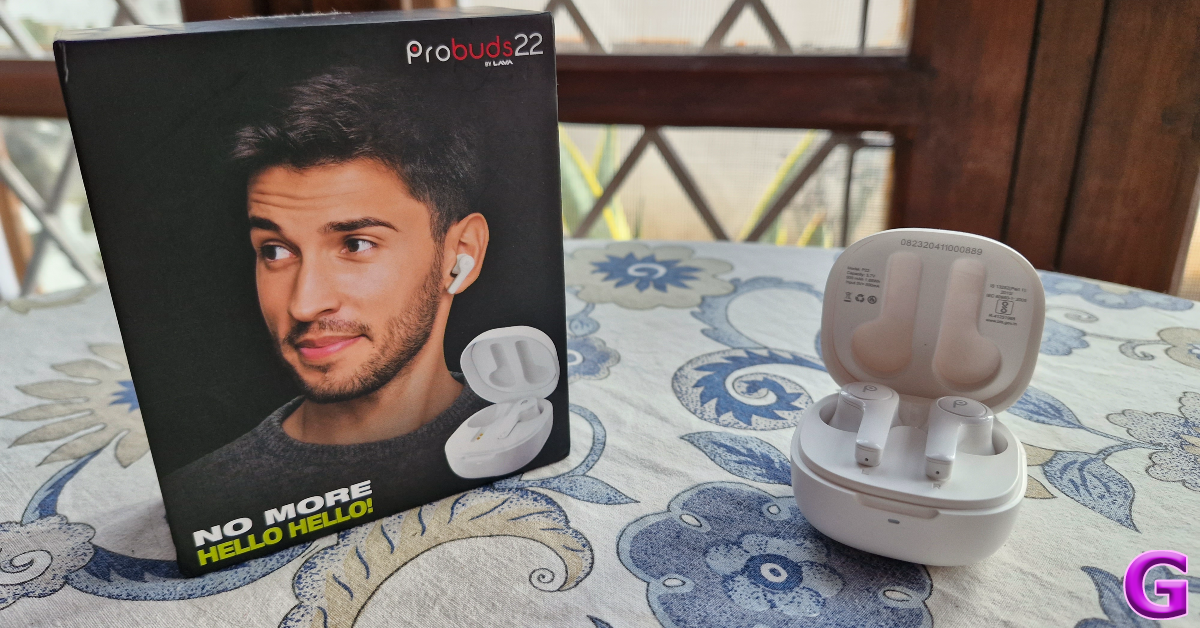
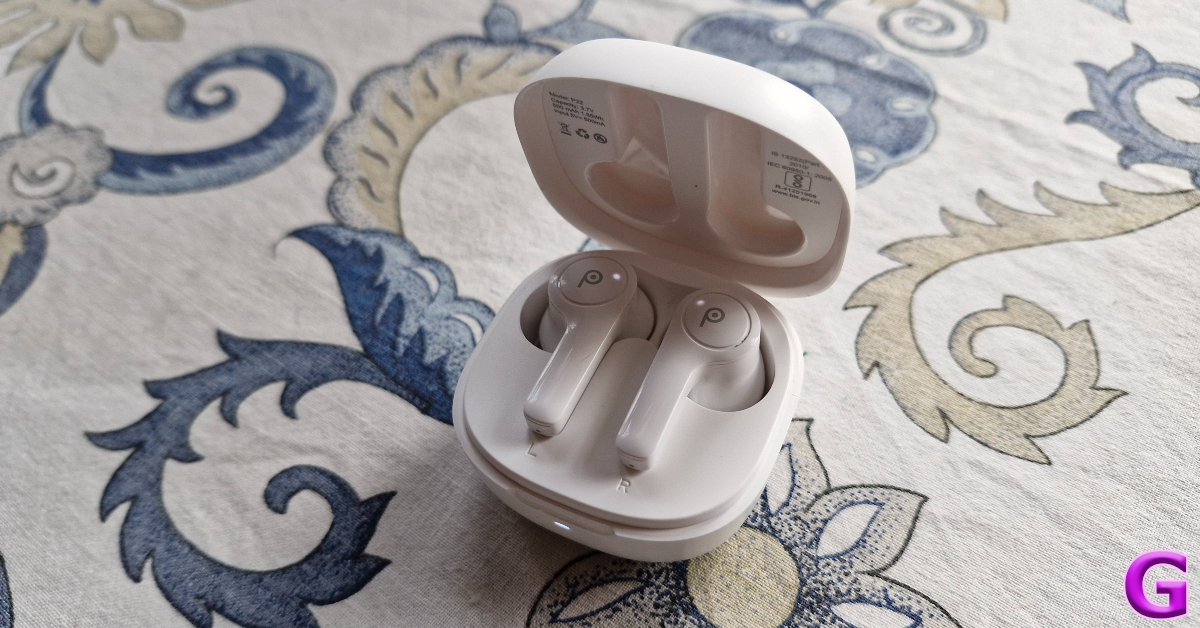
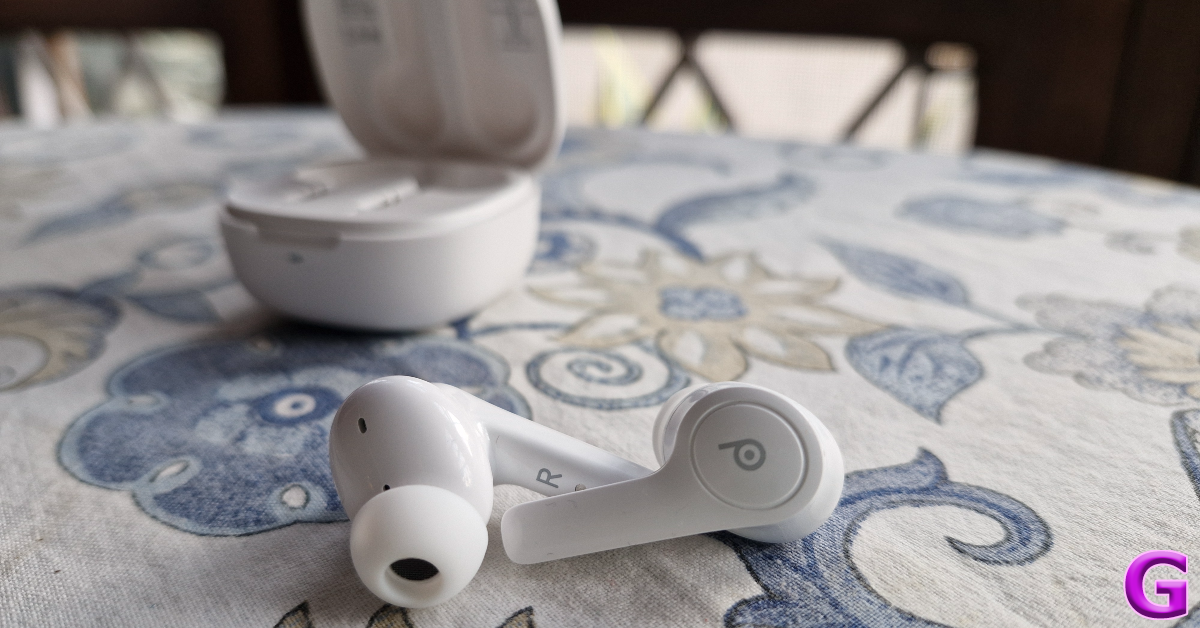
Inside the Lava Probuds 22, you’ll find the charging case with earbuds inside, two pairs of extra ear tips, a USB charging cable, a quick start guide, a warranty card, and some stickers. The Probuds 22 are available in two colour options – Space Black and Frost White. Lava Probuds 22 review: Design As far as design goes, Lava has kept things simple and practical. The plastic charging case sports a standard lunchbox design. The ‘Probuds by Lava’ branding can be found on top of the lid. A small LED notification light sits right below this lid. The USB Type-C slot is positioned under the hinge. After a week of rugged use, this charging case did not register any major scratches even after being kept in pockets with keys and loose change. The strength of the hinge is acceptable, although it is not the most versatile unit we’ve seen in this segment. The compactness and light weight of the case works in its favour. Lava Probuds 22 review: Design The earbuds feature the standard in-ear design. The stem is a bit longer than what we’re used to, but it doesn’t present any functional issues. There are four mics on either earbud, along with an LED indicator that lets you know the charge status. Made entirely out of plastic, these earbuds are very light and do not cause any fatigue to the ear. Even though they have a glossy finish, the earbuds have a snug fit. What the Lava Probuds 22 get dead right are the touch-based controls. In this price range, you won’t find a better touch-sensitive panel on any other TWS. A lot of times, these controls prove to be a big annoyance due to accidental touches while adjusting the earbuds. This wasn’t the case with Probuds 22. The long stem plays a big role in providing an ample gripping surface to adjust the buds. Lava Probuds 22 are rated IPX4 for dust and water resistance. This means you don’t have to worry about any damage due to sweat, minor water splashes, or light rain. We used the Probuds while working out and can confirm that they remained unaffected by sweat.

Lava Probuds 22 review: Performance

Delivering the audio output on the Lava Probuds 22 are two 12mm drivers. The TWS supports Bluetooth 5.3 and has a functional range of up to 10 metres. There’s support for Google Assistant and Siri as well. Lava Probuds 22 review: Performance The most important part of any TWS product is its audio profile. While most budget TWS play it safe with a bass-heavy output, Lava Probuds 22 surprised us with a well-balanced soundstage. There is a very prominent bassy element in the undertones, but it doesn’t ruin the mids and the highs. Instead, the higher frequencies are very well represented on the soundstage. We used the Probuds 22 to listen to a variety of genres, and it delivered a good performance every single time. The detail in the mix is quite satisfactory and we didn’t once feel that any integral element was missing. Our only minor gripe is that the output gets a little screechy when listening to music at the highest possible volume. For the ideal listening experience, you need to stick within the 40-80% range. With Quad Mic ENC onboard, the Lava Probuds 22 do a solid job of extracting the caller’s video from the background noise and relaying it effectively to the receiver. We were happy with the call clarity in an indoor setting. Outdoors, the audio takes a hit when there’s a lot of noise flowing into the earbuds. This is pretty standard for the TWS in this price range. There is no app support for Lava’s TWS products yet. This means there is no way to customise the touch controls or set up a personalised equaliser setting. The Probuds offer a low latency mode for gaming, but it can only be enabled using the touch controls. The gaming mode is a good feature to have, but it doesn’t hold a candle to the dedicated gaming earbuds in this category. We faced minor audio delays in certain patches of gameplay while playing COD Mobile. Lava claims 7 hours of continuous playtime on a single charge, with 50 hours of additional charge in the case. We got up to 6.5 hours of playtime while reviewing the Lava Probuds 22. The charge on the case lasted for almost 10 days. Our daily usage did not exceed more than 5-6 hours. It took us an hour to fully charge the case using a USB Type-C cable. A quick 10-minute is enough to power the earbuds for up to 2 hours. Read Also: How to find downloaded songs and playlists on Amazon Music?

Verdict

Priced at Rs 1,399 the Lava Probuds 22 are one of the best TWS wireless earbuds in their segment. If a bass-heavy audio output has kept you away from entry-level TWS so far, these earbuds could potentially change your mind. We were impressed by the balanced sound output and the adequate representation of the mid and high frequencies on the soundstage. The lack of app support is a significant drawback, but it isn’t something that we would consider a dealbreaker.

Lava Probuds 22: Pros

  • Good fit
  • Nicely tuned touch controls
  • Well balanced audio output

Lava Probuds 22: Cons

  • No app support

Samsung Galaxy Z Flip 5 Retro limited edition launched: Details inside

Key Highlights
  • Samsung E700 was launched in 2003.
  • It was the first phone to feature an antenna.
  • The Samsung Galaxy Z Flip5 Retro features similar features of the SGH-E700.
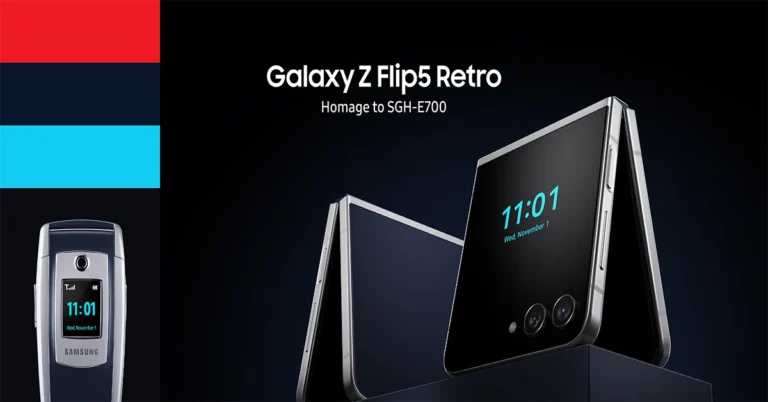
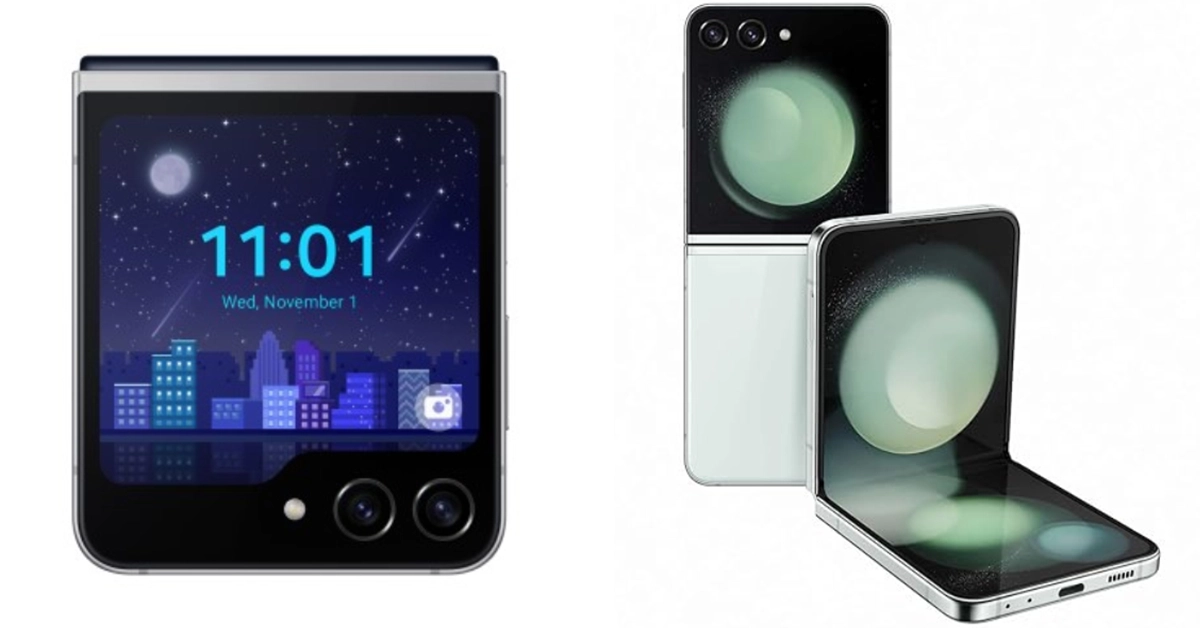
We always love a good story behind an upgrade and Samsung has just played right in to our hearts. To pay tribute to its iconic smartphone, the Samsung E700, the South Korean brand has introduced a limited edition Galaxy Z Flip 5 Retro. For those who are unaware E700 was launched two decades ago in the year 2003. The new Flip phone comes with a similar-looking silver and indigo blue hues. Samsung Galaxy Z Flip 5 Retro limited edition launched: Details inside The company via blog post said, “Samsung Electronics pays homage to the innovative design and features of SGH-E700 with the release of Galaxy Z Flip5 Retro, marking 20 years of technical advancement.”
Samsung has a history of paying tribute to its legendary smartphone and this time the company chose to homage SGH-E700 aka Samsung E700. It is the company’s first handset to feature an antenna. The latest Samsung Galaxy Z Flip 5 is modelled after the SGH-E700.
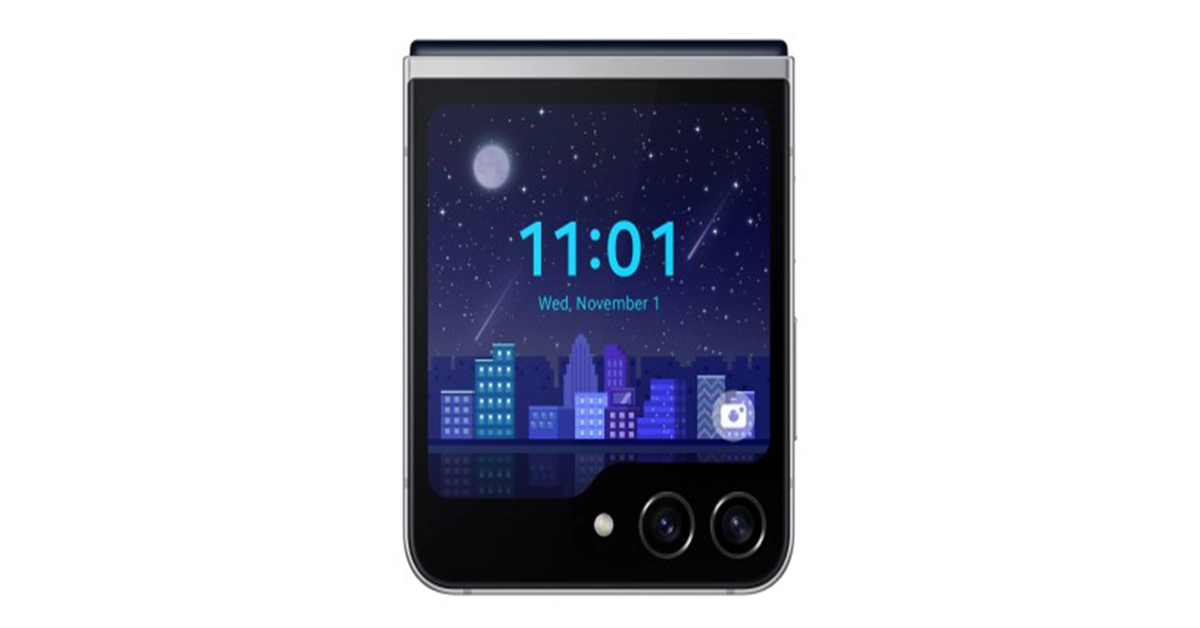
Also Read: Samsung Galaxy Z Flip 5 Review: Flip it good! The Samsung Galaxy Z Flip 5 Retro has similar features to the SGH-E700, such as the combination of indigo blue and silver colours. It also reflects the UX design reinterpretation of 2000s pixel graphics and an exclusive animation on the Flex Window. Galaxy Z Flip 5 Retro Vs Galaxy Z Flip 5 Along with the new clamshell design phone, the company also ships three Flipsuit cards featuring logos from different eras of Samsung’s history, a Flipsuit case and a collector card engraved with a unique serial number. The Samsung Galaxy Z Flip5 Retro will be available for purchase till stock lasts. You can buy it in Korea, the U.K., France, Germany, Spain and Australia through Samsung’s official website, Samsung.com. Also Read: Everything that we know about today’s Apple Event “Scary Fast” and how to watch it? The Samsung Galaxy Z Flip 5 was launched in July this year. It features a 6.7-inch FHD+ Dynamic AMOLED 2X Infinity Flex primary display along with a 3.4-inch Super AMOLED cover screen. The clamshell design phone runs on Android 13 with OneUI 5 out of the box. Under its hood, there is a Snapdragon 8 Gen 2 processor for Galaxy. It is available with 8GB of RAM and up to 512GB of internal storage. The Galaxy Z Flip 5 is highlighted with a dual rear camera setup that includes a 12-megapixel ultra-wide primary sensor and a 12-megapixel wide-angle camera. A 10-megapixel selfie camera for selfies is featured on the front of the foldable display. The flip phone sports a 3,700mAh battery with 25W charging support.

How to transfer money from GPay To Paytm?

0
Before UPI payments became the norm, online wallets were the standard way of making quick payments. Some users still prefer online wallets because they are generally more reliable during peak traffic hours. This is because online wallets do not rely on your bank’s servers to send money. If you are a Paytm user, you can recharge your online wallet using Gpay as well. In this article, we show you how to transfer money from Gpay to Paytm. Read Also: How to find downloaded songs and playlists on Amazon Music?

Transfer money to your Paytm wallet using GPay

Transfer money to your Paytm wallet using GPay Step 1: Launch the Paytm app on your device and select Wallet. Step 2: Tap on Gift Voucher and change it to Paytm Wallet. The header should now read ‘Add money to Paytm Wallet’. Step 3: Enter the amount you want to send and hit Proceed. Step 4: Hit Add [amount] in the popup box. Step 5: In the payment options window, tap on UPI and select GPay. Step 6: Enter your UPI PIN to complete the money transfer. 

Perform a UPI transaction

Perform a UPI transaction Paytm and Gpay support UPI (Universal Payments Interface) transactions, which means you don’t need to transfer money to your online wallet before sending it to the recipient. With UPI, you can send money directly from your bank account to another party at any given time. Here’s how you can send money via UPI on the Paytm app. Step 1: Launch the Paytm app on your smartphone. Step 2: Select the transfer method for the UPI transaction. You can choose to send money to the recipient using their phone number or UPI ID. Step 3: To send money to a GPay UPI ID, tap on ‘To Bank or Self A/c’ and select ‘Enter UPI ID of Any UPI App’. Alternatively, you can also scan the QR Code linked to the recipient’s account by tapping on ‘Scan & Pay’. Step 4: Enter the amount you want to pay and hit Pay Securely. Step 5: Enter your UPI PIN to complete the transaction.

Frequently Asked Questions (FAQs)

Does the GPay app have a wallet?

Google has a separate wallet app of its own called ‘Google Wallet’. This app is currently not available in India. The GPay can be used for UPI transactions and bank transfers.

Can I transfer money to my Paytm wallet using GPay?

Paytm allows you to add money using any UPI service, including Gpay. Simply go to the Wallet option and select ‘Add money’. You can complete the transaction using GPay, PhonePe, BHIM, or any other app that allows UPI transfers.

What is the maximum amount of money that I can add to my Paytm wallet?

Your Paytm wallet cannot exceed an amount of Rs 1 lakh. This means the maximum amount of money you can add to it is Rs 99,999. Read Also: Samsung Calendar Not Syncing with Google Calendar? Here are 7 fixes

Conclusion

This is how you can add money to your Paytm wallet using GPay. Instead of using GPay, you can use any other app that supports UPI payments. This includes PhonePe, BHIM, BharatPe, and others. If you’re looking for another quick way to send money using UPI, check out UPI Lite. This new service is supported by most UPI apps and does not require you to enter your UPI PIN to complete small transactions.

Top 10 ways to fix ‘Android phone screen keeps turning on randomly’

0
Do you ever notice your phone’s screen suddenly light up even when it doesn’t receive a notification? It is easier to ignore if it happens now and then, but it can be a real headscratcher if it happens more frequently. Some users are quick to jump to the conclusion that their device is being controlled by someone else remotely. However, the truth is often much simpler. In this article, we bring you the top 10 ways to fix the ‘Android phone screen keeps turning on randomly’ issue. Read Also: Samsung Calendar Not Syncing with Google Calendar? Here are 7 fixes

What is causing this strange behaviour?

Watching a phone’s screen light up randomly is weird to witness. However, like most oddities, this can be explained too. Here are some reasons why your phone’s display might be acting irregularly: Dirt accumulation under the screen protector: Dirt and dust particles stuck under the screen protector can trigger the touch display and cause it to light up randomly. If the screen protector is not stuck properly to the display, pull it off and apply it again. Faulty proximity sensor: The proximity sensor on your phone is responsible for killing the display when you bring it close to your ear to pick up a call. When you move the phone away from your ear, it lights up again. A faulty proximity sensor can cause the display to light up randomly. Ghost notifications: Notifications cause your phone to light up. However, when a notification disappears immediately upon arrival, it is called a ‘ghost notification’. This typically happens due to glitches in the software. Rogue apps: A third-party app gone rogue can mess with your phone’s normal functioning and cause it to behave strangely. Random display flashes are not an uncommon sign of this issue.

Turn off Lift To Wake

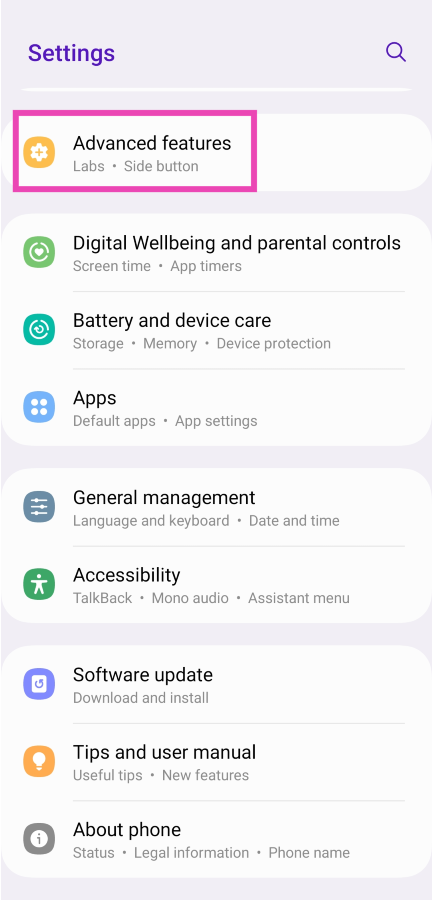
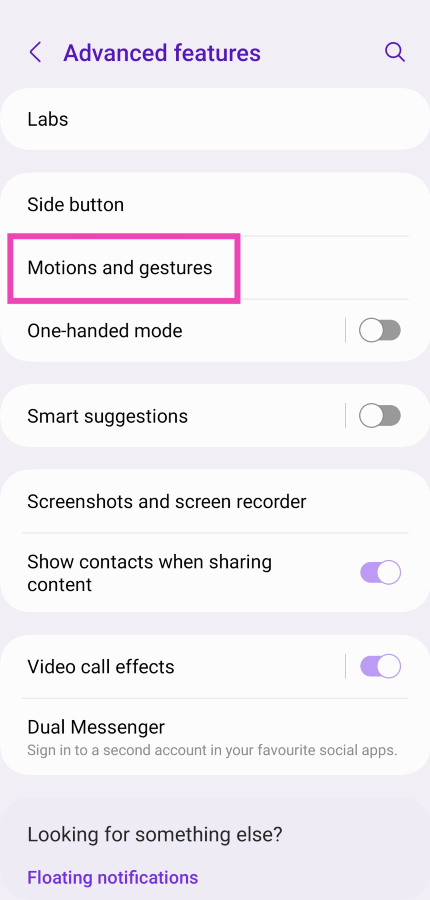
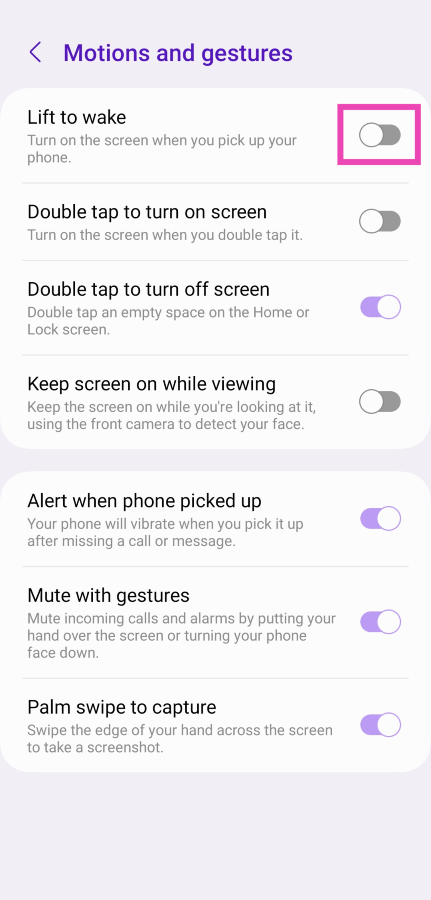
Lift to wake is a handy feature that allows you to quickly glance through your notifications and look at the time on your phone, without needing to press a button. As the name suggests, you simply need to lift your phone to activate the lock screen. On certain phones, this feature is turned on by default. If you don’t want your device’s screen to get activated every time you lift it, here’s how you can turn it off. Step 1: Go to Settings and select Advanced features. Step 1: Go to Settings and select Advanced features. Step 2: Tap on Motions and gestures. Step 2: Tap on Motions and gestures. Step 3: Turn off the toggle switch for Lift to wake. Step 3: Turn off the toggle switch for Lift to wake.

Turn off Double Tap to Turn on Screen

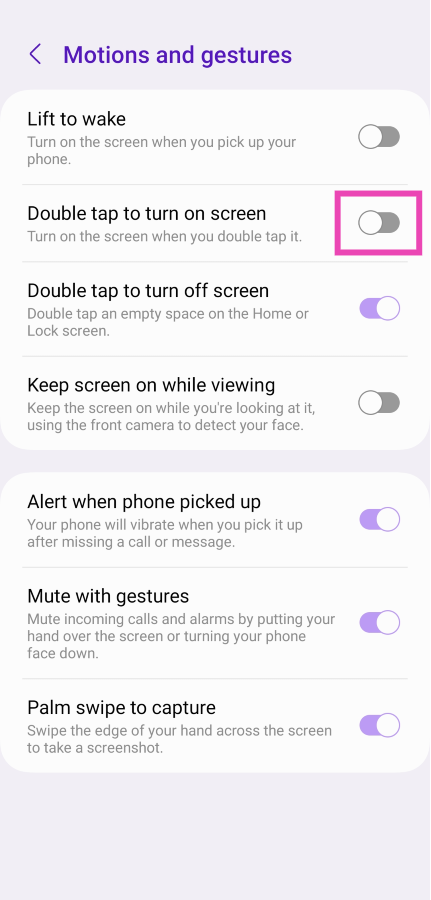
If your phone’s screen keeps turning on while you’re fidgeting with it, it is most likely due to the ‘Double Tap to Turn on Screen’ feature. This handy function cuts your reliance on the side key to unlock your phone. A double tap is all it takes to lock your phone or turn on the lock screen. If you don’t want your phone to respond while you’re tapping its idle screen, here’s how you can turn off the double tap for your lock screen. Step 1: Go to Settings and select Advanced features. Step 1: Go to Settings and select Advanced features. Step 2: Tap on Motions and gestures. Step 2: Tap on Motions and gestures. Step 3: Turn off the toggle switch for Doube tap to turn on screen. Step 3: Turn off the toggle switch for Doube tap to turn on screen.

Make sure the side key isn’t pressed

Software glitches aside, there is a good chance that your phone’s screen keeps lighting up randomly because of the side key getting triggered. More often than not, this is due to a faulty case that isn’t a perfect match for your phone and presses against the side key. Inspect the case thoroughly to know for sure. Better yet, pull your phone out of the case and use it for a bit to see if you encounter the problem again.

Disable Google Assistant when your phone is locked

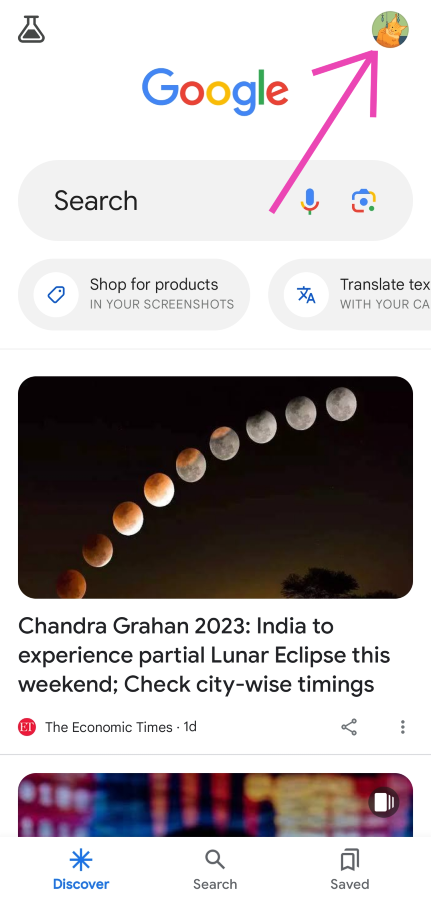
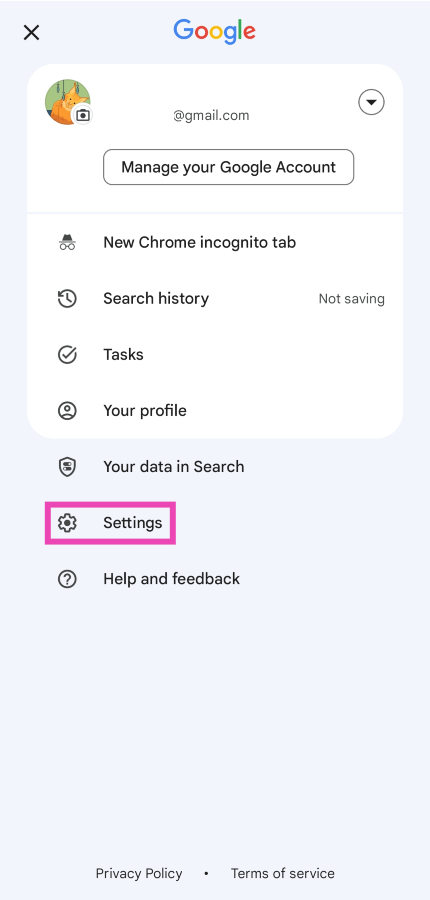
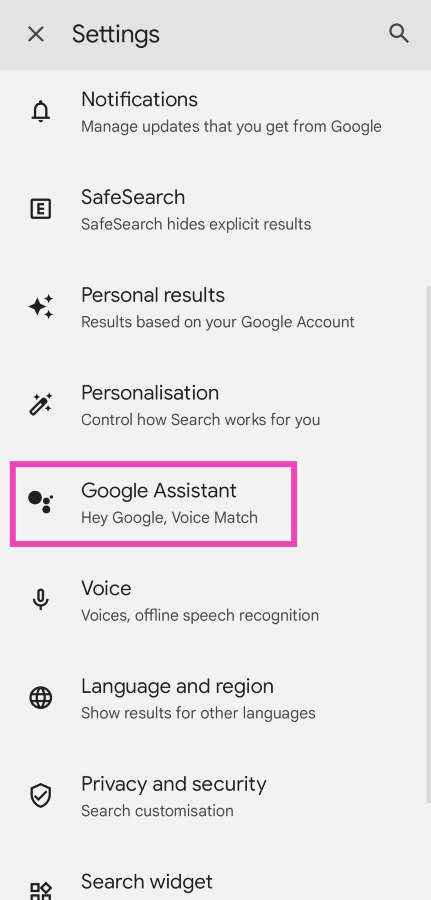
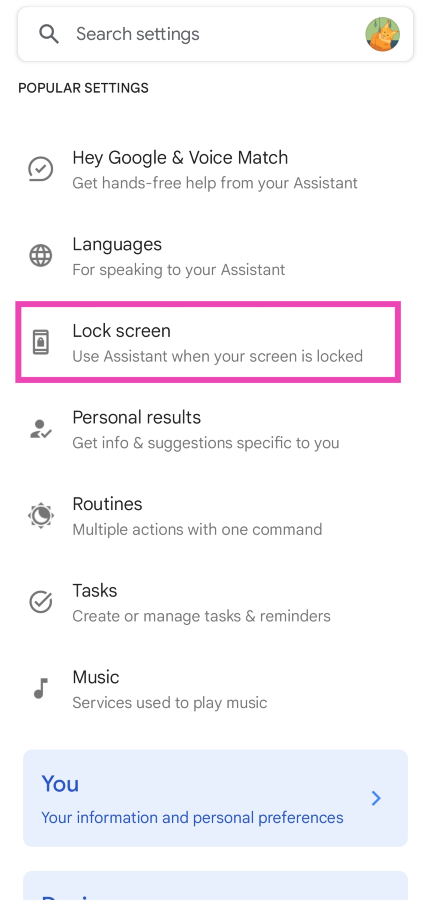
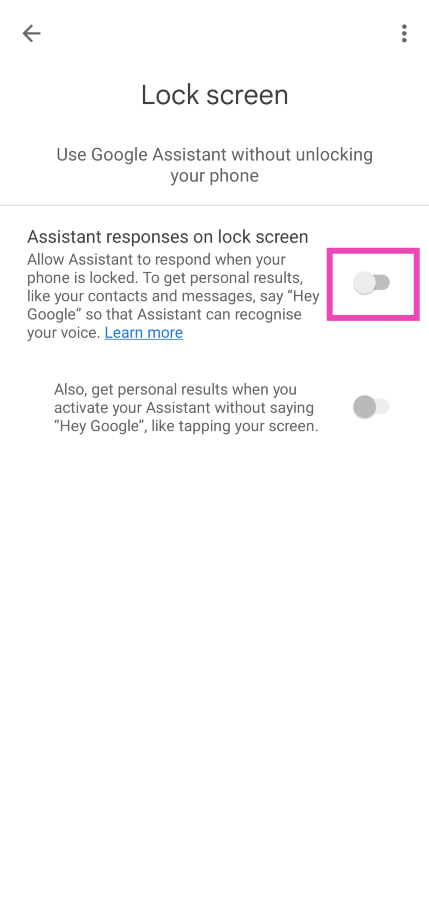
Your phone is very receptive to the ‘Hey Google’ voice trigger. It can even set off the voice assistant when your phone is locked, springing the dormant lock screen into action. Accidental triggers may be uncommon, but they are known to happen. Here’s how you can disable Google Assistant when your phone is locked. Step 1: Tap the Google widget on your phone’s home screen. Alternatively, launch the Google app from the app drawer. Step 2: Tap on your profile picture at the top right corner of the screen. Step 2: Tap on your profile picture at the top right corner of the screen. Step 3: Hit Settings. Step 3: Hit Settings. Step 4: Select Google Assistant. Step 4: Select Google Assistant. Step 5: Tap on Lock screen. Step 5: Tap on Lock screen. Step 6: Turn off the toggle switch for Assistant responses on lock screen. Step 6: Turn off the toggle switch for Assistant responses on lock screen. Top 9 ways to fix ‘Android phone screen keeps turning on randomly’

Check for Ghost notifications

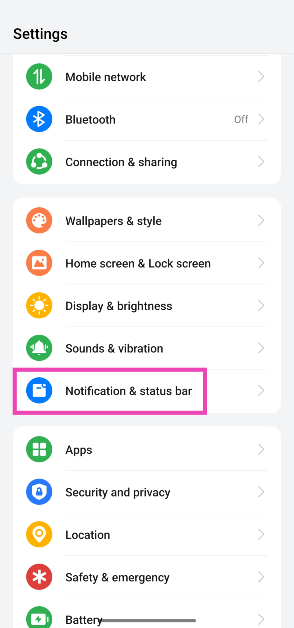
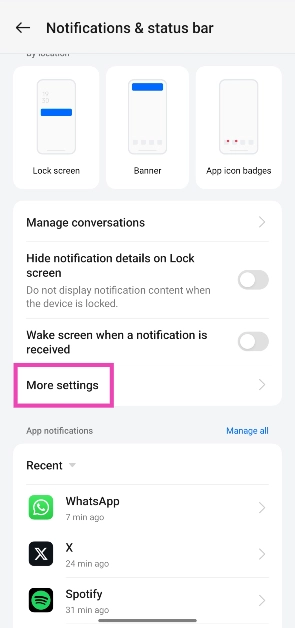
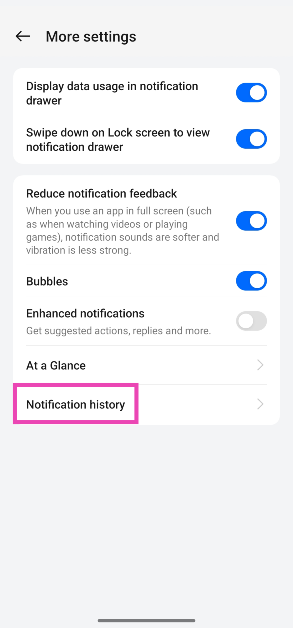
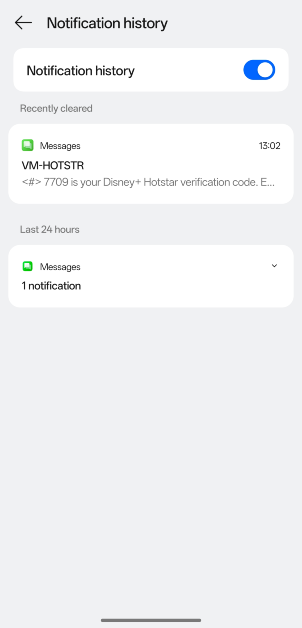
A ‘ghost notification’ is one that flashes on your screen for a brief moment and immediately goes away. If you notice your phone’s screen light up but can’t view any new notifications, there is a way you can check for them. Here’s how. Step 1: Go to Settings. Step 2: Tap on Notification & status bar. Step 2: Tap on Notification & status bar. Step 3: Tap on More settings. Step 3: Tap on More settings. Step 4: Select Notification history. Step 4: Select Notification history. Step 5: This is where you can see the log of all the notifications that your phone has received. The most recent notification will be at the top of the list. Step 5: This is where you can see the log of all the notifications that your phone has received. The most recent notification will be at the top of the list.
Restart the phone in Safe Mode

If you suspect that your phone’s screen keeps randomly turning on due to a malfunctioning third-party app, try restarting your phone in Safe Mode. Press and hold the side key to enter the power menu, then tap and hold the  Power Off option to activate Safe Mode. Once your phone enters safe mode, it will disable all the third-party apps on the system. If you encounter the issue again, it means that third-party apps have nothing to do with it. However, if your phone keeps functioning normally, you will need to figure out which third-party app is the culprit behind this problem and remove it from your device.

Use a different charger

If you only experience random lock screen triggers while charging your phone, it is likely due to a faulty charger. Inspect the USB cable and the power adapter for any damage. If your charger isn’t able to constantly power your phone, it will do so in fits and bursts. This causes the lock screen to light up randomly. You can even try using a different wall outlet if you’re sure there is nothing wrong with your charger.

Check the proximity sensor

Your phone’s proximity sensor is responsible for cutting off the display when you bring your phone close to your ear upon picking up a call. If this sensor starts malfunctioning, it will trigger the lock screen into action at random times. Dial *#0*# on your phone and tap on ‘Sensor’ to perform a quick diagnostic test. Give your phone’s screen a quick wipe to make sure that grime and dirt do not collect on the sensor. Read this article to learn other tricks to fix this issue.

Update your phone’s OS

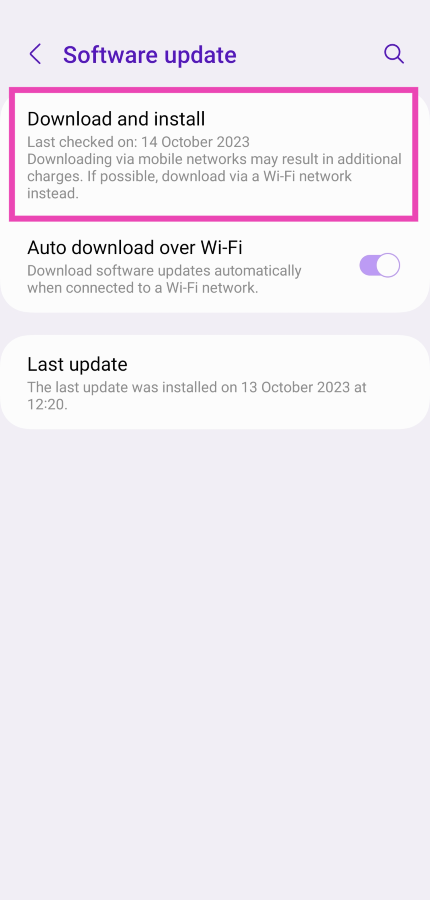
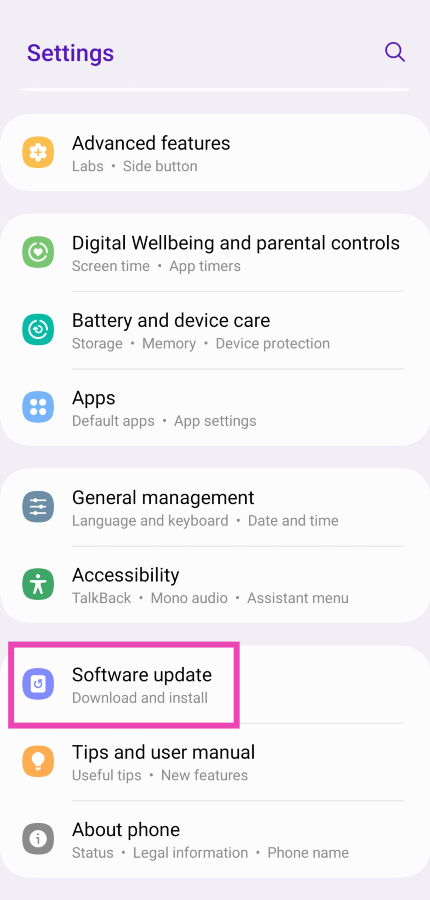
If the problem you’re facing is bug-related, chances are that the manufacturer has already patched it with an update. Here’s how you can update your phone’s OS. Step 1: Connect your phone to a WiFi network and plug in its charger. Step 2: Go to Settings and select Software update. Step 2: Go to Settings and select Software update. Top 9 ways to fix ‘Android phone screen keeps turning on randomly’ Step 3: Tap on Download and Install. Your smartphone will check for any new updates. Step 3: Tap on Download and Install. Your smartphone will check for any new updates. Top 9 ways to fix ‘Android phone screen keeps turning on randomly’ Step 4: If an update is available, tap on Install Now. You can also schedule the update for a later time.

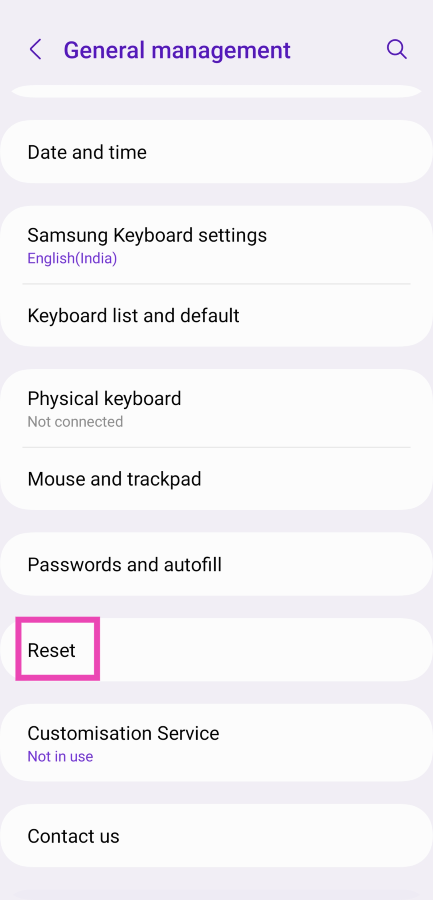
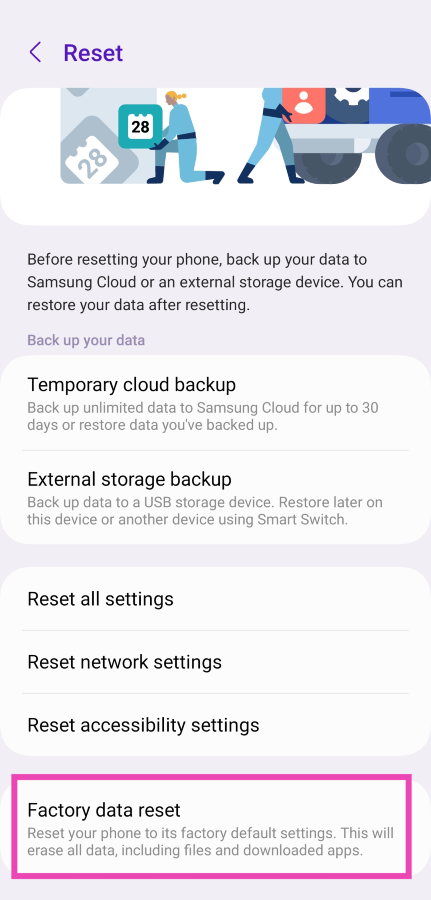
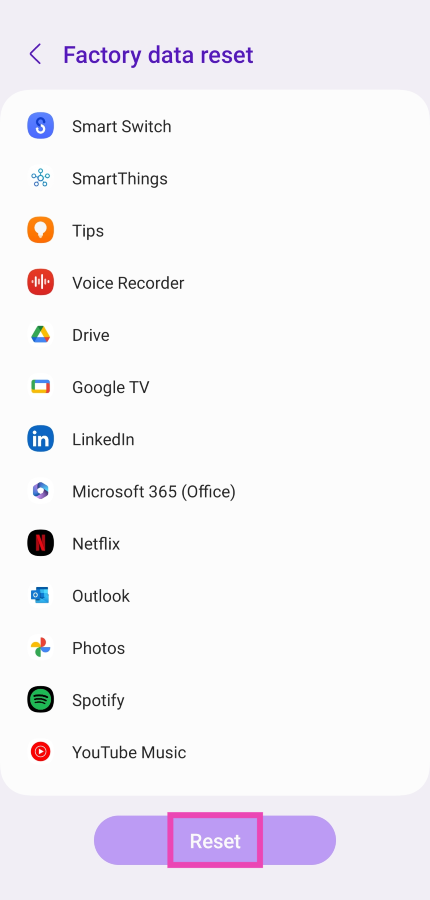
Perform a factory reset of your device

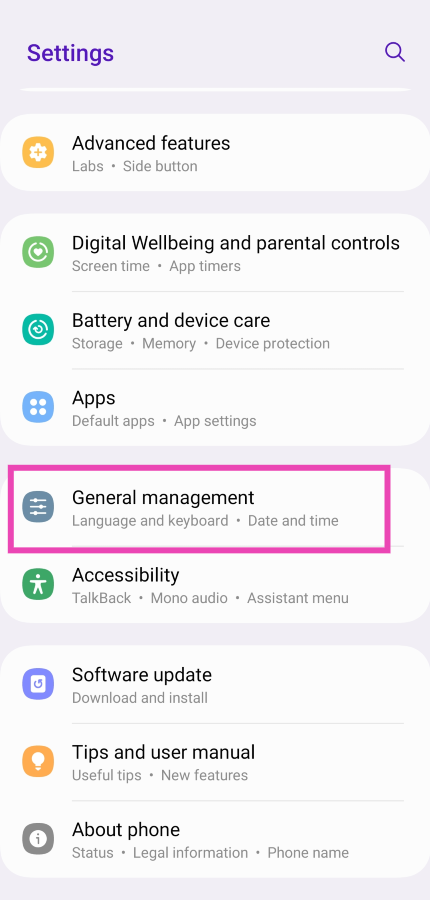
If the issue is strictly software-related, you can perform a factory reset of your device as a last-ditch measure to fix it. Make sure you have backed up all your personal data since a complete reset of your phone will permanently erase it. Step 1: Go to Settings, scroll down and select General management. Step 1: Go to Settings, scroll down and select General management. Top 9 ways to fix ‘Android phone screen keeps turning on randomly’ Step 2: Tap on Reset. Step 2: Tap on Reset. Top 9 ways to fix ‘Android phone screen keeps turning on randomly’ Step 3: Select Factory data reset. Step 3: Select Factory data reset. Top 9 ways to fix ‘Android phone screen keeps turning on randomly’ Step 4: Scroll down and tap on Reset. Step 4: Scroll down and tap on Reset. Top 9 ways to fix ‘Android phone screen keeps turning on randomly’

Frequently Asked Questions (FAQs)

Why does my phone’s screen keep randomly turning on?

If your phone’s screen randomly lights up without pressing the side key, it could be due to the ‘raise to wake’ feature which activates the lock screen to give you a quick peek at the notifications every time you lift your phone. You can turn this feature off from advanced settings.

Can ghost touches cause my phone’s screen to light up randomly?

While it is super uncommon for ghost touches to affect your phone’s lock screen, it is not entirely impossible. If the ‘double tap to wake’ feature is enabled on your device, it can cause ghost touches to turn on the screen. To eliminate the ghost touches, wipe your phone’s screen thoroughly and replace the screen protector.

What is the main cause of ghost touch?

Water droplets, dust particles, or grime collecting under the screen protector are the main causes that lead to ghost touches on your phone.

How do I fix the ghost screen on my phone?

Inspect the phone’s screen for any physical damage and check the proximity sensor. Additionally, make sure your phone’s OS is updated to the latest version. Use a high-quality charger to power your device and not a knockoff that trickle charges it.

How do I find out if the proximity sensor on my phone is broken?

A faulty proximity sensor can trigger your phone’s lock screen randomly. Dial *#0*# and tap on ‘Sensor’ to run a diagnostic test on it. Read Also: 5 best video players for Chromebooks

Conclusion

These are the top 10 ways to fix the ‘Android phone screen keeps turning on randomly’ issue. If these fixes don’t work out for you, chances are that your phone’s hardware is at fault. Take your device to a professional service centre to diagnose the problem. Got any more questions? Let us know in the comments!

Everything that we know about today’s Apple Event “Scary Fast” and how to watch it?

Key Highlights:
  • New Lineup of Apple Mac laptops will be launched.
  • New iMac models will be out too.
  • Next generation of Apple laptop CPUs will also likely be showcased in these machines.
To our amazement, Apple is holding a 2nd event in October 2023. They dropped this bombshell on all of us that something from the Mac series etc (if we go by the images, and rumours) will be revealed at this event. Apple is all set to host the “Scary Fast” event today/tomorrow (depending on which side of the earth you are from). This will be the company’s second fall event after the iPhone 15 Series launch event. Apple has not fully revealed any details regarding today’s Apple Event but rumours are rife it is likely to announce the new generations of MacBooks and iMacs.

Where and when to watch Apple’s “Scary Fast” Event live?

Apple Event which the company has named “Scary Fast” will be hosted today in some regions and tomorrow in some others. October 30 today is the set date but in India, it will be October 31. The event times are 5 PM PT and 5.30 AM IST. So in India, Apple fans have to wake up early morning on Tuesday to catch the event live. The Apple Event will be live-streamed via the company’s website, official YouTube channel and Apple TV app.
As we said earlier the event timing may differ so that you don’t miss out on today’s Apple event we have listed down the timing for your regions as per date. The live stream will begin at:

On October 30:

  • California at 5 PM PDT
  • New York at 8 PM EDT
  • Canada at 8 PM ADT
  • Vancouver: 5 PM PDT

On October 31:

  • India at 5.50 AM IST
  • UK at 12 AM GMT
  • UAE at 4 AM GST
  • Australia at 10.30 AM ACDT
  • South Africa at 2 AM SAST
  • China at 8 AM CST
  • Hong Kong at 8 AM HKT
  • South Korea at 9 AM KST
  • France at 1 AM CET
  • Indonesia at 7 AM WIB
  • Singapore at 8 AM AWST
  • Japan at 9 AM JST
  • Turkey at 3 AM TST
  • Germany at 1 AM CET
Also Read: How to acquire information about the Hindu heritage and know more using Google Search?

Here is what to expect from today’s Apple Event.

As the iPhone 15 Series has already debuted globally a month ago today’s Apple Event “Scary Fast” main spotlight will be on new Macs. Reports claimed that today the company might unveil the latest edition of 14-inch and 16-inch MacBook Pro models. Both the variants are likely to be powered by the latest M3 Pro and M3 Max processors.
In addition to this, the company may also present a revamped 24-inch iMac. While it might not get any design modification but M3 Chip is expected to power it.
Similar to the new Apple iPhone 15, AirPods, Watch Series 9 and Watch Ultra the next generation of MacBook may now ditch the Lightning port for a USB port for charging and data transfer. Not just that revamped Magic Keyboard, Magic Mouse, and Magic Trackpad are also expected to debut alongside the new Mac. Mac Mini is also expected to launch at today’s event powered by an M1X chip. It might not receive any substantial changes but the Mini is likely to have a plexiglass top with an aluminium enclosure and a magnetic power port similar to the 24-inch iMac.

How to acquire information about the Hindu heritage and know more using Google Search?

The festive season in India has arrived. If you are one of those people who are attracted by Hindu culture and its heritage and want to know the significance of the upcoming festivals then Google will help you with this. In this article, we will be highlighting some Google Search Tips that will help you learn about the Hindu Heritage, virtually explore, shop and learn more. In India festivities begin with the start of Navratri and last until Guru Purnima. Indian festivals usually fall between the months of October and November and Diwali is the biggest festival in the Hindu culture that is not only celebrated in the nation but across the globe. The vibrant colourful culture of India is what draws people the most from outside of the country.  Now, Google is helping its users across the globe to know about the expansive and rich culture of Hinduism. Ahead of Diwali, it is educating people about the thousands-year-old rich cultural, intellectual, and spiritual legacy of Hinduism. Also Read: How to add your email to your Instagram account, bio, or story? Top 3 ways With the help of Google search users can virtually visit and explore temples in India, know about the history and significance of Diwali, shop with photos and learn more about Hindu heritage. Click on this link to take a virtual tour of Hindu temples throughout India. To get you in the festive spirit before Diwali Google Arts & Culture will help you with knowing about the history of Diwali and many of its legends. Not just this, users can make their own artwork by scrolling through a Diwali colouring book and solving some Diwali-themed puzzles on the platform. For those who are unaware Hinduism is one of the oldest and most diverse religions in the world. To learn about the Hindu tradition and its rituals one must know the history and its significance. Google Books will help you find hundreds of texts on all aspects of Hindu heritage. One can “search for Sanskrit literature like Kālidāsa’s Kumārasambhava and Rtusamhara, books on ancient Hindu contributions to science, spiritual texts like Bhagavad Gita, stories for young children, or books about the basics of Hinduism and its tenets.” Colourful rangolis, bright diyas, lanterns, posters and idols of Hindu deities whatever you come across just use Google Lens to learn about it in detail. All you have to do is open the Google app, take a photo and Lens will search for the exact item so you can learn more or even shop for it online. Hindu Artis, Gita, Ramayana and many holy books were written in Sanskrit language. If you don’t know the meaning of it or want to translate it to Hindi or any other language Google Translate will do it for you. The app supports Sanskrit and many other Indian languages that will help you express your feelings and send understanding greetings this Diwali. You will now see a golden diya, a traditional oil lamp typically made from clay when you search for Diwali on Google. You can click on it and get an Easter egg that brightens your screen, signifying enlightenment and prosperity. Over that, to get in the celebratory mood ahead of Diwali try out a new Diwali background before starting a Meeting on Google Meet. You will see yourself in a living room decorated for Diwali in your background and then even get a virtual sparkler in your hand. 

Garena Free Fire Redeem Codes Today 30 October 2023: Here is how to claim them

Garena Free Fire is a battle royale game with regular awards and tournaments to keep players interested. If you play Garena Free Fire, you should be aware of the redeem codes that are released on a daily basis. However, because the battle royale game is banned in India, players from other countries can use the Free Fire Redeem codes daily. If you’re unfamiliar with the Garena Free Fire redeem codes or don’t know how to get them, we’ve put together a step-by-step guide to help you redeem them. Check out Garena Free Fire Redeem Codes for 30 October 2023. The Free Fire redeem codes are a great way to get free stuff. These are 12-digit codes that contain alphabets and numbers, as well as an expiration date and time. Because the Garena FF redeem codes cannot be used more than once, you should hurry to the redemption page to claim your free reward before someone else does. To get a free reward, all you have to do is go to reward.ff.garena.com/en, which is the official redemption page. Also, keep an eye on this space for daily updates on Garena Free Fire redemption codes and rewards.

Garena Free Fire Redeem Codes Today 30 October 2023

ZZZ76NT3PDSH NPYFATT3HGSQ XZJZE25WEFJJ FF10617KGUF9 FFCMCPSGC9XZ 6KWMFJVMQQYG PCNF5CQBAJLK FFCMCPSJ99S3 FFCMCPSEN5MX FF11NJN5YS3E MCPW3D28VZD6 V427K98RUCHZ MCPW2D2WKWF2 UVX9PYZV54AC EYH2W3XK8UPG FFCMCPSUYUY7E HNC95435FAGJ MCPW2D1U3XA3 BR43FMAPYEZZ

How to Get Free Fire Redeem Codes for Garena on 30 October 2023?

  • Visit the Garena Free Fire game’s official website at reward.ff.garena.com.
  • Use your Facebook, Google, VK, Apple ID, Huawei ID, or Twitter account to log in.
  • You’ll be taken to a valid redemption code (s)
  • Copy and paste the 12-digit redemption code into the text box.
  • On the screen, a dialogue box will appear.
  • ‘Ok’ should be selected.
For the latest gadget and tech news, and gadget reviews, follow us on TwitterFacebook and Instagram. For newest tech & gadget videos subscribe to our YouTube Channel. You can also stay up to date using the Gadget Bridge Android App. You can find the latest car and bike news here.

5 Gaming Apps with the Best Variety

Have you ever downloaded a new game only to delete it out of boredom the following day? Then this list of gaming apps with unrivalled variety is for you! In the fast-paced world of mobile gaming, diversity is the key to keeping players engaged and entertained. A gaming app with variety provides a range of experiences to its users. This encompasses everything from different genres, playstyles, challenges, and customization options available to the player. When an app boasts a rich variety, it significantly enhances the player’s overall experience, and here’s why:

Enhanced Engagement and Longevity

  • Diverse Game Genres and Playstyles: A game that explores a variety of genres can cater to a broader audience. Action-packed adventures can include brain-teasing puzzles while other titles might explore the possibility of mini-games, giving players the freedom to explore different virtual possibilities.

Adaptability to Player Preferences

  • Customization Options: Variety often extends to personalization features, allowing players to tailor their gaming experience. This might look like character customization, skill points that can be spent on upgrades or even aesthetic alterations to the game itself.
  • Difficulty Levels: A well-rounded game provides a range of difficulty levels. This makes the game approachable for both beginners and seasoned players alike. The former can ease themselves into the experience while they learn the basics, and the latter can face a more formidable challenge, ensuring everyone finds their sweet spot.

Preventing Burnout and Monotony

  • Fresh Content Updates: Regular updates introducing new challenges, levels or game modes breathe fresh life into any gaming experience. This prevents staleness and keeps players eager to return.
  • Rotating Events and Challenges: Variety can also be seen in time-limited events or special challenges. These add an element of surprise and immediacy to ensure there’s always something new around the corner.

Our Top 5 Gaming Apps with Unbeatable Variety

video games

1.    Clash Royale

Clash Royale from Finnish mobile gaming giants Supercell has been around since 2016. It’s an amalgam of several gaming genres and styles: tower defence, collectable card game and online multiplayer battle arena. Because of this, replayability levels are extremely high. Players face off against other human players over the internet and try to destroy the opposing team’s towers. Destruction of the King’s tower results in an automatic win, so protecting your own is crucial. The company is renowned for providing regular updates and expansion possibilities to their titles so there’s always something new to aim for.

2.    Jackpot Party Casino Slots

The world of slots has undergone a dazzling evolution since the inception of the app era. Software developers have strived to create unique and interesting twists on the classic slot mechanic that millions of players already love. A perfect example of this can be seen at Jackpot Party Slots, they deliver an unrivalled selection of some of the best slots titles available. There are themes and styles available for every player, with high volatile machines for those that want to see regular returns, and less forthcoming games that offer big cash prizes for players who opt for longer gaming sessions.

3.    Call of Duty: Mobile

The blockbuster smash franchise from console and PC makes its welcome appearance on the smartphone. If you’ve not played a game on your smartphone since the first instalment of Angry Birds, you’re sure to be blown away by what Activision have achieved with Call of Duty: Mobile. The diminutive counterpart more than gives its full-fledged companions a run for its money, with crisp graphics and animations and a control system optimised for use on tablets and phones. Human opponents provide a unique experience every time you head into battle.

4.    Stardew Valley

At the less frenetic end of the gaming spectrum, like Nintendo’s Animal Crossing, Stardew Valley is a relaxing farm life sim developed by Eric “ConcernedApe” Barone. It’s an impressive undertaking for an indie game and has been well-rewarded with awards and accolades that prove this. Stardew Valley began its life on Windows machines only but has since received ports to Mac, consoles, Android and iOS. The game plays particularly well on smartphones enabling players to take small steps of progression whenever they have a spare moment. There are countless tasks and challenges to complete, making this app one that’s sure to linger on your home screen for years to come.

5.    Among Us

The social deduction party game from Innersloth existed for some time before it was picked up by Twitch streamers and went viral. Now nobody can get enough of the intergalactic game of deception and detective work. Work together with your crewmates to complete tasks onboard your space station, all the while trying to uncover the one or more imposters that live among you. It’s a unique experience each time you play, especially nail-biting when you have to disguise your imposter identity. These five gaming apps excel in providing a diverse gaming experience, each offering a unique blend of genres, playstyles, and customization options. These apps not only keep players engaged for the long haul but also cater to a wide spectrum of gaming preferences.

How to find downloaded songs and playlists on Amazon Music?

0
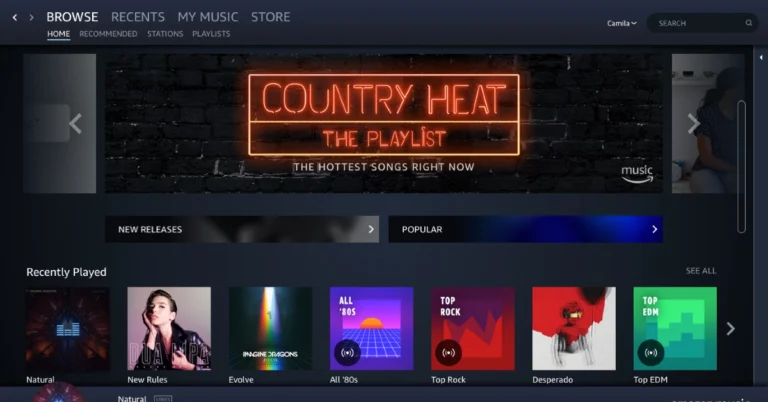
The Amazon Music app boasts a library of over 100 million songs and millions of podcast episodes. Amazon Prime subscribers get free access to this library, with the ability to download songs and podcasts for offline listening. You can even choose to curate your own playlists or download a public playlist created by other members on the app. In this article, we show you how to find your downloaded songs and playlists on the Amazon Music app. Read Also: How to find downloaded videos on YouTube?

Find downloaded songs on Amazon Music

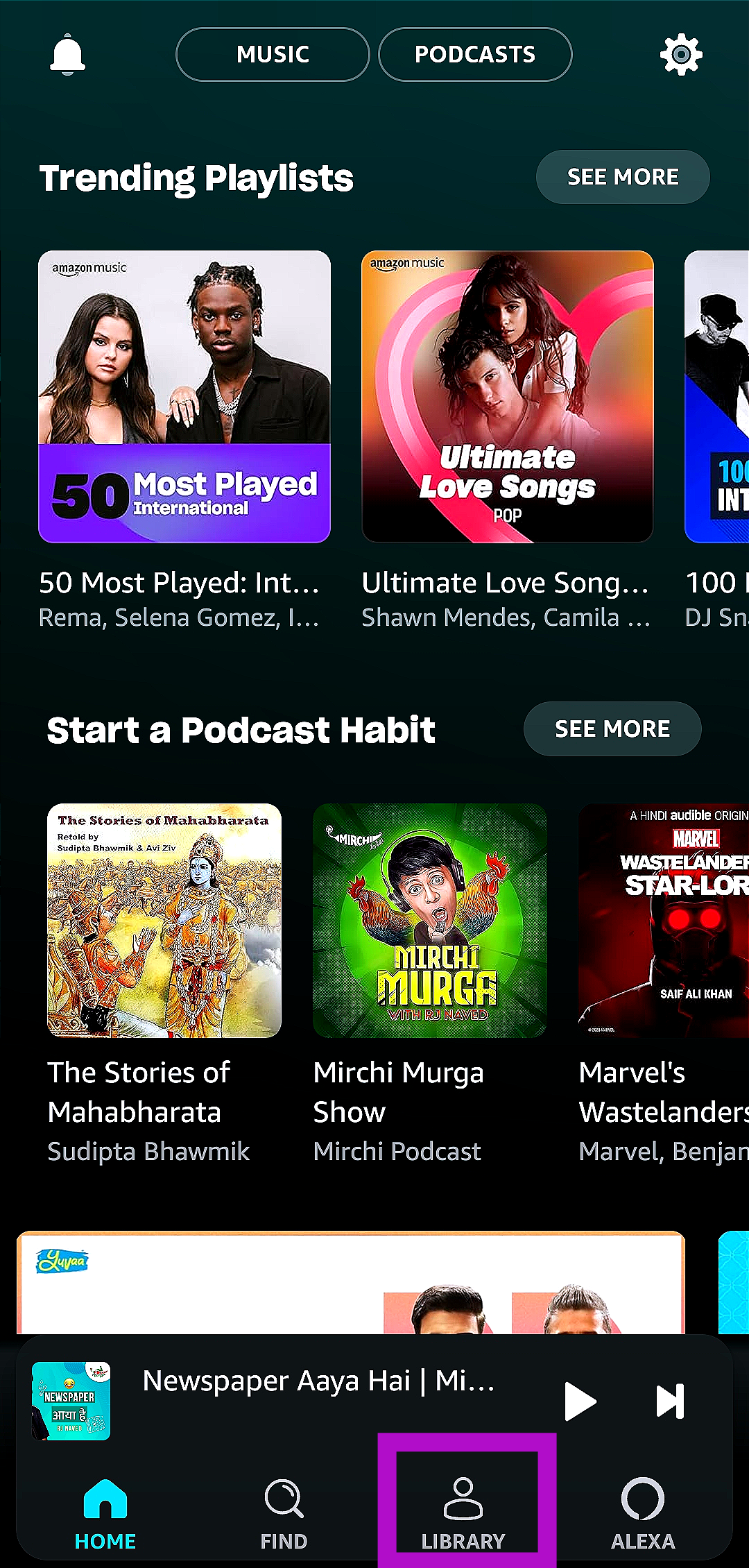
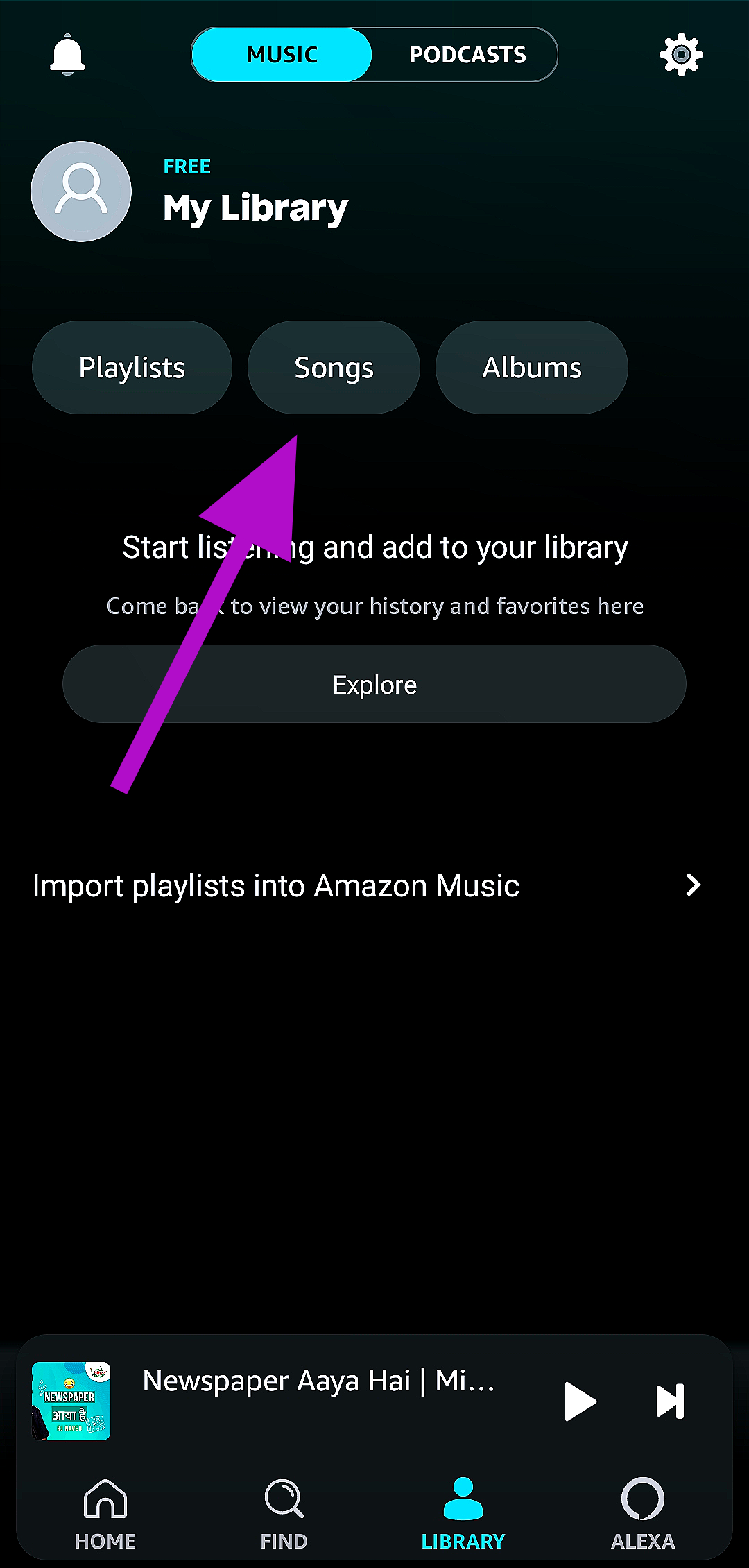
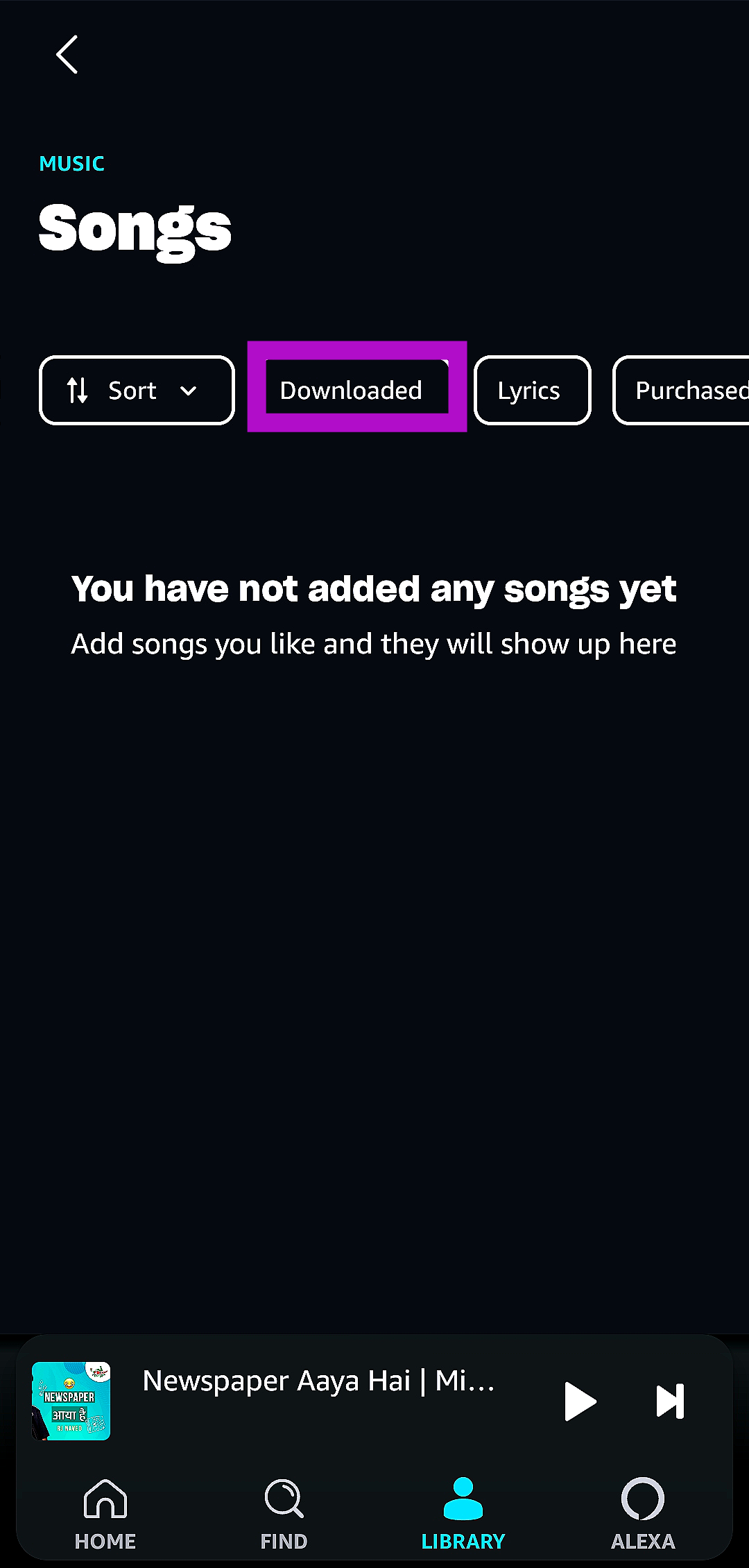
Step 1: Launch the Amazon Music app on your smartphone. Step 2: Switch to the Library tab. Step 2: Switch to the Library tab. Step 3: Tap on Songs. Step 3: Tap on Songs. Step 4: Select the Downloaded filter. Step 4: Select the Downloaded filter. The Amazon Music app will list all your downloaded songs.

Find your playlists on Amazon Music

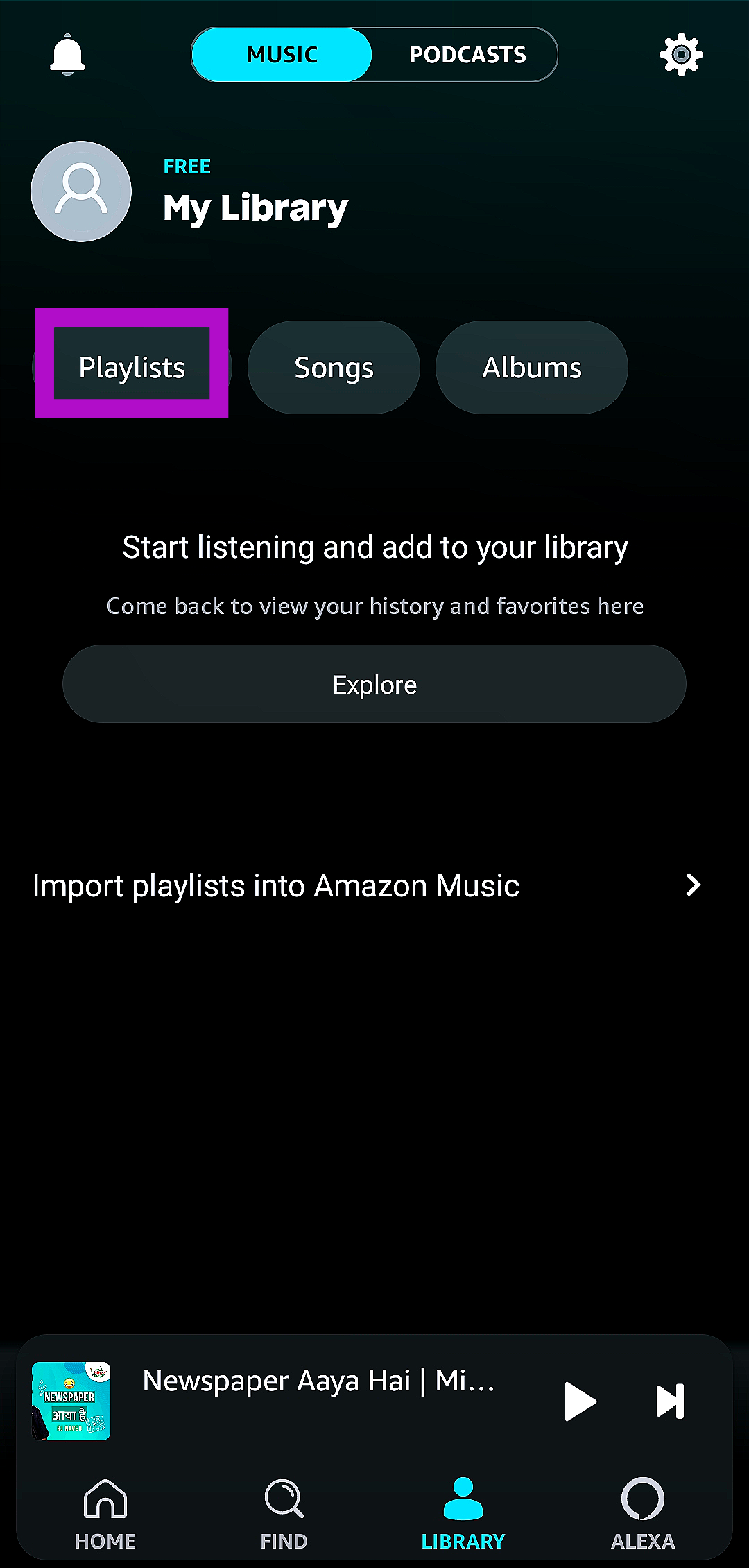
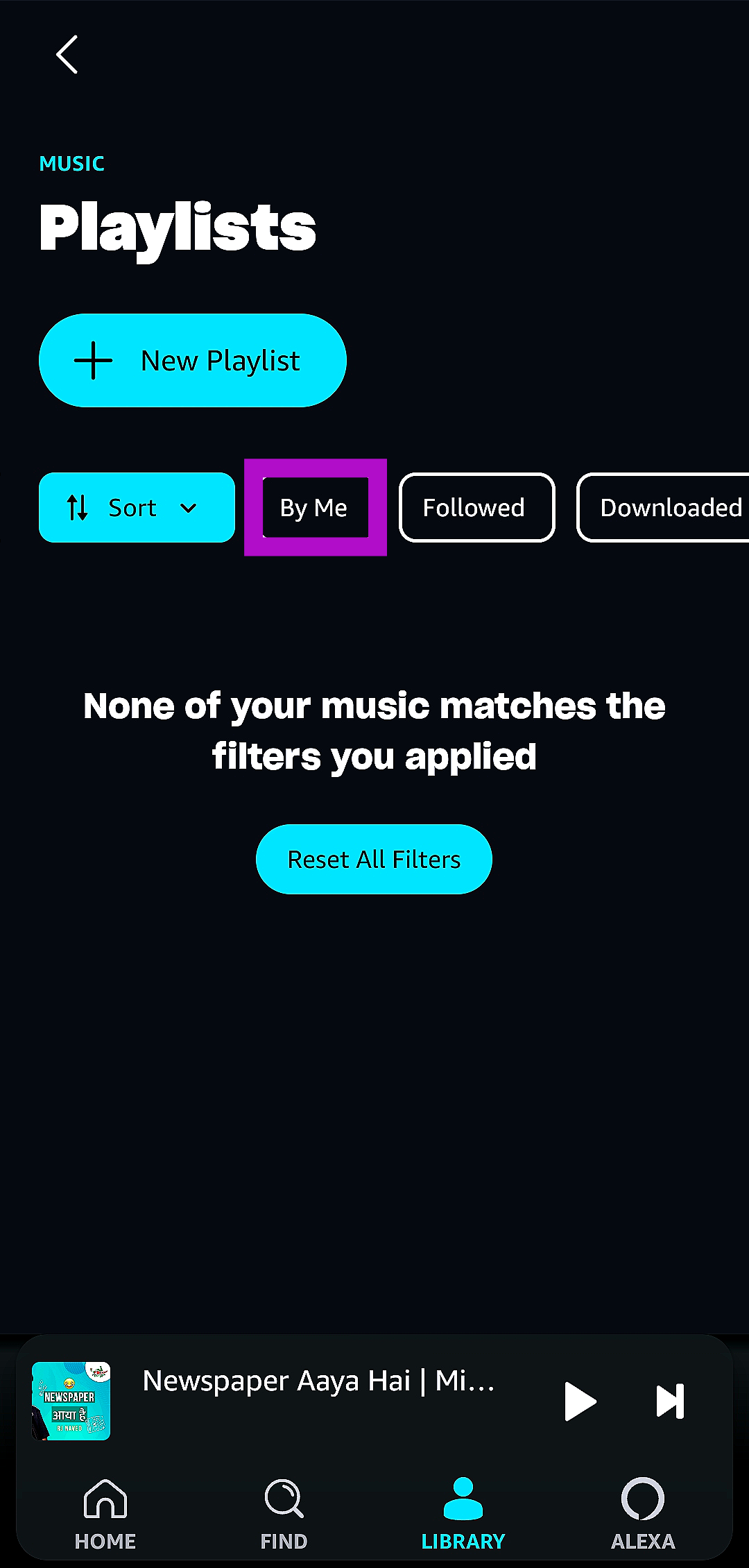
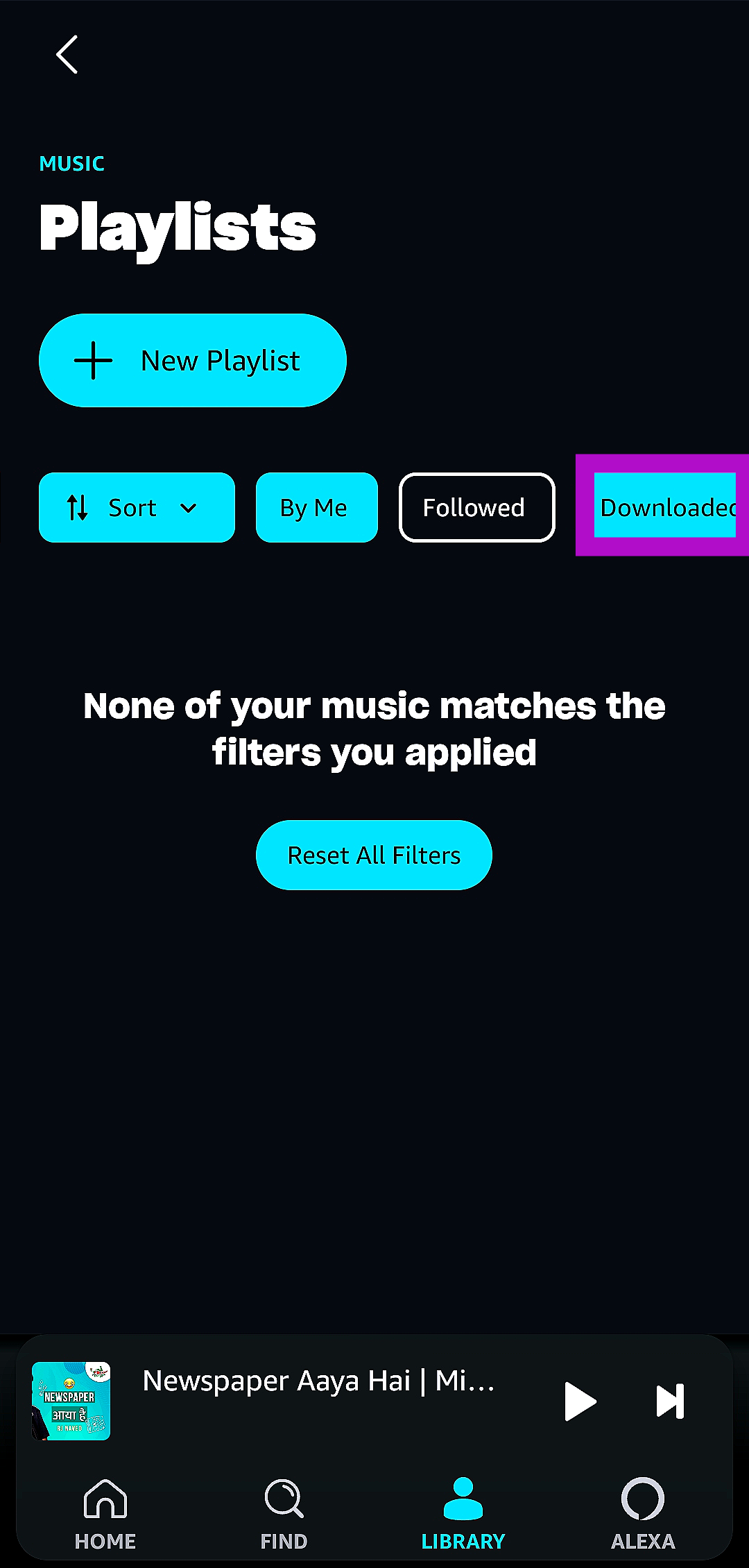
Step 1: Launch the Amazon Music app on your smartphone. Step 2: Switch to the Library tab. Step 2: Switch to the Library tab. Step 3: Tap on Playlists. Step 3: Tap on Playlists. How to find downloaded songs and playlists on Amazon Music? Step 4: To view the playlists that you have created, select the By Me filter. Step 4: To view the playlists that you have created, select the By Me filter. How to find downloaded songs and playlists on Amazon Music? Step 5: To view the playlists that you have downloaded for offline listening, select the Downloaded filter. Step 5: To view the playlists that you have downloaded for offline listening, select the Downloaded filter. How to find downloaded songs and playlists on Amazon Music?

Frequently Asked Questions (FAQs)

Where does the Amazon Music app keep all my downloaded songs?

To find your downloaded songs, go to the Library tab, hit Songs, and choose the downloaded filter.

How long does it take for the saved songs on Amazon Music to expire?

You won’t be able to access your downloaded songs on Amazon Music once your Prime Music subscription ends.

How much does an Amazon Prime Music subscription cost in India?

Amazon Prime users can access the Amazon Music library for free. The most basic Prime subscription costs Rs 299 per month.  Read Also: Oppo A79 5G with MediaTek Dimensity 6020 SoC launched in India

Conclusion

This is how you can find the downloaded songs and playlists on the Amazon Music app. Amazon Prime users do not need to pay an extra fee to access the entire library of songs on the Amazon Music app. Meanwhile, users without a Prime subscription are limited to a curated list of songs, playlists, and podcasts.

Samsung Calendar Not Syncing with Google Calendar? Here are 7 fixes

0
Most Samsung users prefer the native calendar app on their phones to the Google one. The native app supports Google and Outlook to make sure you never miss an important entry. However, sometimes users report suspension of syncing activity, leading to several inconsistencies. In this article, we bring you the top 7 ways to fix the ‘Samsung Calendar app not syncing with Google Calendar’ issue on your smartphone. Read Also: Oppo A79 5G with MediaTek Dimensity 6020 SoC launched in India

Restart your phone

One of the first steps you should take upon encountering a malfunction on your phone is restarting it. A quick restart fixes any background issues or software glitches that may be causing the malfunction to occur. To restart your Samsung phone, simply press and hold the size key and select ‘Restart’ from the power menu. If holding the side key triggers Bixby on your device, press and hold the side key and volume down key simultaneously to access the power menu.

Check your Internet connection

Any background syncing activity stops immediately when your phone loses connection to the internet. This includes Samsung and Google Calendar as well. To check the strength of your internet connection, perform a quick speed test. If possible, switch to a better connection to resume the syncing process.

Got another Google account? Manually add it to the Samsung calendar app

Step 1: Launch the Samsung Calendar app on your smartphone. Step 2: Tap the hamburger menu at the top right corner of the screen. Step 2: Tap the hamburger menu at the top right corner of the screen. Step 3: Hit the gear icon to open settings. Step 3: Hit the gear icon to open settings. Step 4: Tap on Manage calendars. Step 4: Tap on Manage calendars. Step 5: Tap the plus icon at the top right corner of the screen to add a Google Account. Step 5: Tap the plus icon at the top right corner of the screen to add a Google Account. Step 6: Hit Google. Step 6: Hit Google. Step 7: Log into your Google account with the proper credentials. Once you’re logged in, the calendar corresponding to that particular Google account will be synced with the Samsung Calendar app.

Manually enable syncing

Step 1: Launch the Samsung Calendar app on your smartphone. Step 2: Tap the hamburger menu at the top right corner of the screen. Step 2: Tap the hamburger menu at the top right corner of the screen. Step 3: Hit the gear icon to open settings. Step 3: Hit the gear icon to open settings. Step 4: Tap on Manage calendars. Step 4: Tap on Manage calendars. Step 5: Turn on the toggle switch for your Google account. Step 5: Turn on the toggle switch for your Google account.

Make sure your desired calendar is enabled in the Samsung app

Step 1: Launch the Samsung Calendar app on your smartphone. Step 2: Tap the hamburger menu at the top right corner of the screen. Step 2: Tap the hamburger menu at the top right corner of the screen. Samsung Calendar Not Syncing with Google Calendar? Here are 7 fixes Step 3: Hit the arrow to expand the drop-down menu for your Google account. Samsung Calendar Not Syncing with Google Calendar? Here are 7 fixes Step 4: Select the calendar that you want to sync with the Samsung Calendar app.

Make sure that syncing is enabled for Google Calendar

Step 1: Go to Settings and select Accounts and backup. Step 1: Go to Settings and select Accounts and backup. Samsung Calendar Not Syncing with Google Calendar? Here are 7 fixes Step 2: Tap on Manage accounts. Step 2: Tap on Manage accounts. Samsung Calendar Not Syncing with Google Calendar? Here are 7 fixes Step 3: Tap on your Google account. Step 3: Tap on your Google account. Samsung Calendar Not Syncing with Google Calendar? Here are 7 fixes Step 4: Select Sync account. Step 4: Select Sync account. Samsung Calendar Not Syncing with Google Calendar? Here are 7 fixes Step 5: Make sure the toggle switch is turned on for Calendar. Step 5: Make sure the toggle switch is turned on for Calendar. Samsung Calendar Not Syncing with Google Calendar? Here are 7 fixes

Update the Samsung Calendar app

If you’re using an older version of the Samsung Calendar app, you may run into some issues with the automatic syncing process. To fix this problem, simply update the app from the Google Play Store or Samsung’s very own Galaxy Store. Developers are quick to patch any flaws and resolve prevalent bugs with a quick update.

Frequently Asked Questions (FAQs)

Why can’t I see my Google Calendar entries on my Samsung Calendar app?

If you use multiple Google accounts, you may have forgotten to add the calendar you are looking for on Samsung’s native calendar app. To add a new calendar, go to Menu>Settings>Manage calendars>Plus icon and log in using your Google account.

How do I sync my Samsung Calendar with the Google Calendar?

To start syncing, go to the Samsung Calendar app, hit the hamburger menu, go to settings, and turn on the toggle switch for your Google account

How do I add a personal calendar from my Google account to the Samsung calendar app?

To add a personal calendar linked to your Google account to the Samsung calendar app, simply tap the hamburger menu, expand your Google account, and select the personal calendar. Read Also: Nokia 105 Classic with built-in UPI application launched in India

Conclusion

These are the top 7 ways to fix the ‘Samsung calendar not syncing with Google calendar’ issue on your smartphone. It is also a good idea to make sure the Samsung Calendar app has been given the necessary permissions to function on your device. This may not be an issue if the app has been working fine till now, but it is always a good idea to double-check that you haven’t rescinded any of the important permissions.

5 best video players for Chromebooks

If you own a Chromebook device, you must be aware of the limitations of its native video player. These limitations are ever so visible whenever you try to play a rare video format or try to personalise the look of the video player. Most users immediately look for other options after checking out the default Chromebook media player. In this article, we bring you our picks for the 5 best video or media players for Chromebooks. Read Also: Nokia 105 Classic with built-in UPI application launched in India

VLC Media Player

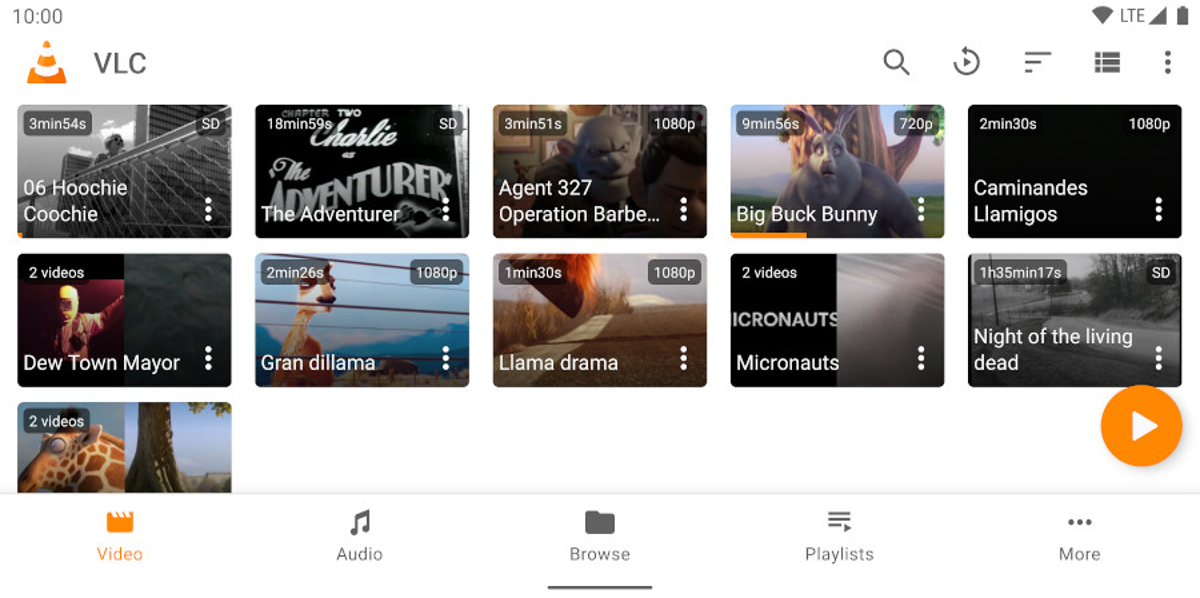
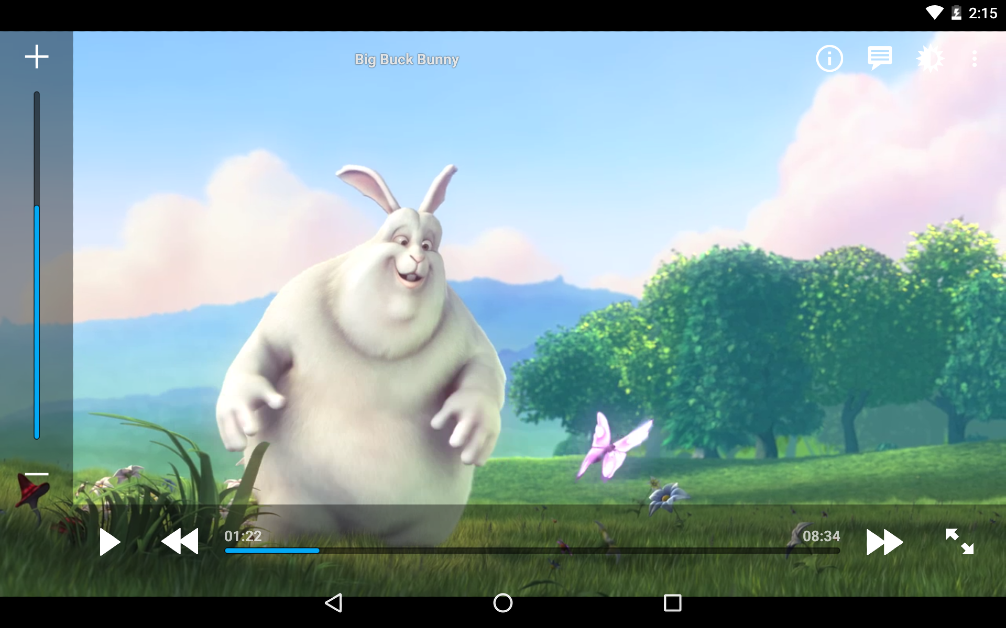
VLC Media Player Perhaps the most popular media player for Windows, VLC Media Player is also available on ChromeOS. If you’re familiar with VLC, you would know that it can do it all. The media player supports all the major video formats like MKV, MP4, AVI, MOV, Ogg, FLAC, TS, M2TS, Wv and AAC. Like its Windows counterpart, VLC for ChromeOS can also play network streams and DVD ISOs. If you come across a media format that isn’t supported by other players, chances are that VLC can play it. Versatility aside, VLC Media Player is very accessible to the average person and does not take a lot of time to get familiar with.

MX Player

MX Player If the VLC Media Player is not your jam, MX Player would serve as an excellent alternative. Features like multi-core decoding, hardware acceleration, child lock, privacy folder, and extensive subtitle format support cement its position as one of the best media players for Chromebooks. The MX Player currently has over 1 billion downloads on the Google Play Store with an average rating of 4.4 stars from 12.3 million reviews. It can be downloaded to your Chromebook as an app and can be easily accessed from the app drawer.

PlayerXtreme Media Player

PlayerXtreme Media Player 5 best video or media players for Chromebooks. PlayerXtreme Media Player supports over 40 video formats including MKV, MP4, AVI, and WMV. This allows it to run most video files without implicitly converting their formats. PlayerXtreme also supports all the major subtitle formats like Closed Captioned (CC), SRT, SMI, TXT and more. If your video file lacks subtitles, they can be downloaded within the app. You can organise your video library into different folders with several customisation options on offer. The app can be locked using a password or your fingerprint.

Archos Video Player

Archos Video Player 5 best video or media players for Chromebooks. Archos Video Player’s smooth interface and pleasing design are unmatched by most video players for ChromeOS. The video library beautifully sorts the video files on your device, complete with relevant thumbnails. You can browse the different folders for TV shows, movies, and other miscellaneous videos to find what you’re looking for. The ‘Recently added’ and ‘Recently played’ sections make the video player even more accessible. Archos supports all the major video file formats like MKV, MP4, AVI, WMV, FLV, and more.

Kodi

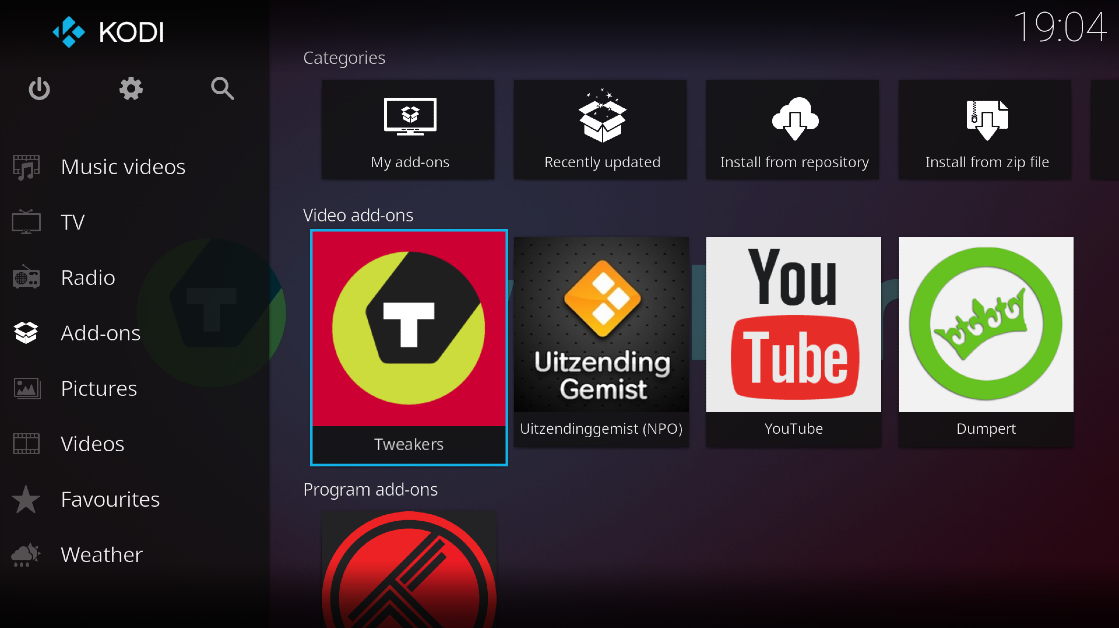
Kodi 5 best video or media players for Chromebooks. Not only is Kodi an excellent media player for Chromebooks, but it can also serve as an image gallery for your device. You can install Kodi on your Chromebook directly from the Google Play Store and access it easily from the app drawer. Kodi markets itself as a ‘home theatre software’ that neatly catalogues your movie, music, image, and game collection. Its plugins and customisations put it in the upper echelon of video players for Chromebooks. Read Also: 12 Best ChatGPT Alternatives (2023)

Conclusion

These are the 5 best video players you can download on your Chromebook right now. The video players on this list are versatile enough to work smoothly on any Chromebook device, no matter the hardware. Which video player do you use to play media on your Chromebook? We’d love to hear from you in the comments!

Garena Free Fire Redeem Codes Today 28 October 2023: Here is how to claim them

Garena Free Fire is a battle royale game with regular awards and tournaments to keep players interested. If you play Garena Free Fire, you should be aware of the redeem codes that are released on a daily basis. However, because the battle royale game is banned in India, players from other countries can use the Free Fire Redeem codes daily. If you’re unfamiliar with the Garena Free Fire redeem codes or don’t know how to get them, we’ve put together a step-by-step guide to help you redeem them. Check out Garena Free Fire Redeem Codes for 28 October 2023. The Free Fire redeem codes are a great way to get free stuff. These are 12-digit codes that contain alphabets and numbers, as well as an expiration date and time. Because the Garena FF redeem codes cannot be used more than once, you should hurry to the redemption page to claim your free reward before someone else does. To get a free reward, all you have to do is go to reward.ff.garena.com/en, which is the official redemption page. Also, keep an eye on this space for daily updates on Garena Free Fire redemption codes and rewards.

Garena Free Fire Redeem Codes Today 28 October 2023

FFCMCPSUYUY7E EYH2W3XK8UPG UVX9PYZV54AC ZZZ76NT3PDSH XZJZE25WEFJJ V427K98RUCHZ BR43FMAPYEZZ 8F3QZKNTLWBZ WEYVGQC3CT8Q

How to Get Free Fire Redeem Codes for Garena on 28 October 2023?

  • Visit the Garena Free Fire game’s official website at reward.ff.garena.com.
  • Use your Facebook, Google, VK, Apple ID, Huawei ID, or Twitter account to log in.
  • You’ll be taken to a valid redemption code (s)
  • Copy and paste the 12-digit redemption code into the text box.
  • On the screen, a dialogue box will appear.
  • ‘Ok’ should be selected.
For the latest gadget and tech news, and gadget reviews, follow us on TwitterFacebook and Instagram. For newest tech & gadget videos subscribe to our YouTube Channel. You can also stay up to date using the Gadget Bridge Android App. You can find the latest car and bike news here.

How to find downloaded videos on YouTube?

0
If you don’t get optimum network coverage to stream YouTube videos on your commute to work, you can easily download them before leaving and watch them offline while you’re on your way. You can also save videos for offline viewing before leaving for a trip to a place where you’re not likely to get a strong network reception. Due to the constantly changing layout of the app, users often cannot locate their downloaded videos. In this article, we bring you the top 2 ways to find downloaded videos on the YouTube app and website. Read Also: Samsung’s ‘Temporary Cloud Backup’ is here: Stash It, Keep It, But only on a few devices right now

Find downloaded videos on the YouTube app

Step 1: Launch the YouTube app on your smartphone. Step 2: Tap the You tab at the bottom right corner of the screen. Step 2: Tap on the You tab at the bottom right corner of the screen. Step 3: Select Downloads. Step 3: Select Downloads.

Find downloaded videos on the YouTube website

Step 1: Launch your preferred web browser and go to youtube.com. Step 2: Select Downloads from the side menu. Step 2: Select Downloads from the side menu. find downloaded videos youtube Step 3: If you don’t find the Downloads tab in the side menu, hit the hamburger menu at the top right corner of the screen. Step 4: Scroll down and select Downloads. Step 4: Scroll down and select Downloads. find downloaded videos youtube

Frequently Asked Questions (FAQs)

Can you download a YouTube video without a premium subscription?

Yes, you can download videos on YouTube without a premium subscription. However, channel owners get the option to disable downloads for any particular video. You will run into this situation while trying to download music on YouTube. A premium subscription solves this issue while also letting you download videos in higher resolutions.

Do the downloaded YouTube videos get saved on my device?

No, the videos you download on YouTube get saved on your profile for offline viewing. There is no native method of downloading videos directly to your device. You will need to use third-party tools to accomplish that task.

Why can’t I find a downloaded YouTube video on my profile?

Downloaded YouTube videos are available for offline viewing for 29 days. If you can’t find a particular video, it is likely because its offline viewing period has expired. Read Also: Apple watchOS 10.1 rolled out, enables double-tap gesture

Conclusion

These are the top 2 ways to find downloaded videos on YouTube. If you want to get the most out of the offline viewing experience on YouTube, we suggest getting a premium subscription. Right now, YouTube is offering the first four months of Premium membership for free. Following the free trial, monthly subscription plans for YouTube Premium begin at Rs 129.

Oppo A79 5G with MediaTek Dimensity 6020 SoC launched in India

Oppo today officially announced the launch of a new 5G smartphone in India. The company has introduced Oppo A79 5G to its A-Series portfolio. The device is powered by MediaTek Dimensity 6020 SoC. It features an HD+ display and a dual rear camera set-up. In addition to this, there is a 5,000mAh battery plus support for 30W fast charging.

Oppo A79 5G price in India, sale details

Oppo A79 5G has been launched in India with a price tag of Rs 19,999 for the single 8GB RAM with 128GB storage option. The device will be available in two colour options of Mystery Black and Glowing Green. Oppo A79 5G price in India, sale details It will be available for purchase via OPPO Store, Flipkart, Amazon and other retail outlets. The company is offering a cashback of up to Rs 4,000 and no-cost EMI for up to 9 months from ICICI Bank, SBI Cards, Kotak Bank, IDFC First Bank, Bank of Baroda credit card, AU Finance Bank and One Card from mainline retail outlets and the OPPO Store. Additionally, customers can also benefit from Zero Down Payment schemes from leading financiers such as Bajaj Finserv, TVS Credit, Home Credit, HDB Financial Services, IDFC First Bank and Mahindra Finance. Loyal OPPO customers can also avail an Exchange Bonus of up to Rs 4,000. As a part of My OPPO Exclusive, customers stand to win a cash prize of up to Rs 10 lakh, and other assured gifts on the purchase of any OPPO device. Also Read: Nokia 105 Classic with built-in UPI application launched in India

Oppo A79 5G specifications

The Oppo A79 5G features a 6.72-inch full-HD+ LCD screen having 1,080×2,400 pixels of resolution. The screen has a 91.4 screen-to-body ratio. It has support for 650nits of peak brightness, 90Hz refresh rate and 391ppi pixel density. The 5G phone operates on ColorOS 13.1 based on Android 13. It comes equipped with a 7nm MediaTek Dimensity 6020 SoC with RAM Expansion feature. The device will be available with 8GB of LPDDR4X RAM and 128GB of UFS2.2 storage. Oppo A79 5G comes with a dual rear camera setup that includes a 50-megapixel main camera with f/1.8 aperture and a 2-megapixel sensor with an f/2.4 aperture. An 8-megapixel camera with an f/2.0 aperture is provided for selfies. The Oppo A79 5G sports a 5,000mAh battery with 33W SuperVOOC fast charging support. Additionally, it includes IPX4 rating. The device has Bluetooth 5.3, a 3.5mm audio jack, a USB Type-C port, USB OTG, GPS, and A-GPS for connectivity. Along with an in-display fingerprint sensor, an accelerometer, ambient light sensor, geomagnetic sensor, gravity sensor, pedometer, and proximity sensor are also onboard.

Nokia 105 Classic with built-in UPI application launched in India

HMD Global has announced the launch of a Nokia new feature phone in India. Nokia 105 Classic has debuted in the country priced under Rs 1,000. The new phone comes with a new design and the UPI feature. The handset includes a wireless FM radio and an 800mAh battery. In addition to this, the phone has an ergonomic design and is available in four variants. Pricing and specification details are given below. Nokia 105 Classic with built-in UPI application launched in India

Nokia 105 Classic price in India and availability details

Nokia 105 Classic comes in four variants Single SIM and Dual SIM, with & without a charger respectively. It has been launched in India with a price starting at Rs 999. The phone will be offered in two colour options of Charcoal and Blue. The device will soon be made available for purchase via the company’s official website in the country. Also Read: Samsung Galaxy SmartTag 2 now available in India: Price in India and availability

Nokia 105 Classic specs and features

The Nokia 105 Classic comes with a simple and tough design. It has been designed ergonomically maintaining its compact form factor that has been specially moulded to feel great in the hand and easily slip into a pocket. It has undergone rigorous durability testing to withstand even the toughest environments. Also, the company has carefully considered spacing between each button on the key mat, making it easy to dial and text, even in the dark. To keep users entertained and productive the feature phone includes a wireless FM radio, allowing users to listen to their favourite stations without the need for a headset. The device has an inbuilt UPI application that is said to provide the accessibility and convenience of UPI, allowing users to safely and easily complete UPI payment transactions even without a smartphone. In addition to this, the Nokia 105 Classic sports an 800mAh battery. Lastly, the Nokia 105 Classic comes with an assured one-year replacement guarantee. Ravi Kunwar, VP- India & APAC, HMD Global said “We are excited to launch an exciting upgrade to market-leading feature phone with the new Nokia 105 Classic, more relevant than ever with a stylish new design and the UPI feature. With the feature-packed Nokia 105 Classic in the under INR 1000 segment, we strive to bridge digital divide and enable financial access for all.”

12 Best ChatGPT Alternatives (2023)

Ever since its launch, ChatGPT has taken the world by storm. The chatbot’s popularity has spawned a lot of offshoots and knockoffs designed to cater to specific niches. Those looking for options beyond ChatGPT can come across a lot of clutter that is entirely meaningless to their tasks. To make your search easier, here is our list of the 12 best ChatGPT alternatives in 2023. Read Also: Apple watchOS 10.1 rolled out, enables double-tap gesture

Google Bard

Google Bard Soon after OpenAI came out with ChatGPT, Google launched their own AI Chatbot called Bard. Google Bard was initially based on the LaMDA family of language models and then later moved to PaLM. Currently, Bard operates on the PaLM 2 large language model. Launched in a limited capacity back in March 2023, the launch of Google’s AI chatbot was ramped up due to the instant success of ChatGPT. Over the months, Bard was fleshed out and made available to the wider public. Even though the initial public response to Bard wasn’t as favourable as ChatGPT, it has evolved to be a powerful AI tool. Google has also started integrating Bard into its range of products and services. It’ll be interesting to see how it pans out in the future.

Microsoft Bing AI

Microsoft Bing AI Microsoft’s Bing AI is based on GPT-4, which shouldn’t be surprising as the tech giant was one of the early investors in OpenAI. If you’re more interested in the practical uses of an AI chatbot, Bing AI should be more up your alley. Instead of getting the chatbot to compose a work email, you can simply type a draft using the Microsoft SwiftKey keyboard and use the integrated Bing AI tool to change it to a more ‘professional’ tone. While using the chatbot on Microsoft Edge, you can choose the responses to be creative, balanced, or precise.

Jasper Chat

Jasper Chat Jasper finesses the art of writing impeccable copies, blog posts, and articles. The chatbot utilises GTP 3.5 to create interesting content that adheres to your writing style and brand identity. One of the best attributes of Jasper is that it takes a conversational approach to content creation. You don’t need to enter precise prompts to receive desirable results. Instead, you can converse with the chatbot in natural language and provide it with the necessary feedback.

Socratic

Socratic Socratic is an educational app to help students with their homework. Owned by Google, Socratic uses Bard to resolve queries asked by students related to their homework. The app’s AI tool can recognise mathematical equations and offer easy solutions to problems while also explaining the core concepts behind them in a neat and concise manner. Students can also ask text-based queries related to any subject and receive illustrative and comprehensive answers.

Elicit

Elicit This one is for all the academics and scholars who need to go through a mountain of literature for their research papers. Described as ‘Jstor on steroids’, Elicit provides you with a comprehensive list of papers that are relevant to your research topic and briefly summarises their abstracts, making it easier for you to go through the results and sort out the meaningful entries. You can also get Elicit to look for more relevant papers based on your selected results and extract the important parts from each document. Need more? Elicit can also find common themes among the selected papers, helping you cut down on some serious research time.

Chatsonic

Chatsonic Chatsonic was one of the first chatbots to take Google results after 2021 into account while formulating its answers to user queries. This GPT-4 chatbot is designed to create thought-provoking copies for marketing, gather data & analyse literature for research, and generate concise and relevant replies for customer support, among other practical tasks. A monthly subscription to Chatsonic costs $16, making it one of the most affordable AI chatbots out there. Chatsonic is also capable of generating AI images based on your prompts.

Claude 2

Claude 2 12 Best ChatGPT Alternatives (2023) Anthropic’s Claude 2 is one of the best alternatives to ChatGPT out there right now. Claude is a fun, conversational chatbot that you can use to resolve a query, proofread your article, trim down excessive or redundant content, or even brainstorm new ideas for your new project. The AI chatbot gets used to your writing style over a period of time and generates better content that suits your brand and identity.

Copy.ai

Copy.ai 12 Best ChatGPT Alternatives (2023) As the name suggests, Copy.ai helps you compose content briefs, ad copies, long-form articles, social media posts, product descriptions, and more. This AI tool specialises in creating content that is SEO-friendly and devoid of any fluff or redundancies. Users can tune the draft with precise prompts until it looks closer to a finished product. When used properly, Copy.ai can create compelling articles in a fraction of the time. Certainly one of the best ChatGPT alternatives around!

YouChat

YouChat 12 Best ChatGPT Alternatives (2023) YouChat is a brilliant query-resolving conversational AI chatbot based on GPT-4. With this AI chatbot, you don’t need to worry about incorporating the right keywords in your questions to get accurate answers. No matter how complex or convoluted your question is, YouChat comes up with a direct answer that addresses the heart of the problem. YouChat works best with You.com as your default search engine. You can also ask the chatbot to carry out tasks like summarising articles, composing blog posts, and more.

Perplexity AI

  Perplexity AI 12 Best ChatGPT Alternatives (2023) Perplexity AI is a free-to-use AI chatbot that has one very important feature – it cites all its sources. While there may still be some factual and contextual inconsistencies in its responses, you can always look up the sources that Perplexity has used to come up with the result. It also offers a ‘Copilot’ mode for more comprehensive answers. You can access your past conversations with the chatbot and even find interesting answers that other users have received on the ‘Discover’ tab. As of now, Perplexity AI is one of the best free alternatives to ChatGPT.

Character.ai

Character.ai 12 Best ChatGPT Alternatives (2023) Character.ai puts a fun little twist on the whole conversational experience by letting you create AI ‘personas’. You can hold a conversation with these personas and their responses will remain true to their character. Some of the preset personas on the website include SM64 Mario, Raiden Shogun and Ei from Genshin Impact, and even Elon Musk! You can use this chatbot to simulate an interview or an upcoming viva. There is a bunch of other fun stuff you can try out on the Character.ai website!

Replika

Replika. 12 Best ChatGPT Alternatives (2023) If you want to check out something mildly dystopian and straight out of a Hollywood movie, head over to Replika. Replika is an AI companion that generates scripted dialogue that feels personal, similar to your interactions with real people. With Oculus support, you can even converse with Replika in Augmented Reality. The quality of responses generated by Replika improves over a period of time, the more you interact with it. Read Also: CMF Buds Pro by Nothing Review: A good balance of comfort and detailed audio for those on a budget

Conclusion

These are the 12 best alternatives to ChatGPT in 2023. Our picks cover a diverse range of tools, be it for content generation, research, problem-solving, or simply conversational purposes. Think there’s a chatbot that deserves to be on this list? Let us know in the comments!

Xiaomi 14 Series with Snapdragon 8 Gen 3 SoC and HyperOS announced

Xiaomi has officially launched its most premium smartphone series Xiaomi 14 in China powered by just released Snapdragon 8 Gen 3 SoC. The Xiaomi 14 Series consists of two models- vanilla and Xiaomi 14 Pro. In addition to the latest chipset, the device presents the company’s newest and a replacement to MIUI OS- HyperOS. Apart from this, the devices share some similarities like the display featuring a 120Hz 2K LTPO OLED and a triple rear camera setup powered by Leica optics.

Xiaomi 14 Pro specifications, pricing

Xiaomi 14 Pro features a 2K 6.73-inch 2.5D LTPO display with 1,440×3,200 pixels of resolution. The screen supports a dynamic refresh rate of up to 120Hz. It runs on HyperOS and equips a 4nm Snapdragon 8 Gen 3 chipset which was launched this week by Qualcomm. It comes with 16GB of LPDDR5X RAM and up to 1TB of UFS 4.0 storage. Xiaomi 14 Pro specifications, pricing The Xiaomi 14 Pro comes with Leica tuned 50-megapixel triple rear camera setup. The system includes a Summilux lens- a 50-megapixel Hunter 900 lens with OIS and f/1.6 aperture, a 50-megapixel telephoto lens and another 50-megapixel ultra-wide angle lens. A 32-megapixel front-facing camera has been provided for taking selfies and video calling. Also Read: Apple watchOS 10.1 rolled out, enables double-tap gesture The device is fueled by a 4,880mAh battery with 120W wired and 50W wireless charging support. In addition to this, there is support for 10W reverse charging. Along with an in-display fingerprint sensor the phone also consists of other sensors like an accelerometer, ambient light sensor, e-compass, proximity sensor, linear motor, flicker sensor, colour sensor and IR blaster. Whereas, 5G, Wi-Fi 7, USB 3.2 port, Bluetooth, GPS, Galileo, GLONASS, Beidou, NavIC, and a USB Type-C port have been provided for connectivity. In terms of audio, the new Xiaomi smartphone features a stereo speaker with Dolby Atmos support. Also, the handset comes with an IP68 rating for dust and water resistance. Coming to the price, the Xiaomi 14 Pro price starts at CNY 4,999 for 12GB RAM and 256GB storage, CNY 5,499 for 16GB RAM and 512GB storage and CNY 5,999 for 16GB RAM and 1TB memory.

Xiaomi 14 specifications, pricing

Xiaomi 14 comes with a smaller 1.5K 6.36-inch LTPO AMOLED display with 1,200×2,600 pixels of resolution. The display supports an adaptive refresh rate of 120Hz. It comes with 3000 nits of screen brightness and 460ppi pixel density. The OS, chipset, and front and back cameras are the same as the Pro variant. However, the phone boasts a smaller 4,610mAh battery with support for 90W wired, 50W wireless and 10W wireless reverse charging support. Xiaomi 14 specifications, pricing The price of Xiaomi 14 starts at CNY 3,999 for the 8GB RAM and 256GB storage. The 12GB RAM with 256GB storage price is set at CNY 4,299, 16GB RAM with 512GB storage at CNY 4,599 and 16GB RAM with 1TB storage model at CNY 4,999.

Garena Free Fire Redeem Codes Today 27 October 2023: Here is how to claim them

Garena Free Fire is a battle royale game with regular awards and tournaments to keep players interested. If you play Garena Free Fire, you should be aware of the redeem codes that are released on a daily basis. However, because the battle royale game is banned in India, players from other countries can use the Free Fire Redeem codes daily. If you’re unfamiliar with the Garena Free Fire redeem codes or don’t know how to get them, we’ve put together a step-by-step guide to help you redeem them. Check out Garena Free Fire Redeem Codes for 27 October 2023. The Free Fire redeem codes are a great way to get free stuff. These are 12-digit codes that contain alphabets and numbers, as well as an expiration date and time. Because the Garena FF redeem codes cannot be used more than once, you should hurry to the redemption page to claim your free reward before someone else does. To get a free reward, all you have to do is go to reward.ff.garena.com/en, which is the official redemption page. Also, keep an eye on this space for daily updates on Garena Free Fire redemption codes and rewards.

Garena Free Fire Redeem Codes Today 27 October 2023

ZZATXB24QES8 FFAC2YXE6RF2 VNY3MQWNKEGU U8S47JGJH5MG FFIC33NTEUKA FFCMCPSBN9CU FFBBCVQZ4MWA

How to Get Free Fire Redeem Codes for Garena on 27 October 2023?

  • Visit the Garena Free Fire game’s official website at reward.ff.garena.com.
  • Use your Facebook, Google, VK, Apple ID, Huawei ID, or Twitter account to log in.
  • You’ll be taken to a valid redemption code (s)
  • Copy and paste the 12-digit redemption code into the text box.
  • On the screen, a dialogue box will appear.
  • ‘Ok’ should be selected.
For the latest gadget and tech news, and gadget reviews, follow us on TwitterFacebook and Instagram. For newest tech & gadget videos subscribe to our YouTube Channel. You can also stay up to date using the Gadget Bridge Android App. You can find the latest car and bike news here.

7 Easy Fixes for YouTube Links Not Opening on Android

0
One of our favourite things about Android phones is the seamless manner in which apps are integrated into the system. If you tap a Twitter link on the Reddit app, it will automatically open in the Twitter app on your phone (granted it is installed on your device). The same is true for YouTube. If someone sends you a YouTube link on WhatsApp, you can either choose to tap on the video’s thumbnail and watch it in a miniplayer, or tap the link and open the video in the app. However, sometimes this function doesn’t work as intended. In this article, we bring you the top 7 fixes for the ‘YouTube links not opening’ issue on Android. Read Also: How to use Google Photos’ Best Take Feature in Google Pixel 8 smartphones?

Why is the YouTube app not opening links on your phone?

YouTube not loading links on its app is an unusual problem to encounter. Since the problem is so rare, there are only a few specific causes that could be causing it. Here are the usual suspects that typically cause this kind of behaviour: The YouTube app has been forbidden to open supported links: It is possible that you accidentally turned off the option to open supported links on YouTube. Additionally, if you come across some variation of a YouTube link (like m.youtube.com or youtu.be), your smartphone may not recognise it as a legitimate link. Your phone isn’t allowed to open links in their default apps: If you’re facing this problem for every other app (and not just YouTube), you may have accidentally stopped default apps from opening supported links. The YouTube app is outdated: If you’re using an old version of the YouTube app, it may not be equipped to open native links on your phone. Luckily, apps can be updated with ease. App-related issues: Sometimes, random bugs and a corrupt cache can cause an app to act strangely. This is true in YouTube’s case as well. We have mentioned some quick fixes down below that will take care of these issues.

Set ‘Open Supported Links’ as the default setting for the YouTube app

Step 1: Go to Settings and select Apps. Step 1: Go to Settings and select Apps. Step 2: Tap on YouTube. Step 2: Tap on YouTube. Step 3: Select Set as Default. Step 3: Select Set as Default. Step 4: Open the toggle switch for Open supported links. Step 4: Open the toggle switch for Open supported links.

Turn on ‘Open links in apps’

Step 1: Go to Settings and select Apps. Step 1: Go to Settings and select Apps. Step 2: Tap on Choose default apps. Step 2: Tap on Choose default apps. Step 3: Scroll down and select Opening links. Step 3: Scroll down and select Opening links. Step 4: Turn on the toggle switch for Open links in apps. Step 4: Turn on the toggle switch for Open links in apps.

Change the browser settings (Samsung devices)

Step 1: Go to Settings and select Apps. Step 1: Go to Settings and select Apps. Step 2: Select Samsung Internet. Step 2: Select Samsung Internet. Step 3: Tap on Samsung Internet settings. Step 3: Tap on Samsung Internet settings. Step 4: Select Useful features. Step 4: Select Useful features. Step 5: Turn on the toggle switch for Open links in other apps. Step 5: Turn on the toggle switch for Open links in other apps.

Clear YouTube’s cache

If the YouTube app’s cache is corrupted, it can keep the app from opening every time you tap on a link. Here’s how you can clear the cache. Step 1: Go to Settings and select Apps. Step 1: Go to Settings and select Apps. 5 Easy Fixes for YouTube Links Not Opening on Android (2024) Step 2: Select YouTube. Step 2: Select YouTube. 5 Easy Fixes for YouTube Links Not Opening on Android (2024) Step 3: Tap on Storage. 5 Easy Fixes for YouTube Links Not Opening on Android (2024) Step 4: Select Clear cache. Step 4: Select Clear cache from the bottom toolbar. 5 Easy Fixes for YouTube Links Not Opening on Android (2024)

Restart your smartphone

Restart Your Phone Sometimes, background software issues on your phone can keep the YouTube app from opening a supported link. A simple restart can take care of this issue. Press the side key along with the volume-up button to access the power menu. Hit ‘Restart’. Once your phone has restarted, click a YouTube link to check if the issue has been resolved.
Uninstall and reinstall the YouTube app

  Top ways to watch videos in Incognito Mode on YouTube Did you update the YouTube app recently? It is possible that the update was not installed correctly. Other app-related issues can cause it to fail at basic tasks. A simple catch-all approach to troubleshooting is uninstalling and reinstalling the app on your device. Long-press YouTube’s icon in the app drawer and hit ‘Uninstall’. Now, go to the Google Play Store, search for YouTube, and hit ‘Install’.

Use a third-party app

If for some reason your phone’s OS refuses to use YouTube as the default app to open supported links, there is one third-party app that will help you forcefully redirect the link. The Open Link With app is available on the Google Play Store and always asks you which app you want to open a link with. This app gets triggered every time you tap a link on your device. ‘Open Link With’ will come in handy when the default settings for this function stop working on your Android phone.

Frequently Asked Questions (FAQs)

How do I make sure that every time I tap on a YouTube link it opens in the app?

Go to Settings>Apps>YouTube>Set as default and turn on the toggle switch for ‘Open supported links’.

Why isn’t YouTube opening supported links on my Android phone?

If the YouTube links aren’t opening on the link by default, go to Settings>Apps>Choose Default apps>Opening links and turn on the toggle switch for Open links in apps.

Does the YouTube app for Android support incognito mode?

If you want to watch a video on YouTube without having it reflect on your search or watch history, turn on incognito mode. Go to the ‘You’ tab and select ‘Turn on incognito’ to watch videos discreetly.

Why are links not opening on my Android phone?

If the apps on your Android phone are not able to open supported links, go to Settings>Apps>Choose default apps and allow them to open supported links.

How to clear the app cache on Android?

Go to Settings>Apps, select an app, tap on ‘Storage’, and hit ‘Clear cache’. Read Also: Best 3 ways to find your lost Apple Watch Series 9

Conclusion

These are the top 7 ways to fix the ‘YouTube Links not Opening’ issue on Android. If your phone successfully redirects the link to the YouTube app but fails to load the video, try force-stopping the YouTube app. Restarting your phone may also help in fixing the background issues causing this problem.