Amazon Quiz Answers Today 22 May 2022: Participate to win Rs 40,000

22 May 2022 Amazon Quiz has gone live on its platform. The quiz timings are 12 AM to 11:59 PM. The Amazon App users can participate in the quiz daily and all they have to do is submit correct answers to the questions asked on the e-commerce platform. Today’s participants can get a chance to win Rs 1,000 Amazon Pay Balance. Amazon brings a fresh questionnaire that contains 5 questions daily. These questions are based on current affairs and general knowledge. The quiz can be played from 8 AM to 11:59 PM and the contestants need to answer correctly to enter into a lucky draw. Only one person is declared as a winner and the results will be announced at the end of every month. And to make sure that you give correct answers to all the 5 questions Gadget Bridge everyday updates all the answers to the Amazon Quiz. Do check out 22 May 2022 Amazon Quiz Answers to win Rs 1,000 Amazon pay Balance. Amazon Quiz Today Prize – Rs 1,000 Amazon Pay Balance Quiz Date – 22 May 2022 Daily Timing – 12 AM to 11:59 PM Winner Announcement – Today 12 PM

Amazon Quiz Answers Today 22 May 2022

Question 1: As per the Indian Organised Biryani Market Industry report published by Technopak, which is the largest biryani brand of India?

Answer: Dindigul Thalappakatti

Question 2: In ICC’s most valuable team of the tournament in the recently concluded Women’s World Cup, who among these was included?

Answer: Salma Khatun

Question 3: Which country claims the Falkland Islands were stolen from it unjustly in 1833?

Answer: Argentina

Question 4: Who among these served as the CEO of this company till 2011?

Answer: Eric Schmidt

Question 5: This is considered the most important natural source of which vitamin?

Answer: Vitamin D

How To Play Amazon Quiz

Only app users are eligible to play the Amazon quiz every morning from 12 AM to 11:59 PM. The quiz is not available on the desktop. For those who are unaware of how to play the Amazon quiz below are the steps, you can follow to take the quiz.
  • Firstly download the Amazon app from Google Play Store or App Store
  • Now fill in the required information through the Sign Up option.
  • You need to log in to the Amazon app and scroll down on the home screen to find the Amazon Quiz banner.
  • Tap on the Amazon Quiz banner and tap on the Start button to start the Quiz.
  • Now you will get 5 questions and you need to answer them correctly. One wrong answer will eliminate you from the Quiz.
  • After answering all the questions correctly you are now eligible for a Lucky Draw.
  • The winner’s name will be announced today at 12 PM.
For the latest gadget and tech news, and gadget reviews, follow us on TwitterFacebook and Instagram. For newest tech & gadget videos subscribe to our YouTube Channel. You can also stay up to date using the Gadget Bridge Android App. You can find the latest car and bike news here.

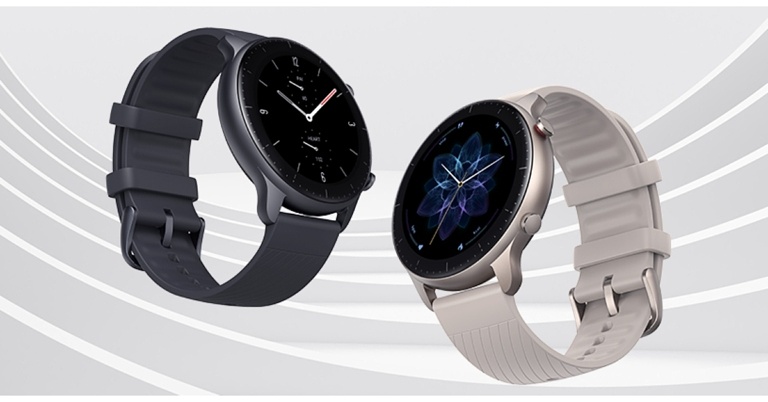
Amazfit GTR 2 New Version smartwatch with over 90 sports modes launched in India

The Amazfit GTR 2 New Version smartwatch has been released in India. It is a redesigned variant of the original Amazfit GTR 2 smartwatch. The new smartwatch promises a battery life of up to 11 days, HD AMOLED touch screen display and supports Bluetooth calling. Moreover, the wearable has physical buttons and 90 sports modes.

Amazfit GTR 2 New Version smartwatch price in India and availability

Amazfit GTR 2 New Version smartwatch is priced at Rs 11,999 The open sale will begin on May 23rd in Black and Grey, and will be available exclusively on Flipkart and Amazfit’s official website. The brand is also announcing a special launch price of Rs 10,999 that will be available only on May 23rd. Amazfit GTR 2 New Version smartwatch price in India and availability

Amazfit GTR 2 New Version specifications

The Amazfit GTR 2 new version comes with a 1.39-inch AMOLED touchscreen display. The screen is guarded by 3D Corning Gorilla curved glass with optical Diamond-like Carbon (oDLC) and anti-fingerprint coatings to prevent scratches. It is available in either stainless steel or black aluminium alloy case. The watch is equally comfortable whether you are left-handed or right-handed thanks to its fully rotatable screen. The always-on display is primed for ultimate personalization with a choice of more than 50 watch faces. You can customize the Quick Access App too, then simply swipe left or right to access your favourite apps and health and fitness tracking features. Heart rate monitoring is available with the Amazfit GTR 2 (new version). The BioTracker 2 PPG optical sensor monitors your resting heart rate and heart rate zones, as well as provides you with abnormal heart rate warnings, to help you better understand your heart health. OxygenBeats can be used with the BioTracker 2 PPG to measure blood oxygen saturation. You can measure your current blood-oxygen-level while engaged in long-term strenuous mental or physical activity. The Amazfit smartwatch monitors your sleep and makes it easier to understand your sleep patterns and improve sleep quality, ensuring optimal performance. Stress monitoring is also supported by the GT 2 series smartwatches, which help you monitor and balance your stress levels. PAI Health Assessment System in this smartwatch converts your heart rate data, tracked activities, and other health data into a simple PAI score that allows you to understand your physical well-being at a glance. PAI stands for Personal Activity Intelligence, and your PAI score is personalised for you based on your profile. Amazfit GTR 2 (new version) has more than 90 built-in sports modes. The smartwatch is waterproof up to 5 ATMs, allowing you to track your progress while swimming or working out in difficult conditions. The smart wearable has about 3GB of local music storage, allowing you to listen to music without having to use your phone. When you remove your watch from your wrist, a wear detection function locks it to protect your privacy, and you can add a password for added security. For the latest gadget and tech news, and gadget reviews, follow us on TwitterFacebook and Instagram. For newest tech & gadget videos subscribe to our YouTube Channel. You can also stay up to date using the Gadget Bridge Android App. You can find the latest car and bike news here.

Department of Telecommunications (DoT) to soon bring a caller ID feature that will show the caller’s name as per KYC

The department of telecommunications (DoT) is planning to introduce a caller identification system to protect customers from rising spam and fraud incidents. Soon devices in the country will display the caller’s name on the screen. The name would be based on the subscriber’s know-your-customer (KYC) record with the telecom operators. According to the PTI Telecom regulator will immediately begin sessions on framing a mechanism for the caller’s KYC-based title to flash on telephone screens when someone calls. According to the Telecom Regulatory Authority of India (Trai) chairman, PD Vaghela a consultation paper on the subject will be released soon to seek stakeholders’ input. He said, “We have just received a reference, and we will start work on this soon. Name as per KYC will appear when someone calls. The mechanism will enable name-appearing on a phone screen, in accordance with KYC done by telecom companies, as per DoT norms.” According to DoT regulations, the mechanism will allow the caller’s name to appear on the screen based on KYC information collected by telecom companies. The DoT will make the final decision, not Trai, which will only be required to make recommendations after extensive consultation with stakeholders. Before finalising its recommendations, the regulator will hold open house sessions in major cities. Trai has not been able to effectively stop unwanted commercial calls despite taking several steps. The mechanism’s additional benefit is that recipients will be able to avoid spam and unwanted calls or report them to the appropriate authority for action. Even if a caller’s name is not saved in their phone book, subscribers will be able to recognise it. Using apps like Truecaller, some users can now find out who these callers are. A spokesperson for Truecaller, a caller identification app, said in an email statement, “We welcome any and all actions in the mission to make communication safe and efficient. Number identification is crucial to ending the menace of spam and scam calls and we, at Truecaller, have been working tirelessly towards this important mission for the past 13 years. We appreciate this move by TRAI and would like to reiterate that we remain very supportive for this and any future initiatives they have.” The disadvantage of these apps is that the data is crowdsourced, which means it may not be 100% genuine, which KYC data ensures. For the latest gadget and tech news, and gadget reviews, follow us on TwitterFacebook and Instagram. For newest tech & gadget videos subscribe to our YouTube Channel. You can also stay up to date using the Gadget Bridge Android App. You can find the latest car and bike news here.

Garena Free Fire Redeem Codes Today 21 May 2022: Here is how to claim them

Garena Free Fire is a battle royale game with regular awards and tournaments to keep players interested. If you play Garena Free Fire, you should be aware of the redeem codes that are released on a daily basis. However, because the battle royale game is banned in India, players from other countries can use the Free Fire Redeem codes daily. If you’re unfamiliar with the Garena Free Fire redeem codes or don’t know how to get them, we’ve put together a step-by-step guide to help you redeem them. Check out Garena Free Fire Redeem Codes for May 21. The Free Fire redeem codes are a great way to get free stuff. These are 12-digit codes that contain alphabets and numbers, as well as an expiration date and time. Because the Garena FF redeem codes cannot be used more than once, you should hurry to the redemption page to claim your free reward before someone else does. To get a free reward, all you have to do is go to reward.ff.garena.com/en, which is the official redemption page. Also, keep an eye on this space for daily updates on Garena Free Fire redemption codes and rewards.

Garena Free Fire Redeem Codes Today 21 May 2022

  • FV4B HU76 T5RF
  • G4B5 TJGS RE8D
  • SXQ2 DR3T 4G5H
  • J6I8 YHG5 JKI6
  • FI87 6TGW 34HY
  • 587Y 6TWF 3HJ4
  • K5TY OH98 7Y6D
  • EH5N 6M78 OU98
  • F78K M9L8 LP0O
  • LKM9 87K6 5I48
  • 372T RED9 SXC1
  • FRQ4 I3SE IDQC
  • FF65 TRF2 V35Y
  • 76HY 87UJ NU8J
  • KIO0 C8S7 A4Q3
  • 1ESD 23FE 3FT5
  • C2XF SW76 G8EJ
  • FV2G 3Y4H 5B6J
  • 5POE NDS7 X8Y7
  • T6FT AY3V BQ9U
  • NIJ2 K34I U5R4

How to Get Free Fire Redeem Codes for Garena on May 21?

  • Visit the Garena Free Fire game’s official website at reward.ff.garena.com.
  • Use your Facebook, Google, VK, Apple ID, Huawei ID, or Twitter account to log in.
  • You’ll be taken to a valid redemption code (s)
  • Copy and paste the 12-digit redemption code into the text box.
  • On the screen, a dialogue box will appear.
  • ‘Ok’ should be selected.
For the latest gadget and tech news, and gadget reviews, follow us on TwitterFacebook and Instagram. For newest tech & gadget videos subscribe to our YouTube Channel. You can also stay up to date using the Gadget Bridge Android App. You can find the latest car and bike news here.
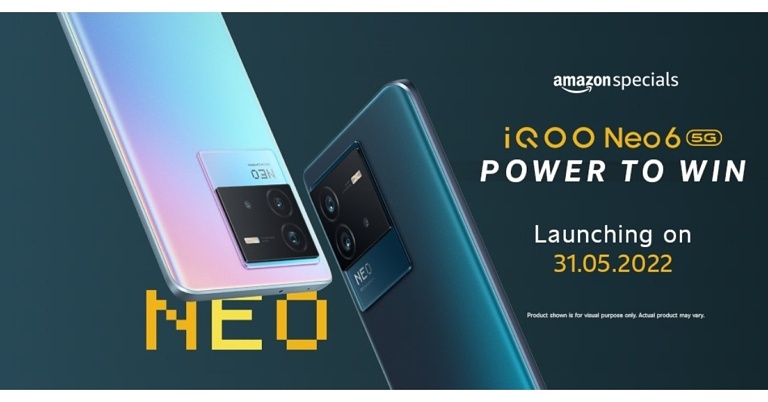
iQoo Neo 6 India launch set for May 31, listed on Amazon

iQoo Neo 6 is going to arrive in India soon, becoming the first smartphone in the Neo series to do so. The handset has been listed on Amazon, therefore, revealing the May 31 launch date. The device will be powered by Snapdragon 870 SoC and will house a 4700mAh battery with 80W fast charging support.

iQoo Neo 6 India launch details

As per Amazon listing iQoo Neo 6 will launch in India on May 31. Not much has been revealed about the upcoming smartphone but the Amazon listing reveals a Snapdragon 870 5G processor to power the phone. Moreover, the smartphone will pack a 4,700mAh battery that will have 80W FlashCharge support. As per the listing, the 80W FlashCharg Technology can charge 50 percent battery in just 12 minutes.

iQoo Neo 6 price in India expected

Past leaks suggest that the Indian variant of the Neo 6 could cost more than Rs. 29,000 for the base model and more than Rs 31,000 for the highest variant. The Interstellar and Dark Nova colour options for the phone are expected to be available.

iQoo Neo 6 specifications expected

According to a tipster, the Indian version of the iQoo Neo 6 will have a 6.62-inch E4 AMOLED display. The screen will have up to a 120Hz refresh rate support. The phone is said to be powered by Android 12. The tipster also mentioned that the Neo 6 would come in two models in India, with Snapdragon 870 and Snapdragon 870+ SoC. To recall iQoo Neo 6 was first released in mid-April and comes with a Snapdragon 8 Gen 1 processor. According to the source, the Neo 6 in India will have up to 8GB of RAM and 128GB of internal storage. Moreover, the device is likely to have a triple camera setup with 64-megapixel (OIS), 8-megapixel, and 2-megapixel sensors. It may also feature a 16-megapixel front camera. According to the leak, the Indian version of the Neo 6 will have a 4,700mAh battery that supports 80W fast charging. For the latest gadget and tech news, and gadget reviews, follow us on TwitterFacebook and Instagram. For newest tech & gadget videos subscribe to our YouTube Channel. You can also stay up to date using the Gadget Bridge Android App. You can find the latest car and bike news here.

How To Install Google Chrome on Android TV (2022)?

The one weakness that has to be dealt with while using an Android TV is the lack of availability or support of a pre-installed browser on the system. You may find multiple other third-party web browsers listed on the Google Play Store that are compatible with Android TV. But sadly, Google Chrome is not on the list. And when you are a person who has never used any other web browser than Chrome ever before in your life, then shifting onto a new one may seem like a significant sacrifice. However, we are glad to inform you that there is a workaround for that too! Even though it cannot be directly downloaded from the Play Store onto your device, one can still sideload Chrome on their Android TV to access its services. Here are the two best ways how to install Google Chrome on Android TV in 2022. 

Sideloading Chrome APK On Android TV

Google Chrome APK: How to install Google Chrome on Android TV Read also: Ways to make your Android TV run faster For installing Google Chrome on your Android TV, the first method is to get a copy of the Google Chrome APK and sideload it onto your system. There are multiple sources available on the web from where you can download the APK file of Google Chrome. You can either download the APK file directly via a third-party browser such as Puffin TV installed on your Android TV or you download it on your PC and then transfer the file through a USB onto the box. Then, all that’s left to be done is to locate the Chrome APK file through a file explorer and click to start the installation process.  Download Google Chrome APK.

Using A Third-Party App Store

Aptoide App Store The second method is to use another app store in place of the Google Play Store to get Chrome onto your Android TV. Why should we give up if the Play Store does not have Google Chrome on it? There are several alternatives that you can use to download apps. One such noteworthy example is Aptoide, an independent app store for Android devices with more than 2,500 apps available.  Read also: Top 15 Best Android TV Apps You Should be Using In 2022 Installing Aptoide on your Android TV can be done either via downloading it from another browser like Puffin TV or by transferring it from your PC through a USB device. Once Aptoide has been successfully installed on your system, all you would need to do then is search for Google Chrome in Aptoide on your Android TV and click on Install. That’s it! Download Aptoide. Note that any apps that you sideload onto your Android TV won’t be directly visible on its home screen. To access them, you would have to take help from an app like Sideload Launcher which launches all the sideloaded apps on your Android TV.  Download Sideload Launcher.  In this way, you can install Google Chrome on your Android TV and access its services. In case you know of any other methods how for doing the same, we would be delighted to hear about it. Do let the rest of us know in the comments section below.  For the latest gadget and tech news, and gadget reviews, follow us on Twitter, Facebook and Instagram. For newest tech & gadget videos subscribe to our YouTube Channel. You can also stay up to date using the Gadget Bridge Android App. You can find the latest car and bike news here.

Top 3 Tune Up Utilities for Windows

However, like everything else, they can get less efficient and slower over time. And, if you’re not the “patient”-type, the whole situation might seem pretty annoying to you. I mean, I’ve seen people breaking their PC over this issue. So, yes, it’s that bad. However, when such an issue occurs, you’ll have three choices to choose from –
  • Buy a brand new computer.
  • Accept the slower speed and get more patient, or
  • Use a tune-up utility tool.
So, which one do you think would be better for you? If you ask me, I’ll choose the third option, as I’m not a really patient person. And, I definitely refuse to change my beastly gaming rig. It was too expensive!

Tune-Up Utilities – What’s The Catch?

A PC tune-up utility, in essence, is a software program that can analyze your system files, locate the problematic area, and correct them. This, in turn, can improve the performance of your PC and decrease the start-up time too. Usually, with a PC tune-up utility, you can start with defragmenting your HDD and free up some space by eliminating duplicate and temporary files. Besides, it also focuses on cleaning up the registry. It can lower the prominence of crashes and slow down your computer.

Three Tune-Up Utilities To Look Forward To

If I’m being honest, Windows 10, itself, does an excellent job of keeping your computer in proper shape. Nonetheless, if you use your computer regularly or work on it for a prolonged period, the amount of clutter can increase massively. And, if you don’t delete them, the speed of your PC will slow down imminently. Hence, to help you out, I have enlisted a plethora of utility tools and offered some valuable insights into them. Hopefully, I can help you out with it.

Iolo System Mechanic

When it comes to clearing up the clutter of your PC, Iolo can be the best possible option from almost every front. For starters, it can delete your files securely without making any mistakes. Besides, you’ll get several additional valuable tools that can help you take care of other system-related tasks and improve your system’s speed. The only problem with this software is that it can only be used in Windows. Hence, if you are using a MAC, I’ll ask you to move on to the next alternative.

Piriform CCleaner

If Iolo sits in the first position in the list of “the best tune-up utility tool,” CCleaner can be considered as a close second. To begin with, it can clean the junk available in both your PC’s system and browser. Also, it can fix app- or system-related errors pretty efficiently. Another quirky feature of this tool is that it can auto-update your device’s driver and utility quickly. This, in turn, can improve your system’s speed and performance notably. Just one thing, though. CCleaner has a free version, which can only be used if you can cope with advertisements. Or, you can try upgrading to the premium variant.

Advanced PC Cleanup

Advanced PC Cleanup, in essence, is the most beginner-friendly application you’ll find out there on the internet. It’s a one-stop solution to clear up the clutter of junk files, optimize your registry folders, and uninstall unwanted apps. With Advanced PC Cleanup, you can also clean almost each and every redundant file situated on your computer. Finally, there’s also an identity protector available in the system. You can use the same for hiding your identity traces on the web.

Final Thoughts

The core job of a tune-up utility software program will be to improve your PC’s performance and make it better than before. Hence, if you think that your system has become a little slow, be sure to use the tool I’ve mentioned before. As I’ve said, each of them is tried and tested by us. Hence, you can definitely trust them. But, before you opt for anything, I’ll ask you to go for a free trial of the software. This way, you can understand if the tool is right for you or not. For the latest gadget and tech news, and gadget reviews, follow us on TwitterFacebook and Instagram. For newest tech & gadget videos subscribe to our YouTube Channel. You can also stay up to date using the Gadget Bridge Android App. You can find the latest car and bike news here.

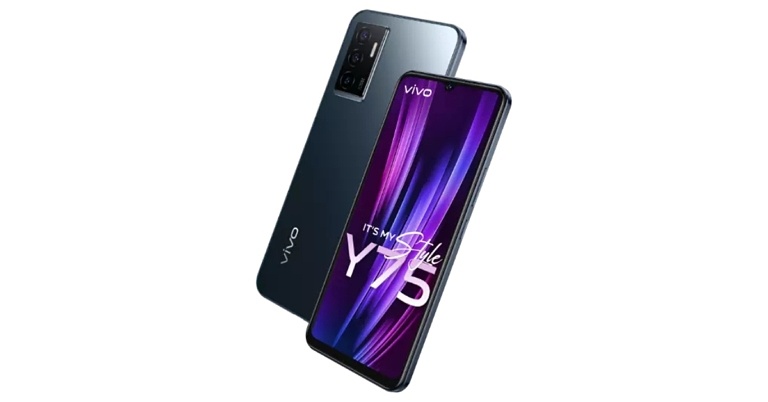
Vivo Y75 with 44MP AF Selfie Camera and Eye Autofocus launched in India

With the launch of the Vivo Y75, Vivo has expanded its Y Series portfolio in India. The new smartphone comes with a sleek design and is powered by MediaTek Helio G96 Chipset. It features a 44MP AF Selfie Camera with Eye Autofocus and a 50 MP Super Night Camera. Additionally, the phone houses a 4,050mAh battery that supports 44W FlashCharge.

Vivo Y75 price in India, sale details

The Vivo Y75 is priced at Rs 20,999 in India for the single 8GB RAM with 128GB storage variant. The device will be available in two colour options of Moonlight Shadow and Dancing Waves. The device can be purchased via Flipkart.com, Vivo India E-store, and all partner retail stores in the country. Consumers can get up to INR 1500 in extra benefits by using (ICICI/SBI/IDFC First Bank/OneCard) until May 31. Vivo Y75 price in India

Vivo Y75 tech specifications

The Vivo Y75 is powered by Funtouch OS 12, which is based on Android 11. Under the hood, the Vivo Y-series phone is powered by a MediaTek Helio G96 4G SoC with 8GB of RAM. The RAM can be increased to 4GB by using built-in storage. The smartphone has a 6.44-inch AMOLED display with a resolution of 1,080×2,400 pixels. There is a triple rear camera setup that includes a 50-megapixel primary sensor with an f/1.8 aperture. Moreover, an 8-megapixel wide-angle depth sensor with an f/2.2 aperture, and a 2-megapixel macro sensor with an f/2.4 aperture are all contained within the camera system. The Vivo Y75 features a 44-megapixel autofocus sensor on the front for selfies. The AI Face Beauty algorithm, Steadiface Selfie Video, Video Face Beauty, Picture-in-Picture or Dual View mode will add up to the vlogging experience. Eye Autofocus, Ultra-Wide Night, Super Macro, Bokeh Flare Portrait, AI Extreme Night, Steadiface Selfie Video, Multi-Style Portrait, Double Exposure, and Video face beauty are among the camera modes and features available. Dual View mode allows users to record with both the front and rear cameras at the same time for the ultimate vlogging experience. The vivo Y75 also comes with a 4050mAh battery and a powerful 44W FlashCharge that can charge the phone from 1% to 65 percent in 30 minutes, giving it enough juice to get through the day. The smartphone has Wi-Fi, Bluetooth v5.2, GPS, BEIDOU, GLONASS, GALILEO, a 3.5mm headphone jack, and a USB Type-C port for connectivity. An accelerometer, ambient light sensor, gyroscope, proximity sensor, and e-compass are among the sensors onboard. A fingerprint sensor is also included for authentication. For the latest gadget and tech news, and gadget reviews, follow us on TwitterFacebook and Instagram. For newest tech & gadget videos subscribe to our YouTube Channel. You can also stay up to date using the Gadget Bridge Android App. You can find the latest car and bike news here.
21 May 2022 Amazon Quiz today answers: Answer to win Rs 40,000 Amazon Pay Balance

Get ready to participate in the 26 April 2022 Amazon Quiz, as it is live on its mobile platform. In today’s quiz participants have a chance to win Rs 40,000 Amazon Pay Balance by answering all the questions correctly. The quiz can be played every day from 12 AM to 11:59. Check Out Amazon Quiz Answers Today 21 May 2022. The daily quiz conducted by the company brings an opportunity for the customers to win exciting prizes. Every day Amazon brings a fresh set of questions for its customers that contains five easy questions. The questionnaire consists of five questions related to general knowledge and current affairs. The participants need to answer all the questions correctly and their names will be selected for a lucky draw. The winner will be announced at the end of the month. Amazon quiz brings an opportunity for its customers to win Amazon Pay Balance ranging from Rs 1,000 to Rs 50,000. Only app users are eligible to participate in the Quiz as it is not accessible on the web platform. Amazon Quiz Today Prize – Rs 40,000 Amazon Pay Balance Quiz Date – 21 May 2022 Daily Timing – 12 AM to 11:59 PM Winner Announcement – Today 12 PM

Amazon Quiz Answers Today 21 May 2022

Question 1: Which home textiles major has forayed into the mattress category under its home linen brand SPACES?

Answer: Welspun India

Question 2: Who among these scored a brilliant 148 in a losing cause in the ICC Women’s World Cup final in 2022?

Answer: Natalie Sciver

Question 3: The United States has officially designated which of these countries as a major non-NATO ally?

Answer: Qatar

Question 4: In which country is this famous movie set located?

Answer: New Zealand

Question 5: What is this famous building called?

Answer: Chrysler Building

How To Play Amazon Quiz

Only app users are eligible to play the Amazon quiz every morning from 12 AM to 11:59 PM. The quiz is not available on the desktop. For those who are unaware of how to play the Amazon quiz below are the steps, you can follow to take the quiz.
  • Firstly download the Amazon app from Google Play Store or App Store
  • Now fill in the required information through the Sign Up option.
  • You need to log in to the Amazon app and scroll down on the home screen to find the Amazon Quiz banner.
  • Tap on the Amazon Quiz banner and tap on the Start button to start the Quiz.
  • Now you will get 5 questions and you need to answer them correctly. One wrong answer will eliminate you from the Quiz.
  • After answering all the questions correctly you are now eligible for a Lucky Draw.
  • The winner’s name will be announced today at 12 PM.
For the latest gadget and tech news, and gadget reviews, follow us on TwitterFacebook and Instagram. For newest tech & gadget videos subscribe to our YouTube Channel. You can also stay up to date using the Gadget Bridge Android App. You can find the latest car and bike news here.

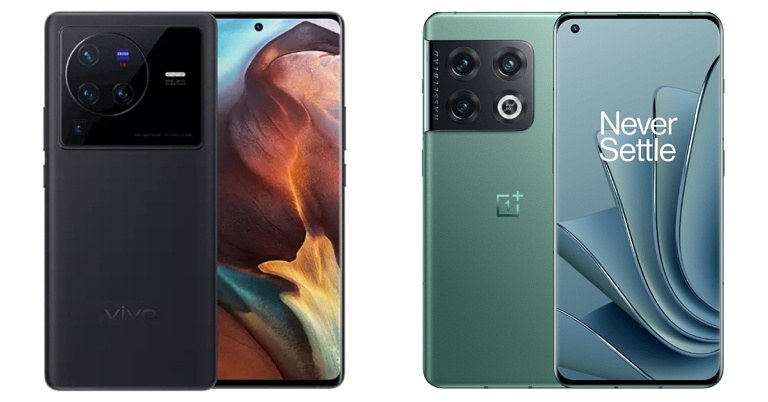
Smartphone Comparison: Vivo X80 Pro Vs OnePlus 10 Pro

Vivo recently released its most premium X80 smartphone series in India. The Vivo X80 and Vivo X80 Pro are the two flagship devices it consists. The Vivo X80 Pro is the most expensive, and it competes directly with Xiaomi 12 Pro and OnePlus 10 Pro. We’ve already compared its specifications to those of the Xiaomi 12 Pro. However, in this article, we will compare the specifications of the Vivo X80 Pro Vs OnePlus 10 Pro to help you decide which to purchase.

Display

Vivo X80 Pro: 6.78-inch AMOLED 2K display OnePlus 10 Pro: 6.7-inch QHD+ curved LTPO display

Processor

Vivo X80 Pro: Snapdragon 8 Gen 1 processor OnePlus 10 Pro: Snapdragon 8 Gen 1 processor

Rear camera(s)

Vivo X80 Pro: The quad rear camera setup includes a 50-megapixel Samsung ISOCELL GNV primary sensor, a 48-megapixel ultra-wide Sony IMX598 sensor, a 12-megapixel Sony IMX663 sensor with a portrait lens, and an 8-megapixel sensor with a periscope-shaped ultra-telephoto lens. OnePlus 10 Pro: Triple rear camera array for photos and videos, which includes a 48-megapixel Sony IMX789 main sensor with f/1.8 aperture and optical image stabilisation (OIS). The camera configuration also includes a 50-megapixel Samsung ISOCELL JN1 ultra-wide sensor with an f/2.2 aperture and an 8-megapixel telephoto lens with OIS.

Selfie camera

Vivo X80 Pro: 32-megapixel selfie camera OnePlus 10 Pro:32-megapixel Sony IMX615 camera sensor

RAM and storage

Vivo X80 Pro: 12GB RAM with 256GB storage OnePlus 10 Pro: 8GB RAM with 128GB storage and 12GB RAM with 256GB storage

Battery

Vivo X80 Pro: 4,700mAh battery OnePlus 10 Pro: 5,000mAh dual-cell battery

Operating system

Vivo X80 Pro: OriginOS based on Android 12 OnePlus 10 Pro: ColorOS 12.1 runs on top of Android 12

Starting Price

Vivo X80 Pro: Rs 79,999 OnePlus 10 Pro: Rs 66,999

Our Take

Let’s start with the appearance. The design of both smartphones is modern. The Vivo X80 has a four-sensor circular camera module, whereas the OnePlus 10 Pro has a square-shaped camera module with triple cameras. A 120Hz AMOLED curved display is present on both of them. Qualcomm Snapdragon 8 Gen 1 SoC is used in both Vivo and OnePlus smartphones. Vivo is available in a single storage configuration, whereas OnePlus offers two. The OnePlus 10 Pro has a larger 5000 mAh battery than the X80 Pro, which only has 4700 mAh. Both phones support fast charging at 80 watts and wireless charging at 50 watts. Also Read: Smartphone comparison: Vivo X80 Pro Vs Xiaomi 12 Pro Both devices come pre-installed with Android 12. On top of Android, the OnePlus 10 Pro runs Oxygen OS 12, while the Vivo X80 Pro runs Funtouch OS 12. The X80 Pro features a quad-camera setup tuned by Zeiss. The OnePlus 10 Pro, on the other hand, has a triple-camera setup tuned by Hasselblad. However, OnePlus takes the lead with 10-bit colour photography and 12-bit RAW photography in Pro Mode. Which one should you buy? If you like to take a lot of photos, the OnePlus 10 Pro is our top pick when it comes to pricing, which is priced at Rs 71,999 for the same configurations as Vivo. For the latest gadget and tech news, and gadget reviews, follow us on TwitterFacebook and Instagram. For newest tech & gadget videos subscribe to our YouTube Channel. You can also stay up to date using the Gadget Bridge Android App. You can find the latest car and bike news here.