


Amazon Quiz has gone live now. The quiz can be played daily from 12 AM to 11:59 PM. Amazon gives the opportunity to millions of its customers to play and win free gadgets as well as Amazon Pay Balance. Today e-commerce gives you a chance to win Rs 25,000 Amazon Pay Balance.
Every day the e-commerce platform brings a new set of questionnaires to which the participants have to answer correctly. The quiz contains only five questions that are based on current affairs and general knowledge. Answering all the questions correctly will get your name selected for a lucky draw. Only one person will be selected as the winner and the results are announced at the end of every month. The lucky ones might win something by answering all the questions correctly, and the wrong answers will get you eliminated from the quiz. So to make sure you answer all the questions correctly Gadget Bridge everyday updates all the correct answers to all 5 questions. To win Rs 25,000 Amazon Pay Balance check out today’s answers for the Amazon Quiz.
June 13 Flipkart Daily Trivia Quiz Answers: Answer to win exciting prizes

The e-commerce website Flipkart is hosting Daily Trivia Quiz. Every day it brings a bunch of new questions for its users. By answering them correctly you can win exciting prizes. The questionnaire is based on questions related to general knowledge. Also, the users can win free vouchers and super coins, among other offers via the daily quiz. June 13 Flipkart Daily Trivia Quiz Answers has already gone live on its platform.
The participant should be at least 18 years old and should have a valid login ID. The Quiz is available on the mobile platform and not the web version. E-commerce conducts the quiz on daily basis and goes live at 12:00 AM IST and runs till 11:59 PM IST. The winners are announced within 15 days from the date of participation that can be viewed under the Gems/Rewards section in the app.
How to participate in the Flipkart Daily Trivia Quiz
To participate download the Flipkart app on your phone. Then open the Flipkart app then head to Game Zone. Now click on the Daily Trivia Banner or search for Daily Trivia. Enter the game and answer all 5 questions with correct answers.June 13 Flipkart Daily Trivia Quiz Answers
Question 1: To which country did famous boxer Muhammad Ali belong? Answer: The USA Question 2: Which country’s highest division of football is the La Liga? Answer: Spain Question 3: Who was the first cricketer to hit 400 sixes in international cricket? Answer: Chris Gayle Question 4: Who holds the record for scoring the fastest Ranji double century? Answer: Ravi Shastri Question 5:Which country was recently banned by WADA from global sports for 4 years over doping? Answer: Russia
For the latest gadget and tech news, and gadget reviews, follow us on Twitter, Facebook and Instagram. For newest tech & gadget videos subscribe to our YouTube Channel. You can also stay up to date using the Gadget Bridge Android App.
June 13 Amazon Quiz: Participate and win Rs 20,000 Amazon Pay Balance

Get ready to answer a new set of questions as the June 13 Amazon Quiz is live on its platform. The e-commerce platform brings a daily quiz on its mobile platform, which every day gives chance to millions of people across the country to win exciting prizes. The quiz goes live at 8 AM and runs till 12 noon. Today’s Amazon Quiz prize is the Rs 20,000 Amazon Pay Balance.
By participating in Amazon Quiz every day you can stand a chance to win prizes such as iPhone X, iPhone Xs, Seagate HDD, GoPro Hero 8 Camera, LG Smartphones, Samsung Galaxy S20, Air Purifier, Oppo smartphones, Amazon Pay Balance among others. Every day Amazon brings a fresh new quiz on its app, here we would like to mention that the quiz is not available for desktop users, only app users can participate in the daily quiz.
The company puts 5 questions based on general knowledge and current affairs to which the contestants have to answer all the questions correctly. A wrong answer will eliminate you from the quiz. After giving correct answers to all the questions, your name will get further selected for a lucky draw. The results of the lucky draw will be announced at the end of the month. So today’s quiz winner’s name will be declared at the end of the month. We have updated today’s five questions with their correct answers below so that you can win Amazon Quiz and get Rs 20,000 Amazon Pay Balance
June 13 Amazon Quiz Answers
Question 1: If the first was ‘Inkheart’ and the second was ‘Inkspell’, then what is the third in the trilogy?
The answer is- Inkdeath
Question 2: Which of the following has been given the name ‘Tauktae’ by Myanmar, which means ‘gecko’?
The answer is- A cyclone
Question 3: Which artist’s painting titled “Painting for Saints” as a tribute to the NHS and healthcare workers, recently auctioned for £14.4m?
The answer is- Banksy
Question 4: This animal became famous across the world with the release of which animated film in 2005?
The answer is- Madagascar
Question 5: Identify the festival from this picture.
The answer is- Burning Man
Best way to organise your apps in any Android smartphone
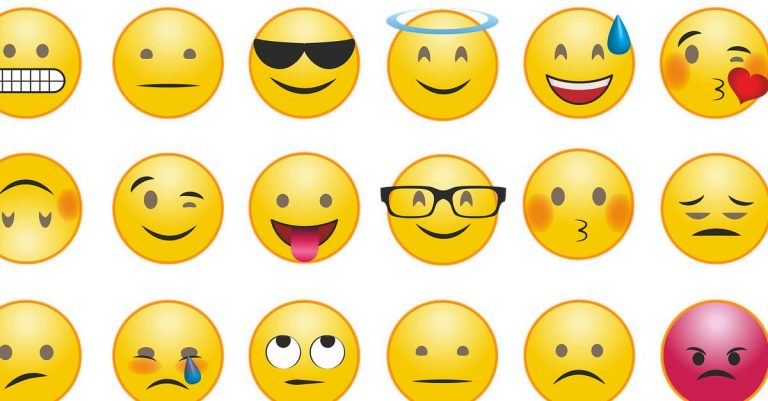
Hunting down your most used app becomes exhausting when apps are scattered everywhere on your phone. There are a few smart ways you can arrange your apps on the screen. Check the guide below for a beautiful and organised screen. Here is the list below.
 The first thing you can do is organise them in folders. The best way is to assign the folders according to the usage of the apps. Naming them or putting them in numbers is a great start. Organising them in accordance with their actions is the simplest. Then you can easily tap on the folder you need to open when you need an app. Organising the app in a folder can be done easily in your phone setting.
 Putting the apps in alphabetical order is another option for arranging your apps. Alphabets are easier to remember and opening an app with it makes it easier. For example, when you want to open Instagram your reflexes will easily find the alphabet “I”. You can create this alphabetical order folder by going to settings. And then reset the home screen layout.
 Emojis are usually used for expression. But using emoji for assigning the function of the app by using a folder is very creative. For example for music apps like Spotify, you can use the music emoji or the headphone emoji. It will not only look amazing. But it will refresh your screen and look more bright.
Read also: Google to roll out 25 new multi-skin toned handshake emojis by 2022
Emojis are usually used for expression. But using emoji for assigning the function of the app by using a folder is very creative. For example for music apps like Spotify, you can use the music emoji or the headphone emoji. It will not only look amazing. But it will refresh your screen and look more bright.
Read also: Google to roll out 25 new multi-skin toned handshake emojis by 2022
 Some people excel at colour organisational skills. This option is on the list for those who find colour more attractive. For example, app developers always associate their app with a colour. Facebook is blue, Instagram is red/pink, Snapchat is yellow, WhatsApp is green, and so on. For all those colour lovers this is a way of organising the apps that will lighten up the phone. Try this today and let your screen look vibrant.
For the latest gadget and tech news, and gadget reviews, follow us on Twitter, Facebook and Instagram. For newest tech & gadget videos subscribe to our YouTube Channel. You can also stay up to date using the Gadget Bridge Android App.
Some people excel at colour organisational skills. This option is on the list for those who find colour more attractive. For example, app developers always associate their app with a colour. Facebook is blue, Instagram is red/pink, Snapchat is yellow, WhatsApp is green, and so on. For all those colour lovers this is a way of organising the apps that will lighten up the phone. Try this today and let your screen look vibrant.
For the latest gadget and tech news, and gadget reviews, follow us on Twitter, Facebook and Instagram. For newest tech & gadget videos subscribe to our YouTube Channel. You can also stay up to date using the Gadget Bridge Android App.
-
Organise them in a folder
 The first thing you can do is organise them in folders. The best way is to assign the folders according to the usage of the apps. Naming them or putting them in numbers is a great start. Organising them in accordance with their actions is the simplest. Then you can easily tap on the folder you need to open when you need an app. Organising the app in a folder can be done easily in your phone setting.
-
Alphabetical order
 Putting the apps in alphabetical order is another option for arranging your apps. Alphabets are easier to remember and opening an app with it makes it easier. For example, when you want to open Instagram your reflexes will easily find the alphabet “I”. You can create this alphabetical order folder by going to settings. And then reset the home screen layout.
-
Using Emoji
 Emojis are usually used for expression. But using emoji for assigning the function of the app by using a folder is very creative. For example for music apps like Spotify, you can use the music emoji or the headphone emoji. It will not only look amazing. But it will refresh your screen and look more bright.
Read also: Google to roll out 25 new multi-skin toned handshake emojis by 2022
Emojis are usually used for expression. But using emoji for assigning the function of the app by using a folder is very creative. For example for music apps like Spotify, you can use the music emoji or the headphone emoji. It will not only look amazing. But it will refresh your screen and look more bright.
Read also: Google to roll out 25 new multi-skin toned handshake emojis by 2022
-
Delete the never use apps
-
Colour Coding
 Some people excel at colour organisational skills. This option is on the list for those who find colour more attractive. For example, app developers always associate their app with a colour. Facebook is blue, Instagram is red/pink, Snapchat is yellow, WhatsApp is green, and so on. For all those colour lovers this is a way of organising the apps that will lighten up the phone. Try this today and let your screen look vibrant.
For the latest gadget and tech news, and gadget reviews, follow us on Twitter, Facebook and Instagram. For newest tech & gadget videos subscribe to our YouTube Channel. You can also stay up to date using the Gadget Bridge Android App.
Some people excel at colour organisational skills. This option is on the list for those who find colour more attractive. For example, app developers always associate their app with a colour. Facebook is blue, Instagram is red/pink, Snapchat is yellow, WhatsApp is green, and so on. For all those colour lovers this is a way of organising the apps that will lighten up the phone. Try this today and let your screen look vibrant.
For the latest gadget and tech news, and gadget reviews, follow us on Twitter, Facebook and Instagram. For newest tech & gadget videos subscribe to our YouTube Channel. You can also stay up to date using the Gadget Bridge Android App.
5 Best Free Ways to Put Watermark in Your Images (2024)
You create a signature when you watermark your photos. It helps you to protect all your hard work and make it safe on the internet. Downloading on the internet has become easier and this is why you should start to apply a watermark to your images today. Here are top 5 ways you can watermark your photos. Follow the steps below.
Read Also: Top 4 Ways to Turn On Your Android Phone’s Flashlight Without Waking Up The Screen
 Photographers and painters put their signatures on the photo or a painting. This is to maintain the authenticity of their work. Similarly, your edited work and photos on the internet should be under copyright. Your work on a digital platform can be safer with the watermark you will be creating. It will give you the ownership claim as well. These are some steps on how you can watermark in Photoshop.
 The website can watermark your images and protect them in a few easy steps. The best part of Watermarkly is that you can watermark it for free. It enables you to import it from computers, Google Drive, or dropbox. The website claims to watermark your images in 5 min. It is very easy. Follow the steps below.
 The app comes with many exciting features. You can watermark images offline also. The app has 260 fonts that you choose from. It is compatible with Windows or Mac. You can download the app from the website visualwatermark.com for free. To watermark your images from the app. It is fairly simple. Follow these simple steps to


 Any pictures you take will be watermarked with the text of your choice.
 The ‘Watermark: Logo, Text on Photo’ app is one of the best third-party tools you can use on your Android phone to add a watermark to your images. It has over 250 creative fonts and 1000+ stickers that can be utilised to create an eye-catching watermark. You can even create a signature for your images on this app. The app gives you the option to change the pen size and colour. Before posting your images on social media, you can use the ‘Logo, Text on Photo’ app to resize and edit them.
Watermark in Photoshop
 Photographers and painters put their signatures on the photo or a painting. This is to maintain the authenticity of their work. Similarly, your edited work and photos on the internet should be under copyright. Your work on a digital platform can be safer with the watermark you will be creating. It will give you the ownership claim as well. These are some steps on how you can watermark in Photoshop.
- Save the image you want to watermark in a folder
- Open the Photoshop app
- Choose the image
- Select Layer > New layer
- Rename the new layer “Watermark”
- Click text tool
- Add text for your watermark
- Choose font, text size, colour
- Hit Enter
In Watermarkly.com
 The website can watermark your images and protect them in a few easy steps. The best part of Watermarkly is that you can watermark it for free. It enables you to import it from computers, Google Drive, or dropbox. The website claims to watermark your images in 5 min. It is very easy. Follow the steps below.
- Save the files in a folder or you can choose from drive or dropbox
- Open the Watermarkly website
- Choose the option watermark for free
- The page: drag your file open up
- Select image from the options given
- Go to the next step on the top right corner
- There are two option: add text and logo
- Choose one: text or logo
- Enter all the option you like: text, font, colour, size, etc
- Now on the right top corner select watermark image
- The process is completed: Download it
Visual Watermark
 The app comes with many exciting features. You can watermark images offline also. The app has 260 fonts that you choose from. It is compatible with Windows or Mac. You can download the app from the website visualwatermark.com for free. To watermark your images from the app. It is fairly simple. Follow these simple steps to
- Save the images to a folder on your computer
- Open the app
- Drag your photos here
- Select image from the folder
- Go to the next step on the top right corner
- Now you see the page add text
- Enter text, font, size, colour
- Drag to where you put the watermarks
- Go to next step: top right corner
- Then again go to the next step
- Choose output folder
- Save it in a folder
- Press watermark
Add a watermark to your images on your Android phone
- Launch the native Camera app on your smartphone.
- Tap the gear icon for settings.
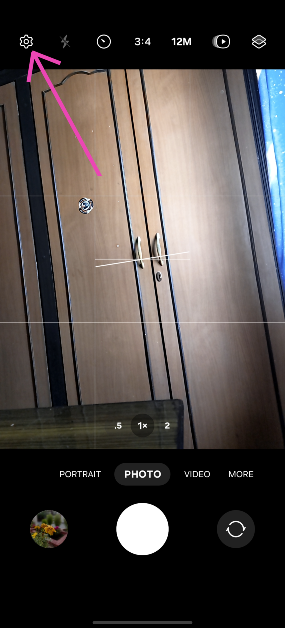
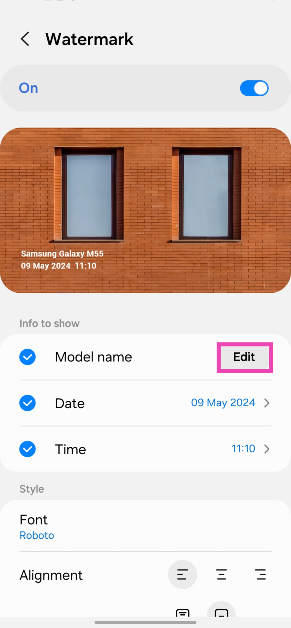
- Turn on the toggle switch for Watermark and tap on it.
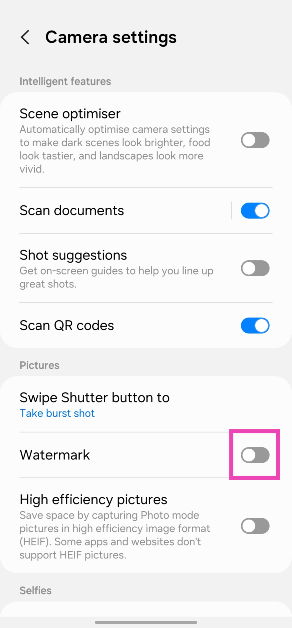
- Hit Edit next to Model name.
- Enter the text for your watermark and hit Save.
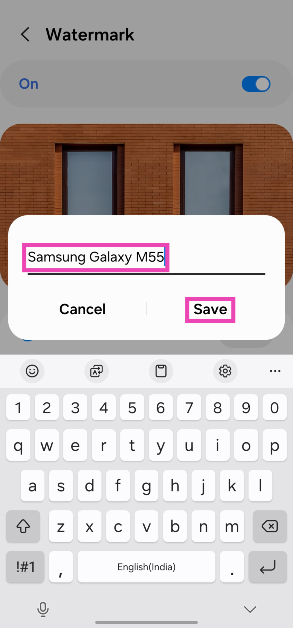 Any pictures you take will be watermarked with the text of your choice.
Watermark: Logo, Text on Photo
Download from the Google Play Store The ‘Watermark: Logo, Text on Photo’ app is one of the best third-party tools you can use on your Android phone to add a watermark to your images. It has over 250 creative fonts and 1000+ stickers that can be utilised to create an eye-catching watermark. You can even create a signature for your images on this app. The app gives you the option to change the pen size and colour. Before posting your images on social media, you can use the ‘Logo, Text on Photo’ app to resize and edit them.
Frequently Asked Questions (FAQs)
How do I add a watermark to my images on an Android phone?
Go to Camera>Settings>Watermark, turn on its toggle switch, and add the text. Go back when you’re done. The pictures you take using your phone will now have the watermark.How do I add a watermark to my images on a PC?
Install Visual Watermark on your PC. Open the app and drag your image in the box. Hit ‘Next’ and add text. Change its font and size and drag it along the picture to place it wherever you want. Hit ‘Next’ again and save the image in the target folder.Which are some good apps to add watermarks to images?
For Android, Watermark Maker, Add Watermark on Photos, Watermark: Logo, Text on Photo, and Photo Watermark are great apps for this task. Read Also: Meta brings AI-powered image and text generation tools for businesses to create ad creativesConclusion
These are the top 5 ways to put a watermark in your images on an Android phone or Windows PC. If you know any other ways to go about your task, let us know in the comments. While you’re here, read this article to learn how to watermark your Google Docs.Tecno Spark 7T with 6,000mAh battery launched in India
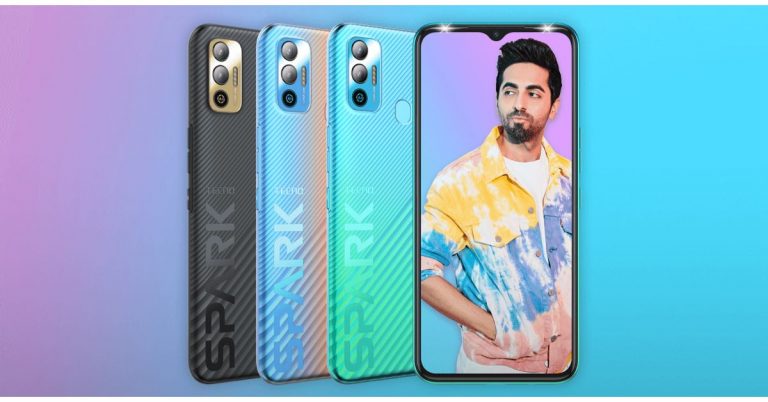
After launching Tecno Spark 7 and 7 Pro in India the Transsion holding smartphone brand today expanded the lineup. The company has introduced Spark 7T which is the third edition to the series. The device falls under the sub Rs 10,000 price segment. The phone features a 6,000mAh battery and a 48-megapixel dual rear camera set up. In addition to this, there is an HD display and it is powered by octa-core MediaTek Helio G35 SoC.
Tecno Spark 7T pricing and availability
Tecno Spark 7T has been launched in India in a single configuration of 4GB RAM with 64GB storage priced at Rs 8,999. Tecno has also announced a consumer launch offer of flat Rs 1000 off on the first day of the Spark 7T sale so that consumers can buy the new smartphone at just Rs 7999 for that day. The device will be available for purchase starting June 15 at 12 noon via Amazon.


Tecno Spark 7T specifications
Coming to the specifications Tecno Spark 7T features a 6.52-inch HD+ Dot Notch IPS display having 720×1,600 pixels of resolution. It offers 480 nits peak brightness and a 20:9 aspect ratio. The phone runs HiOS v7.6 based on Android 11. There is an octa-core MediaTek Helio G35 SoC paired with 4GB of DDR4x RAM and 64GB of storage. The internal storage can be expanded up to 512GB using a microSD card. In terms of cameras, Tecno Spark 7T comes with a dual rear camera setup that consists of a 48-megapixel primary sensor with an ƒ/1.8 aperture and a secondary AI lens with four flashes. The rear camera features various modes that include AI Beauty, Smile Shot, 20 AI Scene Detection, Portrait Bokeh, HDR, 10X Zoom, AR Shot, AI Body Shaping, Burst Shot, Google Lens, Documents, Panorama, 2K time Lapse, Slow Motion, Short Video, Video Beauty, Video Bokeh and 2K Recording. On the front, the smartphone sports an 8-megapixel selfie camera with ƒ/2.0 aperture and dual camera. The front camera also features AI HDR, Time Lapse, Smile Shot, AI Portrait, AR Shot, Wide Selfie, Burst Shot, 7 AI Scene Detection, AI Beauty. Tecno Spark 7T also includes a 6,000mAh battery that is claimed to provide a standby time of up to 36 days, 41 hours calling time, 18 hours of web browsing, 193 hours of music playback, 18 hours of game playing and 29 hours of video playback. On the connectivity front, the device includes dual-band Wi-Fi, 4G, GPS, Bluetooth v5, OTG support, among others. For the latest gadget and tech news, and gadget reviews, follow us on Twitter, Facebook and Instagram. For newest tech & gadget videos subscribe to our YouTube Channel. You can also stay up to date using the Gadget Bridge Android App.5 best Android games and apps to boost your brain power

Games are not always about fun. Some of you might like games that test your solving skills and test your logic ability. Such games give you the dual pleasure of enjoying the game as well as training your brain. Here is a list of the best games and apps you can download now on the Play Store to start playing.
 This is a skills test game that you can download on the Play Store for free. It is based on your logical skills and improves your cognitive ability. You can start playing with your friends or random people online. Start the game with 2 people and the maximum is 4. A few important features to make note of is it compares your performance with other players online and attends daily or weekly programs.
Download here
This is a skills test game that you can download on the Play Store for free. It is based on your logical skills and improves your cognitive ability. You can start playing with your friends or random people online. Start the game with 2 people and the maximum is 4. A few important features to make note of is it compares your performance with other players online and attends daily or weekly programs.
Download here
 It is an interactive puzzle game to test your skills. It develops accuracy, speed, and strategy. One of the advantages of the game is you can increase your reading skills and also your vocabulary. One of the important features is practice mode, it gives you a complete set of innovative ways to boost your skills. And it is not time-consuming; you can play it quickly. The best part of the game is, it is suitable for both adults and kids.
Download here
It is an interactive puzzle game to test your skills. It develops accuracy, speed, and strategy. One of the advantages of the game is you can increase your reading skills and also your vocabulary. One of the important features is practice mode, it gives you a complete set of innovative ways to boost your skills. And it is not time-consuming; you can play it quickly. The best part of the game is, it is suitable for both adults and kids.
Download here
 Peak is designed to keep your mind active with brain games and puzzles. Peak will increase your memory, language skills, and critical thinking. Peak has more than 45 games just for you to play. This game allows you to play online and compete with others. The game contains 30 mini-games that will excite you non-stop. The important feature is that you can play the mobile game offline, too. The con of the game is if you want to update to Pro and enable many features it asks for a small subscription fee.
Download it
Peak is designed to keep your mind active with brain games and puzzles. Peak will increase your memory, language skills, and critical thinking. Peak has more than 45 games just for you to play. This game allows you to play online and compete with others. The game contains 30 mini-games that will excite you non-stop. The important feature is that you can play the mobile game offline, too. The con of the game is if you want to update to Pro and enable many features it asks for a small subscription fee.
Download it
 The app can be downloaded and installed for free. It has more than 40 games. The app runs on your math, writing, reading, and listening ability. It increases your vocabulary, grammar, and reading comprehension. The app takes help from AI technology to help with your exercise. The goals you set and the more you use will determine what level you need. You have the option to download for free and later upgrade to PRO with a minimum subscription.
Download here
The app can be downloaded and installed for free. It has more than 40 games. The app runs on your math, writing, reading, and listening ability. It increases your vocabulary, grammar, and reading comprehension. The app takes help from AI technology to help with your exercise. The goals you set and the more you use will determine what level you need. You have the option to download for free and later upgrade to PRO with a minimum subscription.
Download here
 This app is very popular among people who love to learn a new language. You can download the app for free. This app can make learning a language simple and easy. It will help you to read, write and speak the language you choose on the app. The app contains 32 different languages in the form of games and quizzes. The best feature is that it directly resumes where you left off (last time) making it very convenient. Want to learn a new language today. Here is an app.
Download now
For the latest gadget and tech news, and gadget reviews, follow us on Twitter, Facebook and Instagram. For newest tech & gadget videos subscribe to our YouTube Channel. You can also stay up to date using the Gadget Bridge Android App.
This app is very popular among people who love to learn a new language. You can download the app for free. This app can make learning a language simple and easy. It will help you to read, write and speak the language you choose on the app. The app contains 32 different languages in the form of games and quizzes. The best feature is that it directly resumes where you left off (last time) making it very convenient. Want to learn a new language today. Here is an app.
Download now
For the latest gadget and tech news, and gadget reviews, follow us on Twitter, Facebook and Instagram. For newest tech & gadget videos subscribe to our YouTube Channel. You can also stay up to date using the Gadget Bridge Android App.
The list of games
Searching for the best games that test your brain can be confusing and energy draining. These games are designed to train your brain through various methods. It helps you in understanding how your brain’s ability works. It develops your cognitive skills, too. These games can be of many types: puzzle games, memory testing games, language skills games, and critical thinking games. Moreover, the games keep you active mentally. So check our list of the best games. Read more: Creative Stage V2 soundbar launched, now available in India at a special price of Rs 9,999-
Skillz
 This is a skills test game that you can download on the Play Store for free. It is based on your logical skills and improves your cognitive ability. You can start playing with your friends or random people online. Start the game with 2 people and the maximum is 4. A few important features to make note of is it compares your performance with other players online and attends daily or weekly programs.
Download here
This is a skills test game that you can download on the Play Store for free. It is based on your logical skills and improves your cognitive ability. You can start playing with your friends or random people online. Start the game with 2 people and the maximum is 4. A few important features to make note of is it compares your performance with other players online and attends daily or weekly programs.
Download here
-
Lumosity
 It is an interactive puzzle game to test your skills. It develops accuracy, speed, and strategy. One of the advantages of the game is you can increase your reading skills and also your vocabulary. One of the important features is practice mode, it gives you a complete set of innovative ways to boost your skills. And it is not time-consuming; you can play it quickly. The best part of the game is, it is suitable for both adults and kids.
Download here
It is an interactive puzzle game to test your skills. It develops accuracy, speed, and strategy. One of the advantages of the game is you can increase your reading skills and also your vocabulary. One of the important features is practice mode, it gives you a complete set of innovative ways to boost your skills. And it is not time-consuming; you can play it quickly. The best part of the game is, it is suitable for both adults and kids.
Download here
-
Peak
 Peak is designed to keep your mind active with brain games and puzzles. Peak will increase your memory, language skills, and critical thinking. Peak has more than 45 games just for you to play. This game allows you to play online and compete with others. The game contains 30 mini-games that will excite you non-stop. The important feature is that you can play the mobile game offline, too. The con of the game is if you want to update to Pro and enable many features it asks for a small subscription fee.
Download it
Peak is designed to keep your mind active with brain games and puzzles. Peak will increase your memory, language skills, and critical thinking. Peak has more than 45 games just for you to play. This game allows you to play online and compete with others. The game contains 30 mini-games that will excite you non-stop. The important feature is that you can play the mobile game offline, too. The con of the game is if you want to update to Pro and enable many features it asks for a small subscription fee.
Download it
The list of Apps
Every person comes with a different skill set, which they acquire in life. This list of apps below will help to improve your speaking skills, processing speed, memory, and math skills. Using an app that does not make you lose brain cells and improve your creativity is not an easy task to search. Use these apps and develop your concentration and organisational skills. These apps will help you focus at work or on education and increase your self-confidence. Read also: Apple Store India introduces ‘Today at Apple’ virtual Photography and Music Sessions-
Elevate
 The app can be downloaded and installed for free. It has more than 40 games. The app runs on your math, writing, reading, and listening ability. It increases your vocabulary, grammar, and reading comprehension. The app takes help from AI technology to help with your exercise. The goals you set and the more you use will determine what level you need. You have the option to download for free and later upgrade to PRO with a minimum subscription.
Download here
The app can be downloaded and installed for free. It has more than 40 games. The app runs on your math, writing, reading, and listening ability. It increases your vocabulary, grammar, and reading comprehension. The app takes help from AI technology to help with your exercise. The goals you set and the more you use will determine what level you need. You have the option to download for free and later upgrade to PRO with a minimum subscription.
Download here
-
Duo lingo
 This app is very popular among people who love to learn a new language. You can download the app for free. This app can make learning a language simple and easy. It will help you to read, write and speak the language you choose on the app. The app contains 32 different languages in the form of games and quizzes. The best feature is that it directly resumes where you left off (last time) making it very convenient. Want to learn a new language today. Here is an app.
Download now
For the latest gadget and tech news, and gadget reviews, follow us on Twitter, Facebook and Instagram. For newest tech & gadget videos subscribe to our YouTube Channel. You can also stay up to date using the Gadget Bridge Android App.
This app is very popular among people who love to learn a new language. You can download the app for free. This app can make learning a language simple and easy. It will help you to read, write and speak the language you choose on the app. The app contains 32 different languages in the form of games and quizzes. The best feature is that it directly resumes where you left off (last time) making it very convenient. Want to learn a new language today. Here is an app.
Download now
For the latest gadget and tech news, and gadget reviews, follow us on Twitter, Facebook and Instagram. For newest tech & gadget videos subscribe to our YouTube Channel. You can also stay up to date using the Gadget Bridge Android App. How to bulk resize your images in Windows 10

If your professional work involves a lot of editing of photos it becomes time-consuming. Saving valuable time helps in productivity and also time management. With the list given below find out how you can bulk resize images easily. We have created some of the best ways in the list. Check them below.
 You can bulk resize your images on Windows 10 manually. First, you need to turn on the Windows 10 explorer. Many do think there is no function that directly allows this. But there is a hack. Follow the steps
Read more: Samsung Galaxy Z Fold 2 price announced and pre-order details
You can bulk resize your images on Windows 10 manually. First, you need to turn on the Windows 10 explorer. Many do think there is no function that directly allows this. But there is a hack. Follow the steps
Read more: Samsung Galaxy Z Fold 2 price announced and pre-order details
 Photoshop allows you to resize images in bulk with the option of an image processing script. And lets you save the file in a few simple processes. Follow these steps.
On Windows 10
 You can bulk resize your images on Windows 10 manually. First, you need to turn on the Windows 10 explorer. Many do think there is no function that directly allows this. But there is a hack. Follow the steps
Read more: Samsung Galaxy Z Fold 2 price announced and pre-order details
You can bulk resize your images on Windows 10 manually. First, you need to turn on the Windows 10 explorer. Many do think there is no function that directly allows this. But there is a hack. Follow the steps
Read more: Samsung Galaxy Z Fold 2 price announced and pre-order details
-
Use the mail recipient hack
- First, save all the images in a folder
- Press ctrl+A
- Select right click and choose to send to
- Now navigate Mail recipient
- It will pop up attach files in the Windows
- Now specify the image size you need (Smaller, small, medium, large, and original size)
- With the chosen size it shows the Total estimated
- In the last process click on Attach
- Now Microsoft Outlook will come up and you access the resize attachment
- Select the arrow on any attachment. It will allow a drop-down option.
- Choose Select All
- Click the arrow again and choose to Save as
- Select the path where to save and tap Ok. Hack completed
-
On a Freeware tool
- Open the image folder you are to resize
- Right-click and select resize pictures
- Select Small, Medium, Large, Phone, or custom
- You can also use the advanced option
- Use default setting
- Explore Encoding, File, and About tabs
Using Photoshop
 Photoshop allows you to resize images in bulk with the option of an image processing script. And lets you save the file in a few simple processes. Follow these steps.
- Save all the images in a folder before starting the process
- Now open the Photoshop app on your computer
- Navigate it to the file option bar once you open Photoshop
- Go to the script option
- Select image processor
- Now select the image that you want to resize which is saved in the folder
- Select all the images by ctrl+A
- Choose where to save the images
- Check the file type shown in the options
- Set the parameters to resize the image
- Check for preference as needed
- Run the script
- Review the process
June 12 Flipkart Daily Trivia Quiz Answers: Answer to win exciting prizes

The e-commerce website Flipkart is hosting Daily Trivia Quiz. Every day it brings a bunch of new questions for its users. By answering them correctly you can win exciting prizes. The questionnaire is based on questions related to general knowledge. Also, the users can win free vouchers and super coins, among other offers via the daily quiz. June 12 Flipkart Daily Trivia Quiz Answers has already gone live on its platform.
The participant should be at least 18 years old and should have a valid login ID. The Quiz is available on the mobile platform and not the web version. E-commerce conducts the quiz on daily basis and goes live at 12:00 AM IST and runs till 11:59 PM IST. The winners are announced within 15 days from the date of participation that can be viewed under the Gems/Rewards section in the app.
How to participate in the Flipkart Daily Trivia Quiz
To participate download the Flipkart app on your phone. Then open the Flipkart app then head to Game Zone. Now click on the Daily Trivia Banner or search for Daily Trivia. Enter the game and answer all 5 questions with correct answers.June 12 Flipkart Daily Trivia Quiz Answers
Question 1: Which winner of the show Bigg Boss also was the winner of the MTV Roadies and Splitsvilla? Answer: Prince NarulaQuestion 2: Which Character in Permanent Roommates is portrayed by Sumeet Vyas?
Answer: Mikesh Chaudhary Question 3: Which film was the first in which Abhishek and Aishwarya worked together? Answer: Dhaai Akshar Prem Ke Question 4: Which FM Channel would you find at this frequency 105.6 MHz in Delhi? Answer: Gyan Vani Question 5: In which crime drama would you come across the restaurant: Los Pollos Hermannos ? Answer: Breaking Bad
For the latest gadget and tech news, and gadget reviews, follow us on Twitter, Facebook and Instagram. For newest tech & gadget videos subscribe to our YouTube Channel. You can also stay up to date using the Gadget Bridge Android App.
June 12 Amazon Quiz: Participate and win Rs 15,000 Amazon Pay Balance

Get ready to answer a new set of questions as the June 12 Amazon Quiz is live on its platform. The e-commerce platform brings a daily quiz on its mobile platform, which every day gives chance to millions of people across the country to win exciting prizes. The quiz goes live from 12 AM to 11:59 PM. Today’s Amazon Quiz prize is Rs 15,000 Amazon Pay Balance.
The company puts 5 questions based on general knowledge and current affairs to which the contestants have to answer all the questions correctly. A wrong answer will eliminate you from the quiz. After giving correct answers to all the questions, your name will get further selected for a lucky draw. The results of the lucky draw will be announced at the end of the month. So today’s quiz winner’s name will be declared at the end of the month. We have updated today’s five questions with their correct answers below so that you can win Amazon Quiz and get Rs 15,000 Amazon Pay Balance.
June 12 Amazon Quiz Answers
Question 1: National Anti-Terrorism Day is observed every year on 21st May on whose death anniversary?
The answer is- Rajiv Gandhi
Question 2: Which auto major has launched Ioniq, its e-vehicle brand with the first model named ‘5’?
The answer is- Hyundai
Question 3: Which team was the first in IPL 2021 to have players testing positive, finally leading to the suspension of the season?
The answer is- KKR
Question 4: With which festival do we connect decorative chocolate eggs like these?
The answer is- Easter
Question 5: Which mythical country in South America was believed to be rich in this material?
The answer is- El Dorado