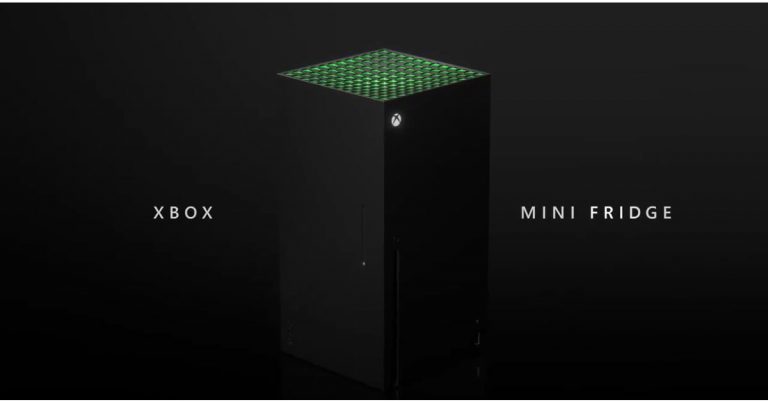
Responding to the meme in their own style, Microsoft unveiled the first look of the Xbox Mini-Fridge during the Bethesda E3 event

At the ongoing Electronics Entertainment Expo 2021 also known as E3 the tech giant, Microsoft took the wraps off its Xbox Series X-shaped mini-fridge. This is said to be the first most powerful mini-fridge that will allow gamers to stay cool through an immersive gaming experience. However, it is not a refrigerator but looks a lot like the one. The device is also said to arrive during this holiday. Read on to know more.  In 2019 when Microsoft introduced its Xbox console people mocked it for its shape and compared it to a refrigerator. So the company took that seriously and the new Xbox Mini Fridge is inspired by the memes posted on social media then a defeated Skittles in a Twitter poll announced that an actual mini-Xbox fridge will be released in holiday 2021.  Responding to the meme in their own style, Microsoft unveiled the first look of the Xbox Mini Fridge during the Bethesda E3 event Microsoft’s Xbox Games Marketing, Aaron Greenberg in April on Twitter said, “Thanks to everyone who voted, this was down to the wire and thrilling to follow. Now that @Xbox won, we will move forward on our promise to make those Xbox Series X Mini Fridges. First one off the line will be filled with games & headed to our friends @Skittles of course! Green heart.”  Xbox Series X-shaped mini-fridge Inspired by this the tech giant at the ongoing virtual E3 gaming conference presented the mini-fridge named the Xbox Mini Fridge. As per Microsoft, the product will arrive in the holiday season this year. As per the company, the Xbox Mini Fridge is going to be the world’s most powerful mini-fridge that will help gamers stay cool as they go through an immersive gaming experience that uses a technology named Xbox Velocity Cooling Architecture. It will be available in the iconic grey and neon colour scheme. However, information on the Mini Fridge is very scarce but will be available through Microsoft Store in the future. As for the pricing, this electronic device is said to be priced less than its console and would fall somewhere between  $200 to $300.  For the latest gadget and tech news, and gadget reviews, follow us on TwitterFacebook and Instagram. For newest tech & gadget videos subscribe to our YouTube Channel. You can also stay up to date using the Gadget Bridge Android App.

How to do WhatsApp video calls on the web?

The best messaging app has enabled the consumers to use the app on computers as well. Now you can text, call and video call other WhatsApp users from your computer. You can know exactly how to do it by reading the below guide. Follow the steps to WhatsApp video call on the web today. 

Installed the app 

Installed the app WhatsApp introduced the desktop version in 2020 to a small group of users first. Now users can easily use the app on their computers and avail all the features. Download the WhatsApp desktop app from google and install it on your laptop and PCs. Before making free voice and video calls on the WhatsApp Desktop app. You have to make sure your computer supports  Windows 10 64-bit version or newer, or a macOS 10.13 or newer.  Read more: How to do voice and video call on WhatsApp desktop? To make or receive calls, your computer needs an audio output device. And microphone for all voice and video calls. A webcam for video is necessary. Also, an active internet connection is necessary. But don’t worry too much about the features, every standard laptop has all these features. Download the WhatsApp desktop app 
  • Install it on your computer
  • Once you install the app open the app on your computer 
  • Sign in using your WhatsApp mobile app on your phone
  • Scan the QR code 
  • Now you the WhatsApp page your computer screen 
  • Select any contact you want to video call 
  • Tap the video call icon on the top  right corner
  • By clicking the video icon it will initiate the video on your contact list. 
Read also: Video and Voice call button goes live for WhatsApp desktop WhatsApp claims that video calling through the WhatApp desktop app will be more enjoyable. The larger screen on your laptop or PC will give you a better experience. This is true of the saying as for a long time the video calling market on the computer has been dominated by Skype and Zoom.  WhatsApp entering into the competition makes things easier for users. Now everyone can use WhatsApp for multipurpose with their regular contacts. Moreover, WhatsApp has put in end-to-end encryption for voice and video calls here, too. So, after the mobile app for video calls, the WhatsApp desktop app will also provide end-to-end encryption. For the latest gadget and tech news, and gadget reviews, follow us on TwitterFacebook and Instagram. For newest tech & gadget videos subscribe to our YouTube Channel. You can also stay up to date using the Gadget Bridge Android App.

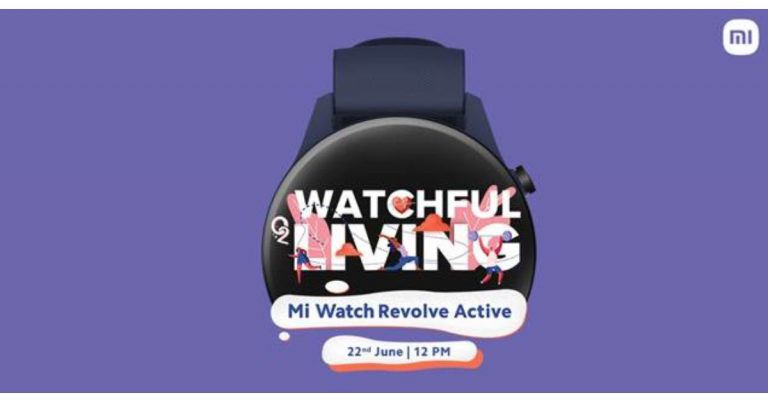
Mi Watch Revolve Active to launch on the same day as Mi 11 Lite on June 22

Xiaomi recently announced the launch of Mi 11 Lite in India on June 22. Today the company has also confirmed to introduce the Mi Watch Revolve Active in the country on the same day. The wearable is the follow up of the Mi Watch Revolve that was launched in India last year. The upcoming watch will be featuring a blood oxygen saturation (SpO2) monitor which is an essential feature to rule out the COVID symptoms. The Chinese smartphone company Xiaomi has officially announced to launch its next iteration of Mi Watch Revolve in India this month. The company has revealed that Mi Watch Revolve Active will make its debut on June 22 at 12 noon. The upcoming device has also been listed on its e-commerce portal as well as on Amazon to tease its availability. The microsite has also revealed the key specs of the smartphone. While announcing the launch the company said, “Mi India is geared up to bring the era of choosing health over everything. Our mantras guide us to live mindfully and consciously, root for happier minds and healthier bodies, and always getting more from life. Block your date for #WatchfulLiving with #MiWatchRevolveActive on June 22nd at 12 PM. Stay tuned to our social media channels for more updates.” As per the listing, the Mi Watch Revolve Active will have built-in GPS, Glonass, Galileo and BDS as connectivity options. The device will further include a blood oxygen saturation (SpO2) monitor, VO2 Max, Body Energy Monitor and HR Monitor. The smartwatch is listed to offer maximum sports mode. In addition to this, there will be sleep management features onboard as well as a sleep monitor. Besides all this, the Mi smartwatch will be Amazon Alexa enabled for voice control and will offer other features like calls, app notification and more.  On the other hand on the same day of the launch of Mi Watch Revolve Active, Xiaomi is also going to unveil Mi 11 Lite in India. The device was introduced in China in March this year. Mi 11 Lite will be offering a 90Hz 6.55-inch full-HD+ AMOLED display. It runs MIUI 12 on top of Android 11 and will be powered by the Qualcomm Snapdragon 732G SoC. For the photos and videos, it will include a triple rear camera set up that would include a 64-megapixel primary sensor with an f/1.79 aperture. Further assisted by an 8-megapixel ultra-wide-angle lens with f/2.2 and a 5-megapixel tele-macro camera with f/2.4 aperture. For taking photos and videos there is a 16-megapixel front-facing camera with an f/2.45 aperture. Moreover, the smartphone will be backed by a 4,250mAh battery that supports 33W fast charging. For the latest gadget and tech news, and gadget reviews, follow us on TwitterFacebook and Instagram. For newest tech & gadget videos subscribe to our YouTube Channel. You can also stay up to date using the Gadget Bridge Android App.
How to update the Google Play Store app?

Google keeps updating the Playstore without you even knowing. So many updates are available regularly. Updating the Play Store app regularly can help the performance of your other apps, too. Here is a useful guide to update your Google Play Store app. Follow the steps.

From the Play Store app settings

From the Play Store app settingsIt is always in your best interest to update the Play Store app. Running the latest version of the Play Store fixes bugs. The update will also give you stability improvement and new features to the digital store. To update the Play Store app from the settings. Follow the steps 
  • Open the Play Store app on your phone
  • Check for the three-line icon on the top left corner 
  • Scroll down at the bottom left end 
  • Find setting and tap on it 
  • Go to the About sub-section
  • Check the Playstore version display 
  • If there is an update click on it 
  • It is updated  
Read more: Best Health and Fitness Apps 2021 

Clear data 

Play Store is the hub for all apps in an Android operating system mobile. Updating to the latest version will enhance the performance of all the apps you have installed on your phone. Another method to keep the Google Play Store updated is to clear all data. When you clear all data Google will automatically check for all updates. Here are the steps.
  • Go to main settings on your phone (Not Play Store settings) 
  • Find the option on Apps & notification 
  • Then the page opens up for All apps
  • Scroll and find Google Play Store 
  • Tap on Google Play Store
  • Select the third option “Storage”: depending on the phone (Storage)
  • Now Tap clear data 
  • The last step is to restart your device.: Will Update automatically  
Read also: How to install Windows 10 using a pen drive

With a Play Store APK (Android Application Package)

With a Play Store APK (Android Application Package)You can also manually update the Google Play Store app. For this process, you need to download an APK file. You can download it from the APK mirror using a browser. Here are the steps to update the Playstore by using APK files.
  • First, download Playstore APK files from APK mirror using a browser
  • Open the setting on your Phone
  • Go to security: Lock icon
  • Enable the Unknown source
  • Confirm when a pop up shows up 
  • Now you need to install the downloaded APK files 
  • Again open settings 
  • Go to apps and application 
  • Scroll and find special file access
  • Go to install unknown apps 
  • Click the browser you downloaded the APK file from
  • Toggle allows the source 
  • Install the APK file 
  • You will be able to update the Play Store app 
For the latest gadget and tech news, and gadget reviews, follow us on TwitterFacebook and Instagram. For newest tech & gadget videos subscribe to our YouTube Channel. You can also stay up to date using the Gadget Bridge Android App.

Samsung Galaxy M32 to launch in India on June 21: Here are all the details

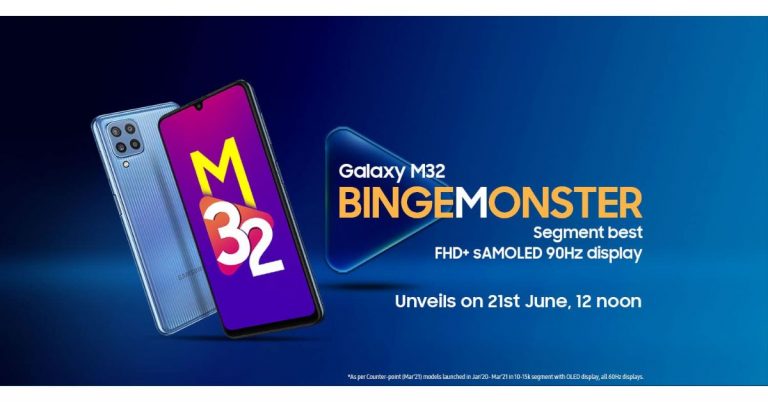
After getting listed on the BIS certification website Samsung Galaxy M32 now has a launch date. The South Korean giant today confirmed that the Galaxy M32 will get launched in India on June 21. The leaks and reports about the upcoming device have been doing the rounds on the web for some time now. Also, it appeared on the Samsung Mobile Press site earlier. The key highlights of the handset are said to include a 90Hz Super AMOLED display and a 6,000mAh battery that is claimed to last for a whole day on a single charge. As per the dedicated microsite the device will launch in India on June 21 at 12 noon. In addition to this, the listing has also revealed some of the key specifications of the handset. Besides this, the quad rear camera set up will include a 64-megapixel primary sensor. In addition to this, the listing has also revealed that a front will be featuring a 20-megapixel selfie camera sensor.  As per the DEKRA certification website reported by 91Mobiles, the battery will ship a 15W fast charger. Additionally, the smartphone is said to be powered by a MediaTek Helio G80 processor, with 6GB of RAM. Whereas the quad rear camera setup will also include a 64-megapixel primary camera with f/1.8 aperture, an 8-megapixel ultra-wide-angle lens with 123-degrees of FoV, a 5-megapixel macro sensor and a 2-megapixel depth sensor. For taking selfies, there is a 20-megapixel front-facing camera.  The upcoming Galaxy M32 will also come with a 6.4-inch full HD+ Infinity-U sAMOLED display with a 90Hz refresh rate. The Samsung Galaxy M32 is confirmed to feature a waterdrop-style 90Hz Super AMOLED display on the front. The back panel will include a quad rear camera set up and will be backed by a 6,000mAh battery. Prior to the official announcement, the device had also appeared on the Samsung India site as well as on the Samsung Mobile Press site that revealed the three colour options it would come in. As far as the pricing is concerned the Samsung Galaxy M32 will make its debut in the country at Rs 15,000 price segment.  The phone has been spotted before with a model number via Geekbench 5 website with model number SM-M325FV. The benchmark listing reveals the Samsung Galaxy M32 will be powered by a MediaTek Helio G80 SoC paired with 6GB of RAM. It is also likely to ship Samsung One UI 3.1 based on Android 11. The device has managed to achieve a single-core score of 361 and a multi-core score of 1,254.  For the latest gadget and tech news, and gadget reviews, follow us on TwitterFacebook and Instagram. For newest tech & gadget videos subscribe to our YouTube Channel. You can also stay up to date using the Gadget Bridge Android App.
Top 5 DIY YouTube channels to follow and subscribe

Watching Youtube has become a daily activity for many. Watching a DIY video keeps us motivated in doing things we never knew. It educates us. There are some great channels you can follow to make your chores easier. Check out the top channels on our list. Subscribe to them today
  • 5-Minute Crafts 

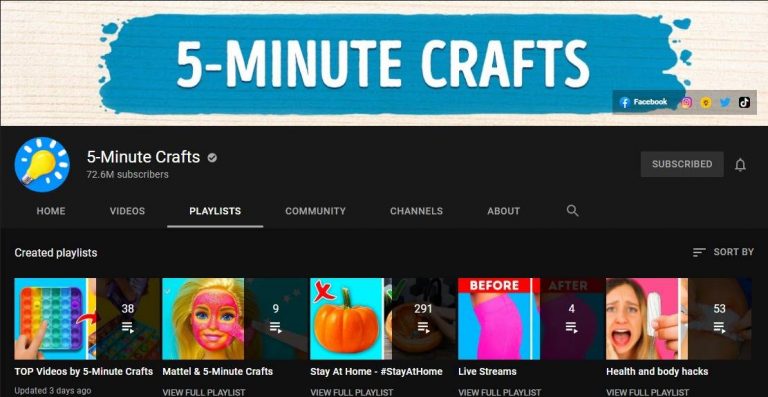
5-Minute Crafts This channel is all about life hacks videos and some are very innovative. The channel has an incredible 72.6 Million subscribers on YouTube. You will never get bored watching their videos. Besides the great edited videos, the channel gives unending knowledge on day-to-day hacks. Once you start watching it is highly addicting for more information on DIY. The 5-Minute crafts project revolves around crafts and experience. And also experimentation on many daily use things. Some popular ones are glue guns, kitchen hacks, and more. The target audience is both adults and children.  Watch the channel here Read more: 6 things that make ethical hacking a great career
  • I like to make stuff

I like to make stuffThe next on the list is I like to make stuff.  The channel is very popular among those who like to watch crafts and make videos. The channel has an incredible 3.17 Million subscribers on YouTube. The channel is presented and performed by Bob who puts it “demystifying the process” about the channel. The channel will show you how to make a bed,  assemble a 3D printer, and metalwork. He is an expert in both woodwork and metalworks. The channel is all about empowering people to make stuff.  Watch the channel here
  • Crafty Panda 

Crafty Panda Believe it or not, but Crafty pandy has 18.9million subscribers on YouTube. How about that? It is one of the highest on the list and it won’t disappoint you. The channel will help you discover hacks to reuse your old markers and teach how you can upgrade your notebooks. The best part of the channel is it has a hacks section for kids. Learn these hacks today for your kids from the channel.  Watch the channel here Read also: PUBG Mobile may actually launch in India as Battlegrounds Mobile India, the company teased on Facebook
  • Kipkay

KipkayThe second last on the list is the channel Kipkay. We included this channel with the least subscriber of 2.57 Million. Because the channel is all about recycling, upcycling the waste, and discarded items around. The channel works on restoring old, rusted, damaged, and expired items. From restoring tools to gadgets. Watch this channel for some never-before videos. And get education on hacks of restoring and recycling.  Watch the channel here
  • Sarabeautycorner 

Sarabeautycorner This one on the list is for all those who love to use makeup and nail art. The channel has a whopping 10.5 Million followers on YouTube. The genre of the channel is quite at large. You can watch DIY videos on make-up, nail art with a twisty comedy. DIY videos on the channel are worth your time. All the videos on the channel are designed for beginners. So the audience is targeted at all levels.  Watch the channel here For the latest gadget and tech news, and gadget reviews, follow us on TwitterFacebook and Instagram. For newest tech & gadget videos subscribe to our YouTube Channel. You can also stay up to date using the Gadget Bridge Android App.

Samsung Galaxy Z Fold 3, Galaxy Z Flip 3, Galaxy Watch 4, and Galaxy Watch Active 4 could launch on August 3 at the Galaxy Unpacked Event

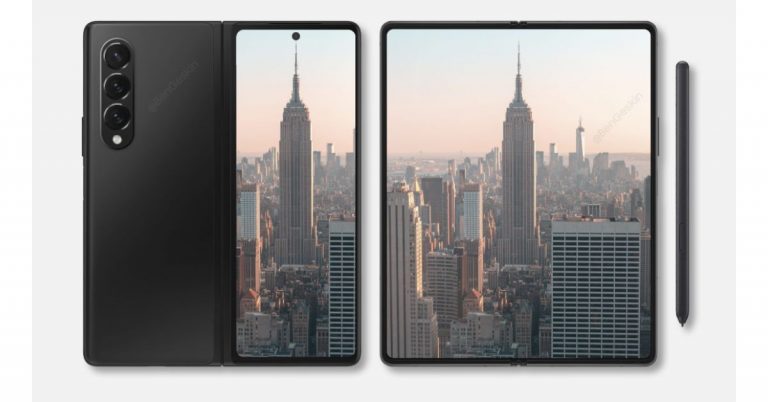
Samsung Galaxy Z Fold 3, Galaxy Z Flip 3, Galaxy Watch 4, and Galaxy Watch Active 4 are the new upcoming devices that are lined up to launch at the company’s next Galaxy Unpacked Event. As per the latest leaks, all four devices are set to make their debut on August 3. However, there is no official word from the company on the said event, but the leaks related to the gadgets are already doing rounds on the web.  Tipster Max Weinbach has taken the lid off about Samsung’s upcoming Unpacked event along with key details about the anticipated products, foldable phones and smartwatches. As per the tipster, the South Korean firm is said to host the Galaxy Unpacked event on August 3. The company is said to unveil two foldable phones Galaxy Z Fold 3 and Galaxy Z Flip 3. Additionally, there will be two more products: Samsung Galaxy Watch 4 and Samsung Galaxy Watch Active 4.   On the other hand, another tipster has disclosed that the Samsung Galaxy Watch 4 series will begin shipping from August 11 a week after the launch, whereas the Galaxy Z Fold 3 and Galaxy Z Flip 3 are said to start shipping from August 27, that is three weeks after the launch. Moreover, the Samsung Galaxy Watch 4 is claimed to become available in two sizes 42mm and 46mm. On the other hand, Samsung Galaxy Watch Active 4 will be available in 40mm and 44mm sizes. This is not the first time that a leak related to Samsung Galaxy Z Fold 3 has appeared on the internet. The past leaks claim that the phone will be made available in Black, Dark Green, and Silver options. The upcoming foldable will be featuring an under-display camera which is one of a kind. In addition to this, there will be hybrid S Pen support too. This type of S Pen is slated to bring in a blunt tip that will prevent the screen from scratches. There will be armour protection on the screen as well as on the hinge and bezels. The outer part of the foldable smartphone will be protected with Corning Gorilla Glass Victus. Leaks also suggest that the Z Fold 3 will also pack either a 4,275mAh or a 4,380mAh battery. For the latest gadget and tech news, and gadget reviews, follow us on TwitterFacebook and Instagram. For newest tech & gadget videos subscribe to our YouTube Channel. You can also stay up to date using the Gadget Bridge Android App.
Guide on how to enable hidden game mode in Android 12 beta

The Android 12 beta version has been recently rolled out by Google. It has many features available such as privacy and “hidden game mode” in the beta version. The all-new Android 12 will be available as an OTA update around September or October this year. Here is a handy guide to enable the hidden game mode when using Android 12 beta. 
  • Go to the setting menu on your mobile 

Go to the setting menu on your mobile This is the first thing you need to do before enabling the hidden game feature in Android 12 beta. Downloaded it and install it for those who have not, you need to install it. After successfully installing it go to the settings menu on your Android device to enjoy the features newly rolled out by Google
  • Navigate to the Digital Wellbeing option 

The next step to enable the hidden game mode is to navigate to the Digital wellbeing sub-menu. You can manually go to the option or you can use the search bar to search for it. The sub-menu is highlighted as Digital wellbeing and parental controls. So scroll down to Digital Wellbeing and follow the next step Read more: Instagram rolling out Guides features for all the users
  • Select the Do not disturb 

The next thing to do is tap on the Do not disturb menu. It is located in the reduce interruption sub- categorisation when you open the Digital Wellbeing menu. It is easily visible. Now you will find a list of options for apps and people that you can enable Do not disturb for. Next, scroll down to schedule
  • Click on Schedule 

Click on Schedule After clicking on Schedule you see some options. Select the game mode checkbox.  Now the game mode will be running when you turn on the Do not disturb.  Read also: Facebook and Instagram now enable the feature to hide like counts on their platform: How to enable the feature
  • Enable the Checkbox of the game mode 

Next, when you open the Schedule menu. You have to make sure you click on the game mode Checkbox. This will enable a floating menu with a Game mode option available. 
  • Game mode setting

When you are done with clicking the game mode checkbox. The next step is to click on the setting icon which is on the right of the screen. Now you can see six lists on the screen. Tap on it.
  • Screenshot capture
  • Screen recording 
  • Frames per second (FPS) counter 
  • Do Not Disturb 
  • Game optimisation: For an individual game 
  • Youtube play: For streaming your gameplay
This is how to enable your hidden game mode in Android 12 beta. After selecting all the settings you will be accessing a floating menu on the side of the screen for all shortcuts. You can tap and drag anywhere on the screen.  For the latest gadget and tech news, and gadget reviews, follow us on TwitterFacebook and Instagram. For newest tech & gadget videos subscribe to our YouTube Channel. You can also stay up to date using the Gadget Bridge Android App.
Facebook rolling out new chat themes, quick reply bar and more on Messenger

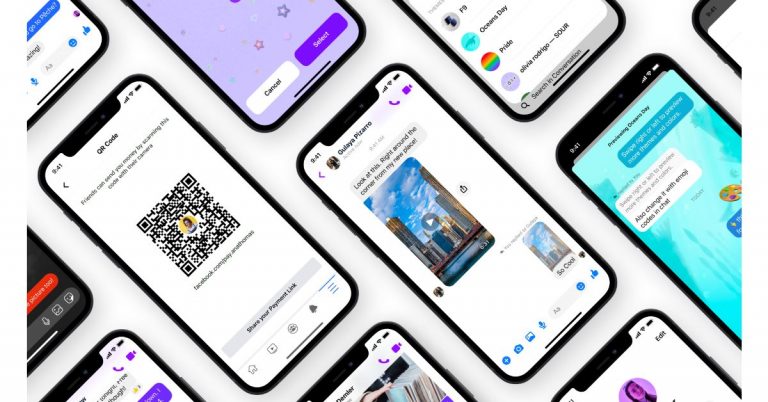
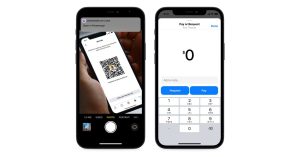
Facebook Messenger is now getting new messaging features that are said to bring a better user experience to its platform. The company has released new chat themes, a quick reply bar, QR codes and payments links. Facebook via its blog post announced the three new messaging features that will boost the Messenger experience. The three features: new chat themes, a quick reply bar, QR codes and payments links will be available on Instagram as well beside Messenger. The new Chat theme will allow the users to personalize and enhance their conversations. They will be able to change the background of their chat into a delightful and fun way to communicate with friends.  Facebook rolling out new chat themes, quick reply bar and more on Messenger The first theme is Olivia Rodrigo which has been brought to celebrate the launch of Olivia’s new album, Sour. Users will get a whimsical chat theme featuring Olivia’s signature face stickers that can be used to share their favourite song from the new album. Next on the list is World Oceans Day chat themes that will allow users to virtually explore the world’s oceans but also promote sustainability and the importance of keeping our oceans clean for future generations. Whereas the Fast & Furious 9 (F9) theme has been launched to celebrate its Fast Saga’s 20th anniversary. The users can try out a new chat theme on Messenger and Instagram, go to your chat settings, tap “Theme”. The quick reply bar in messenger will make it easier to respond to the content shared by your friends and family making it easier to have conversations sparked by a cool photo or video without needing to go back to your main chat thread. All you need is to tap on the photo or video and send a response through the quick reply bar at the bottom of the screen. Swipe up to exit the full-screen media viewer and head back to your main chat thread. Facebook rolling out new chat themes, quick reply bar and more on Messenger Lastly QR codes and payment links in Messenger enable you to send and receive money from anyone, even if you’re not Facebook friends. This feature will be enabled for US Messenger users to leverage QR codes and payment links when they want to send or request money with Facebook Pay. To access the personal QR code and payment link, visit your Messenger settings and tap “Facebook Pay.” Simply share the payment link or allow your friends to scan your QR code to send or request money. For the latest gadget and tech news, and gadget reviews, follow us on TwitterFacebook and Instagram. For newest tech & gadget videos subscribe to our YouTube Channel. You can also stay up to date using the Gadget Bridge Android App.

June 14 Flipkart Daily Trivia Quiz Answers: Answer to win exciting prizes

The e-commerce website Flipkart is hosting Daily Trivia Quiz. Every day it brings a bunch of new questions for its users. By answering them correctly you can win exciting prizes. The questionnaire is based on questions related to general knowledge. Also, the users can win free vouchers and super coins, among other offers via the daily quiz. June 14 Flipkart Daily Trivia Quiz Answers has already gone live on its platform. The participant should be at least 18 years old and should have a valid login ID. The Quiz is available on the mobile platform and not the web version. E-commerce conducts the quiz on daily basis and goes live at 12:00 AM IST and runs till 11:59 PM IST.  The winners are announced within 15 days from the date of participation that can be viewed under the Gems/Rewards section in the app.

How to participate in the Flipkart Daily Trivia Quiz

To participate download the Flipkart app on your phone. Then open the Flipkart app then head to Game Zone. Now click on the Daily Trivia Banner or search for Daily Trivia. Enter the game and answer all 5 questions with correct answers.

June 14 Flipkart Daily Trivia Quiz Answers 

Question 1: Which is the world’s oldest national broadcasting organisation? Answer: BBC Question 2: Which country has the largest immigrant population in the world in absolute number? Answer: USA Question 3: Which deity in Hindu mythology maintains a register called Agra Sandhani? Answer Chitragupta Question 4: Which monument served as the final refuge for the Bahadur Shah Zafar during the 1867 Mutiny? Answer: Humayun’s Tomb Question 5: In which computer is the Rub’ al Khali, the largest uninterrupted sand desert in the world? Answer:  Saudi Arabia
For the latest gadget and tech news, and gadget reviews, follow us on TwitterFacebook and Instagram. For newest tech & gadget videos subscribe to our YouTube Channel. You can also stay up to date using the Gadget Bridge Android App.