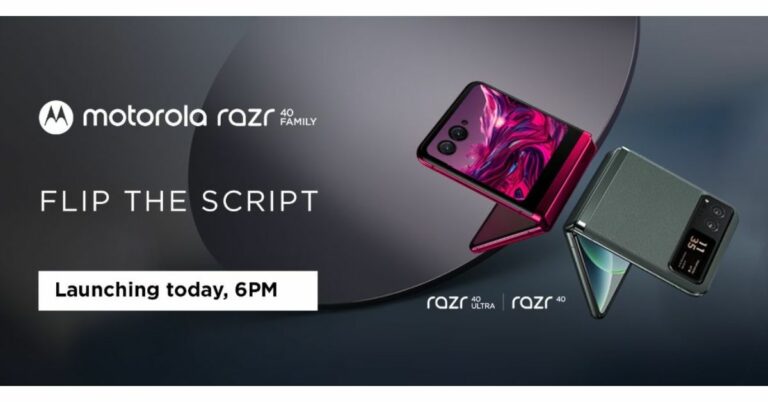
Motorola Razr 40, and Motorola Razr 40 Ultra have officially debuted in India today. The foldable phones will be taking on Samsung and Oppo’s foldable flip phones namely Samsung Galaxy Z Flip 4 and OPPO Find N2 Flip. The devices will be available for purchase via Amazon in the country and through offline retailers. The Razr 40 has a smaller 1.5-inch cover screen, whilst the Razr 40 Ultra has a larger 3.6-inch outside display.
Also Read:GST rate reduced on household items, TVs, mobile phones and other electronics to get cheaper
Motorola Razr 40, Motorola Razr 40 Ultra price in India and availability
The Motorola Razr 40 Ultra has been launched in India with a price tag of Rs 89,999 for the 8GB RAM with 256GB storage model. This model will be offered in two colour options of Viva Magenta and Infinite Black. The company will be offering a Rs 7,000 cashback offer to ICICI Bank customers. It will also come with Jio goodies worth Rs 15,000.
On the other hand, Razr 40 price is set at Rs 59,999 along with cashback of Rs 5,000 to ICICI customers.
The Razr 40 series will be available for purchase via Amazon starting July 15 when the Prime Day sale begins on the platform at midnight. Prime members are eligible to get early access to the product along with bank offers. The device will also be available on Reliance Digital stores across the country. The customers can now pre-book the device on Amazon at just Rs 999.Also Read: Twitter sets a cap on the number of Tweets that can be read by verified and unverified users
The 6.9-inch foldable pOLED screens on the Motorola Razr 40 and Motorola Razr 40 Ultra have a refresh rate of 165Hz, a resolution of 1,080×2,640 pixels, and a maximum brightness of 1,200 nits. The Motorola Razr 40 Ultra model has a larger 1.5-inch cover display whereas the Razr 40 has a 3.6-inch pOLED outer screen with a resolution of 1,056×1,066 pixels and a refresh rate of 144Hz. The Razr 40 has a Corning Gorilla Glass Victus on an external display and is IP52 rated. Whereas Ultra comes with Corning Gorilla Glass Victus on the front and rear. This phone is also IP52 rated.
Snapdragon 7 Gen 1 and Snapdragon 8+ Gen 1 processors power the Motorola Razr 40 and Motorola Razr 40 Ultra, respectively.
The Motorola Razr 40 has a 64-megapixel primary sensor and a 12-megapixel ultra wide-angle camera for optics. A 13-megapixel secondary ultra-wide-angle camera and a 12-megapixel primary sensor are featured on the Razr 40 Ultra, in contrast. For selfies and video calls, both foldable phones have a 32-megapixel front-facing camera.
Batteries of 3,800mAh and 4,200mAh capacities are present in the Motorola Razr 40 and Motorola Razr 40 Ultra, respectively. The first model charges at 33W while the other device can be charged at 30W and also enables 8W wireless charging.
Both the clamshell design phones have dual stereo speakers. Razr 40 is 7.35mm thin when unfolded on the other hand the Ultra model is 6.99mm thin when unfolded.
For the latest gadget and tech news, and gadget reviews, follow us on Twitter, Facebook and Instagram. For newest tech & gadget videos subscribe to our YouTube Channel. You can also stay up to date using the Gadget Bridge Android App. You can find the latest car and bike news here.
If you’re tired of sluggish WiFi speeds even on your home network, you will be happy to know that there are a few things you can do to improve the situation without spending any money. Of course, you can upgrade your WiFi router as an immediate fix, but if you don’t wanna spend any money, these methods will come in very handy. So, without further ado, here are the top 8 ways to boost the WiFi signal for faster internet.Read Also:How to Run Windows Apps on Android with Wine?
Update router firmware
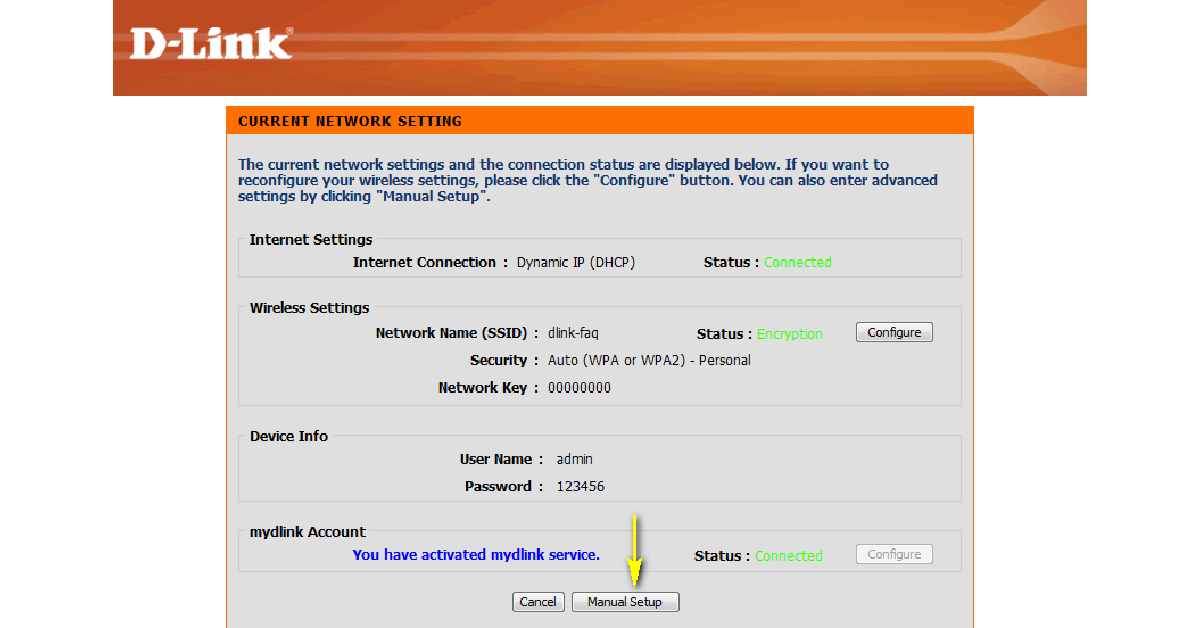
Keeping your router’s firmware updated ensures that it is at the top of its game at all times. Router manufacturers routinely push out new updates that optimise the device to produce better speeds. Here’s how you can update the firmware of a D-Link WiFi router. Make sure you establish a wired connection between your router and your PC before beginning.Step 1: Download the latest firmware for your router using this link. You can also browse D-Link’s website to look for any new updates.Step 2: Launch the web browser on your PC and go to http://dlinkrouter, http://dlinkrouter.local, or http://192.168.0.1 to enter the router management portal.Step 3: Enter the login credentials for your router. If you haven’t set up any credentials, enter ‘Admin’ as the username and look for the default password at the back of the router. If you don’t find a password, leave the field empty.Step 4: Once you’re logged in, click on Manual Setup.Step 5: Switch to the Maintenance tab and select Firmware Update from the side menu.Step 6: Navigate to the ‘Firmware Upgrade’ section and click on ‘Browse’.Step 7: Open the file you installed in Step 1.Step 8: The file will take a few seconds to upload. Once it has been uploaded, the router update process will begin. This may take a few minutes. Hit ‘Continue’ when the update is complete.
Place the router in the ideal spot
You may already know this, but the strength of your WiFi network depends on your proximity to the router and the quality of the connection. If the router is far away from your workstation, you will not be able to make the most of the connection. Find out the ideal location to place the router. If you are sharing the connection with multiple people, placing the router in the centre of the house/office is a good idea. Make sure there are no immediate objects obstructing the router. If your router has antennas, adjust them to boost the WiFi signal.
Change the frequency band
Your WiFi router has two frequency bands – 2.4GHz and 5GHz. The 2.4GHz bandwidth covers a large range, meanwhile, the 5GHz frequency band provides greater speeds in a short radius. If you are close to the router, you can use the 5GHz band to enjoy faster speeds. You can set up this band using your WiFi router’s app or digital interface. If the 5GHz bandwidth has the same password as the 2.4GHz one, your device will automatically switch to the former whenever it is in your range.
Change the WiFi password
Your WiFi’s bandwidth may get crammed with several devices using it at any given time. It is also possible that your neighbours may be using your WiFi, leading to slower speeds. The quickest way to disconnect all unnecessary devices from the network is by changing the WiFi password. Open your WiFi router’s digital portal on your PC’s web browser to manage the password and connected devices.
Change the WiFi frequency channel
The two WiFi bandwidths we talked about earlier make use of several different channels to serve coverage within a range. If there are other WiFi networks in your router’s proximity using the same channel, your connection’s speed may be affected due to interference. In this case, you need to change the frequency channel. Apps like NetSpot allow you to view all the available channels for your router’s bandwidths. You can switch to a particular channel using your WiFi router’s app or online interface.
Use a WiFi repeater
If your WiFi router is struggling to direct the network signal to every corner of your house, you need to use a WiFi signal repeater or range extender. An average range extender will cost you between Rs 1,500 – Rs 3,000. Once you’ve linked it to your primary router, it will disperse the signal over a larger area. You can also use an old router as a WiFi repeater.
Remove your phone’s case
Sometimes, your phone’s case can block the antenna from receiving a strong network signal. This problem is more common in older phones. If you’re using your home WiFi at a comfortable spot, you can remove your phone’s case without the risk of it falling down. Once you do that, you will notice an immediate bump in speed.
Use a third-party app
There are several third-party apps for your phone that can boost the WiFi signal strength, leading to better speeds. Apps like Connection Stabilizer Booster and Network Signal Speed Booster will give you that extra bump in speed that you need.
Frequently Asked Questions
Can I boost my WiFi’s speed?
There are a few ways to boost your WiFi connection’s speed. You can try updating the router firmware, placing the router in a better spot, removing unwanted devices from the network, and switching to better bandwidth.
Can I boost the WiFi speed on Android?
To boost the WiFi speed on Android, remove your phone’s case and use a signal booster app.
How can I extend my router’s range?
To extend the range covered by your WiFi router, make sure there are no objects obstructing it. You can also upgrade its antennas or use a range extender for this task.Read Also:How to Set Up Emergency SOS on iPhone and Android?
Conclusion
This is how you can boost the WiFi signal for faster internet speeds. If you are still not happy with the internet speed after trying all the methods mentioned above, it may be time to upgrade your router. Found this article helpful, let us know in the comments!
Imagine a world where technology meets thrill, a place where your favourite casino games are a click away. As we step into the digital age, the online casino realm expands, offering enticing experiences right at your fingertips. But what gadgets will give you the best gaming experience? Let’s discover seven of the most user-friendly devices that could bring your casino play to new heights on the example of top online gambling platforms such as Zodiac Casino Canada, Spin Casino and Casigo.
How to choose a perfect online gambling gadget
Choosing the perfect gadget for gambling is not a simple task. Here are some tips and factors you should consider to ensure you make the right choice:
Compatibility: Check if the gadget is compatible with the software of your preferred casino. Most sites, like Zodiac online casino, support Android and iOS devices, but it’s best to verify before purchasing.
Screen Size: A larger screen might be beneficial if you prefer seeing the game details clearly. Tablets and laptops offer this advantage. But if portability is your priority, smartphones or smartwatches might be more suitable.
Battery Life: A gadget with a good battery life ensures your gaming sessions aren’t cut short. This is especially important for mobile devices like smartphones and tablets.
Audio and Visual Quality: High-quality visuals and sounds enhance your gaming experience. Devices with high-resolution screens and superior audio capabilities are a good choice.
Remember, the perfect online gambling gadget depends on your needs and preferences. Considering these factors will help you make an informed decision.
Smartphones
A smartphone is the most crucial gadget for any online enthusiast. With the rise of mobile gaming, these devices have become an essential tools for all of us. Their compactness allows players to enjoy their favourite games anytime, anywhere. Most casinos like Zodiac Signs Casino have apps that are optimized for smartphone use. These apps have great interfaces that make navigation a breeze. They offer games such as slots, poker, blackjack, and roulette. The convenience of having access to these games right in your pocket is unmatched.
But it’s not just about convenience. Smartphones also come with high-resolution screens, offering stunning visuals that enhance the gaming experience. Moreover, many modern smartphones boast excellent audio capabilities, immersing you in the game.
Top Online Casino Apps for Your Smartphone
Whether you’re a fan of Android or iOS, smartphones give you a flexible way to participate in online games. They are truly the gateway to a world of fun and excitement in the casino world. Hence, we’d like to highlight some of the casino apps that will bring the most rewarding casino experience.
Casigo
In addition to its impressive game selection, CasiGo app takes pride in providing a safe and secure gaming environment. The casino warmly welcomes slots fanatics with an enticing welcome bonus that includes free spins on select games. With legitimate and user-friendly customer support options, players can rest assured that assistance is readily available when needed. Furthermore, the casino regularly offers even more rewards for both new and existing players. Casino prioritizes the security and safety of its players, implementing robust measures to ensure a secure gaming environment.
Zodiac Casino
Zodiac Casino is a reputable online gaming destination that holds licenses from the UK Gambling Commission and the Malta Gaming Authority, ensuring a safe and secure experience for players. According to the Zodiac Signs Casino review, members have the convenience of choosing from multiple deposit and withdrawal methods. With its solid regulatory credentials and flexible banking options, Zodiac Casino app provides a trustworthy and user-friendly platform for players to enjoy their gaming adventures.
Spin Casino
Operated by Bayton Limited, a highly reputable company registered in Malta, Spin Casino is dedicated to delivering high-quality and dependable iGaming services to its valued patrons.
What sets Spin Casino apart is its collaboration with the industry-leading software provider, Microgaming. This partnership ensures that casino app users are treated to an extensive collection of over 600 games, guaranteeing an immersive and diverse gaming experience. Whether you’re captivated by the allure of pokies or prefer the timeless classics of roulette, blackjack, baccarat, or poker, Spin Casino offers a wide range of exhilarating options to satisfy every player’s preferences.
Tablets
When it comes to casino gaming, tablets provide an excellent balance between portability and screen size. Larger than smartphones but more mobile than laptops, they offer a platform for online casino apps.
With their wide screens, tablets make it easier to enjoy the vibrant graphics and details. The touch-screen interfaces are easy to use, making gameplay smooth and intuitive. Some tablets also come with excellent battery life, meaning you can play for long periods. In essence, tablets combine the best of both worlds, giving online casino players an engaging and comfortable gaming experience.
Laptops and notebooks
Laptops and notebooks’ power and versatility make them a top choice for casino gaming. Their larger screens provide a more immersive experience compared to smaller devices. Also, laptops and notebooks come with stronger processors and more RAM. It ensures smoother game performance, even when playing resource-intensive live casino games.
Beyond performance, laptops have a full-sized keyboard, which is beneficial when playing certain casino games requiring lots of typing. Plus, with the flexibility to connect to an external monitor, you elevate your gaming to a larger display.
The diversity in laptop models means there’s something for everyone, whether you prioritize portability, power, or both. These gadgets are powerful tools for anyone serious about online gaming.
VR headsets
For immersive gaming, look no further than VR headsets. They transport players into a virtual casino, offering an experience that resembles the real thing. From interacting with virtual slots to sitting at a poker table, VR headsets bring the thrill of the casino to your living room.
The VR technology used in these headsets produces high-quality 3D graphics that create lifelike gaming. The result is an engaging, exciting experience as close as possible to being in a physical casino without leaving home.
VR headsets are continually improving. Newer models are more comfortable and lighter, ensuring they can be worn for extended periods without discomfort. Some even come with integrated headphones. With a VR headset, you plunge into online casino gaming like never before.
Smartwatches
The smartwatch has taken the online casino experience to the next level. While the screen size may be small compared to other devices, the ease of use and convenience are unrivalled.
Most venues now offer apps for smartwatches, allowing players to place bets, spin slots, or deal cards right from their wrists. This makes it easy to enjoy your favourite casino games even when you’re on the move.
Moreover, smartwatches come with push notifications, ensuring you never miss an important update or a bonus offer. The ability to access and manage your casino accounts makes them an innovative and exciting option.
Console
Consoles are not just for traditional video games anymore. They’re also entering the world of casino gaming. Modern consoles like the PlayStation or Xbox have the power to deliver high-quality graphics that can rival PCs. They offer a unique way to engage with your favourite games on the big screen, all from the comfort of your living room.
Online casinos are developing console-specific versions of their games. Consoles come with large communities of players, bringing a social element to your sessions. So, whether spinning the roulette wheel or playing poker, these devices offer an exciting twist.
Automatic card shuffler
For poker enthusiasts seeking to hone their skills at home, an automatic card shuffler is a must-have gadget. This device shuffles cards quickly and efficiently, eliminating any concerns about manual shuffling or fairness. It’s easy to use – simply insert the cards at the top, and the shuffler does the rest. The result is a perfectly shuffled deck, ready for the next round of play.
This device not only saves time but also adds a professional touch to your home games, mirroring the experience you would get in an online or physical casino. Overall, an automatic card shuffler is a nifty tool that adds efficiency and authenticity to your poker games.
Final Words
As we journey through the dynamic world of online casinos, technology continues to enhance our experiences. Various gadgets, from smartphones to consoles, offer unique features to make your gaming time more enjoyable. Ultimately, your choice of the gadget will be personal, based on your gaming preferences and lifestyle. Whichever you choose, the thrill and enjoyment of online casino gaming are sure to follow.
For the latest gadget and tech news, and gadget reviews, follow us on Twitter, Facebook and Instagram. For the newest tech & gadget videos subscribe to our YouTube Channel. You can also stay up to date using the Gadget Bridge Android App. You can find the latest car and bike news here.
Motorola Razr 40 and Motorola Razr 40 Ultra India launch is scheduled to take place today. The full specifications, along with all other relevant information, have been disclosed by the smartphone manufacturer. Both the devices are confirmed to be available for purchase via Amazon in the country.
Motorola Razr 40 and Motorola Razr 40 Ultra India launch details
Motorola Razr 40 and Motorola Razr 40 Ultra will be launched in India today. The company will be hosting a launch event today. The event will be live-streamed at 5 PM via the company’s official YouTube channel. Interested ones and fans can also watch the event live via the company’s official social media channels including Twitter.You can also watch it here on our channel as we have embedded the link below.
Razr 40, Razr 40 Ultra price in India expected
The price of the Razr 40 was unintentionally made public on Amazon prior to the formal release. Recall that in China, the foldable phone debuted alongside the Motorola Razr 40 Ultra. The official sales partner for the next series has been confirmed to be Amazon. According to the listing, the price of the clamshell folding smartphone would start at Rs 59,999. Notably, the listing has been taken down, and the online store does not currently reflect the prices for either phone.Also Read:Twitter sets a cap on the number of Tweets that can be read by verified and unverified usersHowever, the business did previously disclose that the e-commerce site will get you a 10% discount when you purchase the Motorola Razr 40 online with ICICI Bank and SBI credit cards.Remember that the Motorola Razr 40 Ultra, which has 8GB of RAM and 256GB of storage, has a starting price of CNY 5,699 in China, whilst the Motorola Razr 40 has a starting price of CNY 3,999, or Rs 46,000, for 8GB of RAM and 128GB of storage.
Razr 40 Ultra and Razr 40 specifications
Motorola Razr 40 Ultra and Razr 40 come with a 6.9-inch foldable pOLED display with a 1,080 x 2,640-pixel resolution. The display on the clamshell phones also supports a 165Hz refresh rate and a maximum brightness of 1,200 nits. The devices run on Android 13 out of the box. The Qualcomm Snapdragon 7 Gen 1 SoC is used in the Razr 40’s entry-level edition, and the Qualcomm Snapdragon 8+ Gen 1 SoC is used in the Razr 40 Ultra.Both the foldable phones will have dual rear cameras. A 12-megapixel primary sensor with OIS and a 13-megapixel secondary ultra-wide-angle sensor make up the camera system of the Razr 40 Ultra. The Razr 40, on the other hand, sports a 64-megapixel primary sensor in addition to a 12-megapixel super wide-angle camera. Both devices have a 32-megapixel front-facing camera for selfies.There will be a 3,800mAh battery on the Razr 40 Ultra supporting 33W rapid charging and 5W wireless charging. Whereas, the Razr 40 supports 30W wired and 8W wireless charging and has a 4,200mAh battery. For the latest gadget and tech news, and gadget reviews, follow us on Twitter, Facebook and Instagram. For newest tech & gadget videos subscribe to our YouTube Channel. You can also stay up to date using the Gadget Bridge Android App. You can find the latest car and bike news here.
Creating a collage is a great way of preserving moments and memories captured in images. If you wanna wish someone on a special occasion, creating an image collage is a great way to go about it. You can either simply stitch two images together, or create an appealing greeting with lots of graphics and added effects. In this article, we bring you the 4 best methods to put two pictures side by side on Android.Read Also:How to Blur Your House or an Object in Google Maps?
Use Samsung’s native photo editor
Samsung’s native photo editor allows users to juxtapose two photos together. Here’s how you can go about it.Step 1: Launch the Gallery app on your Samsung smartphone. Select an album.Step 2: Tap the ellipses and select Create.Step 3: Tap on Collage.Step 4: Select the pictures that you want to combine.Step 5: Choose the orientation for the two pictures.Step 6: Hit Save when you’re done.
Use Google Photos to put two pictures side by side on Android
Step 1: Launch the Google Photos app on your Android smartphone.Step 2: Select the two pictures you want to stitch together. You can do this by long-pressing a picture and then simply tapping the other one.Step 3: Select Add to from the bottom toolbar.Step 4: Tap on Collage.Step 5: Choose an orientation for the two images.Step 6: Hit Save at the bottom right corner of the screen.
Use Instagram to combine two pictures together
Step 1: Launch the Instagram app on your Android smartphone.Step 2: Hit the plus icon on your profile picture at the top left corner of the screen.Step 3: Select Camera.Step 4: Tap on the Layout icon.Step 5: Select the layout for a two-image collage.Step 6:Choose the images from your gallery for both panels.Step 7: Once the images are aligned, tap on the tick icon.Step 8:Tap the ellipses at the top right corner of the screen and select Save story.
Use a third-party photo-editing app
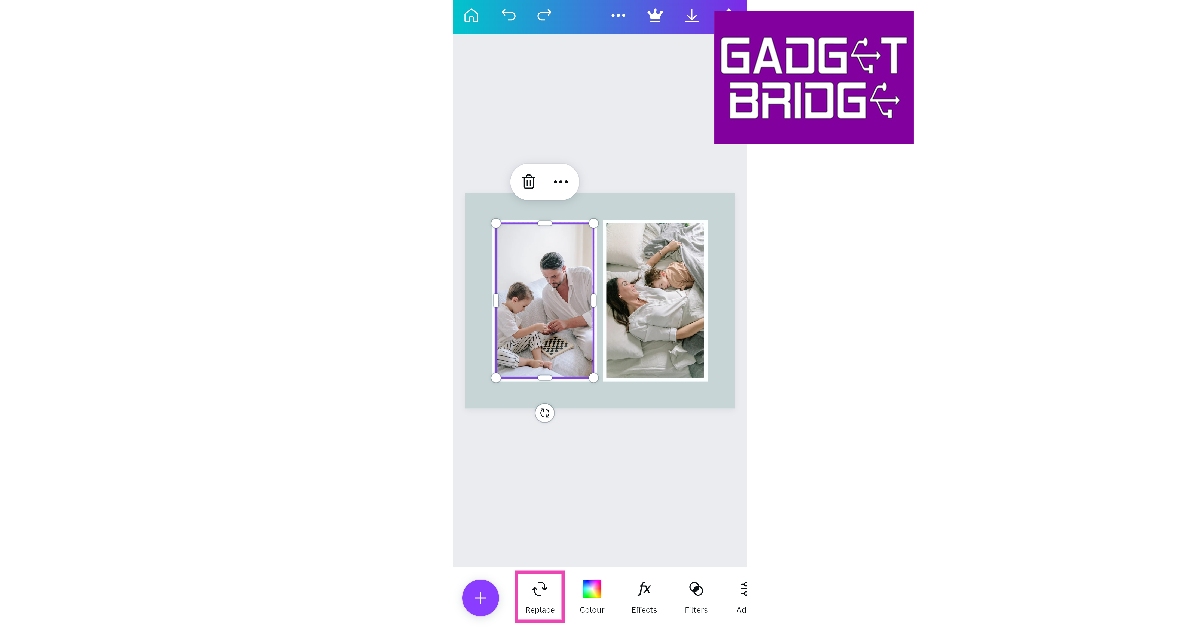
There are several third-party Android apps you can use to create a collage. Here’s how you can combine two pictures together using Canva on Android.Step 1: Launch Canva on your Android smartphone.Step 2:Tap the plus icon at the bottom of the screen.Step 3: Select the Photo Collage layout.Step 4: Choose your desired template from the list.Step 5: Tap the template image and select Replace from the bottom toolbar.Step 6:Choose a picture from your device’s gallery to replace the template image.Step 7:Repeat this process for the other template image.Step 8: Choose the background colour. You can also crop the images and make other changes to the collage.Step 9: Hit the upload icon at the top right corner of the screen.Step 10: Select Download.Step 11: Give the image a title and save it on your device.
Frequently Asked Questions (FAQs)
How do I combine two pictures on Android?
The Google Photos app on your Android smartphone has a collage maker that lets you stitch two images together. Samsung’s native photo editor in the Gallery app also has this feature. You can also use a third-party photo editing app like Canva to juxtapose two images together.
How do I put two pictures side by side on Instagram?
Instagram story maker has a ‘Layouts’ option that lets you create a collage. You can only select this option when you’re in the Story creation window. Choose the two-image layout and upload the pictures from your device.
Do I have to download another app to stitch two photos together?
This is how you can put two pictures side by side on Android. While the native tools do a good job of creating a collage, if you want more layout options and greater control over the design, you should use a third-party photo editing app. Apps like Canva not only have more templates for collages, but they also let you change the background colour, alter the image alignment and a bunch of other cool stuff!For the latest gadget and tech news, and gadget reviews, follow us on Twitter, Facebook and Instagram. For newest tech & gadget videos subscribe to our YouTube Channel. You can also stay up to date using the Gadget Bridge Android App. You can find the latest car and bike news here.
The government has reduced the GST on household items including electronics. Users won’t have to pay the full 31.3 percent GST anymore to purchase these items as it has been lowered to 12 percent now. The government has reduced the GST on products including UPS, washing machines, mobile phones, refrigerators, and other electronics.The Finance Ministry announced the reduction in GST rates on electronics and household appliances via Twitter. After slashing the GST, the tax rates were lowered on a number of goods and services, including TVs up to 27 inches, refrigerators, washing machines, electrical appliances, geysers, fans, coolers, mobile phones, etc. As a result, users will find these products more affordable.The items that will be more affordable as a result of the revised GST rates are listed below.Also Read:Twitter sets a cap on the number of Tweets that can be read by verified and unverified users
The price of TV will decrease but…
GST has been reduced for TVs with screens smaller than 27 inches from 31.3 percent to 18 percent. But the majority of buyers won’t profit from this as most TVs these days have a minimum screen size of 32 inches or bigger. Note that the GST of 31.3 percent is applicable on televisions that are 32 inches or larger.
The price of mobile phones will drop
Mobile phones are now less expensive thanks to a reduction in GST. Previously one had to pay 31.3 per cent GST which has now been reduced to 12%, allowing firms to lower the cost of their devices.
Also less expensive will be home appliances
These home appliances now have price reductions of up to 12 percent because the GST has been lowered on household appliances like refrigerators and washing machines, coolers, geysers, fans and more. Note that the GST has been reduced from 31.3 percent to 18 percent.The GST has been reduced for a variety of other home appliances and goods like mixers, juicers, vacuum cleaners, LED lights, vacuum flasks and vacuum utensils.This move by the government will ensure customers’ accessibility and affordability thanks to the GST reduction.
For the latest gadget and tech news, and gadget reviews, follow us on Twitter, Facebook and Instagram. For newest tech & gadget videos subscribe to our YouTube Channel. You can also stay up to date using the Gadget Bridge Android App. You can find the latest car and bike news here.
Twitter is restricting the number of tweets that individual accounts can read each day in an effort to deter severe data scraping and system manipulation. This crucial information was shared by the company’s head Elon Musk via Twitter post. Note that verified users were previously restricted to reading 6,000 posts per day.According to the new changes made by the company from now onwards, Unverified accounts will now be limited to 600 posts per day, with new unverified accounts having a limit of 300. Verified accounts were previously restricted to reading 6,000 posts per day.Elon Musk took to Twitter to make this announcement. His tweet reads,
” To address extreme levels of data scraping & system manipulation, we’ve applied the following temporary limits:– Verified accounts are limited to reading 6000 posts/day– Unverified accounts to 600 posts/day– New unverified accounts to 300/day”
Rate limits were later increased to soon to 8000 for verified, 800 for unverified & 400 for new unverified. According to Musk in a separate post, the temporary reading restriction was subsequently doubled to 10,000 posts per day for verified users, 1,000 posts per day for unverified users, and 500 posts per day for new unverified users. Musk did not provide any other information.Also Read: Google Pixel 7a Review: Is it an all-rounder phone at Rs 44,000?Previously, Twitter has said that users will now need to have an account on the social media site in order to access messages. Elon Musk dubbed this decision a “temporary emergency measure.”Musk’s tweet read, “We were getting data pillaged so much that it was degrading service for normal users!” He continued by saying that at least hundreds of organisations were “extremely aggressively” scraping Twitter data.The platform will prompt users who attempt to access information to either create an account or log into an existing account in order to view their favourite tweets.For the latest gadget and tech news, and gadget reviews, follow us on Twitter, Facebook and Instagram. For newest tech & gadget videos subscribe to our YouTube Channel. You can also stay up to date using the Gadget Bridge Android App. You can find the latest car and bike news here.
Emergency SOS is one feature that no one ever hopes to use on their phone. But, it is good to know that there are certain important tasks your smartphone can carry out in case of an emergency. Setting up the safety and emergency section doesn’t take a lot of time and is super helpful in the long run. In this article, we show you how to set up Emergency SOS on iPhone (iOS) and Android.Read Also:Niantic cancels Marvel & NBA games, lays off over 200 people
Set up Emergency SOS on iPhone
Step 1: Launch the Health app on your iPhone.Step 2: Tap on your profile icon at the top right corner of the screen.Step 3: Select ‘Medical ID’.Step 4: Tap on ‘Edit’ at the top right corner of the screen.Step 5: Select ‘Add emergency contact’.Step 6: Scroll through your contacts and select one to be your emergency contact.Step 7: Select how they are related to you.Step 8: Hit ‘Done’.You can connect to Emergency services by pressing the side key five times in quick succession. This will work even if your phone is locked. Once you press the side key five times, your phone will play the sound of a siren and will start counting down from three. Here’s how you can set it up.Step 1: Go to Settings and select Emergency SOS.Step 2: Switch on the toggle bar for ‘Call with 5 Presses.’Step 3: To turn off the countdown and siren, switch on the toggle bar for ‘Call Quietly’.Pressing and holding the side key + volume up/down key also triggers the Emergency panel. You can slide the bar across the screen to select Medical ID or Emergency SOS. Once your call with Emergency services has concluded, your iPhone will send a message to your emergency contact(s), letting them know that you triggered Emergency SOS. Your live location will also be sent to the contact(s).
Set up Emergency SOS on Android
Before you begin, you need to add at least one emergency contact on your phone. Here’s how you can do that.Step 1: Go to Settings and select ‘Safety and emergency’.Step 2: Tap ‘Emergency Contacts’.Step 3: Tap on the pencil icon on the right side of the screen.Step 4: Tap on ‘Add member’.Step 5: Select a person from your phonebook as an emergency contact.Step 6: Hit ‘Save’.Once the emergency contact is saved, it can be called without unlocking your phone. To make a call to your emergency contact, you will have to hit the ‘Emergency call’ button on the lock screen.Here’s how you can turn on Emergency SOS on your phone.Step 1: Go to Settings and select ‘Safety and emergency’.Step 2: Select ‘Emergency SOS’.Step 3: Switch on the toggle bar for ‘Share info with emergency contacts’.Pressing the power key three times in quick succession will dial the number for emergency services and share your location with your emergency contact(s).
Frequently Asked Questions
How do I set an emergency contact on Android?
To set an emergency contact on your Android phone, go to Settings>Safety and Emergency and select ‘Emergency Contact’.
What is Emergency SOS?
Emergency SOS quickly connects you to emergency services near you and sends your location to your emergency contact(s).
After being banned for nearly ten months, Battleground Mobile India, aka BGMI, is officially available again in India. BGMI fans are looking for ways to improve their game experience and one such method is the usage of redemption codes, which offers a variety of rewards and advantages using BGMI redeem codes players can gain access to new skins, outfits, loot crates, weapons and free UC and diamonds.As mentioned earlier, these codes give users the chance to earn unique rewards and gain extra benefits while playing the game. This includes GUN SKINS (M4, AKM, M416, AWM, M24, UZI, KAR98K), free character voucher, Andy, Carlo, Sara, Victor character for free, free Anna Character on completing the mission and UC or Royal Pass Discount. So here we have gathered a list of the most recent BGMI redeem codes as of 3 July 2023. Also, redeem these codes asap as these are only valid for a limited duration.
BGMI Redeem Codes for 3 July 2023
ZADROT5QLHP
BOBR3IBMTO
SIWEST4YLXR
FENKYU5ATPD
LEVKIN1QPCZ
GPHZDBTFZM24U
KARZBZYTR
SD14G84FCC
VETREL2IMHX
BDNKUPRMF4
How to get free Redeem Codes for BGMI on 3 July 2023?
Launch BGMI on your device.
Then select the Redeem Code option from the main menu.
Next, click on the Redeem code tab.
A new window will open, requesting the redemption code.
Now enter your BGMI code.
Confirm and click on the “Redeem” tab.
If your redeem code is valid then you will get a message confirming that your rewards were successfully redeemed.
Garena Free Fire is a battle royale game with regular awards and tournaments to keep players interested. If you play Garena Free Fire, you should be aware of the redeem codes that are released on a daily basis. However, because the battle royale game is banned in India, players from other countries can use the Free Fire Redeem codes daily. If you’re unfamiliar with the Garena Free Fire redeem codes or don’t know how to get them, we’ve put together a step-by-step guide to help you redeem them. Check out Garena Free Fire Redeem Codes for 3 July 2023.The Free Fire redeem codes are a great way to get free stuff. These are 12-digit codes that contain alphabets and numbers, as well as an expiration date and time. Because the Garena FF redeem codes cannot be used more than once, you should hurry to the redemption page to claim your free reward before someone else does. To get a free reward, all you have to do is go to reward.ff.garena.com/en, which is the official redemption page. Also, keep an eye on this space for daily updates on Garena Free Fire redemption codes and rewards.


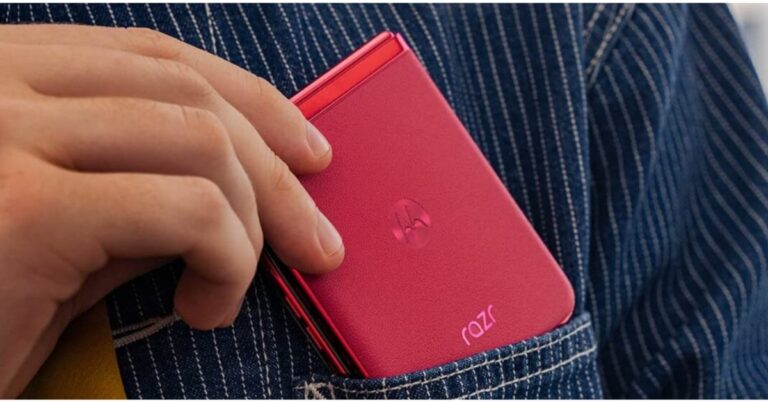
 The Razr 40 series will be available for purchase via Amazon starting July 15 when the Prime Day sale begins on the platform at midnight. Prime members are eligible to get early access to the product along with bank offers. The device will also be available on Reliance Digital stores across the country. The customers can now pre-book the device on Amazon at just Rs 999.
Also Read: Twitter sets a cap on the number of Tweets that can be read by verified and unverified users
The Razr 40 series will be available for purchase via Amazon starting July 15 when the Prime Day sale begins on the platform at midnight. Prime members are eligible to get early access to the product along with bank offers. The device will also be available on Reliance Digital stores across the country. The customers can now pre-book the device on Amazon at just Rs 999.
Also Read: Twitter sets a cap on the number of Tweets that can be read by verified and unverified users
 Snapdragon 7 Gen 1 and Snapdragon 8+ Gen 1 processors power the Motorola Razr 40 and Motorola Razr 40 Ultra, respectively.
The Motorola Razr 40 has a 64-megapixel primary sensor and a 12-megapixel ultra wide-angle camera for optics. A 13-megapixel secondary ultra-wide-angle camera and a 12-megapixel primary sensor are featured on the Razr 40 Ultra, in contrast. For selfies and video calls, both foldable phones have a 32-megapixel front-facing camera.
Batteries of 3,800mAh and 4,200mAh capacities are present in the Motorola Razr 40 and Motorola Razr 40 Ultra, respectively. The first model charges at 33W while the other device can be charged at 30W and also enables 8W wireless charging.
Both the clamshell design phones have dual stereo speakers. Razr 40 is 7.35mm thin when unfolded on the other hand the Ultra model is 6.99mm thin when unfolded.
For the latest gadget and tech news, and gadget reviews, follow us on Twitter, Facebook and Instagram. For newest tech & gadget videos subscribe to our YouTube Channel. You can also stay up to date using the Gadget Bridge Android App. You can find the latest car and bike news here.
Snapdragon 7 Gen 1 and Snapdragon 8+ Gen 1 processors power the Motorola Razr 40 and Motorola Razr 40 Ultra, respectively.
The Motorola Razr 40 has a 64-megapixel primary sensor and a 12-megapixel ultra wide-angle camera for optics. A 13-megapixel secondary ultra-wide-angle camera and a 12-megapixel primary sensor are featured on the Razr 40 Ultra, in contrast. For selfies and video calls, both foldable phones have a 32-megapixel front-facing camera.
Batteries of 3,800mAh and 4,200mAh capacities are present in the Motorola Razr 40 and Motorola Razr 40 Ultra, respectively. The first model charges at 33W while the other device can be charged at 30W and also enables 8W wireless charging.
Both the clamshell design phones have dual stereo speakers. Razr 40 is 7.35mm thin when unfolded on the other hand the Ultra model is 6.99mm thin when unfolded.
For the latest gadget and tech news, and gadget reviews, follow us on Twitter, Facebook and Instagram. For newest tech & gadget videos subscribe to our YouTube Channel. You can also stay up to date using the Gadget Bridge Android App. You can find the latest car and bike news here. 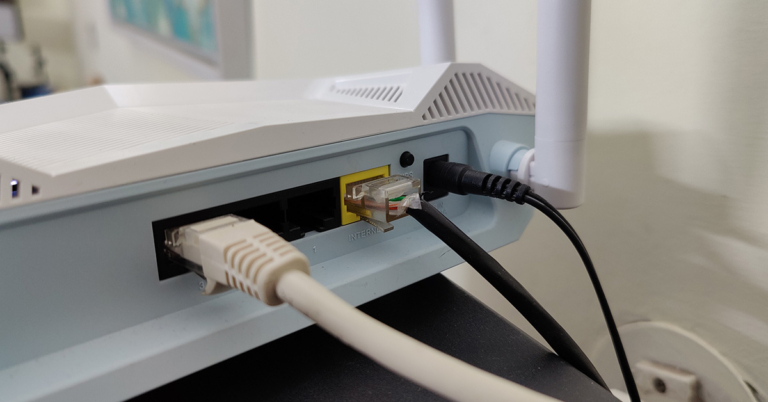
 Step 4:
 Step 5:
 Step 7:




 Step 3:
 Step 4:
 Step 5:
 Step 4:
 Step 5:
 Step 3:
 Step 6: Choose the images
 Step 7:
 Step 3:
 Step 4:
 Step 5:
 Step 6: Choose a picture
 Step 10:
 Step 11:

 Step 3:
  Step 4:
 Step 6:
 Step 3:
 Step 2:
 Step 3:
 Step 4:
 Step 5:
 Step 3: