If you’re constantly working while on the go, you need a good calendar and appointment scheduling app that keeps you updated about the events of the day. iPhone users are spoiled for choice in this category. With tons of apps to browse through, it can get pretty confusing to settle on one. We used the best calendar apps on the App Store and narrowed your choices down to a handful. So, without further ado, here are the top 10 online calendar and appointment scheduling apps for iPhone.Read Also:Poco C51 powered by a 5,000mAh battery launched in India
Google Calendar
Google Calendar’s integration with other Google apps makes it a no-brainer if you’re looking for a seamless and hassle-free calendar experience. You can easily embed Google Meet links into your schedule without needing to look through your emails for the invite at the last minute. Have a flight reservation? Google Calendar will automatically import it and place it in your schedule. Browsing through the calendar, you can view your appointments by date, and simply tap on a date to expand your schedule. The aspect of using Google Calendar is that it works with every other calendar app on your iPhone.
Apple Calendar
Apple’s native Calendar app is well-equipped to handle basic scheduling tasks and more. To create an event, all you need to do is press and hold an empty spot in your day. It’s that easy. Apple Calendar allows you to view your calendar in different layouts. For a more detailed breakdown of your schedule, opt for the ‘Day’ view. If you just want to take a cursory glance, go for the week or month view.
Fantastical
With multiple awards under its belt, Fantastical is without a doubt one of the best calendar apps you can download on your iPhone. Fantastical pays a lot of attention to the aesthetic and the design of the app. The app is loaded with helpful features that you will find easy to integrate into your routine. These include intuitive natural language input, multiple calendar layouts for easy viewing, time zone support, Todoist and Google Tasks compatibility, and even weather forecasts. The premium version of the app unlocks features like meeting polls, multi-device syncing, 10-day weather forecasts, Zoom/Meet/Teams support, and more.
Things 3
Things 3 is one of the highest-rated productivity apps on the App Store and has garnered a lot of accolades over the years. This app is the perfect synthesis of intuitive design and powerful features. Apart from basic scheduling tasks, you can use Things 3 to create to-dos (and schedule them on the calendar), create new projects, plan your tasks, and create different areas (like work, personal, and finance) to neatly organise everything. If you’re looking for an app that neatly blends scheduling, organising, and project planning together, Things 3 should be at the top of your list.
Calendly Mobile
If you own a small business and are constantly flooded with appointments, you’re probably in desperate need of an organising tool. Calendly’s desktop application has acquired a reputation for being one of the best at this task and its iOS app is just as good. Calendly sets up your appointment based on the openings in your schedule and even sends a reminder to the participants ahead of the meeting. To avoid any conflicting bookings, this app works in conjunction with Google, Outlook, Office 365, iCloud, and more.
Calendars 5 by Readdle
Calendars 5 by Readdle has all the essential features you want in an ideal calendar app. What we like about this app is its event-focused interface which keeps all your upcoming commitments in sight. You can expand the events with a single touch and quickly edit them if necessary. Seamless syncing ensures that any changes you make to your calendar offline will be immediately reflected on your account as soon as you are connected to the Internet. Calendars 5 is also equipped with a task manager that can create recurring to-do tasks for you.
Simple Calendar: daily planner
As the name suggests, Simple Calendar gets rid of the bells & whistles and creates a very accessible UI for its users. You can choose a font size that suits you best and browse through the different calendar layouts on offer. Daily tasks can be easily differentiated with colour-coded panels. Entries can be added in the form of text notes, URLs, and even geographical coordinates and map locations. Want to keep your calendar away from prying eyes? You can choose to lock it up with a password.
BusyCal: Calendar and Tasks
BusyCal‘s versatility earns it a spot on this list. This calendar app is compatible with iCloud, Google Calendar, Google Tasks, Microsoft Outlook, Todoist, and other productivity apps and services. This ensures that sharing your BusyCal entries with other iOS or Android users is not hindered by cross-platform issues. Apart from seamless sharing, BusyCal offers all the essential features like multiple calendar layouts, colour-coded entries, natural language input, and more.
One Calendar
If you use multiple calendar apps on your iPhone, One Calendar can integrate all of them in one place. Using One Calendar, you can view all your appointments and scheduled tasks in one place. This app is compatible with Google, Live, Outlook, iCloud, Exchange, Office 365, Yahoo, NextCloud, Synology, GMX, ownCloud, mailbox.org, and more.
Read Also:iQoo to celebrate 3 years in India with exciting discounts, offers and International fan-meet
Conclusion
These are the top 10 calendar and appointment-scheduling apps for your iPhone. Most of these apps come with Google Meet/Zoom/Microsoft Teams compatibility, which makes it easier to take meetings from the app itself without needing to look through your emails for the invite. We’d suggest going through the different apps mentioned in this list before deciding which one suits your needs the best.For the latest gadget and tech news, and gadget reviews, follow us on Twitter, Facebook and Instagram. For newest tech & gadget videos subscribe to our YouTube Channel. You can also stay up to date using the Gadget Bridge Android App. You can find the latest car and bike news here.
OnePlus Nord CE 3 Lite 5G was launched in India earlier this week. The device’s first sale is yet to begin in the country but ahead of this, the company has an exciting offer for the buyer. According to the company, the buyers of the newly launched smartphone are eligible for a free OnePlus Nord Buds CE. To learn more about the deal in detail, keep reading.
OnePlus Nord CE 3 Lite 5G launch offers
OnePlus Nord CE 3 Lite 5G first sale is scheduled to begin on April 11 in India at 12 noon via Amazon in the country. Just ahead of the sale, the company has announced introductory offers for buyers. Now the offer is, those who purchase the OnePlus Nord CE 3 Lite 5G will get a OnePlus Nord Buds CE worth Rs 2,299 for free. This offer can be availed via OnePlus.in and Amazon.in, OnePlus Experience Stores, authorised stores and select partner stores. Note that this offer is only available till stock lasts.In addition to this buyers can also avail a discount of Rs 1000 on the OnePlus Nord Watch via OnePlus.in and OnePlus Store App between April 12 to April 15 and Rs 500 off from April 16 to April 30.The Nord CE 3 Lite was launched in India at a starting price of Rs 19,999. While the 8GB RAM with 256GB RAM with 256GB storage option is priced at Rs 21,999. The device comes in two colour options of Pastel Lime and Chromatic Gray.Also Read:OnePlus announced the all-new Nord CE 3 Lite 5G with a 108-megapixel camera in India
OnePlus Nord CE 3 Lite 5G specifications
The Nord CE 3 Lite 5G is highlighted with a 6.72-inch full-HD+ LCD display with 1,080×2,400 pixels of resolution. The display has a dynamic refresh rate of 120Hz and 240Hz touch sample rate. In addition to this, it comes with a peak brightness of 680 nits, a 91.4 percent screen-to-body ratio, a 20:9 aspect ratio, and a 391ppi pixel density.Moreover, the screen is protected with Corning Gorilla Glass Victus. The phone is powered by an octa-core Snapdragon 695 SoC and runs on OxygenOS 13.1 on top of Android 13.There is a triple rear camera setup that includes a 108-megapixel Samsung HM6 sensor with an f/1.75 aperture and EIS support. It also consists of a 2-megapixel macro lens and another 2-megapixel depth sensor. There is a 16-megapixel front-facing camera for selfies.In addition to this, the smartphone packs a 5,000mAh battery that supports 67W SuperVOOC fast charging.
For the latest gadget and tech news, and gadget reviews, follow us on Twitter, Facebook and Instagram. For newest tech & gadget videos subscribe to our YouTube Channel. You can also stay up to date using the Gadget Bridge Android App. You can find the latest car and bike news here.
Garena Free Fire is a battle royale game with regular awards and tournaments to keep players interested. If you play Garena Free Fire, you should be aware of the redeem codes that are released on a daily basis. However, because the battle royale game is banned in India, players from other countries can use the Free Fire Redeem codes daily. If you’re unfamiliar with the Garena Free Fire redeem codes or don’t know how to get them, we’ve put together a step-by-step guide to help you redeem them. Check out Garena Free Fire Redeem Codes for 8 April 2023.The Free Fire redeem codes are a great way to get free stuff. These are 12-digit codes that contain alphabets and numbers, as well as an expiration date and time. Because the Garena FF redeem codes cannot be used more than once, you should hurry to the redemption page to claim your free reward before someone else does. To get a free reward, all you have to do is go to reward.ff.garena.com/en, which is the official redemption page. Also, keep an eye on this space for daily updates on Garena Free Fire redemption codes and rewards.
Garena Free Fire Redeem Codes Today 8 April 2023
4ST1ZTBE2RP9
XFW4Z6Q882WY
GCNVA2PDRGRZ
8F3QZKNTLWBZ
E2F86ZREMK49
TDK4JWN6RD6
FFDBGQWPNHJX
WD2ATK3ZEA55
4TPQRDQJHVP4
HFNSJ6W74Z48
HHNAT6VKQ9R7
2FG94YCW9VMV
J3ZKQ57Z2P2P
B3G7A22TWDR7X
V44ZZ5YY7CBS
3IBBMSL7AK8G
X99TK56XDJ4X
How to Get Free Fire Redeem Codes for Garena on 8 April 2023?
8 April 2023 Amazon Quiz has gone live. Customers from different parts of the country are participating in the daily quiz. The quiz begins from 12 AM to 11:59 PM. Those participating in the quiz can win exciting prizes by answering all the questions correctly. Today participants have a chance to win a Rs 1,000 Amazon Pay Balance.Amazon quiz brings an opportunity for its customers to win Amazon Pay Balance ranging from Rs 1,000 to Rs 50,000. The Quiz can be played from 12 AM to 11:59 PM. The e-commerce platform brings a fresh quiz on a daily basis which consists of five questions related to general knowledge and current affairs. The participants need to answer all the questions correctly and their names will be selected for a lucky draw. The winner will be announced at the end of the month.One wrong answer could eliminate you from the quiz. If you manage to answer all the questions correctly you can stand a chance to win a Rs 1,000 Amazon Pay Balance today. Only app users are eligible to participate in the Quiz. Check Out 8 April 2023 Amazon Quiz Answers.Amazon Quiz Today Prize – Rs 1,000 Amazon Pay BalanceQuiz Date – 8 April 2023Daily Timing – 12 AM to 11:59 PMWinner Announcement – Today 12 PM
Amazon Quiz Answers Today 8 April 2023
Question 1: As of November 7, 2022, whose Twitter bio reads ‘Twitter Complaint Hotline Operator’?
Answer: Elon MuskQuestion 2: Who got the 2022 Sakharov Prize for Freedom of Thought from the European Parliament?
Answer: People of Ukraine
Question 3: What is the name of the resident cat of 10 Downing Street, the subject of much public scrutiny and affection?
Answer: LarryQuestion 4: Which country is the largest contributor of carbon dioxide emission in the atmosphere?Answer: ChinaQuestion 5: In 2017, this monarch reached which jubilee?
Answer: Sapphire
How To Play Amazon Quiz
Only app users are eligible to play the Amazon quiz every morning from 12 AM to 11:59 PM. The quiz is not available on the desktop. For those who are unaware of how to play the Amazon quiz below are the steps, you can follow to take the quiz.
Firstly download the Amazon app from Google Play Store or App Store
Now fill in the required information through the Sign Up option.
You need to log in to the Amazon app and scroll down on the home screen to find the Amazon Quiz banner.
Tap on the Amazon Quiz banner and tap on the Start button to start the Quiz.
Now you will get 5 questions and you need to answer them correctly. One wrong answer will eliminate you from the Quiz.
After answering all the questions correctly you are now eligible for a Lucky Draw.
The winner’s name will be announced today at 12 PM.
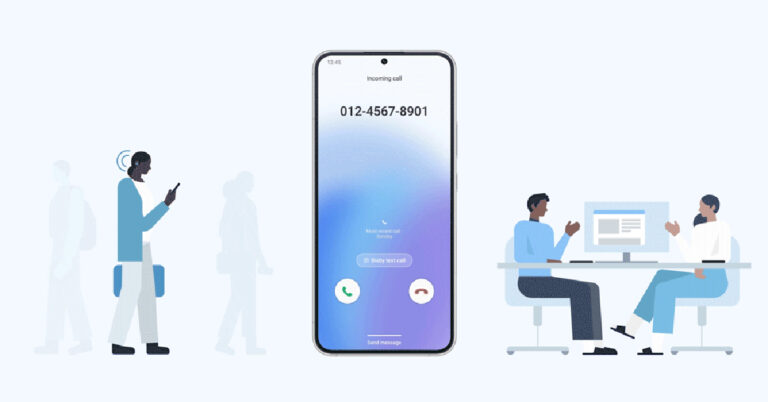
Google’s voice assistant offers a nifty feature called ‘call screening’, which lets the Assistant take calls on your behalf and ask the caller preset questions regarding their purpose of calling. This is a great way to deter spam callers who may drop the call upon hearing a prerecorded message. The only catch is that call screening is only available on Google Pixel phones in selected regions. If you don’t own a Pixel or aren’t in one of the countries where Google has rolled out call screening, there still is one alternative for you. Samsung Galaxy smartphones running One UI 5 offer the exact same feature on Bixby, Samsung’s native voice assistant. Here is how you can use Bixby to screen calls on your Samsung Galaxy smartphone.Read Also:Top 8 Passport Photo Apps for Android and iOS for easy printing
Here’s how you can use Bixby to screen incoming calls on your phone
Step 1: Launch the native Phone app (not the Google dialer) on your Samsung Galaxy smartphone.Step 2: Tap the ellipses (three dots) at the top right corner of the screen.Step 3: Select Settings.Step 4: Tap on Bixby text call.Step 5: Turn the toggle bar on to enable Bixby text call.Step 6: Tap on language and voice. Currently, Bixby only offers to screen your calls in Korean and English. More language options will be added soon. You can also download different voices for the assistant and select one you like.Step 7: Go back to the previous window and select quick responses. This is where you can choose which messages you want your callers to be greeted with first. You can also add a custom response of your own. These messages will show up on your screen while Bixby is asking questions on your behalf. Long press a particular message and drag it to change its order on the screen. When you’re on call, you can tap on a message to make Bixby relay it to the caller. Step 8: Now that you’ve set up Bixby text call, all you need to do is wait for someone to call you. Once you receive a call, tap on ‘Bixby text call’ to begin the screening.Step 9: Bixby will ask the first question in the list mentioned above. You can type out a response of your own or select a preset response from the list. You can view the live transcript of the conversation on your screen. Once you’re satisfied with the screening, you can pick up the call.
Frequently Asked Questions
Can Bixby screen calls?
Samsung introduced the call screening feature with One UI 5. You can screen all calls on your number using Bixby text call.
Can Bixby screen incoming calls in English?
At first, Bixby text call was only available in the Korean language, but with the One 5.1 update, it offers English functionality as well. Bixby text call doesn’t let you screen calls in Hindi yet.
Can I use Google Assistant to screen calls on my smartphone?
This is how you can Bixby to screen calls on your Samsung Galaxy smartphone. Currently, this feature is only offered with One UI. Smartphones running the Core version of One UI may not have the option to screen calls using Bixby. You can use this feature to effectively weed out all spam calls without having to pick them up. It also filters out scam callers as they are likely to hang up as soon as they encounter a robotic voice on the other end.For the latest gadget and tech news, and gadget reviews, follow us on Twitter, Facebook and Instagram. For newest tech & gadget videos subscribe to our YouTube Channel. You can also stay up to date using the Gadget Bridge Android App. You can find the latest car and bike news here.
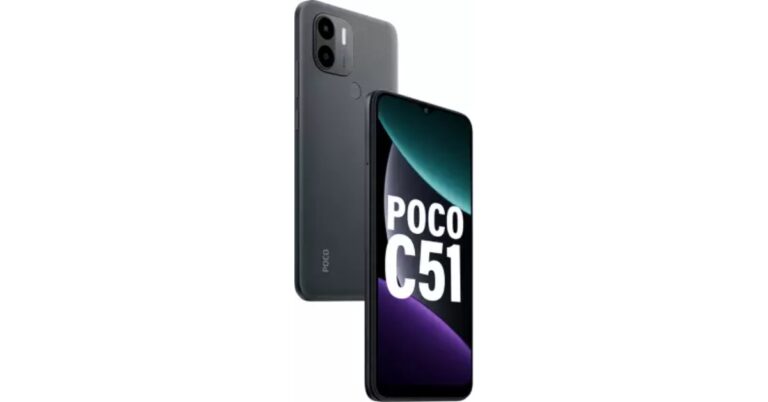
Poco has announced another budget smartphone in the Indian market today. Poco C51 has been introduced under Rs 9,000. The device comes with MediaTek Helio G36 SoC with a 7GB Turbo RAM feature. The entry-level phone also includes a dual 8MP rear camera and a 5,000mAh battery. It also features a 6.52-inch HD+ display.
Poco C51 price in India and sale details
Poco C51 has been launched in India with a price tag of Rs 8,499 for a single 4GB RAM with 64GB storage options. However, the device will be available at an introductory price of Rs 7,799 on the first sale of the date. The phone is scheduled to go on sale on April 10 via Flipkart in the country.
Poco C51 specifications
Poco C51 features a 6.52-inch HD+ display with 720×1,600 pixels of resolution having a waterdrop style notch. The screen supports a 120Hz touch sampling rate and 400 nits of brightness. In addition to this, the device is shipped with Android 13 Go Edition. Under the hood, there is an octa-core MediaTek Helio G36 SoC, paired with 4GB of RAM and 64GB of internal storage. There is a 7GB Turbo RAM feature which has the ability to run and switch between various apps more quickly. Whereas the internal storage can be expanded up to 1TB using a microSD card.For taking photos and videos the Poco C51 comes with a dual rear camera setup consisting of an 8-megapixel primary sensor and a secondary depth sensor. The device also includes a 5-megapixel front-facing camera for taking selfies. The smartphone also offers a 1080p @ 30fps option to record videos.In addition to this, there is a 5,000mAh battery on the phone which comes with 10W charging support. Poco C51 also includes a rear-mounted fingerprint sensor and an accelerometer. In terms of connectivity, there is 4G LTE, Wi-Fi, Bluetooth, GPS, Glonass, Beidou, a micro-USB port, and a headphone jack.Commenting on the launch, Himanshu Tandon, Country Head, POCO India said, “POCO C-series smartphones have consistently outperformed in the market and managed to steal the show in an otherwise crowded segment. We received a tremendous response to the POCO C31 and have sold over 2 million units to date. Taking the legacy forward, the POCO C51 is here to #SlayAllDay with the newly released MediaTek Helio G36. We are excited to unleash a disruptor in town with the all-new POCO C51, making it a steal bargain for our fans and consumers.” For the latest gadget and tech news, and gadget reviews, follow us on Twitter, Facebook and Instagram. For newest tech & gadget videos subscribe to our YouTube Channel. You can also stay up to date using the Gadget Bridge Android App. You can find the latest car and bike news here.
iQoo is celebrating its third anniversary in India with exciting discounts and offers on its smartphones for consumers in the coming weeks. It will bring the All Stars Cup on the iQOO Esports YouTube channel for a third season with a prize pool of INR 10,00,000. Moreover, 18 lucky community members will also have the chance to attend an exclusive International fan meet. Customers can benefit from discounts and deals on all iQOO Smartphones with the best price guarantee.The gaming-focused company iQoo has announced some exciting offers and discounts for their fans for completing three years in India. iQoo has some wonderful surprises for the iQOO Fam/ community members on this occasion.
iQOO All Stars Cup
The fans and community members will be able to support and witness top teams in India, including one team from the iQOO Community, compete to win the event. It is going to be a four-day event that will have already begun and will run till April 9. It will be aired on the iQOO ESPORTS official YouTube channel. The top three podium finishers and one best performer, known as the MVP, will each win Rs 10,00,000 as their award. This is the third season of the tournament and this time iQOO All Stars Cup will feature QOOL Questers, an all-exclusive iQOO Community team. Four iQOO Connect members who are passionate New State Mobile players make up the team.
iQoo International Fan Meet
iQoo International Fan Meet has also been announced by the company. This will come up with exciting contests along with giveaways on its official community forum – iQOO Connect for its fans. Along with additional giveaways the top 18 winners will receive a once-in-a-lifetime opportunity to participate in an international fan meet.
Exciting Offers
Customers can also benefit from the iQoo third anniversary discounts and offer on the top-selling smartphone in the coming weeks. The deals and offers will soon be made public on the Amazon India website.Sharing the excitement of iQOO’s third-year anniversary, Nipun Marya, Chief Executive Officer – iQOO said, “When we commenced our journey three years back in India, we had a vision of providing the best of performance to our consumers. Keeping up with this quest of continuously providing meaningful and innovative products, offers and services, we are thrilled to announce all these exciting offers and opportunities to celebrate our three-year magical journey in India. This journey wouldn’t have been possible without our consumers as their support and love have made us the No 1 brand in customer satisfaction consecutively for two years. We shall continue to focus on innovating future-ready technology that cater to the evolving needs of Indian consumers”. For the latest gadget and tech news, and gadget reviews, follow us on Twitter, Facebook and Instagram. For newest tech & gadget videos subscribe to our YouTube Channel. You can also stay up to date using the Gadget Bridge Android App. You can find the latest car and bike news here.
When you’re shopping online, it is recommended that you visit a bunch of sellers and marketplaces on the Internet to find the best deals. This can prove to be an arduous task when there are a lot of options to choose from. Luckily, Google makes it easy for you to compare prices and shop for a product in one place. While Google Shopping isn’t a marketplace in itself, it aggregates different sellers across marketplaces to bring you the best deals. In this article, we show you how to shop online and compare & track the prices of products using Google.Read Also:Now you can play games during video calls on Facebook Messenger
How can you compare product prices on Google?
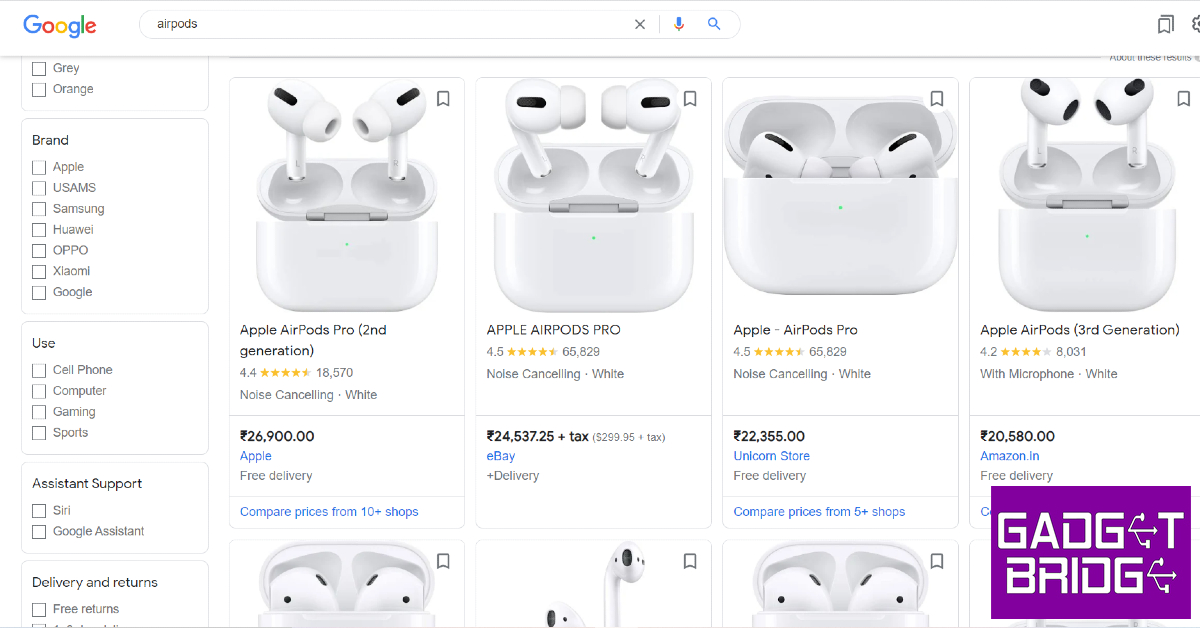
There are two ways you can compare product prices on Google. The simplest way to go about it is by performing a Google search for the product. Once the search results load on the page, you will see the different buying options under the ‘Popular Products’ or ‘Related Products’ section. To compare prices of the product simply go through the various listings in the product on the right. Click on ‘Compare prices’ to view the detailed list.
Another way you can compare prices for a product is by logging into Google Shopping. Once you’ve signed in using your Google Account, search for a product and click on the most relevant result. Click on ‘Compare prices’ to view the detailed list of prices for the product.
Here’s how you can use Google to shop online
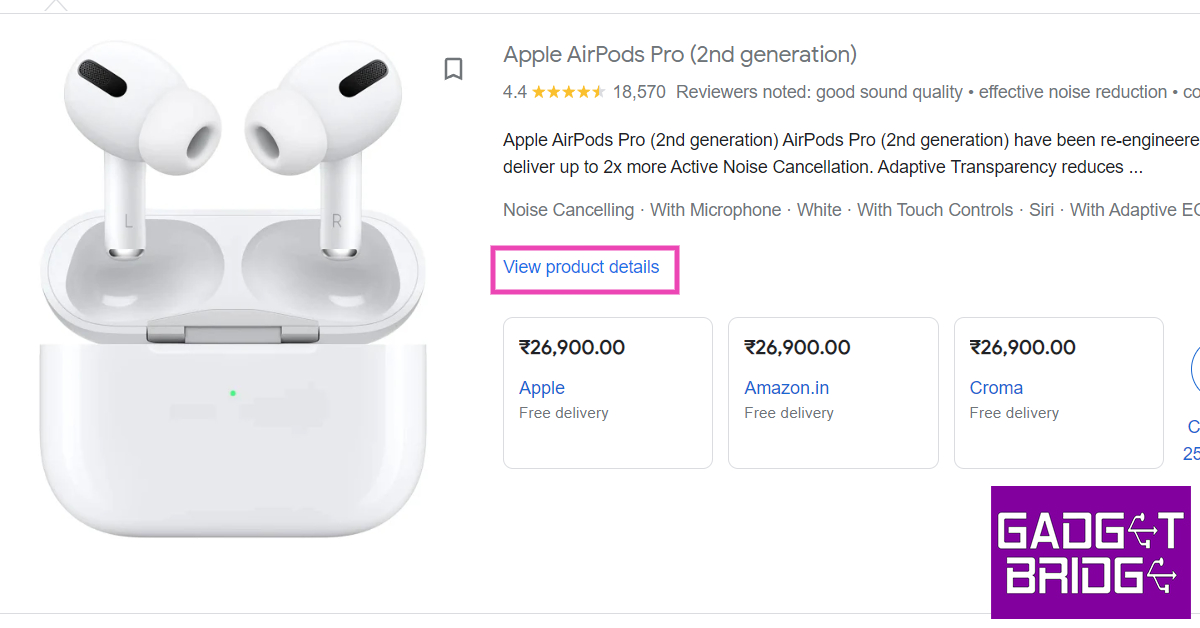
Step 1: Go to https://shopping.google.com and search for a product you want to buy.Step 2: Once you’ve entered the desired product, you will see buying options from sellers across the Internet. This includes sellers on major e-commerce platforms like Flipkart and Amazon as well as independent retailers.Step 3: Click on the product and select ‘View product details’.Step 4: Check the panel on the right to compare the product’s prices from different sellers and platforms. Click on ‘Visit site’ to view the product on the seller’s website.
How to track a product’s price using Google Chrome?
Make sure you are signed into Chrome and have ‘sync’ turned on. In addition to that, you need to turn on ‘Web and app activity’. Click on this link to turn it on. Now, follow these steps.Step 1: Open the page of the product that you want to track.Step 2: Click on the ‘track price’ icon in the address bar. Select ‘Done’ in the popup box to confirm your selection.You will be notified whenever the price of the product gets slashed. To manage the products you’re tracking, click on bookmarks and select ‘Tracked Products’.
Here’s how you can track a product on your Android smartphone
Step 1: Launch Chrome on your smartphone and tap on the three dots in the top right corner of the screen. Go to Settings>Google Services and turn on the toggle bar for ‘Track prices on tabs’.Step 2: Now, go to the product page and tap on the three dots again. Select ‘Track price’.You will be notified whenever the seller reduces the price of the product.
Frequently Asked Questions
What is Google Shopping?
Google Shopping is a link aggregator that makes it easy to compare product prices across the Internet.
Is Google Shopping free?
Yes, Google Shopping is free to use for buyers as well as sellers. You can put up the product you’re selling on Google Search Index for it to show up on Google Shopping. The only time you will need to pay is when you are advertising your product.
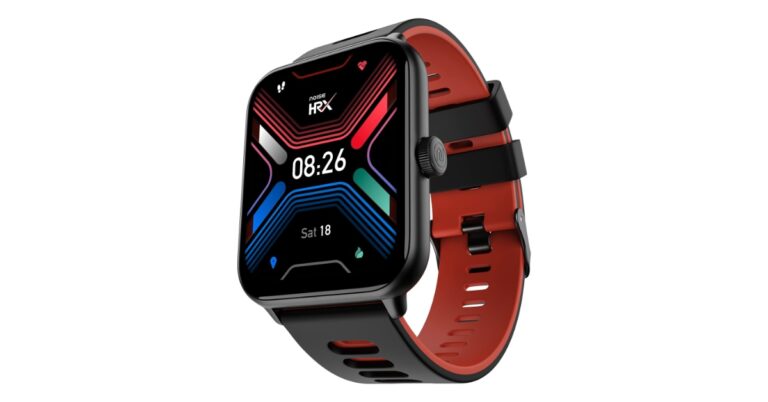
Popular Indian audio and wearable brand Noise has strengthened its smartwatch portfolio with the launch of a new product. In partnership with HRX, the company has launched Noise HRX Sprint. The device has a square dial and offers features like BT calling and QR code storage for easy transactions. It is ideal for college-goers and young professionals. The smartwatch also comes equipped with an AI voice assistant.
Noise HRX Sprint price in India and sale details
Noise HRX Sprint smartwatch comes with a price tag of Rs 1,999. The smartwatch comes in five colour options of: Jet Black, Active Black, Active Blue, Active Grey and Vintage Brown. The original price of the product is 6,999 however it is available at Rs 2,199 on Amazon, Rs 1,999 on both Myntra and the company’s official website in the country.
Noise HRX Sprint specifications
The all-new Noise HRX Sprint comes with a 1.91-inch square TFT display with 240×296 pixels of resolution. The always-on display offers 550 nits of brightness. The device offers over 150 cloud-based watch faces and is IP67 rated for water and dust resistance. In addition to this, the tracker also comes equipped with smart features that allow users to save QR codes for easy transactions and an AI voice assistant for a hands-free experience. Noise HRX Sprint includes more than 100 sports modes to track daily activity and comes with an Inbuilt Games. It has the ability to access recent call logs, it can store up to 10 contacts through Noise Buzz, making interaction with the device extremely interactive and hassle-free.Also Read:JBL Tour ONE M2 ANC headphones with 50 hours of playtime launched in IndiaApart from this, the Noise smartwatch has an updated Noise Health Suite that uses a heart rate monitor, a SpO2 tracker, a sleep monitor, a stress measurement technique, and breathing practices. It also sends daily reminders and weather forecasts to users using the inbuilt Productivity Suite. Moreover, there is an Alarm clock, Timer, World Clock and an inbuilt stopwatch.Commenting on the launch, Amit Khatri, Co-Founder, Noise, said, “As today’s youth are becoming more health conscious, smartwatches are becoming an essential part of their daily lifestyle. This has led to an increase in amalgamation of innovation and style when it comes to smart wearables. Here is where our series with HRX comes into play. At Noise, we understand that consumers are always on the lookout for a device which becomes their reliable companion and with this endeavour we are certain that Noise HRX Sprint will become yet another go-to choice for our customers.”
For the latest gadget and tech news, and gadget reviews, follow us on Twitter, Facebook and Instagram. For newest tech & gadget videos subscribe to our YouTube Channel. You can also stay up to date using the Gadget Bridge Android App. You can find the latest car and bike news here.
One of the most challenging tasks while filling up an online form is the processing of uploading a scanned copy of your passport-sized photo. It can get trickier if you don’t have a physical copy on hand. In this scenario, using your phone to scan a physical image is out of the question. Luckily, you’re not all out of options. There are a ton of apps that will help you take a passport-sized picture or edit an existing image in your gallery to meet the required size. So, without further ado, here are the top 11 passport photo apps for Android and iOS for easy printing.Read Also:Now you can play games during video calls on Facebook Messenger
ID Photo Application
Download: Android, iOSID Photo Application is one of the most popular passport photo editing apps on Android. There’s an iOS version of the app as well, although it is not as popular. This app is perfect for turning your pictures taken using your smartphone to passport size (4×6) while retaining all the important details. The app allows you to carry out basic editing tasks like removing spots and blemishes from your face before finalising the photo. You can also customise the size of the picture to match the requirements of the frame in your application. Once you are done editing the image, you can easily print out several copies on a single sheet of paper using your home printer.
Passport Photo Maker
Download: AndroidThis passport photo app has a ton of preset frame sizes for different IDs and applications. You can find the frame for your passport, visa, PAN card, and more. You can even create a custom size for the frame to match your needs. Apart from resizing the image to passport size, this app removes the background for you and even gives you the option to add professional suits to the image. You also get basic editing features like adjusting contrast, tilt, white balance, and more. You can use this app to print out several copies of your passport photo on a single piece of paper.
Passport Photo – ID Photo App
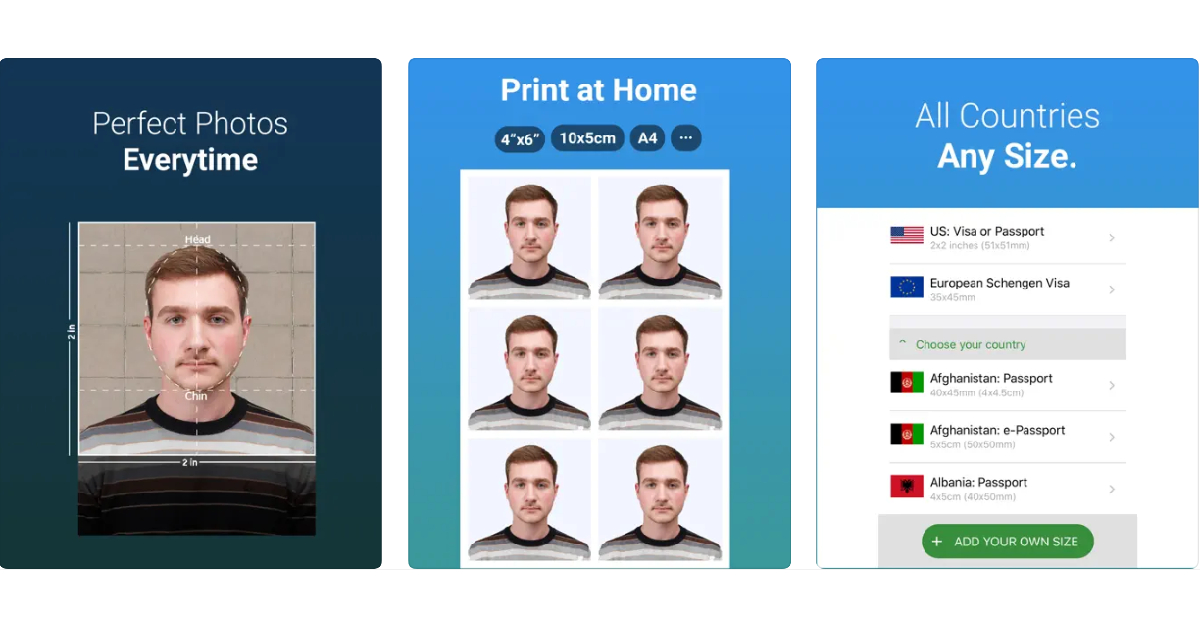
Download: iOSThe Passport Photo app for iOS has integrated passport and visa sizes for every country in the world. While the basic features of this app are free, premium tools like automatic background remover and ink saver are locked behind a paywall. Once you have edited the size of your image, you can set the layout for an A4 size sheet and print it out at home or from a professional service.
Passport Photo Booth Creator
Download: Android, iOSThis app recreates the photo lab experience at your home. The one significant advantage is that, unlike a photo lab, you can use this app to take as many shots as you want until you settle on the one you like the most. The app is equipped with instructions to help you take the perfect picture for your passport or ID. Once you’ve taken a picture, you can carry out basic edits within the app itself.
Passport Photo & ID Maker
Download: iOSThe Passport Photo & ID Maker comes with passport and visa sizes for over 130 countries. Using this app you can create pictures for passports, visas, green cards, driving licenses, and other IDs. You can even customise the size of the image if you can’t one you like in the presets. You can take a picture within the app or upload one from your phone’s gallery. The app recognises your facial features and crops the image accordingly. You can use basic editing tools within the app to change the contrast, brightness, saturation, and white balance of the image.
Passport Photo – ID Photo
Download: Android, iOSIf you’re looking for a simple passport photo editing app that offers all the basic features in a very accessible manner, go for Passport Photo – ID Photo. This app is available on Android as well as iOS. This app has a ton of templates to resize your images to meet different formats. Laying out multiple copies of your image on a single sheet of paper is an easy task using this app. You can either print the pictures at home or save the file and send it to a photo lab to take out professional-grade prints.
Official Passport photo by Smartphone iD
Download: Android, iOSIf you want to take a passport photo at home but want to get it printed out by a professional photo lab, you can do so within a single app. The Official Passport photo app by Smartphone iD lets you take images at home and gives you the option to resize them to meet the requirements of your document. Once that is out of the way, you can order prints of the photo from the app itself. You can even track the status of your order from within the app. Concerned about your privacy? This app works in line with the GDPR policy.
Vivid ID: Passport Photo Maker
Download: Android, iOSApart from resizing your images to meet the required criteria, the Vivid ID app also offers a bunch of AI-powered tools to enhance your image. Using these tools you can change the background of the image, and even try out different professional suit filters for different genders that look very close to real. You can either take a picture within the app or upload one from your phone’s gallery. The Vivid ID app automatically edits the image and resizes it to put your face and upper body in focus.
Passport Photo Maker – VISA/ID
Download:Android
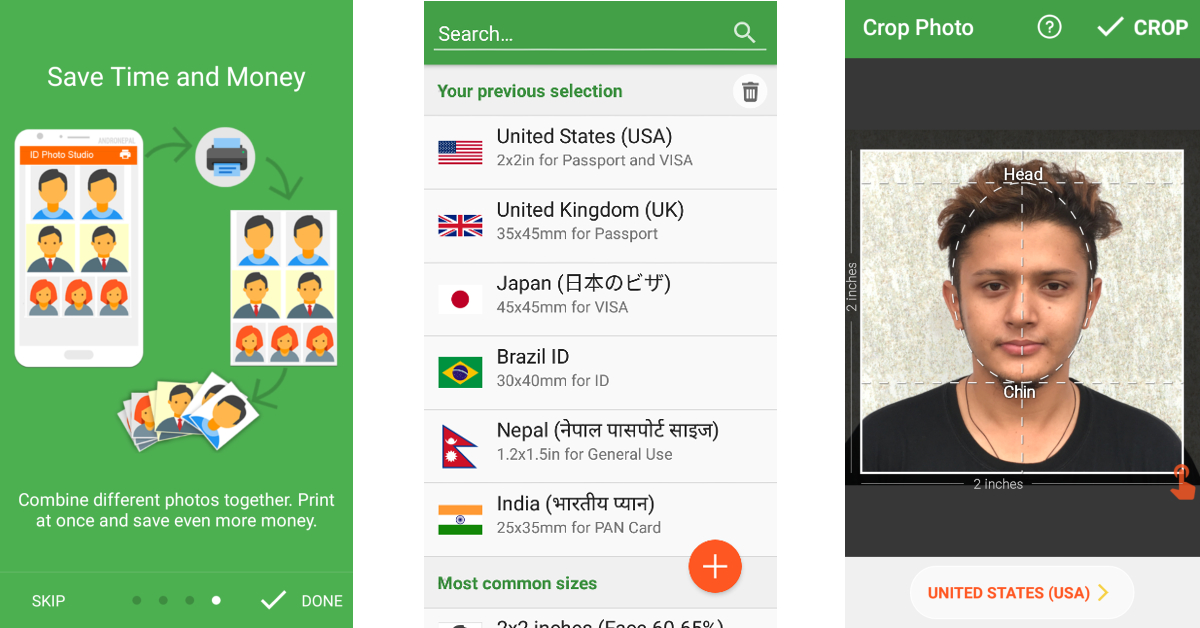
With over 10 million downloads on Google Play Store alone, Passport Photo Maker is one of the most popular passport photo apps around. What makes this app a fan favourite is its phenomenal range of editing tools. You can juxtapose several copies of a passport photo on an A4 size sheet of paper and save it to get it printed out later. This app is also capable of creating official photo sizes for IDs, passports, and VISA of different counties like Brazil, Spain, India, USA, and more.
ID Photo – Passport Photo Maker
Download:iOS
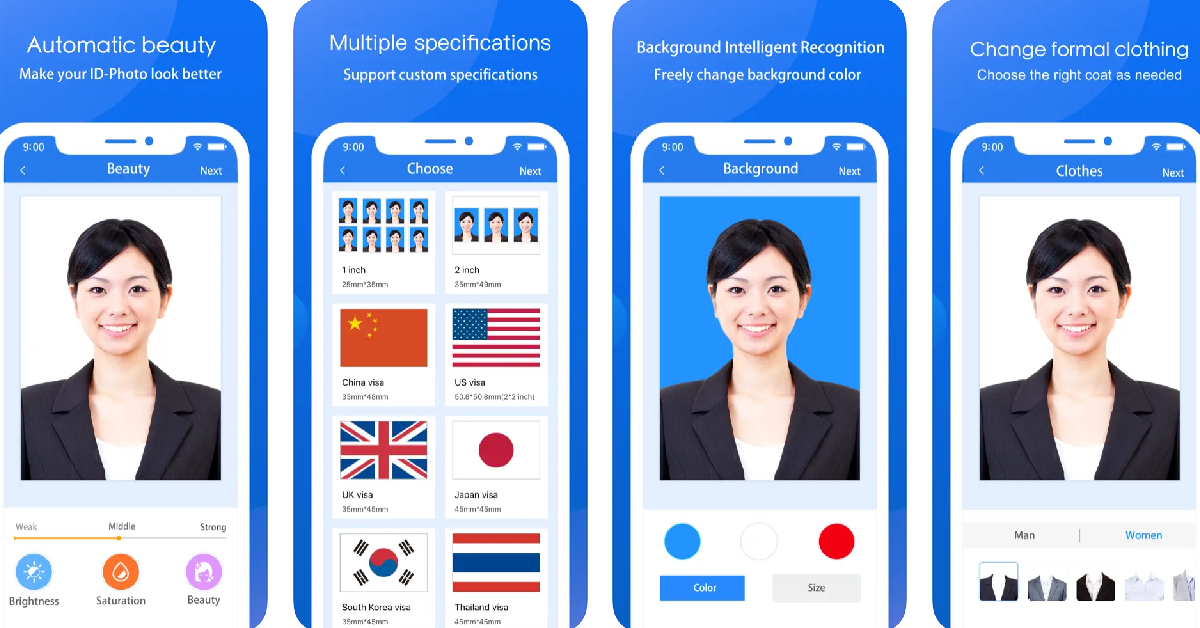
The ID Photo app lets you edit the passport-size photo to make it look more brightened and legible. You can also choose to edit the background and your clothes. This app can be used to edit photos for passports, IDs, VISA, green cards, naturalisation certificates, school documents, corporate identification, firearms permits, and more. It has dimensional presets for multiple countries, so you don’t have to look up the size of the photo for the VISA of the country you are about to visit.
Passport and VISA photos
Download:Android
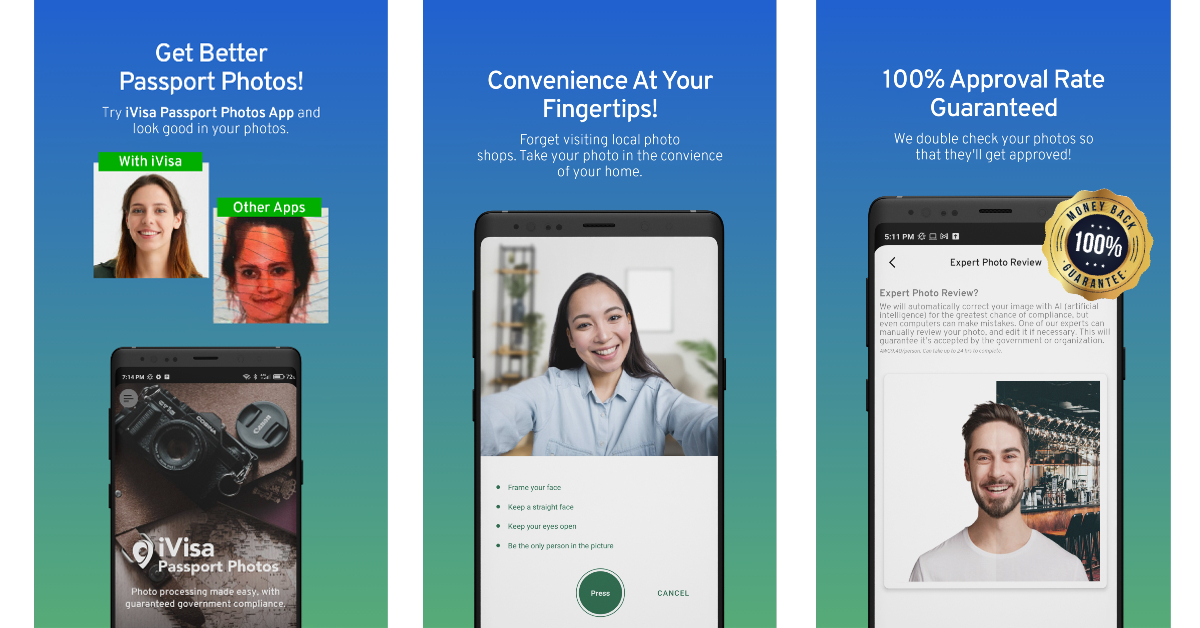
The Passport and VISA photos app simplifies the process of taking a passport-sized photo at home. This app guides you through the process of taking the perfect passport-sized picture. Once you’ve shot an image, the app will review whether it fits the perfect dimensions for the official document. It also offers to deliver printed photos directly to your doorstep.
Read Also:Sony ZV-1F vlogging camera with 20 mm ultra-wide angle lens launched in India
Conclusion
These are the top 11 Passport photo apps for Android and iOS for easy printing. All apps mentioned in this list give you the option to print out photos at home. For more professional results, save the image on your phone and get them printed at a photo studio. Some apps like Passport Photo Booth Creator and Official Passport Photo offer their own printing services and ship you the printed photos at an affordable price.For the latest gadget and tech news, and gadget reviews, follow us on Twitter, Facebook and Instagram. For newest tech & gadget videos subscribe to our YouTube Channel. You can also stay up to date using the Gadget Bridge Android App. You can find the latest car and bike news here.



 Google Calendar’s integration with other Google apps makes it a no-brainer if you’re looking for a seamless and hassle-free calendar experience. You can easily embed Google Meet links into your schedule without needing to look through your emails for the invite at the last minute. Have a flight reservation? Google Calendar will automatically import it and place it in your schedule. Browsing through the calendar, you can view your appointments by date, and simply tap on a date to expand your schedule. The aspect of using Google Calendar is that it works with every other calendar app on your iPhone.
 Apple’s native Calendar app is well-equipped to handle basic scheduling tasks and more. To create an event, all you need to do is press and hold an empty spot in your day. It’s that easy. Apple Calendar allows you to view your calendar in different layouts. For a more detailed breakdown of your schedule, opt for the ‘Day’ view. If you just want to take a cursory glance, go for the week or month view.
 With multiple awards under its belt, Fantastical is without a doubt one of the best calendar apps you can download on your iPhone. Fantastical pays a lot of attention to the aesthetic and the design of the app. The app is loaded with helpful features that you will find easy to integrate into your routine. These include intuitive natural language input, multiple calendar layouts for easy viewing, time zone support, Todoist and Google Tasks compatibility, and even weather forecasts. The premium version of the app unlocks features like meeting polls, multi-device syncing, 10-day weather forecasts, Zoom/Meet/Teams support, and more.
 Things 3 is one of the highest-rated productivity apps on the App Store and has garnered a lot of accolades over the years. This app is the perfect synthesis of intuitive design and powerful features. Apart from basic scheduling tasks, you can use Things 3 to create to-dos (and schedule them on the calendar), create new projects, plan your tasks, and create different areas (like work, personal, and finance) to neatly organise everything. If you’re looking for an app that neatly blends scheduling, organising, and project planning together, Things 3 should be at the top of your list.
 If you own a small business and are constantly flooded with appointments, you’re probably in desperate need of an organising tool. Calendly’s desktop application has acquired a reputation for being one of the best at this task and its iOS app is just as good. Calendly sets up your appointment based on the openings in your schedule and even sends a reminder to the participants ahead of the meeting. To avoid any conflicting bookings, this app works in conjunction with Google, Outlook, Office 365, iCloud, and more.
 Calendars 5 by Readdle has all the essential features you want in an ideal calendar app. What we like about this app is its event-focused interface which keeps all your upcoming commitments in sight. You can expand the events with a single touch and quickly edit them if necessary. Seamless syncing ensures that any changes you make to your calendar offline will be immediately reflected on your account as soon as you are connected to the Internet. Calendars 5 is also equipped with a task manager that can create recurring to-do tasks for you.
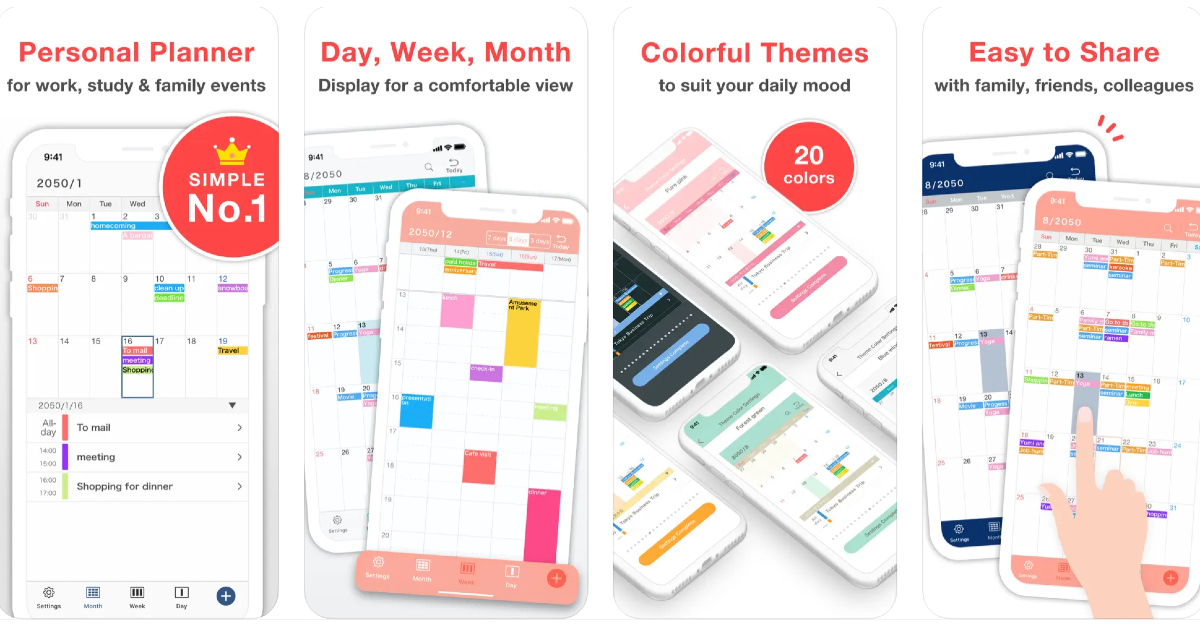 As the name suggests, Simple Calendar gets rid of the bells & whistles and creates a very accessible UI for its users. You can choose a font size that suits you best and browse through the different calendar layouts on offer. Daily tasks can be easily differentiated with colour-coded panels. Entries can be added in the form of text notes, URLs, and even geographical coordinates and map locations. Want to keep your calendar away from prying eyes? You can choose to lock it up with a password.
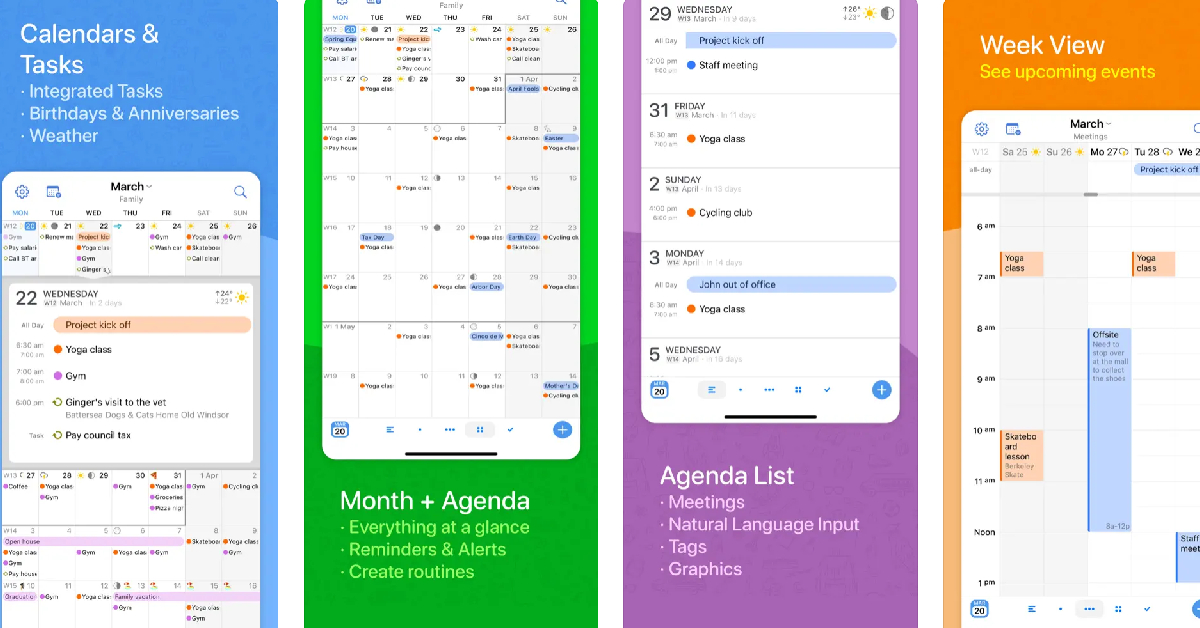 BusyCal‘s versatility earns it a spot on this list. This calendar app is compatible with iCloud, Google Calendar, Google Tasks, Microsoft Outlook, Todoist, and other productivity apps and services. This ensures that sharing your BusyCal entries with other iOS or Android users is not hindered by cross-platform issues. Apart from seamless sharing, BusyCal offers all the essential features like multiple calendar layouts, colour-coded entries, natural language input, and more.
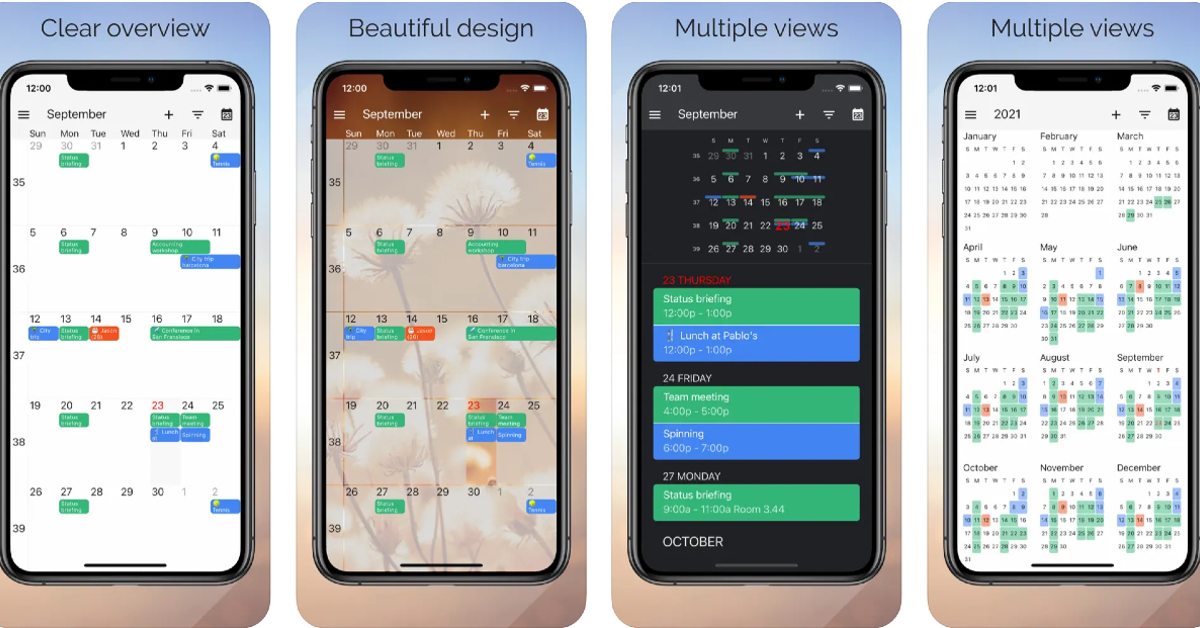 If you use multiple calendar apps on your iPhone, One Calendar can integrate all of them in one place. Using One Calendar, you can view all your appointments and scheduled tasks in one place. This app is compatible with Google, Live, Outlook, iCloud, Exchange, Office 365, Yahoo, NextCloud, Synology, GMX, ownCloud, mailbox.org, and more.
Read Also: iQoo to celebrate 3 years in India with exciting discounts, offers and International fan-meet
If you use multiple calendar apps on your iPhone, One Calendar can integrate all of them in one place. Using One Calendar, you can view all your appointments and scheduled tasks in one place. This app is compatible with Google, Live, Outlook, iCloud, Exchange, Office 365, Yahoo, NextCloud, Synology, GMX, ownCloud, mailbox.org, and more.
Read Also: iQoo to celebrate 3 years in India with exciting discounts, offers and International fan-meet



 Step 3:
 Step 4:
 Step 5:
 Step 6:
 Step 7:
 Step 8:
 Step 9:



 Step 3:
  Step 4: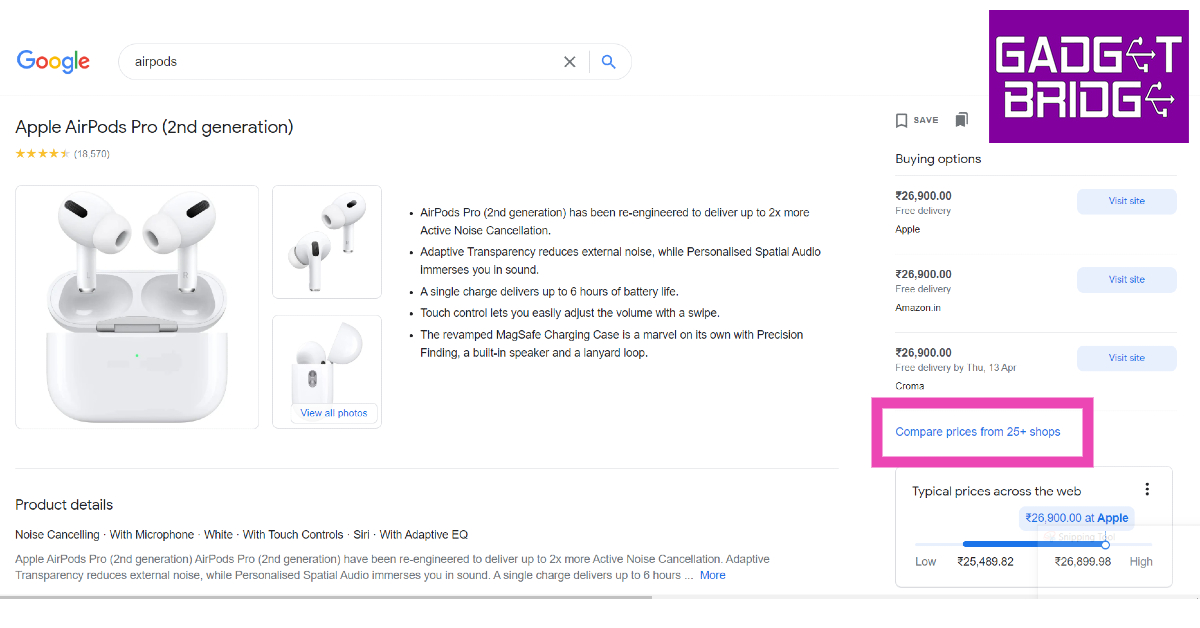








 With over 10 million downloads on Google Play Store alone, Passport Photo Maker is one of the most popular passport photo apps around. What makes this app a fan favourite is its phenomenal range of editing tools. You can juxtapose several copies of a passport photo on an A4 size sheet of paper and save it to get it printed out later. This app is also capable of creating official photo sizes for IDs, passports, and VISA of different counties like Brazil, Spain, India, USA, and more.
 The ID Photo app lets you edit the passport-size photo to make it look more brightened and legible. You can also choose to edit the background and your clothes. This app can be used to edit photos for passports, IDs, VISA, green cards, naturalisation certificates, school documents, corporate identification, firearms permits, and more. It has dimensional presets for multiple countries, so you don’t have to look up the size of the photo for the VISA of the country you are about to visit.
 The Passport and VISA photos app simplifies the process of taking a passport-sized photo at home. This app guides you through the process of taking the perfect passport-sized picture. Once you’ve shot an image, the app will review whether it fits the perfect dimensions for the official document. It also offers to deliver printed photos directly to your doorstep.