How to use Google Assistant like a pro? Tips and tricks

0
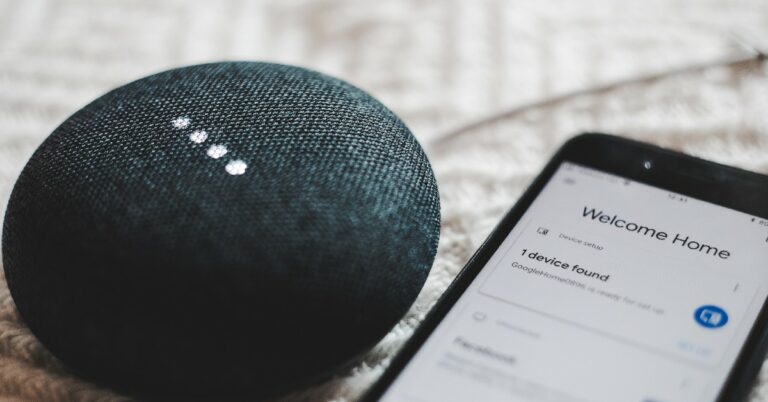
Voice assistants are getting scary good with every passing year. Google Assistant has been ahead of the curve for quite some time now, being preferred by almost half a billion people. Even with new players like Samsung’s Bixby arriving on the scene, Google Assistant remains the leader of the pack. In this article, we bring you the top tips and tricks to use Google Assistant like a pro. Read Also: Sony ZV-1F vlogging camera with 20 mm ultra-wide angle lens launched in India

Turn on Google Assistant

Turn on Google Assistant To get started, you need to turn on Google Assistant on your smartphone. Go to Google app>Settings>Google Assistant>Hey Google & Voice Match, and turn on the toggle bar for Hey Google. Now, you will be able to trigger Google Assistant simply by saying ‘Hey Google’. One of the better parts of using Google Assistant is that it’s purely voice controlled and you do not need to scroll on your device to do a particular task. To make full use of this functionality, make sure you have activated Assistant responses on the lock screen. Train Google Assistant to recognise your voice using Voice Match. This will ensure that the voice assistant only responds to you when your phone is locked.

Set your preferred news sources

Set up your preferred news sources If you rely on Google for news, you can ask Google Assistant to read you the headlines of the day. You can even customise the assistant to read you the news from your preferred sources. Simply go to Google Assistant>You>News and set up your preferred sources. Say ‘Hey Google play the news’ to have the assistant read the news to you at any given time.

Set up a routine

Set up a routine Google Assistant can help you with certain tasks using the ‘routines’ trick. For example, upon waking up, Google Assistant can tell you about the weather, read out the schedule for the day from your calendar, remind you of the tasks for the day and any upcoming birthdays, and even tell you if your battery is low so you can plug it in to charge before leaving the house. To set up a routine, go to Google Assistant>Routines and customise any routine you like. You can also set up a new routine for yourself.

Set up a reminder

Set up a reminder With your smartphone always by your side, setting up reminders is easier than ever. All you need to do is say ‘Hey Google set a reminder for…’ followed by the reminder. You can use this function to set reminders for basically anything. Didn’t get to charge your phone before you left the house? Tell Google Assistant to remind you to plug in your phone to charge after 30 minutes. You can even set reminders for birthdays, anniversaries, and more.

Manage smart gadgets with Google Assistant

Top Smart Gadgets for Smart Homes. google assistant tricks If you use any smart gadgets or appliances around the house, you can easily control them with your voice using Google Assistant. First, you need to install Google Home on your device and link your gadget with it. Once that is done, you can use voice commands to manage the device. For example, if you use a smart bulb for your room, you can use Google Assistant tricks to turn it on, change the colour temperature or intensity, and even set it to turn off at a specific time.

Create a shopping list

create a shopping list. google assistant tricks Of all the assistant functions mentioned in the list, this is the easiest one to incorporate into your daily routine. If you are always forgetting to add stuff to your shopping list, now you can easily update just by speaking into your phone. To start, say ‘Hey Google create a shopping list’. You can edit the list title and easily add entries to it. You can ask the Assistant to pin this list to your home screen as well. 

Enable continued conversation

If you’re using Google Assistant for a task like creating a shopping list, you probably don’t want to say ‘Hey Google’ before making each entry. To skip this, go to Google Assistant settings and select Continued Conversation.

Check your flight reservation

Google Assistant can access your Gmail inbox to look through any flight reservations. By asking Google Assistant for any upcoming flights, you can have it read out the flight info from the ticket in your Gmail inbox. 

Get Google Assistant to screen your calls

8 Best Ways to Block a Phone Number On Android or iPhone (iOS). google assistant tricks Call screening is one of Google Assistant’s newest features and possibly the most helpful one too. Currently, only Pixel phones have this feature and it has been made available in selected regions across the globe. Some Android phones in North America have been given early access to call screening as well. Google plans on rolling out this feature across all Android smartphones in a phased manner. So, what does call screening do? Using call screening, Google Assistant can take your calls for you, screen them, and answer them on your behalf. You can set up responses for Google Assistant to read out to the caller. The caller’s responses will be shown as a transcript on the screen. Call screening can help you filter a lot of spam calls from annoying telemarketers and other sources. To enable Automatic call screening on Google Assistant, open the Phone app and go to Settings>Spam and Call Screen. Select ‘Automatically screen’. To do this manually, simply tap on ‘Screen Call’ every time your phone rings. You can also choose to record what the caller says while interacting with Google Assistant. Read Also: Vivo T2 5G series India launch set for April 11: Key details revealed

Conclusion

These are the top tips and tricks to use Google Assistant like a pro. As you can probably tell by now, the possibilities with Google Assistant are endless. You can use it to play trivia, flip a coin, take a selfie, play music, translate a phrase, or do any other task (within fair limits) that you can think of! For the latest gadget and tech news, and gadget reviews, follow us on Twitter, Facebook and Instagram. For newest tech & gadget videos subscribe to our YouTube Channel. You can also stay up to date using the Gadget Bridge Android App. You can find the latest car and bike news here.

JBL Tour ONE M2 ANC headphones with 50 hours of playtime launched in India

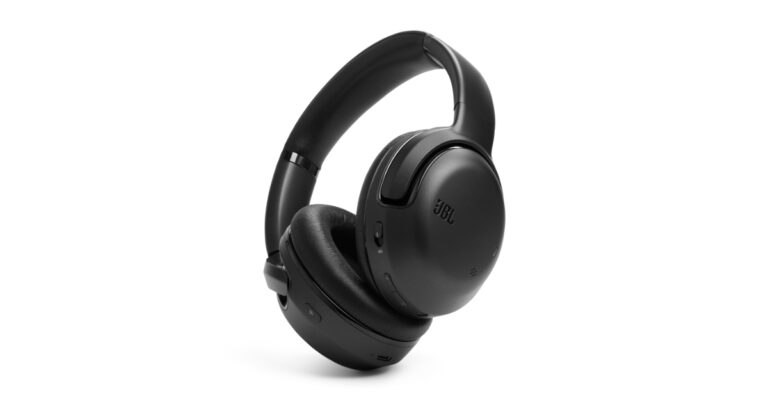
Audio accessories maker JBL has announced its audio device in the headphones line-up named JBL Tour ONE M2. These are over-ear headsets featuring true adaptive noise cancelling with customizable ANC (Active Noise Cancellation) and ambient sound. The wearable device offers low-volume dynamic EQ and features 40mm dynamic drivers. In addition to this, the JBL headphone comes with JBL Spatial sound and up to 50 hours of total playback.

JBL Tour ONE M2 price in India and availability

The JBL Tour ONE M2 headphones have been launched at an introductory price of Rs 24,999. This pricing is available for a limited time period and after this, you can purchase it at Rs 34,999. It comes in a single black colour option and can be purchased via all major retailers and also on www.JBL.com. JBL Tour ONE M2 ANC headphones with 50 hours of playtime launched in India

JBL Tour ONE M2 specs and features

JBL Tour ONE M2 features a high-res audio with 40mm dynamic drivers tuned by legendary JBL PRO sound. The device comes with a hybrid True Adaptive ANC with JBL Pro-tuned drivers. According to the company, the True Adaptive ANC technology automatically adjusts to the surroundings in real-time, eliminating distractions and maximizing the whole listening experience. There is an advanced built-in voice recognition that reacts to the user’s voice, pauses music and enables Ambient Aware. The music and True Adaptive ANC automatically resume once the conversation is over. With Smart Ambient tech the headset controls the environmental sound levels and turns the personal sound amplification button on through the JBL headphone app. This helps in boosting conversation volume with +15-20dB and adjusting the L/R balance. Whereas with the smart talk feature, you do not need to pause the music to have a quick conversation JBL Tour ONE M2 ANC headphones with 50 hours of playtime launched in India The JBL headphones have a 4-mic crystal call algorithm for better sound and call quality even in loud windy environments. With the VoiceAware feature, users can select how much of their own voice to hear by controlling the amount of mic input routed back into the headphones. There is Spatial sound support as well that gives you a theatre-like sound experience. Also Read: Vivo T2 5G series India launch set for April 11: Key details revealed The JBL Tour ONE M2 is said to provide up to 50 hours of playtime and 30 hours of battery life with ANC turned on. It does come with fast charging. Just 10 mins of charging provide 5 hours of music playback.  Vikram Kher, Vice President, Lifestyle, HARMAN India said, “We’re thrilled to introduce the JBL Tour ONE M2 headphones, the ultimate listening experience for music lovers and audiophiles alike. Over 76 years of our audio supremacy, has led us to create products like Tour ONE M2 with advanced noise-cancellation technology, pristine sound quality, and comfortable design. One can experience unparalleled sound and a seamless listening experience whether you’re at home or on the go.”  For the latest gadget and tech news, and gadget reviews, follow us on TwitterFacebook and Instagram. For newest tech & gadget videos subscribe to our YouTube Channel. You can also stay up to date using the Gadget Bridge Android App. You can find the latest car and bike news here.

Garena Free Fire Redeem Codes Today 7 April 2023: Here is how to claim them

Garena Free Fire is a battle royale game with regular awards and tournaments to keep players interested. If you play Garena Free Fire, you should be aware of the redeem codes that are released on a daily basis. However, because the battle royale game is banned in India, players from other countries can use the Free Fire Redeem codes daily. If you’re unfamiliar with the Garena Free Fire redeem codes or don’t know how to get them, we’ve put together a step-by-step guide to help you redeem them. Check out Garena Free Fire Redeem Codes for 7 April 2023. The Free Fire redeem codes are a great way to get free stuff. These are 12-digit codes that contain alphabets and numbers, as well as an expiration date and time. Because the Garena FF redeem codes cannot be used more than once, you should hurry to the redemption page to claim your free reward before someone else does. To get a free reward, all you have to do is go to reward.ff.garena.com/en, which is the official redemption page. Also, keep an eye on this space for daily updates on Garena Free Fire redemption codes and rewards.

Garena Free Fire Redeem Codes Today 7 April 2023

  • EYH2W3XK8UPG
  • UVX9PYZV54AC
  • BR43FMAPYEZZ
  • NPYFATT3HGSQ
  • FFCMCPSUYUY7E
  • 8F3QZKNTLWBZ
  • 4ST1ZTBE2RP9
  • B3G7A22TWDR7X
  • 6KWMFJVMQQYG
  • FF7MUY4ME6SC
  • WEYVGQC3CT8Q
  • X99TK56XDJ4X
  • FFCMCPSGC9XZ
  • MCPW2D2WKWF2
  • GCNVA2PDRGRZ

How to Get Free Fire Redeem Codes for Garena on 7 April 2023?

  • Visit the Garena Free Fire game’s official website at reward.ff.garena.com.
  • Use your Facebook, Google, VK, Apple ID, Huawei ID, or Twitter account to log in.
  • You’ll be taken to a valid redemption code (s)
  • Copy and paste the 12-digit redemption code into the text box.
  • On the screen, a dialogue box will appear.
  • ‘Ok’ should be selected.
For the latest gadget and tech news, and gadget reviews, follow us on TwitterFacebook and Instagram. For newest tech & gadget videos subscribe to our YouTube Channel. You can also stay up to date using the Gadget Bridge Android App. You can find the latest car and bike news here.
Amazon Quiz Answers Today 7 April 2023: Participate to win Rs 500

7 April 2023 Amazon Quiz has gone live on its platform. The quiz timings are 12 AM to 11:59 PM. The Amazon App users can participate in the quiz daily and all they have to do is submit correct answers to the questions asked on the e-commerce platform. Today’s participants can get a chance to win Rs 500 Amazon Pay Balance. By participating in the Amazon Quiz the participants can win Amazon Pay Balance ranging from Rs 1,000 to Rs 50,000 every day while sitting at home. To win the participants must answer five questions correctly that are based on current events and general knowledge. One wrong answer can eliminate you from the quiz. The results will be announced at the end of the month. Today’s question will let you win Rs 500 Amazon Pay Balance. Check below for today’s Amazon quiz answers. Amazon Quiz Today Prize – Rs 500 Amazon Pay Balance Quiz Date – 7 April 2023 Daily Timing – 12 AM to 11:59 PM Winner Announcement – Today 12 PM

Amazon Quiz Answers Today 7 April 2023

Question 1: Marathi film ‘Ved’ is the directorial debut of which actor? Answer: Riteish Deshmukh Question 2: The 27th session of the Conference of the Parties (COP 27) to the UNFCCC took place in the resort town in Sharm El-Sheikh in which country? Answer: Egypt Question 3: Which music artiste has lost endorsement contracts with sponsors like Adidas and Balenciaga because of anti-Semitic comments in public? Answer: Kanye West Question 4: This temple is situated on the banks of which river? Answer: Narmada Question 5: What is the male group of this animal known as? Answer: Dog Fox

How To Play Amazon Quiz

Only app users are eligible to play the Amazon quiz every morning from 12 AM to 11:59 PM. The quiz is not available on the desktop. For those who are unaware of how to play the Amazon quiz below are the steps, you can follow to take the quiz.
  • Firstly download the Amazon app from Google Play Store or App Store
  • Now fill in the required information through the Sign Up option.
  • You need to log in to the Amazon app and scroll down on the home screen to find the Amazon Quiz banner.
  • Tap on the Amazon Quiz banner and tap on the Start button to start the Quiz.
  • Now you will get 5 questions and you need to answer them correctly. One wrong answer will eliminate you from the Quiz.
  • After answering all the questions correctly you are now eligible for a Lucky Draw.
  • The winner’s name will be announced today at 12 PM.
For the latest gadget and tech news, and gadget reviews, follow us on TwitterFacebook and Instagram. For newest tech & gadget videos subscribe to our YouTube Channel. You can also stay up to date using the Gadget Bridge Android App. You can find the latest car and bike news here.

Now you can play games during video calls on Facebook Messenger

Facebook Gaming has officially announced that users can now play their favourite games during Messenger video calls. The functionality is currently accessible on both Messenger for iOS and Android. Moreover, it can be played on Web platforms. Right now users can access up to 14 free-to-play games and no app installation is required. Meta via a blog post said, “Facebook Gaming is excited to announce that you can now play your favourite games during video calls on Messenger. This new, shared experience in Messenger makes it easy to play games with friends and family while in a video call, allowing you to deepen connections with friends and family by engaging in conversations and gameplay at the same time.” Also Read: Does the Facebook mobile app have a working Dark Mode (Night Theme)?  As of now, there are 14 free-to-play games available in Messenger video calls on iOS, Android, and the web. It’s nice that users could very well access the games without having to install the app. A variety of games are available, like Card Wars by Bombay Play and Exploding Kittens by Coatsink as well as some fan favourites like Mini Golf FRVR by FRVR and Words With Friends by Zynga. Each game has a maximum number of players it can accommodate, however, most games only require two players to play. “We know games are an important and fun way for people to connect with those they care about and make new friends, so we’ll be working to bring more free games to the platform this year,” the company said. In order to access the games, start a video call on Messenger. Then tap the group mode button in the centre, after that tap on the “Play” icon and browse through the games library. Earlier this year, Meta also introduced a paid Blue badge for both Facebook and Instagram. Only those of the subscription service can obtain a blue badge and use a government ID to authenticate their accounts. Account verification, impersonation protections, access to more visibility, and support are all part of the new subscription service. For the latest gadget and tech news, and gadget reviews, follow us on TwitterFacebook and Instagram. For newest tech & gadget videos subscribe to our YouTube Channel. You can also stay up to date using the Gadget Bridge Android App. You can find the latest car and bike news here.

Sony ZV-1F vlogging camera with 20 mm ultra-wide angle lens launched in India

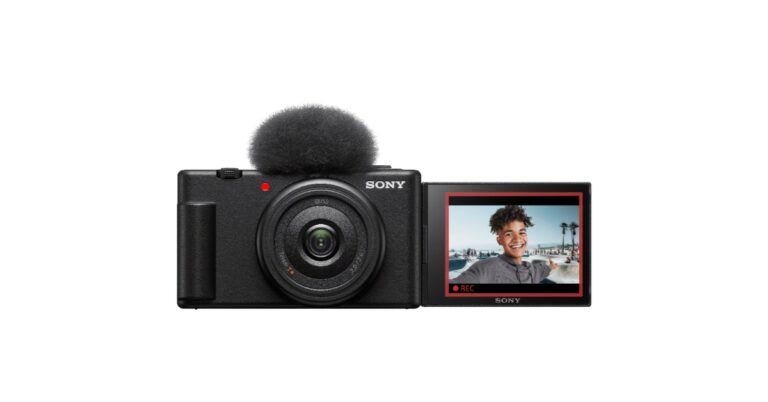
Sony India has expanded its portfolio with the launch of a new vlog camera- Sony ZV-1F. The new vlogging camera is compact in size and is said to come integrated with eco-friendly features. It has a vari-angle LCD for shooting selfies and a 20mm ultra-wide lens is also included for group selfies. Additionally, there is a 425 contrast-detection AF frame points for high-precision focusing on the camera. The all-new Sony ZV-1F vlogging camera features an ultra-wide 20mm prime lens for optimum selfie shooting and a wide field of view to capture more background. It also provides background bokeh in both stills and video. The vlogging camera is compact and lightweight. It weighs approximately 229 grams perfect for everyday usage. The vlogging camera comes with a Vari-Angle LCD touchscreen with features and settings changed by touch, including the ability to zoom. The is a Bokeh Switch button to allow users to quickly switch between background bokeh in videos. In addition to this, it includes a Product Showcase setting that lets users easily shift focus between face and products. It also includes a self-timer and recording lamp. Sony ZV-1F vlogging camera with 20 mm ultra-wide angle lens launched in India The Sony ZV-1F has a ‘Soft Skin Effect’ option that makes the skin look more vibrant and natural by smoothing it and reducing wrinkles. While Face Priority AE automatically adjusts the brightness even in situations where light changes. Also Read: Vivo T2 5G series India launch set for April 11: Key details revealed Moreover, the Sony vlog camera features high precision focusing and Eye AF for both humans and animals without being distracted by other subjects. While the touchscreen ability makes changing subjects simple for users. Sony ZV-1F vlogging camera with 20 mm ultra-wide angle lens launched in India According to the company, stabalisation is available for both photos and videos, which is accessible in Active Mode (electronic). With adjustments in tone, brightness, colour depth, and more, the newly introduced Creative Look function provides users with a total of 10 preset options to create desired atmospheres in both still photos and videos with no need for editing. There is an S&Q mode as well to shoot in both slow motion at 5 x slower speed and quick motion at 60 x faster hyper lapse speed to achieve the desired effect. For better audio quality the company has provided an in-built Directional 3-Capsule Mic. However, there is a provision for an external mic for clearer audio. The camera is compatible with the GP-VPT2BT Shooting Grip with Wireless Remote Commander which offers cable-free control of zoom, recording and more, and expands into a mini-tripod for stable hands-free shots.
Sony ZV-1F Price and Availability

The price of the Sony ZV-1F is set at Rs 50,690. It is now available for purchase via all Sony Center, Alpha Flagship stores, Sony authorized dealers, e-commerce websites (Amazon and Flipkart) and major electronic stores across India. For the latest gadget and tech news, and gadget reviews, follow us on TwitterFacebook and Instagram. For newest tech & gadget videos subscribe to our YouTube Channel. You can also stay up to date using the Gadget Bridge Android App. You can find the latest car and bike news here.

Vivo T2 5G series India launch set for April 11: Key details revealed

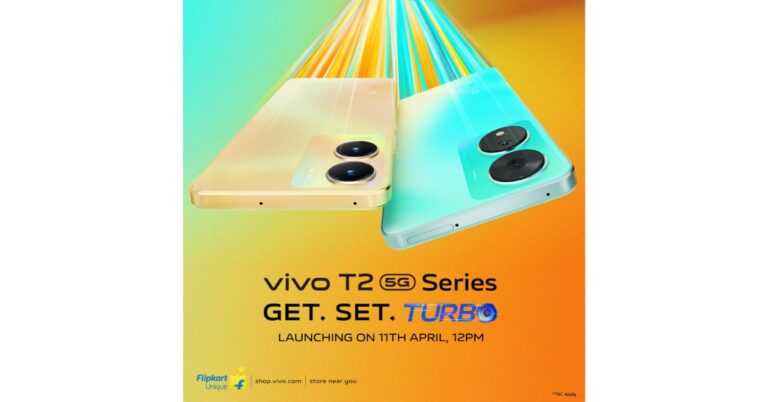
The Chinese smartphone maker Vivo is all set to present a new smartphone series in India. Vivo T2 5G series is going to launch in the country on April 11. The upcoming smartphone series has also been listed on Flipkart to tease their availability and Key details post-launch. The lineup will succeed the last year’s Vivo T1 series. Vivo is planning to expand its T-Series with the addition of the Vivo T2 5G series in India. The Series is scheduled to launch in the country on April 11 at 12 noon. The Vivo T2 5G series has also been listed on Flipkart which gives a glimpse of the smartphones and their availability. According to the company, more details about the devices will be revealed in the coming days. Apart from Flipkart, the phones will also be available for purchase via the company’s official Vivo E-Store in the country. Moreover, details regarding the pricing probably be revealed at the time of the launch. As per the microsite, camera specs will be revealed on April 7 while the processor details on April 9. As of now, the company has only shared details about the display and how many devices will be launched. While rest of the details as mentioned will be unwrapped in the next few days. The landing page is teasing the Blue and Gold colour options of the Vivo T2 5G series. In addition to this the upcoming phones will be powered by a Snapdragon chipset, the company has confirmed. Also Read: Apple reveals its first retail store in India, the Apple BKC Store opening in Mumbai Vivo also verified that there will be two devices in the series Vivo T2 5G and Vivo T2x 5G. They are confirmed to offer an FHD+ AMOLED display. The screen will support a peak brightness of 1300 nits, a contrast ratio of 6000000:1 and a 360Hz touch sampling rate. However, the reports suggest that the price of the Vivo T2 5G series may start at Rs 20,000. The base Vivo T2 5G is likely to be offered in two different configurations of 6GB RAM with 128GB storage and 8GB RAM with 128GB storage. On the other hand Vivo T2x 5G will be available in three choices- 4GB RAM with 128GB storage, 6GB RAM with 128GB storage, and 8GB RAM with 128GB storage. The vanilla T2 5G may get a 64-megapixel rear primary sensor with optical image stabilization (OIS) support. For the latest gadget and tech news, and gadget reviews, follow us on TwitterFacebook and Instagram. For newest tech & gadget videos subscribe to our YouTube Channel. You can also stay up to date using the Gadget Bridge Android App. You can find the latest car and bike news here.

You can now easily share files between Windows PC and Android devices using Google’s Nearby Share feature

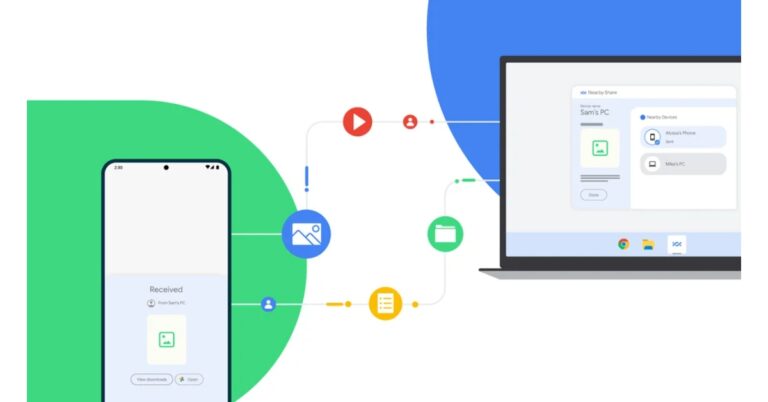
Google’s Nearby Share feature was launched two years back for Android devices to easily send and receive content across Android phones, tablets and Chromebooks. This feature for sharing files is better and a lot faster than Bluetooth sharing. Earlier it was not possible to share files between Windows PC and Android devices but now the company is bringing Nearby Share for PCs too. Google Nearby Share is being expanded to Windows as a beta in select regions according to the company. This feature is very much similar to Apple’s Airdrop allowing the user to sync their Android device to another Android smartphone and to Windows PCs. This app is currently available for download from Google’s Android website. According to the company, it is compatible with Windows PCs running the 64-bit version of Windows 10 and higher. In order to set up Nearby Share Beta for Windows all you need to do is download and install the Nearby Share Beta app on your PC. Doing this will enable you to send files to nearby Android devices, or send files to your PC based on your device visibility preferences. On your Windows PC, Nearby Share Beta works whether the app is open on the desktop or running in the background. You can transfer an image, video, or document to an Android smartphone nearby by dragging it from your desktop into the app or by selecting “Send with Nearby Sharing” from the right-click menu. Simply pick the Android devices you want to share with from the list that appears. The company via blog post noted, “Sending files to your own devices is even faster. As long as both devices are logged into your Google account, file transfers are automatically accepted — even if your screen is off.” Ensure that the Nearby Share Beta app is open on your PC in order to share content from your Android handset to it. It’s then simple to select the PC from the list of available devices by hitting Share on the content you wish to transfer. In its beta form, Nearby Share for Windows PCs allows users to share material with Android tablets and smartphones. The Nearby Share Beta for Windows is now available in the United States and a few other countries, the business announced. For the latest gadget and tech news, and gadget reviews, follow us on TwitterFacebook and Instagram. For newest tech & gadget videos subscribe to our YouTube Channel. You can also stay up to date using the Gadget Bridge Android App. You can find the latest car and bike news here

Garena Free Fire Redeem Codes Today 6 April 2023: Here is how to claim them

Garena Free Fire is a battle royale game with regular awards and tournaments to keep players interested. If you play Garena Free Fire, you should be aware of the redeem codes that are released on a daily basis. However, because the battle royale game is banned in India, players from other countries can use the Free Fire Redeem codes daily. If you’re unfamiliar with the Garena Free Fire redeem codes or don’t know how to get them, we’ve put together a step-by-step guide to help you redeem them. Check out Garena Free Fire Redeem Codes for 6 April 2023. The Free Fire redeem codes are a great way to get free stuff. These are 12-digit codes that contain alphabets and numbers, as well as an expiration date and time. Because the Garena FF redeem codes cannot be used more than once, you should hurry to the redemption page to claim your free reward before someone else does. To get a free reward, all you have to do is go to reward.ff.garena.com/en, which is the official redemption page. Also, keep an eye on this space for daily updates on Garena Free Fire redemption codes and rewards.

Garena Free Fire Redeem Codes Today 6 April 2023

Updating soon

How to Get Free Fire Redeem Codes for Garena on 6 April 2023?

  • Visit the Garena Free Fire game’s official website at reward.ff.garena.com.
  • Use your Facebook, Google, VK, Apple ID, Huawei ID, or Twitter account to log in.
  • You’ll be taken to a valid redemption code (s)
  • Copy and paste the 12-digit redemption code into the text box.
  • On the screen, a dialogue box will appear.
  • ‘Ok’ should be selected.
For the latest gadget and tech news, and gadget reviews, follow us on TwitterFacebook and Instagram. For newest tech & gadget videos subscribe to our YouTube Channel. You can also stay up to date using the Gadget Bridge Android App. You can find the latest car and bike news here.

Amazon Quiz Answers Today 6 April 2023: Participate to win Rs 2,500

6 April 2023 Amazon Quiz has gone live on its platform. The quiz timings are 12 AM to 11:59 PM. The Amazon App users can participate in the quiz daily and all they have to do is submit correct answers to the questions asked on the e-commerce platform. Today’s participants can get a chance to win Rs 2,500 Amazon Pay Balance. By participating in the Amazon Quiz the participants can win Amazon Pay Balance ranging from Rs 1,000 to Rs 50,000 every day while sitting at home. To win the participants must answer five questions correctly that are based on current events and general knowledge. One wrong answer can eliminate you from the quiz. The results will be announced at the end of the month. Today’s question will let you win Rs 2,500 Amazon Pay Balance. Check below for today’s Amazon quiz answers. Amazon Quiz Today Prize – Rs 2,500 Amazon Pay Balance Quiz Date – 6 April 2023 Daily Timing – 12 AM to 11:59 PM Winner Announcement – Today 12 PM

Amazon Quiz Answers Today 6 April 2023

Question 1: Karman Kaur Thandi became India’s number 1 women’s player in which sport?

Answer: Tennis

Question 2: Ajay Devgn plays the divine accountant of good and evil deeds Chitragupta in which 2022 Hindi film?

Answer: Thank God

Question 3: Anti-Oil protestors just threw soup at a painting of sunflowers in the National Gallery in London. Which artist’s work was targeted?

Answer: Vincent van Gogh

Question 4: In which Spanish city is this building located?

Answer: Valencia

Question 5: Which bottled water brand was first introduced in India?

Answer: Bisleri

How To Play Amazon Quiz

Only app users are eligible to play the Amazon quiz every morning from 12 AM to 11:59 PM. The quiz is not available on the desktop. For those who are unaware of how to play the Amazon quiz below are the steps, you can follow to take the quiz.
  • Firstly download the Amazon app from Google Play Store or App Store
  • Now fill in the required information through the Sign Up option.
  • You need to log in to the Amazon app and scroll down on the home screen to find the Amazon Quiz banner.
  • Tap on the Amazon Quiz banner and tap on the Start button to start the Quiz.
  • Now you will get 5 questions and you need to answer them correctly. One wrong answer will eliminate you from the Quiz.
  • After answering all the questions correctly you are now eligible for a Lucky Draw.
  • The winner’s name will be announced today at 12 PM.
For the latest gadget and tech news, and gadget reviews, follow us on TwitterFacebook and Instagram. For newest tech & gadget videos subscribe to our YouTube Channel. You can also stay up to date using the Gadget Bridge Android App. You can find the latest car and bike news here.