

Redmi Watch 3 and Redmi Band 2 launched: Price and availability details
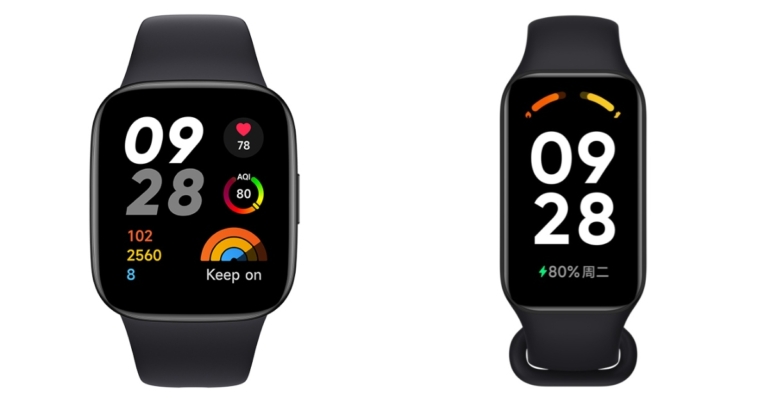
Redmi Watch 3 and Redmi Band 2 are the two latest wearables that were launched by Xiaomi. The smartwatch comes with a 60Hz AMOLED screen whereas the smart band has a TFT LCD. Both devices come with health and fitness monitoring features. Additionally, the smartwatch supports five significant satellite location systems while the fitness tracker comes with a blood oxygen monitor.
Redmi Note 12 Pro Speed Edition powered by Snapdragon 778G SoC launched
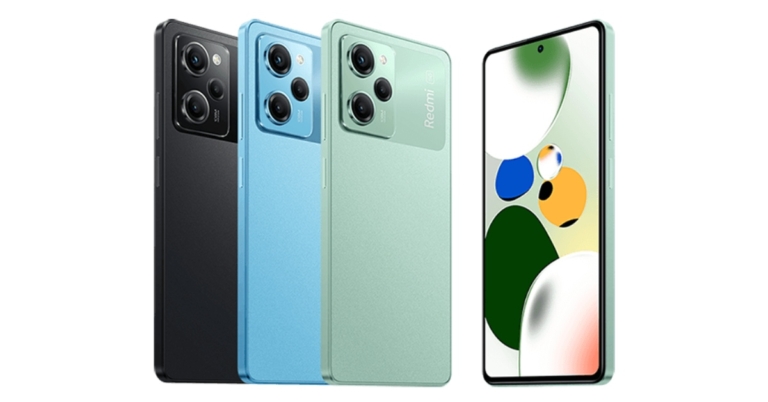
Chinese electronics giant Xiaomi has unveiled the Redmi Note 12 Pro Speed Edition in China. The Note 12 Pro Speed Edition is powered by a Snapdragon 778G SoC. The device features a triple rear camera arrangement with a 108-megapixel main sensor. The smartphone packs a 5,000mAh battery and supports 67W rapid charging.
The starting pricing for the 8GB RAM with 256GB storage edition of the Note 12 Pro Speed Edition is CNY 1,699, or around Rs. 20,200. The pricing of the 8GB with 256GB storage variant is CNY 1,799, or approximately Rs. 21,400, while the price of the 12GB with 256GB storage model is CNY 1,999, or approximately Rs. 23,700. The phone comes in three colour options of Midnight Black, Shimmer Green, and Time Blue. It is presently available for purchase in China on Mi.com.


Redmi Note 12 Pro Speed Edition specifications
Redmi Note 12 Pro Speed Edition features a 6.67-inch, 1,080×2,400-pixel full-HD+ OLED flexible display. It features a 240Hz touch sampling rate in addition to a refresh rate of up to 120Hz. Along with 1920Hz PWM dimming, HDR10+ compatibility, and DCI-P3 colour gamut, the display provides these features. Android-12-based MIUI 14 runs the handset. Also Read: Google Pixel 7 review: Is this an all-rounder phone? A 6nm Snapdragon 778G octa-core SoC and up to 12GB LPDDR4x RAM are used to power the latest Redmi model. There is support for HDR10+ and a refresh rate of up to 120 Hz. PWM dimming at 1920Hz and the DCI-P3 colour gamut are features of the panel. A 6nm Snapdragon 778G octa-core SoC and up to 12GB LPDDR4x RAM are used to power the phone. The smartphone has 256GB of UFS 2.2 storage capacity. The Redmi Note 12 Pro Speed Edition has a USB Type-C port, 5G, Wi-Fi 6, Bluetooth v5.2, and Wi-Fi 6. The device has a 5,000mAh battery and supports 67W rapid charging. The triple rear camera system on the Redmi Note 12 Pro Speed Edition comprises a 100-megapixel Samsung HM2 sensor. A 2-megapixel macro sensor and an 8-megapixel ultra wide-angle sensor with a 119-degree field of view are also part of the camera arrangement. A 16-megapixel selfie sensor is located at the front of the device for selfies and video calls. An ambient light sensor, acceleration sensor, accelerometer, e-compass, IR remote control, distance sensor, and gyroscope are some of the sensors on the phone. For the latest gadget and tech news, and gadget reviews, follow us on Twitter, Facebook and Instagram. For newest tech & gadget videos subscribe to our YouTube Channel. You can also stay up to date using the Gadget Bridge Android App. You can find the latest car and bike news here.Demystified – What is OTA? How to check and Install OTA Updates on any Android phone
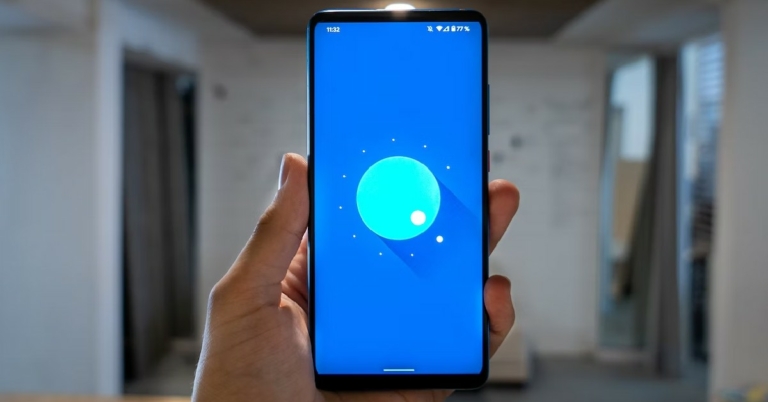
OTA is an umbrella term for all kinds of software updates that are distributed wirelessly by the manufacturer. OTA stands for Over The Air and is used to push any updates ranging from OS to configuration messages for setting up a SIM card. Most Android users receive OTA updates in the form of security patches and new OS versions. Software updates are usually rolled out in phases. Once the update arrives for your phone, a notification will pop up on your phone’s status bar. You can also manually check for any software updates for your phone. In this article, we show you how to check for and install OTA updates for any Android phone.
Read Also: Redmi 11 Prime 5G price in India dropped by Rs 1,000
 Step 3: Tap on ‘Download and Install’.
Step 4: Select ‘Install now’.
Make sure you are connected to a WiFi network as the update will consume a lot of data while downloading. Also, ensure that your phone’s battery is charged to an optimum level. Once your phone download’s the update, it will be installed on your Android smartphone.
Read Also: How to Factory Reset Your Windows 11 PC or laptop
Step 3: Tap on ‘Download and Install’.
Step 4: Select ‘Install now’.
Make sure you are connected to a WiFi network as the update will consume a lot of data while downloading. Also, ensure that your phone’s battery is charged to an optimum level. Once your phone download’s the update, it will be installed on your Android smartphone.
Read Also: How to Factory Reset Your Windows 11 PC or laptop
Here’s how you can check and install OTA updates on Android
Step 1: Go to Settings. Step 2: Scroll down and select Software Update. Step 3: Tap on ‘Download and Install’.
 Step 4: Select ‘Install now’.
 Make sure you are connected to a WiFi network as the update will consume a lot of data while downloading. Also, ensure that your phone’s battery is charged to an optimum level. Once your phone download’s the update, it will be installed on your Android smartphone.
Read Also: How to Factory Reset Your Windows 11 PC or laptop
Make sure you are connected to a WiFi network as the update will consume a lot of data while downloading. Also, ensure that your phone’s battery is charged to an optimum level. Once your phone download’s the update, it will be installed on your Android smartphone.
Read Also: How to Factory Reset Your Windows 11 PC or laptop
Conclusion
This is how you can check and install OTA updates on any Android smartphone. It is recommended that you install a software update as soon as it is rolled out since it removes any previous bugs on your phone and patches any security issues that were previously brought to light. For the latest gadget and tech news, and gadget reviews, follow us on Twitter, Facebook and Instagram. For newest tech & gadget videos subscribe to our YouTube Channel. You can also stay up to date using the Gadget Bridge Android App. You can find the latest car and bike news here.How to Search and Download India Trademark Certificate from the web? (2023)

If you’re looking to establish a brand, you need to trademark the name in order to secure its identity under Intellectual Property laws. You can also look up trademark certificates of other brands and organisations from the public database. The process for doing so is fairly simple, even though it takes a few extra steps. In this article, we show you how to search for and download an India Trademark Certificate from the web.
Read Also: Redmi 11 Prime 5G price in India dropped by Rs 1,000
Step 2: Enter the brand or trademark you are looking for in the search field.
Step 3: Select the registered trademark you are looking for.
Step 4: Copy the Application ID and go to https://ipindiaonline.gov.in/eregister/eregister.aspx.
Step 5: Select Trade Mark Application/Registered Mark from the side menu.
Step 6: Click the check box for National/IRDI Number.
Step 7: Paste the Application ID and enter the captcha code. Hit ‘View’.
Step 8: Click on the Trade Mark number.
Step 9: Click on ‘View Registration Certificate’.
The Registration Certificate will open in a new tab. Hit the download icon to save it in a PDF format.
Read Also: How to Factory Reset Your Windows 11 PC or laptop
Here’s how you can download a Trademark Certificate
Step 1: Go to https://vakilsearch.com and select ‘Search for trademark’ from the ‘Trademark & IP’ section at the top. Step 2: Enter the brand or trademark you are looking for in the search field.
 Step 3: Select the registered trademark you are looking for.
 Step 4: Copy the Application ID and go to https://ipindiaonline.gov.in/eregister/eregister.aspx.
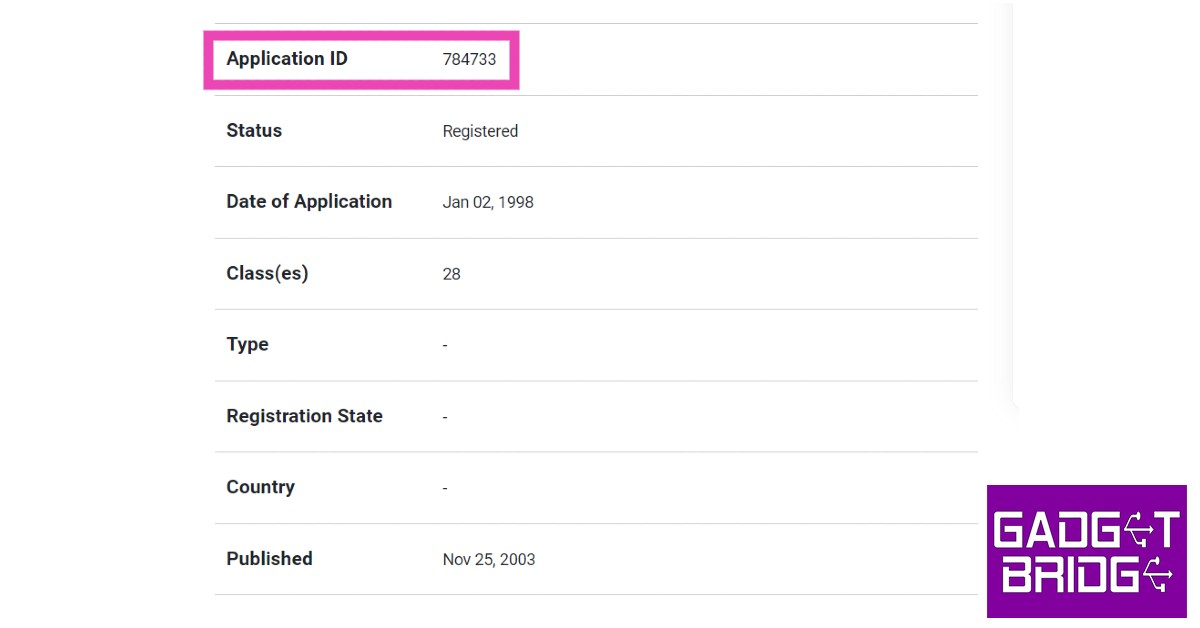 Step 5: Select Trade Mark Application/Registered Mark from the side menu.
 Step 6: Click the check box for National/IRDI Number.
 Step 7: Paste the Application ID and enter the captcha code. Hit ‘View’.
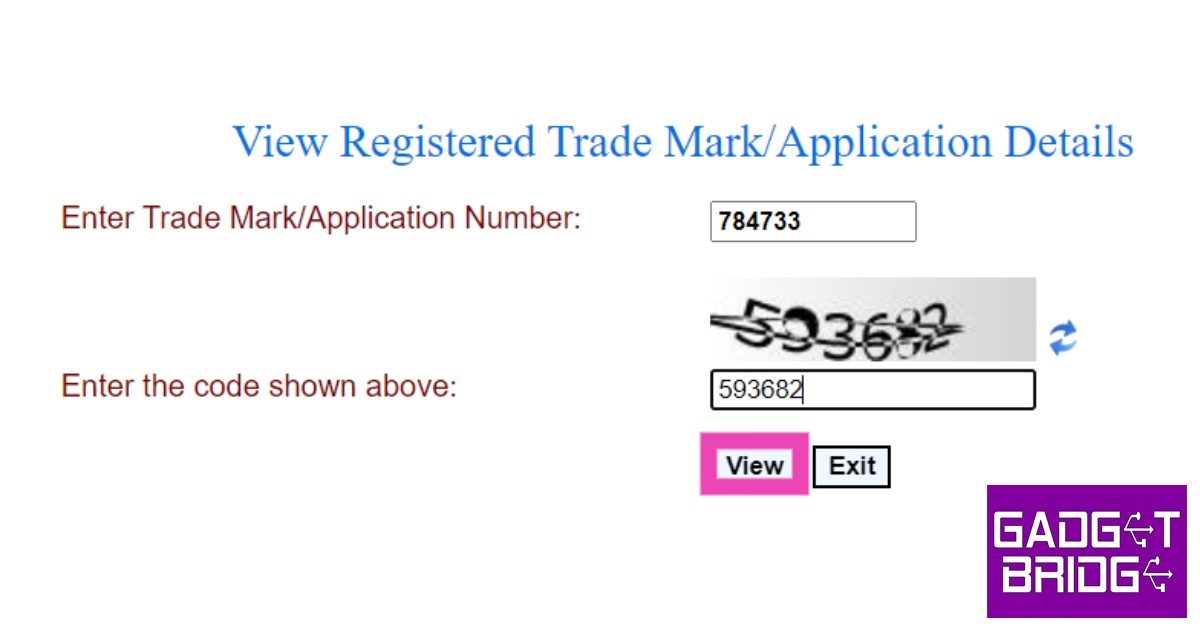 Step 8: Click on the Trade Mark number.
 Step 9: Click on ‘View Registration Certificate’.
 The Registration Certificate will open in a new tab. Hit the download icon to save it in a PDF format.
 Read Also: How to Factory Reset Your Windows 11 PC or laptop
Conclusion
This is how you can search and download an India Trademark Certificate from the web. Trademark certificates are easily accessible and can be downloaded within a matter of minutes from the official Trade Marks Registry page. If you found this article helpful, let us know in the comments! For the latest gadget and tech news, and gadget reviews, follow us on Twitter, Facebook and Instagram. For newest tech & gadget videos subscribe to our YouTube Channel. You can also stay up to date using the Gadget Bridge Android App. You can find the latest car and bike news here.Redmi K60 Pro, Redmi K60, Redmi K60E launched: Price and availability details
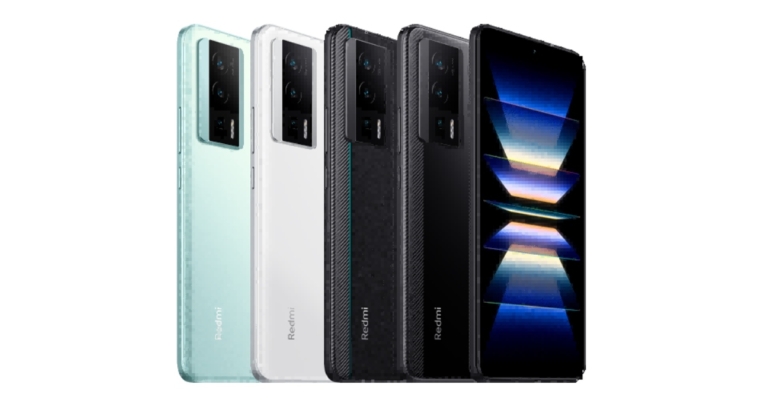
Xiaomi introduced the Redmi K60 series in China. The Redmi K60, Redmi K60 Pro, and Redmi K60E are among the latest models in this portfolio. A 6.67-inch AMOLED screen with a 2K resolution and 120Hz refresh rate comes with these devices. Snapdragon 8 series chipsets from Qualcomm power the Redmi K60 and Redmi K60 Pro. The Redmi K60E, meanwhile, has a MediaTek Dimensity 8200 SoC.
 Xiaomi will begin selling the Redmi K60 Pro and Redmi K60 on December 31 at 10 AM local time. The sale of the Redmi K60E has begun in China. The availability of these devices throughout the world has not been announced by Redmi.
Redmi K60 series price and availability details
The Redmi K60 costs CNY 2,499, or around Rs. 30,000, for the variant with 8GB of RAM and 128GB of storage. While the 16GB RAM with 512GB storage costs CNY 3,599, which is equivalent to Rs 43,000. Redmi K60 Pro smartphone has a starting price of CNY 3,299, which is equivalent to Rs 40,000. It has 8GB of RAM and 128GB of storage. The most costly model has 16GB RAM and 512GB storage, costing CNY 4,599 which is approximately Rs 55,000. The price for the Redmi K60E is CNY 2,199, which is equivalent to Rs 26,000. The pricing of its 12GB RAM and 512GB storage is CNY 2,799, or around Rs 33,000. Xiaomi will begin selling the Redmi K60 Pro and Redmi K60 on December 31 at 10 AM local time. The sale of the Redmi K60E has begun in China. The availability of these devices throughout the world has not been announced by Redmi.
Redmi K60 Pro, Redmi K60, Redmi K60E specifications
The 6.67-inch 2K AMOLED screen on the Redmi K60 Pro has a resolution of 1,440×3,200 pixels. Additionally, the screen supports HDR10+ and has a maximum brightness of 1,400 nits. The display supports touch sampling rates of up to 480Hz and refresh rates of up to 120Hz. Android 13-based MIUI 14 powers this Redmi smartphone. This smartphone has a Snapdragon 8 Gen 2 SoC, an Adreno GPU, and a Qualcomm AI Engine built in. This Redmi phone has up to 512GB of UFS 4.0 storage and up to 16GB of LPDDR5x RAM. The 5,000mAh battery on the Redmi K60 Pro is compatible with both 30W and 120W wired fast charging. The Redmi K60 Pro has a triple rear camera arrangement with a 50-megapixel Sony IMX800 primary sensor with OIS. Additionally, it has a 2-megapixel macro sensor and an 8-megapixel ultra-wide angle lens. The device also has a 16-megapixel front-facing selfie camera. Up to 8K videos can be captured at 24 frames per second using the rear cameras. Whereas the selfies camera records full-HD videos at 60 frames per second. Most of the specifications of the Redmi K60 are similar to the Pro variant. The Snapdragon 8+ Gen 1 SoC is present in this regular version. The device has a 5,500mAh battery and can support both 30W wireless fast charging and 67W wired fast charging. The triple rear camera setup of the standard variant features a 64-megapixel sensor instead of a 50-megapixel lens, while the rest of the lenses on the front as well as on the back remain the same. Similar to the Redmi K60 Pro, the Redmi K60E has nearly identical features. However, a MediaTek Dimensity 8200 SoC powers it. A 48-megapixel triple rear camera configuration with OIS is also included. A 5,500mAh battery with 67W fast charging capabilities. For the latest gadget and tech news, and gadget reviews, follow us on Twitter, Facebook and Instagram. For newest tech & gadget videos subscribe to our YouTube Channel. You can also stay up to date using the Gadget Bridge Android App. You can find the latest car and bike news here.GIGABYTE G5 series 12th Gen gaming laptops launched in India
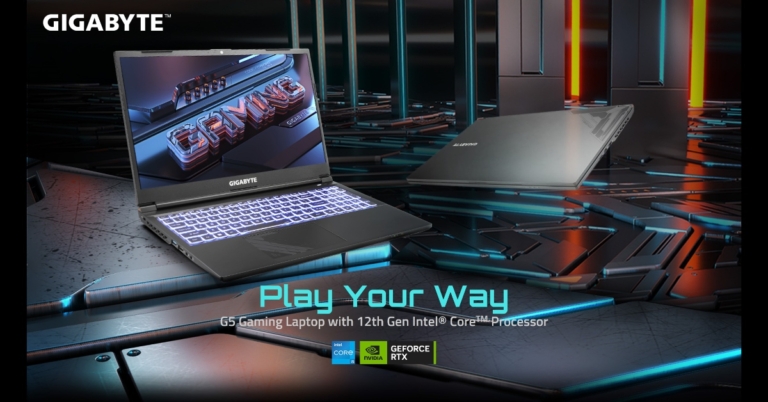
The GIGABYTE G5 series, the newest addition to their lineup of gaming laptops introduced in India. The new gaming devices are powered by Intel 12th Gen CPUs. The Nvidia RTX 30 series GPUs in the new line of laptops enable a fluid gaming experience. A 144Hz refresh rate on the screen makes for a very immersive gaming experience.
The GIGABYTE G5 will be sold on Flipkart and in offline retail outlets all over the nation for a starting price of Rs 77,887 with a free Microsoft Office 365 Personal version 1-Year subscription.
 The 12th generation Intel i5-12500H CPU, which has 12 cores, 16 threads, and a top clock speed of 4.5GHz, powers the G5 series. The laptop also has 16 GB of DDR4 3200 MHz memory and a potent RTX 30 series GPU. With just one click, users will be able to bypass the integrated graphics and connect the display directly to the discrete GPU on the G5 KE laptop from GIGABYTE for greater frame rates and improved gaming performance.
The G5 KE with the NVIDIA GeForce RTX 3060, the G5 ME with the NVIDIA GeForce RTX 3050 Ti, and the G5 GE with the NVIDIA GeForce RTX 3050 are the three types of laptops that will be available.
To speed up the reading and copying of any large files, the G5 gaming laptop supports high-speed PCle Gen4 and includes a lot of SSD slots. Users benefit from exceptional multitasking capabilities and strong gaming performance.
The G5 Series laptops are consistent in their performance throughout high-load gaming sessions or multimedia processing thanks to GIGABYTE’s exclusive WINDFORCE cooling technology, enabling the laptop to achieve 100% CPU and GPU outputs. The laptop can dissipate the heat produced in a reliable and thorough manner thanks to its two extremely effective 59-blade twin fans, five heat pipes, and four exhaust vents.
The G5 series weighs less than 1.9 kg and is made to be easily portable. The laptops’ comprehensive I/O ports and extensive video output ports enable users to effortlessly build multitasking environments wherever they are and at any time. To the USB C, the Thunderbolt 4 connections offer high transmission speeds of up to 40Gbps.
For the latest gadget and tech news, and gadget reviews, follow us on Twitter, Facebook and Instagram. For newest tech & gadget videos subscribe to our YouTube Channel. You can also stay up to date using the Gadget Bridge Android App. You can find the latest car and bike news here.
The 12th generation Intel i5-12500H CPU, which has 12 cores, 16 threads, and a top clock speed of 4.5GHz, powers the G5 series. The laptop also has 16 GB of DDR4 3200 MHz memory and a potent RTX 30 series GPU. With just one click, users will be able to bypass the integrated graphics and connect the display directly to the discrete GPU on the G5 KE laptop from GIGABYTE for greater frame rates and improved gaming performance.
The G5 KE with the NVIDIA GeForce RTX 3060, the G5 ME with the NVIDIA GeForce RTX 3050 Ti, and the G5 GE with the NVIDIA GeForce RTX 3050 are the three types of laptops that will be available.
To speed up the reading and copying of any large files, the G5 gaming laptop supports high-speed PCle Gen4 and includes a lot of SSD slots. Users benefit from exceptional multitasking capabilities and strong gaming performance.
The G5 Series laptops are consistent in their performance throughout high-load gaming sessions or multimedia processing thanks to GIGABYTE’s exclusive WINDFORCE cooling technology, enabling the laptop to achieve 100% CPU and GPU outputs. The laptop can dissipate the heat produced in a reliable and thorough manner thanks to its two extremely effective 59-blade twin fans, five heat pipes, and four exhaust vents.
The G5 series weighs less than 1.9 kg and is made to be easily portable. The laptops’ comprehensive I/O ports and extensive video output ports enable users to effortlessly build multitasking environments wherever they are and at any time. To the USB C, the Thunderbolt 4 connections offer high transmission speeds of up to 40Gbps.
For the latest gadget and tech news, and gadget reviews, follow us on Twitter, Facebook and Instagram. For newest tech & gadget videos subscribe to our YouTube Channel. You can also stay up to date using the Gadget Bridge Android App. You can find the latest car and bike news here.
GIGABYTE G5 series specifications
The GIGABYTE G5 series laptops have a 15.6-inch FHD IPS-level Anti-glare LCD screen with a resolution of 1920×1080 pixels. It has a 144Hz refresh rate, which provides an incredibly immersive gaming experience. The G5 offers an immersive gaming and entertainment experience thanks to its 86% screen-to-body ratio and extremely small bezels. The 12th generation Intel i5-12500H CPU, which has 12 cores, 16 threads, and a top clock speed of 4.5GHz, powers the G5 series. The laptop also has 16 GB of DDR4 3200 MHz memory and a potent RTX 30 series GPU. With just one click, users will be able to bypass the integrated graphics and connect the display directly to the discrete GPU on the G5 KE laptop from GIGABYTE for greater frame rates and improved gaming performance.
The G5 KE with the NVIDIA GeForce RTX 3060, the G5 ME with the NVIDIA GeForce RTX 3050 Ti, and the G5 GE with the NVIDIA GeForce RTX 3050 are the three types of laptops that will be available.
To speed up the reading and copying of any large files, the G5 gaming laptop supports high-speed PCle Gen4 and includes a lot of SSD slots. Users benefit from exceptional multitasking capabilities and strong gaming performance.
The G5 Series laptops are consistent in their performance throughout high-load gaming sessions or multimedia processing thanks to GIGABYTE’s exclusive WINDFORCE cooling technology, enabling the laptop to achieve 100% CPU and GPU outputs. The laptop can dissipate the heat produced in a reliable and thorough manner thanks to its two extremely effective 59-blade twin fans, five heat pipes, and four exhaust vents.
The G5 series weighs less than 1.9 kg and is made to be easily portable. The laptops’ comprehensive I/O ports and extensive video output ports enable users to effortlessly build multitasking environments wherever they are and at any time. To the USB C, the Thunderbolt 4 connections offer high transmission speeds of up to 40Gbps.
For the latest gadget and tech news, and gadget reviews, follow us on Twitter, Facebook and Instagram. For newest tech & gadget videos subscribe to our YouTube Channel. You can also stay up to date using the Gadget Bridge Android App. You can find the latest car and bike news here.
The 12th generation Intel i5-12500H CPU, which has 12 cores, 16 threads, and a top clock speed of 4.5GHz, powers the G5 series. The laptop also has 16 GB of DDR4 3200 MHz memory and a potent RTX 30 series GPU. With just one click, users will be able to bypass the integrated graphics and connect the display directly to the discrete GPU on the G5 KE laptop from GIGABYTE for greater frame rates and improved gaming performance.
The G5 KE with the NVIDIA GeForce RTX 3060, the G5 ME with the NVIDIA GeForce RTX 3050 Ti, and the G5 GE with the NVIDIA GeForce RTX 3050 are the three types of laptops that will be available.
To speed up the reading and copying of any large files, the G5 gaming laptop supports high-speed PCle Gen4 and includes a lot of SSD slots. Users benefit from exceptional multitasking capabilities and strong gaming performance.
The G5 Series laptops are consistent in their performance throughout high-load gaming sessions or multimedia processing thanks to GIGABYTE’s exclusive WINDFORCE cooling technology, enabling the laptop to achieve 100% CPU and GPU outputs. The laptop can dissipate the heat produced in a reliable and thorough manner thanks to its two extremely effective 59-blade twin fans, five heat pipes, and four exhaust vents.
The G5 series weighs less than 1.9 kg and is made to be easily portable. The laptops’ comprehensive I/O ports and extensive video output ports enable users to effortlessly build multitasking environments wherever they are and at any time. To the USB C, the Thunderbolt 4 connections offer high transmission speeds of up to 40Gbps.
For the latest gadget and tech news, and gadget reviews, follow us on Twitter, Facebook and Instagram. For newest tech & gadget videos subscribe to our YouTube Channel. You can also stay up to date using the Gadget Bridge Android App. You can find the latest car and bike news here. Compared: Snapdragon vs MediaTek – Which one is better?
When it comes to SoCs (System on a Chip) – or for the lack of a better term – mobile processors, there are only two chipsets that dominate the Android market: Snapdragon and MediaTek. While Samsung and Google also manufacture their in-house SoCs, the market share held by Qualcomm and MediaTek vastly exceeds any other player. Even Samsung’s flagship smartphones make use of Qualcomm chipsets. Out of these two popular SoCs, Snapdragon largely dominates the flagship smartphone category, while MediaTek caters more to midrange and affordable smartphones. Therefore, the performance metrics favour Qualcomm in every regard. However, it is still interesting to see how the two chipsets fare when pitted against each other. So, without further ado, here is our Qualcomm Snapdragon vs MediaTek SoC comparison.
Read Also: 8 Tips to Engage Your Facebook Group Members
 As mentioned earlier, Snapdragon is a common fixture on flagship smartphones across different brands like Samsung, Sony, Xiaomi, OnePlus, and more. MediaTek, with its more varied chipsets, finds its way into the midrange and affordable smartphones. That said, some of the most popular smartphones in the market today make use of MediaTek. This only goes on to prove that the numbers a processor puts up aren’t the be-all and end-all when it comes to buying a smartphone.
Here are some of the most popular smartphones that use a Snapdragon SoC
As mentioned earlier, Snapdragon is a common fixture on flagship smartphones across different brands like Samsung, Sony, Xiaomi, OnePlus, and more. MediaTek, with its more varied chipsets, finds its way into the midrange and affordable smartphones. That said, some of the most popular smartphones in the market today make use of MediaTek. This only goes on to prove that the numbers a processor puts up aren’t the be-all and end-all when it comes to buying a smartphone.
Here are some of the most popular smartphones that use a Snapdragon SoC
Snapdragon vs MediaTek: Availability
 As mentioned earlier, Snapdragon is a common fixture on flagship smartphones across different brands like Samsung, Sony, Xiaomi, OnePlus, and more. MediaTek, with its more varied chipsets, finds its way into the midrange and affordable smartphones. That said, some of the most popular smartphones in the market today make use of MediaTek. This only goes on to prove that the numbers a processor puts up aren’t the be-all and end-all when it comes to buying a smartphone.
Here are some of the most popular smartphones that use a Snapdragon SoC
As mentioned earlier, Snapdragon is a common fixture on flagship smartphones across different brands like Samsung, Sony, Xiaomi, OnePlus, and more. MediaTek, with its more varied chipsets, finds its way into the midrange and affordable smartphones. That said, some of the most popular smartphones in the market today make use of MediaTek. This only goes on to prove that the numbers a processor puts up aren’t the be-all and end-all when it comes to buying a smartphone.
Here are some of the most popular smartphones that use a Snapdragon SoC
- Samsung Galaxy S22 Ultra
- Samsung Galaxy Z Fold and Flip 4
- OnePlus 10 Pro
- Vivo T1
- Motorola Edge 30
- Xiaomi Redmi Note 12 Pro
- Vivo V26 Pro
- Samsung Galaxy M53
- OnePlus 10R
- Poco M4 Pro
Snapdragon vs MediaTek: Pros and Cons
- Snapdragon SoCs offer better battery optimisation which translates to longer battery life compared to their MediaTek counterparts.
- Snapdragon SoCs are also favoured in flagship gaming-oriented handsets since they do not generate a lot of heat. However, MediaTek is largely popular in midrange gaming smartphones.
- MediaTek does not share the Kernel source code for most of its SoCs, which is why Snapdragon is usually a developer’s first choice.
- Snapdragon has its own in-house GPU, Adreno.
- Snapdragon SoCs regularly outperform their MediaTek counterparts in various benchmark tests.
- Snapdragon SoCs are pricier than MediaTek.
Conclusion
While MediaTek has been absent from the flagship sphere for a while now, its newest MediaTek Dimensity 9200 SoC is bound to change that. Released in November, the MediaTek Dimensity 9200 will be competing against Qualcomm’s Snapdragon 8 Gen 2 mobile platform. It remains to be seen which SoC will come out on top, and which flagships will incorporate the two chipsets next year. Here is our list of upcoming smartphones with the Snapdragon 8 Gen 2 chipset. For the latest gadget and tech news, and gadget reviews, follow us on Twitter, Facebook and Instagram. For newest tech & gadget videos subscribe to our YouTube Channel. You can also stay up to date using the Gadget Bridge Android App. You can find the latest car and bike news here.Garena Free Fire Redeem Codes Today 28 December 2022: Here is how to claim them

Garena Free Fire is a battle royale game with regular awards and tournaments to keep players interested. If you play Garena Free Fire, you should be aware of the redeem codes that are released on a daily basis. However, because the battle royale game is banned in India, players from other countries can use the Free Fire Redeem codes daily. If you’re unfamiliar with the Garena Free Fire redeem codes or don’t know how to get them, we’ve put together a step-by-step guide to help you redeem them. Check out Garena Free Fire Redeem Codes for December 28.
The Free Fire redeem codes are a great way to get free stuff. These are 12-digit codes that contain alphabets and numbers, as well as an expiration date and time. Because the Garena FF redeem codes cannot be used more than once, you should hurry to the redemption page to claim your free reward before someone else does. To get a free reward, all you have to do is go to reward.ff.garena.com/en, which is the official redemption page. Also, keep an eye on this space for daily updates on Garena Free Fire redemption codes and rewards.
Garena Free Fire Redeem Codes Today 28 December 2022
Updating SoonHow to Get Free Fire Redeem Codes for Garena on December 28?
- Visit the Garena Free Fire game’s official website at reward.ff.garena.com.
- Use your Facebook, Google, VK, Apple ID, Huawei ID, or Twitter account to log in.
- You’ll be taken to a valid redemption code (s)
- Copy and paste the 12-digit redemption code into the text box.
- On the screen, a dialogue box will appear.
- ‘Ok’ should be selected.
Amazon Quiz Answers Today 28 December 2022: Participate to win Rs 2,500

Amazon Quiz for 28 December 2022 has gone live on the company’s mobile platform. The daily quiz contest brings an opportunity for Amazon users to win exciting prizes. In today’s Amazon Quiz the participants have the chance to win Rs 2,500 Amazon Pay Balance. All they have to do is answer all the questions correctly.
A fresh question is posted on the Amazon app daily which consists of five simple questions based on general knowledge and current events. The quiz can be played on the Amazon App from 12 AM to 11:59 PM. You have to answer all the questions correctly. Then the participants will be shortlisted for a lucky draw. The result of the lucky draw will be announced at the end of the month. The participants can win Amazon Pay Balance to up to Rs 50,000. Check out the 28 December 2022 Amazon Quiz question and their answers to win Rs 2,500 Amazon Pay Balance.
Amazon Quiz Today Prize – Rs 2,500 Amazon Pay Balance
Quiz Date – 28 December 2022
Daily Timing – 12 AM to 11:59 PM
Winner Announcement – Today 12 PM
Amazon Quiz Answers Today 28 December 2022
Question 1: Which country has the largest population? Answer- China Question 2: What is 7 times 8? Answer- 56 Question 3: Which is the largest internal organ in the human body? Answer- Liver Question 4: What is the general name for a group of wolves? Answer- Pack Question 5: Which card game requires players to “ante”? Answer- PokerHow To Play Amazon Quiz
Only app users are eligible to play the Amazon quiz every morning from 12 AM to 11:59 PM. The quiz is not available on the desktop. For those who are unaware of how to play the Amazon quiz below are the steps, you can follow to take the quiz.- Firstly download the Amazon app from Google Play Store or App Store
- Now fill in the required information through the Sign Up option.
- You need to log in to the Amazon app and scroll down on the home screen to find the Amazon Quiz banner.
- Tap on the Amazon Quiz banner and tap on the Start button to start the Quiz.
- Now you will get 5 questions and you need to answer them correctly. One wrong answer will eliminate you from the Quiz.
- After answering all the questions correctly you are now eligible for a Lucky Draw.
- The winner’s name will be announced today at 12 PM.
How to Restore WhatsApp Backup from Google Drive to iPhone? [2023 Update]
![How to Restore WhatsApp Backup from Google Drive to iPhone? [2023 Update]](https://www.gadgetbridge.com/wp-content/uploads/2022/12/whatsapp-iphone-768x402.jpg "How to Restore WhatsApp Backup from Google Drive to iPhone? [2023 Update]")
Getting a new phone for yourself is a huge deal. However, the biggest hurdle everyone despises is restoring WhatsApp after buying a new phone. It is a tedious chore that everyone tries to avoid, especially when you have to transfer things from Android to iPhone and vice versa.
But, don’t worry. We have come up with a guide on how to restore WhatsApp backup from google drive to iPhone. Read on to explore more about it
 Step 4: Use your credentials to log onto your Google drive account.
 Step 5: Next, you will see a couple of backup options on your screen. Choose the one that you want.
 Step 6: Give it some time – the tool will gather all the pieces of your back up.
Step 7: The tool will display all the data that was available on the backup. Have a look and then choose “restore to iOS.”
Step 6: Give it some time – the tool will gather all the pieces of your back up.
Step 7: The tool will display all the data that was available on the backup. Have a look and then choose “restore to iOS.”
 Step 8: Patiently wait for the backup to complete.

How to Store Your WhatsApp Backup in the Google Drive
Before we jump onto how to restore WhatsApp from iCloud – here’s how you can store your WhatsApp backup in Google drive so that you can move to ios easily. Step 1: Launch WhatsApp on your phone. Step 2: Click on more options and then go to settings. After that, click on chats and then chat backup. Lastly, click on backup to Google drive. Step 3: Select your desired frequency from the options available. Step 4: Once you’re done with that – add a Google account so that Google can back up your data there. Step 5: After that, choose the network you want to utilize for the backup process. Note: Always back up your data using Wi-Fi. It will be much faster, and you will not have to pay any additional charges.Is It Possible to Restore WhatsApp Backup from Google Drive?
Yes, it is possible to restore a WhatsApp backup from Google Drive if you have access to the account you used for the backup. Make sure your new iPhone device is linked to your Google account, where you have WhatsApp backups. Then install WhatsApp and verify your number. Lastly, when you are about to set up WhatsApp, you will be prompted to restore your chats and media from your Google account. Simply click on the restore option, and you will have all your WhatsApp data on your iPhone.How to Restore WhatsApp Backup from Google Drive to iPhone? [100% Working]
In case you are wondering how to restore Whatsapp messages without backup – we’ve got you covered. There are several ways that you can use to accomplish this task, but using Tenorshare iCareFone Transfer will be your safest bet. It’s a tool that has been built specifically to transfer data from android to iPhone without any data loss. The best thing about this tool is that you can complete your task with just one click. So you will not have to wait for hours to transfer your WhatsApp data from one device to another. Moreover, it saves you tons of time as the tool will take a few minutes to restore all your data from the backup. Here are the pros of using Tenorshare iCareFone Transfer.- Tenorshare iCareFone can transfer photos, videos, and apps.
- It can help you duplicate IOS files within a few clicks.
- It works with the leanest iPhone and IOS
- The free version has some restrictions
 Step 4: Use your credentials to log onto your Google drive account.
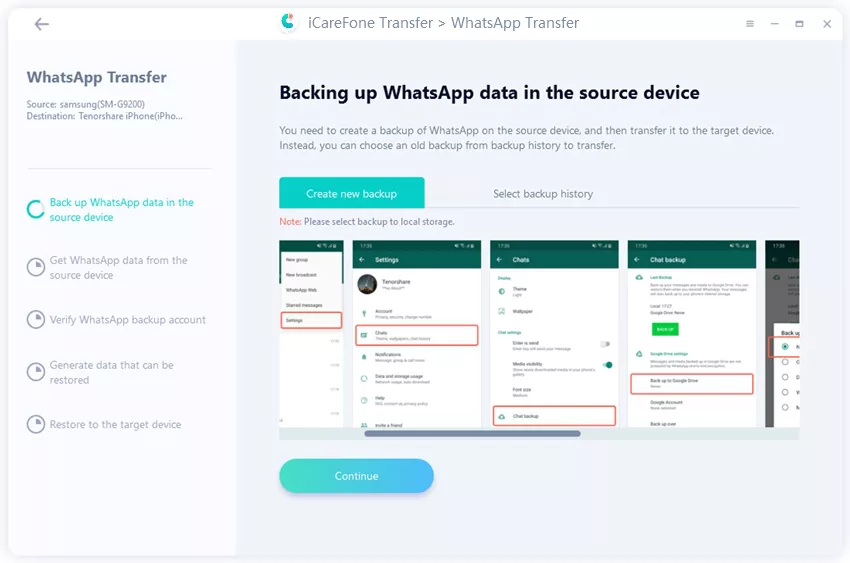 Step 5: Next, you will see a couple of backup options on your screen. Choose the one that you want.
 Step 6: Give it some time – the tool will gather all the pieces of your back up.
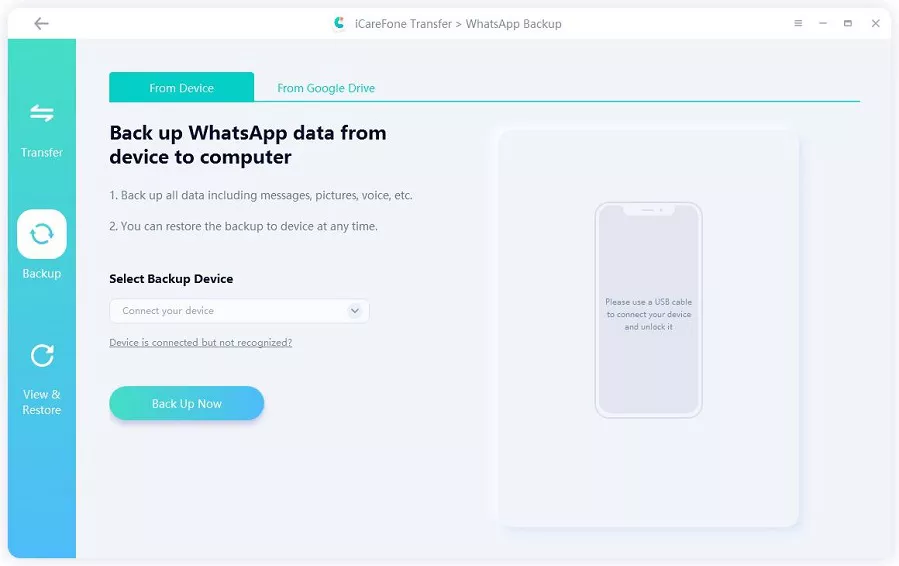 Step 7: The tool will display all the data that was available on the backup. Have a look and then choose “restore to iOS.”
 Step 8: Patiently wait for the backup to complete.

Frequently Asked Questions
Here are some frequently asked questions regarding restoring WhatsApp.- How to Recover Archived Chats in WhatsApp?
- How to Restore WhatsApp from iCloud?
- Why Move to iOS is not showing WhatsApp?