Amazon is back with another quiz on its mobile platform. The daily quiz is now live on the Amazon App and today’s Amazon Quiz will give you a chance to win Rs 1,250 Amazon pay Balance. The participants can play the 24 November 2022 Amazon Quiz from 12 AM to 11:59 PM. For those who are unaware of the quiz, the e-commerce platform brings a fresh quiz on a daily basis which consists of five questions related to general knowledge and current affairs.The participants need to answer all the questions correctly and their names will be selected for a lucky draw. The winner will be announced at the end of the month. One wrong answer could eliminate you from the quiz. Only app users are eligible to participate in the Quiz. In today’s Amazon Quiz the participants will get a chance to win Rs 1,250 Amazon Pay Balance. Check Out 24 November 2022 Amazon Quiz Answers.Amazon Quiz Today Prize – Rs 1250 Amazon Pay BalanceQuiz Date – 24 November 2022Daily Timing – 12 AM to 11:59 PMWinner Announcement – Today 12 PM
Amazon Quiz Answers Today 24 November 2022
Question 1: Rolls-Royce’s first SUV is called the _______, named after the largest gem-quality rough diamond ever mined?
Answer: CullinanQuestion 2: What feature now costs you $8 on twitter?
Answer: Blue tickQuestion 3: In IPL 2023, who will replace Mayank Agarwal as the Punjab Kings Captain?
Answer: Shikhar DhawanQuestion 4: How many children did this British Royal had?Answer: 4Question 5: This retail chain is originally from which country?
Answer: Spain
How To Play Amazon Quiz
Only app users are eligible to play the Amazon quiz every morning from 12 AM to 11:59 PM. The quiz is not available on the desktop. For those who are unaware of how to play the Amazon quiz below are the steps, you can follow to take the quiz.
Firstly download the Amazon app from Google Play Store or App Store
Now fill in the required information through the Sign Up option.
You need to log in to the Amazon app and scroll down on the home screen to find the Amazon Quiz banner.
Tap on the Amazon Quiz banner and tap on the Start button to start the Quiz.
Now you will get 5 questions and you need to answer them correctly. One wrong answer will eliminate you from the Quiz.
After answering all the questions correctly you are now eligible for a Lucky Draw.
The winner’s name will be announced today at 12 PM.
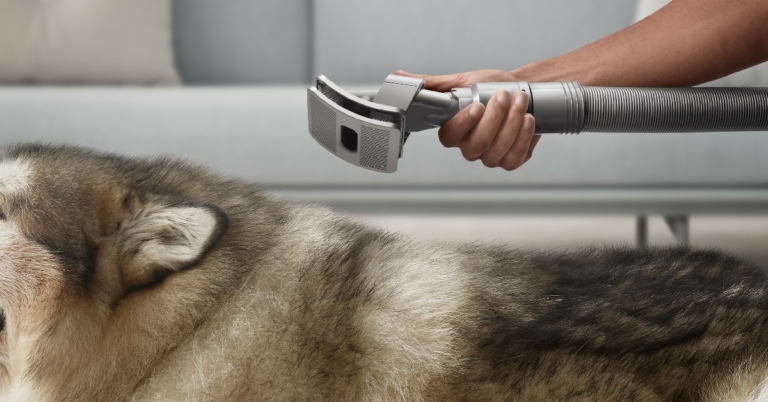
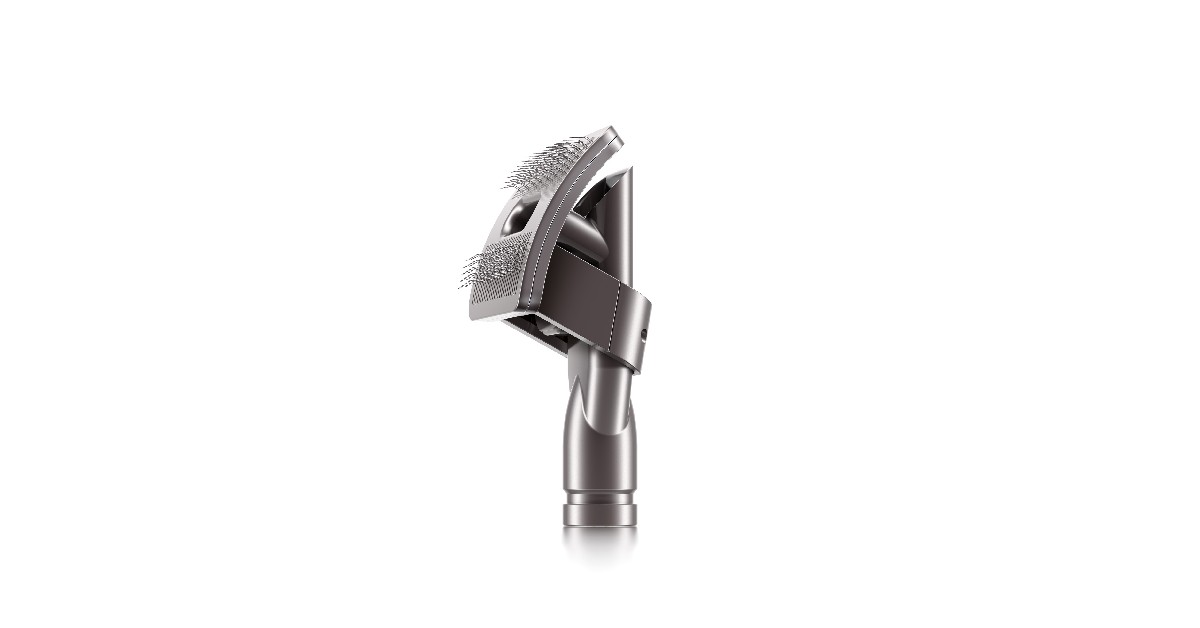
Dyson has launched a new Pet Grooming Kit in India for Rs 9,990. The kit consists of a grooming tool, an extension hose, and a quick-release adaptor. Pet owners can now brush loose hair off their pets directly into the vacuum cleaner. The Dyson pet grooming tool is engineered to make minimal sound, making grooming more peaceful for your pet. The grooming brush has 364 bristles angled at 35 degrees that flex to an upright position as you use it on your pet. You can also choose to use the brush without the vacuum turned on. Read Also: How to clean your TWS and headphones easily at home?
Dyson’s Pet Grooming Tool offers simple solutions to challenging tasks
Dyson’s Pet Grooming Tool is compatible with the company’s latest range of vacuum cleaners. You can simply attach the grooming tool to a vacuum cleaner using the extension hose. The grooming tool is compatible with the V8, V11, V12 Detect Slim and V15 Detect cord-free vacuum cleaners. The brush runs through the coat of your pet and picks up any loose hair and channels it straight to the vacuum cleaner. Oftentimes, the hair left on the brush bar can be challenging to clean up even with the help of a vacuum cleaner. Dyson’s new anti-tangle conical brush bar spirals hair off and into the bin. The angle of the bristles reduces any tangling and ensures that the hair falls off the brush easily.The new brush bar technology works on all kinds of hair, be it feline, canine, or human. If your pet sheds a lot of hair on your bed, furniture, or floor, you can easily clean it up with the help of the new brush bar. The brush bar features 56 hair removal vanes designed to channel all leftover hair to the cleaner head. These polycarbonate teeth, combined with a set of spiralling nylon bristles, anti-static carbon fibre filaments, and strong suction power, capture and tackles troublesome tangles, as well as larger debris and microscopic dust. Read Also: How to Record Game Screen With UniConverter in 2022Monika Stuczen, Research Scientist in Microbiology at Dyson, says:“The impact pets have in the home goes beyond what we can see. Effectively removing pet hair is important, but pet dander with dried-on saliva is a problem which is invisible to the naked eye. These microscopic particles can carry allergy-causing proteins around the home. Lightweight and minuscule, they can remain airborne for hours or transfer between objects. Research has even found cat allergens in rooms where cats have never been. So, the proper filtration found in Dyson machines is vital to maintain a cleaner whole-home environment.”Dyson’s pet grooming kit is a game changer for Indian pet owners. Specially designed for cats and dogs, you can use this grooming kit to efficiently clean up the coat of your pet without having to worry about any leftover hair sticking to your furniture. The grooming kit can be bought at Dyson Demo Stores and Dyson.in for Rs 9,900.For the latest gadget and tech news, and gadget reviews, follow us on Twitter, Facebook and Instagram. For newest tech & gadget videos subscribe to our YouTube Channel. You can also stay up to date using the Gadget Bridge Android App. You can find the latest car and bike news here.
The 2022 Fifa World Cup kicked off in Qatar last Sunday. The opening fixture saw the host nation Qatar lose 2-0 to Ecuador. The football World Cup is one of the most watched sporting events across the world, attracting billions of viewers. With a month of games still ahead of us, we bring you all the ways you can watch the FIFA World Cup 2022 online for free. Many users reported issues with the JioCinema app, so we have some alternatives for you as well!Read Also: Audio-Technica launches ATH-M50xBT2 wireless headphones at Rs 30,800
JioCinema
JioCinema app is the official streaming partner of the 2022 FIFA World Cup. You can catch all the live action from Qatar on the JioCinema app. The best part is that the app is free to use. You don’t need to pay for any subscription plans to watch the World Cup. All you need to do is install the app on your smartphone and start watching. Signing up or logging in with a registered account is not necessary either.Despite being free to watch, many users were unhappy with the constant lags and delays affecting the live stream on the first day of the event. Jio quickly came out with an update to solve the issues. If you haven’t updated the app yet, go to the Google Play Store and download the latest version to fix any lag-related issues. If you still experience delays, switch the live stream to ‘Extended Stadium Feed’ after turning on the ‘Hype Mode.’ You will experience significantly fewer delays.If these fixes don’t work, here are some other streaming alternatives you can look into.
JioTV
You can also watch the 2022 FIFA World Cup on JioTV. Since JioTV uses the Sports18 channel feed, you won’t face any streaming issues that affect the web feed of the event. Sports18 is the official cable broadcaster of the event. You will need to sign up for JioTV using your Jio phone number.
VI Movies and TV
Vodafone Idea users can also stream the world cup matches for free on the VI Movies and TV app. All you need to do is sign up for the app using your VI phone number and you can enjoy the endless coverage of all the matches in Qatar!
Tata Play
Tata Sky subscribers can watch live coverage of the World Cup on their mobile devices as well. If you wish to stream the matches on your desktop or smartphone, simply log on to www.watch.tataplay.com or download the Tata Play app from the App Store or the Google Play Store. Make sure that your Tata Sky package covers the Sports18 channel, and you will be able to enjoy the FIFA World Cup coverage on your mobile devices!Read Also: Sony announces WF-LS900N, their lightest and smallest TWS so far
The Ministry of Consumer Affairs, and Food and Public Distribution exercise rigid quality control on consumer goods ranging from electronic gadgets to silver and gold jewellery. After a product goes through a quality check, it is hallmarked with the BIS label. This mark denoted that the product underwent a series of tests and is made out of authentic materials. The BIS or ISI mark comes in very handy when buying jewellery. There is no difference between the BIS and ISI marks. The BIS mark was previously called the ISI mark and is used for a range of products. In this article, we bring you the top easy ways to check whether a BIS or ISI mark is genuine or not.Read Also:Sony announces WF-LS900N, their lightest and smallest TWS so far
How to check the BIS or ISI mark of any product
Step 1: Locate the BIS or ISI mark on the product package.Step 2: Go to www.bis.gov.in.Step 3: Hover the cursor over Conformity Assistant and click on ‘Online Information’ under the ‘Product Certification’ segment.Step 4: Click on Product Certification Scheme and scroll down and select ‘Search a license.’Step 5: Go to the ‘Status of License’ tab and fill in the License number (CM/L), Registration Number, or the Name of Firm. Click on the relevant field to fill it in. Enter the captcha and select ‘Generate Report.’Step 6: The following details related to the product will be revealed: Name & Address of manufacturer, Standard number, Validity date, Active status, Brand name, and Product type.
How to check BIS or ISI mark using the BIS Care app
Step 1: Download and install the BIS Care app on your smartphone.Step 2: Select ‘Verify R-No under CRS.’Step 3: Look up the BIS mark on the product and enter the registration number in the app.Step 4: Tap on ‘License Details’ in case of ISI-marked products.Step 5: Enter the CM/L number.The app will reveal all the details related to that product.Read Also: Dell Latitude 7430 review: Compact and Powerful
Conclusion
These are the top easy ways to check whether the BIS or ISI mark is genuine or not. If the BIS portal or app does not generate product details upon entering the CM/L or registration number, the product you bought is most likely inauthentic. You can also use the BIS website and app to register any complaints related to the product.For the latest gadget and tech news, and gadget reviews, follow us on Twitter, Facebook and Instagram. For newest tech & gadget videos subscribe to our YouTube Channel. You can also stay up to date using the Gadget Bridge Android App. You can find the latest car and bike news here.
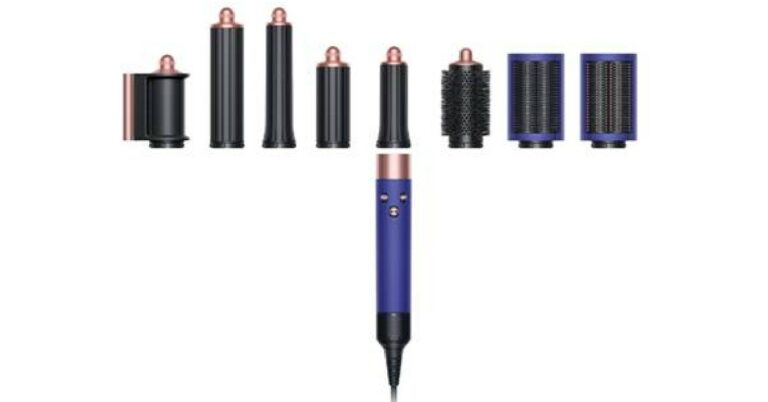
With the 2022 wedding season underway, Dyson has launched the new limited-edition Vinca Blue & Rosé colourway for its Supersonic hair dryer and Airwrap multi-styler. The new colourway flaunts a porcelain-like texture which is dry to the touch and evokes the silky smooth finish of unglazed ceramic. Ceramic is used in the industry to protect tools from excessive exposure to heat. This aligns with Dyson Supersonic and Airwrap’s heat control technology which prevents exposure to extreme heat while styling.Read Also:Dell Latitude 7430 review: Compact and Powerful
Dyson Supersonic hair dryer
The Dyson Supersonic hair dryer uses a fast and focused airflow to dry the hair while being easy to balance in the hand. It is one of the quietest hair dryers on the market and also sports intelligent heat control to protect the hair from external heat damage. In order to regulate the temperature output, the Dyson Supersonic measures the air temperature up to 40 times a second.The Dyson Supersonic hair dryer Vinca Blue & Rosé gift set is priced at Rs. 34,900 available at Dyson Demo Stores and Dyson.in.
Dyson Airwrap multi-styler
The recently unveiled Dyson Airwrap multi-styler features a rotating cool tip which makes it easier to achieve curls and waves without heat damage. Users can now style their hair with clockwise and counterclockwise swirls without needing to switch the attachment in the middle of styling their hair. The brush attachments can be used to shape your hair in a precise manner. The Wide-tooth comb attachment helps to add shape, volume, and length to curly and coily hair. The Dyson Airwrap multi-styler Vinca Blue & Rosé gift set is priced at Rs. 45,900 available at Dyson Demo Stores and Dyson.in.Read Also: How to create a WhatsApp community? Full Step-by-step guideDyson’s 2022 Vinca Blue & Rosé colourway tools are available at DysonDemo Stores and Dyson.in. Each machine is included as part of a gift set paired with a selection of accessories, including a Dyson-designed brush and comb. The Detangling Comb is engineered with wide, polished teeth to glide easily through wet and dry hair, detangling with minimal friction, while the large Paddle Brush features air-cushion suspension for scalp comfort and is designed for smoothing hair when blow-drying. In addition, one will receive a complimentary travel pouch with Dyson Airwrap multi-styler and a presentation case with Dyson Supersonic hair dryer.For the latest gadget and tech news, and gadget reviews, follow us on Twitter, Facebook and Instagram. For newest tech & gadget videos subscribe to our YouTube Channel. You can also stay up to date using the Gadget Bridge Android App. You can find the latest car and bike news here.
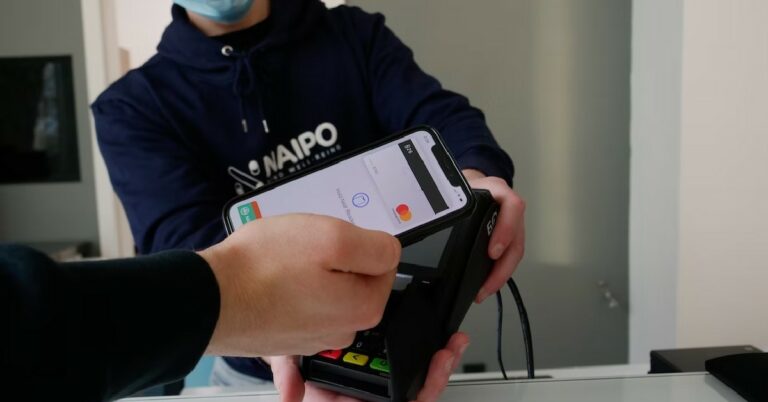
Apple Pay is Apple’s very own contactless payment service. You can use Apple Pay on your iPhone or even on your Apple Watch. The process of setting up Apple Pay on your iPhone is really simple, and it is even simpler to make a transaction using the service. Apple Pay makes use of NFC (Near Field Communication) to carry out contactless payments. Most card readers these days are NFC-enabled, which means you do not need to physically use your debit or credit card to make a payment. In this article, we show you how to set up Apple Pay on your iPhone and use it to make a payment at a store or online.Read Also:Dell Latitude 7430 review: Compact and Powerful
How to set up Apple Pay and make a payment using your iPhone
Step 1: Go to Settings and select Wallet & Apple Pay.Step 2: Tap on ‘Add Card’ and then select ‘Debit or Credit Card.’Step 3: Follow the on-screen instructions to add your card to Apple Pay. You will need to enter the card details like card number, expiry date, and CVV code.Step 4: Once your card has been added, enable the side key to launch Apple Pay. This will make it incredibly easier to make payments from your phone. You can also choose to add shipping details, transit cards, and more. Step 5: In order to carry out a transaction using Apple Pay all you need to do is double-press the side key. Your iPhone will bring up the cards in your wallet. Simply select the card you want to make the payment from, and enter your passcode. Place your phone near the card reader in a store and your transaction will be completed within seconds.Apple Pay only works on card readers with NFC enabled on them. Most stores and retailers carry NFC-enabled card readers these days. Make sure to look out for the NFC sign before initiating a transaction.
How to use Apple Pay online?
Most online stores, retailers, and e-commerce websites also use Apple Pay. To make an online payment using Apple Pay, all you need to do is tap the Apple Pay button during checkout. Apple Pay will automatically fill in your card information, shipping address, and contact information on the payment portal. Double-check the information before proceeding. Use the Face ID or enter your passcode to complete the payment.Read Also: Logitech G502 X Plus Review: Is it still the best in the game?
Conclusion
This is how you can use Apple Pay in stores and online portals. Using Apple Pay is more secure than using your physical card for a transaction. This is because your card number and information are always encrypted during the transaction and are not shared with the retailer. This makes it almost impossible for any third parties to intercept that information and use it for any malicious purposes.For the latest gadget and tech news, and gadget reviews, follow us on Twitter, Facebook and Instagram. For newest tech & gadget videos subscribe to our YouTube Channel. You can also stay up to date using the Gadget Bridge Android App. You can find the latest car and bike news here.
Wireless earbuds and headphones can be dust and dirt magnets. You may have noticed earwax and other kinds of gunk collect on your earbuds just weeks after use. Wearing your earbuds while working out exposes them to sweat and outdoor dust. It is no surprise that your TWS can become a hotspot for bacteria and other germs if they’re not cleaned regularly. Not only is visible dirt a nightmare for germaphobes, but it can also inhibit your earbuds from working properly. Luckily, the fix is quite simple and can be carried out with stuff you can easily find around the house. In this article, we show you how to clean your TWS and headphones easily at home.Read Also: Logitech G502 X Plus Review: Is it still the best in the game?
Here’s what you need to clean your TWS and headphones
Dishwashing liquid
Rubbing alcohol
Cotton ear swab or an earbud cleaning tool
Microfibre cloth
Follow these steps to clean your TWS and headphones
Take your wireless earbuds out of the charging case. Pull out the silicone ear tips from both earbuds. Do not begin cleaning your earbuds while the tips are still attached to them. This will cause the earwax to push down deeper and may harm the audio drivers in your earbuds.
Use a cotton ear swab or an earbud cleaning tool to remove the earwax or gunk from the ear tips. After you’ve removed the visible dirt, let the tips soak in soapy water. Take the ear tips out of the water after 20 minutes and let them air dry for a while. Gently clean them with a dry microfiber cloth after airdrying them.
Clean your earbuds with a damp cloth. Gently go through the surface with the cloth, and make sure you rub down the stems and out panels as well. Wipe the earbuds with a clean, dry cloth. Dip a fresh cloth in some rubbing alcohol and gently apply it to your earbuds. Do not go overboard with the rubbing alcohol, it is only meant to disinfect your earbuds.
Use a cloth dampened in soapy water to clean your headphones as well. Gently rub the earcups, headband, and any wiring attached to your headphones. You may also use rubbing alcohol to disinfect it afterwards.
This is how you can clean your TWS and headphones easily at home. To keep your earbuds dirt free, make sure you clean them once a week. Even gently wiping them with a clean cloth after every workout session goes a long way. The idea is to carry out light cleaning frequently so the dirt doesn’t accumulate quickly on your TWS. Place your headphones in a storage case or pouch when they’re not in use to keep dust particles from settling on them.For the latest gadget and tech news, and gadget reviews, follow us on Twitter, Facebook and Instagram. For newest tech & gadget videos subscribe to our YouTube Channel. You can also stay up to date using the Gadget Bridge Android App. You can find the latest car and bike news here.
There are several vloggers and YouTubers out there who share insights on different games to help budding gamers in improving their skills. A top-notch game video recorder is one of the most critical tools they need to create videos that seem professional. An ideal video recorder allows users to record high-quality videos in the desired frame. There are also additional features available to make desired changes to the video before you finally use it.
One of the best recording tools you can use for recording game screens is Wondershare Uniconverter. This handy program can be used on several devices and supports high-quality audio and video recording.
What Does It Take to Record a Game Video
The following are the significant features generally required to record a game video on any device:
The tool must support HD-quality video recording with both system audio and user’s video.
There must be the availability of option to customize the screen recording and choose from full-screen recording and particular screen area.
Simultaneous video recording option between desktop screen and webcam.
Option to switch between different screens when recording.
Let’s learn more about using UniConverter to record game screens on both Windows and Mac.
How to Record a Game Video With UniConverter
Whether you are using a Windows or Mac desktop, Wondershare UniConverter can turn out to be a wonderful comprehensive utility program for you. This seamless recorder application has the latest features and it can help you record your games, zoom meetings, skype call, browser tabs, etc. This tool allows capturing the background application easily at 60 frames per second with quality up to 1080P. There is also the availability of the option to customize the format and quality of the final output as you process the videos.
As you try to Record video with Uniconverter, you can also find several other features like converting, cropping, splitting, trimming, and adding subtitles to the video. Let’s see how can you use the application on different desktops and record game videos easily.
1. How to Record Game Video on Windows
You do not really need to stress out if you are trying to find out how to record a game video on Windows. This Online video converter provides you with some of the best tools that can be used for recording videos of top-notch quality. There are features available that allow users to record the screen according to their preferences. They can either record the entire screen or pick particular areas as well. It is simple to get the desired results by setting the resolutions, frame rate, and other things as well.
Both online and offline tools can be used to record game videos on Windows. The following are the simple steps you can follow to use UniConverter on Windows:
Step 1. The very step is to open the screen recorder tool on your Windows after installation. Now, you can find the ‘Screen Recorder’ option. Here, you can click the ‘Camcorder’ button and launch the tool to capture the screen.Step 2. Now, you can choose from the ‘Full Screen’ or ‘Custom option’ to select the video frame.
Step 3. After this, you can select from the audio option for your video. Click on the ‘System Audio’ option, then choose any device that you wish to use for recording.
Step 4. Preview the capture area, then start capturing with the ‘REC’ button. Click ‘Stop’ to stop recording and preview the video.
2. How to Record Game Video on Mac
Wondershare Uniconverter, a free video converter is an excellent tool to record game videos on Mac. The tool allows users to record high-quality audio and video on a Mac screen. After recording, users can also find effective editing tools to prepare the video according to their unique needs. The following are the simple steps to record game videos on Mac:
Step 1. Install the application on Mac and start it. Open the app then find the ‘Screen Recorder’ tool.Step 2. In the second step, you can set the recording frame and other features before starting to record.
Step 3. Start recording with the ‘REC’ button.Step 4. End the recording process when done and then add the video to your device to use it further.
3. How to Record Game Video on Media.io
Media.io screen recorder is a convenient program that allows its users to record high-quality audio and videos. There is the option available to capture a particular window or the entire screen as well. Not only this but Facecam recording is also supported by Media.io for creating explanatory videos as well.
Follow these steps to record the video with Media.io:
Step 1. Start with the ‘Record Screen Now’ option, then choose the preferred mode for recording from ‘Screen & Camera Recording’ or ‘Screen Recording’.
Step 2. In the second step, customize the video and audio input, the ‘Start Recording’ option.
Step 3. Stop the recording, then make desired changes to it with the edit option and export the video.
Pros And Cons of UniConverter
Like every other thing available around us, Wondershare UniConverter has its own set of pros and cons as well. Let’s go through the various pros and cons of Uniconverter to analyze the offer efficiency of the application.
Pros
It allows you to capture various background screens, including games, live streams, and movies as well.
Users can browse different websites and stop recording the application running in the background at the same time.
Record HD-quality videos on any desktop.
Option to put PiP effects on the videos and apply annotations as well.
Get the best quality for screen recording, webcam videos, and audio as well.
Cons
The program is not completely free of cost and some features might only be used after paying for it.
Audio-Technica has introduced the new ATH-M50xBT2 wireless over-ear headphones, bringing wireless connectivity to their flagship ATH-M50x professional studio monitor headphones. The ATH-M50x is already considered one of the best headphones on the market and the ATH-M50xBT2 brings a number of features and enhancements while retaining the signature sound profile of the headphones.Read Also: Reliance Jio launches True 5G across Delhi-NCR, offers unlimited 5G data
ATH-M50xBT2 offers multi-point pairing, low latency mode, voice assistant support and more
Audio-Technica’s ATH-M50xBT2 comes with updated new features like the beamforming microphone technology for improved vocal pickup, built-in Amazon Alexa voice assistant, multi-point Bluetooth pairing, updated USB-C connection, a low latency mode, and compatibility with high-quality audio codecs. The ATH-M50xBT2 retains the flagship sound profile, offering exceptional clarity and deep, accurate bass response. The 45mm dynamic audio drivers deliver a powerful sound. The headphones also sport a fold-flat design with 90-degree swivelling earcups and professional-grade earpads and headbands. The dual-microphone beamforming technology allows for better audio quality during calls. The multi-point Bluetooth pairing lets you connect two devices to the headphone at once. The ATH-M50xBT2 offers support for SBC, LDC, and AAC codecs as well. Users can adjust the EQ settings using the A-T Connect app. The settings will be saved on the headphones, saving the effort to change it again on another device.The ATH-M50xBT2 come with a USB-C port for fast charging. The headphones have a battery life of 50 hours and offer 3 hours of playtime after a 10-minute quick charge. The headphones also sport a convenient mute button on the left earcup. A sidetone circuitry allows users to hear their voice in the headphones when making calls on most smartphones.Read Also: How to Set a Sleep Timer on YouTube Music on Android and iPhoneThe Audio-Technica ATH-M50xBT2 are available on Amazon at a price of Rs 30,800. The headset comes with a detachable 1.2-meter cable for optional wired connection, a USB charging cable, and a handy carry pouch. Buyers can also visit www.audio-technica.co.in for more information.
For the latest gadget and tech news, and gadget reviews, follow us on Twitter, Facebook and Instagram. For newest tech & gadget videos subscribe to our YouTube Channel. You can also stay up to date using the Gadget Bridge Android App. You can find the latest car and bike news here.
Sony India announced the launch of WF-LS900N TWS today. The wireless earbuds will be made available across all e-commerce websites at an introductory price of Rs 13,990. This includes a Rs 3,000 cashback that customers can avail on select debit and credit cards. Through Sony’s sensing technology and partner collaboration, the WF-LS900N brings a new sound experience to audiophiles. Also equipped with Active Noise Cancellation, the WF-LS900N stick to Sony’s “Never Off” philosophy by automatically switching between ANC and ambient sound modes. Read Also: How to Set a Sleep Timer on YouTube Music on Android and iPhone
Sony WF-LS900N: Packs ANC, multipoint pairing, adaptive sound control, and more
Weighing just 4.8 grams, the WF-LS900N are Sony’s smallest and lightest earbuds so far. The ergonomic design perfectly matches the human ear and provides a comfortable fit which enables the user to wear the earbuds for hours without any significant stress. The automatic switching between ANC and optimised ambient sounds lets you keep on the earbuds without worrying about missing out on anything important. The Adaptive Sound Control adjusts the transparency levels depending on where you are, letting you play media wherever you go.The Precise Voice Pickup technology along with Advanced Audio Signal Processing ensures that your voice is isolated from the noise and the audio quality is restored before it gets relayed to the receiver. The noise reduction algorithm on these TWS was developed with AI machine learning, using over 500 million voice samples to suppress ambient noise and extract your voice clearly.The Speak to Chat feature automatically pauses any playback when you start talking to someone else. You don’t need to reach the touch controls or your smartphone before you initiate a conversation. Removing the earbuds also pauses any music playback and putting them on resumes it from where you left off. These new earbuds from Sony are also Google Assistant and Alexa compatible. With the noise cancellation turned on, the WF-LS900N can last for 6 hours. The charging case holds an additional 20 hours worth of charge. Charging the TWS for just 5 minutes can give you up to 60 minutes of playtime.Sony has also packed the WF-LS900N with a multi-point pairing feature. You can pair the TWS with two devices and switch seamlessly between them. For example, you can stream a movie on your laptop with your TWS connected to it, and pick up phone calls without having to disconnect the earbuds. Powering the WF-LS900N is Sony’s Integrated Processor V1.Read Also:Xiaomi partners with Blinkit for instant delivery of Mi Air Purifier 3The Sony WF-LS900N TWS will be available on major e-commerce websites like Amazon and Flipkart from November 25. Buyers can make use of the introductory cashback offer of Rs 3,000 and grab these earbuds for just Rs 13,990. This offer is valid from 21st November to 30th November. The earbuds are available in the colours – Black, White, and Beige.
For the latest gadget and tech news, and gadget reviews, follow us on Twitter, Facebook and Instagram. For newest tech & gadget videos subscribe to our YouTube Channel. You can also stay up to date using the Gadget Bridge Android App. You can find the latest car and bike news here.








 Step 4:
 Step 5:
 Step 6:
 Step 3:


 Step 3:




 Step 2. Now, you can choose from the ‘Full Screen’ or ‘Custom option’ to select the video frame.
Step 3. After this, you can select from the audio option for your video. Click on the ‘System Audio’ option, then choose any device that you wish to use for recording.
Step 4. Preview the capture area, then start capturing with the ‘REC’ button. Click ‘Stop’ to stop recording and preview the video.
Step 2. Now, you can choose from the ‘Full Screen’ or ‘Custom option’ to select the video frame.
Step 3. After this, you can select from the audio option for your video. Click on the ‘System Audio’ option, then choose any device that you wish to use for recording.
Step 4. Preview the capture area, then start capturing with the ‘REC’ button. Click ‘Stop’ to stop recording and preview the video.
 Step 2. In the second step, you can set the recording frame and other features before starting to record.
Step 3. Start recording with the ‘REC’ button.
Step 2. In the second step, you can set the recording frame and other features before starting to record.
Step 3. Start recording with the ‘REC’ button. Step 4. End the recording process when done and then add the video to your device to use it further.