The trailer was leaked online a day ahead of the official release.
GTA 6 is a successor of GTA 5.
Rockstar Games has finally pushed out the much-awaited GTA 6 trailer. The first trailer of the Grand Auto Theft 6 was earlier planned to release on December 5 but there was no choice left for the firm but to roll out the teaser ahead of the scheduled thanks to online leak. Not just that the game developer has also revealed information about the launch timeline and availability.GTA 6 first trailer launch was set for December 5 at 9 am ET which is 7.30 PM according to Indian Standard Time. But the trailer was leaked online a day ahead of the official release. And then what happened, the company had to release the trailer officially in a jiffy. The trailer was released 15 hours earlier than planned after the leak. However the account which leaked the GTA 6 trailer has now been suspended on X (formerly Twitter).While releasing the trailer ahead of schedule the company said, “Our trailer has leaked so please watch the real thing on YouTube”
According to the teaser, GTA 6 is situated in Vice City, a made-up version of Miami.Note that Grand Auto Theft 6 aka GTA 6 is a successor of GTA 5 which was introduced in the year 2013. It’s been a decade since GTA 5 was released. But the fans have to wait for the launch of Grand Auto Theft 6 as the first trailer has not only been launched the GTA 6’s debut schedule and supported platforms were also officially announced.Also Read:Krafton brings Bollywood star Ranveer Singh on board as BGMI’s official ambassadorAccording to Rockstar Games, Grand Theft Auto 6 is coming in 2025. It will be available on PlayStation 5 computer entertainment systems and Xbox Series X|S games and entertainment systems in 2025.“Grand Theft Auto VI continues our efforts to push the limits of what’s possible in highly immersive, story-driven open-world experiences,” said Sam Houser, Founder of Rockstar Games. “We’re thrilled to be able to share this new vision with players everywhere,” the company said via a press release.
Garena Free Fire is a battle royale game with regular awards and tournaments to keep players interested. If you play Garena Free Fire, you should be aware of the redeem codes that are released on a daily basis. However, because the battle royale game is banned in India, players from other countries can use the Free Fire Redeem codes daily. If you’re unfamiliar with the Garena Free Fire redeem codes or don’t know how to get them, we’ve put together a step-by-step guide to help you redeem them. Check out Garena Free Fire Redeem Codes for 5 December 2023.The Free Fire redeem codes are a great way to get free stuff. These are 12-digit codes that contain alphabets and numbers, as well as an expiration date and time. Because the Garena FF redeem codes cannot be used more than once, you should hurry to the redemption page to claim your free reward before someone else does. To get a free reward, all you have to do is go to reward.ff.garena.com/en, which is the official redemption page. Also, keep an eye on this space for daily updates on Garena Free Fire redemption codes and rewards.
In This Article
Garena Free Fire Redeem Codes Today 5 December 2023
If you value your anonymity online, putting up a picture of yourself on your socials is out of the question. Leaving the profile picture empty is not a good option either, as it gives the impression that you’re a bot or worse – a troll. What you can do is set up a profile picture that reflects who you are as a person. It could be a funny avatar or a fan art of your favourite movie or TV show. But how do you go about looking for these pictures? Check out our list of the top 6 places to find good and funny profile pictures for your socials.Read Also:How to share your WhatsApp Status on Instagram?
In This Article
Pinterest
Pinterest is one of the biggest platforms on the Internet for finding images related to any theme or mood. Once you set up your profile on Pinterest, you can go through the different images or ‘pins’ about a particular topic. It is easy to find other users on Pinterest who are interested in the same things as you. You can look up their boards and save images that you like on your board or directly download them on your device. From anime avatars to digital art, you are bound to find what you like on Pinterest.
Pexels
Pexels is an online resource for free stock images and videos. With over 3 million images on the platform, you can search for avatars and profile pictures, or simply look up images related to a particular subject. Downloading an image from Pexels is fairly easy. Once you open an image, click the arrow next to ‘Free Download’ and select your preferred size for the image. Once that’s done, click on ‘Download Selected Size’.
Unsplash
Like Pexels, Unsplash is also an online resource for royalty-free images. Once you get a hang of what keywords to use in your search queries, the results will get much better. There are tons of free stock images on Unsplash, but you’ll also find a large number of animated pictures, funny images, or pictures of animals, places, and things, that are perfect to be used as profile pictures across your socials.
Reddit
Although it is not known for being an image-sharing website, Reddit is an excellent place to find profile pictures for your socials. What we really like about Reddit are its niche communities or ‘subreddits’ that cater to very specific interests or themes. If you’re a fan of a TV show that got cancelled a decade ago, you will still find people talking about it on Reddit. Apart from engaging in discussions, users also post fan art and edits of their favourite TV shows and movies. If you’re looking for generic profile pictures, subreddits like r/pics, r/art, r/alternativeart, and r/anime are excellent places to start.
Bing AI
If you can’t find what you’re looking for, why not just create it yourself? Even if you don’t know the first thing about creating artwork, AI tools like Bing Image Creator, Deep AI, and others have made it possible to bring your thoughts to life in the form of enticing images. Once you sign into Bing Image Creator, all you need to do is give clear and concise prompts for the image you want it to generate. The results are simply astonishing.
Instagram
Instagram is the home to independent artists and creators who want their work to reach a wider audience. Like Reddit, you can find a lot of art content on Instagram catering to a particular niche. Browse the relevant hashtags for art to find what you’re looking for. Once you make a few searches, Instagram will suggest similar stuff on your Explore page. Always make sure that you always credit the artist while using their work.Read Also:Best multi-USB charging adapters for your smartphones and tablets
Conclusion
These are the top 6 places on the Internet to find good and funny profile pictures for your socials. While using the work of small creators and artists, make sure that you have their consent to do so. If you’re using an artwork for free, it is good ethics to credit the person who made it. If the creator has watermarked their signature on the image, don’t crop it out. Know any other places on the Internet to find interesting profile pictures? Let us know in the comments!
Google Workspace’s ecosystem is seamless and does not require any effort to get used to. If you primarily work on Docs, you can easily import a chart from Google Sheets, a table from Google Photos, or a drawing from Google Drive. All of these options can be accessed from the ‘Insert’ tab at the top of the document. However, one tool that’s missing from the list of options is Google Slides. If you’ve faced this issue as well, check out this quick way to insert Google Slides into Google Docs.Read Also:Vivo T2 5G and Vivo Y56 prices in India dropped: Details Inside
In This Article
Things to keep in mind while attaching a slide to a Google Doc
The process of embedding Google Slides into Google Docs is very easy and free of any hurdles or hoops. You may need to use this feature when you’re composing additional text to go with your presentation. Adding slides from the presentation in appropriate places on the document reminds people of key ideas and makes it easy to digest them.If you plan on making changes to your presentation later, make sure you link the slide to its source in Google Slides. This option will be given to you in a popup box when you paste the slide into the document. Any changes made to the presentation will then be reflected on the embedded slide as soon as you update it. Only editors can update the slide while collaborators can see the link to the source presentation.
Insert Google Slides into Google Docs
Step 1: Go to Google Slides and select a presentation.Step 2: Use the side menu to navigate to the slide you want to insert into your Google Doc.Step 3: Hit Edit at the top of the page and select Copy.Step 4: Go to Google Docs and open the document in question.Step 5: Place your cursor in the spot where you want to insert the slide.Step 6: Right-click and select Paste or simply press Ctrl+V on your keyboard.Step 7: Choose whether you want to link the slide to its original presentation or not. This will allow the changes to be reflected on the document when the contents of the slide are changed in the original presentation.Step 8: When you change the slide in the original presentation, go back to the document and select Update from the slide’s options bar.
Frequently Asked Questions (FAQs)
How do I embed or insert Google Slides into Google Docs?
Go to Google Slides and select the slide you want to embed in the document. Select Edit>Copy, then open the document and paste it in the relevant spot.
Who can see the link to my presentation in Google Docs?
Once you insert a slide in a Google Doc, only the collaborators on the document can see the link to the original presentation.
How do I update the slide I pasted on a Google Doc after changing the presentation?
This is how you can embed or insert Google Slides into Google Docs. Since Slides and Docs are both part of Google Workspace, the process of attaching a slide to a document is very easy and does not require any convoluted mechanism. If you know any other way to go about this task, let us know in the comments!
The BGMI update features the RS Discovery event and more.
Moreover, it also introduces emotes inspired by the actor’s popular dance moves and his voice pack among other exciting updates.
Battlegrounds Mobile India (BGMI) developer Krafton today announced that Bollywood superstar Ranveer Singh will be its official brand ambassador. Not just that is said to be a playable character in the Battle Royal Game. He will be available in two 3D avatars with emotes and skin for guns and more. In addition to this, the latest BGMI update also introduces the RS Discovery event. Read the entire article to know about the latest update.Krafton has rolled out BGMI’s 2.9 update featuring iconic Bollywood superstar Ranveer Singh. He is going to be the brand ambassador for the title, as a playable character, “enabling BGMI users to immerse themselves in the charismatic aura of the star within the game.”The BGMI latest update is currently live with two 3D Ranveer Singh avatars, emotes inspired by the actor’s popular dance moves and a voice pack, among other items. According to Karafton, there will be a Ranveer Singh discovery event, the Ranveer Singh crate and a Play and Win event that will allow players to win rewards.As mentioned earlier Ranveer Singh will be available in two playable 3D Ranveer Singh avatars – RS Dark Stealth and RS Swaggy Baba in Battlegrounds Mobile India. Ranveer Singh Special Crate.The RS crate has emotes inspired by superstar Ranveer Singh’s dance moves – Swagster Groove emote, Swagster Tathad emote, Swagster Sway emote, Swagster Twirl emote along with a special voice pack. The RS Crate also includes items such as RS Swaggy Buggy, RS Fury -M249 upgradable gun skin, RS Dhamaka (grenade skin), RS Pan-cho (pan skin), as well as other rewards like ornaments, and space gifts. The RS crate will allow players to spend UC, the in-game currency, for drawing rewards. The price for 1 draw is 60 UC but the first draw of the day is available at 30 UC.Also Read:Tecno Spark Go (2024) with dual rear camera setup launched in India
In This Article
Ranveer Singh Discovery event
The RS Discovery event brings a point-based system where players earn points by participating in Classic mode matches. The event will be live from December 1 to January 25.The event consists of 50 stages (each level can be unlocked with 100 points, allowing the player to reach 5000 points by stage 50) and offers a variety of goodies, including space gifts, ornaments, parachutes, and more. The event consists of 50 stages (the player can collect 100 points to unlock the next stage hence accumulating 5000 points by stage 50), offering various rewards such as ornaments, space gifts, parachutes and more.
Play and Win event
In this event players can accomplish a variety of tasks and gather RS tokens which can be exchanged for permanent rewards in an Exchange centre in the game named “Play Pure with Ranveer Singh”. The event includes tasks such as playing as Ranveer Singh, Pure Showdown, teaming up, Pure Speed, and daily logins. The Lion Champion Set, Lion Champion Headgear, Thorned Rose – Crowbar, Neon Kiss Ornament, Classic Crate Coupon (5-time limit), and Supply Crate Coupon (10-time limit) are among the reward exchange options.
BGMI’s 2.9 updates other key features
BGMI’s 2.9 update also adds Snowy Village, a zone featuring high-speed Snow Rails and rideable reindeer. It also includes Snowball Blasters that can be used strategically, turning opponents into snowmen, and a two-story Ice Sculpture Plaza using them as a special battlefield.From December 1, 2023, to January 24, 2024, Snowy Village hosts BGMI’s Frost Festival, offering unique engagements, treats, snowboards, and Snowball Blasters freezing water. On discovering Snow Toddlers and the Lucky Snowman might lead players to rewarded crates. BGMI’s Version 2.9 offers an immersive winter-themed experience with festive reindeer vehicles appearing for shared rides.The latest Royale Pass Ace is available with the latest BGMI update. One can get the Freaky Fiesta-themed sets by wearing your cred. Players can also take part in RP missions to increase their player rank and unlock exciting rewards. These rewards include new custom colour outfits, snow bikes and reindeer finishes, and various other enticing items.Kafton has collaborated with Pagani, the iconic sports car maker to introduce two Pagani car models with exclusive colour schemes to the game, offering players a taste of luxury and speed.
The price of Tecno Spark Go (2024) starts at Rs 6,599.
The smartphone is powered by Unisoc T606 SoC.
It runs on HiOS 13 based on Android 13 (Go Edition).
Chinese smartphone maker Tecno today announced the launch of a new budget smartphone in India. The company has introduced the latest model of Tecno Spark Go (2024). It is a successor of Tecno Spark Go (2023) which arrived earlier this year. The device is powered by a Unisoc T606 chipset. It features an HD+ IPS display with 90Hz refresh rate support. There is also a dual rear camera setup. The phone is backed by a 5,000mAh battery. In addition to this, it runs on HiOS 13.
In This Article
Tecno Spark Go (2024) price in India and availability
Tecno Spark Go (2024) price in India has been set at Rs 6,599 for the 3GB RAM with 64GB storage. There are two more variants: 8GB RAM with 64GB storage and 8GB RAM with 128GB storage. The price of both models is to be announced later on. The handset comes in two colour options of White and Black.In terms of availability, the budget smartphone is scheduled to go on sale from December 7 via Amazon.
Tecno Spark Go (2024) specifications
Tecno Spark Go (2024) is highlighted with a 6.56-inch HD+ IPS display having 720×1,612 pixels of resolution. Its display comes with 90Hz refresh rate support and Panda screen protection. Additionally, there is Dynamic Port software that shows notifications around the selfie camera. The budget smartphone runs on HiOS 13 based on Android 13 (Go Edition). Under the hood, there is an octa-core Unisoc T606 SoC with memory fusion technology that expands the RAM virtually with the help of unused storage. The device has up to 8GB of RAM and up to 128GB of internal storage.Also Read:WhatsApp to bring feature to share status updates on Instagram: ReportFor photos and videos, Tecno Spark Go (2024) features a dual rear camera setup that includes a 13-megapixel primary camera and an AI lens. Up front, there is an 8-megapixel selfie camera.The Tecno phone is backed by a 5,000mAh battery. There is a side-mounted fingerprint sensor for phone unlocking. In addition to this, it comes with dual stereo speakers with DTS sound technology.
WhatsApp is developing a new way to share status on Instagram.
Recently Meta also enabled the feature to share WhatsApp status updates on Facebook
Users will find it easier to interact with their audience on both platforms.
WhatsApp is planning to integrate a new feature on its platform. Reportedly, the instant messaging platform’s parent company Meta is working on the ability to share WhatsApp Status updates on Instagram stories directly. Recently Meta also brought the ability to send status updates to Facebook. Previously the company enabled the feature to share Instagram stories to WhatsApp Status.According to a fresh report by WABetaInfo WhatsApp’s latest optional feature to share status updates to Instagram is in the pipeline. As per the report, the upcoming feature will be available in a future update of the app as it is still under development. This feature was enabled on WhatsApp beta for the Android 2.23.25.20 update.Image Courtesy: WABetaInfoAccording to the shared screenshot, Beta users will see the option to set an Instagram account enabled under the Status privacy in Settings. As per the report, the feature will be optional letting users decide whether or not they want to activate this feature. Additionally, this will also save time by improving the consistency and dependability of content sharing on Instagram and WhatsApp. Moreover, this ability to easily share their WhatsApp status updates to Instagram streamlines the process of changing status across other platforms. Also, this will enable users to create and post separate updates on WhatsApp and Instagram therefore completing the task in one step.Also Read:Best camera phones to buy in India across various price pointsPreviously Meta also activated the option to automatically share status updates to Facebook Story. Thus the functionality will make it easier to share one’s status update across several apps, which saves time. As an extension of the Chat Lock feature that was introduced just a few months ago Meta the parent company of WhatsApp has rolled out a new Secret Code feature to keep your chats safe. This will add another level of security to chats and make them harder to find, particularly when you hand your phone to a friend or a family member.
Ever since Meta acquired Instagram and WhatsApp, the tech giant has been gradually working towards converging all of its social media platforms. Users are already able to share their Instagram and WhatsApp stories & updates to Facebook. According to a recent report from WABetaInfo, Meta is adding the option to share WhatsApp status directly to Instagram. Of course, this feature will be turned off by default and will require users to link their Instagram accounts to WhatsApp in order to work as intended. So, let’s take a quick look at how to share your WhatsApp Status on Instagram.Read Also:Vivo T2 5G and Vivo Y56 prices in India dropped: Details Inside
In This Article
Share your WhatsApp Status on Instagram
Step 1: Launch WhatsApp on your smartphone and switch to the Updates tab.Step 2: Hit the ellipses next to Status.Step 3: Select Status privacy.Step 4: Tap on Instagram.Image Credit: WABetaInfoStep 5: Enter your Instagram account credentials to link it to your WhatsApp account. If you are already logged into the Instagram app on your phone, simply hit Agree.Step 6: Open the WhatsApp status update you want to share on Instagram and hit the ellipses at the top right corner of the screen.Step 7: Hit Share to Instagram>Share now.
Enable sharing to Instagram from WhatsApp settings
Step 1: Launch WhatsApp on your smartphone and tap the ellipses at the top right corner of the screen.Step 2: Select Settings.Step 3: Hit Privacy.Step 4: Select Status.Step 5: Tap on Instagram.Image Credit: WABetaInfoStep 6: Log into your Instagram account using your username or password, or simply hit Agree if you are already logged in.
What else is new on WhatsApp?
This year, Meta added a slew of new features across the board to the IM platform. Be it highly requested features like HD image sharing, chat lock, and multi-account support to fringe options like video messages and link previews, WhatsApp is constantly evolving to maintain its position as the biggest messaging platform in the world. We may still see a few other additions to the platform before the year ends.Apart from sharing status updates on Instagram, WhatsApp is also working on an AI chatbot and the ability to search users by their usernames. That’s correct, you will soon be able to set up a username for your WhatsApp account. This will allow other users on the platform to find you easily without knowing your number. If you don’t feel comfortable with giving someone your phone number, you can simply share your WhatsApp username with them. This feature is completely optional, which means you don’t need to create a username to carry on using WhatsApp.WhatsApp very own AI-powered chatbot will also be added to the app soon. This chatbot will be very similar to Snapchat’s My AI. You can use it to set up reminders, brainstorm new ideas, and assist you in daily activities. You can even use it for creative tasks like composing a poem or coming up with interesting captions for your pictures and videos.
Frequently Asked Questions (FAQs)
How do I link my Instagram account to WhatsApp?
Launch WhatsApp, then go to Settings>Privacy>Status>Instagram. If you are already logged into your account on the Instagram app, hit Agree. If not, enter your Instagram account credentials to link it to WhatsApp.
How do I share my WhatsApp status update on my Instagram stories?
Open the WhatsApp status update you want to share, hit the ellipses at the top right corner of the screen, and select Share to Instagram>Share now.
This is how you can share your WhatsApp status update on your Instagram stories. Doing so can save you a lot of time if you like to keep all your social media profiles updated with the same kind of content. However, Instagram offers better editing options for your Stories than WhatsApp does for status updates.
Smartphones have come a long way in the last decade, but the one aspect that not many people talk about is fast charging. You don’t need to keep your phone plugged in overnight for charging. Some of the best ‘hyper-charging’ phones can be fully juiced in under 20 minutes. Of course, you also need a powerful charging adapter to accomplish this feat. So, let’s take a closer look at the best multi-USB charging adapters for your smartphones and tablets.Read Also:Noise Three Wireless headphones with up to 70 hours of playtime launched in India
In This Article
Portronics UFO Pro
Price: Rs 954 on AmazonIf your work desk is cluttered with wires and charging adapters for every device you own, the Portronics UFO Pro charging station is exactly what you’re looking for. This adapter weighs 60g and has dimensions of 11.6 x 11.6 x 3.3 cm. With 60W of total wattage, the UFO Pro can charge your smartphone up to 50% in 30 minutes (if the phone supports fast charging). There are 6 charging ports on this station – QC 3.0 (1), USB Type-A 2.0 (4), and USB Type-C (1). Having a round form factor, the UFO Pro stays true to its name. This design allows the user to use all six charging ports at once, without any hassle.
Ambrane 75W Charger Adapter
Price: Rs 2,799 on AmazonThis GaN charger from Ambrane has 2 USB Type-A, 2 USB Type-C, and one Quick Charging USB port. The adapter also supports PD fast charging. The GaN technology makes the adapter compact and portable while also ensuring that it doesn’t overheat while charging multiple devices at once. The Type-C PD charging ports on this adapter are capable of charging laptops as well. If your laptop supports USB Type-C charging, you can completely eliminate the need to carry its bulky charger everywhere you go by switching to this Ambrane adapter. Certainly one of the best multi-USB charging adapters around.
T Teclusive 65W GaN charger
Price: Rs 2,299 on AmazonThis 65W GaN charger has 4 charging ports – 2 USB Type-C PD, and 2 USB Type-A QC. The 100W equivalent of this adapter costs Rs 3,749. The C1 USB Type-C slot provides the promised maximum wattage of 65W. Apart from smartphones and tablets, you can also use this charger to power your laptops and notebooks. The integrated copper and ABS shell on the adapter makes it temperature-resistant. The Surge Protection System guards it against sudden voltage fluctuations. One of our favourite features offered by this adapter is its integrated display which shows the current output and voltage as per the charging speed.
Amazon Basics 4-Port 100W GaN charger
Price: Rs 4,099 on AmazonThis Amazon Basics power adapter is 35% smaller than your regular charger and offers a whopping 100W of maximum charging speed. There are 2 USB Type-A and 2 USB Type-C ports on this adapter. The latter can be used to power laptops. The intelligent chip inside this adapter adjusts its output voltage when multiple devices are drawing power from it. This prevents overheating and makes the overall charging process very safe. The Amazon Basics GaN charger works for Macbooks and Chromebooks as well.
CMF 65W GaN Charger
Price: Rs 2,699 on FlipkartNothing’s subsidiary brand CMF specialises in budget offerings across different categories. So far the company has released a TWS, a smartwatch, and a 65W GaN charger. We reviewed the latter last month and were mighty impressed by its charging chops. The adapter contains two USB Type-C and one USB Type-A charging slot. Here is the power breakdown for all three ports.
USB C1+USB C2: 45.0W+20.0W
USB C1+USB A: 45.0W+18.0W
USB C2+USB A: Share 5.0V⎓3.0A(15.0W)
USB C1+USB C2+USB A: 45.0W+15.0W
The CMF GaN charger supports a diverse range of fast charging protocols. D3.0, QC4.0+/3.0/2.0, SCP, FCP, PPS, AFC, Apple 2.4A, Samsung 9V2A, and DCP enabled devices can be powered with this adapter.
rts 25W Universal Travel Adapter
Price: Rs 587 on AmazonIf you need a travel adapter for travelling abroad but don’t want to buy a different one for every country you visit, this product has you covered. The rts 25W universal travel adapter has multiple plugs for the US, EU, UK, and AU regions. This adapter will work perfectly well, whether you’re in Central America or Russia. There are two USB Type-A charging ports on the side of this adapter which allow you to directly charge your smartphone or tablet. You can also connect your regular charger to this adapter. This adapter is a steal at Rs 587.Read Also:Oppo Reno 10 Pro 5G price dropped by Rs 2,000 in India
Conclusion
These are the best multi-USB charging adapters you can buy right now for your smartphones, tablets, laptops, Chromebooks, Macbooks, and other devices. If you’re buying a fast-charging adapter, make sure your smartphone supports fast charging as well. There is no point in buying a 65W adapter if your smartphone supports only 25W charging. Is there a particular adapter that you think deserves to be on this list? Let us know in the comments!
Lots of smartphones are launching as we write this and more are going to launch soon. In this situation, it is challenging to find the best camera phone that not only offers incredible camera features but fits your pocket. We believe the best camera smartphone should not only have camera-focused features but also a good battery life, a fast CPU and an excellent display (which are equally important). Not just that build quality and IP rating also matters. Our Gadget Bridge team has been testing a lot of devices and we have put together a list of the best camera phones you can purchase across price segments to help you find a good device for all your clicking needs.
In This Article
iPhone 15 Pro Max
iPhone 15 Pro Max sports a 6.7-inch OLED display and ProMotion with a refresh rate that ranges between 1Hz and 120Hz support. The iPhone comes with Dynamic Island. The device is powered by an A17 Pro SoC.For photos, the iPhone (iPhone 15 Pro Max Review) includes a triple rear camera unit with a 48-megapixel wide-angle sensor, a 12-megapixel ultra-wide sensor, and a 12-megapixel telephoto sensor with a periscope lens. For Selfies, there is a 12-megapixel lens on the iPhone 15 Pro Max.In addition to this, there is a USB Type-C port for charging. The phone runs on iOS 17 out-of-the-box.Price starts at Rs 1,59,900Also Read:5 best camera smartphones under Rs 50,000
Samsung Galaxy S23 Ultra
Samsung Galaxy S23 Ultra features a 6.8-inch Edge QHD+ Dynamic AMOLED 2X Display with dynamic refresh rate ranging from 1 to 120 Hz. The phone is powered by a Qualcomm Snapdragon 8 Gen 2 SoC and runs Android 13 with One UI 5.1. The device comes with a Samsung S Pen stylus.The camera system (Samsung Galaxy S23 Ultra Review) includes- a 200-megapixel sensor, 10-megapixel telephoto lenses with a 3x optical zoom, a 12-megapixel ultra-wide camera with a 120-degree field of view, and an f/2.2 aperture, as well as a final 10-megapixel telephoto sensor. Up front, there is a 12-megapixel selfie camera. The phone is backed by a 5,000mAh battery (45W wired and Fast Wireless Charging 2.0).Price starts at Rs 1,24,999
Google Pixel 8
The Pixel 8 features a 6.2-inch FHD+ Actua display which supports an Adaptive refresh rate ranging between 60Hz and 120Hz. Under the hood, there is a Tensor G3 SoC with a Titan M2 security coprocessor. It runs on the latest edition of Android software, Android 14 with Pixel-exclusive features onboard. The phone comes with a 10.5-megapixel Dual PD sensor for selfies. There is a dual rear camera setup that includes a 50MP Octa PD sensor and a 12 MP ultrawide camera with an auto-focus. The Google Pixel 8 has a 4,485mAh battery with 24W wired and 12W wireless fast charging support.Price starts at Rs 75,999
Vivo X90
The Vivo X90 features a 6.78-inch AMOLED display and a refresh rate of up to 120 Hz. The device runs on OriginOS 3 and runs Android 13 and is powered by an octa-core 4nm MediaTek Dimensity 9200 SoC and a G715 GPU. It (Vivo X90 review)comes with a Zeiss-branded triple rear camera unit consisting of a 12-megapixel ultra-wide-angle camera, a 12-megapixel portrait camera and a 50-megapixel main sensor. The smartphone sports a 32-megapixel selfie camera.Price starts at Rs 59,500
OnePlus 11 5G
OnePlus 11 5G is highlighted with a 6.7-inch Samsung LTPO 3.0 AMOLED display with an adjustable refresh rate of up to 120Hz. The device is powered by an octa-core 4nm Snapdragon 8 Gen 2 SoC and an Adreno 740 GPU. It (OnePlus 11 5G Review)comes with a triple rear camera setup that includes a 50-megapixel sensor with OIS, a 32-megapixel portrait sensor and a 48-megapixel Sony IMX58 ultra wide-angle sensor. For selfies, there is a 16-megapixel sensor.The handset has a 5,000mAh dual-cell battery with 100W SuperVOOC charging support.Price starts at Rs 56,999
Xiaomi 12 Pro
The Xiaomi 12 Pro comes with a 6.72-inch LTPO WQHD+ E5 AMOLED display with a dynamic refresh rate of 1 to 120Hz. The phone is powered by an octa-core Snapdragon 8 Gen 1 SoC with an Adreno 730 GPU. It runs Android 12 with MIUI 13 on top. The smartphone’s triple rear camera system includes a 50-megapixel Sony IMX707 primary sensor, a 50-megapixel ultra-wide-angle lens, and a 50-megapixel telephoto sensor. Moreover, the device (Xiaomi 12 Pro Review)has a 32-megapixel selfie camera sensor. The Xiaomi 12 Pro packs a 4,600mAh with 120W Xiaomi Hypercharge fast wired charging.Price starts at Rs 41,999
Samsung Galaxy S21 FE 5G
Samsung Galaxy S21 FE 5G has a 6.4-inch FHD+ Dynamic AMOLED 2X Display with a 240Hz touch sampling rate, an incredibly smooth 120Hz refresh rate, and AI-based blue light control. It is powered by a Snapdragon 888 SoC.Samsung Galaxy S21 FE 5G comes with a 12-megapixel primary sensor with an f/1.8 wide-angle lens, a 12-megapixel ultra-wide sensor, and an 8-megapixel telephoto sensor making up the triple rear camera setup on the Galaxy S21 FE 5G. For selfies and video calls, the gadget (Samsung Galaxy S21 FE 5G review) also includes a 32-megapixel front camera with an f/2.2 aperture.Price starts at Rs 33,900
OnePlus Nord CE 3 Lite
The OnePlus Nord CE 3 Lite is powered by an octa-core Snapdragon 695 SoC with Adreno 619 GPU for graphics. It also features a 6.72-inch full-HD+ LCD with 1,080×2,400 pixels of resolution. The phone packs a 5,000mAh battery that supports 67W SuperVOOC fast charging. It (OnePlus Nord CE 3 Lite Review) comes with a triple rear camera setup that includes a 108-megapixel Samsung HM6 sensor with an f/1.75 aperture and EIS support. It also consists of a 2-megapixel macro lens and another 2-megapixel depth sensor. There is a 16-megapixel front-facing camera for selfies.Price starts at Rs 19,999
Redmi Note 12 5G
The Redmi Note 12 5G has a 6.67-inch and boasts a 1,080 x 2,400-pixel resolution. The phone is powered by a Qualcomm Snapdragon 4 Gen 1 octa-core SoC. It runs on MIUI 13, an Android 12 skin.The Redmi Note 12 5G features a 48-megapixel primary sensor and a 2-megapixel depth sensor as part of its dual rear camera system. For selfies, the phone boasts an 8-megapixel front camera.Price starts at Rs 15,499
Vivo Y27
The Vivo Y27 comes with a 6.64-inch FHD+ LCD Sunlight display. It operates on FunTouch OS 13 which is based on the Android 13 operating system. Under the hood, there is MediaTek Helio G85 chipset and its Extended RAM 3.0 functionality.The handset features a dual rear camera setup with a 50 MP primary camera and a 2 MP bokeh camera. It has a variety of camera functions, including Bokeh Flare Portrait, Super Night Mode, and Super Night Selfie Mode. It has an 8 MP front camera with the Aura Screen Light function for selfies, ensuring sharp, high-resolution selfies in any setting. It includes a 5,000mAh battery and a quick 44W FlashCharge.Price starts at Rs 13,999
Garena Free Fire is a battle royale game with regular awards and tournaments to keep players interested. If you play Garena Free Fire, you should be aware of the redeem codes that are released on a daily basis. However, because the battle royale game is banned in India, players from other countries can use the Free Fire Redeem codes daily. If you’re unfamiliar with the Garena Free Fire redeem codes or don’t know how to get them, we’ve put together a step-by-step guide to help you redeem them. Check out Garena Free Fire Redeem Codes for 4 December 2023.The Free Fire redeem codes are a great way to get free stuff. These are 12-digit codes that contain alphabets and numbers, as well as an expiration date and time. Because the Garena FF redeem codes cannot be used more than once, you should hurry to the redemption page to claim your free reward before someone else does. To get a free reward, all you have to do is go to reward.ff.garena.com/en, which is the official redemption page. Also, keep an eye on this space for daily updates on Garena Free Fire redemption codes and rewards.
In This Article
Garena Free Fire Redeem Codes Today 4 December 2023
Garena Free Fire is a battle royale game with regular awards and tournaments to keep players interested. If you play Garena Free Fire, you should be aware of the redeem codes that are released on a daily basis. However, because the battle royale game is banned in India, players from other countries can use the Free Fire Redeem codes daily. If you’re unfamiliar with the Garena Free Fire redeem codes or don’t know how to get them, we’ve put together a step-by-step guide to help you redeem them. Check out Garena Free Fire Redeem Codes for 3 December 2023.The Free Fire redeem codes are a great way to get free stuff. These are 12-digit codes that contain alphabets and numbers, as well as an expiration date and time. Because the Garena FF redeem codes cannot be used more than once, you should hurry to the redemption page to claim your free reward before someone else does. To get a free reward, all you have to do is go to reward.ff.garena.com/en, which is the official redemption page. Also, keep an eye on this space for daily updates on Garena Free Fire redemption codes and rewards.
In This Article
Garena Free Fire Redeem Codes Today 3 December 2023
Vivo T2 5G and Vivo Y56 are discounted for a limited period.
The discount is available till December 31.
Vivo T2 5G and Vivo Y56 are now available in India at discounted pricing. Though this price cut is for a limited duration. The former one was launched in April while the later one in September this year. Vivo T2 5G comes with a 6.38-inch AMOLED display with 90Hz refresh rate. It is powered by a Snapdragon 695 SoC. Vivo Y56 5G features a 6.58-inch full-HD+ LCD screen and is equipped with a MediaTek Dimensity 700 SoC.Vivo has officially announced there is a drop on Vivo T2 5G and Vivo Y56 prices in India. The reduced prices are available on Flipkart and offline stores till December 31.Vivo T2 5G’s 6GB RAM with 128GB model earlier cost Rs 18,999 but after a price reduction, it will be available at Rs 16,999. On the other hand, the 8GB RAM with 128GB storage option will now come at Rs 18,999 which was previously made available at 20,999. In addition to this, customers using IndusInd Bank, Yes Bank, Federal Bank Bank of Baroda, and others for transactions will receive up to Rs 1,500 in cashback on the purchase of Vivo T2 5G.Similarly, Vivo Y56 is also getting a temporary price cut. The 4GB RAM with 128GB storage model will now cost Rs 15,999 whereas the 8GB RAM with 128GB storage model will come with a price tag of Rs 17,999. The device was earlier available at Rs 16,999 and Rs 18,999 respectively. With ICICI Bank, Yes Bank, IndusInd Bank, One Card, and other banks buyers can get a cashback of up to Rs 1,000.
In This Article
Vivo T2 5G specifications
Vivo T2 5G runs on Android 13-based Funtouch OS 13. It features a 6.38-inch AMOLED display with a refresh rate of 90Hz and a 360Hz touch sampling rate. It is powered by a Snapdragon 695 SoC. The device includes a dual rear camera setup that includes a 64-megapixel primary sensor and a 16-megapixel sensor. The phone packs a 4500mAh battery, with 44W fast charging support.
Vivo Y56 5G specifications
The Vivo Y56 5G comes with a 6.58-inch full-HD+ LCD screen. It runs on Android 13-based Funtouch OS 13 and is equipped with MediaTek Dimensity 700 SoC. The smartphone sports a dual rear camera setup that includes a 50-megapixel primary sensor and a 2-megapixel secondary sensor. There is a 16-megapixel front-facing camera with an f/2.0 aperture for selfies and video calls. Additionally, the phone packs a 5,000mAh battery that supports 18W rapid charging.
The Bluetooth headphones come with a Gaming Mode to offer reduced latency of 45ms.
It supports Siri and Google Assistant.
Indian lifestyle tech brand Noise has launched the Noise Three Wireless headphones. The device comes with Dual Device Pairing and Foldable Design. The headphones are claimed to deliver up to 70 hours of playtime. It comes equipped with a 40mm driver. The audio device has a reduced latency of 45ms with Gaming Mode.
In This Article
Noise Three Wireless headphones specs and features
The Noise Three Wireless headphones have a foldable design and other ergonomic elements. One can easily fold it up and pack it in a small bag while travelling. For controls, buttons are available on the headphones. It has a power button, volume control buttons and a modes button to help switch between TF card, Gaming mode and BT.The Noise Three comes equipped with a 40mm driver for rich, high-quality sound. As per the company, users will experience videos, movies, games, music, and more with high-quality clarity. With Gaming Mode turned on it offers reduced latency of 45ms. The Noise Bluetooth headphones come with an IPX5 water resistance rating.Also Read:Oppo Reno 10 Pro 5G price dropped by Rs 2,000 in IndiaIn addition to this, there is Bluetooth Version 5.3 that guarantees advanced connectivity. It has a wireless range of 10m and supports auto pairing. The headphones are compatible with both Android and iOS. For multitasking the audio device comes with a dual device pairing feature allowing the user to pair two devices simultaneously and take calls, watch videos and stream music.It has a total of four play modes- Gaming mode, TF card, BT mode and auxiliary mode.The wireless headphones are said to produce an impressive playtime of up to 70 hours at 60 percent volume. The headset offers 200 minutes of power in just 10 min charging thanks to Instacharge tech. However, it takes up to 60 minutes to get fully charged. Lastly, the headphones support Siri and Google Assistant.
Noise Three Wireless headphones price in India
Noise Three Wireless headphones have been launched in India with a price tag of Rs 1,999. It is available in three colour options of Space Blue, Jet Black, and Chocolate Brown. The device can be purchased via Amazon, Flipkart, and gonoise.com.
The company has reduced the price of Oppo Reno 10 Pro ahead of its successor launch.
The smartphone was previously selling at Rs 39,999.
The device comes with a triple rear camera setup.
Oppo Reno 10 Pro 5G debuted in India in July this year. Just six months after its release the device is getting a price cut. The company has lowered the price of the smartphone by Rs 2,000. The device comes with a triple back camera arrangement and a 120Hz display. The phone is powered by an octa-core Snapdragon 778G 5G SoC.
In This Article
Oppo Reno 10 Pro 5G new price in India details
Oppo Reno 10 Pro 5G price in India has been reduced by Rs 2,000. The 12GB RAM with 256GB storage variant will now sell at Rs 37,999. The smartphone was earlier available at Rs 39,999. The device comes in two colour options Silver and Purple. The phone with the updated pricing can be purchased via the company’s official online store whereas the price of the mobile phone is yet to be updated on Flipkart.
Oppo Reno 10 Pro 5G specifications
Oppo Reno 10 Pro 5G is highlighted with a 6.7-inch full-HD+ OLED 3D curved display with 1,080X 2,412 pixels of resolution. The screen supports up to 120Hz refresh rate, and up to 240Hz touch sampling rate. In addition to this, there is 93 percent screen-to-body ratio, 950 nits of peak brightness and 100 percent coverage of the DCI-P3 colour gamut.Oppo Reno 10 Pro 5G is powered by an octa-core Snapdragon 778G 5G SoC with up to 12GB of RAM (expandable) and up to 256GB of UFS 3.1 storage. It operates on Android 13-based ColorOS 13.1.In terms of photography and videography, the handset features a triple rear camera setup that includes a 50-megapixel primary Sony IMX890 sensor (f/1.8) with OIS, a 32-megapixel telephoto sensor and an 8-megapixel wide-angle lens. There is a 32-megapixel front-facing camera for taking selfies.Also Read:iQoo 12 exclusive Priority Pass announced, here is how to avail itThe smartphone is backed by a 4,600mAh battery with 80W SuperVOOC flash charging support. In terms of connectivity, there is 5G, Wi-Fi 6, Bluetooth, NFC, GPS, and a USB Type-C port for charging. It also includes an in-display fingerprint sensor and face unlock, an accelerometer, an ambient light sensor, an ambient colour temperature sensor, an e-compass, a gyroscope, and an IR sensor.
The company has announced a Priority Pass for interested buyers.
The priority pass can be redeemed to buy iQoo 12, 24 hours before the sale begins.
Vivo’s sub-brand iQoo is all set to launch its flagship smartphone- iQoo 12. The launch is scheduled to take place on December 12 in the country. As of now, the company has not dropped any hint related to the smartphone but thanks to the leaks we now know how much the device will cost in India. However, ahead of the official release, the company has announced an exclusive Priority Pass for the fans. The details about the new priority pass are given below.
In This Article
iQoo 12 exclusive Priority Pass details
iQoo has announced an exclusive priority pass for the iQoo fans. As per the company, the iQoo 12 Priority Pass will be made available for a limited duration. The priority pass holders will have the opportunity to reserve iQOO 12 ahead of time through a special window that will open for three days from December 5 at 12 PM to 7 on Amazon and iQoo.com.iQoo 12 exclusive Priority Pass can be redeemed to buy iQOO 12, 24 Hours before the sale starts. When availing of the limited-time Priority Pass you will get the following:
Exclusive 24-hour early access to order your iQOO 12
Free vivo TWS worth Rs. 2,999 only for Priority Pass customers
In addition to the TWS, you also get all the Launch Offers, which will be announced on 12th December.
To get the iQoo 12 Priority Pass one needs to prebook iQoo 12 between December 5 and December 7 on Amazon.in and iQOO.com. Those pre-booking the device are said to receive the benefits of the Priority Pass. Note that there is a cap on the quantity of these Priority Passes, so they will be available only on a first-come, first-served basis.Buyers can also pay a refundable amount of Rs. 999 to ‘Pre-book your phone and get your Priority Pass’. The paid amount will be adjusted in your final payment.
iQoo 12 price in India expected
Leaks suggest that iQoo 12 will be priced between Rs 50,999 – Rs 59,999. The price of the device is said to start at Rs 56,999 and will be available in two variants- 12GB RAM with 256GB storage and 16GB RAM with 512GB storage.iQoo 12 was launched in China in November with a starting price of CNY 3,999 (Rs 45,000) for the 12GB RAM with 256GB storage. The price of the 6GB RAM with 512GB storage and 16GB RAM with 1TB storage is set at CNY 4,299 (Rs 50,000) and CNY 4,699 (Rs 53,000) respectively.
Garena Free Fire is a battle royale game with regular awards and tournaments to keep players interested. If you play Garena Free Fire, you should be aware of the redeem codes that are released on a daily basis. However, because the battle royale game is banned in India, players from other countries can use the Free Fire Redeem codes daily. If you’re unfamiliar with the Garena Free Fire redeem codes or don’t know how to get them, we’ve put together a step-by-step guide to help you redeem them. Check out Garena Free Fire Redeem Codes for 2 December 2023.The Free Fire redeem codes are a great way to get free stuff. These are 12-digit codes that contain alphabets and numbers, as well as an expiration date and time. Because the Garena FF redeem codes cannot be used more than once, you should hurry to the redemption page to claim your free reward before someone else does. To get a free reward, all you have to do is go to reward.ff.garena.com/en, which is the official redemption page. Also, keep an eye on this space for daily updates on Garena Free Fire redemption codes and rewards.
In This Article
Garena Free Fire Redeem Codes Today 2 December 2023
Rockstar Games have revealed Grand Theft Auto 6 first trailer’s release date.
The upcoming trailer post is currently listed on the Rockstar Games’s website.
GTA 6 fans are not letting up on their excitement as there is still no time left for the game’s trailer launch. Although there is still a long way to go until this game is released. The game’s developer Rockstar Games has announced the launch date of the first trailer for the upcoming Grand Theft Auto 6 via X.Rockstar Gamers initially confirmed Grand Theft Auto 6, and to add to spike fans’ interest, the game developer revealed when the first trailer for the game will be released. As per the company, the first trailer of GTA 6 will hit the floor on December 5 at 7 PM IST. Rockstar Games first announced the arrival of Grand Theft Auto 6 in the second week of November.The company said, “We are very excited to let you know that in early December, we will release the first trailer for the next Grand Theft Auto. We look forward to many more years of sharing these experiences with all of you.”Also, note that Rockstar Games is celebrating its 25th anniversary this month. It was founded in the year 1998.Also Read:Price Drop Alert: Nothing Phone 2 price in India getting a massive price cutThe upcoming trailer post is currently listed on the Rockstar Games’s website. It is quite clear the trailer will be rolled out on the firm’s social media channels as well as on the website.As we said, fans are very excited for the upcoming trailer, this can be seen from how many likes and shares the announcement post by the company has collected. You won’t believe but it has more than 1.5 million likes and has been reposted 425K times.The company has not yet officially confirmed the actual release date of GTA 6 although leaks and speculation pouring from all quarters suggest the release date. As per the leaks, the company is likely to launch Grand Theft Auto 6 later next year or in the beginning month of 2025.
In the last couple of months, Boult has been on a bit of a release spree. We previously reviewed the tech outfit’s Crown R Pro smartwatch and were pretty impressed by what it had to offer. Audio products being the company’s bread and butter, we also tried their recently released Curve Max Neckband. You can read our in-depth review here. Now, we turn our attention to the ultra-affordable Boult Mirage. This smartwatch is priced at just Rs 1,749 and features a stainless steel strap. At this price range, a steel frame is unheard of. We’ve been using the smartwatch for the last week, testing its durability along with the range of features it offers. So, should you go for this smartwatch over other pricier options? Find out in our Boult Mirage review.Read Also:Top 5 Ways to Remove Editing Restrictions If You Can’t Edit Word Document
In This Article
Boult Mirage review: Design and Display
Inside the Boult Mirage retail box, you get the smartwatch, a strap adjustment tool, a magnetic pin charger, a user manual, a warranty card, and some discount offers. The smartwatch is available in three colour options – Coal Black, Inox Steel, and Amber blue. We used the black colour variant for this review.Let’s talk about the stainless steel strap for a moment. As we mentioned earlier, there is a strap adjustment tool that comes inside the retail box along with a user manual that walks you through the adjustment process. You can remove up to 4 metal links from either side of the strap. We found the tool quite flimsy to work with, and even when you get the connecting pin out of the link, pulling it out can be a real struggle. We had to visit a watchmaker to get the strap adjusted to our size.While the steel strap is aesthetically pleasing and carries an aura of its own, it is not the best to wear around your wrist while you’re working out. To address this issue, Boult also sells two additional straps that are compatible with this smartwatch. The black leather strap is priced at Rs 279 while the magnetic silicone strap fetches Rs 399. We’d suggest going for the silicone strap if you plan on wearing this smartwatch during workouts.The 1.39-inch HD display on the Boult Mirage smartwatch is encased in a metallic shell. This display offers a decent touch response but isn’t as smooth as the Crown R Pro. With a peak brightness of 500 nits, you won’t face any significant trouble reading what’s on the display of the Boult Mirage. The bezel around this display contains the readings for a nautical compass, which is a pretty cool addition.There are three buttons on the right side of the shell. Pressing the top button takes you to the home screen no matter where you are. It also wakes up the watch when it is on standby. The bottom button can be used to access the Sport modes on the watch. The middle button is also a rotating crown that can be used to scroll through the menu or switch among the different watch faces. Long pressing this button activates the voice assistant. The left side of the shell has been left buttonless. Flipping the shell around, you will find the different health monitors in the centre of the panel along with a speaker and microphone on either end.One of the more incredible features of this smartwatch is the IP67 rating for dust and water resistance. This means the smartwatch is water resistant up to 1m. There is a swimming mode on the watch if you want to take a few laps in the pool. While we didn’t take the watch to the pool, it did not present any problems during sweaty workouts.
Boult Mirage review: Performance
Let’s move on to another vital part of the review and see how the Boult Mirage performed when we put it up to a variety of tasks. To start off, you will need to pair the watch with the BoultFit app on your smartphone. You can find this app on the Play Store or simply scan the QR code on the watch to redirect you to the page. The smartwatch supports Bluetooth 5.3 and has a functional range of 10m.Like most health trackers on the market, the Boult Mirage can track your blood oxygen level, heart rate, and even your blood pressure. While the SpO2 and heart rate measurements were close to accurate, the blood pressure readings seemed way off. We would strongly suggest relying only on medical-grade equipment to calculate your blood pressure. The Boult Mirage can also track your sleeping pattern, but it isn’t tuned as well as the more premium smartwatches in this regard.Basic step counting and hike tracking tasks were handled really well by this smartwatch. The step and distance data gathered by the smartwatch are very reliable. It can also track more than 120 sports and exercises including Football, Tennis, Yoga, and more. The only problem is that the stainless steel strap isn’t exactly suited to be worn during workouts. You will have to shell out some extra money for a silicone strap.Even though Boult is relatively new to the smart wearable game and primarily operates in the budget category, its app support is very impressive. Most entry-level smartwatches often struggle in this aspect. The BoultFit app makes everything very accessible to the average user. The homepage caters to the health and fitness data gathered by the smartwatch. You can view your progress reports in the form of simple graphs. The app also lets you choose from over 300 watch faces. However, loading the faces on the watch takes way more time than it should.Despite the Mirage being a budget smartwatch, the lack of features like Always on Display and Adaptable Brightness feel like a sore miss. While these aren’t dealbreakers for a lot of people, some may find their absence off-putting. While, the Raise to Wake feature works just fine on the smartwatch, an Always On Display is perfect if you want to add to the watch’s aesthetic value.The software experience offered by Boult Mirage is also very satisfactory. It is the only smartwatch we have seen in this segment that has integrated games. While they aren’t anything out of the blue, they are good enough to kill some time. The back button and rotating crown make it very easy to navigate the interface. Features like Bluetooth calling and notification access work perfectly fine on the watch. The only downside is that you can store only 8 contacts on the watch itself. If you need to call someone whose contact isn’t saved on the watch, you would have to rely on the dialer. The call quality is satisfactory in indoor conditions but depreciates significantly when calling amidst a lot of noise.It takes up to 2 hours to fully charge the smartwatch. We operated the Boult Mirage smartwatch at the highest possible brightness and kept it connected to the phone for Bluetooth calling throughout the review. We also used the watch to track hikes/runs for a couple of hours every day. With such heavy use, the Boult Mirage lasted us 6 days. Its battery life can easily be pushed beyond 7 days if you are more conservative with the usage.Read Also:Apple Declared 2023 App Store Award Winners
Verdict
With a price tag of Rs 1,749, the Boult Mirage is one of the better smartwatches in its category. If you are dead set on buying a metallic smartwatch with a steel band, there aren’t many products that can match up to the Mirage. While it gets the basics just right, the lack of features like Always on Display and Adaptive Brightness is rather disappointing. Adjusting the strap size can prove to be a real hassle as well. With that being said, Boult has done a great job on the software front. The Mirage is a very accessible smartwatch that is easy to work with, making it a decent choice for those buying their first smart wearable.
The Nothing Phone 2 was launched in India in July.
The device comes with a Glyph interface.
It was launched with a starting price of Rs 44,999.
Nothing Phone 2 price in India has been revised. The phone was launched in India six months ago in July this year. This is the first time the company is reducing the price of the smartphone. Strangely, the company is dropping the price of the device because the Nothing Phone 1’s price went up just one month after its launch. Note that all the variants of Phone 2 are seeing a price cut.
In This Article
Nothing Phone 2 new price in India details
Nothing has revised the price of its latest smartphone in India- Nothing Phone 2. The price of the phone has been reduced by Rs 5,000. Flipkart the exclusive sales partner of the company is showing the updated pricing of the smartphone. The 8GB RAM with 128GB storage variant was launched at Rs 44,999 but is now available at a reduced price tag of Rs 39,999. In the same way, the 12GB RAM with 256GB storage and 12GB RAM with 512GB storage options will now sell at an updated pricing of Rs 44,999 and Rs 49,999 respectively. Both the variants were earlier introduced at Rs 49,999 and Rs 54,999 respectively.Bundled Offer: Buy Phone (2) and get CMF by Nothing 65W GaN charger at a special price of Rs 1,999. Conditions apply. Offers are valid until stocks last.Also Read:Threads expanding Keyword Search Feature to all its users, will support all languages
Nothing Phone 2 specifications
Nothing Phone 2 (Review) comes with a 6.7-inch Full-HD+ resolution of 2412 x 1080 pixels, a 120Hz adaptive refresh rate, and a 240Hz touch sampling rate are all features of its LTPO OLED display. The display has SGS Low Blue Light and HDR10+ certifications. The device runs on Nothing OS 2.0, based on Android 13. Under its hood, there is a Qualcomm Snapdragon 8+ Gen 1 SoC.For optics, Phone 2 features a dual rear camera setup consisting of a 1/1.56-inch 50-megapixel primary Sony IMX890 sensor ( f/1.88 aperture) with optical image stabilisation (OIS) and EIS support and a 1/2.76-inch 50-megapixel Samsung ISOCELL JN1 sensor with an ultra-wide lens (114-degree FoV and f/2.2 aperture). Upfront there is a 1/2.74-inch Sony IMX615 32-megapixel sensor (f/2.45 aperture) for taking selfies and video calling.The handset is backed by a 4,700mAh battery with support for both 15W Qi wireless charging and 45W PPS wired fast charging.
In May the company released the realme UI 5.0 Early Access for Android 14 beta to realme GT 2 Pro.
In October it announced the realme UI 5.0 early access roadmap for other devices.
Chinese smartphone company Realme today announced that it is rolling out a new update. The company has released realme UI 5.0 early access for realme 11 Pro 5G users in India. The realme UI 5.0 is skinned on Android 14. The update will bring improvements in videography and photography. The software upgrade will also introduce quicker app launches, improved system stability, and will add support for more apps with app Cloner and a lot more.Realme today announced that it has started early access rollout of realme UI 5.0 powered by Android 14 for the users of realme 11 Pro 5G. As per the company, its own Android skin will bring access to many features offered by Android 14. The battery life will be improved along with better PIN privacy. In addition to this, the software update will also enhance the user experience as it will also include other enhancements such as security-related changes and accessibility features.The realme UI 5.0 with Android Beta will also offer new features and A4PIs for developers Per-app language preferences, Grammatical Inflection API, Regional preferences, and much more. With the release of new software the system share sheet is updated on the realme 11 Pro 5G that will let custom app actions and give users more detailed preview results.The privacy, security, performance, and design will also get enhanced with Android 14. The realme UI 5.0 Early Access will introduce a natural, gentle, and clearer colour style for a more comfortable colour experience. As per the company, users will also get access to new ringtones and improved system animations.Also Read:Apple Declared 2023 App Store Award WinnersRealme said that Smart Efficiency will improve the AI text service by automatically identifying duplicate content. This feature will offer relevant service suggestions, allowing you to access the required assistance effortlessly with a single tap. In addition to this, it will also enhance the “Speech to Text” update so that it can highlight essential segments within a transcription.Whereas, Cross-device Connectivity will also improve OWork’s cross-device synchronisation, simplifying the Clone Phone process and will improve Shelf by adding more widget recommendations.realme UI 5.0 is skinned on Android 14 also a carbon tracking AOD feature that visualises the carbon emissions you avoid by walking instead of driving.
The microblogging platform is not expanding the keyword search feature to all markets.
The feature was under testing in the US, Australia and New Zealand.
X’s (formerly known as Twitter) biggest rival Threads is giving it a tough fight. And now to stay ahead of the competition it has come up with a new feature on its platform. The microblogging site owned by Meta is expanding its keyword search feature to all its users. The Threads feature was under testing in a few markets and is now being expanded to all regions. Also earlier it only supported English and Spanish language but will now be supported in all languages.The keyword search feature on Threads is now being expanded. Meta’s Chief Mark Zuckerberg via Threads announced the upcoming feature for all its users. He said, “Get excited — search is coming to Threads.” He further added, “Rolling out to most English and Spanish speaking countries today. More to come soon.”On the other hand, Instagram Head Adam Mosseri also confirmed about the forthcoming Threads feature. He confirmed more enhancements will come to the search action soon although he did not specify which features would be included.He stated, “Today, we’re expanding keyword search everywhere Threads is available. This feature is supported in all languages – we hope this makes it easier to find and join conversations you’re interested in. More improvements are coming to search soon, let me know in the replies if you have feedback.”For those who are unaware, the keyword search feature on Threads was first made available in Australia and New Zealand in August even before it was rolled out in the United States, in September.Recently Threads released the option to delete Threads profile without deleting Instagram account altogether. To delete Threads Go to Settings → Account → Delete or Deactivate Profile, then select delete.It also rolled out the feature tags just like hashtags. The Threads Tags are based on theme or area of interest, indicating that they will function similarly to Twitter hashtags but without a hash.
Over the years, deepfake audio and voice recordings have become scary good. Using generative AI models and a large sample size (when it comes to celebrities), malicious entities on the Internet are able to recreate immaculate recreations of someone’s voice in order to purposely mislead or scam an audience. You must have seen these deepfake audios floating around, trying to target people with ads for counterfeit products that are most likely snake oil. The alarming thing is that these tools are getting better as time passes by and the recordings they produce can fool just about anyone. With that in mind, let’s take a look at the top 4 ways to detect AI-generated fake audio and voice recordings.Read Also:Vivo Y100i with 50-megapixel dual rear camera launched
In This Article
Why is it important to detect AI-generated fake audio and voice?
With the sudden rise of generative AI models, the tools to create counterfeit audio recordings have become easily accessible to willing users. These AI models rely on a small sample of someone’s voice to recreate it near-flawlessly. While the social repercussions of these tools are yet to be determined in their totality, they are being increasingly used to scam people out of money in the short term.For example, someone may use a deepfake audio recording of your spouse or close relative to make you wire them a substantial amount of money over a phone call. The quality of these recordings depends on the effort that scammers have put into them. Typically, professional scammers cover all bases and have fake audio recordings for every kind of situation that the conversation may drift into. Before you realise that there’s something odd with the audio, it might be too late. So, it’s always best to be prepared for every kind of situation by knowing which cues to look out for.
Are there any weird cuts in the audio?
While audio deepfakes have come a long way in terms of replication of the source voice, the most frequent scams you come across on social media may not be crafted flawlessly. The truth is that scammers don’t need to manipulate everyone who listens to the deepfake, they just need to convince a handful of people to believe that what they’re listening to is legitimate. Oftentimes, botched deepfakes which are easy to spot are peddled around the Internet. Their easiest tell is unexpected and harsh cuts throughout the recording. More professional scammers and malicious entities usually iron out these cuts before publishing the recording.
Listen closely for any mispronunciation
Most AI models rely on a small sample size of someone’s voice to create a fake recording. Through deep learning, the AI model can effectively recreate the pitch, tone, accent, timbre, and other attributes of the person’s voice. But where it may fail is in recreating the special quirks. If you’re listening to an audio recording of someone you know personally, always look out for the quirks in their speech. If you feel that their pronunciation of certain words is a bit off, you may want to look further into the legitimacy of the recording.
Something wrong with the background?
Audio recordings created using AI models are rarely ever free of background noise. While some amount of background noise always manages to creep in regular voice recordings as well, it is much more organic – like the sound of people chatting in the background, ceiling fans, general humdrum, etc. Whereas, deepfake audios may have a different kind of static that is only present in processed recordings. If you suspect that you are listening to a fake audio recording, always pay close attention to the background noise.
Use a Deepfake detection tool
While the methods mentioned above can give you a fair idea about the legitimacy of the audio, the only way to confirm if it is a deepfake is by using a detection tool specially designed for the task. Resemble.AI is one of the tools you can do for this job. This tool integrates with popular media services and detects AI-generated fake audio on the fly. You can also use Resemble.AI to watermark your audio data and determine whether it has been used to train a generative AI model.
Frequently Asked Questions (FAQs)
How do I detect an AI-generated fake audio recording?
AI-generated audio detection tools analyse spectrograms of audio recordings to determine whether they are fake. However, these tools may not be available free of cost. If you doubt the legitimacy of a voice recording, listen closely for inconsistencies in pronunciation, harsh cuts, and weird background noises.
How do I detect AI-generated deepfake videos?
Deepfake videos are often easier to analyse and examine in comparison to their audio counterparts. You can tell a video is fake by paying close attention to the facial cues, lip movements, and any weird quirks.
These are the top 4 ways to AI-generated fake audio or voice recordings. If you ever come across a deepfake that is being used to scam people or spread disinformation, make sure you report it to the relevant authority in your area. Know some other useful ways to detect fake audio recordings? We’d love to know in the comments!
One of the major reasons behind Microsoft Word’s popularity is that it is extremely easy to work with. Even though it packs every editing and formatting feature under the sun, it is very accessible to the average user and doesn’t confuse them with a plethora of features. However, sometimes even a simple hang-up can put a wrench in the usability of the software. Users often experience this when they aren’t able to edit a document. So, let’s take a look at what you can do about it. Here are the top 5 ways to remove editing restrictions if you can’t edit a Microsoft Word document.Read Also:Boat Immortal Katana Blade TWS earbuds with up to 50 hours of playback launched in India
In This Article
Why can’t you edit a Word Document?
There are a couple of major reasons why you may not be able to edit a Word document. Usually, when you encounter something like this, it is because the document author has restricted editing access for the Word file. This is done to preserve the contents of the file and ensure that no one is able to tamper with it. Only users with the password to the document can unlock its editing features.Users also come across editing restrictions on Word documents that they download from the Internet. This is a precautionary measure taken by Microsoft Word to protect your PC against viruses. It is surprisingly easy to get users to download a Word file since it feels pretty innocuous. However, malicious entities can still manage to find their way into your system. Microsoft Word’s ‘Protected View’ feature prevents this from happening by opening the file in Read-only mode.
Remove editing restrictions in Microsoft Word
Once a read-only Word document opens in Protected View, you get a banner message letting you know that the file was downloaded from the Internet and that it may contain viruses. If you need to edit it still, simply click on the ‘Enable Editing’ option within this message. It’s that easy. If you don’t see this message at the top of the screen, check out the other methods below.
Enable Editing in Protected View
Step 1: Select File from the top menu.Step 2: Hit Info.Step 3: In the Protected View box, select Enable Editing.
Remove editing restrictions in Word by changing the file properties
Step 1: Locate the Word file on your PC. Right-click on it and select Properties.Step 2: Uncheck the box for Unblock in the General tab. Make sure the box for Read-only is not selected either.Step 3: Switch to the Security tab and make sure you are allowed all permissions for the file.Step 4: Click on OK.You will now be able to edit the Word document.
Edit a Restricted document
Step 1:Open the Word document and go to the Review tab.Step 2: Click on Protect and select Restrict Editing.Step 3: Click on Stop Protection.Step 4: Enter the password for the document to begin editing it.
Copy and paste the text to another document
If the methods mentioned above didn’t work for you, you can simply copy the text of the Word document and paste it into a new document. You can also choose to edit the text in Notepad or any other text editor of your choice. There are some universal keyboard shortcuts you can use to make your job easier. Press Ctrl+A to select the entire text in the document and Ctrl+C to copy it to the clipboard. Open a fresh document by pressing Ctrl+N, then press Ctrl+V to paste the text.
Frequently Asked Questions (FAQs)
How do I edit a password-protected Word document?
It is easy to edit a password-protected Word document if you know its password. Go to the Review tab, select Protect>Restrict Editing, and click on Stop Protection. You will need to enter the password to the document to edit it. If you don’t know the password, simply copy and paste the text into a new document to edit it.
How do I remove editing restrictions in Microsoft Word?
Microsoft Word restricts editing on documents downloaded from the web by opening them in Protected View. This is done to protect your PC against viruses. To remove editing restrictions in Word, go to File>Info and hit Enable Editing in the Protected View box.
These are the top 5 ways to remove editing restrictions if you can’t edit a Microsoft Word document. While enabling editing in Protected View mode, ensure that the Word file was downloaded from a trustworthy source. If that isn’t the case, your PC may be exposed to harmful viruses, malware, or ransomware. You can also choose to disable Protected View altogether from Trust Center Settings.
This year Apple announced a total of 14 apps and games winners.
These winners have been selected from 40 finalists based on their exceptional technical innovation, user experience, and design.
Every year, Google and Apple release the winners on their own stores, the App Store and Google Play Store. Google has already announced the 2023 Google Play Store awards and finally, Apple has also unveiled the winners of the App Store Awards for 2023. The company has acknowledged 14 apps and games from developers across the world. The firm has awarded those whose apps provide users with meaningful experiences and inspire cultural change.Apple has officially released the list of 2023 App Store Awards. The company claims that 14 apps and games have empowered users to unleash their creativity, discover a world of new adventures, and have fun with family and friends.While announcing the App Store Awards for 2023, Apple’s CEO, Tim Cook said, “It’s inspiring to see the ways developers continue to build incredible apps and games that are redefining the world around us. This year’s winners represent the limitless potential of developers to bring their visions to life, creating apps and games with remarkable ingenuity, exceptional quality, and purpose-driven missions.”Also Read:WhatsApp’s new Secret Code feature now lets you hide your private chats from snooping eyesThis year’s App Store Award winners include 14 apps and games from developers across the world chosen by the App Store’s Editorial team for providing users with meaningful experiences and inspiring cultural change. As per the company, these winners were selected from a pool of almost 40 finalists based on their exceptional technical innovation, user experience, and design.
In This Article
2023 App Store Award Winners
Apps
iPhone App of the Year: AllTrails, from AllTrails, Inc.
iPad App of the Year: Prêt-à-Makeup, from Prêt-à-Template.
Mac App of the Year: Photomator, from UAB Pixelmator Team.
Apple TV App of the Year: MUBI, from MUBI, Inc.
Apple Watch App of the Year: SmartGym, from Mateus Abras.
Games
iPhone Game of the Year: Honkai: Star Rail, from COGNOSPHERE PTE. LTD.
iPad Game of the Year: Lost in Play, from Snapbreak Games.
Mac Game of the Year: Lies of P, from NEOWIZ.
Apple Arcade Game of the Year: Hello Kitty Island Adventure, from Sunblink.
The winners this year demonstrate the scope of artistic expression, technical innovation, and design potential found across the App Store and Apple’s ecosystem. The top 2023 App Store Award Winners for apps AllTrails fosters community by providing comprehensive trail guides and outdoor exploration to the users. Whereas, the Prêt-à-Makeup offers a natural makeup sketchpad on iPad for professional artists and casual users. Photomator which offers machine learning-powered tools that simplify complex editing processes. “MUBI curates exceptional indie films and international documentaries with a human touch, and SmartGym shines on Apple Watch with its comprehensive library of exercises, routines, and robust fitness reporting.”





 Pinterest is one of the biggest platforms on the Internet for finding images related to any theme or mood. Once you set up your profile on Pinterest, you can go through the different images or ‘pins’ about a particular topic. It is easy to find other users on Pinterest who are interested in the same things as you. You can look up their boards and save images that you like on your board or directly download them on your device. From anime avatars to digital art, you are bound to find what you like on Pinterest.
 Pexels is an online resource for free stock images and videos. With over 3 million images on the platform, you can search for avatars and profile pictures, or simply look up images related to a particular subject. Downloading an image from Pexels is fairly easy. Once you open an image, click the arrow next to ‘Free Download’ and select your preferred size for the image. Once that’s done, click on ‘Download Selected Size’.
 Pinterest is one of the biggest platforms on the Internet for finding images related to any theme or mood. Once you set up your profile on Pinterest, you can go through the different images or ‘pins’ about a particular topic. It is easy to find other users on Pinterest who are interested in the same things as you. You can look up their boards and save images that you like on your board or directly download them on your device. From anime avatars to digital art, you are bound to find what you like on Pinterest.
 Pexels is an online resource for free stock images and videos. With over 3 million images on the platform, you can search for avatars and profile pictures, or simply look up images related to a particular subject. Downloading an image from Pexels is fairly easy. Once you open an image, click the arrow next to ‘Free Download’ and select your preferred size for the image. Once that’s done, click on ‘Download Selected Size’.
 Like Pexels, Unsplash is also an online resource for royalty-free images. Once you get a hang of what keywords to use in your search queries, the results will get much better. There are tons of free stock images on Unsplash, but you’ll also find a large number of animated pictures, funny images, or pictures of animals, places, and things, that are perfect to be used as profile pictures across your socials.
 Although it is not known for being an image-sharing website, Reddit is an excellent place to find profile pictures for your socials. What we really like about Reddit are its niche communities or ‘subreddits’ that cater to very specific interests or themes. If you’re a fan of a TV show that got cancelled a decade ago, you will still find people talking about it on Reddit. Apart from engaging in discussions, users also post fan art and edits of their favourite TV shows and movies. If you’re looking for generic profile pictures, subreddits like r/pics, r/art, r/alternativeart, and r/anime are excellent places to start.
 If you can’t find what you’re looking for, why not just create it yourself? Even if you don’t know the first thing about creating artwork, AI tools like Bing Image Creator, Deep AI, and others have made it possible to bring your thoughts to life in the form of enticing images. Once you sign into Bing Image Creator, all you need to do is give clear and concise prompts for the image you want it to generate. The results are simply astonishing.
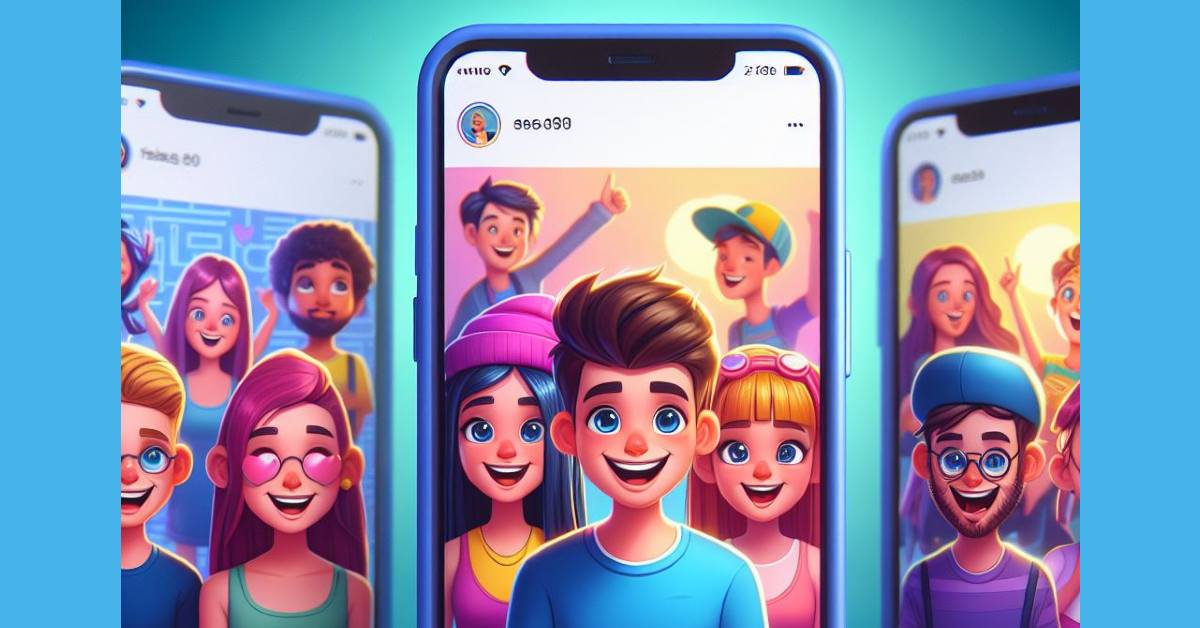 Instagram is the home to independent artists and creators who want their work to reach a wider audience. Like Reddit, you can find a lot of art content on Instagram catering to a particular niche. Browse the relevant hashtags for art to find what you’re looking for. Once you make a few searches, Instagram will suggest similar stuff on your Explore page. Always make sure that you always credit the artist while using their work.
Read Also: Best multi-USB charging adapters for your smartphones and tablets
Instagram is the home to independent artists and creators who want their work to reach a wider audience. Like Reddit, you can find a lot of art content on Instagram catering to a particular niche. Browse the relevant hashtags for art to find what you’re looking for. Once you make a few searches, Instagram will suggest similar stuff on your Explore page. Always make sure that you always credit the artist while using their work.
Read Also: Best multi-USB charging adapters for your smartphones and tablets

 Step 3: Hit Edit at the top of the page and select Copy.
 Step 4: Go to Google Docs and open the document in question.
Step 5: Place your cursor in the spot where you want to insert the slide.
Step 6: Right-click and select Paste or simply press Ctrl+V on your keyboard.
Step 7: Choose whether you want to link the slide to its original presentation or not. This will allow the changes to be reflected on the document when the contents of the slide are changed in the original presentation.
Step 4: Go to Google Docs and open the document in question.
Step 5: Place your cursor in the spot where you want to insert the slide.
Step 6: Right-click and select Paste or simply press Ctrl+V on your keyboard.
Step 7: Choose whether you want to link the slide to its original presentation or not. This will allow the changes to be reflected on the document when the contents of the slide are changed in the original presentation.
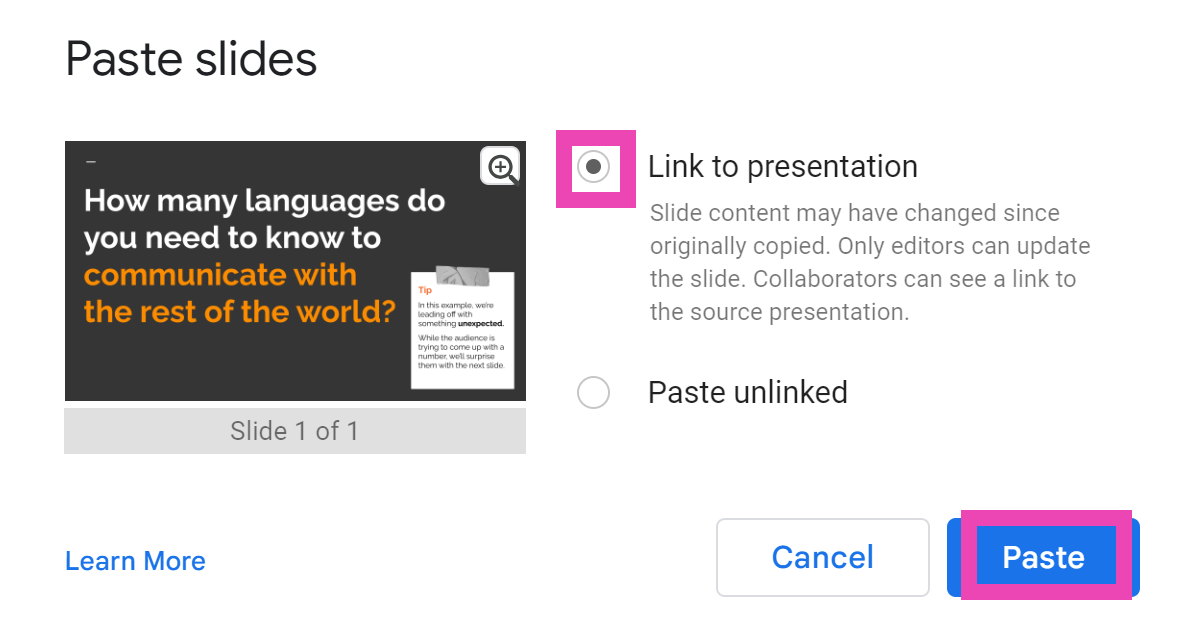 Step 8: When you change the slide in the original presentation, go back to the document and select Update from the slide’s options bar.
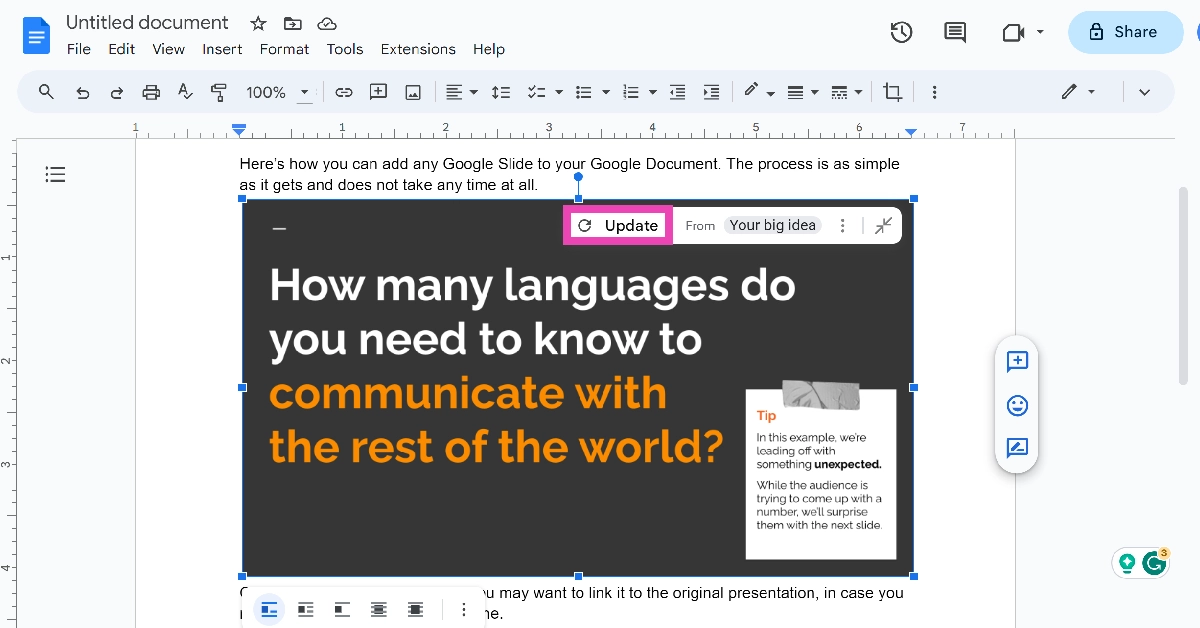

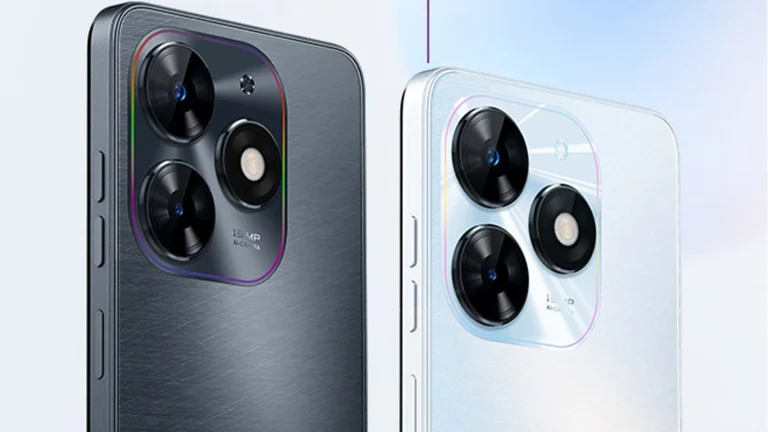
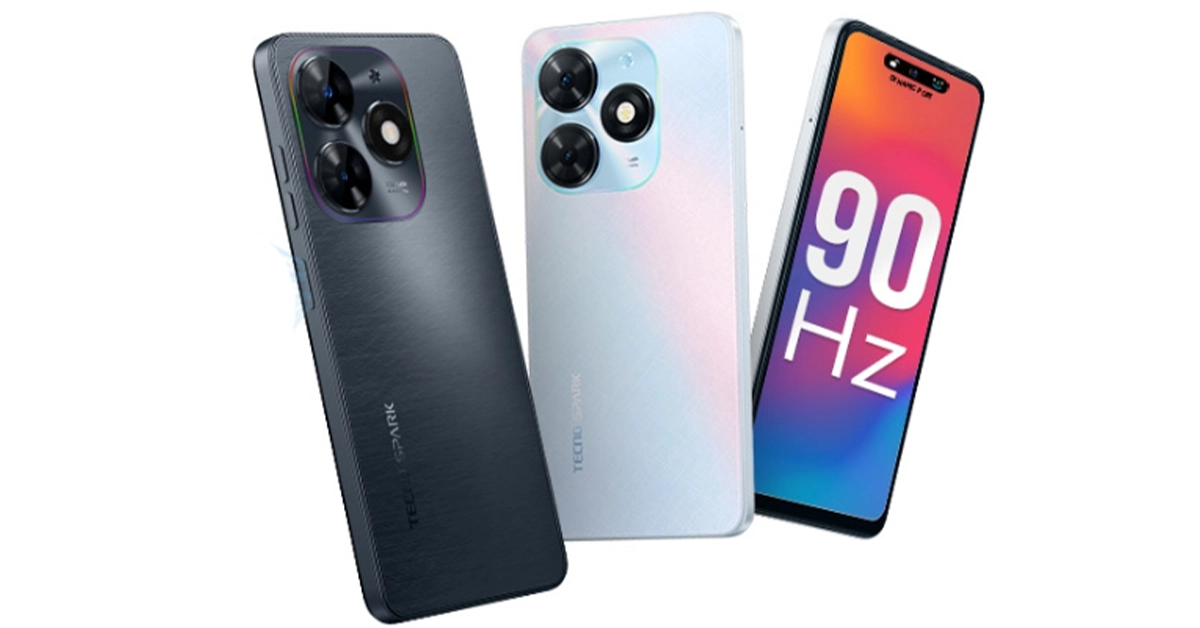



 Step 3: Select Status privacy.
 Step 4: Tap on Instagram.

 Step 2: Select Settings.
 Step 3: Hit Privacy.
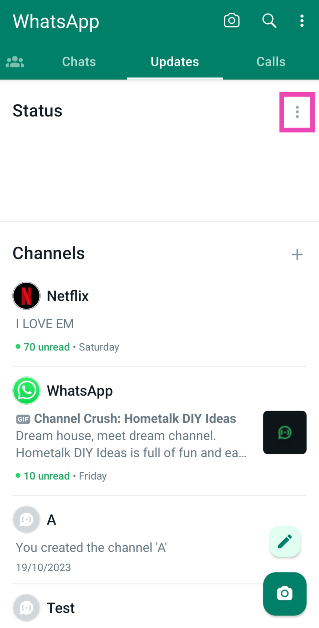 Step 3: Select Status privacy.
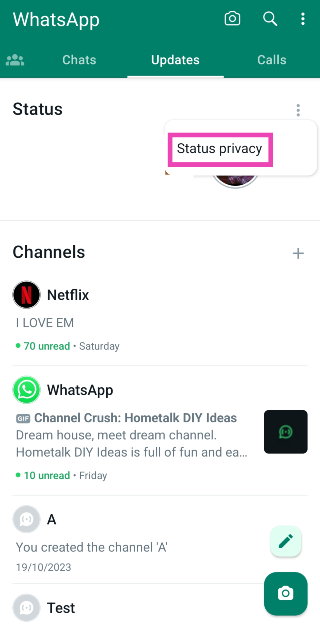 Step 4: Tap on Instagram.
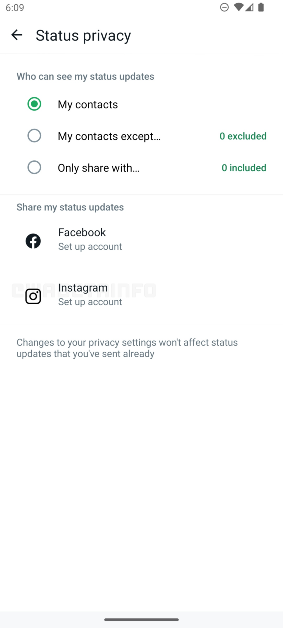
 Step 2: Select Settings.
 Step 3: Hit Privacy.
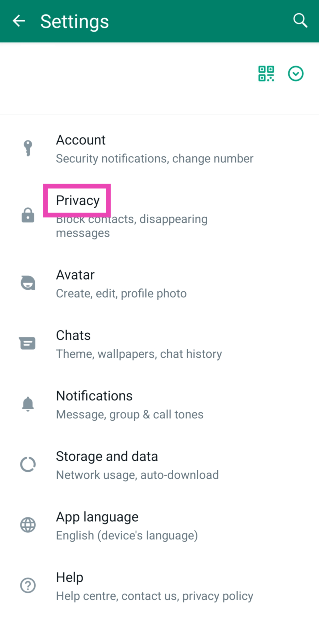 Step 4: Select Status.
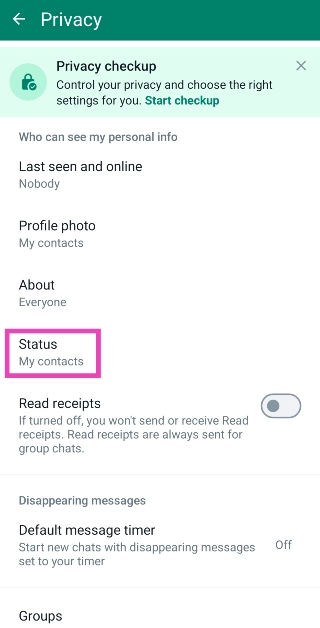 Step 5: Tap on Instagram.
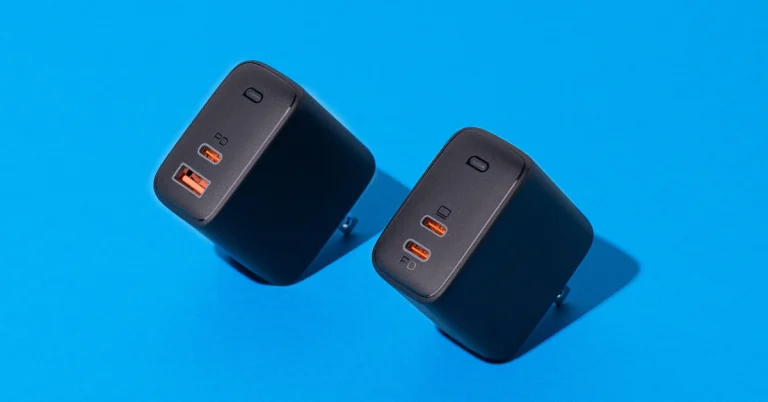
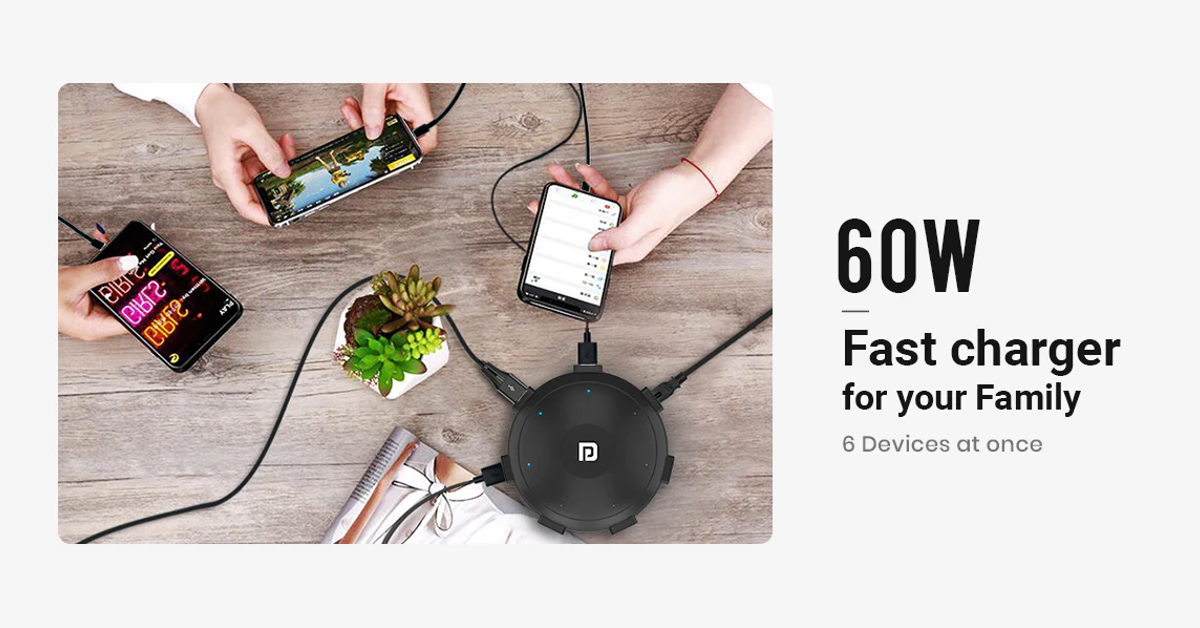 If your work desk is cluttered with wires and charging adapters for every device you own, the Portronics UFO Pro charging station is exactly what you’re looking for. This adapter weighs 60g and has dimensions of 11.6 x 11.6 x 3.3 cm. With 60W of total wattage, the UFO Pro can charge your smartphone up to 50% in 30 minutes (if the phone supports fast charging). There are 6 charging ports on this station – QC 3.0 (1), USB Type-A 2.0 (4), and USB Type-C (1). Having a round form factor, the UFO Pro stays true to its name. This design allows the user to use all six charging ports at once, without any hassle.
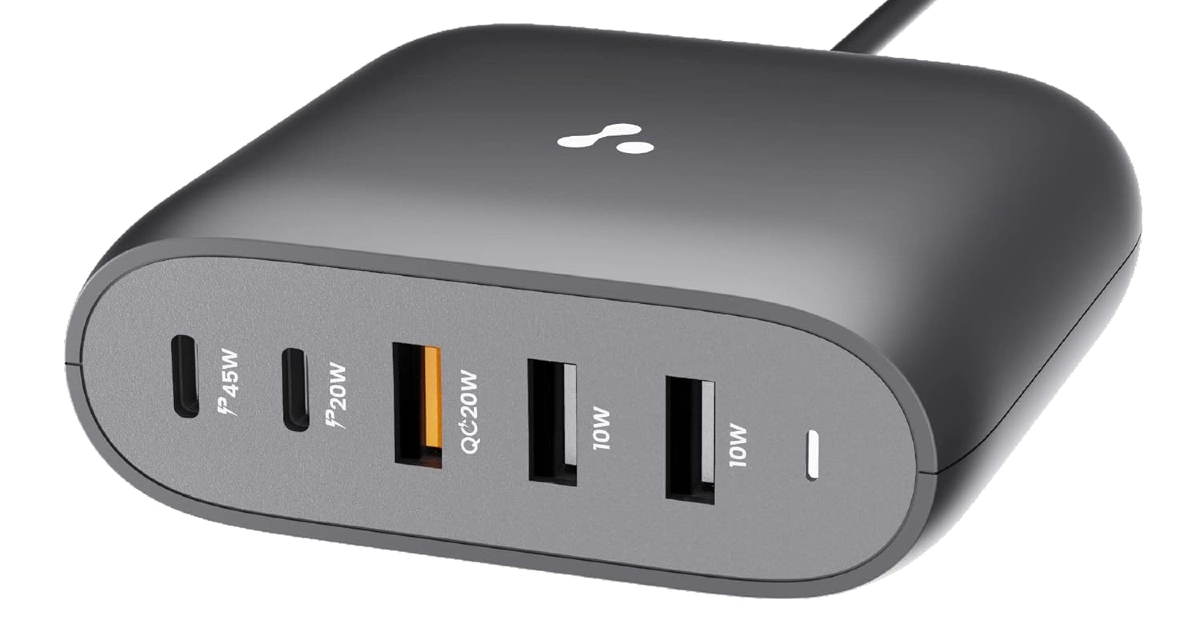 This GaN charger from Ambrane has 2 USB Type-A, 2 USB Type-C, and one Quick Charging USB port. The adapter also supports PD fast charging. The GaN technology makes the adapter compact and portable while also ensuring that it doesn’t overheat while charging multiple devices at once. The Type-C PD charging ports on this adapter are capable of charging laptops as well. If your laptop supports USB Type-C charging, you can completely eliminate the need to carry its bulky charger everywhere you go by switching to this Ambrane adapter. Certainly one of the best multi-USB charging adapters around.
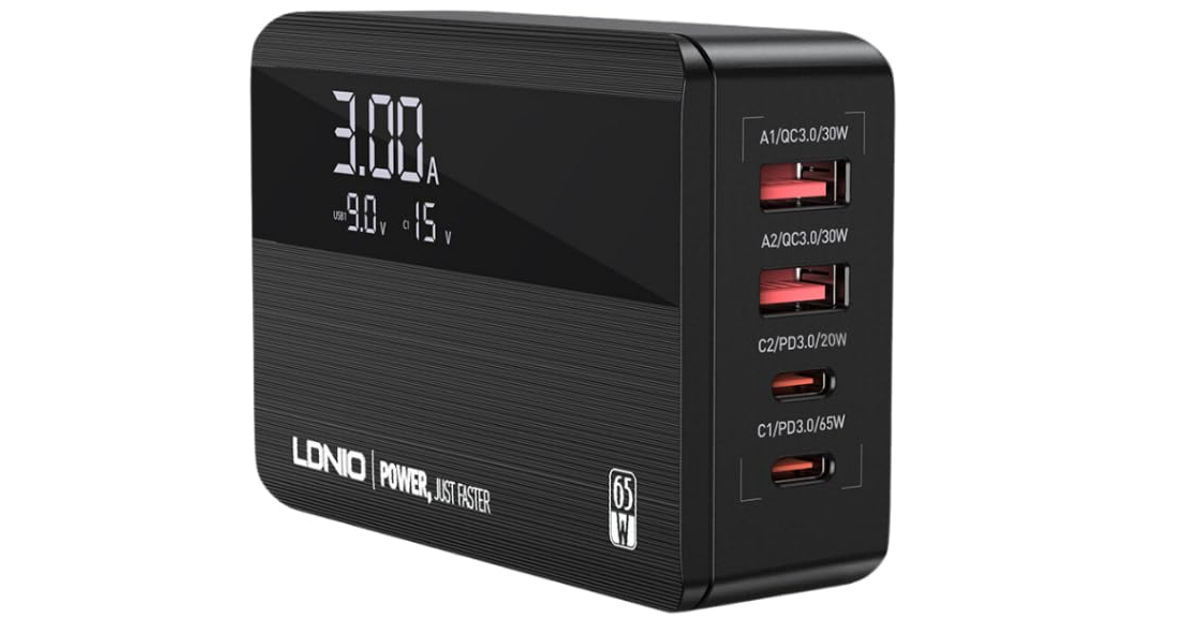 This 65W GaN charger has 4 charging ports – 2 USB Type-C PD, and 2 USB Type-A QC. The 100W equivalent of this adapter costs Rs 3,749. The C1 USB Type-C slot provides the promised maximum wattage of 65W. Apart from smartphones and tablets, you can also use this charger to power your laptops and notebooks. The integrated copper and ABS shell on the adapter makes it temperature-resistant. The Surge Protection System guards it against sudden voltage fluctuations. One of our favourite features offered by this adapter is its integrated display which shows the current output and voltage as per the charging speed.
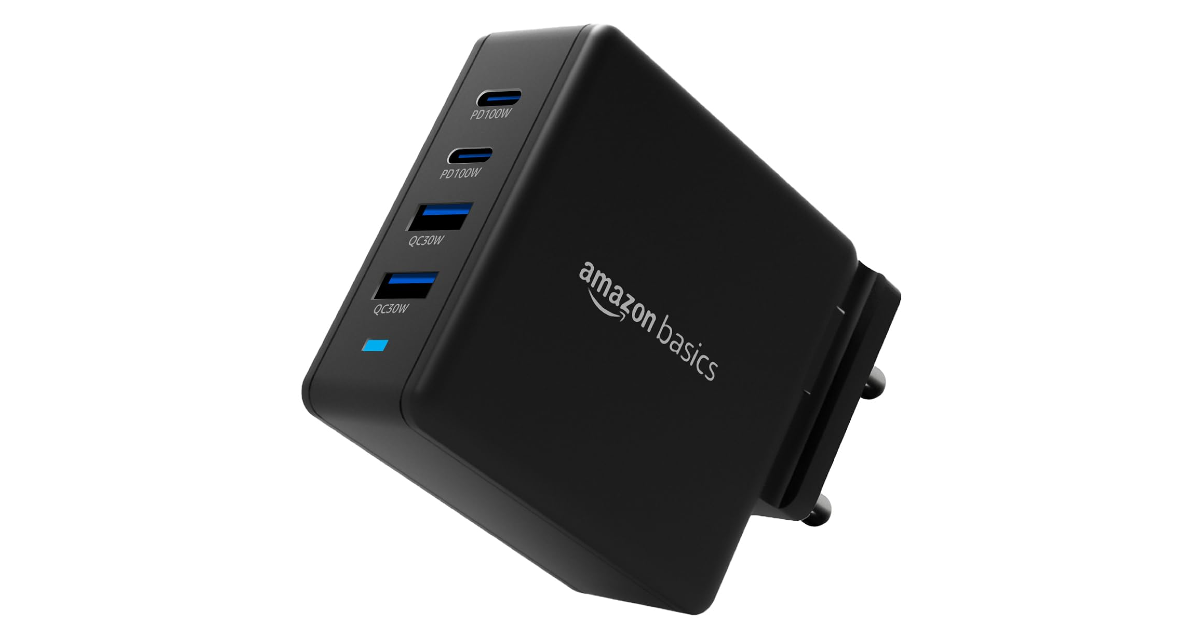 This Amazon Basics power adapter is 35% smaller than your regular charger and offers a whopping 100W of maximum charging speed. There are 2 USB Type-A and 2 USB Type-C ports on this adapter. The latter can be used to power laptops. The intelligent chip inside this adapter adjusts its output voltage when multiple devices are drawing power from it. This prevents overheating and makes the overall charging process very safe. The Amazon Basics GaN charger works for Macbooks and Chromebooks as well.
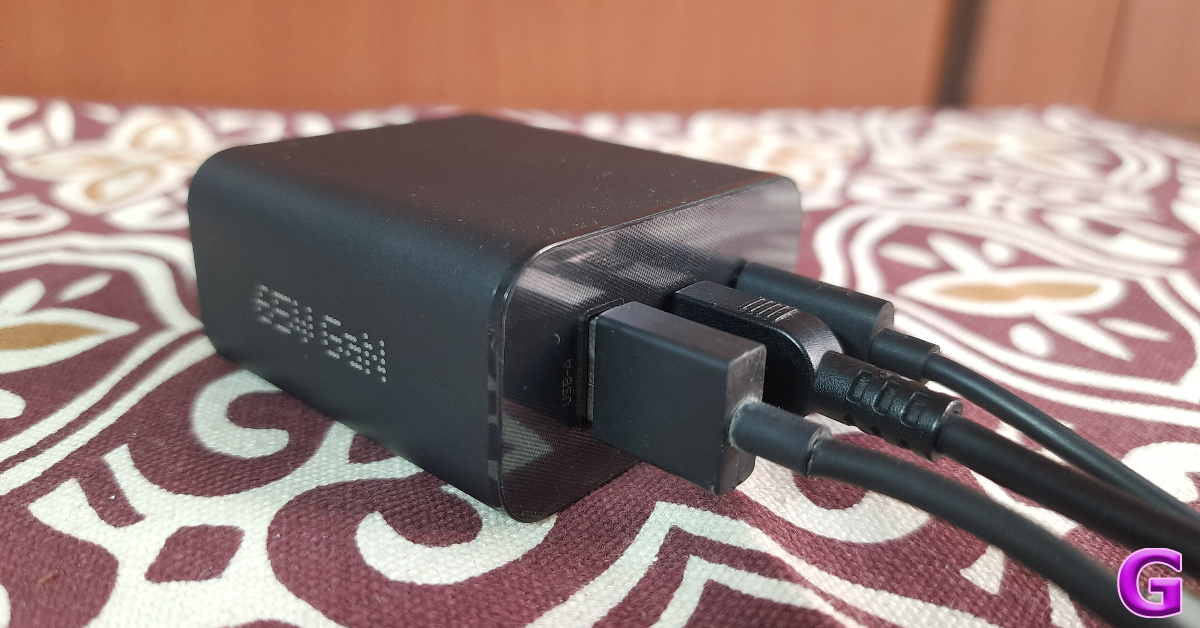 Nothing’s subsidiary brand CMF specialises in budget offerings across different categories. So far the company has released a TWS, a smartwatch, and a 65W GaN charger. We reviewed the latter last month and were mighty impressed by its charging chops. The adapter contains two USB Type-C and one USB Type-A charging slot. Here is the power breakdown for all three ports.
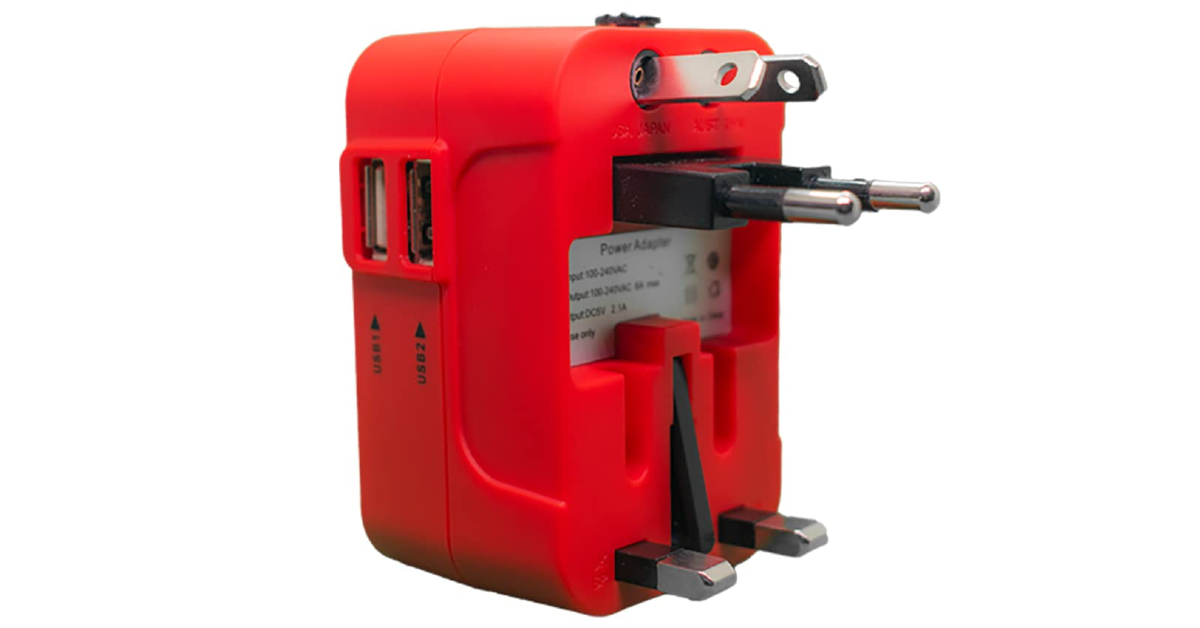 If you need a travel adapter for travelling abroad but don’t want to buy a different one for every country you visit, this product has you covered. The rts 25W universal travel adapter has multiple plugs for the US, EU, UK, and AU regions. This adapter will work perfectly well, whether you’re in Central America or Russia. There are two USB Type-A charging ports on the side of this adapter which allow you to directly charge your smartphone or tablet. You can also connect your regular charger to this adapter. This adapter is a steal at Rs 587.
Read Also: Oppo Reno 10 Pro 5G price dropped by Rs 2,000 in India
If you need a travel adapter for travelling abroad but don’t want to buy a different one for every country you visit, this product has you covered. The rts 25W universal travel adapter has multiple plugs for the US, EU, UK, and AU regions. This adapter will work perfectly well, whether you’re in Central America or Russia. There are two USB Type-A charging ports on the side of this adapter which allow you to directly charge your smartphone or tablet. You can also connect your regular charger to this adapter. This adapter is a steal at Rs 587.
Read Also: Oppo Reno 10 Pro 5G price dropped by Rs 2,000 in India
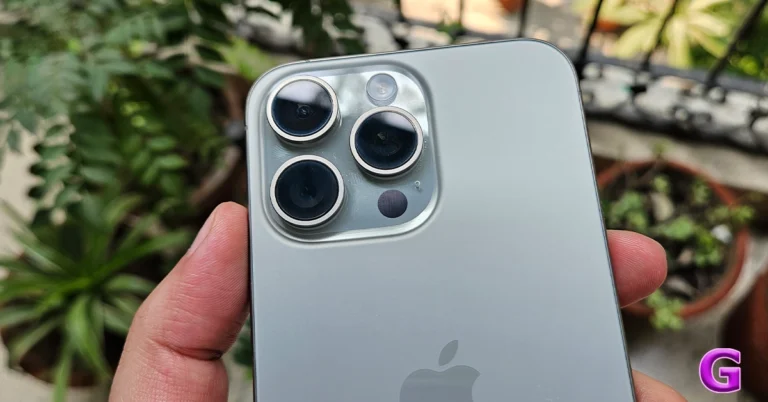
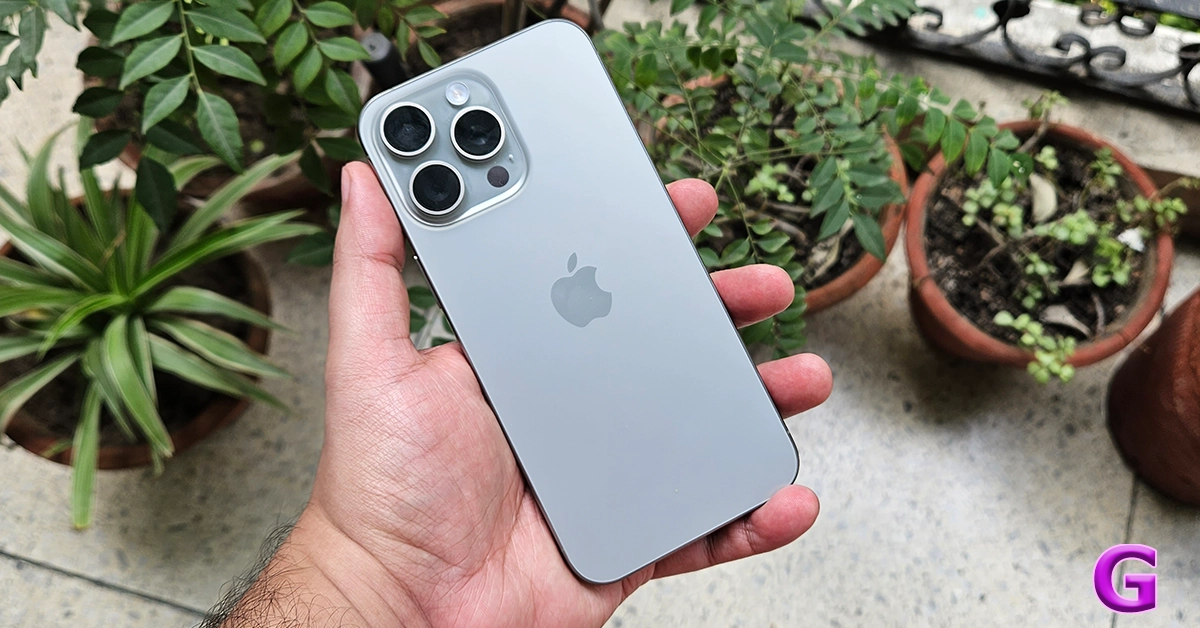 iPhone 15 Pro Max sports a 6.7-inch OLED display and ProMotion with a refresh rate that ranges between 1Hz and 120Hz support. The iPhone comes with Dynamic Island. The device is powered by an A17 Pro SoC.
For photos, the iPhone (iPhone 15 Pro Max Review) includes a triple rear camera unit with a 48-megapixel wide-angle sensor, a 12-megapixel ultra-wide sensor, and a 12-megapixel telephoto sensor with a periscope lens. For Selfies, there is a 12-megapixel lens on the iPhone 15 Pro Max.
In addition to this, there is a USB Type-C port for charging. The phone runs on iOS 17 out-of-the-box.
Price starts at Rs 1,59,900
Also Read: 5 best camera smartphones under Rs 50,000
iPhone 15 Pro Max sports a 6.7-inch OLED display and ProMotion with a refresh rate that ranges between 1Hz and 120Hz support. The iPhone comes with Dynamic Island. The device is powered by an A17 Pro SoC.
For photos, the iPhone (iPhone 15 Pro Max Review) includes a triple rear camera unit with a 48-megapixel wide-angle sensor, a 12-megapixel ultra-wide sensor, and a 12-megapixel telephoto sensor with a periscope lens. For Selfies, there is a 12-megapixel lens on the iPhone 15 Pro Max.
In addition to this, there is a USB Type-C port for charging. The phone runs on iOS 17 out-of-the-box.
Price starts at Rs 1,59,900
Also Read: 5 best camera smartphones under Rs 50,000
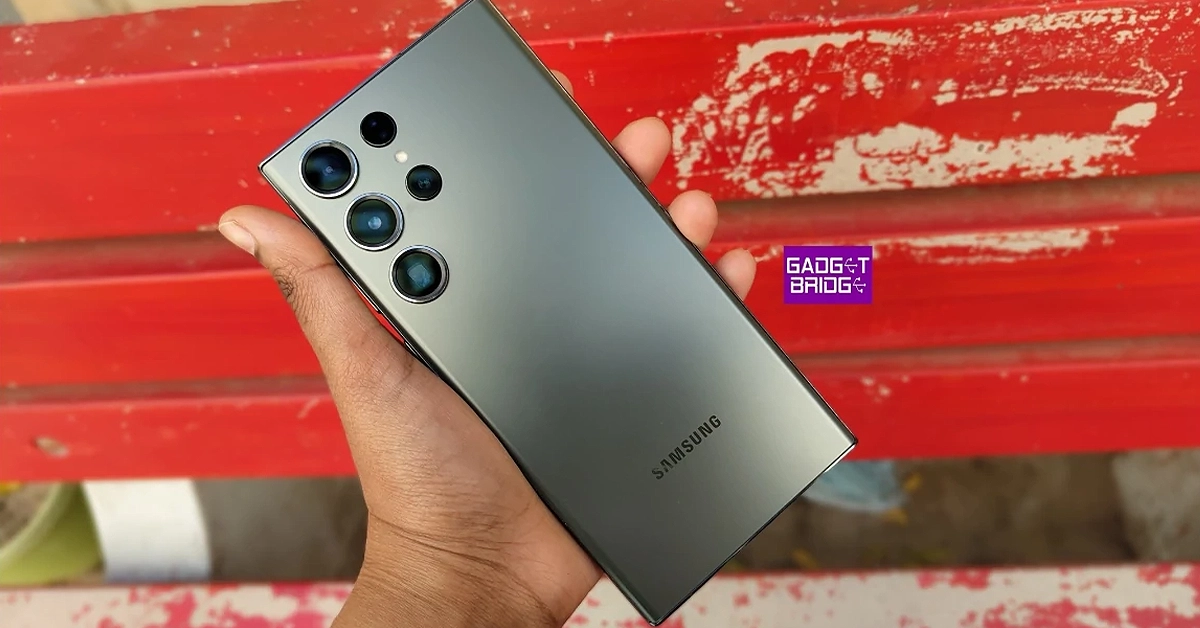 Samsung Galaxy S23 Ultra features a 6.8-inch Edge QHD+ Dynamic AMOLED 2X Display with dynamic refresh rate ranging from 1 to 120 Hz. The phone is powered by a Qualcomm Snapdragon 8 Gen 2 SoC and runs Android 13 with One UI 5.1. The device comes with a Samsung S Pen stylus.
The camera system (Samsung Galaxy S23 Ultra Review) includes- a 200-megapixel sensor, 10-megapixel telephoto lenses with a 3x optical zoom, a 12-megapixel ultra-wide camera with a 120-degree field of view, and an f/2.2 aperture, as well as a final 10-megapixel telephoto sensor. Up front, there is a 12-megapixel selfie camera. The phone is backed by a 5,000mAh battery (45W wired and Fast Wireless Charging 2.0).
Price starts at Rs 1,24,999
Samsung Galaxy S23 Ultra features a 6.8-inch Edge QHD+ Dynamic AMOLED 2X Display with dynamic refresh rate ranging from 1 to 120 Hz. The phone is powered by a Qualcomm Snapdragon 8 Gen 2 SoC and runs Android 13 with One UI 5.1. The device comes with a Samsung S Pen stylus.
The camera system (Samsung Galaxy S23 Ultra Review) includes- a 200-megapixel sensor, 10-megapixel telephoto lenses with a 3x optical zoom, a 12-megapixel ultra-wide camera with a 120-degree field of view, and an f/2.2 aperture, as well as a final 10-megapixel telephoto sensor. Up front, there is a 12-megapixel selfie camera. The phone is backed by a 5,000mAh battery (45W wired and Fast Wireless Charging 2.0).
Price starts at Rs 1,24,999
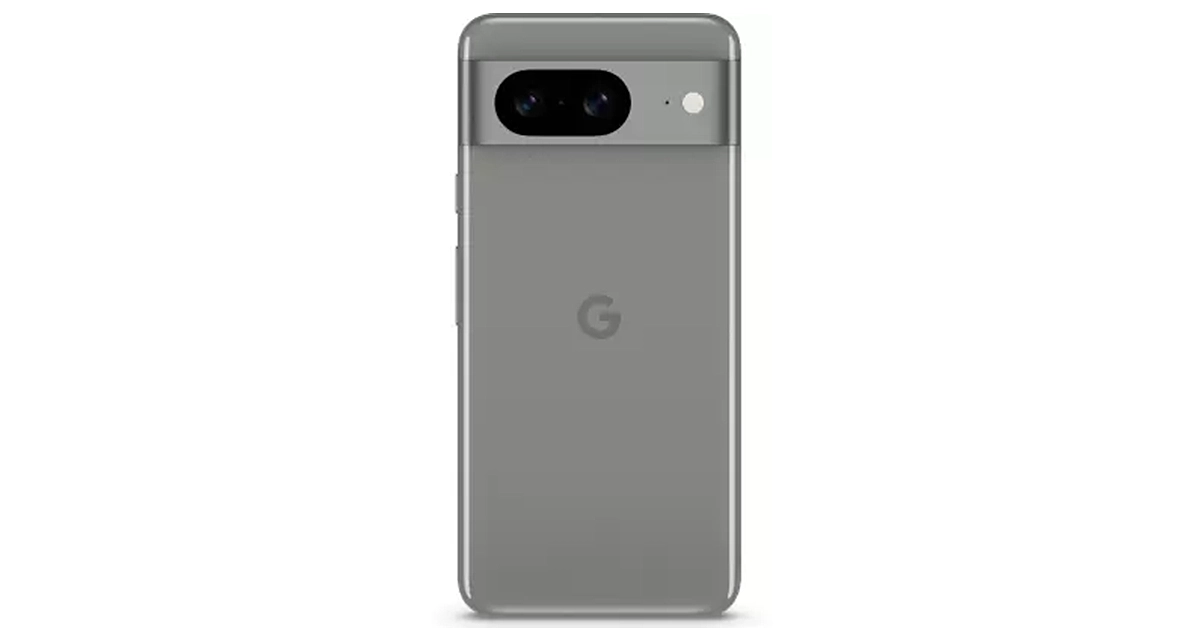 The Pixel 8 features a 6.2-inch FHD+ Actua display which supports an Adaptive refresh rate ranging between 60Hz and 120Hz. Under the hood, there is a Tensor G3 SoC with a Titan M2 security coprocessor. It runs on the latest edition of Android software, Android 14 with Pixel-exclusive features onboard. The phone comes with a 10.5-megapixel Dual PD sensor for selfies. There is a dual rear camera setup that includes a 50MP Octa PD sensor and a 12 MP ultrawide camera with an auto-focus. The Google Pixel 8 has a 4,485mAh battery with 24W wired and 12W wireless fast charging support.
Price starts at Rs 75,999
The Pixel 8 features a 6.2-inch FHD+ Actua display which supports an Adaptive refresh rate ranging between 60Hz and 120Hz. Under the hood, there is a Tensor G3 SoC with a Titan M2 security coprocessor. It runs on the latest edition of Android software, Android 14 with Pixel-exclusive features onboard. The phone comes with a 10.5-megapixel Dual PD sensor for selfies. There is a dual rear camera setup that includes a 50MP Octa PD sensor and a 12 MP ultrawide camera with an auto-focus. The Google Pixel 8 has a 4,485mAh battery with 24W wired and 12W wireless fast charging support.
Price starts at Rs 75,999
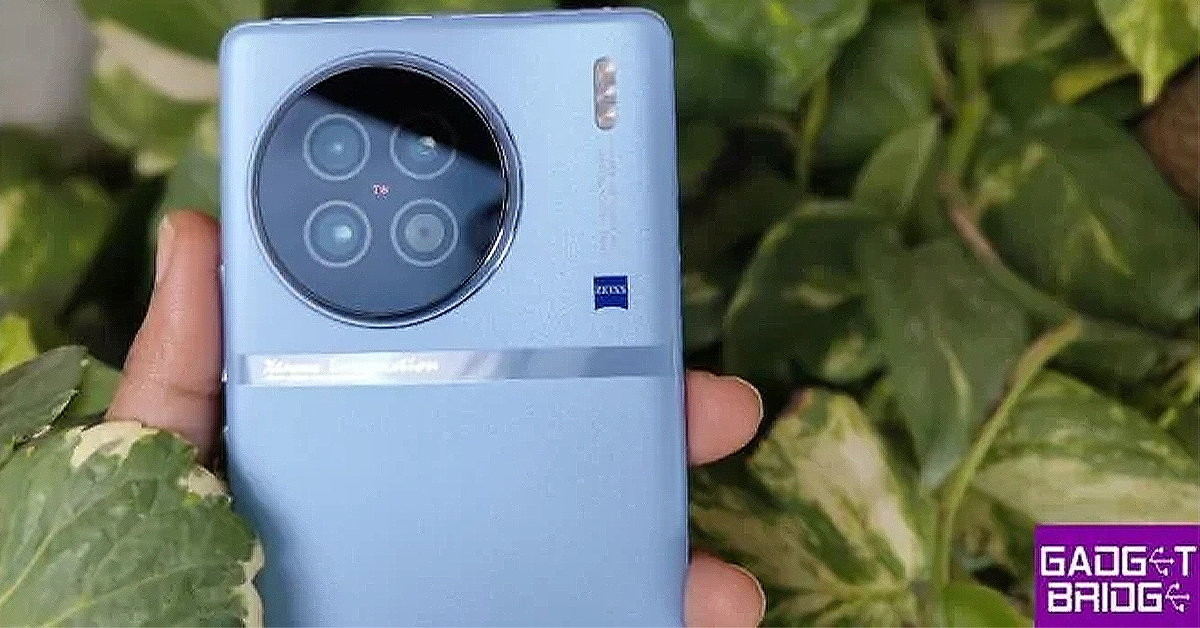 The Vivo X90 features a 6.78-inch AMOLED display and a refresh rate of up to 120 Hz. The device runs on OriginOS 3 and runs Android 13 and is powered by an octa-core 4nm MediaTek Dimensity 9200 SoC and a G715 GPU. It (Vivo X90 review)comes with a Zeiss-branded triple rear camera unit consisting of a 12-megapixel ultra-wide-angle camera, a 12-megapixel portrait camera and a 50-megapixel main sensor. The smartphone sports a 32-megapixel selfie camera.
Price starts at Rs 59,500
The Vivo X90 features a 6.78-inch AMOLED display and a refresh rate of up to 120 Hz. The device runs on OriginOS 3 and runs Android 13 and is powered by an octa-core 4nm MediaTek Dimensity 9200 SoC and a G715 GPU. It (Vivo X90 review)comes with a Zeiss-branded triple rear camera unit consisting of a 12-megapixel ultra-wide-angle camera, a 12-megapixel portrait camera and a 50-megapixel main sensor. The smartphone sports a 32-megapixel selfie camera.
Price starts at Rs 59,500
 OnePlus 11 5G is highlighted with a 6.7-inch Samsung LTPO 3.0 AMOLED display with an adjustable refresh rate of up to 120Hz. The device is powered by an octa-core 4nm Snapdragon 8 Gen 2 SoC and an Adreno 740 GPU. It (OnePlus 11 5G Review)comes with a triple rear camera setup that includes a 50-megapixel sensor with OIS, a 32-megapixel portrait sensor and a 48-megapixel Sony IMX58 ultra wide-angle sensor. For selfies, there is a 16-megapixel sensor.
The handset has a 5,000mAh dual-cell battery with 100W SuperVOOC charging support.
Price starts at Rs 56,999
OnePlus 11 5G is highlighted with a 6.7-inch Samsung LTPO 3.0 AMOLED display with an adjustable refresh rate of up to 120Hz. The device is powered by an octa-core 4nm Snapdragon 8 Gen 2 SoC and an Adreno 740 GPU. It (OnePlus 11 5G Review)comes with a triple rear camera setup that includes a 50-megapixel sensor with OIS, a 32-megapixel portrait sensor and a 48-megapixel Sony IMX58 ultra wide-angle sensor. For selfies, there is a 16-megapixel sensor.
The handset has a 5,000mAh dual-cell battery with 100W SuperVOOC charging support.
Price starts at Rs 56,999
 The Xiaomi 12 Pro comes with a 6.72-inch LTPO WQHD+ E5 AMOLED display with a dynamic refresh rate of 1 to 120Hz. The phone is powered by an octa-core Snapdragon 8 Gen 1 SoC with an Adreno 730 GPU. It runs Android 12 with MIUI 13 on top. The smartphone’s triple rear camera system includes a 50-megapixel Sony IMX707 primary sensor, a 50-megapixel ultra-wide-angle lens, and a 50-megapixel telephoto sensor. Moreover, the device (Xiaomi 12 Pro Review)has a 32-megapixel selfie camera sensor. The Xiaomi 12 Pro packs a 4,600mAh with 120W Xiaomi Hypercharge fast wired charging.
Price starts at Rs 41,999
The Xiaomi 12 Pro comes with a 6.72-inch LTPO WQHD+ E5 AMOLED display with a dynamic refresh rate of 1 to 120Hz. The phone is powered by an octa-core Snapdragon 8 Gen 1 SoC with an Adreno 730 GPU. It runs Android 12 with MIUI 13 on top. The smartphone’s triple rear camera system includes a 50-megapixel Sony IMX707 primary sensor, a 50-megapixel ultra-wide-angle lens, and a 50-megapixel telephoto sensor. Moreover, the device (Xiaomi 12 Pro Review)has a 32-megapixel selfie camera sensor. The Xiaomi 12 Pro packs a 4,600mAh with 120W Xiaomi Hypercharge fast wired charging.
Price starts at Rs 41,999
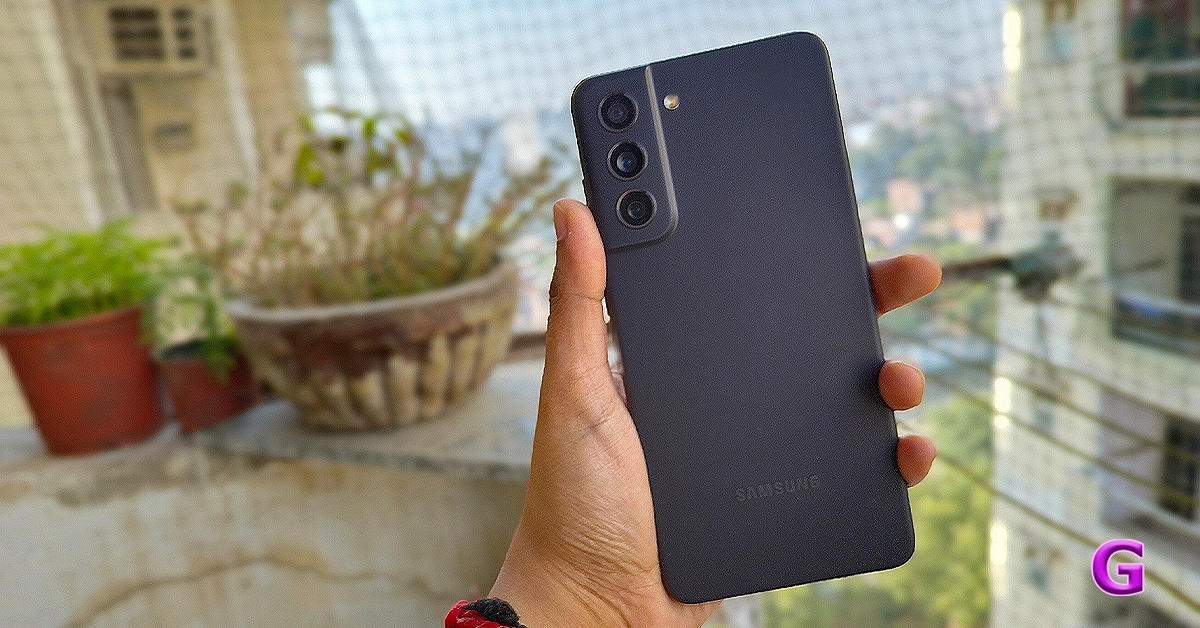 Samsung Galaxy S21 FE 5G has a 6.4-inch FHD+ Dynamic AMOLED 2X Display with a 240Hz touch sampling rate, an incredibly smooth 120Hz refresh rate, and AI-based blue light control. It is powered by a Snapdragon 888 SoC.
Samsung Galaxy S21 FE 5G comes with a 12-megapixel primary sensor with an f/1.8 wide-angle lens, a 12-megapixel ultra-wide sensor, and an 8-megapixel telephoto sensor making up the triple rear camera setup on the Galaxy S21 FE 5G. For selfies and video calls, the gadget (Samsung Galaxy S21 FE 5G review) also includes a 32-megapixel front camera with an f/2.2 aperture.
Price starts at Rs 33,900
Samsung Galaxy S21 FE 5G has a 6.4-inch FHD+ Dynamic AMOLED 2X Display with a 240Hz touch sampling rate, an incredibly smooth 120Hz refresh rate, and AI-based blue light control. It is powered by a Snapdragon 888 SoC.
Samsung Galaxy S21 FE 5G comes with a 12-megapixel primary sensor with an f/1.8 wide-angle lens, a 12-megapixel ultra-wide sensor, and an 8-megapixel telephoto sensor making up the triple rear camera setup on the Galaxy S21 FE 5G. For selfies and video calls, the gadget (Samsung Galaxy S21 FE 5G review) also includes a 32-megapixel front camera with an f/2.2 aperture.
Price starts at Rs 33,900
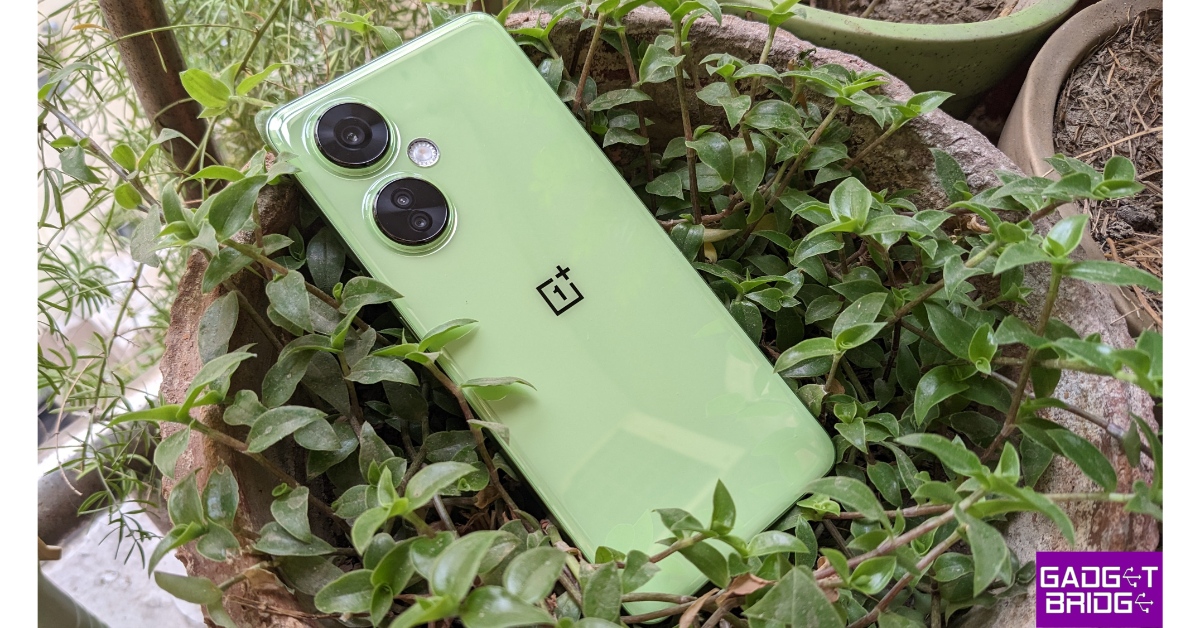 The OnePlus Nord CE 3 Lite is powered by an octa-core Snapdragon 695 SoC with Adreno 619 GPU for graphics. It also features a 6.72-inch full-HD+ LCD with 1,080×2,400 pixels of resolution. The phone packs a 5,000mAh battery that supports 67W SuperVOOC fast charging. It (OnePlus Nord CE 3 Lite Review) comes with a triple rear camera setup that includes a 108-megapixel Samsung HM6 sensor with an f/1.75 aperture and EIS support. It also consists of a 2-megapixel macro lens and another 2-megapixel depth sensor. There is a 16-megapixel front-facing camera for selfies.
Price starts at Rs 19,999
The OnePlus Nord CE 3 Lite is powered by an octa-core Snapdragon 695 SoC with Adreno 619 GPU for graphics. It also features a 6.72-inch full-HD+ LCD with 1,080×2,400 pixels of resolution. The phone packs a 5,000mAh battery that supports 67W SuperVOOC fast charging. It (OnePlus Nord CE 3 Lite Review) comes with a triple rear camera setup that includes a 108-megapixel Samsung HM6 sensor with an f/1.75 aperture and EIS support. It also consists of a 2-megapixel macro lens and another 2-megapixel depth sensor. There is a 16-megapixel front-facing camera for selfies.
Price starts at Rs 19,999
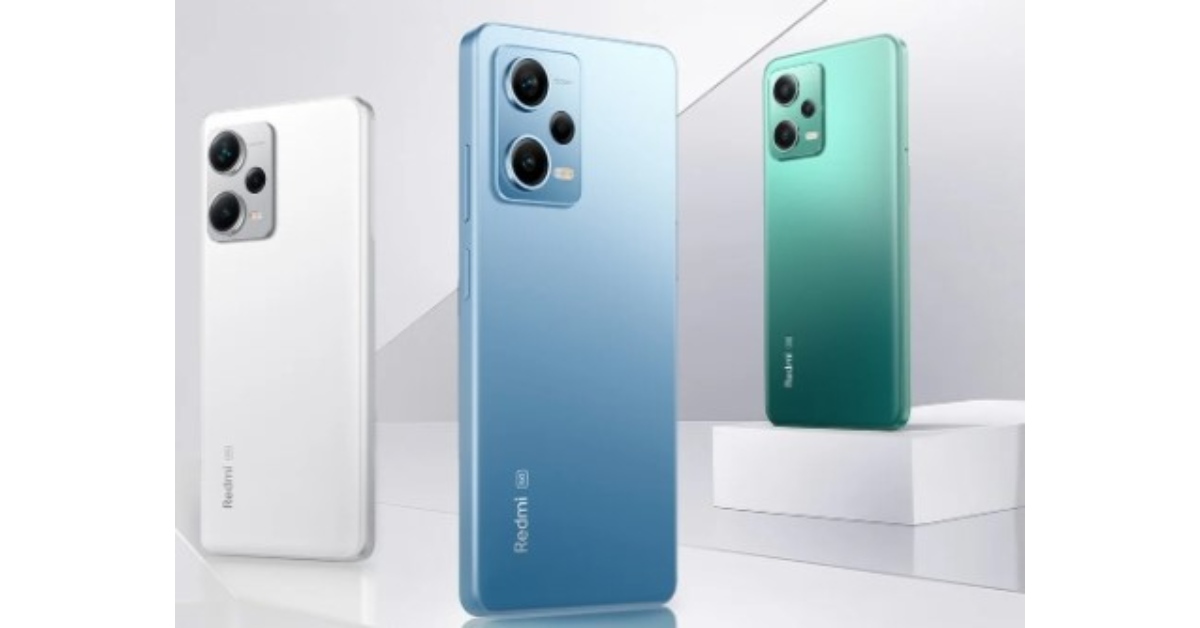 The Redmi Note 12 5G has a 6.67-inch and boasts a 1,080 x 2,400-pixel resolution. The phone is powered by a Qualcomm Snapdragon 4 Gen 1 octa-core SoC. It runs on MIUI 13, an Android 12 skin.
The Redmi Note 12 5G features a 48-megapixel primary sensor and a 2-megapixel depth sensor as part of its dual rear camera system. For selfies, the phone boasts an 8-megapixel front camera.
Price starts at Rs 15,499
The Redmi Note 12 5G has a 6.67-inch and boasts a 1,080 x 2,400-pixel resolution. The phone is powered by a Qualcomm Snapdragon 4 Gen 1 octa-core SoC. It runs on MIUI 13, an Android 12 skin.
The Redmi Note 12 5G features a 48-megapixel primary sensor and a 2-megapixel depth sensor as part of its dual rear camera system. For selfies, the phone boasts an 8-megapixel front camera.
Price starts at Rs 15,499
 The Vivo Y27 comes with a 6.64-inch FHD+ LCD Sunlight display. It operates on FunTouch OS 13 which is based on the Android 13 operating system. Under the hood, there is MediaTek Helio G85 chipset and its Extended RAM 3.0 functionality.
The handset features a dual rear camera setup with a 50 MP primary camera and a 2 MP bokeh camera. It has a variety of camera functions, including Bokeh Flare Portrait, Super Night Mode, and Super Night Selfie Mode. It has an 8 MP front camera with the Aura Screen Light function for selfies, ensuring sharp, high-resolution selfies in any setting. It includes a 5,000mAh battery and a quick 44W FlashCharge.
Price starts at Rs 13,999
The Vivo Y27 comes with a 6.64-inch FHD+ LCD Sunlight display. It operates on FunTouch OS 13 which is based on the Android 13 operating system. Under the hood, there is MediaTek Helio G85 chipset and its Extended RAM 3.0 functionality.
The handset features a dual rear camera setup with a 50 MP primary camera and a 2 MP bokeh camera. It has a variety of camera functions, including Bokeh Flare Portrait, Super Night Mode, and Super Night Selfie Mode. It has an 8 MP front camera with the Aura Screen Light function for selfies, ensuring sharp, high-resolution selfies in any setting. It includes a 5,000mAh battery and a quick 44W FlashCharge.
Price starts at Rs 13,999 


 Vivo T2 5G runs on Android 13-based Funtouch OS 13. It features a 6.38-inch AMOLED display with a refresh rate of 90Hz and a 360Hz touch sampling rate. It is powered by a Snapdragon 695 SoC. The device includes a dual rear camera setup that includes a 64-megapixel primary sensor and a 16-megapixel sensor. The phone packs a 4500mAh battery, with 44W fast charging support.
 The Vivo Y56 5G comes with a 6.58-inch full-HD+ LCD screen. It runs on Android 13-based Funtouch OS 13 and is equipped with MediaTek Dimensity 700 SoC. The smartphone sports a dual rear camera setup that includes a 50-megapixel primary sensor and a 2-megapixel secondary sensor. There is a 16-megapixel front-facing camera with an f/2.0 aperture for selfies and video calls. Additionally, the phone packs a 5,000mAh battery that supports 18W rapid charging.
  Vivo T2 5G runs on Android 13-based Funtouch OS 13. It features a 6.38-inch AMOLED display with a refresh rate of 90Hz and a 360Hz touch sampling rate. It is powered by a Snapdragon 695 SoC. The device includes a dual rear camera setup that includes a 64-megapixel primary sensor and a 16-megapixel sensor. The phone packs a 4500mAh battery, with 44W fast charging support.
 The Vivo Y56 5G comes with a 6.58-inch full-HD+ LCD screen. It runs on Android 13-based Funtouch OS 13 and is equipped with MediaTek Dimensity 700 SoC. The smartphone sports a dual rear camera setup that includes a 50-megapixel primary sensor and a 2-megapixel secondary sensor. There is a 16-megapixel front-facing camera with an f/2.0 aperture for selfies and video calls. Additionally, the phone packs a 5,000mAh battery that supports 18W rapid charging.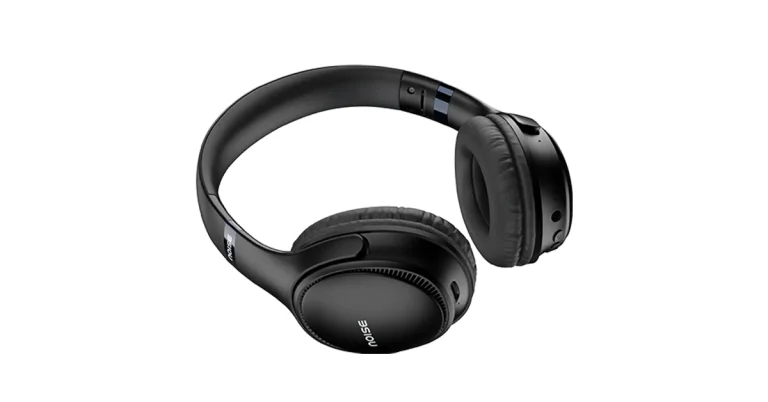
 The Noise Three comes equipped with a 40mm driver for rich, high-quality sound. As per the company, users will experience videos, movies, games, music, and more with high-quality clarity. With Gaming Mode turned on it offers reduced latency of 45ms. The Noise Bluetooth headphones come with an IPX5 water resistance rating.
Also Read: Oppo Reno 10 Pro 5G price dropped by Rs 2,000 in India
In addition to this, there is Bluetooth Version 5.3 that guarantees advanced connectivity. It has a wireless range of 10m and supports auto pairing. The headphones are compatible with both Android and iOS. For multitasking the audio device comes with a dual device pairing feature allowing the user to pair two devices simultaneously and take calls, watch videos and stream music.
The Noise Three comes equipped with a 40mm driver for rich, high-quality sound. As per the company, users will experience videos, movies, games, music, and more with high-quality clarity. With Gaming Mode turned on it offers reduced latency of 45ms. The Noise Bluetooth headphones come with an IPX5 water resistance rating.
Also Read: Oppo Reno 10 Pro 5G price dropped by Rs 2,000 in India
In addition to this, there is Bluetooth Version 5.3 that guarantees advanced connectivity. It has a wireless range of 10m and supports auto pairing. The headphones are compatible with both Android and iOS. For multitasking the audio device comes with a dual device pairing feature allowing the user to pair two devices simultaneously and take calls, watch videos and stream music.
 The Noise Three comes equipped with a 40mm driver for rich, high-quality sound. As per the company, users will experience videos, movies, games, music, and more with high-quality clarity. With Gaming Mode turned on it offers reduced latency of 45ms. The Noise Bluetooth headphones come with an IPX5 water resistance rating.
Also Read: Oppo Reno 10 Pro 5G price dropped by Rs 2,000 in India
In addition to this, there is Bluetooth Version 5.3 that guarantees advanced connectivity. It has a wireless range of 10m and supports auto pairing. The headphones are compatible with both Android and iOS. For multitasking the audio device comes with a dual device pairing feature allowing the user to pair two devices simultaneously and take calls, watch videos and stream music.
The Noise Three comes equipped with a 40mm driver for rich, high-quality sound. As per the company, users will experience videos, movies, games, music, and more with high-quality clarity. With Gaming Mode turned on it offers reduced latency of 45ms. The Noise Bluetooth headphones come with an IPX5 water resistance rating.
Also Read: Oppo Reno 10 Pro 5G price dropped by Rs 2,000 in India
In addition to this, there is Bluetooth Version 5.3 that guarantees advanced connectivity. It has a wireless range of 10m and supports auto pairing. The headphones are compatible with both Android and iOS. For multitasking the audio device comes with a dual device pairing feature allowing the user to pair two devices simultaneously and take calls, watch videos and stream music.
 It has a total of four play modes- Gaming mode, TF card, BT mode and auxiliary mode.
The wireless headphones are said to produce an impressive playtime of up to 70 hours at 60 percent volume. The headset offers 200 minutes of power in just 10 min charging thanks to Instacharge tech. However, it takes up to 60 minutes to get fully charged. Lastly, the headphones support Siri and Google Assistant.
It has a total of four play modes- Gaming mode, TF card, BT mode and auxiliary mode.
The wireless headphones are said to produce an impressive playtime of up to 70 hours at 60 percent volume. The headset offers 200 minutes of power in just 10 min charging thanks to Instacharge tech. However, it takes up to 60 minutes to get fully charged. Lastly, the headphones support Siri and Google Assistant.
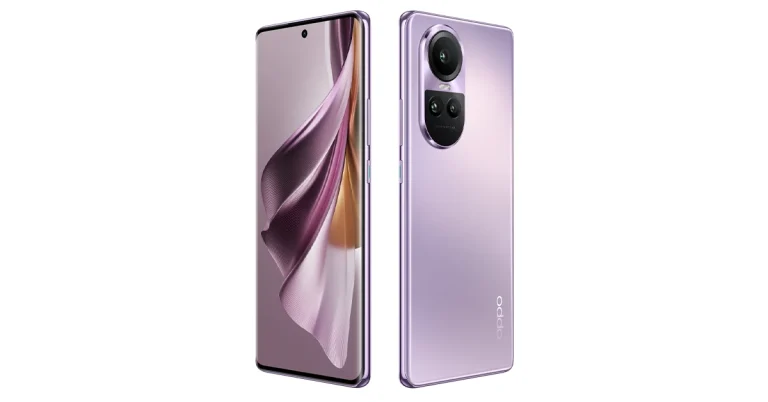
 iQoo has announced an exclusive priority pass for the iQoo fans. As per the company, the iQoo 12 Priority Pass will be made available for a limited duration. The priority pass holders will have the opportunity to reserve iQOO 12 ahead of time through a special window that will open for three days from December 5 at 12 PM to 7 on Amazon and iQoo.com.
iQoo 12 exclusive Priority Pass can be redeemed to buy iQOO 12, 24 Hours before the sale starts. When availing of the limited-time Priority Pass you will get the following:
iQoo has announced an exclusive priority pass for the iQoo fans. As per the company, the iQoo 12 Priority Pass will be made available for a limited duration. The priority pass holders will have the opportunity to reserve iQOO 12 ahead of time through a special window that will open for three days from December 5 at 12 PM to 7 on Amazon and iQoo.com.
iQoo 12 exclusive Priority Pass can be redeemed to buy iQOO 12, 24 Hours before the sale starts. When availing of the limited-time Priority Pass you will get the following:
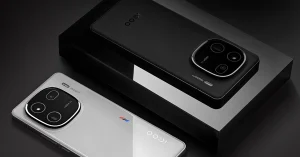 iQoo has announced an exclusive priority pass for the iQoo fans. As per the company, the iQoo 12 Priority Pass will be made available for a limited duration. The priority pass holders will have the opportunity to reserve iQOO 12 ahead of time through a special window that will open for three days from December 5 at 12 PM to 7 on Amazon and iQoo.com.
iQoo 12 exclusive Priority Pass can be redeemed to buy iQOO 12, 24 Hours before the sale starts. When availing of the limited-time Priority Pass you will get the following:
iQoo has announced an exclusive priority pass for the iQoo fans. As per the company, the iQoo 12 Priority Pass will be made available for a limited duration. The priority pass holders will have the opportunity to reserve iQOO 12 ahead of time through a special window that will open for three days from December 5 at 12 PM to 7 on Amazon and iQoo.com.
iQoo 12 exclusive Priority Pass can be redeemed to buy iQOO 12, 24 Hours before the sale starts. When availing of the limited-time Priority Pass you will get the following:


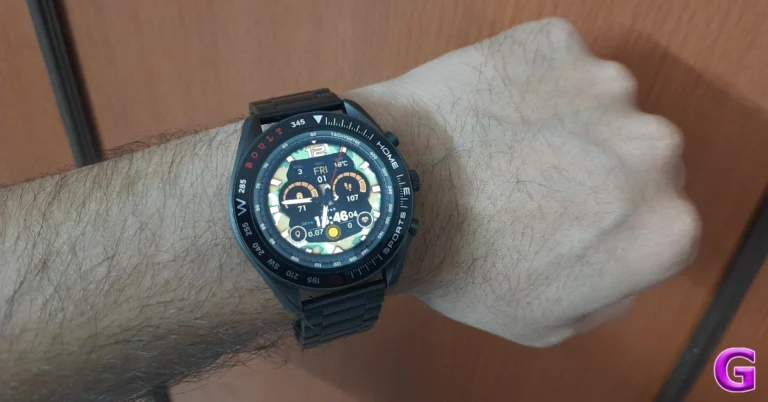
 Despite the Mirage being a budget smartwatch, the lack of features like Always on Display and Adaptable Brightness feel like a sore miss. While these aren’t dealbreakers for a lot of people, some may find their absence off-putting. While, the Raise to Wake feature works just fine on the smartwatch, an Always On Display is perfect if you want to add to the watch’s aesthetic value.
The software experience offered by Boult Mirage is also very satisfactory. It is the only smartwatch we have seen in this segment that has integrated games. While they aren’t anything out of the blue, they are good enough to kill some time. The back button and rotating crown make it very easy to navigate the interface. Features like Bluetooth calling and notification access work perfectly fine on the watch. The only downside is that you can store only 8 contacts on the watch itself. If you need to call someone whose contact isn’t saved on the watch, you would have to rely on the dialer. The call quality is satisfactory in indoor conditions but depreciates significantly when calling amidst a lot of noise.
It takes up to 2 hours to fully charge the smartwatch. We operated the Boult Mirage smartwatch at the highest possible brightness and kept it connected to the phone for Bluetooth calling throughout the review. We also used the watch to track hikes/runs for a couple of hours every day. With such heavy use, the Boult Mirage lasted us 6 days. Its battery life can easily be pushed beyond 7 days if you are more conservative with the usage.
Read Also: Apple Declared 2023 App Store Award Winners
Despite the Mirage being a budget smartwatch, the lack of features like Always on Display and Adaptable Brightness feel like a sore miss. While these aren’t dealbreakers for a lot of people, some may find their absence off-putting. While, the Raise to Wake feature works just fine on the smartwatch, an Always On Display is perfect if you want to add to the watch’s aesthetic value.
The software experience offered by Boult Mirage is also very satisfactory. It is the only smartwatch we have seen in this segment that has integrated games. While they aren’t anything out of the blue, they are good enough to kill some time. The back button and rotating crown make it very easy to navigate the interface. Features like Bluetooth calling and notification access work perfectly fine on the watch. The only downside is that you can store only 8 contacts on the watch itself. If you need to call someone whose contact isn’t saved on the watch, you would have to rely on the dialer. The call quality is satisfactory in indoor conditions but depreciates significantly when calling amidst a lot of noise.
It takes up to 2 hours to fully charge the smartwatch. We operated the Boult Mirage smartwatch at the highest possible brightness and kept it connected to the phone for Bluetooth calling throughout the review. We also used the watch to track hikes/runs for a couple of hours every day. With such heavy use, the Boult Mirage lasted us 6 days. Its battery life can easily be pushed beyond 7 days if you are more conservative with the usage.
Read Also: Apple Declared 2023 App Store Award Winners
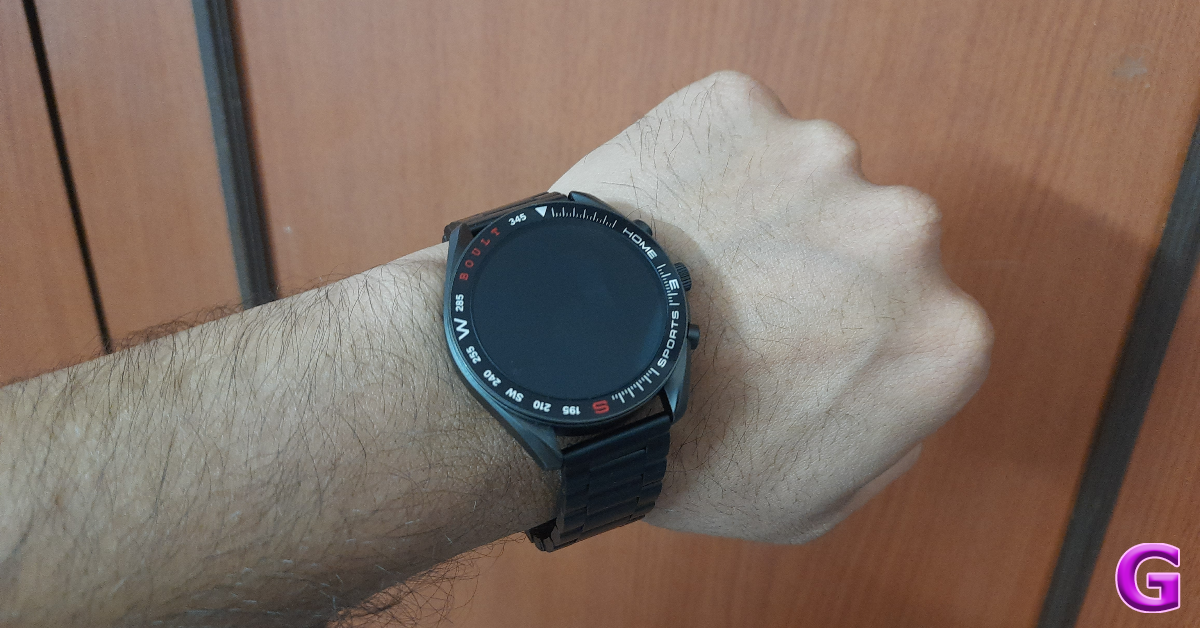 Let’s talk about the stainless steel strap for a moment. As we mentioned earlier, there is a strap adjustment tool that comes inside the retail box along with a user manual that walks you through the adjustment process. You can remove up to 4 metal links from either side of the strap. We found the tool quite flimsy to work with, and even when you get the connecting pin out of the link, pulling it out can be a real struggle. We had to visit a watchmaker to get the strap adjusted to our size.
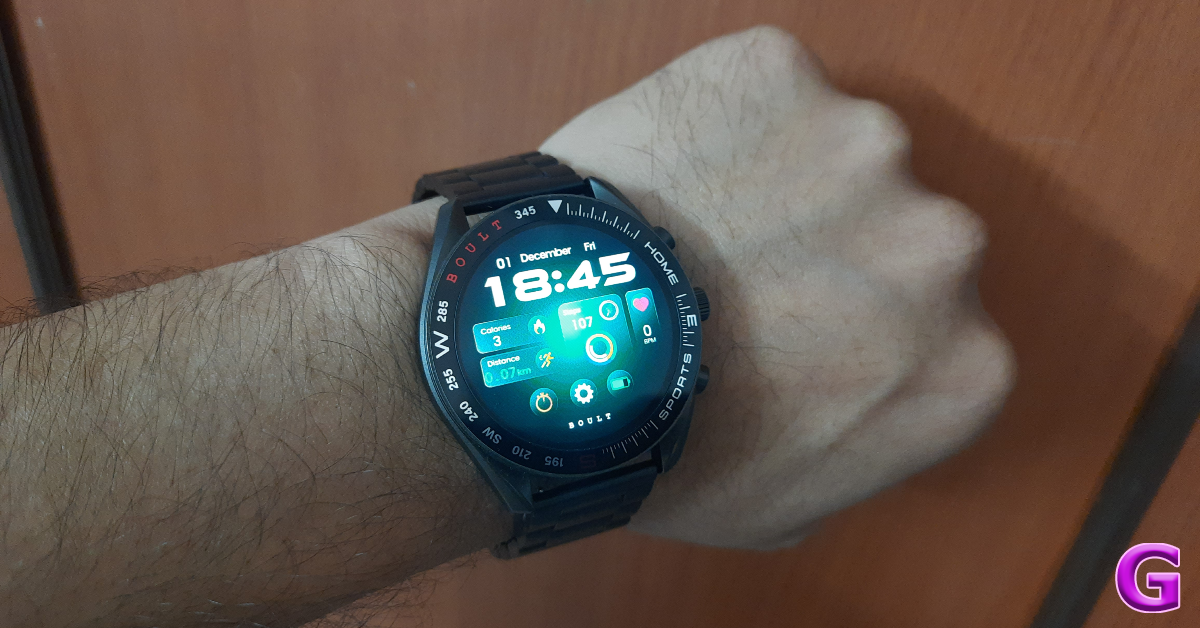 While the steel strap is aesthetically pleasing and carries an aura of its own, it is not the best to wear around your wrist while you’re working out. To address this issue, Boult also sells two additional straps that are compatible with this smartwatch. The black leather strap is priced at Rs 279 while the magnetic silicone strap fetches Rs 399. We’d suggest going for the silicone strap if you plan on wearing this smartwatch during workouts.
The 1.39-inch HD display on the Boult Mirage smartwatch is encased in a metallic shell. This display offers a decent touch response but isn’t as smooth as the Crown R Pro. With a peak brightness of 500 nits, you won’t face any significant trouble reading what’s on the display of the Boult Mirage. The bezel around this display contains the readings for a nautical compass, which is a pretty cool addition.
While the steel strap is aesthetically pleasing and carries an aura of its own, it is not the best to wear around your wrist while you’re working out. To address this issue, Boult also sells two additional straps that are compatible with this smartwatch. The black leather strap is priced at Rs 279 while the magnetic silicone strap fetches Rs 399. We’d suggest going for the silicone strap if you plan on wearing this smartwatch during workouts.
The 1.39-inch HD display on the Boult Mirage smartwatch is encased in a metallic shell. This display offers a decent touch response but isn’t as smooth as the Crown R Pro. With a peak brightness of 500 nits, you won’t face any significant trouble reading what’s on the display of the Boult Mirage. The bezel around this display contains the readings for a nautical compass, which is a pretty cool addition.
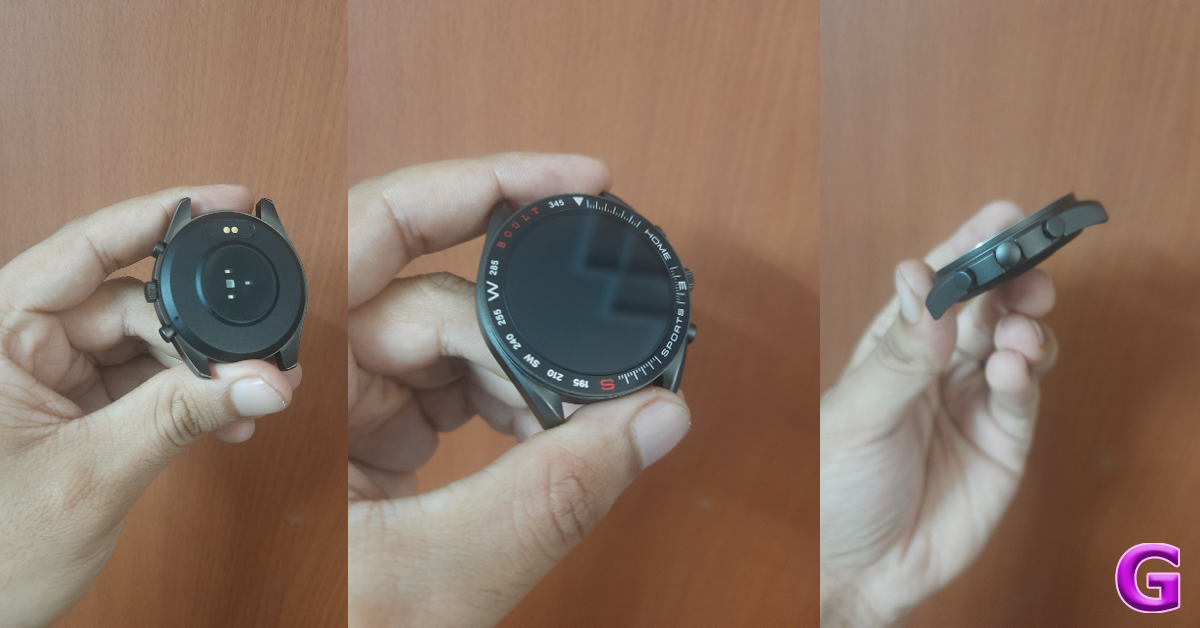 There are three buttons on the right side of the shell. Pressing the top button takes you to the home screen no matter where you are. It also wakes up the watch when it is on standby. The bottom button can be used to access the Sport modes on the watch. The middle button is also a rotating crown that can be used to scroll through the menu or switch among the different watch faces. Long pressing this button activates the voice assistant. The left side of the shell has been left buttonless. Flipping the shell around, you will find the different health monitors in the centre of the panel along with a speaker and microphone on either end.
One of the more incredible features of this smartwatch is the IP67 rating for dust and water resistance. This means the smartwatch is water resistant up to 1m. There is a swimming mode on the watch if you want to take a few laps in the pool. While we didn’t take the watch to the pool, it did not present any problems during sweaty workouts.
There are three buttons on the right side of the shell. Pressing the top button takes you to the home screen no matter where you are. It also wakes up the watch when it is on standby. The bottom button can be used to access the Sport modes on the watch. The middle button is also a rotating crown that can be used to scroll through the menu or switch among the different watch faces. Long pressing this button activates the voice assistant. The left side of the shell has been left buttonless. Flipping the shell around, you will find the different health monitors in the centre of the panel along with a speaker and microphone on either end.
One of the more incredible features of this smartwatch is the IP67 rating for dust and water resistance. This means the smartwatch is water resistant up to 1m. There is a swimming mode on the watch if you want to take a few laps in the pool. While we didn’t take the watch to the pool, it did not present any problems during sweaty workouts.
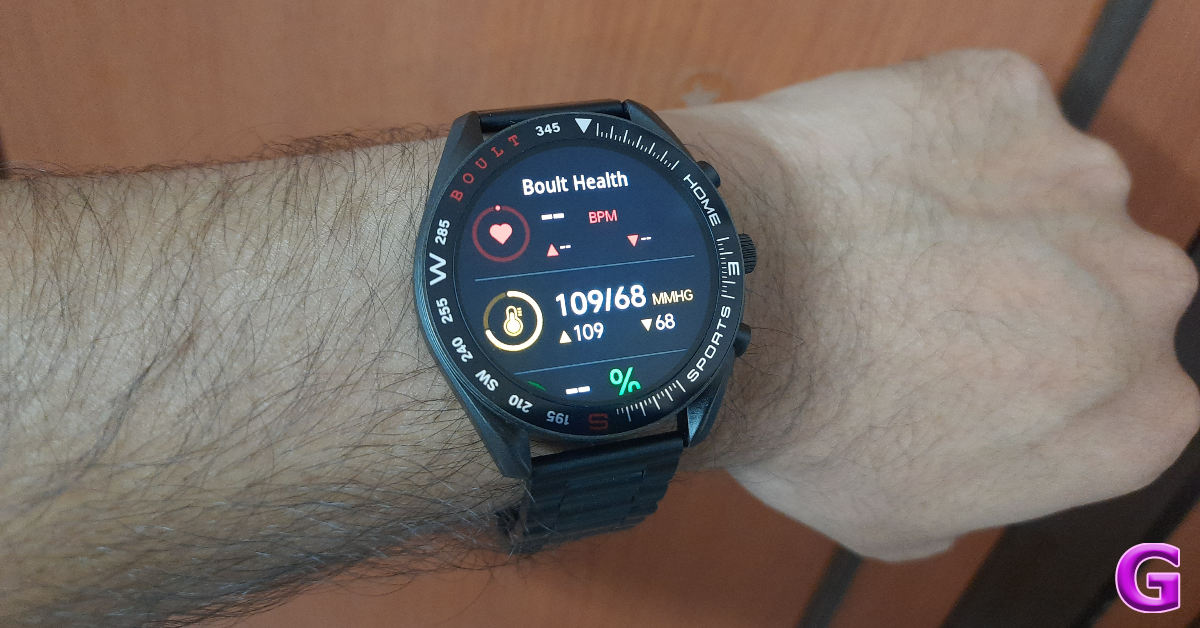 it up to a variety of tasks. To start off, you will need to pair the watch with the BoultFit app on your smartphone. You can find this app on the Play Store or simply scan the QR code on the watch to redirect you to the page. The smartwatch supports Bluetooth 5.3 and has a functional range of 10m.
Like most health trackers on the market, the Boult Mirage can track your blood oxygen level, heart rate, and even your blood pressure. While the SpO2 and heart rate measurements were close to accurate, the blood pressure readings seemed way off. We would strongly suggest relying only on medical-grade equipment to calculate your blood pressure. The Boult Mirage can also track your sleeping pattern, but it isn’t tuned as well as the more premium smartwatches in this regard.
it up to a variety of tasks. To start off, you will need to pair the watch with the BoultFit app on your smartphone. You can find this app on the Play Store or simply scan the QR code on the watch to redirect you to the page. The smartwatch supports Bluetooth 5.3 and has a functional range of 10m.
Like most health trackers on the market, the Boult Mirage can track your blood oxygen level, heart rate, and even your blood pressure. While the SpO2 and heart rate measurements were close to accurate, the blood pressure readings seemed way off. We would strongly suggest relying only on medical-grade equipment to calculate your blood pressure. The Boult Mirage can also track your sleeping pattern, but it isn’t tuned as well as the more premium smartwatches in this regard.
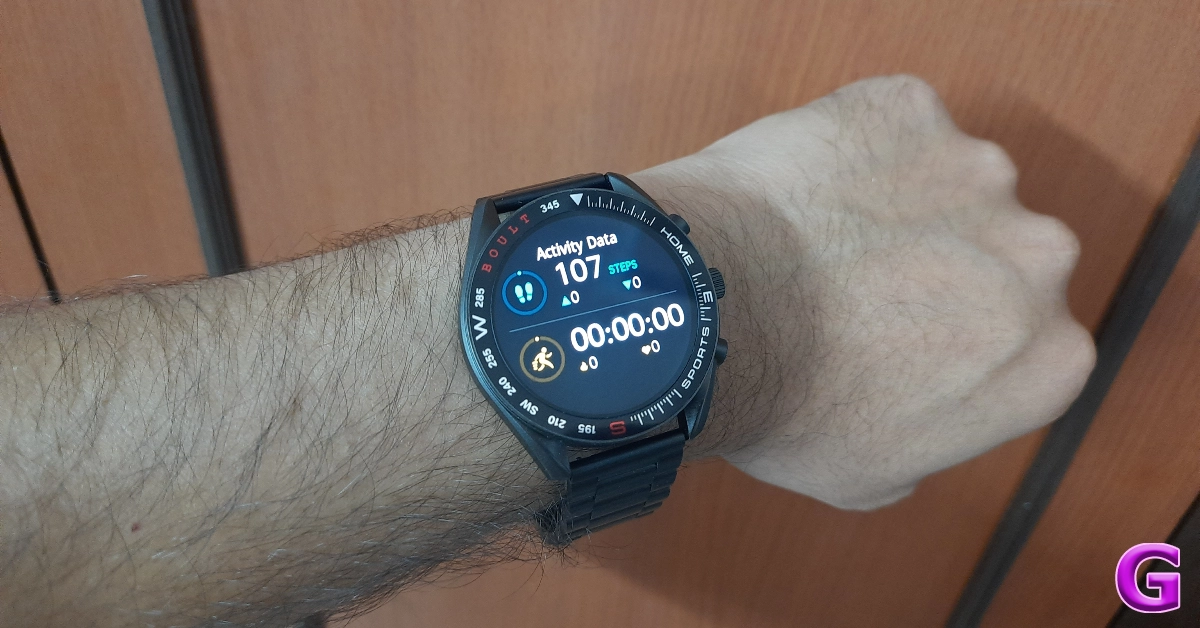 Basic step counting and hike tracking tasks were handled really well by this smartwatch. The step and distance data gathered by the smartwatch are very reliable. It can also track more than 120 sports and exercises including Football, Tennis, Yoga, and more. The only problem is that the stainless steel strap isn’t exactly suited to be worn during workouts. You will have to shell out some extra money for a silicone strap.
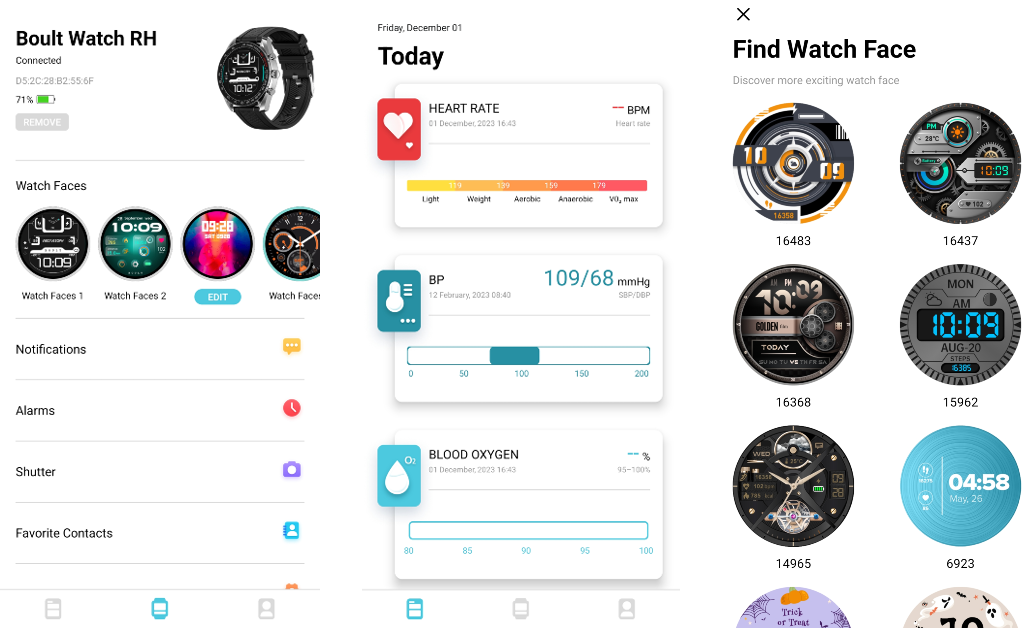 Despite the Mirage being a budget smartwatch, the lack of features like Always on Display and Adaptable Brightness feel like a sore miss. While these aren’t dealbreakers for a lot of people, some may find their absence off-putting. While, the Raise to Wake feature works just fine on the smartwatch, an Always On Display is perfect if you want to add to the watch’s aesthetic value.
The software experience offered by Boult Mirage is also very satisfactory. It is the only smartwatch we have seen in this segment that has integrated games. While they aren’t anything out of the blue, they are good enough to kill some time. The back button and rotating crown make it very easy to navigate the interface. Features like Bluetooth calling and notification access work perfectly fine on the watch. The only downside is that you can store only 8 contacts on the watch itself. If you need to call someone whose contact isn’t saved on the watch, you would have to rely on the dialer. The call quality is satisfactory in indoor conditions but depreciates significantly when calling amidst a lot of noise.
It takes up to 2 hours to fully charge the smartwatch. We operated the Boult Mirage smartwatch at the highest possible brightness and kept it connected to the phone for Bluetooth calling throughout the review. We also used the watch to track hikes/runs for a couple of hours every day. With such heavy use, the Boult Mirage lasted us 6 days. Its battery life can easily be pushed beyond 7 days if you are more conservative with the usage.
Read Also: Apple Declared 2023 App Store Award Winners
Despite the Mirage being a budget smartwatch, the lack of features like Always on Display and Adaptable Brightness feel like a sore miss. While these aren’t dealbreakers for a lot of people, some may find their absence off-putting. While, the Raise to Wake feature works just fine on the smartwatch, an Always On Display is perfect if you want to add to the watch’s aesthetic value.
The software experience offered by Boult Mirage is also very satisfactory. It is the only smartwatch we have seen in this segment that has integrated games. While they aren’t anything out of the blue, they are good enough to kill some time. The back button and rotating crown make it very easy to navigate the interface. Features like Bluetooth calling and notification access work perfectly fine on the watch. The only downside is that you can store only 8 contacts on the watch itself. If you need to call someone whose contact isn’t saved on the watch, you would have to rely on the dialer. The call quality is satisfactory in indoor conditions but depreciates significantly when calling amidst a lot of noise.
It takes up to 2 hours to fully charge the smartwatch. We operated the Boult Mirage smartwatch at the highest possible brightness and kept it connected to the phone for Bluetooth calling throughout the review. We also used the watch to track hikes/runs for a couple of hours every day. With such heavy use, the Boult Mirage lasted us 6 days. Its battery life can easily be pushed beyond 7 days if you are more conservative with the usage.
Read Also: Apple Declared 2023 App Store Award Winners
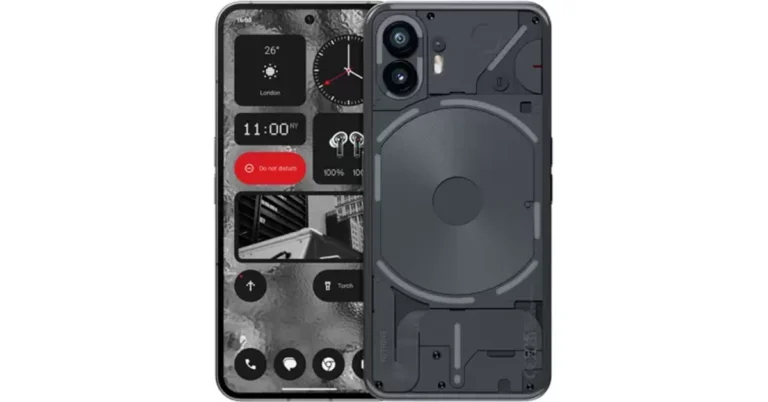
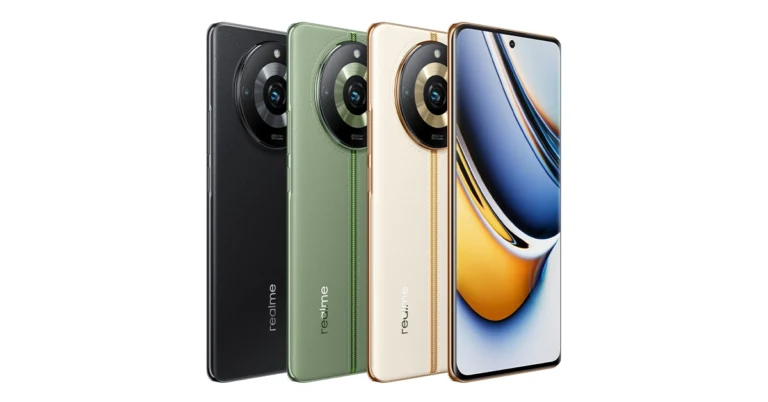
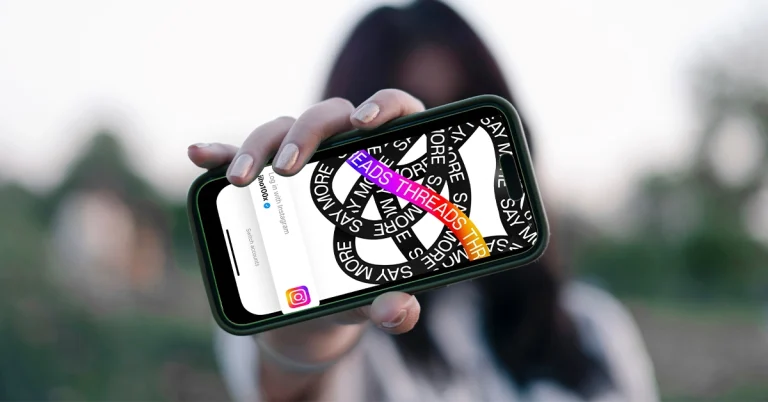
 The keyword search feature on Threads is now being expanded. Meta’s Chief Mark Zuckerberg via Threads announced the upcoming feature for all its users. He said, “Get excited — search is coming to Threads.” He further added, “Rolling out to most English and Spanish speaking countries today. More to come soon.”
On the other hand, Instagram Head Adam Mosseri also confirmed about the forthcoming Threads feature. He confirmed more enhancements will come to the search action soon although he did not specify which features would be included.
He stated, “Today, we’re expanding keyword search everywhere Threads is available. This feature is supported in all languages – we hope this makes it easier to find and join conversations you’re interested in. More improvements are coming to search soon, let me know in the replies if you have feedback.”
For those who are unaware, the keyword search feature on Threads was first made available in Australia and New Zealand in August even before it was rolled out in the United States, in September.
Recently Threads released the option to delete Threads profile without deleting Instagram account altogether. To delete Threads Go to Settings → Account → Delete or Deactivate Profile, then select delete.
It also rolled out the feature tags just like hashtags. The Threads Tags are based on theme or area of interest, indicating that they will function similarly to Twitter hashtags but without a hash.
The keyword search feature on Threads is now being expanded. Meta’s Chief Mark Zuckerberg via Threads announced the upcoming feature for all its users. He said, “Get excited — search is coming to Threads.” He further added, “Rolling out to most English and Spanish speaking countries today. More to come soon.”
On the other hand, Instagram Head Adam Mosseri also confirmed about the forthcoming Threads feature. He confirmed more enhancements will come to the search action soon although he did not specify which features would be included.
He stated, “Today, we’re expanding keyword search everywhere Threads is available. This feature is supported in all languages – we hope this makes it easier to find and join conversations you’re interested in. More improvements are coming to search soon, let me know in the replies if you have feedback.”
For those who are unaware, the keyword search feature on Threads was first made available in Australia and New Zealand in August even before it was rolled out in the United States, in September.
Recently Threads released the option to delete Threads profile without deleting Instagram account altogether. To delete Threads Go to Settings → Account → Delete or Deactivate Profile, then select delete.
It also rolled out the feature tags just like hashtags. The Threads Tags are based on theme or area of interest, indicating that they will function similarly to Twitter hashtags but without a hash. 
 While audio deepfakes have come a long way in terms of replication of the source voice, the most frequent scams you come across on social media may not be crafted flawlessly. The truth is that scammers don’t need to manipulate everyone who listens to the deepfake, they just need to convince a handful of people to believe that what they’re listening to is legitimate. Oftentimes, botched deepfakes which are easy to spot are peddled around the Internet. Their easiest tell is unexpected and harsh cuts throughout the recording. More professional scammers and malicious entities usually iron out these cuts before publishing the recording.
 Most AI models rely on a small sample size of someone’s voice to create a fake recording. Through deep learning, the AI model can effectively recreate the pitch, tone, accent, timbre, and other attributes of the person’s voice. But where it may fail is in recreating the special quirks. If you’re listening to an audio recording of someone you know personally, always look out for the quirks in their speech. If you feel that their pronunciation of certain words is a bit off, you may want to look further into the legitimacy of the recording.
 Audio recordings created using AI models are rarely ever free of background noise. While some amount of background noise always manages to creep in regular voice recordings as well, it is much more organic – like the sound of people chatting in the background, ceiling fans, general humdrum, etc. Whereas, deepfake audios may have a different kind of static that is only present in processed recordings. If you suspect that you are listening to a fake audio recording, always pay close attention to the background noise.
 While the methods mentioned above can give you a fair idea about the legitimacy of the audio, the only way to confirm if it is a deepfake is by using a detection tool specially designed for the task. Resemble.AI is one of the tools you can do for this job. This tool integrates with popular media services and detects AI-generated fake audio on the fly. You can also use Resemble.AI to watermark your audio data and determine whether it has been used to train a generative AI model.

 Once a read-only Word document opens in Protected View, you get a banner message letting you know that the file was downloaded from the Internet and that it may contain viruses. If you need to edit it still, simply click on the ‘Enable Editing’ option within this message. It’s that easy. If you don’t see this message at the top of the screen, check out the other methods below.
 Step 3: Switch to the Security tab and make sure you are allowed all permissions for the file.
 Step 4: Click on OK.
You will now be able to edit the Word document.
Step 4: Click on OK.
You will now be able to edit the Word document.
 Once a read-only Word document opens in Protected View, you get a banner message letting you know that the file was downloaded from the Internet and that it may contain viruses. If you need to edit it still, simply click on the ‘Enable Editing’ option within this message. It’s that easy. If you don’t see this message at the top of the screen, check out the other methods below.
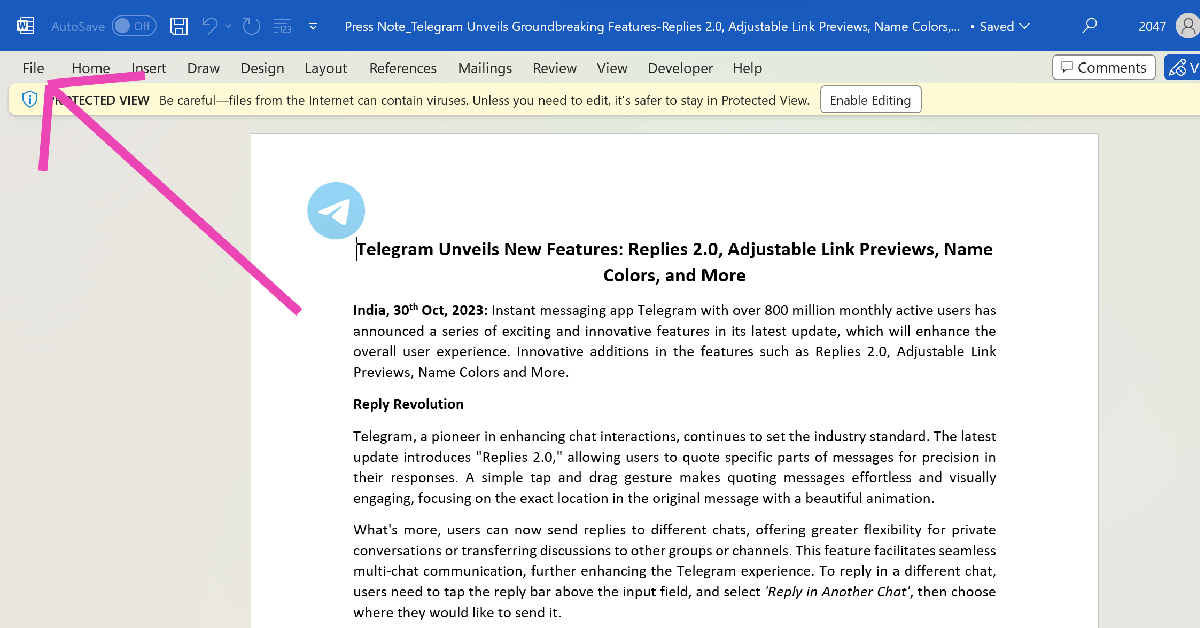 Step 2: Hit Info.
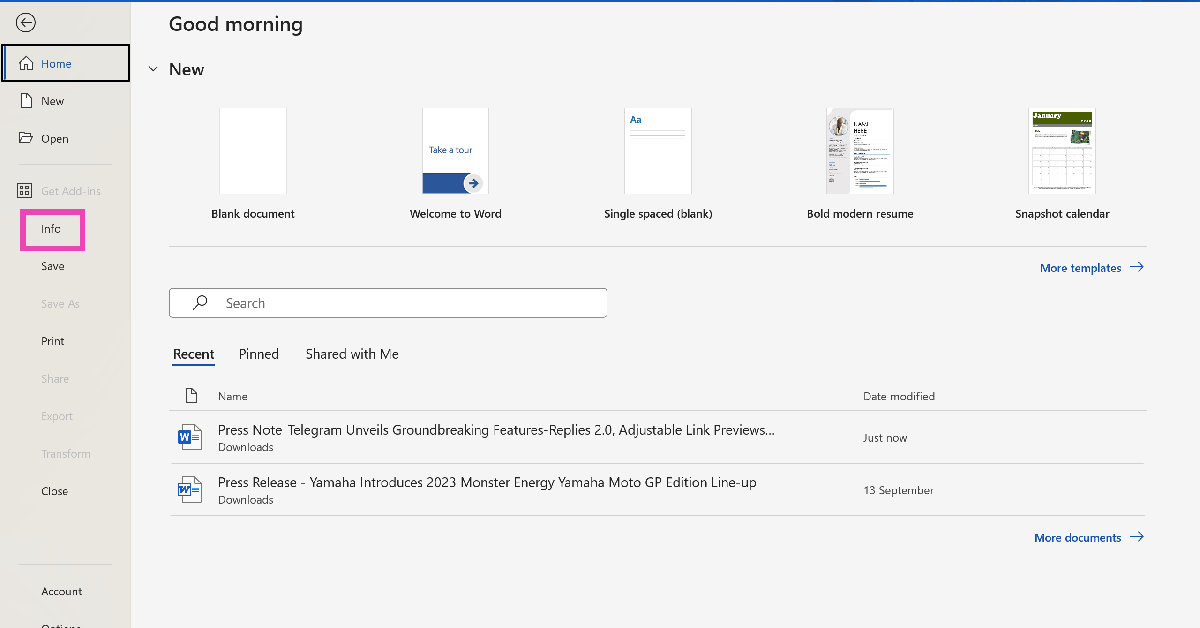 Step 3: In the Protected View box, select Enable Editing.
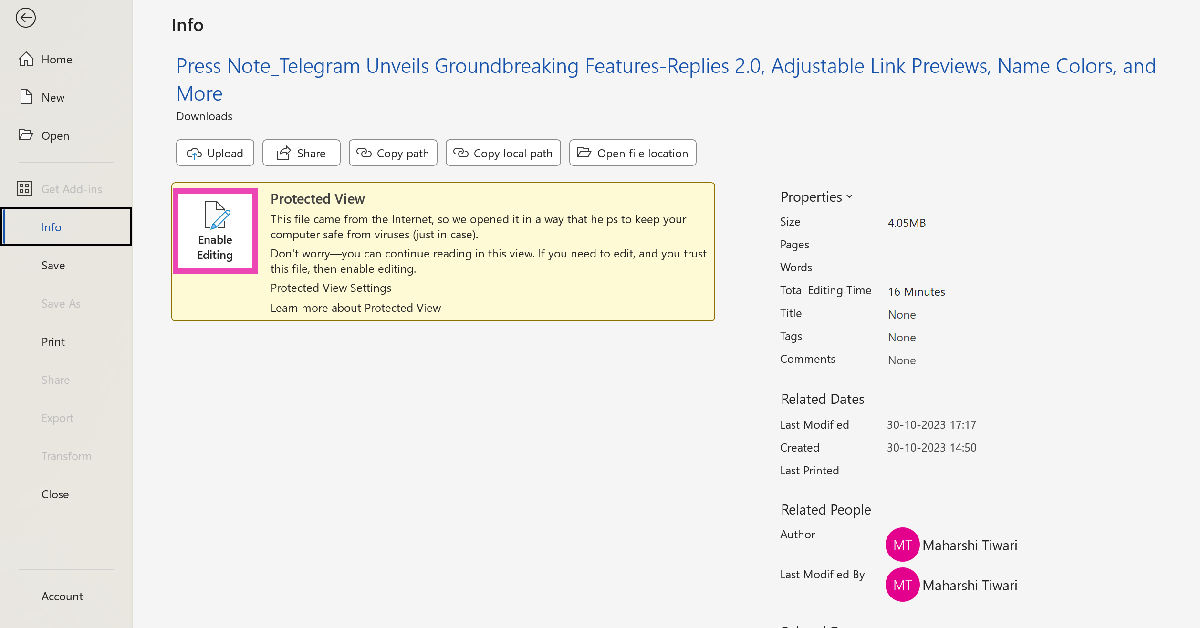
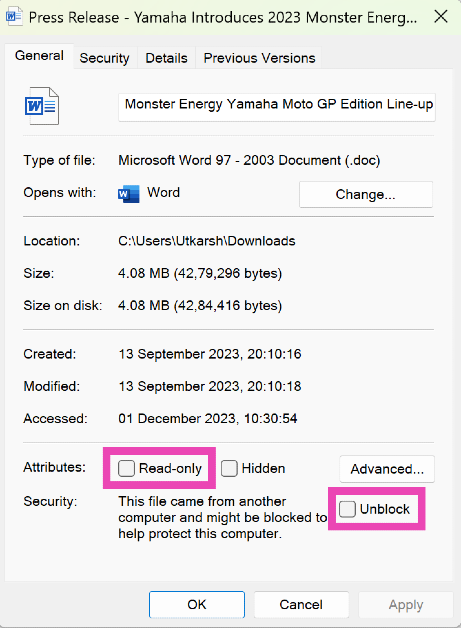 Step 3: Switch to the Security tab and make sure you are allowed all permissions for the file.
 Step 4: Click on OK.
You will now be able to edit the Word document.
Step 4: Click on OK.
You will now be able to edit the Word document.
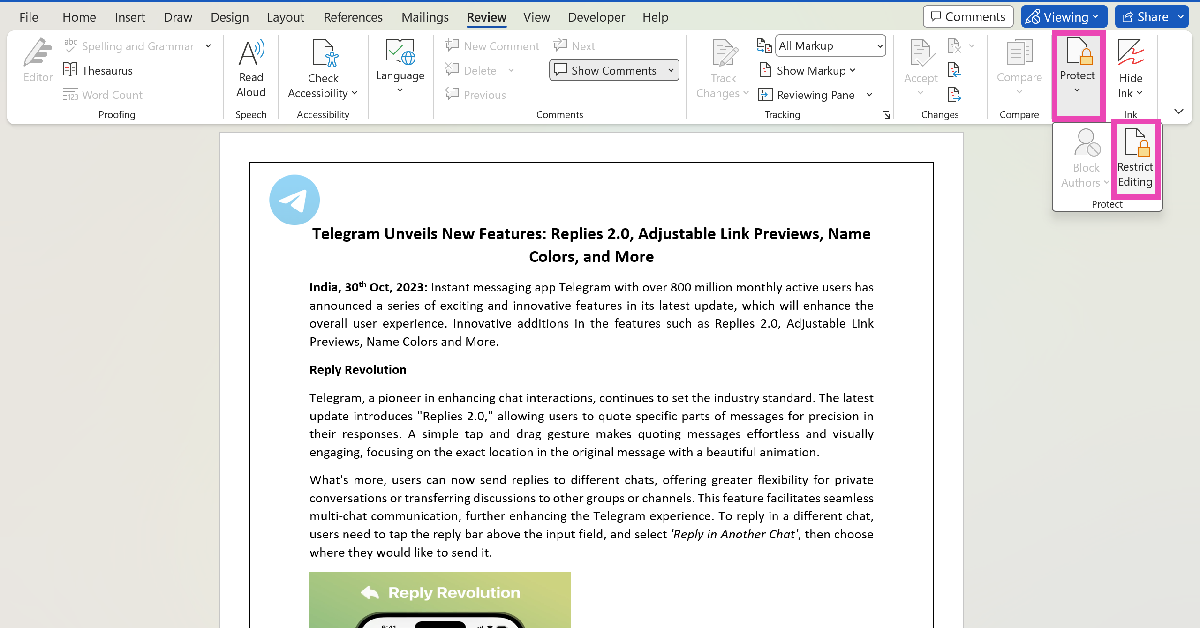 Step 3: Click on Stop Protection.
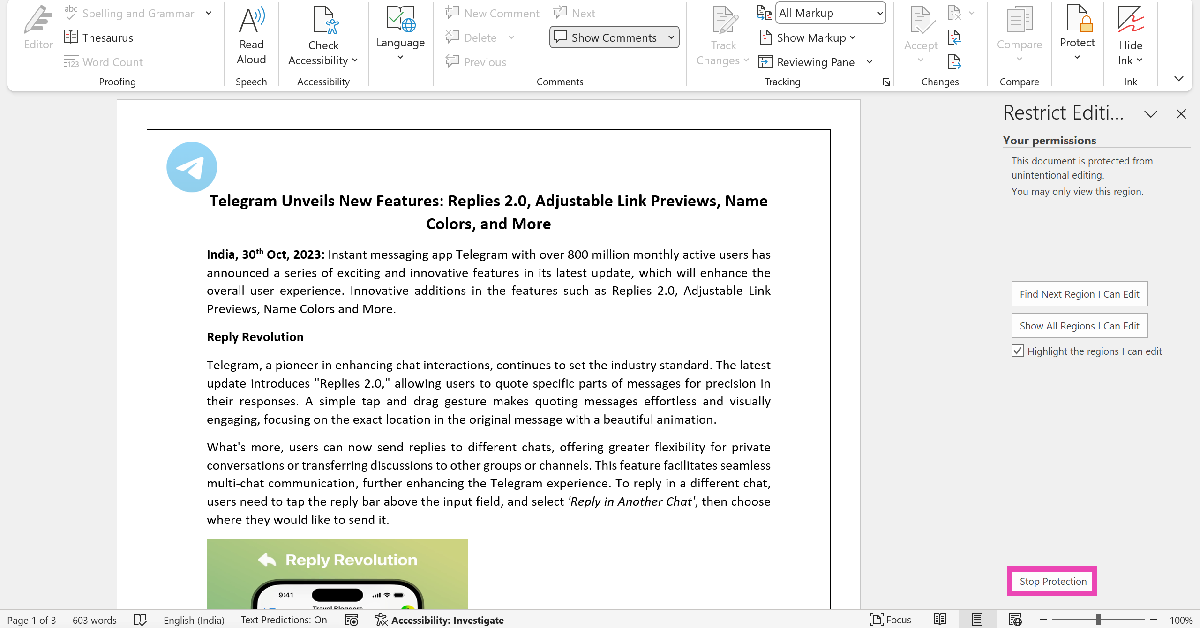 Step 4: Enter the password for the document to begin editing it.