The device will be powered by Snapdragon 8 Gen 3 SoC.
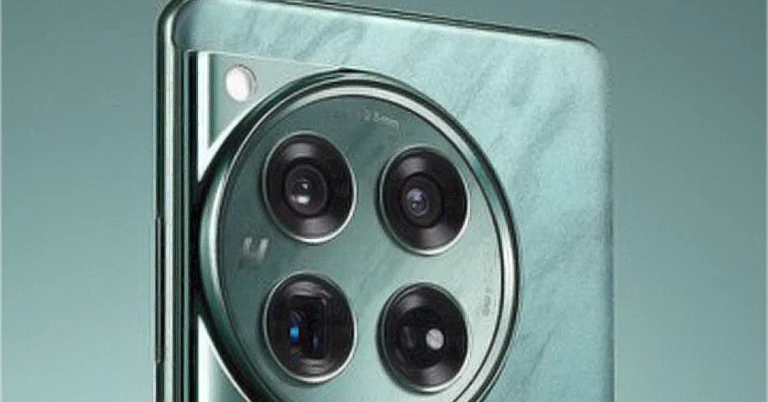
OnePlus 12 is set to launch in China on December 5. Ahead of the official launch, the company is teasing the smartphone to highlight the key specs and design details. Recently the company highlighted the design elements of its upcoming smartphone through which we came to know that the location of the alert slider has been changed in the device. This time the company has made a new disclosure and has given information about the camera specifications of the OnePlus 12.As per OnePlus’s executive, its upcoming phone will come with the same camera setup that it has used in its foldable phones- the OnePlus Open and Oppo Find N3. OnePlus China president Li Jie has revealed information through a poster. The device will come equipped with a Hasselblad-branded triple rear camera setup. The camera system will include a 50-megapixel Sony LYT-808 sensor for the main camera. There will be two other sensors on board an ultra-wide-angle camera and a telephoto camera.The teaser suggests a 48-megapixel ultra-wide-angle lens and a 64-megapixel telephoto sensor with 3x optical zoom.The company previously revealed OnePlus 12 will be powered by Qualcomm Snapdragon 8 Gen 3 SoC and a 16GB RAM model should also be available. In terms of software, the device will operate on OxygenOS 14 with Android 14 out of the box.Besides this, the upcoming smartphone will feature a BOE’s ProXDR display with 2K resolution.Also Read:Sony Inzone H5 gaming headphones designed together with esports experts launched in IndiaAccording to the company, it has the Alert Slider on the left-hand side of the phone so that gaming antennas may be installed on the OnePlus 12 by moving the Alert Slider to the other side of the device. The firm has used industry-first Alert Slider Antenna Integration technology as well as Ultra-compact Full-band Antenna technology to reduce the space occupied by the Alert Slider.OnePlus 12 will be made available in the Flowy Emerald colourway inspired by the “untamed beauty found in nature, where unbounded paths and infinite possibilities reign supreme.”
The wireless gaming headphones deliver up to 28 hours of battery life.
The headphone comes equipped with a 40mm dynamic driver unit.
It also includes a bi-directional microphone with AI-based noise reduction.
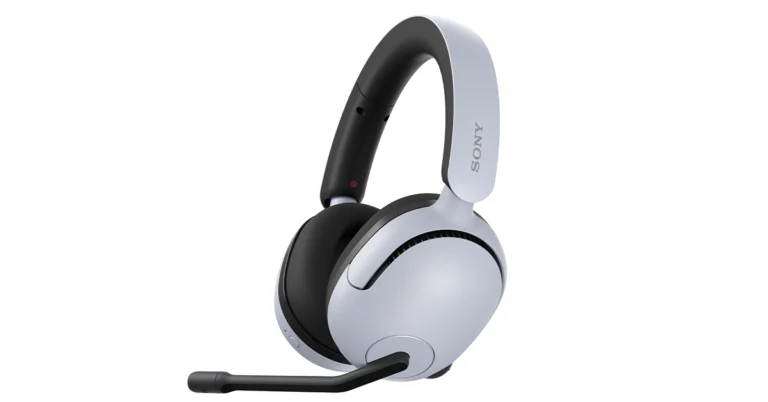
Sony Inzone H5 has arrived in India, which is the company’s latest offering in its gaming headphone range. Inzone H5 is an over-the-ear Bluetooth headphone which comes with a 40mm dynamic driver unit. In addition to this, these headsets are said to come with inbuilt microphones that support the company’s 360 Spatial sound format with 3D sound positioning for an immersive surround sound experience. The wireless headphones also offer up to 28 hours of battery life and lower latency for extended playtime and minimal lag. The device is designed in collaboration with esports experts.
In This Article
Sony Inzone H5 price in India, sale details
Sony Inzone H5 price in India has been set at Rs 15,990. The wireless headset comes in two colour options of Black and White. The audio device will be available for purchase via Sony retail stores (Sony Center and Sony Exclusive), the www.ShopatSC.com portal, major electronic stores, and other e-commerce websites in India from November 30 onwards.
Sony Inzone H5 specs and features
The Sony Inzone H5 are over-the-ear Bluetooth headphones that are lightweight, comfortable and durable for long gaming sessions. The device weighs 260g and it comes with soft-fit ear pads and a low-pressure design for comfort. Sony Inzone H5 is integrated with a 40mm dynamic driver unit with a 5Hz–20,000Hz frequency response range. It also has an 89dB sensitive rating.Also Read: iQoo 11 5G price in India slashed just a week before iQoo 12 5G official launchThe Bluetooth headphones come equipped with a bi-directional microphone that provides AI-based noise reduction ensuring crystal-clear in-game calls. The gaming headphones have a low-latency 2.4 GHz wireless connection with a USB dongle that is claimed to deliver up to 28 hours of battery life. 10 minutes of quick charge offers 3 hours of playback. However, the gaming headphones takes about 3.5 hours to get completely charged. The audio device is engineered to provide richer highs and more powerful lows, providing a dynamic audio experience.There are precision controls and settings that allow you to customise audio and mic preferences.Fnatic CEO, Sam Mathews, said “Our partnership continues to push esports performance to its highest level, gearing up and supporting our professional teams to operate at their greatest potential. One of our first priorities as partners was to bring the extensive competitive experience of our pros to the development of INZONE H5. We are thrilled that our global fan base now has the opportunity to experience our collaborative efforts with these earbuds and game with the knowledge they’ve got their favourite pros backing them.”
Garena Free Fire is a battle royale game with regular awards and tournaments to keep players interested. If you play Garena Free Fire, you should be aware of the redeem codes that are released on a daily basis. However, because the battle royale game is banned in India, players from other countries can use the Free Fire Redeem codes daily. If you’re unfamiliar with the Garena Free Fire redeem codes or don’t know how to get them, we’ve put together a step-by-step guide to help you redeem them. Check out Garena Free Fire Redeem Codes for 29 November 2023.The Free Fire redeem codes are a great way to get free stuff. These are 12-digit codes that contain alphabets and numbers, as well as an expiration date and time. Because the Garena FF redeem codes cannot be used more than once, you should hurry to the redemption page to claim your free reward before someone else does. To get a free reward, all you have to do is go to reward.ff.garena.com/en, which is the official redemption page. Also, keep an eye on this space for daily updates on Garena Free Fire redemption codes and rewards.
In This Article
Garena Free Fire Redeem Codes Today 29 November2023
Participating in a sport that you love is an enjoyable experience. Gaming in an online setup involves a level of interaction between other individuals. Online gaming is more of an isolated experience, so to speak. Gaming houses do their level best to try and grow a community atmosphere between users. Multiplayer gaming enhances this capability. Incorporating loads of graphics and interactive characters, gamers can compete against each other, which adds a social element to being able to play sweepstakes at home.
A few games on the market have started to focus on this method of interaction between gamers, aiming to enhance just this social element. Join us as we explore a few of these on the market:
In This Article
Candy Mania
This fun puzzle game is filled with sugar and spice and all things nice. Each level is puzzle-based. The colourful candies will virtually tempt your taste buds as you work to solve each new puzzle.
Key Features:
Match three or more similar candies to remove them from the playing field and score your points. This process is divided over multiple levels, each trickier than the previous. A certain number of points is required to complete a level and upgrade to the next one. The colours and graphics are a visual treat – literally.
Boosters such as jellyfish and lollipop hammers help to ease one through tricky puzzles. A game of strategy, forces a user to plan how and where to make the next move. Great to be played solo, you can also challenge a friend to this.
Big Bass Bonanza
Fancy a game of fishing? Why not combine two of your great passions into one – Online gaming with a bit of relaxed fishing? In this game, the same as in real fishing, bigger is better. Bigger icons score higher points.
Key Features:
The aim is to obtain the high-value items (although not very prevalent), such as the dragonfly, fishing rod or tackle box. With 5 reels and 10 pay lines, a similar setup follows the bonus round. The RTP is 90.63 – 96.71% with a medium volatility. Special scatter symbols can be found throughout.
Atlantis Warrior
A fan of the lost city of Atlantis? Then this epic game is one battle you will never forget. Inspired by the hit movie, this game includes a host of familiar characters, spread graciously across the game.
Key Features:
The 5 reels, 30 pay line game has symbols that feature the movie characters. Others include a crab, seahorse, Tiberius, Milo, and Titan. With Titan being the highest-paying symbol. The game aims to match symbols on the pay lines whilst also trying to activate the special features.
Some of the special features include the gamble features, free spins, and bonus rounds. Wild and scattered symbols run abound. Landing the wild mermaid symbol will serve as a substitute for any symbol and lead to a winning combination (except for your scatter symbols). The graphics are visually stunning. A lot of effort went into creating a superbly realistic setting, with even the game borders complimenting the theme. The details are next level.
Sugar Rush
Another sweet treat, Sugar Rush is any candy lover’s dream game. Feeling like you have just taken a step into a candy fantasy world, this game is all over pleasing to the senses. The RTP on this game is 96.50%, but it also has a demo play option for those not so brave at heart.
Key Features:
The goal here is to obtain five matches with seven symbols. Graphically, your eyes will be treated to jellybeans, gummy bears and even a host of hardboiled sweets. If you land between three and seven scatters, a free spin is triggered.
Making use of this, a player can be rewarded with either 10 or 30 free spins. The free spin retrigger function provides even more joy and reward. Volatility is high which means wins can be spread far apart. But, on the other hand, there are also 128x multipliers and a 5000x max win up for grabs, to even things out a bit.
Read Also:Demystified: What Does Each Icon and Symbol Mean on WhatsApp?
Craps
Craps is an old-time favourite casino game. Enjoyed just as much online as in person. It can be played individually or with a gathering of up to 20 people. A great one to challenge friends and foes alike. A simple game, there is a basic strategy involved in this.
Key Features:
Graphically not having the same wow factor as some of the other themed games, these old-timers are still favourites. The game is played with two six-sided dice, rolled simultaneously. The combined number is the total for the roll. This is done after you have selected your chip value and the bet you wish to wager.
The role of the Shooter is designated to the ‘house’ in the online world. RNG (Randon Number Generators) ensures fairness and random dice rolls. This game seems a fair bit more serious than some of the others, but a good one nonetheless to practice some strategy and test the skills of your competitors.
Conclusion:
Multi-platform multiplayer gaming has levelled the field. Being able to game on any platform or device, anywhere, at any time and against anyone is certainly upped the stakes for the gaming world. Drawing on the competitive nature of young individuals, these games are also ideal to be enjoyed on an individual basis.
The graphics combine to include whole theme-related gaming experiences. Both a sensory and social delight, there is no holding back on these game offerings. Well worth a try!
The price cut of iQoo 11 5G is part of the ongoing iQoo Quest Days sale.
The smartphone is powered by the Snapdragon 8 Gen 2 SoC.
iQoo 12 5G is set to launch in India on December 4 and just ahead of the unveiling, the company has revised the price of its predecessor. The Vivo sub-brand has reduced the price of iQoo 11 5G in India. The device was introduced in the country earlier this year. The gaming smartphone is powered by the Snapdragon 8 Gen 2 SoC. It features a 2K E6 AMOLED display.
In This Article
iQoo 11 5G new price in India details
iQoo 11 5G was launched in India in January at Rs 59,999 for the 8GB RAM with 256GB storage and 16GB RAM with 256GB storage option at Rs 64,999. It was made available in two varieties: Legend edition and an Alpha version.Now that the company has reduced the price of the gaming phone the price of iQoo 11 5G is set at Rs 49,999 for the 16GB RAM with 256GB variant. Note that the company is hosting iQoo Quest Days sale that will last till November 30 on Amazon.The price of the device will further come down to Rs 49,999 if bank offers of up to Rs 2,000 are applied.In addition to this, the customer will get Vivo TWS Air earbuds worth Rs 2,999 absolutely free on the purchase of the smartphone.Also Read:iQoo 11 5G with Snapdragon 8 Gen 2 SoC launched in India
iQoo 11 5G specifications
The iQoo 11 5G (Review)features a 6.78-inch Samsung E6 AMOLED display with 1440 x 3200 pixels of resolution. The screen comes with a refresh rate of 144Hz. There is a built-in optical fingerprint sensor for screen unlocking. The phone is powered by an octa-core Qualcomm Snapdragon 8 Gen 2 CPU with Extended RAM 3.0 functionality. RAM can be expanded by up to 8GB. It runs on Funtouch OS 13 skinned on top of Android 13 out of the box.iQoo 11 5G comes with a triple rear camera setup that includes a 50MP Samsung GN5 primary sensor, a 13MP portrait sensor, and an 8MP ultra-wide sensor. For selfies, the phone houses a 16MP camera sensor.The smartphone packs a 5,000mAh battery with 120W fast charging capability. The phone further includes a stereo speaker setup, a USB Type-C connection, and an IR blaster with a universal remote control option. In addition to this, there is NFC, Wi-Fi 6, and Bluetooth 5.3.
Sexual content was shown alongside advertisements for well-known US firms.
The salacious content was delivered to the followers of teen influencers.
Instagram is quite popular for its reels and is always in the news. But this time the reason for coming into the discussion is because of something very wrong. According to a report, Instagram’s Reels algorithm is delivering too much sexual content to all the accounts that only follow kids. Alongside, the social media platform is also showing ads for reputed brands and this is a matter of great concern.The Wall Street Journal conducted a test by setting up accounts to check Instagram’s algorithm. The testing account followed children’s accounts including young gymnasts, cheerleaders, and other teen and preteen influencers. These accounts are said to have featured kids and had no explicit content.As mentioned earlier this sexual content was shown alongside advertisements for well-known US firms including Disney, Walmart, Pizza Hut, Bumble, Match Group, and Hims.The Canadian Centre for Child Protection is said to have obtained similar results in its tests.Also Read:Samsung Galaxy S24 Series to come with AI features, trademark applications filed for ‘AI Phone’ and ‘AI Smartphone’WSJ also revealed that TikTok afterwards suggested explicit pornographic and “risqué footage of children” videos to its test accounts. As per the report, Walmart and Pizza Hut declined to comment whereas Bumble, Match Group, Hims, and Disney have discontinued their ads from Meta to object to their ads being displayed alongside such content.WSJ also reported that Instagram’s tendency to collect Child sexualization content was a known internal issue even before Reels was launched. Tech Firms usually argue that tests like these don’t always accurately reflect real user experience. The same group of people proposed that updating the algorithms responsible for pushing related content to users is necessary. However, according to internal documents seen by the WSJ Meta may have made it impossible for its safety team to apply such radical changes.
The Galaxy A05 comes equipped with a 5,000mAh battery.
The smartphone features a dual rear camera setup.
The phone also includes Samsung’s RAM plus feature.
Samsung today officially announced the launch of a new budget smartphone- Samsung Galaxy A05. The newly arrived device is priced under 10k. It features a 6.7-inch HD+ PLS LCD. The phone runs on Android 13-based One UI and is powered by MediaTek Helio G85 SoC. The smartphone also includes a dual rear camera setup.
In This Article
Samsung Galaxy A05 price in India, availability details
Samsung Galaxy A05 has been launched in India with a price tag of Rs 9,999 for the 4GB RAM with 64GB storage. The 6GB RAM with 128GB storage option is priced at Rs 12,499. The phone is being made available in three colour options – Black, Light Green, and Silver. The device can be purchased via Samsung exclusive and retail stores, Samsung.com and other online portals.Also Read:Samsung Galaxy S24 Series to come with AI features, trademark applications filed for ‘AI Phone’ and ‘AI Smartphone’Launch offer includes, consumers can purchase Galaxy A05 with No Cost EMI using Samsung Finance+ and through attractive EMI options with banks and NBFCs starting INR 875 per month. Additionally, consumers can get a limited-time offer of cashback worth INR 1000 using SBI credit cards.
Samsung Galaxy A05 specifications
The Samsung Galaxy A05 features a 6.7-inch HD+ PLS LCD with 1,600 x 720 pixels of resolution. The device supports a 60Hz refresh rate. The phone runs on Android 13-based OneUI 5.1 on top. Under its hood, there is a MediaTek Helio G85 SoC coupled with Mali G52 GPU. The smartphone supports LPDDR4X RAM and eMMC 5.1 storage which can be expanded up to 1TB using a microSD card. It also comes with a RAM plus feature that expands the RAM virtually by up to 6GB.For photos and videos, the smartphone is highlighted with a dual rear camera setup that includes a 50-megapixel primary sensor (f/1.8 aperture) and a 2-megapixel depth sensor (f/2.4 aperture). For selfies, there is an 8-megapixel front-facing camera.The Samsung Galaxy A05 packs a 5,000mAh battery and comes with 25W wired fast charging support. In terms of connectivity, there is 4G, WiFi 802.11, Bluetooth 5.3, USB 2.0, GPS, GLONASS, a USB Type-C port and a 3.5mm jack. In addition to this, the smartphone includes a side-mounted fingerprint scanner for phone unlocking, an accelerometer, a light sensor, and a proximity sensor.
Samsung Galaxy S24 Series is rumoured to be called AI Phone or AI smartphone.
The company has filed for trademark applications.
Samsung earlier this month launched its new AI application-Galaxy AI.
There is a lot of speculation doing the round on the web about the upcoming Samsung Flagship series S24. The lineup may include Galaxy S24, Galaxy S24+, and Galaxy S24 Ultra. The latest news is that the South Korean brand is likely to introduce advanced artificial intelligence (AI) features in its upcoming smartphones. A leak has suggested that the company has also submitted trademark applications for “AI Phone” and “AI Smartphone.” For those who are unaware Google recently brought AI features to its Pixel 8 Series.It is now evident that Samsung cannot ignore the “Hoopla,” around AI. Taking new steps in this area and to stay ahead of its competitors Samsung is planning to bring AI capabilities to the Samsung Galaxy S24 Series. According to a Dutch publisher, the company has filed some important brand name registrations in its home country of South Korea- Magic Pixel, Flex Magic and Flex Magic Pixel. Along with the brand name, it has also submitted the associated logos. Reportedly the upcoming S24 smartphones are likely to be marketed as an AI Phone. “This is mainly done by applying for the trademarks AI Phone and AI Smartphone,” the report says.Also Read:WhatsApp to reintroduce View Once feature for web and desktop platformThe company has also applied for additional products like AR glasses and smart rings. As per the report, “Samsung mainly lists AR glasses-related products: 3D glasses, virtual keyboard projection devices, virtual reality glasses, headsets for virtual reality experience, goggles for virtual reality, smart glasses. Of course, more general applications such as television and display for smartphones are also mentioned, but the ‘AR glasses’ category predominates.”Earlier this month Samsung rolled out its new AI application for its device- Galaxy AI to bring artificial intelligence. The company recently launched Gauss, a generative AI that can produce text, images and code, more.Besides the Galaxy S24 Ultra is rumoured to come with a flat display with a little curve on the bezel sides measuring approximately around 0.3-0.4mm.Samsung has not said any concrete but Samsung Galaxy S24 Series is speculated to launch in January 2024. It was also spotted listed on the Bureau of Indian Standards (BIS) website with model number SM-S928B/DS which appears to be similar to that of a model that appeared on Geekbench.
View Once media will not be included in the backup and can’t be restored.
Users cannot save them on their devices.
The media comes with end-to-end encryption.
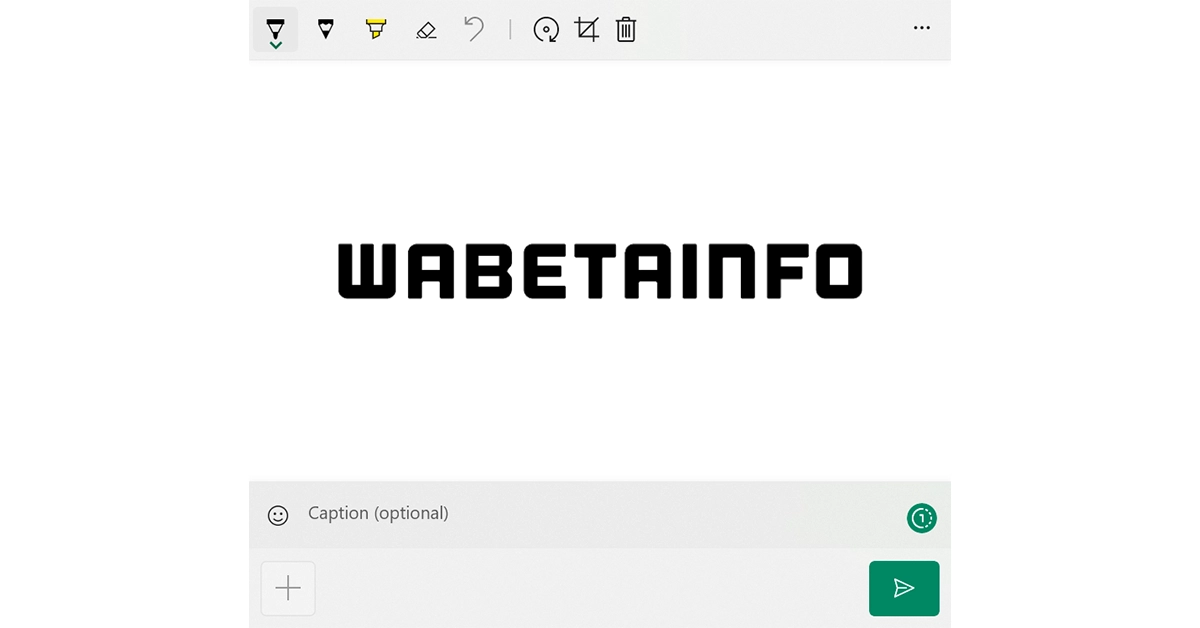
WhatsApp rolled out the View Once feature for Android and iOS users back in 2021. It was then expanded to a desktop and web platform but it was quickly taken down due to security reasons. However, a report now claims that the instant messaging platform intends to bring back the feature for web and desktop versions of the app. The View Once feature allows users to share photos and videos that disappear after it has been seen.WABetaInfo is claiming that soon Meta will reintroduce the View Once feature for WhatsApp Web and WhatsApp desktop versions. The privacy feature was rolled out to a few users who install the latest updates of their preferred desktop app or in case they use the latest build of WhatsApp Web.The feature to send and open view once photos and videos from WhatsApp Web and Desktop was removed. The decision to remove the option was taken because users could open the view once message on the Desktop to take a screenshot. This was not possible on a smartphone because the feature called screenshot blocking on WhatsApp for Android and iOS was introduced.Image Courtesy: WABetaInfoWhile sharing a screenshot the report said the button to set the image as a view once the message is available within the caption bar in the drawing editor on WhatsApp for Windows. But the privacy feature will not be exclusive to WhatsApp for Windows, the company will also make it available via WhatsApp for macOS and connected devices (particularly, from the iPad WhatsApp beta).Some users can send and receive view-once photos and videos from desktop apps after they have installed the most recent versions of WhatsApp for Windows, WhatsApp for macOS, and WhatsApp Web. Over the next few weeks, this feature is likely to be made available to more users.On a smartphone View Once photos and videos are end-to-end encrypted so they cannot be viewed by WhatsApp. The media shared with the view once capability will disappear from your WhatsApp chat after the recipient has opened it once. However, the photos or videos will be marked with a new “one-time” icon. Once the media has been viewed the message will appear as “opened” to avoid any confusion about what was happening in the chat at the time. The receiver is also not allowed to take a screenshot, save it in their gallery, forward or star.
Launched in India last month, the Boult Curve Max neckband is currently priced at Rs 1,299. It is suited for users looking for a solid pair of headphones to listen to music without splurging extra money on a midrange TWS device. Since most midrange and flagship smartphones have completely gotten rid of the headphone jack, you’re either stuck with having to use a USB dock or going the wireless route. So, let’s take a closer at how good the Boult Curve Max neckband really is in this in-depth review.Read Also:Top 5 ways to download a video from X (formerly Twitter) in 2023
In This Article
Boult Curve Max Neckband review: Design
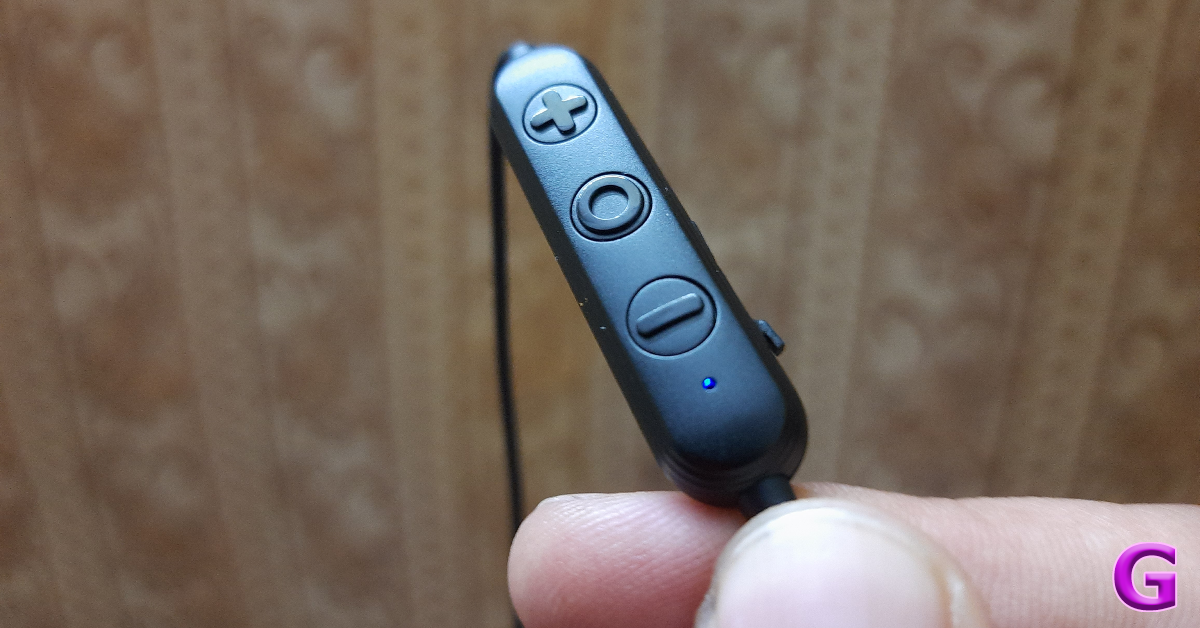
Inside the Boult Curve Max retail package, you get the neckband, two pairs of extra ear tips, a USB Type-C charging cable, a warranty card, and a user manual. The neckband is available in two colour variants – Black and Blue.There are no curveballs in design – the Curve Max looks and feels like your traditional neckband. It has its little quirks though, the most significant one being the pill-shaped plastic panel for playback and volume controls. Typically, these controls are located on one of the bands but Boult has gone for a separate panel that dangles off the left wire. A bit extra if we’re being honest. This panel also houses the microphone and a Type-C USB port for charging.The neckband itself is very flexible and durable. The rubberised finish feels premium and the snake skin texture provides a decent grip. The earbuds come with rubber ear hooks attached to them, offering a superior fit. If that’s not your thing, you can easily take these hooks off. Even without them, the earbuds offer a comfortable fit and don’t cause any ear fatigue even when they’ve been worn for several hours.An IPX5 rating means that the Boult Curve Max is immune to sweat and light rainfall. We used this neckband while working out and they were totally unfazed even when things got sweaty. The matte-like finish on the inner panel of the earbuds ensures they don’t slip out when you’re sweaty.
Boult Curve Max Neckband review: Performance
Delivering the thumping audio on the Boult Curve Max neckband are a pair of 13mm dynamic drivers. After connecting it to our smartphone, we were able to use it within a 10m range. This is pretty standard for neckbands in this price category. The Curve Max can connect with two devices at once, which is a very welcome feature. However, magnetically snapping the two earbuds into a locked position does not turn them off.As is the case with most entry-level neckbands, the sound output here is quite bass-heavy. The mid and high-range frequencies suffer as a result, not being perfectly integrated into the mix. We felt this divide more than ever on lo-fi recordings, where the low end was overblown and shrouding out the other frequencies. There are no other sound profiles on offer, so you’re going to be stuck with the default one. A more balanced soundstage would have been ideal.On the bright side, if you’re someone who enjoys your mixes with a boosted bass, these earbuds may be the pair you’re looking for. The neckband does a good job of preserving the audio quality in higher volumes, so you can crank it all the way up without worrying too much about it.There is a handy ‘gaming mode’ on offer, which gets triggered by pressing the action button four times. The latency drops down to 50ms in this mode. We played Call of Duty Mobile with the Curve Max on, and it was a pleasant experience. The game audio was perfectly in sync with the graphics on the screen throughout the gaming session. No a lot of neckbands under Rs 2,000 can boast of that.The Boult Curve Max delivers a rock-solid calling experience as well. With ENC onboard, the neckband is able to extract the caller’s voice from the surrounding noise and relay it to the receiver quite well. We used it for cellular calls as well as video calls over the internet and there were no hiccups in call quality. We even took it outdoors and were impressed with how it performed amidst noisier conditions.We used the Boult Curve Max for a week with a daily usage of around 4-5 hours. This included listening to music, gaming, calling, and watching video content. After a week, the neckband was left with more than 50% charge, which is simply amazing. Boult claims that the Curve Max offers a playtime of 100 hours on a full charge. Plugging it into a Type-C charging cable for 10 minutes gives you a playtime of 24 hours.Read Also:2 Easy Ways To Create a Word Cloud in Microsoft Word (2023)
Verdict
At Rs 1,299 the Boult Curve Max is a decent buy in our books. It is definitely more suited for bass heads, something that Boult wears on its sleeve. Features like multi-point connectivity and a dedicated gaming mode bump the Curve Max’s value among its peers. Also impressive is the calling experience provided by the Curve Max, along with its long-lasting battery life. Our only complaint would be the lack of balance and neutrality in the soundstage, but it stands in direct contradiction with the niche that the neckband is catering to.
Garena Free Fire is a battle royale game with regular awards and tournaments to keep players interested. If you play Garena Free Fire, you should be aware of the redeem codes that are released on a daily basis. However, because the battle royale game is banned in India, players from other countries can use the Free Fire Redeem codes daily. If you’re unfamiliar with the Garena Free Fire redeem codes or don’t know how to get them, we’ve put together a step-by-step guide to help you redeem them. Check out Garena Free Fire Redeem Codes for 28 November 2023.The Free Fire redeem codes are a great way to get free stuff. These are 12-digit codes that contain alphabets and numbers, as well as an expiration date and time. Because the Garena FF redeem codes cannot be used more than once, you should hurry to the redemption page to claim your free reward before someone else does. To get a free reward, all you have to do is go to reward.ff.garena.com/en, which is the official redemption page. Also, keep an eye on this space for daily updates on Garena Free Fire redemption codes and rewards.
In This Article
Garena Free Fire Redeem Codes Today 28 November2023
The Redmi 13C India variant will have the same specs as the global variant.
The upcoming phone will be powered by MediaTek Helio G85 SoC.
It will run on Android 13-based MIUI 14.
Xiaomi is all set to launch a new smartphone under its sub-brand Redmi. The firm today officially announced the India launch date of Redmi 13C. Note that Redmi 13C was globally launched last month and will soon hit the stores in India. The firm has also created a dedicated event page that highlights the key specs of the upcoming phone.According to Xiaomi, Redmi 13C will launch in India on December 6. Timing and other launch-related details remain undisclosed. But a dedicated event page has been created where the upcoming smartphone can be seen in two colourways Stardust Black and Star Shine Green.According to the landing page, the device will feature a 50-megapixel AI camera. The rest of the details are likely to be revealed in a few days. The global variant was launched earlier in November and is powered by MediaTek Helio G85 SoC. According to a report the Redmi 13C Indian variant is expected to come equipped with the same processor. In addition to this other features of the smartphone will be comparable to the global variant.Also Read:OnePlus 12 design officially revealed, relocation of the Alert Slider is the most noticeable design changeIf the report is to be believed the Redmi 13C coming to India will run on MIUI 14 with Android 13. It will also feature a 6.74-inch HD+ LCD display with 1,080 x 2,460 pixels of resolution. Moreover, the triple rear camera setup on the phone will include a 50-megapixel primary lens, a 2-megapixel macro camera and an auxiliary lens. For selfies, it may also include an 8-megapixel front-facing camera.The Indian model of Redmi 13C is said to sport a 5,000mAh battery with 18W wired fast charging support.Coming to the pricing the global variant is made available in three variants:
If you’re new to website-building, adding a map to the webpage can seem like a daunting task. But in reality, it is as easy as it gets. All you need to do is make a few additions to the website’s HTML code and you’re set! Of course, using a third-party widget is also an option, but a good widget comes at a price. Instead, why not just save the money and invest it into the website in some other form? For now, check out these top 3 ways to add a Google Map to your website.Read Also:Top 5 ways to download a video from X (formerly Twitter) in 2023
In This Article
Why should you add a Google Map to your website?
If you own a small business and use a basic website to market it, one of the best things you can do is add the map location of your business to it. Instead of posting the address, a map is more interactive and immediately gives people directions to your store or office. If your business has multiple stores or offices within a city, you can add multiple maps to the website and help people select the location that is nearest to them.If you’re designing a website for an event, such as a wedding or a retirement party, adding the location to the venue is the most crucial aspect of the entire exercise. You want to position the map at a place where visitors to the website cannot miss it. Adding a Google Map location ensures that no one gets the wrong directions to the venue. Simply by clicking on the map, people will be able to open it on their devices and easily find the directions with a couple of taps.
Embed or add a Google Map to your website in HTML
Step 1: Go to Google Maps and search for the location you want to add to your website.Step 2: Click on the location and hit the Share icon in the left panel.Step 3: Switch to the Embed tab and copy the HTML code.Step 4: Open the HTML file for your website and paste the code where you want the map to display.Step 5: Remove the ‘<’ sign in ‘<iframe’ at the beginning of the code and replace it with ‘[um-’. Similarly, replace ‘></iframe>’ at the end with ‘]’.Step 6:Save your changes. Load your website in a web browser to view the map.
Add a Google Map to your website using CSS
Use this method to make the map fit the screen on any device.Step 1: Go to Google Maps and search for the location you want to add to your website.Step 2: Click on the location and hit the Share icon in the left panel.Step 3: Switch to the Embed tab and copy the HTML code.Step 4: Open the HTML file for your website and paste the code where you want the map to display.Step 5: Add a ‘responsive-gmap’ class around ‘iframe’ to make the Google Map responsive on your website. Here is the code for it.<div class=”responsive-gmap”><iframe src=”google maps URL” width=”600″ height=”450″ style=”border:0;” allowfullscreen=”” loading=”lazy” referrerpolicy=”no-referrer-when-downgrade”></iframe></div>Step 7: Add the following code to your website’s .css file..reponsive-gmap{overflow: hidden;padding-bottom: 50%;position: relative;height: 0;}.responsive-gmap iframe{height: 100%;width: 100%;left: 0;top: 0;position: absolute;}Step 8:Save the changes and load the website to view the map.
Use a map widget
If you don’t want to tweak any of the code around, simply use a map widget for your website. Here’s how.Step 1:Open your website building software and go to your page.Step 2: Go to Contacts and select Add widget.Step 3: Click on Map.Step 4: Enter your API key in widget settings and hit Save.Step 5: Search for the location you want to add to your website. Enter a description for the location.Step 6: Choose a position for the widget and select what kind of map you want on the website (satellite, terrain, traffic).Step 7: Hit Save.
Frequently Asked Questions (FAQs)
How do I add a map to my website?
To add a map to your website, open the location on Google Maps, copy its HTML code and paste it into your website’s HTML file.
How do I add a Google Map to my website using the website builder?
You can use a map widget for this task. Open the website builder and find the ‘Add widget’ option in the Contacts section. Then, add a widget for the map, enter your API key, and hit save. Search for a location within the message, make sure it is accurate, and hit Save.
What are some good third-party widgets to add a location to my website?
These are the top 3 ways to add a Google Map to your website. To make sure the map is displayed perfectly on all devices, you should use the CSS method. Responsive maps are much better than just pasting the embedded link in the HTML code. If you found this article helpful, let us know in the comments!
OnePlus 12 is set to make its debut in China on December 5. The global launch of the company’s next flagship smartphone is likely to happen in January 2024. Ahead of the official release, the company has been highlighting the key specs and features of the mobile phone. Recently it teased the device in three colour options. But now OnePlus has officially revealed the design of OnePlus 12. The upcoming phone will be powered by the latest Snapdragon 8 Gen 3 SoC. It will operate on Android 14-based ColorOS 14 UI on top.According to OnePlus its upcoming flagship OnePlus 12’s design “represents an evolution and continuity of the well-accepted OnePlus 11, incorporating refinements and purposeful changes.”While providing an overview of the design and build of the phone the firm explained that the most notable design change on the OnePlus 12 is to switch the Alert Slider to the left-hand side of the phone. Better gaming antennas may be installed on the OnePlus 12 by moving the Alert Slider to the other side of the device.Also Read:Playables on YouTube now available for Premium usersThe firm explained, “Based on internal testing, it has been determined that the optimal position for gaming antennas is between the forefingers of the user when the phone is held in landscape orientation. However, the space is currently occupied by the Alert Slider on the OnePlus 11.”The repositioning may pose difficulty in getting the best antenna signal strength on the same side of the phone. So to address the issue the company has used industry-first Alert Slider Antenna Integration technology as well as Ultra-compact Full-band Antenna technology to reduce the space occupied by the Alert Slider.“As a result, a balance between better antenna signal performance and the presence of the Alert Slider is achieved on the OnePlus 12. According to the lab test data by OnePlus, the gaming antenna signal can be improved by 3dB, with the game latency reduced by 15%.” OnePlus noted.The company also revealed that the OnePlus 12 will be made available in the Flowy Emerald colourway which is inspired form the “untamed beauty found in nature, where unbounded paths and infinite possibilities reign supreme.”The company previously teased three colourways for the OnePlus 12- Pale Green, Rock Black, and White.OnePlus 12 will launch in China on December 5 at 7 PM and 4.30 PM IST. The pre-orders are open for the smartphone via the official store and JD.com.
Hardware acceleration has been an important fixture in Windows devices for years. While older PCs were more reliant upon it due to CPU constrictions, it is not just a relic of the past. You can still toggle it on your new Windows PC or laptop, depending on whether it is needed or not. Different applications on your device may also have a dedicated option to turn it on or off. So, let’s take a closer look at how to enable or disable hardware acceleration in Windows 10 and Windows 11 devices using these top 4 methods.Read Also:Best 4 Ways to Detect AI-Generated Deepfake Videos
In This Article
What is Hardware Acceleration?
In order to boost your PC’s performance, the CPU delegates some of its tasks directly to the hardware. This is called ‘hardware acceleration’. Most of the tasks are handed over to the graphics card and the sound card for resolution, depending on the nature of the task. If your PC is performing a visual-heavy task like streaming HD video or playing a graphic-intensive game, the CPU hands over this task to the graphics card on your device. The GPU, which is specially designed for tasks like these, can handle them with ease, leading to a faster performance.As good as hardware acceleration sounds, sometimes it may lead to certain malfunctions and breakdowns. Let’s be honest, not every activity demands the use of a dedicated graphics card. Your PC’s CPU is perfectly capable of handling everyday tasks with ease. Sometimes, hardware acceleration can cause unexpected shutdowns, screen tears, and overheating. In this scenario, you should turn it off.
Enable or Disable Hardware Acceleration in Windows 11
Step 1: Go to Settings and switch to the System tab on the left.Step 2: Select Display.
Step 3: Scroll down and click on Graphics under Related settings.Step 4: Click on Change default graphics settings.Step 5: Turn on the toggle switch for Hardware-accelerated GPU scheduling to turn on Hardware Acceleration. Flick it back to turn it off.
Enable or Disable Hardware Acceleration in Windows 10
Step 1: Go to Settings and select System.Step 2: Switch to the Display tab.Step 3: Click on Graphics settings.Step 4: Turn on or turn off the toggle switch for Hardware-accelerated GPU scheduling.
Enable or disable Graphics Hardware Acceleration
Step 1: Right-click on the desktop and select Display settings.Step 2: Click on Advanced display under Related settings.Step 3: Click on Display adaptor properties for Display 1.Step 4: Switch to the Troubleshoot tab and select Change settings. If you don’t see the Troubleshoot tab, click on Properties>Change settings. If the Change settings option is greyed out, it means the graphics card on your PC does not support changing hardware acceleration.Step 5: Find the Hardware Acceleration slider and move it all the way to the left.
Enable Hardware Acceleration using Registry Editor
Step 1: Press Ctrl + R to launch the Run box.
Step 2: Type regedit in the Run box and hit Enter.
Step 3: Hit Yes on the popup box and enter the following path in the address box at the top of the screen:
Step 4: Select HwSchMode.
Step 5: Set Value Data to 2. Select Hexadecimal in the Base section. Hit OK.
Change Audio Hardware Acceleration
Step 1: Go to Settings and select System.Step 2: Click on Sound.Step 3: Select Device properties.Step 4: Scroll down and click on Additional device properties.Step 5: Switch to the Advanced tab.Step 6: Check the box for Allow hardware acceleration of audio with this device and uncheck it to turn it off.
Frequently Asked Questions (FAQs)
Should hardware acceleration be on or off?
Typically, hardware acceleration is turned on by default, as it should be. However, if you recognise it as the source of a problem, you should turn it off.
Does hardware acceleration affect RAM?
Since hardware acceleration utilises more resources, it also takes up a significant amount of space on the RAM.
What happens when hardware acceleration is turned off?
If you notice that certain applications on your PC are running slow or taking a long time to respond, disabling hardware acceleration can speed them up.
How to turn on hardware acceleration in Windows 11?
Go to Settings>System>Display>Graphics, click on ‘Change default graphics settings’, and turn on the toggle switch next to ‘Hardware-accelerated GPU scheduling’.
This is how you can enable or disable hardware acceleration in Windows 10 and 11. Apart from changing the hardware acceleration from system settings, you can also change it for specific applications like Google Chrome, Microsoft Edge, Discord, and Microsoft Office. If you’re experiencing any trouble with the performance of either of these applications, you might want to consider disabling the hardware acceleration from their settings.
Angry Birds: Showdown is one of the first titles up for testing.
Playables on YouTube are accessible to a small section of Paid users.
YouTube Playables is still under Beta testing phase until March 28, 2024.
Google has released YouTube Playables similar to Stadia. The firm formally closed down its cloud gaming service Stadia six months ago. The gaming service on the video streaming platform will be accessible for both the YouTube app for iOS and Android smartphones and the YouTube website for desktops.Google-owned video streaming platform is getting a new online gaming feature called YouTube Playables. The company is finally rolling out the beta version of the feature nearly 3 three months after Google officially began testing the new functionality.YouTube Playables feature arcade-style games that can be played directly on YouTube on both desktop and mobile devices. The new functionality will appear alongside other content on the home feed. Previously the “Playables” on YouTube was made available to a number of users. Users will be able to play arcade games on the platform without having to download.Users will be able to view and control their Playables history and save game progress in YouTube History in My activity. But not that this feature is only accessible to pair subscribers or for Premium Service.Also Read:45% of serious gamers in India are earning above 6 lakh per annum: ReportUpon entering the standalone section “Your Premium Benefits” for Playables for YouTube Premium users are started off with the Home and Browse tabs. The Home Tab gives access to a list of all the popular games and an overview of recently played titles. The Browse tab has a larger selection of games. As of now, it includes a total of 37 popular titles. More titles are expected to be added soon.Right now Playables on YouTube is accessible to a small section of Paid users as it is still under the Beta testing phase until March 28, 2024. Following a performance review, the company will decide whether to keep Playables permanently available on the platform.The popular game Angry Birds: Showdown is one of the first titles up for testing. There are challenging puzzles like Daily Crossword and Brain Out, as well as exciting games like Scooter Extreme and Cannon Balls 3D on the platform.
Garena Free Fire is a battle royale game with regular awards and tournaments to keep players interested. If you play Garena Free Fire, you should be aware of the redeem codes that are released on a daily basis. However, because the battle royale game is banned in India, players from other countries can use the Free Fire Redeem codes daily. If you’re unfamiliar with the Garena Free Fire redeem codes or don’t know how to get them, we’ve put together a step-by-step guide to help you redeem them. Check out Garena Free Fire Redeem Codes for 27 November 2023.The Free Fire redeem codes are a great way to get free stuff. These are 12-digit codes that contain alphabets and numbers, as well as an expiration date and time. Because the Garena FF redeem codes cannot be used more than once, you should hurry to the redemption page to claim your free reward before someone else does. To get a free reward, all you have to do is go to reward.ff.garena.com/en, which is the official redemption page. Also, keep an eye on this space for daily updates on Garena Free Fire redemption codes and rewards.
In This Article
Garena Free Fire Redeem Codes Today 27 November2023
Twitter may have started off as a micro-blogging website, but it has coalesced into a social media giant that hosts all kinds of content across different formats. Now known as X, the platform is a hotbed for viral videos and original creators who exclusively post on there. If you’re an X user, you must have come across a video that you wanted to share with your friends who aren’t on the platform. Sending a link might not always work since X frequently asks users to create an account to access the content. To fix this conundrum, check out these 6 quick methods to download a video from X/Twitter.Read Also:Best 3 ways to get free Minecoins on Minecraft?
In This Article
What kind of tool do you need to download videos from X/Twitter?
If you are a Twitter Blue/X Premium subscriber, you can natively download videos from the app itself. You don’t need a third-party app or online tool to do the job for you. However, there is one small catch that you need to know about. X/Twitter users who publish videos on the platform can decide whether other users can download their videos. If they have turned off this functionality, even Blue/Premium subscribers will not be able to save their videos. This will bring you back to relying upon third-party tools. You should also know that the native download feature is not yet available for PCs.
When it comes to using third-party apps to download X/Twitter videos, we recommend the Seal Downloader. This app is accessible to the average user and gets the job done in a few simple steps. Unlike other third-party apps, Seal Downloader does not have any annoying popups or redirects. Its layout is integrated with some ads, but the overall design is quite clean. You also get the option to choose the video resolution. Apart from X/Twitter, this app works for every major social media platform.
Download videos from X (formerly Twitter) using the app itself
The option to natively download videos on Twitter is exclusive to Blue subscribers only. However, not all videos on the platform may be available for download. Video publishers get to decide whether other users on the app can download the video to their devices.Step 1: Launch the X app on your smartphone and select the video you want to download.Step 2: Make sure the video is in full screen.Step 3: Hit the ellipses at the top-right corner of the screen.Step 4: Select Download video.The video will be saved to your device.
Another way to download a video from the X app itself
There is another way to download a video from X without playing it in fullscreen. While there is nothing wrong with this method, sometimes users may not want to play videos especially if they’re out in public and don’t have their headphones on them. Luckily, X allows you to save a video without playing it. Here’s how.Step 1: Launch the X app on your phone and load the post containing the video.Step 2: Long-press the video until a set of options pop up on the screen.Step 3 Hit Download video.
Use a third-party tool
Since there is no way to natively download Twitter videos on a PC (even for Twitter Blue subscribers), you will need to take the help of a third-party tool. Here’s how you can go about it using the Twitter Vid tool.Step 1: On your PC, go to https://twittervid.com/.Step 2: Open Twitter in another tab and go to the video you want to download.Step 3: Hit the Share icon at the bottom of the post.Step 4: Click on Copy Link.Step 5: Go back to the third-party tool and paste the link into the ‘Tweet URL’ box.Step 6: Click on Load Videos.Step 7: Select the resolution you want for the video.The video will be downloaded to your device.
Use a Chrome Extension to download videos from X
If you regularly download Twitter videos on your PC, switching to a third-party tool every single time can be rather laborious. A Chrome extension would be more suited for you. Twitter Vid (the third-party tool we mentioned earlier also has a very handy extension that you can use to download any video on the micro-blogging platform.Step 1: On your PC, go to https://twittervid.com/.Step 2: Click on Chrome Extension at the top of the screen. This will redirect you to the Chrome Webstore.Step 3: Select Add to Chrome.Step 4: Hit the Download icon at the top right corner of any video to save it on your device.
Use Download Twitter Videos – GIF app
Twitter users who aren’t Blue subscribers can download videos from the social media platform on their smartphones using a third-party app. Simply follow these steps.Step 1: Download and install the Download Twitter Videos – GIF app on your phone.Step 2: Launch Twitter and load the post containing the video you want to download.Step 3: Hit the Share icon at the bottom of the post.Step 4: Select Copy Link.Step 5: Launch the Download Twitter Videos – GIF app. The link you copied from Twitter will automatically get posted in the Your Link box. If not, post it manually.Step 6: Select your preferred resolution and hit Download.
Use the Seal Downloader app
Step 1:Download the Seal Downloader app from the Google Play Store.
Step 2: Go to the Twitter post with the video and copy its link.
Step 3: Launch the Seal Downloader on your phone and paste the video link in the box.
Step 4: Hit Download.
Step 5: Select your preferred resolution and hit Download again.
Frequently Asked Questions (FAQs)
Why am I unable to download a video on X even after subscribing to Twitter Blue?
Even if you are subscribed to Twitter Blue, you won’t be able to download all the videos on the platform. While uploading a video, X users get to decide whether it can be downloaded by other users on the app.
What is the video time and file size limit for Twitter Blue subscribers?
Twitter Blue or X Premium can upload videos up to 3 hours long. The maximum file size allowed is 8GB.
How much does a Twitter Blue or X Premium subscription cost?
In India, a basic monthly subscription to X costs Rs 243.75 while the premium tier subscription costs Rs 650. A Premium+ subscription costs Rs 1,300 per month.
Does X/Twitter let you download videos?
Only Premium subscribers can download videos natively on X/Twitter. Regular users have to rely on third-party apps and extensions for the task.
These are the top 6 ways to download a video from X (formerly Twitter). While looking for third-party tools online, always avoid the ones that ask for your Twitter login credentials. These websites are typically operated by hackers and scam artists. You don’t need to provide your password to any website in order to download a video from X.
Garena Free Fire is a battle royale game with regular awards and tournaments to keep players interested. If you play Garena Free Fire, you should be aware of the redeem codes that are released on a daily basis. However, because the battle royale game is banned in India, players from other countries can use the Free Fire Redeem codes daily. If you’re unfamiliar with the Garena Free Fire redeem codes or don’t know how to get them, we’ve put together a step-by-step guide to help you redeem them. Check out Garena Free Fire Redeem Codes for 26 November 2023.The Free Fire redeem codes are a great way to get free stuff. These are 12-digit codes that contain alphabets and numbers, as well as an expiration date and time. Because the Garena FF redeem codes cannot be used more than once, you should hurry to the redemption page to claim your free reward before someone else does. To get a free reward, all you have to do is go to reward.ff.garena.com/en, which is the official redemption page. Also, keep an eye on this space for daily updates on Garena Free Fire redemption codes and rewards.
Garena Free Fire Redeem Codes Today 26 November2023
8F3QZKNTLWBZ
WEYVGQC3CT8Q
GCNVA2PDRGRZ
MHM5D8ZQZP22
3IBBMSL7AK8G
4ST1ZTBE2RP9
J3ZKQ57Z2P2P
FF7MUY4ME6SC
X99TK56XDJ4X
B3G7A22TWDR7X
How to Get Free Fire Redeem Codes for Garena on 26 November2023?
While reviewing a document, you may want to check the frequency of certain words to eliminate any redundancies. This is a very common concern for speechwriters and even regular folks who are about to deliver a presentation. One of the best ways to check whether your speech has any overly recurring words is by generating a word cloud for the text. The best part is that you don’t need to download any additional software for this. Most people don’t know this, but Microsoft Word has an entire library of plug-ins that can help you with all sorts of editing and graphic-designing tasks. So today, we bring you 4 easy ways to create a Word Cloud in Microsoft Word.Read Also:Price reveal: Samsung Galaxy A05 will be available in India at this pricing
In This Article
Why should you create a Word Cloud for your Microsoft Word document?
Eye-catching images that portray an analysis of the text instantly make your Word document more engaging. Including a word cloud for the text is a great way to let the reader know what they are getting into. Since it is a summation of all the significant words used in the document, a word cloud reflects the ideas, concepts, and themes that your work touches upon.The idea is simple, the size of the word is directly proportional to its frequency in the document. You want the biggest word in the cloud to reflect the main theme of the document. This word is typically placed in the centre of the cloud and catches the attention of the reader immediately.
Here are some tips you should keep in mind before creating a Word Cloud
The key to creating a Word Cloud that gets the point across effectively is its readability. The clustered words should follow a colour coding scheme that makes them stand apart from each other. This ensures that the reader spends enough time on each word and doesn’t just glance at them before moving on. The background colour of the image should always complement the cluster of words. Choose the font for the words very wisely. A flowery and intricate font is more suitable for designing greeting cards and wallpapers, but if the Word Cloud is an addendum to your text document, you need something easier to read.
Create a Word Cloud in Microsoft Word
Step 1:Open the Microsoft Word document for which you want to create a Word cloud.Step 2: In the Home tab, select Add-ins.Step 3: Click on Get Add-ins.Step 4: Search for Word Cloud and hit Enter.Step 5: Select the Pro Word Cloud add-in.Step 6: Select the font, colours, layout, and case in the Word Cloud panel.Step 7:Highlight the part of the document for which you want to create the word cloud.Step 8: Hit Create Word Cloud.Step 9:Right-click the image to copy it to the clipboard. You can now paste it into the document. You can also choose to save the image to your PC.
Use the Word Cloud Generator app
Step 1:Download the Word Cloud Generator app from the Microsoft Store.
Step 2: Paste your text in the word box and select the image size, text size, and shape.
Step 3: Hit Create word cloud.
Step 4: Once the word cloud has been created, hit the Save button under the image to download it on your device.
Use a third-party tool (Free Word Cloud Generator)
Step 1: Go to https://www.freewordcloudgenerator.com/.Step 2: Click on Free Word Cloud Generator at the top of the screen.Step 3:Paste the text in the box and choose the font and background colour from the Options panel.Step 4: Scroll down to view the word cloud.
Use WordClouds.com
Step 1: Go to https://www.wordclouds.com/.
Step 2: Click on Words and select Extract words from Office document. You can also choose to paste text from the clipboard.
Step 3: Click on Browse and upload the Word document.
Step 4: Right-click on the word cloud image to save it.
Frequently Asked Questions (FAQs)
Is there a way to generate a word cloud for the text in a Microsoft Word document?
Click on Add-ins in the Home tab and select the Pro Word Cloud tool. Highlight the text in the document and hit Create Word Cloud.
How do I create a word cloud online?
Use the Free Word Cloud generator to create a Word Cloud image for any text online. All you need to do is paste the text in the box, select the colours and font, and scroll down to view the image.
How do I create a word cloud on my phone?
This Word Cloud app for Android can generate stunning graphical images for any text you enter. The best part is that you can select the shape and background for the word cloud images as well.
Is there an app to create a word cloud?
The Word Cloud Generator app for Windows can be downloaded from the Microsoft Store to create attention-grabbing word cloud images on your PC.
This is how you can create a word cloud in Microsoft Word. To make sure the word cloud is an appropriate representation of the text, make sure you remove common words like ‘a’, ‘an’, ‘the’, and more. Most Word add-ins and third-party tools should have this filter. If you don’t like the MS Word plug-in, check out the different tools online. These tools are specially designed for more creative tasks like creating greeting cards, posters, flyers, and more.
AI tools and services have been all the rage on the Internet recently. You can use AI to remove the noise from your audio recordings, create beautiful edits of the images in your phone, write essays, find new recipes, and do a whole lot of other tasks. On the flip side, malicious entities employ AI tools to create fake videos in order to spread disinformation or harass people. In this article, we bring you the best 4 ways to detect AI-generated deepfake videos on the Internet.Read Also:45% of serious gamers in India are earning above 6 lakh per annum: Report
In This Article
Pay close attention to the facial movements
The vast majority of deepfake videos involve superimposing someone’s face on another person. This makes your task easier since you only need to focus on the face to catch any inconsistencies or glitches. Poorly produced deepfake videos can be spotted with ease, as the subject’s lip movement does not align with what they are saying. Other videos may require you to focus more carefully to catch any weird twitches, facial movements, incorrect face shadows, and other cues. One big tell of a deepfake video is that the lighting on the subject’s face is inconsistent with the rest of their body.
Look out for weird cuts and choppy audio
If you frequently watch videos on YouTube, you must be familiar with duplicitous advertisements that employ deepfake videos of popular talk shows to sell you a counterfeit product. The scam artists that produce such videos replicate the background of the TV show or podcast on the advertisement and superimpose the face of the host on the person talking into the microphone. The easiest way to detect these AI-generated deepfake videos is by paying attention to the voice of the speaker. If it doesn’t match the speaker’s actual voice, then you are most likely watching a fake video. If the voice is a perfect match but the audio is choppy, it is most likely edited.
Check the source
If you feel what’s going on in the video is out of character for the person, always check the source of the video. Deepfake videos find virality very quickly and it can be tough to find out where they originated from. If the source of the video is a random account with no credentials or proximity to the subject, the video could be a deepfake. Your next action should be to search for the video on the Internet and check if any major news outlet has verified its legitimacy.
Perform a reverse image search
This method may not work all the time, but you should know about it nevertheless. Since most deepfake videos involve superimposing things on existing footage, a simple reverse image search should bring up the source of the original video. Take as many screenshots of the video as you can and perform a reverse image search on Google to find its source. Read this article to learn other methods for reverse-searching a video.
Frequently Asked Questions (FAQs)
How do I find out that a video is deepfake?
Look out for any weird facial movements, fallacies in lip movement, inconsistent lighting, and flawed audio. If the video you are watching shows any of these signs, it is likely that it is a deepfake.
How do I find the source of a video?
Take several screenshots of different frames in the video and then reverse image search them on Google to find the source of the video.
These are the 4 best ways to detect AI-generated deepfake videos on the Internet. If you’re a Twitter user, always look out for Community Notes under videos that seem to be deepfakes. Once you verify that a video is deepfake, it is a good idea to leave a comment letting other users know as well.
Instagram Highlights are a great way to archive the Stories that you post on the app. Since the Stories disappear from your profile after 24 hours, Instagram came up with the option of Highlights that lets you preserve your favourite moments. Like Stories, Highlights also has a view counter. In this article, we show you how to check who viewed your Instagram Highlights on your smartphone or PC in 2023.Read Also:How to download Instagram Reels without using a third-party app?
In This Article
Check who viewed your Instagram Highlights on your smartphone
Step 1: Launch the Instagram app on your phone and tap on your profile picture at the bottom right corner of the screen.Step 2: Tap on a Highlight.Step 3: Swipe up on the screen or tap on Activity at the bottom left corner of the screen.This is where you can see the names of everyone who has viewed your Instagram Highlight.
Check who viewed your Instagram Highlights on a PC
Step 1: Go to the official Instagram website and log in using the proper credentials.Step 2: In the side menu, click on Profile.Step 3: Click on a Highlight.Step 4: Click on the view counter at the bottom left corner of the screen.In the following popup box, you will be able to see who viewed your Instagram Highlight.
Frequently Asked Questions (FAQs)
Why did the views on my Instagram Highlight disappear?
Your Instagram Highlights display the view count for the last two days only. This means you will only be able to check who has viewed the Highlight within the last 48 hours.
Can I see how many times a Story or Highlight was viewed by one person?
No. The view count on your Stories and Highlights only shows who viewed your post, not how many times they viewed it.
How do I keep a person from viewing my Highlight again?
This is how you can check who viewed your Instagram Highlights on a smartphone or PC in 2023. Since Highlights don’t display a cumulative count, the only way you can keep a record of all the people who viewed the post is by taking screenshots of the view count every 48 hours. There is no way to view someone’s Story or Highlight without being seen.
Garena Free Fire is a battle royale game with regular awards and tournaments to keep players interested. If you play Garena Free Fire, you should be aware of the redeem codes that are released on a daily basis. However, because the battle royale game is banned in India, players from other countries can use the Free Fire Redeem codes daily. If you’re unfamiliar with the Garena Free Fire redeem codes or don’t know how to get them, we’ve put together a step-by-step guide to help you redeem them. Check out Garena Free Fire Redeem Codes for 25 November 2023.The Free Fire redeem codes are a great way to get free stuff. These are 12-digit codes that contain alphabets and numbers, as well as an expiration date and time. Because the Garena FF redeem codes cannot be used more than once, you should hurry to the redemption page to claim your free reward before someone else does. To get a free reward, all you have to do is go to reward.ff.garena.com/en, which is the official redemption page. Also, keep an eye on this space for daily updates on Garena Free Fire redemption codes and rewards.
In This Article
Garena Free Fire Redeem Codes Today 25 November2023
Minecraft is one of the most popular games on the Internet, played by people across all age groups. Minecraft is best enjoyed by using in-game items like skin packs, character packs, ammo, and more. Purchasing these objects requires spending Minecraft’s in-game currency called Minecoins. As you can guess already, you need to spend real money to get Minecoins. If you don’t want to loosen your wallet, here are the best 3 ways to get free Minecoins on Minecraft.Read Also:How to remove a friend on Snapchat without them knowing?
In This Article
Use Google Opinion Rewards
As the name suggests, Google Opinion Rewards credits your account with a small reward every time you share your opinion on a particular subject. Once you install the app, you are given one survey a week. These surveys may be based on your recent travel history. Once you share your opinion and complete the survey, the app pays out Play Store credits. These Play Store credits can be used to purchase Minecoins. The only catch is that it may take some time to accumulate enough credits to buy a Minecoin bundle.
Take online surveys
Since the credits earned via Google Opinion Rewards are quite minimal, it is better to take as many online surveys as you can in order to accumulate credits at a faster rate. Some services pay out with gift cards that can be used to purchase Minecoins on Minecraft. Pawns.app, Swagbucks, and LifePoints are some of the best services that you can use to get free credits and gift cards.
Use Microsoft Rewards
If you play Minecraft on an Xbox or PC, you need to check out Microsoft Rewards. Sign into your Microsoft account and visit your Rewards Dashboard to view the activities you can do to accumulate more points. These activities typically include searching the web with Bing on Microsoft Edge, using the search box on your Windows 10/11 PC or laptop, using Cortana, and more. Once you collect enough points, you can exchange them for an Xbox gift card. Xbox gift cards can then be used to buy Minecoin bundles.
Frequently Asked Questions (FAQs)
What is the cheapest Minecoin gift card I can buy online?
On Amazon, the cheapest Minecoin gift card costs Rs 1,000 and gets you 1,720 Minecoins.
How do I buy Minecoins on Minecraft?
To buy Minecoins on Minecraft, go to the Marketplace, click the plus icon next to the Minecoin counter, and select one of the bundle packages. Make the payment using one of the accepted modes. Once the payment is successful, the Minecoins will be credited to your account.
Is there a way to get free Minecoins on Minecraft?
The best way to get free Minecoins on Minecraft is by using Google Opinion Rewards and Microsoft Rewards. The former pays out free Play Store credits that can be used to buy Minecoins while you can exchange the points gained by the latter to get a free Xbox gift card.Read Also:HP Pavilion Plus 14 2023 laptop review: Your go-to laptop
Conclusion
These are the top 3 ways to get free Minecoins on Minecraft. Since free Minecoins are highly sought after online, malicious entities and scam artists are always on the prowl to trick people. A good rule of thumb is to not give out your personal information to any service or vendor that claims to provide free Minecoins. Using third-party Minecraft mods is also very risky and can get your account banned permanently.
Samsung Galaxy A05 is powered by MediaTek Helio G85 SoC.
The smartphone packs a 5,000mAh battery with 25W wired fast charging.
It is available in three colour options.
Samsung Galaxy A05 has been listed on an e-commerce website. Therefore the price of the new smartphone has been revealed. The specification of the new device has also been disclosed. The phone is a successor to the Galaxy A04 and a sibling to the Galaxy A05s. It has already debuted in other countries but the company has yet to officially announce the smartphone but the device’s user manual was spotted on the company’s official website in the country.
In This Article
Samsung Galaxy A05 price in India, availability details
As we mentioned earlier Samsung is yet to announce the availability and pricing of Samsung Galaxy A05 price in India. But just before it was listed on Samsung India’s website the smartphone got listed on Croma’s website. The price of the phone is set at Rs 12,499 for the 4GB RAM with 64GB storage option. There is another 6GB RAM with a 128GB storage option priced at Rs 14,999. The handset is available in three colour options of Black, Light Green, and Silver.Also Read:45% of serious gamers in India are earning above 6 lakh per annum: Report
Samsung Galaxy A05 specifications
Samsung Galaxy A05 runs on Android 13-based OneUI 5.1 on top. Under its hood, there is a MediaTek Helio G85 SoC coupled with Mali G52 GPU. The smartphone supports LPDDR4X RAM and eMMC 5.1 storage which can be expanded up to 1TB using a microSD card. The mobile phone features a 6.7-inch HD+ PLS LCD display with 1,600 x 720 pixels of resolution. The device supports a 60Hz refresh rate.Samsung Galaxy A05 is highlighted with a dual rear camera setup that includes a 50-megapixel primary sensor and a 2-megapixel depth sensor. For selfies, there is an 8-megapixel front-facing camera.The newly arrived phone packs a 5,000mAh battery and comes with 25W wired fast charging support. For connectivity, there is 4G, WiFi 802.11, Bluetooth 5.3, USB 2.0, GPS, GLONASS, a USB Type-C port and a 3.5mm jack. In addition to this, the smartphone includes a side-mounted fingerprint scanner for phone unlock.





 For photos and videos, the smartphone is highlighted with a dual rear camera setup that includes a 50-megapixel primary sensor (f/1.8 aperture) and a 2-megapixel depth sensor (f/2.4 aperture). For selfies, there is an 8-megapixel front-facing camera.
The Samsung Galaxy A05 packs a 5,000mAh battery and comes with 25W wired fast charging support. In terms of connectivity, there is 4G, WiFi 802.11, Bluetooth 5.3, USB 2.0, GPS, GLONASS, a USB Type-C port and a 3.5mm jack. In addition to this, the smartphone includes a side-mounted fingerprint scanner for phone unlocking, an accelerometer, a light sensor, and a proximity sensor.
For photos and videos, the smartphone is highlighted with a dual rear camera setup that includes a 50-megapixel primary sensor (f/1.8 aperture) and a 2-megapixel depth sensor (f/2.4 aperture). For selfies, there is an 8-megapixel front-facing camera.
The Samsung Galaxy A05 packs a 5,000mAh battery and comes with 25W wired fast charging support. In terms of connectivity, there is 4G, WiFi 802.11, Bluetooth 5.3, USB 2.0, GPS, GLONASS, a USB Type-C port and a 3.5mm jack. In addition to this, the smartphone includes a side-mounted fingerprint scanner for phone unlocking, an accelerometer, a light sensor, and a proximity sensor. 
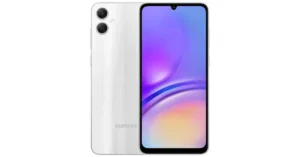 For photos and videos, the smartphone is highlighted with a dual rear camera setup that includes a 50-megapixel primary sensor (f/1.8 aperture) and a 2-megapixel depth sensor (f/2.4 aperture). For selfies, there is an 8-megapixel front-facing camera.
The Samsung Galaxy A05 packs a 5,000mAh battery and comes with 25W wired fast charging support. In terms of connectivity, there is 4G, WiFi 802.11, Bluetooth 5.3, USB 2.0, GPS, GLONASS, a USB Type-C port and a 3.5mm jack. In addition to this, the smartphone includes a side-mounted fingerprint scanner for phone unlocking, an accelerometer, a light sensor, and a proximity sensor.
For photos and videos, the smartphone is highlighted with a dual rear camera setup that includes a 50-megapixel primary sensor (f/1.8 aperture) and a 2-megapixel depth sensor (f/2.4 aperture). For selfies, there is an 8-megapixel front-facing camera.
The Samsung Galaxy A05 packs a 5,000mAh battery and comes with 25W wired fast charging support. In terms of connectivity, there is 4G, WiFi 802.11, Bluetooth 5.3, USB 2.0, GPS, GLONASS, a USB Type-C port and a 3.5mm jack. In addition to this, the smartphone includes a side-mounted fingerprint scanner for phone unlocking, an accelerometer, a light sensor, and a proximity sensor. 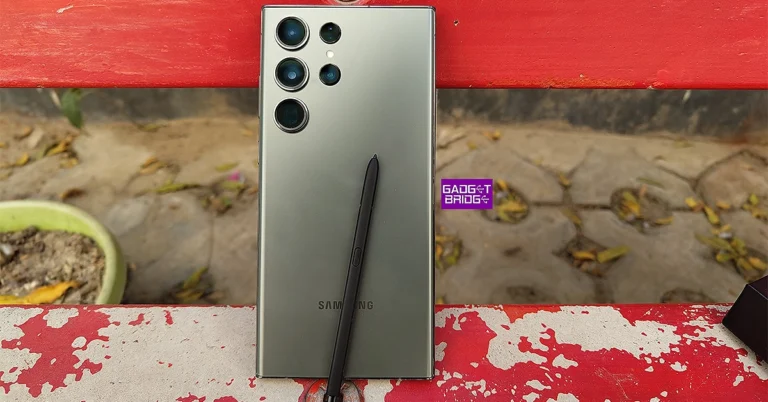


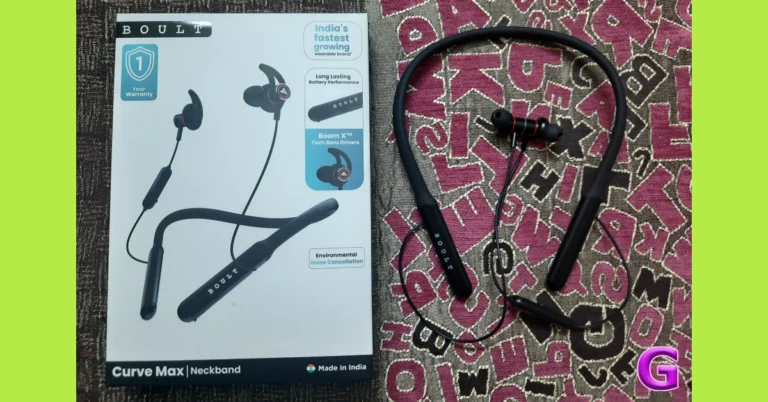
 There are no curveballs in design – the Curve Max looks and feels like your traditional neckband. It has its little quirks though, the most significant one being the pill-shaped plastic panel for playback and volume controls. Typically, these controls are located on one of the bands but Boult has gone for a separate panel that dangles off the left wire. A bit extra if we’re being honest. This panel also houses the microphone and a Type-C USB port for charging.
 As is the case with most entry-level neckbands, the sound output here is quite bass-heavy. The mid and high-range frequencies suffer as a result, not being perfectly integrated into the mix. We felt this divide more than ever on lo-fi recordings, where the low end was overblown and shrouding out the other frequencies. There are no other sound profiles on offer, so you’re going to be stuck with the default one. A more balanced soundstage would have been ideal.
On the bright side, if you’re someone who enjoys your mixes with a boosted bass, these earbuds may be the pair you’re looking for. The neckband does a good job of preserving the audio quality in higher volumes, so you can crank it all the way up without worrying too much about it.
There is a handy ‘gaming mode’ on offer, which gets triggered by pressing the action button four times. The latency drops down to 50ms in this mode. We played Call of Duty Mobile with the Curve Max on, and it was a pleasant experience. The game audio was perfectly in sync with the graphics on the screen throughout the gaming session. No a lot of neckbands under Rs 2,000 can boast of that.
As is the case with most entry-level neckbands, the sound output here is quite bass-heavy. The mid and high-range frequencies suffer as a result, not being perfectly integrated into the mix. We felt this divide more than ever on lo-fi recordings, where the low end was overblown and shrouding out the other frequencies. There are no other sound profiles on offer, so you’re going to be stuck with the default one. A more balanced soundstage would have been ideal.
On the bright side, if you’re someone who enjoys your mixes with a boosted bass, these earbuds may be the pair you’re looking for. The neckband does a good job of preserving the audio quality in higher volumes, so you can crank it all the way up without worrying too much about it.
There is a handy ‘gaming mode’ on offer, which gets triggered by pressing the action button four times. The latency drops down to 50ms in this mode. We played Call of Duty Mobile with the Curve Max on, and it was a pleasant experience. The game audio was perfectly in sync with the graphics on the screen throughout the gaming session. No a lot of neckbands under Rs 2,000 can boast of that.
 There are no curveballs in design – the Curve Max looks and feels like your traditional neckband. It has its little quirks though, the most significant one being the pill-shaped plastic panel for playback and volume controls. Typically, these controls are located on one of the bands but Boult has gone for a separate panel that dangles off the left wire. A bit extra if we’re being honest. This panel also houses the microphone and a Type-C USB port for charging.
 The neckband itself is very flexible and durable. The rubberised finish feels premium and the snake skin texture provides a decent grip. The earbuds come with rubber ear hooks attached to them, offering a superior fit. If that’s not your thing, you can easily take these hooks off. Even without them, the earbuds offer a comfortable fit and don’t cause any ear fatigue even when they’ve been worn for several hours.
 An IPX5 rating means that the Boult Curve Max is immune to sweat and light rainfall. We used this neckband while working out and they were totally unfazed even when things got sweaty. The matte-like finish on the inner panel of the earbuds ensures they don’t slip out when you’re sweaty.
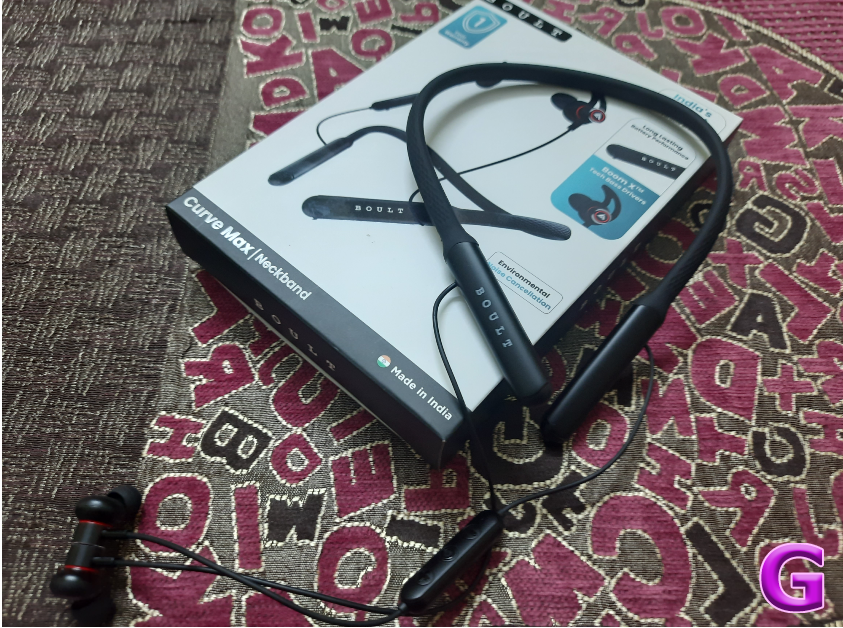 As is the case with most entry-level neckbands, the sound output here is quite bass-heavy. The mid and high-range frequencies suffer as a result, not being perfectly integrated into the mix. We felt this divide more than ever on lo-fi recordings, where the low end was overblown and shrouding out the other frequencies. There are no other sound profiles on offer, so you’re going to be stuck with the default one. A more balanced soundstage would have been ideal.
On the bright side, if you’re someone who enjoys your mixes with a boosted bass, these earbuds may be the pair you’re looking for. The neckband does a good job of preserving the audio quality in higher volumes, so you can crank it all the way up without worrying too much about it.
There is a handy ‘gaming mode’ on offer, which gets triggered by pressing the action button four times. The latency drops down to 50ms in this mode. We played Call of Duty Mobile with the Curve Max on, and it was a pleasant experience. The game audio was perfectly in sync with the graphics on the screen throughout the gaming session. No a lot of neckbands under Rs 2,000 can boast of that.
As is the case with most entry-level neckbands, the sound output here is quite bass-heavy. The mid and high-range frequencies suffer as a result, not being perfectly integrated into the mix. We felt this divide more than ever on lo-fi recordings, where the low end was overblown and shrouding out the other frequencies. There are no other sound profiles on offer, so you’re going to be stuck with the default one. A more balanced soundstage would have been ideal.
On the bright side, if you’re someone who enjoys your mixes with a boosted bass, these earbuds may be the pair you’re looking for. The neckband does a good job of preserving the audio quality in higher volumes, so you can crank it all the way up without worrying too much about it.
There is a handy ‘gaming mode’ on offer, which gets triggered by pressing the action button four times. The latency drops down to 50ms in this mode. We played Call of Duty Mobile with the Curve Max on, and it was a pleasant experience. The game audio was perfectly in sync with the graphics on the screen throughout the gaming session. No a lot of neckbands under Rs 2,000 can boast of that.
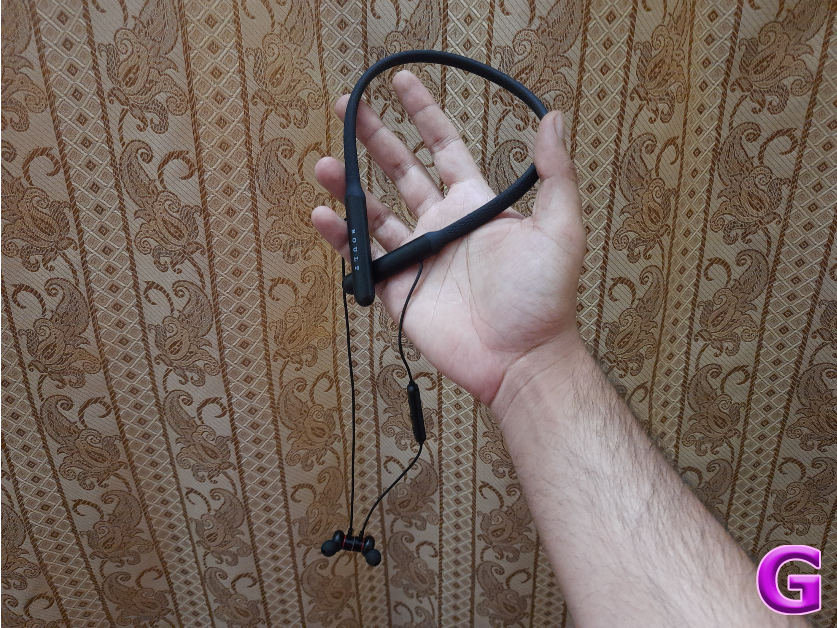 The Boult Curve Max delivers a rock-solid calling experience as well. With ENC onboard, the neckband is able to extract the caller’s voice from the surrounding noise and relay it to the receiver quite well. We used it for cellular calls as well as video calls over the internet and there were no hiccups in call quality. We even took it outdoors and were impressed with how it performed amidst noisier conditions.
We used the Boult Curve Max for a week with a daily usage of around 4-5 hours. This included listening to music, gaming, calling, and watching video content. After a week, the neckband was left with more than 50% charge, which is simply amazing. Boult claims that the Curve Max offers a playtime of 100 hours on a full charge. Plugging it into a Type-C charging cable for 10 minutes gives you a playtime of 24 hours.
Read Also: 2 Easy Ways To Create a Word Cloud in Microsoft Word (2023)
The Boult Curve Max delivers a rock-solid calling experience as well. With ENC onboard, the neckband is able to extract the caller’s voice from the surrounding noise and relay it to the receiver quite well. We used it for cellular calls as well as video calls over the internet and there were no hiccups in call quality. We even took it outdoors and were impressed with how it performed amidst noisier conditions.
We used the Boult Curve Max for a week with a daily usage of around 4-5 hours. This included listening to music, gaming, calling, and watching video content. After a week, the neckband was left with more than 50% charge, which is simply amazing. Boult claims that the Curve Max offers a playtime of 100 hours on a full charge. Plugging it into a Type-C charging cable for 10 minutes gives you a playtime of 24 hours.
Read Also: 2 Easy Ways To Create a Word Cloud in Microsoft Word (2023)
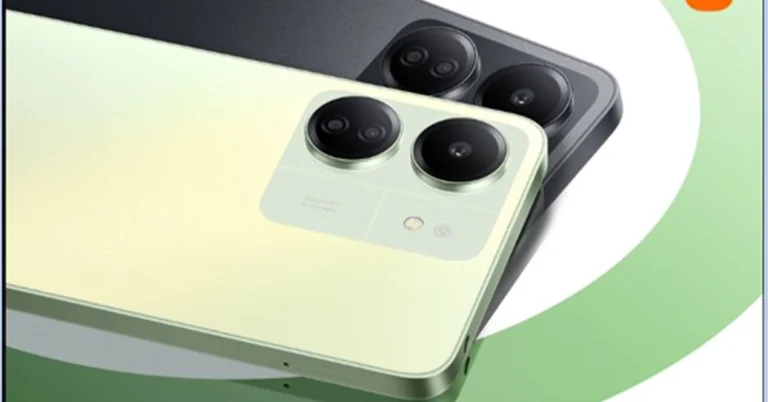

 Step 2: Click on the location and hit the Share icon in the left panel.
 Step 3: Switch to the Embed tab and copy the HTML code.
 Step 4: Open the HTML file for your website and paste the code where you want the map to display.
Step 5: Remove the ‘<’ sign in ‘<iframe’ at the beginning of the code and replace it with ‘[um-’. Similarly, replace ‘></iframe>’ at the end with ‘]’.
Step 6: Save your changes. Load your website in a web browser to view the map.
Step 4: Open the HTML file for your website and paste the code where you want the map to display.
Step 5: Remove the ‘<’ sign in ‘<iframe’ at the beginning of the code and replace it with ‘[um-’. Similarly, replace ‘></iframe>’ at the end with ‘]’.
Step 6: Save your changes. Load your website in a web browser to view the map.
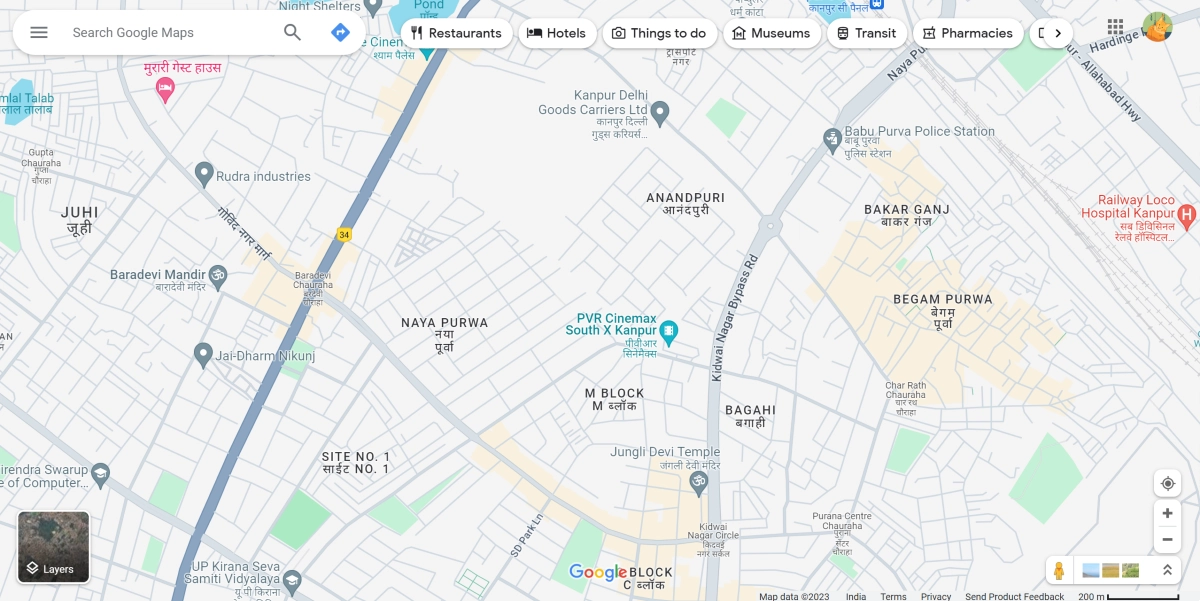 Step 2: Click on the location and hit the Share icon in the left panel.
 Step 3: Switch to the Embed tab and copy the HTML code.
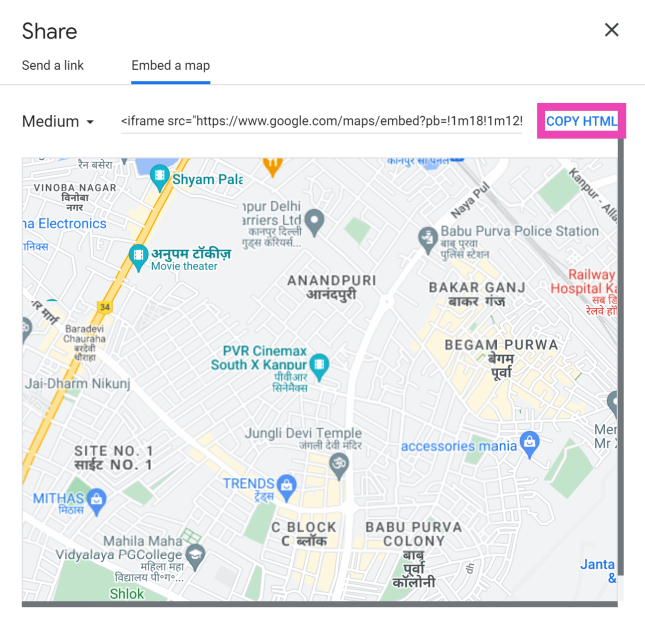 Step 4: Open the HTML file for your website and paste the code where you want the map to display.
Step 5: Remove the ‘<’ sign in ‘<iframe’ at the beginning of the code and replace it with ‘[um-’. Similarly, replace ‘></iframe>’ at the end with ‘]’.
Step 6: Save your changes. Load your website in a web browser to view the map.
Step 4: Open the HTML file for your website and paste the code where you want the map to display.
Step 5: Remove the ‘<’ sign in ‘<iframe’ at the beginning of the code and replace it with ‘[um-’. Similarly, replace ‘></iframe>’ at the end with ‘]’.
Step 6: Save your changes. Load your website in a web browser to view the map.

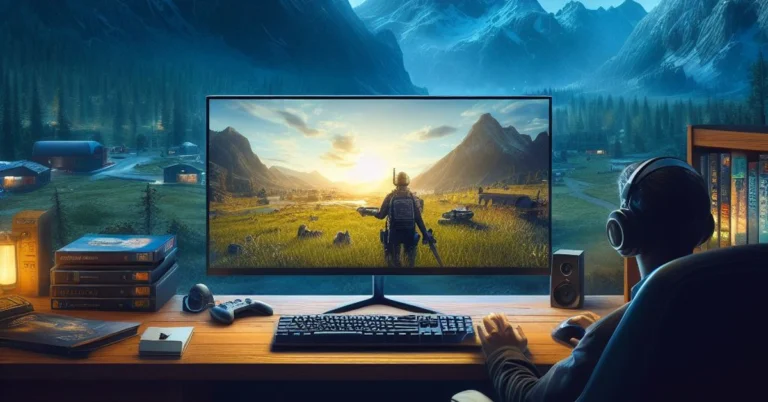
 Step 4: Click on Change default graphics settings.
 Step 5: Turn on the toggle switch for Hardware-accelerated GPU scheduling to turn on Hardware Acceleration. Flick it back to turn it off.

 Step 2: Click on Advanced display under Related settings.
 Step 3: Click on Display adaptor properties for Display 1.
 Step 4: Switch to the Troubleshoot tab and select Change settings. If you don’t see the Troubleshoot tab, click on Properties>Change settings. If the Change settings option is greyed out, it means the graphics card on your PC does not support changing hardware acceleration.
 Step 5: Find the Hardware Acceleration slider and move it all the way to the left.
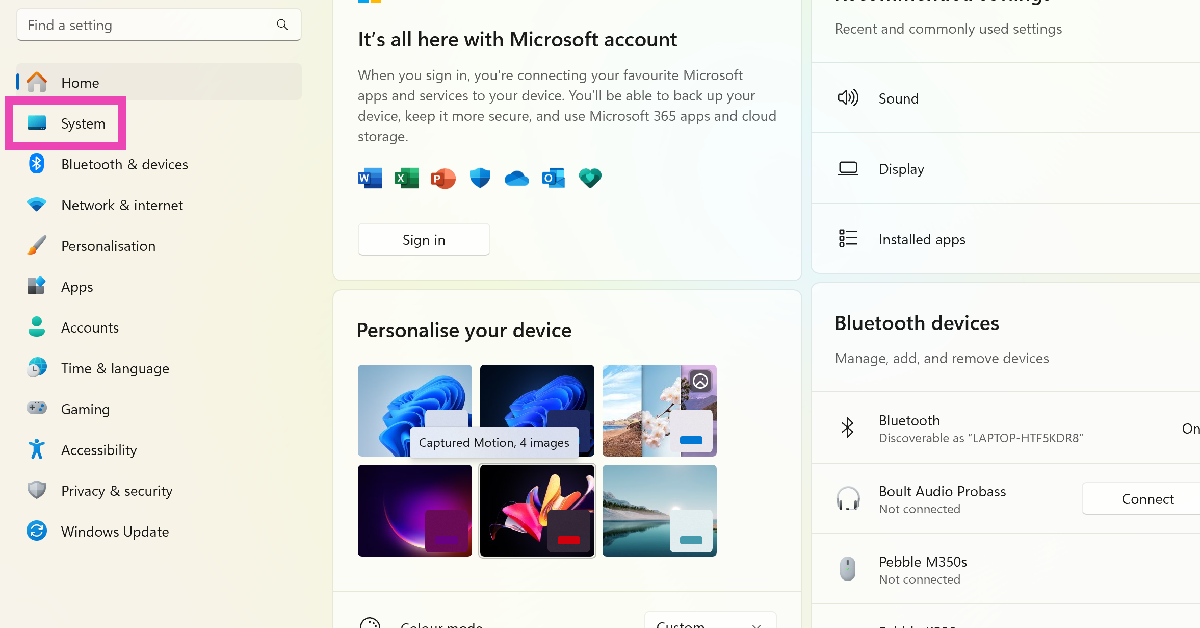 Step 2: Select Display.
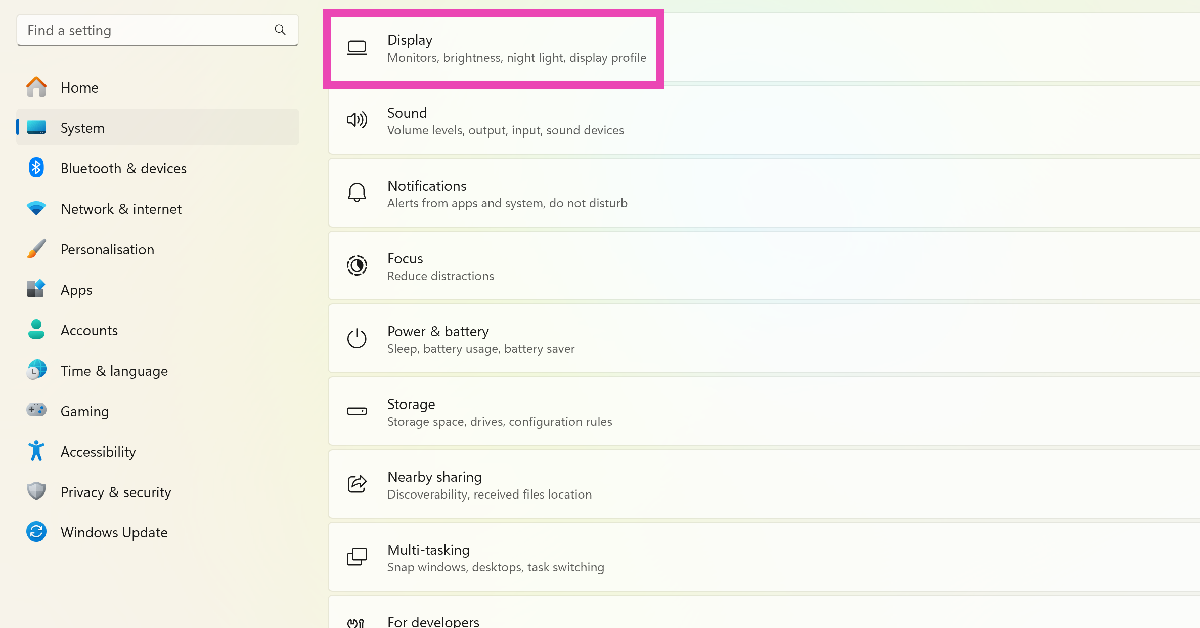 Step 3: Scroll down and click on Graphics under Related settings.
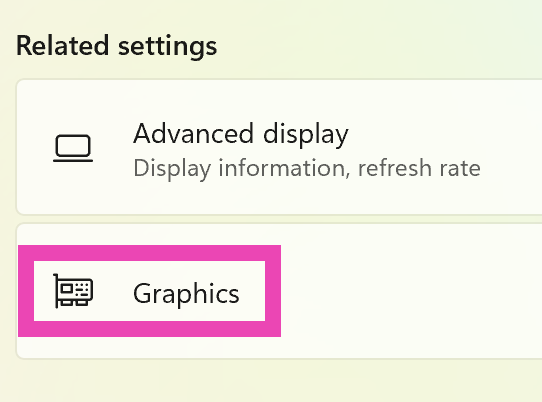 Step 4: Click on Change default graphics settings.
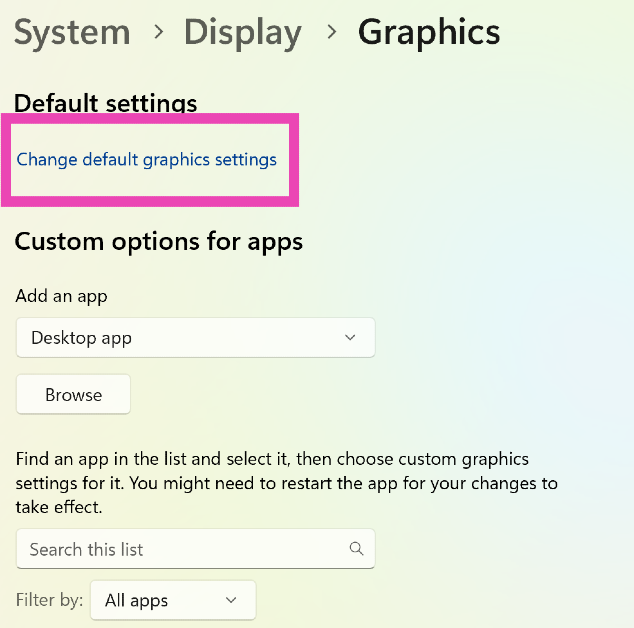 Step 5: Turn on the toggle switch for Hardware-accelerated GPU scheduling to turn on Hardware Acceleration. Flick it back to turn it off.
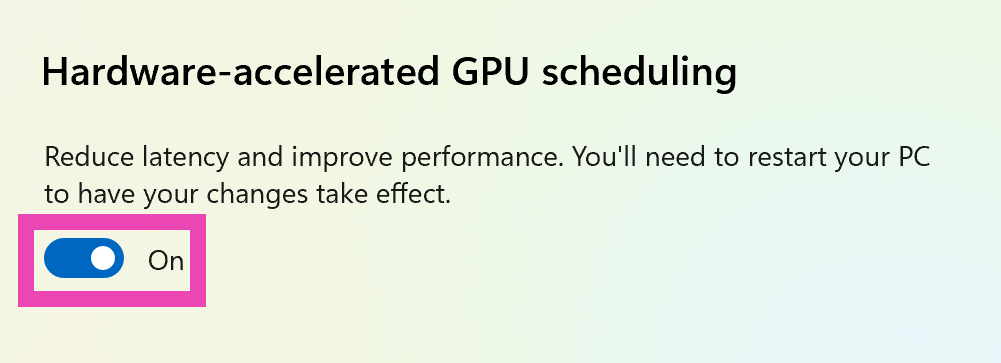
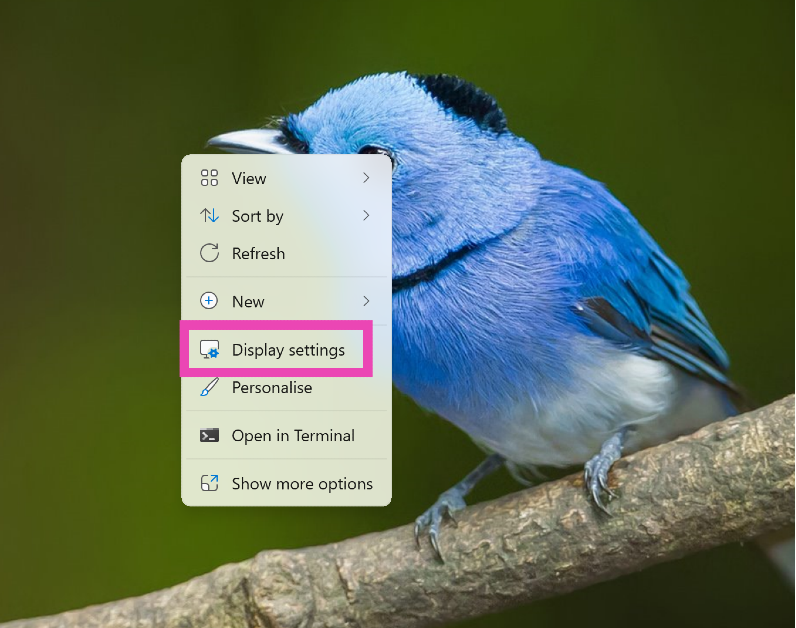 Step 2: Click on Advanced display under Related settings.
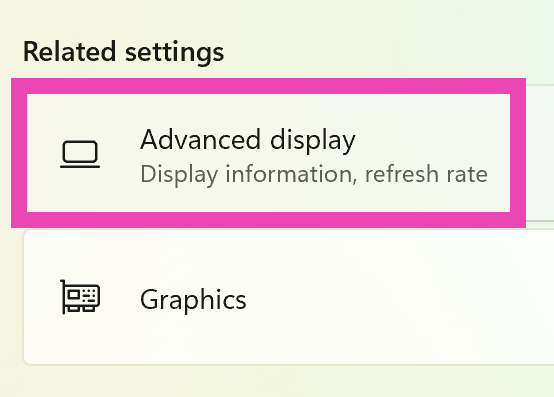 Step 3: Click on Display adaptor properties for Display 1.
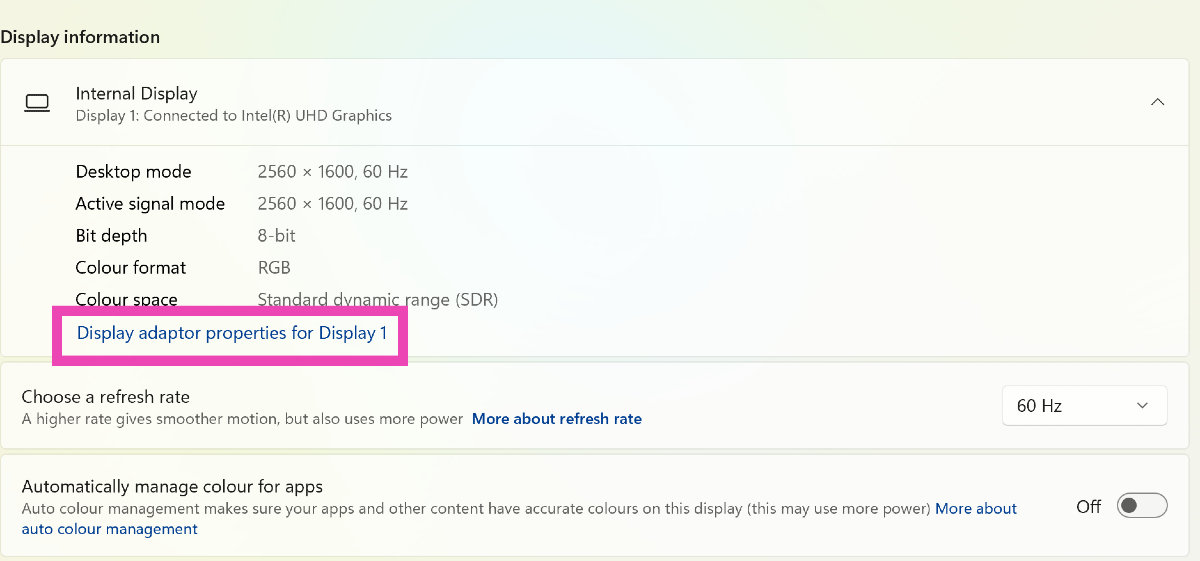 Step 4: Switch to the Troubleshoot tab and select Change settings. If you don’t see the Troubleshoot tab, click on Properties>Change settings. If the Change settings option is greyed out, it means the graphics card on your PC does not support changing hardware acceleration.
 Step 5: Find the Hardware Acceleration slider and move it all the way to the left.


 Step 4: Select Download video.
 The video will be saved to your device.

 Step 4: Click on Copy Link.
 Step 5: Go back to the third-party tool and paste the link into the ‘Tweet URL’ box.
Step 6: Click on Load Videos.
Step 5: Go back to the third-party tool and paste the link into the ‘Tweet URL’ box.
Step 6: Click on Load Videos.
 Step 7: Select the resolution you want for the video.
 The video will be downloaded to your device.

 Step 4: Select Copy Link.
 Step 5: Launch the Download Twitter Videos – GIF app. The link you copied from Twitter will automatically get posted in the Your Link box. If not, post it manually.
Step 6: Select your preferred resolution and hit Download.
Step 5: Launch the Download Twitter Videos – GIF app. The link you copied from Twitter will automatically get posted in the Your Link box. If not, post it manually.
Step 6: Select your preferred resolution and hit Download.
 Step 4: Hit Download.
 Step 5: Select your preferred resolution and hit Download again.

 Step 4: Select Download video.
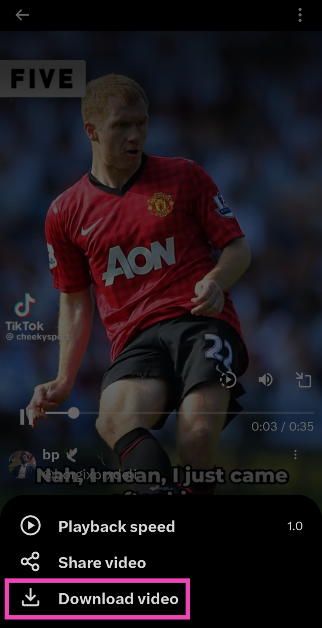 The video will be saved to your device.
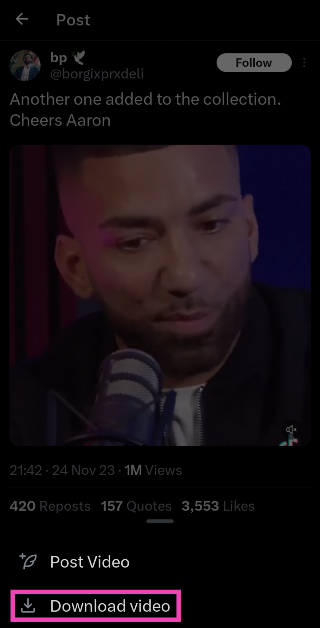
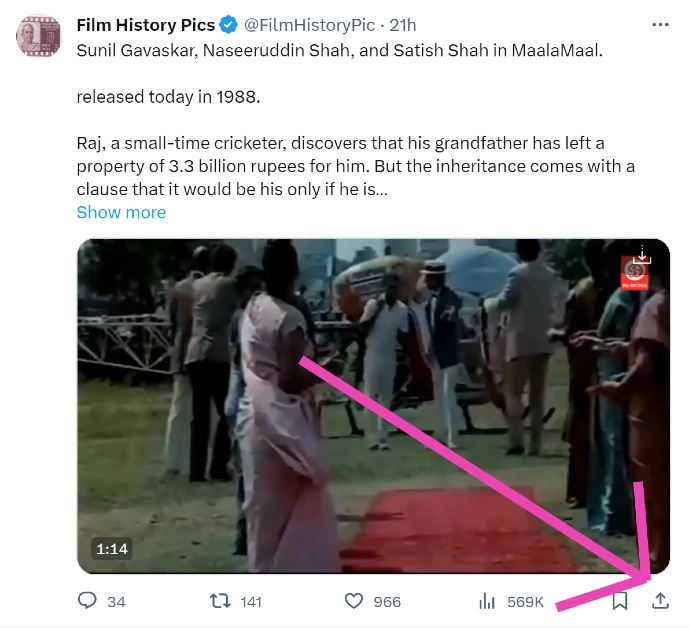 Step 4: Click on Copy Link.
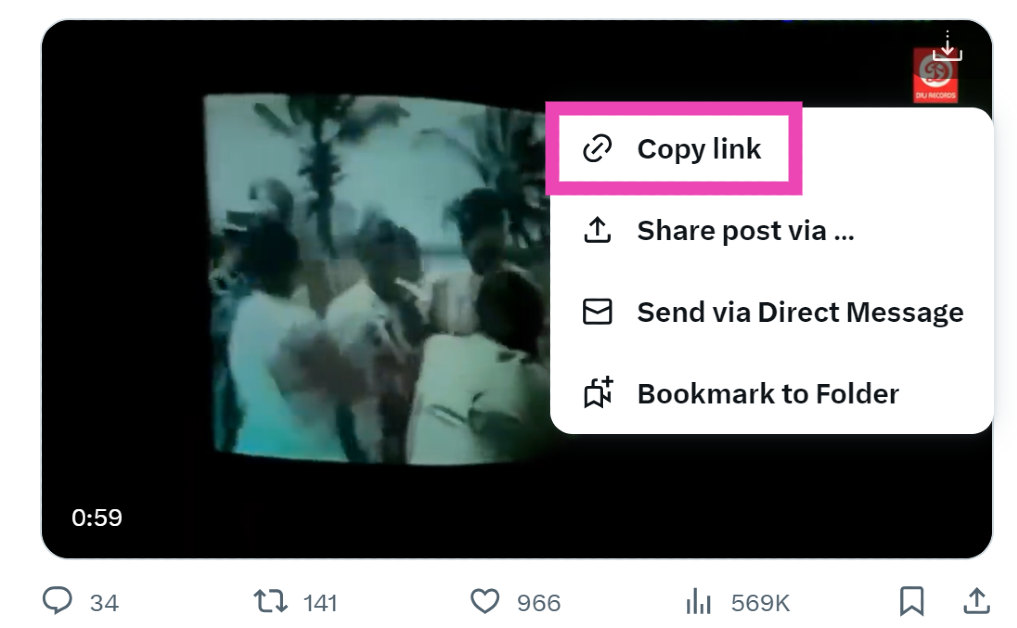 Step 5: Go back to the third-party tool and paste the link into the ‘Tweet URL’ box.
Step 6: Click on Load Videos.
Step 5: Go back to the third-party tool and paste the link into the ‘Tweet URL’ box.
Step 6: Click on Load Videos.
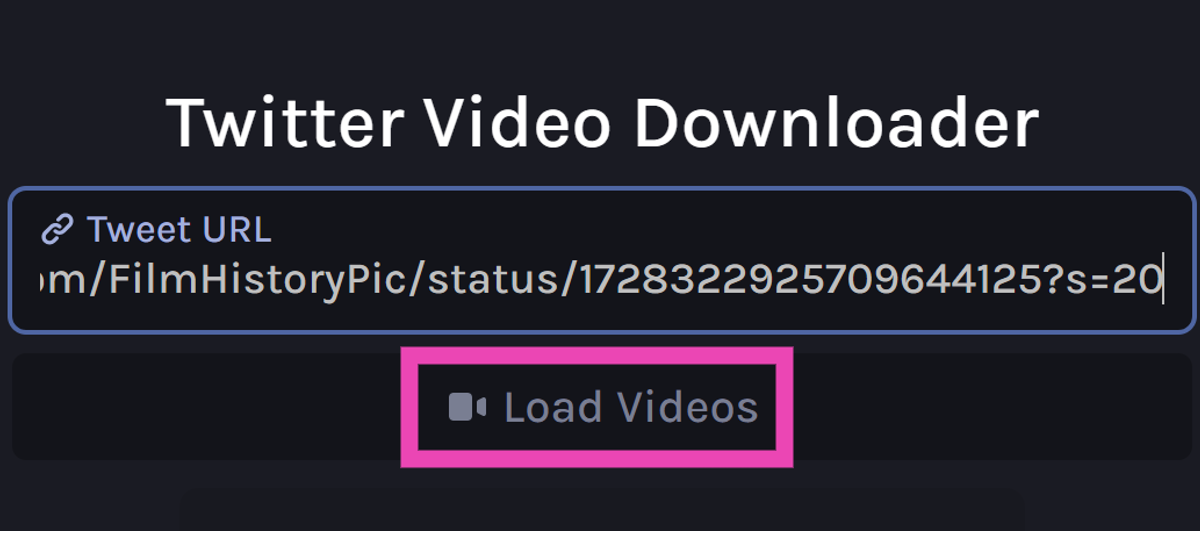 Step 7: Select the resolution you want for the video.
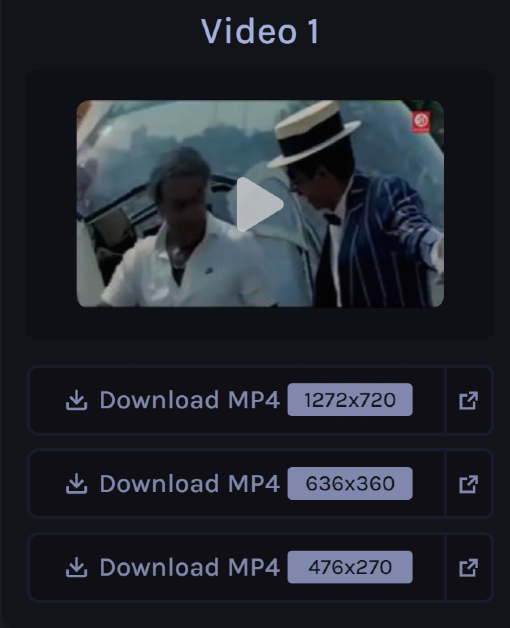 The video will be downloaded to your device.
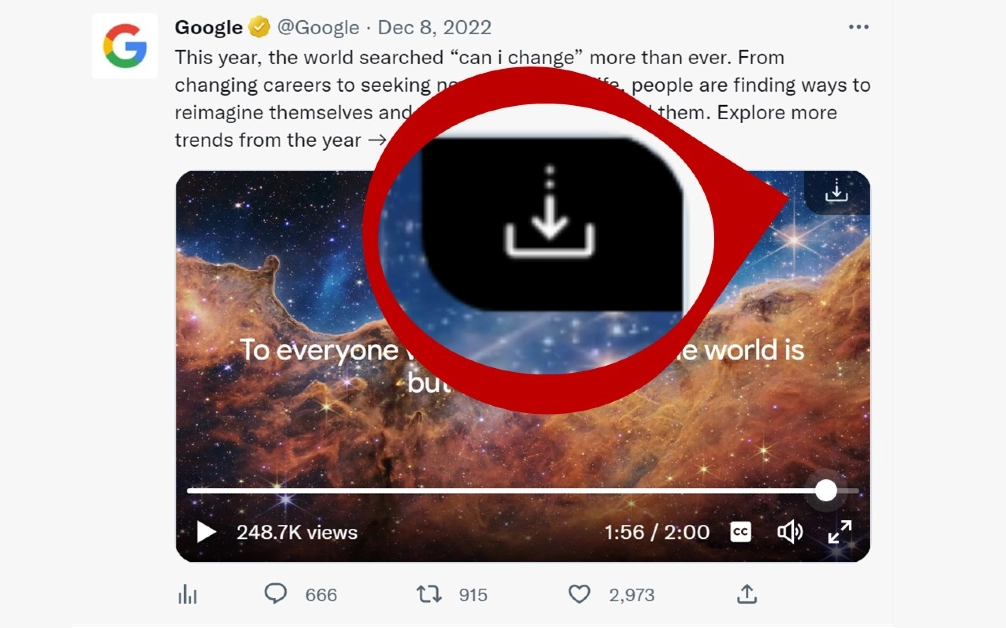

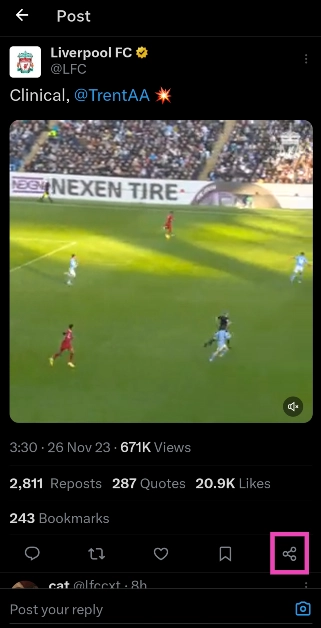 Step 4: Select Copy Link.
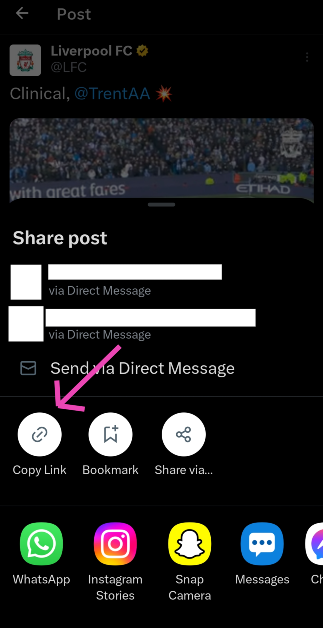 Step 5: Launch the Download Twitter Videos – GIF app. The link you copied from Twitter will automatically get posted in the Your Link box. If not, post it manually.
Step 6: Select your preferred resolution and hit Download.
Step 5: Launch the Download Twitter Videos – GIF app. The link you copied from Twitter will automatically get posted in the Your Link box. If not, post it manually.
Step 6: Select your preferred resolution and hit Download.
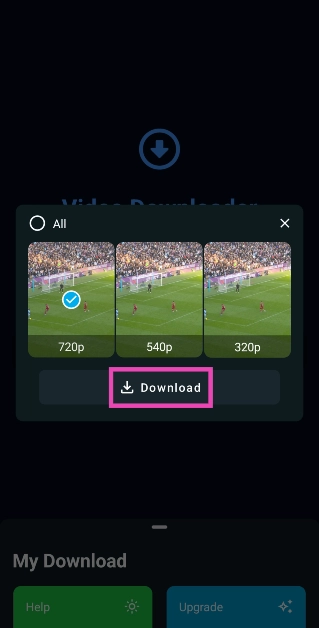
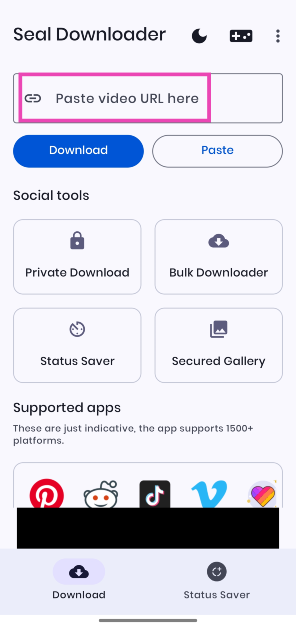 Step 4: Hit Download.
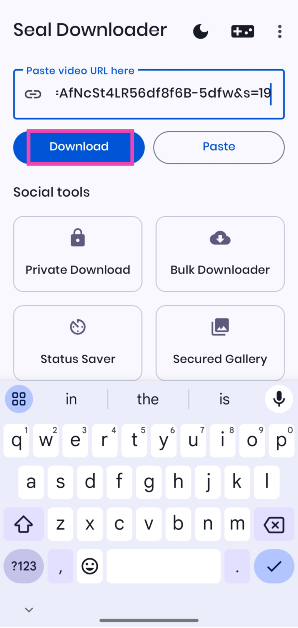 Step 5: Select your preferred resolution and hit Download again.
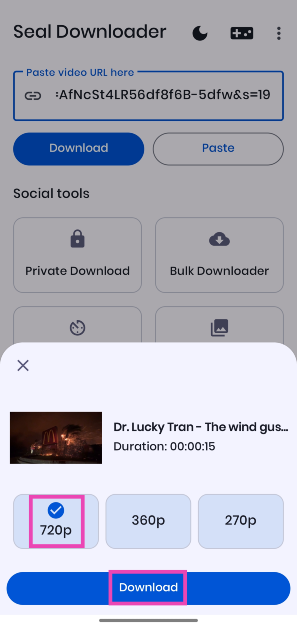

 Step 6: Select the font, colours, layout, and case in the Word Cloud panel.
 Step 3: Hit Create word cloud.

 Step 4: Scroll down to view the word cloud.
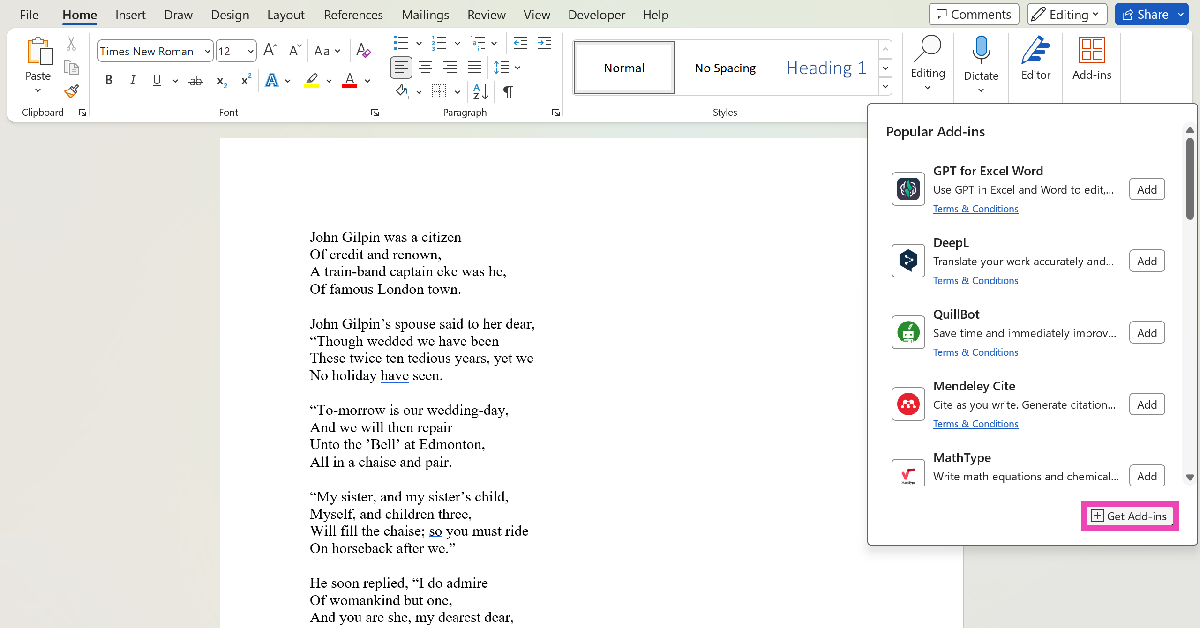 Step 4: Search for Word Cloud and hit Enter.
Step 5: Select the Pro Word Cloud add-in.
Step 4: Search for Word Cloud and hit Enter.
Step 5: Select the Pro Word Cloud add-in.
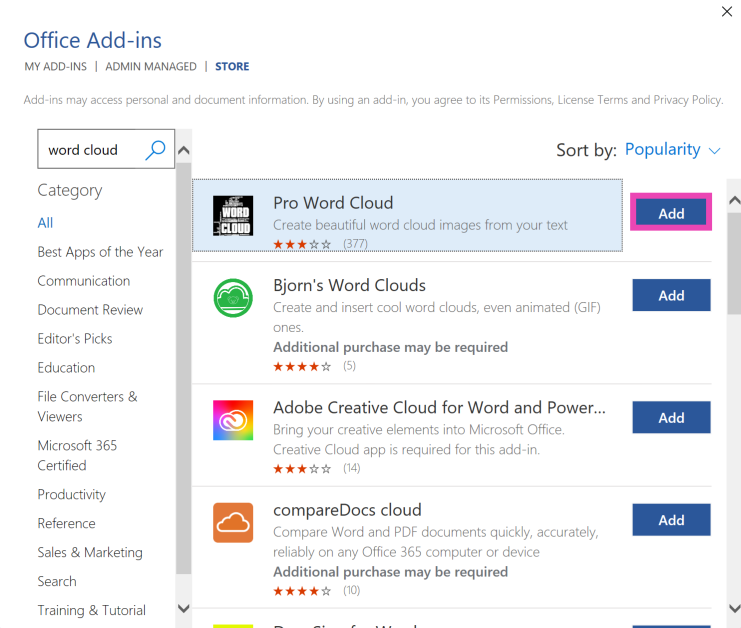 Step 6: Select the font, colours, layout, and case in the Word Cloud panel.
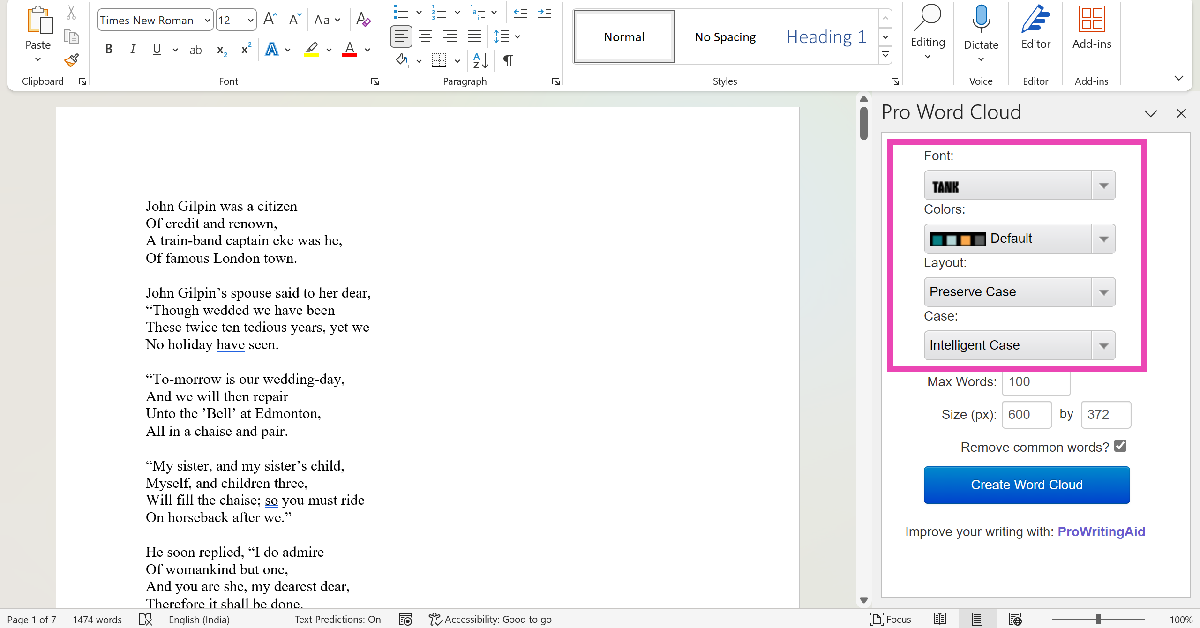 Step 7: Highlight the part of the document for which you want to create the word cloud.
Step 8: Hit Create Word Cloud.
Step 7: Highlight the part of the document for which you want to create the word cloud.
Step 8: Hit Create Word Cloud.
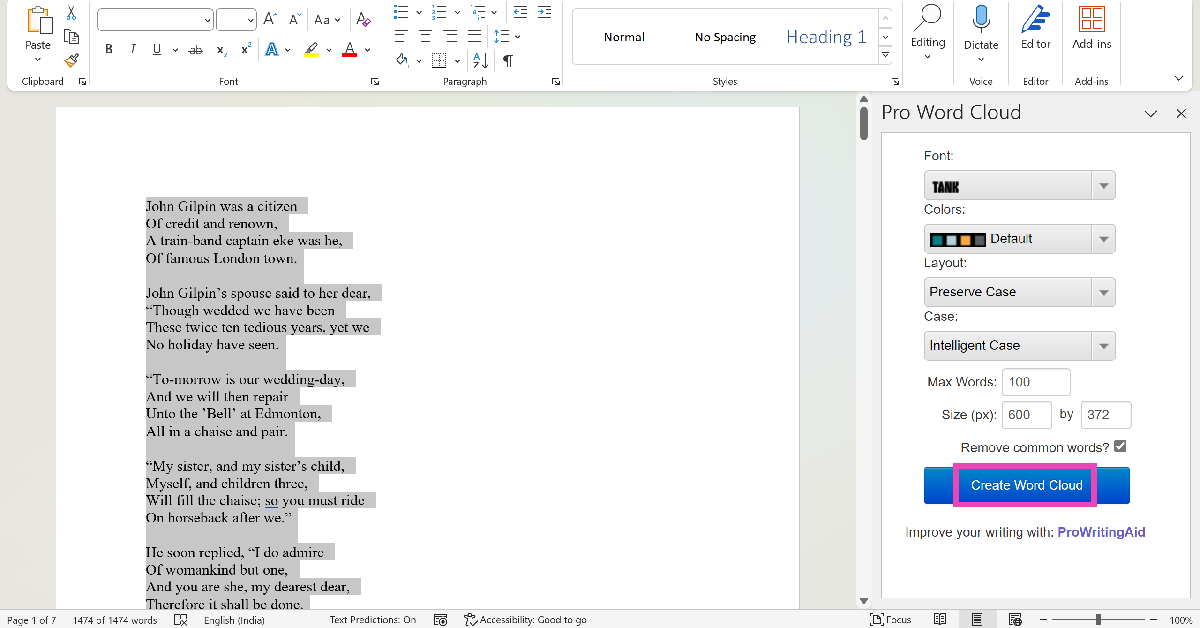 Step 9: Right-click the image to copy it to the clipboard. You can now paste it into the document. You can also choose to save the image to your PC.
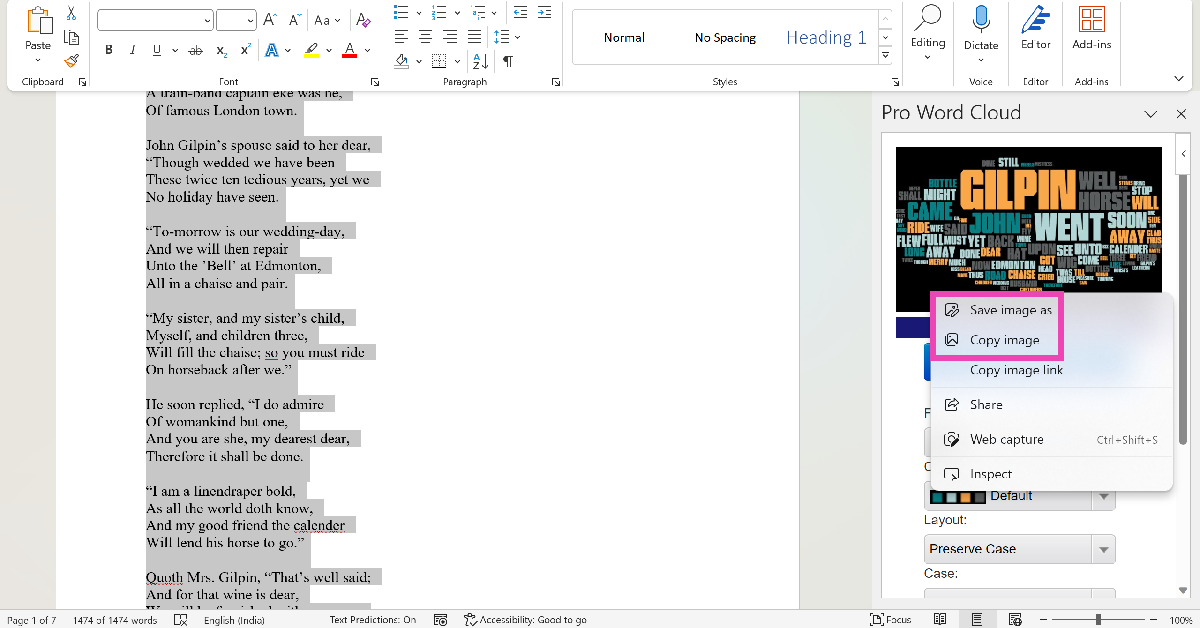
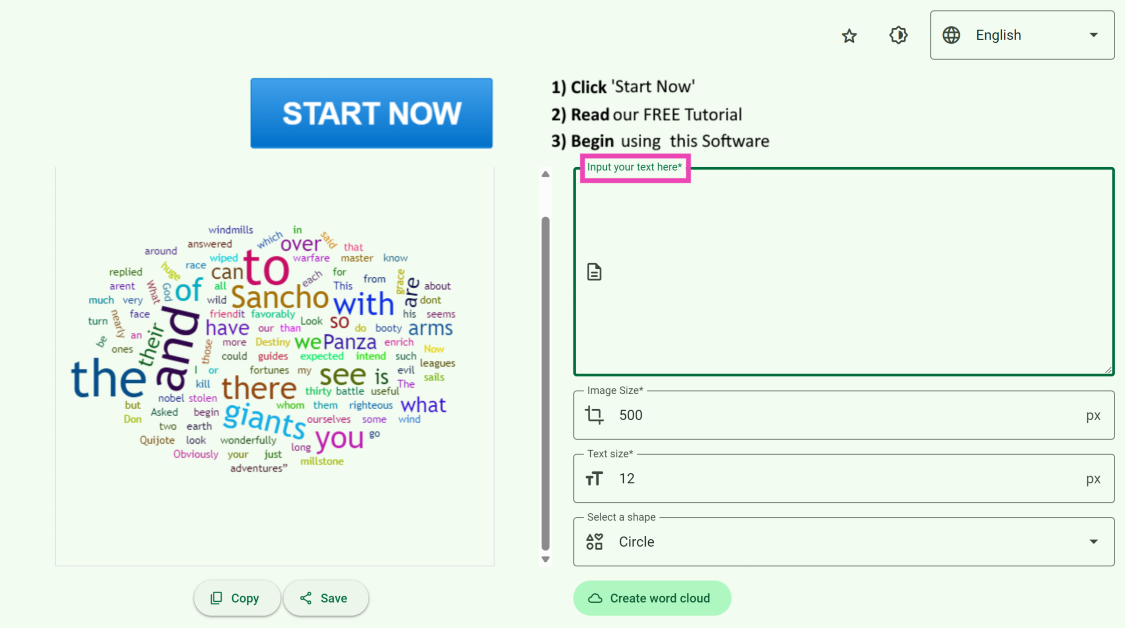 Step 3: Hit Create word cloud.
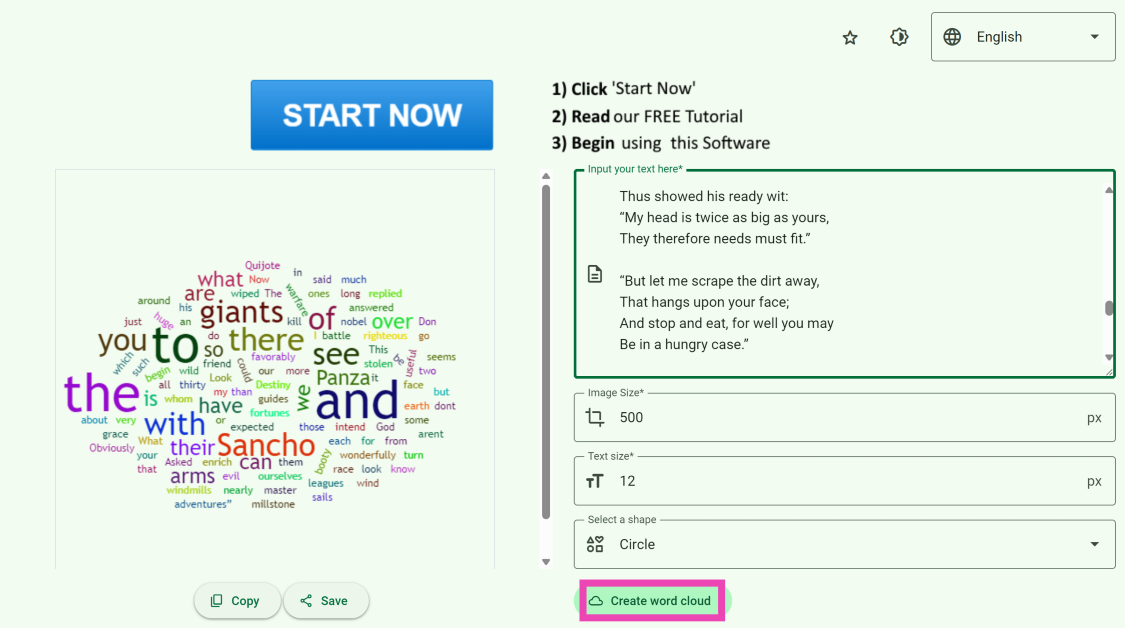 Step 4: Once the word cloud has been created, hit the Save button under the image to download it on your device.
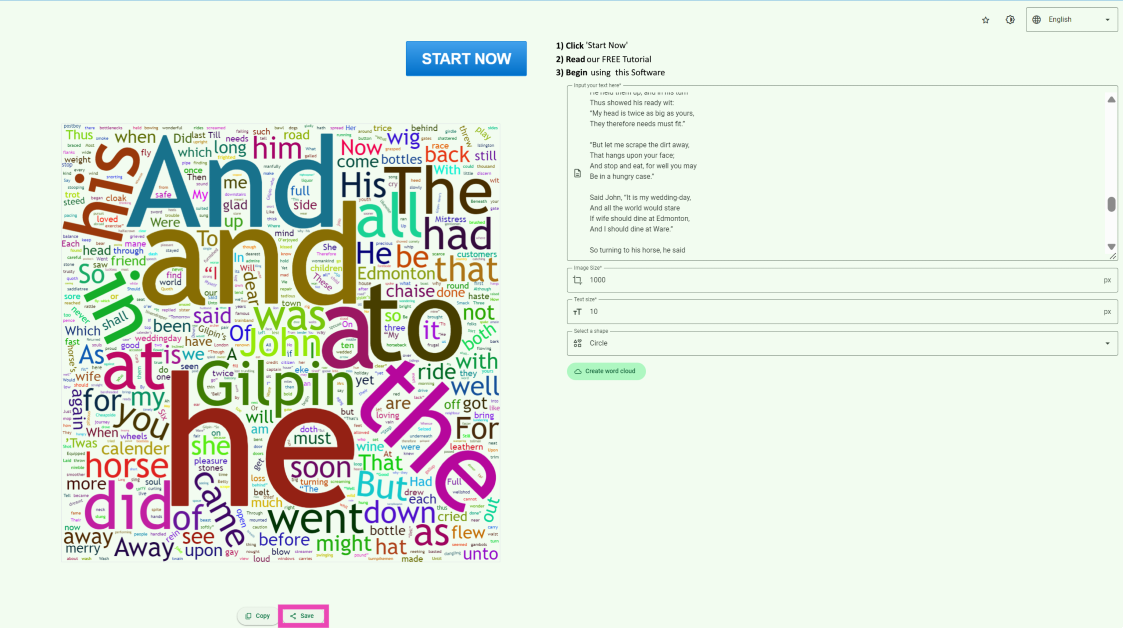
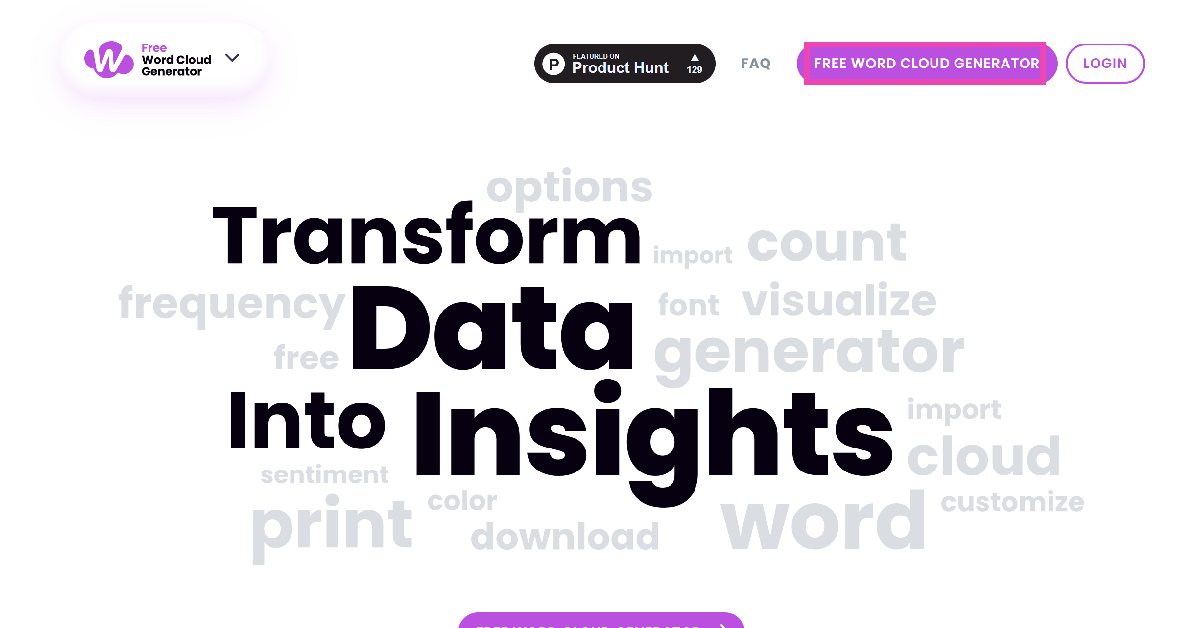 Step 3: Paste the text in the box and choose the font and background colour from the Options panel.
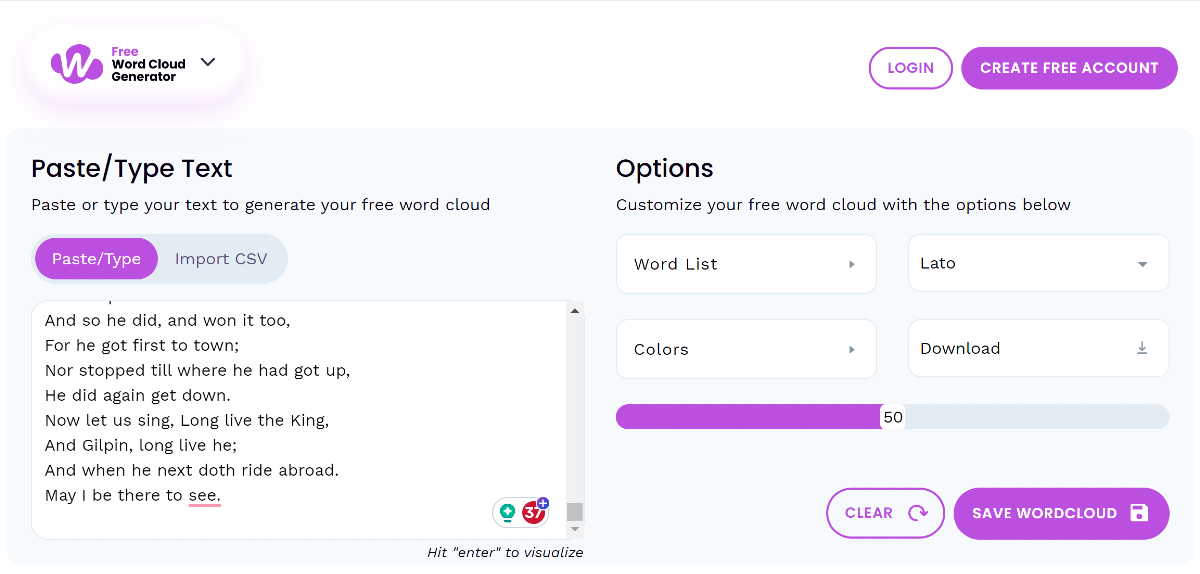 Step 4: Scroll down to view the word cloud.

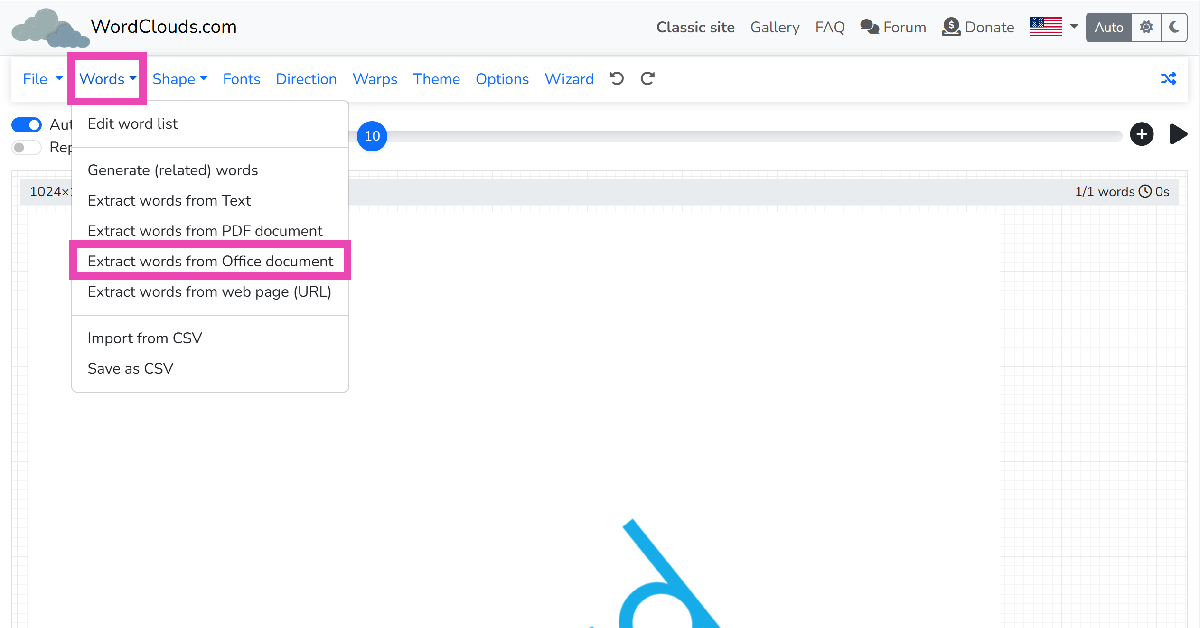 Step 3: Click on Browse and upload the Word document.
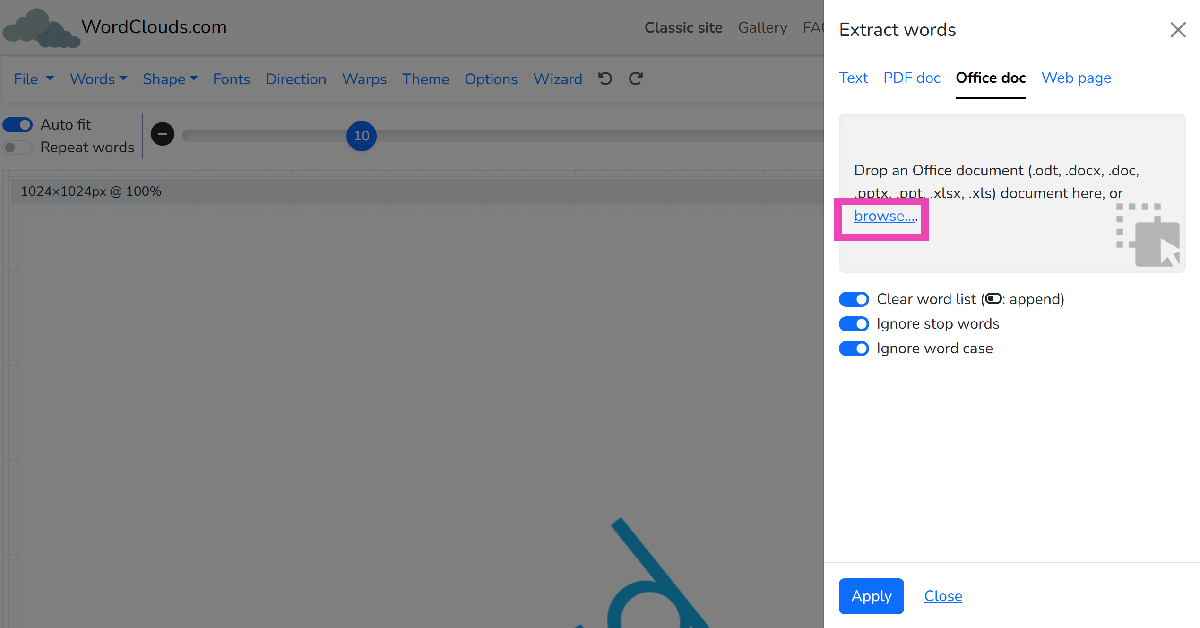 Step 4: Right-click on the word cloud image to save it.
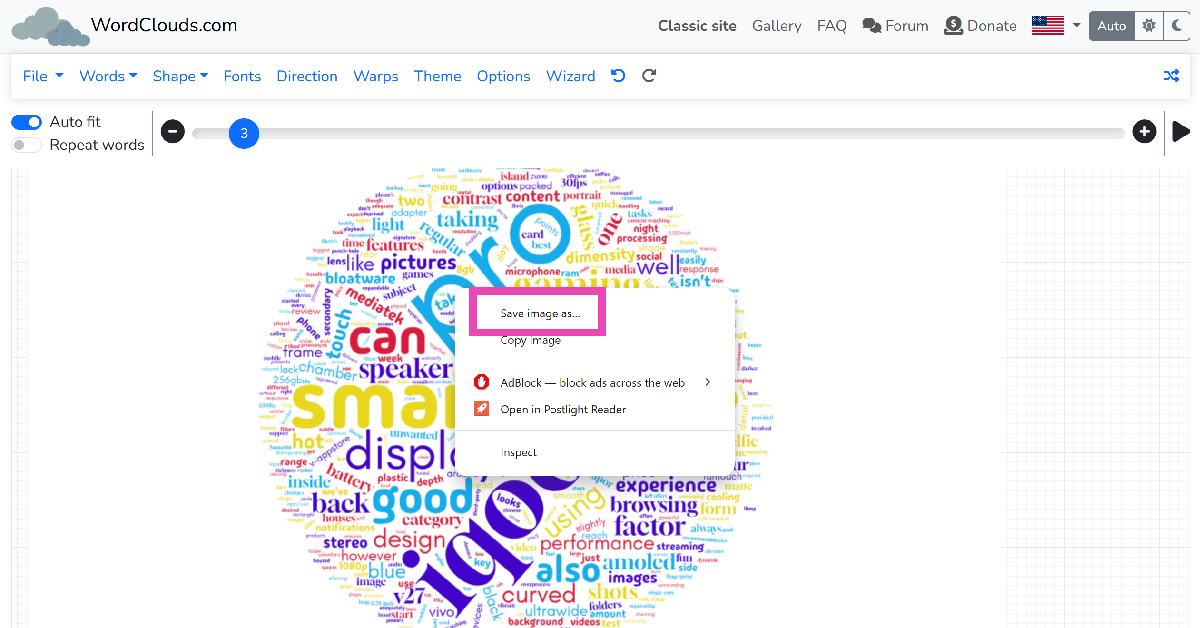
 The vast majority of deepfake videos involve superimposing someone’s face on another person. This makes your task easier since you only need to focus on the face to catch any inconsistencies or glitches. Poorly produced deepfake videos can be spotted with ease, as the subject’s lip movement does not align with what they are saying. Other videos may require you to focus more carefully to catch any weird twitches, facial movements, incorrect face shadows, and other cues. One big tell of a deepfake video is that the lighting on the subject’s face is inconsistent with the rest of their body.
 If you frequently watch videos on YouTube, you must be familiar with duplicitous advertisements that employ deepfake videos of popular talk shows to sell you a counterfeit product. The scam artists that produce such videos replicate the background of the TV show or podcast on the advertisement and superimpose the face of the host on the person talking into the microphone. The easiest way to detect these AI-generated deepfake videos is by paying attention to the voice of the speaker. If it doesn’t match the speaker’s actual voice, then you are most likely watching a fake video. If the voice is a perfect match but the audio is choppy, it is most likely edited.
 If you feel what’s going on in the video is out of character for the person, always check the source of the video. Deepfake videos find virality very quickly and it can be tough to find out where they originated from. If the source of the video is a random account with no credentials or proximity to the subject, the video could be a deepfake. Your next action should be to search for the video on the Internet and check if any major news outlet has verified its legitimacy.
 This method may not work all the time, but you should know about it nevertheless. Since most deepfake videos involve superimposing things on existing footage, a simple reverse image search should bring up the source of the original video. Take as many screenshots of the video as you can and perform a reverse image search on Google to find its source. Read this article to learn other methods for reverse-searching a video.
 Step 3: Swipe up on the screen or tap on Activity at the bottom left corner of the screen.
 Step 4: Click on the view counter at the bottom left corner of the screen.

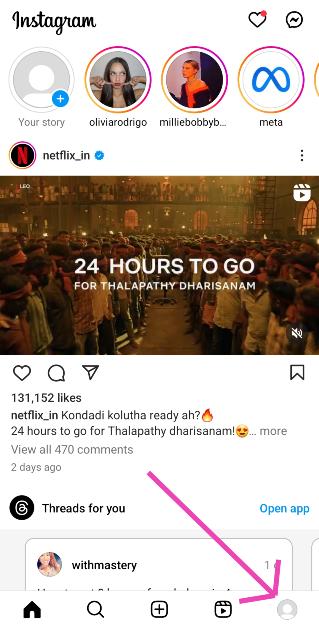 Step 2: Tap on a Highlight.
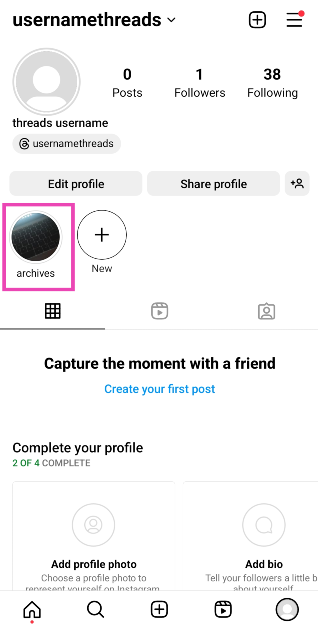 Step 3: Swipe up on the screen or tap on Activity at the bottom left corner of the screen.
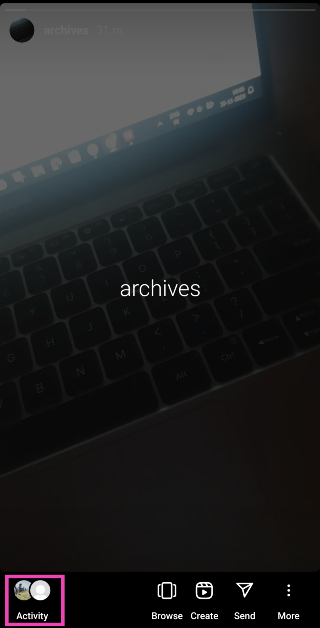 This is where you can see the names of everyone who has viewed your Instagram Highlight.
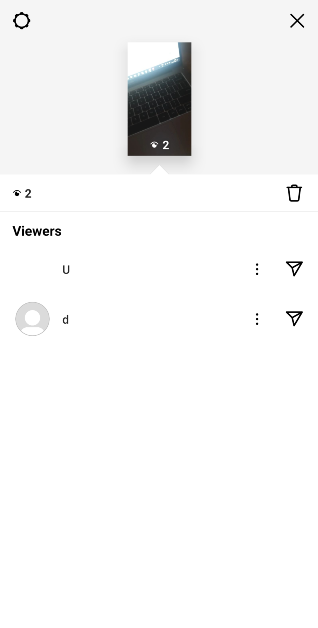
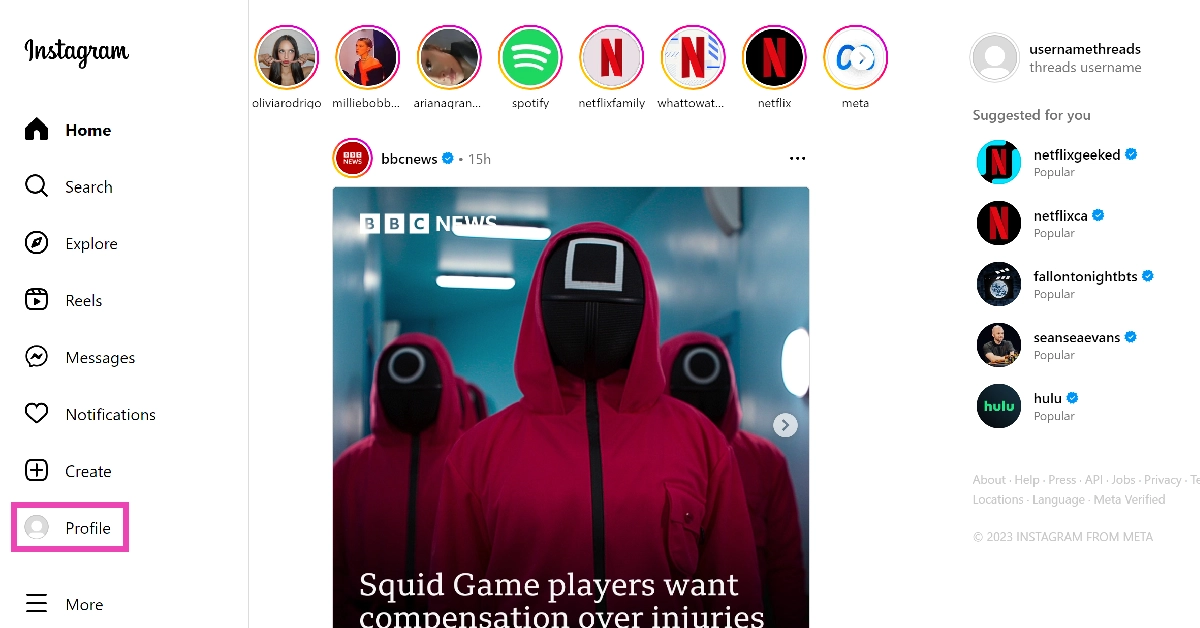 Step 3: Click on a Highlight.
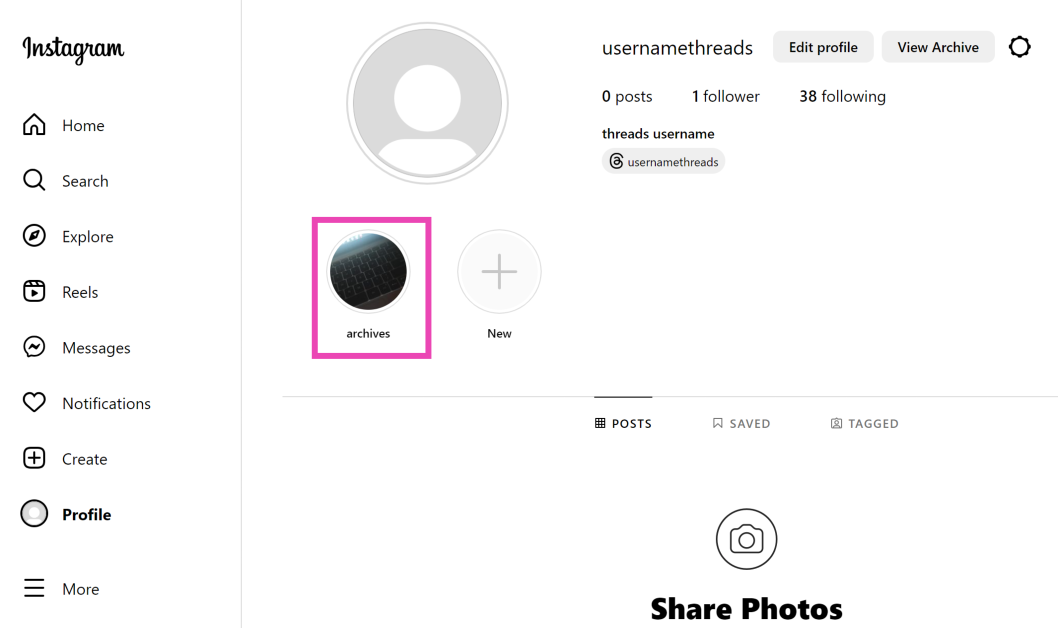 Step 4: Click on the view counter at the bottom left corner of the screen.
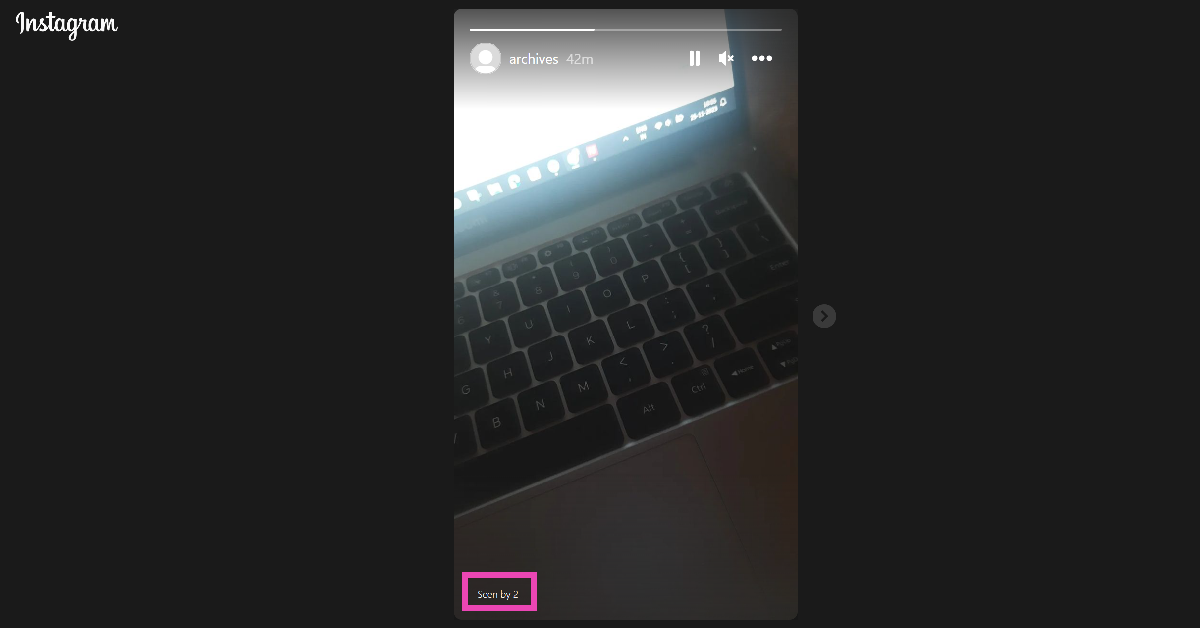 In the following popup box, you will be able to see who viewed your Instagram Highlight.
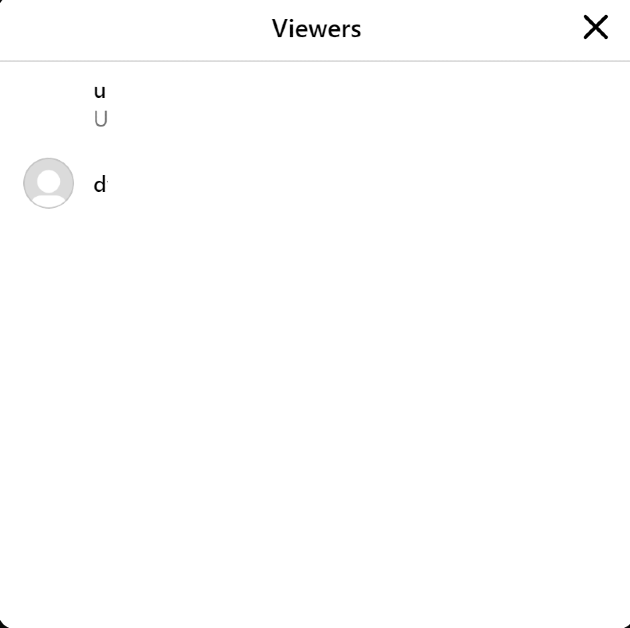

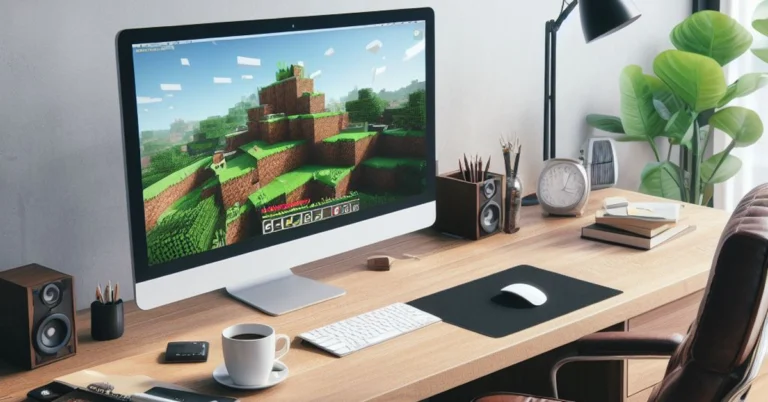
 As the name suggests, Google Opinion Rewards credits your account with a small reward every time you share your opinion on a particular subject. Once you install the app, you are given one survey a week. These surveys may be based on your recent travel history. Once you share your opinion and complete the survey, the app pays out Play Store credits. These Play Store credits can be used to purchase Minecoins. The only catch is that it may take some time to accumulate enough credits to buy a Minecoin bundle.
 If you play Minecraft on an Xbox or PC, you need to check out Microsoft Rewards. Sign into your Microsoft account and visit your Rewards Dashboard to view the activities you can do to accumulate more points. These activities typically include searching the web with Bing on Microsoft Edge, using the search box on your Windows 10/11 PC or laptop, using Cortana, and more. Once you collect enough points, you can exchange them for an Xbox gift card. Xbox gift cards can then be used to buy Minecoin bundles.
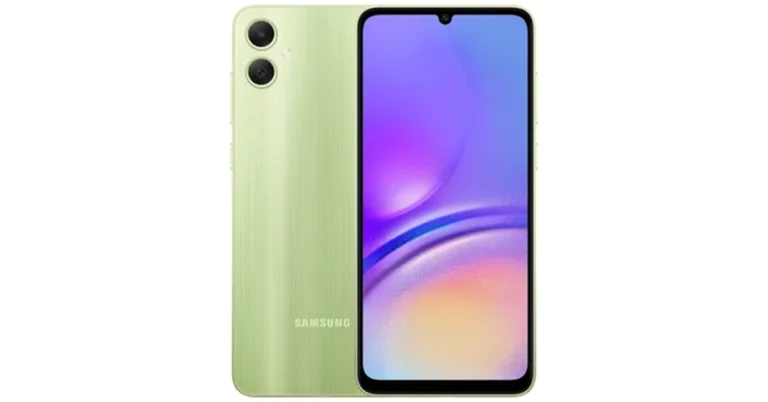
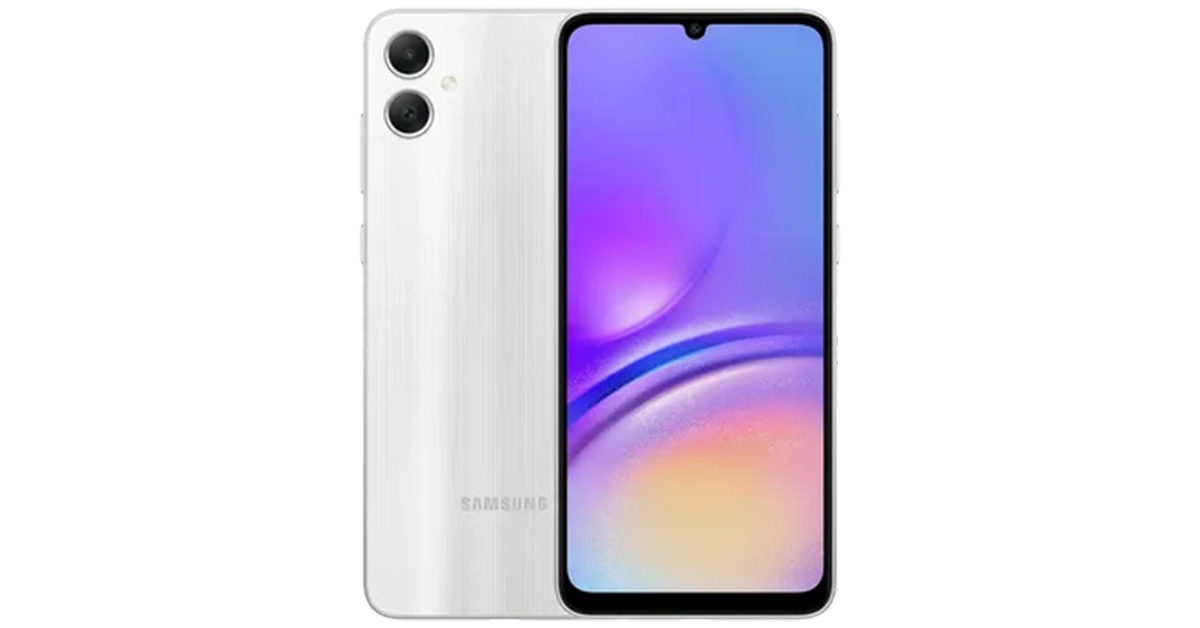 Also Read: 45% of serious gamers in India are earning above 6 lakh per annum: Report