WhatsApp is bringing new changes to the video calling experience on its platform. After being in development since May, the ‘screen sharing’ feature is finally being rolled out for WhatsApp users across Android, iOS, and Windows platforms. The Meta-owned instant messenger has also introduced landscape mode for video calling, which allows participants to hold their phone horizontally while on video calls, bringing flexibility to the screen-sharing process. The announcement was made by Mark Zuckerberg in a Facebook post.Read Also:Top Headphones Over Rs 25,000 for Audiophiles
With the introduction of screen sharing, WhatsApp will rival the likes of Google Meet and Zoom
The introduction of the screen sharing feature puts WhatsApp against the video communication heavyweights like Google Meet, Zoom, and Microsoft Teams. While WhatsApp has had video calling for six years, this feature will make it more conducive to hosting virtual meetings, online lectures, and group activities. To use this feature, users will need to update the app to its latest version.With the added ability to switch to landscape orientation on video calls, Windows users will find it easy to share their desktop screens. Other call participants will be able to view the feed by rotating their phone to landscape mode as well. The screen-sharing window will occupy the main panel while the video feed of the call participants will be arranged vertically on the right side of the call window.Read Also:Sony 4K HDR Professional Bravia Displays with Deep Black Non-Glare Coating launched in IndiaUsers can share their device’s screen by tapping the share icon on a video call. This icon is located in the bottom toolbar, next to the camera switch icon. Like regular video calls, your screen’s feed is end-to-end encrypted as well. WhatsApp has also introduced a ‘video message’ feature, which allows users to send short video messages within chats, like voice notes. To send a video message, simply tap the microphone icon for voice notes, then press and hold it to record a video message.For the latest gadget and tech news, and gadget reviews, follow us on Twitter, Facebook and Instagram. For newest tech & gadget videos subscribe to our YouTube Channel. You can also stay up to date using the Gadget Bridge Android App. You can find the latest car and bike news here.
Running out of storage space on your Mac can be a bothersome issue, affecting its performance and usability. However, fret not! In this comprehensive guide, we will explore practical methods to effectively free up system storage on your Mac, ensuring optimal performance and a clutter-free experience.
In This Article
Look into available storage space
The primary step is to check for available space and how much space has been used so far. To do this:
Click on the Apple icon
Then select About this Mac
3. Click the Storage tab and the system will automatically let you know how much space is in use and what it is being used for.
For a Mac running macOS Ventura:
Go to the System Settings
Select the General tab. Then you can see how much space is available via the Storage section.
Clear cache and temporary files
After checking the available space, you can take the next step by clearing the cache and temporary files. These files accumulate over time, consuming valuable storage.
To remove temporary files on Mac:
Access Finder
On the upper screen menu, press Go > Go to Folder
3. Then proceed to navigate to Caches and move unnecessary files and folders to Trash.
4. Empty Trash.
Uninstall unused applications
It is as simple as it sounds. Eliminate all applications you no longer use to create space and boost performance. Follow the steps below:
1. Сlick on Application in Finder
Drag unwanted apps to the trash and empty the trash to increase available space.
Upload files to iCloud storage
Another safe option is to store more files in iCloud, regardless of your current OS. To synchronize your files with iCloud, follow these steps:
Click Apple menu > System Settings. If your Mac is running on Monterey or earlier, choose Apple menu > System Preferences.
Click Apple ID, then click iCloud
Turn on iCloud Drive
Next to iCloud Drive, click Options
Choose Desktop & Documents Folders
Hit Done.
Delete large and old files
Identify and remove large files and folders that are rarely used.
Use Finder’s search feature to locate files larger than a specific size
Sort the results by size and review files you no longer need
Transfer critical large files to an external drive.
Optimize storage
To optimize storage, follow the steps below:
On the Apple menu, select About This Mac and then select Storage
Finally, access the Manage option to enable Optimize Storage.
Cloud storage solutions
Utilize cloud storage services like iCloud, Dropbox, or Google Drive to store files offsite without losing accessibility. To do this, always save infrequently used files in the cloud and sync files on all other devices for easy access.
Empty trash regularly
Regularly empty your Trash to ensure files are permanently deleted.
Click on Trash in the dock
Select Empty Trash.
Remove language packs
Eliminate unnecessary language packs from applications to save space. By using a reliable cleaner program for Mac to manage language packs.
Conclusion
By following these efficient steps, you can effectively free up system storage on your Mac, optimizing its performance and providing a clutter-free computing experience. Implement regular maintenance and mindful file management to ensure your Mac remains responsive and efficient, allowing you to make the most of your beloved device!
For the latest gadget and tech news, and gadget reviews, follow us on Twitter, Facebook and Instagram. For the newest tech & gadget videos subscribe to our YouTube Channel. You can also stay up to date using the Gadget Bridge Android App. You can find the latest car and bike news here.
Have ever seen pictures of moving car lights or words spelt out using a flashlight and wondered how the photographer managed to capture those images? The answer is the long exposure technique. The best part about this is that you don’t need a professional camera to take a long exposure shot. Your smartphone camera is well-equipped to produce such images. Want to know more? In this article, we show you how to take long exposure shots on an iPhone and Android smartphone.Read Also:How to View Blocked Accounts on Instagram?
In This Article
Capture long exposure shots on your Android smartphone
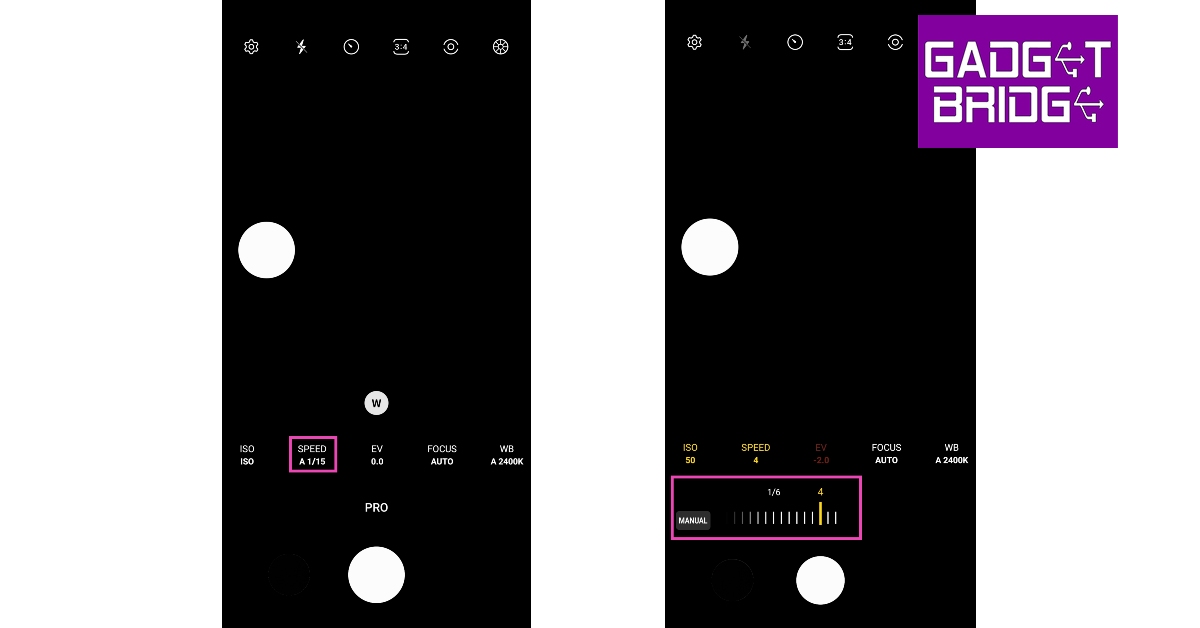
Step 1: Prop your smartphone up on a mount or a tripod stand.Step 2: Launch the Camera app and select More.Step 3: Tap on Pro Mode. In some camera apps, this may be called Raw Mode.Step 4: Select the Shutter Speed option. The idea is to decrease the shutter speed so the sensor is exposed to light for a longer amount of time. Typically, the shutter speed varies between 1/15th to 1/30th of a second, depending upon the intensity of the surrounding light. To take a long exposure photograph, set the shutter speed between 4-10 seconds (or more if your camera app allows it). You may have to try out different shutter speeds before you settle on the one that suits the lighting conditions around you.Step 5: Next tap the ISO. Set it to a lower number. A high ISO setting runs the risk of overexposing your images.Step 6: Take the picture. It will take a few seconds to process. If you don’t like the result, change the shutter speed and ISO until you hit the right balance.
Capture long exposure shots on your iPhone
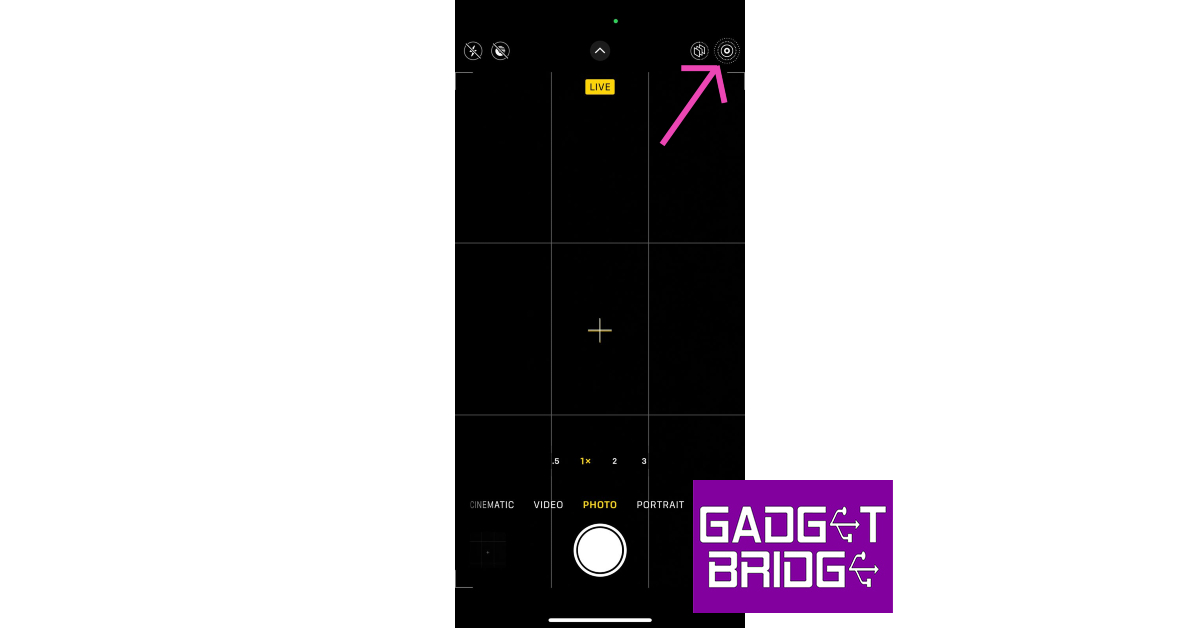
Step 1: Launch the Camera app on your iPhone.Step 2: Tap the Live Photo icon at the top right corner of the screen. Make sure it is enabled.Step 3: Take a photo while keeping the camera steady.Step 4: Go to the Photos app on your iPhone.Step 5:Select the photo that you’ve just shot.Step 6: Tap the Live icon at the top left corner of the screen.Step 7: Select Long Exposure. Your iPhone will render a long-exposure version of the image you just took.
Frequently Asked Questions (FAQs)
How do I take a long exposure photo on my Android phone?
Launch the Camera app and go to Pro Mode. Set the Shutter Speed low (between 4-10) and lower the ISO as well. Mount your phone on a stand and click an image. Your phone will take a long exposure photo.
How do I take a long exposure photo on my iPhone?
To take a long exposure shot using your iPhone, enable the Live Photo mode on the Camera app and take a picture while holding the phone steady. Now, go to Photos, select the image, tap the Live icon, and select long exposure.Read Also:How to delete your Telegram account? 2 Quick Methods
There are fewer things more annoying than watching unskippable ads before playing a YouTube video. Over the years, Google has massively increased the volume of ads on YouTube. This has marred the viewing experience for a significant portion of users. Some users resort to using universal adblockers on their web browsers. However, these adblockers aren’t always available for other devices. In this article, we show you how to block YouTube Ads on your Android TV forever.Read Also:How to View Blocked Accounts on Instagram?
In This Article
Use a third-party app (SmartTubeNext)
Depending on your Smart TV’s platform (Fire TV, Xiaomi TV Stick, and other streaming boxes), it may have a certain specialised third-party app that gets rids of annoying ads from YouTube. SmartTubeNext is a universal Smart TV that works on most major platforms like Android TV/Google TV, NVIDIA Shield, Fire TV, Android-based TV boxes, and more. You can download this application from its GitHub page. Once downloaded, you will need to sideload this app on your TV. Read this article to find out how you can sideload an app on your Smart TV.Once the app has been installed on your TV, launch it and sign in using your Google Account. It has a slightly different interface than YouTube, but you will get a hang of it in no time. SmartTubeNext not only blocks the unskippable array of ads on YouTube videos but also skips past the ‘sponsored content’ section. To add to that, it can perform the same feat while watching videos in picture-in-picture mode.
Use YouTube Premium
If you wanna go about blocking ads on YouTube in a legitimate manner, the only option you have is subscribing to YouTube Premium. At present, a monthly subscription to YouTube Premium costs Rs 129. If you are a new subscriber, you get a free trial period for the first six months. The added benefit of using YouTube Premium is that it blocks ads across all devices, be it your Android TV or Apple iPad. You can get the same adless experience on YouTube Music as well.
Frequently Asked Questions (FAQs)
How do I block YouTube Ads on my Smart TV for free?
Sideload the SmartTubeNext app on your Smart TV and sign in using your Google Account. The app will block ads on all YouTube videos as well as skip past the sponsored content section in videos.
How do I block YouTube Ads from my Smart TV without using third-party apps?
The most legitimate way of blocking ads from YouTube is by subscribing to YouTube Premium. Currently, a monthly subscription to YouTube Premium costs Rs 129.
If you have several instant messengers on your smartphone, they probably have the same alert sound for incoming messages. When multiple apps share the same notification tone, prioritising certain alerts becomes a challenging task. If you never want to miss an incoming email, it is recommended that you assign a special alert tone to all emails. In this article, we show you how to change the notification sound for the Gmail app on your Android smartphone.Read Also:How to View Blocked Accounts on Instagram?
In This Article
Change the Gmail notification sound from the app
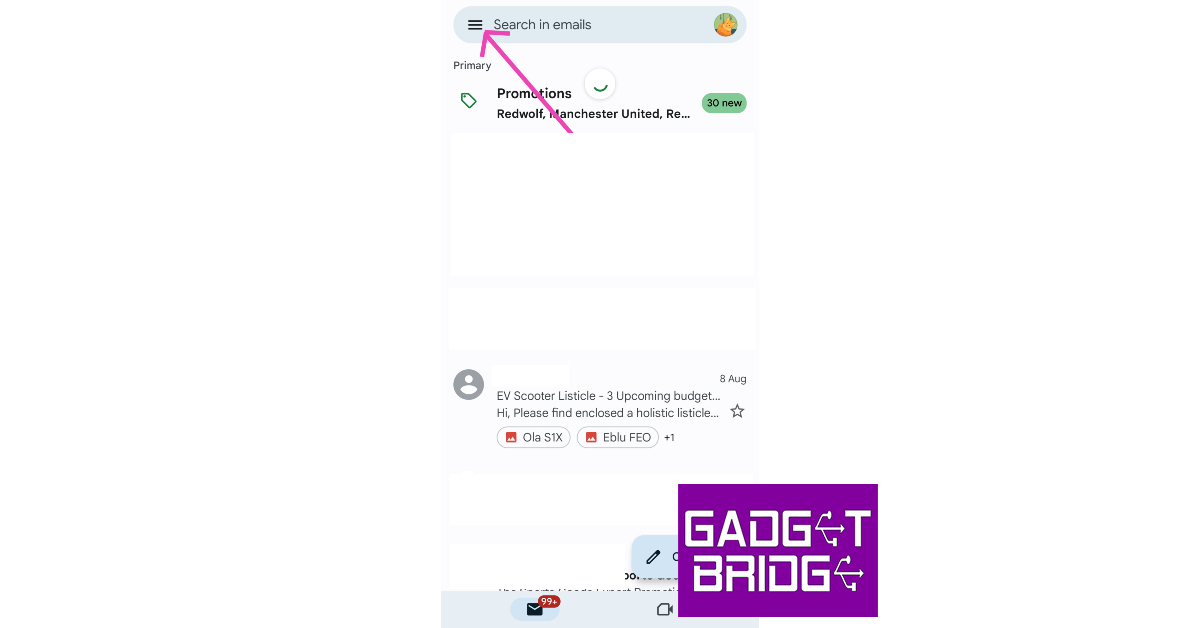
Step 1: Launch the Gmail app on your Android smartphone.Step 2: Tap the hamburger menu icon at the top right corner of the screen.Step 3: Scroll down and select Settings.Step 4: Select your Gmail account.Step 5: Under the Notifications category, tap on Manage Notifications.Step 6: Tap on Sound.Step 7: Select a Notification alert sound.Step 8: Hit Back.Step 9:Exit the app.The Gmail notification sound will be changed
Change the Gmail notification sound from the Android settings
Step 1: Unlock your Android smartphone and go to Settings.Step 2: Scroll down and select Apps.Step 3: Select Gmail.Step 4: Tap on Notifications.Step 5: Select in-app notifications.Step 6: Select your Gmail account.Step 7: Under the Notifications category, tap on Manage Notifications.Step 8: Tap on Sound.Step 9: Select a Notification alert sound.Step 10: Hit Back.Step 11:Exit the app.
Frequently Asked Questions (FAQs)
How do I change the notification sound for Gmail?
Launch the Gmail app and go to Menu>Settings>Gmail account>Manage Notifications>Sound and select an alert sound from the list.
How do I change the notification alert sound for Gmail from my phone’s settings?
Go to your phone’s settings and select Apps>Gmail>Notifications, this will redirect you to the Gmail app. Select your Gmail account, tap on Manage Notifications, and select Sound. You will be able to change the notification alert sound on the following page.
Poco M6 Pro 5G was launched in India last week. The device went on its first sale in India today. The smartphone is powered by a 4nm Snapdragon 4 Gen 2 5G Processor and features a 6.79-inch Dot Display with a 90Hz Adaptive Sync refresh rate. The 5G phone includes a dual rear camera unit and a 5,000mAh battery.
In This Article
Poco M6 Pro 5G price in India and sale details
The Poco M6 Pro 5G’s first sale has gone live in India. The newly launched 5G smartphone comes in two different configurations of 4GB RAM with 64GB storage and 6GB RAM with 128GB internal storage options. The price of the 4GB RAM is set at Rs 10,999, while the 6GB RAM model is priced at Rs 12,999. The company is offering the phone in two colour options of Black and Green.The 5G Phone is currently selling on Flipkart in the country. There will be an ICICI bank discount of Rs 1,000 on the purchase of the device.Also Read:iPhone 13 now available for as low as Rs 21,499 on Flipkart: Details Inside
Poco M6 Pro 5G specifications, features
The Poco M6 Pro 5G features a 6.79-inch FHD+ display. The screen of the smartphone has a 90Hz Adaptive Sync refresh rate with 240Hz touch sampling rate and is SGS-Low Blue Light certified which ensures reduced blue light emissions for improved eye health and sleep quality and 10x Super Resolution Touch. The front panel is protected with Corning Gorilla Glass 3. The smartphone comes with a back design. In addition to this, the phone boasts an IP53 rating for splash and dust resistance.Also Read:Apple iPhone 12 now available for as low as Rs 12,700: Deets insideThe Poco M6 Pro 5G will operate on MIUI 14 based on Android 13. The Poco phone has a MIUI Dialer and the company is promising 2 major Android updates and 3 years of security updates. The smartphone is powered by Qualcomm Snapdragon 4 Gen 2 processor clocked at up to 2.2GHz coupled up to 6GB LPDDR4X RAM and 128GB UFS 2.2 storage. The company has also provided a Turbo RAM feature that further enhances performance, effectively bridging the gap between different memory configurations.For photos and videos the Poco M6 Pro 5G sports a dual rear camera setup that includes a 50-megapixel AI sensor and a 2-megapixel depth sensor. Upfront there is an 8-megapixel camera for taking selfies and video calling.Poco M6 Pro 5G is fuelled by a 5,000mAh battery with 18W fast charging support. However, the phone comes with a 22.5W inbox charger in the package.
For the latest gadget and tech news, and gadget reviews, follow us on Twitter, Facebook and Instagram. For newest tech & gadget videos subscribe to our YouTube Channel. You can also stay up to date using the Gadget Bridge Android App. You can find the latest car and bike news here.
As TWS products have become the norm, the affordable headphone segment has grown by leaps and bounds. However, those drawn towards expansive soundstages may feel underwhelmed while using entry-level headphones. If your ears yearn for a high-end music listening experience, you may have to splurge a fair amount of money for the flagship products. In this article, we bring you our picks for the top headphones over Rs 25,000 for audiophiles. Read Also:How to delete your Telegram account? 2 Quick Methods
In This Article
Sony WH-1000XM5
Price: Rs 29,987 on AmazonConsidered to be one of the best headphones on the market, Sony WH-1000XM5 delivers a thumping audio output with its 30mm driver unit in each earcup. We reviewed this pair of headphones earlier this year and really liked the audio tuning and mix of frequencies it had to offer. While certainly not a pair of neutral headphones, the WH-1000XM5 brings its own flair to the soundstage, accentuating the listening experience. Apart from a brilliant sound profile, the WH-1000XM5 also has some serious noise cancellation chops. It can provide 30 hours of continuous playback on a full battery, with 3 hours of playback readily available upon 3 minutes of charge.
Apple AirPods Max
Price: Rs 59,900 on Apple.comApple AirPods Max may be one of the pricier options out there, but if you don’t want to compromise on the audio performance, you should be all over this pair of headphones. With Apple’s H1 chip in each earcup, the AirPods Max is able to generate a supreme listening experience using computational audio. You also get to play with features like Spatial Audio, Always-on Siri, Announce Notifications, and On-Head Detection. The 20-hour battery life offered by the AirPods Max feels incredible when you experience the level of ANC these headphones are able to pull off.
Jabra Elite 85h
Price: Rs 89,680 on AmazonWhile talking about ultra-premium headphones, Jabra Elite 85h is one of the few names that spring to mind. These wireless pair of headphones offer a high-end sound profile that has been carefully designed for the comfort of the user. The highs, mids, and lows are all very well represented on the soundstage. The SmartSound Audio technology analyses your sound environment and creates personalised audio just for you. On a single charge, the Jabra Elite 85h can last up to 36 hours.
Sennheiser HD660S2
Price: Rs 34,990 on Sennheiser-hearing.comFor those looking for a pair of neutral-sounding headphones, the Sennheiser HD660S2 would be a solid buy. Following the design language of its predecessor, HD660S, the HD660S2 flaunt an open back panel with a plastic mesh giving a peek inside the earcups. This design helps create a more open soundstage and maintains steady airflow. Audiophiles will enjoy the close-to-neutral soundstage that’s on offer here. While reviewing the HD660S2, we also enjoyed the slight Sennheiser signature added to the audio output. Initially launched at Rs 54,990, the HD660S2 are a steal at their current price of Rs 34,990.
Bose QuietComfort 35 II
Price: Rs 29,362 on FlipkartBose QuietComfort 35 II may just be the most well-rounded pair of headphones in its price segment. The dedicated control and buttons on the side of earcups are a great addition for those that do not like the pesky accidental touches on touch-sensitive outer panels. The dynamic driver is optimised to deliver a distortion-free sound at every volume level, no matter how high you go. The QuietComfort 35 II also has support for Amazon Alexa and Google Assistant. It offers up to 20 hours of battery life along with wired playback. A no-brainer pick for the top headphones over Rs 25,000 for audiophiles.
JBL Tour One
Price: Rs 25,000 on JBL.inClosing this list is one of the more premium products from the household brand, JBL. The Tour One headphones feature 40mm dynamic drivers and are hi-res certified, with up to 40KHz frequency support. They also feature ‘Adaptive’ Noise Cancellation, which allows you to have a conversation with people around you without switching off the ANC. JBL Tour One offers a battery life of 25 hours with ANC turned on. It can be extended to 50 hours when the headphones are used in Bluetooth mode only.Read Also:Oppo A58 4G with 5,000mAh battery launched in India
Conclusion
These are our picks for the best headphones over Rs 25,000 for audiophiles. If you’re not interested in Active Noise Cancellation, there are a plethora of wired headphones you can go for that do not cost an obnoxious amount of money. However, if you’re looking for a truly neutral soundstage, you will have to shell out some extra money.For the latest gadget and tech news, and gadget reviews, follow us on Twitter, Facebook and Instagram. For newest tech & gadget videos subscribe to our YouTube Channel. You can also stay up to date using the Gadget Bridge Android App. You can find the latest car and bike news here.
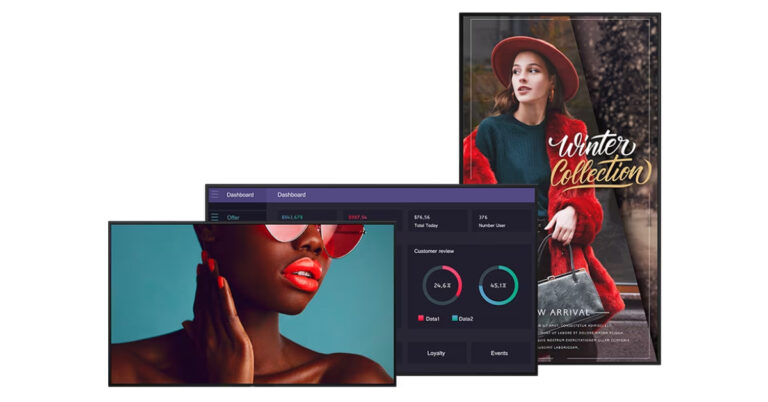
Sony has officially announced the launch of 4K HDR Professional Bravia Displays in India. The series includes a total of 13 new models in sizes from 43 inches to 85 inches. The display comes loaded with professional features and a deep black non-glare coating. The Sony displays are powered by a smart System on a Chip (SoC) platform.With the introduction of the BZ40L, BZ35L, and BZ30L series, Sony India is expanding its extensive offering with 13 professional BRAVIA 4K HDR displays in India. These displays are designed for business settings that are claimed to offer dependability, picture quality, and wide compatibility.Also Read:Apple iPhone 14 can now be purchased for just Rs 6,749: Find out howThe display’s size ranges from 43 inches to 85 inches, and options cover high-end, mid-range, and standard needs. The BZ40L series, unlike competing displays on the market, has a cutting-edge panel treatment. The Deep Black Non-Glare Coating on the BZ40L maintains deep blacks and excellent contrast while providing high haze and low reflection.All 13 versions, according to the manufacturer, feature sustainability features, such as the use of SORPLAS recycled plastic, less printing on cartons to reduce waste, and an ECO Dashboard for better knowledge of power consumption based on setting configuration.One-step preset settings for simple configuration and customization, mirroring capabilities, Pro Mode technology for streamlining operations, a uniform bezel design, flexible installation for portrait and tilt mounting, support for multi-display installation to enable tiling, and a side logo for blend-in design purposes are additional features that are common.The new line-up of professional BRAVIA displays will also be compatible with Sony’s Alliance Partner Network, enabling even more integration and interoperability with recognised and up-and-coming solution providers for business, education, transportation, and retail applications.Also Read: iPhone 13 now available for as low as Rs 21,499 on Flipkart: Details InsideA high brightness, non-glare BZ40L series with X1 processing delivers 700 nits at a high 47% haze with anti-reflection, with the exception of the FW-85BZ40L, which achieves 650 nits at 58% haze without losing contrast. The lineup has a total of 5 models: FW-85BZ40L (85 inches), FW-75BZ40L (75 inches), FW-65BZ40L (65 inches) and FW-55BZ40L (55 inches).BZ35L series on the other hand has increased storage and 550 nits of robust brightness and an X1 Processor. It has three models: FW-75BZ35L (75 inches), FW-65BZ35L (65 inches) and FW-55BZ35L (55 inches).BZ30L series offers a full range of sizes, X1 processing and 440 nits of brightness. It has a total of six models: FW-85BZ30L (85 inches), FW-75BZ30L (75 inches), FW-65BZ30L (65 inches), FW-55BZ30L (55 inches), FW-50BZ30L (50 inches) and FW-43BZ30L (43 inches)
Sony 4K HDR Professional Bravia Displays price and availability
All 13 models under the BZ40L, BZ35L and BZ30L series of the Sony 4K HDR Professional Bravia Displays will be available for purchase starting August 25 in India via Sony authorized distributors.We have listed the pricing below:
After being banned for nearly ten months, Battleground Mobile India, aka BGMI, is officially available again in India. BGMI fans are looking for ways to improve their game experience and one such method is the usage of redemption codes, which offers a variety of rewards and advantages using BGMI redeem codes players can gain access to new skins, outfits, loot crates, weapons and free UC and diamonds.As mentioned earlier, these codes give users the chance to earn unique rewards and gain extra benefits while playing the game. This includes GUN SKINS (M4, AKM, M416, AWM, M24, UZI, KAR98K), free character voucher, Andy, Carlo, Sara, Victor character for free, free Anna Character on completing the mission and UC or Royal Pass Discount. So here we have gathered a list of the most recent BGMI redeem codes as of 9 August 2023. Also, redeem these codes asap as these are only valid for a limited duration.
Garena Free Fire is a battle royale game with regular awards and tournaments to keep players interested. If you play Garena Free Fire, you should be aware of the redeem codes that are released on a daily basis. However, because the battle royale game is banned in India, players from other countries can use the Free Fire Redeem codes daily. If you’re unfamiliar with the Garena Free Fire redeem codes or don’t know how to get them, we’ve put together a step-by-step guide to help you redeem them. Check out Garena Free Fire Redeem Codes for 9 August 2023.The Free Fire redeem codes are a great way to get free stuff. These are 12-digit codes that contain alphabets and numbers, as well as an expiration date and time. Because the Garena FF redeem codes cannot be used more than once, you should hurry to the redemption page to claim your free reward before someone else does. To get a free reward, all you have to do is go to reward.ff.garena.com/en, which is the official redemption page. Also, keep an eye on this space for daily updates on Garena Free Fire redemption codes and rewards.
If you have been on Instagram for years, you probably have a sizeable blocklist on the platform. As good as Instagram is, it is full of pesky bot accounts that make ‘Gramming less fun. Luckily, the block option is handy and very accessible. If you want to see the list of all the accounts you have blocked, you don’t need to stray too far. Here’s how you can quickly view all the accounts you have blocked on Instagram.Read Also:Apple iPhone 14 can now be purchased for just Rs 6,749: Find out how
In This Article
View Blocked Accounts on Instagram
Step 1:Launch the Instagram app on your smartphone.Step 2: Tap the profile icon at the bottom right corner of the screen.Step 3: Tap the hamburger menu at the top right corner of the screen.Step 4: Select Settings and Privacy.Step 5: Scroll down and select Blocked.Step 6: This is where can view the accounts you have blocked on Instagram. To add an account to the blocklist, hit the plus icon at the top right corner of the screen.
Frequently Asked Questions (FAQs)
How do I view my block list on Instagram?
Go to Profile>Menu>Settings and Privacy>Blocked to view the accounts you have blocked on Instagram.
How do I know if someone blocked me on Instagram?
The only way to find out if someone blocked you on Instagram is by visiting their profile. If you can’t see their profile picture, follower and following count, bio, and any of their posts, it means they have blocked you.
How do I block someone on Instagram?
To block someone on Instagram, go to their profile, hit the ellipses and select Block. You can also visit your blocklist and directly add an account by tapping the plus icon.Read Also:Samsung Galaxy F34 5G with 6,000mAh battery launched in India
Step 1: Launch the web browser on your PC and go to the Telegram account deletion page.Step 2: Enter your Phone Number and hit Next.Step 3: Launch the Telegram app on your phone. Open the conversation thread with Telegram and locate the code that you have been sent.Step 4:Enter this confirmation code on your PC. Hit Sign In.Step 6: Click on Delete Account.Step 5: Select Delete My Telegram Account. You can choose to provide a reason for deleting your account, although it isn’t mandatory.Step 6: Confirm your selection in the popup box by clicking Yes, delete my account.Your Telegram account will be removed permanently.
Delete your Telegram account using your smartphone
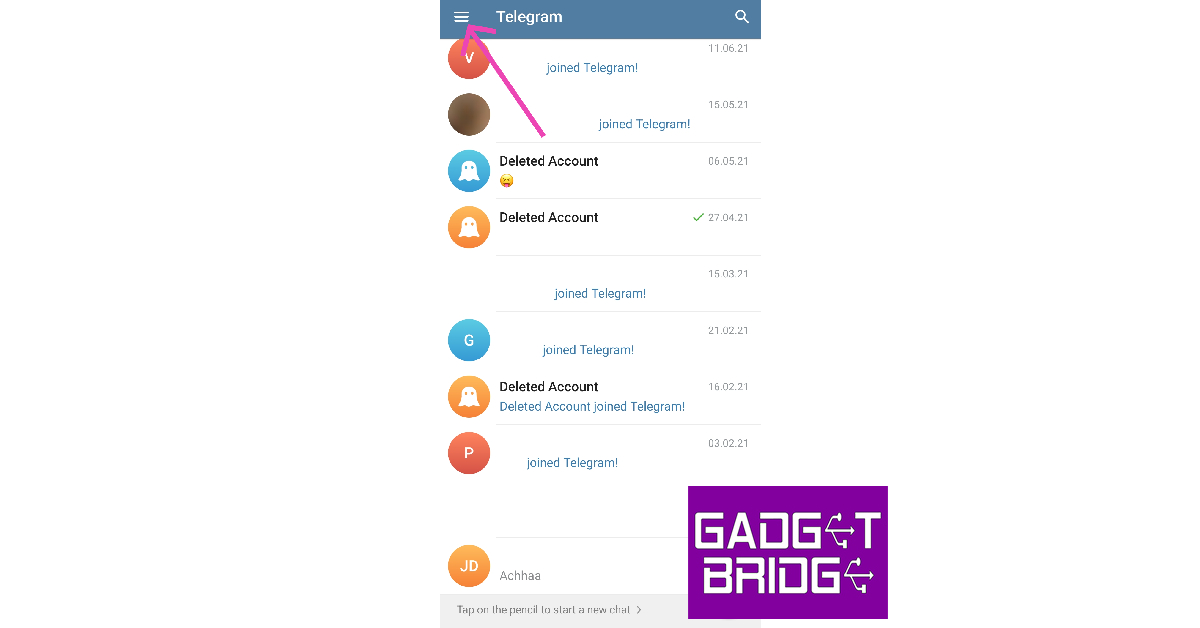
Step 1:Launch the Telegram app on your smartphone.Step 2: Tap the hamburger menu icon at the top left corner of the screen.Step 3: Select Settings.Step 4: Select Privacy and Security.Step 5: Scroll down and locate the ‘Delete my account’ section.Step 6: Tap on ‘If away for’.Step 7: Select the appropriate time period for account deletion. The least amount of time you can choose is 1 month.Step 8:Delete the app from your phone.Your Telegram account will be permanently removed after the chosen time period.
Frequently Asked Questions (FAQs)
Can I instantly delete my Telegram account using the mobile app?
The Telegram app for your Android smartphone only removes your account after a certain time period of inactivity. You can set this time period to a minimum of 1 month.
How do I instantly delete my Telegram account?
To instantly delete your Telegram account, go to the account deletion page on Telegram’s website, enter your phone number, and then enter the confirmation code sent to you on the Telegram app.
How do I instantly delete my Telegram account on my phone?
To instantly delete your Telegram account on your smartphone, launch the mobile web browser and open the Telegram account deletion page. Enter your phone number and follow the onscreen instructions to delete your account.Read Also:OnePlus Keyboard 81 Pro open sale to start today
Oppo today officially announced the launch of a new smartphone in India. The company has introduced Oppo A58 which is a 4G model. The 5G model of the smartphone is already available. It comes with an FHD display with a refresh rate of 90Hz. In addition to this, the phone is powered by Mediatek G85 SoC. It runs on ColorOS 13.1 and features a dual rear camera setup. The newly launched phone also comes equipped with a 5,000mAh battery and supports 33W wired SuperVOOC fast charging.
In This Article
Oppo A58 4G price in India and sale details
Oppo A58 4G price in India has been set at Rs 14,999 for the single 6GB RAM with 128GB storage option. The device will be available in two colour options of Green and Black. The phone is currently selling on Flipkart.On the purchase of the phone, the company is offering no-cost EMI options starting at Rs 5,000. There will be additional bank offers from ICICI, HDFC, and Kotak Bank.
Oppo A58 4G specifications
Oppo A58 4G comes with a 6.72-inch full-HD+ display having 2400 x 1080 pixels of resolution. The screen supports a refresh rate of 90Hz. The newly launched 4G smartphone runs on ColorOS 13.1 based on top of Android 13 out of the box. Under the hood, the device runs on MediaTek Helio G85 SoC coupled with Mali G52 MC2 GPU. It is available in a single 6GB RAM with 128Gb storage option.For taking photos and videos the Oppo A58 4G features a dual rear camera setup with an LED flash. The camera unit includes a 50-megapixel primary sensor and a 2-megapixel sensor. For selfies and video calling the smartphone has an 8-megapixel front camera sensor.Oppo A58 4G includes 4G, Bluetooth v5.3, GPS, NFC, a 3.5mm audio jack and a USB Type-C port for charging. The handset includes a 5,000mAh battery with 33W wired SuperVOOC fast charging support. In addition to this, there is a side-mounted fingerprint sensor for authentication.
For the latest gadget and tech news, and gadget reviews, follow us on Twitter, Facebook and Instagram. For newest tech & gadget videos subscribe to our YouTube Channel. You can also stay up to date using the Gadget Bridge Android App. You can find the latest car and bike news here.
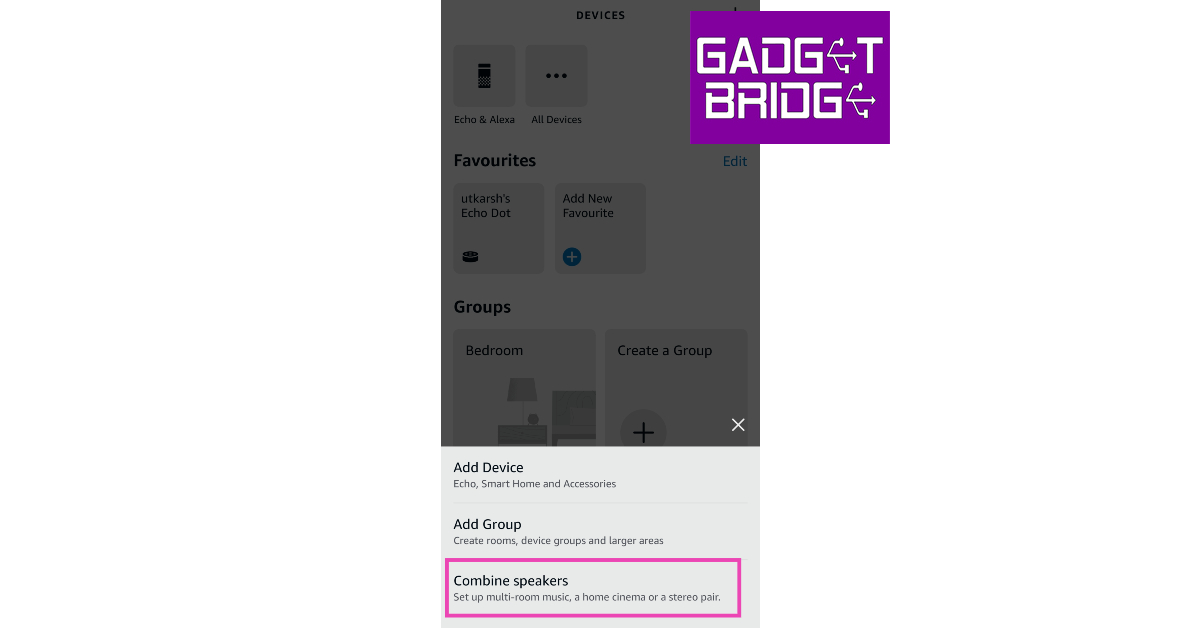
Step 1: Launch the Amazon Alexa app on your smartphone.Step 2: Switch to the Devices tab.Step 3: Tap the Plus icon at the top right corner of the screen.Step 4: Select Combine Speakers.Step 5: Select Stereo Pair/Subwoofer.Step 6: Select the speakers you want to link together. Tap Next.Step 7: Make sure that the speakers are set to the correct channels. Hit Next.Step 8: Name the pairing. Hit Done.The two Echo speakers will be paired together.
Frequently Asked Questions (FAQs)
How do I pair two Amazon Echo speakers together?
Go to the Amazon Alexa app and select Devices>Plus Sign>Combine Speakers>Stereo Pair/Subwoofer and follow the onscreen instructions.
Why can’t I pair my two Amazon Echo speakers together?
If you can’t pair your Amazon Echo speakers together, make sure they belong to the same generation of Echo products and are connected to the same WiFi network.
If we’re talking about the absolute best smartphones in terms of performance, there’s one thing they all share in common – Snapdragon’s flagship chipset. This year’s Snapdragon 8 Gen 2 SoC improves upon the highly impressive S8+ Gen 1 that was launched in the latter half of 2022. The processor is one of the key elements that separate a flagship device from the rest, and the Snapdragon 8 Gen 2 is unmatched when it comes to benchmark numbers as well as task management. Let’s take a look at the best smartphones you can buy right now that come with Snapdragon 8 Gen 2 SoC inside.Read Also:LG 27GR95QE and 45GR95QE UltraGear OLED gaming monitors launched in India
In This Article
Samsung Galaxy S23 Ultra
Key Specs
Display
6.8-inch Dynamic AMOLED
Chipset
Snapdragon 8 Gen 2
RAM
8GB, 12GB
Storage
256GB, 512GB, 1TB
Battery
5,000 mAh
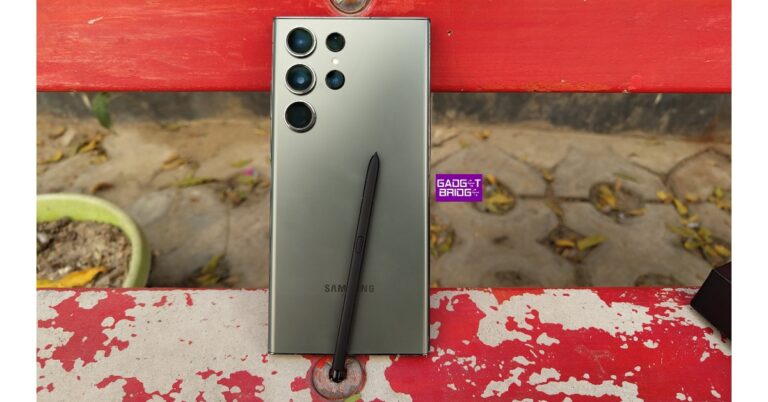
Samsung Galaxy S23 Ultra (read our review here) is one of the best smartphones to come out this year. We reviewed this smartphone back in February and were thoroughly impressed by its performance across the board. The Snapdragon 8 Gen 2 SoC under the hood of the S23 Ultra is specially customised for the smartphone and registers a higher CPU clock speed than its regular avatar. The difference can be seen in gaming and camera performance. Samsung’s epic flagship is also better at handling CPU workloads and machine learning tasks compared to other smartphones powered by the same processor.
Samsung Galaxy Z Fold5
Key Specs
Display
7.6-inch Dynamic AMOLED, 6.2-inch Dynamic AMOLED
Chipset
Snapdragon 8 Gen 2
RAM
12GB
Storage
256GB, 512GB, 1TB
Battery
4,400 mAh
The recently launched Samsung Galaxy Z Fold5 carries the same customised Snapdragon 8 Gen 2 SoC that is found in the Galaxy S Series smartphones. Samsung’s range of foldable devices is ahead of the curve largely due to the tremendous processing powering them. While there are cheaper folding smartphones on the market, none of them match the numbers that the Fold5 produces. Despite its incredible performance, the star of the show is the One UI OS. Samsung’s clever software tricks get the most out of the screen real estate that is on offer. While it may cost a small fortune, the Fold5 retains its position as the leader of the (foldable) pack.
Xiaomi 13 Pro
Key Specs
Display
6.73-inch LTPO AMOLED
Chipset
Snapdragon 8 Gen 2
RAM
8GB, 12GB
Storage
128GB, 256GB, 512GB
Battery
4,820 mAh
Xiaomi has been putting out some decent premium smartphones for the last couple of years, but its most recent flagship makes the statement that it is here to hang with the best of the best. Xiaomi 13 Pro packs the Snapdragon 8 Gen 2 SoC and features a stunning 6.73-inch LTPO AMOLED display. The camera array at the back is comprised of three 50MP wide, ultrawide, and telephoto sensors. The star of the show is the 1-inch primary sensor that produces immaculate results in every lighting condition. Read our full review here.
OnePlus 11
Key Specs
Display
6.7-inch LTPO3 Fluid AMOLED
Chipset
Snapdragon 8 Gen 2
RAM
8GB, 12GB, 16GB
Storage
128GB, 256GB, 512GB
Battery
5,000 mAh
After releasing a series of mild smartphones last year, OnePlus came back strong in 2023 to reclaim its title of being the enthusiasts’ favourite brand. The flagship OnePlus 11 gets the Snapdragon 8 Gen 2 SoC and is one of the few smartphones available with a 16GB RAM variant. It also gets a 6.7-inch LTPO3 Fluid AMOLED display with 120Hz refresh rate and HDR10+ support. OnePlus 11 is also one of the fastest charging phones around, with support for 100W wired charging. Interestingly, it misses out on wireless charging.
iQOO 11
Key Specs
Display
6.78-inch LTPO4 AMOLED
Chipset
Snapdragon 8 Gen 2
RAM
8GB, 12GB, 16GB
Storage
128GB, 256GB, 512GB
Battery
5,000 mAh
Ending this list is the highly underrated iQOO 11. This flagship device from Vivo’s sister company offers incredible value for money. Equipped with the Snapdragon 8 Gen 2 SoC, it does not make any compromises when it comes to the processor. The 6.78-inch LTPO4 AMOLED display on the iQOO 11 has a refresh rate of 144Hz and offers HDR10+ support. The rear camera array on this device consists of a 50MP primary sensor, a 13MP telephoto lens, and an 8MP ultrawide camera. Up front, the camera gets a 16MP selfie camera housed in a punch-hole cutout. Read our review here.Read Also:iPhone 13 now available for as low as Rs 21,499 on Flipkart: Details Inside
Conclusion
These are the best smartphones powered by the Snapdragon 8 Gen 2 SoC. As the year progresses, we may see a few other smartphones carrying this processor. OnePlus is rumoured to announce its debut foldable soon. Dubbed OnePlus ‘Open’, the smartphone is expected to be powered by the Snapdragon 8 Gen 2 SoC. Which device do you fancy out of this list? Let us know in the comments!For the latest gadget and tech news, and gadget reviews, follow us on Twitter, Facebook and Instagram. For newest tech & gadget videos subscribe to our YouTube Channel. You can also stay up to date using the Gadget Bridge Android App. You can find the latest car and bike news here.
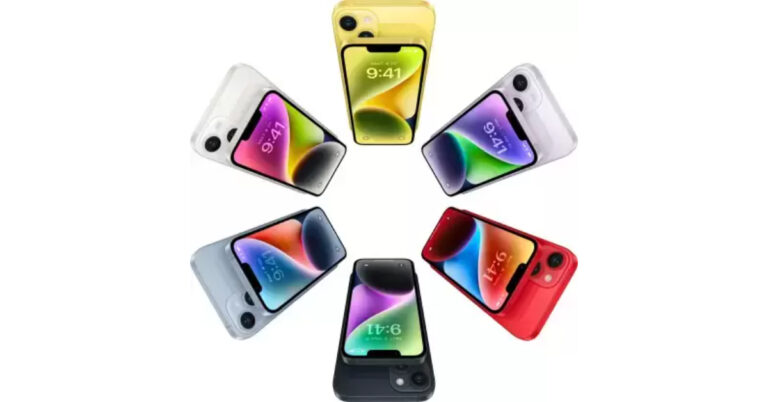
Apple fans are in luck as the current Apple iPhone 14 is available at incredible prices and deals as part of Flipkart’s Big Savings Sale. You can purchase the iPhone for as little as Rs 6,749, believe it or not. So act quickly because the promotion is ending tomorrow, August 9, to purchase the iPhone 14 for the lowest price ever. Here are the details on various offers and discounts for the iPhone 14.Up to August 9, Flipkart is holding a Big Savings deal where iPhones are being sold at the lowest prices. However, the current Flipkart Big Savings Day Sale offers the iPhone 14 for as little as Rs 6,749.The most recent iPhone is now available on Flipkart for as little as Rs 68,999, down from its original price of Rs 79,900. On the country’s e-commerce website, the price of the phone has been reduced by Rs 10,901. If you pay for the phone with an ICICI Bank credit card EMI, you can further reduce the price to Rs 67,749. The best deal on Flipkart may be the exchange offer with additional discounts. There is a Rs 61,000 trade-in offer for the iPhone 13.Also Read:iPhone 13 now available for as low as Rs 21,499 on Flipkart: Details InsideHowever, this offer is dependent on the model and state of your old device. The price of the iPhone 14 might be as low as Rs 6,749 if you already own a phone that is in good condition and is among the most recent models.
Apple iPhone 14 specifications
Apple iPhone 14 features a 6.1-inch Super Retina XDR OLED screen having a wide colour gamut, HDR, and 1200 nits of brightness. The display offers a pixel density of 460 ppi and supports a 60Hz refresh rate. The front panel is protected by a tough Ceramic Shield front cover that is water and dust-resistant. The iPhone 14 has Face ID and is built to IP68 standards for water and dust protection. It is powered by Apple A15 Bionic SoC and up to 512GB of internal storage. The device runs on iOS 16.Also Read:Apple iPhone 12 now available for as low as Rs 12,700: Deets insideIn terms of optics, the dual rear camera setup includes iPhone 14: a primary 12MP wide-angle sensor with a bigger f/1.5 aperture, sensor-shift OIS, and a secondary 12MP ultra-wide-angle sensor. The Ultra Wide camera provides a distinctive viewpoint for broader views and enhances low-light images using Photonic Engine. For selfies and video calls, the front camera has a 12MP sensor with autofocus.
For the latest gadget and tech news, and gadget reviews, follow us on Twitter, Facebook and Instagram. For newest tech & gadget videos subscribe to our YouTube Channel. You can also stay up to date using the Gadget Bridge Android App. You can find the latest car and bike news here.
Samsung is constantly rushing to keep up with its rivals. The Samsung Galaxy F-series was first released in October 2020 and has since had tremendous popularity. The Samsung Galaxy F34 5G is the most recent member of its mid-range smartphone line. The newly launched phone features a 120Hz AMOLED display. The handset comes with a triple rear camera unit with a 50-megapixel sensor. In addition to this, the smartphone packs a 6,000mAh battery.
In This Article
Samsung Galaxy F34 5G price in India, sale details
Samsung Galaxy F34 5G price in India in India starts at Rs 18,999 for 6GB RAM with 128GB storage options. The price of the 8GB RAM with 128GB storage costs Rs 20,999. The pre-order of the phone is currently open and the sale will go live on August 11 via the Samsung website in India, Flipkart and select retail outlets across the nation. The phone is available in Electric Black and Mystic Green colour options.The launch offer includes instant discounts of up to Rs 1,000 for ICICI or Kotak Bank card holders. The company will also offer a no-cost EMI plan starting at Rs 2,111 for ICICI Bank Credit Card holders.
Samsung Galaxy F34 5G specifications
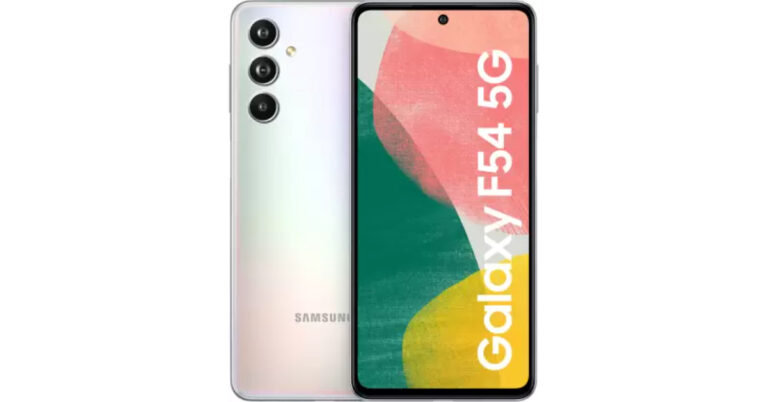
Samsung Galaxy F34 5G features a 6.46-inch full-HD+ Super AMOLED display with 2340 x 1080 pixels of resolution. The screen has a refresh rate of 120Hz and a pixel density of 398 ppi. The front panel is protected with Corning Gorilla Glass 5. The device runs on OneUI 5.1 based on top of Android 13. Under the hood, there is an octa-core Exynos 1280 SoC, coupled with up to 8GB of RAM and 128GB of internal storage.For the photos and videos Galaxy F34 includes a triple rear camera setup with an LED flash. The camera unit consists of a 50-megapixel primary sensor, an 8-megapixel sensor, an ultra-wide-angle lens, and a 2-megapixel macro sensor. For selfies, there is a 13-megapixel front camera sensor.The Galaxy F34 comes equipped with a 6,000mAh battery. In terms of connectivity, the phone includes 5G, GPS, NFC, Wi-Fi, Bluetooth v5.3 and USB Type-C port for charging.
For the latest gadget and tech news, and gadget reviews, follow us on Twitter, Facebook and Instagram. For newest tech & gadget videos subscribe to our YouTube Channel. You can also stay up to date using the Gadget Bridge Android App. You can find the latest car and bike news here.
After being banned for nearly ten months, Battleground Mobile India, aka BGMI, is officially available again in India. BGMI fans are looking for ways to improve their game experience and one such method is the usage of redemption codes, which offers a variety of rewards and advantages using BGMI redeem codes players can gain access to new skins, outfits, loot crates, weapons and free UC and diamonds.As mentioned earlier, these codes give users the chance to earn unique rewards and gain extra benefits while playing the game. This includes GUN SKINS (M4, AKM, M416, AWM, M24, UZI, KAR98K), free character voucher, Andy, Carlo, Sara, Victor character for free, free Anna Character on completing the mission and UC or Royal Pass Discount. So here we have gathered a list of the most recent BGMI redeem codes as of 8 August 2023. Also, redeem these codes asap as these are only valid for a limited duration.
In This Article
BGMI Redeem Codes for 8 August2023
updating..
How to get free Redeem Codes for BGMI on 8 August 2023?
Launch BGMI on your device.
Then select the Redeem Code option from the main menu.
Next, click on the Redeem code tab.
A new window will open, requesting the redemption code.
Now enter your BGMI code.
Confirm and click on the “Redeem” tab.
If your redeem code is valid then you will get a message confirming that your rewards were successfully redeemed.
Garena Free Fire is a battle royale game with regular awards and tournaments to keep players interested. If you play Garena Free Fire, you should be aware of the redeem codes that are released on a daily basis. However, because the battle royale game is banned in India, players from other countries can use the Free Fire Redeem codes daily. If you’re unfamiliar with the Garena Free Fire redeem codes or don’t know how to get them, we’ve put together a step-by-step guide to help you redeem them. Check out Garena Free Fire Redeem Codes for 8 August 2023.The Free Fire redeem codes are a great way to get free stuff. These are 12-digit codes that contain alphabets and numbers, as well as an expiration date and time. Because the Garena FF redeem codes cannot be used more than once, you should hurry to the redemption page to claim your free reward before someone else does. To get a free reward, all you have to do is go to reward.ff.garena.com/en, which is the official redemption page. Also, keep an eye on this space for daily updates on Garena Free Fire redemption codes and rewards.
Managing ecommerce on any major platform is so competitive nowadays and Amazon is the biggest platform of them all. As we are heading deeper into the latter end of 2023, it is time to review your current business strategy on Amazon and augment it where possible. To that end, here are a few suggestions on how to grow as an Amazon seller with the near future in mind.
In This Article
Check for and Eliminate Stagnancy
Even if you have had a fairly successful time so far on Amazon, check the last few quarters to see if you can notice a slight negative trend in sales. If it’s not there, then compare the sales per quarter to previous years and see if you can confirm a stagnancy or reduction in this year’s sales figures. If you find a downward trend in any of the comparisons, then it’s more often than not, a sign of stagnancy.
Stagnancy can mean different things for an Amazon seller, depending on what they are retailing, but the core idea always remains the same. Stagnancy in retail indicates that there is one or more areas of the business which are lacking in respect to the current market conditions and competition. For example:
Your stock and Amazon listings might be outdated in comparison to the most relevant current market demands.
Your inventory could be running at a too-high or too-low capacity to properly meet the customer demands.
Clear old stocks with frequent sales, update your inventory to match the concurrent market demand and avoid overstocking or understocking products as best as possible.
Generate External Funds and Funnel Them into Expanding Your Amazon Shop
To generate money, you need to invest money, and your online business on Amazon is not an exception to that rule either. Generate additional funds by investing a portion of your profits into stocks, funds, and options. The options trade is the safer choice when you are relatively new to trading in general. If you need guidance on how to get started, get this book called Profitable Option Selling Strategies: A Comprehensive Guide.
Branch Out into Retailing in Related Best Selling Product Categories
You can sell almost anything on Amazon, but are you taking full advantage of that fact? If your business involves retailing consumer electronics, why not take a look at the kind of electronics that sell best on Amazon? For example, laptops are one of the highest selling products overall on Amazon, but so is home entertainment. If you are selling electronic products in either one of the two categories, why not branch out into the other as well?
While you are at it, note that small office furniture is another top-selling item on Amazon. It means that you can start selling computer tables, desks, and ergonomic office chairs to further expand your inventory with the hottest-selling items on Amazon. The idea is to expand your online business with interconnected products that are selling well on Amazon right now and preferably, for a long time.
For the latest gadget and tech news, and gadget reviews, follow us on Twitter, Facebook and Instagram. For newest tech & gadget videos subscribe to our YouTube Channel. You can also stay up to date using the Gadget Bridge Android App. You can find the latest car and bike news here.
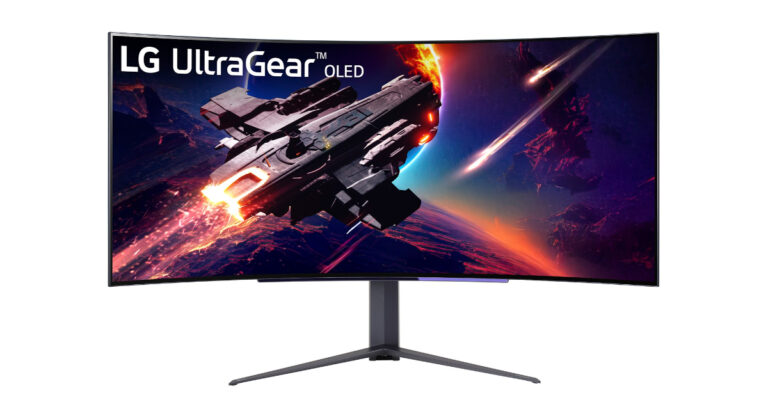
LG today announced the launch of two new premium gaming monitors in India. 45GR95QE and 27GR95QE are the two models that have been introduced to the latest LG UltraGear OLED series. The 45GR95QE display model features 800R Curvature. They come with a 240Hz refresh rate and 0.03ms response time support. The monitors can be mounted on the wall.The LG 27GR95QE OLED Gaming Monitor features a 27-inch QHD display with 2560×1440 pixels of resolution. It offers Advanced Gaming Luminance Range (AGLR) technology, DCI-P3 98.5% (Typ.) colour gamut, HDR10 support, and factory colour calibration. The newly launched LG gaming monitor comes with OLED Pixel Dimming which is said to ensure deeper blacks and brighter whites.In addition to this, the LG 27GR95QE UltraGear OLED gaming monitor has a 240Hz refresh rate and a 0.03ms GTG (gray-to-gray) response time which will have reduced motion blur and ghosting. It supports variable refresh rate (VRR), NVIDIA G-SYNC Compatible, FreeSync Premium and VESA Adaptive Sync delivering tear-free and stutter-free gameplay.In terms of connectivity, the display includes HDMI 2.1 x2, DisplayPort 1.4 with DSC x1, and USB 3.0 1up 2dn.Also Read:ChatGPT to roll out new features with its next updateThe device will be available with a price tag of Rs 124,000.On the other hand, the 45GR95QE has a 45-inch WQHD 800R curved display with 3440×1440 pixels of resolution. The display has a 21:9 aspect ratio, a 1,500,000:1 contrast ratio with Advanced Gaming Luminance Range (AGLR). In addition to this, there is a DCI-P3 98.5% (Typ.) colour gamut, HDR10 support, and factory colour calibration. 240Hz refresh rate and 0.03ms GTG response time are also supported on the gaming monitor. The is NVIDIA G-SYNC compatibility, HDMI2.1 VRR (Adaptive Sync), and AMD FreeSync Premium.]For connectivity, there is HDMI 2.1 x2, DisplayPort 1.4 with DSC x1, and USB 3.0 1up 2dn, while the 4-pole H/P out with DTS HP:X and Optical Jack. The price of the LG 45GR95QE UltraGear OLED gaming monitor is set at Rs 241,000.The monitors can be adjusted in various directions, including tilt (-5°~15°), swivel, pivot, and height adjustment (110mm) and are wall mountable (100 x 100 VESA mount). There is a gaming remote with easy and quick adjustments featuring Black Stabilizer, Dynamic Action Sync, Crosshair, and FPS Counter.
For the latest gadget and tech news, and gadget reviews, follow us on Twitter, Facebook and Instagram. For newest tech & gadget videos subscribe to our YouTube Channel. You can also stay up to date using the Gadget Bridge Android App. You can find the latest car and bike news here.
For a lot of individuals, buying an iPhone is an expensive endeavour but nowadays owning an iPhone has become a fashion and prestige statement. For those looking to get an iPhone at a significantly reduced price, we have good news. iPhone 13 can be purchased for as low as Rs 21,499 during the ongoing Flipkart Sale. The details about various deals and savings on the iPhone 13 are provided here.Flipkart is hosting a Big Savings sale where iPhones are being offered at steep prices and it will run till August 9. However, the iPhone 13 can be purchased for as little as Rs 21,499 during the ongoing Flipkart Independence Day Sale.Also Read:Apple iPhone 12 now available for as low as Rs 12,700: Deets insideAfter saving Rs 11,401, the Apple iPhone 13 is available on Flipkart for Rs 58,499. Additionally, customers can receive a discount of Rs 1,000 on EMI transactions made using bank debit and credit cards. The price of the Apple iPhone 13 now stands at Rs 57,499. On Flipkart, the best value can be the exchange offer with other discounts. On the iPhone 13, there is an exchange promotion of Rs 36,000.But this offers is applicable to the make and condition of your old device. If you have a phone that is in good shape and is on the list of most recent models then the price of the iPhone 13 can cost you just Rs 21,499.iPhone 13 was launched in India two years back and soon the company will be introducing iPhone 15 series. The iPhone 12 has already been discontinued and is currently selling at a huge discount.Also Read:Apple iPhone 15, iPhone 15 Plus, iPhone 15 Pro, iPhone 15 Pro Max price leaked ahead of the official launchiPhone 13 comes with a 6.1-inch Super Retina XDR display. Under the hood, there is a flagship A15 Bionic chipset. The iPhone features a diagonal rear camera design consisting of a 12-megapixel dual rear camera setup with 4K Dolby Vision HDR support. In addition to this, there is a 12-megapixel TrueDepth selfie camera on the front. For the latest gadget and tech news, and gadget reviews, follow us on Twitter, Facebook and Instagram. For newest tech & gadget videos subscribe to our YouTube Channel. You can also stay up to date using the Gadget Bridge Android App. You can find the latest car and bike news here.
At OnePlus Cloud Event earlier this year, the Chinese tech firm introduced OnePlus Keyboard 81 Pro in India. Alongside, the company also launched OnePlus 11 5G, OnePlus 11R, OnePlus Buds Pro 2, OnePlus Pad and the OnePlus TV 65 Q2 Pro. The device was available for pre-orders but today its open sale will go live in the country. The keyboard features Keychron technology, which has a double gasket design and will prevent loud typing sounds.
In This Article
OnePlus Keyboard 81 Pro price in India and sale details
The OnePlus Keyboard 81 Pro will be offered in two different models Winter Bonfire and Summer Breeze. The price of the mechanical keyboard starts at Rs 17,999 for the Winter Bonfire model. Whereas the price of the other variant is set at Rs 19,999.The device will be available for purchase via the company’s official online store in the country at noon today.Also Read:OnePlus Pad review: The Android tablet we’ve all been waiting for!The Winter Bonfire version is Dark grey with a PBT keycap and a Winter Bonfire switch (optimized tactile switch). On the other hand, the Summer Breeze version comes in Light grey with a Marble-mallow keycap and Summer Breeze switch (linear switch)
OnePlus Keyboard 81 Pro specifications and features
OnePlus Keyboard 81 Pro is the company’s first mechanical keyboard with customisation options. One has a hot-swappable feature that lets users swap out switches for unique customization. The alert slider from OnePlus smartphones is also included on the keyboard. Another aspect is incorporating open-source firmware from companies like QMK and VIA. It has Keychron technology, which employs a double gasket design to create a precisely timed, gentler action and a pleasant sound.It also has Bluetooth 5.1 connectivity and a USB Type-C port. A toggle key on the OnePlus Keyboard 81 Pro allows users to alternate between wired and wireless networking modes.The keyboard is portable and lightweight thanks to the use of aluminium in its manufacture. Windows, Mac, and Linux are also compatible with it. Even though it can be used with Microsoft Windows, the design is identical to that of a MacBook. The Marble-mallow keycaps on the keyboard are available in the colours Winter Bonfire and Summer Breeze. The marble-mallow keycaps on the mechanical keyboard from OnePlus are made of springy thermoplastic elastomer. The Return and Esc keys on the keyboard are both red. The OnePlus keyboard also features RGB lights and open-source firmware support for simple customization. For the latest gadget and tech news, and gadget reviews, follow us on Twitter, Facebook and Instagram. For newest tech & gadget videos subscribe to our YouTube Channel. You can also stay up to date using the Gadget Bridge Android App. You can find the latest car and bike news here.
After being banned for nearly ten months, Battleground Mobile India, aka BGMI, is officially available again in India. BGMI fans are looking for ways to improve their game experience and one such method is the usage of redemption codes, which offers a variety of rewards and advantages using BGMI redeem codes players can gain access to new skins, outfits, loot crates, weapons and free UC and diamonds.As mentioned earlier, these codes give users the chance to earn unique rewards and gain extra benefits while playing the game. This includes GUN SKINS (M4, AKM, M416, AWM, M24, UZI, KAR98K), free character voucher, Andy, Carlo, Sara, Victor character for free, free Anna Character on completing the mission and UC or Royal Pass Discount. So here we have gathered a list of the most recent BGMI redeem codes as of 7 August 2023. Also, redeem these codes asap as these are only valid for a limited duration.
Garena Free Fire is a battle royale game with regular awards and tournaments to keep players interested. If you play Garena Free Fire, you should be aware of the redeem codes that are released on a daily basis. However, because the battle royale game is banned in India, players from other countries can use the Free Fire Redeem codes daily. If you’re unfamiliar with the Garena Free Fire redeem codes or don’t know how to get them, we’ve put together a step-by-step guide to help you redeem them. Check out Garena Free Fire Redeem Codes for 7 August 2023.The Free Fire redeem codes are a great way to get free stuff. These are 12-digit codes that contain alphabets and numbers, as well as an expiration date and time. Because the Garena FF redeem codes cannot be used more than once, you should hurry to the redemption page to claim your free reward before someone else does. To get a free reward, all you have to do is go to reward.ff.garena.com/en, which is the official redemption page. Also, keep an eye on this space for daily updates on Garena Free Fire redemption codes and rewards.


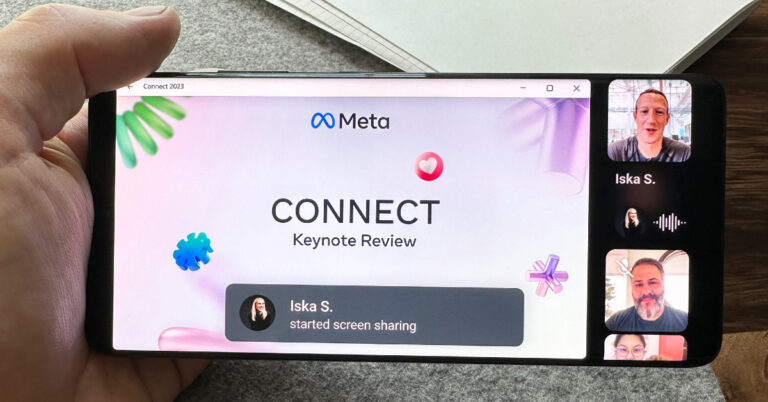
 The introduction of the screen sharing feature puts WhatsApp against the video communication heavyweights like Google Meet, Zoom, and Microsoft Teams. While WhatsApp has had video calling for six years, this feature will make it more conducive to hosting virtual meetings, online lectures, and group activities. To use this feature, users will need to update the app to its latest version.
With the added ability to switch to landscape orientation on video calls, Windows users will find it easy to share their desktop screens. Other call participants will be able to view the feed by rotating their phone to landscape mode as well. The screen-sharing window will occupy the main panel while the video feed of the call participants will be arranged vertically on the right side of the call window.
Read Also: Sony 4K HDR Professional Bravia Displays with Deep Black Non-Glare Coating launched in India
Users can share their device’s screen by tapping the share icon on a video call. This icon is located in the bottom toolbar, next to the camera switch icon. Like regular video calls, your screen’s feed is end-to-end encrypted as well. WhatsApp has also introduced a ‘video message’ feature, which allows users to send short video messages within chats, like voice notes. To send a video message, simply tap the microphone icon for voice notes, then press and hold it to record a video message.
For the latest gadget and tech news, and gadget reviews, follow us on Twitter, Facebook and Instagram. For newest tech & gadget videos subscribe to our YouTube Channel. You can also stay up to date using the Gadget Bridge Android App. You can find the latest car and bike news here.
The introduction of the screen sharing feature puts WhatsApp against the video communication heavyweights like Google Meet, Zoom, and Microsoft Teams. While WhatsApp has had video calling for six years, this feature will make it more conducive to hosting virtual meetings, online lectures, and group activities. To use this feature, users will need to update the app to its latest version.
With the added ability to switch to landscape orientation on video calls, Windows users will find it easy to share their desktop screens. Other call participants will be able to view the feed by rotating their phone to landscape mode as well. The screen-sharing window will occupy the main panel while the video feed of the call participants will be arranged vertically on the right side of the call window.
Read Also: Sony 4K HDR Professional Bravia Displays with Deep Black Non-Glare Coating launched in India
Users can share their device’s screen by tapping the share icon on a video call. This icon is located in the bottom toolbar, next to the camera switch icon. Like regular video calls, your screen’s feed is end-to-end encrypted as well. WhatsApp has also introduced a ‘video message’ feature, which allows users to send short video messages within chats, like voice notes. To send a video message, simply tap the microphone icon for voice notes, then press and hold it to record a video message.
For the latest gadget and tech news, and gadget reviews, follow us on Twitter, Facebook and Instagram. For newest tech & gadget videos subscribe to our YouTube Channel. You can also stay up to date using the Gadget Bridge Android App. You can find the latest car and bike news here. 
 3. Click the Storage tab and the system will automatically let you know how much space is in use and what it is being used for.
 For a Mac running macOS Ventura:

 4. Empty Trash.



 Step 3:
 Step 4:
 Step 5:
 Step 6:
 Step 3:




 Step 3:
 Step 4:
  Step 5:
 Step 6:
 Step 7:
 Step 8:
 Step 3:
 Step 4:
 Step 5:
  Step 6: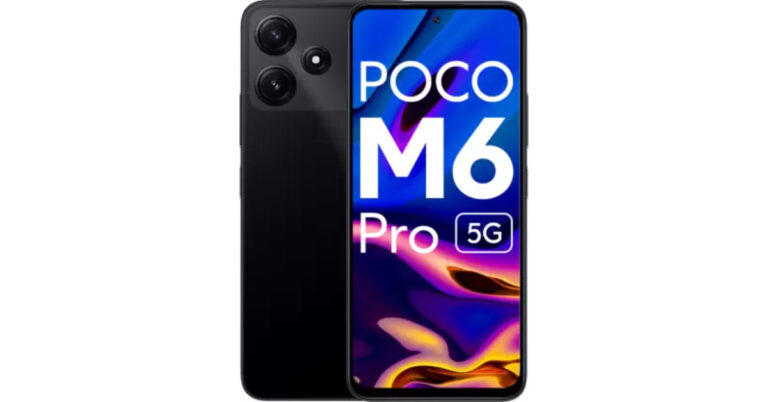






 Step 3:
 Step 4:
 Step 5:
 Step 6:

 Step 3:
 Step 5:
 Step 6:
 Step 3:
 Step 4:
 Step 5:
 Step 7:
 Step 8: Delete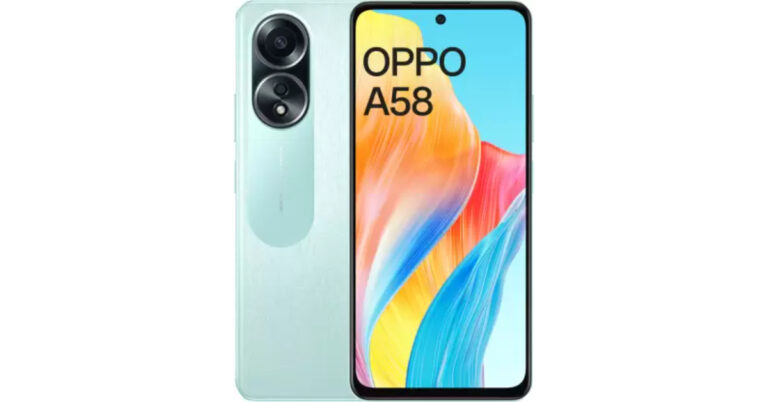

 Step 3:
  Step 4:
 Step 5:
 Step 6:
 Step 7: