16 June 2023 Amazon Quiz has gone live on its platform. The quiz timings are 12 AM to 11:59 PM. The Amazon App users can participate in the quiz daily and all they have to do is submit correct answers to the questions asked on the e-commerce platform. Today’s participants can get a chance to win Rs 5,000 Amazon Pay Balance.By participating in the Amazon Quiz the participants can win Amazon Pay Balance ranging from Rs 1,000 to Rs 50,000 every day while sitting at home. To win the participants must answer five questions correctly that are based on current events and general knowledge. One wrong answer can eliminate you from the quiz. The results will be announced at the end of the month. Today’s question will let you win Rs 5,000 Amazon Pay Balance. Check below for today’s Amazon quiz answers.Amazon Quiz Today Prize – Rs 5,000 Amazon Pay BalanceQuiz Date – 16 June 2023Daily Timing – 12 AM to 11:59 PMWinner Announcement – Today 12 PM
In This Article
Amazon Quiz Answers Today 16 June 2023
Question 1: Which ground hosted the first match of the Women’s Premier League?
Answer: DY Patil Stadium
Question 2: Which actor makes his directorial debut with Creed III?
Answer: Michael B Jordan
Question 3: The first Republic Day parade in India was held in which year?
Answer: 1950
Question 4: This is the logo of which company?
Answer: Starbucks
Question 5: This is part of the East Side Gallery on the former wall in which city?
Answer: Berlin
How To Play Amazon Quiz
Only app users are eligible to play the Amazon quiz every morning from 12 AM to 11:59 PM. The quiz is not available on the desktop. For those who are unaware of how to play the Amazon quiz below are the steps, you can follow to take the quiz.
Firstly download the Amazon app from Google Play Store or App Store
Now fill in the required information through the Sign Up option.
You need to log in to the Amazon app and scroll down on the home screen to find the Amazon Quiz banner.
Tap on the Amazon Quiz banner and tap on the Start button to start the Quiz.
Now you will get 5 questions and you need to answer them correctly. One wrong answer will eliminate you from the Quiz.
After answering all the questions correctly you are now eligible for a Lucky Draw.
The winner’s name will be announced today at 12 PM.
In today’s fast-paced world of content creation, having reliable and high-quality audio equipment is crucial for capturing pristine sound. The Hollyland Lark M1 wireless microphone is a compact and powerful solution that offers exceptional audio performance and flexibility. In this blog post, we will explore five compelling reasons why you should consider investing in the Hollyland Lark M1 for your audio recording needs.
In This Article
Superior Audio Quality
One of the primary reasons to choose the Hollyland Lark M1 is its exceptional audio quality. With a frequency response range of 20Hz to 20kHz and a dynamic range of 110dB, this wireless microphone ensures crystal-clear sound reproduction. Whether you are recording interviews, vlogs, podcasts, or other forms of content, the Lark M1 delivers professional-grade audio that captures every nuance and detail. Over that, the Lark M1 has excellent ambient noise cancellation.
Reliable and Stable Connection
The Lark M1 operates on the 2.4GHz wireless frequency, providing a stable and interference-free connection. It utilizes adaptive frequency hopping technology to automatically avoid crowded wireless channels, ensuring seamless audio transmission even in challenging environments. This feature is especially beneficial for content creators who often work in crowded spaces or areas with heavy wireless traffic. Mono and stereo modes are available in the device too with dual-channel recording and real-time monitoring.
Compact and Portable Design:
Portability is key for content creators who are constantly on the move. The Hollyland Lark M1 excels in this aspect with its compact and lightweight design. The microphone itself weighs only 35 grams, making it easy to carry and use in various scenarios. Additionally, the included charging case acts as a portable power bank, providing up to 10 hours of continuous use, ensuring that you never run out of battery during critical recording sessions.
Easy Setup and Versatility
Setting up the Lark M1 is incredibly simple. It features a plug-and-play design, allowing you to connect the transmitter and receiver within seconds. The microphone is compatible with a wide range of devices, including cameras, smartphones, tablets, and laptops, making it versatile for various recording situations. Whether you are a professional filmmaker, content creator, journalist, or educator, the Lark M1 is a valuable tool that enhances your audio capabilities.
Dual-Channel Recording and Real-Time Monitoring
The Lark M1 offers a dual-channel recording feature, enabling you to simultaneously record audio from two microphones. This functionality is particularly useful for conducting interviews or capturing audio from multiple sources. Additionally, the real-time monitoring feature allows you to listen to the audio being captured, ensuring that you have complete control over the sound quality and can make adjustments on the fly.
Conclusion
The Hollyland Lark M1 wireless microphone is an exceptional tool that empowers content creators with its superior audio quality, reliable connection, portability, ease of use, and advanced features. Whether you are a professional or an aspiring creator, investing in the Lark M1 will undoubtedly enhance your audio recording capabilities, allowing you to produce high-quality content that captivates your audience. So, why compromise on audio quality when the Hollyland Lark M1 can take your recordings to the next level?
Hollyland Lark M1 Tech Specs at a Glance
Wireless transmission
2.4GHz auto hopping
Working distance
40 m(radius),200 m(line of sight)
Built-in microphone
Omnidirectional
Frequency response range: 20Hz ~ 20KHz
The use of cloud technologies is one of those features that give businesses a competitive advantage. Considering that 80% of entrepreneurs use at least one such solution, this becomes a significant contribution to the development and achievement of the desired results. The most popular technology implementation method today is the SaaS product.
Its main advantages are convenience, a high level of security, and the absence of the need to spend money on expensive equipment purchases. Creating a product requires specific knowledge and experience, so entrepreneurs usually order SaaS application development services from reliable companies. We offer to learn how experts make solutions and what stages the process is divided into.
In This Article
Thorough market analysis
The main task of developers is to create a product that fully meets current market needs. Only in this case, the project will be successful. That is why the process begins with an analysis of the current situation. Several aspects are important:
Target audience (who belongs to the group that may be interested in the product)
The pain points of potential users (needs they want to address with the solution)
Competitors (who are they and what are their unique features)
Business models used by competitors are also important in the analysis process. After studying the received information, specialists receive raw data for creating a SaaS product.
Development of a business plan
You can achieve success in the process of creating a cloud product only if all actions are carefully planned. For this, a business plan is developed in advance. It contains the following information:
Methods of reaching the target audience;
How the product will meet the potential customers’ inquiries;
Unique features of the solution;
Methods of obtaining profit;
Additional points of the business plan should be an estimate of development costs, sources of financial profit, as well as a list of goals to be achieved.
Determination of the main requirements of the product
SaaS cloud solutions can have different functionality. It is selected individually for each enterprise, taking into account the needs of the market. However, there are several basic requirements that they must meet. Including:
High level of security: A SaaS product must have strong multi-factor authentication, access control, security settings management, and strong data encryption.
Self-service: In a cloud solution, processes must be performed in an automated mode.
Sharing: This refers to access to resources by both the tenant and the client.
An additional requirement is the monitoring of the activity of those who use the resources. For this, an audit log must be created.
Formation of the technical stack
Specialists use special tools to develop a cloud solution. In the process of forming the technical stack, they determine which of them will be applied in a specific case. These are frameworks, programming languages, and other tools that are necessary for product development.
Creating a work team
The business owner can independently search for individual specialists and unite them in a team to work on the project. However, this solution has many disadvantages. In particular, a long process, lack of necessary knowledge, and a higher probability of problems. The best solution in this situation would be SaaS product development services of specialized companies. They already have a formed team of professionals, which starts work immediately after agreeing on all the details of the project.
Creating an MVP
Work on the minimum viable product begins when the preparations are completed and a team of specialists is selected. It is not a full-fledged software product but it has all the necessary features to cover the needs of users. By releasing such a solution to the market, you can identify audience relationships and weak points and work on them before releasing the full version.
Conclusion
Creating a SaaS product is a complex, multi-stage process, during which specific requirements must be met and many factors must be taken into account. This means that you should trust it to the team of professionals who can competently build work and create a truly functional product.
For the latest gadget and tech news, and gadget reviews, follow us on Twitter, Facebook and Instagram. For newest tech & gadget videos subscribe to our YouTube Channel. You can also stay up to date using the Gadget Bridge Android App. You can find the latest car and bike news here.
LG has announced a new lineup of laptops in the Indian market today. The company introduced the 2023 LG Gram series and LG UltraPC line-ups. The 2023 LG Gram line-up includes LG Gram (17Z90R, 16Z90R, and 14Z90R), LG Gram Style (14Z90RS), LG Gram 2-in-1 (16T90R) and LG UltraPC (16U70Q). All the machines come with the latest features including sleek design.
In This Article
LG Gram (17Z90R, 16Z90R, and 14Z90R)
There are three models in the LG Gram 2023 line-up 17Z90R, 16Z90R, and 14Z90R. These models are powered by Intel EVO certificated 13th Gen Core Processor and include LPDDR5 6000 MHz RAM & Gen.4 NVMe (x2). The laptop comes with anti-glare 17, 16 and 14-inch IPS WQXGA displays. The screen offers a variable refresh rate and DCI-P3 99% colour reproduction. In addition to this, they have a 16:10 aspect ratio and support 400nits brightness. Moreover, the New software edition Intel Unison and LG Sync on Mobile lets transmission along with sharing of calls and text messaging. For security, there is LG Security Guard, LG Glance by Mirametrix, and face login capabilities incorporated into the devices.
LG Gram Style laptop (model 14Z90RS)
LG Gram Style laptop features a 14-inch OLED Anti-Glare Low Reflection display. The screen supports a high refresh rate and 12:10 aspect ratio. It comes with a glass design and has a ‘hidden’ haptic touchpad with soft LED backlighting. Powered by an Intel 13th Gen Raptor Lake P-Core CPU and a Gen4 NVMe solid-state drive (SSD) LG Gram Style laptop also includes Thunderbolt 4 and HDMI connectivity.
LG Gram 2-in-1 laptop (16T90R)
This LG Gram 2-in-1 laptop comes with a 16-inch anti-glare IPS display that has a 4-way super-slim bezel design and a sturdy yet slim aluminium frame. The convertible laptop has a suite of pre-installed notetaking and drawing applications optimized for use with the LG Stylus Pen (Wacom AES 2.0).
The majority of well-known smartphone manufacturers recently expanded their product lines by announcing new models. After or just ahead of the official release of these new smartphones/tablets the company has reduced the price of the products launched in India last year or recently. So if you’ve been holding off on buying something, this is the ideal time. We have listed down a couple of devices that have recently received a price cut.
In This Article
Xiaomi Pad 5
Xiaomi has reduced the cost of the Pad 5 by Rs 1,000 in India. Additionally, Xiaomi is providing discounts on its online store in the country. The listing states that the 6GB RAM with 128GB storage option costs Rs 25,999. While the cost of the 256 storage model is now Rs 28,499 instead.Xiaomi is also providing discounts on its online store. On some models, discounts for smartphone exchange will be available to buyers. Only the model and functional status of the phone are taken into account for the specified exchange discounts. Transactions made with an ICICI credit card are also eligible for an instant bank rebate of Rs 2,000.
Vivo Y35
Vivo has reduced the cost of the Vivo Y35 by Rs 500 in India. Last year, the smartphone was introduced in India. Launch pricing for a single unit with 8GB of RAM and 128GB of internal storage was Rs 18,499. There are two colour options for the smartphone: Agate Black and Dawn Gold. The phone is currently being sold for Rs 16,999, down from its previous price of Rs 17,499. The revised effective price will be available on the vivo India e-store and in all partner retail locations.Consumers can also receive an additional cashback of up to Rs 1,000 using ICICI, SBI, Yes Bank, Federal Bank, AU Small Finance, and IDFC First Bank. Buyers are also eligible to receive other benefits such as V-Shield Protection Plans.
Samsung Galaxy S22
In India, the Samsung Galaxy S22 was introduced last year. The cost of the smartphone has been decreased by as much as Rs 8,000. With 8GB RAM and 128GB/512GB storage, the Samsung Galaxy S22 was made available in two different configurations for Rs 72,999 and Rs 76,999, respectively. However, the cost of the phone in India has suddenly decreased by Rs 8,000. While the 512GB option is currently available for Rs 72,999, the 128GB RAM version will be accessible for Rs 64,999.Samsung mobile users on their exchange can receive a bonus of Rs 7,000. As a result, the model now costs Rs 57,999. The company will also be offering a bank cashback offer of Rs 3,000 which brings the cost of the base variant down to Rs 54,999.
Vivo Y16
In September of last year, the Vivo Y16 was introduced in India. Vivo has now reduced its cost by Rs 500. Two versions of the Vivo Y16 were released in India: a 3GB RAM model with 32GB of storage and a 4GB RAM model with 64GB of storage. It was priced at Rs 9,999 and Rs 12,499 at the time. But now the business has changed the smartphone’s price. With a reduction of Rs 500, the 4GB version is now available for Rs 11,999.Consumers can also avail of additional benefits like vivo V-Shield Protection Plans with every purchase. The smartphone with the new effective price will be available for purchase via the Vivo India e-store and across all partner retail stores. The device comes in two colour options of Drizzling Gold and Stellar.
Vivo Y100 and Vivo Y100A
Vivo Y100 and Vivo Y100A are the two smartphones that were launched in India this year. Price reductions of Rs 1,000 are currently being seen for both devices.The firm now offers the 8GB RAM with 128GB storage option for the Vivo Y100 for a new price of Rs 23,999. The 8GB RAM with 256GB storage option of the Vivo Y100A, on the other hand, will cost Rs 25,999. These products are available for purchase on Flipkart, the vivo India e-store, and in all of our partner retail locations at the new effective pricing.
OnePlus 10R
The OnePlus 10R 5G made its debut in India exactly a year ago. It costs under Rs 40,000. There is a Rs 4,000 coupon-based discount on the OnePlus 10R. Customers may purchase the 8GB RAM with 128GB storage option for Rs 30,999 after using this offer. The smartphone is now priced at Rs 34,999 on Amazon.Additionally, HDFC card holders can receive a discount of Rs 1,500 on their purchases and EMI transactions, which lowers the cost to Rs 29,999. Additionally, buyers may take advantage of an exchange deal with a maximum value of Rs 31,150. Another model with 12GB RAM and 256GB storage is available and is priced at Rs 38,999. For the latest gadget and tech news, and gadget reviews, follow us on Twitter, Facebook and Instagram. For newest tech & gadget videos subscribe to our YouTube Channel. You can also stay up to date using the Gadget Bridge Android App. You can find the latest car and bike news here.
US-based Home audio systems brand Tivoli Audio has entered the Indian market with the launch of four audio products. The company has introduced 4 devices Model One BT, Music System Home Gen2, Model One Digital Gen 2 and Revive. Tivoli Audio has further signed a strategic distribution partnership agreement with Alphatec, a Mumbai-based distribution house.Sharing the details on Tivoli’s entry in India and joining hands with Alphatec, Paul DePasquale, CEO, of Tivoli Audio, said, “All our products represent balance of style & sound. With a classic wood finish and use of mix materials such as metals and upholstery grade fabrics, we offer products that can complement the home décors of our customers. With Alphatec, a brand which is very much known for being the epic center ofsome of the world’s best audio and video equipment, as our distribution partner in India, we are sure that our products with elegant designs and quality can go perfectly with all sorts of aesthetics and will certainly make us unique in the market”
In This Article
Tivoli Model One BT
The Tivoli Model One BT comes with a vintage-looking design. The audio device has a top furniture-grade wood cabinet further making the radio more graceful and appealing. It has Bluetooth support for connectivity and includes all the radio stations with the iconic 5:1 ratio tuning dial. The product will be available in different colour options and is priced at Rs 25,560.
Tivoli Music System Home Gen 2
The Tivoli Music System Home Gen 2 has a minimalistic design and is available in multiple colour options. It has intelligent features that allow users to reset their favourite tracks in their Spotify list / FM via remote control and enjoy continuous music through Airplay 2 / Google Chromecast or Bluetooth. In addition to this, the music system includes an Ethernet port and easy connectivity to your TV. It also connects the radio setwith TV. The device comes with a price tag of Rs 1,04,900
Tivoli Model One Digital Gen 2
Both FM and Bluetooth are present in the Tivoli Model One Digital Gen 2, which is compatible with Airplay 2 and Chromecast. The product comes in a variety of colours. It may also be immediately connected to Spotify, which will play peoples’ preferred music in high-quality audio. The Model One Digital is the ideal complement to any kitchen, living room, bedroom, or office because of its superb sound quality and chic look. The price of the Model One Digital Gen 2 is Rs 48,590.
Tivoli Revive
Last but not least, Revive has capabilities that allow you to decrease the light. The wireless speaker can be used in conjunction with wireless phone charging to lessen the risk of discharge. A 2.5 W LED in the touch-dimming light has four settings that can be chosen depending on the mood of the surrounding area. It is a little bit more distinctive because it also includes a USB Port for charging various other devices and a 30-degree pivoting speaker. Multiple colour options for the product is available. For the latest gadget and tech news, and gadget reviews, follow us on Twitter, Facebook and Instagram. For newest tech & gadget videos subscribe to our YouTube Channel. You can also stay up to date using the Gadget Bridge Android App. You can find the latest car and bike news here.
After being banned for nearly ten months, Battleground Mobile India, aka BGMI, is officially available again in India. BGMI fans are looking for ways to improve their game experience and one such method is the usage of redemption codes, which offers a variety of rewards and advantages using BGMI redeem codes players can gain access to new skins, outfits, loot crates, weapons and free UC and diamonds.As mentioned earlier, these codes give users the chance to earn unique rewards and gain extra benefits while playing the game. This includes GUN SKINS (M4, AKM, M416, AWM, M24, UZI, KAR98K), free character voucher, Andy, Carlo, Sara, Victor character for free, free Anna Character on completing the mission and UC or Royal Pass Discount. So here we have gathered a list of the most recent BGMI redeem codes as of 15 June 2023. Also, redeem these codes asap as these are only valid for a limited duration.
In This Article
BGMI Redeem Codes for 15 June 2023
VETREL2IMHX- Bumble Bee Set
TIFZBHZK4A- Legendary Outfit
BOBR3IBMT- Desert Ranger Set
GPHZDBTFZM24U- Gun Skin (UMP9)
BMTFZBZQNC – Free Drifter Set
SD14G84FCC – Free Skin for KAR98 Sniper Gun
RNUZBZ9QQ – AKM Glacier Skin
TQIZBZ76F- Motor Vehicle Skin
SD16Z66XHH- Gun Skin
S78FTU2XJ- New Skin (M16A4)
KARZBZYTR- Skin (KAR98 Sniper)
SD14G84FCC- AKM Skin
RNUZBZ9QQ- Outfit
How to get free Redeem Codes for BGMI on 15 June 2023?
Launch BGMI on your device.
Then select the Redeem Code option from the main menu.
Next, click on the Redeem code tab.
A new window will open, requesting the redemption code.
Now enter your BGMI code.
Confirm and click on the “Redeem” tab.
If your redeem code is valid then you will get a message confirming that your rewards were successfully redeemed.
Garena Free Fire is a battle royale game with regular awards and tournaments to keep players interested. If you play Garena Free Fire, you should be aware of the redeem codes that are released on a daily basis. However, because the battle royale game is banned in India, players from other countries can use the Free Fire Redeem codes daily. If you’re unfamiliar with the Garena Free Fire redeem codes or don’t know how to get them, we’ve put together a step-by-step guide to help you redeem them. Check out Garena Free Fire Redeem Codes for 15 June 2023.The Free Fire redeem codes are a great way to get free stuff. These are 12-digit codes that contain alphabets and numbers, as well as an expiration date and time. Because the Garena FF redeem codes cannot be used more than once, you should hurry to the redemption page to claim your free reward before someone else does. To get a free reward, all you have to do is go to reward.ff.garena.com/en, which is the official redemption page. Also, keep an eye on this space for daily updates on Garena Free Fire redemption codes and rewards.
Amazon hosts a Quiz session for its customers daily. Its app platform brings a quiz on a daily basis, which begins at 12 AM and ends at 11:59 PM daily. The participants stand a chance to win cash prizes on a daily basis. Today’s 15 June 2023 Amazon Quiz will let you win Rs 2,500 Amazon Pay Balance.By participating in the Amazon Quiz the participants can win Amazon Pay Balance ranging from Rs 1,000 to Rs 50,000 every day while sitting at home. To win the participants must answer five questions correctly that are based on current events and general knowledge. One wrong answer can eliminate you from the quiz. The results will be announced at the end of the month. Today’s question will let you win Rs 2,500 Amazon Pay Balance. Check below for today’s Amazon quiz answers.Amazon Quiz Today Prize – Rs 2,500 Amazon Pay BalanceQuiz Date – 15 June 2023Daily Timing – 12 AM to 11:59 PMWinner Announcement – Today 12 PM
In This Article
Amazon Quiz Answers Today 15 June 2023
Question 1: India provided a one billion dollar credit line to which of these countries for one year for essential imports?Answer: Sri LankaQuestion 2: D’YAVOL X is clothing line launched by which celebrity child?Answer: Aryan KhanQuestion 3: Who represented India at the Coronation of King Charles and Queen Camilla at Westminster Abbey?Answer: Jagdeep DhankharQuestion 4: This clothing company is originally from which country?Answer: SwedenQuestion 5: From which ancient culture did this bird get the name ‘Halcyon’ from?Answer: Greece
How To Play Amazon Quiz
Only app users are eligible to play the Amazon quiz every morning from 12 AM to 11:59 PM. The quiz is not available on the desktop. For those who are unaware of how to play the Amazon quiz below are the steps, you can follow to take the quiz.
Firstly download the Amazon app from Google Play Store or App Store
Now fill in the required information through the Sign Up option.
You need to log in to the Amazon app and scroll down on the home screen to find the Amazon Quiz banner.
Tap on the Amazon Quiz banner and tap on the Start button to start the Quiz.
Now you will get 5 questions and you need to answer them correctly. One wrong answer will eliminate you from the Quiz.
After answering all the questions correctly you are now eligible for a Lucky Draw.
The winner’s name will be announced today at 12 PM.
Life in the 21st century is fast-paced, demanding a high degree of preparedness and functionality in our everyday routine. This readiness is highlighted in a philosophy known as Everyday Carry (EDC). EDC champions the practice of keeping specific items at hand for unexpected scenarios while also streamlining routine tasks.
Adopted by individuals worldwide, EDC acts as a practical guide for maintaining an optimum level of self-sufficiency in everyday situations. To help unravel this concept, this comprehensive 10-item checklist outlines the bedrock of EDC essentials, ranging from a simple wallet to personal care essentials. This guide aims to enhance daily resilience and independence, so read on.
RFID Wallet
An RFID wallet does more than store cash and cards; it’s a defence mechanism against digital theft. Thanks to its Radio Frequency Identification blocking capabilities, it keeps the personal information within credit cards and IDs safe from unauthorised scanning. This proves invaluable when navigating crowded areas like subways or concerts, where electronic pickpocketing is more common. An RFID wallet also aids in organising your essential cards, reducing clutter and promoting easy access when needed.
Wristwatch
A wristwatch marries style with functionality, providing a discreet method for timekeeping. It ensures punctuality in situations where checking a phone might be inappropriate or inconvenient, like during formal events or business meetings. Many modern wristwatches come equipped with additional features such as a compass or a heart rate monitor, further enhancing their utility.
Keys
Keys are not just about access to spaces; they serve as a versatile platform for various utilities. By accommodating keychain add-ons like a multi-tool or flash drive, your keys can evolve into a compact toolbox or data storage device. Consider a situation where a screw needs tightening, or a bottle needs opening – your keychain multi-tool has you covered. Similarly, a flash drive on your keys becomes handy when quick file transfer is essential.
Phone
In the era of smartphones, your mobile device has evolved beyond a simple communication tool. Equipped with an array of apps and features, it can function as a navigator, translator, and even a flashlight. Picture getting lost in an unfamiliar city; your phone can provide directions and translate local language signs. In the event of a sudden blackout, the flashlight feature safely guides you in the dark.
Portable Charger
In our digitally dependent world, a portable charger shields against the inconvenience of device shutdowns. Whether you’re awaiting an important call during a lengthy commute or relying on your phone’s GPS during a road trip, a portable charger ensures your device remains active. It’s a safety net against low battery situations, enabling uninterrupted communication and access to essential digital tools.
Flashlight
A compact, high-power flashlight serves as a pillar of practicality in your EDC ensemble. Whether navigating unfamiliar streets after dusk, searching for an item in dim light, or signalling for help in an emergency, a reliable flashlight is indispensable. Unlike phone flashlights, standalone flashlights offer brighter illumination and longer battery life and are more suitable for challenging weather conditions.
Pen
Despite the digital age, the utility of a dependable pen remains vital. It’s useful for jotting down spontaneous ideas, filling out forms, or adding personal touches to messages. Consider times when marking luggage tags, labelling items, or leaving a note – a reliable pen proves indispensable in these situations.
Notebook
Despite the prevalence of digital note-taking apps, a traditional notebook provides a tangible and often more focused method for recording thoughts, lists, or notes. It’s easier to sketch or mind-map ideas on paper during brainstorming sessions. If you find yourself in an area with no cellular signal or need to conserve phone battery, your notebook serves as a reliable backup for note-taking.
Pocket Knife
The utility of a pocket knife extends beyond the realms of traditional EDC. This versatile instrument can assist in various scenarios, from everyday tasks to potential survival situations. It’s equally capable of cutting tangled cords, aiding in meal prep during outdoor trips, or even serving as a self-defence tool when required.
Personal Care Items
Personal care items in EDC reflect your lifestyle and needs, addressing personal comfort and hygiene. Lip balm can ease discomfort from chapped lips during a long flight or a winter hike. Hand sanitiser ensures hygiene when commuting or eating on the go. These items collectively contribute to health and wellness, promoting comfort and disease prevention in your daily routine.
The Takeaway
At its core, EDC is about readiness and functionality. The outlined 10-item checklist embodies this philosophy, offering a roadmap for individuals looking to boost daily resilience and self-sufficiency. Importantly, EDC should be personalised to match one’s needs, lifestyle, and profession. Always respect local laws and regulations, especially concerning items like pocket knives and multi-tools. EDC is not just a collection of items but a lifestyle that values readiness and practicality. With this 10-item checklist, you’re well on your way to embracing the empowering world of EDC.
For the latest gadget and tech news, and gadget reviews, follow us on Twitter, Facebook and Instagram. For newest tech & gadget videos subscribe to our YouTube Channel. You can also stay up to date using the Gadget Bridge Android App. You can find the latest car and bike news here.
If you’ve ever looked around for apps and tools to download videos on your device, the name Videoder may have popped up on certain occasions. One of the reasons behind the popularity of Videoder is its easy-to-use interface. Apart from that, Videoder also offers an in-app browser for you to manually look up videos and download them instantly. In this article, we bring you the 4 best ways to install and use Videoder on an Android smartphone and tablet.Read Also:3 Best Ways to set your iPhone or Android Phone to Black and White
In This Article
Download from Google Play Store
Google Play Store offers Play Protect security, which means that the apps you download from the platform will not contain any malware or other harmful elements. However, there is a downside to downloading Videoder from the Play Store. Since the Play Store cracks down pretty hard on copyright violations, you will not be able to use Videoder to download videos from YouTube. To get around this issue, download the Videoder app from the official website.
Use the official Videoder website
If you want to download YouTube videos on your device without any hassle, download the Videoder’s APK from its official website. Click on this link to download the APK for Android. Once you have downloaded the APK file on your smartphone, go to the file manager and run it on your device. Since you are installing an app from a source outside of the Play Store, you will need to give it special access from phone settings. Once that is taken care of, Videoder will install on your device.
Download Videoder from Uptodown
Uptodown is one of the most trusted third-party app marketplaces on the Internet. You can easily download the latest Videoder APK from Uptodown by clicking on this link. Uptodown regulates its platform constantly and does a good job of weeding out corrupt and malicious apps. Once you have downloaded the APK, follow the procedure mentioned above to install the app on your device.
Download Videoder from APKMirror
Outside of the Google Play Store, APKMirror is one of the most visited app marketplaces on the Internet. While it may be a third-party marketplace, it is very stringent when it comes to regulation and security. You can find the latest version of Videoder on APKMirror along with several previous versions. Once you have downloaded the APK on your Android smartphone, allow app installation from unknown sources and follow the installation process.
Frequently Asked Questions
Is Videoder worth it?
Videoder is a great app to browse and download videos directly to your device. The in-app browser works seamlessly with the rest of the interface and allows users to go through a bunch of videos before downloading one they like.
Can I download Videoder for free?
Yes, you can download Videoder for free from Google Play Store or third-party marketplaces like Uptodown and APKMirror.
These are the 4 best ways to install and use Videoder Video Downloader on your Android smartphone and tablet. Once you’ve installed Videoder on your device, all you need to do is copy the link to the video you want to download and paste it into the app. Hit the arrow icon to download the video on your device. You can also browse videos using the in-app browser.For the latest gadget and tech news, and gadget reviews, follow us on Twitter, Facebook and Instagram. For newest tech & gadget videos subscribe to our YouTube Channel. You can also stay up to date using the Gadget Bridge Android App. You can find the latest car and bike news here.
Audio tech outfit Truke has been putting out very impressive TWS products over the last few months. Primarily operating in the entry-level segment, Truke’s has a diverse set of products that cater to music enthusiasts and gamers alike. Truke’s BTG (Born to Game) series offers affordable gaming TWS that do not compromise on performance. We reviewed the BTG X1 and BTG Beta earlier this year and were quite impressed. Now, we turn our attention to the BTG Storm. We’ve been using this TWS for about a week, primarily for gaming. It is currently listed at Rs 999 on Truke’s website. Here is our Truke BTG Storm review.Read Also:3 Best Ways to set your iPhone or Android Phone to Black and White
In This Article
Truke BTG Storm Review: Design
Inside the box, you get the charging case, the wireless earbuds, extra ear tips, USB Type-C charging cable, a warranty card, and a quick start guide. The plastic tray housing the contents is quite flimsy. Given the cost of the product, we don’t mind it too much.The charging case has a shield-like design. The graphic on the lid gives the case a tough look but it is made entirely out of plastic. There is a glossy cutout right in the middle for Truke branding. There are indentations on either side of the lid to bring more attention to the RGB light.The RGB strips light up when you flip open the lid. You can find small RGB panels on either earbud as well. Truke has really committed to the gaming aesthetic. We really like the overall design and RGB integration on the case. It’s ultra-portable and easily fits inside the pocket. The hinge could have been a little stronger, but we can’t really complain about the lack of sturdiness at this price point.Unlike the BTG X1, the earbuds on BTG Storm sport the in-ear design. While we don’t mind the open-ear design, it isn’t for everyone. The in-ear design on Truke BTG Storm caters to different ear sizes. You can simply switch the ear tips to a size that matches your ears. The edgy design of the case is carried forward to the earbuds as well.The outer panel on either earbud is touch sensitive and can be used to control the music playback. We encountered frequent issues with touch controls. It was common for touches to not register at all. Trying to enter Gaming Mode triggered the voice assistant a bunch of times. There’s no app support for BTG Storm, which is a bit of a letdown as well.On the bright side, these wireless earbuds come with an IPX5 rating, which means you don’t have to worry about any damage due to sweat while working out. We wore the earbuds on long runs and didn’t experience any fit or performance issues at all.
Truke BTG Storm review: Performance
Truke BTG Storm delivers its audio output through 13mm Titanium drivers. With Bluetooth 5.3 support, these earbuds connect to your device as soon as you open the lid. The notification soundbite is still there, but it is a lot more polished on the BTG Storm. A significant improvement over the coarse alerts on previous Truke earbuds.The sound output here is massively bass driven. While bassheads will certainly enjoy this, those seeking a more balanced sound will have to look elsewhere. The high-end frequencies do not get ample representation on the sound stage. The audio quality offered by Truke BTG Storm is pretty decent for a TWS priced under Rs 1,000. Even though the bass was dialled up, we enjoyed listening to music across different genres. The audio distorts a little when you turn the volume all the way up. We would suggest sticking within the 60-80% range.Tapping three times on the right earbud triggers the gaming mode. Truke BTG Storm offers an ultra-low latency of 40ms which is ideal for gaming. We were pleased with the jitter-free audio relay and the overall quality of the mix. We did not experience any major lag during an entire week of use. Truke nails the basics when it comes to gaming performance, and honestly, there’s not much more we can ask at this price point.The dual-mic Electronic Noise Cancellation filters work pretty well during audio calls and in-game voice chats. If you’ve got a noisy fan in your room, the ENC filters will ensure that it doesn’t disturb the quality of the calls. While the noise cancellation on the calls may work fine, we would’ve liked better-quality microphones on the earbuds. A step up in this aspect would have made the Truke BTG Strom a no-brainer purchase.You get a total of 50 hours of playtime on the Truke BTG Storm. The charging case holds 300mAh of charge, which is good for 40 hours of music playback. Each earbud has a 40mAh battery capacity and can go up to 10 hours on a single charge. In our tests, the BTG Storm held up these numbers. The case takes up to 2 hours to fully charge.Read Also:6 Best Ways to Find and Remove Stalkerware Apps
Verdict
A good pair of gaming earbuds can cost you a pretty penny. Luckily, the Truke BTG Storm Gaming TWS makes compromises in the right areas to keep the cost down. At Rs 999, these pair of wireless earbuds are a solid purchase. Gaming enthusiasts will like enjoy the 40ms low latency mode on offer here. However, if you’re not particularly interested in gaming, we wouldn’t suggest getting these earbuds for music consumption alone. There are much better Truke products at a similar price point that cater to the music-listening audience.
Truke BTG Storm: Pros
Great design
Low latency mode for gaming
Good battery life
Very affordable
Truke BTG Storm: Cons
Touch gestures do not register at times
Bass-driven audio output may not appeal to everyone
Google has finally rolled out a feature drop fix for June 2023. Google was supposed to release the software update for Pixel phones, Pixel Watch and Fitbit devices last week. These will roll out to devices starting today and will continue for a few weeks. The most recent Feature Drop fix contains a tonne of new features, including Emoji Wallpapers, speaker labels for Pixel Recorder, improved safety measures, and more.
In This Article
For Pixel Phones
With the Google feature drop fix for June 2023, you will be able to ask Google Assistant on your Pixel phone using voice commands to start emergency sharing or to arrange a safety check for added assurance.All you need to say is ‘Hey Google, start a safety check for 30 minutes’, if you’re out for a nighttime run. According to Google, your emergency contacts will be contacted and your current location will be shared if you don’t reply to your safety check within the predetermined time frame.In order to increase your safety while driving, Pixel’s car crash detection feature can now notify your family members if you’ve been in a serious collision. It can also notify your emergency contacts of your whereabouts in real-time and the status of any calls you are currently on.In terms of cameras, Google is also making Pixel 7 Pro’s Macro Focus available for video. In addition to this Pixel 6 and newer phones will now let you take self-timed photos by simply raising your palm to trigger the timer after setting it for 3 or 10 seconds.
Users of Pixel 6 and newer phones will now be able to use Pixel’s new cinematic wallpaper to bring their favourite memories of friends and family to life. 2D wallpaper photographs can be converted by Pixel into dynamic 3D scenarios using AI for a genuinely magical appearance. Additionally, you can combine more than 4,000 emoji with various patterns and colours to create live wallpapers that reflect your personality and mood using the new emoji wallpapers.Moreover, users with Pixel 6 and newer phones will be able to export transcripts into Google Docs, generate speaker-labelled video clips and search for speakers within recordings, starting next week. Also, users will be able to use their smart home devices right from their Pixel lock screen when using the Google Home app.When the Pixel 6a or Pixel 7a senses that it is on a firm, flat surface, such as a desk or table, it can now reduce the vibration intensity. The Adaptive Charging will now also use Google AI to make Pixel battery last longer. According to the company, the phone will gently charge to 100% when you plug it in, and depending on your past charging patterns, it can anticipate a lengthy charging session and start charging one hour beforehand.Google Assistant also gets two new options to add to our diverse array of voices, totalling 12 in U.S. English.
For Pixel Watches
Pixel Watch can now measure your blood’s oxygen saturation (SpO2) and assist you in noticing changes that might occur while you sleep and affect the quality of your sleep. Pixel Watch will also be able to send you a notification if your heart rate is unusually high or low, as it could be an indicator of your overall health and any potential issues on the horizon. Also Google Assistant will be available for Wear OS in Italian, Portuguese, Swedish, Polish and Spanish.With three new tiles, you can easily start a Spotify DJ session, listen to podcasts and check out what’s in your heavy rotation. Also, it can automatically pause run, walk, or bike activity if you need to stop at a light or take a quick breather – and automatically resume tracking your workout once you start again.
For Fitbit Devices
Your Exercise menu will feature a full selection of workout modes to select from, with your most recent workout modes at the top in the Fitbit Charge 5, Luxe, and Inspire 3. You may quickly check your Daily Readiness Score to see if your body is prepared for a workout or if rest is more important.Fitbit Sense 2 and Versa 4 will let you log periods, view your cycle state and edit information without even opening your phone. For the latest gadget and tech news, and gadget reviews, follow us on Twitter, Facebook and Instagram. For newest tech & gadget videos subscribe to our YouTube Channel. You can also stay up to date using the Gadget Bridge Android App. You can find the latest car and bike news here.
Father’s Day is just around the corner, and if you haven’t settled on a gift yet, we’ve got you covered. We’ve been keeping an eye on all the tech releases across the spectrum. Be it wireless earbuds or Bluetooth trackers, we have tons of gifting options for you. So, without further ado, let’s take a look at the best Father’s Day tech gifts! Read Also:6 Best Ways to Find and Remove Stalkerware Apps
In This Article
Nothing Ear 2
Price: Rs 9,999 (Flipkart)Nothing’s newest TWS, the Ear 2, retains the signature see-through design while bumping up the specs. The 11.6mm on the Ear 2 (review) delivers a powerful output and the dual chamber architecture brings the best out of the soundstage. One of the biggest upgrades on the Ear 2 is the inclusion of LHDC 5.0 support. Users can now create a personal sound profile using the Nothing X app, and even change the level of ANC. Ear 2 can nullify up to 40dB of surrounding sounds. You get a total battery backup of 36 hours (buds + case) with the Ear 2 along with 2.5W Qi-certified wireless charging.
Samsung Galaxy Z Fold 4
Price: Rs 1,54,999 (Samsung.com)If you’re thinking of going big this Father’s Day, then why not get the best of what’s out there? Samsung Galaxy Z Fold 4 is in a league of its own when it comes to folding phones. When unfolded, the Dynamic AMOLED display spans 7.6 inches. Samsung’s One UI is perfectly optimised for this display, allowing you to manage multiple tasks at once. The handy taskbar at the bottom is a nice addition too. If you don’t want to be working on a tablet-like display all the time, you can take care of routine tasks on the 6.2-inch Dynamic AMOLED cover display. Samsung Galaxy Z Fold is powered by Snapdragon 8+ Gen 1. Read our full review of the foldable here.
Apple Watch Series 8
Price: Rs 45,900 (Apple.com)
The Apple Watch Series 8 is one of the best smartwatches you can buy right now. If your father has an iPhone, this would be the perfect accessory to go along with it. The Apple Watch Series 8 sports the sleek design we’ve come to associate with Apple smartwatches. It gets helpful features like crash detection, cellular roaming, 36-hour battery life, along with fitness and health tracking. The Apple Watch can monitor temperature fluctuations as small as 0.1 degrees Celsius.
Amazon Kindle (2022)
Price: Rs 9,999 (Amazon)The newest entry-level Kindle is the lightest and the most compact one in the entire lineup. We reviewed the e-reader earlier this year and were really impressed by how close it was to the flagship Paperwhite in terms of specifications. The 300 ppi screen resolution on this device is on par with Kindle Paperwhite and Oasis. The 6-inch display offers a great reading experience and can be packed into any travel bag with ease. Illuminating the display are 4 LEDs compared to Paperwhite’s 17. While illumination is not an issue on this device, you miss out on colour temperature options.
OnePlus Pad
Price: Rs 37,999 (OnePlus.in)Apple’s iPad may be the obvious choice for many when it comes to tablets, but it finally has a worthy Android rival in the OnePlus Pad. The 11.6-inch IPS LCD display on the OnePlus pad is fast and ultra-responsive, with HDR10+ support making it perfect to binge video content. The quad speakers on this device fill out an entire room with ease. Powered by the MediaTek Dimensity 9000 SoC, the OnePlus Pad crushes multitasking with absolute ease. If you’re looking to gift your dad a device that perfectly blends work and fun, the OnePlus Pad should be high on your list. Read our full review here.
Cason Digital Kitchen Thermometer
Price: Rs 845 (Amazon)For those with dads that love to grill, the Cason Digital Kitchen Thermometer will make the perfect Father’s Day tech gift! This thermometer takes the temperature within 2-3 seconds and is accurate up to 1 degree. It comes with an LCD display for the readings and has a super convenient hole that allows you to hang it anywhere in the kitchen. Rated IP67 for dust and water resistance, you can dip this thermometer into any kind of food or liquid without having to worry about any damage. Being completely waterproof, you can wash it under running water without any second thought.
Western Digital My Passport 2TB External Hard Drive
Price: Rs 5,799 (Amazon)This 2TB portable hard drive from Western Digital will make a brilliant Father’s Day tech gift for dads that always seem to be running out of space to store their data. The WD My Passport External Hard Drive is available in five colour options – Black, Blue, Red, White, and Navy Blue. The USB Type-C port on this device facilitates fast transfers. During our testing, the WD My Passport offered a read speed of 243 Mbps and a write speed of 216 Mbps. A 2GB file transfer from our PC took less than 8 seconds via a USB 3.1 port. The WD Discovery software offers password protection and backup services.
iPhone 14 Pro
Price: Rs 1,29,900 (Apple.in)The newest iPhone 14 Pro is equipped with the powerful A16 Bionic chipset that many believe is the best SoC around. It also gets a design and camera upgrade. The notch on the display has been replaced by a pill-shaped cutout that Apple calls the ‘Dynamic Island’. The Dynamic Island allows easier access to notifications and tasks like navigation, music control, and more. The rear camera unit now gets a 48MP primary shooter along with a 12MP ultrawide and another 12MP telephoto lens. Read our full review here.
Jiotag
Price: Rs 749 (Jio.com)The newly launched Jiotag is an affordable alternative to the Apple AirTag and Amazon Tile. This portable Bluetooth tracker can do everything an AirTag can. You can attach it to your keys or throw it in your luggage or wallet. You can track your missing items easily with the help of Jiotag. It will also ping your phone with notifications in case you leave a tagged item behind. Jiotag offers up to 1 year of battery life and comes with an additional battery and lanyard cable.
Amazon Fire TV Cube (3rd Gen)
Price: Rs 12,999 (Amazon)The 3rd generation Amazon Fire TV Cube is the perfect fusion of the Echo Dot and Fire TV Stick. This device can turn any slow and sluggish TV into a fast machine with smart TV capabilities. The Fire TV Cube offers 4K streaming. If you don’t own a 4K TV, this device will upscale the quality of 720p and 1080p content. Amazon’s interface is very easy to navigate. You can install almost every streaming app under the sun on your TV using this device. What we really like about the Fire TV Cube is the seamless Alexa integration which allows you to control everything with simple voice commands. Read our full review here.Read Also:Xiaomi Pad 6 with Snapdragon 870 SoC launched in India
Acer has today kicked off a mega gaming sale event for gamers across India. The Acer Gaming Mania Sale will be accessible from June 14 through June 18. The sale ensures a large selection of exclusive deals, thrilling giveaways, and the chance to win the much-desired Predator Helios Neo i7 gaming laptop. Buyers can get discounts on gaming laptops and extra benefits like a mouse, headset, and Acer bag packages. Additionally, buyers can win game tickets for AAA titles. In addition to this during the Acer Gaming Mania Sale.Acer has given tempting discounts on a wide range of gaming laptops to heighten the allure of the gaming event. Along with giveaways and a fortunate draw, Acer is offering special deals to customers during the sale. Acer monitors are up for grabs in a daily drawing for lucky consumers, which will improve their gaming experience. The Acer’s Gaming Mania Sale can be accessed via the local Acer store. On the Acer website, you can find the location of the closest store.The event includes walk-in giveaways where lucky visitors can win a fantastic bundle of a mouse, headset, and stylish gaming bag. There will be ten giveaways each day, creating an exciting atmosphere. The Predator Helios Neo i7 gaming laptop, which ensures an immersive gaming experience, is also up for a large lucky draw.On the purchase of gaming laptops, five lucky draw winners will receive Acer gaming monitors. The company will be giving out game vouchers to the first 50 buyers of gaming laptops during Acer’s Gaming Mania Sale. Every day during the Gaming Mania Sale, the sale will also give away 10 pairs of Acer mice, headsets, and backpacks.In addition to this, all the purchased will get freebies including two years of accidental damage insurance and three years of warranty starting at Rs 499. Two years of accidental damage protection are among the additional offers. A complimentary Nitro mouse and a 2-year extended warranty are included with every purchase of an Aspire 5 or Nitro 5 series laptop. On the other hand, the purchaser of Aspire 7 gaming laptop will also get a 1-year accidental damage warranty as well as a 2-year extended warranty. For the latest gadget and tech news, and gadget reviews, follow us on Twitter, Facebook and Instagram. For newest tech & gadget videos subscribe to our YouTube Channel. You can also stay up to date using the Gadget Bridge Android App. You can find the latest car and bike news here.
After being banned for nearly ten months, Battleground Mobile India, aka BGMI, is officially available again in India. BGMI fans are looking for ways to improve their game experience and one such method is the usage of redemption codes, which offers a variety of rewards and advantages using BGMI redeem codes players can gain access to new skins, outfits, loot crates, weapons and free UC and diamonds.As mentioned earlier, these codes give users the chance to earn unique rewards and gain extra benefits while playing the game. This includes GUN SKINS (M4, AKM, M416, AWM, M24, UZI, KAR98K), free character voucher, Andy, Carlo, Sara, Victor character for free, free Anna Character on completing the mission and UC or Royal Pass Discount. So here we have gathered a list of the most recent BGMI redeem codes as of 14 June 2023. Also, redeem these codes asap as these are only valid for a limited duration.
In This Article
BGMI Redeem Codes for 14 June 2023
KARZBZYTR – Free Outfit
RNUZBZ9QQ – AKM Glacier Skin
PGHZDBTFZ95U – M416 Skin
R89FPLM9S – Companion
BMTFZBZQNC – Free Drifter Set
JJCZCDZJ9U – Golden Pan
UKUZBZGWF – Free Fireworks
TIFZBHZK4A – Free Outfit
RNUZBZ9QQ – AKM Glacier Skin
BMTCZBZMFS – Pretty in Pink set and Pretty in Pink Headpiece
5FG10D33 – Outfit for Free
TQIZBz76F – 3 Free Motorcycle
TQIZBZ76F – Vehicle Skin
5FG10D33 – Falcon and Free Emotes
GPHZDBTFZM24U – UMP9 Skin
SD14G84FCC – Free Skin for KAR98 Sniper Gun
How to get free Redeem Codes for BGMI on 14 June 2023?
Launch BGMI on your device.
Then select the Redeem Code option from the main menu.
Next, click on the Redeem code tab.
A new window will open, requesting the redemption code.
Now enter your BGMI code.
Confirm and click on the “Redeem” tab.
If your redeem code is valid then you will get a message confirming that your rewards were successfully redeemed.
Garena Free Fire is a battle royale game with regular awards and tournaments to keep players interested. If you play Garena Free Fire, you should be aware of the redeem codes that are released on a daily basis. However, because the battle royale game is banned in India, players from other countries can use the Free Fire Redeem codes daily. If you’re unfamiliar with the Garena Free Fire redeem codes or don’t know how to get them, we’ve put together a step-by-step guide to help you redeem them. Check out Garena Free Fire Redeem Codes for 14 June 2023.The Free Fire redeem codes are a great way to get free stuff. These are 12-digit codes that contain alphabets and numbers, as well as an expiration date and time. Because the Garena FF redeem codes cannot be used more than once, you should hurry to the redemption page to claim your free reward before someone else does. To get a free reward, all you have to do is go to reward.ff.garena.com/en, which is the official redemption page. Also, keep an eye on this space for daily updates on Garena Free Fire redemption codes and rewards.
Amazon Quiz for 14 June 2023 has gone live on the company’s mobile platform. The daily quiz contest brings an opportunity for Amazon users to win exciting prizes. In today’s Amazon Quiz the participants have the chance to win Rs 2,500 Amazon Pay Balance. All they have to do is answer all the questions correctly.A fresh question is posted on the Amazon app daily which consists of five simple questions based on general knowledge and current events. The quiz can be played on the Amazon App from 12 AM to 11:59 PM. You have to answer all the questions correctly. Then the participants will be shortlisted for a lucky draw. The result of the lucky draw will be announced at the end of the month. The participants can win Amazon Pay Balance to up to Rs 50,000. Check out the 14 June 2023 Amazon Quiz question and their answers to win Rs 2,500 Amazon Pay Balance.Amazon Quiz Today Prize – Rs 2,500 Amazon Pay BalanceQuiz Date – 14 June 2023Daily Timing – 12 AM to 11:59 PMWinner Announcement – Today 12 PM
In This Article
Amazon Quiz Answers Today 14 June 2023
Question 1: India provided a one billion dollar credit line to which of these countries for one year for essential imports?Answer- Sri LankaQuestion 2: D’YAVOL X is a clothing line launched by which celebrity child?Answer- Aryan KhanQuestion 3: Who represented India at the Coronation of King Charles and Queen Camilla at Westminster Abbey?Answer- Jagdeep DhankharQuestion 4: This clothing company is originally from which country?Answer- SwedenQuestion 5: From which ancient culture did this bird get the name ‘Halcyon’ from?Answer- Greece
How To Play Amazon Quiz
Only app users are eligible to play the Amazon quiz every morning from 12 AM to 11:59 PM. The quiz is not available on the desktop. For those who are unaware of how to play the Amazon quiz below are the steps, you can follow to take the quiz.
Firstly download the Amazon app from Google Play Store or App Store
Now fill in the required information through the Sign Up option.
You need to log in to the Amazon app and scroll down on the home screen to find the Amazon Quiz banner.
Tap on the Amazon Quiz banner and tap on the Start button to start the Quiz.
Now you will get 5 questions and you need to answer them correctly. One wrong answer will eliminate you from the Quiz.
After answering all the questions correctly you are now eligible for a Lucky Draw.
The winner’s name will be announced today at 12 PM.
Not many people know this but you can turn down the colour saturation of your smartphone’s display and turn it completely black-and-white. Ever since Android introduced ‘Digital Wellbeing’ in its ecosystem, it has been pushing towards better digital habits. With your phone set on Grayscale Mode, you are less likely to use it. This greatly helps people who can’t help but constantly check their phones. In this article, we bring you the 3 best ways to set your iPhone or Android phone’s display to black and white (grayscale mode).Read Also:6 best ways to clear your browsing history on your iPhone or Android mobile
In This Article
Set your iPhone to Black and White (Grayscale)
Step 1: Go to Settings and select Accessibility.Step 2: Select ‘Display and Text Size’.Step 3: Tap on Colour Filters.Step 4: Turn on the toggle switch and select ‘Greyscale’.
Set your Android phone to Black and White (Grayscale) from developer settings
Step 1: Launch Settings and select About Phone.Step 2: Select ‘Software Information’ and tap on Build Number seven times to enter Developer Mode.Step 3: Go to the previous page, scroll down to the bottom, and select ‘Developer Options’.Step 4: Tap on ‘Simulate Colour Space’ and select ‘Monochromacy’.
Turn on Grayscale Mode on Android using Digital Wellbeing
Android smartphones come with a ‘Digital Wellbeing’ feature that seeks to reduce your screen time and break the habit of checking your phone all the time. The ‘Bedtime Mode’ offered by Digital Wellbeing sets your device to grayscale mode and mutes all sound alerts except the alarm. You can turn it on by going to Settings>Digital Wellbeing and Parental Controls>Bedtime Mode.
Frequently Asked Questions
What is the benefit of Grayscale Mode?
Setting your phone on Grayscale Mode reduces the stress on your eyes and limits your screen time. If you spend too much time on your phone, having a black-and-white screen will limit your usage.
How do I set my iPhone to Grayscale?
To turn your iPhone’s display black-and-white, go to Settings>Accessibility>Display and Text Size>Colour Filters and select Greyscale.
These are the 3 best ways to set your iPhone or Android phone’s display to black and white (grayscale mode). If your phone keeps you up till late hours of the night, enabling greyscale mode can help a lot. You’re less likely to check your phone constantly when the screen is undersaturated. The lack of colours means less eye and brain stimulation, which leads to a better quality of sleep.For the latest gadget and tech news, and gadget reviews, follow us on Twitter, Facebook and Instagram. For newest tech & gadget videos subscribe to our YouTube Channel. You can also stay up to date using the Gadget Bridge Android App. You can find the latest car and bike news here.
Impenetrable security should be a non-negotiable attribute on every modern smartphone, but unfortunately, it is a luxury that comes with splurging extra on a premium device. While Apple and Samsung’s flagships may be built like digital forts, the more affordable smartphones are fairly easy to break into. If you’re worried your device may be compromised, there are some tell-tale signs to look for, in order to confirm your suspicion. You can read more about them here. Once you’re sure of the presence of stalkerware apps on your device, you have your task cut out for you. In this article, we bring you the 6 best ways to find and remove stalkerware and spyware apps from your smartphone.Read Also:Top 7 ways to fix a corrupted Android SD card
In This Article
Find Stalkerware apps on your device
Check permission access for individual apps
If an app installed on your device is spying on you, it will require location, camera, and microphone access at the very least. Go to Settings>Apps>Permission Manager and go through all the permissions individually. If you notice an app with more permissions than it requires, uninstall it from your device. It is possible that the app might be infected with stalkerware.
Check device admin access
Spyware and stalkerware apps need admin access on your device to carry out their intended purpose. The third-party apps you download from Play Store or App Store very rarely ask for this access. Go to Settings>Apps>Options>Special Access>Device Admin Apps and see which apps have access to admin settings. If you notice an unusual app that shouldn’t be there, remove it from your device. Stalkerware apps may also be disguised as something innocuous as ‘Clock’ or ‘Calculator’. These kinds of apps have no business seeking admin access and must be removed immediately.
Check battery, storage, and internet data
Since stalkerware apps are constantly running in the background, they utilise a significant portion of your smartphone’s battery. An average stalkerware app gets access to your location data, files, messaging, & other personal information and relays it to the entity that installed it on your phone. In doing so, the app takes up a noticeable portion of storage on your device and relies upon your mobile data/WiFi connection to transmit the data from your phone.Go through your phone’s battery and storage status and look for any unusual activity. At the same time, check the data usage for any bump in numbers. If you find an app with increased battery, storage, and data usage, uninstall it from your device.
Remove Stalkerware apps from your device
Perform a factory reset
A factory reset wipes all the data from your device and restores it to the condition it was in when you took it out of the box. If you are sure that your smartphone contains spyware or stalkerware apps, a complete factory reset will remove them from the device. This method comes in handy when you can’t locate the spy apps on your phone. To factory reset your smartphone, go to Settings>General Management>Reset.
Update your phone’s OS
Stalkerware apps exploit the vulnerabilities in your phone’s software to carry out unsanctioned tasks and spy on your activity. Most manufacturers offer multiple years of security patches for their devices to fix this issue. Always make sure that your phone is updated at all times. Not only does it make it harder for spyware to do its job, but it also keeps harmful malware out of your phone. Once you install a new security update, it will patch any known issues, thereby disabling the functioning of any stalkerware apps.
Scan your phone using an anti-Spyware tool
There are several third-party tools and anti-spyware apps that specialise in scanning your phone for malicious apps that pose a risk to your privacy. Kaspersky, McAfee, Avira, and many other anti-virus apps are equipped with tools to detect and remove spyware from your device. Make sure you run regular checks to find and remove stalkerware on your smartphone.
Frequently Asked Questions
Which app detects stalkerware?
Most antivirus apps like Avast, Avira, Kaspersky etc. are equipped to detect stalkerware apps as well.
How do I know if I have stalkerware?
If you notice your battery and internet data draining faster than usual, it is possible you may have a stalkerware app on your phone.
Mark your Calendars, Nothing Phone 2 will be debuting in India and globally on July 11. After months of tease, the company has only finally revealed the exact time of the launch. The business made a social media announcement about its planned launch event. The product will be only offered on Flipkart across the nation. Phone 2 will be powered by Qualcomm’s Snapdragon SoC and run on the Nothing OS, and like its predecessor, it will include a transparent back.
In This Article
Nothing Phone 2 launch details
According to the London-based tech company owned by Carl Pei, the debut of the Nothing Phone 2 is scheduled for July 11. After the company’s triumphant introduction of the Nothing Phone 1 last year, it will now release its second smartphone. Flipkart will also serve as an official retail partner for sales in India. At 4 pm BST, which is 8:30 PM IST, the device will be introduced in London via a virtual event that will be streamed live on the company’s official social media platforms, the event page, and YouTube.Note that in addition to other markets where the Phone 1 was offered, the phone will also make its debut in the US.
Nothing Phone 2 details
As of now, the business has disclosed that the Phone 2 would have a carbon footprint that is 53.45 kg, nearly 5 kg less than the Phone (1), according to SGS_SA certification. The battery capacity of the Phone 2 has also been verified to be 4,700mAh, 200mAh larger than the 4,500mAh capacity of the Phone 1. A notable improvement over the Qualcomm Snapdragon 778G+ in the Phone 1 is the octa-core Qualcomm Snapdragon 8+ Gen 1 SoC that will power the upcoming phone.The company previously revealed that the screen size of the Nothing Phone 2 will be 0.15 inches larger than that of its predecessor. The gadget most likely has a 6.7-inch display. Note that the 6.55-inch FHD+ display on the Nothing Phone 1 was a feature. The company also confirmed that it will offer 3 years of Android upgrades and 4 years of security patches for the Nothing Phone 2.
For the latest gadget and tech news, and gadget reviews, follow us on Twitter, Facebook and Instagram. For the newest tech & gadget videos subscribe to our YouTube Channel. You can also stay up to date using the Gadget Bridge Android App. You can find the latest car and bike news here.
When it comes to fixing a malfunction on your Android or Google TV, your choices are very limited. Most of the time, a simple restart is all it takes to fix the issue you’re facing. Other times, you may have to take extreme measures and perform a complete factory reset. You should reserve the latter for times when you’ve tried every other possible solution. If you don’t know how to go about the process, we’ve got you covered. In this article, we bring you the 4 best ways to restart and reset an Android TV or Google TV.Read Also:JioTag launched, a less expensive alternative to Apple’s Airtag
In This Article
Restart using the TV menu
Step 1: Use the remote to click the gear icon on your TV’s home screen. On some TVs, you may have to press the home icon.Step 2: Scroll down and select ‘Device Preferences’.Step 3: Click on ‘About’.Step 4: Select ‘Restart’.Some TVs have the Restart option in the ‘Quick Settings’ panel for easier access.
Factory Reset your Android TV or Google TV
If restarting your TV does not fix the issue you’re facing, you can try performing a factory reset. A factory reset restores your TV’s settings to the factory default. In other words, your TV’s software will return to how it was out of the box. This means you will lose all your customised settings, apps, data, login information, wireless network settings, and more.Step 1: Use the remote to click the gear icon on your TV’s home screen.Step 2: Scroll down and select ‘Device Preferences’.Step 3: Scroll down all the way to the bottom and select ‘Reset’.Step 4: Click on ‘Factory Data Reset’.Step 5: Select ‘Erase Everything’ and confirm your selection.
Perform a hard reset on your Android TV or Google TV
Sometimes, your Android TV can get stuck on a particular screen and refuse to function. You can try switching off the power and turning the TV back on, but if the issue still persists after that, it’s time to hard reset your TV. A hard reset is the same as a factory reset. The only difference is that you’re using physical buttons to force your device into resetting, instead of using the software. Here’s how you can go about it. This process will require two people.Step 1: Unplug your TV’s power cord from the wall socket.Step 2: Press and hold the power button on the TV (not the remote).Step 3: Keep holding the power button and plug the power cord into the wall socket. This step will require another person.Step 4: Turn on the switch and keep holding the power button until the TV’s LED light turns white. If this doesn’t happen within 30 seconds, repeat the process.Step 5: Release the button when the LED turns white. Your TV will perform a factory reset and will reboot after some time.For TV’s with 3 buttons, follow this process but hold the Power + Volume Down button (on the TV, not the remote) instead of just the power button. Refer to your TV’s user manual for the appropriate key combination before trying this step. You can also perform a Google search for your TV’s model to find out the key combination for a hard reset.
Perform a hard reset from Recovery Mode
You can enter the Recovery Mode to perform a hard reset of your TV. Here’s how.Step 1: Unplug the TV’s power cord from the wall socket.Step 2: Press the ‘OK’ and ‘Back’ buttons on the remote and the power button on your TV simultaneously. This key combination may vary depending on the model. Refer to your TV’s user manual or perform a Google search to know the combination for your TV.Step 3: Keep pressing the buttons and plug the power cord back into the wall socket. You will need another person for this step.Step 4: Keep pressing the buttons for another 30 seconds. Once you enter the Recovery Mode on your TV, release the buttons.Step 5: Use the navigation buttons on your remote to select ‘Wipe data/factory reset’.
Frequently Asked Questions
How do I factory reset my TV?
To factory reset your TV, simply click on the Quick Settings Menu and select ‘Reset’ from Device Preferences.
How long does an Android TV factory reset take?
A complete factory reset of an Android TV can take a few minutes, depending on the data stored on the device.
Redmi Buds 4 Active has officially debuted in India today. The truly wireless stereo (TWS) earbuds have been launched alongside Xiaomi Tab 6. The audio device comes with Google Fast Pair functionality. In addition to this, there are Bass Pro drivers along with support for environmental noise cancellation.
In This Article
Redmi Buds 4 Active price in India, sale details
Redmi Buds 4 Active price in India has been set at Rs 1,399. The TWS will be offered at an introductory price of Rs 1,199. The device will come in two colour options of Air White and Bass Black. It is scheduled to go on sale from June 23 via mi.com, Amazon, and Xiaomi retail stores.
Redmi Buds 4 Active TWS Earbuds specifications
12mm Bass Pro drivers are used in the Redmi Buds 4 Active TWS Earbuds to produce dynamic audio and strong bass. The touch-control capability on the earbuds also enables users to effortlessly connect to and disconnect from calls and manage music playback. The earbuds have an IPX4 grade for sweat and water resistance, making them excellent gym and outdoor companions. The Buds 4 Active also allow apps, giving customers a more customised earbud experience.Additionally, it includes Environmental Noise Cancellation (ENC) technology and powerful microphones for distortion-free hearing even in noisy surroundings. The newest Bluetooth 5.3 technology, which offers improved connectivity, increased range, and quicker transmission speeds, is also included in the Redmi Buds 4 Active TWS Earbuds.Additionally, it supports Google Fast Pair, which enables quick connections to all of its devices, including computers, tablets, and smartphones. As per the company, customers may easily pair their earbuds and enter the mesmerising world of sound with a one-tap setup.Additionally, the TWS has a Low Latency Mode for incredibly precise and immersive gaming. The Buds 4 Active, according to the manufacturer, have a 30-hour battery life and fast charging capabilities that enable up to a 90-minute runtime after just a 10-minute charge.
For the latest gadget and tech news, and gadget reviews, follow us on Twitter, Facebook and Instagram. For newest tech & gadget videos subscribe to our YouTube Channel. You can also stay up to date using the Gadget Bridge Android App. You can find the latest car and bike news here.
Regularly clearing the browsing history on your smartphone is the first step towards maintaining your online privacy. Almost every browser maintains a log of the websites you have visited on it. There is no centralised way of clearing your history, you will have to visit each browser individually to delete it. In this article, we bring you the 6 best ways to clear your browsing history on iPhone or Android mobile.Read Also:Best ways to type the Peso sign ₱ on iPhone, Android, and Word
In This Article
Clear browsing history on Android
Step 1: Launch your smartphone’s default web browser.Step 2: Tap the ellipses or hamburger menu.Step 3: Select Settings.Step 4: Tap on ‘Personal browsing data’.Step 5: Select ‘Delete browsing data’.Step 6: Tap on ‘Delete data’.
Clear browsing history on Chrome
Step 1: Launch Google Chrome on your smartphone.Step 2: Tap the ellipses on the top right corner of the screen.Step 3: Select ‘History’.Step 4: Tap the cross icon next to a website entry to delete it from your browsing history.Step 5: To delete all of your browsing history, tap on ‘Clear browsing data’.Step 6: Set the time range to ‘All time’ and select ‘Clear data’.
Clear browsing history on a Samsung device
Step 1: Go to Settings and select Apps.Step 2: Select ‘Samsung app settings’.Step 3: Select ‘Samsung Internet’.Step 4: Tap on ‘Personal browsing data’.Step 5: Select ‘Delete browsing data’.Step 6: Tap on ‘Delete data’.
Clear browsing history on DuckDuckGo
Being a privacy-centric browser, DuckDuckGo does not store your browsing history in one place. However, you can delete your data and all open tabs in one go. Here’s how.Step 1: Launch DuckDuckGo on your smartphone.Step 2: Tap the fire icon next to the address bar.Step 3: Select ‘Clear all tabs and data’.
Clear browsing history on iPhone
Step 1: Go to Settings and select Safari.Step 2: Select ‘Clear History and Website data’.Step 3: Tap on ‘Clear History and Data’.
Clear browsing history on Safari
Step 1: Launch the Safari app and tap the Bookmarks icon.Step 2: Tap the history icon.Step 3: Tap on ‘Clear’.Step 4: Select ‘All time’.
Frequently Asked Questions
How do I clear all browsing history?
To clear all browsing history go to Chrome>Options>History>Clear browsing data>Clear data. On Safari go to Bookmarks>History>Clear>All time.
Who can see my browsing history?
Tracking cookies can access your browsing history to suggest products based on your web activity.
These are the 6 best ways to clear browsing history on your iPhone or Android mobile. Apart from clearing browsing history, it is also a good idea to regularly clear cookies and web cache as well. While some cookies may be important, most of them monitor your web activity to suggest you relevant ads. Read this article to learn how to clear cookies on your Android smartphone. iPhone users can read this article to find out how to clear all cookies on their devices.For the latest gadget and tech news, and gadget reviews, follow us on Twitter, Facebook and Instagram. For newest tech & gadget videos subscribe to our YouTube Channel. You can also stay up to date using the Gadget Bridge Android App. You can find the latest car and bike news here.
Xiaomi today announced the launch of its new tablet in the Indian market. The company has introduced Xiaomi Pad 6 in the country. The Xiaomi Tablet is Snapdragon 870 SoC. It also features Dolby Vision-certified display. In addition to this, the device includes 4 speakers with Dolby Atmos support and comes with Xiaomi Smart Pen second generation.
In This Article
Xiaomi Pad 6 price in India, sale details
Xiaomi Pad 6 sale starts on June 21 in India. There will be two variants available in the country 6GB RAM with 128GB storage and 8GB RAM with 256GB storage options priced at Rs 26,999 and Rs 28,999. However, the company will be offering the tablet at an introductory price of Rs 23,999 and Rs 25,999. It can be purchased via mi.com, Amazon and Xiaomi retail outlets in the nation.
Xiaomi Smart Pen, Keyboard and Case will be sold separately. The S Pen is priced at Rs 5,999 whereas the keyboard and case will come with a price tag of Rs 4,999 and Rs 1,499.
Xiaomi Pad 6 specifications
A Dolby Vision-certified 11-inch 2.8K IPS LCD screen with a resolution of 1,800×2,880 pixels is available on the Xiaomi Pad 6. The screen supports refresh rates of up to 144Hz (30Hz, 48Hz, 50Hz, 60Hz, 90Hz, 120Hz, and 144Hz depending on the playing content). Additionally, it features a peak brightness of up to 550 nits and a pixel density of 309ppi.
A Snapdragon 870 SoC drives the gadget, which also has up to 256GB of UFS 3.1 storage and 8GB of LPDDR5 RAM. Additionally, a Keyboard and a second-generation Xiaomi Smart Pen are supported by the tablet.
The Xiaomi tablet has two cameras: a front-facing 8-megapixel camera with a 105-degree field of view and a 13-megapixel back camera. Additionally, the tablet has an 8,840mAh battery that supports 33W cable charging and takes 100 minutes to fully recharge. Wi-Fi 6, Bluetooth 5.3, and a USB Type-C connection are also included for connectivity. The gadget has a gyroscope, accelerometer, ambient light sensor, and hall sensor among its sensors.
For the latest gadget and tech news, and gadget reviews, follow us on Twitter, Facebook and Instagram. For newest tech & gadget videos subscribe to our YouTube Channel. You can also stay up to date using the Gadget Bridge Android App. You can find the latest car and bike news here.



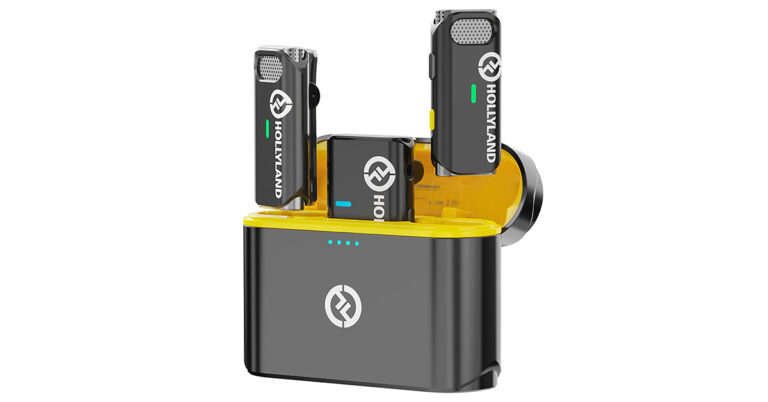

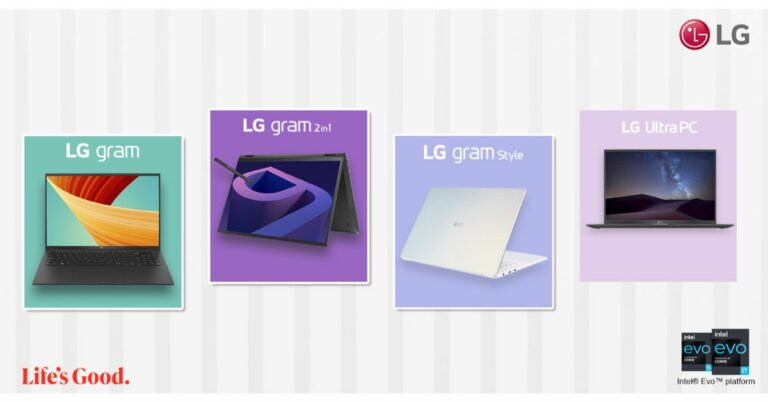


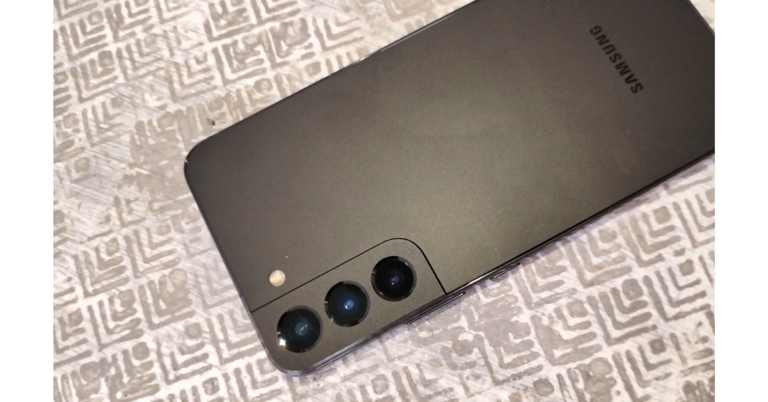


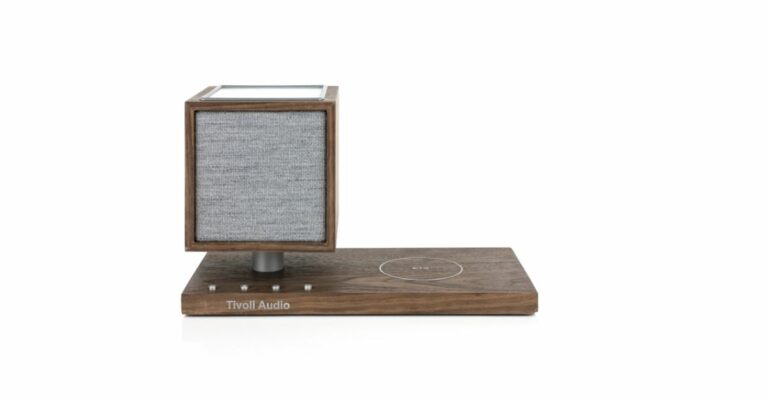




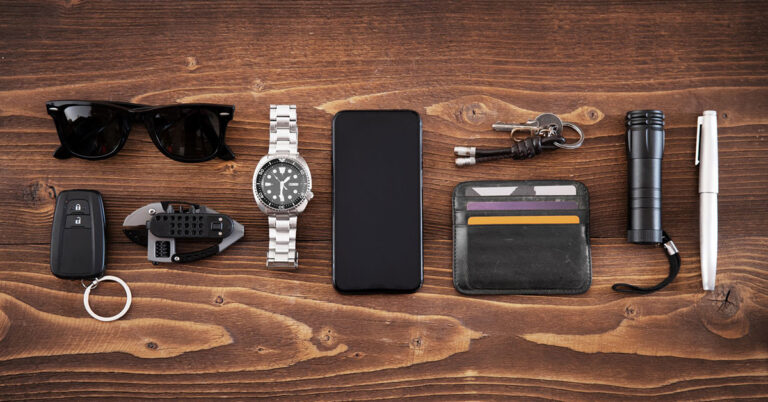



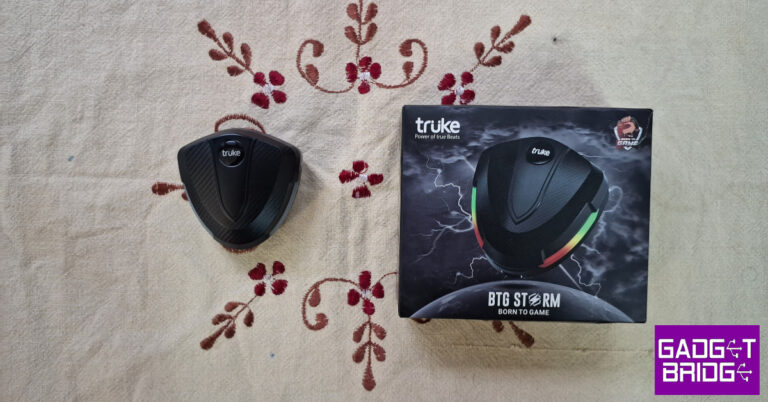


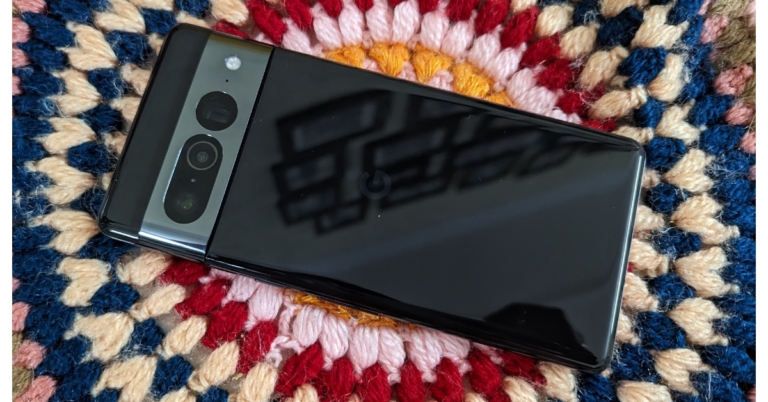



 The
The 







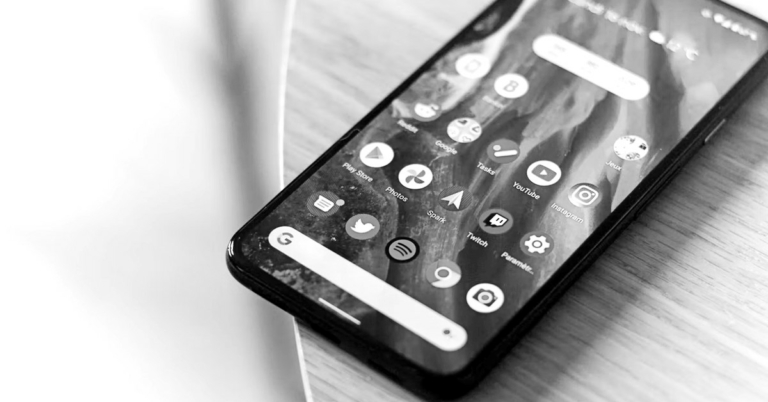
 Step 2:
 Step 3:
 Step 4:
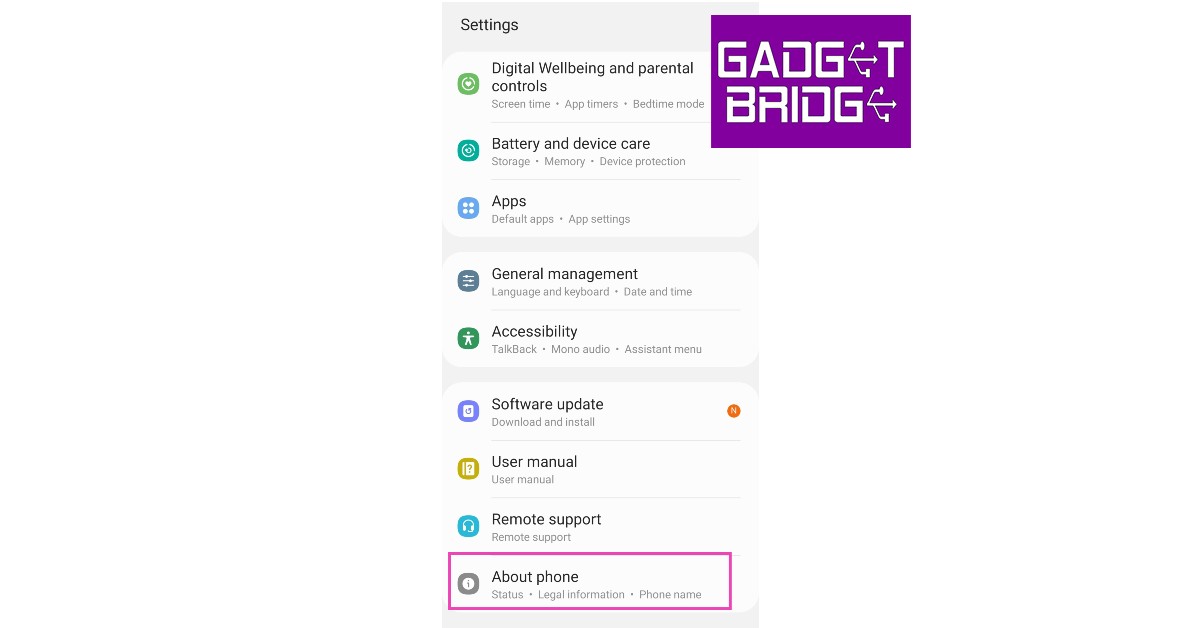 Step 2:
 Step 3:
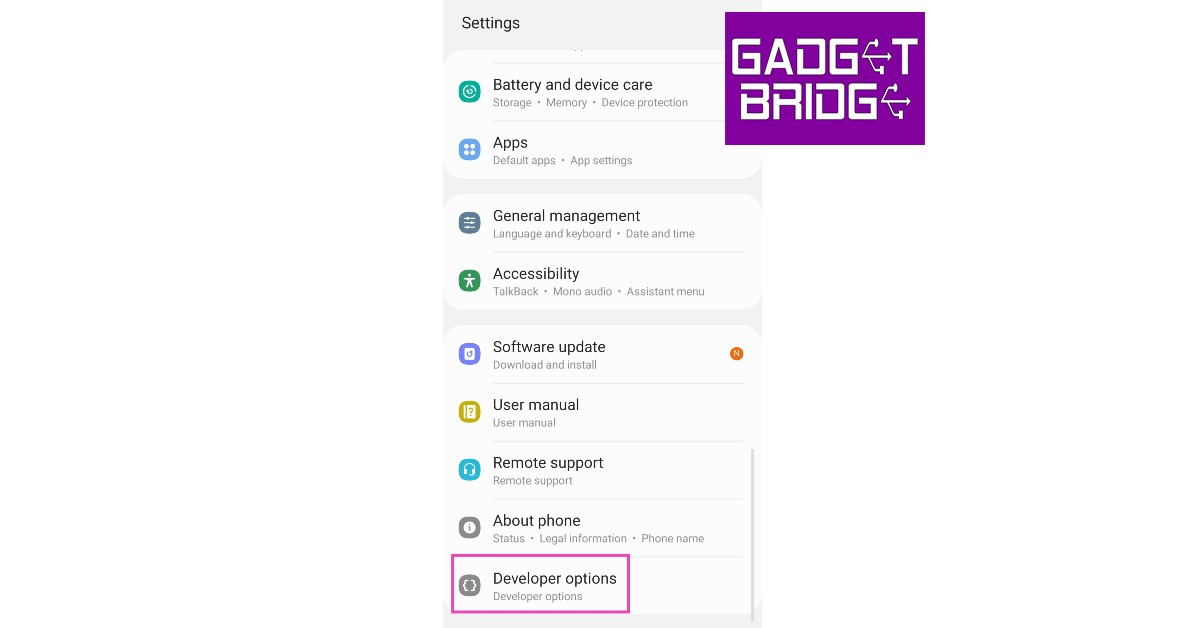 Step 4:





 Step 1:




 Step 3:
 Step 4:
 Step 5:
 Step 6:
 Step 3:
 Step 4:
 Step 6:
 Step 2:
 Step 3:
 Step 4:
 Step 3:
 Step 3:
 Step 2:
 Step 3:
 Step 4: