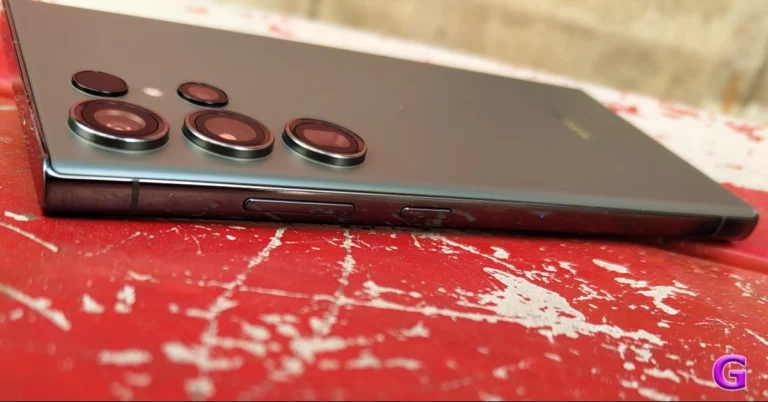
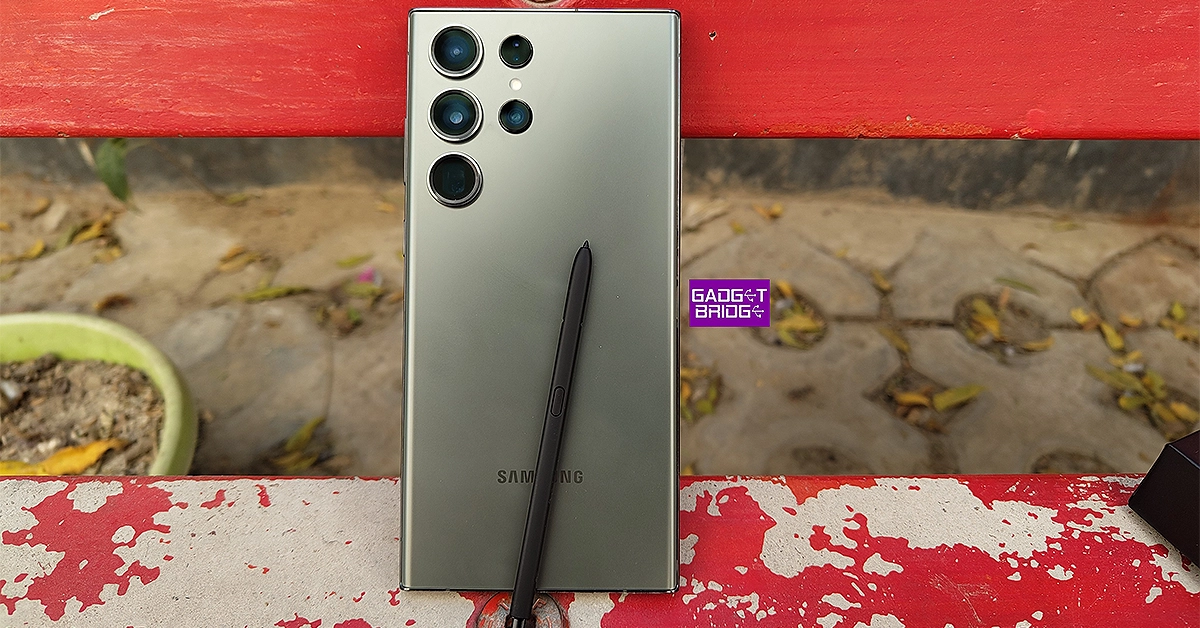
Samsung Galaxy S23 Ultra is now seeing a significant price drop thanks to Flipkart. The e-commerce is offering massive discounts and offers on the king of Android smartphones. Check out the best deals on the smartphone.
In This Article
Samsung Galaxy S23 Ultra price and bank offers on Flipkart
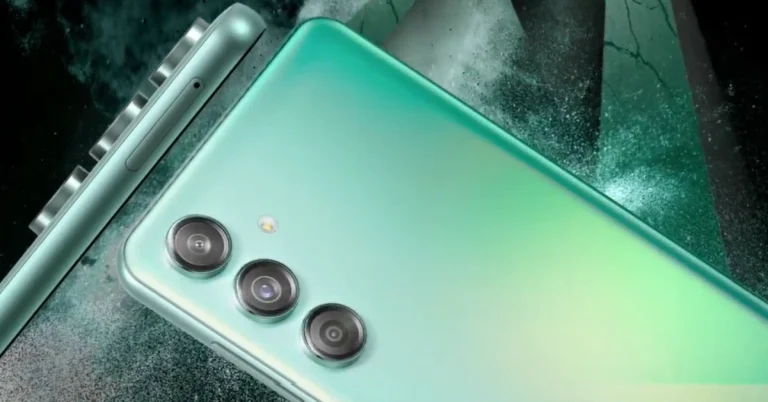
Samsung Galaxy S23 Ultra was launched in India at a price tag of Rs 1,24,999 for the 12GB RAM with 256GB model. After a major price reduction, the handset is now selling at Rs 89,999 on Flipkart. The platform is offering an amazing Rs 35,000 reduction.
Besides this, additional bank discounts are being offered that may further bring down the cost. There will be savings of between Rs 1,500 and Rs 5,000 by using specific credit cards from Axis Bank, HSBC, or ICICI.
Samsung Galaxy S23 Ultra price and bank offers on the Samsung India website
On the other hand, if you prefer to purchase the Samsung Galaxy S23 Ultra through the Samsung online store then the company is offering the device at an effective price of just Rs 99999, which includes a HDFC Bank cashback of Rs 5000 and an additional upgrade bonus of Rs 5000. Galaxy S23 is available at an effective price of Rs 55999 with Rs 5000 HDFC Bank cashback and an additional upgrade bonus of Rs 4000. In the same way, Galaxy S23 FE is now available at only Rs 44999 after an HDFC Bank cashback of Rs 5000 and an additional upgrade bonus of Rs 5000.
The Galaxy Z Fold5 is offered at an effective price of Rs 138999, which also includes an extra Rs 9000 in upgrade bonus and Rs 7000 in cashback from HDFC Bank. With an upgrade bonus of Rs 7000 and an HDFC bank cashback of Rs 7000, the Galaxy Flip5 can now be owned at an effective price of Rs 85999.
Whereas, the Galaxy Tab S9 series can be purchased at an effective starting price of Rs 60999, which includes an HDFC Bank Cashback of Rs 9000 and an additional upgrade bonus of Rs 3000.
If you frequent online forums and message boards a lot, you may have noticed that not all of them let users upload images from their devices. To get around this issue, most users seek the help of image-hosting websites. You may have encountered websites like Imgur, ImageShack, and others that serve this purpose. Apart from sharing images online, these websites can also be used to send images to people who don’t typically use instant messengers like WhatsApp. So, without further ado, here are the top 10 free image-hosting websites on the Internet right now.
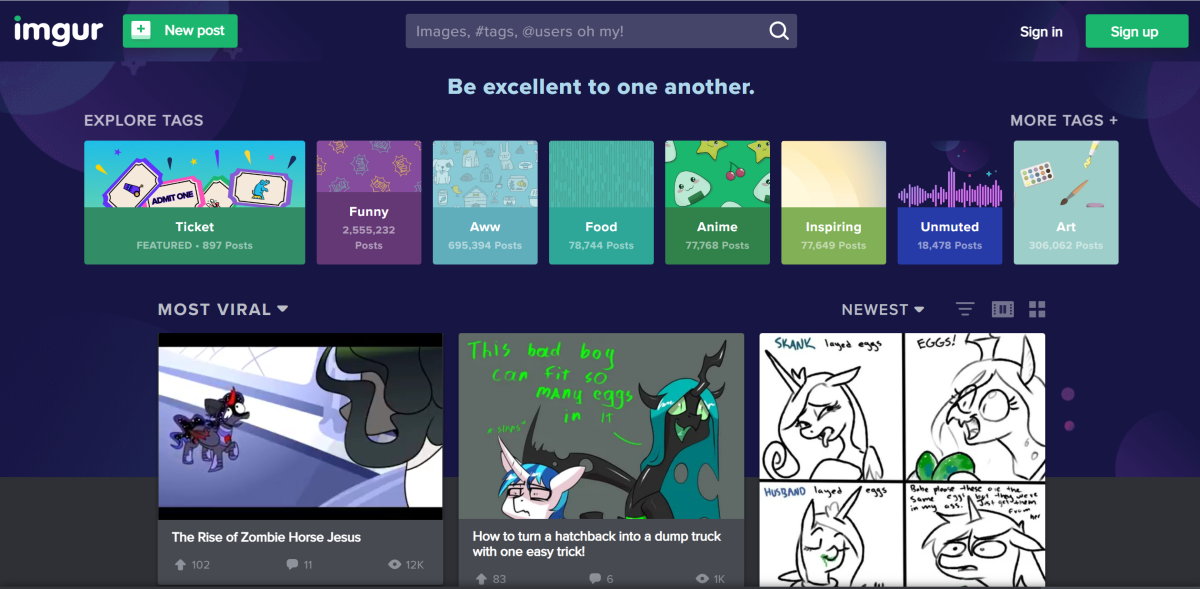
Pronounced ‘Imager’, Imgur is one of the most popular image-hosting websites on the Internet. If you frequently browse Reddit, you will be aware of how crucial Imgur is for sharing images and gifs. But that’s not all. Over the years, the image-hosting platform has evolved to foster a community of its own, which people frequent to view and discuss new topics. To make things easier, you don’t need an Imgur account to upload or view a picture. However, if you want to leave a comment, you will need one. Currently, Imgur boasts more than 250 million monthly users and billions of post views every month.
500px
If you’re looking for an image-hosting website to showcase your work, 500px should rank highly in your list of options. Designed for photographers, 500px lets you build an online portfolio of photographs and socialise with other photography enthusiasts. You can also participate in photo challenges on 500px to win exciting prizes. If you want to earn royalties on your pictures, you can choose to license them exclusively with 500px. Paid members earn 100% royalties but the number is limited to 60% for free members.
ImgBox
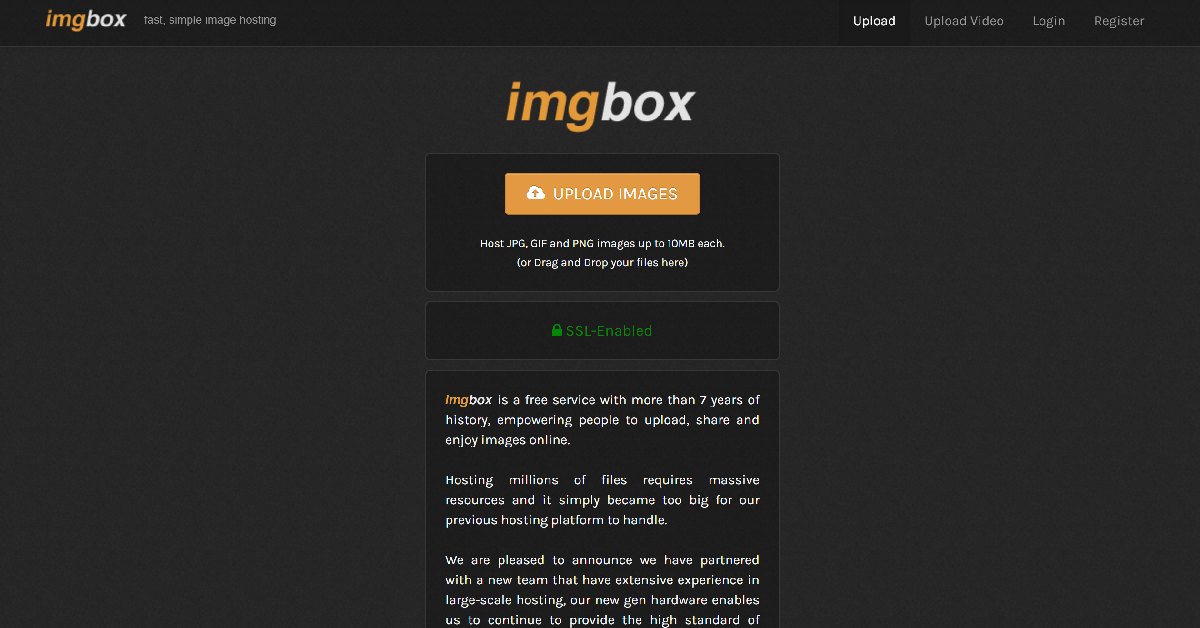
Simple, fast, and easy to use, ImgBox is the perfect image-hosting and sharing website. Its basic interface makes it easy for every user to upload an image and share it with their friends. ImgBox supports three image formats (JPG, GIF, and PNG) and has a size limit of 10MB per image. Once an image has been uploaded, you can share its link with anyone you like. Unlike Imgur, ImgBox does not have a comments section for images nor does it curate content for its community.
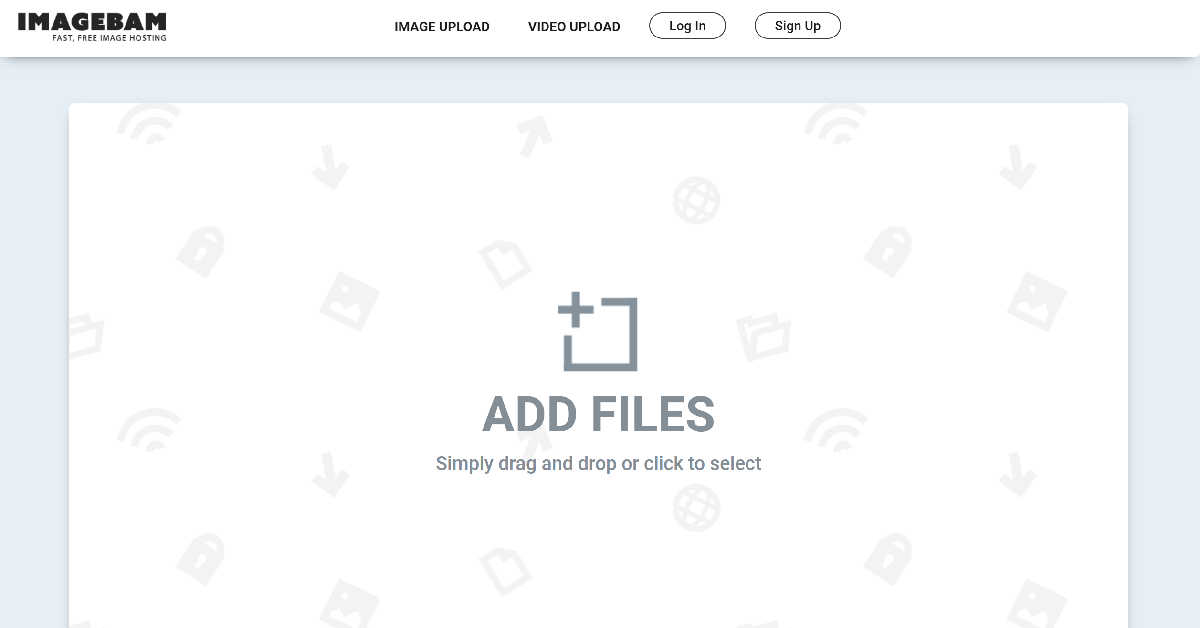
ImageBam
Like ImgBox, ImageBam has a very simple interface that focuses on the functional aspect of the website and cuts out the bells and whistles. You can drag and drop your images in the upload box or browse your PC’s storage from the website to look for the images you want to host. The size limit per image is 10MB and you can upload multiple images at once. You don’t need to create an account on ImageBam to upload or view images.
Google Photos
Every Android user must be familiar with Google Photos. It is the default gallery app on stock Android devices and comes bundled with every smartphone. If you don’t use a stock Android device, you can find it inside the Google folder on your phone. Google Photos is not just a gallery app. It lets you sync images across all your devices and even lets you share pictures and albums with other users. Of course, they will need a Google Account to view the images.
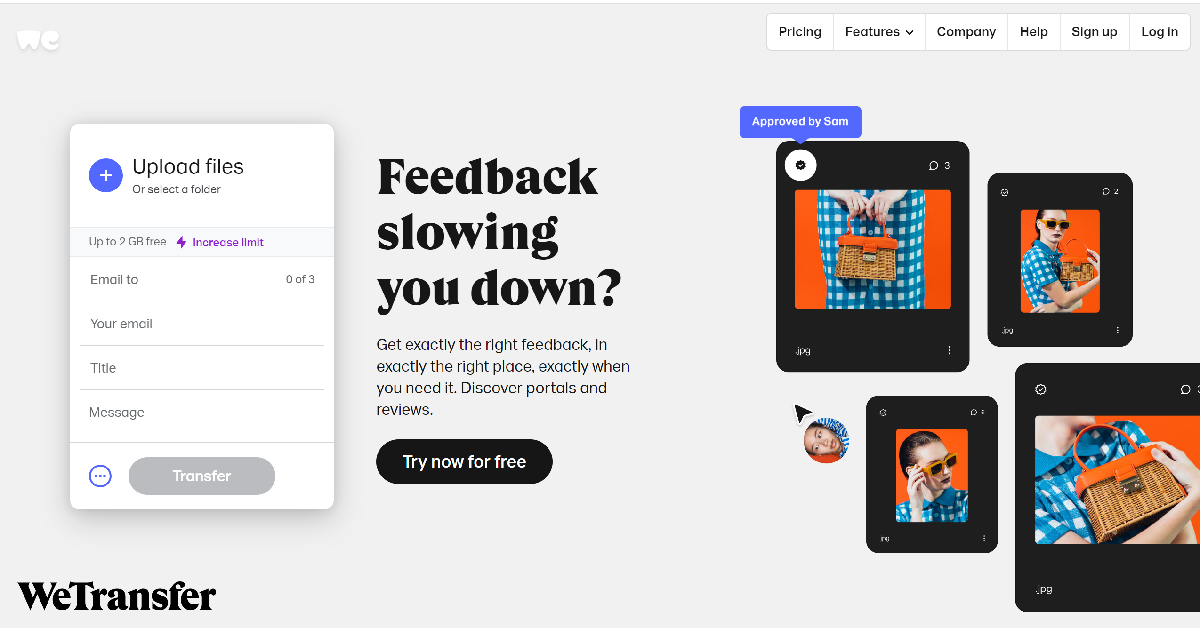
WeTransfer
If you want to share a bunch of HD images and the 10MB size limit is not cutting it for you, you should try WeTransfer. This file-sharing service has a 2GB storage limit, which is more than enough for sharing a batch of HD images. You can also use WeTransfer to share videos with your friends. Upgrading to a Premium subscription removes the storage limit, allowing you to share files without any restrictions. To enhance your privacy you can password-protect the files you share on WeTransfer.
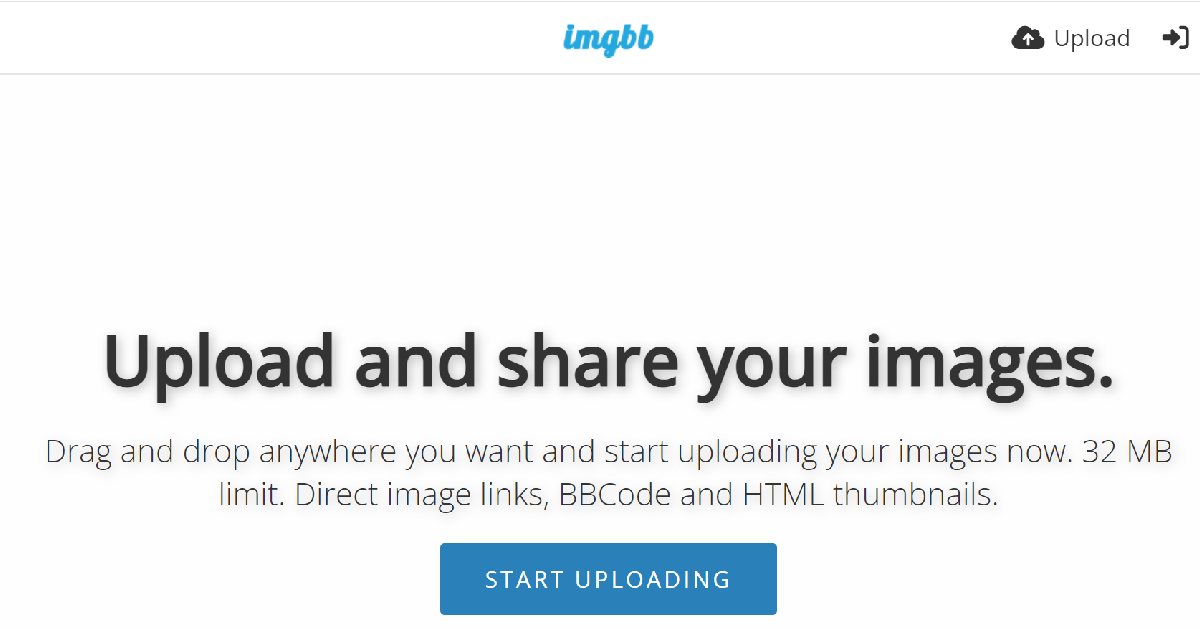
ImgBB
ImgBB is a free image-hosting website in the mould of ImgBox and ImageBam but with one crucial difference. Instead of 10MB, you can share images up to 32MB in size on ImgBB. This little extra storage can come in extremely handy while sharing HD images. To make things easier, you don’t need an account to upload or share images using ImgBB. The premium subscription to this service costs $12.99 per month if you want to extend the storage limit to 64MB and get rid of all the ads.
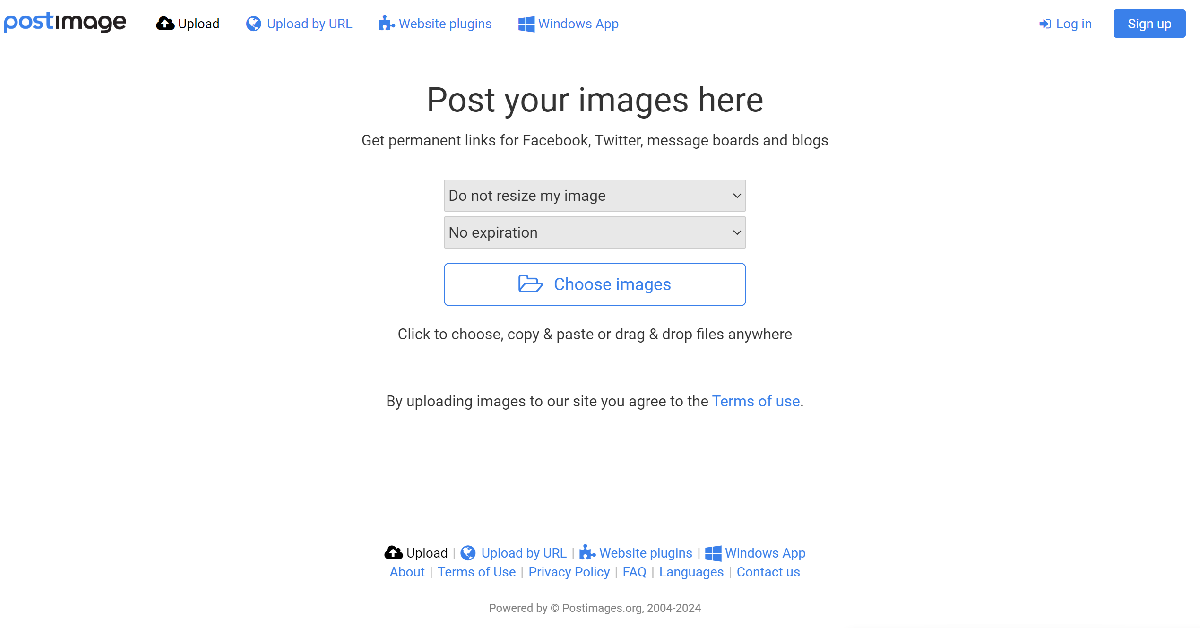
Postimages
Postimages gives you the option to resize your image for different purposes while uploading it. You can also set an expiration date for the image, after which it will self-destruct. It also has a website plugin tool that quickly attaches images to your posts, making it ideal for message boards and online forums. The website’s layout is very easy to follow. You can generate a shareable link for your image within seconds.
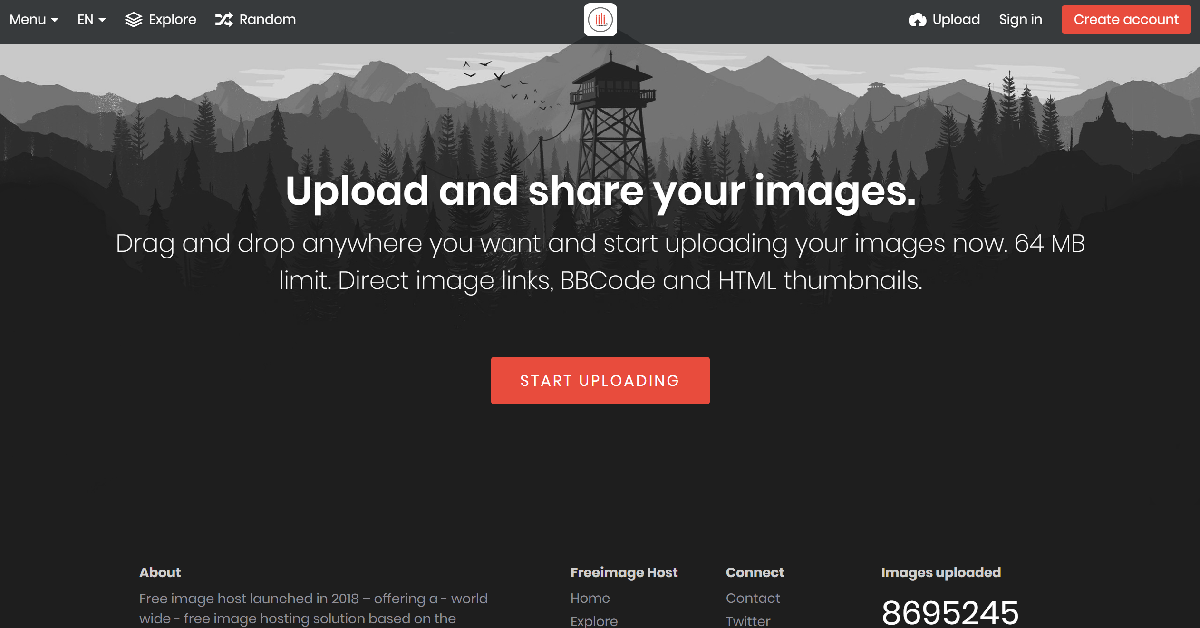
FreeImage.host
Using FreeImage.host, you can upload images up to 64MB in size. This size limit is higher than ImgBB, ImgBox, and ImageBam. While this website does not have a community page or a curated news feed, you can go to the ‘Random’ section to view the images that other users have hosted on this platform. You don’t need to create an account to use FreeImage.host. However, saving the stuff you have uploaded to the website requires an account.
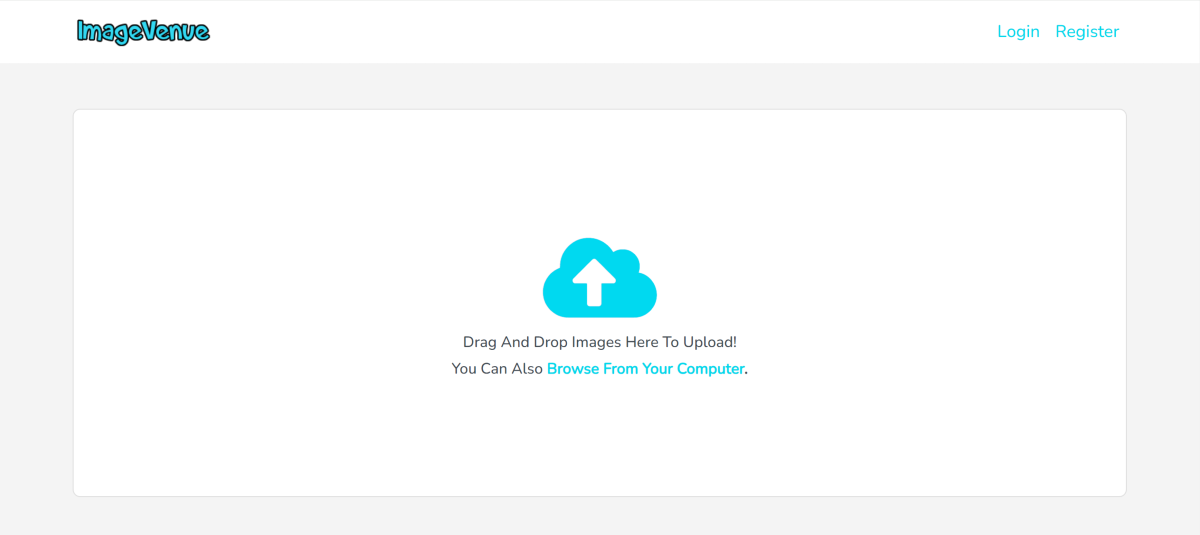
ImageVenue
Ending this list is ImageVenue, a free image-hosting website with a minimal design and super-fast speeds. Unlike most websites on this list, ImageVenue accepts comments on your pictures as well. You can create a gallery of images, set a thumbnail, and share its link with anyone you want. Once uploaded, the images can be embedded into your blog or website as well.
These are the top 10 free image-hosting websites you can use right now. If you’re strictly looking for a service that lets you share the links of the hosted images with your friends, ImgBB, ImageVenue, ImageBam and ImgBox would do the trick. However, if you’re interested in an online community centred around image sharing, Imgur and 500px would be more up your alley.
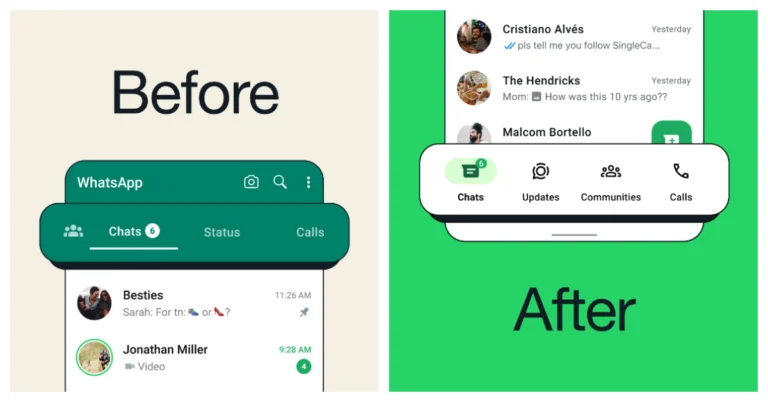
WhatsApp shifted the main navigation tabs in the app from top to bottom of the screen.
The new navigation bar now has four tabs.
In addition, the new navigation bar is white, whereas the previous one was green.
Meta, the parent company of WhatsApp has started rolling out a new bottom navigation bar for Android users. According to the announcement, the older navigation bar situated at the top has been shifted to the bottom for easier access.
WhatsApp is now introducing a significant update to its Android app’s user interface. The previous navigation bar that had three tabs Chats, Status and Calls have been moved to the bottom, according to an announcement made by the messaging service owned by Meta. Although the company has now officially announced the rollout, we at Gadget Bridge can confirm that this feature has been reaching a lot of users over the past several weeks.
Update the WhatsApp app on your Android smartphone to the most recent version from the Google Play Store if you haven’t already. Users who upgrade their software will notice that those tabs and their icons have been shifted to the bottom, and the arrangement may have changed.
Note that the iOS version of WhatsApp displays tabs at the bottom of the screen as well; the settings menu is located on the fifth tab. The redesigned navigations bar features four new tabs: Communities, Chats, Status, and Calls. Also now they are set in a different order. Also, icons have been added to all sections. Notably, the Status tab is now named “Updates.”
With the new design overhaul which is now accessible to all users, WhatsApp users will find it easier to switch between tabs on their phones with one hand without having to extend their thumb to the top of the screen. You will still need to reach up to the top of the screen to search for anything, though.
Besides this WhatsApp is also working on protecting its customers’ privacy by developing a feature that will let users lock/ password-protect their chats on linked devices in addition to their primary devices. The locked chats will be invisible from the list of chats and accessible only with the code. As of now this feature is currently limited to primary devices and will likely eventually be extended to linked devices.
First Indian headphone with immersive 3D audio that moves with your head movements.
20-hour long-lasting playtime with quick charge, ensuring uninterrupted listening.
Equipped with Bluetooth v5.2 for stable, clear connections and integrated voice assistant support.
boAt (Imagine Marketing), one of India’s leading audio and wearables brand has introduced the Nirvana Eutopia with new audio technology innovation. This product promises to transform your listening experience by placing you at the epicenter of sound, thanks to its advanced Head Tracking 3D Audio and Spatial Sound technology. Available for Rs 3,999, this offering not only sets a new standard in immersive audio but also makes it accessible to a wider audience.
In This Article
Unmatched Immersive Experience
The Nirvana Eutopia, a jewel in the crown of boAt’s Nirvana Series, is meticulously designed to offer a unique listening experience that puts you virtually in the heart of your music. Equipped with state-of-the-art 3D accelerometers and gyroscopes, it is the first Indian headphone brand to deliver head-tracking 3D spatial audio. This feature allows listeners to orient themselves towards the sound they desire to focus on, creating a lifelike audio environment where the source of every sound is pinpointed with astonishing precision.
Boasting Ceva’s expertise in 3D Audio and Virtual 3D, the headphones offer flexibility through Head Tracked Spatial mode and Fixed Spatial mode, catered to your preferred entertainment. With 40mm dynamic drivers, the Nirvana Eutopia delivers immersive 3D Spatial Sound, elevating your audio journey beyond traditional stereo sound.
Designed for Uninterrupted Enjoyment
One of the standout features of the Nirvana Eutopia is its impressive 20-hour battery life, ensuring you can enjoy your music or games without interruption. The inclusion of ASAP Charge technology means a mere 10-minute charge can yield 90 minutes of playback, perfect for those on the go. Additionally, its dual microphones with ENx Technology guarantee crystal-clear calls by filtering out background noise, enhancing your communication clarity.
State-of-the-Art Connectivity and Customization
Leveraging Bluetooth v5.2 technology, the Nirvana Eutopia ensures fast pairing times and stable connections, delivering your audio with unmatched clarity. The headphones also integrate seamlessly with Google and Siri voice assistants, enhancing your daily interactions with technology. Furthermore, through the dedicated boAt Hearables app, users can customize their experience, troubleshoot connectivity issues, and even receive live firmware updates.
Priced at Rs 3,999 it is available in sleek black and white options, the boAt Nirvana Eutopia is a testament to boAt’s commitment to delivering cutting-edge technology at an affordable price. Don’t miss the chance to elevate your audio experience. It can be purchased at boAt-lifestyle.com as well as other online marketplaces.
OnePlus Nord CE 4 India launch will take place today in the evening.
The company confirmed that the device will be powered by a Snapdragon 7 Gen 3 SoC with up to 256GB of storage and 8GB of RAM.
The device will go on sale via Amazon in the country.
Today OnePlus is going to launch a brand new Nord smartphone in the Indian market. The OnePlus Nord CE 4 5G will debut as a successor to the Nord CE 3 5G with Snapdragon 782G SoC that was launched last year. The upcoming phone will be powered by a Snapdragon 7 Gen 3 chipset. The device will be made available in two colour options and features a dual-rear camera setup. It could also include a 16-megapixel selfie camera.
The India launch of the OnePlus Nord CE 4 5G is scheduled for today April 1 at 6:30 p.m. IST. The launch event will be streamed live via the OnePlus India YouTube channel. Additionally, the event will be broadcast online via all of its social media platforms. For your convenience, we put a watch link below so you won’t miss the event.
In This Article
OnePlus Nord CE 4 5G price in India expected
According to the tipster, the base 8GB RAM with 128GB storage variant of the OnePlus Nord CE 4 will retail for Rs 24,999 in India. Moreover, 8GB RAM and 256GB of storage are anticipated to cost Rs 26,999. It’s official that Amazon will be selling the product.
OnePlus Nord CE 4 5G specifications confirmed and speculated
The Nord CE 4 5G is confirmed to include Snapdragon 7 Gen 3 SoC with up to 256GB of storage and 8GB of RAM. It is said to have a 6.7-inch Fluid AMOLED display The screen is said to have a refresh rate of 120Hz and a screen-to-body ratio of 93.4%. The device will come with 8GB of LPDDR4x RAM, with virtual RAM allowing for an additional 8GB of RAM to be added.
As per the company, the upcoming phone will enable SuperVOOC fast charging. It will offer 100W SUPERVOOC fast charging, which charges the device from 1% to 100% in 29 minutes. Compared to the 80W SuperVOOC charging of the OnePlus Nord CE 3 5G, this would be an improvement.
On the other hand, the OnePlus Nord CE 4 5G is expected to be backed by a 5,500mAh battery. The dual rear camera set-up is slated to feature a 50-megapixel Sony LYT-600 main rear sensor with optical image stabilisation (OIS). A Sony IMX355 ultrawide camera with 8 megapixels is expected to come with it. The handset is also speculated to include a 16-megapixel selfie.
Before the official announcement, Nord CE 4 5G was stopped listed on Geekbench bearing a model number CPH2613. As per the benchmarking listing, the phone will operate on the Android 14 operating system out of the box. Additionally, the octa-core Snapdragon 7 Gen 3 SoC was disclosed in the Geekbench listing as the device’s power source. The chipset features four cores at 1.80GHz, three cores capped at 2.40GHz, and a prime CPU score of 2.63GHz. In single-core testing, it received 1,135 points, and in multi-core testing, 3,037 points.
Garena Free Fire is a battle royale game with regular awards and tournaments to keep players interested. If you play Garena Free Fire, you should be aware of the redeem codes that are released on a daily basis. However, because the battle royale game is banned in India, players from other countries can use the Free Fire Redeem codes daily. If you’re unfamiliar with the Garena Free Fire redeem codes or don’t know how to get them, we’ve put together a step-by-step guide to help you redeem them. Check out Garena Free Fire Redeem Codes for 1 April 2024.
The Free Fire redeem codes are a great way to get free stuff. These are 12-digit codes that contain alphabets and numbers, as well as an expiration date and time. Because the Garena FF redeem codes cannot be used more than once, you should hurry to the redemption page to claim your free reward before someone else does. To get a free reward, all you have to do is go to reward.ff.garena.com/en, which is the official redemption page. Also, keep an eye on this space for daily updates on Garena Free Fire redemption codes and rewards.
Over time, Bitcoin has gained a great deal of popularity among today’s investors. This digital currency only exists online and operates using blockchain technology. While Bitcoin doesn’t have a paper version, you can use it just like any other currency as an investment or method of payment. Bitcoin investing can be lucrative, but learning more about it before investing is important. Discussed below are four things to know about investing in Bitcoin.
Buying Bitcoin directly: Bitcoins are easily accessible through crypto exchanges. When buying the crypto, you don’t have to purchase an entire coin. You can buy a fraction of it, which makes it a flexible alternative for large and small investors. Once you buy Bitcoin directly via a cryptocurrency exchange, you gain complete ownership of the investment, giving you complete control over the digital asset. Owning Bitcoin requires careful digital wallet management to safeguard your investment against security threats.
Investing via ETFs: ETFs (exchange-traded funds) are a convenient, regulated way for investors looking to join the Bitcoin market in an investment structure they’re familiar with. These ETFs come in different forms categorized into:
Spot ETFs: They aim to track Bitcoin’s current market price, providing direct exposure to the crypto’s price shifts by holding it directly. Spot ETFs provide a close alignment with Bitcoin’s actual performance, which makes them a preferred option to investors looking for an investment that reflects the crypto’s real-time worth
Futures ETFs: This involves investing in futures contracts instead of holding the crypto directly. The contracts speculate on Bitcoin’s future price, offering an investment method attached to future market expectations
Buying Bitcoin stocks
Purchasing Bitcoin stocks gives you indirect exposure to the Bitcoin market. Investing in stocks implies purchasing shares from organizations whose business is related to crypto adoption and performance.
What You Need to Buy Bitcoin
For an investor to buy Bitcoin, they require:
A crypto exchange account
A secure internet connection
Personal identification documents for those using KYC (Know Your Client) platforms
A payment method, such as a debit card, credit card, or bank account
A digital wallet
Bitcoin Investing Tips
For successful Bitcoin investing, consider following these tips:
Diversify your portfolio: Bitcoin investing is a high-risk venture. As such, putting all your money in it isn’t advisable. Diversify your portfolio to safeguard against losses. Ensure your primary investments are primarily low-risk and medium-risk. High-risk investments like Bitcoin should take the least portion of your portfolio
Know your risk tolerance: Since Bitcoin investing has some risk like any other investment, it’s essential to understand the risk level you’re ready to take owing to the crypto market’s volatility
Start small: If you aren’t sure if Bitcoin investing will work for you, consider starting small and increasing the amount gradually as your confidence rises
Bitcoin Investing Strategies
Successful Bitcoin investing should be done strategically. Here are a few strategies you can implement to make the most of your investment:
Dollar-cost averaging: It involves investing small, consistent amounts of cash in crypto, reducing investment risk
Day trading: It’s a short-term investment technique where you buy and sell Bitcoin in one trading session. It’s a good way to trade without volatility affecting your crypto
Buy and hold: It involves buying Bitcoin from a crypto exchange and keeping it in a crypto wallet as you wait for prices to rise so you can sell it
Benefits of Bitcoin investing
Here are three key benefits of investing in bitcoin:
Inflation protection: Thanks to its limited supply, Bitcoin is often considered a means of safeguarding against inflation
Store of value: Cryptos, like Bitcoin, act as a store of value, implying that you can hold it long-term without its worth declining
High liquidity: Unlike many other cryptos, Bitcoin prides itself on its high market liquidity. This means buying and selling the cryptocurrency is easy, which comes in handy for any investor who wants to exit and enter positions with ease
Endnote
Understanding Bitcoin investing beforehand is key to ensuring successful investing. Familiarize yourself with the things to know about investing in Bitcoin.
While third-party app marketplaces may arrive on iOS in future, as of now the only way to legitimately download apps on your iPhone (without jailbreaking it) is by using the App Store. Its strict regulations and moderation policy make the App Store one of the most secure app marketplaces out there. But what if you can’t find it on your device? Here are the top 6 ways to get the App Store back on your iPhone and iPad.
If you’re worried that you may have deleted the App Store from your device, there is no need to fret. The App Store is a system app and can therefore not be deleted on iOS/iPadOS devices. If you can’t find it on the home screen, it could be because of one of the following reasons:
You accidentally removed the app from the home screen.
The app is hidden.
It is disabled under Content & Privacy Restrictions.
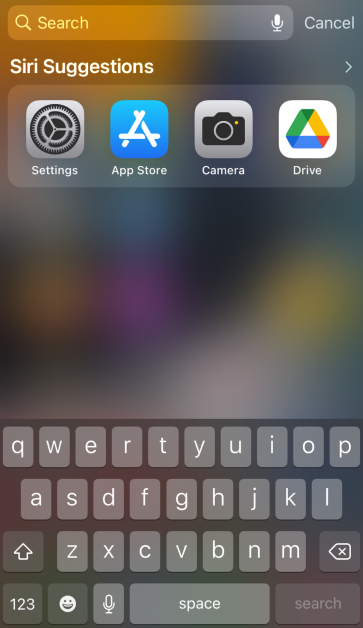
The good news is that restoring the App Store is a very easy process. If you know what to do, it won’t take more than a few seconds. We suggest looking for it in Spotlight Search and App Library first.
Unrestrict the App Store to get it back on iPhone/iPad
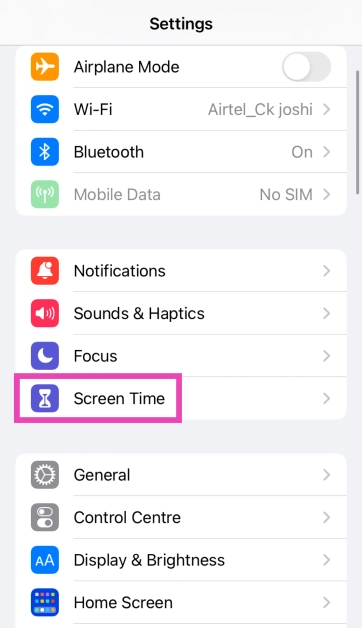
Step 1: Go to Settings and select Screen Time.
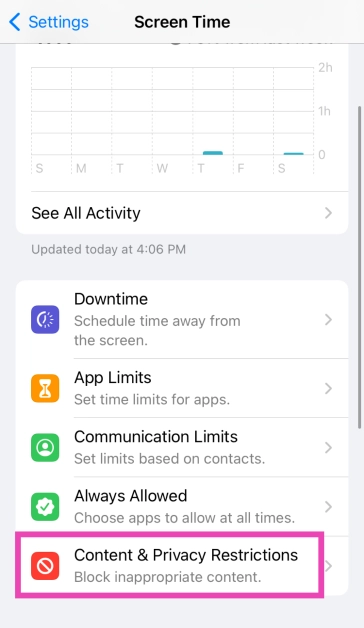
Step 2: Tap on Content & Privacy Restrictions.
Step 3: Tap on iTunes & App Store Purchases.
Step 4: Tap on Installing Apps and select Allow.
The App Store will be restored on your iPhone/iPad’s home screen.
Search for the App Store in Spotlight
If you can’t find the App Store icon on your iPad or iPhone’s home screen, you can always add it using Spotlight Search.
Step 1:Swipe down from the home screen to access Spotlight Search.
Step 2: Tap the Search bar and search for App Store.
Step 3:Press and hold the App Store icon in search results and move it to the home screen.
Search the App Drawer
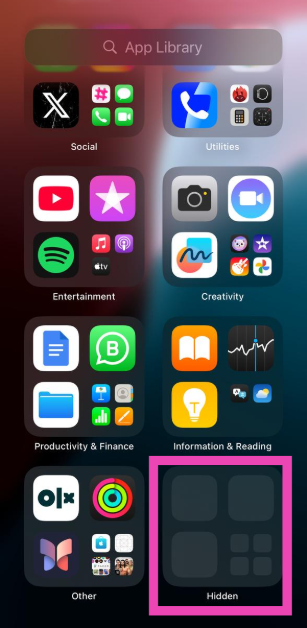
You can remove the App Store icon from your iPhone/iPad’s home page, but it will always remain in the App Library. If you can’t locate the App Store on your iPhone, you can always get it back from the library. To access the App Library, swipe left on the last home screen panel. Tap the search bar or locate the Utilities folder to find the App Store.
Unhide the App Store
Step 1:Swipe left past all the pages on the home screen until you reach the App Drawer.
Step 2: Scroll down to the bottom of the App Drawer and tap on Hidden Folder. Authenticate your access using Face ID.
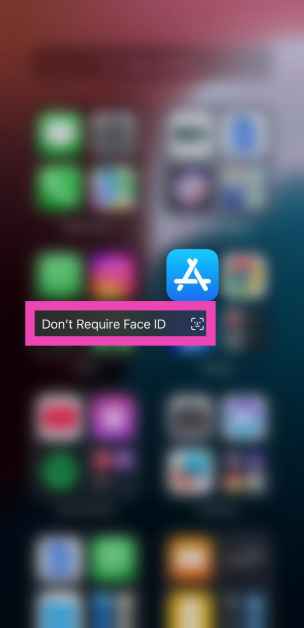
Step 3: Locate the App Store and long-press its icon.
Step 4: Tap on Don’t Require Face ID. Authenticate your decision using Face ID.
Restore the home screen
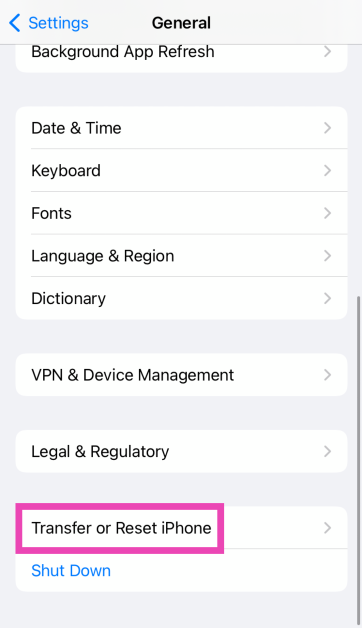
Step 1: Go to Settings and select General.
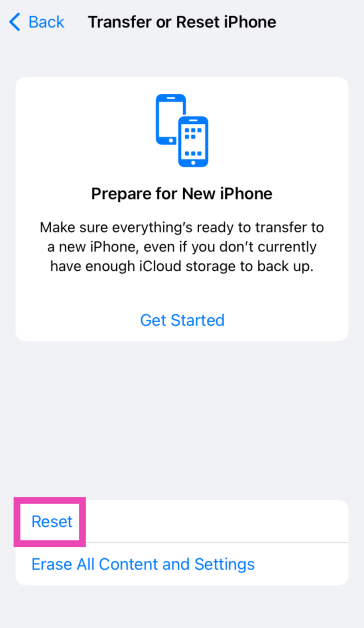
Step 2: Scroll down and select Transfer or Reset iPhone.
Step 3: Tap on Reset.
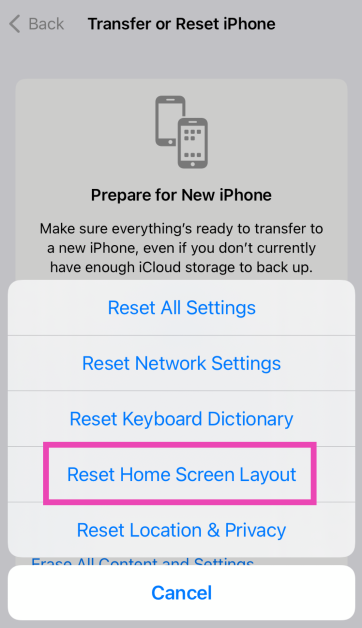
Step 4: Select Restore Home Screen Layout.
Step 5: Tap on Reset Home Screen.
The home screen will be restored to the layout it had out of the box.
Factory Reset your iPhone
If the methods mentioned above didn’t work for you, try resetting your iPhone to its factory settings. A factory reset restores your device to its out-of-the-box condition. However, you will lose all your personal data in the process. Here’s how you can go about it.
Step 1: Go to Settings and select General.
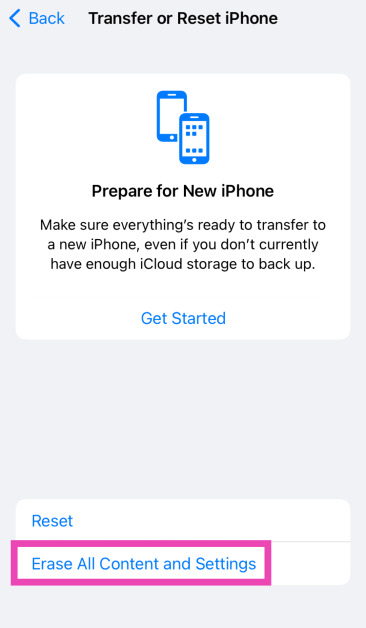
Step 2: Scroll down and select Transfer or Reset iPhone.
Step 3: Tap on Erase All Content and Settings.
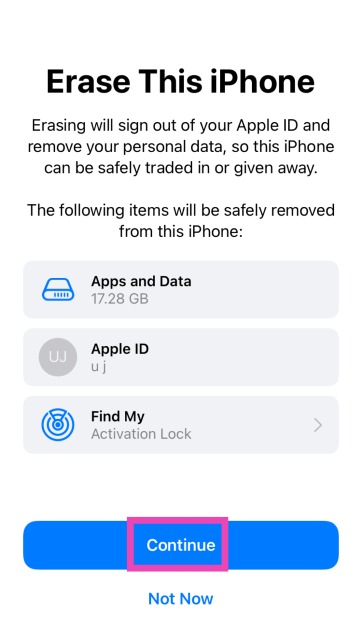
Step 4: Tap on Continue and enter the passcode to reset your iPhone to its factory settings.
Frequently Asked Questions (FAQs)
Can I delete the App Store from my iPhone or iPad?
The App Store is a system app and cannot be deleted from your iPhone or iPad. At best, you can remove it from the home screen.
What do I do if I can’t find the App Store on my iPhone?
Swipe down from the home screen and use Spotlight Search to find the App Store. You can also find it by searching for it in the App Library.
How do I restore my iPhone’s home screen layout?
Go to Settings>General>Trasnfer or Reset iPhone>Reset>Restore Home Screen Layout>Reset Home Screen and confirm your selection.
How do I unrestrict the App Store on my iPhone?
Go to Settings>Screen Time>Content & Privacy Restrictions>iTunes & App Store Purchases. Tap on Installing Apps and select ‘Allowed’.
How do I hide the App Store on my iPhone?
Long-press the App Store’s icon on the home screen, go to Require Face ID>Hide and Require Face ID.
These are the top 6 ways to get back the App Store on your iPhone and iPad. You can also try restarting your iPhone to fix any background glitches that may be causing this error. Android users can check out this article to learn how to restore the missing Play Store app.
Garena Free Fire is a battle royale game with regular awards and tournaments to keep players interested. If you play Garena Free Fire, you should be aware of the redeem codes that are released on a daily basis. However, because the battle royale game is banned in India, players from other countries can use the Free Fire Redeem codes daily. If you’re unfamiliar with the Garena Free Fire redeem codes or don’t know how to get them, we’ve put together a step-by-step guide to help you redeem them. Check out Garena Free Fire Redeem Codes for 31 March 2024.
The Free Fire redeem codes are a great way to get free stuff. These are 12-digit codes that contain alphabets and numbers, as well as an expiration date and time. Because the Garena FF redeem codes cannot be used more than once, you should hurry to the redemption page to claim your free reward before someone else does. To get a free reward, all you have to do is go to reward.ff.garena.com/en, which is the official redemption page. Also, keep an eye on this space for daily updates on Garena Free Fire redemption codes and rewards.
How you go about dealing with the power functions on an iPad depends on whether or not it has a home button. While flagship iPhones got rid of the home button in favour of a larger screen size a long time ago, iPads do not have to worry about that issue. While the 10th Gen iPad may have gotten rid of the home button, its previous iteration still has it on the bottom edge. So, how do you go about performing a hard reset (or force restart) on the two kinds of iPads? This article will answer your question.
When you use the physical buttons of your device to restart it, it is called a ‘hard reset’. It is commonly used to force restart a device when it is frozen. Simply pressing the power key and choosing ‘restart’ from the power menu does not constitute a ‘hard reset’. The latter typically requires long-pressing the power button for an extended period of time.
Some people often make the mistake of thinking that a hard reset is like factory resetting the device. This is not true. A factory reset clears all your personal data on the device and restores its settings to their factory defaults. A hard reset simply forces your device to restart.
So, when should you hard reset your iPad? The answer is simple. Whenever the device freezes or remains unresponsive for a long period of time, it warrants a hard reset. It should not be the first thing on your list of fixes, but if everything else fails, it is worth giving a shot.
Hard Reset or Force Restart an iPad
Models without a home button
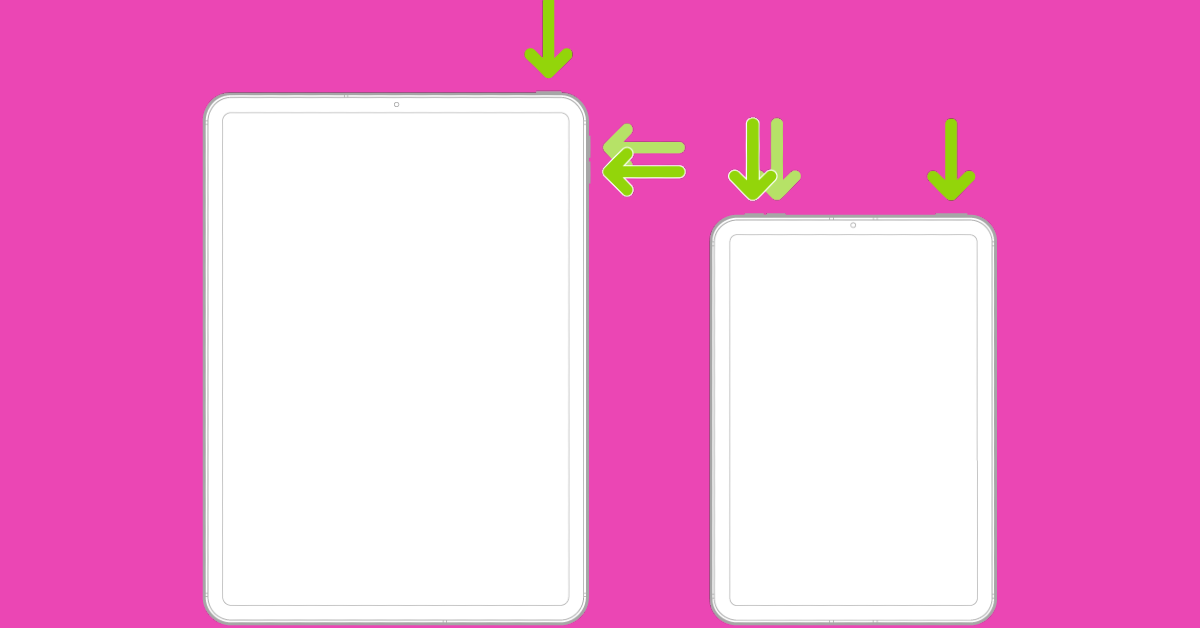
Step 1: Press and release the volume button closer to the top button.
Step 2: Press and release the volume button farther from the top button.
Step 3: Long-press the top button until the Apple logo appears on the screen.
Step 4: Release the top button.
Models with a home button
iPad models with a home button on the bottom edge are easier to restart. All you need to do is press and hold the top button along with the home button until the Apple logo appears on the screen. Do not release the buttons if the power slider appears on the screen. When you see the Apple logo, release both buttons. Your iPad will restart.
Factory Reset an iPad
Performing a factory reset wipes the iPad of all the data and restores its settings to factory default. Make sure you have created a backup of all the data on the device before performing a factory reset.
Step 1: Go to Settings and switch to the General tab on the left.
Step 2: Hit Reset at the bottom of the screen.
Step 3: Tap on Erase all Content and Settings.
Step 4: Confirm your selection.
Frequently Asked Questions (FAQs)
Does performing a hard reset on an iPad delete all its data?
No, a hard reset only forces your iPad into restarting, it does not perform a factory reset. You will not lose your personal data. However, any unsaved work or progress will be cleared once the iPad restarts.
How do I force restart an iPad which doesn’t have a home button?
Press the volume key closer to the top button and release it, then do the same with the other volume key. Then, press and hold the top button until the Apple logo appears on the screen.
How do I factory reset an iPad?
Go to Settings>General>Reset>Erase all Content and Settings and enter the passcode to the device to perform a factory reset.
These are the top 2 ways to hard reset or force restart an iPad with or without the home button. If you know any other way to do this task, let us know in the comments! Connected your iPad to a trackpad? Read this article to learn how you can turn on the right-click functionality.
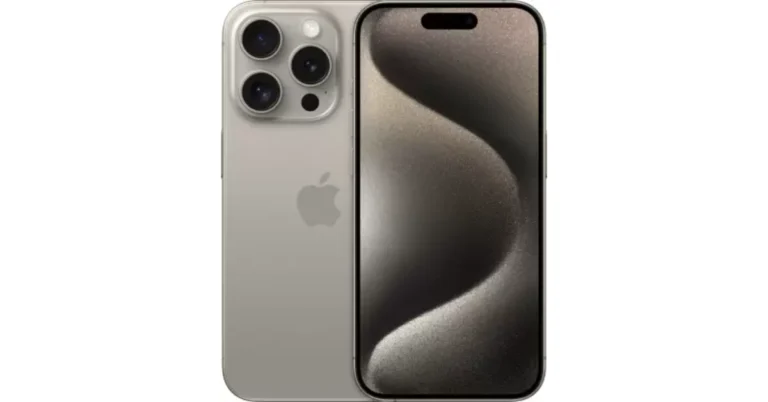
Flipkart is now offering the iPhone 15 Pro, one of Apple’s best iPhones but also one of the priciest, for a cheaper price.
The platform is offering a Rs 9,901 discount, which is made up of a flat Rs 7,000 discount and an extra Rs 3,000 off on a bank card.
Despite Apple’s strong fan base, not everyone can afford to purchase the iPhone because of its expensive price. That is why customers wait for sales and discounts to make purchases. The basic iPhone 15 models have frequently been on sale, while the nearly double-priced iPhone 15 Pro variants have not seen any notable price reductions. But now Flipkart is selling the device at a much lower price. Flipkart is having a Month-End Mobiles Fest that runs through March 31. Here is everything you ought to know regarding the most recent iPhone 15 Pro offer.
iPhone 15 Pro, which was released in 2023. nonetheless, the device’s expensive pricing prevented many fans from purchasing it. The base model of the iPhone 15 Pro with 128GB of storage was priced at Rs 1,34,900. The device is now available on Flipkart at a discounted price of Rs 1,27,900.
The homegrown e-commerce platform is offering a flat discount of Rs 7,000. Customers using HDFC bank credit cards and EMI transactions can now receive an additional Rs 3,000 reduction, bringing the total cost down to Rs 1,24,900.
In addition to this one can also get an extra Rs 3,000 to Rs 53,000 off on the exchange of select models. Note that you only get the best discount deal depending on the condition of your phone.
iPhone 15 Pro specifications
The iPhone 15 Pro features a 6.1-inch Super Retina XDR OLED screen with 2,000 nits of peak brightness. The display on the devices uses Apple’s Ceramic Shield material for protection. In addition, they provide a new Action button that takes the place of the Mute switch and can be used for a variety of activities. Under the hood, there is Apple’s brand-new 3nm A17 Pro processor.
The iPhone 15 Pro has a 48-megapixel wide-angle camera with an f/1.78 aperture, a 12-megapixel, ultra-wide-angle camera with f/2.2-aperture and a 12-megapixel 3x telephoto camera. The device has a 12-megapixel TrueDepth camera with an aperture of f/1.9 for selfies.
The iPhone 15 Pro has a USB Type-C port with USB 3.0 speeds, just as the standard models. It allows data transfer rates of up to 10 Gbps
Garena Free Fire is a battle royale game with regular awards and tournaments to keep players interested. If you play Garena Free Fire, you should be aware of the redeem codes that are released on a daily basis. However, because the battle royale game is banned in India, players from other countries can use the Free Fire Redeem codes daily. If you’re unfamiliar with the Garena Free Fire redeem codes or don’t know how to get them, we’ve put together a step-by-step guide to help you redeem them. Check out Garena Free Fire Redeem Codes for 30 March 2024.
The Free Fire redeem codes are a great way to get free stuff. These are 12-digit codes that contain alphabets and numbers, as well as an expiration date and time. Because the Garena FF redeem codes cannot be used more than once, you should hurry to the redemption page to claim your free reward before someone else does. To get a free reward, all you have to do is go to reward.ff.garena.com/en, which is the official redemption page. Also, keep an eye on this space for daily updates on Garena Free Fire redemption codes and rewards.
If you’re having trouble loading a website on your web browser, clearing the DNS cache can help. Since the DNS cache keeps a record of the websites you have visited, you may want to clear it to keep your browsing history private. Additionally, the need to perform this task may also arise when you suspect you have been a victim of DNS spoofing/poisoning. So, here is how you can flush or reset the DNS cache on your Mac.
What happens when you flush the DNS cache on your Mac?
First, you should understand what a DNS server does. Once you enter the address of a website on your web browser, it contacts the DNS server for the website’s IP address. When the IP address is provided to the web browser, it loads the website.
To make this process faster and more streamlined, your device stores the IP addresses of the websites you visit in the DNS cache. When you enter the web address the second time, your browser does not need to contact the DNS server again. It can simply use the IP address stored in the DNS cache.
You can probably guess where the potential issues arise. Like every other cached memory, the DNS cache is prone to get outdated and corrupted. When this happens, your browser is unable to load the website linked to the corrupted IP address. This is when flushing the DNS cache comes in handy. Once that’s done, your browser will contact the DNS server again for the appropriate IP address.
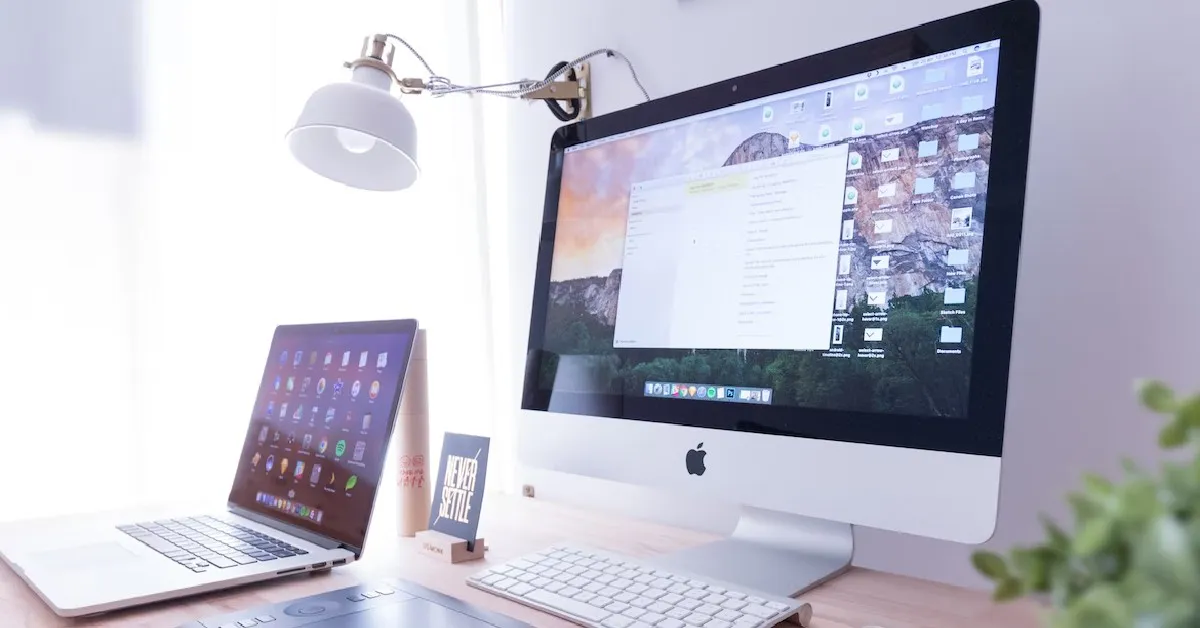
Flush or Reset DNS Cache on a Mac
Step 1: Click on Finder and select Applications.
Step 2: Go to the Utilities folder and select Terminal.
Step 3: Depending on your macOS version, type the following commands:
Ventura and Monterey: sudo dscacheutil -flushcache; sudo killall -HUP mDNSResponder
El Capitan, Lion, Mountain Lion, Mavericks, Sierra, High Sierra, Mojave: sudo kilall -HUP mDNSResponder
Tiger and Snow Leopard: lookupd -flushcache
Yosemite: sudo discoveryutil mdnsflushcache
Step 4: Type your password and hit Enter.
Frequently Asked Questions (FAQs)
How do I flush DNS cache on Windows?
Go to Command Prompt (Windows + R followed by Enter) and ipconfig /flushDNS.
When should I flush the DNS cache?
If you can’t connect to a website even after typing the right address, flushing the DNS cache may resolve the issue.
What happens when you flush the DNS cache?
The DNS cache contains the IP addresses of the websites you have visited recently. Flushing it clears those saved addresses.
This is how you can flush or reset DNS on your Mac. Read this article to learn how you can set up a private DNS on your Android smartphone. If you know any other methods to go about this task, let us know in the comments!
Samsung Galaxy M55 5G and Galaxy M15 5G are set to launch in India soon.
The company has also listed the phones on Amazon ahead of the official announcement.
The devices were launched in Brazil on March 28.
Samsung is getting ready to launch two new smartphones in India under its M-Series. The company has officially confirmed the Samsung Galaxy M55 5G and Galaxy M15 5G India launch. Before arriving in India the handsets made their debut in Brazil recently.
Samsung Galaxy M55 5G and Galaxy M15 5G have been listed on Amazon India’s website confirming the upcoming launch. The company has not yet revealed the exact date and time of the launch. However, the Amazon listing highlights the details of both phones.
The smartphones were launched in Brazil so the Indian versions most likely resemble the ones that exist. The Galaxy M55 5G is powered by Qualcomm’s Snapdragon 7 Gen 1 SoC whereas Galaxy M15 5G is equipped with an octa-core MediaTek Dimensity 6100+.
According to one of the posters, the Snapdragon 7 Gen 1 SoC will be included in the Galaxy M55 5G. On the other hand, another teaser suggests that the Galaxy M15 5G would have a 6,000mAh battery. The device is also confirmed to come with an sAMOLED display with a water drop notch. These specs are comparable to those of the phone’s international variants.
Prices of the phones have been leaked ahead of their introduction in India. According to a tipster, the price of the 8GB RAM with 128GB storage model of the Galaxy M55 5G would start at Rs 26,999 in India. Whereas the 8GB RAM with 256GB storage could be priced at Rs 29,999 and 12GB RAM with 256GB storage options is anticipated to cost Rs 32,999. On the contrary, Galaxy M15 5G is claimed to retail at a starting price of Rs 13,999 for the 4GB RAM with 128GB storage and the 6GB RAM with 128GB storage option is expected to be priced at Rs 14,999.
The Galaxy M55 5G is available in Dark Blue and Green colourways in Brazil. The is priced at BRL 3,199 about Rs 53,000 for the 8GB RAM with 256GB storage configuration. The Galaxy M15 5G, which is available in Dark Blue, Grey, and Light Blue colour options comes with a price tag of BRL 1,499 about Rs 25,000 for the 4GB RAM with 128GB storage variant.
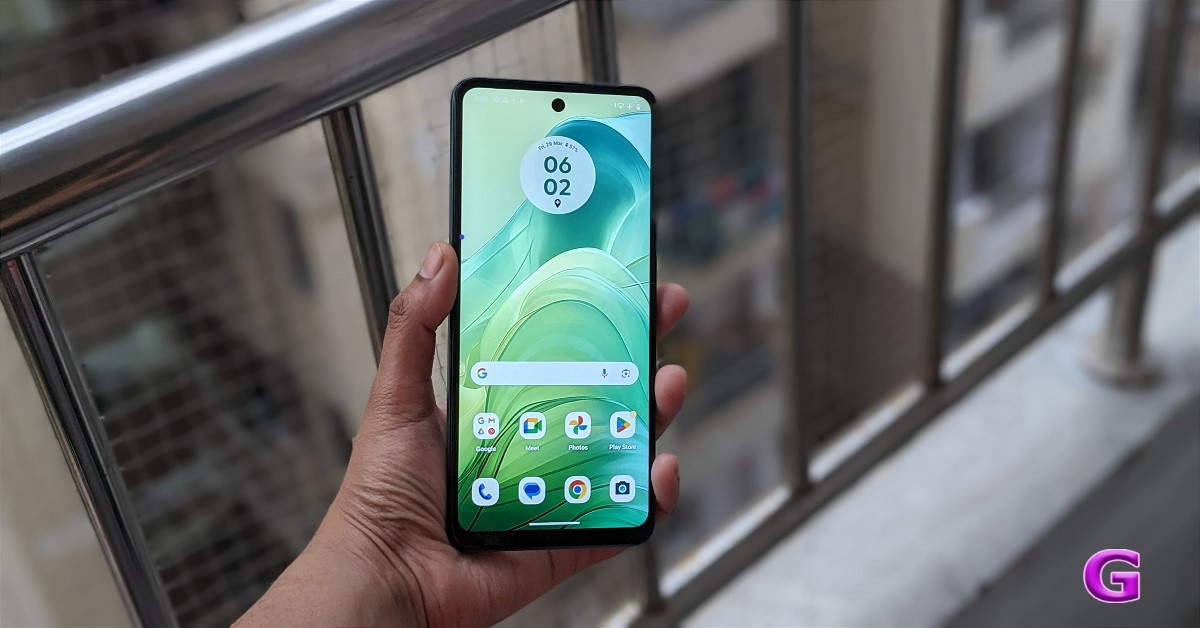
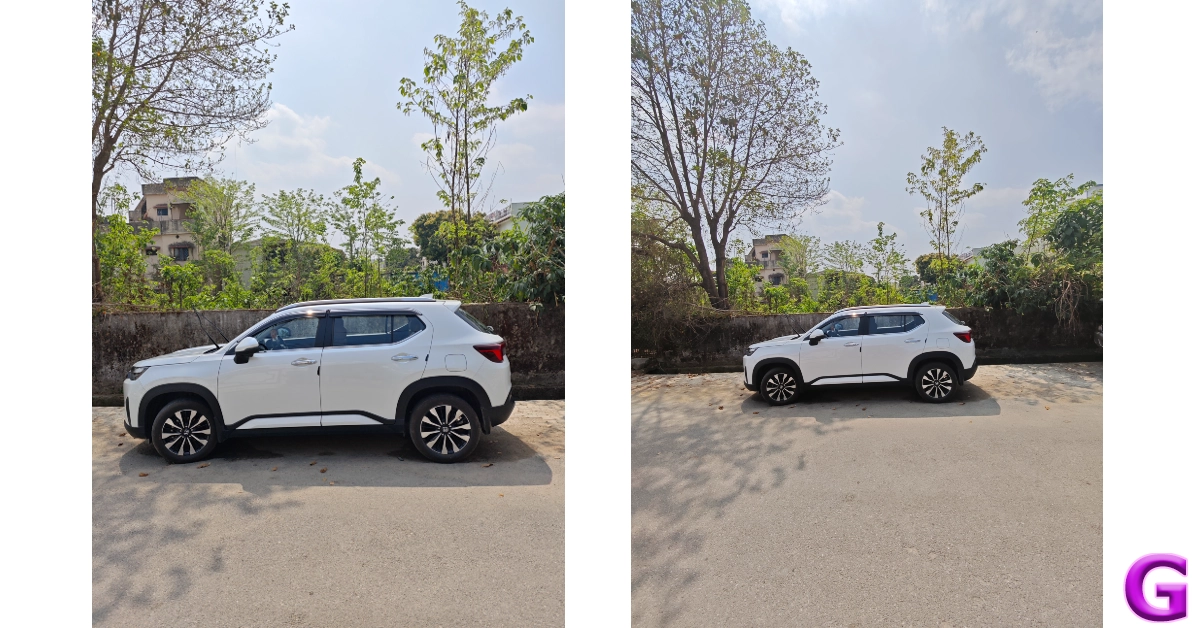
Motorola has introduced its third low-cost smartphone of 2024. Moto G04 is an entry-level smartphone which came to us for the review. It has a 90 Hz display, which is standard these days and is available in fascinating colour options. It has a 16-megapixel AI-powered camera with AI. The starting price is set at Rs 6,999. Does the Moto G04 represent the best value-for-money smartphone available right now? Let’s check it out in this review.
In This Article
Moto G04 Review: Design and Display
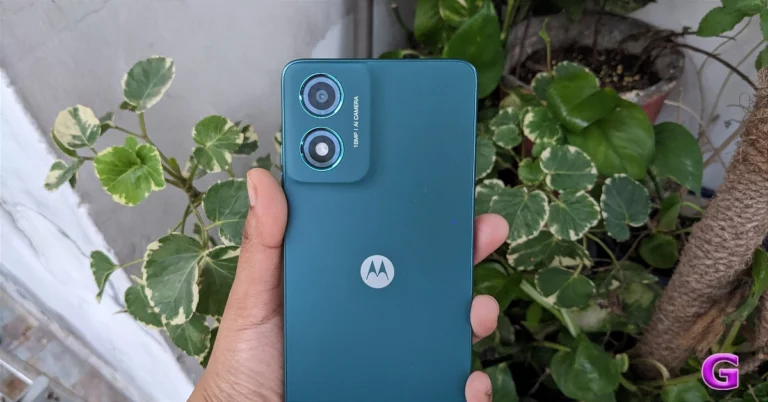
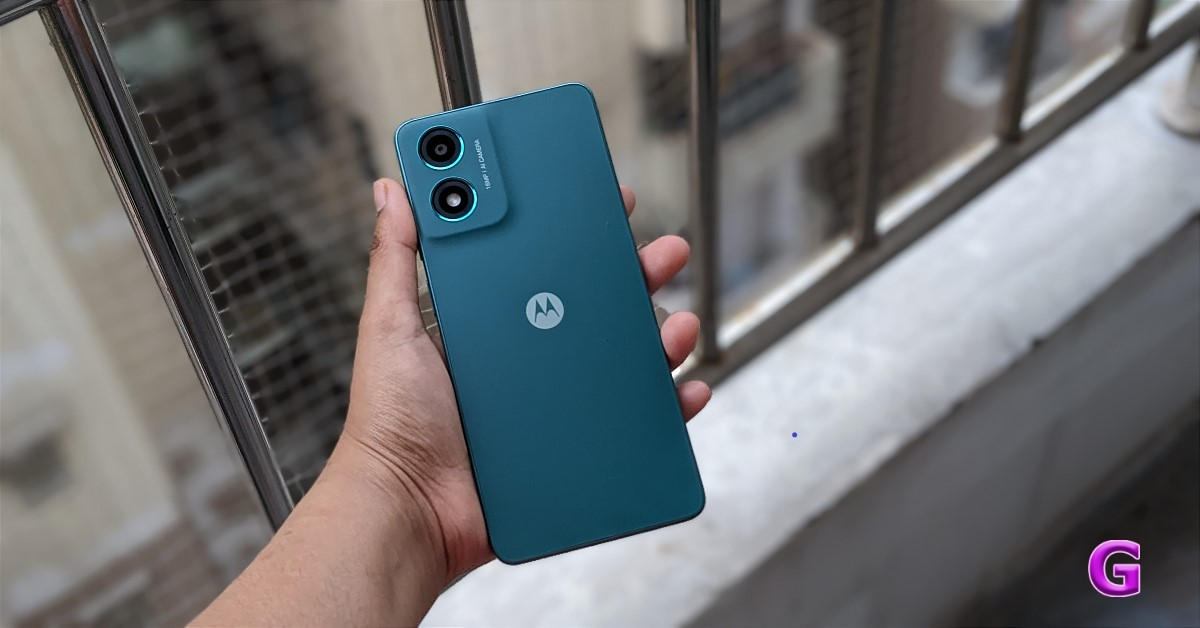
You’ll be amazed by how nice this phone looks. The phone appears to be incredibly powerful. We loved the handset’s colour. This is a sea green colour variant, which we are reviewing. Users get a premium-level feel and look for the price it comes in.
Moto G04 comes in four different colour variations and has a punch-hole rear panel style. The Motorola smartphone has AG glass or 3D PMMA material used on it. The device has a single-layered, streamlined back camera arrangement, which has a highly upscale appearance because of the colour-coordinating side frames.
Due to its lightweight design, which weighs only 178 grams and is 7.89 mm thin, it feels good in the hand. Over that, the phone has an IP52 rating, which means it is water resistant, which is useful in specific situations.
The good thing is that this phone has a silicon case in the box. The majority of Motorola devices already have a case coming with them. The case supplied here is of excellent quality and offers good protection.
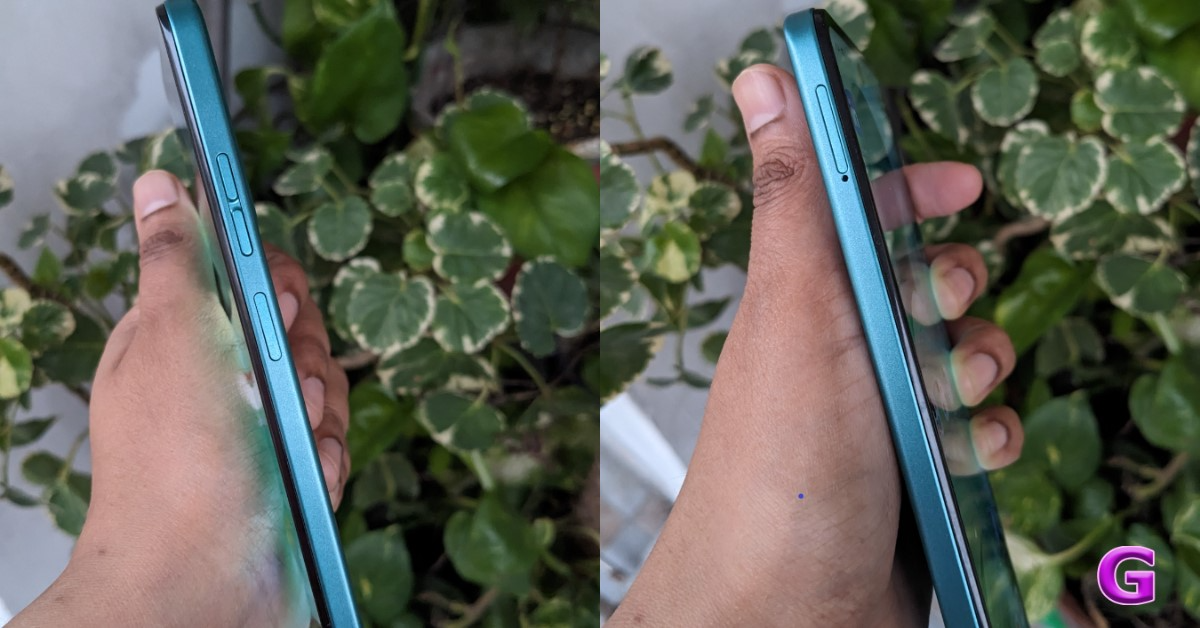
As you go to the side, the design appears flat. A triple-slot SIM card tray with sufficient space for two nano SIM cards and a microSD card is located on the left side of the frame, suggesting that storage can be increased. Given the pricing, 5G support is not available, hence this smartphone only supports 4G which might be a letdown for a few.
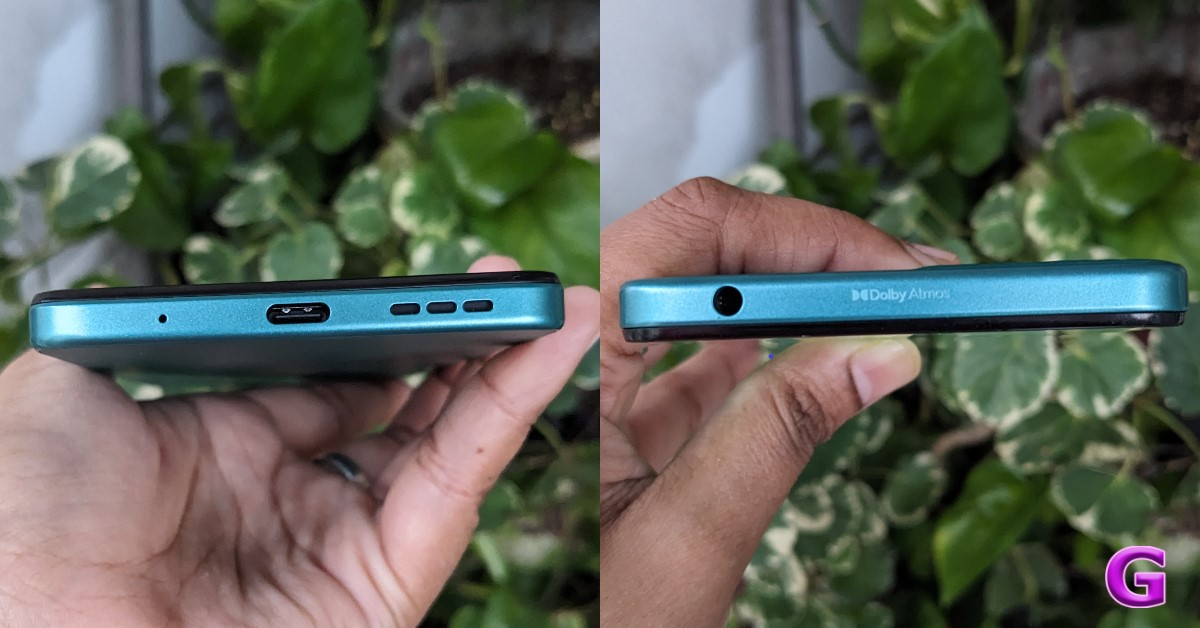
In addition, the right side of the frame has a volume button and a side-mounted fingerprint sensor. On the top part of the frame, users will see a 3.5mm audio port with Dolby Atmos written. The primary microphone, Type-C port, and speaker vent are located at the bottom of the structure.
The side-mounted fingerprint sensor is integrated into the power button. The built-in sensor performed well. It is highly accessible and unlocks precisely.
The display seems to be good for the price point. The phone’s bezels are very thin, especially on the top and edges. You do have a small chin at the bottom, but it’s mainly acceptable given the price.
The Moto G04 sports a 6.6-inch HD+ IPS LCD screen with a resolution of 720×1,600 pixels. The display features a 20:9 aspect ratio and a pixel density of 269 ppi. 90 Hz refresh rate is supported. Additionally, Panda display protection is included.
Because of its maximum brightness of 537 nits, the content on it can be seen fine under direct sunlight. Everything on the screen is fairly crisp and offers pleasing colour arrangements.
Along with the Night Light setting, there is also an Ambient display option, which is a useful feature for reading at night.
You only get an HD screen here, but it has excellent display quality that makes it suitable for watching videos and regular day-to-day use. It also offers some intriguing features, such as video display enhancements. Video colour becomes brighter and more vibrant as a result. You can watch HD-quality Netflix videos with support for Spatial Audio as well as Prime Video content. We’ve also watched a couple of web series, and we’ve been quite happy with the visual quality.
Although the phone just has a single speaker, it supports Dolby Atmos, which is uncommon in this price range. The audio quality is good and the voices are clear. Overall, the sound quality is incredibly well-balanced. Additionally, there is no distortion and the speaker has a respectable volume.
Moto G04 Review: Performance and Cameras
Performance wise Moto G04 includes a UniSoC T606 SoC paired with Mali G57 GPU and up to 8GB of LPDDR4X RAM. The device also supports virtual RAM expansion of up to 16GB, which can improve the system’s performance to some extent. The device comes with up to 128GB of UFS 2.2 storage that can also be further expanded up to 1TB using a microSD card.
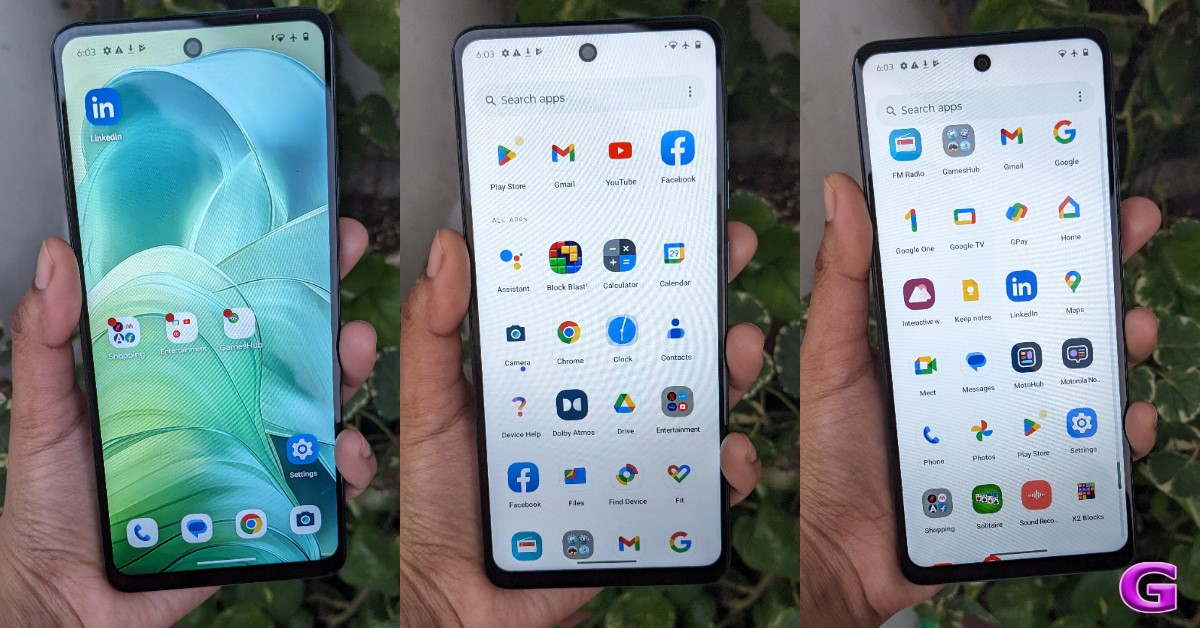
Android 14 runs My UX on the phone as a factory default. Motorola provides you with a near-stock Android experience. Hand in hand, you will also receive security updates for two years. This implies that consumers can use this phone for at least two years or longer. Nevertheless, there were still a few pre-installed apps that weren’t supposed to be there. The hubs for games and shopping are in different folders. However, you have the option to disable or fully uninstall them if you want to save storage space.
Moto G04 also supports Moto Gestures, and the haptics are good. You can save up to six of the apps that you use frequently in the sidebar designated for shortcuts.
We also played Call of Duty Mobile and BGMI on this mobile. This phone is not intended for gaming, by the way. It can be used to play games to some extent. Although there were latency issues during the game, it was still playable on low to medium settings.
There is an FM radio on the smartphone, tool. Do remember that the wired earphones need to be connected for the radio to work.
Moving on to the cameras. The Moto G04 has a 5-megapixel front-facing shooter for selfies and a 16-megapixel back camera sensor driven by AI. With the help of features like HDR and Portrait mode, the rear camera system can automatically produce images that seem professional. On the other hand, the selfie camera features Night Vision, Portrait Mode, Timelapse, and Leveller. Videos can be recorded at up to 1080p at 30 frames per second.
Its camera quality is outstanding for the low low price it comes in. The camera quality is fairly good when compared to other low-cost smartphones.
In bright sunshine, the camera gave excellent outdoor performance. The primary back camera aims to capture respectable images in both optimal and bad lighting conditions. However, there’s a lot of noise evident in very low light.
Portrait
In portrait mode, the edge detection is likewise amazing. The background blurring is superb, and the skin tones and colours are quite genuine. Selfies, though, could have been superior. Even though the 5-megapixel camera sensor is quite outdated and the device is affordable, we still anticipate a better selfie camera in 2024.
A large 5,000mAh battery with support for 15W charging comes with the Moto G04. On the other hand, the phone requires approximately two hours to fully charge using the 10W charging brick that the firm has given in the box. Overall, its battery life is rather good; you may use it for an entire day or a day and a half after a full charge.
The Moto G04 has an outstanding design. Equipped with Android 14, this gadget is an absolute treat for individuals seeking to savour cutting-edge technology without going over budget. Motorola’s user interface is quite simple because it provides an almost entirely stock Android experience.
Furthermore, considering the price range, the display quality is respectable and at par with comparable inexpensive screens.
In the end, it’s the ideal phone for those who wish to stay in touch with the elderly, and even your teen kids. An ultra-wide camera would have been a boon, but no complaints considering it’s an ultra-budget segment phone. All in all, this phone offers great value, so if you’re looking for an affordable phone, you should definitely consider purchasing it.
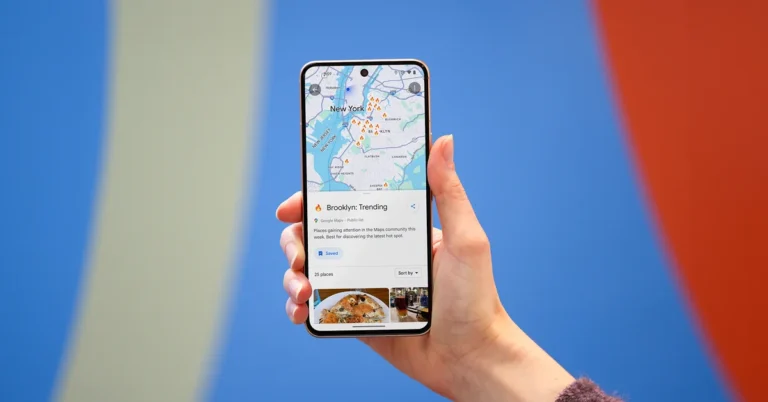
Google Maps is getting upgrades that will facilitate finding inspiration, sharing travel recommendations and getting a true sense of a location before you visit. Intending to help people while they travel, the company has incorporated lists of hand-picked recommendations from popular websites and the Google Maps community on Maps to offer consumers customised recommendations. The Maps will also allow users to make lists of destinations they’ve gone to and destinations they plan to visit. Additionally, Google is also integrating AI into Maps.
The users will be able to easily discover helpful lists from top sites and the Google Maps community, starting in select cities in the U.S. and Canada. If you are planning to travel to a new city you can now simply search for the city on Maps and swipe up to view well-selected lists of suggestions from locals. You’ll also see lists from sites you love like Lonely Planet and OpenTable. Once you have a list you like, share it with friends or save it to your map.
Three different kinds of curated lists are being offered by Google Maps. ‘The Trending List’ is ideal for helping you discover the latest hot spots. The Top list will help you find an area’s tried and true, longstanding favourites in the Maps community. Lastly, the Gems list will help uncover the neighbourhood’s great eateries that are still hidden from view.
More than 40 cities across the U.S. and Canada will start receiving these lists. Google will be showcasing some of the top lists created by the Maps community in the upcoming months, so if you’ve made a list you think others will love, send it to listnominations@google.com to nominate it!
Google Maps will also let users create and share lists with new customization tools to keep track of the locations you’ve been to and the places you wish to visit. This way, you’ll always have recommendations to offer, whether you share them on social media after your trip or in the group chat while you’re making travel plans. In the Saved tab, select the “New list” button to begin creating a new list. From there, you can add a place to your list whenever you’re seeing it on Maps, just add it to your list so you can save it for later and always see it pinned on your map.
To help you provide the best recommendations, rank the locations you’ve visited after you’ve been there by moving them up or down on your list. You can also link to content from your social channels. These updates roll out globally on Android and iOS later this month.
Lastly, the company has now incorporated AI into Google Maps to identify key insights from the Maps community. It will make use of photos and reviews that summarise what people love about it.
“When you’re checking out a restaurant and scrolling through photos of the food, we’ll use AI to help you identify what a dish is called (perfect if you’re in a new city and not familiar with the cuisine), and show you helpful information based on the menu — like what it costs, if it’s popular, and even if it’s vegetarian or vegan — so you know if you want to make a reservation.”
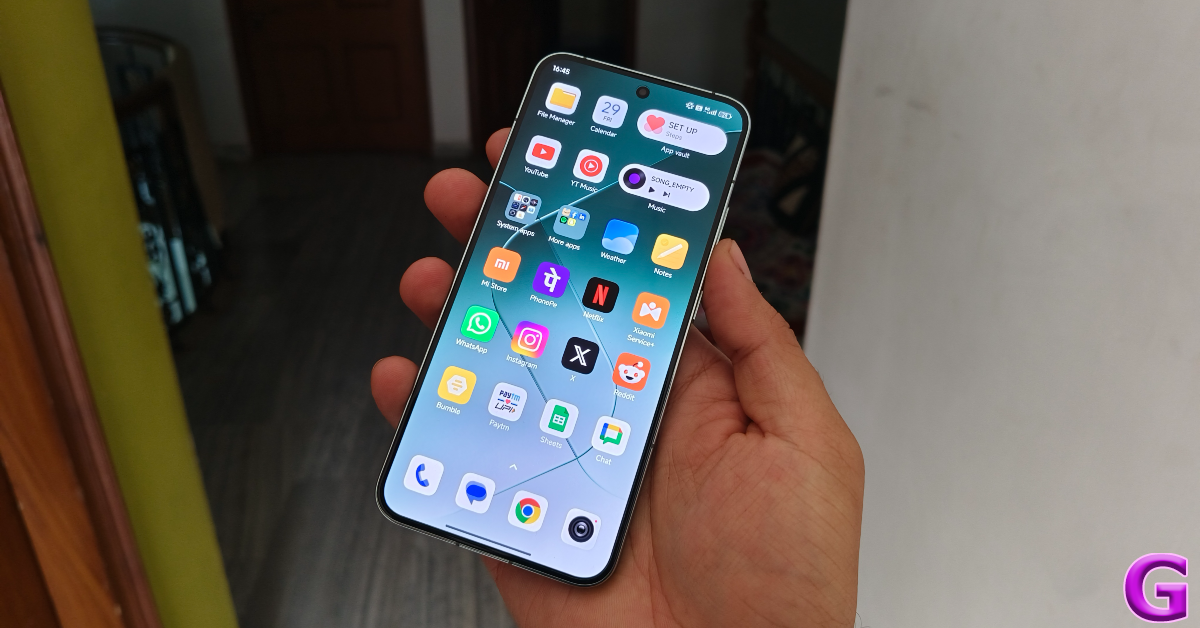
Compact Android flagships are hard to come by. The Zenfone making the switch to a larger form factor leaves only two major smartphones battling it out to be the compact king. The word ‘compact’ does a lot of heavy lifting here as both smartphones are over 6 inches in size. The Samsung Galaxy S24 (our review here) is the smaller of the two, measuring 6.2-inches. The Xiaomi 14, which we have been using as our primary smartphone for the last week, spans 6.36 inches across its corners.
For comparison, their ‘Ultra’ counterparts measure 6.8 inches and 6.73 inches respectively. Needless to say, when it comes to smartphones, ‘compact’ is a relative term rather than an empirical one. If you’re thinking of grabbing the new Xiaomi 14, you may want to read this review first.
Xiaomi 14 ships inside the manufacturer’s signature black box for its flagships. Here’s what you get inside the retail package.
Smartphone
120W power adapter
USB Type-A to Type-C cable
Soft phone cover (opaque)
SIM ejector tool
Quick Start Guide
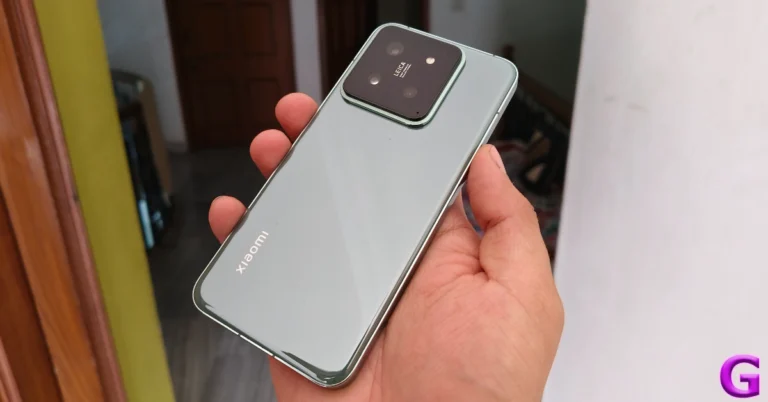
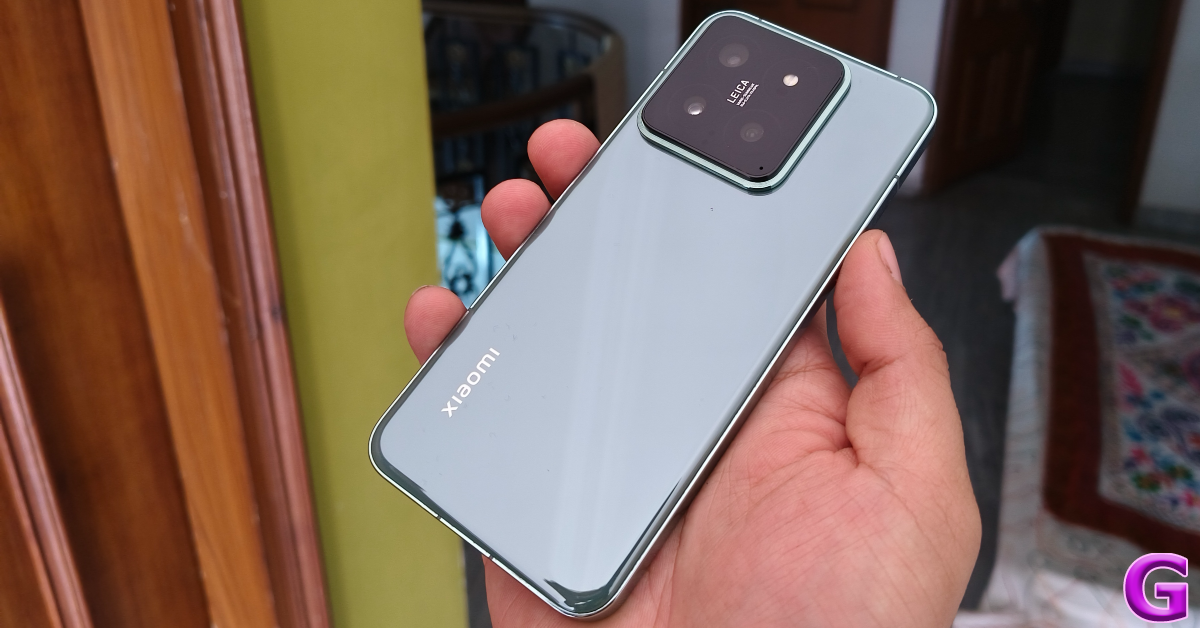
The smartphone is available in three colour variants – Black, Jade Green, and White. Our Xiaomi 14 review unit was Jade Green which, like the White variant, is characterised by its ceramic glass back. While we do enjoy the feel of this back panel, it is a fingerprint magnet. If you want to steer away from eyesore smudges, the Black variant with its matte finish would be more up your alley.
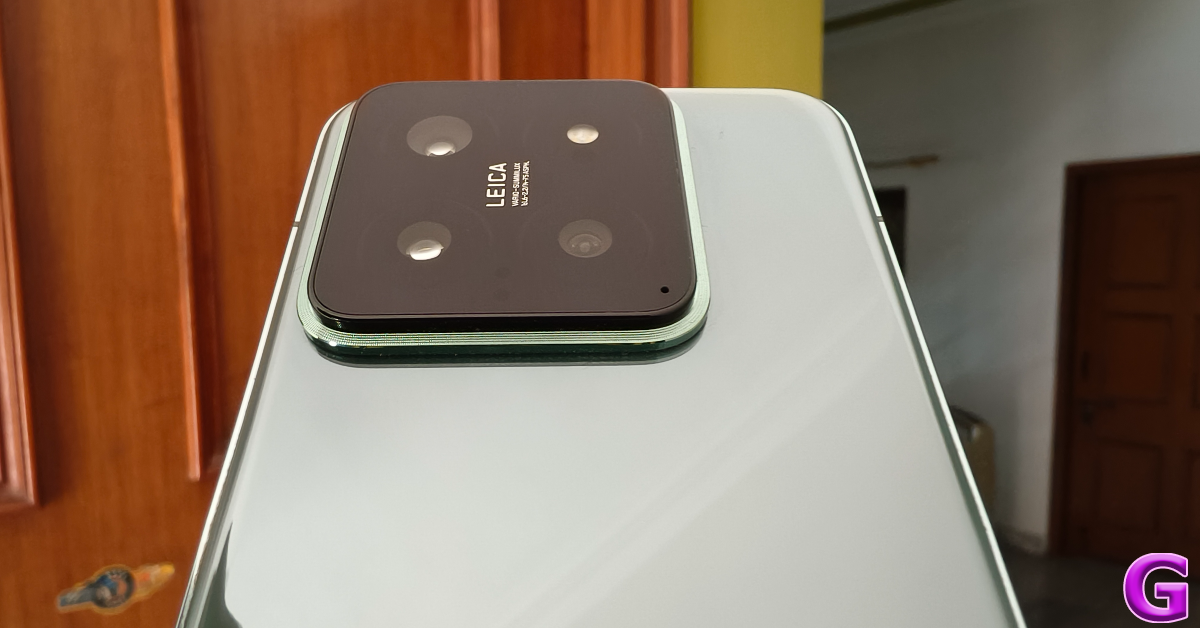
The back panel is curved around the edges as it fits into the aluminium frame. Xiaomi has retained the square cutout for the camera setup. It gives the smartphone a significant wobble on flat surfaces, but we like its clean design language. This camera cutout also houses the IR blaster apart from the three lenses (more on those later). The Leica branding is also present right in the middle of the cutout.
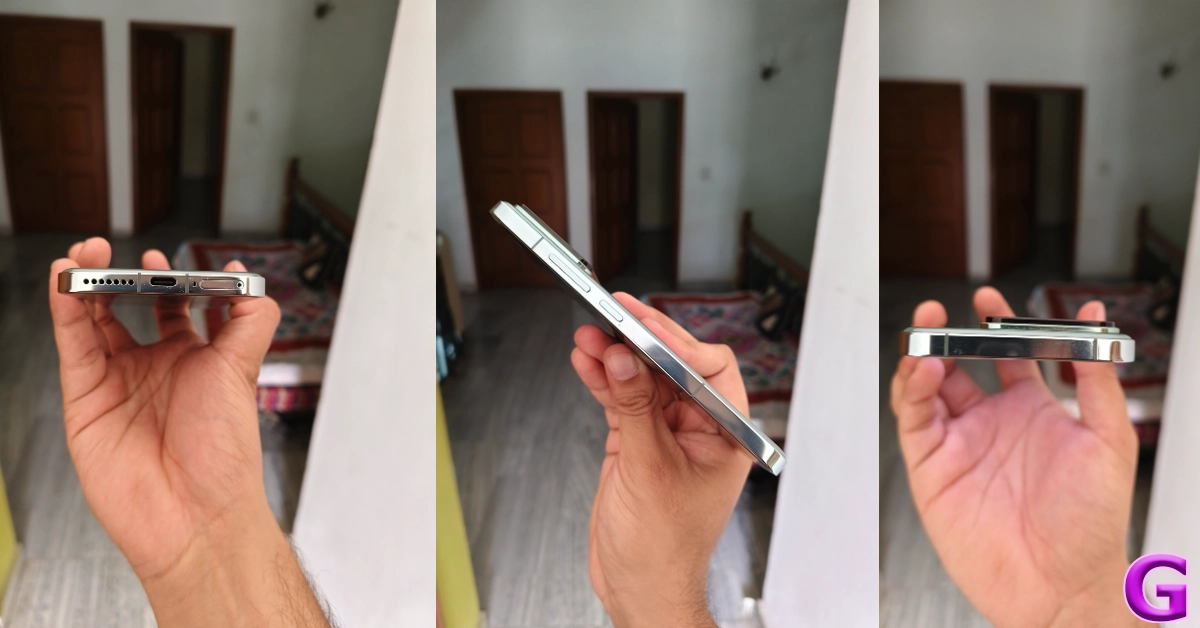
The aluminium frame has flat edges and rounded corners, offering a nice grip. The right edge houses the volume rocker and the side button. The SIM tray, primary microphone, USB Type-C port, and speaker grille are positioned at the bottom. The earpiece doubles up as the secondary speaker on this device.
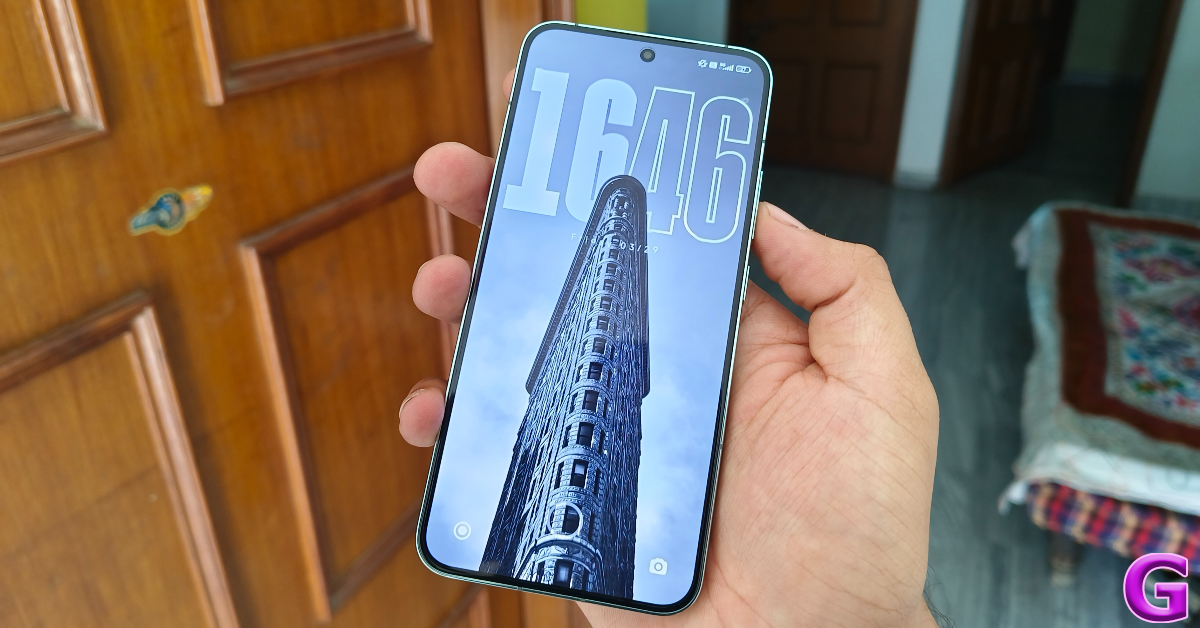
One of the important displays on this year’s Xiaomi 14 is the LPTO OLED display. Being an LTPO panel, it can adapt the refresh rate according to the task being carried out on the screen. This display can hit a maximum refresh rate of 120Hz when needed and dial down to 1Hz on standby to save the battery. The screen resolution also gets a small bump and is now 1,200 x 2,670 pixels.
Thin, uniform bezels surround the display. The selfie camera is housed in a punch-hole cutout. The in-display fingerprint scanner is fast and responsive but we’d have preferred if it was placed slightly highly to accommodate the natural position of the thumb while unlocking the screen. The display itself is snappy and offers an exceptional touch response. No complaints there.
Watching content on this screen is a splendid experience. The Widevine L1 certification allows you to stream HD content from major OTT apps like Netflix, Prime Video, and Disney+ Hotstar. Dolby Vision and HDR10+ support is also present on this device, which is something you expect from a flagship. We streamed content from a range of apps throughout the review period and were pleased with the way the Xiaomi 14 reproduced the colours on the display. The LTPO OLED panel can reach a peak brightness of 3,000 nits which makes it all the more ideal for viewing HDR content.
If you want to customise your viewing experience on the Xiaomi 14, the smartphone offers a bunch of colour profiles in display settings. There is also an ‘Anti-flicker’ mode which does exactly what its name implies. While browsing through Twitter in dark mode at night, we did notice that the smartphone kept the distracting flickers to a minimum. There are a couple of AI features that enhance the HDR while viewing media in the Gallery app.
Moving on to the protective features, the smartphone flaunts an IP68 rating for dust and water resistance. The device can withstand being submerged up to 1.5m in water for 30 minutes. The display receives Gorilla Glass Victus protection which safeguards it against scratches. We used the Xiaomi 14 without a cover throughout the review period and it did not register any scuffs or scratches on the display or along the body. While we did not push its limits, it did spend a lot of time inside pockets with keys and loose change.
Xiaomi 14 review: Performance and Cameras
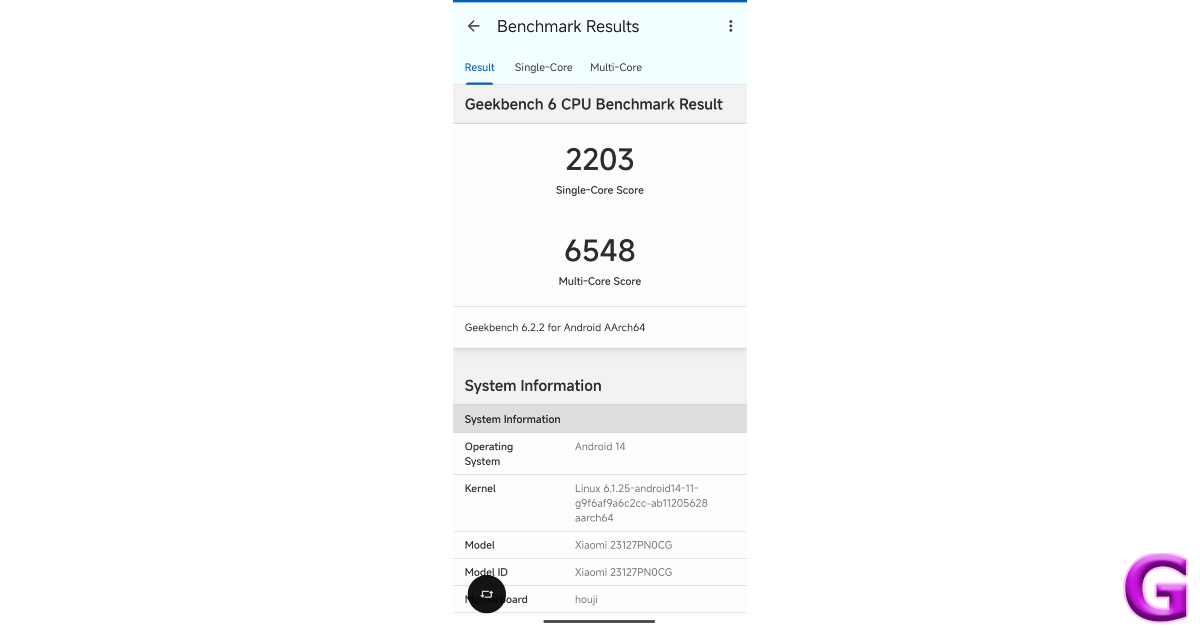
One of the things that gives the Xiaomi 14 a significant edge over its direct rival, the Samsung Galaxy S24, is the processor. In India, the entry-level Galaxy S24 and its Plus variant (our review here) are powered by Samsung’s in-house Exynos 2400 chipset. Meanwhile, the Xiaomi 14 packs the flagship Snapdragon 8 Gen 3 SoC under its hood. On the Geekbench 6 app, the smartphone attained a score of 2,203 points in the single-core test and 6,548 points in the multi-core test.
While performing routine tasks like web browsing, emailing, video calling, media streaming, and app multitasking, we did not hit any snags on the Xiaomi 14. The breezy performance was flagship-grade and ‘bang for the buck’ worthy. Watching a live stream on YouTube while browsing Twitter in a separate window presented no issues either. The smartphone does run a little warm when you shoot videos in outdoor conditions under direct sunlight. However, we did not encounter any camera warnings or unexpected crashes.
The Snapdragon 8 Gen 3 chipset is key when it comes to delivering a high-end gaming performance. This is where Xiaomi 14 inches ahead of Galaxy S24. We played titles like Asphalt 9 and Call of Duty Mobile at the highest settings and were treated with a smooth gameplay experience. Xiaomi’s IceLoop Cooling tech does a decent job of keeping the internal temperature in check. Even after an hour-long gaming session, we did not experience throttling while gaming.
Xiaomi’s new HyperOS handles the software duties on its newest compact flagship. We got a taste of this OS earlier this year on the Poco X6 Pro (our review here). While the HyperOS does not mark a radical shift in design and aesthetics from the MIUI skin, we do enjoy its superior optimisation. Browsing the phone and going through its interface feels much more snappy on HyperOS.
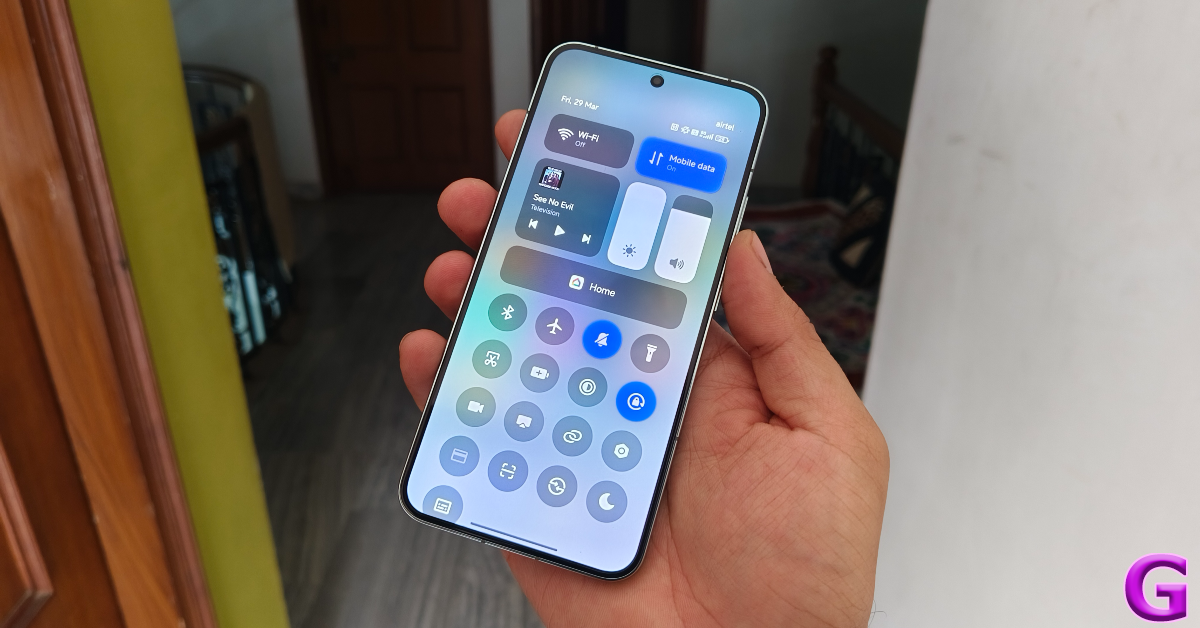
Control Centre on HyperOS
As far as design changes are concerned, the biggest of the bunch is the new look for the Control Centre (surprisingly, this is what Xiaomi is officially calling it now) which does its best iPhone impression. A downward swipe on the right side of the screen pulls down the Quick Settings all at once, where the tiles are arranged as individual icons. By default, the tiles do not have labels underneath them, but you can make them appear from device settings. We prefer the cleaner look of the lable-less tiles but it can make things a little confusing.
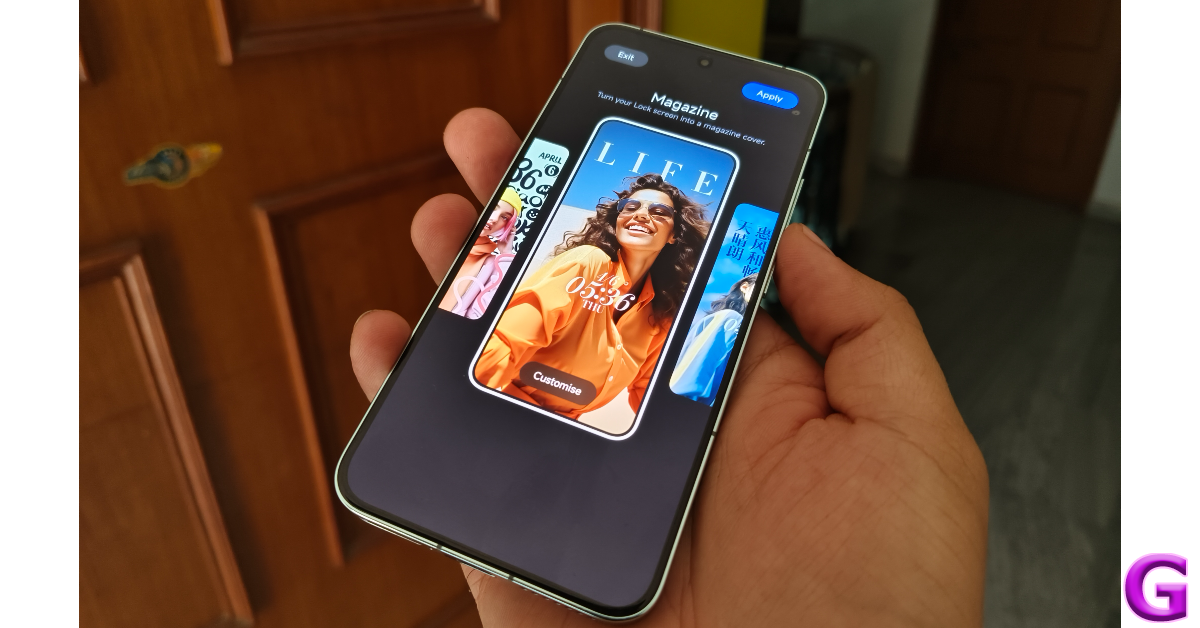
Another thing we like about HyperOS is the customisation support for the lock screen. Apart from the classic themes, there are a bunch of ‘Rhombus’ and ‘Magazine’ style layouts, the latter letting you turn your portraits into eye-catching covers. The app drawer on the new OS is identical to its MIUI counterpart. As is the majority of the interface.
While HyperOS may not seem groundbreaking right now, it is a bold attempt at bringing a universal language to Xiaomi’s range of consumer products, be it smartphones, home appliances, or even their newly launched electric car. This is something that will be fleshed out in its future iterations but Xiaomi’s ecosystem holds a lot of promise due to the diverse nature of devices the company has to offer. Xiaomi has promised 4 years of major OS upgrades and 5 years of security patches on the newest 14 Series.
The battery situation on compact smartphones is always a cause of concern, but the 4,610 mAh unit on this smartphone easily takes it through a day of heavy use. During the review period, we got 5-6 hours of Screen on Time on the Xiaomi 14. The smartphone supports 90W fast charging, even though it comes with a 120W power brick inside the box. We were able to fully charge the smartphone in just under 35 minutes.
Xiaomi banks upon the photography reputation of its flagship phones, something that is very obvious from the brand’s mainstream messaging. While the Ultra variant may grab all the headlines, the entry-level Xiaomi 14 also deserves a lot of praise for its cutting-edge camera performance. The rear camera cutout houses three 50MP sensors for the wide, ultrawide, and telephoto lenses – an upgrade from the 50 + 12 + 10 MP setup on its predecessor. The native Camera app offers two style profiles – Leica Vibrant and Leica Authentic. We used the colour-rich Vibrant profile for most of the review period.
The 50MP primary shooter displays a very versatile range. No matter the lighting condition, this camera captures detailed pictures with lush colours and a wide dynamic range. In bright outdoor conditions, we were particularly pleased with how this camera exposed the sky and processed the colour tones. The Leica tuning makes a ton of difference on this camera setup.
At nighttime, the main sensor does an incredible job of letting in a lot of light and exposing the subject correctly. In the photoprocessing phase, the smartphone does well to brighten up the subject and tune the colours accurately. We like that it doesn’t oversharpen the images as most flagship cameras tend to do.
Auto Mode vs Night ModeUltrawide: Without Night Mode vs With Night Mode
Pictures taken with the 50MP ultrawide camera are a little soft, with the camera unable to reproduce the sharpness of the main sensor. The colour-richness of the images remains impeccable. The dynamic range and contrast are also decent. In limited lighting, this camera relies heavily upon the Night Mode. While we were happy with the brightness of the images, the images remained on the softer side. Having said that, the ultrawide lens can easily hang with its peers in this price bracket.
Ultrawide ShotWide vs UltrawideWide vs Ultrawide
The 3.2x 50MP floating telephoto lens is the dark horse of this camera setup. It renders punchy colours on pictures taken with 3.2x zoom and captures a good amount of detail. Its 75mm focal length allows you to take close-up portrait shots from a distance. This lens is also used for the Macro mode as it can focus as close as 10cm. Pushing the Xiaomi 14 to its zooming limit (60x), we noticed that its ability to resolve the images was still a step behind Samsung’s Galaxy S24 Series.
Telephoto Lens: 1x vs 3.2xTelephoto Lens: 30x vs 60x
When it comes to taking portrait shots, the Xiaomi 14 does an incredible job. It effortlessly recognises the boundaries of the subject, separates it from the background, and applies an appropriate amount of blur. You can choose from 35mm, 50mm, 75mm, and 90mm focal lengths in the camera app.
Portrait Shots
The 32MP front-facing camera takes good selfies without obfuscating the skin tone and texture. It can now record 4K videos at 30 and 60 fps, something which was missing in its previous iteration. The main camera can record 8K videos at 24fps. However, if you want to record videos in Log format, you will need to stick to 4K resolution (which isn’t bad at all).
We cannot miss mentioning how Xiaomi’s camera app is one of the best around. It has a very handy ‘Teleprompter’ feature which overlays the fleeting text on the viewfinder while you are recording a video. You can change the speed and size of the text as well. The ‘Director mode’ is one feature we’d love to see on other smartphones as well. This mode allows you to arrange a multicamera setup by linking your Xiaomi devices together.
After spending a week with the Xiaomi 14, we can safely say that it is one of the best smartphones that Android has to offer. Its (relatively) compact form factor, clean design, smooth display, powerful processor, and versatile cameras link together to produce an exemplary experience for the user. The new HyperOS holds a lot of promise for the future and has us invested in its development arc. If you’re looking for a reliable flagship device that can deliver a consistent performance on every front, then Xiaomi 14 is a great deal at Rs 70,000.
Xiaomi 14: Pros
Clean design
Good camera performance
Snapdragon 8 Gen 3 chipset
Fast charging
Xiaomi 14: Cons
Glossy back on Jade Green and White variants attracts fingerprints
Circle to Search is Google’s AI-powered feature that will be expanded to more Pixel and Android smartphones.
The feature is already available on Pixel 8 series, Pixel 7 series and Samsung Galaxy S24 Series.
Samsung Galaxy S24 series was the first to get Google’s Circle to Search feature when it was launched earlier this year. After which the tech giant Google announced to expand the AI feature to its Pixel devices. As of right now, Circle to Search is currently accessible on the Pixel 8 and Pixel 7 series. Google has now revealed that the Circle to Search tool will be available on more Android phones.
After the Galaxy S24 series, Pixel 8 and Pixel 8 Pro were the first to receive the Circle to Search feature in February. The Pixel 7 lineup was also given access to this capability by the firm earlier in March. Google has now officially confirmed that the AI-powered Circle to Search feature is now being rolled out to more Android smartphones. Starting this week it will start making it accessible for the Google Pixel 6, Pixel 6 Pro, Pixel 6a, Pixel 7a, Pixel Fold, and Pixel Tablet.
Google has also revealed that Translations in Circle to Search will start rolling out in the coming weeks. However Google Lens can assist you with translating something nearby, like a street sign or poster. Just select the translate filter by tapping the Lens button in the Google app. Lens will automatically detect the source language and blend the translated text over the original.
Users will be able to shop for products they see and discover more about them thanks to Google’s AI-powered functionality Circle to Search. Moreover, one can also search for definitions of words or phrases using functionality while watching a video. It also allows you to look for a building or a particular cafe that you have seen on their social media feed by just scribbling over the building to swiftly identify it (and even add it to their travel itinerary) with the feature.
India’s First 6,000mAh Battery with 70W Charging that offers long-lasting power and rapid charging.
Advanced AMOLED Display features a smooth 120Hz refresh rate for crisp, vibrant visuals.
Unique LED Design with over 200 customizable LEDs on the back panel for a personalized look.
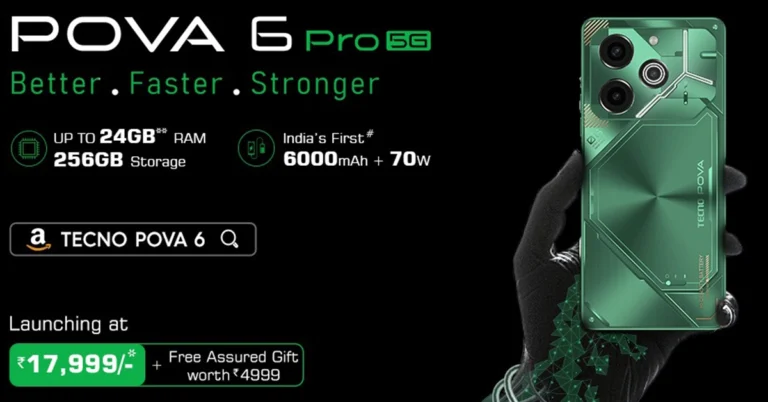
In a leap forward for smartphone technology and performance in India, TECNO has introduced the POVA 6 Pro 5G, marking a milestone with India’s first 6,000mAh battery complemented by a 70W charger. This launch not only showcases TECNO’s commitment to innovation but also caters to the modern consumer’s need for a device that combines longevity with fast charging capabilities. Positioned at an attractive price point starting from Rs 17,999, the POVA 6 Pro 5G is set to revolutionize the smartphone market.
The Tecno POVA 6 Pro 5G is engineered to redefine multitasking with its powerful RAM, a vibrant AMOLED display, and a colossal battery equipped with rapid charging. It assures that power will be the least of users’ concerns. Scheduled to be available from April 4th, this device will be accessible to users on Amazon and at retail outlets.
The TECNO POVA 6 Pro 5G transcends traditional design and performance norms, especially in its price segment. Featuring up to 24GB of RAM and 256GB of storage, it packages unmatched power within a slim 7.9mm frame. This device is not just about enduring power; it’s about delivering an enhanced “Better. Faster. Stronger.” experience, thanks to its groundbreaking battery and charger.
Design That Speaks Volumes
Crafted with precision, the POVA 6 Pro 5G’s back panel showcases an intricate design, achieved through advanced photolithography techniques, reflecting the sophistication of its Arc Interface. This is further enhanced by an innovative LED design that includes over 200 LEDs, offering more than 100 customizable options, making every user’s experience uniquely personal.
Key Features at a Glance
Mesmerizing Arc Interface: Featuring over 200 LEDs for unparalleled customization, set against a backdrop created through sophisticated photolithography.
India’s First 6000mAh Battery with 70W Charger: A benchmark in power and efficiency, ensuring rapid charging and long-lasting performance.
Sleek Yet Powerful: At just 7.9mm thick, it combines elegance with power.
AMOLED Display: A 120Hz display that brings visuals to life with vibrant colors and crisp details.
The POVA 6 Pro 5G is available in two variants: 8GB RAM + 256GB Storage at ₹19,999 and 12GB RAM + 256GB Storage at ₹21,999. An instant bank discount of ₹2,000 lowers the effective price to ₹17,999 and ₹19,999, respectively, with additional complimentary goodies worth ₹4,999 for both online and offline purchases.
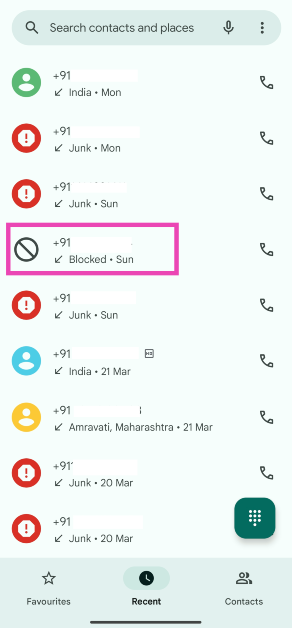
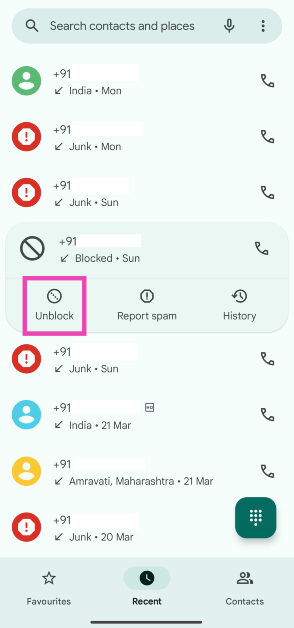
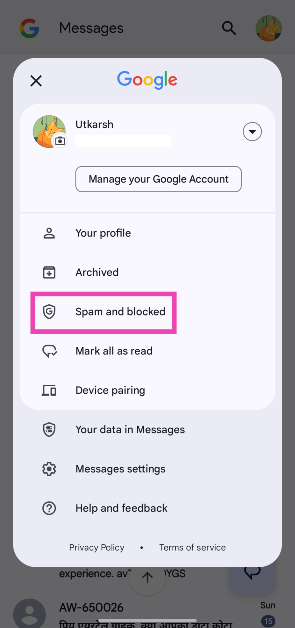
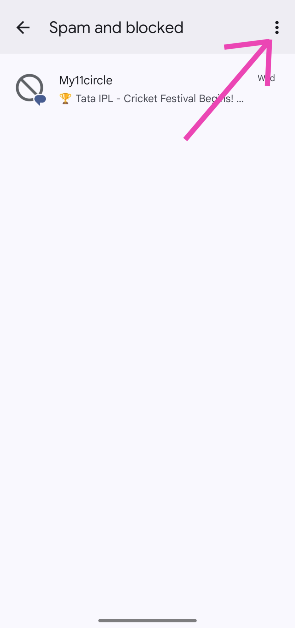
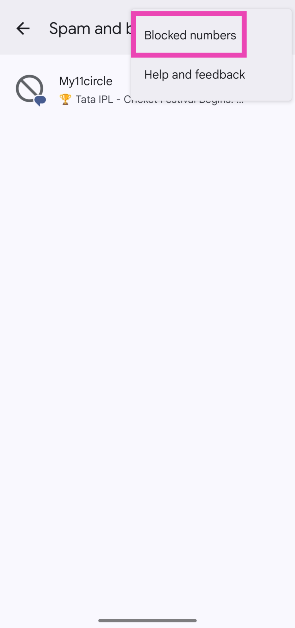
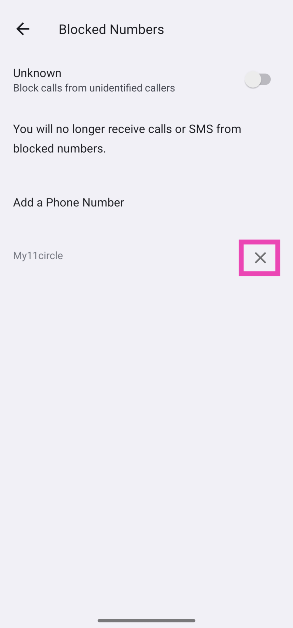
Blocking a number on Android is easy. There are multiple ways to go about it too. You can either manually add a number to your block list or hit the Block button in the recent calls menu. The latter can sometimes be triggered by mistake. If your friend is unable to reach your number even though you are receiving optimum network coverage, chances are you accidentally blocked their number. So, here are the top 4 ways to unblock a phone number on an Android phone.
Newer versions of Android OS are well-equipped to manage spam calls without requiring a third-party app like TrueCaller. The good news is that you don’t need to manually block every spam call anymore. Google’s stock dialer app has a ‘Caller ID and spam’ section under Assistive features which can carry out a couple of important spam-management functions.
If you don’t want to block every spam call outright, the Caller ID feature of the dialer app is something you should try. Without requiring a separate app, it identifies businesses and spam numbers when you receive a call from them. The spam call filter blocks the suspected spam numbers from calling you. While the latter seems like a great feature, its spam filter can sometimes block numbers from certain service apps. If you prefer verifying your number using a robotised incoming call instead of an OTP message, this spam filter may prevent you from doing so.
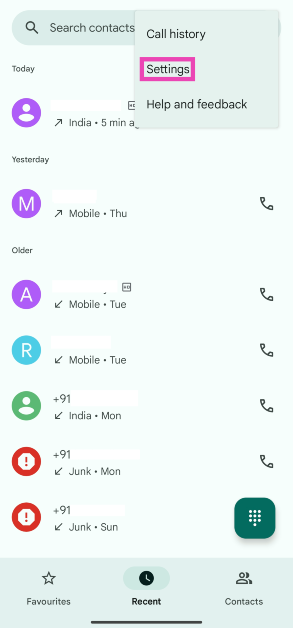
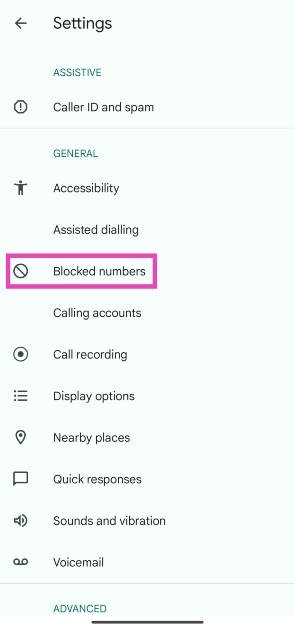
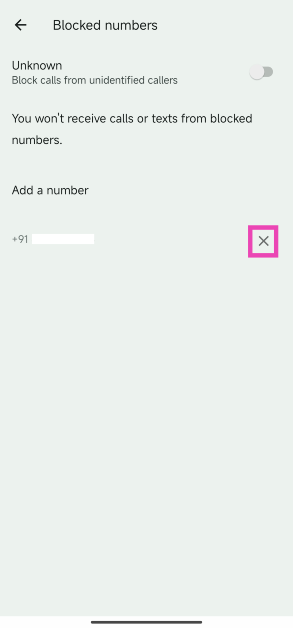
Unblock a phone number from the Google Dialer block list
Step 1:Launch the Google Dialer app and hit the ellipses at the top right corner of the screen.
Step 2: Tap on Settings.
Step 3: Select Blocked numbers.
Step 4: Hit the cross sign next to the number you want to unblock.
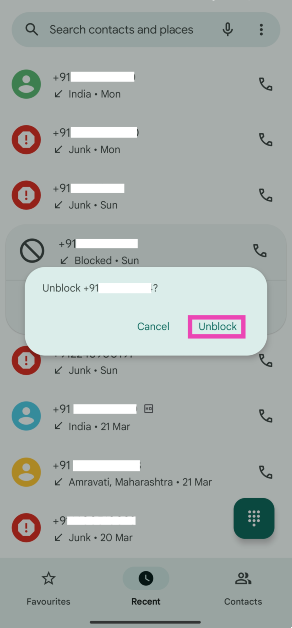
Unblock a phone number from the ‘Recent Calls’ list
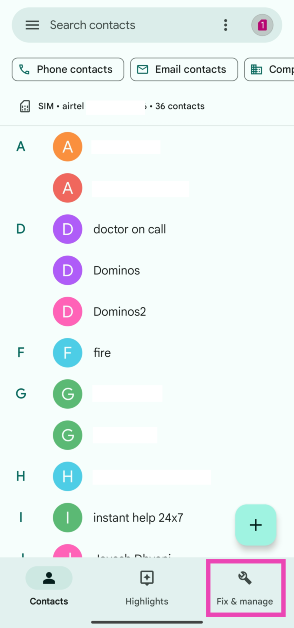
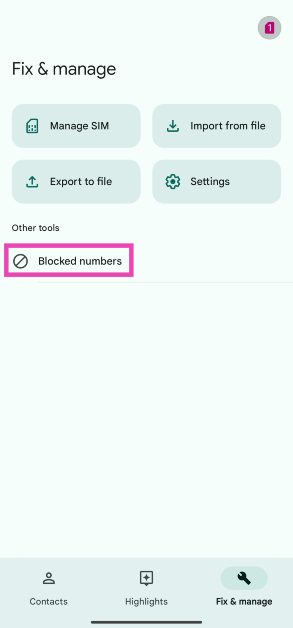
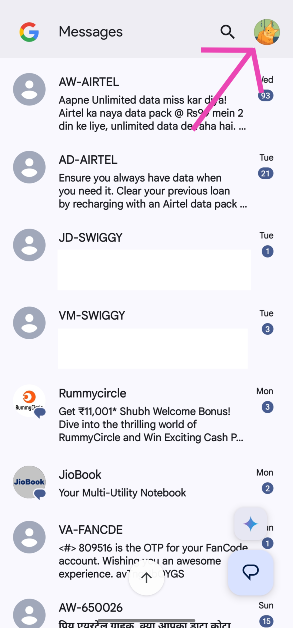
These are the top 4 ways to unblock a phone number on an Android phone. You may also want to check out how you can block or unblock a number on Truecaller. If you use your OEM’s native apps for calling, contacts, and messaging, the process to unblock a number remains largely the same. If you can’t find the relevant option on your phone, let us know in the comments and we’ll help you out!
X will grant certain users free access to Premium and Premium+ features.
Over 2,500 verified subscriber followers will get Premium features for free.
More than 5,000 will get Premium+ for free.
Microblogging platform X formerly known as Twitter is in the news again. The company head Elon Musk has announced that specific accounts will now be able to access free premium services. As mentioned “specific users”, not every user will be qualified to avail of X Premium services for free. The decision was made in response to reports that the daily user base of X is declining and is now trailing behind Instagram and TikTok, its competitors in the industry.
Elon Musk has revealed that certain users on the microblogging network X (formerly known as Twitter) would now have access to features from X Premium and X Premium+, the paid subscription, for free. His X post said, “Going forward, all 𝕏 accounts with over 2,500 verified subscriber followers will get Premium features for free and accounts with over 5,000 will get Premium+ for free.”
According to Musk users with 2,500 verified subscriber followers will receive a complimentary subscription to Premium features. Furthermore, Musk announced that a Premium+ subscription will be given away for free to individuals who have over 5,000 verified subscriber followers. Right now the X Premium+ subscription costs Rs 1,300 per month if signed up using the web or Rs 13,600 annually. Note that Premium subscribers receive less advertising from X, whereas Premium+ subscribers see none at all and also have access to the generative artificial intelligence chatbot Grok.
While other people asked for clarification, his supporters applauded the announcement. But the move follows a report that said after about a year and a half, Musk’s X appeared to have lost over a quarter of its user base. Data acquired by mobile analytics company Sensor Tower indicates that the number of daily active mobile app users in the United States for X has decreased by 23% since November 2022.
As per the report, the year-over-year data has revealed that the number of mobile app users in the United States has decreased by 18% from a year ago. In the United States, X’s mobile app had 27 million daily active users as of last month. Having trouble retaining its users, however, X has denied all of this.
Figures from throughout the world have also felt the effects. Reportedly there were 174 million daily active users, a 15% decrease from the previous year.
In order to benefit one must have the following:
A blue verification tick mark
The option to monetarily support their posts
You will require 2,500 followers who have purchased a Premium or Premium+ subscription.
Garena Free Fire is a battle royale game with regular awards and tournaments to keep players interested. If you play Garena Free Fire, you should be aware of the redeem codes that are released on a daily basis. However, because the battle royale game is banned in India, players from other countries can use the Free Fire Redeem codes daily. If you’re unfamiliar with the Garena Free Fire redeem codes or don’t know how to get them, we’ve put together a step-by-step guide to help you redeem them. Check out Garena Free Fire Redeem Codes for 29 March 2024.
The Free Fire redeem codes are a great way to get free stuff. These are 12-digit codes that contain alphabets and numbers, as well as an expiration date and time. Because the Garena FF redeem codes cannot be used more than once, you should hurry to the redemption page to claim your free reward before someone else does. To get a free reward, all you have to do is go to reward.ff.garena.com/en, which is the official redemption page. Also, keep an eye on this space for daily updates on Garena Free Fire redemption codes and rewards.
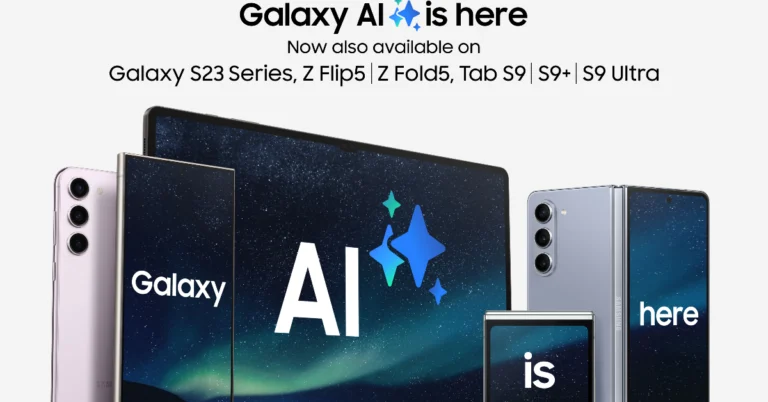
Samsung, today announced that additional Galaxy flagship handsets will soon have access to Galaxy AI capabilities.
The Galaxy S23 series, Galaxy S23 FE, Galaxy Z Flip 5, Galaxy Z Fold 5, and Galaxy Tab S9 series will all get AI features.
Samsung, today announced that the One UI 6.1 upgrade will expand the availability of Galaxy AI features to additional devices within the Galaxy ecosystem. As per the company, the rollout will be accessible for the Galaxy S23 series, S23 FE, Z Fold5, Z Flip5, and Tab S9 series.
Users of the Galaxy S23 series, S23 FE, Z Fold5, Z Flip5, and Tab S9 series will now be able to benefit from Galaxy AI features. The devices will now include capabilities of Note Assist, Circle to Search, and Live Translate, among others, thanks to the release of the One UI 6.1 upgrade.
The latest update is a significant update to the One UI 6.0, which was based on Android 14 and released in October 2023. According to Samsung One UI 6.1 update will be rolled out from today and April is when the majority of users should start to receive the update.
“The broader integration of Galaxy AI across the Galaxy ecosystem also enables a seamless user experience in day-to-day tasks on AI-supported models, driving new levels of efficiency,” the company in its announcement said.
Users will now be able to utilise features like Circle to Search, which allows them to simply circle, highlight or tap any image on their display and conduct a visual search on Google, while still within the app.
Live Translate is an additional function that facilitates real-time voice and text translations of phone calls, making it easier than ever to book reservations while travelling or chat with your grandparents in their native language during phone calls.
The One UI 6.1 upgrade will also bring Samsung’s AI-powered photo editing feature, Generative Edit allowing users to resize position and align objects even after the photo is taken. Edit Suggestion gives you your photo editor that uses AI to suggest perfectly suitable tweaks for each photo.
Through a user-friendly split-screen view, the Interpreter can interpret live conversations quickly, enabling persons seated across from one another to read a text translation of the other’s words. Whereas Transcript Assist summarises, translates, and even transcribes voice recordings using AI and Speech-to-Text technology. Browsing Assist saves your time and keeps you informed by generating concise summaries of news articles or web pages.
LinkedIn’s short-form video feed emphasizes jobs, careers, and business insights.
Features a swipeable vertical feed with options to like, comment, and share videos.
Offers a new space for creators to share content and reach a wider professional audience.
In an innovative move, LinkedIn, the professional networking giant owned by Microsoft, is currently testing a new feature that could transform how professionals interact on the platform. The introduction of a short-form video feed, bearing resemblance to the popular TikTok format, marks LinkedIn’s foray into the dynamic world of video content. Unlike the casual and diverse content found on TikTok, LinkedIn’s video feed aims to concentrate on the professional sphere, focusing on jobs, careers, and business insights. Here’s what we know so far about this exciting development.
In This Article
Discovering Professional Insights Through Video
Spotted by Austin Null, a strategy director at McKinney, an influencer agency, this upcoming feature promises a fresh way for LinkedIn’s user base to engage with content. Null’s demonstration revealed that the feed will be accessible via a new ‘Video’ tab. On tapping this button, users will be greeted by a vertical, swipeable feed of short videos. Similar to other social media platforms, interactions such as liking, commenting, and sharing are enabled, fostering a community of professionals who can exchange ideas and feedback instantly.
Unlike the broad content spectrum seen on platforms like Instagram, YouTube, or Netflix, LinkedIn’s video feed is meticulously curated to cater to professionals seeking to broaden their knowledge and connections in their respective fields. This dedicated approach is designed to maximize engagement and discovery, allowing users to effortlessly browse through insightful videos during their networking journey.
TechCrunch reports highlight LinkedIn’s acknowledgement of videos as a preferred learning and engagement format among professionals. The platform is exploring this new feature to facilitate easier discovery of relevant, educational, and motivational content, directly from experts and industry leaders.
A Future Hub for Creators and Professionals
This short-form video feed not only enhances the user experience but also opens up new avenues for content creators. By providing a specialized space for professional videos, LinkedIn offers creators the chance to expand their reach and impact within the professional community. Furthermore, the potential future monetization of this feed could serve as an additional incentive for creators to share their valuable insights on LinkedIn.
LinkedIn’s Strategic Expansion
The testing of the short-form video feed comes alongside LinkedIn’s exploration into other engagement-driven initiatives, including gaming. With over 1 billion users worldwide, these developments signal LinkedIn’s ambition to evolve beyond a mere networking site into a comprehensive platform for professional development and engagement.
As LinkedIn continues to test this feature, the professional world eagerly awaits its roll-out. This innovative approach to content discovery and sharing represents a significant step forward in how professionals connect, learn, and grow together. By leveraging the power of short-form videos, LinkedIn is set to offer an even more engaging and enriching platform for the global professional community.
With these advancements, LinkedIn reinforces its commitment to providing valuable tools for professional development, making it an even more essential part of the professional and business landscape. Stay tuned as we continue to monitor this exciting development, promising to redefine professional networking in the digital age.
The India launch of the OnePlus Nord CE 4 is scheduled for April 1 at 6:30 p.m. IST.
It’s official that Amazon will be selling the product.
It is confirmed that the OnePlus Nord CE 4 India launch is set for April 1. The OnePlus Nord phone’s pricing details have been leaked online just before its debut. A few days before the release, OnePlus revealed additional information. The company confirmed that the device will be powered by a Snapdragon 7 Gen 3 SoC with up to 256GB of storage and 8GB of RAM.
The OnePlus Nord CE 4’s India price was allegedly leaked to tipster Abhishek Yadav just a few days before the launch event. According to the tipster, the base 8GB RAM with 128GB storage variant of the OnePlus Nord CE 4 will retail for Rs 24,999 in India. Moreover, 8GB RAM and 256GB of storage are anticipated to cost Rs 26,999.
It is known to operate on a Snapdragon 7 Gen 3 SoC with up to 256GB of storage and 8GB of RAM. It has been announced that the OnePlus Nord CE 4 will have a 6.7-inch Fluid AMOLED display The screen is said to have a refresh rate of 120Hz and a screen-to-body ratio of 93.4%. The gadget will come with 8GB of LPDDR4x RAM, with virtual RAM allowing for an additional 8GB of RAM to be added.
It has been hinted that the OnePlus Nord CE 4 would enable SuperVOOC fast charging. According to the firm, it offers 100W SUPERVOOC rapid charging, which charges the device from 1% to 100% in 29 minutes.
The remaining information is being kept secret. Compared to the 80W SuperVOOC charging of the OnePlus Nord CE 3 5G, this would be an improvement.
According to the leaks, the phone might have a 5,500mAh battery. The device is expected to feature a 50-megapixel Sony LYT-600 main rear sensor with optical image stabilisation (OIS). A Sony IMX355 ultrawide camera with 8 megapixels is expected to come with it. The handset is also speculated to include a 16-megapixel selfie camera.
The OnePlus Nord CE 4 has also been discovered with model number CPH2613 on the benchmarking website Geekbench. The phone will be powered by the Android 14 operating system, according to the listing. Additionally, the octa-core Snapdragon 7 Gen 3 SoC was disclosed in the Geekbench listing as the device’s power source. The chipset features four cores at 1.80GHz, three cores capped at 2.40GHz, and a prime CPU score of 2.63GHz. In single-core testing, it received 1,135 points, and in multi-core testing, 3,037 points.