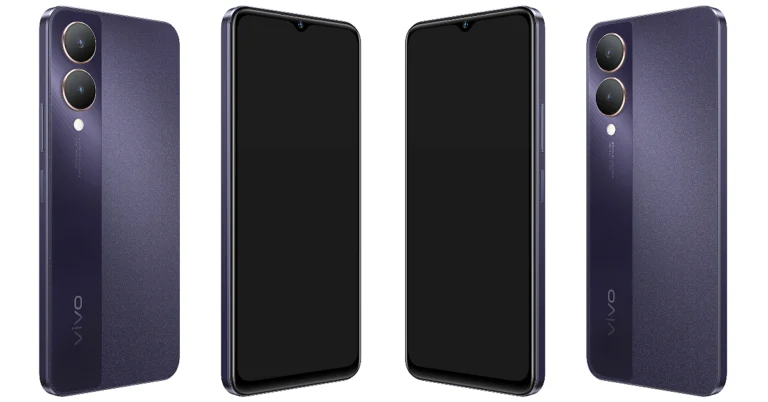
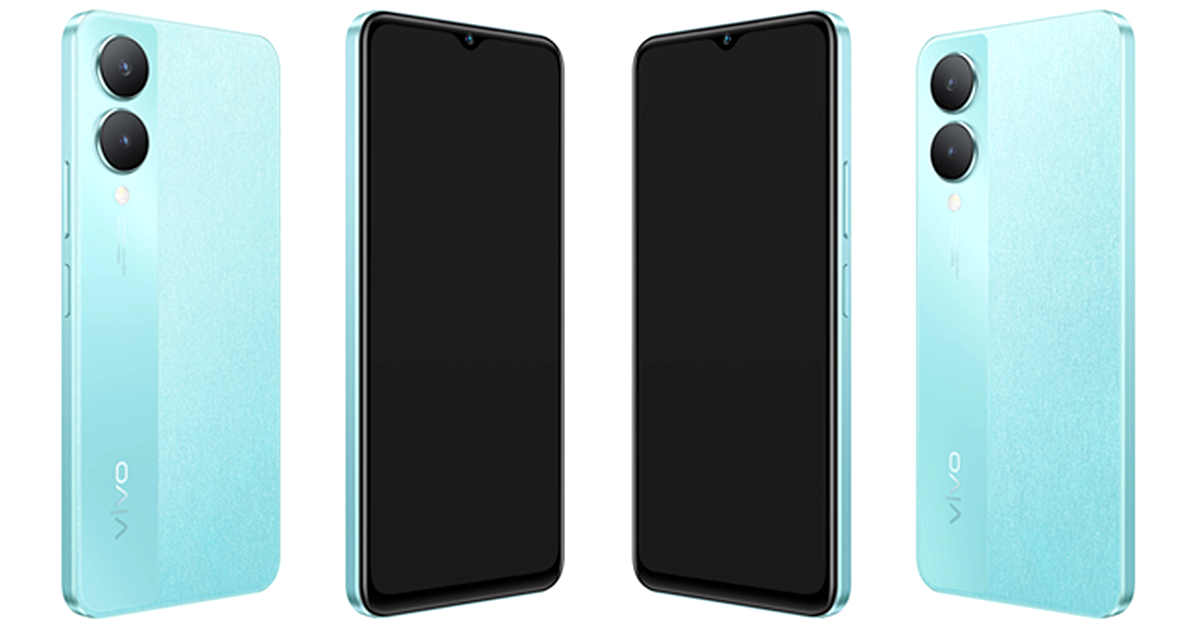
Vivo has brought a new smartphone to India under its Y-Series. The company has introduced Vivo Y28 5G in the country. The smartphone is powered by MediaTek Dimensity 6020 SoC. It comes with a 90Hz display and consists of a 50-megapixel dual rear camera setup. The device also packs a 5,000mAh battery and runs on Android 13-based Funtouch OS 13.
In This Article
Vivo Y28 5G price in India, availability
Vivo Y28 5G price in India has been set at Rs 13,999 for the base 4GB RAM with 128GB storage. The 6GB RAM with 128GB storage comes with a price tag of Rs 15,499. There is another 8GB RAM with 128GB storage that is available at Rs 16,999. The company is offering two colour options for the handset: Crystal Purple and Glitter Aqua.
Customers can purchase the phone via Amazon, Flipkart, Vivo India e-store, and leading retail outlets in the country. There will be up to Rs 1,000 cashback on the purchase of the phone using SBI, DBS, and IDFC First Bank along with others.
Vivo Y28 5G Specifications
Vivo Y28 5G is IP54-rated and features a 6.56-inch HD+ display with 720×1,612 pixels of resolution. The screen supports up to 90Hz refresh rate and 269ppi pixel density. The LCD display also has a peak brightness of 840 nits. The device operates on Android 13 with Funtouch OS 13 skin on top. The smartphone is powered by a 7nm octa-core MediaTek Dimensity 6020 SoC paired with up to 12GB of LPDDR4X RAM which can be further expanded up to 16GB. The phone sports 128GB UFS 2.2 internal storage.
For the photos and videos the Vivo Y28 5G sports a dual rear camera setup that includes a 50-megapixel primary camera with f/2.0 aperture and a 2-megapixel sensor with an f/2.4 aperture. The camera also offers light effects, customizable bokeh flares, and the Super Night Mode for stunning low-light shots. It also includes an 8-megapixel sensor for taking selfies and video calling.
The device packs a 5,000mAh battery with 15W fast charging support.
In terms of connectivity, there is Bluetooth 5.1, Wi-Fi, GPS, OTG, FM radio, A-GPS and a USB 2.0 port. The sensors on the phone include a side-mounted fingerprint sensor, accelerometer, ambient light sensor, colour temperature sensor, e-compass, gyroscope, and proximity sensor.
Garena Free Fire is a battle royale game with regular awards and tournaments to keep players interested. If you play Garena Free Fire, you should be aware of the redeem codes that are released on a daily basis. However, because the battle royale game is banned in India, players from other countries can use the Free Fire Redeem codes daily. If you’re unfamiliar with the Garena Free Fire redeem codes or don’t know how to get them, we’ve put together a step-by-step guide to help you redeem them. Check out Garena Free Fire Redeem Codes for 9 January 2024.
The Free Fire redeem codes are a great way to get free stuff. These are 12-digit codes that contain alphabets and numbers, as well as an expiration date and time. Because the Garena FF redeem codes cannot be used more than once, you should hurry to the redemption page to claim your free reward before someone else does. To get a free reward, all you have to do is go to reward.ff.garena.com/en, which is the official redemption page. Also, keep an eye on this space for daily updates on Garena Free Fire redemption codes and rewards.
In This Article
Garena Free Fire Redeem Codes Today 9 January 2024
WD2ATK3ZEA55
E2F86ZREMK49
HFNSJ6W74Z48
2FG94YCW9VMV
FFDBGQWPNHJX
HHNAT6VKQ9R7
ZZATXB24QES8
U8S47JGJH5MG
FFIC33NTEUKA
TDK4JWN6RD6
XFW4Z6Q882WY
4TPQRDQJHVP4
V44ZZ5YY7CBS
VNY3MQWNKEGU
How to Get Free Fire Redeem Codes for Garena on 9 January 2024?
Mobile gaming has exploded in popularity thanks to powerful phones that deliver console-quality experiences on the go.
Lightning-fast processors, vivid displays, and long-lasting batteries let gamers immerse in intensive titles without compromise.
Even those who consider themselves light games and are mainly fans of real money gaming and the best betting apps for cricket and other sports are warry about the phones that are still great to buy this year.
Well, you’re in luck because we’ll showcase 2024’s top 5 smartphones primed to redefine your mobile gaming experience.
Ready? Let’s dive right into it.
In This Article
Samsung Galaxy A34 5G: Smooth Performance for Casual Gamers
The Samsung Galaxy A34 5G brings premium features to a wallet-friendly price point. Its 6.5-inch FHD+ display strikes an ideal balance between immersion and portability with vibrant Super AMOLED imagery.
Powering its visuals is an Exynos 1280 processor packing robust AI to bolster gaming speeds without overheating. The device’s 5000mAh battery will also keep your gaming marathon sessions rolling for days.
Many reviewers praise the Galaxy A34’s capability to handle casual games like Subway Surfers and Temple Run smoothly. For an easy entry into mobile gaming, the Galaxy A34 5G is a reliable choice.
Poco X5 Pro 5G: Futureproof Powerhouse Processing
With a bleeding-edge Snapdragon 778G processor, the Poco X5 Pro delivers desktop-rivalling muscle on a budget. This 6nm chip flies through intensive RPGs and MOBAs without breaking a sweat thanks to its Adreno 642L GPU.
This phone has a silky smooth 6.67-inch AMOLED panel which offers startling clarity down to the last pixel. Poco’s LiquidCool Technology 2.0 comprises an enlarged copper vapour chamber and multiple layers of graphite. They keep the phone’s temperatures firmly in check even during heavy gaming sessions.
OnePlus 10T 5G: Blazing-Fast Premium Gaming
OnePlus consolidates its reputation for obscenely responsive gaming with the formidable 10T 5G. Headlining its performance is Qualcomm’s exclusive Snapdragon 8+ Gen 1 processor. This chip is capable of hitting staggering speeds up to 3.2 GHz through cutting-edge 4nm architecture.
OnePlus has also equipped its latest smartphone with one of the most advanced cooling systems with 8 temperature sensors precisely regulating heat.
With hyper-realistic visuals on a 6.7-inch 120 Hz Fluid AMOLED display matched by an all-day 5000mAh battery, the OnePlus 10T 5G brings elite-tier gaming to discerning players out there.
Xiaomi Redmi Note 12 Pro: Beast Mode on a Tight Budget
Redmi Note 12 Pro breaks expectations for what we consider mid-range devices. This smartphone runs on MediaTek Dimensity 1080 5G octa-core which can handle extreme frame rates in even graphics-heavy titles.
Xiaomi has crammed in a high-performing Mali-G68 GPU alongside the fast chipset besides ample LPDDR4X RAM to annihilate lags.
The phone has a 5160mAh battery which means it can last over 6.5 hours even under intensive gaming usage. For budget-conscious buyers unwilling to compromise on power, the Redmi Note 12 Pro is a gift with entry-level pricing.
Apple iPhone 12: All-Round Excellence for Apple Arcade Lovers
While less outwardly “gaming-focused” than Android rivals, Apple’s tight hardware-software integration squeezes every ounce of power from the iPhone 12’s blazing A14 Bionic processor.
Combined with Apple’s gaming ecosystem spanning the feature-packed Arcade platform and controller support, it delivers one of the most versatile mobile gaming experiences. Although the 6.1-inch screen falls short of max-out immersion, its Super Retina XDR OLED brilliance matched by spatial Dolby Atmos audio transports players into game worlds.
Wrap Up
When choosing an optimal gaming smartphone in 2024, display quality, battery endurance, and sustainable peak performance are some of the most important things you should consider.
You’ll want to look into phones with powerful chipsets like the Snapdragon 8+ Gen 1 and MediaTek Dimensity 1080. They could help you avoid lags and frame drops that could affect your gameplay.
In addition, it’s best to focus on phones with proven heat dissipation like the Poco X5 Pro to prevent throttling issues over time. If you’re someone on the go, phones with sizable batteries exceeding 5000mAh can give you uninterrupted gaming marathons.
If you’re all about graphics, always check the screen display of a mobile device. The best you can get are phones with 144Hz AMOLED panels as they amplify immersion across fast-paced competitive mobile gaming titles.
What’s great is that nowadays, you won’t have to spend a lot to experience some of these features. But of course, expect to pay more if you want to enjoy all of that on a single device.
With phones now rivalling consoles, mobile gaming’s future looks brighter than ever in 2024. While the phones we recommend are already some of the best in the market, we still can’t wait and see what mobile gaming will look like in the coming years.
Xiaomi’s MIUI OS is one of the most popular Android-based skins around right now. Primarily operating in the budget category, it powers Poco, Redmi, and Xiaomi smartphones. Like most of its peers, it allows users to hide any app from the app drawer of the smartphone. While you may know about the availability of the feature, sometimes it can get tricky to find it on the smartphone. If it confused you as well, you’ve landed on the right page to find the answer to your queries. Here are the 3 best methods to hide apps on MIUI OS.
What happens when you hide an app on your smartphone?
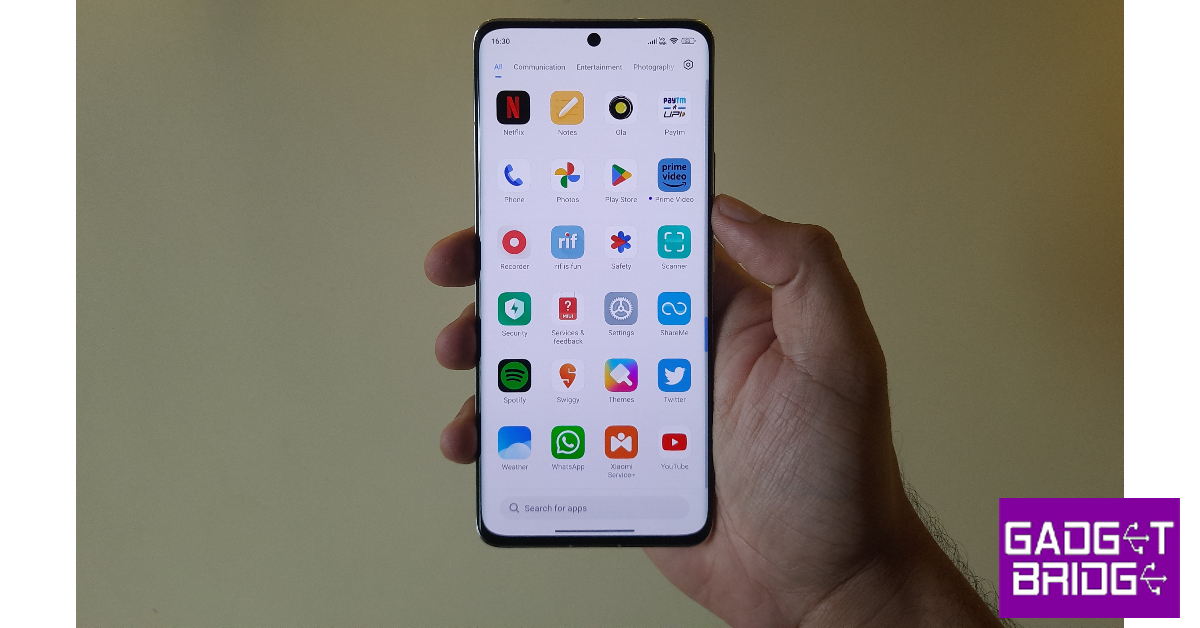
Hiding an app on your Android smartphone removes its icon from the home page and the app drawer. The app is moved to a hidden folder which is password-protected and not visible on the home screen. Different Android skins use different methods to access this hidden folder. On MIUI devices, it can be accessed by swiping two fingers in opposite directions on the home page (Xiaomi) or swiping right twice on the app drawer (Poco).
When you hide an app, you can still receive its notifications. The app will continue to appear in the app switcher. If you want more privacy, you should consider locking the app as well. All the major Android-based operating systems have a native app locker. Once you lock an app, you will only be able to access it after entering the PIN/pattern or fingerprint.
Hide Apps on MIUI OS (Poco)
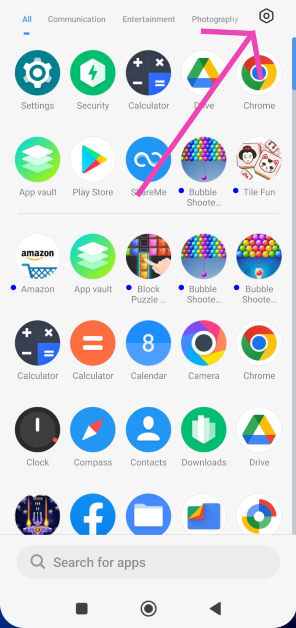
Step 1: Go to the app drawer and hit the settings icon at the top right corner of the screen.
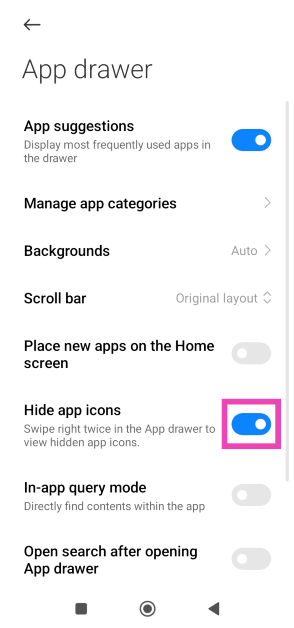
Step 2: Turn on the toggle switch for Hide app icons.
Step 3: Go back to the app drawer and swipe right twice to view the hidden folder.
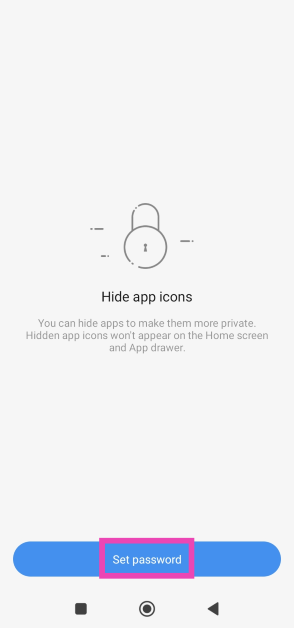
Step 4: Hit Set Password.
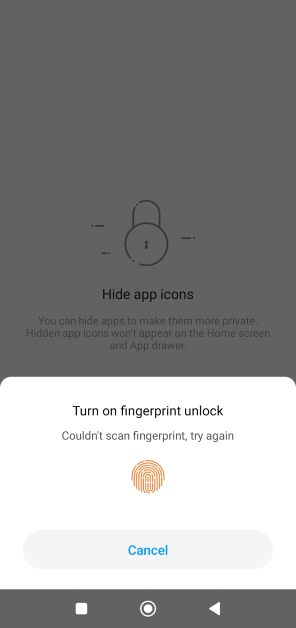
Step 5: Verify your identity using fingerprint or PIN and set up a pattern for the hidden folder.
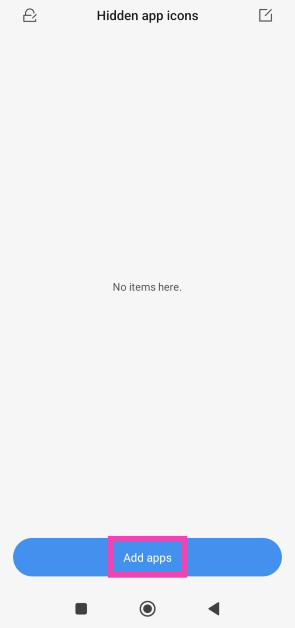
Step 6: Tap on Add apps.
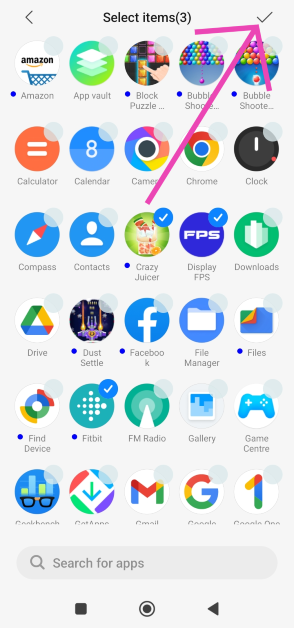
Step 7: Select the apps you want to hide and hit the tick icon at the top right corner of the screen.
Step 8: The apps will be hidden. To view the hidden apps, swipe right twice on the app drawer and verify your identity using fingerprint or pattern unlock.
Step 3: Set up a password or enter the pre-existing password.
Step 4: Switch to the Hidden Apps tab.
Step 5: Turn on the toggle switch for the apps you want to hide.
Step 6: Turn off the toggle switch for the apps you want to unhide.
Step 7: To view the hidden apps on your Xiaomi phone, swipe two fingers in opposite directions on the home screen. You will be asked for your fingerprint or the password that you’ve set up for the app lock.
Lock an app on MIUI OS
Instead of hiding an app from the app drawer, you may want to try protecting it with a password instead. Here’s how.
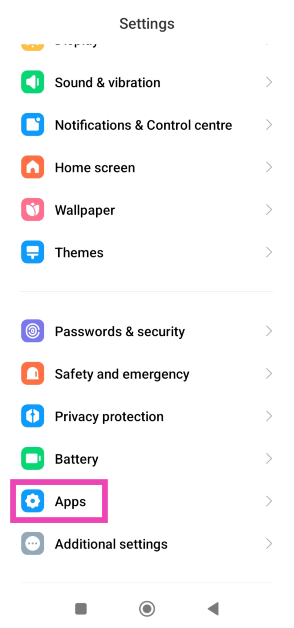
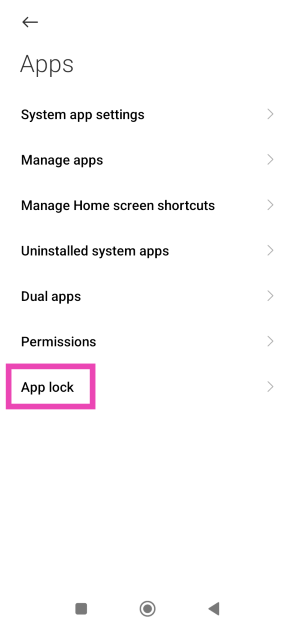
Step 1: Go to Settings and select Apps.
Step 2: Tap on App lock.
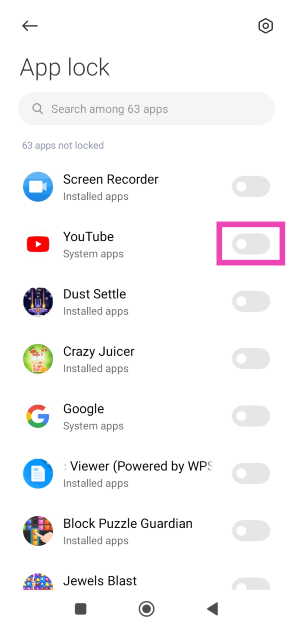
Step 3: Enter using your fingerprint, PIN, or pattern unlock.
Step 4: Turn on the toggle switch next to the app you want to lock.
Step 5: Once the app is locked use your fingerprint or PIN/pattern to unlock it.
Frequently Asked Questions (FAQs)
How do I hide an app on my POCO phone?
Swipe up to enter the app drawer, hit the settings icon at the top right corner of the screen, and turn on the toggle switch for ‘Hide app icons’. Go to the hidden folder by swiping right twice on the app drawer. Once you’re in the hidden folder, tap on ‘Add apps’.
Will I get notifications from an app if I hide it?
Hiding an app does not mute its notifications. Once you tap on the notification, the hidden app will open on your smartphone. To mute notifications, go to app settings.
How do I lock an app on MIUI OS?
To lock an app on an MIUI-powered smartphone, go to Settings>Apps>App lock and set up a pattern or PIN. Turn on the toggle switch next to the app you wish to lock.
These are the top 3 methods to hide apps on MIUI OS. Third-party apps can handle this task as well, but it comes at the cost of replacing the OS’ native launcher with a customised one offered by the app. This is why the native method is always preferred. If you know any other way to hide an app on MIUI OS, let us know in the comments!
At CES 2024, Acer introduced its new lineup of SpatialLabs stereoscopic 3D laptops and monitors.
The company introduced the Aspire 3D 15 SpatialLabs Edition Laptop and Predator SpatialLabs View 27 gaming monitor.
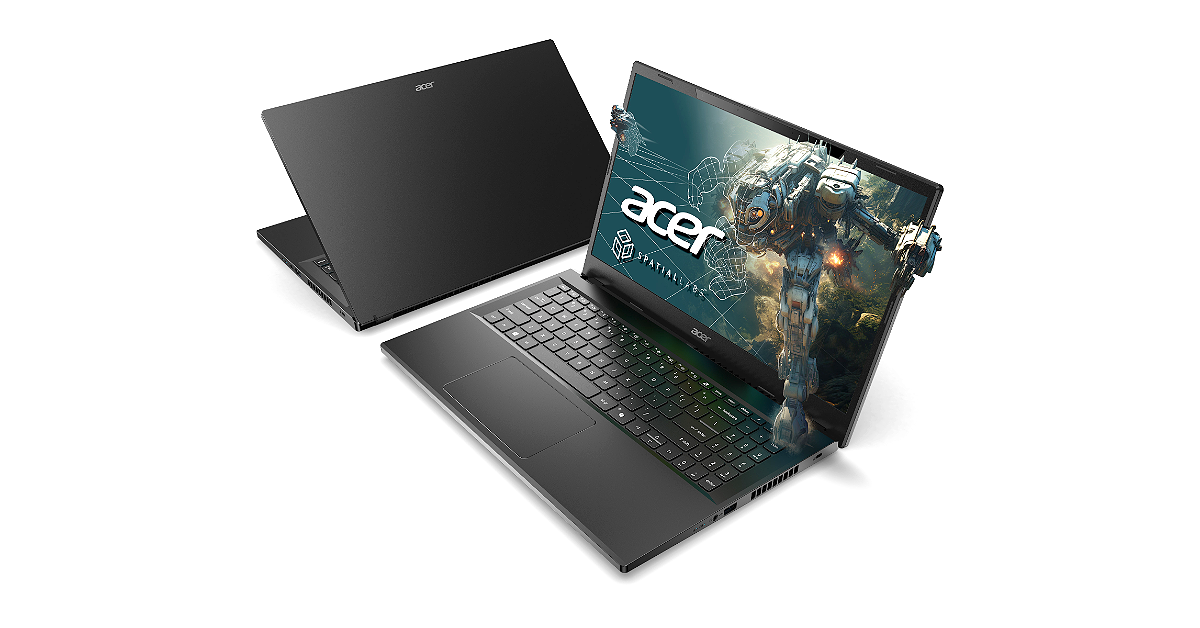
Acer brought a whole new range of laptops and PCs to CES 2024. The company showed the Aspire 3D 15 SpatialLabs Edition Laptop. As the name suggests the laptop comes with a suite of AI-powered SpatialLabs applications for 3D viewing and content creation. It is powered by the Intel Core i7 processor 13620H and up to NVIDIA GeForce RTX 4050 graphics. In addition to this, the machine features a 15.6-inch UHD display. Additionally, the company has also introduced the Predator SpatialLabs View 27 gaming monitor.
In This Article
Aspire 3D 15 SpatialLabs Edition Laptop
Acer Aspire 3D 15 SpatialLabs Edition features a 15.6-inch 4K Ultra UHD IPS display with 3840 x 2160 (2D) resolution. The screen comes with 100% support for Adobe RGB colour gamut and can be switched between 2D and 3D viewing modes. At its heart, there is up to an Intel Core i7 processor 13620H paired with up to NVIDIA GeForce RTX 4050 Laptop GPUs to project attention-grabbing 3D images and scenes. It comes with up to 32 GB of DDR5 memory and up to 2 TB of storage.
Aspire 3D 15 SpatialLabs Edition laptop is integrated with Acer PurifiedVoice and PurifiedView to provide AI-supported noise reduction technologies and camera effects during video calling.
The Aspire 3D 15’s internals stay cool and functional even under demanding 3D rendering workloads because of Acer’s TwinAir technology and thermal management system, which has three copper pipes to effectively dissipate heat.
According to the company using the AcerSense key, users can access the AcerSense utility app, which makes system maintenance and performance monitoring easy. For connectivity, there is an HDMI 2.1 port, a USB Type-C Thunderbolt 4 port, and Wi-Fi 6 compatibility. The newly introduced laptop is provided with SpatialLabs Experience Center Pro which includes a variety of SpatialLabs apps and additional features to further enhance 3D experiences. The stereoscopic 3D laptop also can instantly convert 2D content to 3D using Acer’s exclusive AI. Plus, SpatialLabs Player gives full control for side-by-side video playback and seamless switching to 2D or 3D modes when viewing on the Aspire 3D 15.
The 3D laptop also supports Acer’s OpenXR runtime for seamless 3D content creation on compatible applications in addition to other developer tools like the SpatialLabs Unity and Unreal Engine plug-ins to expedite 3D projects and expand support for more creators. The laptop also comes pre-installed with Copilot and a dedicated Copilot key for quick and easy access to the everyday AI assistant.
The Acer Aspire 3D 15 SpatialLabs Edition (A3D15-71GM) will be available in North America in February, starting at USD 1,399.99; in EMEA in March, starting at EUR 1,499, and in China in April, starting at RMB 14,999.
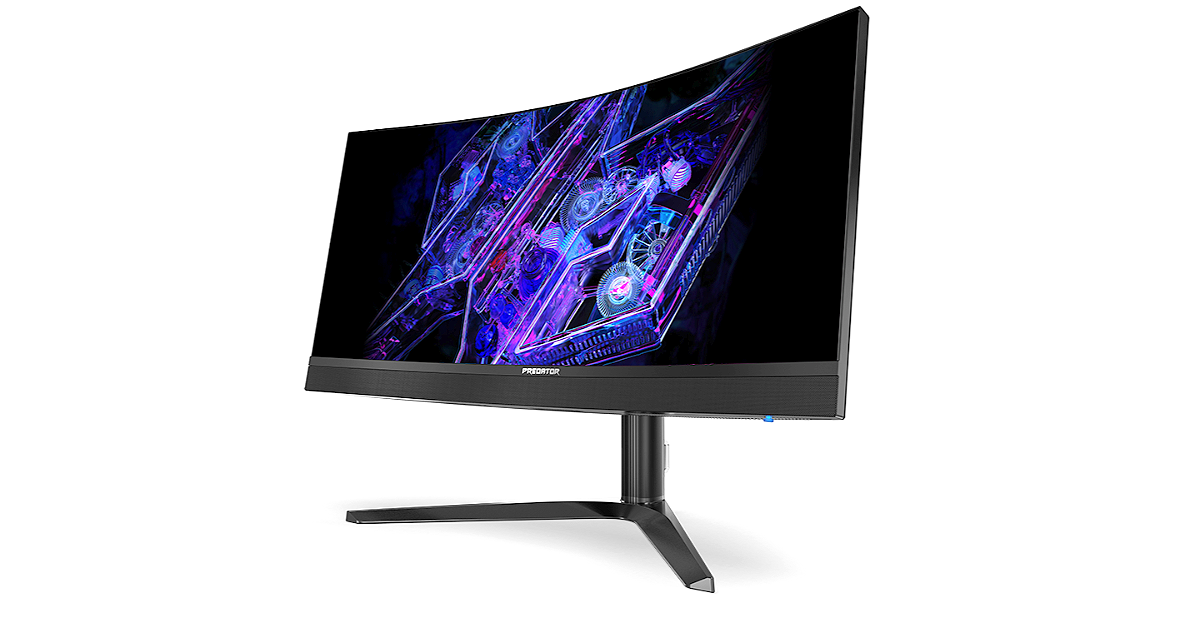
Not just Aspire 3D 15 SpatialLabs Edition Laptop the company has also expanded its SpatialLabs stereoscopic 3D lineup to Predator SpatialLabs View 27 Gaming Monitor. The display comes with a 27-inch, 2D-3D switchable 4K panel. The 3D monitor supports 160 Hz refresh rate, 400 nits brightness, and Delta E< 2 color accuracy. The AMD FreeSync and NVIDIA G-SYNC compatibility allow it to deliver vivid, tear-free frames even when gaming under extremely low-light environments.
The Predator SpatialLabs View 27 Gaming Monitor has built-in dual 2.5 W speakers. The Predator SpatialLabs View 27 will be available in North America in Q2 2024, starting at USD 1,999 and EMEA in Q1 2024, starting at EUR1,999.
The MiniLED options include Predator Z57 and Predator X34 V3.
The OLED models include the Predator X39 and Predator X34 X.
All the models come with a high refresh rate.
Acer today presented four new monitors for avid gamers at CES 2024. The company has introduced Predator Z57 and Predator X34 V3 with MiniLED and two with OLED panels, the Predator X39 and Predator X34 X. The former one features a massive 57-inch display while the other one comes with a 34-inch display. The X39 and X34 X are 39-inch and 34-inch OLED monitors.
In This Article
Acer Predator Z57
The Acer Predator Z57 is a 1000R curved monitor measuring 57 inches. It comes with a DUHD (7680×2160) resolution with a 120Hz refresh rate and a wide 32:9 aspect ratio. It is integrated with 2304-zone MiniLED technology and is VESA DisplayHDR 1000 certified. The screen offers up to 1000 nit brightness with a wide DCI-P3 98% colour gamut. The Predator Z57 is also VESA-compliant for hanging on a wall to save desk space
The Acer Predator Z57 gaming monitor offers two HDMI 2.1 ports that support the latest consoles (PlayStation 5 and XBOX Series X), and a DisplayPort 1.4 port. It also has two powerful 10W speakers to amplify sound effects.
As of right now, The Predator Z57 will be available in North America in Q2 2024, starting at USD 2,499.99; in EMEA in Q2 2024, starting at EUR 2,399, and in China in Q1 2024, starting at RMB 17,999.
The Acer Predator X34 V3 features a 34-inch curved MiniLED display with 1500R curvature and a 21:9 ultrawide QHD (3440×1440) resolution. The display has a DCI-P3 94% color gamut and VESA DisplayHDR 1000 certification. The screen supports a 180 Hz refresh rate and 1 ms (G-to-G) response time support fluid. The Acer Predator gaming monitors also include two HDMI 2.0 ports and DisplayPort 1.4 for connectivity. Just like its elder sibling Predator X34 V3 can also be hung on a wall and has an adjustable height, tilt, and swivel to optimise viewing comfort. Furthermore, it includes 5W speakers.
The Predator X34 V3 will be available in North America in Q2 2024, starting at USD 899.99; in EMEA in Q2 2024, starting at EUR 849, and in China in Q1 2024, starting at RMB 5,999.
The Acer Predator X39 & Predator X34 X on the other hand are highlighted with a 39-inch and 34-inch UWQHD (3440×1440) resolution with up to a 240 Hz refresh rate and 0.01 ms pixel response time. Both the models have 800R curvature and tight angles of up to 178 degrees. The gaming monitors also come with DCI-P3 99% colour gamut and VESA DisplayHDR True Black 400 support. These new models are also Eyesafe 2.0 certified and default to image retention refresh to help prevent eye strain.
The Predator X39 will be available in North America in Q2 2024, starting at USD 1,499.99; in EMEA in Q2 2024, starting at EUR 1,499, and in China in Q1 2024, starting at RMB 9,999.
The Predator X34 X will be available in North America in Q2 2024, starting at USD 1,299.99; in EMEA in Q2 2024, starting at EUR 1,299, and in China in Q1 2024, starting at RMB 8,999.
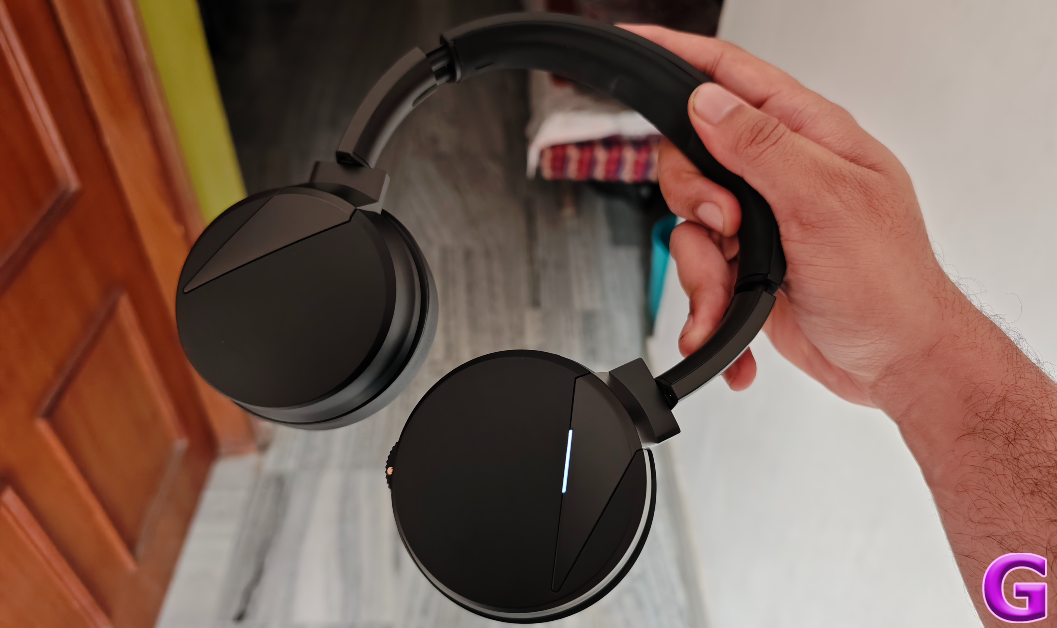
Any new tech in audio products is always one slip-up away from being dismissed as a gimmick. The stakes are all the more high when you’re a new tech outfit planning to showcase your groundbreaking innovation on your debut product. Indian startup Rapture Audio Labs takes on this gargantuan task on its Sonic Lamb headphones. Featuring an ‘Impulse Driver’, Sonic Lambs brings the subwoofer experience to headphones, offering next-level immersion that allows the user to feel the music. Currently priced at Rs 15,999, it goes up against some of the most premium headphones on the market. We used the Sonic Lamb for a couple of weeks and put it through a series of tests, here is our review of the headphones.
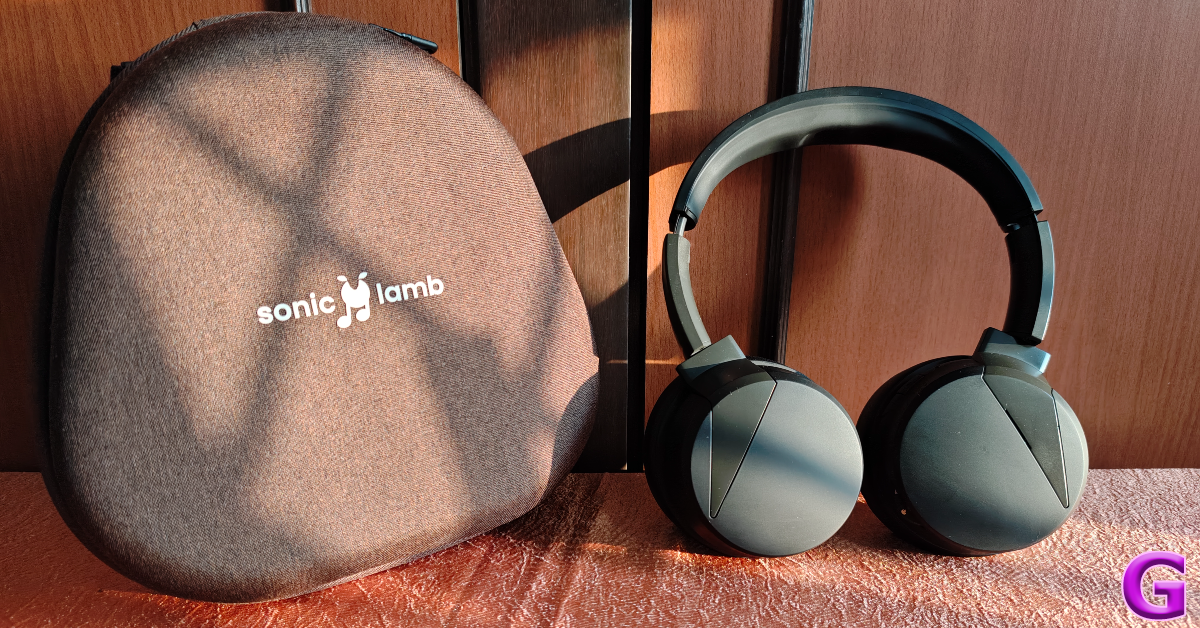
Inside the Sonic Lamb retail box, you get the headphones, a hard case, a 1.5m USB charging cable, a boom mic attachment, and a quick start guide. There are three colour variants on offer – Moonstone White, Ember Gray (with orange highlights), and Obsidian Black (featured in this review).
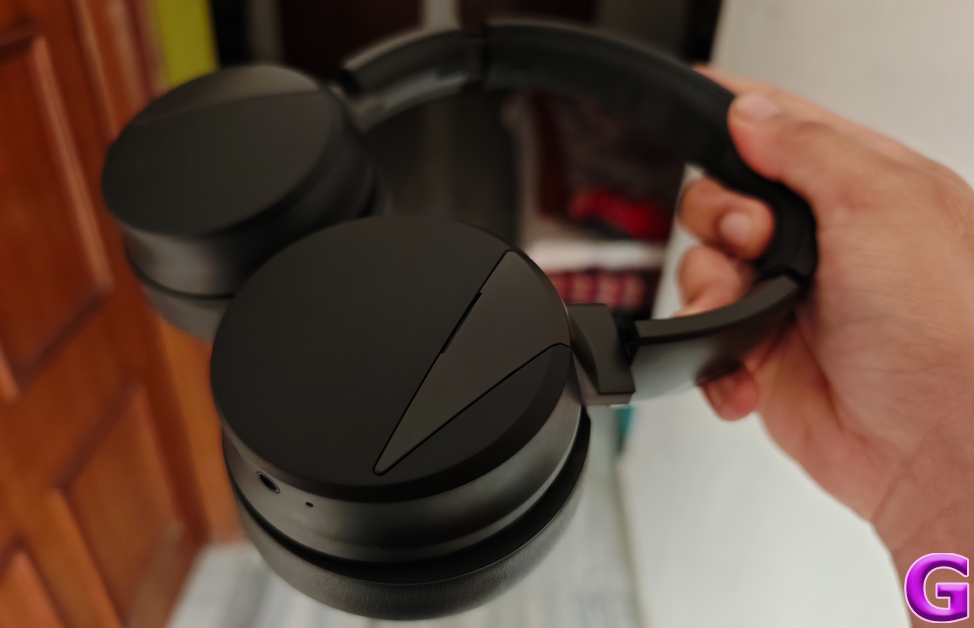
Sonic Lamb’s design is simple, but not basic. The two swivelling earcups have a smooth triangular panel jutting into them from the headband. The Ember Gray colour variant highlights this panel with a contrasting orange shade. There is an LED notification light on the right earcup. This earcup also gets the control buttons and the scroll wheel to change the immersion level of the headphones.
It takes some time to get used to the position of the buttons. A stronger ‘clicky’ feedback on these buttons would have been ideal, but it is something we can excuse on the debut product. The scroll wheel’s ridge texture and ratcheted feedback are decent. Also present on this earcup is a USB Type-C charging port, a microphone, and a 2.5mm jack for the boombox mic attachment.
The quality of the materials used on the headphones imparts a lot of lushness to them. The silicone headband is padded well enough to not cause fatigue even after hours of wearing the headphones. The vegan leather used on the earpads is quite exquisite as well. The earpads, or ‘Wooferpads’ as Rapture likes to call them, can be rotated around. Being easily detachable, they can be replaced when they get worn out. An additional pair costs Rs 999 on Sonic Lamb’s official website.
The overall fit of the headphones is very comfortable. There was minimal fatigue to be felt after hours of use. The earpads cosily wrap around the ears, forming a nice, warm chamber for hearing. We can’t speak to the water and dust resistance of the device, as it does not have an IP rating. But, it can withstand sweat and minor water splashes without impeding the performance of the drivers.
Powering the Sonic Lamb is Qualcomm’s QCC 3034 chipset. There are 4 codecs on offer – aptX, aptX HD, AAC, and SBC. With Bluetooth 5.1 onboard, the headphones provide a functional range of up to 15 metres. A wired connection (using a USB Type-C cable) is also supported on certain devices. The star of the show is the 27mm impulse driver that brings the physical sensation to the sonic experience. This driver is integrated with a 40mm dynamic driver on either earcup, completing the hybrid acoustic setup.
Before we get to the subwoofer immersion, let’s talk about the general soundstage. We listened to a range of genres on the Sonic Lamb and were pleased with how the 40mm driver relayed the output. The mix of frequencies is delicate and very nuanced here. Before trying on the headphones, we feared the low end would dominate and marr the mix, but thankfully that is not the case here. The mids and the highs are pronounced and easily separable from the bass. Even the subtle hits of the clapper on our favourite rock tunes found good representation in the overall mix.
Sonic Lamb has all the makings of a premium pair of headphones. Even without the integrated subwoofer tech, its audio output can easily go up against the established heavyweights in its category. If you’re used to an entry-level headset, the step-up in terms of soundstage will be immediately noticeable. But that’s not all on offer here. Let’s talk about the subwoofer.
The scroll wheel on the left earcup can be used to toggle between the four immersion modes: Hear, Feel, Immerse, and Beast. The ‘Hear’ mode is the most neutral-sounding profile on the headphones. Ideal for calling and listening to podcasts, you can also stick to this mode while listening to genres that do not need a pronounced low end. The impulse driver kicks in on the ‘Feel’ mode, banging against the membrane to produce some delightful woofer-like sensations. The same is the case for ‘Immerse’ mode, which is our favourite out of the lot.
This mode brings the right degree of power and sensation to the mix. The bass elements take full form and reverberate around the ear, creating a layer of immersion that we haven’t felt in any pair of headphones before. Every kick of the bass drum is relayed with appropriate intensity. What’s surprising is that it doesn’t meddle with the higher frequencies at all. The guitar and vocal notes remain clear and unobstructed. The final ‘Beast’ mode takes things up a notch and delivers a powerful surround which is borderline bewildering. We used this mode while watching movies and gaming. After a while, the Beast mode can get fatiguing.
While the audio performance of the Sonic Lamb is impressive, it does leave a little more to be desired in terms of features. Active Noise Cancellation is hands down the biggest miss on these headphones. At the price of Rs 16,000, the lack of ANC is inexcusable. Another mildly annoying thing about these headphones is that there is no way to tell the battery level on the device. A companion app by Rapture is supposedly in the works, which should fix this problem, but ideally, you want the battery info to be reflected in the interface of the connected device. Multi-point connection is a welcome feature, but its functioning isn’t as smooth as we would have liked. Hopefully, a firmware update can fix these issues.
There are a couple of things that deserve appreciation, though. The first is the boom mic attachment which elevates the calling experience massively. It picks up even the faintest of whispers and works perfectly in tandem with the internal noise suppression microphone to relay noise-free audio. Another nifty feature is the support for wired connection, which lets you use the headphones while they are connected to a PC or laptop via a USB cable. The quality of the 1.5m USB cable is pretty high-end, which is nice to see.
Equipped with a 1,400 mAh battery pack, these headphones last up to 24 hours in Hear Mode, 14 hours in Feel Mode, 10 hours in Immerse Mode, and 7 hours in Beast Mode. We mainly used the Sonic Lamb in Feel and Immerse modes throughout the review period. It lasted us 5 days upon 2-3 hours of daily usage. It takes up to 2 hours to fully charge the headphones using a USB Type-C product.
After experiencing Sonic Lamb’s immersive soundstage, you wouldn’t think it is a first-generation product from a recently founded startup. The integrated subwoofer adds a fun element to the mix without muddling the higher frequencies. It is evident that a lot of effort went into tuning this new tech so that it adds to the output without becoming a distraction. If you’re a basshead, then these headphones should definitely be on your radar.
The Aspire Vero 16 features a 16-inch WQXGA or WUXGA display.
Aspire Go 14 and Aspire 15 laptops include a WUXGA panel and FHD display.
At the ongoing CES 2024, the tech firm Acer has announced a new Aspire Vero 16 AI PC. The laptop is powered by Intel’s latest Core Ultra 7 processor with Intel AI Boost and Wi-Fi 7 compatibility. In addition to this, the company has also introduced new Acer Aspire Go 15 and Aspire Go 14 laptops with up to a WUXGA display and features up to Intel Core i3 N-Series processors. All Aspire laptops are built with Microsoft Copilot in Windows 11.
In This Article
Aspire Vero 16
The Aspire Vero 16 features a 16-inch WQXGA or WUXGA display with 2560 x 1600 pixels of resolution. The screen comes with a 16:10 aspect ratio and thin bezels. It covers 100% of the sRGB colour space and is available with a WUXGA touchscreen option. It draws its power from the latest Intel Core Ultra 7 processor with Intel AI Boost. The Windows 11 laptop is also equipped with 16 GB of LPDDR5 memory which supports up to 2 TB dual PCIe Gen 4 SSD of upgradable storage. The machine is also pre-installed with a host of intelligent applications including the AcerSense app to manage the laptop’s battery consumption, power-saving, and performance modes, while Intel Unison 2.0 integrates different devices and operating systems in a single screen.
The Acer laptop comes with an OceanGlass touchpad, made with ocean-bound plastic. For video conferencing, it includes a 1440p QHD webcam with AI-assisted Acer PurifiedVoice to stay clear of unwanted noise. Included with Copilot for Windows, it uses the program’s centralised generative AI to let users use their devices intelligently and effortlessly.
In terms of connectivity, there is Wi-Fi 7 Bluetooth LE Audio, two USB Type-C ports (Thunderbolt 4 and USB 4), and an HDMI 2.1 port. The laptop offers up to 10.5 hours of battery life on a single charge.
Aspire Go Laptops
Acer has also launched Aspire Go 15 (AG15-31P), Aspire Go 14 (AG14-31P), and Aspire Go 14 (AG14-21P) at CES 2024. The Aspire Go 14 and Aspire 15 laptops include a WUXGA panel and FHD display featuring BlueLightShield to help protect the eyes during extended viewing periods.
The Aspire Go 15 (AG15-31P) and Aspire Go 14 (AG14-31P) models are powered by up to Intel Core i3 N-Series processors, while the Aspire Go 14 (AG14-21P) can also be equipped with the AMD Ryzen 7000 Series processors. Each model also comes with up to 16 GB LPDDR5 RAM and up to 1 TB M.2 PCIe Gen3 SSD. They come integrated with Windows Copilot and the app can be accessed using a dedicated Copilot key.
The laptops support Wi-Fi 6 connectivity and come with Energy Star and EPEAT Silver registration.
The Acer Aspire Vero 16 (AV16-51P) will be available in North America in April, starting at USD 749.99, and in EMEA in March, starting at EUR 1,199.
The Acer Aspire Go 15 (AG15-31P) will be available in North America in February, starting at USD 249.99, and in EMEA in February, starting at EUR 529.
The Acer Aspire Go 14 (Intel processor) (AG14-31P) will be available in North America in March, starting at USD 249.99, and in EMEA in March, starting at EUR 549.
The Acer Aspire Go 14 (AMD processor) (AG14-21P) will be available in North America in March, starting at USD 379.99, and in EMEA in March, starting at EUR 649.
Last year Galaxy S23, Galaxy S23+, and Galaxy S23 Ultra were launched in India.
The company will soon introduce its next flagship series on January 17.
Prior to the introduction, the company has reduced the price of Samsung Galaxy S23 and Galaxy S23+ in India
Soon Samsung will unveil the Galaxy S24 Series in India and the global market. But just ahead of the official announcement, the price of last year’s models Samsung Galaxy S23 and Galaxy S23+ has been reduced. Both the models have received a massive price cut of Rs 10,000 in the country.
In This Article
Samsung Galaxy S23, and Galaxy S23+ new price and details
The Samsung Galaxy S23 was launched in India in two variants 8GB RAM with 128GB storage and 8GB RAM with 256GB storage options priced at Rs 74,999 and Rs 79,999 respectively. But now the phone’s price has fallen by Rs 10,000 in India. The 128GB RAM variant will be accessible at Rs 64,999 whereas the 512GB option is now available at Rs 69999.
On the other hand, the 8GB RAM with 256GB storage option of the S23+ was made available in India at Rs 94,999 and the 8GB RAM with 512GB storage model cost Rs 1,04,999. After the price revision, the device can now be purchased for Rs 84,999 And Rs 94,999 respectively.
The Galaxy S23 Ultras was launched in India at Rs Rs 1,24,999 for the base 12GB RAM with a 256GB storage option. The 12GB RAM with 512GB storage option and 12GB RAM with 1TB storage model was priced at Rs 1,34,999 and Rs 1,54,999 respectively. The company is also offering an additional Rs 10,000 instant discount to buyers on HDFC Banks’ Credit/Debit Cards EMI and Credit Card Full Swipe payment.
The phones can be purchased through the company’s official website and other online and offline retailers in the country.
Samsung Galaxy S23 specifications
The Samsung Galaxy S23 features a 6.1-inch full-HD+ Dynamic AMOLED 2X display with a 240Hz touch sampling rate and a refresh rate of up to 120Hz, which can drop to 48Hz. A Vision Booster function is available for improved outside visibility. The entire phone is protected by the Gorilla Glass Victus 2 and is IP68-rated for water and dust resistance. It runs on Android 13 with One UI 5.1 and is powered by a Qualcomm Snapdragon 8 Gen 2 SoC with 8GB RAM and up to 256GB storage
S23 comes with a triple rear camera setup that includes a 50-megapixel primary wide-angle sensor with an 85-degree field of view and an f/1.8 aperture. A 12-megapixel ultra-wide angle camera with an f/2.2 aperture and a 120-degree field of view, as well as a 10-megapixel telephoto camera with an f/2.4 aperture and a 3x optical zoom, are also included in the system. It has a 12-megapixel selfie sensor with an f/2.2 aperture lens and an 80-degree field of view for selfies.
The smartphone sports a 3,900mAh battery that supports 25W wired and 15W wireless charging. It also comes with Wireless PowerShare so you can use it to charge other wirelessly charging devices.
Samsung Galaxy S23+ specifications
There is a lot in common between the Samsung Galaxy S23 and Galaxy S23+. The device has a 6.6-inch full-HD+ Dynamic AMOLED 2X display. The same display features that were stated earlier are also present. The device is water and dust-resistant and has an IP68 rating. The processor and software are the same on both phones.
The specifications of the S23+ camera, however, are the same as those of the S23. Another noteworthy change in this edition is the battery, which has been increased to 4,700mAh and now supports 25W wired and 15W wireless charging. Samsung Knox security and Knox Vault are also supported.
Snapchat’s ‘ephemeral messaging’ has been game-changing in the world of instant messaging. Even messengers like WhatsApp and Telegram have ‘self-destruct’ options for messages and media now. ‘Stories’ is another feature that was popularised by Snapchat but is fairly commonplace now. If you’re new to Snapchat, Stories are fleeting images or videos that are visible on your profile for 24 hours. All of your friends on your contact list can view your Stories. If you don’t want someone to view them, you can always limit their visibility. Today, we bring you the top 6 ways to hide your Snapchat Story from others.
Blocking a couple of people from viewing your Snapchat Story is an easy process and doesn’t take more than a few seconds. But what if you want to post something for your close circle of friends only? Going through your entire friend list and filtering everyone out manually can be a tiring process. Some people use a private Snapchat account for their close friends, but constantly switching between two accounts can also be a hassle.
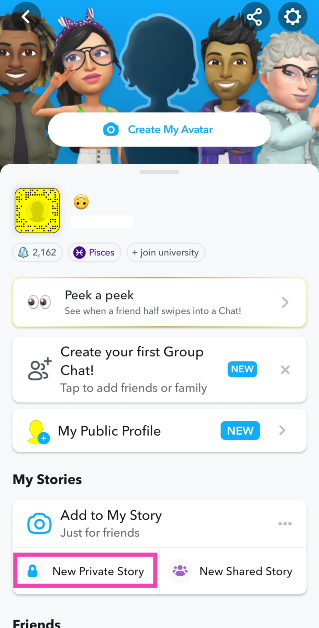
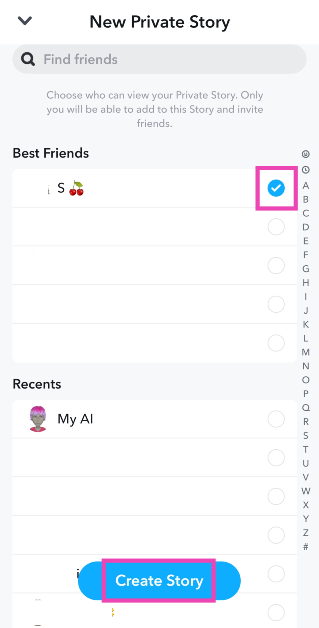
Luckily, Snapchat offers an easy way out of this conundrum. Using ‘Private Stories’ you can post media only for certain people. You can select a group of people while posting the Story, making it easier to filter out the rest of your contacts. Your Private Stories show up with a lock icon around them. The person viewing them will know they are watching a private story. Other people will not be notified about any new updates if they are not on the private list.
Hide Snapchat Story using Settings
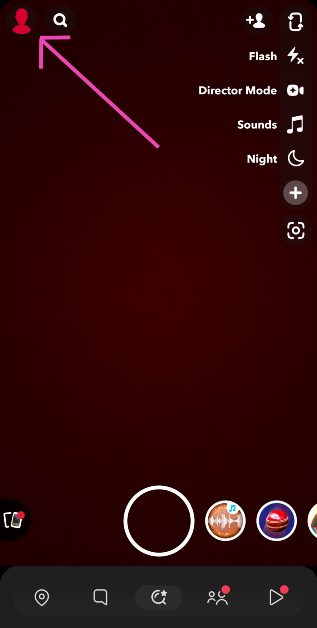
Step 1: Launch Snapchat and tap your Bitmoji at the top left corner of the screen.
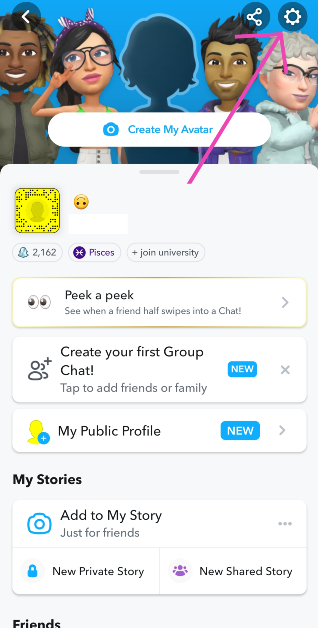
Step 2: Hit the gear icon at the top right corner of the screen to go to settings.
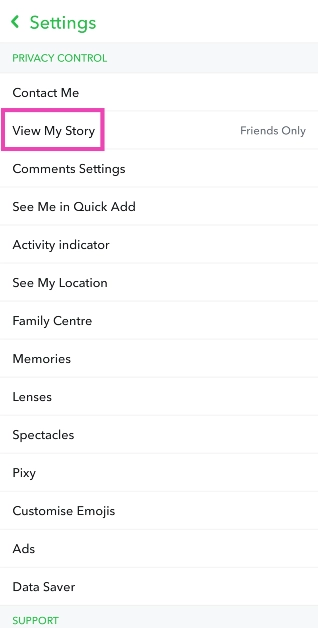
Step 3: Scroll down and tap on View My Story.
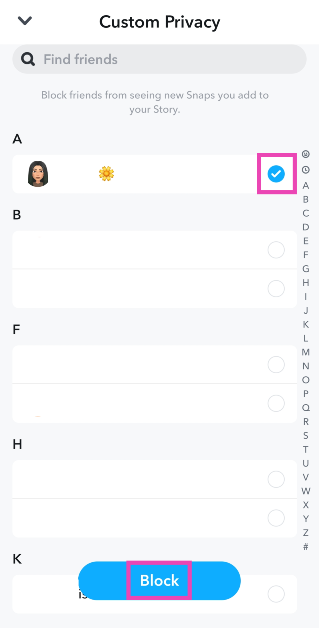
Step 4: Select Custom.
Step 5:Select the contacts from whom you want to hide the Story.
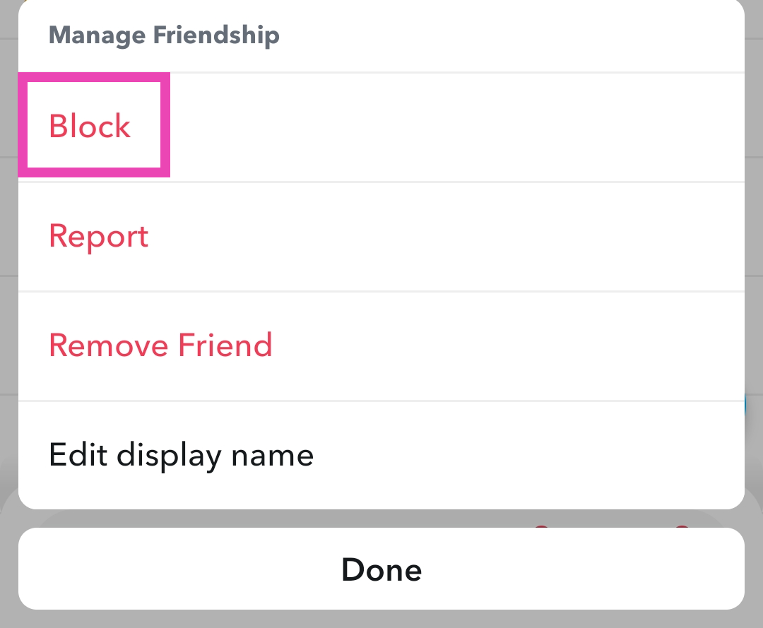
Step 6: Hit Block.
Hide Snapchat Story using Story Settings
Step 1: Launch Snapchat and tap your Bitmoji at the top left corner of the screen.
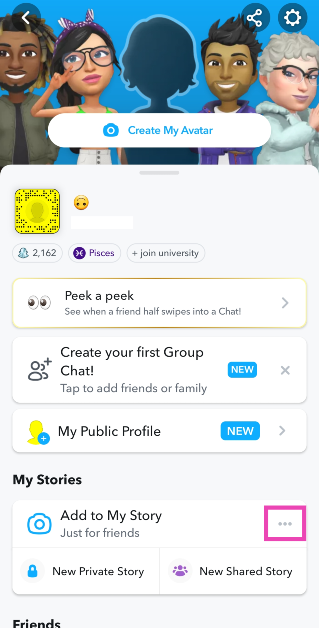
Step 2: Hit the ellipses next to My Story.
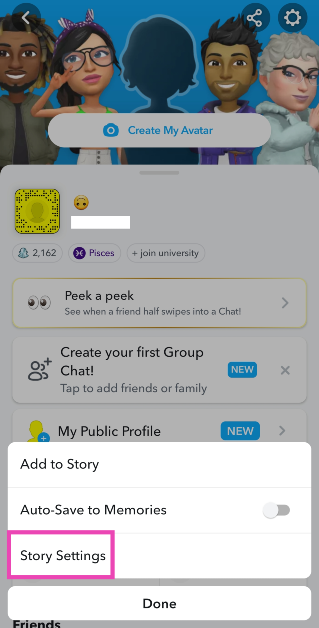
Step 3: Tap on Story Settings.
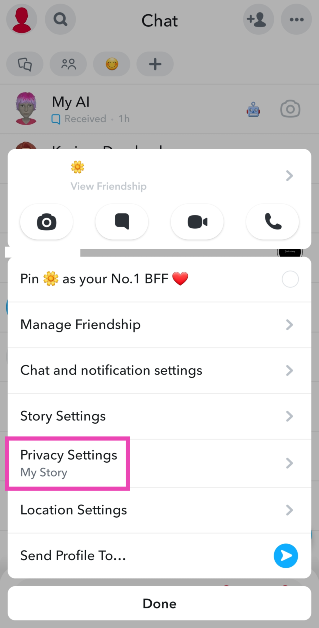
Step 4: Select Custom under ‘Who can view My Story?’
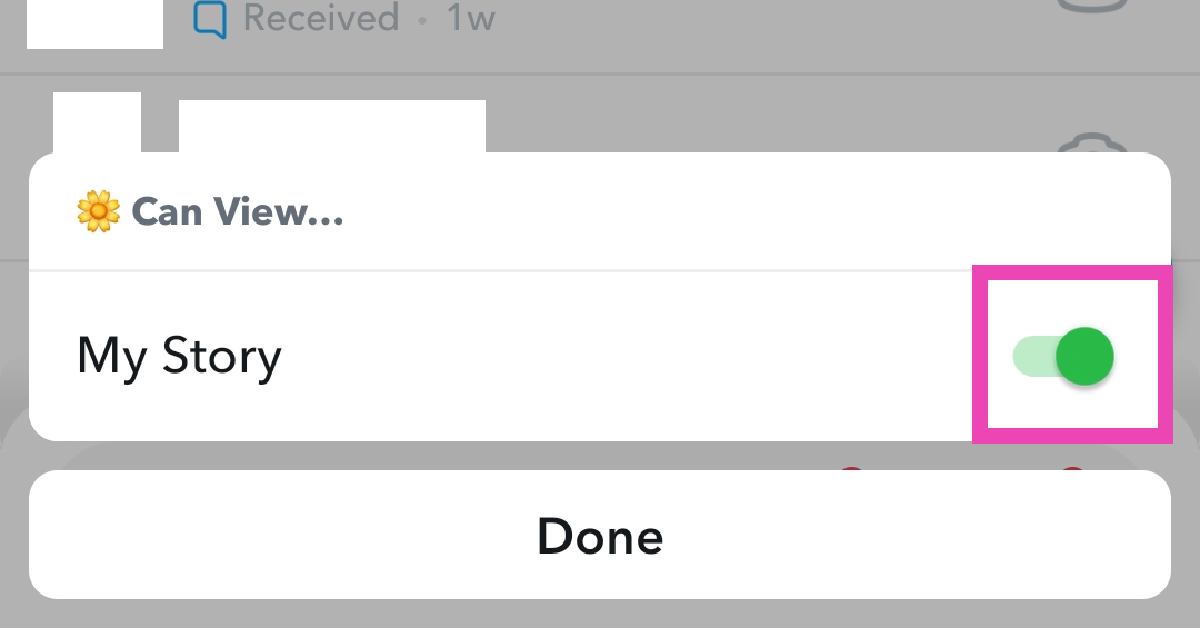
Step 5: Select the contacts from whom you want to hide the Story.
Only your friends can view your Snapchat Story. You can hide your Story from certain friends if you want to limit its visibility.
What is a Private Story on Snapchat?
A Private Story is only visible to a selected group of friends chosen by the user. Other people in your contact list will not be able to view that Story.
How do I know if I’m on someone’s Private Story?
If you see a lock icon on someone’s profile in the Story section, it means you are viewing their Private Story.
These are the top 6 ways to hide your Snapchat Story from others. If you want to mute someone else’s Story, long-press their profile, tap on Story Settings, and turn on the toggle switch for Mute. Muting someone’s story ensures that it does not show up at the top of the list every time they post an update. If you know any other way to hide your Story from others, let us know in the comments!
The iQoo Neo 7 5G comes with a MediaTek Dimensity 8200 SoC.
It features a 120Hz AMOLED display.
In addition to this, the handset offers 120W fast charging
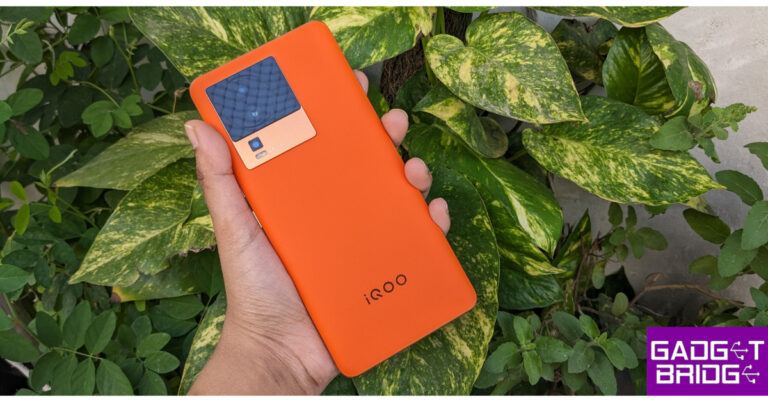
iQoo Neo 9 Series is set to launch in India next month. Just ahead of the India launch the company has reduced the price of the iQoo Neo 7 5G. The device was launched in the country last year and this is the second time it has received a price cut. After the February launch the device received its first price revision in September 2023. The gaming smartphone is powered by MediaTek Dimensity 8200 SoC. The phone features a 120Hz AMOLED display and supports 120W fast charging.
iQoo Neo 7 5G was launched in India in February last year. It comes in two different configurations: 8GB RAM with 128GB storage and 12GB RAM with 256GB storage option. The smartphone is seeing a price drop of up to Rs 4,000. After a price reduction of Rs 3,000, the 8GB RAM model is available at Rs 24,999. On the other hand, the 12GB RAM variant has received a price cut of Rs 4,000 and will come with a reduced price of Rs 27,999.
Note that this is the second time the handset’s price has been dropped. In September the device got a price cut of Rs 2,000. After which the price of 8GB RAM with 128GB storage which was launched at Rs 29,999 came down to Rs 27,999 whereas the 12GB RAM price dropped to Rs 31,999 from Rs 33,999 launch price.
The device is being offered in two colour options of Frost Blue and Interstellar Black.
iQoo Neo 7 5G specifications
iQOO Neo 7 5G (Review) comes with a 6.78-inch full-HD+ AMOLED screen with a resolution of 1,080×2,400 pixels and a refresh rate of 120Hz. The display supports 1,300 nits of peak brightness and a pixel density of 388ppi. The screen has a 20:9 aspect ratio and a 93.11 percent screen-to-body ratio. It runs on Funtouch OS 13 based on Android 13 out of the box.
Under its hood, there is an octa-core 4nm MediaTek Dimensity 8200 5G SoC with up to 12GB of LPDDR5 RAM and 256GB of UFS3.1 of storage options. The iQOO Neo 7 has Extended RAM 3.0, which increases your RAM by 8 GB, turning a phone with 12 GB of RAM into a phone with 20 GB of RAM.
There is a triple rear camera setup that includes a 64-megapixel primary sensor with OIS ( f/1.79 aperture). In addition to this, there is a 2-megapixel macro sensor (f/2.4 aperture) and a 2-megapixel depth sensor (f/2.4 aperture).
Garena Free Fire is a battle royale game with regular awards and tournaments to keep players interested. If you play Garena Free Fire, you should be aware of the redeem codes that are released on a daily basis. However, because the battle royale game is banned in India, players from other countries can use the Free Fire Redeem codes daily. If you’re unfamiliar with the Garena Free Fire redeem codes or don’t know how to get them, we’ve put together a step-by-step guide to help you redeem them. Check out Garena Free Fire Redeem Codes for 8 January 2024.
The Free Fire redeem codes are a great way to get free stuff. These are 12-digit codes that contain alphabets and numbers, as well as an expiration date and time. Because the Garena FF redeem codes cannot be used more than once, you should hurry to the redemption page to claim your free reward before someone else does. To get a free reward, all you have to do is go to reward.ff.garena.com/en, which is the official redemption page. Also, keep an eye on this space for daily updates on Garena Free Fire redemption codes and rewards.
In This Article
Garena Free Fire Redeem Codes Today 8 January 2024
A customised voicemail greeting is a big improvement over the standard robotic message. With a custom greeting, you can let your callers know about your whereabouts and when they can expect you to get back to them. The process is very simple and won’t take much of your time. Unlike iPhones, some Android phones may not have a dedicated voicemail tab on the dialer, leaving the user confused. So, here is an easy guide to change your voicemail greeting on an Android device. (2024)
What to keep in mind while recording a voicemail greeting
A rushed and haphazard voicemail greeting defeats its purpose. These tips will help you record a flawless message in no time.
Keep the greeting short and simple. You don’t want the caller to be waiting for a long time to leave a message.
Write down what you’re going to record in advance. This reduces the chances of any unwanted pauses and gives your greeting a nice flow.
Use a microphone to record your message. You can use a regular mic that comes integrated with your headset. For more professional recordings, use a USB microphone.
Make sure there is no background noise. This will ensure the quality of the recording is crystal clear. Sometimes even the noise of a ceiling fan can sound too loud on the recording. Keep the general humdrum at bay.
Change Voicemail Greeting on Android
Step 1:Launch the default Phone app on your Android smartphone.
Step 2:Press and hold 1 to connect to your voicemail service.
Step 3: If asked, enter your voicemail password.
Step 4: Now, press 3 for the greeting menu.
Step 5: If you want to set a standard greeting, press 1. For a customised greeting, press 2.
Step 6:Record your greeting message when you hear the dial tone.
Step 7: Hit the pound (#) sign once you’re done.
Step 8: Your recorded greeting will be played back to you. Press 1 to save it or 2 to record it again.
Frequently Asked Questions (FAQs)
How do I change my voicemail greeting on Android?
The process to change your voicemail greeting depends on the service provided. Press and hold 1 to reach your voicemail service and press the appropriate keys to reach the greeting menu to record a message.
Can I set more than one greeting message for my voicemail?
No, you can only set up one greeting at a time. However, you can choose from multiple pre-recorded standard greetings.
How do I delete a voicemail on my Android phone?
Press 7 to delete a voicemail after hearing it, and press 9 to delete it. You can also use the Visual Voicemail app to delete multiple voicemails at once on your Android phone.
This is how you can change your voicemail greeting on your Android phone. Read this article to learn how you can change it on your iPhone. The numbers you need to press in order to reach the greeting menu may vary among different service providers but the general process remains the same. If you know any other method to change the greeting message, let us know in the comments!
Garena Free Fire is a battle royale game with regular awards and tournaments to keep players interested. If you play Garena Free Fire, you should be aware of the redeem codes that are released on a daily basis. However, because the battle royale game is banned in India, players from other countries can use the Free Fire Redeem codes daily. If you’re unfamiliar with the Garena Free Fire redeem codes or don’t know how to get them, we’ve put together a step-by-step guide to help you redeem them. Check out Garena Free Fire Redeem Codes for 7 January 2024.
The Free Fire redeem codes are a great way to get free stuff. These are 12-digit codes that contain alphabets and numbers, as well as an expiration date and time. Because the Garena FF redeem codes cannot be used more than once, you should hurry to the redemption page to claim your free reward before someone else does. To get a free reward, all you have to do is go to reward.ff.garena.com/en, which is the official redemption page. Also, keep an eye on this space for daily updates on Garena Free Fire redemption codes and rewards.
In This Article
Garena Free Fire Redeem Codes Today 7 January 2024
FFEVDBHUA7Q6TGH
FERTY9IHKBOV98U
FZ7YTA5Q4RED2C3
FVBERFJUVYTSRFW
FVE4RH5TJUGVYCT
FGYSEWRFUR45F3
FNJU67EWADWEFT
FGSWBH3J4KR5IT6
FYUGHVNCD5JSUEY
F4TG5BTNGKOIUYG
FAYQ765TRF4VBRN
F76HBVDRFVDFC5
F98JHGWFERFERA
F6UJHBDRTGVTGR
F6HJUYTDRDRFRY
F98IUJHYGWERFH
F7U4GGJVI8CY6TG
FGBW3REGFBI7345
FJ8FG7BSJUWYT3R
FGJ87UJHGDRTG3
FNYJ85U6YHGW4G
FDHJU6KMJHRY43
FH87KJHGFSERF3
How to Get Free Fire Redeem Codes for Garena on 7 January 2024?
The price of Galaxy S24, Galaxy S24+ and Galaxy S24 Ultra leaked ahead of launch.
All the models will run on One UI 6.1 skinned on top of Android 14 out of the box.
Samsung is all prepped up to officially unveil its Galaxy S24 Series globally this month. The company will launch its next iteration of the S-series on January 17. But ahead of the official launch Samsung Galaxy S24, Galaxy S24+ and Galaxy S24 Ultra pricing has leaked on the web. The company is currently taking pre-reservations for the upcoming flagship lineup.
Samsung Galaxy S24 Series is scheduled to launch on January 17. The company will be hosting Galaxy AI is coming launch event to introduce the flagship series. But before they were formally introduced the leaked pricing of Samsung Galaxy S24, Galaxy S24+ and Galaxy S24 Ultra surfaced online.
According to a tipster the Galaxy S24 with 128GB of storage variant is expected to retail at EUR 899, or about Rs 81,900 and EUR 959, or Rs 87,400, for the 256GB model.
On the other hand, the 256GB and 512GB storage versions of the Galaxy S24+ will cost EUR 1,149, or almost Rs 1,04,700, and EUR 1,269, or nearly Rs 1,15,600, respectively.
Lastly, the elite model Galaxy S24 Ultra is likely to be priced EUR 1,449, or roughly Rs 1,32,100 for the 256GB storage model. The 512GB model will cost EUR 1,569, or roughly Rs 1,43,000. The 1TB storage is slated to be available for EUR 1,809, or around Rs 1,64,900.
Samsung has not yet confirmed but it is likely to introduce three new models Samsung Galaxy S24, Galaxy S24+, and Galaxy S24 Ultra at the Galaxy Unpacked 2024 event. All the models will run on One UI 6.1 skinned on top of Android 14 out of the box. The devices are expected to feature AMOLED LTPO displays with variable refresh rates ranging between 1Hz to 120Hz.
According to reports, the regular model S24 is likely to be powered by Exynos 2400 chipset in India and other regions. Whereas in the US and Canada, it may include the Snapdragon 8 Gen 3 SoC.
Both the S24+ and S24 Ultra are expected to come equipped with Snapdragon 8 Gen 3 SoC for Galaxy, globally. The Galaxy S24 Ultra is also said to feature a 200-megapixel quad camera setup. Whereas the S24 and S24+ may come with a 50-megapixel triple camera system.
Oppo Reno 11 Pro comes with a 6.74-inch 1.5K OLED curved display.
In China, Oppo Reno 11 Pro is equipped with an octa-core Snapdragon 8+ Gen 1 SoC whereas the standard model is powered by MediaTek Dimensity 8200 SoC.
The India models are expected to come with different processors and battery capacities.
Oppo Reno 11 Series is all set to launch in India soon. The company has officially confirmed the launch date of its upcoming smartphone series. The company is expected to launch the lineup in India and globally on the same day. The lineup was introduced in China last year in November. Before the official announcement, the price and key features of the Indian models surfaced on the web. The series includes two phones- Oppo Reno 11 Pro and Reno 11. The devices feature a sleek design highlighted with a 50-megapixel triple rear camera setup. All the phones run on ColorOS 14 on top of Android 14.
Oppo Reno 11 Series is confirmed to launch in India on January 12. The exact launch date was confirmed through the company’s official website in the country. The lineup includes two phones- Oppo Reno 11 Pro and Reno 11.
The tipster has also revealed the key specs of both the Indian variants of Oppo Reno 11 Pro and Reno 11. According to the claims the series in India will have different processors from its Chinese equivalents. The Oppo Reno 11 is expected to be powered by MediaTek Dimensity 7050 SoC. On the other hand, MediaTek Dimensity 8200 SoC will power the Pro model.
A 5,000mAh battery is likely to be packed inside the vanilla model and a 4,600mAh battery is expected to be backed by the Pro model in India.
Note that the Reno 11 and Reno 11 Pro in China are powered by MediaTek Dimensity 8200 and Snapdragon 8+ Gen 1 SoC, respectively. The Oppo Reno 11 and Oppo Reno 11 Pro in China have 4,800mAh and 4,700mAh batteries, respectively with 67W and 80W fast charging support.
Both phones include a triple rear camera setup that is led by a 50-megapixel primary sensor with OIS and includes the same 32-megapixel RGBW Sony IMX709 front-facing camera for selfies.
The Pro variant sports a 4,700mAh battery with 80W Super Flash Charge support whereas the vanilla model packs a 4,800mAh battery that comes with 67W Super Flash Charge support.
Samsung has started taking pre-reservations of the Galaxy S24 Series in India ahead of its official announcement.
The company will be hosting the Galaxy Unpacked event in 2024 on January 17 at the SAP Center in San Jose.
The upcoming S-Series is expected to include Galaxy S24, Galaxy S24+ and Galaxy S24 Ultra.
On January 17, Samsung will announce the next iteration of its Galaxy S-Series globally. At the upcoming Galaxy Unpacked 2024 event the Galaxy S24 Series is likely to make its debut. Ahead of the launch in India pre-reservation for the Galaxy S24 Series have now started. The upcoming S-Series is expected to include Galaxy S24, Galaxy S24+ and Galaxy S24 Ultra. Customers who have reserved a unit will be entitled to early access and exclusive discounts when buying a Samsung Galaxy S series smartphone.
Buyers in India planning to buy any of the smartphones from the Galaxy S24 Series can now pre-book as the pre-reservation window is open in the country. Customers who want early access to smartphones can also take advantage of special deals when placing a pre-reserve order.
Customers in India can pre-reserve the top-tier Galaxy S series by paying a token amount of Rs 2000 on Samsung.com, Samsung Exclusive stores, Amazon.in and leading retail outlets across India. Consumers who pre-reserve will get benefits worth Rs 5000.
How to pre-book/pre-reserve Galaxy S24 Series smartphones
To pre-book/pre-reserve Galaxy S24 Series go to Samsung.com or click here.
Then scroll down the page and tap or click on the Pre-reserve Now button.
After that pay Rs 1,999 pre-book amount (Note: the amount will be adjusted during the final purchase)
After payment is done you will receive a #Next Galaxy VIPPASS
The VIPPASS can be used after the Galaxy S24 series is up for sale.
Samsung Galaxy S24 specifications (expected)
At the Galaxy Unpacked 2024 event, Samsung is likely to include three new models Samsung Galaxy S24, Galaxy S24+, and Galaxy S24 Ultra. All the devices will be shipped with One UI 6.1 skinned on top of Android 14 out of the box. The devices are expected to feature AMOLED LTPO displays with variable refresh rates ranging between 1Hz to 120Hz. According to reports, the regular model S24 is likely to be powered by Exynos 2400 chipset in India and other regions. Whereas in the US and Canada, it may include Snapdragon 8 Gen 3 SoC.
Both the S24+ and S24 Ultra are expected to come equipped with Snapdragon 8 Gen 3 SoC for Galaxy, globally. The Galaxy S24 Ultra is also said to feature a 200-megapixel quad camera setup. Whereas the S24 and S24+ may come with a 50-megapixel triple camera system.
BenQ GV31 Portable Projector is equipped with Full HD 1080p resolution.
It also supports up to 4K resolution.
It comes with a 135-degree projection angle.
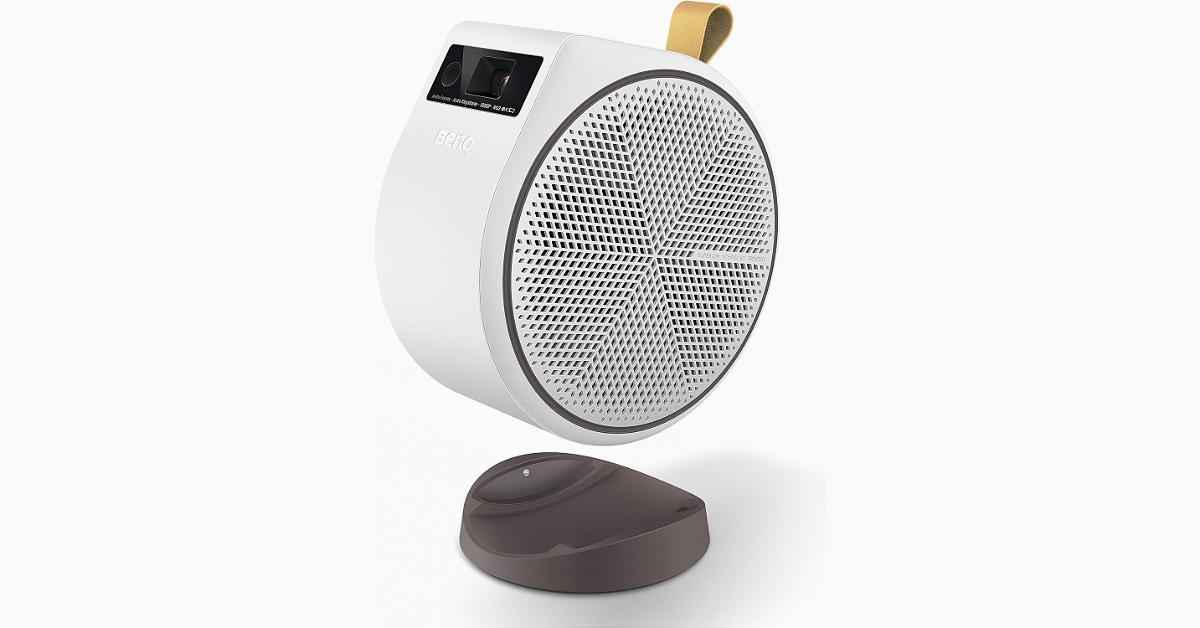
BenQ a popular brand that deals in digital projectors, monitors, interactive large-format displays, and lighting solutions introduced a new portable projector. The tech company announced BenQ GV31 Portable Projector offering immersive FHD projections. It comes with an in-built Android TV featuring Netflix so you can stay entertained anywhere.
The BenQ GV31 Portable Projector is made to provide instant access to entertainment, as it can project anytime, anywhere. The GV31 projector can project a screen up to 120 inches in FHD (1080P) 1920 x 1080 pixels Resolution and 100,000:1 contrast ratio. 4K content is also supported by the projector. The device has 300 ANSI lumens brightness. The projector offers a total of six picture modes Bright, Cinema, Day Time, Game, Living Room and Sports.
The BenQ GV31 Portable Projector offers Free Angle Projection allowing up to 135 degrees of flexibility, allowing users to enjoy their preferred media even when they’re lying in bed thanks to its Free Angle Projection feature.
The portable projector comes equipped with 16W (two 8W) 2.1 channel speakers with enhanced bass. Additionally, the projector functions as a Bluetooth speaker. As mentioned earlier the projector comes with Android TV 11.0 built-in and Netflix pre-installed. To ensure you stay up to date, the USB-C connection features a reversible design and supports data transfer, power delivery, and DisplayPort Alternate Mode. The device has fast autofocus and automated vertical keystone correction for hassle-free setup. The device also includes Chromecast, AirPlay, and Google Assistant support.
The BenQ GV31 Portable Projector is claimed to offer up to 3 hours of video playback and 6 hours of music playback. In terms of connectivity, there is Bluetooth 5.0; Wi-Fi 802.11a/b/g/n/ac/ax(2.4GHz/5GHz), two HDMI, a USB Type A, and USB Type C (Display Port/ PD in 15V-3A; 20V-2.25A to 3.25A/ PD out 5V-2A, 9V-2A, 12V-1.5A, 15V1.2A).
According to Mr. Rajeev Singh, Managing Director of BenQ India, “The arrival of our GV31 projector marks a step up from the GV30, transforming how Indians indulge in entertainment. BenQ’s commitment to innovative projection technology integrated with Android TV, and high-fidelity audio-visual experience aims to redefine how families and individuals experience and customise their modes of entertainment.”
Facebook’s new ‘Link History’ is now live and rolling out to mobile devices in a phased manner. If you don’t see it on your device, you may need to update the app. While it may be a helpful feature for some users, in true Facebook fashion, it comes with a bunch of privacy concerns. Facebook’s long history of handling user data does not inspire confidence in its new feature. So, let’s take a quick look at what Link History is and how you can disable it on Facebook.
Facebook recently started unrolling the ‘Link History’ feature in a phased manner. This feature allows users to view all the links they have visited on Facebook’s mobile browser within the app. The links are deleted after 30 days. If you can’t find a video or a product link that you recently clicked on, this is where you need to go to locate it. On some devices, this option may be turned on by default. While it may seem like a convenient feature, it does have a massive downside.
Facebook has made it clear that it uses your link history to suggest better ads for you across all Meta platforms. This implies a sordid exchange of personal data between Facebook and third-party advertisers, which may not be okay with a lot of users. Luckily, there is an option to opt out of your feature and keep your Facebook activity relatively out of reach from prying eyes.
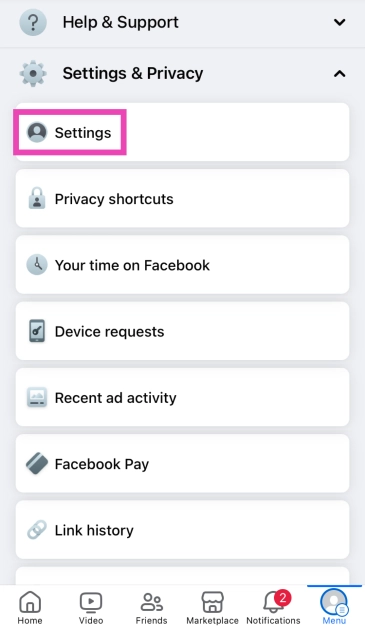
Disable Link History on Facebook for Android
Step 1:Launch the Facebook app on your Android smartphone.
Step 2: Hit your Profile icon at the top right corner of the screen.
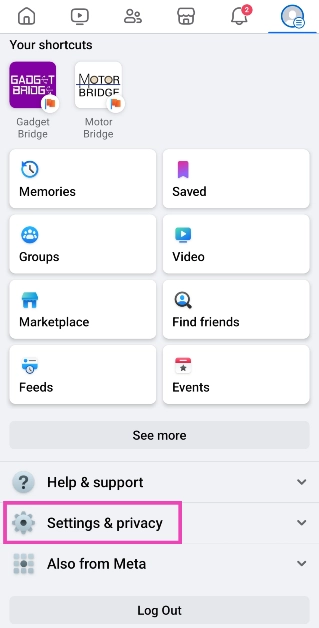
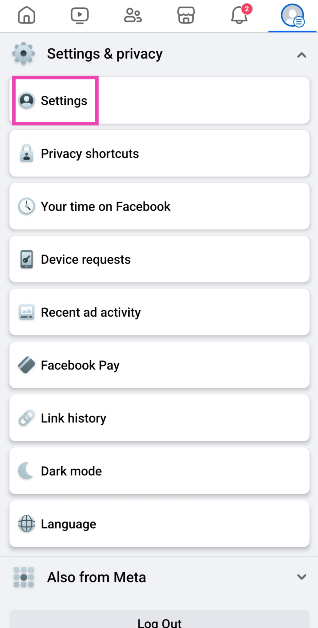
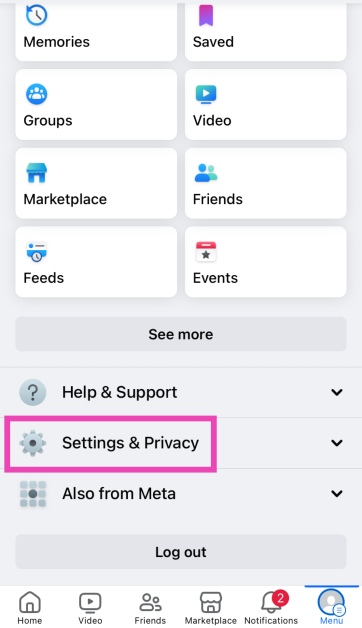
Step 3: Tap on Settings and privacy.
Step 4: Select Settings.
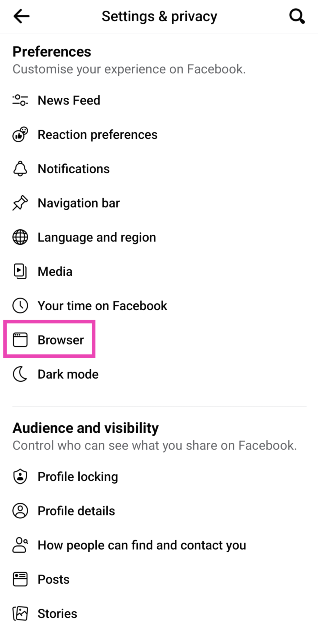
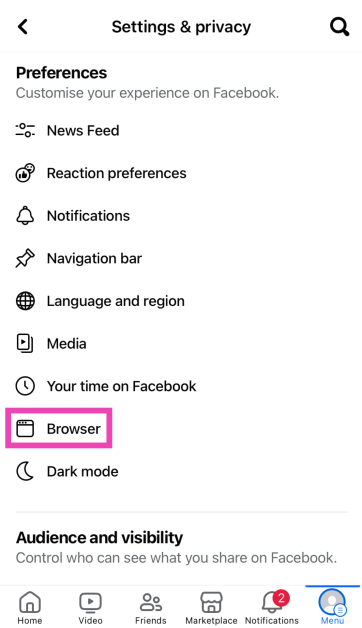
Step 5: Scroll down and select Browser.
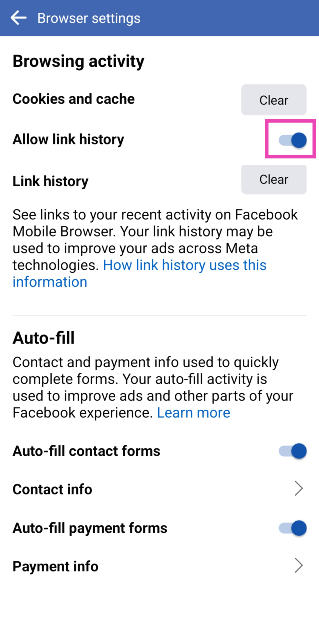
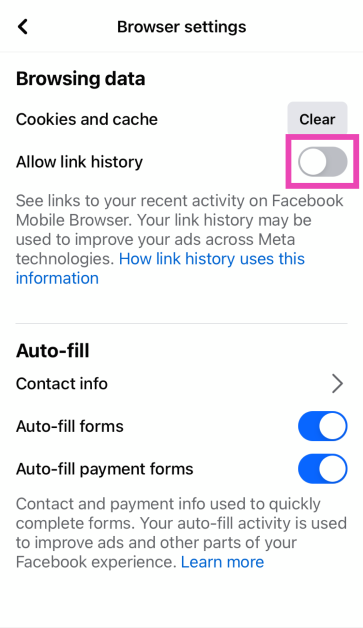
Step 6: Turn off the toggle switch for Allow link history.
This is how you can disable the link history feature on Facebook. To maintain your privacy across the internet, always turn down cookie requests when you visit a website and make sure your web browser enforces HTTPS encryption for all web pages. Use a secure browser like DuckDuckGo to make sure your privacy remains intact.
Garena Free Fire is a battle royale game with regular awards and tournaments to keep players interested. If you play Garena Free Fire, you should be aware of the redeem codes that are released on a daily basis. However, because the battle royale game is banned in India, players from other countries can use the Free Fire Redeem codes daily. If you’re unfamiliar with the Garena Free Fire redeem codes or don’t know how to get them, we’ve put together a step-by-step guide to help you redeem them. Check out Garena Free Fire Redeem Codes for 6 January 2024.
The Free Fire redeem codes are a great way to get free stuff. These are 12-digit codes that contain alphabets and numbers, as well as an expiration date and time. Because the Garena FF redeem codes cannot be used more than once, you should hurry to the redemption page to claim your free reward before someone else does. To get a free reward, all you have to do is go to reward.ff.garena.com/en, which is the official redemption page. Also, keep an eye on this space for daily updates on Garena Free Fire redemption codes and rewards.
In This Article
Garena Free Fire Redeem Codes Today 6 January 2024
FKY89OLKJFH56GRG
FUTYJT5I78OI5CF2
FUKTY7UJIE56RYHI
FBVFTYJHR67UY4IT
FYHJTY7UKJT678U4
FYHDBGTDTYHGR5FH
FV7CYTGDRTUNMJEK
FDYHGBNE5RDTGE87
FRJNTR67UH675Y4E
FKJIT67UWEYHT4H4
FRYHGVTWFBUE45HS
FOGFUYJN67UR6OBI
FYHJMKRT76HYR56C
F6Y6FHRTJ67YHR57
FR45TEYHBTGFEDG3
FTGBHFTHYR566GRK
F6GHTR6YHR6GRGYU
FVYHFT6HYJT67LYP
How to Get Free Fire Redeem Codes for Garena on 6 January 2024?
The upcoming series may include two devices: the Poco X6 and the Poco X6 Pro.
The Pro variant is likely to be a rebadged variant of the Redmi K70E.
Redmi K70E was launched in China in November last year.
Poco X6 Series is confirmed to launch in India on January 11. The lineup is likely to include two models Poco X6 and the Poco X6 Pro that is said to succeed the Poco X5 and Poco X5 Pro launched last year. But today it revealed that its upcoming lineup will be shipped with the new HyperOS out of the box.
Poco India has officially announced that on January 11 it will also launch HyperOS along with Poco X6 Series. Note that the company introduced its latest Android skin in China while announcing the Xiaomi 14 series in China.
Expressing his excitement, Himanshu Tandon, Country Head, of POCO India said, “The integration of Xiaomi HyperOS with the upcoming POCO X6 Pro, marks an exciting milestone for us. Xiaomi HyperOS’ capabilities align with our vision to deliver peak performance and seamless connectivity, enhancing the overall user experience in the POCO X6 Pro.”
The company has further confirmed that the Poco X6 Series global launch event will be held on January 11 at 5.30 PM. It will be available on Flipkart post-launch. The device has also been listed on the e-commerce platform to tease its availability and key features.
Poco India has revealed that Poco X6 Pro will be equipped with MediaTek Dimensity 8300-Ultra SoC. The company said, “In addition to the groundbreaking Xiaomi HyperOS, the POCO X6 Pro will also mark the India debut of the MediaTek Dimensity 8300-Ultra SoC. This powerful chipset is set to revolutionise smartphone performance, offering lightning-fast speeds, enhanced multitasking capabilities, and outstanding AI capabilities. With the addition of Xiaomi HyperOS, POCO X6 Pro users can expect an unparalleled smartphone experience.”
Rumours suggest the Poco X6 Pro will be a rebranded variant of the Redmi K70E which was launched in China in November 2023. This means Poco X6 Pro will come with a 6.67-inch OLED 1.5K display having 1,220×2,712 pixels of resolution. The OLED screen will support up to 120Hz refresh rate and 2160Hz touch sampling rate. The display may also offer 1,800 nits of peak brightness and 1920Hz PWM dimming. The phone is expected to include an under-display fingerprint sensor.
The Poco X6 Pro will be the first handset to debut in India with a 4nm MediaTek Dimensity 8300 Ultra chipset. It is likely to include up to 16GB of LPDDR5x RAM, and up to 1TB of UFS4.0 storage.
For the optics, the upcoming gaming phone may feature a triple rear camera setup consisting of a 64-megapixel primary camera with OIS, an 8-megapixel ultra-wide-angle sensor, and a 2-megapixel macro lens. The device could feature a 16-megapixel front-facing camera for taking selfies.
It is expected to boast a 5,500mAh battery with support for 90W wired fast charging support.
The screen features a Dynamic bar offering a simplified and seamless user interface.
The device packs a 5,000mAh battery.
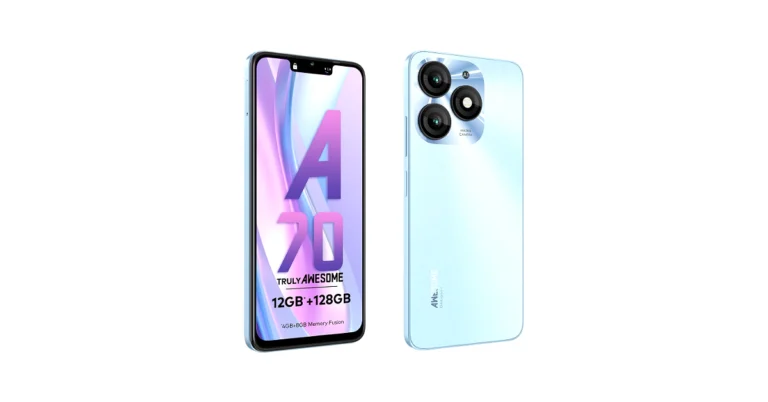
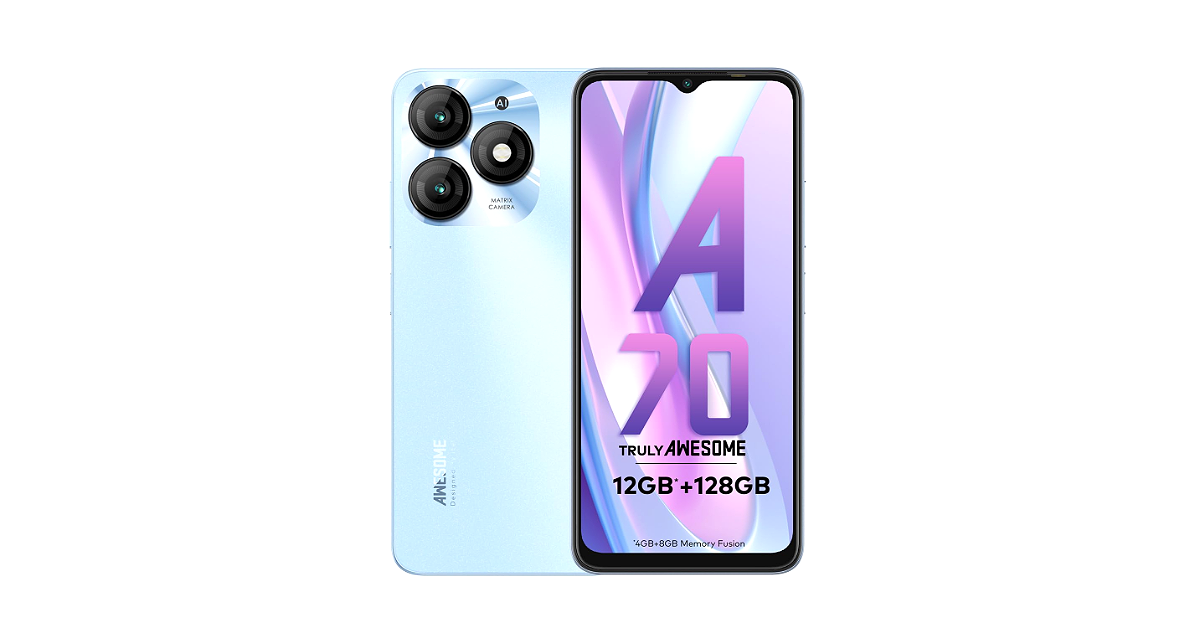
Itel A70 has officially made its debut in India recently. The first sale of the newly arrived phone has today begun in the country. An octa-core Unisoc T603 SoC powers the device. It comes with a Dynamic Bar feature and a 13-megapixel dual rear camera setup. The device also features an 8-megapixel front camera for selfies.
In This Article
Itel A70 price in India and sale details
Itel A70 price in India has been set at Rs 6,299 for the base 4GB RAM with 64GB storage. The price of the 4GB RAM with 128GB storage is set at Rs 6,799 whereas the 4GB RAM with 256GB storage comes with a price tag of Rs 7,299. The phone is being offered in three colour options Azure Blue, Brilliant Gold, Field Green, and Stylish Black. The device is currently up for sale via Amazon and offline stores in the country.
Itel A70 specifications
Itel A70 features a 6.6-inch HD+ display with 1,612 x 720 pixels of resolution. The screen supports a 120Hz refresh rate and 500 nits of peak brightness. The display has an interactive Dynamic Bar on top that is said to manage screen space for notifications without obstructing the main viewing area.
For the software, the device comes pre-installed with Android 13 Go Edition-based ItelOS 13 out of the box. Under the hood, there is an octa-core Unisoc T603 SoC with 4GB of RAM and up to 256GB of storage. The device has a feature to virtually expand the RAM by an additional 8GB to up to 12 GB. Also, the internal memory can be further expanded to 2TB using a microSD card.
Itel A70 features a dual rear camera setup that includes a 13-megapixel main sensor and an unnamed AI secondary sensor. The device also includes an 8-megapixel front-facing camera for selfies and video calling.
In terms of connectivity, the phone includes 4G, Wi-Fi 802.11, Bluetooth 5.0, GPS/GLONASS, and a USB Type-C port for charging. The handset also boasts a 5,000mAh battery and a side-mounted fingerprint sensor.
As is tradition, Redmi has launched its powerful midrange ‘Note’ series early in the year. Xiaomi’s subsidiary brand unveiled the Note 13 Series yesterday. The three smartphones in the lineup will go on sale on January 10. The entry-level Redmi Note 13 is priced at Rs 17,999 while the Note 13 Pro and Note 13 Pro+ fetch Rs 25,999 and Rs 33,999 respectively. The top-spec Pro+ variant has a 200MP primary shooter and is powered by the MediaTek 7200 Ultra SoC. Like every year, this is the mid-range smartphone that other companies need to beat. If you’re thinking about making the purchase on January 10, here are the top 10 apps you should download first on your new Redmi Note 13 Pro+.
Developed by Google, Snapseed is one of the best photo editing apps you can download on your new Redmi Note 13 Pro+. It is perfectly optimised for the Android platform and is very accessible to the average user trying their hand at editing for the first time. Its exhaustive tools and filters are easy to use and bring the best out of your pictures. You can elevate your pictures by changing their exposure, making them more detailed by bringing out the surface structures, aligning the skewed lines to perfection, and more.
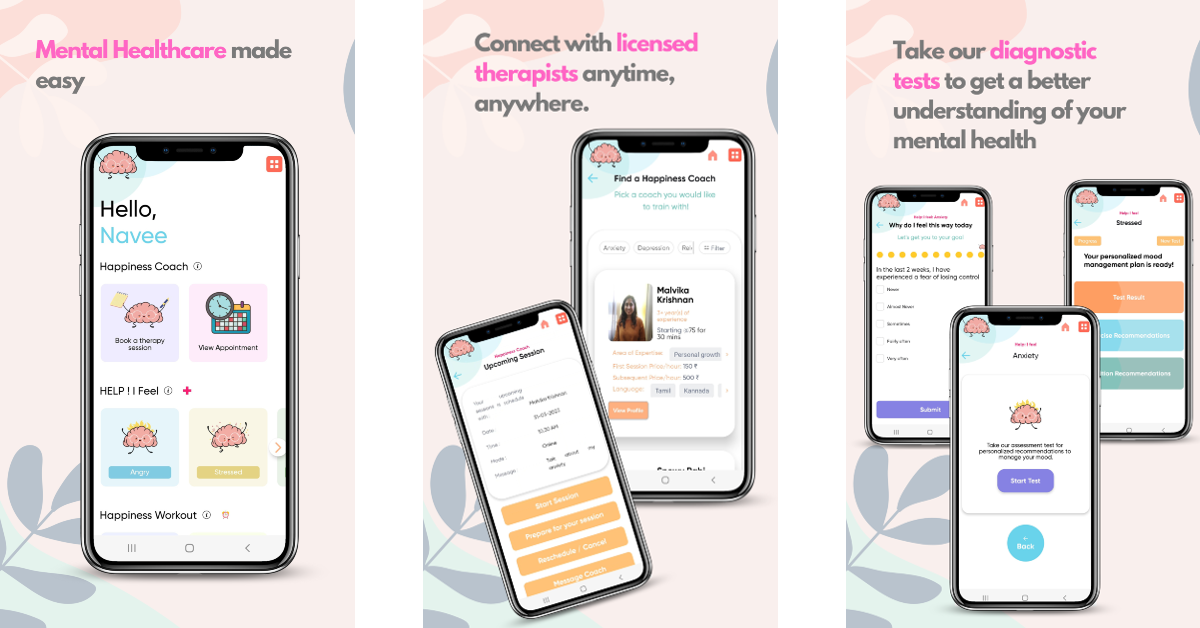
THAP was named the Users’ Choice App for 2023 by Google. Also known as The Happiness Project, THAP offers daily mental wellness workouts and cultivates a peace of mind that is unbothered by distractions. You can journal your inner thoughts, try out self-therapy modules, sign up for online therapy and counselling, and use psychological first-aid tools to manage symptoms of anxiety and depression. Tracking your daily moods and journaling your emotions can have a calming effect on your mental health over a period of time.
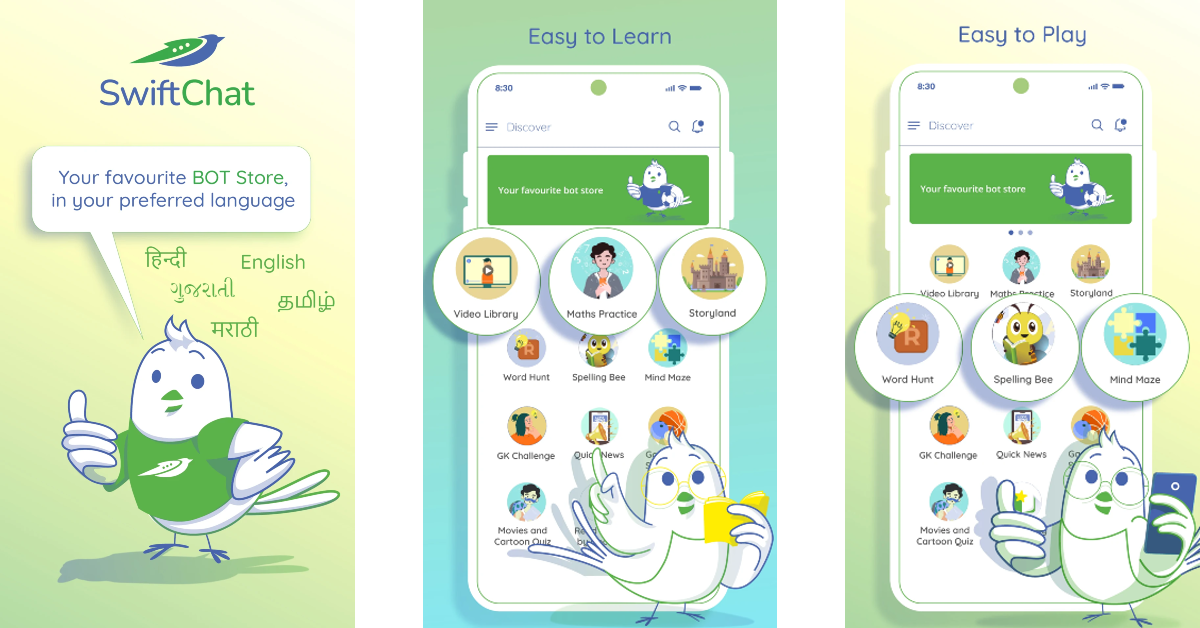
SwiftChat is a one-stop app to get news updates, play mind-exercising games, watch educational videos, challenge your knowledge, and do a whole lot more with fun chatbots. The best thing about this app is that it supports multiple Indian languages. This app will make learning more fun for your kids. The library of educational content on the app is organised into different subjects and grades, making it easy for the user to select their level.
Over the years, Call of Duty Mobile has remained consistent in offering immersive gameplay and cutting-edge graphics while keeping things fresh with new maps and challenges. If you’re into FPS gaming, you simply cannot miss out on this title. Multiplayer modes like Team Deathmatch, Domination, and Kill-Confirmed bring a whole lot of intensity and exhilarating gameplay. Once you install the app, you can play as a guest or set up an account to save your progress across devices.
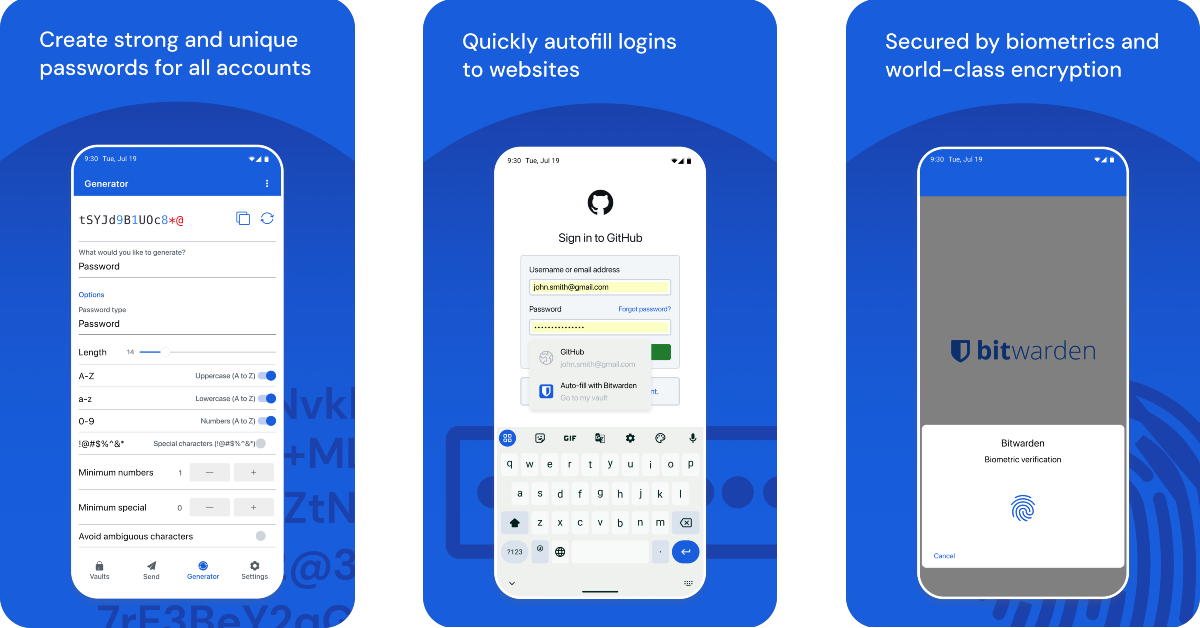
Bitwarden is one of the best password manager apps you can download on your new Redmi Note 13 Pro+. The passwords you store in this app are protected by end-to-end encryption (AES-256 bit, salted hashtag, and PBKDF2 SHA-256), ensuring no one gets access to them. Your login to the app can be secured by Two-Factor Authentication. The ease and seamless experience that Bitwarden brings to everyday life is unparalleled. You can use the app to create strong passwords for your accounts and access them across all your devices without worrying about any third party getting illegitimate access to them.
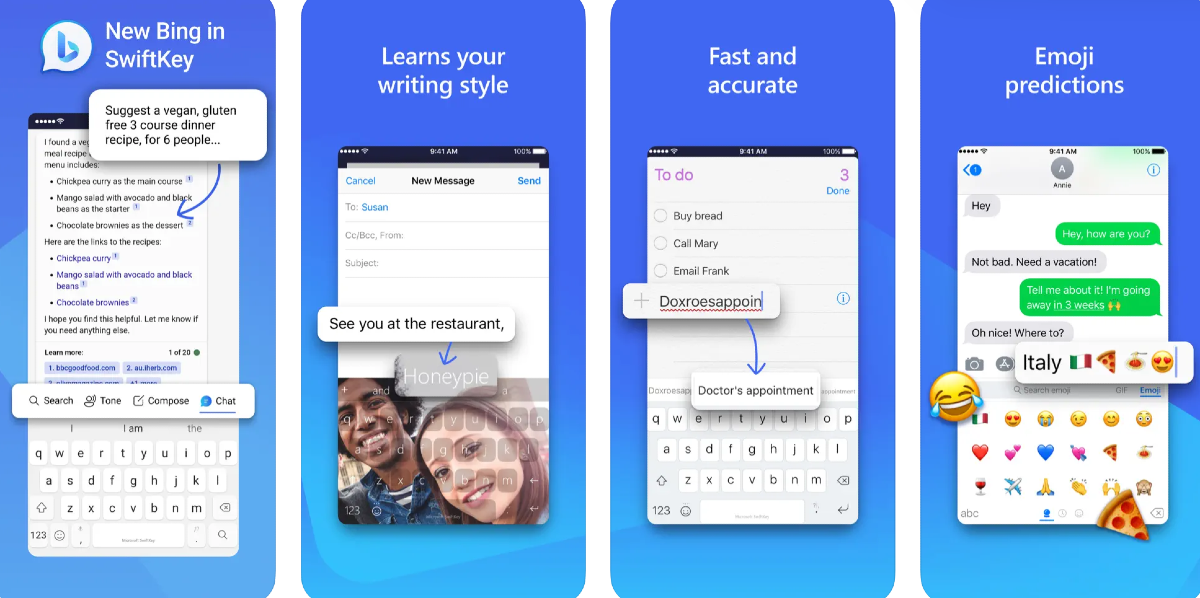
If Microsoft SwiftKey isn’t your choice of keyboard, its recent AI-powered features may change your mind. Now integrated with Bing AI, you can use SwiftKey to change the tone of your text to something casual, friendly, polite, professional, or social. On top of that, you can access the Bing AI chatbot from the keyboard itself. You can use it to create emails on the fly or perform quick and precise web searches. AI features aside, we also enjoy the customisation options that SwiftKey has to offer. You can choose from over a hundred themes or set your own photo as the keyboard background.
Todoist helps you simplify your daily tasks and makes it easier to collaborate with colleagues or friends on common projects. You can sync the app with your calendar, voice assistant, and other tools like Slack, Outlook, and Gmail to encompass all the areas where you carry out your tasks. While collaborating with other people on a particular task, you can leave voice notes and comments, and even attach the necessary files at the right places. Todoist is one of the few apps to have perfectly made the transition apps to smart wearables as well.
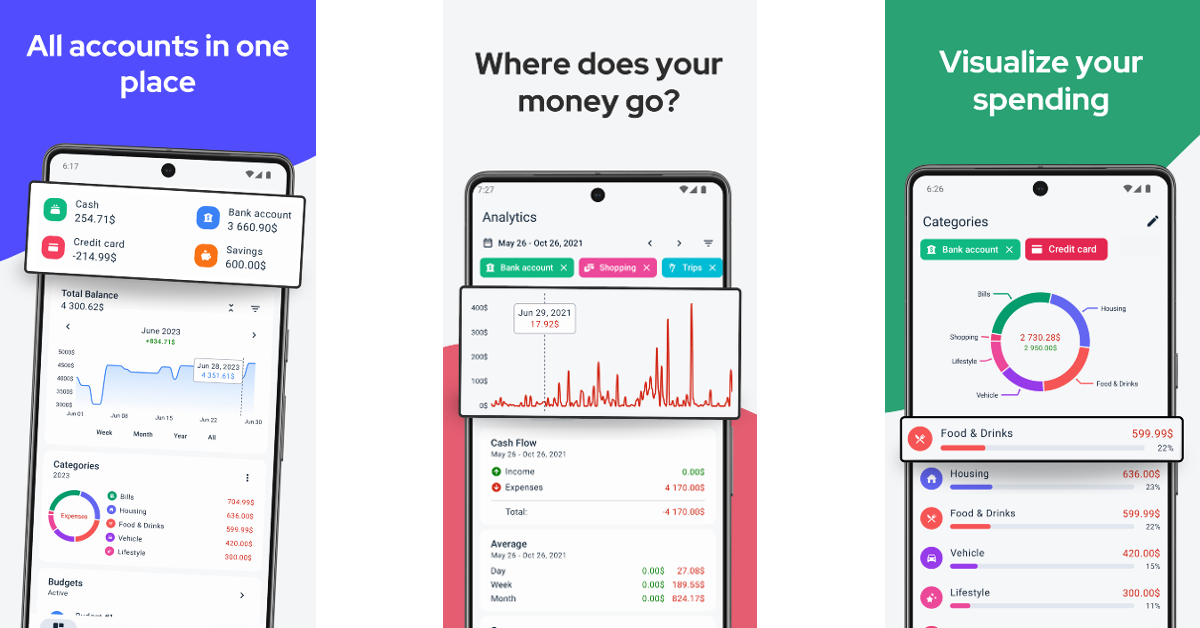
Always find some month left at the end of the money? TrackWallet can help you turn things around. This expense tracker gives you incisive visual and graphical illustrations of where you spend your money, making it easier to determine where you need to cut back to save more. You can add multiple accounts on the app and manage your monthly bills on services like Netflix, Disney+, and others. If you’re planning to save for a vacation, TrackWallet can come up with realistic budgeting plans. The app has a clean look and isn’t riddled with intrusive ads.
One of the biggest music platforms in the world, Spotify is home to over 80 million songs and 4 million podcasts. More recently, Spotify has also started adding audiobooks to its platform, with its current library containing over 300,000 titles. Features like daily playlists, made-for-you recommendations, and lyrics integration elevate the user experience on the app. On top of that, at the end of every year, you get to look back at your listening activity on Spotify Wrapped.
Brave Browser keeps your privacy in mind without compromising on the speed. This web browser auto-rejects cookie requests from websites and removes the tracking codes from URLs when you paste them into the address bar. It comes with an in-built ad and pop-up blocker, without charging any extra fee. It also forces websites to use HTTPS encryption, ensuring third parties don’t snoop on your web activity while you’re on a public network.
These are the top 10 apps for the new Redmi Note 13 Pro+. Let us know your favourite apps in the comments! The smartphone will go on sale on January 10. Buyers can avail an instant discount of Rs 2000 with ICICI Credit and Debit cards. Existing Xiaomi users get an additional loyalty bonus of Rs 2,500 on the smartphone.
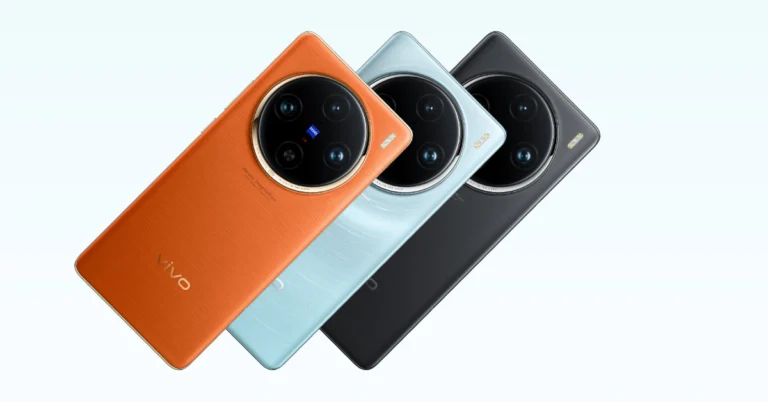
The new Vivo X100 Pro was finally launched in India yesterday, 2 months after being unveiled overseas. Known for its incredible set of cameras, Vivo’s flagship smartphone features three 50MP sensors for the wide, ultrawide, and periscope telephoto lenses. Under the hood, it gets the MediaTek 9300 SoC with Vivo’s in-house V3 chip. This chip plays a big role in nighttime photography. The smartphone is currently priced at Rs 89,999, while its non-Pro variant fetches Rs 63,999. If you’ve already pre-booked the Vivo X100 Pro, here are the top 10 apps that you should download first when you get your hands on it.
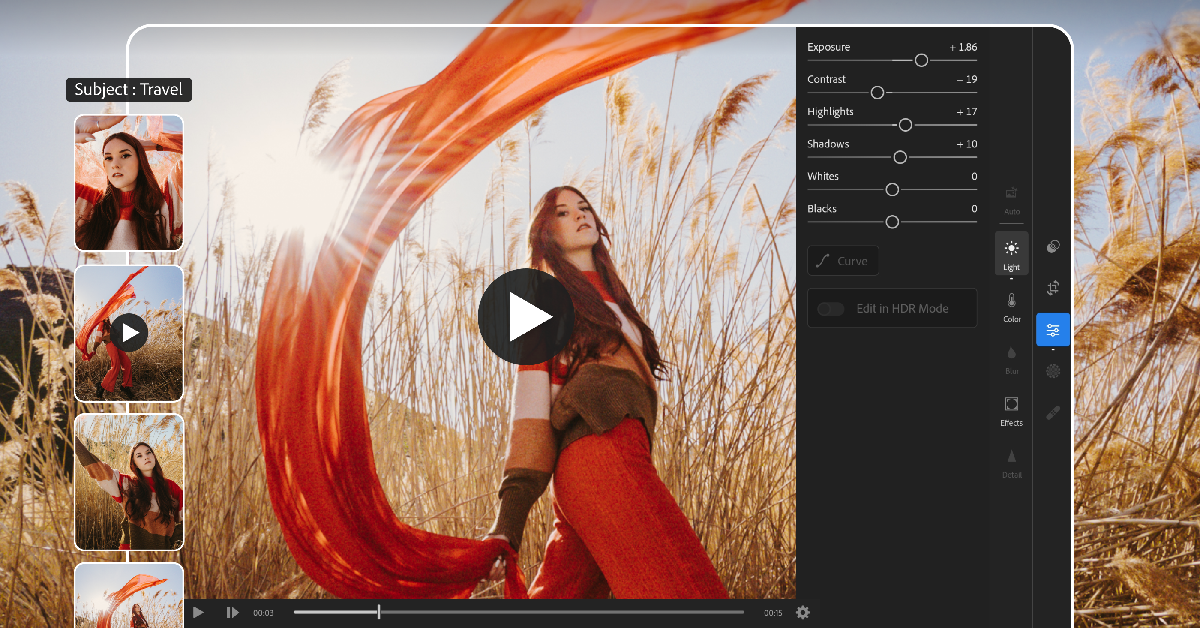
Vivo X100 Pro is an excellent camera-centric smartphone, which is why you need a photo-editing app that is always up for the task. Adobe Lightroom is one such app. It strikes the perfect balance between accessibility and range of functionality, making it an excellent app to edit your media. The newly introduced AI-powered enhancements on the app let you make quick edits like applying the bokeh effect, retouching the colours, finding the appropriate filters, and more. Apart from photo editing, Adobe Lightroom also lets you capture images and videos with its pro-grade camera.
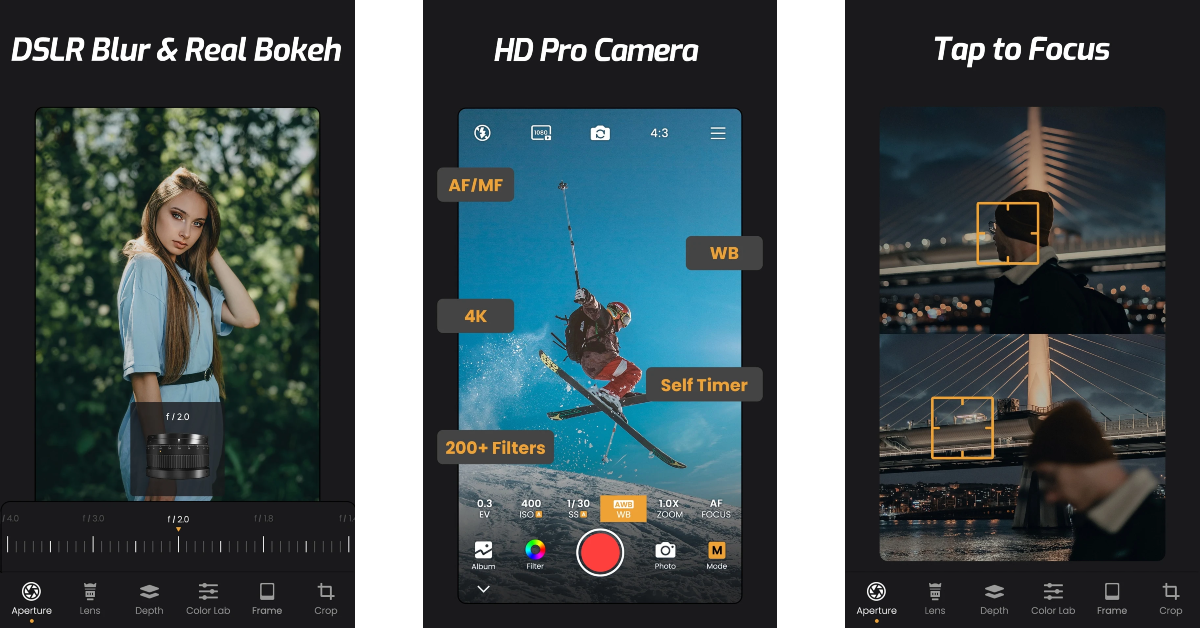
If you want more control over the pictures you take on your Vivo X100, you should download a pro camera app. ReLens Camera is one of the best ones around. You can easily get DSLR-like shots on your smartphone using this app. It can also reproduce the results of classic SLR lenses like the 50mm 1.4 fixed focal length lens, M35mm f/1.4 “King of Bokeh”, and the Burn 35 known for its swirly Bokeh. ReLens Camera uses AI to calculate the depth of field and applies the appropriate Bokeh effect. In manual mode, you can control the exposure, shutter speed, ISO, and White Balance. On top of that, there are dozens of tools and filters on this app that make it the complete package.
Link to Windows is one of our favourite apps on the Android platform. As the name suggests, it lets you connect your phone to your Windows PC and carry out tasks like answering calls, responding to texts, checking apps, and more without needing to pick up your phone. Since it is created by Microsoft, it does this better than any other interface or third-party tool for the two platforms. The seamlessness in user experience is why this app takes the cake for us. Transferring images, videos, and files between your phone and PC becomes easy with this app installed on your phone. You can simply drag and drop the files without needing to connect your phone to your PC using a USB cable.
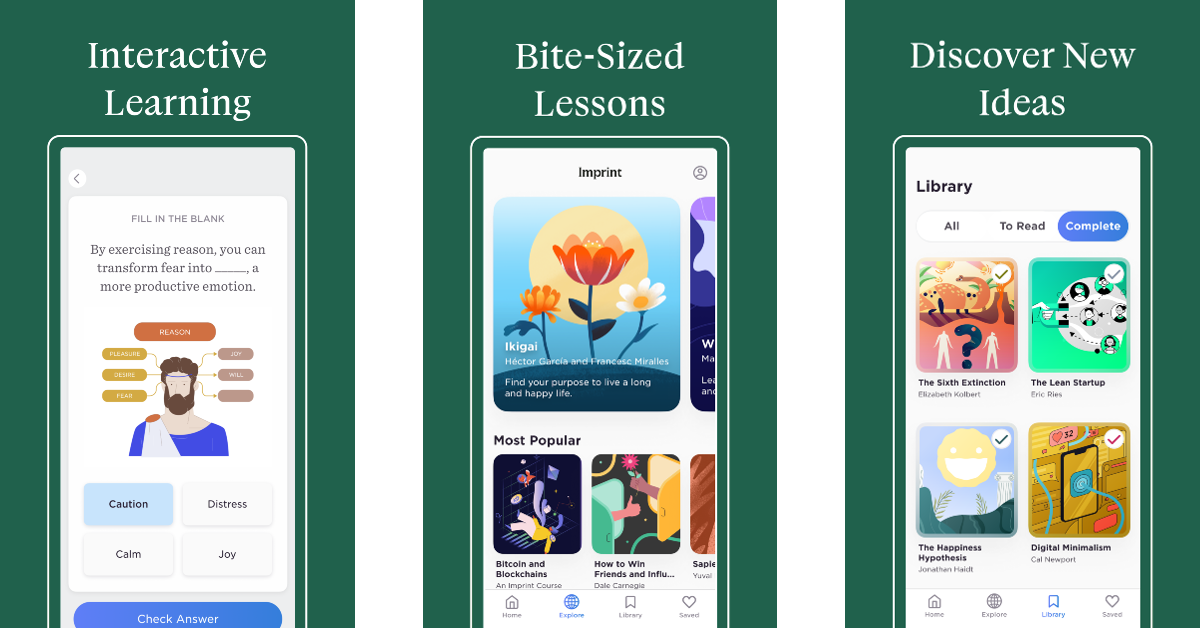
Named by Google as the ‘Best App of the Year (2023)’, Imprint is a must-download app for anyone looking to expand their knowledge in a manner that isn’t exhausting. Imprint makes learning fun with its bite-sized lessons that are presented in a fun, colourful module. The app breaks down complex concepts into more accessible fragments, making them easier to learn. Once you’re finished with a chapter, you can take a quiz to see what you’ve retained. On Imprint, you will find courses based on Philosophy, History, Psychology, and more.
What can we say about ChatGPT that hasn’t been said a million times before? The AI chatbot took the world by storm last year, paving the way for AI integration into tools and hardware. ChatGPT’s Android app took some time to arrive on the scene, but now that it’s here, you can have a lot of fun with it. The possibilities are endless. The chatbot can write a piece of code, a sonnet, or both at the same time! Simply feed your prompt to the app and it will come up with an appropriate response. Excited to learn something new? Ask ChatGPT to recommend the best books on the subject along with their concise summaries. You will have your answer within seconds.
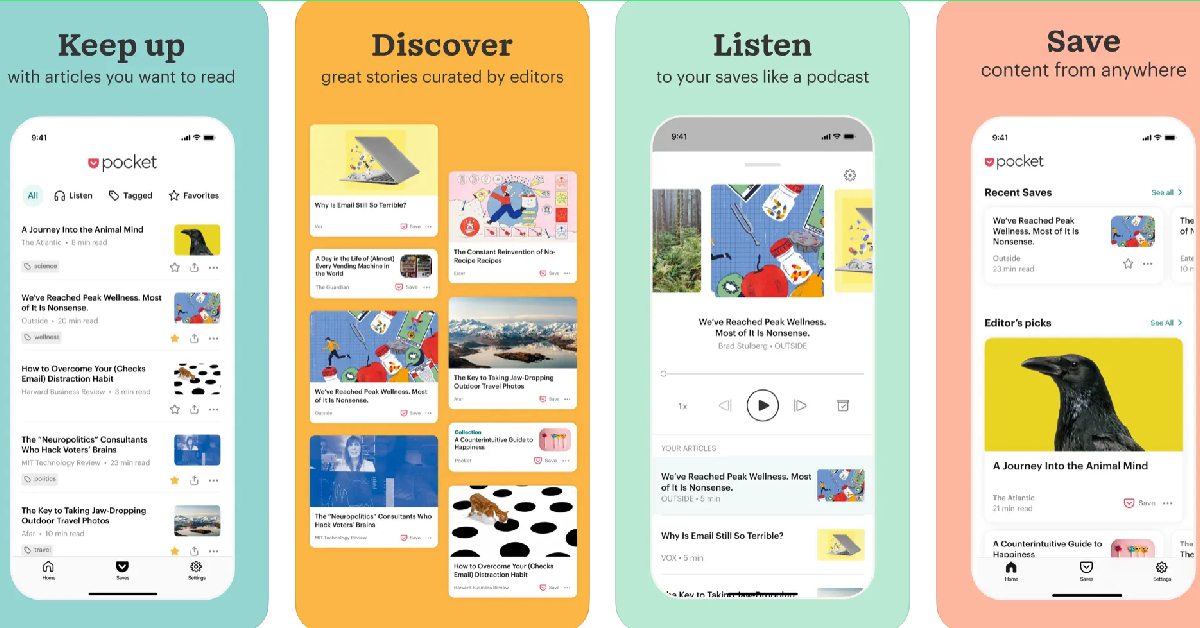
Pocket is one of our favourite Android apps which unsurprisingly ends up on a lot of lists like this. You can use the app to save articles, blogs, web pages, videos, tweets, and more to read later. If you’re at work and don’t have the time to read the interesting article that you just came across, simply save it on Pocket with just a couple of taps and get back to it later in the day. The app’s clean interface gets rid of all the clutter in the article and provides an easy reading experience. The text-to-speech feature lets you listen to saved articles while you’re commuting to work.
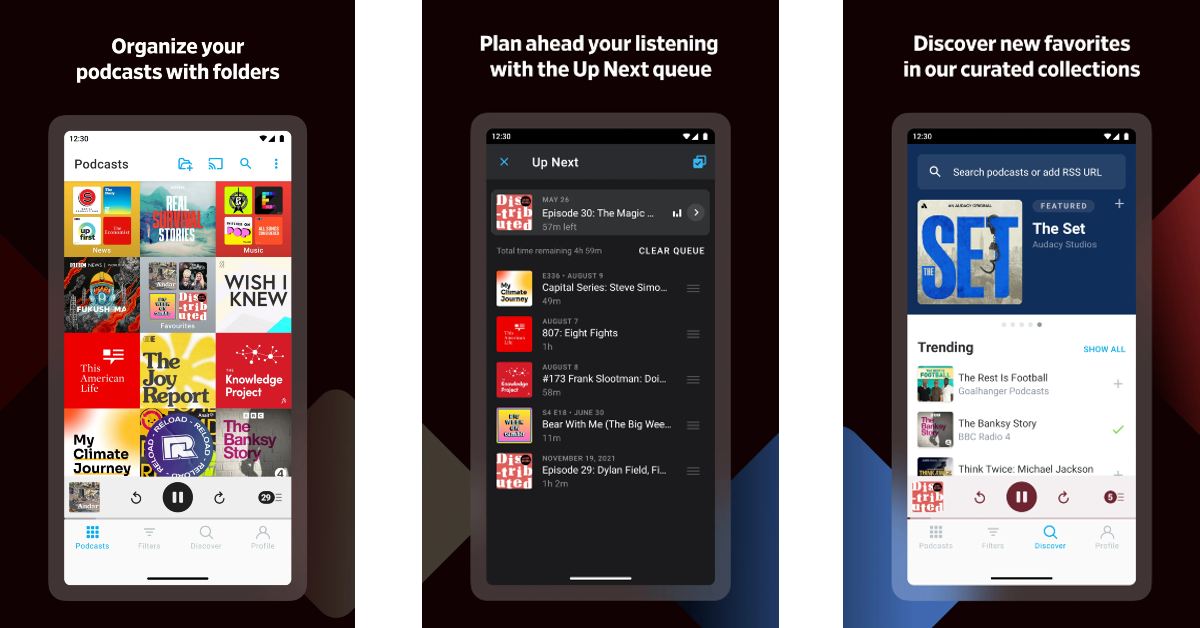
Pocket Casts is one of the best and most popular podcast players for Android. Its Material design makes the interface aesthetically pleasing and very accessible to the user. You can customise the app with different themes as well. Android Auto, Chromecast, Alexa, Sonos, and Wear OS support make the app extremely versatile. You can use it whether you’re in your bedroom or on the go. Features like silence trim, variable speed, volume boost, chapters, and sleep timer are helpful additions that serve to increase your podcast intake.
If you want to give your new Vivo X100 Pro a personalised appearance that sets it apart from other Android devices, then Nova Launcher is one of the best apps you can download on it. This app completely reimagines your phone’s home screen, letting you customise the app grid, create colour-coded icons, apply page effects, place icons and widgets in between grid cells, and more. The more time you spend on the app, the more personality you can lend to your device. The best part of using Nova Launcher is that it doesn’t slow your phone down.
If you care about your privacy on the Internet, you need to install DuckDuckGo on your smartphone. This private web browser blocks most of the tracking cookies that follow you around once you click on a website. The trackers that collect your private data are also blocked by the browser, bringing much-needed protection to your web experience. It also forces websites to use an encrypted connection (HTTPS), leaving no room for snoopers and third-party entities to look into your web activity. Its ‘App Tracking Protection’ feature protects your privacy while browsing other apps by providing a VPN connection.
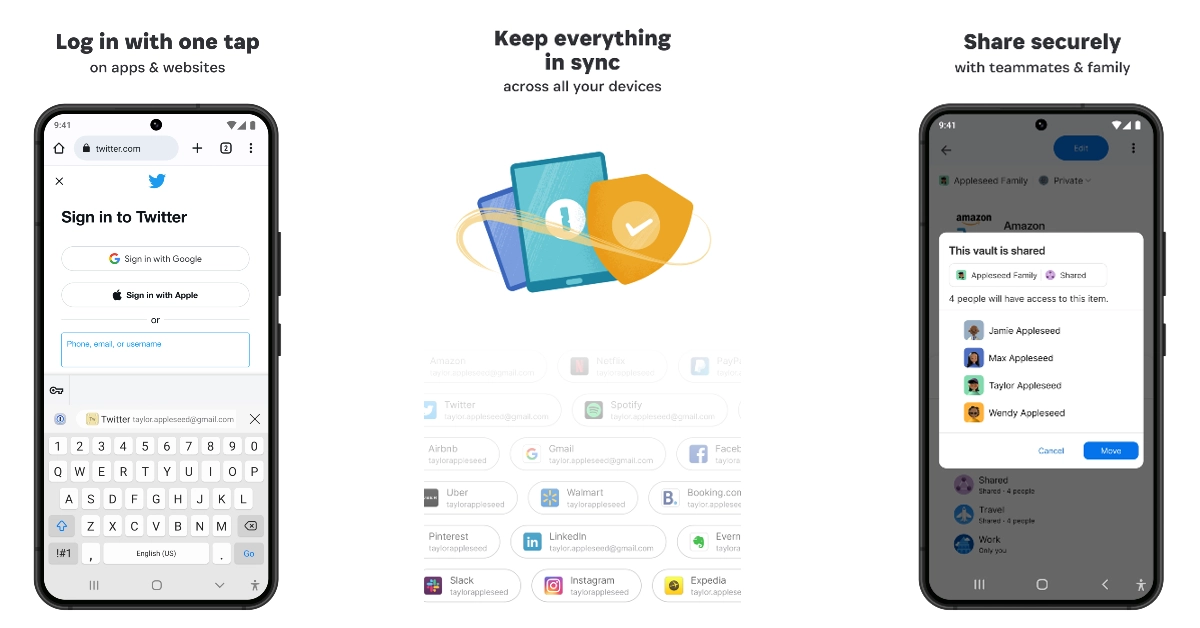
Keep forgetting your passwords? Check out the 1Password password manager app. With just one tap save all your passwords in a secure place and deploy them whenever necessary. Apart from remembering all your passwords, 1Password also helps you create new ones and makes sure they are available across all your devices. If you want to share your Netflix or WiFi password with family and friends, you can easily do so within the app itself. The app also stores important documents like your driver’s license, banking info, and more.
These are the top 10 apps you should download first on your new Vivo X100 Pro. While all of the apps on this list are free to use, some may require a paid subscription to unlock certain premium features. Think there’s an app that deserves to be on this list? Let us know in the comments!
The Dell XPS 13, XPS 14, and XPS 16 laptops feature a sleek design.
The device has a glass touchpad.
All the laptops are made of CNC-machined aluminium and Gorilla Glass 3.
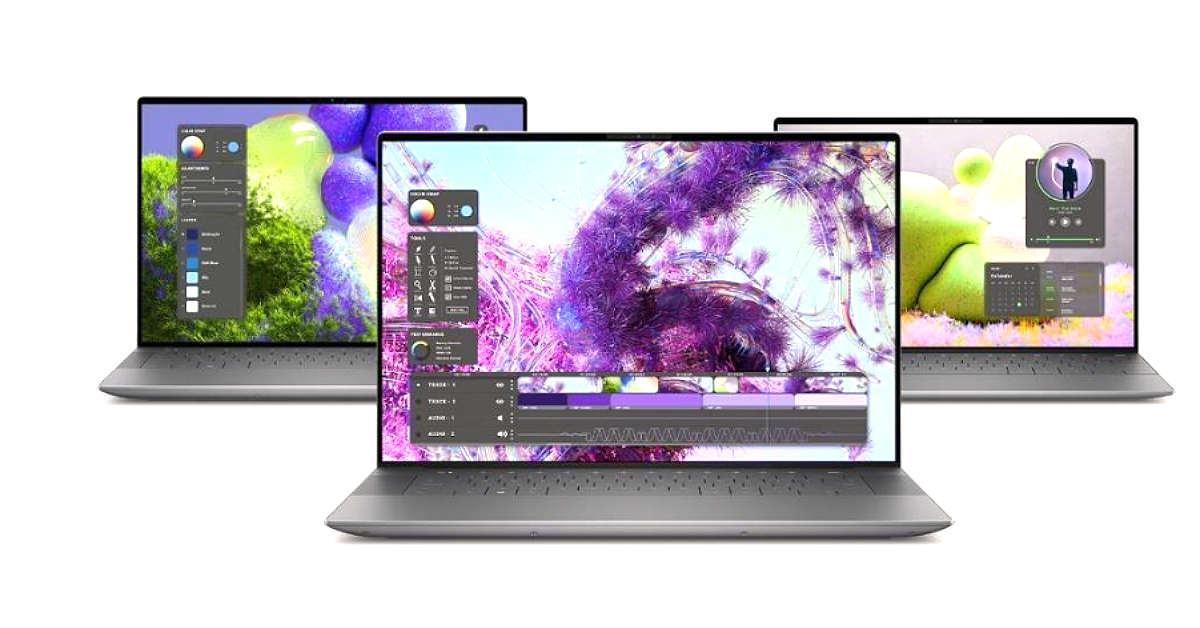
Dell has officially unveiled a new series of XPS laptops with a dedicated AI engine ahead of CES 2024. The new XPS lineup includes the gorgeous-looking laptops Dell XPS 13, XPS 14, and XPS 16. Windows Copilot and other machine learning-based operations are powered by an AI engine. The laptops come equipped with Intel Core Ultra processors.
In This Article
Pricing and Availability
The price of the XPS 13 starts at $1,299.99 in the US which translates to Rs 1,08,166 and $1,749 (CA). The XPS 14 will come with a starting price of $1,699 (US) which converts to Rs Rs 1,41,474 and $2,299 (CA). The XPS 16 in the US will come at $1,899.99 (US) or approx Rs 1,58,127.83 and $2,549 (CA). According to the company, all will be available soon however sale is expected to start in Q1 2024.
Dell XPS 16 features a 16.3-inch FHD+ non-touch LCD screen or 4K+ OLED panel. Whereas the Dell XPS 14 will come with a 14.5-inch FHD+ non-touch LCD or 3.2K OLED screen and the Dell XPS 13 is highlighted with a 13.4-inch FHD+ non-touch or QHD+ touch or 3K OLED panel.
The 16-inch XPS laptop is powered by Intel Core Ultra 7 155H or 165H processors paired with NVIDIA GeForce RTX 4050, RTX 4060 or RTX 4070 GPU for graphics. The model will be offered in three RAM and storage options of: 6GB/32GB/64GB RAM and 512GB/1TB/2TB/4TB PCIe4 SSD storage.
The Dell XPS 14 will come equipped with Intel Core Ultra 7 155H or 165H processors with NVIDIA GeForce RTX 4050 or Intel Arc graphics. It will come in 16GB/32GB/64GB RAM with 512GB/1TB/2TB/4TB PCIe 4 SSD options.
The Dell XPS 13 will include an Intel Core Ultra 5 125H or Ultra 7 155H or 165H processors. Intel Arc graphics will be available on this laptop with 8GB/16GB/32GB/64GB RAM and 512GB/1TB/2TB/4TB PCIe 4 SSD options.
In terms of software the XPS 16, 14 and 13 will come preinstalled with Windows 11 Home as well as the Pro option.
The new XPS portfolio has an AI-enabled feature that improves creativity and productivity while also providing better performance and longer battery life. Both XPS 16 and XPS 14 are NVIDIA Studio-validated systems that can handle creative tasks such as 3D rendering, video editing and live streaming very well, while offering exclusive access to the Studio AI-powered suite of tools and enhanced stability with NVIDIA Studio Drivers.
The XPX 16 boasts a 99.5WHr battery with 130W charging support. The XPS 14 has a 69.5WHr battery with a 60W charger with the Intel Arc variant or a 100W charger with the NVIDIA variant. The XPS 13 is backed by a 50WHr battery with 60W charger support. ExpressCharge recharges 80% of battery life in just 60 minutes, so you can keep your creative flow going.
All the laptop models will also feature an FHD webcam paired with a quad-speaker setup and dual mic.
In terms of connectivity, there will be Wi-Fi 7, Bluetooth 5.4, a 3.5mm jack, 3x Thunderbolt 4 with DisplayPort 2.1 as well as Power Delivery, microSDXC card reader, and a USB-C to USB-A v3.0 and HDMI v2.0 adapter.