Convert YouTube Videos to MP3: Simple and Easy Ways (2023)

1
You may already know how to download a video from YouTube in mp4 format. If you don’t, read our complete guide here. But what if you want to download the audio file from YouTube? Most users use YouTube to listen to music and want to save the videos in an audio format on their devices for future listening. The official way to go about this is by subscribing to YouTube Premium. YouTube Premium gives you access to YouTube Music where you can listen to all the music available on YouTube. But if you want to download an mp3 file to your device, there are only a couple of ways to go about it. In this article, we show you how to convert and download YouTube videos to mp3. Read Also: How to Calculate your BMI (Body Mass Index)? 3 Simple and easy ways

Use a YouTube to MP3 Converter tool

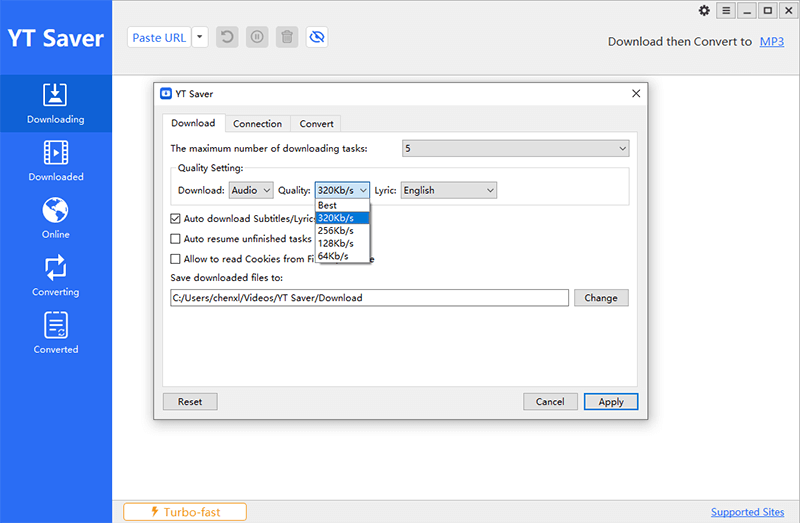
YT Saver Video Downloader is the best free YouTube to MP3 Converter that works on Windows and Mac. It is simple to use, highly customizable and doesn’t include any annoying ads. YT Saver Video Downloader lets you download videos from 10,000+ music/video streaming websites, including YouTube, Spotify, SoundCloud, TikTok, Instagram, MixCloud, etc. You can also extract audio from a video in any desired format including MP3, WAV, AAC, FLAC, OGG and M4A. No matter what quality you want: 64kbps-320kbps or you want to download YouTube subtitles and lyrics in various languages, you can get that via YT Saver easily. For users who want to download HD video, YT Saver is also the best choice to download YouTube playlists, channels, and multiple videos in one click ranging from 1080p, 2k, 4k, and 8k. Step 1: Download and Install YT Saver on your computer Step 2: Go to youtube.com, search for the video you want to download, and then copy the YouTube video URL from the address bar Step 3: Launch the YT Saver program, set the output format mp3 and the quality to 320kbps. Step 4: Click “Paste URL”, and the video will start downloading automatically on the main interface of YT Saver. Step 5: After the downloads are completed, you can check the file in the Downloaded Section.
Use a YouTube to mp3 online downloader tool

There are several websites that offer direct mp3 downloads from YouTube without needing to download a video first and then convert it. Some of the most popular websites that offer this tool are ytmp3.cc, tomp3.cc, and yt2mp3.tech. All of these websites follow the same method, all you need to do is paste the YouTube link in the box and select the audio bitrate before downloading. Here’s how you can convert YouTube videos to mp3 using tomp3.cc. Step 1: Open tomp3.cc on your browser. Step 1: Open tomp3.cc on your browser. Step 2: In the search box, paste the link to the YouTube video you want to download as an mp3. Step 3: Select the desired bitrate of the mp3 file and click on ‘Convert’. Step 2: In the search box, paste the link to the YouTube video you want to download as an mp3. Step 4: Click on the download button when the conversion is complete. Step 4: Click on the download button when the conversion is complete. The mp3 file will be saved in the Downloads folder on your PC.

Convert the mp4 file to mp3 using an online converter

If you’ve already downloaded a YouTube video in mp4 format and want to convert it to mp3, use an online mp3 converter. Simply follow the steps mentioned below. Step 1: Go to cloudconvert.com or any other mp3 converter website.  Step 1: Go to cloudconvert.com or any other mp3 converter website.  Step 2: Select mp4 to mp3. Step 2: Select mp4 to mp3. Step 3: Upload the mp4 file. Step 3: Upload the mp4 file. Step 4: Cloudconvert will convert the mp3 file to mp4. Click on download to save the mp3 file to your desktop.

Use a third-party app

Use a third-party app The websites mentioned above aren’t optimised for your smartphone. While they will work fine on your device, the layout and formatting may be a little off. To get around this issue, always use the desktop version of these websites on your smartphone. You can also use a third-party app like Peggo. Since YouTube downloaders get taken down regularly from the Play Store, you will need to install Peggo from a third-party marketplace like Softonic or APKMirror. Once the app has been installed on your phone, simply paste the YouTube URL of the video you want to download in Peggo’s search box. You can also search for a video directly from the app. Select your desired video and tap on ‘Record MP3’ to download the mp3 version of the YouTube video.

YouTube Music

YouTube Music rolling out Spotify-like real-time lyrics for Android and iOS users Downloading a YouTube file directly on your device can fill up the internal memory pretty quickly. If your primary purpose of downloading mp3s from YouTube is to listen to music, you may want to consider subscribing to YouTube Premium. With a Premium subscription, you get access to YouTube Music which lets you save songs for offline listening. The best part is that the downloads do not occupy any space on your phone’s internal memory.

Frequently Asked Questions

How can I download songs from YouTube to mp3?

You can use online tools like YT Saver and ytmp3.cc to download any YouTube video in mp3 format. If you’re an Android user, third-party apps like Peggo can carry out the same task.

Are online YouTube MP3 converters safe to use?

Not every YouTube MP3 converter is safe to use. Some may push malicious malware on your device. Always ensure that the online tool you are using is safe and has been properly vetted.

How can I listen to music on YouTube legally?

The only official way to listen to music on YouTube in mp3 format is by subscribing to YouTube Premium. Once you’re subscribed, you can access YouTube Music and listen to millions of songs for free. Read Also: How to upload a video to YouTube? The easiest and best way 2022

Conclusion

This is how you can directly convert YouTube videos and download them in mp3 format. While choosing a third-party app to download music from YouTube, always make sure to check the user reviews to see if the app is safe to use. It is not uncommon for apps to push malware on your device under the facade of a harmless download tool.
For the latest gadget and tech news, and gadget reviews, follow us on TwitterFacebook and Instagram. For newest tech & gadget videos subscribe to our YouTube Channel. You can also stay up to date using the Gadget Bridge Android App. You can find the latest car and bike news here.
Google Foldable Phone patent shows Samsung Galaxy Fold-like design: Details inside

A lot of rumours and leaks are doing the rounds on the web about Google’s first foldable phone, Pixel Fold. The device is expected to arrive in the market in 2022. Although there are few specifics about the smartphone, it has already been leaked on several occasions and shown on patent websites. Some of the new details about the device have surfaced on the web with regards to the Google Foldable Phone patent.
Google Foldable Phone patent shows Samsung Galaxy Fold-like design: Details inside
Image Courtesy: 91Mobiles
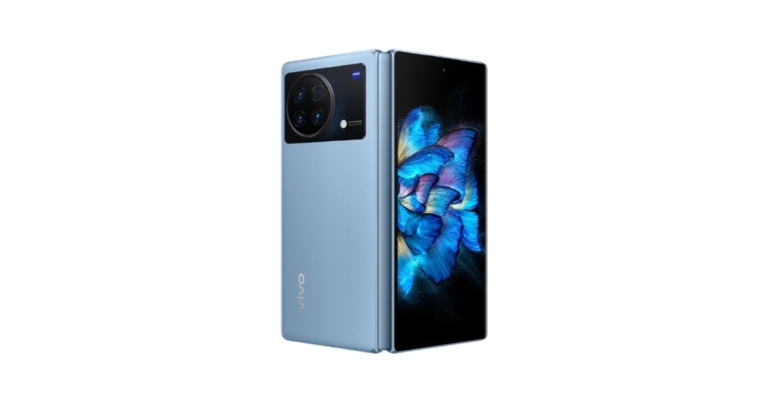
According to a recent patent, the Google foldable smartphone has a similar design to the Samsung Galaxy Fold. As said by 91Mobiles, the rumoured Google foldable phone would have a design that is comparable to the Samsung Galaxy Z Fold, citing a World Intellectual Property Organisation (WIPO) patent filed in June 2021 and recently made public. Based on the earlier reports, the device resembles the Oppo Find N a lot.
Google Foldable Phone patent shows Samsung Galaxy Fold-like design: Details inside
Image Courtesy: 91Mobiles
A recent report suggests that the Google foldable phone design will resemble a notebook with wide bezels around the screen. On the foldable phone’s top bezel is where the selfie camera is located. Moreover, the patent does not describe the smartphone’s appearance when it is folded.
Google Foldable Phone patent shows Samsung Galaxy Fold-like design: Details inside
Image Courtesy: 91Mobiles
The company’s foldable smartphone may resemble the Oppo Find N, according to prior claims that claim a new animation was discovered following the release of the second beta version of Android 12L. After the release of Android 12L Beta 2, two new animations were found that showed how to insert a SIM card into a foldable phone. They mimic the animations present-day Pixel setup processes employ when the phone asks for a SIM card or electronic SIM. More significantly, the animation’s coding refers to the Pixel Fold’s “Pipit” codename. A SIM tray is located at the bottom, and a volume rocker is located on the right side.
Google Foldable Phone patent shows Samsung Galaxy Fold-like design: Details inside
Image Courtesy: 91Mobiles
The Google Pixel Fold/foldable smartphone was first discovered on Geekbench a while back under the alias Pipit. According to the listing, the gadget would include an octa-core processor with four 1.8GHz efficiency cores, two 2.8GHz performance cores, and two 2.25GHz efficiency cores. The foldable phone will have 12GB of RAM, according to the benchmarking listing, and the processor is reportedly a Google Tensor SoC. The description also includes the Mali G78 GPU, and the device scored 4,811 points for single-core performance and 11,349 points for multi-core performance. Previously, it was anticipated that the Google Pixel Foldable smartphone would include the same 12.2MP IMX363 camera sensor as the Pixel 3 and Pixel 5 models. A 12MP IMC386 ultra-wide-angle sensor and two 8MP IMX355 sensors for selfies and video calls may also be included. The release of the rumoured smartphone has reportedly been delayed twice. There’s a possibility that it will be shown off at the Pixel 7 series launch announcement later this fall. Till then you can take the above-mentioned information with a grain of salt.  For the latest gadget and tech news, and gadget reviews, follow us on TwitterFacebook and Instagram. For newest tech & gadget videos subscribe to our YouTube Channel. You can also stay up to date using the Gadget Bridge Android App. You can find the latest car and bike news here.

Redmi Note 11SE with 5,000mAh battery launched in India

Xiaomi has officially announced the launch of the Redmi Note 11SE in India. The device is powered by MediaTek Helio G95 SoC. The smartphone features a SAMOLED display and a quad rear camera set-up. In addition to this, there is a 5,000mAh battery onboard which comes with 33W fast charging support.

Redmi Note 11SE price in India, sale details

Redmi Note 11SE has been launched in India in a single 6GB RAM with 64GB storage option. The device comes with a price tag of Rs 13,499. The smartphone will be offered in Bifrost Blue, Cosmic White, Space Black, and Thunder Purple colour options. The device will be available for purchase via Flipkart and the company’s online store starting August 31.

Redmi Note 11SE price in India, sale details

Redmi Note 11SE specifications

The full HD+ 6.43-inch Super AMOLED display on the Redmi Note 11SE features a resolution of 1,080 by 2,400 pixels. The screen boasts Corning Gorilla Glass protection, DCI-P3 colour gamut and a maximum brightness of 1,100 nits. The smartphone is powered by a Mali-G76 GPU and a MediaTek Helio G95 SoC. There is 6GB of LPDDR4X RAM and 64GB of UFS 2.2 internal storage that can be expanded up to 512GB using a microSD card. On top of Android 11, the phone runs MIUI 12.5, a user interface. The smartphone’s quad rear cameras feature a 64-megapixel primary sensor with an f/1.9 aperture. An 8-megapixel ultra-wide angle camera with an f/2.2 aperture and two 2-megapixel macro and depth sensors are also included. The Redmi Note 11SE also comes with a 13-megapixel front-facing camera with an f/2.45 aperture. A 5,000mAh battery within the gadget allows 33W rapid charging. In addition to having a side-mounted fingerprint sensor for security, it features the AI face unlock feature. The phone is water- and dust-resistant and has an IP53 rating. It supports Bluetooth 5.0, a 3.5mm headphone socket, dual-band Wi-Fi that operates at 2.4 and 5 GHz, and multifunctional NFC. The phone also contains a Z-axis vibration motor, which generates vibrating sensations to enhance gaming. For the latest gadget and tech news, and gadget reviews, follow us on TwitterFacebook and Instagram. For newest tech & gadget videos subscribe to our YouTube Channel. You can also stay up to date using the Gadget Bridge Android App. You can find the latest car and bike news here.

How to Find a USPS Tracking Number in just a few steps?

0
USPS is one of the safest and most economical ways to send your mail across the US, or even internationally. You’d be surprised to find that you can even mail live animals like bees and scorpions through the USPS. Of all the services that USPS offers, one of the most helpful ones is tracking your mailed package. Once you’ve mailed a package, you can track its live location as it makes its way to the receiver. All you need is the tracking number of the package. In this article, we show you how to find a USPS tracking number and track a package in just a few simple steps.

Here’s how you can find your USPS Tracking Number

  • Check the sales receipt: Every time you ship a package using USPS, you get a sales receipt. The sales receipt contains the tracking number for your package along with other information like the price of delivery, and the dimensions and weight of the package. Check the sales receipt for the tracking number and use it to track your package. If you used a self-service kiosk, check the self-service kiosk receipt.
Check the sales receipt
  • Check the insurance receipt: If you insured the package you’ve sent using USPS, you must have received an insurance receipt. This receipt usually contains the tracking number. 
Check the insurance receipt
  • Check your email: If you sent a package through Click-N-Ship using the USPS website, you must have received the tracking number in your email. Browse your inbox for an online receipt from USPS and look for the tracking number on it.
  • Ask the online retailer for the tracking number: If you made a purchase from an online retailer and they shipped the package through USPS, ask them for the tracking number. USPS only provides the tracking number to the person that shipped the package. Usually, online retailers provide you with the tracking number as soon as they make the shipment. Check your email inbox for any emails from the online retailer.  
  • Check the barcode label on the item: Check the barcode sticker on the package for the tracking number. When the label is applied to the package, a part of it is peeled off and handed over to you. Check the peel-off for the tracking number.

Bonus Tip

How to track your USPS package

  • Once you’ve acquired the USPS tracking number, all you need to do is log on to the USPS website and enter the tracking number on the search bar. The search bar is located on the homepage itself. Once you’ve entered the tracking number, hit search and you’ll be able to track your package.
all you need to do is log on to the USPS website and enter the tracking number on the search bar.
  • If you do not want to use the USPS website, you can send a text to 28777 (2USPS) with your tracking number and you will receive regular text updates about the location of your package.
  • You can even download the USPS app for Android and iOS and use it to track your package.
You can even download the USPS app
  • You can contact USPS for additional tracking information or other issues related to your package.

Frequently Asked Questions

What should I do if I lost my tracking number?

USPS does not have any way of recovering a lost tracking number. If you have an Informed Delivery Account with USPS, you can track a package you’re about to receive without needing a tracking number.

How do I track a package I’m about to receive?

Ask the sender for the tracking number then track the package on the USPS website. If you have an Informed Delivery Account, you won’t need a tracking number to track your incoming mail.

Why did I not receive a tracking number for my package?

USPS does not provide a tracking number for certain items. These items include
  • Postcards
  • First class mail letters and flats
  • Periodicals
  • Some USPS marketing mail parcels
For the latest gadget and tech news, and gadget reviews, follow us on TwitterFacebook and Instagram. For newest tech & gadget videos subscribe to our YouTube Channel. You can also stay up to date using the Gadget Bridge Android App. You can find the latest car and bike news here.

Garena Free Fire Redeem Codes Today 26 August 2022: Here is how to claim them

Garena Free Fire is a battle royale game with regular awards and tournaments to keep players interested. If you play Garena Free Fire, you should be aware of the redeem codes that are released on a daily basis. However, because the battle royale game is banned in India, players from other countries can use the Free Fire Redeem codes daily. If you’re unfamiliar with the Garena Free Fire redeem codes or don’t know how to get them, we’ve put together a step-by-step guide to help you redeem them. Check out Garena Free Fire Redeem Codes for August 26. The Free Fire redeem codes are a great way to get free stuff. These are 12-digit codes that contain alphabets and numbers, as well as an expiration date and time. Because the Garena FF redeem codes cannot be used more than once, you should hurry to the redemption page to claim your free reward before someone else does. To get a free reward, all you have to do is go to reward.ff.garena.com/en, which is the official redemption page. Also, keep an eye on this space for daily updates on Garena Free Fire redemption codes and rewards.

Garena Free Fire Redeem Codes Today 26 August 2022

  • FIIF-GI8E-O49F
  • FV5B NJ45 IT8U
  • F4N5 K6LY OU9I
  • FH2G YFDH E34G
  • F7YG T1BE 456Y
  • FJBH VFS4 TY23
  • F87G YF3D GE6B
  • F5J6 YUH7 6GVT
  • FBJY-RY56-MLOT
  • FJO9-4TAS-D3FT
  • PQR3-BKUI-7LT7
  • FSDR-FKUI-YVGR
  • FBTU-6BFY-TBT7
  • FBJU-T6RF-T1RT
  • FBTU-6JKI-E8E7
  • FLU8-HG8R-BHT4
  • HTY3-RIFG-OR3F
  • FBJY-RY56-MLOT
  • FJO9-4TAS-D3FT
  • YXY3-EGTL-HGJX
  • ST5K-JCRF-VBHT
  • S5JT-UGVJ-Y5Y4
  • X99T-K56X-DJ4X
  • FF11-NJN5-YS3E
  • FF9M-J31C-XKRG

How to Get Free Fire Redeem Codes for Garena on August 26?

  • Visit the Garena Free Fire game’s official website at reward.ff.garena.com.
  • Use your Facebook, Google, VK, Apple ID, Huawei ID, or Twitter account to log in.
  • You’ll be taken to a valid redemption code (s)
  • Copy and paste the 12-digit redemption code into the text box.
  • On the screen, a dialogue box will appear.
  • ‘Ok’ should be selected.
For the latest gadget and tech news, and gadget reviews, follow us on TwitterFacebook and Instagram. For newest tech & gadget videos subscribe to our YouTube Channel. You can also stay up to date using the Gadget Bridge Android App. You can find the latest car and bike news here.

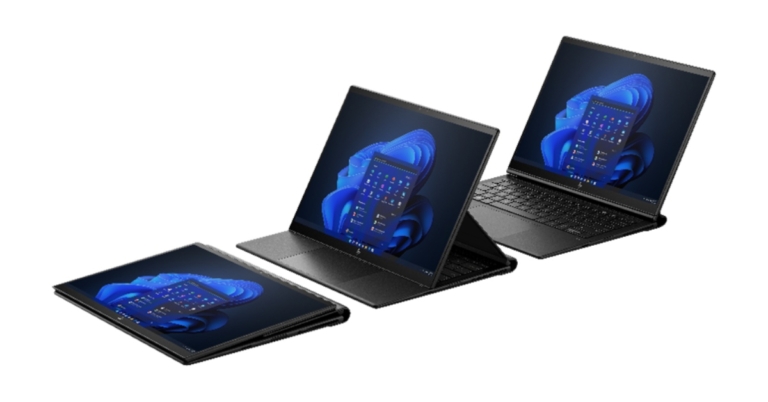
HP Dragonfly Folio G3, 34″ AiO Desktop PC, Z32k G3 4K USB-C Display and HP 965 4K Streaming Webcam launched in India

HP has announced the launch of new commercial PCs, displays, and streaming webcam at HP Amplify Executive Forum, the company’s annual partner roadshow. The company has introduced HP Dragonfly Folio G3, 34″ AiO Desktop PC, Z32k G3 4K USB-C Display and HP 965 4K Streaming Webcam.

HP Dragonfly Folio G3, 34″ AiO Desktop PC, Z32k G3 4K USB-C Display and HP 965 4K Streaming Webcam price in India and availability

The HP 34″ AiO Desktop PC is currently on sale for a starting price of INR 1,75,999; the HP Dragonfly Folio G3 is currently available for INR 2,01,000; and the HP Z32k G3 4K USB-C Display is anticipated to go on sale in November for INR 90,000. For INR 21,999, the HP 965 4K Streaming Webcam is now available. Customers and channel partners can purchase HP Proactive Insights as a standalone product or as part of HP Device as a Service.
HP Dragonfly Folio G3

HP Dragonfly Folio G3

The HP Dragonfly Folio G3 gives collaborative thinkers the freedom to create, record, and share ideas whenever they come to them thanks to its pull-forward design that enables a seamless transition from laptop to tablet. In order to enable full productivity when working from anywhere, the HP Dragonfly Folio G3 blends the ease of a tablet with the productivity of a laptop in one device. The HP Dragonfly Folio G3 can easily manage resource-intensive projects and demanding business applications thanks to Intel vPro with 12th Gen Intel Core processors. It has updated memory with LPDDR5 up to 32GB and storage up to 2TB for better performance. A novel thermal solution enhances PC performance without significantly thickening or adding weight. For extended workdays, the new HP Auto Screen Dimming5 features help preserve battery life. With its natural and intelligent inking capabilities, the HP Dragonfly Folio G3 makes brainstorming and whiteboarding ideas a personalised experience. The pen can wirelessly charge to 100% in 30 minutes, has three programmable buttons, and magnetically attaches to the gadget. With HP Indirect Inking, users of the HP Dragonfly Folio may use their pen to write on a different linked display, unleashing even more creativity. With its collaboration features, the HP Dragonfly Folio G3 makes video conferences more effective and interesting. In-person collaboration is made simple by the 100-degree field-of-view and the 8MP camera, which ensures that users seem organically. HP Auto Frame keeps users in frame when they wish to stand, stretch, or move around when they need to think quickly—perfect for days with back-to-back meetings. When users are near or distant from the microphone, HP Dynamic Voice Leveling automatically adjusts voice volume to ensure consistency. With AI-based noise reduction that filters outbound and incoming noises, users may work remotely without as much concern about background noise. The HP Privacy Camera gives consumers the option to quickly turn off the webcam for increased security. In addition to offering a strong line of defence against malware and hacking, HP Wolf Security for Business’ new seamless firmware guarantees a 50% reduction in update time and enables users to continue working and being productive while BIOS and firmware updates are being made. When unwanted eyes are observing a user’s screen, HP Privacy Alert notifies them so they can swiftly activate the optional HP Sure View to blur the screen. HP 34” All-in-One Desktop PC

HP 34” All-in-One Desktop PC

With a 34-inch diagonal 5K display and a 21:9 aspect ratio, the HP 34″ All-in-One Desktop PC offers an immersive experience. With a 5K WUHD (5120×2160) display, users may enjoy richer images and brilliant colours while reducing their exposure to blue light waves thanks to the TÜV-certified HP Eye Ease low blue light panel. With the Intel vPro, which features 12th Gen Intel processors and NVIDIA GeForce RTXTM graphics, customers can tackle large projects while using a variety of programmes. It is the most powerful commercial All-in-One PC in the world. The computer can be upgraded with additional memory and storage up to 128GB DDR5. The new HP 34″ All-in-One Desktop PC has support for dual video streams and camera switching so you can simultaneously present yourself and your work. To get the optimum field of view, users of the HP 34″ All-in-One Desktop PC can move the magnetically detachable 16MP (4MP Binned) camera around on the screen bezel. Users can even position the camera towards their desk to exchange handwritten notes or documents during video conversations while they are sitting at their workstation. The new software, HP Keystone Correction, along with the high-resolution camera will automatically crop and flatten the image of the video stream to provide a clear, digital image of pages or a whiteboard that can be shared in real time. The HP Be Right Back feature enables customers to switch to a still image when they need a break during video conference conversations.

HP Z32k G3 4K ​USB-C Display​

HP Z32k G3 4K USB-C Display, the first IPS Black display with Thunderbolt 4 technology in the world. The device uses IPS Black panel technology, which results in 4K ultra-high resolution, deeper blacks, more brilliant colours, and a 98% P3 wide colour gamut. By offering twice the contrast ratio of a conventional IPS panel, designs come to life and what is shown on the screen corresponds to the developer’s or creator’s concept. With the HP Z32k G3 4K USB-C Display, you can turn your workstation into a productivity powerhouse. The display supports daisy chaining for a second 4K monitor without a dock, drives 4K resolution at 60Hz, and supports high-speed data and internet all with a single Thunderbolt 4 connection. All of this is done while charging your device up to 100W without sacrificing speed or efficiency.
HP 965 4K Streaming Webcam

HP 965 4K Streaming Webcam

Users can stream their truest selves thanks to the HP 965 4K Streaming Webcam. The webcam, enhanced by HP Presence, provides crisp video in up to 4K resolution, and AI face-framing and autofocus create the impression that users are in the room. With the 18mm F2.0  lens and lowlight adjusting capability, user photographs and ideas remain bright. Enjoy the peace of mind that comes with noise cancellation and two microphones. The webcam is also certified by Zoom to give an excellent conferencing experience with tools made to function with Zoom without any issues. Users can customise their image, enable AI capabilities, adjust resolution, use Keystone Correction, and select between a 78°, 90°, or 100° field-of-view using the HP Accessory Center, which can be downloaded from the Microsoft Store. With 360° swivel, 90° tilt down, and universal mounting, users may find the ideal stance. With a magnetic privacy cover for worry-free privacy and security, users may share whenever they choose. For the latest gadget and tech news, and gadget reviews, follow us on TwitterFacebook and Instagram. For newest tech & gadget videos subscribe to our YouTube Channel. You can also stay up to date using the Gadget Bridge Android App. You can find the latest car and bike news here.
How to Calculate your BMI (Body Mass Index)? 3 Simple and easy ways

0
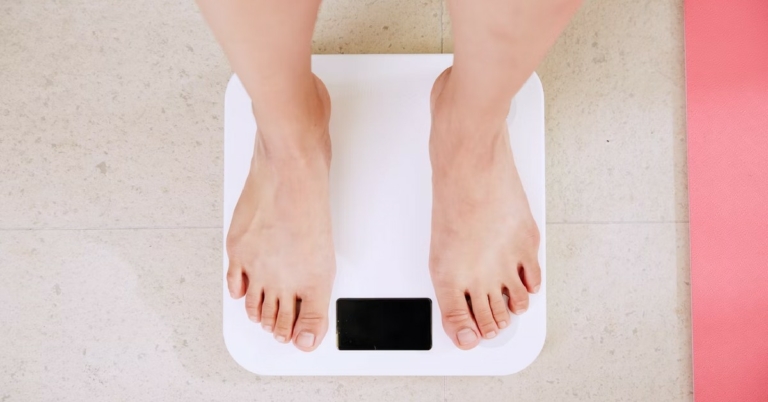
Your Body Mass Index (BMI) is the simplest way to determine your fitness and calculate your weight range. It lets you know whether your weight is in accordance with your height. It is not a perfect measure of fitness but can be used as a starting point in your fitness journey. In this article, we show you 3 simple and easy ways to calculate your Body Mass Index (BMI). You can either use the BMI formula or a free online BMI calculator. Read Also: How Technology Has Improved Competition and Sports

Calculate your Body Mass Index using the BMI formula

Calculate your Body Mass Index using the BMI formula The formula for calculating the BMI is fairly simple. All you need to do is measure your weight and height before you begin calculating your BMI. Make sure all measurements are either in Imperial (pounds and inches) or Metric (kilograms and metres) scale. If you enter your height in inches and your weight in kilograms, then the formula will not work. Here is the formula for calculating Body Mass Index (BMI)
  • BMI = weight/(height)^2
So basically, your BMI is your weight divided by the square of your height. For example, your weight is 90 kilograms and your height is 6ft1in. In order to calculate your BMI, you’ll have to convert all measurements to either the Imperial or Metric scale. 6ft1in is 1.85m. Applying the formula, 
  • BMI = 90/(1.85×1.85) = 26.29
Once you’ve calculated your BMI, use this chart to figure out what it means.
BMI Weight Range
Less than 18.5 Underweight
18.5-24.9 Normal Weight
25.9-29.9 Overweight
Above 30 Obese

Use an online BMI calculator

Use an online BMI calculator If you don’t want to carry out the calculation yourself you can look up a body mass calculator online. Here are some you can use.

Use a Health app to calculate your BMI

Use a Health app to calculate your BMI Most health and calorie tracking apps like MyFitnessPal, HealthifyMe, and Fastic come with an in-built BMI calculator. All you need to do is enter your measurements and the app will calculate your BMI for you. If you use any health app on a regular basis and constantly update it with your weight, it will also update your BMI automatically. Read Also: International Dog Day: Best gadgets for your furry friends at home These are the 3 best ways to calculate your Body Mass Index (BMI). While BMI is an easy way to gauge your fitness level, it isn’t entirely perfect. Its biggest shortcoming is that it doesn’t account for muscle mass and fat. It lumps your entire weight as one category irrespective of whether it’s mostly muscle or fat. It also does not account for the different body types, not taking into account the different factors that are involved in fitness in general.
For the latest gadget and tech news, and gadget reviews, follow us on TwitterFacebook and Instagram. For newest tech & gadget videos subscribe to our YouTube Channel. You can also stay up to date using the Gadget Bridge Android App. You can find the latest car and bike news here.

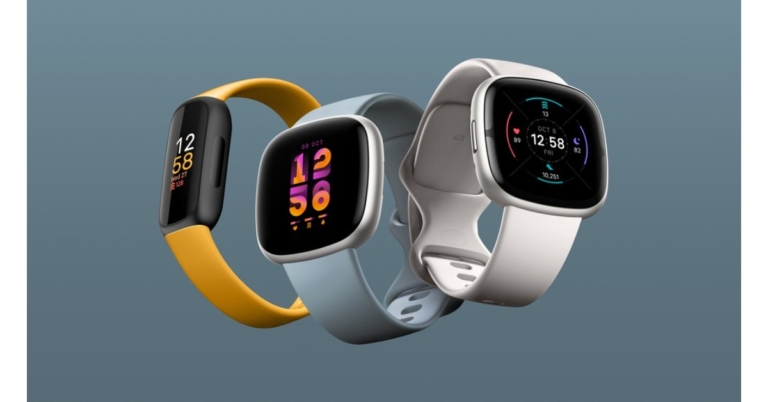
Fitbit Sense 2, Versa 4, and Inspire 3 launched in India

Google-owned fitness tracker manufacturer Fitbit has introduced a new lineup of smart wearables. The company has introduced three models: the Fitbit Sense 2, Versa 4, and Inspire 3. All the wearables come with touchscreens and colour displays and include a number of sensors to track the user’s health and lifestyle.

Fitbit Sense 2, Versa 4, and Inspire 3 price in India and availability

Fitbit Inspire 3 will be available in India in September via fitbit.com/in and select shops for INR 8,999, which includes a six-month Premium membership for both new and existing customers. Both the Versa 4 and the Sense 2 will be available in India starting this fall via fitbit.com/in and a few stores. The Versa 4 costs INR 20,499 and the Sense 2 costs INR 24,999. Both include a six-month Premium subscription (for new or returning users).
Fitbit Inspire 3
Fitbit Inspire 3

Fitbit Inspire 3

With a battery life of 10 days, the Inspire 3 tracker makes keeping track of your health enjoyable and simple. It’s a fantastic entry-level gadget with a vibrant colour display that can monitor crucial data at our most affordable pricing. The Inspire 3’s tiny, lightweight pebble is water resistant to a depth of 50 metres, comfortably fits on your wrist, and features Fitbit’s longest battery life for all-day comfort. It also comes in a variety of vibrant hues to match your style. Additionally, you may quickly switch up your appearance with various accessories including transparent and stainless steel mesh bands and a clip. The vibrant display gives your day even more colour by allowing you to instantly view your data, select a clock face that matches your taste, and use the new always-on display function (3+ days with default settings). With fully customised on-wrist notifications from your phone, you can stay in touch with what matters to you even while you’re out for a run or on your way to class. Your activity (steps, calories burnt, distance travelled, hourly activity), exercise (active zone minutes and weekly goal progress), heart rate, heart health, and sleep quality (blood oxygen (SpO2), duration, and score) are all tracked by the Fitbit Inspire 3 around-the-clock. From your wrist, you can also begin an activity, set timers, a stopwatch, or alarms to wake you up when you are in the best possible sleep stage, as well as turn off alerts and disable the screen display for a restful night. With access to introductory fitness and wellness programmes, advice, and challenges via the Fitbit app, Inspire 3 gives you insights into your body and offers direction to help you realise your health objectives. For a 360-degree picture of your health, you can use the app to track your blood sugar, hydration, menstrual cycle, and nutritional data to accelerate your progress. You can also stay encouraged by interacting with and setting challenges for your friends and family.

Fitbit Verse 4 and Sense 2

Both the Fitbit Verse 4 and Sense 2 are powered by the new Fitbit OS. They have been altered to be thinner and lighter and to feel more comfortable on your body all the time. The button, which was last seen on the Versa 2, is back and is now easier to reach while working out. The Wearables offers a variety of features, including real-time data, walk/run recognition on your wrist, sleep tracking, and stress tracking, in addition to 24-hour heart rate monitoring and activity tracking. These smartwatches are guaranteed to keep up with their fast charging capabilities and battery life of more than six days (12 minutes of charging = one day’s worth of battery life!). Fitbit Verse 4 and Sense 2 The device comes with a Premium feature, Sleep Profile. It makes use of 10 sleep indicators to identify your sleep style, identify important trends, and assist you in getting better-quality sleep. Your Stress Management Score will also show you how well your body is managing stress, enabling you to determine whether to engage in some guided breathing exercises, meditation, or reflection. Both the Versa 4 and the Sense 2 are iOS and Android compatible and loaded with intelligent features including expanded app and text notifications, glanceable alerts, smart replies (Android only), and more. Additionally, Google Maps and Google Wallet will be accessible directly from your wrist in the near future. Versa 4 offers more than 40 exercise modes—more than twice as many as we’ve ever had—all of which are accessible on the go. These include brand-new options like HIIT, weightlifting, CrossFit, and dance. Use the built-in GPS to go outside, or use Fitbit Premium’s more than 1,000 workouts and mindfulness sessions to try something new. Whatever choice you make, Active Zone Minutes and real-time heart rate zone warnings enable you to monitor the cumulative effect of your exertion. With a new Body Response sensor that tracks continuous electrodermal activity (cEDA) for all-day stress management right from your wrist, Sense 2 expands on Fitbit’s stress tracking features. It utilises measurements like heart rate, heart rate variability, and skin temperature, along with cEDA, to assist you in understanding when your body may be exhibiting indications of stress. After receiving a Body Response notification, Sense 2 suggests various methods for reducing stress immediately, such as mood tracking, guided breathing exercises, mindfulness exercises, on-wrist tracking, and the Fitbit app.  For the latest gadget and tech news, and gadget reviews, follow us on TwitterFacebook and Instagram. For newest tech & gadget videos subscribe to our YouTube Channel. You can also stay up to date using the Gadget Bridge Android App. You can find the latest car and bike news here.

How to upload a video to YouTube? The easiest and best way 2022

0
Uploading a video to YouTube is a pretty straightforward process, but it can be a bit confusing when you’re doing it for the first time. Apart from using YouTube as a platform to make content for a wider audience, you can also use it as a medium to share videos with a close group of friends and family. By selecting the appropriate privacy settings, you can make sure that only the people with the link to the video are able to access it. In this article, we show you the easiest and best way to upload a video to YouTube from your desktop and smartphone. Read Also: How to best Download YouTube Videos For Offline Viewing? Simple and easy ways (2022)

Upload a video to YouTube from your Desktop

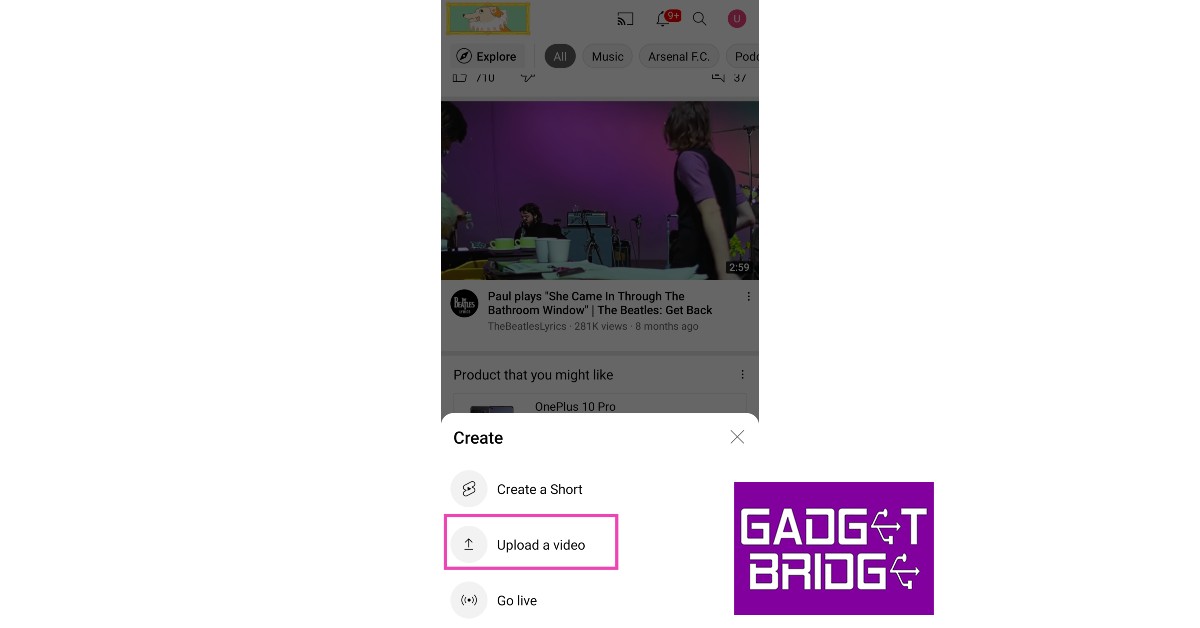
Step 1: Go to youtube.com. Step 2: Click on the ‘Create’ icon at the top-right section of your screen. Step 2: Click on the ‘Create’ icon at the top-right section of your screen. Step 3: Select ‘Upload Video’ from the drop-down options. Step 3: Select ‘Upload Video’ from the drop-down options. Step 4: YouTube will open an ‘Upload Video’ window. Click on the ‘Select Files’ option. Step 4: YouTube will open an ‘Upload Video’ window. Click on the ‘Select Files’ option. Step 5: Select a video from your desktop’s storage. Step 5: Select a video from your desktop’s storage. Step 6: Edit the title and description of the video, and assign it a thumbnail. Select whether the video is made for kids or not. YouTube will upload and process the video and check it for any possible copyright infringement. Click on ‘Next’. Edit the title and description of the video, and assign it a thumbnail. Step 7: In the following window, you can add subtitles, an end screen, and cards. Click on ‘Next’. In the following window, you can add subtitles, an end screen, and cards. Step 8: In the following window, YouTube will let you know if your video violates any copyrights. Click ‘Next’.  In the following window, YouTube will let you know if your video violates any copyrights. Step 9: Select the visibility of your video in the following video. You can set it as private (only you can see it), unlisted (only people with the link to the video can see it), and public (everyone can see it). You can even schedule the upload for a later time. Select the visibility of your video in the following video. Step 10: Click ‘Save’. Your video will be published.

Upload a video to YouTube using your smartphone

Step 1: Open the YouTube app. Step 2: Tap on the plus button at the bottom of the screen. Step 2: Tap on the plus button at the bottom of the screen. Step 3: Select a video to upload. Step 4: Tap on ‘next’. Step 4: Tap on ‘next’. Step 5: Edit the title and description and tap ‘next’. Step 5: Edit the title and description and tap ‘next’. Step 6: Select if the video is made for kids and then tap on ‘Upload Video’. Step 6: Select if the video is made for kids and then tap on ‘Upload Video’. Read Also: How Technology Has Improved Competition and Sports This is how you can upload a video to YouTube from your desktop or smartphone. If you upload a video that is less than a minute long, it will be uploaded as a short. Once you’ve uploaded your first video, you can see its reach and other analytics on your ‘Studio’ page. These metrics are helpful in determining what kind of content is more popular among your audience.
For the latest gadget and tech news, and gadget reviews, follow us on TwitterFacebook and Instagram. For newest tech & gadget videos subscribe to our YouTube Channel. You can also stay up to date using the Gadget Bridge Android App. You can find the latest car and bike news here.

Amazon Quiz Answers Today 26 August 2022: Participate to win Rs 5,000

Amazon is back with another quiz on its mobile platform. The Amazon Quiz is conducted every day for its customers. Customers from different parts of the country are participating in the daily quiz. Today’s Amazon quiz is now live on the Amazon App. The customers who participate in the 26 August 2022 Amazon Quiz will get a chance to win Rs 5,000 Amazon pay Balance. The Amazon Quiz can be played from 12 AM to 11:59 PM. For those who are unaware of the quiz, the e-commerce platform brings a fresh quiz on a daily basis which consists of five questions related to general knowledge and current affairs. The participants need to answer all the questions correctly and their names will be selected for a lucky draw. The winner will be announced at the end of the month. One wrong answer could eliminate you from the quiz. Only app users are eligible to participate in the Quiz. Check Out 26 August 2022 Amazon Quiz Answers. Amazon Quiz Today Prize – Rs 5,000 Amazon Pay Balance Quiz Date – 26 August 2022 Daily Timing – 12 AM to 11:59 PM Winner Announcement – Today 12 PM

Amazon Quiz Answers Today 26 August 2022

Question 1: In which of these sports did India win 6 gold medals at the 2022 Commonwealth Games? Answer: Wrestling Question 2: In the movie ‘Raksha Bandhan’ Akshay Kumar plays the role of Lala Kedarnath the eldest and only brother of how many sisters? Answer: 4 Question 3: Shashi Tharoor has recently been bestowed with which of these honours? Answer: Legion of Honour Question 4: Name this adventure sport Answer: Paragliding Question 5: In which US state (the 49th) is this historical building located? Answer: Alaska

How To Play Amazon Quiz

Only app users are eligible to play the Amazon quiz every morning from 12 AM to 11:59 PM. The quiz is not available on the desktop. For those who are unaware of how to play the Amazon quiz below are the steps, you can follow to take the quiz.
  • Firstly download the Amazon app from Google Play Store or App Store
  • Now fill in the required information through the Sign Up option.
  • You need to log in to the Amazon app and scroll down on the home screen to find the Amazon Quiz banner.
  • Tap on the Amazon Quiz banner and tap on the Start button to start the Quiz.
  • Now you will get 5 questions and you need to answer them correctly. One wrong answer will eliminate you from the Quiz.
  • After answering all the questions correctly you are now eligible for a Lucky Draw.
  • The winner’s name will be announced today at 12 PM.
For the latest gadget and tech news, and gadget reviews, follow us on TwitterFacebook and Instagram. For newest tech & gadget videos subscribe to our YouTube Channel. You can also stay up to date using the Gadget Bridge Android App. You can find the latest car and bike news here.