
OnePlus Nord wired earphones launched in India at an accessible price point of Rs 799

OnePlus India is updating its audio portfolio with the addition of new affordable earphones. The company has introduced OnePlus Nord wired earphones in the nation. The audio product is the first wired earphones by the company under its Nord series. The earphones are compatible with 3.5mm jack and feature 9.2mm dynamic drivers. In addition to this, the design resembles the OnePlus Bullets Wireless Z Series. Keep on reading to learn more about the product. OnePlus Nord wired earphones price in India

OnePlus Nord wired earphones price in India

OnePlus Nord wired earphones price in India has been set at Rs 799. Note that this is now one of the firm’s most reasonably priced devices. The OnePlus Nord Wired Earphones will be available for purchase in India starting on September 1 at OnePlus.in, the OnePlus Store App, Amazon.in, OnePlus Experience stores, and other offline partner stores like Reliance Digital & MyJio, Croma, Sangeetha Mobiles, Poorvika, Bajaj Electronics, Vijay Sales, Pai International, Happi Mobiles, SS Mobiles, Poojara Telecom, BigC Mobiles, LOT Mobile.

OnePlus Nord wired earphones specifications

With 9.2mm dynamic drivers and a 0.42cc sound chamber, the OnePlus Nord wired earphones are equipped to offer the all-too-familiar OnePlus bass experience, although in a different form. The style will be similar to OnePlus Bullets Wireless Z Series with a sleek black finish and eye-catching red highlights for the traditional OnePlus aesthetic. The integrated microphone and button controls on the Nord Wired Earphones provide customers complete control over calls, multimedia, and the ability to operate voice assistants at the touch of a button. OnePlus Nord wired earphones specifications The earphones have magnets built into them to make them portable and hassle-free. They also serve as a handy audio control; unclip them to halt a multimedia session and clip them back on to continue it. The 3.5mm audio jack on the Nord wired earbuds makes them compatible with laptops, gaming systems, and your Nord smartphones. The earbuds also have three pairs of interchangeable silicon tips that the users can mix and match as needed to ensure a snug fit and an immersive listening experience. For the latest gadget and tech news, and gadget reviews, follow us on TwitterFacebook and Instagram. For newest tech & gadget videos subscribe to our YouTube Channel. You can also stay up to date using the Gadget Bridge Android App. You can find the latest car and bike news here.
When will iPhone 13 get cheaper?

0
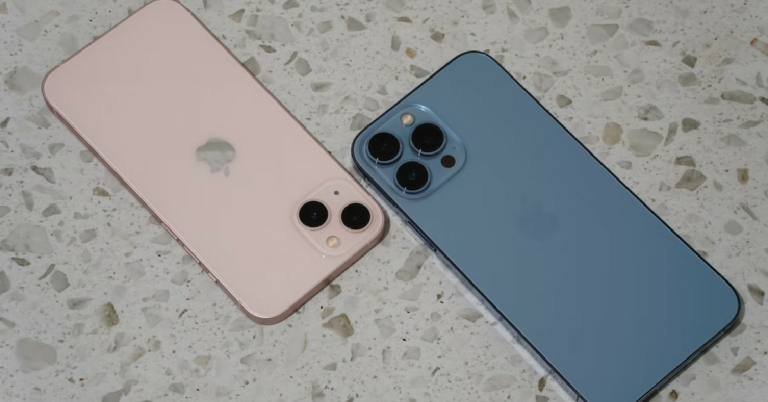
As we get closer to the Apple launch event this year, many buyers are excited about the new features and upgrades that will come with the new iPhone 14. We’ve covered this topic extensively, and you can read about it here. While everyone is excited about the launch event, many smart buyers are also looking forward to seeing whether Apple slashes the prices of the iPhone 13 after the launch of the iPhone 14. Going by past trends, it is very likely that Apple will reduce the prices of the iPhone 13 with the launch of the new iPhone. But there are some unique circumstances this year that may prevent them from doing so. So, when will iPhone 13 get cheaper? In this article, we take a closer look.  Read Also: Will the new iPhone 14 series be more expensive than the iPhone 13?

Will the iPhone 13 get cheaper right after the Apple launch event?

Will the iPhone 13 get cheaper right after the Apple launch event? Going by previous trends, Apple will drop the prices of the iPhone 13 soon after the announcement of the iPhone 14. Last year, the prices of the iPhone 12 and iPhone 11 were cut by $100 (~ Rs 8,000) soon after the launch of the iPhone 13. We expect the price of the previous models to go down this year as well. But will Apple slash prices in India as well? When the Macbook Air M2 was launched earlier this year, prices for the previous M1 version went up instead of going down. While Apple cut the prices for M1 in the US, the price in India was increased by Rs 7,000, with the model now costing Rs 99,990 compared to the launch price of Rs 92,990. While Apple did not give any official explanation for the price increase, it is understood that the global chip shortage and price inflation in India may be the reason behind it. This puts Indian buyers in a bit of a predicament when it comes to buying the iPhone 13. However, there is some good news. Recently, Amazon and Flipkart announced discounts on the iPhone 13, with the 256GB variant now costing Rs 75,999 on Flipkart and Rs 76,900 on Amazon. The 128 GB variant costs Rs 65,999 on Flipkart, which is Rs 14,000 lower than its launch price. So, now would be a good time to buy the iPhone 13. Read Also: When will the full version of Apple iOS 16 come for iPhones? The global chip shortage will not just affect the pricing of the iPhone 13. Many analysts suspect that the lower variants of the iPhone 14 may retain the A15 Bionic processor found on its predecessor, with only the Pro and Pro Max variants getting the new A16 chipset. If this happens, then it reduces the possibility of the iPhone 13 getting cheaper as it’ll be offering nearly the same specs as the new iPhone. While everything is up for speculation right now, things will become clearer as we get closer to the Apple launch event on September 7. Watch this space for any new developments.
For the latest gadget and tech news, and gadget reviews, follow us on TwitterFacebook and Instagram. For newest tech & gadget videos subscribe to our YouTube Channel. You can also stay up to date using the Gadget Bridge Android App. You can find the latest car and bike news here.

Instagram is restricting sensitive content for new teenage users by default

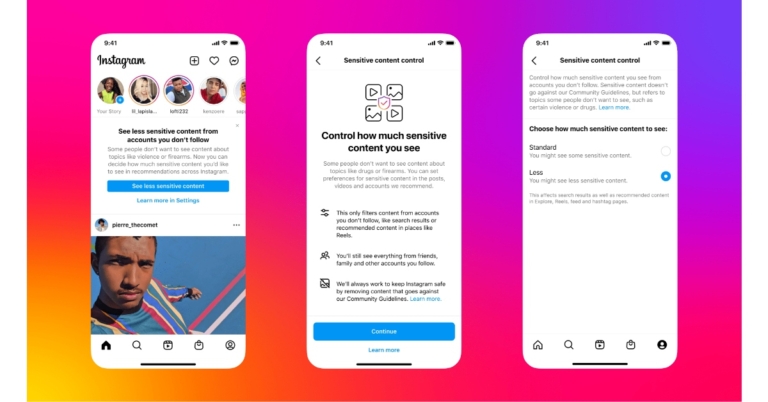
Parental controls to give users more control over their feeds and profiles have already been introduced to Instagram. The photo-sharing app has now updated its safety measures to censor content for its under 16 users on the platform to safeguard young people using Instagram. Instagram is now rolling out a new update in which sensitive content is not censored on the platform by default for new teen users. Only if users manually modify the setting, Instagram account holders under the age of 16 will now be placed in the app’s filtered edition. Teens only have the “Standard” and “Less” options under the sensitive content control. Under-16-year-old new users on Instagram will automatically be placed in the “Less” state. The photo-sharing app will send prompt urging kids who are already using Instagram to choose the “Less” experience. Instagram sensitive content control As per the company, young people will have a harder time finding potentially sensitive content or accounts in Search, Explore, Hashtag Pages, Reels, Feed Recommendations, and Suggested Accounts as a result of this. Instagram is also testing a new strategy to get teenagers to upgrade their privacy and security settings. Teenagers will notice prompts encouraging them to evaluate their settings, which include those governing who can repost their content, contact them, and view it, as well as those governing what content they can access and how much time they can spend on Instagram. In addition, Instagram is constantly creating options to enable users to tailor their Instagram experience. Sensitive Content Control was introduced last summer to allow users to control how much or how little sensitive content appears in Explore from accounts they don’t follow. It has announced modifications to this control as well. Sensitive Content Control will now be present on all surfaces where recommendations are made. You can now choose how much private information and accounts you see in Search, Reels, Accounts You Might Follow, Hashtag Pages, and In-Feed Recommendations in addition to Explore. Instagram’s recommendations on Search and Hashtag pages will now be subject to the same technologies used to enforce our Recommendation Guidelines as of this release. Within the next few weeks, everyone will have access to this update. Three options make up the Sensitive Content Control, and they have all been given new names since the control was first created to make them easier to understand. There are three choices: “More,” “Standard,” and “Less.” The default setting, “Standard,” will keep some private information and accounts hidden from view. In contrast to the usual setting, “Less” allows users to see a smaller amount of sensitive information and accounts. The “More” option is not accessible to those under the age of 18. To view your Sensitive Content Control:

To view your Sensitive Content Control:

  • Go to your profile.
  • Tap the Settings menu in the upper right corner.
  • Tap Account.
  • Tap Sensitive Content Control. Here you can decide whether to keep the setting at its default state (“Standard”) or to see more (“More”) or less of some types of sensitive content (“Less”). You can change your selection at any time.
For the latest gadget and tech news, and gadget reviews, follow us on TwitterFacebook and Instagram. For newest tech & gadget videos subscribe to our YouTube Channel. You can also stay up to date using the Gadget Bridge Android App. You can find the latest car and bike news here.
How to cut your hair on your own? 5 best videos we found on the internet to cut your own hair

Cutting your own hair can be a tricky task and one we wouldn’t suggest unless you know you’re what you’re doing. But if you’re still trying to avoid public places due to Covid, or just want to save money, giving yourself a simple haircut at home can be pulled off if you’ve been briefed on how to do it. It will take a few attempts to get it right, but once you do, you’ll never go back to the salon again. Luckily, the internet is full of helpful haircut tutorials. In this article, we bring you the 5 best videos we found on the Internet on how to cut your own hair. Read Also: Top 5 photography YouTube channel to follow

Learn to cut your own hair at home by Mike Shake

This is one of the most basic tutorials on how to cut your own hair. All you need is a clipper, a comb, a small mirror, and a wall mirror to give yourself a haircut. This video will also teach you how to give yourself a slight fade on the side. You will need comb accessories of different lengths for the clipper to give yourself a fade. Before you begin your cutting your hair, you’ll need to wash your hair. 

How to cut your own hair straight by Patry Jordan English

Giving yourself a haircut can be trickier for women compared to men. Longer hair can be difficult to reach and harder to cut appropriately. This tutorial by Patry Jordan gives simple solutions to cutting long hair and even shows you a few techniques related to layering and cutting your hair at the right angles. With over 15 million views on YouTube, it is one of the most popular hair-cutting video tutorials. 

Summer Buzz Cut Self-Haircut Tutorial by Alex Kouras

If you’re looking for a simple clean buzz cut, this is the tutorial for you. All you need is a clipper and a razor, and you’re good to go. While giving yourself a buzz cut may seem like a simple enough task, there are a lot of intricacies involved. This informative video covers all the issues that may come up while giving yourself a buzz cut. It also provides different camera angles which will help in understanding how to approach basic haircutting.

Quick & Easy Layered Haircut At Home by Tina Engeo

If you’ve mastered giving yourself a basic haircut, you can explore other styles and techniques. This tutorial shows you how to give yourself a layered haircut in quick and easy steps. While it may seem like a complex process, it is pretty easy to follow once you get going. You can also use this technique to give your friends and family a haircut at home.

Medium Length Modern Slick Back Tutorial by BluMaan

If you’ve got medium to long hair and are looking for a unique look for your hair, this haircut tutorial will teach you how to give yourself a slick back hairstyle. You can try this method after you’ve mastered the art of giving yourself a basic haircut. Apart from basic hair cutting equipment, you will also need some hair products that will help you give that slick-back look to your hair. You can find those products in the video description and go about giving yourself the haircut. Read Also: How to Calculate your BMI (Body Mass Index)? 3 Simple and easy ways These are the 5 best videos we found that teach you how to cut your own hair at home. If you’ve never given yourself a haircut at home before, have someone help you out to reach the backline of your hair. Even a few incorrect snips can ruin the look of your hair. Once you’ve given yourself a few haircuts, you can go about the whole process by yourself and even give haircuts to other people. If you cut your own hair at home and would like to share some helpful tips, let us know in the comments!
For the latest gadget and tech news, and gadget reviews, follow us on TwitterFacebook and Instagram. For newest tech & gadget videos subscribe to our YouTube Channel. You can also stay up to date using the Gadget Bridge Android App. You can find the latest car and bike news here.

Amazon Quiz Answers Today 29 August 2022: Participate to win Rs 1,250

29 August 2022 Amazon Quiz has gone live. Customers from different parts of the country are participating in the daily quiz. The quiz begins from 12 AM to 11:59 PM. Those participating in the quiz can win exciting prizes by answering all the questions correctly. Today participants have a chance to win a Rs 1,250 Amazon Pay Balance. Amazon quiz brings an opportunity for its customers to win Amazon Pay Balance ranging from Rs 1,000 to Rs 50,000. The Quiz can be played from 12 AM to 11:59 PM. The e-commerce platform brings a fresh quiz on a daily basis which consists of five questions related to general knowledge and current affairs. The participants need to answer all the questions correctly and their names will be selected for a lucky draw. The winner will be announced at the end of the month. One wrong answer could eliminate you from the quiz. If you manage to answer all the questions correctly you can stand a chance to win a Rs 1,250 Amazon Pay Balance today. Only app users are eligible to participate in the Quiz. Check Out 29 August 2022 Amazon Quiz Answers. Amazon Quiz Today Prize – Rs 1,250 Amazon Pay Balance Quiz Date – 29 August 2022 Daily Timing – 12 AM to 11:59 PM Winner Announcement – Today 12 PM

Amazon Quiz Answers Today 29 August 2022

Question 1: Regis Chakabva captained which team, in a recent series ODI series against India? Answer: Zimbabwe Question 2: Top Gun: Maverick surpassed which film to become Tom Cruise’s highest grossing film of all time? Answer: Mission Impossible- Fallout Question 3: Asia’s largest Compressed Biogas (CBG) has begun its commercial operations in Sangrur in which state? Answer: Sri Punjab Question 4: Name this former President’s wife, who has also run for the US Presidential post Answer: Hillary Clinton Question 5: This company has often referred to themselves as the three ___ company. Fill in the blanks Answer: Stripe

How To Play Amazon Quiz

Only app users are eligible to play the Amazon quiz every morning from 12 AM to 11:59 PM. The quiz is not available on the desktop. For those who are unaware of how to play the Amazon quiz below are the steps, you can follow to take the quiz.
  • Firstly download the Amazon app from Google Play Store or App Store
  • Now fill in the required information through the Sign Up option.
  • You need to log in to the Amazon app and scroll down on the home screen to find the Amazon Quiz banner.
  • Tap on the Amazon Quiz banner and tap on the Start button to start the Quiz.
  • Now you will get 5 questions and you need to answer them correctly. One wrong answer will eliminate you from the Quiz.
  • After answering all the questions correctly you are now eligible for a Lucky Draw.
  • The winner’s name will be announced today at 12 PM.
For the latest gadget and tech news, and gadget reviews, follow us on TwitterFacebook and Instagram. For newest tech & gadget videos subscribe to our YouTube Channel. You can also stay up to date using the Gadget Bridge Android App. You can find the latest car and bike news here.

Will the new iPhone 14 series be more expensive than the iPhone 13?

Apple plans on launching its iPhone 14 series at the ‘Far Out’ event scheduled for September 7, next month. As is the case with every Apple launch event, Apple users are excited about the new features and upgrades that the iPhone 14 will offer. Perhaps the most common question on everyone’s mind is the price of the new iPhone 14. In this article, we take a closer look at how much the new iPhone 14 may cost and if it will be more expensive than the iPhone 13. Read Also: When will the full version of Apple iOS 16 come for iPhones?

iPhone 14: Rumoured price and the factors surrounding it

iPhone 14: Rumoured price and the factors surrounding it According to Apple analyst Ming-Chi Kuo, Apple could increase the price of the iPhone 14 by about 15%. Currently, iPhone 13 is priced at $799 (Rs 63,990 in India) with prices rising to $999 and $1099 for the Pro (Rs 1,19,900) and Pro Max (Rs 1,29,9000). The iPhone 13 Mini is priced at $699 (Rs 69,900), but it is heavily rumoured that the iPhone 14 will not come with a mini version. According to Kuo, the Average Selling Price (ASP) of the iPhone 14 could be between $1,000-$1,050. The price hike has been chalked up to the price hike of the iPhone Pro and a ‘higher shipment proportion’. Wedbush Securities analyst Dave Ives believes that the new iPhone 14 could be priced around $100 more than the iPhone 13 due to the rising supply chain costs. So, after launching the iPhone 13 for exactly the same price as iPhone 12, it seems that Apple will be hiking the price of the new iPhone this year. Prices in India could also be affected by inflation and the Rupee taking a hit against the dollar. Read Also: USB-C to become mandatory for smartphones starting 2024, ending Apple’s lightning connector

Frequently Asked Questions

Will there be an iPhone 14 Mini?

Rumours suggest that Apple could discontinue the iPhone mini with iPhone 14. This means the least expensive iPhone will cost at least $799.

Will the price of the iPhone 13 drop after the release of the iPhone 14?

Going by previous trends, Apple will reduce the price of the iPhone 13 after the launch of the iPhone 14.

What new features can be expected from the iPhone 14?

Apple is looking to replace the notch on the display with a notch and pill design on the iPhone 14. The iPhone 14 is also expected to come with a new A16 chip and an Always-on display.
For the latest gadget and tech news, and gadget reviews, follow us on TwitterFacebook and Instagram. For newest tech & gadget videos subscribe to our YouTube Channel. You can also stay up to date using the Gadget Bridge Android App. You can find the latest car and bike news here.

How much does it cost to replace the Tesla battery in USA?

0
At a time when electric vehicles seem to be the future of transportation, Tesla has already gained a massive advantage over its peers by being way ahead of the curve. Tesla currently owns the largest market share in EVs, and it doesn’t look like its dominance is going to diminish anytime soon. With more buyers switching to electric cars, the first question that comes to everyone’s mind is about the longevity and versatility of the battery in Tesla vehicles. While electric vehicles do not require the level of upkeep that ICE-powered vehicles do, they are not entirely immune to damage. The battery, being the most vital component of an EV, is expected to last the most out of any other part. A lot of users are apprehensive about buying an EV due to the costs that come with replacing the battery. So, in this article, we explain how much it can cost to replace the Tesla battery in USA. Read Also: Google Foldable Phone patent shows Samsung Galaxy Fold-like design: Details inside

How long does a Tesla battery usually last?

How long does a Tesla battery usually last? Since the battery pack is the most important component of an EV they are typically built to last a considerable duration of time. Tesla claims that a Model X battery retains 90% of its capacity even after 200,000 miles. Going by the average miles a person drives per year, it would take almost 15 years for your Tesla to reach 200,000 miles. And even then it would function at 90% battery capacity. All Tesla vehicles come with an extended warranty on their battery pack. All Tesla models come with an 8-year or 150,000-mile warranty, whichever comes first. If the battery fails during this period or loses more than 30% of its capacity, Tesla will either repair or fully replace it.

How much does it cost to replace the Tesla battery?

How much does it cost to replace the Tesla battery? Even though Tesla batteries are built to last, they are not immune to damage. A Tesla battery can still fail due to fuse or voltage problems, or even physical damage from an accident. Even if a single battery module is damaged, the entire battery pack will be affected. If your Tesla has passed the warranty period, then you will have to bear the cost of replacement or repair yourself.  Typically, the cost to replace a Tesla battery can be anywhere between $13,000 and $15,000, excluding labour costs. For Model S, this price could rise up to $20,000. Model 3 and Model X’s batteries are relatively cheaper to replace. Tesla does not reveal the official price list of its batteries so these numbers are based on the reports users have published online.  Apart from the battery cost, you may have to shell out an extra $50-200 for additional replacement parts like wires and connectors. The labour cost is added on top of this and depends upon the time it takes to replace the battery. Read Also: How to Find a USPS Tracking Number in just a few steps?

Frequently Asked Questions

Can I replace my Tesla’s batteries at home?

Unless you have received the proper training and have access to the necessary equipment, you cannot replace the Tesla’s batteries at home. Since batteries are high voltage we advise against handling them if you don’t know what you’re doing.

How do I know that my Tesla’s batteries need to be replaced?

If you’ve put some miles on your Tesla and are wondering if it’s time to replace the batteries, here are some of the signs to look out for.
  • There has been an abrupt drop in driving range. If the range suddenly drops down by 20%, you may want to check the battery.
  • Battery capacity falls below 30% during the warranty period
  • The battery pack isn’t able to hold the charge.
  • You get a notification from Tesla.

What is the battery life expectancy of a Tesla?

A Tesla’s battery can typically last up to 15 years. Tesla claims that its batteries retain 90% capacity after 200,000 miles.
For the latest gadget and tech news, and gadget reviews, follow us on TwitterFacebook and Instagram. For newest tech & gadget videos subscribe to our YouTube Channel. You can also stay up to date using the Gadget Bridge Android App. You can find the latest car and bike news here.

Where is and what is the ALT key in a MAC keyboard?

0
If you’ve recently made the switch from a Windows PC to a Mac, you may be wondering where the alt key is located. On a Windows keyboard, the alt key is usually located on either side of the spacebar. Certain manufacturers may change the position of the alt key, but it is typically placed in the bottom row, near the spacebar. Once you switch to a Mac keyboard, you’ll notice certain differences in the layout compared to a Windows keyboard. One of the differences is the alt key. The alt key has an important function in Windows, as it is used in several shortcut combinations. In this article, we show you where the alt key is located on a Mac keyboard, what it is called, and what it does. Read Also: How to upload a video to YouTube? The easiest and best way 2022

Where is the Alt key in a Mac keyboard and what is it called?

Where is the Alt key in a Mac keyboard and what is it called? The alt key on a Mac is called ‘option’ and is located next to the command key on either side of the spacebar. It is the second key from the spacebar. On certain keyboards, it may also have the ⌥ symbol. The option key can be in keyboard shortcut combinations like the alt key in Windows, although it doesn’t perform all the functions of the alt key. The shortcut commands that the alt key carries out in Windows are split between the option key and command key in a Mac.

What does the option (alt) key in a Mac keyboard do?

What does the option (alt) key in a Mac keyboard do? The option key in a Mac keyboard can carry out most of the functions of the alt key. But there are some differences. For example, the most common shortcut that Windows users are familiar with is the Alt+F4 shortcut to close a Window. But in a Mac, the alt key in this particular shortcut is replaced by the command key. The shortcut for closing a window on Mac is Command+W. The option key in Mac can carry out a few unique functions on its own. Like accessing the system volume shortcuts, or typing European letters like Umault (Ü) and Cedilla (Ç). Here is a list of shortcuts combinations on Mac that require the alt key in Windows
  • Close a window: Command+W
  • Change Tabs: Command+tab
  • Put the Mac to sleep: Option+Command+Power button
  • Quit all tasks, the shut down: Control+Option+Command+Power button
Read Also: How to Find a USPS Tracking Number in just a few steps? This is how you can find the alt key on a Mac keyboard. As you know by now, most of the functions of the alt key are split between the command key and option key in a Mac. Getting used to the Mac keyboard may take some time at first, but you will be able to carry out the same functions as you did on a Windows keyboard.
For the latest gadget and tech news, and gadget reviews, follow us on TwitterFacebook and Instagram. For newest tech & gadget videos subscribe to our YouTube Channel. You can also stay up to date using the Gadget Bridge Android App. You can find the latest car and bike news here.
How to convert your image to anime? Top simple ways we recommend

0
With a diverse range of photo editing apps and online tools available today, there’s a lot that can be done to make the pictures you take more fun. With most photo editing tools offering unique effects and filters of their own, there are a lot of aesthetics to choose from. In this article, we show you how to convert your image to an anime using a smartphone app and a photo editing tool online. Read Also: Save and Download Instagram Reels Audio as MP3? 5 best ways

How to convert your image to anime on a smartphone

Step 1: Download and install the ToonMe app from Google Play Store. Step 2: Open the app and select a filter from the list of Toon filters. Step 2: Open the app and select a filter from the list of Toon filters. anime effect app Step 3: Select a picture from your gallery to apply the filter on. Press the arrow key to apply the filter. Step 3: Select a picture from your gallery to apply the filter on. Press the arrow key to apply the filter. anime effect app Step 4: ToonMe will process the image and apply the Toon filter to it. You can save the image on your device. Step 4: ToonMe will process the image and apply the Toon filter to it. You can save the image on your device.

How to convert your image to anime on a laptop

Step 1: Open the web browser and go to www.befunky.com Step 2: Select ‘Get Started’. Step 2: Select ‘Get Started’. Step 3: Click on ‘Edit a Photo’. Step 3: Click on ‘Edit a Photo’. Step 4: Upload a photo from your desktop or use a photo from Befunky’s gallery. Step 5: Select the ‘Artsy’ option from the side menu. Step 5: Select the ‘Artsy’ option from the side menu. Step 6: Select the ‘Cartoonizer’ effect. Step 6: Select the ‘Cartoonizer’ effect. convert image to anime Step 7: Select a filter from the list of cartoonizer effects. Step 7: Select a filter from the list of cartoonizer effects. convert image to anime Once you’re satisfied with the result, you can save the image by clicking on the ‘Save’ option from the top menu. Read Also: How to Find a USPS Tracking Number in just a few steps? This is how you can convert your image to anime using a smartphone app or an online photo editing tool. Arriving at the image you want requires a lot of hit and trial and going through several different effects and filters. You can also use other apps and photo editing tools like Toon App, Anime Camera, and more.
For the latest gadget and tech news, and gadget reviews, follow us on TwitterFacebook and Instagram. For newest tech & gadget videos subscribe to our YouTube Channel. You can also stay up to date using the Gadget Bridge Android App. You can find the latest car and bike news here.

Infinix Note 12 Pro with 108MP triple rear camera set up launched in India

Infinix today announced the launch of another new smartphone in the Indian market. The company has introduced Infinix Note 12 Pro featuring a 108MP triple rear camera set up and is powered by MediaTek Helio G99 SoC. Also, there is an AMOLED screen with a 90Hz refresh rate. The device also boasts a 5,000mAh battery that can be charged quickly at 33W.

Infinix Note 12 Pro price in India and sale details

Infinix Note 12 Pro has been launched in India with a price tag of Rs 16,999 for the 8GB RAM with 256GB of internal storage. The device will be offered in three colour options of Alpine White, Tuscany Blue, and Volcanic Gray. The mobile phone is scheduled to go on sale on September 1 via Flipkart in the country. Infinix Note 12 Pro price in India and sale details On purchases made using the Flipkart Axis Bank Card, the e-commerce site is offering a 5% reward. Additionally, buyers will receive a free pair of Snokor XE 18 true wireless stereo earbuds, valued at Rs 1.

Infinix Note 12 Pro specifications

Infinix Note 12 Pro comes with a 6.7-inch full-HD+ AMOLED display with 1,080 x 2,400 pixels of resolution. The screen comes with a 90Hz refresh rate and a 180Hz touch sampling rate. The display also offers an aspect ratio of 20:9. Infinix Note 12 Pro runs on Android 12-based XOS 10.6. Under the hood, there is an octa-core 6nm MediaTek Dimensity G99 SoC, along with 8GB of LPDDR4X RAM. It comes with 256GB UFS 2.2 internal storage. Through a dedicated microSD card slot, the capacity may be increased to 2TB, nevertheless. A triple rear camera unit with a 108-megapixel Samsung ISOCELL sensor, a 2-megapixel depth sensor, an AI lens, and a quad-LED flash is included in the new smartphone. The front of the phone has a 16-megapixel selfie camera with dual LED flash. The phone has a 5,000mAh battery, which supports 33W rapid charging. The Infinix Note 12 Pro offers 4G LTE, Wi-Fi 802.11 a/b/g/n/ac, Bluetooth v5, NFC, GPS/A-GPS, and a USB Type-C connector for connectivity. A fingerprint sensor, ambient light sensor, gyroscope, proximity sensor, g-sensor, and e-compass are examples of onboard sensors. Additionally, Infinix includes two speakers that support DTS surround sound. For the latest gadget and tech news, and gadget reviews, follow us on TwitterFacebook and Instagram. For newest tech & gadget videos subscribe to our YouTube Channel. You can also stay up to date using the Gadget Bridge Android App. You can find the latest car and bike news here.