

OnePlus Nord CE 5G confirmed to launch in India, likely to arrive by next month

Once again the OnePlus Nord is in the news because soon we will get to see its second generation. Yes, the company has now teased the arrival of ‘something new’ in India. Earlier, the company did not confirm the name of the upcoming device but was speculated to bring OnePlus Nord handsets namely the OnePlus Nord 2 and the OnePlus Nord CE 5G. Now the company has itself confirmed to launch the OnePlus Nord CE 5G in India.
OnePlus has started teasing the Summer Launch Event India to introduce OnePlus Nord CE 5G. Alongside the much-awaited phone, the company will also launch new models of the OnePlus TV U1S LED TV series. The company has also created a dedicated microsite on Amazon to tease its availability. In fact, the Notify button has also gone live on the e-commerce platform.
OnePlus began teasing the arrival of ‘something new’ for the Indian market yesterday. While teasing, the company did not reveal the name but the rumours suggested that the company is planning to launch the OnePlus Nord 2 and the OnePlus Nord CE 5G as both have been leaked in the past. The company has also sent out a puzzling tweet that reads “you figure it out. Alongside the tweet, an image depicting sign language has been shared and when we got to the bottom of the used sign language it translated to ‘Something new is coming.”
Not long ago, the company accidentally confirmed the OnePlus Nord 2 moniker. The alleged device was mistakenly mentioned in the eligible phone’s list for free Stadia Premiere Edition in the FAQ section of the OnePlus UK website. The company is running a promotional offer for those purchasing a OnePlus phone to get free Stadia Premiere Edition. The FAQ also includes other eligible phones in its list of supported phones: the OnePlus 9, OnePlus 9 Pro, OnePlus 8T, OnePlus 8 Pro, OnePlus Nord, and the OnePlus Nord 2. However, the alleged phone has now been removed from the list.
In the past, both the OnePlus Nord 2 and the OnePlus Nord CE 5G have appeared on the BIS certification site indicating the imminent launch in the country. The former one is said to be codenamed OnePlus ‘EBBA’ with model number EB2101. Whereas the other one is codenamed OnePlus ‘Denniz’ and has the model number DN2101.
For the latest gadget and tech news, and gadget reviews, follow us on Twitter, Facebook and Instagram. For newest tech & gadget videos subscribe to our YouTube Channel. You can also stay up to date using the Gadget Bridge Android App.
BenQ GS2 wireless portable projector introduced in India

With the surge in the demand for entertainment at home on a bigger screen the electronics maker BenQ has announced the launch of its new projector in India. The company has introduced BenQ GS2 wireless portable projector. This new product from the company makes a good home entertainment device for projecting movies, videos, music, and learning materials in any setting.
Rajeev Singh, Managing Director – BenQ India & South Asia, opined about the consumer centricity of the new GS2 projector and said, “A strong demand is being addressed with the launch of our latest innovation, the GS2 Portable Projector. Consumers spending time at home are considering scaling up their media and entertainment consumption. Keeping in mind this rising consumer need, we at BenQ launched the GS2 which promises to enrich and enhance their visual experience.”
While everyone is forced to stay at home due to pandemic lockdown the BenQ GS2 wireless portable projector will try to satisfy the needs for OTT streaming, music enjoyment, cooking, engaging with kids at home. The product is said to deliver High Definition picture quality with precise colours and razor-sharp clarity coupled with a 20,000-hour maintenance-free Solid state LED light source.
 Being compact and lightweight the BenQ wireless portable projector works with virtually any wireless or wired source device. The device features autofocus, auto vertical keystone, and an adjustable hinge for easy, instant operation in any setting. The wireless functionality makes it portable enough to be used at home or at the scenic open-air and outdoor ambience in fact it splash-proof with IPX2 certification. The BenQ GS2 Portable Projector is drop-proof as well and comes with an eye-protection sensor (BenQ-exclusive LumiExpert ambient-sensing automatic brightness technology) eye proximity sensor to temporarily blank the projector to prevent shining into children’s eyes. and parental timer for kids. Besides this, the projector also doubles up as a Bluetooth speaker and comes with the Aptoide TV app market for limitless streaming potential. When it comes to connectivity the GS2 Portable Projector supports WiFi, HDMI, USB-C, or its built-in media reader.
Speaking of the pricing BenQ wireless portable projector will be available via Amazon with a price tag of Rs 59,990. The device also comes with 2 years carry-in warranty.
For the latest gadget and tech news, and gadget reviews, follow us on Twitter, Facebook and Instagram. For newest tech & gadget videos subscribe to our YouTube Channel. You can also stay up to date using the Gadget Bridge Android App.
Being compact and lightweight the BenQ wireless portable projector works with virtually any wireless or wired source device. The device features autofocus, auto vertical keystone, and an adjustable hinge for easy, instant operation in any setting. The wireless functionality makes it portable enough to be used at home or at the scenic open-air and outdoor ambience in fact it splash-proof with IPX2 certification. The BenQ GS2 Portable Projector is drop-proof as well and comes with an eye-protection sensor (BenQ-exclusive LumiExpert ambient-sensing automatic brightness technology) eye proximity sensor to temporarily blank the projector to prevent shining into children’s eyes. and parental timer for kids. Besides this, the projector also doubles up as a Bluetooth speaker and comes with the Aptoide TV app market for limitless streaming potential. When it comes to connectivity the GS2 Portable Projector supports WiFi, HDMI, USB-C, or its built-in media reader.
Speaking of the pricing BenQ wireless portable projector will be available via Amazon with a price tag of Rs 59,990. The device also comes with 2 years carry-in warranty.
For the latest gadget and tech news, and gadget reviews, follow us on Twitter, Facebook and Instagram. For newest tech & gadget videos subscribe to our YouTube Channel. You can also stay up to date using the Gadget Bridge Android App.
 Being compact and lightweight the BenQ wireless portable projector works with virtually any wireless or wired source device. The device features autofocus, auto vertical keystone, and an adjustable hinge for easy, instant operation in any setting. The wireless functionality makes it portable enough to be used at home or at the scenic open-air and outdoor ambience in fact it splash-proof with IPX2 certification. The BenQ GS2 Portable Projector is drop-proof as well and comes with an eye-protection sensor (BenQ-exclusive LumiExpert ambient-sensing automatic brightness technology) eye proximity sensor to temporarily blank the projector to prevent shining into children’s eyes. and parental timer for kids. Besides this, the projector also doubles up as a Bluetooth speaker and comes with the Aptoide TV app market for limitless streaming potential. When it comes to connectivity the GS2 Portable Projector supports WiFi, HDMI, USB-C, or its built-in media reader.
Speaking of the pricing BenQ wireless portable projector will be available via Amazon with a price tag of Rs 59,990. The device also comes with 2 years carry-in warranty.
For the latest gadget and tech news, and gadget reviews, follow us on Twitter, Facebook and Instagram. For newest tech & gadget videos subscribe to our YouTube Channel. You can also stay up to date using the Gadget Bridge Android App.
Being compact and lightweight the BenQ wireless portable projector works with virtually any wireless or wired source device. The device features autofocus, auto vertical keystone, and an adjustable hinge for easy, instant operation in any setting. The wireless functionality makes it portable enough to be used at home or at the scenic open-air and outdoor ambience in fact it splash-proof with IPX2 certification. The BenQ GS2 Portable Projector is drop-proof as well and comes with an eye-protection sensor (BenQ-exclusive LumiExpert ambient-sensing automatic brightness technology) eye proximity sensor to temporarily blank the projector to prevent shining into children’s eyes. and parental timer for kids. Besides this, the projector also doubles up as a Bluetooth speaker and comes with the Aptoide TV app market for limitless streaming potential. When it comes to connectivity the GS2 Portable Projector supports WiFi, HDMI, USB-C, or its built-in media reader.
Speaking of the pricing BenQ wireless portable projector will be available via Amazon with a price tag of Rs 59,990. The device also comes with 2 years carry-in warranty.
For the latest gadget and tech news, and gadget reviews, follow us on Twitter, Facebook and Instagram. For newest tech & gadget videos subscribe to our YouTube Channel. You can also stay up to date using the Gadget Bridge Android App.
Google adds a ‘Save to Photos’ button to save images directly from Gmail to Google Photos: Details Inside
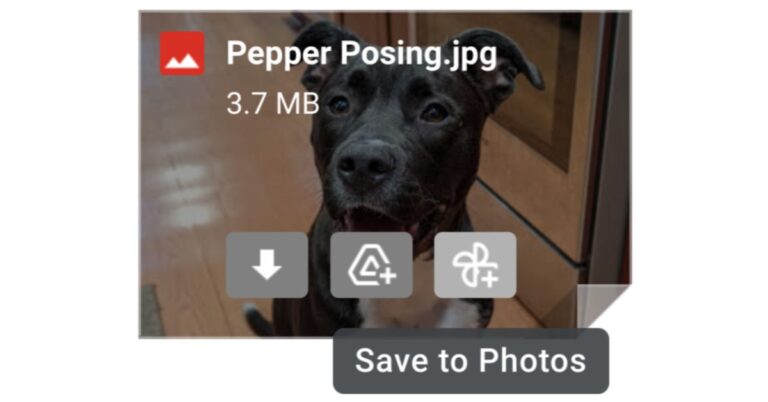
Google keeps coming up with new features for its product to improve the user experience. The company aims to make managing Gmail, Photos and its other products less complicated. To save time and make it more simple to save your Gmail photos to the Photos app the tech firm has added a new button to Gmail to allow users to directly save photos sent as attachments to Google Photos.
The New ‘Save to Photos’ button has been introduced to Gmail that will work as sync between the free email service and photo sharing and storage service provided by Google. Before this, the users were allowed to save any attachment directly to their Google Drive but now they will also be able to save photos sent as attachments directly to Google Photos.
“Now when you get a photo attachment in a Gmail message, you can save it directly to Google Photos with a new “Save to Photos” button,” the blog post said.
 The new toggle is seen next to the existing “Add to Drive” button on the attachment and while previewing the image attachment. Currently, this is only available for JPEG images. With this new addition, there is no need to download photo attachments from Gmail messages to then manually back them up to Google Photos.
Also, there is no admin control for this feature and it will be available ON for an eligible photo, you can choose the “Save to Photos” button which is alongside a similar option to “Add to Drive.”
The new ‘Save to Photos’ button will be available to all Google Workspace customers and G Suite Basic and for Business customers. In addition to this, it will be available to users with personal Google Accounts.
According to the company, the ‘Save to Photos‘ feature is now being rolled out gradually via Rapid Release and Scheduled Release domains. So those who are in the Rapid Release domain are among the first to see new features when they’re released to Google Workspace. This means the users typically can access new features immediately or soon after they’re launched to consumers. Whereas the latter one gets features at least 1 week after they’re released to Rapid Release domains. This gives you more time to prepare your organization for changes.
For the latest gadget and tech news, and gadget reviews, follow us on Twitter, Facebook and Instagram. For newest tech & gadget videos subscribe to our YouTube Channel. You can also stay up to date using the Gadget Bridge Android App.
The new toggle is seen next to the existing “Add to Drive” button on the attachment and while previewing the image attachment. Currently, this is only available for JPEG images. With this new addition, there is no need to download photo attachments from Gmail messages to then manually back them up to Google Photos.
Also, there is no admin control for this feature and it will be available ON for an eligible photo, you can choose the “Save to Photos” button which is alongside a similar option to “Add to Drive.”
The new ‘Save to Photos’ button will be available to all Google Workspace customers and G Suite Basic and for Business customers. In addition to this, it will be available to users with personal Google Accounts.
According to the company, the ‘Save to Photos‘ feature is now being rolled out gradually via Rapid Release and Scheduled Release domains. So those who are in the Rapid Release domain are among the first to see new features when they’re released to Google Workspace. This means the users typically can access new features immediately or soon after they’re launched to consumers. Whereas the latter one gets features at least 1 week after they’re released to Rapid Release domains. This gives you more time to prepare your organization for changes.
For the latest gadget and tech news, and gadget reviews, follow us on Twitter, Facebook and Instagram. For newest tech & gadget videos subscribe to our YouTube Channel. You can also stay up to date using the Gadget Bridge Android App.
 The new toggle is seen next to the existing “Add to Drive” button on the attachment and while previewing the image attachment. Currently, this is only available for JPEG images. With this new addition, there is no need to download photo attachments from Gmail messages to then manually back them up to Google Photos.
Also, there is no admin control for this feature and it will be available ON for an eligible photo, you can choose the “Save to Photos” button which is alongside a similar option to “Add to Drive.”
The new ‘Save to Photos’ button will be available to all Google Workspace customers and G Suite Basic and for Business customers. In addition to this, it will be available to users with personal Google Accounts.
According to the company, the ‘Save to Photos‘ feature is now being rolled out gradually via Rapid Release and Scheduled Release domains. So those who are in the Rapid Release domain are among the first to see new features when they’re released to Google Workspace. This means the users typically can access new features immediately or soon after they’re launched to consumers. Whereas the latter one gets features at least 1 week after they’re released to Rapid Release domains. This gives you more time to prepare your organization for changes.
For the latest gadget and tech news, and gadget reviews, follow us on Twitter, Facebook and Instagram. For newest tech & gadget videos subscribe to our YouTube Channel. You can also stay up to date using the Gadget Bridge Android App.
The new toggle is seen next to the existing “Add to Drive” button on the attachment and while previewing the image attachment. Currently, this is only available for JPEG images. With this new addition, there is no need to download photo attachments from Gmail messages to then manually back them up to Google Photos.
Also, there is no admin control for this feature and it will be available ON for an eligible photo, you can choose the “Save to Photos” button which is alongside a similar option to “Add to Drive.”
The new ‘Save to Photos’ button will be available to all Google Workspace customers and G Suite Basic and for Business customers. In addition to this, it will be available to users with personal Google Accounts.
According to the company, the ‘Save to Photos‘ feature is now being rolled out gradually via Rapid Release and Scheduled Release domains. So those who are in the Rapid Release domain are among the first to see new features when they’re released to Google Workspace. This means the users typically can access new features immediately or soon after they’re launched to consumers. Whereas the latter one gets features at least 1 week after they’re released to Rapid Release domains. This gives you more time to prepare your organization for changes.
For the latest gadget and tech news, and gadget reviews, follow us on Twitter, Facebook and Instagram. For newest tech & gadget videos subscribe to our YouTube Channel. You can also stay up to date using the Gadget Bridge Android App. Best Health and Fitness Apps 2021

Obesity is definitely not a new problem, but due to this prevailing Covid 19 situation, the health-related issues are escalating, everybody is suggested to stay indoors. It is very important to stay fit in order to live a healthy and happy life during these times and ahead. We have listed down 5 applications that will take care of your obesity, thyroid, and other health-related issues. Check out our list of top apps that will keep you healthy.
 Click this link to find the app on Playstore.
Cult is a fitness startup located in Bengaluru that focuses on training programmes that don’t require any machines or equipment. Cult offers a variety of martial arts, yoga, and outdoor activities with a focus on fitness.
There are different kinds of Workouts feasible for different age groups and body types, by highly qualified trainers.
This app does not limit itself to workouts but mindfulness too, there are pre-recorded meditation sessions available as well. In these sessions, there is meditation for stress relief, breathing exercises, and sleep stories. On it, you will also get to know about various kinds of recipes that one can make for a healthy diet. You will get the package of Cult for only Rupees 150/month and can also have a trial before subscribing to it.
Click this link to find the app on Playstore.
Cult is a fitness startup located in Bengaluru that focuses on training programmes that don’t require any machines or equipment. Cult offers a variety of martial arts, yoga, and outdoor activities with a focus on fitness.
There are different kinds of Workouts feasible for different age groups and body types, by highly qualified trainers.
This app does not limit itself to workouts but mindfulness too, there are pre-recorded meditation sessions available as well. In these sessions, there is meditation for stress relief, breathing exercises, and sleep stories. On it, you will also get to know about various kinds of recipes that one can make for a healthy diet. You will get the package of Cult for only Rupees 150/month and can also have a trial before subscribing to it.
 Click here to find the app on Playstore.
Possible is a nutrition-based healthcare company that provides research-based nutrition products and programs that promote long-term health, weight loss, and illness management.
This platform’s goal is to help you live a long and disease-free life by using food as medicine. It is made possible by food, and we make it feasible for nutritious food to be delicious.
On it, there are several programs to boost your immunity from issues like obesity, diabetes, PCOS, and thyroid. One can just book an appointment with the consultant and register them to the app.
One can also shop for essential food items to get to the best health level as one desires. There are also courses that include online challenges like the weight loss challenge and Diabetes reversal challenge.
Click here to find the app on Playstore.
Possible is a nutrition-based healthcare company that provides research-based nutrition products and programs that promote long-term health, weight loss, and illness management.
This platform’s goal is to help you live a long and disease-free life by using food as medicine. It is made possible by food, and we make it feasible for nutritious food to be delicious.
On it, there are several programs to boost your immunity from issues like obesity, diabetes, PCOS, and thyroid. One can just book an appointment with the consultant and register them to the app.
One can also shop for essential food items to get to the best health level as one desires. There are also courses that include online challenges like the weight loss challenge and Diabetes reversal challenge.
 Click here to find the app on Playstore.
Smart Diet Planner provides a free personalized diet for Weight Management based on the lifestyle and taste you have. There is a guide for habits you should follow for your life, a guide for nutrition and calories, like good eating habits or sleeping habits. They also share the science behind each habit, track adoption of habit, and alert when the person is failing.
You can simply log into the application and take a free trial followed by the paid version of the application.
Click here to find the app on Playstore.
Smart Diet Planner provides a free personalized diet for Weight Management based on the lifestyle and taste you have. There is a guide for habits you should follow for your life, a guide for nutrition and calories, like good eating habits or sleeping habits. They also share the science behind each habit, track adoption of habit, and alert when the person is failing.
You can simply log into the application and take a free trial followed by the paid version of the application.
 Click here to find the app on Playstore.
HealthifyMe is a digital health and wellness platform based in India that offers calorie counting, one-on-one nutrition and fitness coaching, and diet and workout regimens, among other things.
The application has 19 million+ happy users and 600+ coaches. The HealthifyMe app, one of the first few Indian apps to offer calorie tracking for Indian food, asks the users to log their meals and compute their calorie intake.
Nutrition guidance and a fitness trainer are included in the commercial version of the app, which costs Rs 1,299 a month.
Click here to find the app on Playstore.
HealthifyMe is a digital health and wellness platform based in India that offers calorie counting, one-on-one nutrition and fitness coaching, and diet and workout regimens, among other things.
The application has 19 million+ happy users and 600+ coaches. The HealthifyMe app, one of the first few Indian apps to offer calorie tracking for Indian food, asks the users to log their meals and compute their calorie intake.
Nutrition guidance and a fitness trainer are included in the commercial version of the app, which costs Rs 1,299 a month.
 Click here to find the app on Playstore.
This app is designed to help you reduce weight quickly and safely. It has structured workouts, diet plans at your disposal.
It has been clinically demonstrated to aid in the improvement of one’s health and fitness. You may synchronize your workout and calorie data. The app is free and gives 30-day workout and meal plans.
Watch our video on Best Android apps that help you Fall Asleep-
For the latest gadget and tech news, and gadget reviews, follow us on Twitter, Facebook and Instagram. For newest tech & gadget videos subscribe to our YouTube Channel. You can also stay up to date using the Gadget Bridge Android App.
Click here to find the app on Playstore.
This app is designed to help you reduce weight quickly and safely. It has structured workouts, diet plans at your disposal.
It has been clinically demonstrated to aid in the improvement of one’s health and fitness. You may synchronize your workout and calorie data. The app is free and gives 30-day workout and meal plans.
Watch our video on Best Android apps that help you Fall Asleep-
For the latest gadget and tech news, and gadget reviews, follow us on Twitter, Facebook and Instagram. For newest tech & gadget videos subscribe to our YouTube Channel. You can also stay up to date using the Gadget Bridge Android App.
Cult
 Click this link to find the app on Playstore.
Cult is a fitness startup located in Bengaluru that focuses on training programmes that don’t require any machines or equipment. Cult offers a variety of martial arts, yoga, and outdoor activities with a focus on fitness.
There are different kinds of Workouts feasible for different age groups and body types, by highly qualified trainers.
This app does not limit itself to workouts but mindfulness too, there are pre-recorded meditation sessions available as well. In these sessions, there is meditation for stress relief, breathing exercises, and sleep stories. On it, you will also get to know about various kinds of recipes that one can make for a healthy diet. You will get the package of Cult for only Rupees 150/month and can also have a trial before subscribing to it.
Click this link to find the app on Playstore.
Cult is a fitness startup located in Bengaluru that focuses on training programmes that don’t require any machines or equipment. Cult offers a variety of martial arts, yoga, and outdoor activities with a focus on fitness.
There are different kinds of Workouts feasible for different age groups and body types, by highly qualified trainers.
This app does not limit itself to workouts but mindfulness too, there are pre-recorded meditation sessions available as well. In these sessions, there is meditation for stress relief, breathing exercises, and sleep stories. On it, you will also get to know about various kinds of recipes that one can make for a healthy diet. You will get the package of Cult for only Rupees 150/month and can also have a trial before subscribing to it.
Possible
 Click here to find the app on Playstore.
Possible is a nutrition-based healthcare company that provides research-based nutrition products and programs that promote long-term health, weight loss, and illness management.
This platform’s goal is to help you live a long and disease-free life by using food as medicine. It is made possible by food, and we make it feasible for nutritious food to be delicious.
On it, there are several programs to boost your immunity from issues like obesity, diabetes, PCOS, and thyroid. One can just book an appointment with the consultant and register them to the app.
One can also shop for essential food items to get to the best health level as one desires. There are also courses that include online challenges like the weight loss challenge and Diabetes reversal challenge.
Click here to find the app on Playstore.
Possible is a nutrition-based healthcare company that provides research-based nutrition products and programs that promote long-term health, weight loss, and illness management.
This platform’s goal is to help you live a long and disease-free life by using food as medicine. It is made possible by food, and we make it feasible for nutritious food to be delicious.
On it, there are several programs to boost your immunity from issues like obesity, diabetes, PCOS, and thyroid. One can just book an appointment with the consultant and register them to the app.
One can also shop for essential food items to get to the best health level as one desires. There are also courses that include online challenges like the weight loss challenge and Diabetes reversal challenge.
Smart Diet Planner
 Click here to find the app on Playstore.
Smart Diet Planner provides a free personalized diet for Weight Management based on the lifestyle and taste you have. There is a guide for habits you should follow for your life, a guide for nutrition and calories, like good eating habits or sleeping habits. They also share the science behind each habit, track adoption of habit, and alert when the person is failing.
You can simply log into the application and take a free trial followed by the paid version of the application.
Click here to find the app on Playstore.
Smart Diet Planner provides a free personalized diet for Weight Management based on the lifestyle and taste you have. There is a guide for habits you should follow for your life, a guide for nutrition and calories, like good eating habits or sleeping habits. They also share the science behind each habit, track adoption of habit, and alert when the person is failing.
You can simply log into the application and take a free trial followed by the paid version of the application.
Healthify Me
 Click here to find the app on Playstore.
HealthifyMe is a digital health and wellness platform based in India that offers calorie counting, one-on-one nutrition and fitness coaching, and diet and workout regimens, among other things.
The application has 19 million+ happy users and 600+ coaches. The HealthifyMe app, one of the first few Indian apps to offer calorie tracking for Indian food, asks the users to log their meals and compute their calorie intake.
Nutrition guidance and a fitness trainer are included in the commercial version of the app, which costs Rs 1,299 a month.
Click here to find the app on Playstore.
HealthifyMe is a digital health and wellness platform based in India that offers calorie counting, one-on-one nutrition and fitness coaching, and diet and workout regimens, among other things.
The application has 19 million+ happy users and 600+ coaches. The HealthifyMe app, one of the first few Indian apps to offer calorie tracking for Indian food, asks the users to log their meals and compute their calorie intake.
Nutrition guidance and a fitness trainer are included in the commercial version of the app, which costs Rs 1,299 a month.
Lose Weight In 30 Days
 Click here to find the app on Playstore.
This app is designed to help you reduce weight quickly and safely. It has structured workouts, diet plans at your disposal.
It has been clinically demonstrated to aid in the improvement of one’s health and fitness. You may synchronize your workout and calorie data. The app is free and gives 30-day workout and meal plans.
Watch our video on Best Android apps that help you Fall Asleep-
For the latest gadget and tech news, and gadget reviews, follow us on Twitter, Facebook and Instagram. For newest tech & gadget videos subscribe to our YouTube Channel. You can also stay up to date using the Gadget Bridge Android App.
Click here to find the app on Playstore.
This app is designed to help you reduce weight quickly and safely. It has structured workouts, diet plans at your disposal.
It has been clinically demonstrated to aid in the improvement of one’s health and fitness. You may synchronize your workout and calorie data. The app is free and gives 30-day workout and meal plans.
Watch our video on Best Android apps that help you Fall Asleep-
For the latest gadget and tech news, and gadget reviews, follow us on Twitter, Facebook and Instagram. For newest tech & gadget videos subscribe to our YouTube Channel. You can also stay up to date using the Gadget Bridge Android App. How to show your profile picture and not video in Zoom Cloud meetings

Zoom Cloud video calling app is one of the most useful tools when you want to have remote meetings. If you are attending a Zoom meeting on your smartphone or desktop and want your profile picture and not the video to be visible, below are the steps.
The first thing you need to do to show your profile picture is add a profile picture on Zoom mobile/ desktop application.
Following are the steps to put a profile picture of zoom clout application on your smartphone:
- To put a profile picture, make sure you have already signed in to the application.
- After you have an account, Go to settings, you will find the option of settings at the bottom right corner, and click on it.
- Click on My Profile and the first option you will see would be of changing or adding the profile picture. Click on it.
- There will be two options, one, Take a photo (for clicking a new picture) and another Choose photo( If you want to use an already existing photo). Click on either of the options, whichever is suitable for you.
- If you choose the option, Take a photo, you will enter your gallery, choose any of the photos you like, click on it, adjust the image size and you are done.


- Open the website of Zoom Meeting and download the application. Then click on the My Account option in the top-right corner.
- Click on the option ‘Change‘ next to your profile.
- After clicking the option you will see another tab where you are required to upload a new profile picture.
- Click on the option ‘Upload‘ and add the display picture of your choice.
- After adjusting the image, click on the Save button, and you are done.


- When you join a Zoom Cloud Meeting, you must turn off your video by clicking ‘Turn off my video‘.
- You can also stop the video by right-clicking on it and selecting Stop Video.
- Right-click on your preview screen and select ‘Add or Edit Profile Picture‘ from the drop-down menu.
- For a brief moment, the video would pause, and your profile picture would take the place of the live video preview.
- Go to settings > Meeting settings
- Find the option ‘Always turn off my video‘ and turn the option on.
Redmi Note 10 Pro 5G powered by MediaTek Dimensity 1100 SoC launched

Xiaomi has announced the launch of the Redmi Note 10 Pro 5G in its home market. Unlike the Indian variant of the Redmi Note 10 Pro, the specification of the 5G smartphone varies. It has a 67W fast charging support instead of 33W fast charging support. Also, the device is equipped with a MediaTek Dimensity 1100 SoC instead of Snapdragon 732G SoC which comes on the 4G variant. Moreover, the camera module also differs from the Indian variant.
Redmi Note 10 Pro 5G specifications
Redmi Note 10 Pro 5G features a 6.6-inch full-HD+ LCD display with 2,400×1,080 pixels of resolution. The display has support for a 120Hz refresh rate and 240Hz touch sampling. Moreover, the screen comes with 450nits brightness, DCI-P3 colour gamut, and Corning Gorilla Glass Victus protection. There is a MediaTek Dimensity 1100 SoC under its hood paired with up to 8GB of RAM with 256GB of internal storage option.
There is a slight change in the design of the camera module of the Redmi Note 10 Pro 5G. The triple camera sensors here are placed differently than the quad cameras on the Redmi Note 10 Pro variant launched in India. The triple rear camera includes a 64-megapixel primary camera with an f/1.79 aperture, an 8-megapixel sensor with f/2.2 aperture and a 2-megapixel macro lens with an f/2.4 aperture. Upfront there is a 16-megapixel selfie camera.
In terms of connectivity, there is Wi-Fi 6, Bluetooth v5.2, USB Type-C port, NFC, 3.5mm audio jack, and others. Besides this, there is a 5,000mAh battery that comes with 67W fast charging support. Additionally, the phone is IP53 certified for dust and water resistance.
Redmi Note 10 Pro 5G price and availability
Redmi Note 10 Pro 5G has been launch in multiple configurations of 6GB RAM with 128GB storage option at CYN 1,599 that translates to Rs 18,200, CNY 1,799 that translates to Rs 20,500 for the 8GB RAM with 128GB storage whereas the 8GB RAM with 256GB storage model will be available with a price tag of CNY 1,999 that comes around Rs 22,800. The phone comes in three colour options of Magic Green, Star Yarn, and Moon Soul and is now up for pre-orders in China and is said to go on sale starting June 1.
For the latest gadget and tech news, and gadget reviews, follow us on Twitter, Facebook and Instagram. For newest tech & gadget videos subscribe to our YouTube Channel. You can also stay up to date using the Gadget Bridge Android App.
Oppo Reno 6 Series launching today: Here is what to expect

Oppo Reno 6 Series is all set to launch today in China. The lineup will include Oppo Reno 6, the Oppo Reno 6 Pro and Oppo Reno 6 Pro+. Ahead of the official launch, all the smartphones were listed on the Chinese e-commerce website, therefore, revealing the design and key tech specs. Both vanilla, as well as the Pro variant, are expected to equip MediaTek Dimensity 1200 SoC, whereas the most expensive of all Oppo Reno 6 Pro+ might include Snapdragon 870 SoC.
Oppo Reno 6 Series launch event will be hosted virtually today. The online event will kickstart at 3.30 PM IST. The event will be live-streamed via the company’s official social media channels including Weibo and its official website.
 Pricing and specifications
As far as the pricing is concerned according to a tipster Digital Chat Station the price of the Reno 6 Series will start at CNY 2,500 (approximately around Rs. 28,600).
On the specification front, the leaked listing suggests that Oppo Reno 6 features a 6.55-inch full-HD+ display with 90Hz refresh rate support. For the optics, it might include a triple rear camera setup that will include a 64-megapixel primary sensor. On the front, there will be a 32-megapixel selfie camera. The device is expected to come in 8GB RAM with 128GB storage and 12GB RAM with a 256GB storage model. It will be offered in Galaxy Dream, Night Sea, and Summer Harumi colour options. Additionally, the vanilla Reno 6 will also get 65W fast charging support.
Reno 6 Pro will come with a quad rear camera setup consisting of a 64-megapixel primary sensor with a similar selfie camera as the vanilla model. It will be available in the same configuration as the standard variant with similar specifications as well as design.
Lastly, the Reno 6 Pro+ will also be offered in the same configurations. The listing suggests that this phone will also include a quad rear camera set-up that will include a 50-megapixel Sony IMX766 sensor. The device will be powered by Qualcomm Snapdragon 870 SoC with 65W fast charging support.
For the latest gadget and tech news, and gadget reviews, follow us on Twitter, Facebook and Instagram. For newest tech & gadget videos subscribe to our YouTube Channel. You can also stay up to date using the Gadget Bridge Android App.
Pricing and specifications
As far as the pricing is concerned according to a tipster Digital Chat Station the price of the Reno 6 Series will start at CNY 2,500 (approximately around Rs. 28,600).
On the specification front, the leaked listing suggests that Oppo Reno 6 features a 6.55-inch full-HD+ display with 90Hz refresh rate support. For the optics, it might include a triple rear camera setup that will include a 64-megapixel primary sensor. On the front, there will be a 32-megapixel selfie camera. The device is expected to come in 8GB RAM with 128GB storage and 12GB RAM with a 256GB storage model. It will be offered in Galaxy Dream, Night Sea, and Summer Harumi colour options. Additionally, the vanilla Reno 6 will also get 65W fast charging support.
Reno 6 Pro will come with a quad rear camera setup consisting of a 64-megapixel primary sensor with a similar selfie camera as the vanilla model. It will be available in the same configuration as the standard variant with similar specifications as well as design.
Lastly, the Reno 6 Pro+ will also be offered in the same configurations. The listing suggests that this phone will also include a quad rear camera set-up that will include a 50-megapixel Sony IMX766 sensor. The device will be powered by Qualcomm Snapdragon 870 SoC with 65W fast charging support.
For the latest gadget and tech news, and gadget reviews, follow us on Twitter, Facebook and Instagram. For newest tech & gadget videos subscribe to our YouTube Channel. You can also stay up to date using the Gadget Bridge Android App.
 Pricing and specifications
As far as the pricing is concerned according to a tipster Digital Chat Station the price of the Reno 6 Series will start at CNY 2,500 (approximately around Rs. 28,600).
On the specification front, the leaked listing suggests that Oppo Reno 6 features a 6.55-inch full-HD+ display with 90Hz refresh rate support. For the optics, it might include a triple rear camera setup that will include a 64-megapixel primary sensor. On the front, there will be a 32-megapixel selfie camera. The device is expected to come in 8GB RAM with 128GB storage and 12GB RAM with a 256GB storage model. It will be offered in Galaxy Dream, Night Sea, and Summer Harumi colour options. Additionally, the vanilla Reno 6 will also get 65W fast charging support.
Reno 6 Pro will come with a quad rear camera setup consisting of a 64-megapixel primary sensor with a similar selfie camera as the vanilla model. It will be available in the same configuration as the standard variant with similar specifications as well as design.
Lastly, the Reno 6 Pro+ will also be offered in the same configurations. The listing suggests that this phone will also include a quad rear camera set-up that will include a 50-megapixel Sony IMX766 sensor. The device will be powered by Qualcomm Snapdragon 870 SoC with 65W fast charging support.
For the latest gadget and tech news, and gadget reviews, follow us on Twitter, Facebook and Instagram. For newest tech & gadget videos subscribe to our YouTube Channel. You can also stay up to date using the Gadget Bridge Android App.
Pricing and specifications
As far as the pricing is concerned according to a tipster Digital Chat Station the price of the Reno 6 Series will start at CNY 2,500 (approximately around Rs. 28,600).
On the specification front, the leaked listing suggests that Oppo Reno 6 features a 6.55-inch full-HD+ display with 90Hz refresh rate support. For the optics, it might include a triple rear camera setup that will include a 64-megapixel primary sensor. On the front, there will be a 32-megapixel selfie camera. The device is expected to come in 8GB RAM with 128GB storage and 12GB RAM with a 256GB storage model. It will be offered in Galaxy Dream, Night Sea, and Summer Harumi colour options. Additionally, the vanilla Reno 6 will also get 65W fast charging support.
Reno 6 Pro will come with a quad rear camera setup consisting of a 64-megapixel primary sensor with a similar selfie camera as the vanilla model. It will be available in the same configuration as the standard variant with similar specifications as well as design.
Lastly, the Reno 6 Pro+ will also be offered in the same configurations. The listing suggests that this phone will also include a quad rear camera set-up that will include a 50-megapixel Sony IMX766 sensor. The device will be powered by Qualcomm Snapdragon 870 SoC with 65W fast charging support.
For the latest gadget and tech news, and gadget reviews, follow us on Twitter, Facebook and Instagram. For newest tech & gadget videos subscribe to our YouTube Channel. You can also stay up to date using the Gadget Bridge Android App. Facebook and Instagram now enable the feature to hide like counts on their platform: How to enable the feature
Hiding likes on the most popular social media platforms like Facebook and Instagram has been a much-debated thing on the web since it sharted testing out the feature. Hiding likes count has been under testing in many regions and now we have learnt that the company has finally rolled out this feature for the users. Instagram and Facebook users will now have the option of showing or not showing their likes publicly.
Facebook has officially announced that it will now allow its users as well as those on Instagram to hide their public like counts. The company via its blog post said, “You may have noticed that we’ve been testing hiding like counts on Instagram for a while. Today, we’re announcing that everyone on Instagram and Facebook will now have the option to hide their public like counts, so they can decide what works for them.”
By bringing this feature the company has taken a very positive step towards people’s experience on their platform that is getting fewer likes on their posts. Getting fewer likes also brings down the user’s self-esteem who do not have a huge fan following or friends on their profiles. Because of this they start feeling anxious and either stop posting or do away from using the social media platform. In most cases, this will stop the users from sharing anything for the sake of likes.
 “We tested hiding like counts to see if it might depressurize people’s experience on Instagram. What we heard from people and experts was that not seeing like counts was beneficial for some, and annoying to others, particularly because people use like counts to get a sense for what’s trending or popular, so we’re giving you the choice.”
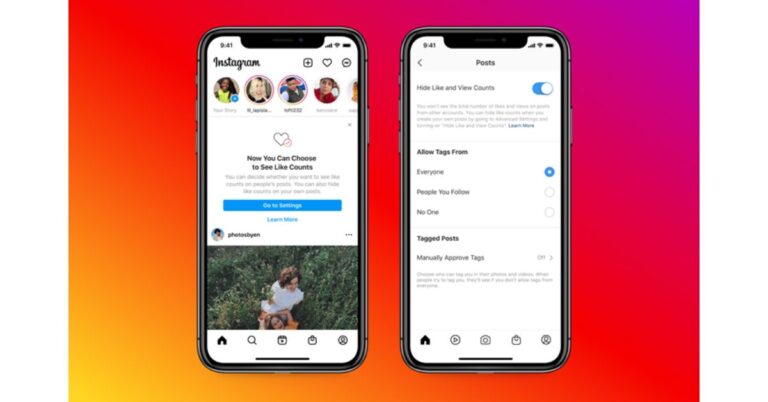
Now the user on both Facebook and Instagram will have the option to hide like counts on all posts in their feed. In addition to this, the users will also have the option to hide like counts on their own posts, so others can’t see how many likes your posts get.
To hide like counts on other’s posts you just need to visit the new Posts section in Settings. This control applies to all the posts in your feed. Also, the users will also get the option to choose to hide like counts before sharing a post. You can turn this setting on or off, even after it goes live.
Initially, this feature is being rolled out on the photo-sharing app Instagram and in the next few weeks, you will see both of these controls come to Facebook as well.
With this change, the users will now be encouraged to post what they like instead of posting what gets them more likes. Therefore improving the mental health of the users. Instead of preventing from deleting the posts that they shared on Facebook or Instagram that could not get many likes, they will now feel more encouraged to post what they like freely.
For the latest gadget and tech news, and gadget reviews, follow us on Twitter, Facebook and Instagram. For newest tech & gadget videos subscribe to our YouTube Channel. You can also stay up to date using the Gadget Bridge Android App.
“We tested hiding like counts to see if it might depressurize people’s experience on Instagram. What we heard from people and experts was that not seeing like counts was beneficial for some, and annoying to others, particularly because people use like counts to get a sense for what’s trending or popular, so we’re giving you the choice.”
Now the user on both Facebook and Instagram will have the option to hide like counts on all posts in their feed. In addition to this, the users will also have the option to hide like counts on their own posts, so others can’t see how many likes your posts get.
To hide like counts on other’s posts you just need to visit the new Posts section in Settings. This control applies to all the posts in your feed. Also, the users will also get the option to choose to hide like counts before sharing a post. You can turn this setting on or off, even after it goes live.
Initially, this feature is being rolled out on the photo-sharing app Instagram and in the next few weeks, you will see both of these controls come to Facebook as well.
With this change, the users will now be encouraged to post what they like instead of posting what gets them more likes. Therefore improving the mental health of the users. Instead of preventing from deleting the posts that they shared on Facebook or Instagram that could not get many likes, they will now feel more encouraged to post what they like freely.
For the latest gadget and tech news, and gadget reviews, follow us on Twitter, Facebook and Instagram. For newest tech & gadget videos subscribe to our YouTube Channel. You can also stay up to date using the Gadget Bridge Android App.
 “We tested hiding like counts to see if it might depressurize people’s experience on Instagram. What we heard from people and experts was that not seeing like counts was beneficial for some, and annoying to others, particularly because people use like counts to get a sense for what’s trending or popular, so we’re giving you the choice.”
Now the user on both Facebook and Instagram will have the option to hide like counts on all posts in their feed. In addition to this, the users will also have the option to hide like counts on their own posts, so others can’t see how many likes your posts get.
To hide like counts on other’s posts you just need to visit the new Posts section in Settings. This control applies to all the posts in your feed. Also, the users will also get the option to choose to hide like counts before sharing a post. You can turn this setting on or off, even after it goes live.
Initially, this feature is being rolled out on the photo-sharing app Instagram and in the next few weeks, you will see both of these controls come to Facebook as well.
With this change, the users will now be encouraged to post what they like instead of posting what gets them more likes. Therefore improving the mental health of the users. Instead of preventing from deleting the posts that they shared on Facebook or Instagram that could not get many likes, they will now feel more encouraged to post what they like freely.
For the latest gadget and tech news, and gadget reviews, follow us on Twitter, Facebook and Instagram. For newest tech & gadget videos subscribe to our YouTube Channel. You can also stay up to date using the Gadget Bridge Android App.
“We tested hiding like counts to see if it might depressurize people’s experience on Instagram. What we heard from people and experts was that not seeing like counts was beneficial for some, and annoying to others, particularly because people use like counts to get a sense for what’s trending or popular, so we’re giving you the choice.”
Now the user on both Facebook and Instagram will have the option to hide like counts on all posts in their feed. In addition to this, the users will also have the option to hide like counts on their own posts, so others can’t see how many likes your posts get.
To hide like counts on other’s posts you just need to visit the new Posts section in Settings. This control applies to all the posts in your feed. Also, the users will also get the option to choose to hide like counts before sharing a post. You can turn this setting on or off, even after it goes live.
Initially, this feature is being rolled out on the photo-sharing app Instagram and in the next few weeks, you will see both of these controls come to Facebook as well.
With this change, the users will now be encouraged to post what they like instead of posting what gets them more likes. Therefore improving the mental health of the users. Instead of preventing from deleting the posts that they shared on Facebook or Instagram that could not get many likes, they will now feel more encouraged to post what they like freely.
For the latest gadget and tech news, and gadget reviews, follow us on Twitter, Facebook and Instagram. For newest tech & gadget videos subscribe to our YouTube Channel. You can also stay up to date using the Gadget Bridge Android App. May 27 Flipkart Daily Trivia Quiz Answers: Answer to win exciting prizes

The e-commerce website Flipkart is hosting Daily Trivia Quiz. Every day it brings a bunch of new questions for its users. By answering them correctly you can win exciting prizes. The questionnaire is based on questions related to general knowledge. Also, the users can win free vouchers and super coins, among other offers via the daily quiz. May 27 Flipkart Daily Trivia Quiz Answers has already gone live on its platform.
The participant should be at least 18 years old and should have a valid login ID. The Quiz is available on the mobile platform and not the web version. E-commerce conducts the quiz on daily basis and goes live at 12:00 AM IST and runs till 11:59 PM IST. The winners are announced within 15 days from the date of participation that can be viewed under the Gems/Rewards section in the app.
How to participate in the Flipkart Daily Trivia Quiz
To participate download the Flipkart app on your phone. Then open the Flipkart app then head to Game Zone. Now click on the Daily Trivia Banner or search for Daily Trivia. Enter the game and answer all 5 questions with correct answers.May 27 Flipkart Daily Trivia Quiz Answers
Question 1: Rabindranath Tagore was the 1st Indian to be given which award? Answer: Nobel Prize Question 2: Which of these brands is not from Germany? Answer: Fiat Question 3: A group of which birds is called a murder? Answer: Crows Question 4: Which of these organisations was formed on India’s independence day in 1969? Answer: ISRO Question 5: Which company was the first to initiate marketing via coupons? Answer: Coca-Cola
For the latest gadget and tech news, and gadget reviews, follow us on Twitter, Facebook and Instagram. For newest tech & gadget videos subscribe to our YouTube Channel. You can also stay up to date using the Gadget Bridge Android App.
May 27 Amazon Quiz: Today you can win Rs 15,000 Amazon Pay Balance

The e-commerce website Amazon continues to keep its customers entertained and in high spirits through their daily quizzes. May 27 Amazon Quiz has gone live now in its mobile app platform. The daily quiz contest conducted by the company brings an opportunity for the consumers to win exciting prizes. In today’s quiz, you can win the Rs 15,000 Amazon Pay Balance by answering all the questions correctly.
Every day Amazon brings a fresh set of questions for its customers that contains five easy questions based on general knowledge and current affairs. The quiz can be played on the Amazon app from 8 AM to 12 noon. You have to answer all the questions correctly; one wrong answer can make you eliminate from the quiz. By answering all the questions correctly, you will be shortlisted for a lucky draw. The results for the lucky draw will be announced at the end of the month. By participating in the quiz, you can win free products ranging from smartphones, other gadgets and Amazon Pay balance. Check out today’s quiz questions and answers to win May 27 Amazon Quiz: Today you can win Rs 15,000 Amazon Pay Balance.