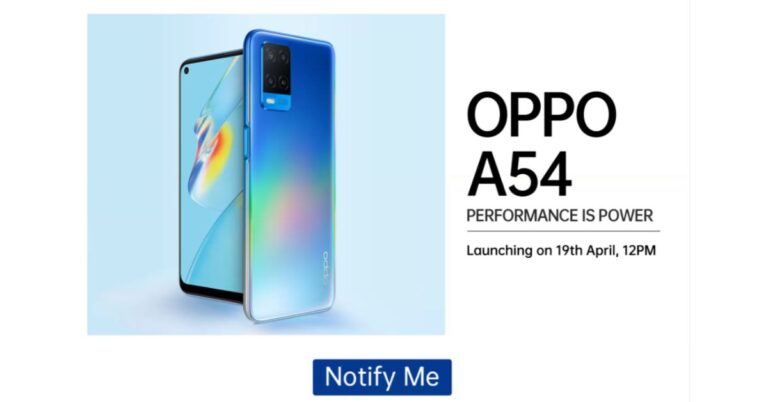
Oppo A54 is all set to launch in India on April 19. Teasing its availability, Flipkart has created a microsite for the device that not only reveals its launch date but also highlights the key specifications also. However, the pricing has not been revealed yet. Just ahead of the launch, a popular tipster has tipped the pricing of Oppo A54. It should be noted that the very next day of the launch the company is also launching Oppo A74 in the country. Unlike the expected pricing of Oppo A74 5G, the company has not yet given any hints related to the pricing of Oppo A54. But according to a report citing information from popular tipster Ishan Agarwal the price of the Oppo A54 in India will start at Rs 13,490. This pricing is expected to be tipped for the base 4GB RAM with 64GB storage. While the 4GB RAM with 128GB storage variant will come at Rs 14,490 and the top-end model, which is 6GB RAM with 128GB storage model will be priced at Rs 15,990.The upcoming Oppo A54 is the same device that was launched in Indonesia last month so we are well aware of the specs. In India, the smartphone will feature a 6.51-inch HD+ display having 720×1,600 pixels of resolution, 89.2 percent screen to body ratio, and 269ppi pixel density. It will run ColorOS 7.2 on top of Android 10. Under the hood, there isMediaTek Helio P35 (MT6765) SoC Oppo A54 offers 4GB of LPDDR4x RAM and 128GB of storage. The internal memory can be expanded up to 256GB via a microSD card.For photos and videos, there will be a triple rear camera setup that includes a 13-megapixel primary sensor. In addition to this, it also includes a 2-megapixel macro lens and another 2-megapixel depth sensor for portraits. On the front, it is going to sport a 16-megapixel sensor for taking selfies and video calling.Oppo A54 will be backed by a5,000mAh battery, which is supported by 18W fast charging tech. In terms of connectivity, it will support 4G, Wi-Fi, Bluetooth, GPS, and a USB Type-C port.
For the latest gadget and tech news, and gadget reviews, follow us on Twitter, Facebook and Instagram. For newest tech & gadget videos subscribe to our YouTube Channel. You can also stay up to date using the Gadget Bridge Android App.
The Chinese smartphone manufacturer, Motorola, is going to launch two G-Series phones in India. The company has been teasing to launch Moto G60 and Moto G40 Fusion very soon. In a new development, the tech firm has now officially confirmed to launch both the devices in the country on April 20. The company will be hosting an online event to introduce both devices to the market. Ahead of the launch, both the Moto G-series phones have been listed on Flipkart to tease their availability including their key details.According to a fresh announcement made by Motorola on Twitter, it is going to launch Moto G60 and Moto G40 Fusion in India on April 20. The launch is scheduled to take place from 12 noon onwards. Ahead of the official launch both the devices have also been listed on Flipkart. The dedicated microsite reveals the key details and availability of the smartphone. As per the listing, both Moto G60 and Moto G40 Fusion are going to be powered by the Qualcomm Snapdragon 732G chipset and will run Android 11 out of the box. These upcoming mobile phones will be backed by a 6,000mAh battery. In addition to this, there will be a 6.8-inch LCD screen with a punch-hole design. The display will support a 120Hz refresh rate and HDR10.The dedicated microsite on Flipkart further reveals that Moto G60 and Moto G40 Fusion are confirmed to feature a triple rear camera unit. The only difference here is that only the primary sensor is different. The former will come with a 108 Megapixel primary sensor while the latter one will include a 64-megapixel main sensor. The other two sensors on the G60 include an 8-megapixel ultra-wide lens and an 8-megapixel macro lens. While on the front it will boast a 32-megapixel selfie sensor.The volume rocker, Google Assistant and the power key is given on the left frame of the smartphones while the sim card tray is positioned on the other side of the frame.Prior to the announcement, both the phones were spotted on Geekbench. As per the listing both the phones will run Android 11 out of the box. The listing also reveals that the Moto G60 will come with 6GB of RAM while the Moto G40 Fusion indicates 4GB of RAM. While the benchmarking results are: G40 is listed to have achieved a single-core score of 515 and a multi-core score of 1,375. Moto G40 Fusion has received 519 single-core scores and 1,425 multi-core scores.
For the latest gadget and tech news, and gadget reviews, follow us on Twitter, Facebook and Instagram. For newest tech & gadget videos subscribe to our YouTube Channel. You can also stay up to date using the Gadget Bridge Android App.
Xiaomi has scheduled to launch its much-awaited Mi 11X series and Mi 11 Series in India on the same day that is April 23. The company is going to launch Mi 11, Mi 11 Pro and Mi 11i beside Mi 11 Ultra. However, the company has not yet confirmed which smartphones are going to launch under the Mi 11X series. But in a new development, the storage variant of three devices have now been tipped for India by a popular tipster.According to popular tipster Mukul Sharma, when Mi 11X and Mi 11X Pro smartphones will launch they will be made available in 8GB RAM with 128GB storage as well as 8GB RAM with 256GB storage configurations. While the Mi 11 series is going to include Mi 11, Mi 11 Pro and Mi 11i and Mi 11 Ultra. The tipster has not talked bout the formed two devices but he did mention that the latter one will be offered in a 12GB RAM with 256GB storage variant. His tweet reads “Xiaomi Mi 11X and Mi 11X Pro will be available in 8+128GB and 8+256GB variants as per my source. Mi 11 Ultra will be 12+256GB.”Xiaomi is all set to launch its Mi 11 series in India on April 23. At the same time, the company has also scheduled to bring Mi 11X series to the Indian market. So both the upcoming lineup will make their debut in India on April 23.Reports suggest that Mi 11X series will be a rebranded version of the Redmi K40 series which was launched in China a few months back that includes Redmi K40 and Redmi K40 Pro+. The former one is said to come as Mi 11X while the latter one to debut as Mi 11X Pro.The device is said to include a 6.67-inch full-HD+ AMOLED display with 1,080×2,400 pixels of resolution and a120Hz of refresh rate along with an in-display fingerprint sensor. The phone will be powered by an octa-core Qualcomm Snapdragon 870 SoC. The device could offer up to 256GB of UFS 3.1 storage.For the photos and videos, it is expedited to come with a 48-megapixel primary sensor, an 8-megapixel ultra-wide-angle lens, and a 5-megapixel macro lens. On the front, it could feature a 20-megapixel camera sensor. The Mi 11X Pro is most likely to have a similar display and will be powered byQualcomm Snapdragon 888 SoC. The camera set up will see a 108-megapixel Samsung HM2 primary sensor with the other two sensors remaining the same as above.Both the phones might also carry a similar battery with a capacity of 4,520mAh with 33W fast charging support.On the other hand Mi 11 Ultra will feature a quad-curved 6.81-inch 2K WQHD+ E4 AMOLED display with a 120Hz refresh rate panel with a 240Hz touch sampling rate support. Furthermore, there is a secondary 1.1-inch AMOLED touch screen with 126×294 pixels of resolution. The phone runs MIUI 12 on top of Android 11 out of the box. The phone will be powered by Qualcomm Snapdragon 888 SoC paired with Adreno 660 GPU.There will be a triple rear camera setup with a multi-functional secondary display for notifications, battery level, and weather alerts. The set up will include a 50-megapixel Samsung GN2 primary wide-angle sensor with f/1.95 aperture and OIS support. Also, there are two 48-megapixel Sony IMX586 ultra-wide-angle and tele-macro sensors (5x optical and 120x digital zoom) onboard. All three sensors support 8K video recording at 24fps. Upfront, there is a 20-megapixel sensor for taking selfies and video calling.It will pack a5,000mAh battery, which has support for 67W wired and wireless fast charging tech along with a 10W reverse wireless charging tech.
For the latest gadget and tech news, and gadget reviews, follow us on Twitter, Facebook and Instagram. For newest tech & gadget videos subscribe to our YouTube Channel. You can also stay up to date using the Gadget Bridge Android App.
Samsung Days sale is already live on its platform. The South Korean company is offering exciting deals and discounts on various smartphones including the latest Samsung Galaxy S21 series. The ongoing sale will last till April 19 so if you have plans to get any of the S21 smartphones and waiting for such offers and discounts now is the right time. Apart from this, you can also get discounts on other devices including the Galaxy A, M and F series of smartphones. Samsung Days Sale has already kicked off and is live till April 19. Apart from Samsung’s online store, the sale is being held across various other online portals such as Amazon and Flipkart. In addition to this, it is accessible through the offline platform as well. During the Samsung Days Sale, the customers can get discounts, deals and offers on the recently launched Samsung Galaxy S21 series, In addition to this, the mid-range smartphones from the Galaxy A, Galaxy M and Galaxy F series have also been put up on sale. We have listed below a few offers that you can easily avail of as the sale is going to end soon.Samsung Galaxy S21 which retails at Rs 64,990 will be giving away a cashback of Rs 5,000, while Galaxy S21+ is offering a cashback of up to Rs 7,000. On the purchase of the Samsung Galaxy S21 Ultra, buyers can avail of up Rs 10,000 cashback. Noticeably the cashback is only available on the transactions made using HDFC Bank credit and debit cards as well as EMI transactions only. In addition to this, the company is also offering no-cost EMIs options starting at Rs 5,654.92 per month and on the exchange of old devices. Those customers who are purchasing the Ultra variant can get either Galaxy Watch Active 2 (Aluminium variant) or Galaxy Buds Pro at Rs 990 only. Similarly, the same offers are being offered on other online and offline retailers including Amazon and Flipkart.Apart from this Samsung is also offering 10 per cent bank cashback or up to Rs 1,000 on the smartphones from Galaxy A, Galaxy M and Galaxy F series. The devices from the A series which are on sale include Galaxy A71, Galaxy A51, Galaxy A31, Galaxy 21s and Galaxy A21. While the phone’s list from the M series includes Galaxy M51, Galaxy M31s, Galaxy M31, Galaxy M11, Galaxy M12, Galaxy M02s, Galaxy M02, Galaxy M01, Galaxy M01s. Lastly Galaxy F41 and Galaxy F02s.
For the latest gadget and tech news, and gadget reviews, follow us on Twitter, Facebook and Instagram. For newest tech & gadget videos subscribe to our YouTube Channel. You can also stay up to date using the Gadget Bridge Android App.
The e-commerce website Flipkart is hosting Daily Trivia Quiz. Every day it brings a bunch of new questions for its users. By answering them correctly you can win exciting prizes. The questionnaire is based on questions related to general knowledge. Also, the users can win free vouchers and super coins, among other offers via the daily quiz. April 17 Flipkart Daily Trivia Quiz Answers has already gone live on its platform.
The participant should be at least 18 years old and should have a valid login ID. The Quiz is available on the mobile platform and not the web version. E-commerce conducts the quiz on daily basis and goes live at 12:00 AM IST and runs till 11:59 PM IST. The winners are announced within 15 days from the date of participation that can be viewed under the Gems/Rewards section in the app.
How to participate in the Flipkart Daily Trivia Quiz
To participate download the Flipkart app on your phone. Then open the Flipkart app then head to Game Zone. Now click on the Daily Trivia Banner or search for Daily Trivia. Enter the game and answer all 5 questions with correct answers.
April 17 Flipkart Daily Trivia Quiz Answers
Question 1: Sourav Ganguly was the first-ever captain of which IPL team?
Answer: Kolkata Knight Riders
Question 2: Which team is being captained by the player shown in the picture?
Answer: Sunrisers Hyderabad
Question 3: Myntra’ is the shirt sponsor of which IPL team this season?
Answer: Chennai Super Kings
Question 4: Who among these has taken more no. of hat tricks in the IPL?
Answer: Yuvraj Singh
Question 5: Current RCB player Glenn Maxwell was a part of which IPL team in the 2020 season?
Answer: Kings XI Punjab
Amazon Quiz has gone live on its platform. The quiz timings are daily 12 AM to 11:59 PM. By submitting correct answers, millions of Amazon customers can win free gadgets as well as Amazon Pay Balance. By participating in the Amazon Quiz today you can stand a chance to win Rs 15,000 Amazon Pay Balance.
Daily the e-commerce platform brings a fresh questionnaire to which the contestants have to answer correctly to enter into a lucky draw. The quiz can be played daily from 8 AM to 12 noon. The Amazon Quiz contains five easy questions that are based on current affairs and general knowledge. Only one person is declared as a winner and the results are announced at the end of every month. Answering all the questions correctly might let you win something and a wrong answer will get you eliminated from the quiz. To make sure you answer all the questions correctly Gadget Bridge everyday updates all the correct answers to all 5 questions. check out today’s answers for the Quiz to win a Rs 15,000 Amazon Pay Balance.
April 15 Amazon Quiz Answers
Question 1: Kadapala Rithvika Sri, a 9-year-old girl from Andhra Pradesh, became Asia’s youngest girl to climb which African peak in March 2021?
The answer is- Mount Kilimanjaro
Question 2: Iron-rich ‘Bao-Dhan’ is grown without the use of chemical fertilizers in which Indian state?
The answer is- Assam
Question 3: As per the Guinness Book of World Records, Acqua di Cristallo Tributo a Modigliani occupies what distinction?
The answer is- A most expensive bottle of water in the world
Question 4: In the logo of which company do you see this object come to life and replace the ‘I’ in its name?
The answer is- Pixar
Question 5:The young males of this species are known as?
The answer is- Colt
For the latest gadget and tech news, and gadget reviews, follow us on Twitter, Facebook and Instagram. For newest tech & gadget videos subscribe to our YouTube Channel. You can also stay up to date using the Gadget Bridge Android App.
As per the Delhi Disaster Management Authority (DDMA), to contain the COVID-19 infection, a Movement Pass shall be required for moving out during the weekend curfew. The weekend curfew will start from Friday at 10:00 PM till Monday at 06:00 AM. Throughout the weekend curfew hours, only essential services shall be permitted.
As per the regulations of the Government of Delhi, you may move under the following restrictions.
Cinema Halls will function only at 30 per cent of their total capacity.
The weekly market will open per day per zone.
Only takeaway services will be allowed at restaurants and hotels.
Curfew passes will be needed for those involved in wedding functions scheduled during the curfew hours.
What are the types of Movement Passes?
There are two kinds of Movement Passes issued during the Delhi weekend curfew.
Type 1: For individuals who need the pass to visit a hospital or to buy an essential commodity.
Type 2. For individuals who deliver essential commodities within or outside Delhi.
How to apply for the Delhi weekend curfew pass online?
To apply for the movement pass for the Delhi weekend curfew, follow these steps.
Click on the tab named ‘Movement Pass’. You will need to create an account.
Click on the tab named ‘Movement Pass’.
Enter the details in the form like Name, Mobile Number, and Address.
Enter the details in the form like Name, Mobile Number, and Address.
Upload your recent photograph
Upload a valid identity proof like Aadhar card, PAN Card, Driving Licence, Passport, or Voter ID.
Click the Submit button to complete the registration process.
You will soon receive an SMS regarding the approval of your Movement Pass for the Delhi weekend curfew.
To download your Movement Pass for the Delhi weekend curfew, follow these steps.
You must note that you may use one account to make multiple Movement Pass applications. Throughout the application process, you will receive two messages, first, on acceptance of the application and second, at the time of validation of the Movement Pass.
For the latest gadget and tech news, and gadget reviews, follow us on Twitter, Facebook and Instagram. For newest tech & gadget videos subscribe to our YouTube Channel. You can also stay up to date with the Gadget Bridge Android App.
Facebook-owned Instagram is one of the most widely used social media platforms to post pictures and videos. It offers handy options to enhance the looks of your pictures and videos like cropping and cool filters. Instagram allows you to share or like an image but does not provide an option to download it.
How to download an Instagram picture using a website?
DownloadGram is a website using which you can download a variety of Instagram uploads. These include images, videos, reels, and IDTV. The website works on desktop as well as mobile devices. To download Instagram photos using the DownloadGram website, follow these steps.
Launch the Instagram app on your desktop or mobile device.
Open the image post that you wish to download.
Open the image post that you wish to download.
Click the three dots located on the top right of the post.
Paste the copied URL and click the Download button.
Paste the copied URL and click the Download button.
The picture will be saved in your Download folder on your PC or your smartphone library.
How to download an Instagram picture using an application?
FastSave is a mobile application that enables you to browse and save Instagram pictures and videos. Once saved, you can view them offline and repost them. The app downloads high-quality images without performing merely copy-paste action. The features of the app include the following.
Simple-to-use user interface
Secure platform
Save multiple photos and videos.
Fast download speed
Ability to repost, share, and delete pictures from the app
To download Instagram photos using the FastSave application, follow these steps.
Indian electronics accessories maker, boAt, introduced its new smartwatch in the Indian market. The company has launched the boAt Xplorer smartwatch in the country, which features built-in GPS to track your daily fitness activities. In addition to this, it also includes a real-time heart rate monitor as a health fitness feature. The wearable offers a 33mm full touch screen display along with customisable watch faces and more.boAt Xplore Smartwatch price and availabilityThe boAt Xplore Smartwatch has been launched in India with a price tag of Rs 5,999. However, the company is offering it at an introductory price of Rs 2,999. The fitness device can be purchased via the company’s official website. boAt Xplore Smartwatch specificationsThe boAt Xplore Smartwatch features a 33mm (1.29-inch) screen size with a rectangular framing. The coloured display offers personalised cloud watch faces. While the sweat-resistant, switchable silicone strap allows you to flaunt a new look every day.Watch Xplorer comes with support for 5ATM water resistance making it perfect for outdoor use. The GPS enabled wearable allows you to monitor health, notifications, weather and keeps you active. It can track your routes and distances while running, walking or cycling. While the built-in smart activity tracker records daily calorie burns as well as the steps and distance covered. There are 8 Active Sports Modes on the boAt Xplore Smartwatch that includes Outdoor Run, Indoor Run, Outdoor Walk, Outdoor Cycle, Indoor Cycle, Pool Swim, Open Water Swim and Fitness. Moreover, it also sends you real-time weather updates and weather forecasts using built-in live weather forecasts. Aside from this the smartwatch also offers health-related features such as a 24×7 heart rate monitor, Breathe mode and track menstrual cycles. The Breathe mode on the watch guides you to mindfulness with breath awareness and helps lower your heart rate and decrease stress levels. Whereas the features of the menstrual cycle is a very helpful feature for women that predicts accurate dates, ovulation patterns and more.Apart from health and fitness features the boAT Xplorer also offers other features such as music playback controls, notifications alerts, curated controls such as Find My Phone, alarms and timers.
For the latest gadget and tech news, and gadget reviews, follow us on Twitter, Facebook and Instagram. For newest tech & gadget videos subscribe to our YouTube Channel. You can also stay up to date using the Gadget Bridge Android App.
Spotify is one of the most popular music streaming apps. The app offers a mammoth library of around 70 million songs across different languages and genres. The app gets frequently updated to offer you an intuitive interface to search new songs. You can save your favourite songs in playlists and follow your favourite artists.
The desktop version of Spotify offers you almost as much flexibility as the mobile version of the app. You can download our playlist to listen to it whenever you wish to. Here we’ll discuss the ways to download your Spotify songs using the mobile as well as the app.
How to download music using the Spotify desktop application?
Downloading a playlist allows you to play songs even when you’re not connected to the internet. To save your music using the Spotify desktop app, follow these steps.
Launch the Spotify desktop app.
Create a playlist by clicking Create Playlist option in the left menu and give a name to it.
Now go to the song that you wish to add to your playlist.
Now go to the song that you wish to add to your playlist.
Click the three dots located in front of your chosen song.
Click Add to playlist and click the name of the playlist where you want to save the song.
Open the desired playlist by clicking it in the left menu.
Click the download button located next to the circular play button.
Click the download button located next to the circular play button.
Once the download is complete, you will find a green arrow right next to the playlist that you just downloaded. You can access your downloaded playlist even when offline. To undo the downloading of your playlist, go to your playlist and toggle the download button off.
How to download music using the Spotify mobile app?
After downloading your favourite songs, you can listen to them even when offline. To save your music using the Spotify mobile app, follow these steps.
Launch the Spotify app on your mobile device.
Tap the Your Library button located at the bottom of the screen
Tap Create Playlist and give a name to it.
Now go to the song that you wish to add to your playlist.
Now go to the song that you wish to add to your playlist.
Tap the three dots located in front of your chosen song.
Tap Add to playlist and click the name of the playlist where you want to save the song.
Open the desired playlist from the Your Library tab.
Toggle the Download button on.
Once the download is complete, you will find a green arrow right next to the playlist that you just downloaded. You can access your downloaded playlist even when offline. To undo the downloading of your playlist, simply go to your playlist and toggle the download button off.
For the latest gadget and tech news, and gadget reviews, follow us on Twitter, Facebook and Instagram. For newest tech & gadget videos subscribe to our YouTube Channel. You can also stay up to date with the Gadget Bridge Android App.


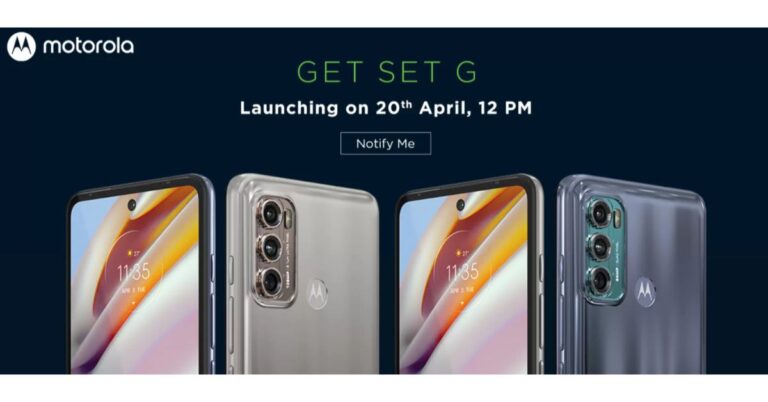
 The dedicated microsite reveals the key details and availability of the smartphone. As per the listing, both Moto G60 and Moto G40 Fusion are going to be powered by the Qualcomm Snapdragon 732G chipset and will run Android 11 out of the box. These upcoming mobile phones will be backed by a 6,000mAh battery. In addition to this, there will be a 6.8-inch LCD screen with a punch-hole design. The display will support a 120Hz refresh rate and HDR10.
The dedicated microsite on Flipkart further reveals that Moto G60 and Moto G40 Fusion are confirmed to feature a triple rear camera unit. The only difference here is that only the primary sensor is different. The former will come with a 108 Megapixel primary sensor while the latter one will include a 64-megapixel main sensor. The other two sensors on the G60 include an 8-megapixel ultra-wide lens and an 8-megapixel macro lens. While on the front it will boast a 32-megapixel selfie sensor.
The volume rocker, Google Assistant and the power key is given on the left frame of the smartphones while the sim card tray is positioned on the other side of the frame.
Prior to the announcement, both the phones were spotted on Geekbench. As per the listing both the phones will run Android 11 out of the box. The listing also reveals that the Moto G60 will come with 6GB of RAM while the Moto G40 Fusion indicates 4GB of RAM. While the benchmarking results are: G40 is listed to have achieved a single-core score of 515 and a multi-core score of 1,375. Moto G40 Fusion has received 519 single-core scores and 1,425 multi-core scores.
For the latest gadget and tech news, and gadget reviews, follow us on Twitter, Facebook and Instagram. For newest tech & gadget videos subscribe to our YouTube Channel. You can also stay up to date using the Gadget Bridge Android App.
The dedicated microsite reveals the key details and availability of the smartphone. As per the listing, both Moto G60 and Moto G40 Fusion are going to be powered by the Qualcomm Snapdragon 732G chipset and will run Android 11 out of the box. These upcoming mobile phones will be backed by a 6,000mAh battery. In addition to this, there will be a 6.8-inch LCD screen with a punch-hole design. The display will support a 120Hz refresh rate and HDR10.
The dedicated microsite on Flipkart further reveals that Moto G60 and Moto G40 Fusion are confirmed to feature a triple rear camera unit. The only difference here is that only the primary sensor is different. The former will come with a 108 Megapixel primary sensor while the latter one will include a 64-megapixel main sensor. The other two sensors on the G60 include an 8-megapixel ultra-wide lens and an 8-megapixel macro lens. While on the front it will boast a 32-megapixel selfie sensor.
The volume rocker, Google Assistant and the power key is given on the left frame of the smartphones while the sim card tray is positioned on the other side of the frame.
Prior to the announcement, both the phones were spotted on Geekbench. As per the listing both the phones will run Android 11 out of the box. The listing also reveals that the Moto G60 will come with 6GB of RAM while the Moto G40 Fusion indicates 4GB of RAM. While the benchmarking results are: G40 is listed to have achieved a single-core score of 515 and a multi-core score of 1,375. Moto G40 Fusion has received 519 single-core scores and 1,425 multi-core scores.
For the latest gadget and tech news, and gadget reviews, follow us on Twitter, Facebook and Instagram. For newest tech & gadget videos subscribe to our YouTube Channel. You can also stay up to date using the Gadget Bridge Android App.  The dedicated microsite reveals the key details and availability of the smartphone. As per the listing, both Moto G60 and Moto G40 Fusion are going to be powered by the Qualcomm Snapdragon 732G chipset and will run Android 11 out of the box. These upcoming mobile phones will be backed by a 6,000mAh battery. In addition to this, there will be a 6.8-inch LCD screen with a punch-hole design. The display will support a 120Hz refresh rate and HDR10.
The dedicated microsite on Flipkart further reveals that Moto G60 and Moto G40 Fusion are confirmed to feature a triple rear camera unit. The only difference here is that only the primary sensor is different. The former will come with a 108 Megapixel primary sensor while the latter one will include a 64-megapixel main sensor. The other two sensors on the G60 include an 8-megapixel ultra-wide lens and an 8-megapixel macro lens. While on the front it will boast a 32-megapixel selfie sensor.
The volume rocker, Google Assistant and the power key is given on the left frame of the smartphones while the sim card tray is positioned on the other side of the frame.
Prior to the announcement, both the phones were spotted on Geekbench. As per the listing both the phones will run Android 11 out of the box. The listing also reveals that the Moto G60 will come with 6GB of RAM while the Moto G40 Fusion indicates 4GB of RAM. While the benchmarking results are: G40 is listed to have achieved a single-core score of 515 and a multi-core score of 1,375. Moto G40 Fusion has received 519 single-core scores and 1,425 multi-core scores.
For the latest gadget and tech news, and gadget reviews, follow us on Twitter, Facebook and Instagram. For newest tech & gadget videos subscribe to our YouTube Channel. You can also stay up to date using the Gadget Bridge Android App.
The dedicated microsite reveals the key details and availability of the smartphone. As per the listing, both Moto G60 and Moto G40 Fusion are going to be powered by the Qualcomm Snapdragon 732G chipset and will run Android 11 out of the box. These upcoming mobile phones will be backed by a 6,000mAh battery. In addition to this, there will be a 6.8-inch LCD screen with a punch-hole design. The display will support a 120Hz refresh rate and HDR10.
The dedicated microsite on Flipkart further reveals that Moto G60 and Moto G40 Fusion are confirmed to feature a triple rear camera unit. The only difference here is that only the primary sensor is different. The former will come with a 108 Megapixel primary sensor while the latter one will include a 64-megapixel main sensor. The other two sensors on the G60 include an 8-megapixel ultra-wide lens and an 8-megapixel macro lens. While on the front it will boast a 32-megapixel selfie sensor.
The volume rocker, Google Assistant and the power key is given on the left frame of the smartphones while the sim card tray is positioned on the other side of the frame.
Prior to the announcement, both the phones were spotted on Geekbench. As per the listing both the phones will run Android 11 out of the box. The listing also reveals that the Moto G60 will come with 6GB of RAM while the Moto G40 Fusion indicates 4GB of RAM. While the benchmarking results are: G40 is listed to have achieved a single-core score of 515 and a multi-core score of 1,375. Moto G40 Fusion has received 519 single-core scores and 1,425 multi-core scores.
For the latest gadget and tech news, and gadget reviews, follow us on Twitter, Facebook and Instagram. For newest tech & gadget videos subscribe to our YouTube Channel. You can also stay up to date using the Gadget Bridge Android App. 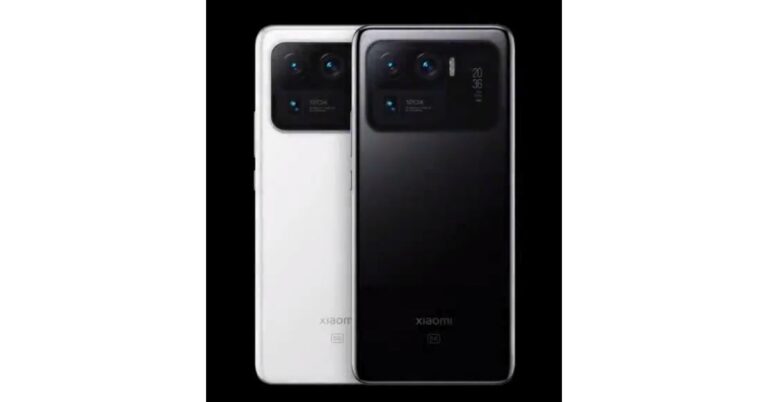
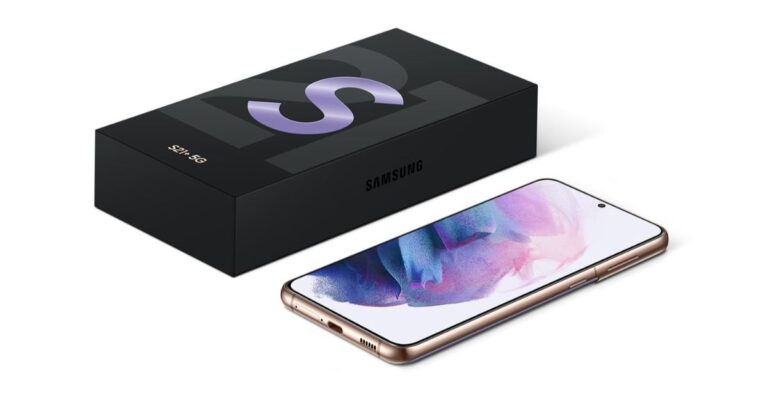
 Samsung Galaxy S21 which retails at Rs 64,990 will be giving away a cashback of Rs 5,000, while Galaxy S21+ is offering a cashback of up to Rs 7,000. On the purchase of the Samsung Galaxy S21 Ultra, buyers can avail of up Rs 10,000 cashback. Noticeably the cashback is only available on the transactions made using HDFC Bank credit and debit cards as well as EMI transactions only. In addition to this, the company is also offering no-cost EMIs options starting at Rs 5,654.92 per month and on the exchange of old devices.
Those customers who are purchasing the Ultra variant can get either Galaxy Watch Active 2 (Aluminium variant) or Galaxy Buds Pro at Rs 990 only. Similarly, the same offers are being offered on other online and offline retailers including Amazon and Flipkart.
Apart from this Samsung is also offering 10 per cent bank cashback or up to Rs 1,000 on the smartphones from Galaxy A, Galaxy M and Galaxy F series. The devices from the A series which are on sale include Galaxy A71, Galaxy A51, Galaxy A31, Galaxy 21s and Galaxy A21. While the phone’s list from the M series includes Galaxy M51, Galaxy M31s, Galaxy M31, Galaxy M11, Galaxy M12, Galaxy M02s, Galaxy M02, Galaxy M01, Galaxy M01s. Lastly Galaxy F41 and Galaxy F02s.
For the latest gadget and tech news, and gadget reviews, follow us on Twitter, Facebook and Instagram. For newest tech & gadget videos subscribe to our YouTube Channel. You can also stay up to date using the Gadget Bridge Android App.
Samsung Galaxy S21 which retails at Rs 64,990 will be giving away a cashback of Rs 5,000, while Galaxy S21+ is offering a cashback of up to Rs 7,000. On the purchase of the Samsung Galaxy S21 Ultra, buyers can avail of up Rs 10,000 cashback. Noticeably the cashback is only available on the transactions made using HDFC Bank credit and debit cards as well as EMI transactions only. In addition to this, the company is also offering no-cost EMIs options starting at Rs 5,654.92 per month and on the exchange of old devices.
Those customers who are purchasing the Ultra variant can get either Galaxy Watch Active 2 (Aluminium variant) or Galaxy Buds Pro at Rs 990 only. Similarly, the same offers are being offered on other online and offline retailers including Amazon and Flipkart.
Apart from this Samsung is also offering 10 per cent bank cashback or up to Rs 1,000 on the smartphones from Galaxy A, Galaxy M and Galaxy F series. The devices from the A series which are on sale include Galaxy A71, Galaxy A51, Galaxy A31, Galaxy 21s and Galaxy A21. While the phone’s list from the M series includes Galaxy M51, Galaxy M31s, Galaxy M31, Galaxy M11, Galaxy M12, Galaxy M02s, Galaxy M02, Galaxy M01, Galaxy M01s. Lastly Galaxy F41 and Galaxy F02s.
For the latest gadget and tech news, and gadget reviews, follow us on Twitter, Facebook and Instagram. For newest tech & gadget videos subscribe to our YouTube Channel. You can also stay up to date using the Gadget Bridge Android App.  Samsung Galaxy S21 which retails at Rs 64,990 will be giving away a cashback of Rs 5,000, while Galaxy S21+ is offering a cashback of up to Rs 7,000. On the purchase of the Samsung Galaxy S21 Ultra, buyers can avail of up Rs 10,000 cashback. Noticeably the cashback is only available on the transactions made using HDFC Bank credit and debit cards as well as EMI transactions only. In addition to this, the company is also offering no-cost EMIs options starting at Rs 5,654.92 per month and on the exchange of old devices.
Those customers who are purchasing the Ultra variant can get either Galaxy Watch Active 2 (Aluminium variant) or Galaxy Buds Pro at Rs 990 only. Similarly, the same offers are being offered on other online and offline retailers including Amazon and Flipkart.
Apart from this Samsung is also offering 10 per cent bank cashback or up to Rs 1,000 on the smartphones from Galaxy A, Galaxy M and Galaxy F series. The devices from the A series which are on sale include Galaxy A71, Galaxy A51, Galaxy A31, Galaxy 21s and Galaxy A21. While the phone’s list from the M series includes Galaxy M51, Galaxy M31s, Galaxy M31, Galaxy M11, Galaxy M12, Galaxy M02s, Galaxy M02, Galaxy M01, Galaxy M01s. Lastly Galaxy F41 and Galaxy F02s.
For the latest gadget and tech news, and gadget reviews, follow us on Twitter, Facebook and Instagram. For newest tech & gadget videos subscribe to our YouTube Channel. You can also stay up to date using the Gadget Bridge Android App.
Samsung Galaxy S21 which retails at Rs 64,990 will be giving away a cashback of Rs 5,000, while Galaxy S21+ is offering a cashback of up to Rs 7,000. On the purchase of the Samsung Galaxy S21 Ultra, buyers can avail of up Rs 10,000 cashback. Noticeably the cashback is only available on the transactions made using HDFC Bank credit and debit cards as well as EMI transactions only. In addition to this, the company is also offering no-cost EMIs options starting at Rs 5,654.92 per month and on the exchange of old devices.
Those customers who are purchasing the Ultra variant can get either Galaxy Watch Active 2 (Aluminium variant) or Galaxy Buds Pro at Rs 990 only. Similarly, the same offers are being offered on other online and offline retailers including Amazon and Flipkart.
Apart from this Samsung is also offering 10 per cent bank cashback or up to Rs 1,000 on the smartphones from Galaxy A, Galaxy M and Galaxy F series. The devices from the A series which are on sale include Galaxy A71, Galaxy A51, Galaxy A31, Galaxy 21s and Galaxy A21. While the phone’s list from the M series includes Galaxy M51, Galaxy M31s, Galaxy M31, Galaxy M11, Galaxy M12, Galaxy M02s, Galaxy M02, Galaxy M01, Galaxy M01s. Lastly Galaxy F41 and Galaxy F02s.
For the latest gadget and tech news, and gadget reviews, follow us on Twitter, Facebook and Instagram. For newest tech & gadget videos subscribe to our YouTube Channel. You can also stay up to date using the Gadget Bridge Android App. 







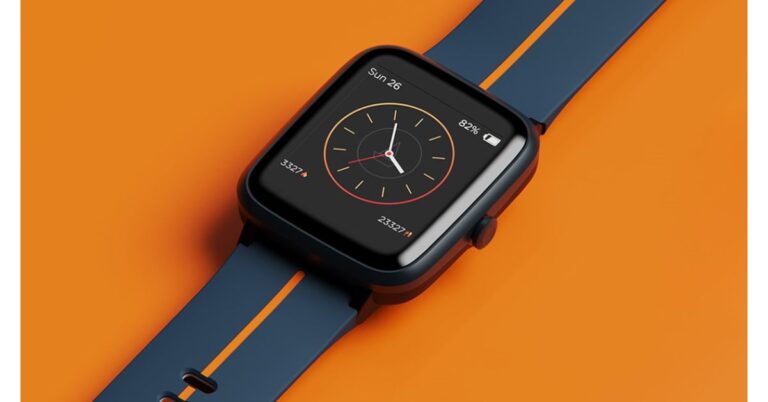
 Watch Xplorer comes with support for 5ATM water resistance making it perfect for outdoor use. The GPS enabled wearable allows you to monitor health, notifications, weather and keeps you active. It can track your routes and distances while running, walking or cycling. While the built-in smart activity tracker records daily calorie burns as well as the steps and distance covered.
There are 8 Active Sports Modes on the boAt Xplore Smartwatch that includes Outdoor Run, Indoor Run, Outdoor Walk, Outdoor Cycle, Indoor Cycle, Pool Swim, Open Water Swim and Fitness. Moreover, it also sends you real-time weather updates and weather forecasts using built-in live weather forecasts. Aside from this the smartwatch also offers health-related features such as a 24×7 heart rate monitor, Breathe mode and track menstrual cycles.
The Breathe mode on the watch guides you to mindfulness with breath awareness and helps lower your heart rate and decrease stress levels. Whereas the features of the menstrual cycle is a very helpful feature for women that predicts accurate dates, ovulation patterns and more.
Apart from health and fitness features the boAT Xplorer also offers other features such as music playback controls, notifications alerts, curated controls such as Find My Phone, alarms and timers.
For the latest gadget and tech news, and gadget reviews, follow us on Twitter, Facebook and Instagram. For newest tech & gadget videos subscribe to our YouTube Channel. You can also stay up to date using the Gadget Bridge Android App.
Watch Xplorer comes with support for 5ATM water resistance making it perfect for outdoor use. The GPS enabled wearable allows you to monitor health, notifications, weather and keeps you active. It can track your routes and distances while running, walking or cycling. While the built-in smart activity tracker records daily calorie burns as well as the steps and distance covered.
There are 8 Active Sports Modes on the boAt Xplore Smartwatch that includes Outdoor Run, Indoor Run, Outdoor Walk, Outdoor Cycle, Indoor Cycle, Pool Swim, Open Water Swim and Fitness. Moreover, it also sends you real-time weather updates and weather forecasts using built-in live weather forecasts. Aside from this the smartwatch also offers health-related features such as a 24×7 heart rate monitor, Breathe mode and track menstrual cycles.
The Breathe mode on the watch guides you to mindfulness with breath awareness and helps lower your heart rate and decrease stress levels. Whereas the features of the menstrual cycle is a very helpful feature for women that predicts accurate dates, ovulation patterns and more.
Apart from health and fitness features the boAT Xplorer also offers other features such as music playback controls, notifications alerts, curated controls such as Find My Phone, alarms and timers.
For the latest gadget and tech news, and gadget reviews, follow us on Twitter, Facebook and Instagram. For newest tech & gadget videos subscribe to our YouTube Channel. You can also stay up to date using the Gadget Bridge Android App.  Watch Xplorer comes with support for 5ATM water resistance making it perfect for outdoor use. The GPS enabled wearable allows you to monitor health, notifications, weather and keeps you active. It can track your routes and distances while running, walking or cycling. While the built-in smart activity tracker records daily calorie burns as well as the steps and distance covered.
There are 8 Active Sports Modes on the boAt Xplore Smartwatch that includes Outdoor Run, Indoor Run, Outdoor Walk, Outdoor Cycle, Indoor Cycle, Pool Swim, Open Water Swim and Fitness. Moreover, it also sends you real-time weather updates and weather forecasts using built-in live weather forecasts. Aside from this the smartwatch also offers health-related features such as a 24×7 heart rate monitor, Breathe mode and track menstrual cycles.
The Breathe mode on the watch guides you to mindfulness with breath awareness and helps lower your heart rate and decrease stress levels. Whereas the features of the menstrual cycle is a very helpful feature for women that predicts accurate dates, ovulation patterns and more.
Apart from health and fitness features the boAT Xplorer also offers other features such as music playback controls, notifications alerts, curated controls such as Find My Phone, alarms and timers.
For the latest gadget and tech news, and gadget reviews, follow us on Twitter, Facebook and Instagram. For newest tech & gadget videos subscribe to our YouTube Channel. You can also stay up to date using the Gadget Bridge Android App.
Watch Xplorer comes with support for 5ATM water resistance making it perfect for outdoor use. The GPS enabled wearable allows you to monitor health, notifications, weather and keeps you active. It can track your routes and distances while running, walking or cycling. While the built-in smart activity tracker records daily calorie burns as well as the steps and distance covered.
There are 8 Active Sports Modes on the boAt Xplore Smartwatch that includes Outdoor Run, Indoor Run, Outdoor Walk, Outdoor Cycle, Indoor Cycle, Pool Swim, Open Water Swim and Fitness. Moreover, it also sends you real-time weather updates and weather forecasts using built-in live weather forecasts. Aside from this the smartwatch also offers health-related features such as a 24×7 heart rate monitor, Breathe mode and track menstrual cycles.
The Breathe mode on the watch guides you to mindfulness with breath awareness and helps lower your heart rate and decrease stress levels. Whereas the features of the menstrual cycle is a very helpful feature for women that predicts accurate dates, ovulation patterns and more.
Apart from health and fitness features the boAT Xplorer also offers other features such as music playback controls, notifications alerts, curated controls such as Find My Phone, alarms and timers.
For the latest gadget and tech news, and gadget reviews, follow us on Twitter, Facebook and Instagram. For newest tech & gadget videos subscribe to our YouTube Channel. You can also stay up to date using the Gadget Bridge Android App.