One of the better parts of owning an Amazon Alexa device is that you can incorporate its usage into your daily routines. If you keep an Amazon Echo device on your nightstand, you will be pleased to know that there are several Alexa skills that will help you get a good night’s rest. If you find it hard to fall asleep in a completely silent room, these skills will be of tremendous help. You can even use them for relaxation, stress relief, and meditation. So, without further ado, here are our picks for the top 7 Alexa sleep and relaxation sounds and skills for everyday use.Read Also: Fire-Boltt Supernova BT calling smartwatch launched in India
Relaxing Sounds: Indian Flute
“Alexa, Play Indian Flute”The Indian Flute skill is one of the highly rated sounds on the ‘Alexa Skills’ page. This sound fills the room with an elevating vibration, helped by the deeply relaxing flute melody that creates the perfect ambience for meditation and relaxation. This calming sound can also be used as white noise to gently fall asleep.
Sleep Sounds: Ocean Sounds
“Alexa, open Ocean Sounds”Deep soothing ocean sounds make some of the best samples for white noise. If you find it hard to fall asleep in a completely silent room, this Alexa skill will help you relax and have a cradling effect on your ears. To end the sound, all you need to say is “Alexa, stop”. You can even set a timer by saying “Alexa, set a sleep timer for 2 hours”. You can extend this duration to suit your sleeping period.
Rainforest Sounds by Sleep Jar
“Alexa, start Rainforest Sounds”Rainforest Sounds by Sleep Jar creates the perfect environment to tune out any unwanted noises from your surroundings and simulate the pleasant and uplifting mood of a rainforest. The rainforest sounds will help you relax, meditate, and relieve stress. Once you enable this skill and ask Alexa to play it, it will go on for 1 hour by default. To loop the sound, say “Alexa, ask Rainforest Sounds to loop”.
White Noise
“Alexa, open White Noise”If you find yourself getting distracted by other ambient sounds, the generic White Noise skill will help in filling the room with enough sound to block out the outside noise and create an atmosphere to easily fall asleep. You can also use this noise to study and meditate. Oftentimes, users prefer having something non-dynamic in the background. This Alexa skill does the most basic of tasks without the bells and whistles.
Sleep Sounds: Wind Chimes
“Alexa, open Wind Chimes”Fewer sounds are more relaxing than windchimes crashing together. The Wind Chimes skill on Alexa is guaranteed to relax your senses and drift you to sleep. The sounds are mixed together very well, with the low end given enough attention along with the sharp noise of the chimes crashing into themselves. You can also use these sounds for your meditation sessions.
Bedtime Stories
“Alexa, open Bedtime Stories”If you have a kid at home, you will love this Alexa skill. Bedtime Stories does exactly what it says. Once you enable this skill, you can use it to read out a bedtime story to your kid. Currently, this skill offers these 11 bedtime stories.
Tyler meets Santa
Joy teaches kindness
Danny’s ocean adventure
Jessica bakes cake
Dental heroes
Alfi blows bubbles
Goldilocks and three bears
Little Pirate Joe
Cinderella
My Travelling Adventures (kids decide how the story develops)
Halloween Treasure Hunt
You can skip to a random story or repeat the same story again.
Play a sleep playlist on Spotify
If you don’t like what Alexa Skills have to offer, you can get Alexa to play a random sleep playlist from Spotify or Amazon Music. You can even create a playlist of your own and play it on Alexa before going to bed. The official Spotify Sleep Playlist has over 4 million likes and contains 292 songs that will last up to 13 hours.Read Also: Top 6 WiFi Hotspot Apps for iOS: Best for all types
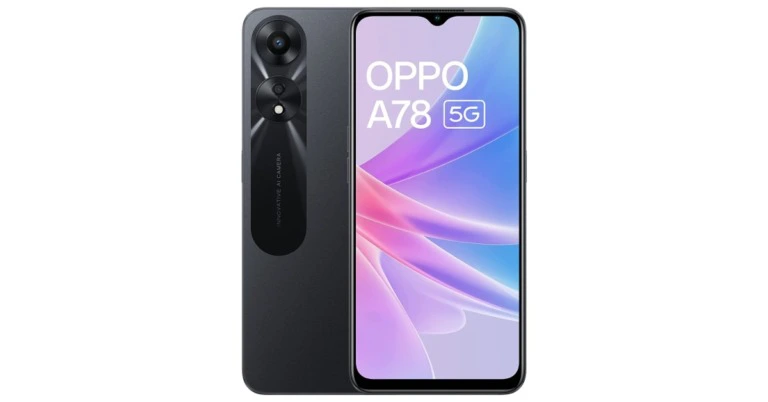
Oppo has expanded its A-series portfolio with the launch of Oppo A78 5G in India. The smartphone is powered by MediaTek Helio 700 SoC. The device features a dual rear camera setup. In addition to this, there is a 5,000mAh battery on board which supports 33W SuperVOOC fast charging.
Oppo A78 5G price in India and availability details
The new Oppo A78 5G is available in single 8GB RAM with 128GB storage option and costs Rs 18,999 in India. The device comes in two colour options of Glowing Black and Glowing Blue. It will be available for purchase beginning January 18 through Oppo’s online store, Amazon, and other significant retail locations.From ICICI, SBI, BOB, IDFC, ONECARD, and AU FINANCE banks, customers can receive up to 10% Cashback and six months of NCEMI. The sale incentives can be availed via Amazon. Options for no-cost EMIs begin at Rs 3,167. According to Oppo, exchange discounts are also available but are restricted at Rs 18,049.Also Read: iQoo 11 5G with Snapdragon 8 Gen 2 SoC launched in India
Oppo A78 5G specifications
A 6.56-inch HD+ IPS LCD screen with a resolution of 720×1,1612 pixels is featured on the Oppo A78 5G. The screen also offers a 269ppi pixel density, a 90Hz refresh rate, and an 89.8 screen-to-body ratio. The phone is equipped with a 7nm MediaTek Dimensity 700 SoC, 8GB of LPDDR4X RAM, and runs ColorOS 13 on top of Android 13. Utilising unused storage, the available memory can be stretched up to 12GB. The device has a dedicated microSD card slot and 128GB of UFS 2.2 storage that can be upgraded to 1 TB.A 50-megapixel primary camera with an f/1.8 aperture and a 2-megapixel sensor with an f/2.4 aperture make up the Oppo A78 5G’s dual rear camera system on the back. It also has a front-facing 8-megapixel camera with an f/2.0 aperture.The smartphone’s Super Night Standby algorithm assesses users’ sleeping habits to reduce power usage to just 2% at night. Additionally, a user can switch on its Superpower Saving mode when the battery is running low to save energy for emergencies.Also Read:Limited-edition Motorola Edge 30 Fusion Viva Magenta launched in IndiaThe phone has features like Flex Drop, which allows for effective multitasking, Three-Finger Translation with Google Lens, and Photo Information Protection, which enables users to remove photo and video metadata to stop the leak of sensitive information.Along with a face unlock function, it has an in-display fingerprint sensor for biometrics. There are several sensors onboard, including an accelerometer, a pedometer, an ambient light sensor, a gravity sensor, a geomagnetic sensor, and a proximity sensor. Wi-Fi 5, Bluetooth 5.3, a 3.5mm audio connector, a USB Type-C port, GPS, A-GPS, BeiDou, GLONASS, Galileo, QZSS, and OTG are among the Oppo A78 5G’s connectivity choices.A 5,000mAh battery that is fully charged in around 60 minutes that supports 33W SuperVOOC fast charging powers the Oppo A78 5G. According to the company, the battery lasts for up to 23 hours. All Indian service providers, including Jio, Vodafone, and Airtel, are compatible with the new handset.
For the latest gadget and tech news, and gadget reviews, follow us on Twitter, Facebook and Instagram. For newest tech & gadget videos subscribe to our YouTube Channel. You can also stay up to date using the Gadget Bridge Android App. You can find the latest car and bike news here.
If you’re looking to elevate your WhatsApp Status game to the next level, you should know how to attach background music to the videos you capture. When done correctly, adding music can make your videos more immersive and fun to watch. Don’t know how to edit music in your videos? Here are two quick ways you can add background audio to your WhatsApp Status.Read Also: Sony India announced fantastic deals on their products for Republic Day
Play music on your phone while recording the status
One of the better features of WhatsApp is that it doesn’t stop any background music from playing on your phone while recording a status. This way you can record a status while playing any audio or song on your phone. Here’s how.Step 1: Play the song or audio on your phone.Step 2: Launch WhatsApp and go to the ‘Status’ tab.Step 3: Tap ‘My Status’ and start recording a video.Step 4: The background audio will be recorded along with the video.
Use a video editing app
Using a third-party video editing app can help you add background music to pre-recorded videos. If you want better audio quality in your video, use this method. While there are loads of video editors out there, we would suggest using InShot Video Editor for this task. Once you’ve finished recording a video, open it in the InShot video editor, and select ‘Music’ from the toolbar. Select the music you want to add to the background of the video. You can even choose to add different audio transitions and effects. Hit save once you’re done. You will be able to upload this video on WhatsApp as a status.
Bonus Tip
How to create a WhatsApp group call link?
Step 1: Open WhatsApp on your smartphone and go to the ‘Calls’ tab.Step 2: Tap on ‘Create call link.’Step 3: Choose whether you want to make an audio or video call.Step 4: You can share the call link with your contacts on WhatsApp or social media and chat platforms. You can also copy the link and post it anywhere you want the people to see.Read Also: Top 6 WiFi Hotspot Apps for iOS: Best for all types
From UPI payments to product packaging, QR codes are everywhere. It doesn’t take a long time to scan a QR code, making it one of the most popular forms of exchanging information. Even though they are commonplace, some people may have some difficulty scanning a QR code. In this article, we bring you the 5 simplest ways to scan a QR code on a Google Pixel smartphone.Read Also: Samsung Galaxy Watch 5 Pro review: Is it an ideal smartwatch?
Use the default Pixel Camera app
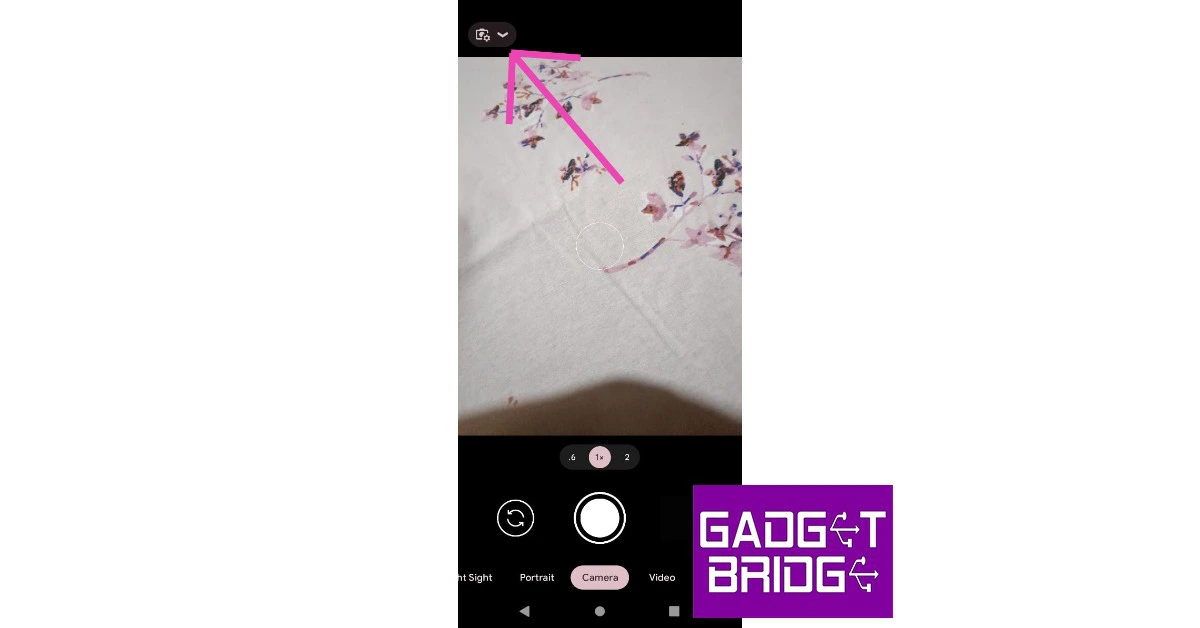
Your Pixel’s camera app can easily scan any QR code using Google Lens. All you need to do is enable Google Lens suggestions on the camera app. Here’s how.Step 1: Launch the camera app on your Google Pixel.Step 2: Tap the gear icon to access the camera settings.Step 3: Select ‘More Settings’ and turn the toggle bar on for ‘Google Lens suggestions’.Step 4: Go back to the camera app and point your camera at the QR code you wish to scan. The resulting link will pop up on the screen and you can access it by simply tapping on it.
Use the QR Code tile from the drop-down menu
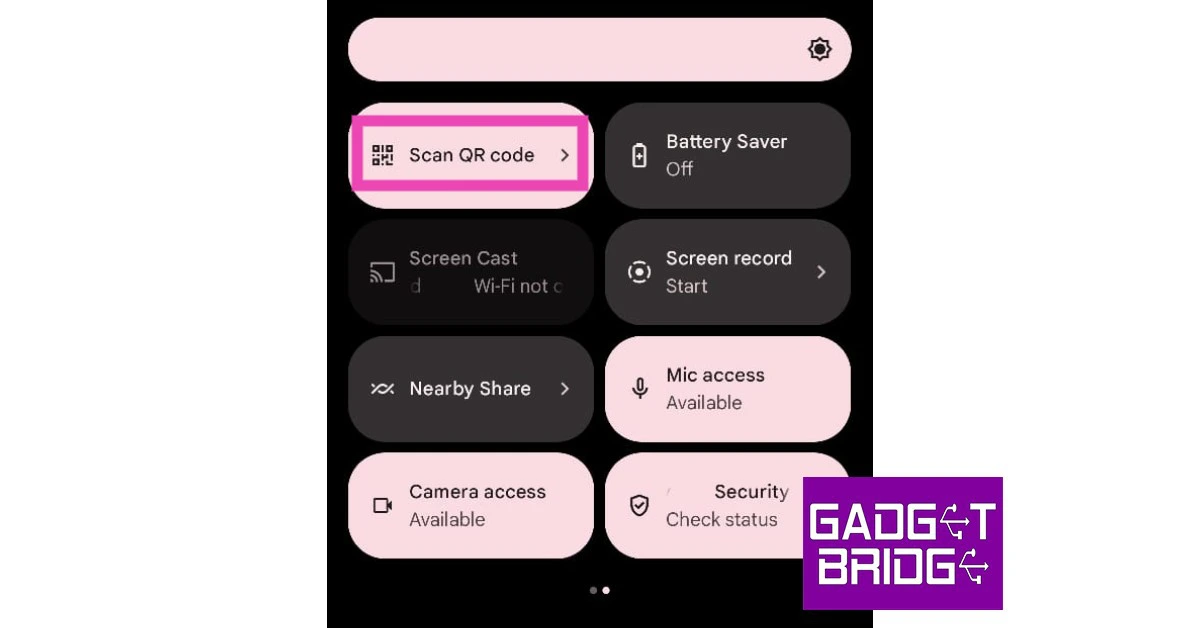
Another quick way of scanning a QR Code on your Google Pixel is by accessing the ‘Scan QR Code’ tile from the drop-down menu. Simply swipe down from the top of the screen and look for the QR tile. If you don’t find it, tap on the pencil icon and add it to the drop-down menu. Upon pressing the tile, point the camera at the QR code and it will be scanned quickly.
Scan the QR code from an image
This feature comes in handy when someone sends you a QR code to their UPI ID. Since you cannot point the camera at the images in your phone, scanning a QR can get tricky if an image is the only place you can access it from. Luckily, your Google Pixel can handle this task with ease. Just follow these steps.Step 1: Open the Google Photos app on your smartphone and tap on the picture containing the QR code.Step 2: Tap on the screen to reveal the toolbar and then select the Google Lens icon.Step 3: Google Lens will scan the QR code in the picture and present a clickable link for you to access the information.
Use the Google Lens app
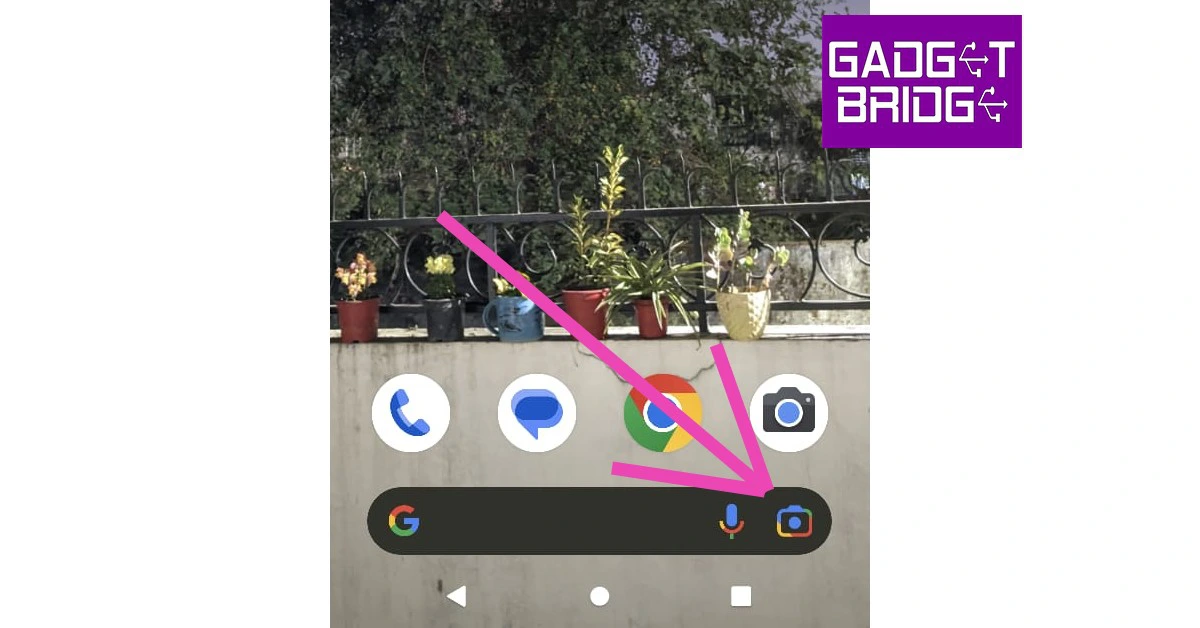
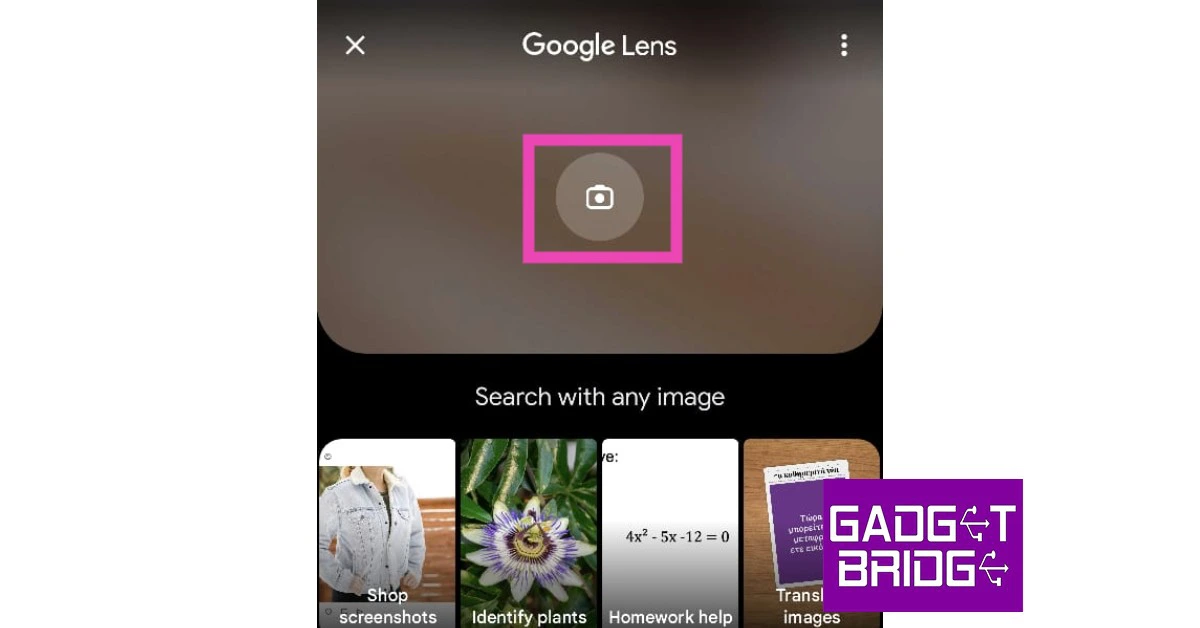
The Google Lens app is well-equipped to read any QR Code. Here’s how you can use it.Step 1: Tap the Google Lens icon on the Google Search bar on your Pixel’s home screen.Step 2: In the following window, select ‘Search with your camera’.Step 3: Point the camera at the QR code and tap on the resulting link to access it.You can also scan a QR code from an image in your phone’s gallery using Google Lens.
Use a third-party app
If you don’t want to use the native QR Code scanning features on your Pixel smartphone, there are plenty of QR code scanners available on the Google Play Store. The ‘QR and Barcode scanner’ is one of the best and most popular scanning apps around. Once you install the app, all you need to do is launch it and use the viewfinder to locate the QR code. Apart from scanning QR codes, this app can also scan product barcodes.Read Also: 3 Ways to Make the Keyboard Bigger on any Samsung Galaxy Phone
Conclusion
These are the 5 simple ways to scan a QR code on your Google Pixel smartphone. If the default camera app on your Pixel is unable to scan the QR code, clear the cache and try again. Oftentimes corrupted temporary files in your phone’s memory can prevent some essential features from working correctly. If you found this article helpful, let us know in the comments!For the latest gadget and tech news, and gadget reviews, follow us on Twitter, Facebook and Instagram. For newest tech & gadget videos subscribe to our YouTube Channel. You can also stay up to date using the Gadget Bridge Android App. You can find the latest car and bike news here.
Garena Free Fire is a battle royale game with regular awards and tournaments to keep players interested. If you play Garena Free Fire, you should be aware of the redeem codes that are released on a daily basis. However, because the battle royale game is banned in India, players from other countries can use the Free Fire Redeem codes daily. If you’re unfamiliar with the Garena Free Fire redeem codes or don’t know how to get them, we’ve put together a step-by-step guide to help you redeem them. Check out Garena Free Fire Redeem Codes for 17 January 2023.The Free Fire redeem codes are a great way to get free stuff. These are 12-digit codes that contain alphabets and numbers, as well as an expiration date and time. Because the Garena FF redeem codes cannot be used more than once, you should hurry to the redemption page to claim your free reward before someone else does. To get a free reward, all you have to do is go to reward.ff.garena.com/en, which is the official redemption page. Also, keep an eye on this space for daily updates on Garena Free Fire redemption codes and rewards.
Garena Free Fire Redeem Codes Today 17 January 2023
Updating soon
How to Get Free Fire Redeem Codes for Garena on 17 January 2023?
17 January 2023 Amazon Quiz has gone live on its platform. The quiz timings are 12 AM to 11:59 PM. The Amazon App users can participate in the quiz daily and all they have to do is submit correct answers to the questions asked on the e-commerce platform. Today’s participants can get a chance to win Rs 500 Amazon Pay Balance.Amazon brings a fresh questionnaire that contains 5 questions daily. These questions are based on current affairs and general knowledge. The quiz can be played from 8 AM to 11:59 PM and the contestants need to answer correctly to enter into a lucky draw.Only one person is declared as a winner and the results will be announced at the end of every month. And to make sure that you give correct answers to all the 5 questions Gadget Bridge everyday updates all the answers to the Amazon Quiz. Do check out 17 January 2023 Amazon Quiz Answers to win a Rs 500 Amazon pay Balance.Amazon Quiz Today Prize – Rs 500 Amazon Pay BalanceQuiz Date – 17 January 2023Daily Timing – 12 AM to 11:59 PMWinner Announcement – Today 12 PM
Amazon Quiz Answers Today 17 January 2023
Question 1: Gamosa, which received the Geographical Indication (GI) tag, is a traditional scarf from which Indian state?
Answer: AssamQuestion 2: The Rashid Rover is the first-ever Arab-Built lunar spacecraft made by which country?
Answer: UAE
Question 3: Who portrayed this character in the movie ‘The Amazing Spider-Man’?Answer: Andrew GarfieldQuestion 4: This is the flag of which country in the Caribbean region?
Answer: JamaicaQuestion 5: This is the famous ______ Garden of Chandigarh. Fill in the blanks
Answer: Rock
How To Play Amazon Quiz
Only app users are eligible to play the Amazon quiz every morning from 12 AM to 11:59 PM. The quiz is not available on the desktop. For those who are unaware of how to play the Amazon quiz below are the steps, you can follow to take the quiz.
Firstly download the Amazon app from Google Play Store or App Store
Now fill in the required information through the Sign Up option.
You need to log in to the Amazon app and scroll down on the home screen to find the Amazon Quiz banner.
Tap on the Amazon Quiz banner and tap on the Start button to start the Quiz.
Now you will get 5 questions and you need to answer them correctly. One wrong answer will eliminate you from the Quiz.
After answering all the questions correctly you are now eligible for a Lucky Draw.
The winner’s name will be announced today at 12 PM.
This time of year, it’s common to want to curl up on the sofa at home and shelter from the cold outside. With so many Christmas gatherings going on and activities on offer, it can often feel like there is a lot of pressure to go out and socialise or spend lots of money. However, if you’re looking to have a few hours of quiet to yourself and want to save some money, there’s a number of things you can do to stay entertained at home too.
Thanks to the world wide web, there are now so many things you can do online, from shopping to entertainment, socialising and so much more. Below, we’ll take a look at some of the things you can do to find some extra excitement online.
Watch videos on YouTube
YouTube has a huge amount of content available from collaborators across the globe, meaning you’ll never get bored of exploring. In fact, you’ll probably get lost down a rabbit hole and end up watching videos for hours. Whether it’s cooking channels, home renovation videos or gaming channels, there’s something available to suit every taste.
Try out online casino games
The popularity of online gaming has exploded in recent years. As smartphones have improved, so has the quality and quantity of games available. Recently strategy games are particularly in demand. While online casinos are attracting new players each day. The convenience of heading online rather than to a brick-and-mortar alternative is proving to be a hit. From blackjack to poker, slot games, roulette, baccarat and so much more, online casinos enable you to play from the comfort of your own home, without judgement from other players.
What’s more, there are many sign-up deals and bonuses for new players that mean you can choose a site that suits you, without having to commit and deposit any cash in the meantime. You’ll also have a great deal of chances to win compared to in a brick-and-mortar casino as online casinos not only have larger jackpots but also offer more free spins and bonus games.
Listen to a podcast
Want to do something productive with your time? Listening to a podcast is a great way to pick up on a new skill, indulge in a passion or get mental clarity on an issue you were having. Podcast downloads have risen at a staggering rate over the past few years, every topic you can think of is covered, from sports games to self-education. You can use self-education to get tips on money management, self-meditation, language learning, parenting and many other topics where you can listen to subject matter experts.
You could also download some podcasts for offline listening later and then pick back up on it when it’s convenient. Podcasts are a great thing to listen to when travelling or working out so you could use your time online to research some great podcasts you’re interested in and download them to your phone.
Track local wildlife
Ever wondered where a great white shark is swimming right now? Or want to track down a pod of dolphins out of curiosity? OSEARCH is an online tool that allows you to keep track of ocean animals around the world by showing you where they are currently and where they have been recent.
For the real animal fans out there, you can even find out their name, weight and length. Additionally, if you’re a surfer or enjoy other watersports then it’s also ideal to know where certain wildlife is for peace of mind and to ensure you don’t cross paths.
Explore live cams around the world
Feeling the travel bug but can’t travel at the moment? We’ve all been there, but that doesn’t mean you can’t explore some far off destinations. If you need a change of scenery, sites like YouTube and Explore have live cams that you can watch from around the world.
Some of the best live cams include:
The live puppy playroom
The kitten rescue sanctuary
The Giglie bridge in Venice
The Gorilla Forest Corridor in the Congo
Research new recipes to try
The great thing about the internet is that it’s full of resources on just about everything, but especially cooking recipes. Christmas is all about indulging in heart-warming food and drink without feeling guilty about it and where better to find the latest Gordon Ramsay recipe than on the internet.
You could also look up Christmas cocktails and mocktails to make and then easily order the ingredients you need online. Sites like Ocado even allow you to automatically add a recipe’s ingredients to your basket for added convenience.
Listen to a Ted talk
Look for another productive activity? Ted talks cover just about every topic you could think of and can teach you some interesting things that make you question the way you think and perceive the world. Ted talks are always incredibly motivational and could give you the extra energy you need to start a new project or business venture that you’ve been thinking about for a long time.
Overall, there are so many fun things to do on the internet that it’s not really possible to get bored with it. With access to the whole world, there’s no need to be glum about staying at home this winter as with the above tools, you can go wherever you want, find out about anything you like and find new levels of motivation to enhance your life.
For the latest gadget and tech news, and gadget reviews, follow us on Twitter, Facebook and Instagram. For the newest tech & gadget videos subscribe to our YouTube Channel. You can also stay up to date using the Gadget Bridge Android App. You can find the latest car and bike news here.
Fire-Boltt has introduced its latest smartwatch Supernova in India. The device comes with an always-on AMOLED display. The fitness watch also comes with 123 sports modes and a Bluetooth calling feature. In addition to this, there is voice assistant support on the device.
Fire-Boltt Supernova smartwatch price and availability
Fire-Boltt Supernova smartwatch has been launched in India with a price tag of Rs 3,499. The device will be available in vibrant colours like yellow, orange, and blue and classic colours like black, light gold, and gold black. The smart wearable will be available for purchase via Flipkart and Fireboltt.com.Also Read:Sony India announced fantastic deals on their products for Republic Day
Fire-Boltt Supernova smartwatch specifications
Fire-Boltt Supernova smartwatch features a 1.78-inch always-on AMOLED display with 368 x 448 pixels resolution and 500 nits peak brightness. This smartwatch offers a selection of watch faces and 8 UI styles, allowing you to switch up the watch face and menu design each day to go with your mood and wardrobe.The Fire-Boltt Supernova smartwatch offers 123 various sports modes to keep track of your every activity and help you achieve your fitness objectives. The smartwatch’s Bluetooth 5.0 capability enables swift and seamless connectivity with all external devices. The smartwatch’s robust built-in speaker and microphone provide a clear call experience without any background noise. The Supernova’s built-in voice assistant is another intriguing feature that lets users send voice instructions to the watch and complete tasks while on the go. Additionally, the smartwatch has built-in games to keep users occupied and guarantee there is never a dull time in their day.Also Read:Samsung Introduces brand new 2023 Side-by-Side Refrigerator Range in IndiaA modernized health suite that tracks vitals including SPO2, dynamic heart rate, sleep, and more is included with the wristwatch. The smartwatch is readily able to survive both hard gym workouts and accidental water splashes thanks to its IP67 water-resistant rating. The watch is made with sturdy construction and is crack- and dust-resistant, making it the ideal option for fitness and outdoor enthusiasts. Smooth surfing is made possible by the smartwatch’s affixed spinning crown, which is completely functional. The Fire-Boltt Supernova smartwatch has been created with extreme accuracy and cutting-edge technology, and its battery life is up to 5 days. The watch is compatible with both IOS and Android systems, providing customers with the delight of uninterrupted performance.
For the latest gadget and tech news, and gadget reviews, follow us on Twitter, Facebook and Instagram. For newest tech & gadget videos subscribe to our YouTube Channel. You can also stay up to date using the Gadget Bridge Android App. You can find the latest car and bike news here.
The basic iOS mobile hotspot feature is adequate for handling simple internet tethering-related tasks. However, sometimes users may want more out of the personal hotspot function. This is even more applicable for users in the US since mobile carriers there charge an extra fee if you share your mobile data using a personal hotspot. There are a few apps that will let your work around this issue. So, without further ado, here are the top 6 WiFi hotspot apps for iOS (iPhone and iPad).Read Also: Samsung Galaxy Watch 5 Pro review: Is it an ideal smartwatch?
PDA Net
PDA Net is one of the most popular WiFi hotspot apps for iOS. One of the major reasons behind its popularity is that it masks mobile tethering from your network operator, so you don’t need to pay extra for sharing your mobile data. PDA Net allows mobile tethering through a WiFi or USB connection. The connections are fast and secure. The only downside is that this app only works on jailbroken iPhones and iPads.
TetherMe
TetherMe is another app like PDA Net that lets you tether your mobile internet network without notifying your network provider. Similar to PDA Net, this app will only work after performing a jailbreak on your iPhone. Once you’ve downloaded TetherMe using Cydia, you will be able to share as much mobile data as you want. Tethering can be carried out over WiFi or a stable USB connection.
WiFi Map
If you don’t want to root your iPhone, you can try using apps that locate public WiFi hotspots and give you access to them. WiFi Map is one of the most popular apps in this category. This app comes with a large directory of public WiFi hotspots in over 50 countries. WiFi Map also provides passwords for secure WiFi networks. While connecting to a public WiFi it is essential you use a VPN to protect your privacy and safeguard yourself again online scams. WiFi Maps takes care of this situation and lets you choose from dozens of VPN servers before connecting to a public WiFi hotspot.
WiFi Finder
WiFi Finder gets its data from the SpeedSpots crowdsourced database. With this database, WiFi Finder is able to provide information on hundreds of thousands of public WiFi hotspots across the world. You can also perform a speed test on this app and see which hotspots are rated highly for their speed and connection strength. If you’re travelling to some location, you can download the map of public Wi-Fi offered in that location using this app. You can also filter hotspots by venue type: Hotel, Cafe, Store, Restaurant, Bar etc.
WiFi Connect
WiFi Connect is a popular app among travellers who want to save up on mobile roaming costs by relying as much as they can on public WiFi for internet usage. WiFi Connect lets you find free WiFi hotspots in over 50,000 cities worldwide. You can also save locations in the app for future use. WiFi Connect lets you search for public WiFi hotspots by city, country, or locality. The app keeps updating the passwords in its directory and adds new hotspots to the list.
WiFi Master
WiFi Master has one of the biggest WiFi-sharing communities in the world, with its presence in almost 200 regions across the world. WiFi Master also lets you access certain password-protected WiFi networks. Since the passwords are encrypted for user privacy, you will not be able to see them but the app will let you connect to the network. This app has a simple interface that is easy to use. With just a few taps, you will be able to connect to your desired public WiFi.Read Also:Snapchat 2023: Simple ways to Create, Edit, and Delete a Public Profile on Snapchat
For Republic Day, Sony India has announced special promotional deals on a variety of televisions, personal audio devices, and home audio goods. Various audio products, including headphones, the Truly Wireless Earbuds Series, portable Bluetooth Speakers, soundbars, and Bravia televisions will all be marked down significantly by Sony India during the sale. These incredible offers, along with enticing financing options like instant rebates, simple EMIs, and one free EMI, will encourage people to buy a Sony device.For audiophiles to take advantage of these irresistible offers, these exciting promotions are available starting on January 14 and running through January 26 or while supplies last at Sony retail locations (Sony Center and Sony Exclusive), the www.ShopatSC.com portal, major electronics retailers, and exclusively on Amazon and Flipkart’s e-commerce platforms.These amazing deals will persuade individuals to purchase a Sony product combined with alluring financing options including instant cashback, easy EMIs, and one free EMI. Additionally, Sony is offering instant discounts of up to Rs 20,000 as well as up to 30% off discounts on Bravia televisions during the event. A simple monthly payment plan beginning at Rs 2,995 is also being offered by the company on select Bravia televisions.Also Read:Samsung Introduces brand new 2023 Side-by-Side Refrigerator Range in IndiaFind out more about the offerings for Republic Day here:



 The Indian Flute skill is one of the highly rated sounds on the ‘Alexa Skills’ page. This sound fills the room with an elevating vibration, helped by the deeply relaxing flute melody that creates the perfect ambience for meditation and relaxation. This calming sound can also be used as white noise to gently fall asleep.
 Deep soothing ocean sounds make some of the best samples for white noise. If you find it hard to fall asleep in a completely silent room, this Alexa skill will help you relax and have a cradling effect on your ears. To end the sound, all you need to say is “Alexa, stop”. You can even set a timer by saying “Alexa, set a sleep timer for 2 hours”. You can extend this duration to suit your sleeping period.
 Rainforest Sounds by Sleep Jar creates the perfect environment to tune out any unwanted noises from your surroundings and simulate the pleasant and uplifting mood of a rainforest. The rainforest sounds will help you relax, meditate, and relieve stress. Once you enable this skill and ask Alexa to play it, it will go on for 1 hour by default. To loop the sound, say “Alexa, ask Rainforest Sounds to loop”.
 If you find yourself getting distracted by other ambient sounds, the generic White Noise skill will help in filling the room with enough sound to block out the outside noise and create an atmosphere to easily fall asleep. You can also use this noise to study and meditate. Oftentimes, users prefer having something non-dynamic in the background. This Alexa skill does the most basic of tasks without the bells and whistles.
 Fewer sounds are more relaxing than windchimes crashing together. The Wind Chimes skill on Alexa is guaranteed to relax your senses and drift you to sleep. The sounds are mixed together very well, with the low end given enough attention along with the sharp noise of the chimes crashing into themselves. You can also use these sounds for your meditation sessions.
 If you have a kid at home, you will love this Alexa skill. Bedtime Stories does exactly what it says. Once you enable this skill, you can use it to read out a bedtime story to your kid. Currently, this skill offers these 11 bedtime stories.
 If you don’t like what Alexa Skills have to offer, you can get Alexa to play a random sleep playlist from Spotify or Amazon Music. You can even create a playlist of your own and play it on Alexa before going to bed. The official Spotify Sleep Playlist has over 4 million likes and contains 292 songs that will last up to 13 hours.
Read Also: Top 6 WiFi Hotspot Apps for iOS: Best for all types
If you don’t like what Alexa Skills have to offer, you can get Alexa to play a random sleep playlist from Spotify or Amazon Music. You can even create a playlist of your own and play it on Alexa before going to bed. The official Spotify Sleep Playlist has over 4 million likes and contains 292 songs that will last up to 13 hours.
Read Also: Top 6 WiFi Hotspot Apps for iOS: Best for all types

 Step 2:
 Step 3:
 Step 4:
 Step 3:
 Step 4:
 Step 3:
 Step 4: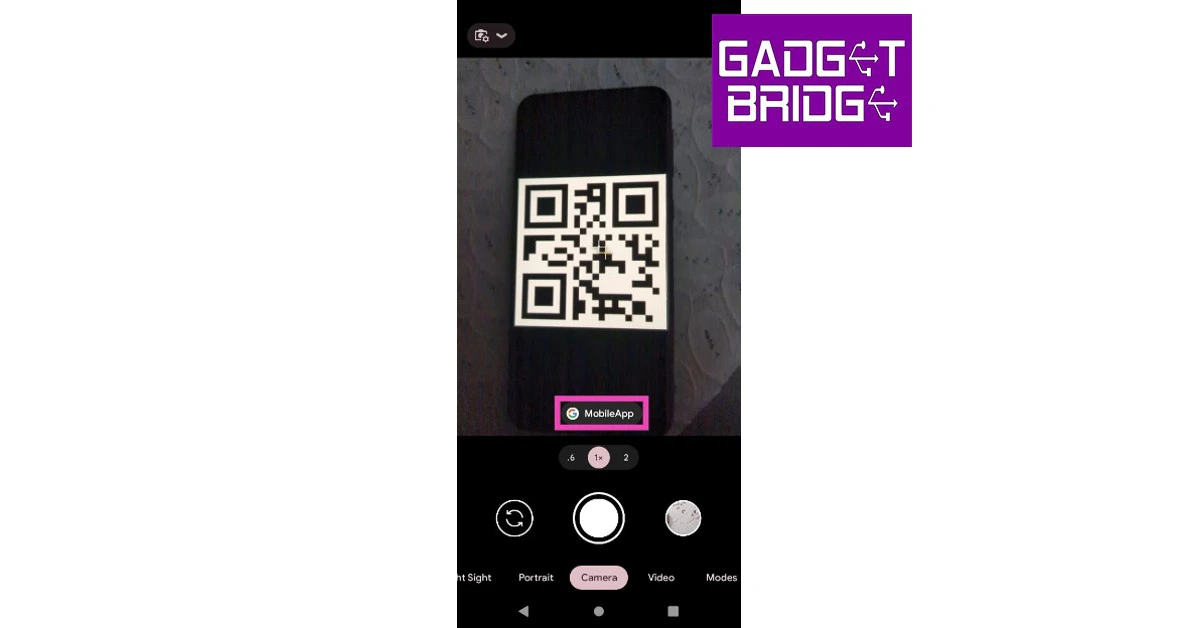
 Step 3:
 Step 2:
 Step 3: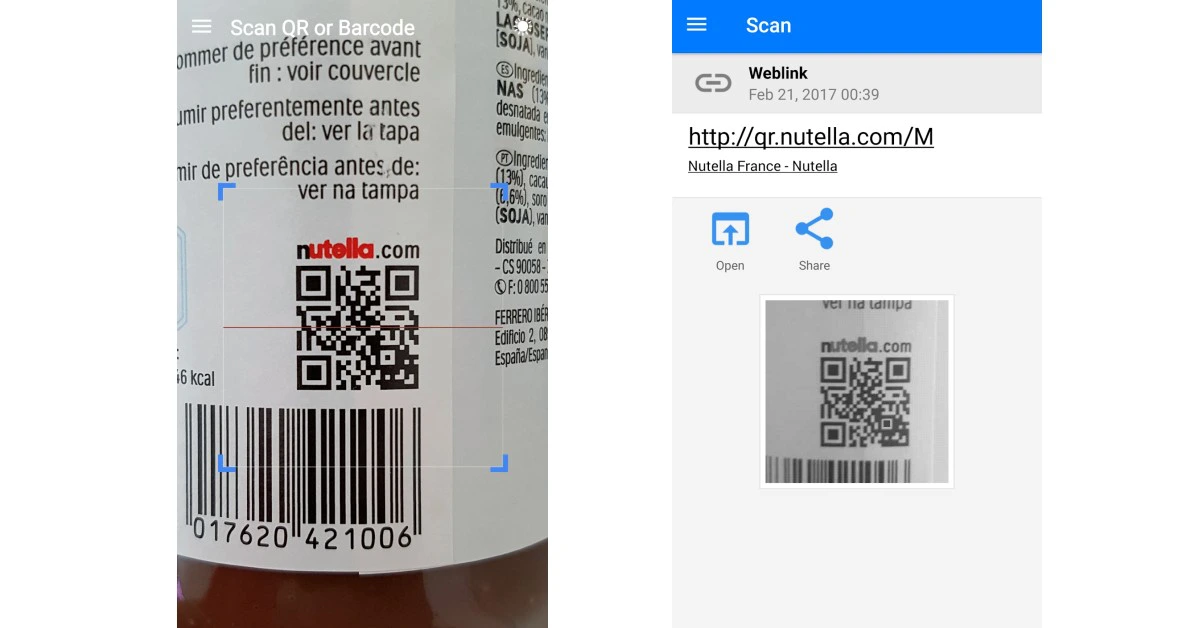



 The popularity of online gaming has exploded in recent years. As smartphones have improved, so has the quality and quantity of games available. Recently
  Feeling the travel bug but can’t travel at the moment? We’ve all been there, but that doesn’t mean you can’t explore some far off destinations. If you need a change of scenery, sites like YouTube and Explore have live cams that you can watch from around the world.
Some of the best live cams include:
Feeling the travel bug but can’t travel at the moment? We’ve all been there, but that doesn’t mean you can’t explore some far off destinations. If you need a change of scenery, sites like YouTube and Explore have live cams that you can watch from around the world.
Some of the best live cams include: