7 websites to learn to code for free

In the last decade, online learning has grown by leaps and bounds. With thousands of free online courses and an endless number of video lectures, students can make better use of their time by learning at their own pace in the comfort of their homes. Taking an entry-level online course can help you figure out your interests and set you on the right path. In this article, we bring you the top 7 websites to learn to code for free. These websites cater to people who want to learn to code as a hobby or even take it up as a profession. Read Also: What Is a Water-Cooled Computer and Should You Buy or Build One?

Codeacademy

Codeacademy websites to learn to code for free Codeacademy is one of the best websites for beginners to learn how to code. With simple course modules and interactive quizzes, Codeacademy ensures that a topic is covered extensively without being inaccessible to learners. You can find numerous courses on JAVA, SQL, HTML, CSS and more on Codeacademy. On top of that, you can also find blog posts, forums, and discussions that will help you gain a greater understanding of the course material.

Free Code Camp

Free Code Camp Free Code Camp is an open-source project that provides thousands of videos, articles, and interactive coding lessons for free to aspiring coders. Free Code Camp also helps coders from across the world organise study groups and pursue one common goal. Some of the free certificate courses include ‘Javascript Algorithms and Data Structures’, ‘Front End Development Libraries’, ‘Data Visualisation’, and a lot more. Since 2014, Free Code Camp has helped more than 40,000 graduates get jobs in tech companies like Google, Microsoft, Spotify, and Amazon.

The Odin Project

The Odin Project websites to learn to code for free From the makers of the Viking Code School, The Odin Project compiles resources from across the Internet and presents them in a logical, easy-to-understand order. The Odin Project’s curriculum consists of well-curated online tutorials, blogs, and courses. Coders are also encouraged to take on projects that include creating simple scripts and even extensive websites. Apart from learning, beginners can also seek the help of a diverse community of learners and teachers that includes experienced coders as well.

edX

edX Launched in 2012, edX has already established a reputation for being one of the best learning websites in the world. With free courses from Harvard and MIT, students get to learn from the best course material available in their field of study. edX is an open-source platform that powers more than 2,400 websites worldwide. While the course material is available for free, you will need to pay a fee between $50-90 to get a certificate for the course. Some of the popular entry-level courses include ‘Introduction to Python Programming’, ‘Fundamentals of C++’, How to Code: Simple Data’ and more.

Khan Academy

Khan Academy Much like edX, Khan Academy is one of the leading names in online learning. With a diverse range of free courses, Khan Academy seeks to make knowledge accessible to everyone. Students can learn at their own pace while having access to comprehensive study material and some of the best courses available online. Those interested in coding can check out courses like ‘Intro to JS: Drawing and Animation’, Intro to HTML/CSS: Making webpages’, ‘Intro to SQL: Querying and managing data’, and more.

MIT OpenCourseware

MIT OpenCourseware Making learning more accessible, MIT posts their courses online for free. MIT Opencourseware consists of every course taught at MIT, from Linear Algebra to Risk and Decision Analysis. Students can make use of the comprehensive course material, video lectures, homework assignments, and tests to gain a greater understanding of the topic at hand. Programming courses can be found under ‘Electrical Engineering and Computer Science’.

Coursera

Coursera Closing out the list is one of the most renowned names in the sphere of online learning. With Coursera, students can take specialised coding courses that are suited to their particular domain. Coursera also provides a large number of video lectures and quizzes for a more well-rounded learning experience. While accessing course material is free, you will need to pay a fee to get a certificate for the course. Read Also: 7 easy methods to find the IMEI number on your iPhone or iPad

Conclusion

These are the top 7 websites to learn to code for free. We suggest you check out all of these websites and see what they have to offer. Find a course that is more suited to your interest and start off from there. With an abundance of courses and websites, there is no limit to learning For the latest gadget and tech news, and gadget reviews, follow us on TwitterFacebook and Instagram. For newest tech & gadget videos subscribe to our YouTube Channel. You can also stay up to date using the Gadget Bridge Android App. You can find the latest car and bike news here.

Xiaomi sells over 6 million devices in festive sales

0
Xiaomi announced record-breaking sales of 6 million devices across different categories during the initial phase of its ‘Diwali with Mi’ festive sale. Xiaomi offered daily discounts and deals on its products ahead of Diwali. The discounts were made available online as well as in offline stores, leading to twice as many units sold compared to last year. Redmi Note 11, Redmi A1, Redmi 10, Xiaomi 11i Series, Redmi Smart TV 32”, and Xiaomi Smart TV 5A 32” were some of the best-selling devices.  Read Also: Moto E32 with 90Hz IPS LCD display launched in India

Record-breaking numbers for Xiaomi India

Record-breaking numbers for Xiaomi India. xiaomi festive sales With the 5G rollout commencing in India this month, the Xiaomi 11i Series was one of the best-selling phones along with the Xiaomi 11T Pro. The Xiaomi 12 Pro lead the sales in the premium segment. In the under 8k budget segment, Redmi A1 found its way to the top, offering a dual camera unit at the price of Rs 5,299. Xiaomi and Redmi continued to deliver in the Smart TV category, producing massive numbers in the ‘Diwali with Mi’ festive sale. Xiaomi Smart TV 5A 32” and Xiaomi Smart TV 5X 43” were the best-selling devices across platforms. In the affordable segment, Redmi Smart TV 32” and Redmi Smart TV X 43” recorded impressive numbers as well. Commenting on the milestone, Raghu Reddy, Chief Business Officer, Xiaomi India, said, “At Xiaomi India, the festive season is a momentous occasion for us wherein we want to delight our consumers and make it a memorable one for our fans and partners alike. With the kickstart of ‘Tech Ka Shubh Muhurat’, we continued to deliver attractive offers across our product portfolio, helping our consumers make informed decisions. Pushing the limits of mobile technology and setting industry standards, our smartphones have performed exceptionally well in the initial phase, thereby solidifying our position in 5G and overall smartphone portfolio. Xiaomi continued to be the most preferred Smart TV brand, on the back of the best hardware and software, at an incredibly great value.” “While our celebrations have already started, we are looking forward to the month-long festive sale. We are not only bringing exciting offers to our consumers but also brand new exciting products that help users simplify their lifestyles. As we continue to open up the world of new possibilities, we will continue to find innovative ways to satisfy consumers’ evolving needs and desires,” he further added. Read Also: 7 easy methods to find the IMEI number on your iPhone or iPad

Conclusion

The record-breaking sales thrust Xiaomi’s position as one of the leading consumer electronic brands in India. As the 5G rollout takes place across the country, Xiaomi seems to be leading the market share in the affordable and mid-premium smartphone segments with their 5G-ready smartphones.  For the latest gadget and tech news, and gadget reviews, follow us on TwitterFacebook and Instagram. For newest tech & gadget videos subscribe to our YouTube Channel. You can also stay up to date using the Gadget Bridge Android App. You can find the latest car and bike news here.

Samsung launches 55-inch Odyssey Ark curved gaming monitor in India

Samsung on Saturday launched the new Odyssey Ark, the world’s first 55-inch curved gaming display. Odyssey Ark brings a new form factor to Samsung’s lineup of gaming monitors. The 55-inch display features a refresh rate of 165Hz and 1ms response time. On top of that, the Odyssey Ark offers Cockpit Mode and an exclusive controller, the Ark Dial, to elevate the gaming experience. Read Also: Moto E32 with 90Hz IPS LCD display launched in India

Samsung Odyssey Ark: Specifications, features, and price

Samsung Odyssey Ark: Specifications, features, and price With a screen curvature of 1000R, the Samsung Odyssey Ark offers an immersive display that fills your peripheral vision and allows you to view the entire screen at one glance. The Cockpit Mode allows the screen to rotate using a Height Adjustable Stand, tilt, and pivot. Using Cockpit Mode, users can enjoy vertical content on the screen, as the monitor turns entirely along the Y-axis.  Samsung’s Quantum Matrix technology enables greater control of the densely packed LEDs using the Quantum Mini LEDs. The newly added 14-bit processing allows pitch-black scenes to be deeper black, with up to 16,384 black levels. The Matte Display offers anti-glare and anti-reflection protection. The Neural Quantum Processor Ultra works to provide enhanced visuals using 20 neural networks. The monitor is capable of upscaling visual content to 4k resolution. The Odyssey Ark offers a range of features for gamers that can be accessed using the Ark Dial. Users can control the screen size, position, and even ratio. The Ark Dial allows users to control settings like Flex Move Screen, MultiView, Quick Settings, and Game Bar. The Ark Dial is solar-powered but can also be charged with a USB Type-C cable. The Sound Dome Technology featuring AI Sound Booster and Dolby Atmos elevates the surround sound experience. With one speaker at each corner and two central woofers, the Odyssey Ark can create a total output of 60W using 2.2.2 channel speakers. The Samsung Odyssey Ark is available for sale in India at a price of Rs 2,19,999. Only available in black, the display can be purchased from Samsung‘s official online store. Puneet Sethi, Vice President, Consumer Electronics Enterprise Business, Samsung India, said, “The Odyssey Ark monitor is the result of high-end engineering and cutting-edge designing. We at Samsung always aspire to create products that deliver futuristic performance to our consumers and the Odyssey Ark fulfills all the needs of gaming aficionados. Designed to upgrade the gaming experience for professional gamers, Samsung Odyssey Ark is the world’s first 55-inch 1000R curved gaming screen coupled with flexible screen control via Ark Dial. We are positive that Odyssey Ark will revolutionize the gaming ecosystem in India.” Read Also: What Is a Water-Cooled Computer and Should You Buy or Build One?

Conclusion

Samsung Odyssey Ark comes with a 3-year warranty. Buyers who purchase the Odyssey Ark before October 9 will also get a 2TB Portable SSD T7 Shield USB 3.2 for free as well as a 10k instant cart discount. Customers making the purchase between October 10 and 31 will receive a 1TB Portable SSD T7 Shield USB 3.2 for free along with the instant cart discount. For the latest gadget and tech news, and gadget reviews, follow us on TwitterFacebook and Instagram. For newest tech & gadget videos subscribe to our YouTube Channel. You can also stay up to date using the Gadget Bridge Android App. You can find the latest car and bike news here.

What do the Snapchat emojis mean? (2022)

If you’ve spent some time on Snapchat, you must be aware of the emojis that pop up next to your friends’ names. Initially, most people assume that the emojis are placed at random. That is far from the truth, though, as Snapchat emojis hold a meaning behind them. For a lot of users, these emojis are a part of Snapchat’s charm. In this article, we explain what Snapchat emojis mean.  Read Also: 7 easy methods to find the IMEI number on your iPhone or iPad snapchat emojis

Baby emoji 👶

The baby emoji next to your friend’s name on Snapchat denotes that you’ve recently added each other as a friend. This emoji lasts only for a short duration of time. Once your friend has been in your contacts list for a while, the baby emoji will disappear and be replaced by one of the other emojis.

Smile emoji 😊

This emoji appears next to contacts you frequently exchange snaps with. This does not mean that you are each other’s top friend. This emoji is not exclusive to one contact. It will appear next to multiple contacts if you snap them frequently. 

Yellow Heart emoji 💛

The Yellow heart emoji signifies that you and the contact are top best friends of each other. This means that you interact with that friend most often. This includes sending texts, pictures, and snaps to the contact. 

Red Heart emoji ❤️

If you and your friend have been each other’s top friend (yellow heart) for two weeks, a red heart emoji will appear next to their name on Snapchat. This is one of the rarer emojis to attain and requires logging in to Snapchat almost every day. 

Pink Hearts emoji 💕

Reserved only for Super Best Friends, this emoji appears next to your friend’s name when you’ve been each other’s top best friend for two months in a row. Apart from Snapstreaks, this emoji is the most difficult to obtain.

Sunglasses emoji 😎

This emoji appears next to the contact whom you share a common best friend with. This means you and the contact exchange frequent snaps with a mutual friend as well. This is usually common among people attending the same school. 

Grimace emoji 😬

If your top best friend is also your contact’s best friend, a grimacing emoji will appear next to their name. This is common in a close group of friends where everyone exchanges frequent snaps with each other. 

Fire emoji 🔥

The fire emoji next to a friend’s name on Snapchat denotes an ongoing Snapstreak. When you exchange snaps with a contact three days in a row, the Snapstreak begins. A fire emoji signifies the beginning of a Snapstreak.

100 emoji 💯

One of the most coveted emojis in Snapchat, the 100 emoji appears when you’ve maintained a Snapstreak with a friend for 100 days. If you fail to send a snap for even a day, the Snapstreak will break and you’ll have to start all over again. 

Hourglass emoji ⏳️

Since you need to exchange snaps every day to maintain a Snapstreak, Snapchat lets you know that you’re running out of time to keep the streak active by placing the hourglass emoji next to your friend’s name. The hourglass emoji appears when there are less than 4 hours left to send a snap. Read Also: What Is a Water-Cooled Computer and Should You Buy or Build One?

Conclusion

These are the meanings behind some of the more common Snapchat emojis. You can even customise the emojis by tapping the ellipses on the chat window and selecting ‘Customise Best Friend Emojis’. While the meaning behind the emojis won’t change, you will be able to select the emojis of your choice.
For the latest gadget and tech news, and gadget reviews, follow us on TwitterFacebook and Instagram. For newest tech & gadget videos subscribe to our YouTube Channel. You can also stay up to date using the Gadget Bridge Android App. You can find the latest car and bike news here.

Google Pixel Tablet coming in 2023: Everything about new Google tab

Google unveiled its new Google Pixel Tablet at the same Made By Google event where it also unveiled the Pixel Watch and Pixel 7 series. The Google tab will be powered by the second-generation Tensor G2 from the business. The Pixel tablet is covered with a nano-ceramic layer. In addition to an aluminium body, Google promises a soft-matte finish. The Pixel Tablet is the finest way to enjoy Android on a big screen. You may enjoy your preferred shows, apps, video calls, and more on a bigger screen thanks to its stunning display. It has a superior construction, rounded corners, and selection of materials. The Pixel Tablet has Material You, just like the Pixel phone, allowing you to totally customise it with a unique colour scheme and new colour variants based on your wallpaper and lock screen. Google Pixel Tablet coming in 2023: Everything about new Google tab The Tensor G2’s power is now available in a brand-new form factor thanks to the Pixel Tablet. All your preferred Pixel phone capabilities, such as video calling, photo editing, and hands-free assistance with Google Assistant, will operate flawlessly on the Pixel Tablet thanks to Tensor G2’s cutting-edge image processing and machine learning. While announcing the Tab, Google said, “With the Pixel Tablet, we’re taking everything we’ve learned from years of making Pixel and products for the home and combining it into one great device. It reimagines how a tablet can actually be helpful all the time in your home by pairing with a new Charging Speaker Dock.” When used with a brand-new Charging Speaker Dock, the dock keeps your device charged, renders your tablet useful around-the-clock, and opens the door to a vast array of new experiences in the home. Google claims that the speaker’s improved audio enables you to take in your favourite programme or throw a spontaneous dance party. You may get hands-free assistance from the Assistant or a photo frame of your memories when your Pixel Tablet is docked . You can easily turn off the lights in the house and adjust the thermostat to the ideal sleeping temperature without leaving your bed thanks to the easy control that the Pixel Tablet provides for all of your smart home gadgets. The magnets in the dock have been adjusted to make docking and undocking your Pixel Tablet simple.

Availability

According to the company the Pixel Tablet will be available for purchase next year , 2023. For the latest gadget and tech news, and gadget reviews, follow us on TwitterFacebook and Instagram. For newest tech & gadget videos subscribe to our YouTube Channel. You can also stay up to date using the Gadget Bridge Android App. You can find the latest car and bike news here.

Sony India announces exciting festive offers on new range of Bravia televisions

During an exclusive Diwali sale, Sony India will provide significant savings on a variety of products including Bravia televisions, home theatre systems, soundbars, cameras, lenses, and personal audio equipment, Sony India offers some of the greatest and most cutting-edge products. Sony has therefore introduced alluring holiday deals and convenient financing options to ensure that this Diwali is prosperous. In addition to a rebate of up to Rs 25,000, Sony India has announced a discount of up to 30% off the MRP. Sony is allowing customers to upgrade their viewing experience to the new range of BRAVIA televisions with XR Cognitive Processor, Google TV, Dolby Vision, Dolby Atmos, and BRAVIA CORE by providing one free EMI and with EMI schemes starting from Rs 1,024/-. Sony is doing this with the intention of making purchasing products as simple as possible. Three years of comprehensive warranty are also offered as part of the holiday deal on a variety of BRAVIA televisions. Customers can now create a theatre-like setup in the comfort of their homes by taking advantage of a massive discount of up to Rs 54,990/- off on the purchase of premium soundbars such as the HT-A7000 and HT-A9 with rear speakers and BRAVIA 108cm (43) and above televisions thanks to the festive offeRs Additionally, consumers who buy the HT-S40R and HT-S20R, respectively, can save up to Rs 10,000 and Rs 8,000. When purchasing a few full frame cameras, you can get headphones worth Rs 14,990 and a Pro-Style camera backpack worth Rs On selected lenses, take advantage of a special discount of up to Rs 41,000. This offer is applicable when you buy Alpha7SIII and Alpha7C. A variety of earbuds and headphones, including the WH-1000XM5, WF-L900, WF-C500, WF-XB700, and WH-XB910N may be purchased with simple EMI plans. Customers may pre-order recently released audio products like the WF-L900 at a special price of Rs 12,990 and the WF-C500 at Rs 3,499, as well as industry noise-cancelling headphones WH-1000XM5 at a best buy price of Rs 26,990. Other well-known headphone models, including the WF-XB700, WH-1000XM4, and WH-XB910N, are being offered at a reduced price of Rs 19,990, Rs 5,990, and Rs 12,990, respectively. Customers can now purchase a choice of reasonably priced wireless headphones beginning at Rs 1,399/-. Select wireless Bluetooth speakers are now available to customers at a discounted price. The SRS-XG300 costs Rs 27,990/-, the SRS-XE300 Rs 17,990/-, the SRS-XE200 Rs 12,990/-, and the SRS-XB13 Rs 3,299/. Music fans who purchase the SRS-XG500 X-series speaker can receive a discount of up to Rs 13,000 on the MRP. For the latest gadget and tech news, and gadget reviews, follow us on TwitterFacebook and Instagram. For newest tech & gadget videos subscribe to our YouTube Channel. You can also stay up to date using the Gadget Bridge Android App. You can find the latest car and bike news here.

How to find the model number and name of your mobile phone? Android and iOS

2
While you must be aware of the smartphone model you are using, the model name and model number are two different things. The model name is the name with which the smartphone is marketed to the audience. The model number is a longer alphanumeric string which may contain the model name as well. Knowing the model number of your smartphone is important when you’re trying to buy spare parts or going to resell the phone to another buyer. In this article, we show you how to find the model number and name of your Android or iOS smartphone. Read Also: Amazing technology that is changing entertainment

How to find the model number of your Android phone

Step 1: Go to Settings. Step 2: Select ‘About Phone’. Step 2: Select ‘About Phone’. Step 3: The model name, model number, and the serial number of your smartphone will be displayed.  Step 3: The model name, model number, and the serial number of your smartphone will be displayed.  Step 4: In some smartphones, you may have to open ‘Regulatory Information’ in the ‘About Phone’ section to view the model number.

How to find the model number of your iPhone (iOS)

Step 1: Go to Settings. Step 2: Select ‘General’. Step 2: Select ‘General’. Step 3: Select ‘About’. Your iPhone’s model name, model number, and serial number will be displayed.

Other ways to find out the model number

You can also find out the model number of your device, be it Android or iOS, simply by checking the retail box it came in. The information sticker on the retail box contains all details ranging from the IMEI number to the model number of the device. In smartphones with a removable battery, you can find the model number and IMEI number printed on the panel beneath the battery. 

Difference between a model number and a serial number

While looking for the model number of your device, you may have come across the ‘serial number’. The serial number is typically a more complicated alphanumeric string than the model number. While the model number is the same for every device of the particular model, a serial number is a unique code that is assigned to every unit. For example, all Samsung Galaxy M31s have the same model number (SM-M315F/DS) but every individual Samsung M31 unit will have a unique serial number. The IMEI number is also a unique code assigned to every individual phone, but it is used by telecommunication companies to identify the receiver phone.  Read Also: 5 Best Tools To Download Videos From Any Website

Conclusion

This is how you can find the model number and name of an Android or iOS smartphone. Knowing the model number of your smartphone can come in handy when you’re looking for components or firmware online. It is also generally a good idea to have a greater understanding of the phone you’re using. 
For the latest gadget and tech news, and gadget reviews, follow us on TwitterFacebook and Instagram. For newest tech & gadget videos subscribe to our YouTube Channel. You can also stay up to date using the Gadget Bridge Android App. You can find the latest car and bike news here.

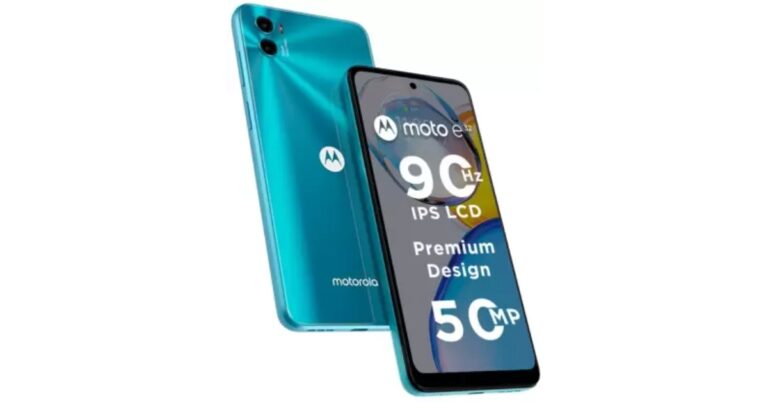
Moto E32 with 90Hz IPS LCD display launched in India

Motorola today announced the launch of a new budget smartphone Moto E32 in the Indian market. The device is powered by MediaTek Helio G37 SoC and packs a 5,000mAh battery. Moreover the phone features a dual rear camera and a 90Hz display.

Moto E32 price in India, sale details

Moto E32 price in India has been set at Rs 10,499 for the 4GB RAM with 64GB of internal storage model. The device will be offered in Cosmic Black and Iceberg Blue colour options. The smartphone can be purchased via Flipkart and leading retail stores from today onwards. HDFC Bank users can receive a 10% discount on this purchase up to Rs. 1,000. Reliance Jio offers benefits totaling Rs. 2,549, which include Rs. 2000 in cashback on recharges and Rs. 549 off an annual Zee5 membership. Additionally, customers can benefit from various bank and no-cost EMI programmes.

Moto E32 specifications

The 6.5-inch IPS LCD full-HD+ screen on the Moto E32 has a 720×1,600 pixels of resolution. Its display supports a refresh rate of 90Hz and a 20:9 aspect ratio. The 90Hz refresh rate can automatically adjust to 60Hz depending on the type of content you are watching. The budget smartphone operates on My UX skin and is displayed on top of Android 12. Additionally, Motorola has pledged two years’ worth of OS upgrades and monthly security updates. It is driven by a 64GB internal storage, 4GB RAM, and an octa-core MediaTek Helio G37 SoC with PowerVR GE8320 GPU. It has a dedicated microSD card slot and is a dual-SIM (Nano) 4G smartphone with up to 1TB. The Moto E32 includes a side-mounted fingerprint sensor and face unlock technology. A 50-megapixel primary camera with an f/1.8 aperture and a 2-megapixel depth sensor with an f/2.4 aperture are both included in the Moto E32’s dual rear camera. An 8-megapixel front-facing camera with an f/2.0 aperture is also included. Additional camera software features, such as Night Vision, Pro mode, and Dual Capture, are also available for you to capture images in your own unique way. Along with Bluetooth v5.0 wireless connectivity, the Moto E32 provides dual-band Wi-Fi support for 2.4GHz and 5GHz frequencies. A 3.5mm headphone connector and a USB Type-C port are also present. In addition to this the handset comes with IP52 water repellent design. For the latest gadget and tech news, and gadget reviews, follow us on TwitterFacebook and Instagram. For newest tech & gadget videos subscribe to our YouTube Channel. You can also stay up to date using the Gadget Bridge Android App. You can find the latest car and bike news here.

7 easy methods to find the IMEI number on your iPhone or iPad

0
Like every other mobile device, iPhone also comes with a unique IMEI number. IMEI stands for International Mobile Equipment Identity and comes in useful in a range of scenarios. If your mobile phone ever gets lost or stolen, you can track it using the IMEI number. You can read more about it in our guide here. iPhone users need to be aware of the IMEI number while switching between network carriers. In this article, we bring you 7 easy methods to find the IMEI number on your iPhone or iPad. Read Also: Nothing Ear Stick True Wireless Earphones India launch and worldwide set for October 26

Dial the USSD code

Dial the USSD code This is the universal method to find the IMEI code of any mobile phone, regardless of the platform. Simply dial *#06# on your iPhone’s dialer, and a pop-up window will appear displaying both the IMEI codes. Take a screenshot and back it up on iCloud in case you lose your phone and need the IMEI number to trace it.

Find the IMEI number using your iPhone’s settings

Find the IMEI number using your iPhone’s settings Another quick way of finding out your iPhone’s IMEI number is by checking the device settings. Go to Settings and select General. Tap on ‘About’ and scroll down to find the IMEI number. You will be able to spot it under the ‘Primary’ section. You will also find Network details, Carrier details, and Certificate Trust Settings here.

Find the IMEI number on the SIM tray

If you haven’t made the switch to iPhone 14 yet, you can easily find the IMEI number of your device by popping out the SIM tray. All iPhones after the iPhone 6s have the IMEI number printed on the SIM tray. Apple recently made the switch to e-SIMs, so this method won’t apply to iPhone 14.

Use the Finder app on Mac to view your iPhone’s IMEI number

Connect your iPhone to a Mac using a Lightning to USB cable. Open the Finder app and click on your iPhone on the left side menu. Go to the General tab and click under the device name several times to reveal the IMEI number. This method comes in handy if your iPhone is locked or if you use an e-SIM exclusively. 

Find your iPhone’s IMEI number using iTunes

While the Finder app is exclusive to Mac, iTunes runs on PC as well. This is the only way you can find your iPhone’s IMEI number using a PC. Connect your iPhone to the PC using the Lightning to USB cable and open iTunes. Click on the iPhone icon on the top left side and select ‘Summary’. Click on ‘Phone number’ on the right panel to view the IMEI number.

Find the IMEI number on the phone’s packaging

If you still own your iPhone or iPad’s retail box, you can easily find the IMEI number there. Inspect the box for the sticker that contains the model number. You will find the IMEI code printed there. Sometimes the sticker is placed inside the box to ensure it is only visible to the buyer. 

Use the Apple ID website

This is the best way to find your iPhone’s IMEI number if you don’t have your device on you. Go to the Apple ID website and sign in using your Apple ID. If your device is still connected to your iCloud account, you will be able to view its IMEI number. Go to the devices page and select your iPhone. Scroll down and you will be able to view the IMEI number. Read Also: What Do the Android Status Bar Symbols Mean? A full guide

Conclusion

These are the best 7 ways to find the IMEI number of your iPhone or iPad. If you lost your device or if it doesn’t have a SIM tray, one of these methods will surely work for you. You can also try looking for the IMEI number on the bill or invoice. Some iPhones (iPhone 5, 5c, 5s, 6, 6 Plus) have the IMEI number printed on the back panel.
For the latest gadget and tech news, and gadget reviews, follow us on TwitterFacebook and Instagram. For newest tech & gadget videos subscribe to our YouTube Channel. You can also stay up to date using the Gadget Bridge Android App. You can find the latest car and bike news here.

What Is a Water-Cooled Computer and Should You Buy or Build One?

Ensuring that your PC does not overheat is pivotal in maintaining its longevity and keeps the integral components free from the risk of permanent damage. Most computers come with multiple fans integrated within the cabinet and it is generally advised to place your PC in an area which is well-ventilated. Even though internal fans do a decent job of cooling down a PC, the processor still heats up while carrying out heavy tasks. A water-cooled PC is a great solution to this problem. Using water as a coolant, a water-cooled computer is able to dissipate a greater amount of heat fairly quickly and makes sure your PC can handle even the most rigorous tasks with relative ease. In this article, we explain what a water-cooled computer is, how it works, and whether you should build one.  Read Also: Amazing technology that is changing entertainment

What is a Water-Cooled computer and how does it work?

What is a Water-Cooled computer and how does it work? A water-cooled computer or PC replaces the internal fans in a traditional PC with cooling pipes that use water to bring down the internal temperature of the computer. Water has a higher specific heat capacity than air, which means it is able to absorb a greater amount of heat. A water-cooled computer works similar to the cooling system within a car. Water runs through the cooling pipes across the components, absorbing heat along the way. The conduction of heat in a water-cooled PC takes place through water blocks made out of aluminium or copper. Much like a car, a water-cooled PC requires a liquid cooling pump to move the water within the cooling tubes. After that, the heated-up water ends up in a radiator where it is allowed to cool off before being pumped back in, forming a loop.

Should you build a Water-Cooled PC?

Should you build a Water-Cooled PC? While water-cooled computers are efficient in handling the high internal temperatures of a PC, they are also very appealing visually. The water blocks make a great sight, and the whole process looks amazing. Unsurprisingly, water-cooled computers take a lot of time, money, and effort to assemble. So, is it worth building? If you’re a casual to moderate PC user and do not demand an exorbitant level of performance from your PC, a water-cooled computer is not for you. Most air-cooled PCs do a decent job of cooling down the core components. If your computer is placed in a well-ventilated area, then you’re probably not going to face any major issues with overheating.  However, if you’re someone that puts their PC to the task by pushing its boundaries and getting the most out of its performance, you may want to look into a water-cooling unit for your machine. Not only will you be able to reduce overheating by a major factor, but a water-cooling unit will also get rid of the annoying noise that the internal fans create. Putting together a water-cooled computer can be an intensive task, requiring you to be extra careful while installing the cooling tubes. Any leaks can prove to be detrimental, and you need to make sure that the water does not come in direct contact with any PC component.  Read Also: What Do the Android Status Bar Symbols Mean? A full guide

Conclusion

Even though a water-cooled PC is bound to provide more efficient cooling, it may not outweigh the effort of putting it all together. With every passing year, air cooling solutions are getting better, and you may want to look into what the latest internal fans have to offer. However, if you’re a PC enthusiast and want to try out something new that looks appealing as well, building a water-cooled PC should definitely be on your list.
For the latest gadget and tech news, and gadget reviews, follow us on TwitterFacebook and Instagram. For newest tech & gadget videos subscribe to our YouTube Channel. You can also stay up to date using the Gadget Bridge Android App. You can find the latest car and bike news here.