Garena Free Fire is a battle royale game with regular awards and tournaments to keep players interested. If you play Garena Free Fire, you should be aware of the redeem codes that are released on a daily basis. However, because the battle royale game is banned in India, players from other countries can use the Free Fire Redeem codes daily. If you’re unfamiliar with the Garena Free Fire redeem codes or don’t know how to get them, we’ve put together a step-by-step guide to help you redeem them. Check out Garena Free Fire Redeem Codes for December 8.
The Free Fire redeem codes are a great way to get free stuff. These are 12-digit codes that contain alphabets and numbers, as well as an expiration date and time. Because the Garena FF redeem codes cannot be used more than once, you should hurry to the redemption page to claim your free reward before someone else does. To get a free reward, all you have to do is go to reward.ff.garena.com/en, which is the official redemption page. Also, keep an eye on this space for daily updates on Garena Free Fire redemption codes and rewards.
In This Article
Garena Free Fire Redeem Codes Today 8 December 2022
W0JJAFV3TU5E
WLSGJXS5KFYR
FF1164XNJZ2V
X99TK56XDJ4X
FF119MB3PFA5
FF10617KGUF9
FF11DAKX4WHV
FF11NJN5YS3E
Y6ACLK7KUD1N
FF11WFNPP956
MCPTFNXZF4TA
B6IYCTNH4PV3
ZRJAPH294KV5
SARG886AV5GR
YXY3EGTLHGJX
FF11HHGCGK3B
How to Get Free Fire Redeem Codes for Garena on December 8?
Have you participated in the Amazon Quiz today? If not then participate in the 8 December 2022 Amazon Quiz as it has already gone live on the app. The daily quiz can be played from 12 AM to 11:59 every day on the mobile app platform. Today e-commerce is giving the chance to win Rs 2500 Amazon Pay Balance.
Every day Amazon brings a fresh quiz for its customers. By participating in the quiz the participants can win an Amazon Pay Balance of up to Rs 50,000. The quiz can only be played on the mobile app as it is not available for the desktop platform. The quiz contains five easy questions and you have to answer all the questions correctly. The participants will then be shortlisted for a lucky draw to select a winner. Whereas the results are declared at the end of the month. Check out today’s Amazon quiz answers to win Rs 2500.
Question 1: In 2018, who won the ‘Golden Glove’ award for the best goalkeeper at the FIFA World Cup?
Answer: Thibaut Courtois
Question 2: Cooking to Save Your Life’ Is a collection of recipes from which Nobel Prize winner?
Answer: Abhijit Banerjee
Question 3: Who scored 2 goals in England’s 6-2 win over Iran at the 2022 FIFA World Cup?
Answer: Sandhayak
Question 4: This mythological creature is the national animal of which of these constituent countries- also known as Caldonia in Latin?
Answer: Scotland
Question 5: Now made from rubber and covered with either plastic, Surlyn, or urethane; what material was this sports equipment originally made of?
Answer: Leather covered with feathers
How To Play Amazon Quiz
Only app users are eligible to play the Amazon quiz every morning from 12 AM to 11:59 PM. The quiz is not available on the desktop. For those who are unaware of how to play the Amazon quiz below are the steps, you can follow to take the quiz.
Firstly download the Amazon app from Google Play Store or App Store
Now fill in the required information through the Sign Up option.
You need to log in to the Amazon app and scroll down on the home screen to find the Amazon Quiz banner.
Tap on the Amazon Quiz banner and tap on the Start button to start the Quiz.
Now you will get 5 questions and you need to answer them correctly. One wrong answer will eliminate you from the Quiz.
After answering all the questions correctly you are now eligible for a Lucky Draw.
The winner’s name will be announced today at 12 PM.
Online bingo is a fun activity to entertain you in your free time. And the best thing is that you don’t need fancy gadgets. All you need is your smartphone and a will to play. With the games of chance being widely available for mobile devices, playing bingo in Maryland is quite straightforward. You don’t need a physical establishment to enjoy this game, as it is readily available across mobile devices. Whether you wish to play bingo for free or for money, there are so many options out there.
How can you access online bingo? Let’s find out!
In This Article
Browser
The online industry is evolving, providing plenty of options for users. With this, you can choose the thing that works for you and your needs. Accessing the bingo sites straight from your browser is the easiest way to play. With so many online sites available, finding the one that works for you is easy. You can open the site from a browser without downloading anything on your device. With this, you can explore various games and find your favourites. If you don’t like the games or find it challenging to navigate through the site, you can permanently close the tab and find another site.
The games can be accessed through a computer or a smartphone. Also, you can easily set the funds and choose the game. With this, you won’t need to switch devices to perform simple actions it as payments.
The great advantage is that you don’t have to download anything on your device. Therefore you can use any device, including the work ones, or access your favourite games online. Make sure to choose the best sites that offer a streamlined online experience.
Mobile apps
The mobile apps are readily available if you wish to have an alternative for paying bingo. You can download a designated app on your tablet or smartphone. You can download the app directly from the online site. Or you can head to the iPhone or Android app store. The apps are free to download and use, so you don’t need to pay anything. Within a few minutes, you can have the game ready to play. You can also use your account to join the app while using the same payment method for your deposits.
The best advantage of getting an app for playing bingo is that you can have instant access to your favourite game. You can save your login credentials and instantly access your account when you open the app, which saves plenty of time. With some poison, you can play even if you don’t have an internet connection. An ideal choice if you’re travelling or want to spare, you start with toggling off mobile data.
Final thoughts
Playing bingo online is a direct experience. You aren’t required to commute to your nearest physical establishment to enjoy your favourite activity. You can enjoy free and paid games according to your preferences.
You have two options available, and each one of them comes with pros and cons. Accessing an online site directly from your browser is quick and straightforward. You don’t need to download anything on your device to keep your privacy. But logging in might take some time to enter your information. A designated app is the right choice if you wish to have a more stratified experience and easily access your favourite bingo games. You can easily access it when you have the time to play, so fitting games into your schedule is manageable.
Oppo introduced the Oppo Reno 8 Pro House of the Dragon Limited Edition Set in India. The device has been released in collaboration with Warner Bros. Discovery Global Consumer Products. The phone has a Glazed back and includes other features inspired by the House of the Dragon.
In India, the normal Oppo Reno 8 Pro was released in July of this year. It is powered by a MediaTek Dimensity 8100-Max SoC with eight cores. As per the company this offering, which is exclusive to India, honours the HBO Original series House of the Dragon in partnership with Warner Bros. Discovery.
According to Oppo the most recent HBO Original House of the Dragon, a successor series to Game of Thrones, has been well-received by viewers in India and other countries. Fans may express their affection for the Seven Kingdoms universe by purchasing the limited-edition collectible set with a House of the Dragon theme.
The limited-edition set will also include accessories with House of the Dragon themes in addition to the Reno 8 Pro, such as a unique phone cover, a SIM ejector pin, a keychain, a phone holder, and a unique collectible dragon egg. A special scroll that welcomes viewers into the sweeping tale of House Targaryen will also be given to fans.
A 6.7-inch full-HD+ AMOLED screen with a resolution of 1,080 by 2,412 pixels is featured on the Oppo Reno 8 Pro. The screen has Corning Gorilla Glass 5 protection and supports a refresh rate of up to 120 Hz and HDR10+. Running on top of Android 12 is ColorOS 12.1. The device is powered by a MediaTek Dimensity 8100-Max SoC with eight cores and up to 12GB of LPDDR5 RAM. The Oppo Reno 8 Pro’s UFS 3.1 storage supports up to 256GB of capacity.
Three rear cameras on the Oppo Reno 8 Pro each use a 50-megapixel Sony IMX766 sensor with an f/1.8 aperture. There is an 8-megapixel sensor coupled with an f/2.2 ultra-wide aperture and a 112-degree field of view, as well as a 2-megapixel macro camera with an f/2.4 lens. The MariSilicon X NPU has also been combined by Oppo with the camera to improve overall performance in both bright and low light.
The Oppo Reno 8 Pro boasts a 32-megapixel camera sensor with an f/2.4 aperture for selfies and video calls.
The phone offers connectivity through 5G, 4G LTE, Wi-Fi 6, Bluetooth v5.3, GPS/A-GPS, NFC, and a USB Type-C port. The phone has a built-in fingerprint sensor for biometric authentication. The smartphone’s 4,500mAh battery supports 80W Super Flash Charge for quick charging.
Shopsy by Flipkart has added Tamil and Telugu to its platform in order to expand its customer base and serve more people in more places. The Shopsy app will be released in a number of other languages over the coming months, including Tamil and Telugu.
With the help of this initiative, users will then be able to access the vast selection of reasonably priced products offered on the platform in the language of their choice. According to the company, the addition of new languages is important in fulfilling the growing need of customers who are based in different parts of the country given that over 68% of Shopsy customers now come from Tier 2 and beyond cities, out of whom close to 50% are first-time e-commerce buyers.
According to Shopsy’s research, although users in non-metros were able to use the app in English, they felt more at ease making purchases in their own tongue as online shopping and product browsing became more convenient. Due to the increasing demand from its customers, Shopsy added two new languages. According to the newly released Flipkart-Bain & Company research on How India Shops Online 2022, regional users are increasingly favouring vernacular language. Shopsy’s effort allows an even more seamless and convenient purchasing experience for its customers, furthering its commitment to democratising commerce.
Adarsh Menon, Senior Vice President & Head – New Businesses, Flipkart said, “Our core value proposition lies in offering a hassle-free shopping experience to customers who are looking for value-based products for their shopping needs. The launch of new languages will help serve the heterogeneous user population across the country, making their e-commerce journey even more fulfilling with Shopsy. Leveraging technology and innovation, we will continue to add more such features that will make digital commerce more inclusive and accessible for the existing and potential customers. Over the last six months, we have observed tremendous traction across the states of Andhra Pradesh, Telangana and Tamil Nadu indicating the climbing customer base momentum. Rolling out regional app interfaces in Telugu and Tamil is a step ahead to enrich our connection with this audience. We are also delighted that the Shopsy App has recently been awarded with Google Play Best of Users’ Choice Award.”
If you’ve ever thought about getting a secondary phone number, instead of buying a physical SIM you can easily download an app that will let you use a temporary number as a ‘burner.’ A secondary phone number can come in handy when you are signing up for online services and don’t want to be flooded with spam on your primary number. Selling something in an online marketplace? Preserve your anonymity by giving out a burner number. This way you can reserve your primary phone number for your inner circle of friends and family. In this article, we bring you the 10 best apps for a temporary burner phone number.
Hushed is one of the most popular temporary phone number apps out there. On downloading Hushed, you get a free 3-day trial number. After the trial period ends, you will need to pay a subscription fee to avail Hushed’s services. Hushed lets you manage your temporary phone number on multiple devices. This way you can even use your iPad as a phone. Each temporary number comes equipped with customisable voicemail greetings, auto-reply text messages, call forwarding, call routing, and more. You can choose from over 300 local codes in Canada, the US, and the UK.
Doosra
For users in India, Doosra is one of the leading apps that offers you a secondary virtual phone number. Apart from all the basic features like voice calling and texting, Doosra also offers a Smart Filter where only numbers you have whitelisted are allowed to call you. Doosra also has a paid subscription service that lets you use your virtual number to sign up for instant messaging apps like WhatsApp and Telegram. With a Doosra subscription, you can also use the multi-user login feature.
Google Voice
Google Voice is currently only available in the US and Canada but plans on launching in India soon. We include Google Voice in this because of its airtight security and smooth UI. Unlike other burner phone number apps, Google Voice does not integrate pesky ads in its interface. The result is a clean design which makes the app much better to use. Another added feature of Google Voice is that it lets you transcribe your voicemails to text.
Burner
With over a million downloads on Google Play Store, Burner is one of the most popular secondary phone number apps available right now. Users get a free 7-day trial on downloading the app. You can create multiple ‘burner’ phone numbers and delete them anytime you want. You can use the ‘burner’ number to make and receive calls and text messages as well as sign up for online services.
2nd Line
Don’t want to pay for a burner phone number? Download the 2nd Line app. You may have to subject yourself to ads, but you will be able to use the basic features of the app without paying a penny. 2nd Line also offers a premium subscription that gets rid of all the ads on the app. Users can make free local calls but international calling comes at a nominal price. Subscribing to the app’s premium service also unlocks some additional features.
Dingtone
If you need a temporary burner phone number just to make calls and send texts, don’t look further than Dingtone. As soon as you sign up for Dingtone, you get a temporary phone number assigned to you. You can use this number to make unlimited local calls and send free texts. International calls require payment, but the calling rates are much cheaper than that of any regular service provider. You can earn credits within the app by watching ad videos.
Line2
If you need a temporary burner phone number for your business or startup, the Line2 app has all the answers for you. Line2 offers business-oriented features such as toll-free numbers for customers, auto-attendant, conference calls, and more. Users get a 7-day free trial upon signing up. The auto-attendant feature is excellent if you want to set up a customer support helpline for your business. Any incoming call will be put on hold or cue, depending upon the line status, and you can even set pre-recorded messages for the customers.
Grasshopper
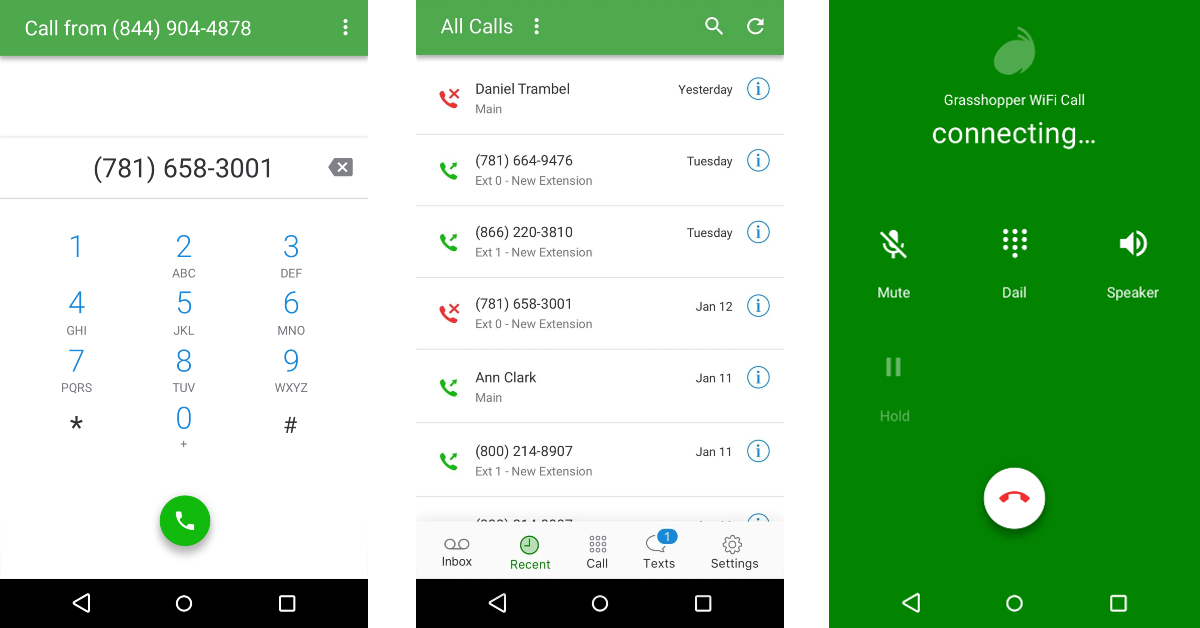
Grasshopper is a great app for small business owners that are looking for a secondary phone number to manage their clientele. Apart from regular calling functions, Grasshopper also lets you send MMS and group messages. You can check your call and message history on the app, return missed calls, change call forwarding settings, and make calls using WiFi in areas where there’s little to no network coverage.
Text Free: Call and Texting app
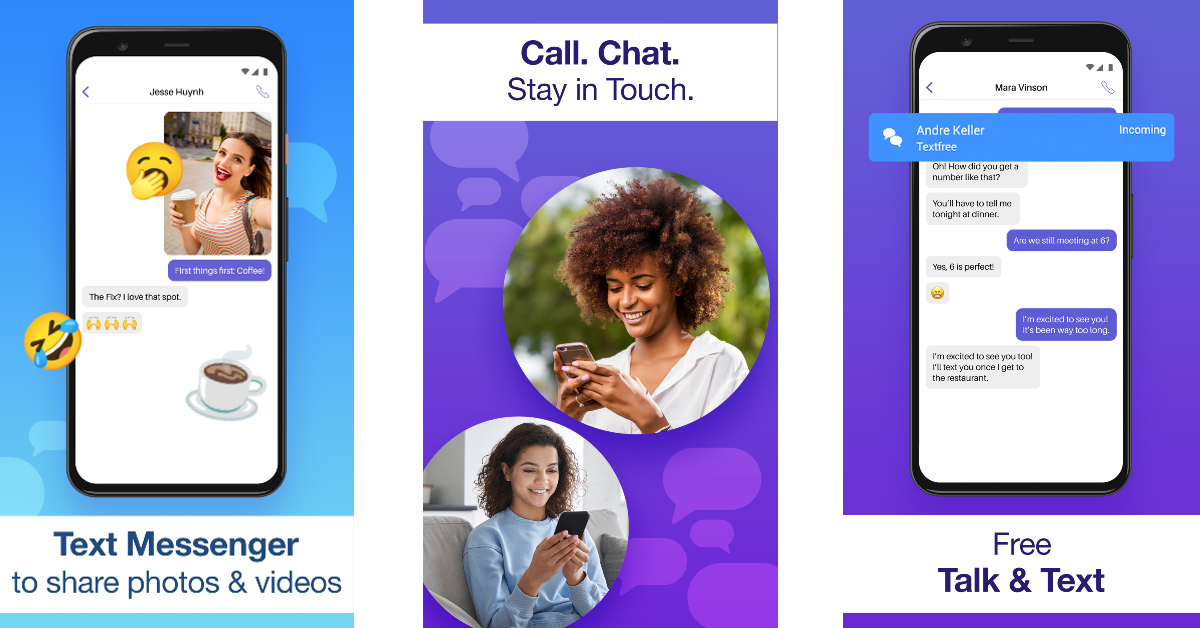
Text Free is a messaging app that offers you a real phone number and free texts. You can use this number as a business line or as a burner. You can make calls, receive voicemails, participate in messaging groups, and send MMS using Text Free. You can even create your own phone number, right down to the area code. Text Free also offers some privacy features like closed chat rooms, private messages, the ability to hide messages, and other private calling features.
Cloud SIM: Second Phone Number
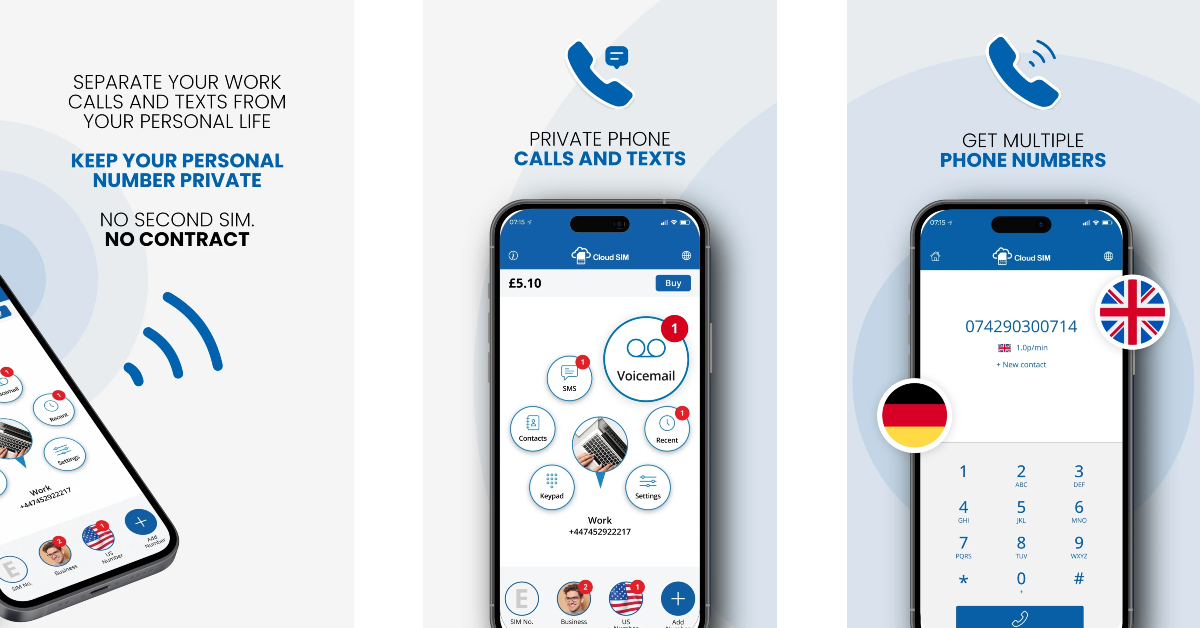
Cloud SIM lets you create not one, but four burner numbers. You can manage all your numbers on one device using the Cloud SIM app. This app lets you make international calls at very affordable rates. Cloud SIM is the ideal app for online sellers who don’t want to give out their primary number to buyers. If your network provider charges you excessively for international calls, you can use your Cloud SIM number to make those calls at a much more affordable price. Texting is free on Cloud SIM across all Android devices.
These are the 10 best apps for a temporary burner phone number. Most of these apps require a paid subscription if you want to use the ‘pro’ features. However, apps like 2nd Line and Doosra offer essential phone services free of cost. If there’s any burner phone app that you think we missed out on, let us know in the comments!
Qualcomm announced its flagship processor, Snapdragon 8 Gen 2, at the Snapdragon Summit held last month. Designed for flagship smartphones, the S8G2 makes use of groundbreaking AI processes to enable faster natural language processing with multi-language translation and INT4 support. The Snapdragon 8 Gen 1 and Gen 1+ chipsets have been vastly successful among the audience this year, and the S8G2 is set on pushing those boundaries. Can’t wait to unlock the power of this elite processor? Here are the upcoming smartphones that will be powered by the Qualcomm Snapdragon 8 Gen 2 processor.
The Xiaomi 13 Series will launch in China later this month, with the global release due in the coming months. Xiaomi 13 and 13 Pro have been confirmed to be powered by Qualcomm Snapdragon 8 Gen 2. The tech giant will also be debuting the latest iteration of its MIUI 14 OS on this series. While other specs have been kept tightly under the lid, certain rumours and leaks suggest that the smartphone will get an HDR AMOLED display with a 1.61mm slim bottom bezel. A Leica camera module is also expected to feature in the Xiaomi 13.
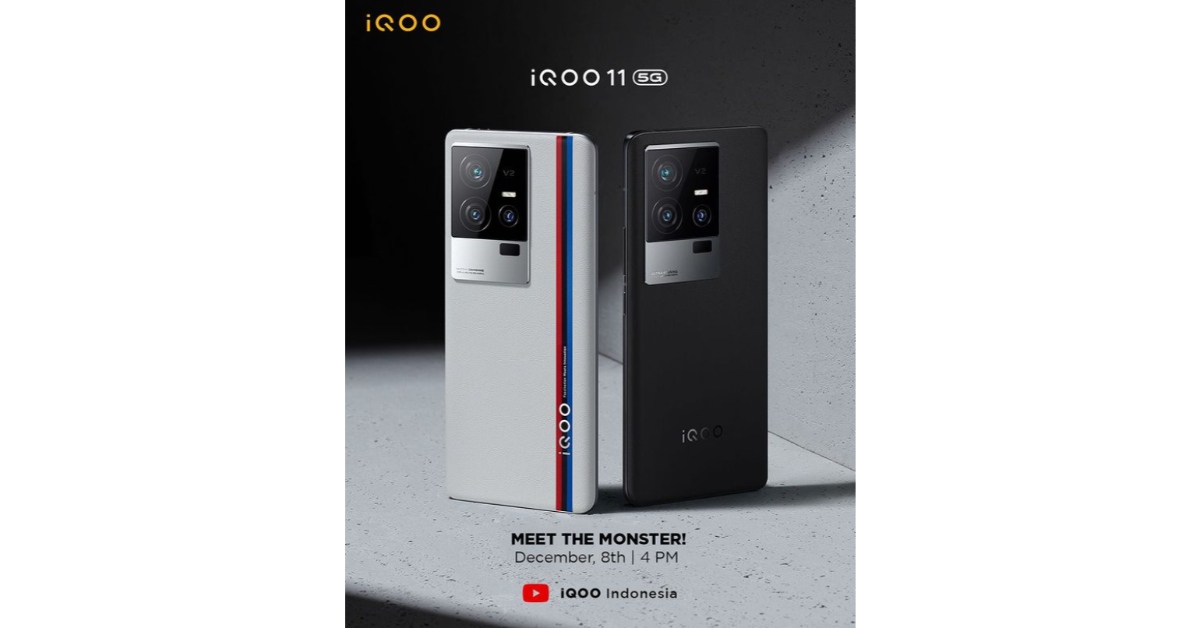
iQOO 11 5G
The launch of iQOO’s latest flagship product, iQOO 11, has been scheduled for December 8 in Indonesia. Buyers in India can expect the smartphone to launch in India later this month. It has been confirmed that the smartphone will feature the Qualcomm Snapdragon 8 Gen 2 chipset with LPDDR5x RAM and UFS 4.0 storage. iQOO 11 is also expected to get a 5,000 mAh battery and 120W fast charging. iQOO 11 will retain the BMW Motorsport theme from its predecessor.
OnePlus 11
OnePlus 10 Pro
OnePlus is set to launch its flagship OnePlus 11 in the coming days. The smartphone renders leaked online suggest the smartphone is set to get a round camera unit with a triple-lens setup. OnePlus 11 will feature the Qualcomm Snapdragon 8 Gen 2 processor. On top of that, it’ll also be the first OnePlus flagship to feature a centre punch-hole cutout for the selfie camera.
Motorola X40
Motorola X40 is set to be launched this month. The smartphone was rumoured to be powered by Snapdragon 8 Gen 2 even before Qualcomm had officially announced the chipset. Motorola X40 is also expected to get 68W fast charging, according to its listing on the China Compulsory Certification (3C) database. Among other features, the smartphone is expected to get a Full HD+ display along with a 50MP primary camera.
Vivo X90 Pro+
While it is not an ‘upcoming’ smartphone, the recently launched Vivo X90 Pro+ is the first device to be powered by the Qualcomm Snapdragon 8 Gen 2 chipset. The Vivo X90 and X90 Pro receive MediaTek Dimensity 9200 SoC while the X90 Pro+ gets the latest Snapdragon 8 Gen 2 processor. Vivo X90 Pro+ has a starting price of CNY 6,499, which is equivalent to Rs. 74,000 for the 12GB RAM with 256GB storage model, and CNY 6,999, which is equivalent to Rs. 80,000 for the 12GB with 512GB edition.
Speaking on the launch of the Snapdragon 8 Gen 2 processor, Chris Patrick, senior vice president and general manager of mobile handsets, Qualcomm Technologies, Inc. said, “We are passionate about enabling people to do more, so we design Snapdragon with the user at the center. Snapdragon 8 Gen 2, will revolutionize the landscape of flagship smartphones in 2023. Snapdragon 8 Gen 2 delivers groundbreaking AI, unparalleled connectivity, and champion-level gameplay, enabling consumers to enhance every experience on their most trusted device.”
Which of these flagship releases are you looking forward to the most? Let us know in the comments!
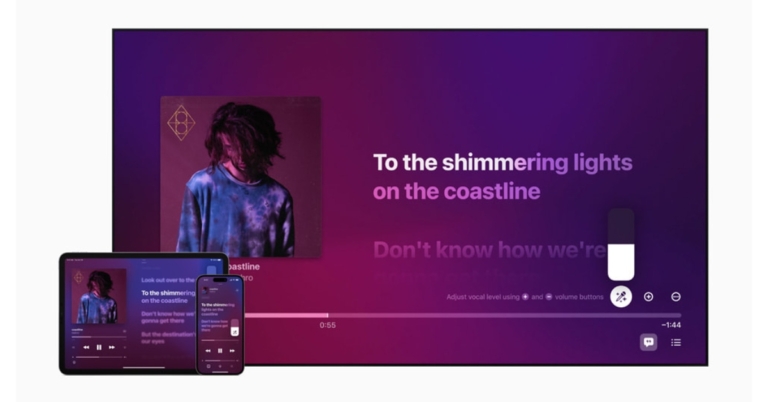
Apple has introduced a brand-new karaoke feature to its Apple Music App namely Apple Music Sing. This karaoke mode will allow users to increase the vocal level while singing along with the lyrics. The feature will also provide users access to more than 50 specific companion playlists.
The Apple Music Sing, which enables users to sing along to their favourite songs with customizable vocals and real-time lyrics, was unveiled by Apple. To let users take the lead, sing duets, sing backing, and more within Apple Music’s unmatched lyrics experience, Music Sing provides multiple lyric views.
While announcing the Music Sing to Apple Music app, Oliver Schusser, Apple’s vice president of Apple Music and Beats said, “Apple Music’s lyrics experience is consistently one of the most popular features on our service. We already know our users all over the world love to follow along to their favorite songs, so we wanted to evolve this offering even further to enable even more engagement around music through singing. It’s really a lot of fun, our customers are going to love it.”
Apple Music Sing Features
Adjustable vocals are included in Music Sing. The vocal levels of a song can now be changed by users. On the millions of songs in the Apple Music library, they can sing alongside the original artist’s vocals, take the lead, or mix it up.
Users can sing along to their favourite songs with animated lyrics that dance to the beat of the singing using real-time lyrics.
On the other hand, vocal lines can move independently of the main voice to make it easier for listeners to understand. Multiple vocalists are displayed in Duet view on separate sides of the screen, making duets and tracks with multiple singers simple to sing along to.
According to the company, a collection of over 50 specially curated companion playlists for Music Sing will also be released, encompassing all of the iconic songs, duets, choruses, and anthems that have inspired people to sing all over the world.
Apple Music Sing Availability
On iPhone, iPad, and the brand-new Apple TV 4K, Apple Music Sing will be accessible to all Apple Music subscribers later this month.
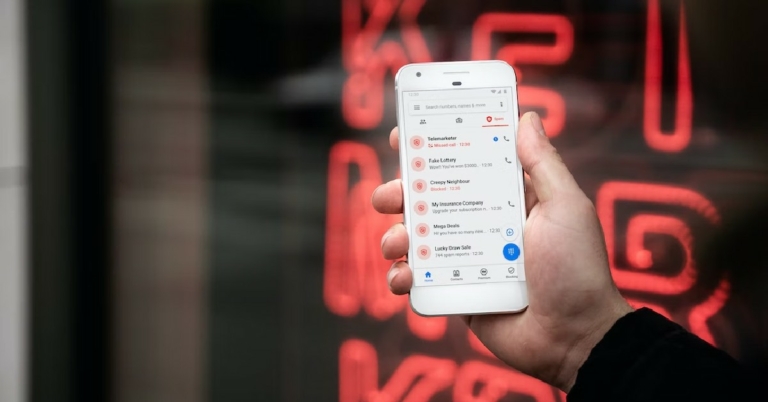
While apps like Truecaller are useful in blocking spam calls and identifying unknown numbers, they also put your privacy at risk by listing your number on their database. For some people, this may not be the ideal tradeoff. If you use a landline phone, your home address may also be visible on such apps. Luckily, there are a few ways of fixing this. In this article, we bring you the best methods to block your number and hide your caller ID on apps like Truecaller.
In order to remove your phone number from the Truecaller database, you will need to deactivate your account first. You cannot use Truecaller without your number being listed on their database. Here’s how you can deactivate your profile and unlist your number on Truecaller.
Step 1: Open the Truecaller app and tap the ellipses (three dots) at the top right corner of the screen.
Your number will be removed from Truecaller within 24 hours.
Hide your Caller ID on Android
You can also hide your Caller ID on an Android smartphone while calling other numbers. Here’s how you can do it on an Android smartphone.
Step 1: Open the Phone app on your smartphone and tap the ellipses (three dots) at the top right corner of the screen. Select Settings.
Step 2: Scroll down and select Supplementary Services.
Step 3: Tap on ‘Show your caller ID’ and select Never.
Hide your Caller ID on an iPhone
Here’s how you can hide your caller ID on an iPhone.
Step 1: Open Settings and select Phone.
Step 2: Select ‘Show my caller ID’ and turn the toggle bar off.
Hide your Caller ID before making a call
If you live in the US, you can hide your caller ID for an individual call without changing the call settings on your phone. In order to do this, type *67 before the number you’re going to call. For example, if you’re going to call the number ‘1234567’, type ‘*671234567’ to hide your caller ID from that number. In UK and Ireland, you can do the same by typing 141 before any number.
Ask your network service provider for added services
Some network service providers let you hide your caller ID at an additional cost. Dial the customer support helpline number of your network provider and see if they provide the service. The price to activate this service varies across different networks.
These are the best methods to block your number and hide your caller ID on apps like Truecaller. If you want to retain your anonymity without hiding your caller ID, you can use apps like Google Voice and Hushed to set up a virtual number which can also be used as a ‘burner’ number. If you found this article helpful, let us know in the comments!
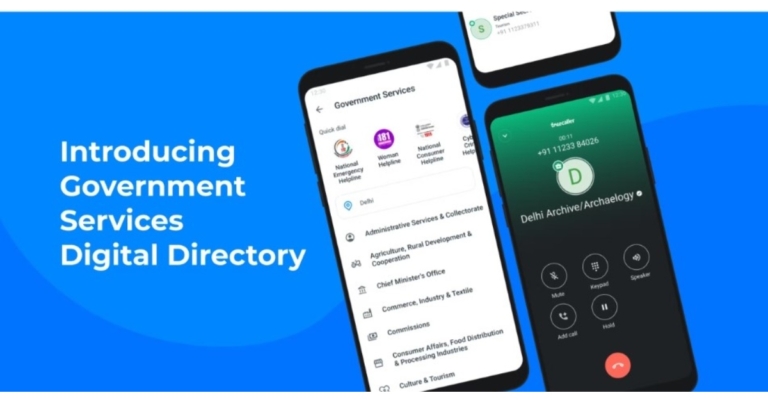
Digital directory for India’s national and state governments has been made public by Truecaller. By providing quick access to verified contacts for government officials, this would enable users to communicate with the government in an effortless manner.
India now has access to Truecaller’s digital government services directory for Android phones. Users now have verified contacts of important government officials and authorities at their fingertips, from national hotline numbers to numbers for ministries and bureaucrats. The app currently covers around 23 states and union territories, as well as about 20 central government ministries. The data was obtained directly from the government and through authorised government sources.
Users of the Truecaller app have access to helplines, law enforcement, embassies, educational institutions, hospitals, and other important departments of around 23 states, including union territories, through the online government directory. Direct government sources and authorised government sources have provided this information. With this project, the public’s access to government representatives will be facilitated and streamlined, and the over 240 million Indian Truecaller users would be given easy access to the government.
While announcing the feature the company said, “Based on interactions with netizens and relevant stakeholders, Truecaller has learnt that one of the most pervasive scams on the phone involves impersonation of government officials. The creation of a verified government contact directory is a continuation of Truecaller’s efforts to build trust in communication and protect our users from frauds and scams. Users will see a green background and a blue tick, indicating that the number is verified. Truecaller is working with different government departments to expand the directory and is looking at adding contacts at the district and municipal levels in the next phase, based on user feedback. Truecaller has also created a simple process for any government agency to share information and get verified on the directory.”
You will notice a green background and a blue tick, signifying that the number is validated, when the phone rings. By doing so, the new function will also shield you from scammers who might mimic government service providers, protecting you from the negative effects of impersonation.
Commenting on the launch of the feature, Pragya Misra, Director of Public Affairs, Truecaller said, “Truecaller has evolved to become more than just a Caller Identification app and is today bridging the digital divide between the urban and growing semi-urban/rural markets in India by enabling trust in digital communication. Our attempt is to protect people from widespread impersonation of government officials leading to scams and frauds. We believe that with this feature, citizens can easily reach out to the right authorities when in need. This is a first-of-its-kind digital directory of government numbers and we will keep improving on it based on user feedback. We will continue to align our efforts to make communication safe by building trust.”
Garena Free Fire is a battle royale game with regular awards and tournaments to keep players interested. If you play Garena Free Fire, you should be aware of the redeem codes that are released on a daily basis. However, because the battle royale game is banned in India, players from other countries can use the Free Fire Redeem codes daily. If you’re unfamiliar with the Garena Free Fire redeem codes or don’t know how to get them, we’ve put together a step-by-step guide to help you redeem them. Check out Garena Free Fire Redeem Codes for December 7.
The Free Fire redeem codes are a great way to get free stuff. These are 12-digit codes that contain alphabets and numbers, as well as an expiration date and time. Because the Garena FF redeem codes cannot be used more than once, you should hurry to the redemption page to claim your free reward before someone else does. To get a free reward, all you have to do is go to reward.ff.garena.com/en, which is the official redemption page. Also, keep an eye on this space for daily updates on Garena Free Fire redemption codes and rewards.
In This Article
Garena Free Fire Redeem Codes Today 7 December 2022
Updating Soon
How to Get Free Fire Redeem Codes for Garena on December 7?
Daily Amazon brings a fresh quiz for its customers with exciting rewards on its platform. The Amazon quiz can be played every day from 12 AM to 11:59. 7 December 2022 Amazon Quiz has gone live on its platform and the e-commerce platform Amazon is today giving you a chance to win Rs 5,000 Amazon Pay Balance.
To participate all you need to do is log in to your Amazon app on your device and give answers. Daily a new set of questions are presented to the participants which gives them a chance to win exciting prizes. The questionnaire consists of five easy questions that are usually based on general knowledge and current affairs. You can submit the correct answers and can win an Amazon Pay Balance of up to Rs 50,000. It should be noted that the quiz is not accessible on the web platform instead you have to participate only through the dedicated app.
Question 1: How many men’s FIFA World Cup titles has Spain won?
Answer: 1
Question 2: The annual Tata Literature Live! Lifetime Achievement Award for 2021 was given to which celebrated author?
Answer: Anita Desai
Question 3: Ajaz Patel, who recently became the 3rd player in Tests to get all 10 wickets, plays for which country?
Answer: New Zealand
Question 4: This is the flag of which country?
Answer: Italy
Question 5: This sport was banned between 1457 and 1744 in which country, that also invented the said sport?
Answer: Scotland
How To Play Amazon Quiz
Only app users are eligible to play the Amazon quiz every morning from 12 AM to 11:59 PM. The quiz is not available on the desktop. For those who are unaware of how to play the Amazon quiz below are the steps, you can follow to take the quiz.
Firstly download the Amazon app from Google Play Store or App Store
Now fill in the required information through the Sign Up option.
You need to log in to the Amazon app and scroll down on the home screen to find the Amazon Quiz banner.
Tap on the Amazon Quiz banner and tap on the Start button to start the Quiz.
Now you will get 5 questions and you need to answer them correctly. One wrong answer will eliminate you from the Quiz.
After answering all the questions correctly you are now eligible for a Lucky Draw.
The winner’s name will be announced today at 12 PM.
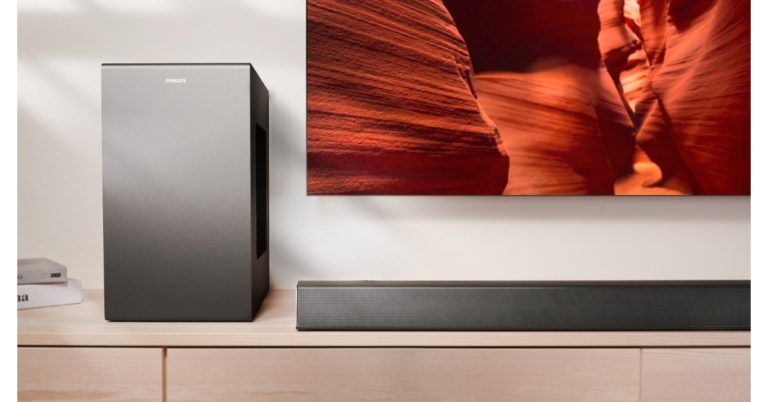
TPV Technology today announced the release of the brand-new Philips TAB8947 3.1.2 and TAB7807 3.1 CH Dolby Atmos Soundbars in India today. The 3.1.2 CH Dolby Atmos technology in the Philips TAB8947 soundbar provides a multidimensional audio experience with 660W of output. Whereas Philips TAB7807 3.1 CH soundbar delivers virtual 3D sound using Dolby Atmos technology.
In This Article
Philips TAB8947 and TAB7807 soundbar price in India and availability
The Philips TAB8947 and TAB7807 soundbars have been launched at INR 35,990 and INR 28,990, respectively. They will be available for purchase at all reputable offline and online retailers nationwide.
Philips TAB8947 and TAB7807 soundbar features
With a 660W output and 3.1.2 CH, the Philips TAB8947 soundbar provides a multidimensional music experience. A room may be filled with mesmerising soundtracks, booming effects, and crystal-clear speech thanks to the 660W output, which features 8 integrated drivers and an 8″ subwoofer. Chromecast, Apple AirPlay 2, or Bluetooth are all simple ways to stream high-definition playlists from a mobile device. With AI voice help, it’s simple to play music through the soundbar hands-free.
The Philips TAB8947’s standout and most distinctive feature are its additional upward-firing speakers, which provide height channels and create a genuine 360-degree surround sound experience, especially when Dolby Atmos is used.
In contrast, the Philips TAB7807 3.1 CH soundbar delivers virtual 3D sound to elevate your listening experience with Dolby Atmos technology. It has 620W of output power, 6 integrated speakers, and 8″ strong subwoofers for a rich music experience. With Stadium EQ mode, this soundbar is the ideal partner for enjoying live sporting events at home. Through Philips Easylink technology, it is simple to modify the EQ modes, bass, treble, and volume settings on your soundbar with the remote control.
The soundbars are easy to set up under or next to your TV because of their low profile and striking geometric design. Both support Dolby Atmos and other cutting-edge formats thanks to HDMI eARC technology.
Back in July last year, Nothing announced its arrival in the consumer tech market with the launch of Nothing ear (1) TWS. We reviewed the ear (1) as soon as it came out and were quite impressed by its unique design and the audio performance it delivered. This year, Nothing came out with their debut smartphone (review here) and another pair of TWS, the Ear (stick). The Ear (stick) is priced at Rs 8,499 and is currently sold alongside the ear (1), which is priced moderately at Rs 7,299. While both TWS stick to Nothing’s ‘transparent’ design philosophy, there are some significant differences between the two products. We used the Nothing Ear (stick) for almost two weeks, here is our in-depth review.
The Nothing Ear (stick) ships inside a rectangular box with the charging case and earbuds on one end and the Type C cable, safety information, warranty card, and user guide on the other. The box requires peeling off the strips underneath the lids to access its contents. Once opened, the lids cannot be pressed shut.
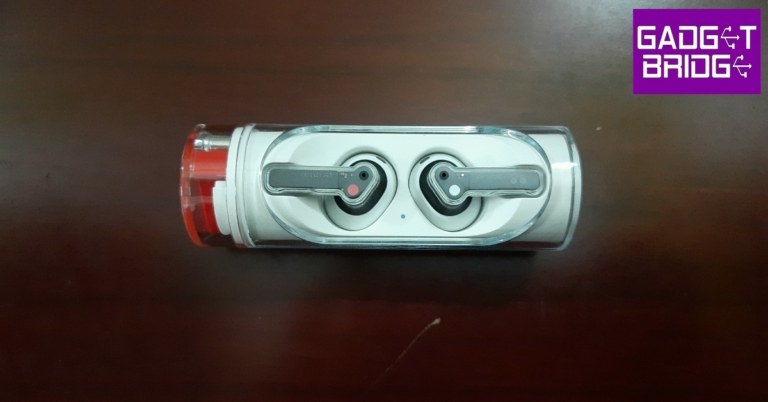
The charging case is unlike anything we’ve seen before in a TWS product. The long cylindrical design resembles that of a lipstick case, and the rotating head further adds to that aesthetic. The transparent glass lets you see the earbuds resting in their pods, it wouldn’t be a Nothing product otherwise! The inner plastic tube is a bit of a dirt magnet, and it can get quite challenging to clean the case if the grime manages to slide between the transparent glass panel and the inner tube.
The case opens up with a quick swivel of the rotating head in either direction. If you find yourself fidgeting with lids far too often, you’re going to love this charging case. The rotating head also houses a Bluetooth pairing button and a USB charging slot. The glass cover has an oval cutout that lets you access the earbuds after you rotate the head of the case. We were quite apprehensive about the earbuds falling out as soon as we open the case, but the magnetic slots held up pretty well. The earbuds stay in place while facing the ground and do not drop out even after a few heavy jerks.
Pulling the earbuds out of their pods, you’ll notice that Nothing has opted for an open-ear design on the Ear (stick). This means you don’t get any silicone tips, and the audio isn’t directly delivered to your ear canal. But the most glaring issue for some users may be the fit (or lack of it). Unlike ear (1), you cannot simply put in the appropriate size ear tips for a better fit.
However, if the earbuds do fit in your ear, they are pretty comfortable to wear. The buds weigh just 4.4g and do not strain your ears even after they’ve been in there for hours. The transparent stem is pressure sensitive and allows you to control the basic functions with a pinching motion, completely eliminating those pesky accidental touches. Rated IP54, you can wear these earbuds while working out and not worry about any damage caused due to sweat.
Nothing Ear (stick) review: Performance
What the Ear (stick) lacks in its fit, it more than makes up in performance. The earbuds feature 12.6mm dynamic drivers that deliver a powerful sound that can match up with the best in this category. The earbuds only offer SBC and AAC codec support, which is pretty much the norm in this price range.
Connecting the Ear (stick) to your smartphone is a smooth process. There is a dedicated pairing button on the case that you need to press when connecting the earbuds to your phone for the first time. Once paired, you can customise the controls and equaliser using the Nothing X app.
When it comes to the sound profile, the Ear (stick) does not disappoint at all. With the open-ear design, we had our doubts regarding the audio performance but they were soon put to rest with the sheer quality of the dynamic drivers housed within the earbuds. The sound profile is very much bass-driven, but not at the expense of shrouding other frequencies. The overall output is a pleasant mix of highs, mids, and lows. You don’t need to crank the volume all the way up to enjoy the ideal mix. If you’re not satisfied with the audio profile, the custom equaliser in the Nothing X app will be of incredible help.
The Ear (stick) makes a significant improvement over the ear (1) in microphone quality. The TWS does a fine job of isolating the voice from any surrounding noise and relaying it to the receiver without a significant drop in quality. If you’re making a call in a quieter indoor environment, these earbuds perform just as well as any wired headphones. The touch controls on the stem are triggered by pinching motion. These controls can be customised with the Nothing X app as well. The biggest miss on the Nothing Ear (stick) is the lack of ANC. Even though it’s priced in the same bracket as the ear (1), the open-ear design of the Ear (stick) prevents it from featuring active noise cancellation.
Moving on, the Nothing Ear (stick) offers up to 29 hours of listening time, with 7 hours of charge in the earbuds and an additional 22 hours in the case. Unlike ear (1), the Ear (stick) does not come with wireless charging. However, you can fast charge the Ear (stick) to provide up to 9 hours of audio playback in just 10 minutes of charging.
The Nothing Ear (stick) is inarguably one of the better-looking TWS in the market right now. The TWS makes no compromise on the performance, as the Ear (stick) delivers a rock-solid audio output, that punches above its weight in the midrange category. However, it misses out on wireless charging and ANC, which may leave some enthusiasts with some complaints. Overall, at Rs 8,499, the Nothing Ear (stick) is certainly a powerful contender in its category.
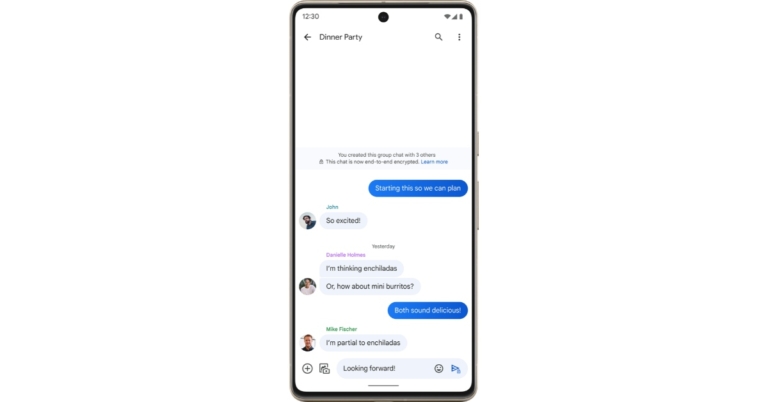
In its Messages app, Google is experimenting with end-to-end encryption for group chats in order to make it more secure. Furthermore, in the upcoming weeks, the group chatting feature will start to go out to Messages users signed up for the open beta test.
E2EE (end-to-end encryption) functionality is now accessible for group chats in Messages. To recall end-to-end encryption for group chatting was first introduced at Google’s I/O 2022.
RCS chats in the Messages by Google app already support E2EE. End-to-end encryption is possible with RCS but not with SMS. As a result, all one-on-one texts received through Google Messages, for instance, are encrypted, making them private and secure and visible only to the sender and the recipient. End-to-end encryption is currently beginning to roll out for group conversations and will soon be accessible to select users participating in the open beta test.
RCS not only makes texting safer, but it also improves the experience. According to the company, SMS texting lacks many of the features that smartphones offer, but RCS enables you to text over Wi-Fi, send and receive high-quality images and videos, view typing indicators and read receipts in real-time, name group discussions, add or remove friends from group chats, and much more. In order to share the perfect emoji, Messages will soon allow you to reply to RCS messages with any emoji.
According to the company, RCS is built to function on every phone, so you can have the same texting experience no matter where you reside, who made your phone, or what operating system it uses. And as of right now, every significant mobile carrier and manufacturer has adopted RCS as the industry standard with the exception of Apple. When people with iPhones message people with Android phones, Apple refuses to implement RCS and continues to rely on SMS, keeping their texting trapped in the 1990s, the company in its announcement also noted.
Meta made the announcement that it would begin asking Facebook Dating users to confirm their age if the platform suspected they are under 18. As per the company, this will ensure that only adults are using the service and will help it stop children from using it. In order to preserve people’s privacy and give them a variety of options to choose from when verifying their age. For that, it is extending its collaboration with the online age-verification firm Yoti.
Meta in its announcement said. “We’re committed to making sure people have age-appropriate experiences across our technologies, and as part of this work, we’ve been testing age verification tools and using age detection technology to stop people under the age of 18 from accessing experiences meant for adults.”
It further added, “Starting today, we’re expanding our age verification test to Facebook Dating in the US. We require people to be at least 18 years old in order to sign up for and access Facebook Dating, and age verification tools will help verify that only adults are using the service and help prevent minors from accessing it. We’re also continuing our partnership with Yoti, a company that specialises in online age verification so that people have more than one option to choose from to verify their age.”
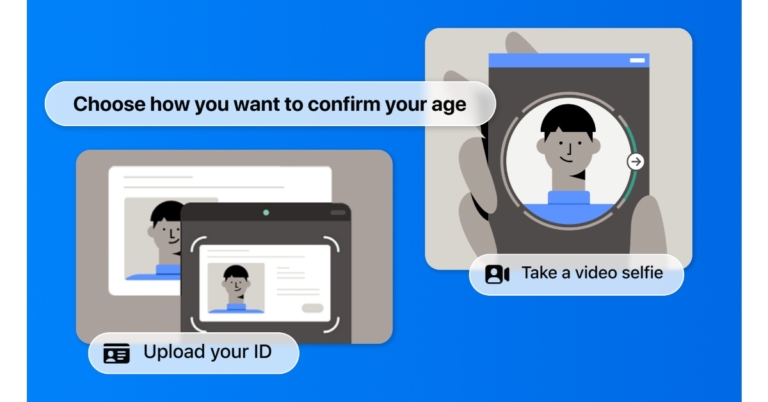
According to Meta, it used technology to identify instances in which individuals had falsified their ages in order to make sure that they were placed in situations that were acceptable for their ages. To identify any potential differences between the ages people provide them and the age it believes they may be based on its technology, it has invested in age detection technologies. It will ask someone to confirm their age if it thinks they may be under 18 and trying to use Facebook Dating. They will have a choice between two options: video selfies and ID upload.
You will be given step-by-step instructions on your screen if you select the Video Selfie option. When you take a video selfie on Facebook dating, you only share one still image from the video with Yoti. Based on your facial traits, Yoti’s algorithm calculates your age and shares it with the company before deleting the image right away. Only your age can be determined by the technology, not your identity as per Meta.
As an additional option, you can upload proof of identity to prove your age. After you upload a copy of your ID, it will be encrypted and safely kept; it won’t be accessible to other users of the app or on your Facebook page. As per the company you can control how long your ID is kept on file after your age has been confirmed.
Most smartphones let you shoot videos in slow motion but very few give you the option to edit the slow motion on the video after you’re done shooting it. For TikTok and Instagram creators, the slow-motion effect is a necessity. When used cleverly, the slow-motion effect can capture the attention of the viewer and make your content all the more engrossing. While Instagram and TikTok let you shoot in slo-mo, both apps lack the option of letting you use the effect on pre-shot videos. If you do not want to work your way around a complex video editor, here are 3 easy methods to convert any video to a slow-motion video on Android.
InShot is one of the simplest and most popular video editing apps for Android. With just a few taps, you can choose from hundreds of transitions and effects. Here’s how you can convert a video into a slow-motion video using InShot.
Step 2: Tap on ‘Video’ from the ‘Create new’ section and upload the video from your phone’s gallery.
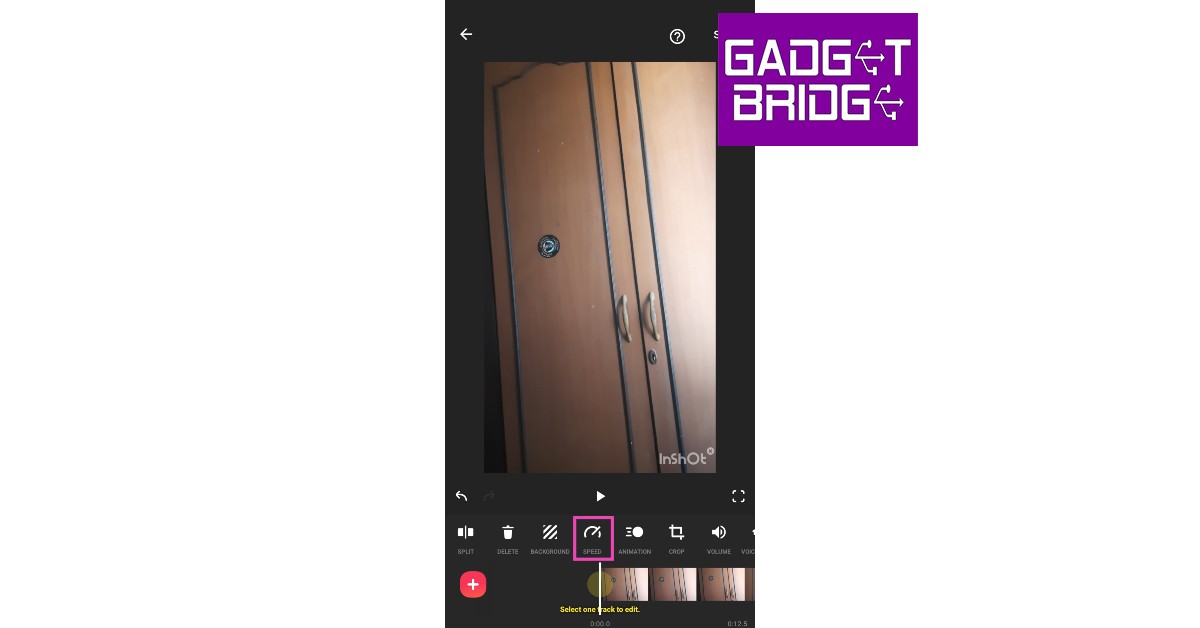
Step 3: Select ‘Speed’ from the toolbar.
Step 4: Select the playback speed. You can speed up the video or convert it entirely into slow motion.
Step 5: Tap on ‘Curve’ to convert different parts of the video into slow motion. Tap the play button to preview.
Step 6: Select ‘Save.’
Use Slow Motion Video Maker
While the InShot Video Editor offers a range of editing tools, the Slow Motion Video Maker app offers only a handful of features apart from the slow-motion effect. This is a pretty straightforward app if you just want to convert a video into slow motion.
Step 2: Open the app and select ‘Gallery.’ Select the video you want to convert.
Step 3: Use the tracker to select the segment of the video you want to convert to slow motion.
Step 4: Use the speed tool to adjust the playback speed of the video. Tap the play icon to see the changes on the preview window.
Step 5: Tap on ‘Save’ when you’re done making changes.
Use the VITA app
Like InShot, VITA is an extensive video editing app for Android smartphones. You can use the ‘speed’ tool from the app to convert your videos to slow motion. Here’s how.
Step 1: Download and install the VITA app from Google Play Store.
Step 2: Tap on ‘New Project’ and select the video you want to edit.
Step 3: Select ‘Edit’ from the bottom menu.
Step 4: Tap on ‘Speed’ from the list of editing tools at the bottom.
Step 5: Select the tempo from the speed tool. Tap on the tick icon to save the speed.
Step 6: Go back to the main window and export your video to local storage.
Remember: Some of these apps have premium features that can only be unlocked with a subscription. At the moment the functions mentioned above are free to use.
Conclusion
These are the top 3 easy methods to convert any video to a slow-motion on Android. While most video editors let you control the speed of the video using the tracker, the apps mentioned in this article provide greater accessibility to their users. If you like to use any other app for the slo-mo effect, let us know in the comments!
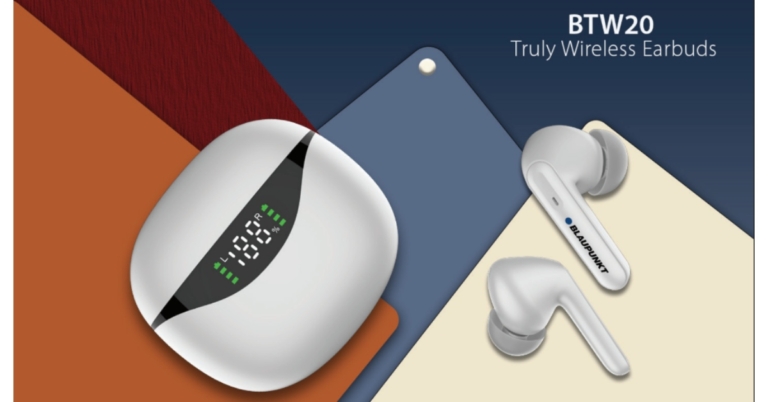
With the introduction of BTW20 TWS earbuds in India, Blaupunkt has increased the range of their true wireless earbuds. The TWS earbuds are said to provide better battery life at a reasonable cost offering up to 30 hours of battery life. The Bluetooth Headphone has a Smart LED Digital Display, making it simple to see how much battery life remains after charging.
In This Article
Blaupunkt BTW20 price in India and availability details
Blaupunkt BTW20 has been launched in India at an affordable price tag of Rs 1,299. The audio device comes in four colour options of White, Black, Blue and Green. These can be purchased via Amazon in the country.
Blaupunkt BTW20 specifications
The 10mm dynamic driver found in the Blaupunkt BTW20 delivers strong bass, crystal-clear vocals, and sharp high tones. The built-in MIC is another premium enhancement; it will suffer the least degree of background noise interference.
These earbuds are wonderfully lightweight. In addition, the case’s LED display helps to ease battery anxiety. You will always be able to view the battery level of each bud through the unique display.
As per the company, a single charge of the F1 battery provides 14 hours of playing. Turbo-volt technology inside allows for incredibly quick charging. The charging case may be fully recharged in a short amount of time thanks to USB-C fast charging technology. You can play for 30 minutes after a 10-minute charge. Additionally, it’s simple to use Siri and Google Assistant. Your voice commands will be responded to quickly thanks to the clear MIC.
The BTW20 are sweat and moisture-resistant, making them the ideal running, jogging, and exercise partner. The earphones are equipped with highly sensitive touch sensors that can recognise every touch. Without lifting up your phone, use the earbud to softly tap to skip music, accept or reject calls, and activate the voice assistant.
Garena Free Fire is a battle royale game with regular awards and tournaments to keep players interested. If you play Garena Free Fire, you should be aware of the redeem codes that are released on a daily basis. However, because the battle royale game is banned in India, players from other countries can use the Free Fire Redeem codes daily. If you’re unfamiliar with the Garena Free Fire redeem codes or don’t know how to get them, we’ve put together a step-by-step guide to help you redeem them. Check out Garena Free Fire Redeem Codes for December 6.
The Free Fire redeem codes are a great way to get free stuff. These are 12-digit codes that contain alphabets and numbers, as well as an expiration date and time. Because the Garena FF redeem codes cannot be used more than once, you should hurry to the redemption page to claim your free reward before someone else does. To get a free reward, all you have to do is go to reward.ff.garena.com/en, which is the official redemption page. Also, keep an eye on this space for daily updates on Garena Free Fire redemption codes and rewards.
In This Article
Garena Free Fire Redeem Codes Today 6 December 2022
6 December 2022 Amazon Quiz has gone live on its platform. The quiz timings are 12 AM to 11:59 PM. The Amazon App users can participate in the quiz daily and all they have to do is submit correct answers to the questions asked on the e-commerce platform. Today’s participants can get a chance to win Rs 1000 Amazon Pay Balance.
Amazon brings a fresh questionnaire that contains 5 questions daily. These questions are based on current affairs and general knowledge. The quiz can be played from 8 AM to 11:59 PM and the contestants need to answer correctly to enter into a lucky draw.
Only one person is declared as a winner and the results will be announced at the end of every month. And to make sure that you give correct answers to all the 5 questions Gadget Bridge everyday updates all the answers to the Amazon Quiz. Do check out 6 December 2022 Amazon Quiz Answers to win a Rs 1000 Amazon pay Balance.
Question 1: Which is the only Asian nation to make the semi-finals of the men’s FIFA World Cup?
Answer: South Korea
Question 2: Which word was named Dictionary.com’s word of the year 2021?
Answer: Allyship
Question 3: In which year did Zinedine Zidane score 2 goals in a FIFA World Cup final for the winning side?
Answer: 1998
Question 4: Who is the founder of this company, that started out as a watch brand in 1984?
Answer: Xerxes Desai
Question 5: Physician Johann Freiherr von Mikulicz-Radecki created primitive versions of these for what in 1897?
Answer: Surgery
How To Play Amazon Quiz
Only app users are eligible to play the Amazon quiz every morning from 12 AM to 11:59 PM. The quiz is not available on the desktop. For those who are unaware of how to play the Amazon quiz below are the steps, you can follow to take the quiz.
Firstly download the Amazon app from Google Play Store or App Store
Now fill in the required information through the Sign Up option.
You need to log in to the Amazon app and scroll down on the home screen to find the Amazon Quiz banner.
Tap on the Amazon Quiz banner and tap on the Start button to start the Quiz.
Now you will get 5 questions and you need to answer them correctly. One wrong answer will eliminate you from the Quiz.
After answering all the questions correctly you are now eligible for a Lucky Draw.
The winner’s name will be announced today at 12 PM.
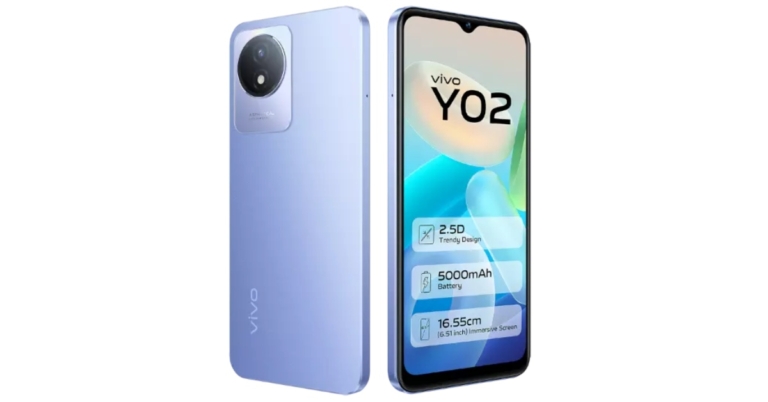
The Vivo Y02 was just made available in India. The smartphone was first introduced in Indonesia a few days back. This low-cost smartphone has a 6.51-inch HD+ FullView screen with Eye Protection functionality. The phone is powered by an Unknown octa-core CPU, which is speculated to be a MediaTek Helio P22 SoC. The device has a battery capacity of 5,000mAh.
In This Article
Vivo Y02 price in India details
As we said earlier Vivo Y02 was launched in Indonesia before arriving in India at IDR 1,499,000 which translates to Rs 8,000 for the 3GB RAM with 32GB storage option. But here in India, it has launched in India at Rs 8,999 for a single 3GB RAM with 32GB storage model. The phone will be available in two colour options of Orchid Blue and Cosmic Grey. The device can be purchased through Vivo India E-Store and across all partner retail stores.
Vivo Y02 specifications
The Vivo Y02 has a 6.51-inch HD+ FullView display with a resolution of 720 x 1,600 pixels and Eye Protection. An unidentified octa-core chipset, maybe a MediaTek Helio P22 SoC, is present. The Vivo Y02 has 32GB of internal storage that can be increased with a microSD card and 3GB of RAM. The Vivo Y02 smartphone is run by Funtouch OS 12, which is based on Android 12 Go Edition.
The primary camera of the Y02 features an aperture of f/2.0 and an LED flash. The budget phone also features a 5-megapixel front camera with an f/2.2 aperture. The smartphone comes with capabilities like Time Lapse and Face Beauty.
The Y02’s 5,000mAh battery offers uninterrupted all-day usage. Support is provided for both 10W wired charging and 5W reverse charging. The Y02 also includes a tonne of useful features and applications for further security and convenience, including Electronic Compass for GPS accuracy, Face Wake, EasyShare, iManager, etc.
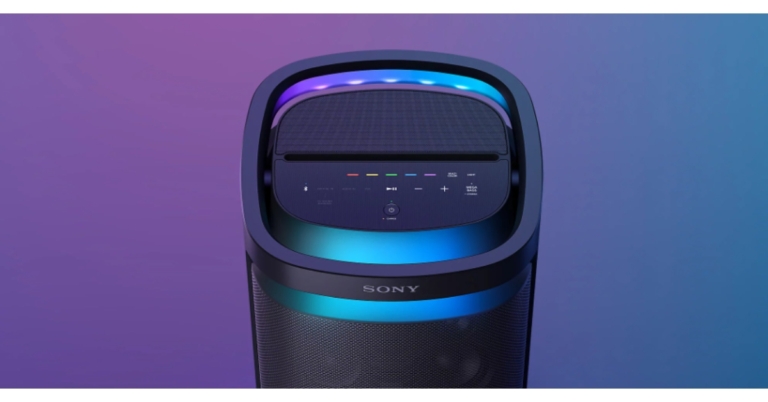
The new SRS-XV900 Bluetooth party speaker in the wireless speaker X-series family was just introduced by Sony India. The new Sony SRS-XV900 are omnidirectional X-balanced speakers and a TV Sound Booster for improved TV sound. The audio device offers a 25-hour battery life and quick charging. These are portable and come with convenient wheels and a carry handle.
You may take advantage of strong omnidirectional party sound with the new Sony SRS-XV900. The X-Balanced speaker unit’s non-circular diaphragm increases sound pressure while minimising distortion by optimising the speaker’s surface area. Whereas the jet bass booster produces rich, punchy bass and high-frequency sound is dispersed all around by the six tweeters on the front, side, and rear.
With Sony’s exclusive TV Sound booster feature, the SRS-XV900 speaker, you can experience boosted sound while watching live performance videos or movies on TV. Regardless of the brand or model of the TV, just connect the optical cable (included) and choose TV Sound Booster.
You may increase the bass on your speaker using the Mega Bass option, giving you a powerful and deep bass. You may listen to your music just like it’s live with the new SRS-XV900 speaker. You can repeatedly relive your greatest musical moments with the Live Sound mode by recreating that special environment.
The new SRS-XV900 Bluetooth party speaker offers 25 hours of battery life. There’s no need to be concerned if you discover that your speaker’s battery is running low. With the speaker’s quick charging feature, 3 hours of playback may be obtained in just 10 minutes.
The device has a comfortable handle included. You may tilt the carry handle back whenever you need to relocate the speaker. You can connect your device to the microphone or even to a guitar and use the speaker as an amplifier with two inputs (mic & guitar). Utilise the Double Tracking function on the Fiestable mobile app to further enhance your singing vocals. The speaker’s intuitive top touch screen, which enables you to change function settings and lights with a single touch, also gives you complete control over it at all times. You can connect up to 100 compatible Sony Bluetooth speakers to Party Connect via Bluetooth. Additionally, the speaker has USB connectivity, so you can plug it in and listen to music. Furthermore, you may plug your smartphone directly into the speaker to have it charged if the battery is getting low. Additionally, the SRS-Bluetooth XV900’s fast pair with Android functionality enables you to instantly pair the speaker with your smartphone.
Both Fiestable and Sony Music Center are compatible with the new Sony SRS-XV900. You can choose playlists, cue the next song, alter lighting schemes, and switch sound modes all from the dance floor using Sony Music Center. With Fiestable, you can get exciting features like generating a party playlist, karaoke capabilities like Voice Changer and Echo, and DJ control to add sound effects.
Price and Availability
With a price tag of Rs 79,990, the Sony SRS-XV900 has just been released in India. From December 5, the speaker will be offered in all Sony Centers, major electronics retailers, and online shopping websites in India.
Google’s reverse image search is the most efficient way of finding the source of any image or video you come across on the internet. If you found an artwork you like, you can find its creator using this feature. Reverse image search works on a desktop as well as on a smartphone. Here are some of the best methods to reverse search on Google using an image or video.
Step 2: Tap the ellipses (three dots) at the top right corner of the screen. Select ‘desktop site.’
Step 3: Tap the camera icon.
Step 4: Tap on ‘Upload an image’ and select the image you want to search from your phone’s gallery.
Step 5: Google will present the relevant results for the source of the image.
Reverse Image Search From Search Results
Step 1: Visit https://images.google.com from your Android device.
Step 2: Search for an image and tap on the required image from the search results.
Step 3: Tap on the Google lens icon on the top right corner of the image.
At the bottom of your screen will be displayed all the websites where the selected image or any images similar to it appear on the internet, along with any information or description regarding the same.
How to reverse search on Google using a video
While Google does not offer a Reverse video search yet, you can still make use of its Reverse image search function to find your desired video. All you need to do is take multiple screenshots of the video you want to search and upload them to the reverse image search bar. Just follow these simple steps.
These are the best methods to reverse search on Google using an image or a video. While reverse searching for the source of a video, make sure you take enough screenshots from different parts of the video to increase the chances of finding relevant results. You can also use websites like Berify and Tineye to reverse search for videos.
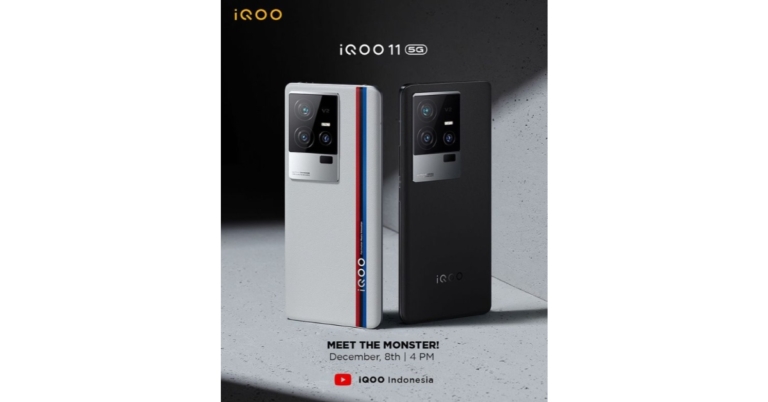
The launch of iQOO 11 5G will now take place on December 8. Along with the iQOO 11, iQOO is also anticipated to release the iQOO Neo 7 SE. The iQoo 11 5G smartphone will be released in a special version with a BMW Motorsport theme. It is confirmed that a Snapdragon 8 Gen 2 SoC powers the gadget. Other anticipated features of the iQoo 11 5G suggest a 5,000mAh battery with 120W fast charging capabilities.
The debut on December 8 is for the Indonesian market, but it is anticipated that China will also experience a comparable event on the same day. The launch was originally scheduled for December 2, but it was delayed because Jiang Zemin, the former president of the People’s Republic of China, passed away. The iQoo 11 5G will be unveiled during the business’ launch event which is slated to begin at 2:30 PM IST, according to an Instagram post uploaded on iQoo Indonesia’s Instagram account.
The iQoo 11 5G smartphone will include the most recent Snapdragon 8 Gen 2 SoC from Qualcomm together with LPDDR5x RAM and UFS 4.0 storage. Along with 256GB and 512GB of internal storage, the smartphone will reportedly arrive with 8GB and 12GB RAM configurations. The iQoo 11 5G is anticipated to have further specifications that indicate its 5,000mAh battery will allow 120W of rapid charging. Rumour has it that the iQoo 11 5G will also have an E6 AMOLED display with a 144Hz refresh rate and up to 2K resolution.
There will be a customised version of BMW Motorsport on the smartphone, according to another Instagram post from their account. According to rumours regarding the iQoo 11 5G’s camera, the device will have a triple back camera setup. The camera arrangement will consist of a 12-megapixel telephoto lens, a 13-megapixel ultra-wide lens, and a 50-megapixel primary camera. The device might possibly have a 16-megapixel front-facing selfie camera.
Pro online shoppers know that tracking product prices can save a significant amount of money. Earlier, you needed to download an extension or plugin to track prices, but now Google Chrome has made it easier to keep a tab on the products you want to buy. You don’t need to download any extension to get an alert whenever a particular product’s price drops. In this article, we show you how to track product prices on Google Chrome and save money!
Here’s how you can track product prices on a desktop
First, you need to make sure that you are signed into the Chrome browser and have the sync turned on for your profile. You also need to turn on ‘Web and App activity.’ Visit this page to enable it.
Step 1: Open the product page on your desktop.
Step 2: Click on the ‘Track price’ icon right next to the address bar. Click ‘Done’ in the following box.
Chrome will start tracking the product and notify you whenever there is a drop in its price. Here’s how you can manage the products you are tracking.
Step 3: Click on the side panel icon right next to your profile icon on Chrome.
Step 4: Click on Bookmarks and select Tracked Products.
Step 5: You will be able to see all the products being tracked by Chrome. Turn off alerts if you want to untrack a product.
Here’s how you can manage notifications of the products you are tracking on Chrome.
Step 6: Open Google Chrome on your desktop and click on the ellipses (three dots) at the top right corner of the screen. Go to Settings>Sync and Google Services.
Step 7: Scroll down to ‘Other Google services’ and turn off ‘Get price tracking notifications.’
Remember: ‘Track price’ will only work if you are logged in/signed into the Chrome browser.
Here’s how you can track product prices on an Android smartphone
Step 1: Open Chrome on your Android smartphone and tap the ellipses (three dots) at the top right corner of the screen. Go to Settings>Google Services and turn ‘Track prices on tabs’ on.
Step 2: Open the product page on Chrome and tap the three dots (ellipses) at the top right corner of the screen. Select ‘Track price.’
Remember: ‘Track price’ will only work if you are logged in/signed into the Chrome browser/Android device.
This is how you can track product prices on Google Chrome. While tracking a product, Google Chrome will alert you whenever any seller drops the price for the product. You will need to visit the seller list on the product page to see more details. If you do not want to receive email alerts, click on the ‘unsubscribe here’ link in any mail.