iQoo Z6 Pro 5G review: A lot of hits and few misses, right buy at this price?

iQoo Z6 Pro 5G was recently launched in India at a starting price of Rs 23,999 and it looks good on paper with the kind of specifications it boasts of. We put it to use for a few days to see its pros and cons and here’s our iQoo Z6 Pro 5G review detailing them.

iQoo Z6 Pro 5G review: Design and Display

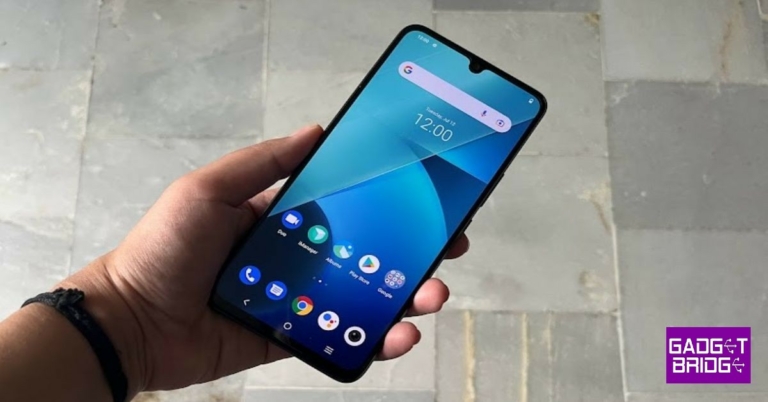
As far as the design of iQoo Z6 Pro 5G goes, we have a bag of mixed feelings. The back panel and the frame of the smartphone are made from polycarbonate – which is not entirely a bad thing, but the real problem is that the look and feel of the device isn’t premium. We have seen better at this price point from the company. The matte finish means that the handset doesn’t get smudged easily, but then, it’s not enough to keep dust off the phone. The rear panel houses the camera module of iQoo Z6 Pro 5G, which comes with three lenses. Besides this, there is only an iQoo branding on the back. The power and volume rocker keys are sandwiched on the right while the top and bottom house the speaker grill, Type-C port, SIM tray, microphone and secondary microphone. iQoo Z6 Pro 5G 2 Flip over and you will see the 6.44-inch display of the device that comes with a waterdrop notch on the top to house the selfie camera. It is outlined by thin bezels but the chin is obviously relatively bigger in size. There is also an in-display fingerprint scanner. Speaking in more detail about the iQoo Z6 Pro 5G display, it is an FHD+ AMOLED HDR 10+ screen which comes with a peak brightness of 1,300 nits and a 90Hz refresh rate. The colours projected on the screen were vibrant and accurate and they remained consistent at different viewing angles. The text and images appeared sharp and clear and the sunlight readability could be better. Watching videos and playing games on the device was overall a good experience. To sum it up, we would say that while the design of iQoo Z6 Pro 5G could have been better, the display makes up for it and can be counted among its pros.

iQoo Z6 Pro 5G review: Performance and Cameras

Before we speak about the performance of iQoo Z6 Pro 5G, let’s take a minute to talk about its specifications. The handset is powered by the Qualcomm Snapdragon 778G processor clubbed with up to 12GB of RAM and 256GB of onboard storage. It houses a 4,700mAh battery that comes with support for 66W fast charging. The device runs Android 12 skinned with Funtouch OS 12. While the custom software means that there are some interesting gestures on the device, it also gets some bloatware along and not all of the pre-installed apps can be uninstalled. You might also get an annoying number of notifications on the device, but luckily, most of them can be disabled. iQoo Z6 Pro 5G 3 Coming to the performance of the smartphone, iQoo Z6 Pro 5G did impress us, especially for its price. We threw a variety of tasks at the device, and most of them were handled well. Even when we tried to multitask and used navigation while watching videos on YouTube (no, it wasn’t us who was driving!) the handset could take it. Gaming on the device was another plus. Even when we tried playing heavy games like Asphalt 9: Legends, they ran smoothly. Credit for this can also be given to the display’s 180Hz touch sampling rate. You can also enable the ‘Monster’ gaming mode on the device to get an enhanced gaming performance. The phone did warm up a bit while gaming, but it wasn’t enough to label it as a ‘heating issue’. iQoo Z6 Pro 5G 4 The battery of iQoo Z6 Pro 5G was another definite plus and the phone lasts a day and a half with usage involving gaming, watching videos and clicking pictures. The in-display fingerprint scanner worked well at all times while we had the phone with us. Finally, let’s talk about the cameras of iQoo Z6 Pro 5G. The handset comes with a 64MP primary camera, an 8MP ultra-wide sensor and a 2MP depth sensor. For selfies, there is a 16MP lens on the front panel. iQoo Z6 Pro 5G image sample Pictures taken with the primary camera during the day had a good number of details and the colours appeared vibrant. But the images lacked a certain clarity and sharpness that one expects from a phone at this price. The Portrait Camera of the phone could also be better. iQoo Z6 Pro 5G image sample 2 When we tried using the ultra-wide camera, it did manage to get in a lot more space, the details in the picture went down too and we noticed some distortion. Even the colours of the images taken were affected, which is not the best thing to happen. iQoo Z6 Pro 5G image sample 3 The macro camera could also only do an average job. We weren’t too elated about the results of the selfie camera either. They could have been a lot better and more consistent and the colours could be more accurate too. The low-light photography of the device was definitely not among its pros. At best, we can call the shots taken as average and we highly recommend enabling the Night Mode to get better low-lit shots.

Verdict

At the given price, iQoo Z6 Pro 5G left us with a bag of mixed feelings. While the display, performance and battery are its pros, the cameras and the design could be much better. The device also misses a few features like stereo speakers. The phone doesn’t tick all the boxes but if its pros are important to you while the cons don’t matter that much, you may be happy with it. However, there are quite a few options available in this price range that offer all that the iQoo Z6 Pro 5G does along with a much better camera performance – an aspect that’s important to most people in today’s age when sharing on Instagram is the new normal. iQoo Z6 Pro 5G Pros
  • Smooth performance
  • Lasting battery
  • Vibrant display
iQoo Z6 Pro 5G Cons
  • Average design
  • Inconsistent cameras
For the latest gadget and tech news, and gadget reviews, follow us on TwitterFacebook and Instagram. For newest tech & gadget videos subscribe to our YouTube Channel. You can also stay up to date using the Gadget Bridge Android App.

Garena Free Fire Redeem Codes Today 12 July 2022: Here is how to claim them

Garena Free Fire is a battle royale game with regular awards and tournaments to keep players interested. If you play Garena Free Fire, you should be aware of the redeem codes that are released on a daily basis. However, because the battle royale game is banned in India, players from other countries can use the Free Fire Redeem codes daily. If you’re unfamiliar with the Garena Free Fire redeem codes or don’t know how to get them, we’ve put together a step-by-step guide to help you redeem them. Check out Garena Free Fire Redeem Codes for July 12. The Free Fire redeem codes are a great way to get free stuff. These are 12-digit codes that contain alphabets and numbers, as well as an expiration date and time. Because the Garena FF redeem codes cannot be used more than once, you should hurry to the redemption page to claim your free reward before someone else does. To get a free reward, all you have to do is go to reward.ff.garena.com/en, which is the official redemption page. Also, keep an eye on this space for daily updates on Garena Free Fire redemption codes and rewards.

Garena Free Fire Redeem Codes Today 12 July 2022

  • O987-X6Z5-AR4Q
  • FGE5-9S4X-32ZA
  • Q9ZQ-XVBJ-TY7U
  • HY9H-V8XX-3S1K
  • IRF8-GZ27-Y2CR
  • F6ZV-D4FN-TGMY
  • KI2H-7BY6-VTG9
  • FT5D-BJU0-W2RY
  • 3G4B-R7NV-987D
  • Y6TE-G89E-B56K
  • 7L8U-IJ9N-8B7V
  • B7JI-KJ8H-E9DC
  • P5XI-U8YT-AGF9
  • VEB0-R5TM-GHLB

How to Get Free Fire Redeem Codes for Garena on July 12?

  • Visit the Garena Free Fire game’s official website at reward.ff.garena.com.
  • Use your Facebook, Google, VK, Apple ID, Huawei ID, or Twitter account to log in.
  • You’ll be taken to a valid redemption code (s)
  • Copy and paste the 12-digit redemption code into the text box.
  • On the screen, a dialogue box will appear.
  • ‘Ok’ should be selected.
For the latest gadget and tech news, and gadget reviews, follow us on TwitterFacebook and Instagram. For newest tech & gadget videos subscribe to our YouTube Channel. You can also stay up to date using the Gadget Bridge Android App. You can find the latest car and bike news here.

How to get Nothing Phone 1 invite? 

1
The highly awaited Nothing Phone (1) is all set to launch in the Indian and international markets on July 12. In order to create a buzz around the phone, the London-based tech company announced the smartphone will be sold through an exclusive invite-based system. Which meant signing up on the Nothing Phone 1 website and getting an invite code. As the launch date got closer, the invite-based system was scrapped and pre-order passes were made available on Flipkart. Read Also: iQoo 9 Review: Is this an excellent gaming smartphone for the money?

Nothing Phone (1): Specs and Launch Date

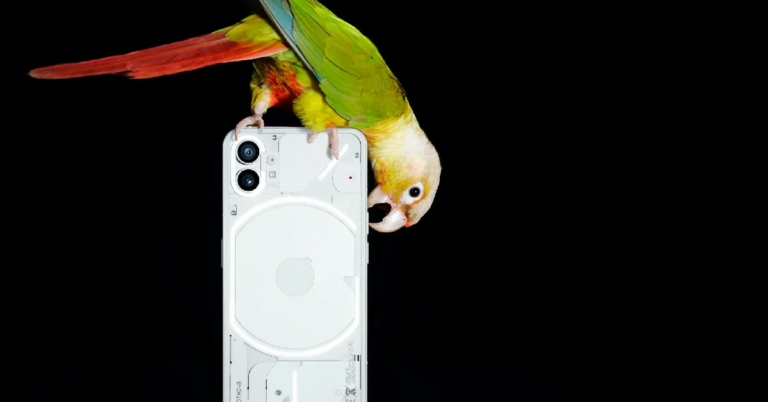
Nothing Phone (1): Specs and Launch Date The Nothing Phone (1) is set to globally launch today. The launch event will be live-streamed on YouTube at 8:30 pm IST. Users can sign up on the Nothing Phone website to get regular updates about the launch. What sets the Nothing Phone apart from its peers is the LED notification system powered by the company’s Glyph interface. The smooth LED channels running along the back panel of the smartphone light up on receiving a notification. The Nothing Phone is powered by the Qualcomm Snapdragon 778G+ SoC processor and comes with a 6.55-inch OLED screen. The smartphone gets a dual 50+16MP camera at the rear along with a 16MP front selfie camera.

Nothing Phone (1): Get your Pre-order Pass on Flipkart

Nothing Phone (1): Get your Pre-order Pass on Flipkart Earlier, users had to register to the Nothing Phone 1 website to receive an invite code, which could be redeemed for a Rs 2,000 pass on the Flipkart website. But now users can directly avail the pre-order pass from Flipkart at a price of Rs 2,000. There is no need for an invite code to avail the pass. Once you’ve purchased the pass, you can buy the phone starting July 12 at 9:00 pm IST till July 18 at 6:00 pm IST. The pass can be refunded for the full amount if you do not decide to buy the phone.  Read Also: Redmi K50i 5G India launch confirmed to take place on July 20 While the price of the Nothing Phone hasn’t been officially announced yet, reports suggest that it could cost anywhere between Rs 30,000-40,000. According to a previous leak on the Amazon Germany website, the 8GB RAM/128GB storage model costs €469.99 (approx. $491) and the 12Gb RAM/256GB storage model costs €549.99 (approx. $575). For the latest gadget and tech news, and gadget reviews, follow us on TwitterFacebook and Instagram. For newest tech & gadget videos subscribe to our YouTube Channel. You can also stay up to date using the Gadget Bridge Android App. You can find the latest car and bike news here.

You may now use any emoji in WhatsApp Reactions

In order to keep up with competitors like Telegram, WhatsApp had to catch up. Two months after it first started to trickle out, WhatsApp Reactions is receiving an update. Users can now use any emoji when reacting to a message. Earlier users were restricted to using just six reactions like, love, laugh, surprise, sad, and thanks. Mark Zuckerberg, CEO of Meta revealed the start of the deployment in an Instagram post. Mark Zuckerberg listed some of his favourite Reactions emojis in his post introducing the upgrade. His Instagram post includes robot face, french fries, 100% mark, fist bump, a guy surfing and sunglasses smiley. When you long-press a message and pick “+” from the emoji pop-up, you may choose any emoji to use as a reaction. emojis in WhatsApp Reactions It was recently learned that WhatsApp is getting ready to launch a function that would let users hide their online status. Yes, the upcoming greatest upgrade is reportedly masking your WhatsApp online status. With the help of this function, users could choose who on the app may see when they are online. After announcing that it is developing certain important features, such as the ability to edit text messages, WhatsApp is currently working on the option to hide the online status for a future update of the software. The instant messaging app is allegedly working on a feature that will let users hide their online status from specific contacts, according to a report made by WABetaInfo. The report includes a screenshot of the improved privacy setting functionality. The screenshot was taken using the iOS beta for WhatsApp. This snapshot shows how the new “Everyone” and “Same as Last Seen” choices in our last seen settings let us choose who can see when we are online. For example, choosing “My contacts” for “Last Seen” and “Same as Last Seen” for “online” denotes that those who aren’t on your contact list won’t be able to see when you’re online. When implemented, this feature will let users manage who can see their online status from within WhatsApp Privacy Settings, preventing online stalking. For the latest gadget and tech news, and gadget reviews, follow us on TwitterFacebook and Instagram. For newest tech & gadget videos subscribe to our YouTube Channel. You can also stay up to date using the Gadget Bridge Android App. You can find the latest car and bike news here.

13 Simple Ways to Fix Camera App Crashing or Not Working on Android mobile

Usually, the camera app works seamlessly on all Android devices. However, if you’ve got an old phone you may notice some issues with the camera from time to time. There may be a bunch of reasons why your camera app randomly crashes down or does not start at all. In this article, we bring you 13 simple ways how to fix the ‘Camera app crashing or not working’ issue on an Android smartphone. Read Also: How to reset your Android smartphone

Reboot your device

Restarting your phone can fix hidden glitches and bugs. It is an easy way of fixing minor issues that you’ve never faced before on your phone. In order to restart your phone, hard press the screen lock key and select ‘Restart’ from the power menu. Check the camera to see if it’s working. If it isn’t, proceed to the solutions listed below. Reboot your device

Check the permissions for the Camera app

It is possible you may have removed certain permissions for the camera app. The camera app on your phone requires certain permissions to function properly. This includes microphone access, files and media access, and phone access. In order to check all the permissions are granted, go to Settings>Apps>Camera>Permissions. Check the permissions for the Camera app

Force Stop Camera

Using ‘force stop’ terminates all activity of your camera app, be it active or background. When you open the camera app, it will boot again, thereby fixing any issues that may have been preventing it from working. In order to force stop go to Settings>Apps>Camera>Force Stop. Force Stop Camera

Enable Camera Access

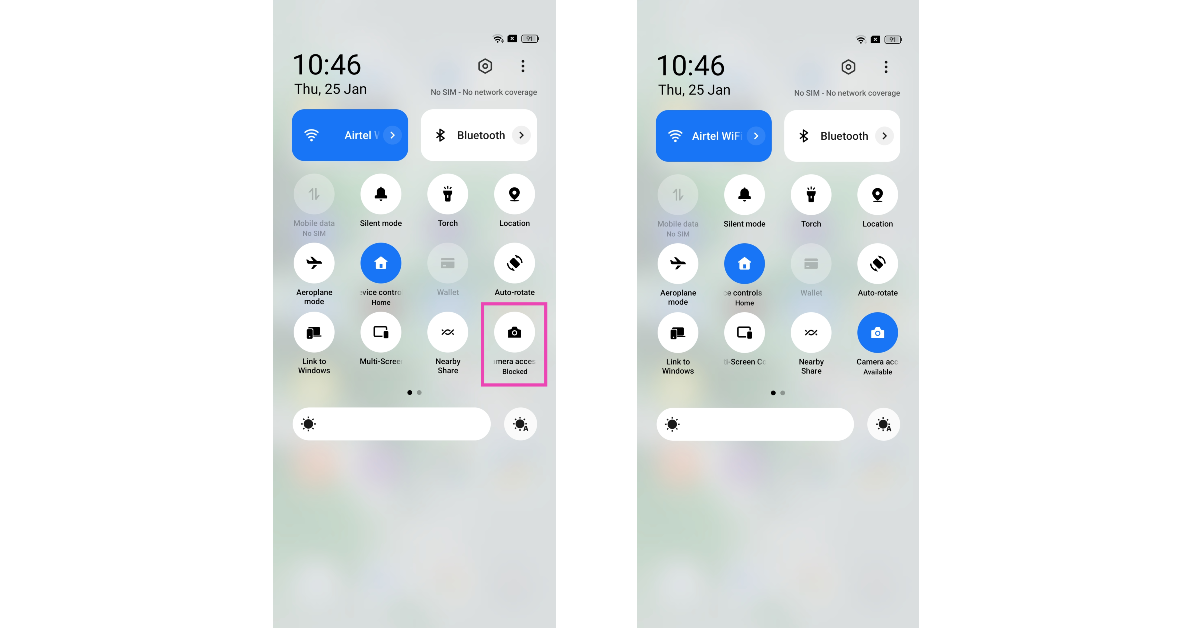
Enable Camera Access Some Android smartphones have the option to disable the camera access for every app directly from the Quick Settings Menu. This action is applied system-wide simply by tapping on a tile. Once you deny your smartphone access to the camera, even the native camera app will not work. In some cases, it can lead to the app crashing as soon as you try to launch it. Swipe down from the status bar and tap the Camera Access tile.

Clear Camera Cache and App Data

Clearing the camera cache will get rid of any temporary files that the app may be using to speed up its functioning. If the cache hasn’t been cleared in a while it can accumulate some corrupted files, leading to the camera app crashing randomly. In order to clear the cache and app data go to Settings>Apps>Camera>Storage>Clear cache/app data. Clear Camera Cache and App Data. why is my camera not working on android

Check if another app is using the Camera

Your phone camera doesn’t work for two applications at once. You may have noticed this while trying to use the camera in the middle of a video call on WhatsApp or Google Meet. If your camera is being used by another app, you won’t be able to use the main camera app on your phone. Turn off the app using the camera and try again.

Restart your phone in Safe Mode

how to Fix Galaxy S22 Screenshot Not Working Issue Restarting your phone in Safe Mode limits the activity of third-party apps on your smartphone and only runs the essential system apps on the device. If your camera doesn’t work in Safe Mode either, you can safely conclude that it isn’t because of any of the installed apps on your device. Your next step should be to check the camera hardware. To enter Safe Mode, press and hold the power button and volume down button. Once the power menu pops up on the screen, press and hold the power icon until the Safe Mode option shows up.

Check camera hardware

The problem with your phone’s camera may not be rooted in any software malfunctions. It is possible that there is some issue with the camera hardware. Luckily, your phone is well-equipped to perform a quick diagnostic check. Samsung users can use the dial code *#0*# to check the hardware of the front and rear cameras. To update camera firmware, dial *#34971539#.

Check for Software Updates

If there are any pending updates to your phone that you’ve been putting off, you may want to install them. Smartphone manufacturers often push patches for known issues with these updates, which may fix your camera app. To check for software updates go to Settings>Software Update. Check for Software Updates. why is my camera not working on android

Let your phone cool down

Overheating can cause your phone to suspend several important tasks. This may range from the LED flash not working to the camera app crashing altogether. Crashes due to internal temperature are more common when you’re using your phone under direct sunlight, which results in the device warming up. The best thing to do in this scenario is to put your phone down and wait until its temperature drops down to the optimum level.

Check your phone’s storage

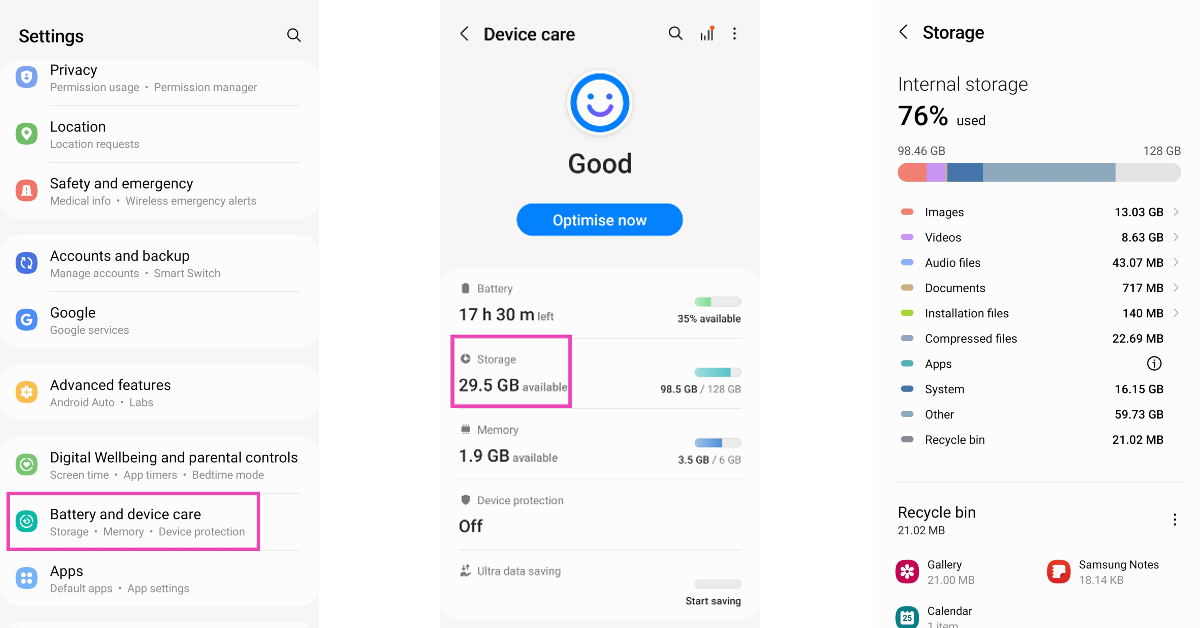
Check your phone's storage If the camera app on your phone crashes as soon as you take a picture, it is likely because your device is running out of storage. The camera app needs access to storage to store the pictures you take. If there is not enough storage available, the app will crash and you will lose the photograph. Go to Settings>Storage and clear some large files on your device to make space.
Use a third-party app

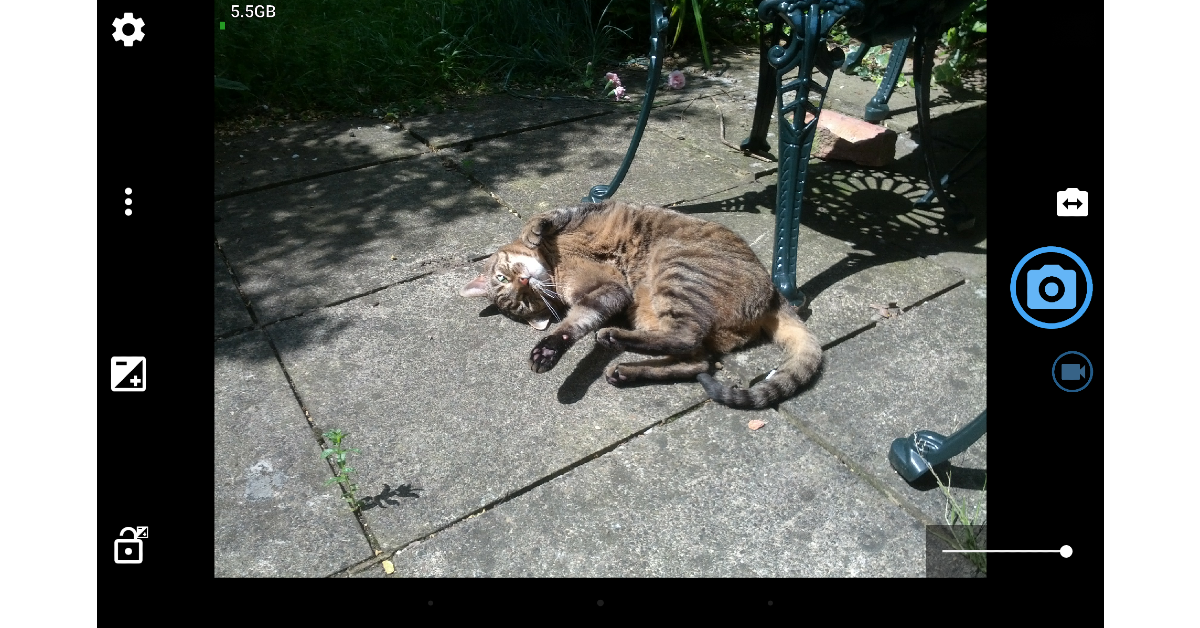
Use a third-party app If you can’t get the native camera app to behave properly, there are plenty of third-party apps you can replace it with. Apps like HD Camera, Open Camera, Pro CamX, and others can do everything the native camera app does and more. If these apps can’t get the camera to work, you are dealing with a hardware issue.

Perform Factory Reset

If none of the above techniques are able to fix your camera app, you may want to perform a factory reset. Performing a factory reset will clear all the data from your phone and reset the settings to default. This method is advised only when you’ve tried everything else. In order to perform a factory reset go to Settings>General Management>Reset>Factory Data Reset. Perform Factory Reset. why is my camera not working on android Read Also: Apps Not Updating on Android 11? Here’s How to Fix The Issue

Frequently Asked Questions

Why is my camera app not working on Android?

From overheating to software malfunction, there could be several reasons why your camera app isn’t working. To fix this issue, start by force-stopping the camera app from settings and restarting your device.

How can I reset my camera app on Android?

Resetting the camera settings will only restore any customisations to the default preferences. You can reset camera settings by going to camera settings and selecting ‘Reset Settings’.

Why has my back camera stopped working on my Android phone?

If your camera’s cache has not been cleared in a while, it could result in the camera app crashing from time to time. The back or front camera may also stop working if your phone crosses a certain temperature limit.

Conclusion

These are 13 easy fixes to the ‘Why is my camera not working on Android‘ issue. If you’ve tried all the above-mentioned fixes and the issue still persists, there may be a problem with the camera hardware. In this case, take your phone to the repair centre for further diagnosis.

Nothing Phone 1 launching globally today: Price, tech specs and how to watch the launch event?

Today will see the global introduction of the Nothing Phone 1. The London-based tech company’s first smartphone has already been drawing attention and gaining popularity due to its distinctive features and style. The Qualcomm Snapdragon 778G+ SoC will be the device’s power source. Additionally, a 6.55-inch OLED screen with a 120Hz refresh rate has been said to be included.

Nothing Phone 1 Livestream details

The introduction of the Nothing Phone 1 is scheduled for today. The company will be hosting the Return to Instinct launch event at 8.30 pm Indian Standard Time (IST), the event will be live webcast on the company’s official YouTube page. Else on the firm’s website, users can select to sign up to get updates about the launch. Additionally, the video featured below allows you to see the Phone 1 launch live.

Nothing Phone 1 price in India expected

The Phone 1 is expected to cost between Rs. 30,000 and Rs. 40,000 in India. It would be a mid-range model. The phone’s pricing was previously leaked through the Amazon Germany website. The smartphone was spotted listed on the e-commerce platform that comes with Ear 1 headphones. According to the website, an 8GB RAM with 128GB storage model costs €469.99 (about $491), while a 12GB RAM with 256GB storage variant costs €549.99 (about $575). In addition to this, a screenshot of the Amazon listing has also been shared. Nothing Phone (1) price leaked on Amazon ahead of launch

Nothing Phone 1 specifications

The Nothing Phone 1’s LED notification system, which is run by the company’s Glyph interface, is its most significant feature. When a user receives a notice alert or call, an LED set up on the smartphone’s back will light up. The upcoming smartphone is said to include a 6.55-inch OLED screen with a refresh rate of 120Hz. Gorilla glass is touted to safeguard the Phone 1’s front and rear panels. It has already been confirmed that the Qualcomm Snapdragon 778G+ SoC will power Phone 1. But recently the company also disclosed that a 50-megapixel dual back camera arrangement is apparently another feature of the smartphone. It could potentially come pre-installed with Android 12. Nothing in the recent past has suggested that the Phone 1 will include an integrated fingerprint reader. However, new information has emerged via a YouTube video that claimed the retail packaging was thin and was made from recycled bamboo. According to the video, the Phone 1’s frame will be entirely constructed of recycled aluminium. For the latest gadget and tech news, and gadget reviews, follow us on TwitterFacebook and Instagram. For newest tech & gadget videos subscribe to our YouTube Channel. You can also stay up to date using the Gadget Bridge Android App. You can find the latest car and bike news here.

iQoo 9 Review: Is this an excellent gaming smartphone for the money?

0
Hey readers, here is another review from us. This time, we have the iQoo 9, a brand-new gaming smartphone that was recently introduced in India. In the semi-flagship and premium mid-range segments, it competes with devices like the Oneplus 9RT and the Xiaomi 11T Pro. So, let’s get into it, this is our review of the new iQoo 9 smartphone.

iQoo 9 review: Design and Display

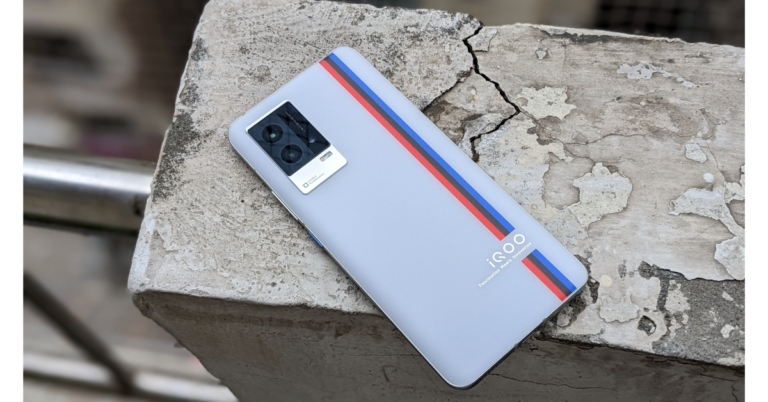
Consequently, we were able to obtain the iQoo 9 Motorsports edition, which features a relationship with BMW. We have the Legend model, which is adorned with a tricolour stripe that is intended to evoke the sensation of a racetrack or something similar. In addition, the iQoo 9 is also offered in a black alpha colour variant with a textured pattern. iQoo 9 review: Design and Display Having a premium glass laminated shell and metal framing, this phone exudes class. It has an IMT matte back throughout, and its soft-matte surface feels wonderful in the palm. The BMW tri-coloured stripe also adds a distinctive aesthetic flair and an iQoo branding. Additionally, the sides of the phone are curved for a more comfortable grip. Due to its evenly distributed weight, the device, even though it’s heavy,  doesn’t actually feel that hefty. We believe that for seamless ergonomics, the frames should have remained somewhat smooth on both sides. iQoo 9 review in India On the right side of the frame, all the buttons are conveniently located and offer excellent tactile feedback. Additionally, to add some extra character, the power button has a recognisable blue hue and a textured finish. Certification for an IP address is the only thing iQoo 9 is missing. But the SIM tray is shielded from moisture accumulation by a rubber gasket. The iQoo 9 boasts a stunning display in addition to a gorgeous design. With a refresh rate of 120Hz and a touch sampling rate of 300Hz, it sports a 6.56-inch full-HD+ 10-bit AMOLED display. The peak brightness is 1200 nits. All of this results in brilliant colours that maintain high contrast levels. The screen has an exceptional natural white balance, which produces natural colours and prevents colour shifts when viewed from the sides.  iQoo 9 review: Design and Display Under the worst circumstances, the screen becomes more than bright enough to remain visible. One can binge-watch OTT video with Widevine L1 certification and HDR playback capability. The phone can be unlocked quickly with the in-display fingerprint sensor, and you receive light haptic feedback while doing so. While the stereo speakers produce great music quality and can be rather loud. Although a more evenly distributed output from the top and bottom speaker units would have been preferable. You are looking at one of the best displays for the money when you factor in the 120Hz refresh rate. Although the lack of an LTPO 2.0 panel means that this screen can only switch between 60Hz and 120Hz, we feel that iQoo is being overly rigid with the adaptive refresh rate here. However, this is not the problem. Some of the most popular apps with the Smart Switch default to turning on the phone at 60Hz.

iQoo 9 Review: Performance and Camera

Let’s now discuss the performance aspect of the smartphone. The iQoo 9 has an octa-core Qualcomm Snapdragon 888+ SoC, up to 12GB of LPDDR5 RAM, and up to 256GB of UFS 3.1 storage capacity. iQoo boasts a sizable Vapor Chamber liquid cooling system for gaming, however even with that, the phone quickly becomes significantly warm and becomes uncomfortably hot when playing for extended periods of time.  We have been using this phone as our primary phone and it seems high-end, quick, and fast. Gaming is also enjoyable on this phone. In the few sessions we played, BGMI has excellent gameplay, maximum graphics, ultra HD, and ultra frame rates. Other than that, the gadget has a few other gameplay gimmicks in store. A pressure-sensitive button included in the iQoo 9’s display can be designated as a control in certain games. For an immersive gaming experience, there is also a dual X-axis linear motor. review of iQoo 9 We appreciate that the iQoo 9 includes the most recent Android 12 upgrade and will eventually receive Android 14 since the business has promised two significant Android updates and three years’ worth of security updates. FuntouchOS and all of its features are present, without a doubt, but the phone also comes with a lot of bloatware that is simple to remove. Aside from this, the UI and UX experience is generally good. The triple-back camera array has a 48-megapixel Sony IMX598 primary sensor and “Gimbal” technology. A 13-megapixel wide-angle or macro sensor and a 13-megapixel portrait sensor are also included. A 16-megapixel selfie camera sensor with an f/2.45 lens is also included for taking selfies and making video calls. iQoo 9 Review: Performance and Camera iQoo 9 Review: Performance and Camera In daytime images, iQoo 9 enhances the white levels, yet the colours look realistic and have a lot of detail. The same is true of ultrawide shots, which effectively capture highlights and shadows but lack fine detail. On the iQoo 9, portrait photos appear sharper and have better contrast and black levels. The phone’s Gimbal OIS feature technology ensured that photographs remained clear and brilliant at all times. Selfies also express a similar tale and look great doing it. The skin tone seems to be normal.
Portrait Image
iQoo 9 Review: Performance and Camera We also enjoyed the iQoo 9’s regular nighttime photographs because it is able to allow in more light, which results in a decent dynamic range at the expense of a little less contrast. iQoo 9 Review: Performance and Camera iQoo 9 review in India In terms of videography, the iQoo 9 is capable of shooting at up to 4K@60fps. In our limited time with the device so far, we haven’t had a chance to shoot many videos, but the sample footage shows that it has good video stabilisation. However, in resolutions like 4K@30fps and 1080p@60fps, it drastically crops the frame. It is frustrating that the front camera can only record videos in 1080p and does not support 4K at this price point. With regards to the battery life, the iQoo 9 sports a 4,350mAh battery that includes a 120W fast charge. The charging speed is quite quick; it charges the phone from zero to fifty percent in around five minutes and from zero to full in twenty.

Verdict

Considering the device’s specifications and characteristics, we can conclude that it directly competes with the OnePlus 9RT. Its specs complement the 9RT perfectly. Therefore, it is a mid-range phone that is fairly fascinating and aimed at both mobile gamers and photography fans.  The variant launched in China is completely different from the one in India. So, as opposed to the Snapdragon 888+ in the Indian edition, the Chinese iQoo 9 has the most recent Snapdragon 8 Gen 1. In addition, both phones have different screens, cameras, and designs, among other things. The fact that it ships with Android 12 out of the box and can be upgraded to Android 14 and that the manufacturer has included a 120W fast charger inside the box helps it create a positive impression on us overall. If you are looking for a good gaming smartphone in the mid-segment you can definitely take a look at this one.  iQoo 9 Pros Beautiful display with 120Hz refresh rate support good video stabilization IP52 rating great for gaming Fast charging iQoo 9 Cons Heats up really fast Weak audio quality For the latest gadget and tech news, and gadget reviews, follow us on TwitterFacebook and Instagram. For newest tech & gadget videos subscribe to our YouTube Channel. You can also stay up to date using the Gadget Bridge Android App. You can find the latest car and bike news here

How to Blur Your Background in Google Meet 2022? 2 Easy Ways

0
If you don’t want the call participants in a meeting to see the rest of your surroundings, Google Meet allows you to blur your background. You can blur your call background while you’re in a call or even before you join it. Blurring the background can come in quite handy when you’re outside and there’s a lot of activity in your background. You can even blur your background if you want to get on an urgent call and don’t have the time to tidy up your room. Today, we show you how to blur your background in Google Meet. Read Also: How To Mute Or Unmute WhatsApp Desktop App?

Blur your background in Google Meet using PC

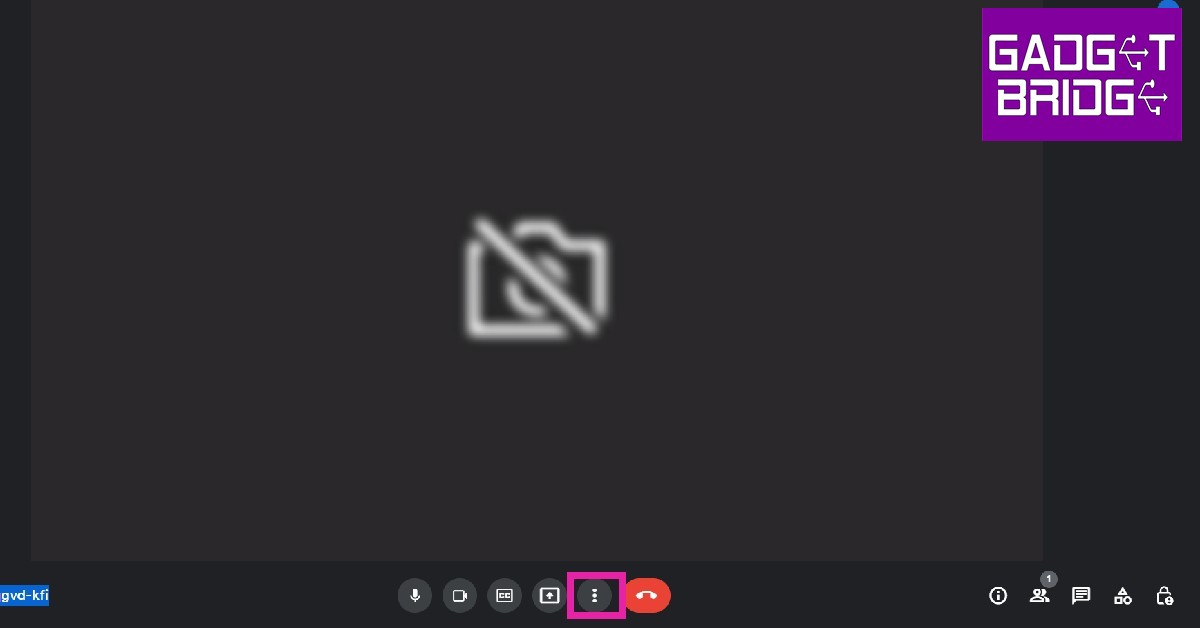
Step 1: Click on the three dots at the bottom menu on your screen. Step 1: Click on the three dots at the bottom menu on your screen. Step 2: Select ‘Apply visual effects’. Step 2: Select ‘Apply visual effects’. Step 3: Select slight blur or total blur from the menu on the right. Step 3: Select slight blur or total blur from the menu on the right. how to blur background in google meet Your background will be blurred.

Blur your background in Google Meet using your smartphone

Step 1: Open the Google Meet app on your phone and enter the meeting code. Step 2: Click on the ‘Effects’ icon on the preview screen. Step 2: Click on the ‘Effects’ icon on the preview screen. how to blur background in google meet Step 3: Select slight blur or total blur from the options that follow. Step 3: Select slight blur or total blur from the options that follow. how to blur background in google meet Your background will be blurred. Read Also: Xiaomi Smart Standing Fan 2 launched in India These were the 2 easy ways to blur your background on Google Meet. Instead of blurring, you can also choose from a bunch of pre-made backgrounds for your meeting. While a blur may seem distracting, a background is more aesthetically pleasing and does a great job of concealing your actual surroundings. For the latest gadget and tech news, and gadget reviews, follow us on TwitterFacebook and Instagram. For newest tech & gadget videos subscribe to our YouTube Channel. You can also stay up to date using the Gadget Bridge Android App. You can find the latest car and bike news here.

Amazon Quiz Answers Today 12 July 2022: Participate to win Rs 5,000

0
12 July 2022 Amazon Quiz has gone live on its platform. The quiz timings are 12 AM to 11:59 PM. Interested users can participate in the Amazon daily quiz to win exciting prizes. The company puts up 5 questions based on general awareness. You can submit the correct answers from the four options. Today the participants have the chance to win a Rs 5,000 Amazon Pay Balance. Daily the e-commerce platform Amazon brings a new set of questionnaires that includes five easy questions. The Amazon Quiz can be played from 12 AM to 11:59. The users have to answer all the questions correctly to enter into a lucky draw. The result of today’s quiz will be announced at the end of the month and only one person is declared a winner. We at Gadget Bridge update all the answers to the Amazon Quiz on our website for the convenience of our readers. Here are the answers of the 12 July 2022 Amazon Quiz that will make you win Rs 5,000 Amazon Pay Balance. Amazon Quiz Today Prize – Rs 5,000 Amazon Pay Balance Quiz Date –12 July 2022 Daily Timing – 12 AM to 11:59 PM Winner Announcement – Today 12 PM

Amazon Quiz Answers Today12 July 2022

Question 1: The Simorgh is a two-stage, liquid fueled space launch vehicle developed by which country? Answer: Iran Question 2: Which is the “first festival in Asia” to be added to the ‘Representative List of Intangible Cultural Heritage of Humanity’ by UNESCO? Answer: Durga Puja Question 3: The Minsk Protocol is an agreement which sought to end war in which country? Answer: Ukraine Question 4: In which country is the tree of this fruit the national tree? Answer: Bangladesh Question 5: Which University of India has this animal in its symbol? Answer: Delhi University

How To Play Amazon Quiz

Only app users are eligible to play the Amazon quiz every morning from 12 AM to 11:59 PM. The quiz is not available on the desktop. For those who are unaware of how to play the Amazon quiz below are the steps, you can follow to take the quiz.
  • Firstly download the Amazon app from Google Play Store or App Store
  • Now fill in the required information through the Sign Up option.
  • You need to log in to the Amazon app and scroll down on the home screen to find the Amazon Quiz banner.
  • Tap on the Amazon Quiz banner and tap on the Start button to start the Quiz.
  • Now you will get 5 questions and you need to answer them correctly. One wrong answer will eliminate you from the Quiz.
  • After answering all the questions correctly you are now eligible for a Lucky Draw.
  • The winner’s name will be announced today at 12 PM.
For the latest gadget and tech news, and gadget reviews, follow us on TwitterFacebook and Instagram. For newest tech & gadget videos subscribe to our YouTube Channel. You can also stay up to date using the Gadget Bridge Android App. You can find the latest car and bike news here.

Xiaomi Smart Standing Fan 2 launched in India

0
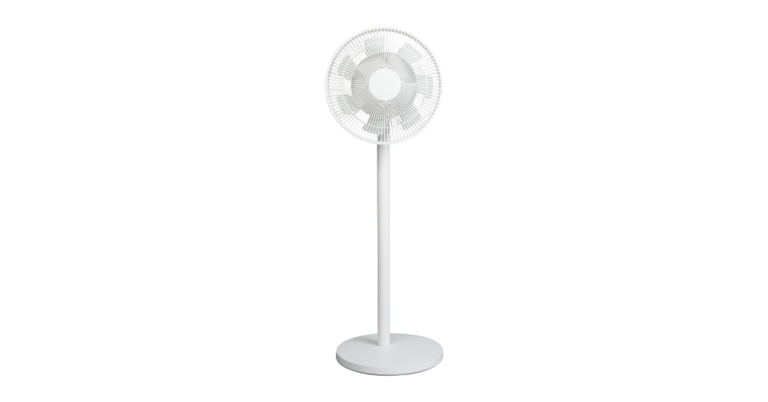
Today, Xiaomi India announced the availability of the Xiaomi Standing Fan 2. With its 7+5 wing-shaped blades, 100-speed settings, and voice control capabilities, the smart fan offers customers all-around cooling from a natural wind.

Xiaomi Standing Fan 2 specifications

In order to improve the microclimate of the home, Xiaomi India unveiled a new product. The seven and five wing-shaped blades revolve at the same time, enhancing airflow for more potent cooling. Customers can use the Mi Home App to control the fan speed between 1 and 100 to get the desired airflow. Customers may adjust the fan speed and choose between the direct blow and natural breeze using Alexa and Google Assistant instructions, adding to its high-performance characteristics. Xiaomi Standing Fan 2 price in India Dual fan blades and a Silent BLDC Copper-Wire Motor are features of the Xiaomi Smart Standing Fan 2 that have been designed to produce a softer natural breeze. The smart fan can chill the room for the entire family at a maximum range of 14 metres, with an ultra-wide angle, 140-degree horizontal and 39-degree vertical rotation. The 3-kilogramme smart fan has a 6-step, simple installation process, adjustable height, and a simple design that fits in any space. The product can be used as a standing or table fan depending on the user’s needs thanks to the adaptable stand.

Xiaomi Standing Fan 2 price in India

The cost of the Xiaomi Smart Standing Fan 2 in India is Rs 6,999. From July 11 to July 18, customers can get a preorder discount of INR 1,000 just on mi.com, bringing the final price down to Rs 5,999. Xiaomi Standing Fan 2 price in India Separately, Xiaomi showcased CyberDog, a quadruped robot with a bio-inspired design, taking a giant step towards the future of technology. The four-legged robot is powered by the Jetson Xavier NX AI Supercomputer for Embedded Edge Systems from Nvidia and 128GB of SSD storage. The CyberDog is swift and does well in challenging terrain. Since it includes 11 high-precision sensors that can provide speedy input to control its motions, it is the perfect companion for assisted living. For the latest gadget and tech news, and gadget reviews, follow us on TwitterFacebook and Instagram. For newest tech & gadget videos subscribe to our YouTube Channel. You can also stay up to date using the Gadget Bridge Android App. You can find the latest car and bike news here.