Top 10 Apps to Download and Use First on Nothing Phone 1

After much anticipation, Nothing Phone 1 finally launched last night at a starting price of Rs 32,999. If you’re one of the lucky ones with an invite that got to buy it, you probably can’t wait to dive into the phone. If you’re wondering how you can get the most out of your Nothing Phone, here are the top 10 apps you can download and use first on your Nothing Phone 1. Read Also: Nothing Phone (1) with Glyph interface launched in India: Specifications, price in India

WhatsApp

WhatsApp If there’s one quintessential app that you need to stay connected with family and friends, it’s WhatsApp. Used by over 2 billion people, WhatsApp lets you send texts and media for free. With end-to-end encryption, your personal chats and calls are fully secured with no third party, not even WhatsApp, getting access to them.

IFTTT

IFTTT IFTTT is an automation and workflow app, using which you can streamline and automate your everyday tasks. IFTTT offers smart home integration, allowing you to connect your smart devices directly to the app. One of the neat features IFTTT offers is automatically turning on your house lights as you approach your home. You can also integrate your social media to IFTTT and post on multiple platforms at once.

Spotify

Spotify With over millions of songs and artists in its library, Spotify is the perfect app to stream music. While streaming music on Spotify is free, you can subscribe to the premium membership to get rid of ads and unlock premium features.

GeoGuessr

GeoGuessr GeoGuessr is a super fun game to play on your Android device. On starting the game, you’re given a location from Google Street View and you have to guess where you are using the visual cues and landmarks.

Sleep Cycle

Sleep Cycle Sleep Cycle tracks your sleeping pattern and gives you a detailed analysis of your sleep cycle when you wake up. The most interesting feature of Sleep Cycle is its smart alarm clock that wakes you up slowly over a period of time, so you wake up feeling like you woke up naturally and not like you got abruptly woken up.

Duolingo

Duolingo If you’ve ever thought of learning another language, Duolingo is just the app for you. With short lessons and interactive games, Duolingo makes learning a new language incredibly fun. Duolingo also quizzes you regularly, so you can keep a record of your progress.

Sky Map

Sky Map. nothing phone 1 apps If you’re interested in studying the night sky and want to chart the constellations, Sky Map is the app you’re looking for. You can use it to identify stars, planets, and nebulae. All you need to do is point your phone to the sky and let Sky Map guide you across the night sky. Sky Map is one of the best apps you can use on your Nothing Phone 1.

Audible

Audible. nothing phone 1 apps Audible is an app owned by Amazon where you can listen to thousands of audiobooks. With over 200,000 titles, you are bound to find the book you’re searching for on Audible. Audible offers a 30-day free trial, after which you have to pay a monthly subscription to listen to audiobooks.

MyFitnessPal

MyFitnessPal. nothing phone 1 apps If you’re health-conscious and like to keep a track of your calories, MyFitnessPal is the best calorie counter you can download on your phone. All you need to do is log the entry of your meals and MyFitnessPal will calculate the number of calories you consumed. You can also enter the number of calories manually. On top of that MyFitnessPal breaks down your meals by nutrient intake, and also charts your progress through a period of time.

Stitcher

Stitcher. nothing phone 1 apps Stitcher is a podcast with thousands of free podcasts in its library. Its interactive and easy-to-use interface and media player makes it very simple to navigate and play podcasts. You can add podcasts you like to your library and it’ll automatically update and notify you whenever a new episode gets released. Read Also: Syska SW300 Polar Smartwatch with dual Bluetooth compatibility launched in India These are the best apps you can use on Nothing Phone 1. Most of the apps on this list are free to install and use, but some may require you to subscribe to their service. If there are any other apps you love to use, let us know in the comments! For the latest gadget and tech news, and gadget reviews, follow us on TwitterFacebook and Instagram. For newest tech & gadget videos subscribe to our YouTube Channel. You can also stay up to date using the Gadget Bridge Android App. You can find the latest car and bike news here.
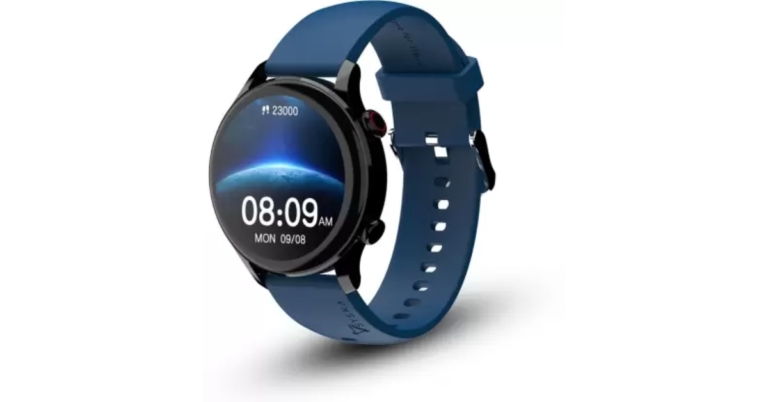
boAt Storm Pro smartwatch with Always on HD AMOLED display launched in India

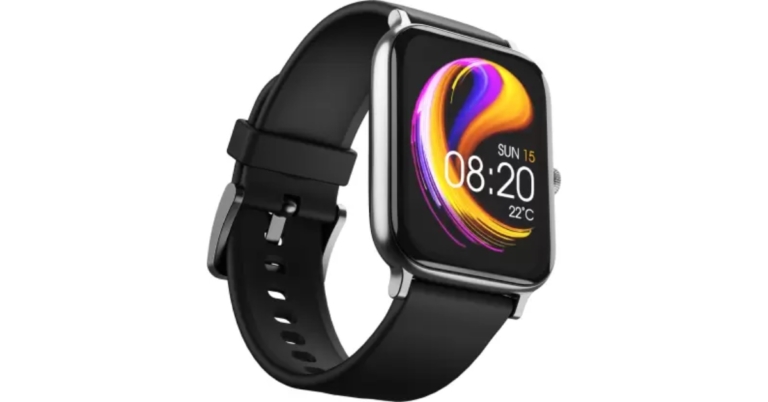
boAt Storm Pro smartwatch has been released by the company. With over 700 fitness modes, this professional wristwatch features a brilliant AMOLED Display with a 60Hz refresh rate. Moreover, the fitness tracker comes with a 24-Hour Heart Rate Sensor, SPO2 Monitor, Sleep Tracker and Step-counter. The Watch is IP68 dust, water, and sweat-resistant.

boAt Storm Pro smartwatch price in India

boAt Storm Pro smartwatch will be offered for Rs 2,999 as an introductory price. The device will be available in three colour options of Active Black, Cool Grey, and Deep Blue. The smartwatch is available for purchase via Flipkart and the company’s official website in the country. boAt Storm Pro smartwatch price in India

boAt Storm Pro smartwatch specifications

The square dial display on the boAt Storm Pro features a 1.78-inch AMOLED screen that is bright and vibrant and has a 60Hz refresh rate for a responsive and fluid touch experience. The screen offers a 325ppi pixel density and 70 percent screen-to-body ratio, there are very few bezels. The brand-new boAt Storm Pro display now includes an Always on Display to provide consumers with constant updates. boAt Storm Pro has a high-end metal finish that really sets it apart. The watch has a skin-friendly silicone band that is ideal for prolonged use, and its IP68 dust, water, and sweat resistance rating ensures durability. The boAt Watch Storm Pro has more than 700 active fitness modes, including dance, cricket, ballet, running, boxing, and many more strength and cardiovascular activities. It is also possible to track low- and moderate-intensity activities like cooking, skateboarding, meditating, playing musical instruments, and gardening, among others. The 24-Hour Heart Rate Sensor, SPO2 Monitor, Sleep Tracker, and Step-Counter are built-in track activities throughout the day and continuously check fitness levels. Users can also access breathing, guided meditation mode, and sedentary reminders. To track and map health data, the watch wirelessly connects to any smartphone using the boAt Crest App. Through Fitness Buddies, users can compete with their friends and family in addition to tracking their fitness regimen. This function is further improved by the Gamification Mode, which offers prizes to users who successfully complete various fitness tasks. Users can monitor their loved ones’ vital signs with the help of wellness team guards. Other than these. Additionally, boAt Storm Pro includes more than 100 watch faces, Calls, Texts, and Notifications, Curated Controls, Menstrual Cycle Alerts, Weather updates, and Live Cricket Scores. On a single charge, the smartwatch can operate for up to 10 days and for up to 2 days with Always on Display. Storm Pro includes boAt ASAP Charge, which can charge the smartwatch to 100% in just 30 minutes, helping to further eliminate charging issues. For the latest gadget and tech news, and gadget reviews, follow us on TwitterFacebook and Instagram. For newest tech & gadget videos subscribe to our YouTube Channel. You can also stay up to date using the Gadget Bridge Android App. You can find the latest car and bike news here.

Garena Free Fire Redeem Codes Today 13 July 2022: Here is how to claim them

Garena Free Fire is a battle royale game with regular awards and tournaments to keep players interested. If you play Garena Free Fire, you should be aware of the redeem codes that are released on a daily basis. However, because the battle royale game is banned in India, players from other countries can use the Free Fire Redeem codes daily. If you’re unfamiliar with the Garena Free Fire redeem codes or don’t know how to get them, we’ve put together a step-by-step guide to help you redeem them. Check out Garena Free Fire Redeem Codes for July 13. The Free Fire redeem codes are a great way to get free stuff. These are 12-digit codes that contain alphabets and numbers, as well as an expiration date and time. Because the Garena FF redeem codes cannot be used more than once, you should hurry to the redemption page to claim your free reward before someone else does. To get a free reward, all you have to do is go to reward.ff.garena.com/en, which is the official redemption page. Also, keep an eye on this space for daily updates on Garena Free Fire redemption codes and rewards.

Garena Free Fire Redeem Codes Today 13 July 2022

  • B6IYCTNH4PV3
  • ZRJAPH294KV5
  • FF11HHGCGK3B
  • FF11NJN5YS3E
  • Y6ACLK7KUD1N
  • FF10GCGXRNHY
  • WLSGJXS5KFYR
  • ZZATXB24QES8
  • FFIC33NTEUKA
  • VNY3MQWNKEGU
  • MCPTFNXZF4TA
  • YXY3EGTLHGJX
  • FF119MB3PFA5
  • FF10617KGUF9
  • FF11DAKX4WHV
  • 8F3QZKNYLEBZ
  • FF11WFNPP956
  • U8S47JGJH5MG
  • FF1164XNJZ2V
  • WOJJAFV3TU5E

How to Get Free Fire Redeem Codes for Garena on July 13?

  • Visit the Garena Free Fire game’s official website at reward.ff.garena.com.
  • Use your Facebook, Google, VK, Apple ID, Huawei ID, or Twitter account to log in.
  • You’ll be taken to a valid redemption code (s)
  • Copy and paste the 12-digit redemption code into the text box.
  • On the screen, a dialogue box will appear.
  • ‘Ok’ should be selected.
For the latest gadget and tech news, and gadget reviews, follow us on TwitterFacebook and Instagram. For newest tech & gadget videos subscribe to our YouTube Channel. You can also stay up to date using the Gadget Bridge Android App. You can find the latest car and bike news here.

How to Blur Your Background in Zoom Meeting 2022? 2 Simple Ways

0
Blurring your background during a Zoom call is a handy feature when you’re taking meetings at a public location, or when you don’t want the participants to see your background. It is also very convenient to use when you’re walking around while using a phone to make a Zoom call, and don’t want the constantly changing background to be a distraction. Today, we’ll show you how to blur your background in a Zoom meeting. Read Also: How to Blur Your Background in Google Meet 2022? 2 Easy Ways

How to blur your Zoom background before you join a meeting

Step 1: Launch Zoom on your desktop. Step 2: Click on the Settings icon at the top right corner of the screen. Step 2: Click on the Settings icon at the top right corner of the screen. Step 3: Select ‘Backgrounds and Effects’. Step 3: Select ‘Backgrounds and Effects’. Step 4: Select ‘Blur’. Step 4: Select ‘Blur’. Your background will be blurred instantly.

How to blur your Zoom background during a call

Step 1: Click on the upwards arrow next to the ‘Stop Video’ icon at the bottom menu. Step 2: Click on ‘Choose Virtual Background’. Step 2: Click on ‘Choose Virtual Background’. how to blur background on zoom Step 3: Select ‘Blur’. Step 3: Select ‘Blur’. how to blur background on zoom Your background will be blurred instantly.  Read Also: How to blur your background in Microsoft Teams video chat? Bonus Tip: How to blur your Zoom background on your smartphone Step 1: Download and install Zoom to your phone. Step 2: Once you’ve joined a meeting, select the ‘More’ option from the menu at the bottom. Step 2: Once you’ve joined a meeting, select the ‘More’ option from the menu at the bottom. how to blur background on zoom Step 3: Select ‘Backgrounds and Filters’. Step 4: Select ‘Blur’. Step 4: Select ‘Blur’. how to blur background on zoom Your background will be blurred instantly. Using these simple methods you will be able to blur your background on a Zoom call with ease. Zoom also offers various templates to use as your background during a call. These templates do a good job of concealing your background without being as dull as a regular blur effect. For the latest gadget and tech news, and gadget reviews, follow us on TwitterFacebook and Instagram. For newest tech & gadget videos subscribe to our YouTube Channel. You can also stay up to date using the Gadget Bridge Android App. You can find the latest car and bike news here.

Syska SW300 Polar Smartwatch with dual Bluetooth compatibility launched in India

Syska Group has announced the launch of its latest smartwatch Syska SW300 Polar in India. The fitness tracker comes with 37 different sports modes including jogging, cycling, trekking, climbing, and more. According to the manufacturer, users can instantly attach their TWS headphones to the watch and store and play up to 100 songs. Moreover, the device has dual Bluetooth compatibility.

Syska SW300 Polar price in India

The Syska SW300 Polar smartwatch is available for purchase on the company’s official website for Rs 3,299. It may also be purchased for Rs 3,499 via the online retailer Flipkart. The device will be available in four colour options of Black, Blue, Green, or Grey. Syska SW300 Polar price in India

Syska SW300 Polar specifications

The 1.32-inch Ultraview IPS Display on the Syska SW300 Polar smartwatch has a 360×360 pixel resolution and 500 nits of brightness. The watch has 7 sports modes, including running, cycling, hiking, climbing, and more. These modes connect to GPS so you can correctly track your favourite sport while staying active and in shape. The Syska SW300 Polar wristwatch has several fitness-related features, including a heart rate monitor, a female health tracker, a blood oxygen level sensor, a sleep monitor, a stress monitor, a step counter, and more. The smartwatch includes both a TWS connection option and Bluetooth calling functionality. The smartwatch sports features include 200+ interchangeable cloud watch faces, water-drinking reminders, step and calorie counters, and a crown key to smoothly scroll the watch display. According to the manufacturer, Bluetooth v5.0 is used for reminders, camera control, and music. The IP67 waterproof watch has a battery life of ten days without BT calling and three days with BT calling, depending on usage. The smartwatch also has built-in offline music storage, message alerts, weather updates, hand sanitization reminders, anti-lost reminders, find phone, stopwatch, and a few other features. For the latest gadget and tech news, and gadget reviews, follow us on TwitterFacebook and Instagram. For newest tech & gadget videos subscribe to our YouTube Channel. You can also stay up to date using the Gadget Bridge Android App. You can find the latest car and bike news here.

Amazon Quiz Answers Today 13 July 2022: Participate to win Rs 30,000

The popular Amazon Quiz is now live on the Amazon app. The 13 July 2022 Amazon Quiz gives a chance to win Rs 30,000 Amazon Pay Balance by answering all the questions correctly. The quiz can be played every day from 12 AM to 11:59. Only app users are eligible to participate in the Quiz as it is not accessible on the web platform. The Amazon Quiz brings a fresh set of questions for its customers that contains five easy questions. The questionnaire consists of five questions related to general knowledge and current affairs. The participants need to answer all the questions correctly and their names will be selected for a lucky draw. The daily quiz brings an opportunity for the customers to win exciting prizes. They can win Amazon Pay Balance ranging from Rs 1,000 to Rs 50,000. The participants need to answer all the questions correctly and their names will be selected for a lucky draw. The winner will be announced at the end of the month. Check Out 13 July 2022 Amazon Quiz Answers. Amazon Quiz Today Prize – Rs 30,000 Amazon Pay Balance Quiz Date – 13 July 2022 Daily Timing – 12 AM to 11:59 PM Winner Announcement – Today 12 PM

Amazon Quiz Answers Today 13 July 2022

Question 1: Who is the first Black woman to appear on the US quarter? Answer: Maya Angelou Question 2: Joumou soup is a traditional pumpkin soup from which country that recently got the UNESCO cultural heritage status? Answer: Haiti Question 3: Yutu-2 is the robotic lunar rover of which country’s mission to the Moon? Answer: China Question 4: A species of which fish, referred to earlier as ‘trash fish’ is named after this animal? Answer: Alligator Gar Question 5: This visual shows which city? Answer: Varanasi

How To Play Amazon Quiz

Only app users are eligible to play the Amazon quiz every morning from 12 AM to 11:59 PM. The quiz is not available on the desktop. For those who are unaware of how to play the Amazon quiz below are the steps, you can follow to take the quiz.
  • Firstly download the Amazon app from Google Play Store or App Store
  • Now fill in the required information through the Sign Up option.
  • You need to log in to the Amazon app and scroll down on the home screen to find the Amazon Quiz banner.
  • Tap on the Amazon Quiz banner and tap on the Start button to start the Quiz.
  • Now you will get 5 questions and you need to answer them correctly. One wrong answer will eliminate you from the Quiz.
  • After answering all the questions correctly you are now eligible for a Lucky Draw.
  • The winner’s name will be announced today at 12 PM.
For the latest gadget and tech news, and gadget reviews, follow us on TwitterFacebook and Instagram. For newest tech & gadget videos subscribe to our YouTube Channel. You can also stay up to date using the Gadget Bridge Android App. You can find the latest car and bike news here.

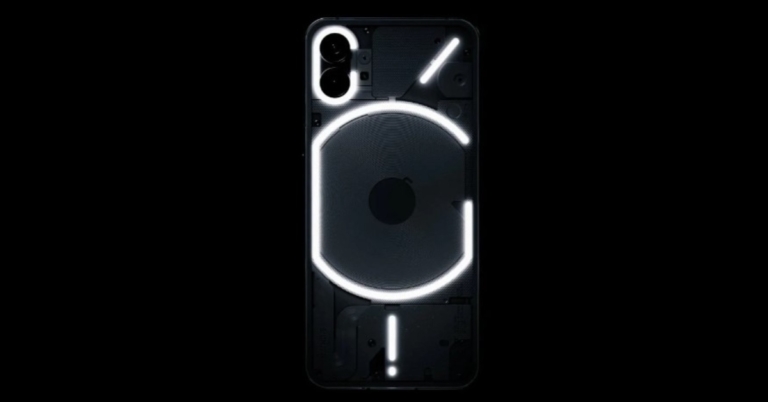
Nothing Phone (1) with Glyph interface launched in India: Specifications, price in India

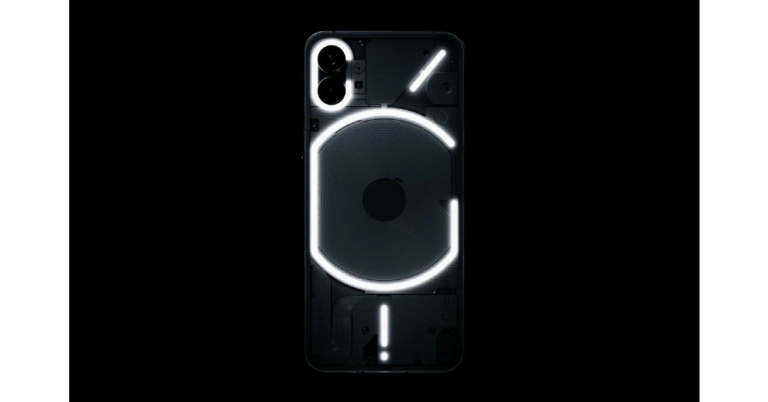
The Nothing Phone 1 is finally here. In India and globally, it has indeed been formally introduced. The company has released multiple sneak glimpses at its newest technology in the lead-up to the launch, and these have generated a lot of talk in the industry. The Snapdragon 778G SOC from Qualcomm powers the phone. It stands out for having a dual 50MP rear camera configuration and a 120Hz AMOLED display. The LED notification system of the Nothing Phone 1, which is controlled by the company’s Glyph interface, is its most notable feature. An LED installed on the smartphone’s back will turn on when the user receives a call or notice alert.

Nothing Phone 1 Price in India and availability

Nothing Phone 1 has been launched in India in three variants; the 8GB RAM/128GB storage option is priced at Rs 32,999 but will cost you Rs 31,999 as an introductory offer. Whereas the 8GB RAM/256GB and 12GB RAM/256GB is made available at Rs 35,999 and Rs 38,999 respectively. Both configurations will be offered at an introductory price of Rs 34,999 and Rs 37,999. The Rs 1,000 discount is only available for customers who have preordered the device. Nothing Phone 1 Price in India and availability Pre-order customers who use HDFC bank cards to buy the Nothing Phone (1) will immediately receive a Rs 2,000 discount. The smartphone will come in two colour options of Black and White. The handset will be available for purchase via Flipkart in the country starting July 21 at 7 PM onwards. A Nothing Power 45W charger costs Rs 2,500 for end-users, and Rs 1,500 for pre-order consumers. The Nothing Ear (1) will cost Rs 6,999, with pre-order customers paying Rs 5,999.

Nothing Phone 1 specifications

There is a 6.55-inch 10-bit OLED display on the Nothing Phone 1 featuring 2400×1080 pixels of resolution. The screen boasts HDR10+, 402PPI, and a maximum brightness of 1200 nits. The chin, which is typically thicker, has equal-sized bezels on the Nothing phone (1)’s four sides. Pei claims that this is made possible by the phone’s flexible OLED panel, a technology found only in a few high-end flagship models. The Nothing phone (1) is primarily constructed of recycled materials, but Pei points out that the aluminium frame is layered between layers of Gorilla Glass 5, so when you handle the phone, you can’t feel any plastic. Nothing Phone 1 Price in India and availability Nothing OS, which is based on Android 12, comes preinstalled on the Nothing Phone (1). For the Nothing Phone, Nothing guarantees three years of Android upgrades and four years of security patches every two months (1). The phone (1) also has a few small, nearly stock Android modifications, like a quick setting toggle specifically for the Nothing ear (1), which Pei claims will appear on handsets from other companies as well. Tesla is one of these manufacturers, and phone (1) enables you to control several features of your Tesla vehicle remotely. Under the hood, there is a Snapdragon 778G CPU that has been fine-tuned by Qualcomm for the product. The original chipset lacks wireless charging support but here it brings the compatibility for 33W wired charging, 15W wireless charging, and 5W reverse wireless charging. While an Adreno 642L GPU handles graphic requirements. Additionally, it has 256GB of UFS 3.1 storage and up to 12GB of LPDDR5 RAM. Two cameras are located on the back of the phone (1) that includes a 50MP primary Sony IMX766 sensor (ƒ/1.88) with OIS and EIS as well as a second 50MP Samsung JN1 ultrawide sensor (ƒ/2.2) with 140 degrees of FoV. A red LED on the phone’s rear illuminates to indicate when video recording is active. The device can record videos up to 4K video. For selfies and video calls, the front camera’s 16MP Sony IMX471 sensor has a ƒ/2.45 aperture. The phone has a 4,500mAh battery that supports both 15W Qi wireless charging and 33W rapid charging. According to the manufacturer, the rapid charger can recharge the Phone completely in just about an hour. Moreover, the device IP53 is rated for dust and water resistance. It comes with an in-display fingerprint reader, facial recognition and dual stereo speakers. For the latest gadget and tech news, and gadget reviews, follow us on TwitterFacebook and Instagram. For newest tech & gadget videos subscribe to our YouTube Channel. You can also stay up to date using the Gadget Bridge Android App. You can find the latest car and bike news here.

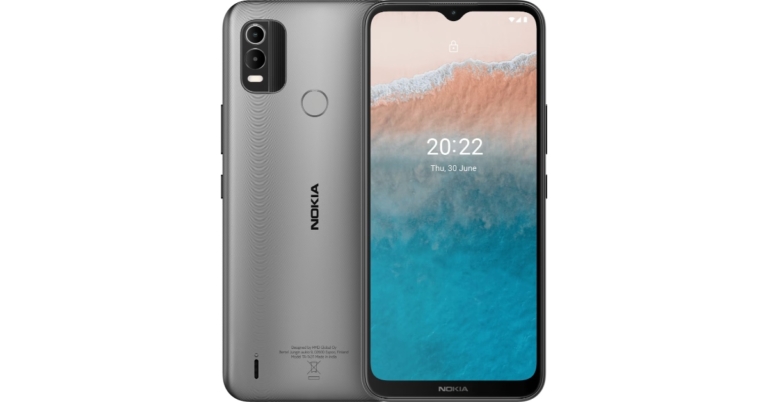
Nokia C21 Plus smartphone under 10K launched in India

HMD Global has today announced the launch of Nokia C21 Plus smartphone in the Indian market. The new budget offering is priced under 10K. It features an HD+ display and a dual rear camera set-up. The smartphone is powered by a 5,050mAh battery. The phone runs on Android 11 Go Edition and is promised to get quarterly security updates for two years.

Nokia C21 Plus price in India and availability

Nokia C21 Plus will be available in two variants. The 3GB RAM with 32GB storage option will cost Rs 10,299 while the 4GB RAM with 64GB storage option will be available with a price tag of Rs 11,299. The phone will come in two colour options of Warm Grey and Dark Cyan. The device can be ordered via the official Nokia website and will be accessible through traditional retail outlets and online retailers in India. For the launch offers Nokia Wired Buds are presently free with this smartphone. Nokia C21 Plus price in India and availability

Nokia C21 Plus specifications

The 6.5-inch HD+ display of the Nokia C21 Plus has a 20:9 aspect ratio. The business has pledged two years of continuous security upgrades for the Android 11 Go Edition-powered smartphone. It is powered by an octa-core Unisoc SC9863A SoC with up to 4GB of RAM and 64GB of internal storage that can be further expanded up to 256GB using a microSD card. For the photos and videos, there is a dual rear camera set up which consists of a 13-megapixel main camera and a 2-megapixel depth sensor. A 5-megapixel selfie camera is also included. LED flash is a characteristic of both the front and back camera systems. Nokia C21 Plus specifications A fingerprint sensor and AI facial unlock technologies are also included. With a 5,050 mAh battery, this smartphone is said to have a battery life of up to three days. As well, 10W charging is supported. Along with having a Micro-USB connector and a 3.5mm headphone jack, the Nokia C21 Plus supports Bluetooth v4.2 wireless networking. Sanmeet Singh Kochhar, Vice President, HMD Global: “Expanding our C-Series portfolio which is known to provide quality smartphones to our consumers, we are introducing Nokia C21 Plus. HMD Global is dynamically recognizing consumer wants and needs while filling gaps in the smartphone market.  Our consumers consistently seek a marquee combination of features like battery life, storage capacity, design, durability and good camera quality. Nokia C21 Plus brings together these features and offers them as a bundle of experiential advantages at a cost friendly budget. The new edition is tailored to our customer’s needs and has been built to last, giving more to our fans to rejoice.” For the latest gadget and tech news, and gadget reviews, follow us on TwitterFacebook and Instagram. For newest tech & gadget videos subscribe to our YouTube Channel. You can also stay up to date using the Gadget Bridge Android App. You can find the latest car and bike news here.

Logitech MX Mechanical wireless keyboard review: Is it worth spending so much money on this keyboard?

Logitech has been a household name in India and abroad for decades now. They have made home in some form or the other in almost all the houses. Whether it is a keyboard or a mouse you want to buy, you will definitely look at options from Logitech. Recently, the company launched the Logitech MX Mechanical wireless keyboards in India in full-size (with NUM pad) and mini options. We got our hands on the full-size version of the keyboard for review. This is our Logitech MX Mechanical wireless keyboard review and is it worth your shiny penny.

Logitech MX Mechanical wireless keyboard review: Design

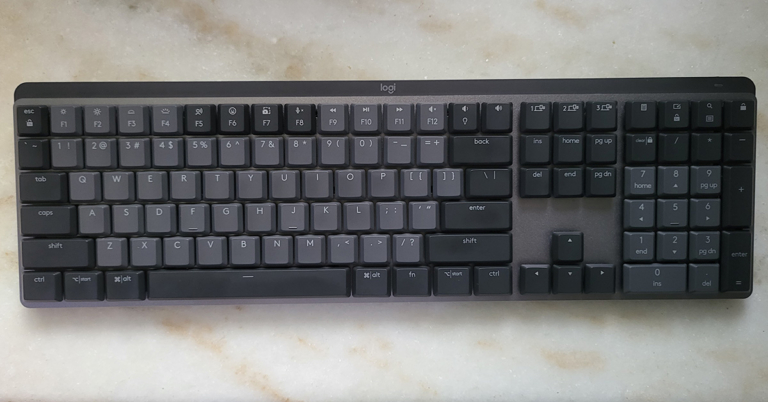
As always let’s first start with the design of the device. The Logitech MX Mechanical keyboard is a superbly well-built keyboard that exudes brilliance. Premium-ness is written all over it and it looks very futuristic. Since it is a full-size keyboard, it has the full function NUM pad also on it. Read also: Logitech MX Mechanical, MX Mechanical Mini Keyboards and Mouse launched Dressed in shades of grey and silver, Logitech has used 40% recycled plastic and low carbon aluminium, based on the carbon-neutral policy they have. Talking a little bit more about it, the packaging that Logitech has used is also made of recyclable materials. There is hardly any plastic used in the packaging and you will find cardboard or paper used to package and ship the device. This is great for eco-sustainability and they also provide distributor service, in case you want to recycle your old devices. power-and-usb-charging Coming back to its looks, users get a USB Type-C charging port on the top right part of the Logitech MX Mechanical wireless keyboard. All the multimedia keys and more can be found on the top of the keyboard that double up as the function keys. These include search, calculator, media playback and volume buttons, a special emoji button and our favourite the computer lock button, which is located on the top right corner of the NUM pad is also there. multimedia-keys The keys can be pulled out and set apart, which makes up for easy cleaning. The Logitech MX Mechanical wireless keyboard is also 7-level backlit with 5 illumination modes, which include breathing and random key illumination as well. In case you are wondering is it an RGB backlit keyboard? Then no, this has a single white colour lighting. The best part is, as soon as you bring your hand close to the keyboard the lights turn on their own. Logitech-MX-Mechanical-num-pad Lastly, you will see the Logi branding on the top of the keyboard on a nicely laid black bar with a low battery light indicator to its right. Yes, the ergonomics have been kept in mind and the user gets twin pull-out feet underneath it, which raise the keyboard a few millimetres for a better ergonomic feel.

Logitech MX Mechanical wireless keyboard review: Performance

Let’s talk about the performance of the Logitech MX Mechanical wireless keyboard now. We have written this review on the Logitech MX Mechanical wireless keyboard and were very happy with it. The keys on this keyboard are super smooth and are a treat to work with. When you switch keyboards, there is a subconscious learning curve of a device. But it did not happen to us, as soon as we laid our palms and fingers on this keyboard, we felt right at home. Logitech-MX-Mechanical-wireless-keyboard-backlit The Logitech MX Mechanical wireless keyboard is a mechanical keyboard as the name suggests. However, there is not a lot of travel space between the key presses. That is a good thing as the tactile feel is very good and with leaner, flatter keys you end up typing much faster. multi-device-support Another bright point of the Logitech MX Mechanical wireless keyboard is its multi-device support. Users can connect it to up to 3 devices at the same time and switch between them in real-time by pressing the 1, 2 or 3 keys placed above the home and page up keys. As per the company, you can switch between Windows and MAC as well. Though we could not try this, between Windows to Windows it worked fine. The keyboard can be connected to any device using the supplied USB dongle or Bluetooth. A power button is also given next to the USB charging port to turn off the device completely. As for the battery, the company suggests that the Logitech MX Mechanical wireless keyboard can stay alive for 15 days after full charge (backlighting turned on), or up to 10 months when the backlight is turned off. We have been using it for the last 8-9 days with the backlight at 50% and it is working well without the need for a recharge. Read Also: Logitech MX Anywhere 3 review: For the professional in you To stress-test it further, we did play a few games with it like DOTA 2 and CS: Go. To our amazement, it performed rather well. Almost as good as full-time gaming keyboards by the company. Overall, we were very satisfied with this luggable keyboard.

Verdict

Overall, the keyboard is very robust with aluminium added to the show. We were able to type with extreme ease with the Logitech MX Mechanical wireless keyboard and interestingly there was less fatigue. The keyboard registers the lightest touch and the not-too-loud mechanical sound is just right. This keyboard is aimed at creators, makers etc. So, at Rs 19,999 is it worth buying? That is a firm yes. With its multi-device support, ergonomics, and beautiful looks, you will not feel that you overpaid. If you can afford it, buy it.

Logitech MX Mechanical wireless keyboard Pros

Good look Great ergonomics Loog battery life and brilliant multimedia keys

Logitech MX Mechanical wireless keyboard Cons

Can easily catch smudges For the latest gadget and tech news, and gadget reviews, follow us on TwitterFacebook and Instagram. For newest tech & gadget videos subscribe to our YouTube Channel. You can also stay up to date using the Gadget Bridge Android App. You can find the latest car and bike news here.