Top 7 timepass games like Wordle that you can play every day

0
Since its launch last year, Wordle has found its way into the daily routine of millions of users worldwide. With New York Times acquiring the daily puzzle for $1 million, it may not be long until it gets placed behind a paywall. Luckily, there are lots of games like Worldle that will keep you occupied. In this article, we bring you the top 7 games like Wordle that you can solve every day. Read Also: How to Fix Emails Stuck in Outbox of Gmail?

Quordle

quordle If one Wordle a day just isn’t enough for you, Quordle might interest you. Quordle follows the same rules as Wordle but instead of guessing one word, you’re given nine attempts to guess four words. After solving the daily puzzle you can also play Quordle in practice mode.

Worldle
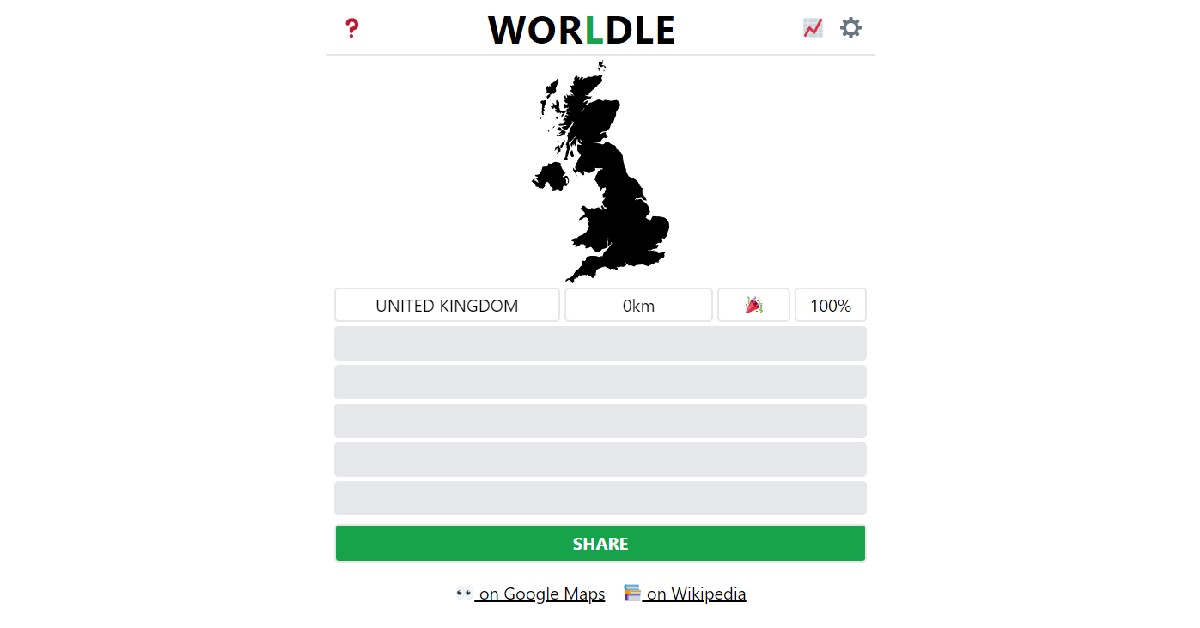
Worldle Best described as Wordle but for countries, Worldle gives you six attempts to guess a country by its shape. The map of the country is presented as a blacked-out figure, isolated from its surroundings. After every guess, Worldle tells you how close you are to the country in the puzzle. Using these cues you can get closer to solving the puzzle.

Nerdle

Nerdle If you’re a math lover, Nerdle is the perfect puzzle for you. The puzzle is solved by guessing the calculation. Like Wordle, every correct tile you guess turns green and every incorrect tile turns black. If the tile you guessed is a part of the puzzle but isn’t placed in the correct position, it turns magenta. Even if you don’t like math, Nerdle is a fun puzzle to solve.

Heardle

Heardle Heardle is a puzzle designed for music enthusiasts. The aim is to guess the song correctly from a one-second audio clip. If you make a wrong guess, Heardle will give you additional clips to guess from. If you guess the artist correctly, the auto-fill feature will help you narrow down the guesses.

Octordle

octordle games like wordle Octordle is a fun game just like Wordle, where you have to guess eight words in thirteen attempts. The higher number of words makes the game interesting, decreasing the margin of error. Apart from the daily puzzle, you can also solve unlimited free puzzles from the Octordle catalogue. 

Wordle Unlimited

wordle unlimited games like wordle If you can’t wait for the next daily puzzle on Wordle, you can solve as many puzzles as you want in Wordle Unlimited. You can even make a custom puzzle and send it to your friends as a challenge.

Framed

framed games like wordle This one is for all the movie buffs. Framed gives you a still from a movie, and you get six guesses to figure out which movie it is. With every wrong guess, you get an additional frame, helping you narrow down the answer. Read Also: Smartphone Comparison: Nothing Phone 1 vs iPhone 13
All of the games mentioned above are free to play. Some may have memberships that offer additional features. If there are any daily puzzles that you like to solve, let us know in the comments!
For the latest gadget and tech news, and gadget reviews, follow us on TwitterFacebook and Instagram. For newest tech & gadget videos subscribe to our YouTube Channel. You can also stay up to date using the Gadget Bridge Android App. You can find the latest car and bike news here.

Garena Free Fire Redeem Codes Today 14 July 2022: Here is how to claim them

Garena Free Fire is a battle royale game with regular awards and tournaments to keep players interested. If you play Garena Free Fire, you should be aware of the redeem codes that are released on a daily basis. However, because the battle royale game is banned in India, players from other countries can use the Free Fire Redeem codes daily. If you’re unfamiliar with the Garena Free Fire redeem codes or don’t know how to get them, we’ve put together a step-by-step guide to help you redeem them. Check out Garena Free Fire Redeem Codes for July 14. The Free Fire redeem codes are a great way to get free stuff. These are 12-digit codes that contain alphabets and numbers, as well as an expiration date and time. Because the Garena FF redeem codes cannot be used more than once, you should hurry to the redemption page to claim your free reward before someone else does. To get a free reward, all you have to do is go to reward.ff.garena.com/en, which is the official redemption page. Also, keep an eye on this space for daily updates on Garena Free Fire redemption codes and rewards.

Garena Free Fire Redeem Codes Today 14 July 2022

  • WEYVGQC3CT8Z
  • WLSGJXS5KFYR
  • X99TK56XDJ4X
  • FF11NJN5YS3E
  • FF9MJ31CXKRG
  • FFICJGW9NKYT
  • YXY3EGTLHGJX
  • 4ST1ZTBE2RP9
  • 8F3QZKNTLWBZ
  • FFCO8BS5JW2D
  • FFBBCVQZ4MWA
  • FF10HXQBBH2J
  • B6IYCTNH4PV3
  • WOJJAFV3TU5E
  • 3IBBMSL7AK8G
  • FF1164XNJZ2V
  • FFAC2YXE6RF2
  • J3ZKQ57Z2P2P

How to Get Free Fire Redeem Codes for Garena on July 14?

  • Visit the Garena Free Fire game’s official website at reward.ff.garena.com.
  • Use your Facebook, Google, VK, Apple ID, Huawei ID, or Twitter account to log in.
  • You’ll be taken to a valid redemption code (s)
  • Copy and paste the 12-digit redemption code into the text box.
  • On the screen, a dialogue box will appear.
  • ‘Ok’ should be selected.
For the latest gadget and tech news, and gadget reviews, follow us on TwitterFacebook and Instagram. For newest tech & gadget videos subscribe to our YouTube Channel. You can also stay up to date using the Gadget Bridge Android App. You can find the latest car and bike news here.
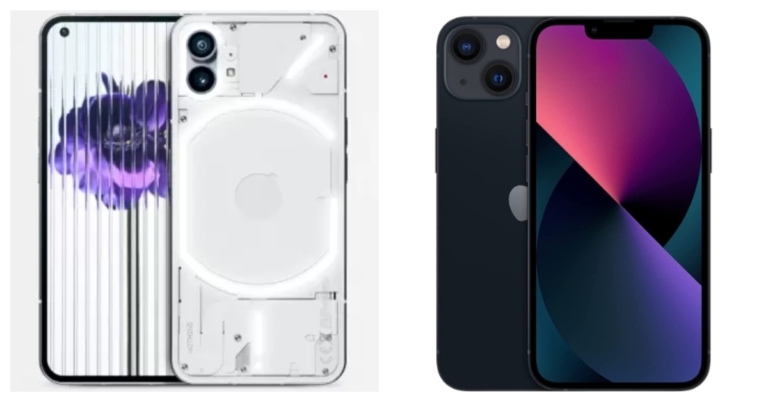
Smartphone Comparison: Nothing Phone 1 vs iPhone 13

Nothing Phone 1 was officially released in India and worldwide earlier this week. Even before its official announcement, the smartphone gained a lot of popularity for its interesting form factor. The Nothing Phone (1), which has a semi-translucent back and is shaking up the mid-range market but here we have compared the smartphone with the iPhone 13. In order to establish which Smartphone is ideal for which type of user, we will compare Nothing Phone 1 vs iPhone 13 in this post.

Display

Nothing Phone 1: 6.55-inch 10-bit OLED display iPhone 13: 6.06 inches Super Retina XDR display

Processor

Nothing Phone 1: Snapdragon 778G+ CPU iPhone 13: A15 Bionic chipset

Rear camera(s)

Nothing Phone 1: Dual rear cameras that includes a 50MP primary Sony IMX766 sensor (ƒ/1.88) with OIS and EIS as well as a second 50MP Samsung JN1 ultrawide sensor (ƒ/2.2) with 140 degrees of FoV iPhone 13: Dual rear cameras- 12MP wide-angle and 12MP ultra-wide lens

Selfie camera

Nothing Phone 1: 16MP Sony IMX471 sensor has a ƒ/2.45 aperture iPhone 13: 12MP selfie camera

RAM and storage

Nothing Phone 1: 8GB RAM/128GB storage, 8GB RAM/256GB and 12GB RAM/256GB storage iPhone 13: 128GB storage, 256GB storage and 512GB storage

Battery

Nothing Phone 1: 4,500mAh battery iPhone 13: 3,240 mAh

Operating system

Nothing Phone 1: Nothing OS based on Android 12 iPhone 13: iOS 15

Starting Price

Nothing Phone 1: Rs 32,999 iPhone 13: Rs 79,999

Our Take

The semi-translucent exterior of the Nothing phone (1) deviates from the standard with its design by partially disclosing its inside components. The LEDs on the rear of the Glyph Interface can be programmed to display notifications. The finish on the rear is glass as well. Although the iPhone 13 has a unique design of its own, let’s agree that the form factor of Nothing is what makes it stand apart from the iPhone. While the iPhone 13 has an IP68 rating as opposed to the Phone’s 1’s IP53 rating. Nothing Phone 1 will provide you with an uninterrupted 120HZ AMOLED display with a small dot notch in place of the enormous notch at the top that interrupts the screen on the iPhone 13 in terms of display. Additionally, the iPhone’s display only supports HDR10, while the Phone 1 supports HDR10+. Performance-wise, the Snapdragon 778G+ SoC and Apple’s own A15 Bionic chipset cannot be compared. However, Qualcomm’s chipset can definitely compete with the flagship devices now on the market. Although we haven’t yet tested the camera on the Nothing Phone 1, both handsets boast a dual back camera setup with wide and ultrawide sensors, however, their individual performance is probably going to vary. Wait for our comprehensive review of the Nothing Phone 1 to learn more about the camera aspect of things. Nothing Phone 1 costs much less than the iPhone 13, which has a price that starts at Rs 79,999. What phone ought you to purchase? Nothing is giving you uniqueness, whereas Apple has a different fan base. To upgrade your Android smartphone, choose Nothing Phone 1 if you’re looking for anything new. For the latest gadget and tech news, and gadget reviews, follow us on TwitterFacebook and Instagram. For newest tech & gadget videos subscribe to our YouTube Channel. You can also stay up to date using the Gadget Bridge Android App. You can find the latest car and bike news here.
Official Renders of the Motorola Razr 2022 Tease the Design, Launching soon

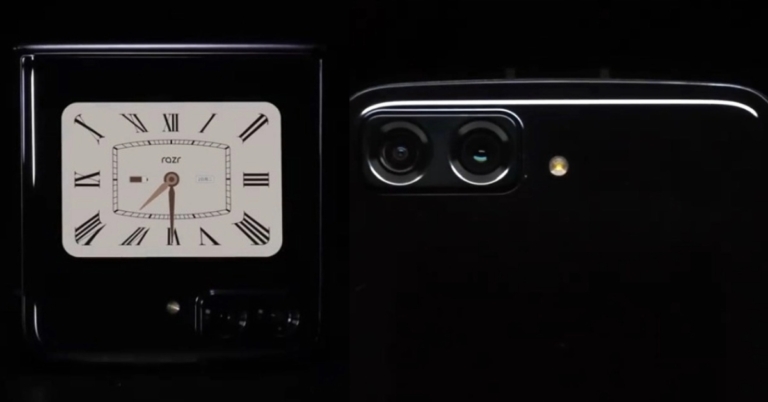
The Motorola Razr 3 has been mentioned in a few recent leaks and rumours. However, the introduction of the Moto Razr 2022 in China is anticipated to happen soon. The Chinese electronics manufacturer has recently posted a teaser on Weibo to provide details about the upcoming release of the new Razr phone in the nation while avoiding to disclose the precise launch date. It had previously been reported to include a 2,800mAh battery, the same battery size as the Motorola Razr 5G. The company’s official Weibo account hinted at the Moto Razr 2022 debut in China. The teaser image depicts the phone as being black and proposes dual cameras and LED flash on the back. The precise release date or other important details of the future foldable phone were not, however, confirmed by Motorola. Additionally, a Motorola executive displayed the Moto Razr 2022, showcasing the updated look. The Qualcomm Snapdragon 8 Gen 1 SoC is anticipated to power the clamshell foldable smartphone. It might have a display with a 120Hz refresh rate and dual 50 megapixel rear cameras.
Moto Razr 2022 was featured in hands-on photos
Image Courtesy: Weibo
The Moto Razr 2022 was featured in hands-on photos uploaded by Chen Jin, General Manager of Lenovo Mobile Business Group, on the Chinese microblogging site, displaying the design from all sides and in both folded and unfolded configurations. In comparison to the Motorola Razr original and Motorola Razr 5G, the renders depict the device as having rounded sides and a relatively slim chin. According to previous sources, the Motorola Razr 3 will be sold in Europe for EUR 1,149. The foldable phone could come in Tranquil Blue and Quartz Black colour schemes. It is anticipated to have an AMOLED display with a 120Hz refresh rate. Rumours suggest that the main screen is going to have a 20:9 aspect ratio and full-HD+ resolution. It’s anticipated that the Qualcomm Snapdragon 8 Gen 1 SoC will power it. In addition to this, the leaks state that the Moto Razr 2022 might have a 50-megapixel dual-back camera arrangement that can capture ultra-HD films at 60 frames per second. It is rumoured to have a 32-megapixel Omnivision front camera sensor that can capture full-HD films at 120 frames per second. For the latest gadget and tech news, and gadget reviews, follow us on TwitterFacebook and Instagram. For newest tech & gadget videos subscribe to our YouTube Channel. You can also stay up to date using the Gadget Bridge Android App. You can find the latest car and bike news here.

Want to run like a pro? Here are the 6 best running gadgets

Running can be as simple as just putting on some sneakers and moving your legs, but a well-chosen gadget can make a world of difference to your exercise. Whether it’s an app to motivate you to get off the sofa, a pedometer to measure your progress, or just the right music to jog along to, these can help turn your workout from a boring routine into something to remember.

Bose’s Bluetooth Audio Sunglasses

What do you get if you cross sunglasses with an iPod? Well, you get Bose’s Audio Sunglasses. This gadget is perfect for running, simultaneously protecting you from the sun’s glare while pumping your ears with your favourite tunes. The glasses are sweat resistant, come with interchangeable lenses, and even have a built-in volume adjuster, plus a button for playback control. The time between charges of eight hours is also decent. This gadget will set you back £240 for a new pair, but it may be worth it if you love both running and gadgets.

Sony Linkbuds

Comparison websites are everywhere now, covering everything from top flight deals to finding the best lottery sites. You might be tempted to use a similar site for finding amazing running earbuds, but we can save you the hassle by pointing you towards the Sony Linkbuds. While the £149 cost might hurt a little, the advantages far outweigh the costs. First, you won’t even notice you’re wearing them as they use little wings to stay nestled in your outer ear. Next, you’ll find that they produce excellent quality sound that outranks most products in its price category. Finally, their battery life of 5.5 hours between charges means they should even see you through a marathon training, if necessary.

MapMyRun

The number of different GPS uses has steadily increased over the last decade or so, and GPS is responsible for the craze in tracking run pace and distances, powered by the likes of Strava. MapMyRun is a good alternative to the industry’s frontrunner. It saves all the data from your workout, including your heart rate when used with a chest-strap monitor which you can buy from a number of outlets. There’s also a digital MapMyRun community where you can post run times, chat about upcoming events, and earn trophies. If you have Under Armour footwear, you’ll also be able to sync the app to that, too. The only downside is that there are fewer people on there than Strava, so it may not be as easy to find friends. When it comes to value for money, though, MapMyRun sprints ahead. Read Also: Garmin Forerunner 55 launched, now available in India at Rs 20,990

Garmin Forerunner 955 Running Watch

If you like to glance at the time while you run instead of fiddling with a phone app, then sports watches are your best friend. This is another good running gadget. Today’s models come in a vast array of sizes and prices and often come packed with features that incorporate GPS technology, heart rate tracking, and even training plans. The Garmin Forerunner 955 is a prime example of the high-end area of the market, with prices typically coming in between £400 and £500. Not only does the watch include every feature you could possibly want, it also stores advanced offline maps to stop you from getting lost in areas with low network coverage. The less you pay for sports watches, of course, the fewer features you have; but that may suit you just fine if you’re one of the traditionalists who just want a watch to tell the time!

Shokz OpenRun Pro

We’ve mentioned earphones, but if you want the music to really echo through your head, then Shokz OpenRun Pro will make you feel like a portable nightclub. Known as bone conduction headphones, they send sound waves vibrating through your skull instead of your ear drum, giving you a truly immersive experience. The Shokz are surprisingly lightweight for such an action-packed gadget, coming with a comfortable design and a long battery life of up to 10 hours to boot. Also, if you’re into professional athletics, then you may be impressed by the fact that these are the only headphones that are approved by England Athletics.

Armband phone pockets

Last but not least is an accessory that we may overlook when we’re preparing our running kit. Armband phone pockets might not be glamorous, but they’re extremely useful in the way they let you work your phone as you run. Costing under a tenner, these plastic pouches come with a Velcro strap that you wrap around your upper arm, giving you access to your mobile. You could even fit other gadgets in there, like an old-fashioned iPod, but this may not work as well. When it comes to simple convenience, phone pockets are a winner. In fact, many runners who use them can’t imagine how they lived without them before. For the latest gadget and tech news, and gadget reviews, follow us on TwitterFacebook and Instagram. For newest tech & gadget videos subscribe to our YouTube Channel. You can also stay up to date using the Gadget Bridge Android App. You can find the latest car and bike news here.

Amazon Quiz Answers Today 14 July 2022: Participate to win Rs 1,000

14 July 2022 Amazon Quiz has gone live on its platform. The quiz timings are 12 AM to 11:59 PM. The Amazon App users can participate in the quiz daily and all they have to do is submit correct answers to the questions asked on the e-commerce platform. Today’s participants can get a chance to win Rs 1,000 Amazon Pay Balance. Amazon brings a fresh questionnaire that contains 5 questions daily. These questions are based on current affairs and general knowledge. The quiz can be played from 8 AM to 11:59 PM and the contestants need to answer correctly to enter into a lucky draw. Only one person is declared as a winner and the results will be announced at the end of every month. And to make sure that you give correct answers to all the 5 questions Gadget Bridge everyday updates all the answers to the Amazon Quiz. Do check out 14 July 2022 Amazon Quiz Answers to win a Rs 1,000 Amazon pay Balance. Amazon Quiz Today Prize – Rs 1,000 Amazon Pay Balance Quiz Date – 14 July 2022 Daily Timing – 12 AM to 11:59 PM Winner Announcement – Today 12 PM

Amazon Quiz Answers Today 14 July 2022

Question 1: Gulabo, who recently died at the Van Vihar National Park and Zoo in Bhopal, was the oldest of what animal in India? Answer: Sloth bear Question 2: Jaitapur, set to be the country’s largest nuclear power generating site, is located in which state? Answer: Maharashtra Question 3: Which airlines recently became the first airline to use sustainable commercial aviation fuel? Answer: British Airways Question 4: This doll depicts which Marvel character? Answer: Black Widow Question 5: What breed of dog is shown here? Answer: Corgi

How To Play Amazon Quiz

Only app users are eligible to play the Amazon quiz every morning from 12 AM to 11:59 PM. The quiz is not available on the desktop. For those who are unaware of how to play the Amazon quiz below are the steps, you can follow to take the quiz.
  • Firstly download the Amazon app from Google Play Store or App Store
  • Now fill in the required information through the Sign Up option.
  • You need to log in to the Amazon app and scroll down on the home screen to find the Amazon Quiz banner.
  • Tap on the Amazon Quiz banner and tap on the Start button to start the Quiz.
  • Now you will get 5 questions and you need to answer them correctly. One wrong answer will eliminate you from the Quiz.
  • After answering all the questions correctly you are now eligible for a Lucky Draw.
  • The winner’s name will be announced today at 12 PM.
For the latest gadget and tech news, and gadget reviews, follow us on TwitterFacebook and Instagram. For newest tech & gadget videos subscribe to our YouTube Channel. You can also stay up to date using the Gadget Bridge Android App. You can find the latest car and bike news here.

Top 7 Ways to Fix Emails Stuck in Outbox of Gmail (2024)

3
Gmail is one of the most easy-to-use email services, which is also why it is so popular. However, it can get annoying when the emails you’re trying to send won’t get through and get stuck in the Outbox. This may be due to several different reasons. In this article, we bring you the top 7 ways to fix the ’emails stuck in the outbox of Gmail‘ issue. Read Also: How to add or remove another email account to your Gmail app?

Check Attachment Size

How to Fix Emails Stuck in Outbox of Gmail? If your email contains an attachment, check if its size exceeds 25MB. Currently, Gmail does not allow its users to send attachments that are larger than 25MB. Make sure the attachment size is under 25MB and resend the email. You can split up the attachments into two emails if the total size of the files exceeds 25MB.

Clear Gmail Cache

Clear Gmail Cache If you haven’t cleared the cache in a long time, it may have stored some expired or corrupted files. Make sure you regularly clear the cache so you don’t face any issues like this. In order to clear the Gmail cache, go to Chrome Settings>Privacy and Security>Cookies and other site data. Scroll down to ‘See all cookies and site data’ and delete the Gmail entry. Your Gmail cache will be cleared.

Check your Internet connection

When you are disconnected from the Internet, all the emails that you try to send from your Gmail account get stuck in the outbox. Once internet connectivity is restored, the emails get sent automatically. If this isn’t the case with you, go to your outbox after connecting to the Internet and refresh the page. On a PC you can do this by hitting the refresh button. On smartphones, refresh the outbox by pulling down from the top of the page.

Check whether Gmail is in offline mode

Check whether Gmail is in offline mode. How to Fix Emails Stuck in Outbox of Gmail? Gmail allows you to go through your mails and compose new ones even when you’re offline. However, in order to send an email, you need to be connected to the internet. If you send an email in offline mode, it’ll get stuck in the Outbox. To disable offline mode in Gmail go to Gmail Settings>See All Settings, and click on the ‘Offline’ tab. Uncheck the box that says ‘Enable offline mail’, and resend the email stuck in Outbox.

Make sure the recipient’s email address is correct

It is easy to make small typos while composing emails. If there is even a slight typo in the recipient’s email address, the email will either reach the wrong person or get stuck in the outbox. The latter happens when there’s no email account linked to the address you entered. Double-check the recipient’s email address before trying to clear the email from the outbox.

Update the Gmail app

Update the Gmail app If you’re using Gmail on your smartphone, try updating your Gmail app. If you haven’t updated the app in a while, chances are the old version of the app is being phased out. Go to Google Play Store and search for Gmail. From the app page select the ‘Update’ option.

Enable background usage

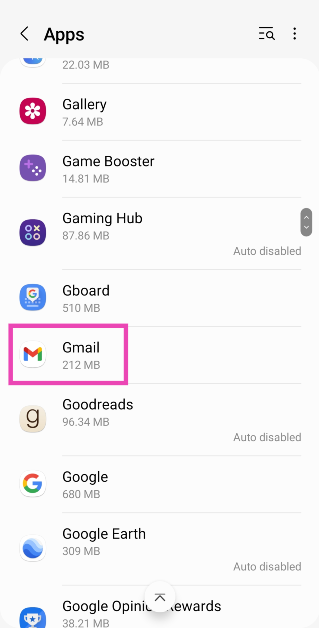
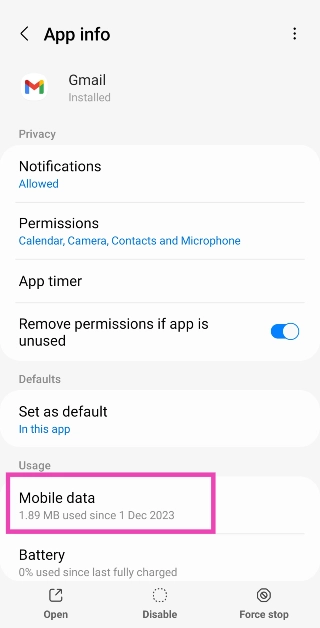
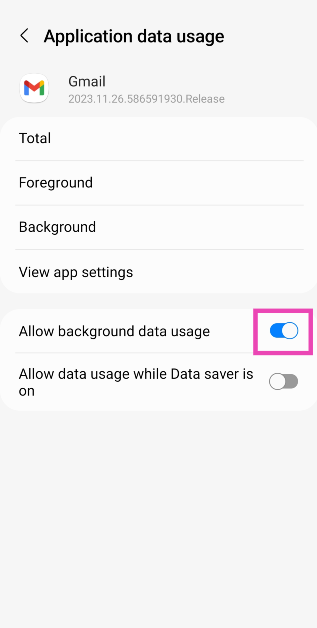
Step 1: Go to Settings and select Apps. Step 1: Go to Settings and select Apps. Step 2: Tap on Gmail. Step 2: Tap on Gmail Top 7 Ways to Fix Emails Stuck in Outbox of Gmail? (2024) Step 3: Select Mobile Data. Step 3: Select Mobile Data. Top 7 Ways to Fix Emails Stuck in Outbox of Gmail? (2024) Step 4: Turn on the toggle switch for Allow background data usage. Step 4: Turn on the toggle switch for Allow background data usage. Top 7 Ways to Fix Emails Stuck in Outbox of Gmail? (2024)
Frequently Asked Questions (FAQs)

Why are emails stuck in Gmail outbox?

Your emails may get stuck in the outbox when there’s no internet connection or if the attachment size exceeds the stipulated limit.

How do I clear the emails stuck in Gmail’s outbox?

Refresh the outbox, make sure Gmail isn’t functioning in offline mode, and clear the app’s cache to clear the emails stuck in the outbox.

What is the maximum file size limit for Gmail attachments?

The maximum file size limit for Gmail attachments is 25MB. Read Also: How to schedule an email in Gmail

Conclusion

Using these easy techniques, you will be able to send any emails stuck in the Outbox of Gmail. Sometimes, closing any apps running in the background can help solve this issue. Simply tap the icon to switch apps and close all the apps running in the background. If the problem still persists, try signing out of Gmail then sign back in. It is also possible that Gmail’s servers are down, so wait for a while and then try sending the email again.

Samsung Galaxy M13 Series launching in India tomorrow: What to expect

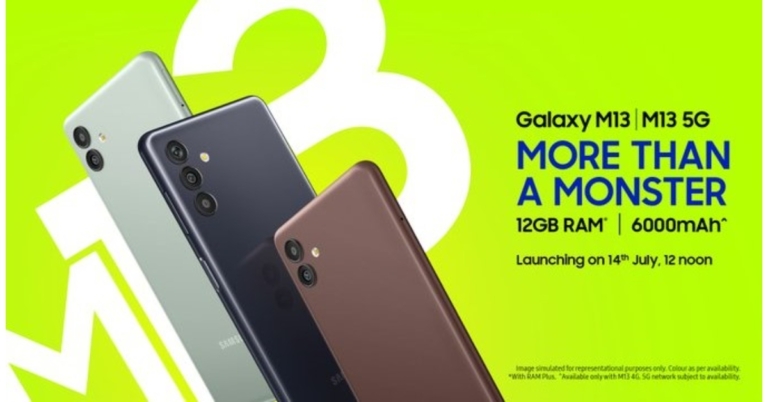
Samsung is all set to launch a new smartphone series in the Indian market tomorrow that is on July 14. The new Samsung Galaxy M13 Series is going to include two handsets Galaxy M13 5G and Galaxy M13. Twelve 5G bands will be supported by the Galaxy M13 5G and will have a 5,000mAh battery, compared to a 6,000mAh battery in the Galaxy M13, which has 4G connection. Samsung will be hosting a launch event to unveil Samsung Galaxy M13 Series in India. The event will be livestreamed tomorrow at 12 noon IST via Samsung India social media channels- Samsung Newsroom India Twitter, Samsung India Twitter, Samsung India YouTube and Samsung India Facebook. During the livestream, Samsung will unveil the latest Galaxy M13 series, along with its pricing and specification details. Samsung will also host launch events across different cities in the country. The events will be held in Pune, Bhopal, Jaipur, Patna, Visakhapatnam and Guwahati. Before the launch ceremony, a microsite for both smartphones is already active on Amazon.com. As per the landing page, the 5G variant from Samsung sports a 5,000mAh battery. Up to 12GB of RAM can be delivered with its RAM Plus function. Moreover, when your primary SIM is out of network, you can still stay connected thanks to the smartphone’s Auto Data Switching feature. Additionally, it is shown on the page that the Galaxy M13 5G will come in silver. A MediaTek Dimensity 700 SoC may power this smartphone, according to a recent report. It might have a 5-megapixel selfie camera and a 50-megapixel dual rear camera arrangement. Furthermore, it probably supports 15W fast charging. On the other hand, the Galaxy M13 4G has recently debuted in South Korea so the specification of the smartphone is likely to be similar. A 6.6-inch full-HD+ Infinity-V display is featured on it. The phone’s Exynos 850 SoC and up to 128GB of storage provide power. Additionally, the RAM Plus functionality for up to 12GB of RAM is stated as being included with this 4G variant. The Amazon website demonstrates that this phone will initially come in three colour options: brown, black, and silver. For the latest gadget and tech news, and gadget reviews, follow us on TwitterFacebook and Instagram. For newest tech & gadget videos subscribe to our YouTube Channel. You can also stay up to date using the Gadget Bridge Android App. You can find the latest car and bike news here.

How to message an unsaved number on WhatsApp

0
With more than 2 billion users across 180 countries, WhatsApp is one of the most used instant messengers in the world. For most users, it has entirely replaced texting. However, unlike texting, you can only send a message to someone on WhatsApp if you’ve saved them as a contact on your phone. Luckily, there is a workaround to this problem. In this article, we show you how to message an unsaved number on WhatsApp. Read Also: How to Find My WhatsApp Number and Name on Android mobile in 2022?

Here’s how you can message an unsaved number on WhatsApp

Step 1: Go to your mobile’s web browser and open the link https://wa.me/phonenumber Step 2: Replace the ‘phonenumber’ string in the link with the number you want to send a message to. Include the country code but do not type the ‘+’ sign. For example: If you want to send a message to +919876543210, simply type https://wa.me/9876543210 Replace the ‘phonenumber’ string in the link with the number. how to send whatsapp message to unsaved number Step 3: Tap on the ‘Chat’ icon. Tap on the ‘Chat’ icon. how to send whatsapp message to unsaved number Step 4: A chatting window will open up on the WhatsApp app, where you can send messages to the unsaved number. Read Also: You may now use any emoji in WhatsApp Reactions This is how you can send a message to an unsaved number on WhatsApp. For some Android users, there is another trick that may work for this issue. Simply type the number on your keypad and highlight it. Tap the three dots and see if your smartphone gives you the option to text that number on WhatsApp. This feature is available only on selected Android smartphones and may not work for everyone. For the latest gadget and tech news, and gadget reviews, follow us on TwitterFacebook and Instagram. For newest tech & gadget videos subscribe to our YouTube Channel. You can also stay up to date using the Gadget Bridge Android App. You can find the latest car and bike news here.