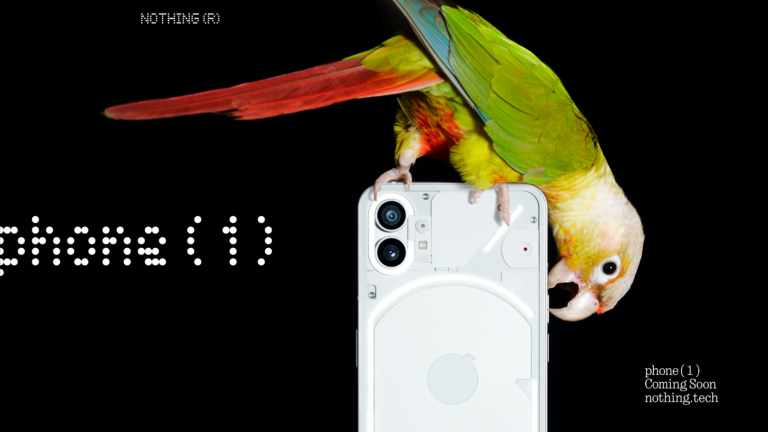
Today will see the global introduction of the Nothing Phone 1. The London-based tech company’s first smartphone has already been drawing attention and gaining popularity due to its distinctive features and style. The Qualcomm Snapdragon 778G+ SoC will be the device’s power source. Additionally, a 6.55-inch OLED screen with a 120Hz refresh rate has been said to be included.
Nothing Phone 1 Livestream details
The introduction of the Nothing Phone 1 is scheduled for today. The company will be hosting the Return to Instinct launch event at 8.30 pm Indian Standard Time (IST), the event will be live webcast on the company’s official YouTube page. Else on the firm’s website, users can select to sign up to get updates about the launch.Additionally, the video featured below allows you to see the Phone 1 launch live.
Nothing Phone 1 price in India expected
The Phone 1 is expected to cost between Rs. 30,000 and Rs. 40,000 in India. It would be a mid-range model. The phone’s pricing was previously leaked through the Amazon Germany website. The smartphone was spotted listed on the e-commerce platform that comes with Ear 1 headphones. According to the website, an 8GB RAM with 128GB storage model costs €469.99 (about $491), while a 12GB RAM with 256GB storage variant costs €549.99 (about $575). In addition to this, a screenshot of the Amazon listing has also been shared.
Nothing Phone 1 specifications
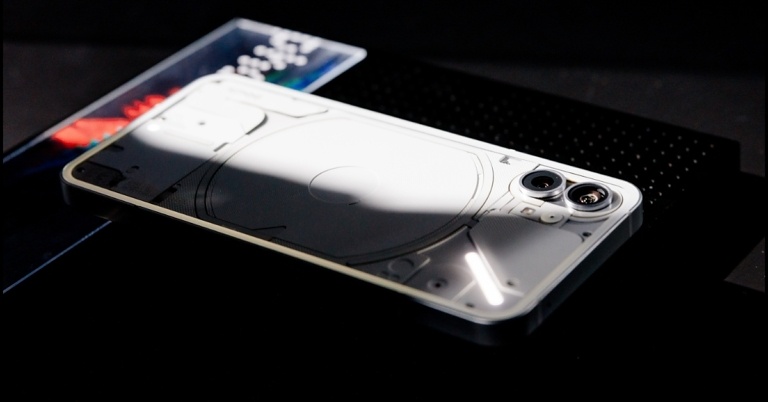
The Nothing Phone 1’s LED notification system, which is run by the company’s Glyph interface, is its most significant feature. When a user receives a notice alert or call, an LED set up on the smartphone’s back will light up.The upcoming smartphone is said to include a 6.55-inch OLED screen with a refresh rate of 120Hz. Gorilla glass is touted to safeguard the Phone 1’s front and rear panels. It has already been confirmed that the Qualcomm Snapdragon 778G+ SoC will power Phone 1. But recently the company also disclosed that a 50-megapixel dual back camera arrangement is apparently another feature of the smartphone. It could potentially come pre-installed with Android 12.Nothing in the recent past has suggested that the Phone 1 will include an integrated fingerprint reader. However, new information has emerged via a YouTube video that claimed the retail packaging was thin and was made from recycled bamboo. According to the video, the Phone 1’s frame will be entirely constructed of recycled aluminium.
For the latest gadget and tech news, and gadget reviews, follow us on Twitter, Facebook and Instagram. For newest tech & gadget videos subscribe to our YouTube Channel. You can also stay up to date using the Gadget Bridge Android App. You can find the latest car and bike news here.
Hey readers, here is another review from us. This time, we have the iQoo 9, a brand-new gaming smartphone that was recently introduced in India. In the semi-flagship and premium mid-range segments, it competes with devices like the Oneplus 9RT and the Xiaomi 11T Pro. So, let’s get into it, this is our review of the new iQoo 9 smartphone.
iQoo 9 review: Design and Display
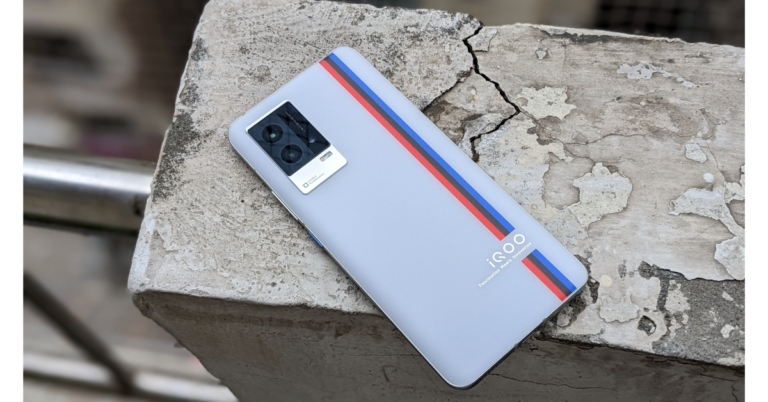
Consequently, we were able to obtain the iQoo 9 Motorsports edition, which features a relationship with BMW. We have the Legend model, which is adorned with a tricolour stripe that is intended to evoke the sensation of a racetrack or something similar. In addition, the iQoo 9 is also offered in a black alpha colour variant with a textured pattern.Having a premium glass laminated shell and metal framing, this phone exudes class. It has an IMT matte back throughout, and its soft-matte surface feels wonderful in the palm. The BMW tri-coloured stripe also adds a distinctive aesthetic flair and an iQoo branding.Additionally, the sides of the phone are curved for a more comfortable grip. Due to its evenly distributed weight, the device, even though it’s heavy, doesn’t actually feel that hefty. We believe that for seamless ergonomics, the frames should have remained somewhat smooth on both sides.On the right side of the frame, all the buttons are conveniently located and offer excellent tactile feedback. Additionally, to add some extra character, the power button has a recognisable blue hue and a textured finish. Certification for an IP address is the only thing iQoo 9 is missing. But the SIM tray is shielded from moisture accumulation by a rubber gasket.The iQoo 9 boasts a stunning display in addition to a gorgeous design. With a refresh rate of 120Hz and a touch sampling rate of 300Hz, it sports a 6.56-inch full-HD+ 10-bit AMOLED display. The peak brightness is 1200 nits. All of this results in brilliant colours that maintain high contrast levels. The screen has an exceptional natural white balance, which produces natural colours and prevents colour shifts when viewed from the sides. Under the worst circumstances, the screen becomes more than bright enough to remain visible. One can binge-watch OTT video with Widevine L1 certification and HDR playback capability.The phone can be unlocked quickly with the in-display fingerprint sensor, and you receive light haptic feedback while doing so. While the stereo speakers produce great music quality and can be rather loud. Although a more evenly distributed output from the top and bottom speaker units would have been preferable.You are looking at one of the best displays for the money when you factor in the 120Hz refresh rate. Although the lack of an LTPO 2.0 panel means that this screen can only switch between 60Hz and 120Hz, we feel that iQoo is being overly rigid with the adaptive refresh rate here. However, this is not the problem. Some of the most popular apps with the Smart Switch default to turning on the phone at 60Hz.
iQoo 9 Review: Performance and Camera
Let’s now discuss the performance aspect of the smartphone. The iQoo 9 has an octa-core Qualcomm Snapdragon 888+ SoC, up to 12GB of LPDDR5 RAM, and up to 256GB of UFS 3.1 storage capacity. iQoo boasts a sizable Vapor Chamber liquid cooling system for gaming, however even with that, the phone quickly becomes significantly warm and becomes uncomfortably hot when playing for extended periods of time. We have been using this phone as our primary phone and it seems high-end, quick, and fast. Gaming is also enjoyable on this phone. In the few sessions we played, BGMI has excellent gameplay, maximum graphics, ultra HD, and ultra frame rates. Other than that, the gadget has a few other gameplay gimmicks in store. A pressure-sensitive button included in the iQoo 9’s display can be designated as a control in certain games. For an immersive gaming experience, there is also a dual X-axis linear motor.We appreciate that the iQoo 9 includes the most recent Android 12 upgrade and will eventually receive Android 14 since the business has promised two significant Android updates and three years’ worth of security updates. FuntouchOS and all of its features are present, without a doubt, but the phone also comes with a lot of bloatware that is simple to remove. Aside from this, the UI and UX experience is generally good.The triple-back camera array has a 48-megapixel Sony IMX598 primary sensor and “Gimbal” technology. A 13-megapixel wide-angle or macro sensor and a 13-megapixel portrait sensor are also included. A 16-megapixel selfie camera sensor with an f/2.45 lens is also included for taking selfies and making video calls.In daytime images, iQoo 9 enhances the white levels, yet the colours look realistic and have a lot of detail. The same is true of ultrawide shots, which effectively capture highlights and shadows but lack fine detail. On the iQoo 9, portrait photos appear sharper and have better contrast and black levels. The phone’s Gimbal OIS feature technology ensured that photographs remained clear and brilliant at all times. Selfies also express a similar tale and look great doing it. The skin tone seems to be normal.Portrait ImageWe also enjoyed the iQoo 9’s regular nighttime photographs because it is able to allow in more light, which results in a decent dynamic range at the expense of a little less contrast.In terms of videography, the iQoo 9 is capable of shooting at up to 4K@60fps. In our limited time with the device so far, we haven’t had a chance to shoot many videos, but the sample footage shows that it has good video stabilisation. However, in resolutions like 4K@30fps and 1080p@60fps, it drastically crops the frame. It is frustrating that the front camera can only record videos in 1080p and does not support 4K at this price point.With regards to the battery life, the iQoo 9 sports a 4,350mAh battery that includes a 120W fast charge. The charging speed is quite quick; it charges the phone from zero to fifty percent in around five minutes and from zero to full in twenty.
Verdict
Considering the device’s specifications and characteristics, we can conclude that it directly competes with the OnePlus 9RT. Its specs complement the 9RT perfectly. Therefore, it is a mid-range phone that is fairly fascinating and aimed at both mobile gamers and photography fans. The variant launched in China is completely different from the one in India. So, as opposed to the Snapdragon 888+ in the Indian edition, the Chinese iQoo 9 has the most recent Snapdragon 8 Gen 1. In addition, both phones have different screens, cameras, and designs, among other things.The fact that it ships with Android 12 out of the box and can be upgraded to Android 14 and that the manufacturer has included a 120W fast charger inside the box helps it create a positive impression on us overall. If you are looking for a good gaming smartphone in the mid-segment you can definitely take a look at this one. iQoo 9 Pros
Beautiful display with 120Hz refresh rate support
good video stabilization
IP52 rating
great for gaming
Fast charging
iQoo 9 Cons
Heats up really fast
Weak audio quality
For the latest gadget and tech news, and gadget reviews, follow us on Twitter, Facebook and Instagram. For newest tech & gadget videos subscribe to our YouTube Channel. You can also stay up to date using the Gadget Bridge Android App. You can find the latest car and bike news here
If you don’t want the call participants in a meeting to see the rest of your surroundings, Google Meet allows you to blur your background. You can blur your call background while you’re in a call or even before you join it. Blurring the background can come in quite handy when you’re outside and there’s a lot of activity in your background. You can even blur your background if you want to get on an urgent call and don’t have the time to tidy up your room. Today, we show you how to blur your background in Google Meet.Read Also:How To Mute Or Unmute WhatsApp Desktop App?
Blur your background in Google Meet using PC
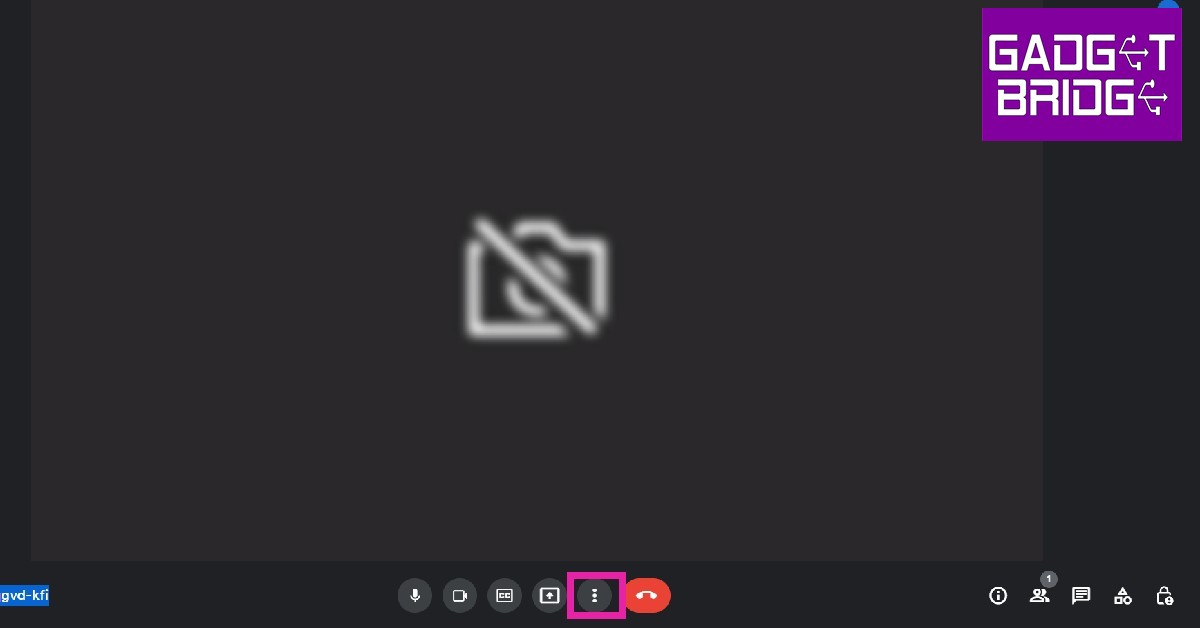
Step 1: Click on the three dots at the bottom menu on your screen.Step 2: Select ‘Apply visual effects’.Step 3: Select slight blur or total blur from the menu on the right.Your background will be blurred.
Blur your background in Google Meet using your smartphone
Step 1: Open the Google Meet app on your phone and enter the meeting code.Step 2: Click on the ‘Effects’ icon on the preview screen.Step 3: Select slight blur or total blur from the options that follow.Your background will be blurred.Read Also:Xiaomi Smart Standing Fan 2 launched in IndiaThese were the 2 easy ways to blur your background on Google Meet. Instead of blurring, you can also choose from a bunch of pre-made backgrounds for your meeting. While a blur may seem distracting, a background is more aesthetically pleasing and does a great job of concealing your actual surroundings.
For the latest gadget and tech news, and gadget reviews, follow us on Twitter, Facebook and Instagram. For newest tech & gadget videos subscribe to our YouTube Channel. You can also stay up to date using the Gadget Bridge Android App. You can find the latest car and bike news here.
12 July 2022 Amazon Quiz has gone live on its platform. The quiz timings are 12 AM to 11:59 PM. Interested users can participate in the Amazon daily quiz to win exciting prizes. The company puts up 5 questions based on general awareness. You can submit the correct answers from the four options. Today the participants have the chance to win a Rs 5,000 Amazon Pay Balance.Daily the e-commerce platform Amazon brings a new set of questionnaires that includes five easy questions. The Amazon Quiz can be played from 12 AM to 11:59. The users have to answer all the questions correctly to enter into a lucky draw. The result of today’s quiz will be announced at the end of the month and only one person is declared a winner. We at Gadget Bridge update all the answers to the Amazon Quiz on our website for the convenience of our readers. Here are the answers of the 12 July 2022 Amazon Quiz that will make you win Rs 5,000 Amazon Pay Balance.Amazon Quiz Today Prize – Rs 5,000 Amazon Pay BalanceQuiz Date –12 July 2022Daily Timing – 12 AM to 11:59 PMWinner Announcement – Today 12 PM
Amazon Quiz Answers Today12 July 2022
Question 1: The Simorgh is a two-stage, liquid fueled space launch vehicle developed by which country?Answer: IranQuestion 2: Which is the “first festival in Asia” to be added to the ‘Representative List of Intangible Cultural Heritage of Humanity’ by UNESCO?Answer: Durga PujaQuestion 3: The Minsk Protocol is an agreement which sought to end war in which country?
Answer: UkraineQuestion 4: In which country is the tree of this fruit the national tree?Answer: BangladeshQuestion 5: Which University of India has this animal in its symbol?Answer: Delhi University
How To Play Amazon Quiz
Only app users are eligible to play the Amazon quiz every morning from 12 AM to 11:59 PM. The quiz is not available on the desktop. For those who are unaware of how to play the Amazon quiz below are the steps, you can follow to take the quiz.
Firstly download the Amazon app from Google Play Store or App Store
Now fill in the required information through the Sign Up option.
You need to log in to the Amazon app and scroll down on the home screen to find the Amazon Quiz banner.
Tap on the Amazon Quiz banner and tap on the Start button to start the Quiz.
Now you will get 5 questions and you need to answer them correctly. One wrong answer will eliminate you from the Quiz.
After answering all the questions correctly you are now eligible for a Lucky Draw.
The winner’s name will be announced today at 12 PM.
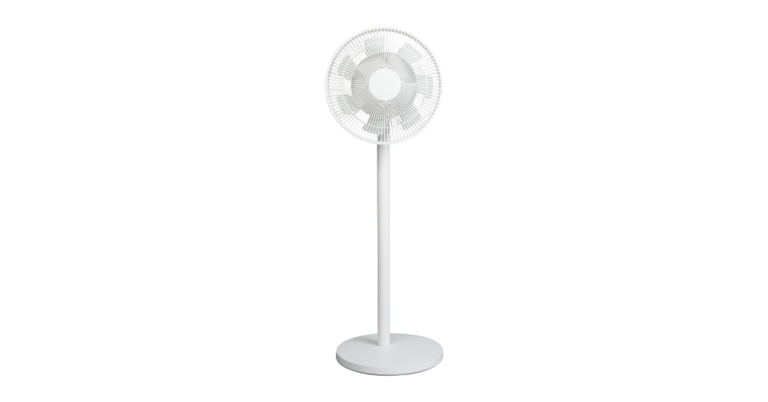
Today, Xiaomi India announced the availability of the Xiaomi Standing Fan 2. With its 7+5 wing-shaped blades, 100-speed settings, and voice control capabilities, the smart fan offers customers all-around cooling from a natural wind.
Xiaomi Standing Fan 2 specifications
In order to improve the microclimate of the home, Xiaomi India unveiled a new product. The seven and five wing-shaped blades revolve at the same time, enhancing airflow for more potent cooling. Customers can use the Mi Home App to control the fan speed between 1 and 100 to get the desired airflow. Customers may adjust the fan speed and choose between the direct blow and natural breeze using Alexa and Google Assistant instructions, adding to its high-performance characteristics.Dual fan blades and a Silent BLDC Copper-Wire Motor are features of the Xiaomi Smart Standing Fan 2 that have been designed to produce a softer natural breeze. The smart fan can chill the room for the entire family at a maximum range of 14 metres, with an ultra-wide angle, 140-degree horizontal and 39-degree vertical rotation. The 3-kilogramme smart fan has a 6-step, simple installation process, adjustable height, and a simple design that fits in any space. The product can be used as a standing or table fan depending on the user’s needs thanks to the adaptable stand.
Xiaomi Standing Fan 2 price in India
The cost of the Xiaomi Smart Standing Fan 2 in India is Rs 6,999. From July 11 to July 18, customers can get a preorder discount of INR 1,000 just on mi.com, bringing the final price down to Rs 5,999.Separately, Xiaomi showcased CyberDog, a quadruped robot with a bio-inspired design, taking a giant step towards the future of technology. The four-legged robot is powered by the Jetson Xavier NX AI Supercomputer for Embedded Edge Systems from Nvidia and 128GB of SSD storage.The CyberDog is swift and does well in challenging terrain. Since it includes 11 high-precision sensors that can provide speedy input to control its motions, it is the perfect companion for assisted living.
For the latest gadget and tech news, and gadget reviews, follow us on Twitter, Facebook and Instagram. For newest tech & gadget videos subscribe to our YouTube Channel. You can also stay up to date using the Gadget Bridge Android App. You can find the latest car and bike news here.
WhatsApp offers its services across various platforms, including Windows. You can easily link your account to the desktop app or WhatsApp Web by scanning the QR presented on your PC screen. While you may know how to mute WhatsApp notifications on your smartphone, doing the same on the desktop app or WhatsApp can be tricky. In this article, we show you how to mute WhatsApp desktop app notifications.Read Also: How to mute videos before sending them on WhatsApp?
Here’s how you can mute WhatsApp desktop app notifications
Step 1: Click on the three dots at the top of your chat window.Step 2: Click on Settings.Step 3: Select Notifications.Step 4: Click on ‘Mute all notifications’ if you do not want to receive any notifications. If you want to receive selected notifications, select them from the list given below.Step 5: Select the length of time you want to mute the notifications, then click ‘mute notifications’.Read Also:How to Block, Unblock or Mute Someone on Twitter?Bonus tip: How to mute an individual chat on WhatsApp Desktop AppStep 1: Move the cursor to the chat you want to mute and click on the downward arrow () at the bottom of the chat.Step 2: Click on ‘Mute Notifications’.Step 3: Select the duration for the chat to remain muted.Step 4: Click on ‘Mute Notifications’.To unmute the WhatsAppdesktop app simply go to Settings>Notifications and untick the ‘Mute all notifications’ box. If you mute a chat on your phone, it will get muted on your desktop and vice-versa.
For the latest gadget and tech news, and gadget reviews, follow us on Twitter, Facebook and Instagram. For newest tech & gadget videos subscribe to our YouTube Channel. You can also stay up to date using the Gadget Bridge Android App. You can find the latest car and bike news here.
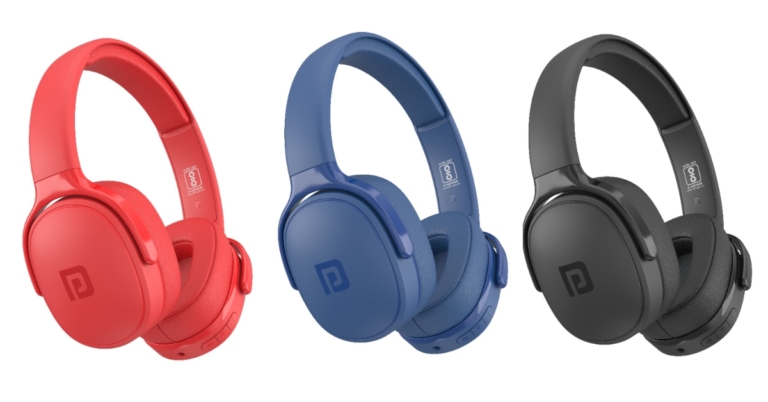
Portronics has announced the launch of a new set of wireless headphones called Muffs A in the Indian market. The wireless headphones can operate for 30 hours on a single charge. The over-ear headphones have 40mm drivers, for deeper bass and come with sweat and dust-resistant IPX5 body.
Portronics Muffs A price in India and availability
Portronics Muffs A wireless headphones have been introduced at Rs 1,999 in India. The Portronics Muffs A are supported by a 12-month warranty and are sold at Amazon.in, the company’s official website, and other top online and offline retailers.
Portronics Muffs A specifications
The Portronics Muffs A are over-ear headphones that are made with memory foam and include (removed) ear cushions that are incredibly soft and skin-friendly. They are also designed with an ergonomic fluid design that provides superior comfort even when used for extended periods of time. The ergonomic design also improves sound isolation, allowing you to block out background noise, watch movies or listen to music in peace, or take voice and video chats without being distracted.The wireless headphone’s IPX5 body is water, sweat, and dust resistant, so you can use it worry-free during sweaty workouts or if it unexpectedly rains while you’re commuting.According to the company the large 40mm drivers inside the headphones allow for distortion-free, precise highs and mids as well as deep, powerful bass. They are built around the most recent Bluetooth V5.2 chip with 10m range. The internal 520mAh Lithium-ion battery can be fully charged in about 55 minutes and provides up to 30 hours of playback time. You may also easily use the charger for your current smartphone thanks to the USB-C charging port.The Portronics Muffs A can also be used with an audio cable that can be linked directly to your smartphone, tablet, or laptop so you can continue your enjoyment continuously if your battery runs out and there isn’t a charger nearby. The audio cable might also be useful for gamers because it provides zero latency for enhanced audio synchronisation.
For the latest gadget and tech news, and gadget reviews, follow us on Twitter, Facebook and Instagram. For newest tech & gadget videos subscribe to our YouTube Channel. You can also stay up to date using the Gadget Bridge Android App. You can find the latest car and bike news here.
Ever since making its way to the market, Amazon Echo has evolved into a very versatile product that has found its way into most modern homes. With its increasing functionality and easy access, there is an Amazon Echo device suited for every room of your house. While putting an Amazon Echo in every room of the house may seem overboard to some, there is an entire range of Echo-compatible devices for your household that you can easily control with Alexa. In this article, we bring you the best Alexa and Amazon Echo devices for each room of your house.Read Also:Amazon Echo Show 10 review: Follow me everywhere
Living Room
Amazon Echo Studio
While the Amazon Echo Dot is the perfect device for small rooms, it may not suffice for a larger living room. What you’re looking for is a larger device that will fill every corner of the room with surround sound. Amazon Echo Studio is the perfect device for this. The Echo Studio is the tallest and the most advanced Alexa speaker you can get your hands on. With 5 speakers built into it, the Amazon Echo Studio is bound to give you a dynamic, immersive sound.Price: $199 / Rs 22,999.Buy on Amazon.
Fire TV Cube
The Amazon Fire TV Cube is a successor to the Fire TV Stick. While the latter turns your TV into a Smart TV that can stream media from various sources, the Fire TV Cube adds Alexa to your device and makes it voice-controlled. You won’t need a physical remote to control your TV, even though the Fire TV Cube comes with one. Not only that, you can control any other smart device or appliance with the Fire TV Cube, making multiple remote controls a thing of the past.Price: $120 / Rs 12,999.Buy on Amazon.
Bedroom
Echo Dot with Clock
The Echo Dot with Clock is a great addition to your nightstand. This Echo Device comes with a minimal digital clock LED display and the standard LED lighting at the bottom. With the Echo Dot, you can play ambient sounds and white noise while you go to sleep, set up an alarm using Alexa, or even update your to-do list for the day. You can snooze the alarm by gently tapping at the top of the device.Price: $49 / Rs 4,999.Buy on Amazon.
Philips Hue White and Colour Ambiance LED Smart Bulbs
With these smart LED bulbs from Philips, you can use Alexa to control the brightness, lighting colour, and overall ambience of your bedroom. You can also set up the timer to dim the lights, and use voice control to control the lighting in your room. If you accidentally forgot to turn off the lights, you can use the app on your phone to turn them off from anywhere.Price: $89 / Rs 2,499.Buy on Amazon.
Kitchen
Echo Show 10
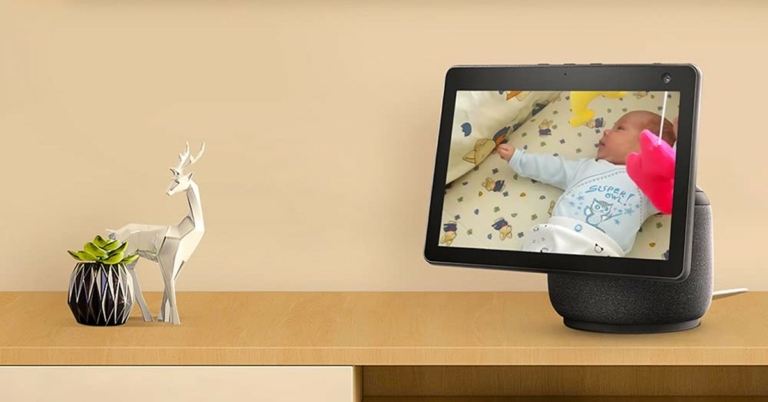
The Echo Show 10 is a great addition to your kitchen. You can use it to update your grocery list and even play recipes while you cook. The Echo Show 10 also comes with a rotating screen display that is designed to follow you as you move across the kitchen. This way you won’t lose sight of the recipe, no matter which part of the kitchen you’re in.Price: $249 / Rs 24,999Buy on Amazon.
Amazon Smart Plug
Turn the appliances in your kitchen into smart devices using the Amazon Smart Plug. Compatible with Alexa, the Amazon Smart Plug lets you turn off the appliances connected to it using voice control. You can even control the appliances while you’re away using the Alexa app on your phone. However, Amazon Smart Plug supports a maximum load of 6A so it should not be used with heavy appliances such as AC, Geyser, or Water Heater.Price: $24 / Rs 1,999Buy on Amazon.
LG ThinQ Refrigerator
Equipped with Amazon Alexa, the LG ThinQ refrigerator lets you have total control of your fridge. You can use Alexa to set up the power settings, switch modes, update the to-do list, and even freeze ice in your refrigerator. The ThinQ refrigerator can also be controlled when you’re outside your home using the LG ThinQ app on your phone.Price: $3,509.Buy on LG Website.
Kids’ Room
Echo Dot Kids Edition
The Amazon Echo Dot Kids Edition comes with fun and vibrant designs that will liven up the kids’ room. With an included 1 year subscription to Amazon Kids+, the Echo Dot can provide thousands of ad-free books, games, videos, apps, and Alexa skills, along with additional interactive content for kids. You can also set up parental controls that filter explicit content on the Echo device.Price: $59Buy on Amazon.
Amazon Echo Glow
The Amazon Echo Glow is a fun addition to the kids’ room. With multiple shades and colours, the Amazon Echo Glow can effectively function as a night bulb.Price: $29 / Rs 4,081Buy on Amazon.
Office
Amazon Echo Show 15
The Amazon Echo Show 15 is a great device to centrally control all smart devices in your home. With an intuitive design and easy setup, you can control the devices in every corner of your house with ease. You can also set up the security cam to directly feed the footage to the Amazon Echo Show 15.Price: $249 / Rs 25,529Buy on Amazon.Read Also:Amazon Echo Show 8 review: Good sight and soundBonus: Alexa-compatible security devices for your homeThe Ring Video Doorbell 4 is an essential device if you’re looking to boost the security in your home. With an integrated camera, you can use the Ring Video Doorbell 4 to see who’s at the door. You can even link it with Alexa to make an announcement whenever someone is at the door. The camera footage can be displayed on the Echo Show device we mentioned earlier.If you’re looking to upgrade the lock on your door, the August WiFi smart lock is just the device for you. With the option to attach it to the existing lock, the August WiFi smart lock can be linked to Alexa if you want to use voice controls to guide it. After installation, you can control the smart lock from anywhere inside or outside your home. If you don’t remember locking the door, you can use the app on your phone to lock it remotely.With the wide range of versatile products, there is an Alexa and Echo device for every room of the house. While this list covers most of the devices that you may need in the house, it is always a good idea to go through all the devices on offer and make an informed choice based on the needs of your house.
For the latest gadget and tech news, and gadget reviews, follow us on Twitter, Facebook and Instagram. For newest tech & gadget videos subscribe to our YouTube Channel. You can also stay up to date using the Gadget Bridge Android App. You can find the latest car and bike news here.
Tomorrow is the formal debut of the Nothing Phone 1 in India and across the globe, and we have learned that it might not include a charger. A YouTube video that shows the packing for the smartphone that does not include the charger also projected the upcoming smartphone’s pricing. The phone is confirmed to be armed with Qualcomm Snapdragon 778G+ SoC.Nothing recent has indicated that the Phone 1 will have a fingerprint scanner embedded in the display. The firm also confirmed that it will be powered by Qualcomm Snapdragon 778G+ SoC, and the device will have a 50-megapixel dual-back camera configuration. But fresh information has surfaced via YouTube video which indicated the retail packaging to be slender and is reported to be built from repurposed bamboo. The Phone 1 will have a frame made entirely out of recycled aluminium, according to the video.Prior to its unveiling on July 12, the Nothing Phone 1 camera’s specifications and samples have only been unofficially hinted at. New, excellent renderings of the phone have also appeared online. The business provided the official details and sample images of the Nothing Phone 1 camera configuration in a blog post.Dual cameras with a 50-megapixel Sony IMX766 main sensor in addition to an ultra-wide-angle camera with a 114° field of view will be included with the Phone 1. Both optical image stabilisation (OIS) and electrical image stabilisation are supported by the phone (EIS).According to the source, the smartphone will be made available in two colour options of Black and White. The smartphone from Nothing will have a metal chassis, according to the renderings. The Nothing Phone 1 is rumoured to have a power button on the right edge and volume rockers on the left edge.The phone is anticipated to be a mid-range model with a price tag of between Rs. 30,000 and Rs. 40,000.According to a report the price of the Nothing Phone 1 is likely to be EUR 469.99 which translates to Rs 37,900 for the 8GB of RAM and 128GB of internal storage, EUR 549.99 which converts to Rs 40,300 for the 8GB of RAM and 256GB of internal storage model. The price of the 12GB of RAM and 256GB of storage is said to come at EUR 499.99 which is approximately Rs 44,300
For the latest gadget and tech news, and gadget reviews, follow us on Twitter, Facebook and Instagram. For newest tech & gadget videos subscribe to our YouTube Channel. You can also stay up to date using the Gadget Bridge Android App. You can find the latest car and bike news here.
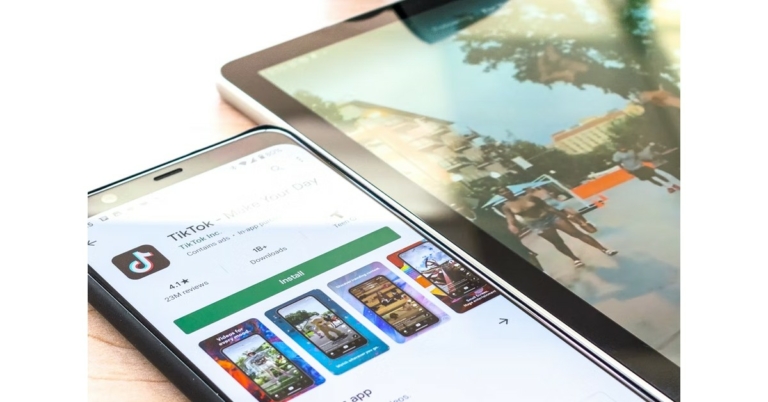
Google Play Store is the biggest and the most used app market for Android smartphones. With its airtight security features, it is impossible for any malware to make its way to your phone. However, sometimes users face an issue or bugs where they aren’t able to download any apps from the Play Store. Today, we show you the best ways to fix the ‘apps not downloading from Google Play Store’ issue on your Android smartphone.Read Also: What’s the Easiest Way to Learn Poker?
Check your Internet Connection
It is possible that Google Play Store may not be working on your phone due to a faulty internet connection. To check your internet connection open any webpage on the web browser, or use any other app that requires the internet. If they both work fine, there’s nothing wrong with your internet connection. This step is essential in figuring out whether the issue lies with the Play Store or your internet connection. Use a different router or ISP (internet service provider) and see if that works.
Check your Storage Space
Google Play Store will not download apps on your phone if there is insufficient storage space. To check the storage space on your phone go to Settings>Battery and Device care>Storage. You will be presented with a breakdown of used space and available space. If your device storage is full, delete some files to create space for the app you’re trying to download.
Force Stop the Play Store app
If you’re trying to download a new update for an app but its Play Store page isn’t displaying it, try force-stopping the Play Store app. If you’re in the middle of downloading an app from the store, it will get cancelled when the system force stops the app. Make sure there are no pending downloads while you’re doing this. Go to Settings>Apps>Google Play Store>Force Stop.
Update the Play Store app
It is common for the Play Store app to glitch and present some bugs over time. Usually, these issues are fixed with every update, but if you haven’t updated the app in a while you may have a tough time downloading new apps to your phone. In order to update the Play Store app, go to Settings>About>Update Play Store.
Clear Google Play Store and Google Play Services Cache and app data
Clearing the cache and app data of Google Play Store and Google Play Services may get rid of any faulty temporary files stored in the cache or data, returning the Play Store to normalcy. To clear cache go to Settings>Apps>Play Store>Storage. Delete app cache and app data.
Uninstall updates for Google Play Store
If you’ve recently installed a new update for Play Store, it may be incompatible with your device, resulting in apps not downloading on your phone. You can uninstall the updates and wait until Google publishes a patched update. To uninstall updates go to Settings>Apps>Google Play Store. Click the three dots on the top right corner of your screen and select ‘Uninstall Updates’.
Clear cache for Google Play Services
While Google Play Store is the marketplace for all Android apps, Google Play Services links the downloaded apps to your Google Account. It also takes care of tasks like location tracking, ad integration, security checks, and more. If Google Play Services malfunctions, it may stop you from downloading any new apps from the Play Store. To fix this, clear Play Services cache by going to Settings>Apps>Google Play Services>Storage>Clear Cache.
Reset Download Manager
Force-stoping and restarting your device’s download manager can fix this issue as well. Download Manager is a system app on your device. To find it in the app manager, you will first need to go to the filter options and enable system apps. Once that is done, go to Download Manager>Force Stop.
Check for System Updates
If you haven’t updated your Android OS for a while, it could be the reason why new apps aren’t downloading on your phone. To install any new updates go to Settings>Software Update and check for any new updates.
Check the Date and Time on your phone
Google Play Store may not work on your device if the date and time are incorrect. In order to fix this, go to Settings>General Management>Date and Time and enable Automatic Date and Time.
Restart your Device
A simple restart may fix any background issues that you aren’t able to diagnose. To restart your device, long-press the screen lock key and select Restart. Closing and opening the Play Store again may also help.Read Also: Best Ways to Make a Collage on Android
Bonus Tip
If you’re trying to download the paid app to your phone, make sure you’ve entered the correct account info in the payment gateway. Furthermore, check your account balance to see if you’ve got sufficient funds to download the app.
Frequently Asked Questions
Why is Google Play Store not downloading apps?
If Google Play Store is not downloading any apps despite your phone having enough internal storage and a stable internet connection, try clearing the cache for Play Store and restarting the app.
Why does Google Play Store show my downloads as pending and not installing?
If you get the ‘pending’ message while downloading new apps from the Play Store, it may be because other apps are currently in the queue to be downloaded. It may also display this message when your phone doesn’t have enough storage for the download to take place.
Why are downloads failing on my phone?
If the downloads from Google Play Store keep cutting off before completion, it means your internet connection is not stable.






 Step 2:
  Step 3:
 Step 3:



 Step 2:
 Step 3:
 Step 4:
 Step 5:




 If you’re trying to download a new update for an app but its Play Store page isn’t displaying it, try force-stopping the Play Store app. If you’re in the middle of downloading an app from the store, it will get cancelled when the system force stops the app. Make sure there are no pending downloads while you’re doing this. Go to Settings>Apps>Google Play Store>Force Stop.


 While Google Play Store is the marketplace for all Android apps, Google Play Services links the downloaded apps to your Google Account. It also takes care of tasks like location tracking, ad integration, security checks, and more. If Google Play Services malfunctions, it may stop you from downloading any new apps from the Play Store. To fix this, clear Play Services cache by going to Settings>Apps>Google Play Services>Storage>Clear Cache.
 Force-stoping and restarting your device’s download manager can fix this issue as well. Download Manager is a system app on your device. To find it in the app manager, you will first need to go to the filter options and enable system apps. Once that is done, go to Download Manager>Force Stop.


 Read Also: