

In This Article
Launching today: Moto G52 is all set to make its debut in India today
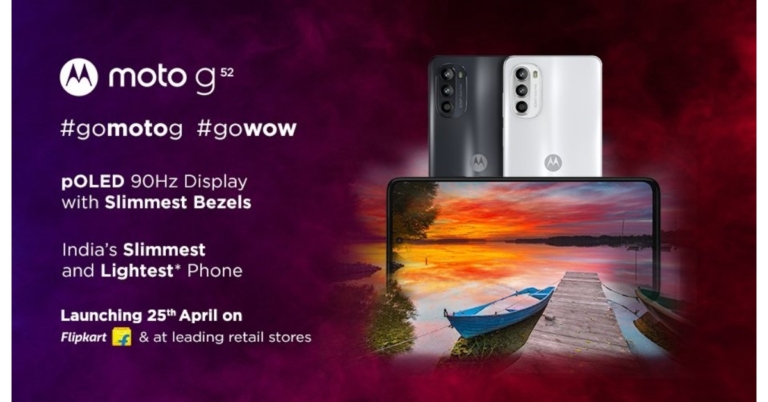
Motorola is preparing to launch its Moto G52 smartphone in India. Earlier this month, the device was introduced to the European market. A hole-punch display with a refresh rate of 90Hz will be included with the phone. It is powered by Qualcomm’s Snapdragon 680 SoC. Flipkart will also be the official retailer for the Moto G52. Continue reading to learn more about the launch.
Garena Free Fire Redeem Codes for 25 April: Here is how to claim them

Garena Free Fire is a battle royale game with regular awards and tournaments to keep players interested. If you play Garena Free Fire, you should be aware of the redeem codes that are released on a daily basis. However, because the battle royale game is banned in India, players from other countries can use the Free Fire Redeem codes daily. If you’re unfamiliar with the Garena Free Fire redeem codes or don’t know how to get them, we’ve put together a step-by-step guide to help you redeem them.
The Free Fire redeem codes are a great way to get free stuff. These are 12-digit codes that contain alphabets and numbers, as well as an expiration date and time. Because the Garena FF redeem codes cannot be used more than once, you should hurry to the redemption page to claim your free reward before someone else does. To get a free reward, all you have to do is go to reward.ff.garena.com/en, which is the official redemption page. Also, keep an eye on this space for daily updates on Garena Free Fire redemption codes and rewards.
In This Article
Garena Free Fire Redeem Codes for April 25
- VFHH NACBU SADF
- MNHG OLDU AXDV
- BMNC EDHC SENC
- KCKD DXDD GVGV
- JHND CXSD DDGF
- XFDD GDFG BBBB
- SSFF EFBF BHFG
- VDGF CVBF DGVD
- VFGV JMCK DMHN
- JCDK CNJE 5RTR
- 3RXG 5T54 4E3E
- FDDF VVVF DCDD
- EDXX DSZS SDFG
- KLLP DJHD DBJD
- HDFH DNBH NDJL
- NDJD FBGJ FJFK
- XJDJ GFVD FKVH
- XKDN 98ND DMNJ
- CDDF DGCD FGTD
- JDCF FJGG EHJP
- U8S4 7JGJ H5MG
- ZZAT XB24 QES8
- FFIC 33NT EUKA
- VNY3 MQWN KEGU
How to Get Free Fire Redeem Codes for Garena on April 25?
- Visit the Garena Free Fire game’s official website at reward.ff.garena.com.
- Use your Facebook, Google, VK, Apple ID, Huawei ID, or Twitter account to log in.
- You’ll be taken to a valid redemption code (s)
- Copy and paste the 12-digit redemption code into the text box.
- On the screen, a dialogue box will appear.
- ‘Ok’ should be selected.
Amazon Quiz Answers Today 25 April 2022: Participate to win Rs 10,000

25 April 2022 Amazon Quiz has gone live. Customers from different parts of the country are participating in the daily quiz. The quiz begins from 12 AM to 11:59 PM. Those participating in the quiz can win exciting prizes by answering all the questions correctly. Today participants have a chance to win a Rs 10,000 Amazon Pay Balance.
Amazon quiz brings an opportunity for its customers to win Amazon Pay Balance ranging from Rs 1,000 to Rs 50,000. The Quiz can be played from 12 AM to 11:59 PM. The e-commerce platform brings a fresh quiz on a daily basis which consists of five questions related to general knowledge and current affairs. The participants need to answer all the questions correctly and their names will be selected for a lucky draw. The winner will be announced at the end of the month.
One wrong answer could eliminate you from the quiz. If you manage to answer all the questions correctly you can stand a chance to win a Rs 10,000 Amazon Pay Balance today. Only app users are eligible to participate in the Quiz. Check Out 25 April 2022 Amazon Quiz Answers.
Amazon Quiz Today Prize – Rs 10,000 Amazon Pay Balance
Quiz Date – 25 April 2022
Daily Timing – 12 AM to 11:59 PM
Winner Announcement – Today 12 PM
In This Article
Amazon Quiz Answers Today 25 April 2022
Question 1: Atharva – Who won the Man of the Series as Bangladesh recently beat South Africa in an ODI series played in South Africa?
Answer: Taskin AhmedQuestion 2: Who among these wrote the Story for the movie ‘RRR’?
Answer: Vijayendra PrasadQuestion 3: Crew-4 led by Kjell Lindgren will fly to the international space station in a Dragon Capsule from SpaceX named what?
Answer: FreedomQuestion 4: This famous US President’s father was a senior economist in the government of which country?
Answer: KenyaQuestion 5: What is a psychological condition when people have a fear of being detached from this device called?
Answer: NomophobiaHow To Play Amazon Quiz
Only app users are eligible to play the Amazon quiz every morning from 12 AM to 11:59 PM. The quiz is not available on the desktop. For those who are unaware of how to play the Amazon quiz below are the steps, you can follow to take the quiz.- Firstly download the Amazon app from Google Play Store or App Store
- Now fill in the required information through the Sign Up option.
- You need to log in to the Amazon app and scroll down on the home screen to find the Amazon Quiz banner.
- Tap on the Amazon Quiz banner and tap on the Start button to start the Quiz.
- Now you will get 5 questions and you need to answer them correctly. One wrong answer will eliminate you from the Quiz.
- After answering all the questions correctly you are now eligible for a Lucky Draw.
- The winner’s name will be announced today at 12 PM.
Lost Your Snapchat Streak? Here Is How To Get It Back
If you’re a Snapchat user, we know how much a Snap Streak is important to you. Snap Streaks are not just about maintaining a higher score. They signify how close you are to a person. If your Snap Streak with a friend is a high number, it highlights the effort that both you and your friend made consistently towards each other.
Clicking and sharing pictures on an everyday basis without failing even once may seem like a cakewalk to many, but it’s not. Taking out time amongst your busy schedules for someone else once in a while is not a big deal. However, maintaining that ritual consistency gets difficult over time. Many factors may sweep in and pose an interruption in your daily snap sharing.
But if you were successful in maintaining a Snap Streak for a longer period with your friend and still lost it without there being any fault from your or your friend’s side, it is certainly a little heartbreaking. You lose all the effort that you and your friend put in together and hence have to start from scratch.
Snapchat does understand the value and emotions behind your effort and hence, provides a workaround for you to get your Snap Streak back in such cases. Here is a step-by-step guide on how to get your Snap Streak back in case you lost it due to a technical glitch or due to circumstances out of your control.
Read also: How to Enable Dark Mode in Snapchat on Android and iOS?
 Step 3: Tap on Restore. If you’ve run out of your free restoration options, you will need to pay $0.99 to get back the Snap streak.
Step 2: Under the Support section, tap on I Need Help.
Step 3: Click on the Snapstreaks category under the Popular topics section
Step 4: Click on the ‘let us know’ link given within the text.
Step 5: Select the I’ve lost my Snapstreak option in the checklist
Step 6: Scroll down and fill in the details in the form provided
Step 7: Click on the Send button
Read also: How To Change Your Snapchat Username In 2022?
If the company listens to your appeal and considers your request, you may get your lost Snap Streak back.
Moreover, there are certain conditions while using this method as well. Your Snap Streak won’t be reinstated if you or your friend lost it naturally by forgetting to send a snap. Also, you won’t be able to use this method regularly. It’s not a good idea to frequently keep losing your Snap Streaks and appeal to Snapchat.
Even if it’s genuinely not your fault and you lost multiple Snap Streaks, this method is likely to work with only one contact. Reportedly, there seems to be a limit of one username per submission. Hence, it is recommended to make your longest-running Snap Streak a priority while appealing.
Step 3: Tap on Restore. If you’ve run out of your free restoration options, you will need to pay $0.99 to get back the Snap streak.
Step 2: Under the Support section, tap on I Need Help.
Step 3: Click on the Snapstreaks category under the Popular topics section
Step 4: Click on the ‘let us know’ link given within the text.
Step 5: Select the I’ve lost my Snapstreak option in the checklist
Step 6: Scroll down and fill in the details in the form provided
Step 7: Click on the Send button
Read also: How To Change Your Snapchat Username In 2022?
If the company listens to your appeal and considers your request, you may get your lost Snap Streak back.
Moreover, there are certain conditions while using this method as well. Your Snap Streak won’t be reinstated if you or your friend lost it naturally by forgetting to send a snap. Also, you won’t be able to use this method regularly. It’s not a good idea to frequently keep losing your Snap Streaks and appeal to Snapchat.
Even if it’s genuinely not your fault and you lost multiple Snap Streaks, this method is likely to work with only one contact. Reportedly, there seems to be a limit of one username per submission. Hence, it is recommended to make your longest-running Snap Streak a priority while appealing.
In This Article
Restore your Snap streak
Snapchat has introduced an option to restore your Snap streak with a friend. Every user gets a certain number of free restores. Once they are used up, Snapchat charges $0.99 per restoration. Step 1: Launch Snapchat on your device and switch to the Chats tab. Step 2: Hit the Restore option next to the name of the friend with whom you want to restore the Snap streak. Step 3: Tap on Restore. If you’ve run out of your free restoration options, you will need to pay $0.99 to get back the Snap streak.

Contact Snapchat Support to get back your Snap streak
Step 1: Open the Snapchat app on your device, tap on your Bitmoji and then tap on the Settings icon on the top right corner of the interface. Step 2: Under the Support section, tap on I Need Help.
 Step 3: Click on the Snapstreaks category under the Popular topics section
 Step 4: Click on the ‘let us know’ link given within the text.
 Step 5: Select the I’ve lost my Snapstreak option in the checklist
 Step 6: Scroll down and fill in the details in the form provided
 Step 7: Click on the Send button
 Read also: How To Change Your Snapchat Username In 2022?
If the company listens to your appeal and considers your request, you may get your lost Snap Streak back.
Moreover, there are certain conditions while using this method as well. Your Snap Streak won’t be reinstated if you or your friend lost it naturally by forgetting to send a snap. Also, you won’t be able to use this method regularly. It’s not a good idea to frequently keep losing your Snap Streaks and appeal to Snapchat.
Even if it’s genuinely not your fault and you lost multiple Snap Streaks, this method is likely to work with only one contact. Reportedly, there seems to be a limit of one username per submission. Hence, it is recommended to make your longest-running Snap Streak a priority while appealing.
Read also: How To Change Your Snapchat Username In 2022?
If the company listens to your appeal and considers your request, you may get your lost Snap Streak back.
Moreover, there are certain conditions while using this method as well. Your Snap Streak won’t be reinstated if you or your friend lost it naturally by forgetting to send a snap. Also, you won’t be able to use this method regularly. It’s not a good idea to frequently keep losing your Snap Streaks and appeal to Snapchat.
Even if it’s genuinely not your fault and you lost multiple Snap Streaks, this method is likely to work with only one contact. Reportedly, there seems to be a limit of one username per submission. Hence, it is recommended to make your longest-running Snap Streak a priority while appealing.
Frequently Asked Questions (FAQs)
How do I restore my Snap streak on Snapchat?
Snapchat now gives you the option to restore your Snap streak. Every user gets a certain number of free restores, following which Snapchat charges $0.99 to restore a streak.What is a Snapchat streak?
A Snapchat streak is a counter of how many consecutive days you and your friend have sent Snaps to each other on the app.How do I contact Snapchat Support to restore a streak?
Go to Settings>I need help>Snapstreaks>I’ve lost my Snapstreak and fill in your account details. Hit Send once you’re done.Conclusion
Snapchat+ users get more Streak restore options than regular users. The cost of restoring a Streak may vary in different countries. In case you know of any other means or ways to get back lost Snapstreaks on Snapchat, we would be delighted to hear about it. Do write to us in the comments section below. For the latest gadget and tech news, and gadget reviews, follow us on Twitter, Facebook and Instagram. For newest tech & gadget videos subscribe to our YouTube Channel. You can also stay up to date using the Gadget Bridge Android App. You can find the latest car and bike news here.Fitbit Charge 5 Review: Best Fitness Tracking Features In The Fitbit Range
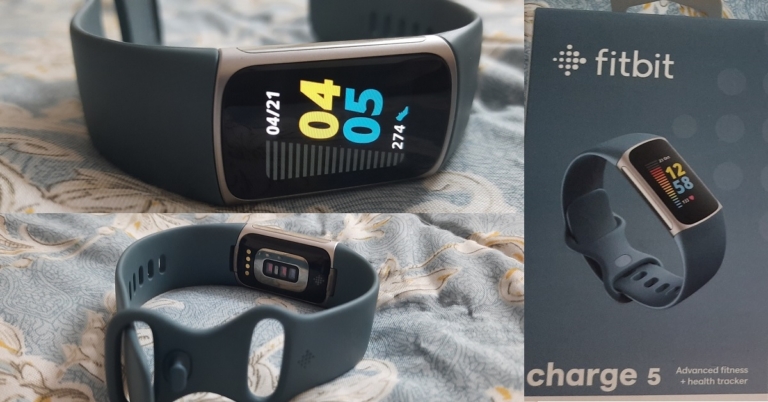
Hi, you all fitness freaks! The latest fitness tracker in town comes the Fitbit Charge 5 smartwatch. From the number of steps you take to the number of calories you burn during the day, it monitors everything right from your wrist. What’s more with the Charge 5 is that you even get to wear it to sleep comfortably to know your sleep duration, quality and sleep score. Feeling stressed? Try taking an EDA scan through your smart sidekick to track your stress levels and keep them at bay.
From automatic screen waking and an Always-On display to detailed tracking of workouts like swimming sessions and whatnot, the Charge 5 is your all-rounder fitness buddy. Here is a complete review of the Fitbit Charge 5 smartwatch, covering its design, display, performance and applications. Why not weigh its pros and cons yourself and make an informed buying decision?
The Fitbit Charge 5 comes in a cleverly designed package with navigations displayed within for quick and efficient unboxing. It will make you realise how important the little things are. It is offered in 3 dual-tone colour themes, namely Black with Graphite Stainless Steel, Lunar White with Soft Gold Stainless Steel and Steel Blue with Platinum Stainless Steel. We were able to get our hands on its Steel Blue version.
The package consists of the Fitbit Charge 5 smartwatch, an extra strap, a charging cable with a magnetic pin, a quick start guide and a product information guide. Opening the box, the first thing that your eyes will set on is the shiny black display of the smartwatch. Moreover, its innovative sloping-inwards resting case, which looks quite fascinating, increases your temptation even further to pick the device up. Once in your hand, you’ll feel the Fitbit Charge 5 to be quite light weighted. Moreover, the syncing proportions of the smartwatch, with its main body being perfectly in line with the width of its band is hard to miss.
The black touchscreen display is mounted on its platinum stainless steel body. On both the left and right sides of the display, you will observe separate longitudinal button-like sections. These actually are its EDA (Electrodermal Activity) sensors, which detect tiny electrical responses on your skin to track your stress levels. Flip it over and you will notice more sensors fixated beneath the display in order to track health metrics such as your heart rate, ECG and relative SpO2 through your wrist. The smartwatch is also equipped with a 3-axis accelerometer, GPS and a vibration motor.
The Fitbit Charge 5 comes with a 1.04-inch AMOLED display with a 326ppi pixel density. It has a black display theme and the colours on the screen appear quite bright, full of vibrance and high contrast which appeals to the eye. When taken in sunlight, the screen is fairly legible. The smartwatch straps are made up of silicone and have a smooth texture. The thickness of the Charge 5 band is slimmer than that of the Charge 4 model and is hence more wearable. However, wearing the watch for a prolonged period may get a bit uncomfortable. Hence, it is advised to remove the smartwatch from time to time, to give your wrist a little break.
Overall, the Fitbit Charge 5 design looks quite sporty while its display is a visual treat for the eyes.
Read also: Xiaomi Redmi Watch 2 Lite Review: Elegant Design With A Thorough Health Check System
On its home screen is visible the date and time along with five metrics displayed one at a time. These include the no. of steps taken, distance covered, active zone time, calories burnt and heart rate. Tapping on the respective metric displayed on the screen changes it to show the next in line out of the five. There is also a meter colour coded like a heat map which represents your daily metric data visually.
From the home screen, you can swipe left and right to access applications like ECG, EDA Scan, Timers, Alarms, Exercises and Notifications. Swiping up takes you to the dashboard along with a pictorial representation of the fitness goals you achieved, including hourly activity, heart rate, sleep score, SpO2, exercises and more. Swiping down from the home screen displays the Payments section, DND mode, Sleep mode, Screen Auto Wake, Water Lock and the Settings app. Swiping left to right on any screen other than the home screen acts as a back command whereas a double-tap takes you back to the home screen.
The Fitbit Charge 5 offers many features but works best when used with the Fitbit mobile application. To start with, it monitors the number of steps that you take with great accuracy. It displays both your current heart rate as well as your resting heart rate. Moreover, high or low heart rate notifications can be set, when outside the workout mode, so that you are warned in time, like during a walk, etc. Its ECG application, however, doesn’t seem to be functional yet.
The various exercises that the Fitbit Charge 5 allows you to monitor include Run, Bike, Swim, Treadmill, Weights and Interval workouts. You make changes to this list via the Fitbit app on your smartphone. Detailed reports are shown on the Fitbit app for each exercise or workout you undergo or for each health application that you use. You can set exercise goals for each exercise and time them as well. The smartwatch gives automatic reminders to you for making hourly movements, completing your exercise goals and more. Moreover, you can also track your menstrual cycle through the device as well as its mobile app.
For monitoring your stress levels, the smartwatch is equipped with on-wrist EDA sensors on both sides. It requires you to touch the sensors with the fingertips of your thumb and forefinger on either side. However, you have to keep extremely still for 3 minutes for the EDA sensors to record observations. Otherwise, it won’t work. The Charge 5 also provides a sleep monitoring application.
It requires you to switch on the Sleep mode and wear your smartwatch to bed. In the morning, you can sync your smartwatch with the Fitbit app. You will be given a sleep score based on the total time you spent sleeping and the quality of your sleep. Through the Fitbit app, you can get access to your detailed sleep records. You even get to monitor your time spent in sleep bifurcated into the different sleep stages, namely Deep, Light and REM sleep.
One of the highlights of the Fitbit Charge 5 smartwatch is the provision of its 24-hour always-on display setting. What’s even more fascinating is its Screen Auto Wake mode, which you can set to switch ‘On’ or keep it on ‘Manual’ mode. If you switch it on, its display will turn on automatically without touching as soon as you bring the watch towards yourself. Whereas if you move your wrist away from you, the smartwatch detects that it’s no longer in use and the display turns off automatically.
However, if you don’t want the screen to go on and off automatically, you can opt for the Manual mode. To take it to the next level, the Charge 5 allows you to set the display to Always On mode specifically during workouts, after which it will return back to its normal setting.
Read also: OnePlus Nord CE 2 Review: Super Stylish Design With Excellent Performance
In This Article
Fitbit Charge 5 Review: Design And Display
 The Fitbit Charge 5 comes in a cleverly designed package with navigations displayed within for quick and efficient unboxing. It will make you realise how important the little things are. It is offered in 3 dual-tone colour themes, namely Black with Graphite Stainless Steel, Lunar White with Soft Gold Stainless Steel and Steel Blue with Platinum Stainless Steel. We were able to get our hands on its Steel Blue version.
 The package consists of the Fitbit Charge 5 smartwatch, an extra strap, a charging cable with a magnetic pin, a quick start guide and a product information guide. Opening the box, the first thing that your eyes will set on is the shiny black display of the smartwatch. Moreover, its innovative sloping-inwards resting case, which looks quite fascinating, increases your temptation even further to pick the device up. Once in your hand, you’ll feel the Fitbit Charge 5 to be quite light weighted. Moreover, the syncing proportions of the smartwatch, with its main body being perfectly in line with the width of its band is hard to miss.
 The black touchscreen display is mounted on its platinum stainless steel body. On both the left and right sides of the display, you will observe separate longitudinal button-like sections. These actually are its EDA (Electrodermal Activity) sensors, which detect tiny electrical responses on your skin to track your stress levels. Flip it over and you will notice more sensors fixated beneath the display in order to track health metrics such as your heart rate, ECG and relative SpO2 through your wrist. The smartwatch is also equipped with a 3-axis accelerometer, GPS and a vibration motor.
 The Fitbit Charge 5 comes with a 1.04-inch AMOLED display with a 326ppi pixel density. It has a black display theme and the colours on the screen appear quite bright, full of vibrance and high contrast which appeals to the eye. When taken in sunlight, the screen is fairly legible. The smartwatch straps are made up of silicone and have a smooth texture. The thickness of the Charge 5 band is slimmer than that of the Charge 4 model and is hence more wearable. However, wearing the watch for a prolonged period may get a bit uncomfortable. Hence, it is advised to remove the smartwatch from time to time, to give your wrist a little break.
 Overall, the Fitbit Charge 5 design looks quite sporty while its display is a visual treat for the eyes.
Read also: Xiaomi Redmi Watch 2 Lite Review: Elegant Design With A Thorough Health Check System
Overall, the Fitbit Charge 5 design looks quite sporty while its display is a visual treat for the eyes.
Read also: Xiaomi Redmi Watch 2 Lite Review: Elegant Design With A Thorough Health Check System
Fitbit Charge 5 Review: Performance And Applications
Before coming to its performance and applications, let us elaborate a little further upon the Fitbit Charge 5 specs. Its main body of the smartwatch excluding its wrist band comes with dimensions of 36.7mm x 22.7mm x 11.2mm. It weighs about 28g in total and is equipped with Bluetooth 4.0, NFC and GPS. It is 5 ATM water-resistant and is sweat, rain and splash-proof. Its battery life can vary based on the extent and type of usage. It can last for about 7 days or more upon mild usage and for about 5 days upon mediocre to extensive usage. On its home screen is visible the date and time along with five metrics displayed one at a time. These include the no. of steps taken, distance covered, active zone time, calories burnt and heart rate. Tapping on the respective metric displayed on the screen changes it to show the next in line out of the five. There is also a meter colour coded like a heat map which represents your daily metric data visually.

 From the home screen, you can swipe left and right to access applications like ECG, EDA Scan, Timers, Alarms, Exercises and Notifications. Swiping up takes you to the dashboard along with a pictorial representation of the fitness goals you achieved, including hourly activity, heart rate, sleep score, SpO2, exercises and more. Swiping down from the home screen displays the Payments section, DND mode, Sleep mode, Screen Auto Wake, Water Lock and the Settings app. Swiping left to right on any screen other than the home screen acts as a back command whereas a double-tap takes you back to the home screen.
 The Fitbit Charge 5 offers many features but works best when used with the Fitbit mobile application. To start with, it monitors the number of steps that you take with great accuracy. It displays both your current heart rate as well as your resting heart rate. Moreover, high or low heart rate notifications can be set, when outside the workout mode, so that you are warned in time, like during a walk, etc. Its ECG application, however, doesn’t seem to be functional yet.
 The various exercises that the Fitbit Charge 5 allows you to monitor include Run, Bike, Swim, Treadmill, Weights and Interval workouts. You make changes to this list via the Fitbit app on your smartphone. Detailed reports are shown on the Fitbit app for each exercise or workout you undergo or for each health application that you use. You can set exercise goals for each exercise and time them as well. The smartwatch gives automatic reminders to you for making hourly movements, completing your exercise goals and more. Moreover, you can also track your menstrual cycle through the device as well as its mobile app.
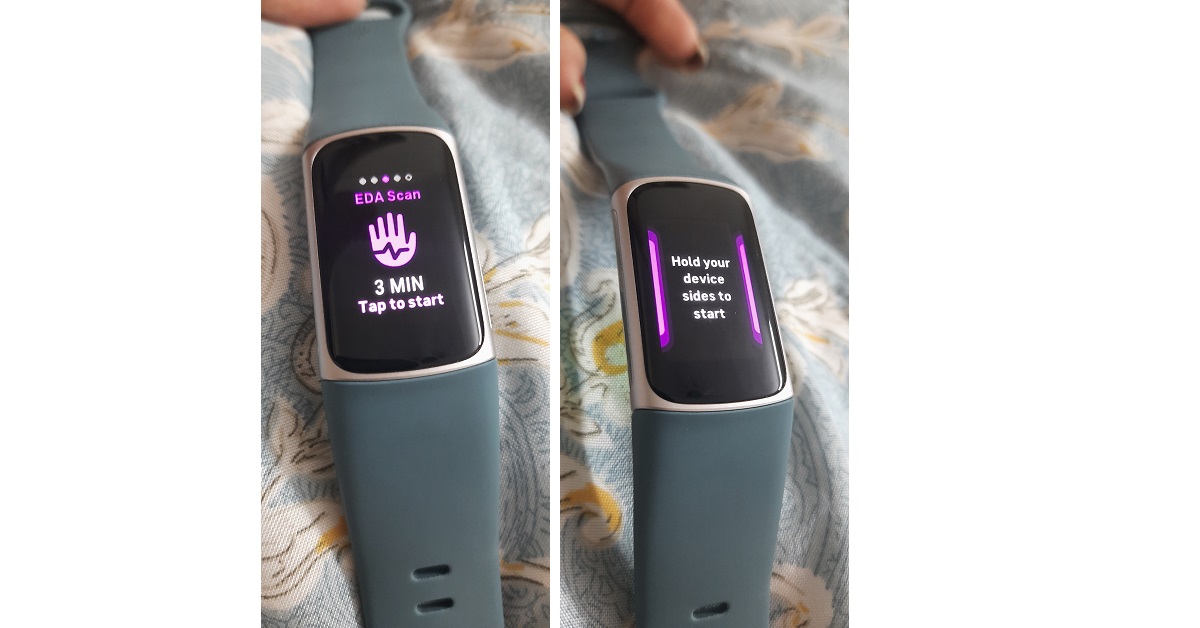 For monitoring your stress levels, the smartwatch is equipped with on-wrist EDA sensors on both sides. It requires you to touch the sensors with the fingertips of your thumb and forefinger on either side. However, you have to keep extremely still for 3 minutes for the EDA sensors to record observations. Otherwise, it won’t work. The Charge 5 also provides a sleep monitoring application.
 It requires you to switch on the Sleep mode and wear your smartwatch to bed. In the morning, you can sync your smartwatch with the Fitbit app. You will be given a sleep score based on the total time you spent sleeping and the quality of your sleep. Through the Fitbit app, you can get access to your detailed sleep records. You even get to monitor your time spent in sleep bifurcated into the different sleep stages, namely Deep, Light and REM sleep.
 One of the highlights of the Fitbit Charge 5 smartwatch is the provision of its 24-hour always-on display setting. What’s even more fascinating is its Screen Auto Wake mode, which you can set to switch ‘On’ or keep it on ‘Manual’ mode. If you switch it on, its display will turn on automatically without touching as soon as you bring the watch towards yourself. Whereas if you move your wrist away from you, the smartwatch detects that it’s no longer in use and the display turns off automatically.
However, if you don’t want the screen to go on and off automatically, you can opt for the Manual mode. To take it to the next level, the Charge 5 allows you to set the display to Always On mode specifically during workouts, after which it will return back to its normal setting.
Read also: OnePlus Nord CE 2 Review: Super Stylish Design With Excellent Performance
One of the highlights of the Fitbit Charge 5 smartwatch is the provision of its 24-hour always-on display setting. What’s even more fascinating is its Screen Auto Wake mode, which you can set to switch ‘On’ or keep it on ‘Manual’ mode. If you switch it on, its display will turn on automatically without touching as soon as you bring the watch towards yourself. Whereas if you move your wrist away from you, the smartwatch detects that it’s no longer in use and the display turns off automatically.
However, if you don’t want the screen to go on and off automatically, you can opt for the Manual mode. To take it to the next level, the Charge 5 allows you to set the display to Always On mode specifically during workouts, after which it will return back to its normal setting.
Read also: OnePlus Nord CE 2 Review: Super Stylish Design With Excellent Performance
Verdict
After reviewing the Fitbit Charge 5, along with its sporty design and well-lit display, the range of fitness tracking and display features that the smartwatch comes with is great. It even sends you email updates providing your weekly/monthly fitness reports, battery logs, and more. However, its price seems to be a bit on the higher end, although it comes with the best set of features in the Fitbit range. The Fitbit Charge 5 price in India starts from Rs 13,999. So if the cost is not a problem, we would recommend you to go for it.Fitbit Charge 5 Pros
- Sporty Design
- Always On Display And Screen Auto Wake
- Stress Levels And Sleep Monitoring
Fitbit Charge 5 Cons
- ECG doesn’t seem to be functional yet
- Battery life could be improved
- For EDA tracking, one has to remain completely still for 3 minutes, otherwise, it won’t work.
After rolling out Two Thumbs Up, Netflix released Category Hub to explore favourite categories on the platform
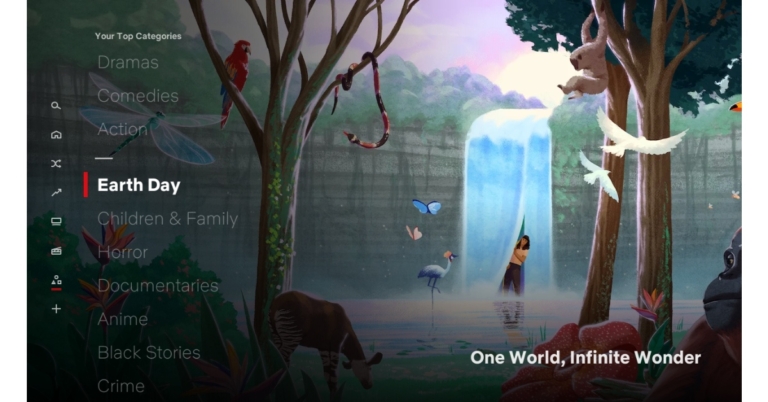
The user interface of Netflix is updated on a regular basis. In a new update, the streaming service behemoth has introduced a new feature called “Category Hub” in the TV menu. This functionality will make it easier for viewers to find their favourite content on the streaming platform. Previously the company brought a thumbs-based recommendation system that allows users to suggest what they’ve been watching.
In a blog post, Netflix announced the launch of the new Category Hub. “Are you an action junkie who craves car chases? A horror buff in constant need of a scare? Or a comedy nerd always looking for the punchline? We all have our go-to genres on Netflix. No matter what you’re in the mood for, what you don’t want is to scroll through endless rows or type in a long title via search.” The company further added, “That’s why we’re rolling out a new Category Hub in the TV menu so our members around the world can easily find their favourite genres and discover new categories of films, series and specials, all in one place.”
 With the addition of the new Category Hub, Netflix subscribers will be able to search for their preferred genres and explore new categories of movies. The latest Hub can be found on the left-hand menu of both kids’ and adults’ profiles. You’ll find your personalised Top 3 categories based on what you like to watch on a regular basis there. This new immersive experience will also include curated collections to commemorate local holidays such as Earth Day or International Women’s Day, as well as globally popular categories such as anime, drama, and children & family for when you want to try something new.
As we mentioned earlier Netflix added Two thumbs up, a third option to the thumbs up and down rating system. The additional Double Thumbs Up is a new way for members to tell what kinds of shows and movies they want to see more of. This option is available next to the Thumbs Up and Thumbs Down buttons on your TV, Web, Android, and iOS mobile devices.
A Thumbs Up tells the streaming platform what members liked so that similar recommendations can be made in the future. A Double Thumbs Up, on the other hand, indicates what viewers enjoyed and allows Netflix to be more specific with its recommendations. If you liked Bridgerton, for example, you might enjoy other shows or films starring the cast or from Shondaland.
For the latest gadget and tech news, and gadget reviews, follow us on Twitter, Facebook and Instagram. For newest tech & gadget videos subscribe to our YouTube Channel. You can also stay up to date using the Gadget Bridge Android App. You can find the latest car and bike news here.
With the addition of the new Category Hub, Netflix subscribers will be able to search for their preferred genres and explore new categories of movies. The latest Hub can be found on the left-hand menu of both kids’ and adults’ profiles. You’ll find your personalised Top 3 categories based on what you like to watch on a regular basis there. This new immersive experience will also include curated collections to commemorate local holidays such as Earth Day or International Women’s Day, as well as globally popular categories such as anime, drama, and children & family for when you want to try something new.
As we mentioned earlier Netflix added Two thumbs up, a third option to the thumbs up and down rating system. The additional Double Thumbs Up is a new way for members to tell what kinds of shows and movies they want to see more of. This option is available next to the Thumbs Up and Thumbs Down buttons on your TV, Web, Android, and iOS mobile devices.
A Thumbs Up tells the streaming platform what members liked so that similar recommendations can be made in the future. A Double Thumbs Up, on the other hand, indicates what viewers enjoyed and allows Netflix to be more specific with its recommendations. If you liked Bridgerton, for example, you might enjoy other shows or films starring the cast or from Shondaland.
For the latest gadget and tech news, and gadget reviews, follow us on Twitter, Facebook and Instagram. For newest tech & gadget videos subscribe to our YouTube Channel. You can also stay up to date using the Gadget Bridge Android App. You can find the latest car and bike news here.
 With the addition of the new Category Hub, Netflix subscribers will be able to search for their preferred genres and explore new categories of movies. The latest Hub can be found on the left-hand menu of both kids’ and adults’ profiles. You’ll find your personalised Top 3 categories based on what you like to watch on a regular basis there. This new immersive experience will also include curated collections to commemorate local holidays such as Earth Day or International Women’s Day, as well as globally popular categories such as anime, drama, and children & family for when you want to try something new.
As we mentioned earlier Netflix added Two thumbs up, a third option to the thumbs up and down rating system. The additional Double Thumbs Up is a new way for members to tell what kinds of shows and movies they want to see more of. This option is available next to the Thumbs Up and Thumbs Down buttons on your TV, Web, Android, and iOS mobile devices.
A Thumbs Up tells the streaming platform what members liked so that similar recommendations can be made in the future. A Double Thumbs Up, on the other hand, indicates what viewers enjoyed and allows Netflix to be more specific with its recommendations. If you liked Bridgerton, for example, you might enjoy other shows or films starring the cast or from Shondaland.
For the latest gadget and tech news, and gadget reviews, follow us on Twitter, Facebook and Instagram. For newest tech & gadget videos subscribe to our YouTube Channel. You can also stay up to date using the Gadget Bridge Android App. You can find the latest car and bike news here.
With the addition of the new Category Hub, Netflix subscribers will be able to search for their preferred genres and explore new categories of movies. The latest Hub can be found on the left-hand menu of both kids’ and adults’ profiles. You’ll find your personalised Top 3 categories based on what you like to watch on a regular basis there. This new immersive experience will also include curated collections to commemorate local holidays such as Earth Day or International Women’s Day, as well as globally popular categories such as anime, drama, and children & family for when you want to try something new.
As we mentioned earlier Netflix added Two thumbs up, a third option to the thumbs up and down rating system. The additional Double Thumbs Up is a new way for members to tell what kinds of shows and movies they want to see more of. This option is available next to the Thumbs Up and Thumbs Down buttons on your TV, Web, Android, and iOS mobile devices.
A Thumbs Up tells the streaming platform what members liked so that similar recommendations can be made in the future. A Double Thumbs Up, on the other hand, indicates what viewers enjoyed and allows Netflix to be more specific with its recommendations. If you liked Bridgerton, for example, you might enjoy other shows or films starring the cast or from Shondaland.
For the latest gadget and tech news, and gadget reviews, follow us on Twitter, Facebook and Instagram. For newest tech & gadget videos subscribe to our YouTube Channel. You can also stay up to date using the Gadget Bridge Android App. You can find the latest car and bike news here. Comparison: Samsung Galaxy M53 5G Vs OnePlus Nord 2
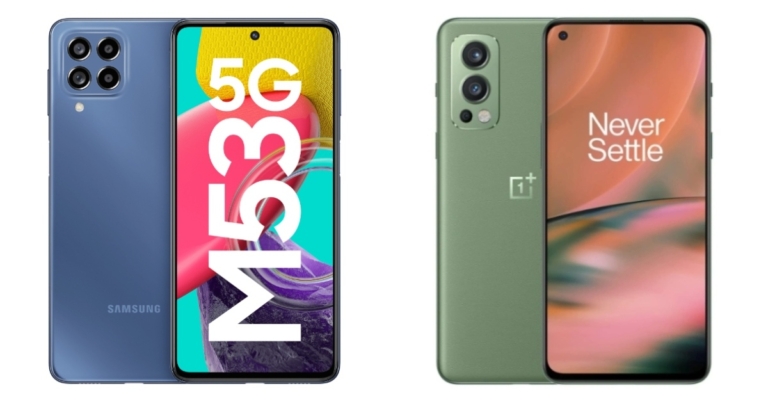
In India, a slew of mid-range smartphones have recently been launched. Samsung’s M Series lineup was also refreshed with the launch of the Samsung Galaxy M53 5G in India. The device, which has a quad rear camera setup, is powered by the MediaTek Dimensity 900 SoC. In addition, the handset has an AMOLED display with a refresh rate of 120Hz. The device directly competes with the OnePlus Nord 2 5G, which was released last year, with these high-end specs. The following is a detailed comparison of the Samsung Galaxy M53 5G Vs OnePlus Nord 2 5G to help you understand the differences and decide which to buy.
In This Article
Samsung Galaxy M53 5G Vs OnePlus Nord 2
Display
Samsung Galaxy M53 5G: 6.7-inch Infinity-O Super AMOLED+ display OnePlus Nord 2: 6.43-inch full-HD+ Fluid AMOLED displayProcessor
Samsung Galaxy M53 5G: MediaTek Dimensity 900 SoC OnePlus Nord 2: MediaTek Dimensity 1200-AI SoCRear camera(s)
Samsung Galaxy M53 5G: A quad-camera system with a 108-megapixel primary sensor, an 8-megapixel ultra-wide sensor, a 2-megapixel depth sensor, and a 2-megapixel macro sensor OnePlus Nord 2: Triple rear camera set-up that includes a 50-megapixel IMX766 primary sensor with OIS. Under the hood, there is an 8-megapixel secondary sensor and a 2-megapixel tertiary sensorSelfie camera
Samsung Galaxy M53 5G: 32-megapixel front-facing camera. OnePlus Nord 2: 32-megapixel selfie cameraRAM and storage
Samsung Galaxy M53 5G: 6GB RAM with a 128GB storage/ 8GB RAM with 128GB storage option OnePlus Nord 2: 6GB RAM with 128GB/ 8GB RAM with 128GB/ 12GB RAM with 256GBBattery
Samsung Galaxy M53 5G: 5,000mAh battery OnePlus Nord 2: 4,500mAh batteryOperating system
Samsung Galaxy M53 5G: Android 12 and One UI 4.1 OnePlus Nord 2: OxygenOS 11.3 based on top of Android 11Starting Price
Samsung Galaxy M53 5G: Rs 23,999 OnePlus Nord 2: Rs 27,999Our Take
The MediaTek Dimensity 900 SoC is used in the Samsung Galaxy M53 5G, making it faster than the MediaTek Dimensity 1200-AI SoC used in the Nord 2. The Galaxy M53 has an advantage over the Nord 2 because it has a 108MP quad-camera setup with a depth sensor for portrait capture, which the opponent appears to lack. The Android 12 operating system is also installed on the device. So In terms of software, we prefer Samsung’s OneUI, which is a clutter-free Android skin that is more user-friendly and the best available. The M53’s battery is 5,000mAh and supports 25W fast charging, whereas the Nord 2’s battery is 4500mAh and supports 65W fast charging. For the money, the M53 comes with high-end features like a bezel-less Super AMOLED edge-to-edge display with 120Hz refresh rate support, elevating it to the status of a premium device. The Nord, on the other hand, has a 90Hz refresh rate and a smaller AMOLED screen. The Samsung Galaxy M53 5G is an undoubtedly feature-packed device that comes at a significantly lower price. As a result, we recommend that you purchase Samsung’s most recent phone. For the latest gadget and tech news, and gadget reviews, follow us on Twitter, Facebook and Instagram. For newest tech & gadget videos subscribe to our YouTube Channel. You can also stay up to date using the Gadget Bridge Android App. You can find the latest car and bike news here.Xiaomi Smart TV 5A to launch in India on April 27
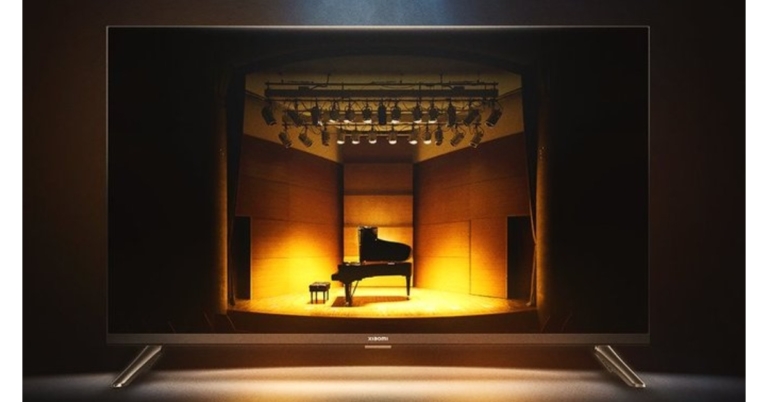
The launch date for the Xiaomi Smart TV 5A in India has been set for April 27. On the same day, the company will also unveil the Xiaomi 12 Pro 5G smartphone and the Xiaomi Pad 5 tablet. The Chinese company has not yet revealed the key specifications of the upcoming TV but it is likely to equip an unnamed processor with Cortex-A55 cores. Read on to know more about the company’s smart TV lineup.
Xiaomi took to Twitter to tease its upcoming Xiaomi Smart TV 5A. As per the announcement, the new smart tv will arrive in the country on April 27. An online launch event will be hosted at 12 noon where not only the new TV will be presented but the more products will be unveiled. Xiaomi has also created a dedicated webpage to tease the Television.
The Xiaomi Smart TV 5A will be released in India alongside the Xiaomi 12 Pro 5G smartphone and the Xiaomi Pad 5 tablet. To recall both the devices have already debuted worldwide and are now set to arrive in the country. The Xiaomi 12 Pro has a 6.73-inch WQHD+ E5 AMOLED display with a 1,4403,200-pixel resolution. The panel has a 120Hz dynamic refresh rate and 1,500 nits of peak brightness. Under the hood, the Snapdragon 8 Gen 1 SoC has up to 12GB of LPDDR5 RAM and 256GB of UFS 3.1 storage. A 50-megapixel main Sony IMX707 sensor with OIS and an f/1.9 aperture, a 50-megapixel portrait sensor, and a 50-megapixel ultra-wide-angle lens comprise the Xiaomi 12 Pro’s triple rear camera setup. A 32-megapixel selfie camera sensor is located on the front of the phone. A 4,600mAh battery is also included, with 120W rapid wired charging. The Xiaomi Pad 5, on the other hand, has an 11-inch WQHD+ TrueTone display with a resolution of 1,6002,560 pixels. The display supports Dolby Vision and HDR10. It has a 120Hz refresh rate and a 16:10 aspect ratio. It is powered by Android 11 and MIUI 12.5 for the Pad. The phone has a Qualcomm Snapdragon 860 processor, 6GB of LPDDR4X RAM, and up to 256GB of UFS 3.1 storage onboard. For optics, the tablet has a single 13-megapixel camera sensor on the back and an LED flash. It also has an 8-megapixel selfie camera on the front. The tablet is powered by an 8,720mAh battery that supports 33W fast charging. For the latest gadget and tech news, and gadget reviews, follow us on Twitter, Facebook and Instagram. For newest tech & gadget videos subscribe to our YouTube Channel. You can also stay up to date using the Gadget Bridge Android App. You can find the latest car and bike news here.India's most loved Smart TV Series is here with its 𝙉𝙚𝙭𝙩, and it brings you #YourCompleteEntertainmentExperience.
— Xiaomi India (@XiaomiIndia) April 21, 2022
Witness the return of our A-game with the #XiaomiSmartTV5A, on 27.04.2022, 12 Noon.
Get notified: https://t.co/52WeBxKfqo pic.twitter.com/Eo0h1zvTGX
Samsung Galaxy M53 5G with 120Hz AMOLED display launched in India
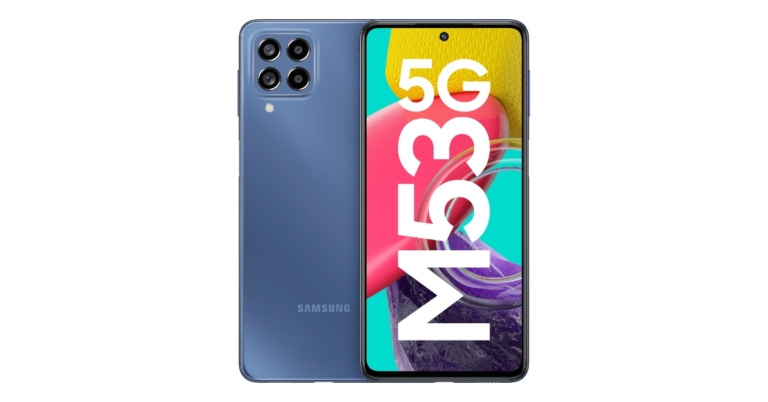
Samsung has officially announced yet another 5G smartphone in the Indian market. The Samsung Galaxy M53 5G has debuted in the country today. The device is the successor to the Galaxy M52 5G which was released last year. It comes preloaded with One UI 4.1, which is based on Android 12. The device features a 120Hz Super AMOLED+ display and is powered by MediaTek Dimensity 900 SoC. Additionally, the handset boasts a 5,000mAh battery with 25W fast charging support.

 The phone has 5G, 4G LTE, Wi-Fi 802.11ac, Bluetooth 5.2, GPS/ A-GPS, and a USB Type-C port for connectivity. An accelerometer, ambient light sensor, gyroscope, magnetometer, and proximity sensor are among the phone’s sensors. For biometrics, a side-mounted fingerprint sensor is also included.
For the latest gadget and tech news, and gadget reviews, follow us on Twitter, Facebook and Instagram. For newest tech & gadget videos subscribe to our YouTube Channel. You can also stay up to date using the Gadget Bridge Android App. You can find the latest car and bike news here.
The phone has 5G, 4G LTE, Wi-Fi 802.11ac, Bluetooth 5.2, GPS/ A-GPS, and a USB Type-C port for connectivity. An accelerometer, ambient light sensor, gyroscope, magnetometer, and proximity sensor are among the phone’s sensors. For biometrics, a side-mounted fingerprint sensor is also included.
For the latest gadget and tech news, and gadget reviews, follow us on Twitter, Facebook and Instagram. For newest tech & gadget videos subscribe to our YouTube Channel. You can also stay up to date using the Gadget Bridge Android App. You can find the latest car and bike news here.
In This Article
Samsung Galaxy M53 5G price in India and sale details
Samsung Galaxy M53 5G has been launched in India with a price tag of Rs 23,999 for the base 6GB RAM with a 128GB storage model. There is an 8GB RAM with 128GB storage option which will cost Rs 25,999. The device will be available in two colour options of Blue and Green. The smartphone is scheduled to go on sale from April 29 through Amazon from 12 noon onwards.
Samsung Galaxy M53 5G specifications
The Samsung Galaxy M53 5G features a 6.7-inch Infinity-O Super AMOLED+ display with a resolution of 1,0802,400 pixels. It has a 120Hz peak refresh rate and is Gorilla Glass 5 protected. The phone comes pre-installed with Android 12 and One UI 4.1. There’s an octa-core MediaTek Dimensity 900 SoC under the hood, along with up to 8GB of RAM and 128GB of internal storage that can be expanded to 1TB. Samsung’s RAM Plus feature, which uses unused storage space as virtual RAM, is also available on the device. A quad-camera system with a 108-megapixel primary sensor, an 8-megapixel ultra-wide sensor, a 2-megapixel depth sensor, and a 2-megapixel macro sensor distinguishes the Samsung Galaxy M53 5G. For selfies and video chats, it also has a 32-megapixel front-facing camera. Furthermore, the new phone is equipped with a 5,000mAh battery that supports 25W fast charging. Customers can use the phone’s Auto data switching feature to stay connected to their secondary SIM for calls or data streaming. There will also be all-new cool features like Object Eraser, Video Call Effects, and Photo Remaster. Object Eraser removes unwanted objects from your photos, resulting in perfect photos. You can use Video Call Effects to change the background during video calls. Users can use the Photo Remaster feature to bring old or low-quality photos back to life. The phone has 5G, 4G LTE, Wi-Fi 802.11ac, Bluetooth 5.2, GPS/ A-GPS, and a USB Type-C port for connectivity. An accelerometer, ambient light sensor, gyroscope, magnetometer, and proximity sensor are among the phone’s sensors. For biometrics, a side-mounted fingerprint sensor is also included.
For the latest gadget and tech news, and gadget reviews, follow us on Twitter, Facebook and Instagram. For newest tech & gadget videos subscribe to our YouTube Channel. You can also stay up to date using the Gadget Bridge Android App. You can find the latest car and bike news here.
The phone has 5G, 4G LTE, Wi-Fi 802.11ac, Bluetooth 5.2, GPS/ A-GPS, and a USB Type-C port for connectivity. An accelerometer, ambient light sensor, gyroscope, magnetometer, and proximity sensor are among the phone’s sensors. For biometrics, a side-mounted fingerprint sensor is also included.
For the latest gadget and tech news, and gadget reviews, follow us on Twitter, Facebook and Instagram. For newest tech & gadget videos subscribe to our YouTube Channel. You can also stay up to date using the Gadget Bridge Android App. You can find the latest car and bike news here. Garena Free Fire Redeem Codes for 22 April: Here is how to claim them

Garena Free Fire is a battle royale game with regular awards and tournaments to keep players interested. If you play Garena Free Fire, you should be aware of the redeem codes that are released on a daily basis. However, because the battle royale game is banned in India, players from other countries can use the Free Fire Redeem codes daily. If you’re unfamiliar with the Garena Free Fire redeem codes or don’t know how to get them, we’ve put together a step-by-step guide to help you redeem them.
The Free Fire redeem codes are a great way to get free stuff. These are 12-digit codes that contain alphabets and numbers, as well as an expiration date and time. Because the Garena FF redeem codes cannot be used more than once, you should hurry to the redemption page to claim your free reward before someone else does. To get a free reward, all you have to do is go to reward.ff.garena.com/en, which is the official redemption page. Also, keep an eye on this space for daily updates on Garena Free Fire redemption codes and rewards.
In This Article
Garena Free Fire Redeem Codes for April 22
- X99TK56XDJ4X
- SARG886AV5GR
- GCNVA2PDRGRZ
- 4ST1ZTBE2RP9
- B3G7A22TWDR7X
- FF7MUY4ME6SC
- 8F3QZKNTLWBZ
- J3ZKQ57Z2P2P
- 3IBBMSL7AK8G
- WEYVGQC3CT8Q
- TFF9VNU6UD9J
- RRQ3SSJTN9UK
- PACJJTUA29UU
- TJ57OSSDN5AP
- FFICDCTSL5FT
- FFPLUED93XRT
- FFAC2YXE6RF2
How to Get Free Fire Redeem Codes for Garena on April 22?
- Visit the Garena Free Fire game’s official website at reward.ff.garena.com.
- Use your Facebook, Google, VK, Apple ID, Huawei ID, or Twitter account to log in.
- You’ll be taken to a valid redemption code (s)
- Copy and paste the 12-digit redemption code into the text box.
- On the screen, a dialogue box will appear.
- ‘Ok’ should be selected.