

iQoo Z3 5G pricing tipped ahead of the official launch in India
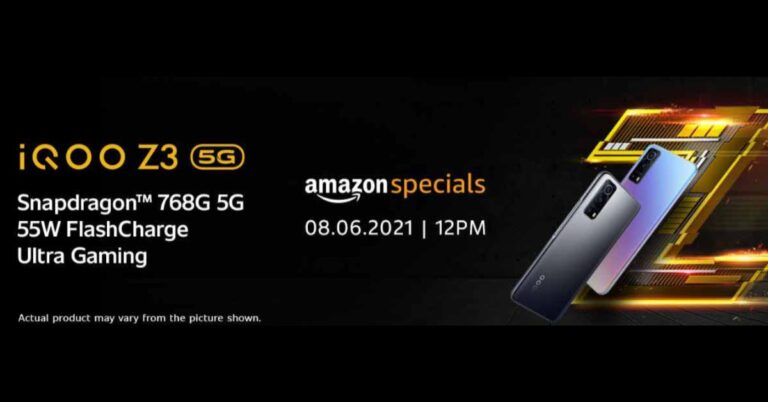
Vivo’s sub-brand is all set to launch its 5G smartphone- iQoo Z3 5G in India. According to the company, it is scheduled to launch its 5G smartphone in India on June 8 at 12 noon. The company has also listed the device on Amazon ahead of the official launch. However, prior to coming to India, the company has already revealed the smartphone in China in March this year. The company has not yet hinted at the pricing of the smartphone but ahead of the official reveal iQoo Z3 price in India has been tipped by a tipster.
Does Your Social Life Need a Boost? Try Webcam Chats!

Just about everyone is signed up for some form of social media these days; it’s a way for them to connect with friends and relatives and find other people with similar interests. Even if you have all kinds of “Facebook friends”, though, how many of them do you actually know? The interactions on most social networks don’t typically go beyond sporadic text chats; even if you have the option to use video calls, that isn’t really a feature that gets used except between people who already know each other in real life.
There are millions of potential new friends online, but most social networking sites aren’t set up to allow real friendships to flourish. What’s the solution? Instead of trying to make something happen with only text chats at your disposal, you could use a social networking site like Fruzo, which actually focuses on webcam chatting as a way to meet new people. When you can talk to strangers directly instead of just browsing profiles, you can both figure out if there’s a connection right away.
As it happens, meeting people isn’t all you can do with webcam chats; they’re also great for bonding with the people you’ve met online. How does this work, you ask? Just keep reading to find out – once you get the hang of it, you’ll wonder why you didn’t try it out sooner!
After the introduction, it’s time to get to know each other a little better.
What comes to mind when you think of webcam chatting? Whatever your answer was, it probably revolved around talking – and that’s a pretty good place to start. If you’re at the beginning of an online friendship, think of webcam chats as your crash course for getting to know the other person.
What kind of music do they listen to when they feel happy, sad, or angry? Are they a dog person or a cat person? Have they ever shaved their own head on a dare? Sure, you could talk about the same things over a text chat, but it just isn’t the same. With an OMGFun webcam chat, you’ll be able to read their body language, feel their enthusiasm, and establish an actual connection with your new friend.
Once you’re ready to branch out, it’s time to get creative!
Webcam chats aren’t just for talking – as long as you can take your device along, you could get up to all kinds of awesome stuff. Is the pride and joy of your DIY career sitting out in the garage? You could webcam chat as you work on it, maybe even taking suggestions from your friend. Do you both have a deep-cleaning project you’ve been putting off? It won’t be nearly as unpleasant if you can conquer those closets while webcam chatting.
If building some shelving or cleaning a closet doesn’t sound appealing, what about a movie night? Yes, that’s also an option if you want to webcam chat with an online friend. You might not be able to sit on the same couch, but you’ll still be watching the same film together. If you really want to make it feel authentic, coordinate your pizza order – hopefully you’ll both feel the same about the pineapple-on-pizza debate!
As you meet someone for the first time online, webcam chats can show you what you’re dealing with almost instantly.
Have you ever looked at someone’s profile pictures, and left still wondering what they looked like? Not because the photos were blurry or incomplete, but because of all the special effects and extreme camera perspectives. It’s one thing if someone knows what their best side is, but if one week’s worth of pictures seems to show two different people depending on which photo you look at, there’s probably some behind-the-scenes magic going on.
If you decide to go online to meet new friends, you’ll end up meeting a ton of people along the way. This is one area where webcam chats really help you out; unless the person you’re talking with is wearing actual prosthetics, you’ll know that they aren’t misrepresenting themselves using filters or decade-old photos. You may get a few people who really know their angles, but that’s impossible to keep up 100% of the time. The point is, webcam chats help keep people a little more honest.
Enough of what other people look like on webcam chats – what will you be projecting to them?
In other words, how can you communicate your personality and intentions via clothing choice, background, and lighting? Assuming that your camera quality is already decent, these are the three main variables that you should pay a little attention to before you start webcam chatting.
Clothing choice – This is a key part of your personal appearance, so don’t be afraid to wear something expressive. Crop tops or comfortable old sweaters, custom overalls or your favourite pair of second-hand jeans – if you’re wearing something that makes you feel good, this will come across in the webcam chat.
Background – The standards aren’t high, to begin with, so don’t feel bad if your house isn’t a Martha Stewart paradise. A good minimum is to make sure there aren’t any huge messes within view; if you can make it look cool, that’s even better.
Lighting – Even the most put-together wardrobe and background won’t really matter if the lighting is too harsh, too dim, or coming in from a terrible angle. Natural light is ideal, but if all you have is indoor lighting, experiment with what you have until you get a good result. You don’t want to meet people looking like the grinch just because you chose the wrong light source. Go ahead and spend the time getting it right beforehand, so you won’t have the frustration of bad lighting during subsequent webcam chats.
Break out the webcam, it’s time to make new friends!
Are you ready to expand your social life? Get out there and start meeting people – you’ll be amazed at how many friends you can make online!
Also read: How to use Share Play to enjoy PlayStation 5 games with your friends?
For the latest gadget and tech news, and gadget reviews, follow us on Twitter, Facebook and Instagram. For newest tech & gadget videos subscribe to our YouTube Channel. You can also stay up to date with the Gadget Bridge Android App.
Infinix Note 10 and Note 10 Pro launching in India today
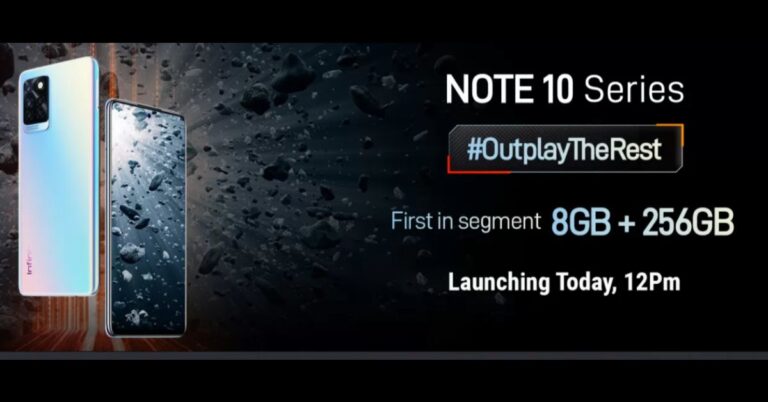
Transsion Holdings group is all set to launch its two new mobile handsets in India today. The Hong Kong-based firm will be launching Infinix Note 10 and Note 10 Pro. The key specs of the smartphones include an FHD+ LCD display with 90Hz refresh rate support and a multi rear camera set up. In addition to this, the devices will be powered by a MediaTek processor with a 5,000mAh battery onboard.
 Before their launch in the country, both phones were introduced globally last month. The Infinix Note 10 was launched at $200 that translates to Rs 14,713 and the price of the Note 10 Pro was set at $260 that comes around Rs 19,127. The regular variant was made available in Black, Emerald Green, and Purple colours, whereas the Pro model was introduced in Black, Nordic Secret, and Purple colour options.
Infinix Note 10 and Note 10 Pro specification
Infinix Note 10 and Note 10 Pro are similar-looking smartphones featuring a 6.95-inch FHD+ LCD with a 1080×2460 pixel resolution. They have support for a 90Hz refresh rate and 180Hz sampling rate. Both the phones run XOS 7.6 based on Android 11 out of the box.
Infinix Note 10 is powered by MediaTek Helio G85 chipset paired with up to 6GB of RAM and 128GB of storage. On the other hand, the Pro variant has a MediaTek Helio G95 processor under its hood paired with up to 8GB of RAM and 128GB of storage.
For the cameras the Note 10 sports a triple rear camera set-up that includes a 48-megapixel primary sensor, a 2-megapixel depth sensor, and a 2-megapixel mono lens. On the front, it sports a 16-megapixel selfie camera.
Whereas Infinix Note 10 Pro comes with a quad rear camera setup that includes a 64-megapixel primary sensor with a 1/1.7 aperture. Further assisted by an 8-megapixel ultra-wide lens with 120-degrees of FoV, a 2-megapixel depth sensor, and a 2-megapixel monochrome lens. Upfront there is a 16-megapixel camera sensor for taking selfies.
There is a 5,000mAh battery onboard for both devices. The vanilla version has an 18W fast charging support while the Pro variant comes with the support for 33W fast charging.
For the latest gadget and tech news, and gadget reviews, follow us on Twitter, Facebook and Instagram. For newest tech & gadget videos subscribe to our YouTube Channel. You can also stay up to date using the Gadget Bridge Android App.
Before their launch in the country, both phones were introduced globally last month. The Infinix Note 10 was launched at $200 that translates to Rs 14,713 and the price of the Note 10 Pro was set at $260 that comes around Rs 19,127. The regular variant was made available in Black, Emerald Green, and Purple colours, whereas the Pro model was introduced in Black, Nordic Secret, and Purple colour options.
Infinix Note 10 and Note 10 Pro specification
Infinix Note 10 and Note 10 Pro are similar-looking smartphones featuring a 6.95-inch FHD+ LCD with a 1080×2460 pixel resolution. They have support for a 90Hz refresh rate and 180Hz sampling rate. Both the phones run XOS 7.6 based on Android 11 out of the box.
Infinix Note 10 is powered by MediaTek Helio G85 chipset paired with up to 6GB of RAM and 128GB of storage. On the other hand, the Pro variant has a MediaTek Helio G95 processor under its hood paired with up to 8GB of RAM and 128GB of storage.
For the cameras the Note 10 sports a triple rear camera set-up that includes a 48-megapixel primary sensor, a 2-megapixel depth sensor, and a 2-megapixel mono lens. On the front, it sports a 16-megapixel selfie camera.
Whereas Infinix Note 10 Pro comes with a quad rear camera setup that includes a 64-megapixel primary sensor with a 1/1.7 aperture. Further assisted by an 8-megapixel ultra-wide lens with 120-degrees of FoV, a 2-megapixel depth sensor, and a 2-megapixel monochrome lens. Upfront there is a 16-megapixel camera sensor for taking selfies.
There is a 5,000mAh battery onboard for both devices. The vanilla version has an 18W fast charging support while the Pro variant comes with the support for 33W fast charging.
For the latest gadget and tech news, and gadget reviews, follow us on Twitter, Facebook and Instagram. For newest tech & gadget videos subscribe to our YouTube Channel. You can also stay up to date using the Gadget Bridge Android App.
Infinix Note 10 and Note 10 Pro expected pricing
The smartphones under the Infinix Note 10 Series are expected to be under Rs 20,000 in India. Both smartphones will be available for purchase via Flipkart in the country. Before their launch in the country, both phones were introduced globally last month. The Infinix Note 10 was launched at $200 that translates to Rs 14,713 and the price of the Note 10 Pro was set at $260 that comes around Rs 19,127. The regular variant was made available in Black, Emerald Green, and Purple colours, whereas the Pro model was introduced in Black, Nordic Secret, and Purple colour options.
Infinix Note 10 and Note 10 Pro specification
Infinix Note 10 and Note 10 Pro are similar-looking smartphones featuring a 6.95-inch FHD+ LCD with a 1080×2460 pixel resolution. They have support for a 90Hz refresh rate and 180Hz sampling rate. Both the phones run XOS 7.6 based on Android 11 out of the box.
Infinix Note 10 is powered by MediaTek Helio G85 chipset paired with up to 6GB of RAM and 128GB of storage. On the other hand, the Pro variant has a MediaTek Helio G95 processor under its hood paired with up to 8GB of RAM and 128GB of storage.
For the cameras the Note 10 sports a triple rear camera set-up that includes a 48-megapixel primary sensor, a 2-megapixel depth sensor, and a 2-megapixel mono lens. On the front, it sports a 16-megapixel selfie camera.
Whereas Infinix Note 10 Pro comes with a quad rear camera setup that includes a 64-megapixel primary sensor with a 1/1.7 aperture. Further assisted by an 8-megapixel ultra-wide lens with 120-degrees of FoV, a 2-megapixel depth sensor, and a 2-megapixel monochrome lens. Upfront there is a 16-megapixel camera sensor for taking selfies.
There is a 5,000mAh battery onboard for both devices. The vanilla version has an 18W fast charging support while the Pro variant comes with the support for 33W fast charging.
For the latest gadget and tech news, and gadget reviews, follow us on Twitter, Facebook and Instagram. For newest tech & gadget videos subscribe to our YouTube Channel. You can also stay up to date using the Gadget Bridge Android App.
Before their launch in the country, both phones were introduced globally last month. The Infinix Note 10 was launched at $200 that translates to Rs 14,713 and the price of the Note 10 Pro was set at $260 that comes around Rs 19,127. The regular variant was made available in Black, Emerald Green, and Purple colours, whereas the Pro model was introduced in Black, Nordic Secret, and Purple colour options.
Infinix Note 10 and Note 10 Pro specification
Infinix Note 10 and Note 10 Pro are similar-looking smartphones featuring a 6.95-inch FHD+ LCD with a 1080×2460 pixel resolution. They have support for a 90Hz refresh rate and 180Hz sampling rate. Both the phones run XOS 7.6 based on Android 11 out of the box.
Infinix Note 10 is powered by MediaTek Helio G85 chipset paired with up to 6GB of RAM and 128GB of storage. On the other hand, the Pro variant has a MediaTek Helio G95 processor under its hood paired with up to 8GB of RAM and 128GB of storage.
For the cameras the Note 10 sports a triple rear camera set-up that includes a 48-megapixel primary sensor, a 2-megapixel depth sensor, and a 2-megapixel mono lens. On the front, it sports a 16-megapixel selfie camera.
Whereas Infinix Note 10 Pro comes with a quad rear camera setup that includes a 64-megapixel primary sensor with a 1/1.7 aperture. Further assisted by an 8-megapixel ultra-wide lens with 120-degrees of FoV, a 2-megapixel depth sensor, and a 2-megapixel monochrome lens. Upfront there is a 16-megapixel camera sensor for taking selfies.
There is a 5,000mAh battery onboard for both devices. The vanilla version has an 18W fast charging support while the Pro variant comes with the support for 33W fast charging.
For the latest gadget and tech news, and gadget reviews, follow us on Twitter, Facebook and Instagram. For newest tech & gadget videos subscribe to our YouTube Channel. You can also stay up to date using the Gadget Bridge Android App. WWDC 2021: What to Expect and How to watch the Apple Worldwide Developers Conference

Apple is all set to kickstart this year’s Worldwide Developers Conference. Like last year’s WWDC, this year the company has decided to hold the WWDC 2021 as an online-only event due to the coronavirus pandemic. During the event, the Cupertino-based company will talk about its upcoming projects such as software and hardware, along with the company’s plan for the rest of the year. New software for iPhones(iOS 15), iPadOS 15, macOS, watchOS 8, TVOS, and a brand new HomeOS, MacBook Pro and new processor for Mac devices.
How to Watch the WWDC 2021 live
Today the tech giant Apple is going to host this year’s Worldwide Developers Conference. The WWDC 2021 will kick start today and will go on till June 11 in an all-online format and will be live-streamed on your iOS devices, PC and even on Apple TV. The event will begin at 10 AM PT that is 10.30 PM IST. The conference will be available to all developers for free via the Apple Developer app and Apple Developer website as well as the official YouTube channel. The keynote will be led by Apple’s CEO Tim Cook.What to expect from WWDC 2021?
Apple has followed a tradition to announce software upgrades for most of its products so we might see that during the four days Worldwide Developers Conference. The company is likely to announce the software upgrade for iPhone, iPad, MacBook, iMac, Mac mini, Apple Watch, Apple TV. Apple is most likely to announce a major update to the latest iOS build. This year, the iteration of iOS will drop support for its older phones that would include iPhone 6, iPhone 6S, iPhone 6S Plus, and the iPhone SE from 2016. The iOS 15 is expected to be released sometime in September which may include a bunch of new features for iMessage and the notification. The iOS 15 is rumoured to get a revamped UI with the option to put the widgets anywhere and a lot more changes. The upcoming upgrade might also include a contextual notification feature that will turn the notification to silent when the user is asleep and will notify the user when they are awake. On the other hand with iPadOS 15 we can expect new features with Widgets in addition to other features such as App Library and Homescreen customisation. Not much is known about the macOS this year, But rumours suggest that changes to the software of MacBook, iMac, Mac mini will be minor. Whereas watchOS 8 could bring a slew of new health-tracking features on the Apple Watch. The information about the mysterious HomeOS is very scarce. This brand new OS for smart home products from Apple came into the limelight via a rumoured job listing by the company that was removed later on. Enough said about the software now let’s talk about the hardware. Apple is going to introduce the successor to the M1 Apple Silicon which was announced last year. The rumour mill suggests that the new chipset might come with over 10 CPU cores along with up to 32 core GPUs. Both the new M1X or M2 will have increased maximum supported RAM to 64GB and other upgrades. At this year’s WWDC 2021 we can expect a new variant that could be a 14-inch or a 16-inch MacBook Pro. These are speculated to get support for more ports and it could feature a new processor as well. For the latest gadget and tech news, and gadget reviews, follow us on Twitter, Facebook and Instagram. For newest tech & gadget videos subscribe to our YouTube Channel. You can also stay up to date using the Gadget Bridge Android App.June 7 Flipkart Daily Trivia Quiz Answers: Answer to win exciting prizes

The e-commerce website Flipkart is hosting Daily Trivia Quiz. Every day it brings a bunch of new questions for its users. By answering them correctly you can win exciting prizes. The questionnaire is based on questions related to general knowledge. Also, the users can win free vouchers and super coins, among other offers via the daily quiz. June 7 Flipkart Daily Trivia Quiz Answers has already gone live on its platform.
The participant should be at least 18 years old and should have a valid login ID. The Quiz is available on the mobile platform and not the web version. E-commerce conducts the quiz on daily basis and goes live at 12:00 AM IST and runs till 11:59 PM IST. The winners are announced within 15 days from the date of participation that can be viewed under the Gems/Rewards section in the app.
How to participate in the Flipkart Daily Trivia Quiz
To participate download the Flipkart app on your phone. Then open the Flipkart app then head to Game Zone. Now click on the Daily Trivia Banner or search for Daily Trivia. Enter the game and answer all 5 questions with correct answers.June 7 Flipkart Daily Trivia Quiz Answers
Question 1: Who is the youngest person to win the Formula One world drivers’ championship? Answer: Sebastian Vettel Question 2: Which of these is the nickname of the former Indian bowler Anil Kumble? Answer: Jumbo Question 3: In which country were the first-ever Commonwealth Games held? Answer: Canada Question 4: In which of these sports is the participant called a pugilist? Answer:Boxing Question 5: Who is the first bowler to take 200 wickets in Women’s ODIs? Answer: Jhulan Goswami
For the latest gadget and tech news, and gadget reviews, follow us on Twitter, Facebook and Instagram. For newest tech & gadget videos subscribe to our YouTube Channel. You can also stay up to date using the Gadget Bridge Android App.
June 7 Amazon Quiz: Participate to win Rs 5,000 Amazon Pay Balance

The e-commerce platform is back with another new quiz on its platform. The Amazon Quiz can be played daily on the mobile app that goes live via the mobile app. All you need to do is answer all the questions correctly and win free products and goodies such as gadgets and Amazon Pay Balance up to Rs 50,000, today you have a chance to win Rs 5,000 Amazon Pay Balance.
June 7 Amazon Quiz has gone live and a new set of questions have also been updated. The daily quiz on the Amazon app has become the hottest topic as it gives a chance to win exciting free gifts. In today’s Amazon quiz you have a chance to win Rs 5,000 Amazon Pay Balance. The quiz contains only five questions that are based on current affairs and general knowledge. Answering all the questions correctly will get your name selected for a lucky draw. Only one person will be selected as the winner and the results are announced at the end of every month. The lucky ones might win something by answering all the questions correctly, and the wrong answers will get you eliminated from the quiz. To participate and win check out today’s answers of the Amazon Quiz.
June 7 Amazon Quiz Answers
Question 1: The first unit of the indigenously built ALH Mk III aircraft was recently commissioned into which of these forces?
The answer is- Indian Navy
Question 2: The government of the UK is exploring the possibility of creating which new digital currency?
The answer is- BritCoin
Question 3: Charles Geschke, Adobe’s co-founder who passed away recently, aided the development of which widely used technology?
The answer is- PDF
June 6 Flipkart Daily Trivia Quiz Answers: Answer to win exciting prizes

The e-commerce website Flipkart is hosting Daily Trivia Quiz. Every day it brings a bunch of new questions for its users. By answering them correctly you can win exciting prizes. The questionnaire is based on questions related to general knowledge. Also, the users can win free vouchers and super coins, among other offers via the daily quiz. June 6 Flipkart Daily Trivia Quiz Answers has already gone live on its platform.
The participant should be at least 18 years old and should have a valid login ID. The Quiz is available on the mobile platform and not the web version. E-commerce conducts the quiz on daily basis and goes live at 12:00 AM IST and runs till 11:59 PM IST. The winners are announced within 15 days from the date of participation that can be viewed under the Gems/Rewards section in the app.
How to participate in the Flipkart Daily Trivia Quiz
To participate download the Flipkart app on your phone. Then open the Flipkart app then head to Game Zone. Now click on the Daily Trivia Banner or search for Daily Trivia. Enter the game and answer all 5 questions with correct answers.June 6 Flipkart Daily Trivia Quiz Answers
Question 1: In which of these movies did Salman Khan and Kareena Kapoor appear together? Answer: Bodyguard Question 2: Which actor worked as a chef in Bangkok and later founded Hari Om Productions in 2008? Answer: Akshay Kumar Question 3:Which 2016 film is an adaptation of the book ‘A Long Way Home’? Answer: Lion Question 4: Which Bollywood actor’s autobiography is called: “An Ordinary Life”? Answer: Nawazuddin Siddiqui Question 5: What is the name of the first soap opera on Indian Television? Answer: Hum Log
For the latest gadget and tech news, and gadget reviews, follow us on Twitter, Facebook and Instagram. For newest tech & gadget videos subscribe to our YouTube Channel. You can also stay up to date using the Gadget Bridge Android App.
June 6 Amazon Quiz: Participate to win Rs 50,000 Pay Balance

June 6 Amazon Quiz has gone live on its Mobile app platform. The quiz can be played from 12 AM to 11:59 PM. To participate log in to the e-commerce app and then answer 5 questions based on general knowledge and current affairs. You have to answer all the questions correctly otherwise the wrong answer will eliminate you from the quiz. After clearing the daily quiz you will get selected for a lucky draw. The winner’s name will be announced at the end of the month. To make sure you answer all the questions correctly Gadget Bridge everyday updates all the correct answers to all 5 questions to win Rs 50,000 Pay Balance. Check out today’s answers:
June 6 Amazon Quiz Answers
Question 1: In April 2021, Priyanka Mohite from Maharashtra became the first Indian woman climber to scale which mountain? The answer is- Annapurna Question 2: Natanz nuclear site is located in which country? The answer is- Iran Question 3: Which global tech giant announced the acquisition of AI-based technology company Nuance Communications for $19.7 billion? The answer is- Microsoft Question 4: This picture shows which of the following? The answer is- The longest river Question 5: Name this member of the Giraffe family. The answer is- Okapi For the latest gadget and tech news, and gadget reviews, follow us on Twitter, Facebook and Instagram. For newest tech & gadget videos subscribe to our YouTube Channel. You can also stay up to date using the Gadget Bridge Android App.Logitech G PRO Wireless Gaming Mouse is the first mouse by the company towards a carbon-free world

Logitech has announced the launch of its new gaming mouse in the market that has a lesser carbon footprint. The company has introduced Logitech G PRO Wireless Gaming Mouse designed for esports gaming. The device features a new carbon impact label which the company introduced to its product last year.
Commenting on the launch Logitech said, “Logitech is excited to report that the Logitech G PRO Wireless Gaming Mouse is the first Logitech product to feature this new carbon impact label and is now available in stores. Logitech G PRO Wireless Gaming Mouse is one of six gaming products with carbon impact labels rolling out in this quarter, features a number at the top of the label that indicates the product’s full lifecycle carbon footprint in kilograms of carbon dioxide equivalent (kg CO2e) taking a typical two-year use period, 7.84 kg CO2e being the measurement for the Logitech PRO Wireless gaming mouse, which is approximately equivalent to a gallon of gas.”
 The Logitech G PRO Wireless Gaming Mouse uses Hero 25K sensor that supports 100 to 25,400dpi sensitivity along with zero smoothings, acceleration, or filtering. According to the company Hero 25K consumes 10x less power than predecessors, like PMW3366, enabling a lighter battery and longer battery life.
To avoid distraction and friction caused by cord drags the mouse comes with wireless connectivity that overcomes the limitations of latency, connectivity and power to provide consistent, lag-free, 1 ms report rate connection—without a wire.
The Logitech Wireless Gaming Mouse weighs under 80 grams and its outer shell is as thin as 1 mm and features a ladder-chassis design for tournament-ready strength and structural support. In addition to this, the mouse comes with ~16.8M colour customization that represents your team colours, personalizing your setup, or synchronizing with other G products.
It has a USB report rate of 1,000Hz and runs on a 32-bit ARM microprocessor. The device is compatible with Windows 7 or later, as well as macOS 10.11 or later. As said earlier the gaming mouse is designed to withstand pro esports players during training and tournaments. The surface of PRO is coated for durability and grip while the feet are tested to perform for over 250 km of use. In addition to this, the gaming mouse comes with PowerPlay wireless charging technology compatibility.
As for the pricing the Logitech G PRO Wireless Gaming Mouse comes with a price tag of $129.99 and comes in black and blue colour options.
For the latest gadget and tech news, and gadget reviews, follow us on Twitter, Facebook and Instagram. For newest tech & gadget videos subscribe to our YouTube Channel. You can also stay up to date using the Gadget Bridge Android App.
The Logitech G PRO Wireless Gaming Mouse uses Hero 25K sensor that supports 100 to 25,400dpi sensitivity along with zero smoothings, acceleration, or filtering. According to the company Hero 25K consumes 10x less power than predecessors, like PMW3366, enabling a lighter battery and longer battery life.
To avoid distraction and friction caused by cord drags the mouse comes with wireless connectivity that overcomes the limitations of latency, connectivity and power to provide consistent, lag-free, 1 ms report rate connection—without a wire.
The Logitech Wireless Gaming Mouse weighs under 80 grams and its outer shell is as thin as 1 mm and features a ladder-chassis design for tournament-ready strength and structural support. In addition to this, the mouse comes with ~16.8M colour customization that represents your team colours, personalizing your setup, or synchronizing with other G products.
It has a USB report rate of 1,000Hz and runs on a 32-bit ARM microprocessor. The device is compatible with Windows 7 or later, as well as macOS 10.11 or later. As said earlier the gaming mouse is designed to withstand pro esports players during training and tournaments. The surface of PRO is coated for durability and grip while the feet are tested to perform for over 250 km of use. In addition to this, the gaming mouse comes with PowerPlay wireless charging technology compatibility.
As for the pricing the Logitech G PRO Wireless Gaming Mouse comes with a price tag of $129.99 and comes in black and blue colour options.
For the latest gadget and tech news, and gadget reviews, follow us on Twitter, Facebook and Instagram. For newest tech & gadget videos subscribe to our YouTube Channel. You can also stay up to date using the Gadget Bridge Android App.
 The Logitech G PRO Wireless Gaming Mouse uses Hero 25K sensor that supports 100 to 25,400dpi sensitivity along with zero smoothings, acceleration, or filtering. According to the company Hero 25K consumes 10x less power than predecessors, like PMW3366, enabling a lighter battery and longer battery life.
To avoid distraction and friction caused by cord drags the mouse comes with wireless connectivity that overcomes the limitations of latency, connectivity and power to provide consistent, lag-free, 1 ms report rate connection—without a wire.
The Logitech Wireless Gaming Mouse weighs under 80 grams and its outer shell is as thin as 1 mm and features a ladder-chassis design for tournament-ready strength and structural support. In addition to this, the mouse comes with ~16.8M colour customization that represents your team colours, personalizing your setup, or synchronizing with other G products.
It has a USB report rate of 1,000Hz and runs on a 32-bit ARM microprocessor. The device is compatible with Windows 7 or later, as well as macOS 10.11 or later. As said earlier the gaming mouse is designed to withstand pro esports players during training and tournaments. The surface of PRO is coated for durability and grip while the feet are tested to perform for over 250 km of use. In addition to this, the gaming mouse comes with PowerPlay wireless charging technology compatibility.
As for the pricing the Logitech G PRO Wireless Gaming Mouse comes with a price tag of $129.99 and comes in black and blue colour options.
For the latest gadget and tech news, and gadget reviews, follow us on Twitter, Facebook and Instagram. For newest tech & gadget videos subscribe to our YouTube Channel. You can also stay up to date using the Gadget Bridge Android App.
The Logitech G PRO Wireless Gaming Mouse uses Hero 25K sensor that supports 100 to 25,400dpi sensitivity along with zero smoothings, acceleration, or filtering. According to the company Hero 25K consumes 10x less power than predecessors, like PMW3366, enabling a lighter battery and longer battery life.
To avoid distraction and friction caused by cord drags the mouse comes with wireless connectivity that overcomes the limitations of latency, connectivity and power to provide consistent, lag-free, 1 ms report rate connection—without a wire.
The Logitech Wireless Gaming Mouse weighs under 80 grams and its outer shell is as thin as 1 mm and features a ladder-chassis design for tournament-ready strength and structural support. In addition to this, the mouse comes with ~16.8M colour customization that represents your team colours, personalizing your setup, or synchronizing with other G products.
It has a USB report rate of 1,000Hz and runs on a 32-bit ARM microprocessor. The device is compatible with Windows 7 or later, as well as macOS 10.11 or later. As said earlier the gaming mouse is designed to withstand pro esports players during training and tournaments. The surface of PRO is coated for durability and grip while the feet are tested to perform for over 250 km of use. In addition to this, the gaming mouse comes with PowerPlay wireless charging technology compatibility.
As for the pricing the Logitech G PRO Wireless Gaming Mouse comes with a price tag of $129.99 and comes in black and blue colour options.
For the latest gadget and tech news, and gadget reviews, follow us on Twitter, Facebook and Instagram. For newest tech & gadget videos subscribe to our YouTube Channel. You can also stay up to date using the Gadget Bridge Android App. Now you can easily avoid bumping into someone on Tinder: Here is how you can block your ex, relatives and colleagues on Tinder
The online dating application Tinder is now rolling out a very useful feature on its platform taking the edge of running into your ex, relatives and colleagues. The dating app has come up with the functionality to block them up by their contact number to avoid awkwardly swiping.
We all know Tinder is an online dating app that allows you to swipe anonymously swipe to like or dislike other profiles based on their photos, a small bio, and common interests. So to avoid this unfortunate run-in during this year’s post-pandemic the platform has rolled out a new feature that allows members to block personal contacts in the app.
According to its survey Tinder has discovered that more than 40% of respondents have come across an ex-partner on a dating app. Another 24% have seen a family member or colleague, and one in ten have even encountered their professor’s profile. Awkward. Given the chance, 78% of those surveyed would prefer to not see, or be seen by, these connections on an app. So keeping these cumbersome situations in mind it has come up with the feature. As per the dating app, the new Block Contacts feature will give more control to its member over their experience with peace of mind by helping create a worry-free space for them to spark new connections.
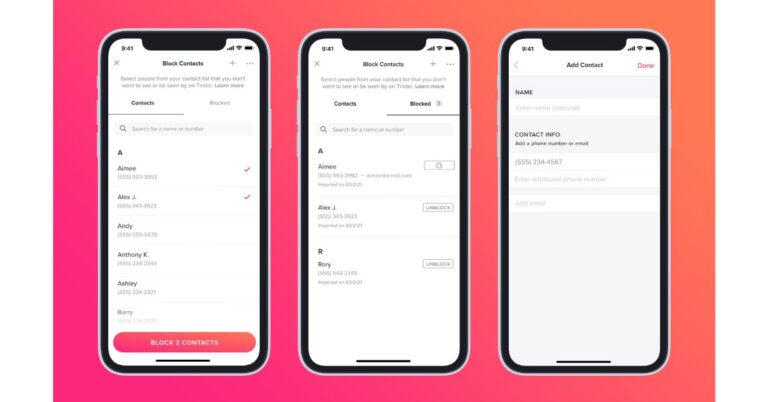
The Block Contacts feature on Tinder will be accessible within the profile setting from where the member will be able to enter their contact which they’d rather not see, or not be seen by, on the dating app. As per the company, if those contacts are already on Tinder or decide to download it later using the same contact info, they won’t appear as a potential match. This feature was initially tested in India, Korea and Japan, members who adopted the Block Contacts feature on Tinder added about a dozen contacts to their block list and now the feature is being rolled out globally.
So if you choose to block a contact they won’t be notified that you blocked them and this will also not affect your existing matches or messages. However, if the contact info you use to block someone doesn’t match the info they used to sign up, Tinder won’t be able to stop you from seeing each other.
The blog noted, “If you opt-in to the feature, we use your contact list so that you can quickly and easily select contacts you’d like to avoid on Tinder. Each time you visit Block Contacts, we’ll pull your list of contacts from your device so that you can pick who you would like to block. When you leave the feature, we’ll only keep the contact information for the people you have blocked (name, email and/or phone number). We’ll use this information to help prevent you from seeing your blocked contacts and from them seeing you (assuming they created an account with the same contact info you uploaded).”
How to block your contacts on Tinder?
First of all, you need to share the contact list from your device to Tinder and then you can block someone from your contacts.- Launch the Tinder app on your device.
- Now click on the profile icon
- Go to Settings
- In the settings now scroll down and select Block COntacts
- Now allow Tinder to access your contacts
- Under the “Contacts” tab, select people you want to avoid from your contact list
- Tap “Block Contacts”
How to manually add a contact and block on Tinder?
- Follow the above mentioned first three steps
- Now tap on the + icon at the top of the screen
- Then add the person’s contact info and tap “Done”