Google Chrome now offers memory and energy modes for desktop users

The Memory Savers and Energy Saver modes are now available on Chrome for desktops. Note that all these features were announced last year that will make the PC run faster and have longer battery life when in Memory and Energy saver mode. While the Energy Saver function will save battery life by restricting background activity. Now that they are available, the functionalities come enabled by default on Mac, Windows, Linux, and Chromebooks. Google is now widely implementing the Memory and Energy Saving modes on Chrome 110 for Mac, Windows, Linux, and Chromebooks. The desktop will run more quickly and have longer battery life while using Google’s browser when Memory and Energy saver modes are enabled. Memory will be automatically freed up from inactive tabs in Memory Saving mode, while the Energy Saver feature will cut down on background activity to save battery life. Under Chrome Settings, you can disable the modes if necessary.

Turn Memory Saver on or off

Chrome deactivates inactive tabs to conserve memory and improve the performance of active tabs. An idle tab immediately reloads when you access it. Google claims that the Memory Saver mode will improve the performance of your active video and gaming tabs. Your computer’s settings and usage practices can make it impossible to deactivate a tab.
  • Launch Chrome on your computer.
  • Click More and then Settings in the top right corner.
  • Toggle to Performance from the left.
  • On or off the Memory Saver.

Turn Energy Saver on or off

Chrome decreases its background processes and image capture rate in order to prolong the battery life of your device. When Energy Saving is activated, it begins operating automatically anytime your device is unplugged or when the battery is running low. Your device’s Energy Saver does not activate when it is plugged in.
  • Launch Chrome on your desktop.
  • Click More and then Settings in the top right corner.
  • Click Performance in the left menu.
  • Choose your desired option after turning Energy Saving on or off.
For the latest gadget and tech news, and gadget reviews, follow us on TwitterFacebook and Instagram. For newest tech & gadget videos subscribe to our YouTube Channel. You can also stay up to date using the Gadget Bridge Android App. You can find the latest car and bike news here.

7 Best Offline Music Player Apps for Android

While music streaming apps like Spotify, Apple Music, and Amazon Music have significantly changed how we consume music on our mobile devices, some people still prefer maintaining their own digital library – and for good reason too. Firstly, streaming music online can use up a good portion of your mobile data. Some people may find downloading music to be a much better alternative to streaming their favourite artists over and over again. While streaming services like Spotify offer the option to download your favourite songs, the downloads are only available until your subscription lasts. For those who would rather maintain a local music library on their smartphone, here are the 7 best offline music player apps for Android. Read Also: Vivo V27 series confirmed to launch in India on March 1

Pulsar Music Player

Pulsar Music Player One of the oldest and most popular music players on Android, Pulsar Music Player neatly categorises the music on your phone and offers a clean, ad-free interface at no additional cost. Android’s Material You design has been well integrated into the app, elevating the aesthetic and bringing a personalised touch to the music player. Pulsar Music Player can run a wide range of file formats including mp3, aac, flac, ogg, wav, and more. On top of that, you get the complete set of functions like gapless playback, lyrics display, crossfade, audio balance, visualiser, music equaliser, play speed adjusting, and more. Pulsar Music Player also supports Chromecast, Android Auto, and voice assistant, and you can easily integrate your Last.fm account with the app to record your scrobbles.

Canaree Music Player

Canaree Music Player Canaree Music Player offers a beautiful app interface on top of the basic features that you expect from a music player. The buttonless player controls further add to the meticulous design of the app. Apart from organising your music collection, Canaree can also catalogue the podcasts in your library and make them accessible in chronological order. The app also comes with multiple themes for the player along with a 3D virtualiser.

BlackPlayer Music Player

BlackPlayer Music Player BlackPlayer has all the ingredients for a perfect music player app. With the Material design seamlessly incorporated into the app and elegant animations across the board, BlackPlayer offers a unique look compared to other music players. This app also keeps a track of your most-played artists and songs and curates your homepage with personalised suggestions. BlackPlayer comes with Android Auto, WearOS, and Last.fm support.

Pulse Music

Pulse Music. best offline music player apps android If you’re looking for greater customisation in a music player, you may want to look into Pulse Music. This app lets you customise your home page, offers multiple Now Playing screens, curates playlists, and lets you customise the widget controls. The app also comes with multiple themes (dark themes included) and offers unique and helpful features like a sleep timer, Bluetooth autoplay, smart search, and more.

One Music Player

One Music Player. best offline music player apps android One Music Player curates personalised playlists for you based on your listening activity. While the playlists may not have songs outside of your music library, it is still a handy feature that compiles all your most listened songs in one place. To keep things fresh, One Music Player also personalises your homepage. On top of that, you get all the basic functions of a music player along with some unique elements like a carousel effect for album covers, an option to enrich song cover images, and more.

Nyx Music Player

Nyx Music Player. best offline music player apps android Nyx Music Player is designed for those who give aesthetics a higher preference than anything else. With 6 accent colours and 24 possible themes, Nyx has been thoughtfully designed to offer a unique and intricate interface. The app also comes with its own transitions and animations that greatly elevate the experience. On top of that, you get unique features like looper (repeats your favourite part of the song), nature sound (plays sounds of nature in 432Hz), volume boost, 3D sound, and more.

Retro Music Player

Retro Music Player. best offline music player apps android Retro Music Player comes with 3 base themes, 10+ now playing themes, and a bunch of accents that can be selected from the colour palette. On top of that, you get features like a music duration filter, gapless playback, carousel effect, drive mode, Bluetooth support, tag editor, home screen widgets, and support for over 30 languages. Retro Music Player also curates your homepage, filling it with music suggestions based on your listening activity. Read Also: Top 5 ways to Fix ‘Instagram Pictures Not Showing Up’ Issue

Conclusion

These are our picks for the 7 best offline music player apps for Android. All the music players on this list are free to use, but some may come with additional features locked behind a paywall. Think there’s an app that deserves to be on this list? Let us know in the comments! For the latest gadget and tech news, and gadget reviews, follow us on Twitter, Facebook and Instagram. For newest tech & gadget videos subscribe to our YouTube Channel. You can also stay up to date using the Gadget Bridge Android App. You can find the latest car and bike news here.

Garena Free Fire Redeem Codes Today 21 February 2023: Here is how to claim them

Garena Free Fire is a battle royale game with regular awards and tournaments to keep players interested. If you play Garena Free Fire, you should be aware of the redeem codes that are released on a daily basis. However, because the battle royale game is banned in India, players from other countries can use the Free Fire Redeem codes daily. If you’re unfamiliar with the Garena Free Fire redeem codes or don’t know how to get them, we’ve put together a step-by-step guide to help you redeem them. Check out Garena Free Fire Redeem Codes for 21 February 2023. The Free Fire redeem codes are a great way to get free stuff. These are 12-digit codes that contain alphabets and numbers, as well as an expiration date and time. Because the Garena FF redeem codes cannot be used more than once, you should hurry to the redemption page to claim your free reward before someone else does. To get a free reward, all you have to do is go to reward.ff.garena.com/en, which is the official redemption page. Also, keep an eye on this space for daily updates on Garena Free Fire redemption codes and rewards.

Garena Free Fire Redeem Codes Today 21 February 2023

  • B3G7A22TWDR7X
  • 6KWMFJVMQQYG
  • FFCMCPSUYUY7E
  • X99TK56XDJ4X
  • MCPW2D1U3XA3
  • FFCMCPSEN5MX
  • HNC95435FAGJ
  • EYH2W3XK8UPG
  • BR43FMAPYEZZ
  • FF7MUY4ME6SC
  • FFCMCPSGC9XZ
  • MCPW2D2WKWF2
  • V427K98RUCHZ
  • GCNVA2PDRGRZ
  • 4ST1ZTBE2RP9
  • 8F3QZKNTLWBZ
  • WEYVGQC3CT8Q
  • NPYFATT3HGSQ
  • UVX9PYZV54AC
  • J3ZKQ57Z2P2P
  • GCNVA2PDRGRZ
  • 4ST1ZTBE2RP9
  • 3IBBMSL7AK8G

How to Get Free Fire Redeem Codes for Garena on 21 February 2023?

  • Visit the Garena Free Fire game’s official website at reward.ff.garena.com.
  • Use your Facebook, Google, VK, Apple ID, Huawei ID, or Twitter account to log in.
  • You’ll be taken to a valid redemption code (s)
  • Copy and paste the 12-digit redemption code into the text box.
  • On the screen, a dialogue box will appear.
  • ‘Ok’ should be selected.
For the latest gadget and tech news, and gadget reviews, follow us on TwitterFacebook and Instagram. For newest tech & gadget videos subscribe to our YouTube Channel. You can also stay up to date using the Gadget Bridge Android App. You can find the latest car and bike news here.

Poco C55 to launch in India today: Launch details inside

Xiaomi’s spin-off Poco is all set to launch a new smartphone in India today. Poco C55 will be released today. The company has already hinted at the release of the phone in a brief commercial. The device is rumoured to be a rebranded variant of Redmi 12C which made its debut in China in January. In addition to this, the upcoming phone has also been spotted listed on a number of certification websites. The Poco C55 India launch is scheduled to take place today. The company will be hosting a launch event that will go live at 12 noon. The launch event will be live-streamed via company’s official social media platforms and YouTube channel. According to the company the device will be exclusively sold on Flipkart starting at noon.  The firm hasn’t yet disclosed the official price, but according to a previous report, the Poco C55 could launch as a Redmi 12C that has been given a new name. The Redmi phone went on sale in January. It is available in four colour options: Shadow Black, Sea Blue, Mint Green, and Lavender. It comes with three storage configurations: 4GB RAM with 64GB storage, 4GB RAM with 128GB storage, and 6GB RAM with 128GB storage. A 6.71-inch HD+ screen with a resolution of 1650 x 720 pixels is featured on the Redmi 12C. The display has a 20:6:9 aspect ratio and a maximum brightness of 500 nits. The smartphone has a Mali-G52 GPU and an octa-core MediaTek Helio G85 CPU. The device has eMMC 5.1 flash memory and LPDDR4X RAM. All three of the internal storage options for the Redmi 12C allow for microSD card storage expansion of up to 512GB. The hybrid dual SIM (Nano) slot was present when the phone was released. The phone’s camera module, which is shaped like a pill, and an LED flash are housed in a square cutout on the back. Next to the camera unit is a fingerprint scanner for biometric verification. A 50-megapixel primary sensor serves as the focal point of the Redmi 12C’s dual rear camera system. A 5-megapixel camera sensor is housed in the phone’s front-facing dewdrop notch. For the latest gadget and tech news, and gadget reviews, follow us on TwitterFacebook and Instagram. For newest tech & gadget videos subscribe to our YouTube Channel. You can also stay up to date using the Gadget Bridge Android App. You can find the latest car and bike news here.

Amazon Quiz Answers Today 21 February 2023: Participate to win Rs 2,500

Amazon Quiz for 21 February 2023 has gone live on the company’s mobile platform. The daily quiz contest brings an opportunity for Amazon users to win exciting prizes. In today’s Amazon Quiz the participants have the chance to win Rs 2,500 Amazon Pay Balance. All they have to do is answer all the questions correctly. A fresh question is posted on the Amazon app daily which consists of five simple questions based on general knowledge and current events. The quiz can be played on the Amazon App from 12 AM to 11:59 PM. You have to answer all the questions correctly. Then the participants will be shortlisted for a lucky draw. The result of the lucky draw will be announced at the end of the month. The participants can win Amazon Pay Balance to up to Rs 50,000. Check out the 21 February 2023 Amazon Quiz question and their answers to win Rs 2,500 Amazon Pay Balance. Amazon Quiz Today Prize – Rs 2,500 Amazon Pay Balance Quiz Date – 21 February 2023 Daily Timing – 12 AM to 11:59 PM Winner Announcement – Today 12 PM

Amazon Quiz Answers Today 21 February 2023

Question 1: An upcoming movie of Anupam Kher also starring Neena Gupta is titled ‘Shiv Shastri _____ ‘. Fill in the blanks Answer- Balboa Question 2: Who was the captain of the victorious Indian team that won the U19 Women’s T20 World Cup in 2023? Answer- Shafali Verma Question 3: Who among these has been part of the judges panel on MasterChef India 6 times (from the 2nd edition- the current 7th edition)? Answer- Vikas Khanna Question 4: Who among these presidents is seen in this famous monument? Answer- Abraham Lincoln Question 5: This famous monument is located in which state? Answer- Gujarat

How To Play Amazon Quiz

Only app users are eligible to play the Amazon quiz every morning from 12 AM to 11:59 PM. The quiz is not available on the desktop. For those who are unaware of how to play the Amazon quiz below are the steps, you can follow to take the quiz.
  • Firstly download the Amazon app from Google Play Store or App Store
  • Now fill in the required information through the Sign Up option.
  • You need to log in to the Amazon app and scroll down on the home screen to find the Amazon Quiz banner.
  • Tap on the Amazon Quiz banner and tap on the Start button to start the Quiz.
  • Now you will get 5 questions and you need to answer them correctly. One wrong answer will eliminate you from the Quiz.
  • After answering all the questions correctly you are now eligible for a Lucky Draw.
  • The winner’s name will be announced today at 12 PM.
For the latest gadget and tech news, and gadget reviews, follow us on TwitterFacebook and Instagram. For newest tech & gadget videos subscribe to our YouTube Channel. You can also stay up to date using the Gadget Bridge Android App. You can find the latest car and bike news here.

How to Restore Deleted WhatsApp Messages without Backup? [Both Android and iOS]

WhatsApp is one of the best messaging applications and has been used by millions of users worldwide. With this app, you can easily send messages, videos and more. But how to restore deleted WhatsApp messages without backup? In case you have deleted your WhatsApp messages and didn’t remember to create the backup file, we got you covered. In this article, we will show you how to restore deleted messages without using the backup file. Also, we will discuss how to use the UltData WhatsApp Recovery tool. Continue reading the article to find out all the information.

How to Restore Deleted WhatsApp Messages without Backup on iPhone

If you are using an iPhone and forgot to back up your data, don’t worry. In this section, we will show you how to restore deleted WhatsApp messages using UltData WhatsApp Recovery. This software is amazing and helps you recover WhatsApp data in no time. Want to know more about its features? Check out the details below. Features of UltData WhatsApp Recovery
  • You can easily recover deleted messages from WhatsApp on your iPhone without worrying about the backup file.
  • It can recover almost 7 different types of data, including videos, photos and more.
  • You can recover WhatsApp from your iTunes backup.
  • It has the highest recovery rate, around 98%.
  • It is compatible with all the latest iOS devices, including iPhone 14(Plus) and Mini.
Steps to Restore Deleted WhatsApp Messages without Backup on iPhone Here are the steps which you can follow to restore deleted WhatsApp messages without backup on your iPhone device. Step 1. Download and launch the program on your PC and click the “Device” option. Step 2. Connect your iOS device using the USB cable and click the “Start Scan” option. Step 3. Once the program detects your mobile, it will start scanning the device and will show you some options on the screen. Step 4. Choose the data which you want to recover. You can also click the Preview option to check the files. Step 5. Once done, click the “Recover” option, and you are good to go. The program will recover WhatsApp data successfully.

How to Recover Deleted WhatsApp Messages on Android without Backup

If you are an Android user and want to recover deleted WhatsApp messages without backup, then you can use UltData for Android.  This tool is easy to use and comes with numerous features, including restoring images, photos, videos and more. It supports around 6000+ Android phones and has the highest success rate. You can easily use it to restore deleted WhatsApp messages on Android without backup. Steps to Recover Deleted WhatsApp Messages on Android without Backup Step 1. Launch the program and click the “Recover WhatsApp Data” option.  Step 2. Next, connect your Android device using the USB cable. Make sure you have enabled USB debugging on your mobile. Step 3. Once the program detects your mobile device, click the “Start” option to continue the process. Step 4. Soon the program will start scanning your phone to find the lost WhatsApp data. Once the process is done, choose the WhatsApp data that you want to recover and hit the “Recover” option. Step 5. Soon the program will start recovering your WhatsApp data. Make sure your mobile is connected during the process. So, these are the simple steps you can follow to recover WhatsApp messages on Android and iPhone.

How to Restore Deleted WhatsApp Messages without Backup for Free

If you don’t want to use a third-party tool and are looking for a free method, then you can use these steps. However, remember that you can only recover limited data. For example, on an iPhone, you can only recover 5GB of data. Also, remember that by using the free method, you can only recover photos and videos within 30 days. Once the time has passed, you won’t be able to restore WhatsApp data. Let’s see how you can recover deleted WhatsApp messages without a backup for free. For Android users:
  • For this method, you have to uninstall your WhatsApp application and, after a few seconds, reinstall it again.
  • Launch the WhatsApp app and verify your number.
  • Once you have installed the app, you will see the RESTORE option. So click it to restore your messages. It will search your Google Drive and will restore the data from there.
  • Once the process is done, click the “Next” option and wait until you see the messages.
  • In case you don’t have a backup in Google Drive, don’t worry; the app will automatically restore the files from your local backup file.
  • For iPhone users:
  • Open your Settings and hit the “General” option.
  • Look for the “Reset on your iPhone” option and choose the “Erase All Content and Settings” option.
  • Choose the “Restore from iCloud Backup” option. Make sure you are signed in to your iCloud.
  • After that, choose the latest backup file and wait for a few minutes until the process is completed.

FAQs

Q1.How to recover 1-year-old WhatsApp messages without backup?

You can use a third-party tool named UltData WhatsApp Recovery to recover 1-year WhatsApp messages without backup. This tool is amazing and recovers data in no time. Also, the great thing about this app is that you don’t have to worry about the backup data.

Q2.I reinstalled the WhatsApp app, but none of my messages appeared. What’s happening?

When you reinstall WhatsApp, you see the restore option, which helps you recover the data in no time. If you don’t see the restore option or skip it accidentally, you won’t see the messages on the screen. But don’t worry; you can easily use the WhatsApp backup recovery tool to restore your messages.

Final Words

In this article, we have discussed all the possible ways to restore deleted WhatsApp messages without backup. We have discussed the ways both for your Android and iPhone devices. Moreover, if you want to restore deleted WhatsApp messages without backup, you can use UltData WhatsApp Recovery, which is an amazing application and has the highest rate of recovering WhatsApp messages on iPhone. For the latest gadget and tech news, and gadget reviews, follow us on TwitterFacebook and Instagram. For newest tech & gadget videos subscribe to our YouTube Channel. You can also stay up to date using the Gadget Bridge Android App. You can find the latest car and bike news here.

Unlocking the Potential of Your VPN: 8 Things to Do

Virtual private networks or VPN are useful tools used by individuals nowadays who want to browse freely and safely. This application offers the highest level of security and data privacy protection to make various content accessible to users online. This article is a list of 8 things that a VPN online user can perform.

What Is A VPN?

The fundamental concept of a VPN is to establish a secure, private tunnel between all your devices and a VPN server. This then links you to the rest of the internet. Your real IP address is concealed by the VPN server, making it hard to track the connection back to you. No one can eavesdrop on your activity or use your connection to their advantage because all traffic to and from your device is encrypted. When travelling, you can watch content from websites like Netflix and YouTube and get around some restrictions like government censorship, thanks to VPNs. Additionally, VPNs protect sensitive information from cybercriminals.

Uses Of VPN

These are the top 8 fascinating things you can do with a VPN, from viewing your preferred shows in another nation to maintaining the privacy and security of your data.

1.    Prevent ISP Tracking

ISPs, or Internet service providers, typically have access to the location of their users. They now can track users’ positions and other important data most sensitive, thanks to technological improvements. By transferring the user’s original IP address to a server involved in the program that the network has secured, a VPN can shield consumers from this agenda. To make it difficult for the ISP to pinpoint the user’s location, the server is dispersed throughout the globe in several locations.

2.    Join A Remote Network

Your ability to access other networks remotely via a VPN is a very valuable capability. With the help of a VPN, you may utilize this to work from home safely, or you can connect from the office to your home office. The key advantage is a rigorous, two-way tunnel allowing unrestricted, secure access. Let’s assume you’re a student at a university, last but not least. In that situation, you have direct access to its online collection of sources and databases, which can only be accessed through a secure route.

3.    Safe Public Wi-Fi Usage

Using unsecured public Wi-Fi networks to stay connected to your contacts on social media and even to conduct online banking and shopping is likely if you’re always on the move. You open yourself up to countless internet hazards and leave yourself vulnerable to cybercrime by doing this. By masking your real identity and IP address, a VPN can shield you from these vulnerabilities and allow you to browse the internet privately.

4.    Protect Your Privacy

Giving consumers privacy is the most fundamental purpose of a virtual private network. This is particularly true for websites that collect information via surveys, forums, and other tools like apps. VPNs provide privacy protection by hiding the user’s identity, and they prevent websites from collecting data about users by intercepting their IP addresses and other browsing activity. They offer security and anonymity to ensure efficient browsing.

5.    Prevent Bandwidth Throttling

Your ISP may be using bandwidth-limiting techniques to target you if you’re engaging in activities that consume a lot of internet bandwidth, including streaming or gaming. Your Internet speed will be negatively impacted by bandwidth throttling, which happens when your ISP tries to control network traffic and lessen bandwidth congestion. You can bypass bandwidth restrictions and sluggish connection speeds using a VPN connection. Your ISP can no longer observe your activity sessions thanks to the encryption provided by a VPN for your web traffic. Your bandwidth will likely slow down if your ISP blocks the entire network in your area, regardless of what you do, but if you’re being singled out because of your surfing habits, a VPN can assist. As a result, you won’t experience significant bandwidth interruptions when playing your online games.

6.    Unblock Restricted Content

Easy access to international content and streaming portals is one of the primary reasons why so many people use a VPN. You must pay subscription fees to websites and services like Netflix, Amazon, Hulu, and others. Why, then, are you unable to use your purchased services when travelling? Depending on the nation you’re in, you might be able to access a local version. However, don’t be shocked if it doesn’t host your preferred content. However, if you use a VPN, you may connect to a server in the nation that hosts the streaming service, giving you immediate access to all of your preferred content.

7.    Find Cheaper Prices

Did you realize that there are lower costs available when buying items like airline tickets online? Geolocation data is frequently used by other businesses besides airlines to provide varying prices for the same flights. The majority of e-commerce websites display various prices depending on the region you’re connecting from. In certain cases, changing your location will substantially lower pricing. You’ll be able to connect from a server in the nation of your choice using a VPN. You’ll shortly discover that the identical ticket you were viewing miraculously has a lower price when you’re connected from another country’s servers! This frequently happens on websites for booking hotels, renting automobiles, or finding flight tickets. To make sure you’re receiving the greatest rate, make sure to activate your VPN and test a few different countries before proceeding with the checkout process on these sites.

8.    Safe Upload And Download

An everyday online activity is to upload and download stuff. Because it leaves certain digital footprints, it can, nevertheless, become fully insecure if a user is not vigilant. By setting up a VPN, a user can use secure browsing sessions to download and upload any content while their location is hidden. Through the usage of a VPN, users may prevent websites from tracking their location, even while they upload or download files. Because of this, nobody can discover the person’s location.

Conclusion

Accessing the internet from any location, such as your home office, a restaurant, the airport, etc., may be done affordably and securely using a VPN. It allows you to communicate securely with your staff, clients, and banks. For the latest gadget and tech news, and gadget reviews, follow us on TwitterFacebook and Instagram. For newest tech & gadget videos subscribe to our YouTube Channel. You can also stay up to date using the Gadget Bridge Android App. You can find the latest car and bike news here.

How to Use Google Assistant to Identify a Song in Any Language (2024)

0
If you’re at a bar or listening to music on the radio, identifying a certain song is no longer the hassle it used to be. Earlier, you would have to ask around or simply wait for the song to be played again, but not all you need is your smartphone and you can easily get to know everything about the song – from the artist to the date of release. In this article, we show you how to use Google Assistant to identify any song in any language. Read Also: 9 Great Voice Recording Apps for Android & iOS

Here’s how you can identify a song using Google Assistant

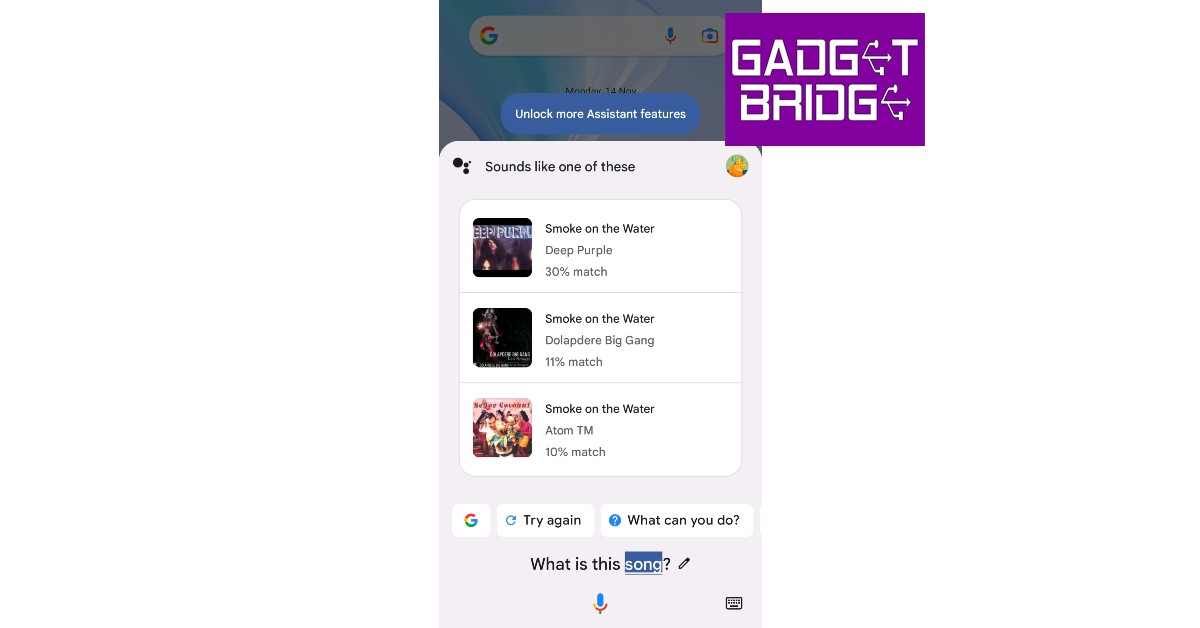
Step 1: Tap the home icon or say Hey Google to trigger Google Voice Assistant. Step 2: Ask ‘Which song is this? Step 1: Tap the home icon or say ‘Hey Google’ to trigger Google Voice Assistant. Step 3: Play the song on another device. Step 3: Play the song on another device or hum its melody or lyrics.  Step 4: Google will search for the song using the melody and bring up matching results. Step 4: Google will search for the song using the melody and bring up matching results. find song by sound

Use the Hum to Search feature on YouTube Music

Use Hum to Search on YouTube Music The YouTube Music app uses a similar algorithm to identify songs playing in your vicinity. Here’s how you can use it. Step 1: Launch the YouTube Music app on your smartphone. Step 2: Hit the search icon at the top right corner of the screen. Step 3: Tap the wavelength symbol at the top right corner of the screen. Step 4: Hum the song for 20-30 seconds. Step 5: Google’s AI algorithm will look up the song that matches the melody. The song title along with the artist name, album name, and release year will appear on the screen. Step 6: You can choose to play the song or add it to your playlist. If this is not the song you were looking for, tap the waveform symbol at the bottom of the screen to perform another search.

Bonus Tip: Use a third-party app

Use Shazam to find a song name without knowing its lyrics If Google Assistant fails to identify the song, there are plenty of other third-party apps that will do the job for you. You may already know of Shazam, which was the first app that became popular for its accurate song identification. Other apps like Soundhound and MusixMatch also carry out the same task with expertise. All you need to do is download the app and select the song identification feature. Once the app is using your phone’s mic to listen to the surroundings, bring it closer to the source of the sound so it can get a good sample. Within seconds, the app will show you all matching results.

Frequently Asked Questions (FAQs)

How do I use Google Assistant to identify a song?

Trigger Google Assistant by saying ‘Hey Google’ or long pressing the side key, ask ‘Which song is this’, then play the song or hum it. Google Assistant will produce matching results within a few seconds.

Can I identify a song using YouTube Music?

YouTube Music has a new song finder that can be accessed by pressing the waveform icon next to the search bar. Play a song or hum it to find the appropriate match.

Are there any third-party apps to identify the song playing near me?

Apps like Shazam, Soundhound, and MusixMatch are great tools to identify songs playing in your vicinity. Read Also: Meta introduces a paid Blue Badge for Facebook and Instagram

Conclusion

This is how you can use Google Assistant to identify any song. The best part about using Google Assistant is that you don’t even need to play the official recording of the song for it to identify the track. You can even hum a certain section of the song or speak some lyrics into the microphone and Google Assistant will come up with matches for your query.

360-degree video backgrounds are now available for Google Meet on mobile

Google Meet users will soon be able to use 360-degree backgrounds while participating in a video conversation on their mobile devices. This feature is currently being rolled out to Android and iOS devices. In addition to this, the editable widgets are now available for Chat app cards which will include interactive widgets like checkboxes, radio buttons, and dropdowns.

360-degree video backgrounds

360-degree backgrounds for Android and iOS devices have finally been added to Google Meet. Users of the new functionality can choose from a variety of available backdrops. These backgrounds, which include a beach and a temple, move with you thanks to the gyroscope on your device. Remember that administrators can enable or disable backgrounds for their users. All Google Workspace users and users with personal Google Accounts can access it on Android and iOS devices. It should be noted that admins have the ability to disable these backgrounds when necessary, even if they may hide the user’s original backdrop from meeting attendees. Also Read: How to record video meetings in FHD on Google Meet

Editable widgets now available for Chat app cards

In Chat app cards that are posted in the Chat message stream, developers can now include interactive widgets like checkboxes, radio buttons, and dropdown menus. You can rapidly change the information sent from Chat apps by doing this by Changing the assignee on a task card or changing the due date on a task card and Selecting or deselecting options on a card. Also Read: How to Use Face Filters on Google Meet Video Call? Only Google Workspace Essentials, Business Starter, Business Standard, Business Plus, Enterprise Essentials, Enterprise Standard, Enterprise Plus, Education Fundamentals, Education Plus, Education Standard, the Teaching and Learning Upgrade, Frontline, and legacy G Suite Basic and Business customers have access to this feature at this time. For the latest gadget and tech news, and gadget reviews, follow us on TwitterFacebook and Instagram. For newest tech & gadget videos subscribe to our YouTube Channel. You can also stay up to date using the Gadget Bridge Android App. You can find the latest car and bike news here.

Vivo V27 series confirmed to launch in India on March 1

After teasing the Vivo V27 series in India the company today officially announced the actual launch date of the upcoming new lineup. The India launch is scheduled for March 1. In order to tantalise the main features of the new V-Series smartphones, the business has also developed a special microsite. The forthcoming series’ design is displayed in the official teaser. The devices would have three back cameras and a ring LED flash. Vivo has confirmed that the new V-series smartphones will be launched in India on March 1 at noon. The new lineup is likely to include two new devices Vivo V27 and Vivo V27 Pro. It is confirmed that the Sony IMX 776V sensor and colour-changing rear panel would be included in the Vivo V27 series. According to the company, the camera sensor on the phone will come with compatibility for Aura Light Portrait mode and OIS (Optical Image Stabilization). The handset will be made available in a variety of colour schemes. Also Read: iQOO 11 Review: A real beast Moreover, a trio of rear cameras is clearly visible. Each sensor has what appears to have a ring surrounding it, and there is a ring LED flash. The volume rockers and power buttons are visible on the left spine of the device. The phones will feature a hole-punch display and 3D curved panels. The screen is teased to support 120Hz refresh rates. It has also been confirmed that Flipkart would sell these in India. Reports claim that the Vivo V27 5G will be powered by a MediaTek Dimensity 7200 Processor. The Vivo V27 Pro, on the other hand, will be using the MediaTek Dimensity 8200 Chipset. They reportedly come in 8GB and 128GB or 12GB and 256GB Memory configurations. The company hasn’t yet disclosed prices, however, it was earlier reported that the Vivo V27 5G in India might cost Rs 35,000. Whereas the Pro version is said to be priced at Rs 40,000. The base variant of the Vivo V25 5G was made available in India for a starting price of Rs 27,999, while the base model of the Vivo V25 Pro cost Rs 35,999. For the latest gadget and tech news, and gadget reviews, follow us on TwitterFacebook and Instagram. For newest tech & gadget videos subscribe to our YouTube Channel. You can also stay up to date using the Gadget Bridge Android App. You can find the latest car and bike news here.