

Reportedly some of the employees who were not willing to work with Mus have already quit. On the other hand, Elon Musk started off his ownership by terminating Twitter’s CEO Parag Agrawal, CFO Ned Segal, and head of legal and policy Vijaya Gadde. According to him, they have deceived him and Twitter’s investors over the prevalence of fake accounts on Twitter. The company’s CEO is still included on Agrawal’s Twitter bio. Although there has not yet been an official confirmation. If Musk removes Agarwal from his position as CEO, Agrawal may earn $60 million, according to the New York Times. Musk has not yet provided any details on how he plans to run or lead the social media platform. However, he has stated that he intends to make employment cuts, which has caused concern for the 7,500 or so employees of Twitter. Parag Agarwal joined Twitter in the year 2011 as a software engineer. He was earlier positioned as the Chief Technology Officer while completing his computer science PhD at Stanford. Agrawal rose through the ranks of the company and was named CTO of Twitter in 2017. When Twitter co-founder Jack Dorsey stepped down as CEO, Agrawal took the position of CEO. In November 2021, Agarwal earned a pay package that includes a $1 million annual salary. The package further included bonuses, performance-based stock units, and restricted stock units worth a total of $12.5 million. Prior to this he also worked with other popular tech firms like Microsoft, Yahoo and AT&T Labs. For the latest gadget and tech news, and gadget reviews, follow us on Twitter, Facebook and Instagram. For newest tech & gadget videos subscribe to our YouTube Channel. You can also stay up to date using the Gadget Bridge Android App. You can find the latest car and bike news here.Entering Twitter HQ – let that sink in! pic.twitter.com/D68z4K2wq7
— Elon Musk (@elonmusk) October 26, 2022
Senior Twitter officials, including the CEO Parag Agrawal, fired by Elon Musk

Twitter is now Elon Musk’s property. The social network was purchased by Musk for about $44 billion. With this, he fired top executives as soon as he took ownership of the social media platform on Thursday. Elon Musk has dismissed the company’s Indian-origin CEO Parag Agrawal, CFO Ned Segal, as well as head of legal affairs and policy Vijaya Gadde.
This week Musk changed his Twitter handle to “Chief Twit” and posted a video of himself entering the company’s California offices while holding a sink. “Let that sink in!” he tweeted.
How to apply and get Airtel 5G? Things to know
After the 5G was greenlit earlier this month, Airtel soon commenced its nationwide rollout. In the first phase of rollouts, Airtel is offering the service in eight Indian cities. Named ‘Airtel 5G Plus’, the service is currently only available to select eligible Airtel customers in those 8 cities. If you’re an Airtel user you’re most likely interested in availing the service. In this article, we show you how to apply for Airtel 5G Plus.
Read Also: Who Owns Facebook Now? Top Facebook shareholders
 Step 2: Tap on Mobile Network and select Network Mode.
Step 3: Choose 5G/LTE/3G/2G (autoconnect).
Your smartphone will automatically switch to a 5G network when it becomes available. Make sure that your smartphone is 5G enabled.
Step 3: The app will check whether Airtel 5G Plus is available in your city and if you are one of the eligible users.
If you’re one of the lucky eligible users, you can start using Airtel 5G Plus right away. Since Airtel hasn’t announced out any 5G Plus plans yet, you will not have to pay any extra charges on top of your existing 4G plan.
Once you’ve started using Airtel 5G Plus, you can check the speed on the Ookla Speed Test app. You can also use the Ookla app to check whether Airtel 5G is available in your area. Simply click on the ‘Maps’ option at the bottom right corner of the screen. The dark blue areas around your location signify the presence of a 5G network.
Read Also: Best smartwatches for your daily health needs
Step 2: Tap on Mobile Network and select Network Mode.
Step 3: Choose 5G/LTE/3G/2G (autoconnect).
Your smartphone will automatically switch to a 5G network when it becomes available. Make sure that your smartphone is 5G enabled.
Step 3: The app will check whether Airtel 5G Plus is available in your city and if you are one of the eligible users.
If you’re one of the lucky eligible users, you can start using Airtel 5G Plus right away. Since Airtel hasn’t announced out any 5G Plus plans yet, you will not have to pay any extra charges on top of your existing 4G plan.
Once you’ve started using Airtel 5G Plus, you can check the speed on the Ookla Speed Test app. You can also use the Ookla app to check whether Airtel 5G is available in your area. Simply click on the ‘Maps’ option at the bottom right corner of the screen. The dark blue areas around your location signify the presence of a 5G network.
Read Also: Best smartwatches for your daily health needs
Here’s how you can activate 5G network on your smartphone
Step 1: Go to Settings and select Connections. Step 2: Tap on Mobile Network and select Network Mode.
 Step 3: Choose 5G/LTE/3G/2G (autoconnect).
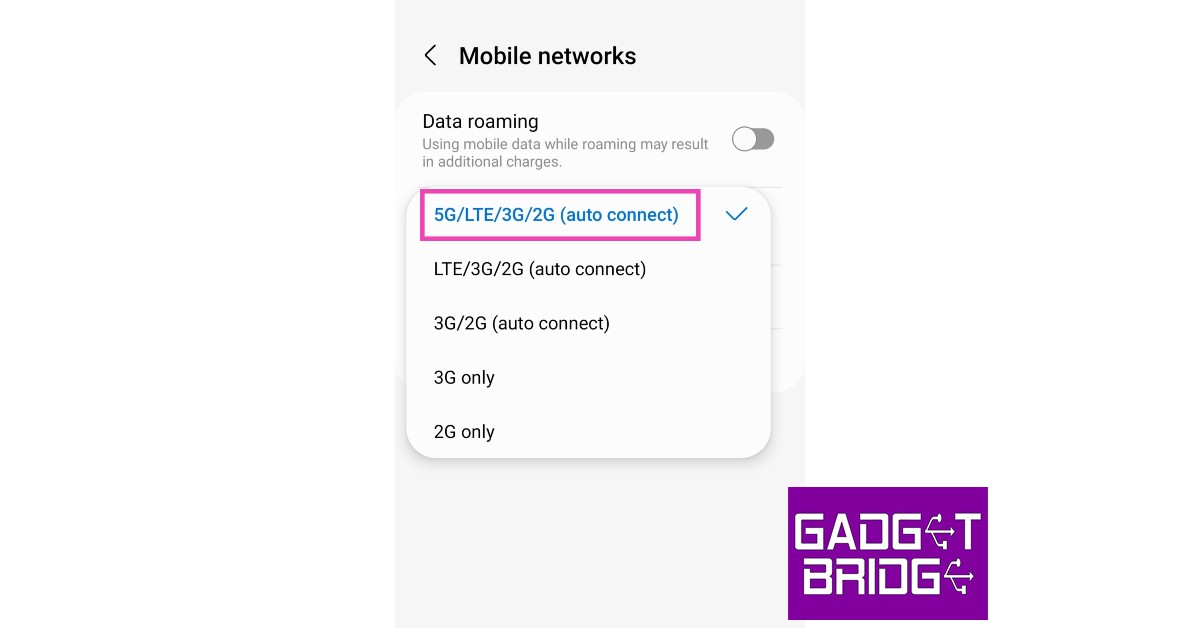 Your smartphone will automatically switch to a 5G network when it becomes available. Make sure that your smartphone is 5G enabled.
Here’s how you can apply for Airtel 5G network
Currently, Airtel is rolling out its 5G service in a phased manner. This means that not all Airtel users across the country will get access to it all at once. In the first phase of the rollout, Airtel users across 8 cities can avail the network’s 5G services. These cities include Delhi, Mumbai, Chennai, Bengaluru, Hyderabad, Siliguri, Nagpur, and Varanasi. Airtel plans on reaching more cities by the end of the year. If you’re an Airtel user in one of the cities mentioned above, you need to check whether you’re available for the 5G service. Here’s how you can do that. Step 1: Download and install the Airtel Thanks app from Google Play Store. Step 2: Open the Airtel Thanks app and click on the ‘5G Plus’ banner on the home page. Step 3: The app will check whether Airtel 5G Plus is available in your city and if you are one of the eligible users.
 If you’re one of the lucky eligible users, you can start using Airtel 5G Plus right away. Since Airtel hasn’t announced out any 5G Plus plans yet, you will not have to pay any extra charges on top of your existing 4G plan.
 Once you’ve started using Airtel 5G Plus, you can check the speed on the Ookla Speed Test app. You can also use the Ookla app to check whether Airtel 5G is available in your area. Simply click on the ‘Maps’ option at the bottom right corner of the screen. The dark blue areas around your location signify the presence of a 5G network.
Read Also: Best smartwatches for your daily health needs
Once you’ve started using Airtel 5G Plus, you can check the speed on the Ookla Speed Test app. You can also use the Ookla app to check whether Airtel 5G is available in your area. Simply click on the ‘Maps’ option at the bottom right corner of the screen. The dark blue areas around your location signify the presence of a 5G network.
Read Also: Best smartwatches for your daily health needs
Conclusion
This is how you can apply for Airtel 5G Plus network. The next phases will cover more Tier 2 and Tier 3 cities across the country. According to Airtel, their 5G service will be available nationwide by March 2024. If you’re a Jio user and want to know how to apply for their 5G service, read our article here.
For the latest gadget and tech news, and gadget reviews, follow us on Twitter, Facebook and Instagram. For newest tech & gadget videos subscribe to our YouTube Channel. You can also stay up to date using the Gadget Bridge Android App. You can find the latest car and bike news here.
Detailed information about the Vivo X90 Pro+ revealed
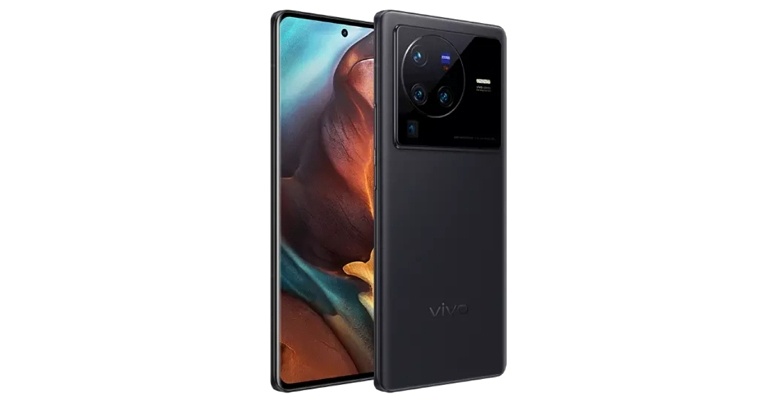
The Vivo X90 series may be in development and Vivo X90, the Vivo X90 Pro, and the Vivo X90 Pro+ are anticipated to be part of the portfolio. The Vivo flagship smartphones are likely to arrive by the year-end which is December. According to speculations, the upcoming handset may include a 6.78-inch Samsung E6 AMOLED curved display with 1.5K resolution.
According to a TechGoing story that has appeared online, Vivo X90 Pro+ may receive a 6.78-inch Samsung E6 AMOLED display with curved edges. A 2K resolution and 120Hz refresh rate are reportedly offered. A 1440Hz high-frequency eye protection dimming chip is reportedly included in the upcoming phone. It is anticipated that the Qualcomm Snapdragon 8 Gen 2 SoC would power the Vivo X90 Pro+. As per the report the X90 and X90 Pro are expected to Dimensity 9200, which is likely to be released in November.
On the contrary, previous reports suggested that the Vivo X90 Pro+ will be powered by a MediaTek Dimensity 9200 SoC. It has previously been rumoured to include UFS 4.0 storage and fast LPDDR5X RAM.
The Vivo X90 Pro+ will probably have four cameras on the back, with the 50-megapixel Sony IMX989V primary camera taking centre stage. Alongside there will be a 64-megapixel OmniVision OV64A periscope lens that might provide 3.5x optical zoom and 10x hybrid zoom. The third lens would be a 50-megapixel Sony IMX578 portrait sensor whereas a 48-megapixel Sony IMX598 ultra-wide sensor would complete the setup. A Vivo V2 image signal processor of the newest generation is also expected to be included.
A 4,700mAh battery with the capability for 80W wired fast charging and 50W wireless charging could be found on the Vivo X90 Pro+.
There are two devices in the Vivo X80 Series: the X80 and the X80 Pro. While the latter is equipped with a Snapdragon 8 Gen 1 SoC, the former is driven by a MediaTek Dimensity 9000 SoC. Each gadget in the camera-focused series has a camera sensor powered by Zeiss optics for the advanced imaging system. A Vivo V1+ imaging chip is also included for AI Video Enhancement in both photography and videography.
For the latest gadget and tech news, and gadget reviews, follow us on Twitter, Facebook and Instagram. For newest tech & gadget videos subscribe to our YouTube Channel. You can also stay up to date using the Gadget Bridge Android App. You can find the latest car and bike news here.
Garena Free Fire Redeem Codes Today 28 October 2022: Here is how to claim them

Garena Free Fire is a battle royale game with regular awards and tournaments to keep players interested. If you play Garena Free Fire, you should be aware of the redeem codes that are released on a daily basis. However, because the battle royale game is banned in India, players from other countries can use the Free Fire Redeem codes daily. If you’re unfamiliar with the Garena Free Fire redeem codes or don’t know how to get them, we’ve put together a step-by-step guide to help you redeem them. Check out Garena Free Fire Redeem Codes for October 28.
The Free Fire redeem codes are a great way to get free stuff. These are 12-digit codes that contain alphabets and numbers, as well as an expiration date and time. Because the Garena FF redeem codes cannot be used more than once, you should hurry to the redemption page to claim your free reward before someone else does. To get a free reward, all you have to do is go to reward.ff.garena.com/en, which is the official redemption page. Also, keep an eye on this space for daily updates on Garena Free Fire redemption codes and rewards.
Garena Free Fire Redeem Codes Today 28 October 2022
- X99TK56XDJ4X
- J3ZKQ57Z2P2P
- FFDBGQWPNHJX
- TDK4JWN6RD6
- XFW4Z6Q882WY
- HFNSJ6W74Z48
- HHNAT6VKQ9R7
- 2FG94YCW9VMV
- 4TPQRDQJHVP4
- GCNVA2PDRGRZ
- 4ST1ZTBE2RP9
- 8F3QZKNTLWBZ
- V44ZZ5YY7CBS
- WD2ATK3ZEA55
- E2F86ZREMK49
- B3G7A22TWDR7X
- FF7MUY4ME6SC
- WEYVGQC3CT8Q
- SARG886AV5GR
- 3IBBMSL7AK8G
How to Get Free Fire Redeem Codes for Garena on October 28?
- Visit the Garena Free Fire game’s official website at reward.ff.garena.com.
- Use your Facebook, Google, VK, Apple ID, Huawei ID, or Twitter account to log in.
- You’ll be taken to a valid redemption code (s)
- Copy and paste the 12-digit redemption code into the text box.
- On the screen, a dialogue box will appear.
- ‘Ok’ should be selected.
Amazon Quiz Answers Today 28 October 2022: Participate to win Rs 1,000

28 October 2022 Amazon Quiz has gone live on its platform. The quiz timings are 12 AM to 11:59 PM. Interested users can participate in the Amazon daily quiz to win exciting prizes. The company puts up 5 questions based on general awareness. You can submit the correct answers from the four options. Today the participants have the chance to win a Rs 1,000 Amazon Pay Balance.
Daily the e-commerce platform Amazon brings a new set of questionnaires that includes five easy questions. The Amazon Quiz can be played from 12 AM to 11:59. The users have to answer all the questions correctly to enter into a lucky draw. The result of today’s quiz will be announced at the end of the month and only one person is declared a winner. We at Gadget Bridge update all the answers to the Amazon Quiz on our website for the convenience of our readers. Here are the answers of the 28 October 2022 Amazon Quiz that will make you win Rs 1,000 Amazon Pay Balance.
Amazon Quiz Today Prize – Rs 1,000 Amazon Pay Balance
Quiz Date – 28 October 2022
Daily Timing – 12 AM to 11:59 PM
Winner Announcement – Today 12 PM
Amazon Quiz Answers Today 28 October 2022
Question 1: Alexis Putellas has won the women’s Ballon d’Or for the second year in a row. She plays for which club? Answer: Barcelona Question 2: Which of these superheroes will make her first appearance in the movie ‘Black Panther: Wakanda Forever’? Answer: Ironheart Question 3: Amid extensive floods, President Mahamat Idriss Deby declared a state of emergency in which country? Answer: Chad Question 4: Shown here is the national dish of which country? Answer: Vietnam Question 5: This is a view of a famous monument in which country? Answer: GreeceHow To Play Amazon Quiz
Only app users are eligible to play the Amazon quiz every morning from 12 AM to 11:59 PM. The quiz is not available on the desktop. For those who are unaware of how to play the Amazon quiz below are the steps, you can follow to take the quiz.- Firstly download the Amazon app from Google Play Store or App Store
- Now fill in the required information through the Sign Up option.
- You need to log in to the Amazon app and scroll down on the home screen to find the Amazon Quiz banner.
- Tap on the Amazon Quiz banner and tap on the Start button to start the Quiz.
- Now you will get 5 questions and you need to answer them correctly. One wrong answer will eliminate you from the Quiz.
- After answering all the questions correctly you are now eligible for a Lucky Draw.
- The winner’s name will be announced today at 12 PM.
How to Bypass Google Lock or Verify PIN After Factory Reset
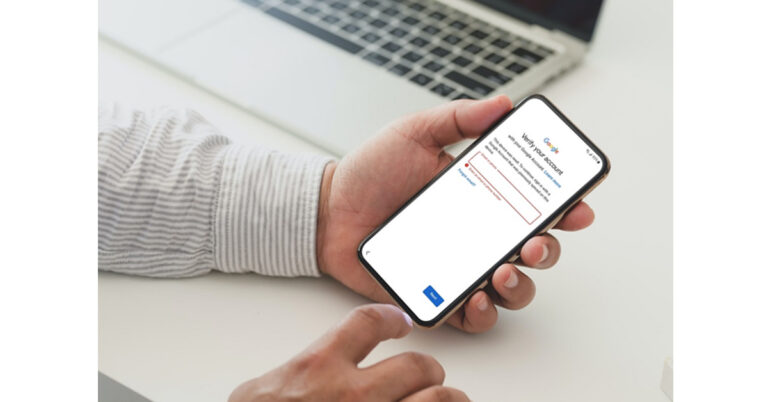
Suppose you bought a used phone online and started setting it up with excited anticipation. However, the Android system asks you to verify your PIN or google account. Of course, you have no idea about it. Basically, the Google FRP lock was triggered when the hard reset was done.
If you are a phone recycler or reseller, receiving an FRP-locked Android phone can also be annoying, even if you’ve told the owners what they should do before selling.
Grab these three powerful solutions to bypass Google FRP lock and verify PIN after factory reset. These work only if you pay attention and follow the steps precisely.
Tip 1. Ask For Help from a Former User or Seller
In this case, the vendor should assist you in bypassing Google lock, unless you already knew it was an Android device with a Google lock before you purchased it. When you bought the device directly from the previous user, just take it to him or ask for the Google account credentials associated with that device. Once you enter the Google account‘s login details, your phone is ready to use.Tip 2. Bypass Samsung Google Lock with FRP Removal Tool
Certainly, the risk of leaking private information comes with “lending” a Google account to a new user, which is unacceptable to everyone. You will get tons of Google results about FRP bypass. Most of them need you to visit different sites and download additional tools, APK files, and drivers. It will consume 2-3 hours or more, especially if you don’t have much technical knowledge. This is when you need a powerful Samsung FRP removal tool to bypass Google lock on Samsung after the factory reset. What we like about iToolab UnlockGo (Android)- One-click Samsung FRP bypass tool (Android 5-12)
- Simple steps with the quick processing
- No PIN or Gmail account is needed
- Works well on Windows and macOS
- Multiple solutions for all Samsung smartphones and tablets
READ-ON, To Catch the One-Click Solution
UnlockGo for Android gives you the confidence to bypass Google lock by yourself. Its easy FRP bypass process works magically in just 3 minutes with a 99.3% success rate. For your convenience, the tool offers a free trial and download. Then, follow the steps below.Step 1: Connect the Samsung device
Open the handy tool and connect your Samsung device to Windows or Macbook via a USB cable. Now, choose Remove Google Lock (FRP) and click the Start button to continue the process.
Step 2: One-click FRP Removal key
This step saves you hours. Click on the most recommended option All Android Versions, and click the Next button.
Step 3: Attention! Enter Samsung FRP bypass code
At this step, wait for a minute. You will see a pop-up window with complete guidelines. You will get a secret code to access the Samsung Diagnostics menu, which is usually hidden. After that, UnlockGo (Android) tool will assist you in activating USB debugging on your Samsung device.
Step 4: Google Lock Removed from Samsung
Once you grant permission, the Google verification screen should be bypassed in a few seconds and your Samsung device will reboot automatically.
Tip 3. Bypass FRP and Verify PIN on Android with FRP APK
When your Android needs to bypass Google lock or PIN verification, the Android FRP bypass APK app comes into action. This solution needs you to download the malware-free and latest FRP bypass APK files. Before diving into the main process, you must check the requirements below.- OTG cable
- Flash drive/USB
- Fast and stable internet
- Windows PC
How-to steps
- Download FRP bypass APK files and connect the USB with an OTG cable.
- Turn on your FRP-locked phone and connect it to a stable internet connection.
- Now, tap the Home button three times to activate Talkback.
- As you do, a new menu will appear on your screen.
- Click on the Talkback settings.
- Tap the Talkback key thrice once
- Now, go to the Help & Feedback option and select Get Started with Voice Access.
- You will then see a YouTube video, play the video and click on Getting started with Voice in that video. It will take you to the YouTube app.
- As you landed on the YouTube homepage, choose the User Icon and select the Terms & Privacy Policy
- Select Cancel and click on the Bookmarks.
- Now, navigate to the Download History option and click My files, it will open your flash drive.
- Install the APK files from your flash drive to your locked phone.
- You will then see an Unknown source error on your screen, head to the device Settings and allow unknown sources.
- Once the APK is installed on your device, you need to factory reset your phone.
- Finally, your phone has bypassed FRP.
Important!
- Before attempting the process check your device’s compatibility.
- This method is slightly technical to perform if you are non-techy or may brick your device in the wrong operation.
In General, It Can be Said That
Bypassing factory reset protection is a big hassle until you figure out how to remove Google lock. Once you pick the compatible and authentic way, make sure the process should not be much technical or time-consuming. Focusing on the following pain points, iToolab designed UnlockGo (Android) to instantly provide Android users with an easy and effective Android unlocking experience. You don’t need to download APK files or connect OTG or flash drives to bypass FRP, just run the 3-minute FRP bypass process and instantly get a fully accessible phone. Try Now! For the latest gadget and tech news, and gadget reviews, follow us on Twitter, Facebook and Instagram. For newest tech & gadget videos subscribe to our YouTube Channel. You can also stay up to date using the Gadget Bridge Android App. You can find the latest car and bike news here.Moto X40 confirmed to launch soon, Moto X30 also bags BIS certification
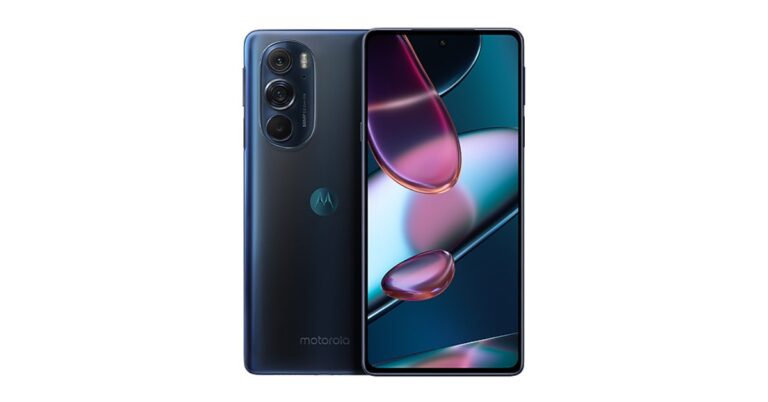
The Moto X40 is likely to be launched by Motorola soon. The company’s CEO touted the upcoming device but offered little details. It’s anticipated that a Qualcomm Snapdragon 8 Gen 2 SoC would power it. It is rumoured to have a 50-megapixel primary camera. Moreover the smartphone is likely to come with a full-HD+ display. Apart from this Moto Edge X30 is likely to launch in India soon.
The Moto X40 might replace the Moto Edge X30, which made its debut in China a year ago. With the model number XT2301-5, it previously appeared on the China Compulsory Certification (3C) database. According to the claimed listing, the Moto X40 would feature 68W fast charging.
As per the latest report, the Moto X40 will be powered by the yet-to-be-announced Qualcomm Snapdragon 8 Gen 2 CPU. As per the rumour, the upcoming smartphone is said to come with a full-HD+ display and could feature a 50MP primary camera.
As we mentioned earlier Moto Edge X30 debuted in China last year but now the company is planning to release the phone in India as well. The device has received BIS certification with the model number XT2201-01, therefore, indicating an imminent launch. According to a report the device is likely to launch around January end or early February.
Moto Edge X30 specifications
The Moto Edge X30 sports a 6.7-inch OLED FHD+ display. The screen comes with a 144Hz refresh rate, a 576Hz touch sampling rate and 100% DCI-P3 colour gamut. The phone is powered by Qualcomm Snapdragon 8 Gen 1 paired with 8GB of RAM and 128GB of internal storage. The smartphone packs a 5,000mAh battery. The Moto Edge X30 sports three cameras on the back: a 5MP ultra-wide-angle lens, a 2MP third sensor, and a 50MP primary OV50A40 sensor. The front camera has a 60MP sensor. A USB Type-C port for charging along with 5G, 4G LTE, Wi-Fi 6E, NFC, Bluetooth 5.2, GPS, are connectivity options on the phone. For the latest gadget and tech news, and gadget reviews, follow us on Twitter, Facebook and Instagram. For newest tech & gadget videos subscribe to our YouTube Channel. You can also stay up to date using the Gadget Bridge Android App. You can find the latest car and bike news here.Who Owns Facebook Now? Top Facebook shareholders

If you watched David Fincher’s The Social Network you’re aware of Facebook’s controversial beginnings and the multiple lawsuits that the company found itself in the midst of. For those that aren’t aware, in its early years, Facebook was sued by Tyler and Cameron Winklevoss for intellectual property theft and by Eduardo Saverin for unfair dilution of shares. Facebook settled both suits out of court. While the social media platform moved on from the initial controversies, it garnered new ones along the way. Some suggest that it was partly the reason why Facebook rebranded to ‘Meta’. In this article, we explain who owns Facebook, listing the major shareholders in the company.
Read Also: Google Pixel G10 Display Specifications Leaked
This may come as a surprise to some, Mark Zuckerberg only owns only 13% of Facebook (Meta) stocks. Yet he holds the majority voting power in the company. This is because Facebook’s shares are divided into two categories – Class A and Class B. Class A shares are publicly traded on the stock market. Every Class A share gives the holder one vote. Class B shares are owned privately by Mark Zuckerberg and a few other investors. Every Class B share gives the holder 10 votes. Zuckerberg is currently valued at $71 billion, making him one of the richest people in the world.
Venture capitalist Jim Breyer holds 11.4% of Facebook stocks through his company Accel Partners. A share of 11.4% translates to a net worth of 11.4 billion. Fortune Magazine listed Breyer as one of the top 10 smartest people in technology back in August 2010.
Co-founder of Facebook, Dustin Moskovitz owns 7.6% of the company’s shares, which would put his net stake at slightly over $7 billion. Moskovitz left Facebook back in 2008 to create his own photo-sharing platform called ‘Path’. Attracting lucrative offers from the likes of Google, Path still managed to stay independent and now boasts an active user base of over 2 million people.
Co-founder Eduardo Saverin owns about $5 billion worth of shares in Facebook. Saverin was also involved in a lawsuit against Facebook in the company’s early years, accusing the founders of unfairly diluting his shares. While retaining his stock in Facebook, Saverin went on to become an angel investor. Currently residing in Singapore, Saverin holds significant shares in several Asian startups.
Knowing for creating notoriety with the file-sharing website Napster, Sean Parker initially joined Facebook as an advisor but now owns about 4% of the company’s stock. Parker also holds shares in some of the biggest internet platforms, including Spotify. Sean Parker was also Facebook’s first president.
Co-founder of PayPal and Palantir, Peter Thiel’s shares in Facebook amount to almost $3 billion. Thiel was one of the early investors in Facebook, having first bought shares back in 2005. He was also one of the largest individual shareholders in Facebook following his first investment.
Read Also: YouTube announced new design elements and product features, gets pinch-to-zoom and more
Mark Zuckerberg
 This may come as a surprise to some, Mark Zuckerberg only owns only 13% of Facebook (Meta) stocks. Yet he holds the majority voting power in the company. This is because Facebook’s shares are divided into two categories – Class A and Class B. Class A shares are publicly traded on the stock market. Every Class A share gives the holder one vote. Class B shares are owned privately by Mark Zuckerberg and a few other investors. Every Class B share gives the holder 10 votes. Zuckerberg is currently valued at $71 billion, making him one of the richest people in the world.
Accel Partners
 Venture capitalist Jim Breyer holds 11.4% of Facebook stocks through his company Accel Partners. A share of 11.4% translates to a net worth of 11.4 billion. Fortune Magazine listed Breyer as one of the top 10 smartest people in technology back in August 2010.
Dustin Moskovitz
 Co-founder of Facebook, Dustin Moskovitz owns 7.6% of the company’s shares, which would put his net stake at slightly over $7 billion. Moskovitz left Facebook back in 2008 to create his own photo-sharing platform called ‘Path’. Attracting lucrative offers from the likes of Google, Path still managed to stay independent and now boasts an active user base of over 2 million people.
Eduardo Saverin
 Co-founder Eduardo Saverin owns about $5 billion worth of shares in Facebook. Saverin was also involved in a lawsuit against Facebook in the company’s early years, accusing the founders of unfairly diluting his shares. While retaining his stock in Facebook, Saverin went on to become an angel investor. Currently residing in Singapore, Saverin holds significant shares in several Asian startups.
Sean Parker
 Knowing for creating notoriety with the file-sharing website Napster, Sean Parker initially joined Facebook as an advisor but now owns about 4% of the company’s stock. Parker also holds shares in some of the biggest internet platforms, including Spotify. Sean Parker was also Facebook’s first president.
Peter Thiel
 Co-founder of PayPal and Palantir, Peter Thiel’s shares in Facebook amount to almost $3 billion. Thiel was one of the early investors in Facebook, having first bought shares back in 2005. He was also one of the largest individual shareholders in Facebook following his first investment.
Read Also: YouTube announced new design elements and product features, gets pinch-to-zoom and more
Co-founder of PayPal and Palantir, Peter Thiel’s shares in Facebook amount to almost $3 billion. Thiel was one of the early investors in Facebook, having first bought shares back in 2005. He was also one of the largest individual shareholders in Facebook following his first investment.
Read Also: YouTube announced new design elements and product features, gets pinch-to-zoom and more
Conclusion
Apart from the people listed above, Chris Hughes, Bill Gates, Li Ka-shing, and Digital Sky Technologies also hold varying stocks in Facebook. In 2021, Facebook rebranded to Meta as the company started to branch out into VR tech, with the acquisition of Occulus. To differentiate between the social media platform and the company, the latter was renamed Meta. This did not have any effect on the company’s ownership whatsoever.
For the latest gadget and tech news, and gadget reviews, follow us on Twitter, Facebook and Instagram. For newest tech & gadget videos subscribe to our YouTube Channel. You can also stay up to date using the Gadget Bridge Android App. You can find the latest car and bike news here.
A critical flaw made iPhone and iPad devices extremely vulnerable, CERT-In issued an advisory for users
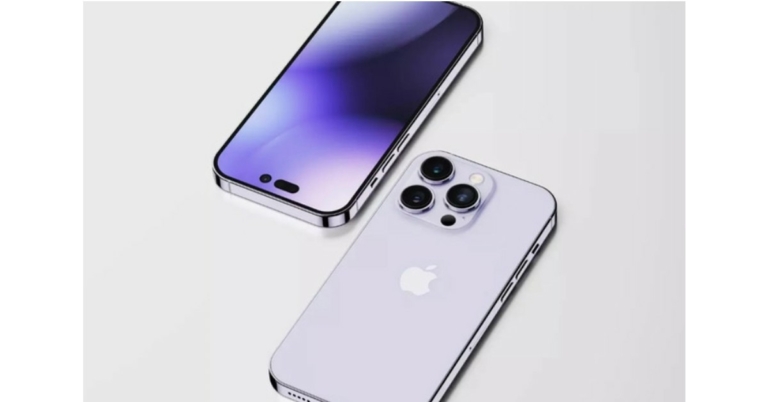
The use of Apple’s iPhone and iPad may be dangerous as a number of serious security vulnerabilities have been discovered by Indian Computer Emergency Response Team (CERT-In). The faults appeared to be of a high level and may have provided a gateway for wireless monitoring of the devices for cyberattacks. Now Apple has released a patch that appears to have corrected a number of serious security vulnerabilities on the company’s iPhone and iPad.
Warning from CERT-in said, “Multiple vulnerabilities have been reported in Apple iOS and iPadOS which could allow a remote attacker to gain access to sensitive information, execute arbitrary code, spoofing of the interface address or denial of service conditions on the targeted system.”
A number of vulnerabilities in iPhone and iPad have been reported by Indian Computer Emergency Response Team (CERT-In) and if exploited remotely, they could give a hacker access to sensitive information and enable them to run arbitrary code.
According to the govt. these vulnerabilities exist in Apple iOS and iPadOS due to Improper security restrictions in AppleMobileFileIntegrity component; Improper bounds check in AVEVideoEncoder component; Improper validation in CFNetwork component; Improper entitlement in Core Bluetooth component; Improper memory handling in GPU Drivers component; Memory corruption issue in IOHIDFamily component; Use after free issue and Race condition issue in IOKit component: Improper memory handling and Out-of-bounds write issue in Kernel component; Use after free issue, Improper memory handling and Race condition issue in PPP component; Impropersecurity restrictions and Improper path validation in Sandbox component; Improper UI handling, Type confusion issue and Logic issue in Webkit component; Use-after-free error in Webkit PDF component; Improper input validation in Mail component. A remote attacker could exploit these vulnerabilities by persuading the victim to open a specially crafted file or application.
Successful exploitation of these vulnerabilities could allow the attacker to gain access to sensitive information, execute arbitrary code, spoofing of the interface address or denial of service conditions on the targeted system.
As per CERT-in Apple iOS 16.1 and iPadOS version prior to 16 which includes iPhone 8 and later, iPad Pro(all models), iPad Air 3rd generation and later, iPad 5th generation and later, iPad mini 5th generation and later. Apple iOS versions prior to 16.0,3 which include iPhone 8 and later are also affected. According to the advisory, users of these devices must immediately update their gadgets, as both Apple and CERT-In have stated in their vulnerability advisories.
For the latest gadget and tech news, and gadget reviews, follow us on Twitter, Facebook and Instagram. For newest tech & gadget videos subscribe to our YouTube Channel. You can also stay up to date using the Gadget Bridge Android App. You can find the latest car and bike news here.
Best smartwatches for your daily health needs
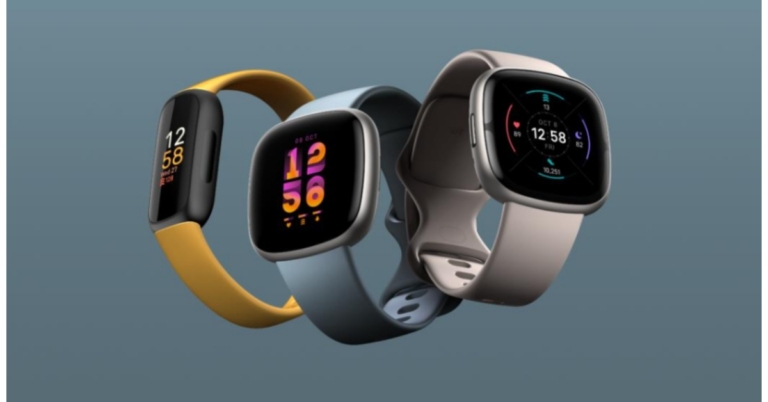
Over the last few years, smartwatches have evolved to become worthy of the ‘smart’ prefix. An average smartwatch today is capable of tracking your essential health stats like heart rate, SpO2 level, sleeping pattern, and much more. With the Wearable market seeing major releases from brands across the board, we thought we’d bring you our picks for the best smartwatches for your daily health and fitness needs.
Read Also: How to Get a Cracked Apple Watch Screen Fixed?
When it comes to health-tracking wearables, fewer brands are held in higher regard than Fitbit. Fitbit has been at the forefront of health and fitness accessories for years, finessing their products gradually and creating a significant market share for themselves. The Fitbit Versa 4 reaps all the results of this continued perseverance. Versa 4 is one of the most well-rounded smartwatches on the market and is well ahead of the curve compared to its peers. With Fitbit’s Versa 4 you get features like enhanced sleep tracking, SpO2 monitoring, stress management, heart rate monitoring, and much more. The Versa 4 is compatible with iOS and Android and offers a wide range of controls for your smartphone.
 The inclusion of the Apple Watch Series 8 in this list should surprise no one. Launched at the company’s ‘Far Out’ event in September, the Apple Watch Series 8 is already considered by many to be the best smartwatch on the market. The Apple Watch Series 8 comes with new features like crash detection, always on display, and ovulation tracking. Apple’s flagship smartwatch can also detect temperature fluctuations as small as 0.1 degrees Celcius. In low-power mode, the Apple Watch Series 8 can last up to 36 hours.
Samsung Galaxy Watch 5 is available in 1.2-inch and 1.4-inch Super AMOLED display options. Galaxy Watch 5 is powered by 1.5 GB of RAM and a dual-core Exynos W920 SoC. You also get 15 GB of internal storage. Equipped with Samsung’s BioActive Sensor, Galaxy Watch 5 combines optical heart rate, electrical heart signal, and bioelectrical impedance analysis on a single chip to provide a comprehensive analysis of heart rate, blood oxygen level, and stress level. Users can also manage their blood pressure and ECG from their wrists.
Launched just last week, the Garmin Venu Sq 2 is bound to be one of the better smartwatch releases this year. Available in two variants, the regular model costs Rs 27,990, while the music edition can be bought for Rs 33,490. The Standard model is available in Cool Mint, Shadow Grey, and White colour options while the Music edition comes in French Grey, Black, and Ivory shades. Made out of aluminium, the Garmin Venu Sq 2 sports a 1.43-inch AMOLED display with a 320 x 360p resolution. Apart from all the essential health-tracking functions, the Garmin Venu Sq 2 also offers over 25 sport modes HIIT, cardio, swimming, jogging, and cycling. On top of that, you can even design your own custom program.
Apple Watch SE is the company’s affordable smartwatch option in its lineup, starting at a price of Rs 29,900. The Apple Watch SE comes with all the essential features like cardio tracking, cycle tracking, crash detection, fall detection, and emergency calling. However, it doesn’t have a dedicated Blood Oxygen and ECG app. It is water resistant up to 50m, which means you can wear it while swimming. The smartwatch shines when it comes to the superior display and the overall design and look, which is undeniably Apple.
The inclusion of the Apple Watch Series 8 in this list should surprise no one. Launched at the company’s ‘Far Out’ event in September, the Apple Watch Series 8 is already considered by many to be the best smartwatch on the market. The Apple Watch Series 8 comes with new features like crash detection, always on display, and ovulation tracking. Apple’s flagship smartwatch can also detect temperature fluctuations as small as 0.1 degrees Celcius. In low-power mode, the Apple Watch Series 8 can last up to 36 hours.
Samsung Galaxy Watch 5 is available in 1.2-inch and 1.4-inch Super AMOLED display options. Galaxy Watch 5 is powered by 1.5 GB of RAM and a dual-core Exynos W920 SoC. You also get 15 GB of internal storage. Equipped with Samsung’s BioActive Sensor, Galaxy Watch 5 combines optical heart rate, electrical heart signal, and bioelectrical impedance analysis on a single chip to provide a comprehensive analysis of heart rate, blood oxygen level, and stress level. Users can also manage their blood pressure and ECG from their wrists.
Launched just last week, the Garmin Venu Sq 2 is bound to be one of the better smartwatch releases this year. Available in two variants, the regular model costs Rs 27,990, while the music edition can be bought for Rs 33,490. The Standard model is available in Cool Mint, Shadow Grey, and White colour options while the Music edition comes in French Grey, Black, and Ivory shades. Made out of aluminium, the Garmin Venu Sq 2 sports a 1.43-inch AMOLED display with a 320 x 360p resolution. Apart from all the essential health-tracking functions, the Garmin Venu Sq 2 also offers over 25 sport modes HIIT, cardio, swimming, jogging, and cycling. On top of that, you can even design your own custom program.
Apple Watch SE is the company’s affordable smartwatch option in its lineup, starting at a price of Rs 29,900. The Apple Watch SE comes with all the essential features like cardio tracking, cycle tracking, crash detection, fall detection, and emergency calling. However, it doesn’t have a dedicated Blood Oxygen and ECG app. It is water resistant up to 50m, which means you can wear it while swimming. The smartwatch shines when it comes to the superior display and the overall design and look, which is undeniably Apple.
 Fitbit Luxe is a sleek fitness band specially designed for women. It is a compact fitness band, with dimensions of just 1.43 x 0.69 x 0.4 inches. The rubber straps are available in four colour options – Lunar White/Soft Gold, Black/Graphite, Orchid/Platinum, and a Gold coloured special edition. The Fitbit Luxe keeps a track of your steps, heart rate, SpO2 levels, and sleep. You can get a detailed breakdown of your sleep activity and see how many hours were spent in REM, Light, and Deep Sleep. The activity tracker on the Fitbit Luxe can automatically detect when your workout has started. On a full charge, the Luxe can last up to 5 days.
Smartwatches don’t need to cost a fortune to get the basic job done. With Redmi Watch 2 Lite, Xiaomi continues to deliver affordable products that deliver great performance. Priced at just Rs 4,499, the Xiaomi Redmi Watch 2 Lite does a great job of tracking your fitness levels across a wide range of activities. These include walking, running and cycling to swimming, jump rope, trekking, hiking and much more. Its intuitive sensors automatically detect your physical activity and prompt you to record or measure your activity. You also get a detailed analysis of your workout once you end a session. For those looking for a no-nonsense health-tracking smartwatch, the Xiaomi Redmi Watch 2 Lite is an excellent starting point.
While we’re talking about budget smartwatches, Noise ColorFit Pro 4 deserves a fair shout. The ColorFit Pro 4 is one of the few smartwatches that offer Bluetooth calling in the under Rs 4,000 price category. This does not mean that the watch makes compromises elsewhere. The build quality is sturdy and the smartwatch is designed for rugged use. The UI is pleasing to look at and extremely easy to use. When it comes to features, Noise ColorFit Pro 4 offers heart rate monitoring, sleep tracking, SpO2 sensor, and a fitness tracker for more than 100 different training regimens. The only downside is that there’s no option to track swimming since the smartwatch is not designed to be worn in deep waters. If you can look past that, you wont find any other smartwatch that offers a better value for money priced at Rs 3,499.
The Redmi Smart Band Pro sports a simple, elegant design. You won’t find any buttons on the dial. The minimal, clean look sets the Smart Band apart from its competition. Powered by the Ambiq Apollo 3.5 SoC, the Redmi Smart Band Pro delivers great performance when it comes to tracking your health and fitness. The widgets can be accessed with one quick swipe to the right, while the notifications can be seen with a simple down swipe. The smart band is equipped has tracking support for more than 110 types of exercises, with the option to create a customised program as well. You can even track your yoga sessions with this nifty device!
Closing out this list is the Playfit Slim. Available at just Rs 3,999, it also offers great value for money. Firstly, the smartwatch comes with 24 sport modes including Outdoor Running, Swimming, Cycling, Table Tennis, Skipping, Badminton, Tennis, Walking, Climbing, Basketball, Football, Baseball, Volleyball, Cricket, Rugby, Hockey, Spinning, Dance, Gymnastics, Jumping Jacks, Boating, Sit-Up, Yoga, and Indoor Running. On top of that, you can also measure your heart rate and blood SpO2 levels. Another fascinating thing about the Playfit Slim is its incredible 7-day battery life.
Read Also: 10 best apps compatible with Android Auto (2022)
Fitbit Luxe is a sleek fitness band specially designed for women. It is a compact fitness band, with dimensions of just 1.43 x 0.69 x 0.4 inches. The rubber straps are available in four colour options – Lunar White/Soft Gold, Black/Graphite, Orchid/Platinum, and a Gold coloured special edition. The Fitbit Luxe keeps a track of your steps, heart rate, SpO2 levels, and sleep. You can get a detailed breakdown of your sleep activity and see how many hours were spent in REM, Light, and Deep Sleep. The activity tracker on the Fitbit Luxe can automatically detect when your workout has started. On a full charge, the Luxe can last up to 5 days.
Smartwatches don’t need to cost a fortune to get the basic job done. With Redmi Watch 2 Lite, Xiaomi continues to deliver affordable products that deliver great performance. Priced at just Rs 4,499, the Xiaomi Redmi Watch 2 Lite does a great job of tracking your fitness levels across a wide range of activities. These include walking, running and cycling to swimming, jump rope, trekking, hiking and much more. Its intuitive sensors automatically detect your physical activity and prompt you to record or measure your activity. You also get a detailed analysis of your workout once you end a session. For those looking for a no-nonsense health-tracking smartwatch, the Xiaomi Redmi Watch 2 Lite is an excellent starting point.
While we’re talking about budget smartwatches, Noise ColorFit Pro 4 deserves a fair shout. The ColorFit Pro 4 is one of the few smartwatches that offer Bluetooth calling in the under Rs 4,000 price category. This does not mean that the watch makes compromises elsewhere. The build quality is sturdy and the smartwatch is designed for rugged use. The UI is pleasing to look at and extremely easy to use. When it comes to features, Noise ColorFit Pro 4 offers heart rate monitoring, sleep tracking, SpO2 sensor, and a fitness tracker for more than 100 different training regimens. The only downside is that there’s no option to track swimming since the smartwatch is not designed to be worn in deep waters. If you can look past that, you wont find any other smartwatch that offers a better value for money priced at Rs 3,499.
The Redmi Smart Band Pro sports a simple, elegant design. You won’t find any buttons on the dial. The minimal, clean look sets the Smart Band apart from its competition. Powered by the Ambiq Apollo 3.5 SoC, the Redmi Smart Band Pro delivers great performance when it comes to tracking your health and fitness. The widgets can be accessed with one quick swipe to the right, while the notifications can be seen with a simple down swipe. The smart band is equipped has tracking support for more than 110 types of exercises, with the option to create a customised program as well. You can even track your yoga sessions with this nifty device!
Closing out this list is the Playfit Slim. Available at just Rs 3,999, it also offers great value for money. Firstly, the smartwatch comes with 24 sport modes including Outdoor Running, Swimming, Cycling, Table Tennis, Skipping, Badminton, Tennis, Walking, Climbing, Basketball, Football, Baseball, Volleyball, Cricket, Rugby, Hockey, Spinning, Dance, Gymnastics, Jumping Jacks, Boating, Sit-Up, Yoga, and Indoor Running. On top of that, you can also measure your heart rate and blood SpO2 levels. Another fascinating thing about the Playfit Slim is its incredible 7-day battery life.
Read Also: 10 best apps compatible with Android Auto (2022)
Fitbit Versa 4
 When it comes to health-tracking wearables, fewer brands are held in higher regard than Fitbit. Fitbit has been at the forefront of health and fitness accessories for years, finessing their products gradually and creating a significant market share for themselves. The Fitbit Versa 4 reaps all the results of this continued perseverance. Versa 4 is one of the most well-rounded smartwatches on the market and is well ahead of the curve compared to its peers. With Fitbit’s Versa 4 you get features like enhanced sleep tracking, SpO2 monitoring, stress management, heart rate monitoring, and much more. The Versa 4 is compatible with iOS and Android and offers a wide range of controls for your smartphone.
Apple Watch Series 8
 The inclusion of the Apple Watch Series 8 in this list should surprise no one. Launched at the company’s ‘Far Out’ event in September, the Apple Watch Series 8 is already considered by many to be the best smartwatch on the market. The Apple Watch Series 8 comes with new features like crash detection, always on display, and ovulation tracking. Apple’s flagship smartwatch can also detect temperature fluctuations as small as 0.1 degrees Celcius. In low-power mode, the Apple Watch Series 8 can last up to 36 hours.
Samsung Galaxy Watch 5
 Samsung Galaxy Watch 5 is available in 1.2-inch and 1.4-inch Super AMOLED display options. Galaxy Watch 5 is powered by 1.5 GB of RAM and a dual-core Exynos W920 SoC. You also get 15 GB of internal storage. Equipped with Samsung’s BioActive Sensor, Galaxy Watch 5 combines optical heart rate, electrical heart signal, and bioelectrical impedance analysis on a single chip to provide a comprehensive analysis of heart rate, blood oxygen level, and stress level. Users can also manage their blood pressure and ECG from their wrists.
Garmin Venu Sq 2
 Launched just last week, the Garmin Venu Sq 2 is bound to be one of the better smartwatch releases this year. Available in two variants, the regular model costs Rs 27,990, while the music edition can be bought for Rs 33,490. The Standard model is available in Cool Mint, Shadow Grey, and White colour options while the Music edition comes in French Grey, Black, and Ivory shades. Made out of aluminium, the Garmin Venu Sq 2 sports a 1.43-inch AMOLED display with a 320 x 360p resolution. Apart from all the essential health-tracking functions, the Garmin Venu Sq 2 also offers over 25 sport modes HIIT, cardio, swimming, jogging, and cycling. On top of that, you can even design your own custom program.
Apple Watch SE
 Apple Watch SE is the company’s affordable smartwatch option in its lineup, starting at a price of Rs 29,900. The Apple Watch SE comes with all the essential features like cardio tracking, cycle tracking, crash detection, fall detection, and emergency calling. However, it doesn’t have a dedicated Blood Oxygen and ECG app. It is water resistant up to 50m, which means you can wear it while swimming. The smartwatch shines when it comes to the superior display and the overall design and look, which is undeniably Apple.
Fitbit Luxe
 Fitbit Luxe is a sleek fitness band specially designed for women. It is a compact fitness band, with dimensions of just 1.43 x 0.69 x 0.4 inches. The rubber straps are available in four colour options – Lunar White/Soft Gold, Black/Graphite, Orchid/Platinum, and a Gold coloured special edition. The Fitbit Luxe keeps a track of your steps, heart rate, SpO2 levels, and sleep. You can get a detailed breakdown of your sleep activity and see how many hours were spent in REM, Light, and Deep Sleep. The activity tracker on the Fitbit Luxe can automatically detect when your workout has started. On a full charge, the Luxe can last up to 5 days.
Xiaomi Redmi Watch 2 Lite
 Smartwatches don’t need to cost a fortune to get the basic job done. With Redmi Watch 2 Lite, Xiaomi continues to deliver affordable products that deliver great performance. Priced at just Rs 4,499, the Xiaomi Redmi Watch 2 Lite does a great job of tracking your fitness levels across a wide range of activities. These include walking, running and cycling to swimming, jump rope, trekking, hiking and much more. Its intuitive sensors automatically detect your physical activity and prompt you to record or measure your activity. You also get a detailed analysis of your workout once you end a session. For those looking for a no-nonsense health-tracking smartwatch, the Xiaomi Redmi Watch 2 Lite is an excellent starting point.
Noise ColorFit Pro 4
 While we’re talking about budget smartwatches, Noise ColorFit Pro 4 deserves a fair shout. The ColorFit Pro 4 is one of the few smartwatches that offer Bluetooth calling in the under Rs 4,000 price category. This does not mean that the watch makes compromises elsewhere. The build quality is sturdy and the smartwatch is designed for rugged use. The UI is pleasing to look at and extremely easy to use. When it comes to features, Noise ColorFit Pro 4 offers heart rate monitoring, sleep tracking, SpO2 sensor, and a fitness tracker for more than 100 different training regimens. The only downside is that there’s no option to track swimming since the smartwatch is not designed to be worn in deep waters. If you can look past that, you wont find any other smartwatch that offers a better value for money priced at Rs 3,499.
Redmi Smart Band Pro
 The Redmi Smart Band Pro sports a simple, elegant design. You won’t find any buttons on the dial. The minimal, clean look sets the Smart Band apart from its competition. Powered by the Ambiq Apollo 3.5 SoC, the Redmi Smart Band Pro delivers great performance when it comes to tracking your health and fitness. The widgets can be accessed with one quick swipe to the right, while the notifications can be seen with a simple down swipe. The smart band is equipped has tracking support for more than 110 types of exercises, with the option to create a customised program as well. You can even track your yoga sessions with this nifty device!
Playfit Slim
 Closing out this list is the Playfit Slim. Available at just Rs 3,999, it also offers great value for money. Firstly, the smartwatch comes with 24 sport modes including Outdoor Running, Swimming, Cycling, Table Tennis, Skipping, Badminton, Tennis, Walking, Climbing, Basketball, Football, Baseball, Volleyball, Cricket, Rugby, Hockey, Spinning, Dance, Gymnastics, Jumping Jacks, Boating, Sit-Up, Yoga, and Indoor Running. On top of that, you can also measure your heart rate and blood SpO2 levels. Another fascinating thing about the Playfit Slim is its incredible 7-day battery life.
Read Also: 10 best apps compatible with Android Auto (2022)
Closing out this list is the Playfit Slim. Available at just Rs 3,999, it also offers great value for money. Firstly, the smartwatch comes with 24 sport modes including Outdoor Running, Swimming, Cycling, Table Tennis, Skipping, Badminton, Tennis, Walking, Climbing, Basketball, Football, Baseball, Volleyball, Cricket, Rugby, Hockey, Spinning, Dance, Gymnastics, Jumping Jacks, Boating, Sit-Up, Yoga, and Indoor Running. On top of that, you can also measure your heart rate and blood SpO2 levels. Another fascinating thing about the Playfit Slim is its incredible 7-day battery life.
Read Also: 10 best apps compatible with Android Auto (2022)
Conclusion
These are our picks for the top 10 best smartwatches for your daily health and fitness needs. We’ve tried to pick the best from every price category. If you think there’s a smartwatch worthy of being on this list that we missed out on, let us know in the comments!
For the latest gadget and tech news, and gadget reviews, follow us on Twitter, Facebook and Instagram. For newest tech & gadget videos subscribe to our YouTube Channel. You can also stay up to date using the Gadget Bridge Android App. You can find the latest car and bike news here.