International Yoga Day, celebrated on June 21st each year, is a global observance that highlights the profound benefits of yoga for both physical and mental well-being. This special day serves as a reminder of the ancient practice’s transformative power, promoting harmony between mind, body, and spirit. Yoga enthusiasts and beginners alike come together to engage in various yoga asanas, breathing exercises, and meditation techniques, fostering a sense of unity and inner peace.
On this occasion, people from diverse backgrounds and cultures embrace the teachings of yoga, recognizing its ability to enhance flexibility, strength, and balance, while also reducing stress and promoting relaxation. International Yoga Day serves as a beautiful reminder of the timeless wisdom that yoga offers, inspiring individuals around the world to embark on a journey of self-discovery and holistic healing. So we bring you a brilliant app designed by Dhyan Foundation that will take you through Sanatan Kriya and Vedic Mantras.
Sanatan Kriya & Vedic Chants App
The Sanatan Kriya & Vedic Chants app is a powerful tool that brings the ancient wisdom of Sanatan Kriya and Vedic chants to the modern world. Rooted in the timeless traditions of the Vedas and ancient Indian scriptures, this app offers a comprehensive collection of practices and chants designed to promote holistic well-being and spiritual growth. Sanatan Kriya is a unique yogic practice that combines dynamic asanas, pranayama (breathing exercises), and meditation techniques to harmonize the body, mind, and energy system.
With step-by-step instructions under the guidance and voice of Ashwini Guruji of Dhyan Ashram, the app enables individuals to explore and experience the transformative effects of Sanatan Kriya, promoting physical health, mental clarity, and emotional balance.
In addition to Sanatan Kriya, the app also offers a treasure trove of Vedic chants. These sacred chants passed down through generations, carry profound vibrational frequencies that can uplift and purify the consciousness all set in his soul-soothing voice. Through the app, users can immerse themselves in the calming sounds of Vedic mantras, recited with precision and authenticity.
The chants cover a wide range of purposes, from invoking divine blessings to promoting healing, prosperity, and spiritual awakening. By incorporating Vedic chants into one’s daily lives, users can tap into the ancient wisdom and sacred energy embedded within these powerful vibrations.
The Sanatan Kriya & Vedic Chants app serves as a comprehensive guide for those seeking to explore the depths of yoga and spirituality. It provides a user-friendly platform that makes these ancient practices easily accessible to people of all backgrounds and levels of experience. By embracing the app’s offerings, individuals can embark on a journey of self-discovery, self-improvement, and self-realization.
Whether one seeks physical vitality, mental clarity, emotional balance, or spiritual upliftment, the app serves as a valuable companion, empowering individuals to unlock their highest potential and connect with the timeless wisdom of Sanatan Kriya and Vedic chants.
The Sanatan Kriya and Vedic chants app is available on Google Play Store and also on Apple App Store.
Dhyan Foundation Website For Yoga
For more comprehensive Yogic techniques you can visit the Dhyan Foundation website as well or connect with one of the Saadhaks or Saadhvis there. Dhyan Foundation is a renowned spiritual organization dedicated to spreading the teachings of ancient Indian wisdom and promoting holistic well-being for more than 25 years.
With the counselling of Ashwini Guruji of Dhyan Ashram, the foundation focuses on imparting practical knowledge and techniques for self-transformation and inner growth without commercialisation as it is meant to be. With a strong emphasis on Dhyan (meditation) and traditional yogic practices, Dhyan Foundation offers various programs and workshops to help individuals discover their true potential and lead a balanced, fulfilling life.
Through their initiatives, the foundation aims to revive and preserve the ancient wisdom of India, guiding people towards a deeper understanding of themselves and the world around them. Dhyan Foundation’s commitment to spiritual evolution and service has touched the lives of countless individuals across the world, inspiring them to embark on a path of self-discovery and spiritual awakening.
For the latest gadget and tech news, and gadget reviews, follow us on Twitter, Facebook and Instagram. For newest tech & gadget videos subscribe to our YouTube Channel. You can also stay up to date using the Gadget Bridge Android App. You can find the latest car and bike news here.
Redmi Buds 4 Active sale in India has kicked off today. The device officially debuted alongside Xiaomi Tab 6 last week. The device has an IPX4 grade for sweat and water resistance. It comes with Environmental Noise Cancellation (ENC) technology and offers a 30-hour battery life.
Redmi Buds 4 Active price in India, sale launch offer details
Redmi Buds 4 Active has gone on its first sale in India today. The company has announced that the buyers of the TWS can now enjoy 3 months of Spotify subscription for free. The launch offers are valid from today till June 23 in the country. Also during these four days, the device will be available at an introductory price of Rs 1,199. After this offer period is over the audio device will retail at its original price tag of Rs 1,199.The True Wireless Earphone comes in two colour options of Air White and Bass Black via mi.com Amazon and Xiaomi retail stores.
Redmi Buds 4 Active TWS Earbuds specifications
The Redmi Buds 4 Active TWS Earbuds deliver powerful audio with robust bass with 12mm Bass Pro drivers. The earbuds’ touch-control feature also makes it simple for users to take and end calls and control music playback. The earphones are fantastic gym and outdoor companions because they have an IPX4 rating for sweat and water resistance. Additionally, the Buds 4 Active support apps, provide users with a more personalised earbud experience.It also has strong microphones and Environmental Noise Cancellation (ENC) technology for distortion-free hearing even in noisy environments. The Redmi Buds 4 Active TWS Earbuds also include the most recent Bluetooth 5.3 technology, which provides better connectivity, increased range, and faster transmission speeds.It also supports Google Fast Pair, allowing quick connections to all of its devices, including PCs, tablets, and smartphones. According to the business, users can quickly attach their earphones and use a one-tap setup to explore the captivating world of sound.A Low Latency Mode for exceptionally accurate and immersive gaming is also available on the TWS. According to the makers, the Buds 4 Active’s battery life is 30 hours, and thanks to quick charging, they can run for up to 90 minutes on a single charge. For the latest gadget and tech news, and gadget reviews, follow us on Twitter, Facebook and Instagram. For newest tech & gadget videos subscribe to our YouTube Channel. You can also stay up to date using the Gadget Bridge Android App. You can find the latest car and bike news here.
World Music Day is celebrated on June 21 to foster the uniting spirit of music and also encourage up-and-coming musicians across the world. If you take your music seriously, you must also be very picky about the equipment you use to listen to music. This past year, we’ve seen tons of audio tech releases across the board. Here are our top picks for the best headphones and wireless earbuds you can buy right now!Read Also:How to Export a WhatsApp Chat: Complete Guide for Android
Best Headphones
Sony WH-1000XM5
Price: Rs 26,990 on AmazonSony’s premium headphones lead the pack by a significant margin. The Sony WH-1000XM5 builds upon the solid grounding laid by its predecessor and stitches together a wonderful sonic experience for the listener. The high-res sound output is delivered by powerful 30mm audio drivers. Apart from the cutting-edge sound, the WH-1000XM5 also offer best-in-class ANC aided by 8 microphones on the earcups. You can get up to 30 hours of playback on these headphones. A quick 3-minute charge is enough to power them for 3 hours. Read our full review of the Sony WH-1000XM5 here.
Sennheiser HD 660S2
Price: Rs 54,990 on Sennheiser-hearing.comSennheiser HD 660S2 will appeal to audiophiles looking for a close-to-neutral sound profile with the added Sennheiser texture. The HD 660S2 flaunts an expansive soundstage, capturing even the minutest details. The richness of the mix is relayed very well on this pair of headphones. The low end is slightly beefed up, leading to prominent bass notes, but it’s something we thoroughly enjoyed while testing the headphones. While the price tag may be quite hefty, if you’re looking for a premium listening experience, the Sennheiser HD 660S2 will blow you away.
Bose Noise Cancelling 700
Price: Rs 34,500 on AmazonBose’s premium noise-cancelling headphones, NC 700, feature microphones outside and inside the earcups to nullify any surrounding noise. There are 11 levels of noise cancelling on offer. The state-of-the-art ANC facilitates a brilliant calling experience as well. The stainless steel headband fits nicely around the head and does not cause any stress even after hours of use. The NC 700 offers a 20-hour battery life and is optimised for Amazon Alexa and Google Assistant. A 15-minute charge can power the headphones for 3.5 hours.
Sony CH720N
Price: Rs 9,990 on AmazonThe new Sony CH720N brings ANC and the signature Sony sound together at a great price. These midrange over-the-ear headphones come with great features like ANC, Multi-Point Connection, Adjustable Ambient Sound Mode, and Adaptive Sound Control. You also get app support for the CH720N. There is a dedicated button for ANC along the earcups, which proved to be a great addition for easy access during our time with the device. Sony’s Integrated Processor V1 does a good job of further tuning the ANC on this device.
boAt Rockerz 558
Price: Rs 1,799Looking for a great pair of headphones on a budget? At the price of Rs 1,799, boAt Rockerz 558 are the best affordable headphones you can buy right now. These headphones deliver a powerful audio output with the help of 50mm drivers. The 500mAh battery offers a playtime of up to 20 hours. Ran out of charge? You can also use these headphones with an AUX cable.
Best Wireless Earbuds
Samsung Galaxy Buds2 Pro
Price: Rs 16,999 on Samsung.comSamsung Galaxy Buds2 Pro was one of the best TWS we tested last year. The design and overall fit of the wireless earbuds are absolutely phenomenal. Samsung smartphone users also get an additional ‘Samsung Seamless Codec’ and the ‘Auto Switch’ feature. The audio output on this TWS is world-class, with a rich mix of frequencies and a highly detailed soundstage. The ANC performance is also quite impressive. Overall, the Buds2 Pro is a really good package for the price.
Apple AirPods Pro 2
Price: Rs 14,990 on Apple.comIntroduced at Apple’s fall event last year, the second-generation AirPods carry the new H2 chip and offer MagSafe wireless charging. The H2 chip proves its worth with next-level noise cancelling. When it comes to audio features, users can create their personalised sound profile using the ‘Personalised Spatial Audio’ feature on this TWS. The audio output is richer than ever – possibly the best you can get on any TWS in the market. On a single charge, the AirPods Pro 2 can last up to 30 hours.
Nothing Ear 2
Price: Rs 9,999 on FlipkartWe tried the Nothing Ear 2 TWS as soon as it was released, earlier this year. Priced at Rs 10,000, this pair of TWS offers a category-defining performance. The 11.6mm audio drivers deliver a rock-solid output and the dual chamber architecture tunes the sound profile pretty nicely. You also get LHDC 5.0 support and ANC. Ear 2 can nullify up to 40dB of surrounding noise. A great buy in our opinion.
OnePlus Buds Pro 2
Price: Rs 9,999 on OnePlus.inOnePlus launched its new TWS product earlier this year alongside the OnePlus 11. We tested these earbuds shortly after they were released and were mighty impressed by the performance on offer. Each earbud features an 11mm woofer and a 6mm tweeter. The result is a thumping audio output. With Bluetooth v5.3 connectivity, the Buds 2 Pro support LHDC, AAC, SBC, and LC3 audio codecs. You also get Active Noise Cancellation on these earbuds, brought about by three microphones and AI noise-reduction technology.
Truke Buds A1
Price: Rs 1,499Ending this list are the ultra-affordable Truke Buds A1. For those shopping on a budget, these are the ideal wireless earbuds. The bass-driven audio output is delivered by 100mm drivers on either earbud. You also get 3 preset EQ modes on these earbuds – Dynamic Audio, Bass Boost, and Movie Mode. What really impressed us was the hybrid ANC, which cancels up to 30dB of surrounding noise. At this price point, this feature is unheard of. Check out our full review of the Truke Buds A1 for more details.Read Also:How to Use Your iPhone or Android Phone as a Webcam?
Uber and Amazon have launched the second phase of their partnership, which will provide Amazon Prime customers with more benefits across all Uber transportation options. As of May 2023, Prime members who use Amazon Pay as their payment method will still receive 5% cash back on all rides.Speaking about this association, Anuradha Aggarwal, Director, User Growth and CMO, of Amazon Pay India, added, “Our Customers especially Prime members are constantly seeking a one-stop digital solution with value-driven propositions for their everyday payment needs. Our associations with key brands like Uber help us make this easier. With commuting via cabs and autos being an integral part of everyone’s lives, this offer is another way to deepen this engagement and continue to offer a trusted, convenient and rewarding payment experience through Amazon Pay”.Amazon and Uber expand their partnership, giving Prime members 5% credit on all rides through Amazon Pay. Out of the 5%, users will receive 4% in the form of Uber credit and 1% in the form of Amazon Pay cashback, which may be used to reduce the cost of future Uber rides and meet Amazon.in buying demands.According to the company, this partnership intends to offer Prime members the freedom to travel without cash while still delivering them a seamless experience. By connecting their Amazon Pay wallet to Uber, Amazon Prime users may easily benefit from this perk. In 2022, Uber and Amazon will work together to give Prime members access to UberPremier at the cost of UberGo, with a maximum of 3 upgrades per month and a 20% discount (up to Rs 60) on Uber Auto, Moto, Rentals, and Intercity.Commenting on the partnership, Nitish Bhushan, Director, Central Operations, Uber India & South Asia said, “As we continue our strategic partnership with Amazon, we are thrilled to offer even more value to Amazon Prime customers through Uber. Our joint vision is to provide a truly seamless and differentiated experience for our customers. Through this, we aim to not only elevate the daily commute of Prime members but also help them save more by paying digitally. Our continued collaboration with Amazon highlights our shared commitment to delivering value and innovation to our customers.”
For the latest gadget and tech news, and gadget reviews, follow us on Twitter, Facebook and Instagram. For newest tech & gadget videos subscribe to our YouTube Channel. You can also stay up to date using the Gadget Bridge Android App. You can find the latest car and bike news here.
People are creating content more and more these days, and many of them are searching for inexpensive microphones. Sennheiser has the greatest selection for you if you’re seeking something similar right now. This Sennheiser Profile USB microphone was recently sent to us by the business. It is intended for aspiring musicians, streamers, podcasters, and artists searching for a reasonably priced choice. Essentially, it is a plug-and-play microphone that provides quality sound for less than Rs 10,000. Since we have been using this microphone for a few days, we are providing our review of the Sennheiser Profile USB Microphone Streaming Set here. Let’s check out this product’s performance in the review below.
Sennheiser Profile USB Microphone Streaming Set Review: Design
The Sennheiser Profile USB Microphone is available in two models: the Mic Only and the Streaming Set (with extension arm). The review device we have is the latter one, which includes a boom arm in the box. A USB microphone and the arm’s base, which is fixed to the desk, are also included. There is also an accessory box containing several cards and user instructions, as well as a 1.2m USB type C cable.The USB microphone is neatly packaged in a cover that, given the price, appears to be of the highest quality. The only colour for the gadget is black, and it feels pretty solid in the hands because it is entirely constructed of metal, which undoubtedly adds weight but look great. The microphone may be readily adjusted without a separate support thanks to its tiltable construction. It has a cardioid condenser capsule mounted on a metal, cylindrical grille.The Sennheiser logo and all the controls with various optimisation settings are located on the front of the device. Along with some LED status indicators and ring lights along with a MIC mute button. On the device’s back, there is a headphone connector, allowing you to easily connect a headset to it to listen to the audio being recorded. A type-C port is located right below it. It provides mounting thread options at the bottom (the profile boom stand accepts both ⅜-inch and 5/8-inch mounting).The boom arm is of the highest quality; it is sturdy, long-lasting, and completely flexible. With the exception of a few spots here and there, it is totally composed of metal. It is simple to bend, twist, or adjust at several angles. It contains various channels and openings for managing cables, allowing you to set up and arrange the entire line so that everything is tidy and structured.
Sennheiser Profile USB Microphone Streaming Set Review: Performance
Let’s look at how to set up this device before starting with the performance side of things. Because this gadget is a plug-and-play USB type C microphone, the setup is quite simple. Simply plug in the type-C cable behind the microphone and attach the other end to the laptop, phone, or tablet of your choice. It is compatible with all platforms, as we’ve already indicated.As said, the condenser capsule Sennheiser Profile USB Microphone has a cardioid pickup pattern. For those who don’t know, cardioid polar pickup patterns mic typically picks up sound primarily from the front and a little bit from the left and right. On the rear, it seems to have the most rejection. Consequently, this is how the Sennheiser Profile USB Microphone operates.Now that we know it can be used for streaming and games, this microphone can also be used to record podcasts and record your voice if you’re a singer.We think that this microphone’s audio quality is fairly good for the price. A good number of details are present. The voice quality is excellent, with a detailed treble and a respectable bass.If you’re a bass enthusiast and want a little bit deeper bass in your audio, just get closer to the microphone so that you can have that improved bass output to your voice.You may carry this microphone with you anywhere you go while travelling and obtain studio-quality audio output because it is plug-and-play and globally compatible with Android, iOS, Mac, and Windows PC.
Verdict
The Sennheiser Profile USB Microphone is a very user-friendly device that has a plug-and-play features. It provides studio-quality audio at a very low cost. Your Chromebook, Windows laptop, Android phone, and even MacBook are all compatible with it. The device was producing excellent studio-quality results at home without any issues at this price point. And the greatest part is that it is incredibly easy to use. Just connect the USB type-C cord from the microphone to your device, and you’re ready to go with professional-level audio wherever you are. It’s a fantastic podcast microphone with nearly all the capabilities you could want at a reasonable cost.
Sennheiser Profile USB Microphone Streaming Set price: Rs 13,125
If you’re just getting started with your yogic journey, Down Dog is the perfect app to guide you along the way. With different levels and over 60,000 configurations, Down Dog makes sure that you don’t feel stagnated in your workouts. Beginners can choose to start from Level 1 and make their way up as they master the different asanas. The guided workouts are available in 6 voices and 9 different languages.
5 Minute Yoga
Got a packed schedule? You can still squeeze in a quick workout with 5 Minute Yoga. This app guides you through different poses with clear images and detailed instructions. The integrated timer ensures that you spend the ideal amount of time on each pose before moving on to the next one. Even a 5-minute workout every day can yield incredible results.
Glo Yoga and Meditation
Glo brings you the best Yoga workouts from the most proficient Yogis and Yoga practitioners. With an extensive library of classes, you can pick a workout that is suited to your level of endurance. Your options become more personalised with every session. Glo also hosts frequent live streams featuring the most skilful teachers and Yoga experts from around the world.
Asana Rebel: Get in Shape
Asana Rebel is designed for people who are looking to lose weight and get lean. The 100+ workouts available in this app are structured to pump up your metabolism and burn the maximum amount of calories. You can browse the workouts by fitness goals, duration, intensity, or collection. You can also create personalised workouts that are suited to your needs.
Gotta Yoga
If you prefer the presence of a teacher while working out, Gotta Yoga is the app for you. Upon signing up, you will find several upcoming and live classes hosted by experienced Yoga teachers and practitioners. Apart from live sessions, you also get access to tons of classes spanning different Yoga styles and difficulty levels. All classes are available in different languages like English, French, German, and Finnish. Gotta Yoga is a great app for beginners as well as experts.
Yoga Studio: Poses & Classes
Bring studio experience to your home with this neat Yoga app. Yoga Studio offers tons of Yoga classes with teacher commentary. The video classes are recorded in HD. You can sort classes by difficulty, or create a custom class by integrating different poses using the sequencing tool. You can download the classes in advance, so you can access them even without an internet connection. The integrated calendar helps you follow your routine and ensures you never miss a session.
Yoga Poses
Yoga Poses offers 440,000 classes and over 200 poses. All poses are illustrated by real trainers, without the use of any animation. You can start a training session by selecting a difficulty level on a scale of 1 to 6. You can also track your burned calories within the app and sync the data with Google Fit.
Yoga Anytime
Yoga Anytime has 3,000+ Yoga and Meditation videos that you can stream anytime or download for viewing later. New content is added to the app on a weekly basis. With over 115 teachers and 150+ Yoga shows, you will never feel burnt out. The app offers a 7-day free trial, after which you are charged $17.99 per month.
Yogaia
Yogaia offers live and interactive Yoga sessions for all difficulty levels. World-renowned Yoga teacher, Hermoine Armitage takes the ‘Yoga to introduction’ class. More experienced Yogis can opt for advanced classes hosted by experienced teachers. Apart from Yoga, the Yogaia app also offers meditation sessions, pilates, HIIT and more. You can also view pre-recorded classes and follow along in the comfort of your home. This Yoga app will get you started nicely if you are a beginner.
Daily Yoga
With over 10 million downloads, Daily Yoga is one of the most popular Yoga apps around. The app has earned several accolades, including the Editor’s Choice 2023 by Google Play. The app offers easy-to-follow Yoga classes for beginners and makes the journey more fun by adding challenges along the way. New courses and workouts are added every week, so you don’t get bored doing the same poses. You can download the classes to access them later even without an internet connection. Read Also:How to Export a WhatsApp Chat: Complete guide for Android
Conclusion
These are our picks for the best Yoga apps you can download right now. The apps mentioned in this list offer free courses for beginners but also have some premium content locked behind a paywall. We’d suggest trying out the free content for at least a week before committing further by paying for a premium package.For the latest gadget and tech news, and gadget reviews, follow us on Twitter, Facebook and Instagram. For newest tech & gadget videos subscribe to our YouTube Channel. You can also stay up to date using the Gadget Bridge Android App. You can find the latest car and bike news here.
The audience has had a lot of time to digest Adipurush since it opened in theatres on Friday. Actually, the lack of effort and thoroughness in the film has the spectator feeling wistful and missing Ramanand Sagar’s Ramayan. The VFX were so terrible that many complimented films like Brahmastra and others. Wait, this is not only a cringe-worthy aspect of the film, but Adipurush’s dialogues have also left viewers with a bad taste in their mouths. We now miss earlier renditions of Ramayan even though the dialogues are currently being revised by the producers in response to significant criticism. For this reason, we’ve chosen some of the popular Ramayan versions that were significantly superior to Adipurush:Image Courtesy: Twitter
Ramanand Sagar’s Ramayan
Watching programmes like Ramanand Sagar’s Ramayan on DD National is one of our fondest memories. This version of Ramayan is a Hindi version of the Sanskrit Epic Ramayana, written by Ramanand Sagar and aired in 1987 and 1988 on DD National. Since the show was so well-known, many people would still concur that the cast did an excellent job of portraying each character. Arun Govil, Deepika Chikhalia, and Sunil Lahiri played Lord Rama, Devi Sita, and Lord Lakshman, respectively. With an 82 percent viewership during its run, the programme became the most viewed television programme in the world. How amazing is this? The star undoubtedly has a devoted fanbase and has still not forgotten the work they have done in this epic series. You can watch it on Youtube for free.Image Courtesy: Nettv4u
Ramayana: The Epic
Ramayana: The Epic is a 2010 Indian animated feature from Maya Digital Media. It was directed by Chetan Desai and produced by Ketan Mehta. While Manoj Bajpayee, Juhi Chawla, and Ashutosh Rana dubbed the animated Indian movie. You can watch it on YouTube.Image Courtesy: IMDb
Ramayan (2008)
Those who don’t recall Ramanand Sagar’s Ramayan must have seen the 2008 television adaptation of Ramayan, starring Gurmeet Choudhary and Debina Bonnerjee. It is a remake of the identically named Ramanand Sagar adaption from 1987 created by Anand Sagar. The story is based on the Ramayan by Valmiki, the Ramcharitmanas by Tulsidas, and the Urdu Ramayan by Chakbasta, along with elements from other works.This TV series is also available on YouTube.Image Courtesy: IMDb
Ramayana: The Legend of Prince Rama
This animated movie was made in collaboration with India and Japan in 1992. Koichi Sasaki and Ram Mohan co-directed the movie, and Vanraj Bhatia composed the soundtrack. It was then dubbed in Hindi and shown on DD National despite being outlawed in India during the Babri Masjid protests. Watch it here.Image Courtesy: Wikipedia
Ramayan (2002)
Ramayan, this version of the TV series was aired in the year 2001 starring Nitish Bhardwaj and Smriti Irani. Produced and directed by the legend Baldev Raj Chopra and Ravi Chopra, it is primarily based on Valmiki’s Ramayan Tulsidas’s Ramcharitmanas, Kalidasa’s Raghuvamsa and Kambar’s Kambha Ramayana. Watch it here.Image Courtesy: Hotstar
Siya Ke Ram
Nikhil Sinha beautifully created the Indian TV show Siya Ke Ram for Star Plus. The show stars Karthik Jayaram as Raavan, Madirakshi Mundle and Ashish Sharma as Goddess Sita and Lord Rama, respectively. The story is seen from Sita’s point of view and is based on the Hindu epic Ramayana, which was penned by Sage Valmiki and Adbhuta Ramayan. All its episodes can be watched on Disney+ Hotstar.
For the latest gadget and tech news, and gadget reviews, follow us on Twitter, Facebook and Instagram. For newest tech & gadget videos subscribe to our YouTube Channel. You can also stay up to date using the Gadget Bridge Android App. You can find the latest car and bike news here.
After being banned for nearly ten months, Battleground Mobile India, aka BGMI, is officially available again in India. BGMI fans are looking for ways to improve their game experience and one such method is the usage of redemption codes, which offers a variety of rewards and advantages using BGMI redeem codes players can gain access to new skins, outfits, loot crates, weapons and free UC and diamonds.As mentioned earlier, these codes give users the chance to earn unique rewards and gain extra benefits while playing the game. This includes GUN SKINS (M4, AKM, M416, AWM, M24, UZI, KAR98K), free character voucher, Andy, Carlo, Sara, Victor character for free, free Anna Character on completing the mission and UC or Royal Pass Discount. So here we have gathered a list of the most recent BGMI redeem codes as of 20 June 2023. Also, redeem these codes asap as these are only valid for a limited duration.
BGMI Redeem Codes for 20 June 2023
JJCZCDZJ9U – Golden Pan
UKUZBZGWF – Free Fireworks
TIFZBHZK4A – Free Outfit
TQIZBZ76F – Vehicle Skin
5FG10D33 – Falcon and Free Emotes
GPHZDBTFZM24U – UMP9 Skin
PGHZDBTFZ95U – M416 Skin
R89FPLM9S – Companion
BMTCZBZMFS – Pretty in Pink set and Pretty in Pink Headpiece
KARZBZYTR – Free Outfit
RNUZBZ9QQ – AKM Glacier Skin
How to get free Redeem Codes for BGMI on 20 June 2023?
Launch BGMI on your device.
Then select the Redeem Code option from the main menu.
Next, click on the Redeem code tab.
A new window will open, requesting the redemption code.
Now enter your BGMI code.
Confirm and click on the “Redeem” tab.
If your redeem code is valid then you will get a message confirming that your rewards were successfully redeemed.
Garena Free Fire is a battle royale game with regular awards and tournaments to keep players interested. If you play Garena Free Fire, you should be aware of the redeem codes that are released on a daily basis. However, because the battle royale game is banned in India, players from other countries can use the Free Fire Redeem codes daily. If you’re unfamiliar with the Garena Free Fire redeem codes or don’t know how to get them, we’ve put together a step-by-step guide to help you redeem them. Check out Garena Free Fire Redeem Codes for 20 June 2023.The Free Fire redeem codes are a great way to get free stuff. These are 12-digit codes that contain alphabets and numbers, as well as an expiration date and time. Because the Garena FF redeem codes cannot be used more than once, you should hurry to the redemption page to claim your free reward before someone else does. To get a free reward, all you have to do is go to reward.ff.garena.com/en, which is the official redemption page. Also, keep an eye on this space for daily updates on Garena Free Fire redemption codes and rewards.
Amazon is back with another quiz on its mobile platform. The 20 June 2023 Amazon Quiz is now live on its platform and today’s Amazon Quiz will give you a chance to win Rs 5,000 Amazon pay Balance.Every day Amazon brings a fresh questionnaire that comprises 5 questions. These questions are based on current affairs and general knowledge. The quiz can be played from 8 AM to 11:59 PM and the contestants need to answer correctly to enter into a lucky draw. In today’s Amazon Quiz the participants will get a chance to win Rs 5,000 Amazon Pay Balance.Today’s Amazon Quiz Prize – Rs 5,000 Amazon Pay BalanceQuiz Date – 20 June 2023Daily Timing – 12 AM to 11:59 PMWinner Announcement – Today at 12 PM
Amazon Quiz Answers Today 20 June 2023
Question 1: Who was the player of the match in the very first game of the 2023 Women’s Premier League?
Answer: Harmanpreet KaurQuestion 2: The Amazon Prime show ‘The Terminal List’ stars which of these actors in the lead role?
Answer: Chris PrattQuestion 3: Mount Kilimanjaro is the highest peak in which continent?
Answer: AfricaQuestion 4: This famous structure is located in which city in the southern hemisphere?Answer: Sydney
Question 5: This photograph is taken in which of these places is famous for a mangrove forest?
Answer: Sundarbans
How To Play Amazon Quiz
Only app users are eligible to play the Amazon quiz every morning from 12 AM to 11:59 PM. The quiz is not available on the desktop. For those who are unaware of how to play the Amazon quiz below are the steps, you can follow to take the quiz.
Firstly download the Amazon app from Google Play Store or App Store
Now fill in the required information through the Sign Up option.
You need to log in to the Amazon app and scroll down on the home screen to find the Amazon Quiz banner.
Tap on the Amazon Quiz banner and tap on the Start button to start the Quiz.
Now you will get 5 questions and you need to answer them correctly. One wrong answer will eliminate you from the Quiz.
After answering all the questions correctly you are now eligible for a Lucky Draw.
The winner’s name will be announced today at 12 PM.
Being the most popular instant messenger in the world, WhatsApp is used for everything under the sun, be it sending messages or payments. Even if you want to leave the app for good, there is a considerable amount of information stored in the chats that you may need access to in future. For instance, your message thread with yourself may contain your passwords, itinerary, and other important stuff. If you’re done with WhatsApp, it is a good idea to export your most important chats before leaving. In this article, we show you how to export a WhatsApp chat on an Android smartphone.Read Also:3 Ways to Limit Screen Time on Android Devices
Export WhatsApp chats from your Android device
Step 1: Launch WhatsApp on your Android smartphone.Step 2: Open the conversation you want to export.Step 3: Tap on the ellipses at the top right corner of the screen.Step 4: Hit ‘More’ and then select ‘Export Chat’.Step 5: Select whether you want to export the chat with or without media. WhatsApp can export up to 10,000 messages with media included. Excluding media increases this number to 40,000.Step 6: Select the destination for the text file. You can choose to send the file to another contact on WhatsApp or any other instant messenger. If you want to save the file on your device, first export it to Google Drive and then download it on your phone.Your WhatsApp chat will be exported in txt format. You can convert this file to the PDF format using an online tool. Read this article to find out how you can save a Google Docs file as a PDF.
Frequently Asked Questions
Does the other person know if you export your WhatsApp chat with them?
WhatsApp does not notify the other person when you export your WhatsApp Chat with them.
What happens when I export a chat?
Exporting a WhatsApp chat creates a text file of your conversion with a contact.
Is it safe to export a chat?
Exporting a WhatsApp chat is a safe process. However, if you save the chat on a third-party cloud service, anyone with your login credentials or access to your device will be able to view it.Read Also:5 Best Tablets you can buy under Rs 30,000 in India
Conclusion
This is how you can export a WhatsApp chat on an Android smartphone. Currently, there is no way to export all your WhatsApp chats at once. You will have to go through each individual thread to export it as a text file. The size of an export file depends on the number of messages being exported as well as the presence of media in the conversation.For the latest gadget and tech news, and gadget reviews, follow us on Twitter, Facebook and Instagram. For newest tech & gadget videos subscribe to our YouTube Channel. You can also stay up to date using the Gadget Bridge Android App. You can find the latest car and bike news here.
If loads of unread messages and spam texts on your smartphone bother you, you’re not alone. Cellular network providers are notorious for pushing a tremendous volume of spam texts on your phone. On top of that, OTP messages for commonly used services also pile up on the messaging app after a certain period of time. If you hate having a disorganised and cluttered text inbox, there are a couple of things you can do about it. In this article, we bring you the top 3 ways to automatically delete old text messages on Android and iOS.Read Also:Google Lens gets skin condition detection support
Automatically delete old text messages on Android
Step 1: Launch your smartphone’s native messaging app and hit the ellipses to reveal the options.Step 2: Select Settings.Step 3: Tap on ‘More Settings’.Step 4: Switch on the toggle bar for ‘Delete old messages’. Once you hit 1,000 text messages, the oldest message will be deleted to accommodate any new incoming text.
Automatically delete OTPs after 24 hours using Google Messages
Step 1: Launch the Google Messages app on your smartphone.Step 2: Tap your profile icon next to the search bar.Step 3: Select ‘Message Settings’.Step 4: Tap on ‘Message organisation’.Step 5: Switch on the toggle bar for ‘View messages by category’.Step 6: Switch on the toggle bar for ‘Auto-delete OTPs after 24 hours’.
Automatically delete old messages on iOS
Step 1: Go to Settings and select Messages.Step 2: Tap on ‘Keep Messages’ in the Message History section.Step 3: Select the time period for deletion.Step 4: Hit ‘Delete’.Your old text messages will be deleted after the selected number of days.
Frequently Asked Questions
How do I set my Android phone to automatically delete old text messages?
To automatically old text messages on your Android smartphone, go to Messages>Settings>More Settings and switch on the toggle bar for ‘Delete old messages’.
How do I automatically delete old messages on my iPhone?
To automatically delete old text messages on your iPhone, go to Settings>Messages>Keep Messages and set the time period of auto-deletion.
How do I automatically delete OTPs on my phone?
To automatically delete old OTPs on your smartphone, go to Google Messages>Message Settings>Message Organisation and switch on the toggle bar for ‘Auto-delete OTPs after 24 hours’.Read Also:Samsung to launch Galaxy S23 Ultra in two new colour variants
Meta announced the global rollout of the Broadcast Channels. The broadcast channels function was previously under testing and prior to its global rollout, the capability was only available to a small number of users and content creators. Those who have received this feature can message and invite their followers. The followers of a channel will be notified whenever the author posts new content. Channels from accounts in India like MC Stan, ICC and Mumbai Indians have already garnered a large following.Recent news on the introduction of the Channels features for message broadcasting came from Meta for Instagram. Besides this, the company has also enabled creators to invite other creators (or fans) to participate in their broadcast channel.While announcing the feature Meta said, “Today we’re expanding Instagram broadcast channels globally, giving millions of creators a new way to directly engage with their followers at scale. We’re also highlighting a few channels that are live in India already, which you can choose to join.”For those who don’t know Creators can invite all of their followers into broadcast channels. where they can publish text, video, and photo updates. Additionally, creators can use voice notes to discuss the newest developments and behind-the-scenes moments. They can even make polls to get input from fans. Followers can respond to content and cast their votes in polls, but only creators can send messages through broadcast channels.Instagram parent Meta has also shared updates on new and upcoming features:A function called Collaborators has also started to roll out on Instagram. As a result, creators will be able to invite other producers or fans to join them on their broadcast channel. Fans can listen in on chats between their favourite creators and their special guests, whether it be during a formal interview or a casual hangout.The social media platform has also started testing new features, including a dedicated channels tab in the inbox where users can quickly access their subscribed channels and find new ones, and the option for creators to use question prompts to solicit feedback and responses from followers. These are currently being tested and are not yet accessible in India.Last but not least, Instagram is looking into new tools to help creators promote and manage their broadcast channels, including the ability to set an expiration date and time, add a moderator to help manage users, messages, and content and share a link or even a sneak peek in Stories to entice followers to join.
For the latest gadget and tech news, and gadget reviews, follow us on Twitter, Facebook and Instagram. For newest tech & gadget videos subscribe to our YouTube Channel. You can also stay up to date using the Gadget Bridge Android App. You can find the latest car and bike news here.
This shouldn’t surprise anyone but laptop webcams are dreadful to work with. If you routinely attend virtual meetings or take video calls on your computer, you may be considering investing in a good external webcam to improve the quality of your video feed. Luckily, you don’t have to splurge any extra money as you already have a great camera on your smartphone. Even the best webcams for your laptop pale in comparison to your smartphone’s camera. In this article, we show you how to use your iPhone or Android phone as a webcam on your Mac and Windows PC. Read Also:Samsung to launch Galaxy S23 Ultra in two new colour variants
Use Continuity Camera to use your iPhone as a webcam
Apple offers a native way for its users to use the iPhone as a webcam for Mac. This feature is only available on devices that run iOS 16 and macOS 13 Ventura or higher. You also need to make sure that your Mac and iPhone are logged in to the same iCloud account and are connected to a common WiFi network. For Continuity Camera to work, Bluetooth should be enabled on both devices. Here’s how you can use Continuity Camera on your Apple devices.Step 1: Unlock your iPhone and go to Settings.Step 2: Tap on ‘General’ and select ‘AirPlay & Handoff’.Step 3: Turn on Continuity Camera and Handoff. Step 4: Mount your iPhone on your Mac. There are several MagSafe mounts you can buy for your iPhone.Step 5: Launch your desired calling app on your Mac.Step 6: Set your iPhone as the video source. You can also choose to use your iPhone’s mic for the call.Step 7: Select the ‘Desk View’ option to use the ultrawide lens. If you want to blur your background, choose the ‘Portrait’ option.
Use your Android phone as a webcam
Since Android does not have a native method that allows the phone’s camera to be used as a webcam, you will have to rely on a third-party app to carry out this particular task. Luckily, there are tons of apps to choose from. Here’s how you can use your Android phone as a webcam with Reincubate Camo.Step 1: Install Camo Studio on your Windows laptop and the Camo app on your Android phone.Step 2: Launch Camo Studio on your Windows device and make sure it is connected. Camo will list all the webcam options for your device.Step 3: Launch the Camo app on your Android phone and tap on ‘Get Started’.Step 4: On the Camo Studio client for your Windows laptop, click on the plus icon to open the pairing window. You will see a QR code in this window.Step 5: On the Camo app for your Android phone, tap the wireless connection button and scan the QR code displayed on your laptop.Step 6: Now that the two devices are connected, you can use your Android phone as a webcam.Instead of a wireless connection, you can also use a USB cable to connect your Android phone to your Windows laptop with Camo. Before you proceed, make sure you have enabled USB debugging from Developer Settings. A wired connection provides lower latency and keeps your phone charged while it is being used as a webcam.
Frequently Asked Questions
Can you use your phone as a webcam?
People tuned into the Apple ecosystem can use their iPhone as a webcam for their Mac with Continuity Camera. Android users have to rely on third-party apps like DroidCam and Camo for the same task.
Is DroidCam free?
DroidCam can be downloaded for free from Google Play Store. Its Windows client is free to download and use as well. Some third-party webcam applications may require a subscription to unlock premium features.
Can you use DroidCam without WiFi?
DroidCam and other third-party webcam applications work over a WiFi connection as well as a wired USB connection. Before you proceed with the latter, make sure you have enabled USB debugging on your smartphone.Read Also:Google Lens gets skin condition detection support
Conclusion
This is how you can use your iPhone and Android phone as a webcam on your Mac or Windows laptop. Apps like Camo, DroidCam, and EpocCam work on PCs as well as Macs. While a wireless connection is more convenient, to make sure you don’t experience any latency issues, connect your phone to your computer using a USB cable. For the latest gadget and tech news, and gadget reviews, follow us on Twitter, Facebook and Instagram. For newest tech & gadget videos subscribe to our YouTube Channel. You can also stay up to date using the Gadget Bridge Android App. You can find the latest car and bike news here.
The AI-powered chatbot Bing Chat now has a new iOS widget and expanded text-to-speech support for more Indian languages, according to tech giant Microsoft. iOS users could interact with the chatbot immediately without opening the app thanks to the new feature. Moreover, additional languages supported by Microsoft’s text-to-speech expansion include Hindi, Gujarati, Marathi, Telugu, and Urdu.The company via its blog post said, “We continue to ship previously announced features and respond to your product feedback. Some of these features may temporarily appear in your Bing Chat experience as we experiment with them. These Release Notes will update you on which features have shipped and are fully available to everyone as of today.”According to a Microsoft blog post-Bing Chat is now accessible to iPhone and iPad users via a dedicated iOS widget. Users can start a chat once it is installed from their Home screen. The company said iOS users might find instructions for adding widgets to their iOS device’s Home screen here (this feature is also available on Android, as was previously mentioned).Microsoft has also released text-to-speech support for even more languages: Arabic, Bulgarian, Catalan, Croatian, Czech, Danish, Dutch, Estonian, Filipino, Finnish, Greek, Gujarati, Hebrew, Hindi, Hungarian, Icelandic, Indonesian, Irish, Italian, Korean, Latvian, Lithuanian, Maltese, Marathi, Norsk Bokmål, Polish, Portuguese, Romanian, Russian, Slovak, Spanish, Swedish, Tamil, Telugu, Thai, Turkish, Ukrainian, and Urdu.The latest update also brings improvements to its AI-powered chatbot Bing Chat. The company has improved the performance of the voice input button on the Bing mobile app for iOS and Android. It should now indicate it’s listening instantly once you tap it.For the latest gadget and tech news, and gadget reviews, follow us on Twitter, Facebook and Instagram. For newest tech & gadget videos subscribe to our YouTube Channel. You can also stay up to date using the Gadget Bridge Android App. You can find the latest car and bike news here.
Android smartphones may do a great job of handling everyday tasks, but it’s very easy to get sucked into the web of apps. Luckily there are a bunch of ways you can manage your screen time. Limiting your screen time is necessary if you want to focus on other tasks or even get a good night’s sleep. In this article, we bring you 3 ways to limit screen time on Android devices.Read Also:Motorola Razr 40 Ultra and Razr 40 will be available via Amazon in the country
Use App timer
To limit your screen time, your Android smartphone lets you add a timer for the apps on your device. Here’s how you can set an app timer from settings.Step 1: Go to Settings and select Apps.Step 2: Select the app for which you want to set the timer.Step 3: Select ‘Screen time’.Step 4: Select ‘App timer’ under screen time.Step 5: Set the timer for the app. The app will be locked after you’ve used it for the designated time.
Use Digital Wellbeing
Digital Wellbeing has a greyscale mode that turns your device’s display grey to discourage you from constantly checking your phone. It also has other features like ‘focus’ mode and ‘bedtime’ mode, which act like DND with better customisations. You can also set an app timer using Digital Wellbeing. Here’s how.Step 1: Go to Settings and select ‘Digital Wellbeing and parental controls’.Step 2: Scroll down and select App Timers.Step 3: Select an app and tap on the hourglass icon.Step 4: Set the timer and hit ‘Done’.
Use a third-party app
If you want more control over the time your kid spends on their phone, there are several third-party parental control apps you can use. Here’s how you can limit screen time on an Android phone using the Family Time app.Step 1: Log into the Family Time dashboard app. You can also log in using the web dashboard.Step 2: Select a profile and tap on ‘Settings’.Step 3: Select ‘Schedule Screen Time’ in the FamilyCare section.Step 4: Tap the plus sign to create a new schedule.Step 5: Select the start time and the end time.Step 6: Turn on the toggle switch for the schedule. The Family Time app will lock the device once the schedule kicks in.
Frequently Asked Questions
Does Android have a screen time feature?
You can check and limit your screen time on Android devices using Digital Wellbeing features.
Does Android have screen time limits?
Android phones allow you to set time and usage limits for individual apps. Go to Settings>Apps>App Timer to limit your screen time.
The Xiaomi Pad 6 was just unveiled in India. The gadget is available in two different configurations for less than Rs 30,000. It is an excellent device however there are a number of tempting substitutes that each have their own distinct advantages. Even if there are many more releases planned for the second half of 2023, some of the tablets that have already been introduced will undoubtedly make the year-end list. We present to you in this article the 5 best tablets available in India for less than Rs 30,000.
Xiaomi Pad 6
Xiaomi Pad 6 comes with an 11-inch 2.8K IPS LCD screen that supports refresh rates of up to 144Hz (30Hz, 48Hz, 50Hz, 60Hz, 90Hz, 120Hz, and 144Hz depending on the playing content). Under the hood, there is Snapdragon 870 SoC. Pad 6 also includes a front-facing 8-megapixel camera with a 105-degree field of view and a 13-megapixel back camera. Additionally, the tablet has an 8,840mAh battery that supports 33W cable charging and takes 100 minutes to recharge fully.
Samsung Galaxy Tab S6 Lite features a 10.4-inch WUXGA TFT display. The device is powered by an octa-core processor. It comes with an 8-megapixel rear camera with auto-focus and can record videos in 1080p at 30fps. On the front, there is a 5-megapixel selfie camera housed inside a punch-hole design display. The tablet also packs a 7,040mAh battery that delivers video playback time of up to 13 hours. Additionally, the Tablet is supported by an S Pen with a 0.7mm tip and is 7.03 grams in weight. Also Read:Samsung Galaxy Tab S6 Lite review: The company’s solid iPad rival
Oppo Pad Air is highlighted with a 10.36-inch display. The device runs on Android 12 with ColorOS 12.1 for Pad on top. An octa-core 6nm Snapdragon 680 SoC, and an Adreno 610 GPU power the tablet. Oppo Pad Air includes a single 8-megapixel camera sensor with an f/2.0 lens on the back. It has a 5-megapixel front-facing camera sensor with an f/2.2 lens for selfies and video calls. In addition to this, there is a 7,100mAh battery that comes with 18W charging support.
Redmi Pad has a 10.61-inch display with a peak brightness of 400 nits and a refresh rate of 90Hz. A MediaTek Helio G99 SoC with up to 6GB of RAM powers the tablet. In addition, Redmi Pad has an 8-megapixel camera that can record films and images at a resolution of 1080p. For selfies and video chats, it has an 8-megapixel front-facing camera with a 105-degree field of vision. The Redmi tablet has an 8,000mAh battery that supports 18W rapid charging.
Lenovo Tab P11 has an 11-inch 2K display resolution of 2000 x 1200 pixels and supports Dolby Vision. The display is also certified by TÜV Rheinland. This Android tablet is powered by Qualcomm Snapdragon 750 5G processor. It boasts a 13MP camera sensor with autofocus on the back. At the front, there is an 8MP camera with a time of flight (ToF) capability. In addition to this, there is a 7700mAh battery and quad JBL speakers with Lenovo Premium Audio (LPA) Solution design, optimised with Dolby Atmos.
After being banned for nearly ten months, Battleground Mobile India, aka BGMI, is officially available again in India. BGMI fans are looking for ways to improve their game experience and one such method is the usage of redemption codes, which offers a variety of rewards and advantages using BGMI redeem codes players can gain access to new skins, outfits, loot crates, weapons and free UC and diamonds.As mentioned earlier, these codes give users the chance to earn unique rewards and gain extra benefits while playing the game. This includes GUN SKINS (M4, AKM, M416, AWM, M24, UZI, KAR98K), free character voucher, Andy, Carlo, Sara, Victor character for free, free Anna Character on completing the mission and UC or Royal Pass Discount. So here we have gathered a list of the most recent BGMI redeem codes as of 19 June 2023. Also, redeem these codes asap as these are only valid for a limited duration.
BGMI Redeem Codes for 19 June 2023
UKUZBZGWF – Free Fireworks
TIFZBHZK4A – Free Outfit
RNUZBZ9QQ – AKM Glacier Skin
PGHZDBTFZ95U – M416 Skin
R89FPLM9S – Companion
5FG10D33 – Falcon and Free Emotes
GPHZDBTFZM24U – UMP9 Skin
KARZBZYTR – Free Outfit
JJCZCDZJ9U – Golden Pan
BMTCZBZMFS – Pretty in Pink set and Pretty in Pink Headpiece
5FG10D33 – Outfit for Free
SD14G84FCC – Free Skin for KAR98 Sniper Gun
RNUZBZ9QQ – AKM Glacier Skin
BTOQZHZ8CQ – New!
TQIZBZ76F – Vehicle Skin
TQIZBz76F – 3 Free Motorcycle
BMTFZBZQNC – Free Drifter Set
How to get free Redeem Codes for BGMI on 19 June 2023?
Launch BGMI on your device.
Then select the Redeem Code option from the main menu.
Next, click on the Redeem code tab.
A new window will open, requesting the redemption code.
Now enter your BGMI code.
Confirm and click on the “Redeem” tab.
If your redeem code is valid then you will get a message confirming that your rewards were successfully redeemed.
Garena Free Fire is a battle royale game with regular awards and tournaments to keep players interested. If you play Garena Free Fire, you should be aware of the redeem codes that are released on a daily basis. However, because the battle royale game is banned in India, players from other countries can use the Free Fire Redeem codes daily. If you’re unfamiliar with the Garena Free Fire redeem codes or don’t know how to get them, we’ve put together a step-by-step guide to help you redeem them. Check out Garena Free Fire Redeem Codes for 19 June 2023.The Free Fire redeem codes are a great way to get free stuff. These are 12-digit codes that contain alphabets and numbers, as well as an expiration date and time. Because the Garena FF redeem codes cannot be used more than once, you should hurry to the redemption page to claim your free reward before someone else does. To get a free reward, all you have to do is go to reward.ff.garena.com/en, which is the official redemption page. Also, keep an eye on this space for daily updates on Garena Free Fire redemption codes and rewards.
Garena Free Fire Redeem Codes Today 19 June 2023
J3ZKQ57Z2P2P
B3G7A22TWDR7X
WEYVGQC3CT8Q
HHNAT6VKQ9R7
WD2ATK3ZEA55
4TPQRDQJHVP4
HFNSJ6W74Z48
V44ZZ5YY7CBS
2FG94YCW9VMV
4ST1ZTBE2RP9
XFW4Z6Q882WY
How to Get Free Fire Redeem Codes for Garena on 19 June 2023?
19 June 2023 Amazon Quiz has gone live. Customers from different parts of the country are participating in the daily quiz. The quiz begins from 12 AM to 11:59 PM. Those participating in the quiz can win exciting prizes by answering all the questions correctly. Today participants have a chance to win a Rs 1,000 Amazon Pay Balance.Amazon quiz brings an opportunity for its customers to win Amazon Pay Balance ranging from Rs 1,000 to Rs 50,000. The Quiz can be played from 12 AM to 11:59 PM. The e-commerce platform brings a fresh quiz on a daily basis which consists of five questions related to general knowledge and current affairs. Theparticipants need to answer all the questions correctly and their names will be selected for a lucky draw. The winner will be announced at the end of the month.One wrong answer could eliminate you from the quiz. If you manage to answer all the questions correctly you can stand a chance to win a Rs 1,000Amazon Pay Balance today. Only app users are eligible to participate in the Quiz. Check Out 19 June 2023 Amazon Quiz Answers.Amazon Quiz Today Prize – Rs 1,000 Amazon Pay BalanceQuiz Date – 19 June 2023Daily Timing – 12 AM to 11:59 PMWinner Announcement – Today 12 PM
Amazon Quiz Answers Today 19 June 2023
Question 1: In February 2023, who became the fifth Indian cricketer to smash a hundred in all three formats in international cricket?Answer: Shubman GillQuestion 2: Sam Altman is the current CEO of which famous research lab?Answer: OpenAIQuestion 3: What did Oxford-based Tokamak Energy recently announce that they have built, claiming it to be the world’s first “super” one?Answer: MagnetsQuestion 4: What is this animal’s main predator?Answer: LionQuestion 5: In the disney movie with this animal in its name, the main character grows up alongside a meerkat and what animal?Answer: Warthog
How To Play Amazon Quiz
Only app users are eligible to play the Amazon quiz every morning from 12 AM to 11:59 PM. The quiz is not available on the desktop. For those who are unaware of how to play the Amazon quiz below are the steps, you can follow to take the quiz.
Firstly download the Amazon app from Google Play Store or App Store
Now fill in the required information through the Sign Up option.
You need to log in to the Amazon app and scroll down on the home screen to find the Amazon Quiz banner.
Tap on the Amazon Quiz banner and tap on the Start button to start the Quiz.
Now you will get 5 questions and you need to answer them correctly. One wrong answer will eliminate you from the Quiz.
After answering all the questions correctly you are now eligible for a Lucky Draw.
The winner’s name will be announced today at 12 PM.
After being banned for nearly ten months, Battleground Mobile India, aka BGMI, is officially available again in India. BGMI fans are looking for ways to improve their game experience and one such method is the usage of redemption codes, which offers a variety of rewards and advantages using BGMI redeem codes players can gain access to new skins, outfits, loot crates, weapons and free UC and diamonds.As mentioned earlier, these codes give users the chance to earn unique rewards and gain extra benefits while playing the game. This includes GUN SKINS (M4, AKM, M416, AWM, M24, UZI, KAR98K), free character voucher, Andy, Carlo, Sara, Victor character for free, free Anna Character on completing the mission and UC or Royal Pass Discount. So here we have gathered a list of the most recent BGMI redeem codes as of 18 June 2023. Also, redeem these codes asap as these are only valid for a limited duration.
BGMI Redeem Codes for 18 June 2023
KARZBZYTR – Free Outfit
JJCZCDZJ9U – Golden Pan
UKUZBZGWF – Free Fireworks
TIFZBHZK4A – Free Outfit
BTOQZHZ8CQ – New!
TQIZBZ76F – Vehicle Skin
5FG10D33 – Falcon and Free Emotes
GPHZDBTFZM24U – UMP9 Skin
RNUZBZ9QQ – AKM Glacier Skin
PGHZDBTFZ95U – M416 Skin
TQIZBz76F – 3 Free Motorcycle
BMTFZBZQNC – Free Drifter Set
SD14G84FCC – Free Skin for KAR98 Sniper Gun
RNUZBZ9QQ – AKM Glacier Skin
R89FPLM9S – Companion
BMTCZBZMFS – Pretty in Pink set and Pretty in Pink Headpiece
5FG10D33 – Outfit for Free
How to get free Redeem Codes for BGMI on 18 June 2023?
Launch BGMI on your device.
Then select the Redeem Code option from the main menu.
Next, click on the Redeem code tab.
A new window will open, requesting the redemption code.
Now enter your BGMI code.
Confirm and click on the “Redeem” tab.
If your redeem code is valid then you will get a message confirming that your rewards were successfully redeemed.
Garena Free Fire is a battle royale game with regular awards and tournaments to keep players interested. If you play Garena Free Fire, you should be aware of the redeem codes that are released on a daily basis. However, because the battle royale game is banned in India, players from other countries can use the Free Fire Redeem codes daily. If you’re unfamiliar with the Garena Free Fire redeem codes or don’t know how to get them, we’ve put together a step-by-step guide to help you redeem them. Check out Garena Free Fire Redeem Codes for 18 June 2023.The Free Fire redeem codes are a great way to get free stuff. These are 12-digit codes that contain alphabets and numbers, as well as an expiration date and time. Because the Garena FF redeem codes cannot be used more than once, you should hurry to the redemption page to claim your free reward before someone else does. To get a free reward, all you have to do is go to reward.ff.garena.com/en, which is the official redemption page. Also, keep an eye on this space for daily updates on Garena Free Fire redemption codes and rewards.
18 June 2023 Amazon Quiz has gone live on its platform. The quiz timings are 12 AM to 11:59 PM. The Amazon App users can participate in the quiz daily and all they have to do is submit correct answers to the questions asked on the e-commerce platform. Today’s participants can get a chance to win Rs 500 Amazon Pay Balance.By participating in the Amazon Quiz the participants can win Amazon Pay Balance ranging from Rs 1,000 to Rs 50,000 every day while sitting at home. To win the participants must answer five questions correctly that are based on current events and general knowledge. One wrong answer can eliminate you from the quiz. The results will be announced at the end of the month. Today’s question will let you win Rs 500 Amazon Pay Balance. Check below for today’s Amazon quiz answers.Amazon Quiz Today Prize – Rs 500 Amazon Pay BalanceQuiz Date – 18 June 2023Daily Timing – 12 AM to 11:59 PMWinner Announcement – Today 12 PM
Amazon Quiz Answers Today 18 June 2023
Question 1:Which of these actresses performed in the opening ceremony of the Women’s Premier League?Answer: Kiara AdvaniQuestion 2: The movie Gulmohar stars which of these actresses playing the role of Kusum Batra?Answer: Sharmila TagoreQuestion 3: Dr. John H. Watson usually appears in books and movies alongside which detective?Answer: Sherlock HolmesQuestion 4: Name this famous monumentAnswer: Rumi DarwazaQuestion 5: This is a picture taken in which continent?Answer: Antarctica
How To Play Amazon Quiz
Only app users are eligible to play the Amazon quiz every morning from 12 AM to 11:59 PM. The quiz is not available on the desktop. For those who are unaware of how to play the Amazon quiz below are the steps, you can follow to take the quiz.
Firstly download the Amazon app from Google Play Store or App Store
Now fill in the required information through the Sign Up option.
You need to log in to the Amazon app and scroll down on the home screen to find the Amazon Quiz banner.
Tap on the Amazon Quiz banner and tap on the Start button to start the Quiz.
Now you will get 5 questions and you need to answer them correctly. One wrong answer will eliminate you from the Quiz.
After answering all the questions correctly you are now eligible for a Lucky Draw.
The winner’s name will be announced today at 12 PM.
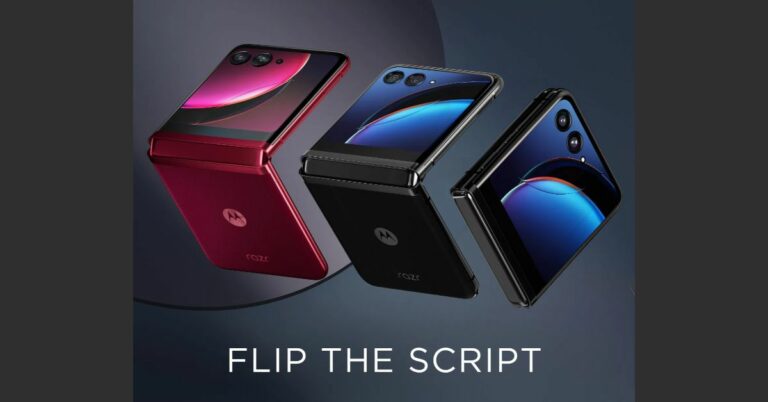
Motorola has finally revealed when it will be launching the Razr 40 series in India. After months of teasing the company has confirmed that the actual date of launch will be revealed on June 22. Only lately the business confirm that it would offer its soon-to-be-released Razr 40 Ultra foldable on Amazon.And as of right now, the company’s product page on Amazon affirms that on June 22 it would present a full product specifications reveal of Motorola Razr 40 Ultra and Razr 40 and announce the date of its launch in India.
Motorola Razr 40 Ultra and Razr 40 pricing
The Motorola Razr 40 Ultra was introduced in China with a starting price of CNY 5,699, which equals Rs 66,000 for 8GB RAM and 256GB storage, as opposed to the Motorola Razr 40, which has a starting price of CNY 3,999, equaling Rs 46,000 for 8GB RAM and 128GB storage.
Motorola Razr 40 Ultra and Razr 40 specifications
The Motorola Razr 40 Ultra and Razr 40 both have a 6.9-inch foldable pOLED display with a resolution of 1,080 by 2,640 pixels. The screen also supports a 165Hz refresh rate and a maximum brightness of 1,200 nits. The flip phones ship pre-installed with Android 13. The basic Razr 40 uses a Snapdragon 7 Gen 1 SoC, and the Ultra model includes a Qualcomm Snapdragon 8+ Gen 1 SoC.Dual back cameras are characteristic of the Razr 40 Ultra and Razr 40. The Razr 40 Ultra’s camera system consists of a 13-megapixel secondary ultra-wide-angle sensor and a 12-megapixel primary sensor with OIS. Razr 40, on the other hand, has a 12-megapixel ultra wide-angle camera in addition to a 64-megapixel primary sensor. A 32-megapixel front-facing camera for selfies is present on both devices.The 3,800mAh battery on the Razr 40 Ultra supports both 5W wireless charging and 33W fast charging. With a 4,200mAh battery and support for 30W wired and 8W wireless charging, the Razr 40 has a large battery.
For the latest gadget and tech news, and gadget reviews, follow us on Twitter, Facebook and Instagram. For newest tech & gadget videos subscribe to our YouTube Channel. You can also stay up to date using the Gadget Bridge Android App. You can find the latest car and bike news here.
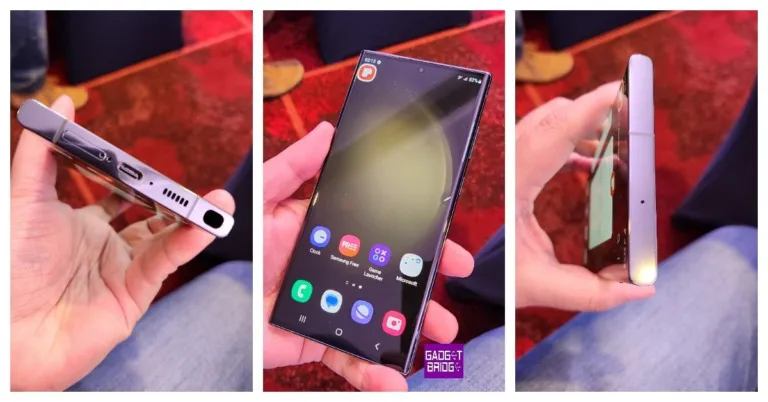
Samsung Galaxy S23 Lime variant was launched in India last month. Now the top of the line Galaxy S23 Ultra is set to come in new colour variants. The company recently teased that the handset will be made available in two epic shades. The launch date of the new colour variants is yet to be revealed.Samsung Galaxy S23 Ultra was launched earlier this year. The phone was introduced in four colourations, Red, Graphite, Lime, and Sky Blue. But now the S23 Ultra is confirmed to be launched in two more colour options. The company took to Twitter to announce that the device will also be offered in two new shades soon.The Galaxy S23 Ultra was launched with a starting price of Rs 1,24,999 for the base 12GB RAM with a 256GB storage option. The 12GB RAM with 512GB storage option and 12GB RAM with 1TB storage model is priced at Rs 1,34,999 and Rs 1,54,999 respectively.
Samsung Galaxy S23 Ultra specifications
The Samsung Galaxy S23 Ultra comes with a 6.8-inch Edge QHD+ Dynamic AMOLED 2X Display. It has a touch sampling rate of 240 Hz in gaming mode, and its dynamic refresh rate ranges from 1 to 120 Hz. The phone runs Android 13 with One UI 5.1 on top and is powered by a Qualcomm Snapdragon 8 Gen 2 SoC. Additionally, it includes up to 12GB of RAM and 1TB of storage. The S Pen stylus from Samsung is also bundled with the phone.Also Read:Samsung Galaxy S23 Ultra Review: A true flagshipIn terms of camera, the primary wide camera of the Samsung Galaxy S23 Ultra has a 200-megapixel sensor and an 85-degree field of view. It has an f/1.8 aperture. A 12-megapixel ultra-wide camera with a 120-degree field of view and an f/2.2 aperture, a 10-megapixel telephoto lens with a 3x optical zoom, and a final 10-megapixel telephoto sensor are included (10x optical zoom). A 12-megapixel selfie camera with an f/2.2 aperture and an 80-degree field of vision is located up front.The connectivity options include a USB Type-C port, Wi-Fi 6E, Bluetooth 5.3, 5G, and 4G LTE. The phone is compatible with Samsung Knox security and Knox Vault. It is powered by a 5,000mAh battery (45W wired and Fast Wireless Charging 2.0).
For the latest gadget and tech news, and gadget reviews, follow us on Twitter, Facebook and Instagram. For newest tech & gadget videos subscribe to our YouTube Channel. You can also stay up to date using the Gadget Bridge Android App. You can find the latest car and bike news here.





 Sony’s premium headphones lead the pack by a significant margin. The Sony WH-1000XM5 builds upon the solid grounding laid by its predecessor and stitches together a wonderful sonic experience for the listener. The high-res sound output is delivered by powerful 30mm audio drivers. Apart from the cutting-edge sound, the WH-1000XM5 also offer best-in-class ANC aided by 8 microphones on the earcups. You can get up to 30 hours of playback on these headphones. A quick 3-minute charge is enough to power them for 3 hours. Read our full review of the Sony WH-1000XM5 here.
 Sennheiser HD 660S2 will appeal to audiophiles looking for a close-to-neutral sound profile with the added Sennheiser texture. The HD 660S2 flaunts an expansive soundstage, capturing even the minutest details. The richness of the mix is relayed very well on this pair of headphones. The low end is slightly beefed up, leading to prominent bass notes, but it’s something we thoroughly enjoyed while testing the headphones. While the price tag may be quite hefty, if you’re looking for a premium listening experience, the Sennheiser HD 660S2 will blow you away.
 Bose’s premium noise-cancelling headphones, NC 700, feature microphones outside and inside the earcups to nullify any surrounding noise. There are 11 levels of noise cancelling on offer. The state-of-the-art ANC facilitates a brilliant calling experience as well. The stainless steel headband fits nicely around the head and does not cause any stress even after hours of use. The NC 700 offers a 20-hour battery life and is optimised for Amazon Alexa and Google Assistant. A 15-minute charge can power the headphones for 3.5 hours.
 Sony’s premium headphones lead the pack by a significant margin. The Sony WH-1000XM5 builds upon the solid grounding laid by its predecessor and stitches together a wonderful sonic experience for the listener. The high-res sound output is delivered by powerful 30mm audio drivers. Apart from the cutting-edge sound, the WH-1000XM5 also offer best-in-class ANC aided by 8 microphones on the earcups. You can get up to 30 hours of playback on these headphones. A quick 3-minute charge is enough to power them for 3 hours. Read our full review of the Sony WH-1000XM5 here.
 Sennheiser HD 660S2 will appeal to audiophiles looking for a close-to-neutral sound profile with the added Sennheiser texture. The HD 660S2 flaunts an expansive soundstage, capturing even the minutest details. The richness of the mix is relayed very well on this pair of headphones. The low end is slightly beefed up, leading to prominent bass notes, but it’s something we thoroughly enjoyed while testing the headphones. While the price tag may be quite hefty, if you’re looking for a premium listening experience, the Sennheiser HD 660S2 will blow you away.
 Bose’s premium noise-cancelling headphones, NC 700, feature microphones outside and inside the earcups to nullify any surrounding noise. There are 11 levels of noise cancelling on offer. The state-of-the-art ANC facilitates a brilliant calling experience as well. The stainless steel headband fits nicely around the head and does not cause any stress even after hours of use. The NC 700 offers a 20-hour battery life and is optimised for Amazon Alexa and Google Assistant. A 15-minute charge can power the headphones for 3.5 hours.
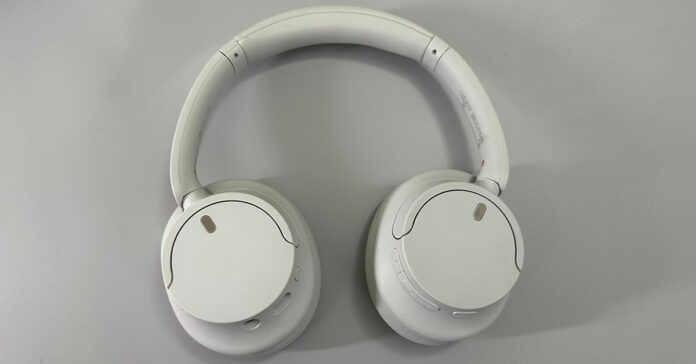 The new Sony CH720N brings ANC and the signature Sony sound together at a great price. These midrange over-the-ear headphones come with great features like ANC, Multi-Point Connection, Adjustable Ambient Sound Mode, and Adaptive Sound Control. You also get app support for the CH720N. There is a dedicated button for ANC along the earcups, which proved to be a great addition for easy access during our time with the device. Sony’s Integrated Processor V1 does a good job of further tuning the ANC on this device.
 Looking for a great pair of headphones on a budget? At the price of Rs 1,799, boAt Rockerz 558 are the best affordable headphones you can buy right now. These headphones deliver a powerful audio output with the help of 50mm drivers. The 500mAh battery offers a playtime of up to 20 hours. Ran out of charge? You can also use these headphones with an AUX cable.
 Samsung Galaxy Buds2 Pro was one of the best TWS we tested last year. The design and overall fit of the wireless earbuds are absolutely phenomenal. Samsung smartphone users also get an additional ‘Samsung Seamless Codec’ and the ‘Auto Switch’ feature. The audio output on this TWS is world-class, with a rich mix of frequencies and a highly detailed soundstage. The ANC performance is also quite impressive. Overall, the Buds2 Pro is a really good package for the price.
 Introduced at Apple’s fall event last year, the second-generation AirPods carry the new H2 chip and offer MagSafe wireless charging. The H2 chip proves its worth with next-level noise cancelling. When it comes to audio features, users can create their personalised sound profile using the ‘Personalised Spatial Audio’ feature on this TWS. The audio output is richer than ever – possibly the best you can get on any TWS in the market. On a single charge, the AirPods Pro 2 can last up to 30 hours.
 We tried the Nothing Ear 2 TWS as soon as it was released, earlier this year. Priced at Rs 10,000, this pair of TWS offers a category-defining performance. The 11.6mm audio drivers deliver a rock-solid output and the dual chamber architecture tunes the sound profile pretty nicely. You also get LHDC 5.0 support and ANC. Ear 2 can nullify up to 40dB of surrounding noise. A great buy in our opinion.
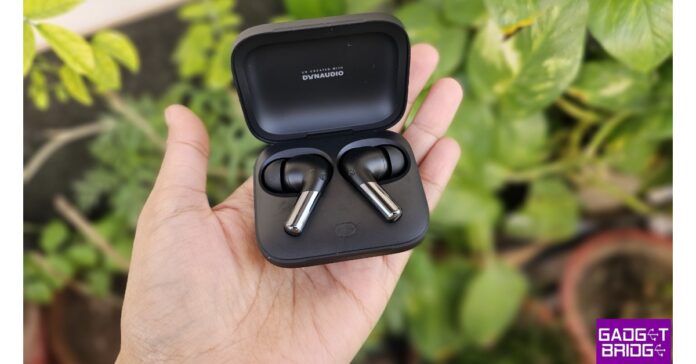 OnePlus launched its new TWS product earlier this year alongside the OnePlus 11. We tested these earbuds shortly after they were released and were mighty impressed by the performance on offer. Each earbud features an 11mm woofer and a 6mm tweeter. The result is a thumping audio output. With Bluetooth v5.3 connectivity, the Buds 2 Pro support LHDC, AAC, SBC, and LC3 audio codecs. You also get Active Noise Cancellation on these earbuds, brought about by three microphones and AI noise-reduction technology.
 Ending this list are the ultra-affordable Truke Buds A1. For those shopping on a budget, these are the ideal wireless earbuds. The bass-driven audio output is delivered by 100mm drivers on either earbud. You also get 3 preset EQ modes on these earbuds – Dynamic Audio, Bass Boost, and Movie Mode. What really impressed us was the hybrid ANC, which cancels up to 30dB of surrounding noise. At this price point, this feature is unheard of. Check out our full review of the Truke Buds A1 for more details.
Read Also: How to Use Your iPhone or Android Phone as a Webcam?
Ending this list are the ultra-affordable Truke Buds A1. For those shopping on a budget, these are the ideal wireless earbuds. The bass-driven audio output is delivered by 100mm drivers on either earbud. You also get 3 preset EQ modes on these earbuds – Dynamic Audio, Bass Boost, and Movie Mode. What really impressed us was the hybrid ANC, which cancels up to 30dB of surrounding noise. At this price point, this feature is unheard of. Check out our full review of the Truke Buds A1 for more details.
Read Also: How to Use Your iPhone or Android Phone as a Webcam?

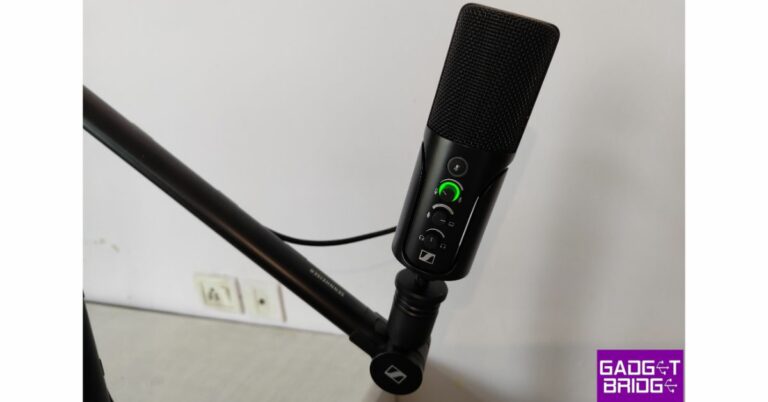
 The USB microphone is neatly packaged in a cover that, given the price, appears to be of the highest quality. The only colour for the gadget is black, and it feels pretty solid in the hands because it is entirely constructed of metal, which undoubtedly adds weight but look great. The microphone may be readily adjusted without a separate support thanks to its tiltable construction. It has a cardioid condenser capsule mounted on a metal, cylindrical grille.
 As said, the condenser capsule Sennheiser Profile USB Microphone has a cardioid pickup pattern. For those who don’t know, cardioid polar pickup patterns mic typically picks up sound primarily from the front and a little bit from the left and right. On the rear, it seems to have the most rejection. Consequently, this is how the Sennheiser Profile USB Microphone operates.
Now that we know it can be used for streaming and games, this microphone can also be used to record podcasts and record your voice if you’re a singer.
We think that this microphone’s audio quality is fairly good for the price. A good number of details are present. The voice quality is excellent, with a detailed treble and a respectable bass.
As said, the condenser capsule Sennheiser Profile USB Microphone has a cardioid pickup pattern. For those who don’t know, cardioid polar pickup patterns mic typically picks up sound primarily from the front and a little bit from the left and right. On the rear, it seems to have the most rejection. Consequently, this is how the Sennheiser Profile USB Microphone operates.
Now that we know it can be used for streaming and games, this microphone can also be used to record podcasts and record your voice if you’re a singer.
We think that this microphone’s audio quality is fairly good for the price. A good number of details are present. The voice quality is excellent, with a detailed treble and a respectable bass.
 If you’re a bass enthusiast and want a little bit deeper bass in your audio, just get closer to the microphone so that you can have that improved bass output to your voice.
You may carry this microphone with you anywhere you go while travelling and obtain studio-quality audio output because it is plug-and-play and globally compatible with Android, iOS, Mac, and Windows PC.
If you’re a bass enthusiast and want a little bit deeper bass in your audio, just get closer to the microphone so that you can have that improved bass output to your voice.
You may carry this microphone with you anywhere you go while travelling and obtain studio-quality audio output because it is plug-and-play and globally compatible with Android, iOS, Mac, and Windows PC.
 The USB microphone is neatly packaged in a cover that, given the price, appears to be of the highest quality. The only colour for the gadget is black, and it feels pretty solid in the hands because it is entirely constructed of metal, which undoubtedly adds weight but look great. The microphone may be readily adjusted without a separate support thanks to its tiltable construction. It has a cardioid condenser capsule mounted on a metal, cylindrical grille.
 The Sennheiser logo and all the controls with various optimisation settings are located on the front of the device. Along with some LED status indicators and ring lights along with a MIC mute button. On the device’s back, there is a headphone connector, allowing you to easily connect a headset to it to listen to the audio being recorded. A type-C port is located right below it. It provides mounting thread options at the bottom (the profile boom stand accepts both ⅜-inch and 5/8-inch mounting).
The boom arm is of the highest quality; it is sturdy, long-lasting, and completely flexible. With the exception of a few spots here and there, it is totally composed of metal. It is simple to bend, twist, or adjust at several angles. It contains various channels and openings for managing cables, allowing you to set up and arrange the entire line so that everything is tidy and structured.
The Sennheiser logo and all the controls with various optimisation settings are located on the front of the device. Along with some LED status indicators and ring lights along with a MIC mute button. On the device’s back, there is a headphone connector, allowing you to easily connect a headset to it to listen to the audio being recorded. A type-C port is located right below it. It provides mounting thread options at the bottom (the profile boom stand accepts both ⅜-inch and 5/8-inch mounting).
The boom arm is of the highest quality; it is sturdy, long-lasting, and completely flexible. With the exception of a few spots here and there, it is totally composed of metal. It is simple to bend, twist, or adjust at several angles. It contains various channels and openings for managing cables, allowing you to set up and arrange the entire line so that everything is tidy and structured.
 As said, the condenser capsule Sennheiser Profile USB Microphone has a cardioid pickup pattern. For those who don’t know, cardioid polar pickup patterns mic typically picks up sound primarily from the front and a little bit from the left and right. On the rear, it seems to have the most rejection. Consequently, this is how the Sennheiser Profile USB Microphone operates.
Now that we know it can be used for streaming and games, this microphone can also be used to record podcasts and record your voice if you’re a singer.
We think that this microphone’s audio quality is fairly good for the price. A good number of details are present. The voice quality is excellent, with a detailed treble and a respectable bass.
As said, the condenser capsule Sennheiser Profile USB Microphone has a cardioid pickup pattern. For those who don’t know, cardioid polar pickup patterns mic typically picks up sound primarily from the front and a little bit from the left and right. On the rear, it seems to have the most rejection. Consequently, this is how the Sennheiser Profile USB Microphone operates.
Now that we know it can be used for streaming and games, this microphone can also be used to record podcasts and record your voice if you’re a singer.
We think that this microphone’s audio quality is fairly good for the price. A good number of details are present. The voice quality is excellent, with a detailed treble and a respectable bass.
 If you’re a bass enthusiast and want a little bit deeper bass in your audio, just get closer to the microphone so that you can have that improved bass output to your voice.
You may carry this microphone with you anywhere you go while travelling and obtain studio-quality audio output because it is plug-and-play and globally compatible with Android, iOS, Mac, and Windows PC.
If you’re a bass enthusiast and want a little bit deeper bass in your audio, just get closer to the microphone so that you can have that improved bass output to your voice.
You may carry this microphone with you anywhere you go while travelling and obtain studio-quality audio output because it is plug-and-play and globally compatible with Android, iOS, Mac, and Windows PC.

 If you’re just getting started with your yogic journey, Down Dog is the perfect app to guide you along the way. With different levels and over 60,000 configurations, Down Dog makes sure that you don’t feel stagnated in your workouts. Beginners can choose to start from Level 1 and make their way up as they master the different asanas. The guided workouts are available in 6 voices and 9 different languages.
 Got a packed schedule? You can still squeeze in a quick workout with 5 Minute Yoga. This app guides you through different poses with clear images and detailed instructions. The integrated timer ensures that you spend the ideal amount of time on each pose before moving on to the next one. Even a 5-minute workout every day can yield incredible results.
 Glo brings you the best Yoga workouts from the most proficient Yogis and Yoga practitioners. With an extensive library of classes, you can pick a workout that is suited to your level of endurance. Your options become more personalised with every session. Glo also hosts frequent live streams featuring the most skilful teachers and Yoga experts from around the world.
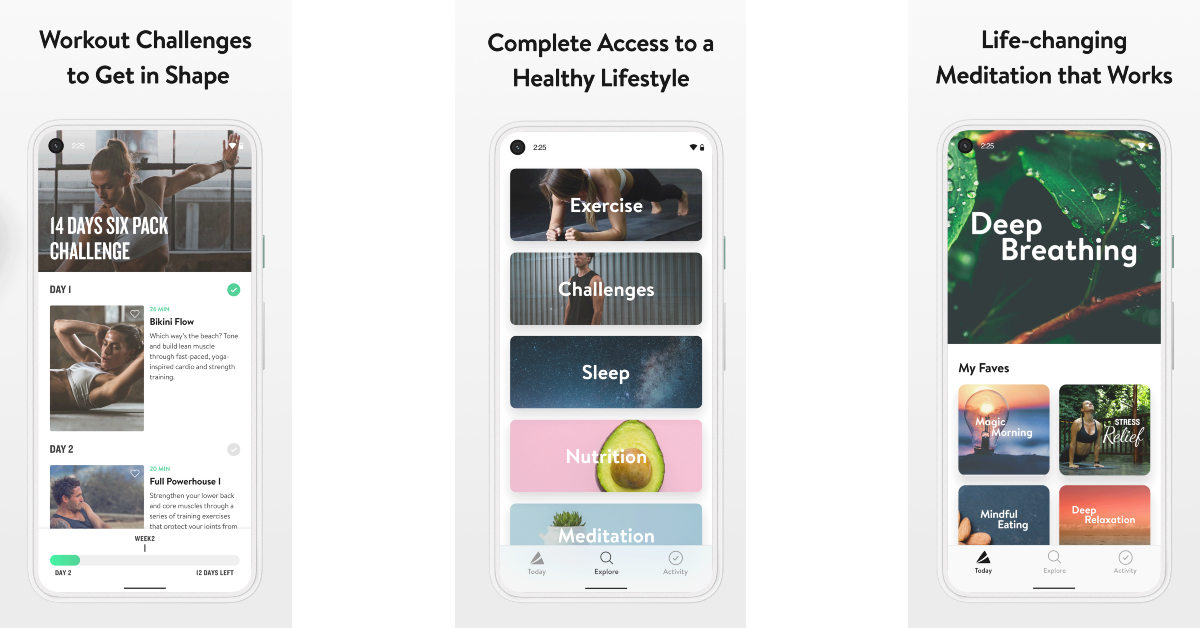 Asana Rebel is designed for people who are looking to lose weight and get lean. The 100+ workouts available in this app are structured to pump up your metabolism and burn the maximum amount of calories. You can browse the workouts by fitness goals, duration, intensity, or collection. You can also create personalised workouts that are suited to your needs.
 If you prefer the presence of a teacher while working out, Gotta Yoga is the app for you. Upon signing up, you will find several upcoming and live classes hosted by experienced Yoga teachers and practitioners. Apart from live sessions, you also get access to tons of classes spanning different Yoga styles and difficulty levels. All classes are available in different languages like English, French, German, and Finnish. Gotta Yoga is a great app for beginners as well as experts.
 Bring studio experience to your home with this neat Yoga app. Yoga Studio offers tons of Yoga classes with teacher commentary. The video classes are recorded in HD. You can sort classes by difficulty, or create a custom class by integrating different poses using the sequencing tool. You can download the classes in advance, so you can access them even without an internet connection. The integrated calendar helps you follow your routine and ensures you never miss a session.
 Yoga Poses offers 440,000 classes and over 200 poses. All poses are illustrated by real trainers, without the use of any animation. You can start a training session by selecting a difficulty level on a scale of 1 to 6. You can also track your burned calories within the app and sync the data with Google Fit.
 Yoga Anytime has 3,000+ Yoga and Meditation videos that you can stream anytime or download for viewing later. New content is added to the app on a weekly basis. With over 115 teachers and 150+ Yoga shows, you will never feel burnt out. The app offers a 7-day free trial, after which you are charged $17.99 per month.
 Yogaia offers live and interactive Yoga sessions for all difficulty levels. World-renowned Yoga teacher, Hermoine Armitage takes the ‘Yoga to introduction’ class. More experienced Yogis can opt for advanced classes hosted by experienced teachers. Apart from Yoga, the Yogaia app also offers meditation sessions, pilates, HIIT and more. You can also view pre-recorded classes and follow along in the comfort of your home. This Yoga app will get you started nicely if you are a beginner.
 With over 10 million downloads, Daily Yoga is one of the most popular Yoga apps around. The app has earned several accolades, including the Editor’s Choice 2023 by Google Play. The app offers easy-to-follow Yoga classes for beginners and makes the journey more fun by adding challenges along the way. New courses and workouts are added every week, so you don’t get bored doing the same poses. You can download the classes to access them later even without an internet connection.
Read Also: How to Export a WhatsApp Chat: Complete guide for Android
With over 10 million downloads, Daily Yoga is one of the most popular Yoga apps around. The app has earned several accolades, including the Editor’s Choice 2023 by Google Play. The app offers easy-to-follow Yoga classes for beginners and makes the journey more fun by adding challenges along the way. New courses and workouts are added every week, so you don’t get bored doing the same poses. You can download the classes to access them later even without an internet connection.
Read Also: How to Export a WhatsApp Chat: Complete guide for Android







 Step 4: Hit ‘More’ and then select ‘Export Chat’.
 Step 5: Select whether you want to export the chat with or without media. WhatsApp can export up to 10,000 messages with media included. Excluding media increases this number to 40,000.
 Step 6: Select the destination for the text file. You can choose to send the file to another contact on WhatsApp or any other instant messenger. If you want to save the file on your device, first export it to Google Drive and then download it on your phone.
 Your WhatsApp chat will be exported in txt format. You can convert this file to the PDF format using an online tool. Read this article to find out how you can save a Google Docs file as a PDF.

 Step 3:
 Step 4:
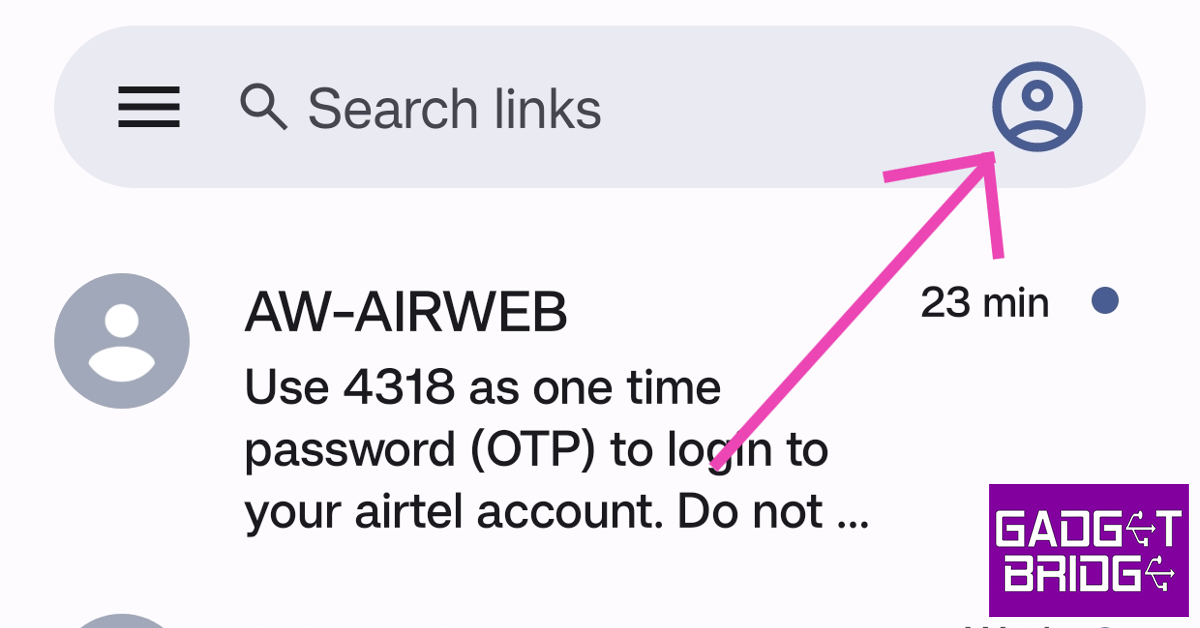 Step 3:
 Step 4:
 Step 5:
 Step 6: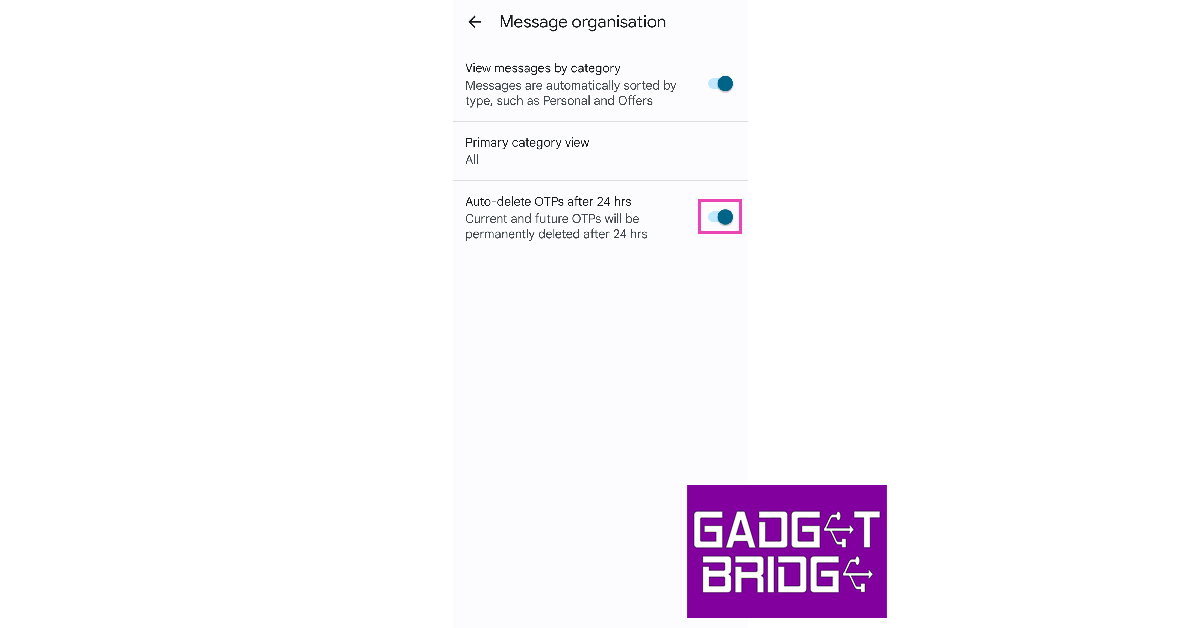
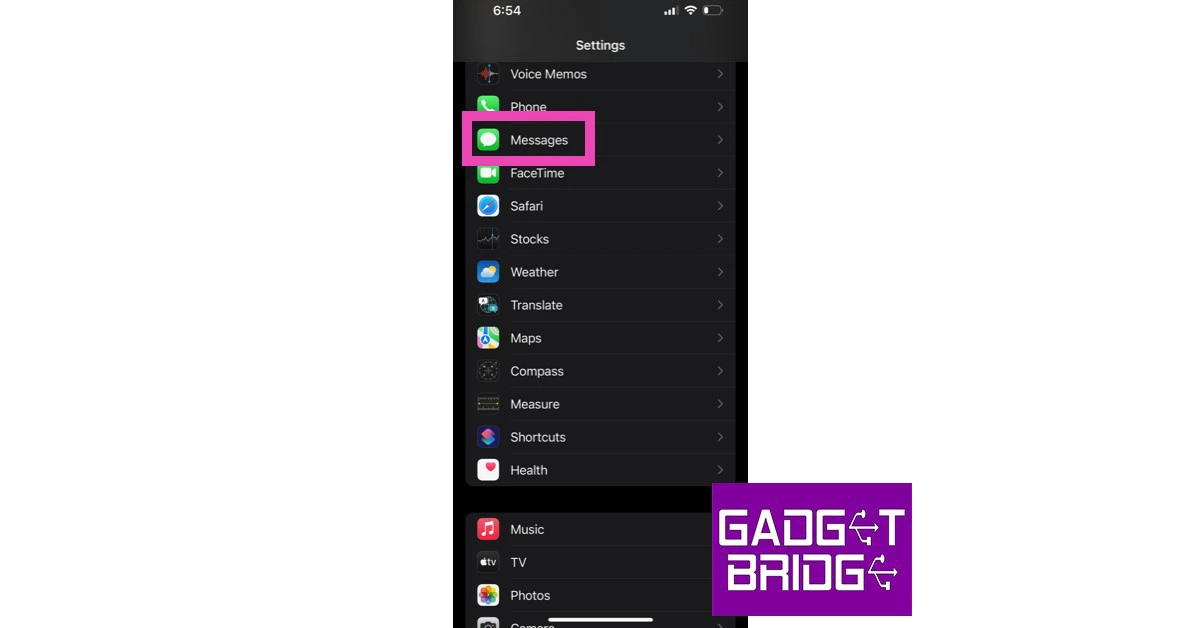 Step 2:
 Step 3:
 Step 4:
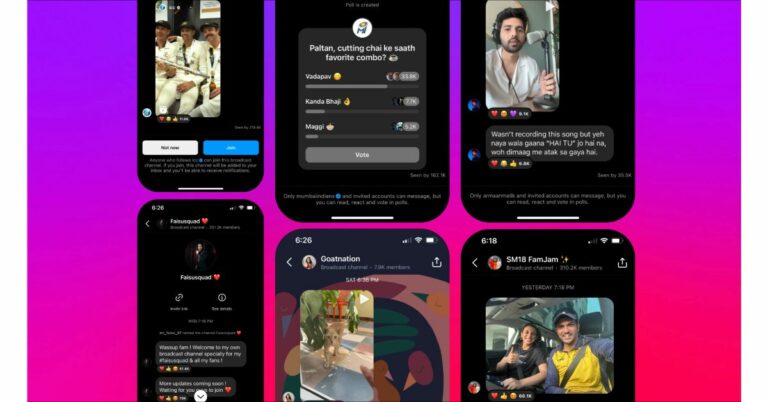
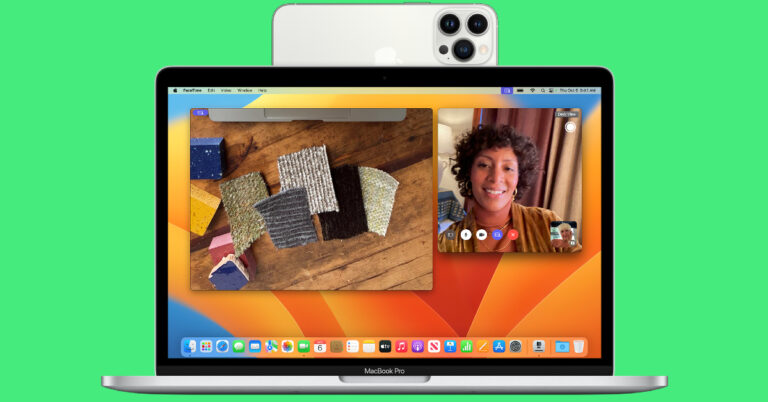
 Step 3: Turn on Continuity Camera and Handoff.
 Step 4: Mount your iPhone on your Mac. There are several MagSafe mounts you can buy for your iPhone.
Step 5: Launch your desired calling app on your Mac.
Step 6: Set your iPhone as the video source. You can also choose to use your iPhone’s mic for the call.
Step 4: Mount your iPhone on your Mac. There are several MagSafe mounts you can buy for your iPhone.
Step 5: Launch your desired calling app on your Mac.
Step 6: Set your iPhone as the video source. You can also choose to use your iPhone’s mic for the call.
 Step 7: Select the ‘Desk View’ option to use the ultrawide lens. If you want to blur your background, choose the ‘Portrait’ option.
 Step 2: Launch Camo Studio on your Windows device and make sure it is connected. Camo will list all the webcam options for your device.
Step 3: Launch the Camo app on your Android phone and tap on ‘Get Started’.
Step 2: Launch Camo Studio on your Windows device and make sure it is connected. Camo will list all the webcam options for your device.
Step 3: Launch the Camo app on your Android phone and tap on ‘Get Started’.
 Step 4: On the Camo Studio client for your Windows laptop, click on the plus icon to open the pairing window. You will see a QR code in this window.
Step 5: On the Camo app for your Android phone, tap the wireless connection button and scan the QR code displayed on your laptop.
Step 4: On the Camo Studio client for your Windows laptop, click on the plus icon to open the pairing window. You will see a QR code in this window.
Step 5: On the Camo app for your Android phone, tap the wireless connection button and scan the QR code displayed on your laptop.
 Step 6: Now that the two devices are connected, you can use your Android phone as a webcam.
Instead of a wireless connection, you can also use a USB cable to connect your Android phone to your Windows laptop with Camo. Before you proceed, make sure you have enabled USB debugging from Developer Settings. A wired connection provides lower latency and keeps your phone charged while it is being used as a webcam.
Step 6: Now that the two devices are connected, you can use your Android phone as a webcam.
Instead of a wireless connection, you can also use a USB cable to connect your Android phone to your Windows laptop with Camo. Before you proceed, make sure you have enabled USB debugging from Developer Settings. A wired connection provides lower latency and keeps your phone charged while it is being used as a webcam.
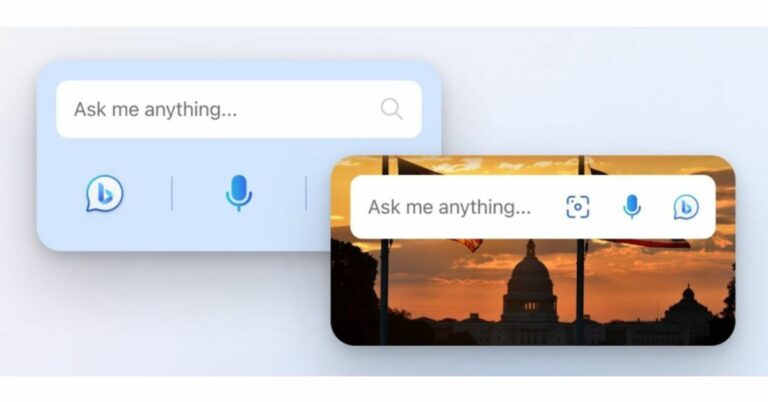
 According to a Microsoft blog post-Bing Chat is now accessible to iPhone and iPad users via a dedicated iOS widget. Users can start a chat once it is installed from their Home screen. The company said iOS users might find instructions for adding widgets to their iOS device’s Home screen here (this feature is also available on Android, as was previously mentioned).
Microsoft has also released text-to-speech support for even more languages: Arabic, Bulgarian, Catalan, Croatian, Czech, Danish, Dutch, Estonian, Filipino, Finnish, Greek, Gujarati, Hebrew, Hindi, Hungarian, Icelandic, Indonesian, Irish, Italian, Korean, Latvian, Lithuanian, Maltese, Marathi, Norsk Bokmål, Polish, Portuguese, Romanian, Russian, Slovak, Spanish, Swedish, Tamil, Telugu, Thai, Turkish, Ukrainian, and Urdu.
The latest update also brings improvements to its AI-powered chatbot Bing Chat. The company has improved the performance of the voice input button on the Bing mobile app for iOS and Android. It should now indicate it’s listening instantly once you tap it.
For the latest gadget and tech news, and gadget reviews, follow us on Twitter, Facebook and Instagram. For newest tech & gadget videos subscribe to our YouTube Channel. You can also stay up to date using the Gadget Bridge Android App. You can find the latest car and bike news here.
According to a Microsoft blog post-Bing Chat is now accessible to iPhone and iPad users via a dedicated iOS widget. Users can start a chat once it is installed from their Home screen. The company said iOS users might find instructions for adding widgets to their iOS device’s Home screen here (this feature is also available on Android, as was previously mentioned).
Microsoft has also released text-to-speech support for even more languages: Arabic, Bulgarian, Catalan, Croatian, Czech, Danish, Dutch, Estonian, Filipino, Finnish, Greek, Gujarati, Hebrew, Hindi, Hungarian, Icelandic, Indonesian, Irish, Italian, Korean, Latvian, Lithuanian, Maltese, Marathi, Norsk Bokmål, Polish, Portuguese, Romanian, Russian, Slovak, Spanish, Swedish, Tamil, Telugu, Thai, Turkish, Ukrainian, and Urdu.
The latest update also brings improvements to its AI-powered chatbot Bing Chat. The company has improved the performance of the voice input button on the Bing mobile app for iOS and Android. It should now indicate it’s listening instantly once you tap it.
For the latest gadget and tech news, and gadget reviews, follow us on Twitter, Facebook and Instagram. For newest tech & gadget videos subscribe to our YouTube Channel. You can also stay up to date using the Gadget Bridge Android App. You can find the latest car and bike news here. 
 Step 2: Select the app for which you want to set the timer.
 Step 3: Select ‘Screen time’.
 Step 4: Select ‘App timer’ under screen time.
 Step 5: Set the timer for the app. The app will be locked after you’ve used it for the designated time.

 Step 2: Scroll down and select App Timers.
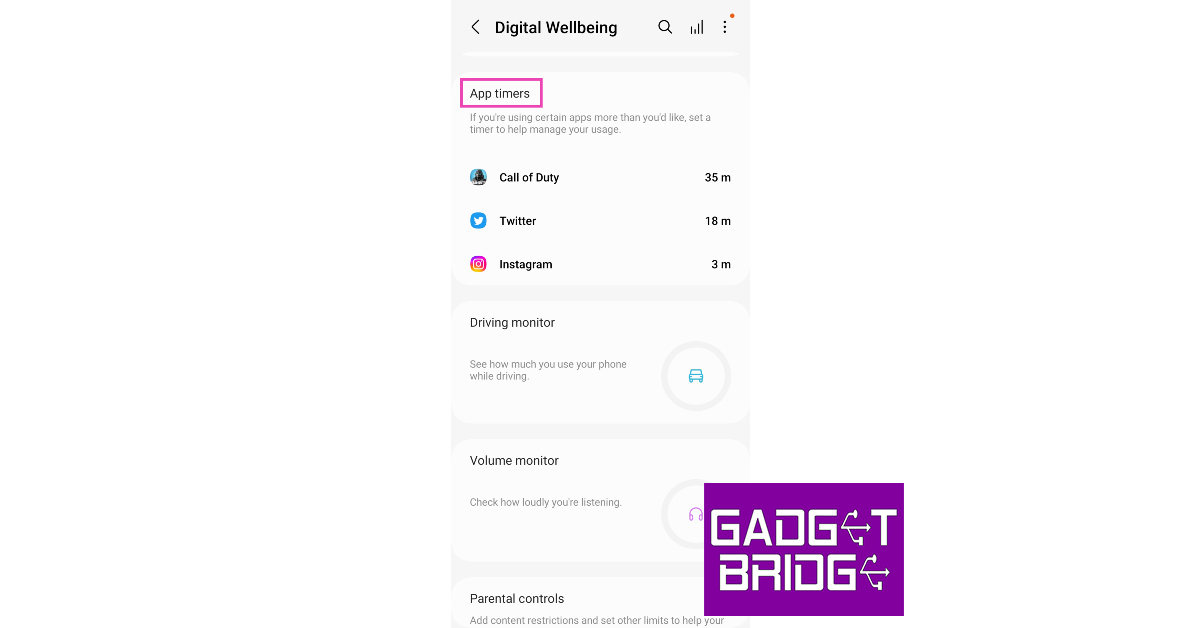 Step 3: Select an app and tap on the hourglass icon.
 Step 4: Set the timer and hit ‘Done’.

 Step 2: Select a profile and tap on ‘Settings’.
 Step 3: Select ‘Schedule Screen Time’ in the FamilyCare section.
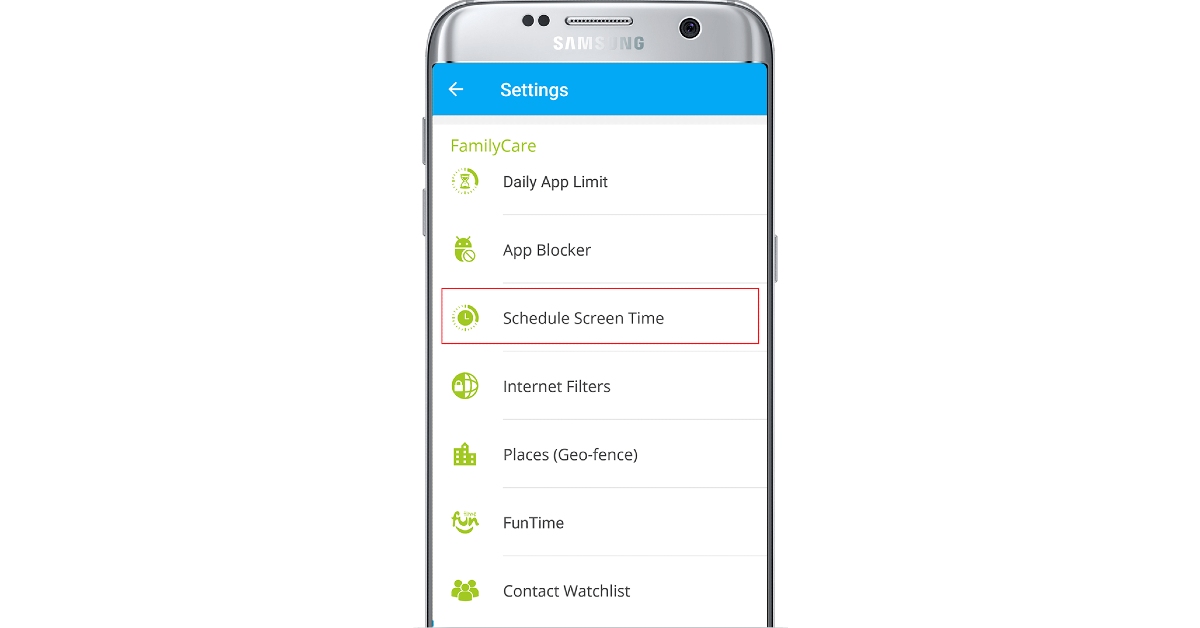 Step 4: Tap the plus sign to create a new schedule.
 Step 5: Select the start time and the end time.
 Step 6: Turn on the toggle switch for the schedule. The Family Time app will lock the device once the schedule kicks in.