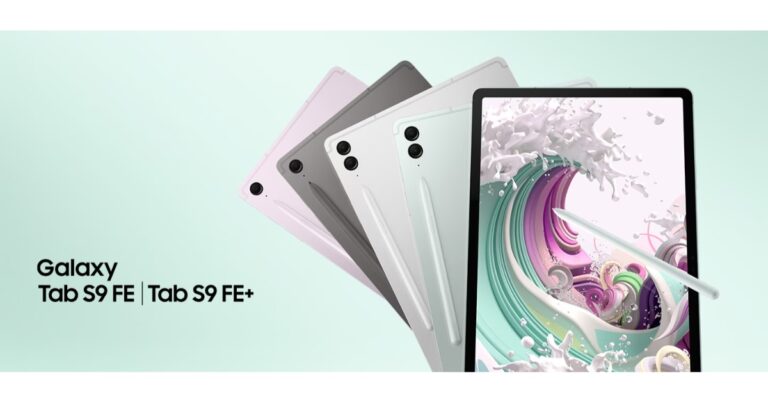
Samsung unveiled Galaxy Tab S9 FE and Galaxy Tab S9 FE+ in India: Price and availability

Samsung today officially announced the launch of Fan Edition tablets in India today. The company has introduced Samsung Galaxy Tab S9 FE and Galaxy Tab S9 FE+. These tablets have been launched alongside the Samsung Galaxy S23 FE. The new affordable tablets 90Hz LCD panels. The devices are powered by the Exynos 1380 chipset. The tablets have 8,000mAh and 10,000mAh batteries, respectively. At its Galaxy Unpacked event last month, the company announced its flagship Galaxy Tab S9 series. Samsung Galaxy Tab S9 FE, Galaxy Tab S9 FE+ price in India and availability

Samsung Galaxy Tab S9 FE, Galaxy Tab S9 FE+ price in India and availability

The price of the Samsung Galaxy Tab S9 FE is set at Rs 36,999 (4G) and Rs 44,999 (5G) for the 6GB of RAM and 128GB storage option. Whereas the Samsung Galaxy Tab S9 FE+ variant comes with a price tag of Rs 46,999 (4G) and Rs 56,999 (5G) 8Gb RAM with a 128GB storage option. Both the tablets come in four colour options of Gray, Lavender, Mint, and Silver.

Samsung Galaxy Tab S9 FE, Galaxy Tab S9 FE+ specifications

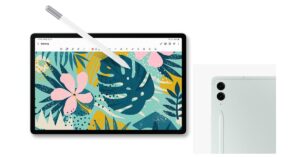
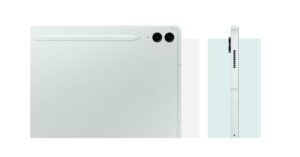
The Samsung Galaxy Tab S9 FE and Galaxy Tab S9 FE+ are powered by Exynos 1380. They run on One UI 5.1 on top of Android 13 out of the box. The tablets feature 10.9-inch and 12.4-inch WQXGA LCD display with 2,560×1,600 pixels of resolution respectively. The tabs support a refresh rate of 90Hz. Both the Samsung Tabs are IP68-rated for dust and water resistance. Samsung Galaxy Tab S9 FE, Galaxy Tab S9 FE+ specifications The Galaxy Tab S9 FE offers up to 8GB of RAM and 256GB of storage whereas Tab S9 FE+ has up to 12GB of RAM and 256GB of storage. The Tab S9 FE features a single 8-megapixel rear camera. Whereas the Tab S9 FE+ comes with a dual rear camera setup that includes an 8-megapixel sensor and an 8-megapixel ultra-wide-angle camera with autofocus. These tablets are highlighted with a 12-megapixel camera on the front for selfies and video calling. In terms of connectivity, there is Wi-Fi 6, Bluetooth 5.3, GPS, and a USB Type-C port. The 8,000mAh and 10,000mAh batteries of the Samsung Galaxy Tab S9 FE and Galaxy Tab S9 FE+ allow 45W charging. For the latest gadget and tech news, and gadget reviews, follow us on TwitterFacebook and Instagram. For newest tech & gadget videos subscribe to our YouTube Channel. You can also stay up to date using the Gadget Bridge Android App. You can find the latest car and bike news here.

Top 4 ways to set an alarm on your Android Phone

0
If you sleep with your smartphone beside you, you don’t need an alarm clock to wake you up every morning. Your Android phone offers tons of customisation options and novel ways to set up and disable an alarm. It is one of the easiest things you can do on your phone, requiring minimal effort. In this article, we bring you the top 4 ways to set an alarm on your Android phone. Read Also: Sennheiser Ambeo Soundbar Mini launched in India

Set an alarm on your Android phone using the Clock app

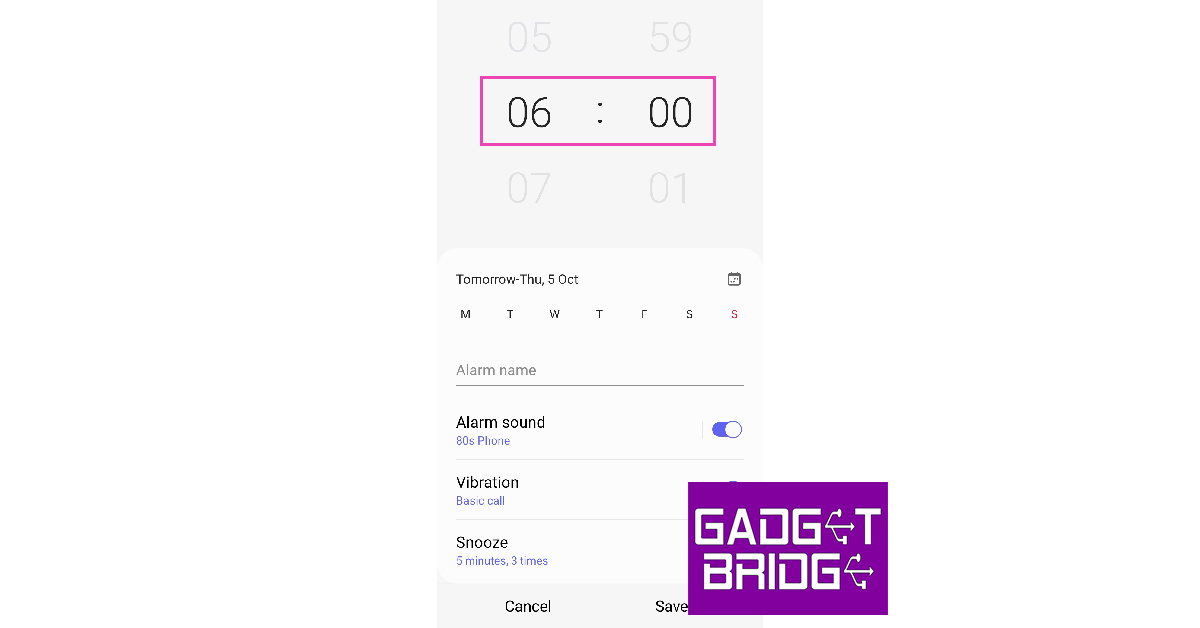
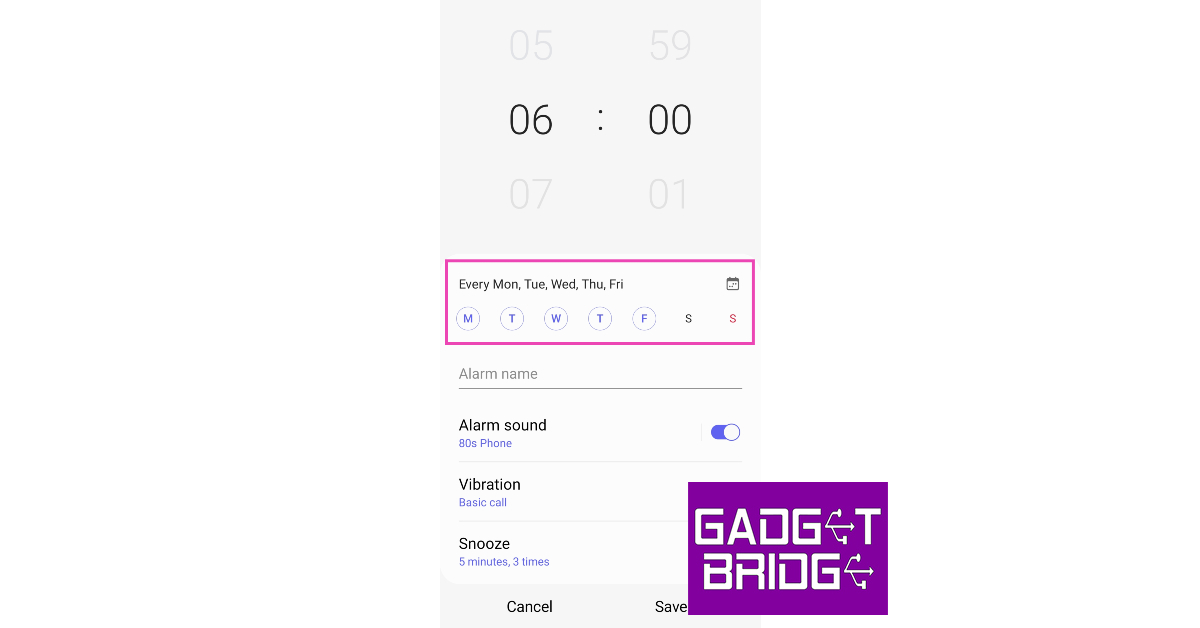
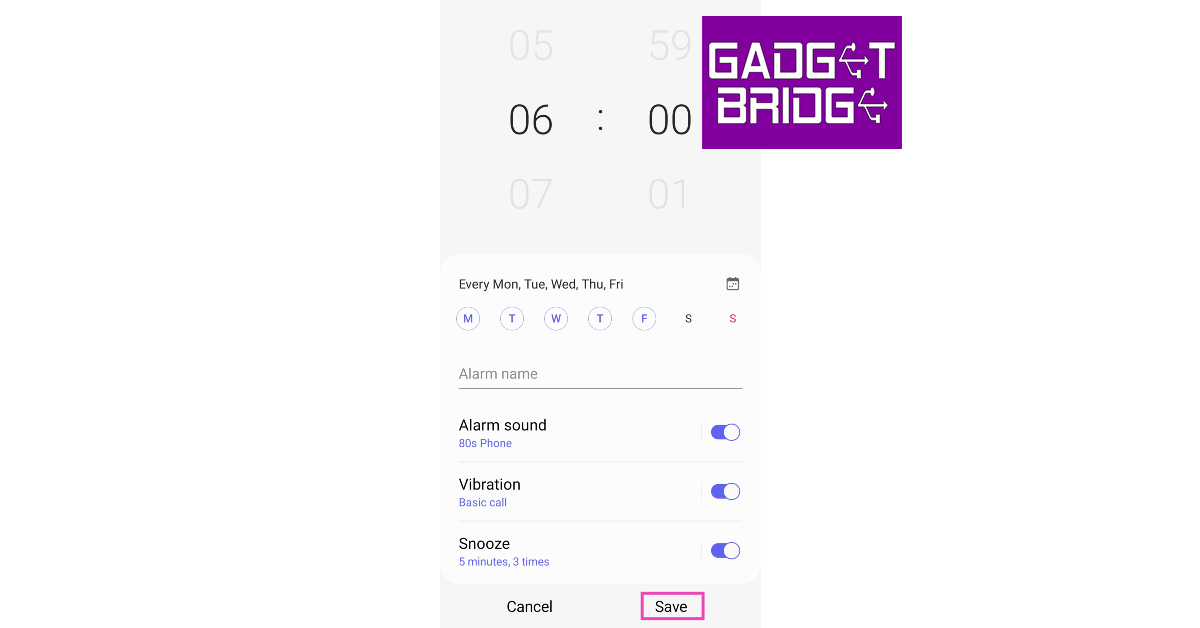
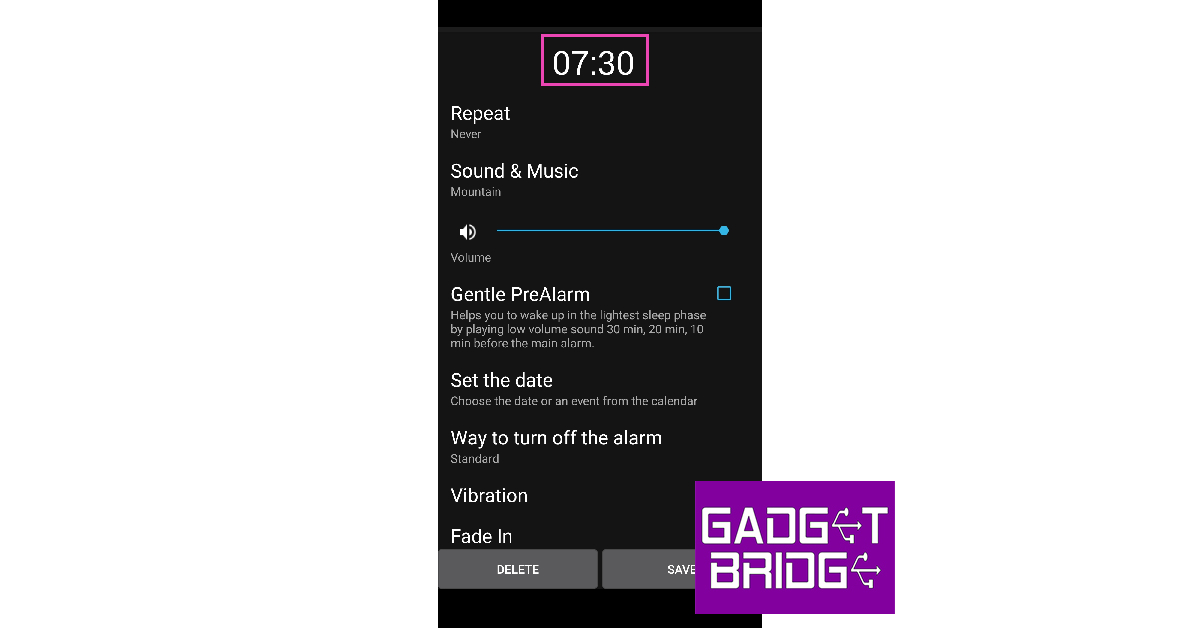
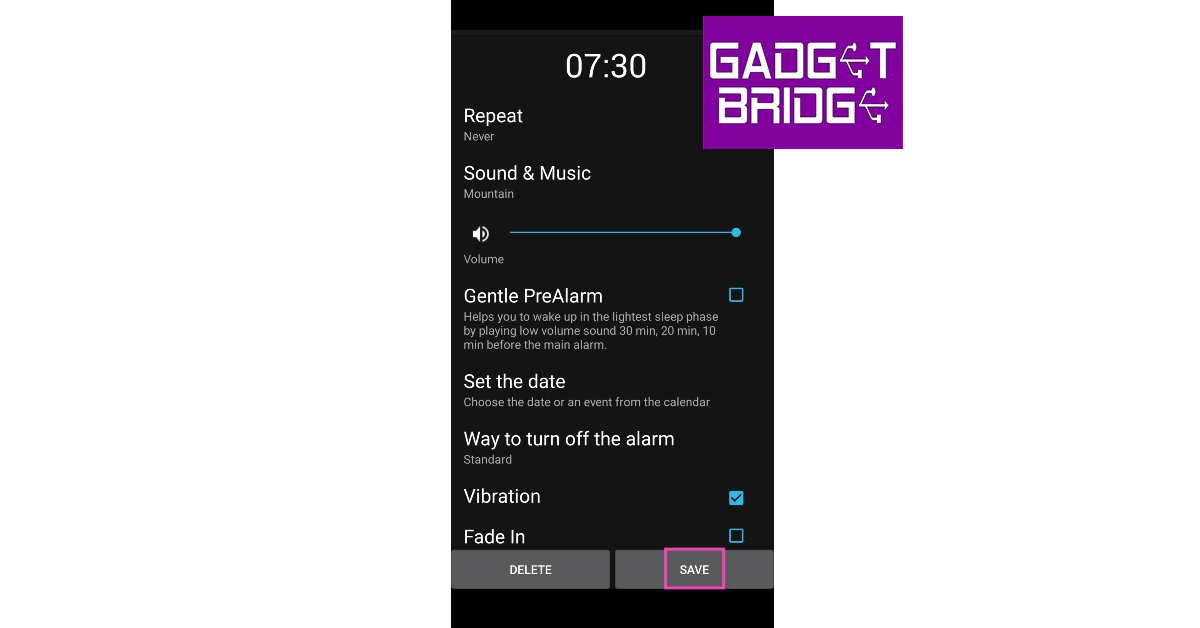
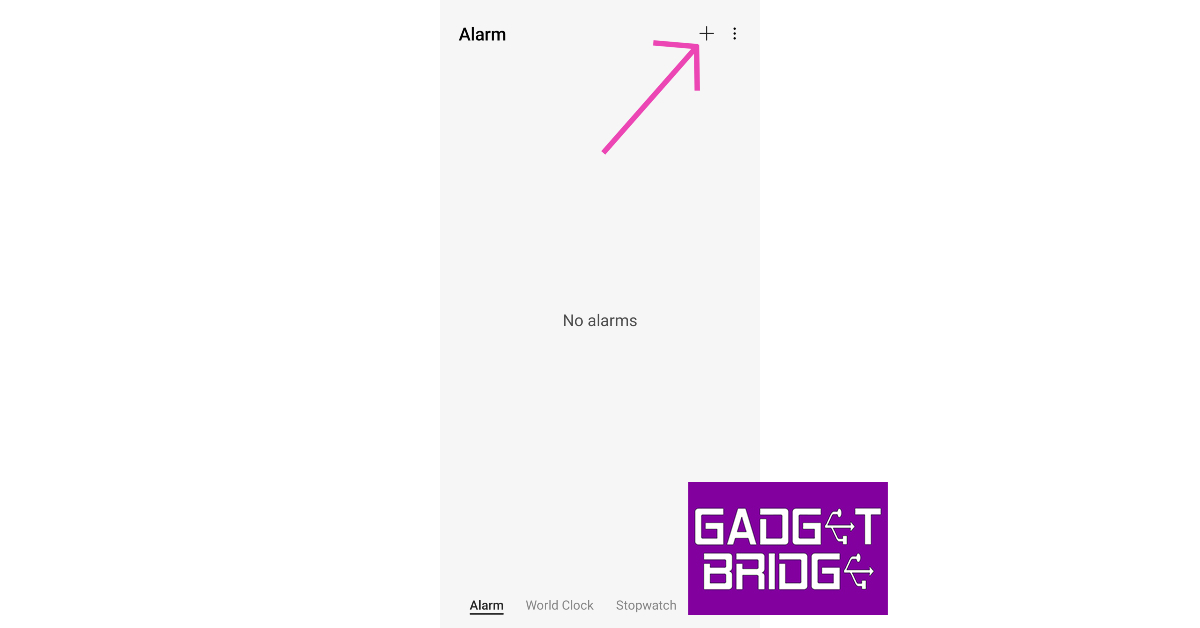
Step 1: Launch the Clock app on your Android phone. Step 2: Tap the plus icon at the top right corner of the screen. Step 2: Tap the plus icon at the top right corner of the screen. Step 3: Swipe the numbers on the clock to set the time for the alarm. Step 3: Swipe the numbers on the clock to set the time for the alarm. Step 4: Select the days of the week when you want the alarm to ring. Step 4: Select the days of the week when you want the alarm to ring. Step 5: Set the alarm time and vibration. Hit Save to set the alarm. Step 5: Set the alarm time and vibration. Hit Save to set the alarm.

Set an alarm on your Android phone using Google Assistant

The easiest way to set up an alarm on your phone is by using Google Assistant. If you’re in a hurry and can’t navigate to the Clock app, simply get Google Assistant to do it for you. If you wanna set an alarm for 7 a.m., all you need to say is, ‘Hey Google, set an alarm for 7 a.m.’. The only downside is that you cannot change the alarm settings using Google Assistant. You will need to launch the Clock app and visit alarm settings for that.

Set an alarm using your smartwatch

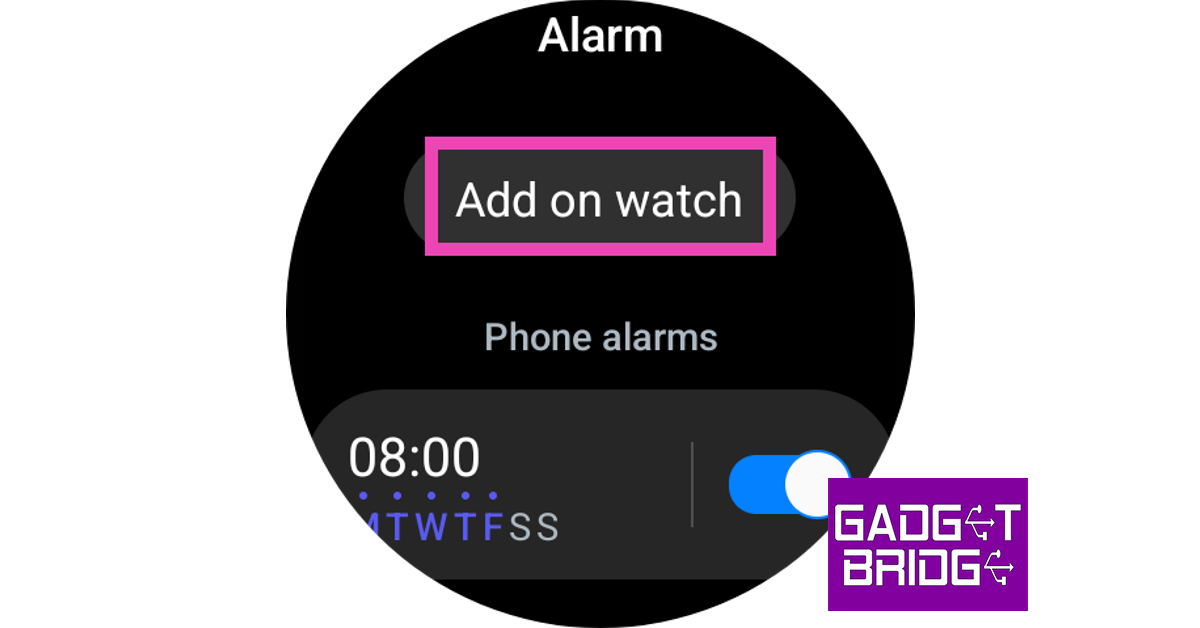
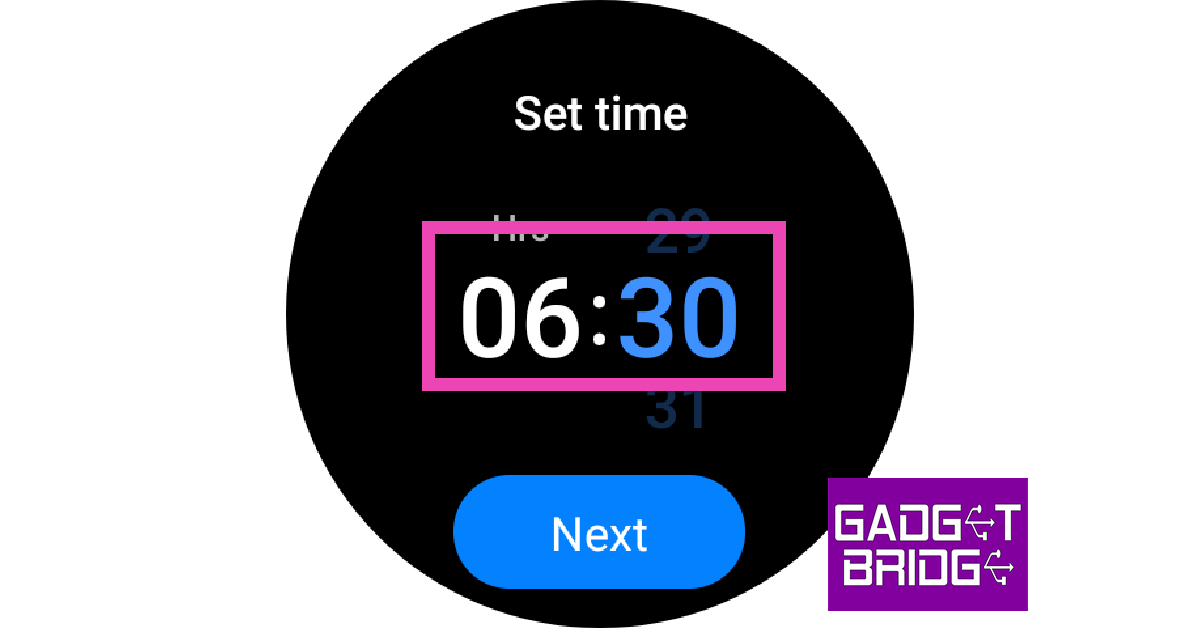
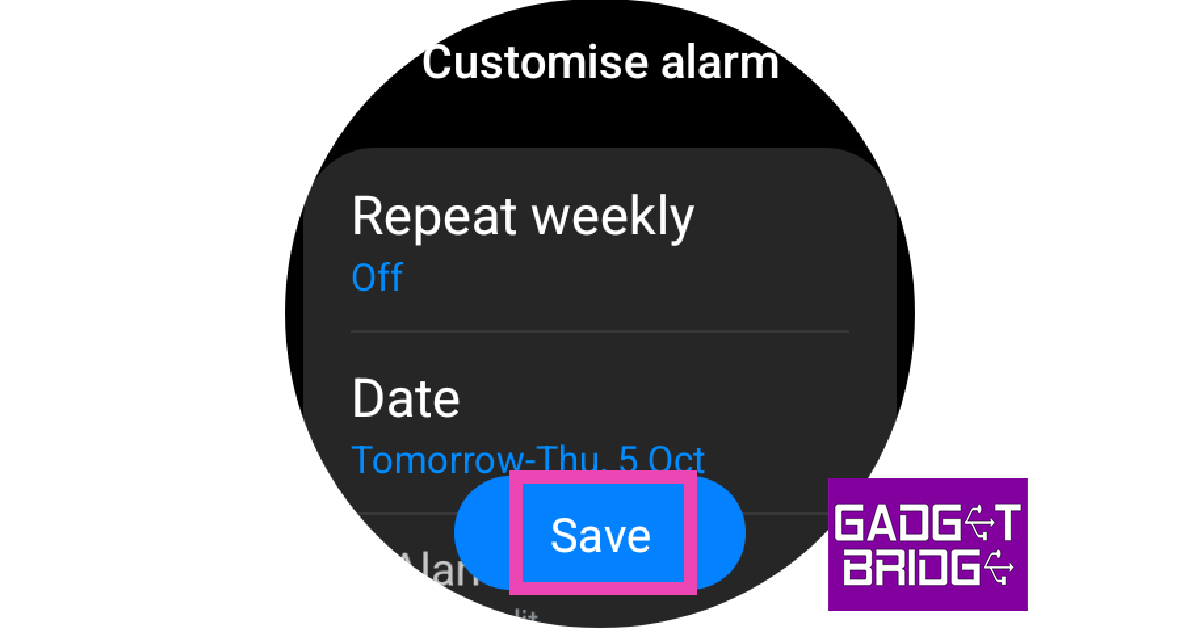
Step 1: Open the Clock app from the app drawer on your smartwatch. Step 2: To set an alarm on your phone, tap Add on phone and carry out the process on your Android smartphone. To set an alarm on your watch, tap Add on watch. Step 2: To set an alarm on your phone, tap Add on phone and carry out the process on your Android smartphone. To set an alarm on your watch, tap Add on watch. Step 3: Swipe the hours and minutes counter to set a time for the alarm. Hit Next. Step 3: Swipe the hours and minutes counter to set a time for the alarm. Hit Next. Step 4: Set the date, frequency, tone, and vibrational pattern for the alarm. Hit Save. Step 4: Set the date, frequency, tone, and vibrational pattern for the alarm. Hit Save.

Use a third-party app

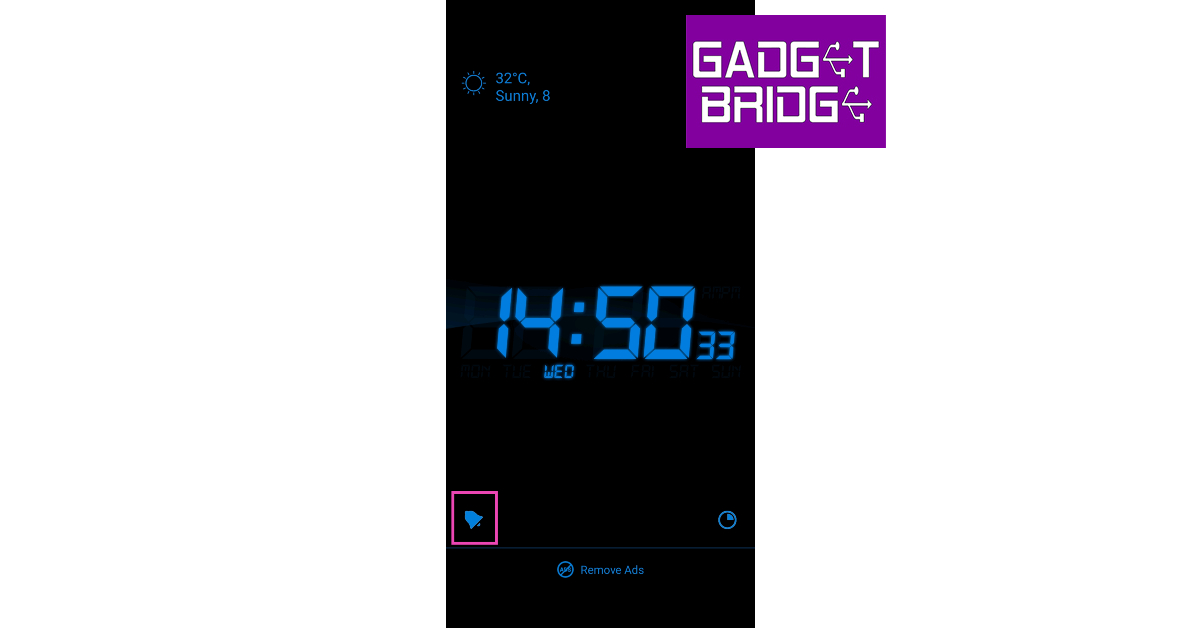
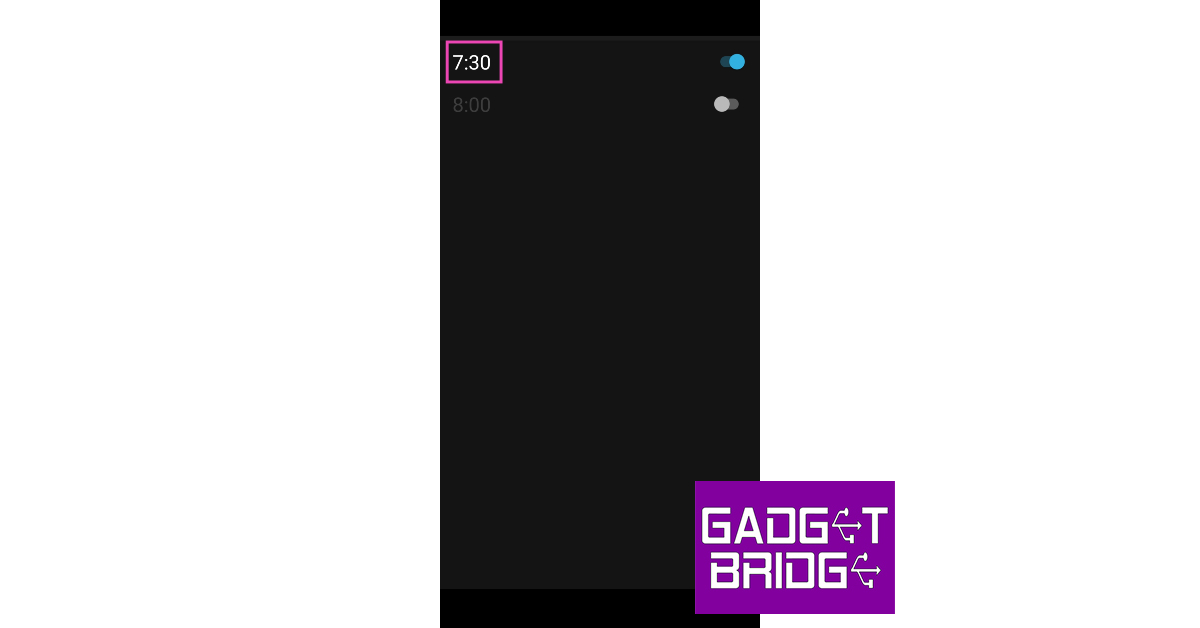
If you don’t want to rely on your phone’s native alarm clock app, there are tons of third-party apps you can turn to. Our favourite is the Alarm Clock for Me app. Here’s how you can use it to set an alarm. Step 1: Install the Alarm Clock for Me app from the Google Play Store. Step 2: Launch the app and hit the alarm bell icon at the bottom right corner of the screen. Step 2: Launch the app and hit the alarm bell icon at the bottom right corner of the screen. Step 3: Turn on the toggle switch for a particular alarm. Step 4: Tap on the alarm to change the time. Step 3: Turn on the toggle switch for a particular alarm. Step 5: Tap on the time to change it. Step 5: Tap on the time to change it. Step 6: Set up the alarm tone, vibration, and the method to turn it off. Step 7: Hit Save. Step 7: Hit Save.

Frequently Asked Questions (FAQs)

How do I set an alarm on my Android phone without using the clock app?

If you’re in a hurry and can’t access the clock app on your Android phone, you can quickly set an alarm using Google Assistant. Simply say, ‘Hey Google, set an alarm for (say the time)’, and the voice assistant will set the alarm for you.

What are some of the best third-party alarm apps for Android?

Alarm Clock for Me, Alarm Clock Xtreme, Early Bird Alarm Clock, and Sleep as Android are some of the best alarm clocks for Android.

How do I set up an alarm that only turns off when I solve a puzzle?

The Alarm Clock for Me app lets you set up a special method to disable a ringing alarm. You can set up a puzzle, shake gesture, or math question to turn off the alarm. Read Also: Disney+ Hotstar announces new features ahead of the ICC Men’s Cricket World Cup 2023

Conclusion

These are the best ways to set up an alarm on your Android phone. You can also set up upcoming alarm notifications, snooze frequency and other alerts from alarm clock settings. Do you use a special app to wake you up every morning? Let us know what it is in the comments! For the latest gadget and tech news, and gadget reviews, follow us on Twitter, Facebook and Instagram. For newest tech & gadget videos subscribe to our YouTube Channel. You can also stay up to date using the Gadget Bridge Android App. You can find the latest car and bike news here.
5 Easy Free Ways to Make an Image Background Transparent on a Windows PC

0
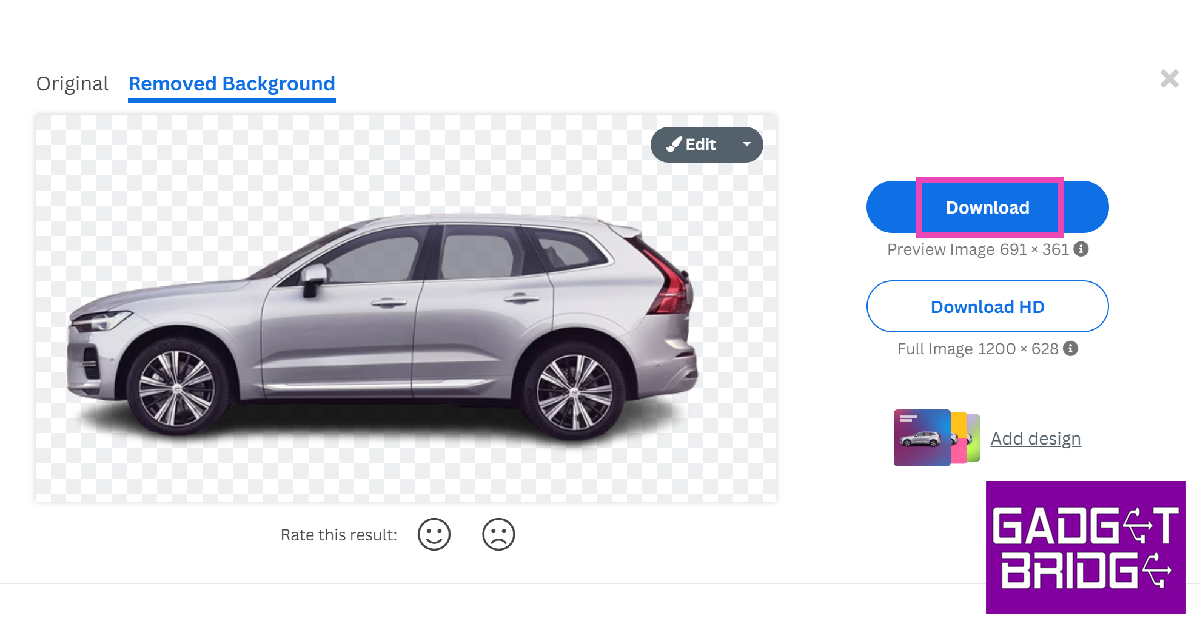
Photo editing on your PC isn’t as hard as it is made out to be. Even applications like Microsoft Word are well-equipped to carry out basic photo-editing tasks. If you’re a Google Docs user, you’d be pleased to know that it offers a range of options to adjust and tweak your uploaded images. In this article, we bring you 5 easy free ways to make an image background transparent on a Windows PC. Read Also: Sennheiser Ambeo Soundbar Mini launched in India

Make the image transparent on PC using Microsoft Word

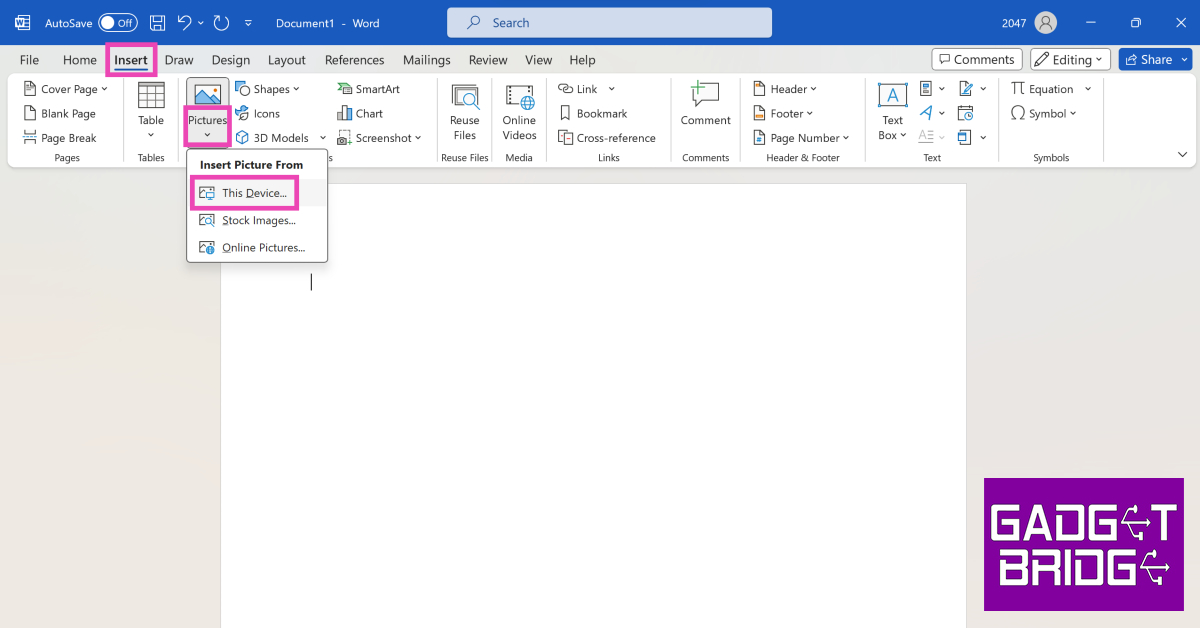
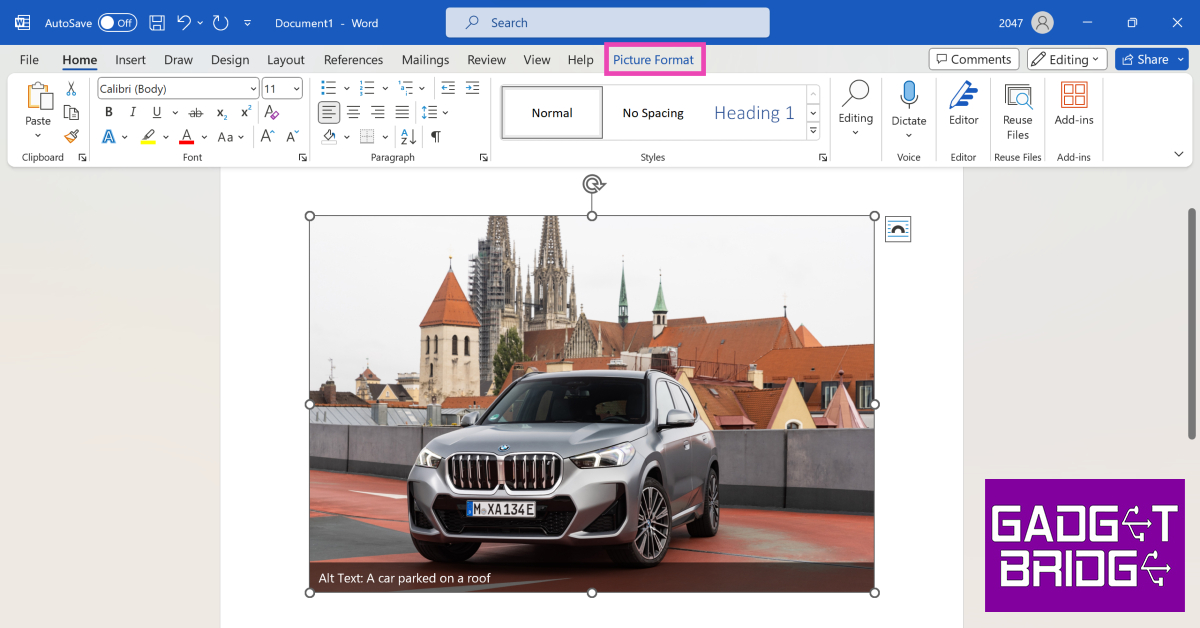
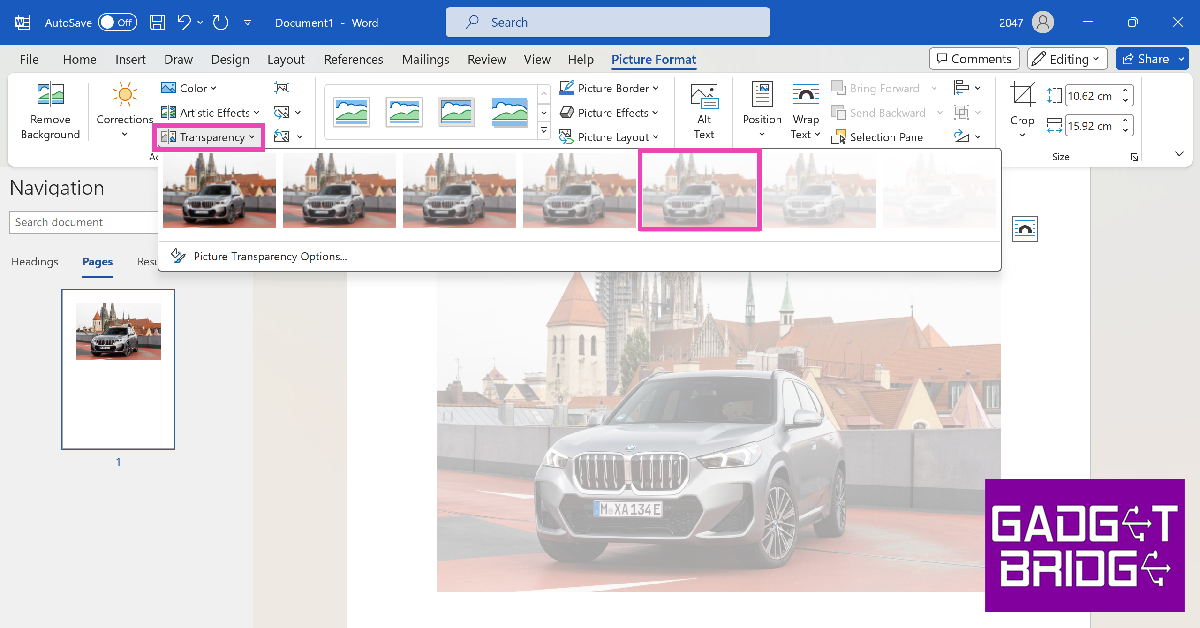
Step 1: Launch Microsoft Word on your Windows PC. Step 2: Go to Insert>Pictures>This device. Upload an image from your computer. Step 2: Go to Insert>Pictures>This device. Upload an image from your computer. Step 3: Select the image and click on Picture Format. Step 3: Select the image and click on Picture Format. Step 4: Click on Transparency and select the level of transparency you want on the image. Step 4: Click on Transparency and select the level of transparency you want on the image. Step 5: Press Ctrl + S to save the image when you’re happy with the results.

Make the image transparent on PC using Google Docs

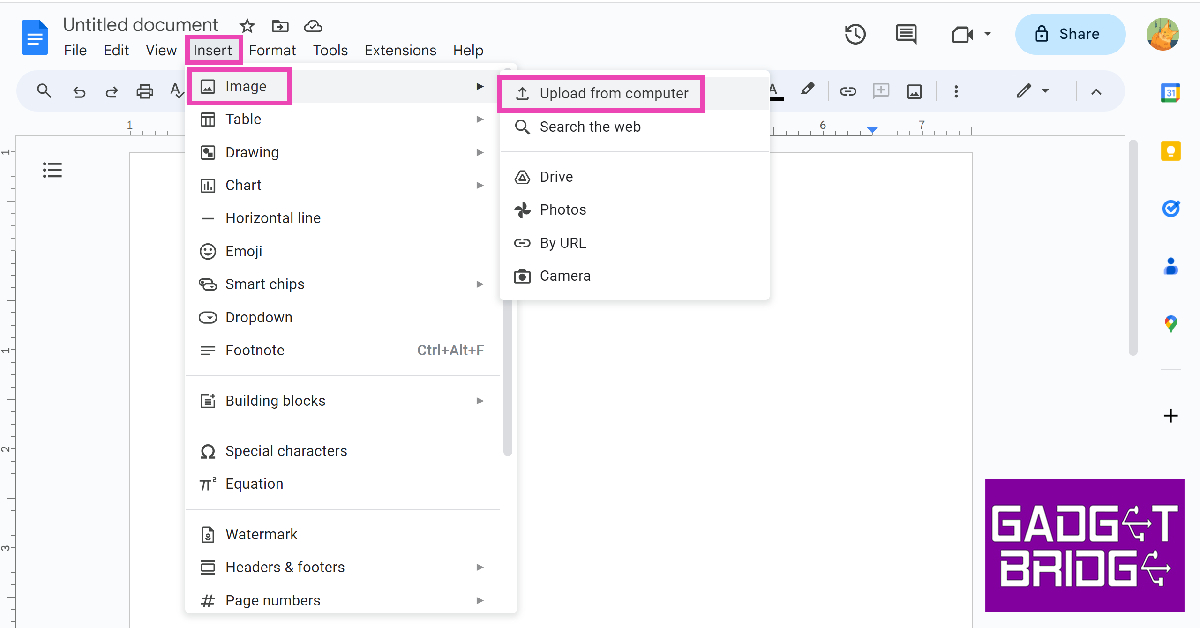
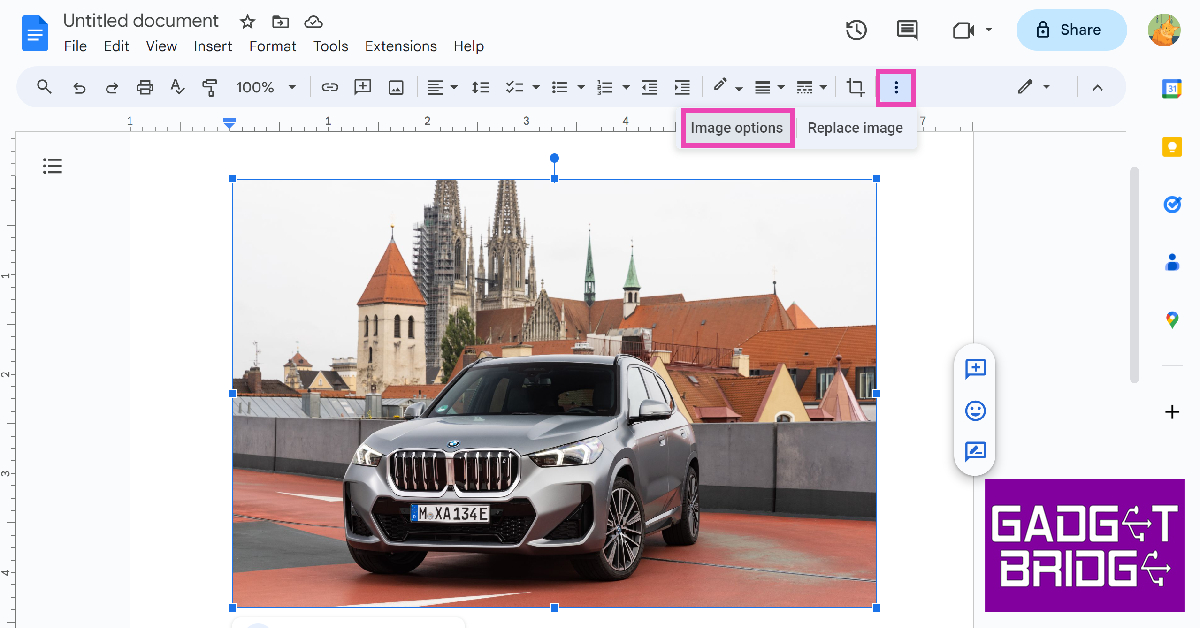
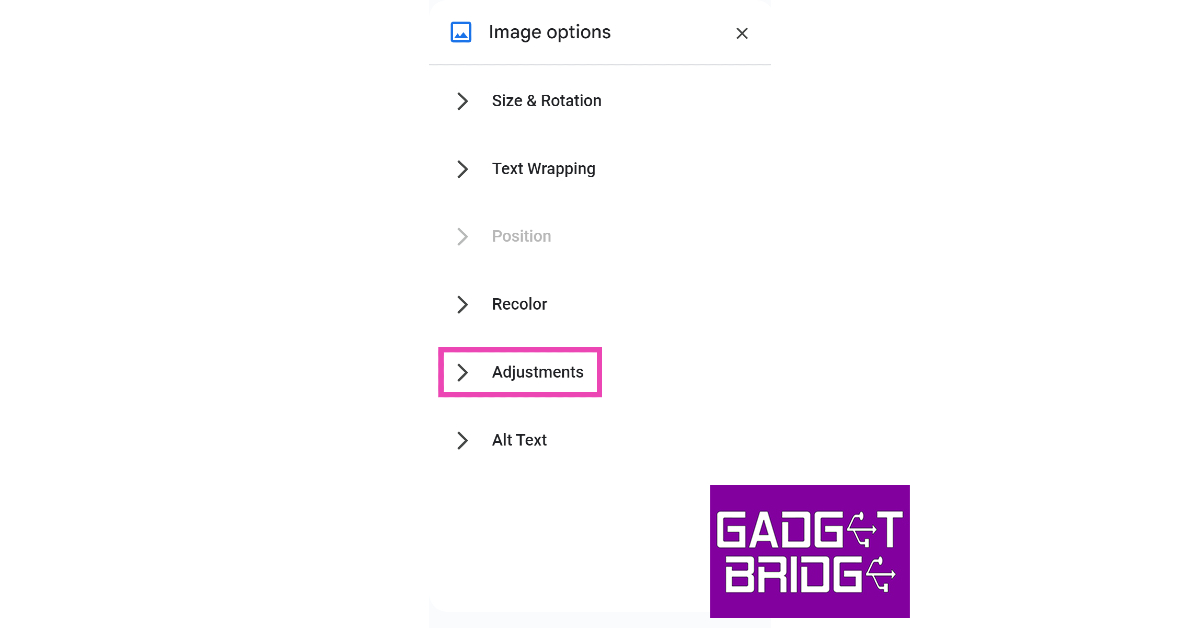
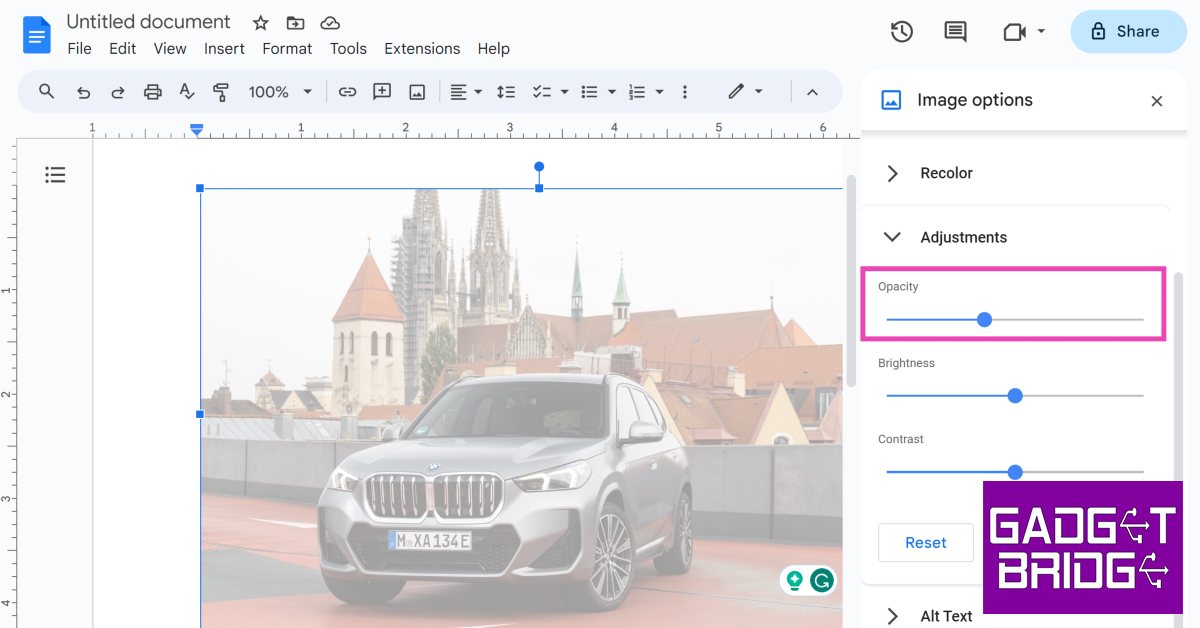
Step 1: Go to Google Docs and open a new document. Step 2: Click on Insert and go to Image>Upload from computer. Upload the image from your PC’s storage. Step 2: Click on Insert and go to Image>Upload from computer. Upload the image from your PC’s storage. Step 3: Select the image and click on the ellipses in the toolbar. Click on Image options. Step 3: Select the image and click on the ellipses in the toolbar. Click on Image options. Step 4: Under Image options, click on Adjustments. Step 4: Under Image options, click on Adjustments. Step 5: Use the Opacity slider to adjust the transparency level of the image. Step 5: Use the Opacity slider to adjust the transparency level of the image.

Make the image background transparent on a Windows PC using Paint

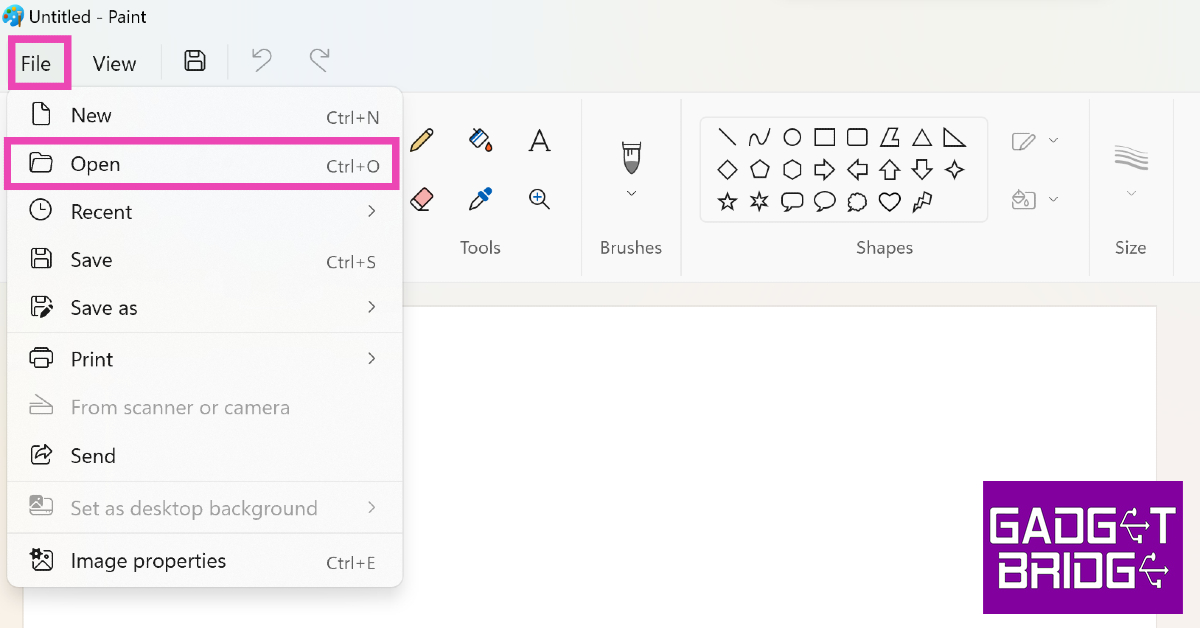
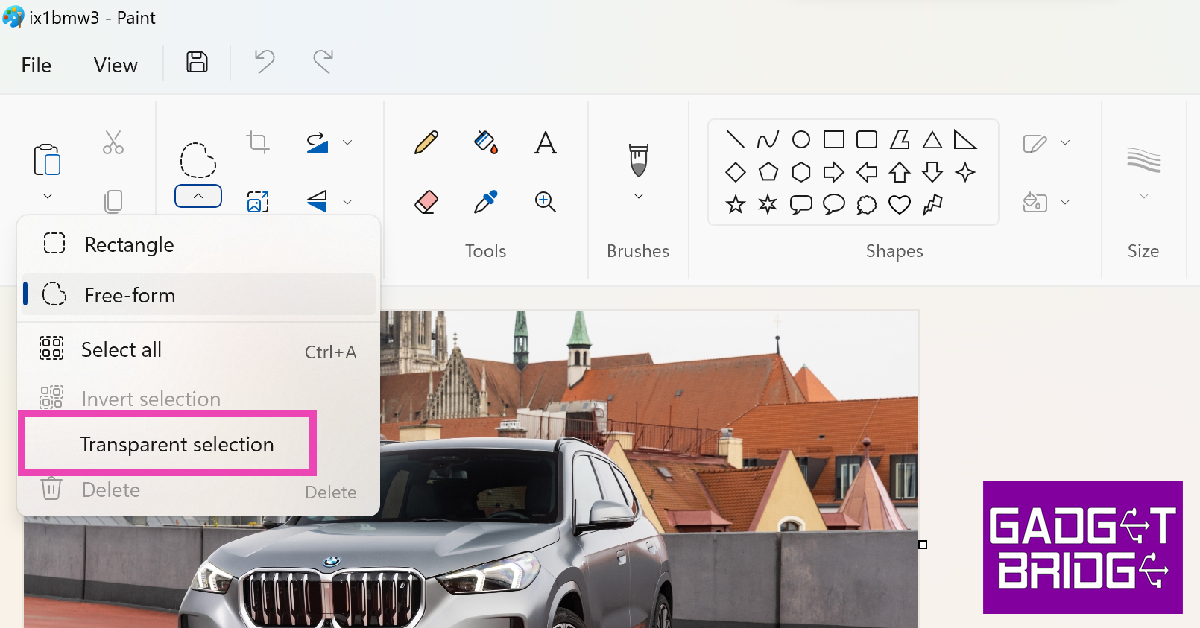
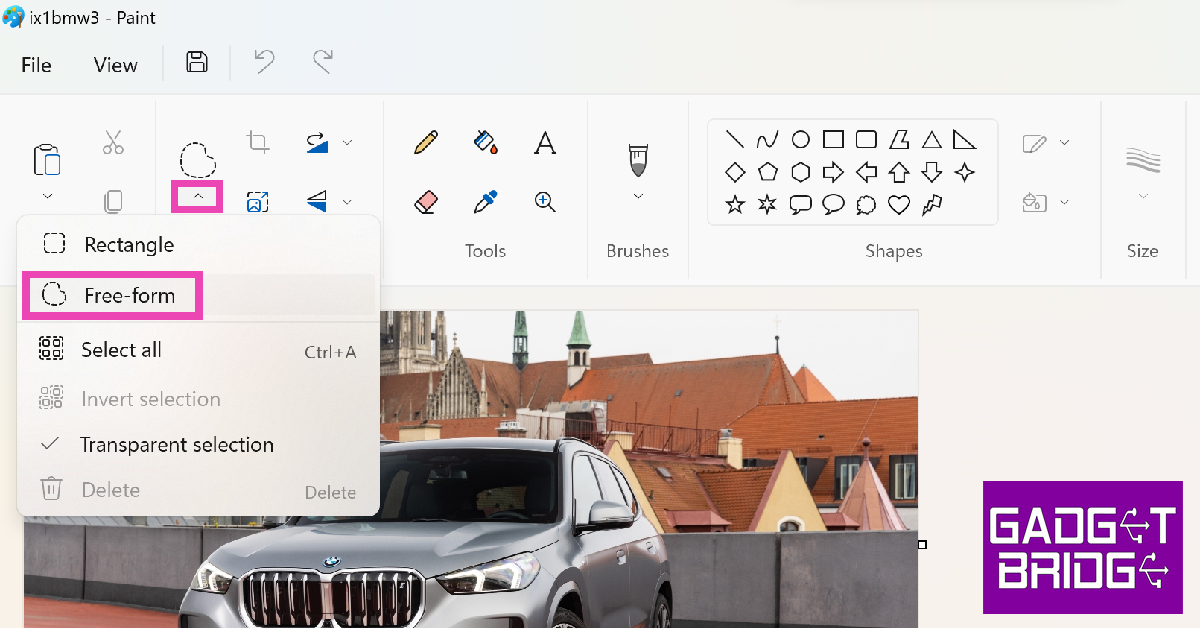
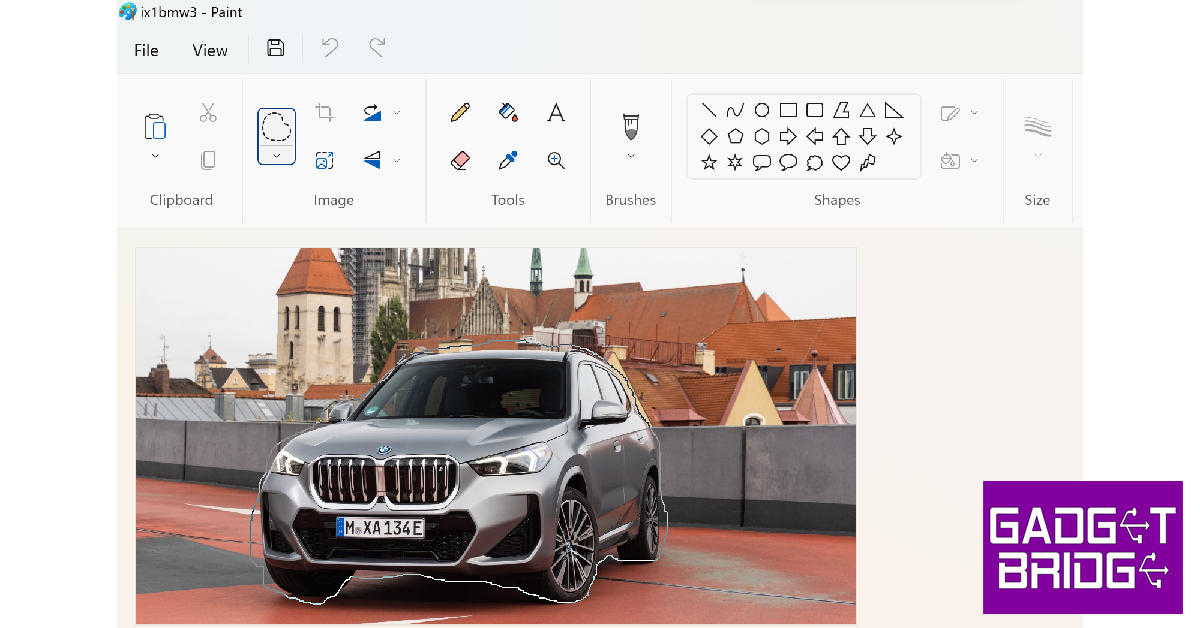
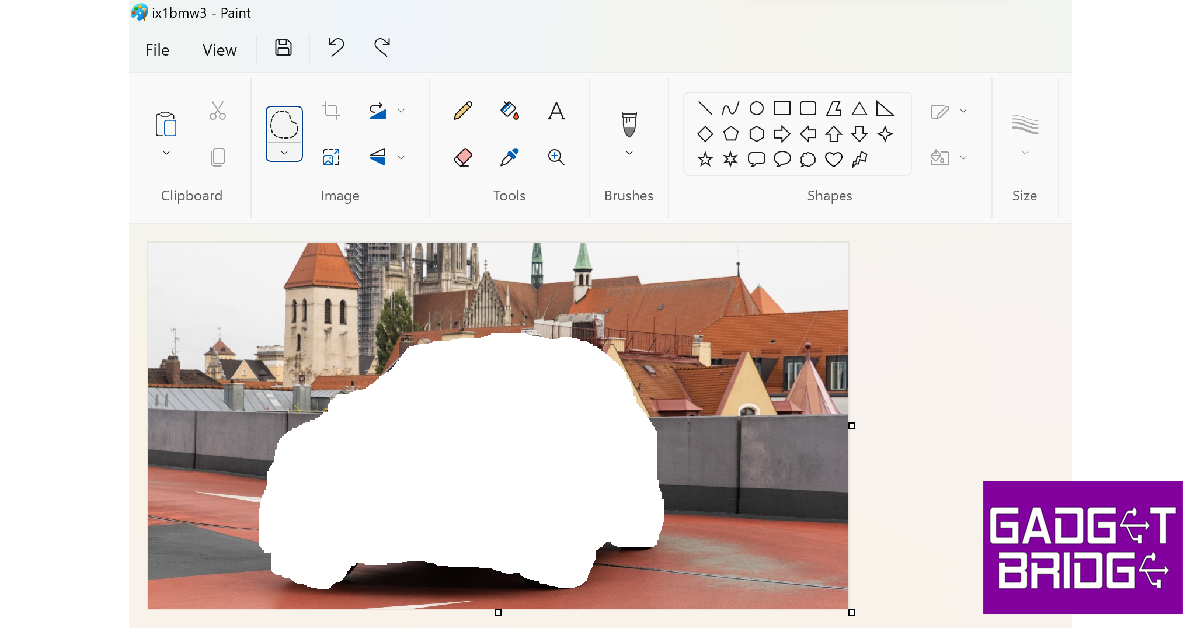
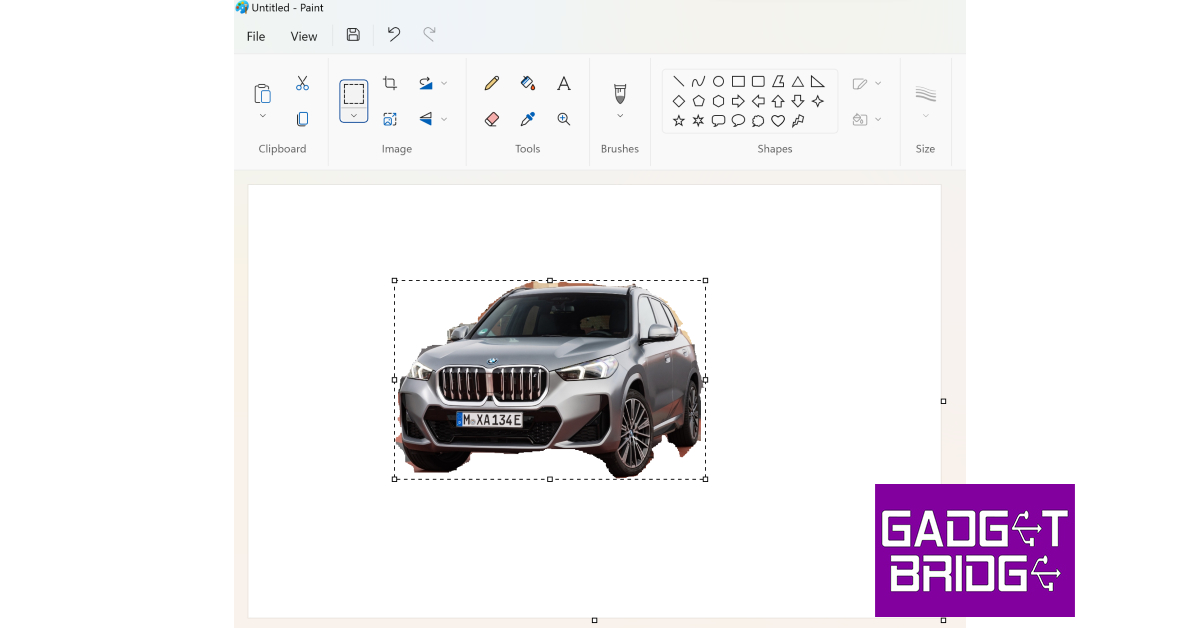
Step 1: Launch the Paint app on your Windows PC. Step 2: Hit File and select Open. Step 2: Hit File and select Open. Step 3: Select the image you want to edit. Step 4: Hit the arrow in the image section on the toolbar and click on Transparent Selection. Step 4: Hit the arrow in the image section on the toolbar and click on Transparent Selection. Step 5: Click the arrow again and select Free Form. Step 5: Click the arrow again and select Free Form. Step 6: Use your cursor to draw a boundary around the subject. Leave the part you want to make transparent unselected. Step 6: Use your cursor to draw a boundary around the subject. Leave the part you want to make transparent unselected. Step 7: Press Ctrl + X to cut the subject from the background. Step 7: Press Ctrl + X to cut the subject from the background. Step 8: Click on File again and select New. Step 9: Press Ctrl + V to paste the subject. Step 9: Press Ctrl + V to paste the subject.  Step 10: Press Ctrl + S to save the image.

Use Fotor to make the image background transparent

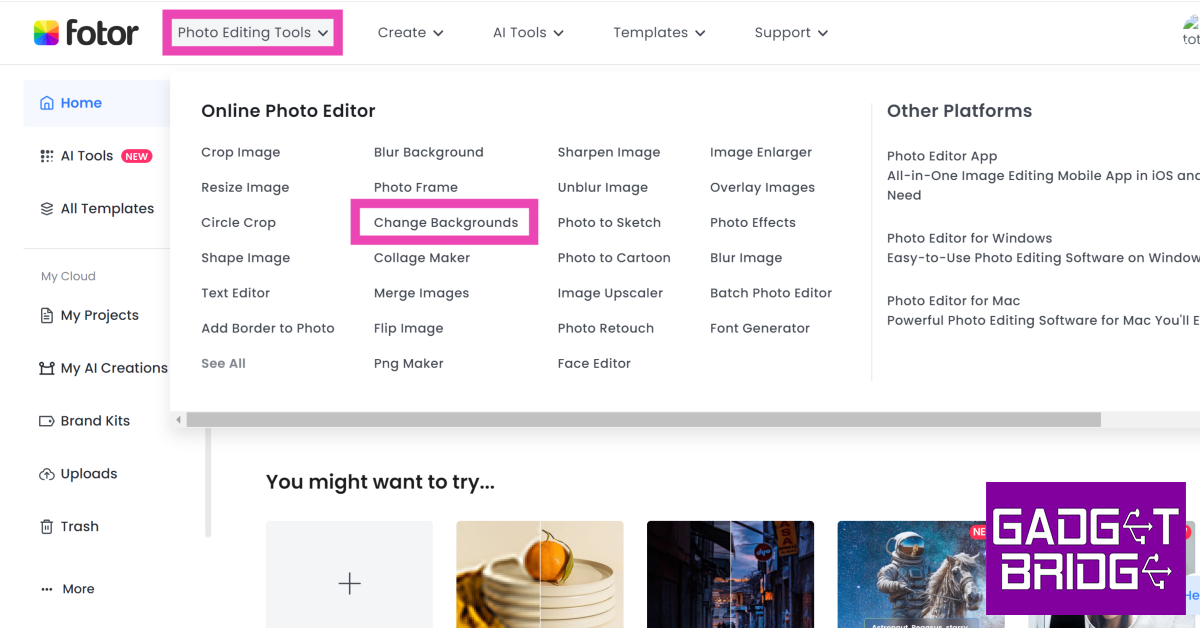
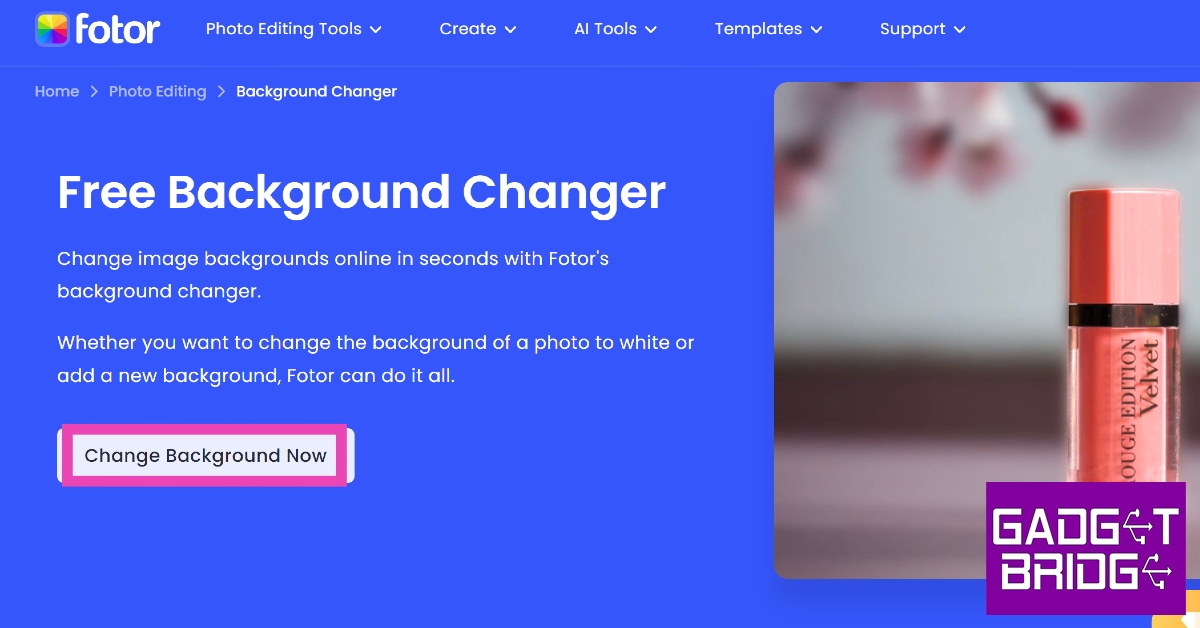
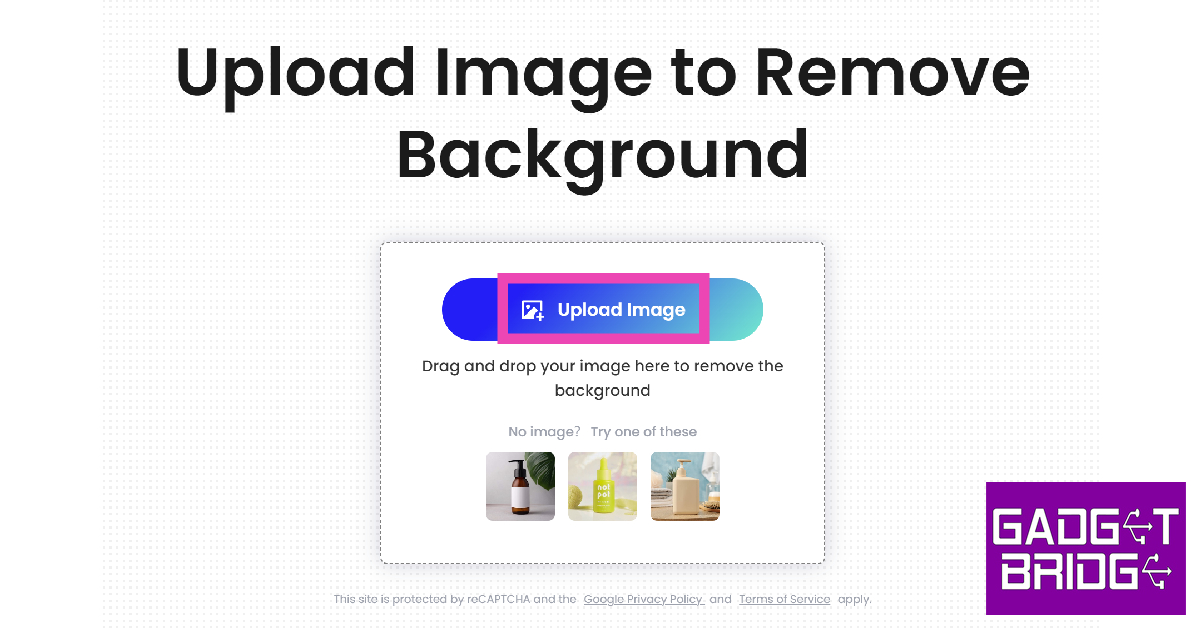
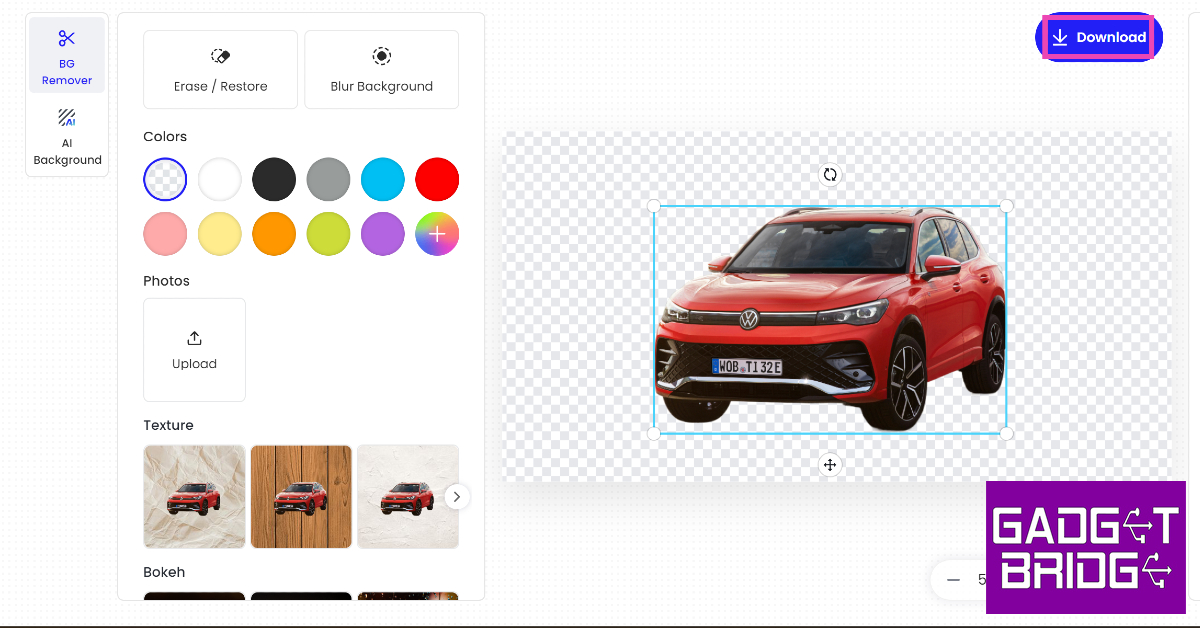
Step 1: Launch the web browser on your PC and go to Fotor.com. Step 2: Move the cursor to Photo Editing Tools and select Change Background. Step 2: Hover the cursor over Photo Editing Tools and select Change Background. 5 Easy Free Ways to Make an Image Background Transparent on a Windows PC Step 3: Click on Change Background Now. Step 3: Click on Change Background Now. 5 Easy Free Ways to Make an Image Background Transparent on a Windows PC Step 4: Hit Upload Image and select an image from your computer. Step 4: Upload the image for which you want to change the background. 5 Easy Free Ways to Make an Image Background Transparent on a Windows PC Step 5: Fotor will automatically remove the background from the image and make it transparent. Step 6: Hit Download to save the image. Step 6: Hit Download to save the image. 5 Easy Free Ways to Make an Image Background Transparent on a Windows PC

Use Remove.bg to remove the background from the image

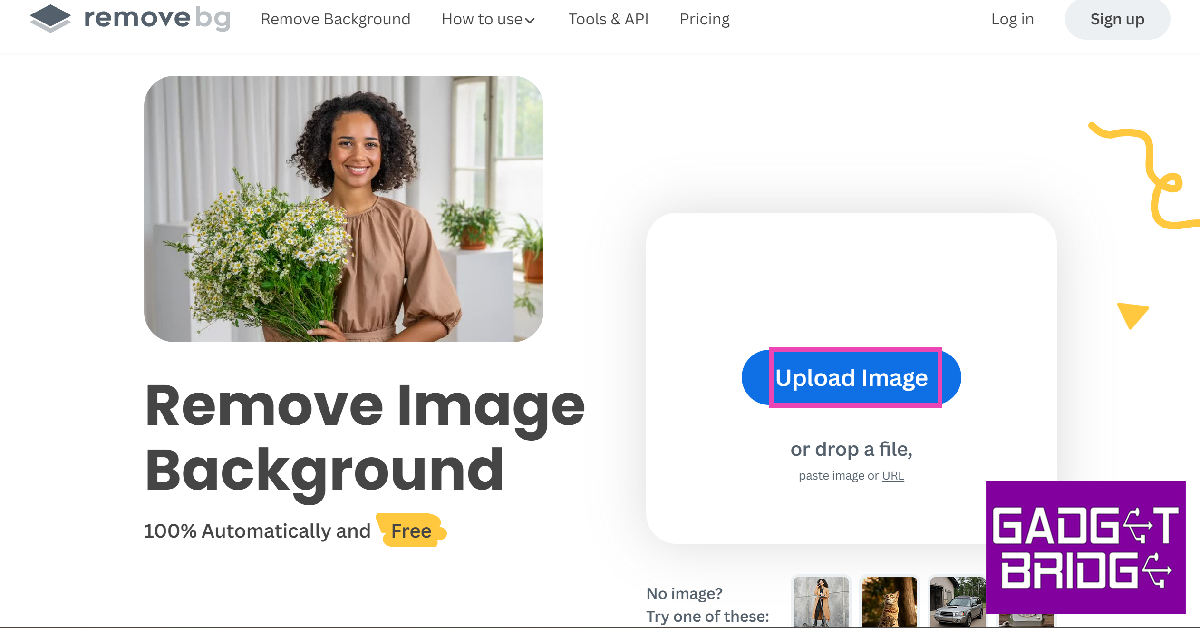
Step 1: Launch the web browser on your Windows PC and go to Remove.bg. Step 2: Click on Upload Image and select an image from your PC. Step 2: Click on Upload Image and select an image from your PC. 5 Easy Free Ways to Make an Image Background Transparent on a Windows PC Step 3: Remove.bg will automatically remove the background from the image. Step 4: Hit Download to save the image. Step 4: Hit Download to save the image. 5 Easy Free Ways to Make an Image Background Transparent on a Windows PC

Frequently Asked Questions (FAQs)

How do I make an image transparent on my computer?

There are several applications on your PC that can help you make an image transparent with ease. On Microsoft Word, select Picture Format>Transparency once you have uploaded the image. You can also adjust the transparency level on Google Docs by going to Image options>Adjustments and using the Opacity slider.

What are the uses of making an image’s background transparent?

Removing the image background or making it transparent lets you insert the image subject in the foreground into any other picture. You can also substitute a transparent background with something else.

How do I remove the background of an image on my PC?

Microsoft Word has a ‘Remove Background’ option in the toolbar at the top of the document. You can also remove the background of an image using online tools like Fotor and Remove.bg. Read Also: Disney+ Hotstar announces new features ahead of the ICC Men’s Cricket World Cup 2023

Conclusion

These are the top 5 ways to make an image background transparent on a Windows PC. Online tools like Fotor and Remove.bg work perfectly fine on smartphones too. You can also use editing apps like Canva to carry out the same task. What is your preferred way of removing the background from an image? Let us know in the comments! For the latest gadget and tech news, and gadget reviews, follow us on Twitter, Facebook and Instagram. For newest tech & gadget videos subscribe to our YouTube Channel. You can also stay up to date using the Gadget Bridge Android App. You can find the latest car and bike news here.

Vivo V29 and Vivo V29 Pro with triple rear cameras launched in India

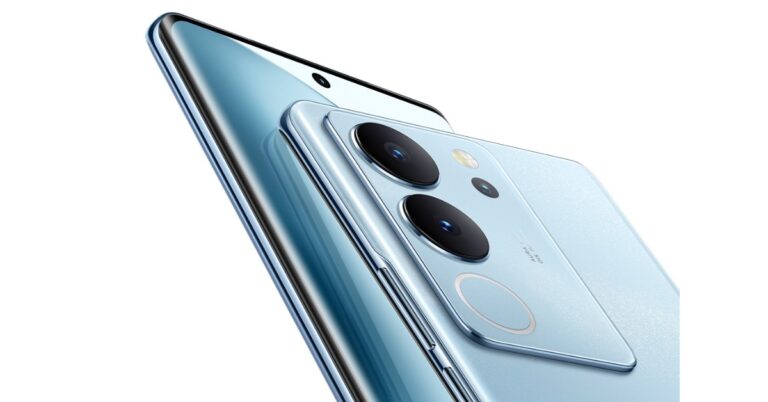
Vivo has officially announced the launch of the Vivo V29 series in India. The newly launched smartphone series includes Vivo V29 and Vivo V29 Pro. To recall the standard V29 was launched globally earlier this year whereas the Pro model will be exclusive to the Indian market.

Vivo V29 and Vivo V29 Pro price in India and sale details

Vivo V29 has been launched in India with a starting price of Rs 32,999 for the 8GB RAM with 128GB and the 12GB RAM with 256GB storage at Rs 36,999. The phone will be offered in Himalayan Blue, Space Black and Majestic Red colour options. Vivo V29 and Vivo V29 Pro price in India and sale details On the other hand Vivo V29 Pro price is set at Rs 39,999 for the 8GB RAM with 256GB storage option, whereas the 12GB RAM with 256GB storage will be available at Rs 42,999. Himalayan Blue and Space black are the two colour options for the Pro variant. Pre-booking of both phones starts today. The Pro variant will be available in the market from October 10 whereas the vanilla V29 will go on sale from October 17. The device can be purchased through the company’s official website in the country, Flipkart and at nearby stores and vivo-exclusive stores.

Vivo V29 specifications

Vivo V29 comes with a 6.78-inch full-HD+ curved AMOLED display. The screen supports a 120Hz refresh rate. It runs on FuntouchOS 13 based on Android 13. Under the hood, there is a Qualcomm Snapdragon 778G SoC. The vanilla variant includes a triple rear camera setup having a 50-megapixel primary sensor, an 8-megapixel ultra-wide angle lens and a 2-megapixel monochrome camera. On the front, there is a 50-megapixel selfie camera. Vivo V29 and Vivo V29 Pro price in India and sale details The smartphone packs a 4,600mAh battery with 80W fast charging support. The V29 is IP68 rated for dust and water resistance. The Vivo phone also features an in-display fingerprint sensor for biometrics. Also Read: Google to launch Pixel 8 and Pixel 8 Pro in India today: Launch event details

Vivo V29 Pro specifications

Vivo V29 Pro will be powered by MediaTek Dimensity 8200 SoC paired with up to 12GB RAM and 256GB storage options. The phone measures 16.418 cm × 7.437 cm × 0.746 cm and weighs 188g. The smartphone features a 6.78-inch 3D curved FHD+ AMOLED display with 2800 × 1260 pixels of resolution and 120Hz refresh rate support. The screen further offers 1.07 billion colours and 100% DCI-P3 wide colour gamut, 452PPi pixel density and HDR10+ Certification. The Vivo V29 Pro includes a triple rear camera sensor consisting of a 50-megapixel primary sensor ( f/1.88 aperture) with OIS. The camera system further includes a 12-megapixel portrait (f/1.98 aperture) and an 8-megapixel wide-angle sensor ( f/2.2). Upfront there is a 50-megapixel selfie camera with autofocus and f/2.0 aperture. The device has a Smart Aura Light which is said to provide 360-degree even lighting. In addition to this, the handset also offers a Wedding Style Portrait feature. In terms of connectivity, there is Bluetooth 5.3, Type-C and Wi-Fi. The sensor on board includes a GPS, Beidou, Galileo, GLONASS, QZSS, NavIC, GNSS and an in-display fingerprint sensor. The smartphone has a 4,600mAh battery with 80W fast charging support. For the latest gadget and tech news, and gadget reviews, follow us on TwitterFacebook and Instagram. For newest tech & gadget videos subscribe to our YouTube Channel. You can also stay up to date using the Gadget Bridge Android App. You can find the latest car and bike news here.

Google to launch Pixel 8 and Pixel 8 Pro in India today: Launch event details

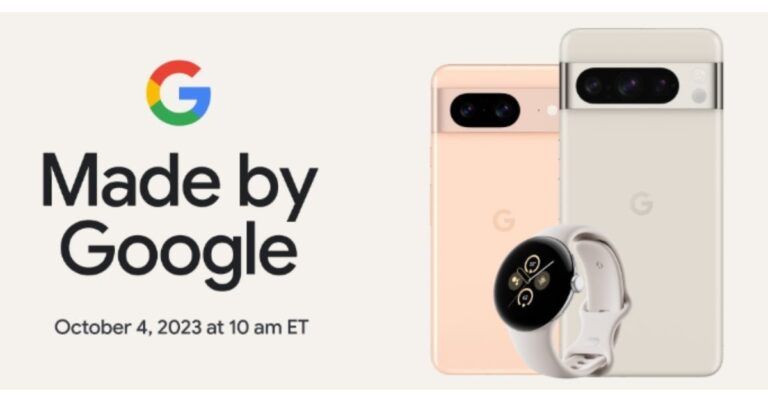
Google is going to host an event called “Made by Google” today. At the launch event, Google will present its much-awaited flagship Android phone namely Pixel 8 and Pixel 8 Pro. In addition to the smartphones, the company will also unveil its new Pixel Buds and Pixel Watch 2. Additionally, the firm has also revealed the pre-order deals that would be accessible through Flipkart in India and has also confirmed that smartphones will be sold there. Preorders will start a day after the launch which is tomorrow. Here is a peek at the specs and price and how to watch the Pixel 8 series launch event live.

Here is how to watch the Pixel 8 Series launch event

Today, the tech giant Google will finally unveil it Pixel 8 Series in India and globally. The company is also going to launch Pixel Buds and Pixel Watch 2 along with the smartphones. The Made By Google 2023 Keynote will begin at 7:30 PM in India via company’s official YouTube channel. We have also embedded a link below.

Google Pixel 8 and Pixel 8 Pro price in India and availability expected

The new Android smartphone series will include two models Pixel 8 and Pixel 8 Pro. Interested buyers will be able to pre-book the devices via Flipkart. Pixel 8 Series reservations will start a day after the debut which is good as the buyers will be able to make informed purchases. Also Read: Sennheiser Ambeo Soundbar Mini launched in India The company has not yet revealed the pricing but according to a tipster the price of the Pro variant is likely to come with a starting price of $899 which translates to Rs 74,800. On the other hand, the vanilla model is expected to come with a price tag of $699 which converts to Rs 51,800. The standard version would be made available in Obsidian, Hazel and Rose colour whereas the Pro variant could come in Obsidian, Porcelain and Bay shades. The tipped pricing of the vanilla option is in contrast to the previously tipped price of $599 on the other hand, the Pixel 8 Pro will cost $999. Therefore there will be a $100 price increase for all models in the US.

Google Pixel 8 and Pixel 8 Pro specifications expected

According to tipped information the Pixel 8 is likely feature a 6.17-inch full-HD+ OLED display. On the other hand, the Pixel 8 Pro might come with a 6.71-inch LTPO QHD OLED display. Both the screens will have a layering of Corning Gorilla Glass Victus 2. The phone will be powered by Tenson G3 SoC and could be made available with 8GB RAM with 12GB storage and 128GB RAM with 256GB storage. The upcoming phones will run on the latest edition of Android software, Android 14 with Pixel-exclusive features onboard. For photos and videos, the Google Pixel 8 series will include a similar camera sensor on the front as well as on the rear (primary). On the rear, it is likely to provide a primary 50MP Octa PD sensor. The rear camera will have a 1.2 μm pixel width, f/1.68 aperture, 82-degree field of view, 1/1.31″ image sensor size and Super Res Zoom up to 8x (exclusive to vanilla variant). The secondary camera on the vanilla variant is likely to feature a 12 MP ultrawide camera with auto-focus, 1.25 μm pixel width, f/2.2 aperture, 125.8-degree field of view as well as a Lens correction feature. On the other hand, the pro variant will have a 48 MP Quad PD ultrawide camera with autofocus, 0.8 μm pixel width, f/1.95 aperture, 125.5-degree field of view and a Lens correction feature. The Pro camera is speculated to include a third 48 MP Quad PD telephoto camera, 0.7 μm pixel width, f/2.8 aperture, 21.8-degree field of view, 5x optical zoom and Super Res Zoom up to 30x. Also Read: OnePlus foldable phone ‘Open’ is jointly developed by OPPO team and OnePlus team, the company confirms For selfies the Google Pixel 8, Pixel 8 Pro will have a similar 10.5 MP Dual PD selfie camera, 1.22 μm pixel width, f/2.2 aperture and 95-degree field of view. The selfie camera on the vanilla variant will have a fixed focus while the Pro version will have an auto focus. Lastly, the Pixel 8 might consist of a 4,485mAh battery with 24W wired and 12W wireless fast charging support. Whereas, the Pixel 8 Pro is likely to boast a 4,950mAh battery along with 27W wired fast and 12W wireless charging support. For the latest gadget and tech news, and gadget reviews, follow us on TwitterFacebook and Instagram. For newest tech & gadget videos subscribe to our YouTube Channel. You can also stay up to date using the Gadget Bridge Android App. You can find the latest car and bike news here.

BGMI redeem codes for 4 October 2023, claim and receive rewards and benefits

After being banned for nearly ten months, Battleground Mobile India, aka BGMI, is officially available again in India. BGMI fans are looking for ways to improve their game experience and one such method is the usage of redemption codes, which offers a variety of rewards and advantages using BGMI redeem codes players can gain access to new skins, outfits, loot crates, weapons and free UC and diamonds. As mentioned earlier, these codes give users the chance to earn unique rewards and gain extra benefits while playing the game. This includes GUN SKINS (M4, AKM, M416, AWM, M24, UZI, KAR98K), free character voucher, Andy, Carlo, Sara, Victor character for free, free Anna Character on completing the mission and UC or Royal Pass Discount. So here we have gathered a list of the most recent BGMI redeem codes as of 4 October 2023. Also, redeem these codes asap as these are only valid for a limited duration.

BGMI Redeem Codes for 4 October 2023

Updating soon

How to get free Redeem Codes for BGMI on 4 October 2023?

  • Launch BGMI on your device.
  • Then select the Redeem Code option from the main menu.
  • Next, click on the Redeem code tab.
  • A new window will open, requesting the redemption code.
  • Now enter your BGMI code.
  • Confirm and click on the “Redeem” tab.
  • If your redeem code is valid then you will get a message confirming that your rewards were successfully redeemed.
(Note that these codes are case-sensitive, so be sure to type them correctly to prevent any errors.) For the latest gadget and tech news, and gadget reviews, follow us on TwitterFacebook and Instagram. For newest tech & gadget videos subscribe to our YouTube Channel. You can also stay up to date using the Gadget Bridge Android App. You can find the latest car and bike news here.

Garena Free Fire Redeem Codes Today 4 October 2023: Here is how to claim them

Garena Free Fire is a battle royale game with regular awards and tournaments to keep players interested. If you play Garena Free Fire, you should be aware of the redeem codes that are released on a daily basis. However, because the battle royale game is banned in India, players from other countries can use the Free Fire Redeem codes daily. If you’re unfamiliar with the Garena Free Fire redeem codes or don’t know how to get them, we’ve put together a step-by-step guide to help you redeem them. Check out Garena Free Fire Redeem Codes for 4 October 2023. The Free Fire redeem codes are a great way to get free stuff. These are 12-digit codes that contain alphabets and numbers, as well as an expiration date and time. Because the Garena FF redeem codes cannot be used more than once, you should hurry to the redemption page to claim your free reward before someone else does. To get a free reward, all you have to do is go to reward.ff.garena.com/en, which is the official redemption page. Also, keep an eye on this space for daily updates on Garena Free Fire redemption codes and rewards.

Garena Free Fire Redeem Codes Today 4 October 2023

Updating Soon

How to Get Free Fire Redeem Codes for Garena on 4 October 2023?

  • Visit the Garena Free Fire game’s official website at reward.ff.garena.com.
  • Use your Facebook, Google, VK, Apple ID, Huawei ID, or Twitter account to log in.
  • You’ll be taken to a valid redemption code (s)
  • Copy and paste the 12-digit redemption code into the text box.
  • On the screen, a dialogue box will appear.
  • ‘Ok’ should be selected.
For the latest gadget and tech news, and gadget reviews, follow us on TwitterFacebook and Instagram. For newest tech & gadget videos subscribe to our YouTube Channel. You can also stay up to date using the Gadget Bridge Android App. You can find the latest car and bike news here.

An Exploration of Cryptocurrencies in Aerospace and Defence

Cryptocurrencies have become a buzzword in recent years, with significant implications for various industries, including aerospace and defence. This article aims to provide a comprehensive exploration of how these digital currencies are making an impact in these sectors. Understanding the basics of cryptocurrencies is crucial to grasp their potential applications and challenges. Additionally, exploring the use of cryptocurrencies in the aerospace industry and the defence sector will shed light on their respective contexts and implications. Regulatory considerations also play a pivotal role in shaping the landscape of cryptocurrencies in aerospace and defence. Finally, a glimpse into the future will reveal predicted trends and the potential impact on industry growth and innovation.

Understanding Cryptocurrencies

The Basics of Cryptocurrency: Cryptocurrencies, often referred to as digital or virtual currencies, are digital assets based on cryptographic technology. They operate on decentralized networks or distributed ledgers called blockchains. Unlike traditional fiat currencies issued by central banks, cryptocurrencies are not regulated by any central authority like governments or financial intermediaries. Instead, they rely on cryptographic techniques to secure transactions and control the creation of new units. When it comes to cryptocurrencies, there are several key elements that make them unique. Firstly, they are based on a decentralized system, meaning that no single entity has control over the currency. This decentralization is achieved through the use of blockchain technology, which we will explore in more detail later. Secondly, cryptocurrencies are secured through cryptographic techniques. This means that transactions made with cryptocurrencies are encrypted and cannot be easily tampered with or reversed. This provides a high level of security and ensures the integrity of the currency. Lastly, cryptocurrencies have a limited supply. Unlike traditional currencies that can be printed or minted at will, most cryptocurrencies have a predetermined maximum supply. This scarcity adds value to the currency and can contribute to its price appreciation over time. Blockchain Technology in Cryptocurrency: Blockchain technology is at the heart of cryptocurrencies. It is a decentralized and transparent ledger that records all transactions across a network of computers. This technology ensures the security, privacy, and integrity of transactions, making it a reliable alternative to traditional financial systems. At its core, a blockchain is a chain of blocks, where each block contains a list of transactions. These blocks are linked together using cryptographic hashes, creating an immutable and tamper-proof record of all transactions. This transparency and immutability make blockchain technology highly secure and resistant to fraud. One of the key advantages of blockchain technology is its decentralized nature. Unlike traditional financial systems that rely on a central authority to validate and record transactions, blockchain networks are maintained by a distributed network of computers, known as nodes. These nodes work together to validate transactions and reach a consensus on the state of the blockchain. Another important feature of blockchain technology is its transparency. All transactions recorded on the blockchain are visible to anyone with access to the network. This transparency can help prevent fraud and increase trust in the system. Furthermore, blockchain technology offers enhanced privacy compared to traditional financial systems. While transactions on the blockchain are visible, the identities of the parties involved can be kept anonymous through the use of cryptographic techniques. In conclusion, cryptocurrencies and blockchain technology have revolutionized the way we think about money and financial systems. With their decentralized nature, cryptographic security, and transparent record-keeping, cryptocurrencies offer a new paradigm for conducting transactions and storing value. As the technology continues to evolve, we can expect to see even more innovative use cases and applications for cryptocurrencies in the future.

Cryptocurrencies in the Aerospace Industry

Potential Applications of Cryptocurrency: The aerospace industry has shown great interest in adopting cryptocurrencies due to their potential for streamlining various processes. One significant application is the use of cryptocurrencies for secure and efficient supply chain management. Blockchain technology ensures transparency, traceability, and authentication throughout the supply chain, reducing the risk of counterfeit parts or unauthorized modifications. Furthermore, cryptocurrencies can also facilitate seamless and secure transactions between aerospace companies and their suppliers. By using digital currencies, companies can eliminate the need for traditional banking systems, reducing transaction costs and increasing efficiency. This not only benefits the aerospace industry but also creates new opportunities for cryptocurrency adoption in other sectors. Challenges and Opportunities: However, challenges lie ahead for the aerospace industry in embracing cryptocurrencies. One major hurdle is the integration of existing complex systems with blockchain technology. This requires careful planning and collaboration among industry stakeholders. Additionally, concerns regarding the scalability and energy consumption of cryptocurrencies need to be addressed to ensure their widespread adoption. Despite the challenges, the adoption of cryptocurrencies in the aerospace industry presents exciting opportunities in terms of enhanced transparency, efficiency, and cost reduction. For instance, the use of smart contracts powered by blockchain technology can automate and streamline various processes, such as aircraft maintenance and leasing agreements. This not only saves time but also reduces the risk of errors and disputes. Moreover, cryptocurrencies can enable new business models and revenue streams in the aerospace industry. For example, companies can tokenize their assets, such as aircraft or spare parts, and offer fractional ownership through cryptocurrency-based platforms. This opens up investment opportunities for individuals and institutions, while also providing liquidity to the aerospace market. In conclusion, the aerospace industry recognizes the potential of cryptocurrencies to revolutionize its operations. From secure supply chain management to seamless transactions and innovative business models, cryptocurrencies offer a range of benefits. While challenges exist, industry stakeholders are actively exploring ways to overcome them and unlock the full potential of cryptocurrencies in the aerospace sector.

Cryptocurrencies in the Defence Sector

Security Implications of Cryptocurrency Use: The defence sector faces crucial security implications when considering the use of cryptocurrencies. While blockchain technology offers secure transactions, it also presents a new set of challenges. Concerns about anonymity and the potential for illegal activities raise questions about the robustness of defence systems. Therefore, a careful balance between security and innovation is essential. Cryptocurrency in Defense Procurement: Furthermore, cryptocurrencies have the potential to revolutionize defence procurement processes. Smart contracts, enabled by blockchain technology, can automate and streamline procurement operations, ensuring transparency and efficiency. However, a comprehensive understanding of the risks and benefits associated with these technologies is essential before full-scale adoption.

Regulatory Considerations for Cryptocurrencies in Aerospace and Defense

Existing Regulatory Framework: As the aerospace and defence sectors explore the use of cryptocurrencies, regulatory considerations come into play. Existing regulatory frameworks vary across jurisdictions, and industries must navigate these complexities effectively. Cooperation between government entities, industry players, and regulatory bodies is crucial for creating a conducive environment for cryptocurrency adoption. Potential Future Regulations: In the future, regulatory frameworks are likely to evolve as the adoption of cryptocurrencies continues to grow. Governments may implement stricter regulations to combat potential financial crimes while also creating a favourable environment for innovation. Industry players must keep abreast of regulatory developments and actively participate in shaping policies that facilitate responsible cryptocurrency use.

The Future of Cryptocurrencies in Aerospace and Defense

In the aerospace and defence sectors, the integration of cryptocurrencies is not immediately obvious, but it’s progressively taking shape as an innovative means of financing and transaction. Within this unique blend, Granimator offers an advanced analytical lens. As these industries look to harness the potential of Bitcoin and other cryptocurrencies for procurement, supply chain management, or even innovative funding avenues, the predictive capabilities of granimator become invaluable. It aids in navigating the volatile crypto markets, ensuring that the aerospace and defence realms benefit from precise, real-time financial insights. Predicted Trends: The future of cryptocurrencies in aerospace and defence holds several predicted trends. These include broader adoption of cryptocurrencies, increased compatibility with existing systems, and the development of specialized solutions tailored to industry needs. Blockchain technology is expected to continue evolving, offering improved scalability, speed, and security.

Impact on Industry Growth and Innovation:

The adoption of cryptocurrencies has the potential to drive industry growth and innovation in aerospace and defence. By leveraging the benefits of blockchain technology and secure transactions, these sectors can enhance efficiency, reduce costs, and foster collaboration. However, proactive efforts in addressing challenges and maintaining security will be critical for long-term success. In conclusion, cryptocurrencies have the potential to revolutionize the aerospace and defence sectors. Through the exploration of their basics, potential applications, challenges, and regulatory considerations, it becomes clear that careful planning and collaboration are necessary. While security implications and potential future regulations require attention, the adoption of cryptocurrencies can lead to enhanced industry growth and innovation. The future of cryptocurrencies in aerospace and defence is exciting, predicting trends that will reshape traditional practices and pave the way for a more transparent, efficient, and secure future. For the latest gadget and tech news, and gadget reviews, follow us on TwitterFacebook and Instagram. For newest tech & gadget videos subscribe to our YouTube Channel. You can also stay up to date using the Gadget Bridge Android App. You can find the latest car and bike news here.

Sennheiser Ambeo Soundbar Mini launched in India

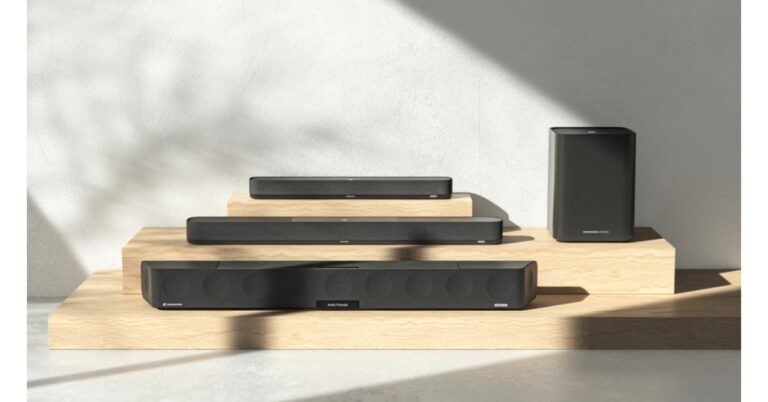
Sennheiser Ambeo Soundbar Mini has been launched in India today. The company last month released Sennheiser Ambeo Soundbar Plus and the Ambeo Sub which were initially released at the 2022 IFA in Berlin. According to the German audio brand the audio device is less than half the cubic volume of its Soundbar Plus sibling. It supports 3D sound and Dolby Atmos. It also has 25W of class D amplification and equips four drivers and dual subwoofers. There are customisable audio modes in it.

Sennheiser Ambeo Soundbar Mini specifications

Sennheiser Ambeo Soundbar Mini is compact and smaller in size then the rest of its siblings. There are four full-range drivers and dual 4-inch subwoofers for 250W audio output. As per the company, this will offer deep bass and crystal-clear audio. There are customisable audio modes including content-specific presets, a Voice enhancement option and a neighbor-friendly Night mode. Sennheiser Ambeo Soundbar Mini specifications In terms of connectivity, there is an HDMI input that accommodates a wide range of eARC-enabled TVs or monitors. In addition to this Sennheiser Ambeo Soundbar Mini can be paired with the Sennheiser Smart Control App for more features and updates. Also Read: OnePlus foldable phone ‘Open’ is jointly developed by OPPO team and OnePlus team, the company confirms Ambeo Soundbar Mini has been created in collaboration with the Fraunhofer Institute for Integrated Circuits IIS—a world leader in audio research and development to provide 3D sound output. Moreover, there are a total of four integrated microphones that serve a dual purpose: they function as the central component of the AMBEO room calibration, and facilitate Alexa voice assistant commands as the Soundbar features Alexa Built-In. There is an option to make use of existing Google Assistant or Siri-enabled devices to cast audio to the Mini through Chromecast Built-In and AirPlay, respectively. Further, the Mini supports popular Dolby Atmos, DTS:X, MPEG-H Audio codecs, and 360 Reality Audio formats and experiences for enjoying native spatial audio content. The soundbar runs on AMBEO|OS operating system that scans the room to adjust the surround virtualization to account for various room sizes, reflections, and textures. The device can be connected to your phone using Wi-Fi or Bluetooth. It has support for such as a Spotify, TIDAL, Amazon Music, and Apple Music

Sennheiser Ambeo Soundbar Mini price and availability

The price of the Sennheiser AMBEO Soundbar Mini has been set at Rs 74,990. The soundbar is currently available for purchase via the brand webshop www.sennheiser-hearing.com, Amazon.in and other leading electronic outlets in India. For the latest gadget and tech news, and gadget reviews, follow us on TwitterFacebook and Instagram. For newest tech & gadget videos subscribe to our YouTube Channel. You can also stay up to date using the Gadget Bridge Android App. You can find the latest car and bike news here.

Disney+ Hotstar announces new features ahead of the ICC Men’s Cricket World Cup 2023

0
The ICC Men’s Cricket World Cup 2023 kicks off on Thursday, October 5. Disney+ Hotstar will be exclusively streaming the tournament in India across their mobile, Smart TV, and desktop apps. Ahead of the tournament, the streaming giant has announced some new features that will improve the cricket-watching experience for its viewers. These features include a new vertical orientation mode for cricket matches (dubbed MaxView), AI-based video quality enhancements, optimised data-saving for streaming, and more. Read Also: How to disable Always On Display on Apple Watch and Watch Ultra?

ICC Men’s Cricket World Cup 2023 starts this Thursday, streaming exclusively on Disney+ Hotstar

Hotstar rebranded to Disney+ Hotstar ahead of the Disney+ launch in India The new MaxView feature on the Disney+ Hotstar app will allow users to watch cricket matches on the go in vertical mode (9×14 portrait view). The in-app scorecard and Live feed tab will also be realigned vertically to match MaxView. There will be multiple viewing options on MaxView. Viewers can opt for single-player frames or a split-screen setup with multiple camera angles. The informational on-screen graphics will also be readjusted to fit the screen vertically. Incidentally, cricket is also a very popular sport on powerplay.com Taking concerns around mobile data usage into consideration, Disney+ Hotstar has optimised its video delivery process to consume minimal data. With multiple matches streaming in one day, users don’t have to worry about the limited data caps on their mobile data plans. The viewing experience will be further refined by AI-based filters capable of clearing the haziness on video caused by weather conditions on the field. For those who don’t want to miss any cricketing action while watching other content on the platform, Disney+ Hotstar has devised a special Always-On Cricket Scorecard pill that will keep users updated on the live scorecard across the app. Users can switch to the game with one quick tap on the scorecard pill. The match stream will also come with a dedicated Live feed tab for individual player stats, game updates, and more. Announcing the new features, Sajith Sivanandan, Head, Disney+ Hotstar, said, “Disney+ Hotstar has pioneered the market in providing unmatched live sports experiences. Our progression is deeply influenced by fan behavior, and we continuously adapt by introducing technological innovations to enhance the viewing experience, especially for users on the go. Our dedicated efforts have been channeled into building a robust product infrastructure, ensuring uninterrupted viewing even amidst the anticipated high user volume.” Read Also: Top 4 Ways to Download and Use Offline Maps on Apple Maps

Conclusion

The ICC Men’s Cricket World Cup 2023 officially begins on October 5, 2023. Disney+ Hotstar is offering free coverage of the warm-up matches going on right now for its mobile viewers. TV and desktop viewers will need to subscribe to the platform to watch all the cricketing action. For the latest gadget and tech news, and gadget reviews, follow us on Twitter, Facebook and Instagram. For newest tech & gadget videos subscribe to our YouTube Channel. You can also stay up to date using the Gadget Bridge Android App. You can find the latest car and bike news here.

5 Easy methods to Find and Delete Duplicate Images on any Samsung Smartphone

0
Taking the perfect shot for the ‘Gram isn’t easy. Sometimes it requires taking multiple pictures of the same subject and selecting the best one out of the lot. Over a period of time, the duplicate images in your phone pile up to occupy a fair chunk of the storage space. Going through the pictures again is a very tedious job. Luckily, your phone can intelligently scan the redundant images for you. In this article, we bring you the top 5 easy methods to find and delete duplicate images on any Samsung smartphone. Read Also: How to disable Always On Display on Apple Watch and Watch Ultra?

Find and delete duplicate images from Samsung’s native Gallery app

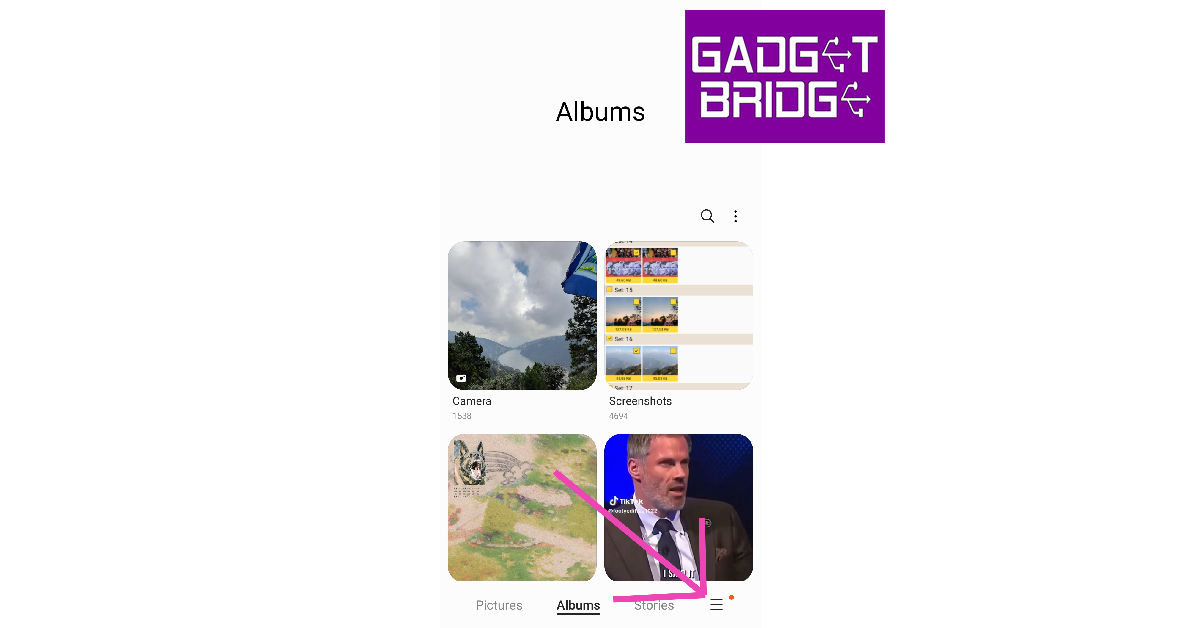
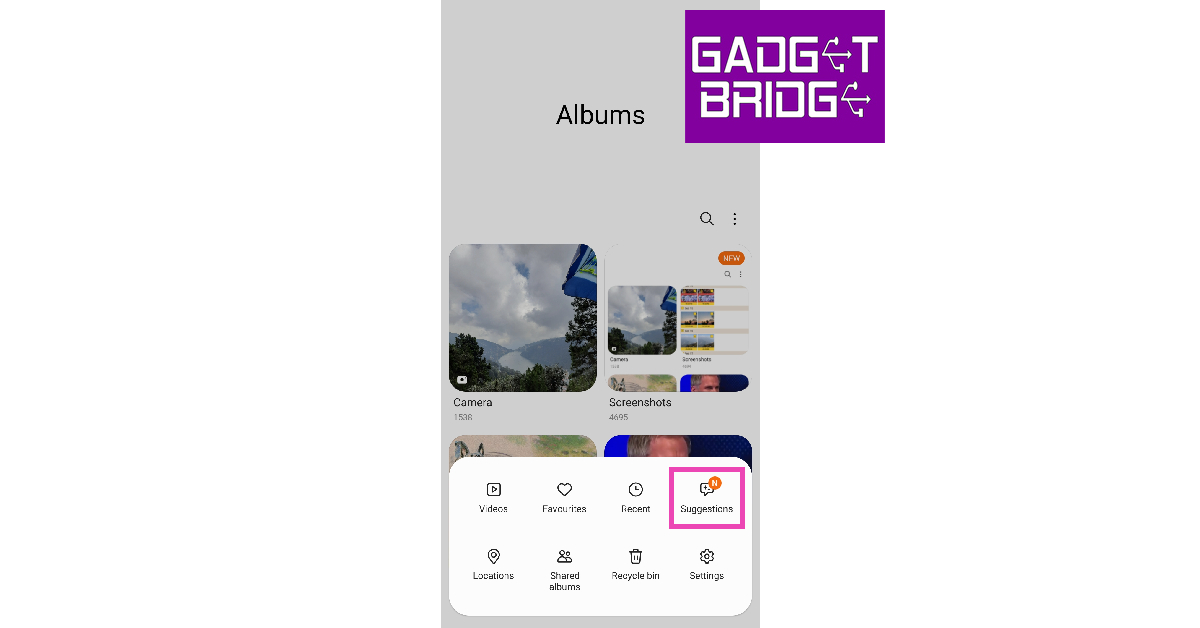
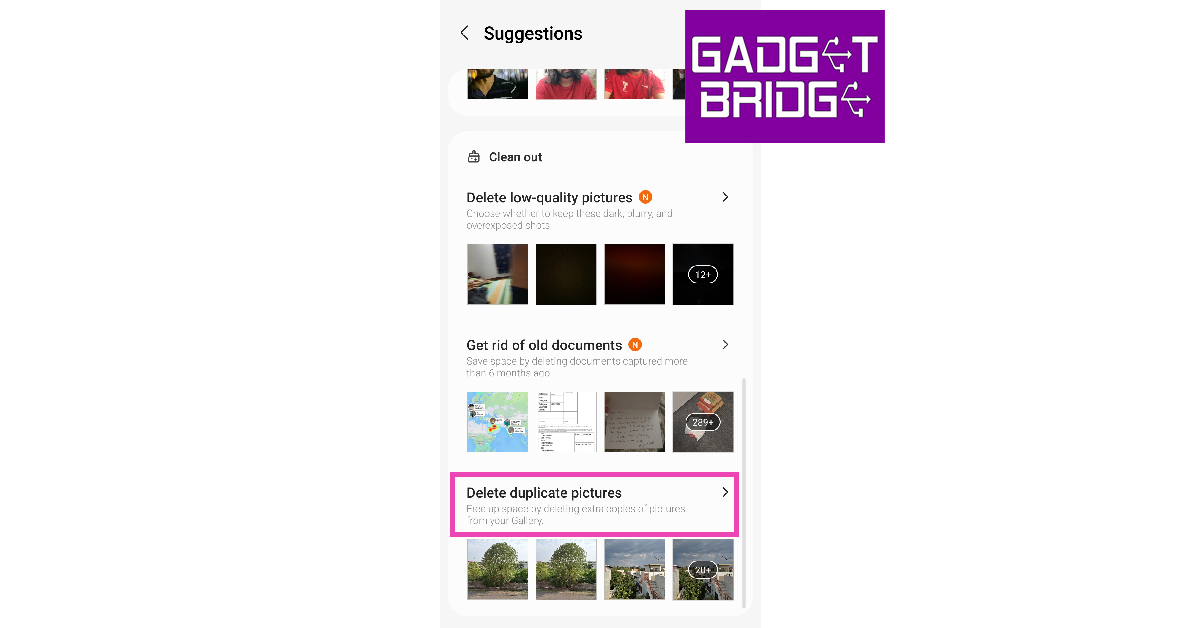
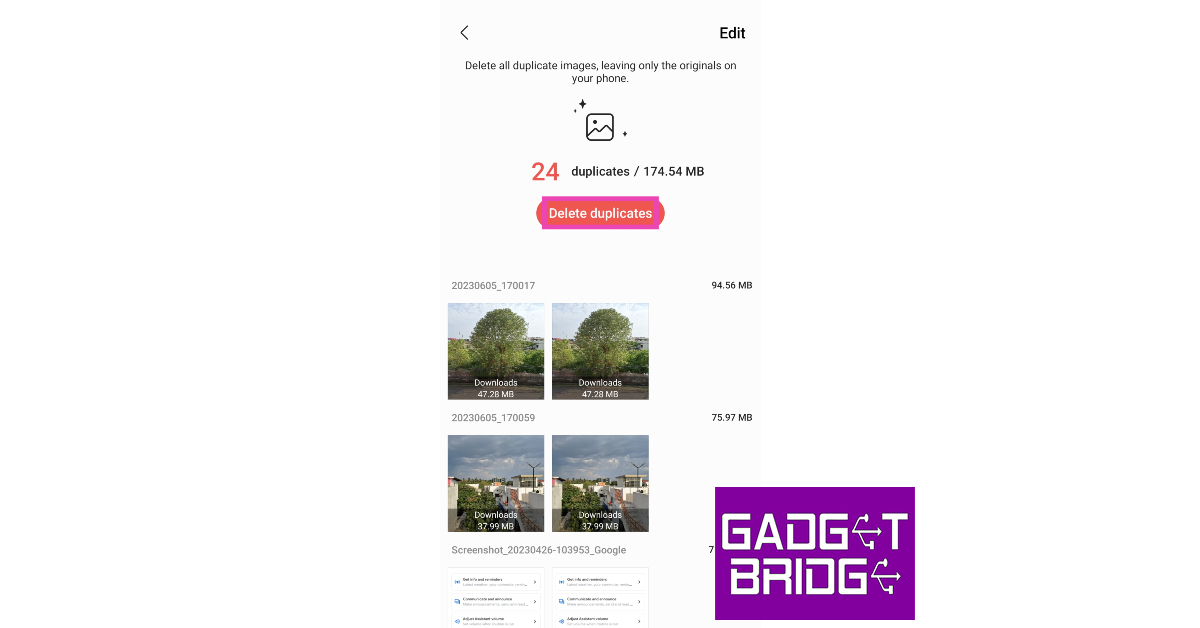
Step 1: Launch the native Gallery app on your Samsung smartphone. Step 2: Tap the hamburger menu at the bottom right corner of the screen. Step 2: Tap the hamburger menu at the bottom right corner of the screen. Step 3: Select Suggestions. Step 3: Select Suggestions. Step 4: Scroll down and select Delete duplicate pictures. Step 4: Scroll down and select Delete duplicate pictures. Step 5: Hit Delete duplicates to delete all redundant images at once. You can also delete the duplicate images individually by selecting the Edit option at the top right corner of the screen. Hit Delete duplicates to delete all redundant images at once.

Find and delete duplicate images on your Samsung smartphone using My Files

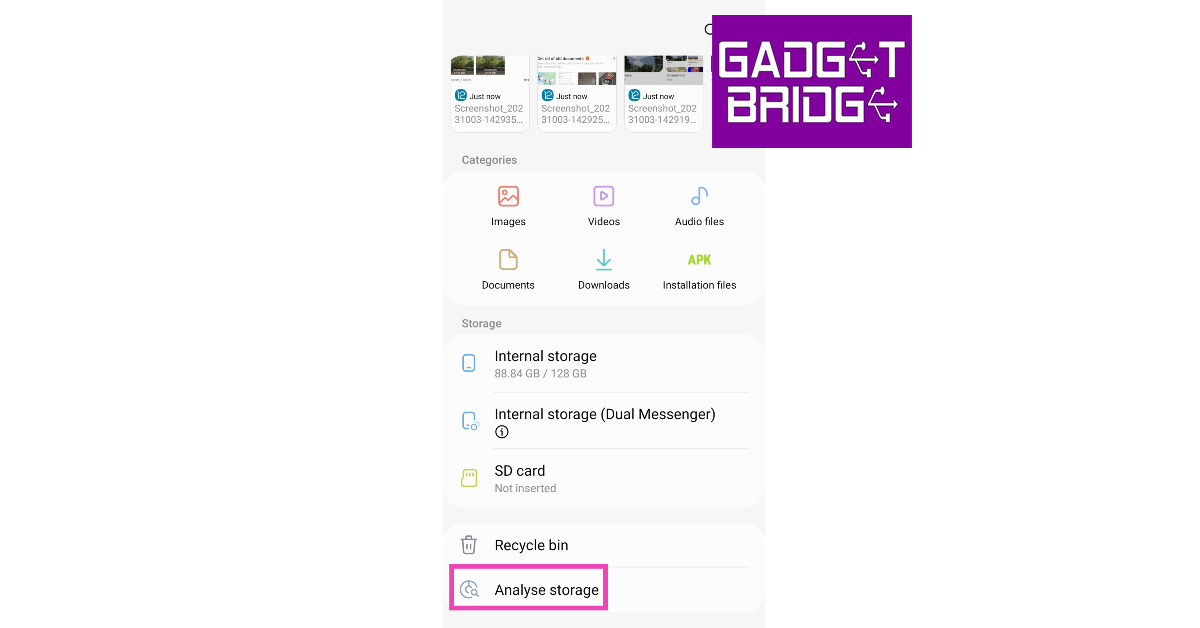
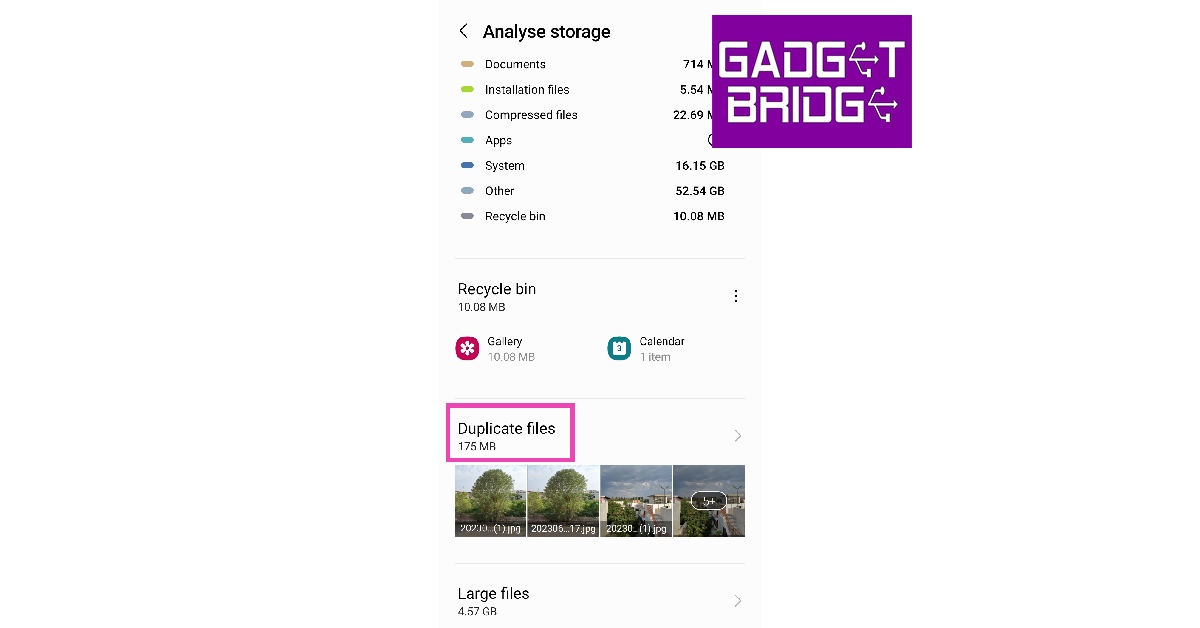
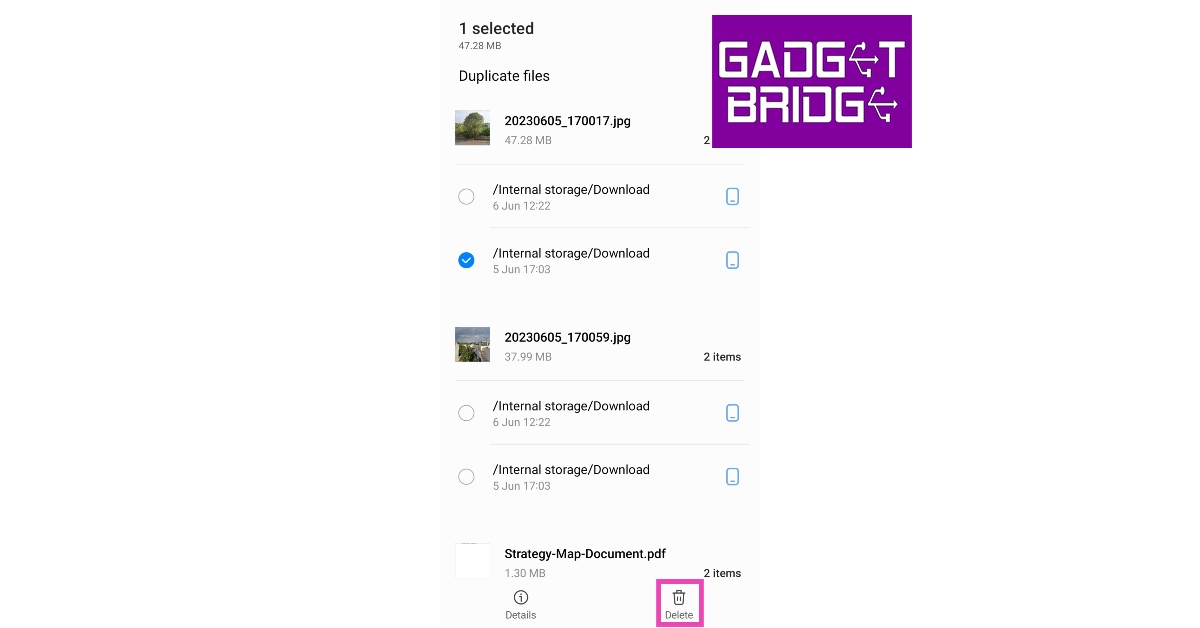
Step 1: Launch Samsung’s native file manager (My Files) from the Samsung folder in the app library. Step 2: Scroll all the way down and tap on Analyze Storage. Step 2: Scroll all the way down and tap on Analyze Storage. Step 3: Tap on Duplicate Files. Step 3: Tap on Duplicate Files. Step 4: This is where you will find the duplicate files and images on your phone. Select the images you want to delete. Step 4: This is where you will find the duplicate files and images on your phone. Select the images you want to delete. Step 5: Hit Delete.

Find and Delete Duplicate Images using device settings

Step 1: Go to Settings and select Battery and device care. Step 1: Go to Settings and select ‘Battery and device care’. Step 2: Select Storage. Step 2: Select Storage. Step 3: Select Duplicate Files. Scroll down and tap on ‘Duplicate Files’. Step 4: Select the duplicate images and hit Delete.

Find and delete duplicate images using Google Files

Step 1: Install the Files by Google app on your Samsung smartphone. Step 2: Launch the app and select the Clean option from the bottom tab. Step 3: Tap on the ‘Clean’ tab at the bottom of the screen. how to remove duplicate images on android Step 3: This is where you will find the duplicate images on your phone. Select the files individually and delete them. Step 4: If your phone has any duplicate images, this is where you will be prompted to delete them.  how to remove duplicate images on android

Use a third-party app

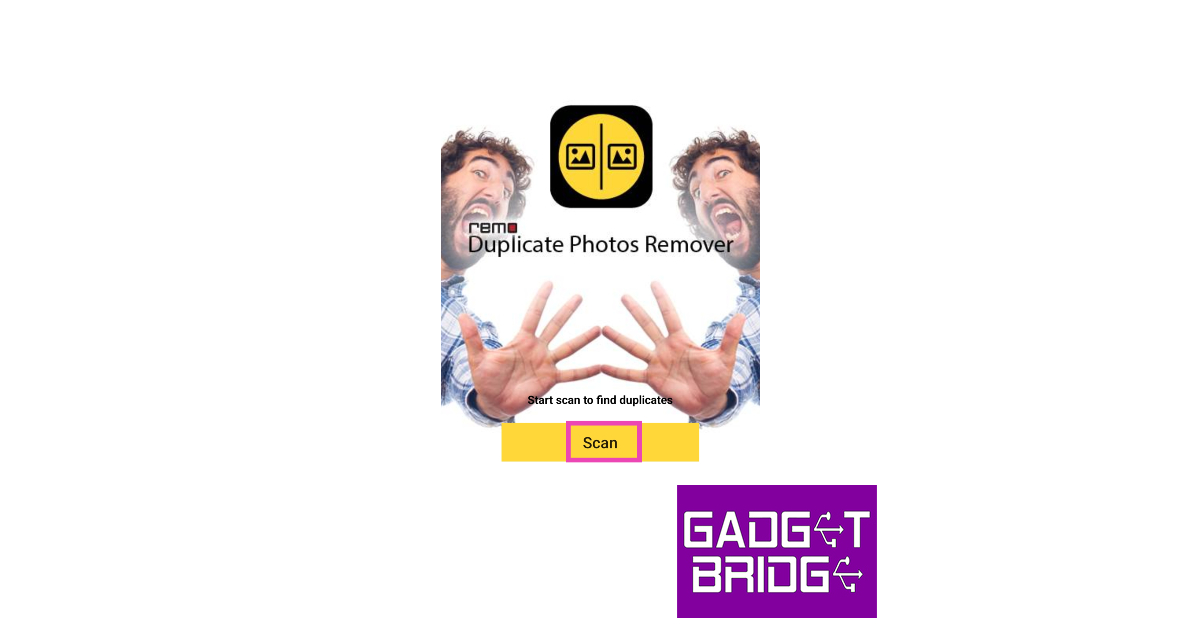
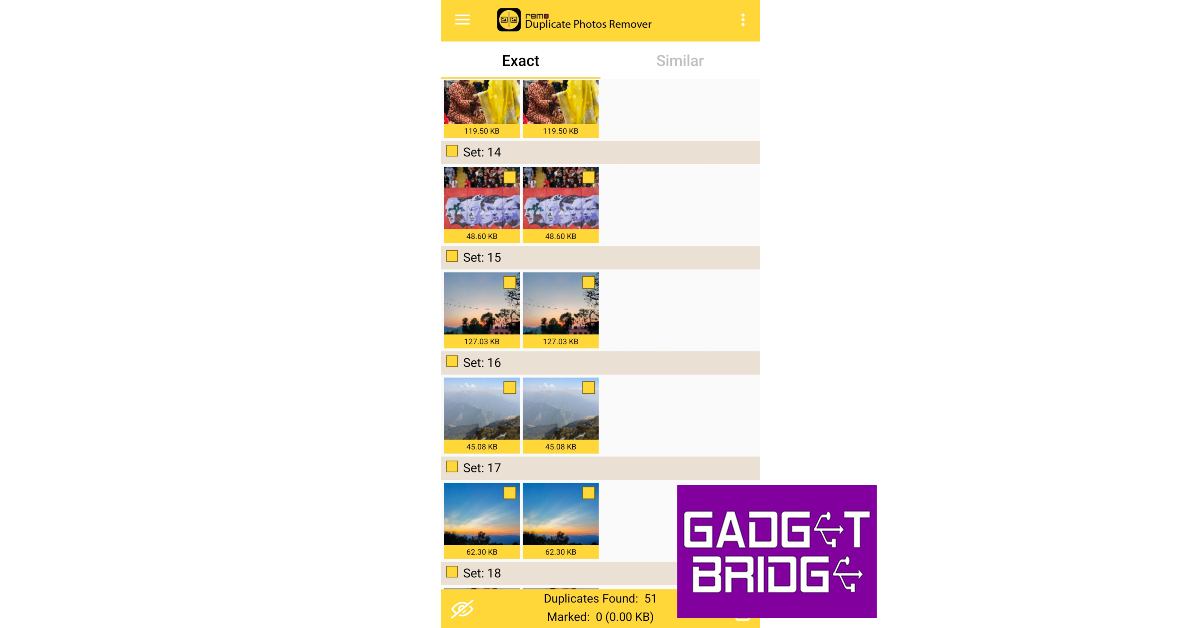
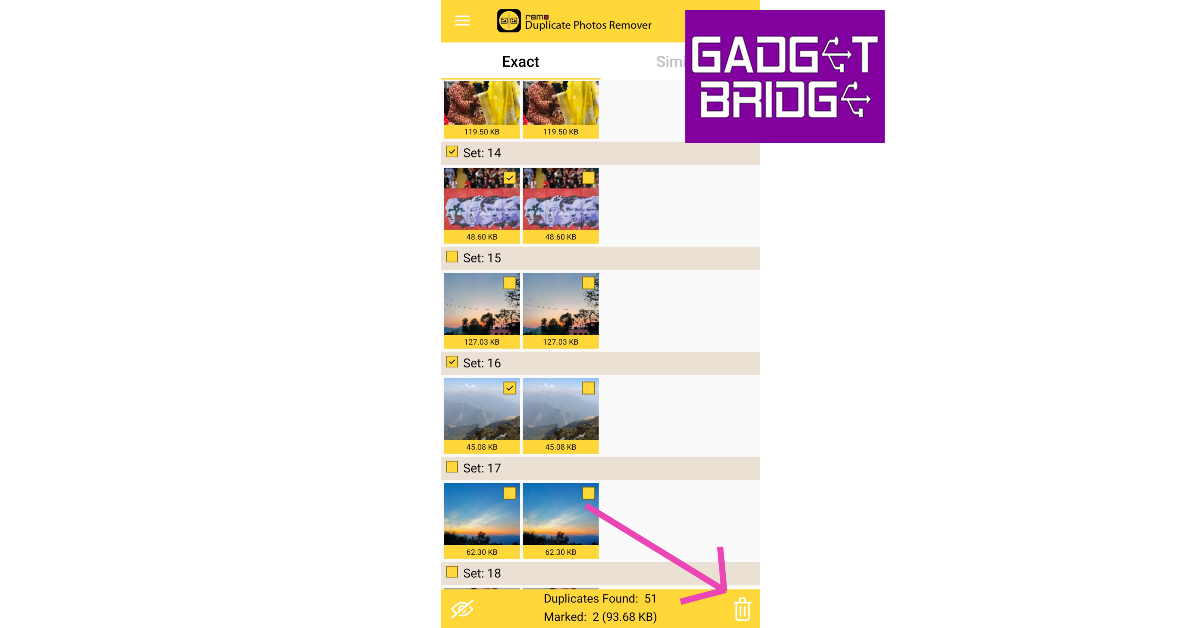
There are several third-party apps you can use to delete duplicate pictures from your Samsung smartphone. Here’s how you can accomplish the task using Remo Duplicate Photos Remover. Step 1: Install the Remo Duplicate Photos Remover app from the Google Play Store. Step 2: Launch the app and hit Scan to find duplicate images on your smartphone. This process will take a few minutes. Step 2: Launch the app and hit Scan to find duplicate images on your smartphone. This process will take a few minutes. Step 3: Scroll through the results and select the images you want to delete. Step 3: Scroll through the results and select the images you want to delete. Step 4: Hit the Delete icon at the bottom right corner of the screen. Step 4: Hit the Delete icon at the bottom right corner of the screen.

Frequently Asked Questions (FAQs)

Why are all my photos duplicating?

Duplication of images may occur in case your phone fails to sync your data to your preferred cloud storage. You may also notice duplicate images on your phone when you download the same photo multiple times. When you take multiple shots of the same subject at once, all the similar-looking images stock up in your phone’s gallery.

How do I delete duplicate images in my Samsung phone’s gallery?

Go to Gallery>Menu>Suggestions>Delete duplicate pictures and select Delete duplicates. If you want to go through every image individually before deleting them, hit the Edit option.

Which are some good third-party apps to delete duplicate images on my Android phone?

Remo Duplicate Photos Remover, Duplicates Cleaner, Duplicate Files Fixer, and Duplicate Files Remover are some of the best Android apps to find and remove duplicate images from your phone. Read Also: Top 4 Ways to Download and Use Offline Maps on Apple Maps

Conclusion

These are the top 5 ways to find and remove duplicate images from your Samsung smartphone. The biggest limitation of using native methods to delete duplicate images is that they may not scan your device’s storage as thoroughly as a third-party app. Apps like Remo Duplicate Photos Remover not only scan for duplicate images but also similar-looking photos that may be using up a lot of disk space on your device. For the latest gadget and tech news, and gadget reviews, follow us on Twitter, Facebook and Instagram. For newest tech & gadget videos subscribe to our YouTube Channel. You can also stay up to date using the Gadget Bridge Android App. You can find the latest car and bike news here.

OnePlus foldable phone ‘Open’ is jointly developed by OPPO team and OnePlus team, the company confirms

0
OnePlus today officially confirmed that its first foldable phone Open and Oppo Find N3 will be the same. According to the company the Oppo Find N3 will be rebranded to OnePlus Open. So the specs of the OnePlus foldable will be similar to those of Oppo’s. The device will feature a triple rear camera setup OnePlus has revealed that Pete Lau Founder of OnePlus and Senior Vice President and Chief Product Officer of OPPO directed his teams at OnePlus and OPPO to work together to bring the best of both brands to the new phone. OnePlus further revealed the evolution of the new device’s hinge and revealed that the new product will feature the OnePlus trademark Alert Slider. Also Read: iPhone 14, iPhone 14 Plus on Flipkart could be bought under 60k during Big Billion Days Sale The OnePlus foldable phone Open will be launched in select overseas markets soon. “Because we want to create a synergy and bring the best of the two teams together. Both teams have accumulated strong experience, and this folding phone will have a different go-to-market strategy in different regions so that more users will be able to have their hands on this device,” the company said. There will probably be a circular camera module on the OnePlus Open. The camera system is likely to be tuned by Hasselblad. Bollywood actress Anushka Sharma was recently spotted holding the devices, suggesting that the foldable phone may soon be available here. OnePlus Open was unveiled by YouTuber Lewis Hilsenteger while he interviewed Pete Lau. The folding phone will have a new hinge system made out of very less components in comparison to the Oppo Find N2. Most probably, the OnePlus Open will make its debut this month. As per a previous report official premiere might occur on October 19. “Our foldable phone goes beyond offering a large-screen experience. It embodies a lightweight and slim design, a powerful camera, and delivers a fast and seamless user experience. Only when all these aspects are perfectly balanced can we truly call it a flagship foldable phone,” the company has also confirmed. For the latest gadget and tech news, and gadget reviews, follow us on TwitterFacebook and Instagram. For newest tech & gadget videos subscribe to our YouTube Channel. You can also stay up to date using the Gadget Bridge Android App. You can find the latest car and bike news here.

Top 6 Free Apps to Compress Videos on iPhone

One of the biggest peeves of iPhone users is low internal storage space. If you’re fond of taking pictures and videos from your iPhone, you must be aware of the volume of disk space they occupy on your device. While images are still easier to manage, 4K videos shot using the iPhone can take up a huge portion of the internal storage. One of the more popular ways of freeing up disk space on your iPhone is video compression. In this article, we bring you the top 6 free apps to compress videos on your iPhone. Read Also: Top 4 Ways to Download and Use Offline Maps on Apple Maps

Video Compressor & Reduce Size

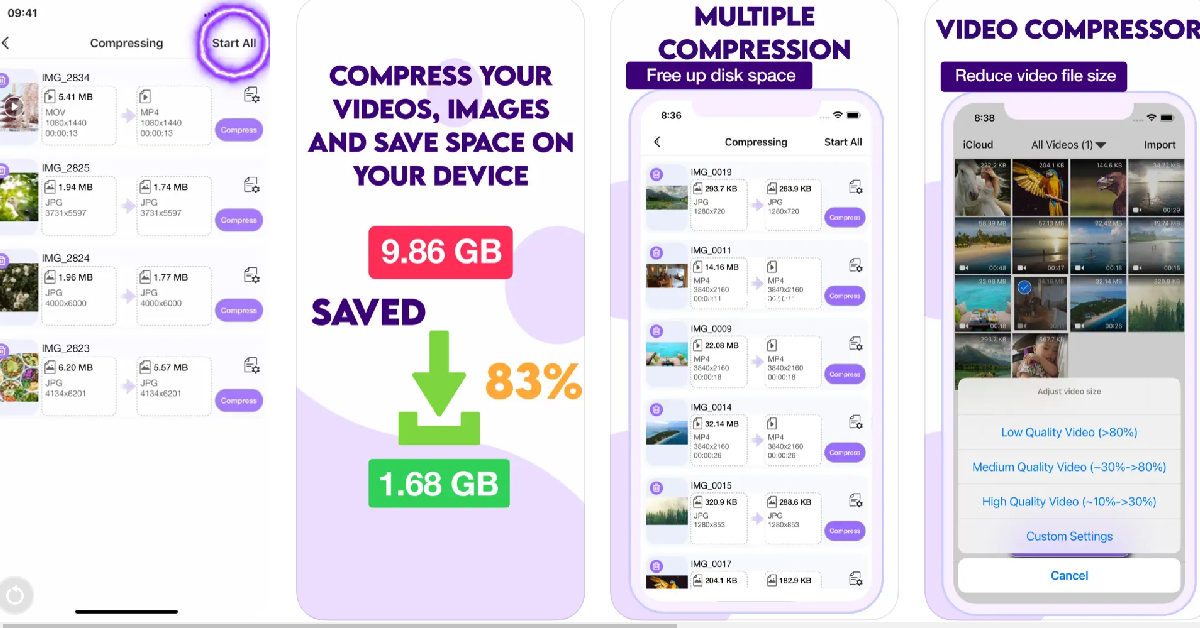
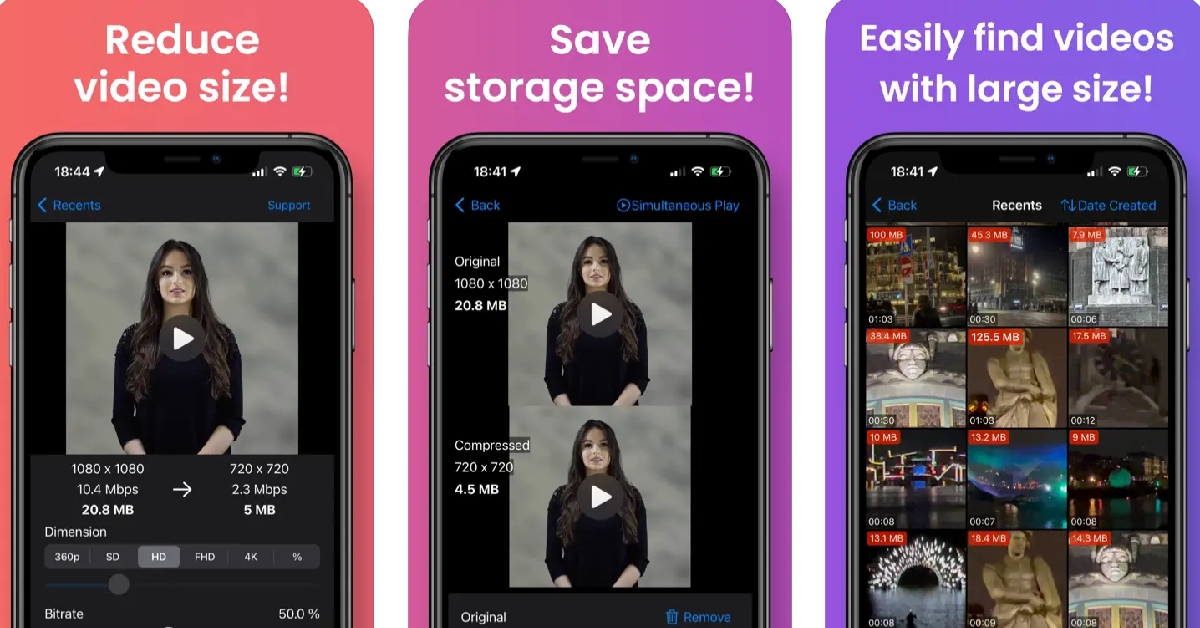
Download from the App Store Video Compressor & Reduce Size The Video Compressor & Reduce Size app lets you reduce the size of your videos in just a few quick taps. The app makes sure it doesn’t reduce the quality of the video after compression. It doesn’t add any unwanted watermarks to the compressed video. There is no duration limit for the compression either. The app is completely free to use, which means you will find a fair bit of ads across the interface, but you can pay a small fee to remove them all. To compress or resize a video, launch the app and select the video file from your iPhone’s gallery. You can even cue multiple videos for compression within this app. To begin the compression process, hit ‘Start All’. Apart from video compression, this app also offers basic video editing features like trimming, brightness correction, cropping, rescaling, and more.

Video Compressor & Converter

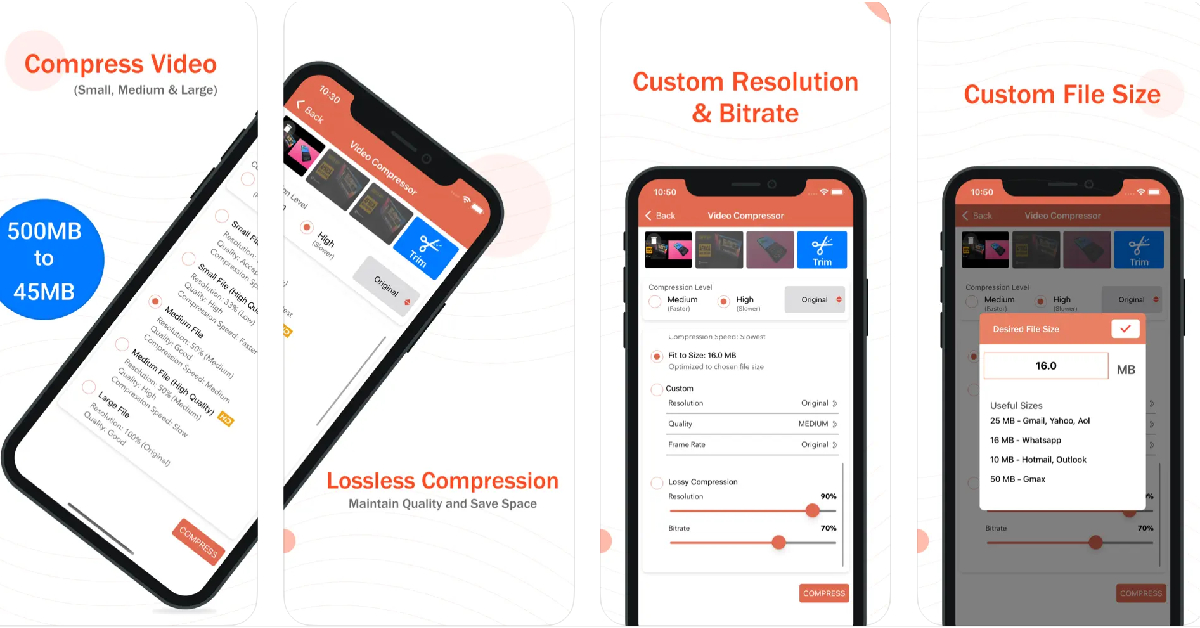
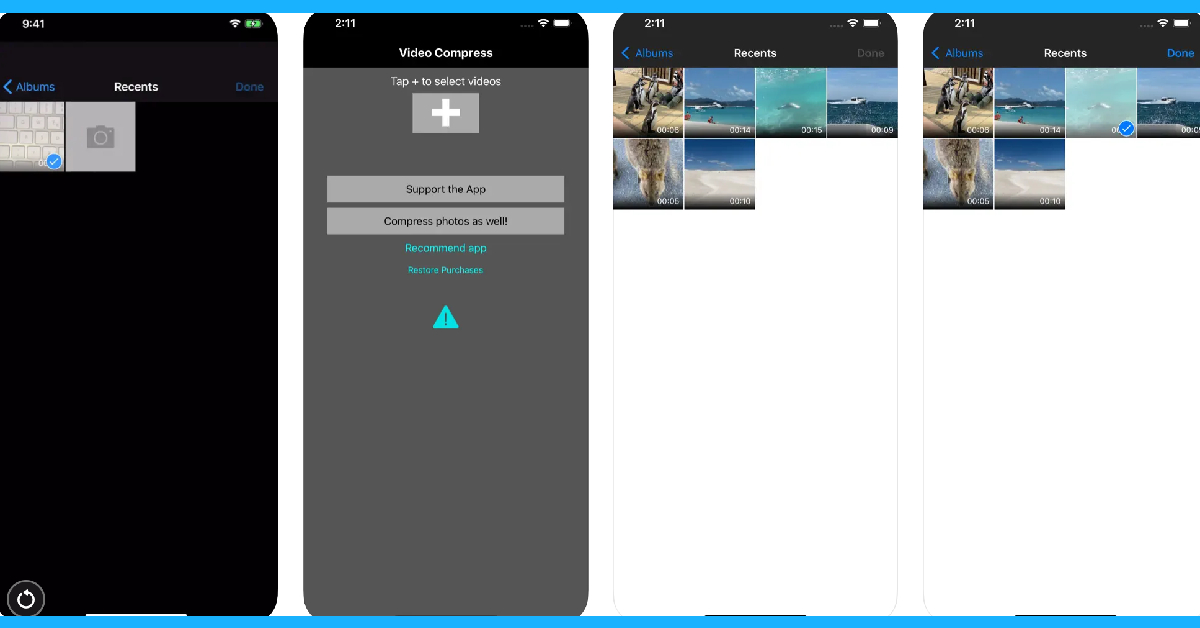
Download from the App Store Video Compressor & Converter The Video Compressor & Converter app works for the following video formats – MOV, MP4, 3GP, M4V, MKV, AVI, FLV, MTS, MPEG, MPG, WMV, VOB, and more. What we really like about this app is that it lets you set the resolution and bitrate for the compressed video. If you don’t like any of the default options, you can customise the essential specs of the video. Using the X264 codec, this app is capable of shrinking the size of a video without compromising its quality. To compress a video, all you need to do is launch the app, open the video, select the desired compression level and resolution, and then hit ‘Compress’. Apart from video compression, you can also use this app to change the format of the video file.

Compress Videos & Resize Video

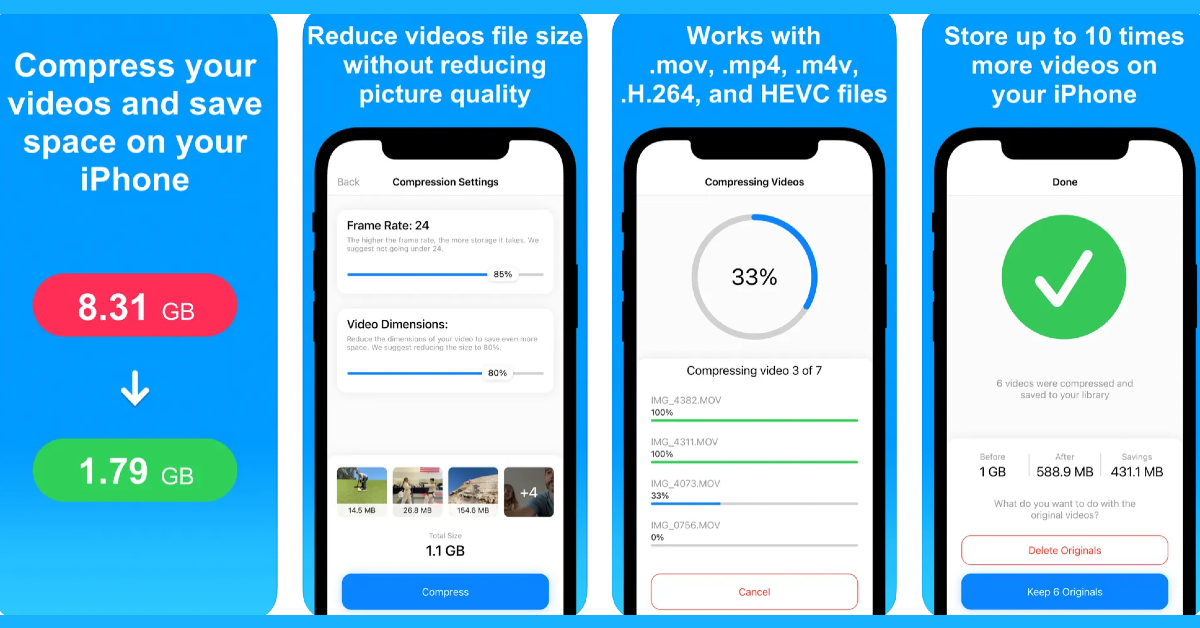
Download from the App Store Compress Videos & Resize Video With a 4.3 rating from 10.3K reviews on the App Store, the Compress Videos & Resize Video app is one of the best video compressor apps for your iPhone. This app pays special attention to your privacy by carrying out the compression process on your device and not on a different server. You can choose the frame rate and dimensions of the final video from the compression settings within the app. Compress Videos & Resize Video is free to use, but a premium membership gets rid of all the ads and allows you to compress multiple videos at once.

Easy Video Compressor

Download from the App Store Easy Video Compressor As the name suggests, Easy Video Compressor makes the process of shrinking the video size very accessible to the average user. Our favourite feature of the app is that it lets you preview the compressed video alongside the original video before you delete the latter from your phone. You can also choose the bitrate and resolution of the compressed video. Once you’ve opened a video on the Easy Video compressor, you need to select the bitrate, video resolution, video format, video codec, and video metadata. Once that’s done, hit ‘Compression’. This app also lets you sort the videos on your phone’s gallery by size, making it easy for you to determine which ones you need to compress.

Video Compress – Shrink Vids

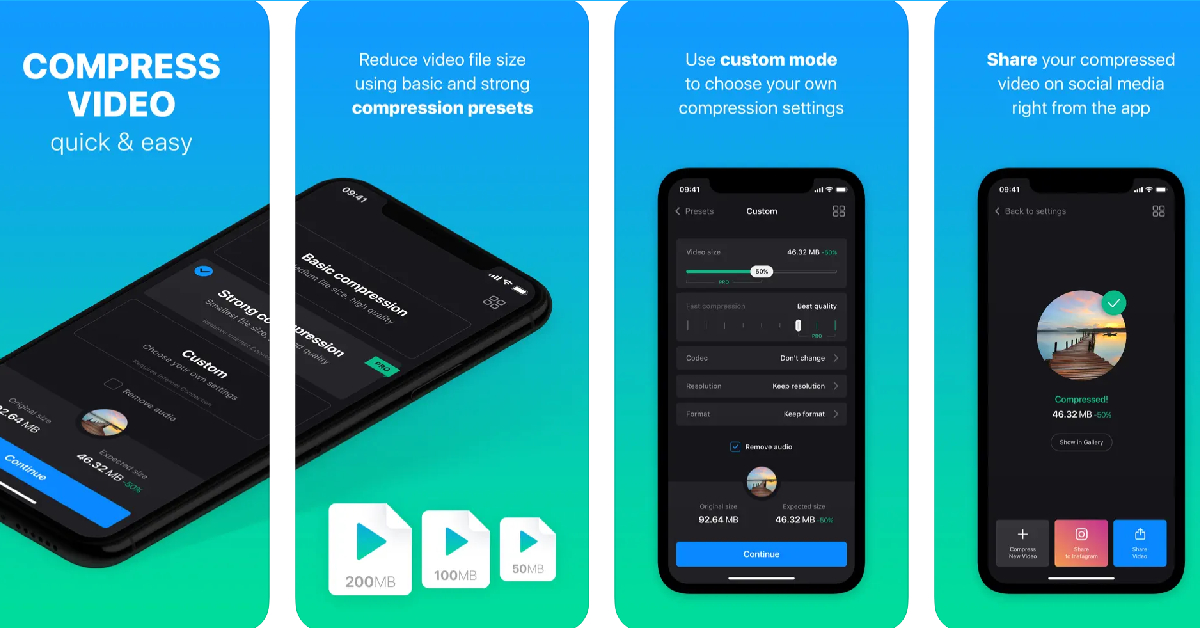
Download from the App Store Video Compress - Shrink Vids The Video Compress – Shrink Vids app lets you compress multiple videos on your iPhone. It lets you choose the bitrate and resolution of the final video. You can preview the compressed video before saving it on your phone. The app also shows you the file size of the resulting video. This app is perfectly optimised for videos shot using your iPhone. It can shrink 4K iPhone videos to a more suitable resolution with absolute ease. Hit the plus icon on the app to select a video. Tap on ‘Choose Presets’ to select the resolution of the compressed video and use the slider to adjust the bitrate. Hit ‘Continue’ to carry out the compression process.

Video Compressor – Clideo

Download from the App Store Video Compressor - Clideo The Clideo Video Compressor lets you retain the original resolution of the video even after it has been compressed. The resized videos are identical to the original, with little to no loss in quality. If you don’t like the compression presets, you can create a custom profile and take control of the bitrate and resolution of the compressed video. The editing page lets you choose the compression speed, video resolution, video codec, and video format all in one page. You can also choose to remove the audio from the video. The only downside is that Clideo places a watermark on the final video. If you want to get rid of this watermark, you will need to buy the Pro version of the app. Read Also: Amazon Great Indian Festival (GIF) to begin on October 8: Festive Sale details inside

Conclusion

These are the top 6 free apps to compress videos on your iPhone. While all the apps on this list are free to use, their interface may be laced with ads. Some apps offer a premium membership that allows users to get rid of all the ads and gives them access to special features like multiple compression and more. For the latest gadget and tech news, and gadget reviews, follow us on Twitter, Facebook and Instagram. For newest tech & gadget videos subscribe to our YouTube Channel. You can also stay up to date using the Gadget Bridge Android App. You can find the latest car and bike news here.

iPhone 14, iPhone 14 Plus on Flipkart could be bought under 60k during Big Billion Days Sale

Before the start of festivals in India, festive sale has started. It is that time of the year when smartphones, electronics, laptops and much more are up for sale with huge discounts. So Apple fans now is the best time to buy iPhone 14 and iPhone 14 Plus in India as they will be availed at an unbelievable price during the sale period on Flipkart.

iPhone 14 on Flipkart

Flipkart’s Big Billion Days Sale is scheduled to begin on October 8 to 15. The e-commerce platform will be offering iPhone 14 and iPhone 14 Plus at a reduced price. There will be a discount of Rs 20,000 or more on both devices. The iPhones will be available under Rs 60,000 if you use an eligible card for making the purchase. Flipkart has not yet revealed the price of the iPhone 14, iPhone 14 Plus but the devices are being teased on the platform under blockbuster deals. But those who guess the price of the iPhones. The buyers were also offered the chance to lock the price that was flashed on the specified date since the bargains were revealed on October 1 by paying Rs 1999 to secure the deal. The price of the iPhone 14 model has dropped by Rs 10,000 since it its launch. It was introduced at Rs 79,900. On the other hand iPhone 14 Plus was previously priced at Rs 89,900. It now sells for Rs 79,900 after a price reduction of Rs 10,000. Also Read: iPhones Compared: iPhone 15 vs iPhone 14

Apple iPhone 14 specifications

Apple iPhone 14 comes with a 6.1-inch Super Retina XDR OLED screen having a wide colour gamut, HDR, and 1200 nits of brightness. The screen offers a pixel density of 460 ppi and supports a 60Hz refresh rate. The display is protected by a tough Ceramic Shield front cover that is water and dust-resistant. The iPhone 14 has Face ID and is built to IP68 standards for water and dust protection. Under the hood, there is Apple A15 Bionic SoC and up to 512GB of internal storage. The device runs on iOS 16. For the photos, the dual rear camera setup includes iPhone 14: a primary 12MP wide-angle sensor with a bigger f/1.5 aperture, sensor-shift OIS, and a secondary 12MP ultra-wide-angle sensor. The Ultra Wide camera provides a distinctive viewpoint for broader views and enhances low-light images using a Photonic Engine. For selfies and video calls, the front camera has a 12MP sensor with autofocus. For the latest gadget and tech news, and gadget reviews, follow us on TwitterFacebook and Instagram. For newest tech & gadget videos subscribe to our YouTube Channel. You can also stay up to date using the Gadget Bridge Android App. You can find the latest car and bike news here.

BGMI redeem codes for 3 October 2023, claim and receive rewards and benefits

After being banned for nearly ten months, Battleground Mobile India, aka BGMI, is officially available again in India. BGMI fans are looking for ways to improve their game experience and one such method is the usage of redemption codes, which offers a variety of rewards and advantages using BGMI redeem codes players can gain access to new skins, outfits, loot crates, weapons and free UC and diamonds. As mentioned earlier, these codes give users the chance to earn unique rewards and gain extra benefits while playing the game. This includes GUN SKINS (M4, AKM, M416, AWM, M24, UZI, KAR98K), free character voucher, Andy, Carlo, Sara, Victor character for free, free Anna Character on completing the mission and UC or Royal Pass Discount. So here we have gathered a list of the most recent BGMI redeem codes as of 3 October 2023. Also, redeem these codes asap as these are only valid for a limited duration.

BGMI Redeem Codes for 3 October 2023

UKUZBZGWF – Free Fireworks TIFZBHZK4A – Free Outfit RNUZBZ9QQ – AKM Glacier Skin PGHZDBTFZ95U – M416 Skin R89FPLM9S – Companion BTOQZHZ8CQ – New! TQIZBZ76F – Vehicle Skin TQIZBz76F – 3 Free Motorcycle BMTFZBZQNC – Free Drifter Set SD14G84FCC – Free Skin for KAR98 Sniper Gun RNUZBZ9QQ – AKM Glacier Skin 5FG10D33 – Falcon and Free Emotes GPHZDBTFZM24U – UMP9 Skin KARZBZYTR – Free Outfit JJCZCDZJ9U – Golden Pan BMTCZBZMFS – Pretty in Pink set and Pretty in Pink Headpiece 5FG10D33 – Outfit for Free

How to get free Redeem Codes for BGMI on 3 October 2023?

  • Launch BGMI on your device.
  • Then select the Redeem Code option from the main menu.
  • Next, click on the Redeem code tab.
  • A new window will open, requesting the redemption code.
  • Now enter your BGMI code.
  • Confirm and click on the “Redeem” tab.
  • If your redeem code is valid then you will get a message confirming that your rewards were successfully redeemed.
(Note that these codes are case-sensitive, so be sure to type them correctly to prevent any errors.) For the latest gadget and tech news, and gadget reviews, follow us on TwitterFacebook and Instagram. For newest tech & gadget videos subscribe to our YouTube Channel. You can also stay up to date using the Gadget Bridge Android App. You can find the latest car and bike news here.

Garena Free Fire Redeem Codes Today 3 October 2023: Here is how to claim them

Garena Free Fire is a battle royale game with regular awards and tournaments to keep players interested. If you play Garena Free Fire, you should be aware of the redeem codes that are released on a daily basis. However, because the battle royale game is banned in India, players from other countries can use the Free Fire Redeem codes daily. If you’re unfamiliar with the Garena Free Fire redeem codes or don’t know how to get them, we’ve put together a step-by-step guide to help you redeem them. Check out Garena Free Fire Redeem Codes for 3 October 2023. The Free Fire redeem codes are a great way to get free stuff. These are 12-digit codes that contain alphabets and numbers, as well as an expiration date and time. Because the Garena FF redeem codes cannot be used more than once, you should hurry to the redemption page to claim your free reward before someone else does. To get a free reward, all you have to do is go to reward.ff.garena.com/en, which is the official redemption page. Also, keep an eye on this space for daily updates on Garena Free Fire redemption codes and rewards.

Garena Free Fire Redeem Codes Today 3 October 2023

FKRIFUGV7YTGBD FNSJEKRI56UYJH FNGMKVO9IF8RUJ FM5K6LYO7UJIKV FLXOZ9I8U7Y6A5 FYJHYU7J6SWE8U F4YH5TBNGMJHKB FLOV9IC8UYGSFV FK4R5OIT6Y8HUG FNFDMKEOR59I86 FUTGHJMVKLOI8U FYRTYHT7U76JRH FBGHNJU7Z6T5RF FADVQWB2FGTU3E FTQRDF2CVWB3NE FH4JMRKTIGUY6T FCRFXSVGBNHEJM

How to Get Free Fire Redeem Codes for Garena on 3 October 2023?

  • Visit the Garena Free Fire game’s official website at reward.ff.garena.com.
  • Use your Facebook, Google, VK, Apple ID, Huawei ID, or Twitter account to log in.
  • You’ll be taken to a valid redemption code (s)
  • Copy and paste the 12-digit redemption code into the text box.
  • On the screen, a dialogue box will appear.
  • ‘Ok’ should be selected.
For the latest gadget and tech news, and gadget reviews, follow us on TwitterFacebook and Instagram. For newest tech & gadget videos subscribe to our YouTube Channel. You can also stay up to date using the Gadget Bridge Android App. You can find the latest car and bike news here.

How to disable Always On Display on Apple Watch and Watch Ultra?

The Always On Display is one of the most important features of your Apple Watch. First introduced on the Watch Series 5, the Always On Display allows you to glance at the time on your watch without needing to unlock it. You can also see if there are any pending unread notifications that you need to attend to. As handy as this feature is, it drains your smartwatch’s battery considerably quicker. This is because it is reliant on an active display, no matter how low its refresh rate may be. Active displays are notorious for draining the battery the most. If you want to extend your Apple Watch’s battery life, here is how you can turn off or disable Always On Display. Read Also: Samsung to open 15 Pop-Up stores across India

Disable Always On Display directly from your Apple Watch

Apple Watch Series 9, Watch Ultra 2, and Watch SE unveiled at Apple’s ‘Wonderlust’ Event Step 1: Unlock your Apple Watch and launch the Settings app. Step 2: Tap on Display & Brightness. Step 3: Select Always On. Step 4: Turn off the toggle switch to disable Always On Display.

Turn off Always On Display using the Apple Watch app on your iPhone

Best ways to Fix 'Sleep Tracking Not Working' on Apple Watch Step 1: Launch the Apple Watch app on your iPhone. Step 2: Tap on Display & Brightness. Step 3: Select Always On. Step 4: Turn off the toggle switch to disable Always On Display.

Frequently Asked Questions (FAQs)

What is Always on Display?

Always On Display on your Apple Watch and iPhone allows you to view key information on the display without activating it with a tap. You can customise the Always On Display screen to show an analogue or digital clock along with key notifications.

How long does an Apple Watch last with Always On Display turned enabled?

With the Always On Display turned on, an Apple Watch can last up to 18 hours. The battery life also depends on the volume of your usage.

Can I shower with my Apple Watch with the Always on Display enabled?

Performing any water-related activities while wearing the Apple Watch requires turning on the Water Lock. When the Water Lock is turned on, your watch’s display shuts off, including the Always On Display. When the Water Lock is turned off, it ejects any trace of water from the speaker.

How do I disable AOD on my Apple Watch?

On your Apple Watch, go to Settings>Display & Brightness>Always On and turn off the toggle switch for Always On Display.

What is the advantage of using AOD on an Apple Watch?

With the Always On Display turned on, you can always view the time on your Apple Watch’s screen, even when the screen is locked. You can also customise the AOD screen to let you view unread notifications. Always On Display allows your Apple Watch to function more like a regular watch, with the ability to show the time even when the display is turned off. Read Also: Apple Watch won’t charge past 80%? Try these 5 fixes

Conclusion

This is how you can turn off or disable Always On Display on your Apple Watch or Watch Ultra. Check out this article to learn how to make your Apple Watch vibrate for notifications. If you found this article helpful, do let us know in the comments! For the latest gadget and tech news, and gadget reviews, follow us on Twitter, Facebook and Instagram. For newest tech & gadget videos subscribe to our YouTube Channel. You can also stay up to date using the Gadget Bridge Android App. You can find the latest car and bike news here.

Top 4 Ways to Download and Use Offline Maps on Apple Maps

0
On the latest iOS 17, Apple introduced a very important feature that went completely under the radar. Unlike Google Maps, Apple Maps did not allow users to download the maps for specific locations. That has now changed on iOS 17. Users can now download any portion of the map for offline use. This is particularly useful when you’re planning a trip or vacation to a place that doesn’t get good network reception. With an offline map, you will always have access to the correct directions on your phone. In this article, we show you how to download, edit, and delete offline maps on the Apple Maps app on your iPhone. Read Also: How to add multiple links to your Instagram bio?

Download offline maps on the Apple Maps app on your iPhone

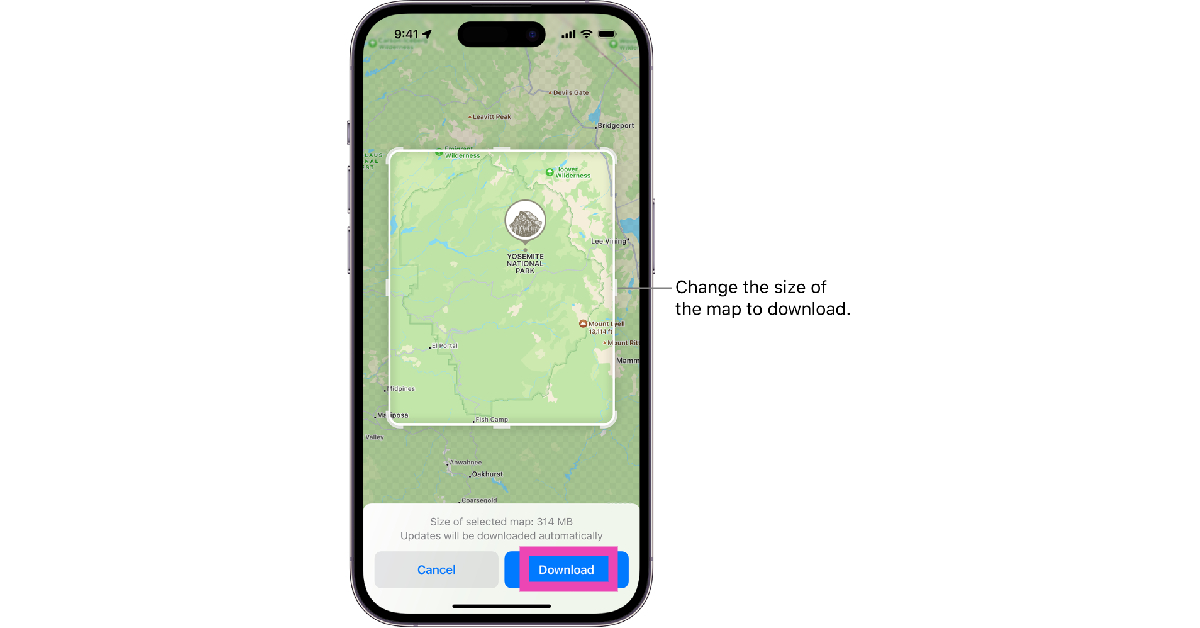
Step 1: Launch the Apple Maps app on your iPhone. Step 2: Tap your initials or picture at the bottom right corner of the screen. Step 3: Tap on Offline Maps. Step 4: Select Download New Map. Step 5: Type the location for which you want to download the map. Step 6: On the following page, adjust the size of the map you want to download. You can also use this page to select a completely different area on the map, in case it didn’t pop up in the search results on the previous page. Remember, a larger area will increase the size of the map. Step 7: Hit the Download button. Step 7: Hit the Download button.

Download an Apple Map by searching for it

Step 1: Launch the Apple Maps app on your iPhone. Step 2: Tap the search bar at the bottom of the screen and search for your desired location. Step 2: Tap the search bar at the bottom of the screen and search for your desired location. Step 3: Tap the Download button at the bottom of the screen. If the map is not available offline, you won’t see this download button. Step 7: Hit the Download button. Top 4 Ways to Download and Use Offline Maps on Apple Maps Step 4: Adjust the size of the map by dragging the borders of the box. Step 5: Hit Download to save the map offline.

Download an Apple Map by dropping a pin

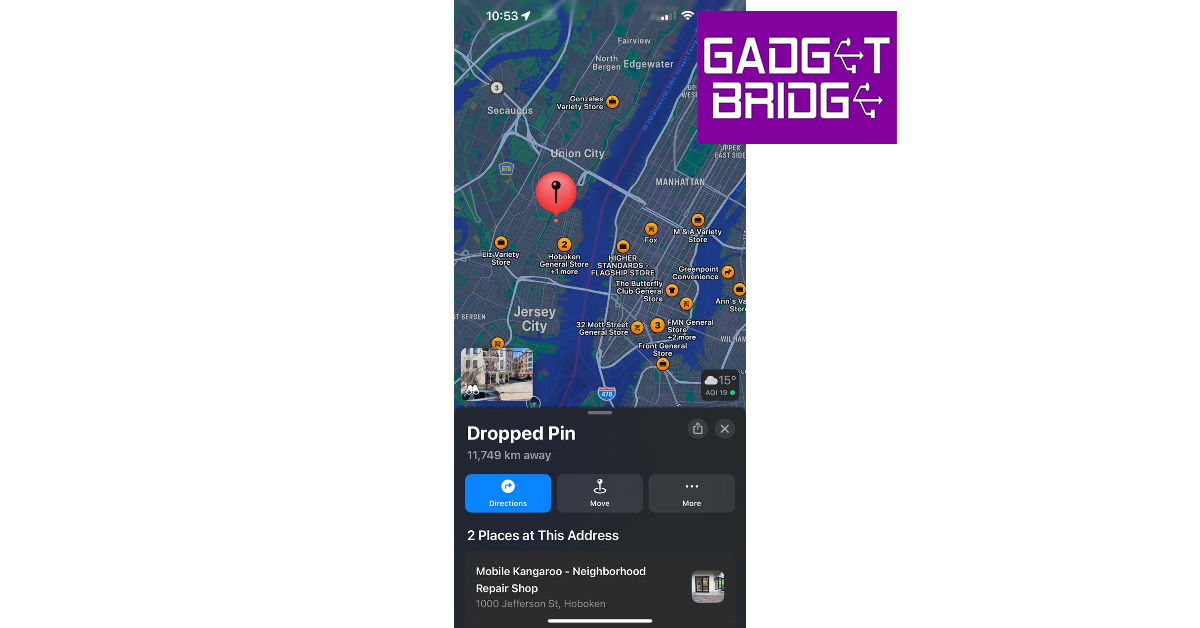
Step 1: Launch the Apple Maps app on your iPhone. Step 2: Scroll through the map to navigate to your desired location. Step 3: Tap on a location to drop the pin. Step 3: Tap on a location to drop the pin. Top 4 Ways to Download and Use Offline Maps on Apple Maps Step 4: Tap the Download button at the bottom of the screen. Step 7: Hit the Download button. Top 4 Ways to Download and Use Offline Maps on Apple Maps Step 5: Adjust the area of the map by dragging the borders of the box marking the selected area. Step 6: Hit the Download button again.

How to open or edit an offline map that you have downloaded on Apple Maps

How to open or edit an offline map that you have downloaded on Apple Maps Step 1: Launch the Apple Maps app on your iPhone. Step 2: Tap your initials or picture at the bottom right corner of the screen. Step 3: Select Offline Maps. Step 4: Tap on one of the downloaded maps. Step 5: Hit the resize icon to change the area covered by the map. Step 6: Tap on Delete Map to remove it from your device’s storage.

Frequently Asked Questions (FAQs)

Can I download offline maps in Apple Maps?

Apple allows users to download offline maps in the Apple Maps app on iOS 17. An offline map can occupy a significant amount of storage space on your iPhone.

How do I download a map in Apple Maps?

Launch the Apple Maps app, tap on your picture or initials, then go to Offline Maps>Download New Map. Select the location for which you want to download the map, adjust its size, and hit Download.

How do I delete an offline map that I downloaded on Apple Maps?

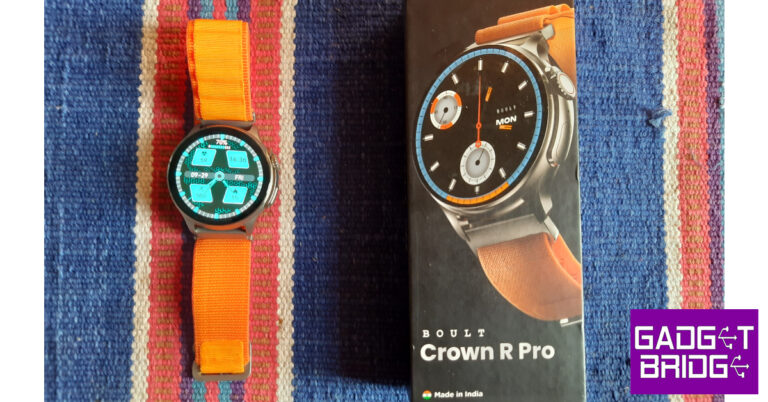
To delete an offline map go to the Apple Maps app, tap on your picture or initials, and go to Offline Maps>Map>Delete Map. Read Also: Boult Crown R Pro Review: A perfect blend of style and sportiness

Conclusion

This is how you can download, edit, and delete an offline map on the Apple Maps app on your iPhone. Offline maps tend to get outdated after a period of time as new businesses, locations, roads, and passages are always popping up in different localities. You can update all your downloaded maps at once from the Offline Maps section in the Apple Maps app. For the latest gadget and tech news, and gadget reviews, follow us on Twitter, Facebook and Instagram. For newest tech & gadget videos subscribe to our YouTube Channel. You can also stay up to date using the Gadget Bridge Android App. You can find the latest car and bike news here.

Amazon Great Indian Festival (GIF) to begin on October 8: Festive Sale details inside

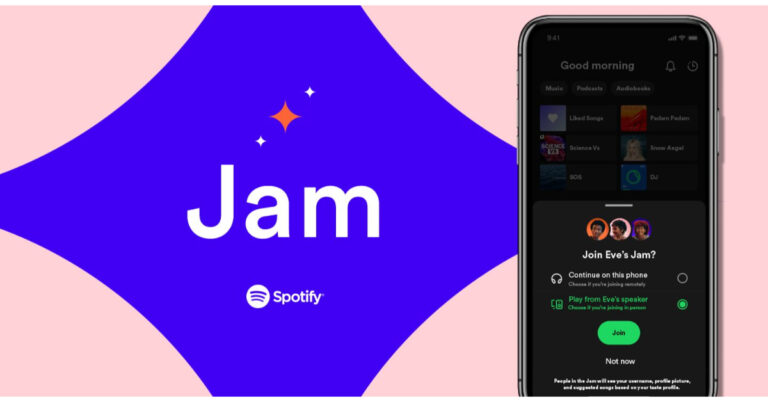
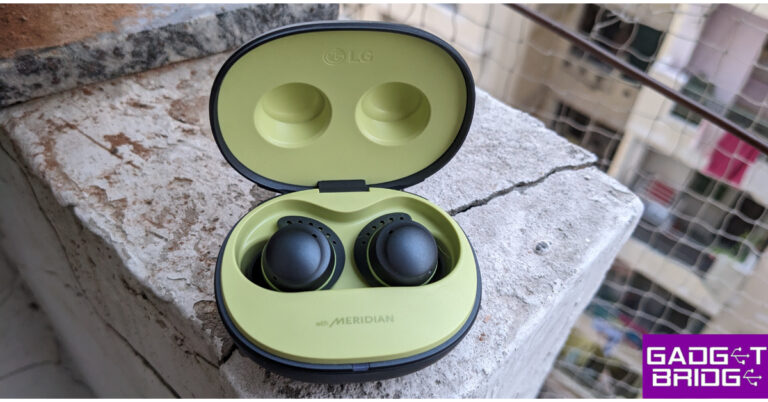
Amazon has officially announced that its festive sale ‘Great Indian Festival’ will begin on October 8 offering sellers and partners a chance to connect with millions of customers throughout India. The Prime Members will get exclusive early access to the sale 24 hours before the sale begins on October 7.  During the Amazon Great Indian Festival sale, customers will have access to fantastic bargains and discounts across a wide range of categories which involves smartphones, fashion apparel, home stuff, electronics, grocery and beauty products from various brands as well as new launches. Also Read: Spotify unveiled Jam for real-time listening with friends Customers will be able to make their purchases in 8 languages of their choice (English, Hindi, Tamil, Telugu, Malayalam, Kannada, Bangla, and Marathi) Buyers across the nation will be able to browse for products from brands like Samsung, OnePlus, iQOO, LG, Sony, boAt, Intel, Tissot, Fastrack, Tommy Hilfiger, Wipro, Eureka Forbes, Asian Paints, Gillette, Huggies and more.  Amazon will also offer up to 55% off on Echo smart speakers, Fire TV devices, Kindle e-readers, and Alexa smart home combos. During the sale, the E-commerce giant will be offering a wide range of finance options from SBI bank debit or credit cards and get a 10% instant discount. Buyers can get an instant credit of up to INR 1 lakh using Amazon Pay Later to shop now and pay next month.  Additionally, ICICI Bank credit card owners can receive 5% unlimited cashback, those applying for the card also get welcome rewards worth Rs 2,500. Amazon will also offer other options such as exchange and no-cost EMI. Also, there will be 10% back on purchasing Amazon Pay Gift Cards With Amazon Pay ‘Everybody can fly’. Customers can plan their festive and winter holiday travel and get up to 40% off hotels, flights to domestic and international locations, train tickets and more. Apart from that, the e-retail platform has also launched Amazon Live offering 1,000+ streams through a curated list of over 300 influencers across tech, gaming, fashion, lifestyle, home, sports, and beauty to help customers make an informed purchase decision. Also Read: Blaupunkt 43-inch QLED and 55-inch 4K Google TV launched in India Customisation options will be available offering visual design tools to patrons to personalize products. Shoppers will be able to customise a wide range of products as per their creative requirements.  Buyers will also be able to gain access to Amazon Home Services for a variety of products across 19,000 pin codes. These services include installation, troubleshooting and repair In 45 cities, customers can also avail installation at the time of delivery, however, this is available for a selected range of products. So, who is ready to buy some products? As we have seen these sales do really well, especially around the Diwali festive season. For the latest gadget and tech news, and gadget reviews, follow us on TwitterFacebook and Instagram. For newest tech & gadget videos subscribe to our YouTube Channel. You can also stay up to date using the Gadget Bridge Android App. You can find the latest car and bike news here.

BGMI redeem codes for 30 September 2023, claim and receive rewards and benefits

After being banned for nearly ten months, Battleground Mobile India, aka BGMI, is officially available again in India. BGMI fans are looking for ways to improve their game experience and one such method is the usage of redemption codes, which offers a variety of rewards and advantages using BGMI redeem codes players can gain access to new skins, outfits, loot crates, weapons and free UC and diamonds. As mentioned earlier, these codes give users the chance to earn unique rewards and gain extra benefits while playing the game. This includes GUN SKINS (M4, AKM, M416, AWM, M24, UZI, KAR98K), free character voucher, Andy, Carlo, Sara, Victor character for free, free Anna Character on completing the mission and UC or Royal Pass Discount. So here we have gathered a list of the most recent BGMI redeem codes as of 30 September 2023. Also, redeem these codes asap as these are only valid for a limited duration.

BGMI Redeem Codes for 30 September 2023

updating soon…

How to get free Redeem Codes for BGMI on 30 September 2023?

  • Launch BGMI on your device.
  • Then select the Redeem Code option from the main menu.
  • Next, click on the Redeem code tab.
  • A new window will open, requesting the redemption code.
  • Now enter your BGMI code.
  • Confirm and click on the “Redeem” tab.
  • If your redeem code is valid then you will get a message confirming that your rewards were successfully redeemed.
(Note that these codes are case-sensitive, so be sure to type them correctly to prevent any errors.) For the latest gadget and tech news, and gadget reviews, follow us on TwitterFacebook and Instagram. For newest tech & gadget videos subscribe to our YouTube Channel. You can also stay up to date using the Gadget Bridge Android App. You can find the latest car and bike news here.

Garena Free Fire Redeem Codes Today 30 September 2023: Here is how to claim them

Garena Free Fire is a battle royale game with regular awards and tournaments to keep players interested. If you play Garena Free Fire, you should be aware of the redeem codes that are released on a daily basis. However, because the battle royale game is banned in India, players from other countries can use the Free Fire Redeem codes daily. If you’re unfamiliar with the Garena Free Fire redeem codes or don’t know how to get them, we’ve put together a step-by-step guide to help you redeem them. Check out Garena Free Fire Redeem Codes for 30 September 2023. The Free Fire redeem codes are a great way to get free stuff. These are 12-digit codes that contain alphabets and numbers, as well as an expiration date and time. Because the Garena FF redeem codes cannot be used more than once, you should hurry to the redemption page to claim your free reward before someone else does. To get a free reward, all you have to do is go to reward.ff.garena.com/en, which is the official redemption page. Also, keep an eye on this space for daily updates on Garena Free Fire redemption codes and rewards.

Garena Free Fire Redeem Codes Today 30 September 2023

F5E1R6H9A72L4K X3V7G1T9Q5P2W4 S6D2Z8C0M4N1J5 R3T5W2E6A7D9FG H4N8Y2G6T17X5E P5Q2F9G3C7W1X6 T8V6E2D7S3Z5Y1 N4K1R7X3H9W2L8 M6J0B5C2F8G4Q1 M9B3V1C7Z58L0Q U2I4O8V63A5T7W L7K8I4J2R3E9Y6 O1U7A5T3H8N6B4

How to Get Free Fire Redeem Codes for Garena on 30 September 2023?

  • Visit the Garena Free Fire game’s official website at reward.ff.garena.com.
  • Use your Facebook, Google, VK, Apple ID, Huawei ID, or Twitter account to log in.
  • You’ll be taken to a valid redemption code (s)
  • Copy and paste the 12-digit redemption code into the text box.
  • On the screen, a dialogue box will appear.
  • ‘Ok’ should be selected.
For the latest gadget and tech news, and gadget reviews, follow us on TwitterFacebook and Instagram. For newest tech & gadget videos subscribe to our YouTube Channel. You can also stay up to date using the Gadget Bridge Android App. You can find the latest car and bike news here.

Spotify unveiled Jam for real-time listening with friends

Music streaming platform Spotify has launched a new feature called Jam on its platform. It is a new collaborative playlist feature which will be accessible to all the users. It will allow users to contribute a session through a shared queue. Notably, the feature will also be accessible if users are connected to the same Wi-Fi network. Spotify already offers more features like Collaborative Playlists and Blend. A personalised real-time listening session called Jam has been launched by Spotify. According to the company Jam improves real-time listening with friends by building on some of the company’s well-liked social features and blending them with its personalization technology. Through a shared queue, Premium subscribers will be able to invite others to participate in Jam and contribute to a musical experience that has been developed specifically for everyone who is listening. Also Read: LG Tone Free Fit (DTF7Q) Review: Clean listening experience Spotify is rolling out Jam to all the users across the globe. Premium listeners can start a Jam and anyone on Spotify can join. Simply invite your group, and Jam will assist you in selecting the ideal songs to add to the queue. “You’ll have the ability to see who’s added which track so you know whom to thank for that crowd pleaser, whether you’re prepping food together in the kitchen or enjoying games in the backyard,” the company in its blog post said. Once a Jam has been started, you can invite a group of friends or family to take part whether they are Free or Premium users or a mix—so they can share the experience. As per Spotify listeners will be able to join no matter where they are. Choose a song or playlist you’ll see a “Start a Jam” button by clicking the speaker icon at the bottom of your screen or by tapping the three-dot menu within your favourite playlist or song. In addition to this, you can also choose whether to play the music on your speaker or phone. When they open Spotify, users at a household using your shared Wi-Fi will also be asked to join the Jam. Everyone in the Jam can add songs to the queue, see who added which song, and receive recommendations using their own devices. The host can also choose who’s in the jam, rearrange it or remove a song. For the latest gadget and tech news, and gadget reviews, follow us on TwitterFacebook and Instagram. For newest tech & gadget videos subscribe to our YouTube Channel. You can also stay up to date using the Gadget Bridge Android App. You can find the latest car and bike news here.

LG Tone Free Fit (DTF7Q) Review: Clean listening experience

One thing that has concerned us consistently is how easily some of the TWS earbuds fall off while exercising vigorously or dancing. This is due to the fact that they do not offer a tight or even ideal fit, allowing them to stay on more firmly. To address this issue LG released the LG Tone Free Fit- DTF7Q, a new pair of sports TWS earbuds. These are supposed to have swivel grip technology that is safe and comfortable. If you were looking for such earphones these could be your new go-to earbuds. Let’s dive into the LG Tone Free Fit (DTF7Q) Review.

LG Tone Free Fit (DTF7Q) Review: Design

So the LG Tone Free Fit comes with a very sporty look. Its colour scheme is dark grey and lime. Inside the box, there are Tone Free earbuds, extra ear gels/ 2 pairs of ear hooks, a user manual, a UVnano charging case and a USB Type C charging cable. LG Tone Free Fit (DTF7Q) Review: Design The charging case features a pebble-shaped design, and the top of the lid has a pattern that keeps it from slipping out of the hands. Nice! The company has paid attention to this textured finish because during workouts you get sweaty hands and the device with a glossy finish is prone to slip easily. When the lid is opened, an LED light starts to glow. UV technology is included in the LG Tone Free Fit for it to stay germ-free. LG Tone Free Fit (DTF7Q) Review: Design Given that they are designed for athletics, you can also use them on a treadmill and the wire-free fit gives you a lot more freedom of movement. Because they lack any external hooks or means to wrap around the ear, these sporty earphones are also not overly large or bulky. These fit really nicely and let you concentrate on your activity. The hook inserts into your outer ear for a snug fit that is pressure-free and comfortable. Simply attach the wireless earphones into your outer ear using a gentle swivel. This easy move secures the earbuds so they remain in place during your whole workout, from warmup to cooldown. You won’t have to worry if you do happen to get a little sweaty while working out because the earbuds are IP67 dust and waterproof. LG Tone Free Fit Review The UV nanotech in the casing works hand in hand with the medical-grade quality of the earbud gels. This means that after just a 10-minute charge, the UV nano will disinfect your earbuds by penetrating both the inner ear mesh and the ear gels to remove bacteria by up to 99.9 percent. Also Read: Samsung to open 15 Pop-Up stores across India

LG Tone Free Fit (DTF7Q) Review: performance

How does LG Tone Free Fit actually sound? We’ve been using these earbuds for about a month with a variety of music styles, categories, videos and podcasts as well as and they sound fantastic no matter what you’re listening to. They have a 6mm driver unit that sounds amazing even when you are listening to bass-heavy or acoustic music. LG Tone Free Fit Review Well, these TWS earphones have excellent Active Noise Cancellation as well. With the help of the ANC, the audio device was able to cancel out background noise, and the overall deep fit of the earbuds contributed to higher audio quality. Moreover, each earbud has Headphone Spatial Processing (HSP) built in, which gives you the impression of clear spatial sound. LG Tone Free Fit TF7 Review The LG earphones offer touch capabilities, and we have never encountered such excellent touch sensitivity on any other TWS we have tested up to this point. A beep or tone that indicates your command has been heard when you touch or press them, and it is extremely rapid and responsive. You can select how to listen and change the Noise Cancelling options, too. By allowing more of the ambient noise to reach your ears, Listening Mode helps you be aware of your surroundings and hear passing vehicles or other pedestrians. Whereas, the Conversation Mode on the device amplifies other persons’ sound so you may easily converse with a companion while riding a bike or running without taking out your earphones. Also Read: HP to manufacture Chromebooks in India together with Google Finally, you can connect them to the LG Tone Free App to adjust the EQ, ANC, earbud settings, and listening modes. LG Tone Free Fit TF7 Review They are simple to connect to a PC or an Android smartphone. The Google Fast Pair pop-up will display right away to provide you with clear instructions. The best thing is that these have multi-point capability that lets you connect wirelessly with up to 5 devices using the LG TONE Free app. The LG Tone Free Fit (DTF7Q) offers 10 hours of playback on a single charge (20 additional hours with the case), giving you a total of 30 hours of battery life. You can also play them for an hour with just a simple 5-minute charge. LG Tone Free Fit TF7 Review

Verdict

The LG Tone Free Fit priced at Rs 12,989 sanitises the earphones and has a beautiful athletic appearance. The swivel hook gently tucks into your ear and secures them there. Overall, the LG earphones have greatly impressed us. We adored the fit in the ear and the sound quality. These earbuds are genuinely excellent for both everyday use and sports. So once again, we urge you to check them out if you’re searching for some excellent-sounding earbuds with strong ANC. LG Tone Free Fit Pros
  • Comfortable fit
  • Excellent sound quality
  • Strong Active Noise Cancellation
LG Tone Free Fit Cons
  • Lid is tight
For the latest gadget and tech news, and gadget reviews, follow us on TwitterFacebook and Instagram. For newest tech & gadget videos subscribe to our YouTube Channel. You can also stay up to date using the Gadget Bridge Android App. You can find the latest car and bike news here.

3 ways to add multiple links to your Instagram bio

0
One of the most requested features on Instagram finally found its way to the app earlier this year. Users with more than one platform to plug in their profile finally get to add more than one link to their Instagram bio. Now you can add your Xbox gamertag, YouTube channel, and Discord server together in your Instagram bio. In this article, we show you how to add multiple links to your Instagram bio. Read Also: HP to manufacture Chromebooks in India together with Google

Here’s why you should add links to your Instagram bio

The reason why you should add links to your Instagram bio is pretty simple — it is one of the few places on Instagram that supports clickable links. As you’re probably aware, adding a link to your Instagram post or Reel serves little purpose as it cannot be clicked on. Instagram Stories allow users to add clickable links but they vanish after 24 hours. If you want a link to reach a large number of people without expiring after a short period of time, adding it to your bio is the best option. Initially, Instagram allowed users to add only 1 link to their bio. Now, this limit has been expanded to 5. This lets users add multiple social media accounts and links to other cool stuff that they want their audience to check out. If you’re a small vendor, you can use your bio to showcase different products you make alongside the marketplaces where you sell them. If the 5-link limit isn’t enough for you, you can use third-party link-hosting services like Linktree.

Add multiple links to your Instagram bio

Step 1: Launch the Instagram app on your smartphone. Step 2: Tap the profile icon at the bottom right corner of the screen to go to your profile. Step 1: Launch the Instagram app and tap the profile icon at the bottom right corner of the screen. Step 3: Select Edit Profile. Step 3: Select Edit Profile. Step 4: Tap on Add Link. Step 4: Tap on Add Link. Step 5: Tap on Add External Link. Step 5: Tap on Add External Link. Step 6: Enter the URL and the title. Step 7: Hit the tick icon at the top right corner of the screen. Step 7: Hit the tick icon at the top right corner of the screen. You can add a maximum of 5 different links to your Instagram bio including the one for your Facebook profile.

Use Linktree to add more than 5 links to your Instagram bio

If the 5-link limit is not enough for you, use Linktree as a landing page for all your links. This old-school method still works pretty well for those who have a lot of platforms to plug. Here’s how you can create a links page on Linktree. Step 1: Go to https://linktr.ee/ and sign up using your email account. Step 2: Choose your Linktree username and hit Continue. Step 2: Choose your Linktree username and hit ‘Continue’. how to add links in bio on instagram and twitter Step 3: Add your name and categories of interest. Step 4: Select a subscription plan. If you’re only interested in creating a landing page for all your links, you don’t need a subscription plan. The website offers this service free of cost. Select a subscription plan. how to add links in bio on instagram and twitter Step 5: Click on Add link. Step 5: Click on ‘Add link’. how to add links in bio on instagram and twitter Step 6: Enter the URL you want to publish on your profile. Step 6: Enter the URL you want to publish on your profile. Step 7: To share your Linktree landing page, click on Share at the top right corner of the screen. Step 7: To share your Linktree landing page, click on ‘Share’ at the top right corner of the screen. how to add links in bio on instagram and twitter Step 8: Select the social media platform. You can also simply copy the Linktree URL at the bottom and add it to your Instagram or Twitter bio yourself.

Use FloDesk to add multiple links to your bio

Step 1: Go to https://flodesk.com/ and sign up using your email. Step 2: Select Link in Bio from the list of templates. Step 2: Select Link in Bio from the list of templates. Step 3: Select a card template that suits your preferences and click on Customise it. Step 3: Select a card template that suits your preferences and click on Customise it. Step 4: Add your logo, name, description, links, and other details to the card. You can also customise the design and colour theme of the card. Step 4: Add your logo, name, description, links, and other details to the card. You can also customise the design and colour theme of the card. Step 5: Check the mobile and web previews of the card. Step 6: Hit Share once you’re done. Step 6: Hit Share once you're done. Step 7: Copy the link in the box and paste it into your Instagram bio. Step 7: Copy the link in the box and paste it into your Instagram bio.

Delete a link from your Instagram bio

Step 1: Launch the Instagram app on your smartphone. Step 2: Tap the profile icon at the bottom right corner of the screen to go to your profile. Step 1: Launch the Instagram app and tap the profile icon at the bottom right corner of the screen. How to add multiple links to your Instagram bio? Step 3: Select Edit Profile. Step 3: Select Edit Profile. How to add multiple links to your Instagram bio? Step 4: Tap on Add Link. Step 4: Tap on Add Link. How to add multiple links to your Instagram bio? Step 5: Select the link you want to delete. Step 5: Select the link you want to delete. How to add multiple links to your Instagram bio? Step 6: Tap on Remove Link and confirm your selection in the popup box. Step 6: Tap on Remove Link and confirm your selection in the popup box. How to add multiple links to your Instagram bio?

Frequently Asked Questions (FAQs)

Are links allowed in Instagram bio?

Your profile bio is one of the few places on Instagram that supports clickable links. You can natively add up to 5 links in your bio.

How do I add multiple links to my Instagram bio?

Go to Profile>Edit Profile>Add Links and tap on Add External Link. You can add up to 5 links to your bio, including your Facebook profile.

How do I add more than 5 links to my Instagram bio?

To add more than 5 links to your Instagram bio, create a profile on Linktree and use it as a landing page for all your links. Once you’ve added all the links to your Linktree profile, paste your profile URL in the link category on your Instagram profile.

Why is my bio not clickable on Instagram?

All links in your profile should be added to the ‘External Link’ section. Any link entries added to the pronouns, name, and bio section do not show up as clickable.

How do I remove a link from my Instagram bio?

Go to Profile>Edit Profile>Add Links>Add External Link, select the link you want to delete and hit Remove Link. Read Also: Blaupunkt 43-inch QLED and 55-inch 4K Google TV launched in India

Conclusion

This is how you can add multiple links to your Instagram bio. The link to your Facebook profile gets a different icon on your Instagram bio, even though it occupies one of the links out of the total limit. Once you tap on the link in your bio, the other links will show up in a list. If you found this article helpful, let us know in the comments!

Boult Crown R Pro Review: A perfect blend of style and sportiness

Typically known for its audio products, Boult has enjoyed a good run in the smart wearables segment for some time now. The tech outfit has a plethora of exciting smartwatches in the under Rs 2,000 category. The newly launched Boult Crown R Pro smartwatch is slightly pricier than the rest, fetching Rs 2,899. On paper, this smartwatch sports all the essential specs you expect from a wearable in this price range. But how does it fare in everyday use? We’ve got the smartwatch strapped around our wrists for the last two weeks and may have some answers for you. So, without further ado, here is our in-depth Boult Crown R Pro review. Read Also: Blaupunkt 43-inch QLED and 55-inch 4K Google TV launched in India

Boult Crown R Pro review: Design

For a company that started out with audio products, Boult has taken no time to perfect the styling and design of its smartwatches. The Crown R Pro does not look out of place even when you compare it with wearables above its price range. The star of the show is the 1.43-inch AMOLED display that can reach a peak brightness of 600 nits. The touch response here is ideal and not the stuttering mess we often experience in other smartwatches in this price category. Encasing this display is a zinc alloy shell that houses a crown and an action button on the right side. Right in the middle of the two control buttons lies the solitary microphone. The left side of the frame is completely buttonless. This zinc alloy shell feels quite sturdy and capable of taking a knock. For something that’s made out of a metal alloy, it is quite lightweight. The shell’s texture is not glossy at all, which we really like. The rotating crown reminds us of the Apple Watch Ultra. The feedback that it delivers is very satisfying and makes it very hard to not fidget with it. Boult Crown R Pro review: Design Another highlight of the smartwatch is its watch band options. While we don’t mind silicone straps on most smartwatches, they can cause sweatiness and skin irritation after a certain point. This is why Boult’s choice of going with the nylon strap earns them extra points from us. Even during sweaty workouts, this strap functions like a charm and does not cause any irritation or unnecessary strain. Boult also has a metallic strap option for more casual users. Boult Crown R Pro review: Design On the other side of the dial, you will find the health monitors right at the centre and two slots for the magnetic charging pin charger. There’s a small speaker on the right side of the base for audio calls and listening to music. The smartwatch is rated IP67 and is water resistant up to 1m for 30 minutes. This means that sweaty workouts and light rainfall will not damage the smartwatch in any capacity but it is certainly not meant for swimming.

Boult Crown R Pro review: Performance

Setting the great design and styling aside, the Boult Crown R Pro is a health and fitness tracker at its heart. The smartwatch can measure the blood oxygen level and heart rate up to medical-grade accuracy. Every once in a while the readings were slightly off, but these cases were the exception rather than the norm. Boult Crown R Pro review: Performance The step counter on this smartwatch works phenomenally as well. The Crown R Pro did a good job of counting the steps and calculating the total distance travelled. While tracking hikes and runs, the smartwatch also calculates your heart rate, calories burnt, and steps walked per minute. We don’t trust the calorie count of any smartwatch, but the heart rate and step counter on this smartwatch were consistent with other premium smartwatches (we used the Samsung Galaxy Watch 6 Classic for comparison).  Boult Crown R Pro review: Performance The Boult Crown R Pro can track more than 120 exercises, workouts, sports, and other routines. However, you can’t access all of these sport modes at once on the smartwatch. You need to use the BoultTrack app to load your desired exercise on the watch. At a given time, the smartwatch only holds just over 20 workout and sport routines on the device. The BoultTrack app could use some work, but it gets the basics right. Since the Crown R Pro does not have an in-built GPS, this app can be used to chart your hikes, walks, and runs on the map. The homepage displays your daily goal progress along with the sleep breakdown, last recorded heart rate, and the last recorded SpO2 reading. If you need to change your smartwatch’s dial face, you can explore your options in the app’s Dial Library. We found most of the watch faces to be quite tacky and over the top, but there were a few that we really enjoyed. Apart from being a health and fitness tracker, the Boult Crown R Pro is also a Bluetooth-calling smartwatch. When it is connected to your phone, the watch can be used to make and receive audio calls with ease. The sound and microphone quality is beyond satisfactory. In an indoor setting, you don’t need to put the watch close to your mouth to be audible on the other end. The speaker on the right side of the watch does a good job of relaying the speaker’s audio, but a little boost to the low end would have been nicer. This speaker can also be used to play music on your watch, but the sound quality on all smartwatches in general isn’t comprehensive enough to enjoy listening to music. The Boult Crown R Pro’s OS is a bit of a mixbag. While it is colourful and very easy to navigate, it could use a little tuning. The biggest gripe we have is with the functionality of the rotating crown. While we like that it can quickly toggle between the watch faces without needing to browse to a specific panel, its controlling chops in other places are very limited. For example, rotating the crown while you’re on the music panel does nothing. We expected it to alter the volume but it isn’t programmed to do that. You can use the crown to switch among different watch functions, but pressing the crown button takes you back to the home page. If you want to select a particular function, you need to tap on its icon on the display. Boult Crown R Pro review: Performance Apart from the inconsistencies with the crown button, there were a few other random things that caught our attention. The Boult Crown R Pro surprisingly lacks adaptive brightness for the display. Once you set the brightness to a particular intensity, it cannot adapt according to the surrounding light. The battery indicator only displays the charge in multiples of ten. Hopefully, Boult can fix these issues with an update. Other than these minor kinks, the OS does a good job of getting the most out of the hardware at hand. Talking about the battery life, the Boult Crown R Pro can last up to 5 days on a single charge if you are a conservative user. We kept the Always on Display turned on at all times and tracked our workouts on a regular basis, which gave us a battery coverage of 3 days. Boult claims the Crown R Pro can be fully charged in 90 minutes, which we found to be consistent while testing the watch in the review period. Read Also: Itel S23+ with 3D curved AMOLED display launched in India

Verdict

The Boult Crown R Pro gives you the best of both worlds. It is an efficient health and fitness tracker that does not compromise on style. There are a lot of things to like about this smartwatch. The 1.43-inch AMOLED display is smooth and highly responsive to even the lightest of gestures. The nylon and metallic watch band options are perfect for switching between work and play. The calling and other traditional ‘smartwatch’ features leave no room for complaints either. The OS could have been tuned better, but the issues can be easily patched with an update.

Boult Crown R Pro: Pros

  • Excellent display
  • Comfortable nylon watch band
  • Very satisfying clicky feedback on the crown button
  • Good health and fitness tracker

Bould Crown R Pro: Cons

  • The OS does not fully tap into the crown button’s potential
For the latest gadget and tech news, and gadget reviews, follow us on Twitter, Facebook and Instagram. For newest tech & gadget videos subscribe to our YouTube Channel. You can also stay up to date using the Gadget Bridge Android App. You can find the latest car and bike news here.