What is cryptocurrency and how does it work? Can You Make Or Lose Money, And When To Cash Out?

Cryptocurrency, the hottest topic of the decade, takes the mind for a spin, doesn’t it? Sitting at home, one keeps hearing people making and losing fortunes through Bitcoins, Dogecoins and Ethereum. We’re sure this question might have arisen at some point in each one of your minds whether you can actually make or lose money through cryptocurrency. And if yes, then what are the ways through which we can gain profits. The most important question that arises is when should one cash out their cryptocurrency investment in order to benefit the maximum from one’s portfolio. But don’t you worry at all, since we are here to demystify cryptocurrency for you and answer all your queries. 

How To Make Or Lose Money Through Cryptocurrency

Cryptocurrency can be thought of as digital currency. If you’re thinking of making profits via cryptocurrency, then you can consider it to be similar to stocks. Just like the way you can gain capital within stock markets through either investing in or trading stocks, the same way you can make or lose money through cryptocurrency. 

Cryptocurrency Investing And Trading

However, the first thing that is very crucial to understand in this sphere is that as compared to the stock market, the cryptocurrency market, for example, Bitcoin, has tremendous volatility. This is why if you take one right step, it can result in you making fortunes of profit, but one wrong step has also the potential to push you into a deep pit of loss.  However, this can still be considered as an advantage by the Bitcoin traders, if they carefully make an investment and then quickly jump out before the Bitcoin trend turns, and thus book profits. You then can convert your profits into cash through an exchange or a broker. It is sort of like day trading in stocks, but the difference is that crypto often makes double-digit percentage movements within a single day itself, which makes it ideal for traders. Cryptocurrency Demystified: Can You Make Or Lose Money, And When To Cash Out? Read also: 10 Essential Apps To Install First On Your New Windows Laptop

Cryptocurrency Mining

Apart from investing in and trading cryptocurrency, it can also be mined. Unlike the current paper-based currency system that is centralised with the banks being at its heart, the system of cryptocurrency is decentralised. Every cryptocurrency transaction is digitally recorded in what is known as a ‘Ledger’, which is protected by blockchain structural technology.  In Bitcoin mining, you basically produce additional Bitcoins by solving complex algorithms to unlock blockchain ledger transactions. When you unlock these blockchain ledger transactions, you are paid in Bitcoins, for which the current rate is 6.25 Bitcoins. This number reportedly halves every four years.  However, it is important to keep in mind that for successfully mining Bitcoins, massive computer server farms and enormous amounts of electricity are used, which may not be ideal for everyone. With that being said, there are over a million Bitcoin miners in the world.  Cryptocurrency Demystified: Can You Make Or Lose Money, And When To Cash Out? Read also: How to Pay Someone With Apple Pay on Your iPhone?
When To Cash Out?

One of the most critical questions, however, remains unanswered. And there is no easy answer to it. While some might suggest that encashing your cryptocurrency can be more favourable when the values of most of the major cryptocurrencies are at their peak. However, there is no sure way to tell as there is no fool-proof plan for it. One might have to research at their own level in order to make an informed investment decision, since slipping into a loss otherwise becomes very easy, making you lose your valuable money. It is also recommended to study the trajectories of cryptocurrencies like Bitcoin as well as their historical price movements, especially during their halving cycles.  For the latest gadget and tech news, and gadget reviews, follow us on Twitter, Facebook and Instagram. For newest tech & gadget videos subscribe to our YouTube Channel. You can also stay up to date using the Gadget Bridge Android App. You can find the latest car and bike news here.

Latest Whatsapp Update 2022: Restriction on forwarded message on WhatsApp

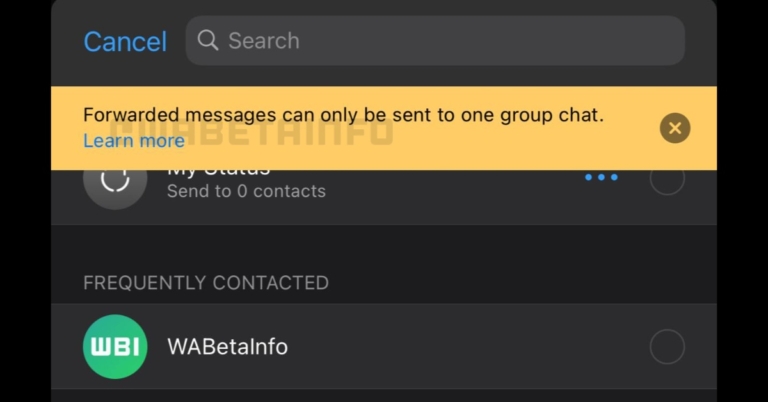
WhatsApp, a super popular instant messaging software for your mobile, is constantly introducing new features and improving the infrastructure to make it more effective and secure for its users. In a new WhatsApp Update, Message forwarding on the app is now subject to a new limitation imposed by the corporation. Users on Android and iOS will be unable to send a message to several groups. The latest change on WhatsApp beta for Android and iOS was discovered by WhatsApp tracker WABetaInfo. The outlet also published screenshots of the feature, which show a warning that shows when users try to forward a message to numerous group chats. Read also: WhatsApp starts limiting forward messages to 5 chats globally WABetaInfo discovered the limit in WhatsApp Beta version 2.22.7.2 for Android last month. It appears that the Meta-owned social networking platform is now testing it on beta versions of the iOS app.
WhatsApp update new
Image: WABetainfo
WhatsApp beta versions 2.22.7.2 for Android and 22.7.0.76 for iOS have the new feature. According to the screenshots provided by WABetaInfo, after a message has been labelled as forwarded, it can no longer be forwarded to more than one group. If a user attempts to forward a message that has already been forwarded to another group, an alert will appear stating, “Forwarded messages can only be sent to one group chat.” If you still need to forward the message to another group, you will have to do so manually for each individual group. WABetaInfo points out that the new restriction takes effect even if the messages are simply forwarded once. Users on Android and iOS can currently forward messages to up to five recipients at once. Also Read: WhatsApp is said to be working on password-protected encrypted For the lesser-known, in 2018, WhatsApp reduced the number of people to whom a user could transmit a message to just five. This effort started in India and was rolled out globally in January 2019. This comes just a few days after WhatsApp’s Android version was updated with additional voice messaging features. The six new features added to WhatsApp voice notes are draught preview, the ability to pause/resume the message, and out of chat playback, which is another name for the global voice note player. WhatsApp is also introducing resume playback for voice notes and waveform visualisations. The new WhatsApp update might just roll out on both Android and iOS in the coming weeks. Will it be a good way to curb misinformation on WhatsApp? Well, only time will tell. For the latest gadget and tech news, and gadget reviews, follow us on TwitterFacebook and Instagram. For newest tech & gadget videos subscribe to our YouTube Channel. You can also stay up to date using the Gadget Bridge Android App. You can find the latest car and bike news here.

Amazon Quiz Answers Today 5 April 2022: Participate to win Rs 30,000

Daily Amazon brings a fresh quiz for its customers with exciting rewards on its platform. The Amazon quiz can be played every day from 12 AM to 11:59. 5 April 2022 Amazon Quiz has gone live on its platform and the e-commerce platform Amazon is today giving you a chance to win Rs 30,000 Amazon Pay Balance. To participate all you need to do is log in to your Amazon app on your device and give answers. Daily a new set of questions are presented to the participants which gives them a chance to win exciting prizes. The questionnaire consists of five easy questions that are usually based on general knowledge and current affairs. You can submit the correct answers and can win an Amazon Pay Balance of up to Rs 50,000. It should be noted that the quiz is not accessible on the web platform instead you have to participate only through the dedicated app. After clearing the daily quiz the participants will be shortlisted for a lucky draw to select a winner. The results will be announced at the end of the month. To increase your chances of winning, Gadget Bridge updates all the answers so that you can win the reward. Check out today’s answers for Amazon Quiz to win Rs 30,000 Amazon Pay Balance. Amazon Quiz Today Prize – Rs 30,000 Amazon Pay Balance Quiz Date – 5 April 2022 Daily Timing – 12 AM to 11:59 PM Winner Announcement – Today 12 PM

Amazon Quiz Answers Today 5 April 2022

Question 1: Atharva – Which pair recently became India’s first to reach the semis of the All England Badminton Championships in Women’s Doubles?

Answer: Treesa Jolly and Gayatri Gopichand

Question 2: Who is the director of the movie ‘Kashmir Files’ which has been in the news?

Answer: Vivek Agnihotri

Question 3: Russia recently revealed that it used a ______ missile in Ukraine called Kinzhal. Fill in the blanks

Answer: Hypersonic

Question 4: This is the flag of which country?

Answer: Iran

Question 5: What is the name of this tradition of serving carefully cut raw meat as food in Japan?

Answer: Sashimi

How To Play Amazon Quiz

Only app users are eligible to play the Amazon quiz every morning from 12 AM to 11:59 PM. The quiz is not available on the desktop. For those who are unaware of how to play the Amazon quiz below are the steps, you can follow to take the quiz.
  • Firstly download the Amazon app from Google Play Store or App Store
  • Now fill in the required information through the Sign Up option.
  • You need to log in to the Amazon app and scroll down on the home screen to find the Amazon Quiz banner.
  • Tap on the Amazon Quiz banner and tap on the Start button to start the Quiz.
  • Now you will get 5 questions and you need to answer them correctly. One wrong answer will eliminate you from the Quiz.
  • After answering all the questions correctly you are now eligible for a Lucky Draw.
  • The winner’s name will be announced today at 12 PM.
For the latest gadget and tech news, and gadget reviews, follow us on TwitterFacebook and Instagram. For newest tech & gadget videos subscribe to our YouTube Channel. You can also stay up to date using the Gadget Bridge Android App. You can find the latest car and bike news here.

Boult Audio AirBass ENCore X with a total of up to 30 hours of playtime launched in India

Indian audio brand Boult has announced the launch of its new TWS earphones in the market today. The Boult Audio AirBass ENCore X true wireless stereo earphones have touch-sensitive controls and provide environmental noise cancellation (ENC). These also have support for the voice assistants Siri and Google Assistant and can last up to 30 hours.

Boult Audio AirBass ENCore X price in India and availability

Boult Audio AirBass ENCore X price in India has been set at Rs 1,799 for a very limited time. The TWS earphones will be available in two colour options of Black and White. In terms of availability, the earbuds will be available for purchase beginning April 8 via Boult’s official site and Amazon in the country. The audio device comes with a standard industry warranty of 1 year. Boult Audio AirBass ENCore X price in India and availability

Boult Audio AirBass ENCore X specifications

The Boult Audio AirBass ENCore X has an angled bud with extra-soft silicone tips for added comfort while using it for long periods of time. The body is made of a high-quality ABS shell with a premium finish that protects it from water and sweat. So don’t let the rain or sweat stop you from going outside. The earbuds are touch-sensitive and can be used to adjust the volume, change tracks, answer calls, or command your voice assistant right from your fingertips. The all-new ‘ENCore X’ from Boult Audio features Environmental Noise Cancellation and a Pro+ calling experience with a Quad Mic setup. The ENCore X is equipped with Bluetooth 5.1 wireless connectivity, which ensures quick pairing and strong signals over a greater distance from the source. The device is water-resistant to IPX5 standards and can be used both outdoors and in the gym. After successful pairing, these earbuds can be used separately as a monopod or in stereo mode with both earbuds. The latest Bluetooth technology in the Boult Audio AirBass ENCore X not only speeds up pairing and ensures stable connectivity over longer distances, but also saves power. The carrying case can charge the earbuds four times more, giving them a total playtime of up to 30 hours. The earphones are said to provide a total of 100 minutes of playback time in just 10 minutes of charging. The device is packed with features like Type-C fast charging ensuring that the buds are fully charged in no time, allowing you to get on with your day as soon as possible. For the latest gadget and tech news, and gadget reviews, follow us on TwitterFacebook and Instagram. For newest tech & gadget videos subscribe to our YouTube Channel. You can also stay up to date using the Gadget Bridge Android App. You can find the latest car and bike news here.

10 Essential Apps To Install First On Your New Windows Laptop

Getting a new laptop is exciting, no doubt. However, downloading all the required applications and transferring data to make it ready for use is quite a tedious process. New laptops, which may come with a new OS, may or may not have certain apps pre-installed in them that you may be accustomed to using. And in case you lose track of some of them during the setting up process, we are here to assist you with the same. Here are the top 10 essential apps we recommend you to install first on your new Windows laptop, for its smooth and efficient functioning. 

Google Chrome

Google Chrome- 10 Essential Apps To Install First On Your New Windows Laptop The first one to be on top of our list of the 10 essential apps to install first on your new windows laptop had to be Google Chrome. Windows OS does not come pre-installed with Google Chrome in it. Even the latest Windows 10 and 11 come with Microsoft Edge as their default browser. Considering its efficiency, speed, vast network and features like cross-platform syncing across all your devices, Chrome still is the number one choice of most web users.  Download from here. 

Spotify

Spotify-10 Essential Apps To Install First On Your New Windows Laptop Why should listening to music be limited to only smartphone devices? Spotify’s desktop version is the perfect music application for you if you are a music enthusiast and often work on your laptop while listening to music. Spotify’s intelligent algorithms identify your taste in music according to your listening preferences, frequency and more factors, and in turn provide a range of services based upon the same, such as customised playlists, albums, podcasts, and much more. Moreover, Spotify’s desktop app is considered better than its web player. So why not give it a try? Download from here. Read also: Spotify Web Player: How To Best Access And Use All Its Features

Adobe Lightroom

Adobe Lightroom-10 Essential Apps To Install First On Your New Windows Laptop Coming third in our list of the top 10 essential apps to install first on your new windows laptop is Adobe Lightroom. One of the best apps for photo editing, Adobe Lightroom is not just for professionals but is also beginner-friendly. One can easily arrange and enhance their images by editing in lightroom. It allows you to control everything from the basic photo correction to advanced colour grading needed in your captures via the various tools and features it provides.   Download from here. 

7Zip

7Zip We’re sure this one also everybody will agree on. A zip file extractor is a must on every system! Windows is not said to natively support zip files, and Winrar can only do so much without a full subscription. However, 7zip is a free open source software that is even better for accessing RAR files and works just like Winrar.   Download from here.  Read also: Top 5 Best Free Benchmark Apps for Android 2022

AntiVirus

AntiVirus-10 Essential Apps To Install First On Your New Windows Laptop The fifth on our list of the top 10 essential items to install first on your new windows laptop is an antivirus package. Just like humans need doctors for their health checkups, laptops need antivirus programs to keep their health in line, i.e., keep the system free from any kind of virus or malware attacks so that it runs efficiently. There are many antiviruses available in the market, like McAfee, Kaspersky, etc.   Download from here.

VLC Media Player

VLC Media Player-10 Essential Apps To Install First On Your New Windows Laptop VLC is a popular media player application, that supports a wide range of file formats and offers many plugins to further customise it, therefore making for an ideal application recommendation. Moreover, it is completely free to use and is totally ad-free.  Download from here.

IObit Driver Booster

IObit Driver Booster Up-to-date drivers are key to the smooth functioning of your system. Outdated drivers can cause a lot of trouble and affect the performance of your laptop, as a result of which you have to then take out time and figure out the issue behind the problem, which actually is all because of the device drivers acting up. Hence, for checking whether your system has the latest drivers, driver booster softwares like IObit are available. Download from here.

GeekBench 5 Benchmarking 

Geekbench 5 For Windows Benchmarking Next on our list of the top 10 essential apps to install first on your new Windows laptop is this one. In order to thoroughly test the performance of your system, Geekbench 5 is one of the best benchmarking apps and can be used not only for Windows but also on macOS, iOS, Android and Linux. It provides a CPU Benchmark module, which tests your CPU’s single-core and multi-core performance. Its Compute Benchmark module helps test your GPU’s performance, thus determining your system’s gaming, image processing and video potential. Not only that, but it also is able to compare the performance of your device to the newest devices on the market.  Download from here.

Video Calling Apps

Zoom Video Call Needless to say, video calling apps have become one of the most essential to have in your pocket, especially after the COVID-19 pandemic. With offices now having happily adopted the work from home culture, video conferences have become crucial for keeping a touch base. Hence, apps like GoogleDuo and Zoom become permanent members of your Windows family of apps.  Download from here

Flashback Express Screen Recorder

Flashback Express Screen Recorder The final item on our list of the top 10 essential items to install first on your new windows laptop comes right in the support of video calling apps that we suggested. Now, suppose you’re on an official video conference and are required to record your meeting for future reference. What will you do? Yes, that’s exactly where screen recording apps like Flashback Express come in handy. It allows you to record your partial or entire screen, trim your recording, and add captions, commentary and images. You can save your recording as an MP4, AVI or WMV file. Moreover, the Express edition of Flashback is completely free to use.  Download from here. So those were our top picks for the 10 most essential apps to install first on your new windows laptop. In case your essentials are different from the ones mentioned above, we would love to hear about them in the comments section below.  For the latest gadget and tech news, and gadget reviews, follow us on Twitter, Facebook and Instagram. For newest tech & gadget videos subscribe to our YouTube Channel. You can also stay up to date using the Gadget Bridge Android App. You can find the latest car and bike news here.

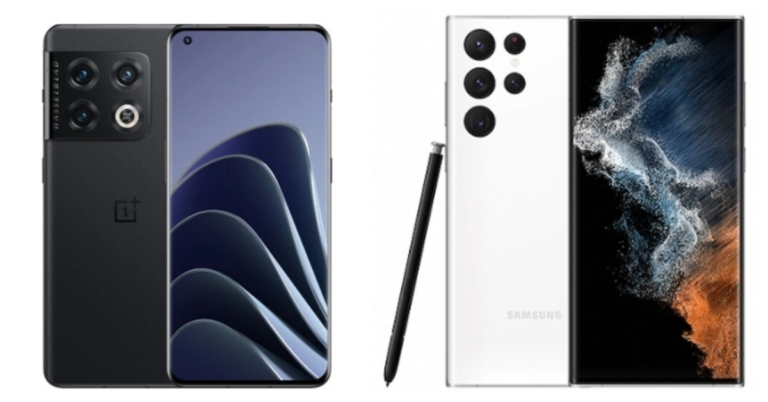
Comparison: OnePlus 10 Pro Vs Samsung Galaxy S22 Ultra

In India, OnePlus recently unveiled its most anticipated flagship smartphone, the OnePlus 10 Pro. The device is loaded with premium features and costs less than other flagships such as the Samsung Galaxy S22 Ultra and the iPhone 13. Our OnePlus 10 Pro vs iPhone 13 comparison is already live on our website. So we’ve pitted the OnePlus 10 Pro against the Samsung Galaxy S22 Ultra to see which offers the most features for the best price. 

Display

OnePlus 10 Pro: 6.7-inch QHD+ curved LTPO display Samsung Galaxy S22 Ultra: 6.8-inch Edge QHD+ Dynamic AMOLED 2X display

Processor

OnePlus 10 Pro: Snapdragon 8 Gen 1 SoC Samsung Galaxy S22 Ultra: 4nm Exynos 2200 or Snapdragon 8 Gen 1 chipset

Rear camera(s)

OnePlus 10 Pro: Triple rear camera array for photos and videos, which includes a 48-megapixel Sony IMX789 main sensor with f/1.8 aperture and optical image stabilisation (OIS). The camera configuration also includes a 50-megapixel Samsung ISOCELL JN1 ultra-wide sensor with an f/2.2 aperture and an 8-megapixel telephoto lens with OIS. Samsung Galaxy S22 Ultra: A quad rear camera configuration with a 108-megapixel wide-angle sensor (f/1.8 aperture). In addition, the smartphone has a 12-megapixel ultra-wide-angle camera, 10-megapixel telephoto camera (3x optical zoom) and 10-megapixel telephoto camera (10x optical zoom).

Selfie camera

OnePlus 10 Pro: 32-megapixel Sony IMX615 camera sensor Samsung Galaxy S22 Ultra: 40-megapixel camera sensor with an f/2.2 aperture lens

RAM and storage

OnePlus 10 Pro: 8GB RAM with 128GB storage and 12GB RAM with 256GB storage Samsung Galaxy S22 Ultra: 12GB RAM with 256GB storage, 12GB RAM with 512GB storage, 12GB RAM with 256GB, 12GB RAM with 512GB and 12GB RAM with 1TB storage options.

Battery

OnePlus 10 Pro: 5,000mAh dual-cell battery Samsung Galaxy S22 Ultra: 5,000mAh battery

Operating system

OnePlus 10 Pro: ColorOS 12.1 runs on top of Android 12 Samsung Galaxy S22 Ultra: Android 12 with One UI 4.1 on top

Starting Price

OnePlus 10 Pro: Rs 66,999 Samsung Galaxy S22 Ultra: Rs 1,09,999

Our Take

The display on the OnePlus 10 Pro is slightly smaller than that on the Samsung Galaxy S22 Ultra. Both devices have a QHD+ AMOLED display with a 120Hz refresh rate on both. In countries other than India, the S22 Ultra is equipped with a Snapdragon 8 Gen 1 processor, but in the United States, it is equipped with an Exynos 2200 processor. The OnePlus phone, on the other hand, is equipped with a Snapdragon 8 Gen 1 processor, which is more efficient, but Samsung’s handset has more storage options than its competitor. The S22 Ultra’s 108MP primary sensor clearly outperforms the OnePlus 10 Pro’s 48MP main sensor. However, we would like to point out that higher resolution does not always imply better images. OnePlus, on the other hand, has a 50MP ultrawide angle sensor as well as an 8MP telephoto sensor. Samsung, on the other hand, has a 12MP ultra-wide lens and a 10MP telephoto lens. Both are IP68 certified and are water and dust resistant. Both devices are missing the headphone jack and the microSD card slot. The OnePlus phone has a signature alert slider, whereas the Galaxy has an S Pen. Both of these smartphones have 5,000mAh batteries and will last longer. However, when it comes to charging, the OnePlus takes the lead because it comes with a charger, which the Galaxy does not. Both of these phones come with Android 12 pre-installed, but OnePlus’ OxygenOS offers a close to stock Android experience. In our opinion, the OnePlus 10 Pro is a promising Android smartphone that can compete with most flagships. It’s also worth considering because the device has top-of-the-line specifications for the price. As a result, it’s a tie between both handsets. You can select any of them based on your preferences and pricing considerations. Please let us know which one you prefer in the comments section. For the latest gadget and tech news, and gadget reviews, follow us on TwitterFacebook and Instagram. For newest tech & gadget videos subscribe to our YouTube Channel. You can also stay up to date using the Gadget Bridge Android App. You can find the latest car and bike news here.

WhatsApp’s Restrictions on Forwarded Messages Are Getting Tougher: Report

WhatsApp is constantly working on new features to enhance the user experience on its platform. Recently, the instant messaging app was seen experimenting with new features allowing users to get rid of WhatsApp’s forwarded messages. The corporation is now claimed to be working on eliminating the hassle of forwarded messages in group chats in order to prevent users from spreading false information. If you’re interested in learning more about how this new feature will work, continue reading. On WhatsApp beta for Android and iOS, new restrictions are now available when forwarding forwarded messages to other group chats. It appears to be aimed at preventing users from forwarding messages to more than one group chat at a time.  Previously, the Meta-owned messaging app had a limit of five individual chats for sharing forwarded messages. According to WABetaInfo, WhatsApp users will be allowed to only forward one message to one group chat at a time with this update. A screenshot has also been shared which shows forwarding forwarded messages to more than one group chat at a time is no longer possible, which is another way to reduce spam and misinformation. This means if you forward a message to a group chat, you can’t send it to other chats at the same time.  If you want to forward this message to more than one group chat, you’ll have to select it separately for each one. The new rules for forwarding messages only apply to messages that have already been forwarded. If you consider sending messages to even more than one chat at the same time a message will appear from WhatsApp stating that the forwarded message can be sent multiple times in the same group chat. According to the report, the new restriction has already been rolled out to a select group of Android beta testers, but WhatsApp is now making the same restriction available to all users who download the latest WhatsApp beta for Android 2.22.8.11 update, and more people will be affected in the coming weeks. For the latest gadget and tech news, and gadget reviews, follow us on TwitterFacebook and Instagram. For newest tech & gadget videos subscribe to our YouTube Channel. You can also stay up to date using the Gadget Bridge Android App. You can find the latest car and bike news here.

How to share videos on Snapchat via YouTube App on Android and iOS

Snapchat recently rolled out a new update for both Android and iOS. The latest Snapchat update brings the ability to share YouTube videos eliminating the need for tedious copying and pasting. If you are an avid user of the photo-sharing platform then you might be interested in knowing how to share YouTube videos on Snapchat. So here is our step by step guide on how you can use the feature. While announcing the feature Snapchat said, “Starting today, all Snapchatters across iOS and Android can seamlessly share their favourite YouTube videos with their friends straight through the Snapchat Camera – no more pesky copying and pasting required!” Snapchat users will now be able to share videos directly from the YouTube app, therefore, removing the need for users to manually copy and paste video links into the content. Snapchatters on iOS and Android can now share their favourite YouTube videos with their friends directly from the Snapchat Camera. YouTube viewers can send their favourite clips and videos right where they’re already conversing with their friends on Snapchat with this new integration. For the first time, YouTube links can be visually shared to Snapchat Stories and one-on-one Snaps while still having access to the Camera and the full suite of Snapchat Creative Tools for self-expression. Snapchatters can use the tappable YouTube stickers to go straight to the video in the YouTube app or their preferred mobile browser. Here is how to share YouTube videos on Snapchat?

Here is how to share YouTube videos on Snapchat?

  • Select a video to watch in the YouTube app.
  • To access the Snapchat Camera, first tap “Share,” then tap the “Snapchat” icon.
  • From there, create an original Snap with the automated YouTube sticker, and layer on using any of the creative tools.
  • To view the video in their YouTube app or default mobile browser, friends simply tap the YouTube Sticker.
For the latest gadget and tech news, and gadget reviews, follow us on TwitterFacebook and Instagram. For newest tech & gadget videos subscribe to our YouTube Channel. You can also stay up to date using the Gadget Bridge Android App. You can find the latest car and bike news here.

How To Check Screen Time On iPhone?

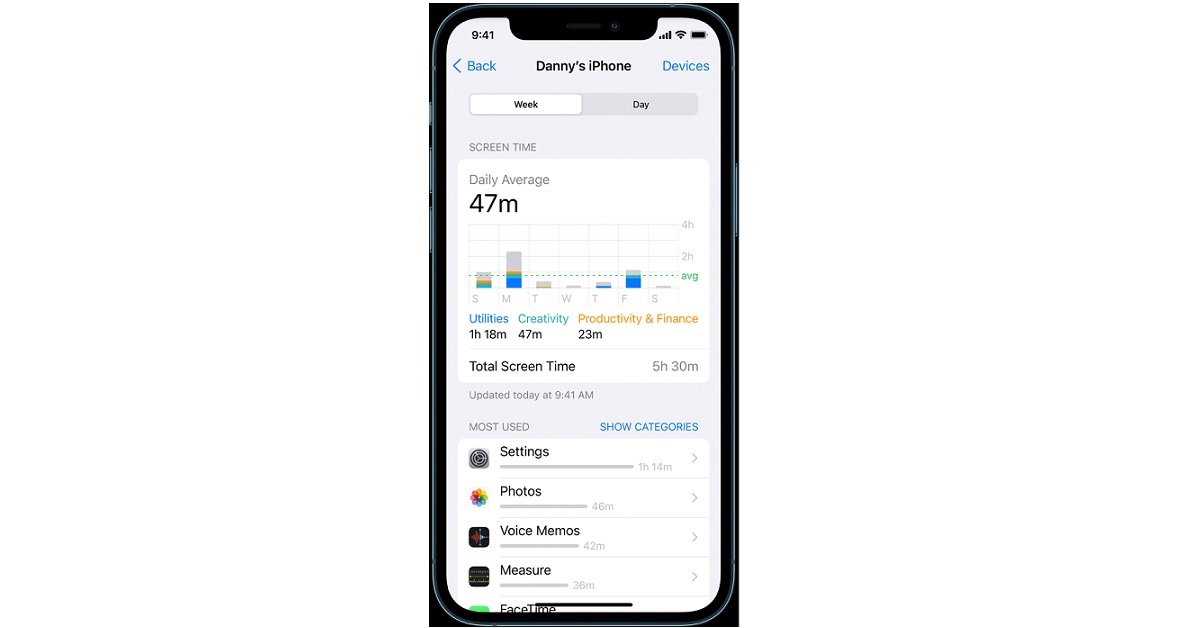
If you’re scratching your head thinking about how to check your screen time on your iPhone, let us assure you that we are right here for your assistance. Just like the Digital Wellbeing feature available on Android smartphones, iPhones also provide you with the option to keep a record of how much time you and your family members spend on your devices, the apps you use most frequently, how often you pick up your device and much more. The Screen Time feature of iPhones helps you monitor your iPhone usage and take appropriate action to improve your digital well being, like scheduling some time away from your screen, limiting your app usage, etc. Below is a step-by-step guide for you on how to check your screen time on your iPhone Read also: How To Check Screen Time On Android?

Turn On Screen Time 

Unlike in Android, you have to first turn on Screen Time before you can view your device and app usage.  Step 1: Go to Settings > Screen Time Step 2: Tap Turn on Screen Time and then tap on Continue. Step 3: Tap on This is My iPhone if you’re setting up Screen Time for yourself. If you’re setting up the same for monitoring your child’s or any other family member’s usage, tap on This is My Child’s iPhone. That’s it! In case you want to use Screen Time on all your Apple devices, you can turn on the Share Across Devices option by scrolling down from Step 3.  Read also: How To Start Or Stop Screen Recording On A Mac?

View Your Screen Time Report

How To Check Screen Time On iPhone? After turning on Screen Time on your Apple device, you can then view detailed usage metrics, both on a daily and weekly basis, including the apps you spend most of your time on and by how much, the apps that send you the maximum number of notifications and much more. You can also add a widget to your home screen in order to keep a track of your smartphone usage right from your home screen. For the latest gadget and tech news, and gadget reviews, follow us on Twitter, Facebook and Instagram. For newest tech & gadget videos subscribe to our YouTube Channel. You can also stay up to date using the Gadget Bridge Android App. You can find the latest car and bike news here.

Amazon Quiz Answers Today 4 April 2022: Participate to win Rs 1,000

4 April 2022 Amazon Quiz is now live. Today the e-commerce platform is offering Rs 1,000 Amazon Pay Balance to the winner of the quiz. The quiz is accessible from 12 AM to 11:59 PM. To participate in today’s Amazon quiz all you need to do is log in to your Amazon app on your smartphone as the quiz is not accessible on the web platform. Every day Amazon brings a fresh questionnaire that consists of five easy questions that are usually based on general knowledge and current affairs. You have to submit the correct answers and can win an Amazon Pay Balance of up to Rs 50,000. One should also note that the winners are announced through a lucky draw. In order to enter into the lucky draw, the participants have to give all the correct answers to the five-question as one of the wrong answers will eliminate you from the quiz. The participants will be shortlisted for the lucky draw and the results will be announced at the end of the month. Amazon Quiz Today Prize – Rs 1,000 Amazon Pay Balance Quiz Date – 21 March 2022 Daily Timing – 12 AM to 11:59 PM Winner Announcement – Today 12 PM

Check out today’s Amazon Quiz answers to win Rs 1,000 Amazon Pay Balance.

Question 1: Volodymyr Zelenskyy, in the news these days, is the President of which country?

Answer: Ukraine

Question 2: Who was the Man of the Series in the recently concluded Test series between India and Sri Lanka?

Answer: Rishabh Pant

Question 3: The recent movie Gangubai Kathiawadi shows a meeting between the titular character and which Indian Prime Minister?

Answer: Jawaharlal Nehru

Question 4: This letter confirming Harry Potter’s admission to Hogwarts was sent through which animal?

Answer: Owl

Question 5: Name this Greek god who controls the sea.

Answer: Poseidon

How To Play Amazon Quiz

Only app users are eligible to play the Amazon quiz every morning from 12 AM to 11:59 PM. The quiz is not available on the desktop. For those who are unaware of how to play the Amazon quiz below are the steps, you can follow to take the quiz.
  • Firstly download the Amazon app from Google Play Store or App Store
  • Now fill in the required information through the Sign Up option.
  • You need to log in to the Amazon app and scroll down on the home screen to find the Amazon Quiz banner.
  • Tap on the Amazon Quiz banner and tap on the Start button to start the Quiz.
  • Now you will get 5 questions and you need to answer them correctly. One wrong answer will eliminate you from the Quiz.
  • After answering all the questions correctly you are now eligible for a Lucky Draw.
  • The winner’s name will be announced today at 12 PM.
For the latest gadget and tech news, and gadget reviews, follow us on TwitterFacebook and Instagram. For newest tech & gadget videos subscribe to our YouTube Channel. You can also stay up to date using the Gadget Bridge Android App. You can find the latest car and bike news here.